#archived-code-general
1 messages · Page 252 of 1
 hard viper
i’d call it a chemistry platformer
right now, I see the responsibilities, and I’m trying to untangle this mess that I made when I first started following a tutorial last June
i don’t have need for any state machines, as this should be doable with very pure functional programming. but I had originally followed a very OOP-heavy tutorial when constructing that, which has a fuckload of variables and mutation, to keep function signatures with 0-1 arguments
 slim spruce
it doesn't seem to log anything besides the BeforeSplashScreen callback. would it help to paste the logcat-logs here?
most relevant warning to my eyes is this one;
2024-01-12 21:11:35.071 2541 3001 Warn ziparchive Unable to open '/data/app/~~qMbf4xGzwiCI2klyVZ_JcQ==/com.SOULMATES.SoulMates-x1lfrNmkON4fbu9F86_d-Q==/base.dm': No such file or directory
 heady iris
ah, that is alarming...
 glacial linden
This is kinda dumb right? I was thinking to use this as an abstract class then certain behaviors would be able to add or remove themselves.

 lean sail
glacial linden
This is kinda dumb right? I was thinking to use this as an abstract class then c...
lean sail
glacial linden
This is kinda dumb right? I was thinking to use this as an abstract class then c...
What part of this is actually needed for an abstract class? You already have access to the messages so most of this isnt needed
 reef garnet
Hi I'm working on the grounding for a rolling ball game where gravity can dynamically shift to any direction:

This is the best implementation I've been able to think of but don't know how to go about generating the conical cast/collider
- The cone will always follow the gravity vector
- I'd like the cones height and radius to be adjustable but this isn't a must have feature
Is there any way to make maybe a circular Frustum or to separate a part of a sphere collider? If all else fails I'll look into generating a mesh but would like to find a Spherecast equivalent if one exists
glacial linden
lean sail
What part of this is actually needed for an abstract class? You already have acc...
What do you mean? Like its all useless or it just shouldn't be an abstract? Or all?
 leaden ice
reef garnet
1. The cone will always follow the gravity vector
2. I'd like the cones height a...
leaden ice
reef garnet
1. The cone will always follow the gravity vector
2. I'd like the cones height a...
use CircleCast/SphereCast. Then just check the angle between the direction to the hit point and straight down and make sure it's less than the cone angle
that's not really a cone btw, more of an arc
leaden ice
Spherecast then - but it's a spherical segment still. A cone wojuld have a flat base
reef garnet
leaden ice
Spherecast then - but it's a spherical segment still. A cone wojuld have a flat ...
fair enough, I am out geometried once again
reef garnet
leaden ice
Spherecast then - but it's a spherical segment still. A cone wojuld have a flat ...
so If I'm understanding right, basically spherecast around the whole ball and use a dot product or something between the gravity and ground vectors to check if it is in the cone?
 deft dagger
hello guys, im using the unity free assets third person controller on android. but the ui controllelr camera movement is way too fast. how can i slow it down ?
leaden ice
reef garnet
so If I'm understanding right, basically spherecast around the whole ball and us...
no, not "around the whole ball". Straight down in the gravity direction
do you understand the difference between a cast and an OverlapSphere?
reef garnet
ah right I was confusing the two
lean sail
glacial linden
What do you mean? Like its all useless or it just shouldn't be an abstract? Or a...
Think of the whole update part, why do you need an on update event when any other code can just do
void Update() {} and have access to update.
Same logic can be applied to the other events
glacial linden
lean sail
Think of the whole update part, why do you need an on update event when any othe...
I understand. I'm not sure when this would even happen, but what if the thing I want to subscribe to isn't a monobehavior?
 round violet
from a namespace, can i get all added attributes & classes ?
i got a plugin but there is no documentation so idk what there is except what is on the samples
leaden ice
round violet
from a namespace, can i get all added attributes & classes ?
i got a plugin but ...
In your IDE in a function if you just start typing TheNameSpace. it should autocomplete for you.
But also the source code should all be there. I'd imagine the plugin must have documentation somewhere too
round violet
leaden ice
In your IDE in a function if you just start typing `TheNameSpace.` it should aut...
i'll try ty
in the source code there is a lot of files, hard to find what is really open to use for me
leaden ice
round violet
i'll try ty
in the source code there is a lot of files, hard to find what is re...
If there's really that much it definitely has documentation
reef garnet
leaden ice
Spherecast then - but it's a spherical segment still. A cone wojuld have a flat ...
Ok so what you're saying is something like this then right, get the first point of contact when it collides with a ground layer and check the angle between that direction and the Gravity Vector
 leaden ice
reef garnet
Ok so what you're saying is something like this then right, get the first point ...
leaden ice
reef garnet
Ok so what you're saying is something like this then right, get the first point ...
yes
Well tbh I'm not sure what you're trying to find out with this
but I think it follows what you were asking above
reef garnet
basically cuz gravity can change I need a dynamic way to detect ground for when I want to jump
This is the method I came up with and was doing research on it, I was hoping for a solution that would stick to the sphere segment but spherecast works perfecly fine
 leaden ice
So this is just a grounded check?
reef garnet
pretty much but I will also be using the vectors to calculate jump direction
leaden ice
Do you want the jump direction to be based on the surface normal? I don't think you even need any of the angle stuff
just a spherecast in the gravity direction and use the normal of the RaycastHit as the jump direction
reef garnet
it depends on the slope and the gravity direction
if Gravity is straight down and the player is on a 70 degree incline you shouldn't be able to jump
leaden ice
got it, so yeah then you can do the angle thing
reef garnet
thanks for the help
lean sail
glacial linden
I understand. I'm not sure when this would even happen, but what if the thing I ...
Then you might wanna reconsider your structure. I cant really imagine a scenario where you NEED an object to not be a monobehaviour, have access to the update loop, and also subscribe itself to a monobehaviours update loop. This doesnt even really make sense. How would you invoke these events if it wasnt a mono? You can manually call your update method from a different monobehaviour script, but what you're currently doing is just not needed.
It doesnt make sense for a poco to subscribe itself to a mono anyways, because 1 how will you find the component and subscribe, 2 the poco is gonna have to live as a field on a mono or else it wont exist. The mono has access to the poco, so just manually call the methods
deft dagger
hey guys i have this code for changing characters in relay, but i cant seem to make it change the character in everyones screen. like for example if there are 2 clients they see eachother as the base character and dont change but the clients see the change in the server, and the server sees the change in the cllients.
how can i fix it ?
 somber nacelle
!code
also #archived-networking
 tawny elkBOT

Posting code
📃 Large Code Blocks
Use links to services like:
https://gdl.space/, https://paste.ofcode.org/, https://hatebin.com/, https://paste.myst.rs/, https://hastebin.com/
📃 Inline Code
Surround code with three backquotes. Not quotation marks.
To format as C#, add cs to the first line:
```cs
// Your code here
```
Add a comment with a line number if there is an error message.
round violet
whats the difference and general usecase of using a class or a struct to make nested dicts
what are the pros & cons
leaden ice
round violet
whats the difference and general usecase of using a class or a struct to make n...
do you know the difference between reference types and value types?
deft dagger
!code
tawny elkBOT
Posting code
📃 Large Code Blocks
Use links to services like:
https://gdl.space/, https://paste.ofcode.org/, https://hatebin.com/, https://paste.myst.rs/, https://hastebin.com/
📃 Inline Code
Surround code with three backquotes. Not quotation marks.
To format as C#, add cs to the first line:
```cs
// Your code here
```
Add a comment with a line number if there is an error message.
round violet
leaden ice
do you know the difference between reference types and value types?
well, some are reference (class i suppose ?) so if you edit them it edits the source
structs are not referenceable ? in UE they are
tell me if i missunderstood your message
after some readin i understand more their difference.
i guess i'll use class and see if i dont run into an issue
lean sail
round violet
after some readin i understand more their difference.
i guess i'll use class and...
If you describe your use case, itll be easier to suggest something. Generally nested dictionaries are a bad sign
Should be pretty rare to actually need one
round violet
im using a csv to read it and building a dict
i finished everything, but default unity dicts arent serializable, so i got to change that

my goal is to get the % (int) from two params (same enum)
also why are nested dict bad ?
i used tons of time nested list and/or dict, very usefull (in c# and other languages)
lean sail
round violet
im using a csv to read it and building a dict
i finished everything, but defaul...
You dont need a nested dictionary. You could even store this in a 2d array, but then you need to possibly use an enum (or some other convention) to look up these based on the name.
For a dictionary you can just use a class (or struct) for the key, that class can contain the column and row name
leaden ice
round violet
well, some are reference (class i suppose ?) so if you edit them it edits the so...
classes are reference types. WHen you have a class variable you have a reference to that object. structs are value types. When you have a struct variable you have the entirety of the data right there in the varible itself
But yeah why do you need a nested dictionary?
nested dictionary is very wasteful when you can just use a single Dictionary.
If you want a dictionary for this table that's just a single dict. You can just use a tuple (or custom struct) of the pair of those enums as the key type
round violet
lean sail
You dont need a nested dictionary. You could even store this in a 2d array, but ...
why i didnt do that:
2d arrays are worse than jagged array in performance
with array, i will have to search all items until i found what i want , with dicts its just a key
i will use a class as value of a dict
leaden ice
e.g.
Dictionary<(LootType, LootType), float>```could you give an example ?
lean sail
round violet
why i didnt do that:
2d arrays are worse than jagged array in performance
with a...
You really just compared 2d array performance to jagged array, after saying you want a nested dictionary
round violet
leaden ice
e.g.
```cs
Dictionary<(LootType, LootType), float>```
perfect
lean sail
It doesnt even have to be a tuple, could be class or struct but all of them work
Class actually would be a little silly here
round violet
lean sail
You really just compared 2d array performance to jagged array, after saying you ...
i think getting 2 keys in a dict is better than iterating through all array
 indigo drift
Can you add methods with parameters to Unity Events? I have one that takes a string I want to add
round violet
if anyone knows some perf testing, please tell me
leaden ice
indigo drift
Can you add methods with parameters to Unity Events? I have one that takes a str...
yep
make it a UnityEvent<string>
lean sail
round violet
i think getting 2 keys in a dict is better than iterating through all array
You can use the profiler to test it. And then you'll run a test on it running 10000x per frame, see a difference (I'm unsure of what itd be exactly).
Then in your game you end up doing this action once per minute
The performance really shouldnt be considered even, use what is easiest. I would do what praetor suggested, as with the 2d array I stated a downside of needing some way to look it up
indigo drift
There’s something that I wanna know because when I add a method in the inspector before playing— like an OnClick event, it doesn’t go away when I use the RemoveAllListeners function. It will only remove methods I add to it during runtime. Is it a different thing or are the inspector added methods just kind of stuck there?
leaden ice
indigo drift
There’s something that I wanna know because when I add a method in the inspector...
You can't remove persistent listeners at runtime
somber nacelle
https://docs.unity3d.com/ScriptReference/Events.UnityEventBase.RemoveAllListeners.html
Remove all non-persistent (ie created from script) listeners from the event.
 knotty sun
Event actions added in the Inspector are considered PermanentListeners and can only be removed in the Inspector
leaden ice
I don't really see a use case for removing persistent listeners at runtime
indigo drift
I have a button I need to add and remove a method from, so that’s why I asked
leaden ice
add and remove it in code
indigo drift
Ya
deft dagger
hello guys, im using the unity free assets third person controller on android. but the ui controller camera movement is way too fast. how can i slow it down ?
leaden ice
deft dagger
hello guys, im using the unity free assets third person controller on android. b...
presumably it has some kind of look sensitivity control
either on the controller script or on the cinemachine virtual camera
deft dagger
leaden ice
either on the controller script or on the cinemachine virtual camera
there is this value in the thirdPersonController script

it becomes like this when i move the joystick to maxright
 leaden ice
expand Body
deft dagger
 leaden ice
deft dagger
leaden ice
deft dagger
ok you'd need to add a look sensitivity to the script then
deft dagger
but what would the value even be ? the camera thing is way too fast.
would it be something like 0.1 or something ?
leaden ice
you'd have to show the code
deft dagger
i think i just need to add a *value that is smaller than 1 here
 leaden ice
yes, in other words - a look sensitivity
deft dagger
leaden ice
yes, in other words - a look sensitivity
yeah, thanks for the help man
 hybrid orchid
would anyone like to review my code? I'd love tips on how to improve as I've only been coding C# about 6 months now (though I come from other languages like Java)
In case it wasn't obvious, that's the script for movement of the player character, including activating animations such as sitting, and actions such as going to sleep
leaden ice
hybrid orchid
would anyone like to review my code? I'd love tips on how to improve as I've onl...
I don't think there's a good reason for any of these variables to be static
leaden ice
Some questionable formatting, e.g.
if (state == 0) {_dayCycleManager.StartCycle();}```
Some wasteful calculations such as:
```cs
_animator.SetBool("isSleeping", (state == 1) ? false : true);```
Which could be:
```cs
_animator.SetBool("isSleeping", state != 1);```
or
```cs
isLocked = (state == 1) ? false : true; ```
Which could be:
```cs
isLocked = state != 1;```Questionable whether you need both of these parameters if they're just opposites:
        _animator.SetBool("isRunning", _isRunning);
_animator.SetBool("isWalking", !_isRunning);```You also seem to be using int in a lot of places where you should just be using bool?
heady iris
so I have a bit of a nuisance here:
I have a few singletons that live in DontDestroyOnLoad. They are supposed to live forever -- created on game start or when first needed, and never destroyed until the game quits.
I just fixed a bug where I forgot to unsubscribe from an event on such a singleton. However, this is now causing a new problem: when the game quits, a component tries to unsubscribe. But the singleton is already destroyed, so the singleton class tries to create a new instance of the singleton.
This makes Unity complain that I created a game object during OnDestroy.
I'm thinking of a few solutions here:
- Have the singleton GameController detect when the game starts quitting and set a static field. When this field is set, the singleton's
Instanceproperty always returns null. This causes a big pile of errors, but the game is quitting, so who cares? - Same as above, but return the reference to the now-destroyed singleton. This is fine as long as I don't need to touch any Unity properties.
- Have individual listeners detect when the game is quitting and decide not to try to unsubscribe when they get destroyed
to be honest, these singletons could just be plain old C# classes if I didn't need to assign some references to assets
dammit, one uses Update
leaden ice
heady iris
so I have a bit of a nuisance here:
I have a few singletons that live in DontDe...
i usually just do cs if (SomeSingleton.Instance) SomeSingleton.Instance.SomeEvent -= MyListener;
heady iris
I guess that works. I do something similar in other situations
like stopping an object from unsubscribing if it was never initialized and subscribed in the first place
 tranquil canopy
Good night everyone... I have one little question related to boxhelps... and if someone could help me i'll really appreciate it: How do I make Right BoxHelp automatically adjust vertically to the size of Left BoxHelp in real time in this case? so that in height the right always measures the same as the left. This is the both boxhelps code https://paste.ofcode.org/rHEZVn9pNbh8KGBgFxnKjB
hybrid orchid
leaden ice
Some questionable formatting, e.g.
```cs
if (state == 0) {_dayCycleManager.Start...
Thanks. I changed the calculations, as for the formatting, i just like to do that to keep it simple so I guess it's just a personal preference, unless you recommend keeping it spaced out.
I do need two parameters though. if i dont have it, it ends in an infinite loop bc there is a difference between walking and running and it needs to know when to idle and when to not idle animation
and im gonna look into state bc i remember there was a reason I made it an int but i cant remember, but now im definitely going to start adding comments everywhere in my code lmao
 vagrant cargo
!code
tawny elkBOT
Posting code
📃 Large Code Blocks
Use links to services like:
https://gdl.space/, https://paste.ofcode.org/, https://hatebin.com/, https://paste.myst.rs/, https://hastebin.com/
📃 Inline Code
Surround code with three backquotes. Not quotation marks.
To format as C#, add cs to the first line:
```cs
// Your code here
```
Add a comment with a line number if there is an error message.
hybrid orchid
nvm i remember now, it's because unity's animation events don't support boolean as a function
heady iris
leaden ice
i usually just do ```cs
if (SomeSingleton.Instance) SomeSingleton.Instance.SomeE...
oh no, it gets worse
so I have Domain Reload disabled for MAXIMUM SPEED
which means all of these static fields are sticking around
if I only create a new instance if the instance field contains a genuine null, and not a destroyed object, then it breaks the second time I play the game
I think I can work around this by recording when the game quits on each singleton and refusing to create a new instance once the game starts ending
I remember Loup talking about this recently
 quick sun
I came across these two errors while making a custom EditorWindow. I am not sure if they are connected but they seem like they could be related and I can not figure out either of them. The errors are always thrown together and they only get thrown the first time the Window is opened after launching unity or recompiling the code. I have tried the solution provided by this thread (https://forum.unity.com/threads/avoiding-you-getting-insane-because-of-invalid-guilayout-state-errors.1429669/) but the errors still happen (I think its because it is happening on GUILayout.BeginVertical(), not GUILayout.EndVertical() so it is still getting run even with the try{}finally{}). Everything still works properly even when the errors get thrown but I would still like to fix them.
Error message 1:
GUI Error: Invalid GUILayout state in ObjectSelectionWindow view. Verify that all layout Begin/End calls match
UnityEngine.GUIUtility:ProcessEvent (int,intptr,bool&) (at /Users/bokken/build/output/unity/unity/Modules/IMGUI/GUIUtility.cs:190)
Error message 2:
ArgumentException: Getting control 1's position in a group with only 1 controls when doing repaint
Aborting
*later in this stack trace is this which says it happens on line 175:
Game.GameManagement.LevelManagement.LevelEditor+ObjectSelectionWindow.DisplayPrefab (System.Int32 i) (at Assets/Scripts/Game/GameManagement/LevelManagement/LevelEditor.cs:175)
Line 175:
GUILayout.BeginVertical(); //the two lines
My code:
https://gdl.space/hematekari.cs
An image of the ObjectSelectionWindow is attached


Unity Forum
Hi
I finally found the reason behind these errors that would pop in one of my assets. I hope this post will save you time and sanity if you encounter...
heady iris
heady iris
I think I can work around this by recording when the game quits on each singleto...
the problem here is that I can't differentiate between "the game is ending!" and "the game is starting!"
This is only a problem in the editor
blarg. i will think about this when i DON'T have a cold
I'll just make the single offending component not try to unsubscribe if the game is already quitting and come back to this one ltaer
somber nacelle
i recently had similar issues with a lazy loading singleton and ended up just not making it lazy loading. though you can do something like give the singleton implementation some method or property that checks if it is null and check that before attempting to unsubscribe
heady iris
ah, that's an idea
I was trying to check if (MySingleton.Instance) was null-y
but that winds up creating an instance!
a separate method would do the trick
perfect, thanks 👍
somber nacelle
another alternative would be to make the event static. of course depending on what the event is used for that may not be ideal, but at least then it wouldn't be tied to the singleton instance
heady iris
true
 graceful patio
when controlling movement (like jumping) is it better to use rigidbody?
 neat shard
i'm working on a webgl game and i was wondering if my webgl game is hosted on the same website as where my user logs in , does that mean any requests the webgl game makes will use the same cookie in the browser automatically?
some solutions suggest to use Application.ExternalCall to get user's information, but i just wanted to confirm if that was unnecceary
 modern creek
I'm experiencing a crash/hang when I hit a breakpoint in visual studio (Unity 2022.3). I think it's related to this: https://forum.unity.com/threads/unity-freezes-on-debugging-with-visual-studio.1244518/
How can I chase down if this is fixed/known/etc? I've checked all the release notes of later releases in 2022.3 but don't see any fixes/mentions of it
Chased down that page and looks like a roughly "known issue". 😦
 cosmic rain
modern creek
I'm experiencing a crash/hang when I hit a breakpoint in visual studio (Unity 20...
cosmic rain
modern creek
I'm experiencing a crash/hang when I hit a breakpoint in visual studio (Unity 20...
Hmm. Seems like something very environment-dependent. Never encountered that issue myself.🤔
cosmic rain
modern creek
https://learn.microsoft.com/en-us/visualstudio/gamedev/unity/troubleshooting/tro...
According to this link it's caused by plugins, which would explain why I never experienced the issue.
Oh, I guess there are more cases
modern creek
Yeah, and I don't have any of those plugins in this project. I do have FMOD in another project but there shouldn't be any crossover or anything
modern creek
cosmic rain
Hmm. Seems like something very environment-dependent. Never encountered that iss...
Yeah, in all my years in Unity and many different project types I've never experienced this either. I've tried all the usual stuff.. restart unity/VS, reboot, regenerate project files, regenerate the entire library etc.. still 100% locks up when it hits a breakpoint of mine.. Doesn't even seem related to the location of the breakpoint.
I did the threaddump thing that microsoft.com page asked for but I can't read this, looks like just a bunch of mscorlib.dll stack traces.. i'll toss it on pastebin if you wanna have a gander
@cosmic rain https://hatebin.com/tfqfsponpz
cosmic rain
modern creek
Yeah, in all my years in Unity and many different project types I've never exper...
Wait, "when it hits a breakpoint"?
When a breakpoint is hit, it naturally freezes the program execution.
Does it not resume, when you press the "resume" button?
modern creek
VS freezes - can't step/break/anything
cosmic rain
aah
modern creek
So.. I start the game (in unity), tab to VS, set a breakpoint, start the debugger process, tab back to unity and do the thing, hear the breakpoint sound (I have my own sound set in the OS) but VS is non-responsive.. and then unity becomes nonresponsive shortly after
It's not even an interesting breakpoint - just a logging call at the beginning of a method I wanted to step through
cosmic rain
Did you try connecting the debugger first, making sure that it's connected correctly and then setting the breakpoint?
modern creek
Yeah
For another client and project, they're on 2021.3 and I have occasional issues connecting (apparently a known-ish? issue) but 2022 and 2023 both seem to connect without any issues, even with multiple instances of unity running
Not the sitch here though, one instance of unity running, one instance of VS running.. pretty vanilla workflow to be honest
I don't even see any stack traces in this from my codebase.. a bunch of IO stuff, perhaps?
But I can't tell if that's a visual studio thing, a mono thing, or a me thing. For what it's worth, the area of code I'm breaking in/around is some file reading stuff, but the breakpoint is way before any file ops, and this works just fine when I'm not in debug mdoe and breaking
 heavy totem
How can I change the direction of the fillAmount so that instead of being, for example, health/maxHealth, it is from top to bottom or the other way around?
 modern creek
1 minus that..?
leaden ice
heavy totem
How can I change the direction of the fillAmount so that instead of being, for e...
On the image change the fill direction
heavy totem
I need the value of life to be 100 to start the fill at the bottom instead of at the top
modern creek
1f - (health/maxHealth)
heavy totem
Thank you very much fixed!
modern creek
Grumble. Can't think of anything else to workaround this issue.. Removed unused packages, rebuilt the library again.. still hangs on hitting a breakpoint. Not even sure what the moving part is since this worked fine for me yesterday and every other day in the past million days. 😐

(visual studio in the background is non-responsive.. can't stop/step/break)
 ashen oyster
My game has a gun that launches the player in the opposite direction they are facing, but it will only do that when the player is in the air. Can anyone help me with this?
 quartz folio
!code
tawny elkBOT
Posting code
📃 Large Code Blocks
Use links to services like:
https://gdl.space/, https://paste.ofcode.org/, https://hatebin.com/, https://paste.myst.rs/, https://hastebin.com/
📃 Inline Code
Surround code with three backquotes. Not quotation marks.
To format as C#, add cs to the first line:
```cs
// Your code here
```
Add a comment with a line number if there is an error message.
 peak pond
im having trouble with this new feature im trying to add to my game, I decided to learn game dev by trial and error, while it's not hte best approach it's what I enjoy doing. But I'm attempting to have this health bar spawn above the rocks in my game. Every time I click a rock it's supposed to shorten the health bar, and when the rock is destroyed so is the health bar. Everything actually functions great, other than the fact that the health bar spawns in the middle of the screen no matter what, and follows me around, I'm assuming it's because it's a UI element, but I don't know how to fix i

game in question
{

    public bool touchingDebris;
    public GameObject healthBarPrefab;
    public GameObject currentHealthBar;
    public int debrisHealth = 10;
    public int maxHealth = 10;
    private int damage = 1;
    public float yOffset;
    // Start is called before the first frame update
    void Start()
    {
        debrisHealth = maxHealth;
    }

    // Update is called once per frame
    void Update()
    {

    }

    private void OnTriggerEnter2D(Collider2D other)
    {
        if (other.transform.tag == "Player") {

            touchingDebris = true;

        }
    }

    private void OnTriggerExit2D(Collider2D other)
    {
        if (other.transform.tag == "Player")
        {

            touchingDebris = false;

        }
    }


    public void TakeDamage(int damage)
    {
        debrisHealth -= damage;
        if (currentHealthBar != null)
        {
            float healthPercentage = (float)debrisHealth / maxHealth;
            currentHealthBar.transform.GetChild(0).localScale = new Vector3(healthPercentage, 1, 1);
        }
        if (debrisHealth <= 0)
        {
            Destroy(this.gameObject);
        }

    }

    private void OnMouseDown()
    {

        if (touchingDebris)
        {
            TakeDamage(1);
            if (currentHealthBar == null)
            {
                currentHealthBar = Instantiate(healthBarPrefab, transform.position + new Vector3(0, yOffset, 0), Quaternion.identity, transform);
            }
            else
            {
                StopAllCoroutines();
            }
            StartCoroutine(HideHealthBar());
        }

    }


    IEnumerator HideHealthBar()
    {
        yield return new WaitForSeconds(5);
        DestroyImmediate(healthBarPrefab,true);
    }
}```and my code, which I can give more information for if needed
I would appreciate the help
 teal parrot
peak pond
teal parrot
peak pond
If it’s following you, you likely need to make it a world space canvas so you can position it. If it’s in screen space, setting the position won’t do anything, and it will always be fixed on your screen.
peak pond
i did try that, i assumed that was the problem, but i couldn’t get it to show up anymore when i did that, im sure i’m just totally missing something in there
teal parrot
peak pond
i did try that, i assumed that was the problem, but i couldn’t get it to show up...
Did you remember to scale it down? Screen space canvases are set to be very large so when converting to world space you might need to scale it down. Are your sprites on game objects or in a screen space canvas? If they are in a canvas it might be overlayed on top, in which case you will need to somehow layer them (not sure how to do that), or you could put them in the same canvas and just update the position of the bar directly with transform.position or some other means. If it’s not in a canvas, you might need to move it along the z axis to be in front as well.
peak pond
i think you’re onto the right track with that, it’s definitely something with the layering or the order of everything, i probably didn’t layout everything right
i’ve been just kind of adding new things as i go learning how to do stuff
my hierarchy is likely in shambles
but nothing is in a canvas i can say that much
teal parrot
If nothing is in a canvas, then positioning and optionally parenting them to the rock, ensuring the scale is normal, and ensuring it is in front of the rock should work as a solution.
I’m sure your hierarchy isn’t that bad :)
I have to go now so if you need help I probably won’t be able to respond.
peak pond
no problem, i’m going to try the positioning stuff
ashen oyster
ashen oyster
My game has a gun that launches the player in the opposite direction they are fa...
I feel ignored 😦
 hexed pecan
ashen oyster
My game has a gun that launches the player in the opposite direction they are fa...
hexed pecan
ashen oyster
My game has a gun that launches the player in the opposite direction they are fa...
Post your !code correctly
tawny elkBOT
Posting code
📃 Large Code Blocks
Use links to services like:
https://gdl.space/, https://paste.ofcode.org/, https://hatebin.com/, https://paste.myst.rs/, https://hastebin.com/
📃 Inline Code
Surround code with three backquotes. Not quotation marks.
To format as C#, add cs to the first line:
```cs
// Your code here
```
Add a comment with a line number if there is an error message.
hexed pecan
Looks like you want to detect when isGrounded becomes true
You can store the previous frame's isGrounded in a separate bool (wasGrounded) and check if it's different
ashen oyster
hexed pecan
Post your !code correctly
no.
hexed pecan
ashen oyster
no.
Then don't whine about being ignored 🤷♂️
ashen oyster
Not whining
 white crater
Hey Guys 👋
im trying to make a pickup system but am having some difficulty
here is what i have so far
the current issue im having is i can pickup and drop items just fine
i just cant use them
basically i want to pick them up and for example for grapple assign a camera and player transform so that grapple can be used by the player who picked it up
and so that when they drop it, these got assigned to null so that when another player picks it up they can use it
much appreciated guys
a powerful website for storing and sharing text and code snippets. completely free and open source.
Basically the inventory script handles weapon switching and all of that, equipable is assigned to the item that wants to be picked up and interaction manager handles the input
 west lotus
So what trouble are you having ?
white crater
white crater
Hey Guys 👋
im trying to make a pickup system but am having some difficulty
here...
this
there are scripts on the items being picked, for example weapon or grapple, and those require camera or player transforms to be assigned through the editor
but like im tryna make it for multitplayer so that when a player picks up the item, it assigns their camera or whatever is needed to the item
and then when you drop, it removes it
west lotus
So Get a reference to the weapon script and a reference to the player doing the pick up an assign what ever you want
Have you tried that ?
 latent latch
The camera is client side
and you should have that information all available anyway for local player
west lotus
latent latch
The camera is client side
The camera component is client side, we keep a transform of it server side for many simulation reasons
white crater
ill try it out, maybe im just overthinking it
white crater
no its not networked yet
latent latch
Well, usually networking libraries have a implied service locator pattern (client key) which is something to read into. Consider netcode for gameobjects before designing too much of the project without understanding what needs to be adjusted for.
latent latch
Photon has their own discord too which you'd probably get more help out of honestly, otherwise can always ask in #archived-networking
I've not used it but my mate made some quake shooter in it which turned out pretty good
latent latch
netcode is easy to jump into, but there's reason to go with photon if you were making something fast paced like a shooter
at least that's what I've been told haha
something along the lines of how interpolating is implemented currently with netcode as it is* still being developed
white crater
interpolating is super smooth in multiplayer, atleast from what ive tested with my movement
 fallen lotus
Hello all! I have a scroll rect that contains credits text inside. I want it to onenable start from the top and starting scrolling down. However, if the user scrolls up or down or grabs the scroll bar performing the same action, it stops the scrolling from happening.
My code should work, however, the listener is detecting when the scrolling is occuring, however, its detecting its own scrolling resulting in it not to scroll at all because it stops as soon as it starts.
I need to change the way the event is triggered or add some sort of if statement inside of the StopAutoScroll() function that checks if its user input or computer input. I just don't know what to do for that! Let me know!
    private void OnEnable() {
        scrollRect.verticalNormalizedPosition = 1;
        shouldAutoScroll = true;
        StartCoroutine(AutoScrollCredits());
        scrollRect.onValueChanged.AddListener(StopAutoScroll);
    }

    private IEnumerator AutoScrollCredits() {
        float targetPosition = 0;
        while(shouldAutoScroll) {
            scrollRect.verticalNormalizedPosition = Mathf.MoveTowards(scrollRect.verticalNormalizedPosition, targetPosition, Time.deltaTime * creditsScrollSpeed);
            yield return null;
        }
    }

    private void StopAutoScroll(Vector2 position) {
        shouldAutoScroll = false;
        scrollRect.onValueChanged.RemoveListener(StopAutoScroll);
    }
so the problem is you dont want the user to interact with the scroll?
you can disable the raycast on the scrollrect probably
fallen lotus
i want it to scroll until the user scrolls and then i want it to stop
think of it as the credits are scrolling but then you want to look at a specific credit so you scroll back up to it. right now, it keeps scrolling after you scroll up but i just want it to bassically turn back into a normal scroll rect
 latent latch
Maybe thinking of maybe adding checking for input in OnDrag() perhaps for user input
maybe implement ISelectable or IPointerHandler some other ideas
fallen lotus
latent latch
maybe implement ISelectable or IPointerHandler some other ideas
ill look into these thank you!
if you have any more dont hesitate to let me know
latent latch
kinda tricky cause using the scroll methods wouldnt work too well if you are already moving them
so my idea is detect a raycast from the user
fallen lotus
latent latch
kinda tricky cause using the scroll methods wouldnt work too well if you are alr...
yeah im trying to decide if its even worth the trouble
west lotus
fallen lotus
yeah im trying to decide if its even worth the trouble
Hmm why not fake it with two scroll rects? One just auto scrolls and has a IPointerClick handler somewhere that disables it enables the “user scroll rect” and sets its position to where the auto scroll was. Then you can have a timer or something to switch back.
fallen lotus
west lotus
Hmm why not fake it with two scroll rects? One just auto scrolls and has a IPoin...
omg this is so smart
ill proboally do it just like this
somber nacelle
i'm surprised that scrollrect doesn't have a setwithoutnotify method like a lot of the other ui objects do
west lotus
Or you know…a autoscroll api
fallen lotus
somber nacelle
i'm surprised that scrollrect doesn't have a setwithoutnotify method like a lot ...
its litterally such a tiny thing that i barely ever have to deal with. usually with scrollables im not autoscrolling. but the small times that i do, its such a pain in the ass to program
west lotus
Its like Unity don’t have a coherent and comprehensive UI solution that fits modern design needs or something. But hey at least the abandon it and are working on a mew UI solution haha haha. Making UI in Unity is such a joy haha
fallen lotus
haha
i wish there were ways to better create symmetry
like if i select a group of buttons, i wanna space them evenly without using an auto sizer
or if i wanna place that group in the exact middle, the snap just doesnt happen
even to get rounded edges i had to install a package that does that lmao

 signal hinge
hey I have a quick question I hope someone could help me with
is there a way to detect if a mouse is present
that works on both pc and mobile
fyi : you can use a mouse on ur mobile with a micro c to usb converter or a bluetooth mouse in general
so i wonder if theres actually a way to detect if a mouse is present
cosmic rain
signal hinge
fyi : you can use a mouse on ur mobile with a micro c to usb converter or a blue...
If it's detectible on the system level, there might be a way. Might need to write a native plugin for it though.
west lotus
signal hinge
hey I have a quick question I hope someone could help me with
I think the new input system has callbacks for devices being connected
peak pond
i really hope someone is awake at this hour, im quite new to game dev and am trying to implement an inventory, I'm stumped right off the start for a reason I cant seem to understand. I made a class for my items, and when I try to use it in my other Inventory script I keep getting an error saying that the Item class doesn't contain a constructor that takes 2 arguements, im sure the answer is simple, please help me understand
{
    public enum ItemType
    {
        Rock
    }

    public ItemType itemType;
    public int amount;

}```thats my class
    private List<Item> itemList;

    public Inventory()
    {
        itemList = new List<Item>();
        AddItem(new Item (Item.ItemType.Rock, amount = 1) );
        Debug.Log(itemList.Count);
    }

    public void AddItem(Item item)
    {
        itemList.Add(item);
    }

}```and my inventory
it wont even take one though, I tried that
lean sail
peak pond
i really hope someone is awake at this hour, im quite new to game dev and am try...
https://learn.microsoft.com/en-us/dotnet/csharp/programming-guide/classes-and-structs/constructors
you havent defined a constructor, so yes the error is correct that you have no constructor that takes 2 arguments. Also you can define the values without a ctor but you just need to do it like this
new Item(){itemType = Item.ItemType.Rock, amount = 1};
I wouldnt though, because you (probably) want to enforce how an Item is constructed, you dont want to have it be done with just
= new Item()
and all the values are uninitialized or left to its default value
https://www.w3schools.com/cs/cs_constructors.php
this is an easier to digest read on how to make a constructor
peak pond
honestly my whole problem was that I wasn't using the "{}" and was instead using "()" i feel dumb
lean sail
in this case, you do want to just pass in the values through the (). you wont have to write itemType = and amount =
Plus what i said above about enforcing how an item is constructed
it would just be new Item (Item.ItemType.Rock, 1)
Not really sure what the enum is gonna be used for tbh, it looks somewhat questionable to have
peak pond
honestly I've been watching a video helping with adding an inventory, this is really just a passion at the moment, so I'm learning as I go kind of hands on, leading to obvious holes in my knowledge
the person in the video used enum, i'm not too sure why
I usually go back after making something work and try and understand it all
I'm still getting an error with the constructor not having two arguments
after using the code you reccomended, it feels like there is something wrong with the item class
west lotus
Show your new code
peak pond
    private List<Item> itemList;

    public Inventory()
    {
        itemList = new List<Item>();
        AddItem(new Item(Item.ItemType.Rock, 1));
        Debug.Log(itemList.Count);
    }

    public void AddItem(Item item, int amount)
    {
        itemList.Add(item);
    }

}
beginner tutorials are often shit and not code you would want in a final game. Its more for the purpose of showing you. The enum sounds questionable because i doubt you want to be handling specific logic based on it, but we dont really need to change it if itll just cause more confusion
AddItem should still just take 1 parameter, that isnt the constructor. Look at the w3 link i sent, the ctor should go inside Item
west lotus
peak pond
```public class Inventory {
private List<Item> itemList;
public Invent...
Its new Item(){ }
But just go and define a constructor in the item class
peak pond
lean sail
beginner tutorials are often shit and not code you would want in a final game. I...
are there any online resources you would reccomend, I've personally been using chat GPT a lot becusae it seems easier to get very specific help, and the code has worked, I'm not in a position to say it's any good
west lotus
I would not use chatgpt to learn
peak pond
{
    public string name;
    public int amount;

    public Item()
    {
        name = "Rock";
        amount = 1;
    }

}```Its a language model it spwes out what it thinks you WANT to hear
peak pond
would that constitute a constructor
west lotus
peak pond
```public class Item
{
public string name;
public int amount;
publi...
That would be what is called a default constructor ao now each new Item() will result in a rock with a amount of 1
You want to put two parameters in the construcot and assign them to the members of the class
peak pond
i agree, i take it all with a grain of salt with beginner resources and definitely chat GPT, game dev is a big passion for me, so I find it hard going through courses, I just want to create
lean sail
peak pond
are there any online resources you would reccomend, I've personally been using c...
I always recommend doing c# first, so you dont struggle with c# issues while trying to learn unity and game dev practices.
The link I sent, w3schools, has a pretty decent beginner tutorial. It's an interactive website too. You will learn best by experimenting, changing values, seeing the outcome, debugging why things dont work.
You'll take longer to learn c# and unity at the same time, compared to just learning c# and coding basics then doing unity. Itll be harder to understand why things dont work, like if it's a unity issue or your own logic issue for example
peak pond
I've definitely been doing the experimenting route, probably a bit too hard, but I understand that, I just seen a lot of people saying you dont need "that much" coding experiance to make things work
so I kind of just jumped into it and thought I could learn as I go
and I've definitely learned quite a bit, but I run into very hard walls sometimes
like this wall, and I'm sorry guys, but I'm still a bit confused
how should I have made the constructor differently. not given it direct values
west lotus
The constructor is just like any other method
lean sail
peak pond
how should I have made the constructor differently. not given it direct values
Same way you made the parameters for the AddItem method
west lotus
It can have paramaters
peak pond
i do understand that
lean sail
peak pond
I've definitely been doing the experimenting route, probably a bit too hard, but...
You can definitely make simple things, but usually thatd be by following along tutorials. Stuff like flappy bird. If that's your goal then it's easily attainable, but I believe most peoples goals are a bit higher
lean sail
You got your types messed up there, you want to use the same type as the fields
Amount is a number
peak pond
lean sail
You can definitely make simple things, but usually thatd be by following along t...
okay, so string and int
i didn't mean to reply to that
lean sail
The link I sent before also has an example with parameters in the constructor, it should show you what you need to do with those values now
peak pond
i got it working now, thank you very much, I think i'll maybe do some code only learning, it's just too fun seeing things actually work in a game lol
 split patio
how can i change the background color of the text button in the unity?
white crater
yo gang, i really like the Shady Knight Melee combat and was wondering how it worked
you guys reckon it uses raycast or a collision on the sword?
https://packaged-media.redd.it/fw5g2045ko551/pb/m2-res_720p.mp4?m=DASHPlaylist.mpd&v=1&e=1705158000&s=ec048c39dffa0a6a7d6691969d03f552517223f9#t=0
split patio
do you also know how can I change the background collor of the text button in the unity?
 rigid island
you're a broken record arent ya
rigid island
also don't crosspost
rigid island
yes posting same question across channels is crosspost
split patio
I apologize for crosposting, but can you help me with my problem
I would really appreciate it
rigid island
You change colors the same way you change Image component color
split patio
i mean in the inspector, I can change the color of the text, however, that is not the case for the background color
I want to change it from white to some other color
 split patio
c'mon no one was using this chat when I wrote my question
rigid island
there are 1400 online devs dont be dramatic
peak pond
has everyone made that damn flappy bird game
split patio
I'm a beginner
I thought it is the best way to start
I appreciate the help btw
I change it
rigid island
anyway, this isnt a code question therefore the wrong section
peak pond
just click on the button part and change the color?
split patio
yeah my bad, I tried to change it from the text lol
split patio
rigid island
next time use <#502171135350407168>
gotcha
peak pond
rigid island
next time use <#502171135350407168>
not coding related, but nice videos ! just took a peek at your channel
rigid island
peak pond
not coding related, but nice videos ! just took a peek at your channel
cheers! 😉
split patio
peak pond
not coding related, but nice videos ! just took a peek at your channel
if I would ask my question there, I would get a reply in like a day lol
 static horizon
Not sure where to post this so I may paste this in other channels, but in unity, is it possible to have "plane shifting" as a mechanic? In other words, the player is able to switch between two states of the same level, with there being differences of geometry
 dusk apex
static horizon
Not sure where to post this so I may paste this in other channels, but in unity,...
dusk apex
static horizon
Not sure where to post this so I may paste this in other channels, but in unity,...
What do you mean by "plane shifting"? If you're referring to using two levels at the same time and just swapping activeness between the two.. you'd do just that.
static horizon
i.e being able to jump between two variations of the same level
for a puzzle game
dusk apex
So break the problem down.
- Load two levels
- Jump between two levels
west lotus
To the levels share the same space?
I.e multiple realities type of deal?
Or are we thinking with portals here?
static horizon
I was going to bind it to a button press w/ cooldown
The idea is that its similar to a top down dungeon crawler, but youre able to jump between two variations of the room to complete puzzles
west lotus
Thats not answering my question, maybe try to provide some references to the desired effect
static horizon
got it
ahh ok
a good example would be void jumping within titan fall 2s campaign
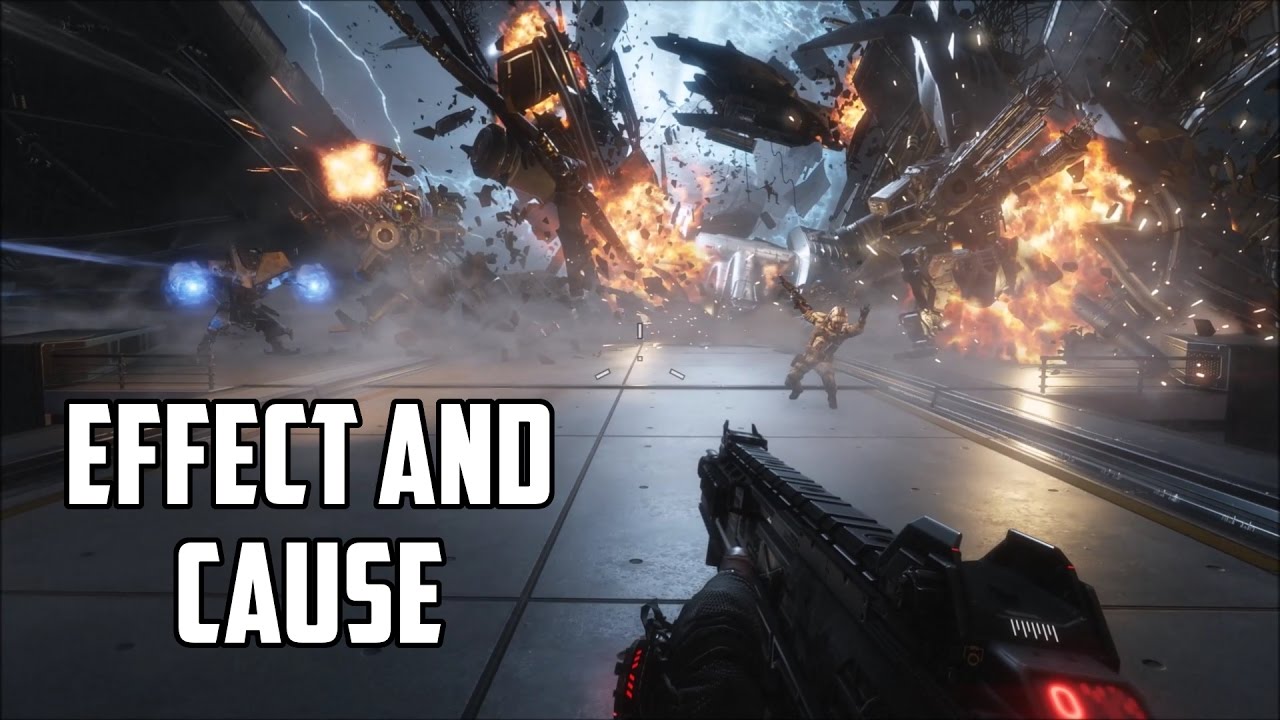
Like, comment, and subscribe!
in this case, the player is able to jump to a variation of the level where theres no fire covering the floor, allowing them to pass
dusk apex
You'd just load two worlds (or one with both) and have some objects active and inactive relative to whichever world you're in.
white crater
anyone know how to add good camera effects say when you land from jumping like cluster truck

Check out over 24 minutes of gameplay from an alpha version of Clustertruck, an absurd first-person action platformer from Landfall Games. Read more at: http://www.polygon.com
Like Polygon on Facebook: https://goo.gl/GmkOs4
Follow Polygon on Twitter: http://goo.gl/cQfqrq
(idk how to do the camera offset? or shake?)
 late lion
white crater
(idk how to do the camera offset? or shake?)
late lion
white crater
(idk how to do the camera offset? or shake?)
The FOV becomes slightly narrower when they land on the truck. It's likely connected to the player's speed, not whether they are on a truck or not. Higher FOV makes you feel like you're going faster, it's a common camera trick.
white crater
so that paired with a slight offset to the camera to make it go down and up gives it that good feedback?
white crater
late lion
The FOV becomes slightly narrower when they land on the truck. It's likely conne...
i didnt even notice this😅
 peak raptor
some features etc that work in the editor. It doesn't work after build. What could be the reason for this? Or is there a way to debug the built game?
 unreal temple
peak raptor
some features etc that work in the editor. It doesn't work after build. What cou...
unreal temple
peak raptor
some features etc that work in the editor. It doesn't work after build. What cou...
You need to give more specific information about your problem
peak raptor
My problem is that the buttons or canvases shown in this editor do not work when built.
unreal temple
peak raptor
My problem is that the buttons or canvases shown in this editor do not work when...
What do you mean by "do not work"?
The buttons do not respond to clicks?
peak raptor
Some buttons do not appear in the canvas, but there is actually no reason why they should not appear. It should appear at startup. It appears at startup in the editor. Some of them don't work
dusk apex
Are your gui anchored properly?
That would normally be the difference between Editor play Window and standalone Window - size.
Or Editor zoom etc
peak raptor
Do files within the source need to be moved manually after creation? Could it be because of this?
 lime niche
Hello! Could anyone give me some ideas to make to 1. Learn C# and 2. Learn the ropes of Unity. FYI, I have a strong knowledge of C++, if that changes anything. Thanks!
dusk apex
lime niche
Hello! Could anyone give me some ideas to make to 1. Learn C# and 2. Learn the r...
What would you like to focus on? MonoBehaviour and Physics callback, fields/properties/methods and inspector referencing, patterns (observer), or ?
lime niche
🤔 , What would you recommend a beginner to C# but has knowledge of C++?
Something that's probably exclusive to C#.
dusk apex
Depends what you're needing to integrate.
lime niche
Not sure haha.
dusk apex
Most who have learned academic C++ are not too strong working with libraries/frameworks/engines. If this applies for you, you'd probably want to get to know more about the Unity callbacks and the execution order of certain methods https://docs.unity3d.com/Manual/ExecutionOrder.html specifically when they occur.
Other than that, Unity doesn't really follow the normal standard c# workflow.
lime niche
Ah.
I'm very familiar with raw C++ but I have used libs and frameworks such as Raylib.
dusk apex
dusk apex
Other than that, Unity doesn't really follow the normal standard c# workflow.
You'd just use the syntax, features and types of the language.
 loud wharf
lime niche
🤔 , What would you recommend a beginner to C# but has knowledge of C++?
loud wharf
lime niche
🤔 , What would you recommend a beginner to C# but has knowledge of C++?
ref keyword.
You can use it as method arguments but you can make your life easier if you're accessing stuff like arrays over and over.
ref int ref_on_arrayindex = ref my_intarray[1];
Or you can make your own ref structs.
lime niche
Ah.
loud wharf
I think a plenty of people know ref structs and ref parameters, but idk about ref variables.
ref variables can only be set with any getters or functions with ref returns.
They also have to be set immediately upon declaration.
Array indexer returns a ref.
And also Span indexer.
dusk apex
Something to be wary of is properties. You'll see a lot of variable-like fields but they may actually be properties (functions under the hood) and getting value type data from the member may have you bewildered.
loud wharf
Microsoft name properties and methods the same.
dusk apex
transform.position.x = 5 will not work.
loud wharf
But unity throws .Net syntax rules out the window.
dusk apex
The most common scope you'll be communicating with will be those under the Messages section: https://docs.unity3d.com/ScriptReference/MonoBehaviour.html Edit: wrong link @lime niche
 fervent furnace
get started with native/unsafe collections
 formal wagon
Hey all, is there any equivalent to Physics.ContactEvent that works with triggers?
white crater
bro any good tutorials or resources to fix slope movement for rigid bodies
 scarlet viper
SceneManager.sceneLoaded += OnSceneLoaded;
SceneManager.LoadSceneAsync(scene1);
SceneManager.LoadSceneAsync(scene2);
Will scene1's OnSceneLoaded always get called before scene2's OnSceneLoaded?
i think not
tranquil canopy
Hellow everyone... I have one little question related to boxhelps... and if someone could help me i'll really appreciate it: How do I make Right BoxHelp automatically adjust vertically to the size of Left BoxHelp in real time in this case? so that in height the right always measures the same as the left. This is the both boxhelps code https://paste.ofcode.org/rHEZVn9pNbh8KGBgFxnKjB
leaden ice
scarlet viper
```cs
SceneManager.sceneLoaded += OnSceneLoaded;
SceneManager.LoadSceneAsync(sce...
It depends which one loads first
 blazing tiger
Does Unity have anything similar to the subsystems of Unreal Engine or Godot's autorun function? Basically a way to run a script without placing it into the world like MonoBehavior? And if no, what's the go-to method for implementing something similar?
The subsystem module's documentation I found wasn't exactly clear as to how it's intended to be used, so any help appreciated.
leaden ice
blazing tiger
Does Unity have anything similar to the subsystems of Unreal Engine or Godot's a...
You just want to run a function at the start of the game? Or does it need to be running continuously or something?
blazing tiger
leaden ice
You just want to run a function at the start of the game? Or does it need to be ...
For now just have it be executed, but I'm probably going to need the last part at some point too.
Are singletons my best bet?
blazing tiger
blazing tiger
For now just have it be executed, but I'm probably going to need the last part a...
It just needs to do some file manipulations when the game starts.
leaden ice
blazing tiger
For now just have it be executed, but I'm probably going to need the last part a...
 regal epoch
my game is not running anymore on my phone. since my latest phone update (one ui 6.0) my unity game just crashes when i try to open it. it's a development build, with the latest api level as target and earliest as minimum. how do i fix this
blazing tiger
leaden ice
https://docs.unity3d.com/ScriptReference/RuntimeInitializeOnLoadMethodAttribute....
Thanks, looks exactly like what I need 👍
leaden ice
regal epoch
my game is not running anymore on my phone. since my latest phone update (one ui...
Start by reading the crash logs
regal epoch
how do i read the crash logs on my phone
it looks like an issue with development builds. i did a normal build, and it works perfectly fine 🤷
leaden ice
Logcat
 marble venture
hey guys is this the right channel for questions about coding?
need help with a script if it is
Basically right now I have a very basic bones for a rhythm slasher type game. Right now my script spawns cubes that come at the player. The player must destroy the cubes with a sword. The cubes spawn once every second, and move at a speed of 10. Basically, I want to have it so that every time the player destroys a cube, the spawn timer decreases (i.e the cubes spawn faster). How would I go about doing this?
rigid island
marble venture
Basically right now I have a very basic bones for a rhythm slasher type game. Ri...
sounds like you want simple subtract
heady iris
marble venture
Basically right now I have a very basic bones for a rhythm slasher type game. Ri...
I would suggest just counting the number of cubes you've destroyed
and then using that to calculate the new spawn rate
(rather than just modifying the spawn rate each time)
 upper pilot
Is there an easy way to decide which animation from a sprite sheet to use? Or do I need 1 animation per spritesheet?
latent latch
it's just an array of sprites
ah, right actually I know what you mean
more specifically to using the animator
I think there's a way to choose what sprites you want from the atlas and make a whole new asset from it but keeping the reference
Try like selecting a bunch and dragging them into the asset window
 mental rover
 oak panther
finished junior code and now what do I do now?
oak panther
finished junior code and now what do I do now?
what do you mean by junior code? what's your goal?
oak panther
mental rover
what do you mean by junior code? what's your goal?
I wanted to learn basic coding so I can make games, but now I know the bare basics and am stuck on what to do
mental rover
if you're familiar with the basics, perhaps it's time to jump in and try to make a game - a good idea is to start with a fairly simple one you know and like, and try to recreate it or part of it
rigid island
oak panther
I wanted to learn basic coding so I can make games, but now I know the bare bas...
whats the "bare baiscs"
everyone says they know the basics but turns out they don't
oak panther
move, collide with object, spawn objects, and game over
rigid island
those are unity specific not C#
do you know basics of c# ?
example an Array ? a List?
loops
without knowing thse you won't get very far
oak panther
rigid island
do you know basics of c# ?
example an Array ? a List?
I know arrays but loops, not really, I know arrays can store objects and can be randomized with (random.range),
rigid island
knowing loops is essential when dealing with collections such as arrays
if you want to learn Unity better I suggest you dive more into traditional c# and then go back n forth between unity API and c#
leaden ice
Yep loops and collections go hand in hand. You can't really know collections without knowing loops
Almost anything interesting you can do with a collection involves a loop
(or Linq which is a fancy wrapper around a loop)
oak panther
rigid island
if you want to learn Unity better I suggest you dive more into traditional c# an...
where would i go to learn c#?
rigid island
oak panther
where would i go to learn c#?
Resources pinned in #💻┃code-beginner
mainly the microsoft site has good interactive tutorials
like this one https://learn.microsoft.com/en-us/dotnet/csharp/tour-of-csharp/tutorials/
structured courses
some people also like
https://www.w3schools.com/cs/index.php
 normal arch
really annoyed at myself
i have now learnt that you should include EVERY script that is even REMOTELY related to your problem
this channel is said to eb for discussion as well
so i'm just talking lmao
oak panther
rigid island
Resources pinned in <#497874004401586176>
mainly the microsoft site has good in...
this is gonna kill me, Im gonna grab some grub and coffee before I slam my self into a wall
normal arch
just wanted to vent
rigid island
oak panther
this is gonna kill me, Im gonna grab some grub and coffee before I slam my self ...
small steps mate you don't have to do it all at once xD
oak panther
rigid island
small steps mate you don't have to do it all at once xD
BROTHER I GOT PLACE TO BE!
normal arch
oak panther
this is gonna kill me, Im gonna grab some grub and coffee before I slam my self ...
funnily enough i learnt c# just by following like a 60 video tutorial
took a few months
oak panther
also i been coding since 5
normal arch
i have a competent understanding i'd say
oak panther
normal arch
took a few months
i've the time but not the money 16 dollars an hour cant get me a appartment
oak panther
normal arch
i have a competent understanding i'd say
till u find your self in a new situtation
normal arch
what's that supposed to mean
oak panther
normal arch
what's that supposed to mean
that i got a deadline for live at my parents house
rigid island
oak panther
that i got a deadline for live at my parents house
better get learning then
normal arch
it's probably gonna be at least 8 years before i even think of that to happen
oak panther
for a apartment its 2k for the rent
rigid island
lets not steer this convo offtopic.
oak panther
and where i live there's nothing, only 5 listing on fact book and kijiji
rigid island
this is code help channel for unity
normal arch
rigid island
lets not steer this convo offtopic.
agreed
oak panther
yea im gonna get food before sitting done for 12 ish hours
normal arch
but yeah, lots of people say mindlessly following a tutorial is bad and won't make your game
but they can help you learn
rigid island
I make some tutorials and I also expect my viewers to at least know the fundamentals of c#
I don't make vids to teach you how to code, I'm teaching you how to do a very specific thing
normal arch
rigid island
I don't make vids to teach you how to code, I'm teaching you how to do a very sp...
that's the thing, because i watched tutorials on how to make a zelda type game knowing next to nothing about coding in general, let alone c#
it was pretty specific i'd say
but it taught fundamentals
Well, get rid of one problem, onto the next; I'm trying to make a Pokémon esque encounter system, you run into grass, or a cave, or into the Pokémon itself and a battle starts, but this isn't gonna be a turn based battle, and controls inside and outside of battle would be different, such as x in battle might a spell, but outside of battle it might be a climb. That sort of stuff. Does anyone know how i could achieve this?
I know i'd have to make use of scenes and such, but not exactly how
rigid island
normal arch
Well, get rid of one problem, onto the next; I'm trying to make a Pokémon esque ...
switch control scheme based on battle or not
normal arch
How would i detect whether it's the battle scene or not, and obviously it would be one scene and not multiple, how would i change the scene based on like what area the player is in, or what enemy they're fighting?
rigid island
normal arch
How would i detect whether it's the battle scene or not, and obviously it would ...
make different triggers?
rigid island
eg trigger inside grass would yield a grassy type map/scene
rigid island
You could but no necessary
normal arch
how would i make the variables transfer between scenes
rigid island
DDOL can be used for example and make singletons
(ideally you want to inject your references on scene changed)
heady iris
Determine if the "overworld" and "battle" scenes are similar enough for it to be worth using the same code and components for both kinds of scenes
and controls inside and outside of battle would be different, such as x in battle might a spell, but outside of battle it might be a climb.
So if moving around the overworld contorls and plays way differently, you might just need two different sets of components and prefabs
rigid island
new input system also allows you to easily switch control schema
latent latch
multiple scenes for a battle area seems like a pain
it's like either deload your whole previous scene, or stick DDOL on every asset so you dont have to reload it again
normal arch
rigid island
new input system also allows you to easily switch control schema
I'm not familiar with this
normal arch
rigid island
new input system also allows you to easily switch control schema
my project is fairly new so i could probably change it
heady iris
You can break your inputs into separate action maps.

I enable and disable individual action maps based on the current game state
normal arch
I'm not even sure where the new input system is
rigid island
its a package
normal arch
ok
heady iris
I can think of a few ways to handle entering a "battle" scene
One would be to load the battle scene in Single mode (the default). This would unload the overworld scene entirely.
So when you return to the overworld, you would need to restore everything back to how it was before entering the battle
This sounds unreasonably difficult. You'd basically need to write a save system that remembers everything about the overworld's state
Another option would be to additively load the battle scene, and to just deactivate objects in the overworld until you're done
And the last one would be to additively load the battle scene -- but to still stick around in the overworld scene
Have you ever played a Yakuza game? When you get into a random encounter, you stay exactly where you were in the overworld
normal arch
heady iris
This sounds unreasonably difficult. You'd basically need to write a save system ...
I'd eventually need to add this to the game anyways so it wouldn't be out of the question
heady iris
it just spawns in enemies, moves civilians out, and creates some barriers to keep you in the fight area
I think that's how newer Pokemon games do it too
the problem is that you can get into a fight next to a cliff
and go off the cliff
normal arch
heady iris
it just spawns in enemies, moves civilians out, and creates some barriers to kee...
This idea wouldn't be too bad
heady iris
That would be a better fit for a game where you can share some logic between the "overworld" and "battle" situations
normal arch
But i'm not sure if it entirely fits what i want with the game
heady iris
So it would not make sense for an old Pokemon game where the battles occur in a completely isolated world
(and where none of the mechanics overlap)
you walk around the overworld and go through menus in battles
normal arch
yeah my game isn't turn based, it would be more like a game called crosscode
if you've heard of it
heady iris
Haven't played that one
normal arch
Their combat is like the one where it's additive
but there are no barriers
if you escape the battle it just ends basically
But i feel like this wouldn't fit as some battles could have some obstacles
that woudln't be in the overworld
normal arch
heady iris
Another option would be to additively load the battle scene, and to just deactiv...
so it would probably be between this one and the first one
 sacred sinew
how can I access the value of a gradient from a variable?
 sacred sinew
ok thx
 hoary mason
how do you turn off a button's ability to be clicked
as in, I only want it to be pressed by keys
not the mouse
rigid island
hoary mason
how do you turn off a button's ability to be clicked
use new input system its easier
hoary mason
so like
rigid island
rigid island
DisableDevice (Mouse.current) should work
hoary mason
what if I want to use the mouse in other buttons but specifically not on that button
rigid island
make custom button probably with diff conditions
heady iris
hoary mason
how do you turn off a button's ability to be clicked
you mean a UI button?
hoary mason
yeah
heady iris
The first thing that comes to mind is just extending Button and overriding OnPointerDown
the UI classes are very open to extension!
heady iris
That would block all interactions
Adding a component that implements IPointerDownHandler and uses the event might work
But I don't know which order things would go in
button first or button second
rigid island
yeah you cannot use Button component for that no ? wouldn't it trigger hover events for button?
heady iris
the last thing that comes to mind: just put something in the way of the button..
a child element that stretches to perfectly cover it
and that has an image on it to eat the raycast
I'm less confident about that one
also, gotta scram in a minute
hoary mason
I think for now disabling all the interactions works for me, since the way I want to use it it doesn't need to be selected, so i'll add a component that sends the button's pressed signal when I hit a key (basically I have a very specific use case where I want to call the button's pressed signal but don't want to be able to do it by mouse)
 restive ridge
I'm trying to make a pause menu, but i dont think the input is being recieved, this is my first time using the new input system so im not sure what's wrong here. Im not getting any errors however.
Relevant Code: https://gist.github.com/Winter-r/cafe6fbf17882437b5305b64f8e6245d

 leaden ice
restive ridge
I'm trying to make a pause menu, but i dont think the input is being recieved, t...
leaden ice
restive ridge
I'm trying to make a pause menu, but i dont think the input is being recieved, t...
You'd have to show how you configured your PlayerInput component
restive ridge
isnt it the ones in the images
restive ridge
oo
leaden ice
BTW #🖱️┃input-system exists
 grand bobcat
Is There a way to reference a specific shader in a script to use variables linked to that shader in that script, or can you only reference shaders in general
leaden ice
grand bobcat
Is There a way to reference a specific shader in a script to use variables linke...
you won't get compile time hints/errors for shader property names if that's what you're asking.
Also you are generally setting those things on a material not a shader
lean sail
grand bobcat
Is There a way to reference a specific shader in a script to use variables linke...
You just do it through the material
https://docs.unity3d.com/ScriptReference/Material.html
 fervent snow
does anyone know what causes error "Screen position out of frustrum"? I've been googling but I'm not touching anything they mention in the top posts
 leaden ice
fervent snow
does anyone know what causes error "Screen position out of frustrum"? I've been ...
leaden ice
fervent snow
does anyone know what causes error "Screen position out of frustrum"? I've been ...
usually this means something like you have a camera with a 0 or negative clippingp lane
or 0 FOV
Or a UI element with invalid values somewhere in its transform
 glossy wave
Hey! I don't understand why i'm getting a NullReferenceException in my code
on line 37:
var changingEmission = particleEffect_BloodPuddle.emission;
(This code is used to make an object colliding with a surface spawn a prefab with visual effects in it. Every time the object collides, it will spawn another prefab, but with less "emission" of particles)
fervent snow
oh I think I found it. I ahve no idea how this happened
 rigid island
glossy wave
Hey! I don't understand why i'm getting a NullReferenceException in my code
on ...
rigid island
glossy wave
Hey! I don't understand why i'm getting a NullReferenceException in my code
on ...
are we supposed to guess which one is line 37 ?
leaden ice
glossy wave
Hey! I don't understand why i'm getting a NullReferenceException in my code
on ...
which one is line 37
leaden ice
fervent snow
oh I think I found it. I ahve no idea how this happened
you probably are giving it some crazy velocity
and it's flying super far away
glossy wave
leaden ice
which one is line 37
var changingEmission = particleEffect_BloodPuddle.emission;
leaden ice
glossy wave
var changingEmission = particleEffect_BloodPuddle.emission;
then particleEffect_BloodPuddle is null
that's teh only possibility
you never assigned it anywhere in the code as far as I can tell
so that seems expected
glossy wave
ok
leaden ice
OI see it's assigned here: particleEffect_BloodPuddle = gameobject_InstantiatedParticleEffect.GetComponentInChildren<ParticleSystem>(); but that's inside a condition
if that condition is not true, it won't happen
glossy wave
i see, thank you!
 limber wharf
hey guys, why isn't my Coyote Time working?
rigid island
limber wharf
hey guys, why isn't my Coyote Time working?
!code
tawny elkBOT
Posting code
📃 Large Code Blocks
Use links to services like:
https://gdl.space/, https://paste.ofcode.org/, https://hatebin.com/, https://paste.myst.rs/, https://hastebin.com/
📃 Inline Code
Surround code with three backquotes. Not quotation marks.
To format as C#, add cs to the first line:
```cs
// Your code here
```
Add a comment with a line number if there is an error message.
limber wharf
lean sail
limber wharf
https://paste.ofcode.org/yiCSaK5CXFyjNnK6psEVJn
Not sure if im just blind, where are you calling your IsGrounded logic?
Also should be very easy to debug what the result of those if statements are
limber wharf
lean sail
Not sure if im just blind, where are you calling your IsGrounded logic?
Also sho...
it's called in line 69 at the end
it prints out "Coyote Time!" but doesn't jump
 languid hound
root.AddTorque(Mathf.Clamp(90f - root.rotation, -uprightStrengthClamp, uprightStrengthClamp) * (90f - root.rotation));
Is anybody able to help here? I have no idea why but it'll rotate fine at first and then go mega slow for the rest of the rotation
root is a Rigidbody2D and uprightStrengthClamp is to stop the adjusting value from being too high and overshooting
At around 45 degrees it seems to want to go mega slow for no reason. This only happens when I multiply it by (90f - root.rotation)
 clever lagoon
languid hound
```cs
root.AddTorque(Mathf.Clamp(90f - root.rotation, -uprightStrengthClamp, upr...
clever lagoon
languid hound
```cs
root.AddTorque(Mathf.Clamp(90f - root.rotation, -uprightStrengthClamp, upr...
just a guess.. perhaps your root.rotation is changing signs or somthin? e.g. rather than say... 350deg , it's using -10deg ?
languid hound
I did actually look at this I tried using transform.rotation.z as root.rotation is in the thousands for some reason but they both give the same results
heady iris
transform.rotation.z is especially wrong
languid hound
Which I find shocking since they're marginally different numbers
heady iris
that's the Z part of a quaternion
which is not an angle
it sounds like a bad idea to try to subtract an angle from a constant like that -- you'll get very different results depending on whether that angle is negative or positive
You can use Mathf.DeltaAngle to measure the distance between two angles
Mathf.DeltaAngle(-45, 90) would be 135, for example
languid hound
Holy shit thank you for sharing DeltaAngle
heady iris
there are several "angle-aware" methods in Mathf
heady iris
LerpAngle, SmoothDampAngle, etc.
no prob (:
you can also compare transform.rotation to another Quaternion with things like Quaternion.Angle
so, for example...
Quaternion.Angle(transform.rotation, Quaternion.LookRotation(Vector3.right))
can someone try to help me too please :)
heady iris
this would measure how many degrees you're off from a rotation that looks to the right
languid hound
DeltaAngle fixed it
Fucking finally you don't know how overjoyed I am to find out that exists
I saw a shortest angle method being used in quite a few things
I thought it was some math bs
Sorry I'm not well versed in all the really specific functions for quaternions and vectors or mathf etc,
heady iris
limber wharf
can someone try to help me too please :)
You only reset hasJumped when you successfully find ground while trying to jump
Landing on the ground isn't resetting hasJumped
clever lagoon
I've got this code in a loop...
if(displayElement is ITriggerOnClick clicker) { clicker.onClickEvent.AddListener(() => { onClickEvent.Invoke(i); }); }
The value i MAY be different from the last time the loop was run. So, I need to "RemoveListener" - specifically the one I preiously set (if any). I assume I'll need to store/cashe the "last listener" for each of the clicker objects- so I can pass it to RemoveListener- Question: Is there a better/simpler way to do this?
heady iris
so if you jump, land, and then fall off a platform, hasJumped will remain true
you'll correctly decide that you should be allowing a jump with coyote time, but since hasJumped remains true, the jump fails
you will need to constantly check for ground and reset hasJumped proactively
 swift falcon
clever lagoon
I've got this code in a loop...
```if(displayElement is ITri...
swift falcon
clever lagoon
I've got this code in a loop...
```if(displayElement is ITri...
Yeah you have to set i just before AddListener .e.g.
var iVal = i;
clicker.onClickEvent.AddListener(() => { onClickEvent.Invoke(iVal); });
Otherwise i will be = end of loop val
heady iris
It's this dang thing again
languid hound
languid hound
DeltaAngle fixed it
I was wrong forgot to apply the other math.. it still randomly goes at awfully slow speed for no reason at times.. still greatly appreciate DeltaAngle though
oak panther
so with the arrays with we have like
string[] cars = {"bmw", "ford",}
is the curly brackets refering to the array and adding?
heady iris
This is not valid syntax.
oak panther
its a examply
swift falcon
I dont think theres a better way other than being outside the loop context @clever lagoon .e.g.
for(int i = 0; i < 10; i++) {
DoSomething(i);
}
im refering to the c# class im reading
clever lagoon
swift falcon
Yeah you have to set i just before AddListener .e.g.
```
var iVal = i;
clicker.o...
thank you, but not the info I'm looking for- I'll just use a "descoping" int for that. I need to replace that value each "clicker" will pass to OnClick.
heady iris
List<int> numbers = new List<int> { 1, 2, 3 };
The collection initializer tells C# what things you want to insert into the collection when it's created
oak panther
swift falcon
I dont think theres a better way other than being outside the loop context <@506...
you could do a loop hop
heady iris
It's equivalent to adding the items after constructing an empty list
heady iris
oak panther
so with the arrays with we have like
```cs
string[] cars = {"bmw", "ford",}
```...
so i mostly agree here: the curly braces are, indeed, part of the collection initializer
and they contain items that need to go in the collection
mental rover
heady iris
It's equivalent to adding the items after constructing an empty list
an array is not a list
heady iris
My example used a list.
oak panther
heady iris
and they contain items that need to go in the collection
the the curly brackets are link to a empty array if a array was created and is going to fill that array
oak panther
mental rover
an array is not a list
it basically is like a list
you can do it in order or pick something or do something in random order
or even refer to something
mental rover
oak panther
so with the arrays with we have like
```cs
string[] cars = {"bmw", "ford",}
```...
this question has nothing to do with lists
it's literally just syntax to initialise the array
oak panther
mental rover
this question has nothing to do with lists
alrighty im gonna head because i feel dumb
swift falcon
oak panther
so with the arrays with we have like
```cs
string[] cars = {"bmw", "ford",}
```...
the curly brackets refer to the items inside the array. You can initialize the array with items or without
heady iris
I think it is true that arrays use an object initializer, rather than a collection initializer, though
The distinction isn't very important here, but it is there.
Either way, you specify the items you want in the curly braces.
oak panther
heady iris
Either way, you specify the items you want in the curly braces.
basically adding to the variable array
to referred later on right
dusk apex
To be specific, that's an assignment operator
You wouldn't be able to modify the size of an array after declaration - not able to add to an array
heady iris
int[] arr = new int[] { 1, 2, 3, 4, 5 };
this winds up creating an array that can hold five ints
swift falcon
yes
dusk apex
And the values are 1, 2, 3, 4, and 5
 maiden lake
any one know how to make a blocking with sword? i was thing about making animationn of blocking and then when a sword colised with a nother sword it will get blocked but im looking for better solution
maiden lake
im prety new to the animator
 primal wind
Anyone knows one good tweening lib? Not unity specific. I just need to Tween numbers and nothing more. i could manually do it with math but if something already exists for it and is light (space and/or performance), why not
leaden ice
primal wind
Anyone knows one good tweening lib? Not unity specific. I just need to Tween num...
DoTween
primal wind
Last time i tried just tweening numbers, it was such a pain. I still can't do it myself
leaden ice
It's very simple with DOTween.To
 flint needle
do you know which version of unity do i need to get custom render texture graphs?
minimum
 vivid heart
Guys, do you think that knowing UniRx, UniTask, Zenject, SOLID, MVC, MVVM, and other patterns might give me a chance for a junior Unity developer position?
mental rover
vivid heart
Guys, do you think that knowing UniRx, UniTask, Zenject, SOLID, MVC, MVVM, and o...
in short, no, good fundamentals of Unity, standard Unity workflows, and general C# are much more important
(by all means try them out, the experience doesn't hurt, but none of these are necessary or arguably even helpful for game development in Unity)
vivid heart
mental rover
in short, no, good fundamentals of Unity, standard Unity workflows, and general ...
Well, I do have fundamental knowledge; what's left is to learn Zenject and UniRx better
 naive crater
i need help .. the debug says stone display but why ..in screen not display https://gdl.space/yizinacuji.cs

 mental rover
vivid heart
Well, I do have fundamental knowledge; what's left is to learn Zenject and UniRx...
mental rover
vivid heart
Well, I do have fundamental knowledge; what's left is to learn Zenject and UniRx...
if that's the only thing left to learn it sounds like it's past time you started applying for junior positions, or at least building your own games for a portfolio
tranquil canopy
I need help, the next code it's supposted to save another boxhelp height on boxHelpHeight var, that works correctly, cause the log shows me the values changing... But when i try to apply the var's value to the right boxhelp it doesn't work... What could happen? The right boxhelp changes it's vertical size to a really small one and it doesn't do nothing with that code```csharp
boxHelpHeight = GUILayoutUtility.GetLastRect().height;
Debug.Log("BoxHelp Height: " + boxHelpHeight);
// RIGHT BOXHELP
EditorGUILayout.BeginVertical(EditorStyles.helpBox, GUILayout.Height(boxHelpHeight), GUILayout.Width(EditorGUIUtility.currentViewWidth * 0.25f));
GUILayout.Space(2);
GUI.backgroundColor = new Color(46f / 255f, 204f / 255f, 113f / 255f);
propertyAdditionMenu.Draw();
GUILayout.Space(15);
GUI.backgroundColor = Color.white;
EditorGUILayout.EndVertical();```
mental rover
naive crater
i need help .. the debug says stone display but why ..in screen not display http...
this script doesn't look related to the debug messages and it's not really clear what you're asking
naive crater
https://gdl.space/qahegadesa.cs sory wrong link
my game basically need to collect calorie ..after collect calorie user can collect stone to go next level .. i want to save only stone to another scene .. the debug says the stone has been display but stone image not appear while debug has save and display the stone
mental rover
tranquil canopy
I need help, the next code it's supposted to save another boxhelp height on `box...
might get better help in #↕️┃editor-extensions
ah you already posted in there, unlucky - my guess is EditorStyles.helpBox is conflicting and controlling the height in some way, but I'm not sure
knotty sun
naive crater
my game basically need to collect calorie ..after collect calorie user can colle...
I see no code to save
sacred sinew
I have a problem with my float variable, it is the result of a division but does not keep the digits
leaden ice
sacred sinew
I have a problem with my float variable, it is the result of a division but does...
show the code
note that if you do int / int it will do integer division.
sacred sinew
ProgressO2 = O2 / FinalO2;
sacred sinew
yep
leaden ice
so then it's doing integer division
and the result is then cast to float
ProgressO2 = O2 / (float)FinalO2; will fix it
sacred sinew
ok thanks
oak panther
okay correct me if I'm wrong when I create a new custom class-
class CustomCar
{
string carName;
}
that string variable doesn't exist yet until i define in a main class and give it a object name so i can refer it to a Consol.WriteLine()
class CustomCar
{
string carName;
static Void Main (string[] args)
{
CustomCar Car = new CoustomCar();
car.carName = "Ford"
}
}
right?
sacred sinew
leaden ice
`ProgressO2 = O2 / (float)FinalO2;` will fix it
it worked, thanks
oak panther
i've probably spent 30 minute trying to figure out what it trying to tell me even looking on a different website
leaden ice
oak panther
okay correct me if I'm wrong when I create a new custom class-
```cs
class Custo...
The class is a template for objects. WHen you do new CustomCar() you actually create one of those objects
oak panther
leaden ice
The class is a _template_ for objects. WHen you do `new CustomCar()` you actuall...
Ive been reading it as you create a class with a name and it wont do anything till it is given a object name
 leaden ice
oak panther
Ive been reading it as you create a class with a name and it wont do anything ti...
leaden ice
oak panther
Ive been reading it as you create a class with a name and it wont do anything ti...
"name" is not relevant
that's just the name of your variable
it's not a name of the object
it's the name of a reference variable pointing to the object
the new bit is creating an object
Car Ford = is making a variable of type Car with the name Ford. This variable is simply a reference to the object you created with new
If you did Car x = Ford; layer you would have two references ("x" and "Ford") pointing at the same object.
oak panther
so the object is already created I just need a new referencing point so it can access it
leaden ice
new creates the object
Ford is a reference to the object
you need to save the reference in a variable so you can do things with it later, yes
otherwise you won't have any way to retrieve it.
oak panther
so when I create a new class and start putting empty variables in it I wont be able to access it until I reference the class somewhere else and give it a name and a new object
 mossy gust
guys, how could i possibly change the value of a chromatic aberration using a script
leaden ice
mossy gust
guys, how could i possibly change the value of a chromatic aberration using a sc...
modify the weight of the volume in script
mossy gust
i cant figure out how to
latent latch
leaden ice
oak panther
so when I create a new class and start putting empty variables in it I wont be a...
The variables don't exist except on actual instances of the object.
latent latch
looks like you need to grab it from the volume profile
leaden ice
oak panther
so when I create a new class and start putting empty variables in it I wont be a...
like if you want to open a car door - there needs to be a car whose door you want to open. You can't open the door on the "concept" of a car.
primal wind
Unless you mark them as static but you rarely use those on a MonoBehavior
oak panther
leaden ice
like if you want to open a car door - there needs to be a car whose door you wan...
yea and where i was going with it was the car needed to have a new name and object so you can do it other wise its there but can't be accesed
leaden ice
the car simply needs to exist and you need a reference to it
new is how you create the car
a variable is a way to hold a reference to it
but not the only way
oak panther
it can be accessed by other classes
mental rover
oak panther
it can be accessed by other classes
I can tell you're trying hard to build a mental model understanding here but I think you might be better off opening up your IDE and writing some code, following some examples, seeing what works and what doesn't first hand, etc
oak panther
mental rover
I can tell you're trying hard to build a mental model understanding here but I t...
im reading a website
mental rover
it shows - try applying what you've read so far in code yourself 👍
 zinc parrot
Hey so unity has profilercatagories for turning on profiler catagories like render, ai, video, etc. from C#, but I dont see one for GPU
How do I turn on the GPU mode from C#?
 hybrid jungle
hello I am a beginner
I am making a cheap knock off of angry birds and I would want the bird to follow the mouse when I hold left mouse button
using System.Collections;
using System.Collections.Generic;
using UnityEngine;
public class FireInTheHole : MonoBehaviour
{
// Start is called before the first frame update
public Rigidbody2D rb;
public Transform trans;
private Vector3 mousePosition;
private Vector3 mouseWorldPosition;
private bool isOverlaped = false;
private bool isHeldAndOverlaped = false;
void Start()
{

}
// Update is called once per frame
void Update()
{
if (Input.GetMouseButtonDown(0) && isOverlaped)
{
isHeldAndOverlaped = true;
}
else
{
isHeldAndOverlaped=false;
}
mousePosition = Input.mousePosition;
mouseWorldPosition = Camera.main.ScreenToWorldPoint(mousePosition);
if (isHeldAndOverlaped)
{
trans.position = new Vector3(mouseWorldPosition.y, mouseWorldPosition.x, 0);
}
}
void OnMouseOver()
{
isOverlaped = true;
}
void OnMouseExit()
{
isOverlaped = false;
}
}
this is my code and for now when I hold the button the bird teleports a few pixels to the left of the mouse
quartz folio
why do you flip the x and y positions?
hybrid jungle
quartz folio
why do you flip the x and y positions?
because Iam an idiot
anyway the teleporting is fixed the problem now is that it only does it once it will snap to the mouse for only one frame
hybrid jungle
how to make it continuous ?
somber nacelle
have you looked at the !docs for the Input class? you might find a similar method that does what you want
tawny elkBOT
 quartz folio
hybrid jungle
quartz folio
hybrid jungle
thanks found it
maiden lake
any one has any ide how to make something similar im rly strugeling rn
 steep herald
I have a super silly, general question
I typically have methods named SetFoo(some parameter), and by my own convention, when I have "Set" in the method name, it implies that some value can be passed to the method and that value will be used to "set" whatever foo is.
I'm looking for a name when there is no parameter; when the method is responsible for handling the assignment logic based on class level members value.
e.g. some custom level editor where a tool is stored at class level. The method can infer the "editing mode" from the tool selected, so there is no point in passing a parameter. By my own convention, "SetFoo" would be misleading since there is no parameter being passed and the method actually figures everything out by itself.
I'm hoping one of you has a similar naming conventions and has handled this before.
heady iris
steep herald
I have a super silly, general question
I typically have methods named `SetFoo(s...
InitFoo, ConfigureFoo, SetupFoo

 steep herald
latent latch
https://i.imgur.com/gZG9l79.png
steep herald
latent latch
https://i.imgur.com/gZG9l79.png
You barbarian!
maiden lake
does any one have any experience with making melee combat ?
dusk apex
steep herald
I have a super silly, general question
I typically have methods named `SetFoo(s...
init probably
Ah fen beat me to the punchline
 brittle oyster
Is there any way I could pass additional mesh data to the shader without associating it with the mesh vertices? My use case is, I'm rendering a voxel mesh and would like to pass an array of voxel ID's for the chunk to the mesh shader instead of storing voxel ID's inside each vertex
 rugged storm
hay im trying to have MoveElement swap the element passed in with the element at the position you pass in but im having trouble getting it to work, elements being a dictionary of <Vector2Int,Element>, Below is what ive tried sofar
    //Swap
    public void MoveElement(Element element, Vector2Int position)
    {
        Vector2Int oldPos = element.position;
        Element elementInNewPos = elements[position];
        elements.Remove(position);
        SetElement(element, position);
        elements.Remove(oldPos);
        SetElement(elementInNewPos, oldPos);

        Debug.Log($"Swapped {elements[position]} and {elements[oldPos]}");
    }
    //Overwrite
    public void SetElement(Element element, Vector2Int position)
    {
        elements.Add(position, element);
        element.transform.parent = eGridOrigin;
        element.transform.localPosition = (Vector2)position;
        element.position = position;
        element.name = $"{element.type.ID} Element {element.position}" ;

}```what goes wrong?
rugged storm
it simpley does not move at all
leaden ice
Is the code running? Any logs printing?
rugged storm
the log says that the passed in element swapped with itself
wait
i might of called MoveElement incorrectly in my testing
nm it works fine
 hallow portal
hey guys i am trying to make a inv systen but the drag and drop is not working i also have a hover bool to check if that is working and that isint working i have turned of raycast target on the drag/drop img does some1 know what is hapening(copied the code from the vid sorce bc i tought it was that but it aitnt)
brittle oyster
brittle oyster
Is there any way I could pass additional mesh data to the shader without associa...
I've researched a little, and it seems like I can use a RWStructuredBuffer in a surface shader, but what I'm trying to figure out is if this buffer is per material or per mesh? I need a buffer to hold the block ID's per mesh
white crater
what's the best camera shake method?
rigid island
white crater
what's the best camera shake method?
cinemachine
leaden ice
white crater
what's the best camera shake method?
cinemachine impulse listener
white crater
ty
white crater
thank you very much, much appreciated
 marble mulch
does anybody know how to fix this bug? I just woke up to this, and all the solutions I found online just say you have to recreate the scene
 leaden ice
marble mulch
does anybody know how to fix this bug? I just woke up to this, and all the solut...
leaden ice
marble mulch
does anybody know how to fix this bug? I just woke up to this, and all the solut...
The scene file is likely corrupted
which would mean yes, recreating the scene
quartz folio
Seems like only reverting changes or manually figuring out what's wrong with the scene's YAML are the only solutions
🌈 source control
marble mulch
leaden ice
The scene file is likely corrupted
is there a cause for this that I should be aware of for future reference ?
leaden ice
marble mulch
is there a cause for this that I should be aware of for future reference ?
Manually editing the scene file?
Unity crashing while saving the file?
Some external program screwing it up?
Bad conflict merge in version control?
white crater
any good pointers for slope movement for rigid bodies?
 vagrant blade
Add force along the slope of the ground, rather than in the forward direction of the player?
white crater
i tried doing that but when i stop moving, i still slide down
vagrant blade
Increase the friction on the physics material on your rigidbody?
white crater
increase it only when on a slope or in general?
leaden ice
white crater
i tried doing that but when i stop moving, i still slide down
My favorite trick is to calculate the sideways force from gravity according to the slope and just apply an equal counter force
It's like gravity * mass * sin(slopeAngle)
lean sail
white crater
i tried doing that but when i stop moving, i still slide down
what i do is not use the rb gravity, and manually apply gravity when needed. works pretty nicely imo
white crater
leaden ice
It's like `gravity * mass * sin(slopeAngle)`
i have a gravity force (like extra gravity) on my player but i dont control gravity so it didnt really work
white crater
lean sail
what i do is not use the rb gravity, and manually apply gravity when needed. wor...
ill try this now
swift falcon
Does anyone have the opus decoder script i accidentally deleted it on my game
 untold siren
if I'm trying to implement a reference to whether my character is carrying any weapons, would it best to do it via a dictionary?
I'd need the following things referenced:
- bool to show if they have the weapon
- two floats, one for primary ammo, one for secondary ammo
- component ref to the weapon script of said weapon
sounds a bit easier than having to create a lot more individual variables
well ^ I'd need multiple structs for each
west lotus
Why does the player care about ammo? The weapon should store its ammo
Also the bool seems redundant. If you have a List<Weapon> you already know what weapons you have
And you have a reference to their exact script
untold siren
west lotus
Also the bool seems redundant. If you have a List<Weapon> you already know what ...
for ex I'd like the player to be able to collect ammo whilst not having a certain weapon picked up
i.e. collect shotgun ammo but not having shotgun equipped so that they can pickup a shotgun later and manage to have reserve ammo
this is on the player shooting script, which handles weapon cooldowns, reloading and weapon firing - I could offload this onto a script for the weapons themselves but still  if the player doesn't have a weapon collected then said weapon script wouldn't be active
unless I keep ammo stored on the player themselves and then have each weapon script directly reference the players ammo
west lotus
Ok so now we have some context
untold siren
and also interacting is done on PlayerController.cs for example:
        private void Interact()
        {
            var rayOrigin = activeCinemachineBrain.gameObject.GetComponent<UnityEngine.Camera>()
                .ScreenPointToRay(Mouse.current.position.ReadValue());
            if (!Physics.Raycast(rayOrigin, out var hit, maxInteractDistance)) return;
            switch (hit.transform.root.tag)
            {
                case "Weapon":
                    var collidedWeapon = hit.transform.gameObject;
                    var collidedWeaponScript = collidedWeapon.GetComponent<WeaponScript>();
                    var collidedWeaponObj = collidedWeaponScript.Weapon;
                    playerShooting.Equip(collidedWeaponObj, collidedWeaponScript);
                    Destroy(collidedWeapon);
                    break;

            }
        }
and then my script PlayerShooting.cs handles equipping of said weapon:
        public void Equip(BaseWeapon weaponToEquip, WeaponScript weaponScriptToEquip)
        {
            activeWeaponScript = weaponScriptToEquip;
            activeWeapon = weaponToEquip;

            _activeWeaponPrimaryAmmo = activeWeapon.WeaponPrimaryAmmo;
            _activeWeaponSecondaryAmmo = activeWeapon.WeaponSecondaryAmmo;

            switch (activeWeapon.WeaponVariant)
            {
                case BaseWeapon.WeaponType.Hands:
                    break;
                case BaseWeapon.WeaponType.Pistol:
                    pistolObject.SetActive(true);
                    break;
                case BaseWeapon.WeaponType.Rifle:
                    break;
                case BaseWeapon.WeaponType.Shotgun:
                    break;
                default:
                    throw new ArgumentOutOfRangeException();
            }
        }
yeah apologies, didn't realise the question I was asking at the time could have been such a broad one
 nimble cairn
Can someone tell me why these random pixels appear between my wall tiles at a certain angle?
The models are anchored on a grid and there are no floating point errors.
 west lotus
untold siren
yeah apologies, didn't realise the question I was asking at the time could have ...
west lotus
untold siren
yeah apologies, didn't realise the question I was asking at the time could have ...
Why do you have a base weapon and a separate WeaponScript?
untold siren
west lotus
Why do you have a base weapon and a separate WeaponScript?
base weapon is scriptable object, weaponscript is the monobehvaiour class derivative
latent latch
nimble cairn
Can someone tell me why these random pixels appear between my wall tiles at a ce...
nimble cairn
:shurg:
latent latch
It's probably camera related otherwise import related
west lotus
untold siren
base weapon is scriptable object, weaponscript is the monobehvaiour class deriva...
Im going to suggest that you re-do your design. Storing the weapon type in a enum in a SO just seems bad to me. Try to have a abstract Weapon class and then Pistol: Weapon Rifle:Weapon etc where you override with the specifics for that weapon. As for your question I would still delegate all that to the Weapon class. You can have a iscollected bool that lets the player actually equip it and I would then start the player off with a ready List of all weapons
untold siren
west lotus
Im going to suggest that you re-do your design. Storing the weapon type in a enu...
Makes sense, seems a lot easier to re-approach my implementation than to begin messing around with dicts and structs - good thing I asked this now and not even further into development.
I'm assuming to set a certain weapons type I'd then follow up with an enum within a monobehaviour class to indicate which weapon type is being used and then handle the values etc through the subclasses?
west lotus
No need for enums
latent latch
nimble cairn
:shurg:
Look into texture filtering and mipmapping, I think that may be more related
west lotus
Each weapon type is its own class inheriting the base abstract Weapon class
untold siren
west lotus
Each weapon type is its own class inheriting the base abstract Weapon class
with your approach I'm assuming it'd mean each weapon class derivative would be via different scripts for each type, instead of one single file?
west lotus
For example you have Weapon and you have Shotgun. What happens if you now want a sawed off shotgun? Case 1 you change the enum and now you go everywhere where you do a switch or check of that enum and its horrible. Case 2 you simply create a new class SawedShotgun:Shotgun code the specific implementation in that class and you are pretty much done.
west lotus
untold siren
with your approach I'm assuming it'd mean each weapon class derivative would be ...
Yes
latent latch
I actually prefer the more composition approach of just having that Gun class with enum types
untold siren
west lotus
For example you have Weapon and you have Shotgun. What happens if you now want a...
makes complete sense to me, means that code is a lot more manageable and tidy - I'll start that approach now, thank you for the input!
latent latch
but then again I enjoy making less than realistic weapons haha
west lotus
untold siren
makes complete sense to me, means that code is a lot more manageable and tidy - ...
Read up on some basic OOP principles first and make sure you have a good understanding of inheritance and polymorphism
untold siren
latent latch
I actually prefer the more composition approach of just having that Gun class wi...
yeah, I've already done that with my player and camera having their own finite state machine setup and its making everything a lot easier than one single large script for each that becomes messy way too easy
dusk apex
untold siren
if I'm trying to implement a reference to whether my character is carrying any w...
public Weapon weapon;//Base weapon class
public bool isEquipped => weapon != null;``` luckily I have other classes already with another feature implemented like this, I believe I know what I'm doing :D
I'm just sleep deprived lol
west lotus
We all believe we know what we are doing until it explodes in our face 🤣
untold siren
 it's the average programming experience I guess
at least that would be C# error solving and not with C++
tbf keeping it within its own class too makes the function far more readable and logistical:
        public IEnumerator Reload(int primaryAmmo, int secondaryAmmo)
        {
            WeaponAction = WeaponState.Reloading;
            if (MaxPrimaryAmmo <= 0 && MaxSecondaryAmmo <= 0)
            {
                WeaponAction = WeaponState.NoAmmo;
                yield break;
            }

            var newAmmo = Mathf.Clamp(primaryAmmo + secondaryAmmo, 0, MaxPrimaryAmmo);
            yield return new WaitForSeconds(WeaponReloadTime);
            currentSecondaryAmmo -= Mathf.Abs(newAmmo - currentPrimaryAmmo);
            currentPrimaryAmmo = newAmmo;
            needsToReload = false;
        }
 flint gull
json data: {"data":["motorbike_05"]} ----- playerpref save : {"data":[]}
Does anyone know why playerpref lost the string inside [] ?
lean sail
flint gull
json data: {"data":["motorbike_05"]} ----- playerpref save : {"data":[]}
Does an...
without seeing the code, there could be a lot of reasons. you ideally dont want to be saving a json string to your playerprefs though, just write it to a file.
white crater
i tried using cinemachine impulse for camera shake but for osme reason its not returning the camera to its original position?
flint gull
lean sail
without seeing the code, there could be a lot of reasons. you ideally dont want ...
my code

im using newtonsoft json
west lotus
Dont save json the player prefs please….
flint gull
ressult :json data: {"data":["motorbike_05"]} ----- playerpref save : {"data":[]}
flint gull
west lotus
Dont save json the player prefs please….
i work good, why not ?
west lotus
It’s just wrong, at least for me
 desert shard
flint gull
i work good, why not ?
desert shard
flint gull
i work good, why not ?
unsecure
also, adding ||shit|| to registery that is unneeded? no thank you, your players won't thank you for it, but everyone else with knowledge about it will
flint gull
desert shard
unsecure
i dont need any secure
lean sail
can you show a screenshot for the output?
also yea just write it to a file and be done. Not even for secure reasons, for a file at least you can open it up and see whats wrong
i like how you added that "and json" part
desert shard
you already have json, why not just save it to a file
lean sail
json is not small data
flint gull
lean sail
can you show a screenshot for the output?
also yea just write it to a file and ...
output
 flint gull
desert shard
you already have json, why not just save it to a file
flint gull
desert shard
you already have json, why not just save it to a file
save on playerpref is good on mobile game
nimble cairn
@flint gull Somewhere in your code. You are overwriting data to a new array
desert shard
Doubtful
lean sail
flint gull
save on playerpref is good on mobile game
https://docs.unity3d.com/ScriptReference/PlayerPrefs.Save.html
Note: Since writing the PlayerPrefs can cause hiccups, it is recommended to not call this function during gameplay.
flint gull
nimble cairn
<@205193396313260042> Somewhere in your code. You are overwriting ``data`` to a ...
i cant be
 flint gull
lean sail
<https://docs.unity3d.com/ScriptReference/PlayerPrefs.Save.html>
> Note: Since w...
flint gull
lean sail
<https://docs.unity3d.com/ScriptReference/PlayerPrefs.Save.html>
> Note: Since w...
im not save during playgame ??
desert shard
where is this snippet of code executed
lean sail
flint gull
no, playerpref just a fast way to save small data
it contradicts what you wrote, about it being a fast way
desert shard
isn't writing to a text file instantanious anyway?
especially if you disable pretty print.
flint gull
lean sail
it contradicts what you wrote, about it being a fast way
Saving files on Android and iOS will require permission to save the file, using playerpref is faster.
flint gull
desert shard
where is this snippet of code executed
in a function, its immediately
desert shard
thank you, i mean obviously
lean sail
i dont get the same behaviour that you do when testing on a small string. How large are the strings that you're saving?
the other strings*
flint gull
just small like it
ressult :json data: {"data":["motorbike_05"]} ----- playerpref save : {"data":[]}
{"data":["motorbike_05"]} come to {"data":[]}
it not save string inside []
what happen ??
or because string inside "here"
desert shard
log this.
 flint gull
desert shard
log this.
flint gull
desert shard
log this.
here {"data":["motorbike_05"]}
its not save string inside [] or ""
To be sure, I will add 1 data field and test again.
now its : unlockBikeData {"data":["motorbike_07","motorbike_05"]} {"data":[]}
somber nacelle
let's try something a little different. instead of passing your json to the SetString method, pass literally any other string and see what it prints in the log.
I have a feeling that it's just not writing to playerprefs so you're getting an older string
flint gull
 lean sail
i couldnt replicate this bug at all. After you try what boxfriend said, could you try to read the string later on (like 10 seconds later) does it work?
somber nacelle
flint gull
and what does it print
flint gull
somber nacelle
let's try something a little different. instead of passing your json to the SetS...
unlockBikeData 8.193156 {"data":["motorbike_07","motorbike_05"]} {"data":[]}
hey you are right
something wrong here
somber nacelle
restart the editor and try it again
flint gull
somber nacelle
restart the editor and try it again
Same result, it is true that PlayerPref did not save any information. I will investigate a little more.
somber nacelle
most likely your editor does not have write permission for your registry anymore for whatever reason. (assuming you are on windows)
i've mostly only ever seen this happen when someone changes an editor setting like their external script editor, i've never actually seen it happen with playerprefs though.
If you want to test my theory then close unity and relaunch as admin
flint gull
It seems like it was overwritten somewhere, when I deleted the data field it still wrote an empty one.

Thank you very much for your help, I'm debugging to see what happened.
somber nacelle
ah, you have an asset fucking with it. lovely
flint gull
One surprising thing is that there is only 1 location that calls for writing this string :))
 somber nacelle
yeah the issue isn't where you are calling it. the issue is that the editor simply cannot write to playerprefs
well, either that or your asset is overwriting the values
flint gull
somber nacelle
well, either that or your asset is overwriting the values
no way, im in some test
somber nacelle
i have no idea what that is supposed to mean
flint gull
somber nacelle
i have no idea what that is supposed to mean
I discovered the reason:
I created an empty data field and wrote it to playerPref first.
Then the real data cannot be overwritten.
So the real error is that the PlayerPref data cannot be overwritten.
somber nacelle
then it's probably that asset you're using that does whatever with playerprefs
flint gull
somber nacelle
then it's *probably* that asset you're using that does whatever with playerprefs
its just editor code
assetstore: advanced playerpref
lean sail
doesnt sound very advanced if you cant edit data
somber nacelle
flint gull
its just editor code
well i don't have access to that asset, i'm not going to buy it, so i cannot verify whether it is actually affecting it or not. you can check through the code for it or ask in whatever support space it has 🤷♂️
you can also try removing the asset from your project and see if playerprefs suddenly start working again
flint gull
I can delete it and test again.
lean sail
if it ends up being the issue, contact the dev
they should have some chat or way of communication on their asset store page
flint gull
lean sail
doesnt sound very advanced if you cant edit data
At least we know exactly why.
flint gull
lean sail
they should have some chat or way of communication on their asset store page
This asset has actually been running well for 10 years.
somber nacelle
well we don't know if that is the reason or if it is just some editor bug
flint gull
maybe it bug now
unlockBikeData 6.34545 {"data":["motorbike_07","motorbike_05"]} {"data":[]}
not by asset
lol, still stuck now :))
Do I need any permissions to override playerPref?
somber nacelle
did you test unity with admin privs like i suggested before?
flint gull
somber nacelle
did you test unity with admin privs like i suggested before?
i run it from UnityHub, but it can write first data right ?
cant overide old data
somber nacelle
flint gull
i run it from UnityHub, but it can write first data right ?
you can still launch it as admin
but if you don't want to test it then good luck figuring out what the issue is 🤷♂️
flint gull
somber nacelle
but if you don't want to test it then good luck figuring out what the issue is �...
i will test it now
flint gull
somber nacelle
you can still launch it as admin
it not working, lol
somber nacelle
well then the asset wasn't fully deleted, you have something else overwriting your playerprefs somewhere, or you have stumbled into an editor bug 🤷♂️
check the !logs and see if there's anything useful there (that does not mean ping me with your logs)
tawny elkBOT
📝 Logs
Editor logs
Windows: %LOCALAPPDATA%\Unity\Editor\Editor.log
MacOS: ~/Library/Logs/Unity/Editor.log
Linux: ~/.config/unity3d/Editor.log
Unity Hub
Windows: %UserProfile%\AppData\Roaming\UnityHub\logs
Mac: ~/Library/Application support/UnityHub/logs
Linux: ~/.config/UnityHub/logs
flint gull
somber nacelle
well then the asset wasn't fully deleted, you have something else overwriting yo...
Hello, I found the real error. Even though that line of code is identical to the other two lines of code, it causes a bug.
What an extremely annoying bug that I don't understand.
 somber nacelle
in what way does it "cause a bug"
flint gull
I'm looking into the reason behind, but just commenting that line of code, everything works normally.
its bullshit bug
somber nacelle
and you have confirmed it is caused by that by uncommenting it again and confirming that the issue happens again, right?
flint gull
somber nacelle
and you have confirmed it is caused by that by uncommenting it again and confirm...
right, try comment another line
only that line cause the bug ??
knotty sun
I would suggest that you debug your key values
round violet
is saving each animation parameter into a variable by hashing them (i dont remember if this is the correct term) really better in performance ? or just a bit ?
knotty sun
just a bit, it's turning a string into an int, so it will be faster but depending on usage, not a great deal
round violet
so it can only be better right ?
round violet
ok, the end of your message made me doubt
ty
also, is there any resources, website or whatever that you guys could recommend to learn "tips & tricks" in c#/unity ? (so i dont have to read the whole Unity & microsoft c#/dotnet documentation)
sometimes i do something, the randomly come across something else, making me realize that what i did was not "the best/easiest way". Practice makes you better at organizing your code, and optimizing your code, etc. But if I can save some time by knowing it before i rather take that.
knotty sun
There is no shortcut to experience
round violet
to experience no, knowledge, yes
knotty sun
but knowledge comes with experience, anything else is just hearsay
round violet
i know there is no magical book, but in other languages i came across some interesting websites or personal blog talking about interesting stuff, sometimes just curiosity and sometimes really useful to know
knotty sun
in my experience 90% of these kinds of sites are either out of date or just plain wrong
round violet
lucky that code doesnt change that much
knotty sun
the code may not, but the environment within which it runs changes on a second by second basis
round violet
but nw i see your point, i just wanted to ask anyways
myself when I have friends starting something in coding and they ask me some "cheat codes", usually they are asking for magical stuff
the famous "optimization" button for e.i.
flint gull
knotty sun
I would suggest that you debug your key values
im idiot
 flint gull
somber nacelle
and you have confirmed it is caused by that by uncommenting it again and confirm...
flint gull
somber nacelle
and you have confirmed it is caused by that by uncommenting it again and confirm...
this bug, im idiot lol
knotty sun
I thought as much, not that you were an idiot but that you had duplicated keys
somber nacelle
so when you tested by making a new playerprefs key entry, you just used the same key you were already using instead of actually testing with a new key?
flint gull
Well, there were 2 duplicate keys, and I was quick to blame it on other things. What a shame.
west lotus
If only you did not use playerprefs to store complex data structures all of this could be avoided 🤡