#archived-code-general
1 messages · Page 63 of 1
 west lotus
 mental rover
what does where T : IAdditionSubtraction<T> actually do here, when it's the same class/interface?
 cosmic rain
mental rover
what does `where T : IAdditionSubtraction<T>` actually do here, when it's the sa...
cosmic rain
mental rover
what does `where T : IAdditionSubtraction<T>` actually do here, when it's the sa...
I'd guess it constraints T to types that implement this interface
I know this recursive generics logic is confusing.😅
 thin aurora
mental rover
what does `where T : IAdditionSubtraction<T>` actually do here, when it's the sa...
thin aurora
mental rover
what does `where T : IAdditionSubtraction<T>` actually do here, when it's the sa...
Indicates that T must implement IAdditionSubtraction, which is a bit of a failsafe I guess
It's hard to explain
mental rover
it's the recursive aspect I'm not really following - how can it implement itself (other than trivially)? is there a concrete example that shows the purpose of it?
 quartz folio
it's a constraint, it's saying that T must be of that type
thin aurora
mental rover
it's the recursive aspect I'm not really following - how can it implement itself...
Well I don't think it has much use here, but constraining to this means that T will have the implementation of those constraints. I don't think it has much use in those operations, but if you have methods that would return T, or makes use of T, you would then have access to other methods of those constraints.
quartz folio
so you're forcing someone to make the implementation implement the implementation's type, and not someone else's
like class A : IAdditionSubtraction<A>
You can only use A as the generic parameter, because only A inherits from IAdditionSubtraction<A>, which makes sense here because it's forcing A to implement the addition of two A's. It would be nonsense code if class A : IAdditionSubtraction<B>, because A can only implement operators for itself
 deep fable
That's what I am trying to do.. ok, there's no way to do it
cosmic rain
deep fable
That's what I am trying to do.. ok, there's no way to do it
Please read the following messages...
 potent sleet
lol
mental rover
quartz folio
like `class A : IAdditionSubtraction<A>`
You can only use `A` as the generic par...
I think that makes sense to me
 tardy agate
Hi, I'm coding some sort of orbital camera that can move using a click and drag. That works by moving a target object which the camera follows and orbit.
I'm trying to stop the target object from being able to move into other objects, which works just fine using a BoxCast. However I don't want this object to simply stop but to "slide" against these other objects. My camera does that but I know the formula is not the same and I can't wrap my head around the one I need.
Here is a snippet of my code :
void TargetMovement()
    {
        if (Input.GetMouseButtonDown(1))
        {
            isTargetMoving = true;
        }
        if (Input.GetMouseButtonUp(1))
        {
            isTargetMoving = false;
        }

        if (isTargetMoving)
        {
            Plane plane = new Plane(Vector3.up, Vector3.zero);
            Ray ray = Camera.main.ScreenPointToRay(Input.mousePosition);

            if (plane.Raycast(ray, out float distance))
            {
                if (Input.GetMouseButtonDown(1))
                {
                    dragOrigin = ray.GetPoint(distance);
                }
                else
                {
                    Vector3 direction = dragOrigin - ray.GetPoint(distance);
                    direction.Normalize();

                    float distanceToMove = direction.magnitude;
                    float size = 0.01f;

                    RaycastHit hit;
                    if (Physics.BoxCast(focus.position, new Vector3(size, size, size), direction, out hit, Quaternion.identity, distanceToMove))
                    {
                        // Here
                    }
                    else
                    {
                        focus.position += dragOrigin - ray.GetPoint(distance);
                    }
                }
            }
        }

        focusPoint = focus.position;
    }
 tepid river
wdym slide against the box?
tardy agate
prevent moving forward but allow moving on sides, so when the target bumps into another object it stops moving further forward but still can go left and right as long as there's no objects blocking that movement
pretty much like if the target was a player following the ground shape, but it's a target following objects shapes
if that makes sense
tepid river
im no expert on camera mechanics, but couldnt you just give the camera a sphere collider and then have the camera try to move towards the desired position?
boxcasting will f.e. not stop a moving 0bject from driving into your camera
tardy agate
it's not about the camera, the camera works just fine and has its own boxcast. i'm talking about the target object that the camera follows
potent sleet
tardy agate
it's not about the camera, the camera works just fine and has its own boxcast. i...
can you make video of issue
tardy agate
sure, give me a few minutes
 violet mica
follow-up on this: i kept digging until eventually i discovered a few things:
- the console's "clear on build" option was enabled somehow (i keep it disabled, but it got re-enabled, not sure how), and that caused the console to clear even when the build threw errors.
- the post-process script didn't run because my builds were in a strange state where they failed to finish but most build files were created anyway
- the specific errors that caused the build to throw errors (and therefore skip the post-process method) were related to a syntax errors in a js plugin in the project.
tardy agate
potent sleet
can you make video of issue
nothing in the if BoxCast here, only in the else
the camera (separated code) works just fine, but I can't wrap my head around the target to have the same behavior
quartz folio
It would help if you could actually see the box cast. Window/Analysis/Physics Debugger might have a way to display queries depending on your version. Otherwise you can use a visual debugging package like mine https://github.com/vertxxyz/Vertx.Debugging
tardy agate
i think DrawWireCube would do the trick, I'll try that
 restive ice
if I have a
Foo<BarConcrete> foo
where BarConcrete : Bar (Bar is abstract)
Why does foo is Foo<BarConcrete> return false?
I basically want a list of List<Foo<Bar>> where I can fill it with Foo<BarConcrete> implementations, but I seem to be doing something wrong...
 leaden ice
restive ice
if I have a
`Foo<BarConcrete> foo`
where `BarConcrete : Bar` (Bar is abstract)
...
leaden ice
restive ice
if I have a
`Foo<BarConcrete> foo`
where `BarConcrete : Bar` (Bar is abstract)
...
You'd have to show more context here.
restive ice
leaden ice
You'd have to show more context here.
Sure I can show you some context
I have a public abstract class MonoDependencyContainer : MonoBehaviour
then I have a concrete implementation of that:
public class ArchitectControllerDependencyContainer : MonoDependencyContainer
I also have a
public abstract class MonoDependencyInstaller<T> : MonoBehaviour, IDependencyInstaller where T : MonoDependencyContainer
which has a child abstract class
public abstract class QueuedMonoDependencyInstaller<T> : MonoDependencyInstaller<T> where T : MonoDependencyContainer
and a concrete implementation of that:
public class ArchitectControllerInstaller : QueuedMonoDependencyInstaller<ArchitectControllerDependencyContainer>
now I have a GameInstaller where I want to do
FindObjectsOfType<QueuedMonoDependencyInstaller<MonoDependencyContainer>>();
quartz folio
Iirc the only way you could assign Foo<BarConcrete> to a spot defined as Foo<Bar> is if it was defined as covariant, which only works with interfaces? I don't use covariance and contravariance as it's too confusing 😛
leaden ice
restive ice
now I have a `GameInstaller` where I want to do
`FindObjectsOfType<QueuedMonoDe...
So is this actually a question about the is operator or it's a question about FindObjectsOfType
quartz folio
I am almost certain that even if you could fix the generics you could not do this with FindObjectsOfType
restive ice
leaden ice
So is this actually a question about the `is` operator or it's a question about ...
well I think both actually. it doesn't find any objects, but this returns false too
 leaden ice
restive ice
well I think both actually. it doesn't find any objects, but this returns false ...
leaden ice
restive ice
well I think both actually. it doesn't find any objects, but this returns false ...
Because I think when you put MonoDependencyContainer in as the param there it's looking for that exact type
Not any subtypes too
In fact what is rider's warning saying there?
quartz folio
probably saying that there's no types that implement that
restive ice
leaden ice
Not any subtypes too
I know that you can search for interfaces at least?
restive ice
leaden ice
In fact what is rider's warning saying there?

which makes sense as I have only one so it is a 'useless' check right now other than knowing that the is operator returns the expected result.
quartz folio
You can do that sort of thing with covariance, as I mentioned https://dotnetfiddle.net/rZrhey
Docs : https://learn.microsoft.com/en-us/dotnet/csharp/language-reference/keywords/out-generic-modifier
But it heavily restricts the code you can write
I have no idea if you could use that with FindObjectsOfType though, I barely use the thing, do generics even work with it?
restive ice
Okay ill definitely look at that. Do you have any other suggested approaches?
I can give you a little context to what im trying to do
quartz folio
I am not good at architecture questions unless I'm very intently thinking about it, so I sadly can't help 😛
Though it looks a bit like a dependency injection architecture, and there's a load of implementations of those out there for Unity that you can pull architectures from if you're interested in making your own
restive ice
quartz folio
I am not good at architecture questions unless I'm very intently thinking about ...
well I wouldn't say loads, I think Extenject is pretty much the main one out there, but it's recently been announced that its no longer being maintained
quartz folio
restive ice
well I wouldn't say loads, I think Extenject is pretty much the main one out the...
I think it's the kind of thing where you'll have lots of people making unpopular or unmaintained implementations that are probably good to draw architectures from. Cathei is on this discord and made one https://github.com/cathei/PinInject that's in alpha and has a few relevant links that might help. Not my area of expertise though so someone else will have to help you from here
 quartz folio
how are you defining these things
 orchid bane
quartz folio
how are you defining these things
orchid bane
quartz folio
how are you defining these things
The line is a GameObject with mesh
The point is a Vector3
quartz folio
if the line is a mesh going down transform.forward then just orient the transform using the direction to the point, which is (point - transform.position).normalized
you can just set transform.forward to that
orchid bane
Mesh goes horizontally on x axis
quartz folio
If you need more control over the up vector, use Quaternion.LookRotation to define a rotation
then set transform.right
orchid bane
It works with world coordinates, is there a local alternative?
quartz folio
No idea what you mean by that, what's local?
orchid bane
nvm
deep fable
cosmic rain
Please read the following messages...
I knew that I could solve it with that generics trick, but I've found a better solution
cosmic rain
deep fable
I knew that I could solve it with that generics trick, but I've found a better s...
Oh. What's the trick?
deep fable
this
Why do I get this error when trying to create a scriptable object from code?
  at (wrapper managed-to-native) UnityEditor.AssetDatabase.CreateAsset(UnityEngine.Object,string)
  at SuperpowerConfig.CreateSuperpowersAssets () [0x00161] in C:\MyProject\Assets\Scripts\Authorings\Game\Superpower\SuperpowerConfig.cs:47
  at (wrapper managed-to-native) System.Reflection.RuntimeMethodInfo.InternalInvoke(System.Reflection.RuntimeMethodInfo,object,object[],System.Exception&)
  at System.Reflection.RuntimeMethodInfo.Invoke (System.Object obj, System.Reflection.BindingFlags invokeAttr, System.Reflection.Binder binder, System.Object[] parameters, System.Globalization.CultureInfo culture) [0x0006a] in <5d4cbfbeb62e454f98e19b231866113e>:0
   --- End of inner exception stack trace ---
  at System.Reflection.RuntimeMethodInfo.Invoke (System.Object obj, System.Reflection.BindingFlags invokeAttr, System.Reflection.Binder binder, System.Object[] parameters, System.Globalization.CultureInfo culture) [0x00083] in <5d4cbfbeb62e454f98e19b231866113e>:0
  at System.Reflection.MethodBase.Invoke (System.Object obj, System.Object[] parameters) [0x00000] in <5d4cbfbeb62e454f98e19b231866113e>:0
  at UnityEditor.EditorAssemblies.ProcessInitializeOnLoadMethodAttributes () [0x000a5] in <d18341e808be4529a1a4512a7e51ab3d>:0
UnityEditor.EditorAssemblies:ProcessInitializeOnLoadMethodAttributes ()```Seems like the error is thrown by an invoke?
What's on line 47 of SuperpowerConfig?
deep fable
I even get this error before it:
UnityEngine.StackTraceUtility:ExtractStackTrace ()
SuperpowerConfig:CreateSuperpowersAssets () (at Assets/Scripts/Authorings/Game/Superpower/SuperpowerConfig.cs:47)
UnityEditor.EditorAssemblies:ProcessInitializeOnLoadMethodAttributes ()```Share the SuperpowerConfig code
deep fable
cosmic rain
Seems like the error is thrown by an invoke?
What's on line 47 of `SuperpowerCon...
I create the asset:
var superpower = (ISuperpower) System.Activator.CreateInstance(superpowerType);

var newSuperpowerConfig = ScriptableObject.CreateInstance<SuperpowerConfig>();
var assetName = superpower.ToString().Replace("SP", " (SP)") + ".asset";
AssetDatabase.CreateAsset(newSuperpowerConfig, PATH + assetName); //THIS IS THE LINE THAT GIVES THE ERROR
AssetDatabase.SaveAssets();```You create the asset within the asset script? What method is it in?
Just share the whole script
deep fable
cosmic rain
You create the asset within the asset script? What method is it in?
This is the script: https://pastebin.com/vSKZLPn8
Pastebin
Pastebin.com is the number one paste tool since 2002. Pastebin is a website where you can store text online for a set period of time.
I have made a function that automatically creates a SuperpowerConfig scriptable object asset for each superpower in the game, so that I can configure its values
cosmic rain
I feel like it has something to do with InitializeOnLoadMethod attribute🤔
deep fable
I already made the same thing for a card game (where each effect is a scriptable object) and it worked
cosmic rain
Hmm
deep fable
This was the cards' game equivalent: https://pastebin.com/fqQn5XRC and it worked
Pastebin
Pastebin.com is the number one paste tool since 2002. Pastebin is a website where you can store text online for a set period of time.
cosmic rain
deep fable
This was the cards' game equivalent: https://pastebin.com/fqQn5XRC and it worked
Can you debug newSuperpowerConfig and the path before creating the asset?
quartz folio
Does DoubleJump have anything suspicious in it?
deep fable
quartz folio
Does DoubleJump have anything suspicious in it?
Nope? (It's Unity ECS)
using UnityEngine;

[System.Serializable]
public struct DoubleJumpSP : IComponentData, ISuperpower
{
    public float Duration;
    public bool HasFinished => Duration <= 0;
    public float Force;

    [HideInInspector] public byte CurrentInAirJumpsCount;
    public bool CanDoubleJump => CurrentInAirJumpsCount == 1;

    public void AddAsComponent(EntityManager entityManager, Entity entity)
    {
        entityManager.AddComponentData(entity, this);
    }
}```and can you create a SuperpowerConfig via the menu item just fine?
deep fable
quartz folio
and can you create a SuperpowerConfig via the menu item just fine?
Yeah but then I can't assign the superpower reference, so I can't set the actual superpower config data
deep fable
deep fable
Nope? (It's Unity ECS)
```using Unity.Entities;
using UnityEngine;
[System.Seri...
Don't know if the problem is that this is a struct, but it would be really weird.. shouldn't it be boxed inside the SuperpowerConfig scriptable object and so act like a class?
(every superpower is a struct)
quartz folio
Yeah, I understand that SerializeReference sucks, I made a package to work with it personally https://github.com/vertxxyz/Vertx.SerializeReferenceDropdown
I ran your code and it seems to work fine on 2023.2.0a6
deep fable
quartz folio
Yeah, I understand that SerializeReference sucks, I made a package to work with ...
Damn it's awesome, thanks!
deep fable
quartz folio
I ran your code and it seems to work fine on 2023.2.0a6
Don't know (I am in Unity 2022.9), I think I'll scrap the automatic thing and just use your package
quartz folio
it'd probably be good to have less code running in InitializeOnLoadMethod anyway
 dusty kite
can someone pls tell me, when i open empty project i get this errors, what its that about ?

 dusk apex
Looks like false positives. What unity version?
dusk apex
dusty kite
can someone pls tell me, when i open empty project i get this errors, what its t...
Sadly, it seems to have only been fixed in the non LTS versions - which likely have their own issues.
Special Note:
Notes:
- The issue no longer reproduces after reopening the scene or project
- The issue reproduces with the following scenes - AmbientOcclusion, ProxyLighting
orchid bane
I've deleted some commits from repository and now my files which were added in those commits aren't considered changes and I can't add them to a new commit, they only sit on my PC not tracked by fork. What do I do?
 vagrant echo
hey
is there any to ignore collision in particle collision ?
i know there is layer collision setting but is there any spesific collider ignore?
 earnest gazelle
Can we make something like it with layout unity? just unity components
Different width for each item, sort first horizontally, then vertically.

 river wigeon
My code is broken and I have no idea why 
dusk apex
vagrant echo
i know there is layer collision setting but is there any spesific collider ignor...
Should be able to ignore collision between colliders specifically. Lookup the docs.
vagrant echo
do you know how to read? i am asking about particle collision
particles dont have any collider
dusk apex
Ah, must've missed that.
thin aurora
Even then, what a terrible way to correct somebody.
dusk apex
vagrant echo
i know there is layer collision setting but is there any spesific collider ignor...
No there isn't.
Particle collisions are not controlled by the physics system (2D or 3D) but by the particle system itself. The particle system simply runs queries just like you would in scripts; it's not part of the physics simulation. In other words, it's just a user of it so no physics API will control it.
The API docs for the CollisionModule of the ParticleSystem shows what's available: https://docs.unity3d.com/ScriptReference/ParticleSystem.CollisionModule.html which is the ability to filter by layer.
vagrant echo
thank you
 rugged plume
hi guys, not sure how to fix this, but is there a way i can like, disable this kinda thing? im not sure what its called, im not exactly making a realistic car game but i dont want the wheel colliders causing my car to slip over.
leaden ice
rugged plume
hi guys, not sure how to fix this, but is there a way i can like, disable this k...
freeze rotation if you want
or lower the center of mass of your car
leaden ice
yes
leaden ice
leaden ice
or lower the center of mass of your car
^
rugged plume
alright, lowered centre of mass, yeh this mostly gets rid of the problem
perfect
now its just how i wanted
tardy agate
lowering the centre of mass is indeed a good idea, but to be honest, wheel colliders aren't a good thing for racing games, especially arcade racing games
rugged plume
the problem though is with the sphere method
its kinda like
not right
like
it doesnt feel like a car i mean
tardy agate
the sphere method also is bad
tardy agate
using raycasts at each corners, calculating spings and adding forces and torque to all of that is a good practice overall. I'm no expert tho, but that's what I use and most people seem to
there's a vehicle physics discord server for that if you want
helped me a lot personally
rugged plume
could i ask for your opinion with that
im trying to recreate a specific style
like of physics
dusty kite
dusk apex
Sadly, it seems to have only been fixed in the non LTS versions - which likely h...
so its not big deal, i can ingore it ?
tardy agate
rugged plume
could i ask for your opinion with that
my opinion on what?
rugged plume
im wondering what method i should go for trying to do this kind of style

This small tech demo was put together in a few days, as I wanted to see how well I could replicate the physics of Sega Rally Championship 1995 in Unity. It's definitely not a 1:1 remake, my version is a bit slower and heavier, but the base idea is there.
As of now, this game is just a tech demo, and won't be worked on further for now. This will...
dusk apex
dusty kite
so its not big deal, i can ingore it ?
Yeah, pretty much as with most other false positive errors.
tardy agate
rugged plume
im wondering what method i should go for trying to do this kind of style
I would 100% go for the raycasts and forces method
 dawn nebula
what would you call methods like Start, Update and FixedUpdate? Unity Callbacks?
rugged plume
thanks, ill go look into it now
im pretty sure thats what the original sega rally did as well
leaden ice
dawn nebula
what would you call methods like Start, Update and FixedUpdate? Unity Callbacks?
Unity calls them "Messages" but callbacks is apt too.
tardy agate
let me dm you a few links if I may
tardy agate
rugged plume
im pretty sure thats what the original sega rally did as well
very probably
dawn nebula
leaden ice
Unity calls them "Messages" but callbacks is apt too.
They definitely aren't messages >_>
rugged plume
ive done dev for saturn and ps1 so it wouldn't be a surprise
dawn nebula
Or at least by my definition.
leaden ice
dawn nebula
They definitely aren't messages >_>
dusk apex
dawn nebula
Or at least by my definition.
 thick socket
public void SummonItem(int times=1)
    {
        for (int i = 0; i < times; i++)
        {
            Random rnd = new();
            int gold = rnd.Next(5000, 10000);
            int gems = rnd.Next(200, 400);
            Items item = dropChance.GetChestDrop(DropTypes.DiamondCrate, itemReqs);
            Debug.Log("gold: " + gold.ToString());
            Debug.Log(" ItemName: " + item.name);
            Debug.Log(" gems: " + gems.ToString());
            openChest.SpawnIn(gold, item, gems, DropTypes.DiamondCrate);
            playerInventory.AddItem(item);
            playerInventory.AddGems(gems);
            playerInventory.AddGold(gold);
        }
}```I need this loop to wait until
openChest.IsRunning == false
before running the next iteration of the loop
what is a good way to do that?
(IsRunning is set to true when openChest.SpawnIn is called, its set to false after all that stuff has happened)
I have to wait on user input to click on the screen a few times before openChest.SpawnIn will go back to false
thin aurora
thick socket
what is a good way to do that?
You need a Coroutine or a Tasked method for that
Waiting in a synchronous method blocks the main thread and will lock up your program
thick socket
thin aurora
You need a Coroutine or a Tasked method for that
I was thinking I would need to use a Coroutine...couldn't figure out how that might look (only used them for basic waits at this point)
thin aurora
Coroutine has this: https://docs.unity3d.com/ScriptReference/WaitUntil.html
Tasked method has Task.Delay
Note both need to be called in a special way
thick socket
didn't know about WaitUntil thanks 🙂
thin aurora
thick socket
I was thinking I would need to use a Coroutine...couldn't figure out how that mi...
You use WaitUntil just before your for call, inside the actual for-loop, and wait until openChest.IsRunning == false
 left otter
hey someone know a little bit about themes in vs2022? i try to change colors of my variables
dusty kite
pls tell me, how to convert old Bolt script to a add in to new Visual Scripting ?
leaden ice
dusty kite
pls tell me, how to convert old Bolt script to a add in to new Visual Scripting ...
Unity Visual Scripting is Bolt
dusty kite
leaden ice
Unity Visual Scripting is Bolt
yes, but i have old project with old Bolt scripts, and when i try to copy it to a new LTS version i get this
 leaden ice
Do you have any compile errors?
dusty kite
leaden ice
Do you have any compile errors?
no, its just refuse to even open this old Bolt graph, i cant even look at it
leaden ice
dusty kite
no, its just refuse to even open this old Bolt graph, i cant even look at it
Can you show your console window
dusty kite
leaden ice
Can you show your console window
its empty
leaden ice
can you show it anyway? Especially the top right part of the window?
Also did you follow the Bolt update process? https://docs.unity3d.com/2019.3/Documentation/Manual/bolt-update-backups.html

 solid mountain
Hey is there a way to see how many people are using unity online services on my game and maybe limit them? I don't want to have more than 50 people online on the testing fase
 steady moat
solid mountain
Hey is there a way to see how many people are using unity online services on my ...
steady moat
solid mountain
Hey is there a way to see how many people are using unity online services on my ...
 left gale
Does anyone know if local functions cause allocations or maybe even permanent memory leaks in unity/mono? I mean these: https://learn.microsoft.com/en-us/dotnet/csharp/programming-guide/classes-and-structs/local-functions

Local functions in C# are private methods that are nested in another member and can be called from their containing member.
 lament meadow
https://pastebin.com/yCnCtKf3 - how to clear GameObject closestEnemy after click if there is no enemy in range? i asked on #💻┃code-beginner but maybe it's more complicated than beginner
Pastebin
Pastebin.com is the number one paste tool since 2002. Pastebin is a website where you can store text online for a set period of time.
 tawny elkBOT

Posting code
📃 Large Code Blocks
Large code blocks should be posted as links to services like:
https://gdl.space/, https://paste.ofcode.org/, https://hatebin.com/
https://paste.myst.rs/, https://hastebin.com/
📃 Inline Code
Surround code with three backquotes. Not quotation marks.
To get C# formatting the first line should only contain cs or csharp.
Add a comment with a line number if there is an error message.
```cs
// Your code here
```
Do not share screenshots of code unless requested.
 waxen kayak
I'm calling a coroutine with this:
StartCoroutine(addForce(col.transform, -direction * Force * FallOff.Evaluate(fallOff),0.5f));
 IEnumerator addForce(Transform col, Vector3 direction, float delay)
    {

        yield return new WaitForSeconds(delay);
        Debug.Log("Adding force");
        col.GetComponent<Rigidbody>().AddForce(direction, ForceMode.Impulse);

    }
I'm not gonna do that for one line
anyway
waxen kayak
waxen kayak
```cs
IEnumerator addForce(Transform col, Vector3 direction, float delay)
{...
it's just stopping after after the yield, not starting
I checked it works before that
waxen kayak
thick socket
looks like `this`
I don't even have that on my keyboard
thick socket
waxen kayak
I don't even have that on my keyboard
its not above your tab key?
with the tilda
waxen kayak
waxen kayak
it's just stopping after after the yield, not starting
Could it be because I'm calling the same IEnumerator mutliple times?
before the delay is off
waxen kayak
thick socket
its not above your tab key?
nope
waxen kayak
waxen kayak
Could it be because I'm calling the same IEnumerator mutliple times?
if this is the problem then hoe else could I do this without making it overcomplicated
but according to docs this isn't
dang
thick socket
waxen kayak
Could it be because I'm calling the same IEnumerator mutliple times?
when I do that it lags my game out
is it looping?
waxen kayak
the coroutine?
no
it is gettign starteted mutliple times for each rigidbody in the explosion radius
thick socket
from what I see it should wait 0.5s then debug
waxen kayak
it does not
cosmic rain
waxen kayak
it does not
Is the object/script being destroyed/disabled perhaps?
cosmic rain
That would stop the coroutine
waxen kayak
oof
cosmic rain
You should start it on a different object if you want it to persist
thick socket
or make object not be destroyed until after it ends/you want it to be 😄
waxen kayak
I'll just disable the components I need to disable and then destroy it after the delay
that'll work
I hope..
 stark wing
btw, what Time variable should i use if i want to make a line of code stay active until a timer hits zero (duration), and then another timer counts the delay before the line of code can be activated again via a button press (cooldown)?
i am trying to make something like that using time.deltatime, but my problem comes from when i try to do it a second time after the original cooldown is over. the duration timer is skipped and thus the line of code that is supposed to stay active until the duration is over stays active permanently instead...
i might need some advice. my script is very long and full of stuff that does not make sense without commenting text, so gimme a second to add said comments.
leaden ice
stark wing
btw, what Time variable should i use if i want to make a line of code stay activ...
it's just simple conditions and if checks. If you have state that needs to be tracked (like we're on the "second" timer instead of the "first" timer) then you need to track that in a variable somewhere.
idk what you mean by "what Time variable"
deltaTime is the only one you need when making timers in Update
stark wing
leaden ice
deltaTime is the only one you need when making timers in Update
hmm, fair point... i guess i assumed that the problem came from me misunderstanding deltaTime's functionality or something.
anyways, i am still setting up the comments on the most important parts of the code.
leaden ice
deltaTime just tells you how much time has passed since the previous frame
in seconds
that's all it is
it's nothing magical
 ruby nacelle
Hey I'm working on a finite state machine for a wolf that from any state will howl if it's within a certain radius of either a game object that has the tag "Prey" or "Wolf", I have a logic issue on the wolf, that's getting it stuck in an infinite loop, the wolf will become a child of the "Alpha wolf" but because it's in range of the parent it will reset the anystate check, any idea how I can go about changing the logic to break the loop?
stark wing
ok, i have finally set up the commenting texts for the code i have trouble with, here it is:
oh, it is too long... whoops...
 harsh bobcat
stark wing
ok, i have finally set up the commenting texts for the code i have trouble with,...
harsh bobcat
stark wing
ok, i have finally set up the commenting texts for the code i have trouble with,...
are you allowing ability 1 to be activated when ability 2 duration is done, but cooldown is on?
stark wing
harsh bobcat
are you allowing ability 1 to be activated when ability 2 duration is done, but ...
hopefully not, but honestly i am not sure anymore...
harsh bobcat
stark wing
hopefully not, but honestly i am not sure anymore...
so when either is on duration or cooldown you dont want any abilities being used
is that correct?
 acoustic badger
Is there a fast way to get the corners of all TileMapColliders/CompositeCollider2D in a scene? Or even a specific range, like if i sphere casted? Right now im raycasting in a circle to try to find them, but obviously the accuracy is limited to the precision of the raycast angle, and gets worse the farther out I cast. Basically does the collider itself have a method to tell me what its corners are? Ideally i want the ones marked in this picture, but i'd be happy to take the inside ones too and sort them out

 mystic ferry
I'm wondering if you guys think it's more architecturally beneficial to create an empty script to act as a type workaround, as in like you can call GetComponent<T>() instead of something like rb.CompareTag() to avoid string comparisons
 jagged laurel
acoustic badger
Is there a fast way to get the corners of all TileMapColliders/CompositeCollider...
jagged laurel
acoustic badger
Is there a fast way to get the corners of all TileMapColliders/CompositeCollider...
do you need some scripts?
 cold parrot
mystic ferry
I'm wondering if you guys think it's more architecturally beneficial to create a...
cold parrot
mystic ferry
I'm wondering if you guys think it's more architecturally beneficial to create a...
Tag components (empty types) are preferred. They are considerably more robust than tags. Tags also aren’t composable
harsh bobcat
mystic ferry
I'm wondering if you guys think it's more architecturally beneficial to create a...
unless youre doing millions of CompareTag() calls per second it will probably not affect preformance
mystic ferry
harsh bobcat
unless youre doing millions of CompareTag() calls per second it will probably no...
performance isn't the issue, it's for more modular software
mystic ferry
cold parrot
Tag components (empty types) are preferred. They are considerably more robust th...
I figured, but I thought I'd ask anyway
acoustic badger
jagged laurel
do you need some scripts?
no im just wondering if theres a smarter/easier/faster way than manually raycasting in a big circle to find out where the corners are
cold parrot
It’s a good idea to think of tags as an unbounded alternative to layers for non-performance critical situations where 32 layers are insufficient and a strong reason exists to use conventional engine patterns
 solid herald
Hi, I want to check the coord X of the player (stickman) and compare it with a variable that has a coord
How can I do it?
if (stickMan = generateCordsTrigger)
        {

            Generate();

        }
 somber nacelle
since we're in #archived-code-general rather than #💻┃code-beginner I assume you know how to access the position of an object, right?
so get just the x axis from that position and compare it to the float
solid herald
somber nacelle
since we're in <#763495187787677697> rather than <#497874004401586176> I assume ...
i have to store the x from the player in a variable to compare it?
 shell scarab
am I assigning this layermask with bitshifting correctly? I want it to include everything except layer 3 and the ignore raycast layer.
public static readonly int IGNORE_PLAYER_CHECKS = ~(1 << 3) | ~Physics.IgnoreRaycastLayer;
i cant do it without a variable
somber nacelle
shell scarab
am I assigning this layermask with bitshifting correctly? I want it to include e...
if it's a LayerMask type either don't make it readonly so you can just assign it in the inspector or use one of the static methods on the LayerMask class to get the right mask without the need for bitshifting. that's kind of the whole point of the LayerMask type so you don't have to manually do any bitshifting
somber nacelle
solid herald
i have to store the x from the player in a variable to compare it?
you can, just remember that it would be a float which is not a reference type so you have to update its value when you want to check it/when the player moves
shell scarab
okay, well let's say I convert it to an int. Then am I doing it correctly? (I want to practice bit shifting for myself because it's useful in other areas like comparing enums)
somber nacelle
well why not serialize the the LayerMask and check for yourself?
if it isn't readonly/static it will be displayed in the inspector since it is public
shell scarab
also it's static so it won't be displayed.
I guess i could serialize it. I'm just very confused right now. from the documentation:
to add a layer to a layer mask:
originalLayerMask |= (1 << layerToAdd);
https://docs.unity3d.com/Manual/layermask-add.html
somber nacelle
you should give this a read if you want to understand the operators involved https://learn.microsoft.com/en-us/dotnet/csharp/language-reference/operators/bitwise-and-shift-operators
solid herald
somber nacelle
you can, just remember that it would be a float which is *not* a reference type ...
ok, how can I pass this to code?
shell scarab
somber nacelle
you should give this a read if you want to understand the operators involved <ht...
I do understand the operators involved
somber nacelle
then what is confusing about how to add a layer to the mask?
shell scarab
I guess not as well as I thought however. I needed to use the ~ operator after I used the | operator, not on each int.
somber nacelle
solid herald
ok, how can I pass this to code?
if you don't know how to store a float in a float variable you should consider going through the beginner level courses pinned in #💻┃code-beginner
and also ask your question there if you need further assistance
solid herald
somber nacelle
if you don't know how to store a float in a float variable you should consider g...
ok
 potent whale
Hi, i wan't to create a "world" where if a hold right click i can move around... Its 2d, i can't get started... Please help 🙂
shell scarab
which doesn't actually make a whole lot of sense to me... it should be the same no? if I invert all the bits on the left side of the | and the right side, then shouldn't it be the same as if I inverted all the bits after I did the |?
no.. i was thinking about it wrong. Thank you.
leaden ice
potent whale
Hi, i wan't to create a "world" where if a hold right click i can move around......
just find a tutorial for click to move.
waxen kayak
What the hell is the namespace for the built in localization
using UnityEngine.Localization; doesn't exist for me
leaden ice
They're all listed here https://docs.unity3d.com/Packages/com.unity.localization@1.4/api/index.html
 waxen kayak
it throws an error for me
leaden ice
What is "it" and what error?
waxen kayak
The type or namespace name 'Localization' does not exist in the namespace 'UnityEngine' (are you missing an assembly reference?)
using UnityEngine.Localization;
leaden ice
Three options basically @waxen kayak :
- You did not install the package
- You did not properly configure your IDE/regenerate cs projects (in this case you will see the error in your IDE only, not in Unity)
- Your code is in an assembly which is missing an assembly dependency on the Localization assembly.
waxen kayak
yeah I might need to regenerate
potent whale
leaden ice
just find a tutorial for click to move.
I mean like this
 severe coral
does anyone know how id disable camera movement when i get go into my game over screen?
potent sleet
severe coral
does anyone know how id disable camera movement when i get go into my game over ...
disable the script
severe coral
potent sleet
disable the script
would that just be the cinemachine input provider script?
potent sleet
severe coral
would that just be the cinemachine input provider script?
You should know which script controls the camera lol it's your project
 empty karma
Hi, I have a base class ProgrammableBase that iherits from MonoBehaviour
Then I have ProgrammableWheel that inherits from ProgrammableBase.
When I attach Wheel class to my gameobject it only shows it's own variables in the inspector, can I somehow make it show the variables from my base class as well so I can modify them?
severe coral
potent sleet
You should know which script controls the camera lol it's your project
i've just used the default cinemachine mapping
potent sleet
severe coral
i've just used the default cinemachine mapping
which cinemachine component / camera are you using
severe coral
freelook
potent sleet
I never used CinemachineInputProvider,if that's what driving Inputs then disable that
otherwise I think freelook has a way to disable player inputs
leaden ice
potent whale
I mean like this
Ok find a tutorial for click and drag to move a camera
severe coral
potent sleet
otherwise I think freelook has a way to disable player inputs
alright thanks!
leaden ice
empty karma
Hi, I have a base class `ProgrammableBase` that iherits from MonoBehaviour
Then...
It will automatically show all fields from both the base class and itself, as long as those variables are serialized.
If you're not seeing some fields that you expect, maybe post your code here and we can help.
potent sleet
severe coral
alright thanks!
ok upon further reading it seems CinemachineInputProvider is used for New Input system so Yeah disabling that should work
otherwise you can just set m_XAxis.Value to 0 and Y too
empty karma
leaden ice
If you're not seeing some fields that you expect, maybe post your code here and ...
Yeah I just figured that I do have an issue. I have a List of my custom struct that only holds one string and one float. Can I make it show in the inspector?
leaden ice
empty karma
Yeah I just figured that I do have an issue. I have a List of my custom struct t...
Yes, as long as your struct is marked with [Serializable]
then it can be serialized.
potent whale
leaden ice
Ok find a tutorial for click and drag to move a camera
Look man… i can’t find a tutorial for it
empty karma
That explains it, I used [SerializeField] instead 😛 Haven't used Unity in a while. Thanks for Your help
mystic ferry
is there a simple way I can keep a rigidbody dynamic, but ignore specific collisions with other rigidbodies?
lets say there's a specific ball I want to ignore when it hits another rigidbody terms of collision, but everything else I want to keep
leaden ice
mystic ferry
lets say there's a specific ball I want to ignore when it hits another rigidbody...
Use layer based collisions
mystic ferry
leaden ice
Use layer based collisions
never even thought about this, but it's so simple. Thanks
mystic ferry
leaden ice
Use layer based collisions
will objects on a separate layer still call the physics callback functions like OnCollisionEnter?
or does it ignore collisions entirely
leaden ice
you said you want to ignore it
mystic ferry
I guess the obvious answer would be no, but I'll ask anyway
west lotus
You need to set your collision matrix accordingly
leaden ice
mystic ferry
will objects on a separate layer still call the physics callback functions like ...
perhaps you are a future user of the asset I'll be publishing in the coming months
https://www.youtube.com/watch?v=Ft-VN2o-aq0&feature=youtu.be
leaden ice
mystic ferry
I guess the obvious answer would be no, but I'll ask anyway
it ignores entirely
mystic ferry
since you seem to be a physics god I'll ask you something relatively similar
basically I have object B colliding into object A. I want to apply my own kinematic physics on impact to object B, and I don't want ANY forces from the collision to move object A, but I still need object A to be dynamic for other objects in the scene
I considered locking the position constraint, but that causes other issues
I also tried setting isKinematic for OnCollisionEnter and Exit, but there seem to be a few frames where it's still impacted by the collision impulse
mystic ferry
I see. what a shame
leaden ice
Set the bullet mass to 0
is the closest you can get
ANother way is to make a child object of child B that is kinematic
with a separate collider
and on a separate layer
have that kinematic child only interact with the bullet through layer based collisions
the parent can be dynamic and interact normally with the rest of the scene
Just remembered you can do this 😆
mystic ferry
wow okay, that might actually work
a little convoluted, but a solution nonetheless
thanks king @leaden ice
 hexed oak
Is there a way to hook into Unity safe mode to perhaps add some additional options to users?
 leaden ice
hexed oak
Is there a way to hook into Unity safe mode to perhaps add some additional optio...
leaden ice
hexed oak
Is there a way to hook into Unity safe mode to perhaps add some additional optio...
the whole point of safe mode is to not run any editor scripts etc.
So no
I doubt it
 elfin tree
I have some code that move cubes back and forth, the movement seems smooth, but when looking at the shadows, it seems like they move in small steps, any idea what's wrong with this code, if you think it's something with the code?
Assumed it had to do with something else because Lerp should be smooth, thoughts?


 dim spindle
elfin tree
I have some code that move cubes back and forth, the movement seems smooth, but ...
dim spindle
elfin tree
I have some code that move cubes back and forth, the movement seems smooth, but ...
i dont understand what the problem is
or what you are expecting
elfin tree
dim spindle
i dont understand what the problem is
The shadows "flicker" along the edges, they don't move smoothly. They move in steps kinda.
dim spindle
thank you
 dull stag
Hey I have a card passed to a unit like this, the numbers get passed well but the TMP.texts are all empty. Why is that?
 dim spindle
elfin tree
dim spindle
elfin tree
interesting
dim spindle
dull stag
Hey I have a card passed to a unit like this, the numbers get passed well but th...
what is a card
and what a unit
dull stag
Just a script, MonoBehavior on a GameObject
dim spindle
ok? what is in the script
you cant just expect me to know what your script does
without reading it
dull stag
Not much, just copies data
{
    public Card card;

    public TextMeshPro actionPointsText;
    public TextMeshPro attackText;
    public TextMeshPro healthText;

    int maxActionPoints;
    int actionPoints;
    int attack;
    int range;
    int maxHealth;
    int health;

    void Start ()
    {
        actionPointsText.text = card.ActionPointsText.text;
        maxActionPoints = card.ActionPoints;
        actionPoints = card.ActionPoints;
        attackText.text = card.AttackText.text;
        attack = card.Attack;
        range = card.Range;
        healthText.text = card.HealthText.text;
        maxHealth = card.Health;
        health = card.Health;
    }
}```Seems like it would depend on what's set in these other things:
healthText.text = card.HealthText.text;
seems like a pretty weird setup though
dull stag
They are not empty but get emptied after passing the card 😄
leaden ice
dull stag
They are not empty but get emptied after passing the card 😄
prove it
dull stag
The numbers do get passed
leaden ice
show what card.HealthText.text is
and what gets passed along
and how that differs from what you expect
dull stag
It's "1" on the card and it's displayed on the screen, but "" after passed
leaden ice
dull stag
It's "1" on the card and it's displayed on the screen, but "" after passed
show me
Note that it's NOT shown in your screenshot above
It seems weird to me that you're not just doing healthText.text = health.ToString();
leaden ice
it is passed
dull stag
Just empty
leaden ice
it's empty in the source
so it's empty when "passed"
it's jsut... it makes very little sense that you're doing it this way
why would you ever want the text and the int to hold different values?
dull stag
It's not empty you can see on the first picture
leaden ice
dull stag
It's not empty you can see on the first picture
Absolutely cannot no
you didn't include it in any of your pictures
dull stag
My card script does
    {
        GoldText.text = Gold.ToString();
        ManaText.text = Mana.ToString();

        ActionPointsText.text = ActionPoints.ToString();
        AttackText.text = Attack.ToString();
        RangeText.text = Range.ToString();
        HealthText.text = Health.ToString();
}```You'd have to click here and see what the text content of that thing is
 leaden ice
dull stag
My card script does
``` void Start()
{
GoldText.text = Gold.ToStr...
leaden ice
dull stag
My card script does
``` void Start()
{
GoldText.text = Gold.ToStr...
You have no guarantee that this will run before the other Start
In general:
- Do SELF initialization in Awake
- Do initialization that relies on other objects already being initialized in Start
dull stag
Why the numbers passed then?
leaden ice
because the numbers are not empty
leaden ice
leaden ice
Start using Debug.Log
^
you are making a lot of assumptions instead of testing and verifying things
which you can do with log statements and other debugging techniques
dull stag
I see them on the screen though
 leaden ice
dull stag
I see them on the screen though
leaden ice
dull stag
I see them on the screen though
these things are all far removed from your code
the screen
etc
you haven't even verified that the card being read from is the same card you see on screen
for example
The fastest way to get to an answer is stop guessing and start debugging like you are serious about finding the problem.
dull stag
I tried printing a lot of stuff
leaden ice
such as?
leaden ice
that stuff isn't terribly useful. Better would be:
- the value you are copying.
- the value you got after copying
- The object you copied it from (and use this in the context parameter of Debug.Log so you can ping it in the scene and/or project folder)
dull stag
 leaden ice
dull stag
leaden ice
dull stag
these logs are hard to read since they're not really labelled
no idea what the second two are supposed to be
dull stag
HealthText.text
leaden ice
which one?
healthText.text = card.HealthText.text;
the one from the card or the one from the unit
if it's from the card, then that's why it's empty - because it was empty on the card.
dull stag
First from card before passing, second from unit.card
leaden ice
dull stag
First from card before passing, second from unit.card
show the code with the logs
dull stag
Should I send you whole .cs in DM?
tawny elkBOT
Posting code
📃 Large Code Blocks
Large code blocks should be posted as links to services like:
https://gdl.space/, https://paste.ofcode.org/, https://hatebin.com/
https://paste.myst.rs/, https://hastebin.com/
📃 Inline Code
Surround code with three backquotes. Not quotation marks.
To get C# formatting the first line should only contain cs or csharp.
Add a comment with a line number if there is an error message.
```cs
// Your code here
```
Do not share screenshots of code unless requested.
leaden ice
use a paste site
leaden ice
dull stag
https://pastebin.com/7L7JXn5A
https://pastebin.com/cyi8SNyF
See I'm expecting you to print something like this:
        Debug.Log($"{name} is Copying '{card.HealthText.text}' from the card {card.name}");
        healthText.text = card.HealthText.text;
Debug.Log($"Now my text has '{healthText.text}'");```it owuldn't hurt to throw in an instance id too:
Debug.Log($"{name}:{GetInstanceID()} is Copying '{card.HealthText.text}' from the card {card.name}:{card.GetInstanceID()}");
healthText.text = card.HealthText.text;
Debug.Log($"Now my text has '{healthText.text}'");```Cool, I save this
leaden ice
especially with the instance ID it will really help you track where you're copying things from
dull stag
I think it really copies the empty string, and doesn't care about the updated text from Start()
leaden ice
it will only copy the empty string if the string is empty
 sterile gate
Hello! Im not sure if this is the right place to post this, but Ive been stuck on what I would think is a simple solution. I am trying to detect if a target is on the front,back, left or right of the player. It seems that I could easily get left/right and back/front working separately but I cannot get them to work together, because the floats are so similar to eachother the player starts looking in the wrong directions
Vector3 toTarget = (target.position - transform.position).normalized;
        float north = Vector3.Dot(toTarget, transform.forward), east = Vector3.Dot(toTarget, transform.right);

        float mathnorth = Mathf.Abs(north), matheast = Mathf.Abs(east);

        if (mathnorth > matheast)
        {
            if (north > 0)
                direction = Direction.South;
            else
                direction = Direction.North;
        }
        else
        {
            if (east > 0)
                direction = Direction.West;
            else
                direction = Direction.East;
        }
since all your variables are public it's hard to say if things aren't changing elsewhere
dull stag
Changing Start to Awake doesn't solve it
leaden ice
sterile gate
Hello! Im not sure if this is the right place to post this, but Ive been stuck o...
I would do a SignedAngle and then map it into a range
dull stag
I have another script that does the same and it works there btw xD
sterile gate
leaden ice
I would do a SignedAngle and then map it into a range
Thank you I think thats what I was looking for!
dull stag
Look at this https://pastebin.com/Dhsf0rUv
leaden ice
sterile gate
Thank you I think thats what I was looking for!
float angle = Vector3.SignedAngle(transform.forward, target.position - transform.position, transform.up);
angle += 180; // go from -180,180 to 0-360
angle = (angle + 45) % 360; // adjust it by 45 degrees to get the quadrants right.
angle /= 90; // get a number 0-3
int quadrant = Mathf.FloorToInt(angle);```somethins like this should get you a number 0-3 which can easily be cast to your enum
dull stag
dull stag
Look at this https://pastebin.com/Dhsf0rUv
But this time I pass the card as a parameter, and not in the Unity editor
sterile gate
Amazing, thank you a ton!
dull stag
Yes I think it copies the default value and doesn't check that it's already updated
leaden ice
dull stag
Yes I think it copies the default value and doesn't check that it's already upda...
you're not explaining how you've gotten the Card reference
perhaps it's referencing a prefab for example
instead of the instance in the scene
dull stag
I dragged the prefab into Unity editor
leaden ice
that's why you need to do things like printing the instance id
leaden ice
dull stag
I dragged the prefab into Unity editor
right so
you're referencing the prefab
not the instance in the scene
no wonder you're getting "default" values
dull stag
But I can't drag the instance in if it's created later
leaden ice
no you can't
but you can still pass references around in code
Instantiate returns a reference to the newly created object
pass that reference to your script
not the prefab reference.
tepid river
im to dumb to figure it out:
have this little code in my Update() method, but the slerp happens way to fast.
i want it to be exactly 5 seconds till complete, but its more like 10 to 50 times faster
        if (phase != oldPhase)
        {
            quatSlerp = 0f;
            oldPhase = phase;
        }
        quatSlerp = Mathf.Min(1, quatSlerp + Time.deltaTime / 50f);
        Quaternion wantedRot = Quaternion.LookRotation(shipForward);
        this.transform.rotation = Quaternion.Slerp(this.transform.rotation, wantedRot, quatSlerp);
    }
thats also the only postion where quatSlerp is touched, apart from being initialized with zero
 stable osprey
tepid river
im to dumb to figure it out:
have this little code in my Update() method, but th...
stable osprey
tepid river
im to dumb to figure it out:
have this little code in my Update() method, but th...
that's not how Slerp is intended to be used
you should be using cached from and to values, and just update the t
dusk apex
Yeah, the docs are misleading as well. They ought to have cached the Quaternion. Transform would be a reference.
Error on their part.
Same with the lerp doc https://docs.unity3d.com/ScriptReference/Quaternion.Lerp.html
 subtle herald
The docs are also written under the assumption the user would do certain things, like cache those values. 
No technical doc is perfect for everyone unfortunately.
tepid river
well its not the docs fault bc a. i didnt read them b. its obviously nonsense to update the input rotations
subtle herald
Lol, also, imagine how damn long each part of the docs would be if every section explained all the basics.
dusk apex
tepid river
im to dumb to figure it out:
have this little code in my Update() method, but th...
        if (phase != oldPhase)
        {
            quatSlerp = 0f;
            oldPhase = phase;
            current = transform.rotation;
            target = Quaternion.LookRotation(shipForward);
        }
        progress += Time.deltaTime / 50f;
        this.transform.rotation = Quaternion.Slerp(current, target, progress);
 velvet quartz
private void HasHealth_OnHealthChanged(object sender, IHasHealth.OnHealthChangedEventArgs e)
    {
        _barImage.fillAmount = e.healthNormalized;

        if (e.healthNormalized == 0f || e.healthNormalized == 1f)
        {
            Hide();
        }
        else
        {
            StopAllCoroutines();
            Show();
            StartCoroutine(HideTimer());
        }
    }

    private void Show()
    {
        gameObject.SetActive(true);
    }

    private void Hide()
    {
        gameObject.SetActive(false);
    }

    private IEnumerator HideTimer()
    {
        yield return new WaitForSeconds(2f);
        Hide();
    }
Do you suggest something else for show my health bar only for a couple of seconds after a hit and hide if no more hit are received ?
leaden ice
Seems fine
 tepid juniper
velvet quartz
```cs
private void HasHealth_OnHealthChanged(object sender, IHasHealth.OnHealthC...
tepid juniper
velvet quartz
```cs
private void HasHealth_OnHealthChanged(object sender, IHasHealth.OnHealthC...
when health is changed save it to global variable = Previous health. Then when you call Hide, check if the previous health and current health is the same. if it the same, continue, if not then call hideTimer again. Also check on show if it already active? as you might have stack of coroutines running one after another which might or might not give you headpain in the future. Plus if this runs on a lot of objects, you will have less performance issues
velvet quartz
Hum i don't understand what you trying to do + only one coroutine can run at the same time since i call StopAllCoroutines() before start another one.
tepid juniper
velvet quartz
Hum i don't understand what you trying to do + only one coroutine can run at the...
making code more adaptable in the future. Imagine you will want to have another coroutine that would run when health is low? Oh myyy you kill all the coroutines and new stuff don't work.. so in general idk if stop all coroutines is best choice
I mean your code is not wrong at all. it will work as you wanted without problem. but you asked for opinions, I giving you one
One more suggestion, if your project is not on webgl, I would start using Async and Tasks instead of coroutines. It is a bit more complicated but gives so much freedom and dont run in main thread. Async + scriptable obejcts is two things that changed all my approaches to code/
leaden ice
tepid juniper
One more suggestion, if your project is not on webgl, I would start using Async ...
A lot of wrong info here
Unity async runs on the main thread
tepid juniper
leaden ice
A lot of wrong info here
not if you use with Tasks. Then you can choose
leaden ice
Sure but you can't just magically start Task.Running stuff as an instant replacement to coroutines
tepid juniper
That is true. But it is not much harder either. And sorry if I miss talked, it is not replacement. Coroutines is good, they have their usages, especially when you just want to shoot and forget. And performance is pretty much the same, sometimes even better on coroutines. It just async Tasks gives much more flexibility, and I like how they look in code much more 😄
quartz folio
Tasks are a good replacement, the complaint is more about the threading stuff, everything will be on the main thread unless you're using quite specific apis
now there's the destroyCancellationToken it makes using Tasks actually feasible in Unity, and with Awaitable it removes the need to use UniTask to do some basic coroutine-like stuff
tepid juniper
quartz folio
now there's the `destroyCancellationToken` it makes using Tasks actually feasibl...
UniTasks is still a must if you using WebGL tho X.x Aka as replacment for Tasks
quartz folio
Coroutines are a lot safer to learn though, can't eat exceptions when you do things wrong, or run out of play mode into the editor context
I don't believe there's a specific reason to use UniTask for WebGL
tepid juniper
quartz folio
I don't believe there's a specific reason to use UniTask for WebGL
Threading dont work on webgl. Unitask does work on webgl. Offcourse everything will just run on Main thread only. Just you can use cancelation tokens and etc.
quartz folio
Tasks are not threaded unless you explicitly use something like Task.Run
tepid juniper
quartz folio
Tasks are not threaded unless you explicitly use something like Task.Run
Yea, you cant do WhenAll and etc. A lot of Task functionality is not accessible on webgl.
and depends on how you start the task, it starts but never returns anything in await and etc.
 crude swan
im having the biggest headache in the world. My navmesh has procedurally generated obstacles to create a maze, however when my agent is using .SetDestination() and the target is too far away, the path status is "partial", or incomplete. When the path is shorter, it follows it fine. I don't get what is wrong here.
leaden ice
crude swan
im having the biggest headache in the world. My navmesh has procedurally generat...
That means it was unable to find a valid path to the destination.
Are you sure your maze always has a solution
crude swan
leaden ice
Are you sure your maze always has a solution
yes but OMG i just found the solution. for some reason, decreasing the voxel size of my navmesh from .1 to .0625 fixed it. I have no clue why tho.

 hexed pecan
 timber snow
Is there a way to measure the length of an edge of a collider2D?
timber snow
Is there a way to measure the length of an edge of a collider2D?
You should be able to access the points and get the length of each segment with (pointA-pointB).magnitude
Oh I read that as Edge Collider 2D which is a specific component
timber snow
fwiw my level geometry is a composite collider set to polygon mode
cosmic rain
timber snow
Is there a way to measure the length of an edge of a collider2D?
Why do you need to know the length though?
timber snow
Was just a more basic version of the question I asked in the advanced channel
cosmic rain
Yeah, but you didn't explain it there either. Are you planning to lerping between the points or something?
timber snow
The movement of my player isn’t based on unity’s physics, I’m writing my own physics and collision code so I can fine tune the exact way my player interacts with slopes and level geometry
cosmic rain
So you write your own physics but, you're still relying on unity physics..?😅
I still don't see how the length of the edge is relevant.
timber snow
The issue I’m running into is that moving from a vertical slope to a flat surface will cause the player to be placed in the air; the solution I’ve been using to circumvent this is to snap the player downwards if they’re in a grounded movement state, but this causes other issues and doesn’t always solve the actual problem
cosmic rain
Character movement shouldn't be affected by the length of the slope imho
timber snow
The solution that I need is a way to trace the player’s ground movement along the collision, and at each new ground plane, determine whether or not to continue along the path, stop the player, or place them into the air
cosmic rain
timber snow
The issue I’m running into is that moving from a vertical slope to a flat surfac...
That just sounds like an issue with your movement logic that you try to walk around in a weird way.
timber snow
The only thing stopping me from getting that solution is that I can’t figure out a way to obtain the vertexes of the ground I’m trying to path along
cosmic rain
timber snow
The solution that I need is a way to trace the player’s ground movement along th...
Why can't you use a raycayhit normal for that?
timber snow
Moving up a slope means your velocity is directed along the normal of the slope
Once you reach the apex of that slope, your velocity is pointed into the air
The normal tells me the angle of the floor plane, it doesn’t tell me where it ends
To move the player along the floor I need to know where the end of the floor plane is, otherwise I can only path along the floor if the next plane intersects the direction I’m moving in
cosmic rain
timber snow
The normal tells me the angle of the floor plane, it doesn’t tell me where it en...
Well, if the normal is different then the normal in the previous frame, you can be sure that you've passed the point.
timber snow
Yeah, and then I’m in the air, lol
timber snow
What you’re suggesting is that I check the normal of the floor the player is above at all times, but this doesn’t account for cases where the floor doesn’t smoothly continue from one plane to the next, such as a short drop
cosmic rain
Is your character supposed to be bound to the ground 100% of the time?
timber snow
Why are you arguing with me about my own movement logic lmao
cosmic rain
timber snow
What you’re suggesting is that I check the normal of the floor the player is abo...
Wouldn't your character be in the air in this case anyway?
cosmic rain
timber snow
Why are you arguing with me about my own movement logic lmao
I'm not. Just trying to understand what is it you're trying to do.
timber snow
When you’re in a grounded state, you need to be remain grounded when moving over sloped terrain
If the slope you’re moving towards is too steep, or there isn’t ground beneath where your moving, it would need to place you in the air
The most efficient way to accomplish this would be to trace a path along the ground, and at each change in the ground’s normal, determine what to do based on the normal; this iteration would stop once the player has reached the end of their velocity for this frame
cosmic rain
Ok, so it is possible to be in the air?
Then again, I don't understand why the sampling the normals method wouldn't work?
Raycast at the ground and correct your velocity to be perpendicular to the ground normal
timber snow
That’s what I’m already doing, I’ve explained this
cosmic rain
Ok, then why do you need the edge vertices?
timber snow
Adjusting your speed to be perpendicular to the ground will indeed make you travel along the ground
However, if on a given frame you move past the edge of the ground, you’ll be placed into the air
This is not the intended behavior when moving from a slope to flat ground
To prevent this, currently, I raycast downwards at the end of movement if my motion didn’t intersect any colliders, and then snap to the floor below me
If you move fast enough, this raycast will not reach the floor
If you raycast far enough that it prevents that issue, you’ll start snapping to things that you shouldn’t, like walking over a steep ledge snapping you to the floor at the bottom
It’s not an adequate solution
The only way to prevent the player from becoming airborne would be to know what the endpoint of the floor plane is, so you can redirect your speed towards the next floor plane on a frame where you cross over that edge
cosmic rain
timber snow
If you move fast enough, this raycast will not reach the floor
How about raycasting ahead of the character based on it's speed then? If you cast at your character and ahead of it, and the normals of the hits different, you know that your character will cross the edge end point in the next frame. Then you can do some additional logic to adjust the velocity such that the character remain snapped to the ground.
quartz folio
You can also just do a number of raycasts to catch any issues you might be having
orchid bane
Actually how does transform know when position is changed? Is there an observer?
 swift falcon
I feel like I didn’t explain my issue more properly, but it seems like I cannot add an assembly reference with Unity #💻┃unity-talk message
cosmic rain
orchid bane
Actually how does transform know when position is changed? Is there an observer?
Wdym by "knows"?
orchid bane
Visually changes position
 sage latch
The renderer?
 spring basin
Hello, how do I set a player name in Unity Gaming Services? I use the SignInAnonymouslyAsync to login/create the account
swift falcon
spring basin
Hello, how do I set a player name in Unity Gaming Services? I use the SignInAnon...
You’ll probably get more answers in #archived-unity-gaming-services
spring basin
@swift falcon alright ty 🙂
 novel raven
whats the correct way to assign a button onclick? the docs are out of date and all help threads ive looked at haven't worked. heres my code
match.GetComponent<Button>().onClick.AddListener(delegate() {JoinLobby(matches[i + matchListOffset].ID); });
this runs but clicking the button gives an index out of range exception, despite all parameters not being null

 mossy snow
your delegate is capturing your for loop index variable. Copy i to a local value first
potent whale
Hi so i'm trying to make a click and drag camera system. The drag works, but everytime i click it just teleports me a bit away... Please help
using UnityEngine;

public class CameraManager : MonoBehaviour {
    private Vector3 Difference;
    private Vector3 Origin;

    private bool Drag;
    public float Multiplier;

    private void LateUpdate() {
        if (Input.GetMouseButton(0)) {
            Difference = Input.mousePosition;

            if (!Drag) {
                Drag = true;
                Origin = Camera.main.transform.position;
            }

        } else
            Drag = false;


        if (Drag) Camera.main.transform.position = Origin - Difference * Multiplier;
    }
}
Is this part of an editor script, or inside the editor folder?
 paper heart
its c# script attached on the camera object
 trim schooner
First result on google, are you using URP/HDRP?
https://answers.unity.com/questions/1733572/onrenderimage-not-getting-called.html
Unity is the ultimate game development platform. Use Unity to build high-quality 3D and 2D games, deploy them across mobile, desktop, VR/AR, consoles or the Web, and connect with loyal and enthusiastic players and customers.
 last island
Can I somehow read volume button pressed programmatically in Unity on mobile devices?
I know a "hack" would be to see if the volume changed between two frames, though that's not really a great way to do that.
I want to be able to open a debug menu for a game via Unity when I press something like Volume Up + the Power button or something like that.
But I can't seem to find anything on how to listen to those buttons being pressed.
 plush ibex
Hi there! Does anybody integrated UGS here? i struggle with the Google Play Games Auth implementation made the step by step full tutorial from the forum "Tutorial - Authentication with Google Play Games" but i just cant get it work.
//and its Login Method from the Documentation

  await LoginGooglePlayGames();
Posting code
📃 Large Code Blocks
Large code blocks should be posted as links to services like:
https://gdl.space/, https://paste.ofcode.org/, https://hatebin.com/
https://paste.myst.rs/, https://hastebin.com/
📃 Inline Code
Surround code with three backquotes. Not quotation marks.
To get C# formatting the first line should only contain cs or csharp.
Add a comment with a line number if there is an error message.
```cs
// Your code here
```
Do not share screenshots of code unless requested.
 trim spoke
Some one with Animator knowledge?
Im Playing animation via script to prevent Animator spaghetti.
An Attack animation is being played , Triggers an "Attack done" event , Changes to Idle for 1 frame , and than the Attack animation is called again. i did Debugs and the sequance of animations plays is correct , but for some reason , even tho the second Attack animation is called , it is not being played. it's as if the animator just ignores the script call to play it again
thin aurora
trim spoke
Some one with Animator knowledge?
Im Playing animation via script to prevent Ani...
Please provide !code regarding the issue
tawny elkBOT
Posting code
📃 Large Code Blocks
Large code blocks should be posted as links to services like:
https://gdl.space/, https://paste.ofcode.org/, https://hatebin.com/
https://paste.myst.rs/, https://hastebin.com/
📃 Inline Code
Surround code with three backquotes. Not quotation marks.
To get C# formatting the first line should only contain cs or csharp.
Add a comment with a line number if there is an error message.
```cs
// Your code here
```
Do not share screenshots of code unless requested.
trim spoke
this is the Animation state Handler

This is the Event that triggers when attack animation is done

The animator layer

The activator for Attack Animation
The sequence of performed action via script is correct. The state handler is receiving everything fine. But when its time for the Attack animation to play again , the animator doesnt play it

I can confirm it is being called without being interupted. so what could the cause for the animator to just not do it
paper heart
trim schooner
First result on google, are you using URP/HDRP?
https://answers.unity.com/questi...
nope its the old renderer (its unity 5.6 because hardware compactibility...)
- if it was because of URP/HDRP i think it wouldnt run even in editor https://i.imgur.com/FNrzqFg.png
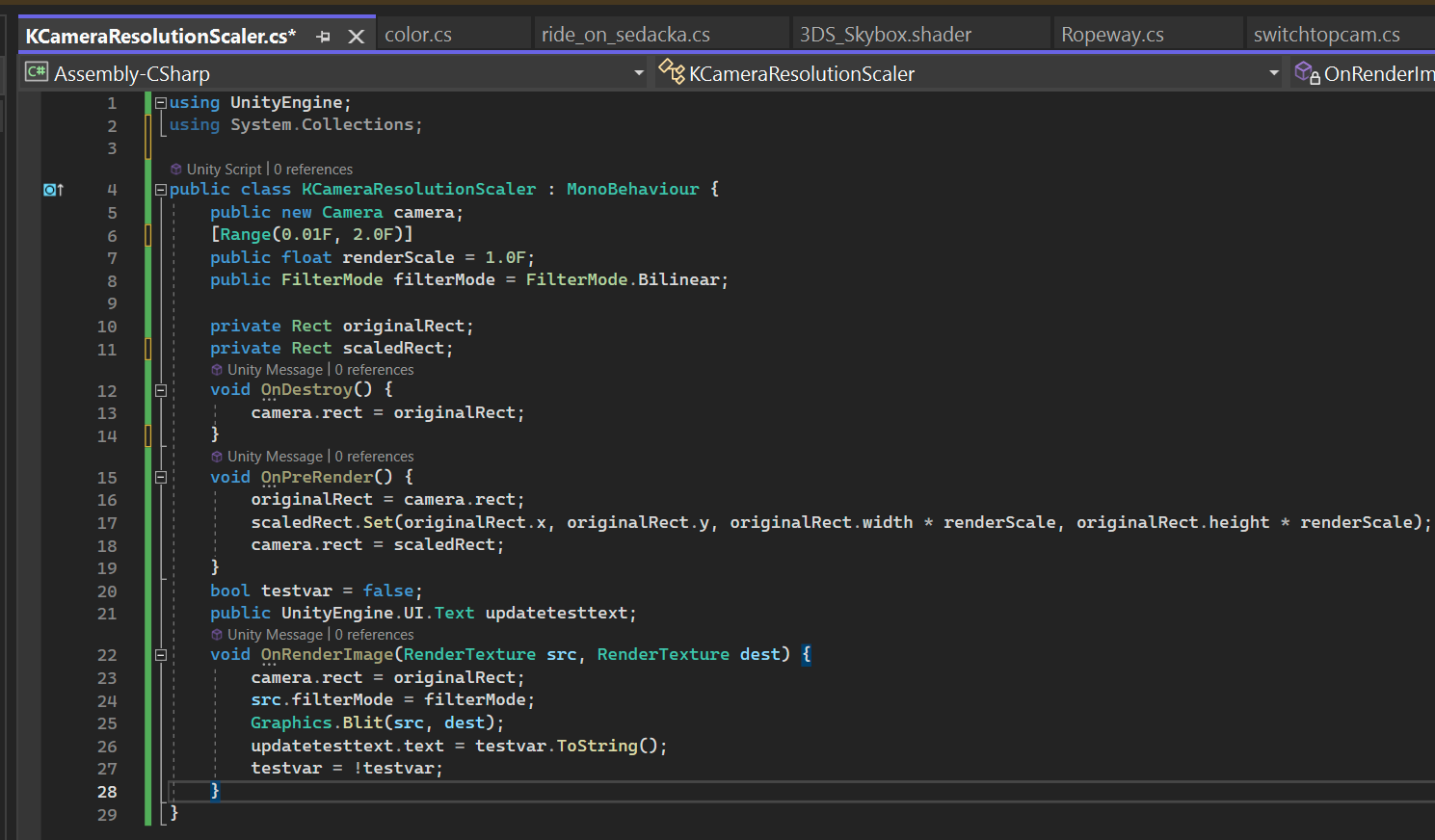
 open lake
Hello people
I have a script that shoots a projectile rigidbody whenever i click mouse0. I want to make it so that when I hold and shoot, and when I'm holding, if I move my mouse/flick it in a general direction, depending on the direction and the extent, I want the projectile to curve, but ultimately end up at the same spot as a projectile without the curve would end up in.
My guess is that
-I record the initial camera angle as initRot
-I record the end camera angle as finalRot
-I find the curve direction using vectors
-I find the angle between then using quaternions and then simulate projectile motion using simple physics, but alter direction of gravity to suit the curve direction
Is this possible?
 hollow stone
Don't really understand what you mean. You want the projectile to end up in the same spot wherever you aim your shot?
open lake
yeah but I wanted the path to curve depending on how I move my mouse when I'm holding the shoot button
hollow stone
So if you're aiming in the opposite direction of the target what happens?
open lake
no,
I meant that it always ends up in the crosshair hit point
its an FPS

whenever the bar loads up in the bottom of the screen, it means i'm holding the mouse button down
Well I got it to work so nvm. I accidently sent that message in #archived-hdrp and was redirected here 😅
 fresh cosmos
is there anything that decides what order scripts execute their updates? ill have to change the code to be consistent regardless but im curious
quartz folio
dusk apex
fresh cosmos
is there anything that decides what order scripts execute their updates? ill hav...
 fresh cosmos
ok so it is what i thought its somewhat random and no way to really tell. i just found a problem where two different scenes with the same uncertain code could trigger or not depending on when the update event of another object was called. so one it worked as intended and the other it didnt. i havent really run into that before as i usually make checks to avoid this kinda thing
 tepid jewel
Hey! I need some help with meshes. I am currently migrating a project from three js to unity and I have a geojson with latlngs that I am using to make a three.Shape (https://threejs.org/docs/#api/en/extras/core/Shape) The shape has something called holes and this is very useful as I just give it a path for the outer bounds of the polygon that I have reformated from the latlng with mercator projection and then I give it the holes inside of this polygon (in the same format) and it calulcates everything for me, but I can't seam to find a good way to do this in unity. Can anyone help me out? I have multiple ideas, either to make multiple meshes and somehow "cut" one out from the other (like boolean in blender, this is they way I want to avoid) or in c# somehow calulate and triangulate it with the holes, but how do I do that?
leaden ice
fresh cosmos
ok so it is what i thought its somewhat random and no way to really tell. i just...
Not only that it can be different from platform to platform. So it's best to make sure that your code works in any order or that you're controlling the order somehow
 undone grove
Q: Is it possible to nest prefabs so that the nested prefab is at the root of the outer most one? Or are you forced to put a nested prefab into a child gameobject?
quartz folio
You can make prefab variants (this is a #💻┃unity-talk question, not code)
 prisma birch
How can I use a script asset as a variable? (Rather than a reference to a component in a scene)
Like if I wanted a modifiable array of scripts that would be added to a game object at start or through an editor button.
 knotty sun
prisma birch
Like if I wanted a modifiable array of scripts that would be added to a game obj...
knotty sun
prisma birch
Like if I wanted a modifiable array of scripts that would be added to a game obj...
System.Type[]
prisma birch
knotty sun
System.Type[]
Is there a way to serialize this? Or to pick from classes that inherit from a specific class?
knotty sun
only with a custom editor
steady moat
You can use UnityEngine.Object or UnityEditor.MonoScript. Not sure if it is a good idea though as it won't work at run time.
 stoic dagger
I have a problem, sometimes when this script activated (at least the first time it does in a play test) I have a sudden lag spike what I assume is a lag spike,
As I said, it happens only the first time it should active in a Play test and I dont know why it happens
    private void Start()
    {
        CarryPosition = GameObject.FindGameObjectWithTag("BagCarryPoint");
        Pickable = LayerMask.GetMask("Pickable");
        pickUpRange = 3f;
        carrySomething = false;
        cam = FindAnyObjectByType<Camera>();

        pickUpUI = GameObject.FindGameObjectWithTag("Canvas").GetComponent<Transform>().Find("pickUpUI").gameObject;
    }

    private void Update()
    {
        if (carrySomething == false)
        {
            if(Physics.Raycast(cam.transform.position, cam.transform.forward, out hit, pickUpRange, Pickable))
            {
                pickUpUI.SetActive(true);
            }
            else
            {
                if(pickUpUI.activeSelf == true)
                {
                    pickUpUI.SetActive(false);
                }
            }
        }
    }
I am referring to the bit where I set active the pickUpUI gameObject
thats when it lags
leaden ice
stoic dagger
I have a problem, sometimes when this script activated (at least the first time ...
If you have performance problems you should diagnose the culprit with the Profiler
stoic dagger
I dont think its a performance problem, any other feature works as it should, its only when that if line runs the first time
leaden ice
If you have a "lag spike" that is absolutely a performance problem
thick socket
I have 2 lists with 5 elements
I am going to sort the first list....how do I make the 2nd list make the same "changes"
aka if I have list starting at
12345 and it becomes, 15243...how do I make the 2nd list elements swap the same?
steady moat
Why are you not using the same list ?
leaden ice
easier would be one list with a struct or tuple containing both values
and then ordered as you like
thick socket
hmm, forgot about that thanks
thick socket
steady moat
Why are you not using the same list ?
list of items, and a list of VisualElements(UI toolkit things)
steady moat
Like @leaden ice said, use a tuple (Item item, VisualElements ui) or a struct.
thick socket
steady moat
Like <@179367739574583296> said, use a tuple (Item item, VisualElements ui) or a...
it would be like a List<tuple(item item, VisualElements ui)> listname like this?
steady moat
List<(item item, VisualElements ui)>
thick socket
oh, didn't know that was a thing thanks
thick socket
steady moat
List<(item item, VisualElements ui)>
so to get the item it would be like listname[0].item?
steady moat
Yeah
thick socket
awesome thanks
steady moat
if you do not name, you need to use Item1, Item2, etc.
stoic dagger
leaden ice
If you have a "lag spike" that is absolutely a performance problem
https://www.reddit.com/r/Unity3D/comments/pf7v0t/issue_where_first_time_textmeshpro_is_setactive/
So from what I read its some "initialization" problem with textMeshPro, there are also some potential solutions for those who might have the same problem
reddit
4 votes and 17 comments so far on Reddit
thick socket
steady moat
if you do not name, you need to use Item1, Item2, etc.
wow it feels weird to be doing add like this lol
itemVEList.Add((item, uiItem));
You can also use a struct, if you not like the syntax.
leaden ice
stoic dagger
https://www.reddit.com/r/Unity3D/comments/pf7v0t/issue_where_first_time_textmesh...
Have you used the profiler yet and discovered that TMP initialization is actually the issue?
leaden ice
thick socket
wow it feels weird to be doing add like this lol
```cs
itemVEList.Add((item, uiI...
I tend to not use tuples, they're unwieldy and hard to read
there's nothing you can do with tuples that can't be done with good old fashioned classes and structs
steady moat
Each their own style.
thick socket
leaden ice
I tend to not use tuples, they're unwieldy and hard to read
fair enough thanks
any real reason to use structs over classes?
steady moat
Performance
leaden ice
thick socket
any real reason to use structs over classes?
WHen you want a value type rather than a reference type.
can help avoid GC too, if you know what you're doing.
steady moat
If you have a lot of data in an array, it is better to use struct because the data is kept sequentially which prevent cache miss speeding up drastically the performance of iterating through data.
leaden ice
Well that depends entirely on whether you want to pass references to that data around in other ways than passing the array itself and an index around 😉
thick socket
struct ItemPlusVisualElement{
    Items item;
    VisualElement visualElement;
    public ItemPlusVisualElement(Items item, VisualElement visualElement)
    {
        this.item = item;
        this.visualElement = visualElement;
    }
}
any specific struct thing Im missing that people normally do?
steady moat
Use property.
leaden ice
thick socket
```cs
struct ItemPlusVisualElement{
Items item;
VisualElement visualElem...
You'll probably need to make those fields public
steady moat
And I am pretty sure you do not need constructor
leaden ice
You don't need a constructor unless you want to do some readonly/immutable stuff
you can use object initializer
thick socket
struct ItemPlusVisualElement{
    public Items item;
    public VisualElement visualElement;
}```I tried and I didnt understand that much, but I did some quick research online and found someone with the same scenario who used the profiler,
Anyway, I added a new TMP element outside my canvas and now that SetActive stopped lagging
https://answers.unity.com/questions/1000941/huge-lag-spike-when-activating-a-uitext-gameobject.html
Unity is the ultimate game development platform. Use Unity to build high-quality 3D and 2D games, deploy them across mobile, desktop, VR/AR, consoles or the Web, and connect with loyal and enthusiastic players and customers.
thick socket
guess its a bit shorter this way 😄
steady moat
        private struct TextStruct
        {
            public string Text { get; set; }
        }

        new TextStruct() { Text = "" };
why bother having a basic get/set?
thick socket
leaden ice
You don't need a constructor unless you want to do some readonly/immutable stuff
wont the constructor just make it more readable?
since you just pass in the 2 params instead of having to set them both?
steady moat
If you feel that it is the case, feel free to use it.
It is more of a code style decision.
thick socket
wasn't sure if there was some performance hit or other reason not to 😄
leaden ice
thick socket
wont the constructor just make it more readable?
sure it's fine
there's no performance issue with it - but you can be lazy and not make one
thick socket
gotcha thanks 🙂
thick socket
steady moat
Maintanability
I dont quite follow
I've only used get / private set before though
thick socket
steady moat
```cs
private struct TextStruct
{
public string Text...
if you just got rid of the {get; set;} wouldnt it already start as that?
steady moat
No, it would be variable, not a property
Which would break the encapsulation.
And potentially cause issue in refactoring.
thick socket
gotcha, totally forgot those are different things 😄
steady moat
But, you can do whatever you want. In this case, the encapsulation is not really important.
Personally, I do it for uniformisation of my code/code style.
thick socket
makes sense thanks!

how is my code throwing an error on commented out code?
nvm, apparently its just VS being dumb
closing the file and reopening fixed it
thin aurora
thick socket
Because you didn't save it and you probably did when you closed the file?
thick socket
thin aurora
Because you didn't save it and you probably did when you closed the file?
nope, it was supposedly saving
¯_(ツ)_/¯
(had done ctrl+s multiple times with different lines commented)
 clever sigil
alright so how would I sync a database in netcode for gameobjects to match the one that the server has when a client connect?
So far it has just been pain and misery, I have no idea how to doit
swift falcon
https://www.toptal.com/developers/hastebin
y wont this work? im trying to check if the cube collided with a maze wall and if it did then it should stop being able to move in that direction. but its just passing through.
And yes it is colliding, i checked that too.
Hastebin
Hastebin is a free web-based pastebin service for storing and sharing text and code snippets with anyone. Get started now.
 main shuttle
swift falcon
https://www.toptal.com/developers/hastebin
y wont this work? im trying to check ...
main shuttle
swift falcon
https://www.toptal.com/developers/hastebin
y wont this work? im trying to check ...
You didn't save the script
swift falcon
oh oops
https://pastebin.com/naRtrFw2
does this work
Pastebin
Pastebin.com is the number one paste tool since 2002. Pastebin is a website where you can store text online for a set period of time.
thick socket
gotta love chatgpt for regex stuff
leaden ice
swift falcon
oh oops
why not just move via physics and use real colliders instead of trigger colliders?
Then you get your desired behavior automatically.
thick socket
Combine the following 2 lines into 1 line of code
var tmp = string.Join(" ", Regex.Split(name, @"(?<!^)(?=[A-Z])"));
return Regex.Replace(tmp, @"[\d-]", string.Empty);```
to
```cs
var result = Regex.Replace(string.Join(" ", Regex.Split(name, @"(?<!^)(?=[A-Z])")), @"[\d-]", string.Empty);
😄
swift falcon
leaden ice
why not just move via physics and use real colliders instead of trigger collider...
how so?
leaden ice
swift falcon
how so?
wdym how so?
That's what the physics engine does
It handles collisions etc
swift falcon
oh-ig i never used it b4
swift falcon
oh
leaden ice
Move via a Rigidbody and you'll get your desired behavior automatically
river wigeon
I made this prefab from a cube, how can I find it's height? I want to stack a lot of them on top of each other. It's actual height is 0.1 but it could change
 leaden ice
river wigeon
I made this prefab from a cube, how can I find it's height? I want to stack a lo...
leaden ice
river wigeon
I made this prefab from a cube, how can I find it's height? I want to stack a lo...
The simplest way is just to use prefabs of known heights. Make them in ProBuilder for example.
left otter
can someone explain why it freezes rotation but not position?
playerRb.constraints = RigidbodyConstraints.FreezeRotation;```because your first line is useless sine you overwrite it on the second line
empty karma
How can I get a reference to that last gameobject in code (script is attached to completely different gameobject)
 river wigeon
leaden ice
The simplest way is just to use prefabs of known heights. Make them in ProBuilde...
river wigeon
leaden ice
The simplest way is just to use prefabs of known heights. Make them in ProBuilde...
so just hard code in the value? It seems like there should be a way to do it dynamically 
leaden ice
left otter
can someone explain why it freezes rotation but not position?
```playerRb.const...
if you do:
x = 5;
x = 6;
``` you would not wonder why x isn't equal to 5 would you?define "dynamically" though
you could read renderer or collider bounds but - that doesn't work when rotated
empty karma
empty karma
How can I get a reference to that last gameobject in code (script is attached to...
My last attempt lol
 thick socket
empty karma
How can I get a reference to that last gameobject in code (script is attached to...
thick socket
empty karma
How can I get a reference to that last gameobject in code (script is attached to...
you want during realtime, or before you start scene
left otter
@leaden ice oh well true how do i freeze position and rotation at the same time then ?
river wigeon
leaden ice
define "dynamically" though
so if I changed the scale or height of the object in the prefab, it would still stack on top of each other
leaden ice
left otter
<@179367739574583296> oh well true how do i freeze position and rotation at the ...
playerRb.constraints = RigidbodyConstraints.FreezePosition | RigidbodyConstraints.FreezeRotation;
empty karma
thick socket
you want during realtime, or before you start scene
Doesn't matter but the point is to avoid having to do it manually in the inspector
river wigeon
that way I can easily adjust how it looks while the code still works
leaden ice
Or pretty sure there's a playerRb.constraints = RigidbodyConstraints.FreezePositionAndRotation; too @left otter
leaden ice
river wigeon
so if I changed the scale or height of the object in the prefab, it would still ...
you could make reference child objects and measure the distance between them
e.g. one at the top one at the bottom
and just do Vector3.distance
left otter
@leaden ice ah yes i found it there is a freezeall
thick socket
empty karma
Doesn't matter but the point is to avoid having to do it manually in the inspect...
would be easier to just inspector...but I totally get that, I would just do
content = GameObject.Find("ProgrammingContent");
that way even it parent name or anything changed you could still grab it easily
empty karma
Doesn't work cus it's a child
leaden ice
empty karma
Doesn't matter but the point is to avoid having to do it manually in the inspect...
The inspector is the best way, if it's available
leaden ice
empty karma
Doesn't work cus it's a child
Find doesn't care about this
thick socket
^^
empty karma
Huh interesting, it didn't work when I tried
leaden ice
empty karma
Huh interesting, it didn't work when I tried
then the object didn't exist in the scene yet or was not active
or you spelled the name wrong
empty karma
Maybe I f'ed up
 fading yew
maybe you called gameobject.find instead of GameObject.find?
fading yew
Yes ok.. sorry for the uppercase lasiness
fading yew
ah okay mb, I thought gameObject.Find was the same but only looked in the children instead of the whole scene
fading yew
leaden ice
You might be thinking of Transform.Find
indeed, sorry
empty karma
Yeah I found the issue already. I mean, I fixed it. By doing the same thing I did before. Probably had a typo
fading yew
Gatta a question about layout groups, is it the right place here?
fading yew
I posted there, but I didn't get anything and I thought it could be because it's a channel for artists only
 maiden junco
the OnBecameInvisible void is called only when the camera hugely doesn't looks the object, while it isn't being called when slightly not watching the object
leaden ice
maiden junco
the OnBecameInvisible void is called only when the camera hugely doesn't looks t...
yep - it's based on renderer bounds
sage latch
This is getting _startGameButton just fine:
void Update() {
Debug.Log(_startGameButton); // works fine
}
```But in another method, it instead thinks `_startGameButton` is null
```cs
void UpdatePanel(ulong playerId, LobbyPlayerData playerData) {
var playerPanel = _playerPanels.FirstOrDefault(x => x.PlayerId == playerId);
if (playerPanel == null) {
playerPanel = Instantiate(_playerPanelPrefab, _playerPanelParent);
_playerPanels.Add(playerPanel);
}
playerPanel.SetContent(playerId, playerData);
Debug.Log(_startGameButton); // logs null and throws an exception on the next line
_startGameButton.SetActive(
NetworkManager.Singleton.IsHost &&
LobbySystem.PlayersInLobby.Count >= LobbySystem.MinPlayers &&
LobbySystem.PlayersInLobby.All(p => p.Value.IsReady)
);
}
```This only happens after I unload the scene and load back into it and there's only one of this component. Wtf is going on?? sage terrace
so i have a timer in my unity project and instead of that decimal point, is it possible to replace it with a colon
 fading yew
leaden ice
it's explicitly a channel about UI
fading yew
leaden ice
it's explicitly a channel about UI
Just because it's in the "artist tools" category. Thought it could be blender and stuff
maiden junco
leaden ice
yep - it's based on renderer bounds
so how can I fix?
sage latch
sage terrace
so i have a timer in my unity project and instead of that decimal point, is it p...
.Replace(".", ":") on the string
leaden ice
maiden junco
so how can I fix?
you can't
that's how it works
what are you trying to achieve?
maiden junco
😐
maiden junco
leaden ice
what are you trying to achieve?
basically: the player enters this room, and when he turns back the wall is replaced with another gameobject (the wall without the door hole)
i thought about raycasting
leaden ice
maiden junco
basically: the player enters this room, and when he turns back the wall is repla...
Use a trigger collider
fading yew
Yes I think trigger collider + player rotation
maiden junco
leaden ice
Use a trigger collider
ok but if the player enters the room moonwalking?
leaden ice
maiden junco
ok but if the player enters the room moonwalking?
you tell me
maiden junco
he is still looking at the hole
leaden ice
what should happen?
fading yew
hence the rotation
leaden ice
but what should happen? You need to define that
maiden junco
leaden ice
what should happen?
its like a scary thing, the player entered the room and when turning back the room is without the door hole
let me explain clearly
fading yew
I think he wants the door to disapear like stanley parable
maiden junco
leaden ice
what should happen?
the “Wall with no door hole” wont spawn basically
I have 2 objects
One with the door hole
and the other one without the hole
leaden ice
maiden junco
the “Wall with no door hole” wont spawn basically
you'll need to do some raycasting basically
to determine line of sight
sage terrace
sage latch
`.Replace(".", ":")` on the string
sorry if this is annoying but if i share my code could you direct me to where i would put this?
leaden ice
and the edges of the door etc
maiden junco
and it wont be the same thing that occlusion culling does?
sage latch
sage terrace
sorry if this is annoying but if i share my code could you direct me to where i ...
Sure
sage terrace
sage latch
Sure
using System.Collections;
using System.Collections.Generic;
using UnityEngine;
using UnityEngine.UI;
using TMPro;
public class Timer : MonoBehaviour
{
public TextMeshProUGUI timerText;
private float startTime;
bool timerStopped = false;
private void Start()
{
    startTime = Time.time;
}

private void Update()
{
    if(timerStopped)
        return;

    else
    {
        float t = Time.time - startTime;

        string minutes = ((int)t / 60).ToString();
        string seconds = (t % 60).ToString("f2");
        //string milliSeconds = (t * 1000).ToString("f-2");
        timerText.text = minutes + ":" + seconds;
    }
}

public void StopTimer()
{
    timerStopped = true;
    timerText.color = Color.green;
}
}
leaden ice
maiden junco
and it wont be the same thing that occlusion culling does?
occlusion culling is a blunt tool, designed for performance. You want a "precision" thing here
sage latch
sage terrace
using System.Collections;
using System.Collections.Generic;
using UnityEngine;
u...
!code
tawny elkBOT
Posting code
📃 Large Code Blocks
Large code blocks should be posted as links to services like:
https://gdl.space/, https://paste.ofcode.org/, https://hatebin.com/
https://paste.myst.rs/, https://hastebin.com/
📃 Inline Code
Surround code with three backquotes. Not quotation marks.
To get C# formatting the first line should only contain cs or csharp.
Add a comment with a line number if there is an error message.
```cs
// Your code here
```
Do not share screenshots of code unless requested.
fading yew
Check if the player has crossed with the trigger collider, and check if he's looking at the door with the rotation. Raycasting would be more precise but I don't think you need this level of precision right=? you just want the classic maze door disapears as I look away effect right?
sage terrace
sage latch
!code
oh sorry
maiden junco
leaden ice
occlusion culling is a blunt tool, designed for performance. You want a "precisi...
right
i’ll implement that then
ty
leaden ice
maiden junco
i’ll implement that then
this might be useful
do this on the 4 corners of the door perhaps
make sure none of them are in the viewport
sage terrace
string seconds = (t % 60).ToString("f2"); @sage latch
sage latch
sage terrace
```string seconds = (t % 60).ToString("f2");``` <@308117922260451340>
Just add it to the end: string seconds = (t % 60).ToString("f2").Replace(".", ":");
plush ibex
Hi there does anybody have UGS implementation experience with GPGS Auth?
sage terrace
sage latch
Just add it to the end: `string seconds = (t % 60).ToString("f2").Replace(".", "...
Thank you so much, life saver
sage latch
np :)
 thin frigate
What's a good way to deal with very simple 2d pathfinding without rubberbanding? I'm making an asteroid clone and I want certain entities to accelerate towards a position and stay there, but they will naturally end up overshooting it and bouncing back and forth around the coordinate.
hollow stone
You can check dot product between target current, target next. You can measure distance to target and clamp movement to that distance.
leaden ice
thin frigate
What's a good way to deal with very simple 2d pathfinding without rubberbanding?...
If you want to do it realistically and compliant with physics - you'd use a PID controller
 grizzled needle
I've been hearing a lot about things called singletons and how, generally, they're looked down upon and/or are bad. Going through my project, I realized that I actually have several singletons, and intentionally made so. I was wondering if it was bad practice to be using them or if I should do something else entirely?
Here's a list of them with a brief explanation, they're all monobehaviours/gameobjects btw-
LocalPlayer- Just the player, it's a custom fps controller
GameManager- On creation it loads all of the game's setting files, handles debug gui, and implements a custom runtime console
RunDirector- Handles the entire game loop, keeps track of player health, points, etc along with enemy budget, health, and etc
PointSpawner- It's just a pool to spawn points, it's also the only singleton that gets destroyed on loading a new scene
This is all still just a work in progress, but I thought I would be helpful to see if I'm using bad design practices or not.
Oh and there's a few more, these aren't monobehaviours-
LocalSettings.Input (alternatively InputSettings.Current)
LocalSettings.Video
LocalSettings.GUI
they all just handle global setting variables that are updated from the files, like field of view, key bindings, mouse sensitivity, etc
 floral needle
Hello, can anyone tell me if there is a way to do this with Scriptable Objects (I mean having them all in the same file) without the " scriptable object containing file and class name must match" (besides putting each of them in it's own script)
 potent sleet
floral needle
Hello, can anyone tell me if there is a way to do this with Scriptable Objects (...
potent sleet
floral needle
Hello, can anyone tell me if there is a way to do this with Scriptable Objects (...
dont do this
esp with SO
you will get a SO with missing script
mystic ferry
grizzled needle
I've been hearing a lot about things called singletons and how, generally, they'...
understanding why singletons are considered bad is much more valuable than taking at face-value that they "shouldn't" be in a project. Singletons are considered "bad" because they hide dependencies and make systems very coupled between one another without that fact being obvious (as in, coupled classes have dependencies listed right at the top, verses calling a manager in a static context). Singletons are honestly very powerful and very useful in situations like manager classes that need to be accessed by many things
manager classes are going to be very clearly coupled between a lot of systems, so hiding dependencies in that sense isn't a bad thing. It's expected
floral needle
Alright, guess I can't be lazy :D. Thanks!
grizzled needle
floral needle
Alright, guess I can't be lazy :D. Thanks!
Could have a single generic perk file and just rename it in when you create the scriptable object. Unless you're doing custom implementations per perk.
grizzled needle
mystic ferry
understanding *why* singletons are considered bad is much more valuable than tak...
Ah okie, thanks!
floral needle
grizzled needle
Could have a single generic perk file and just rename it in when you create the ...
yhea, they have different functions xD
hollow stone
grizzled needle
Oh and there's a few more, these aren't monobehaviours-
LocalSettings.Input (alt...
This has a lot of o do with coupling, dependency and testing. There's a lot of info out there to grab of how to do this^^
For single person project singletons are very powerful.
mystic ferry
hollow stone
For single person project singletons are very powerful.
this explains nothing
hollow stone
mystic ferry
this explains nothing
I think the subject is too broad to be disclosed fully here, but indicate that singleton is not always the wrong choice.
 quasi stirrup
Hey is anyone able to have a look at my question in #⚛️┃physics? It's been like 7hrs since I asked it
 jaunty sleet
is anyone familiar with json saving?
I'm using the json utility with my save system but I know there are some types json is not compatible with. Would I be able to save an array of lists using it?
 neon maple
there must be a way to shorten this right... (?)
(they're all GameObjects)
 somber nacelle
jaunty sleet
I'm using the json utility with my save system but I know there are some types j...
somber nacelle
jaunty sleet
I'm using the json utility with my save system but I know there are some types j...
you'd likely be better off using newtonsoft json. pretty sure json utility doesn't support nested arrays/lists
jaunty sleet
that's unfortunate
guess I'll have to switch to whatever newtonsoft json is lol
will it be easy for me to switch to using that in my unity scripts? is there a package I can include to use it, etc?
somber nacelle
there is a package, yes. depending on your unity version it may even already be included. it is also fairly easy to use
jaunty sleet
do you know the name of the package, or do you have a link to the documentation?
somber nacelle
jaunty sleet
thanks
neon maple
neon maple
there must be a way to shorten this right... (?)
(they're all GameObject*s*)

 simple egret
Array and a loop
 mellow sigil
Whenever you have numbered variables they should be an array or a list instead
simple egret
Or, put all the objects under a single empty parent, and disable the empty. Whatever works the easiest
 ancient sail
Hey can somebody help me, It is new Input System how do I make it so it triggers only when action started (when button is just pressed), please help i am about to break something
 somber nacelle
might wanna check the guides/docs pinned in #🖱️┃input-system
ancient sail
thanks
neon maple
simple egret
Array and a loop
one of things I hate to deal with, can you make a quick example
 glossy basin
Hello there, has anyone used the advanced mesh API in Jobs system for deforming a mesh? I faced a problem yesterday and have not been able to solve it, Im having weird behaviours compared to the standard system
simple egret
neon maple
one of things I hate to deal with, can you make a quick example
GameObject[] objs;
// ...
foreach (GameObject obj in objs)
  obj.SetActive(true);
 cerulean oak
I need to pass a float to a shader, is there any way to do it without creating one material per object?
neon maple
simple egret
```cs
GameObject[] objs;
// ...
foreach (GameObject obj in objs)
obj.SetActive...
huh really, ,ast time I tried that it didnt seem to work. will try
leaden ice
cerulean oak
I need to pass a float to a shader, is there any way to do it without creating o...
Potentially you could use MaterialPropertyBlock. But depending on which render pipeline you're using - multiple materials might be preferred to that.
cerulean oak
leaden ice
Potentially you could use MaterialPropertyBlock. But depending on which render p...
im using URP, and I need to pass a "growth" float between 0 and 1 to the material, every single tick. There will be lots of objects that have this shader in the scene (~100 maybe)
how bad is that for performance?
leaden ice
cerulean oak
im using URP, and I need to pass a "growth" float between 0 and 1 to the materia...
is the growth level different per object?
or the same
cerulean oak
my idea if it ever becomes a problem is having the updates delayed
leaden ice
cerulean oak
so, i'd have different LODs, higher LODs would get updated more often, lower LODs would get updated less often
leaden ice
According to most unity posts I've seen separate materials is preferable to material property blocks in URP
leaden ice
If I were you
I would just try it
and see how the performance is
with one material per object
It's not a good idea to prematurely optimize this
cerulean oak
true
leaden ice
If it's a problem, think about other solutions
cerulean oak
premature optimization is the root of all evil
leaden ice
you can always change things later
jaunty sleet
ok I know this is a dumb question but I can't figure out for the life of me what I'm supposed to write in my using statement for newtonsoft json
what do I write in order to be able to use it?
somber nacelle
luckily your IDE should be able to import the correct namespace using the quick actions 😉
jaunty sleet
how do I do that? I have never heard of quick actions before
leaden ice
jaunty sleet
what do I write in order to be able to use it?
https://www.newtonsoft.com/json/help/html/R_Project_Documentation.htm
All namespaces are in the documentation
jaunty sleet
ok figured it out, it was Newtonsoft.Json lol. Thanks guys
cerulean oak
what IDE are you using?
simple egret
jaunty sleet
how do I do that? I have never heard of quick actions before
If you already typed the class name, hover over the error and click the light bulb icon that appears. It'll show a list of suggestions
jaunty sleet
VS 2022
somber nacelle
jaunty sleet
how do I do that? I have never heard of quick actions before
well you start by making sure your !IDE is configured. then you can click the helpful lightbulb
tawny elkBOT
💡 IDE Configuration
If your IDE is not autocompleting code
or underlining errors, please configure it:
• Visual Studio (Installed via Unity Hub)
• Visual Studio (Installed manually)
• VS Code*
• JetBrains Rider
• Other/None
*VS Code's debugger plugin is unsupported.
We recommend using VS or Rider instead.
simple egret
Or, with VS, as you type you can click the "plus" icon bottom-right of the completion list to show items from unimported namespaces
cerulean oak
man rider is so fucking good
simple egret
Upon completing, it'll add the using for you
jaunty sleet
I have the unity game development vs package installed but it still doesnt highlight unity classes like it's supposed to...
I'll figure that out another time though. I'll never get my save system working again if I stop part way through messing with it 😂
simple egret
Note that having a configured IDE is required to get help here
somber nacelle
jaunty sleet
I'll figure that out another time though. I'll never get my save system working ...
you should figure that out now as having a configured IDE is a requirement to get help here. it will also help you prevent and fix errors making development much easier
jaunty sleet
I don't need anymore help rn lol. I'll fix it before I come back on here
leaden ice
jaunty sleet
I'll figure that out another time though. I'll never get my save system working ...
that should be like priority #1. It will save you a lot of time
 ionic adder
jaunty sleet
I'll figure that out another time though. I'll never get my save system working ...
ionic adder
jaunty sleet
I'll figure that out another time though. I'll never get my save system working ...
not to dog pile, but want to echo what others are saying because I found your sentiment to be somewhat ironic. a properly configured IDE will directly aid your ability to step away from a system mid-implementation and comfortably pick up where you left off at a later date, among countless other benefits.
jaunty sleet
I'm updating it rn, so maybe that will fix it
 formal igloo
does Physics2D.OverlapBox/Area not work as I think it does? I'm checking to see if there is a collider at a given spot with Physics2D.OverlapBox and Physics2D.OverlapArea. I'm very confident that my coordinates/layermasks are right, but I'm getting nothing back. Does the collider need to be entirely contained within the box? or is it enough that the box overlaps any amount with any colliders?
the area I'm defining and the collider I'm trying to detect should have identical positions/scales, is that maybe a problem?
somber nacelle
you may need to visualize your query to make sure it is where you think it is. here are a couple packages you could use for that, i personally use the first one:
https://github.com/vertxxyz/Vertx.Debugging
https://github.com/nomnomab/RaycastVisualization
formal igloo
yeah, I checked using OnDrawGizmos, so I feel pretty confident that I'm casting in the right spot
also if I log the coords and then look at the object I'm trying to collide with, the coords and the object position do overlap
somber nacelle
then check the layer that the object is on and compare that to your layermask. then if you need further help show code so nobody has to guess what your issue is
formal igloo
        bool IsBlockedAtPosition(Vector2 position){
            Vector2 half = new Vector2(-.45f, .45f); // TODO: Move this somewhere globalish
            var transformedPosition1 = _machineRoot.TransformPoint(position - half);
            var transformedPosition2 = _machineRoot.TransformPoint(position + half);

            ContactFilter2D filter2D = new ContactFilter2D();
            filter2D.layerMask = _blockedLayerMask;
            List<Collider2D> hit = new();
            var collidersAtPosition = Physics2D.OverlapArea(
                transformedPosition1,
                transformedPosition2,
                filter2D,
                hit
            );

            var c2 = Physics2D.OverlapBox(
                _machineRoot.TransformPoint(position),
                _machineRoot.transform.localScale * .9f,
                0,
                _blockedLayerMask
            );

            Debug.Log("Is Blocked Check - pos: " + position + ", p1: " + transformedPosition1 + ", p2: " + transformedPosition2);
            Debug.Log(hit.Count);
            Debug.Log(collidersAtPosition);
            Debug.Log(c2);

            if(collidersAtPosition > 0){
                return true;
            }

            return false;
        }
got my IDE working again, it just needed an update


 somber nacelle
what layer is the object on and what layers are included in the layer mask?
formal igloo
in both cases, a layer mask called Collision Blocker:


ugh, ok even weirder, if while the game is playing, I move the target collider from being a child of the machine root to just being at the scene root (maintaining the exact same position and scale), the overlap works??
 hot torrent
how do i set a skinned mesh renderers materials texture to no texture? is there a null texture i can reference?
somber nacelle
formal igloo
ugh, ok even weirder, if while the game is playing, I move the target collider f...
check the physics2d settings, sounds like you may have the Queries Start in Colliders option disabled
formal igloo
One of those works, the other does not!!!

 formal igloo
somber nacelle
check the physics2d settings, sounds like you may have the `Queries Start in Col...
formal igloo
somber nacelle
check the physics2d settings, sounds like you may have the `Queries Start in Col...
Ah interesting, will check this out
 somber nacelle
then it's something else and you may want to ask in #⚛️┃physics 🤷♂️
or you've actually got a compound collider where your collider is considered part of some parent on a different layer
formal igloo
yeah, I checked all of the parents, no rigidbodies or colliders on any of them. Will ask in physics
jaunty sleet
I am loading an object of one of my classes using Newtonsoft Deserialize and I am getting an error from my constructor for the object when I make this command? Does anyone know why this would be the case? How am I getting an error from the constructor when I am not using the new keyword?
https://codeshare.io/ZJx0Ko this is my code for it, and the error starts on line 27
leaden ice
jaunty sleet
I am loading an object of one of my classes using Newtonsoft Deserialize and I a...
the deserializer calls your constructor
somber nacelle
wanna share the error so we dont' have to try and guess what it is?
leaden ice
sharing your error would be nice
also the file that actually contains this constructor you're talking about
jaunty sleet
leaden ice
jaunty sleet
ok so show the code for LevelData
jaunty sleet
ok one sec
leaden ice
Also this isn't Java - highly recommend sticking to C# naming conventions. Methods should be PascalCase, and so should class names (e.g. levelBehavior)
jaunty sleet
leaden ice
jaunty sleet
https://codeshare.io/dwZyVB
this is line 27: position = new float[notes.Length];
jaunty sleet
I have been writing this code for a long time, I know the c# naming conventions now
leaden ice
because the deserializer doesn't know what to put there
it just puts null
you need to provide a parameterless constructor if you're going to use a deserializer with this class
jaunty sleet
this wasn't an issue when I was using json utility, does that do it differently?
leaden ice
yes
leaden ice
just make a parameterless constructor that does nothing
leaden ice
how else would it create objects?
jaunty sleet
it did it somehow before without it 😂
 lapis egret
If you're making a restful api call, why is it bad to do so with a coroutine instead of an async function?
leaden ice
lapis egret
If you're making a restful api call, why is it bad to do so with a coroutine ins...
define "bad"?
lapis egret
So as far as I understand you can do both right? But I've seen it recommended to use async?
lapis egret
I see. Yeah honestly async seems to have more overhead anyway. You can just yield return on the request and then pass the results to a payload in coroutine, is that correct?
leaden ice
Assuming you're using UnityWebRequest
lapis egret
Also it doesn't make you tag every calling function async... which is nice
Okay, thanks for your help
 rotund burrow
how to calculate 3d heuristic cost in a* ? i found this but i dont understand it https://gamedev.stackexchange.com/questions/185689/distance-cost-for-3d-a-algorithm
this line specifically
doubleAxis = max(xDistance + yDistance + zDistance - maximum - 2 * minimum, 0)
 steep saddle
Trying to reduce CPU usage. I have 4 USB capture cards streaming from 4 cameras. I'm setting the texture of a rawImage to be the texture of a WebCamDevice. When all 4 are streaming at a capped 15 FPS, Unity is using around 60% of my CPU.
If I set the texture of my raw image to null, I see a quick drop in my CPU down to 30 some percent. But after a second or two it hops right back up to 50 something. Nothing else is happening in my scene. Just 4 raw images with a null texture displaying white.
 vagrant blade
@shadow cloud Please stop spamming this question across the discord. Nobody can give you legal advice here.
 hard estuary
rotund burrow
this line specifically
doubleAxis = max(xDistance + yDistance + zDistance - ma...
hard estuary
rotund burrow
this line specifically
doubleAxis = max(xDistance + yDistance + zDistance - ma...
doubleAxis = max(
    xDistance + yDistance + zDistance // distances on every axis
    - maximum // the biggest number means the longest path, which is a single-axis movement,
    - 2 * minimum // the lowest number means the shortest path, which means a triple-axis movement
    , 0)
It could be described as: sort all the lengths, then check how much the middle length is longer than the shortest length.
E.g. if lengths are 10, 8 and 4, then it will return 4, because 8-4 is 4.
10+8+4-10-4-4=4
Longest length is canceled, shortest is canceled, the middle one is reduced by shortest.
earnest gazelle
Do you know any better elegant way to update layouts after resizing for example using content size filter?
await UniTask.Yield();
LayoutRebuilder.ForceRebuildLayoutImmediate(_root.GetComponent<RectTransform>());
await UniTask.Yield();
or
_root.GetComponent<LayoutGroup>().enabled = false;
await UniTask.Yield();
_root.GetComponent<LayoutGroup>().enabled = true;
They work but require one frame delay!
swift falcon
How do I set up Visual Studio so that IntelliSense can detect Unity functions?
glossy basin
Hello there, what would be the equivalente of Vector3.sqrMagnitude using the mathemathics library? Im looking to replace all my vector3 values to float3 values, but I need some methods that are only available Vector3
glossy basin
swift falcon
How do I set up Visual Studio so that IntelliSense can detect Unity functions?
This should be automatic, in case your visual studio doesn't detect Unity, open your unity project -> edit ->preferences -> external tools. On external script editor select visual studio, and then reload Vs if you have it open

In case that fails , you can click on regenerate project files too
 warm wren
swift falcon
How do I set up Visual Studio so that IntelliSense can detect Unity functions?
warm wren
swift falcon
How do I set up Visual Studio so that IntelliSense can detect Unity functions?
!vs
tawny elkBOT
Visual Studio guide
If your IDE is not underlining errors in red or autocompleting code,
please configure it using the link below:
• Visual Studio (Installed via Unity Hub)
• Visual Studio (Installed manually)
 strong forge
I have been told to repost this in the general channel, so here goes nothing.
I've NEVER had this issue before, but I am currently facing the issue that my function stops halfway through. So, I currently have a method containing this piece of code, in the console "Test 1" is being logged, I can see in the editor that the loggedInText has been updated, but then it doesn't log "Test 2" and also doesn't call any methods after it. Since I've been using Unity for 6 years now, I suspect it has to do with the NuGetForUnity plugin I am using, as that is really the only new thing I have in my dev stack, which I haven't used before.
        Debug.Log("Test 1");

        loggedInText.text = $"Logged in as {TwitchIntegration.Broadcaster.DisplayName}!";

        Debug.Log("Test 2");

        mainMenuScreen.SetActive(true);

        Debug.Log("Test 3");

        authLoadingScreen.SetActive(false);
do you get any errors on the console?
strong forge
glossy basin
do you get any errors on the console?
Nope
swift falcon
Ik this is more of a beginner question but the channel seems a little dead rn. My Character controller isnt colliding with anything in the scene. I was wondering how i can fix this
swift falcon
glossy basin
This should be automatic, in case your visual studio doesn't detect Unity, open ...
I use Visual Studio Code. Will that have any impact?
glossy basin
strong forge
Nope
Hmm, weird, does this happen only into that script or in every mono behaviour?
swift falcon
No they are two different things
strong forge
glossy basin
Hmm, weird, does this happen only into that script or in every mono behaviour?
Nah, just that one, oddly enough.
swift falcon
@swift falcon
strong forge
My custom twitch integration script works perfectly fine.
glossy basin
swift falcon
I use Visual Studio Code. Will that have any impact?
No problems there, but you would need to import a package from the package manager if it fails, test it first and tell us if it works
swift falcon
if ur using Visual Studio Code** U need to set the preference to visual Studio code and not Visual studio
They are two different things
swift falcon
glossy basin
No problems there, but you would need to import a package from the package manag...
It doesn't.
glossy basin
swift falcon
Ik this is more of a beginner question but the channel seems a little dead rn. M...
custom character controller or unity character controller
swift falcon
swift falcon
if ur using Visual Studio Code** U need to set the preference to visual Studio c...
Mine is set to "Visual Studio Code".