#✨┃vfx-and-particles
1 messages · Page 33 of 1
 turbid needle
 prime dome
activate it in the preferences
turbid needle
which preferences?
prime dome
@turbid needle

 dapper pine
how do i make particle system emit from opposite base of the cone ?? (from big base to small base)
(i try to make an effect like charge of goku's Kamehameha)
dapper pine
help pls
prime dome
@dapper pine just set it as target position, add the position and sample the location of the particles till they arrive. or let them collide inside con and give velo
 fluid grove
I'm trying to use vfx graph and spawning a particle mesh, the problem I'm running into is the node won't accept the fbx for the mesh slot so I have to drill down into it to get the mesh I want, however the mesh is super small. How do I make it bigger?
 prime dome
fluid grove
I'm trying to use vfx graph and spawning a particle mesh, the problem I'm runnin...
prime dome
fluid grove
I'm trying to use vfx graph and spawning a particle mesh, the problem I'm runnin...
scale it up in inspector and then make it new prefab, or use vfx (set size/scale)
prime dome
how can i play shuriken via animator/timeline?
 tall summit
Finally the Lit VFX nodes have made it to URP in Unity 2021.2, but does anyone know if they will ever get backported to Unity 2021.1?
Or is it something that can only work with the newer runtime version?
prime dome
tall summit
Finally the Lit VFX nodes have made it to URP in Unity 2021.2, but does anyone k...
i dont think so. they usually dont fix bugs of old editor versions besides the longtime support ones, (or update the old versions)
 elder latch
I am trying to set the bounds of a particle strip trail which is being spawned over distance.
I was trying to create min/max bounds from the current position to the starting position, but I dont know how to get the position where the system first spawned:

It should also work by using the position of the first particle spawned, but I also dont know how to get this position
This should be a pretty common problem as a trail is a common effect but I could not find any references on how to properly calculate bounds for this kind of effect
 steady zephyr
so I'm reading in particle position data into VFX graph at 10 fps ... what do i set my lifetime / spawn rate to so that I get a seemless transition between each timestep of my particles? i.e. getting one frame at a time correctly
 dull obsidian
prime dome
i dont think so. they usually dont fix bugs of old editor versions besides the l...
dull obsidian
prime dome
i dont think so. they usually dont fix bugs of old editor versions besides the l...
@tall summit most importantly, this omission is not / was never a bug, full URP support is a new feature. so it won't be backported to any long term servicing (LTS) release which receive bugfixes only.
prime dome
elder latch
It should also work by using the position of the first particle spawned, but I a...
use a switch, remap, or a step node with a particle index node if you wanna get the first particle. then use the get position node. this way you can fake if-statements. why do you need bounds?
prime dome
steady zephyr
so I'm reading in particle position data into VFX graph at 10 fps ... what do i ...
you can set the vfx timestep, but with 10 frames you wont achieve much
elder latch
prime dome
use a switch, remap, or a step node with a particle index node if you wanna get ...
I need to set the bounds because otherwise culling is broken. The whole VFX will be culled as soon as the source of the trail leaves the screen
elder latch
prime dome
use a switch, remap, or a step node with a particle index node if you wanna get ...
does this actually work as an input to bounds?
steady zephyr
prime dome
you can set the vfx timestep, but with 10 frames you wont achieve much
Okay... say its X fps. How do I make sure my VFX particles spawn at the correct rate?
prime dome
elder latch
does this actually work as an input to bounds?
you can use the logic nodes (and or etc) and only set position if the id is 1 (for example)
prime dome
steady zephyr
Okay... say its X fps. How do I make sure my VFX particles spawn at the correct ...
this depends on the whole project i guess. i always follow this path: if i want to have 30 frames, i use 1/30 as timestep. but this can also slow down the framerate. there is a good tutorial on timing by unity
elder latch
prime dome
you can use the logic nodes (and or etc) and only set position if the id is 1 (f...
thx will try this out tomorrow. was about to go to sleep
steady zephyr
prime dome
this depends on the whole project i guess. i always follow this path: if i want ...
I'm not following... I shouldn't need to change any unity settings, just spawn rate and lifetime in the VFX graph
prime dome
oh ok
prime dome
steady zephyr
I'm not following... I shouldn't need to change any unity settings, just spawn r...
The Constant Rate Block adds a spawn count over time at a constant rate. For instance, if the rate is 10, this block tiggers 10 spawn events per second for its Spawn Contex
so it depends on the capacity
spawnrate=1 and capacity = 10 -> 10 particles per second (if the lifetime is set to 0.1 i guess)
steady zephyr
prime dome
spawnrate=1 and capacity = 10 -> 10 particles per second (if the lifetime is set...
Yeah I think the lifetime is the issue here, since if it's set to the wrong value the particles won't die in time for the next frame to be written, and if they die too soon that obviously leaves a gap
prime dome
you also can increase the capacity
steady zephyr
That shouldn't be necessary
And isn't a solution for my purposes anyways since I want exactly one frame at a time
prime dome
"Note: Fixed Delta time works in asynchronous update with deltaTime = N * FixedTimeStep (with deltaTime = min(deltaTime , MaxDeltaTime)).
N being determined by the current framerate.
In this mode, deltaTime can equal 0 at certain frames." https://docs.unity3d.com/Packages/com.unity.visualeffectgraph@7.1/manual/VisualEffectProjectSettings.html
prime dome
prime dome
"Note: Fixed Delta time works in asynchronous update with deltaTime = N * FixedT...
Does that mean that vfx is totally independent from the main timescale? i dont understand the function
steady zephyr
Yup I'm lost lol. Thanks for the link
dull obsidian
prime dome
Does that mean that vfx is totally independent from the main timescale? i dont u...
it's something like that.. somethings in visual effect graph are not frame rate independent: https://forum.unity.com/threads/vfx-particles-timestep-physics-simulation.983923/

Unity Forum
Hello,
I've issue with the current timestep management, my physics simulation behave differently depending of FPS.
I've read this was already...
and there is a roadmap item in regards to addressing this timestep limitation / frame rate independence : https://portal.productboard.com/unity/1-unity-platform-rendering-visual-effects/c/101-sub-frame-interpolation
Enables spawning and updating particles with greater fidelity when it comes to fast moving simulations removing typical staircase effects with discrete simulation.
prime dome
dull obsidian
it's something like that.. somethings in visual effect graph are not frame rate ...
thanks landon!
dull obsidian
not that there aren't some possible workarounds to it, like resampling the data with compute or graphics shaders and buffers before handing it off to visual effect graph at full frame rate for the "slow motion" case
prime dome
haha omg 😉
steady zephyr
dull obsidian
not that there aren't some possible workarounds to it, like resampling the data ...
I am using a compute shader (thanks @slate sable) to get the data in. The data is a particle sim that runs at an arbitrary framerate.... In-game however the FPS is 30+
 slate sable
steady zephyr
I am using a compute shader (thanks <@!117778824749514758>) to get the data in. ...
slate sable
steady zephyr
I am using a compute shader (thanks <@!117778824749514758>) to get the data in. ...
You could set the Lifetime to 1/your frame rate you want and use periodic burst with count as the count of particles and delay same as the lifetime. Just a guess. :-|
prime dome
why shuriken particles dont spawn sometimes when using animator, or the spawnrate drops. i know it can be solved by restarting. but how can i test if i should restart unity?
steady zephyr
slate sable
You could set the Lifetime to 1/your frame rate you want and use periodic burst ...
tried this, thanks. where did you get 1/frame rate? didn't really work :/
anyone know if you can check if a particle is at a given location, and if so, don't render it?
steady zephyr
steady zephyr
tried this, thanks. where did you get 1/frame rate? didn't really work :/
so I got it working... don't assign a lifetime and use single burst
that makes them not overlap at least, not sure if it's the "correct" way
elder latch
Is there any difference in putting "Over Lifetime" changes in the Output block vs the Update block?
steady zephyr
good question lol
 pine copper
I'm looking for a tutorial for the particle system, not having much look finding what I need. If anyone is aware of one, I'd be very thankful! I'm looking to create a particle system to mimic the dust circle that appears under a helicopter when it's near the ground.
steady zephyr
steady zephyr
anyone know if you can check if a particle is at a given location, and if so, do...
anyone? 😛
prime dome
elder latch
Is there any difference in putting "Over Lifetime" changes in the Output block v...
update has always more power
for example with color: colors have higher intensity in update block
and some over life nodes dont work at all in output
prime dome
steady zephyr
anyone know if you can check if a particle is at a given location, and if so, do...
this cant be done in vfx alone. you would need some custom functions
steady zephyr
prime dome
for example with color: colors have higher intensity in update block
what? why?
prime dome
ones its in the gpu pipeline you cant do anything about that
steady zephyr
prime dome
this cant be done in vfx alone. you would need some custom functions
ah that is unfortunate, i need to send degenerate points at (0,0,0) (or wherever) for null data in order for my point cloud to be ordered
hope unity makes this more like an actual programming language
it is promising but very incomplete
prime dome
@steady zephyr but you could use a gpu event and sample the location of the parent and if location is matching you set the trigger spawnrate to 0
this shoud work
 sage nest
Does anyone have knowledge about using the torus block?
I am trying to make the torus wavy like this
 prime dome
sage nest
Does anyone have knowledge about using the torus block?
prime dome
sage nest
Does anyone have knowledge about using the torus block?
this is a circle. set position circle + turbulence/noise
sage nest
It needs to have thickness though
Also, your statement is very vague, can you be more specific
@prime dome
Okay so I tried doing what you said, set position to circle, I do that in my initialize Particles, but for my update particles, I cant do this, because it forces all particles to be stuck in a very thin circle
prime dome
you could use a particle strip or basic quad. then use the set postion circle/torus and add a turbulance node.
prime dome
sage nest
Okay so I tried doing what you said, set position to circle, I do that in my ini...
use a add position node connect it to perlin noise and set the range to actual position + set a range from -2 to 2
sage nest
In the update?
sage nest
Literally yesterday was my first time using vfx graph, so its not easy for me


Thats what I have, and thats my output
the outer particles you see are what this part of the system I showed controls
How do I force the particles to stay within a torus/circle, instead of just moving outwards like that
@prime dome
If there was a Collision with Torus block, that would be great, but there isnt
prime dome
sage nest
How do I force the particles to stay within a torus/circle, instead of just movi...
with the method i stated
sage nest
prime dome
use a add position node connect it to perlin noise and set the range to actual ...
What is this connected to?
Can you show me the actual set up in vfx graph?
Please?
@prime dome
Managed to get this output
 prime dome
sage nest
Can you show me the actual set up in vfx graph?
prime dome
sage nest
Can you show me the actual set up in vfx graph?
maybe later
 copper river
Hey guys, I need your guidance here.
In general terms. How would you go about achieving the smoke like effect around this orb as well as the dancing rings?
It has to be in a 2D scene.
 slate sable
steady zephyr
ah that is unfortunate, i need to send degenerate points at (0,0,0) (or wherever...
slate sable
steady zephyr
ah that is unfortunate, i need to send degenerate points at (0,0,0) (or wherever...
Maybe just set it's alpha to 0 when in that point? For example with distance between particle position and 0,0,0. If it's less than 0.0... set it to 0. Or if you aren't expecting these particles to get visible again you could set alive to false to kill them.
prime dome
copper river
Hey guys, I need your guidance here.
In general terms. How would you go about ac...
i think the blue and pink things are made with shader around a sphere mesh particle -> 2 particles
which is also a force field for the smoke
visibility of smoke is set to 0 when smoke is to far and to close to sphere
prime dome
If anyone can teach me how to make a slash in unity please hit up my dms, all the tutorials online hardly go into depth.
prime dome
"Internal: deleting an allocation that is older than its permitted lifetime of 4 frames (age = 10" what does this error mean?
 fluid lagoon
prime dome
"Internal: deleting an allocation that is older than its permitted lifetime of 4...
fluid lagoon
prime dome
"Internal: deleting an allocation that is older than its permitted lifetime of 4...
it's an error from the jobs system, which vfx graph uses. Basically. seems like a bug in VFX graph if that's all you're using
prime dome
are there any good tutorials for scaling a rendertexture the right way, so you can use it with the set position depth node without rescaling /transforming?
or maybe its a bug
 steady zephyr
slate sable
Maybe just set it's alpha to 0 when in that point? For example with distance bet...
steady zephyr
slate sable
Maybe just set it's alpha to 0 when in that point? For example with distance bet...
it's not just about visibility.. some effects i want to do are based on connectivity, so it will draw a line to the invisible point
steady zephyr
prime dome
<@!228325391222308875> but you could use a gpu event and sample the location of ...
this sounds like it would work... so it would be two vertical graphs connected by a GPU event (I think that's green)? Not sure what node to sample
prime dome
so its just about alpha, i thought you dont want to render them
same approach: use get position/ target position and switch nodes to check if the condition is met
get the target position from the trigger parent (inherit). this is the easiest way nfor me
 lunar umbra
Anyone know how to set the position of each VFX particle?
fluid lagoon
lunar umbra
Anyone know how to set the position of each VFX particle?
That's what the position nodes are for
turbid needle
can you use VFX particle strips to render trails? I'm having trouble syncing it with my camera/objects that are updated in Update

i've turned off fixedupdate here

i'm guessing the problem is the spawn system's rate isn't perfectly synced to the frame rate, so it's not initializing a new particle at the front of the strip every frame
 normal flower
Does anyone know any workaround to animate the color over lifetime module?
or get the same effect, at least
 crimson zealot
normal flower
or get the same effect, at least
crimson zealot
normal flower
or get the same effect, at least
like using a gradient for the color?
normal flower
Yes, but actually being able to change it via animation
Tho I gettin tired, feel free to dm me
crimson zealot
normal flower
Tho I gettin tired, feel free to dm me
hmmm I would probably expose a shader value and animate that in the material
normal flower
I have big stupid, what do you mean?
Like, animate the color and the alpha in a loop?
I pretty much need color over lifetime for what I'd want to do so I'm not sure how one would do that via the material
Unless I'm just dumb
Also I must rest
crimson zealot
normal flower
I pretty much need color over lifetime for what I'd want to do so I'm not sure h...
well i donno what you are doing, but you can pass the normalized particle lifetime to a shader, and you can have a color parameter in the material using that shader which you can animate with an animator (or a gradient you scrub along, or whatever)
cyan explains most of it in here https://cyangamedev.wordpress.com/2020/07/19/custom-vertex-streams/
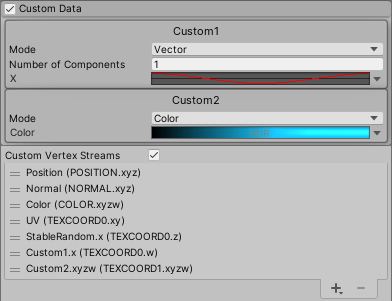
Intro This post provides information on how to use the Custom Vertex Streams option on the Particle System component (also called Shuriken) to pass per-particle data into the shader. Note that it w…
turbid needle
still struggling with this syncing #✨┃vfx-and-particles message
basically i need a new 'particle' (start of the strip) to be created every frame
 young swan
does anybody know if the VFX graph scripting API is supposed to be complete? It feels like there's stuff missing or things that just don't work
I'm having issues with this API class in particular:
https://docs.unity3d.com/ScriptReference/VFX.VFXSpawnerState.html
delayAfterLoop, delayBeforeLoop, loopCount, loopDuration and loopIndex don't work at all
I'm trying to read the values that I use in my graph, but it just returns nothing
also, changing those properties through my code doesn't seem to affect the visual effect's behavior either
 upper geyser
modifying particle systems yields this popup for like 3 minutes

even whe nthe particles are paused
not even being sarcastic 4:30+
 steady zephyr
did you goof up and give some ridiculous value for something?
just restart
if you're rendering like a million cubes or something and accidentally give a very large scale that'll zoink you
upper geyser
theres like 30k particles max
its 4-5 minutes every click
but then it runs smooth as butter
until i click again
theres gotta be a better way to make tornadoes and storm clouds
without using volumetrics (very laggy)
steady zephyr
hard to advise without seeing everything ... are you sure it's related your VFX graph? you turned everything else in the scene off?
upper geyser
its a particle system, not sure what a vfx graph is (im a programmer not a graphic designer lmao)
steady zephyr
it's a visual scripting language for particle systems in unity
fluid lagoon
30k particles is quite a lot I think for Shuriken (the normal particle system thing)
crimson zealot
upper geyser
theres gotta be a better way to make tornadoes and storm clouds
yeah, generally for something like that you should be making custom meshes/materials to drive whatever VFX you need. e.g. https://www.youtube.com/watch?v=Qyh9RPxeKcA

Unity Shader Graph - Tornado and Cloud Shader with Physics
In this Shader Graph tutorial we are going to see the steps I took to create an awesome Tornado Shader effect in Unity! We are also going to see the physics of a tornado, to make it move and pull objects. The tornado shader can also be used as a simple Cloud shader.
-----------------...
upper geyser
well ive got a particle system working well enough
dull obsidian
upper geyser
well ive got a particle system working well enough
Visual Effect Graph / VFX Graph might be more appropriately named "GPU Particle System" whereas the Built-in Particle System (fka Shuriken) is the "CPU Particle System." they each have their pros and cons, large particle counts being much more achievable on the GPU with its massive parallelism. There's no solution / workaround to the inherent performance limitations to the built-in (CPU particle system) see here for a comparison: https://docs.unity3d.com/Manual/ChoosingYourParticleSystem.html
@upper geyser or if you'd prefer not to use the Unity out of the box tools at all, you could always program a GPU particle system from scratch with HLSL compute shaders or a CPU particle system built with DOTS multithreading for performance over flexibility, or use an example implementation of either for a starting point.
Or go a route that doesn't involve particles at all but rather deformed mesh surfaces (as already mentioned) or volumes (if you want to be really physically accurate like volumetric cloud rendering, it's not inherently laggy but difficult to optimize.) but if you are set on sticking to a particle system, above are your options in that realm.
dull obsidian
upper geyser
modifying particle systems yields this popup for like 3 minutes
all that said, this may be a completely different problem entirely, especially since you say it runs fine after the changes are made. are you having long delays doing other things in the unity editor? i would try removing the unity collaborate package from your project if it exists, it has been known to cause all sorts of weird issues like this in certain versions of unity (that also may be resolved in a new version of unity or at least the latest LTS, i've no idea what version you are using)
upper geyser
to be honest i just gave up with it, im gonna edit the particles during runtime via a script if i have to again
upper geyser
dull obsidian
Visual Effect Graph / VFX Graph might be more appropriately named "GPU Particle ...
im gonna look at this because this sounds really useful for my purpose, im making full scale tornadoes with the cpu particle system
 summer drift
Question - is VFX Graph unsupported on Quest 2 entirely? Note: I don't have Vulkan support on the project I'm in.
 oak summit
For those of you who tuned into the Let's Dev : Principles of VFX livestream, I've updated and re-organized the repo containing all the samples. Feel free to play around with those and use them in your own projects 🙂 : https://github.com/Kodrin/VFX-Essentials
GitHub
VFX graph workshop in HDRP with samples. Contribute to Kodrin/VFX-Essentials development by creating an account on GitHub.
upper geyser
vfx graph doesnt work

at all
standard render pipeline
literally just imported it
its the default vfx graph
i havent changed anything
and it wont play
upper geyser
upper geyser
vfx graph doesnt work
all of that stuff pops up when i compile
slate sable
@upper geyser VFX Graph is meant to work with HDRP or URP.
https://docs.unity3d.com/Packages/com.unity.visualeffectgraph@10.6/manual/System-Requirements.html
 dull obsidian
upper geyser
i switched to urp and still got that
dull obsidian
upper geyser
i switched to urp and still got that
unfortunately, one does not simply switch render pipelines in Unity. beyond that, VFX graph support for URP was really only added in the latest 2021.2 beta releases , it is quite limited and unsupported in the current tech stream release 2021.1 and previous.
dull obsidian
@upper geyser fwiw, i have gotten VFX graph to work with Built-in Render Pipeline (BRP) but it's very much unsupported and requires a lot of integration legwork. It makes little sense for me personally to become an asset store publisher for these things as the currently internal APIs required for this often have breaking changes, but if you really want it / need it or other custom VFX graph or compute / sim / viz feel free to message me and we can discuss options. there are also some examples i manage to publish to my github from time to time if you want to have at them as a starting point https://github.com/landonth
 upper geyser
if i have any issues with the cpu particle system from here on ill take a look
dull obsidian
@upper geyser but you might even be better off with GPU particle system examples and assets made for BRP
(especially if you prefer code over node based interfaces.. though it can be a lot of boilerplate at times)
 atomic otter
Hi, everyone! I'm new here, but I'm trying to create a simple tornado-like particle system in Unity, and I had a question about the orbital velocity over lifetime feature.
When I create a particle system in Unity, it defaults to particles spreading outward in a cone shape along the system's z-direction. When I check "Velocity over Lifetime" and add an Orbital velocity like (0, 0, 1), then the particles start spinning around the z-axis, which is what I want.
However, with this orbital velocity, the particles no longer expand outward in the same conical shape; they become more tightly packed together towards the z-axis. As I increase the orbital velocity, the particles become more and more tightly packed; for example, at Orbital velocity (0, 0, 10), the particle system's shape is no longer recognizable as conical.
Why is this happening? Is there anything I can do to fix this directly?
I've tried searching online for more about this issue, but my Google-fu is apparently not strong enough.
I've also tried setting the Radial velocity to a nonzero value, which does make the particles expand outward back into a cone, but is there a better way? If not, how can I calculate the angle of the newly formed cone?
Thanks in advance.
upper geyser
atomic otter
Hi, everyone! I'm new here, but I'm trying to create a simple tornado-like parti...
im also making tornadoes with particle systems, i used a free asset on the asset store called "particle ribbons", it has orbiting particles done for you
atomic otter
upper geyser
im also making tornadoes with particle systems, i used a free asset on the asset...
This looks like a great start. Thank you for the suggestion!
prime dome
is there something like the step node but for negative values. i cant use one-minus nodes. i want to compare the highest and lowest vector (y component) of target position, to current position. if i use one minues i have no output in the end
prime dome
prime dome
is there something like the step node but for negative values. i cant use one-mi...
i guess i use the clamp node
no better: remap node to filter some values out and then go for minimum
dull obsidian
@prime dome what is the ultimate goal? how do you intend for the particles to behave or look by doing this?
i'm just curious even though you answered your own question
prime dome
i guess this can be done quite easy with a matrix
summer drift
my VFX particle won't let me apply "Gradient Mapping" to Color Mapping. If I try this setting, it just shows a white box (no color). If I leave color mapping to default, my particle shows up fine. Any ideas as to why?
nevermind solved it
prime dome
dull obsidian
i'm just curious even though you answered your own question
i tried to send you the graph, but its not possible. i want to reduce my amount of nodes. i want to morph between 2 font under certain conditions. and so im trying to find out how to use matrices with vfx
dull obsidian
@prime dome i looked at the screenshot you posted and have a rough idea now. Anyway, I understand your pain. any special animation or visual effects dealing with typography can be very rigid and finicky like this
prime dome
can i use the set position node multiple times if i address different particle ids? yeah sorry its seems to work
dull obsidian
prime dome
can i use the set position node multiple times if i address different particle ...
possibly if it is additive and you only add 0,0,0 to the particles you don't want to change position at each time you get and set the position.. though for this alone there's no advantage to doing that versus setting all the positions at once. i would just use a custom attribute for "group id" or "character id" or something if you are trying to say, set the position by each character / letter made up of many particles for typography
prime dome
ahhhh allright. so you can store specific particles (locations) in this custom atribute right? but the manual says "based on location", so it does not store ids. so you could use the custom atributes to store locations and make changes to the depending particles repetitive, but this wouldnt work with moving particles right?
dull obsidian
prime dome
ahhhh allright. so you can store specific particles (locations) in this custom a...
you can store whatever you want in a custom attribute. positions, colors, some other id / identifier, whatever you want. but like regular particle attributes they are still stored per particle similar to everything you might do in a for loop, every time you get or set an attribute it's "for each" particle based on particle id. then you can assign additional ids or anything in custom attributes for particles to use to look up different information like for a group or groups of particles that you want to have a different color or position, etc
@prime dome i'm not sure what you want ultimately , idk if you want some behavior to happen on different frames / simulation steps over time or what you mean by repetitively or why that would accomplish what you want. if you can share more about that it would help
@prime dome this happens to everyone at every skill level at some point when we are in deep in the details while working on something and then get stuck and ask questions. you've shared a little bit of context but it's still an "x y problem" in that you are asking about the attempted solution (y) rather than the actual problem you are trying to solve and end goal you want to achieve (x) https://xyproblem.info
Asking about your attempted solution rather than your actual problem
@prime dome maybe a better way for me to ask for more context:
- does this still have to do with morphing particle positions between the 2 text font shapes?
- is setting the position repetitively for each step of movement in a frame or for each font shape you want to morph to or what is the repetition meant to solve in making the particles move?
prime dome
dull obsidian
<@456226577798135808> i'm not sure what you want ultimately , idk if you want so...
the manual does not really explain how to use the custom attributes, so im just trying to figure it out. but anyway what i just didnt understand was the location keyword(data container). si understand this now, but not really ow to hook them up. i got my morphing working, but i have a new problem that maybe can be solved with the custom attributes. i want to change the color of specific particles (by id or location). can this be done with the custom atributes alone, or will that require custom nodes?
dull obsidian
prime dome
the manual does not really explain how to use the custom attributes, so im just ...
if you just need to change the color of the particle it shouldn't require custom anything, you can use the color attribute
it's only if you want to change the color or other built in attribute based on some unique value that isn't already an attribute (position, velocity, id, etc) doesn't have some built in node or block, that is when you might want to use custom attributes.
attributes can pass through across contexts as well, initialize -> update -> output and also can be inherited in sub spawners / sub emitters. if you only need to do something simple in a single context like "set color from map/texture" in a single update context you might not need custom attributes.
prime dome
but i want to change the color of specific particles by their location. but if use branch and compare (for example every particle that is located at vector{0,0,0}, should have color = green-> all particles = green) it doesnt work
 dull obsidian
prime dome
but i want to change the color of specific particles by their location. but if u...
dull obsidian
prime dome
but i want to change the color of specific particles by their location. but if u...
hmm that might not work due to floating point precision error, i'd try changing that to a distance check. check if the particles distance from 0,0,0 is less than 0.1 or other distance and set green
prime dome
ahh ok ill try
prime dome
dull obsidian
hmm that might not work due to floating point precision error, i'd try changing ...
turns out that i cant set color by id (every id > 5 ) and i cant really use equal condition (due to floating point precision). but anyway it works for me now!!!. also really cool that you can store the ids and properties with custom atributes!! thnks bro!!
 dull obsidian
prime dome
turns out that i cant set color by id (every id > 5 ) and i cant really use equ...
dull obsidian
prime dome
turns out that i cant set color by id (every id > 5 ) and i cant really use equ...
cool i'm glad that worked anyway. you could also divide the id and round or cast it to the closest integer to make a new "group" id that is lower like first 0 to 99 particles have group id "0" the next 100 to 199 have group id "1" and so on. you could also derive a group id from uv texture coordinate or an attribute map or something else. and use a switch case instead of a branch if you want to assign more than 2 colors at a time
prime dome
dull obsidian
cool i'm glad that worked anyway. you could also divide the id and round or cast...
yeah man storing particle ids is so cool and helpful!
now im starting to understand how this node based stuff is working!
prime dome
dull obsidian
cool i'm glad that worked anyway. you could also divide the id and round or cast...
i can only filter certain particle ids via range/float if i use a modulo before the division node. i really dont get why. but it works now.
dull obsidian
prime dome
i can only filter certain particle ids via range/float if i use a modulo before ...
interesting. maybe need to cast the id to a float first? could also try multiplying by a positive value less than 1 and avoid the division? either way i'm glad that's working in some way now
prime dome
modulo before division makes quite a sense because you just use every x step by counting down (depending on your rate), so the function query/id output happens every x seceonds
but still why isnt possible to use the id node directly? why do you have to count down with modulo?
i guess the only reason can be the update times. because the same approach works with every other property besides the damnparticle id.
prime dome
dull obsidian
interesting. maybe need to cast the id to a float first? could also try multiply...
if its because floating point precision-> ceiling the id should be enough
normal flower
Although I'm gonna be driving soon, I can't seem to get the alpha part of a shader graph to work. This is my setup

I have all the relevant custom vertex streams on
And color over lifetime set to decreasing the alpha how I want
But even if I change the alpha to 0 directly, it still renders fully opaque, or at least seems to.
I can test if it's because I'm not using a vertex color to decide the albedo
Wait, I'm a fool. It isn't set to transparent. I'll leave thia here is case that doesn't fix it
steady zephyr
https://docs.unity3d.com/Packages/com.unity.visualeffectgraph@10.2/manual/Context-OutputMesh.html never used shader graph before ... can i use this to draw triangles between specific particles?
which afaik is not possible with vfx graph by itself ... ( you can only draw a triangle for each particle, you can't specify which particles you want for each triangle)
prime dome
@steady zephyr yeah that is possible, but you would need to trigger a random sampletexture/fliptbook texindex in the shadergraph from a property in the vfx (for example particle id, or just a periodic total time node with a max range= spawn capacity)
but its is actually possible with vfx alone. you just need to set the texindex of a flipbook to be related to your particle id spawn index
prime dome
steady zephyr
https://docs.unity3d.com/Packages/com.unity.visualeffectgraph@10.2/manual/Contex...
and a mesh is not a particle. so you may better use mesh particles
 prime dome
steady zephyr
https://docs.unity3d.com/Packages/com.unity.visualeffectgraph@10.2/manual/Contex...
prime dome
steady zephyr
https://docs.unity3d.com/Packages/com.unity.visualeffectgraph@10.2/manual/Contex...
prime dome
steady zephyr
https://docs.unity3d.com/Packages/com.unity.visualeffectgraph@10.2/manual/Contex...
prime dome
steady zephyr
https://docs.unity3d.com/Packages/com.unity.visualeffectgraph@10.2/manual/Contex...
the main reason why meshes are existing in the vfx graph is, that you can use nodes for your mesh (dont have to controll externally)
 opaque knoll
Hi just confirming, in Shuriken PS, the subemitter Death will spawn the subemitter particle on the next frame?
I try check in Update, and at the moment the main PS particle dies, both main and subemitter's particleCount is 0
 nimble goblet
hey all, looking for some help with the sdf tool... i can never seem to get a proper representation of the mesh, only a single cube....
 prime dome
nimble goblet
hey all, looking for some help with the sdf tool... i can never seem to get a pr...
prime dome
nimble goblet
hey all, looking for some help with the sdf tool... i can never seem to get a pr...
sdf tool hasn't worked for me from the start. so i wonder how you got it working anyways. im better off using houdini
nimble goblet
im running latest beta
prime dome
i though sdf tool is deprecated
nimble goblet
this is the expectation in the docs

i cant figure out how to not get the cube, and rather get my mesh
there's no info on any requirements of the mesh, listed in the docs
prime dome
thats kinda weird
nimble goblet
im assuming that the problem is me, i just have no path to determine what i am doing wrong
but i suppose it could be a bug
very scant details available on searches
prime dome
let me try this. lets see
wow the even have a native point cache bake tool. i didnt noticed
prime dome
nimble goblet
im assuming that the problem is me, i just have no path to determine what i am d...
is your preview window displaying the desired sdf outcome?
prime dome
prime dome
is your preview window displaying the desired sdf outcome?
no, i see
in houdini this is usually happening due to wrong mesh/wrong settings
dull obsidian
nimble goblet
there's no info on any requirements of the mesh, listed in the docs
the docs do briefly mention this:
- If the input Mesh does not explicitly separate its interior from its exterior (for example if it contains holes, self-intersections, open boundaries, or self-containing geometry), the resulting SDF can misclassify some regions. To help mitigate these artifacts, there are Additional Properties](#properties) that you can manually expose.
prime dome
@nimble goblet its because of the "In/Out Threshold"&"Sign Passes Count". activate live view and adjust this property
so just like @dull obsidian said, you need to activate the additional properties, or your mesh is just not suitable (not waterproof)
nimble goblet
ill try another model


just a subdivided cube from blender, with some modifications
all transforms applied before export, exported as fbx
ive also tried playing with all the values
always a cube in the sdf preview
 soft hull
Prob was asked a multiple times already but will ever VFX particles collide interact with world colliders?
nimble goblet
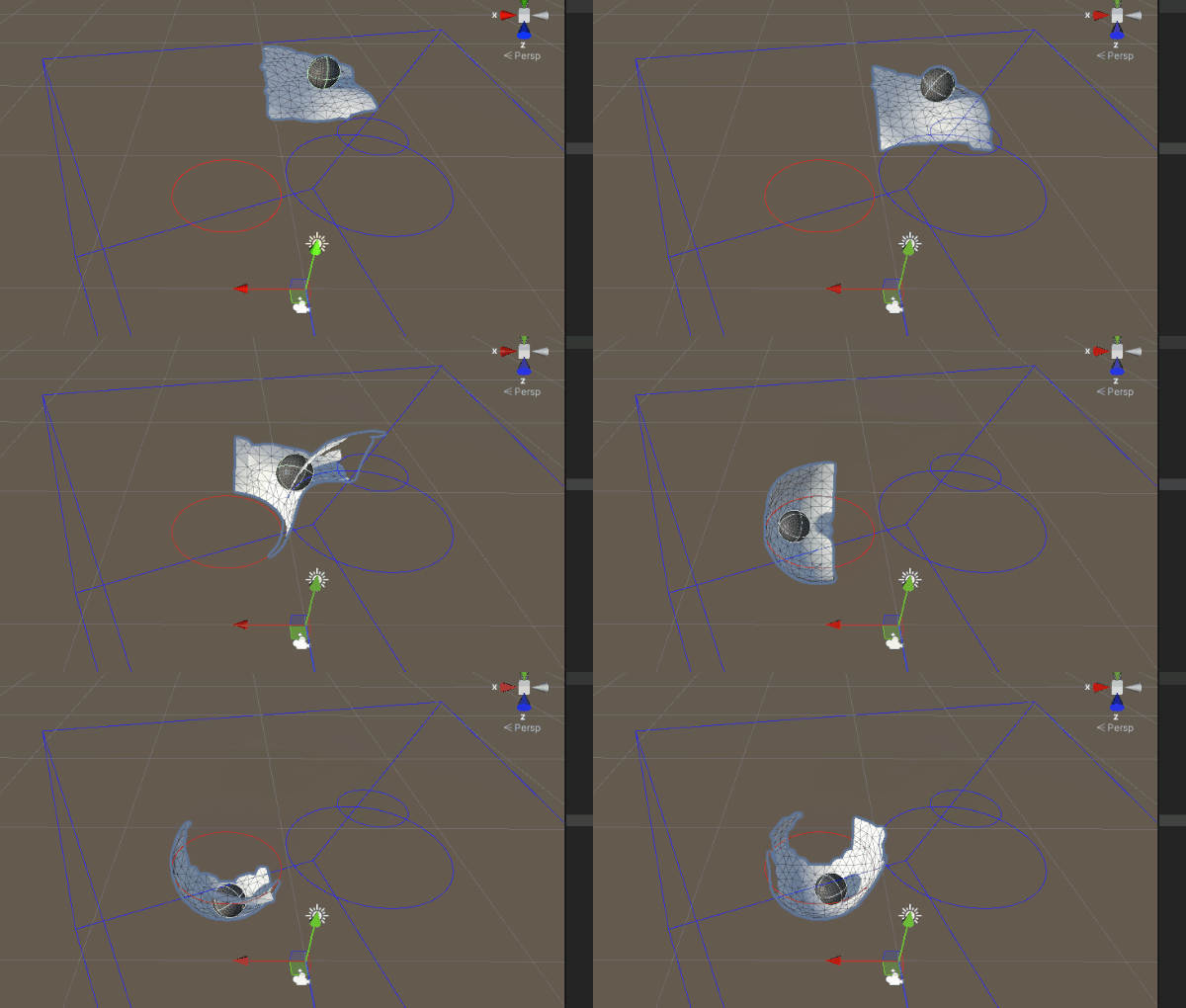
you can construct meshes at runtime to interact with other colliders
dull obsidian
nimble goblet
this HLSL compute shader kernel failing to compile appears to be the main problem. which is part of the mesh SDF baker itself. i searched the web for this text and found that it's a known issue in 2021.2 beta (12.0 graphics packages) with a fix in review (quality assurance testing phase) https://issuetracker.unity3d.com/issues/hdrp-vfxgraph-mesh-and-texture-preview-fails-when-selecting-bake-mesh-in-sdf-bake-tool-window
dull obsidian
no worries! thanks for posting the error.
nimble goblet
i think i may have come across this, but in my lack of knowledge, disregarded it
is there a version i can downgrade to that still has the SDF tool, in a working state?
 near cloud
When i exported a grass from blender to unity the particle settings didnt save how do i fix this
prime dome
dull obsidian
this HLSL compute shader kernel failing to compile appears to be the main proble...
still: if your mesh is flawed and not waterproof you cant bake good sdf
dull obsidian
nimble goblet
is there a version i can downgrade to that still has the SDF tool, in a working ...
well the issue tracker says HDRP, so maybe could try the latest beta with URP in a new empty project just to bake SDF. not sure if that will work but worth a shot. aside from that, as already mentioned you could just download the free version of SideFX Houdini (Apprentice) and install then Unity VFX toolbox and use its volume exporter. keijiro has an example described here, though it will take a bit of getting familiar with houdini as well: https://github.com/keijiro/VectorFieldExamples
GitHub
Unity VFX Graph examples with vector fields. Contribute to keijiro/VectorFieldExamples development by creating an account on GitHub.
prime dome
dull obsidian
well the issue tracker says HDRP, so maybe could try the latest beta with URP in...
the same goes for houdini: if your mesh is flawed: you cant bake sdf
nimble goblet
thank you for the suggestion, but this was part of troubleshooting similar issues when trying to use the api directly
i'm looking to build meshes at runtime
for dynamic collisions
so when i was hitting errors, i explored the manual route to try and expose what was causing the issue
i imagine i will have the same problem in URP
but i'll try
prime dome
nimble goblet
so when i was hitting errors, i explored the manual route to try and expose what...
you cant bake sdf at runtime without enourmus laggs
prime dome
if the resolution is small it would work
dull obsidian
prime dome
you cant bake sdf at runtime without enourmus laggs
as long as it's happening during a loading screen or something it'll be okay
nimble goblet
 dull obsidian
there's technically a way to do this multithreaded and/or async with your own custom C# and HLSL forked from that SDF baker or something
nimble goblet
yeah
i intend to multi thread
or at least have a thread dedicated to managing the sdf
not high resolution
prime dome
isnt possible to sample a mesh directly inside vfx graph as force field?
dull obsidian
nimble goblet
like this:
https://user-images.githubusercontent.com/18707147/118203358-caa49100...
if you really want it real-time not just "bake" at runtime periodically you don't necessarily need CPU multithreading though you just need a different GPU compute shader approach, there is a real-time mesh to SDF generator pinned to this channel
 nimble goblet
is that the better approach?
dull obsidian
it uses Jump Flood Algorithm (JFA) instead of ray mapping so it's faster
but it's not better quality
nimble goblet
lets say i wanted reasonably accurate steam being emitted from a broken pipe
with nice collisions with nearby pipes
those pipes are destructable
and likely to be destroyed
debris could be moved in front
etc
i got reasonable results for a vfx when using the depth buffer
dull obsidian
it's possible, you'd need to keep the voxel resolution really low, and/or limit the bounding box to a relatively small area. doing this at realtime is very expensive on the GPU
prime dome
nimble goblet
i was wondering that
but without a proper mesh: you will have the same problems, no matter what option you choose
nimble goblet
but i was exploring the vector approach with sdf
i intended to keep the bounding box very small, only around the point of impact
with small resolutions of 20-50
could go lower
the steam has a short lifetime
so 1 bounce would serve the purpose
yes oeLeo, but i dont think my mesh is the problem. it seems its a known bug
i've added to the post btw, landon
i will look into the mesh To SDF , thanks again landon
prime dome
nimble goblet
yes oeLeo, but i dont think my mesh is the problem. it seems its a known bug
just try houdini and compare the outcome
nimble goblet
i've used ordinary cubes, spheres....
prime dome
non of the unity sdf bakers have worked for me so far. this is my houdini pointcloud/sdf baker preset. just copy the nodes, import your mesh and paste the nodes. would be really cool to have a internal unity sdf baker that is working
nimble goblet
what initially led me down this path was the example code here:
https://docs.unity3d.com/Packages/com.unity.visualeffectgraph@12.0/manual/sdf-bake-tool-api.html
i was obtaining the same kernel errors
dull obsidian
nimble goblet
i was obtaining the same kernel errors
sometimes these errors are "false flags" and things still work after they appear but it's a bug that the errors appear at all. so that's maybe why @prime dome is making sure. but yeah it's true the mesh topology has to be "closed" and non intersecting, without degenerate triangles, etc i think we are all on the same page about these limitations at this point.
nimble goblet
yeah, i dont mind, i learned a bunch, eventhough i didn't get to where i wanted to be at this point
dull obsidian
fwiw, this is an example of real-time SDF generation results i got working from aman tiwari's MeshToSDF from a skinned mesh renderer (a rigged / tracked "hand" mesh) https://twitter.com/landon_vfx/status/1410684627170304000

sph fluid particle hand tracking test #madewithunity #unity3d #leapmotion https://t.co/8mZabu0w45

 Twitter
·
prime dome
dull obsidian
sometimes these errors are "false flags" and things still work after they appear...
Twitter
·
prime dome
dull obsidian
sometimes these errors are "false flags" and things still work after they appear...
anyways: with houdini you can create a unity procedural asset that is baking your sdf in runtime
nimble goblet
is the top right a slice of the sdf for debugging?
i guess a 0 point on the depth axis?
dull obsidian
prime dome
anyways: with houdini you can create a unity procedural asset that is baking you...
yeah though unfortunately houdini and houdini engine only work with unity editor, not in unity builds that you can ship
dull obsidian
nimble goblet
i guess a 0 point on the depth axis?
yeah exactly it's just a single z depth slice (likely in the middle of the volume) for debug view
prime dome
dull obsidian
yeah though unfortunately houdini and houdini engine only work with unity editor...
whats the difference`?
so you cant use it in the game, but in the editor?
nimble goblet
right
dull obsidian
prime dome
so you cant use it in the game, but in the editor?
yeah exactly
dull obsidian
by the time you build / ship the game, you need to have everything "baked" final and can't be changed at that point
prime dome
damn
nimble goblet
so, just trying to understand your video - you have a prebaked sdf, that you can transform due to the armature which is mapped to some vision input detecting your hand
dull obsidian
dull obsidian
by the time you build / ship the game, you need to have everything "baked" final...
it honestly is licensing limitation. SideFX isn't sure how or how much they would charge to let developers ship Houdini engine along with each copy of a game or app. so they don't allow it, at least for now.
nimble goblet
a fair amount of the reading mentioned bones, but in my case, it isn't needed so i was wondering why you'd have bones
prime dome
nimble goblet
so, just trying to understand your video - you have a prebaked sdf, that you can...
so like a vertex displacement with a vector field?=
dull obsidian
nimble goblet
so, just trying to understand your video - you have a prebaked sdf, that you can...
oh, while that is possible to deform SDFs, it's not happening here. it's a regular skinned mesh just like any character rig in unity, but it's of a hand that is deformed and then an SDF is generated from it after the deformation
prime dome
just like i thought
nimble goblet
i see
dull obsidian
there are ways to skip the mesh altogether but for this hand tracking SDK it already had a skinned mesh renderer included to use
dull obsidian
prime dome
but thats not really realtime sdf baking
it is, an SDF 3d texture is being generated every single frame from the triangle mesh
dull obsidian
yeah it's possible just not necessary here
prime dome
but this would require quite an algorithm
dull obsidian
deforming SDFs for character skinning and rigging is something i've only seen in research papers, i hope we use it more soon but it's considered rather cutting edge
nimble goblet
i know nothing of character skinning / rigging
i'm coming more from a sim perspective
cfd, aero, etc
dull obsidian
prime dome
but this would require quite an algorithm
some info on the algorithm https://blog.demofox.org/2016/02/29/fast-voronoi-diagrams-and-distance-dield-textures-on-the-gpu-with-the-jump-flooding-algorithm/
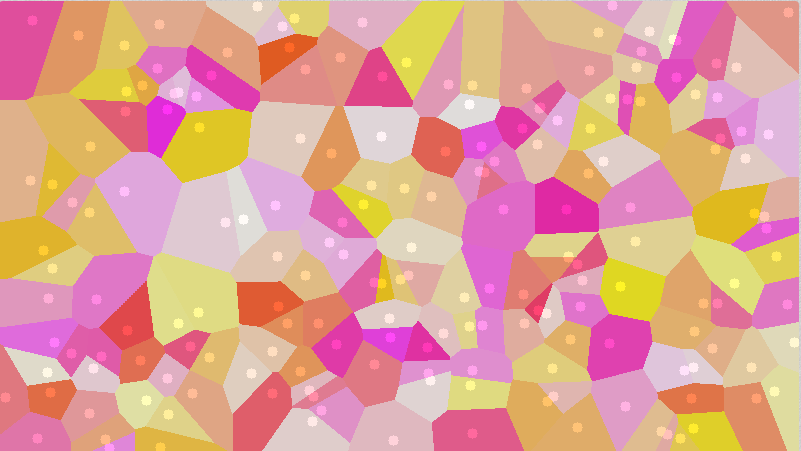
The image below is called a Voronoi diagram. The circles show you the location of the seeds and the color of each pixel represents the closest seed to that pixel. The value of this diagram is that …
nimble goblet
hmm
dull obsidian
nimble goblet
is there a requirement to reference the previous mesh?
not in this case. but if you did that you could create a 3d motion vector volume to help with energy transfer in collisions, it would be nice to have!
nimble goblet
thats what i was thinking
but i dont see much energy loss in your fast movements
so you probably compensated some other way ?
and while you're at it, why not think about introducing a 1 frame delay
and doing a pre-frame prediction too
😛
dull obsidian
nimble goblet
but i dont see much energy loss in your fast movements
i'm using the SDF as a frictionless attractor, not as a collider. if i did i think there would be more energy loss
prime dome
i have this one question: i trying to check a requirement with the branch and switch node but i always end in a deadloop. i want to check if the actual position and the target depth position is > 0. if not i want to assign it to old position. but because of the default value i always fail
nimble goblet
i assumed the hand is the negative in the vlume
dull obsidian
it's just a a very slippery magnet as shown, and with zero gravity lol
dull obsidian
nimble goblet
what kind of sdf resolution are you pushing there realtime?
i can't remember exactly, i want to say 64^3
dull obsidian
but even 32^3 would look okay with the interpolation
nimble goblet
i have some very cubic style / design
so i think with some custom runtime mesh construction, i can make the most of it
dull obsidian
and yeah in your case you could design the pipes to align with the voxel grid
prime dome
prime dome
i have this one question: i trying to check a requirement with the branch and sw...
so i have to double check but this needs millions of nodes. im looking for a node that is just outputting "null" if the requirement is not met
nimble goblet
or at least rotate the vfx for that
really appreciate the info and your time, landon and oeleo.
thank you
prime dome
nimble goblet
really appreciate the info and your time, landon and oeleo.
youre welcome bro
nimble goblet
ill dive into meshtosdf and share any progress
dull obsidian
prime dome
i have this one question: i trying to check a requirement with the branch and sw...
this the original question that you have added more info to just now? about millions of nodes
prime dome
ok: i want to check if the actual position is > 0. if so: check if the depth position > 0, then assign it to the old position. but because of the default value i cant do the same with the target position (same procedure but <0)
so i want to assign y > 0 to old position and < 0 to target
but because of the default values of the branch and switch node, it does not work
so im looking for a node that checks a requirement but does not output default value
dull obsidian
@prime dome 0 position is only depth / z? is this still for particles rendering text?
prime dome
dull obsidian
<@456226577798135808> 0 position is only depth / z? is this still for particles ...
yes its still for a text
prime dome
prime dome
so im looking for a node that checks a requirement but does not output default v...
it can be done by vector calculations an clamp nodes i guess
but with a null output as default value, this would work more ez. wait i send you my graph as image
dull obsidian
@prime dome also regardless you may need to use an epsilon / very small number like 0.0001 due to that floating point precision
i suggested 0.1 before just as a simple test
dull obsidian
i just mean for comparisons if you run into problems
prime dome
the problem is that i cant set the default value to the actual position. because this would mess up the other values
dull obsidian
prime dome
ok: i want to check if the actual position is > 0. if so: check if the depth po...
anyway not sure what problem you are solving here that the particles need to go back to the old position if their depth position is above zero. what does this accomplish in the text rendering or.. how does it look now versus how you want it to look?
prime dome
this was my aproach
 dull obsidian
prime dome
the problem is that i cant set the default value to the actual position. because...
dull obsidian
prime dome
the problem is that i cant set the default value to the actual position. because...
maybe this would be a case to use custom attributes then? for "myPosition" or whatever other extra positions you want to get / set without affecting the built in positions attributes
prime dome
i want to move half of the particles up/ down to y target value and then i want to move them over to the right x value to morph the the font / create transition
prime dome
dull obsidian
maybe this would be a case to use custom attributes then? for "myPosition" or wh...
checked that. i cant assign position values to custom atributes
dull obsidian
prime dome
i want to move half of the particles up/ down to y target value and then i want ...
ah this is why you were looking at matrix transformations before
prime dome
but i can rreserve a amount of ids for the upper half and for the lower half
but i dont get it working. only with modulo
but with modulo i just assign every x particle id to a group. its not all particle ids below x
like this
 dull obsidian
@prime dome and this is for morphing text in one font to another font? but it's the same text characters / letter?
dull obsidian
like text thats says "lorem ipsum" in helvetica font will morph into "lorem ipsum" in times new roman font
dull obsidian
prime dome
not the same text
ah okay
prime dome
dull obsidian
like text thats says "lorem ipsum" in helvetica font will morph into "lorem ipsu...
haha
dull obsidian
prime dome
one text morphing to another tex. sorry
so, a single font but different text, of a different length as well? example: "foo" morphs into "bar" or "foo" morphs into "banana" ?
prime dome
dull obsidian
so, a single font but different text, of a different length as well? example: "f...
exactly
dull obsidian
the last time i had text made up of particles morph into other text i had a lot of invisible particles that might show or hide again depending on if they were needed for the current number of "pixels" on the grid that would represent the text. though they didn't go directly to their target position either, there would be a turbulent transition state where the particles are just swirling around chaotically
dull obsidian
dull obsidian
the last time i had text made up of particles morph into other text i had a lot ...
like the intro text here: https://youtu.be/TwkqT0krfKE

Song:Unite in the sky
Character:Sakura Rabbit
Environmental: Sakura Rabbit
Animation:Sakura Rabbit
Facial animation:Sakura Rabbit
Atmosphere:Sakura Rabbit
VFX:Sakura Rabbit
Light:Sakura Rabbit
Shader:Sakura Rabbit
Lens:Sakura Rabbit
Rendering:Sakura Rabbit
Model:MAYA, ZBrush, SP, PS...
Blendshape:Blender FaceIt
Facial capture:Face cap, Puppet ...
is that close to what you want or no?
prime dome
dull obsidian
the last time i had text made up of particles morph into other text i had a lot ...
yeah i thought of invisible positions too
prime dome
dull obsidian
is that close to what you want or no?
the morphing in the beginning of the video?
dull obsidian
prime dome
the morphing in the beginning of the video?
yeah the text particles swirls and morphs into a smaller amount of text
prime dome
cool video
dull obsidian
and the "extra" particles either fade away invisible or die, impossible to say which, same result
prime dome
no i have a completely different idea^^. i have one line of text that i want to morph into 3 lines of text. so i want to move the particles up to the correct y position. and after the break i want them to be transformed to the correct x position and then you can see the font
prime dome
dull obsidian
yeah the text particles swirls and morphs into a smaller amount of text
but i guess i just need either to use the particle id method, or avoid branch/switch completely
dull obsidian
prime dome
no i have a completely different idea^^. i have one line of text that i want to...
ah okay now i'm starting to understand. this is much more rigid and specific behavior. but it will look very cool i'm sure
prime dome
ill show you 😄
dull obsidian
if i were you i might even approach this by writing compute shaders for this custom gpu particle sim behavior, and using vfx graph just for the particle rendering. the new graphicbuffer support makes this easier https://twitter.com/_kzr/status/1418439725631754244

Trying out the newly introduced GraphicsBuffer operators with VFX Graph. Now I can receive data from compute shaders via GraphicsBuffer. No texture baking is needed any more. https://t.co/Z4snnbK7M1 https://t.co/wHkqGm1at0
Likes
276
 Twitter
·
prime dome
dull obsidian
if i were you i might even approach this by writing compute shaders for this cus...
Twitter
·
prime dome
dull obsidian
if i were you i might even approach this by writing compute shaders for this cus...
i was wondering if it is possible to compile a vfx and run it through a compute shader/buffer on a mobile...
dull obsidian
there's a lot that VFX graph's simulation contexts do not currently expose access to that might make this more straightforward. steeper learning curve just to get the boilerplate gpu particle sim running but after that might be better for this.
prime dome
dull obsidian
if i were you i might even approach this by writing compute shaders for this cus...
but how would this make it easier
ahhh ok
i understand
dull obsidian
prime dome
but how would this make it easier
you can have finer tuned control over everything and can do things like store attributes on a spatial grid for later use or have particles check neighboring particles for attributes data to affect what they should do
and just very rigid logic like this might be easier to write if you are already accustomed to writing code in this way
with vfx graph currently there is a lot going on implicitly that helps and limits what you can do, and is geared towards certain types of common use cases. not that it's impossible just something to consider
prime dome
so the keijro project only can read from graphic buffers right? so you would need other methods to write to a shader right?
dull obsidian
prime dome
so the keijro project only can read from graphic buffers right? so you would nee...
it's just an example project, you don't need the keijiro example to make it work, just for reference. here the documentation for this feature in 2021.2 beta https://docs.unity3d.com/Packages/com.unity.visualeffectgraph@12.0/manual/Operator-SampleBuffer.html
prime dome
ok i understand, but still, sample buffer only can read from a buffer. is that even possible to write to a buffer /compue shader?
dull obsidian
prime dome
so the keijro project only can read from graphic buffers right? so you would nee...
you can already read from / load / sample textures in vfx graph since the beginning this just adds graphicsbuffer (basically the same as computebuffer)
so you can use your own struct of attribute types and not have to pack / unpack data in textures that aren't meant for arbitrary data
prime dome
im trying to understand if you can use the vfx on the gpu via compute shaders
dull obsidian
prime dome
ok i understand, but still, sample buffer only can read from a buffer. is that ...
to write to a graphics / compute buffer from vfx graph no, not officially.
prime dome
prime dome
im trying to understand if you can use the vfx on the gpu via compute shaders
no sry thats bullshit. i meant: how to make vfx running on a mobile gpu chip?
damn
dull obsidian
dull obsidian
to write to a graphics / compute buffer from vfx graph no, not officially.
i've done it but it's a bit of a hack that requires injecting code into the vertex shader and writing a custom pass for each render pipeline to allow the buffer to be written to, etc
prime dome
sounds like lot of work
dull obsidian
prime dome
no sry thats bullshit. i meant: how to make vfx running on a mobile gpu chip?
for vfx graph to work the mobile gpu needs to support compute shaders, newer mobile devices already support this. 2021.2 beta has this working in progress with URP
prime dome
you gave me a good hint. im gonna try to divide the id/100 , ceil it and then multiply it with 100
dull obsidian
to support older mobile devices without compute shaders (openGL ES 2) or webGL, you'd need to code your own GPU particle system using vertex or fragment shaders and packing data into textures it's pretty hacky but well known, many examples
prime dome
prime dome
you gave me a good hint. im gonna try to divide the id/100 , ceil it and then mu...
theres nothing on the internet about that, but you helped me with the branch node precision issue. so thanks again for that. i guess it would have take me months to find that out. floating point precision seems to be quite a problem with vfx
dull obsidian
prime dome
theres nothing on the internet about that, but you helped me with the branch nod...
it's not just vfx graph that's a general computing issue but GPU compute even more so as typically limited to 32 bit precision (64 bit double is possible but rare on GPU in game engines,) and some older mobile GPUs even more as they might only support 16 bit "half" precision
add on top to that with particle systems there are many factors that might cause particles to drift away from exact positions every step
prime dome
but im running a 4 ghz cpu. how can it happen that cant use the id node without modulo?
dull obsidian
prime dome
but im running a 4 ghz cpu. how can it happen that cant use the id node without ...
has nothing to do with the CPU or how fast it is, i dont think this id node problem is even a precision issue, the equals comparison to position 0,0,0 was the more likely precision issue
dull obsidian
prime dome
but im running a 4 ghz cpu. how can it happen that cant use the id node without ...
this just might be a type casting issue
prime dome
dull obsidian
has nothing to do with the CPU or how fast it is, i dont think this id node prob...
if i use a simple setup, it responds. but if i ad additionally requirements it fails
anyway, i have weird issues with vfx, i think i should be updating.
my rendertextures dont get updated and sometimes cameras fail to have output.
prime dome
prime dome
if i use a simple setup, it responds. but if i ad additionally requirements it f...
so i guess i need to use modulo with the help of custom atributes! thnks bro!
 jovial obsidian
didnt know exactly where to post this question but i want recreate something from a game called league of lengends. I want to add these arrows tha we can see when iwe use an abilty. Any idea about how to make the arrows
 prime dome
jovial obsidian
didnt know exactly where to post this question but i want recreate something fro...
prime dome
jovial obsidian
didnt know exactly where to post this question but i want recreate something fro...
this looks like a shader
prime dome
jovial obsidian
ok
doing this with vfx will be quite difficult, but with a shader its quite simple
prime dome
A Blog bringing the best Sprite Effects for gamers in isometric style and game-maker. I only make the best. Thank you for your support in my quest.
prime dome
its a site with lot of nice spresheets. you could use particle system to trigger your shader
prime dome
jovial obsidian
oh thats interesting
there also some nice videos about flipbook animations. https://docs.unity3d.com/Packages/com.unity.visualeffectgraph@12.0/manual/Block-FlipbookPlayer.html

Today's project is Lightning effects with Shader Graph and VFX Graph. This procedurally generated lightning is done with Shader Graph and then we create a few particle effects with VFX Graph.
2017 Lightning and Thunder Tutorial: https://youtu.be/ewC_c6aHbf8
Electricity Shader: https://youtu.be/u9lOaPVtSqg
Enjoy!
----------------------------...
 scarlet narwhal
VFX Graph: Can you have a recursive event? Like a GPUEvent leading back into the initialise node? Obviously with an exit condition.
nimble goblet
what do you want to feedback?
theres probably a different approach to achieve the same result
scarlet narwhal
I want five or six little particles the same to pop out one after the other.
nimble goblet
from the preceding particle position? or all particles originating from the same source?
fluid lagoon
is it possible to cull a particle in VFX graph? For example, if the particle ID is less than some value, don't draw the particle
What I'm trying to do might be an abuse of VFX graph... not sure.
Maybe if I just set the particle's position way outside of the bounds of the graph?
fluid lagoon
Another question - is it possible to set an array of meshes as a property in a VFX graph?
such that I could do output particle mesh and pick a mesh from the array based on some other data
Also i just learned that Output Particle Mesh only works with unlit shaders in URP? 🤔
that's quite disappointing.
fluid lagoon
fluid lagoon
Another question - is it possible to set an array of meshes as a property in a V...
Based on this: https://docs.unity3d.com/Packages/com.unity.visualeffectgraph@10.3/manual/whats-new-10.html#multi-mesh-experimental I'm going to answer myself here with a hard "no"
fluid lagoon
I really don't mean to spam this channel... but I have a 4x4 affine transformation matrix (don't ask me where I got it from). How can I extract position/rotation/scale data from it and assign those to the particle?
 nimble goblet
i think its the example for matrix4x4 in the docs
var position = new Vector3(matrix[0,3], matrix[1,3], matrix[2,3]);
prime dome
fluid lagoon
Another question - is it possible to set an array of meshes as a property in a V...
im also looking for arrays.
fluid lagoon
nimble goblet
var position = new Vector3(matrix[0,3], matrix[1,3], matrix[2,3]);
That's all well and good in a C# script but not possible in VFX graph. This is what I needed:
 nimble goblet

you should be able to right click on the names of the different matrix components
like these:

but, i've never tried so I don't know for certain
@fluid lagoon
fluid lagoon
nimble goblet
it's alright I found what I needed with the Transform operator
scarlet narwhal
nimble goblet
from the preceding particle position? or all particles originating from the same...
All from the same source, and then I’m going to randomly spread them out a bit.
nimble goblet
so what is the problem? thats the default behaviour isnt it?
scarlet narwhal
Let me say what I’m actually trying to do, might be an XY problem. When a particle dies, I want a few “sparkles” to happen around it, maybe 5-10. I want the time after death to be random, ideally a normal distribution around 0.5ish seconds.
dull obsidian
fluid lagoon
is it possible to cull a particle in VFX graph? For example, if the particle ID ...
yes, you can set the alive attribute to false, as described in the docs for the built in "Kill" blocks. also note in the doc that you must enable reap particle on the update context https://docs.unity3d.com/Packages/com.unity.visualeffectgraph@12.0/manual/Block-Kill(Sphere).html
dull obsidian
fluid lagoon
Also i just learned that Output Particle Mesh only works with unlit shaders in U...
good news, Lit VFX graph rendering for URP is already in Unity 2021.2 beta / 12.x graphics packages https://docs.unity3d.com/Packages/com.unity.visualeffectgraph@12.0/manual/whats-new-12.html
nimble goblet
if i have a low resolution monochrome texture, say 16 x 16, and want particles to be emitted from the location of pixels where the grey is closer to 1 than 0 (50%), what would be the right approach ?
fluid lagoon
dull obsidian
yes, you can set the alive attribute to false, as described in the docs for the ...
Unfortunately this kills the particle rather than just not drawing it which isn't appropriate for my use case ( which admittedly might be a bit of an abuse of VFX graph)
fluid lagoon
dull obsidian
good news, Lit VFX graph rendering for URP is already in Unity 2021.2 beta / 12...
Yep realized this after I posted it!
nimble goblet
i've got a decent rain effect working
 grizzled orbit
what tool to use for URP for VFX?
i don't think URP support VFX graph
so just use particle system?
fluid lagoon
grizzled orbit
i don't think URP support VFX graph
URP supports VFX graph
grizzled orbit
it says on note on package it does not support URP support for it coming soon
i always use latest LTS
fluid lagoon
grizzled orbit
it says on note on package it does not support URP support for it coming soon
where?
I'm l iterally using it in a project
grizzled orbit
on the package notes itself
 grizzled orbit
well m not using in preview stuff in mine
the project m working is for publishing and things needs to be stable
fluid lagoon
Then use Shuriken
fluid lagoon
AFAIK
grizzled orbit
i mainly used SRP
darn this pipelines
i wish it was only URP
and no more time spent fixing assets and etc
scarlet narwhal
I converted a system to a subgraph in vfx graph and the resulting subgraph doesn’t appear to have any inputs for triggering it. Can’t find anything about this online. Can anyone give me a link or something?
 heady dragon
question: using unity's default shuriken particle system, how can i prevent the particles from rendering over the skybox?
im getting this unwanted effect
i want the particles to not show in places where the skybox shows
heady dragon
heady dragon
question: using unity's default shuriken particle system, how can i prevent the ...
(sound warning btw)
nvm i think i fixed it by changing the custom render queue from 3000 to 2000
but it seems to only work in debug mode :/ how do i change the render queue of a normal lit particle shader in urp
heady dragon
i fixed it, but now my only problem is the particle only renders at certain angles :/
dull obsidian
fluid lagoon
Unfortunately this kills the particle rather than just not drawing it which isn'...
oh well in that case just set the alpha attribute to 0 and make sure you are rendering with transparent alpha blending and/or alpha clipping. that will make the particle hidden / invisible but still alive.
 queen cosmos
Hey guys, I see a node called
SetPosition (Shape: Mesh) in the unity docs and on youtube vids
but i can't find the node in unity
VFX v 11
 slate sable
queen cosmos
but i can't find the node in unity
slate sable
queen cosmos
but i can't find the node in unity
Do you have experimental features turned on in preferences > visual effects?
 tulip rock
how does one add circles to their particle system?
Its not a material
I want it to emit circles
 cobalt scarab
queen cosmos
cobalt scarab
queen cosmos
@slate sable worked, thanks
queen cosmos
anyone have a preferred vfx tool for authoring particle images for vfx graph?
ik a lot of ppl use Photoshop
nimble goblet
gimp would be fine too i imagine
slate sable
queen cosmos
anyone have a preferred vfx tool for authoring particle images for vfx graph?
I use Affinity Photo. Great Photoshop alternative.
prime dome
dull obsidian
oh well in that case just set the alpha attribute to 0 and make sure you are ren...
isnt it possible to set lifetime via code and kill particles this way?
prime dome
slate sable
I use Affinity Photo. Great Photoshop alternative.
there is a free photoshop version. its kinda old, but it works for the most things
scarlet narwhal
Is there any way to conditionally execute a block in vfx graph?
Oh and also from my problems yesterday - it seems you can't use a GPUEvent to launch a subgraph, is that right? If so, that's a serious bummer.
prime dome
scarlet narwhal
Oh and also from my problems yesterday - it seems you can't use a GPUEvent to la...
no i dont think so because you cant use the "evt" (gpu event ), or the trigger nodes as a property
scarlet narwhal
The main thing I wanted to split my graph up by was spawning new particle systems. I hope they fix that somehow.
prime dome
scarlet narwhal
Is there any way to conditionally execute a block in vfx graph?
what do you want to do exactly?
dull obsidian
scarlet narwhal
Is there any way to conditionally execute a block in vfx graph?
not currently, but this feature is planned on the vfx graph roadmap. see the links pinned to this channel
 dull obsidian
prime dome
what do you want to do exactly?
dull obsidian
prime dome
what do you want to do exactly?
curious as well, there is often a way around needing this feature though it would be nice
dull obsidian
scarlet narwhal
The main thing I wanted to split my graph up by was spawning new particle system...
you can use a GPUEvent to trigger a new subspawned particle system that has subgraphs connected to blocks in its contexts, if that helps.
scarlet narwhal
Yeah it's that I only want to set the colour if x. I can do it by using Set Color with a blend of 1 or 0, it just complicates the graph.
scarlet narwhal
dull obsidian
you can use a GPUEvent to trigger a new subspawned particle system that has subg...
That probably would, I'll have a look at that, thanks!
prime dome
@scarlet narwhal this is a setup from last week that landon helped me with. is that what youre looking for?
 scarlet narwhal
That's very similar to the kind of thing I'm currently doing, yeah.
For example:
 dull obsidian
prime dome
isnt it possible to set lifetime via code and kill particles this way?
dull obsidian
prime dome
isnt it possible to set lifetime via code and kill particles this way?
sort of but i don't recommend this, neither does the documentation. as i recall last time i tried this (because i forgot about the alive attribute) if you don't set alive to false and only set lifetime to 0, particles won't die reliably, or if you set lifetime to some small value they will die but not immediately or until the next sim step which could cause other side effects / bugs down the road regarding state. i'd only do this if i intentionally want a visible delay before the particles are "killed" say, 1 second from now, so i'll reduce the lifetime as such.
dull obsidian
scarlet narwhal
For example:
what is this for / what is the end result meant to look like? something to do with a rocket being white? 🚀
prime dome
dull obsidian
sort of but i don't recommend this, neither does the documentation. as i recall ...
i had a lot of strange behaviour with add force(physics and timestep). when i shot an object towards a ragdoll, the physics-events had a strong delay, or they did not happen at all(even with fixedupdate). but then i noticed a force-command that is relying on the timestep. i cant find it in the manual. this is an example: function FixedUpdate(){ rigidbody.AddForce(Vector3.up * (expectedTimestep / Time.deltaTime)); } so i guess it is possible but a pain in the...because it requires framerate-related finetuning 😭
scarlet narwhal
dull obsidian
what is this for / what is the end result meant to look like? something to do wi...
It's fireworks - they're mostly multicolored but every so often there's a "white" one which is bigger and brighter.
prime dome
@scarlet narwhal i think you can use periodic flash in combination with particle id(just make some particles brighter), or you can use a gpu event (child has small capacity) with trigger over time node. the child then spawns the brighter particles
scarlet narwhal
prime dome
<@!411921382293897216> i think you can use periodic flash in combination with pa...
that sounds interesting, thanks!
It's just a learning exercise anyway, might try and do fire or smoke or "mystical glowing" or something next.
elder latch
Is there any way to properly set the rotation of a cube particle? I would like to rotate it around a point affacting both its position and rotation.
prime dome
elder latch
Is there any way to properly set the rotation of a cube particle? I would like t...
the easiest way would be to use a signed distance field and a set position circle before
elder latch
prime dome
the easiest way would be to use a signed distance field and a set position circl...
🤔 havnt really looked into the signed distance fields with vfx graph yet. can a signed distance field be manipulated at runtime?
prime dome
or you use a cone and rotate it or something
prime dome
prime dome
or you use a cone and rotate it or something
@elder latch but you cant rotate cone with the node. but you can try to transform it with transform node https://docs.unity3d.com/Packages/com.unity.visualeffectgraph@12.0/manual/Operator-Transform(Direction).html
elder latch
prime dome
<@!189441783581638659> but you cant rotate cone with the node. but you can try t...
thx I will try that
prime dome
np
elder latch
prime dome
np

this transform vector worked
the weird thing is it couldnt be connected to the orientation input. I had to put vector blocks in between 🤨
prime dome
@elder latch why dont you use getPosition instead of your 2 vectors?
ah you mean the vectors connected to transform output?
prime dome
prime dome
ah you mean the vectors connected to transform output?
its because the transform outputs a direction, not a position
elder latch
prime dome
its because the transform outputs a direction, not a position
but its even called tPos? 🤔
I dont even understand why vfx graph makes a distinction there. Position and Direction both are just Vectors...
prime dome
a h sorry, i thought its transform direction
elder latch
yeah its weird. on hover it does even say "cannot connect for unknown reason" 🤷♂️
prime dome
the reason is that direction is a velocity based transformation.
@elder latch for example: if you set pos circle in initialize and add random velocity from direction & speed in update, the particles will keep the circle shape and their orientation, but they move along the direction (circle is getting greater radius). its like transform.forward for particles
elder latch
prime dome
<@!189441783581638659> for example: if you set pos circle in initialize and add ...
I can see how that could matter for inputs 🤔 but not exactly why a e.g. a transformation output needs to be a 'direction' or a 'position'
is there any kind of input that takes both and has a different outcome whether its input is a dir or pos?
prime dome
@elder latch youre using the orient advanced node. it uses a vector1 as input, but send a vector3
the orient advanced node creates a third axis via dotproduct of the two vector1 inputs or something
elder latch
prime dome
the orient advanced node creates a third axis via dotproduct of the two vector1 ...
yeah I thought so. its basically a look at with up vector
would be better if I could just set the rotation directly by quaternion or matrix
but I guess it has sth to do how the rotation is stored internally
but the input is a vec3 amd the output of Transform(Position) is also a vec3 I guess
prime dome
but why dont you just use the position circle node in initialize and then use transform in update after that?
this way you would not need the advanced orientation
elder latch
the particles are arranged in a cube
and I need to rotate the whole cube and match the cube particles to the rotation
I am not even sure the circle node would effect the particle orientation
as the Sequential3D does not
it does only set the position
prime dome
elder latch
as the Sequential3D does not
sure if you dont spawn them constantly
 midnight grove
Is there a reason why you're pinging me @mental onyx?
If there isn't, you're going to get muted again for spamming @mental onyx. So, let me know.
 mental onyx
OSTEEL
I ping u cuz I wanted to say sorry but then I changed my mind
Cuz kinda wedo
Cuz sorry for being kinda wedo before
@midnight grove can I have mod now
I have all the requirements
I’m over 18, I can install unity on any computer, I don’t have a job, and if there’s any more I probly have
Jus tell me the requirements Beta
midnight grove
No, and this is off topic.

 prime dome
mental onyx
I’m over 18, I can install unity on any computer, I don’t have a job, and if the...
prime dome
mental onyx
I’m over 18, I can install unity on any computer, I don’t have a job, and if the...
go to general chat
queen cosmos
would you guys recommend learning Photoshop or adobe after effects
if you had to pick one for authoring vfx textures
or any other program
prime dome
photoshop and aftereffects are completely different programms
if youre just looking for a program to create textures, there are a lot alternative programs, built especially for that purpose
prime dome
queen cosmos
or any other program
just learn blender https://www.youtube.com/watch?v=dn4UFetEDWM

There’s a lot to talk about when it comes to the topic of texturing, and in the Fundamentals of Texturing in Blender course, we’ll cover... all of it! Watch the full Blender course below. 👇
Learn How to Create Textures & Materials in Blender
https://cgcookie.com/course/fundamentals-of-texturing-in-blender
00:00 Intro
00:17 Saving and loading ...
queen cosmos
@prime dome i'll look into it thanks
on a side note, if i enable visual effect
it takes up like 30 - 80% of my gpu, even though i turned off all the nodes
i have an rtx 3090
prime dome
you may have some strange settings in your graph like lifetime = 10 & capacity = 10000000
if theres an "!#" next to capacity, turn it down
queen cosmos
i disabled the spawn node and everything else, so it's not even outputting anything
the profiler shows it's a Gui update method that's taking up huge amounts of time
prime dome
can you disable the graph and create a new gameobject with a simple vfx(you find it under misc)? -> reproduce
prime dome
queen cosmos
the profiler shows it's a Gui update method that's taking up huge amounts of tim...
this is weird
fluid grove
Why when I import my model into unity, the model is scaled correctly, but when I pull the mesh directly into the scene from the model, its tiny?
queen cosmos
how do u get the uv coordinats to sample a texture in vfx graph
fluid lagoon
What are you trying to do with the texture?
YOu can use whatever coordinates you want that make sense for your graph
but a VFX graph is not a fragment shader
you're not coloring pixels in.
queen cosmos
i want to offset the uv's to create a scrolling effect
in addition to multiplying the colors and alphas of multiple textures
@fluid lagoon
fluid lagoon
offset the uvs of what
queen cosmos
@fluid lagoon the output quad
In this 2013 GDC session, Blizzard Entertainment's Julian Love discusses the implementation of visual effects in Blizzard's Diablo franchise.
Register for GDC: http://ubm.io/2gk5KTU
Join the GDC mailing list: http://www.gdconf.com/subscribe
Follow GDC on Twitter: https://twitter.com/Official_GDC
GDC talks cover a range of developmental top...
steady zephyr
queen cosmos
would you guys recommend learning Photoshop or adobe after effects
Houdini
queen cosmos
I figured it out. You need to create a vfx Shader Graph asset and sample the textures in there to set the color
scarlet narwhal
queen cosmos
I figured it out. You need to create a vfx Shader Graph asset and sample the tex...
This sounds like it might be related to what I was just coming in to ask. I want to use a texture with a red and green channel, and then do different things to the different channels before outputting. Will I need to do this?
dull obsidian
fluid grove
Why when I import my model into unity, the model is scaled correctly, but when I...
try the #🔀┃art-asset-workflow channel for those workflows
dull obsidian
scarlet narwhal
This sounds like it might be related to what I was just coming in to ask. I want...
maybe, not necessarily. depends on what those different things you want to do are and in what context they need to occur, which is determined by the end result you want.
elder latch
Can anybody explain me what happens here? Angle input from vector is interpreted as degree but input from sample curve as 0-1?

Sample curve input of 0.5 gets the same result as Vector3 input of 90 🤔
queen cosmos
scarlet narwhal
This sounds like it might be related to what I was just coming in to ask. I want...
yes, i would create a shader graph asset to sample textures and do math ops on it
queen cosmos
elder latch
Sample curve input of 0.5 gets the same result as Vector3 input of 90 🤔
set the sample curve to start at the angle you want, like 90
elder latch
queen cosmos
set the sample curve to start at the angle you want, like 90
I set it to go from 0 to 90 but this resulted in 90 rotations in 1 seconds
I dont know what happend but now it behaves correctly 🤔
but in the picture you can clearly see that Angles was 90 and 0.5 and the result was a 90 degree rotation on both axis
but it seems to have randomly fixed itself now
scarlet narwhal
Is there any way to blend colors in VFX graph using different blend types (eg overlay)?
fluid grove
Hi, I'm trying to create a muzzleflash effect using vfx graph but running into a problem. I have a cone with a flash texture that I'm trying to duplicate into a radial type fashion to make 5 flashes around the cone. To do this I set UV mode to Scale and Bias on the Output Particle Mesh and then I set 5 on the x for the UV Scale but I see only 2 flashes going to either side. What am I doing wrong?
Normal texture(1): https://gyazo.com/26b11479d80b24689c2df9bf53b022a4
UV Scale X (5)
https://gyazo.com/4e348a644bf1cf0f8d2ad3e9c33eccff

 grizzled orbit
can someone clarify that what to use for what platform and what render pipeline for making vfx for 2D or 3D games?
I think vfx for hdrp and 3D?
so its particle system for 2D?
does vfx graph support 2D games?
if so what is what for what pipeline?
elder latch
grizzled orbit
I think vfx for hdrp and 3D?
For 3D you can use either HDRP or URP although URP misses some features. For 2D I am not up to date.
Can anybody tell me if its possible to use Events to update existing particles in a different way (instead of just spawning new ones)?
I want some particles to hover in space (idle) and on an event explode in all directions.
scarlet narwhal
I've set up an output quad context using a PNG with alpha as the main texture, and then with double sided turned on and the material type set to translucent. The "other side" of the particles is bright green, any idea why?

viewing from the other side:
 dull obsidian
scarlet narwhal
I've set up an output quad context using a PNG with alpha as the main texture, a...
dull obsidian
scarlet narwhal
I've set up an output quad context using a PNG with alpha as the main texture, a...
looks like the default hdrp diffusion profile (which is bright green.) more of a general material / #archived-shaders topic. the relevant docs https://docs.unity3d.com/Packages/com.unity.render-pipelines.high-definition@11.0/manual/Diffusion-Profile.html
dull obsidian
grizzled orbit
can someone clarify that what to use for what platform and what render pipeline...
- comparison of built-in particle system (fka shuriken) and visual effect graph: https://docs.unity3d.com/2021.1/Documentation/Manual/ChoosingYourParticleSystem.html
- visual effect graph platform requirements: https://docs.unity3d.com/Packages/com.unity.visualeffectgraph@11.0/manual/System-Requirements.html
- visual effect graph roadmap with info on future support for URP and 2D in progress: https://portal.productboard.com/unity/1-unity-platform-rendering-visual-effects/tabs/9-visual-effect-graph
Product roadmap and feature requests. Welcome to our product portal.
grizzled orbit
dull obsidian
- comparison of built-in particle system (fka shuriken) and visual effect graph:...
hey thanks for the information i was googling for a while did not find the correct answers
thanks
i will stick to battle tested old particle system for now
its quite good
compatible with most devices especially mobile
heady dragon
hi! question, using shuriken, how can i prevent particles from rendering over the skybox?
i want them to not show if they appear wherever the skybox is
crimson zealot
heady dragon
hi! question, using shuriken, how can i prevent particles from rendering over th...
upper geyser
help??

im on urp
vfx graph has limited support for urp i thought
but its just not working at all
i NEED this to work
like
desparately
im on 2021.2
where urp support is added
its looping this

this is so annoying i literally just imported vfx graph
i cant see the particles
upper geyser
NullReferenceException: Object reference not set to an instance of an object
UnityEditor.Handles.GetCameraViewFrom (UnityEngine.Vector3 position, UnityEngine.Matrix4x4 matrix) (at <bd5db0e0a5434805b15a1c521ea345cc>:0)
UnityEditor.Handles.DoPositionHandle_Internal (UnityEditor.Handles+PositionHandleIds ids, UnityEngine.Vector3 position, UnityEngine.Quaternion rotation, UnityEditor.Handles+PositionHandleParam param) (at <bd5db0e0a5434805b15a1c521ea345cc>:0)
UnityEditor.Handles.DoPositionHandle (UnityEditor.Handles+PositionHandleIds ids, UnityEngine.Vector3 position, UnityEngine.Quaternion rotation) (at <bd5db0e0a5434805b15a1c521ea345cc>:0)
UnityEditor.Handles.DoPositionHandle (UnityEngine.Vector3 position, UnityEngine.Quaternion rotation) (at <bd5db0e0a5434805b15a1c521ea345cc>:0)
UnityEditor.Handles.PositionHandle (UnityEngine.Vector3 position, UnityEngine.Quaternion rotation) (at <bd5db0e0a5434805b15a1c521ea345cc>:0)
UnityEditor.VFX.VFXGizmo.PositionGizmo (UnityEngine.Vector3& position, System.Boolean always) (at Library/PackageCache/com.unity.visualeffectgraph@12.0.0/Editor/Gizmo/VFXGizmo.cs:52)
UnityEditor.VFX.VFXGizmo.PositionGizmo (UnityEngine.Vector3 position, UnityEditor.VFX.VFXGizmo+IProperty`1[T] positionProperty, System.Boolean always) (at Library/PackageCache/com.unity.visualeffectgraph@12.0.0/Editor/Gizmo/VFXGizmo.cs:81)
UnityEditor.VFX.VFXPlaneGizmo.OnDrawSpacedGizmo (UnityEditor.VFX.Plane plane) (at Library/PackageCache/com.unity.visualeffectgraph@12.0.0/Editor/Types/VFXPlaneGizmos.cs:48)
UnityEditor.VFX.VFXSpaceableGizmo`1[T].OnDrawGizmo (T value) (at Library/PackageCache/com.unity.visualeffectgraph@12.0.0/Editor/Gizmo/VFXGizmo.cs:234)
UnityEditor.VFX.VFXGizmo`1[T].CallDrawGizmo (System.Object value) (at Library/PackageCache/com.unity.visualeffectgraph@12.0.0/Editor/Gizmo/VFXGizmo.cs:201)
UnityEditor.VFX.UI.VFXGizmoUtility.Draw (UnityEditor.VFX.UI.VFXGizmoUtility+Context context, UnityEngine.VFX.VisualEffect component, UnityEditor.VFX.VFXGizmo gizmo, System.Boolean forceRegister) (at Library/PackageCache/com.unity.visualeffectgraph@12.0.0/Editor/Gizmo/VFXGizmoUtility.cs:237)
UnityEditor.VFX.AdvancedVisualEffectEditor.SceneViewGUICallback () (at Library/PackageCache/com.unity.visualeffectgraph@12.0.0/Editor/Inspector/AdvancedVisualEffectEditor.cs:696)
UnityEditor.VFX.VisualEffectEditor+SceneViewVFXSlotContainerOverlay.OnGUI () (at Library/PackageCache/com.unity.visualeffectgraph@12.0.0/Editor/Inspector/VisualEffectEditor.cs:577)
UnityEditor.Overlays.IMGUIOverlay.OnPanelGUIHandler (UnityEngine.UIElements.IMGUIContainer container) (at <bd5db0e0a5434805b15a1c521ea345cc>:0)
UnityEditor.Overlays.IMGUIOverlay+<>c__DisplayClass4_0.<CreatePanelContent>b__0 () (at <bd5db0e0a5434805b15a1c521ea345cc>:0)
UnityEngine.UIElements.IMGUIContainer.DoOnGUI (UnityEngine.Event evt, UnityEngine.Matrix4x4 parentTransform, UnityEngine.Rect clippingRect, System.Boolean isComputingLayout, UnityEngine.Rect layoutSize, System.Action onGUIHandler, System.Boolean canAffectFocus) (at <6d2dc432fa464cada74124351940cbc5>:0)
UnityEngine.GUIUtility:ProcessEvent(Int32, IntPtr, Boolean&)
spammed
im trying to edit a plane
in a vfx graph
why is this so broken oh my god
elder latch
is it possible to kill all particles (e.g through an event)? OnStop only seems to stop it from spawning new ones
upper geyser
elder latch
is it possible to kill all particles (e.g through an event)? OnStop only seems t...
try disabling the gameobject
elder latch
upper geyser
try disabling the gameobject
yeah that works. I would like to trigger a differnt part of the graph though
I could disable->enable->trigger event
upper geyser
you could have 2 instances
or do that
id do some investigation but my vfx graph doesnt work at all
i cant see anything in scene view
and i getloads of errors
are you on urp?
elder latch
what I try to achieve is some particles hovering in place with an infinite lifetime and then explode and fly away on an event
elder latch
upper geyser
are you on urp?
yes im on urp
upper geyser
im on 2021.2.0b4
elder latch
and 10.2.2
elder latch
maybe there is sth broken in the beta version?
upper geyser
on older versions of unity, the input system package didnt work
the only fix was to upgrade unity
according to unity staff
elder latch
I am also using the input system
upper geyser
but now on the version of unity that the input system package works on, the vfx graph doesnt work
elder latch
and entities -> Thats why I cannot use 2021
upper geyser
is your project vr?
elder latch
yes
upper geyser
wtf
i got a bug from using the input system
in vr
it said "could not create device for oculus" or something
well i fixed one problem
theres a new button in 2021.2
that i just ofund
now i can see the particles in scene view
elder latch
elder latch
what I try to achieve is some particles hovering in place with an infinite lifet...
do you know how I could make this work?
I basically try to have multiple different states/animations of the particles
upper geyser
ive never been able to use the vfx graph, sorry
its always given me issues
do you know how i can resize a plane collision?
prime dome
is it possible to use skinned mesh sampling with shuriken in urp?
slate sable
upper geyser
my particles spawn in world space?
You want to click this in top right of any of your blocks.

So you have local instead of world
prime dome
why cant i use sample texture 2d as input for branch/switch?
prime dome
prime dome
why cant i use sample texture 2d as input for branch/switch?
and how can i fake it (using vector4 or something to transform the value)? fixed by using shadergraph and properties
upper geyser
ah found it these were "W"

guys this is a big ask but im totally at a loss, how can i make a tornado with the vfx graph?
the biggest problem im having is with the particles rendering right
thye just dont look right
i dont want them to look like individual particles, how do i get them to mix together?
ive seen people do it with like, fire
https://www.youtube.com/watch?v=WCpiSPoI-gM&t=27s and someone did exactly what im trying to do

A little update on my tornado, made with Unity and the visual effects graph, still a w.i.p. but gonna have a break, look at it with a fresh eye. would love some constructive feedback.
Word on the street is a version of this might be appearing in OUTBRK - The Multiplayer Storm Chasing Experience, check them out here:
https://www.youtube.com/chan...
but way better than what i'll settle for
 wise moss
how would I go about instantiating a particle system prefab with a set scale? the current explosion is far too big, and Ive tried to scale it down using the transform and scaling mode 'hierarchy' but nothing is working
prime dome
do you have set your particle sys to world or local space?
upper geyser
alright after a lot of work i got a great tornado but it disappears when the gameobject goes off screen
upper geyser
and it renders as alpha on the render targets
latter issue was fixed by enabling post processing
prime dome
If anyone Knows ANYTHING about making vfx in unity PLEASE dm me I really need some help with as I don't completely understand youtube tutorials that way so I would like to ask someone question in my own words.
And if you have Shader Textures for Slashes and stuff please send them as well
I'm also looking for animated textures
So if anyone could help with this I'd appreciate it ALOT
slate sable
upper geyser
alright after a lot of work i got a great tornado but it disappears when the gam...
You need to set it's bounding box to be bigger. I think it's in initialize. (not on PC rn)
Or you can set somewhere in the inspector, might be right on the asset to always recalculate the bounding box. Which might be more resource consuming than just setting it to a static one.
upper geyser
slate sable
You need to set it's bounding box to be bigger. I think it's in initialize. (not...
it worked thx
summer drift
Hi all, I'm trying to use VFX Graph on Unity 2021, but it's giving me shader compile errors. This happens even on brand new projects. Any ideas whats going wrong?
[Worker0] Shader error in 'Hidden/VFX/Bonfire/Flames/Output Particle Quad': Couldn't open include file 'Packages/com.unity.render-pipelines.universal/Runtime/VFXGraph/Shaders/VFXDefines.hlsl'. at line 96
Hm. As usual, a bunch a crickets in the VFX channel.
elder latch
Does anybody have experience with infinte particle lifetime?
Infinity works as a lifetimy value in if VFX Graph Editor is open but breaks as soon as it is closed
grizzled orbit
most 2D games uses particle system right?
and they use sprite based stuff most of the time i suppose or particles?
for mine i mostly used sprite sheets for vfx too
opaque knoll
Hi all. My chara does teleport from the left colorful circles, to the middle as seen in the pic
Attached to him is a particle system with "rate over distance" emission
The emit seems to overshoot by 2x the teleport distance. Why is this?

 dry dove
Could somebody advise why my particle effect's "size over lifetime" doesn't start animating right away when a particle is spawned? Basically I want this ring to start contracting immediately:
https://cdn.discordapp.com/attachments/497872424281440267/872027621578387557/Desktop_2021.08.03_-_18.05.49.02.mp4
 warm torrent
dry dove
Could somebody advise why my particle effect's "size over lifetime" doesn't star...
warm torrent
dry dove
Could somebody advise why my particle effect's "size over lifetime" doesn't star...
Particles have a maximum on-screen pixel size limit, which I guess you're hitting there
dry dove
warm torrent
Particles have a maximum on-screen pixel size limit, which I guess you're hittin...
Amazing, thank you!
I'll check it out when I get home
warm torrent
dry dove
Amazing, thank you!
Yea it seems to be configurable in Renderer section
Suppose it's meant to be a failsafe against massive overdraw in case the player sticks their head right into a bonfire
 proper forum
Heeey, I'm making an explosion effect, and for some reason, the particles aren't appearing in game view
Or, to be more specific, an instantiated particle isn't appearing
Oh, nevermind, I had playonawake off
 dusk aspen
How do i make a rain with unity particle? (Edit: i found solution)
prime dome
hi I have 2 questions: first I have a vfx effect.. it spawns one object only and it goes in a line... pretty simple .. but I want it to destroy itself when it hits a collider .. NOT when it reaches the cube limits
prime dome
when someone who can help is here please tag me, because i am new to this and youtube isn't helping much with what i want
warm torrent
prime dome
hi I have 2 questions: first I have a vfx effect.. it spawns one object only and...
VFX graph particles don't have collision detection afaik, as they're entirely gpu based
The old particle system does
prime dome
warm torrent
VFX graph particles don't have collision detection afaik, as they're entirely gp...
oh
can you explain to me what those mean

what they do .. like do I give the particles colliders?
or they detect the collisions of those shapes?
warm torrent
prime dome
can you explain to me what those mean
I'm in the middle of something but if you search VFX graph introduction, there's surely an explanation how they're different on a technical level
prime dome
thank you and sorry for taking up your time
warm torrent
prime dome
or they detect the collisions of those shapes?
Collision against predefined colliders
Short story is that GPU and CPU based effects have different data to work with
prime dome
thank you , i dont want to destroy the object, only the particles
the thing is I am very new to vfx... I dont understand what those colliders mean or what they do with the vfx
i will try to see the decay thing ... hope it will work and thank you again
fluid grove

What should I look into for making a material that has a mesh distortion effect, something like kylo rens lightsaber
crimson zealot
fluid grove
https://tenor.com/view/kylo-starwars-saber-sword-mine-gif-5306010
do you mean to get the crackling and stuff? you could do it with scrolling textures
crimson zealot
fluid grove
https://tenor.com/view/kylo-starwars-saber-sword-mine-gif-5306010
something like this https://www.youtube.com/watch?v=mGd3nYXj1Oc

Unity Shader Graph - Laser Beam VFX Tutorial
In this Shader Graph tutorial we are going to see how to create a simple, but awesome, Laser Beam shader in Unity!
TPS Laser Tutorial: https://www.youtube.com/watch?v=YbWYc3W43EI&index=29&list=PLpPd_BKEUoYh40LeJXTgA6E53gCMPq3MX
Timeline:
1:10 - Laser Beam Shader
3:42 - Setup the Laser VFX
5:21 -...
dull obsidian
summer drift
Hi all, I'm trying to use VFX Graph on Unity 2021, but it's giving me shader com...
idk, but you could file a bug report for this. I think It's coming from one of the samples (Bonfire) which were all made for HDRP anyway not URP which VFX doesn't officially support yet. and it's unclear if you are using the 2021.2 beta or 2021.1. VFX Graph for URP is in preview and not production ready regardless though 2021.2 beta has more features for URP it's also expected to have many bugs and limitations until it's production ready in an official release. https://support.unity.com/hc/en-us/articles/206336985-How-do-I-submit-a-bug-report-
Unity
Symptoms:
I have found a bug in my Project.
I am experiencing a bug within the UI.
I have a problem using the Unity Hub.
Cause:
If Unity is not working as you expect it to, or you are seeing an e...
dull obsidian
summer drift
Hm. As usual, a bunch a crickets in the VFX channel.
avoid comments like this or i won't be responding to your requests in the future. it just makes you look entitled and impatient for free support. this is a community chat not a dedicated support channel.
 wraith lagoon
I'm not sure if this is the right place to ask but,I cant change the color of my Particle Effect
dull obsidian
wraith lagoon
I'm not sure if this is the right place to ask but,I cant change the color of my...
need some more info. do you have a screenshot showing what you've tried so far?
warm torrent
How are you changing it and what kind of material are you using for it
wraith lagoon
I added particle system to 3d cube and changed the start color
warm torrent
Are you sure? Soft particles usually means that the sprites will blend rather than clip when intersecting visual geometry
warm torrent
wraith lagoon
I added particle system to 3d cube and changed the start color
Still not enough info
Your particle system could be lacking a material entirely for all we know
Anyway sounds like an issue that could be solved by following a basic particle system setup tutorial
wraith lagoon
warm torrent
Still not enough info
Your particle system could be lacking a material entirely ...
I watched a video but still couldnt fix it
wraith lagoon
warm torrent
Still not enough info
Your particle system could be lacking a material entirely ...
Can you tell me how to add materials to particles?
warm torrent
wraith lagoon
I watched a video but still couldnt fix it
You have not given us clues what the problem is
wraith lagoon
warm torrent
You have not given us clues what the problem is
When I change the start color of the particle it doesnt change the color in the scene
dull obsidian
@wraith lagoon try this official tutorial https://learn.unity.com/tutorial/modifying-gravity-color-size-lifetime-of-particle-systems?projectId=5f078cfdedbc2a3231d47753

Unity Learn
When working with Unity’s Particle System, you are able to produce a wide range of visual special effects. You are able to create and configure visually dynamic and compelling effects such as fire, fog, and explosions, or smoke, sparks, and more. The Particle System effect involves particles, or sprites, to exhibit emissive properties as they ap...
wraith lagoon
ok thx
summer drift
dull obsidian
avoid comments like this or i won't be responding to your requests in the future...
Thanks for your informed response - I did get the answer quite a while ago that I was indeed hitting the indicator that VFX graph was not ready for URP or mobile yet. And I absolutely knew this would be a distinct probability as Unity has admitted they were hoping to have VFX mobile ready in 2021's lifetime, but weren't guaranteeing it. So I went back to Shuriken for the time being, knowing they'll get it eventually.
As for the snark - Sure it's off-handed. But after spending over a year hanging out (and helping) in General and Beginner Programming chats (here or there), I now see why people post their non-programming questions in there since it's the only channel with active participation. And I'm clearly not the only one given E's comments right beneath mine.
I'd say- feel free to block me now.
warm torrent
summer drift
Thanks for your informed response - I did get the answer quite a while ago that ...
It's very rare that anyone knows what vague errors mean, on any channel or context
They're often system or project specific, or even entirely random
dull obsidian
summer drift
Thanks for your informed response - I did get the answer quite a while ago that ...
sure, np. i'm not blocking anyone just suggesting as a regular that answers questions in this channel, that one may "catch more flies with honey than vinegar" as they saying goes. but you do you, and if other channels, servers or forums etc are more active and immediately responsive by all means try there. nothing personal. 👍 this channel is slower and less active but if you have something that you can't find info on anywhere else, perhaps niche or obscure about vfx graph, i try to answer those questions on here when i have time, albeit a few days or a week after at times. good thing about this being a less active channel is that if no one responds right away it won't be immediately lost in the stream of endless messages either. like, i've read every single message in this channel for the past 2 years at least because it's that slow for better and worse 😅
summer drift
warm torrent
It's very rare that anyone knows what vague errors mean, on any channel or conte...
I see so let me ask you this - how does one know which error is obscure? Or are *all *errors obscure and is this channel more for "how does one use VFX graph?"
summer drift
dull obsidian
sure, np. i'm not blocking anyone just suggesting as a regular that answers ques...
Fair. Though I think I'm going to just mute this and keep questions limited to other advanced servers. Truth is that I haven't really gotten much help from official unity discord for a while now which could be that I'm at an intermediate level, and these chats are more for beginners. Or maybe Patchi is right I just have off the wall, very obscure (likely Quest 2 specific) questions that don't fit will with Unity server
warm torrent
It's the right channel sure, but if no one here seems to know it's likely pretty obscure
Especially if you google it and find no clear answers
And if it's very specific to some technology, it doesn't have to be obscure for it to be unlikely that the person with the right knowledge will spot it on a big public server
summer drift
warm torrent
And if it's very specific to some technology, it doesn't have to be obscure for ...
Maybe. Maybe not. Like I said - I've gotten a lot more help from other servers and sources as late. Don't know why. But I'll see ya'll on the flip side 😛 Have to focus on work
warm torrent
What type of servers if you don't mind me asking?
summer drift
I'll DM you
 hollow nymph
I'm making a cloud and I'm trying to figure out how to stop the particle to go up and stay in the same place
ok found how
ok no it continued
sorry was doing things wrong
 feral cove
Anyone know a tutorial for water particles? I need to emit water particles from a pipe
 graceful creek
Hya. Im trying to get a basic grasp of Shuriken particle systems, and am running into a few problems I just cant wrap my head around
I'm trying to use this rocket trail prefab from the Unity Particle Pack (https://assetstore.unity.com/packages/essentials/tutorial-projects/unity-particle-pack-127325)


Get the Unity Particle Pack package from Unity Technologies and speed up your game development process. Find this & other Tutorial Projects options on the Unity Asset Store.
The problem is that the particle system Emits the rocket, rather then following a moving gameObject. I need the particle system to follow a gameobject
This is how it's build up. The parten particle system using subemitters..

I've tried a bunch of things, been fiddling with it for a few hours, but I just cant get the same effect. I've been trying to "stop" the velocity of the particle effects / make them stay in the same place, and then making them a child to the gameobject I want them to follow. This does not produce the same result as the original though. Its pretty much only about the Embers, Smoke and Fire Small gameobjects, they need to follow the rocket gameobject
Ive tried changing the simulation spaces etc, changing velocity over time and a bunch of other things, but the trail just doesnt seem to work: Smoke isnt following so much as it is just permantly right On the gameobject without a trail. Small Fire does seem to follow a bit, but it seems like its the same frame from the fire animation over and over, and does not resemble the original prefab, and I havent been able to even see the Embers particle system other then in the original prefab
If someone could point me in the right direction it would be Much appreciated! ❤️
prime dome
I am trying to make a vfx disappear when it hits anything ... any idea how to do that?
prime dome
I will write my questions in hope someone will answer later isince no one is active
how do I make my spawn stop after a bit ... I made a constant spawn rate but it isn't stopping, I want to make it stop ... must I do it in code or can I modify that in the vfx file
these are my 2 questions for now... I hope someone can answer me
warm torrent
VFX graph particles can't have collisions, except against preset shapes within the graph
prime dome
warm torrent
VFX graph particles can't have collisions, except against preset shapes within t...
I didn't understand the shapes within the graphs what do they represent
like if the vfx particle hits a collider of a specific shape?
warm torrent
prime dome
I didn't understand the shapes within the graphs what do they represent
https://docs.unity3d.com/Packages/com.unity.visualeffectgraph@10.2/manual/Block-CollideWithAABox.html the docs explain it pretty well
You create colliders that exist within that graph
prime dome
In this video at about 8:45 they talk about the geometry, What's geometry in that case? https://www.youtube.com/watch?v=9aOtie1DKCc

I like to make videos, i would like to see out there. But there is no video out there yet, that gives a brief overview over ALL shader graph nodes and how to use them. This is the tl:dl episode for everyone who's got their first tutorial behind them and have already set up their first shader. The main question you might ask yourself is: "What ha...
I really don't get it
prime dome
I think I get it but not really, please if anybody has time to explain it to me do so!
I'll very much appreciate it
steady zephyr
is it possible to create custom nodes? like if I wanted to write a fluid simulator
warm torrent
prime dome
In this video at about 8:45 they talk about the geometry, What's geometry in tha...
Meshes are a collection of data, such as vertex positions, vertex normals, colors and UV coordinates
Geometry nodes use this data as an output
warm torrent
What's the correct way to make a VFX effect that follows its origin point but with world space particles
Why can't I find any info on this
dull obsidian
steady zephyr
is it possible to create custom nodes? like if I wanted to write a fluid simulat...
it's not officially supported and takes a lot of modification and/or override of VFX graph classes, but the FluvioFX project has proven it to be possible: https://github.com/fluviofx/fluviofx Also take a look at the roadmap items "Fluid Simulation", "Nearest Neighbor Search", and "Custom HLSL Block" under consideration (scroll down) https://portal.productboard.com/unity/1-unity-platform-rendering-visual-effects/tabs/9-visual-effect-graph

GitHub
Fluid dynamics for Unity's VFX graph. Contribute to fluviofx/fluviofx development by creating an account on GitHub.
Product roadmap and feature requests. Welcome to our product portal.
fluid grove
I have a lightsaber blade that looks like this with no material: https://gyazo.com/f07efc7d2d1efaa6694c1a829b1a8344
I have a shader that looks like this:
https://gyazo.com/c2b141431b8eb116bc9cd7d94f0730a7
Yet, when I apply it to my blade, I get this disaster:
https://gyazo.com/0933b8e2a05f3b6c348205fc39163780
Any ideas?


 warm torrent
fluid grove
I have a lightsaber blade that looks like this with no material: https://gyazo.c...
warm torrent
fluid grove
I have a lightsaber blade that looks like this with no material: https://gyazo.c...
Hard to tell from the tiny image but it should be smooth shaded or vertex effects will break it into pieces
fluid grove
@warm torrent Just tried that and it worked. Thanks!
steady zephyr
dull obsidian
it's not officially supported and takes a lot of modification and/or override of...
cool thx
is there a node to mix between two values
like "mix" in glsl
 dull obsidian
steady zephyr
like "mix" in glsl
dull obsidian
steady zephyr
like "mix" in glsl
vfx graph is largely generating HLSL code and many built-in nodes are named after the HLSL counterparts. so when porting from GLSL we often can use resources about these languages to translate. bookmark this and refer to the table of commonly used functions and variables. https://anteru.net/blog/2016/mapping-between-HLSL-and-GLSL/
dull obsidian
steady zephyr
which leads us to hlsl's lerp function, ms docs can verify the formula used https://docs.microsoft.com/en-us/windows/win32/direct3dhlsl/dx-graphics-hlsl-lerp

Performs a linear interpolation.
dull obsidian
steady zephyr
is there a node to mix between two values
with this info we finally arrive at the corresponding vfx graph "lerp" operator node https://docs.unity3d.com/Packages/com.unity.visualeffectgraph@11.0/manual/Operator-Lerp.html
steady zephyr
Got it thanks
prime dome
dull obsidian
with this info we finally arrive at the corresponding vfx graph "lerp" operator ...
so the only difference from smoothstep is the curve of the graph right?
smoothstep

linear interpolation (lerp)
 prime dome
what is the sense of the "is alive value" of the sample pos depth node? the problem is that if "is alive" is false, i either need to kill those particles, or i need to relocate them/set alpha = 0, if i dont want them to be seen. still i dont get why there is no "null-output-node".

i can kill the none-alive-particles and hope that they get spawned at a is-alive-position, but this is wasting a lot of resources
what i want to do: use a camera + set position depth node outside the initialize-context. but the depth sample node works a little different
i understand that due to the non- initialize- context(its a sample node), the "is alive value" is needed (the particles are already spawned-> relocate particles depending on camera CULLING after spawn ). but without a null-output for is-alive = false, the depth position sample node is kinda useless
warm torrent
How would I connect the Color property of SG with that of the one in VFX graph

Docs say it should appear in properties when creating a SG for VFX but there's nothing
The issue being I can't use the Color over Life to control the SG texture
prime dome
warm torrent
How would I connect the Color property of SG with that of the one in VFX graph
the black color property underneath your alpha value is your sg color property. you can use "get lifetime" and gradiend outside of the context to feed it.
warm torrent
prime dome
the black color property underneath your alpha value is your sg color property. ...
Totally perfect, thanks!
near cloud
i had this performance notification "this renderer has more materials than mesh has submeshes multiple materials applied to same submesh" Is there any simple way to fix this?
prime dome
@near cloud no, you need to go back to blender for this -> create submeshes. you simply cant have more than one material for a single mesh
a material is a shader that lies on top of the polygons of a mesh
 zealous sun
HI! Look at my new vfx with work on shaders✨
https://www.artstation.com/artwork/d81EJx

ArtStation
HI! This is my new vfx with work on shaders. I use two variations of magic orb. First sphere give more liquid effect, second give more clear fresnel effect. All spheres are using vertex shader for create vibration effect. Well effect is based on two textures which I moving with different speed.
 river shore
Hey! I'm starting work on an open world rpg, and I can't decide between 2d or 3d. What would you guys suggest?
 royal tulip
https://streamable.com/sfbjem VFX gods please help!
 dull obsidian
royal tulip
https://streamable.com/sfbjem VFX gods please help!
dull obsidian
royal tulip
https://streamable.com/sfbjem VFX gods please help!
no way to tell you what the cause is from the video alone but my guess it it's some kind of frustum / distance / bounds culling which may explain why you only see the issue in game mode view but scene view ignores the culling. those are the types of things i'd recommend searching for information on. also some very important context when looking for answers is what kind of particle system you are using, built-in particle system (fka shuriken,) visual effect graph, custom C# or HLSL you wrote, or a 3rd party asset, etc.
 dull obsidian
well, posting a video isn't a bad start haha
screenshots, videos, and sketches can go a long way over text alone
royal tulip
Yea, i was a lil angry trying to get this work for hours so i was impatient, Is there any additional information you need to assist me? (if you want to assist me)
dull obsidian
dull obsidian
no way to tell you what the cause is from the video alone but my guess it it's s...
since it's vfx graph, to follow up on original suggestion, there is some new documentation that helps explain how setting the vfx graph bounds work, though this is for Unity 2021.2 beta (vfx graph v12) so some of the improved features here may not be available in previous versions: https://docs.unity3d.com/Packages/com.unity.visualeffectgraph@12.0/manual/visual-effect-bounds.html
royal tulip
im on VFX 10.5.1
dull obsidian
beyond that, i recommend to search for information / examples regard frustum / distance / bounds culling. seems to be something in that category
that's all i can provide for now. good luck my friend, i believe in u 👍
royal tulip
I don't
prime dome
does "not render" mean the same as "alpha = 0" ?
why are there no bounds for killing particles?
 onyx lake
Is there a way to get the vertex position of particles inside shader graph? I'm trying to create a simple local gradient for mesh particles. It is working when using a simple mesh (not a particle) and use the object position information for a gradient, but as soon as I use mesh particles it stops working as intended.
royal tulip
@dull obsidian Confirmed, I cannot do it
onyx lake
The green cube shows what I want, while the red ones show how it is currently behaving. They use the same shader and I would like to know how to get this behaviour working for particles as well not just meshes.

Here's the shader. I guess the object position does not apply to particles. Is there some kind of math to adjust for the difference between "normal" meshes and mesh particles?

 wintry gate
guys, I have a question here. Can particles cast shadows?
I made leafs as particles and want them to cast shadows, so it will be seen in the room through the window. Is it possible to do it with particle system or should I combine shader with particles?
 median compass
Hello all, I am new to the VFX graph, but is there a way to make the turbulence block work only on 2 axis (X and Y) ?
nimble goblet
onyx lake
Here's the shader. I guess the object position does not apply to particles. Is t...
you probably need to reference transforms in a local context, seems like your shading or alpha gradient is assigned to a position in world space and not local space
warm torrent
onyx lake
The green cube shows what I want, while the red ones show how it is currently be...
My guess is the "object" is the particle system, not the individual particle meshes
I don't know how you would refer to each particle, I suspect the renderer considers them to be a part of one single mesh, but you could get around the problem by using an UV mapped gradient cube instead of a procedural gradient
 hazy flicker
how do I get the particles in my VFX graph to be pointed in the direction that they're moving?
I basically want to get the velocity of each particle and then have them oriented in the same direction
nvm I got it
near cloud
prime dome
<@!619389540636950538> no, you need to go back to blender for this -> create sub...
How would i create a submesh
 inland cove
Hi guys!
I've started learning vfx graph, however I don't have enough practice...
So if you need a visual effect, I can try to make it as a practical example for fun
🤪
prime dome
i bought a 5ghz cpu. its much better now!
 hollow crest
Hey there folks, I've been trying in the last 2 days to create an "eye trail" vfx, I'm having troubles getting the particles to form in the shape I want them to.
My goal is taking inspiration of the attached reference.
Can you suggest me references/guidance on how to tweak it the way I want it to be?
Thanks a ton
 granite cairn
I've got a weird issue with my shader graph. It's supposed to take the object position and assign a gradient mask, so each object samples from a different position and shows as a different color. This works as intended in the viewport. However, when I hit play, all the objects are the same color. Any idea as to why?
hazy flicker
for some reason when I input this into my Set Position Module in my VFX Graph, it rotates around the world 0,0,0 and not the local 0,0,0. I'm trying to rotate my emitter around a point but since my emitter is in world space, it isn't rotating properly

anyone know how to fix this?
it rotates properly in my VFX graph

but in-game, it seems to rotate around world 0,0,0, and thus, does not look right
 prime dome
i need help making a shader for my 2d game that will make things fade in and out like the TARDIS
slate sable
hazy flicker
for some reason when I input this into my Set Position Module in my VFX Graph, i...
I think the [L] in the input position means what the node should be working with. So it's expecting a local position and you're giving it a world one.
You could try switching that.
Also you could use the Change Space node on your position to make it local and after the transformation change it back to world.
warm torrent
What is the correct way to get VFX systems to follow the gameobject anyway
I haven't been able to find that
Got it working but I had to do something very bizarre

without the division by 1 it was following the gameobject's coordinates with a multiplier of 2
what if math isn't even real
hazy flicker
slate sable
I think the [L] in the input position means what the node should be working with...
Thanks I'll try that
prime dome
i also need help making a wind effect
 polar badger
hi everyone, i would like to create an effect in my game but i don't know where to start, my idea would be to stain the objects procedurally, an example: a bomb bursts and a black halo remains in the surfaces near it. Is there any tutorial to do it? Thanks in advance
prime dome
i need help making a dissolve shader for my game so i can make an object fade in and out simmilar to how the tardis fades in and out
warm torrent
prime dome
i need help making a dissolve shader for my game so i can make an object fade in...
That could be a shader job
prime dome
warm torrent
That could be a shader job
do you know how to do this?
warm torrent
prime dome
do you know how to do this?
https://youtu.be/taMp1g1pBeE these concepts could be used for a fade effect
prime dome
nice
warm torrent
Trying to make spinning particles with Add Angle also makes them suffer greatly from gimbal lock
Is there a way to do rotation that doesn't have the limitations of euler angles?
prime dome
I made a shader graph, why do I have this quad??

 sour canopy
any clue on a good way to make particles come thowards the player after their lifespan reaches zero? I wanted to make that enemy dropped loot but it auto collects effect.
 prime dome
is anyone here that can give me some basic help online
prime dome
how do I make an orb (sphere) in vfx... all i can do is create a 2d circle
 bright current
prime dome
how do I make an orb (sphere) in vfx... all i can do is create a 2d circle
bright current
prime dome
how do I make an orb (sphere) in vfx... all i can do is create a 2d circle
like spawn spheres as a particle? or make partials form into a sphere?
prime dome
sphere as a particle
bright current
It doesn't look like there is a way to spawn meshes in VFX graph least on my unity version
I know if you use the old system you can change the render type to mesh.
prime dome
bright current
It doesn't look like there is a way to spawn meshes in VFX graph least on my uni...
can you send links of vfx tutorials
bright current
https://www.youtube.com/channel/UCtb1s859RTxx-RIgFs5ZVQA
This guy seems good

YouTube
Gabriel Aguiar Prod. is a channel that mostly focus on creating Visual Effects for games, but it recently started a Indie Gamedev journey. Updates are coming!
All my assets are available on my Patreon page, some, exclusively. By supporting me you get rewards and you keep the channel alive :)
Patreon: patreon.com/gabrielaguiarprod
Enjoy!
GAP -...
prime dome
thank you a lot
cobalt scarab
@atomic lion Try the one relevant channel you didn't spam in. #💥┃post-processing . Please remove all unnecessary cross-posting copies of your question.
 tough moss
I'm able to view my vfxgraph in the game view and inspector preview but not in the scene view, which is making it very difficult to debug what I'm working on. Does anyone have any potential fixes for this?
 golden rock
does anyone know why i dont get the shape module on the particle thing?
 hearty flare
tough moss
I'm able to view my vfxgraph in the game view and inspector preview but not in t...
hearty flare
tough moss
I'm able to view my vfxgraph in the game view and inspector preview but not in t...
 hearty flare
golden rock
does anyone know why i dont get the shape module on the particle thing?
hearty flare
golden rock
does anyone know why i dont get the shape module on the particle thing?
Screenshot what you mean. It cannot be missing afaik


