both engines have great systems for vfx these days. Unreal's Niagra Visual Effects tool is roughly equivalent in feature set to Unity's Visual Effect Graph tool. But you can't automatically convert or import between them. If you understand the underlying concepts of real-time visual effects, you could port them manually / recreate them as @prime dome said.
#✨┃vfx-and-particles
1 messages · Page 32 of 1
 dull obsidian
 prime dome
yes i tried to change the spawn modes and i added the particle id node. i changed the format of the texture. but nothing will work

i get no erros and unity states that it has generated an ouput file: "GENERATED_OUTPUT_FILE_FOR : (UnityEditor.VFX.VFXPointOutput)
{
SubShader
{
Tags { "Queue"="Transparent+0" "IgnoreProjector"="True" "RenderType"="Transparent" }"
but i also get this warning: "Remove 2 output slot(s) that couldnt be deserialized from Point Cache of type UnityEditor.VFX.VFXOperatorPointCache
UnityEditor.EditorApplication:Internal_CallUpdateFunctions ()
"
prime dome
i guess i have a bug with unity/vfx. ill try the same method (pos from map) in another project
dull obsidian
prime dome
yes i tried to change the spawn modes and i added the particle id node. i change...
you'd need to use Sample Mode: Index.,. youre' using Random here
 hearty jackal
Aside from the standard unity vfx examples, are there any (paid) assets I can find for regular stuff like fire, explosions, etc? Thanks
prime dome
not really. but there are a bunch of free effects that are really good. but in the end you have to deal with vfx graph anyway
prime dome
@dull obsidian hey, i managed to get some output at all. i tried in 2020 hdrp and urp. but the results are same. i get some output, but its the same weird output i get when a use a texture without depth. that makes me thinking that the depth buffer of my camera is not really working. although my settings should work because i think the only requirement is the texture format. maybe its due to the multiple camera support (cant have a 2. camera to render effects from a shader for example. only the main cam will render the shader. the second one will give a solid image)

the same with 1 cube. 1 particle less xD

i guess i try updating my project to the newest version
prime dome
if this error still exist, ill give it up. its also possible that the reason is my gpu: "Note that not all graphics cards support floating point render textures. Use SystemInfo.SupportsRenderTextureFormat to check for support." but ich checked that and it does
dull obsidian
@prime dome hmm i think you should try some known working example of rendertexture as attribute map for vfx graph. to prove if it really is your computer, config or not
prime dome
do you have any resources? i was looking for some but i cant find...
prime dome
actually theres another way to generate procedural point caches:
To mimic how the VFX Graph is reading a point cache but from a texture, you'll have to :
- Create the texture in RGB (or RGBA) float format.
- Set the texture to have no mip maps, clamp, and no interpolation.
- Do you own node logic to convert a point index to a UV coordinate to sample the correct pixel in the texture.
 dull obsidian
prime dome
do you have any resources? i was looking for some but i cant find...
dull obsidian
prime dome
do you have any resources? i was looking for some but i cant find...
you could try this, it's about a year old, using 2019.x but i know it worked https://github.com/landonth/unity-vfx-shadergraph-curves

GitHub
Unity Shader Graph generated per particle animation curves for Visual Effect Graph - landonth/unity-vfx-shadergraph-curves
prime dome
thanks so much bro!
dull obsidian
prime dome
actually theres another way to generate procedural point caches:
To mimic how t...
yeah this is what i'm doing in the above example... set position from map should work as well from looking at its source code but might as well try the explicit approach
back then it may have been the only way, i can't remember
prime dome
i will try that! thanks again. youre the only one of 50000 people who can help me with that on discord! i asked that question on 3 servers and no one has any experience!
dull obsidian
prime dome
i will try that! thanks again. youre the only one of 50000 people who can help m...
no worries, you seem to put a lot of effort into presenting your questions / situation, anyway so it's easier to answer
@prime dome there are some new nodes like "Load Texture2D" you can use instead of "Sample Texture2D" to make this easier as well, as Load only uses integer coordinates, so you always get exact pixels and don't have to do some silly math to make sure you're not accidentally interpolating
@prime dome as well as a new node I think is called Texture Size? so you don't have to pass in the width / height as properties
prime dome
ahhhhh theres also load texture 2d array!
nice!
now i know why my approach is deprecated
omg
so a pixel texture does not suport mips where a texel texture needs mips
anyone know where the Velocity Tangent node is now? im trying to find it, theres a bunch of Velocity nodes but no tangent one anymore....
dull obsidian
prime dome
anyone know where the Velocity Tangent node is now? im trying to find it, theres...


 dull obsidian
prime dome
it's not there
dull obsidian
prime dome
it's not there
what unity version you using?
dull obsidian
or it's not being searched for in a compatible context, or it's hidden behind some vfx graph setting like 'experimental operators / nodes" if that's still a thing.
dull obsidian
prime dome
i guess its outdated like the sample2d thing
Sample Texture2D isn't outdated? Load Texture2D is just for a different use case than Sample. or maybe you mean something else?
prime dome
no i just begining to understand this https://gamedev.stackexchange.com/questions/65845/difference-between-texture-load-and-texture-sample-methods-in-directx

Game Development Stack Exchange
The question is simply that: What is the difference between texture.Load() and texture.Sample() in DirectX?
I've used a Texture2D to store the depth in a pass of a DirectX Shader (with SharpDX), a...
dull obsidian
prime dome
no i just begining to understand this https://gamedev.stackexchange.com/question...
got it, yeah the DirectX / HLSL methods are what VFX graph's nodes are based on.
dull obsidian
prime dome
latest 2021.1.5f1
i'm loading up a test project to investigate as i'm interested as well
prime dome
wheres the experimental nodes setting?
but if you use texels you dont have to calculate uv`s. so this method is more convenient i guess
its experimental
gotit now
like wtf lol
didn't even realize it wasnt activated...
dull obsidian
yeah i mean that's fine if they want to hide some unfinished nodes behind that setting, but the documentation should make that clear
prime dome
yeah if it had some EXPERIMENTAL tag on the docs I would have looked into it, but meh, i suppose that requires them to update the docs more often so why bother when people can toil in agony
dull obsidian
prime dome
yeah if it had some EXPERIMENTAL tag on the docs I would have looked into it, bu...
i think it's just an oversight, i'm going to report it
like, it's "bug" with the docs
prime dome
thanks for the help Landon, you put me on the right path there
dull obsidian
they are pretty on top of the documentation these days, we didn't used to have a node library at all you just had to go looking at what there was, see what it did, inspect the source code, maybe a few tooltips lol
so if we report things like this with the docs these days they actually want to fix it
prime dome
the weird thing was on all the threads i saw nobody had the same issue, it's like everyone had experimental on by default lol
dull obsidian
prime dome
the weird thing was on all the threads i saw nobody had the same issue, it's lik...
yeah exactly, especially the devs at Unity lol
but it's bad for onboarding
prime dome
it's all good, i dont mind tbh, it used to take me a week to research this stuff back when i started, now its minutes usually. Without Unity I wouldnt even be making my own game so im willing to put up with all sorts of madness, im not generally in with the criticism crew.
dull obsidian
i mean, they can probably just get rid of it at this point i think people understand that VFX graph is a new feature that's in active development... or just include all the nodes by default but give you a small warning when you use the experimental nodes right in the editor, or grey them out and tell you you need to go flip this setting on if you dare.... but never completely hide them behind some setting tucked away.
prime dome
prime dome
anyone know where the Velocity Tangent node is now? im trying to find it, theres...

GitHub
Unity Graphics - Including Scriptable Render Pipeline - Unity-Technologies/Graphics
they are frkn fast
bruh XD
+points Unity
dull obsidian
prime dome
but if you use texels you dont have to calculate uv`s. so this method is more co...
Load (integer UV index) is more convenient as long as you don't need interpolation between texels / mip maps... if you do need interpolation, then using Sample (float UV index) is easier. if you only used Load and wanted interpolation, you'd need to do a bunch of manual interpolation calculations. so that's why they both exist.
prime dome
i have copytexture bug https://forum.unity.com/threads/unity-2020-2-0f1-copytexture-has-a-new-bug.1025431/

Unity Forum
Hi!
Unity 2020.2.0f1 causes an error that didn't happen in 2020.1:
CopyTexture called with mismatching sample count per pixel (src 2 dst 1).
This...
i think i need to downgrade
dull obsidian
@prime dome file a bug report, then Unity can actually fix it. if it's only on the forums, it's possible no one at Unity will see it:
https://unity3d.com/unity/qa/bug-reporting
https://support.unity.com/hc/en-us/articles/206336985-How-do-I-submit-a-bug-report

Unity
Unity is the ultimate game development platform. Use Unity to build high-quality 3D and 2D games, deploy them across mobile, desktop, VR/AR, consoles or the Web, and connect with loyal and enthusiastic players and customers.
Unity
Symptoms:
I have found a bug in my Project.
I am experiencing a bug within the UI.
I have a problem using the Unity Hub.
Cause:
If Unity is not working as you expect it to, or you are seeing an e...
prime dome
ok
dull obsidian
@prime dome or if it's not a bug, they can tell you exactly what's going on or how to avoid the problem. it doesn't hurt to have a forum post, though, it's just less reliable
and sometimes bad for Unity if people do find some weird workaround and post to the forums, but no one actually reports the bug, than it never gets truly fixed... people just keep using some weird workaround they found on the Unity forums 😅
@prime dome in the case of the forum poster, it's probably best to avoid CopyTexture altogether for performance reasons though it seems. not sure if that works for your case.
prime dome
ive noticed some really weird behavior with the setpositiondepth node before so i guess its best for me to downgrade for now and use the oldschool ways, because i experienced a lot of strange behavior with depth buffer in general. as you said, i worked my way around like a game exploit, but its making me headaches like crazy
prime dome
dull obsidian
<@456226577798135808> in the case of the forum poster, it's probably best to avo...
i will see 😦
prime dome
@dull obsidian i just found out that its possible to use the position of point clouds (3d scanning format). i dont know how but its possible to render the point clouds with DOTS -> way better performance than with the standart point cache sampler thing
prime dome
i also found out that its actually possible to sample sdfs from a normal map which can be created from a rendertextue
Unity Forum
Is it possible to Convert a Rendertexture with depth to a Texture3D? or Store the Rendertexture as a Texture3D.
prime dome
i hope someday there will be raytracing for pointcache
prime dome
it would be awesome if trhere was a way to use the intel realsense camera to generate force fields
 tall summit
Has anyone tried to do anything similar to this in VFX/Shuriken?

I have a rough idea, but it's eeeeh
prime dome
kejiro has made something like that
i think it was called vfx examples
you can download it from his github
yeah i remember!
 steady zephyr
i'm generating "points" (rendering them as quads for now) using Burst ... how would I load them onto VFX graph?
does it need to be in a compute shader first?
 fluid lagoon
steady zephyr
does it need to be in a compute shader first?
fluid lagoon
steady zephyr
does it need to be in a compute shader first?
I wish VFX graph supported compute buffers
Maybe this is helpful? https://forum.unity.com/threads/particles-starting-position.835228/#post-5522530
 lapis cypress
hey i have a question does anyone have any idea to do an atmdfery effect around the planet? Skybox is black, but I would like there to be a layer around the planet that is a bit transparent from a distance, but looks like the sky "at the bottom". Someone something?
 young swan
What is the difference between using Visual Effects and using shaders?
As far as I can tell, the VFX Graph is mostly used for particles, trails and similar things...
But I've also seen people using it for other effects like making objects transparent, holographic and stuff that you would usually make with the Shader Graph
I'm a little bit confused as to which one is "better" depending on the situation...
 short harness
@dull obsidian sup, can you help me with a very specific problem? its pretty hard to explain
 solid badge
young swan
What is the difference between using Visual Effects and using shaders?
As far as...
solid badge
young swan
What is the difference between using Visual Effects and using shaders?
As far as...
Shaders more for (moving) textures while vfx more for generating particle systems(meshes) . Though vfx can use textures as well and Shader graphs meshes :P
So like water/lava, backround/ foreground and some more material based effects would all be shaders. Projectiles, particle systems, items, more tuned for vfx (more mesh based)
Tho can do variety in both
dull obsidian
short harness
<@!471083604135378975> sup, can you help me with a very specific problem? its p...

@short harness and please don't ping @ me out of the blue. if i'm around and able to provide answers or knowledge on a topic --i will. if not, actually asking the question / presenting the problem fully gives everyone in the chat the opportunity to contribute.
 ashen halo
hi guys, how do i play particle system in Unity timeline ?
dull obsidian
young swan
What is the difference between using Visual Effects and using shaders?
As far as...
If you had enough time/resources and knowledge, you could do everything VFX Graph does (and more) using C# Scripts, and HLSL Compute Shaders and Graphics Shaders. but that would be a pretty large undertaking, and it would take even more effort to wrap up this functionality in an artist or even technical artist friendly user interface. VFX graph just makes this development easier and rapid with pre-made components that link together flexibility, with a nice user interface, making it suitable for many use cases. But not all cases. So in the case that you need something really unusual or custom that isn't extensible with nodes in VFX graph, you'd need to either extend VFX Graph with code, or write all your own scripts and shaders, or extend some other GPU compute shader based particle sim and rendering system. Where that line is drawn on which is best to use and when exactly is going to vary on a case-by-case basis.
 smoky pelican
ashen halo
hi guys, how do i play particle system in Unity timeline ?
smoky pelican
ashen halo
hi guys, how do i play particle system in Unity timeline ?
by using control track, I guess
young swan
@dull obsidian i see, thanks for the explanation. I did some handwritten vertex/fragment shader stuff some years ago but I've been wanting to learn Shader Graph and VFX Graph for a long time, they seem like excellent tools for a faster workflow and Unity Technologies almost makes ir seem like VFX is a jack of all trades but in reality looks like it's mostly focused on particles simulations
VFX Graph has integration with Shader Graph too, which is very cool, I can't wait till they polish that part and support URP
 maiden cipher
I've got a problem with a vfx effect, the expected effect is that the particles spawn at the base of the cone and then travel along the volume of the cone, but instead they shoot out of side. I could just rotate the whole thing so that they end up where I want them but I feel like I'm missing something here 🤔
 fluid lagoon
maiden cipher
I've got a problem with a vfx effect, the expected effect is that the particles ...
fluid lagoon
maiden cipher
I've got a problem with a vfx effect, the expected effect is that the particles ...
The base of a cone is a circle right? So maybe you want circle emission instead?
maiden cipher
🤔 mmmhm I guess you are right, should cone just be used when I want to emit from the volume of a cone then?
short harness
any way i can save a custom System Preset so it appears in this list? just like subgraphs
 short harness
- is there a way of rotating your particles around a point using forces instead of set position?
ive beenusing rotate 3d / sin + cos for this with set position but its pretty distructive cause it overwrites everything so turbulence isnt possible
ive tried it with forces and cross product but the particles slowely go outwards instead of constant rotation around 1 point
dull obsidian
short harness
any way i can save a custom System Preset so it appears in this list? just like ...
i haven't tried it but this field in preferences -> visual effects appears to be for setting the path where your own "user systems" .vfx files live.
 dull obsidian
short harness
+ is there a way of rotating your particles around a point using forces instead ...
dull obsidian
short harness
+ is there a way of rotating your particles around a point using forces instead ...
instead of using set position (overwrites previous value) you could use add position , multiply position, or blend position block nodes (uses previous value to make new value). or you could continue to use set position, as long as you combine it with a get position operator node and use an operator node like add, muliply, lerp.. that's just another way to get the same result.
dull obsidian
young swan
VFX Graph has integration with Shader Graph too, which is very cool, I can't wai...
official URP support is underway right now: #✨┃vfx-and-particles message
 nocturne yarrow
How do I rotate this?

Right now, my particles are spawning correctly when I'm traveling world space forward, but they spawn incorrectly when traveling world space right, since I'm struggling to get the Torus to rotate
 past owl
this trash vfx graph is not good
try to use the traditionnelle particle system it more good
prime dome
@past owl You have absolutely no idea what your talking about.
Look at some tutorials and actually follow them.
short harness
nocturne yarrow
How do I rotate this?
maybe something with Rotate 3D/2D node ?
nocturne yarrow
short harness
maybe something with Rotate 3D/2D node ?
Hrmm, perhaps. I haven't found a way to get it to work properly. I'm trying to make some speed lines using a heads/trails system.
As you can see, it works... the issue is that it's spawning from a torus that doesn't rotate with the GameObject, because for whatever reason, the emitter doesn't do that... (despite the fact that it has no trouble moving it's position with the GameObject... is this a bug?)
nocturne yarrow
Thanks! Our prototype is coming along well.
Unity Forum
When I initialize my particle in the VFX Graph, I can freely choose the spawn position and spawn shape, but what about rotation?
Let's say I want to...
I found this, which seems like it answers my question... although I haven't been able to get it to work properly
Here's my graph if anyone has any ideas on what might be wrong:
 prime dome
@nocturne yarrow just curious, i've got the same problem as you, did you figure out how to rotate that set shape?
nocturne yarrow
prime dome
<@!123957319313653760> just curious, i've got the same problem as you, did you f...
I haven't succeeded. It really seems like a bug... tempted to file it as one
Taking in the Get Attribute Position works, but taking in Get Attribute Rotation does not
prime dome
bah, that sucks...thanks anyways
short harness
any way to convert bool to int in visual effect graph?
dull obsidian
nocturne yarrow
Here's my graph if anyone has any ideas on what might be wrong:
you've skipped the second step, the Transform (Position) operator node with your desired rotation angles set as shown in this screenshot from the above forum thread. getting and setting an attribute with nothing inbetween will leave it as-is, unchanged. also note the (L) and (W) "buttons" which toggle between Local and World space on many nodes. they don't look like buttons but they are. cc @prime dome.
 prime dome
not sure if im misunderstanding that, but were trying to set the angle of the initial circle shape. Not each particle
dull obsidian
nocturne yarrow
Taking in the Get Attribute Position works, but taking in Get Attribute Rotation...
i don't think you need to get or set the (particle) rotation attribute to accomplish this
dull obsidian
prime dome
not sure if im misunderstanding that, but were trying to set the angle of the in...
right, so. it could be said that setting the angle of the initial shape is currently impossible, since the shape node has no transformation properties built-in. so, the solution presented in the forum thread is a workaround that is functionally identical to being able to rotate that initial shape, since the transformation / rotation happens in the initialization context before any updates.
prime dome
ah i see
dull obsidian
so at the end of the day, it's a user interface issue. VladVNeykov @ Unity Tech admits this and says that they are "planning on addressing it at the shape block level itself."
dull obsidian
short harness
any way to convert bool to int in visual effect graph?
i wish conventional type casting was allowed in this case but for now we can use the Branch operator node for the same result https://docs.unity3d.com/Packages/com.unity.visualeffectgraph@11.0/manual/Operator-Branch.html
short harness
@dull obsidian thx mate!
What feature are you most excited about on the roadmap coming to visual effect graph?
short harness
i spawned a single point at 0,0,1.. it has to rotate around 0,0,0 i added the add and atan2 to solve multiple points at different angles ..i added the pi cause atan2 is from -pi to pi but for some reason it flickers between the point and the red circle while rotating correctly.. any idea?

im not using rotate 3d or velocity or forces cause velocity makes the radius of the rotation bigger when you increase it same with forces .. im trying to make a rotation system that still works when using turbulance for exemple.. cause the add multiply and blend dont seem to work for this
the system pretty much works perfectly when i add distance to it but only thing im trying to solve is the multiple points at different angles (sinus circle) at the same time
pretty ez with random and add but i want it to be useful for any kind of spawned shape you set it to in initalize
nocturne yarrow
dull obsidian
you've skipped the second step, the Transform (Position) operator node with your...
When I add that node, it breaks my VFX's position. It ends up at world space 0, whereas previously it tracked around with the gameobject it was a child of. Would you expect that, given this configuration?
 dull obsidian
nocturne yarrow
When I add that node, it breaks my VFX's position. It ends up at world space 0, ...
dull obsidian
nocturne yarrow
When I add that node, it breaks my VFX's position. It ends up at world space 0, ...
yeah, try clicking the (W) world space toggle buttons so they are (L) local space instead
they don't look like buttons or even anything clickable but they are.
 dull obsidian
you've skipped the second step, the Transform (Position) operator node with your...
dull obsidian
dull obsidian
you've skipped the second step, the Transform (Position) operator node with your...
note how the transform node in the example is set to local space

Visual Effect Graph has a well designed UI/UX overall (easily besting ShaderGraph) but these little world/local space widgets are a poor design that are almost impossible to discover on your own as interactive elements. They already looked "greyed out" even when active, they have no consistency with any other clickable UI element, no hover highlight or tooltip hinting to you that you might be able to click it or that it toggles the coordinate space. They could be great, though. just needs a little tuning.
nocturne yarrow
dull obsidian
note how the transform node in the example is set to local space
Yup, appreciate you looking at this -- I must have something else going on with my setup that is causing it to break. It basically disappears when I change to Local
It was very difficult to find good resources for what I'm trying to do... simple speed action lines, where I suppose the heads spawn in local space, and the trails are in world space
I'm refamiliarizing myself with my graph again... I did post it here if you spot anything that might be causing issues #✨┃vfx-and-particles message
It works essentially perfectly, outside of the fact that the torus does not rotate
Actually, I guess the heads are meant to spawn in world space too... they appear to be controlled by that position exposed attribute
dull obsidian
@nocturne yarrow these are also toggle buttons if you didn't already find that out
 nocturne yarrow
Yup I am aware
dull obsidian
nocturne yarrow
Actually, I guess the heads are meant to spawn in world space too... they appear...
it sounds like you might be explicitly transforming from world to/from local space instead of letting vfx graph do it using its own local / world space toggles
nocturne yarrow
dull obsidian
it sounds like you might be explicitly transforming from world to/from local spa...
Digesting my own setup here a bit, that does appear to be what I'm doing:
var position = player.transform.position + (player.VehicleRiding.TravelDirection.PreviousForward * (speed * 0.4f));
vfx.SetVector3(positionProperty, position);
which i've done before myself... you can set everything in vfx graph to WORLD / W but you have to manually transform everything you want in local space manually or vice versa
it's not really ideal or how VFX graph is designed to be used though
just on some earlier projects i didn't feel like refactoring everything after i realized my mistake that far into it
nocturne yarrow
Maybe in this case in particular it is causing problems, I will try to refactor this VFX graph down to the bare essentials. I seem to recall I couldn't get the heads/trails to work the way I wanted with the heads in local and the trails in world
dull obsidian
short harness
What feature are you most excited about on the roadmap coming to visual effect g...
graphics buffer support, raytracing support

 slate sable
You must be doing something wrong in the shader graph
 inner topaz
or the wrong render pipline
 lethal owl
I need to create a vfx effect which basically creates a trail behind the player. How would I go about transferring the player position to the graph? From what I'm thinking, I want to invoke an event on the C# side, which passes the player position to the graph, and the graph creates a trail point there. The entire trail effect should atleast appear connected.
I'm not sure on how I would go about doing this. Is writing the player positions to a texture, and using that in the vfx graph pretty much the only solution?
slate sable
@lethal owl You can use methods like SetVector3 and others after you setup properties in your graph. Or you can put the graph on the player and use local space position 0,0,0

 solid badge
@lethal owl ``` yourVFX.transform.position = new Vector3(transform.position.x, transform.position.y , transform.position.z);
yourVFX.SendEvent("EventName");
^ something like that you'd probably put this in your movement script (with yourvfx instantiated)
prime dome
Is there any reason when all these particles are rendering in world space they dont move when i move the VFX Object?.....the effect seems just stuck in place...

it will follow the object when in local space though.....
but i dont want the particles to render in local space....i want them to trail as it moves...
solid badge
^ I think u using particles as opposed to a particle strip. https://forum.unity.com/threads/vfx-graph-is-strip-trails-rendering-supported-in-the-universal-pipeline.763934/
Unity Forum
I would like to create strips (trails) in the VFX Graph.
Is this feature not supported on the Universal Pipeline? (I wasn't able to get it to work).
prime dome
im in HDRP 2021.1.6f1
This is mad, i now have everything disabled except for a set size on initialization and the output mesh and it still wont follow.....
 solid badge
^ still relevant in HDRP, URP is almost the same anyway just less lighting options
Unity Forum
I'm using VFX Graph in HDRP 7.1.5 and I can't find the "Initialize Particle Strip" or "Update Particle Strip" contexts. They do not appear in the...
again you might want particle strips intead of particles
in your "initialize particle" block
you might be able to get away with a particle, but then u prob want to tie it to an event, and do update calls for the vfx position when the character is moving
kinda clunky
prime dome
......so you cant output particles in world space? you need a special particle strip system?......what?
unless its a Lit Mesh thing...
because i know for a fact I have particles rendering in world space without a strip on my sun VFX
solid badge
@prime dome check ur output particle
I havent had any problems with local space on that, and have usually used local space.

also use addititve / multiplicative in ur update i think. Else you might have it spawning on top of each other
finally found @prime dome
Unity is the ultimate game development platform. Use Unity to build high-quality 3D and 2D games, deploy them across mobile, desktop, VR/AR, consoles or the Web, and connect with loyal and enthusiastic players and customers.
try using a local set position in ur initialize particle, and having the initialize be world
 solid badge
@nocturne yarrow pretty sure that applies to you as well if you still have that rotation bug.
nocturne yarrow
I do, let me read this
nocturne yarrow
solid badge
<@123957319313653760> pretty sure that applies to you as well if you still have ...
Would I remove my Set Position Torus node?
The crux of my issue comes from this emitter, as I cannot rotate it without using a less-than-intuitive workaround for my VFX
It is true that I am using a Position exposed property to handle it atm

Interesting... yes, setting that to (L) did remove my need for Position property. Interesting! This may be what I needed
nocturne yarrow
Since I think that was interfering with the Rotation
solid badge
yea
prime dome
also applies to me again as I had the same problem as Poncho the other day LOL!
x2 thanks!
nocturne yarrow
solid badge
<@123957319313653760> pretty sure that applies to you as well if you still have ...
If I've done this correctly, I'm still getting some weird behavior. My heads/trails end up close to world space 0

Of course, without this second Set Position node (first being the Torus), they spawn as shown here: #✨┃vfx-and-particles message
solid badge
U know what
Try plugging getting attribute position into the top position node as well
🤔
nocturne yarrow
(I have no idea how this Transform (Position) node works)
I tried that, same behaviour, more or less
 solid badge
Ok one more thing. Can you try the rotation and pause it then go to scene view? It might be rendering the Taurus at the wrong angle.
Check beneath the ground as well
nocturne yarrow
Sure, I'll look, one sec
Yeesh
This is the result of this configuration: #✨┃vfx-and-particles message
So it looks like it rotated behind me?
Swear to god... if I get this working I'm making a YouTube tutorial because I can't be the only one who has tried speed/action lines in VFX
solid badge
I think u want ur angles to update when u turn
I hate trig
😂
Worse comes to worse pull out the debug.logs and start putting the angle of the trail in and the angle of the player in....
Another thing you can do is scrapping the torus and making it 2 lines under the wings
nocturne yarrow
I may have found something... sec
It may have had to do with the 15 Z value on the Center for Set Position: Torus... trying to confirm
nocturne yarrow
solid badge
Another thing you can do is scrapping the torus and making it 2 lines under the ...
I can't get it. I may have to do something dumb like that. Why there is no ability to rotate the torus, I do not know. I hope they improve it in the future.
When I see things like this, I really feel like there's a bug somewhere:
 solid badge

Does this help? Different way of making torus
Using an arch instead
^ Gotten from: https://youtu.be/3EsITXwhlF4
In this fourth episode, we use a VFX Parameter Binder to connect a target GameObject to our Graph. Then we can apply a force to influence the behavior of our particles to create additional interactivity.
Looking for earlier episodes?
Episode 1: User Interface
https://youtu.be/keVozyJAIUM
Episode 2: Simple Graph
https://youtu.be/IVfDj8UYoj8
...
nocturne yarrow
Is it different? It looks like it's still using the Set Position: Torus node
solid badge
kinda out of ideas lol
this is a guess
but try setting these to local

also maybe put the angles in update particle as well
again at this point im kind of guessing
nocturne yarrow
Right, I've been struggling with this for many many hours
nocturne yarrow
like it works pretty good, as long as you're traveling on the Z axis... once you're on the X axis, you still kind of have to be looking for it to notice probably
I'll try those suggestions
I appreciate the help you've given me! 🙂
(even if at the end of the day, we are unable to solve it... so it goes...)
nocturne yarrow
I actually remembered why I was setting my position manually, because I wanted it to vary depending on the traveling speed (so the particles would spawn farther in front of you as you went faster)
var position = player.transform.position + (player.VehicleRiding.TravelDirection.Forward * (speed * 0.4f));
vfx.SetVector3(positionProperty, position);
Unity Forum
I've found a few threads on this already, but none seemed to give me any answer I could use...
I have a rocket, and a particle system representing...
@nocturne yarrow

That's why I'm thinking local for the velocity as well.
nocturne yarrow
solid badge
That's why I'm thinking local for the velocity as well.
This has to be for the shuriken particle system as that was written in 2016
I don't think VFX graph existed then
young swan
is there a way to make the "capacity" value take a connection from another node?

seems a little bit inconsistent that we can dynamically change the spawn rate but we can't do the same with the capacity
or am I missing some hidden setting or something?
 hearty flare
capacity is fixed
it is not inconsistent, as it's the space that's allocated for the system
spawn rate is logically separate from that cap
young swan
@hearty flare hmmm I see
so I guess instead we can manually mimic the capacity by using the count of alive particles or something like that?
hearty flare
I would guess so
young swan
I'm just starting with VFX Graph so I'm a little bit lost 😅
hmmm I can't seem to find any node to keep track of the particle count
it's exposed on the API, but can't find anything graph-wise
https://docs.unity3d.com/ScriptReference/VFX.VisualEffect-aliveParticleCount.html
hearty flare
I wonder if the particle index could determine whether it's above the max count you define, or whether the index is just within the spawn loop. I assume it's not updated as particles are destroyed
I think someone else with more knowledge than me would have to let you know how to maintain your own capacity. I would assume there's a way to kill off old particles up to a certain count. But maybe you'd have to do some fnangling with the spawn context and the particle indices to figure out an index that's relative to age
young swan
seems like the particleID attribute is global and incremental across the entire lifetime of the particle system

now I guess I have to figure out how to actually use it to keep track of the particles that are alive
probably with the age and lifetime properties or whatever
*edit: seems like the ID approach may not be suitable, since it appears that it gets messed up by the default Capacity because particles that would exceed the capacity value do get created and destroyed instantly, effectively adding to the ID value 😓
or whether the index is just within the spawn loop seems like that's relative to frames, so if 3 particles spawn in a frame, that can be used to differentiate them
but it doesn't seem to be any way of tracking index or count on the global context of a graph
lethal owl
slate sable
that is very close to what I'm going for. The only reason I haven't implemented that approach, is because of the connected part.
As of now, I have a smoke trail-ing vfx in mind, and in that, the new smoke texture that slowly moves towards the next point in the player trail, it doesn't have a notion of the next generated smoke vfx. So, that's where my confusion arises.
lethal owl
Using the last position approach also doesn't work, because then adding force in the update context would basically change the force each time I add in a new particle
fluid lagoon
Anyone knowledgeable in Vectrosity?
(I think that falls under "visual effects")
I'm having some trouble using LineManager and I can't really find any documentation about it
 eager ember

 heady drift
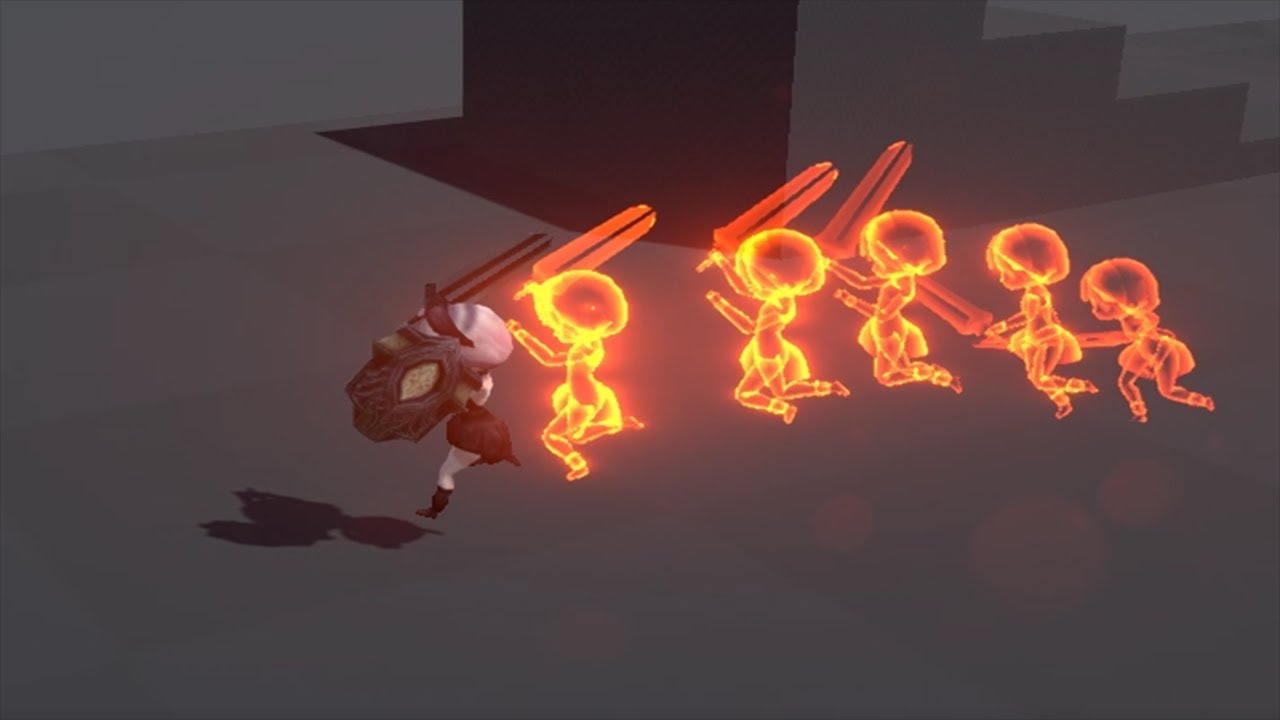
Does anyone know how the author created the particle effects coming from the hits? Also the line effect coming from the corners of the screen is that an image texture or another particle system?
https://youtu.be/rc8dZidvkNM?t=34
 lethal owl
that is very close to what I'm going for. The only reason I haven't implemented ...
lethal owl
lethal owl
that is very close to what I'm going for. The only reason I haven't implemented ...
Bump!.
Still looking for solutions to this. Basically a vfx trail to the player which slightly moves to the next player position
lethal owl
Hey. I'm trying to make something like this https://cdn.discordapp.com/attachments/750329891383410731/842850109121363988/Ij9mDrx23R_1.mp4 in vfx graph, basically move points randomly and draw lines between the nearest X points
I created a texture with the information required to pass to the vfx graph in this format :

Basically, the graph will contain X points, and each point has Y lines
I can initialize the points like this

but for the life of me I can't figure out how to "loop" over the texture to create the lines
 ornate timber
(Unity 2017.4) Is it possible to have a projector texture that also uses a normal map? The standard multiply projector only takes a regular texture with no normal map channel.
young swan
my question had nothing to do with spawn rate, what I wanted is to have a way to dynamically limit the amount of particles that are alive at any given moment (basically what the capacity value does)
having that dynamic "capacity" can definitely be useful in a lot of cases, specially where player interaction plays a role in the behavior of particle systems
i was just curious if there was a way of doing it directly through the graph interface, but seems it's not
so I'm fine with just making a script using the C# API
just as a note, my question wasn't related to memory allocation or performance constraints, but rather to controlling how the particle system behaves through runtime interaction
it would be neat if Unity changed that to let us have a "Max capacity" to set the memory allocation and a "variable capacity" to control the number of particles
 tall skiff
does anyone know if it is possible to render a skinned mesh render as a particle
 crimson zealot
tall skiff
does anyone know if it is possible to render a skinned mesh render as a particle
crimson zealot
tall skiff
does anyone know if it is possible to render a skinned mesh render as a particle
you can select 'mesh' in the particle render module
lethal owl
Is there an attribute which gives the actual spawn index of the particle? Like if it was the first particle spawned, it getSpawnIndex returns 0, if second, returns 1 and so on.
The docs for this : https://docs.unity3d.com/Packages/com.unity.visualeffectgraph@10.2/manual/Operator-GetAttributeSpawnIndex.html?q=spawnIndex
are ridiculously unhelpful
And it doesn't seem to work as expected, because for a texture I'm passing to the graph like :
private void Init()
        {
            _visualEffect = GetComponent<VisualEffect>();
            _texture2D = new Texture2D(100,1, TextureFormat.RGBAFloat, false)
            {
                filterMode = FilterMode.Point
            };
            for (int x = 0; x < 100; x++)
            {
                Vector3 pos = Random.insideUnitCircle * 5f;
                _texture2D.SetPixel(x,0, new Color(pos.x,pos.y,pos.z));
            }
            _texture2D.Apply();
            _visualEffect.SetTexture("MyTex", _texture2D);
        }
the graph itself is pretty simple

all the particles seem to be spawned on the same position

Moreover
The value of the spawnIndex attribute, based on Location.
If this attribute has not been written to, this Operator returns the default attribute value.
I don't see any Set Spawn Index attribute in any context, so ????????? What exactly is the default attribute value? How is it being incremented?
lethal owl
More context : I'm on VFX Graph version 10.3.1 and I have also tried it upgrading to 10.3.2, and HDRP version 10.3.1
 fading wasp
hey uh...how do i make my particles not....flat HJGSDJKG theyre just the billboards and not the usual spheres but also i want it to be vertical :(

(ignore the shader issue im workin on it)
crimson zealot
fading wasp
hey uh...how do i make my particles not....flat HJGSDJKG theyre just the billboa...
if you want them to be spheres, in the rendering module you can set the rendering mode to mesh and then pick the sphere
but i donno what you mean about vertical since spheres have no orientation
fading wasp
i mean the goal is a lightning strike so sphere isnt exactly what im going for i just didnt want it to be ...that lmao
the shape itself in there is a long vertical rectangle so im trying to get the particles to be like that too rip
crimson zealot
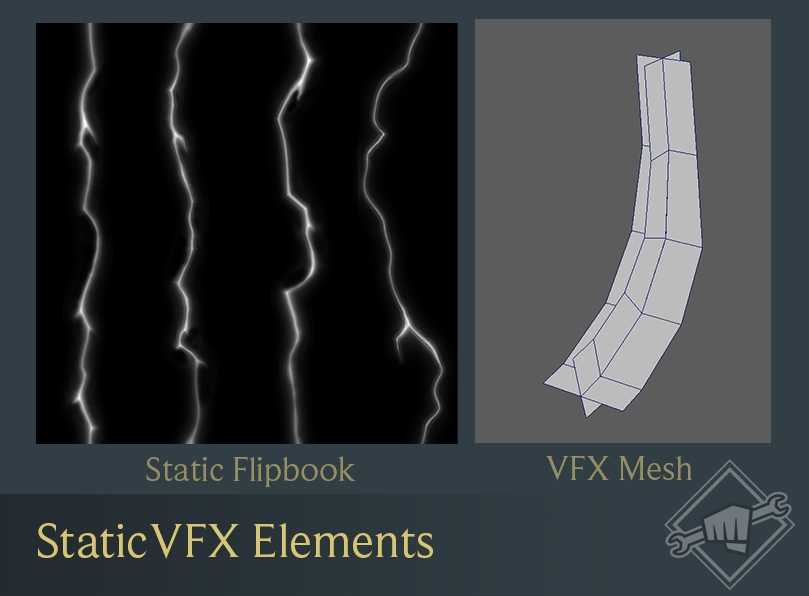
well the best way to do lightning is probably one jaggedy mesh, like this https://images.contentstack.io/v3/assets/blt731acb42bb3d1659/bltdb9ae8e8f536bfc8/5e8e258fee13647a96279dea/09_Volibear_Static.jpg


spawn those with randomish rotations around Y and you get that kind of effect
you can also do lightning with trails, which i don't think look as nice but can fit better depending on what you need https://www.youtube.com/watch?v=o1EunoF-11c

Using the Unity 5.5 beta and only the default particle texture along with the new TRAILS, LIGHTS, and NOISE modules.
Takes minutes to setup and no programming required!
Get Ultimate VFX: hhttps://assetstore.unity.com/packages/vfx/particles/ultimate-vfx-26701?_aid=1100l3rZp.
Twitter: https://twitter.com/TheMirzaBeig/.
fading wasp
ill give those a look!
im currently following this tutorial
https://www.youtube.com/watch?v=a5PbtUoHyQo&ab_channel=WuzzyWizard
but it was made using shader graph 9 so some things are different and even though im doing the same for the particles its coming out like...this for me

Hope u like this tutorial and that is was helpful.
➤ Discord: https://discord.gg/x7K92pJ
➤ Twitter: https://twitter.com/wuzzywizard
➤ Twitch: https://www.twitch.tv/wuzzywizard
➤ Patreon: https://www.patreon.com/wuzzywizard

dont think its supposed to look like that LMAO
cant figure out how to get the transparency to work but im asking about that over in #archived-shaders
crimson zealot
you need to set it on the master node
click the little gears
set the blend mode to additive, probably
fading wasp
OH MY GOD THAT FIXED IT
crimson zealot
but you could try alpha blended as well
crimson zealot
it also could be a texture thing, depending on how you made it
make sure the texture has the right import settings (and if it doesn't look transparent, try changing it to Alpha from Grayscale) and then it might work with alpha blending
fading wasp
ah i made the texture directly inside the shader graph using gradient noise and lerping
crimson zealot
depends what you want though, honestly for lightning additive makes sense
then that probably doesn't apply as long as you're calculating your alpha somehow
fading wasp
weird
lethal owl
lethal owl
This is solved. spawnIndex apparently works as intended, I didn't know that Pixel Coords and UV coords weren't a 1-1 mapping
tall skiff
crimson zealot
you can select 'mesh' in the particle render module
Sorry for a late response but, I want to be able to render a mesh as a particle while it is still working with the bones
fading wasp
jesus christ how am i going to survive the enxt four years of game dev school LMAO
now i just gotta figure out why only half the particle is showing up rip
 slate sable
@lethal owl You could try doing something like this. (it doesn't work for me since I dont have the texture with data but I thought I would at least give the idea a shot)

I use the main system to spawn the points and use their particleID to sample their position.
Then I emit sub-particles from them and they get their parent's particleID with the source option so they know which X to sample.
Maybe you can get it working. 😄
lethal owl
slate sable
I use the main system to spawn the points and use their particleID to sample the...
I did manage to get it working with a sorta similar approach, where I spawn X*Y number of particles, and I treat each particle as a line. X being the number of points, and Y being the number of connections a point can make
something like this :

I have to ask though, what is the exact difference between particleID and spawnIndex
The docs are very unexplanatory on that end
Here's the output btw 😛 https://cdn.discordapp.com/attachments/750329891383410731/843451564625494056/xK7CufyqMw.mp4
slate sable
lethal owl
I have to ask though, what is the exact difference between `particleID` and `spa...
Oh very nice.
Well I understand it like this.
ParticleID is unique per particle.
SpawnIndex works the same but only in the current frame so it resets in the next frames.
Since you are using single burst they all spawn in one frame so in that case spawnIndex = particleID
But if you used periodic bursts or constant spawn rate, you would get duplicates.
lethal owl
Oh I see (I think). Gonna have to go back and test a bit for this to make sense
thanks (again)
 earnest osprey
VFX I made for switching characters

The character that is going to dissapear dilatates while reducing each vertex size, while the new one does the opposite

The vertex node it's actually really simple, the CSharp code is the one that controls the parameters
If anyone has feedback please use ( @earnest osprey )
dull obsidian
young swan
it would be neat if Unity changed that to let us have a "Max capacity" to set th...
that's a solid idea / feature request, you should submit via the roadmap portal. and while not ideal, it's something we can implement ourselves in the initialize context to a degree in the meantime. perhaps you already have
dull obsidian
tall skiff
Sorry for a late response but, I want to be able to render a mesh as a particle ...
conventionally rendering a skinned mesh each at the position of a single particle? i don't think that is currently supported. but rendering a skinned mesh as many spawned particles is supported: https://portal.productboard.com/unity/1-unity-platform-rendering-visual-effects/c/98-skinned-mesh-sampling

Currently available from 2021.2.0a9 & 2021.1.0b10.
We're working on giving you the ability to sample skinned meshes, allowing you to create VFX which update alongside the animation).
(models/animations in gif from Mixamo.com)
solid badge
@crimson zealot is that a riot logo in the bottom right?
solid badge
crimson zealot
https://images.contentstack.io/v3/assets/blt731acb42bb3d1659/blt7e90660f17055a97...
^
crimson zealot
solid badge
^
yes, from this post https://na.leagueoflegends.com/en-us/news/dev/dev-a-storm-is-brewing/

Our latest on progress on Volibear’s update, with an early look at his model, VO, and more.
dull obsidian
fluid lagoon
Anyone knowledgeable in Vectrosity?
certainly doesn't hurt to ask questions about paid assets here but in this and many cases you're better off contacting the asset publisher i.e. Starscene software for support on their documentation (or lack thereof.)
fluid lagoon
dull obsidian
certainly doesn't hurt to ask questions about paid assets here but in this and m...
In the future I will. In this case it ended up just being a simple bug in my own code
dull obsidian
fluid lagoon
In the future I will. In this case it ended up just being a simple bug in my own...
ah ok well i'm glad you resolved it anyway 🙌
prime dome
so basically, i am a Unity noob and im braindead and have no idea how to use particle systems and i am wondering why i cannot change particle textures because i just want to make a muzzle flash. it will not let me edit the system itself, only facets of it
like all this is grayed out

 loud tartan
prime dome
so basically, i am a Unity noob and im braindead and have no idea how to use par...
loud tartan
prime dome
so basically, i am a Unity noob and im braindead and have no idea how to use par...
you need to change the default material to something else
dull obsidian
what version of Unity exactly? and what Render Pipeline are you using? (because this error can appear due to VFX graph not currently supporting the Built-in Render Pipeline.)
 spice girder
hey, ive been working a bit with the particle system, and since my bullets get disabled right as they collide, teh particles did not play, so i create another object which plays the particles. But thing is, its delayed with like 0.1 or 0.2ms
which really doesnt look nice
what could i do about this?
dull obsidian
- HDRP is the only RP officially supported by Visual Effect Graph, currently.
- URP works to some degree but some features like Lit Output won't be supported until 2021.2 later this year.
- BRP (Built-in RP) was never officially supported but there is still some legacy dev code so it kinda worked in some scenarios and has shader compilation errors or visual artifacts in others, you just can't count on it to work as it isn't supported. Though it might gain some support via Shader Graph supporting BRP later this year or early next.
slate sable
Is there a way to get a view rotation matrix that Unity uses internally in the Orient: Face Camera Plane node?
Using Main Camera node is fine for testing in play mode but the Face Camera nodes work in scene view too which is way nicer to work with.
I guess I could use one of the Face nodes and then manipulate the angles my way.
dull obsidian
slate sable
Is there a way to get a *view rotation matrix* that Unity uses internally in the...
i might start by inspecting the source code for the orient block / node to see if some built in coord transform / matrix mult function is used there, and search the vfx graph package codebase for any other uses of it. failing that, there's making a custom code node though that's not yet officially supported there is an example on my github
slate sable
dull obsidian
i might start by inspecting the source code for the orient block / node to see i...
Oh, that's a good idea. I'll look into that.
dull obsidian
it's a pretty major migration when changing an existing projects render pipeline, more of a topic for #archived-hdrp. and a lot of information online and in the unity hdrp documentation on converting materials. but if you don't have the resources to handle it all, probably best to stick with Built-in RP for now and use the Built-in ParticleSystem.
@olive moat or if it's a new project, there's no point in manually converting materials that don't auto upgrade, just choose HDRP or URP from the Unity Hub project templates and make a new project
 rancid forge
I am trying to achieve a flaming-like effect around a projectile that I am working, similar to the one in the picture. Any tips on how can I achieve this?

 mighty plover
player is on his own sorting layer

can anyone help me? My camera is not rendering anything outside of the default sorting layer on this 2d game. I haven't changed anything. Look at how it is:
fluid lagoon
mighty plover
player is on his own sorting layer
check the Z position of your objects and your camera
also of course check the culling mask on the camera
mighty plover
it was the 2D Light, but thank you!!
 gusty bay
Is there a way to change the alignment of trails from a particle system ?
(I'm looking for this parameter, this screenshot is from the Trail Renderer component)
 fluid lagoon
it's not possible to get the particle coordinates back afaik
you would have to recreate the particle logic in CPU world I guess - which kind of defeats the purpose 🤔
Maybe if you used a companion Shuriken particle system? Those can produce lights. It could be lower fidelity than the VFX graph but emit lights
 tulip rock
How do I create a heat wave effect with urp?
In unity 2d
ornate timber
does anyone know how to make two different projectors in the same scene? i cant change the material of the projector object for some reason... ive tried duplicating the material and assigning it to the new projector but it wont let you drop it on the object.
 scarlet juniper
I made this in Blender following a tutorial on making muzzle flashes. But for some reason when I save and import into Unity the circle is not visible except from the back and the planes are visible only on opposite sides(so the vertical on the reverse side and the horizontal from the top)
 lethal owl
I'm pretty sure this has to do with backface culling. I think it can be disabled in the material settings of the object
also slightly less #✨┃vfx-and-particles and more #💻┃unity-talk
 little cipher
Hey guys. Yesterday by following a tutorial i created a visual effect graph in unity. It turned out pretty alright, but the performance hit was immense. Now, i'm not sure if i've done anything wrong or what exactly, but i seriously thought it wouldn't be this bad. Could you perhaps take a look at tell me if i'm doing anything wrong?
\

So it's really weird, because the difference in like 1 milion particles is like 5% performance hit on my gpu (If i increase or decrease the particle count it doesn't hurt as much)
but the single instance of it regardless of particle count is about 40%
In fact, just have an EMPTY ~ completely empty visual effect graph inside of unity takes 20-30 % gpu
dull obsidian
lethal owl
also slightly less <#532260045887373352> and more <#497872424281440267>
@scarlet juniper another channel this would be a good fit for is #🔀┃art-asset-workflow. a lot of talk there about 3d model export/import workflows for Blender and other 3D modeling software into Unity
@scarlet juniper it is for muzzle flash vfx using cross section cards, though. so it's not entirely off topic to bring up here either. it's a blurry line sometimes
particle lights are not currently a feature though it is under consideration on unity's vfx graph roadmap. if you are really committed and want to get your hands dirty there is a hack to modify vfx graph to copy data from the particle attributes buffer on the GPU back to a buffer / array on the CPU that you could instantiate lights with, but it only works on newer GPUs and not all platforms, has performance scaling issues that are non trivial to optimize, etc.
dull obsidian
fluid lagoon
Maybe if you used a companion Shuriken particle system? Those can produce lights...
@olive moat this approach is more achievable in the meantime, one thing that can help is that while you can currently get per particle attributes to create lights with, you can set up vfx graph with spawn events to create lights when / where the particles were created and use a little C# script to emit particlesystem (fka shuriken) particles from those positions and then instantiate lights from there
dull obsidian
little cipher
In fact, just have an EMPTY ~ completely empty visual effect graph inside of un...
there is a performance overhead, but it varies widely. 20-30% may be expected for some configurations, though its impossible to say without more info. what CPU and GPU do you have exactly? and what render pipeline are you using? you'll also want to check out the performance profiler for further insight. make sure to enable the GPU profiler. https://docs.unity3d.com/2021.1/Documentation/Manual/Profiler.html
scarlet juniper
How would one go about creating a bullet tracer for a raycast gun?
 astral aspen
I am interested in that also
dull obsidian
scarlet juniper
How would one go about creating a bullet tracer for a raycast gun?
@astral aspen https://www.youtube.com/watch?v=AKgaXqSgGJk&t=47s

A simple trail system, to represent the bullet, and add some spice to your game! Trying to keep the videos short with the cuts, and also some sneak peaks in the future. Let me know what you guys think about the format. Gonna be doing a whole lot more testing.
Happy Ramadan, hope you guys enjoy!
╔ Downloads:
►Bullet Trail: https://drive.google...
astral aspen
Thanks!
scarlet juniper
Thanks
lethal owl
Has anyone used https://github.com/aman-tiwari/MeshToSDF in runtime ? I'm trying to use it for a simple mesh created and extruded during runtime with something like this :
if (mesh.vertexCount > 0 && mesh.triangles.Length > 0)
            {
                outputRenderTexture = MeshToVoxel(sdfResolution, mesh, offset, scaleBy, samplesPerTriangle, outputRenderTexture);
                FloodFillToSDF(outputRenderTexture);
                vfxOutput.SetTexture(vfxProperty, outputRenderTexture);
            }
but, it always seems to output a cube shaped vfx @origin. I'm using the example vfx provided in the scene itself, so that shouldn't be a problem
dull obsidian
lethal owl
Has anyone used <https://github.com/aman-tiwari/MeshToSDF> in runtime ? I'm tryi...
i've used it but not really sure what is wrong in your case. there seemed to be something wonky about the way transformation & scaling works with MeshToSDF that was difficult for me to work around. iirc everytime i adjusted the scale property the origin position would fly off out of bounds, so i would have to adjust the position every time as well to get it working again within bounds, as if the origin / pivot point is off.
 severe badge
Hey, anyone good with the particle system that can spend 5 minutes answering a few questions?
Need some help with an effect, can't get it to behave quite as I would like it to
I'll just type the question here to not waste any time, I have this flame particle effect. I want to use it to basically follow a sword that I have. The problem is, whenever I rotate the particle, it shoots off. Can't quite explain it properly, this is what it looks like

This is the effect, and whenever I rotate it

It goes off like that
How do I make it stay flat?
Already tried changing the shape to sprite and such
Can't find it
lethal owl
@dull obsidian I don't think I'm modifying the scale/position anywhere. Here's it in action, do tell if you see anything wrong
The entire hierarchy is uniform with 0,0,0 as position/rotation, and 1,1,1 as scale. And if it isn't clear which vfx is the mesh2sdf one, its the cube I'm staring at in the game view from 0:12
solid badge
rancid forge
I am trying to achieve a flaming-like effect around a projectile that I am worki...
I tried to do something similar a while back, made some progress with this video, tho a lot of it you gotta apply to 3 space (his is FPS). https://www.youtube.com/watch?v=xenW67bXTgM&t=899s

Unity 2018 - Game VFX - Projectile Muzzle Impact Raycast Tutorial
This video shows you how to create a Projectile, Muzzle Flash and a Impact effect in Unity. We use Photoshop and Blender to create our elements and create some code, with raycasts, for the projectiles to move and rotate in the right direction!
Shoot Projectiles in a FPS: https:/...
prime dome
Hi it's my first entry in server and Unity too.
I was testing exporting for see what I can import in my scene and I need to know if it's possible to export animate shader from blender into Unity ?
I use Free version, beginning of course, but one of my client need a noisy shader Unity and VR compatible
And when I try some tutorial, there missed me some tool to remade this into unity.
slate sable
This is not the best place to put it. Read #📖┃code-of-conduct
 muted oriole
I see. That is unfortunate that official Unity server does not allow job posting for their own technology. That is pretty self inflicting wound.
 pastel yoke
Is it possible to get a glass refraction zoom effect with a Unity made material?
solid badge
@pastel yoke I think that's shader graph not vfx graph
Yea most people do that effect with shader graphs https://youtu.be/XTnobfLSTV0

Let's make a photo realistic glass material in Unity's High Definition Render Pipeline (HDRP).
✅Unity Office demo Project:
https://github.com/Unity-Technologies/SmallOfficeRayTracing
▬▬▬▬▬▬▬▬▬▬▬▬▬▬▬▬▬▬▬▬
💎 Watch advanced tutorial on Patreon 💎
http://patreon.com/uguruz/
▬▬▬▬▬▬▬▬▬▬▬▬▬▬▬▬▬▬▬▬
📱Social Links:📱
🔸 Discord https://discord.g...
rancid forge
solid badge
I tried to do something similar a while back, made some progress with this video...
Thanks! I will take a look and see what I can get.
solid badge
^ GL, first few minutes he goes ham, they most helpful
smoky pelican
Hi, is it possible to set particle size based on it's spawn position?
Like, it's bigger if it's spawned near the center, and smaller if it's farther from center
prime dome
ornate timber
does anyone know how to make two different projectors in the same scene? i cant ...
Dont you have to use a second camera to create a second projection?
 young epoch
Whats the best shader thats in unity by default for muzzle flashes? Unlit/transparent cutout?
fx/flare works really well but it doesnt care about anything in front of it
 dull obsidian
muted oriole
I see. That is unfortunate that official Unity server does not allow job posting...
dull obsidian
muted oriole
I see. That is unfortunate that official Unity server does not allow job posting...
the Unity Forum has dedicated sections for all job offering / seeking posts.
https://forum.unity.com/forums/commercial-job-offering.49/
https://forum.unity.com/forums/commercial-job-seeking.48/
https://forum.unity.com/forums/non-commercial-collaboration.17/
 steady wedge
dull obsidian
the Unity Forum has dedicated sections for all job offering / seeking posts.
htt...
steady wedge
dull obsidian
the Unity Forum has dedicated sections for all job offering / seeking posts.
htt...
question who actually uses those parts of the forums lol, didnt even knew they existed
slate sable
steady wedge
question who actually uses those parts of the forums lol, didnt even knew they e...
People who are looking for a job or people who are looking for someone to hire?
steady wedge
slate sable
People who are looking for a job or people who are looking for someone to hire?
well they use GDN, Upwork or any other source since noone knows about this forum ?
Looking at the views of the posts in the offering/seeking, im right with my take on this
 onyx lake
Hi guys 🙂 I'm currently working on a mobile device project and was wondering, if GPU particles are supported with VFX Graph in URP? I'm just looking for unlit particles maybe some custom shader on it for extra animation. Nothing too fancy. Just wondering, if GPU particles are supported on mobile at all?
dull obsidian
onyx lake
Hi guys 🙂 I'm currently working on a mobile device project and was wondering, i...
only on mobile GPUs with compute capability. VFX graph depends on compute shaders for particle simulation.
onyx lake
@dull obsidian interesting. How can I find out whether my target hardware has this compute capability?
dull obsidian
onyx lake
<@!471083604135378975> interesting. How can I find out whether my target hardwa...
example code is in this doc. just check if graphicsShaderLevel is 45 or higher
45 Metal / OpenGL ES 3.1 capabilities (Shader Model 3.5 + compute shaders)
https://docs.unity3d.com/ScriptReference/SystemInfo-graphicsShaderLevel.html
 lime adder
Hi guys and girls! i`m beginning to do 2d vfx for casual games. Have experience with shuriken. But not familiar with 2d mobile vfx side of things for stylized and hiper casual games. is there a good resource or a dedicated website or discord or any other group i could join to seek help from people that do 2d vfx for mobile games? Thanks!
 upper spire
is there a way to make particles spawn on a skinned mesh renderer, but "follow" the vertices?
aka if it spawns on a vertex, make it stay on a vertex
 misty aspen
upper spire
is there a way to make particles spawn on a skinned mesh renderer, but "follow" ...
misty aspen
upper spire
is there a way to make particles spawn on a skinned mesh renderer, but "follow" ...
You could use VFX graph and a point cache for this
 steady geyser
Hello People can someone point me to a good tutorial to make sword slash or trail , its been a week i m watching videos i cant find one that shows me the process from start to end ... =/
Thank very much
^^
slate sable
upper spire
is there a way to make particles spawn on a skinned mesh renderer, but "follow" ...
Skinned mesh sampling was released in 2021.1
Point cache wouldn't work in your case because you have to generate it and save to asset before runtime.
 lucid kayak
sorry if this is not the right place to ask. and my question is newbie but how do i set particle system to "Static"
i have a particle system that just stops working after i reload the scene and i read online that making it static will solve my issue
lucid kayak
okay i figured it out, i had to do Looping + prewarm
 atomic storm
heyyy! Anyone knows if there is a way to use the stencil buffer in the vfx graph? I'm trying to make particles appear only behind specific objects
misty aspen
upper spire
is there a way to make particles spawn on a skinned mesh renderer, but "follow" ...
I am aware that Unity is working on a node for VFX graph that should enable you to use vertex positions of your mesh as emission points for your particles ... I think I saw this in their active roadmap 🤔
 south thorn
Is there a way to make sprites behave dynamically with world physics? For example, I have a fox character, and I want the tail to sorta play in the physics space, so nothing for the tail is animated, but when he runs, it’ll sorta fall behind him or if he’s still, it’ll fall toward the ground
I could definitely do it with simple animation, but it want it to feel less rigid
Madeline’s hair from Celeste is kind of exactly what I want
solid badge
atomic storm
heyyy! Anyone knows if there is a way to use the stencil buffer in the vfx graph...
I think shaders / shader graphs would achieve those effects... though try the render order in your pipeline. You want stuff on top to be rendered first (at least in URP).
atomic storm
??? render order
that just orders them I'm pretty sure

I meant an effect like this
where certain stuff only display behind a specific object
(i know in the pic it is probably an extra camera, but just imagine it with the stencil buffer :D )
I originally wanted to create an orb-like thing in which particles swirl around and don't clip outside
I did it with shuriken, and I'll look into doing it whith vfx graph soon, even if it requires a hacky way
loud tartan
south thorn
Madeline’s hair from Celeste is kind of exactly what I want
This might help then https://www.reddit.com/r/gamedev/comments/9a0cfr/comment/e4rvrg2

reddit
487 votes and 47 comments so far on Reddit
south thorn
OOh thanks!!
solid badge
So the vfx graphs you can chain the blocks all together, then in ur inspector edit the order in which the vfx is rendered. (What im trying to say is this changes drawing order, so particles behind it will not be rendered behind it (invisible). You can have something like "bloom" "inner portal" "outer portal" then put a stencil as maybe a texture? And have that one be first. https://forum.unity.com/threads/vfx-graph-sorting-order.707834/

Unity Forum
Hey all!
I'm building an explosion in VFX Graph with multiple different vfx graphs to simulate different aspects of the explosions. I'm having issues...
^ @atomic storm
slate sable
I'm not sure about stencil in the vfx shader graph but I think there could be some magic done through custom passes if he's using hdrp
 heavy spoke
anyone knows what this is about?
 atomic storm
solid badge
So the vfx graphs you can chain the blocks all together, then in ur inspector ed...
atomic storm
solid badge
So the vfx graphs you can chain the blocks all together, then in ur inspector ed...
I was looking for an effect like this
sorting order would not help since I don't want the particles to show on the outside
 atomic storm
slate sable
I'm not sure about stencil in the vfx shader graph but I think there could be so...
atomic storm
slate sable
I'm not sure about stencil in the vfx shader graph but I think there could be so...
yeah I was thinking maybe I could add custom code to the vfx graph particle's shader
(it's urp I'm using)
(and yes I did consider to make the particles fade out after a certain radious, so they are contained inside the sphere, but I want any shaped object to be made into a crystal of sorts)
 wide lark
so i made a VFX in another project and imported it to my current project like this: https://www.youtube.com/watch?v=jSIan1cEYTI but the VFX doesnt work

Today's video includes Decals and it's all about that satisfying punch that a bullet hit does or the impact of a magic ability! Made with Unity VFX Graph in 2020.1.14 URP.
Enjoy!
*Muzzle Flash Tutorial: https://youtu.be/sgBbnF3r60U
*Combine Projectiles, Muzzles and Hits with this video: https://youtu.be/T5y7L1siFSY
-------------------------...


even if i click play() i dont see the particles
but if i go in the other project like in the video, cuz i made a seperate project just for the VFX, it works and then just imported the VFX into my game, it doesnt work

ping if reply
slate sable
atomic storm
yeah I was thinking maybe I could add custom code to the vfx graph particle's sh...
Wouldn't it be easier to replicate with some shader without using particles? It almost looks like bunch of voronois stacked on each other
atomic storm
it's not the desired result just some random textures I found
I could use it for many different effects such as bubbles in a liquid, or stars and galaxies shown inside objects that look almost 3D
I could even use some 3D particles on the inside to make a 3D universe for example, like asteroids, mini planets, stars etc...
and since they would be confined to this very small space (the object) it would be very easy to turn the particles off when it is out of distance
 obsidian oracle
I'm trying to recreate a fire plexus effect in unity.
I'm currently instantiating line renderers connecting particles, but it doesn't seem like the line renderers aren't using hdr colors. Does anyone know if there's a way to do that?
This is what I'm trying to recreate:
https://cdn.discordapp.com/attachments/301877393990090752/849018492945694730/digital_fire.gif

And this is what I have rn:
 obsidian oracle
Just realized I can actually set the material for the line renderers... made a simple shader and its working now
wide lark
wide lark
so i made a VFX in another project and imported it to my current project like th...
any help?
 cloud crane
for some reason, the first time my game uses a large explosion particle effect, it causes a lag spike for about a second or so. Anyone know how to fix that?
earnest osprey
Summon (WIP)
 solid badge
Lol gio its like the ue 5 ai but in 2.5d
earnest osprey
@solid badge AI = ambient illumination? not sure if I understood the comment
 earnest osprey
ok, ok, didn't remembered that haha, nice reference to use but in low low poly
 inland sapphire
Trying out Visual Effect Graph..
Is there any specific setting I should take a look at if my VFX is only visible in Scene view and not (partially) Game view?
Im attempting an output particle forward decal and the texture is show only in scene and not game view. Having a hard time troubleshooting this
inland sapphire

inland sapphire
This is my exact issue as well. Was this fixed?
 quaint plover
inland sapphire
This is my exact issue as well. Was this fixed?
quaint plover
inland sapphire
This is my exact issue as well. Was this fixed?
I haven't seen it fixed yet, but I also have really payed attention to the issue since I posted that. So, maybe?
inland sapphire
They are nt very responsive in this discord so I was really hoping you had a magical solution lol
misty aspen
obsidian oracle
I'm trying to recreate a fire plexus effect in unity.
I'm currently instantiati...
You should be able to do this in VFX graph, using the particle strip output... I couldn't make it work properly on my side though... I think I wasn't initialing the pointa properly
prime dome
hey, i am trying to set the color by position. my first attempt was to get the positions y component, multiply it and then send it to a colorcomponent. but i failed 😭 nothing happens. any other possible ways?
 soft hull
I have a particle system and I want to Tween a shape of this system (shape 10->20->10->20.. etc). Is there any way to make this particles sit on the shape and move back n forth with it? (Unity particles, not VFX graph)
soft hull
Ideally I want particles to spawn and move with mesh (that has vertex displacement via shader graph)
 fluid lagoon
soft hull
Ideally I want particles to spawn and move with mesh (that has vertex displaceme...
fluid lagoon
soft hull
Ideally I want particles to spawn and move with mesh (that has vertex displaceme...
You won't be able to get vertex displacement data back from your shader
Your best bet might be to use another shader for your particles that does a similar displacement calculation, or use a compute shader to calculate that displacement and use the result in both your mesh's shader and the particle shader. Unfortunately - Shader Graph does not yet support Compute Buffers which you would need to access the result of the compute shader.
So your shaders wouldn't be able to use ShaderGraph
soft hull
fluid lagoon
Your best bet might be to use another shader for your particles that does a simi...
Thanks for the response!
I figured to change Scalimg mode to Hierarchy and tween x,y,z with different speeds and timings. Not the best but at least something.
prime dome
does anybody know some tutorials that can help me with: "color by position". i think my gpu (amd) is not well suited for vfx graph. i always have weird bugz when it comes to rendertextures(cant use set color from map with rendertexture), thats why i have to fake my way around it, -> create the colors in vfx, rather then using the original color of the texture
 mystic mason
why my particles look deformed?
steady zephyr
fluid lagoon
I _wish_ VFX graph supported compute buffers
sorry this is late... why doesn't it? VFX graph is all shaders anyways i thought?
fluid lagoon
steady zephyr
sorry this is late... why doesn't it? VFX graph is all shaders anyways i thought...
they simply haven't added support yet
My understanding is that yes VFX graph uses compute shaders for simulating the particles and yes they internally use compute buffers for storing and manipulating the relevant data for that. What they don't support is the use of user-defined custom compute buffers.
It's on the "in progress list" here: https://portal.productboard.com/unity/1-unity-platform-rendering-visual-effects/c/100-graphics-compute-buffer-support

We're adding the possibility to pass data to VFX Graph using structured buffers in addition to Textures.
so theoretically it should come eventually.
steady zephyr
Thanks!
steady zephyr
https://github.com/keijiro/Smrvfx it looks like this uses a compute shader to bake data into textures though
GitHub
An example that shows how to pass data from a skinned mesh renderer to a visual effect graph. - keijiro/Smrvfx
But a compute buffer is different from a texture I suppose
Just thinking out loud...
prime dome
prime dome
does anybody know some tutorials that can help me with: "color by position". i ...
solved:
 wide lark
so i made a VFX in another project and imported it to my current project like th...
wide lark
wide lark
so i made a VFX in another project and imported it to my current project like th...
???
dull obsidian
wide lark
so i made a VFX in another project and imported it to my current project like th...
not sure what's wrong but first try making sure you are using the same version of Unity and the same render pipeline as described in the tutorial video's description
dull obsidian
fluid lagoon
It's on the "in progress list" here: https://portal.productboard.com/unity/1-uni...
i haven't tried it but it's in pre-release state in the latest alpha according to the 2021.2a19 release notes if you wanna try it. it will stay "in progress" until it hits a stable release later this year of course.
 dull obsidian
says 6 months to me.. it's a newer version used in the tutorial. check the description
i can't say for sure but that could be the problem.
wide lark
yea 6 months ago
dull obsidian
backwards compatibility is a lot less dependable than forwards compatibility on these new packages
so usually the same version or newer and good chance the saved file will work
wide lark
i updated the URP
dull obsidian
but using a newer file with an older version is iffy
wide lark
is HDRP and URP compatible with each other?
cuz the project i made the bulletimpact in is URP
while the current project in my game is HDRP
so maybe thats the cause?
i am downloading URP in my current project rn
dull obsidian
wide lark
i updated the URP
that might help, but it's recommended to stick with the verified SRP package versions bundled with the editor.. you may need to upgrade to the same unity version or newer 2020.1 looks like
or if that's not an option for some reason. you might have to recreate the vfx manually via the tutorial
wide lark
welp i think i should stop doing game dev till im more experienced lol i have no idea what im doing just following tutorials and coding
VFX stuff is confusing
dull obsidian
wide lark
welp i think i should stop doing game dev till im more experienced lol i have no...
nothing wrong with that
 dull obsidian
wide lark
but it downloaded and now i have 2 unities
dull obsidian
wide lark
but it downloaded and now i have 2 unities
are you using Unity Hub? you should be, makes managing these multiple versions a lot easier
it will remember what version of Unity is tied to each project
fluid lagoon
dull obsidian
i haven't tried it but it's in pre-release state in the latest alpha according t...
O.o awesome I will probably give it a shot later this week
If it's at all usable it will probably let me upgrade my project from builtin to URP!
dull obsidian
fluid lagoon
If it's at all usable it will probably let me upgrade my project from builtin to...
maybe, just make sure you make backup. projects in alpha are never guaranteed to be forwards compatible or even salvageable if something goes wrong
dull obsidian
nice
fluid lagoon
One of my essential game mechanics involves drawing thousands of small objects (3d meshes) that are moving around the game world on bezier paths. I'm using a compute shader which is the only thing that makes it possible performance-wise. But that is currently limiting me to hand-written builtin shaders, and my shader writing skills are extremely weak. My hope is that I can move the rendering over to VFX graph OR Shader Graph (which requires one of those two to be compatible with compute buffers). When that happens I'll be able to make shaders in ShaderGraph and I feel like so much possibility will be opened up for me graphically. Currently it's a really plain ugly looking diffuse lit shader that's about the best I could muster with my shader skills
young epoch
Any way to avoid such overlapping switch and just keep it in the same order until next time the AI overlaps the sprites?

 cobalt scarab
Sprites you can additionally sort using z coordinate
young epoch
Nothing automatic but them still being in the same plane/positions in the Z axis?
cobalt scarab
young epoch
Nothing automatic but them still being in the same plane/positions in the Z axis...
Oh yea, Sprite Renderer has order in layer sorting as well of course.
young epoch
what does that mean?
cobalt scarab

I prefer using world coordinates because they are easy to visualize switching to 3d.
young epoch
🤔
so i just add a custom sorting layer or...
ah great now i found another problem! my skybox isnt being rendred in URP
 upper geyser
my post processing layer is overriding my near clip plane pls help
i got this code from a yt vid and it pretty much bends the near clipping plane to match a world object
and it works until i add a post processing layer to the camera
 north creek
Rotation By Lifetime and Rotation By Speed have zero effect on the spinning on these particles no matter what settings. Is there something else that causes them to rotate like this? (like on the left)
fluid lagoon
north creek
Rotation By Lifetime and Rotation By Speed have zero effect on the spinning on t...
do you have physics interactions enabled?
collisions etc.
north creek
yes
fluid lagoon
is it that maybe?
north creek
it does appear they are not spinning without the collisions yes
turning the collision quality down actually made it stop happening though
oh its just harder to see. thats fine though
 main snow
How can I smoothly blend between 2 animated ABC caches ?
I have 2 spheres deforming and I would like to run the first animation in loop, then transition to the second cache.
I have attached an ANIMATOR to the first cache and added the second cache as animation, but the playback is incorrect. How can I blend between 2 caches. Even if is not ABC is ok, but I have no idea what else to try
dull obsidian
main snow
How can I smoothly blend between 2 animated ABC caches ?
I have 2 spheres defor...
give this a shot: https://github.com/Gaxil/Unity-AlembicToVAT

GitHub
Alembic to VAT (Vertex Animation Texture) mini tool - Gaxil/Unity-AlembicToVAT
@main snow and presuming you are targeting mobile, check out this issue thread on some tips to make that work: https://github.com/Gaxil/Unity-AlembicToVAT/issues/1

GitHub
first of all thanks for great plugin but It don't work in android there isn't any texture compression
main snow
@dull obsidian thank you !
 rose bolt
i'm using particle effects that renders spheres, i'm wondering if it'd be a good idea to make a simple mesh using blender that'd be a low poly sphere to use instead so it'd be better for performance
prime dome
is it possible that i have to use flipbook for coloring particles via rendertexture?
prime dome
and how can i add blur to vfx?
fluid lagoon
prime dome
and how can i add blur to vfx?
blur would be a postprocessing effect
 still juniper
Im having trouble with a 2d rain effect. Im trying to add a camera distortion effect to a particle system to give the rain a cool effect. can anyone help me with this. Thank you!
prime dome
fluid lagoon
blur would be a postprocessing effect
so that means i have to sample vfx to apply PP manualy via rendertexture? https://github.com/keijiro/Kino

bUT i also found PP-nodes!
 primal cloud
Hi guys, I have a question that I can't find at anywhere. That how I can align texture to particle direction in horizontal billboard mode. For example, I have a particle system with arrow texture. And I want to make it flat flying in the ground. So, I use circle for shape, and horizontal billboard in render. But I need the arrow point to the direction of particle. If particle move to the left, the arrow will point to the left. You can see the image below to more understand what I want. Someone told me that I can use stretch billboard, it works. But it doesn't flat in the ground like when I use horizontal billboard. Can you guys help me, please? Thank you very much.
 prime dome
angular velocity = direction
dull obsidian
prime dome
so that means i have to sample vfx to apply PP manualy via rendertexture? https:...
don't use kino (outdated) and you don't need to do anything manually with rendertextures either, just use the post processing stack included with the render pipeline you are using: https://docs.unity3d.com/Manual/PostProcessingOverview.html
prime dome
yes but i cant use motion blur for example, because the position of a particle is not registered by motion blur (in World space) even If i Set the sys to worldspace
only if i change the position of the complete partical sys
but i can try distortion particles to fake it 😉
prime dome
prime dome
yes but i cant use motion blur for example, because the position of a particle i...
But Bloom etc (color based)works but No effect that ist based in velocity
fluid lagoon
What would it take to be able to sample positions of a Unity Terrain from within VFX graph, so that I could do things like:
- Sample the height at a coordinate
- Sample the surface normal at a coordinate
Is there anything built into VFX graph for Terrains (I couldn't find anything) or would I need to process the Terrain data into something digestible for VFX graph first?
The end goal would be to draw something like the yellow and red markers here: https://www.youtube.com/watch?v=kkkiMqq4kac as well as the pulse that goes out
 vestal fractal
Show me some cool VFX that inspired you!
 tight vapor
Uh I'm currently trying to create some objects in my scene, and half of the screen is blocked, its making it impossible to edit the parts of my character um working on

it gets worse when i get closer

nevermind fixed it
crimson zealot
I keep running into this issue where, if I manually .Simulate() a paused particle system, it's always isAlive even if it's 'done' simulating...anyone have thoughts on what to do about that? i want to tick it manually, but i also want to know when it's done
i guess i can just check the time against the duration?
cool, not sure why i didn't think of that before!
prime dome
tight vapor
Uh I'm currently trying to create some objects in my scene, and half of the scre...
youre into 2d view
tight vapor
ah
prime dome
chanwge it to 3d by clicking on the cube between the xyz lines of the icon in the top right corner
prime dome
tight vapor
ah
its also called iso view
fluid lagoon
eh nah it's pretty clearly in perspective mode in those screenshots
they just need to press "f" or something
prime dome
stimmt
prime dome
fluid lagoon
Is there anything built into VFX graph for Terrains (I couldn't find anything) o...
not exactly but you can use point cache and sdfs
prime dome
and set pos from depth
prime dome
but i think this effect was made with shaders
slate sable
fluid lagoon
Is there anything built into VFX graph for Terrains (I couldn't find anything) o...
you could probably assign the terrain heightmap texture to VFX graph with a simple script and then sample that texture to get height of terrain at a specific point.
It would need some simple remapping to get your desired position.
Not sure about normals. Yo could probably sample multiple points around and calculate them.
prime dome
would it not require to many particles?
slate sable
it wouldn't rely on particle count at all
slate sable


If the terrain isn't at [0,0] you would need to add offset to the particle position when sampling the texture.
fluid lagoon
Thank you @slate sable and @prime dome
for normals I would have to sample the neighboring points in the heightmap and calculate the slope from that?
slate sable
Yep. That was the idea.
fluid lagoon
cool
 quaint jungle
Cool
 odd delta
why is it that when i flip the particle system, the particles become invisible?
i want to the particles to not be invisible when i flip the particle system.
odd delta
ive found the solution, i just needed to enable two sided on the material, since by default the shader culls the back face
prime dome
slate sable
you could probably assign the terrain heightmap texture to VFX graph with a simp...
What do you mean by saying "Sample particless via Code"?- Store the coordinates in Arrays/list? And Add a few particless Like with the glowing Line that ist spreading Out in a circle?
 fringe zealot
I have a slot machine that can have many different sprites that appear in the different slots. I'm trying to think of a good way to display these sprites onto the actual mesh of the rings (because they need to appear curved onto the surface). Visible slots would be a 4*3 grid.
Do I?:
-Make each visible slot a separate mesh, then switch out the sprite for each via setting the texture when the slot is out of view (while the ring is inside the machine).
-Put the current sprites into a grid somewhere off camera, then use a RenderTexture to project them onto a single mesh for the visible slots (UV map the slots so they line up with the hypothetical grid).
-Some other, probably more sensible way
An example, the XO panels (currently just an additional layer of geometry above the main rings) would be the 3 visible rows, 2 additional above and below for animation purposes.
slate sable
fringe zealot
An example, the XO panels (currently just an additional layer of geometry above ...
Why don't you put all the symbols on there. Create extra parent for each of the wheel. Animate the parents and just offset the children's rotations so it would show what you want.
fringe zealot
slate sable
Why don't you put all the symbols on there. Create extra parent for each of the ...
The catch is that this is meant to be a menu, and there can be more buttons than there are slots on the wheels. So I need to be able to only update the current visible rows
If I could just set the sprites once then spin as needed I would
Think the RenderTexture route might work out, just finished with the UVs / grid setup. Now I just need to tweak my code and figure out why the animation interpolation is being weird
slate sable
You could have different textures that you could blend between during the spin with a shader or just setting different materials.
vestal fractal
What's the best VFX graph tutorial out there?
prime dome
all
odd delta
how can i make it so that particles of a particle system do not show in front of a sprite when using a particle system force field? I want the particles to only show behind the sprite, but occasionally, some particles will show in front of the sprite due to the forces on the z.
prime dome
let them collide with something
odd delta
nvm, i just needed to place the particle system on a z before the sprite
bc camera projection is orthographic, the persepective/view doesnt change
prime dome
Hey, i have got a little question... how do you rotate sprites in a particle system? for my case i want that these blood drops fly away from the center of the shape. the round part of the sprite shall point away from the center so when a player is hit, the visual should loook more realistic than that xD
 ashen halo
hi guys, can you explain me the difference between particle duration and startLifeTime ?
 fair carbon
is it possible to access custom attributes from script?
prime dome
@fair carbon sure why not? you also can animate them, but they properties always have strange names and you cannot change them
how can i turn on custom case values for the switch case? fixed->inspector
dull obsidian
how's the perf of vfx graph when spawning multiple explosions?
@silent sierra like @opal star was saying, it depends on your use case. if a single explosion is just one 3d particle with a flipbook texture2d / camera facing quad then you can have hundreds if not thousands with acceptable performance depending on hardware, but if each explosion is hundred, thousands or millions of 3d particles each, they may look more dynamic, but then you'll be limited to fewer explosions total. There is also currently a performance overhead to each instance of a vfx graph visual effect. You'd need to test your individual case on your target platform(s) to get real data, or at least provide a lot more detailed information on your use case for anyone to guess what the performance might be like.
dull obsidian
fair carbon
is it possible to access custom attributes from script?
if you mean per particle attributes, you can only input attributes generated from a script and converted to a texture or (soon) graphics buffer. but you can cannot currently output particle attributes to be read outside of / as a product of the vfx graph.
 silent sierra
@dull obsidian @opal star a few month ago i did tons of benchmarks and found vfx perf profile difficult to pin. Filtrate is a big concern on switch. Hundreds of thousands of flat quads at 60hz no problem so geometry generation is fast. But "still an overhead per instance" - GPU or CPU overhead? Batching is tricky in early versions as you can only have one event per frame.
 velvet seal
Has anyone had any experience using the VFX graph for projectiles?
I'm struggling to kill them when their CPU counterpart hits something
 unborn geyser
Hey, I'm currently trying to get lens flares working. I'm working with the standard rendering pipeline. For some reason, although it shows up in the scene view, it doesn't show up in the game view.
Does anyone have any idea why that might be? So far, my internet searches haven't turned up much.
 twin blade
Can I have an animated 2d light cookie? Like use a shader for it, to make an object glimmer in lights?
 soft pelican
Tool to get a readable screenshot of your entire vfx graph. Good for posting graphs to discord. Lemme know if it gives you any trouble. (instructions at top of file)
 stuck bloom
Im not sure if this is the right channel, but how do I go about spherical billboarding of textures?

I want the texture to always have be rotated "up" so the character always look like the are right side up, but i dont want them to always be rotated towards the camera, because when other character approach the horizon, they appear to float
 stuck bloom
correct
fair carbon
You just get the position of the sphere and and get the direction to the position of the player, and set the players up direction equal to it. Then the player would always maintain an outward rotation from the sphere
But if you are wanting to do it in a shader, it will have to be a different method
fair carbon
Shader would be better performance wise, though more difficult to figure out and I'm not sure what the solution would be. But using the position way, wouldnt be too taxing unless you have a bunch of objects using it
stuck bloom
there would be a lot, but ill do it that way unless it starts to slow down, then ill have to do it in shaders
fair carbon
And if you want the sprites to face the camera along with being oriented on the sphere you can do that as well
 errant rose
Im trying to use this cool fog vfx https://www.youtube.com/watch?v=LDxApLRIOy4 but I am using 2d urp. If I google people talka bout having to have unlit particles. How do I achieve that? Right now in the editor I only see an orange outline
In this video we will show you how to create 2D Interactive Fog Visual Effect Graph in Unity engine.
Download project files (Patrons only): https://www.patreon.com/BinaryLunar
00:00 Intro
01:05 Setting up the project
01:35 Creating the Visual Effect Graph
02:25 Creating AABOX position node to set the area of the fog
03:35 Adding wind speed and...
errant rose
I guess it has something to do with 2d light, but I don't know how to remove that feature
urp asset and select forward renderer was athe fix. Don't need the 2d light stuff
 jolly cape
Excuse me, I just want to ask.
I have a particle system, circle with burst spread mode. I turn all emission to 0 and add a burst on main on 0:00 with 20 particles.
This particle is bursting out. Now, I want to create the same one but I want to make it bursting in.
So, the particles that I want is bursting/moving into the middle of the circle.
Do you have any references about this?
NVM!
Just change the Start Speed into Negative! Thank you!
 jade anvil
Hi! Suppose I have a model with different material variants. Should I use them by making different prefabs for each material or can I use only one prefab and assign different material from script which would be more convenient for me? Are there some downsides in the latter method?
 granite cairn
@jade anvil I actually wrote my own script with a custom inspector to handle that. There's not a built in method but it's not terrible to do yourself, if you have an editor only script to change the materials then it should bake just fine on runtime without overhead
does anyone know if there is a way to have only certain materials provide bloom? I'm working on a project with HDR off and I'm having a difficult time creating an emissive shader/material which consistently shows bloom without the enviroment being blown out
crimson zealot
granite cairn
does anyone know if there is a way to have only certain materials provide bloom?...
i think you can put some things on different layers, then have different postprocessing volumes for the different layers with different bloom parameters
if you really need per material i think you gotta do some shader cleverness
jade anvil
@granite cairn Thanks!
 proven venture
Hi, I try to rend a VFX graph particle system in 2D, where is the option for order in layer on vfx graph ?

 onyx cipher
how do you get a circle particle? no matter what I do it always come out as a square
crimson zealot
onyx cipher
how do you get a circle particle? no matter what I do it always come out as a sq...
isn't the default particle when you make a new particle system a circle? anyway you need to have a transparent material on your particles and assign a texture to them with some transparency. Everything is a square, but you can render a circle to that square
silent sierra
you guys know how to set clipping and opaque in a custom shadergraph for the vfx graph?
that vfx node has no such option
and also in shadergraph, how do i get the color that's set by the render block of the vfx graph?
 forest nimbus
How do i get Rotation over Lifetime in VFX Graph like it is in normal particle systems?
 eager kindle
https://gyazo.com/f55270bc43592e61ea8485f819d4927e
Is it possible to either stop a rotation on impact or align the rotation to the collider? I want the particles to stop spinning while on the ground.
 crimson zealot
eager kindle
https://gyazo.com/f55270bc43592e61ea8485f819d4927e
Is it possible to either stop...
crimson zealot
eager kindle
https://gyazo.com/f55270bc43592e61ea8485f819d4927e
Is it possible to either stop...
maybe swap them out for a different particle that's static on collision using a subemitter?
eager kindle
Interesting idea 🤔
 sick patrol
I am trying to do a charging effect of fire, but the fire goes to much up
I want it to be like more on the x and y
Like more scaled
and less tall
 errant rose
VFX graph. Can I simulate the "stretched billboard" from regular particles? I want to stretch my regular circle sprite when the speed is high
steady zephyr
Is it feasible to load a sequence of pcaches to vfx graph or will this be too slow?
 cerulean rock
Hello guys! I'm wondering if its possible to remove / decrease the sparkles coming from this blood plane? https://gyazo.com/1b466d1b9e64e14340f5e3f6b9344134

 opal star
cerulean rock
Hello guys! I'm wondering if its possible to remove / decrease the sparkles comi...
opal star
cerulean rock
Hello guys! I'm wondering if its possible to remove / decrease the sparkles comi...
Lower the top range of the smoothness remap
errant rose
are particle sizes in VFX graph always square? I have taken a non square particle and it still looks square (and horrible :D)
 zealous sun
Hi look at my new trails fx!
https://www.artstation.com/artwork/ZGk03G


ArtStation
Hi! Look at my new vfx artwork with trails fx. I worked a lot on this shader and color palette for this effect. But now I am very glad to share with you this fx.
errant rose
zealous sun
Hi look at my new trails fx!
https://www.artstation.com/artwork/ZGk03G
very nice looking. I get "will-o-wisp" feeling.
 quartz sky
I'm new to VFX Graph, does anybody know why my Output Particle Quad does not have a shader graph input like in this tutorial video? I am on URP.


Let's see how to create a Heat Distortion effect in HDRP and URP. Also known has heat haze or air distortion is a visual effect used many times in games to convey the feeling of something so hot that it distorts the air around it or to create a mirage.
00:00 Intro
00:38 HDRP - Screen Space
05:12 HDRP - Normal Based
06:32 URP
15:34 End Credits
...
 frail bobcat
looking in scene view from above it also seems to visually snap into alignment
it might actually be inhereting the momentum properly, but it still results in an ugly effect
prime dome
hey, i have a vfx that is editable, but its playing another vfx. theres no output of the editable vfx
i also have some errors. i have imported the vfx from urp to hdrp
really strange behav. i also wanna ask why i often have to change the field of view value of a camera to make use of a rendertexture. its like unity is just forgetting about it, so i have to remind unity to update the rendertexture. could it be due to low GI cache?
onyx lake
Hi guys 🙂 Anybody have a clue why my custom vertex stream is not working? The basic setup is correct since it's working when I use a slider in the inspector to lerp the colors.

AgePercent (TEXCOORD0.z) is also working. But when I want to use the custom data module it stops working. The curve has the correct value range (1 to 0), though 🤔
onyx lake

 warm torrent
quartz sky
I'm new to VFX Graph, does anybody know why my Output Particle Quad does not hav...
warm torrent
quartz sky
I'm new to VFX Graph, does anybody know why my Output Particle Quad does not hav...
You need to enable "experimental operators"
The video explains it at 1:09
 spice sky
I'm trying to flip the direction that a billboard particle faces. Currently they always face z+ no matter the rotation of the emitter. Any idea how to make them face z-?
It was facing both directions but a layer mask issue was covering it
 lunar umbra
hi. anyone know how can set a vfx objects at a certain poistion?
which node to set position of particles?
quartz sky
warm torrent
You need to enable "experimental operators"
The video explains it at 1:09
Thank you!
frail bobcat
im having problems with light emitting particles
the particles seem to be like flickering in one location
or hte lights rather
I have particles that go more or less in a line
and then if I activate for a short time, the lights move across that path
but it only appears like one light
but if I hold it down in a constant stream, the lights seem to be a big flickering mess at one point along the path
no matter how high I set max lights to, I dont see any lights at teh start or the end of the path
warm torrent
@frail bobcat Make sure the Ranges of all the lights in the scene and particle system are as low as possible
What can also help is to split the environment into smaller meshes so they're less likely to hit the limit per mesh
A clustered mass of lights is something forward rendering just doesn't do without a significant performance cost, if at all
Your options are practically to switch to deferred rendering or work around the issue entirely
Light emitting streams or beams are something you don't really see in games because technically those are almost impossible
Unless the lighting is entirely tile or raytrace-based
lunar umbra
frail bobcat
no matter how high I set max lights to, I dont see any lights at teh start or th...
hey, does that mean you arrange particles in line? which node does that?
WHich node(s) to set poition of particle?

 ocean blaze
Anyone willing to help a newer coder? I have a spell circle vfx that I want to spawn when I press a button. So I use new input manager, set a bool to true if the button is hit, then disable the bool on late update. When activated, the code is "Instantiate(spellCast1, selfSpellCast);" which spawns the vfx on my characters transform. The issue is that I have looping animations turned off...but they still loop over and over. And I cant figure out why.
Even if I just put them into the scene with looping turned off and press play they still loop after their duration
solid badge
^ first things first, are you using input.getkeydown, input.getkeyup,or input.getkey @ocean blaze . After checking that, put ur vfx as a prefab into the scene and check its inspector for looping. If you still stuck, try binding it to an event.
Also tick off play on awake
ocean blaze
solid badge
^ first things first, are you using input.getkeydown, input.getkeyup,or input.g...
I use new input system, to which I have it set to trigger a "spellcast" bool which gets disabled on late update.
Further analysis of my problem seems to show that it is the emission particles that are continuing to play/loop
Its a two part vfx, a base spellcircle and little blue magic that comes from it. The circle will stop with loop off, the emission wont
ocean blaze
Im open to any advice on a more optimal way, thats just how I do my melee attacks too and its been working so far
solid badge
like try something like if (Input.GetKey(KeyCode.Mouse0))
and play around with getkeyDown/up as well
ocean blaze
Im on the new input system
solid badge
if you get it to work then u go to project setting and bind an input
first get it to work without that
idk check your bool too. Make sure it works with some debug.logs if you want to keep it that way
Continuing from the previous video:
https://youtu.be/xTKq2KYZ81k
Creating a simple 'burst' of particles using VFX graph. We also talk about how to expose parameters to the Inspector to make our effect reusable.
00:00 - Brief Planning
00:24 - Burst Effect
02:16 - Exposing Burst Amount
03:51 - Particle Lifetime
05:27 - Random Direction & Speed
0...
can also try that if you still stuck, sorry hard to help with little context 😛
 deft pilot
does anyone here know how to make realistic fire? (doesn't have to be 3d but has to be realistic)
slate sable
deft pilot
does anyone here know how to make realistic fire? (doesn't have to be 3d but has...

Introduction tutorial of VFX Graph and rendering of particles on HDRP.
Textures available in this blogpost: https://blogs.unity3d.com/2016/11/28/free-vfx-image-sequences-flipbooks/
Chapters:
00:00 Introduction
00:24 Overview of VFX Graph (How to install)
02:06 Visual Effect Graph Assets
03:40 The Visual Effect Graph Window
07:08 VFX Graph Log...
deft pilot
i meant more like a fireball
 indigo galleon
Hey guys what do you call the beams of light that peak out of stylized explosions?
I'd like to add some to my effects but I wanted to read up on how they're usually done first
solid badge
@deft pilot what about a sun, would that help?
solid badge

VFX Graph in Unity3d is very powerful and a great step towards bringing GPU particles in Unity3d. In this video I walk you through a new example by using Visual Effect Graph in Unity3d 2019.3.0b7, I provide you with all the necessary steps to help you in creating graphs that provide a beautiful result and use millions of particles.
The project ...
solid badge
Good luck!
Used this one myself way back it turned out great
@indigo galleon you'd want to look into "rays". Make a system or 2 for those specifically and bind it into an event for Timings
Gabe does it a bit in this video https://youtu.be/7bMOhNUA1bI

Unity VFX Graph - Magic Orb Effect Tutorial
VFX GRAPH has been around for a while and many of you requested that I make a few tutorials with it. So I recreate the first VFX tutorial I made, this one: https://youtu.be/ctmqr_8esT0 But this time with Unity VFX GRAPH!
But I end up creating something even cooler!
*Learn VFX Graph with this powerfu...
My effect using both sun and magic orb tutorials, with a bit of added spice
deft pilot
that looks pretty good
deft pilot
does anyone here know how to make a shader that makes a sphere only show the outside
warm torrent
deft pilot
does anyone here know how to make a shader that makes a sphere only show the out...
What do you mean precisely? I think all standard transparent shaders cull backfaces by default
deft pilot
no not talking about that sort of showing
not the outside of the sphere, like the edge u know?
to make it look like a circle basically
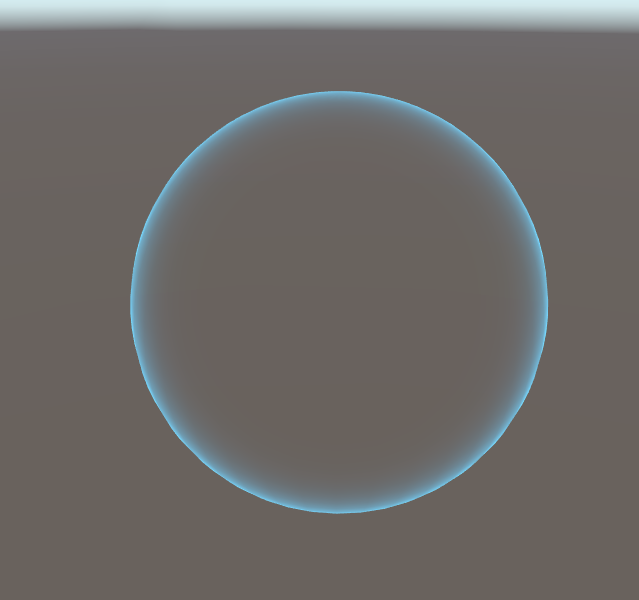
 indigo galleon
solid badge
Gabe does it a bit in this video https://youtu.be/7bMOhNUA1bI
indigo galleon
solid badge
Gabe does it a bit in this video https://youtu.be/7bMOhNUA1bI
Hey! thanks for the reply. I'm using particle systems but I think the solution I ended up going with is similar
I just eject particles from the center at a specified time and draw a trail behind them
Might send some pictures after work. This effect is taking days to do haha
solid badge
@deft pilot ur making me leak all the sauce.

Создание эффекта с помощью системы частиц на игровом движке Unity. Game effect tutorial.
Если вы подписаны на мою страницу Patreon, то готовый эффект вы можете скачать здесь: https://www.patreon.com/posts/kamehameha-vfx-1-25583523
Подпишись что б не пропустить новые видео!
Моя в гр...
That should help you use cc for English
I think technically it's a projectile blast cone effect
 rugged grail
new to vfx graph. just updated to 2021.2b so i can use lit quads with urp 🙂 I'm looking for something like rotation over lifetime from the legacy particle system. Google is not helpful
I just want my particles to rotate over lifetime
rugged grail
ok, vfx calls it angle. got it
 mossy abyss
Hey guys so for the last full day I have been frantically searching through google and am unable to find a solution to this problem. Basically I am working on a weapon trail that would be enabled and disabled based on animation events (placed in side the animation).
These events would call a function that runs "trail.Stop(true, ParticleSystemStopBehavior.StopEmitting);
For the actual trail effect itself, I am using a particle system with the trail modifier enabled. The particle system is in local space btw
The issue:
Once the particle system is supposed to stop emitting, it doesn't sort of
The easiest way to show this is on the spin attack, the trail should stop being created once the sword passes the player on his right at the end of the attack. Yet you can see the trail continue pasted that and also see it move upward whenever the sword is pulled up at the very end of the swing attack. I assume this happens because the PS (particle system) does stop emitting the particles, but since it's in local space, it moves with the sword until the end of it's life time causing the trail to also continue being created
I mean I could just shorten the life of the particle and it sort of fixes it, but I was wanting very clear start and end trails & etc
solid badge
mossy abyss
Hey guys so for the last full day I have been frantically searching through goog...
Make sure you set a key frame for stopping in the animation itself as well
mossy abyss
solid badge
Make sure you set a key frame for stopping in the animation itself as well
I double checked and I did 🙂
mossy abyss
I did a lot of testing and noticed that the particle still follows the tip of the sword even after stop has been called since it was created before the the stop function was called. And since the particle is following the tip, the trail follows the path pasted the stop
solid badge
Add a setlifetimeoverlife node to the system?
mossy abyss
Its on "Rate over Distance" and yes I am, I made sure it calls
I was thinking that, but wouldn't that make all the particles disappear on Stop?
solid badge
@mossy abyss wanna do a quick call?
mossy abyss
Sure
deft pilot
solid badge
https://youtu.be/TR1xM1HMNQ8
thanks
zealous sun
Hey! Look at my fire fx🔥
https://www.artstation.com/artwork/5XzwYg

ArtStation
HI! Look at my fire fx. It contains particle systems and smoke shader. In this case, I was tried to make maximum result with a minimum efforts and paid a lot of attention to optimization.
warm torrent
zealous sun
Hey! Look at my fire fx🔥
https://www.artstation.com/artwork/5XzwYg
Looks great! Especially the color and flow are spot on
If I would change something that would be to make it more livelier at the start
Especially wood fuels spew the flames with varying directions and velocities, which settle when the flames float upward
 azure marsh
hey all, new to vfx graph and i'm trying to use it to make a projectile. is there a trick to getting prewarm working? i want the effect to be at full strength right when i Instantiate the game object it is attached to, but the prewarm settings in the UI seem to have no effect.
solid badge
^ @azure marsh umm I think that effect will be achieved through a colour over life node, where you use a gradient and set the alpha to 255 on the left, and blend it to 125/0 on the right
Idek what prewarming is tbh, never had to use it yet
azure marsh
solid badge
^ <@110586003760103424> umm I think that effect will be achieved through a colou...
what i'm seeing is that the number of alive particles starts at 0 and then grows to a "stable" number over about 2 seconds. i'd like to start the effect "2 seconds in" so when it first appears the number of particles is already at that stable number.
solid badge
^ I think there's a rate over life node for that
Go thru the spawn, and initialize particle blocks in your system
Heres a basic one https://gyazo.com/56d3da60b31afbd5b9316cafbe6550d0. @azure marsh can you show at least the top of the particle system?
azure marsh
yeah i've tried making the constant spawn rate faster than the capacity (ex: spawn 100k, capacity 10k) but it still has a "building up" delay visually. let me see if i can grab a video to explain
azure marsh
@solid badge i'm instantiating it directly on the transform of the hand, and you can see how it builds up to full strength after it already starts moving.
this is with constant spawn rate: 1M, capacity 10k.
solid badge
My only other "guess" would be to try an event for it, and setting keyframes
hard to say without seeing the code
azure marsh
sure, i appreciate you taking the time to brainstorm here. here's the graph

i asked about prewarm to start b/c when i read the docs it makes it sound like that feature is exactly what i want. https://docs.unity3d.com/Packages/com.unity.visualeffectgraph@7.1/manual/VisualEffectGraphAsset.html#using-visual-effect-graph-assets
Sets the duration that Unity should simulate the effect when Reset() occurs. This pre-simulates the effect so that, when the effect starts, it appears already 'built-up'.
solid badge
azure marsh
Try flipping the 3 and the 1 for setlifetime
Other than that, and maybe experimenting with world instead of local, I think you'd have to go into event graph
azure marsh
haha, switching to world makes it very interesting visually but also harder to tell if the delay is still there :]
at this point, understanding world vs local seems like a better use of my time than debugging prewarm. thanks for showing it to me!
solid badge
Your gonna need that knowledge for trails 😁
deft pilot
how do i creat super realistic smoke?
solid badge
@deft pilot they tackled smoke/fire in one of the unity streams

its a bit later on in the vod, around the 2 hour mark
deft pilot
okay
solid badge

GitHub
VFX graph workshop in HDRP with samples. Contribute to Kodrin/VFX-Essentials development by creating an account on GitHub.
deft pilot
thanks
solid badge
while im at it
deft pilot
alright
i cant really find where they do the smoke, but this is what i was talking about btw
https://www.youtube.com/watch?v=vwCMFArzJ4Y

LETS GOOOOOO
Prices
- Reaver Melee Skin 3350 VP
- Reaver Sheriff Skin 1775 VP
- Reaver Guardian Skin 1775 VP
- Reaver Vandal Skin 1775 VP
- Reaver Operator Skin 1775 VP
GIVEAWAY - RULES
- Must be a subscriber on my channel.
- You have to follow https://twitter.com/yezzanfps and https://twitter.com/splitskins
- Comment anything under...
solid badge
they do fire around the 2 hour mark
deft pilot
there is a smoke effect at 0:54
solid badge
smoke / stream should be same principal
solid badge
Yea, i got nothing outside that vod
Been programming a lot, gonna be updating my vfx repos soon 🙂
deft pilot
ok
deft pilot
deft pilot
i cant really find where they do the smoke, but this is what i was talking about...
i want this sort of smoke, so u can see why that sort of fire isn't really applicable in my situation
crimson zealot
deft pilot
i want this sort of smoke, so u can see why that sort of fire isn't really appli...
looks like a mesh with a scrolling texture to me
if you're talkinga bout the smoke on the knife
crimson zealot

YouTube
Gabriel Aguiar Prod. is a channel that mostly focus on creating Visual Effects for games, but it recently started a Indie Gamedev journey. Updates are coming!
All my assets are available on my Patreon page, some, exclusively. By supporting me you get rewards and you keep the channel alive :)
Patreon: patreon.com/gabrielaguiarprod
Enjoy!
GAP -...
the techniques in the DBZ aura one are the same as the knife trails, just knife shaped and on the knife
deft pilot
i hate this channel
crimson zealot
and then the trails are mesh trails, he has some tutorials or there are lots of others out there
cool
deft pilot
he always puts awesome stuff on the thumbnails and then does ordinary stuff in the videos
basically clickbait
crimson zealot
if you say so
deft pilot
yep
 rare lantern
How would i export a visual effect graph to roblox?
 midnight grove
You wouldn't? 🤔
rare lantern
So there is no way for me to use a visual effect outside of unity
fluid lagoon
Record a video of it? The roblox engine cannot run unity VFX.
rare lantern
oh
solid badge
^ your better off importing your roblox into unity if you're really determined lol
At least you should be able to import the models/ scenes. Then you'd still have to rescript a lot of code into c# ...🥴
steady zephyr
So, let's say I have data_0.pcache, data_1.pcache, data_3.pcache etc... can I make a switch in VFX graph to switch each pcache out based on either frame or time? Or do I need to write a C# script?
 steady zephyr
ok, looks like C# is the way to go for this
can anyone help me? why isn't this already a feature?
steady zephyr

Unity Forum
Hi,
completely new to Unity VFX graph (or realtime engines in general) - but I am wondering how to replicate a very common vfx type workflow. Let's say...
 pearl abyss
Noob question, I have been having problems with making materials transparent. I want to have a material transition between 100% - 0% alpha but when I switch the material from opaque to transparent this happens. How can I have a material use the alpha slider but not be this transparent?

 steady zephyr
how would I get the path of one of these individual textures? they are all part of the .pcache
 pearl abyss
Nvm, I just wiggled the piece around and it snapped to rendering correctly.
slate sable
steady zephyr
can anyone help me? why isn't this already a feature?
You can't switch the point cache on runtime.
You can create these textures yourself with a simple compute shader or maybe even just C# script and switch between multiple Load/Sample texture node outputs.
Probably even better and elegant way would be to use render texture that you would write the different frames to on runtime.
 inland crescent
is there some way to use visual effect graph in the normal render pipeline?
solid badge
@inland crescent nope, though I believe either support is coming soon, or that URP will be intergrated into the normal render pipeline soon. You need a render pipeline for vfx graphs and Shader graphs, otherwise you can only use particle systems
Its work setting it up but the tools are pretty nice. The other limitation to consider at beginning is porting to webgl (also doesn't play well with render pipeline)
inland crescent
yeah its so much superior to the normal particle system.. but i guess i have to go with that for now. thanks for the answer
 zealous niche
I'm using a premade asset (Synty character models) that have their own materials and shaders, but I want to add effects to them. Is it possible to "add" a shader effect to an object that already has a material and shader?
midnight grove
No. You would have to modify the shader it's using. Or duplicate it, modify and create a new material from it.
 modest thistle
 gaunt halo
yeaahhh we're gonna need a perfect loop on that @modest thistle
 crimson locust
hi i have a particle system (unity) that emits particles with trails in a spherical fashion like electricity, but i cant seem to figure out how to reduce the time for the particles to be destroyed
 prime dome
is the any extension for vfx, so you can zoom properly? i sometimes get lost on a black screen when scrolling and sometimes im experiencing scroll bugs (position is jumping extremly when scrolling after lagg). i hate to get lost in the window
prime dome
crimson locust
hi i have a particle system (unity) that emits particles with trails in a spheri...
its called lifetime
 lofty orbit
So I need to make a fire effect for a torch, but it's for VR so i need it working from 360 degrees. Most of the best using fire effects seem to use flat textures, and since the torch wil lbe moving around, I dont have the option of making it always face the player
anyone have suggestions for a starting place?
prime dome
Hi, anyone know of an easy way to make particles follow a path using the VFX Graph in Unity? A bit like the line renderer system where you can add and move points. They should die at the end and constantly spawn at the source.
like this

 gritty willow
inland crescent
is there some way to use visual effect graph in the normal render pipeline?
gritty willow
inland crescent
is there some way to use visual effect graph in the normal render pipeline?
Actually yes ! You used to (2019.4) be able to use it by just installing the package. However it only supported unlit particles and was in a separate pass to the rest of the scene, so it would not really look „integrated“ with the world.
gritty willow
solid badge
<@223812249066799105> nope, though I believe either support is coming soon, or t...
None of those things will happen - the builtin pipeline is the backbone of the SRP framework, it cant really be merged with the URP. It is a non-modular render pipeline, meaning that it can be a lot faster, however is not scriptable from C# like the SRP is (but its a lot more popular with people doing large custom graphics stacks as its faster by default and less... experimental and has better platform support).
Development of the VFX graph began in built-in but was transitioned to SRP later on, meaning that the featureset that remained until Unity 2020 was rather limited. Shader graph however is nit in quite tightly to the SRP framework, with a Separation being difficult at best.
gritty willow
lofty orbit
So I need to make a fire effect for a torch, but it's for VR so i need it workin...
What you are looking for is volumetric fire/smoke. This is more than infeasible for VR, you need to simply use your particles smartly and use multiple layers.
 rocky pine
Hi, I'm trying to understand how to use the Main Camera node in vfx graph with URP. Anyone with experience with this node can help me?
cobalt scarab
@fair valve Please don't post affiliate links
 fair valve
cobalt scarab
<@!699023436613419059> Please don't post affiliate links
fair valve
cobalt scarab
<@!699023436613419059> Please don't post affiliate links
Ah oops, didn't realize it was an affiliate link
fair valve
prime dome
Hi, anyone know of an easy way to make particles follow a path using the VFX Gra...
there
 craggy axle
Say I have a forcefield like this. I have a sphere with the material, and I'm setting the alpha in real time using noise so it 'fills' and 'empties' to turn off and on. Is there a way I can deform the collider, or somehow makes physics ignore the hit when on a part that "is empty"? To show a forcefield that's damaged and only blocks some of the projectiles where no shield exists? I hope that makes sense

 steep musk
Hello, a general question: I am noticing that my framerate drops quite a bit when I have too many particles enabled in a scene. For example, I have a scene where a player enters a fortress and there are torches with fires along the walls and other effects as well - these effects get enabled when they are near and I notice the rate drops from 30fps to 10fps (pretty much ruins the gameplay). Are there best practices to particle settings or things that anyone does to keep maintain good performance and prevent framerates from dropping? Any help appreciated, thanks.
craggy axle
steep musk
Hello, a general question: I am noticing that my framerate drops quite a bit whe...
Do you have point lights under them? do they change to "flicker" or fairly static? How are you enabling/disabling the effects? Are you noticing anything in Profiler?
steep musk
craggy axle
Do you have point lights under them? do they change to "flicker" or fairly stat...
Hey - yes I do have static point lights, but no 'flicker' effects. I just have the game objects disabled, and when they enter a sphere trigger area, they all get enabled:
 craggy axle
hm. what does the profiler say?
maybe someone can chime in if baking these lights, marking thme as static, will "work" when activated/deactivated
steep musk
Hey, so I suspected that it is both lighting and my effects because deactivating one or the other does give me back a few framerates. But having them enabled together drops it down to about 10-12fps.
And sorry - Im still learning as I go, so Im not sure what my profiler is telling me:
 craggy axle
Sure. OK so you're getting some huge spikes there
if you move the cursor over a spike and click, at the bottom in the hierarchy you should be able to nail down what is taking the most cycles. Check out some ten minute you tube videos on profiler. You'll then get an exact idea of WHAT is eating up performance, then you can fix that specific problem. too many variables to look out for otherwise
you may want to enable the deeper stack trace too. but yeah watch them tutorials for 10-15 mins and you'll know more than I do
steep musk
Will do - thank you!
craggy axle
good luck man
prime dome
hi, how can i print values in vfx graph? i dont wanna route the value to print on a property float
rocky pine
Hi, I'm trying to understand how to use the Main Camera node in vfx graph with URP. Anyone with experience with this node can help me?
prime dome
So I have a path they follow, however they are not facing in the direction of travel. Furthermore they should stay at the start and travel along it while looping.


 placid void
Hey, how would i interact with vfxgraph using mrtk and xr hands?
Example, if i want to touch a point rendered by vfx graph
 crisp narwhal
👋 I am back to using unity after a few years of working on a proprietary engine and using VFX graph for the first time - Is there a way to get distortion (or fake distortion) for VFX working in URP in a way that will include other VFX layers? I tried this https://forum.unity.com/threads/solved-output-particle-strip-is-missing-distortion-trails.825852/#post-5986571 but that will distort only whats in the scene and will ignore all FX that were created with VFX graph even if they are on a lower sort order so if the skybox is black I get basically black rendering on top of the VFX in all the places I try to use distortion.

Unity Forum
Hi,
I cannot find the Output for particle strip in the VFX graph. The only way to get it is to create a trail system and copy it. Also, is there no...
 marsh drift
I'm trying to follow this guide: https://www.youtube.com/watch?v=40m_HUENh3E
But it seems my results are different than his.
Specifically, even the initially look is different than what I have; I don't see the particle correctly, but more like "shadows" or w/e.
Any ideas?

Today's project is Lightning effects with Shader Graph and VFX Graph. This procedurally generated lightning is done with Shader Graph and then we create a few particle effects with VFX Graph.
2017 Lightning and Thunder Tutorial: https://youtu.be/ewC_c6aHbf8
Electricity Shader: https://youtu.be/u9lOaPVtSqg
Enjoy!
----------------------------...
marsh drift
this is how I see it
 marsh drift
anyone?
steady zephyr
is it possible to draw a triangle between three specific points (using vfx graph of course...)
 runic egret
does anyone have a way to put an outline around particles in the VFX graph, each particle is a mesh, and i want a black border around each of them
steady zephyr
idk, maybe make another output particle node and output whatever border you want?
runic egret
but, how do i output the border
steady zephyr
What shape do you want the border to be
steady zephyr
okay, so put it as a sprite? 🙂
runic egret
ok, so, im displaying 8^6 particles that are not quite cube meshes, they have rounded edges, because im rendering a quarter million of them, and they are currently all the same color, you cant really see where one ends and the next begins, so i want to add a 1 pixel black stroke to each one, the camera orbits around the entire block so i cant just do a fixed "here's a sprite to be a border" because it looks different from different angles
dull obsidian
marsh drift
I'm trying to follow this guide: https://www.youtube.com/watch?v=40m_HUENh3E
But...
no idea, but other than trying it with the same version of unity used in the tutorial and going through each step again more closely, you can join the creator's patreon and just download the finished vfx file, and i'm sure you can ask the creator for support at that point as well. the link is in the video description
prime dome
hi, i wanna spawn two particles at 2 specific locations, based on the spawnindex. i have tried several methods, but non of them are working. someone know why?
 prime dome
hi, i wanna spawn two particles at 2 specific locations, based on the spawnindex...
prime dome
prime dome
hi, i wanna spawn two particles at 2 specific locations, based on the spawnindex...
got it working by re-adding the index-node 😭
 inner horizon
Hello, do you guys know how can i do IF node in shader graph?
 prime dome
inner horizon
Hello, do you guys know how can i do IF node in shader graph?
prime dome
inner horizon
Hello, do you guys know how can i do IF node in shader graph?
you can use a custom node, but i think you wanna use a switch node
sry shadergraph does not have switch node, but you can use the logic nodes for that and create a subgraph
inner horizon
hmm XD i think i dont understand

 inner horizon
thank you
prime dome
youre welcome. but this is the vfx graph channel. theres a shader channel under programming
prime dome
how can i add a subgraph to vfx? i cannot drag and drop and i cant search for it in vfx
dull obsidian
prime dome
how can i add a subgraph to vfx? i cannot drag and drop and i cant search for it...
you might have to select a group of nodes and right click them to put them into a new sub-graph? that's the only way i recall doing it anyway
 sick geode
Hello, I'd like to use the Visual Effects Graph in my game for some slick particle effects. Since it uses the GPU to process, can it be used in games that run on devices without a dedicated GPU? For example the Switch or an older PC.
 cyan echo
Guys, how can I make this diffuse smoke effect
 shut snow
@cyan echo the way I see it is its pretty simple, the hardest part are the yellow and gray smoke since they are texture sheet animated, creating those takes some time and skill in drawing. But then once you get those you can stack some particle systems and then just arrange how the particles behave when you start it then it should be really similar. It seems that about all there is to it
dull obsidian
sick geode
Hello, I'd like to use the Visual Effects Graph in my game for some slick partic...
The Nintendo Switch and many older PCs will still work with VFX graph as they meet the minimum requirements listed here in the docs. You will be more limited on number of particles and will need to use URP on these platforms. (HDRP is designed to run on high-end platforms only.) https://docs.unity3d.com/Packages/com.unity.visualeffectgraph@12.0/manual/System-Requirements.html
For either render pipeline, the minimum hardware requirements are:
- Support for compute shaders. If a platform supports compute shaders, it returns true for SystemInfo.supportsComputeShaders.
- Support for Shader Storage Buffer Objects (SSBOs). If a platform supports SSBOs, it returns a value greater than 0 for SystemInfo.maxComputeBufferInputsVertex.
my fault. drag and drop works.
prime dome
dull obsidian
The Nintendo Switch and many older PCs will still work with VFX graph as they me...
can i expect that vfx will work with the most new android mobile phones?
my xaomi crashed right away( with simple vfx[urp])..... but it has 4gb gpu ram
sick geode
@dull obsidian thank you for the info and help!
 neon pagoda
Hey! Im just trying to mock up a quick particle system where the particles move out from the player to a point, but the angle of the arc is random. Is this something that anyone can help with? It just has to be super basic
 dull obsidian
prime dome
can i expect that vfx will work with the most new android mobile phones?
dull obsidian
prime dome
can i expect that vfx will work with the most new android mobile phones?
not yet, but it's "in progress" you could try the latest beta but no guarantee what's fully working yet or not. https://portal.productboard.com/unity/1-unity-platform-rendering-visual-effects/c/119-urp-support-compute-capable-devices-only-high-end-mobile-support

Full support of mobile devices with Compute shader capabilities.
@prime dome i'm sure your feedback / testing would be appreciated in the beta, though. and you can enter in a drawing to win a GPU for each bug report you file https://blog.unity.com/technology/unity-20212-beta-is-available-for-feedback
 cyan echo
shut snow
<@861906784476987392> the way I see it is its pretty simple, the hardest part ar...
cyan echo
shut snow
<@861906784476987392> the way I see it is its pretty simple, the hardest part ar...
thanks a lot. I will try it

 prime dome
dull obsidian
<@456226577798135808> i'm sure your feedback / testing would be appreciated in t...
prime dome
dull obsidian
<@456226577798135808> i'm sure your feedback / testing would be appreciated in t...
nice 😄
dull obsidian
cyan echo
what is this software
GNU Image Manipulation Program (GIMP) ... it's a free open source software that works similar to Adobe Photoshop https://www.gimp.org
 prime dome
i closed my project yesterday and i saved everything, but my vfx was not saved. i guess duplicating the vfx is the only way to avoid a lost vfx, or does the "safe-button" does it too?
 turbid needle