#✨┃vfx-and-particles
1 messages · Page 8 of 1
 midnight grove
 vocal nexus
That makes it impossible for anyone else to see and give input
or very unlikely, anyway
midnight grove
That's the limitation we have to work with
 spiral moth
I'm a wee bit hesitant about that given my warning the other day. Don't want to trigger anybody's ocd.
midnight grove
Discord isn't the best place for any of this. We just work within the constraints.
vocal nexus
midnight grove
Discord isn't the best place for any of this. We just work within the constraint...
That I can very much agree with
spiral moth
Tbh i really like discord for that reason 😄
vocal nexus
midnight grove
Discord isn't the best place for any of this. We just work within the constraint...
Still if you could find it in your heart to consider #unity-meta as a mod team, I'd be very happy
I find this type of convo happens a lot across basically every channel
spiral moth
Yep
midnight grove
vocal nexus
Still if you could find it in your heart to consider #unity-meta as a mod team, ...
Drop it #531949462411804679 so we can have it as reference.
vocal nexus
midnight grove
Drop it <#531949462411804679> so we can have it as reference.
Thanks, will do!
spiral moth
The way i see it is:
vocal nexus
spiral moth
The way i see it is:
I made a message in that channel, you can drop a message / reaction there if you like
as vertx can be a bit mean
spiral moth
Channels are a bit like chat rooms of old. Try not to veer deliberately way off topic, but broadly it doesn't matter too much, just try and be courteous of people who are posting questions and looking for answers specifically.
Anything anybody says or posts will be gone in 20 mins anyway
With the exception of threads and the new forum feature, which can be used as a resource that people can refer back to later.
I think the DOTS section is the only forum on the server so far.
And i still got into a tussle with Vert over posting a semi-related video in the general-discussion channel ( which is fairly active and moves along very quickly ).
vocal nexus
spiral moth
And i still got into a tussle with Vert over posting a semi-related video in the...
lol I knew it would be him
spiral moth
The dots channel is kindof a small a community in itself, and i've been active on there for maybe a couple of years, being active on and off every other day at times. We talk about various things generally in and around specifically dots but often encompassing other areas. Most of us are full-time developers, we're all adults. And then suddenly i'm getting told what to say and not to say. Bit annoying and just felt totally inappropriate.
And the whole time i'm thinking, does it matter??
Anyway, definitely wayyy off topic now, i'll wind it up 🙂
 grave forge
Does anyone know how to recreate this wall from bonelab in unity? I have been trying to find out how for about 4 hours and there is no YouTube or google tutorials. If someone can please show me with a tutorial please either f
DM me or reply to this message. Thank you.

 hearty flare
grave forge
Does anyone know how to recreate this wall from bonelab in unity? I have been tr...
hearty flare
grave forge
Does anyone know how to recreate this wall from bonelab in unity? I have been tr...
It's so difficult to see with this highly compressed image. Is it just a wall made up of panels with a 3D thing rendered on it?
grave forge
hearty flare
It's so difficult to see with this highly compressed image. Is it just a wall ma...
it's hard to explain if you have ever played boneworks or bonelab it has trippy walls if i look at it it kind of moves with the camera. like a skybox but on a 3d wall. if you can understand that its hard to explain.
grave forge
hearty flare
It's so difficult to see with this highly compressed image. Is it just a wall ma...
i am able to make a video showing what it does and send it to you if that was confusing.
hearty flare
Feel free to just link a video of it here
grave forge
alr im gonna make the video give me a few mins
 spice patrol
Any ideas why this collide with depth buffer doesn't seem to be working?
Seems like no matter how I change the custom camera part, nothing happens


 spiral moth
spice patrol
Any ideas why this collide with depth buffer doesn't seem to be working?
Seems...
spiral moth
spice patrol
Any ideas why this collide with depth buffer doesn't seem to be working?
Seems...
I'd guess you have to feed in an existing scene camera for Custom ( in order to pull in the rendered depth buffer )
spice patrol
What variable type would I use?
spiral moth
'Main' is just a convenience option for the active camera, otherwise you can feed in i would guess an alternative existing camera
grave forge
hearty flare
Feel free to just link a video of it here
Alr here is the vid
spiral moth
spice patrol
Then what does "custom" do?
Custom will be for any other camera than the main one.. Say if you setup a specific camera that is only used for say weapon scopes or something, and you want to use that specific cam, you'd use custom
hearty flare
spice patrol
Then what does "custom" do?
Presumably it's exposing all of those variables so you feed in every detail—including the depth buffer, from a camera of your choosing
spice patrol
But the params on the custom camera node seem like it'd be creating it's own camera
why would it have things like orthographic, FOV and dimensions
if I had to create a scene camera and feed it in
hearty flare
It doesn't create its own camera, it's a virtual camera that never renders, but is used to give context to the depth buffer

These are the three nodes, you need to provide the camera, and the buffer(s) you use for the block to work
spiral moth
grave forge
Does anyone know how to recreate this wall from bonelab in unity? I have been tr...
Probs more of a ShaderGraph question re #archived-shaders but i think basically i'll be a fully-reflective material reflecting either the environment texture or some custom map.
grave forge
spiral moth
Probs more of a ShaderGraph question re <#497874081329184799> but i think basica...
Alr
vocal nexus
grave forge
Alr here is the vid
Reminds me a lot of CSGOs moon dome map

When I saw Lunacy's stars, I knew something strange was going on. It goes deeper than I thought.
▶️ SUBSCRIBE TO 3KLIKSPHILIP : http://www.youtube.com/channel/UCmu9PVIZBk-ZCi-Sk2F2utA?sub_confirmation=1 for CS GO content
▶️ TWITTER: https://twitter.com/3kliksphilip
▶️ MY BROTHER'S CHANNEL : http://www.youtube.com/channel/UCEKJKJ3FO-9SFv5x5BzyxhQ...
I haven't watched this in ages, but it might give you some ideas
I think it's like a cubemap thing, but yes a shader thing
grave forge
vocal nexus
I think it's like a cubemap thing, but yes a shader thing
Yes but how do I make a cube map show only for one wall like they say in the video?
vocal nexus
grave forge
Yes but how do I make a cube map show only for one wall like they say in the vid...
You're gonna have to write a shader
A good starting point would be figuring out how to render a cubemap
Then, get that material made for a mesh
grave forge
Idk how to write a shader Idk how to code
vocal nexus
Then you're basically done
vocal nexus
grave forge
Idk how to write a shader Idk how to code
Then it's time to learn haha
You can't not learn anything and expect to make things
Shader graph is surprisingly easy
grave forge
vocal nexus
You can't not learn anything and expect to make things
True👍
vocal nexus
So we have collide with depth buffer for particle collisions, is there a way to spawn from depth butter for effects we want to spawn from the floor or other objects in the scene?
spiral moth
vocal nexus
So we have collide with depth buffer for particle collisions, is there a way to ...
The simplest approach for that is to pass the spawn position in from the outside via an exposed parameter..
vocal nexus
Indeed, but spawning around that point can be problematic on unflat terrain
I found this
which seems reasonable
spiral moth
But you can spawn from a mesh inside vfxgraph ( it'll treat the mesh as static tho so you'd need to tell it the pos/rot of where it should be
spiral moth
vocal nexus
https://docs.unity3d.com/Packages/com.unity.visualeffectgraph@10.8/manual/Block-...
Ahh i've never noticed that.. yeah you could do that
There's also sdf's if you want to bake your geometry to a texture
vocal nexus
spiral moth
There's also sdf's if you want to bake your geometry to a texture
Also a good idea, thanks
 worldly pier
Say I have 2000 entities firing in different positions in the world, what would be the best way to achieve a "mussel flash" or just a flash effect 100's-1000's of times a second on each entity in the world.
A more broad statement, whats the best way to handle 1000's of effect going off at once, would VFX graph have a solution for this?
 warm torrent
worldly pier
Say I have 2000 entities firing in different positions in the world, what would...
warm torrent
worldly pier
Say I have 2000 entities firing in different positions in the world, what would...
Maybe a pooled VFX system as explained here
https://blog.unity.com/technology/upgrading-vfx-in-the-fps-sample-with-visual-effect-graph
But did you really mean that each entity needs 1000s of muzzle flashes per second?
worldly pier
warm torrent
Maybe a pooled VFX system as explained here
<https://blog.unity.com/technology/u...
No just 1000's of entities firing : ) thanks for the link
 quartz pumice
Greetings I have a bit weird situation
https://discord.com/channels/489222168727519232/1144536022621884446
Maybe anyone know reason for this behavior?
 opal star
worldly pier
No just 1000's of entities firing : ) thanks for the link
opal star
worldly pier
No just 1000's of entities firing : ) thanks for the link
With the new instancing option you no longer need to do this. A simple object pool with instanced vfx graphs works like a single graph with a capacity of 1000
Im not sure what version this was introduced in tbh
2022.2 I think
spiral moth
opal star
With the new instancing option you no longer need to do this. A simple object po...
Any information around that, last time i tried to find out more it was really unclear and really not much specific info or examples on it..
opal star
spiral moth
Any information around that, last time i tried to find out more it was really un...
It's as simple as ticking the instanced checkbox on the vfx component. The system them allocates a single buffer for vfx of the same type in the scene (this is where the object pool pattern comes in handy since you dont need to instantiate new effects) and treats them as if they are all a single graph
I actually believe it's on by default as well
warm torrent
opal star
It's as simple as ticking the instanced checkbox on the vfx component. The syste...
It benefits from the instancing regardless whether the graph gameobjects are pooled or instantiated in that case?
opal star
yes if they are in the scene it benefits from instancing
warm torrent
Awesome
opal star
pooling is only needed for stuff like muzzle flashes hit fx etc etc
for example a bunch of flames for torches that are just there will benefit from it
it does not care if the objects are in a pool, you dont need to write vfx specific code for it to run
the only downside is that if the object spawns in dynamically the whole buffer needs to be re-allocated( This is based on my own observations)
so for any fx that need to dynamically change position and active count we use a pool
warm torrent
opal star
the only downside is that if the object spawns in dynamically the whole buffer n...
By spawning in dynamically do you specifically refer to instantiating, or does it also include pooled VFX Graphs that are enabled for the first time
opal star
I mean instantiating, I have not seen a perf problem with disabled graphs
we have about 500 per hit type
this is why I beleive that the gpu side buffer is allocated on instantiate and not when enabling the vfx
warm torrent
opal star
I mean instantiating, I have not seen a perf problem with disabled graphs
That's cool to know!
If wish we had an official pooling method to make that frictionless too
opal star
wdym ?
warm torrent
opal star
wdym ?
Oh wait, I think we do already?
Though it looks like this method
https://docs.unity3d.com/ScriptReference/Pool.ObjectPool_1.html
Seems no simpler than this technique
https://learn.unity.com/tutorial/introduction-to-object-pooling
spiral moth
opal star
pooling is only needed for stuff like muzzle flashes hit fx etc etc
Yeah thanks this is the kind of specific information i'm talking about.. Last time i checked it just wasn't there..
I've taken an educated guess already and set up pooling for big fx that are quite involved, for other stuff that tends to be in the hundreds or more ( like hitfx etc ) i'm feeding in a custom data array to the graphics buffer from ECS and spawning from that, very tricky setup though..
On top of those approaches there's also this new-ish events thing which allows multiple triggers to be packed into a single payload, but again, info is sparse.
Just need to know what exactly these things are doing, what's best for what use-cases etc..
opal star
Before the instancing option we used to have 1 graph and drive it with the event api where we packed spawn info l, but now I feel its not needed. Dont know about ecs since we dont use it in production
spiral moth
opal star
Before the instancing option we used to have 1 graph and drive it with the event...
Yeah i mean using ECS it feels a bit icky spawning potentially hundreds of gameobjects for fx.. But if you're doing that in production and it's fine then great, i know others are doing something similar with ParticleSystem ( which i think is jobified now )
worldly pier
opal star
With the new instancing option you no longer need to do this. A simple object po...
Thanks, what i was doing was making a vfx graph, having a position variable setting the variable then doing .Play() for all entity positions
 coral crater
guys
i need help
some particle systems are visible in Scene view but not visible in Game view
and i dont know why
during play mode
there is nothing to hide them in game mode
game view
warm torrent
coral crater
some particle systems are visible in Scene view but not visible in Game view
Can you show it happening during play mode, side by side with scene view from another angle?
Not a lot of clues to work with here
warm torrent
coral crater
problem was that i was using screen overlay
Canvases don't properly support particle systems or any non-UI components
It's best to not mix their hierarchies
coral crater
well it works now
 safe vigil
anyone knows how could I draw moving around points at random and connect them all with lines pic is how it would look like but colored and animated

actually nvm im gonna place bunch of dot sprites around and give them line renderers
 prime dome
Is there a way to draw quadratic curves in VFX? For projectile trajectory aiming and such.
 jolly hare
Hello, I am currently in the process of developing a dynamic salt pile particle system. The primary objective is to create an immersive effect wherein, upon the player's interaction, the salt particles burst realistically. I would greatly appreciate any guidance or expertise in achieving this effect.
 zenith grove
How to get attributes of a desired system whenever there are multiple systems in a single VFX graph? For example, I have 2 systems spawning particles and I want to use a position of particles from the first system as a target position for particles from the second system
 onyx lake
Hey yall. I am spawning a VFX Graph asset at runtime and would like to drag and drop an object from the scene into the property binder (transform). However, it doesn't let me drag and drop a newly created cube into the slot. Why not? It obviouslyh as a transform 🤔
zenith grove
onyx lake
Hey yall. I am spawning a VFX Graph asset at runtime and would like to drag and ...
send a screenshot of place where you are trying to drag the cube to
onyx lake
zenith grove
send a screenshot of place where you are trying to drag the cube to

it works with other objects in the scene, but not the one I want, which is just a default 3d cube I created at runtime
Even deleted all the renderers, it's litterally just a transform now. 😅
 zenith grove
onyx lake
Even deleted all the renderers, it's litterally just a transform now. 😅
zenith grove
onyx lake
Even deleted all the renderers, it's litterally just a transform now. 😅
If it works with your other objects, maybe try duplicating one of them and remove all components except transform
onyx lake
Your tipp made me find the issue. The cube was inside a different group in the scene than the vfx graph.
 zenith grove
That makes sense
spiral moth
zenith grove
How to get attributes of a desired system whenever there are multiple systems in...
One approach would be Set Custom in each graph, and give the custom attribute a name and access later
Not sure if there's a built in way to differentiate between spawns from different systems
prime dome
Hey with a VFX graph what would be the best way to spawn just a single particle at the end of a raycast? I want to spawn a lot of particles at the end of a bunch of raycasts so I decided to use VFX graphs to ensure I could use a lot of particles haha
It's kind of unintuitive to make it spawn 1 particle or move the emitter
Would be ideal if I could just spawn one particle and move it with code, but VFX graphs do not seem to like code
zenith grove
spiral moth
Not sure if there's a built in way to differentiate between spawns from differen...
Kind of ironic that it is more efficient to have multiple systems in one graph, but you can't do something as common as getting an attribute from each system
zenith grove
prime dome
Would be ideal if I could just spawn one particle and move it with code, but VFX...
You probably could use a VFX property binder component on an object with your VFX graph. So, if you can get a transform from your raycast then you should be able to use it in property binder
spiral moth
zenith grove
Kind of ironic that it is more efficient to have multiple systems in one graph, ...
I mean there could be, but again, docs are a bit sparse
zenith grove
spiral moth
I mean there could be, but again, docs are a bit sparse
True
prime dome
anyone got the faintest clue as to what any of this is trying to do?

i found a tutorial for an effect that would be similar that i could use
he mentions that to load data from a script into the VFX Graph you can put in it in a texture2d
and then proceeds to do this with 0 explanation
i've not a clue as to why
 slim prism
prime dome
anyone got the faintest clue as to what any of this is trying to do?
slim prism
prime dome
anyone got the faintest clue as to what any of this is trying to do?
Screen shot is low res for me so hard to tell, and I haven't worked with that particle system yet, but it looks like the particle instance ID is being converted to 2d texture coordinates based on a 100x100 texture, the mod & divide are a common way to turn a 1d index into a 2d index. Then looks like using the texture alpha channel to mult by the particle color
 rich flare
Hello. I am using a particle system and trying to make it happen instantly, but it only appears after about 0.02 seconds. I have Start delay set to 0, and in emission I have time set to 0.000 Is there any other setting I'm missing?
prime dome
slim prism
Screen shot is low res for me so hard to tell, and I haven't worked with that pa...
That provides some insight, ty
 ancient kelp
would anyone be interested in a texture packer for 6 way light maps? Might release this for free.
 warm torrent
ancient kelp
would anyone be interested in a texture packer for 6 way light maps? Might relea...
warm torrent
ancient kelp
would anyone be interested in a texture packer for 6 way light maps? Might relea...
Sure, the #archived-resources channel is just for that kind of thing
 river mango
ancient kelp
would anyone be interested in a texture packer for 6 way light maps? Might relea...
river mango
ancient kelp
would anyone be interested in a texture packer for 6 way light maps? Might relea...
damn, seems like the vfx is from UE
 quiet copper
#💻┃unity-talk message
Any help on solving this particle system issue?
hearty flare
quiet copper
https://discord.com/channels/489222168727519232/497872424281440267/1147028550390...
- It looks a little like z-fighting. Try raising the particles above the ground slightly.
- It also looks like your material is trying to be pixel perfect, or something to that effect. It looks like a quite low resolution scene view and the particles that disappear are just smaller than a pixel.
quiet copper
hearty flare
1. It looks a little like z-fighting. Try raising the particles above the ground...
thanks for responding. i tried raising the particles and it doesnt work. As for the resolution of the scene view, i get the same result in play mode too.. and in my build also.
 latent lantern
why doesnt vfx have some sort of looping protocol for nested ifs
vfx graph
like you can loop via lifetime but in order to increment segments you have to branch and compare
 woeful juniper
If i were to hit something how would i display a counter beside it but with custom numbers? Not sure if this is a particle question but seems to be
quiet copper
Hey, i have a blood particle system and i set it to collide only with the layer named 'ground'. However as shown in the video, some particles are in the air. I used a debug log with the OnParticleCollision() and it logs only the object called plane which is in the layer 'ground'(what i want). But then why there are particles far above the ground as if it collided with something else. (which is not supposed to happen since there is only one object tagged 'ground' and that is the floor)

 unkempt tundra
- How do I approach making an energy bullet projectile(appear, fly, boom on hit) while not using URP?
- Afaik I cannot make complex projectiles in built-in pipeline since vfx graph package is not available for built-in 😦 Am I correct?
warm torrent
unkempt tundra
1. How do I approach making an energy bullet projectile(appear, fly, boom on hit...
Energy bullets I've seen don't require either the complexity nor the mass performance of VFX Graph
unkempt tundra
warm torrent
Energy bullets I've seen don't require either the complexity nor the mass perfor...
interesting! yes, from what I'm currently reading my knowledge about vfx graph was incorrect. But what is the right approach to make what I need then?
My problem can be described as:
do I need to use anything else besides unity paricle system?
how can I reduce the complexity of making a pool for each particle system that I need to use often?
how do I combine particle systems properly?
and are there any big great guides for unity particle system?
warm torrent
unkempt tundra
interesting! yes, from what I'm currently reading my knowledge about vfx graph w...
I don't know, depends what your "energy bullet" must look like exactly
Particle Systems can be pooled using any old gameobject pooling method
https://learn.unity.com/tutorial/introduction-to-object-pooling
https://docs.unity3d.com/ScriptReference/Pool.ObjectPool_1.html
Complex effects commonly also utilize shaders when needed
I don't know of "big great guides", but you can find plenty small examples
Official ones too:
https://assetstore.unity.com/packages/vfx/particles/particle-pack-127325
Particle System (unlike VFX Graph) is largely so self-explanatory that it can be picked up and used with minimal training
unkempt tundra
warm torrent
I don't know, depends what your "energy bullet" must look like exactly
Particle ...
the main thing energy bullet needs to be is cartoon style, other aspects are not that important.
 languid cliff
quick question
I am trying to make a trail using ribbons with a particle effect
but no matter what I do this keeps happening

it just becomes extremely jagged
like it is fine at lower speeds

but as soon as it moves a bit fast then it starts to fall apart
whats even stranger is in the editor it seems mostly fine

reducing the rate of particles over distance seems to slightly help, but it doesn't fix the issue either


idk I am going to probably swap over to unity's inbuilt trail particle system, but its still incredibly strange to me that this happens
quiet copper
quiet copper
Hey, i have a blood particle system and i set it to collide only with the layer ...
any help guys?
warm torrent
quiet copper
any help guys?
You should troubleshoot it for more clues
Do the phantom collisions stop if you increase the particle lifetime a lot, or move the colliders around near it, or disable collision module entirely?
quiet copper
warm torrent
You should troubleshoot it for more clues
Do the phantom collisions stop if you ...
thanks for responding.
so changing particle lifetime had no impact
moving the colliders didnt work
but when i disabled collisions the phantom collision stops
 viral star
It would be amazingly awesome if HDRP and URP output nodes could keep the same name in the vfx graph.
So when changing from a HDRP graphics pipeline to a URP pipeline, one wouldn't lose the output nodes and having to link back the outputs from a HDRP output to a unity output.

 celest trench
trying to learn VFX Graph, i would need a way to give my particle a different effect after it flew for a second or a distance of 6. Has anyone any idea where to look at to figure that out ?
 dull obsidian
viral star
It would be amazingly awesome if HDRP and URP output nodes could keep the same n...
dull obsidian
viral star
It would be amazingly awesome if HDRP and URP output nodes could keep the same n...
good news, this is "planned" on the visual effect graph roadmap https://portal.productboard.com/unity/1-unity-platform-rendering-visual-effects/c/1688-cross-pipeline-lit
dull obsidian
celest trench
trying to learn VFX Graph, i would need a way to give my particle a different ef...
how different of an effect? the particle starts out doing and looking like what exactly? and then after a second it changes to what exactly?
what tutorials or learning resources have you followed so far?
celest trench
dull obsidian
how different of an effect? the particle starts out doing and looking like what ...
I was trying to rebuild the oldschool Pokemon Hydropump sprite animation with particles
So after they flew forward for a while, they should spread out like the water stream is hitting a wall to splash to the side.
My resources are rather sparce, mostly Youtube videos, not a real course or anything that teaches properly, mostly just a few random effect tutorials to see whats possible.
dull obsidian
celest trench
I was trying to rebuild the oldschool Pokemon Hydropump sprite animation with pa...
ah, how old school we talking? it looks like there are several generations of that effect. do you have a link and/or timestamp to a video that shows the version you're aiming for?
celest trench
dull obsidian
ah, how old school we talking? it looks like there are several generations of th...
Sure thing, give me a second!
Lets simply say i want one of these Pillars, but i want the pillar to stay at max heigth for a while, continuing the effect of the "splashing" water @dull obsidian


for some reason, you need to take the second image and open it in browser. I have no clue how they figured out how to animate a png but it is what it is i guess
dull obsidian
@celest trench ah yeah animated png support is a newer feature on many browsers now but they don't work everywhere. you can convert these to gif on ezgif.com

idk if it worked lol
celest trench
ah, nice , learning something new with the gif already. But yes, thats the animation i was aiming for. Roughly.
celest trench
dull obsidian
idk if it worked lol
it works on my end ^^
dull obsidian
so you want it to look just like this or something different? it seems like water splash at the end is there the entire time. is this for a 2d game?
 celest trench
dull obsidian
so you want it to look just like this or something different? it seems like wate...
celest trench
dull obsidian
so you want it to look just like this or something different? it seems like wate...
no its for a 3D game. I was just taking this as an easy to show explanation.
To describe exactly what i was trying to get was a Water stream that, after X units, splahses and fans out like the top in the example images. I hope this makes sense somehow.
dull obsidian
celest trench
no its for a 3D game. I was just taking this as an easy to show explanation.
To...
got it, creating a firework effect may be a good place to start as it follows a similar structure, a cascade of projectile with trails shoot some distance that then splash / explode after an event is triggered such as lifetime exceeding n seconds (or a collision happens). this is an official tutorial. it says to use hdrp but it will work with urp also generally https://learn.unity.com/project/vfx-for-games-201

Unity Learn
In this project, you will learn how to apply and configure some of the key VFX properties in Unity’s Visual FX Graph tool. You will utilise GPU events to create realistic fireworks effects, and you will learn how to integrate Shader Graph with Visual Effects graph to enhance the look and feel of visual effects. Suggested Skill Level & Prerequisi...
celest trench
dull obsidian
got it, creating a firework effect may be a good place to start as it follows a ...
oh yeah, a firework ... i couldve tought of that. Great input, thank you very much!
i will work this one through down the line 🙂
dull obsidian
@celest trench you're welcome, no worries. the key element here i think is the (gpu) event that triggers a sub-spawner to spawn a new different particle system that inherits some attributes from the parent particle system, like the parent particle's last position becomes the child system's spawning / starting position. and you can inherit other attributes like color, size, etc.
celest trench
dull obsidian
<@159838872107220995> you're welcome, no worries. the key element here i think i...
that does sound like something i would need indeed. Thank you again, you helped me a lot!
dull obsidian
@celest trench no problem. there are also some example systems included with vfx graph like heads and trails that may be helpful to learn from. the unity beta 2023.2 has this new template system that is nice for these things, having a place to start
celest trench
dull obsidian
<@159838872107220995> no problem. there are also some example systems included w...
Sadly my project is currently locked to 2022.3 because of some other plugins 😦
 slow lava
ancient kelp
would anyone be interested in a texture packer for 6 way light maps? Might relea...
slow lava
ancient kelp
would anyone be interested in a texture packer for 6 way light maps? Might relea...
i would even pay for this!!
warm torrent
slow lava
i would even pay for this!!
I think this should work in the meanwhile
https://github.com/andydbc/unity-texture-packer
The quirk of this one is that it expects sRGB color space textures even if the result will be non-color
That could be a problem if the result must be sRGB, but I'd guess 6 way lightmaps would not be
ancient kelp
Mine does pretty much the exact same thing but it's specifically set so it does everything automatically for you from your flipbook textures. However you can do the exact same thing with the linked map packer but it could be tedious.
ancient kelp
warm torrent
The quirk of this one is that it expects sRGB color space textures even if the r...
^^ won't be an issue for 6 way lighting
slow lava
warm torrent
I think this should work in the meanwhile
<https://github.com/andydbc/unity-text...
THANKS
warm torrent
ancient kelp
Mine does pretty much the exact same thing but it's specifically set so it does ...
Tell me about it
There doesn't seem to be a texture packer that isn't tedious
If you're still improving yours I can file some issues if you want
dull obsidian
for context, there are already Unity six-way vfx exporters / end-to-end workflows for Blender (free), Houdini, Embergen (paid). But unless your entire workflow is already in one of those softwares, it does seem tedious to start up say, Blender just to channel pack some textures. https://x.com/the_f_key/status/1617489108288282625
dull obsidian
i personally use derivative touchdesigner for these sort of workflows since it's lightning fast to set these sort of things up and get results. as a quick experiment it took me about 5 minutes to put together a six-way texture channel unpacker and packer. though touchdesigner cost 600 usd commercial / 300 usd educational, it's been worth every penny for reasons like this. (it does more than procedural textures though, hence the cost.)
 dull obsidian
the closest a procedural texture generation and processing tool like this has gotten to being built into unity was when Antoine Lelievre, a graphics programmer at unity created Mixture. it's still maintained though not in very active development. i hope once graph tools foundation is production ready, mixture development will pick up again or get integrated / rebuilt into unity https://github.com/alelievr/Mixture
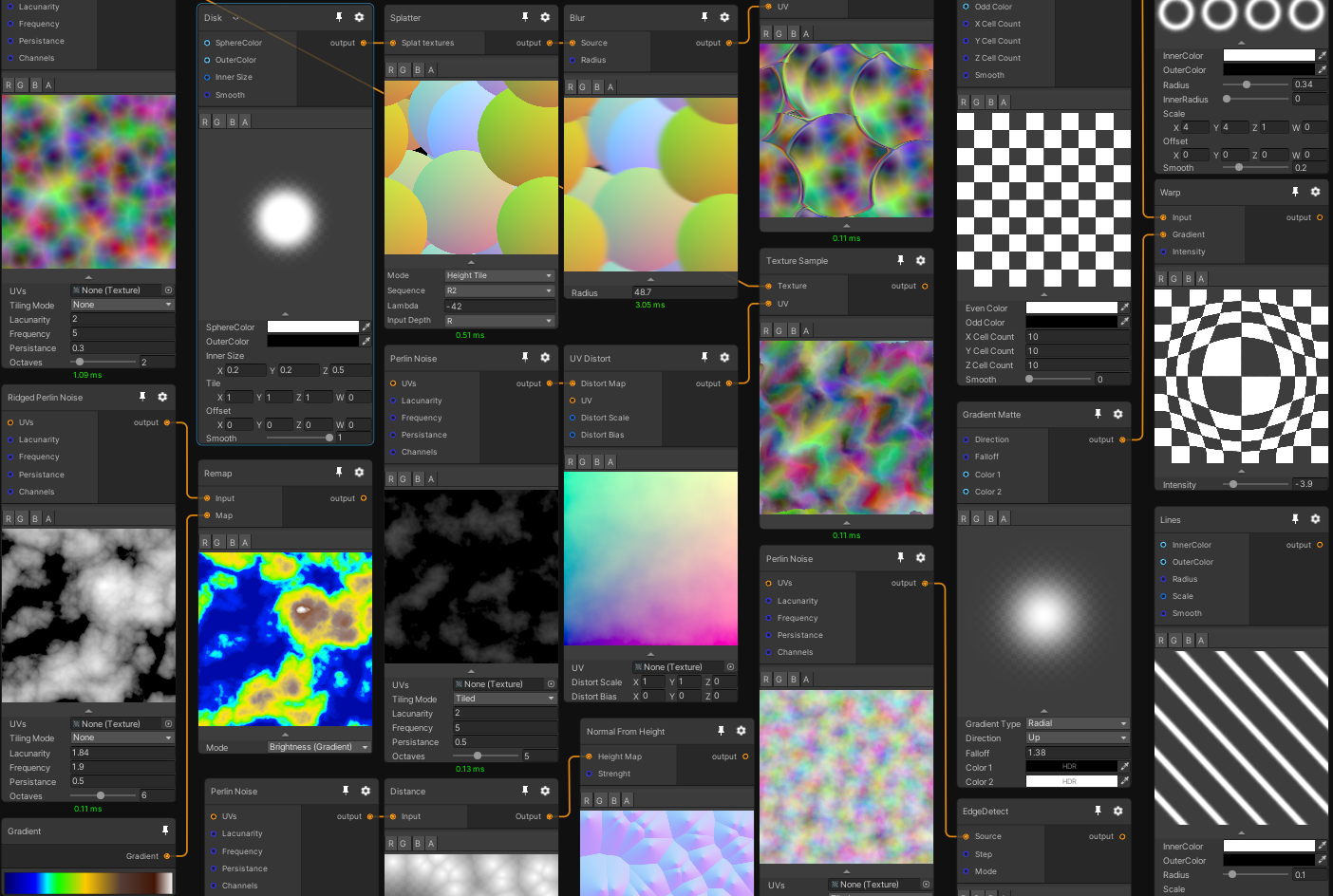
GitHub
Mixture is a powerful node-based tool crafted in unity to generate all kinds of textures in realtime - GitHub - alelievr/Mixture: Mixture is a powerful node-based tool crafted in unity to generate ...
dull obsidian
latent lantern
why doesnt vfx have some sort of looping protocol for nested ifs
while vfx graph doesn't support looping via the visual graph ui, in unity 2023.2 (beta) you can use for loops and arrays, buffers, etc within custom hlsl nodes for vfx graph: https://docs.unity3d.com/Packages/com.unity.visualeffectgraph@16.0/manual/CustomHLSL-Common.html
latent lantern
ye thats what gpt kept trying to convince me idk how to use that but of course there is muse now so just a couple days on that...
dull obsidian
@latent lantern yeah, totally. once you have the boilerplate set up from the examples you can ask chatgpt or muse, etc to generate loops in hlsl code that fit into the example code and explain how it works. hlsl is currently the most popular real-time shading language in the world so there's a lot of data out there for large language models to have learned from.
and for us to learn from 😅
latent lantern
i reckon thats all i know about it lol
or at least that and it computes on the gpu
if i get my loop going and fry my gpu tho..
dull obsidian
haha, you could crash your gpu or the gpu driver (which might also crash unity editor) but the gpu won't damage itself unless it was faulty manufacturing, very rare, and would be covered under warranty.
latent lantern
haha thats good to know!
 terse comet
I'm finding that less than 60fps on vfx graph causes velocity calculation to be wrong
i have tried all these options

any idea how i can make it actually execute at correct velocity or if there's any known issues around this?
I'm just using a SetVelocity (2,0,0) in Initialize Particle
celest trench
can anyone tell me why my particles are nearly invisible in the scene but fine in the Edit Mode view ?

is it because my Blend Mode is set to Additive? 🤔
celest trench
figured it out. It was because of Soft Particles
midnight grove
Nobody can help with an issue you've provided no info about.
woeful juniper
when i load a scene my vfx runs how would i disable that
 molten plume
hm, i'm trying to use the trail tool

but the trail always seems to be purple in scene view
and while the game is running it doesnt seem visible

ah i assigned it a material
ah yeah somehow the material got un-set, i had to set it back to the default
can i set a trail to be semitransparent?
 dusty creek
i'm having a problem where one of my particle systems isn't giving the particles random rotations even though i set it to do that, any help?
 opaque knoll
Hi all, how can a particle billboard be lit from both sides? This is a custom shader, for VFXG. In the pic, the light is in the center of the pool, but since all the pcles are facing towards cam, only the farther half gets lit

 native tulip
I am following a tutorial and even thou I did the same steps as the tutorial my mesh and his looks completly different do you have any idea what would cause that?

 warm torrent
native tulip
I am following a tutorial and even thou I did the same steps as the tutorial my ...
warm torrent
native tulip
I am following a tutorial and even thou I did the same steps as the tutorial my ...
There's something like a 96.6% statistical chance your thing is not exactly as it is in the tutorial
Could be you missed a step, or did the steps but in different circumstances
That's about all we could say, not being a position to compare your creation to the tutorial's
Sometimes tutorials provide their source files directly
native tulip
warm torrent
That's about all we could say, not being a position to compare your creation to ...
okay thank you
celest trench
molten plume
hm, i'm trying to use the trail tool
fun fact, having the same issue but even with a material its invisible 😦
 azure violet
https://twitter.com/median_ky/status/1700185432485671229
how can i replicate the inward effect in this example? any hints or deconstructions would be helpful


 molten plume
celest trench
fun fact, having the same issue but even with a material its invisible 😦
molten plume
celest trench
fun fact, having the same issue but even with a material its invisible 😦
it was invisible for me with every material exceupt uh
 celest trench
molten plume
it was invisible for me with every material exceupt uh
celest trench
molten plume
it was invisible for me with every material exceupt uh
i got it to work, thank you!
Now my next big problem is, the particles of this System. They should be thrown a bit behind the moving Object. But how do i get the forward direction of the parent of the EffectSystem ?
 opaque knoll
Hi all
I swear i'm only baking a solid sphere here to SDF. If the sphere shape doesn't hit the edges, it'll bake properly on that axis. Else, it'll.. discard the whole axis?


 opaque knoll
Ok that's not an issue if just scaling the whole bounds up, at the cost of details
But another thing is, is this normal that the SDF's -1 region is not just at a single point in the center, but this whole area in dark blue?
If this is normal, is there... a better way to get a nicer gradient to the center?

 sinful badger
is there a way to connect a ribbon between many particles like a constellation?
1.5 ribbon count with 1-3 particle burst?
 ripe jackal
Hey everyone, do anyone has any idea about how to use the Spawn Over Distance block and spawn several particles every 0.5m for example ?
Forum question : https://forum.unity.com/threads/multiple-spawn-over-distance.1490830/
 burnt coral
ripe jackal
Hey everyone, do anyone has any idea about how to use the Spawn Over Distance bl...
burnt coral
ripe jackal
Hey everyone, do anyone has any idea about how to use the Spawn Over Distance bl...
Maybe connect the SpawnEvent of the Spawn Over Distance to another Spawn context (Single Burst)? Haven't done much VFX graph so bit of a guess.
ripe jackal
burnt coral
Maybe connect the SpawnEvent of the Spawn Over Distance to another Spawn context...
haha it's as simple as that, thanks @burnt coral didn't know that this is even possible !
 mighty marsh
I encountered 2 errors while setting up the Visual Effects Graphic, can you help me?
1.> Library\PackageCache\com.unity.visualeffectgraph@15.0.6\Runtime\Utilities\Playables\VisualEffectActivationDeprecated\VisualEffectActivationClip.cs(11,12): error CS0246: The type or namespace name 'VisualEffectActivationBehaviour' could not be found ( are you missing a using directive or an assembly reference?)
2.> Library\PackageCache\com.unity.shadergraph@15.0.6\Editor\Generation\Targets\BuiltIn\Editor\ShaderGUI\MaterialAssemblyReference\RawRenderQueue.cs(12,24): error CS1061: 'Material' does not contain a definition for 'rawRenderQueue' and no accessible extension method 'rawRenderQueue' accepting a first argument of type 'Material' could be found (are you missing a using directive or an assembly reference?)
latent lantern
wouldnt it help if we could base hlsl operater nodes for vfx graph off the current vfx graph nodes
i mean arent they just all hlsl code anyway
like in prefrences have a checkbox, and then be able to edit the created operator
like for refrence purposes, i mean
latent lantern
https://hastebin.com/share/axafixopif.csharp this look right?
Hastebin is a free web-based pastebin service for storing and sharing text and code snippets with anyone. Get started now.
 lusty plinth
Hello guys! Can someone point me in a ballpark direction to achieve this effect?

Basically, I want the ground to illuminate on the spot a character walks
and that spot only. I tried doing something like having a quad with a mask texture set to emission, but it doesn't light up. It does multiply, though, but it's too dark.
 coral temple
does anyone know how to acheive this effect https://www.youtube.com/watch?v=Z3LL0k8HcLk&t=34s with the bullet bills? specifically the "flames" (I can do the smoke type stuff with basic particle system). I have tried creating an emissive sphere and cone, turning on bloom, and using a script with perline noise to vary the emission strength but it looks quite bad in comparison.

Captain Toad: Treasure Tracker - Episode 1 - Level 9: Spinwheel Bullet Bill Base
The 9th level of Episode 1.
Challenge: Collect the Gold Mushroom!
Enjoy Watching!
 rigid torrent
Can anyone recommend some decent tutorials for the particle system (bonus points for 2d/isometric). I'm experienced with unity and programming in general but not the specific particle system so something not too beginner would be great!
 deep stone
I created this smoke that follows a trail that spirals up, it's almost perfect, but as you see when it reaches the end at the top, before it restarts at the bottom, ther'es like a sporadic spawning of them in the middle. Anyone know how ot get rid of that?
Figured it out, it's cause i have it set to World instead of Local, but then I don't get a trail effect like I had
 ashen robin
rigid torrent
Can anyone recommend some decent tutorials for the particle system (bonus points...
ashen robin
rigid torrent
Can anyone recommend some decent tutorials for the particle system (bonus points...
Gabriel Aguiar on Youtube gives you a good feel for anything vfx graph related if you choose to use that system
ashen robin
coral temple
does anyone know how to acheive this effect https://www.youtube.com/watch?v=Z3LL...
Should probably post your examples of what you've managed to make so far
 pliant shoal
Guys can anyone help me with a muzzle flash?
Idk, I don't understand how to create a good looking muzzle flash
Especially since It's an AK-47
My dm's are open if anyone wants to help (please do so 🙏)
sinful badger
can somebody help me fix this particle system? It's supposed to be stuck to the tip of the index finger, create a hole in space, and send an antimatter energy ball outward to detonate on impact but the direction is all weird and I dunno how to get it right
 last tartan
Anyone know how I could achieve the wispy look of the patronus spell. ?

 gentle harbor
Why are these two particles different size? They have the same start size, sprite size and pixelsperunit
 gentle harbor
Why are these two particles different size? They have the same start size, sprit...
gentle harbor
gentle harbor
Why are these two particles different size? They have the same start size, sprit...
found out what was "causing" it, only sprites that were vertical caused this issue, horizontal sprites did not
 stark crest
opaque knoll
But another thing is, is this normal that the SDF's -1 region is not just at a s...
stark crest
opaque knoll
But another thing is, is this normal that the SDF's -1 region is not just at a s...
Aaaaaah no broooo, no SDF for this! instead use a shader and sphere mask, it is far more simple, then here you go, start with my tuto, in this article the second part, is a part on Volumetric sphere mask etc, all you need to get started using volumetric and stuff: https://www.farfromherestudio.com/post/unity-2022-beta-test

it was 2022 beta but still actual, you get the tech for a simple Volumetric Shader using, Noise, sphere mask and other fancy idea using your point lights.
stark crest
last tartan
Anyone know how I could achieve the wispy look of the patronus spell. ?
load (millions) of tiny additive particle, using a mesh as transform input, some turbulence, and a timeline animation to move the emmiter mesh as you need
VFXgraph ofc
for part that are looking more like filament, forcefield and trailed shader stuff
opaque knoll
stark crest
Aaaaaah no broooo, no SDF for this! instead use a shader and sphere mask, it is ...
I'm using SDF to use with VFXG. I'm not looking for sphere mask bcoz it could be any shape. I'm looking for a specific effect here
https://vimeo.com/598342481
I'm recreating the light sphere causing faint motion ripple on a sea of particles

I've been asking myself if the border between digital and reality still be clearly distinguished in the future. I thought it wasn't that big of a deal,…
stark crest
beautifull! yeah, try to go for sphere mask bro, i will work like a charm for your usecase
from the article
opaque knoll
Anyways so, my original question: Does SDF not give a full gradient from the centermost of the shape (-1) to furthest point from any mesh (+1) ?
Why can't i get a result like this from Unity's SDF baker?
 opaque knoll
stark crest
https://video.wixstatic.com/video/40e3ee_4c220bed2ed24ea6aa2b6382ef23e5d2/720p/m...
opaque knoll
stark crest
https://video.wixstatic.com/video/40e3ee_4c220bed2ed24ea6aa2b6382ef23e5d2/720p/m...
It needs to support multiple meshes to a single 3d texture tho?
stark crest
depend on the resolution you choose
opaque knoll
From the pic i posted, the resolution looks fine around the 0 (shape's border)
stark crest
can be hard to say using multiple mesh, you need more
opaque knoll
It even shows a richer gradient on that area
stark crest
i just would split them
opaque knoll
What do u mean split?
stark crest
use multiple mesh source with the finest definition
opaque knoll
That'd mean i need to have multiple 3d tex properties in a single VFXG?
stark crest
i would do that
opaque knoll
stark crest
use multiple mesh source with the finest definition
The amount of shapes moving around in runtime is unknown
stark crest
ah
my advice is still, don't use sdf, go for procedural noise and shaping funtion as i suggested, using gpu forloop you won't be limited about placement, but it can be time consumming to reach the look you want this way, meanwhile it will far more optimized than using textures
you can even compute it
even more time consumming
opaque knoll
https://clips.twitch.tv/ManlyLovelyDurianStrawBeary-0hERGFJbbnnAG5yb
This is an early gif

The effect works fine
It's just the resulting SDF specifically from Unity's SDF baker that i'm questioning
Since it doesn't align with the SDF results i googled
stark crest
it look like intantiated point lights bro
opaque knoll
Don't look at the point light, but the "swaying ripple outward" of the smaller particles around
stark crest
transmission of a point light using volumetricfog into transmitive particles, look like this too, again, forloop, spheremask, same result
opaque knoll
I'm not showing the point light...
stark crest
I kown you are talking about the effect under them on particle bro
opaque knoll
I'll check it out
stark crest
I hope so, you would be able to counter both definition and transform computation issue
take my article as a base for beginners, your far more experimented than that, but still, I am sure this is the feature you need to handle
I like that you are using MIDI controller?
@opaque knoll
btw, your work is great, it is smooth, it is impressive, this is the best environmental VJing I've seen today
opaque knoll
Cheers thanks
I just started into the world of technical arts, still got lots to learn
Btw this volumetric shadergraph is 2022.2 only eh? I'm still on 2021.3...
opaque knoll
2022's package manager bugs out on me..
stark crest
what's the issue?
opaque knoll
Anyways i'll definitely get back to this in the future. Got other things to finish for now...
opaque knoll
stark crest
what's the issue?
2022's Unity connects to package manager differently
#💻┃unity-talk message
last tartan
I'm making the Patronus spell from Harry Potter. It's a WIP still, but if anyone has any constructive critiques I would be grateful.
 sterile umbra
How can I check if a VisualEffect has finalized running? With ParticleSystem I can do IsAlive(true), what is the equivalent?
 earnest osprey
Shader I've been working on for the game ECO (I'm one of the devs for that game). I also have an update that I shared on reddit:
https://www.reddit.com/r/Unity3D/comments/16gzj6o/vfx_ive_been_working_on_update/
earnest osprey
last tartan
I'm making the Patronus spell from Harry Potter. It's a WIP still, but if anyone...
It looks good overall, some ideas that I have
- Does the model have transparency? I'm not sure beacuse of the background but if it doesn't maybe it shoud
- It may be the video FPS but on the second 0:00 in less than 1 second you go from really dark to a bunch of particles I think a smoother fade in can be useful
- Could have trails inside the model and the trails that leave the model (that you already have) could be more subtle
 last tartan
earnest osprey
It looks good overall, some ideas that I have
- Does the model have transparenc...
last tartan
earnest osprey
It looks good overall, some ideas that I have
- Does the model have transparenc...
-It does have transparency. I'm gonna add a background now.
-I think it is the FPS of the video. It's not so abrupt on my end, but you are right I will try to make it smoother
-I like the idea of trails on the inside. I'm going to try that. I'm using Unity's Mesh to SDF tool, do you think that could accomplish the trails on the inside?
Thanks for the input
stark crest
last tartan
I'm making the Patronus spell from Harry Potter. It's a WIP still, but if anyone...
I would use the skinnedmesh as the source position to emit a lot of semi-transparent tiny particle to describe the shape of the rabbit, it would allow a more ghosty surface to your rabbit, then I would create a subEmitter on this particle system to add the filament from (in and out) the rabbit's surface particle, are you using Shuriken or VFXgraph?
 carmine bone
Does anyone happen to have tutorials or experience making persistent wind visual effects?

Is it just a bunch of particles with trails the way I should go about it or is there something better?
deep stone
Hopefully a simple solution, i've played with the settings over and over. I'm trying to make a swirl as you see, but at the top of the swirl there, the particles masively expand outward instead of staying more tight in a line like at the bottom

anyone know how to fix it?
stark crest
carmine bone
Is it just a bunch of particles with trails the way I should go about it or is t...
almost only trails, you are right
deep stone
Still asking, can anyone help me with this? Want to make the particles all flow upward in a line, not spread out at the top there. There is no gravity modifier applied, just velocity over time.
 deep stone
anyone?
 jagged terrace
hey there guys i have a little question that i couldn't find an answer to, i have 4 sprites in a sprite sheet and i want to create a particle system that basically creates 4 particles (assigning each sprite to one particle) but i really don't know how i can do that?
basically the sprites are body parts of the enemies and the particle system is basically supposed to be the body parts of the enemy spawning and flying off as you kill them
deep stone
did you try Texture Sheet animation option?
warm torrent
deep stone
Still asking, can anyone help me with this? Want to make the particles all flow ...
Does your velocity over lifetime change over lifetime?
If it's accelerating motion, either by force or by curve over lifetime, then naturally the discrepancy between particles will increase
I think if they have an unchanging upward velocity, then the formation shouldn't scatter vertically
jagged terrace
deep stone
did you try Texture Sheet animation option?
i tried using it but i can't get it to spawn the only 4 sprites for each particle
opaque knoll
Why is my "stripIndex" missing?
Compared to docs (and how i remembered it having)
https://docs.unity3d.com/Packages/com.unity.visualeffectgraph@10.2/manual/images/Block-IncrementStripIndexOnStartExample.gif

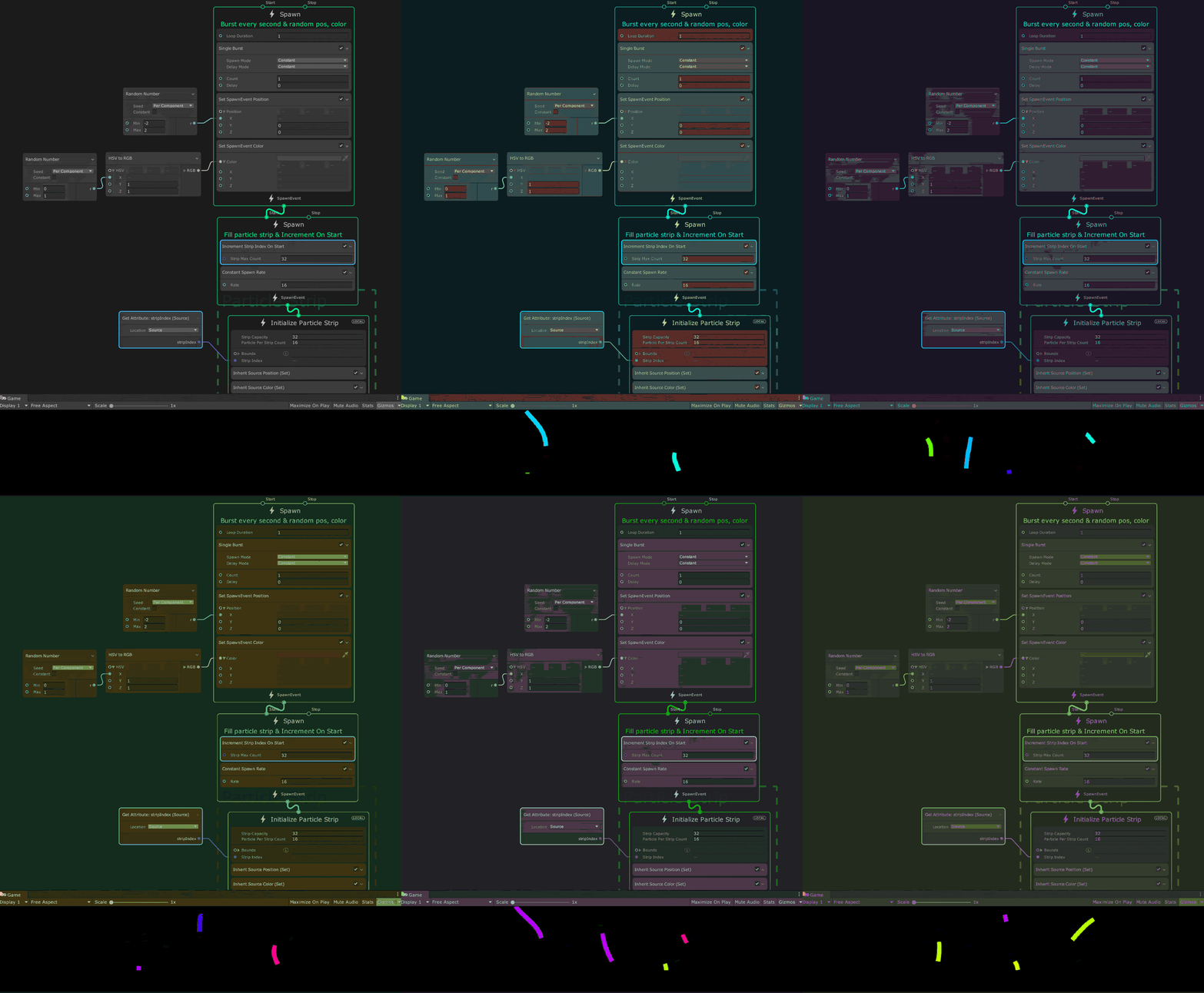 ashen robin
opaque knoll
Why is my "stripIndex" missing?
Compared to docs (and how i remembered it having...
ashen robin
opaque knoll
Why is my "stripIndex" missing?
Compared to docs (and how i remembered it having...
Could be part of the experimental package which I believe is in the project preferences
deep stone
I'll try asking in general since this seems like a more general question now that I think about it
opaque knoll
ashen robin
Could be part of the experimental package which I believe is in the project pref...
Already have it enabled
Oh
Connecting GPUEvent hides this stripIndex field
I guess it assumes each source particle takes 1 strip
 pallid pebble
does anyone know a good texture websites for particles?
ashen robin
pallid pebble
does anyone know a good texture websites for particles?

Usually you can find some free stuff on itch.io
pallid pebble
ashen robin
https://screamingbrainstudios.itch.io/noise-texture-pack
oh i mean sprite sheets
eg lightning
etc
ashen robin
Flipbook stuff? Usually a little harder to find that stuff, but check around on that site.
https://kronbits.itch.io/particle-pack
This one too is pretty useful
 pallid pebble
O
pallid pebble
ashen robin
Flipbook stuff? Usually a little harder to find that stuff, but check around on ...
where do people even find those stuff lol
do they make it themselves
?
ashen robin
Most likely
pallid pebble
know any tutorials?
ashen robin
I've not actively searched for them, but probably a good amount on youtube.
I'm not that artsy; better at generating particles with some doodads and noise
 drowsy dawn
carmine bone
Is it just a bunch of particles with trails the way I should go about it or is t...
drowsy dawn
carmine bone
Is it just a bunch of particles with trails the way I should go about it or is t...
pretty much yeah and just using some bezier curves that make sense
sterile umbra
When does VisualEffect.HasAnySystemAwake() becomes false?
 lone pollen
drowsy dawn
pretty much yeah and just using some bezier curves that make sense
lone pollen
drowsy dawn
pretty much yeah and just using some bezier curves that make sense
omg is that ahmed
drowsy dawn
ive became a unity dev now
drowsy dawn
lone pollen
omg is that ahmed
 sterile sun
lone pollen
drowsy dawn
sterile sun
lone pollen
drowsy dawn
real
pallid pebble
singlehandedly spawned the rovfx community
 golden cove
https://gyazo.com/2111ef234b7c7e3c3f5ae7164790460d
hey guys, im having a hard time getting the fire particles to go ontop of the enemy, but still trigger damage. Been trying for 2 days xd, but only way i get it to do damage is if it's actually colliding(but then it goes around the enemy/pushes it)
 warm torrent
golden cove
https://gyazo.com/2111ef234b7c7e3c3f5ae7164790460d
hey guys, im having a hard t...
warm torrent
golden cove
https://gyazo.com/2111ef234b7c7e3c3f5ae7164790460d
hey guys, im having a hard t...
You could use separate particles for visuals and collisions
 solemn granite
rainVisualEffect.SetVector3("Camera", playerTransform.position); - Value of name 'Camera' was not found

 woven bronze
hi guys, just wondering as kinda new - what is the difference between using create effects > particle system, and using a VFX graph?
ashen robin
woven bronze
hi guys, just wondering as kinda new - what is the difference between using crea...
vfx graph takes advantage of the GPU while particle system is mostly simulated via CPU, and there's advantages and disadvantages to both. For one, usually devices that don't support a power gpu, like most mobile devices, may be better off simulating the particles via cpu. Additionally, vfx graph has limitations currently on getting collider information from gameobjects, but there are work arounds for it.
woven bronze
ashen robin
vfx graph takes advantage of the GPU while particle system is mostly simulated v...
thank you for the detailed breakdown - do they both work similarly, i.e. the same parameters, etc.?
ashen robin
There's similarities, as far as the functionality goes. The particle system is wrapped in an API, which you'll be playing around with on the GUI, and the VFX utilizes visual scripting (aka blueprints) to connect all the logic together.
woven bronze
One last q for now - I have Amplify installed (the shader editor) but I want to use shader graph to edit a shader for some VFX. However when I create a shader node and hit 'Open in Shader Editor', instead of opening in Shader graph it auto opens in Amplify. Is there a way to set it to open in Shader graph, or open Shader graph manually somehow?
dull obsidian
woven bronze
One last q for now - I have Amplify installed (the shader editor) but I want to ...
unless i'm misunderstanding what you are doing --you must create the shader in shader graph you can't edit (automatically convert) shaders that weren't created in shader graph to shader graph.
as far as i know, this is a limitation of all node graph shader tools in any engine. they are really not shader editors, they are shader generators, they generate shader code from their own special node graph format and there is no standard or portability for these node graph formats or automatic conversion from hand written shaders to graph format or conversion from one graph format to another in any engine, unfortunately.
 upbeat bramble
Whats the difference between Add and Set blocks in vfx graph?
ashen robin
upbeat bramble
Whats the difference between Add and Set blocks in vfx graph?
Setting a position in a space vs changing a position by adding a value to it
 latent chasm
i downloaded a projectile asset that seems to work by using particle systems, im instantiating the PS at my characters firepoint, and the vfx move because of the PS's speed but the particle system itself stays where i spawned it, and the light spawns when shooting stays fixed at the location of the PS which itself isnt moving, what do i need to do to get the light to follow the particle itself which is moving?
ashen robin
latent chasm
i downloaded a projectile asset that seems to work by using particle systems, im...
What exactly are you trying to do? Is this light component part of the particle system, or are you generating two different game objects and trying to have something like a point light source follow a particle from the particle system?
Getting individual particle info is something I think you may can do in shuriken, but not likely from the vfx graph
latent chasm
when i shoot im instantiating a prefab which has the particle system on it, it has a light on it and is assigned in the particle system. but the PS itself is stationary and the light stays with it. the vfx projectile that moves outward is what i want the light to follow. but looking in the hierachy, nothing spawned is actually moving so i dont know how to make it follow


not sure if this would work but could i set the speed of the particle system to 0, and just move it in code so that way the light moves too? not sure if that would cause any other issues though
ashen robin
Particle System's don't necessarily move, rather it's the particles they generate that move. If you want to move the whole system, such that its space modifies the coordinates of the particles, controlling the gameobject with another script is possible.
latent chasm
what's the point of the light settings if the PS isnt moving and it doesnt follow the projectiles?
ashen robin
That's not part of the system is it? Just another component to this effect?
Perhaps it's intended to stick it on a gameobject controller
latent chasm
this part i mean, it's part of the PS
 ashen robin
Oh, yeah if it's part of the system, it should go with the particles... so I guess an error on the developer's part?
if the other moving component works, try enabling light on that instead
dull obsidian
ashen robin
Setting a position in a space vs changing a position by adding a value to it
@upbeat bramble just to clarify: "set" will not only set a value that hasn't been set yet / was just created, it will also reset / override values that already exist and you will not get any warning about this, it's just overwritten as it would be when setting a value in a line of code.
 trail vine
Hey everyone. I'm trying to add some wind particles to my 2D game, just some trails of wind and I got that working. But, I was wondering... how should I go about making the particles pixelated? My game is in pixel art, so I'd like to match my particles with that.
warm torrent
trail vine
Hey everyone. I'm trying to add some wind particles to my 2D game, just some tra...
If you are working with the pixel perfect camera component, is has the option to upscale render texture which is a very simple way to do it
trail vine
warm torrent
If you are working with the pixel perfect camera component, is has the option to...
But wouldn't that pixelate my already pixel art assets too?
warm torrent
trail vine
But wouldn't that pixelate my already pixel art assets too?
Technically yes, but if you're using pixel perfect rendering there is no difference between a "pixelated" pixel art and one such not pixelated since it's all perfectly on the pixel grid
If you don't want pixel perfect pixel art then there's not any simple way to only pixelate specific parts of the image
One such more complicated way is to render the effects to render target textures and display those as sprites in their stead
Or like sprites, not technically as Sprite Renderers
trail vine
I see..
upbeat bramble
When adding something like Blend Color block to Update or Output blocks, is it possible to sample and set the Blend value equal to the particle age? Or can you only set those inputs to non changing uniforms?
I guess maybe creating a Get attribute: age (current) and plugging that in?
upbeat bramble
Would this be the right way to have color over lifetime with colors coming in through a graphics buffer? Wish there was a way to pass in a gradient or array of colors in through the graphics buffers.
 ashen robin
upbeat bramble
Would this be the right way to have color over lifetime with colors coming in th...
ashen robin
upbeat bramble
Would this be the right way to have color over lifetime with colors coming in th...
You can change blocks usually to over the particle's lifetime. It's either a seperate block or/and an option in the inspector window when you've selected the block.
Unless you mean you're needing more logic, there's also a gradient logic block
zenith grove
In VFX graph, how should I set the velocity of particles with linear drag to eventually get them in similar to cone shape when they finally stop?
 late lava
im trying to fake some godrays using the particle system, how can i set the 3d shape so all the beams stop at the same height above my world but have the same origin point like when it is cone shaped. alternatively, can i use the coneshape and edit that shape?

also i havent messed much with the particle system yet, is it possible to set the transform equal to the object my camera is following. and could i set the rotation of it equal to the rotation of my directional light through script?
late lava
maybe this explains it better, i want all the particles to have the same origin point which i can rotate around but still fit over a flat surface. ive only found of ways to rotate the entire shape, making the bottom of the map lit and the far side not at al
 ashen robin
late lava
maybe this explains it better, i want all the particles to have the same origin ...
ashen robin
late lava
maybe this explains it better, i want all the particles to have the same origin ...
The origin point is the system already, no? Perhaps your particles are in world coordinates if that's the problem. Little rusty on the usage of the shuriken system, so maybe there's something I'm forgetting.
late lava
ashen robin
The origin point is the system already, no? Perhaps your particles are in world ...
by system you mean the shape?
late lava
why does this look so different between scene and game view?
hearty flare
late lava
why does this look so different between scene and game view?
Go into the renderer settings on the particle system, it's likely that the Max Particle Size is being met
and the particles are being shrunk
that setting exists to prevent excessive overdraw, as rendering transparent objects over the whole screen can be expensive
late lava
gonna need some tweaking but yeah that was it, thank you
 late lava
looking much better already
 full junco
is there any guide on how particles can simulated into the shape of a mesh like it was done in the heretic
but here I want to read mesh data and have particles take the shape of that mesh
and then switch out to that model
Something like how venom covers a object
 lunar shard
heloo
prime dome
hey i just want to create a somewhat simple 'sonar' effect, so i imagine that would be done by creating a sphere and only drawing the surfaces that intersect with other geometry. how would i accomplish this?
...found a spanish video that does exactly what i want! https://www.youtube.com/watch?v=yiTF4rJu6tY
yay :3
late lava
one problem i cant solve with how i currently do my godrays is that i want a random rotation on the y axis, but i cant figure out how to get that and still be able to rotate them diagonally over the shape that spawns them

 shut cliff
@late lava Did you try the Random Between 2 Constants?
 late lava
shut cliff
<@151433383413547020> Did you try the Random Between 2 Constants?
late lava
shut cliff
<@151433383413547020> Did you try the Random Between 2 Constants?
yes and that works, but then i cant figure out how to rotate them on the x while still having them all in the same direction

as an example, if i change the x they all point in random directions because of the random y
 shut cliff
@late lava Do you have any rotation over lifetime enabled?
late lava
shut cliff
<@151433383413547020> Do you have any rotation over lifetime enabled?
no
i was wondering if i could maybe get acces to more axis of rotation for the particles through script
shut cliff
are you using billboards or mesh/quads?
late lava
shut cliff
are you using billboards or mesh/quads?
billboards
shut cliff
@late lava I see what you mean..

this worked for me
using mesh quads, maybe it'll work with billboards too (edit: yes it does)
late lava
is there a difference between billboards and quads?
shut cliff
Mesh quads used to be easier to rotate before, they're a little bit different in some ways
Billboards have the Min / Max size which is optional (they'll shrink depending on how close the camera is to the particle)
late lava
shut cliff
<@151433383413547020> I see what you mean..
did i miss something in your settings?

so far this is the only way of doing it ive found. only problem is that they will not be evenly distributed along my world this way
 shut cliff
Try this one
late lava
shut cliff
Try this one
how do i open that in my project?
shut cliff
It's a unitypackage, you can drag it into your project tab
late lava
shut cliff
It's a unitypackage, you can drag it into your project tab
you madlad, it actually works. i dont see any settings standout, how did you do it?
 shut cliff
It's a good question, sometimes it just works 😛 Could be the Render Alignment in Renderer tab
late lava
weird, the only thing i see thats different that i had not tried yet is that you applied the 90 degree angle in the transform where i put it in the shape
oh and maybe the rotation on the z axis. i had that to 0 but 90 seems to fix the random directions @shut cliff Thanks for all the help man 👍
late lava
is it possible to destroy particles outside the shape and instantly spawn new ones?
im setting the transform equal to my player, but it takes a second for the particles to catch up/ spawn new ones
shut cliff
@late lava Look into the ring buffer mode in the main module
late lava
shut cliff
<@151433383413547020> Look into the ring buffer mode in the main module
it seems like that setting will prevent new particles from spawning untill the cap is reached. i was more looking for a destroy particle if its to far away or increase spawn rate while moving
 warm torrent
late lava
is it possible to destroy particles outside the shape and instantly spawn new on...
warm torrent
late lava
is it possible to destroy particles outside the shape and instantly spawn new on...
https://docs.unity3d.com/Manual/PartSysTriggersModule.html
You can here set to Outside: Kill to kill any particles outside of specific trigger colliders
late lava
warm torrent
<https://docs.unity3d.com/Manual/PartSysTriggersModule.html>
You can here set to...
nice, ty
prime dome
hello chat,
i'm working on this 'sonar ping' vfx thing, and so far it looks pretty good

however, i want it to get more transparent as it goes out before deleting itself, and i'm using the shader graph
i thought the best way to do this would be to have a field in the shader that reduces the opacity,
this works with one, but if i have multiple using the same effect they seem to affect each other
using Matieral.SetFloat

any way i can fix this?
burnt coral
prime dome
i'm working on this 'sonar ping' vfx thing, and so far it looks pretty good
If the rings are MeshRenderers you can use GetComponent<Renderer>().material which creates an instance at runtime (should also Destroy it when it's no longer needed, e.g. in MonoBehaviour.OnDestroy)
Though you'll likely need some kind of pooling system for these gameobjects to make it performant.
Alternatively if you make the rings spawn via a Particle System the colour over lifetime module can handle the fading.
prime dome
burnt coral
If the rings are MeshRenderers you can use `GetComponent<Renderer>().material` w...
The rings interact with geometry and stuff and I do not think particles can do that, I experiemnted with particles haha
I was actually experimenting with instantiating matierals as we speak
that worked perfectly! tysm
 round girder
@prime dome
do you know how to open a UnityScene.unitypackage file
somebody sent me it
round girder
prime dome
also google?
kk
ashen robin
prime dome
i'm working on this 'sonar ping' vfx thing, and so far it looks pretty good
Without using any additional shader support, opacity over lifetime should work. Interacting with geometry though seems a little difficult though, and would probably work better using the Shuriken System.
prime dome
ashen robin
Without using any additional shader support, opacity over lifetime should work. ...
hey, what I ended up doing was
`Renderer rend = GetComponent<Renderer>();
rend.material = new Material(shader);
mat = rend.material;
mat.SetFloat("_AlphaReduction", 1.9f);
`
ashen robin
You could always create your own controller for the vfx, and do it per ring basis, but shuriken is kinda just that
ashen robin
Ah, nice ;p
round girder
@prime dome
okay so

how do i remove this grey thing
and these blue boxes

outlining particles
 hallow tinsel
Anyone got a particle flipbook texture like this electric thing (if yes pls send a 4x4 / 2x2 or 8x8 grid nothing else pls)
 hallow tinsel
Anyone got a particle flipbook texture like this electric thing (if yes pls send...
hallow tinsel
hallow tinsel
Anyone got a particle flipbook texture like this electric thing (if yes pls send...
Oh btw click on the vid to watch it bcs idk why it doesnt appear normal for me
Pls ping me if u got the texture
 oak gull
Hello people 🙋♂️
I'm having an issue with VFX graph. I use it for guns projectile, hits effects and muzzle flash.
Everything is in world position and I send events with Vector3 attributes for the position and direction of every effects. It works well except that I have a delay between the event sent and the visuals. Making all the effects slightly behind where they should actually be. Muzzle flash for exemple is completely off behind as soon as the player moves and shoots fastly.
Any idea ? Is that a limitation of VFX graphs ?
ashen robin
Perhaps you're sending data from a previous frame in? I've not really had much desyncing issues with the vfx graph beyond some situations.
oak gull
That's what I initially thought, so I moved the events from my guns events to a lateupdate loop. But no success.
oak gull
ashen robin
Perhaps you're sending data from a previous frame in? I've not really had much d...
So normaly, events should indeed trigger vfxs right away ? It's nice having that confirmed, I probably have an issue in my guns events
oak gull
oak gull
That's what I initially thought, so I moved the events from my guns events to a ...
I mean, the late update changes I made was still relying on my guns events, so I'll dig there
ashen robin
oak gull
So normaly, events should indeed trigger vfxs right away ? It's nice having that...
Yeah, they should spawn on the same frame that you've triggered it.
also make sure you've no delay on the particle system when triggered
Also, have you tried using local coordinates for the muzzle flash? Usually games seem to use that instead of doing it via world.
oak gull
ashen robin
Yeah, they should spawn on the same frame that you've triggered it.
I think the mistake I'm making is that it my events sends the firing position, but the position isn't updating between shots, so the muzzle flash ends his effect at the position it was initially called, wich gives this lagging behind effect
oak gull
ashen robin
also make sure you've no delay on the particle system when triggered
That's allready checked : )
oak gull
ashen robin
Also, have you tried using local coordinates for the muzzle flash? Usually games...
I thought about that too, but I try to put all of my vfx in a single vfx graph since I read that it's the best optimization possible. And I need the max amount of cpu ressources to handle dots physics. So I'm not sure I could put it in local. But I'll probably end up splitting world effects and player effects in two different vfx graphs if I don't find another way to fix my issue.
Thanks a lot for your time : )
Yes ! problem solved, that was it. Updating the position during the whole vfx lifetime worked.
late lava
#✨┃vfx-and-particles message for these godrays ive been working on, would it be possible to create some cloud shadows between my rays?🤔
was thinking if i could use some texture to decide were the rays are and base the clouds on that aswell so they will be in the area not hit by the rays
dull obsidian
@late lava urp i assume? the more features you add like shadows the more it starts to reinvent the wheel on volumetric lighting.
there is a volumetric lighting package optimized for urp on the asset store that gets used by commercial studios and even works in xr for what it's worth
late lava
dull obsidian
<@151433383413547020> urp i assume? the more features you add like shadows the m...
yeah good point, i'd rather make something myself but cant find much stuff explaining how to do it
dull obsidian
late lava
yeah good point, i'd rather make something myself but cant find much stuff expla...
if it helps your search terms, it's typically a ray marching technique that would be implemented in a urp custom renderer feature
 torpid fractal
does anyone know how I'd do a zig-zag pattern with VFX Graph?
basically I'm trying to replicate neutron collisions and scattering in a fission process
so like traveling straight for 2-5 seconds and then changing direction and traveling straight in that direction for 2-5 seconds etc
ashen robin
Could maybe use a animation curve with some positional constraints
otherwise some trig functionality perhaps over the lifetime
zenith grove
What's the best way to use terrain as a position for VFX graph? I wanted to make grass blade to appear randomly on the surface of terrain. Iwas thinking about separating somehow mesh from the terrain and using "Set position from mesh" block, but I am not sure how to tackle this
upbeat bramble
qq: is there a way to store some per particle data that gets used in update in a vfx graph.
I can have a graphics buffer that has a bunch of per particle settings. and all those work nicely. but outside of the initialize block, i can't seem to make the particles behave differently.
It's like a want a few custom attributes per particle I can set during initialization time to reuse.
upbeat bramble
Strange that you can set size or color over lifespan in the init block, and it doesn't update at all.
 grand glacier
hallow tinsel
Anyone got a particle flipbook texture like this electric thing (if yes pls send...
grand glacier
hallow tinsel
Anyone got a particle flipbook texture like this electric thing (if yes pls send...
YO WHAT
dats roblox
zenith grove
upbeat bramble
Strange that you can set size or color over lifespan in the init block, and it d...
whatever is in initialization only works during initialization
upbeat bramble
What would be the point of setting something over lifespan in the init block? I would have imagined they would just prevent you from doing that if it was meaningless.
hallow tinsel
grand glacier
YO WHAT
Nah but i just want the flipbook texture
grand glacier
 hallow tinsel
grand glacier
hallow tinsel
grand glacier
Ty
hallow tinsel
grand glacier
Btw how are u so good at vfx (just joined ur server)
upbeat bramble
I think I found a work around. Hijack unused attributes to pass graphics buffer emit data to the update and output blocks.
It would be super nice if unity added some custom attribute support.
 umbral axle
Hello, I am trying to make a single animated particle with a sprite that is 20 images in a 512x512 png, could someone help me how to solve the sprite to work correctly? Ps: I also noticed that the particle moves a little, yes, help me too. keep it static I would appreciate it
 light beacon
Is there a way to make a aprticle system that blocks raycasts? I want smoke particles that register in my AI's line of sight raycasts, to make a smokescreen that obscures enemy vision as well as the player's.
light beacon
okay well i made a system that generates a bunch of sphere colliders and matches their position and size to the particles
which seems to work except there's 1000 colliders for this one particle system. It isn't currently impacting performance but I'll probably need to screw around with the number of particles since I'll probably have a lot of these sources at once in each level
ashen robin
Could just create a single collider for the smoke in the area that it envelops, no?
light beacon
ashen robin
Could just create a single collider for the smoke in the area that it envelops, ...
yeah but I wasn't sure how to handle stuff like expansion and dissipation
because I'm pretty sure I can turn this into a full on game system, with various sources of smoke/dust clouds, winds to blow stuff about, thermal vision for seeing through smoke, that kind of stuff
ashen robin
doesn't need to be exact, no one will notice the quad blocking any line of sight between the smoke
and don't have to worry about holes in the smoke
light beacon
well I've already made the system and so far it seems to work well in sprinkling a bunch of colliders around
I did consider making a mesh collider that expands and morphs in shape to encompass all the particle positions though
ashen robin
ye, just a consideration because colliders can be expensive, especially 1000 in a small area
light beacon
and if this system I've made turns out to not be fun, I'll try that version instead
I really like the idea of the smoke billowing and filling spaces realistically, it'll result in interesting gameplay scenarios like using it in an enclosed space vs outside
warm torrent
umbral axle
Hello, I am trying to make a single animated particle with a sprite that is 20 i...
Looks like you've set the flipbook animation to 5x5 but your texture is 6x6
Your Shape radius likely isn't 0 because it moves
You can disable Shape entirely if you want them all spawned at the origin
light beacon
ashen robin
ye, just a consideration because colliders can be expensive, especially 1000 in ...
also I just cut the max number of particles way down and it didn't change anything (seems the particles are dying on their own before the max is reached), so there are plenty of ways for me to optimise this
umbral axle
warm torrent
Looks like you've set the flipbook animation to 5x5 but your texture is 6x6
Your...
I am trying to imitate the fire effect of the gmod flammable barrels
his fire effect
through a single particle that is generated in the gameobject
and it has an animated sprite
warm torrent
umbral axle
I am trying to imitate the fire effect of the gmod flammable barrels
Source engine uses the burning object's mesh as the particle system "Shape"
warm torrent
umbral axle
and it has an animated sprite
Did you correct the problem with the flipbook module that I mentioned?
umbral axle
warm torrent
Did you correct the problem with the flipbook module that I mentioned?
are you talking about the tiles?
the image is 512x512
warm torrent
umbral axle
are you talking about the tiles?
You have flipbook textures that are 4 by 4, 5 by 4 and 5 by 5
Make sure your flipbook module matches each of them
 pastel fossil
Hello! I created a vfx in unity that i want to export as a flipbook 2D animation. Is there any way i can do that.
?
warm torrent
pastel fossil
Hello! I created a vfx in unity that i want to export as a flipbook 2D animation...
Maybe the Recorder package
ashen robin
You can init a GO with it attached at that position, or if you want to use play() you'd do it like object pooling. You've also got property binders if you want to set it via world space itself.
 coarse raft
is there a way i can use the trail renderer in dots?
 torpid snow
hey, i have made rain particle using unity's shuriken , as im working for mobile game , how can i block the rain when im inside a house (not by using collision module)
light beacon
@void bridge You'd need to turn the explosion particle system into a prefab, and run some code to spawn it using Instantiate(). If you just wanted a generic 'GenerateExplosion()' command, you'd need to create some kind of singleton with a reference to your explosion object.
 true oasis
Yoo! Someone that know if its possible to make the trail renderer to only follow the x axis and not like rotate down when my character jump
ashen robin
stick it on a GO that doesn't move on the y axis
there's also a constraint class which i believe can clamp the axis
 river pasture
umbral axle
Hello, I am trying to make a single animated particle with a sprite that is 20 i...
river pasture
umbral axle
Hello, I am trying to make a single animated particle with a sprite that is 20 i...
You need to make sure that the Sprite Mode is set to multiple (in the inspector) and then you can use the 20 images.
ashen robin
Question on the VFX graph since I am doubting what I think it does. When sticking a vfx asset onto a scriptable object, does this asset pool particles even if it's currently not active on the scene, or should it currently be referenced by an object already on the scene for it to pool the particles, like some sort of VFX manager which I should at least include a reference on that.
Which brings me to another question if they aren't required to be part of the active scene, how does it pool behind the scenes? If I were to have hundreds of vfx graph assets all containing thousands of particles each, am I caching that at all times?
ashen robin
guess I'll science it
zenith grove
ashen robin
Which brings me to another question if they aren't required to be part of the ac...
Not sure if that is the anwser you are looking for but, VFX graph has a built in functionality that prevents you from spending unnecesary GPU power whenever the VFX is not in camera view thus improving performance. However I am not sure if this achieves the same performance as just disabling the VFX completely. From my personal expirience I can't say how does it gonna behave with hundreds of systems, but I have had couple of systems that held millions of particles in the same scene and it worked quite well performance wise
ashen robin
So, what I am currently doing is having a container out in the scene that has multiple different game objects instantiated with a visual effects component and a single visual asset each. Usually I would just call these effects at my location using an event, but I have gameobjects for my abilities which I want to use its system composition, so I create a visual effect asset on them too.
I would assume that if I were to now use this newly created instance, that these particles would still be pooled since I've already a system containing them in the scene.
last tartan
Can you use these in VFX graph?
 dull obsidian
last tartan
Can you use these in VFX graph?
dull obsidian
last tartan
Can you use these in VFX graph?
yes and no. you can use an inline (type) node as a redirect node, it's small and does nothing (when it matches the input type)
(currently, unity's node graph editors have some divergences in workflow like this. eventually, this will be reconciled with graph tools foundation.)
 civic bane
if I'm creating a custom material/shader for my particle system, what's the name of the property that particles default use for their color parameter? Like im trying to create a custom particle shader but preserve the "color over lifetime" thing
burnt coral
civic bane
if I'm creating a custom material/shader for my particle system, what's the name...
It passes the colour through the mesh vertex colours (Vertex Color node, or : COLOR semantic in vertex input struct)
civic bane
alright swag ty
 vagrant juniper
Hello i am trying to create a vfx effect like this sword swing. but i get intense problems with my memory heap does anyone have some tips?
https://www.reddit.com/r/Unity3D/comments/170edqy/camera_depth_texture_bug_for_a_heat_distortion/

 dull obsidian
vagrant juniper
Hello i am trying to create a vfx effect like this sword swing. but i get intens...
dull obsidian
vagrant juniper
Hello i am trying to create a vfx effect like this sword swing. but i get intens...
could be a bug in your project's code or with unity editor itself that there that many duplicate attachments. i doubt the issue is with shader graph.
some important details missing:
- what unity version?
- which render pipeline?
- what kind of particle simulation? (builtin particlesystem, visual effect graph, custom code particle sim)
- does the issue only occur in the editor, or in builds, also?
stark crest
vagrant juniper
Hello i am trying to create a vfx effect like this sword swing. but i get intens...
look like your transparent mesh create to much particles that overdraw, try to just have 1 or 2 trail max
ashen robin
Isn't that just some refractive shadering going on?
Yeah, I'd agree with LaBoule that you're probably overdrawing
dull obsidian
@stark crest @ashen robin according to this, it seems like there are much bigger problems than overdraw? seems more like a memory leak that is generating hundreds of duplicate depth and normal buffer attachments over 30GB worth! of render textures that aren't even used in this effect, only a color buffer is needed, and as i understand, generally, only one buffer of each type is required to sample from for all particles / meshes that share the same shader.
 dull obsidian
could be a bug in your project's code or with unity editor itself that there tha...
dull obsidian
dull obsidian
could be a bug in your project's code or with unity editor itself that there tha...
@vagrant juniper this is why i believe clarifying these details will help you troubleshoot further. ^^^
(they will help regardless but the first and last items are especially helpful to determine if the memory leak is caused by your project's code or caused by unity editor.)
ashen robin
Yeah, there could be some more minimizing where the problem persists. Even though the shader looks correct on first glance, I'd go toss it around on a few GOs and guage it there before touching the vfx graph.
But just from the video snippet there does seem to be a lot of particles, and having played with these types of shaders before, I'd experience some massive performance problems
stark crest
dull obsidian
<@284673962183622666> <@288886727555284995> according to this, it seems like the...
@vagrant juniper I assume your are on URP?
celest trench
Is there a way in the Visual Effect Graph to chose between two values? So i would love to get a Y value between Either 0.7 and 1 or -0.7 and 1 but i dont know how to accomplish that
This seems horribly convoluted for what i want to achieve
 prime dome
particles are pink for some reason

i added my texture already
but nothin
nvm
i wasnt using particle system 2
dull obsidian
celest trench
Is there a way in the Visual Effect Graph to chose between two values? So i woul...
dull obsidian
celest trench
This seems horribly convoluted for what i want to achieve
oh you are already using a switch operator node, ha. it's not convoluted from a functional code perspective, it's efficient. maybe it's just how this looks visually to you? taking up real estate on the graph.
if you want, you can either collapse the nodes with the ⌄ button or wrap it all up into a sub graph node with a few properties for the value ranges exposed.
https://docs.unity3d.com/Packages/com.unity.visualeffectgraph@17.0/manual/Subgraph.html
celest trench
dull obsidian
oh you are already using a switch operator node, ha. it's not convoluted from a ...
my biggest problem is that i use a random value between 0 and 2 to get an int for the case in the switch. I know the case indicator is an int so my random value gets rounded down to 0, 1 or in super rare cases 2. But this feels kind of unclean
dull obsidian
celest trench
my biggest problem is that i use a random value between 0 and 2 to get an int fo...
hmm, if you could share more about what the end goal is here, what the effect is intended to look like and why --i might have some better ideas on how to approach it differently.
celest trench
dull obsidian
hmm, if you could share more about what the end goal is here, what the effect is...
In World of Warcraft, when you cast Certain spell types (Mostly Nature) there are swirlies around the Hands of the character. I want to replicate this effect.
Or to say it more simple, i want particle trails to run around a sphere. Some left around, others right around the Sphere, but always with a Velocity greater than 0.7
zenith grove
celest trench
This seems horribly convoluted for what i want to achieve
Have you tried compare and branch blocks?
celest trench
zenith grove
Have you tried compare and branch blocks?
no i have not. But they are good additions to my skillbox!
opal star
celest trench
no i have not. But they are good additions to my skillbox!
Seems to me that this node https://docs.unity3d.com/Packages/com.unity.visualeffectgraph@10.2/manual/Operator-ProbabilitySampling.html is something you might be interested in
celest trench
opal star
Seems to me that this node https://docs.unity3d.com/Packages/com.unity.visualeff...
this was exactly what i was looking for. Huge thank you!
opal star
No problem 😌
dull obsidian
thanks @opal star! i forgot about that one
opal star
Yeah I remember this node, cause I was doing random gradient coloring of a point cloud with a switch and a bunch of rando numbers, at one point there where two switches and I went to the forums and Vlad was like well there is this node
And I have found it useful in a number of effects since
While Im here I’m going to have to start work on a jumpad/booster type of vfx and was hoping if you guys had some cool references on how it might look like
 reef lance
Does anyone know how to get particles to play when I press the play button?
When I press play the particles do nothing until I click on them in the hierarchy
 quasi rivet
Hello people. I made a Graph that works with an Event trigger (correctly) on runtime. Now I want to tweak it, but I can't for the life of me make it play in the Editor. I've tried "Send", removed the link to the Event, removed the object and recreated it, restarted Unity, nothing works. It just won't show while in Edit. What's wrong?
Interestingly enough, when I change the manipulator mode to Center and not pivot, it shows as moving. Which means the particles are getting spawned, but they are invisible. Material/textures are set correctly (as they play in Play mode)
 vernal peak
Hey everyone, i am currently making a 2d game with a flying triangle, i want to instantiate an trailParticles prefab to the players trailPosition object. However when i do that the transform values change. I want them to stay the same as they are in the prefab. Do you have any ideas on how to solve that?
 cloud mauve
Hi there. I made a character glowing using the VFX graph. It works in both edit and play mode outside the timeline. But the moment I put it in there, it does not sync with it. I recorded an example.
 lusty phoenix
how can i edit this so my particles shrink over livetime instead of growing ?
 warm torrent
lusty phoenix
how can i edit this so my particles shrink over livetime instead of growing ?
warm torrent
lusty phoenix
how can i edit this so my particles shrink over livetime instead of growing ?
When you click on the size field it should make the curve editor appear
lusty phoenix
I tried that but the line just turns red
warm torrent
If it doesn't, the curve editor may be minimized at the bottom of the window, taking the form of a horizontal bar that can be maximized by clicking on it
lusty phoenix
Thank you
umbral axle
how could I make my particle stay still without any movement?
warm torrent
umbral axle
how could I make my particle stay still without any movement?
It will stay still if no speed is applied to it
Maybe you'll have to be more specific
zenith grove
cloud mauve
Hi there. I made a character glowing using the VFX graph. It works in both edit ...
Try to make a bounds box, in Initialize really huge and see if that helps
umbral axle
warm torrent
It will stay still if no speed is applied to it
Maybe you'll have to be more spe...
as if it were a gameobject
warm torrent
umbral axle
as if it were a gameobject
That doesn't really help explain things
A gameobject can do or be anything
zenith grove
warm torrent
That doesn't really help explain things
A gameobject can do or be anything
I am assuming, he means the initial velocity of particles after creating a new system?
warm torrent
zenith grove
I am assuming, he means the initial velocity of particles after creating a new s...
Then it'd be as simple as not applying speed as I mentioned, so either it really is just that or we're missing vital info
Digging for these clues is not fun in any case
cloud mauve
zenith grove
Try to make a bounds box, in Initialize really huge and see if that helps
How do I change the bound box size?
zenith grove
cloud mauve
How do I change the bound box size?
Size
 cloud mauve
No dice
 dull obsidian
cloud mauve
Hi there. I made a character glowing using the VFX graph. It works in both edit ...
dull obsidian
cloud mauve
Hi there. I made a character glowing using the VFX graph. It works in both edit ...
this seems more like an issue with the spawn position than the bounding box
@cloud mauve are you using the Set Position (Mesh) block node and you have set Source to Skinned Mesh Renderer?
https://docs.unity3d.com/Packages/com.unity.visualeffectgraph@15.0/manual/Block-SetPosition(Mesh).html
@cloud mauve ah i see you say you are only having issues when using the timeline. from your screen capture, i see you are using unity 2021. you will want to upgrade to 2022 (or 2023) anyway as there is improved timeline support for vfx graph https://portal.productboard.com/unity/1-unity-platform-rendering-visual-effects/c/1113-improved-scrubbing-with-timeline-for-authoring
 ripe frigate
anyone know off hand if using these events generates any garbage at all?

 mystic vigil
I am following a video and in the video he seems to have an option I am missing on unity, anyone knows why or how to fix it?
bright one is the video, dark one is mine:


forgot to say, it's the tint color options
oh i found why, it was the wrong additive option
 cinder dust
can someone explain why particle Emit() looks different than what i made my particle look like.
how to get Emit() to look the same as it does when i do Play() ?
 elfin bison
hey remember when i suggested you should provide some actual details?
cinder dust
elfin bison
hey remember when i suggested you should provide some actual details?
the details:
Emit() looks different than Play()
why?
i dont know what else to say
oh, one more thing. how to get Emit to look the same as Play
its a burst particle
elfin bison
you haven't even bothered saying how they look different. you've provided no detail other than that you think they look different. if you cannot provide details about your issue that may help someone to figure out why you are seeing what you see, then you can expect to not get help
cinder dust
elfin bison
you haven't even bothered saying *how* they look different. you've provided no d...
emit() only shoots 1 particle. if i set the emit count to what i want it to be, it shoots all in the middle and doesnt follow the emit shape at all
particle experts already know this though, thats why i thought it didnt need mentioning
cloud mauve
dull obsidian
<@132224038385876992> ah i see you say you are only having issues when using the...
Missed your message. I'll give it a shot
umbral axle
guys im trying to make a fire particle system to the objects like gmod that if there is an explosion near the other object sets on fire (like the barrels),but this is happening to me: the particles arent aligned in the pos of the gameobject,
and many are generated as if they were a wall (in the video are the specifications of my particle)
prime dome
Does anyone know any good tutorials to start learning vfx?
mystic vigil
hey guys I create an effect I want to play with but now I want to export it easly to another project, what is the best way to do it?
nvm I just exported it normally i guess haha
I have another issue, I created a particle system, but it is way bigger than the model I want to use it on, but when I play with the scale parameters, it just changes positions instead of size, any suggestions?
 mystic vigil
I am a bit new to this, if anyone could help out
mystic vigil
damn, can't believe people even use unity, such a simple thing not working intuatevly
warm torrent
mystic vigil
I have another issue, I created a particle system, but it is way bigger than the...
What do you exactly mean by "play with scale parameters"
"Play" as in play the system or play as in tweak or experiment
mystic vigil
I made a particle effect with multiple layers, and there is no way to scale the entire particle effect from parent, I need to do it one by one for each effect in the hierarchy if I want it to change size @warm torrent
warm torrent
mystic vigil
I made a particle effect with multiple layers, and there is no way to scale the ...
Check the scaling mode
 mystic vigil
warm torrent
Check the scaling mode
mystic vigil
warm torrent
Check the scaling mode
where can I find this setting?
warm torrent
In the main module of the particle system
Hierarchy means it inherits scales hierarchically like all transforms
Local that it only considers its own transform scale
Shape that only the emitter shape is scaled, particle size is not
The particle system is probably the most intuitive and user-friendly system within Unity, so buckle up I guess
prime dome
does anyone know any good tutorials to start learning vfx in unity
warm torrent
prime dome
does anyone know any good tutorials to start learning vfx in unity
Have you searched for them
mystic vigil
warm torrent
Check the scaling mode
Thank you so much!
prime dome
warm torrent
Have you searched for them
yes but I cant find the vfx for magic explosions if thats what you call it
also just wondering if there is any that you reccomend
warm torrent
prime dome
also just wondering if there is any that you reccomend
If you search for any vfx graph tutorial you will most likely find Gabriel Aguiar Prod. tutorials which instruct almost any type of effect
prime dome
warm torrent
If you search for any vfx graph tutorial you will most likely find Gabriel Aguia...
ok
ty
mystic vigil
I want my particle effect to work when my model moves, so I tryied using rate over distance in the emission section, but nothing happens when my model moves, anyone can suggest how to use that system or where to look?
prime dome
has anyone able to use this samples from unity?

GitHub
Visual Effect Graph - Samples Project. Contribute to Unity-Technologies/VisualEffectGraph-Samples development by creating an account on GitHub.
i want this specific one to use

but when i open it in unity i see this (no output node)
 warm torrent
prime dome
has anyone able to use this samples from unity?
warm torrent
prime dome
has anyone able to use this samples from unity?
The up to date versions of these samples can probably be found in the samples section of the package manager entry
Though not totally sure that's where I'd check first
prime dome
prime dome
i tried to download from master but it seems like that i really need this graph for my terrrain generation
i just need to see how it works so i can replicate the logic
prime dome
prime dome
but when i open it have missing nodes
warm torrent
prime dome
i tried to download from master but it seems like that i really need this graph ...
Did you try to find it in the samples of the package manager
When a sample or a package becomes official, it's moved from a git repo to the package manager where it's kept up to date and matched with the unity version you're using
prime dome
warm torrent
Did you try to find it in the samples of the package manager
i tried but it dosent come with the package manager samples :/
im not sure if iam doing something wrong here
im using urp
i just want this vfx graph file and not sure why some nodes are missing :/
warm torrent
prime dome
i just want this vfx graph file and not sure why some nodes are missing :/
That seems clear by now
I have a memory that these examples were working fine years ago so it may be worth trying them on a project using the older versions they were made with
2021.2. and VFX Graph 12.1.1 specifically
prime dome
my version us 2012.3 and vfx graph version is 12.1.10 still i see its not working but i guess i need to check with more older version
but its weird that any vfx sample i open its missing the output node
prime dome
found the solution
basically these samples are meant for hdrp
so they just dnt work properly in urp
prime dome
yo
im tring to make a candle flame
how can i make so the top of the flape will like this shape


 pallid pike
Hello, I'm just wondering can vfx mesh outputs cast shadows? The particles in my example above don't seem to cast shadwows/block light
 pallid pike
Ah there is a cast shadow bool in the inspector when clicking on the output mesh (^:
ashen robin
prime dome
im tring to make a candle flame
how can i make so the top of the flape will lik...
Like a single flickering flame? Probably can just do a single transparent particle and warp it by scaling or using some shader to change the UVs
prime dome
ashen robin
Like a single flickering flame? Probably can just do a single transparent partic...
no just a shape like that one i drew
zenith grove
pallid pike
Hello, I'm just wondering can vfx mesh outputs cast shadows? The particles in my...
that looks dope 
pallid pike
zenith grove
that looks dope <:UnityChanThumbsUp:885169594808029275>
ty 🥰 I’m still trying to figure out how to set the orientation of the paper airplanes along their forward axis.. vector maths 😭
zenith grove
pallid pike
ty 🥰 I’m still trying to figure out how to set the orientation of the paper air...
Can't you just use Orient along velocity?
pallid pike
zenith grove
Can't you just use Orient along velocity?
I did that, but when I move the camera it augments their orientation. Thats what I’m using in the shot but the objects look v flat
like in the picture their are no paper airplanes that are straight
zenith grove
pallid pike
I did that, but when I move the camera it augments their orientation. Thats what...
Ahh I remember this issue. I managed to fix it with Advanced orientation but in my case I needed every mesh to be oriented at one point so it may not work in your case
zenith grove
btw is this mesh/sprite from asset store?
pallid pike
Essentially, I want it to look like actual flying planes, each have a random velocity/direction and its oriented to face the vel i ln the forward dir
pallid pike
zenith grove
btw is this mesh/sprite from asset store?
nope sketchfab mesh
pallid pike
pallid pike
Essentially, I want it to look like actual flying planes, each have a random vel...
If anyone has any fix lmk
zenith grove
nice, may try to do something like that myself. Always liked the way different swarm vfx look
pallid pike
my next project is boids 😎
zenith grove
pallid pike
my next project is boids 😎
oof good luck, I attempted this once but this is the best I got
pallid pike
that looks great wow
zenith grove
thanks
 white fog
I have a really annoying problem, whenever I close the VFX Graph tab, the VFX won't play
Anyone knows why ?
white fog
Just needed to update Unity
 indigo basalt
I don't know is this a right channel to ask this, but....how can I create shinning flare like this?

 wanton geyser
The easiest way is to make a picture of the flare, put it behind the object and rotate it
indigo basalt
wanton geyser
The easiest way is to make a picture of the flare, put it behind the object and ...
Haha, I'll try it, but I'm looking for a way to make it...uh..beautier. Like the longer ray will be shorten and other shorter ray will be extended.
mystic vigil
I am trying to test a rate over distance particle, but when I move it in the editor nothing happens, only when I actually run the application out side of unity, but I saw a video of someone just testing it while making, how can I make it run while just moving it while tinkering?
hearty flare
@mystic vigil please do not cross-post. #archived-unitytips is also not for questions.
mystic vigil
hearty flare
<@340215757868761089> please do not cross-post. <#530716058957643796> is also no...
sorry
mystic vigil
mystic vigil
I am trying to test a rate over distance particle, but when I move it in the edi...
iv'e managed to make it work, but only on layer in the hirercy works at the time when I highlight it, I am using an older unity version, but it worked with all of them before, anyone knows why that happens?
t hink i figured it out
 solar trellis
indigo basalt
I don't know is this a right channel to ask this, but....how can I create shinni...
solar trellis
indigo basalt
I don't know is this a right channel to ask this, but....how can I create shinni...
well you can use particle for it
you can start by looking on how to create god-ray particle in youtube
and then anchor it on the UI, this is where i dont know hot to do it
mystic vigil
if I want to make small particles appear around an odd shaped object like horns, but want it to appear very close to it, can you use a mesh as the shape section in a particle system or is there a better way to do that?
warm torrent
mystic vigil
if I want to make small particles appear around an odd shaped object like horns,...
Yes you can, though I can't speak for your "older" unity version
mystic vigil
warm torrent
Yes you can, though I can't speak for your "older" unity version
can you tell me a key word or direct me at a source where I can see how to implement it?
warm torrent
mystic vigil
can you tell me a key word or direct me at a source where I can see how to imple...
Shape module has mesh and mesh renderer as options
mystic vigil
warm torrent
Shape module has mesh and mesh renderer as options
oh damn, I looked at it before even posting here, and didnt see you could choose your own mesh which is why i came here, thank you haha
 noble osprey
Hi all, I'm putting together a really simple 'thruster' VFX graph, but can't seem to figure out how to increase the particle amount so that it looks 'coherent'. Could anyone point me in the right direction please?
I can get it looking how I want if I slow the particles down, but when they're moving slowly it doesn't look right (ie, a little bit 'pedestrian'), but increasing the speed spreads the particles out too much, is there a way to increase the 'emission substeps' for lack of a better term.
Thanks

 opal star
noble osprey
Hi all, I'm putting together a really simple 'thruster' VFX graph, but can't see...
opal star
noble osprey
Hi all, I'm putting together a really simple 'thruster' VFX graph, but can't see...
I would say you are simple hitting the particle limit. 2048 is small potatoes for the vfx graph try 16000 for example
noble osprey
I did try at 20480 but it looked exactly the same. 😦
opal star
Did you increase the spawn rate accordingly?
noble osprey
Yeah. 😕
opal star
Hmm can you show me a video?
noble osprey
It looks to me like a particle is spawned every x number of ms. so as the velocity increases the spawn time doesn't, leading to the 'gaps' (if that makes any sense).
And sure, gimme a few minutes.
Sorry, my screen recording is playing up, but........
Particle limit, 50,000, emission rate 2048

Emission Rate 30,000

It's definitely emitting per frame/ms or something, I have this a lot in fluid simulations for work, and it's always a sub-step (emission between frames) setting. Just not sure what/how to fix it in Unity.
OH!!!! Fixed it. lol.

Ooookay, apparently that is the correct thing, but as soon as I switch back to the scene view, it goes back to what it was. Guessing because of VSync in the scene view? And VFX Graph editor is independant of that?
opal star
Hmm I dont know. I have achieved this simple truster simply by spawning a lot of particles. The constant spawn rate triggers every second with the X amount of spawn events, so what you are saying is correct.
noble osprey
Yeah I've just slowed them down, not exactly what I want, but it works. lol.
noble osprey
Hi again,
Sooooo, moving on to something else, would anyone have any points on how to make the smoke particle 'area' look less square please? 😕

 ashen robin
noble osprey
Hi again,
Sooooo, moving on to something else, would anyone have any points on ...
ashen robin
noble osprey
Hi again,
Sooooo, moving on to something else, would anyone have any points on ...
Try using some shapes to disperse the particles, and increase the scale of them all
zenith grove
noble osprey
Hi again,
Sooooo, moving on to something else, would anyone have any points on ...
In initialize you can use different shapes in which particles will spawn, something like sphere, circle or cone. In Update you can use Turbulence to give the more randomness. To make it look more realistic you could use a linear drag, conform sphere (with negative force) and force in Update to increase their velocity the closer they are to the center of spawner and increase the linear drag the further from center they go. Although, these Update settings might not work well if you are changing their position in Output. Lastly, you can also set their angle to be random and change it over time to add some variety and use Soft Particle setting in the Output to make the clipping with objects less visible
pastel fossil
i just made a material which has a dissolving shader. i set the threshold to 0.7 and i want to extract the texture at that point
warm torrent
pastel fossil
i just made a material which has a dissolving shader. i set the threshold to 0.7...
This might work
https://github.com/Cyanilux/BakeShader
noble osprey
zenith grove
In initialize you can use different shapes in which particles will spawn, someth...
Oh wow, that's a very cool and detailed answer, thank you so much. Going to play with those now. 🙂 The position change is just to try and make them move up along their lifetime to give a 'billowing' effect, but going to have a play with your suggestions definitely. Again, thank you 🙂
pastel fossil
warm torrent
This might work
<https://github.com/Cyanilux/BakeShader>
aight thx lob u ❤️
noble osprey
Okay, I've got things looking okay, and for the moment I'm happy with what I've got, but how can I stop this from happening? 😕
(ie, particles appearing inside the ship.)
 noble osprey
Okay, I'm very confused.
I found this, which seems like it should do exactly what I want it to do, but I've gone through every step, but it just doesn't work. 😕
https://forum.unity.com/threads/kill-particle-with-custom-form-or-object.1330809/#post-8424252

Unity Forum
Good morning !
I currently use a particle system where I need to be able to delete certain particles at specific locations with predefined objects or...
warm torrent
noble osprey
Okay, I'm very confused.
I found this, which seems like it should do exactly wh...
I expect it will be simpler to use a box instead of an SDF first
You might not even need the SDF since the volume of the ship carrier space is roughly box shaped anyway
noble osprey
warm torrent
You might not even need the SDF since the volume of the ship carrier space is ro...
Yeah, I was thinking that, was struggling a bit on how to position/scale said box if honest. Can't seem to visualise it (I've got 4 'copies' of the vfx graph in the scene. I'll figure it out, just a bit cabbged atm.
warm torrent
noble osprey
Yeah, I was thinking that, was struggling a bit on how to position/scale said bo...
An SDF would have to be positioned/scaled just the same way, it doesn't automatically match any mesh that exists in the scene
I think the gizmos should be able to display the collider shapes and positions if you have the VFX in the scene
noble osprey
Yeah the SDF is baked and uses an actual mesh to base itself off so it should be a little easier. But will readup/play with the box. 🙂
warm torrent
noble osprey
Yeah the SDF is baked and uses an actual mesh to base itself off so it should be...
I've had pretty subpar experiences matching an SDF of a mesh with the mesh itself
Even if the mesh has been exported without any weird transforms or unit scales, the SDF will have a different origin and might never fit perfectly regardless
Boxes are more forgiving
 warped yarrow
I would I go about getting my projectiles to curve towards a target similarly to the ones in this demo? https://mirzabeig.github.io/Targeting-Particles-WebGL/
ashen robin
warped yarrow
I would I go about getting my projectiles to curve towards a target similarly to...
It's just increasing the angular velocity of a particle and its speed over time. You'd stop increasing the angular velocity as it approaches the correct direction, or kinda tween it to get some nice smooth homing.
 thick zodiac
Hello! I am making a Minecraft Bow & Arrow for VRChat and was getting kinda stumped when it came to creating the Particle System for the arrow, I want the arrow to follow the direction its flying and get stuck in the floor or walls etc, which I was able to make it follow the velocity sorta by setting the Render Alignment to Velocity!
But another problem appeared where when the particle stops in the ground, it rotates back to its original orentation, how can I fix this to where it stays in the last rotated direction?
ashen robin
Ok, so the facing direction you have there is with the velocity so that makes sense when you shoot it, but when it lands the velocity is 0, so it seems to default to a forward world direction.
Not too aware of all the settings of the shuriken system, but ideally you now need to tell the particle to stop facing the direction of the velocity, and the way I can think of it is to detatch the particle from the particle system.
Via trigger^
thick zodiac
but what will make it stay that facing direction?
i can make a Sub Emitter for it but it will have the same facing direction problem
ashen robin
It already had the direction, the problem is that you're changing the direction when the speed is 0 which you do not want.
So my solution would stop the particle system from updating it, otherwise you another another step of logic which I'm not too sure of with that system.
thick zodiac
can you explain your method again but a bit more in depth?
ashen robin
Velocity has a direction, but when it is 0 we do not so that's the problem. To prevent the direction from changing we need to figure out how to stop the particle system from updating it when it hits a collider. Now my solution, if the particle hits a collider, we instead stop updating the particle direction by detatching it from the system.
thick zodiac
and detaching it from the system how?
ashen robin
You've a category called triggers there. I'm pretty sure that's what you'll need.
thick zodiac
 ashen robin
Maybe there's a way with the triggers to just tell it to stop updating that specific particle. I'm not too sure.
Oh, are your arrows not colliding as is? What's stopping them or is it always a specific trail its following?
thick zodiac
collision
 ashen robin
Ah, ok yeah doesn't look like there's anything helpful here, if you want the particle to linger.
Need to just detatch it

When you detatch it I believe you'll have to make your own lifetime and destruction method as it's not being handled by the system anymore.
thick zodiac
since this is for VRChat, I cant add custom code to it
can only use built in Unity components
ashen robin
Oh, hmm that's unfortunate
So I guess the next idea then is to figure out how to slow down the particle enough when it collides but keep some velocity without it zeroing
Try increasing that dampen modifier there on the collision
thick zodiac
im trying to acomplish this by having a sub emitter on the system
create another on death which the new one has a 0.0001 velocity
ashen robin
Ah, ok if you can spawn a new another that seems like a good idea too
thick zodiac
but its still not keeping the same rotation as the one that just died
ashen robin
unfortuantely doesn't look like there's a good way to switch off the direction update
my vfx controller does though :)
thick zodiac
well if i can find out whats causing it to fly out in this random direction, surely there is a way to fix this
ashen robin
probably have some bouncing going on
ideally you'd inherit the direction and spawn it back a few units with decrease speeds
or rather, remove the collision
yeah^ remove the collision
velocity at 0.000001 ;)
 ashen robin
inheriting the direction?

 ashen robin
What a pain
thick zodiac
yeahh
haha found a reddit post asking the exact same thing as me and they too are using minecraft bow and arrows

tho sadly, 0 comments
ashen robin
@warm torrent may have a better idea than me when they're around. I don't really use the shuriken system much.
warm torrent
@thick zodiac not possible without scripts
lusty phoenix
my trail is supposed to dissapear after one second but for some reason it wont dissapear
 lusty phoenix
I restarted unity and it works again
mystic vigil
I have been using a particale system on a mesh that is my character model, I tried to put another partical the same way by using mesh renderer on the shape section in the particle system but it does not list that object as an option, what can I change to make sure I can choose what I want? for reference it allows me to choose the horns as mesh renderer but not the earring
seems like that mesh is missing mesh renderer? can someone explain to me how I can solve this?
mystic vigil
I have an issue control particle speed when I am using noise, is there any way to reduce how fast those particle are going?
mystic vigil
it's kinda quiet out here ah?
mystic vigil
i want to ask more quetions but it feel pretty empty in here
I have a particle system I made, and it looks very transparant, I have no idea why, anyone got any idea what I might do wrong?
ashen robin
Are you meaning to use a transparent shader for your particles
otherwise change it over to opaque
mystic vigil
ashen robin
otherwise change it over to opaque
oh, that might be it, it's additive ill check to see once im back at the my machine
mystic vigil
ashen robin
otherwise change it over to opaque
I think it worked thank you :)!
mystic vigil
ashen robin
Are you meaning to use a transparent shader for your particles
if you don't mind me asking maybe another question, I had a really cool lightning particle effect I made using noise, but I wanted it to be really tiny, and when I minimized it to the size I wanted, it started acting crazy and completly different and was moving way to quickly, is there a way to either control the speed or have the same effect at a different size?
mystic vigil
ashen robin
otherwise change it over to opaque
do you happen to know how can I add emissions and make it glow when used in a particle system?
ashen robin
Not exactly sure about the lightning question as I would need to see the math/setup of it all, but to add emissions you need to use a compatible shader with HDR colors. To make it bloom, you need to enable post processing afterwards.
mystic vigil
ashen robin
Not exactly sure about the lightning question as I would need to see the math/se...
I did some of the things you said here but I found out you can make the material have emissions, but it only works on specific shaders, do you know any shaders that you can add emissions to?
ashen robin
If you're using Unity's shaders then it's usually on their lit shaders and particle shaders
mystic vigil
ashen robin
If you're using Unity's shaders then it's usually on their lit shaders and parti...
Thank you, it works beautifully now 🙂
ashen robin
Not too sure why their non-lit stuff doesn't include those properties. Emissives are usually light independent anyway.
spiral moth
I'm looking for a way with VFXGraph to use a random mesh or submesh per particle..
I thought it was simple and there was a set random submesh option or something like that
Basically i've packed a bunch of different debris meshes into one mesh, so that this one mesh has a bunch of submeshes, one for each variation of debris
So i've discovered that it's possible to use the hidden MeshCount option in the output context properties:

And use the SetMeshIndex in particle init to choose one of these:

( manually setting up the submesh mask for each as shown above )
Which works - it'll spawn a random mesh for each particle - but it's limited to max of 4
So i'm wondering how it might be possible to do this with more than 4
Maybe i could send an index into the shadergraph shader and set alpha for everything on an input texture except for the desired index or something
Or is there some way to have a system in vfxgraph choose which output it uses and set up an array of outputs with 4 meshes in each
This feels way more complex than it needs to be, which seems to be the way of basically everything in vfxgraph
stark crest
spiral moth
This feels way more complex than it needs to be, which seems to be the way of ba...
more than 4? I guess I would just go for multiple Output Particle Lit mesh, if you store 4 sub in each mesh and you call 2-3 mesh you should be good to have more random no?
spiral moth
stark crest
more than 4? I guess I would just go for multiple Output Particle Lit mesh, if y...
Yeah i'm looking at this now.. but i think it means i need to duplicate my entire system for each output of 4 meshes right.. unless there's some other way
stark crest
you can just cnnect all this output to the same update brick but add random behavior injected only to outputs, I don't now how but using some offset index it should be fakable
spiral moth
Hmm not sure how i'd do that
spiral moth
So far i've created an operator that'll create the masks for me in groups of 4.. Just need to figure out if it's really necessary to duplicate the whole system for each group:
https://i.gyazo.com/49cf25df7144ed76420b2dfd4e0407c9.mp4
For future reference if anybody's interested, to get submesh mask from an index just shift int 1 left by the index amount.. I created an operator that does it:
 spiral moth
Well i got there eventually:
https://i.gyazo.com/5417e5a842f525073e7e8d74d77a5ce3.mp4
( white material etc just for debug viewing ofc )
1 mesh with 13 submeshes, 1 system, 4 outputs:


- So in particle init, i store a custom param SubmeshIndex which is a random number between 0 and submesh count.
- i pipe that random into a modulo of 4 and feed that into Set Mesh Index ( mesh index always between 0 and 4 ).
- i have 4 outputs, each one checks the current SubmeshIndex and if it falls within the 0-3/4-7/8-11/12-15 ( 13/14/15 gets modulo'd back to 0/1/2 ) for that particular group it sets size to 1 otherwise sets to 0
All of that, just for what i thought would be a simple 'random submesh' block or something 🙄
 celest dawn
how to I get a particle emitter to leave particles behind? The particles maintaint relative position to the emitter at all times and the effect is odd for a space lander
warm torrent
celest dawn
how to I get a particle emitter to leave particles behind? The particles maintai...
in particle system main module simulation space: world
celest dawn
I have a ship's thrusters controlled by FixedUpdate();, can I activate the particle controller in FixedUpdate for the plume emitter or do I need to turn it on and off on keyUP and keyDown?
warm torrent
celest dawn
I have a ship's thrusters controlled by FixedUpdate();, can I activate the parti...
FixedUpdate is meant for methods that need to run in sync with the physics timestep
Particle System is not one of those that require it, and though I don't expect issues from using that in this case it's probably better to stick to Update


 celest dawn
warm torrent
FixedUpdate is meant for methods that need to run in sync with the physics times...
celest dawn
warm torrent
FixedUpdate is meant for methods that need to run in sync with the physics times...
Thanks, I'll probably use PhysicsUpdate then just because there's already functions there to work with
celest dawn
Why does my particle emitter not emit particles from the base itself? I need to position the emitter several tenth-units away from a surface or the parts will collide and clip
celest dawn
Where in the editor is the speed of emitted particles? I can find plenty of things on how to alter it programmatically, but none which just say how to make the particles fire faster be default
With more velocity, to clarify, particles per second is fine
warm torrent
celest dawn
Why does my particle emitter not emit particles from the base itself? I need to ...
Particles are emitted from the transform position unless you have a Shape that places them elsewhere
warm torrent
celest dawn
Where in the editor is the speed of emitted particles? I can find plenty of thin...
Start Speed in main module
 inner parrot
I'm a super noob, I want to make kind of like a highlight animation for my object, when you click it, it will pulse out a couple of times like a ripple effect, how can I do that without coding?
ashen robin
inner parrot
I'm a super noob, I want to make kind of like a highlight animation for my objec...
Something as simple as a transparent picture of a circle if you scale up over time.
inner parrot
ashen robin
Something as simple as a transparent picture of a circle if you scale up over ti...
Yes but how do I make it an animation that will pulse a couple of times and not just once? I want several ripples at the same time
ashen robin
Hmm, a few ways, one being to manipulate the UVs via shader
inner parrot
And if I'm only working with the animation window?
ashen robin
otherwise something like a linerenderer perhaps and changing the vertices
inner parrot
Is there a way to duplicate the object inside the animation tab?
ashen robin
Ah, I don't use the animation tool that much but try ctrl-d
I guess you can try a flipbook animation if you want in animator.
There's also that blendshape/morph tool support, but I've not touched that
coral temple
in shuriken particle system, lets say I have a particle system with random meshes. then on collide I want to subemit a particle system with that same mesh that was used for the particle. is there any way to do this? I cant even figure out how to do it programmatically bc even though there is a collison event, one cannot determine the mesh that is used for the particle (that I can tell at least)
warm torrent
coral temple
in shuriken particle system, lets say I have a particle system with random meshe...
By far the simplest way to do this is to have copies of the particle system each with a different mesh and sub emitter
If they're prefab variants of the same base system, or if you multi-edit them by selecting them all it's also not too difficult to adjust them all together
Using only one system for the effect would probably require using Custom Data variable that's random per particle and used to determine the mesh for each via script, and also passed from the particle to the sub emitter on collision event
But that sounds like a hassle and I'm not 100% sure if there's even more roadblocks in the way
coral temple
warm torrent
By far the simplest way to do this is to have copies of the particle system each...
thanks so much! yeah that seems way more straightforward
coral temple
if "rotation over lifetime" or "rotation by speed" is set, is there any way to programmatically modify the angular velocity? I tried in LateUpdate and it did not work. For "rotation by speed" I figured that would work (since on collision the particle stops moving) but even then the value would not persist
warm torrent
coral temple
if "rotation over lifetime" or "rotation by speed" is set, is there any way to p...
There is no "angular velocity" for particles, those two modules give the impression of angular velocity by modifying the rotation incrementally over time
I expect you should be able to do the same
https://docs.unity3d.com/ScriptReference/ParticleSystem.Particle-rotation.html
What did you try exactly?
pastel fossil
how can i bake vfx graph particles?
warm torrent
pastel fossil
how can i bake vfx graph particles?
Bake into what format?
warm torrent
pastel fossil
png
Unity Recorder probably
coral temple
warm torrent
There is no "angular velocity" for particles, those two modules give the impress...
Thanks again! I had tried "particles[i].angularVelocity = 0;" in late update. and on the next frame angularVelocity would be back to its old value. I switched it to "particles[i].rotation3D = Vector3.zero;" and it works. I still think its odd that it lets you set the angular velocity just to reset it next frame (as opposed to say "startSize" which persists)
pastel fossil
warm torrent
Unity Recorder probably
I need that in a texture form
warm torrent
pastel fossil
I need that in a texture form
The Recorder can also record singular frames and image sequences
Images are textures once imported
 fierce raven
hi guys, besides the unity forums, are there any other places to go to if you're looking to hire a VFX specialist for Unity?
umbral axle
guys, is it possible to make a single immobile/static particle be generated that plays one animated sprite?
umbral axle
this like example,but i want to make it static like a gameobject but with an animated sprite
 solid mirage
In 2022 or 23, do VFX graph particles systems work with ALL (newish) Android phones now?
 opal iron
Do vfx artists prefer node based editors or hlsl?
warm torrent
umbral axle
guys, is it possible to make a single immobile/static particle be generated that...
Yes
Disable Shape, set start speed to 0, set emission rate to match the lifetime (1 for both for example)
warm torrent
solid mirage
In 2022 or 23, do VFX graph particles systems work with ALL (newish) Android pho...
I don't know, do ALL newish Android phones support Compute Shaders and Shader Storage Buffer Objects?
If yes then I'd expect so
It's not up to Unity to ensure new Android devices fulfill the requirements
The CPU fallback mode for VFX Graph that makes all platforms support it (technically anyway) is not coming out in near future
umbral axle
warm torrent
Yes
Disable Shape, set start speed to 0, set emission rate to match the lifetime...
Also how do I center it to the object?

And also if you could tell me how I can ensure that my particle does not change its rotation in reference to its attached object, it would be better (that is why it has that sphere shape)
warm torrent
umbral axle
Also how do I center it to the object?
With no Shape enabled and zero speed, the particle position should match the Particle System's transform position
So, move the PS gameobject and/or parent it to whatever object you want to stick it to
umbral axle
oh,thanka
umbral axle
warm torrent
With no Shape enabled and zero speed, the particle position should match the Par...
ey,one last thing: how i should do to make that the rotation of the ps is static?
like always pointing up
warm torrent
umbral axle
This is a different effect from the one particle one in question?
umbral axle
I changed it to be something else instead of an animated sprite
warm torrent
umbral axle
I changed it to be something else instead of an animated sprite
I'd guess if it's a fire effect you'd rather want to use negative gravity or upward velocity to make the fire rise upward
You can also lock the transform rotation with a script or a constraint but that probably won't look very good
thick zodiac
i have a map im making and its one big mesh, is it possible to use more than 1 reflection probe on it?
it seems to be just blending them all together, when i disable one thats furthur away, i see reflections change even in parts that have another reflection probe in it
 true mist
I followed this tutorial for a vfx graph lightning arc beam that uses a sample bezier with 4 empty game objects as each point. But for actually using it in game obviously the first point is attached to the player and the 4th would be the enemy, but where would I put the 2nd and 3rd points?
ashen robin
true mist
I followed this tutorial for a vfx graph lightning arc beam that uses a sample b...
Calculate the distance between the cast and the target, and divde the distance such that and 2nd and 3rd points are in between them with some offset.
 sullen wedge
Hi! I want to start learning VFX in Unity. Anyone have any fantastic beginner resources they would recommend? Either technical and ’desgin’
 tawdry stag
Hello anyway I can use a material instead of a texture for my particale mesh? if not can I at least make the texture double sided somehow?? :))

 steep pilot
Hey guys, this might just be me being sleepless and dumb, but how do I make it so that the curve doesnt change apart from the key im moving? Idk if im explaining it correctly, but this is how mine looks vs what its supposed to be


If i move the key, the entire curve is changing
dull obsidian
true mist
I followed this tutorial for a vfx graph lightning arc beam that uses a sample b...
it really helps to post a link to the tutorial and any reference material related to the ask, for context.
one is far more likely to receive useful or relevant answers when others don't have to guess the details or come up with hypothetical situations (that seem to fit the description of the situation.)
dull obsidian
sullen wedge
Hi! I want to start learning VFX in Unity. Anyone have any fantastic beginner re...
- Thomas Iché vfx graph tutorials https://www.youtube.com/watch?v=sNJ_SU20-o0&list=PLtRuo28h-g1mndib2hMyp-dVfx7Jq9cOH
- Gabriel Aguiar vfx graph tutorials https://www.youtube.com/watch?v=7bMOhNUA1bI&list=PLpPd_BKEUoYhN8CiOoNLTSVh-7U5yjg3n
dull obsidian
steep pilot
Hey guys, this might just be me being sleepless and dumb, but how do I make it s...
the core curve editor workflows are the same across unity editor. absorb this document in its entirety: https://docs.unity3d.com/Manual/EditingCurves.html
hearty flare
dull obsidian
- Thomas Iché vfx graph tutorials https://www.youtube.com/watch?v=sNJ_SU20-o0&li...
I amended the pins with the second one as it was missing
noble osprey
Is it possible to spawn particles along a line renderer?
ie, particles spawn on object enable and stay 'stuck' in place along the line renderer?
pallid pike
Hey, I was just wondering how to achieve this rolling wave effect in VFX graph, similar to the one in this video. https://www.reddit.com/r/Unity3D/comments/zpcvwa/vfx_graph_point_cloud_waves/
My vector maths is not that great, but I assume it has something to do with sampling a sine wave.. currently I'm sampling a sine wave, but it doesnt look as good as this
Reddit
Explore this post and more from the Unity3D community
I'd also like to apply some noise to the wave, but not sure how to achieve that/sample a selection of the points to apply the noise too in sync with the wave
ashen robin
pallid pike
Hey, I was just wondering how to achieve this rolling wave effect in VFX graph, ...
vertex shader with a sine of sines
some interesting mesh shapes in that video though, not exactly sure what point cloud waves pertain to, but the vertices look quite plentiful
pallid pike
ashen robin
vertex shader with a sine of sines
How I did it in the end was just sampling a curve, that had one peak in the middle, and looping thar
pallid pike
ashen robin
some interesting mesh shapes in that video though, not exactly sure what point c...
Its just spheres scattered using a position map
ashen robin
pallid pike
How I did it in the end was just sampling a curve, that had one peak in the midd...
Pretty good idea. Post says they're running at 20 fps, so they could actually be doing some fast fourier sampling, and that's usually pretty taxing ontop of all the vertices there.
pallid pike
ashen robin
Pretty good idea. Post says they're running at 20 fps, so they could actually be...
Well, I’m trying to emulate it atm. Theres around 20mil lit spheres that cast shadows, which would tank the fps
I don’t think theres any fft sampling going on tbh, just some curl noise based on the position of the wave
 inland tusk
Hiya. I want to be able to generate particles somewhat uniformly over a given mesh (VFX graph), without needing to edit the mesh topology externally for good sampling. Initially I was using the vertices themselves, then moved to sampling the surface at given triangles. Attached image. However, this still results in the mesh density getting represented in the distribution of the particles. Are there any satisfying ways to more evenly distribute particles that are less dependent on mesh density? Thanks!
 inland tusk
Further question to the above, if I use a point cache baked from the tool, I get nice distribution across the surface, but getting the color information seems harder. Is there a way to use the baked UV attribute map to sample a texture2D? They don't nicely plug into each other
inland tusk
Ok sweet so this is sampling color from a texture2D from the cached UV attribute of a baked point cache

so my final piece of the puzzle, is - is it even possible to expose a pCache into the editor? Or does it have to be defined in the graph itself? And as such seriously impacting flexibility
inland tusk
Aaand, I figured that one out. Unrolling and duplicating out the Texture2Ds inside the .pcache and bringing them in separataly as Texture2Ds. Thanks for joining me on this journey and being my rubber duck 😉 One final question that I will probably solve after I ask it:
Is it possible to have an exposed value in the editor for particle count, which automatically rebuilds the graph when it is changed? At the moment if I change the particle amount in the inspector I need to manually click rebuild to update
 rotund nebula
Anyone have a guide on how to make a shatter affect for a 2d sprite, like make it break into parts and fall down while fading away
 dry dove
After updating to VFX graph 14.0.9 we're having an issue where particles are using the incorrect texture, taking a texture from an unrelated part of the graph. Has anyone else experienced this issue?
Also, what is the correct way to report an issue in vfx graph to the dev team?
 halcyon kettle
This is the issue Rhys is talking about. The small dust clouds are flicking to a texture used elsewhere in the graph. At the beginning of the video, you can juuust see a quick texture swap at the end of the particle lifetime, and when I slow it down you can see the incorrect texture is used for the whole thing.
I've tried recreating the specific particle system from scratch, and copying the coping the entire vfx graph into a new graph, with no luck. This issue was happening in another vfx graph with an output that didn't use a shader graph, so that doesn't seem to be a factor.
 twilit dust
how to detect through code if a vfx is finished?
 tepid zealot
I'm starting to learn VFX graph after using shuriken for years and am really missing being able to scrub through my FX like Shuriken. Where in VFX graph can i do this?

 unkempt mural
i made this trails for my katanas

anyone have ideas to make them look beefier?
i'm thinking about making them emissive materials, but idk how to do that for a particle system
ashen robin
always emissive :)
halcyon kettle
Add a soft dark layer underneath everything to boost the feeling of brightness & contrast
tepid zealot
unkempt mural
i made this trails for my katanas
Rather than giving you one specific answer i'd rather you watch this video by the maker of Smash Bros https://www.youtube.com/watch?v=0ucvynuIe-o

If your visual effects are too flashy, they'll end up outshining your characters.
It's important to find ways to keep effects impactful without interfering with other elements.
tepid zealot
Hey im looking into vertex streaming for shuriken and not finding any succinct tutorials on the topic. Can anyone point me in the right direction?
 gleaming sluice
hello so I created a simple blood particule effect and i want him to play when an ennemie die , but it doesn't work and I don't know why
and as you can see i get the log "ENNEMIE PLAYER DIED" and I get no error or warning
//the way i reference the Particle System
public ParticleSystem Blood;

//what I put in my void Update :
if (PlayerIsAlive == 0f && PlayerIsAlivePreviousFrame == 1f)
        {
            Blood.Play();
            Debug.Log("ENNEMIE PLAYER DIED !");
        }
Let me guess. When enemy dies, he gets destroyed and a particle system is placed as a child of enemy?
gleaming sluice
zenith grove
Let me guess. When enemy dies, he gets destroyed and a particle system is placed...
No he is not destroyed I just deactivate render and collider component
gleaming sluice
zenith grove
Let me guess. When enemy dies, he gets destroyed and a particle system is placed...
if you want here is the full code :
gleaming sluice
zenith grove
Let me guess. When enemy dies, he gets destroyed and a particle system is placed...
oh yes I might have understand , as my code deactivate all renderer and all collider of the gameobject and all his child maybe when the particule effect play it's invisible
gleaming sluice
gleaming sluice
oh yes I might have understand , as my code deactivate all renderer and all coll...
so this is not the problem I modified my code and no it was not the problem
gleaming sluice
I found a solution ! 😆
zenith grove
Had to go for a moment but glad you solved it
warm torrent
tepid zealot
Hey im looking into vertex streaming for shuriken and not finding any succinct t...
https://docs.unity3d.com/Manual/PartSysVertexStreams.html This page is very detailed for written shaders
https://realtimevfx.com/t/unity-custom-vertex-stream-and-shadergraph-amplify-shader/9524 this one for SG / node based
The idea is the same
Custom vertex streams are just extra UV channels
 arctic oar
I have a meshi with displacement but when I try to get particles to emit from the mesh it doesnt take the dislacement into account. Any idea why this might be? Im trying to get particle spawns from depth. Question 2 would be: can particles spawn from particles? like can I have a particle live for a second then spawn another new particle?
warm torrent
arctic oar
I have a meshi with displacement but when I try to get particles to emit from th...
Assuming Particle System instead of VFX Graph
- if it's shader displacement it happens on GPU level which particle systems don't know about, so you'd probably have to displace the mesh with a script via the skinned mesh renderer component which particle systems can use
- "sub emitter" module
arctic oar
warm torrent
Assuming Particle System instead of VFX Graph
1. if it's shader displacement it ...
Ah ok! It was a vfx graph particle system. Is there some example of this kind of script? I have no clue how to implement that.
warm torrent
arctic oar
Ah ok! It was a vfx graph particle system. Is there some example of this kind of...
Best not to refer to VFX Graph as a "particle system" to avoid confusion with Particle Systems (formerly Shuriken)
Both steps are possible with VFX Graph but I don't have any examples, nor of manually modifying skinned mesh vertices with script but it's the best lead I think
arctic oar
warm torrent
Best not to refer to VFX Graph as a "particle system" to avoid confusion with Pa...
Ok thanks for you suggestion! So vfx graph is a separate thread? Got it.
arctic oar
warm torrent
Assuming Particle System instead of VFX Graph
1. if it's shader displacement it ...
sub emitter module for secondary emission? first Ive hears of this Ill check it out thx!
warm torrent
arctic oar
sub emitter module for secondary emission? first Ive hears of this Ill check it...
That's what it'd be called in Particle System but VFX Graph has something different
warm torrent
arctic oar
Ok thanks for you suggestion! So vfx graph is a separate thread? Got it.
Thread? This is the channel for both topics but they're entirely different systems
arctic oar
If anyone has a clue how to implement such a script Ill be here 😉
noble osprey
Hi all, this is a cross-post I'm afraid as I wasn't sure where to ask......but.....
I've had a notion and was just wondering if it were possible. Is it possible to get the position/rotation/scale of a VFX Graph particle based on the players distance from the particle and replace said particle with a prefab (and vice versa).
warm torrent
noble osprey
Hi all, this is a cross-post I'm afraid as I wasn't sure where to ask......but.....
It's technically possible but VFX Graph is really not a good tool for anything that needs to interact with gameobjects
As it's a GPU particle simulation it's not very efficient to read to state of other objects from it, and very inefficient to send information to other objects from it
It would be best to describe what exactly you're trying to build
But as generic advice I'd suggest you use Particle System instead and utilize particle collision/trigger events to call script methods when the particles enter a certain area
noble osprey
warm torrent
It's technically possible but VFX Graph is really not a good tool for anything t...
I'm just playing with ideas on how to Instance objects if honest.
Sorry, accidental enter tap.
The idea I had about using VFX graph was to offload a lot of stuff from the CPU to the GPU. The idea works great for 'static' objects (ie, fences/walls etc. using a 'base mesh' to place the particles on its vertices) but I was just thinking that maybe the idea could be used for things like an Asteroid Belt and things of that kinda thing where some interaction would be needed.
 pallid osprey
Why does my terrain tree system not let me set a bend factor when adding a prefab?
 warm torrent
pallid osprey
Why does my terrain tree system not let me set a bend factor when adding a prefa...
warm torrent
pallid osprey
Why does my terrain tree system not let me set a bend factor when adding a prefa...
Wrong channel, try #⛰️┃terrain-3d
warm torrent
noble osprey
The idea I had about using VFX graph was to offload a lot of stuff from the CPU ...
GPU is efficient but that efficiency is lost when you need to pass data between CPU and GPU
In fact doing it is likely worse than just doing the whole process in CPU side
But it depends how often and accurately it needs to happen