#✨┃vfx-and-particles
1 messages · Page 7 of 1
 warm torrent

 analog sorrel
Is that in ShaderGraph?
warm torrent
Particle System has 3D scale as well
analog sorrel
yeah, I don't want to go into shaderGraph yet. It looks scary
 junior creek
analog sorrel
Is that in ShaderGraph?
junior creek
analog sorrel
Is that in ShaderGraph?
no, VFX, actually the snow tutorial has this scale thingy, they stretch one of the axis.
warm torrent
https://docs.unity3d.com/ScriptReference/ParticleSystem.MainModule-startSize3D.html this if you need to do it in scripting
Shader Graph is fun and easy
VFX Graph not so
analog sorrel
Yes thanks
@junior creek what snow toutorial?
I'll look into that if it won't through the particle system route
junior creek
analog sorrel
<@84354001641934848> what snow toutorial?
they have series of tutorials here https://learn.unity.com/tutorial/simulating-weather-with-the-vfx-graph-unity-2018-lts#5f570e1fedbc2a002102ba10 like this

Unity Learn
In this tutorial, you will learn how to drive the shape and size of your particles over time using a velocity field to create the effect of a snowstorm.
Note: You can download the tutorial materials, located above the left side progress tracker, to work through the tutorial.
analog sorrel
thank you very much
 rocky lichen
warm torrent
Triggers or colliders with tags or layers, for example
rocky lichen
warm torrent
Triggers or colliders with tags or layers, for example
yes but how does is that gonna work? Does the fire particle spawn on the tree or as i said before, the particles is a child of tree object?
or like a fire particle collides with an object tagged tree, a new fire particle is spawned on it?
warm torrent
rocky lichen
yes but how does is that gonna work? Does the fire particle spawn on the tree or...
Either could work just as well
rocky lichen
warm torrent
Either could work just as well
how would you do it?
warm torrent
rocky lichen
how would you do it?
Trees have a BurnableTree component and a trigger
Particles ignore trees' collision layer to pass through them, but test for triggers
The flame particle systems have a "Fire" tag
Using OnParticleTrigger the BurnableTree checks for the Fire tag, if true, instantiate flame particles and disable the trigger and do everything extra the tree needs to do when burning
Collision and trigger events usually always occur on both colliders involved and have both references, but if for some reason OnParticleTrigger only has info about the trigger gameobject, then you need a script on the flame particle system to TryGet BurnableTree component from the trigger that was hit and call its method to start burning the tree
But I don't have time to test
rocky lichen
warm torrent
Trees have a BurnableTree component and a trigger
Particles ignore trees' collis...
is burnable tree a layermask?
warm torrent
rocky lichen
is burnable tree a layermask?
A script component
Their collider would be on its own layer if you want to exclude particles from colliding with trees, mostly to prevent fire from being spawned stuck within the tree
But also for stylistic reasons I think it's better that flames don't bounce off the leaves
junior creek
Oh... just found that it's not possible to send multiple events to VFX graph per single frame 😦 https://forum.unity.com/threads/using-vfxeventattribute-and-calling-sendevent-multiple-times-per-frame.825018/#post-5472102

Unity Forum
I'm just getting to grips with the VFX system, so if I'm doing something wrong, or silly, please educate me ;)
I'm trying to spawn a set of particles...
warm torrent
@rocky lichen I'd place more importance on the trees assuming that in the future I'd want to change the tree's material, mesh and animations as it burns
Whereas the fire's responsibility would only be to tell the scripts that hello I'm fire and colliding with you, and optionally be destroyed when extinguished and replaced with a smoke effect as it dies out
rocky lichen
warm torrent
<@847091523329327164> I'd place more importance on the trees assuming that in th...
i did the extinguishing part . A fire plane drops water bomb particles which destroy the fire particles
warm torrent
Point is that's simple compared to what the tree might have to do
 rugged shard
Heya, sorry to spam, but over the past few hours I failed to find a solution here. Does anyone know how to influence the positions at which particles spawn, or how to reposition them when they spawn?
ParticleSystem.ShapeModule.position is a simple offset, which doesn't work for my case.
warm torrent
rugged shard
Heya, sorry to spam, but over the past few hours I failed to find a solution her...
I'm gonna go with "no elegant solution"
rugged shard
warm torrent
I'm gonna go with "no elegant solution"
Sad, but I feared as much. Is there, then, any solution?
Some kind of listener on particle generation with which I could manipulate individual particles when they spawn?
warm torrent
rugged shard
Sad, but I feared as much. Is there, then, *any* solution?
Well, you can squeeze a sphere shape into an elliptical disc, or expand it into a field
If you animate it to expand and squeeze rapidly, you could end up with something like a weighted average between the two, depending how much time it spends as each
I suppose you could also figure out how to override individual particle positions and and do the average shape thing using mathematical SDF models or something, but who wants to do that
rugged shard
warm torrent
I suppose you could also figure out how to override individual particle position...
Me, ideally. That's a lot more appealing than using animations to maybe jiggle it into shape 😄
Thanks for the suggestions!
warm torrent
rugged shard
Me, ideally. That's a lot more appealing than using animations to maybe jiggle i...
Does your project support VFX Graph?
It would have tools out of the box to control spawn positions using maths, and can support particle counts required by starry skies with ease
But it requires URP or HDRP and is not compatible with mobile platforms
rugged shard
I only learned about VFX Graph today, never tried it. I'm using URP anyways though, so maybe it shouldn't be too hard to switch. But from what I saw it's all graph-based (whod've thought!), and I strongly prefer to handle things in code - do you happen to know whether those VFX graphs can be scripted rather than put together in an editor?
warm torrent
rugged shard
I only learned about VFX Graph today, never tried it. I'm using URP anyways thou...
I presume not
rocky lichen
warm torrent
Collision and trigger events usually always occur on both colliders involved and...
particle and box are not colliding, i debugged it. This is the BurnableTree script:
warm torrent
rocky lichen
particle and box are not colliding, i debugged it. This is the BurnableTree scr...
OnTriggerEnter doesn't detect particles, you need OnParticleTrigger
And you need to have triggers enabled in the particle system and Send Collision Messages also
rocky lichen
warm torrent
`OnTriggerEnter` doesn't detect particles, you need `OnParticleTrigger`
sry sry sry, i try again
all triggers checked, tree's one collider is also checked stll didn't work

i also noticed this dropdown menu on collision settings. You can select the layer to which objects to collide here

do they need to have rigidbody too for the collider to work?
warm torrent
rocky lichen
do they need to have rigidbody too for the collider to work?
I don't think so
warm torrent
rocky lichen
all triggers checked, tree's one collider is also checked stll didn't work
Did you check this
 rocky lichen
warm torrent
Did you check this
rocky lichen
warm torrent
Did you check this
no, i just did now. I though you were talking about the particle collider's trigger. I should add a collider to the particle right?
warm torrent
rocky lichen
no, i just did now. I though you were talking about the particle collider's trig...
Actually I think I misremembered how the Trigger module and OnParticleTrigger works, since it only accepts predefined triggers
Plan B, use https://docs.unity3d.com/ScriptReference/MonoBehaviour.OnParticleCollision.html
instead, with no triggers involved
When the flame particle touches the tree's collider, disable the collider or move it to Burned layer that particle colliders are set to ignore
rocky lichen
warm torrent
When the flame particle touches the tree's collider, disable the collider or mov...
if i can make them collide first, i'll do that. No matter what i try they don't collide
warm torrent
rocky lichen
if i can make them collide first, i'll do that. No matter what i try they don't ...
I recommend doing some simplified experiments to get a feel for how the collisions and collision events work
The tree system has a bit complexity at this point
rocky lichen
warm torrent
I recommend doing some simplified experiments to get a feel for how the collisio...
well actually i have been doing those experiments for the last few days but thx for the reccomendation anyway🙂
i think i should initiate the collision action from the fire particle, not the tree. Bcs it worked before when i did it on the particle. The Tree is the passive element here, it makes more sense to me that the fire particle should jumpstart the action
rugged shard
For the record: Managed to solve my problem with controlling the distribution of particles in a ParticleSystem by manually emitting them via ParticleSystem.Emit.
rocky lichen
warm torrent
I recommend doing some simplified experiments to get a feel for how the collisio...
is it possible that a particle object cannot collide with solid object? OnParticleCollision worked before when it was on particle-particle. I'm gonna test this out
warm torrent
rocky lichen
is it possible that a particle object cannot collide with solid object? OnPartic...
I've used it plenty, for example with particle systems to fire bullet projectiles
rocky lichen
warm torrent
I've used it plenty, for example with particle systems to fire bullet projectile...
man i'll go crazy, i can't make anything collide! I put two trees side by side and add a debug.log in the code to check the detection, nothing!
warm torrent
rocky lichen
man i'll go crazy, i can't make anything collide! I put two trees side by side a...
Two colliders require at least one rigidbody for collision events
Double check your collision matrix as well
rocky lichen
warm torrent
Two colliders require at least one rigidbody for collision events
yess! Thank god!! Rb was the problem
i think i need to check the isTrigger box in the particle's collider bcs otherwise it's crushed under it's own collider
 warm torrent
rocky lichen
i think i need to check the isTrigger box in the particle's collider bcs otherwi...
warm torrent
rocky lichen
i think i need to check the isTrigger box in the particle's collider bcs otherwi...
Or collision layers
Or both, to save some performance
rocky lichen
Now what is left is to, changing the tag of the tree after the particle is collided with it right. So that the trees will burn one by one instead of burning alltogether
rocky lichen
i did that too!! Wow i made a homemade fire propagation system!! @warm torrent couldn't have done it without your help friend. Thank you very much!!🙏
warm torrent
rocky lichen
i did that too!! Wow i made a homemade fire propagation system!! <@1669826359507...

 shy geyser
Hi, I'm still very beginner, especially when it comes to particle system. I have the following particle system you can see in the screenshot. What I want is that the number of particles emitted to be random (currently it is always 30 particles, which you can see in the emission section)
 warm torrent
shy geyser
Hi, I'm still very beginner, especially when it comes to particle system. I have...
warm torrent
shy geyser
Hi, I'm still very beginner, especially when it comes to particle system. I have...
Instead of one burst of 30 particles with 1 probability, add more burst with less particles and less probability
shy geyser
warm torrent
Instead of one burst of 30 particles with 1 probability, add more burst with les...
but then randomly all of the bursts could trigger no? I experimented with that, but it seems like the probabilities are independet, each has its own probability, it doesnt choose one of the bursts based on their probability
warm torrent
shy geyser
but then randomly all of the bursts could trigger no? I experimented with that, ...
Yes, but as they trigger at the same time you will effectively have just one burst with random particle count
shy geyser
oh I should limit the max particles I guess?
so they dont stack and suddenly i have 50
warm torrent
That's one option, but you can always figure out the largest possible burst by summing up the burst particle counts
If you have 0-50 particles across all bursts, but set max count to 25, that means that half the time it'll be exactly 25 as it would go over
warm torrent
But that may be okay with you
shy geyser
no I now know what I have to do 🙂
warm torrent
I prefer to have one burst with 1 probablity that determines the minimum particle count, then about three more bursts with decreasing probability and counts, for example
15, 1
8, .66
4, .33
2, .15
This makes their distribution "smooth"
If my math is right these would mean a burst between 15 and 29, with a weighted average of 21.9
Then preview it a bunch of times and tweak
Maybe you want a small chance for a big extra burst instead of a little one, depends on the case
 pulsar valley
Hii ^^ I made a material using shader graph and wanted to put it on the particle renderer material but after changing the color of the material in the script with setColor the particle starts showing a lot of black instead, does anyone know why this could happen?
warm torrent
pulsar valley
Hii ^^ I made a material using shader graph and wanted to put it on the particle...
Particle shaders should implement vertex color for tinting, which is then driven by the particle system writing to the vertex color
Or that's the proper way to do it anyway
pulsar valley
Oh so the shader material needs to have a vertex color node? Im not sure where it would fit as my shader material only has a fresnel effect and blend to change the color
warm torrent
pulsar valley
Oh so the shader material needs to have a vertex color node? Im not sure where i...
Usually you multiply whatever color you have by vertex color before passing it to the block input
pulsar valley
warm torrent
Usually you multiply whatever color you have by vertex color before passing it t...
Hm for some reason there is a lot of black on the particle, this is how my shader graph looks like now in case im not saying some important information . I am just trying to set the Color property in a script by accessing the material with "GetComponentInChildren<ParticleSystemRenderer>().material"
 warm torrent
pulsar valley
Hm for some reason there is a lot of black on the particle, this is how my shade...
warm torrent
pulsar valley
Hm for some reason there is a lot of black on the particle, this is how my shade...
Fresnel effect has a lot of black, which you're overlaying a tint to so naturally it will be black
junior creek
I was wrong about cpu bound, and the principle is different. https://forum.unity.com/threads/vfx-graph-set-color-over-life.1353839/#post-8545457 here is a difference between color over time in Update or in Output. In my case it's possible to calculate color, but for verlocity - as it update position of the particle it's only possible in the Update
Unity Forum
Hello, can someone please explain to me, what is the difference if I add block Set color over lifetime to UPDATE node or in OUTPUT node? Thank you very...
warm torrent
junior creek
I was wrong about cpu bound, and the principle is different. https://forum.unity...
That's more super important info
which the documentation neglects to mention again 
Literally everything the docs have on the Output context is:
Output Contexts render the particles in a system. They render the particles with different modes and settings depending on the particle Data from the Initialize and Update Contexts in the same system. It then renders the configuration as a particular primitive shape.
To customize Output Contexts, you can add compatible Blocks to them.
Nothing about what data it has access to read/write, not whether it operates on particles or vertices, nothing about effect on sorting order
junior creek
@warm torrent yes. and some documentation huge sections in the API level. so it's hard to navigation. but whatever. at least now it become a bit more clear for me the difference. that everything in output is not stored.
but still =)) better than in ECS package =)))
pulsar valley
warm torrent
Fresnel effect has a lot of black, which you're overlaying a tint to so naturall...
Oh I see, by choosing overwrite it did get rid of the black, for some reason the pretty fresnel effect is not there but its way better than the black that it was before, thanks :)
 warm torrent
pulsar valley
Oh I see, by choosing overwrite it did get rid of the black, for some reason the...
warm torrent
pulsar valley
Oh I see, by choosing overwrite it did get rid of the black, for some reason the...
It isn't there if you overwrite it, logically
Accessing renderer material in script creates new material instances, and seems superfluous since particle system already lets you modify particle color via the vertex streams
There isn't a "right" way to use the fresnel effect, it simply gives you a value from black to white based on viewing angle
How the nodes should be set up depends how you want the fresnel to be applied
pulsar valley
The fresnel effect is applied only when pressing the "play" from the scene window on particles, and it looks like how i want it. However when playing the particle during play mode the fresnel effect is gone
warm torrent
pulsar valley
The fresnel effect is applied only when pressing the "play" from the scene windo...
Probably because your script that does its thing to the material color runs in play mode
pulsar valley
warm torrent
Probably because your script that does its thing to the material color runs in p...
yeah, i just dont understand why shader graph looks different in playmode compared to scene/preview
warm torrent
pulsar valley
yeah, i just dont understand why shader graph looks different in playmode compar...
Disable your script that changes the color and check again
Just to confirm it
pulsar valley
warm torrent
Disable your script that changes the color and check again
Yeah once I set the color of the material in the script, it "breaks" it somehow and doesnt have the fresnel effect, but before setting the color it looks good
warm torrent
pulsar valley
Yeah once I set the color of the material in the script, it "breaks" it somehow ...
I don't know what value you're setting it to or what your nodes look like right now so it's hard to say
Like I said you don't need to access the material directly with particles
pulsar valley
The nodes look the same as in the screenshot i sent, and i'm setting it to a normal color like "particleMat.SetColor("_Color", waterColor);" But how can I change the color inside the script otherwise?
warm torrent
pulsar valley
The nodes look the same as in the screenshot i sent, and i'm setting it to a nor...
ParticleSystem.MainModule.startColor, ParticleSystem.colorOverLifetime and "custom particle data" if you want the color to change for all of them like you would by modifying the material directly
Now might be a good time to ask what exactly you're trying to do
Why modify the color with a script?
pulsar valley
warm torrent
Why modify the color with a script?
I want a differed colored particle to play for different cases (basically the particle is an expanding circle with different colors)
and I thought it would be better to have a color property inside graph shader that i can change, because i need to apply the material to the particle renderer anyways
But you are right i could just change the start color.. ``` ParticleSystem particleSystem = circleController.GetComponentInChildren<ParticleSystem>();
ParticleSystem.MainModule particleMat = particleSystem.main;
particleMat.startColor = waterColor;
I did this but the color is just set to white for some reason, same when i was setting the material's color itself. In inspector it just shows as whiteDo you need a script? The particle system lets you set random start colors, as well as random colors over lifetime
pulsar valley
I just want to set a specific color for that one instance of particle when playing it
Inside a script
But when setting the color it just turns it white
warm torrent
pulsar valley
I just want to set a specific color for that one instance of particle when playi...
All particles share the material color and other properties so modifying the particle's vertex colors are your only option
pulsar valley
But how can i modify the vertex color? It doesnt have any color input in shadergraph
And changing the color property and multiplying that with the vertex color doesnt work either (the color is not set correctly)
warm torrent
pulsar valley
But how can i modify the vertex color? It doesnt have any color input in shaderg...
Vertex colors are controlled bythe Particle System
You need to use its methods
I'm still curious tho how exactly do you need to set the color, or like, why
pulsar valley
but I cant access something called "Vertex color" with particle system in script
pulsar valley
warm torrent
I'm still curious tho how exactly do you need to set the color, or like, why
because im making a game where you switch universes and the universe change animation involves this particle and each universe has its color
So i want the particle to have a specific color depending on the universe the player is switching to
warm torrent
pulsar valley
So i want the particle to have a specific color depending on the universe the pl...
Hmm specific particle or all particles in the system?
pulsar valley
I only have this one particle system in the game
And each time the particle is played it needs to have a new color
So i guess all particles work
warm torrent
For that I think the best tool is probably global shader properties
warm torrent
pulsar valley
but I cant access something called "Vertex color" with particle system in script
The particle system generates a mesh, and writes to mesh vertex colors the result of all its color modules, including custom colors
First it'd be best to test only one thing at a time
So far there's been the fresnel, the vertex colors and material color property all kinda mixed in
So I'd plug just the color property into shader's color
Then can use this
https://docs.unity3d.com/ScriptReference/Shader.SetGlobalColor.html
If you set the property as not "exposed"
So there's no need to create material instances
Since it'd be shared across all instances of the shader
pulsar valley
warm torrent
Then can use this
<https://docs.unity3d.com/ScriptReference/Shader.SetGlobalColo...
But i do expose the color property and can change it, why do i need to use this global property?
I dont see what would be different to the first time
warm torrent
pulsar valley
I dont see what would be different to the first time
It's very similar, just simpler in my opinion
pulsar valley
But it doesnt work
warm torrent
All three options do work
pulsar valley
the color is just set to white
 warm torrent
I would've suggested this as the first thing if I understood your goal
pulsar valley
warm torrent
I would've suggested this as the first thing if I understood your goal
But when i click on the color, then it shows that its supposed to be a different one

Same when setting the StartColor, instead of changing the material color
warm torrent
pulsar valley
But when i click on the color, then it shows that its supposed to be a different...
can you show this color picker but without cropping the screenshot

 fervent bloom
Hi there! I was playing around with VFX Graph in URP and after I pressed CTRL+Z my VFX no longer shows up. Does anyone have any suggestions on what I could try?
 safe vigil
I wonder why my sprite is shaped like that I want to line up particle system to sprite perfectly for break effect

this is same sprite overlapped and those black triangles are bounds of sprite my particle system apparently sees
 pliant trench
I'm trying to get a simple trail renderer to work, but the trail stays alive forever instead of the 0.08 seconds I want it to be alive:
Is there something Im missing inregards to my trail renderer settings?
pliant trench
I made a new 2d project, instead of 2d (URP), and I don't have this issue. Is this a known issue with URP?
 prime dome
I’m trying to use a GraphicsBuffer in a VFX graphic, but the GraphicsBuffer is initialized from inside a C# script and then sent into VFX through SetGraphicsBuffer. Which Target should I use in the GraphicsBuffer constructor for this case?
There’s Index and Append and all that, but the documentation isn’t very clear on which one to use for VFX. I intend to just sample the GraphicsBuffer by index in the VFX graph
 dull obsidian
prime dome
I’m trying to use a GraphicsBuffer in a VFX graphic, but the GraphicsBuffer is i...
dull obsidian
prime dome
I’m trying to use a GraphicsBuffer in a VFX graphic, but the GraphicsBuffer is i...
not sure what docs you found but the latest docs i'm aware of are clear on what target to use and the types it maps to in hlsl, etc. https://docs.unity3d.com/Packages/com.unity.visualeffectgraph@16.0/manual/Operator-SampleBuffer.html
prime dome
Thanks. I got it to work with StructuredBuffer
 tulip spindle
I learned to make a sphere bounce on a flat plane, with physics material and then dragging the physics material into the Material box in the sphere collider.
So can you make a particle system fireball like this bounce off walls in a cave wall boss room, by adding a sphere collider, with Physics material to make the particle system fireball bounce off walls?


 ashen robin
Right, so basically you want to develop your own controller logic for the particle system which is fine. If you want to do it like this, you'll mostly be using the vfx to develop stationary particle technically and use the gameobject composition it lives on to make it move.
ashen robin
tulip spindle
I learned to make a sphere bounce on a flat plane, with physics material and the...
And you are still able to spawn systems in world space, relative to the gameobject, such that the fireball leaves a trail of fire or sparks
tulip spindle
ashen robin
And you are still able to spawn systems in world space, relative to the gameobje...
thank you
🍻
tulip spindle
I am downloading the newest version of unity, I am using 2019.4 version currently.
What shall I check on these if I am using a Windows computer and my game is for Android mobile, and the Play Store?
So windows build support (Il2CPP)
Android build support?
ill check these 2?
anything else?
I am worried my project will vanish when I download thye new version anything I need to be worried about?


 dull obsidian
tulip spindle
I am downloading the newest version of unity, I am using 2019.4 version currentl...
dull obsidian
tulip spindle
I am downloading the newest version of unity, I am using 2019.4 version currentl...
this isn't the appropriate channel for chatting about this. can you repost this in #💻┃unity-talk and i will respond?
 oak glade
Hey, Im new with particles. Im trying to make it so the particles coming out of a particle system are in the background. Ive made a layer called background which is behind all of the other layers and set the particle system and the particles but its still coming in front of all the sprites. Yall know how to fix that?
dull obsidian
oak glade
Hey, Im new with particles. Im trying to make it so the particles coming out of ...
for a 2D or 3D project?
i'm asking because the Sorting Layers and Order in Layer values that are used to sort 2D renderers in Unity don’t work with 3D Mesh Renderers.
or 3D particle sprite renderers etc as I understand
more info on Unity sorting tools for rendering here: https://gamedevbeginner.com/how-to-use-sorting-layers-in-unity/

Learn how to sort 2D & 3D objects in Unity, using Sorting Layers, Sorting Groups and camera rendering tricks.
tulip spindle
dull obsidian
this isn't the appropriate channel for chatting about this. can you repost this ...
thank you
 lyric lotus
i just create a sphere in blender. when i use it mesh to the particle this happen,its not covering all the sphere
 warm torrent
lyric lotus
i just create a sphere in blender. when i use it mesh to the particle this happe...
warm torrent
lyric lotus
i just create a sphere in blender. when i use it mesh to the particle this happe...
Looks like it has a material with a circle texture on it
You'd want a solid color instead
lyric lotus
iam kinda new to 3d should i make the texture circle or full square, i use the opaque circle for the particle above
 warm torrent
lyric lotus
iam kinda new to 3d should i make the texture circle or full square, i use the o...
warm torrent
lyric lotus
iam kinda new to 3d should i make the texture circle or full square, i use the o...
Make a new material, set the texture reference to "none" to get just a solid color
lyric lotus
ahh thanks
 inland tusk
hi. I have a portal setup which works fine in URP. However, the objects inside the portal need a custom shader on them which has this inserted into the shader code before the pass. So I copy the shadergraph code, and paste it into a .shader as suggested in a tutorial:
    Stencil{
        Ref  0
        Comp NotEqual
        pass keep
    }
this works great for normal objects etc. with that material on them. However, I want this to be applied to a VfX graph strip geometry. it appears that you can only apply shadergraphs to VFXgraph geometry, and as I had to edit it to a .shader to get the portal functionalilty I can't assign the edited one to the VFX graph output node.
Anyone got any ideas (or am I missing any info here)?
 shy flame
hello i have a problem with the visual effect i follow a tuto to the letter but i don't have the same thing as him do you have any idea where this comes from? (i have arranged the uvs so that it is coherent but nothing works)


first image it's me and 2nd its a tuto
 ornate maple
Hello, hopefully someone can help me out, I have some simple particles spawning when an enemy dies. They have gravity and everything yet for some reason, they start to float near the end. Does anyone have an idea?
ashen robin
shy flame
You're talking about adding shaders to your mesh? You need to enable the experimental package probably for the vfx graph. It should be inside of preferences (not project settings for some reason)
shy flame
thx
ornate maple
to note, I am creating the effect on death like such, Instantiate(effect, transform.position, Quaternion.identity);
and when I checkout the prefab on it's own and hit play in the world, everything behaves normally
ornate maple
I figured something out, the particles are moving away on the z axis.
I need to figure out how to keep them all on the same layer
 solar trellis
can i change the shader for VFX runtime using script?

 maiden gate
im doing a sword slash effect but it gets occluded by a mesh i made partially invisible using a shader

Does anyone know how to make the slashes ignore the wall like the other models?
Slash settings

Wall properties

Material properties


im trying stuff like using layers, sorting priority, etc
Particle properties
 junior creek
is there any existing node in VFX graph which do the same (set position which I send by event from script )

I send position like this
_vfx.SendEvent(Play, _eventAttribute);```Hey there! Anyone know why a visual effect from vfx graph would not play? This has happened to me twice already. The first time I just scrapped the entire thing and started over, since no matter how much backtracking I did I couldn't get the effect to play again. Now the same thing is happening and I'm pretty sure its some form of playback issue moreso than a graph issue.
I'm using URP, for which I know vfx graph is still in an early version.
prime dome

Does anyone know why my particles are bouncing like this
I have bounce set to 0
And there's just a collider on that bridge
junior creek
fervent bloom
Hey there! Anyone know why a visual effect from vfx graph would not play? This h...
In my case it was because of not calculated bounds. (hardcoded bounds by my self)
fervent bloom
junior creek
In my case it was because of not calculated bounds. (hardcoded bounds by my self...
Just tried setting to automatic but still nothing :c
 junior creek
fervent bloom
Just tried setting to automatic but still nothing :c
junior creek
fervent bloom
Just tried setting to automatic but still nothing :c
and if you set Capacity to bigger number? at least more than your strip?
fervent bloom
junior creek
and if you set Capacity to bigger number? at least more than your strip?
Nothing changes apparently
This is the whole graph. Set the capacity to 500 just now to test
 junior creek
and you do not see gizmos in scene when you play this system?
fervent bloom
This is all I see. The four dots are unity transforms with icons
 junior creek
2 things bothering me, when you get particle index you devide it to itself, does it give you constant 1 or I'm missing something. and 2d thing is why do you sample Bezier in Update, if your progress is constant in strip. Sorry for these stupid questions, I'm still newby in VFX 🙂
oopps. sorry, I've never been working with UpdateParticleStrip, only used Update.
fervent bloom
Bah, of course
I can't believe how long I lost cause I accidentally connected the division to the same thing hah
fervent bloom
junior creek
2 things bothering me, when you get particle index you devide it to itself, does...
Thanks!!
fervent bloom
Actually, I have another issue, probably due to lack of understanding.
No matter where I place my control points, my particle strip only goes from start to finish, doesn't curve with the control points

This is what the graph looks like now

For some reason my sample bezier seems to always be returning y=0
junior creek
do you see th hash sign? can you hover over your mouse. what does it show?
junior creek
fervent bloom
This is what the graph looks like now
just tried. and the question again. why do you use Update?

 fervent bloom
junior creek
just tried. and the question again. why do you use Update?
fervent bloom
junior creek
just tried. and the question again. why do you use Update?
Even outside of the update the same thing happens
fervent bloom
junior creek
do you see th hash sign? can you hover over your mouse. what does it show?
In initialize: Setting the bounds to automatic will switch the culling flags
In output: bounds computation during recording is based on position and size in the update context. changing these properties could lead to incorrect bounds. use padding to mitigate this discrepancy
junior creek
can you also select the swatch in the main texture or your output quad
fervent bloom
junior creek
can you also select the swatch in the main texture or your output quad
What do you mean by swatch?
junior creek
 fervent bloom
I can select a texture but even then nothing happens
Well it changes the look of the stripe but doesn't fix the issue with it not curving
junior creek
mm... another thing. you don't not rotate mesh towards camera
fervent bloom
Not yet no
junior creek
hm.. it's super strange iv it only connect
can you show the whole graph again please
actually 🙂 sorry, I was in my playground project, so I used this node strip progress from unity samples
here is that subgraph

Also, as I can see on your last graph you used uint division which will always give you 0, try to change it to float
 fervent bloom
junior creek
Also, as I can see on your last graph you used uint division which will always g...
fervent bloom
junior creek
Also, as I can see on your last graph you used uint division which will always g...
Yup, that was it! Thanks nicloay! :)
junior creek
fervent bloom
Yup, that was it! Thanks nicloay! :)
you are welcome 🙂
fervent bloom
By the way, you mentioned that its not facing the camera. Is there a node for that or do I need to do the calculations and set the rotation myself?
 fervent bloom
Hmm, I don't have that. I'm assuming its from those samples
junior creek
are you sure that you do that in vertical output node

it's not the horisontal logic
Interesting. there is no multiply node to multiply vector to matrix4x4 (((
junior creek
https://docs.unity3d.com/Packages/com.unity.visualeffectgraph@10.2/manual/Block-Orient.html just faced example which explain face position really nice gifs 🙂
junior creek
Is there the way to bind camera to VFX graph?
junior creek
more or less works ( I spawn text bubbles) but I pass 4 Vector4 and do multiplication by hands in VFX Graph
like this and then in update pass matrix rows

 winged basalt
Hey is there anyway to create pixelated trails with particle system?
junior creek
winged basalt
Hey is there anyway to create pixelated trails with particle system?
why not, https://www.youtube.com/watch?v=7aC93hHGN1k here is example how to use point cache. or you can get any position and clamp particle position e.g. to 0.1 grid.

Unity VFX Graph - Image Fireworks
Version:2020.3.37f1
If you subscribe my Patreon page, you can download the completed results here(Include textures,materials,VFX Graph):
https://www.patreon.com/wangray
如果您訂閱了我的Patreon頁面,那麼您可以在此處下載完成的效果(包含貼圖 材質球與VEG檔案):
https://www.patreon.com/wangray
Job about game fx can contact me :wangray0110@gmail.com
如果你...
 ripe frigate
anyone know if its possible to use actual shader code files in VFX-Graph instead of Shader Graph references?
junior creek
ripe frigate
anyone know if its possible to use actual shader code files in VFX-Graph instead...
ащк 14 version there is github project.
ripe frigate
junior creek
you mean this? https://docs.unity3d.com/Packages/com.unity.visualeffectgraph@16....
not sure, ill look into it wen its appropriate, thanks
junior creek
ripe frigate
not sure, ill look into it wen its appropriate, thanks
here is custom block https://github.com/peeweek/net.peeweek.vfxgraph-extras/wiki/CustomBlock

GitHub
Additional Draft tools for VisualEffectGraph. Contribute to peeweek/net.peeweek.vfxgraph-extras development by creating an account on GitHub.
solar trellis
is there anyway to use ASE for VFX graph?
 stoic patio
I made this interactive water shader that uses render texture to get information from the scene. I use red channel for the wave starting point, and green channel as obstacle which will reflect the wave. I created this simple Rain VFX graph where rain drops (marked blue) will collide with the plane and spawn the red particles(marked red). Red particles are working as source to create ripples on water. Now I want the Blue particles to be visible in the main camera but not the red one, and only the red one should be visible in render texture camera. How do I achieve that? Is there any way to separate them in layers or is there any way to link 2 visual effects?
 ashen robin
junior creek
more or less works ( I spawn text bubbles) but I pass 4 Vector4 and do multiplic...
ashen robin
junior creek
more or less works ( I spawn text bubbles) but I pass 4 Vector4 and do multiplic...
Oh, that looks pretty good. I've been meaning to redesign my text pooling. How exactly do you develop your text bubbles, and how performative do you feel you it is compared to just pooling text meshes on GOs?
It's funny, but my pooling method atm is one of the more taxing features since I've tons of enemies on the screen at once too (no ecs sadly q_q)
 fresh iris
So I just started using VFX Graph and I wanted to ask a quick question. When using a object that has a visual effect component do I need one to spawn muliple effects or do I need to have one object per effect spawned?
ashen robin
fresh iris
So I just started using VFX Graph and I wanted to ask a quick question. When us...
You can spawn multiple systems per Visual Effect Component
and each of those systems you can spawn subsystems
fresh iris
ashen robin
You can spawn multiple systems per Visual Effect Component
So I just need one component for each effect and not multiple if I want the effect to spawn in different places?
ashen robin
You can do a lot with a single visual effect component, and the reason you'd have multiple components is for you want to trigger similar effects relative to different gameobject (such that every enemy produces some sort of bleed effect when hit). But, if say you were making like a firestorm ability that rain fire from above, exploding when it comes crashing down, that itself could be created from a single visual effect component.
fresh iris
ashen robin
You can do a lot with a single visual effect component, and the reason you'd hav...
Well if that is the case I have a question about having cloned effects on different objects. When I was testing earlier. I was using a pooled object system where when the game object with the Visual Effect component was enabled it should play the effect. But if you enable objects to fast the effect would wait to finish before the next one would be played.
ashen robin
Ah, I need to kind of test my stuff to give you an answer (can't really compile atm lol), but I do pooling too and don't really have a problem with that. Perhaps how you're pooling it is using the same specific instance?
fresh iris
Honestly I don't know. I use Unity's built in pooling system, and for some reason I have that issue.
Becasue if the system plays when an object is enabled then that is all you would sort of need. But apparently by getting visuel effect objects from a pool it makes it so objects don't play their effect because an effect is already playing it seems.
ashen robin
Try instantiating two different GOs with the effect just to make sure it's not a system problem and more related to referencing
but I'm not too aware of options like that related to similar instancing, beyond probably using events and spawning particles across all systems
junior creek
ashen robin
Oh, that looks pretty good. I've been meaning to redesign my text pooling. How e...
1st I take standard mesh asset to get info about the font and generate texture. Then I have single VFX Graph which spawn text, so all happens on GPU, Performance- should be much much more performant than pooling GO's, e.g. I don't know how many texts I have but probably few thousands here. Every glyph in text is separated particle, and it's up to you how you controll it, But from personal experience, when you place text on overlay camera it's more readable, than global text scewed by perspective. You can test it by your self, it's available here https://github.com/nicloay/VFXText/tree/initial-setup I hope to finish readme in next few days. with explanation how to work with it.

GitHub
VFX Text Particles. Contribute to nicloay/VFXText development by creating an account on GitHub.
junior creek
fresh iris
So I just started using VFX Graph and I wanted to ask a quick question. When us...
You can have single system and then just send event to that system. in the vertical logic you can choose do you spawn effect on relative local position or global, so you can e.g. switch to global and then just send event with event data like play 30 particles on position (12,12,12)
on the video above, I have single system, and pass few values to the system, like Source position, direction, I have single huge buffer for 10k glyphs, and pointer like show text from 234 position with glyphCount = 7, so it take 7 characters, and put 7 rect meshes all together to form the word.
ashen robin
Oh neat, that looks pretty awesome, looks much more performative especially with all those enemies on your scene
I'll probably dig through it once I get my project to compile ;)
junior creek
yeah, my previous iteration was to work with damage bubles in ECS as well, but VFX graph is much much more comfortable, and offcourse a bit more performant, because you don't need to spawn entieis, controll their transform and so on
ashen robin
And a single system too. That's a pretty good idea honestly. I usually just shrug off the overhead, but yeah it's getting to the point where 500+ enemies with rigidbodies and pathfinding is becoming a problem
Problem with my project though I do have a large range of vfx, so that's a little trickier to pool. Perhaps caching one of each system and calling it is the way to go, haha
junior creek
probably yes. I'm not sure how Capacity works, but I assume that it's a single particle pool, so better to have single pool even on GPU
and with direct message (when you directly connect message to the initialize block without single burst node) you can pass multiple event with they own data in single frame
stoic patio
stoic patio
I made this interactive water shader that uses render texture to get information...
Any help?
 tall remnant
I want to create visual effects that are projected on the ground. Example: https://assets.contentstack.io/v3/assets/bltb6530b271fddd0b1/bltd09eb47222cc1152/5ec840e287617619e2be955e/Breach_E_v001_web.mp4. I've looked into decals but i dont think they would work.
ashen robin
decals
solar trellis
isnt it basicall just spawn cube with decal shader and some extra texture tilling
ashen robin
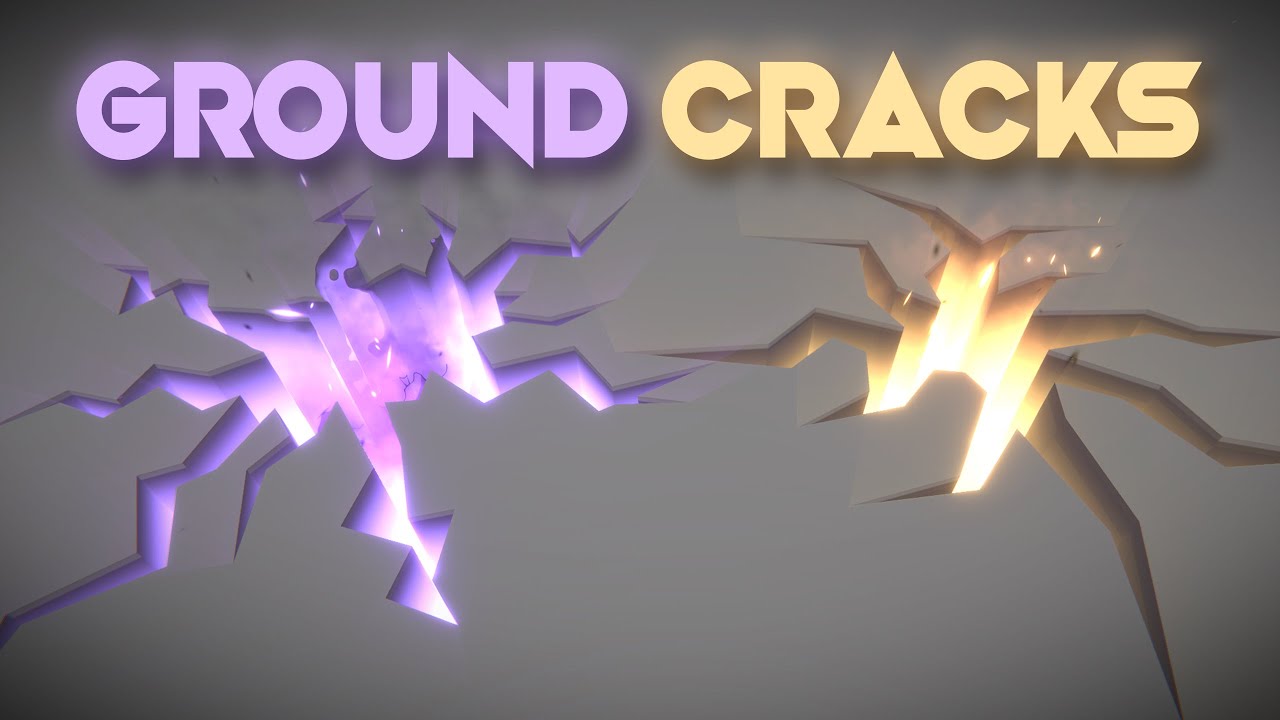
Let's open holes, cracks or fissures on the ground! This is an awesome technique that uses a custom configuration of the stencil buffer to render holes on top of other 3d objects. Love it!
RPG Builder: https://assetstore.unity.com/packages/templates/systems/rpg-builder-177657?aid=1100l3Jhu
RPG Builder YouTube: https://www.youtube.com/channel/UC...
Gabriel has a neat way of making them using stencils
tall remnant
solar trellis
isnt it basicall just spawn cube with decal shader and some extra texture tillin...
I'm not that familiar with visuals, i have some dynamicly generated meshes that i just want to be projected. Some are generated over time. Will it work then? I mean not with meshes, something similar to that
solar trellis
decal basically detect the part of mesh that contacted with opaque obj, so yes it should works as long as it's not transparent obj
*interserct
tall remnant
okay thank you
 edgy burrow
Using vfx graph how do I get particles to simply move back and forth? I've heard that you use sine wave and lerp but I cant get it to work
I already have the particles in a grid but I need them to now move back and forth like the image on the left
 tall remnant
solar trellis
decal basically detect the part of mesh that contacted with opaque obj, so yes i...
tall remnant
solar trellis
decal basically detect the part of mesh that contacted with opaque obj, so yes i...
i think mesh decals which is probably what i need only work in hdrp but i'll probably be using urp. Is there any way to do it there?
solar trellis
tall remnant
i think mesh decals which is probably what i need only work in hdrp but i'll pro...
Decal could work in urp,you just need to create in using shader graph or shader code
You can search in GitHub if you want the easy way
"urp decal shader"
tall remnant
there is a decal projector component in urp, do you mean i could also do it without that?
solar trellis
If I am not wrong in unity 2021 there's decal projections
I mean you can use decals without that, but sometimes it behaves very random (from my experience on VR)
junior creek
edgy burrow
I already have the particles in a grid but I need them to now move back and fort...
do you want something like this?
here is the graph if yes

There is also turublence mode for "Update" block, but I don't know how to lock it by axis.
Actually, How do you guys export graph as PNG? for big graph, I don't know how to fit it, and I don't want to change my monitor resolution for that.
edgy burrow
junior creek
here is the graph if yes
Ah this is great, it’s exactly what I wanted, thank you so much I appreciate it
junior creek
edgy burrow
Ah this is great, it’s exactly what I wanted, thank you so much I appreciate it
you are welcome
edgy burrow
junior creek
you are welcome
Hii again, would you happen to know why the movement seems to be on a 45degree angle? I'm kind of new to vfx sorry
 junior creek
I suppose it's because camera is perspective and looking on them from top, try to switch to orthographic just to make sure that it's that.
ah... you also conected output of sin to the vector, but not to the X axis.
try to connect to x only
 edgy burrow
junior creek
try to connect to x only
edgy burrow
junior creek
try to connect to x only
Ah yes this sorted it out immediately, thank you so much again for your help
stoic patio
I made this interactive water shader that uses render texture to get information from the scene. I use red channel for the wave starting point, and green channel as obstacle which will reflect the wave. I created this simple Rain VFX graph where rain drops (marked blue) will collide with the plane and spawn the red particles(marked red). Red particles are working as source to create ripples on water. Now I want the Blue particles to be visible in the main camera but not the red one, and only the red one should be visible in render texture camera. How do I achieve that? Is there any way to separate them in layers or is there any way to link 2 visual effects?

 civic bane
how do i modify the radius of a particle emitter via script
junior creek
civic bane
how do i modify the radius of a particle emitter via script
property binder or CustomEventAttribute
civic bane
which method is better for this specifically
junior creek
oops. sorry, you want it from the script, then just use CustomEventAttribute
ahh.. sorry, again. =))) i'm biased because of my customEvent. how do you trigger your particle?
https://docs.unity3d.com/Packages/com.unity.visualeffectgraph@16.0/manual/ExposedPropertyHelper.html here is example if you want to modify property
civic bane
junior creek
ahh.. sorry, again. =))) i'm biased because of my customEvent. how do you trigge...
its part of a prefab thats created in a script used by multiple objects
i was able to modify other properties of it directly but theres no property for radius due to the fact that its part of the shape
junior creek
then create your own exposed property. I don't know how to find specific to spawner property
I think you can modify any of these ****

 sullen sky
I've made a ParticleSystem. It works on Play and in the editor preview. It doesn't animate when instantiated via script however. what could be the issue?
(Version 2022.3.5f1 <DX11>)
 dry ridge
I'm wondering how to do that cool scanline and distortion effect you see on the face portrait at the bottom left. Any ideas?

 pseudo monolith
Hey Guys, so I have a really strange problem right here. I wanna create a blood effect for my enemies (but colored as oil) and everytime I kill enemy in play mode I can't see effect. It plays, cause in scene view I can clearly see the effect, but in playmode I can't. I don't know what the f@$3 is going on. I've checked every option in Particle system and it dosen't work, also I've tried to move my effects to other parents and only under a main parent (Gunner object) I could see effect. Could someone please say what I'm doing wrong?


 reef lance
does anyone know how to get the particles to look at a certain point in a scene? whenever I look around they kind of twist and turn when I move my head
its hard to see it in the vid but the move when i move my head
 daring loom
Hello guys, i have a little problem, every time when i try to create a new VFX graph, the spawn point of the particles seems to have a little offset from the center. This is a VFX graph I just created (I only changed the rate for the picture). anyone know what is the problem?

 zenith grove
daring loom
Hello guys, i have a little problem, every time when i try to create a new VFX g...
zenith grove
daring loom
Hello guys, i have a little problem, every time when i try to create a new VFX g...
So if you set the particles to spawn at 0,0,0 and apply no force, velocity or any kind of movement do they still spawn with a offset?
 safe helm
zenith grove
So if you set the particles to spawn at 0,0,0 and apply no force, velocity or an...
safe helm
zenith grove
So if you set the particles to spawn at 0,0,0 and apply no force, velocity or an...
I know that issue, it happens all the time but i just ignore it. it's not the particles that's offset it's the gizmos. but it's just a visual offset, the transform is still at 0,0,0
zenith grove
safe helm
I know that issue, it happens all the time but i just ignore it. it's not the pa...
Yeah, that is what I was suspecting
daring loom
zenith grove
So if you set the particles to spawn at 0,0,0 and apply no force, velocity or an...
yes
zenith grove
hmm then maybe it is not the box issue
daring loom
i tried even to rotate the VFX object (I thought maybe is just visual) but no, the spawn point rotate with the offset so it's not a visual bug
zenith grove
I don't know then what might it be
daring loom
i see now that every vfx that i created has this new offset (until now they didn't have the offset)
ah, i found why, the "Toogle Tool Handle Position" was on center not pivot. it seem that i pressed Z by mistake
prime dome
Hey guys, does anyone know how to make a collider always collide exactly? For some reason after the rain hits a collider of any kind, it likes to bounce up or down and then the rain drop ends up there too rather than exactly on the surface it collided with

 opaque knoll
Hi all
I'm likely not understanding what DXR is but saw that it's supported for Vfx particle in 2023
But i tried https://github.com/keijiro/DxrLattice on 2021 and used mesh with SG shader on the vfx shader and the reflection on the mesh works n all (the dark cyan octahedrons are vfx pcle mesh)
What are the DXR features here and what should i look for on the vfx pcle?
 solar trellis
What is the right thing to do when I want gameobj explode when I interact, is it by instating it using script,or just putting the particle as a child of the gameobj?
warm torrent
solar trellis
What is the right thing to do when I want gameobj explode when I interact, is it...
There is no "wrong" way unless it causes an issue with your design somewhere else
I think in most cases you'd end up using gameobject pools for both the explodable object and the explosion object
solar trellis
warm torrent
I think in most cases you'd end up using gameobject pools for both the explodabl...
Hmm,I see,guess I need to learn pools, thank for the info 
warm torrent
solar trellis
Hmm,I see,guess I need to learn pools, thank for the info <:UnityChanThumbsUp:88...
They're basically the same as instantiation but recycling instead of destroying
 proven spade
Hi!
I wanted to give vfx a shot
It's literally the first time I've watched any tutorial about it or even touched it in unity,
so I'm curious but confused about most things
So I'm watching this tutorial for beginners and I'm already to a rough start
I've created vfx graph (after installing the package)
and the preview doesn't show anything except the bounding box
I was expecting to see some basic particles there
I've watched "The Unity's" youtube video introducing vfx graph too
and on their video the preview spawns some particles as soon as they create the vfx graph
Did I miss something?
Is there particular setting that I should turn on to see particles?
I'm using 22.3.4 LTS and the "3D Core" project template
ps: hitting "play" button above vfx preview doesn't seem to do anything too

 warm torrent
proven spade
Hi!
I wanted to give vfx a shot
It's literally the first time I've watched any ...
warm torrent
proven spade
Hi!
I wanted to give vfx a shot
It's literally the first time I've watched any ...
3D Core template uses Built-in Render pipeline, while VFX Graph requires URP or HDRP
It's best to go with "3D (URP)" or "3D Sample Scene (HDRP)"
dull obsidian
stoic patio
I made this interactive water shader that uses render texture to get information...
okay what i think you can do is use rendering layers plus a shader graph on each vfx output to do this logic
Rendering Layers ... can be sampled from the ShaderGraph to implement custom effects.
https://docs.unity3d.com/Packages/com.unity.render-pipelines.high-definition@16.0/manual/Rendering-Layers.html
stoic patio
@dull obsidian thanks! I will check it out.
dull obsidian
stoic patio
<@471083604135378975> thanks! I will check it out.
no problem. i believe you will need unity 2023 to use rendering layers with hdrp. aside from that, there is also the new custom hlsl block where you could write these "on die" positions to a global texture or buffer, likely more efficient , no second camera with special settings required, but that's only available in the latest beta which was alpha only a week ago. we're putting together some tutorials for that (my company, i don't work for unity) anyway it's early days
stoic patio
dull obsidian
no problem. i believe you will need unity 2023 to use rendering layers with hdrp...
nice that will help a lot. I need to check out the latest 2023 features. I know we have a pretty good water system now. But I ported an fft ocean system to HDRP back in 2021. Was trying to do some modifications and interactions.
I ported this ocean https://www.youtube.com/watch?v=kGEqaX4Y4bQ

How does ocean waves simulation with Fast Fourier transform work?
Source code:
https://github.com/gasgiant/FFT-Ocean
Music:
https://soundcloud.com/igor_vaiman
Catlike Coding on Gerstner waves:
https://catlikecoding.com/unity/tutorials/flow/waves/
3Blue1Brown on Euler's formula:
https://www.youtube.com/watch?v=v0YEaeIClKY
3Blue1Brown on Four...
My HDRP shader for it:
https://www.youtube.com/watch?v=kKTlgQFIic8

 latent lantern
is there a way to make a hologram map.... say your companion is like a drone and projects to your wrist the environment around u... would kinda look like point clouds but im assuming i need some sort of shaders connected to camera data?
dull obsidian
latent lantern
is there a way to make a hologram map.... say your companion is like a drone and...
this will get you going. gabriel has great tutorials. any depth map from any camera can be used such as one attached to your "drone". https://youtu.be/1BVRN_TP4m8

Let's see how to create an Holographic Map with a Render Texture in VFX Graph! It's a pretty interesting exercise with this amazing Unity tool we just need Visual Effect Graph and a Camera. Hope you enjoy it!
ASSET STORE SALE : https://assetstore.unity.com/?aid=1100l3Jhu
00:00 Intro
01:49 Render Texture Setup
03:36 Sampling the Render Text...
latent lantern
that's awesome
stoic patio
@dull obsidian https://youtu.be/oAjRGGdURzI here's the current progress on the interactive water thing.. now I need to merge it with the wave sim.
 dull obsidian
stoic patio
<@471083604135378975> https://youtu.be/oAjRGGdURzI here's the current progress o...
dull obsidian
stoic patio
<@471083604135378975> https://youtu.be/oAjRGGdURzI here's the current progress o...
zen!
 mellow cloak
Getting which particle was involved in a collision
 limber hinge
anyone know if its possible to collide VFX graph with gameobject?
dull obsidian
limber hinge
anyone know if its possible to collide VFX graph with gameobject?
3 main methods
- use screenspace depth collision (simple to enable but not the most accurate)
- align vfx graph primitive colliders (basic shapes only like sphere, cube, etc),
- or generate sdf textures for each mesh you want collisions (the most accurate if you need it, setup can be tricky)
limber hinge
dull obsidian
3 main methods
- use screenspace depth collision (simple to enable but not the m...
what if i want to trigger event like damage and such?
dull obsidian
limber hinge
what if i want to trigger event like damage and such?
that's difficult as currently vfx graph is gpu compute only with no cpu compute mode like the classic particle system/ formerly shuriken is only cpu. you could stick to cpu particle system or combine the two but could be a bit complex.
another option is to use the new custom hlsl nodes (in beta) to read back particle data to cpu but there is no example of that right now. i am working on those right now if you are interested
 opal star
Imho thats a bad use case for the vfx graph. What we have done for tons of bullets is do their movement and collision on the cpu using the job system and use that data to drive the position of particles in the vfx graph
dull obsidian
and yes agree with @opal star if you can avoid using vfx graph for any game logic, you probably should. maybe in the future vfx graph will have a cpu simulation mode.
and @opal star has more experience with implementing this sort of thing than i do
limber hinge
dull obsidian
that's difficult as currently vfx graph is gpu compute only with no cpu compute ...
sure would love to know about them
warm torrent
Passing information between CPU and GPU is inefficient
Shuriken / Particle System is the recommended way to get particle collision events
 outer blade
Can i somehow recreate the bloom effect in a particle system without using Post Processing. I want to do this for a muzzle flash, it looks terrible without bloom.
proven spade
proven spade
Hi!
I wanted to give vfx a shot
It's literally the first time I've watched any ...
I come back with this issue once again.
I've found a tutorial with project files included. All packages installed, proper unity version installed, URP running.
In tutorial he creates graph then drag and drop it into scene and boom the particles are particling
But when I do the same I get nothing
I've received error in console (image below)
it seems to be missing vfxparticleplanarprimitive.template from vfx graph package
any idea how to fix that?
 proven spade
outer blade
Can i somehow recreate the bloom effect in a particle system without using Post ...
proven spade
outer blade
Can i somehow recreate the bloom effect in a particle system without using Post ...
I'm newb but have you tried creating Global Volume with native profile settings?
Something like that:
 proven spade
I come back with this issue once again.
I've found a tutorial with project files...
proven spade
proven spade
I come back with this issue once again.
I've found a tutorial with project files...
Apparently dir path had too many characters and unity cried about it 👍
latent lantern
dull obsidian
this will get you going. gabriel has great tutorials. any depth map from any cam...
none of the blocks are the same but ya that vector 4 is real different. anyone know what version of vfx graph he uses

more what its supposed to do but idk what im doing really
 latent lantern
i still dont understand how he adds custom attributes like that
 round girder
@dull obsidian
hello
@latent lantern are you available to help me out?
just a really simple question
latent lantern
I'm not a technical artist but just state your issue
round girder
latent lantern
I'm not a technical artist but just state your issue

which one would i chose
to do vfx
lol
latent lantern
Hi def render pipeline?
latent lantern
What are you planning to do
round girder
sorry this my first time ever using unity lol
round girder
latent lantern
What are you planning to do
i wanna make vfx
i got this pack too but i dont know how to open it

it didnt download a file.

actually
i got it
latent lantern
3D
round girder
latent lantern
3D
is this the proper one too use?
latent lantern
For that ya
round girder
he is new
latent lantern
I'm not a vfx I make 3d sculpts
round girder
@prime dome yooo
latent lantern
Like I've been on it in it for like 5 years and recently I picked up coding again
round girder
oh its complete shit
obviously
im just happy i got it working
you can easily do it on studio
thats the thing
yep
i saw
WWW
didnt know that
@latent lantern https://www.youtube.com/watch?v=I6GfQUc4f8A

somewhat
but
its not limited to like
2x2
4x4
8x8
you can do so much more bro
FR
yep
i got no idea
i thinku can
@latent lantern do u know how i can see the like properties for this

so i can edit it
round girder
uhhh
latent lantern
I assume u have visual effects graph installed


 latent lantern
Hit the top where it say my packages
And go to unity
Then find visual effects graph
latent lantern
All that should be like unity 101 first day 😆
 latent lantern
My assets
round girder
latent lantern
Hit my packages and then it drops down to unity something
where is my packages
latent lantern
The thing you just screenshot
 latent lantern
Ya
 latent lantern
Unity registry
dull obsidian
latent lantern
i still dont understand how he adds custom attributes like that
maybe you already found but this is mentioned in the top comments. i wish this was more discoverable in unity

 round girder

there
my dream is to make stuff like this @latent lantern @dull obsidian https://twitter.com/i/status/1685410495514193920


Neon sketch 3 2 1 #shader #realtimevfx #gamedev #unity3d #VFX #amplifyshader
Likes
1419
Retweets
200
 Twitter
·
dull obsidian
round girder
my dream is to make stuff like this <@455896852701773825> <@471083604135378975> ...
Twitter
·
dull obsidian
round girder
my dream is to make stuff like this <@455896852701773825> <@471083604135378975> ...
love it very juicy.
round girder
dull obsidian
love it very juicy.
do you make those type of vfx?
dull obsidian
the primary elements are not too complicated but it's the little things that all add up and so well synchronized that makes it great
round girder
@dull obsidian would you mind teaching me and my friend @prime dome how to make juicy effects like these?
dull obsidian
round girder
do you make those type of vfx?
i used to, i haven't been doing this kind of daily production vfx / technical artist and motion graphics for some years now, i do more simulation and rendering tools research and development now.
 latent lantern
Do you have a 2d art tool like photoshop / gimp
round girder
what do i do now
round girder
latent lantern
Do you have a 2d art tool like photoshop / gimp
i do


this is amazing
i love it
dull obsidian
but i know how much work it generally takes and an abstract idea of how to approach it. but there's nothing unconventional here, there are many vfx tutorials that will cover all of the techniques required.
i.e. there's nothing unusual about the techniques and that's okay, what makes this effect special is the fine tuning and micro movements, sounds sync, the color animations, all the little details add up. a level of polish i rarely get to anymore in my work ha
latent lantern
@dull obsidian that'd be useful for teaching sign language 😀
dull obsidian
round girder
this is amazing
thanks 🙏 i am revisiting this finally lol

 latent lantern
I wasn't aware unity had fluid particles
dull obsidian
the white menu bar? that's just default unity ui in dark mode on microsoft windows. i use a windows software that makes even that menu bar all dark now but it's a bit of a system hack.
 latent lantern
dull obsidian
it doesn't <:sadok:1068114223621754981>
latent lantern
dull obsidian
it doesn't <:sadok:1068114223621754981>
😆 do they clump?
Sorry there's this sand fx I need to go find
dull obsidian
this is what i used for fluid sim in vfx graph but i had to do considerable work to keep it compatible with newer unity versions, it's a great example of what's possible but it depends on some internal classes and hacks that devs aren't supposed to use, but it was the only option https://github.com/fluviofx/fluviofx

GitHub
Fluid dynamics for Unity's VFX graph. Contribute to fluviofx/fluviofx development by creating an account on GitHub.
latent lantern
So it didn't agree with Nvidia completely
dull obsidian
latent lantern
Sorry there's this sand fx I need to go find
fluviofx uses SPH / smoothed particle hydrodynamics which is basically only useful for fluid so it wouldn't work for sand granules. sand (and fluid and other things) can be simulated with PBD / position based dynamics and even more with MPM / material point method
 round girder
latent lantern
Hit open editor
round girder
latent lantern
Hit open editor

when im on youtube tho

this guy has it like this
how do i do that
round girder
latent lantern
That last image is the visual effect graph
why is mine like this

 latent lantern
I know I was wrong 😆
round girder
latent lantern
I know I was wrong 😆
thats alright! lets fix that
do you have any other ideas?
latent lantern
Maybe he didn't use a graph for those effects
latent lantern
Under texture
round girder
where is that
 hearty flare
There are two things, you are looking at Shuriken/Particle System. The other one is VFX Graph.
 round girder
hearty flare
There are two things, you are looking at Shuriken/Particle System. The other one...
round girder
hearty flare
There are two things, you are looking at Shuriken/Particle System. The other one...
how do i get this one
 hearty flare
round girder
hearty flare
round girder
unity is super confusing right now 😭
round girder
hearty flare
https://docs.unity3d.com/Packages/com.unity.visualeffectgraph@16.0/manual/Gettin...
i already installed it
im not sure how to open it though
latent lantern
He's a mod
 latent lantern
Make a cone

 latent lantern
It's a lot of stuff in one program ya
round girder
latent lantern
It's a lot of stuff in one program ya
i mean
i cant even find the transparency
graph
latent lantern
so like smoke that disapates?
round girder
latent lantern
so like smoke that disapates?
sure
latent lantern
is all your particles spawning in one spot?
 latent lantern
add a new block
round girder
latent lantern
okay i finish this holograph map thing im learning too
add my discord
latent lantern
sure
sullen sky
Why would a ParticleSystem not move when instantiated? My particle is playing and killing itself on destroy. The particle works as expected when put into a scene and the game plays.
 feral grotto
is there any clever way to make a sprite/sprite animation tile repeatedly, however the last sprite is a different one?
So for example I have sprites/animations A and B, same size. If the object is small enough it just shows B, cut off on the end, so |B (with | denoting the cut, right side is uncut, the anchor)
But as I stretch it out, it becomes |AB
And if I keep stretching it, it tiles A over and over so you would end up with |AAAAAB
Any way to easily achieve this?
(for context in my example its a lightning bolt sprite, with B being the "tip" of the bolt, and A being a repeating visual for the "body" of the bolt)
So ideally as I stretch the bolt out, the tip is always 1 tile long on the end, and then a repeated tile of A as the body
opaque knoll
Is there a way for VFX to define arrays of collider?
I can send texture with pixel color as info from CPU to Vfx, but the Vfx itself don't have any array handling capabilities for anything it seems
 opaque knoll
feral grotto
is there any clever way to make a sprite/sprite animation tile repeatedly, howev...
opaque knoll
feral grotto
is there any clever way to make a sprite/sprite animation tile repeatedly, howev...
I'd have the tip of the bolt a particle, and the "trail" as a sub emitted particle that's spawned by the tip
feral grotto
opaque knoll
I'd have the tip of the bolt a particle, and the "trail" as a sub emitted partic...
they arent particles, they are 2d sprites with already defined animations
like so:
 opaque knoll
Hm this is not vfx/particle
I think there's this thing called "sprite tiling" #🖼️┃2d-tools ?
opaque knoll
feral grotto
they arent particles, they are 2d sprites with already defined animations
But for simplicity i'd still separate the "tip" and the repeating sections
Most graphics problems that involves wanting things to be "seamlessly connected" can be solved by simply.. separating it
I mean not solve but.. compromise
feral grotto
opaque knoll
But for simplicity i'd still separate the "tip" and the repeating sections
Most ...
they are seperated yeh
I mean though this is 2d, its a vfx I am trying to create from sprites
opaque knoll
Hm.. not really sure. I guess it depends on the implementation
 minor crane
I cant see trails or any effects in game view but I can in the scene view

what could be the problem?
 inner finch
Make sure your camera includes the layers the particles are on
Also, is there a way to get a projector? I don't want to use URP but want to be able to wrap a texture around a mesh
latent lantern
is there a way to set the world vs local position of a visual effect quad
i'm basically playing with numbers because the particles go out from zero


i want it center on the player
latent lantern
almost solved with math.. at least it has a property but anything less than 5 throws off the center
 opaque knoll
I'd like to have my pcles to move towards their original position (after init'ing their pos with SDF)
But i can't use this node (Conform to SDF) bcoz if the pcle gets pushed to some other side, it'll just go towards the nearest point in the SDF

Actually my question is much simpler: I've set the original pos in a custom attribute and adding Force towards this OG pos. But it overshoots. And after some time all the idle particles will flicker
What's the correct way to add force to a pos that won't overshoot?
Actually again, my initial issue is, my pcles don't appear if they have 0 velocity? So i have to set velo to something small in Update at all times
Why so?
latent lantern
Sounds like your velocity is linked to when your particles appear?
opaque knoll
Hmm will check a few things first here. Workaround after workaround and idk what's happening anymore..
opaque knoll
latent lantern
almost solved with math.. at least it has a property but anything less than 5 th...
There's World to Local or to World node u can use, or u can change the whole system to use Local or World toggle
Or u can just set it to World, and not attach to player, and have the player's transform be linked to Vfx attribute so the Vfx system use that
latent lantern
That could work if I applied the depth camera data I'm getting with like a add player transform data.. I'm just frustrated with the whole Euler thing I guess tho
opaque knoll
Does VFXG not have a ClampMagnitude node?
Each time i need to do this i gotta do all this
I guess i can subgraph..
inner finch
Is it possible to add a material to another material
warm torrent
inner finch
Is it possible to add a material to another material
I'm not sure what that means but I'm going to go with no
inner finch
like layer one material on top of another
warm torrent
inner finch
like layer one material on top of another
It's technically possible to render the same mesh twice with different materials but it tends to break some optimizations so it's not recommended
inner finch
damn. all I want is bullet holes that bend around a mesh without using urp :(
do you think there's a way to do that?
warm torrent
inner finch
damn. all I want is bullet holes that bend around a mesh without using urp :(
BiRP has a decal projector doesn't it
warm torrent
inner finch
if you could send it to me i'd hugely appreciate it
Decal effects, like bullet holes or paint splatters
inner finch
warm torrent
> Decal effects, like bullet holes or paint splatters
i checked that, the standard assets are unavailable
warm torrent
inner finch
damn. all I want is bullet holes that bend around a mesh without using urp :(
I'm not super familiar with BiRP
Why avoid URP?
inner finch
warm torrent
I'm not super familiar with BiRP
Why avoid URP?
It's a low poly / slightly "retro" styled game and I want to avoid realistic lighting. Plus the game that inspired my project, Ultrakill, doesn't use URP and i'm just going to do whatever he does lmao
i know about the performance improvements, i know about the extra features, i'm gonna stick with birp
warm torrent
URP doesn't lock you out of unrealistic or stylized lighting any more so than BiRP does
inner finch
yes, but it also adds a bunch of different parameters and settings to worry about that i don't think i'm up for
there's a decent chance that i'll use it for my actual project when i make it, but for now, especially while i'm still learning, imma stick with birp
warm torrent
It sounds like you might be confusing it with HDRP but whatever
Here are the projector related things from the deprecated Standard Assets
Multiply and Add blend modes only, but maybe you can figure out how to do alpha blend or opaque
inner finch
warm torrent
Here are the projector related things from the deprecated Standard Assets
Multip...
thank you very much!
inner finch
warm torrent
It sounds like you might be confusing it with HDRP but whatever
no, i've installed it. i'm good without it. thank you for your time and help regardless :)
latent lantern
i've set this particle grid to hold random particles -5 to 5 on x and y 0 for z... my question is what exactly comes out of the depth map and the render texture. because i believe the uv to detect pixel alpha strength from 0 to 1? not sure how to multiply and add the values now that the grid is -5 to 5 is there a vfx math function that would convert 0 to 1 to look like < .5 is negative and >.5 is positive value -1 to 1 would be fine i can scale it... that and i just dont know how read the texture sample or what the w is for

 finite vine
How would you create an effect such as this? https://youtu.be/4kji6m_xuv8?t=74
(The pattern disintegration effect)
Would a mesh deformation based on texture data such as pivot painter work?

The Closed Door 00:00
STEP 1: Complete the Ukouh Shrine 01:04
STEP 2: Reach the second shrine 04:03
STEP 3: Complete the In-isa Shrine 06:30
STEP 4: Reach the third shrine 10:36
STEP 5: Complete the Gutanbac Shrine 26:06
STEP 6: Reach the Temple of Time & Open to Door 29:05
This is the Gameplay Walkthrough of The Legend of Zelda: Tears of the K...
 inner jolt
finite vine
How would you create an effect such as this? https://youtu.be/4kji6m_xuv8?t=74
(...
inner jolt
finite vine
How would you create an effect such as this? https://youtu.be/4kji6m_xuv8?t=74
(...
I'd probably write a cusom shader that discards pixels. It looks to me like just a mask texture with the rough shape of the door, and a scrolling noise texture mixed together
finite vine
What about the disintegration of each strand of the pattern ?
 finite vine
that's why I mentioned pivot painter before
it's probably more a shader effect than a vfx/particle
finite vine
I might have found what I was looking for https://www.sidefx.com/tutorials/vertex-animation-textures-in-unity/

Learn how Vertex Animation Textures (VAT) provide an efficient and powerful solution for recreating complex and non-traditional animations and FX in real time.
opaque knoll
Hi all. A serious question
Why use PS rather than VFX?
. Pcle is CPU side for collider events
. Mesh is CPU side for SDF
. Light module
. ? Any more reasons?
https://clips.twitch.tv/ManlyLovelyDurianStrawBeary-0hERGFJbbnnAG5yb
So i made this n currently making a wrapper for PS
I reckon i'll stop bothering making actual effects with PS, but instead use it to drive the interactive parts, some interacts with Vfx and the GPU side

 slow beacon
Respected, is it possible to stop the particle system immediately when user don't touch the screen..
safe vigil
Would it be possible to pass in edge collider as shape to emit from for particle system? I want to make visual effects for stuff like burning etc and that would require effects * enemies amount of prefabs  I know there is sprite renderer shape but it has huge overdraw for sprites like quarter of a circle + for those kind of sprites I already use edge collider as polygon is very slow
inner finch
How do I get particle transparency to fade over time?
latent lantern
inner finch
How do I get particle transparency to fade over time?
the alpha culling?
or the whole particle
inner finch
latent lantern
or the whole particle
not sure what you mean
i just want the particles to fade, not sure how to describe it
latent lantern
You can shrink them over life
Or you can give them alpha culling over life maybe
Output particle block > set size
Link an animation curve to it
opaque knoll
Does Vfx not have a "trigger with SDF"? Something like the existing "collide with SDF" but not actually colliding/pushing them?
inner finch
latent lantern
Or you can give them alpha culling over life maybe
problem is, the alpha isn't changing the transparency
which yes, i have it checked
latent lantern
Maybe check your particle format or go fade an alpha gradient in gimp/photoshop some images claim to have alpha and don't in my experiences
opaque knoll
inner finch
How do I get particle transparency to fade over time?
Age over lifetime, set alpha in update. Make sure ur Output node is set to alpha/additive, or if using SG shader, that it supports alpha
inner finch
opaque knoll
Age over lifetime, set alpha in update. Make sure ur Output node is set to alpha...
alright, thank you
 dark kestrel
Is it possible to change the layers of multiple systems within a VFX Graph? For example if I want to have one graph with multiple systems but change the layer each system is rendered to?
dull obsidian
opaque knoll
Does Vfx not have a "trigger with SDF"? Something like the existing "collide wit...
you can use the sample signed distance field node for custom behavior https://docs.unity3d.com/Packages/com.unity.visualeffectgraph@16.0/manual/sdf-in-vfx-graph.html
dull obsidian
dark kestrel
Is it possible to change the layers of multiple systems within a VFX Graph? For ...
i answered a similar question a week ago, i think you can use rendering layers, available in both urp and hdrp: #✨┃vfx-and-particles message
 quasi silo
I don't know If I'm doing something wrong but the VFX graph changes a bit from edit mode and play mode
Video on the way
You can see that in PLay Mode some black spots appear
I have found that this might be a problem of the blend mode
I'm using ShaderGraph with Additive Blend Mode
dark kestrel
Hey! Thanks for the info! Not seeing the options for that on my version of URP unfortunately (12.1.12). For now I got around it by splitting the systems into separate VFX assets and putting them on different objects with separate layers. Not ideal but maybe I can come back to this after upgrading versions.
quasi silo
dark kestrel
Hey! Thanks for the info! Not seeing the options for that on my version of URP u...
You need to activate an option in preference to see shadergraph in VFX
It's called Experimental Operators/Blocks
latent lantern
can you update the center of a vfx overtime with exposed parameters(vector 3) from world space?
dull obsidian
dark kestrel
Hey! Thanks for the info! Not seeing the options for that on my version of URP u...
ah yes according to the docs rendering layers is available on urp 14+ / unity 2022.2+ so you would need to upgrade to that or newer https://docs.unity3d.com/Packages/com.unity.render-pipelines.universal@14.0/manual/features/rendering-layers.html
 blissful lake
I have no idea why I can't find any google results on this but is it possible to control the alpha of a group of particles? Especially particles that are part of a UI canvas.
latent lantern
you mean like per component?
 terse comet
If i SetData on a GraphicsBuffer with a count less than the size of the buffer, does it need to push the entire buffer to the GPU again or does it only send the count?
terse comet
thanks
warm torrent
blissful lake
I have no idea why I can't find any google results on this but is it possible to...
You may want to be more specific
I'm inclined to say you control the alpha just like you would control the alpha normally even if they weren't on a canvas
Usually you wouldn't put any non-UI gameobjects on a canvas because they can't utilize the Rect Transforms or Canvas sorting
blissful lake
warm torrent
You may want to be more specific
I'm inclined to say you control the alpha just ...
Yea that's fair
I have 3 particle systems in a group on my canvas, they work just fine
but I just want to fade them out when my background transitions
warm torrent
blissful lake
but I just want to fade them out when my background transitions
My first instinct says you'd rather fade in a background on top of the particles, rather than fade their alpha
blissful lake
Fair
warm torrent
But if you really need to, the simplest way to change the color of all particles is probably to change their startColor through a script
https://docs.unity3d.com/ScriptReference/ParticleSystem.MainModule-startColor.html
I still recommend against mixing non-canvas gameobjects into canvases
You can end up with weird issues and there's any benefit to doing so in only particular circumstances
slow beacon
Respected, is it possible to stop the particle system immediately when user don't touch the screen..
latent lantern
slow beacon
Respected, is it possible to stop the particle system immediately when user don'...
yes
anyone know why instantiating a vfx graph thats like a refrence of a prefab would set up as in the spot of the prefab despite setting the world space to be an offset of the player?
slow beacon
latent lantern
yes
how sir?
please guide
latent lantern
script
slow beacon
latent lantern
script
please guide how
i searched a lot but didn't find relevant to this.
with play
stop
it didn't stop immediately
latent lantern
Stop and clear or something
The particles have a lifetime
I'm assuming you have like a input or controller script
prime dome
is there any way to make mesh particles not colliding into each other when spawning on a mesh body? like i want to spawn boxes on table mesh and want them to not mix with each other
like sorted in a way that they have distance from each other
civic bane
i have a particle that's a sprite animation. Is there any way to make the FPS of this slow down over the particles lifetime?
 sudden tide
hey guys, i am using visual scripting to make a portal effect and am trying to stretch particles to give the effect that they are moving towards the center, i have used a set scale but they all stretch the same way, anyone have any advice?
 civic bane
sudden tide
hey guys, i am using visual scripting to make a portal effect and am trying to s...
civic bane
sudden tide
hey guys, i am using visual scripting to make a portal effect and am trying to s...
i think to do that you have to modify the render mode property of the system
sudden tide
civic bane
i think to do that you have to modify the render mode property of the system
do you know where that is located?
civic bane
sudden tide
do you know where that is located?
im not sure in the visual scripting UI, sorry
sudden tide
okay, thanks for your help
civic bane
in the normal particle system menu its under rendering
 cobalt wigeon
I don't know if i'm in correct group, but anyone here who has worked with Vector Fields, generative art in Unity with particles?
https://shahriyarshahrabi.medium.com/procedural-art-with-unity3d-particle-systems-and-vector-fields-5a0b6d4cdc65
Medium
In the past few days, I have been experimenting with creating patterns using the particle system in Unity Engine. Here are some of the…
I'm trying to do something similar, but I'm having some difficulties to understand some parts.
If anyone can help me. I appreciate
zenith grove
Is it possible to exclude an object from depth buffer so that the soft particle setting in VFX graph will not interact with that specific object?
 tame turtle
I'm using particle strips to draw trails, but they seem get thinner when oriented vertically. See where my mouse moves in the gif. Is this preventable? I can't use Face Camera Plane in a ParticleStripQuad output 🤔
 night oxide
Anyone know how I can prevent particle gaps in my trail when I increase the velocity of the target position? https://imgur.com/a/1go6Qbk
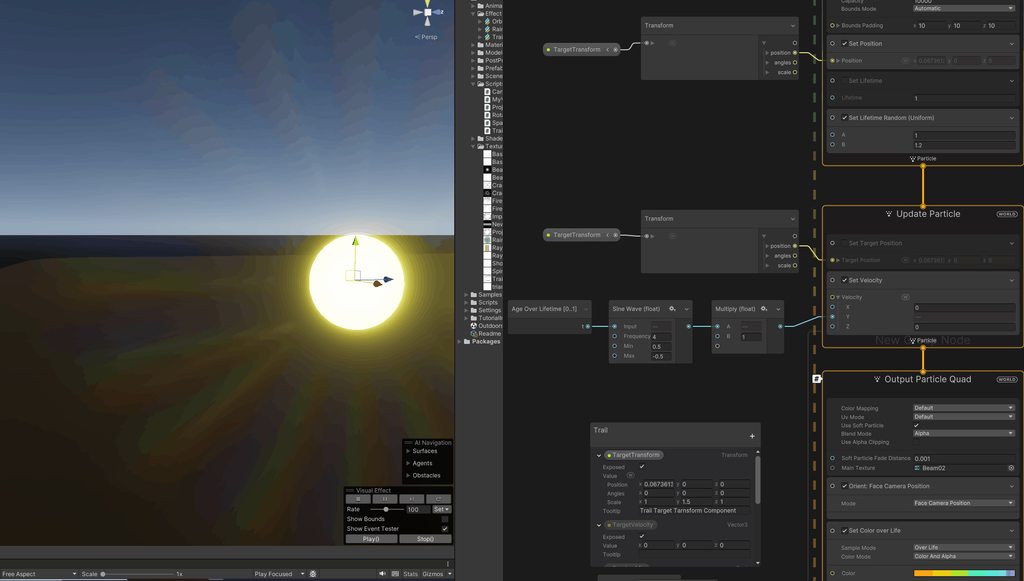 opaque knoll
https://cdn.discordapp.com/attachments/1123260335827189861/1140663355246383124/image.png
This is "Set position to SDF", and the SDF is simply a cube
Why is it separated to 3 planes like this?


This is the sliced SDF. So i guess the middle part is hollow?
Is this normal? I thought SDF baking should give a whole volume?

It seems this only happens with Unity's default cube. But idk why..
Nvm, happens with made cube too
Ok just subdividing it once seems to fix it
I guess SDF bake relies on some topology?
 opaque knoll
night oxide
Anyone know how I can prevent particle gaps in my trail when I increase the velo...
opaque knoll
night oxide
Anyone know how I can prevent particle gaps in my trail when I increase the velo...
Why not just use particle strips?
night oxide
@wicked cedar lack of documentation on how to use them
warm torrent
night oxide
<@840914605202341918> lack of documentation on how to use them
VFX Graph docs will not tell you everything you need to know about any topic, so you need to be ready to look for tutorials and examples
night oxide
@warm torrent Yeah that seems to be the case especially for particle strips, there's maybe 1 guide on youtube, guess I'll have to try and figure it out myself
warm torrent
night oxide
<@166982635950702592> Yeah that seems to be the case especially for particle str...
There should also be System templates included that let you create various ribbons, which trails are also

Ribbons are one solution to the gap issue you were seeing, but another might be to emit over distance travelled/speed rather than at a constant rate
Also when you drag a transform using the move tool it's not guaranteed to create smooth motion which may make the effect look worse than it is
night oxide
@warm torrent Ah cool I only looked at that template briefly. I'll try messing around with it
opaque knoll
night oxide
<@840914605202341918> lack of documentation on how to use them
U tagged someone else 😄
https://cdn.discordapp.com/attachments/1123260335827189861/1140884804112486441/image.png
Any reason why a simple SDF of a cube be this finicky?
Now for some reason lots of the particles are clumped on -+ Z edges

 opaque knoll
Oh ok, scaling un-uniformly too far from the original mesh' dimension causes this..
 wicked cedar
night oxide
<@840914605202341918> lack of documentation on how to use them
wicked cedar
night oxide
<@840914605202341918> lack of documentation on how to use them
pardon- ?
latent lantern
does anyone know if that would break my code or if it needs an if when nan? technically it shouldnt read that until after the point increases in value via lifetime but its node based so i really have no clue
 latent lantern
is there anyway to duplicate some of the methods used "modularly" or based off the number of segments and vectors? like a range of vectors?
latent lantern
sorry that first block is particle age
latent lantern
nvm i reworked it
 proud moss
So I have a question that I can’t seem to find the answer to due to it maybe being too obvious. I know that you can have particles collide with things using the particle system, but was wondering if the reverse is possible? Where objects can also collide and have physical interactions with the particles. I’m have a particle effect that creates a cube that lasts for a period of time. I’d like that cube to have a collider on it so that the player can’t run through it. The cube particle shape (not a perfect cube) is random every time as well. Is there an easy way to accomplish this using the particle system? Thanks!
solar trellis
You can't,you can however disable the gizmo
latent lantern
@prime dome it's the gizmo that let's u know where your particle effect is. Usually that's useful if you're in the early stages of setting up, instantiating, and initializing the particle on some script defined point
In the view window there is a gizmo button if you didn't get that
latent lantern
vfx graph needs a scroll vfx that shows the order your code reads or fires in slow mo gradients would work too. lol
right now i use a test lifetime float i can set
dull obsidian
tame turtle
I'm using particle strips to draw trails, but they seem get thinner when oriente...
not sure if this is definitive but this person was able to use trigger event over time instead of trigger event always to provide the expected results. https://forum.unity.com/threads/sometimes-particlestrip-and-orient-face-camera-position-doesnt-work-together.1315320/
Unity Forum
unity version: 2021.3.6f1
sometimes it works but not always...I'm a bit confused. I've included both in the attached.
without facing camera:
[ATTACH]...
@tame turtle regardless of the expected result it appears that the Orient: Face [Mode] is available in all output contexts. so perhaps you are having another issue if you are unable to add the block at all
https://docs.unity3d.com/Packages/com.unity.visualeffectgraph@16.0/manual/Block-Orient.html#block-compatibility
Block compatibility
This Block is compatible with the following Contexts:
Any output Context
@tame turtle also perhaps try Face Camera Position instead of Face Camera Plane
dull obsidian
proud moss
So I have a question that I can’t seem to find the answer to due to it maybe bei...
using the particlesystem, this OnParticleCollision event is what you have access to, but it has limitations https://docs.unity3d.com/2023.1/Documentation/ScriptReference/MonoBehaviour.OnParticleCollision.html
@proud moss this approach may be better suited go what you are looking to do, since you want the shape of the projectile to matter and behave like any other rigid body not just a tiny point in space which is one of the limitations with the above approach using particles as i understand https://learn.unity.com/tutorial/using-c-to-launch-projectiles

Unity Learn
In this tutorial, you will create a C# script which takes advantage of the Rigidbody component’s physics properties to launch projectiles from a cannon.
proud moss
dull obsidian
<@268625874809651200> this approach may be better suited go what you are looking...
Thanks for the advice, I figured I’d probably have to do it this way but wasn’t quite sure if I was completely limited by the particle system
latent lantern
@proud moss velocity formulas arent specific to unity tho. I plan on using something like this in my vfx graph. because honestly hitscan is boring and particles are appealing
i mean ya you can hit the kill switch on collision and/or you can splinteroff/changetrajectory if anything dont take no for an answer XD
dull obsidian
@latent lantern yeah even though it's not officially supported, reading vfx graph particle data from gpu back to cpu same frame should be fine for certain cases with a sufficiently small number of particles. or async on later frames if that's acceptable for the use case.
though determinism (if needed for say, multiplayer) could be an issue.
latent lantern
ya i was looking at that VR games specifics
cant remember the name but would definitly need gpu lol
dull obsidian
hopefully in the future vfx graph will gain a cpu simulation mode to make this all more straightforward for most cases via the dots burst compiler (hlsl compute kernel compilation support.) i believe some unity devs threw together some proof of concept at a game jam / hackathon. and cpu simulation is "under consideration" on vfx graph roadmap at least
or they move vfx graph sim from hlsl / directx compute to c# dots / burst that can also target the gpu i can't recall which was prototyped. it's a viable toolchain either way. ¯_(ツ)_/¯
latent lantern
how would you handle something like a collision system now for vfx graph just make a predetirmined point and spawn that spawns collision detectors at each point for a certain time/lifetime and stop the animation if it get hit during that life?
i mean like a seperate script for the segmentented lifetime and variable points
then just respawn if its hit during its life
respawn lol refract/explode
dull obsidian
latent lantern
how would you handle something like a collision system now for vfx graph just ma...
you mean velocity transfer from particles to gameobject rigidbody as above?
- yeah if the target is predetermined and you don't need to read back particle data from the gpu to the cpu if the cpu already knows where it is going to be and when.
- or simulate everything on the cpu in c# and only use vfx graph for rendering, setting the most up to date positions / transformations from cpu to gpu. avoids a lot of problems.
- or readback the particle data from gpu to cpu, and accept the issues and limitations that may come along with it. one way to optimize could be only reading back particles that have a collision event. again we are in unsupported but possible territory
latent lantern
technically all you need for vfx graph are exposed positions(vector3) and segmented lifetime.. if you segment the lifetime outside of vfx graph its like connecting 0 to 1 based on segments like 9 times or more to those vectors you also make the speed vary based on those segments(0 to 1)
so have like 8 if statements in a vfx
dull obsidian
one of the issues is vfx graph doesn't have an officially supported autogenerated representation of the scene's mesh colliders to begin with, so that is another hurdle to get over. we're working on some 3rd party solutions for this. as currently "out of the box" in vfx graph one has to manually generate SDF textures for each gameobject / mesh. or manually align primitive vfx gpu colliders to the cpu mesh colliders and deal with the addressing
latent lantern
lol you mean the automatic bounds
dull obsidian
not the automatic bounds but it's a similar data type to the manual bounds when you set up a AA (axis aligned) box collider in vfx graph
latent lantern
oh ok
lol you got me on out of box
i have no clue how to use sdf yet other than knowing what a distance material is
like for light maps to render veigns in a arm or something
https://www.youtube.com/watch?v=rAvnrfHiXBM sorry maybe something like this would help
Simple way to bake volume in blender and setup baked volume in Unreal.
Sources links:
Article about pseudo volumes - https://www.overdraw.xyz/blog/2019/11/16/working-with-volume-textures-in-unreal-engine-4
Volume setup in Unreal Engine
Timecodes
00:00 - Quick ...
dull obsidian
latent lantern
https://www.youtube.com/watch?v=rAvnrfHiXBM sorry maybe something like this woul...
this is a similar concept / workflow yeah
@latent lantern here's some info on the unity official sdf tools, there's one for high quality static / pre-baked in editor or baked at runtime, and another for dynamic meshes at runtime in realtime: #✨┃vfx-and-particles message
 warm aspen
Changing the start size doesn't seem to change the size of the particles... The curve at the bottom is a "size over lifetime" curve. How can I make my particles bigger?


The start size seems to matter when the value is below 10
It states in the docs that the start size is multiplied by the curve. So why can't I go beyond 10?
In the scene view it works fine
 warm torrent
warm aspen
Changing the start size doesn't seem to change the size of the particles... The ...
warm torrent
warm aspen
Changing the start size doesn't seem to change the size of the particles... The ...
You have hit the max particle size of the Renderer module
warm aspen
warm torrent
You have hit the max particle size of the Renderer module
So there is no fix?
And why does it work in the scene view?
warm torrent
Because of different viewport camera sizes
warm torrent
Increase the max particle size of the Renderer module
But don't treat that value as your "particle size"
warm aspen
Thank you
warm aspen
warm torrent
But don't treat that value as your "particle size"
Why not?
warm torrent
Unless you always want the particle size to be relative to camera size
It's easy to lose track of how big your particle "really" is if it's real size is some crazy high value that's capped by max size
Though it's not technically wrong
warm aspen
This project has a fixed camera size as I just use it for animation for a video. But this will definitely help me in the future
warm torrent
I would increase the max size until it's big enough, then decrease the start size until you see it shrink a bit and it's about the same
warm aspen
Great. Might be a stupid question, but when I change the max particle size of the renderer module, it's only for that specific particle system right?
warm torrent
Yes
warm aspen
Perfect. Thanks again 🙏
warm torrent
Size over lifetime won't work right if the size has exceeded max size because most of the size change range cannot be seen
If I make sense
warm aspen
I noticed that. It seemed like they instantly were at full size
 jolly hare
hi am trying to make a transition from scene to scene and the transition have to look like you are entering the matrix from a phone something like in the movie here is an example image


 little night
Is it possible to lock the emission rotation of a Particle System regardless of the rotation of the Game Object it is attached to? Either in code or preferably in the Particle System component settings?
 ebon axle
Hi, I have a little problem with a VFX.
When I put multiple VFX in the scene (of the same type), all the properties of those VFX refer to the first one I put in the scene.
I would like each individual VFX to be independent of the others.
If you need a video or an image, I'll send it.
little night
little night
Is it possible to lock the emission rotation of a Particle System regardless of ...
My solution in code was to add this script to a child game object and move the PS component to that object.
using UnityEngine; public class LockRotationUpwards : MonoBehaviour { void LateUpdate() { // Set the rotation to always face upwards along the Y-axis transform.rotation = Quaternion.Euler(0, transform.rotation.y, 0); } }
zenith grove
ebon axle
Hi, I have a little problem with a VFX.
When I put multiple VFX in the scene (of...
Did you expose the properties that you want to be individual?
ebon axle
Yes
 worldly shell

YouTube
Mostly focused on Visual Effects for Games, but it recently started a Indie Gamedev journey: twitter.com/GoldenBugStudio
All my assets are available on Patreon, some, exclusively. By supporting me you get rewards and you keep the channel alive :)
Patreon: patreon.com/gabrielaguiarprod
Discord: https://discord.gg/AN7CrC3Qbb
Enjoy!
GAP - 16/09/16
ebon axle
Solved, I had the "Allow Instancing" checkbox checked
 broken crescent
Sorry if this is a dumb question, but how do I control the maximum distance a particle can travel from it's origin point? I want it to travel about 1 unit in world, then just stop completely.
Can I use curves and have a sharp dropoff? What attribute do I need to adjust?
inner finch
How do I instantiate a decal?
inner finch
broken crescent
Can I use curves and have a sharp dropoff? What attribute do I need to adjust?
Velocity over lifetime
Also it's not a dumb question
broken crescent
Is my approach right? Just use a curve?
inner finch
broken crescent
Is my approach right? Just use a curve?
Yeah, I think so.
Is it normal for Unity to stop responding while it's baking lights
inner finch
This code is meant to instantiate a random selection from bulletholes (an array of decal projectors), with a rotation OPPOSITE to the normal of whatever it hits. This... does not work. The projector's rotation is usually off by increments of 89 degrees, which is extremely confusing. Help :(
Hastebin is a free web-based pastebin service for storing and sharing text and code snippets with anyone. Get started now.
Properly instantiated:

Improperly instantiated:
 warm torrent
inner finch
This code is meant to instantiate a random selection from bulletholes (an array ...
warm torrent
inner finch
This code is meant to instantiate a random selection from bulletholes (an array ...
Quaternion.Euler() expects euler angles which a normal vector is not
I think the correct one is Quaternion.LookRotation()
inner finch
warm torrent
I think the correct one is `Quaternion.LookRotation()`
You get the look rotation of… the plane? To clarify, the code “works”. I don’t get any syntax errors.
Sorry if that sounded rude I’m just a little surprised
warm torrent
inner finch
You get the look rotation of… the plane? To clarify, the code “works”. I don’t g...
You are trying to convert hit normal vector to quaternion using
Quaternion.Euler(-hit.normal)
which is not correct because the method expects euler angles, not a direction vector
To convert a direction vector to quaternion you should use
https://docs.unity3d.com/ScriptReference/Quaternion.LookRotation.html
inner finch
warm torrent
You are trying to convert hit normal vector to quaternion using
`Quaternion.Eule...
Ohhh, thank you. Appreciated :)
dull obsidian
@delicate citrus not sure what happened to your question but the answer is yes. you can vertex paint float4 attributes and then sample these from a skinned mesh in Visual effect graph. typically you would use Color or TexCoord0-7 for these vertex attributes https://docs.unity3d.com/Packages/com.unity.visualeffectgraph@16.0/manual/Operator-SampleSkinnedMesh.html
 delicate citrus
Thank you 🙏
delicate citrus
dull obsidian
<@569521045271478273> not sure what happened to your question but the answer is ...
I was thinking like embergen the idea of red color indicate a fire 🔥
 gentle tulip
Hey, i'm new to particles and such but I created a fireworks type of effect for my 2D mobile game, I'm having an issue where the particles are always behind the UI (ui canvas) etc. I can see the particles playing if I go inot 3D view and pan around it but in 2D they are hidden behind the canvas sort of. Not sure what to do as I can't seem to find any similar issues, or I'm just lacking in knowing what to search for
warm torrent
gentle tulip
Hey, i'm new to particles and such but I created a fireworks type of effect for ...
A screen space overlay canvas will be rendered on top of everything else
A camera space overlay or world space canvas can be sorted among other renderers
gentle tulip
warm torrent
A screen space overlay canvas will be rendered on top of everything else
A camer...
ahjhh cheers!
 full loom
How do I expose pointcache as property in VFX graph?
 worn cloud
I'm trying to make a particle effect that spawn pixel art blood but I'm having trouble with unity not showing the texture correctly:


it should look like in the bot right of the assets
Do I need to spawn planes with the texture applied to fix this or how do I do this?
warm torrent
worn cloud
I'm trying to make a particle effect that spawn pixel art blood but I'm having t...
What does the system look on the VFX graph side
worn cloud
sec unity just froze up
like this


I have no clue what happened but I disabled and enabled set size over life and set color over life and that fixed the issue
looks like it's a bug
hmm vfx graph collisions are kinda broken and meh
would it make sense to spawn objects and just use the wall/ground object collision to spawn decals?
damn just read that vfx graph can't spawn game objects
I thought this was possible as blender can spawn objects with rigid body and collision via the particle system. Guess I'll have to code the effect.... like I have to with everything in unity.....
 stone fossil
worn cloud
I thought this was possible as blender can spawn objects with rigid body and col...
stone fossil
worn cloud
I thought this was possible as blender can spawn objects with rigid body and col...
not sure if this is a fair comparison. iirc blender's particle system is computed in the CPU not GPU unlike the VFX graph which is on the GPU. The unity equivalent of the blender's particle system will be the unity particle system, which is also computed on the CPU and supports collisions with gameobjects
warm torrent
And collision events most importantly!
worn cloud
stone fossil
not sure if this is a fair comparison. iirc blender's particle system is compute...
thx but I need the particles to hit the floors and walls and paint them that doesn't seem to work with vfx graph
I wonder if splatoon uses cpu or gpu for the painting effects
I had hoped to spawn particles and then add textures to where they hit
warm torrent
worn cloud
thx but I need the particles to hit the floors and walls and paint them that doe...
It's not intended or designed to work with vfx graph
GPUs are universally parallel and mostly closed systems, even if you force them to they'd be really inefficient at getting data out from the scene
This is why VFX Graph is not intended as a replacement for Particle System
dull obsidian
i mean, let's be clear that decals are supported by vfx graph. but decals or collisions that need to affect game logic (that happens on the cpu) are not supported by vfx graph.
dull obsidian
worn cloud
I wonder if splatoon uses cpu or gpu for the painting effects
presumably at least the logic is happening on the cpu since the game knows what percentage of paint coverage each team has.
worn cloud
guess what I could do is make one gpu particle effect and a low count of cpu effects that add decals. I had issues with the collision in vfx graph, seems to not be ready for production so I'll not use the collision/decal in it for now.
warm torrent
worn cloud
guess what I could do is make one gpu particle effect and a low count of cpu eff...
You not understanding the tech or design of VFX Graph doesn't make it not ready for production
worn cloud
Sure but the collisions didn't work even tho I followed a tut exactly. Put some research in which didn't fix the issue so I'm not really willing to invest more time and energy in it.
I'll just use it for 70% of the particle effect and add the cpu on for the other 30% and spawn GOs and decals there.
prime dome
is it possible to use one vfx graph to kill other vfx graph particles when they are in proximity of first vfx graph particles.
example im spawning trees as particles and then i want to spawn huts also, so i want to kill any tree particles in the proximity of the hut particles, is it possible?
@warm torrent any help or suggestion
 agile hedge
using particle system, what is a good way to not have this hard line when it intersects with world objects?
warm torrent
agile hedge
using particle system, what is a good way to not have this hard line when it int...
A material setting by the name of "soft particles"
 wise mortar
Does anyone know how to make good looking 2d fog for 2d game? I need to make fog for my horror game.
dull obsidian
prime dome
is it possible to use one vfx graph to kill other vfx graph particles when they ...
though it's not impossible to read back data from vfx graph using global buffer or textures and custom code, it's in beta, requires a fair amount of boilerplate. i wouldn't recommend it. i'm not sure if you can even enforce execution order / dependency chain of vfx graph instance B depends on the data of vfx graph instance A. maybe possible if you can manually "tick" the simulations? but i haven't tried this.
what would definitely work and be less hassle is to have a script and or shader writing the exclusionary hut locations to a buffer texture "map" before either vfx graph executes. then read that buffer in the tree vfx graph to know where valid positions are.
 onyx lake
Hey y'all 🙂 I'm currently running into an issue with a custom c# script I wrote. It's basically just taking the position of particles, manipulate that position and then set it back into the particle system.
However, I noticed that once I set the particles back to the system, it will result in weird beheviour for the sub-emitter module. I just set another system in there which should emit on death, but it will just constantly spawn them or sometimes not spawn at all. This problem is solved once I deactivate my script so that must be the issue.
Any idea what could be causing the problem? I can't post the full code due to NDA, but it's quite simple, kind of like this:
_mainModule = PS.main;
numActiveParticles = PS.GetParticles(_myParticles);
iterate over active particles and set different position
PS.SetParticles(_myParticles, numAliveParticles);```Turned out I had the wrong number of alive particles, which caused the when I re-assigned the particles to the system, which seems to make the system think there are dead particles.
prime dome
dull obsidian
though it's not impossible to read back data from vfx graph using global buffer ...
i tried to use both graphs in one vfx graph, now iam spawning them on different channels of colore from the mesh terrain but the issue im facing is some particles appears on same position and collide with each other, isnt there a way where we can make particles not spawn on same position if there is already a particle or particle in proximity
tame turtle
I'm rendering a texture that particles sample based on their screenspace position to get their color. While the render texture looks correct, the particles are colored strangely. Here's a preview of the render texture vs what the particles look like. The blue is somehow rendered as green.


Here's the graph. Pretty straightforward!

aaah crap - the blue channel wasn't plugged in 😅
 vale folio
Hey I know this is old, but is there any way you could help me get motion blur working on my vfx graph? No matter what I try I can't get it working. I have generate motion vectors ticked, I have a volume with a motion blur override, and nothing works.
worn cloud
I'm trying to replicate the cpu particle system via vfx graph but I've encountered 2 issues. 1. I have trouble identifying what cpu PS shape is in vfx graph. 2. I have a subshader in cpu PS that is triggered on collision with the surrounding objects, in vfx graph the particles either go through the objects or collide really strangely.
 vocal nexus
Hey I'm using a mesh rendered with VFX graph with a shader that uses world space coordinates to compute some outputs
From certain angles the bloom goes completely out of control, like it's not computing world space coordinates properly


It looks like this normally
safe vigil
yea so ive only got a pic of similar thing  can this effect be done? but dots randomly drift around with lines always connecting all of them
 vocal nexus
How can I used a tiled texture like so in vfx graph?
 vocal nexus
How should I be spawning effects in vfx graph? Spawn a new object for each effect? Or make my vfx take in position and rotation attributes and spawn new particles at each location
vocal nexus

What are all these errors? my effect isn't working, trying to get the event attributes seems to break it
They are being set correctly to my knowledge
The documentation for vfx graph is a joke.
 quartz pumice
Greetings, I have a bit weird situation and would like to confirm several things. I am using 2022.213 version.
I have game object A and I put particles system as child game object.
A
↳ Particles system
When I change Game object A scale, lets say 0.5, is it normal behavior that Particles system size stays the same. I would assume if you scale down or up parent object the particles system emit shape should change its size as well? But for me it is stays the same. So even if mesh on parent game object is 2 times smaller, the shape of particles system stays the same as before.
That would be first question.
Second question:
Because the scaling was not working automaticly I created script that scales particles system to same value as parent object. In most cases it works fine. But when I added same logic to different game object, for some magical reason even if it changes the scale in same values, the Mesh and particles systems have totally different size. So on one game object it works perfectly, on other it works in weird way. what could be the cause?
 zenith grove
vocal nexus
How can I used a tiled texture like so in vfx graph?
zenith grove
vocal nexus
How can I used a tiled texture like so in vfx graph?
In UV mode use a flipbook and set the size to the amount of particles, in this case 2x2
 vocal nexus
zenith grove
vocal nexus
zenith grove
yeah I ended up doing the flipbook thing, it's weird I had to manually make an input id for the texture though
I would've thought there'd be ways to random select
zenith grove
vocal nexus
I would've thought there'd be ways to random select
You can use random number block to make it random
vocal nexus
zenith grove
You can use random number block to make it random
yeah sorry I just meant built in like is in particle system, thanks
zenith grove
vocal nexus
yeah sorry I just meant built in like is in particle system, thanks
ahh yes
zenith grove
vocal nexus
How should I be spawning effects in vfx graph? Spawn a new object for each effec...
And in this case, it is usually more efficient to have everything in a single vfx graph but unless you are making a project that depends heavly on vfx you shouldn't worry much
vocal nexus
zenith grove
And in this case, it is usually more efficient to have everything in a single vf...
I'm in vr, so every draw call counts is my main concern
I ended up with one volume at origin that receives events to draw particles
But, the issue is it's culled if off screen
So I set the bounds manually to 10k x 10k
which seems hacky and maybe bad for performance but idk really
zenith grove
Yeah, it might get preatty bad. Good thing with VFX graph is that u can not render particles if you don't look at them. However having a box this big will make your particles always render even if you are not looking at them
Does setting it to automatic is not doing the trick?
vocal nexus
zenith grove
Does setting it to automatic is not doing the trick?
Apparently not
¯_(ツ)_/¯
i think the default setting is auto, and i had that issue with it
I think it still is auto, just which huge padding
Actually
it might have been recorded
one sec
zenith grove
vocal nexus
i think the default setting is auto, and i had that issue with it
I don't think so, the defult is rather small recorded box
vocal nexus
zenith grove
Yeah, it might get preatty bad. Good thing with VFX graph is that u can not rend...
I basically have an explosion effect that can happen basically anywhere
from grenades etc
so I just spawn a new one using the same vfx asset each time, nothing continuous
would having automatic constantly recalcing bounds be better than just having it as a huge volume?
(out of curiosity)
zenith grove
vocal nexus
would having automatic constantly recalcing bounds be better than just having it...
Tbh I am not sure, but I would assume it depends on the amount of particles you spawn. Not sure how consuming is calculating the bounds, but I have been using automatic setting mostly and never had an issue with performance because of it
vocal nexus
Fair enough, it feels cleaner than setting it huge, so I'm going to go with it
 inner parrot
I am trying to make my 2D particles visible but as soon as they go over any image, they disappear
 agile hedge
Good Morning. I'm using this particle system. Its a nova wave. I want to detect collision when it hits the player. But, i want the wave to continue when it collides. If I use the particle system collision, it stops the wave from continuing, and it kind of bounces.
So, What I'm doing instead, is I have a sphere collider, that scales up, trying to match it as close to the nova wave size as possible. But, i can't seem to figure out how to match the curve the system is on.
But, while typing this, I could probably just animate the scale of the sphere, and add keyframes, to match it near perfect to the nova wave.
Any comments?

 spiral moth
agile hedge
Good Morning. I'm using this particle system. Its a nova wave. I want to detect ...
spiral moth
agile hedge
Good Morning. I'm using this particle system. Its a nova wave. I want to detect ...
Other option is maybe animate your collider object, and pass the scale value into the graph each frame and have the graph use that value to scale the particle
agile hedge
spiral moth
Other option is maybe animate your collider object, and pass the scale value int...
oooh. never would have thought of that
spiral moth
vocal nexus
The documentation for vfx graph is a joke.
Yeah the docs are terrible a lot of stuff is really unclear.. You also mentioned 'should i spawn a new object for each effect' i think the graphs are instanced so if you spawn a prefab of one it'll instance, but docs are not clear on that either.
vocal nexus
spiral moth
Yeah the docs are terrible a lot of stuff is really unclear.. You also mentioned...
I ended up making one volume which handles every instance of the effect
I figured lack of overhead for spawning/destroying is simple and performant
but it does involve having the volume never culled
so I don't know really
warm torrent
agile hedge
Good Morning. I'm using this particle system. Its a nova wave. I want to detect ...
I expect you could have a script set the scale of your collider to the scale over lifetime curve of the particle system module
vocal nexus
I spent hours reading random forums and watching videos before even finding the way to do things with events
spiral moth
Not sure if i've tried actually attaching the graph to the camera..
vocal nexus
spiral moth
Not sure if i've tried actually attaching the graph to the camera..
I have it at 0, 0, and either make the volume huge, or have it adaptive sizing
so if an effect is spawned it'll expand to contain it
I figured atleast most of it can be done on the gpu
spiral moth
vocal nexus
I spent hours reading random forums and watching videos before even finding the ...
Yeah because the docs are so sparse, the lack of clear information, the learning curve is basically vertical hehe.. The samples are good though, worth downloading and looking through, although they don't cover everything per say.
vocal nexus
so it's better than messing about with gameobjects
vocal nexus
spiral moth
Yeah because the docs are so sparse, the lack of clear information, the learning...
Especially since a lot of the most useful features are experimental
Like so many things in unity it just feels disjointed
there's great tools, I wish they could just polish and make them work together better
spiral moth
vocal nexus
Like so many things in unity it just feels disjointed
Yeahhp sadly. Personally i just like to know what is what and can generally figure new software and things out pretty quickly, but VFXGraph is a bit of a black box until you've tried and failed over and over and spent the time figuring out how things actually work.
It is an amazing tool though, and i'm grateful for the work the devs have put into building it.. Same with ShaderGraph and the integration there, really propelled what was possible in Unity to a higher level. Just need better docs etc.
vocal nexus
It really feels like the people who make the engine don't use it enough. It's one place where Unreal is lightyears ahead. They use their engine all the time, and so do other huge studios.
I'm basically just recycling garry newmans thoughts though
It's pretty telling that the game unity was making to show off the engine for a full game got canned
If unreal wasn't c++ or blueprints, I'd probably switch over.
spiral moth
vocal nexus
It really feels like the people who make the engine don't use it enough. It's on...
That's something i've noticed with Unity over and over.. Devs often don't have time to separately use the tools they`re building in a real world kinda context and i think Unity often kinda leave those guys building these tools in a vaccuum without any kind of feedback loop or support in that way.
vocal nexus
spiral moth
That's something i've noticed with Unity over and over.. Devs often don't have t...
yeah a lot of the devs seem lovely, there's definitely a lot of structural issues though
spiral moth
When you see bugs repeatedly go through and you're thinking 'do you actually use these tools this stuff is obvious' you kinda have to step back and say okay there's obviously something missing here they either don't have the time or the resources, so it's not the fault of the devs specifically.
Not talking about specifically VFXGraph of course, had loads of instances of that with Unity stuff.
The devs are generally amazing and super talented.
vocal nexus
spiral moth
When you see bugs repeatedly go through and you're thinking 'do you actually use...
Atleast the issue of deprecating systems without any replacement seems to be shrinking
That stuff was insane
https://garry.net/posts/unity-2022 this post and his 2020 one basically sum up my thoughts
You know, I rag on Unity a lot. They've made a lot of mistakes. Deprecating features while the replacement isn't ready. Creatin...
spiral moth
Hehe yeah.. some great little tools also.. not sure if you seen the recent post from i think Chinny on the forum, but it looks like they're aware of that, and looking to build a completely new animation system to replace mechanim etc, leveraging the super performant dots ecosystem etc, should be great ( not sure of timescale though! ).
spiral moth
vocal nexus
https://garry.net/posts/unity-2022 this post and his 2020 one basically sum up m...
Garry's always bang on yeah
vocal nexus
spiral moth
Hehe yeah.. some great little tools also.. not sure if you seen the recent post...
Oh that sounds pretty cool, I'm very happy for that
spiral moth
Unity Forum
During the traditionally quiet summer season, many of you have added some great comments and questions to my last update, along with some...
Classic Garry Newman, not afraid to say words

He's spot-on

Sorry i won't derail the channel with more, but yeah, good post.
vocal nexus
spiral moth
Sorry i won't derail the channel with more, but yeah, good post.
Yeah I was thinking we're very off topic haha
But this channel is very quiet anyway usually
Also highlights the need for a unity meta channel
unity talk being "help with my basic unity problem!" but also being the only place to talk ABOUT unity is... not good
spiral moth
vocal nexus
unity talk being "help with my basic unity problem!" but also being the only pla...
Agreed yep.
vocal nexus
<@&502884371011731486> cough
spiral moth
Tbh i enjoy having conversations that often start specifically related to say, in this case vfx graph, and then naturally unfold into broader discussion, within reason of course, but it's often kinda stamped down on. I got an official warning the other day after complaining to the moderator about being a bit over zealous on that point, honestly couldn't believe it. At the end of the day these channels stream past pretty quickly and unless the channel is insanely busy with lots of on-topic questions getting lost i don't see the point in being over zealous about that stuff. What we're saying now will be lost in the history of this channel never to be seen again in a few hours anway, it doesn't exactly matter.
 midnight grove
vocal nexus
<@&502884371011731486> cough
midnight grove
vocal nexus
<@&502884371011731486> cough
Is there an issue? I'm confused
vocal nexus
midnight grove
Is there an issue? I'm confused
I wanted to suggest making unity-talk and unity-meta seperate, so I just pinged in
Apologies, should've made that more clear
midnight grove
You can just make a thread in Unity talk if you feel like continuing a conversation. We can't really add more channels, it's already pretty sparse.
vocal nexus
midnight grove
You can just make a thread in Unity talk if you feel like continuing a conversat...
Do you mean dense?
I just think a channel to talk about unity would be good
as unity talk is basically the fastest channel
midnight grove
I guess it depends which way you look at it. Dense with channels making it sparse for conversation. Lol
vocal nexus
with basic unity questions sometimes multiple times a minute
spiral moth
Like a sortof lounge less focused on specific question i guess
vocal nexus
midnight grove
I guess it depends which way you look at it. Dense with channels making it spars...
yeah i can get that point, but I do think it's important to not have too much overlap in the busiest channels
midnight grove
Yep, but we always run into people misusing channels because they see it as something else. The number of times we remove questions from #archived-unity-gaming-services (thinking it's where you get help) or #archived-game-design etc, is already alot.
vocal nexus
fair enough, I do think a meta channel is warranted still for experienced people to chat about the engine's direction / features on a more critical level
midnight grove
Eventually (tm) , there will be forums so there can probably be a dedicated pinned thread for such things.
vocal nexus
hm, one thing that's a huge issue with discords is their lack of searchability
I like the quickfire help stuff
spiral moth
midnight grove
Eventually (tm) , there will be forums so there can probably be a dedicated pinn...
So re the discussion we've just had, where should we be having that.. It really quickly veered outwith the constraints of a discussion about specifically vfx graph to a conversation about unity tools more broadly..
Starts about here:
#✨┃vfx-and-particles message