hi, i was wondering if i could ask for a liltle bit of help, im not sure where to post since my issues is about particle and/or? shaders so i hope its fine here.
im trying to create a bubble particle with mesh sphere and his own material with custom shader, its pretty much working like expected but the idea of putting random hue for each emission seems nice, i've been trying for a while but i dont find much information about this online and i spent quit some time trying by myself already, does someone have some advice please ? idk if i provided enought context.
#✨┃vfx-and-particles
1 messages · Page 5 of 1
 verbal sky
 warm torrent
verbal sky
hi, i was wondering if i could ask for a liltle bit of help, im not sure where t...
warm torrent
verbal sky
hi, i was wondering if i could ask for a liltle bit of help, im not sure where t...
Particle System or VFX Graph?
verbal sky
particles system
warm torrent
verbal sky
particles system
Particle System's modules write color to vertex color, meaning you can use vertex colors in your shader to utilize them
The default particle shader multiplies main texture by vertex color
You can also use custom vertex streams for passing many additional sorts of per-particle data from the particle system to the shader
verbal sky
warm torrent
Particle System's modules write color to vertex color, meaning you can use verte...
im pretty much a beginner and im not gonna lie, i don't really understand what exactly is "vertex" for unity but i do like the concept of "per particle" .
until now i just tried to find a way to use the random range node to the hue one to alter the sample texture and blindly hope that it would affect bubble one by one
 pulsar galleon
Hi all, trying to make VFX for "walking/running dust clouds" and I'm having a problem here where I've set the VFX particles to world space in the graph, however when I moved the object the VFX is parented to, only the rotation is copied to the parent and not the position. In other words, the VFX rotate with the parent, but doesn't move. Is this something I have to configure in VFX graph?
actually, im noticing that moving the actual VFX object doesnt move the particles at all...
 ashen robin
pulsar galleon
Hi all, trying to make VFX for "walking/running dust clouds" and I'm having a pr...
ashen robin
pulsar galleon
Hi all, trying to make VFX for "walking/running dust clouds" and I'm having a pr...
https://i.imgur.com/LYuut4K.png
Something like this is possible if you want the vfx system to also control the amount of particles over a distance. Keep the system in world, but set the position in local coordinates.
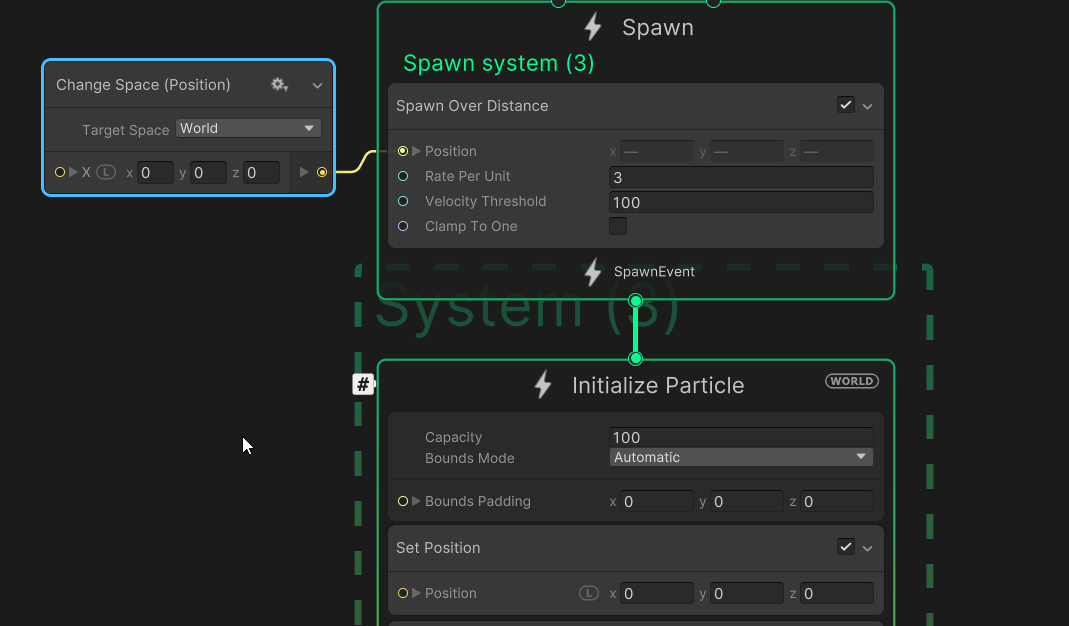 pulsar galleon
ashen robin
https://i.imgur.com/LYuut4K.png
Something like this is possible if you want the ...
pulsar galleon
ashen robin
https://i.imgur.com/LYuut4K.png
Something like this is possible if you want the ...
Awesome, thanks so much!!
 viral marsh
bump
warm torrent
verbal sky
im pretty much a beginner and im not gonna lie, i don't really understand what e...
Vertices are the points of data that make up the polygons of a mesh
Particle systems are procedural meshes
When you set your particle color from the modules, such as to random color, the particle system writes to the vertices' color attribute
Assuming you're using Shader Graph, you can access it with the Vertex Color node
https://youtu.be/1vZKVlQnwio if you want more than the color attribute, you can also use custom vertex streams for a lot more types of data to use in the shader
viral marsh
ok, I've thought of another approach for this
You can use a set position from map, the problem is that I am not entirely sure how I'd set it over time

this is an instant change and I'd like to somehow lerp between 2 maps but I don't know how to do that, any advice would be appreciated!
 stiff topaz
For people interested into VFXGraph, two short sessions from the GDC2023 are now available:
"How to get the most out of your VFX", (optimization in VFXGraph) :https://www.youtube.com/watch?v=HTLA1tEvTKA&list=PLX2vGYjWbI0TkxPwhWgsBhvj-EwxJDt5x&index=27

Real-time VFX are often performance intensive, especially as your game scales. In this session, you will see how VFX Graph works, in particular the new instancing feature that enables you to create many instances of your VFX in an efficient way. Using practical examples, you will learn how to identify issues and potential bottlenecks, as well as...
And a session related to six-way lighting in VFXGraph:
VFX Graph: Six-way lighting workflow : https://www.youtube.com/watch?v=uNzLQjpg6UE&list=PLX2vGYjWbI0TkxPwhWgsBhvj-EwxJDt5x&index=30
 verbal sky
warm torrent
Vertices are the points of data that make up the polygons of a mesh
Particle sys...
verbal sky
warm torrent
Vertices are the points of data that make up the polygons of a mesh
Particle sys...
ho ok i thought vertex meant something different when talking about shader my bad, so if i take the vertex color node i should put it with the texture sample (with an add i guess ?) i don't know if the hue is still usefull , maybe to be sure it keep the patern of the texture ? but it worked like i hoped thanks !
 warm torrent
verbal sky
ho ok i thought vertex meant something different when talking about shader my ba...
warm torrent
verbal sky
ho ok i thought vertex meant something different when talking about shader my ba...
You can add the color if you wish, or use it in any whichever way
Multiply and overlay are most commonly used
verbal sky
warm torrent
You can add the color if you wish, or use it in any whichever way
Multiply and o...
ho ok, thanks again !
viral marsh
Hi, I've made some progress with the particles but I am stuck on a small problem now.
Transition and everything is working but for some reason there are particles flying down when the transition starts and coming back to center towards the end.
In the first part of the video I've shown the setup and in the second it's a transition+slow motion so that you can see it better, thanks in advance.
https://youtu.be/VCLO8YKjGHs
 verbal sky
warm torrent
You can add the color if you wish, or use it in any whichever way
Multiply and o...
verbal sky
warm torrent
You can add the color if you wish, or use it in any whichever way
Multiply and o...
hi again, may i ask for a bit more help ? i tried to use the custom vertex and apply a custom data with a random x 1 to 5 so i could create a variating scale for the noise of my texture in shader but it doens't seem to change, the patern iz always the same.
 warm torrent
verbal sky
warm torrent
verbal sky
Custom1.x (TEXCOORD0.z) would be the Split Node's B, not A, I think
As RGBA is the same as XYZW
Nice looking soap film by the way
verbal sky
warm torrent
Nice looking soap film by the way
really ? thanks ! and i though it didn't work since i didn't saw any render in the noise and texture box but you'r right, B was the solution, big thanks again !
viral marsh
viral marsh
Hi, I've made some progress with the particles but I am stuck on a small problem...
bump, I still can't figure this one out, if you need some more info I'll provide it
viral marsh
viral marsh
bump, I still can't figure this one out, if you need some more info I'll provide...
interesting, enabling point count and connecting it seems to have fixed the problem 0_o
https://imgur.com/2xfAucy
https://imgur.com/a/x54gvGx
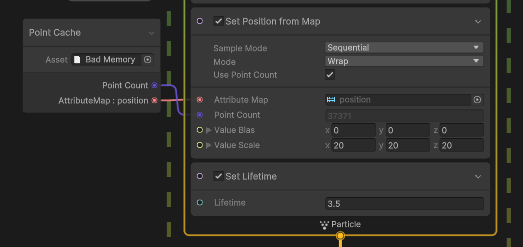
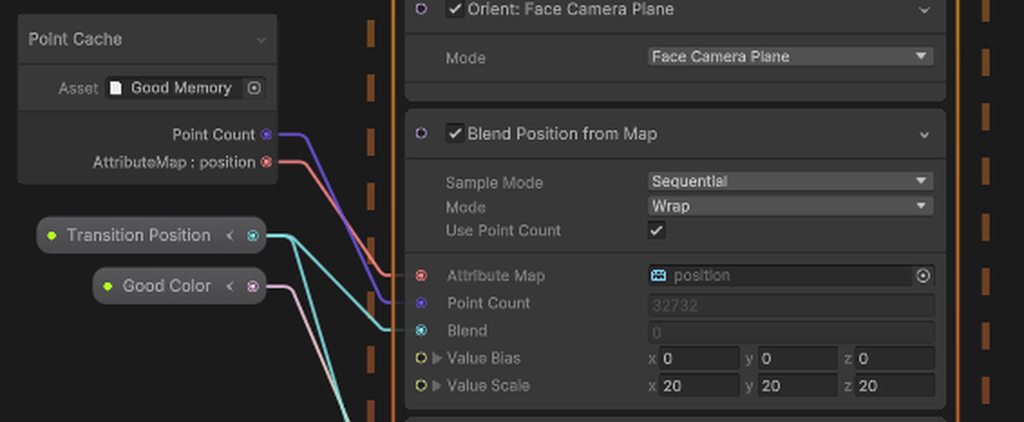 pulsar galleon
I think I've angered an eldritch god somewhere:
My particles look perfect in the preview panel, but in the scene, dare I move them for world zero, they spawn in obscene random spots that dont remotely conform to the objects origin... What's happening lol? How do I fix this?

Making a parent gameobject to hold the particles also does nothing
pulsar galleon
Figured it out mostly.. LOADS of little L's and W's that change certain aspects of the vfx object position. Apologies for clogging the chat!
 royal oriole
Hey I’m looking for an easy to understand guide to VFX for complete beginners if anyone has a good one in mind
 coral grove
Hey guys
One question,
In the previous version of the shader graph whenever we created a blank shader graph.
There was an option to set a target.
There we could choose, Universal or visual.
Later on visual was removed from the target and now is being set from someplace else.
I am looking for an option in the shader graph which will make it compatible with VFX graph.
I am using Unity version 2021.3.21f1
coral grove
coral grove
Hey guys
One question,
In the previous version of the shader graph whenever we...
weirdly enough this was fixed after re-installing the vfx package
 warm aspen
I have a particle sprite that is white in the middle on a black background
How do I apply this to my particle system?
 acoustic dove
Am I crazy or is there no way to actually provide a UV coordinate to a texture sampler node in VFX Graph?

 white arrow
hi i want to make a particle system from this image :

but in the particle system its shows that :

i turned the Alpha is Transparency on but didnt do anything
warm torrent
white arrow
hi i want to make a particle system from this image :
Your material/shader doesn't use alpha transparency, or your texture is imported without any alpha transparency
white arrow
warm torrent
Your material/shader doesn't use alpha transparency, or your texture is imported...
but the image is PNG i have to make the alpha transparency on to make the image background transparency ?
warm torrent
white arrow
but the image is PNG i have to make the alpha transparency on to make the image ...
The image most likely has alpha transparency, since it probably looked transparent to you when you imported it
More probable is that your particle material/shader doesn't use alpha transparency
white arrow
warm torrent
The image most likely has alpha transparency, since it probably looked transpare...
thanks , but how do i can make the particle system use the alpha transparency
warm torrent
white arrow
thanks , but how do i can make the particle system use the alpha transparency
From the particle material
It should be using a particle shader that gives those options you need
white arrow
warm torrent
It should be using a particle shader that gives those options you need
thanks a lot man !
it worked
viral marsh
Hi, do I have to keep the vfx object disabled before I want to use the effect and disable it once again when the effect finishes or does it not make a difference?
Asking because this graph lowers my fps noticeably even after it is done emitting so if that's the case I should do what I asked about earlier in the message:
        IEnumerator DieRoutine()
        {
            float lerpPos = 0;
            var startingPos = transform.position;
            _deathEffect.Play();
            yield return new WaitForSeconds(1);
            while (lerpPos < 1)
            {
                lerpPos += Time.deltaTime / 3;
                lerpPos = Mathf.Clamp01(lerpPos);
                float t = NnUtils.EaseInOut(lerpPos);
                transform.position = Vector3.Lerp(startingPos, CheckPoint, t);
                _deathEffect.SetFloat("Transition Position", t);
                yield return null;
            }
            yield return new WaitForSeconds(0.25f);
            Sanity = _startingSanity;
            _deathEffect.Stop();
            _deathEffect.SetFloat("Transition Position", 0);
            ToggleComponents(true);
        }


 viral marsh
Hi, do I have to keep the vfx object disabled before I want to use the effect an...
viral marsh
viral marsh
Hi, do I have to keep the vfx object disabled before I want to use the effect an...
it's quite a simple question, could somebody take a look?
 ripe pollen
Hi guys, I'm experimenting an issue, I have the latest version of unity 2021.3, and on a simple Unity URDP project, I show a VFX Graph, on the editor it works fine but on Android it does not appear...
i dont know what to do 😦
i have an Samsung S22 for testing the project..
warm torrent
ripe pollen
Hi guys, I'm experimenting an issue, I have the latest version of unity 2021.3, ...
Most if not all mobile devices don't support VFX graph because it has higher graphics API requirements
ripe pollen
Yea but i tested on the latest Samsung S22, it can't be a problem no?
warm torrent
I don't know the specifics but you should be able to find those requirements based on this and compare to your device
Supporting compute shaders is the important part, I believe
ripe pollen
i printed that on the console :
And supportsComputeShaders is on True while maxComputeBufferInputsVertex is on 0 and maxComputeBufferInputsFragment on 24
ripe pollen
ripe pollen
i printed that on the console :
 ripe pollen
warm torrent
I don't know the specifics but you should be able to find those requirements bas...
ripe pollen
warm torrent
I don't know the specifics but you should be able to find those requirements bas...
is there a settings for the project to modify maxComputeBufferInputsVertex ?
warm torrent
ripe pollen
is there a settings for the project to modify maxComputeBufferInputsVertex ?
I believe SystemInfo reports what the hardware/API are capable of
I'm not personally familiar with mobile graphics though
ripe pollen
warm torrent
I believe SystemInfo reports what the hardware/API are capable of
I'm not person...
ok thanks anyway, is it possible to Show with the CPU instead of GPU (the vfx graph) ?
warm torrent
ripe pollen
ok thanks anyway, is it possible to Show with the CPU instead of GPU (the vfx gr...
Not yet, though it's a considered feature
Particle System is your only alternative
ripe pollen
warm torrent
Not yet, though it's a considered feature
Particle System is your only alternati...
https://portal.productboard.com/unity/1-unity-platform-rendering-visual-effects/tabs/9-vfx-graph yea i just saw that, its sad
thanks anyway for your help :))
warm torrent
ripe pollen
https://portal.productboard.com/unity/1-unity-platform-rendering-visual-effects/...
Even with the CPU simulation as an option, it'd be unlikely to be practical in most scenarios
Mass particle effects are something GPUs are orders of magnitude more efficient at than CPUs
ripe pollen
warm torrent
Even with the CPU simulation as an option, it'd be unlikely to be practical in m...
Yes, I know, but for graphs that produce simple particles (and very few particles per second) I don't see where the disadvantage could be
warm torrent
ripe pollen
Yes, I know, but for graphs that produce simple particles (and very few particle...
If the effect is simple, why not do it with Particle Systems? At that scale it'd likely be cheaper too considering the overhead cost of VFX graphs
ripe pollen
For exemple my VFX graph was that :

I use the Particle Strip features of VFX Graph :((
warm torrent
I see, beziers too
Though it could be tedious this looks like something you could implement with a custom script, or a script + a particle system
ripe pollen
warm torrent
I see, beziers too
Though it could be tedious this looks like something you coul...
Are you sure we can do that with a particle System + a script ?
Like manipulating the particles etc..?
Its that, the problematic :xx
warm torrent
ripe pollen
Like manipulating the particles etc..?
I've never done it but it could be a possible option to look into
viral marsh
viral marsh
Hi, do I have to keep the vfx object disabled before I want to use the effect an...
please
ripe pollen
viral marsh
Hi, do I have to keep the vfx object disabled before I want to use the effect an...
You do Mathf.Clamp01(lerpPos); and the while condition is always true so ? no ?
viral marsh
ripe pollen
You do Mathf.Clamp01(lerpPos); and the while condition is always true so ? no ?
check before correcting someone
that's not the case, clamp clamps it to the min of 0 and max of 1
inclusive
the while loop and everything works fine
I asked a very clear question, do I need to do some kind of a cleanup after playing particles
pulsar galleon
Having a problem where whenever i move my vfx, the spawnrate jumps to the move. Need to have my vfx spawn at the rate they do when they sit still. Anyone know what's happening here?
https://i.gyazo.com/8bc7dc6e4f8d76e54e77149b40a7bd32.gif
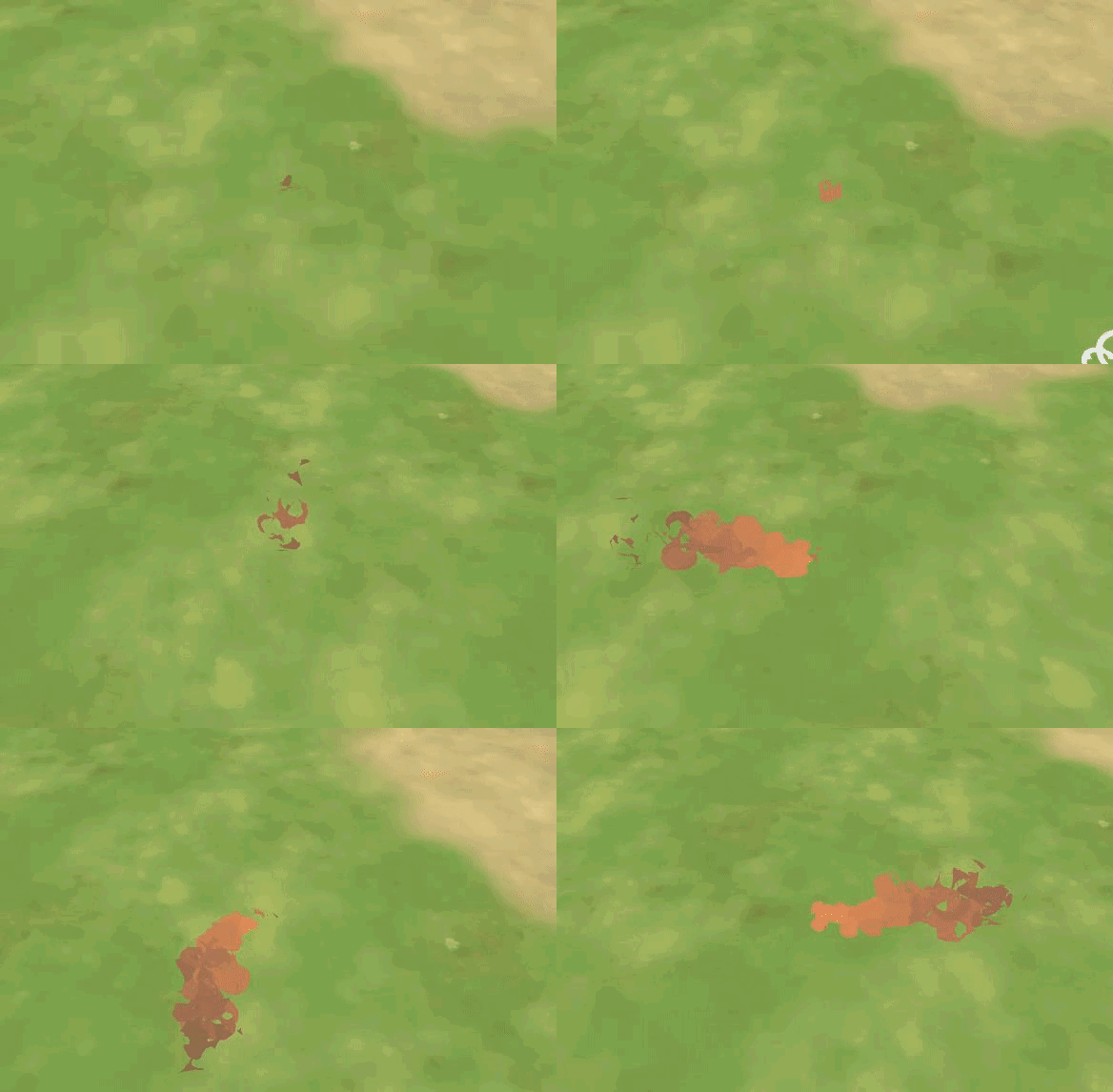
 opal star
viral marsh
Hi, do I have to keep the vfx object disabled before I want to use the effect an...
opal star
viral marsh
Hi, do I have to keep the vfx object disabled before I want to use the effect an...
The graph itself is not very complex. One problem that sticks out is the huge capacity. You see when you set the capacity memory is actually pre-allocated for that amount of particles. This is a performance loss. Since you are bursting from a point cache I suggest you set the capacity to the point count. And yea disabling the graph would free up the resources allocated for it. But if you plan to reuse it it might be better to keep it active.
Also sorry I didnt answer about the position maps before I was very busy
opal star
stiff topaz
For people interested into VFXGraph, two short sessions from the GDC2023 are now...
You seem like the right person to ask. During GDC a demo for vfx instancing with a mech shooting a whole bunch of spiders and the shots making nice impacts was shown. Im very much interested in looking at this as a sample if possible. Also the complete explosion from the video would be nice too ❤️
 raven vortex
Hi ! Beginner and particle system and have a question ! I Want to make star particles that rotate in a circular fashion around a center point (like the red arrows in the image) but after tweeking around the parameters can't find a way to make that happen. Can anyone guide me in right direction (which keywords/parameters i should use) ?

 burnt coral
raven vortex
Hi ! Beginner and particle system and have a question ! I Want to make star part...
burnt coral
raven vortex
Hi ! Beginner and particle system and have a question ! I Want to make star part...
Try the "Orbital" field in the Velocity over Lifetime module
As well as set a Start Rotation if you want it to rotate while moving around the center point.
raven vortex
That's exactly what I needed thank you very much !
stiff topaz
opal star
You seem like the right person to ask. During GDC a demo for vfx instancing with...
So the VFX demo that you saw was related HLSL block. We've created this small and stupid game to stress test the incoming HLSL Features in VFXGraph.
I've been working on the different VFX of this project and will be happy to extract the explosions for you.
The VFX (Impact/explosions) are using the 6-way lit shader for smoke and explosion and the textures are free to use and already available. You can find the link on this Blog Post page: https://blog.unity.com/engine-platform/realistic-smoke-with-6-way-lighting-in-vfx-graph
Regarding the demo that you saw it's just a test , but we might push it further and make it available for everyone later on.

 zenith grove
Is Unity recorder restricting VFX graph functionality in any way or am I doing something wrong? I have made a particle effect that uses the block from the screen. It basically changes the rotation of particles. Everything works well both in scene and game view but once I try to record it using recorder it seems like this block completely stops working
 pulsar galleon
Having a problem where whenever i move my vfx, the spawnrate jumps to the move. ...
pulsar galleon
pulsar galleon
Having a problem where whenever i move my vfx, the spawnrate jumps to the move. ...
Wanted to give this a quick bump, ty all!
 compact abyss
This is my first time using the unity particle system, I want to make an effect of falling leaves being blown by wind. So far I was able to have one particle system emitting leaf particles that rotate as they fall, and each leaf particle has a sub emitter that is supposed to give it a wind trail. I want to make the trail particles rotate with the leaf, thus making the small loop in the image which looks more natural imo. I tried duplicating the trail particle system and moving it around the scene in a corkscrew pattern manually, and it created the look I was going for. does anyone have ideas for how to basically attach the trail particle emitter to some vertex of the leaf sprite so that as the leaf turns, so will the trail particles?
 compact abyss
This is my first time using the unity particle system, I want to make an effect ...
compact abyss
compact abyss
This is my first time using the unity particle system, I want to make an effect ...
thought about my problem a bit - i realized i just need a way to get a reference to the sub emitter that each particle has
 prime dome

 dull obsidian
stiff topaz
So the VFX demo that you saw was related HLSL block. We've created this small an...
dull obsidian
stiff topaz
So the VFX demo that you saw was related HLSL block. We've created this small an...
thanks for the the insight Orson 🙏 @opal star and for what it's worth, i noticed post game dev conference there is a gif of this mech shooting spider like creatures demo on the VFX graph roadmap item for the custom HLSL block (in progress) https://portal.productboard.com/unity/1-unity-platform-rendering-visual-effects/c/114-custom-hlsl-block
which according to Vita- at Unity this feature is already on a pull request in review. https://forum.unity.com/threads/visual-effect-graph-public-roadmap-now-live.884713/#post-8917499
presumably this is an internal pull request that will appear as a commit on one of the upcoming automated internal/master pull requests that happens every ~2 weeks on the public github repo and then hits a unity alpha release shortly after.

Unity Forum
Please check out our newly created public roadmap: https://portal.productboard.com/unity/1-unity-graphics/tabs/9-visual-effect-graph
What do card...
opal star
dull obsidian
thanks for the the insight Orson 🙏 <@292371456862584833> and for what it's wor...
I am more interested in the shooting part than the hlsl blocks. Im just curious how you tie vfx graph to the actual projectiles. It cant be as simple as one instanced graph per projectile right?
I mean tons of vfx driven enemies are also very interesting Im sure I can find a use case for that too🤣
dull obsidian
opal star
I am more interested in the shooting part than the hlsl blocks. Im just curious ...
ah, okay. i'm interested to see what is dependent on the HLSL block in that demo and what isn't.
opal star
I bet the spiders are
You know your vfx. How would you handle projectiles with the graph?
dull obsidian
opal star
You know your vfx. How would you handle projectiles with the graph?
in most cases i would keep projectiles in c# and/or cpu particle system (fka shuriken) to stay aligned with gameplay logic and largely out of vfx graph simulation (init &update contexts) though likely i would still take those c# projectile positions into vfx graph and only use vfx rendering (output context). and possibly use the C# projectile position as source for some secondary sub-spawner / sub-emitter effects that are cosmetic only and not important to gameplay logic.
opal star
dull obsidian
in most cases i would keep projectiles in c# and/or cpu particle system (fka shu...
Oh yeah our projectiles are c# and moved by the job system. Im interested in using vfx graph for the cosmetic part. How do you output a particle without initing it first? Im not following here
dull obsidian
ah my mistake i haven't done this setup in a while. you are correct in suspecting something is off with my thinking lol. one still needs to use some simple "deterministic" initialize and update contexts to set the initial and updated positions but disable the velocity integration and angular integration in the update context (called "Update Position, Update Rotation") and instead use a set position block in the update context to set positions every update from the C# position / exposed attribute buffer (most likely a graphicsbuffer, that has particle attributes that been uploaded from a nativearray.
dull obsidian
@opal star i am going off memory and the documentation but i want to test this now to confirm
 jaunty tree
hello everyone. would anyone have an idea as to how the lightning animation here is done? https://youtu.be/WG5HlDdQz4E?t=8

Chain Lightning build for Sorceress Diablo 2 Resurrected that nobody uses anymore
ashen robin
Make some 2D line texture, or use a particle trail then pump up the noise valuessss
jaunty tree
Ok, I'll try that
line texture is just a black and white texture with lightning-like lines that you then scroll?
Thanks!
ashen robin
yeah, probably the most simplest way, but if you want it to fork then you're looking at multiple systems or some alg/shader stuff
 hidden quarry
How do you make a particle stay in the scene for longer? I.e, a shell casing that would not disappear fast, but after like 10 seconds.
warm torrent
hidden quarry
How do you make a particle stay in the scene for longer? I.e, a shell casing tha...
With Particle System this would be the Start Lifetime of the main module
 torpid snow
im making rain for mobile
will reducing the values of these parameters have any effect on performance?i.e improvement ?
 opal star
dull obsidian
<@292371456862584833> i am going off memory and the documentation but i want to ...
opal star
dull obsidian
<@292371456862584833> i am going off memory and the documentation but i want to ...
Yeah my initial idea was to stick all projectiles in a graphics buffer and draw them in one graph. Im wondering however if the new instancing option for the vfx graph wont do much of the same and we can simply pool like 500 graphs or something. Thats why I wanted to see how the people at unity handled projectiles with the graph
 naive pulsar
i want the triangle to rotate over lifetime to the left, what setting do i need in the graph ?

 ashen robin
Rotate over lifetime?
naive pulsar
yes
ashen robin
That's the answer ;p
naive pulsar
yea but there is no rotate over lifetime there is only a set angle function
and idk how to use it
ashen robin
Ah, let me check if unity ever loads
Ok, yeah I swear there was a rotate over time, but I do use the set angle for some of my stuff
naive pulsar
@ashen robin and how can i rotate it ?
ashen robin
Experiment with it and in the update particle, add to an axis over time.
naive pulsar
ok thanks
ashen robin
Rather, in update you can just do Add, but in the output you can also do Add angle over life
I think. Little rusty ^^
naive pulsar
oh thanks it worked
i just did that

whats the difference between add and set angle?
ashen robin
set will always set it back to that angle. You'd usually just use that in the instantiation part of system, unless for some reason you're trying to prevent rotation then you could probably do it in update.
dull obsidian
opal star
Yeah my initial idea was to stick all projectiles in a graphics buffer and draw ...
ah okay true glad you brought that up. there is that vfx graph instancing / batching, i haven't tested that yet but i believe there are some settings to tune the instance batch size. i think there are currently a few limitations in features as well like maybe particle strips aren't supported for graph instancing yet? Vita- goes over what was in the first iteration of the feature vs what was planned to make it in the next. not sure how much is implemented in the current master branch / 2023.2 alpha https://forum.unity.com/threads/how-to-use-vfx-graph-instancing.1301430/
Unity Forum
We using Unity 2022.2.0 α17.
I would like to try Instancing in VFX Graph, but the Shader setting is not On even if I check the Allow Instancing box in...
stiff topaz
dull obsidian
ah, okay. i'm interested to see what is dependent on the HLSL block in that demo...
All the Spiders (a lot....), are one Big VFX Graph. each spider are made with particles, Sphere particles for bodies and Strip/trail for the Legs.
The Behavior motion: Cohesion, paths etc is driven inside the VFXGraph thanks to HLSL Blocks.
HLSL Block was also used to retrieves the Hit from Gatling and Explosion if I'm correct.
How to use VFX Graph Instancing
 silent crypt
Hey mates, I'm not sure if I should ask here, since I already asked in #archived-shaders, but I'm not sure if it is a shader-problem: Basically: I want my shader to be affected by a light-source. Working on 2D. Other Sprites are affected by it. I assume it has something to do with the material Sprite-Lit-Default, but since I added an own material to my new sprite, it seems like this property isn't affected. Is there a way to give an object 2 materials, or do I have to somewhat update the existing one, so it does get affected by the light-source? Or is there any easy "fix"?
Or shoud I ask this question in #archived-urp or #archived-lighting? I can't tell which the correct channel for that is
 hushed wadi
Can I do something like this https://www.youtube.com/watch?v=X79yINOhdo0 in VFX graph? I don't really need collisions... just some tentacle-animation stuff 🙂 with some cool effect...

Optimized logic of particles behavior compared to the First tutorial.
0:00 - Ribbons reorder in a single emitter + gravity force
1:15 - Velocity affected color change
2:48 - Length increased
5:01 - Multiple ribbons reordering to Independent Parents (two emitters only)
6:10 - Squid gun, Projectile with t...
dull obsidian
hushed wadi
Can I do something like this https://www.youtube.com/watch?v=X79yINOhdo0 in VFX ...
yes, start with the heads and trails system that is included with vfx graph. then change the output context to a lit output and enable normal bending. you can also do the collisions with sdf and/or collide with depth buffer blocks in the update context
hushed wadi
thanks
naive pulsar
how can i stop this particle from moving with the camera, in vfx graph particle system

fixed it
 carmine ether
Hi. Is there a way to like fix the particles not spawning properly with the spawn over distance node? Like, while moving slow it looks good, but at high speeds it appears as if the particles spawned one by one and are too separated from one another
 lone helm
I need some help understanding particles relative to shaders and textures. I want to make my emmitted particles fade over time, but for some reason I can't get the alpha values to blend properly and my particles just pop out of existence at the end of their lifetime. Attached are some screenshots to show what the particles look like at the end of their life, the configuration for the emitter, the configuration of the color over lifetime module, the configuration for the material, and the configuration for the texture. is it just something wrong with my alpha values somewhere, or am I using the wrong shader?


 warm torrent
lone helm
I need some help understanding particles relative to shaders and textures. I wan...
warm torrent
lone helm
I need some help understanding particles relative to shaders and textures. I wan...
I can't spot any error
Is the gradient we're seeing on Color over Lifetime?
lone helm
warm torrent
I can't spot any error
Is the gradient we're seeing on Color over Lifetime?
yes it is color over lifetime
warm torrent
lone helm
yes it is color over lifetime
Just as a sanity check you should be able to create a new particle system from the GameObject menu with default settings and give that a similar alpha gradient color over lifetime
lone helm
warm torrent
Just as a sanity check you should be able to create a new particle system from t...
ill try it out
lone helm
warm torrent
Just as a sanity check you should be able to create a new particle system from t...
wtf?????? that worked??????????????
actually no
its so weird. Is there something different between emitting particles through the particle systems versus using ParticleSystem.Emit()? Whenever I use a burst, they fade like normal, but whenever i use .Emit(), the albedo doesn't fully work???
IVE FIUGURED IT OUT
my objects explode, and when they do, they disable all visible components and then delete itself after 3 seconds
so what happens is my particle animation is being cut off because the object is deleting itself too early
crazy.
warm torrent
Makes sense
This teaches us to preview effects under many circumstances
If all else fails, what usually solves any problem is to make something that works "for certain" such as the default particle effect, and see how the settings or circumstances differ
lone helm
so true king
 soft current
Can anyone help me with using the decals? I will gladly share the issues I have as well as the code
pulsar galleon
Having this issue where moving a vfx effect either restarts it or plays it really really fast. When my vfx object isnt moving, the rate is just as intended. But be it in scene view or game mode, whenever it moves it plays at lightspeed.
How can I keep the rate constant even when the vfx object is moving?
https://i.gyazo.com/8ef84d9b08c6a81362b98de6b6e3f0a5.gif

 clear spruce
pulsar galleon
Having this issue where moving a vfx effect either restarts it or plays it reall...
clear spruce
pulsar galleon
Having this issue where moving a vfx effect either restarts it or plays it reall...
How do you handle the changing of the flipbook texture?
pulsar galleon
clear spruce
How do you handle the changing of the flipbook texture?
The what?
clear spruce
pulsar galleon
The what?
Im assuming you are using flipbook texture to animate the flames or whatever that is
pulsar galleon
clear spruce
Im assuming you are using flipbook texture to animate the flames or whatever tha...
nope, those are 3 objects with a shader on em
clear spruce
pulsar galleon
nope, those are 3 objects with a shader on em
What sort of shader?
pulsar galleon
clear spruce
What sort of shader?
Made a bunch of tweaks to the end result of this tutorial:
https://www.youtube.com/watch?v=dPJQuD93-Ks&t=2s

In this Unity Smoke Tutorial we are going to see how to achieve a stylized / cartoon effect using Visual Effect Graph and Shader Graph! A quick technique with an awesome outcome!
Enjoy!
Wishlist our game :D https://store.steampowered.com/app/1763860/Rabbits_Tale
00:00 Intro
01:00 Smoke Shader - Start
01:50 VFX Graph - Start
02:43 Smoke Sha...
(including a much lower poly version of the 3d object lol)
jaunty tree
Does anyone know how this is done https://www.youtube.com/watch?v=Ov8GqA8luCg ?

Made using Niagara, UE5, Photoshop, Blender, Substance Designer
It does not look like one scrolling texture, since the lightning that goes from player to enemy 1 and the one from enemy 1 to enemy 2 etc look a bit different when you look at it
ah no, apparently a scroll book is used. so is there one single mesh between each of the targets (one fro player -> enemy 1, one for enemy 1 -> enemy 2, etc), and each of them just flips through a texture book?
that would distort it in case the targets have very different distance to each other
warm torrent
jaunty tree
Does anyone know how this is done https://www.youtube.com/watch?v=Ov8GqA8luCg ?
If you look at it frame by frame (which on youtube you can do with dot and comma keys) it looks like there's multiple rays spawned along the same path, with a slightly different texture
A flipbook indeed, it appears, where each "phase" of the arc seems individually hand drawn
They also overlap in time just a bit, which points to multiple arcs
How the arc "jumps" from one point to next progressively seems to be from different length arcs with a tapering end
In each "step" the arc is longer, but the previous sprite remains for a moment
ashen robin

In this Unity tutorial let's create an Electric Arc with Visual Effect Graph. It's an awesome technique that opens a few interesting doors. An arc effect can be used in a chain reaction for example. Enjoy!
00:00 Intro
00:39 Particles in a Bezier Curve
04:48 Particle Strip
06:18 Improving Aspect
07:25 Controls for the Bezier Curve
09:06 Electri...
Grabriel does a good job at at making similar lightning using mostly a bunch of noise and curves with the graph if you don't want to go through a flipbook process
Though that blood lightning looks really stylized which may be hard to recreate without doing some arts
jaunty tree
Thanks, that explanation helps me a lot!
And also for the tutorial link 🙂
I think I'll take whatever I can recreate haha, quite new to the area. But it is lots of fun
 rustic saffron
I'm extremely new to VFX graph, so sorry if it's a simple mistake, but I have the issue that my VFX gets culled on a second camera when the main camera looks away from it. I set the VFX asset's culling flags to "Always recompute bounds and simulate", but that doesn't seem to fix that
How do I prevent the VFX from being culled on the second camera?
warm torrent
No crossposting please
 tender vine
https://youtu.be/Gj_R72oyTfE
How could i make a particle that has a start and end point, and have particles move between them? video for reference.
It doesn't necesarily have to be as advanced as the reference, but i'd like to know where i could start and what i'd need for it.

Got the medigun beam sorted away for regular heal, charged and Uber states. For some reason the Medic's Uber skin kept glitching so I took it out. I have found that it takes a ridiculous amount of lighting to keep things from getting lost in shadows. This one had six different lights set up and its still not enough for broad daylight.
I wrote ...
warm torrent
tender vine
https://youtu.be/Gj_R72oyTfE
How could i make a particle that has a start and en...
You'd need a path system of some sort
https://youtu.be/hiyv9vZAOvA this tutorial shows how to do it in VFX graph
There's also a particle system solution included but it's not per-particle, which would be necessary for this effect
tender vine
mhm...
does he explaint VFX graps? because i don`t know what they are :/
warm torrent
The medi-beam is rather simple, just particles moving from start to end via a bezier curve
Uniquely the particle itself is a flipbook animated billboard, with flipbook frames progressing by time, but also with each new particle frame being offset in time as well
warm torrent
tender vine
mhm...
does he explaint VFX graps? because i don`t know what they are :/
No, this is not a beginner tutorial to VFX graph, but you may be able to along
VFX graph is a more advanced GPU solution to rendering particle effects
tender vine
warm torrent
No, this is not a beginner tutorial to VFX graph, but you may be able to along
V...
Oof... then i'd rather stay away from that!
My target device is the Quest 2 and i don't want players heads exploding xD
warm torrent
tender vine
Oof... then i'd rather stay away from that!
My target device is the Quest 2 and ...
VFX Graph requires a somewhat advanced graphics API so most mobile hardware can't run it at all
To do the same in PS I assume you'd need a way to set individual particle positions to move along the curve outside of the PS since it's not built in functionality
tender vine
I could do multiple systems for that, no?
altho it doesn't have to be as... advanced as that!
my goal is
beam go from A to B
and lave it be movable!
so then A moves the beam ofc adjusts and vice versa
warm torrent
tender vine
I could do multiple systems for that, no?
The same tutorial I linked also shows how to move particle systems / any gameobjects along a bezier path, but not individual particles
If that's sufficient is up to you
Could also be used with a line renderer
 cinder pewter
Anyone know why my particles collide with the ground but then immediately fall through it ?
 ashen robin
Uh, perhaps the bounce is set to 1?
I think there's a bit more to that but I remember that being part of the reason
Ah, that's just the amount of force applied. I had a similar problem with that but it's been quite a while since I used the shuriken system.
tender vine
warm torrent
The same tutorial I linked also shows how to move particle systems / any gameobj...
i'll look into it, thankk you very much
ashen robin
cinder pewter
Anyone know why my particles collide with the ground but then immediately fall t...
Usually when stuff clips through your colliders you've got stuff traveling too fast. Do the particles even bounce at all or do they just smack into the collider and reset their speed? Some ideas is decreasing the voxel size, and increasing the collision quality would be my guess.
cinder pewter
Thanks a bunch that did in fact fix it!
Now I'm just wondering why this isn't changing the emission count of my index 0 burst 😞

 stoic marlin
how do i fix this weird row of bad transparent particles
you can see it better with fog enabled
 north palm
Anyone got an idea why this is happening?
the particle weirdly goes to the other side

{
var emitParams = new ParticleSystem.EmitParams();
emitParams.position = startPos;
emitParams.applyShapeToPosition = true;
emitParams.startColor = startColor;
beamParticle.transform.rotation = Quaternion.LookRotation(direction.normalized);
beamParticle.Emit(emitParams, 1);
}```
this is the code that controls it slightly fluid lagoon
north palm
Anyone got an idea why this is happening?
the particle weirdly goes to the other...
fluid lagoon
north palm
Anyone got an idea why this is happening?
the particle weirdly goes to the other...
what's the camera angle here?
north palm
fluid lagoon
what's the camera angle here?
0, 0, 0
fluid lagoon
So that thing is rotating on the z axis?
north palm
particle system's rotation is confusing
as you can see on the top right
fluid lagoon
Basically I think the issue here is you're not providing the second parameter to LookRotation
When you don't provide a second param to LookRotation it assumes Vector3.up
which obviously is a problem when the thing is looking up
Try perhaps direction.normalized, Vector3.back
 elder latch
I am trying to voxelize a character model in vfx graph (to make it explode etc.) So far I figured it should be a good idea to prebake a point cache to use for the voxel positions and colors. Unity's built in solution seems to only generate points on the characters hull. Is there any way to generate a uniformly distributed point grid inside the models volume?
 warm torrent
@tender vine I forgot that another way to make particles sort of move in a "path" is to use external forces
You could place a particle system force field with gravity onto the target gameobject, and then by enabling external forces on the particle system the particles would gravitate towards it
tender vine
warm torrent
<@945052814403575888> I forgot that another way to make particles sort of move i...
That sounds brilliant! ill see how i could do that once i get back from work! thanks for the tip!
prime dome
hello guys, the vfx graph dosent seem to render any particle on android builds
is there anything im missing
unity version 2021.3.19f1
warm torrent
prime dome
hello guys, the vfx graph dosent seem to render any particle on android builds
...
The platform needs to support compute shaders, most mobile devices do not
prime dome
warm torrent
The platform needs to support compute shaders, most mobile devices do not
so there is not way around it? most phones have opengl 3 atmost and compute shaders should work on them?
some vulkan api phones working but some of them dosent show anything at all.
warm torrent
prime dome
so there is not way around it? most phones have opengl 3 atmost and compute shad...
The requiements are
-Support for Shader Storage Buffer Objects (SSBOs). If a platform supports SSBOs, it returns a value greater than 0 for SystemInfo.maxComputeBufferInputsVertex.```There's no way "around" it, as far as I know, either the platform is capable or it's not
prime dome
oh okay, well thank you for the detailed reply,
i guess ill use shuriken instead as it as most of the vfx might not show so its better i roll back.
stoic marlin
stoic marlin
you can see it better with fog enabled
i found out how to fix it
surface type : opaque instead of transparent
then turn on alpha clipping
warm torrent
@stoic marlin Particle Systems have a "sort mode" in renderer for transparent particles
tender vine
warm torrent
<@945052814403575888> I forgot that another way to make particles sort of move i...
Just came home... how does the External Forces module worK?
warm torrent
tender vine
Just came home... how does the External Forces module worK?
It enables receiving forces from Particle System Force Fields
which are a separate gameobject/component
prime dome
I created a a particle effect almost everything is on default and unchanged expect for my material, color and shape
and when my 2 objects crash in to each other I dont see any particles
void OnCollisionEnter(Collision collision)
    {
        Debug.Log("Collision occurred " + collision.gameObject.name);

        if (!hasExploded)
        {
            Debug.Log("Entering if statement");
            var effect = Instantiate(explosionEffect, collision.transform.position, Quaternion.identity);
            effect.transform.parent = collision.transform;
            hasExploded = true;
            Debug.Log("Particle effect wkring");
            Debug.Log("Collision object wrking: " + collision.transform.gameObject.activeSelf);
}```but my console shows that its working
when i hit play nothing happens when my objects collide
but i can see my particles in the scene view
 prime dome
 stoic marlin
warm torrent
<@1084589120787075204> Particle Systems have a "sort mode" in renderer for trans...
stoic marlin
warm torrent
<@1084589120787075204> Particle Systems have a "sort mode" in renderer for trans...
This sort mode only sorts particles in its own particle system is there anyway to fix this
warm torrent
stoic marlin
This sort mode only sorts particles in its own particle system is there anyway t...
Are we seeing multiple particle systems in the video?
stoic marlin
yes, but im also working with clouds now and those clouds are particle sytems
ashen robin
Should be like a general system render queue somewhere on the component
otherwise I think a urp renderer object may work
stoic marlin
i dont want the tornado to be clipping through the cloud like that
i put on another material on it (the one with alpha clipping) but i wanna use the same material as the clouds
ashen robin
If by clipping, you mean you don't want them to pop out in front of the clouds sometimes, then you could consider shrinking them quads and adding more of them to the system
An alternative way to create a tornado is making a 3D mesh and doing some shader worker.
Probably quite a few tutorials on that on youtube
stoic marlin
ashen robin
If by clipping, you mean you don't want them to pop out in front of the clouds s...
yeah thats what i mean, but im not sure shrinkign the quads would really do anything
 long orchid
I'm having an issue in Unity with my particle system. There are no layers in this project, the particles are visible in the editor mode, the game is receiving the correct input to start emitting these particles and just a few hours ago I had no issue with the particle system. Now when I press play and press LMB the particles don't fire at all. All of the settings in the inspector have not been changed either this just started when I loaded the project.
ashen robin
stoic marlin
yeah thats what i mean, but im not sure shrinkign the quads would really do anyt...
It would lessen how it fades in and out of the clouds, rather being less blotchy, but perhaps it can be solved by removed the culling. I kinda need to fool around with it to really get a better idea.
I've had something similar and solved it using alpha clipping and using a large amount of particles, but the performance wasn't the greatest
ashen robin
Yeah, but mixing transparent volumetric systems creates problems as you see, so the idea is substituting one with opaques
The reason I was suggesting the 3D model and shader is that the tornado itself would be opaque, but with alpha clipping you can scroll a texture for that illusion of blending
tender vine
oh wait, you can comission?
tender vine
You mean... make something for you?
 midnight grove
@dusty creek !collab
 gleaming flickerBOT

📢 Collaborating and Job Posting
We do not accept job or collab posts on discord.
Please use the forums:
• Commercial Job Seeking
• Commercial Job Offering
• Non Commercial Collaboration
dull obsidian
elder latch
I am trying to voxelize a character model in vfx graph (to make it explode etc.)...
I recommend to look into converting the character model mesh to a SDF (Signed Distance Field) which will typically be represented as a 3D Texture / *Texture3D * or a RenderTexture with dimension set to Tex3D that can then be sampled by VFX graph similar to a point cache. Or maybe you may want to reduce it to a point cache or compact Texture or GraphicsBuffer before sampling / loading the data into VFX graph. You have two options that Unity provides (there are others floating around in the community but these are the most official options and the most well developed that I'm aware of.)
- There's the VFX Graph's "SDF Bake Tool" which as the name suggests, aimed at baking SDFs that are essentially static but can be very high fidelity and robust. for your use case, the docs say "For Skinned Mesh Renderers, the SDF Bake Tool uses the Mesh in its rest pose." https://docs.unity3d.com/Packages/com.unity.visualeffectgraph@16.0/manual/sdf-bake-tool.html
- And then there is the Unity demo team's "mesh-to-sdf" aimed at real-time SDF generation even for a dynamically deforming SkinnedMesh but limited to a lower detail to maintain real-time performance. Note that this is not a production ready or officially supported feature at this time just something the demo team put together and released in a sort of experimental state. https://github.com/Unity-Technologies/com.unity.demoteam.mesh-to-sdf
 pastel prairie
why is my graph an annoying volume? I just want a line

I'm under Velocity over time
I don't understand what is going on with this graph either. What does it mean when it's a volume instead of a line
warm torrent
pastel prairie
I don't understand what is going on with this graph either. What does it mean wh...
Random between two curves, potential result visualized by the "area" between them
pastel prairie
bruh it was Curve I was meant to select, not random between curves 😂
now it makes sense lmao
 spiral moth
Curious if anybody has any ideas how to set something like this up in VFXGraph:
So i want to spawn a bunch of grass clump particles..
But i have a large area to cover and it's way too many particles..
So i was wondering if it would be possible to somehow spawn the grass clumps in to cover the area within the camera view, and then if the camera moves it destroys the clumps no longer visible and spawns in new ones for the area now in view..
I guess the unity Terrain system does something similar for grass and vegetation
So the problems i forsee with this would be:
- everything 😛
- grass clumps would have to have some persistently mapped values for like rotation ( for example if i would normally just spawn them in with random rotations for variation, in this case these rotations would need to be persistent ( and positions actually ) so that when moving the camera away and despawning these out-of-view clumps, they would spawn back in to exactly the same positions and rotations when the camera moves back to those spots in the world again
- i guess this could maybe use a world-space tileable noise or texture, or even sample a large texture map similar to how terrain does it
But i think what i'm struggling with is how to actually implement this in VFXGraph.. is it even possible.
I did a quick test using the WorldToViewport node, checking if the current position on my ground mesh was within the 0-1 normalized screenspace value, and if not then setting Alive to false to kill the particles off.. this worked but was a bit of a crude test and i didn't get to trying how to spawn new particles in for new areas as the camera moves around, which sounds like a bit of a challenge
 rotund sedge
anyone know any good assets or texture packs or sheets for good realistic blood splattering and popping. im making a mutation animation for a player character and i wanna make it gorey
 slow halo
how do you make particle sized random
 frigid haven
I'm using VFX to create a rain effect in a top down 2d game, I ran into an issue where layer ordering is not enough to prevent the rain from showing inside a building, but I cant find a way to have layer masking, am I missing something?
ashen robin
Assuming you're using sprite particles then the ordering in the particle system should do it usually. If that doesn't work, you can look into using renderer objects if you're using URP/HDRP.
 obtuse plaza
I think I'm going insane. Not sure why but particles from assetbundles are really blurry (1st pic) while particels outside of assetbundles are crisp (2nd pic). Is it because the assetbundles were made in a slightly lower version or?...

 elder latch
dull obsidian
I recommend to look into converting the character model mesh to a SDF (Signed Di...
elder latch
dull obsidian
I recommend to look into converting the character model mesh to a SDF (Signed Di...
Thx for your answer. The mesh to sdf repo looks interesting although a bit overkill in my case I guess. I managed to generate my point cache using blender which has geometry nodes to fill a volume with a grid of points 🙂
obtuse plaza
obtuse plaza
I think I'm going insane. Not sure why but particles from assetbundles are reall...
It turns out - YES. It's because the assetbundles were made in an older version. So I guess I'm stuck with the older version of unity?

 frank coyote
ah, there is no material
 lilac peak
i have to select a material that render in front of the skybox right ?
frank coyote
i'm surprised you don't just have a big purple blob
yeah, i guess the default behavior is drawing it at a weird time
create a material, then pick... Particles -> Standard Unlit
and set it to Transparent
lilac peak
it's an asset from the assets store, the support doesn't answer soooo i'm asking here but maybe they did a weird stuff
frank coyote
if the material is marked "Missing", then maybe it wasn't bundled with the rest of the assets
or you didn't import it, or you deleted it
 frank coyote
no prob (:
i've seen that exact issue a few times on VRChat avatar, lol
and in other projects where i was doing weird shader stuff
lilac peak
indeed there were all the materials i needed in the packages but it didnt bundled well idk why
 gloomy storm
Got a question. Is it possible to have the particles of the VFX graph move along a mesh (while said mesh is being animated)?
And if so, how? I cant seem to find any information on this online or the information I do find is fairly limited.
stiff topaz
gloomy storm
Got a question. Is it possible to have the particles of the VFX graph move along...
Are you talking about a Skinned Mesh ?
gloomy storm
Yes
stiff topaz
Well you can easily "pin" the Particles to the Skinned Mesh so that particles follow the Mesh. If you want the particles to circulate/over the surface of a animated skinned mesh it's way more tricky. Do you want them to be stuck on the moving surface, Or to move freely but be stay on the surface?
gloomy storm
I want to have them move around on the surface, almost like something is crawling on the mesh
spiral moth
Hey @stiff topaz sorry to bother you wondering if you've any idea about this - #✨┃vfx-and-particles message
Not sure if i'm completely barking up the wrong tree with this idea
stiff topaz
Curious if anybody has any ideas how to
tender vine
don't know if this is ontoppic, but the line renderer is broken when i use alignment transform Z as the option... view works fine but i want it to not always look at the camera
 clear meadow
I'm fairly new to Unity, just made some rain particles for a game jam project a friend and I are working on.
After troubleshooting for a while trying to figure out what was happening, I came across the conclusion that the collision hitbox for the particles are spherical (and not centered around the center of the particle...?)
I messed around with a few of the settings and a random thing to note is that the collision hitbox scales solely with the Size over Lifetime Y curve (the x and Z curve have no impact on its size) [The size by speed Y axis also impacts the collision for it, but again neither X or Z)
Any thoughts on how to fix this? [Making it so the subemitter particles are actually on the floor instead of hovering above the floor that is [and also hopefully make it so the rain particles dont despawn prematurely cause of the large hitbox]
if anyone knows literally anything on how to fix this or somethin ping me ploz if not dats cool too heheheha
 clear meadow
nevermind found it after like 15 google searches can line up the radius my b stupid question
for anyone wondering [probably nobody but byeah]

 visual cove
Hey all, does anyone know how to use VFXgraph to emit particles from a textured mesh ?
You can't just bake a point cache of the texture because that's not wrapped around the mesh ...
and you can't bake an SDF of the mesh because it doesn't care about the texture....
maybe you somehow do both and combine the data inside the VFX graph itself ?
 white plank
Particles turned pink after adding URP

not sure of what to do, they told me to change the shaders but there's no shaders in this object
fixed
 spice mural
white plank
Particles turned pink after adding URP
spice mural
white plank
Particles turned pink after adding URP
use another material
 sleek venture
Hi guys is it possible to put a material on a Timeline? I'm making a attack effect and I want to be able to move the tiling and offset properties at certain points of the attack
ashen robin
I would assume it's possible assuming you expose the tiling values on your material
On the vfx graph you could probably just create a curve and change the value over the lifetime
sleek venture
ashen robin
On the vfx graph you could probably just create a curve and change the value ove...
I dont know what I'm doing when it comes to using the shader graph so I'm trying to stay away from it as much as possible
I was trying a way to be able to alter the position of my material using the particle system with custom data
but that for some reason is not working (I probably didn't do it correctly)
ashen robin
Ah, I'm not sure about changing it with the shuriken system beyond changing the material manually. There's probably plenty of ways though, but usually I just automate it in the shader itself.
There's also the flipbook process which could be used as a pseudo texture scrolling effect
white plank
I need to keep myself alway from the particle system, it's too addictive.
white plank
Particle editor does not show any particles, but they appear in the project.
Things I have done:
My time setting is not at 0
My material is correctly set
I did try turning on and off the renderer and resimulating
 warm torrent
white plank
Particle editor does not show any particles, but they appear in the project.
Thi...
warm torrent
white plank
Particle editor does not show any particles, but they appear in the project.
Thi...
Do you need it?
I went for years without knowing there was an editor, and I don't think I've ever seen it working
white plank
warm torrent
Do you need it?
I went for years without knowing there was an editor, and I don...
... it would be nice when I'm doing tests in a crowded enviroment
warm torrent
white plank
... it would be nice when I'm doing tests in a crowded enviroment
I usually have particle systems as prefabs and open them in prefab isolation mode from the arrow next to it in the hierarchy
Or have a scene for it
white plank
warm torrent
Or have a scene for it
I did have a scene for them before, but idunno, just feels like I'm missing a feature :/
 dark kestrel
Is there a way to kill a specific VFX Graph particle without stopping the entire system?
frank coyote
I'm considering using a VFX graph to create hitscan bullet traces (so, a line from one place to another, in its simplest form!)
Does it sound reasonable to have a "fire" event that triggers a Spawn with a burst of 2 particles
which then creates 2 particles in a strip
where the positions come from a pair of "source" and "dest" properties?
i'm a little concerned about how it'll behave with multiple shots in one frame
I understand that there's this "direct link" thing that lets me send attributes per-event
but I'm really fuzzy on it and it appears to only be documented in a random unity forum thread
dull obsidian
visual cove
Hey all, does anyone know how to use VFXgraph to emit particles from a textured ...
you should be able to set the position of spawned particles from a mesh and then use the uv vertex attribute(s) from the mesh to then sample that mesh's associated texture and set the color you want the spawned particle to be from say, the albedo texture map. i think this can all happen in the particle initialize context. start here, and you may need to enable vfx graph experimental nodes / blocks https://docs.unity3d.com/Packages/com.unity.visualeffectgraph@16.0/manual/Block-SetPosition(Mesh).html
 fiery elbow
apparently the trigger module from the particle system does not interact with composite colliders. I have tried:
- setting both the composite collider and tilemap collider in the particle system's collider listt
- Checking the layer collision matrix
 warm torrent
fiery elbow
apparently the trigger module from the particle system does not interact with co...
warm torrent
fiery elbow
apparently the trigger module from the particle system does not interact with co...
Iirc particle system colliders are 3D only
frank coyote
frank coyote
i'm a little concerned about how it'll behave with multiple shots in one frame
yeah, I ran into this problem. I was originally using properties. I switched to sending custom attributes along with the event, but I'm unclear how to have each event use its own attributes
doing it like this, all of the events fired in one frame use the same positions

if I change "Location" to "Current", nothing appears at all
I'm missing something here, I think!
dull obsidian
warm torrent
Iirc particle system colliders are 3D only
@fiery elbow it seems there is (now) a 2D version of composite collider? https://docs.unity3d.com/Manual/class-CompositeCollider2D.html
 frank coyote
the tooltip says that "Source" gets the value from a GPU event or spawn attribute
the latter sounds appropriate
                var attr = vfx.CreateVFXEventAttribute();

                attr.SetVector3("Source", firePoint.transform.position);
                attr.SetVector3("Dest", dest);

                Debug.DrawLine(attr.GetVector3("Dest"), attr.GetVector3("Dest"), Color.red, 1f);

                vfx.SendEvent("Fire", attr);
the debug lines all point in different directions, but all of the particle strips are pointing in the same direction
ah! it seems like it's because i use the event to trigger a Spawn context
i plugged Event in directly, and now I get several lines

the idea was to draw four randomly oriented particle strips at once by triggering an 8-count burst
dull obsidian
@frank coyote i want to let you know there are some limitations currently on sub frame spawning and updating. this is officially "planned" to be addressed soon on the roadmap.
https://portal.productboard.com/unity/1-unity-platform-rendering-visual-effects/c/101-sub-frame-interpolation
in the meantime you may want to look into peeweek's vfx graph extras. this doc explains the limitations and how he has worked around them (for spawning at least) with custom blocks / nodes that distribute the spawn payload across multiple updates as quickly as possible given the update rate of vfx graph (which can be faster or slower than the render frame rate)
peeweek / thomas iché is one of the original devs of unity vfx graph that is currently working as a vfx artist on a production videogame (endless dungeon) at amplitude studios
https://github.com/peeweek/net.peeweek.vfxgraph-extras/wiki/MultiplexSpawn

GitHub
Additional Draft tools for VisualEffectGraph. Contribute to peeweek/net.peeweek.vfxgraph-extras development by creating an account on GitHub.
frank coyote
frank coyote
the idea was to draw four randomly oriented particle strips at once by triggerin...
it looks like I can just do this myself (although it does mean i'll be sending more events...)
pew pew
 frank coyote
dull obsidian
<@118467312197042182> i want to let you know there are some limitations currentl...
frank coyote
dull obsidian
<@118467312197042182> i want to let you know there are some limitations currentl...
i'll keep this bookmarked tho, thanks
dull obsidian
@frank coyote also, (be careful with this of course) but if needed, you can adjust the time step (update rate) settings of vfx graph. i think the fixed time step defaults to 1.0/60 to usually align with 60fps rendering. you could make this say. 1.0/120 or faster, performance budget permitting. https://docs.unity3d.com/Packages/com.unity.visualeffectgraph@16.0/manual/VisualEffectProjectSettings.html
warm torrent
dull obsidian
<@601382122103635970> it seems there is (now) a 2D version of composite collider...
Composite collider is only 2D
Particle System collisions are only 3D
Assuming I'm not forgetting about something
frank coyote
I don't need faster updates; I just need to spawn a bunch of things at once
if a weapon fires fast enough to shoot more than once in a single update, I just fire twice (or however many times are needed)
i guess it might look slightly more accurate if the visual effects were updated faster, so that each part of a one-frame burst appears to have been spawned at a slightly different time
i could probably throw in an attribute to offset their lifetime in that case
actually, that's a decent idea..
dull obsidian
frank coyote
I don't need faster updates; I just need to spawn a bunch of things at once
ah yeah, that's what i mean. if only it were that simple. expect issues if you are using multiple events to determine the number of particle spawned "at once" within a game update / rendered frame. things like increasing the vfx update rate and bursting the events spread across vfx updates as fast as possible is the best workaround for multiple spawn events right now, as far as i know.
however, another way around it may be to batch all of the particles desired to spawn in a single vfx spawn event per update if possible. which perhaps could be managed in C# scripting with a "one in, all out" queue " (one in at a time from user input, etc via a custom c# event system, all out at once in a single vfx spawn event.) but i haven't tried this, i'm just speculating at this point.
frank coyote
the only problem I'm having is that, if I plug a spawn event into a Spawn context, it looks like they all get piled up and then executed in one go, thus losing the per-event attributes
that makes sense now, at least
dull obsidian
frank coyote
i guess it might look slightly more accurate if the visual effects were updated ...
ah yeah i hadn't thought of that in this context, that is a good idea to think the quick bursting may improve it visually for accuracy/ believability
frank coyote
so if the game was running at 1 frame per second and I fired 10 shots per second, it'd add 0.0, 0.1, 0.2, 0.3, ... , 0.9 to the age of each bullet trace
i think this'll be noticeable for very fast-firing weapons that have very short-lived tracers
dull obsidian
ah i see
frank coyote
my only concern now is that i'm sending a lot of individual events
8 per shot (since i draw four particle strips at random orientations)
frank coyote
frank coyote
so if the game was running at 1 frame per second and I fired 10 shots per second...
this seems to work
this is updating the weapon once per second, to exaggerate the effect
fiery elbow
dull obsidian
<@601382122103635970> it seems there is (now) a 2D version of composite collider...
that is what i have been using the whole time
 dull obsidian
warm torrent
Composite collider is _only_ 2D
Particle System collisions are only 3D
Assuming ...
dull obsidian
warm torrent
Composite collider is _only_ 2D
Particle System collisions are only 3D
Assuming ...
ah i see what you mean. though what about this forum post? perhaps this changed? it seems to show particlesystem (fka shuriken) collisions with composite collider 2d / tilemap? cc @fiery elbow this thread seems to have a lot of info on this topic in any case. I'm not an expert on ParticleSystem or 2D. https://forum.unity.com/threads/tilemap-collider-with-composite-doesnt-work-with-particle-system-collision-trigger.833737/#post-5512003
Unity Forum
I'm trying since yesterday to make my particle collide on my tilemap with composite collider but it just doesnt work.
I attach my particule trigger...
fiery elbow
dull obsidian
ah i see what you mean. though what about this forum post? perhaps this changed?...
I've seen this post. I tried what they did, fiddling with the options and such, but to no avail. I'm starting to think this is more of a unity bug.
warm torrent
@fiery elbow What's the particle Collision module's "Type" set to?
The very first setting of the module
@dull obsidian I was mistaken, didn't remember there was the Mode setting to swap between 3D and 2D
fiery elbow
warm torrent
<@601382122103635970> What's the particle Collision module's "Type" set to?
this is the trigger module

I also tried testing with the collision module if that's what you want
 warm torrent
fiery elbow
I also tried testing with the collision module if that's what you want
warm torrent
fiery elbow
I also tried testing with the collision module if that's what you want
I forgot the subject was triggers but I guess it doesn't hurt to test with that
warm torrent
@fiery elbow You're totally right, composite colliders specifically fail when used as triggers
My bad going on a loop about ultimately unrelated stuff
 brave trail
Hi, where can I find transparency?
 warm torrent
brave trail
Hi, where can I find transparency?
warm torrent
brave trail
Hi, where can I find transparency?
"Find" for what purpose? How's this related to VFX?
brave trail
Just a project, try to find I want transparency
warm torrent
brave trail
Just a project, try to find I want transparency
You'd have to explain in greater detail what you're trying to do and what the context is
 signal condor
hello, i am unable to get graph inspector in the view
i need to make double-sided mesh
 inland tusk
If you run a vfx graph in a predetermined scene twice and everything is the same, will the graph look exactly the same? Or are they using some random seeds under the hood etc?
signal condor
i need to make textures doublesided
 civic bane
how do you change characteristics of the particle's emission shape via code?
warm torrent
civic bane
how do you change characteristics of the particle's emission shape via code?
https://docs.unity3d.com/ScriptReference/ParticleSystem.ShapeModule.html
Here's an example how to modify it:
https://docs.unity3d.com/ScriptReference/ParticleSystem-shape.html
civic bane
thanks
fiery elbow
warm torrent
<@601382122103635970> You're totally right, composite colliders specifically fai...
Well that's a shame. Looks like I have to scrap my idea then.
warm torrent
fiery elbow
Well that's a shame. Looks like I have to scrap my idea then.
What is your idea? Maybe there's a workaround
fiery elbow
warm torrent
What is your idea? Maybe there's a workaround
Well I wanted the particles to spawn a blood stain where they land.
I have thought of just using prefabs instead of particles and just spawn them in bursts but I think it's going to be too much work.
warm torrent
fiery elbow
Well I wanted the particles to spawn a blood stain where they land.
Can't you use the collider module just as well as triggers for that
/or do you really need a composite collider
I think a tilemap wouldn't need a composite collider, since the composite collider is meant for rigidbodies which doesn't seem necessary for a tilemap
 sharp flare
I'm having a problem with the particle system, hopefully somebody can point me in the right direction.
I'm spawning some fish using a prefab with instantiation. This prefab has a particle system on it.
The problem is, my fish spawns just outside of the cameras view. This causes the particles to not load, even when the fish enters the camera view.
If I change the spawn point of the fish to inside the camera bounds, the particles load just fine
Also, if I run the game and wait for a fish to come into the camera view without particles, if I switch to the scene tab in Unity and back the particles load like I'd expect them to
 dull obsidian
inland tusk
If you run a vfx graph in a predetermined scene twice and everything is the same...
dull obsidian
inland tusk
If you run a vfx graph in a predetermined scene twice and everything is the same...
by default i believe vfx graph simulation is non-deterministic or at least not guaranteed to be deterministic. if you wish to have deterministic playback that is predictably the same every time or across multiple instances of a visual effect with the same start seed, i recommend reading this document: https://docs.unity3d.com/Packages/com.unity.visualeffectgraph@16.0/manual/Timeline.html
See also https://docs.unity3d.com/ScriptReference/VFX.VisualEffect-startSeed.html
fiery elbow
warm torrent
Can't you use the collider module just as well as triggers for that
How can I use a callback from a collision module? Also I have tried removing the composite collider but still doesn't work.
warm torrent
fiery elbow
How can I use a callback from a collision module? Also I have tried removing the...
"Send collision messages" lets you use particle collision events
https://docs.unity3d.com/ScriptReference/ParticleCollisionEvent.html
In my tests, composite colliders did work as long as it wasn't a trigger, and tilemap colliders worked whether they were triggers or not
fiery elbow
warm torrent
"Send collision messages" lets you use particle collision events
<https://docs.u...
Oh cool I'll try checking it out.
By the way, the script would still need to be attached to the particle system right?
warm torrent
fiery elbow
By the way, the script would still need to be attached to the particle system ri...
Collision events are called on all involved colliders, which in this case may include the particle system itself but I'm not sure
I've used OnParticleCollision on just the colliders being hit
(Looking at my old script looks like it likely was on the particle system)
inland tusk
dull obsidian
by default i believe vfx graph simulation is non-deterministic or at least not g...
thank you
 sterile umbra
Is VisualEffect.HasAnySystemAwake() the proper form to check if a visual system has at least one particle in the scene? Basically, an equivalent of ParticleSystem.IsAlive(true)?
fiery elbow
warm torrent
Collision events are called on all involved colliders, which in this case may in...
Thank you so much! It works now. I appreciate your time and effort helping me out.

Now I just need to put a spritemask
signal condor
fiery elbow
Thank you so much! It works now. I appreciate your time and effort helping me ou...
neat
dull obsidian
sharp flare
I'm having a problem with the particle system, hopefully somebody can point me i...
take a look at the options here: https://docs.unity3d.com/ScriptReference/ParticleSystemCullingMode.html
and check the discussion here that has some other methods / workarounds if needed: https://forum.unity.com/threads/how-to-stop-my-particle-systems-from-being-frustum-culled.997268/
Unity Forum
Is it possible to control the culling of particle systems in Unity 2019? I am referring to the entire system, not individual particles.
In my...
sharp flare
dull obsidian
take a look at the options here: https://docs.unity3d.com/ScriptReference/Partic...
Thanks for the links. I actually figured out that setting Culling Mode to Always Simulate fixed the problem, which your first link also mentions.
I still don't understand why it doesn't work though. These options specifically say the particle system doesn't run while offscreen, but my objects were on screen, they just weren't Instantiated inside the screen.
Always Simulate seems like it's probably not very efficient, but my game is small so I don't think it will matter too much in this case
Edit: I tried the option mentioned in that forum thread, and it worked except it causes the particles the particles to appear very weirdly, in a much wider span that it's supposed to, so I'll be sticking to Always Simulate for now
 native folio
im having an Issue with my VFX graph. Its a basic tracer fire, with parements for start and end . in the first picture you can see it firing, I set the start to the position of that sphere in front of my player and i set end to the position of the enemy in the distance
it is set for world sim space so im not sure why these coordinates arent lining up.
you can see my graph in the second image
in the 3rd is just proof its set to world
4th is the debug log of the positions being set
(and heres the code that spawns it)
        {
            if (timer <= 0)
            {
                VisualEffect tracer = vfxPool.getObjectFromPool(vfx_tracer).GetComponent<VisualEffect>();
                tracer.SetVector3("start",shootPoint.position);
                tracer.SetVector3("end",data.targetedZombie.transform.position);
                tracer.transform.position = shootPoint.transform.position;
                timer = coolDown;
            }
            else
            {
                timer -= Time.deltaTime;
            }
        }```
Anyone have any idea what Im doing wrong here?


 native folio
im having an Issue with my VFX graph. Its a basic tracer fire, with parements fo...
native folio
native folio
im having an Issue with my VFX graph. Its a basic tracer fire, with parements fo...
I just noticed that the farther away from origin I am the worse the problem gets
dull obsidian
native folio
I just noticed that the farther away from origin I am the worse the problem gets
Everyday We Stray Further From Vector3(0.0f, 0.0f, 0.0f);'s Point Light
@native folio can you upload the vfx graph file as well or a simple example? i can't look at it right now but I can over the weekend
native folio
dull obsidian
<@696374529827536917> can you upload the vfx graph file as well or a simple exam...
sure, I ended up fixing it by just spawning the effect at world origin but i still dont understand i thought world position would cause that to not happen?
 zealous ore
For some reason, my particles are moving in the direction which their parent object is after emission. How can I stop this?
spiral moth
native folio
sure, I ended up fixing it by just spawning the effect at world origin but i sti...
Possibly this?

 indigo dome
Which setting in my particle system do I need to change so that my particles correctly resize when moving toward or away from them? It seems like these always take up the same space on the screen no matter my distance from the lava block.
https://gyazo.com/f0ba8007699d8fe90048990ac5ceb124.mp4
dull obsidian
!collab
gleaming flickerBOT
📢 Collaborating and Job Posting
We do not accept job or collab posts on discord.
Please use the forums:
• Commercial Job Seeking
• Commercial Job Offering
• Non Commercial Collaboration
warm torrent
indigo dome
Which setting in my particle system do I need to change so that my particles cor...
Keep particle min and max sizes in the Renderer module at default values of 0 and 0.5
Those are only to clamp the screen size after the size has been calculated by other modules
 fallow isle
Ive never used unities VFX graph before, but how do I play the effect? I have the effect and i reference it in a script where i do Effect.Play() but nothing happens
 fast scroll
how would i make a particle that looks like liquid nitrogen steam
 icy steppe
I'm trying to make muzzle flash and when i adding model to VFX i getting just a plane like this, when my model looks like.

 zenith grove
Any idea on how to make this background trasparent? I tried different blend modes but additictive gave me the most transparency. I got this asset from unity asset store so I assume that it's not the issue with the import or export.

 viral marsh
zenith grove
Any idea on how to make this background trasparent? I tried different blend mode...
viral marsh
zenith grove
Any idea on how to make this background trasparent? I tried different blend mode...
find the sprite, enable alpha is transparency, that could be it
zenith grove
viral marsh
find the sprite, enable alpha is transparency, that could be it
That worked. Thanks!
viral marsh
zenith grove
That worked. Thanks!
glad to hear that helped
frank coyote
My visual effect component (which is attached in a component's Start method) isn't working until I mess with it in the inspector. Toggling it on and off, changing a random property, or even toggling other random checkboxes all work.
I am very confused!
it's attached in a method that looks like this
    public override void Init(Weapon weapon)
    {
        this.weapon = weapon;
        vfx = weapon.gameObject.AddComponent<VisualEffect>();
        vfx.visualEffectAsset = vfxAsset;
        vfx.SetVector4("Color", color);
        vfx.SetFloat("Thickness", thickness);
    }
that seems fine
I went back to my last commit and it's working fine there. I'm probably doing something goofy somewhere..
frank coyote
now this is getting interesting!
I used a coroutine to wait for one frame to assign the vfx asset
if I pause the game, then start it, and then step through a few frames until it's assigned
it works!
if I just start the game, it doesn't work
https://forum.unity.com/threads/vfx-graph-component-does-not-play-on-awake.1118890/ this sounded promising, but I don't think it's applicable
i'm guessing it starts working as soon as OnValidate gets called
i'm baffled
frank coyote
frank coyote
```cs
public override void Init(Weapon weapon)
{
this.weapon = w...
if it's relevant, this function is in a POCO that's in a [SerializeReference] field on a Weapon component. The Init method gets called during the weapon's Start mesage
more progress: if I put the visual effect on another object, it's fine
oh my lord, I worked it out
it was my fault
i was being extremely lazy in my "Entity" class and wrote this to make a damage effect work:
GetComponentInChildren<Renderer>().material.SetFloat("_Damage", Mathf.InverseLerp(100, 0, health));
instead of actually getting a reference to the right renderer
this was grabbing the visual effect renderer and breaking it
i guess messing with the visual effect's properties caused it to no longer be targeted by this
this is what i deserve for writing something so awful
 frigid atlas
does anyone know if it's possible to make particles not move as if time was frozen?
 halcyon junco
hey, anybody know how in 2d I can make particles appear behind objects? I have cloud particles and they cover every model in there

some of them spawn behind but mainly cover the pipes and bird
 primal ember
So I have an issue where I set the particle effect I want on the prefab (it is the child object of a gun, and the gun is a child object of the character prefab) but the gun is pointed up in the prefab so when the character starts up the muzzle flash is pointing up and not relative to where the gun is pointing now…what am I doing wrong
frigid atlas
halcyon junco
hey, anybody know how in 2d I can make particles appear behind objects? I have c...
I'm using the same tutorial lmao! Set your player to be on order in layer 3, then set your pipes to order in layer 2 and then enter the renderer section of your particles and set order in layer to 0 or 1 (it's what I did and it works though im not sure if it's meant to be a good way to do it?)
halcyon junco
frigid atlas
I'm using the same tutorial lmao! Set your player to be on order in layer 3, the...
i di change the layers but this still occurs


 chilly solar
Hello! Does anybody here have experience with effekseer in unity?
"CommandBuffer: built-in render texture type 3 not found while executing Effekseer Rendering (Blit source)
UnityEngine.GUIUtility:ProcessEvent (int,intptr,bool&)"
This is the warning I get when I use a effekseer effect emitter.
native folio
spiral moth
Possibly this?
oh snap I didnt know you had to change it there, had assumed changing the sim space to world changed the whole thing. Thanks!
 hazy stirrup
Does anyone know how to make a blood type particle system? Blood comes out and lands on floor, spawns decal? I am currently using URP and got into unity about a week ago.
 dry dove
Is it possible to "get vertex position" from a mesh in VFX graph?
 paper bough
Can somebody explain me why is this happening? The sprite just stops and then spped up. I wangt it ot go trought the camera
please
warm torrent
paper bough
Can somebody explain me why is this happening? The sprite just stops and then sp...
Particle max size of 0.5 prevents it from covering more than half of the screen, so it shrinks as it gets closer creating the illusion of "stopping and speeding up"
paper bough
warm torrent
Particle max size of 0.5 prevents it from covering more than half of the screen,...
yes it stops and just startn going to the right
I want it to go through the camera
paper bough
warm torrent
Particle max size of 0.5 prevents it from covering more than half of the screen,...
but still, look
warm torrent
paper bough
Is this after increasing max particle size?
 paper bough
warm torrent
Is this after increasing max particle size?
paper bough
warm torrent
Is this after increasing max particle size?
still the same
warm torrent
paper bough
Not start size
"max particle size" in renderer module
paper bough
warm torrent
Not start size
"max particle size" in renderer module
AAAAAAAAAAAAAAAAAAAAAAAAAAAAAAA
its wrking thak youuuuuu
@warm torrent Thank you
 kind osprey
is there some way to make the black transparent?

i want to make the texture into particle
warm torrent
kind osprey
is there some way to make the black transparent?
Alpha source: from grayscale
 hybrid tiger
what should i do for a bubble pop particle? Like what options are useful and what should the sprite look like
 halcyon kettle
Hmm I'm getting an annoying window/editor bug when I have more than one vfx graph tab open: if i navigate around the vfx graph in the first tab, it seems the navigational input has also affected the second tab because when I switch to it I'm usually in some random place or it's just blank and I have to pan/scroll/frame up to get back to it. Does this happen to anyone else? It's pretty annoying if I want to work in two specific places at once D:
 raw flint
im not sure why there is this white ring around these particles. With alpha is transparency disabled they become jagged artifacts, what I want is for the circles to be one solid color. The darker the value is, the less apparent they are
 zenith grove
Is there something in VFX graph like Trigger Event on Die (GPU Event) that triggers at the start of particle initiation instead? Or maybe some other way around to achieve such effect?
 gaunt mango
I'm trying to understand the OnParticleCollision and GetCollisionEvents. Let's say 5 particles hit the floor (during the same frame) and then 3 particles hit the floor in the next frame. My understand is that OnParticleCollision will only trigger twice. So if I run GetCollisionEvents will it return 5 the first time and then 3 the next? Or 5 and then 8?
 midnight marsh
Hello, I'm trying to spawn particles from multiple positions each frame using a Graphics Buffer. I got the Graphics Buffer working but I'm unsure where to go from here to trigger a spawn for each element in the Graphics Buffer each frame. Any ideas? Thank you
 spiral moth
midnight marsh
Hello, I'm trying to spawn particles from multiple positions each frame using a ...
spiral moth
midnight marsh
Hello, I'm trying to spawn particles from multiple positions each frame using a ...
Little bit tricky but here's how i currently do it.. so i've made a Subgraph Operator called SampleBuff:

Which looks like:

It would be simpler to spawn one single particle per buffer element, but what i'm doing is for each buffer element spawning a burst of particles..
The stuff on the top left generates a random number based on the BurstCountMax number multiplied by the random number within a range ( normally like 0.8-1.2 or something, just to give variation to the burst amount ).. So the actual current particle index is divided by this burst count ( and converted to int with Floor ) to extract the current buffer index from the current particle index, if that makes sense..
The modulo part just loops around the current particle index to give a 'local' burst index if needed - for example if the burst count is 18 it'll loop from index 0-18..
The GraphicsBuffer itself is updated in an ECS iSystem like this:

ECS stuff isn't required obviously it's just because the game i'm building is built using DOTS.
Oh - important thing is make sure you're Sample Graphics Buffer node is set to your buffers datatype like this:

And ensure your buffer struct is registered like this:

( again, doesn't have to be IBufferElementData, this is just an ECS thing )
I really wish this whole process was easier tbh.. I think there's a way with VFXGraph now to update the graph with a bunch of events on the same frame, but i didn't really like the idea of doing that maybe a few hundred times per frame so just stuck with this approach.
 merry acorn
Can I use VFX graph without GPU?
warm torrent
merry acorn
Can I use VFX graph without GPU?
No
At least whatever components used for graphical processing in the device need to be Compute Shader and SSBO capable
 naive bridge
merry acorn
Can I use VFX graph without GPU?
hybrid tiger
hybrid tiger
what should i do for a bubble pop particle? Like what options are useful and wha...
naive bridge
merry acorn
Can I use VFX graph without GPU?
hybrid tiger
hybrid tiger
what should i do for a bubble pop particle? Like what options are useful and wha...
?
warm torrent
hybrid tiger
?
It should look like how you want it to look like in your chosen art direction
There really isn't any one answer that can be given
 steel verge
how do I make my project tab like this?
 warm torrent
steel verge
how do I make my project tab like this?
warm torrent
steel verge
how do I make my project tab like this?
What do you mean "like this"
Looks a lot like how it's by default
Except smaller and pixelated
zenith grove
Is there a way to make an exposed property from a capacity value in VFX graph ?
 midnight marsh
spiral moth
The stuff on the top left generates a random number based on the BurstCountMax n...
midnight marsh
spiral moth
The stuff on the top left generates a random number based on the BurstCountMax n...
that's awesome, thank you really appreciate it!
steel verge
warm torrent
What do you mean "like this"

I have this
it shows a big picture
I dont want that
spiral moth
steel verge
 steel verge
spiral moth
steel verge
spiral moth
thanks
 steady wedge
could you describe whats the problem i mean i see the things you circled, but you didnt say what you want to archive and whats the problem
hybrid tiger
warm torrent
It should look like how you want it to look like in your chosen art direction
Th...
i dont really understand drawing particle sprites as whenever i draw one it looks bad when used as a particle
warm torrent
hybrid tiger
i dont really understand drawing particle sprites as whenever i draw one it look...
Is there a particular way it looks "bad"? Some misunderstanding how to properly make textures for particle materials, perhaps
hybrid tiger
warm torrent
Is there a particular way it looks "bad"? Some misunderstanding how to properly ...
probably that yeah
like do i just make particle sprites actual sprites or just shapes?
like a white circle or someting
warm torrent
hybrid tiger
like do i just make particle sprites actual sprites or just shapes?
It really depends what style you're going for
Have you been looking at examples or tutorials?
hybrid tiger
whjere do i find particle system examples?
warm torrent
hybrid tiger
whjere do i find particle system examples?
The internet would be my first option
hybrid tiger
ok thank you for the advice
 dry ridge
Hello, trying to get a handle on the particle system. ROUGHLY speaking, how do I replicate this effect with the missiles in terms of particles and how they emit?
I'm getting my feet wet by emulating particle effects on games that I like
 fast grotto
Do a lil boop bop beep, make some missiles and ur done
 static tinsel
Hello everyone! I have problem how to add streamline to particle system?

need like this
but my particle doesn't move down. How to add streamline?
I know that a particle has gravity, but if I turn on gravity, it doesn't work well with that system
ashen robin
dry ridge
Hello, trying to get a handle on the particle system. ROUGHLY speaking, how do I...
Assuming you want to do something easy and don't mind deterministic effects, you can take advantage of unity's animator to create a series of routes your objects can travel. From there, you can just tack on some particles systems for the particle trails and explosions.
https://www.youtube.com/watch?v=hiyv9vZAOvA
Gabriel does something similar using the vfx graph, using set paths.

This time we are going to see how to make particles follow a path in Unity. With the Particle System and with Visual Effect Graph. Bezier curves are a most when it comes to this, so let's see how to use them here!
Realistic Smoke Flipbook Texture: https://www.patreon.com/posts/61632332
Sebastian Lague Path Creator: https://assetstore.unity.com/...
clear spruce
static tinsel
Hello everyone! I have problem how to add streamline to particle system?
I think vector field would be useful
dull obsidian
zenith grove
Is there a way to make an exposed property from a capacity value in VFX graph ?
i don't think so. it's not meant to be changed at runtime due to memory allocation stalls. the idea is to set capacity at the maximum you would ever need (memory budget permitting) https://forum.unity.com/threads/vfx-capacity-and-performance.1013098/
Unity Forum
I have noticed that increasing Capacity on "Initialize Particle" block (to some huge number) reduces performance (FPS) even when spawn rate is very...
dull obsidian
dull obsidian
i don't think so. it's not meant to be changed at runtime due to memory allocati...
@zenith grove here is another thread discussing vfx graph particle capacity https://forum.unity.com/threads/dynamically-setting-capacity.874216/
Unity Forum
I was wondering if its on the roadmap to be able to dynamically set the capacity for a VFX graph. Today I discovered that I was getting really poor...
zenith grove
dull obsidian
<@641734627647815682> here is another thread discussing vfx graph particle capac...
Oh I see, thanks for the answear
 cosmic girder
Hi, I'm tryuing to follow https://www.youtube.com/watch?v=8NWqTKYEIlU, but I cannot find Output ParticleStrip Quad element in my Unity
In this Unity tutorial let's create an Electric Arc with Visual Effect Graph. It's an awesome technique that opens a few interesting doors. An arc effect can be used in a chain reaction for example. Enjoy!
00:00 Intro
00:39 Particles in a Bezier Curve
04:48 Particle Strip
06:18 Improving Aspect
07:25 Controls for the Bezier Curve
09:06 Electri...
any Ideas why?
ashen robin
may need to enable the vfx graph experimental package somewhere in the project settings
 sinful badger
I need some help. I managed to figure out how to emit particles from my skinned mesh renderer, but they're all facing the same way. How do I make the lightning bolt always face away from the mesh it spawns on?
cosmic girder
ashen robin
may need to enable the vfx graph experimental package somewhere in the project s...
Thank you
 warm stratus
Guys i have a game build around collecting particles, therefore its build around a particle trigger callback, wich trough codes causes the particle to delete itself suddenly it stopped working 50% percent of the time, i made a debug and it happens to be the case that the particle trigger collider on my player only works sometimes, and is another time just ignored... Does Anyone have a idea what could be the cause of that?
 pallid sluice
does anyone know how to achieve this transition effect? it's akin to old psx games

 vital eagle
I've made this animated swirl in VFX shader graph but when I put it into the output node, the resulting vfx in the scene just outputs quads. anyone know what's up?


 compact sentinel
Hi, Im trying to add a particle trail effect to my enemy which bounces around the screen, kinda like a dvd logo, and Ive implemented the particle system. Only thing is that my particles are mobing in random directions from my enemy rather than acting like a trail behind it, any ideas? Thanks in advance

 spark fog
Asking for a colleague of mine, how difficult would it be to use VFX graph to spawn particles which link between two of eight given points?
ashen robin
Not exactly sure what you mean by link, but you can have multiple different sub systems in a graph, which you can then send in a multitude of coordinate information
spark fog
Essentially we want to select a point at random, and shoot a beam to another point at random, and do this many times in succession. The points can move based on the positions of transforms, so I have to be able to update the position data on the fly.
ashen robin
spark fog
Essentially we want to select a point at random, and shoot a beam to another poi...
spark fog
ashen robin
https://docs.unity3d.com/Packages/com.unity.visualeffectgraph@7.1/manual/Propert...
Ah sorry, I should clarify. I've got the property binders set up for some effects already, the trick with this one is just making the beam dart between multiple of these points at random.
Right now the system only supports a single beam going between two separate points, so I have to spawn a ton of them and it's really inefficient. We instead want to bake this down to a single effect that spawns many of these beams.
ashen robin
Ah, off the top of my head, you could maybe accomplish something using branch nodes and changing the target position, but I'm feeling like I've tried something similar like that in the past with not much success. I think I managed to do something with events and spawning a whole new particle at each point, but I still felt like that was more effort than just writing the position logic via script for a gameobject and throwing a particle system onto that instead.
But if you are spawning a bunch of particles, it would make sense to try to just make it all work with the graph if possible.
dry ridge
pallid sluice
does anyone know how to achieve this transition effect? it's akin to old psx gam...
Oh that's interesting, I'd love to know this as well
warm torrent
@pallid sluice @dry ridge The rendered image is stored as an RT texture and applied as a full screen overlay with partial opacity which makes it fade and "trail"
This creates a feedback loop essentially
So even just a bit of offset/distortion can create swirls and vortexes as each subsequent frame will be distorted again
In the old days it was called "motion blur" though it was a crude approximation in that purpose
Now searching by that only gives you the real motion blur effects
pallid sluice
so it's as simple as creating a copy, rotating it and changing its opacity? im assuming it's done recursively
warm torrent
pallid sluice
so it's as simple as creating a copy, rotating it and changing its opacity? im a...
Simpler than that, if you're familiar with Render Target textures
Because every frame you show on the texture what was on the screen, including that texture, the recursion occurs naturally
pallid sluice
That was very informative thank you
 surreal gale
Are there other settings I need to tweak to get my VFX Graph to be prewarmed? I put some counts and time on the vfx asset, but it's not prewarming
dull obsidian
sinful badger
I need some help. I managed to figure out how to emit particles from my skinned ...
it sounds like we want to multiply the particles' velocity by the mesh's surface normal vector. the normals should always be pointing away from the mesh's surface.
i don't recall the exact mechanism to do this in vfx graph but that's the basic idea.
the velocity / direction the particle travels is not to be confused with the direction the quad or quad strip trail is "facing" which for many effects should be facing the camera, as quads have no thickness so if they were perpendicular to the camera they would become invisible. this "orientation" is only for rendering and typically independent from where the particles travel in the simulation space.
sinful badger
Oh sorry I should clarify. When I said "facing" I meant that the particle effect is a single lightning bolt sprite sheet, and I want one edge of the billboard to face the mesh and the other to face away
Specifically I'm trying to make a lightning aura on my character model
dull obsidian
sinful badger
Oh sorry I should clarify. When I said "facing" I meant that the particle effect...
ohhh. can you share a screenshot of what it currently looks like?
sinful badger
I think I may have fixed it, or at least found something that works enough for a passing grade
 obtuse palm
Hi, I'm doing this trail effect, and I switch the Color over Lifetime whenever the ball enters a specific area. My problem is, it changes the entire color of the trail, as in, a part that was gray before switches to purple instantly upon the ball entering the area. Any way I could make a spawned particle behave by its own rules, or is the updating handled by the Particle System?


Or maybe have the Color over Time only change the alpha, and then use the Start Color as base?
 kind hedge
Hey I want to create a "laser show" effect. I have a loose idea of how I'd make one using quads or triangles as (or even cylinders if I wanted to avoid manual billboarding towards the camera and have them always visible) and then just rotate randomly. Anyone with experience with particle/vfx give me an idea on what properties to look at to achieve a similar effect? To basically animate one "end" of the particle while keeping the other at the effects origin?
kind hedge
kind hedge
Hey I want to create a "laser show" effect. I have a loose idea of how I'd make ...
 kind hedge
kind hedge
kind hedge
actually line renderers look decent enough, but I hate that my mind goes to animating this in code since I'm a programmer. But I think I can use the animator to animate arbitrary game objects, will give this a try now.
 neat patio
whats the best way to start learning and getting used to the vfx graph
 hearty flare
neat patio
whats the best way to start learning and getting used to the vfx graph
hearty flare
neat patio
whats the best way to start learning and getting used to the vfx graph
Thomas Iche's tutorials that are pinned to this channel are a good place
neat patio
ok ty
 spare depot
Hey guys, noob question here. I have some particles being shot when my player hits the ground. It works just fine when the player is facing left but when it flips (using transform.Rotate(0, 180, 0)) the particles don't flip with it and thus are being shot towards the white line instead of the yellow one...

 granite linden
Hey, we got a problem with the particle control panel flickering when multiple particle systems are selected in the hierarchy
Anyone else seen this and know a solution?
It only happens on one team member's computer, and only when more than one particle system is selected
dry ridge
ashen robin
Assuming you want to do something easy and don't mind deterministic effects, you...
if i haven't already, wanted to thank you for your reply! looking forward to trying this
dry dove
Does anyone know how to suppress these warnings from VFX graph?
 surreal gale
https://streamable.com/bqd2hk I have this issue with my VFX that the velocity seems to be different whenever my VFX is rotated in some specific rotations? It's supposed to be the same no matter what the rotation is. Any idea what could be causing this?

 shy jolt
Hi guys. I'm making up the interface in IU Builder. Please help me add effects (partial systems). How can this be done? Adding texture render to the background. But the particles are not displayed correctly.
 opaque knoll
Hi all
I asked a long time ago but it seems this is still the case now?
Is there any alternative to aliveParticleCount that can detect the current number of particle strips?
 jade rose
Anyone know a fix for this. Im using the particle system but when I press play on the particles nothing shows up.
 cerulean anvil
Guys is it possible to change shader of a particle on particle die ?
warm torrent
cerulean anvil
Guys is it possible to change shader of a particle on particle die ?
By dead you mean destroyed?
cerulean anvil
warm torrent
By dead you mean destroyed?
yes when the lifetime finishes
warm torrent
cerulean anvil
yes when the lifetime finishes
So the particles don't exist?
They wouldn't have a shader
cerulean anvil
I mean i guess it is better if i explain what i am trying to do, i have a shader that handles rainbow color and rotation. I am trying to add an extra disolve shader into that effect graph so it can disolve on last second of particle lifetime
this is the basic visual effect Graph i am using , and shader graph that handles rainbow colo and rotation and this is the result i have atm. I want to make it disolve at the end

 warm torrent
cerulean anvil
I mean i guess it is better if i explain what i am trying to do, i have a shader...
warm torrent
cerulean anvil
I mean i guess it is better if i explain what i am trying to do, i have a shader...
You can do it like this with the Particle System
https://youtu.be/1vZKVlQnwio
I'm not familiar enough with VFX Graph but I assume you could find some equivalent way to send data per-particle to the shader
Or use the PS instead, if you don't need VFX Graph's power or unique features
In any case you can't "swap" shaders -within- a particle system, and I assume this limitation applies to VFX Graph as well
cerulean anvil
warm torrent
You can do it like this with the Particle System
<https://youtu.be/1vZKVlQnwio>
...
Thanks for the video i will look into it, i asked like "swap" shaders because of this video : https://www.youtube.com/watch?v=taMp1g1pBeE it looked pretty simple to do with a shader so if i could just swap it somehow it would be really good ..

Let’s learn how to create one of my favourite effects: Dissolve!
Check out Skillshare: http://skl.sh/brackeys6
● Download the project: https://github.com/Brackeys/Shader-Graph-Tutorials
♥ Support Brackeys on Patreon: http://patreon.com/brackeys/
····················································································
♥ Subscribe...
warm torrent
cerulean anvil
Thanks for the video i will look into it, i asked like "swap" shaders because of...
It would be if you do it per mesh
But since particle effects and vfx graphs are one big procedural mesh where the particles are virtually contained that won't work like so
ashen robin
What exactly is preventing you from dissolving it with the shader? If you expose the variables on the shader graph, then you can control the values using over life time curve nodes
cerulean anvil
ashen robin
What exactly is preventing you from dissolving it with the shader? If you expose...
but on this case i have to create both effects in same shader right ?
cerulean anvil
i am not so sure how to control the value of starting disolving animation since i am beginner would you recommend any document or tutorial for it if possible ?
ashen robin
Beyond what you can find in the docs, forums, and youtube, I've not really a good source for the graph lol. All you really need to do though is expose some variable that dissolves it primarily, and then you can stick a one of those curve nodes onto it in the output system there.
Brackys video there uses time for the dissolve, but you want to control it yourself
And do it by a step process instead of something animated
cerulean anvil
i guess i will play around a bit xD
ashen robin
Yeah, honestly that's how you learn with this stuff
cerulean anvil
ashen robin
and then control the values
what if i use trigger on die event ?
Is there any difference to use a GPU event ?
warm torrent
ashen robin
What exactly is preventing you from dissolving it with the shader? If you expose...
What I assume the problem is (or will be) is that you can't make a shader do something per particle unless you give it per particle data, such as with vertex streams
Properties are per shader
But I am jumping ahead a bit with this logic
Maybe having it per particle is not necessary after all
cerulean anvil
warm torrent
But I am jumping ahead a bit with this logic
Maybe having it per particle is not...
yes , i do not think i need to use the term "per particle" since i am dealing with only one particle to be honest
ashen robin
Ah, yeah I'm not sure how that resolves with multiple particles out at once, I've some ideas I want to test once I get back to creating some more of my own.
As for gpu events, they're usually used for branching into a whole `nother particle system which you can continue using data from. It's good for spawning like an explosion or something that's completely independent from the first.
cerulean anvil
ashen robin
As for gpu events, they're usually used for branching into a whole `nother parti...
good so i can just spawn a disolving circle for my case i guess
ashen robin
Pretty handy, graph could use some more of these events since 3 just doesnt cut it lol
Yeah, that you can then use another shader on if you want to do that.
cerulean anvil
I guess this might work xD
ashen robin
gotta inherit all the position data using the previous attributes
cerulean anvil
yes on it
warm torrent
cerulean anvil
yes , i do not think i need to use the term "per particle" since i am dealing wi...
Do you really need to use VFX Graph anyhow for so few?
Its power mostly comes from being able to simulate millions at a time
cerulean anvil
warm torrent
Its power mostly comes from being able to simulate millions at a time
yes because it will emit lights too if i can handle it
i just started learning things around a day ago so i am trying my best to go step by step xD
warm torrent
cerulean anvil
yes because it will emit lights too if i can handle it
To my knowledge VFX Graph is not capable of outputting lights, but the Particle System is
cerulean anvil
warm torrent
To my knowledge VFX Graph is not capable of outputting lights, but the Particle ...
you can do it using a VFX graph particle system
warm torrent
cerulean anvil
you can do it using a VFX graph particle system
What does that mean exactly?
cerulean anvil
warm torrent
What does that mean exactly?

you can create a simple particle system in vfx graph
warm torrent
cerulean anvil
These are templates
100% different from Particle Systems
Ain't that clear?
"VFX Graph" is GPU particle simulation: extremely efficient per particle but bigger overhead cost, more complex to use and more limited due to being limited to GPU data
"Particle System", formerly Shuriken, CPU particle simulation: simple to use and quick to set up, benefits from other components like lights and colliders as well as collision events, cheap to instantiate but can't easily handle more than a couple thousand particles usually
ashen robin
visual scripting for shuriken when
warm torrent
ashen robin
visual scripting for shuriken when
I think that would address the biggest limitation of Shuriken which is that using math or reusing variables that drive modules isn't easy
But it might also risk making it more complicated to get into, which VFX graph really suffers from
(e.g. there's force over lifetime and gravity, but you're out of luck if you want gravity over lifetime or another unusual linking of variables)
ashen robin
which is funny because it already feels like it's crammed with too many options such that I find myself having to navigate through each of the sub containers to find what I need
dull obsidian
ashen robin
visual scripting for shuriken when
"Unity VFX Graph support for CPU simulation and/or GPU to CPU readback to provide feature parity with Unity ParticleSystem fka Shuriken when?" is the unfortunately long-winded question at hand.
we've developed a VFX graph add-on to provide some of this functionality. we're not sure if it makes sense to productise it however as it depends on the use of internal Unity APIs, making it challenging to maintain and support.
it's also great for debugging VFX graph as you can inspect individual particle attribute values and print debug logs or attribute spreadsheets, plot graphs, for individual or even millions of particles.
ashen robin
Just got to get some attention and maybe unity will buy it out instead of remaking it
like tmpro
dull obsidian
ah that's a possibility, true.
ashen robin
mobile is still the market, so cpu simulated isn't going away anytime soon
dull obsidian
ashen robin
mobile is still the market, so cpu simulated isn't going away anytime soon
ah, great point. though unfortunately the add-on isn't able to provide CPU simulation, only GPU to CPU readback (sync or async). though that could still be useful on GPU compute capable mobile platforms to provide close feature parity to particlesystem/shuriken with particle lights and more flexible rendering modes for mobile (as you no longer have to use a vfx graph supported material/shader, you just get a simple buffer with the attributes you can do whatever you want with.)
ashen robin
Sounds pretty interesting, ya developing that for a specific game or just a tool in general
dull obsidian
it was being developed for general use in experiments, then for an in-development game that to be safe i won't mention, now it's back to general use as a tool for experiments and limited interactive productions use but not for videogames per se since
ashen robin
let's see if it outpaces the official vfx graph development haha
I await the release
dull obsidian
yeah, exactly. that's the main risk, to accept the chance of getting "sherlocked". so from a business point of view we wouldn't want all our eggs in one basket with products like this. but ultimately it's a win for the entire community to have the tools to achieve our creative goals and see what we want in the world.
warm torrent
ashen robin
which is funny because it already feels like it's crammed with too many options ...
At least they're all visible at once
I'm pretty biased for Shuriken since it's one of the rare parts of Unity (or development tools in general) that I could just start using without any guides or study
On the other hand with VFX Graph I still can't consistently make it work at all even though I've already made some effects in it by following instructions
Also helps the creative process that you can make functional changes with so few clicks
 woven matrix
i use alot of waterfalls on my mountains (imagine cascade kingdom from Super mario odyssey amount of waterfalls) they are particles, so they only activate in editor if i open the asset and select each particle inside the asset
is there a faster way to just activate all particles in the scene in editor?
because it's hard to build from my imagination if i can't see what it looks like without having to start a playetst every goddamn second
dull obsidian
@woven matrix there is the "always refresh" and something like "show vfx" options in the scene view, in the drop down menus, i think. and in regards to speeding up playtest there are now also "fast enter/exit play mode" options by disabling domain and scene reload in the project settings.
woven matrix
damn i swtg every time i get an answear to a question about unity i learn about 5 features the engine has that i've never heard off
ty very much : D
dull obsidian
sure thing! the iceberg is quite large at this point lol.
woven matrix
hmmm
always refresh doesn't seem to work
and i even think i know why

all parts of the waterfall is inside an empty
and the always refresh keeps the waterfalls i've already activated still active
but it doesn't turn on the ones i haven't touched this instance
 gloomy fern
How the heck do I use lens flare? No matter what I try I just get the lens flare texture just... 300 meters away from the camera??? Like, off the map
spiral moth
dull obsidian
it's also great for debugging VFX graph as you can inspect individual particle a...
that sounds ideal debugging would be really helpful in VFXGraph
 daring loom
how can Spawn a mesh on the direction that is facing? i wanna span the earth rock with the same angle that is set in the initialize (the angle is random via Set Angle)
 ashen robin
If you're not setting the position/rotation via gameobject then you need to send that information into it
 red hatch
Hello guys, what is the proper way to remake this scene transition effect?
 earnest stag
red hatch
Hello guys, what is the proper way to remake this scene transition effect?
earnest stag
red hatch
Hello guys, what is the proper way to remake this scene transition effect?
soo cool
 brave notch
red hatch
Hello guys, what is the proper way to remake this scene transition effect?
brave notch
red hatch
Hello guys, what is the proper way to remake this scene transition effect?
with a stencil shader
 ivory vault
Hi I have a particle system for rain and when the playback time is low all the rain drops together pour down once and then never pour for next very few seconds and this cycle continues but gets more constant (better) with increasing playback time and when playback time is 999 the raindrops are falling as expected (consistently and constantly)
 left hearth
Hello humans, silly question here, I can't see any of my .PLY files in my game tab, I can see them in the scene tab, and the plugins are installed but it won't show up in the game scene 😦
(it's not a clipping issue)
opal star
How can I fix the overlap of the particle strip Im spawning in world space https://streamable.com/rp2a6d

I can share the graph too if it's needed
warm torrent
opal star
How can I fix the overlap of the particle strip Im spawning in world space https...
I think this is a pretty fundamental problem
Either requiring to smooth/relax the distances between trail geometry vertices, or the points themselves
Some proprietary trail assets aim to address this, but you can at least try the second option with the power of VFX Graph, though I don't know if it can be as effective as the first one
opal star
how woul I smooth/ relax the distances ?
I am using the vfx graph
I can try a periodic burst instead of a constant spawn rate
nope that didnt work
warm torrent
opal star
I am using the vfx graph
I don't know, can you compare the point distances and move them based on that?
The solution is raw math with any system I think
 torn tiger
Does anything speak against using the vfx-graph for grass and some other foliage in my game vs other approaches like meshes with alpha textures or similar?
warm torrent
torn tiger
Does anything speak against using the vfx-graph for grass and some other foliage...
Not that I know of
There's even an official example of interactive grass using VFX graph
Though with that you can't use the familiar ways of optimizing and culling as you can with most other methods
torn tiger
warm torrent
Not that I know of
There's even an official example of interactive grass using V...
Thanks! Checking out the example as we speak. It might be worth it to compare performance. I was just a bit irritated because I found almost no resources/tutorials on grass with vfx graph while there are a lot for other methods. But I will give it a try for sure
dull obsidian
warm torrent
I don't know, can you compare the point distances and move them based on that?
T...
@opal star as i understand. unless the path was presimulated / predetermined before it reaches vfx graph, that would require access to neighboring particles, which sadly vfx graph does not allow yet, within a strip or not. there may be some workarounds for this once the custom HLSL block releases but hard to say depending on the predictability of the memory layout and other factors.
@opal star i wonder if some of this could be mitigated with a different blend mode and back face culling? i assume it's set to additive or alpha right now? worst case it might require opaque and dithering blend which would affect quality. alpha to coverage might be possible in forward with msaa to combat this but not sure if that's possible in unity and has performance drawbacks
opal star
I did try all the blend mdoes
not sure how to set the culling in the graph
maybe if I do a custom shader graph
warm torrent
Opaque with dithering might work since that wouldn't care about self-overlapping polygons

 light garnet
anyboody
ashen robin
https://i.imgur.com/kBJFBpw.png
You can turn off the icon from the gizmo menu in the scene window if that's your only problem
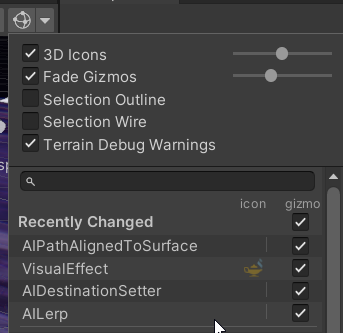 light garnet
ashen robin
https://i.imgur.com/kBJFBpw.png
You can turn off the icon from the gizmo menu in...
light garnet
ashen robin
https://i.imgur.com/kBJFBpw.png
You can turn off the icon from the gizmo menu in...
Its not showing me my vfx
like its not playing
ashen robin
Can't really debug it for you at the moment, but I suggest making a whole new system and dragging it out onto the scene to make sure a default system is working
zenith grove
Could someone please help me figure out why does my particle strip in VFX graph shakes every few seconds? The issue seems to be occurring only in the inspector and only when some kind of force is applied to the strip. It is the most visible using a noise in the Update block with pumped up values. I tried changing capacity and spawn rate values but nothing seemed to affect this effect
fast scroll
how would i make a particle that looks like the liquid nitrogen steam
prime dome
im using the particle system for the first time, and i want something like a confetti explosion but all the particles slide way too much. idk how to fix
i tried to use the dampen thing, but then it just sticks to the ground. i want it to bounce and spread a little, but then just stop
 potent valve
Hey everyone,
I am looking for VFX/Particle Effect/Shader Freelander. Any idea where I can find any or am allowed to post for the search? Couldn't find a job posting channel in here
dull obsidian
potent valve
Hey everyone,
I am looking for VFX/Particle Effect/Shader Freelander. Any idea w...
it's on the unity forum, not in the discord 😉
sinful badger
does anybody know why my dragonball z style particle system setup is playing properly when I test it but when I press the play button to give it an official test, the explosion doesn't trigger the first time I activate it, as if there was some ghost animation of it in the background that had to finish playing before I could trigger it again?
the same happens when I try to use it in vrchat, if I activate the animation, I have to wait several seconds before I can play it again, because the blast attack's lifetime is 10 seconds and if it detonates before then, the game still acts as if it's playing and won't let me turn it off and back on again
also how do I make an audio source follow the projectile?
 rigid thistle
so as I understand it
I need to make a custom shader, then export a texture from it, then use those textures as particles in VFX graph correct?
also why do my special effects look like this? imported from official particle pack
 potent valve
dull obsidian
it's on the unity forum, not in the discord 😉
potent valve
dull obsidian
it's on the unity forum, not in the discord 😉
thanks!
potent valve
rigid thistle
also why do my special effects look like this? imported from official particle p...
check if the render pipeline is compatible with the one you are using
rigid thistle
yup
rigid thistle
potent valve
check if the render pipeline is compatible with the one you are using
it's using "particle/Standard surface"
potent valve
rigid thistle
it's using "particle/Standard surface"
does the package have any patches? execute them if you haven't yet
 tiny heart
hey guys im creating a game and im doing pickups and power ups .... and i need to put a pickup effect and for some reason idoesnt allow me to put smt that i downloaded, how do i import like effect to unity or import it to be in the assests?
zenith grove
Hi, I am trying to set the particles in VFX graph with a help of Property binder to make an effect of collecting coins after colliding with them. However from what I can see, it is not possible to drag the Player's position from a scene into the coin asset. Doing the opposite and placing a Player prefab from the assets into a coin prefab will result in a incorrect position. So the only solution I found is to drag a Player from a scene into each and every coin in the scene since multi-object editing is not supported for Property binder. Does anybody knows any way around it?
 tiny heart
well i have Similar problem as u have
zenith grove
tiny heart
well i have Similar problem as u have
Did you try to put the effects from assets and from a scene?
Because it works for me it is just annoying to insert the Player's position like hundred times manually
tiny heart
well
from the scene the effect will just appear and i want it to appear only if the player has collision with it
and i dont have this from the asset
zenith grove
Well, then you can either drag it as an object into a scene and disable it. And through something like OnCollisionEnter or OnTriggerEnter enable it. Or you could also serialize it on the object that is supposed to collide with your Player and then trigger it in the same way as before but using something like vfx.Play();
zenith grove
tiny heart
but how do i disable the effect?
You can disable every game object here
 tiny heart
well i have a problem that if i move into the like power up then it doesnt get destroyed for some reason
 zenith grove
Do you have any script on it?
 zenith grove
tiny heart
yea i do
zenith grove
tiny heart
yea i do
Lets talk on priv because the conversation starts to move away from the topic of particles
tiny heart
ok
 warped pine
When I decrease my particle's "brightness" (highest rgb value), it makes the particle appear more transparent.
The alpha is maxed, color by lifetime is disabled, I'm using the standard Particle/Standard Surface shader. Any ideas how to fix this? Looking to make a dark + mostly opaque particle effect
warm torrent
warped pine
When I decrease my particle's "brightness" (highest rgb value), it makes the par...
That sounds like additive blending
You may possibly want "fade" blending mode instead
warped pine
Hmm, now the particle is really dark/faded, even when the color is as bright as can be
The preview of the texture looks fairly bright, but the preview of the material itself is dark/greyish now, and the actual particle is a darker version of whatever color I put in
warm torrent
warped pine
The preview of the texture looks fairly bright, but the preview of the material ...
If it's not an unlit shader, then it would be darkened by the scene's lighting conditions
warped pine
warm torrent
If it's not an unlit shader, then it would be darkened by the scene's lighting c...
Oh I see! Thanks
I had to change a couple more settings to make it look right but it’s working now 😁
 toxic umbra
What is the most simple way i can apply a blur shader to a canvas with sprite renderers attached to it?

I want to apply a shader to the entire canvas, with the fog planes being effected by it
like i know i can use a seperate camera to render the fog to a render texture and apply a shader to the raw image but that sounds needlessly complicated, is there a way i can just render the fog to that canvas renderer and then throw a shader on that?
ashen robin
toxic umbra
What is the most simple way i can apply a blur shader to a canvas with sprite re...
Not too sure about the canvas, but since it's 2D you can probably do some texture masking with custom renderer passes or by using unity's renderer object features
and just use a layer to overlay the effects
toxic umbra
is that possible in the built in render pipeline?
ashen robin
I'm not entirely sure honestly, I just know both URP and HDRP has some similarities with it all
Writing custom render passes in Unity URP.
Says it was introduced to the srp in 2018
 solemn granite
https://assetstore.unity.com/packages/vfx/particles/particle-pack-127325 - Has anyone succeeded in converting this package to hdrp?

Add depth to your next project with Particle Pack from Unity Technologies. Find this & more VFX Particles on the Unity Asset Store.
dull obsidian
solemn granite
https://assetstore.unity.com/packages/vfx/particles/particle-pack-127325 - Has a...

Download Here: https://www.bigrookgames.com/2020/08/20/free-assets-particle-packs-converted-to-hdrp-part-1-unity/
Unity Particle Pack Converted To HDRP | Explosions - free VFX special effects asset download.
Unity did post some useful shaders for Shader Graph that will help with the conversion. Luckily, they have added it into the High Definit...
 mortal vessel
Ok so I'm working on a team we use gitlab as a repo to manage the code for our project. For some reason some of my team members myself included can't see some of the VFX in our game when they play even though others can on identical branches. We are using VFXgraph and have no idea why this is happening any advice?
ashen robin
Perhaps the experimental package isn't present throughout all your project settings preferences
mortal vessel
ashen robin
Perhaps the experimental package isn't present throughout all your project ~~set...
Experimental package?
ashen robin
It's for the vfx graph to reveal more features on the graph
mortal vessel
Also to note the effects appear in the hierarchy for the scene when they play they just don't appear in game
mortal vessel
ashen robin
It's for the vfx graph to reveal more features on the graph
How does one do that
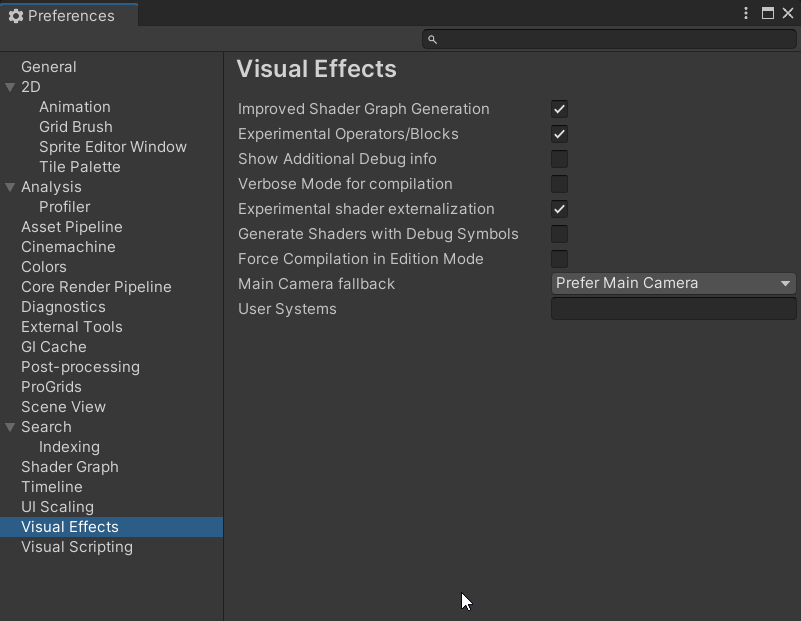 hearty flare
🗃️ Documentation
Visual Effect Graph
Choosing a particle system solution
📚 Resources
Blog and e-books
- Introduction to VFX Graph
- Realistic smoke lighting with 6-way lighting
- Definitive guide to creating advanced visual effects
Youtube
- Volumetrics: Introduction to raymarching
- VFX Graph Tutorials, Thomas Iché
- VFX Graph Tutorials, Gabriel Aguiar
- Principles of VFX with VFX Graph:
Git
Particle Effects ✨
🗺️ Roadmap
hearty flare
hearty flare
## 🗃️ Documentation
[Visual Effect Graph](https://docs.unity3d.com/Packages/com...
 azure delta
where is the documentation on custom particle data for built-in? i want to change a float of a shader over its lifetime without worrying about scripting. if thats even possible
azure delta
i figured it out 
azure delta
isnt there a way to fade out the cut-off when a particle intersects with a mesh?
warm torrent
azure delta
isnt there a way to fade out the cut-off when a particle intersects with a mesh?
Goes by the name "depth fade" I think, works by calculating distance of fragment position to depth buffer position
azure delta
So i its done in the shader not the particle system then?
warm torrent
azure delta
So i its done in the shader not the particle system then?
Correct
rigid thistle
I can't seem to be able to set a shader graph to an output particle mesh
fast scroll
how could i make something that looks like this. doesnt have to have gravity, just the steam thing (making a liquid nitrogen tank(dont ask))

 desert latch
I can't seem to figure out why my particles are flickering. I mouse over the Update Particle, Initialize and Output and it makes it flicker more for some reason. Attached is what's happening.
Any ideas why this might be happening?
I was reading the forums and it seems it might be some kind of GPU problem possibly? but I wouldn't know how to fix that if that's the problem.


 desert latch
found the solution. doing things by speed seems to break it
ashen robin
yeah, I've some weird glitches like slow down and such when just dragging parts of the gui
mostly editor related
 rocky lichen
Hello, how can i set up a particle effect so that it doesn't look glitchy when rotate the game object it's attached to just like this in the video :
warm torrent
fast scroll
how could i make something that looks like this. doesnt have to have gravity, ju...
Liquid nitrogen vapors are technically clouds with more gravity
You could use the same techniques as you would for smoke but make it brighter, fall with gravity and collide with surfaces
Maybe will need to make the particles smaller to better conform, or use some kind of more accurate smoke simulation
Many ways to do it depending on performance budget and art style
warm torrent
rocky lichen
Hello, how can i set up a particle effect so that it doesn't look glitchy when r...
Simulation space: world instead of local
rocky lichen
warm torrent
Simulation space: world instead of local
ty. It doesn't look glitchy as before now when i rotate the char but the particle effect is not rotated when i rotate the game object it is attached to and it doesn't look like a trail effect as before.
 warm torrent
Trails aren't meant to rotate with the object they emit from are they
You can't use the exact properties of the local particle system and expect it to look the same with global, because your character is moving fast
You probably want a much shorter lifetime (try 1), zero speed and much more emission over time, or perhaps more fittingly emission over distance
rocky lichen
warm torrent
You probably want a much shorter lifetime (try 1), zero speed and much more emis...
ok, i'll try them but before that what do you think of the trail renderer component? Do you think it's more suitable for this kind of effect? I tried that but i couldn't set the sprite right, it looks weird
warm torrent
rocky lichen
ok, i'll try them but before that what do you think of the trail renderer compon...
Trail renderer and particle trails are easier for making smoother and more solid trails but they're stretchy and twisty, so it's not easy to make them work stylistically with pixel art
So probably not in this case
Unless you're also using pixel perfect camera component with the upscale render texture option
That will make them fit right, but the pixel perfect workflow is considered difficult by many
rocky lichen
thx a lot 🙏
rocky lichen
ok, this looks much more like a trail effect now. I set start lifetime to 1, start speed to 0 and emission rate over time to 200. I noticed 2 settings tab on the particle effect component; rotation over lifetime and rotation by speed, do you think they could help to improve the effect further?
there should be a way to rotate that ski trail sprite
fast scroll
warm torrent
Liquid nitrogen vapors are technically clouds with more gravity
You could use th...
thanks, ill try that🙂
 ocean jetty
i'm trying to replicate some quantum break vfx but it's somewhat weird :
idk how to apply chromatic aberration to specific volume and still visible from outside the bonding box ( layers doesn't work that way does it ? )
see the video i'm gonna send the reference
the npcs have their won chromatic aberration , I don't wnat to create another shader .. I just want some simple post processing overlayed in object mask in layer or something but still be visable from outside the range ( no blending as it breaks the iullsion )

another great example this effect where he shoots projectil and the color desaturate around the enemy , in another words , I want post processing _shader mixer-blender any a asset available in the store can do this without writing custom shaders ? (Voulme based )

I think the keyword here's custom /stencil pass but idk how to do using the built-in rendering pipline
ashen robin
Distortion/Refraction shader would probably be easiest
ocean jetty
I have distortion shader, urp and hdrp doesn't support grabpass natively, that's why I'm using the built in rp
ocean jetty
ocean jetty
the npcs have their won chromatic aberration , I don't wnat to create another sh...
simply I want to add multiple/ sperated post processing global layers but take affects on local world coordinates ( like spherical or mesh based pp volumes)
I think I might get some results if I excludes object from layers but idk if that would work with particles vfx
ashen robin
You could try fooling around with the custom render objects, but otherwise I'd feel like you'd need some custom render passes do what you're trying to do, if not shaders
https://learn.unity.com/tutorial/custom-render-passes-with-urp
https://docs.unity3d.com/Packages/com.unity.render-pipelines.universal@11.0/manual/renderer-features/how-to-custom-effect-render-objects.html

Unity Learn
In this tutorial, you will learn how to use custom render passes to render a toon outline post processing effect on selected objects
ocean jetty
I don't want urp
ashen robin
oooh whoops ;p
ocean jetty
nvm , ty , thx
ashen robin
render objects would easily solve your question in #💥┃post-processing too unfortunately, but shouldnt be too hard with some shader work too
spiral moth
Weirdest and most annoying bug ever.. i appear to require to have added and then disabled 'Set SpawnEvent Spawn Time' in order to force the Set Spawn Time block to do it's job ( without that top block it doesn't write to spawnTime ):

Spent hours trying to figure out why in the hell this wasn't working
2022.2.13
vfx 14.0.6
 pallid kernel
simple question, how do i get the particle system to stop facing the camera if Mesh isnt working
 dull obsidian
ocean jetty
I have distortion shader, urp and hdrp doesn't support grabpass natively, that's...
dull obsidian
ocean jetty
I have distortion shader, urp and hdrp doesn't support grabpass natively, that's...
that's a misconception. URP and HDRP can access camera buffers for these effects in the same way that GrabPass did for Built in RP, and more.
if you are attached to or have a sunk cost bias into using Built-in RP and are willing to write code to glue things together: it's not impossible to achieve with BiRP --but it seems you would prefer to avoid code.
Even if you were a into coding for this, I cannot recommend investing in the past / a render pipeline that isn't actively developed or has much market worth in gaining skills or experience with in 2023 onwards.
All that said... If these effects and low code / no code was my goal, I would either use Unity HDRP and a Fullscreen shader graph with a custom pass or custom post process or URP with a Fullscreen shader graph and a custom post process and/or render objects. You don't need to write code to do most things here in shader graph but you could later if you wanted to go deeper.
 unkempt topaz
Hello! 🙂 I have a question in regards to sprite effects (pretty much animations of those). Is there a easy way to store them, for example in a class for buffs and debuffs?
Because I am doing such a system and it seems pretty bulky to do with a large amount of different Animators.
the idea is that each time a enemy suffers from a buff, it should play an assigned animation (its a 2D turn based RPG)
 topaz robin
is there a way to rotate which direction the particle system is facing
dull obsidian
topaz robin
is there a way to rotate which direction the particle system is facing
with the built-in particlesystem this is called "Render Alignment" https://docs.unity3d.com/Manual/PartSysRendererModule.html
dull obsidian
dull obsidian
with the built-in particlesystem this is called "Render Alignment" https://docs....
or with Visual effect graph this is called "Orientation / Orient" https://docs.unity3d.com/Packages/com.unity.visualeffectgraph@16.0/manual/Block-Orient.html
topaz robin
dull obsidian
with the built-in particlesystem this is called "Render Alignment" https://docs....
damn i managed to fix it with this thx, btw how do i change the shape of my particles, its currently a rectangle but i wanna change it to my own texture
solemn granite
Assertion failed on expression: 'task.vertexBuffer == NULL' - someone know this error?
 finite vine
How can I make a VFXgraph particle strip follow this kind of pattern?
My plan was to use a force to shoot the particle out straight, then blend their position using an arc circle.
The set position arc circle gives me exactly the curve I need, but how do I blend it with the starting position to get the desired shape?

ok I got it to work, I need some sleep 😩
dull obsidian
@finite vine i was going to suggest sample bezier node may work for these things https://docs.unity3d.com/Packages/com.unity.visualeffectgraph@16.0/manual/Operator-SampleBezier.html
or for a bézier curve with more than 4 control points these are the workarounds https://forum.unity.com/threads/sample-bezier-operator-improvements.833035/
Unity Forum
Hi there!
I wanted to make particles to follow a spline, and the only thing I found is the operator "Sample Bezier".
It works like it should, but it's...
native folio
I have a question with vfx graph, basically im creating a bullet tracer for raycast based shooting but it looks different depending on the distance to the target (when im shooting offscreen the distance is 1000, otherwise its calculated) im not reall sure what parameters to change to make it look consistent (i prefer the look of the distant shots)
so far i've tried playing with lifetime, spawn rate, and particles per strip
 ashen robin
native folio
I have a question with vfx graph, basically im creating a bullet tracer for rayc...
ashen robin
native folio
I have a question with vfx graph, basically im creating a bullet tracer for rayc...
Reading the graph is hard on mobile, but by the gif it looks like however you're calculating speed is not normalized. Otherwise use the graphs nodes that include velocity of its own.
native folio
ashen robin
Reading the graph is hard on mobile, but by the gif it looks like however you're...
In the photo those extra nodes are not connected it was a function I made to get the distance as a ratio of distance/1000.
I'm just not sure how to adjust a sequential line ribbons speed in the first place, is it lifetime I don't see any sort of velocity value
ashen robin
Should just be a set velocity node you can toss in the instantiation block
 manic shore
nvm its because I didnt have a rendering pipline thing set up
native folio
ashen robin
Should just be a set velocity node you can toss in the instantiation block
Cool thanks I'll look in to it
 ionic wagon

guys anyone got any idea how to fix these particles
they are so transparent here that they look like they aren't working
in another scene they work like this
 zenith grove
Is there a way in VFX Graph, Output Particle Mesh to choose randomly between 2 different meshes and assign their probability of spawning? Something like Probability Sampling would fit well but sadly it doesn't work this way.
 frank coyote
What is the error?
zenith grove
frank coyote
What is the error?

From what I understand it is just that the VFX graph is not built for this kind of operations. Currently I just made a separate spawn system for the second mesh but I am wondering if there is any other way around it
ashen robin
If I were to go about that, I'd probably do similar and have the probability calculations before spawning the particles
 winged basalt
Hey how much is vfx graph affecting a games peformance? How many objects with a vfx graph can i use?
 noble osprey
Hey all, is it possible to have VFX Graph particles render 'on top' of everything else (except UI) in a scene? I have a system that's working but the particles are going through geometry and it's annoying me. lol.
clear spruce
winged basalt
Hey how much is vfx graph affecting a games peformance? How many objects with a ...
It all depends on the graph complexity and particle count. VFX graph even supports GPU instancing these days so the amount of individual particle systems doesnt tell that much about performamce hit. You really need to profile yourself to figure out the exact numbers. That being said, VFX is simulated fully on GPU so simulating thousands of particles will not tank your performance
winged basalt
clear spruce
It all depends on the graph complexity and particle count. VFX graph even suppor...
15-20 Systems just a estimate could be more
clear spruce
How many of those are you going to use?
winged basalt
clear spruce
How many of those are you going to use?
15-20 Sytems just a estimate could be more
clear spruce
Oh wow, discord is so screwed up
winged basalt
clear spruce
Oh wow, discord is so screwed up
Oh jup, but its not an extreme amount of particles i am going for
 winged basalt
clear spruce
winged basalt
clear spruce
Wth
 snow hamlet
hi
clear spruce
Anyway, what was the amount of particles on a system again? (Thanks to discord cant see it anymore)
@winged basalt In any case the total particle count doesnt sound like it would become a problem no matter what. If you are using unity version 2022 LTS or newer, you shouldnt be in troubles (effect instancing supported), on older versions the effect count would become a problem at some point. Profiling is the only way to find out the exact numbers as I said earlier
winged basalt
clear spruce
<@578980195222945835> In any case the total particle count doesnt sound like it ...
So the amount of systems itself shouldnt matter you say?
clear spruce
winged basalt
So the amount of systems itself shouldnt matter you say?
Of course the overhead will scale about linearly but the cost of single system with max few hundred particles is so low that you can instance quite many of them together
winged basalt
clear spruce
<@578980195222945835> In any case the total particle count doesnt sound like it ...
The Particle count is really low. We are talking about stylized projectiles like arrows, fire, tornado, slashes in a bullet hell Environment
zenith grove
winged basalt
The Particle count is really low. We are talking about stylized projectiles like...
I wouldn't worry too much. I recently finished a school project in which I abused the VFX graph quite a bit, having almost constantly tens or even hundreds of thousands of particles at the same time on the escreen. And despite presenting the game on a GTX 970 school laptop, the game still managed to mantain somewhere between 80 - 90 fps
winged basalt
zenith grove
I wouldn't worry too much. I recently finished a school project in which I abuse...
Its not count of particles that i am concerned about its the Overhead of having many vfx systems on their own that could cause Performance issues
zenith grove
winged basalt
Its not count of particles that i am concerned about its the Overhead of having ...
Well, having multiple graphs is known to be less efficient than having a single graph with multiple systems. But depending on what these graphs are I probably wouldn't be concern with 15 - 20 graphs.
clear spruce
winged basalt
Its not count of particles that i am concerned about its the Overhead of having ...
That shouldnt be a problem. Im not aware of the implementation but afaik the way the effect instancing works, all the effects are considered as a one bigger system, so theres no need to worry. If you are using 2021 or earlier, then it can become a problem tho
winged basalt
Ok thats good to hear
clear spruce
Testing yourself is the only way to find out but I wouldnt be worried at this point
dull obsidian
zenith grove
Is there a way in VFX Graph, Output Particle Mesh to choose randomly between 2 d...
it seems that a solution has been found:
Hello, In unity 2021.1 (available in the unity hub) you can add up to 4 meshes on a particle mesh output and use the Mesh Index nodes to create mesh changes behaviors, like a randomization for example.
- Marie_G, Unity Technologies
https://forum.unity.com/threads/sub-mesh-mask-per-particle.831688/#post-7263376

Unity Forum
For a VFX Graph, I want to output random meshes and tried to play around with the Sub Mesh Mask option of a Output Mesh block. While I was able to...
zenith grove
dull obsidian
it seems that a solution has been found:
> Hello, In unity 2021.1 (available in ...
Perfrect! Thanks a lot
 lone elbow
- In the shuriken particles, is it posiible to manually reposition all active particles? I don't need to target specific ones or whatever else, just loop and apply an expression
 gentle umbra
I'm looking for a good asset to simulate dust/fluid/particles in 3D? I want to be able to specify a 3D vector field and have dust particles advected around inside of it. I think VFX graph can do this, but I'm using BIRP so unfortunately isn't an option. I'm happy to pay for a good asset!
 torpid fractal
Anyone run into a problem where Shuriken particles go through an object that has a Mesh Collider? But it apparently hits when you're like 1 cm away?
i'm finding it might be my FBX export settings
torpid fractal
My particles are definitely not hitting the mesh... WHEN I export the mesh with armature. Bizarre, not sure what's going on
 earnest tapir

why are these particles not showing up in game
im rly new to making games
so if its something obvious then thats why lol
earnest tapir
nvm found the issue it was the y level lol
 rapid latch
how wou;ld i make my particles initially inherit its parent's orientation, but not rotate alongside the parent
prime dome
rapid latch
how wou;ld i make my particles initially inherit its parent's orientation, but n...
idk
rapid latch
omg shut up
stop stalking me
- how wou;ld i make my particles initially inherit its parent's orientation, but not rotate alongside the parent
midnight grove
!mute 908289249739161650 5d Spamming
gleaming flickerBOT
 aucticslic#7968 was muted.
prime dome
If I want a dust particle every time a character moves, do I need to do .Play() in my PlayerMovement script?
midnight grove
You need to do it wherever you want it to start. If it's easiest to do in that script, then go for it.
 rose plinth



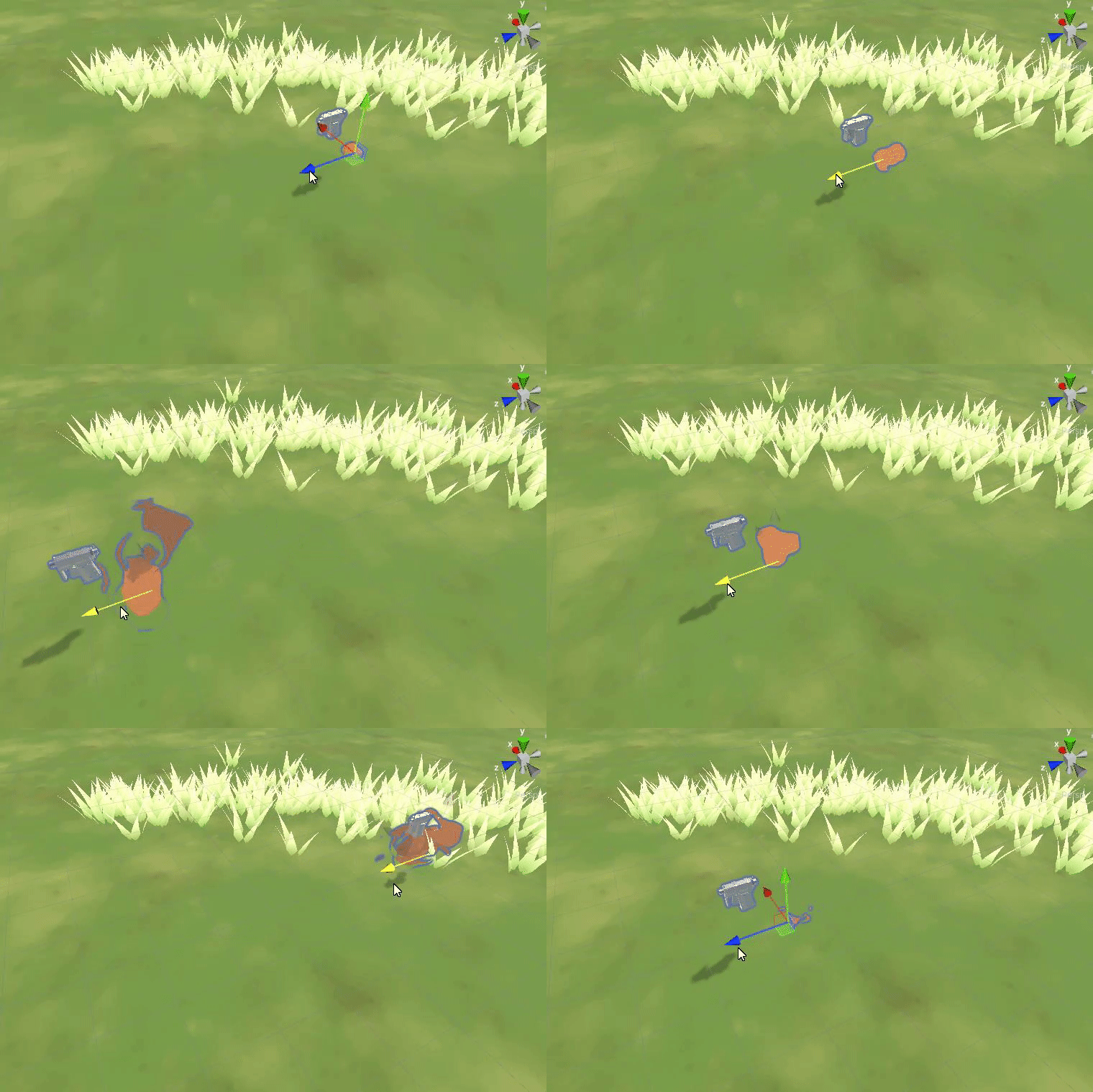

 ashen robin
rapid latch
- how wou;ld i make my particles initially inherit its parent's orientation, but...
ashen robin
rapid latch
- how wou;ld i make my particles initially inherit its parent's orientation, but...
You wouldn't child the particle then and instead pass it the information you want from the other particle besides the rotation
ashen robin
prime dome
If I want a dust particle every time a character moves, do I need to do .Play() ...
Yeah, that's pretty much how you'd do it. If you have the system looping then you'd have to also stop it when your character is doing something other than moving.
prime dome
ashen robin
Yeah, that's pretty much how you'd do it. If you have the system looping then yo...
Oh that’s simple. Thank you!
warm torrent
prime dome
If I want a dust particle every time a character moves, do I need to do .Play() ...
Emission module also has an emission over distance setting, which could do a lot of the work here
spiral moth
So i have a VFXGraph setup, quite simple using a SampleBezier to create this curve from StartPos to EndPos:


What i would like to achieve, is to have particles corkscrew along this path, kindof like this:

I'll post what i have tried, which i thought would work, but doesn't..
Well interesting, after trying many different combinations of things, this seems to work:


So i'm setting the orientation of the circle based on the Tangent from the Sample Bezier..
Ideally i'd like the orientation of that circle to follow the curve ie when the curve dips down towards that last point those loops should tilt around also, if that makes sense..
Atm is seems to just be oriented to world Up ( maybe this is coming from the up field itself but i've tried many variations of this so far to try and get it to work as i'd like )
Well damn..
 ashen robin
that's pretty neat
spiral moth
Simply setting Up to x ( Right ) works

Funny how the moment i finally give in and post for help on this i figure it out.
ashen robin
don't worry, my help was going to just give you the motivation you needed to finish it :)
spiral moth
ashen robin
don't worry, my help was going to just give you the motivation you needed to fin...
Haha thanks! Thankfully i don't give up very easily 🙂
zenith grove
Any idea on how can I set the rotation of each particle to look towards the center of its spawner (Circular spawner). Can't use the "Orient: Look at..." because the camera movement affects the actual angle. I saw a possible solution on the forum but it doesn't seem to be working anymore
spiral moth
zenith grove
Any idea on how can I set the rotation of each particle to look towards the cent...
Maybe Orient:Advanced and have the z axis set to dir to cam and y or x axis so to dir to spawnpoint?
zenith grove
spiral moth
Maybe Orient:Advanced and have the z axis set to dir to cam and y or x axis so t...
lets see
spiral moth
i think z is generally the axis you want 'facing' the camera.. the other two more useful for actual particle rotation/orientation
zenith grove
but wait, do you mean to set the z axis to camera location or direction?
spiral moth
Actually i think possibly if you try two orient blocks - first one with lookat camera, second one with specific axis and set that to point to spawner
zenith grove
spiral moth
Actually i think possibly if you try two orient blocks - first one with lookat c...
Initially it works. But there is the same issue as I mentioned before. If I tilt the camera up or down, it will aslo tilt the particles
spiral moth
Maybe face camera plane?
zenith grove
same issue
ashen robin
There's that advanced setting that sets the look direction independent from where the camera is facing
spiral moth
Still relatively new to messing with these myself but yeah there's definitely a way
ashen robin
otherwise maybe updating the angle every update?
zenith grove
But particles are basiclly in the same position after 2 seconds
so I need to set the angle only once
spiral moth
kindof odd that FaceCameraPlane isn't an option in the drop down, but is an option in the spacebar context list:
 zenith grove
spiral moth
kindof odd that FaceCameraPlane isn't an option in the drop down, but is an opti...
zenith grove
spiral moth
kindof odd that FaceCameraPlane isn't an option in the drop down, but is an opti...
Mine is there
 spiral moth
So many odd things with VFX Graph, i can't tell you the time i've thrown into the black hole of figuring things out
spiral moth
zenith grove
Mine is there
Which version of unity/graph are you on if you don't mind me asking
zenith grove
spiral moth
So many odd things with VFX Graph, i can't tell you the time i've thrown into th...
Ohh don't tell me. I discovered this system maybe 2 months ago, and I think I already spent hundreds of hours in it
zenith grove
spiral moth
Which version of unity/graph are you on if you don't mind me asking
2021.3.19f1 and graph is 12.1.10
spiral moth
zenith grove
2021.3.19f1 and graph is 12.1.10
Weird then as i'm on 2022.2 and 14.xx
It's an incredible tool but damn is it a bit all over the place
Each time i think i have finally mastered it and achieved unlimited power something really simple and obvious sets me back to square one
I honestly think they should refactor a lot of the code, how it's structured etc etc.. Documentation needs some serious work imo.
zenith grove
zenith grove
Any idea on how can I set the rotation of each particle to look towards the cent...
Found the solution
 spiral moth
so it's locking the z axis then i guess
zenith grove
no idea tbh, but glad it works
 pearl hound
Is it possible to get the particle position in a shader? Object position dosent seem to work
dull obsidian
pearl hound
Is it possible to get the particle position in a shader? Object position dosent ...
not sure if you're asking about vfx graph or particlesystem (fka shuriken). either way, it's probably the vertex position ?
pearl hound
im using shuriken my bad
What node do I need to get the vertex pos in the shadergraph?
The position node with the object returns the world position or the position related to the particle gameobject not quite sure
fast scroll
how do i make it so particles get affected by lighting
warm torrent
fast scroll
how do i make it so particles get affected by lighting
Use the lit particle shader for your render pipeline
fast scroll
in hdrp theres no lit
theres surface that just makes it purple, idk how to solve that
warm torrent
fast scroll
in hdrp theres no lit
It has but it's
secret
warm torrent
fast scroll
||show me your ways||
If you have HDRP installed, its entry in the package manager should show these samples under the drop down menu
 fast scroll
oh god i did not know that
i made the smooth circle default material thing myself
for the particles
warm torrent
fast scroll
oh god i did not know that
I had to google around for it a bunch first
Then I had to keep googling for it because I kept forgetting where they were tucked away
fast scroll
haha fair, also it wouldn't break if i just imported all of them right?
just in case i need them
warm torrent
fast scroll
haha fair, also it wouldn't break if i just imported all of them right?
Nope, just an extra folder
There's a lot of good particle shaders included in there
fast scroll
alright, thanks :)
warm torrent
Extra folders*
I haven't tried each one of the samples though
I assume they won't replace anything but I can't guarantee
At least all the ones called "samples" should be fine, just some extra assets
fast scroll
warm torrent
Extra folders*
I haven't tried each one of the samples though
I assume they won'...
alr
yea ill just get the samples and remember where that menu is if i ever need amything else
ty tho
 solar trellis
hi,is there anyway to make VFX particle collide with each others? or it can only be achive using unity particle system
in URP
spiral moth
Matrix4x4 doesn't appear to show up in Inspector when exposed from VFXGraph ( Unity 2022.2.13 VFXGraph 14.0.6 )
fast scroll
warm torrent
Nope, just an extra folder
There's a lot of good particle shaders included in th...
any chance it also works with light layers?
 spring portal
Hey there, currently making a mod for a game (Yes modding is permitted)
It's got this Fire VFX, and my intention is to change the color of the fire. What would be my best method for this?
Obviously I will have to do this at runtime in code, I'm just not 100% sure how.
 warm torrent
fast scroll
any chance it also works with light layers?
warm torrent
fast scroll
any chance it also works with light layers?
Particle systems should work with light layers just the same as any other gameobject
warm torrent
spring portal
Hey there, currently making a mod for a game (Yes modding is permitted)
It's got...
Only within the boundaries of
Do not directly discuss modding or decompiling.
Is it a VFX graph or a Particle System? I'd start by googling for instructions for what you're asking specific to the relevant system
You should be able to find something to start from
fast scroll
warm torrent
Particle systems should work with light layers just the same as any other gameob...
i cant seem to find the option, for meshes its under the mesh renderer
