if the ui button is in every scene but only crashes one of them than its probably that specific scene. if the button is in all scenes and crashes in each scene it is the ui button and the coding. errors will still display before you run the application but the specific cause of an application crashing wont show up in the crashlog because the program breaks before it can even get processed
#archived-hdrp
1 messages · Page 85 of 1
 quick birch
 rare gazelle
quick birch
if the ui button is in every scene but only crashes one of them than its probabl...
rare gazelle
quick birch
if the ui button is in every scene but only crashes one of them than its probabl...
It's not a button, it's basically just the settings menu when u press esc
quick birch
this is possibly cause by the atlasing and other performance optomizations
rare gazelle
and yes it crashes in one specific scene
quick birch
ok, then what is the difference between that scene and the others?
rare gazelle
quick birch
this is possibly cause by the atlasing and other performance optomizations
so atlasing could cause this?
rare gazelle
quick birch
ok, then what is the difference between that scene and the others?
nothing, it's just that it is way more intensive
quick birch
atlasing textures is a form of optimizing performance. is there any other optomizations your using like static objects, culling or baking lighting?
rare gazelle
i had to make my environement static and bake the environement for the ais in my game
but this was done for every other scene
quick birch
are you able to send a screenshot of the in game statistic? (fps, batch countss, vertex counts, processing time, etc)
i forget the actual name ofr it but the small box in the top right of play mode that has this information

 quick birch
makes sense. what does the profiler look like?
rare gazelle
quick birch
makes sense. what does the profiler look like?

this time i clicked on escape and menu stayed a little longer than usual
like it fully rendered then it crashed
quick birch
if these stats are lower in other scenes i think opening the menu in this one is putting you over the limit of what the computer can handle and is crashing it
the cpu processing time seems abnormally high and may be throttling everything. it may be worth investigating that portion and seeing whats causing it and if theres a way to optimize whatever is
rare gazelle
quick birch
if these stats are lower in other scenes i think opening the menu in this one is...
this is another scene for example

and no menu crash
quick birch
huh, im not sure than
rare gazelle
has more vertices and triangles too
quick birch
my only suggestion now would be try increasing the resolution of the atlases and see if that helps. if not then id ask in #💻┃unity-talk if anyone else can come take a look and see if they have any tips or other solutions
 quick birch
ya
rare gazelle
maybe in the package i imported for those assets theres a script that closes runtime when pressing esc

anyways thanks for the help
quick birch
no problem, sorry if i didnt really help get anywhere
 quick birch
that would do it
rare gazelle
yep knew it
 delicate yoke
hi i just started a new hdrp project but my shadows look weirdly pixely and i have this random circle showing up when going near the ground. how do i fix this ?

 cunning dawn
Is there any reason why materials in hdrp display as a solid dark colour unless I increase the metallic value?
They look fine when I increase the metallic-ness, but otherwise if an object is in shade / doesn't have any light source focused upon it's surface, the texture is completely invisible and it's just a dark black / blue colour
(As displayed in the screenie, the roof object has no metallic, and the aircon unit has 0.6)
I have just thought it might be that I'm not using any global illumination that I know of, so I will check that now, but even so it doesn't explain in my mind why having a low metallic value for a material would mean the texture is not visible

 graceful yoke
Could someone please point me to an explanation on how to choose the right shader? I have textures to use that i don't see on standard hdrp/lit(such as roughness, or metalic and specular both)
cunning dawn
graceful yoke
Could someone please point me to an explanation on how to choose the right shade...
I believe you have to create a new texture with each of those sub textures as a different colour channel (R,G,B,A), instead of all 3 separately
graceful yoke
i was afraid of that
cunning dawn
yup
 cunning dawn
graceful yoke
i was afraid of that
cunning dawn
graceful yoke
i was afraid of that
I feel the same way lol
I wonder if there are any tools that do it automagically or not cuz sooner or later I'm going to have to do it
graceful yoke
i can almost reproduce things with the Autodesk shader, but it don't have all either
All good, Thank you for confirming my thoughts
cunning dawn
:)
cunning dawn
cunning dawn
Is there any reason why materials in hdrp display as a solid dark colour unless ...
another example

anyone got any ideas?
surely I shouldn't be making every material metallic...
graceful yoke
@cunning dawn - just had a thought 'bout that "automagical" packed texture...couldn't that be done in a custom shader and then output to a packed file? just a thought.
cunning dawn
graceful yoke
<@341875902499520522> - just had a thought 'bout that "automagical" packed textu...
hm...you probably could do something like that? i mean I'm no shader wizard but I imagine its possible :o
alternatively I think you'd have to just combine them in image editing software
graceful yoke
true. was thinking of something in Unity if possible 🙂
Anyway, have a good one and good luck with your issue. Ive noticed the same thing a few times but didn't figure it out yet
cunning dawn
graceful yoke
Anyway, have a good one and good luck with your issue. Ive noticed the same thin...
Thanks, and good luck to you to comrade, I think this lighting stuff a recurring issue for other people but the only solution online is to "make the light brighter" lol
If i get it i'll post it in here
cunning dawn
right
if your non-metallic materials look very dark and display no textures when in shadow, it looks like switching to dynamic in the visual environment sky settings is the way to fix it


 sleek parcel
will Unity ever support async compute on PC and bindless textures?
i know the prior one is kinda there, but it never works on PC. And bindless textures do not even have a sign.
I'm so surprised that Unity's support of dx12 is still pretty lacking now...
 deep mortar
Does anyone know why when I put a camerabrain ON, it automatically changes the settings of my camera? shutter speed, aperture, iso ...

witch camerabrain

 eternal laurel
deep mortar
Does anyone know why when I put a camerabrain ON, it automatically changes the s...
eternal laurel
deep mortar
Does anyone know why when I put a camerabrain ON, it automatically changes the s...
Because it takes the settings from the active vcam
deep mortar
eternal laurel
Because it takes the settings from the active vcam
But it is virtual cam and don't have properties like the main camera :/
deep mortar
I'll check when I came back home thanks
 scenic jay
deep mortar
But it is virtual cam and don't have properties like the main camera :/
scenic jay
deep mortar
But it is virtual cam and don't have properties like the main camera :/
it should
 deep mortar
scenic jay
it should
deep mortar
scenic jay
it should
Ok thanks 🤗
 whole fossil
@deep mortar perhaps #🎥┃cinemachine is better channel for such matters
 sterile mesa
Hello, I want to generate a HDRP skybox with actual simulated positions of tens of thousands of real stars/Nebula/etc in my game, so when I hit warp, I change them from a skybox to parts in the game you can see fly by like StarTrek TNG, then when the warp is over, it is converted back to skybox. So where you are in the galaxy seems positionally changed accurately. That sounds complicated, but it is not. My question is: How do I generate a HDRP skybox assuming I have a bunch of sprites/3d meshes to place at certain points inside a sphere of 50,000.00 ish units wide?
 shrewd moon
sterile mesa
Hello, I want to generate a HDRP skybox with actual simulated positions of tens ...
shrewd moon
sterile mesa
Hello, I want to generate a HDRP skybox with actual simulated positions of tens ...
Does it need to be a skybox, assuming you mean skybox texture?
Seems like it'd be easier and cheaper and easier to just render stars than first render the stars and then convert it to a ludicrously high-res skybox texture
sterile mesa
Ok Spazi
My question is... how do I make a skybox on HDRP assuming I have the stars rendered in game.
Rendering the stars will be easy, just point them on a render sphere of 50,000.00 and scale em down... But what next?
Every system will need a HDRP skybox.
After the warp drive does its Star Trek the Next Generation fly by, the skybox would be different at the next star system's location.
shrewd moon
If I had to do that I would render the stars as particles using VFX graph, not on a sphere or anything
Give them trails for the duration of the jump
sterile mesa
Ok... my problem isn't the animation tho
My problem is once I am at the new location, how do I take them and make a HDRP skybox, it sounds complicated, but is actually just me not knowing how to make an HDRP skybox in script.
shrewd moon
I don't think that's necessary
sterile mesa
The skybox of one position in the galaxy 100,000,000s of parsecs away is different than the previous position.
They're not just decoration stars, you actually see the real system.
And can go on warp speed in that direction without entering coordinates if you'd like.
It is critical that the HDRP skybox change from system to system. I know you can generate a HDRP skybox in script, but how? Again this question sounds insanely difficult, but it is super simple: How do I make a HDRP skybox via script.
shrewd moon
You don't need to "generate a skybox" to render stars in the sky
sterile mesa
well, if I have 100,000 to 100,000,000 stars in the sky.
We'd get a FPS rate of 0.0001 fps
That's an exaggeration, but I can let the system chug to get a "screen shot" of the systems around it to make the skybox.
shrewd moon
The human eye can see about 5000 stars / 2 because you can't look at them at once
VFX graph could be used to render a couple of million at least
Texture skyboxes are terrible at capturing fine details like stars
There's probably a way to store the galaxy's star density in a SDF and render the "bubble" of visible stars based from position within the SDF
sterile mesa
I have skyboxes that look like this is srp:

I was going to try and make my procedurally generated galaxy try and get as close to the look as Hubble images n stuff that I used in SRP skyboxes.
HDRP skyboxes, I literally don't know how to edit at all.
Do you know of tutorial information on how to edit a HDRP skybox? I'll look into VFX graph, but I literally don't know how to change a HDRP skybox like I do with SRP skyboxes.
Are games today not even using skyboxes anymore?
I'm more of a game mechanic, tech feature guy... I wrote some networking and game stuff by hand, but I'm from the Atari2600 generation so anything SNES and beyond is all the same graphical quality... I don't have an eye for major details, lol.
 inland ferry
There are basically 2 ways of doing a skybox, the first is via a texture/cubemap, you put a texture on a big inverted sphere basically.
The second is using a shader where you put the shader on a big inverted sphere and calculate where to draw colors and textures in the shader
sterile mesa
Thanks MechWarrior99, I kinda reasoned that.
Assuming I'm at 0,0,0 and want a 360/360/360 view of my current render in Unity to become a HDRP skybox, is there an asset store to download for this?
shrewd moon
inland ferry
There are basically 2 ways of doing a skybox, the first is via a texture/cubemap...
And the third way of rendering any type objects behind level geometry at focal infinity (such as a field of stars)
Though that's stretching the semantics of "skybox" a bit
sterile mesa
Maybe I could jury rig a camera to fish eye one?
shrewd moon
You seem fixated on rendering a skybox texture
It would be wise to focus on the stars first
sterile mesa
Obviously after a certain distance smaller/dimmer stars just don't show up. I don't need all 3 billion stars to be seen. I figure to get maybe a 3 Second per frame render and that be what I use... 3 seconds is an acceptable load time from dropping out of warp and converting it to skybox.
Spazi, it's not about what part I do first. I know how to do everything except... I need to know how to make a HDRP skybox via script. The question is very simple to answer. I just spiced it up so people might want to help me.
Googling or youtubing how to make HDRP skybox via script isn't fruitful for it has tons of nonsense returns.
I figure one of you guys have made an HDRP skybox from script and could point me to a non-nonsense video or html page.
Well I guess its two fold: 1) How do I make HDRP skybox via script and 2) How do I take a skybox screenshot like I would render a 360/360/360 panarama camera shot of my current render.
shrewd moon
Okay, reflection probes do that normally
No scripting required besides the call to render
sterile mesa
Thank you.
So a reflection probe will take the panarama screen shot?
Then I assume making a HDRP skybox from a .png is easy.
shrewd moon
It's already in a cubemap format which should be usable as a sky, but I've never done that precisely
sterile mesa
Pretty cool! Okay, you actually got me further in my quest. Much appreciated. The best part is this is not a brick wall. I can still code the star system generator etc etc.
Thanks much, if I make bank on this game, just find me and ask for a subset of bank.
I'm not greedy for money, I just like to make games and help people. Take care. Love's the way!
 sacred veldt
Its possible to change some settings at runtime? like disable only fog or bloom
 bold wadi
Hey everyone, I was wondering, what can I change to not have this light pass through?

 inland star
usually having shadows should stop that
bold wadi
What do you mean having shadows?
inland star
if the light casts shadows, then surfaces that shouldn’t be lit will be shaded properly
 inland star
are you able to/have you tried increasing the shadow resolution?
if the resolution is too low then you have a chance that it can’t cover it
bold wadi
I'll try doing that (have to find where first)
inland star
it’ll be around the bottom of the light component settings
bold wadi
Its already set to ultra
oooh found it! I had to change the normal Bias (for some reason it was set to 5)
Thanks ^^
inland star
oh yeah, that’ll do it :p
 loud leaf
Which part is slow? It all depends on sample count, bounce count, etc
 night valley
loud leaf
Which part is slow? It all depends on sample count, bounce count, etc
night valley
loud leaf
Which part is slow? It all depends on sample count, bounce count, etc
Exactly sample count just after 2 sample count
Is it normal? Those count are not supposed for real time usage?
loud leaf
Which ray tracing effect? RTGI with 2 samples is pretty heavy if you use high poly meshes
Try starting with RTGI, RTR and RTAO @ 1 sample, and keep lights with ray traced shadows to a minimum (1 light, 1spp hard shadow)
deep mortar
Hello, I've watched the latest unity "enemies" demo several times, I wonder if it's possible for an average person to achieve this level of quality?
I've seen several people have doubts that they didn't use code to achieve such realism.
night valley
loud leaf
Which ray tracing effect? RTGI with 2 samples is pretty heavy if you use high po...
Just example scene of unity that small tree in the room.
But even in that small viewport fps becomes 6 7 on 3 sample count on gi
loud leaf
How many bounces?
And which version of Unity / HDRP?
And what is your framerate with RTGI disabled?
I would just stick to 1 sample and 2 pass denoiser, expect to cut your framerate in half.
 humble flower
HI, does anyone know how to block a decal projector with an object? I have a decal projecting caustic lighting onto a scene but it shows up even in the shadows of other objects. My decal is aligned to my one sun light in the scene so it shouldn't appear in the shadows through objects. Thank you!
night valley
loud leaf
How many bounces?
3 to 5
Latest versions
I get ~3000fps without raytracing
And ~500fps with screen space gi
loud leaf
Use 1 bounce for real time, also, 3000 fps in HDRP doesn't seem right, not even in an empty scene.
 summer glacier
deep mortar
Hello, I've watched the latest unity "enemies" demo several times, I wonder if i...
summer glacier
deep mortar
Hello, I've watched the latest unity "enemies" demo several times, I wonder if i...
You need the equipment for it, scanning faces etc, so no
It also uses some custom shaders, but I've heard it'll be released to the public for HDRP (the hair shader at least)
deep mortar
summer glacier
You need the equipment for it, scanning faces etc, so no
It also uses some custo...
Yay, I was just thinking about the scenery at the very beginning which is quite incredible in terms of realism.
summer glacier
deep mortar
Yay, I was just thinking about the scenery at the very beginning which is quite ...
The geometry should be possible
 broken hazel
is it possible to write alpha values to a render texture from a camera?
 proud hedge
hey, im having some troubles getting screen space reflections working in HDRP

ive enabled everything here, yet it says "the current HDRP asset does not support screen space reflections"
i really cant figure out why it doesnt work, ive been trying to follow every step online but nothing seems to help, am i missing something crucial?
eternal laurel
Thats the frame settings you need do enable it on thr actuall asset that is set in the graphics tab in project settings. If its a newer hdrp project its in the hdrpdrfaultresources folder
 proud hedge
oh i see, didnt see there were separate ones as well for each quality level, thought it would work by just enabling it in the default one
seems a bit unnecessarily complicated, they should really make it more simple
but thanks!
eternal laurel
It is a bit complicated yes. Thats why we made a custom tool to open the current active asset so we dont have to hunt it down
Just pop it open in the inspector
 plain star
hi there i was wondering if someone could give me some tips for managing light exposure in hdrp
i've got my scene with time of day and it uses the lux values recommended for different times of day
so here's night time

here's daytime

looks reasonable
i'm having trouble with the intensity of the car's rear lights
daytime activation / deactivation

here's nighttime activation with the same brightness setting as in daytime

this doesn't seem to happen with our eyes IRL afaik?
what can i do to make these less divergent?
quick birch
Try turning the lux down on the lights until the nightime one isnt a flashbang, then id suggest adding a bit of bloom post processing to the scene and seeing if that helps. It should make the lights a bit more noticable at both times without being so different in intensity
bold wadi
Hey everyone, I keep having issues with the way lightning works in HDRP. I fixed almost all of them but can't find a solution for this one.
Feel free to ask me any questions if the screenshots aren't enough :p


(look at the slope-scale depth bias value)
inland star
read the first answer to this question
https://computergraphics.stackexchange.com/questions/2192/cause-of-shadow-acne?msclkid=f566d0d9ceb511ec91c201c0e176bf69

Computer Graphics Stack Exchange
I know how shadow mapping works but I am not getting the cause of shadow acne!
Can anyone tell me cause of shadow acne in a simple way and how is it related to depth map resolution?
those lines in the top image are "shadow acne", caused by too low of a bias
the light passing through in the bottom image is "peter panning", caused by too high of a bias
in a nutshell, just try finding an optimal middle-ground in your settings
if your setup is capable, you could always go into your HDRP asset and increase the max resolution of your shadows, which should help somewhat
shrewd moon
bold wadi
Hey everyone, I keep having issues with the way lightning works in HDRP. I fixed...
This is an inevitable problem when making levels with sharp normals and one-sided geometry
The mesh has to be deflated in normal direction to avoid shadows being drawn on top of the surface that's casting the shadow
(or inflated, I don't recall which)
You'll probably want to use "shadows only" meshes which have smooth normals to pad the insides of the walls
I would personally make the meshes with smooth normals in the first place and use a shader to render them with sharp normals
bold wadi
inland star
if your setup is capable, you could always go into your HDRP asset and increase ...
They are at the maximum
bold wadi
shrewd moon
I would personally make the meshes with smooth normals in the first place and us...
I don't... really know how to do that x), plus, I already use a shader to have walls that can be tileable using worldspace
And even with both on "two sided" it doesn't work
 shrewd moon
bold wadi
And even with both on "two sided" it doesn't work
shrewd moon
bold wadi
And even with both on "two sided" it doesn't work
If the geometry is that thin and has sharp normals it'll suffer from the same problems
bold wadi
oh
Hmm, alright I'll try to see what I can do thanks ^^
It kinda sucks that this happens honeslty, I don't know anything about coding a rendering system, but wouldn't it be a simple thing to do normaly? Like, if there is an object, cast a shadow
inland star
there is a lot that goes into things like shadows, especially in modern renderers like HDRP
bold wadi
Even a paper should cast a shadow, so why the object has to be that thick?
shrewd moon
bold wadi
It kinda sucks that this happens honeslty, I don't know anything about coding a ...
It's not simple by any means
The first issue you'll run into is that the shadow is rendered on top of the surface that's casting it and you get "shadow acne"
So the object has to be shrinked for shadow casting somehow so the caster and reciever surfaces don't overlap and how do you do that?
If you simply scale it down, you'll be scaling towards object origin in which case there will be an irregular offset in parts of the geometry that are complex and away from the origin
But if you scale in normal direction or away from where the surface is pointing, that works great for most meshes
But not meshes which do have flatshaded/sharp normals because those kind of faces become detached
The same issues come up when doing any vertex deformations, such as when making mesh outline shaders
bold wadi
But, why can't the shadow caster start exactly on the edges ? Like on the red line here

(I don't want to look like Im disrespecting anyone's work, Im just trying to understand how things works :p)
shrewd moon
That by my understanding is because a 3D renderer doesn't know whether it's looking at "edge" geometry or not, it's all just geometry
bold wadi
I guess that making a super intelligent (perfect) system would make it consume a lot of resources especially for something such as renderers ?
shrewd moon
I think it could be done with raycasting, but we rarely use that for 3D because of how expensive it is in that space
inland star
to render shadows, a system generally renders the scene from the light's POV to an image, which can be sampled by the main camera to create shadowing
because the image is made of pixels, it can't capture all detail, and this leads to a few artifacts/issues, like what you encountered
raytracing can solve this, but it's incredibly expensive
shrewd moon
That's the gist of it
inland star
indeedy
shrewd moon
Almost all 3D is rendered using "rasterization" which is cheap but has a lot of unintuitive quirks
It's why we have to deal with things like overdraw, z-fighting, transparency sorting, clip space limitations and what else
shrewd moon
bold wadi
Well it's still really nice, I'll just have to make my walls thicker :p
I really recommend a shadow caster mesh with smooth normals
You can make a few shapes and use them modularly
It'd be ideal if you could just tick a box "use a smooth shaded shadow caster" and let Unity generate one for each mesh
bold wadi
I never really looked at how to do that, do I just have to check something to make the normals smooth?
shrewd moon
bold wadi
I never really looked at how to do that, do I just have to check something to ma...
You can duplicate the mesh asset and set normals to "calculate" with a smoothing angle of 180 to basically force the mesh to be smooth shaded
 bold wadi
And I should do that for every model I have? o.o
shrewd moon
Then add that mesh as a child to the original mesh (because there can't be multiple mesh renderer components for ancient reasons), disable shadows on the original and set the smoothed one as "shadows only"
 shrewd moon
bold wadi
And I should do that for every model I have? o.o
shrewd moon
bold wadi
And I should do that for every model I have? o.o
It's why I'd prefer an automatic solution
bold wadi
shrewd moon
It's why I'd prefer an automatic solution
You mean, added by Unity?
bold wadi
shrewd moon
Then add that mesh as a child to the original mesh (because there can't be multi...
And wouldn't that make it kinda automatic ?
shrewd moon
bold wadi
You mean, added by Unity?
Yes
shrewd moon
bold wadi
And wouldn't that make it kinda automatic ?
Having to make a duplicate for each and every mesh is a lot of work, even if everything's a prefab
The shader solution is my preferred option
plain star
what's causing this circle of no shadow?
 shrewd moon
plain star
what's causing this circle of no shadow?
shrewd moon
plain star
what's causing this circle of no shadow?
If you have geometry with polygons that are stretched too far, the shadows will start cutting off close
increasing a directional light's near plane seems to fix it, but I don't know of the drawbacks
Probably for the best to have a few more polygons on the big mesh so it doesn't make the shadow system struggle
plain star
i
i'm struggling to understand light

so here's this picture shot from a car somewhere
the sky is dark and the view range is really short
human eye can likely see this scene perfectly fine though and recieve a lot more light
but with this in mind,

how can that be possible without the brightest parts of the image being proportionally brighter too
as seen above
summer glacier
HDRP isn't based on human vision, it's based on cameras
also exposure (lighting in general) is a pain in HDRP, you'll have to find the right values
plain star
im not sure exactly what to do here, the light is using the same decay law as real light iirc
so i can assume this result is quote unquote "accurate" for how light behaves
plain star
the close diffuse reflection is just so bright lmfao
shrewd moon
light source intensity and environmental lighting should ideally be accurate to real world values, then the automatic exposure will have less trouble
plain star
yeah, i've been trying to do so
it also occurs to me to expect this kind of blown out frame when in first person view

like yeah, part of the frame here is super bright so it makes sense but it's like
i don't remember encountering this in other racing games so they must be doin something about it, i'm not sure what though
here it's adjusted a bit

the car's headlights are around 4000 lumens at the brightest which according to Google™️ is what they typically are irl
shrewd moon
Not specific to racing games, but specific to rendering engines which attempt to use real world exposure and intensity
plain star
shrewd moon
light source intensity and environmental lighting should ideally be accurate to ...
so i've been using lumen values according to documentation
which lists bright sunlight about 130,000 iirc
and then a car headlights are apparently 2000 - 4000 lumen
does thatt sound correct?
loud leaf
summer glacier
also exposure (lighting in general) is a pain in HDRP, you'll have to find the r...
How is it a pain? It's just the same as a real camera, and there's even auto exposure
Compared to built in, where you're turning random knobs, and if everyone complains the lighting sucks (like in a lot of Escape from Tarkov environments), there's no way in knowing what's right or wrong, unless you find some trick to convert them to real world values, which is, exactly what HDRP is.
loud leaf
plain star
but with this in mind,
I would start by turning off bloom, add it back in later when you're ready
plain star
sure
loud leaf
For a headlight, 2000 lumen should work, then just adjust exposure accordingly.
plain star
is 130,000 for direct sunlight correct?
loud leaf
HDRP default is 100k, I would just use that for now
plain star
ok
i'm a little confused
so let's use 100k for now
but what should we do when it's no longer 'for now'
loud leaf
These are good baseline values
plain star
sure
so the HDRP component has some stops listed upon it
like cloudy, 20000
and 'high sun', 130,000
can i take that at face value
loud leaf
Yeah that seems fine
plain star
aight
eternal laurel
Hdrp works with real life values so getting them as as easy as looking up the specification for a given light
Or pre-measured lumen values for outside
bold wadi
shrewd moon
Having to make a duplicate for each and every mesh is a lot of work, even if eve...
Wouldn't the shader replace every materials?
And Im kinda confused about how making a mesh as a child of another mesh?
shrewd moon
bold wadi
Wouldn't the shader replace every materials?
What?
shrewd moon
bold wadi
And Im kinda confused about how making a mesh as a child of another mesh?
Two gameobjects, one's a child, both have mesh renderers, one of them has no shadow and the other shadows only
bold wadi
shrewd moon
Two gameobjects, one's a child, both have mesh renderers, one of them has no sha...
Wow that would be long, how would the shader one work?
shrewd moon
bold wadi
Wow that would be long, how would the shader one work?
https://hextantstudios.com/unity-flat-low-poly-shader/
A solution based on this is what I use
bold wadi
I'll try to take a look at that, but how can I modify the default cube mesh? Im trying to modify it to make it have normals set to Calculate
I can't modify the default mesh can I ?
shrewd moon
Probably not
bold wadi
aaah why is it so complicated to make something that seems simple x)
shrewd moon
I ask that question every day
bold wadi
Wouldn't I be forced to change the current material to put the new shader?
You're talking about that kind of shaders ?
 shrewd moon
Yes
Materials describe how to render a surface with a particular shader
bold wadi
How could I apply two material to one face? Im kinda confused
shrewd moon
bold wadi
How could I apply two material to one face? Im kinda confused
You can't
But you can modify your walls shader graph to include the flat shading
This is a version of the shader on the website that should break much less
The only really necessary part is to include the Flatshading subgraph in your shader and connect it to Tangent Normal, along with the custom interpolator LocalPos that the template shader graph is making use of
bold wadi
Alright I'll try that right away! I think I understand it after reading the website and your explanations, thanks :p
shrewd moon
bold wadi
Alright I'll try that right away! I think I understand it after reading the webs...
If you use the version on the website you'll have to use Absolute World instead of World position since you're on HDRP
If you use the one I posted you need to add the custom interpolator

 bold wadi
I just tried it and... It's just way more bright now
bold wadi
bold wadi
I just tried it and... It's just way more bright now
The light on the edges is still there and weird lines appeared on the ceiling
Here is the shadow component if that can help
 bold wadi
Oh, alright, how do I do this already? ^^'
shrewd moon
In graph settings change normal space from tangent to world
But that only ensures that it gets shaded right, it won't do anything for the shadow casting
You still need to recalculate the mesh normals to be completely smooth, and make the walls and ceiling thicker
bold wadi
But making them thicker was already solving the issue, what am I doing the shader thing for then? :0
I thought that would make me avoid making them thicker
shrewd moon
It would if the ceiling and walls were connected
The point is to stop light bleeding from geometry that's continuous
I thought that would've helped in this case as I assumed from the photo that the walls and ceiling were one mesh
bold wadi
Oh no, they are separate xd
Well thanks for your help anyways ^^
Im sure I'll use this and think about you one day :p
shrewd moon
bold wadi
Well thanks for your help anyways ^^
Im sure I'll use this and think about you o...
Using it also fixes holes in shadows which is another shadow issue that's caused by sharp normals
Well, another manifestation of the same issue technically
bold wadi
Oh alright ^^
I have another question to another problem though ^^'
Above this window, you can see some weird shadow and outlines going on

But when Im closer, they disappear

Until they are gone when Im too close

I already tried messing around with the cascade and that's not it :/
shrewd moon
bold wadi
Above this window, you can see some weird shadow and outlines going on
Hard to say, but looks like it could be related to mip maps or anisotropic filtering
shrewd moon
you better 
bold wadi
xD
 barren goblet
hi, cmd.DispatchRays how to Dispatch indirect?
 sacred scroll
guys how to make an object doesnt clip through walls in hdrp ?
 quiet warren
Can someone explain what's going on? Using 2021.3.2 with unity's terrain demo

Looks like it's Subsurface scattering doing it, but how the hell do I fix it?
 shrewd moon
@quiet warren I recall reading that SSS will be green if there's no diffusion profile assigned
(Or it's not working right, presumably)
quiet warren
Diffusion profiles are assigned so it can only be it's not working
 vapid dragon
Object too bright when the skybox and reverse (no light in this scene)... how do i fix this because i want to do a game with not a lot of light


 worn brook
I'm probably overlooking something obvious, but I can't figure out how to make my skybox work. Everything's pitch black. I have a volume attached to a GO with a Profile assigned which has an HDRI Sky override, which is set to one of Unity's default Cubemaps which renders fine in the preview window
Is there anything else I should be checking?
shrewd moon
worn brook
Is there anything else I should be checking?
Exposure of the volume and brightness of the skybox?
@vapid dragon Exposure settings in volume
Understanding exposure and physical light units is pretty much a prerequisite to using HDRP
worn brook
Ah, so you think it's probably THERE just lit wrong. That's possible, I was assuming it wasn't there at all
 silver copper
anyone have any idea why variant compilation takes so long? I'm using 2021 LTS right now, but 2020 LTS didn't have this problem, a build was finished in 20 minutes on there.
 sacred scroll
can anyone here help me with custom passes in hdrp ?
 turbid matrix
@sacred scroll better just ask your actual question instead
sacred scroll
OH thanks god !!!
im using custom pass to avoid objects clipping into walls but its making my gun glitch when motion vectors is activated
turbid matrix
well.. it doesn't look like the gun has movecs at all on that clip
turbid matrix
out of curiosity, are you using this solution or something you came up with yourself? https://github.com/alelievr/HDRP-Custom-Passes/tree/master/Assets/CustomPasses/FPS Foreground
sacred scroll
 turbid matrix
haven't checked how that did it
sacred scroll
turbid matrix
out of curiosity, are you using this solution or something you came up with your...
not this one
turbid matrix
also... I'd try visualizing the movec buffer using Unity's tools to see when the gun's movecs work
sacred scroll
wdym by movecs ?
sacred scroll
oh
sacred scroll
turbid matrix
did you already put extra movec pass using custom pass?
no
turbid matrix
you should have the motion vectors thing for the shader pass here if you use stock HDRP shaders

 whole root
Im trying to make a custom terrain shader (shader graph), why does this happen?
 sacred scroll
turbid matrix
you should have the motion vectors thing for the shader pass here if you use sto...
sacred scroll
turbid matrix
you should have the motion vectors thing for the shader pass here if you use sto...
oh really ?
is there any ready made shader for this thing ?
turbid matrix
aren't you using stock shader for the gun rendering?
it has tons of passes out of the box
sacred scroll
no... ?
turbid matrix
custom pass just fires the pass you picked from it
what renders your gun material then?
turbid matrix
which uses normal shader
turbid matrix
@whole root I don't know if you are supposed to be able to do this with SG yet.. Unity is still working on terrain SG support
whole root
It works in urp
sacred scroll
turbid matrix
you should have the motion vectors thing for the shader pass here if you use sto...
so what material should i use ? is there any material for this in the link you sent ?
whole root
Ill try another unity version
turbid matrix
same material as with the regular forward shader pass
just add extra pass where you put the same material but swap that shader pass to motion vectors for it
sacred scroll
turbid matrix
just add extra pass where you put the same material but swap that shader pass to...
mmmh how to do that then ? ( since i use shader graph )
turbid matrix
@whole root things work quite differently on HDRP in general. I know in past you could have used stock layered lit shader for terrain but I don't think I've ever tried SG for it
SGs write movec passes too
@sacred scroll
sacred scroll
oh
i will do some research thanks man !
btw isnt there any quick fix for this object clipping in the hdrp ?
turbid matrix
this would be the quick fix 😄
sacred scroll
i have no clue what to do so its not quick for me 🤔
turbid matrix
you have two custom passes now
sacred scroll
yes
turbid matrix
add third one and set it to motion vectors on the shader pass
I don't know if that works but I'd start there
(because you are clearly missing those movecs)
sacred scroll
are you sure its because of the movecs ?
turbid matrix
it's pretty obvious from the videos but you can also just visualize the movec buffer to see it yourself
sacred scroll
oh
turbid matrix
it shouldn't have vectors where the gun is when you move around (beyond gun's own animation)
sacred scroll
is there any docs ?
turbid matrix
now it just has motion vectors from the background
 sacred scroll
oooooooh tysm man you saved my game 😄
sacred scroll
but i still dont know how to solve it since i want motion vectors for other objects but that seems im too dumb to create motion vectors in the shader graph
turbid matrix
if your movecs are wrong, it will break motion blur and TAA
in general, you don't have to deal with these yourself unless you actually want to render the passes yourself
regular materials do motion vector pass automatically
sacred scroll
turbid matrix
regular materials do motion vector pass automatically
so how to edit that ?
turbid matrix
why would you want to edit that?
sacred scroll
because you just said to disable that ?
turbid matrix
I mean you can spoof movecs too if you really want to but in most cases you wouldn't need that
turbid matrix
sacred scroll
because you just said to disable that ?
I didn't mean that, your issue is the exact opposite (your movec pass isn't being executed now after the gun is rendered or something replaces the data)
you specifically need this data to be there
or.. just don't use any effects that require movecs.. like motion blur or TAA 😄
sacred scroll
THANKS MAN !!!
i just disabled them tysm man 😄
how you learned these stuff ? since i really want to learn them but there are no books...
turbid matrix
in general there won't be much info about more custom HDRP stuff unless someone writes a blog or forum post about it.. motion vectors are pretty common knowledge with rendering though and you should find some resources on that with some google etc searches
sacred scroll
Tysm ! and thanks for your time !
 glad tartan
@turbid matrix We now have fulllscreen shader for Shader Graph as well as a stencil option in Custom Pass with the correct user bits exposed in 2022.2 alpha.
Don't know if you saw this
I still can't get my stencil mask cutout to work. Gotta figure out what I'm doing wrong.
turbid matrix
yeah I noticed it got merged a while ago, been eyeballing the PR for a while 😄
I haven't actually tried it though
but it's pretty fancy, they added that for all three RPs (including built-in)
also if I remember right it should have also added custom render texture graph but not sure if it made it
ah, it is there alright

I had to use ASE for this in past because you couldn't author SGs with HDRP that worked with CRT
for some reason URP had CRT compatible pass ithough
but it's always nicer to have dedicated option that should just work for all
sacred scroll
Hello again !
I've built my game but thats seems custom passes arent working in the build version.
whats the problem ?
turbid matrix
also wonder wtf is this 😄

(that target shows up on 2022.2's SG target list
@sacred scroll sounds like shaders aren't just included on the actual build
if you use custom shaders for the custom passes, make sure they don't get stripped on the build
sacred scroll
its not a shader so it must include it ? ...
turbid matrix
you can force these to be included on the settings
sacred scroll
turbid matrix
you can force these to be included on the settings
yeh i saw some posts about this on internet tysm
turbid matrix
oh right, you had the gun thingy
sacred scroll
turbid matrix
oh right, you had the gun thingy
yeh yeh xD
so any idea ?
does this happend because my hdrp settings doesnt support forward mode ?
@turbid matrix sorry for pinging
turbid matrix
would assume it's still related to shader stripping
it's the most common reason why something doesn't work proper on build if it works still in editor
sacred scroll
oh but i have no shader 🤔
sacred scroll
@turbid matrix isnt there any quick fix ?
turbid matrix
I wouldn't know
sacred scroll
tysm
 rose patrol
Anyone knows how to use quixel decals in HDRP?
For example this decal:

Looks like this in HDRP:

This decal is just an albedo and opacity, I add them both to the material but it's not looking right.
albedo:
 rose patrol
Anyone knows how to use quixel decals in HDRP?
rose patrol
rose patrol
Anyone knows how to use quixel decals in HDRP?
^
 sacred scroll
turbid matrix
I wouldn't know
sacred scroll
turbid matrix
I wouldn't know
Thanks man. I found the problem. It was because my hdrp settings were on the deferred mode not the forward mode.
 frosty sparrow
when the player turns around it lags like hell
anyone know why (its on deferred)
 round cargo
hey so I'm getting this error after attempting to install High Definition Render Pipeline. I don't know what it really means or how to fix it, but now It just keeps giving me the error whenever I try to open my project, anybody got a solution?
 eternal laurel
Man the more I research into what I want to do for my custom renderer in hdrp the more I realize its exactly whats being done over at the gpudriven branch. Guess Ill have to wait for that 😆
shrewd moon
rose patrol
albedo:
It looks like your deals do not have opacity/alpha
The texture preview should show the transparency if there is an alpha channel and "alpha is transparency" is checked
-as it is, yet we see no transparency in the preview
plain star
does HDRP have a normal overlay debug view?
oh i found it

aight so
could i please get a hand with this? I just want a second pair of eyes to confirm this is correct

so i'm trying to make a retro reflector shader
and the tip-off says that the normals should face the camera at all times so i added this view space normal
uhh like this rather

this doesn't seem quite right though because i'd anticipate the whole object (cube) to be blue (positive z?)

the irl retroreflector sends light back in the direction it came from
(i'm also not sure if i should be rotating the tangents too)
 hidden karma
Hey all,
Is there an editor callback hook that I can write a handler for that is called whenever the current renderpipeline asset is changed? I want to make sure in the package I'm working on that materials are swapped for the HDRP/URP counterparts appropriately and that seems like the best place to do it, if it exists.
hidden karma
plain star
uhh like this rather
So you want a camera facing normal on these things, right? Best bet is to pretty much ignore the object's normal and use the view vector - if you need the tangent too, that'd be crossed with the camera's up vector.
not sure if that's exactly what you're after, but it sounds like you want a 'billboard' but just for normals
plain star
@hidden karma i did some tests with the advice provided by that unity answers post, and then i downloaded his demo project to check it myself
and i determined that his approach doesn't actually work
it only works correctly for the positive Z
hidden karma
normals a PITA, always going flippy.
plain star
if the object gets rotated at all then the light stops behaving correctly so i'm a bit stuck back at the beginning now
hidden karma
but what you want is that normal point straight back at you, right? for retrorefleciton, maybe some normal maps for undulation?
Really that's a constant though, isn't it?
plain star
what's core about the retroreflecttion is that light that hits it reflectts back the way it entered
hidden karma
maybe this is overcomplicating it but in view space, this normal will be constant
(0,0,-1)
plain star
i did try a constant normal yeah and that didn't seem to get correct results either
that's this
 hidden karma
it depends what space the rest of the lighting is in. If it's in object space, you may need to take that (0,0,-1) and transform it by the object's vector
 hidden karma
ok, this isn't camera orientated, it's object orientated.
ignore that, made no sense
So what that wants to be is quite dark because from the viewpoint of the camera, the retroreflective object should be reflecting only what it's seeing from your point of view
but if you were in the car, it'd be bright
plain star
yeah you shouldn't be able to see the light from this angle at all
hidden karma
ok, try this - transform the vector(0,0,-1) by the object's world matrix
plain star
here's a constant normal vector of 0,0,1
 plain star
hidden karma
ok, try this - transform the vector(0,0,-1) by the object's world matrix
plain star
hidden karma
ok, try this - transform the vector(0,0,-1) by the object's world matrix
i'm not sure 100% what you mean by this
hidden karma
one sec
plain star
are you saying to take the vector and move it to the object's space
hidden karma
Yes
Just a thought because I'm not sure what space the normals are supposed to be in when passed to the lighting part of the engine
plain star
i don't really know either
hidden karma
Different engines and render pipelines do different things, one sec doing an experiment
plain star
what's certain is that a constant normal vector doesn't work
constant positive Z


so im guessing it's pointing towards the world space Z.
so the next attempt is to do this

which is where the normal is in world space and it points towards the view always
and while that's the closest we get so far,
hidden karma
looking at the HDRP output node, it says 'tangent space'

which is telling but wait a moment, need to turn the sky off...

 hidden karma
Might be better, I'm not 100% sure what HDRP pixel shaders have as incoming assumptions (been tripping me up a bit recently with hair tangents..)
plain star
the behaviour is agnostic of the light direction
hidden karma
quick question - I have a sky background in HDRP unity and I want to turn it off so I can test this... feeling like an idiot, can't see where.
plain star
that's in the environment volume
hidden karma

tried toggling that in overrides but it's still there
lots of settings in HDRP seem overlapped, hard to know what sets what

 hidden karma
gotcah
plain star
it's the most agnostic but the viewing angle that works is still way too high
hidden karma
in "visual environment'
plain star
i really have absolutely no idea how to account for light within the PBR shader
like one way to fake it is to do a dot product to the light source but
in pbr the light source is literally anything
anything and everything
hidden karma
got it I think
sorry mouse/keyboard sharing software suddenly decides that it doesn't want to do copy/paste randomly

 plain star
ok that's interesting
does it work from other angles?

if you tried this for example
hidden karma
One sec

I think so
kind of what I'd expect. It gets much brighter when I'm facing in the direction of the light at any rate
But it might need to take in to account the position too
so for a directional light it'd be correct but a point light.. this is kind of making it sort of directional - the hacked normal vector is always object wide (I take that 0,0,1, convert it in to object space (the vertex shader expects object space) and then convert that to the camera's view space.
but it might be the effect that you're looking for - I suspect this is for road signs or cat's eyes, right? The directional beam of a cone light will probably hide any positional artefacts
 hidden karma
yup, looks like what I have here
plain star
the angle can still become extremely shallow
 hidden karma
hmm, might need to think some more about this.
I'm pretty sure it needs to have some per pixel information, like the way point lights work - it's not the direction of the view that matters it's the vector from the view position to the pixel being rendered
it's only uniform across the view if the light source is infinitely far way (i.e. directional lights)
plain star
i can fake it with the dot product to a known light source but that approach is no longer physically based
and it can only account for one source at time
hidden karma
I'm pretty sure it's doable when providing the normal to the pixel shader but that's in tangent space, so you'd have to account for that
gotta rush now but I'll keep thinking about it
plain star
appreciate the help
 dawn sorrel
Kinda sad HDRP doesn't provide a hook even for after depth and normals prepass but before opaque rendering for custom passes.
Both builtin and URP have it.
🥲
turbid matrix
@dawn sorrel not sure if I read the diagram right but it looks like you'd have forward opaque after the custom pass injection point... wouldn't help if you do deferred though
dawn sorrel
@turbid matrix I do use deferred, yeah.
turbid matrix
I don't think custom injection points would be difficult to add but you'd have to maintain that then yourself for every version - which is now MAJOR pain since HDRP is in core and unity tags these releases on github whenever...pretty hard to find right versions anymore
even whole github thing is a mess now
dawn sorrel
turbid matrix
I don't think custom injection points would be difficult to add but you'd have t...
Yeah, I'm just a lowly shader artist making a multipipeline shader for a studio so I can't force a custom HDRP package on every project just for a minor feature 😂
turbid matrix
yeah, just mentioning that in case it's a possibility
I'm not fully buying the explanation Unity gave on the lack of injection points in general
when HDRP and LWRP were new, there were basically just few injection points for your things (before custom passes etc were a thing)... the reasoning was that it was somehow nightmarish to maintain in built-in renderer and they didn't want to repeat that on SRPs
dawn sorrel
Yeah, weird how a pipeline that works even on Switch has more extensibility 😄
turbid matrix
but from what I've seen, there's really not much to maintain, you just expose a place for callback?
dawn sorrel
We should depose the HDRP team and install URP dictatorship obviously.
turbid matrix
without knowing any further reasoning, I'd assume they just don't expose more points because from their POV we will just mess things up if we get more control
one thing that's weird about HDRP injection points is that they don't have any custom PP injection point before lighting gets applied
this basically makes it impossible to make custom PP for SSAO that omits AO from lit areas
you can still do that via HDRP custom pass but custom pass doesn't support volume blending
and stock HDRP SSAO does support that
so you can't even make full replacement
dawn sorrel
I kinda like the SSAO mode URP has where the object shader itself samples the screenspace AO texture.
turbid matrix
there's funny thing about URP and custom SSAO as well
they've hardcoded their shader stripper to omit the AO part if you don't have their SSAO renderer feature enabled.. but if you do custom SSAO you need this buffer to be there so you can put your own AO for URP's lit shaders to use it
so you basically then have to make a dummy asset that enables URP SSAO but you just don't use that asset... and then they don't strip it
I personally just dislike when people hardcode things this way... if you do anything custom things will always break and you have to find the hack to fix it
dawn sorrel
That's wacky indeed.
turbid matrix
alternatively you can just comment out one line from URP shader stripper but then you are stuck with custom URP again
SRPs going into core really messed up all custom versions big time, in past when version you were using was clear and simple there wasn't any issues... but now we don't even know what version currently installed engine is using... only way to know the exact version is if Unity ultimately tags your engine version on github.. or you reverse engineer the version but even that is now pain because github version isn't kept up-to-date
I don't think people doing these decisions really realize how bad it is now
sorry for the rant, just super annoyed by this
dawn sorrel
turbid matrix
SRPs going into core really messed up all custom versions big time, in past when...
I have an idea.. Write a tool that automatically diffs your package against github revisions 😂
turbid matrix
I've been thinking of just having local git repo pull the diff from currently used engine's SRP packages but it's impossible to get the commit history this way
and being able to find the right version from Unity's graphics repo is also impossible until they actually push it there
currently the repo is lagging behind so there's always possibility that version you just installed wouldn't even have counterpart on git yet
and when Unity finally pushes that version there, chances are that you are on already newer Unity version
it's totally bonkers now
one of the reasons for me getting back to Unity few years ago was them doing good things with more open development and graphics repo (and srp repo before it) were great.. but it's looking quite grim now
loud leaf
Agreed
dawn sorrel
turbid matrix
one of the reasons for me getting back to Unity few years ago was them doing goo...
Gonna jump on the Lumen train? 👀
eternal laurel
After testing Lumen on various scenes on a 3090ti I have concluded its not viable for actuall game production.
turbid matrix
I've done some brief testing on UE5
I feel it's going to be a thing in some years once hardware catches up
but if you like dev now for PC or lesser platforms it's not all great
also I really dislike the artifacts coming from lumen
UE5 engine side modifications are going to be pain too because it's all bloated
it probably takes several hours on my 12core ryzen to build that engine again
reminds me where it was on the UE4 days with my old 4core i5
of course I'd totally advice against modifying that engine for this same reason
it's just they do some silly things there for certain feats and you might not have any other option than go that route
lumen and nanite make more sense if you target currently highest end console tier but unless your launch day is really far in the future, you have to support the older models too
so... shruggs
 glacial fossil
Lumen relies heavily on ray tracing so I'd imagine it only working on devices that supports ray tracing on the hardware side
turbid matrix
@glacial fossil DXR capability isn't hard requirement for Lumen, it falls back to software raytracing when no DXR gpu is present
their official min spec is dx11 gpu with SM5 but they also say it requires GTX1070+
I did test their Lyra-sample with GTX970 though and I'm pretty sure it was still using Lumen
my i5-3570k + GTX970 combo didn't really run that lyra sample all well but it did give acceptable min spec level performance there. I don't think the visuals on that sample really warranted the low performance but it is what it is
(I keep my old rigs around and they get dedicated for testing)
anyway point being, if you go for UE5 train and want to use Lumen, you probably want to bump up the min spec significantly because of it
deep mortar
Hello, does anyone know how to change the priority on the virtual cameras? Do I have to animate the priority from one camera to another or is there a little something to check, I'm struggling a bit.
The animations are played in the scene mode but not in the game mode =/, because of this priority thing

 round elbow
tf is wrong with my lighting. all lighting (besides directional light which I'm not using) does this weirdness.

this is a point light
spot light and area light does the same thing.
deep mortar
do screen of ur light parameters

 shrewd moon
@round elbow Remove the normal map temporarily to confirm that it's what's doing it
This kind of thing usually happens if normal map is not in the right color space, for example when not marked as type: normal map in import settings
round elbow
shrewd moon
<@164172535494213633> Remove the normal map temporarily to confirm that it's wha...
yup, forgot that I have to mark my normals. normal maps work fine after marking them as such. thanks!
ahhh, now it looks so much better!... at a cost of 25 FPS but I can fix that lattterrrr.

 zinc locust
Hello, I'm using a Physically Based Sky and everything is working well except for the fact that the sun is really big for some reason. Is it possible to change the sun's size in some way ?
summer glacier
zinc locust
Hello, I'm using a Physically Based Sky and everything is working well except fo...
Yes, select your directional light and in the inspector there's "Angular Diameter"
zinc locust
summer glacier
Yes, select your directional light and in the inspector there's "Angular Diamete...
Perfect, thank you
summer glacier
zinc locust
Hello, I'm using a Physically Based Sky and everything is working well except fo...
Angular diameter will also change the shadows, a higher value creates softer shadows but gets buggy fast if you go too high.
Maybe the better parameter to change would be "Flare Size"
zinc locust
summer glacier
Angular diameter will also change the shadows, a higher value creates softer sha...
Ok, thanks, i will try that too then.
 wheat geyser
What's up with exposed properties for Autodesk Interactive material? They are not working for me, for example emission
 robust hatch
Hello, I apologise in advance if this is asked all the time, I'm just stuck trying to find a starting point. I'm working on a project that's using HDRP and would like to work on adding rain. My confusion is whether I need to make a shader or if I need to use a particle system. My quick search on Youtube brings up tutorials on using Unity's shuriken system. I don't know if that's the right way, to be honest they don't look that good, but I don't know how to make it look better. Any advice on what I should look/ read up so that I can make realistic looking rain will be much appreciated. I'm not sure if this a a VFX thing or a Shader thing
 scarlet hull
robust hatch
Hello, I apologise in advance if this is asked all the time, I'm just stuck tryi...
scarlet hull
robust hatch
Hello, I apologise in advance if this is asked all the time, I'm just stuck tryi...
I'd say it is both : VFX for the falling raindrops, and shader for on screen water drops blur/refraction + in game surface wetness/splashes
robust hatch
Thanks Remy. I suppose I could start on making the falling raindrops first. Is there a tool I could use to work with VFX or is it a combination of things? Is that what ShaderGraph is used for?
scarlet hull
robust hatch
Thanks Remy. I suppose I could start on making the falling raindrops first. Is t...
You'd want to look into the VFX-Graph 🙂
If you have further vfx related question about it, go to #✨┃vfx-and-particles
scarlet hull
robust hatch
Thanks Remy. I suppose I could start on making the falling raindrops first. Is t...
 finite wing
Hello guys. I would like to hear your opinion regarding a decision I have to make, as I don't have much knowledge of performance in Unity.
My scenario is as follows: I have a model whose UV mapping is separated into 4 blocks (similar to UDIM) and as a result I have an 8k texture (4k for each part of the UV map). Just to illustrate, the lower left part refers to the body, while the upper right part refers to the model's arms.
I want to create a shader that allows adding some textures on top of the base texture to allow player character customization. Does anyone know what is more expensive?
- Option 1: create a single material with the 8k texture and use 8k textures for the overlay (even if only a 4k dimension part is used)
- Option 2: create 4 materials (one for each part of the UV) and add 4k overlay textures.
frosty sparrow
is it normal that converting to hdrp screws up the lights
everything is dark
ive tried everything
(im using point lights)
 limber loom
global ilumination?
frosty sparrow
thank you for the fix
scarlet hull
finite wing
Hello guys. I would like to hear your opinion regarding a decision I have to mak...
Option 3 : create a dedicated shader that would use the 8k texture for the whole body and individual 4k ones for the overlays.

 turbid matrix
because lighting
 hard spade
wtf, i just clicked on my light source and it properly rendered white
scarlet hull
hard spade
wtf, i just clicked on my light source and it properly rendered white
I can only suppose the light source was not "HDRP converted" before you've clicked.
It had a very low intensity compared to the sky ambiant, swithcong from bleuish ambiant to white direct light when you selected the light
hard spade
i mean the project was started on HDRP so i would assume it to be ready for HDRP 🤔 im currently learning HDRP so idk exactly, thats just what i would assume
scarlet hull
hard spade
i mean the project was started on HDRP so i would assume it to be ready for HDRP...
IF you made a new scene from the "basic" scene template, it would still contain the "built-in" directional light
hard spade
interesting
 tender orchid
Hi all, do you know if Emma from Ziva demo is available to use in same way?
 meager rock
Hey all, not sure where the UMA discord channel is, but maybe someone here can help. There's an issue with UMA and HDRP due to "not converting umamaterials to srp." Responder said that he will be providing better shaders and join discord if I need assistance converting materials. I'm assuming I just need to find and highlight all the materials in UMA and convert to hdrp?
the bug is getting an Error "Slot MaleEyes material channel 1 refers to material peroperty _bumpmap but no such property exists"
eternal laurel
tender orchid
Hi all, do you know if Emma from Ziva demo is available to use in same way?
No yet at least. Unity havent said anything about releasing that demo.
tender orchid
eternal laurel
No yet at least. Unity havent said anything about releasing that demo.
Ok, thank you!
sterile mesa
Yo, I can't get a planet rendering in HDRP like it did in URP: https://youtu.be/EQCaggQV-0E Any help? I'm new to shader graphs in HDRP.
 sterile mesa
Looks like the materials upgrading to HDRP got corrupted
Had nothing to do with shader, cool
 round cargo
hey im having this issue where my shader will only partially show up, anybody know whats wrong? Also im still big noob when it comes to unity

 shrewd moon
round cargo
hey im having this issue where my shader will only partially show up, anybody kn...
shrewd moon
round cargo
hey im having this issue where my shader will only partially show up, anybody kn...
Fresnel produces values in the 0-1 range which is fine for most render pipelines, but HDRP expects emission intensities in the hundreds or thousands depending on exposure
So, multiply the glow by a large number
round cargo
shrewd moon
Fresnel produces values in the 0-1 range which is fine for most render pipelines...
oooo
ok thanks so much
ill try that 👌
 hollow light
recenlty i trying to use vertex paint on my mesh, i found out people often use polybrush which had feature built in on unity. my problem is for now, i cant do vertex paint on imported fbx from 3D software, as you can see, on cube A i created those from Maya which had more vertices on it, and B default cube from unity.
on cube A, i only able to fill on bottom spot, but cant do on others spot, neither brush. but on cube B, i able to do brush also fill vertex paint on it. any idea what cause this problem ?

additional information, when cube A selected, and switch to Paint mode, my gizmo paint wont show up. but when fill mode, as you able to see, fill gizmo shown only on bottom left area. also i use HDRP. and shader graph setup itself is same on both cube
 barren ether
Hi, is there a way to display decals with decal projector on an unlit material?
 chilly chasm
Hey guys! anyone have experience converting a Blender model to game ready? My issue currently is that my model has 40+ materials and 100+ small objects in Blender and I need to lower that down to 4-5 materials & 4-5 meshes in Unity HDRP.
 shrewd moon
chilly chasm
Hey guys! anyone have experience converting a Blender model to game ready? My is...
shrewd moon
chilly chasm
Hey guys! anyone have experience converting a Blender model to game ready? My is...
You'll want to retopologize the whole mesh into just one or close to one, UV unwrap it so it can use one texture and bake all textures and maps to it
In that process you can also reduce polycount and tune the topology so it can be rigged
chilly chasm
shrewd moon
You'll want to retopologize the whole mesh into just one or close to one, UV unw...
Ah ok, thank you :D
scarlet hull
@chilly chasm and depending on the level of detail you want, you might also want to look into detail textures : have a UV set for the general not tiled shape and surface data + a detail UV for tiled detail textures (skin pores/wrinkles, cloth threads ....)
chilly chasm
scarlet hull
<@203144731407024128> and depending on the level of detail you want, you might a...
Something like a separate "skinned mesh" for the helmet, one for the metal armor, one for legs, etc? Also How many hours do you think this process would take?
I'm definitely not experienced enough to do this so I'm going to look to commission someone
scarlet hull
chilly chasm
Something like a separate "skinned mesh" for the helmet, one for the metal armor...
Some automation tools exists (simplygon) and it could be as fast as a few hours, or take some days to something around a week to do it manually and have optimized quality and polycount.
chilly chasm
scarlet hull
Some automation tools exists (simplygon) and it could be as fast as a few hours,...
Does this include the texture baking process? or would that have to be done manually?
scarlet hull
Included
chilly chasm
I'll look into symplygon right now
scarlet hull
chilly chasm
I'll look into symplygon right now
You might also want to ask in #🔀┃art-asset-workflow
 buoyant glen
does anyone know what InI_RecordRenderGraph is? I can't seem to find much useful information on what this step is in the PostLateUpdate.FinishFrameRendering step which is taking up a good chunk of time
 hard spade

any reason why the lighting is so different in the original camera and in the game view?
im currently trying to set up the compositor with two cameras rendering on top of each other
it literally doesnt even matter whatever the fuck im changing in the settings of the compositor
and sometimes my game view just decides to render the scene view (so if i turn cam in scene view, i also see the change in game view???????)
ok making the other cams inactive seems to help
if i clear depth on the second camera, the main camera gets darker for some reason
but when i turn it on, its not rendered on top of the main camera anymore
 blissful egret
Hello, I've a big problem and it's very urgent : DXGI Flip Model Swapchain !
With SetTargetFPS and vSync, I have some spikes : "DXGI Flip Model Swapchain"

I think it's because we use HDRP too, but i don't find any information about that
 signal knot
Hello , I want to make use the defaults custom pass to achieve a effect of discover the ground when a particle touch it but i don't know exactly how. any help?
I know that the first step is make the shader of the fullscreen custom pass check the distance to the camera and change transparency consequently but i don't know how to do it
 mellow condor
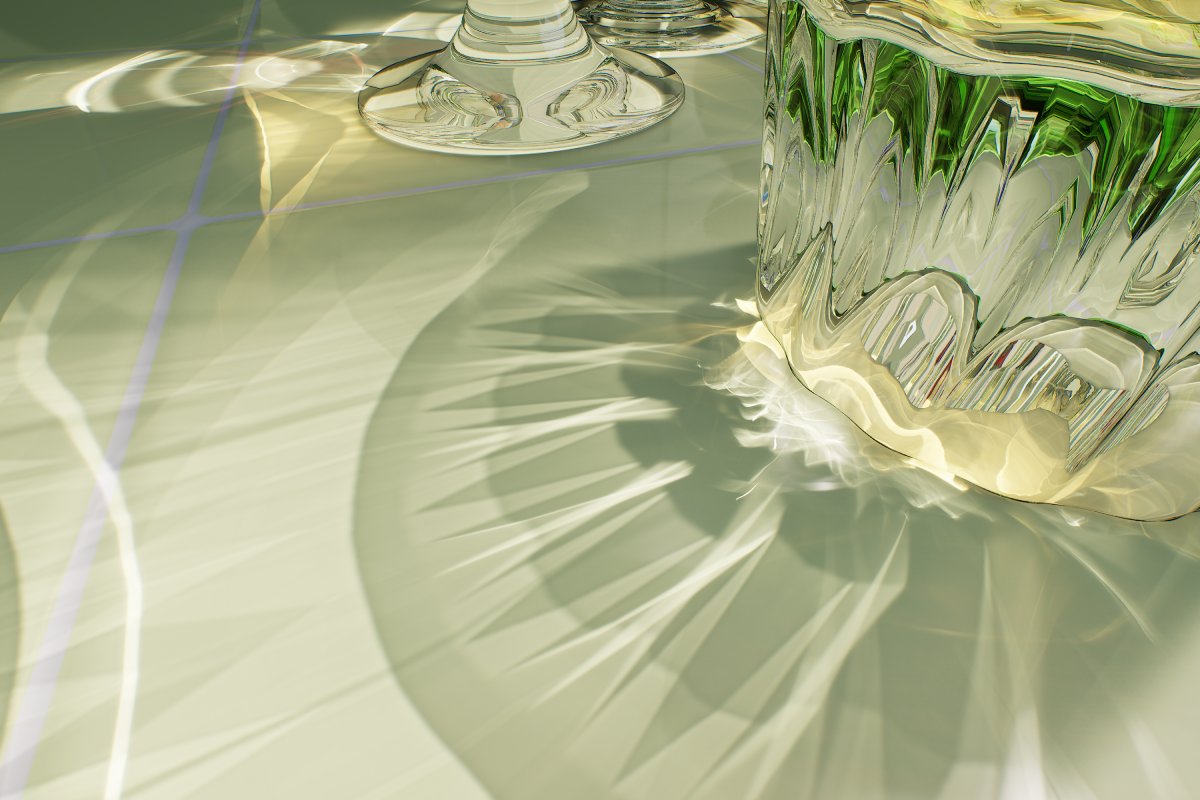
Caustics are common optical phenomenon in the real world. From the sloshing sparkles by water surfaces to the curved highlights in the backlight of clear glass, they are everywhere. However…
So how much would it cost to port this to HDRP
eternal laurel
About 3.50
mellow condor
eternal laurel
About 3.50
it's okay if it was like $10k+
eternal laurel
I'm really not sure how one would even port this without access to unity's source code
mellow condor
it's a pretty incredible amount of code
eternal laurel
how are you seeing the code ? The repo is 404 forr me
mellow condor
eternal laurel
yeah it shows me 404
eternal laurel
no
mellow condor
no
well you should get unreal source access
it's automated
it would probably be closer to $100k
at least
and the obstacle isn't that it's difficult, it's that you'd need unity to do that
lol
eternal laurel
well yes
mellow condor
it also includes DLSS
eternal laurel
I mean hdrp can already do colored ray-traced shadows so implementing this might not be that far off
mellow condor
it took a senior graphics dev at nvidia a few months
eternal laurel
so if it was only him I would say less than 100k then
mellow condor
NVIDIA Technical Blog
Yaobin Ouyang is a developer technology engineer in NVIDIA. Currently his main job is researching on RTX-based ray tracing techniques and provide consulting to game developers.
mellow condor
anyway i emailed him

 barren goblet
using 2020
 quartz heart
scene is very white??? (in HDRP)
 night valley
@mellow condor somebody extracted it to a small repo for falcor on dx12, if we team up it should take 1 month to port it for unity.

GitHub
A demo demonstrating a high precision RT caustics algorithm, which has been integrated into NVIDIA's UE4 RTX branch (https://github.com/NvRTX/UnrealEngine/tree/NvRTX_Caustics). - GitHub - l...
I can intregate to unity but if someone help with shaders it would be faster and quicker to implement.
night valley
eternal laurel
I'm really not sure how one would even port this without access to unity's sour...
There's no need for unity source access, You can get access to low level graphic api using c++ plugin.
mellow condor
night valley
I can intregate to unity but if someone help with shaders it would be faster and...
I don’t have good knowledge of either the underlying math or the shaders
This is pretty good though
I have Unity source access
It looks like the hardest thing would be integrating any of this into HDRP
The net result is an additive light blend pass right?
My alternative is moving around the object in a ray tracing rendered and precomputing a bunch of projections to blend between for a fake effect
 worldly thorn
im trying to get 2 cameras working with one rending the weapon and the other rendering everything else. I got it working in another project but that was a few years ago and i think i did it in srp then converted to hdrp. I can't get it working in a new project. It either shows 1 camera view or the other.
 void lynx
trying to change alpha on particles in HDRP/lit shader. doesn't work. any workaround? googling took me nowhere thus far
EDIT (solved): used visual effect graph instead. brackey saved me again. legend.
shrewd moon
void lynx
trying to change alpha on particles in HDRP/lit shader. doesn't work. any workar...
When you make a material using the lit shader you need to set its type to transparent or enable alpha clipping for alpha to have an effect
void lynx
shrewd moon
When you make a material using the lit shader you need to set its type to transp...
it'll make the material transparent, sure, but won't work (at least didn't work for me) in a particle system when you're trying to change opacity over lifetime or start color. visual effect graph has a lot more options to play with. unlit shaders worked fine, mind you, it's the lit that gave me a short headache.
anyway, here's the vid that helped me, in case anyone's hit the same roadblock:
https://youtu.be/R6D1b7zZHHA

Let's learn how to make realistic fire and smoke with VFX Graph!
This video is sponsored by Unity.
● Previous VFX Tutorial: https://bit.ly/2Tbh5Hw
● Download Textures: https://ole.unity.com/smoketextures
♥ Support Brackeys on Patreon: http://patreon.com/brackeys/
···············································································...
shrewd moon
void lynx
it'll make the material transparent, sure, but won't work (at least didn't work ...
Were you using particle lit shaders or some other lit shaders?
void lynx
hdrp/lit
shrewd moon
Has to be a particle shader to be able to get color data from the particle system
void lynx
whatever the issue was, it's been dealt with now :]
im a complete noob when it comes to shader wizardry
shrewd moon
void lynx
whatever the issue was, it's been dealt with now :]
Knowing the why is a good thing
VFX graph is not a direct replacement for the particle system because they're designed for kind of different purposes
worldly thorn
im trying to get 2 cameras working with one rending the weapon and the other rendering everything else. I got it working in another project but that was a few years ago and i think i did it in srp then converted to hdrp. I can't get it working in a new project. It either shows 1 camera view or the other.
void lynx
shrewd moon
Knowing the why is a good thing
VFX graph is not a direct replacement for the pa...
oh absolutely, i definitely want to advance my knowledge in this space, it's a lot to absolve and understand, but im getting there.
vfx graph looks pretty powerful in comparison to particle system, can do all that PS can and then some. just not sure how it is performance-wise. i'll keep PS for simpler effects and VFX for the more demanding stuff, i suppose
shrewd moon
void lynx
oh absolutely, i definitely want to advance my knowledge in this space, it's a l...
Particle System / Shuriken is all CPU-based so it can do collisions and you can attach gameobjects to the particles and run scripts on them
VFX graph is all GPU-based so it can do none of that, but can do more particles for cheaper, though the performance cost of instantiating VFX graphs is higher
Unity apparently recommends that if you use it for numerous small particle effects such as bullet impacts you'd make a pooling system that spawns all the effects inside one VFX graph
void lynx
ah. solid info, thanks
summer glacier
barren goblet
why the SSGI so strong?
Looks like sky fallback, you might have SKY set as fallback, or reflection fallback (or both).
In your SSGI settings it's a paramater at the bottom, make sure you enable show advanced settings.
 serene zephyr
Guys help.
My entire project has been destroyed
all my materials are gone
how to a revert and get rid of HDRP
shrewd moon
serene zephyr
all my materials are gone
It sounds likely that the materials simply became incompatible with your render pipeline if you didn't complete the setup and conversion process
serene zephyr
shrewd moon
It sounds likely that the materials simply became incompatible with your render ...
I fixed it
Luckily
I was about to commit sudoku until that
 mystic breach
anyone know why my shadows are so grainy or what causes that?

not talking about the quality of the shadows here btw, just wondering why it looks so grainy/noisy
shrewd moon
mystic breach
not talking about the quality of the shadows here btw, just wondering why it loo...
Mainly the angular diameter, iirc
But consider also that the scene view may use grainier filtering than the game view
 shrewd moon
mystic breach
still grainy
shrewd moon
mystic breach
still grainy
There's always grain based on how big the penumbra / partial shadow is relative to screen, and the bigger the light source diameter the bigger the penumbra
At least I haven't yet found a way to make it smoother while keeping the light diameter
mystic breach
it just kinda sucks how I can't figure out to start a HDRP project that runs lean. I always find it tethering between 60 and 144 just from starting fresh project, but once you adding assets, it no longer runs lean
shrewd moon
mystic breach
it just kinda sucks how I can't figure out to start a HDRP project that runs lea...
HDRP expects you to know a lot about graphical features and how to use and optimize them
I prefer URP generally since there's less burden of micromanaging it
summer glacier
mystic breach
still, this is what it looks like in game view
go to your HDRP asset, and switch "shadow filtering" from high to medium, should solve it
another option is: Enable Temporal antialiasing in Scene View settings (click the "camera" icon in Scene window)
and then enable Refresh scene view, find i there:

If it's still not fixed, go to your directional light: Increase sample counts in shadow settings.
And reduce angular diameter.
Possibly changing angular diameter (lower it) and enabling TAA will fix it.
Make sure you bring your samples down later since it costs extra performance, find the least amount that works well
or switch to medium shadow filtering and it should -just work-
mystic breach
👍
 royal tusk

my game/scene view is extremely grainy, is there a fix for that?
or is it probably graphics card related as im running this on a laptop
 slender plover
royal tusk
or is it probably graphics card related as im running this on a laptop
slender plover
royal tusk
or is it probably graphics card related as im running this on a laptop
ur running HDRP on laptop ?
glacial fossil
royal tusk
If I had to guess, id say thats some shadow related issue
quick birch
royal tusk
my game/scene view is extremely grainy, is there a fix for that?
A few messages above if your still looking for a solution/help
turbid matrix

I guess this is the norm now
I see the commits are still there on that PR, just makes it more tedious to find the changes
mellow condor
mystic breach
still, this is what it looks like in game view
try changing to lower quality filtering
oh yeah someone said this
scarlet hull
turbid matrix
I see the commits are still there on that PR, just makes it more tedious to find...
IDK if it can be made better. I understand it would be great to have a one to one mirror with all the changes, but I can't understand how much work that means from the teams doing this
eternal laurel
I dont care about the repo at this point. Just give me my render🍔
turbid matrix
@scarlet hullI don't get why the commits can't just be mirrored like you have on the internal repo... why they need to be batched together if you don't do that internally? I do get the pain of having to resolve merge conflicts but that doesn't seem to be a factor if all dev is done in one place anyway
I know URP and HDRP has batched some of the work on staging in past.. and why that is a thing
but now we get these mass merges for everything
the main reason why I'm concerned about this is because it makes bug hunting on this end really tedious.. I can't roll back to find the place where things broke etc now
scarlet hull
Like I said, I don't know all the issue of the process, sorry :/
All the packages that were in the public graphics repo are now part of the internal developpement repo, meaning the folders were copy pasted in a single huge repo with the rest of the editor source code.
So maybe it's the process of extracting them again to make the code public that is cuasing this ?
turbid matrix
yeah just to be clear, not trying to claim you'd be somehow responsible for this 😄
just annoyed by the situation
Unity being a black box used to be huge issue in past.. getting more open development did help a bit there but now afraid things are moving more on "wrong" direction. (sure the SRP code will still be there but not many changes look logical unless you know why they were made)
I've been able to solve many SRP related bugs on my own with the past access to the repo... also including things that Unity QA just closed without good reason
scarlet hull
The issue was that with SRPs, we were very dependent of the code that is in the black box, and moving our code there will (supposely) allow to make the development easier.
The worst was on some features PR where the dev had to maintain a branch on two repositories, one for the c+ engine changes and one for HDRP. Now only a single one is needed.
I don't have a solution for you but I understand the pain.
I can try to forward the feedback and ping people around to know if there is a plan to make it better in the future.
Because right now, I think that the PR you saw was made manually, reflecting every single PR need automated process else it will just be a loss of developer time 😅
turbid matrix
to be completely honest, my bigger fear is that this is currently some manual patch and the repo access will be forever denied
I've been around long enough to know that's a possiblity
atm we are at a point where it feels that public repo access gets made so bad it starts to lose all it's value.. and at that point it can just be scrapped

 kind zephyr
Hi there 🙂
I try to optimize my HDRP scene and I don't understand the following message in the Frame Debugger
SRP: Node material requires device state change
Materials are the same and keywords too ... could you help me?
turbid matrix
@kind zephyrfound this thread already? https://forum.unity.com/threads/what-does-srp-node-material-requires-device-state-change-mean.1124272/

Unity Forum
Hello,
I am testing somthing on SRP Batching. I am wondering what can cause "SRP: Node material requires device state change"? What does it mean?
sacred veldt
for like disabling rtx mode its any way to do this without creating new quality setting?
or stuff like disable only fog
its this frame settings or what?
turbid matrix
you can toggle RT off from individual volume components that use RT
if there's a toggle in framesettings, that would be the master switch, yeah
@sacred veldt
dawn sorrel
Does someone know how to make the sun reflection on the terrain less intense?

 harsh forge
how can I change the range of the bounding box in unity ? trying to get rid of this

 forest sierra
How to fix?

I have voxel generated mesh with hdpr material, and that's what it says:
Cannot use a Mesh for building the Ray Tracing Acceleration Structure. Invalid vertex buffer for Mesh ''.
UnityEngine.GUIUtility:ProcessEvent (int,intptr,bool&)
It still works, but fps is pretty low (16 when chunks generated)
forest sierra
forest sierra
How to fix?
So it basically hates when there is 0 vertices in mesh. just don't add it, when vertices.Count == 0
Yay now i have 95 fps instead of 23
shrewd moon
harsh forge
how can I change the range of the bounding box in unity ? trying to get rid of t...
Boundg box of what, exactly? Also, please don't use gifs for video, they're terrible for the purpose
mp4 and webm work much better
 quiet quest
wondering if someone could help me with a question
to using a global volume with a diffusion profile override does that diffusion profile asset need to be assigned in the Diffusion Profile Assets list on the HD render Pipleine Global settings as well?
 simple plover
anyone able to play a transparent/alpha-channel webm file? my webm vid plays transparent outside unity but not within (videoplayer). definitely appreciate any help.
 rotund frigate
I have a rather odd issue when moving my camera a certain depth from an objects surface holding a material with textures and have no clue what would be causing this issue. The immediate thought is clipping planes, but performance only seems to relieve when the clipping plane actually starts to cut the surface off of the screen. Does anyone have an idea? (Unity 2021.2.19f1)

It appears the same performance hit is present in 2022.2.0a9. If this is expected behaviour, how may one achieve performance over fidelity?

 true zealot
Actually looking at the GPU profiler, or better yet using a GPU profiler like RenderDoc would give you an idea of what the impact is from. Those could be two different cases—maybe the second is overdraw—just don't know
rotund frigate
true zealot
Actually looking at the GPU profiler, or better yet using a GPU profiler like Re...
I ran a build connecting the profiler, so this data is from a game build directly. I have vsync disabled in my project but the builds still populate the profiler with rather unhelpful vsync data, which seems to be the main contibrutor during these shifts


 rotund frigate
oh my, apologies
ah, subsurface scattering seems to be a candidate


Was on High Quality, appreciate the help!
 snow delta
Anyone know how to crossfade between two cameras in HDRP? I'm pretty sure it has to do with this new fangled compositor thing, but I can't make sense of it.
 autumn hare
snow delta
Anyone know how to crossfade between two cameras in HDRP? I'm pretty sure it has...
autumn hare
snow delta
Anyone know how to crossfade between two cameras in HDRP? I'm pretty sure it has...
+1
harsh forge
shrewd moon
Boundg box of what, exactly? Also, please don't use gifs for video, they're terr...
My mesh. Noted thank you
harsh forge
shrewd moon
Boundg box of what, exactly? Also, please don't use gifs for video, they're terr...
(its a plane deformed with a curve in the shader)
eternal laurel
snow delta
Anyone know how to crossfade between two cameras in HDRP? I'm pretty sure it has...
The compositor is not really ment for runtime(games). What you can do is blend between two rt's one for each camera in a custom render pass. Sort of like a custom post process effect.
shrewd moon
harsh forge
(its a plane deformed with a curve in the shader)
Ah, mesh bounds can be modified in script using Mesh.bounds, not sure what other ways there are
There's the automatic Mesh.RecalculateBounds but not sure if it accounts for vertices modified by shader
sacred veldt
If gpu usage is very low and game just has 8 fps then what can happen?
even with disabled everything in default volume
 turbid matrix
use profiler
sacred veldt
 sacred veldt
 turbid matrix
you may want to check the gpu side too
sacred veldt
somehow DirectX 12 was issue
summer glacier
DX12 is very slow in HDRP compared to DX11

 blissful dust
hey i need help. i am using pp on a cam and after some time the fps becomes so bad, if i disable the pp the fps becomes stable again
after running the game for some time the fps becomes unplayable
shrewd moon
blissful dust
hey i need help. i am using pp on a cam and after some time the fps becomes so b...
The documentation has instructions how to profile game performance
blissful dust
the rendering increases
alot
im using multiple cams
but only one is active at once
and im making a voxel game
so vert count is high
but its not the main issue
since i can get around 150-90 fps
when i start running the game
after time the game performance becomes worse
summer glacier
blissful dust
im using multiple cams
You shouldn't use multiple cameras in HDRP, very expensive
There's things you can do using custom passes that achieve what you want with less performance cost
You need to use the CPU and GPU profiler, it's very easy to use. It will help you a lot to understand what's taking your performance exactly
Usually with post processing you should stick to medium quality, high doesn't give much better quality but almost always costs quite a bit more
glacial fossil
summer glacier
You shouldn't use multiple cameras in HDRP, very expensive
Is that a concern if theres only 1 active at a time?
summer glacier
glacial fossil
Is that a concern if theres only 1 active at a time?
1 active is fine, the issue is if there's more than 1 active at a time (for example game camera and UI camera)
blissful dust
summer glacier
You shouldn't use multiple cameras in HDRP, very expensive
My man I use one at a time
Any optimization recommendations
summer glacier
I need to know your bottleneck first, what's taking up your performance
 inner parcel
I dont get the idea of using multiple camera but keeping only 1 active. Why not keep empty gameobjects in scene with proper placement and then switch the camera placement to that gameobject as child instead of turning off one cam and enabling other?
Back in unity 2019 in when I had multiple cameras but 1 active, i used to get all sorts of error in player as soon as camera was switched, but none in editor. The workaround was changing places of camera, and i've been following that ever since till now
 undone pecan
question:
does anyone have any experience with Custom Pass?
I want to use a canvas in World space overlay, but it wont work. it just goes black. and i would want to use a bloom PP effect on the UI material. So i need the depth in a Custom Pass. anyone know anything?
loud leaf
inner parcel
I dont get the idea of using multiple camera but keeping only 1 active. Why not ...
You can teleport the camera around but it's still going to be the same camera (iso, shutter, focal length, aperture, focus distance, etc)
inner parcel
Cant that be changed with a scriptable object?
Or using a prefab reference and using copy instead of active scene cam?
loud leaf
Maybe they should move that to the volume system, but I guess that could get confusing
loud leaf
inner parcel
Cant that be changed with a scriptable object?
Or using a prefab reference and u...
Anything is possible but I guess that's why a lot of people just use multiple cameras and switch between them, since it's only a single action
blissful dust
inner parcel
I dont get the idea of using multiple camera but keeping only 1 active. Why not ...
Fnaf cam system
shrewd moon
inner parcel
Cant that be changed with a scriptable object?
Or using a prefab reference and u...
We've come full circle and invented Cinemachine again 😄
shrewd moon
blissful dust
Fnaf cam system
I'd suggest trying Cinemachine instead of messing with multiple cameras, it's specifically made for the purpose
blissful dust
Idk I activate and deactivate the ones I use and don’t use
It’s working pretty well for now
And my ego refuses to use a premade thing
I like making stuff from scratch to learn more
shrewd moon
blissful dust
And my ego refuses to use a premade thing
Unity is a premade thing
gotcha there!
(and cinemachine is a part of unity just like all the other official packages you've been using so far)
shrewd moon
If you want to do things the hard way to "learn" you shouldn't be asking for solutions
Though weirdly enough you're not the first person by far who hears "Cinemachine" and declares they're not going to use it without looking into what it even does
I think it just has some kind of curse
 strong scroll
Does anyone know why such a problem could occur? I am using unity 2021.3.3f1 HDRP. The problem only occurs on some computers. In my case, everything looks fine. https://cdn.discordapp.com/attachments/948659757256949821/979789722538901514/Bhop_Craze_Demo_2022.05.27_-_17.50.35.02_Trim.mp4
This is what it looks like in my case.
 inner parcel
shrewd moon
We've come full circle and invented Cinemachine again 😄
inner parcel
shrewd moon
We've come full circle and invented Cinemachine again 😄
cinemachine does have a learning curve. its not something i would recommend to anyone unless they have complex mechanics/implementation for the camera which otherwise they are managing in code
shrewd moon
inner parcel
cinemachine does have a learning curve. its not something i would recommend to a...
Hm, never thought of it having much of a learning curve
Sure you need to understand that virtual cameras are those "empty transforms" we discussed but aside from that it works for most purposes just by plugging it in
If you're ever thinking about changing camera position in code you're already better off learning Cinemachine at that point
inner parcel
shrewd moon
Hm, never thought of it having much of a learning curve
Sure you need to underst...
maybe for you and me cinemachine feels like a better option. but what I was suggesting is that for someone who has a behavioral issue in something not related to cinemachine, I wouldn't recommend them to use cinemachine just for that one feature. perhaps if they are reinventing many other features from cinemachine which is already there, i would recommend it to them.
its like recommending addressables to anyone who has some xyz problem with asset bundles. i normally dont do that and probably its irrelevant in this channel, but I just want to convey my thoughts heh
shrewd moon
inner parcel
maybe for you and me cinemachine feels like a better option. but what I was sugg...
I definitely agree you on that generally
May have skimmed over the discussion and assumed that the camera switching itself was causing the performance issues at hand
I don't usually recommend converting to different systems to solve just one problem but cinemachine is a bit of an exception for me, since it's such a consistently effective tool in the box
 shrewd moon
blissful dust
this might be the fps issue origin idk
shrewd moon
blissful dust
this might be the fps issue origin idk
Did you look for instructions how to profile the performance to get clues what's causing it?
blissful dust
i saw it
when the game is running for some time
the rendering time increases
to like 5-6x
 ocean salmon
Hello, anything here looks wrong or are these values common in current games?

I moved from Built-In to HDR and batching increased from ~500 to ~2800
Is this expected or there is something wrong with my HDRP configuration?
Does anybody has had similar experience upgrading from built-in to hdrp?
Thanks
glacial fossil
ocean salmon
Huh, thats a lot of triangles…
2800 batches handled by srp batcher are most likely not a problem
ocean salmon
glacial fossil
2800 batches handled by srp batcher are most likely not a problem
Thanks, still do you have an idea why is performance impacted that much? The same scene in Built-In does 512 batches and runs at 233 fps

I am not sure if this is just how HDRP is supposed to work by hitting the performance more than twice from 233fps to 96fps
I am also not sure why if it is the exact same scene, the Tris and Verts count increased like that
glacial fossil
ocean salmon
Oh I didnt expect tris count to increase that drastically… thats interesting. In general, hdrp is expected to run worse than birp. I cant really be very helpful as I dont use hdrp myself (because it performs horribly on my gtx 1050ti)
ocean salmon
Thanks, I will keep asking around
I am also noticing Enabling shadows in the lights is what makes the Tris and Verts count to increase
glacial fossil
ocean salmon
I am also noticing Enabling shadows in the lights is what makes the Tris and Ver...
The tris count isnt the actual amount of triangles on the screen but rather the amount of triangles rendered. If same triangle is rendered twice, that will appear two times in the tris count. The reason shadows affect the tris count is that all shadow casting objects (within the light range) are rendered during the shadow pass (can be rendered multiple times if theres many lights with shadows enabled). That means shadows affects the tris count in built-in render pipeline too. I still dont see why the tris count would be 10x higher on hdrp. There has to be a lot of extra passes per object or its some sort of bug. Im curious to hear more about this if someone knows more
ocean salmon
Once I removed the shadows from all lights that also not got shadows on Built-In things are looking better
But still the performance is impacted and fps reduced by almost half

Not sure what is causing the triangles to render 3 times more than Built In
 iron flame
ocean salmon
Not sure what is causing the triangles to render 3 times more than Built In
iron flame
ocean salmon
Not sure what is causing the triangles to render 3 times more than Built In
extra pre-passes. the ability to handle more light and shadow simultaneously. High quality screen space effects by default...
ocean salmon
iron flame
extra pre-passes. the ability to handle more light and shadow simultaneously. ...
Thanks
Still disabling all screen effects only seem to improve by a little
There is something on the HDRP asset that is causing the x3 render on all triangles but I cannot tell what is it
iron flame
ocean salmon
There is something on the HDRP asset that is causing the x3 render on all triang...
Shadow casters 428 -> 739
Depth-normal pre pass
The reason why shadow casters are increasing. directional light cascade settings and more light rendering. The depth normal prepass is also something that is a requirement of hdrp's design.
ocean salmon
iron flame
Shadow casters 428 -> 739
Depth-normal pre pass
The reason why shadow casters ...
I turned that off already but only helped a little bit

Right now is looking like this after trying to figure out what is causing the increase

Still have no idea if at this point this is expected from a built-in to hdrp upgrade or there is something else I might need to change so the impact is not that significant
I was expecting some impact to performance but not something close to increasing batch and reducing fps by more than half
iron flame
Adjust the distance fade of your spot and point lights in your scene. For example, shadow after 30 meters and light after 100 meters. this reduces your shadow caster and therefore the increased tris count. Add shadow to your stage volume and adjust the cascade distance and number.
ocean salmon
I dont have spot lights, there is only 1 light creating shadows which is the directional light
iron flame
HDRP is CPU intensive in the editor. realtime reflection probe, realtime sky update is still very expensive. It is more accurate to get build to compare performance. HDRP aims to provide good performance with higher quality. BIRP will be faster than HDRP in most cases. but it cannot reach HDRP in terms of quality.
ocean salmon
Thanks, is there data on how much faster is Built-In compared to HDRP?
Just want to know if I already reached to reasonable numbers
glacial fossil
Its all about the quality settings and your hardware, I dont think theres such comparisons as they would be quite ”pointless”
ocean salmon
Im doing this research and profiling before making a decision to move the entire project, we would like to know if we are going to cut every user's fps by half, then what is the value we are getting from it
And it would be good to know from other's experience how much does moving to hdrp impacted their projects
To have an idea or to figure out if there is something we are doing wrong with our hdrp configuration that is causing this impact on performance
iron flame
ocean salmon
To have an idea or to figure out if there is something we are doing wrong with o...
After about 20 hours (it is midnight in Turkey and I will go to work tomorrow) in a small test project (unity viking village), I will try to closely adjust the triangle and performance values of BIRP and HDRP. I will report the results here.
ocean salmon
iron flame
After about 20 hours (it is midnight in Turkey and I will go to work tomorrow) i...
That would be extremely helpful, I appreciate that very much
 frozen mason
helloo how do i convert back from hrdp to built in rp?
kind zephyr
turbid matrix
<@327044876975996928>found this thread already? https://forum.unity.com/threads/...
Yes I do, but it does not resolve my issue :/
iron flame
ocean salmon
That would be extremely helpful, I appreciate that very much
I will make the performance comparison in the Lighting Optimization Tutorial. Unity 2022.2 alpha HDRP 14 (Graphics repository)
ocean salmon
iron flame
I will make the performance comparison in the Lighting Optimization Tutorial. U...
Thanks! can't wait!
iron flame
BIRP VS HDRP performance
loud leaf
Does anyone know his way around the depths of HDRP when it comes to dynamic resolution? When creating a new texture with dynamicResolution and xrReady both set to true in the TextureDesc, I get these tiles in the scene view, but everything is fine in the game view (DLSS is enabled in game view). When I set dynamicResolution to false in the TextureDesc, the scene view is fine, but the tiles then appear in the game view (with DLSS is enabled). I wonder if this is something that has been noticed and fixed lately? (I'm still developing on HDRP 13.1) I think it would be too complex to get this through QA with a bug report.
Edit: I wanted to include that I use _PostProcessScreenSize for calculating all coordinates, but I've tested it with _ScreenSize too.


(it's supposed to look like this, I think there's something completely breaking when creating textures with dynamicResolution here)
I'm pretty sure the motion vectors suffer from this issue too, when moving the camera it looks "somewhat" right, but I think that's because the whole motion vector texture is getting tiled and the result is still kind of correct, when there are no objects on screen moving.
scarlet hull
I don't have enough in depth knowledge to understand what is happening here exactly, but it sound like a bug that you should submit
dawn sorrel
Most likely this question is for Unity developers. When I was doing the ParallaxOcclusion code for my URP+ pipeline following the HDRP example, I noticed a **bug with DepthOffset **(or I'm wrong). In HDRP code we multiply viewTS by GetDisplacementObjectScale():
float3 viewDirTS = isPlanar ? float3(uvXZ, V.y) : TransformWorldToTangent(V, input.tangentToWorld) * GetDisplacementObjectScale(false).xzy;
But if we do not do this, then DepthOffset will work more correctly.


I posted this bug on the unity forum, I wrote here so that maybe the Unity developer will notice it faster here
Additional screenshots

 scarlet hull
dawn sorrel
Most likely this question is for Unity developers. When I was doing the Parallax...
scarlet hull
dawn sorrel
Most likely this question is for Unity developers. When I was doing the Parallax...
I saw the forum post poping, but am quite busy.
If you could do a bug report with a easy repro it would be great, so we can investigate 🙂
dawn sorrel
scarlet hull
I saw the forum post poping, but am quite busy.
If you could do a bug report wit...
They already wrote to me that they will investigate it. In this case, should I still write a bug report? And where can I do it?
 scarlet hull
Seb is the dev lead, so if he said we will investigate, we will. Now he also has an incredibly long todo list ...
If you still want to do a bug report, the easiest is to do "Help/Report a Bug" within the editor
dawn sorrel
scarlet hull
Seb is the dev lead, so if he said we will investigate, we will. Now he also has...
ok, got it, thank you for your attention
turbid matrix
@dawn sorrel also if you do end up sending a bug report, better give the case ID also on that forum thread
dawn sorrel
scarlet hull
Seb is the dev lead, so if he said we will investigate, we will. Now he also has...
I can make a video comparing the effect in my pipeline and HDRP with embedded screenshots of the code. Will it be helpful?
scarlet hull
dawn sorrel
I can make a video comparing the effect in my pipeline and HDRP with embedded sc...
Yes
dawn sorrel
scarlet hull
Yes


I also noticed that if we do not multiply viewDirTS by GetDisplacementObject, then shadow is not flat, which is correct and should be
loud leaf
I've ran into these issues too
 midnight surge
Guys is it better to have only 1 mesh floor for my map (atleast for lighting stuff) or is is better to have multiple meshes