#archived-hdrp
1 messages · Page 68 of 1
 dawn sorrel
i just converted my car game to latest unity and its dxr is so amazing so much improvement 😮
this is nice , now i can play it @ 90 fps raytracing on. ")
 waxen lantern
dawn sorrel
i just converted my car game to latest unity and its dxr is so amazing so much i...
waxen lantern
dawn sorrel
i just converted my car game to latest unity and its dxr is so amazing so much i...
hmm, perhaps from DirectX12 optimizations that are being made?
 turbid matrix
for context, @dawn sorrel has monitor with really low resolution
raytracing is still not super performant but of course it depends what you do with it and how high resolution you use it at
I probably don't even get 90 fps on the new HDRP template on my 2070 super @1440p and that's raytracing off 🙂
talking of which, that template looks really funky on 2021.2 now

I faintly remember some other user posting similar thing in past
it looks like the lightmapping has mismatch on mesh UV's
 scarlet hull
turbid matrix
talking of which, that template looks really funky on 2021.2 now
scarlet hull
turbid matrix
talking of which, that template looks really funky on 2021.2 now
In 2021.2 we still need to update the template. It's just the matter of rebaking the lightmaps. (This does happen when you upgrade projects that have baked lightmaps)
turbid matrix
looks that way yeah 🙂
 eternal laurel
I have to say I really like the new template
Especially the bake settings. We straight up stole those haha .
 lone river
hey guys can some one help me how to make masks? with custom foward renders?
eternal laurel
I think you need to explain the problem a bit more
waxen lantern
lone river
hey guys can some one help me how to make masks? with custom foward renders?
yeah. you'll want to determine or choose which render pipeline you are using, first: https://docs.unity3d.com/Manual/render-pipelines-overview.html
 lone river
urp
eternal laurel
Hey @waxen lantern Ive been meaning to catch you. Care to talk a bit more about the liquid vfx you showed here a couple of days ago?
waxen lantern
@eternal laurel oh hey yeah I didn't get back to you before

 waxen lantern
@eternal laurel let's chat about it in #✨┃vfx-and-particles
eternal laurel
Ok
lone river
the pink is the mask its in the opaque layer mask and the object inside that I want it to only appear with the mask is in the transparent
I dont know why one is opaque and the other one is transparent
fixed, problem was in my compare function
 jade magnet
guys, could anyone please tell me why my preview is pink?
this doesn't work in both URP and HDRP and i have no idea why...

i'm on unity 2020 lts
 royal storm
Hey! Does anyone know if ScriptableRendererFeature is the only way to use commandBuffers with URP? I'm using the 2D renderer, and renderer features aren't available in it, surely there must be another way to use command buffers but I can't get anything to work. Or can you simply not use them with 2D?
scarlet hull
royal storm
Hey! Does anyone know if ScriptableRendererFeature is the only way to use comman...
You can also use the camera and frame callback of the RenderPipeline API : https://docs.unity3d.com/ScriptReference/Rendering.RenderPipeline.html
royal storm
scarlet hull
You can also use the camera and frame callback of the RenderPipeline API : https...
Awesome thanks, shall take a look!
 vague anvil
How can you get nice looking ambient occlusion in URP, considering ssao looks pretty shit in most cases
 rich spade
vague anvil
How can you get nice looking ambient occlusion in URP, considering ssao looks pr...
rich spade
vague anvil
How can you get nice looking ambient occlusion in URP, considering ssao looks pr...
that's a very general question and an opinion which may not be shared by others.
Meant in the politest way possible here's a very general answer, understand better what URP is and how forward render works. When you understand that you will probably then need to adjust / make better models / art assets and pre-bake AO ensuring you use it in relevant shaders and materials.
SSAO in forward renderer mainly bridges the gap between objects and terrain by adding in contact shadows giving more contrast where needed and adding much required depth to scenes.
Failing that, wait for deferred renderer to be available in URP and you will probably be satisfied 😉
 broken lichen
Deferred does something different than screen space ambient occlusion?
rich spade
with deferred you would have access to the normal pass which includes material / texture normals not just world space normals. If that makes sense, my terminology is sub par. While in forward you only have access to basic geometry normals (world space) unless you want to write a custom pass I guess.
 vague anvil
Is there a way to get soft shadows in unity URP?
 bold robin
does URP & HDRP work properly in 2020? For me it does not
because it is literally impossible to override something in the post processing due to some errors
a bug in Unity I suppose. Do you all get this too? I get this regardless of the project. Even an empty project provides me with this issue. Switching to HDRP doesn't work either, same error.

but it is very odd. I can just not add any overrides but the thing itself does work in the empty project
so if anyone is willing to provide me a volume profile with all options open then I would highly appreciate that 😂

OMG YOU CAN ADD EM LIKE THIS YUSSSS OKAY NVM

lol
 frigid kelp
anyone know why my glow effect works in editor mode, but not in game? Here's a comparison photo:

 frigid kelp
Ive also enabled the Post-Processing trigger on the camera
frigid kelp
Nevermind, I fixed it by enabling HDR in the universal pipeline asset
that took way too long lol
 blissful geode
Hello there ! I have a problem with my VFX graph particles, they are not writting in the Z buffer I guess, so my camera filter supposed to blur stuff far away blur my particles too.

Do you know how to write in the depth buffer with vfx particle ? I'm on HDRP 10.3
We can see in the pic that bellow the blur, the particle are fine, and above the blur line the particle are blured eventhough they are close
blissful geode
Found it
 keen pivot
so i figured i'd try this today, it looks dead handy, but i have a lot of materials in game using the HDRP/Lit Shader, which you cant edit in URP, so i guess there is no common 'Lit' Shader you can use in these cases, everything has to have a customer shader?
 stray owl
@scarlet hull


i switched it to this, is this what you meant?
or do you mean an actual comparison, and then a predicate?
using branch node
keen pivot
actually i supposed i'd best check a 'common lit' shader is in the the beta or alpha
scarlet hull
I was thinking of an actual comparison
 stray owl
also, does anyone know how I'd go about turning my unlit graph into a PBR graph?
scarlet hull
Change from unlit to lit in the graph inspector
stray owl
where's that?
scarlet hull

 scarlet hull
Maybe you're on an older version then.
You can create a new master node, or type PBR, reroute your connections to it, and set it as the active one through right click
stray owl
right, gotcha, thanks
would you be able to explain a bit more slowly to me how I'd do the refraction thing?
sorry for the hassle :(
scarlet hull
I'm building a sample right now
stray owl
okay, thank you so so much!
would you recommend i update my unity to the latest lts?
i think i am one behind
like is there much new in the graph
scarlet hull
heavy yes
scarlet hull
Here's my refraction setup (left non visible part is just a fake refraction uv offset) :

And here is the result :
 scarlet hull
blue capsule is bellow the "water", green is through the surface, and red is above.
scarlet hull
You can still see a small amount of red and green pixels around those capsules, it can be avoided by sampling multiple times the depth and doing the comparison, but it's already way more obvious.
 crimson quartz
How can i set render queue in urp 8.3.1. I use blackout sphere which when its enabled overlap all other objects?
 crimson quartz
but i have no this option
stray owl
make sure you're looking at the material
crimson quartz
 scarlet hull
Those shader don't have an overridable render queue
stray owl
^^
crimson quartz
so i should modify them ?
scarlet hull
Maybe just create quickly a shadergraph that fits your needs
crimson quartz
mm ok ty, ill try
stray owl
also, is it bad to have two screen position nodes, or two time nodes, etc?
actually im going to update my unity right now
keen pivot
oh this looks like a nice thing..https://github.com/RemyUnity/SG-HDRP-Lit

GitHub
Shadergraph version of the HDRP/Lit shader. Contribute to RemyUnity/SG-HDRP-Lit development by creating an account on GitHub.
bugger, the triplanar doesnt seem to work
that was the problem i was hoping to solve 😛
keen pivot
ah well, it help me stumble across fixing triplanar in my own lit shader
scarlet hull
I really need to update my different shadergraph repos 😅
bold robin
why is everything still purple when I use Autodesk in HDRP?

 iron flame
HDRP(github) AMD CAS perfect 😄
image quality is very good with the recent changes, but sometimes the image turns upside down.
 keen pivot
is the long term goal to have things like terrain material in shadergraph too?
 dreamy fox
iron flame
HDRP(github) AMD CAS perfect 😄
image quality is very good with the recent chang...
dreamy fox
iron flame
HDRP(github) AMD CAS perfect 😄
image quality is very good with the recent chang...
Hey! Can you please file a bug about it? Definitively something we don't want 😄
bold robin
is it just me or do I have to set the light intensity veryyy high
 grave mica
bold robin
is it just me or do I have to set the light intensity veryyy high
grave mica
bold robin
is it just me or do I have to set the light intensity veryyy high
I have spotlights with 70 to 130 and its not getting anywhere close to bloom territory
bold robin
to get a bit of decent lighting out of a spotlight I gotta set it on 8000000
 civic stump
So i am using a marketplace URP shader, and it works correctly in Editor and Game Mode. But when i build the game and install it on my iOS device the shader turns pink? How is that possible and how do i correct this ?
 ember breach
What would be fastest way to render trees etc in big numbers? like given 10000 trees, Is it better to only set batching static and leave it, or use GPU instancing on material and disable batching static, or runtime connecting those trees together is some grid to lover number of them?
grave mica
If you going to fit 10k trees in a scene you could use quads with textures that have tens to hundreds of them
keen pivot
so, i spent a while converting my lit shaders to HDRP/URP compatible ones, and i see very little gain in performance between HDRP and URP modes
is this normal?
bold robin
how do I fix this shadow in HDRP
 bold robin
 dawn sorrel
ToyCar-Render_Gltf_Khronos_Glb_and_Unity2019(js-gltf-assets-experiments) UnityGltf Animations Pbr Glb in Unity 2019.4 Editor LTS glTF
https://media.discordapp.net/attachments/497872447542919179/822804341457944576/UnityGltf_UnityEditor2019_4_Glb_Animations.gif
https://media.discordapp.net/attachments/497874081329184799/822807508775075880/UnityGltf_Pbr_BoomBoxScene_Glb-Unity2019Run.png onPlay();


 bold robin
seems like all my models are suffering from it?
 dawn sorrel
hey
using dxr in unity and when i click right mouse moving camera there is a noise coming from my pc , the noise changes according to my right clicks. this happen on some games too... is it gpu coil whine ?
 maiden coral
Is anyone having this problem in URP 10.3.2 and the latest unity LTS 2020? https://thumbs.gfycat.com/WholeAdorableAfricanwilddog-mobile.mp4
The bloom flickers like hell compare to older urp and unity2019.4.
 grave mica
maiden coral
Is anyone having this problem in URP 10.3.2 and the latest unity LTS 2020? http...
grave mica
maiden coral
Is anyone having this problem in URP 10.3.2 and the latest unity LTS 2020? http...
Have the same thing, just doesnt matter too much for my usecase
maiden coral
My scenes lose detail because of this, every glossy surface will blink and flicker like that because of the lights and if i turn HDR off the bloom is gone, looks worse then a mobile effect.
Not to mention that is not from me since on other 2 pc's is the exact same thing
iron flame
@maiden coral You can edit the URP package and let Bloom work in full resolution.
Universal RP / Runtime / Passes / PostPrcoessPass.cs
line 930
// Start at half-res
//int tw = m_Descriptor.width >> 1;
//int th = m_Descriptor.height >> 1;
int tw = m_Descriptor.width ;
int th = m_Descriptor.height ;
Or you can lower the clamp value.
 maiden coral
iron flame
Universal RP / Runtime / Passes / PostPrcoessPass.cs
line 930
// Start at half-...
maiden coral
iron flame
Universal RP / Runtime / Passes / PostPrcoessPass.cs
line 930
// Start at half-...
I did try that with the clamp and is not working.. only making it worse
Edit: the clamp makes it better but the result is poor.
bold robin
what's a great way to pump up your fps in HDRP?
it's due to the amount of lights but it's important for me to keep em and I can't really bake em because they move
maiden coral
bake what ever is static, or if you do not need time of day.
Also minimize the effects you use, as well as to much geometry or to high rez textures
bold robin
maiden coral
Also minimize the effects you use, as well as to much geometry or to high rez te...
I don't really have effects. The only thing that I can really bake is the sunlight but thanks for the advice 🙂
Is there maybe an option to perhaps reduce the quality a bit of the lights to be able to support maybe 100 moving lights?
maiden coral
Hmm not sure!.🤔
 elder merlin
limiting how many lights are active and the range of the active lights are two things to optimize
rich spade
also ensure you have baked culling for the scene
bold robin
rich spade
also ensure you have baked culling for the scene
lemme try it
 woven quail
I have 6 textures for the sides of a cube but how am I supposed to create a cubemap with this?

 elder merlin
You seem to be in debug inspector mode
woven quail
nope it is normal mode
elder merlin
What happens if you drag the textures into the slots at the bottom?
woven quail
nothing, the cubemap remains white
 final lichen
Hi, I am experiencing a little issue I never had before with the 2D Light
It is basically the same problem who is mentionned here : https://answers.unity.com/questions/1785107/urp-2d-lights-not-working-as-expected.html
Unity is the ultimate game development platform. Use Unity to build high-quality 3D and 2D games, deploy them across mobile, desktop, VR/AR, consoles or the Web, and connect with loyal and enthusiastic players and customers.
The global Light 2D don't work as expected. It will apply to every layers
If I exclude one, it will still be lighted
scarlet hull
woven quail
I have 6 textures for the sides of a cube but how am I supposed to create a cube...
I guess you're using one of the render pipelines and are trying to use the "legacy cubemap" asset ?
It support is kind of clunky there, and it is recommanded to prefer packing all the face texture in a single one and import it as a cubemap : https://docs.unity3d.com/Manual/class-Cubemap.html
 barren goblet
Hi, I'm using URP 2020, I have trouble on RenderWithShader, this function is not working.
Any solution to solve it ?
scarlet hull
barren goblet
Hi, I'm using URP 2020, I have trouble on RenderWithShader, this function is no...
Use render features on the render pipeline asset to achieve something similar.
stray owl
my light reflections are offset based on the x position of the camera

using a metallic surface shadergraph, on a quad
if anyone knows how to fix this, please @ me!
 civic flume
Anyone experienced any camera issues when upgrading to 2020.3 LTS in projects using URP? After upgrading, nothing is being drawn in my scene except for the skybox
stray owl
scarlet hull
You can still see a small amount of red and green pixels around those capsules, ...
if you don't mind me asking, how would i do multiple samples?
scarlet hull
stray owl
if you don't mind me asking, how would i do multiple samples?
Multiple scene depth nodes with different coordinate input 🙂
stray owl
what would i change the coord input by?
thats what im struggling with, i already got the multiple nodes in :)
scarlet hull
The base coord iirc is ScreenPosition node, set to "raw"
Take that and add/subtract a pixel unit on X and Y
stray owl
it was default, but yeas
how many times would i do that?
also is there a way to make a loop
to do it multiple times?
scarlet hull
stray owl
how many times would i do that?
That's to you to decide. 4 times, 2 (negative and positive) on each axis seems a minimum.
scarlet hull
stray owl
also is there a way to make a loop
Yes, by using a custom function node.
stray owl
right, gotcha, thank you!
 slate sonnet
doh. I expected as much, but got nothing.
so doing a 2d game where I'm trying to have colors on the same layer mix, but only that layer.
I've set up a shader for blend one one for the sprites, but even when using layered cameras the shader does indeed blend with the background of the noncolormix camera
ie- I have a white background, a background layer of drawn sprites, a layer I want to blend the colors over that (without combining on the previous layers), and then more sprite layers on top of this
unfortunately, layering/multiple cameras doesn't help - the shader computations occur after the previous cameras are applied
civic flume
Does anyone know why editing _BumpScale is disabled on mobile platforms in Unity's SRP?
elder merlin
civic flume
thanks
slate sonnet
I'm creating a mesh on startup as a test. it looks even worse when I'm not zooming the camera in. Any ideas on how I should make it appear more smooth?

(Tried AA on everying from x2 to x8, and its on in my NVIDIA graphics settings)
scarlet hull
slate sonnet
(Tried AA on everying from x2 to x8, and its on in my NVIDIA graphics settings)
If you're using deferred rendering, msaa doesn't work
slate sonnet
scarlet hull
If you're using deferred rendering, msaa doesn't work
Hm. On the Project Settings > Graphics? Deferred refers to 'built-in shader'?
scarlet hull
No. That's a rendering path. In the built-in renderer you have the choice between deferred and forward. You can change it in the "Tier Settings" or directly on the Camera inspector in "rendering path"
slate sonnet
Got it. Everything is set to default on the tier settings, so 'rendering path' is set to forwards. Found MSAA was turned off on the camera at some point, it's back to 'use graphics settings' but it only improves it marginally.
Still, that's at least a step forwards, thanks.
it probably needs a better material/shader than 'sprite', heh
turbid matrix
Unity updated this to URP: https://assetstore.unity.com/packages/essentials/tutorial-projects/viking-village-29140

Get the Viking Village package from Unity Technologies and speed up your game development process. Find this & other Tutorial Projects options on the Unity Asset Store.
they added boat attack water system and some book of the dead foliage to it

I'm not super excited about the bloom setup here though:

it kinda makes the thing look even more dated than the original Unity 5 release for the Viking Village
waxen lantern
cmon everybody likes too much bloom
waxen lantern
maybe throw some jj abrams style lens flares on there
turbid matrix
materials seem to use SG's so one could probably port this somewhat easily to HDRP now since you can just add HDRP Lit as target on SG for the models
waxen lantern
turbid matrix
I'm picky 😄
i'm trolling, this is way too much bloom 😆
turbid matrix
water system and particles would need more work to play nice on HDRP
elder merlin
That might be in the works too? Would be interesting
turbid matrix
they have it ported internally already as they use this on their testing
no idea on the water part though
there are 3rd party water assets for HDRP but nothing built-in
I took backup of the old Unity 5 version before I updated (asset store doesn't let you roll back to get the old version):

they more than doubled the size
turbid matrix
wait... what... https://github.com/Unity-Technologies/Graphics/pull/3979

GitHub
Purpose of this PR
Adding three new tests that are roughly based off what I had for testing when getting lit sub-targets working for SG built-in.
Testing status
For each each of the tests, I ran t...
 waxen lantern
turbid matrix
wait... what... https://github.com/Unity-Technologies/Graphics/pull/3979
waxen lantern
turbid matrix
wait... what... https://github.com/Unity-Technologies/Graphics/pull/3979
haha, unexpected but sure why not ¯_(ツ)_/¯

 ember breach
like they said they wont be looking much into built in, lately seems they stopping going forward and just trying to get back to fixing old stuff etc.
turbid matrix
just tested this on latest alpha with that branch
ember breach
It seems I wont be needing Amplify anymore 😄
turbid matrix
it's really cool though
I bet they do this to make the transition from built-in to SRPs easier
that being said, this will make URP a whole lot less appealing
turbid matrix
ember breach
It seems I wont be needing Amplify anymore 😄
I wish... SG still lacks some things... like tessellation which Amplify supports on all Unity renderers
ember breach
Yeah that is true, also one click billboard is pretty useful too..
SG has long way to go
turbid matrix
both have their pros and cons for sure
my main complaints on SG are more on technical side... it's a nightmare to expand yourself
but I really dig the new multi-target setup.. and they've improved usability all along
I tried ue4 material setup recently and found so many things annoying there where SG actually did many things better
waxen lantern
turbid matrix
I tried ue4 material setup recently and found so many things annoying there wher...
yeah it's a mixed bag either way.
ember breach
Yep, also the expanding is weird, and in alpha you cant even use hlsl rn, and that they got rid of C# crated nodes went back, I still don't know what should replace it as custom function node is broken mess
waxen lantern
ember breach
Yep, also the expanding is weird, and in alpha you cant even use hlsl rn, and th...
what do you mean "in alpha you cant even use hlsl rn?" HLSL injection in Shader Graph? Custom Function Node is working fine for me anyway Unity 2021.2a9 with HDRP. if you are having some issue with it you should report a bug. it's an alpha, besides so it's not at all unexpected.

@ember breach I do think Shader Graph should allow for not just the custom function node but **also ** a completely custom node C# API similar to what was available originally. the custom function node is handy for quick prototyping but deeper extensibility would also be great to have. The reason why they removed the custom node C# API was they had so much tech debt and refactoring to do early on, it would have broken the API many times in the process. But in the long run, there's no need for it to be one or the other (Custom Fn Node or Custom Node C# API,) both should be available.
ember breach
havent yet uzsed a9, im on a8 but its known bug when you cant put hlsl into custom function file field, gotta update to a9 and see if it still persists for me
waxen lantern
ember breach
havent yet uzsed a9, im on a8 but its known bug when you cant put hlsl into cust...
ah ok the File not the String, let me try
ember breach
yeah the file, string is working fine for me atm
but I cannot find or drag and drop .hlsl into the file field, it is also bug reported on tracker
waxen lantern
@ember breach got it, I see what the problem is. in Unity Editor 2021.2 .hlsl and .cginc files are no longer imported as TextAsset, they are imported as a new type called ShaderInclude, but Shader Graph is still expecting the file to have been imported as TextAsset. But simply changing the type in CustomFunctionNode.cs from TextAsset to ShaderInclude doesn't work, because ShaderInclude is a protected class... meaning it's likely in active development and not quite finished yet (not surprising in alpha state) at which point it will become a public class, and then it's just a few lines of code in Shader Graph's source to make the file association work again.
 ember breach
Yeah, the Unity Staff said they are working on fix so we will see it soon fixed I think
waxen lantern
ember breach
Yeah, the Unity Staff said they are working on fix so we will see it soon fixed ...
yeah most likely for the beta release
ember breach
Yeah
waxen lantern
@ember breach For what it's worth, I found a workaround for this Shader Graph Custom Function Node file path bug in the 2021.2 alpha by using an include statement in the String Body containing the path to the .hlsl file e.g. #include "Assets/Shaders/MyCustomFn.hlsl"
 waxen lantern
I got the idea because I noticed this PR that is working on tracking when/where include file paths in Custom Function Nodes change (and/or when shadergraph file paths change).. which may be related to the cause of the bug anyway (it may have even prompted the creation of a new "ShaderInclude" Asset type in order to properly track file path changes? Though i can't find explicit evidence to that it seems quite related.) https://github.com/Unity-Technologies/Graphics/pull/3924
GitHub
Purpose of this PR
Fix for https://fogbugz.unity3d.com/f/cases/1322467/
This fixes a regression introduced by this PR: #3290
By registering the node include files at generation time, instead of spl...
eternal laurel
Has anyone tried porting the boat attack water system to hdrp ?
turbid matrix
if I remember correct, it's basically gerstner waves setup
you can do similar math on shader graph (preferably through custom functions)
unreals new water has similar foundation
that's just for wave geometry though
when I last looked on how they did it on boat attack, it still had too restrictive licensing
current license would allow porting to HDRP just fine
(boat attack is now under Unity Companion Licence)
turbid matrix
this was recently merged https://github.com/Unity-Technologies/Graphics/pull/3054
GitHub
Purpose of this PR
Presentation powerpoint here
This is the first implementation of HDRP Global Settings as an asset separate from the HDRPAsset. Further development is planned.
[UI updated on Feb ...
I'd still love to see separate asset for frame settings rather (or in addition now)
not huge fan of requiring dozen scriptable objects to conf the SRP but frame settings are one thing that is bit tedious to customize right now
for camera itself, I guess one could use some prefab variant hackery to make a variant but that feels so dirty
ember breach
@waxen lantern I found that too, but try to call other function from within, it won't work as it will still go line by line like just typing into code function window
 novel helm
Anyone here recently updated their project to 2021 with HDRP included? I am getting alot of
Library\PackageCache\com.unity.render-pipelines.high-definition@11.0.0\Runtime\Lighting\LightLoop\LightLoop.cs(227,20): error CS0103: The name 'ShaderConfig' does not exist in the current context
Tried reimporting the package and running it alone, didnt solve. Does anyone share this issue or am I the only one? Just so I dont go to deep into trying to solve something which is not an error on my end haha
novel helm
bold robin
how do I fix this shadow in HDRP
I used to have similar problems. I presume I ran into it when I had too many lights with shadows in the scene at the same time as removing them (baking) made the artifacts go away.
 indigo summit
turbid matrix
unreals new water has similar foundation
indigo summit
turbid matrix
unreals new water has similar foundation
speaking of unreal water, i'm still don't understand what they mean with single layer water shading, and the water are not translucent/transparent, is it possible to recreate that in HDRP though? 🤔
waxen lantern
indigo summit
speaking of unreal water, i'm still don't understand what they mean with single ...
you could recreate it in any render pipeline, it's essentially the same 2D surface simulation with vertex displacement water system technique that's been widely used for over a decade. the only thing that's new is including a "known good" i.e. well integrated and optimized implementation with the engine instead of having to rely on your own or a 3rd party asset
indigo summit
waxen lantern
you could recreate it in any render pipeline, it's essentially the same 2D surfa...
Ah that last part though...
Well I get the gerstner part, but how about their "single layer water shading"?? I'm still trying to understand what is that mean tho
waxen lantern
indigo summit
Ah that last part though...
Well I get the gerstner part, but how about their "...
it sounds like just a pretty minimal and optimized shader. It's what Epic uses in Fortnite, so it needed to be pretty scalable (more like something one would see in Unity's Universal RP if we had to compare.) . seems the main takeaway is it's rendered in a single pass / layer and not a multi-pass technique with a bunch of transparency blending. and doing so allows for better performance when other objects/actors that have transparent materials in the scene. a more complex shading model could support even higher fidelity and effects, but at the cost of performance, needing multiple transparent rendering passes / layers, etc.
The Single Layer Water Shading Model enables you to achieve the effect of a transparent water surface while using an Opaque Blend Mode. This reduces the cost and complexity of using Materials that require the Transparent Blend Mode.
This document breaks down the Material Shading Models property options.
@indigo summit it has some drawbacks like it isn't compatible with planar or screenspace reflections because it has its own optimized reflection method and refration, scattering / absorption built in, you are meant to use what it offers as-is, or use the other general shading modes if you need something more, likely at a higher cost to performance
you could implement something like this in HDRP if you wanted, though honestly when dealing with HDRP you could usually afford the performance of a "multi layer" water shader that is more complex with the potential for higher fidelity and flexibility
indigo summit
Ah I see.... So that's what it's mean with single layer....
indigo summit
waxen lantern
you could implement something like this in HDRP if you wanted, though honestly w...
Wait, In HDRP can we get a transparent effect with Opaque blending?
waxen lantern
it depends on each project's needs though of course, it's a trade off
waxen lantern
indigo summit
Wait, In HDRP can we get a transparent effect with Opaque blending?
In an HDRP custom render pass, sure. you can do this in BRP with a grab pass, too
or URP custom render feature
indigo summit
Hmm... Need to do some experiments.. 🤔
 solid patio
Hello Folks, so I have been to wrap my head around something, our project uses URP, already modified our shaders to be able to use SRP batching, but we use multiple meshes at different depths to show our screen...
And literally EVERY object is being written separately on screen instead of being batched (eventhough they share the same atlas)....
Frame debugger says they use different material, so I have NO clue on what's happening
waxen lantern
@turbid matrix do you know what this means?
Yamato tests:
(running against trunk f4de2e18f4148a678759ff44540c9d25ffd9d99f, because of trunk breakages)
https://forum.unity.com/threads/unable-to-set-custom-function-file-12-0-0.1079249/
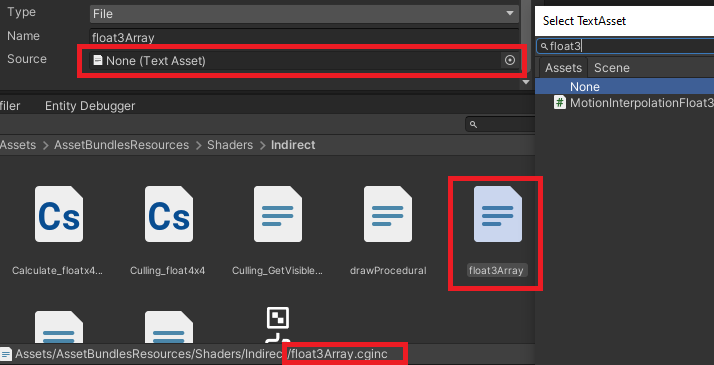
Unity Forum
Only Text Asset (.cs, .txt...) can be selected, which does not include the .cging and .hlsl files
[IMG]
Unity 2021.2.0a9
is a yamato trunk referring to something in the C++ codebase of the Unity Editor?
turbid matrix
I've always assumed yamato is their part of their automated testing
you can see a lot of their test projects referenced on yamato related PRs
@waxen lantern
waxen lantern
ah okay, thanks
turbid matrix
but I don't really know anything about it, that's just been my assumption
waxen lantern
no worries
turbid matrix
if I had to guess, it's basically something like jenkins that does CI for them etc
turbid matrix
also about the built-in SG
I did notice that they basically implemented standard shaders Lit and Unlit for it but I think the lit is only for metallic workflow, there's no specular option like on URP and HDRP lit
but in built-in shaders, they also didn't do specular setup on same ubershader either so I dunno how feasible it is to port the specular as option there
waxen lantern
@turbid matrix PBR Specular workflow is uncommon enough for real-time rendering i don't see it ever happening anyway?
dawn sorrel
U wot, Shader graph on BRP?
turbid matrix
waxen lantern
<@222536308319322122> PBR Specular workflow is uncommon enough for real-time ren...
many seem to favor specular workflow for foliage. but the real reason why I noticed this was because that viking village had specular setup on the assets... this project was initially done when Unity's PBR was specular only, they only added metallic setup bit later on Unity 5
no idea if it's just experiment or if they are actually going to merge it to SG
it does work on my testing though
dawn sorrel
But whyy. We're this many years into deprecating it.
turbid matrix
yeah, that's the real question
dawn sorrel
0 chance the water, sky or new terrain system will support it.
turbid matrix
if they merge it, I'm going to go and assume it's only to make the transition from built-in to SRPs easier as you can then already author SGs for built-in
could also be some recent hackweek project that got expanded a bit, it doesn't necessarily mean anything
dawn sorrel
Maybe. New surface shader framework would prolly help with the upgrade more.
turbid matrix
I'd personally love to see more results on cross-SRP workflows... what we see happening atm is more of unifying the UI layouts between URP and HDRP but besides the SG stacks change on 2020 cycle, we haven't really seen much work on things that let us actually swap between URP and HDRP easier (on technical level)
dawn sorrel
But looks like even there the asset store publishers made one faster than Unity lmao.
turbid matrix
that doesn't mean there wouldn't have been such work but I haven't noticed anything special regarding that
yeah, you mean Jason now
main downside on any 3rd party solutions for this is the templates.. they will always lag behind. Amplify is tad better on this as they practically support every actual Unity release as long as it goes out of beta but Jason sticks to LTS only
dawn sorrel
Well, it was made out of frustration with updates after all.
😄
I really hate how SRPs make me choose between being able to actually write my own shaders in URP and getting lots of fancy lights with forward+/deferred in HDRP.
Why can't I get forward+ in URP 😢
turbid matrix
you will
it's coming
this is listed at "in-progress" section: https://portal.productboard.com/unity/1-unity-platform-rendering-visual-effects/c/261-forward-renderer-support
Summary
The forward renderer in URP has an overall limit on the number of lights used when shading. Forward+ improves upon regular forward rendering technique by culling lights spatially rather than per object. This would significantly increase the overall number of lights that can be utilized in rendering a frame.
**Intended Outcome/Use...
dawn sorrel
I've seen the roadmap but I want it now 😢
turbid matrix
lets hope it doesn't take as long as point light shadows 😄
for me one of the biggest downsides of URP is shadow filtering
there's been notes on improving the shadows but I don't think Unity has said they will improve the filtering specifically
HDRP is miles ahead on this part and for built-in you can always use NGSS
dawn sorrel
HDRP also somehow got SSGI with completely no fanfare.
turbid matrix
I dunno if SSGI is still experimental
it used to be
Unity doesn't seem to promote experimental stuff anymore
dawn sorrel
But yeah, that PCSS HDRP has makes me 👀 👀
Well, SSGI has its own page in HDRP docs and everything.
turbid matrix
every feat they have is supposed to have docs so that's good 🙂
dawn sorrel
I see, you said SSGI is not very usable on the forums.
turbid matrix
it's been tweaked since that
I haven't tested it since but it should now actually do more of what people expect from GI, in past it's light bounce was really subtle
GitHub
In this PR I tried to improve the screen space global illumination. The improvements need validation from @remi-chapelain. I also removed the depth thickness value from the UI.
also, I think now it bypasses the baked lighting (?) which definitely didn't happen before... but I really haven't tested any of the recent changes
I could have understood that last part wrong though as I do remember wondering about the notes
dawn sorrel
I see.
Do you know how would you do a shader that can only ever be fully lit or fully shadowed in deferred rendering? I suppose there needs to be some sort of texture into which we average the received lighting on the object or something.
turbid matrix
@dawn sorrel can you be more specific?
you can just mark the object not receive shadows if you want it fully lit (using the setting on mesh renderer)
and for fully shadowed I can imagine you could just write shader that adjusts the screencolor of the pixel for that material to make it appear like it's in shadow? I have no idea what's the end goal here though
dawn sorrel
@turbid matrix both Genshin Impact and old Kingdom Hearts games didn't have light gradation.
Either the whole character is lit or not.
End goal is having a walking billboard be always either fully lit or fully ambient
 delicate oak
Hi there, simple question: Does SRP batcher support negative scaling of game objects ?
 trim bone
on the roadmap theres a URP&HDRP enlighten realtime gi card, but wasnt enlighten slated for the chopping block not long ago? is this a temporary patch in for an in house solution or actual long term?
turbid matrix
@trim bone yes and yes (at least this is how I read it between the lines)
hdrp enlighten has been added back already, urp enlighten is still to be merged
(urp version is almost done looking from the commits)
more info about the enlighten return here: https://forum.unity.com/threads/update-on-global-illumination-2021.1067015/
but in the nutshell: Our team will maintain Enlighten as-is, without adding any new features, until Unity 2024 LTS ends. As part of this plan, we will add support to URP and will re-enable support for HDRP. Additionally, we will extend the platform reach of Enlighten Real-time GI to Apple Silicon, Sony PlayStation(R) 5 and Microsoft Xbox Series X|S platforms.
waxen lantern
turbid matrix
more info about the enlighten return here: <https://forum.unity.com/threads/upda...
nice, the infographics are helpful


@turbid matrix it's like those timelines in wikipedia of band members / musicians in a group over the years lol
 fallow lynx
off the top, does anyone have any ideas on upgrading a project from HDRP 8.3 to 10.3 brought the editor performance from 60fps to 8fps??
eternal laurel
Off the top no never had this issue. What does mr profiler say ?
fallow lynx
something like this

everything that's heavy is going in something "RenderPiplelineInternal"
its 12fps in an empty scene so what the fuck
im just gonna rebuild the project again 🥴
eternal laurel
Maybe some settings got jumbled when updating and now you have bloom and volumetrics at full res. Idk you can expand the internal loop to see in more details.
fallow lynx
its normal afai could tell. I didn't even have any post processing in the scenes right now
nuked the project so a bit late for that
might get solved automagically on rebuilding
eternal laurel
Well Im really not sure. Tbh Ive only ever seen performance gains from updating haha
Maybe a deep profile will show the culprit
Or just reatarting
Or nuking the hdrp asset. That has helped me before. Making a new one
fallow lynx
rebuilding project pushed it up to 40 🥳
lets see how deleting the hdrp asset improves it now
fallow lynx
almost back to 60fps, thanks!
delicate oak
Does negative scaling prevents SRP batching? I can't find answers on the internet, which makes me guess negative scaling is not a problem for the SRP batcher, unlike static & dynamic batching I think. Can anyone confirm this?
 sand saffron
delicate oak
Does negative scaling prevents SRP batching? I can't find answers on the interne...
sand saffron
delicate oak
Does negative scaling prevents SRP batching? I can't find answers on the interne...
From what I understand about SRP batcher, there is no reason negative scaling would affect it. Simple test in the editor also seems to confirm that it does not.
delicate oak
sand saffron
From what I understand about SRP batcher, there is no reason negative scaling wo...
Thanks. I did test on my side since then, seems fine as well. I guess if there isn't any contraindication from Unity, it's not a problem anymore 🙂. However it still is for GPU instancing
indigo summit
turbid matrix
https://github.com/Unity-Technologies/Graphics/pull/3330
i'm even more interested with the probe volume v2 thingy in that PR discussion 😅
 stark glacier
Hey y'all, I just reinstalled unity to unity.3.1f1 and my project materials now is appears like this https://prnt.sc/10wdvdr

I'm using URP last version and tried to update project materials and still
basically I did everything, can you help?
turbid matrix
@stark glacier no idea on the version you are using but all cyan means it's still compiling the shaders
if it does that, you can see the progress bar on the bottom part of the editor window
GitHub
Purpose of this PR
This PR aims to replace usage of RenderTargetHandle to use RTHandles instead in order to support setting UnityEngine.XR.XRSettings.renderViewportScale in URP.
RTHandle is a SRP c...
"This will add dynamic resolution support to URP and unifies URP’s render texture management. It also opens the way for URP to integrate with RenderGraph in the future."
eternal laurel
Now if only thr xrstats worked with steamvr that would be great. But that is in valves corner sadly
 foggy oracle
I am working on a project in lwrp but whenever i apply my material which is a grid it shows a grey colour what might be the problem??
waxen lantern
@foggy oracle LWRP is quite old at this point, it was replaced with URP. you'll want a more recent version of Unity Editor with URP like 2020.3
 lone tinsel
how to add HDRP to your project?
 outer carbon
The easiest way is to choose HDRP when starting your project so that it sets it up for you. Otherwise, you have to install it via the Package Manager, create a pipeline asset for it, and then assign the asset in Project Settings > Graphics > Scriptable Render Pipeline Settings.
lone tinsel
thank you
 final lichen
Hi, I don't know if this is the right channel and I am sorry if it is not. I use a little c# script to modify some of my post process profiles values, more precisely the gaussian radius of the Depth Of Field
    public float transitionDuration;
    public float currentIntensity;

    private Volume v;
    private DepthOfField dof;

    private float vel;

    private void Start ()
    {
        v = GetComponent<Volume>();

        v.profile.TryGet<DepthOfField>(out dof);
    }

    private void Update ()
    {
        currentIntensity = Mathf.SmoothDamp(dof.gaussianMaxRadius.value, intensity, ref vel, transitionDuration);
        dof.gaussianMaxRadius.value = currentIntensity;
        dof.Release();


        dof.active = dof.gaussianMaxRadius.value > 0.001f;
}```So I have this code, it work well, my gaussianRadius is perfectly set... but it change nothing in the scene
Like the value is modified, but unity ignore it; is there any "Update()" method ?
waxen lantern
@tawny robin try the #archived-shaders channel
waxen lantern
final lichen
Hi, I don't know if this is the right channel and I am sorry if it is not. I use...
the best channel for this would be #💥┃post-processing
waxen lantern
 plain mural
how do i fix my shadows looking like this in HDRP?
plain mural
how do i fix my shadows looking like this in HDRP?
see the Shadow Bias section here in the docs: https://docs.unity3d.com/Packages/com.unity.render-pipelines.high-definition@10.4/manual/Shadows-in-HDRP.html
 cobalt idol
Hi, I'm having some unexpected behavior for stacked cameras in 8.2.0. I have a base camera and an overlay camera. It seems like if I add a post processing volume, the overlay camera produces a depth texture, and if I have no post processing volume, the overlay camera doesn't produce a depth texture. I'm not sure why these are linked?
 cobalt crater
Hi 😄 i've switched to URP but when i run the game in the editor, I see no noticeable difference in performance, is this normal?
URP -> bottom right window

maybe the editor is not the right environment to "see the difference" between urp and builtin in performance?
novel helm
The editor is definitely not the one to rely on measuring performance differences between pipelines
Also running both editors side-by-side at the same time can give less accurate measurements
As the performance of the machine gets split to maintain both of them
And you also appear to have some materials which arent updated to work with URP, so that also can make a difference
and also also the stats say you probably dont have any shadows enabled on URP?
Its alot of things. @cobalt crater
cobalt crater
wow okay i see, pretty complex stuff, i'm a beginner when it comes down to shaders, materials and textures. Thanks for your answer @novel helm
I didn't generate the lightmap data yet of the scene after switching to URP since I was getting some different results, that might be of influence too or not really? I do get your point of my machine trying to maintain both editors.
gonna try them on a phone and see the actual difference.
(after I finish assigning all materials to URP shaders)
cobalt crater
is there any way to delete built-in shaders pre-urp from being selectedable in the UI?

would be great if i could remove them from the entire project (aka not selectable anymore in the dropdown)
iron flame
HDRP SSAO Temporal mode waving.
foggy oracle
waxen lantern
<@810774298116751440> LWRP is quite old at this point, it was replaced with URP....
Thanks but i cannot install a newer version my laptop is old and jt might not support ofher version
waxen lantern
@foggy oracle i recommend you use the built-in render pipeline in that case.
foggy oracle
Ok
 surreal junco
cobalt crater
is there any way to delete built-in shaders pre-urp from being selectedable in t...
surreal junco
cobalt crater
is there any way to delete built-in shaders pre-urp from being selectedable in t...
In the .shader file change Mobile/Bumped Diffuse to Hidden/Bumped Diffuse
 stable acorn
Converted project to URP, Anyone know why my water shader is doing this?
eternal laurel
So I have sort of a problem. We have a floor object in one level that was one big mesh for reasons. Problem is that now we want to split it up but we dont want to re-bake the entire level again since that takes 24 hours. The lightmap uv's are preserved for all the pieces. How can I manually set a lightmap for the new pieces ?
 plucky phoenix
Hi I have a problem I don't know what causes this problem. My friend said that this is maybe some kind of Level of detail problem or lighting. I'm using URP
stable acorn
On the unity docs and tutorials, im trying to add Ambient occlusion, mine looks nothing like the docs / tutorials i've seen. How do i turn on ambient occlusion?

This is what the docs show... ?
 iron flame
stable acorn
On the unity docs and tutorials, im trying to add Ambient occlusion, mine looks ...
iron flame
stable acorn
On the unity docs and tutorials, im trying to add Ambient occlusion, mine looks ...
URP 10+
stable acorn
So i have to upgrade project to a newer version of unity to get a newer version of URP?
iron flame
Yes. You need to install Unity 2020.3
stable acorn
oof
turbid matrix
@stable acorn make sure that you look at the docs for the same URP version
oh this wasn't scrolled down
mb
stable acorn
Looks like i cant have it anyway 😦
turbid matrix
what's the issue with 2020.3?
stable acorn
Not my project to upgrade, we're on 2019.3
Built-in pipeline has AO, but i wanted shader graph / vfx graph
I guess its a give and take deal 😦
turbid matrix
could just stick to built-in then... and use ASE if you need node graph shaders
 grizzled dust
Building the game with URP, takes ~15 minutes(on an SSD) building shaders like uber post fx?????????
HDRP takes like 30 seconds max.
Is there a way to have it cache shaders for URP, so it doesnt rebuild it each time you make many changes to the project?
turbid matrix
it should be faster on the following runs
HDRP comparison isn't fair because you probably have precompiled shaders for it and a lot of custom shaders for URP
if you take HDRP from github for example, it compiles the shaders for a long time too
grizzled dust
It does but seems to reset after making certain changes like importing new shaders.
Is there an option to at least limit the shader compilation to like 4 cores of my CPU? Because that 10 minute compilation time would be a lot less annoying if it didnt make my whole CPU chug due to 100% CPU usage of 16 different 'ShaderCompiler.exe'
 wooden marten
I'm reposting this here cause it seems to be pipeline related from what I see online,
So I want to recreate a kinda vision 2D system, and I've been able to generate quite a nice mesh for that, but I would want things like enemies and non static objects to only show when this mesh is over them(with the possibility of showing only parts of it too).
The obvious answer seems to be some kind of mask that would depend on that mesh but there doesnt seem to be any straight forward way to do it.
Any ideas ?
dawn sorrel
I might be asking a dumb question. But how would graphics quality settings work in a game using SRPs?
Like HDRP asset has hardcoded Low - Medium - High settings for everything. What's up with that?
turbid matrix
you can think it as low, medium high presets in game... you can still customize those
also you don't have to use it like that, could just have like low end, normal, vr etc presets
I can also imagine if you did treat it like low, medium, high presets, you'd still need to couple it with additional logic for volume settings + some additional custom preset where you'd copy the regular preset values if user wants to customize it
turbid matrix
GitHub
Checklist for PR maker
Have you updated the changelog? Each package has a CHANGELOG.md file.
Have you updated or added the documentation for your PR? When you add a new feature, change a propert...
didn't expect them to target 2012.2 for this
 maiden cloak
Hi Unity squad! Game writer checking in. Which role would better fix rendering and visual issues during agile prototypes? Perhaps a Render Engineer?
We're in preproduction of a AA 3D title for PC using scrum and Unity. We’re experimenting which mechanics and game design are more fun for our players. We’re working with a lean team until we discover the best mix of features, then we’ll ramp up.
We constantly find visual issues in the Unity editor and builds. From trees that look well at one point and then with less detail, to lights that don’t create shadows. Which role could better help us to anticipate and fix these visual issues?
We don’t need to develop a custom engine, so a Render Engineer Sr. could be overkill. I’m thinking that maybe a Render Engineer Jr. with knowledge of Unity’s visual settings and rendering pipelines would work. So he can tell us which settings and better practices to implement, and if visual issues come up, he can help us to fix them more quickly.
 ornate aurora
Hey, is there anyone there?
I need help with something
So I'm using deffered lighting
But there is no fog!
Can someone help?
ornate aurora
Is ther anyone there to help?
waxen lantern
@ornate aurora https://dontasktoask.com
 waxen lantern
maiden cloak
Hi Unity squad! Game writer checking in. *Which role would better fix **renderin...
waxen lantern
maiden cloak
Hi Unity squad! Game writer checking in. *Which role would better fix **renderin...
a Graphics Programmer and/or Technical Artist maybe
waxen lantern
turbid matrix
didn't expect them to target 2012.2 for this
neither did i! glad to see it, though. maybe it was under development for some time already but there were no PRs until recently?
turbid matrix
very possible
eternal laurel
Im just wondering if the hair sim is ever happening
I did start to roll my own verlet integration strands a while back but i just dont have the time
And even before that I made a hairworks integration work in hdrp but we never managed to make proper assets for that haha
eternal laurel
<@&502884371011731486> looks like we have a bot in here haha
 true zealot
eternal laurel
<@&502884371011731486> looks like we have a bot in here haha
true zealot
eternal laurel
<@&502884371011731486> looks like we have a bot in here haha
Thank you 👍
turbid matrix
there are few 3rd party hair sims out there
hairstudio looks most promising atm
but even that one doesn't look production ready at all (and to be fair, it's marketed as early access)
someone just released yak which feels more geared toward animal hair, but it's quite expensive with very little practical samples to showcase.. I kinda wonder why people do this because if you have expensive asset, you better really show what people can do with it
eternal laurel
so the standart lit URP shader does not work for DrawMeshInstancedIndirect or am I being dumb ?
dawn sorrel
tbh unity has now reaching that graphics level that i dreamed of since unity 4 . ❤️
stable acorn
is it normal to have ULTRA in the pipeline asset for urp? I thought the actual pipeline asset should go in this slot?

This one

 fiery marsh
stable acorn
is it normal to have `ULTRA` in the pipeline asset for urp? I thought the actual...
fiery marsh
stable acorn
is it normal to have `ULTRA` in the pipeline asset for urp? I thought the actual...
Yes it's normal. You've named the pipeline asset "URP_Ultra" but it can be called anything. There can be multiple overridden by each quality setting. Your second image isn't the pipeline asset, it's a forward renderer that's assigned to the list on the pipeline asset.
stable acorn
I see, Thank you cyan
Does that asset only affect what quality the editor is displaying? And not in builds
(if its in that slot)
fiery marsh
It's the default used if the quality tier doesn't override it
 glass quail
Is there a way to downgrade from urp to the default renderer?
I'm following a tutorial and i need a surface shader to work
eternal laurel
So you guys know the physics debugger right? I just got the idea to make the same but for ocllusion. Show objects in the scene with a diff color based on the settings. How difficult would this be?
scarlet hull
glass quail
Is there a way to downgrade from urp to the default renderer?
Remove URP asset from the graphic and quality settings, change all your project materials from URP to built-in shaders, certainly re-assign textures and re-bake lighting. easy.
glass quail
Ah, thankfully there is only one material but the editor has been throwing errors at me so it must be the lighting thing, thanks
eternal laurel
So does anyone have a idea on how to make something lile the physics debuger?
rich spade
eternal laurel
So does anyone have a idea on how to make something lile the physics debuger?
doesn't the occlusion baker already have a visualizer built in (based on game cam view point) or is this not sufficient for you?
eternal laurel
it visualizes objects based on the current baked occlusion only no ? I want to be able to see what objects are set to ocludee or oclluder etc
rich spade
your probably right, I've not gone in-depth into it was just pondering on your requirements and that clears it up 👍
eternal laurel
i just want to show scene objects in 3 different colors based on their ocllusion settings just like the physics debuger shows colliders
indigo summit
is it possible to increase the volumetric fog gaussian filtering radius?
 thorn hollow
Hey, how to set URP graphics quality like anti aliasing and shadow resolution through script?
indigo summit
Oh nvm, didn't realize there's a quality settings in volumetric fog now. It's all good
waxen lantern
eternal laurel
Im just wondering if the hair sim is ever happening
strand based hair simulation and rendering is on the HDRP roadmap "under consideration." i recommend using the feedback system on the roadmap to upvote the feature as being important to you. this will better its chances of becoming "planned"
https://resources.unity.com/unity-engine-roadmap/rendering-visual-effects


Learn more about our upcoming graphics features and keep up to date with our recent releases. Indicate your priorities, provide feedback and share your ideas with us.
eternal laurel
waxen lantern
strand based hair simulation and rendering is on the HDRP roadmap "under conside...
Oh I know its there. I have left me feedback a while ago. I was just wondering if we are actually going to see it.
waxen lantern
oh ok i see
@eternal laurel well the Marschner Hair & Fur Shader made it into the Planned status if it gives you hope. so i'm pretty hopeful that strand based hair will make it too. i feel it's something they have to support in HDRP sooner or later so why not just put it in planned status
eternal laurel
Sadly planned status by unity does not give me any hope any more haha.
dawn sorrel
Heck yeah I just got the RX 6800 XT and Ray Tracing does work in Unity with it! 🙂
waxen lantern
dawn sorrel
Heck yeah I just got the RX 6800 XT and Ray Tracing does work in Unity with it! ...
that's great news
dawn sorrel
Yeap! 🙂 Now just got a problem - terrains are invisible lol.
 untold storm
folks, how to convert URP material to compatible with builtin RP?
rich spade
untold storm
folks, how to convert URP material to compatible with builtin RP?
not so much a convert, it would need re-writing to work for built in. If you wrote it in shader graph and are not well versed in shader code you may want to look on the asset store at ASE a node based editor which works on built in.
untold storm
thx , i kinda know what to do
rich spade
although there appears to be shader graph for built in - in the works
turbid matrix
I honestly don't know if voting for items on the productboard has much of an effect. It could but in past when Unity still had feedback site where people could vote for things... it didn't really matter what people voted there, Unity didn't seem to use it at all when planning their roadmaps and priorities
if there really is an impact for voting, it would help if Unity would be more transparent about it
eternal laurel
Well if we can take the skinned mesh sampling for vfx graph as a example maybe they do listen. Lots of people kept asking about it in the forums etc.
turbid matrix
you could also take like... tessellation support for shader graph which has been requested a ton
they added card for it (for HDRP SG) this year, it's been told to come for years now but in reality I don't think there has been work done for it so far
meanwhile, Amplify Shader Editor has supported tessellation for both URP and HDRP for a long time now
pretty sure Jason's "Better Shaders" also support tessellation for custom shaders on both URP and HDRP (haven't verified this myself as I don't have it)
turbid matrix
dawn sorrel
Yeap! 🙂 Now just got a problem - terrains are invisible lol.
just mentioning this so it's not unclear: unity's raytracing doesn't support terrain rendering in general (not AMD issue)
Unity's raytracing also doesn't support vertex animation on shaders (they do animate but animation doesn't get affected in raytracing itself like.. if you do raytraced reflections), no particle/vfx rendering in RT, no support for hybrid rendering (dots) etc
 timid nova
Hey I am using HDRP and I have a ray traced tile floor, Does anyone know what this error is? I know its coming from the two planes that have ray tracing on them
 eternal laurel
I dont really get what the tessellation issue with shadergraph is
Its not like they need to build tessellation support for the engine itself
 whole fossil
guys, is there anything like book of the dead in terms of visual quality available for current hdrp / unity?
turbid matrix
tessellation issue is mainly Unity not wanting to do it... it's not even some major undertaking for them at least for HDRP.. just look at the diff between HDRP Lit and HDRP Lit Tessellation shaders... there's like few lines extra for each pass and initial parameters
waxen lantern
turbid matrix
I honestly don't know if voting for items on the productboard has much of an eff...
the product managers that create and categorize roadmap items (laurent, ali, mathieu, etc) apparently read the feedback text submitted at some interval but yeah they used to show the number of this is important to me "votes" and then they hid it from public view. but the product managers see this and take this information into account for feature planning prioritization still i would bet my life on it. it takes longer than we all wish now but moving things at a faster pace was breaking things too fast, which was worse. people are still sour and for good reason about project planning being unrealistic and managed poorly but development is finally moving at a realistic pace.
waxen lantern
eternal laurel
Its not like they need to build tessellation support for the engine itself
adding features to Shader Graph, a directed acyclic graph for highly abstracted metaprogramming / code generation spread across 3 different languages (C++, C#, HLSL,) and wrapping it all in a user interface is at least 10x more work than just writing a basic HLSL shader API.. which Unity probably should have done first, but anyway --that's why. Also worth noting that major ground work was laid for additional / alternate shader stages (Tessellation, Indirect Compute, Mesh/Task) by modularizing the Master Node into separate Master Stacks, starting with Vertex, Fragment available as shader stage contexts.
grizzled dust
I hate shadergraph just because it seems like Unity has abandoned documenting their regular HLSL shader code because they expect everyone to use Shadergraph, despite it not being capable of nearly the same things.
dawn sorrel
turbid matrix
just mentioning this so it's not unclear: unity's raytracing doesn't support ter...
Thank you mate.. I honestly just figured when I've been reading doesn't support this entire time I always just figured it meant - just doesn't show RT effects on the surfaces, not just make them invisible :p
Is this because terrain isn't considered a 'Mesh' and doesn't have Tangents, etc?
So if I was to make a mesh terrain I'd assume it would work fine, because - well - it's a mesh lol
turbid matrix
@dawn sorrel oh, I would expect the actual terrain to stay visible, just not in reflections etc
dawn sorrel
Yeah I think it might have perhaps just been when I exported my project as a package out (moved to my new rig) and then imported - it had quite a few errors for some reason. The reason I didn't think anything of that at first was because - even if I created a new terrain it would also be invisibile lol. Let me try a new project to test this out real quick.
dawn sorrel
turbid matrix
<@456226577798135808> oh, I would expect the actual terrain to stay visible, jus...
Yeah it works now, I guess i'll have to import everything else that is FBX files and such instead of the entire thing so I can at least keep my assets lol.
 neat tartan
where can I download Lightweight RP in the latest version cuz I cant see it I searched for it and none poped up
dawn sorrel
It's called URP (Universal Render Pipeline) now @neat tartan
neat tartan
dawn sorrel
It's called URP (Universal Render Pipeline) now <@!774426972410478604>
Oh ok thx
dawn sorrel
You're welcome 🙂
stray owl
is it possible to create a shader graph for the unity terrain component? :D
scarlet hull
stray owl
is it possible to create a shader graph for the unity terrain component? :D
Technically, yes.
stray owl
scarlet hull
Technically, yes.
how would i go about doing that? :D
scarlet hull
stray owl
how would i go about doing that? :D
Make a shadergraph, assign it to a material, and assign the material in the terrain settings.
You can find the properties you need to set on the shader to get the terrain data here : https://github.com/Unity-Technologies/Graphics/blob/master/com.unity.render-pipelines.universal/Shaders/Terrain/TerrainLit.shader
GitHub
Unity Graphics - Including Scriptable Render Pipeline - Unity-Technologies/Graphics
stray owl
scarlet hull
Make a shadergraph, assign it to a material, and assign the material in the terr...
thank you so so much, again!
 forest chasm
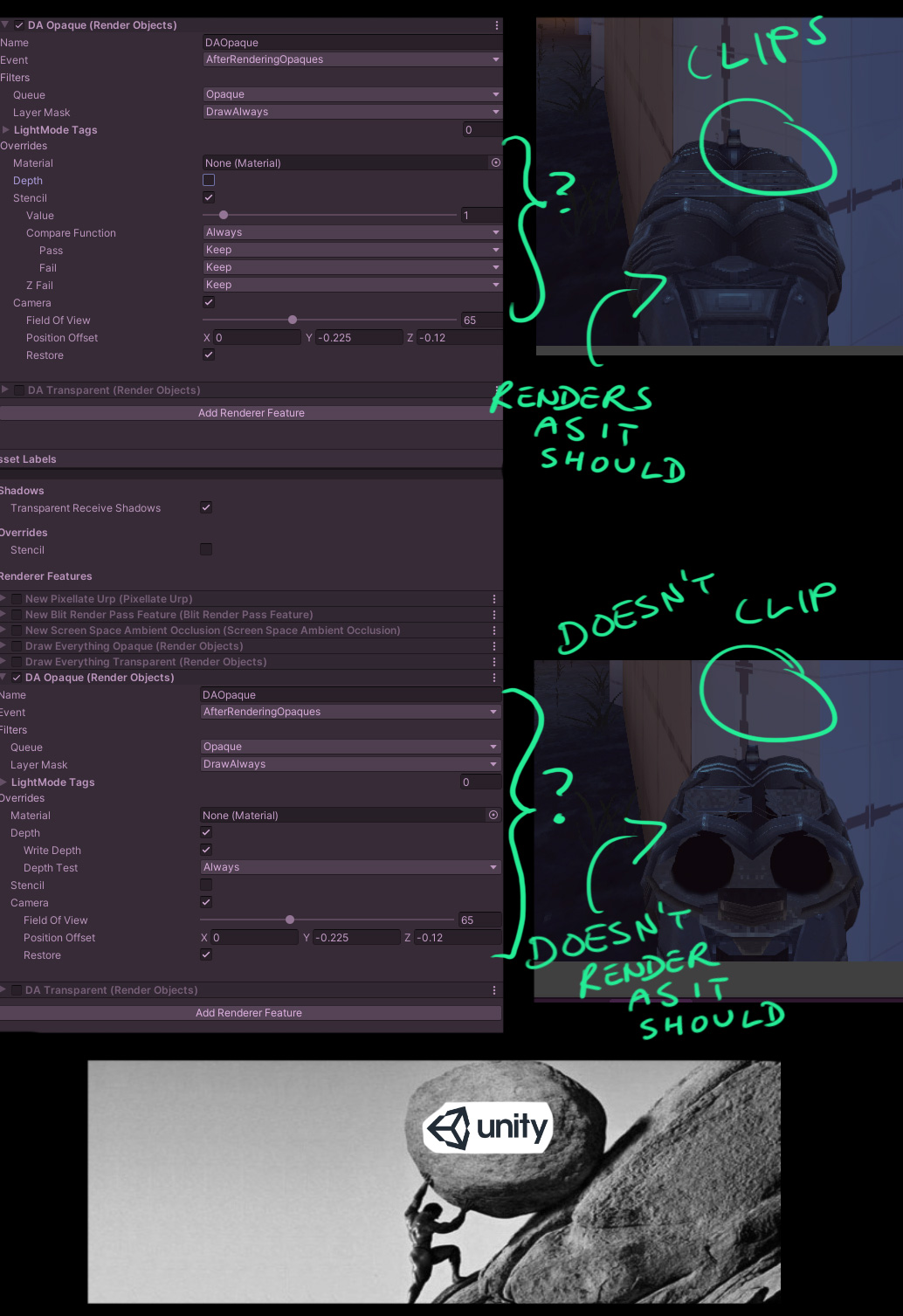
Guys can anyone help me figure out how to avoid clipping when using a custom render pass?
I made this handy picture illustrating my problem.

High res link for the picture: https://i.imgur.com/ItEYoi3.jpg


 dusty maple
Hey guys, I’m staring to use HDRP in a project where I load old asset bundles and convert the standard shader to hdrp at runtime. My question: is it possible to have a startup scene to switch between HDRP and built in pipeline to accommodate users with low end machines ?
 whole snow
I don't have a definite answer on this, (I'm sure it's possible in some way). But I've looked into this a bit and Unity themselves really recommend against this. Which is a shame
 full heron
So, I just updated a small prototype project to Unity 2020.3.2f1, (was on 2020.2.1 previously). And now everytime I click on a object in the scene which has a material that uses build in shaders (URP) I get this error (like A LOT!)
Material 'XXXX' with Shader 'Universal Render Pipeline/Complex Lit' doesn't have a texture property '_MainTex'
UnityEngine.GUIUtility:ProcessEvent (int,intptr,bool&)
Any idea how to fix this (I've cleared the Library folder just in case)
Another error that happens just as frequently is this:
Error assigning 3D texture to 2D texture property '_MainTex': Dimensions must match
UnityEngine.GUIUtility:ProcessEvent (int,intptr,bool&)
 lyric patrol
Should you use static batching with urp?
whole snow
You should probably try to use it whenever you can, unless you're combining your static meshes yourself or otherwise doing something better
forest chasm
Anyone know what this means? Scriptable Rendering Pipeline related.
 forest chasm

 lapis python
Greetings!
Can anyone help me with a 2D lighting issue?
essentially, I have a shadow caster 2D component on an empty game object. its set on a specific layer

and i have a bunch of lights in my scene

what i want to accomplish is to only have certain light sources cast shadows with the shadow caster
all of them have their shadow intensity set appropriately
but only two lights have their target sorting layers as both default and "walls"
yet it does not work
however, when i change my shadow caster's layers to Default - all of the light sources cast shadows on it

what can i do??
waxen lantern
forest chasm
Guys can anyone help me figure out how to avoid clipping when using a custom ren...
This is HDRP i assume? And the ultimate goal here is you want to prevent a weapon mesh from clipping / always render on top of everything else in the scene when rendering in a first person view?
 rich compass
I want to bake light probes at runtime on mobile, but I want it to be done low priority, ideally having some control over processing time per frame. It’s ok for it to take several frames.
Given this, which is better, should I RenderToCubemap and calculate SH myself for each probe, or bake reflection probes and set the smoothness to the max?
I can see a good example of baking a reflection probe at runtime in the MRLightingTools-Unity project, but my concern with that is I don’t expect to need the whole range of smoothness, so if I render to cubemap myself I could turn mips off on my RenderTexture.
—
My concern with RenderToCubemap, though, is just that it’s older and it makes me wonder if now reflection probes have been optimized to be faster. But maybe I’m just being superstitious...
—
There are more pros and cons I’m considering, but for me the main unknown between the two is performance
And Enlighten is gone now, so that’s out
forest chasm
@waxen lantern Hey, thanks for having a poke at it. It was URP, and while I did eventually figure it out I still feel like it shouldn't have cost me a day and a half due to poor documentation on the part of Unity 😑 But yeah I've sorted it out for now!
broken lichen
rich compass
I want to bake light probes at runtime on mobile, but I want it to be done low p...
Light probes, or reflection probes? (I guess you want just light probes and are trying to use reflection probes to create them?)
 rough otter
Hello everyone, I'm using URP for a project and I would like to have a specific vision mode I can enable/disable to render all objects of the scene as black and white except some of them that have a specific property with a float value that will show them with a color taken from a gradient using this property. I've already did some researches, and I know I can use a new Forward Renderer Data with a RenderObjects feature that allows me to use a specified Material to render all the scene so I created a new shader with the float property and created a Material from it to use it for the RenderObjects, but in fact, the actual Material on each object remain the same, so I can't really change this property value. Do you know how I can render object differently using per object property with a RenderObjects feature ? 🤔
wooden marten
So I want to recreate a kinda vision 2D system, and I've been able to generate quite a nice mesh for that, but I would want things like enemies and non static objects to only show when this mesh is over them(with the possibility of showing only parts of it too).
The obvious answer seems to be some kind of mask that would depend on that mesh but there doesnt seem to be any straight forward way to do it.
Any ideas ?
waxen lantern
forest chasm
<@!471083604135378975> Hey, thanks for having a poke at it. It was URP, and whil...
what was the solution, in a nutshell?
rich compass
Light probes, or reflection probes? (I guess you want just light probes and are trying to use reflection probes to create them?)
@broken lichen Yep, exactly. I can render to a cubemap on each face, then convolute to SH and send that data to the light probe. Or I can bake a reflection probe but leave it the smoothest
waxen lantern
rich compass
And Enlighten is gone now, so that’s out
Enlighten is back now! So there's that. no joke 😁https://forum.unity.com/threads/update-on-global-illumination-2021.1067015/

Unity Forum
Hi everyone,
We would like to update you on our plans for Global Illumination in 2021. Over the past year, we’ve received your feedback, and we truly...
rich compass
Wait what
waxen lantern
i'm as surprised as you are
grizzled dust
Not sure if this is a bug or intended behavior but even with HDR toggled off in URP values above 1 are still being rendered. You can see this by going to Bloom post effect and setting threshold above 1. Its actually really annoying if you want to threshold bloom since HDR has no real limit. Also even if HDR is toggled off the URP camera doesnt work with RenderTexture's unless its a Float16 format, meaning it does require HDR?
So far it seems like this only happens when post processing is enabled, meaning post processing requires HDR and automatically enables it without telling you?
The lack of documentation surrounding the render pipelines is so annoying.
rich compass
i'm as surprised as you are
@landon.vfx#0001 thanks so much for the info! This could indeed be a good solution for us, I’ll dig into it
—
So I want to recreate a kinda vision 2D system, and I've been able to generate quite a nice mesh for that, but I would want things like enemies and non static objects to only show when this mesh is over them(with the possibility of showing only parts of it too).
The obvious answer seems to be some kind of mask that would depend on that mesh but there doesnt seem to be any straight forward way to do it.
Any ideas ?
@wooden marten there are actually a couple ways to do that, but the tried and true one would be a stencil buffer. Ex: https://www.ronja-tutorials.com/post/022-stencil-buffers/
Summary The depth buffer helps us compare depths of objects to ensure they occlude each other properly. But theres also a part of the stencil buffer reserved for “stencil operations”. This part of the depth buffer is commonly referred to as stencil buffer. Stencil buffers are mostly used to only render parts of objects while discarding others.
T...
—
@grizzled dust isn’t there a clamping option?
wooden marten
Thanks Josh I'll check it out
grizzled dust
@rich compass its applied after threshold.
rich compass
ahhh
grizzled dust
Also my main concern is it using HDR on platforms where it isnt supported
Like people here finding bloom doesnt work on mobile https://forum.unity.com/threads/bloom-not-working-on-mobile-build-urp.986257/ because it doesnt support HDR, wondering why it doesnt work because it isnt documented that it requires HDR.
Unity Forum
Hi people,
I am trying to add bloom in my unity game for mobile phones using URP,
The problem is, everything works perfectly in the editor/pc,
But the...
whole snow
I may be off here, but I think disabling HDR would just change the gamma correction / final color space, and not what Unity uses in between each postprocessing step?
grizzled dust
Yes exactly but Unity using HDR behind the scenes even when you toggle it off results in things breaking between platforms, when URP is supposed to be for cross platform.
whole snow
Good point
wooden marten
I have this problem with the stencil where when I change the stencil ovverirde in my forward renderer the changes are never saved and go back to default
grizzled dust
What pipeline
wooden marten
Universal
grizzled dust
Yea I think its a bug where it doesnt clear stencil if its not being used, so in the editor it keeps the previously drawn stencil.
fiery marsh
wooden marten
I have this problem with the stencil where when I change the stencil ovverirde i...
It's a bug. Updating might fix it (it's fixed in 2020.3 at least), but it only happens with the Forward Renderer asset. You can click on the RenderObjects feature itself in the project window and change it there and the changes stay
wooden marten
Where would that be in the graphics tab
 marsh marsh
How do I manipulate HDRP Post Processing volumes through code?
waxen lantern
marsh marsh
How do I manipulate HDRP Post Processing volumes through code?
- go to the HDRP docs here: https://docs.unity3d.com/Packages/com.unity.render-pipelines.high-definition@latest
- click on "scripting API"
- type "post" (and/or "volume") in the search / filter text input (or whatever you want specifically like "bloom")
- click on the results for the C# scripting API reference for post processing
 marsh marsh
Alrighty, thx!
waxen lantern
@marsh marsh also search for "volume" since the post fx and others are tied to a volume...
 marsh marsh
Thanks a lot dude!
 hot pawn
Hey all, working on some rendering & lighting techniques in Unity. I am having trouble understanding how MSAA is applied to the scene in URP.
I have it enabled in my camera, and it works in game view. However if I go back to my scene view, MSAA isn't applied even though I've properly set it in the renderer.
Does anyone have any idea why this would be happening? I've made sure that my Graphics in project settings is set to use my URP Asset, and that my URP Asset is set to my ForwardRenderer asset (where MSAA option is enabled).
Any help would be appreciated.
hot pawn
Weird because MSAA works in HDRP.
Just not in URP.. I wonder if there's a work around anyone has found. :o
grizzled dust
Yea fairly certain its in scene view in SRP too, something about URP.
hot pawn
Well if anyone knows please ping me. Would really like to have MSAA in my scene view.
grizzled dust
Try one of the post processing anti aliasing on the camera, subpixel morphological anti aliasing is the best for performance and quality.
hot pawn
Yeah I have it enabled in camera, and it works in game view.
Looks amazing, just would like it for scene 😓
grizzled dust
Wow thats weird.
hot pawn

left scene, right game
you can kinda see the issue :o
You can really see all the jaggies on the rocks on the left side.
grizzled dust
Yea that doesnt make sense especially because all the post effects are supposed to be done in one uber shader for optimization, and you can see bloom and other post effects in the editor scene view.
But yet its happening.
hot pawn
Yeah :( I've been chasing this issue for 3 hours :)
I guess one thing to note is that MSAA isn't in the global volume profile like it is in HDRP, it's instead in the URP Asset where you feed the ForwardRenderer.


Here's my asset & forwardrenderer settings
grizzled dust
I dont think theres a solution its just not something that works in URP.
hot pawn
hm ya think so?
im surprised i couldn't find anything on the internet about it, or maybe i just don't know what to google
waxen lantern
hot pawn
I guess one thing to note is that MSAA isn't in the global volume profile like i...
@grizzled dust that's because MSAA is a fixed function graphics feature that happens during triangle rasterization (with forward render path only,) it's not a post processing effect that happens after the fragment shader has already drawn an aliased frame like the others (FXAA, SMAA, TXAA) that's also why MSAA is higher quality. It actually gives you the quality of rendering at higher resolutions along triangle edges via multi-sampling, (think rendering at a higher res then scaling down.. but only on edges) rather than trying to clean up jagged edges after it's too late, where detailed visual information has already been lost.
hot pawn
waxen lantern
<@201328843246665728> that's because MSAA is a fixed function graphics feature t...
Thank you! :D
waxen lantern
i don't know how to enable MSAA in Scene view either, though i haven't tried, Seems like something that should be supported for use cases that can benefit.
eternal laurel
I might be very wrong but I think there might be a msaa setting in the quality tab that affrcts the scene view
true zealot
there's an anti-aliasing dropdown in the scene view camera dropdown
hot pawn
@true zealot I don't see that?

 grand glen
hello, how can i add slider to a custom render feature i made? there seems to be no way to have parameters when i create a render feature
waxen lantern
@ember breach i reported that 2021.2.0a8+ shader graph custom function node file source bug and unity qa reproduced it, it's on the issue tracker now (i couldn't find it there before) https://issuetracker.unity3d.com/product/unity/issues/guid/1324528
How to reproduce: 1. Open the user's attached "sg-cfn-test-2021.2a10.zip" project 2. Open the "CustomFunctionShaderGraph" Shader Gra...
 exotic plume
Whoa! Why am I just now finding out about this?! : https://youtu.be/XlwlEHVnbbI
Tutorial of how to setup VPET with Unity as Host Application.
More information at: http://vpet.research.animationsinstitut.de
waxen lantern
exotic plume
Whoa! Why am I just now finding out about this?! : https://youtu.be/XlwlEHVnbbI
nice, thanks for sharing. looks like it's open source, too
 dim fable
Hi, I have URP installed on my project and I'm trying to use shader graph, however the preview object in shader graph is still pink? Any thoughts on what could be wrong?
Also quick side problem too - Shadergraph seems to be struggling to find a font to use so I can't actually use it yet as no text shows up when I try to add nodes
Dw fixed the issue
waxen lantern
dim fable
Dw fixed the issue
Dw?
dim fable
Don't worry
Well, fixed the first issue
Shadergraph still not finding a font tho

Cannot process a null font.
UnityEngine.GUIUtility:ProcessEvent (int,intptr,bool&)
waxen lantern
dim fable
Shadergraph still not finding a font tho
what version of Unity? and Windows, MacOS, Linux? i thought i remember some issue with fonts for some on the forums
dim fable
2020.3.2f1, Windows, SG 10.4.0
waxen lantern
dim fable
Cannot process a null font.
UnityEngine.GUIUtility:ProcessEvent (int,intptr,bool...
@dim fable hmm, searching on google finds someone having this issue as well with a 2020.x build https://forum.unity.com/threads/cant-create-nodes-in-shadergraph-in-unity-2020-1-2f1.951308/
Unity Forum
I just installed the latest unity, I'm not sure if this is specific for this version or for all 2020 versions
but whenever I open a shader graph and...
dim fable
Yeah when I open my project I get warnings about immutable folders that include the name of the fonts shader graph was on about
waxen lantern
not sure if it hasn't been resolved or a regression. i would file a bug report. doesn't seem to happen to everyone but you're not the only one either
dim fable
some guy says he fixed it by changing the permissions to the project directory? Do you know how that's done?
waxen lantern
ah yeah i was about to say it sounds like a file/folder permissions issue
dim fable
What could be the issue? How would I go about fixing that?
These are the sort of warnings I get when opening the project
 waxen lantern
@dim fable is it a new project you created just now or you are opening a project that was from somewhere else or different unity editor version?
i'd first try creating a whole new project
and then move what you need from the other project into the assets folder
dim fable
it's a new project today but has been upgraded from an older version since. However these warnings came up when it was created in the original version too
waxen lantern
as for trying to fix file/folder permissions i'd just search google for "change folder permissions windows 10" you'll get many results with screenshots step by step
dim fable
when he said the project folder, did he mean the literal folder that holds all the files for the project
that would be named what I called the project when I created it
waxen lantern
yeah most likely
there might be something off with the permissions off of parent folder that the project folder is in also. which would mean it's really a problem with your filesystem / permission and not some unity itself created but it's hard to say. you could always try creating a new project in a different location like the documents folder is generally safe for permissions... or a different storage drive altogether if you have one
i gotta go and i guess getting off topic at this point anyway ha but good luck
dim fable
Alright thank you anyway 🙂
ember breach
@waxen lantern alrighty, nice
 crude bear
Hope this is the right place to ask but - I am generating a mesh at runtime and I'm also texture mapping. I want to switch from a single texture to a texture atlas. The width&height of the atlas is 112px and each individual texture is 16x16px. Shouldn't that mean that to get the first tex in the atlas, the UV coordinates would range from 0 to 16 / 112, right? At least that's how it would work when using OpenGL
dawn sorrel
How am I supposed to combine tonemapping with camera stacking?
outer carbon
!unmute 669139925270003742
 hoary starBOT
 Mattt#9537 was unmuted
outer carbon
@oblique canyon If the bot is auto removing your content, don't keep trying. Use Hastebin.com or similar to post code snippets.
 oblique canyon
i've tried using RenderPipelineManager.beginCameraRendering to modify transform rotation of WorldSpace UI elements on per camera basics in a Splitscreen setup, but it only applies the rotation of the last camera invoked for all of them, is there another option to do something like this?
 crystal thicket
I need some help with setting up baked lighting with URP. I tried setting it up earlier but ended up with some awful looking lighting and some weird artifacts that I couldn't figure out how to fix, so I think it would help a lot if anyone here is able to step me through the process from the beginning.
 clear plume
^^same
 polar tree
I might be a noob, but I can't get batching or gpu instancing to work with HDRP. For static batching, I set my objects to static, but no batching. I enable gpu instancing on my materials, and no batching/instancing. I can't find much about how to get around this, unless I buy a $75 asset that can help with this, which I might have to do lol
(For reference, I'm testing with 100,000 of a single type of object. Same material and mesh)
polar tree
Still can't figure it out. Does hdrp have it's own srp batcher?
 ember breach
@polar tree I think its using SRP batcher as URP does.
 topaz wedge
when i added URP to my project, everything turned pink. i was able to recreate every material, but the mesh in my Character is still pink and i have no clue how to change it.
this is what the meshes look like

and this is how they looked like before

ps: i aready searched forthe problem but didnt find anysolution. some other people have the same issue https://answers.unity.com/questions/1751262/urp-and-importing-3d-modelsurp-and-meshes.html
Unity is the ultimate game development platform. Use Unity to build high-quality 3D and 2D games, deploy them across mobile, desktop, VR/AR, consoles or the Web, and connect with loyal and enthusiastic players and customers.
cobalt crater
{
    Properties
    {
        _FirstTex ("Texture", 2D) = "white" {}
        _SecondTex ("Texture", 2D) = "white" {}
        _ThirdTex ("Texture", 2D) = "white" {}
        _FourthTex ("Texture", 2D) = "white" {}
    }

    SubShader
    {
        Tags { "RenderType" = "Opaque" }

        ColorMask RGB

        CGPROGRAM
        #pragma surface surf Lambert

        sampler2D _FirstTex;
        sampler2D _SecondTex;
        sampler2D _ThirdTex;
        sampler2D _FourthTex;

        struct Input
        {
            float4 color : COLOR;
            float2 uv_FirstTex;
            float2 uv_SecondTex;
            float2 uv_ThirdTex;
            float2 uv_FourthTex;
        };

        void surf (Input IN, inout SurfaceOutput o)
        {
            fixed4 c0 = tex2D(_FirstTex, IN.uv_FirstTex);
            fixed4 c1 = tex2D(_SecondTex, IN.uv_SecondTex);
            fixed4 c2 = tex2D(_ThirdTex, IN.uv_ThirdTex);
            fixed4 c3 = tex2D(_FourthTex, IN.uv_FourthTex);

            fixed4 blend = normalize(IN.color);

            fixed4 rgba = c0 * blend.r;
            rgba = lerp(rgba, c1, blend.g);
            rgba = lerp(rgba, c2, blend.b);
            rgba = lerp(rgba, c3, blend.a);

            o.Albedo = rgba.rgb;
        }
        ENDCG
    }

    Fallback "Diffuse"
}
Is this shader easy to convert to Shader Graph? I tried this:

but i think i have 1 mistake but i can't find what
@here
elder merlin
That seems simple enough, although it seems pretty poorly optimized to use four textures when you only use a single channel from each
The Texture Coordinate node lets you choose UV sets, and there's a node for Vertex Color, seems like that's what you need
cobalt crater
hehe well, as you probably guessed from my shader graph, 😦 i am not so good
elder merlin
There is no shader graph
cobalt crater
cobalt crater
this is shader graph
i'm trying to make the first Shader work with URP
the code shader -> trying to make it work with URP
so i decided to go with shader graph since for me, fixing the shader to work in URP (the coded one) is a no go, i am not good in coding shaders
elder merlin
Had to reload to to see the image for some reason
cobalt crater
ah no worries 😄
already happy you;re here
since i'm stuck for some hours
better: since this morning lol
so i figured the first lerp should be a Multiply actually
elder merlin
You can see each texture has a UV dropdown
cobalt crater
Ok so here is Builtin shader Unity right:

see the floor
and here is the Shader graph i tried:

see the floor xD
instead of the 3 textures being a bit different areas
it's actually 1 big mixing texture
elder merlin
You seem to be using just a color node rather than vertex color
cobalt crater
aha
yes it's correct
I will switch to vertex color

OMG
it worked

@elder merlin you're my hero of the day
elder merlin

cobalt crater
damn so all i did was pick Color
instead of Vertex color
so how did you know it should be vertex?
elder merlin
cause vertex color is colour data read from your mesh. That's what the code is using
cobalt crater
ahhh
So the mesh actually contains some kind of data to know which texture to apply where
Thanks a lot!!
 sweet delta
why?
elder merlin
Might be ambient light and fog, check Window>Rendering>Lighting settings
sweet delta
these are my lighting settings

I found Ambient Occlusion but I'm not sure if its the same thing?
elder merlin
no thats something else
sweet delta
Where's ambient light and fog?
this is what my scene looks like

there's still light reflecting on the walls
elder merlin
I'm not familiar with HDRP but I think lighting settings has been moved to an asset
or maybe it's part of the volume system
sweet delta
ok thanks I'll check that out 👍
cobalt idol
I'm having a strange bug using 2019 LTS/URP 7.2. Everything is fine in editor, but when I build it appears the entire scene is grayscale! I've never seen this before.
cobalt idol
Having looked at it with RenderDoc, it looks like the draw calls in the build just don't have the correct properties set - eg missing keywords, textures defaulting to the 'white' default texture (hence the greyscale appearance)
crystal thicket
Anyone know what's causing my URP baked lighting to go completely white and intense like this?

 deep temple
sweet delta
this is what my scene looks like
deep temple
sweet delta
this is what my scene looks like
Lighting tab - Environment sub tab - Profile> your volume profile - Inside volume where it says Visual Environment - turn off the sky
 turbid matrix

Dragon Crashers is an official sample project that showcases Unity’s native suite of 2D tools and graphics technology, 2D Renderer (URP).
Download Dragon Crashers for free on the Asset Store: https://on.unity.com/39vsAUs
Sign up for our webinar on April 14 where we give a live walkthrough of the demo: https://on.unity.com/2PLiQP7
Discover Uni...
iron flame

GitHub
Unity Graphics - Including Scriptable Render Pipeline - Unity-Technologies/Graphics
 patent sun
(HDRP) Can I somehow make one light layer not receive baked lightning from environment? I'm making dark tunnel but environment light is bleeding through walls when im baking

 north scarab
has anyone tried compiling a HDRP project with the target == iPhone?
does it work at all?
scarlet hull
patent sun
(HDRP) Can I somehow make one light layer not receive baked lightning from envir...
Usually to avoid light leaks you add "blocking" meshes around you model.
scarlet hull
north scarab
does it work at all?
no
north scarab
scarlet hull
no
but shouldn't the iPhones "tick all the boxes" in regards to the actual hardware/driver requirements? (eg: compute shaders and such)
patent sun
scarlet hull
Usually to avoid light leaks you add "blocking" meshes around you model.
I've added some planes to block it but not working, is there any other way?
north scarab
(sorry if this is a silly question, I don't usually do graphics development)
scarlet hull
north scarab
but shouldn't the iPhones "tick all the boxes" in regards to the actual hardware...
Technically it does, with metal api. We did some tries internally and it renders, but performance was so bad that we preferred to simply disable it to focus on desktop and console platforms.
north scarab
scarlet hull
Technically it does, with metal api. We did some tries internally and it renders...
oh so HDRP is totally out of the question on mobile for the foreseeable future?
scarlet hull
north scarab
oh so HDRP is totally out of the question on mobile for the foreseeable future?
I won't say it 100% out of question, if might come to mobiles in the future, but this will take quite some time.
With URP that is scaling up, the next step is to have proper cross-RP support to be able to target mobile with URP and high end with HDRP in a single project.
scarlet hull
patent sun
I've added some planes to block it but not working, is there any other way?
I don't think so. You should look at how this was set up on the (new) HDRP template project
north scarab
scarlet hull
I won't say it 100% out of question, if might come to mobiles in the future, but...
oh, that'd definitely be cool as well :) I'm working on a for-now desktop project but it'd be nice to be able to let mobile users in as well, even with a lower graphical fidelity
scarlet hull
north scarab
oh, that'd definitely be cool as well :) I'm working on a for-now desktop projec...
This is definitively in the plans 🙂
eternal laurel
Yooo when wilk urp decals be merged in a production version ?
 earnest slate
Recently started playing with Stacked cameras with URP, however I've been having issues making elements rendered by both base and overlay cameras respect the Depth of Field fx correctly. Anyone had this issue before?
It seems like the only Focus Distance where things get in focus is set by the Far Clipping Plane of the first overlay camera(?) as in things get in focus only at the FarClippingPlane value - which is very weird (ie: the far clipping plane of cameraOverlay1 is 140, then the Focus Distance of DoF HAS to be 140)
 near orbit
Hi guys! So I was able to make the change to URP (after resolving the oh so common pink material issue) but now I'm having a really strange issue where my trees are WHITE in the distance but are normal closer to the player. Any ideas what this could be?
Sorry if this isn't a pipeline issue but it's the only thing that has majorly changed in my project.
 deep temple
patent sun
(HDRP) Can I somehow make one light layer not receive baked lightning from envir...
deep temple
patent sun
(HDRP) Can I somehow make one light layer not receive baked lightning from envir...
dont know if you got help but here https://www.youtube.com/watch?v=1cjKPU_3A4A

This short video is to show the principles of using Unity Layers on Objects which is then used to ignore them during Occlusion so light will not affect them. This allows you to finetune your lighting and get more control to solve different issues.
10h Unreal Lighting Course - https://www.wingfox.com/c/8221
My Artstation - https://www.artstation...
Although you should cast shadow
patent sun
deep temple
dont know if you got help but here https://www.youtube.com/watch?v=1cjKPU_3A4A
I want to remove environment light from certain objects, not directional light
deep temple
Does not matter
Same stuff just different light, might not be your environment at all. So watch it.
Also, you should watch this https://www.youtube.com/watch?v=Plp-LEm_G4A
It might help you to check if it is your bias that is casting through walls. Assuming you have shadows on.
In this video we use Shadow Bias to adjust the shadows so they will connect to the objects on ground and overall around the scene. It also quickly explains the theory of solving light coming through walls for baking. #lighting #shadow #bias #clipping #unity #unity3d #unityengine #gameengine #lookdevelopment #postprocessing #spotlight
10h Unreal...
For HDRP you can also just turn off the exterior sky if you do not want to bake it.
deep temple
deep temple
Lighting tab - Environment sub tab - Profile> your volume profile - Inside volum...
This here.
cobalt idol
I looked into this issue again. My material which does not have keywords set uses passes from other shaders, and that appears to be the only thing which causes keywords to not be correctly set in the build (but it works fine in editor)
Oops, above is a reply to a message from yesterday - but it dropped the reply
cobalt idol
cobalt idol
I'm having a strange bug using 2019 LTS/URP 7.2. Everything is fine in editor, b...
this one
It uses the correct passes, it just doesn't have the correct keyword setup
cobalt idol
Seems it's related to URP 7 being unable to determine which shader variants should be in the build - if I add create a material (material2) based on the shader I want to use the passes from, and define the same combination of keywords on material2 as on material1, then material1 now starts working in the build (still always works in editor)
grizzled dust
Anyone know how to set UniversalAdditionalCameraData.renderShadows https://docs.unity3d.com/Packages/com.unity.render-pipelines.universal@7.0/api/UnityEngine.Rendering.Universal.UniversalAdditionalCameraData.html docs say its both get/set but setting it gives me the 'Cannot set read-only field' error in console
earnest slate
grizzled dust
Anyone know how to set UniversalAdditionalCameraData.renderShadows https://docs....
You probably have to cast the CameraData as a variable first; ie UniversalAdditionalCameraData myCamData = myCamera.GetComponent<UniversalAdditionalCameraData>(); myCamData.renderShadows = true/false;
grizzled dust
@earnest slate nope that doesnt work either
earnest slate
grizzled dust
<@402465242480640001> nope that doesnt work either
Yeah I've noticed; so it seems the post doesn't take into account the stacks' min and max clipping planes as I'd assumed it would. So, in short, it seems I can't have good working DOF when layering in stacks. That's a shame, since non-stacked 'all base cameras on depth only' workflow doesn't seem to work that reliably in URP
Also using different post volumes for the different overlay cameras doesn't help as they all present the same issue
 cosmic viper
Hello, I installed URP and Shader Graph but it gives me this pink material. How can I solve this ? Thanks for help.

How Can I solve this ?
I installed URP and Shader Graph
also all URP Shaders return pink material
scarlet hull
cosmic viper
Hello, I installed URP and Shader Graph but it gives me this pink material. How ...
Shadergraph is a dependency of URP, you should not have to install it separately.
Have you assigned a URP asset in the graphic settings ?
cosmic viper
scarlet hull
Shadergraph is a dependency of URP, you should not have to install it separately...
yes
 scarlet hull
and in the graphic setting ?
cosmic viper
scarlet hull
and in the graphic setting ?
Where is the graphic settings ?
scarlet hull
4th tab on the left
cosmic viper
scarlet hull
4th tab on the left
Thanks a lot thats worked.
scarlet hull
cosmic viper
scarlet hull
everything was here : https://docs.unity3d.com/Packages/com.unity.render-pipelin...
Sorry, I was too lazy to read.
 waxen root
Hey guys, when it comes to developing a VR app for the quest 2 (android) what's the recommended pipeline to use atm?
I'm thinking of using 2020.3 (latest recommended editor version)
I've got some test apps working previously with the standard 3d pipeline, but are HDRP / URP more stable and usable for vr now?
Also I've just noticed the "VR" template in the editor, does anyone know if this is any good as a starting point?
whole snow
You definitely don't want to use HDRP for VR. Mainly for performance reasons
waxen root
Yeah for sure, originally I assumed that URP was the way to go but I remember finding a lot of reasons to stick with the legacy 3d setup
whole snow
I don't have enough VR experience to confidently weigh in on it, but.... I will say URP has been fine for me, for development purposes, for the past year or so
I have no idea if further issues will come up when I try building or testing on other headsets, GPUs, etc etc
near orbit
Speaking of URP, is it even worth it for normal projects? I was going to use it for underwater effects but it seems to be causing so much trouble than it's even worth. Unity refuses to upgrade a lot of the materials or says there's nothing to upgrade it to
I've been looking online and seems that tons of people are having a lot of trouble with it recently. Is it better to switch back to it later on when it's more developed and robust and just code effects myself? Not sure what to do at this point
waxen root
Yeah in my experience the oculus plugin needs a very specific environment to avoid a lot of bugs so Im a bit wary of URP
dawn sorrel
Does VSync not work in HDRP?
I was benchmarking my new rig with my game and was getting like 200+ FPS, which hey that's great. But I noticed my GPU junction temps were 101, so was wanting to make it 60 FPS to hope to calm down the fans and such so the GPU doesn't have to work too hard. But when I enable VSync or Second V Sync it doesn't change the FPS at all and stays 200+ FPS.
near orbit
waxen root
Yeah in my experience the oculus plugin needs a very specific environment to avo...
I'm not even doing VR and it's giving me a ton of trouble. If you search "pink" in this server, pretty much everyone is struggling with it daily. I'm thinking I might just code the effects myself. URP would otherwise be super nice without its weird handling (or non-handling) of materials
whole snow
The pink issue is just because someone is using an outdated material or one made for a different render pipeline
IMO that's kinda like saying C# is terrible, just search the server for NullReferenceError
The pink material thing is done on purpose to make it noticeable when a material is set up improperly
near orbit
A lot of materials that come with assets for example have nothing to be upgraded to when you make the upgrade to URP. And if they are changed to the URP lit shader, then it's completely washed out and a different color. It might as well be a different asset
I'd be completely happy and open to any ideas you have of remedying some of these issues though
Idk, seems like there are still too many compatibility errors for it in my opinion. You can still upgrade materials manually and I'd be fine with that, but most don't really have the option to do that even manually since there's nothing to upgrade it to. So
 worldly wren
hello guys, i have a super wierd problem with post processing...
The first image shows how it looks when i first enter the scen (and i how i want it to look like)
The second image is how it looks after entering again, does someone know how to fix that?

 waxen root
Yeah I had a similar experience with shaders not compiling properly in URP, and with oculus integration materials a bunch of weirdness
 lone mirage
How would I go about converting this custom 2D shader to URP? It's only showing up pink as expected, and unity can't autoconvert it.
It's a shader i found online since I don't have any understanding of shaders. It's used to flash sprites white.
I couldn't even find anything helpful about converting shaders to URP online so any help at all would be appreciated
trim bone
@rotund quiver out of curiosity, i downloaded that shader on the graphics thread
if you set shader declaration to hybrid per instance for the outline width, the error goes away
well meant to type this in the dots channel but here works as well I guess
 mild nymph

weird lines on the road
the light rays manage to pass through the building and make these lines
any fixes?
 inland star
is there any special reason we can’t change the individual settings in pipeline assets using script?
eternal laurel
Im pretty sure Ive changed settings from script before
inland star
Mind telling me how, if you can remember? :D
I’ve seen things about creating loads of separate assets for each configuration, but it just doesn’t seem like the right way to do things
eternal laurel
Grab the pipeline asset from graphics settings change stuff on it and reasign it
There is a like a GraphicsSettings.renderPipelineAsset
cobalt crater
Hi all, i've such a weird issue.. Maybe someone could help me and point me in the right direction:
I've upgraded my project to URP and succeeded with all materials..
However. My scene, now even if empty (!!!) i don't surpass 82FPS. On my Built in project, in an empty scene, I easily reach 130 FPS, on a new empty URP project empty scene I reach 130 FPS as well.
does anyone know why / how / where this could come from?
cobalt crater
I couldn't understand much from it. Is it ok if i show you Uri if i drop the screenshot here?
The URP my project and the new template URP? (both empty scene)
eternal laurel
Sure I dont know how much I would be able to understand from a static screenshot but I can take a look
Just expand most things so we have more info
cobalt crater
empty scene my project URP

empty scene , new project URP

memory seems to differ somehow also
eternal laurel
Do you have a camera in the empty scene of the new project ?
cobalt crater

yes, the extra batches calls in the empty scene new empty URP project are from the FPS counter btw
i could add that also to the empty scene MY urp project, but i think it's minimal difference especially since URP new project is faster anyways
this is btw performance of my own scene / game logic:
eternal laurel
Well I cant see anything wrong at a glance. Sadly i have to go now
Keep at it. Will take another look when I can
cobalt crater
ok thanks
it's so weird that the old project behaves different
even in an empty scene
eternal laurel
@cobalt crater how many ms does the render loop take on the old project. Also a quick sanity check. Are both projevts on the same version of URP and unity?
cobalt crater
same unity: 2019.4.9
same urp: 7.3.1 😄
good sanity check btw 😛 would have been something if i ended up having 2 different setups 😛
i'm at the moment in progress of just copying all the damn settings from the new project to the old project.
see if that gives us something, about the ms for render loop
eternal laurel
I was just about to ask if the renderpipe assets are the same
cobalt crater
😄
btw how can i see ms for render loop
is this something like 'render loop' in profiler?
do render loop internal maybe?
old project:

new project:

a pretty big difference for an empty scene?
0.13 ms vs 0.41
seems to be culling that is in the old but not in new?
@eternal laurel odl


new
foggy oracle
how to enable hdr in urp
foggy oracle
I was uzing this tutorial but he says to enable hdr
I am using unity 2019.4 please help me
fallow lynx
HDRP Internally changed the storage of Cube Cookie to use Octahedral Projection inside the 2D Cookie Atlas. It is recommended that you increase the size of the 2D Cookie Atlas if your cookies no longer fi..```
Would any of you know how to get the editor to not show me this log? Think its happening since we upgraded from HDRP 7 to 10.Pretty much happens on each compilation
cobalt crater
@fallow lynx is the performance (fps) better of URP 10 for your project?
fallow lynx
(HDRP) but I have mixed experience. On just upgrading it got worse, but after rebuilding library etc etc, got a bit of a performance boost yes
cobalt crater
Rebuilding library? 😮 whats this
i just upgraded and even my empty scenes are slower 😦
fallow lynx
delete that "library" folder
 turbid matrix
cobalt crater
i just upgraded and even my empty scenes are slower 😦
turbid matrix
cobalt crater
i just upgraded and even my empty scenes are slower 😦
empty scenes will always be slower, even fully populated scenes can and propbably will be
there's a lot of initial overhead on HDRP
turbid matrix
oh my bad
cobalt crater
na no worries
turbid matrix
I just saw hdrp comments above 🙂
cobalt crater
fallow lynx
delete that "library" folder
thanks will try it out
turbid matrix
URP perf is bit mixed bag, some get better perf, others worse
cobalt crater
Does URP 10 perform better than 7 in general?
sorry last question, can't find clear answers
turbid matrix
I've seen people complaining a lot about URP 10 perf degration so would expect it to be worse
cobalt crater
wow okay 😮
thanks.
I will try deleting library folder for now and see the results.
rich spade
cobalt crater
wow okay 😮
if I'm to be honest I would not worry too much about performance discrepancies in Editor, if you see them in build. Then I would be concerned and start looking at the issue, but in the editor there is extra overhead and stuff changes between versions which affect this.
I went from 2019 URP to 2021 and if anything I saw a slight improvement, but that's not specifically related to just URP it could be other changes i.e. jobs / burst upgrades in my use case.
I'd not worry about this at the moment and just worry about making your game 😉
cobalt crater
The game is released 😄 but we see a drop of FPS for android 😦
Since the game has over 1000 downloads a day, 800 from android, i worry a lot @rich spade xD
fps on budget android was 30-34. now it's 13-14
rich spade
Well I hope you made backups and that this is purely internal testing, not released into the wild 😆
I would be looking at doing a debug build and linking it remotely to the profiler to see specifically where the choke points are in game on a target device.
cobalt crater
yeah didn't get it to work, but thanks, i will try it again, seems like the only way to go about it!
@rich spade thanks!
yeah it was internal testing on my own budget android xD
 balmy solstice
hi there
was wondering have there been any changes in defered rendering since 2019.1 to 3 and 4?
I stopped using it in VR a while back
because of performance issues
but i strangely seems to get me 10 fps extra in scene's now
waxen lantern
balmy solstice
was wondering have there been any changes in defered rendering since 2019.1 to 3...
for built-in render pipeline? or what RP?
balmy solstice
built-in
waxen lantern
balmy solstice
built-in
seems unlikely as built-in doesn't have too many changes these past few years, but you could check the release notes for those versions. and/or run the performance profiler to see where you might be gaining/losing frame time in ms. but yeah regardless forward rendering is generally preferred over deferred for VR for performance reasons like you mentioned.
@balmy solstice it is also crucial to use frame time in ms (milliseconds) to compare performance by the way, using frames per second to compare performance can be very misleading. "10fps extra" is meaningless without knowing what the before and after fps is which could then be used to derive the difference in ms that accurately represents performance. e.g. 15fps vs 25fps is a huge difference in performance while 120fps vs 130fps is an extremely tiny difference. using frame time in ms to compare performance from the start eliminates the guesswork and extra calculations. more info on that here https://www.mvps.org/directx/articles/fps_versus_frame_time.htm
eternal laurel
Vr performance in general is a nightmare. I cant imagine how you can hit 6-7ms on a index without adaptive resolution scaling
I gave up trying to hit that target with HDRP and moved our game to URP
We should release the update soon if the damn bake bakes correctly.
turbid matrix
HDRP VR doesn't seem very feasible on high resolution headsets in general
I don't think it's VR specific issue though, it just gets very demanding fast when resolution goes up
I struggle to get even 90Hz on HDRP while in editor while using Quest 2 (on somewhat empty scene)
eternal laurel
Yeah it just wasnt made for that.
waxen lantern
@eternal laurel fwiw, eye tracking + foveated rendering will greatly improve things and even make HDRP and raytracing viable for VR. give it 5 years for mainstream hardware in the wild
eternal laurel
yeah that is like hyper adaptive resolution haha cant wait
waxen lantern
hypothetically ray tracing performance scales with eye-tracked foveated rendering even better than rasterization does.
eternal laurel
I haven't explored that path yet
 rotund quiver
trim bone
if you set shader declaration to hybrid per instance for the outline width, the ...
rotund quiver
trim bone
if you set shader declaration to hybrid per instance for the outline width, the ...
Interesting mega thank you. Will check this out. So ALL the properties need to be hybrid instanced? Ouch. 😄
I tried to go to 2020.3.3f1 today and that ALSO stopped working. The only version currently working for me is 2021.1.0f1 and that has a bug in the shadergraph editor for other shaders, making editing hard. So currently I need to port my project between unity versions to edit and then back again to test shaders... yikes.
maybe this will convince me to work on gameplay for a while, which I ought to do anyhow.
cobalt crater
built-in

urp

it seems the rendering part of each frame takes much longer in URP than before, I do have 2 camera's btw, 1 for HUD and 1 for gameplay, is this a problem?
btw do i understand well that this is 1 frame:

The render thread doesnt seem to 'render' the frame, seems to be done in the main thread, is that normal?
😮 very confused
trim bone
@rotund quiver I checked it again before you responded and actually, it seemed bugged on the editor version you mentioned. at least checking with 2021.2 changing to hybrid instanced resolved it, so maybe its an editor thing?
true zealot
cobalt crater
it seems the rendering part of each frame takes much longer in URP than before, ...
Assuming you're using the URP camera stacking feature, no
near orbit
Any idea why upgrading a project to URP makes a scene so drab? Left is non-URP, right is URP with absolutely nothing else changed. Render-pipelines are the only difference

 silk mural
@near orbit did you re-generate the lightmap? and are you sure you didn't fiddle with the colors? like going from gamma to linear
 drowsy shard
how can i modify the terrain grass shader ?
foggy oracle
foggy oracle
how to enable hdr in urp
someone please help
eternal laurel
that is a option in the render pipeline asset
 crisp pumice
foggy oracle
someone please help
crisp pumice
foggy oracle
someone please help
Add/enable bloom postprocess and use HDR colors in your shaders.
Or you want something different?
barren goblet
var tex = new Texture2D(2, 2, TextureFormat.R16, false);
    var data = new byte[]
    {
            255, 0, 0,244,
            0, 255, 0,0,
            0, 0,0,0,
            255, 135, 135, 123
    };
    tex.SetPixelData(data, 0, 0);
    tex.filterMode = FilterMode.Point;
    tex.Apply(updateMipmaps: false);
```why unity skip each first 8 bit ? every pixel
no matter what the texture format is, R16, R32, it will skip 8 bit every pixel
scarlet hull
Hum, R16 is a single channel (red) 16bits per pixel, with a 2x2 texture that's 64bits, or 8 bytes, but you are sending 16 🤔
If I'm reading your byte array correctly, I think that what you wanted to use is RGBA32 @barren goblet
barren goblet
 var tex = new Texture2D(2, 2, TextureFormat.RG32, false);
    var data = new byte[]
    {
      255, 0, 0,244,
      0, 255, 0,0,
      0, 0,0,0,
      255, 135, 135, 123
    };
    tex.SetPixelData(data, 0, 0);
    tex.filterMode = FilterMode.Point;
    tex.Apply(updateMipmaps: false);
I use RG32, it still can't read the first 255.
@scarlet hull
the indices of 0,1,3,5,7,,,are skipped ?
scarlet hull
Shouldn't ... how do you read this data ?
barren goblet
I render the texture to screen
I use URP shader.

this is the shader code.

the result :

sorry, the incides of 0, 2,4,6,8,10 are skipped.
finally, it happens to be green, red, black,yellow.
 scarlet hull
I'm not sure how the sampler interprets this data. The doc specifies that it's a 16bits integer per channel, so if I'm not wrong it should be one of the following colors that is displayed : red, green, yellow, black.
If you're right about the skipping part, there should be two black pixels, not a green one.
scarlet hull
oh, I've read wrong, red squares are the parts that are kept 😅
I may be wrong, but if the 16bits data are interpreted as floats (as sample operations return floats), then some might just be negative, like the first (255,0) where the sign bit is 1 🤔
I think you can use this function to convert the floats returned by the sample : https://docs.microsoft.com/en-us/windows/win32/direct3dhlsl/dx-graphics-hlsl-asuint

Interprets the bit pattern of x as an unsigned integer.
barren goblet
seems can work !


but now the value looks become very big.
I can't divide it to [0...1]
scarlet hull
IDK exactly how it works, because float is 32 bits, so it's probably converting to a 32bits integer, and filling the missig bits with either 0 or 1 ?
barren goblet
😂
so how can I get the r16g16 in shader ?
and there are no RInt32 in unity .
I've found a solution, in CPU uint32-> byte -> float32, then use R32float format texture,
in shader, use asuint again, back to uint32. it works, lol
@scarlet hull thank you very much.
eternal laurel
Wait. Why are new lights not created with a Universal additional light data when URP is active ?
cobalt crater
true zealot
Assuming you're using the URP camera stacking feature, no
thanks, didn't use stacking, seems to improve it a bit!
i'm using OS X , can't seem to debug GPU, is GPU profilen same as "Rendering" debugging?
near orbit
silk mural
<@!335053485643005952> did you re-generate the lightmap? and are you sure you di...
I'll go ahead and try to regenerate the lightmap. Thank you so much! I'll be so happy if that's all it was
rotund quiver
trim bone
<@!135139600673800192> I checked it again before you responded and actually, it ...
What exactly did you do? Becuase if I set all properties on the shader to hybrid, I get the same issue. Same, actually, If I set them all to per material or default override status. This is true in 2020.3.3f1 , 2021.1.1f1, 2021.1.2f1, 2021.2.0a12
The shader ONLY version that works is 2021.1.0f1, and then with any setup of properties.
 tranquil saddle
I'm having a strange issue with my scene depth. My URP pipeline looks like this:
* XXX
* render objects (the blob shadows, as a cube mesh) (transparent, SAMPLES depth)
* render objects (the trees and such, sprites) (opaque, WRITES depth)
* XXX
* render objects (the fog effect, as a mesh) (transparent, SAMPLES depth)```
Because this rendering happens in a stacked overlay camera, I need to _manually_ copy over the depth before I can sample it. This happens at  `XXX`, so twice.
I'm using a custom `ScriptableRenderFeature` for that.

The stange thing is, that when zooming the camera the depth starts 'lagging' like in the above GIF. To me it looks like some sort of relative value being applied twice yet stabilizing over multiple frames.

This _ONLY_ happens when I have _TWO_ passes that copy depth. With either one of the depth copies disabled, things work as expected.

Any ideas on what causes this?
(my ScriptableRenderFeature looks as such: https://pastebin.com/juuE0JRw)
near orbit
silk mural
<@!335053485643005952> did you re-generate the lightmap? and are you sure you di...
So I double-checked my colors and they are set at gamma (which I think is default). And then I regenerated the lightmap (Window > Rendering > Lighting > Generate Lighting).
It looks a little better but it's still not how it was. Do you know any other things I could try? Thank very much for any help you can give me.

 cerulean kiln
How do i use scene color node in hdrp?
silk mural
@near orbit i think urp is linear by default, so going from gamma to linear is probably the main reason it's less lit
i would suggest moving over to linear and just adapting the original scene to work well with it
near orbit
silk mural
i would suggest moving over to linear and just adapting the original scene to wo...
Alrighty I will definitely try that next. Thank you so much Ragath, you're a lifesaver. 🙂
 weak spruce
Hi, in URP (High Quality preset from the 2020.1 URP project template) I am using pretty much all the defaults, but my particles are being rendered behind the skybox. I can change the shader for the particles from "URP/Particles/Unlit" to "Legacy Shaers/Particles/Additive" then it works fine but obviously a hack. Can anyone explain why this is happening and what I should do differently?
