#archived-hdrp
1 messages · Page 65 of 1
 compact sparrow
 broken lichen
Tri planar meshes doesn't really mean anything to me
I recognize tri planar mapping, where you map a 2D texture on a 3D surface
compact sparrow
Uh, I was just trying to sound technical, my grass is just 3 intersecting planes. Haha.
broken lichen
Ah :P
It looks pretty dense to me. Is there a lot of overlap?
I can imagine if the SRP Batcher is deciding to render those normally instead of using GPU instancing that it would end up costing more
I thought the SRP Batcher also used GPU instancing if it was available, but I guess not?
compact sparrow
I have made it pretty dense, I use an LOD system grass around 10% LOD distance becomes a single plane and at 2% completely disappears
broken lichen
Interesting that the SRP Batcher doesn't realize it would be better to batch with GPU instancing in that case
Sounds like bug to me
compact sparrow
I actually think it does, I disabled GPU instancing and nothing changed
broken lichen
If nothing changes when you disable GPU instancing, then that would mean it wasn't using GPU instancing
You mean you had SRP Batcher enabled and disabled GPU instancing and noticed no difference?
Or you disabled GPU instancing with the SRP Batcher disabled?
compact sparrow
Both
GPUI + SRPB = 57 fps
SRPB = 57fps
GPUI = 61fps
Neither = 61fps
Could it be due to a dynamic shader? My grass uses vertex displacement to simulate wind
Oh, that did something I believe, I guess it had to perform a new draw call for every variation of displacement?
I suppose I can live without wind, the dense fuzzy grass suits my game better than sparse dynamic grass. Unless anyone has any insight into how I can incorporate displacement/wind into it without the performance impact?
@broken lichen Anyway, thanks for helping me narrow down the issue. 😄
 knotty hound
is there anyone "expert" with the scriptable render pipeline?
 turbid matrix
nobody is going to volunteer for that 😄
(better just ask the actual question and you may or may not get answer)
knotty hound
hm yea sorry. here I can put code or I should change chat? it's still relative to the scriptable render pipeline
 merry star
Hi,
so I am trying to display my desktop in Unity using the "VR Desktop Mirror asset" which I modified to work without VR stuff. Now I have a camera that is pointing at the on startup spawned copy of my desktop but it does not have the same colors as my screen. They are a bit washed out like there is something like a distance fog (?) but I already turned off the fog in the HDRP Default Settings in the Volume Components.
How do I remove this fog?
merry star
So i have fixed it with some adjustments on the gamma but if there is a better way let me know.
 waxen lantern
@icy patrol HDRP is strictly physically based, intensity values (in Lux) on directional lights are expected to be in the thousands. e.g. in the HDRP template scene the directional light defaults to 10000 Lux to approximate the Sun's intensity.
waxen lantern
knotty hound
hm yea sorry. here I can put code or I should change chat? it's still relative t...
if its not much code you can use discord markdown code blocks, or if it's more than ~10 lines of code then post a link to pastebin or some external site.. or upload the code's file as an attachment
 crisp depot
I'm trying to follow a shader graph tutorial (https://www.youtube.com/watch?v=FlE8e1JwVzs&t=2s) and he's making a distortion shader. I'm trying to follow along, but my material is opaque, where his is transparent. Any idea why? Here's my graph:

We use Shader Graph to create a Heat Distortion effect and the VFX Graph to add some particles to the Black Hole. There's also a Fresnel shader for the center of the Black Hole. Love this effect, hope you too!
Made in URP with Unity 2019.3.10f. Scene Color Node: https://docs.unity3d.com/Packages/com.unity.shadergraph@5.10/manual/Scene-Color-Nod...
 fiery marsh
crisp depot
I'm trying to follow a shader graph tutorial (https://www.youtube.com/watch?v=Fl...
fiery marsh
crisp depot
I'm trying to follow a shader graph tutorial (https://www.youtube.com/watch?v=Fl...
They are putting the distorted UVs into the Scene Color node, which your graph is missing. (This also requires the "Opaque Texture" option on the URP asset to be enabled, if you're working in URP).
Oh wait you do have it, it's just behind the master node. Still, the Opaque Texture thing applies in order for the node to output the camera colour rather than just grey
crisp depot
By Opaque texture option, you mean this?
fiery marsh
crisp depot
By Opaque texture option, you mean this?
Yes, exactly that. You can also change the downsampling if you don't want the result to be blurry.
crisp depot
Oooh, ok, that looks more like in the tutorial. Thanks!
 hollow stream
How come spot lights seem to have a capped brightness level?
turbid matrix

GitHub
This PR adds a solution for volumetric clouds in HDRP. The tool can be found under the "Volumetric Clouds" volume component.
Note that most of the prameters can be found when exp...
 heavy ice
The previous cloud iteration was the cloud layer and it got merged @whole fossil
the cloud layer adds cloud to the current Visual Environement, but they are infinitely distant
turbid matrix
both are raymarched for cloud shadows (lighting) right?
 whole fossil
ah I see, maybe I was referring to some work regarding cloud layers that was reverted before. nevermind. I like the volumetric clouds a lot 🙂
turbid matrix
is there any support on this to cast actual shadows from clouds?
I think there were at least on the initial cloud layer thing
heavy ice
no, cloud layer are not ray marched lighting
no shadows in the initial state of the pr
will be added
 eternal laurel
upscale fonction... Idk why but I love small errors in comments like this one. It reminds me that we are all human haha
heavy ice
that is what happens when you speak multiple languages
 late copper
I have a problem with lighting in the Unity URP.
Why are only 8 lightsources per object usable and can I change that somehow?
 cerulean berry
Nope, not possible with Forward Renderer
broken lichen
@late copper The 8 lights limit is an arbitrary number Unity decided on. Increasing that limit would require some script changes, possibly some shader changes too.
@late copper This is the only reference to the 8 max lights I can find. Might be enough to just edit that.
https://github.com/Unity-Technologies/Graphics/blob/d22d595871d5e819ddc341bd28b98e75c17bb8ee/com.unity.render-pipelines.universal/Runtime/UniversalRenderPipeline.cs#L118

GitHub
Unity Graphics - Including Scriptable Render Pipeline - Unity-Technologies/Graphics
cerulean berry
Actually, I'm having an issue with URP that falls into the same category - I placed about 10 realtime point lights in the scene (interior), masked to only work with layer containing dynamic objects. If I turn off realtime shadows on them, all the lights work fine. If I, however, turn the shadows on, not only some lights don't cast shadows, they don't provide realtime lights neither whatsoever. Is this caused by some URP limitation I'm not aware of?
broken lichen
@cerulean berry It could be some limitation with point light shadows. Is it any different if you change them all to spot lights?
cerulean berry
I actually tried spot lights before when I was making the static lighting for the scene, didn't get this far with realtime lights. I'm gonna try that, thank you
 frigid ibex
I'm not sure , a quick question, what happens when a non supported (DXR) GPU runs a project with HDRP + DXR enabled?
 scarlet hull
frigid ibex
I'm not sure , a quick question, what happens when a non supported (DXR) GPU run...
scarlet hull
frigid ibex
I'm not sure , a quick question, what happens when a non supported (DXR) GPU run...
All DXR effects fallback to their non DXR equivalents (SSGI, shadowmaps, SSreflection ...)
cerulean berry
broken lichen
<@!347028693761130496> It could be some limitation with point light shadows. Is ...
I tried spot lights, but now none of them cast shadows, and still some of them don't provide realtime light at all. I switched back to point lights, I count 7 lights that cast shadows and provide lighting, the rest doesn't.
frigid ibex
@scarlet hull Thx!
 dark oar
Hey guys. I just upgraded from Standart to HDRP and all the textures were pink. I did the thing where it converts the materials to HDRP but literally only my character and gun materials are still functioning. Everything else is either white pink or brown. How do I fix it?
 grizzled flame
dark oar
Hey guys. I just upgraded from Standart to HDRP and all the textures were pink. ...
grizzled flame
dark oar
Hey guys. I just upgraded from Standart to HDRP and all the textures were pink. ...
Go through your broken materials. Make sure they're all using an HDRP shader. Make sure the albedo textures etc... are all set up properly
dark oar
They are all using HDRP/Lit
turbid matrix
@dark oar pink = shader error, meaning it's not HDRP/Lit
brown suggests you just have incorrect HDRP lighting setup
of course can only guess without even seeing the scene
HDRP material conversion only converts materials using old Unity standard shaders to HDRP shaders. If you used any custom shaders in built-in, their materials will not convert and you will see those materials as pink
 spark wasp
can built in renderer shaders be automatically converted to URP?
waxen lantern
@spark wasp only the built-in shaders listed here will upgrade automatically. anything else will need to be upgraded / ported manually: https://docs.unity3d.com/Packages/com.unity.render-pipelines.universal@10.2/manual/upgrading-your-shaders.html
dark oar
turbid matrix
HDRP material conversion only converts materials using old Unity standard shader...
So when I use hdrp I can't import assets because they all use their own shaders 
eternal laurel
Assets in the asset store usually say if they support hdrp
turbid matrix
@spark wasp just to be clear, HDRP material conversion is not shader conversion, it doesn't create any new shaders in process, just alters the material itself to be suitable for stock HDRP shaders
dark oar
eternal laurel
Assets in the asset store usually say if they support hdrp
Yeah when I import those they still are pink
When I'm home I can send a video
eternal laurel
If they provide support for hdrp there is usually another package that imports the correct shaders
dark oar
So if u want to use normal assets I can't do that? I'm super new to unity and I'm trying to make a generic fps. So if I want to use assets that aren't hdrp and have their own shader (which most of them do) I should just switch do URP
?
 elder merlin
Not URP, the built-in render pipeline. Which is just '3D' when you start a new project
dark oar
Can I still achieve good graphics tho?
cerulean berry
Define good graphics
cerulean berry
Well, if you don't know, we can't really help. You need to answer these questions before starting any development: What view perspective will be used? What's your target platform? What is your desired lighting model?
dark oar
So it's supposed to be a multi-player fps. On PC. And no idea what lighting model
elder merlin
Built-in pipeline takes more work to get to the level of HDRP, but it's doable
cerulean berry
My point was that you can achieve "good graphics" with any pipeline, even built-in one. It all depends on what you're making. Pipeline is a tool, you're the one operating it.
Anyway, PC means higher performance so you can utilize mixed lighting. That means precomputed GI, lightmaps, and realtime shadows for dynamic objects. I think that's starter pack for what most people tend to call "good graphics" these days
dark oar
How do I do that
elder merlin
I think you should start with doing research. There are tons of resources online on how to get good graphics in unity
cerulean berry
dark oar
How do I do that
I don't think such question has an easy answer. You need to learn about it to know what and how to use. Lighting is really something that needs a lot of experience to get it right
dark oar
Thanks
dark oar
elder merlin
I think you should start with doing research. There are tons of resources online...
My first intention was to upgrade to hdrp and it did look better but apparently that's not the only possibility
cerulean berry
If you're not familiar with basic technical aspects of computer graphics, I would not recommend you to use HDRP. It may look "pretty" out of the box when you open up the example scene, but it won't be much of a use to you if you won't understand 3/4 of shaders' feaures, lighting, etc.
That being said, I'd start with built-in pipeline to get your bearings in basic terms, then I'd recommend URP.
dark oar
OK then I'll do so
I only started 3d a few days ago and just now managed to make a fps controller that is in sync with the 3d model. After walking around a bit I noticed that the graphics suck . Then, yesterday, I upgraded. So I have basicly 0 experience
cerulean berry
Exactly my point. When I started with Unity many years back, I was just like you - I wanted AAA quality in very short time, which is, sadly, still not possible, despite Unity improving a lot of workflows and adding good artistic features.
Anyway, if you want to improve your graphics a bit right now, look for post-processing tutorials. Post-processing can really get you a whole new look. After that, learn about how the lighting works. Indirect lighting and ambient occlusion is what creates the major part of "realism" in my opinion, so knowing your way around lighting principles will help you improve your graphics.
dark oar
Thanks for the advice :)
cerulean berry
One more piece of it though - if you want to get into gamedev, look for some learning courses. GameDev.tv has the bestselling courses for Unity on Udemy.com. I'm not affiliated with them, I just advertise their courses because they are really good and they will teach you most of the basic and intermediate skills. Best invested 10-12 bucks
elder merlin
There are no real shortcuts to high quality graphics, it's a matter of sitting down, learning the tools, building experience
dark oar
elder merlin
There are no real shortcuts to high quality graphics, it's a matter of sitting d...
Oh OK I see. Thank you ^^
dark oar
cerulean berry
One more piece of it though - if you want to get into gamedev, look for some lea...
I will consider that
eternal laurel
I too wish there was a checkbox in a engine that says Good Graphics, also optimized.
cerulean berry
broken lichen
<@!414021643992825865> The 8 lights limit is an arbitrary number Unity decided o...
I just tried this, increased the number to 32 and it works fine, for now anyway.
 versed berry
elder merlin
versed berry
elder merlin
Auto exposure @versed berry
elder merlin
That's set in the post processing volume
 ruby tree
how to get the intensity of a RGBA color?
dark oar
/Packages/com.unity.render-pipelines.core/Editor/ShaderGenerator` does not exist
at <empty>:line 0
i must have accidentally deleted that one at one point
can i redownload it somewhere?
 gleaming trellis
Heyo,
Curiosity question:
Is anyone familiar with how Unity's rendering system works internally for URP?
Lets suppose I group unrelated objects together that are going to be culled under a single game object dynamically.
Will this improve rendering performance? IE: Would a bounding box or some form of geometric test be performed on the grouped objects, then all lower level objects in the hierarchy would be automatically culled? Or, will the lower level objects still be checked for culling regardless?
 iron flame
GitHub
Unity Graphics - Including Scriptable Render Pipeline - Unity-Technologies/Graphics
 crystal star
Hey everyone, just tried to move from URP to HDRP on my project, sadly i get these errors when i open HDRP Wizard. Also When i drag HDRendererPipelineAsset to Graphics, the window does not change from default one. Here's a screenshot of the error. Maybe someone knows the issue?
What i tried:
- multiple reinstalls
- deleting urp and then installing hdrp
- changing versions
oh and HDRP Default Settings is also not working
elder merlin
Meshes are culled per meshrenderer as far as I know @gleaming trellis, disregarding the hierarchy
I've done what you describe manually before by disabling groups when they are irrelevant
'Manually' being a setup which toggles groups based on camera position
gleaming trellis
elder merlin
I've done what you describe manually before by disabling groups when they are ir...
Ah yea I guess you can go that route. Thanks for the info on your experience
 teal ermine
Might fare better here, I have a noob question
I am on 2020.2 and have Core RP and URP 10.2.2 installed
But, I cannot find the "Render Type" option on any of my cameras. Or even access any 2D lighting
teal ermine
Stick to the LTS, they said. why did I not listen.
 candid basin
I'm having this issue where URP stuff interfaces don't look normal, but I don't have any compiler issues?
Also my camera is no longer an URP camera... maybe I'll just re-install URP
 hard timber
Having to work on an AR project for LIDAR so using Unity. Have been out of the Unity-verse for the past year focusing on real-time cinematics and virtual production in UE4. I see the latest Unity beta 2020.2b of Unity has made signficant improvements to the ray-tracing capabilities. https://youtu.be/iI4rpdJ2ZUU
Anyone reading this experienced with BOTH Unity and UE and can comment on the relative strengths for each platform for creating high quality cinematics?

A panel of Unity Insiders and guests teach you how to create ray traced scenes in Unity. The Global Meetup is open to everyone and connects developers from every corner of the world.
👉 Check out Unity’s 2020.2 beta for the latest ray tracing features that are now in preview: https://on.unity.com/3lOt0Zr
📺 Dive into Unite Now year-round to join...
turbid matrix
if you need any animated foliage, UE4 is clearly ahead as they can do vertex offset in shaders (instanced foliage does require custom build though)
Unity can only do alembic and skinned mesh animation with raytracing
@hard timber
hard timber
Thanks! Mostly concerned how their respective volumetric lighting and RTX based Ray Traced GI features differ in terms of quality, performance. The UE4 Weta Digital Meerkat demo with real-time feathers, fur IMHO represents a new bar that Unity has yet to reach. Though could be wrong.
 opal gale
hello everyone! i am currently working on a project for my school and i tried to get some good lighting, so i changed my project pipeline to the universal pipeline and know my grass (because i am working with the unity terrain editor and have grass on my island) is not showing up and there is an error message saying "the current render pipeline does not support Detail shaders". Can anyone please help me?
whole fossil
yeah, detail shaders aren't supported either in URP and HDRP. Your only option is to place it as a trees or seek alternative on an asset store
opal gale
😦
 lofty folio
i turned on rtx and i keep getting these errors
turbid matrix
@lofty folio fixed on 2020.x
turbid matrix
that being said, HDRP DX12 is still on preview on Unity 2020, they are trying to get it production ready on 2021 cycle
 past geode
hi everyone, i have big problem with HDRP 10, i have made my project with 2020.1.6 version and just updated it to 2020.2.2, fixed some bug like coding and shaders, but there is only one problem that still exists, when i'm switching to DX12 in PlayerSettings, after working for minuets and moving around the scene, unity getting real lagging i dont know why but if i just use DX11, there is no issue like this. is it because of nvidia settings or hardware or something ?
i have 16 GB RAM
6GB VGA - RTX2060 OC
i5-9400f
can someone help me please , thanks ...
past geode
turbid matrix
that being said, HDRP DX12 is still on preview on Unity 2020, they are trying to...
is this means that i should not use DX12 for my game, you know i really want to publish my game with RTX options but if it's preview than i should say good bye to RTX for now 😔
turbid matrix
well, HDRP DX12 is slower than DX11 today so you'd definitely want to avoid using it by default anyway
you can always make the game only run on DX12 when raytracing is needed
 proper wave
Having some issues with HDRP. I have a Box Volume that's adding gray fog as shown. But when I run the game itself, the fog isn't present.
turbid matrix
@proper wave if you have multiple quality levels on project settings, it's possible some of them are configured to use different HDRP assets (current HDRP template does this for example). In such case it's possible that stuff like volumetric fog might not be enabled on lower tier HDRP assets
 restive arch
My URP materials are all showing up pink, even though the Pipeline Asset is active. Why is this happening?
proper wave
turbid matrix
<@!646052698835255326> if you have multiple quality levels on project settings, ...
that makes sense, i'll take at look into that
 topaz moss
I’m trying to implement “negative light”, which would darken areas, in 2D URP. However, apparently this isn’t possible.
Does anyone know any workarounds?
 dawn sorrel
guys
good to know that dlls for unity is under consideration 🙂
please vote for it below this page : https://portal.productboard.com/unity/1-unity-graphics/tabs/18-high-definition-render-pipeline
 snow wolf
Hi all! Someone here who can help me with - or explain about - custom passes?
I'm trying to render a specific layer always on top of another layer, but keep all other depth rendering order
turbid matrix
here's the direct link https://portal.productboard.com/unity/1-unity-graphics/c/196-nvidia-dlss-deep-learning-super-sampling

NVidia DLSS allows to render an application at lower resolution (eg: 2K) and supersample in real-time (eg: to 4K) with high-fidelity result comparable to native resolution (eg: 4K).
It employs new temporal feedback techniques for sharper image details and improved stability from frame to frame.
This technique is currently only supported on RTX...
would love to see this happen 🙂
past geode
turbid matrix
well, HDRP DX12 is slower than DX11 today so you'd definitely want to avoid usin...
yep, you are right, DX12 is not a good idea for now, but i think if they make ray traceing final version in futures, that should fix this issues, thanks btw.
turbid matrix
@past geode related: https://portal.productboard.com/unity/1-unity-graphics/c/201-directx12-out-of-preview
-
Performance parity or above with DirectX11
-
Support for new APIs (variable rate shading, mesh shading, async compute,...)
-
Improve performances with new APIs
they want to make that happen and are working toward that goal
it's just not there yet
dawn sorrel
How does one enable screen space shadows in URP 11.0.0?
There's a settings section under the render feature but no settings
turbid matrix
@dawn sorrel you probably have to enable them on both frame settings and HDRP asset
 crude trail
heyooo -- we're using URP and I was wondering if anyone had any idea if there is a graphical setting I could try tweaking to remove these see through pixels/lines on the edges of meshes
there is an example
look along the seams of the tree trunk where the block makes an edge
there are little see through pixels that allow you to see through the mesh to whats on the other side
crude trail
(please ping me if you have any idea so i dont miss your message! Thanks to anyone who suggests anything ❤️ )
snow wolf
Hi! Using the HDRP I'm trying to render a specific layer always on top of another specific layer, but keep all other depth rendering order. Anyone has any tips?
scarlet hull
This can probably be done using a scripted custom pass.
 drifting vault
I'm wondering, is its possible to RGB Normal add Alpha channel of gray scale base color?
Just on me some reason normals become weird after that...
RGBA texture come to channel mask, where are RGB from channel mask come to Normals and alpha come to mix with colors and then to albedo
scarlet hull
Could be a texture compression issue ?
But even after reading a couple of time what you wrote, I'm not sure to fully understand what you are doing.
drifting vault
will send pics soon for better explanation 😄
snow wolf
scarlet hull
This can probably be done using a scripted custom pass.
I read about that, but can't really grasp the concepts there. (haven't done anything with shaders) do you maybe have any good reading/tutorials/examples?
drifting vault
scarlet hull
Could be a texture compression issue ?
But even after reading a couple of time w...
RGB - Normal.
Alpha - GrayScale Base color.
fiery marsh
drifting vault
You'd need to put the normal/RGB through the Normal Unpack node. (or set the Type of the Texture Sample 2D to Normal but I guess that might mess with the A result)
scarlet hull
drifting vault
+1 to Cyan answer.
Also, you can save one texture channel for additional information, as if you have normal X&Y Z can be reconstructed using the reconstruct Z node
drifting vault
scarlet hull
You might want to look at this doc where there is an explanation of how to use one texture to pack normal, albedo and smoothness : https://docs.google.com/document/u/3/d/1mqV5N3rPRtR2ZabrUR0AkGnqCMmgv9Su4mgUxKCtod0/edit?usp=sharing

Google Docs
Compact PBR texture packing and blending experiment with Shader Graph. This experiment demonstrates a novel approach in packing PBR material information into a single texture map and layering it into a compact shader. This approach works both in Universal Render Pipeline and High Definition ...
(but he's using surface derivatives instead of normals ...)
scarlet hull
drifting vault
I think that you need to zero the alpha channel value before the unpack node.
(depending on the texture format, normal X is stored in R or A, so if you have data in both it gives wrong result)
drifting vault
will try to look that
scarlet hull
drifting vault
will try to look that
Still strange. You should use the rgba output of combine instead of rgb, but it should work.
Worst case, you could do it yourself.
texture.rg => remap from 0;1 to -1;1 => normal reconstruct Z
drifting vault
ehh alright. no i think normal reconstuct will took extra calculation time on mobile
i just made a shader for terrain that color terrain by using vertex color map
i did 4 lerp for albedo , 4 lerp for normal, 4 lerp for smoothes and later i see that its heavy 😄
and i decide to try combine somehow 3 maps in one.
At first i tried to use RG (Normal X and Y) with B (Base color gray scale) and A (Smoothnes)
i tried to use height map and generate normals from height
but every way cause have this problems on top of sphere
scarlet hull
Oh, I forgot an obvious dummy thing : the texture needs to be in linear space, aka : disable sRGB in the import settings
drifting vault

alright, thanks Remy. will dig in there later and read doc more careful
somereson it become black once jump to lineliar color (sRGB checkbox off on texture import settings)
scarlet hull
Oh, I had this too, try closing/reopening the graph, or changing the texture.
drifting vault
oh yea, thanks!
Left - RBG normals + Alpha color. Right URP Simple Lit
scarlet hull
Nice. Like I said earlier, you could even have only two channels for normal and use the remaining one for smoothness (my example)
scarlet hull
snow wolf
I read about that, but can't really grasp the concepts there. (haven't done anyt...
It has nothing to do with shaders.
You can look in the custom pass examples project how some of them use scripted custom passes to render objects of specific layers : https://github.com/alelievr/HDRP-Custom-Passes/blob/master/Assets/CustomPasses/RenderWithNormalBuffer/RenderWithNormalBuffer.cs
snow wolf
scarlet hull
It has nothing to do with shaders.
You can look in the custom pass examples proj...
Thanks i'll check them out!
eternal laurel
Wait. Does this mean actual hair simulation? Like the movement ? https://portal.productboard.com/unity/1-unity-graphics/c/200-strand-based-hair-rendering

Strand based hair rendering and simulation in real-time.
elder merlin
'rendering and simulation' seems like it
turbid matrix
one can always hope
it's under consideration, meaning it may never happen
I do appreciate more items arriving to HDRP product board but would be nice if it were kept up-to-date
I do get that people tend to take things as promised though so it's a difficult thing to achieve
it's just, I can see multiple items on that list that are "planned" or "under consideration" which have been under development for a while on github already
yet they are not listed under "in progress"
so my guess is that Unity doesn't want to list thing under "in progress" until they can tell the thing is actually going to be included in SRP at some point
there's a lot of things that are nice to see as planned though, like https://portal.productboard.com/unity/1-unity-graphics/c/238-hdr-screens-support
Editor and Runtime support of HDR10 screens.
I just ranted about the lack of this on HDRP the other day after I saw that Keijiro already hacked it in past: https://github.com/keijiro/Hdrp10

GitHub
HDR video format converter for Unity HDRP. Contribute to keijiro/Hdrp10 development by creating an account on GitHub.
HDR monitor output support has been in Unity for a long time, but it doesn't work with HDRP (without hacks like one Keijiro did)
 trim bone
i feel like almost all of those things under consideration should really be planned(long term at the least). gotta get some killer features if they are serious about making unity a viable competitor to unreal's high end market
drifting vault
only for me gone volumetric light in Unity 2021.1b03 HDRP 11.0.0. ?
turbid matrix
turbid matrix
drifting vault
i was thinking about that
are you sure you are currently using that specific HDRP Asset?
check it's assigned in project settings->quality for the tier you are currently running at
if you use the new HDRP template, it has three different HDRP assets
turbid matrix
(I don't have project here open with the new template but you get the idea from that)
I feel like this is going to confuse so many people in the future
Unity should put some note on the graphics menu that tells that particular asset is currently overridden by the selected quality setting
this is nothing new with HDRP though, they keep doing this all the time (changing the workflow every few versions and not putting notes to the users why things fail)
drifting vault
yea that helped, thanks!
 vernal burrow
hello!
I started using physically based sky from HDRP, looks great, but the big issue that I have is that every time I hit play, the game stutters for 1 or 2 seconds, any idea of whats happening?
grizzled flame
vernal burrow
I started using physically based sky from HDRP, looks great, but the big issue t...
Use the profiler and find out!
vernal burrow
well, it says that player loop is what takes those seconds
So I have no idea of what to do there
heavy ice
there is probably table that is evaluated. that only freezes at every new HDRP instance (won't happen if you switch scenes etc)
@vernal burrow
turbid matrix
@heavy ice reminded by that webinar, I do hope Unity is considering DLSS 2.1 for VR support 🙂 Would be awesome to get that extra perf there
(I know there will not be any estimates or promises, just saying that aloud)
heavy ice
I always forget who m0nksy is here, but i answered his last message about perf and vr
 ripe fable
That's me.
heavy ice
Sorry for the delay
ripe fable
I didn't expect so many VR + DXR questions to pop up at the webinar. I've also experimented with 1-2 sample spatial denoiser (instead of default 4/16) which works quite well, it will gain you a decent amount of frames, just not for quality/cinematic use obviously.
I was also wondering if adaptive denoiser radius (based on depth) could bring any benefits, but I guess you've thought of something like that already.
heavy ice
there is already adaptative radius denoising on shadows
ripe fable
yep
ripe fable
Hmm.
For example, it would be nice to use this denoiser radius for the bucket up close, but the wall behind could work with a higher denoiser radius
But yeah, difficult subject I imagine
vernal burrow
heavy ice
there is probably table that is evaluated. that only freezes at every new HDRP i...
Hmmm, that doesnt sound good, basically I cant make games if I use physically based sky tho
 atomic wing
What happened to volumetric anisotropy in 2020 HDRP??
turbid matrix
atomic wing
What happened to volumetric anisotropy in 2020 HDRP??
what is that?
atomic wing
turbid matrix
so you mean volumetric fog instead?
turbid matrix
anyway, it's probably this #archived-hdrp message
basically it has to be enabled on the specific HDRP asset you are using
and since 2020.2's new HDRP template has three(!) HDRP Assets it picks by quality setting, you are probably just enabling it from wrong one..
waxen lantern
turbid matrix
<@!394084514428616704> reminded by that webinar, I do hope Unity is considering ...
VR will get even more of a perf boost from foveated rendering, especially with eye tracking (not just fixed foveated rendering)
turbid matrix
the issue with foveated rendering is that we don't have a lot of hardware that supports that
if you dev a game for VR, you can't rely on it
waxen lantern
@turbid matrix fixed foveated supports every HMD but it's not ideal
but within 5 years every HMD will have eye tracking integrated
turbid matrix
we'll see, now almost all are without though
waxen lantern
and just mixed resolution rendering in general will help
can't remember what that's called lol
turbid matrix
so even if it will become more common in future, it'll take a long time for people to adopt that hardware
that would yes
you mean the DX12 ultimate thing
well, it's used outside of it too
but DX12 can make it more widely adopted
I'm actually more excited about that than foveated rendering
waxen lantern
variable rate shading
foveated rendering is just a way to utilize it better
but eye tracking not required
to get VRS or fixed foveated
turbid matrix
VRS itself is awesome concept, wish we always had it
there's usually a lot of stuff on the background that doesn't require full resolution
waxen lantern
yeah true like the sky or a wall or any relatively homogeneous surface
turbid matrix
what would be awesome if in future we could do VRS aware DLSS kinda thing
you'd render things at lower res that you know the AI can upscale well
and just keep resolution higher for parts that would struggle
iron flame
Non temporal SSAO lags 1 frame when using render graph.
turbid matrix
@iron flame can you confirm it didn't do that before RG?
iron flame
HDRP 10 is also no problem. I can close RG. but there is the same problem HDRP 11 and 12.
 dreamy fox
Oh that's weird, @iron flame , can you please file a bug for it? We'll get to it when possible
 cobalt ocean
turbid matrix
here's the direct link https://portal.productboard.com/unity/1-unity-graphics/c/...
cobalt ocean
turbid matrix
here's the direct link https://portal.productboard.com/unity/1-unity-graphics/c/...
tbh only thing i see is difference in brightness lol , idk how people can notice such small issues in graphics and textures
turbid matrix
that was a rather silly comparison pic thing in the first place
DLSS is basically smart upscaler, so it should just look somewhat the same on small comparison images (when it works properly)
 indigo summit
Why some object in this room are glowing?
 rocky latch
Do their materials have emission?
Seems like their emission or albedo value is more than 1, which means the bloom effect kicks in
indigo summit
nope, this is default HDRP demo scene. i haven't change anything
rocky latch
Oh that's curious
Maybe there's some corrupted data in the light bake or something.
Those fireflies are also odd. Did you bake the lighting yourself?
indigo summit
weird thing is this is a clean project, i'm just want to check the latest 2021 beta, but when i open the scene the lightmap was corrupted so i have to rebake it. And this is what i got
previous 2020.2 release HDRP scene was fine though
now in scene view they are normal
but in game view/play mode they glow, what the heck!!??
trim bone
is there a way to view/debug the depth texture in urp?
scarlet hull
trim bone
is there a way to view/debug the depth texture in urp?
Usually for this I do : scene depth (eye space) => fraction => emission input (or color for unlit)
trim bone
i assume you are talking about shadergraph? i was hoping for a debug view
scarlet hull
Yes, it's for SG. There is no debug view for the moment in URP ...
trim bone
alright thanks
 fresh totem
Do textures in Unity need to be square?
I'm no newbie to making 3D games, and I know textures should be a power of 2 in size. But I'm pretty sure in the old days making textures square was the standard because otherwise you'd be wasting texture memory, cause the card could only handle square textures, and it would scale it up on one axis or clamp it or whatever.
But is that still true today? Or can a modern 3D card handle a 4096x2048 texture just as easily as a 4096x4096, without wasting half the texture memory?
I suppose it might still be ill-advised to use non-square textures as if you use a rectangular texture like that your V coordinate is still gonna go from 0..1, so the scale of those coordinates on each axis would be different and who knows how that will mess with mipmapping and the like. But I was just curious if there was any reason from a memory conservation standpoint. I was recently looking at a model of the remote from Telltale's Back to the Future game, and the texture for it was like 8192x512 which I thought was insane, but perhaps it didn't really matter from a memory wastage standpoint?
turbid matrix
@fresh totem they don't have to be square, but you do want them to be power of 2 for mipmapping
if you don't need mips for particular texture (screen space UI etc), then they can really be any size afaik, but I haven't really measured this in Unity
as for texture mapping and UV's, this isn't really an issue with nonsquare textures as long as you have proper tooling to prepare the textures. for example I think Substance Painter supports other than square now but I'm not 100% sure of it, have faint memory that they added such support at some point though
 marsh egret
Render scale of URP asset isn't working for me, anyone knows what could be the cause/how to troubleshoot?
I'm suspecting it's not even using URP but I have no idea how to confirm it.
marsh egret
🤦♂️
It is working but my whole scene is just a canvas, which apparently URP has no effect on for some reason?
 heady prism
Hi I was wondering anyone could help me with URP and lighting. The shadowcaster does seem to block the light properly. I am currently on Unity 2020.2.2f1
 silk blaze
I know that this is an extremely unlikely situation but has anyone tried to use Camera.Render() with MRT (via camera.SetTargetBuffers()) in URP? If I assign a targetTexture to the camera it works, but it seems I can't do that and have MRT setup?
broken lichen
heady prism
Hi I was wondering anyone could help me with URP and lighting. The shadowcaster ...
It looks like you have a light cookie to make that spot light effect and it looks like the center of the light cookie doesn't match where the light is.
It looks like the light is slightly further away from the cube shadow caster, so the angle of the shadow is slightly different.
heady prism
Hi, thanks for answering. Im using a freeform light currently so I am unsure how to re-centre the light. The light is currently attached to the player arm as he is carrying a torch so it could be something to do with that?
broken lichen
@heady prism Just make sure that the vertex where the freeform light shape starts is exactly in the same position as the light itself
I believe the light is positioned by the red circle, since that's where the nearest light icon is, but the light should be originating from the blue circle.
heady prism
thanks I worked it out it was using the arms transform as the origin of the light
instead of using the actual points defined by the light
however another issue is that if the shadow caster is too close the light the light appears out the other side just further away
 knotty stump
Hi,
I'm trying to implement this fonctionnality in HDRP : https://github.com/staggartcreations/Graphics-Raycast. I want to do this to be able to raycast against tesselated/displaced geometry.
So I need to be able, at any time to render a second camera and get it's Depth Buffer in a render texture to raycast against depth buffer. I'm not really familiar with camera buffers. Does somebody could give me a tips. I tried to simply call camera.Render() and doing a Graphics.Blit() using a shader that write depth to a newly created texture, but I get a totally black texture... :
 target = new RenderTexture(512, 512, 24);
 var mat = CoreUtils.CreateEngineMaterial("Shader Graphs/WriteDepth");
 cam.Render();
 Graphics.Blit(cam.targetTexture, target, mat, 6); // 6 is the number of the "forward only" pass
I think a custom pass could do the trick, but I don't know where to begin with it
broken lichen
heady prism
however another issue is that if the shadow caster is too close the light the li...
Why not just use a Point light with an angle?
heady prism
ye I did that and everything is working perfectly now thanks 🙂
 rotund quiver
Does anyone know of ways to better stabilize shadows on URP?
Ideally something like motion blur for shadow maps. 😄
Thinking about a system where I have a local space light for just the player object, so if the player rotates, the light rotates to compensate; basically causing roughly the same shadow map coverage.
but anything less hacky / more industry standard would be great.
https://assetstore.unity.com/packages/vfx/shaders/next-gen-soft-shadows-137380#description
Something like this, but for SRPs.
I'mma try this one 😄
But yeah - I am curious where I can read more about the details of unity's shadow mapper.
rotund quiver
Well that didn't work for my workflow 😮
I love asset store packages that instantly reprocess your entire project. /s
Glad I have version control.
rotund quiver
Whoa I may have to switch to HDRP.
There has got to be a better way - can I have separate shadow distances for different cameras?
Or do I have to programmatically modify the RenderPipeline Asset?
turbid matrix
@rotund quiver NGSS dev is planning to support SRPs but there's no guarantee when that will happen
dev was suggesting that URP would get new NGSS URP etc asset soon but I dunno if it's still happening
rotund quiver
turbid matrix
<@!135139600673800192> NGSS dev is planning to support SRPs but there's no guara...
Yeah I saw that. 🙂
Thanks though!
 crystal pilot
indigo summit
now in scene view they are normal
crystal pilot
indigo summit
now in scene view they are normal
Unsure if you were given the cause of what I have dubbed "Fred the super saiyan plant" but my supposition is that you have fast play mode on and not reloading the scene 😛
There is a case number floating around with a fix for next unity beta I think? Gotta check my emails sometime
Looking over the HDRP shader graph, there is no way to expose a gradient to the inspector is there? 
drifting vault
Just wondering, is there a way to know how complex shader is?
For example i did shader A and i want to know how much % of GPU/CPU use this shader for calculate / render .
opal gale
is there any reason why my terrain turns complete white when i have no directional light, or when the directional light is not bright enought? i am trying to make a "night-scene" but with this problem it won't work
rotund quiver
Actually looks awesome. 😄
But I'd guess your shader remaps some value based on light intensity perhaps?
If the high and low edge in the smoothstep node pass each other (i.e. high is lower than low), smoothstep flips the result too.
indigo summit
crystal pilot
Unsure if you were given the cause of what I have dubbed "Fred the super saiyan ...
it seems you are right, disabling the fast play mode fixed those graphic issue.
crystal pilot
If you want the fast play mode, merely just turn on "reload scene"
This way you needn't reload domain
Which is the larger of the two in slow downs
waxen lantern
crystal pilot
Looking over the HDRP shader graph, there is no way to expose a gradient to the ...
for what it's worth, a way around that is to bake the gradient (on demand) into a texture2d you can expose as a property, then sample texture2d in the shader graph. e.g. 1024x1 pixel resolution.
https://forum.unity.com/threads/posting-a-gradient-baking-script.261454/

Unity Forum
Hey there.
Now that i have siphoned the unity community for knowledge for over 2 years i feel it is time to give something back.
Just applied to have...
@crystal pilot
aside from just having gradients integrated as an exposable type out of the box, hopefully someday shadergraph will also have property binders like vfx graph has... it makes this sort of "glue" for mapping/converting any C# type/struct (built-in or your own) into HLSL shader compatible type(s) relatively seamless.
another feature on the backlog of puzzling divergence between shader graph and vfx graph that has nothing to do with domain specificity


👆(illustration of unity teams working on highly interrelated products / workflows that largely work in isolation due to leadership that made it or let it happen ---unclear if due to lack of vision and/or resignation.)
to be fair, there is now a lot of work happening behind the scenes that is starting to trickle out to try and converge all this. as they say, hindsight is always 20/20...
 vale juniper
Hi Unity Discord,
I have a runtime mesh but some of the tris appear "brighter" than others. This happens with both with and without recalculating normals/tris. Is there any further way to debug this? The editor itself doesn't seem to give much introspection into the mesh. It also does not seem to be material related, any lit material will cause it.
 rich spade
vale juniper
Hi Unity Discord,
I have a runtime mesh but some of the tris appear "brighter" t...
rich spade
vale juniper
Hi Unity Discord,
I have a runtime mesh but some of the tris appear "brighter" t...
if you have not already, try baking the lighting it needs to be done at least once per scene. (dynamic lights require this too)
vale juniper
Can that be done at runtime? This mesh doesn't exist at editor time. It's a parsed and constructed quake map from it's original format.
rich spade
so long as baking has been done once that should be fine, thus eliminating it as a problem.
next could be uv's / how mesh is generated
perhaps some are flipped
*normals
argh sry too early 😄
vale juniper
Thanks for your help @rich spade . But the game objects need to be static to build lighting for it right? Sadly this game object/mesh doesn't exist during edit time so I can't make it static 😦 .
rich spade
vale juniper
Thanks for your help <@!181788534301130752> . But the game objects need to be st...
not at all, otherwise how would characters get lit when moving 😉
perhaps drop the question into #archived-lighting channel to see if someone there has experience with this sort of problem
vale juniper
Is this the lighting you are talking about baking? https://docs.unity3d.com/Manual/UsingPrecomputedLighting.html. If so it says objects need to be marked static.
And I will, thanks!
rich spade
the scene will automatically bake by default, unless you switched it off to save performance etc as a lot do, this is all I'm referring to.
rotund quiver
I would like to write my own expanded version of RenderObjects; because I need per-instance data in it.
Is there a way I can do that? I mirrored most of the functionality and thought it might be as simple as:
drawingSettings.perObjectData = renderingData.perObjectData;
But alas, it is not.
Ah, perObjectData is not what's in a materialpropertyblock.
so what is it, in a renderpass? (URP, Hybrid Renderer)
So basically, passing the per instance data / material property blocks / [MaterialProperty(...)] to drawingSettings.overrideMaterial
Currently the value is always 1.
And not the actual per-instance value.
Oh. Perhaps this will work in the end.
I went through a Color property.
except... there's no instance data that sets the color yet. 😄
It picks that up from somewhere though.
rotund quiver
Getting closer...
 violet harness
Hello, I'm new to the URP. I am using it in a current project to create a field of view for the player, very similar to how it works in Among Us. The player can see rooms within a level but not the rooms contents. I'm having trouble finding a way to identify when objects in the room are revealed. I thought I would try to read the stencil buffer value but I can't find a way to do that either. Any help is greatly appreciated, thank you.
 main rune
rotund quiver
Oh. Perhaps this will work in the end.
main rune
rotund quiver
Oh. Perhaps this will work in the end.
Oh damn, nice models
rotund quiver
So I need to copy / map these puppies from the actual data before the shader override. That surely can't be so hard.
Likely just the property at index 1.
main rune
Are there any ways to reduce the HDRP rendering overhead? I've got a secondary camera that I occasionally need to render a single frame from, but the overhead even with a single unlit object is like 9ms, and it can't be run on another thread
waxen lantern
main rune
Are there any ways to reduce the HDRP rendering overhead? I've got a secondary c...
set custom frame settings for that camera
main rune
Right, I tried that to no avail
I disabled literally all of the options but HDRP still wants to do it’s entire render loop overhead regardless
It even runs code dealing with volumes when they’re disabled in the camera
waxen lantern
@main rune well i've gotten an unlit quad in secondary camera rendering down to under 1.5ms with custom frame settings, fwiw. sounds like something is missing in your case. make sure you set to forward path too. deferred path is going to have a lot of extra overhead.
also best to use layer masking or something to isolate the object(s)
@main rune aside from that, what is the actual practical purpose / end goal of this second camera? might be some alternative that is more performant anyway. there was in my case.
main rune
Dynamically creating a uv position map, I’ve explored quite a few avenues to do so but in the end the most feasible I found was to unwrap the geometry in a shader, apply the object space colour, and render to a texture
I wonder if CommandBuffer.DrawRenderer might offer a potential solution?
I’ve never used CBs before
waxen lantern
@main rune hmm without knowing more context and what type of meshes you are unwrapping and mapping i would look into using compute shaders which have a very low overhead. and possibly the HDRP Custom Pass API if you need to extract some dynamic or procedural mesh data that you can't determine outside of the render context.
main rune
Big issue with shaders outside of the camera render context is that they don’t get access to vert data from the object, and passing that data to the GPU is gonna cause some delay (hopefully not 9ms) too
I have no idea what the custom pass api is, I’ll have to look into that
waxen lantern
@main rune in your case it might be a DrawRenderers Custom Pass which ties into what you were reading about command buffers. you just need to stay within the abstractions and injection points of this API to flexibly and reliably extend HDRP like this.
This pass will allow you to draw any objects in a certain layer, note that the layer don't require to be visible by the camera to be rendered in this pass.
 modest hull
ok im trying to do some basic code to get a 2d point light set up thru the 2d universal render pipeline
i have a point light attached to a sprite to act as a flashlight of sorts
for reference here is my current project layout
amongunder has EnemyAI attached to it, where the following code is located
and finally Flashlight is a child of amongunder:
it's currently turned off since i tried to create a new 2d light through Enemy AI but that didn't work so IGNORE Start() for now
but i tried over and over to get the Light flash = [stuff] to recognize the child Flashlight object but whenever i tried it it would just say the object is null and fail to work
i also tried Light2D but Unity claims it's obselete:
if i want to reference to Child 2D Light from its Parent's code, what method should I use?
I just want to be able to alter its intensity, rotation, etc
vale juniper
GetComponent<Light>() should return it. I was having a similar null issue using the return value from AddComponent.
I had to do both AddComponent and then set it to a ref with GetComponent to get it to work.
fiery marsh
modest hull
i also tried Light2D but Unity claims it's obselete:
Should probably be using UnityEngine.Experimental.Rendering.Universal rather than LWRP.
modest hull
ok ill add that to the code
modest hull
fiery marsh
Should probably be using `UnityEngine.Experimental.Rendering.Universal` rather t...
i've changed that, and now i have this:
for reference:
actually all of Start is commented out now
idk if it should be Light2D
Assets\Scripts\AI\EnemyAI.cs(13,26): error CS0236: A field initializer cannot reference the non-static field, method, or property 'Component.GetComponent<Light>()'
fiery marsh
@modest hull Should just be Light2D flashLight = GetComponent<Light2D>();. It's completely separate from the "Light" component (for 3D lights) afaik
modest hull
oops
fiery marsh
Also I don't think you can use GetComponent outside of a method. It needs to be done in Start
modest hull
would this work?
fiery marsh
Should do, yeah
modest hull
ok
im going to check back tomorrow
ive spent too much time in unity today over such a small problem
so out of rage im refusing to open the unity editor
fiery marsh
Okay, might find this page useful btw : https://docs.unity3d.com/Packages/com.unity.render-pipelines.universal@10.3/api/UnityEngine.Experimental.Rendering.Universal.Light2D.html
Contains a list of the fields that can be edited
rotund quiver
Using URP, to render multiple cameras as a stack, would you rather recommend:
- using the camera stack feature; which allows for some special tricks with post processing but also has many uninitended side effects
- using renderobjects passes (replacing the camera)
- using something else?
modest hull
alrighty i'm back from yesterday
my code is unaltered, but flashlight is still coming back as null
using a debug log reveals that it doesn't find flashlight in the start method at all
so now it knows what 2dLight is, it just can't actually get the component
should i utilize the GetComponentInChildren that i have commented out just with some slight changes?
i don't even think this is a render-specific question, just accessing a child's GetComponent from the parent's Start() method
modest hull
WAIT I FIXED IT
just removed all the GetComponents, then dragged the flashlight into its spot on the Unity Editor
rotund quiver
What does this do? (the Per Material setting - how does it differ from just "exposed"?)
rotund quiver
Yes.
Global makes sense, but per instance vs. per material is confusing me.
I use per instance a lot.
And thought to cut it down a little for things that are valid for that specific material, but normally I wouldn't override property declarations on these, just leaving them exposed.
broken lichen
Hybrid Per Instance is the GPU instancing thing they made for ECS I think. Hybrid refers to the hybrid renderer.
rotund quiver
Yes I used that and understand that.
I only don't understand the Per Material enum value.
I understand Global and Per Instance and use that already 😄
broken lichen
Per Material is just a normal property. Changing the property only changes for the material you changed it in. It's unique per material.
rotund quiver
For a texture I can only do these two.
So if I keep it off it's the same?
Or is there a batching advantage?
I guess texture changes are expensive state changes, and these can never be batched or gpu instanced... or can they? I mean there are texture buffer objects etc.
Like, why do they have the boolean flag before it if the default value in a dropdown would just work.
It literally has 2 levels of bools and then a dropdown of which 33% is the default behaviour if all three were off.
I could compare the generated shader code at least.
broken lichen
I assume the only difference between Global and Per Material is whether or not it gets defined in the Properties section in the shader, meaning it's possible to edit on the material.
In the actual shader, it's just another uniform. It doesn't care if it's coming from the material or if it's global.
The only way to use different textures with GPU instancing would be to use texture arrays and have an instanced index property.
GPU instancing works by making an array of a struct of all the properties. The GPU gives the shader the instance ID/index and the shader uses that to get its struct out of the array.
But you can't reference objects like textures and buffers in those structs.
Just simple data.
rotund quiver
Global you can edit, but it is parsed differently at runtime (whether I used Shader.SetglobalBuffer and the like)
 wheat bloom
switch to URP and my lighting is completely different, I've looked it up and switch from gamma to linear and visa versa, rebaked, etc nothing changes
 unreal fog
Yo. Can somebody tell me what is this weird bug?! Why i am seeing the grass into the sky? https://vimeo.com/507240191
Happens for the first time
 round creek
how do i reduce the render scale in HDRP like in URP?
iron flame
round creek
how do i reduce the render scale in HDRP like in URP?
Dynamic resolution.
turbid matrix
round creek
how do i reduce the render scale in HDRP like in URP?
HDRP Asset -> Rendering -> Dynamic Resolution -> Force Screen Percentage
hollow stream
The FPS tanks when the camera is close to an object with subsurface scattering

is there any way to prevent this?
The fps is fine when objects are a normal distance away from the camera
 proper monolith
is it possible to use Specular maps in Unity? (specifically 2D) ive tried looking for it online and the only results i get are to do with normal maps (which ive already messed with)
round creek
turbid matrix
HDRP Asset -> Rendering -> Dynamic Resolution -> Force Screen Percentage
thx man just figured it out last night
iron flame
hollow stream
The FPS tanks when the camera is close to an object with subsurface scattering
You can set the SSS sample count in HDRP 8.x and higher versions.
HDRP asset / material
hollow stream
iron flame
You can set the SSS sample count in HDRP 8.x and higher versions.
I'll try it. The other solution I found was increasing the world size to 3, though that obviously isn't ideal if I can help it.
indigo summit
I'm always wondering though, is GPU instancing worked in HDRP? because it seems it's not reflected in the stats windows. Or is there another requirement for it to work not just activate the option in the material?
hollow stream
What kind of file are you supposed to use for HDRP inputs?
It seems like a bunch of elements are all combined into one input.
hollow stream
turbid matrix
see <https://docs.unity3d.com/Packages/com.unity.render-pipelines.high-definitio...
Thanks.
Is there any way to change specular color?
turbid matrix
pretty sure you'd have to use the Lit shader in Specular Color mode for that
then you can just assign color texture for specular itself
normally everything is setup for Metallic workflow so you don't deal with specular color yourself
also, if you have old non-PBR textures around, those will not really map properly for the HDRP/PBR specular mode
hollow stream
turbid matrix
pretty sure you'd have to use the Lit shader in Specular Color mode for that
Specular color mode? Don't recall seeing that.
turbid matrix
@hollow stream
once you select that material type, it'll show that specular color input below
turbid matrix
Standard is Metallic PBR (metallic map in mask), Specular Color is Specular PBR (no metallic map)
hollow stream
Though I suppose that means I cant use it with Subsurface
hollow stream
Nah just certain situations where the specular acts a bit weird with certain parts of meshes
or where I want a little control to make things more subdued
I wish there was a way to apply color ramps to specular or something
I find that specular light consistently stands out the most as the most "gamey"
if it's too over the top
turbid matrix
you could use StackLit Shader Graph then but it's pretty expensive, shouldn't be an issue if you only need it for few hero objects though
Stack Lit basically lets you stack most of Lit-shaders surface options on same shader (hence the name Stack Lit)
hollow stream
Thanks, I'll give it a look.
I gotta be careful though since even one subsurface object tanks the fps if it's near the camera
unless world scale is like 3
despite being higher when it's not close to the camera
With HDRP materials, how do you prevent specular light from doing this?
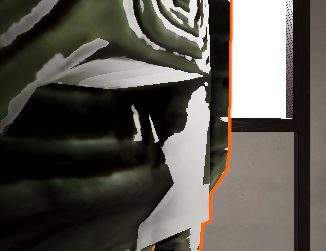

where the edges are harsh
I can only reduce it by turning down the light source, but then the light is too dim
gleaming trellis
Optimizing some settings for URP
What is this 'Filtering' do, and what effect does it have on performance?
Can't find much info on it
 frigid kelp
How can I get my URP emissive materials to light up the area around it? All it does right now is make the color brighter. (I've added bloom)
 vale creek
Hi im new to Unity and I was hoping to use this player model for VRChat thats why im on the 2018 version. I was hoping to fix this pink texture problem. People told me to fix it with render pipelines but its not available in my Package Manager. Anyways is there an alternative way to fix this. I would really appreciate yalls help thank you!
pls help me ive been struggling for almost 2 days with this
thank u
rich spade
frigid kelp
How can I get my URP emissive materials to light up the area around it? All it d...
emissive materials in unity URP are NOT lights and what you are experiencing is the correct behavior, you still need a light object to actually emit light that affects other objects around it.
 plain mural
hi, is it possible to do a custom pass with rendering the same camera at different resolutions?
 strong thistle
Unity is the ultimate game development platform. Use Unity to build high-quality 3D and 2D games, deploy them across mobile, desktop, VR/AR, consoles or the Web, and connect with loyal and enthusiastic players and customers.
 celest sky
Anyone have experience with transparent render textures in HDRP? I've followed everything (changing render pipeline settings to r16 and on the render texture, etc), but I can not get a camera to render something with a transparent background to then throw into a UI
eternal laurel
Yet another 1 step forward 2 back and 2 sideways from unity. Bravo!
turbid matrix
https://github.com/Unity-Technologies/Graphics/pull/3385
https://github.com/Unity-Technologies/Graphics/pull/3386
GitHub
Purpose of this PR
Reactivate Enlighten Realtime GI support for HDRP. Makes it easier to upgrade from builtin render pipeline or HDRP 7 and older.
Testing status
Manual testing by the developer usi...
GitHub
Purpose of this PR
Add Enlighten Realtime GI support to Universal. Makes it easier to upgrade from builtin render pipeline.
Testing status
Tech art validation pass in progress here https://jira.uni...
 candid pawn
There is any way to make the background transparent in HDRP?
 crisp girder
With URP, how would I go about using a piece of geometry as a mask for another object? I want to use a cube to overlap another piece of geometry, and prevent that geometry from being rendered.
crisp girder
I have it cutting out the object using the stencil buffer, but is it possible to apply the depth buffer first? Meaning only the bits of the mask that are in front of everything else would write to the stencil buffer
 lethal pagoda
Hey, how would I go about creating projectiles like those in URP? I need them to look good from any direction so billboards are not an option I guess?
broken lichen
You could make that shape into a 3D model and put an emissive material on it with bloom post processing. Assuming your target platform can handle bloom.
scarlet hull
Stretched billboards
broken lichen
It will be difficult to get billboards that look good both from the side and head on.
lethal pagoda
Yep, I'm using bloom already. Seems sensible, I'll make them super thin on the ends and see how this looks like. Thanks 🙂
elder merlin
I'd probably try with a mesh like this
scarlet hull
I was thinking that something like the stretched billboard particles that exist in the built-in particle system would be enough.
turbid matrix
if you can align the billboard, that should be enough
if you don't care for doing that, doing two planes in X shape would be enough for most
I don't think that middle plane in @elder merlin's image would work particularly well on all angles
elder merlin
That might be true. You could make a shader hat fades with fresnel though!
turbid matrix
I did the same thing without that middle plane once and it worked just fine when but obviously if you look at it straight in shooting direction, you'd need the middle thing too
lethal pagoda
Thanks for all advices 🙂 That's the shape I ended up with and it's only 6 triangles 🙂
elder merlin
Nice!
 half helm
I have just started learning unity and/with urp, but my maerials turn grey when I look at them from a angle, how could I fix this?
broken lichen
That looks like fog
Are you sure it's related to the angle?
If you move the camera far away from these blocks, do they turn grey also?
half helm
oh yeah
broken lichen
Fog can be turned off in the Lighting Settings window
half helm
oh tysm
 fair flame
Anybody have a handy link to an article or tutorial that can tell me how to tap into Unity's realtime lighting and shadow mapping?
scarlet hull
fair flame
Anybody have a handy link to an article or tutorial that can tell me how to tap ...
What are you trying to do ?
fair flame
Our team has a specialty pipeiine- They are rendering an object directly on the videoboard via OpenGL. So as far as Unity goes, this object doesn't "Exist". We only see it on "Camera" at runtime. However, the team now wants this object to interact with Untiy's realtime lighting and shadow calculation.
and to that point, even while playing in the Editor, the object in question doesn't appear as a real mesh in Scene view. Only on the camera
oh and this is a VR app. So that definitely makes it all the more fun lol
broken lichen
fair flame
Our team has a specialty pipeiine- They are rendering an object directly on the ...
If you're using the built-in/standard render pipeline, there's no easy way to get access to all the lighting data you need. You just need to find all the lights and convert it into something your custom shader/render pipeline can use.
If you're using URP, there are probably easier ways to gain access to all the lights
fair flame
broken lichen
If you're using URP, there are probably easier ways to gain access to all the li...
Right now the system is "default" but now's the time to start thinking about cusotms or not
fair flame
broken lichen
If you're using URP, there are probably easier ways to gain access to all the li...
And to that point, yes it's URP
 grave totem
Hi, could anyone point me in the right direction for flat-shading in the universal render pipeline? Everywhere I look I find people using the derivative nodes, but those aren't available for the vertex phase anymore :/
 polar light
Does URP need IL2CPP to build?
rich spade
grave totem
Hi, could anyone point me in the right direction for flat-shading in the univers...
if your referring to DDX and DDY not being usable in the vertex stage I believe this is due to how they are implemented in the nodes. Short version is I think you can still use a custom node to achieve this affect (though I have not tried).
eternal laurel
@polar light no
dawn sorrel
how do i make the volume only mask the given layers in URP ?
turbid matrix
polar light
Does URP need IL2CPP to build?
another no
 keen pivot
do we have property instances on shader graph now?
i have an emissive material for a car's brake lights and i'd like to change the emmission value at runtime per car, property blocks seems like the way but a while back this wasnt possible on HDRP or URP
keen pivot
is that on the terrain?
plain mural
it only happens with high quality shadow filtering
plain mural
nah, its still there even if dithering is disabled
keen pivot
i think i'm mis-understanding the graphics compisitor
so, i have a main fixed camera in HDRP, and i want a small picture in picture from time to time, this wasnt too heavy back in the built in render pipeline days, but this hits very hard in the HDRP
but from what i'm reading on the unity docs, graphics compsitor is very heavy and not recomended for video games
grizzled flame
Could it just be that the rendering process is very heavy in general, so doubling it is proportionally heavy?
keen pivot
so i dunno
grizzled flame
(in HDRP)
keen pivot
well yeah i guess but i wonder if it really needs to double the work load
grizzled flame
well not double it, but there are certain fixed costs that aren't reduced even by going to a lower res
keen pivot
i cant help but think there is a better way to do what i need than just shoving another render/camera in there
keen pivot
viewport i guess
keen pivot
if you've played hitman then you can imagine the sort of picture in picture i mean
grizzled flame
I have played hitman but I don't remember the PiP
keen pivot
if you set a trap
and someone important dies later on, you get a small render of the events in the top left corner
grizzled flame
ok - yeah I can't imagine how you would possibly do that without a second camera
keen pivot
gloat-cam
keen pivot
thats the thing, i dont recall hitman halving its frame rate when that happens
grizzled flame
definitely it does not haha
are you sure it's the rendering that's the problem?
Have you profiled it?
waxen lantern
rich spade
if your referring to DDX and DDY not being usable in the vertex stage I believe ...
@grave totem ddx and ddy have only ever been available in pixel / fragment shader stage, not vertex. these derivatives are inherent to screenspace pixel/frag coordinates. so it's not a limitation of shadergraph. the way this flat shading technique works is by recomputing faceted / flat normals in the fragment shader, using world positions of fragments (after the vertex shader stage.) I don't have a URP specific reference but I recommend carefully reading this catlikcoding resource to better understand the technique. you should be able to use either shader graph nodes or the custom code node to implement it. https://catlikecoding.com/unity/tutorials/advanced-rendering/flat-and-wireframe-shading/Flat-and-Wireframe-Shading.pdf
waxen lantern
keen pivot
do we have property instances on shader graph now?
InstanceID being available in Shadergraph to look up per instance property values is coming soon. So is VertexID: https://github.com/Unity-Technologies/Graphics/pull/3291
GitHub
Purpose of this PR
Provides users the ability to access VertexID (in the vertex stage), InstanceID, and Stereo Eye Index through ShaderGraph nodes.
Testing status
Graphics tests will come, post-ha...
rich spade
waxen lantern
<@217581589947875329> ddx and ddy have only ever been available in pixel / frag...
every day is a learning day 😆
that makes perfect sense to me, thanks for pointing it out 😉
keen pivot
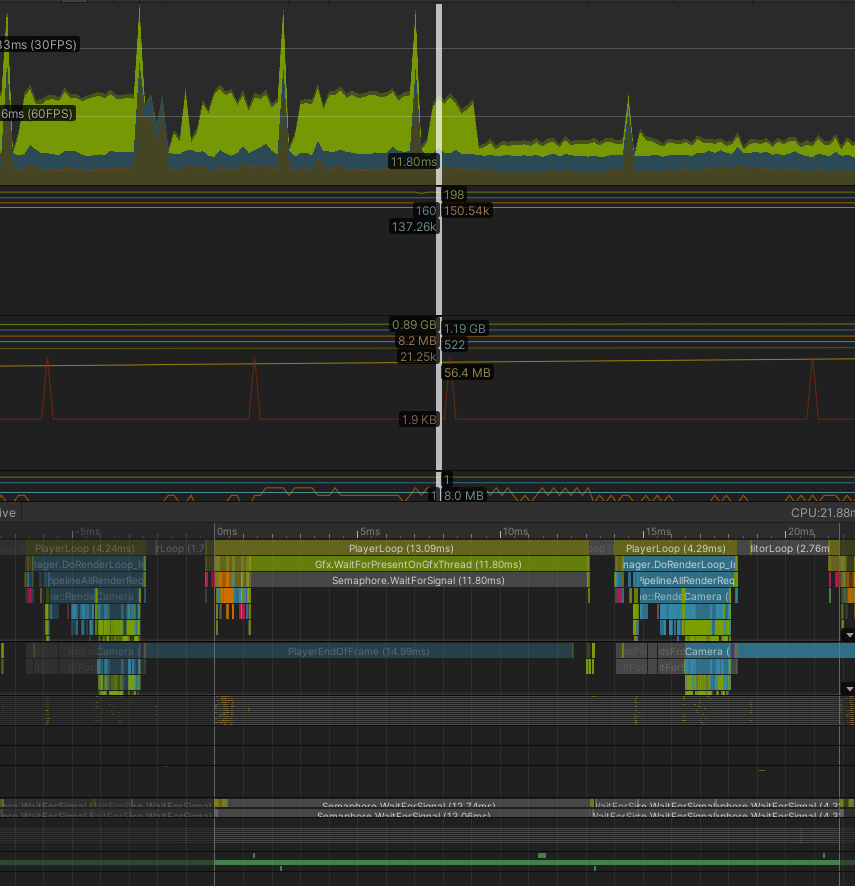
so the second camera is taking up a chunnk of power but i cant say what parts are causing it
the dip is when i turned it off
that profiler is kinda naff in HDRP it just says shadows and other
used to have much more detail in there
it adds 344...things....to the frame
can get it down to 282 things if i edit some custom frame settings
waxen lantern
rich spade
every day is a learning day 😆
that makes perfect sense to me, thanks for point...
no worries! @grave totem that said, if your use case allows for it, you can completely avoid custom shaders and yield better performance by precomputing faceted normals on your mesh geometry / 3d model assets.
waxen lantern
keen pivot
is that a 2021.1 thing then?
hard to say, but yeah i'd suspect either 2021.1 or 2021.2 if it's late. i found it on the roadmap here as well: https://portal.productboard.com/unity/1-unity-graphics/c/258-shader-graph-vertex-id-instance-id-and-eyeid-nodes
You will be able to access more rendering data that improves XR support, enables vertex animation blending, and supports custom draw calls.
waxen lantern
keen pivot
can get it down to 282 things if i edit some custom frame settings
ah cool, i was about to suggest that. there's a lot you can adjust in those frame settings
keen pivot
i think it might just be that my scene is too heavy to support having it
waxen lantern
keen pivot
it adds 344...things....to the frame
expand the list?
keen pivot
i can expand the list, my problem is i dont know wtf most of it means 😄
waxen lantern
ah, well some of it will correspond to what you can adjust in the frame settings.
keen pivot
i turned everything off that added to the number basically
apart from obvious things to leave
like...opaque objects and such
maybe i dont need to use HDRP
waxen lantern
aside from that, you could enforce a lower LOD for mesh objects and various other objects. if that's the bottleneck. The profiler and frame debugger can tell you.
elder merlin
The frame debugger is very helpful in telling you exactly when is happening, I'd recommend looking up a tutorial on it
waxen lantern
yeah, that ^
keen pivot
thats what i'm using, and i agree thats something i'm not understanding enough
but i think maybe the scene itself is just not really optimised enough to introduce a second camera yet
lots of the traditional techniques i read about just dont have any effect in HDRP
almost like its already doing most of these things already
internally like
i havent seen how the frame debugger tells me about mesh constraints, i'm not saying it doesnt, it does if you say it does. i just dont yet understand where its telling me that
having said all this
is doesnt seem to bad in a runtime build
grave totem
waxen lantern
no worries! <@217581589947875329> that said, if your use case allows for it, you...
Hi, thanks for this (just got back to my PC haha), I ended up taking my terrain generator and duplicating my vertices so that it would generate face normals nicely for my use case. I'll definitely keep that resource you sent handy in case I need it for my future 3d assets however, I'm not at the stage of importing resources yet.
keen pivot
well, i might have to revist the compositor
i have a post process effect i run on the display, and the inset camera doesnt pick that up
okay well it does, but it applies it to scale
 steady pumice
hi all! I'm having a hard time optimizing my game. It seems like the CPU queue is on Semaphore - which I'm assuming it means it is waiting for the GPU. But then the GPI time is all spent on Gfx.Presentframe that has GfxDevice.PopEventyQuery as the main event, so I guess also the GPU is waiting! What can I do? The game is running at 15/20 fps at 66ms
broken lichen
steady pumice
hi all! I'm having a hard time optimizing my game. It seems like the CPU queue i...
If I had to guess, I'd say likely the CPU profiler is correct and the GPU profiler is not showing you the whole picture. Does swapping your shaders with simpler ones improve performance?
waxen lantern
steady pumice
hi all! I'm having a hard time optimizing my game. It seems like the CPU queue i...
and here's a thread with similar discussion on the forum, fwiw https://forum.unity.com/threads/semaphore-waitforsignal-causing-performance-issues.824580/

Unity Forum
I am making a 2D Android game and the profiler is showing Semaphore.WaitForSignal as the root cause for a high CPU rendering (about 9.7ms), but it...
 restive perch
In URP, how can I mask the output of my main camera, based on the output of another one that renders to a texture? Should I be looking at scriptable render passes?
steady pumice
waxen lantern
and here's a thread with similar discussion on the forum, fwiw https://forum.uni...
thanks! I figured it out thanks to your hints. The GPU profiler was not detailing enough, I turned on deep profiling and enabled it and found the bottleneck. Some models had very complex meshes for details, I added LODs and it fixed the issue
indigo summit
is RequestShadowMapRendering in HDRP working, it seems broken for me
i'm on 2020.2.2f1
yeah i think it's bugged :/
the shadow just blinking and gone
waxen lantern
@indigo summit seems you're not alone? maybe this feature is being reworked: https://forum.unity.com/threads/on-demand-shadow-maps.1000477/
Unity Forum
I am testing on-demand rendering of shadow maps and reflection probes which is a nice feature, except the shadows flicker every frame that the...
@indigo summit that said, can you confirm that for your light(s) shadowupdatemode is set to ondemand? https://docs.unity3d.com/Packages/com.unity.render-pipelines.high-definition@10.3/api/UnityEngine.Rendering.HighDefinition.ShadowUpdateMode.html
@indigo summit also assuming you are using an included / verified HDRP version with 2020.2
 subtle jacinth
is URP faster then the default renderer? Unity talks kinda allude to that, saying they do clever things with shaders and rendering etc
grizzled flame
Supposedly yes
indigo summit
waxen lantern
<@267565685322809345> seems you're not alone? maybe this feature is being rework...
it is set onDemand, it's like the shadow system are kinda glitchy. sometimes it work sometimes it doesn't
 marsh marsh
Hello! Does anyone have any idea why does that characters shadows are so low quality, even though on the settings everything is max and the shadow resolution is 4K?
 random cradle
Is it normal for generating lighting to take a long time? Everytime I move something or even when replaying the scene, I just have a house and a terrain and it takes 5 minutes+ every time
 stable acorn
Can you not do the 2 camera set up in HDRP for getting rid of weapon clipping? 😦
grizzled flame
random cradle
Is it normal for generating lighting to take a long time? Everytime I move somet...
yes - baked lighting is a very slow process. Turn off the automatic generation stuff and just do it manually after you moved everything
random cradle
@grizzled flame thanks! I was just making sure it wasn't just me. I have another question if you don't mind, when not baking and just using realtime, I get real ugly shadows like this, is this normal? I would bake these anyway I was just curious. It doesn't seem like there isn't any light bouncing, so I couldn't really have a large non-static object
elder merlin
With realtime lighting you still need to bake, to get ambient lighting. This will fill out the black shadows @random cradle
But it's correct that there is no bouncing with realtime
random cradle
Ok gotcha thank you! These answers definitely cleared up a lot for me
waxen lantern
elder merlin
But it's correct that there is no bouncing with realtime
@random cradle not by default, but you can achieve real-time GI / global illumination (light bouncing) with HDRP by enabling SSGI (screen space - ok) or RTGI (ray traced - best.) this just requires a lot of graphics processing power, so it's generally only meant for newer, high end platforms.
elder merlin
Absolutely, I just didn't think it looked like they were using HDRP :)
waxen lantern
@elder merlin i hear you --it doesn't look like it, but if not, maybe they will want to start using HDRP if real-time GI is a priority feature ¯_(ツ)_/¯ we've no idea
@elder merlin @random cradle Also worth mentioning there is evidence of Enlighten Real-time GI coming soon to URP (and coming back to HDRP.) this is not as demanding on graphics performance but more difficult to setup as it requires carefully placing light probes and requires some pre-computation (call it "half baked" 😁.)
GitHub
Purpose of this PR
Add Enlighten Realtime GI support to Universal. Makes it easier to upgrade from builtin render pipeline.
Testing status
Tech art validation pass in progress here https://jira.uni...
GitHub
Purpose of this PR
Reactivate Enlighten Realtime GI support for HDRP. Makes it easier to upgrade from builtin render pipeline or HDRP 7 and older.
Testing status
Manual testing by the developer usi...
 true zealot
it does say URP in their project 😛
waxen lantern
true zealot
it does say URP in their project 😛
still maybe they don't know what render pipeline they want to use if they are asking questions like this.
elder merlin
That's really cool, I haven't seen that :o
waxen lantern
but yeah in any case --URP might be getting Enlighten real-time GI sometime this year, fingers crossed. 🤞
turbid matrix
still waiting for that blog post about real-time GI / re-enabling Enlighten 🙂
but there's been a lot of promised blog posts lately that never materialized so... we'll see
oh wait, they said they'll post about it on the forums, not on blog. my bad
Hi everyone, Just wanted to chime in and give an update. We are in fact reenabling Enlighten real-time GI for HDRP and adding the support to URP as well. Enlighten real-time GI will be available in HDRP, URP as well as the Built-in rendering pipeline (BiRP), as we want to ensure better transition experience for existing projects upgrading from BiRP to URP / HDRP. We will do a forum post update in the coming days to provide more details about our plans.
message from 3rd Feb
indigo summit
Wait, how many FidelityFX that is actually integrated inside HDRP?
turbid matrix
I'd assume it's just CAS atm
indigo summit
oh, i thought the entire suite are integrated
turbid matrix
I'd love to see something like this on HDRP https://gpuopen.com/fidelityfx-sssr/

GPUOpen
The AMD FidelityFX SSSR effect provides an open source library to easily integrate stochastic screen space reflections into your game.
wonder if one could just integrate that denoiser to it because currently the main issue on HDRP SSR is the denoiser
I'm also assuming Unity is playing with TressFX because there's this card on HDRP productboard: https://portal.productboard.com/unity/1-unity-graphics/c/200-strand-based-hair-rendering
Strand based hair rendering and simulation in real-time.
indigo summit
i actually just finished reading about them which i why i'm surprised that CAS are inside HDRP 😅
speaking about SSR i think the best visually SSR i found is Hangar13 SSR that they implemented since mafia 3
iron flame
indigo summit
Wait, how many FidelityFX that is actually integrated inside HDRP?
it doesn't work perfectly. There is always some kind of pixelation except 50% resolution.
%100
%75
%50
indigo summit
i think that's how CAS is though, i also notice same issue in some games that using it
turbid matrix
there was recent patch for CAS on github that is not on released versions yet
GitHub
Fixing Contrast Adaptive Sharpening issues with Software & Hardware DRS
When CAS was applied in final, it was skipping samples due to the fact that positionSS was being clamped as an integ...
@iron flame @indigo summit ^
"When CAS was applied in final, it was skipping samples due to the fact that positionSS was being clamped as an integer. This caused heavy pixelation and aliasing artifacts."
indigo summit
oooh
 upper girder
Hey guys, I'm having some difficult using lights on URP, because I need to much intensity do light up the enviroment, and the lights get to much exposure. I've searching for a solution but I'm not founding it. I'm using URP because of it's post processing features.
rich spade
upper girder
Hey guys, I'm having some difficult using lights on URP, because I need to much ...
generally an ambient level of light is used to light up the whole scene and other lights give shadows / localized colored lighting. You need to bake the scene at least once to get a decent response from lighting.
Or is this not what you mean at all?
upper girder
Yeah, I believe my understanding about lighting it's not correct so, so I should bake lights, to light up the whole room, and this lamp it's not suppose to be the source of the whole light right?
rich spade
essentially, although you often have a "directional light" which acts as a sun. depends on your sky setup if using skymap / procedural etc.
upper girder
This is the result I ve got after baking
rich spade
that's better imo, you can tweak the ambient light levels to your requirements and add in many lights if you want.
It's probably an idea to look at some of the lighting tutorials either on Unity site / youtube from enthusiasts they can give some good insights
 heavy crypt
is anyone else noticing environment lighting isn't calculated how you might expect in URP's shader graph?
when selecting "color" for the source, I'd expect the HDR colour to be multiplied by the intensity, but it appears to be doing something else.
only at -10 does intensity not contribute anything to the scene.
-10 to 0 appears to be mapped to 0-1 and numbers above 0 go beyond that
which isn't what I'd expect given the way light intensity works elsewhere in the URP, but there doesn't appear to be any docs
mmm, it seems the picker clamps values below 0 to their corresponding normal colour space values too
heavy ice
Probably @ripe fable or @turbid matrix were the ones asking for this https://forum.unity.com/threads/unity-experimental-hdrp-dxr.656092/page-24#post-6823508 can't remember.
ripe fable
Ah great, I'm working on a RTAS manager so the Manual mode will come in handy.
heavy ice
You'll need to make sure to use the API we'll provide to set the instance flags etc
ripe fable
Yep that's what I'm doing.
heavy ice
For now there no API you probably either changed the code to make it public
or copy pasted it
which is not a good pattern
the idea is for you to have the internal plumbing hidden and you'll still get the right behavior
ripe fable
I'm doing the whole "manager" from scratch with 30hz/60hz/native frequencies, scanning/updating/culling in async jobs, caching and hard/soft deletes in the RTAS (using the mask flag for soft-deleting)
So the geometry actually stays in the RTAS, it's just not used 😄 I hope that will bring some memory bandwidth benefits
heavy ice
Yeah but the part that defines what objects have what flags is an intenal HDRP stuff, there is no guarantee it wont change if you copied that in your manager
ripe fable
Hmm we could be talking about different flags, do you mean the "mask" flags? (AO/castshadowtransparent/recursive/etc)
heavy ice
Yes
ripe fable
Alright, I will keep checking it.
heavy ice
A sane usecase should never imply you lookng at them
that is why an API will be there to handle that
a function will return all the expected parameters for these
ripe fable
Sounds good. We will still be able to override these yes? For example I use these flags to not use ray traced reflection on objects "behind" the camera with a min. distance.
Hmm ok.
heavy ice
for that usecase you should exclude them uing the layer system
that is the proper way of doing it
ON your ray tracing reflection volume you need to exclude a certain flag and put objects you don't want in your reflections there
ripe fable
You mean I should create a layer for every effect (castRTAO, castRTR, castRTGI) and update layers every frame?
Yes I know what you mean
Hmm..
ripe fable
yeah that's what I'm doing by building the instance flag myself
heavy ice
Ok i'll think about adding local overrides
to the function
to explciity
exlude from effects
ripe fable
I don't use the default HDRaytracingManager, if the RayTracingAccelerationStructure API will stay the same it will work.
I will create a post in the DXR thread when I have everything up and running and we will probably figure it out. 😄
heavy ice
I got what you are doing on your side, you should never touch the instance flag yourself. I'll make sure to make the API cover your need
ripe fable
👍
dawn sorrel
is there a guide on switching from urp to hdrp
 elder shore
dawn sorrel
is there a guide on switching from urp to hdrp
elder shore
dawn sorrel
is there a guide on switching from urp to hdrp
I tried this once, it wrecked my project
I ended up having to rebuild it
dawn sorrel
i think the same thing happened rn
i changed the materials to use the hdrp lit shader but now they are just gray
elder shore
I ended up having to import piece meal and reconstruct the scenes
turbid matrix
@dawn sorrel you get this because HDRP shaders probably use different property name for base color on the shader files
in other words, your HDRP materials probably lost their albedo textures now
Unity doesn't provide URP to HDRP material upgrader but once could manually write such script
other alternative is to just author shader graph on HDRP that uses URP's shader inputs, then you can just swap that custom SG in place of the old URP shaders on your materials and it wouldn't loose the texture mappings
(if you swap shaders that have same property names, it will not lose the mappings)
and by property names, I now mean the actual name, not the display name
so about this... https://issuetracker.unity3d.com/issues/xr-sdk-urp-performance-regression-when-using-urp-11-plus
Reproduction steps: 1. Open the attached project ("1312513Repro.zip") 2. Open the "TestScene" scene 3. Enter Play mode 4. In the Gam...
(issue based on my bug report)
as I can see from here, this issue on URP or 2021.1 has been introduced on 2021.1.0a10 since a9 is fine
so what I'm wondering now is how do I determine the specific URP release on Graphics repo now that it's part of Unity core?
PM just says it's version 11.0 regardless the Unity version now on all 2021 versions
looking at the package on package cache doesn't really give me proper clue, I can see the changelog on package but for example it's dated to 2020-10-21 on latest 2021.1.0b5 which can't be true
there's no release branch or tag for any 2021.1 or 11.x on git
is there any way to get the git hash or anything from the Unity shipped URP package to be able to figure out what version it is even?
I find it absurd that there's no sane versioning to these anymore
I mean, it's versioned by Unity version now, but I can't tell what exactly is in that version (in the old days, I could just look that release in github and see the whole commit history)
dawn sorrel
Does anyone know if Genshin Impact uses URP or built in renderer?
heavy crypt
I would imagine since they started development in 2017, it'd be built-in
turbid matrix
considering it has volumetric fog, SMAA+TAA etc, it doesn't really shout URP
I mean, even for custom solutions, those would be way simpler to do on built-in
marsh marsh
How do I get better shadows?
turbid matrix
lower distance
turbid matrix
the longer the distance, lower visual resolution you will have as same shadow map has to extent further
turbid matrix
main issue with the shadow quality in URP is the shadow filtering though
there's not much you can do about it
marsh marsh
So this is pretty much unfixable?
turbid matrix
everything is fixable
but if this is important for you, try built-in with NGSS asset or HDRP
turbid matrix
HDRP has better shadow filtering
marsh marsh
ok, lets say I want to stay with URP, what do I do?
turbid matrix
accept it has crappy shadows or modify the URP package to use PCSS filtering yourself or wait for NGSS dev to come up with URP version for NGSS (could be this year, next year or never for all we know)
I'd just look at built-in rendering rather
marsh marsh
Thanks @turbid matrix, you were big help!
So I basically need to use 3rd party filtering or use HDRP?
turbid matrix
well, I'm not completely sure what you find being wrong on URP shadows
I'm assuming you find them too pixelated / not looking smooth
marsh marsh
Yes sir!
Im trying to go for a triple A look I guess
so these shadows will not suffice
turbid matrix
yeah, that's not happening on stock URP
that being said, overall visuals are more about your art assets than what the renderer can do
marsh marsh
Thats also true
But going for triple A, those shadows will simply not do
Can I convert from URP to HDRP?
turbid matrix
no automatic way
manually, sure
also I dunno about that, many high budget titles still have pretty low fidely shadows
marsh marsh
turbid matrix
also I dunno about that, many high budget titles still have pretty low fidely sh...
I dont know why, but I havent noticed this
turbid matrix
many just use baked lighting for most of the level
turbid matrix
try different alternatives and see yourself what is good for you
I have no idea what kind of shadows you want... like... there's so much involved
HDRP has a lot of things you can try
marsh marsh
Yea I guess youre right haha
turbid matrix
you may want contact shadows for small details, PCSS for directional light etc
for the built-in, you can't really beat NGSS but if you don't have that asset, there's this free thing https://github.com/TheMasonX/UnityPCSS

GitHub
Nvidia's PCSS soft shadow algorithm implemented in Unity - TheMasonX/UnityPCSS
I'd probably still lower the expectations a bit
how your game shadows look isn't all that important in the big picture
turbid matrix
if you really need tiny details to show up sharp, you'd need some kind of contact shadow like tech for that because there's not going to be enough of resolution on shadow maps for that
HDRP has that built-in (may need to enable it as I don't remember if it's enabled by default)
 amber flower
how do you switch from HDRP to URP?
and is there a way to have code switch between the 2?
marsh marsh
amber flower
how do you switch from HDRP to URP?
I did that but the other way around, install URP first, convert the materials in to URP, and then you can remove HDRP
amber flower
so you have to remove HDRP in order to switch it?
amber flower
because my intent is to make this game PC and VR supported (Like vrchat or phasmophobia which you can play either on PC or VR)
maybe PC could be HDRP and VR could be URP
while keeping them in the same project
marsh marsh
Oh I have no idea buddy, sorry!
amber flower
oh no worries! I'll just switch the whole project to URP it's more performant anyways 😛
amber flower
marsh marsh
My shadows are hiding?
click on your light
like your sun
then tick on the shadows box
marsh marsh
@amber flower theyre enabled??
amber flower
so if you remove the sun it goes completely black right?
marsh marsh
nvm, its all white
amber flower
what
marsh marsh
I hit play without the sun, and the screen and editor was all white
marsh marsh
nvm I fixed it
dawn sorrel
is it possible to have auto exposure / eye adaptation in URP?
dawn sorrel
what is unities default pipeline called? because this is what i see:
and im 100% sure the default isnt called None
fiery marsh
dawn sorrel
what is unities default pipeline called? because this is what i see:
It's usually referred to as the "Built-in" render pipeline
dawn sorrel
thanks @fiery marsh would you happen to know of a modest chart that compares the pros and cons of each pipeline so i can figure out which one is the best choice for a project?
fiery marsh
dawn sorrel
thanks <@!357936113983291393> would you happen to know of a modest chart that co...
The docs have some feature comparison tables (comparing based on the built-in RP) that might be close to what you're looking for
https://docs.unity3d.com/Packages/com.unity.render-pipelines.universal@10.3/manual/universalrp-builtin-feature-comparison.html
https://docs.unity3d.com/Packages/com.unity.render-pipelines.high-definition@10.3/manual/Feature-Comparison.html
dawn sorrel
thankyou so much Cyan!
turbid matrix
dawn sorrel
and im 100% sure the default isnt called ```None```
to be fair, you are looking at "Scriptable Render Pipeline Settings" and built-in renderer isn't scriptable RP so "none" is correct in this sense
dawn sorrel
great point. that makes sense
turbid matrix
there never was configurable RP asset for built-in either so just making one to make it work similar way as the SRPs doesn't make much sense either
but I do agree that renderer configuration is quite a mess in Unity
all that could be dealt so much easier if Unity could get rid of the old baggage there and could streamline those settings so everything could be found in a logical place
now the further you go SRP route, more your settings get scattered around
there are even overlapping settings that will just confuse the users new to it (SRP asset being overridden by quality settings, HDRP framesettings that can get overridden by default frame settings, camera custom settings or again quality settings but for specific HDRP assets)
dawn sorrel
about 1 year ago from now i tried to learnt HDRP and spent about 1 week asking questions in here trying to configure it and get it to work. i felt like an idiot but it seems like what you say is true. are there 4 RPs? built in, SRP, URP, and HDRP?
turbid matrix
there's built-in, URP and HDRP
SRP just means scriptable render pipeline and URP and HDRP are built on this foundation
 final heart
So I just installed HDRP for my 2d game and now my whole scene is darker, I know nothing about lighting and I googled it and i see that other people have this problem but it doesn't really offer the solution, how to i lighten up my scene to the way it was before, it's like HDRP put a shadow on my whole game
elder shore
final heart
So I just installed HDRP for my 2d game and now my whole scene is darker, I know...
Ive had the same experience
For some reason I have had to set HDRP lighting 10x brighter to get the same look as in Standard
final heart
where is that setting
elder shore
I had multipled each lights Lumins/Lux by 10 in the inspector
final heart
i don't have lights
final heart
I have a no light 2d scene
elder shore
Im befuddled
Not only how you would increase your illumination, but what benefit HDRP would have for a 2d game
final heart
post processing volumes
final heart
I guess add a light? there are none
can I have like an even ambient light
never done that
elder shore
try Window > Rendering > Lighting Settings
Nah, wait, nothing in there would help you
Yeah try adding a Global Light2D
final heart
when I start the game it is lit for a second then goes to the HDRP darkened mode
I wish I could turn it on only when I need the post processing
i don't understand why it can't just stay lit
This light is doing nothing
elder shore
🤔 Im not sure whats going wrong
turbid matrix
@final heart @elder shore there's few things going on with HDRP lighting... first of all, it's by default using realistic lighting intensity and all the default settings are configured to suit this
if you really want the old style setup, make sure your default volume settings don't have any exposure adjustment, set the sky exposure to 0 and also on scene make sure your direction light is like around value 10
this would make it look like in the built-in
final heart
I don't know how to do any of that
turbid matrix
but you also lose the benefit of using realistic lighting values
turbid matrix
also if this is too much of a hurdle, I dunno, maybe better off sticking with the built-in? 🙂
elder shore
There are plenty of tutorials on learn.unity for HDRP lighting
final heart
and other volume stuff?
turbid matrix
you can look at project settings->hdrp default settings or something like this
turbid matrix
elder shore
There are plenty of tutorials on learn.unity for HDRP lighting
to be fair, HDRP has swapped the places these settings exist a lot so if you find a tutorial for it, it could be outdated already
but official docs for the version you currently use are up-to-date
elder shore
I have been using the real life light values for all my lights (taking lumins off product amazon pages, ect.) and to get it to look like what I consider realistic I multiply by 10, works every time
turbid matrix
@final heart URP has "some" motion blur but it's bit of a hack as URP doesn't support motion vectors afaik. Built-in rendering does have movecs and motion blur on PPv2 I think
turbid matrix
elder shore
I have been using the real life light values for all my lights (taking lumins of...
this suggests your exposure values are off
basically the exposure volume component has auto mode enabled by default but there's also exposure value for the sky too
I usually set the exposure to fixed while tweaking the lighting and only use auto later on if I really need it
final heart
So I don't see any HDRP settings that light up this darkness
elder shore
I did get a big lighting performance increase when I made my prefabs "1 unity meter = 1 meter" strictly
Just like in real life, when you make things bigger, you need bigger lights lol
That look it from like 200 times the lumin values to just 10
Learning HDRP was really hard, took me some weeks to get everything working within expected parameters
But now the post processing like motion blur on those real life camera simulations look freaking amazing
final heart
I just need to brighten the scene and these lights don't do anything
elder shore
I cant help you 😢
Id add a global light 2D and find the lumin value I want
If thats not working I dont know...
final heart
that's not in my list of objects
when I create an object
that's not in my list of lights
global light 2d? Do I need to download a package?
elder shore
I have only done 2D in LWRP, something is different then in HDRP
There are tons of resources making 2D in LWRP and SRP, but im not finding any useful help for you on HDRP
Sorry bruh
final heart
it's all good thanks
final heart
So is there another solution to doing motion blur in 2d in Unity or am I stuck with HDRP
grizzled flame
final heart
So is there another solution to doing motion blur in 2d in Unity or am I stuck w...
All pipelines support postprocessing - check the pinned messages in #💥┃post-processing
final heart
Thanks man I did get the Post Processing in Unity to make motion blur with the default pipeline
waxen lantern
grizzled flame
All pipelines support postprocessing - check the pinned messages in <#4978739245...
cc @final heart
all pipelines support post processing but URP does not yet generate motion vectors needed for motion blur to actually have any visible effect on moving objects.
Universal Render Pipeline (URP) only blurs camera motions.
from URP doc page for motion blur:
https://docs.unity3d.com/Packages/com.unity.render-pipelines.universal@11.0/manual/Post-Processing-Motion-Blur.html
the good news is object motion blur is planned for a future release of URP. here is the feature card being tracked on the URP roadmap: https://portal.productboard.com/unity/1-unity-graphics/c/133-post-processing-object-motion-blur

The Motion Blur effect blurs an image when GameObjects are moving faster than the camera’s exposure time. Rapidly moving GameObjects or a long exposure time create this effect.
For more details see:
waxen lantern
elder shore
I have been using the real life light values for all my lights (taking lumins of...
the lighting & exposure cheat sheet at the end of this HDRP doc page on physical light units is a very helpful reference on this as well. https://docs.unity3d.com/Packages/com.unity.render-pipelines.high-definition@11.0/manual/Physical-Light-Units.html
elder shore
Awesome
 fair coral
hey! I'm working on a 3D VR game on Oculus 2. There will be holographic visuals floating mid air. Attached is a snippet of the concept art.
I'm super not into optimization of graphics. But I want to understand how to approach optimizing these elements. The way I would have approached this would be to create a plane and attach a texture with those stripes, attach a transparnet material and adjust the horizontal tiling for the stripes to fit. Would that be correct?
 jade wing
Assets\Human.cs(18,12): error CS0246: The type or namespace name 'PostProcessingProfile' could not be found (are you missing a using directive or an assembly reference?)
https://hatebin.com/lhwthhimpy
Anyone know why this isn't working?
Also I completely stole it from here
https://answers.unity.com/questions/1434700/post-processing-stack-bloom-intensity-c.html
marsh marsh
When I made a simple day cycle in HDRP with a physically based sky, my FPS dropped dramatically. Is this inevitable?
elder shore
jade wing
Assets\Human.cs(18,12): error CS0246: The type or namespace name 'PostProcessing...
There should be a Using directive for PostProcessing 🤔
jade wing
elder shore
There should be a Using directive for PostProcessing 🤔
using UnityEngine.Rendering.PostProcessing;
?
elder shore
marsh marsh
When I made a simple day cycle in HDRP with a physically based sky, my FPS dropp...
Real Time Lighting is super intense, unless your scene is very small number of scene objects -or- you are crazy efficient everywhere
elder shore
jade wing
using UnityEngine.Rendering.PostProcessing;
Sounds about right, I cant recall off the top of my head
jade wing
elder shore
Sounds about right, I cant recall off the top of my head
yeah it has that