#archived-hdrp
1 messages · Page 13 of 1
 rotund ridge
Baking works on mesh marked as static
(I'm not a pro in baking so I wont talk too much about it I may be wrong)
 left prawn
but if you set a mesh to static it wont be able to move right?
rotund ridge
I dont think this is related
left prawn
My sub needs to be able to move so the player can drive it if i set it to static doesent that mean it won't move anymore?
left prawn
yeah i figured it out
 left prawn
Thanks guys!
I now get 40 to 60 FPS in the sub
however 15 outside the sub
its still an improvement
 shrewd moon
left prawn
but if you set a mesh to static it wont be able to move right?
shrewd moon
left prawn
but if you set a mesh to static it wont be able to move right?
There are many types of staticness
Some allow moving but for most it doesn't make sense for them to let move if they are some type of static
Batching static for example merges the mesh so moving becomes impossible
But if you have reflection probe static or contribute GI static and then bake lighting with those, the lighting us unlikely to be correct if they move from there
left prawn
shrewd moon
Batching static for example merges the mesh so moving becomes impossible
But if ...
Right the scene is deep underwater so it is mostly pitch black so i baked the lights in the interior and set the exterior lights to mixed so i might be able to get away with it, if not what do you suggest?
shrewd moon
left prawn
Right the scene is deep underwater so it is mostly pitch black so i baked the li...
Technically that works but it's easy to run into issues when moving lightmapped objects after baking
left prawn
shrewd moon
Technically that works but it's easy to run into issues when moving lightmapped ...
right, Thank you for the heads up!
 dim arch
How do you make your UI in this screenshot? I have a world space canvas currently and I'm trying to add a post processing layer to only the canvas, but i can't figure out how. Do I need to use a separate camera for the UI, and cull everything except the UI, then stack em? It seems like a wrong approach to have more than 1 camera here
left prawn
dim arch
How do you make your UI in this screenshot? I have a world space canvas currentl...
No I don't, I simply have a world space canvas in my mesh and moved it where i wanted and since i had a post proccessing volume it automatically added all the effects
the volume is local and attached to the camera and it is my interior volume
and i have a exterior volume that has its weight set to 0 so when you leave the sub it gets set to 1 otherwise it interferes with my interior
sorry if this didn't help.
dim arch
do i understand it correctly - you have a Volume component with Mode: Local on your camera, and then you have a 3d collider which encompasses the canvas in world space, instructing the GPU to only apply the post processing to whats inside the collider (aka the canvas)
dim arch
left prawn
the volume is local and attached to the camera and it is my interior volume
but wait, since the mesh is on the volume, and the volume on the camera, won't the mesh move when you rotate/change camera position?
 dim arch
ah, so your camera doesn't move when you are in the sub
but wait, if its covering the entire camera, isn't it applying post processing to everything - not just the UI? I'm getting confused now
Nevermind, it looks like I misunderstood how the local volume thing works. You are applying post processing to everything the camera sees, when the camera is inside the collider. It's unrelated to rendering post processing effects only ON a canvas
if anyone knows how to do this, please let me know
left prawn
dim arch
but wait, if its covering the entire camera, isn't it applying post processing t...
yes
left prawn
dim arch
Nevermind, it looks like I misunderstood how the local volume thing works. You a...
yes sorry.
dim arch
left prawn
yes sorry.
How do you make your UI glow then? is it just a shader applied to the UI canvas?'
left prawn
dim arch
How do you make your UI glow then? is it just a shader applied to the UI canvas?...
Nope, I don’t know if this isn’t normal but as soon as I just added post processing and bloom it just started glowing, that’s it.
dim arch
Fair enough lol, if anyone knows please ping me
 onyx lark
dim arch
Fair enough lol, if anyone knows please ping me
onyx lark
dim arch
Fair enough lol, if anyone knows please ping me
This will happen if the Canvas is set to "Screen Space - Camera" mode
Screen Space - Overlay draws directly onto the screen, and it happens after post-processing
Screen Space - Camera and World both render the canvas with your game camera
dim arch
Maybe if I tell you my usecase, my problem will make more sense. I'm just trying to make an ingame CRT screen, and I want to apply effects on it in order to make the text glow, to make the screen warp a bit, and make it look dirty.
onyx lark
I have not figured out a way to post-process an Overlay canvas yet. It'd be handy
onyx lark
dim arch
Maybe if I tell you my usecase, my problem will make more sense. I'm just trying...
is this an in-world interface?
i.e. it's actually on a physical model
You'll probably still need to do something clever to post-process just the UI (without post-processing the rest of the world as well)
dim arch
No, it's just a world space canvas that I currently plan on putting inside a CRT monitor 3d object (unless theres a better way of doing it)
onyx lark
dim arch
No, it's just a world space canvas that I currently plan on putting inside a CRT...
that's what I was describing :p
dim arch
 onyx lark
I'm pretty sure this will involve a RenderTexture
you'd be rendering the canvas, then running it through a shader
I haven't done this before though
dim arch
Problem with render textures is that they dont accept input natively
and in that case, whats the point of using UGUI instead of UIToolkit anyways
onyx lark
Now, if you just need scan-lines, you can probably just slap an image on top of everything
dim arch
Surely theres a way to add effects to a world-space canvas without overlaying pngs/gifs
onyx lark
you could write a shader to produce the scan lines
dim arch
maybe people do it with custom pixel shaders?
onyx lark
it'd just be an overlay, not a post-processing effect
dim arch
I also want to add glow to the UI, and so on
warp the screen too, which would have to be done with postprocessing/shader
dim arch
This is actually driving me insane, it looks like you have to make custom shaders to do it, but then - every single UGUI component has its own shader.. so..
 white lagoon
I have a HDRP project, and I want to build it to VR.
But when I change the build to android everything is black.
Can I build to android (VR)?
(I can't switch to URP)
dim arch
looks like you if you want something like making the text glow would need you to change every single text ui element to a custom shader, but then if you want some dirt on top of the CRT monitor, or some other dynamic effect.. then idk
dim arch
white lagoon
I have a HDRP project, and I want to build it to VR.
But when I change the build...
white lagoon
dim arch
HDRP doesnt support android https://docs.unity3d.com/Packages/com.unity.render-p...
but it supports VR
 dawn sorrel
white lagoon
but it supports VR
dawn sorrel
white lagoon
but it supports VR
Well, its still Android VR
How can I make it so theres atleast a little bit of light visible when the sun if fully set (its not fully set in the image so you can see a little)
There is no ambient light in HDRP which is annoying. Im using physically based sky so I cant use HDRI Sky for its own exposure
 dawn sorrel
unfortunate
 scarlet hull
dawn sorrel
How can I make it so theres atleast a little bit of light visible when the sun i...
scarlet hull
dawn sorrel
How can I make it so theres atleast a little bit of light visible when the sun i...
You could use a second directional light to act as the moon to emit light.
And/Or check the exposure settings to allow it the get lower (iirc, the default auto exposure doesn't go bellow 2Ev), so the start will start to get visible and maibe light a bit the environment.
 mint urchin
someone who knows why this red glow gets added to my tree leafs? I think it's the color of my fog but idk why it shows here like this

 compact fulcrum
hi complete noob trying to make some simple objects in unity for a game called carx it needs to run in this specific version 2020.3.25f1 and a hrdp project.
And i keep running in to my matterials becomming pink or white or weird if i change the shader. ive tried some stuff but i keep running into the same problems
dawn sorrel
scarlet hull
You could use a second directional light to act as the moon to emit light.
And/O...
I came up with this:
2 Volume, a day and night volume
The night volume uses HDRI sky so that I can actually make exposure so its not pitch black
And the day volume has physically based sky etc
They just get switched before the sun goes up/down. Now I just need to figure out how to make it switch when the sun has a specific X rotation, something so simple yet I dont really know how to do it lol
scarlet hull
compact fulcrum
hi complete noob trying to make some simple objects in unity for a game called c...
Pink probably means that the shader you've changed to isn't supported in HDRP.
White could be because of lighting : HDRP uses very high light intensities by default to mimic real life lights, if the exposure isn't set accordingly, objects look over exposed
"Weird" : This is not a viable description to help 😅
scarlet hull
dawn sorrel
I came up with this:
2 Volume, a day and night volume
The night volume uses HDR...
It's a valid approach. Note that they sky change might make a visible "pop", as skys don't blend between each other.
For the sun orientation, you'll have to make some script that binds the sun X rotation to the volumes
compact fulcrum
scarlet hull
Pink probably means that the shader you've changed to isn't supported in HDRP.
W...
Hejo Thanks for replying that amazing thanks i did not think i would get some help.
Exuces me for using the word weird.
The correct word is defenatly overexposed any way that i can fix that?
Thanks alot again!
 pulsar skiff
why does my light cookie disable all other real time lights, but when i set the resolution of my light cookie texture to 256 in its import settings, it all gets fixed?
here is what happens when i put on the light cookie texture in full resolution
all other realtime lights dissapear
scarlet hull
compact fulcrum
Hejo Thanks for replying that amazing thanks i did not think i would get some he...
Like I said, for overexposed, check the exposure in the scene
scarlet hull
pulsar skiff
all other realtime lights dissapear
Are the other lights also using cookies ? Maybe it's just that the big resolution cookie is filling the cookie texture atlas, and preventing the other ones to work properly.
If it's the case, there should be an error in the console. You can set the cooke atlas texture resolution in the HDRP quality settings
compact fulcrum
scarlet hull
Like I said, for overexposed, check the exposure in the scene
i cant figure it out there is many vids on it
this is b4 and afther i hit that button i circled in blue

 compact fulcrum
scarlet hull
https://docs.unity3d.com/Packages/com.unity.render-pipelines.high-definition@16....
compact fulcrum
scarlet hull
https://docs.unity3d.com/Packages/com.unity.render-pipelines.high-definition@16....
Thanks again!! hero
 shrewd moon
 twin field
hey simple question but cant seem to figure it out why is my sky grey on all sc...
twin field
hey simple question but cant seem to figure it out why is my sky grey on all sc...
Looks like there's no sky to see
Can you point to where that scene should have its sky override?
 pastel drum
Anyone know how I can make massive swells using the new HDRP water system? I've messed with the water settings, but I can't seem to make anything really crazy. I'd love to make some massive waves
 tardy wind
Using unity 6, what am I meant to do about these?

Also, why do the materials in the inspector look like this when using the autodesk interactive shader?

Should I swap back to an earlier version for HDRP?
mint urchin
hey i had a question, i use this vertex painting with polybrush but this makes the materials that use vertex painting purple when using the rendering debugger (for albedo map, normal, smoothness etc.). Someone got an idea how to fix this?

 still sandal
pastel drum
Anyone know how I can make massive swells using the new HDRP water system? I've...
still sandal
pastel drum
Anyone know how I can make massive swells using the new HDRP water system? I've...
u might have to do that manually, with their displacement system
might be hard to make it look right
dawn sorrel
scarlet hull
It's a valid approach. Note that they sky change might make a visible "pop", as ...
Yeah, it does feel like a lightswitch (the "pop" you're talking about) but I can mask it by turning off the day volume before I turn on the night, the night weight will lerp to 1 to be smooth (the day sky wont interfere cuz its off)
I just did #💻┃code-beginner message for the cycle
scarlet hull
dawn sorrel
Yeah, it does feel like a lightswitch (the "pop" you're talking about) but I can...
You could also use a custom shader in the PBR sky, and use your hdri with an intensity multiplier as "background" , which would be visible at night
dawn sorrel
scarlet hull
You could also use a custom shader in the PBR sky, and use your hdri with an int...
Yeah, well thats too complicated for me, thank you for all the suggestions
 indigo lily
First time doing HDRP
How do I keep the sun existing and remove the ugly shadows?
First picture the sun exists, the second picture the ugly shadows are gone but so is the sun


 calm zodiac
Is there a way to remove the fog rendering past a certain distance whilst also maintaining the close up integrity? Fog attenuation distance kind of does the job, however, it essentially removes the close up fog.
shrewd moon
indigo lily
First time doing HDRP
How do I keep the sun existing and remove the ugly shadows...
The shadows are only ugly because you don't have TAA enabled for denoising them
By default Scene window doesn't use it because it, but the Camera and Game window do
 south girder
I updated my project to 2021 LTS and the gizmos for the Volume component is no longer toggleable.
Is there really no way to hide it anymore? It's cluttering up the gizmos pretty bad

I did find this in the preferences but there's still no option to completely disable it
 shrewd moon
south girder
I updated my project to 2021 LTS and the gizmos for the Volume component is no l...
shrewd moon
south girder
I updated my project to 2021 LTS and the gizmos for the Volume component is no l...
Hiding the icon or the volume itself?
south girder
shrewd moon
Hiding the icon or the volume itself?
The volume itself. It draws a green gizmo that shows the shape
Used to be able to just disable it like any other gizmos, I upgraded from 2021.1.6f1 -> 2021.3.39f1 and it's no longer an option
Actually it's probably because the HDRP package got updated
shrewd moon
south girder
Actually it's probably because the HDRP package got updated
The checkbox is missing from URP too
But it's back in 2022.3.
Strange
south girder
Alright, was hoping to hear that at least it's back in future versions. Good to know
Let's see if I'll update to 2022. Just moving to this 2021 LTS introduced more bugs/missing stuff than new features
shrewd moon
south girder
Let's see if I'll update to 2022. Just moving to this 2021 LTS introduced more b...
What's the issue with 2021? I felt that way going from 2021 to 2022
south girder
Script compilation takes a few seconds before it kicks in, shader graph basically freezes for 2+ minutes when undoing on a complex graph
There's more, I haven't written it all down
Also this orientation gizmo thing is now hidden away in a dropdown which is meh

Unless there's a way to keep it always visible
shrewd moon
south girder
Unless there's a way to keep it always visible
There is, the dropdowns can be dragged into the scene viewport to become pinned to various parts of it
Also some way to hide or collapse them I think

 shrewd moon

indigo lily
shrewd moon
The shadows are only ugly because you don't have TAA enabled for denoising them
...
It looked the same in the camera view, but somehow I made it very very thin and the sun still exists now, so I managed to figure it out
 minor depot
indigo lily
It looked the same in the camera view, but somehow I made it very very thin and ...
minor depot
indigo lily
It looked the same in the camera view, but somehow I made it very very thin and ...
Consider using medium shadow filtering if you want harder shadows
shrewd moon
minor depot
Consider using medium shadow filtering if you want harder shadows
This is an often recommended solution but not really a correct one
High quality shadow filtering allows you to define shadow hardness per light source using the size/radius/diamater properties
Medium filtering removes that ability entirely which is why it "works"
People often confuse the lack of denoising in the Scene window for a problem, even though with default settings it looks perfectly fine in Game and in build
minor depot
shrewd moon
This is an often recommended solution but not really a correct one
High quality ...
Entirely true, I often prefer the look of plain PCF filtered shadows and hence recommended it.
shrewd moon
That's a valid reason, as long as you're upfront about it
minor depot
Unrelatedly, I do feel like Unity could work a bit on their PCSS implementation, I've seen variants with good performance that don't rely on temporal accumulation to hide noise
shrewd moon
That'd be nice too
TAA denoising has a bit of a unique look to it
onyx lark
just noticed something mildly interesting: having FidelityFX Super Resolution dynamic resolution scaling enabled causes significant color banding, even at a render scale of 100%
I wasn't turning off dynamic resolution on the camera when the user had render scaling disabled. I think I'm going to do that now :p
 minor depot
onyx lark
just noticed something mildly interesting: having FidelityFX Super Resolution dy...
minor depot
onyx lark
just noticed something mildly interesting: having FidelityFX Super Resolution dy...
I think they just fixed that in the latest unity 6 though I can't say for sure if I remember
onyx lark
cries
well I should still probably turn it off when it's not actually needed
(i'm on 2023.2.20f1 and need to bump to 6 Preview soon)
dim arch
Does anyone know how to create a material to represent a real life screen? like a LED or CRT monitor. The material is using a rendertexture of a UGUI ingame canvas map.
I guess it's made out of glases IRL, so some glass properties? but i'm pretty lost.
 tame dock
when I restart my hdrp project and record images i get different results. after a few more restarts I get the original values again.This happens when I put the manual rendering call in the fixedupdate method. are there effects in hdrp that cause such an issue? I found out that my issue is not the fixedupdate but the field of view. Setting it to any value other than 60 degrees results in inconsistent data on restart of unity. Did anyone here had a similar issue with the field of view?
 quick sorrel
anyone know how to fix this in hadrp? my grass is not rendering the billboards correctly.
 compact fulcrum
hejo
compact fulcrum
trying to put an video on an object
is there a way to fit the video to the ocjects size?
shrewd moon
compact fulcrum
is there a way to fit the video to the ocjects size?
Depends how exactly
You could make a script that takes the scale of the object transform (which is a multiplier) and scales the video player by the same amount, or calculates the actual size of the object using its Bounds and scales the video player to that
Alternatively video player can be used as a material override which maps to a mesh's UV coordinates, so that it fits any object with appropriate UVs
rotund ridge
quick sorrel
anyone know how to fix this in hadrp? my grass is not rendering the billboards c...
Explain what is the issue
 lusty sequoia
Hi! I just made an issue into issuetracker related to using texture2d arrays inside a custom node in HDRP, could I get some votes? https://issuetracker.unity3d.com/product/unity/issues/guid/UUM-73838
tardy wind
Why do my raytraced shadows look so blury and noisy????
 shrewd moon
tardy wind
Why do my raytraced shadows look so blury and noisy????
shrewd moon
tardy wind
Why do my raytraced shadows look so blury and noisy????
Probably because soft shadows use TAA for temporal denoising, which is disabled by default in Scene view for performance reasons
But it should work out of the box in Game view and in build
tardy wind
shrewd moon
Probably because soft shadows use TAA for temporal denoising, which is disabled ...
Not even the raytracing settings work on the global volume tho
Is there anyway to add that in the scene view?
The TAA
shrewd moon
tardy wind
Not even the raytracing settings work on the global volume tho
I'm not that familiar with ray tracing, but this looks like ordinary raster renderer high quality shadow filtering
tardy wind
It's weird, I've done all the steps to add raytracing tho
However I can't find the section to find HDRP asset Resources
shrewd moon
I recommend using the HDRP template's ray tracing example as a base
 shrewd moon
tardy wind
Is there anyway to add that in the scene view?
shrewd moon
tardy wind
Is there anyway to add that in the scene view?
Always Refresh and Post Processing must be enabled, and then TAA must be set as the Camera AA mode
It's not necessary for filtering to work in game though

 tardy wind
shrewd moon
Always Refresh and Post Processing must be enabled, and then TAA must be set as ...
tardy wind
shrewd moon
Always Refresh and Post Processing must be enabled, and then TAA must be set as ...
Gotcha gotcha
shrewd moon
tardy wind
Should be this one?
I believe this one's it
tardy wind
Aight, I'll try it out.
Thanks for all your help so far
shrewd moon
Now I don't remember exactly if the template had a ray tracing quality level there out of the box, but it at least has all the resources necessary for it
https://youtu.be/ad9f_nKU0ZA
Using these instructions it was super easy to implement

In this webinar, you’ll learn how to use Unity’s High Definition Render Pipeline (HDRP) wizard to enable ray-tracing in your Unity project—with just a couple of clicks. We’ll showcase in detail the following ray-traced effects: ambient occlusion, reflection, global illumination, shadows, recursive rendering, and path tracing. We’ll also explain ...
 mortal forge
Anyone know how to grab the HDRP colour pyramid in hlsl?
 grand kettle
water
 candid tundra
How do i add foam to the shoreline of the water? Example on the picture :b

 scarlet hull
mortal forge
Anyone know how to grab the HDRP colour pyramid in hlsl?
scarlet hull
mortal forge
Anyone know how to grab the HDRP colour pyramid in hlsl?
Looking at the HDSceneColor node, it seems to be this function :
SampleCameraColor(uv, lod)
mortal forge
scarlet hull
Looking at the [HDSceneColor](https://github.com/Unity-Technologies/Graphics/blo...
Thanks! Will give the hlsl in there a crack
scarlet hull
mortal forge
Thanks! Will give the hlsl in there a crack
You will probably need some includes for the function to work though, but searching for the function in the code should guide you to it 😅
mortal forge
Yeah will do, this should be enough for me to eventually make something work, appreciate it
Was really as easy as that 🥳
 scarlet hull
candid tundra
How do i add foam to the shoreline of the water? Example on the picture :b
scarlet hull
candid tundra
How do i add foam to the shoreline of the water? Example on the picture :b
In the HDRP water samples you can find a shadergraph for the water surface to does this. It simply takes the depth difference between the water surface and the scene to generate foam.
mortal forge
On the (very) off chance, anyone ever dealt with this when sampling the HDRP camera mip pyramid before? It's a single pixel that somehow has become infected in the pyramid with a value of infinite. Doing a SafeHDR(half3 c) { return min(c, HALF_MAX); } doesn't fix it either.
 quick sorrel
@rotund ridge the issue is the billboards. But I am using anothor grass now for HDRP and it dosnt have that issue
 vapid bronze
what can cause reflection probe to be black on water?
 candid tundra
scarlet hull
In the HDRP water samples you can find a shadergraph for the water surface to do...
candid tundra
scarlet hull
In the HDRP water samples you can find a shadergraph for the water surface to do...
Yoo thanks, kinda made an alternative but will try It later tho. (:
 forest oar
tardy wind
Why do my raytraced shadows look so blury and noisy????
forest oar
tardy wind
Why do my raytraced shadows look so blury and noisy????
This was probably because you need to modify angular diameter value
 onyx lark
I'm clipping parts of a model to prevent it from getting in the way in a first person view. I want to disable this when doing shadow casting, since this winds up creating a weird hole in the shadow
This doesn't work -- it's always producing false
so how can I check if I'm currently doing shadowcasting?
Got it! The define is different in HDRP
it's SHADERPASS_SHADOWS
 analog scroll
Is HDRP inherently more expensive than URP or only when you use the features it provides?
onyx lark
It's inherently slower -- an empty HDRP scene runs much slower than an empty URP scene for me
my macbook can get a very high framerate in a URP game at native resolution (3400x2600 ish), but it struggles with any HDRP game at that scale
analog scroll
So, not viable for VR? Obviously not mobile. I'm kind of sick and tired of URP and having to do everything, and I look over at HDRP and everything looks beautiful by default
onyx lark
I would absolutely want to do VR in URP, since you need to push so many pixels and also need such short frametimes
I haven't tried HDRP VR though
just URP
URP can start looking a lot nicer if you get good materials
analog scroll
onyx lark
URP can start looking a lot nicer if you get good materials
Look at this, why does it look so mid even with good postfx and materials?

I know there's no grass but grass would kill my game
analog scroll
Trees and bushes yeah, I'll add them
It feels like even at this point it should look okay though
onyx lark
Your lighting is also off. The left side of the building shouldn’t be pitch black
The skybox might not be bright enough
One advantage of the HDRP is that it uses physically-accurate light values
rather than the more abstract intensities used by the other render pipelines
that does make it easier to punch in realistic light values
(although you can still have problems making it look right: i'm still struggling to create a good looking moonlit scene without "cheating" and making the moon disc way darker than it should be)
analog scroll
onyx lark
One advantage of the HDRP is that it uses physically-accurate light values
Yeah, if only there were presets for URP
pastel drum
If I'm making a game involving a submarine, and the game takes place in an ocean completely covered in ice, does it make sense to use a water system like Crest or Unity's HDRP water system, if I don't need waves? I just need a shader for the underwater visuals and I need to be able to incorporate physics like buoyancy.
scarlet hull
pastel drum
If I'm making a game involving a submarine, and the game takes place in an ocean...
Do you think you will see the waves in your game ? If yes, you could use a water system. If no, just fake the underwater effect using some fog, and buyancy would basically be an upward force proportional to the object volume.
onyx lark
I would not use a water system in that case
The lighting will also be pretty basic -- you aren't going to get lots of complex caustics from an ice surface
pastel drum
scarlet hull
Do you think you will see the waves in your game ? If yes, you could use a water...
Thanks!
pastel drum
onyx lark
The lighting will also be pretty basic -- you aren't going to get lots of comple...
Well it’s not necessarily the lighting from the surface, but the lighting from flashlights under the water. Trying to give an eery atmosphere
scarlet hull
pastel drum
Well it’s not necessarily the lighting from the surface, but the lighting from f...
Volumetric fog will help you here.
pastel drum
Okay, cool. I’ll look into that. Thanks again!
calm zodiac
any idea as to why my material's colour isn't accurate with the colour provided? I've tried lit and unlit shaders but both look different from the actual colour value provided
the top colour is what it needs to be, the whiter underneath is the material


never mind just saw my emissive map was white 😅
onyx lark
also, even after removing the emissive color, you'll still have tonemapping and other post-processing going on
onyx lark
I'm still very confused about how to make a good looking moon + night scene in the HDRP
I created a directional light and directional moon light. I have the moon light pointing down and the sun light pointing up, and I'm using a Physically Based Sky
This is how it looks with the Scene Exposure set to 12.5

unsurprisingly it is absolutely blown out if you set the scene exposure down to something appropriate for night-time

Am I supposed to turn down the sun light's intensity from normal daylight values?
this also just doesn't look anything like a night sky

(i switched to Emission mode on the moon light and turned the surface color way down)
 south girder
onyx lark
this also just doesn't look anything like a night sky
south girder
onyx lark
this also just doesn't look anything like a night sky
I struggled to get anything decent looking with the built-in skies, maybe you too want to make a custom one
https://docs.unity3d.com/Packages/com.unity.render-pipelines.high-definition@12.0/manual/Creating-a-Custom-Sky.html
onyx lark
An HDRI sky with a star field looks okay
mortal forge
onyx lark
this also just doesn't look anything like a night sky
This is with a moon in the scene at 0.1 Lux, no exposure postpro. It's intentionally dark but you could easily exposure up the scene a bit/still WIP.


 onyx lark
I'm looking for a very dark scene
mortal forge
Little bit of Shadows boosting with postpro though
Any darker than that (for me) and you run into just getting a black screen
Noting that a good % of the people playing your game might be on really really bad low contrast monitors which will start to look unplayable if you make it too dark
calm zodiac
are these numbers normal?

does anyone have any tips to improve performance from default hdrp settings?

the render pipeline taking 80% of my cpu time is abysmal
south girder
calm zodiac
are these numbers normal?
How many active cameras do you have?
onyx lark
south girder
I struggled to get anything decent looking with the built-in skies, maybe you to...
I realized that my minimum exposure was set to -1. Limiting it to 1 instead makes this look a lot more plausible

I also stuck a starmap on and gave the moon a blue color temperature
which I think is inaccurate but whatever
calm zodiac
south girder
How many active cameras do you have?
technically 3 but even after I removed the others and kept only 1, the peformance stays pretty much exactly the same
south girder
onyx lark
I realized that my minimum exposure was set to -1. Limiting it to 1 instead make...
Yeah looks good
Just realized my main reason to make a custom sky renderer was so I can blend between cubemaps since I need a dynamic day/night cycle
onyx lark
calm zodiac
technically 3 but even after I removed the others and kept only 1, the peformanc...
you don't "technically" have 3 cameras
either you do or you don't!
unless you're talking about cinemachine virtual cameras, which are not real cameras
calm zodiac
onyx lark
you don't "technically" have 3 cameras
I removed them, so I didn't, then added them back and had them. Performance was the same
unless removing them doesn't actually remove them
onyx lark
Disabling a Camera component stops it from rendering
Multiple cameras would definitely cause a slowdown.
if you export a camera into an FBX, unity will create a camera component
that's caused problems for me before
calm zodiac
so you're suggesting my meshes contain cameras within them?
calm zodiac
nope, I only have those 3
with three cams it's about 75%

and with one...
okay this time there is a decrease, must've missed something before

50% is still way too much though
onyx lark
that's 50% of the total frametime
6ms rendering means your game would run at 166FPS if you didn't have anything else happening
HDRP is significantly more expensive than URP and the built-in render pipeline
There's a higher "floor" for the frametime
calm zodiac
but that still seems like too much no?
onyx lark
why?
i don't know what your scene contains or what kind of hardware you have
it's hard for me to say much of anything
calm zodiac
well I'm only saying this cause I have fairly good hardware and I'm running at less that 80fps in build
3060ti range
onyx lark
i presume the built game is running in full screen
rather than at a fixed resolution in the editor
On my M1 macbook, I get horrible performance in a full screen game at 100% render scale
it's a 3600x2400 monitor or something
I run HDRP games at a lower render scale, at a lower resolution, or in windowed mode (and thus at a lower resolution)
onyx lark
2560x1440?
onyx lark
calm zodiac
do remember that you just got rid of half of your rendering time :p
maybe check again in a build
You were rendering the scene twice and throwing out one of the two images
calm zodiac
I need those cameras though 😭
onyx lark
Why?
onyx lark
Perhaps your second camera is set to render the entire scene (instead of strictly just some UI elements)
I am not very familiar with multi-camera setups though
calm zodiac
seems to me like I can't optimise them more, I rarely work with them too tho so not sure

also my build is only running at like 10fps more
 pine night
I have been working on a custom fullscreen pass shader and now am trying to make it work with refractive materials. I believe I need to set the injection point as "before pre refraction" but if i do so the color the shader is getting is just black. With "before transparency" it works as expected, color of opaque objects is passed to the shader and show up correctly. Any ideas what I can do to make it work?
First image is with before transparent and second before pre refraction

 scarlet hull
pine night
I have been working on a custom fullscreen pass shader and now am trying to make...
scarlet hull
pine night
I have been working on a custom fullscreen pass shader and now am trying to make...
See the position of the injection points here : https://docs.unity3d.com/Packages/com.unity.render-pipelines.high-definition@14.0/manual/images/HDRP-frame-graph-diagram.png
I suspect that when you inject at before refraction, because the color pyramid has not been made yet, you are reading black from the color buffer
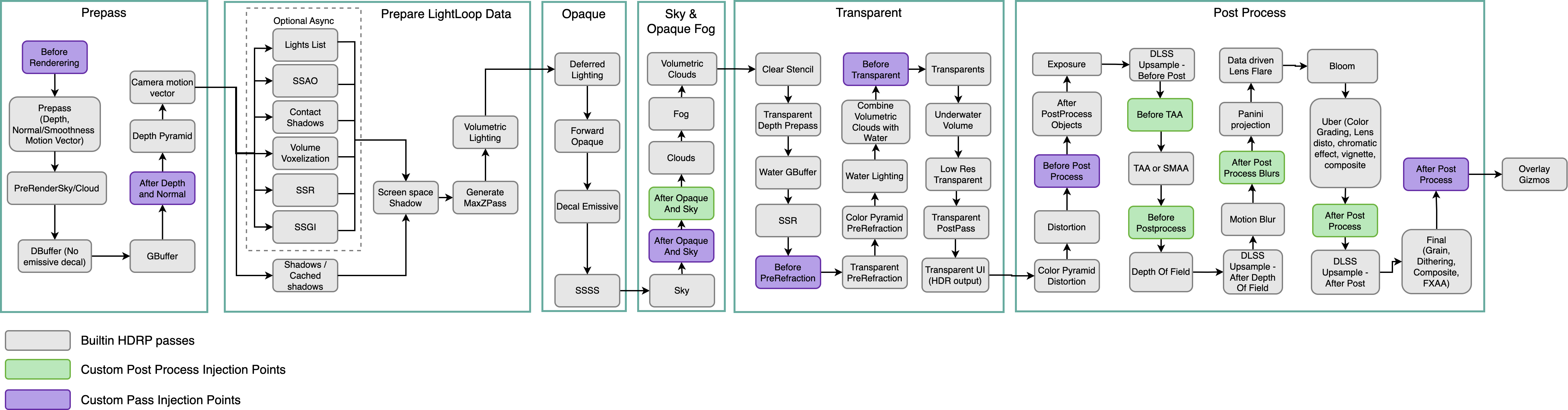 pine night
Any work around to this? Aside from maybe rendering the opaque objects into render texture.
scarlet hull
pine night
Any work around to this? Aside from maybe rendering the opaque objects into rend...
The only think that I can think of if what I said is indeed the issue, would be to do yourself a color pyramid before your pass.
But this would require more work than using the fullscreen custom pass, by writing you own custom pass code.
You could use the frame debugger (or renderdoc) doc inspect what is happening currently with you pass, and check what is in the color buffer.
Also, whas is your pass doing ?
pine night
It is for an atmosphere. Essentially just models rayleigh scattering.
scarlet hull
Couldn't you use the PBR sky for this ?
pine night
its not a regular flat world. Im working with actual spherical planets.
scarlet hull
You can use it to represent a spherical planet. Only a single one though.
tame dock
Hey everyone 🙂 is there a way to set a seed for the film grain effect? Every time I start the simulation I get different values.
I stopped the simulation time and set the unity seed to a fixed value but that didn't solve the issue
scarlet hull
tame dock
Hey everyone 🙂 is there a way to set a seed for the film grain effect? Every ti...
What do you mean by "simulation" ? Are you trying to record a video of the rendering ? If yes, do you use the recorder package ?
tame dock
I am using the post processing film grain effect and take snapshots of the rendering resutls
With simulation I mean whenever I press the play button in the editor
scarlet hull
It's possible that the film grain effect is not deterministic. I'd says that if you use the recorder package it should always lead to the same result, but when doing it from regular play mode, I'm not so sure.
 timid mirage
Anyone knows why all previews are broken in HDRP 17.0.3 - Unity 6000.0.5f1?

 timid mirage
onyx lark
timid mirage
onyx lark
Does it behave if you switch from wireframe mode?
 timid mirage
onyx lark
Does it behave if you switch from wireframe mode?
timid mirage
onyx lark
Does it behave if you switch from wireframe mode?
yes, it is bugged in all modes
onyx lark
If you don't have a prefab isolation scene assigned, then there won't be a skybox in the prefab viewer
this throws off automatic exposure
try checking Override Exposure and adjusting the slider until the character looks normal

I don't know why the wireframe would be all screwed up though
timid mirage
Yea I've tried that, still nothing 😭
 pine night
scarlet hull
The only think that I can think of if what I said is indeed the issue, would be ...
pine night
scarlet hull
The only think that I can think of if what I said is indeed the issue, would be ...
So turned out I could just make the alpha channel lower to reveal the color of for a pixel. I think its weird I can't sample the camera color but it still exists underneath.
timid mirage
onyx lark
Put it into the Shaded Draw Mode
thanks! changed the prefab environment and it works 🙂 Wireframe is still messed up but good enough for now. Are there also some settings for the preview scene somewhere?
onyx lark
timid mirage
thanks! changed the prefab environment and it works 🙂 Wireframe is still messed...
Assuing you assigned a scene to be used for prefab isolation, you just edit the scene
 timid mirage
onyx lark
Assuing you assigned a scene to be used for prefab isolation, you just edit the ...
timid mirage
onyx lark
Assuing you assigned a scene to be used for prefab isolation, you just edit the ...
sorry, I meant for the preview where you can play animations etc.
 onyx lark
Oh, I don't know about that
 ember field
I'm not sure if this question is eligible here, but I finally got water to show in my scene, but the water ONLY moves whenever I have right click (camera movement) active, or whenever I move my mouse. How would I fix this?
south girder
ember field
I'm not sure if this question is eligible here, but I finally got water to show ...
In the scene view? Try enabling Always Refresh
ember field
Thanks for answering. I will look for that, I am a beginner.
south girder
It is in one of the dropdown menus above your scene view
 minor sedge
is anyone else getting these horrible blocky shadows in the unity 6 preview? only happens on the high quality preset.

 shrewd moon
 smoky tide
Shadows are required to occlude light reflections
It looks like your walls are casting none
minor depot
minor sedge
is anyone else getting these horrible blocky shadows in the unity 6 preview? onl...
Is this by any chance a project upgraded from earlier versions? If not try messing with the directional light's radius
 simple dew
Any fix for render texture and black screen?
minor sedge
minor depot
Is this by any chance a project upgraded from earlier versions? If not try messi...
no, this is happnening in a completely unmodified hdrp sample scene.
smoky tide
shrewd moon
Shadows are required to occlude light reflections
It looks like your walls are c...
How do i fix that
shrewd moon
smoky tide
How do i fix that
Either your shadows aren't enabled on the light or the walls or something's messing them up in settings or pipeline assets somewhere
 safe cargo
Hello I need to create a blur effect for my UI (it will blur everything behind in real-time - like not only static image).
Is there finally some native approach in HDRP, or I still need to use fullpass shader for that?
Any ideas for this effect even with good performance? (and on top of that I am using UI Toolkit....)
 wise pawn
Why are the objects in the preview window displaying mostly completely white (brightness is overblown), when I set the static lighting sky to HDRISky or Physically Based Sky? Is this not a bug? I think that I started noticing this problem almost half a year ago.
Steps to reproduce problem - current Unity 2022/6 version - Create New High Definition 3D project - The Static Lighting Sky will be already set to Physically Based Sky - Click on any prefab - See over brightened prefab in the preview window.

 mortal forge
safe cargo
Hello I need to create a blur effect for my UI (it will blur everything behind i...
mortal forge
safe cargo
Hello I need to create a blur effect for my UI (it will blur everything behind i...
Does UI toolkit even support custom shaders?
Would suggest the fastest route using normal UI shaders would be using the mip pyramid, you don't even need to do a blur then.
safe cargo
mortal forge
Does UI toolkit even support custom shaders?
Would suggest the fastest route us...
Yeas I know that UI toolkit does not support shaders....
I will look at this mip pyramid - I am not aware on how to use it. Thanks for idea 🙂
mortal forge
Anyone have any clues as to why my scene colour render texture in HDRP randomly gets pixels added to its height?
Render res is set to 1920x1080, the actual RT size is: 1920, 1372
And it's messing up postpro.
Weird thing is, when the render res is set to 4K, it never happens. Frame analyzer says it's all throughout the pipeline? 🤔
wise pawn
timid mirage
Anyone knows why all previews are broken in HDRP 17.0.3 - Unity 6000.0.5f1?
Oh looks like I am not alone with this problem. Weird that almost no one is talking about this and it has been not fixed for several months
Changing Light Probe system in HDRP settings to Light Probe Groups "fixes" the problem.
 smoky orchid
Does anyone know how i could get a less eye hurting looking grass ?

 twilit swift
Hi, could someone help me to optimize an HDRP project? I get high profiler spikes, and I also use RTX for SSR and GI.
minor depot
wise pawn
Oh looks like I am not alone with this problem. Weird that almost no one is talk...
Definitely report a bug through QA if you have the time
 dull wind
im using hdrp to make my horror game more spooky but for some reason on one of my textures the spotlight can only be seen in one direction
I can only see the light really near when looking at the floor while if i shine onto an object i can see it at normal range
Did i make my material wrong or something


 wise pawn
minor depot
Definitely report a bug through QA if you have the time
wise pawn
minor depot
Definitely report a bug through QA if you have the time
yep, I did yesterday
minor depot
dull wind
im using hdrp to make my horror game more spooky but for some reason on one of m...
What does the inspector for the material in question look like?
dull wind
minor depot
What does the inspector for the material in question look like?
ive changed the material all togheter now so im nolonger having the issue
 sharp flicker
this is a brand new hdrp template project, anyone know why im getting this?
 twilit swift
Help! GI and SSR stopped working all of a sudden and I have no idea why. If I disable and enable a GameObject, GI and SSR will work only for that object until I save the scene.

 shrewd moon
twilit swift
Help! GI and SSR stopped working all of a sudden and I have no idea why. If I di...
shrewd moon
twilit swift
Help! GI and SSR stopped working all of a sudden and I have no idea why. If I di...
What type of GI? Are you really sure it's SSR?
SSR is a screen space effect that's re-rendered every frame, so it shouldn't be able to be affected by scene lighting data changes
twilit swift
shrewd moon
What type of GI? Are you really sure it's SSR?
SSR is a screen space effect tha...
I'm using Ray Traced GI and SSR.
I found out that what stopped working is the Ray Tracing, because if I change it to default it just works as Screen Space.
I'm trying out Ray Tracing for the first time, I already knew how to setup stuff, but no idea how to troubleshoot this, it just stopped working.

Also nothing to do with this but for some reason when I create a new local volumetric fog, it doesn't work either.
 fluid merlin
twilit swift
Also nothing to do with this but for some reason when I create a new local volum...
fluid merlin
twilit swift
Also nothing to do with this but for some reason when I create a new local volum...
I think fog is only supported on unity version 6 for RT
twilit swift
fluid merlin
I think fog is only supported on unity version 6 for RT
Normal fog works fine, it's just local fog.
fluid merlin
I take that back it's still listed as not compatible
twilit swift
twilit swift
Help! GI and SSR stopped working all of a sudden and I have no idea why. If I di...
Btw fixed this. I have no idea how tbh. But I reimported all assets and some time later when I entered play mode it started working again.

 hollow frigate
Can someone help me understand how to adapt this example to HDRP? I have a decent understanding of how it works, just not sure how to implement in HDRP
https://docs.unity3d.com/ScriptReference/Graphics.DrawMeshInstancedIndirect.html

 river comet
hello, I have a custom pass to render this briefcase on top of everything, does anyone have an idea on how to make ambient occlusion not appear on top of the briefcase?

 river comet
too decals

 solid light
Are there any sources to learn how these work?


And what all these settings do?

There are just so many new settings in these render pipelines that its kinda overwhelming
shrewd moon
solid light
There are just so many new settings in these render pipelines that its kinda ove...
HDRP documentation is a good place to start
twilit swift
How do I optimize GI?
Going from 80-90fps to around 20 when GI is active.
And I'm on a small scene.
Also, how do you optimize reflections? It's taking away another 40fps when on RayTraced and if I use SSR instead they just look shiny even in the darkness. Mixed seem to make it look like it should in the darkness but also takes 40fps.
 scarlet hull
Realtime raytracing is costly, even more if you start to mix the different techniques (most of games use 1 or 2 of them).
When possible, use baked data like reflection probes and lightmaps / probe volumes.
For the SSR being shiny, you can switch to the "PBR Accumulation" algorithm, but to work properly it needs to accumulate over multiple frames, will look noisy on moving objects.
Finally, in most cases you want to use some sort of dynamic resolution (dlss, frs, stp) when raytracing is enabled, to compensate the fps drop
shrewd moon
Might also need static GI as fallback
Essential with SSR since there are always a lot of spots where it requires fallback reflections
 lucid gate
I always get the error after setting up all the reflection probes for the first level.
I've already increased the cubemap size, if that's even the issue?
Right now I'm only doing it on demand (i update them all at once), so I'm confused as to what determines how many reflection probes my game can handle at once?
I only come away with 3.
The screen shows my whole setup, i think.
Any suggestions?
 calm zodiac
I'm getting saved by batching 0, despite my entire scene either being static or their materials having GPU instancing on. Any ideas?

 inland saffron
leaves are transperent but the shadow isnt please could i use some help to fix this

nvm fixed it
 still sandal
soo.. how exactly do you write a raytracing shader in HDRP?
not like, implementing it yourself with compute shaders
is "InlineRayTracing" the way to go? i.e https://github.com/INedelcu/InlineRayTracingShadows

GitHub
Sample scene that uses ray traced shadows generated by a compute shader using ray queries. - INedelcu/InlineRayTracingShadows
how does this compare to the "New Shader -> Raytracing shader" way? I can't really find much information on this
All i need is to trace rays from a camera and retrieve basic info like hit position and normals
minimal examples, references, tutorials are appreciated
scarlet hull
still sandal
All i need is to trace rays from a camera and retrieve basic info like hit posit...
You could just sample the depth/normal buffers from the camera to get this information.
There is no easy solution to write you own raytracing shader :/ I never played with it myself though
But looking at the example code here, you should be able to output the position/normal of a hit : https://docs.unity3d.com/ScriptReference/Experimental.Rendering.RayTracingShader.Dispatch.html
still sandal
scarlet hull
You could just sample the depth/normal buffers from the camera to get this infor...
need multiple bounces though
scarlet hull
Not clear to me how it can be done, maybe through the payloadstruct
still sandal
i did get a single-hit raytracer working with the inline raytracing feature
but idk if thats how you do raytracing in unity
or if there is a canonical way
still sandal
still sandal
i did get a single-hit raytracer working with the inline raytracing feature
i could expand on this, or try a different method
scarlet hull
I really have no idea. Maybe if you dig into the HDRP raytracing code you might find some clues
still sandal
just surveying methods
pulsar skiff
hello guys!
why si there random light shining through the walls of this building i made with pro builder?
i dont have realtime gi, or ssr enabled, but it does also happen with those enabled.
scarlet hull
pulsar skiff
hello guys!
why si there random light shining through the walls of this building...
Random guess : it's light leaking through the 0 thickness wall of your scene, cause by shadow bias.
Model some wall with normals pointing outside and add thickness to block the light.
pulsar skiff
scarlet hull
Random guess : it's light leaking through the 0 thickness wall of your scene, ca...
yes that was it 🙏
 rose vault
wait, does physically based sky have stars built in?
twilit swift
How can I optimize HDRP GI? Losing around 60fps on RayTraced GI and RTX. How can I keep this GI effect Lumen like without affect so much to performance?
 eternal laurel
Last time I checked Lumen barely ran 30 fps on a decent trx card
smoky tide
scarlet hull
Random guess : it's light leaking through the 0 thickness wall of your scene, ca...
Is this real?
My walls are 0 thickness is it actually important?
scarlet hull
smoky tide
My walls are 0 thickness is it actually important?
Giving thickness greatly helps with light leaking. If you look at how the hdrp sample scene is made, you will also see a light blocking "outer wall"
 neon kindle
does anyone know why i get no contact shadows even though they are enabled everywhere?


 fluid merlin
twilit swift
How can I optimize HDRP GI? Losing around 60fps on RayTraced GI and RTX. How can...
fluid merlin
twilit swift
How can I optimize HDRP GI? Losing around 60fps on RayTraced GI and RTX. How can...
Probably just have to throw more hardware at it, it's pretty dependent on RT cores. Or the magic performance boost for everything is to turn off shadows on everything. 
twilit swift
fluid merlin
Probably just have to throw more hardware at it, it's pretty dependent on RT cor...
Damn.
fluid merlin
There's like a handful of independent devs working on GI replacements for Unity... Truetrace, Erebus, etc
twilit swift
I want to have the same look as Lumen from UE, and the only way I could find was using ray tracing, is there any other way to have GI without fully relying on RTX?
twilit swift
fluid merlin
There's like a handful of independent devs working on GI replacements for Unity....
Ah, I see.
Will check those out, thanks.
fluid merlin
twilit swift
I want to have the same look as Lumen from UE, and the only way I could find was...
Lumen is really different from RTGI, one of the reasons why the lighting in it looks so good in Lumen is that it traces off the depth buffer and then does a distance field ray, so you end up getting this buttery rich lighting with correct bounces. Unity RT is more like traditional ray tracing, kind of the old school way that Autodesk has been doing it for the past 20 years or so.
The really odd thing though is that if you look at like what unity was doing with Raytracing five years ago (!), it looks 10x better than what you get today in Unity. They even had transparent working, reflections from refractions, but now it's like you get the impression they're rebuilding it from scratch or something with all the "it won't do x,y,z, etc" in the documentation... look for yourself, it looks better than Lumen. Where did this go? 
https://www.youtube.com/watch?v=IY8FJxS4Lbs
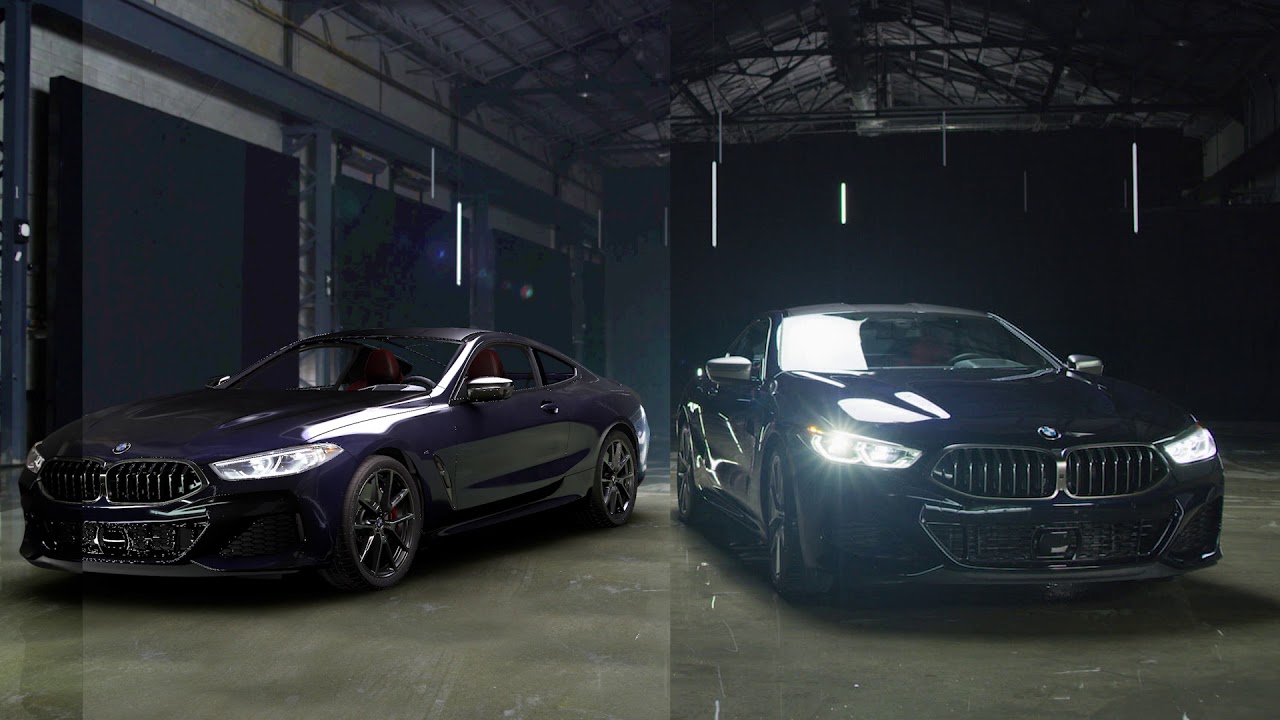
Highlighting what's achievable with real-time ray tracing, Unity has collaborated with NVIDIA and the BMW Group to showcase the 2019 BMW 8 Series Coupe. Once thought impossible to achieve, performant real-time ray tracing delivers photorealistic image quality and lighting for any task where visual fidelity is essential, such as for design, engin...
twilit swift
fluid merlin
Lumen is really different from RTGI, one of the reasons why the lighting in it l...
I didn't really know the technical part about either Lumen or RTX.
Yeah, Unity's been doing weird stuff lately, I hope It gets better soon. I don't wanna switch engines after I considered to specialize in Unity with a paid course 😔.
Thanks for the info, I will do more in deep research about this.
fluid merlin
twilit swift
I didn't really know the technical part about either Lumen or RTX.
Yeah, Unity'...
Yeah, I got into Unity development full time in 2017, so I feel you there. I've just sort of learned to try to accept it's shortcomings and work around them as best as I can. They have been doing weird stuff hahaha good way to put it. Keep on trucking fellow dev 👍
twilit swift
fluid merlin
Yeah, I got into Unity development full time in 2017, so I feel you there. I've ...
Yeah haha, I hope this gets better with the coming years, I'm still young and I wanted to be a game dev so I still have a long journey lol. Hope they fix URP and HDRP by that time 😭. Good luck to you too fellow dev comrade 🫡.
 wicked needle
Hey im making my first game with HDRP and im noticing that my lights are bleeding through walls, but this only happens when I am far enough away from the light source, if I get closer the light leak stops and everything looks as intended. the change is extremely sudden like the moment I step X distance away from the light source the light leaking starts. Does anyway know whats causing this and how to fix it?
twilit swift
wicked needle
Hey im making my first game with HDRP and im noticing that my lights are bleedin...
I think that's shadows.
Just add a shadow override to your global volume.
neon kindle
neon kindle
does anyone know why i get no contact shadows even though they are enabled every...
anyone?
south girder
neon kindle
does anyone know why i get no contact shadows even though they are enabled every...
The Length is set to 0, maybe that's the issue?
 woeful raptor
Hello, does anyone know how to make VFX graph decals show over the normal game object Decals?I've been strugling with it for weeks, but render que on Decal don't do anything, even if game object Decals are at -50 que, they still render above VFX graph decals. I am using HDRP 2023

 south lynx
How would I get this specific metallic look? It seems that reflectiveness works in a specific way I cant understand.

 south lynx
Hmmmmmmmmmmmmmm, seems to be lack of reflection probes
onyx lark
I'm looking to add some more graphics settings to my game.
Is setting QualitySettings.globalTextureMipmapLimit the appropriate way to allow users to contorl texture quality?
neon kindle
south girder
The Length is set to 0, maybe that's the issue?
with length 0 it does disappear, but it behaves differently from what id expect from contact shadows. one pic is at length 0 and the other at length 1

 south girder
neon kindle
with length 0 it does disappear, but it behaves differently from what id expect ...
south girder
neon kindle
with length 0 it does disappear, but it behaves differently from what id expect ...
Not sure what I'm looking at, but at least it's clearly working now
Try playing around with the settings (maybe Bias and Thickness) and examine the doc page:
https://docs.unity3d.com/Packages/com.unity.render-pipelines.high-definition@13.1/manual/Override-Contact-Shadows.html
onyx lark
onyx lark
I'm looking to add some more graphics settings to my game.
Is setting `QualityS...
I see the estimated graphics memory usage going up and down, so this is probably working!
 strong elbow
Does anybody know why I get this weird artifact on the borders of my screen that are taken up by a glass material?

It's like the glass is 100% transparent at the border
And I can't find anything online that talks about this
Never mind
I added the Screen Space Refraction override to my volume and turned screen weight distance all the way down
 sinful sleet
Small quick scene inspired by sons of the forest

 toxic plume
hellow i was in the middle of converting from urp to hdrp, and i cant drag the asset into the slot

 rose vault
How do I make underwater look good with the hdrp water system? If I make the visibility low, it just tints the volume, and my volumetric flashlight just makes it harder to see due to the density of the volume, it just sends a colored ray
if I make it clear, it doesn't look much like underwater. If I add scarce fog everywhere for dust/silt and some particles flying around, would that look better?
maybe my flashlight beam would look gentler
pulsar skiff
Hey guys.
Is there a way for me to change the shadow quality of ny game n runtime from my custom settings menu?
 echo pine
onyx lark
I'm looking to add some more graphics settings to my game.
Is setting `QualityS...
echo pine
onyx lark
I'm looking to add some more graphics settings to my game.
Is setting `QualityS...
Yeah, The Forest uses that value I'm sure
And I also do always
 azure agate
I just updated my project to a later LTS patch, anyone know how to fix this?
AFAIK there's no other version of HDRP higher than 12.1.15 that I can upgrade to in that Unity version 2021.3.40f1
I've tried deleting the Library folder, that didn't work.
All my packages are on the latest patch version, no preview versions except the Performance testing API and Jobs, neither being a dependency of/for HDRP
Library\PackageCache\com.unity.render-pipelines.high-definition@12.1.15\Runtime\RenderPipeline\HDRenderPipeline.LightLoop.cs(601,102): error CS0103: The name 'InternalLightCullingDefs' does not exist in the current context
Library\PackageCache\com.unity.render-pipelines.high-definition@12.1.15\Runtime\RenderPipeline\HDRenderPipeline.LightLoop.cs(620,75): error CS0103: The name 'InternalLightCullingDefs' does not exist in the current context

The dependencies it has only differ in patch versions, not major or minor, so an API change such as deleting InternalLightCullingDefs wouldn't happen.
But if I Ctrl+Shift+F in Rider for InternalLightCullingDefs there is indeed no definition of it anywhere, only usages.
scarlet hull
The InternalLightCullingDefs class is declare in the hdrp config package, you have a local copy of it, so I think it is outdated ?
@azure agate
azure agate
azure agate
Ah thanks, I didn't realize we had a modified version of that in the project!
I updated it to 12.1.15
Odd that in the dependencies here it shows it as if the correct version is installed though.
Yup, that works!
echo pine
Hey, I have a issue when building my project, none of my troubleshooting methods work and does someone know what's wrong with it and could help me get this resolved?
 onyx lark
I'm trying to track down this spiky frametime. The left image shows the game running at 70% render scale and the right image shows it running at 75% render scale


All I've got for the rendering spikes are the Gfx.WaitForPresentOnGfxThread marker. This is on macOS, so it's using Metal.
I guess I need to build this and go analyze it on my PC with RenderDoc.
 jagged prairie
echo pine
Hey, I have a issue when building my project, none of my troubleshooting method...
jagged prairie
echo pine
Hey, I have a issue when building my project, none of my troubleshooting method...
reinstall HDRP and the HDRP core package. Also make sure they both use the same version
echo pine
jagged prairie
reinstall HDRP and the HDRP core package. Also make sure they both use the same ...
 jagged prairie
is this after you reinstalled everything? and only during the build or?
maybe you might want to delete the library folder and the shader cache (in you project folders)? i had the same issue some time ago and reinstalling worked fine
echo pine
jagged prairie
is this after you reinstalled everything? and only during the build or?
I did reinstall RP, cleared cache
I did so much like updating or reinstalling other packages
This is during external build, a release not in editor, building in editor works
 somber hull
Anyone on here familiar with custom pass volumes?
Specifically I have a bunch of objects on an interactable layer that I have a selection shader for, and I only want it to render on that one specific object when the mouse hovers over it.
I just cant figure out how to mask out all the other objects to only render the shader on that specific one when the cursor is over it.
eternal laurel
onyx lark
I'm trying to track down this spiky frametime. The left image shows the game run...
What does the gpu profiler say ?
echo pine
echo pine
I think it may be related to bug that has been recently fixed, will update unity later
jagged prairie
somber hull
I just cant figure out how to mask out all the other objects to only render the ...
Based on your shader/pass you can use layers for that, at least thats how i solved it.
You‘d need another layer which receives the effect, and only the object youre hovering on gets that layer assigned (while you hover on it)
echo pine
echo pine
I think it may be related to bug that has been recently fixed, will update unity...
So far I think it works????

oops. why does Unity compile shaders on CPU not on GPU

nope


weird

 merry socket
does hdrp have an equivalent to urp's render objects feature where you can replace a material based on a layer? hdrp is so complex and yet not similar to urp for this stuff so i cant figure out how to do it in hdrp
shrewd moon
merry socket
does hdrp have an equivalent to urp's render objects feature where you can repla...
"Custom pass" I think
merry socket
isnt that based on volumes though
oh wait it has a global option
i shall give it a try, thanks!
god knows why they cant use the same terminology betwen the two pipelines
shrewd moon
merry socket
god knows why they cant use the same terminology betwen the two pipelines
The foundations for the two features were laid long ago, I believe earlier when urp and hdrp teams were working rather separately in different directions
still sandal
there’s a render objects custom pass that lets you override materials/shaders
jagged prairie
echo pine
oops. why does Unity compile shaders on CPU not on GPU
Thats probably why compiling all the variants takes ages
merry socket
shrewd moon
The foundations for the two features were laid long ago, I believe earlier when ...
i thought they merged the teams some years back? maybe one day they can merge it all together into one ecosystem 🤞
scarlet hull
echo pine
oops. why does Unity compile shaders on CPU not on GPU
afaik, no compiler runs on gpu
shrewd moon
merry socket
i thought they merged the teams some years back? maybe one day they can merge it...
Only a couple of years ago so relatively recently
merry socket
shrewd moon
Only a couple of years ago so relatively recently
i'll have retired by the time they finish it all then
 outer anchor
why do textures look like this on a hdrp template?
 shrewd moon
outer anchor
why do textures look like this on a hdrp template?
shrewd moon
outer anchor
why do textures look like this on a hdrp template?
this symbol indicates you have some debug view mode enabled

 shrewd moon
outer anchor
what should i exactly look for here?
shrewd moon
outer anchor
what should i exactly look for here?
Shaded
shrewd moon
Then I would be interested to know what other settings you ticked that it started to look like that in the first place
A problem you might have is that the two different scenes you've loaded both have a directional light
shrewd moon
Does the hdrp template sample scene work
And did it appear to work at any earlier point
outer anchor
it had this issue since i started it
isnt something that happened just now
oh god damn it
the sun was 13000 intensity
by default
it shows the textures perfectly now
thanks
shrewd moon
outer anchor
the sun was 13000 intensity
That's normal and expected
HDRP uses physical light units
You will need to have a functioning Exposure volume override to have them make sense
hollow frigate
Does anyone know why I might be getting this flickering problem with instanced meshes? It doesn't happen when I use a transparent shader instead of a cutout shader, or when I switch the visual environment to static
mortal forge
Looks a bit like AO noise if I had to guess
pulsar skiff
mortal forge
Anyone know why I'm getting this weird behaviour - looks like a LODGroup fade, but there's no LODGroup on the object in question and it rendered perfectly before I starting using adaptive probe volumes (Unity 6). In the frame debugger the full mesh shows up as expected.

 honest mortar
for some reason when i enable volumetric clouds i get white artifacts does anyone know why this could be?
 shrewd moon
hollow frigate
shrewd moon
hollow frigate
My best guess would be lack of TAA due to no motion vectors
hollow frigate
shrewd moon
My best guess would be lack of TAA due to no motion vectors
You think the flickering is just caused by a lack of anti-aliasing?
shrewd moon
hollow frigate
You think the flickering is just caused by a lack of anti-aliasing?
Could be
neon kindle
on standart settings in hdrp, you have 3 levels of detail, is there a way to add a 4th? 3 are not enough for my project
shrewd moon
neon kindle
on standart settings in hdrp, you have 3 levels of detail, is there a way to add...
Quality tab lets you add as many as you like
neon kindle
shrewd moon
Quality tab lets you add as many as you like
thx
neon kindle
shrewd moon
Quality tab lets you add as many as you like
maybe im missing something here, but this is the only LoD Related thing i could find in the quality tab
 shrewd moon
neon kindle
maybe im missing something here, but this is the only LoD Related thing i could ...
shrewd moon
neon kindle
maybe im missing something here, but this is the only LoD Related thing i could ...
 neon kindle
ahhhh
neon kindle
shrewd moon
but that doesnt seem to affect LoD Groups etc at all? im confused
what i need is one more of these
 shrewd moon
neon kindle
what i need is one more of these
shrewd moon
neon kindle
what i need is one more of these
You can right click a lod group in the colorful bar and "insert before"
neon kindle
ahhhh, ok thx
shrewd moon
neon kindle
but that doesnt seem to affect LoD Groups etc at all? im confused
If I change the currently active quality level's lod bias, it does affect the component

But I don't know what precisely low, medium and high inside a specific quality level refer to
 cloud pollen
i just modelled this room in blender and imported it to unity and it looks extremely blank, there is no depth at all and it looks like a roblox game, any help and suggestions would be appreciated

one thing in particular is the walls.. i have a concrete texture but it just doesnt show up this far, there is absolutely no shading to the wall and i already have AO set at intenstiy 1.0
this is how it looks in blender cycles, and i kinda wanna get a result atleast 80% similar to this, bounce lighting doesn't really matter too much
 shrewd moon
cloud pollen
this is how it looks in blender cycles, and i kinda wanna get a result atleast 8...
shrewd moon
cloud pollen
this is how it looks in blender cycles, and i kinda wanna get a result atleast 8...
Lack of bounce lighting probably makes up a difference of that 80%
cloud pollen
soo should i bake lighting?
shrewd moon
I'd consider it, either lightmaps or APVs
You also need a reflection probe since the reflected sheen is from the outside sky
cloud pollen
shrewd moon
I'd consider it, either lightmaps or APVs
any tutorials you would recommend?
shrewd moon
cloud pollen
any tutorials you would recommend?
First I'd recommend this for making sure you know the options and have the basics covered
https://youtu.be/DlxuvvYZO4Q

Step into the famous Sponza Atrium to see how to beautifully light an environment from scratch using a mix of baked and real-time techniques. Pierre Yves will showcase the GPU Lightmapper, the new Probe Volume system, ray tracing, and path tracing.
00:06 Introduction
01:18 Speaker
01:40 Volume system
02:47 HDRI sky setup
04:16 Direct lighting &...
After that you'd make the choice to use one of lightmaps, APVs, ray tracing or path tracing, or none of them if you feel like you want to get by without bounce lighting
echo pine
Does anyone know how to disable that dithering effect for shadows?https://cdn.discordapp.com/attachments/553274910601117697/1261643761855762452/image.png?ex=6693b4d1&is=66926351&hm=2e20d4749efd83b8fe7183d2ce50dac5e9d4766774d6fbe1d734d1c2e0cab08e&
 shrewd moon
echo pine
Does anyone know how to disable that dithering effect for shadows?https://cdn.di...
shrewd moon
echo pine
Does anyone know how to disable that dithering effect for shadows?https://cdn.di...
There's usually no need to disable it since it only appears with TAA disabled
Scene window by default has it disabled, but as long as your camera component has it enabled, it should look fine in the Game window
 smoky sapphire
Hey does anyone know how i could do a color bleed volume effect? (the old crt color bleed to the right)
echo pine
shrewd moon
There's usually no need to disable it since it only appears with TAA disabled
Sc...
It's still the same if TAA is enabled
In game window
shrewd moon
echo pine
It's still the same if TAA is enabled
You should confirm that it's working right, if you disable TAA on the camera the dithering should get significantly worse
echo pine
It's a bit better but I do want full shadow with alpha without the dithering effect, I guess it's not possible
shrewd moon
The amount of half-shadow to dither depends on the size/diameter/angle of your light source
By decreasing it you decrease the need for dithering, to basically none with a small enough size (not "range")
Another option is to disable high quality filtering entirely by switching to medium from quality settings
Medium quality filtering will always smooth the shadows a fixed amount
Before turning off features it's smart to first figure out if you're using them right


 tiny sierra
Hi guys, i have a problem with my point lights generated by a Particle System in my HDRP Scene. Every time Particle System has more then 5 point lights, i get the error message "Assertion failed on expression: 'splitCount < 32'"
I narrowed it down to the shadow maps. When i deactivate them in the light that gets instantiated, the error disappears. I tried to raise "Maximum Shadows" in the HDRP Asset, but it didnt help.
I would like to keep the shadows. This arrangement is very simplified for bug hunting purposes. In the real scene, every light is the muzzle fire of one of 32 cannons firing from a warship in a rolling broadside.

 rough tide
I need this bending effect to affect the UI even if it's set to overlay. Currently the effect is being applied as a custom post process, but I need a way to make the ShaderGraph sample the screen after UI and post processing.
 fluid merlin
I wish the Unity UI canvas could bend.
 warm nebula
I need some help with the water system. 2023.3.0b4
whenever I try to use the foam generator or deformer objects, they only work in a 250x250 area around the origin of the water surface
scarlet hull
warm nebula
I need some help with the water system. 2023.3.0b4
whenever I try to use the fo...
There is a setting in the water surface component to define the resolution / size /offset of the deformations (iirc, it also acts for the foam generators)
 alpine geyser
hello everyone I have an issue my editor every second puts an error msg -> 'Invalid AABB inAABB' does anyone know how to solve this? Also, does anyone know how to download ZivaVFX now?
fluid merlin
alpine geyser
hello everyone I have an issue my editor every second puts an error msg -> 'Inva...
If you're using 2023 it's a reflection probe, just disable them until Unity fixes it in Unity 6 later, it's a known issue. As for Ziva, if you did the pay-per-use modeler, you can still get the Ziva Unity link, but you need to open a support ticket. However, after May this year, you can only get access to the Maya export. Unity sold off everything to DNEG and it's in a messy transition state right now. If you're looking to add characters into Unity with mocap, animation, etc, best bet is Character Creator 4 + iClone. I outline some of the costs and workflow here: https://forum.unity.com/threads/why-cant-unity-hdrp-correctly-render-aaa-looking-character-models.1168103/page-11#post-9788679
 whole crag
trying to do some stuff with fog volumes
I want to overlay noise on top of my 3d texture
anyone done this before?
scarlet hull
whole crag
I want to overlay noise on top of my 3d texture
You can do this with a fog volume shadergraph
whole crag
I know, but trying to do any kind of maths seems to just make the whole volume flicker
scarlet hull
Can you show the graph, and possibly the "flicker" ?
 weak lantern
Hi, I think I found a bug in water system HDRP. in Underwater Section
someone in Unity fourm told me that I can use the Probuilder to make the Custom Shape for my Water Lake, So I did it as they told me, and everything was fine until I found out the Underwater is not working very well. so the plane I edit is like this 👇

as you may know the Underwater sections only support the BoxCollider so I made one but this appears 👇
The problem is underwater is detecting some faces that I delete from the plane in probuilder, as I only can use one boxCollider so there is no way to go around this. so I thought maybe I should Export the mesh. I did it but then underwater even it's not working anymore. I make the custom mesh in blender but it is same. Unity 6000.10f1
 weak lantern
weak lantern
weak lantern
the only thing is in under water working is I can see the water in above but not the water area.
So I wait couple of days to Unity discussion comes out of Read-only and ask it there. but if anyone knows something would be appricate! thanks!
I make another plane in Probuilder and just delete this two faces, but when I move the camera and touch the faces the underwater start rendering.

if just water system could support multi colliders 
scarlet hull
weak lantern
I make another plane in Probuilder and just delete this two faces, but when I mo...
The underwater systems only uses collider and bounding boxed for the effect, it doesn't take into account the surface mesh of the water.
weak lantern
scarlet hull
The underwater systems only uses collider and bounding boxed for the effect, it ...
so how can I make something like this? isn't seperating decrease performance? this all area is connected I can just use one water surface
 pulsar skiff
hey guys.
im trying to make seemless porta,s simmiliar to this one made by SebLague, but i ran into an issue.
https://github.com/SebLague/Portals/blob/master/Assets/Scripts/Core/Portal.cs
i cannot use camera.Render in hdrp, giving me this error :
UnityEngine.StackTraceUtility:ExtractStackTrace ()
DELTAV.Portals.Portal:UpdateCamera (UnityEngine.Rendering.ScriptableRenderContext,UnityEngine.Camera) (at Assets/Scripts/DeltaVBase/Portals/Portal.cs:75)
UnityEngine.Rendering.RenderPipelineManager:DoRenderLoop_Internal (UnityEngine.Rendering.RenderPipelineAsset,intptr,UnityEngine.Object,Unity.Collections.LowLevel.Unsafe.AtomicSafetyHandle)```

and using `HDRenderPipeline.SubmitRenderRequest()`, gave me the same error.

how can i fix this?????
GitHub
Portals in Unity. Contribute to SebLague/Portals development by creating an account on GitHub.
scarlet hull
weak lantern
so how can I make something like this? isn't seperating decrease performance? th...
So, you have playable areas that are bellow water level, but inside the underwater box collider, right ?
alpine geyser
fluid merlin
If you're using 2023 it's a reflection probe, just disable them until Unity fixe...
thank you. I just need a way to get metahuman-like characters in unity. (I know it takes a lot of speed, memory, RAM, etc), without installing unreal.
also is there a way I can use scripts to enable some global volume features like I only want to have viglantee at some point in the game.
fluid merlin
alpine geyser
thank you. I just need a way to get metahuman-like characters in unity. (I know ...
Yeah the character workflow pipeline into Unity is especially weak since there's no "Metahuman" type pipeline for Unity. Don't let anyone steer you down the "Digital Human" path, it's a dead end, it took a team of 20+ at Unity to make it work for the Heretic/Enemies demos.
alpine geyser
ok but there is absoolutly no way?
fluid merlin
alpine geyser
also is there a way I can use scripts to enable some global volume features like...
Yes... You can write a script to do it. You need to include UnityEngine.Rendering.HighDefinition and then you can do this:
Vignette vignette
YourVolume.profile.TryGet<Vignette>(out vignette);
vignette.active = true;
etc...
alpine geyser
ok thx
alpine geyser
alpine geyser
ok but there is absoolutly no way?
what about this?
fluid merlin
alpine geyser
ok but there is absoolutly no way?
You can export the model, but it ends up looking like the worst indie character model you can imagine. you lose all the detail and everything that makes a metahuman look like a AAA character. If you really want to use a metahuman, do your cutscenes in UE with Metahuman and then just record it to video and playback that video in Unity and use a lower-res model in Unity that represents your character like they used to do in the 90s and early 2000s with games 😉
alpine geyser
see the thing is my game requires that characters normally and maybe i will try to use Character Creator 4 but still i want to do something about that. I will try to do some research.
BTW, Thx!
fluid merlin
Yup, good luck. I was faced with the same challenge. CC4+iClone w/ Soupday's HDRP shaders is the way to go...
https://i.imgur.com/OFWL2kU.mp4
It's about as "close" to metahuman you can get, but it's pricey with all the tools.
https://i.imgur.com/KiOCiiX.jpeg
 weak lantern
scarlet hull
So, you have playable areas that are bellow water level, but inside the underwat...
weak lantern
scarlet hull
So, you have playable areas that are bellow water level, but inside the underwat...
yes, I made separate Quads with having each one their own boxCollider and this fixed my issue, but now I have 5~6 Water System, afraid of performance issue, wish they add Arrays of Boxcollider
scarlet hull
weak lantern
yes, I made separate Quads with having each one their own boxCollider and this f...
A hacky solution could be to use a single water surface with a single box volume for underwater, but use a secondary script that does a vertical raycast on the mesh, and it enables or disables the underwater effect based on the raycast hit.
 arctic lake
is anybody else having trouble with normal map reacting with HDRP 17 realtime lights ? I have a shader that applies a normal map in my sprite renderer but it looks wrong after the update
 rocky latch
arctic lake
is anybody else having trouble with normal map reacting with HDRP 17 realtime li...
rocky latch
arctic lake
is anybody else having trouble with normal map reacting with HDRP 17 realtime li...
Anecdotally I have not noticed any issues with normal maps in HDRP 17.
shrewd moon
arctic lake
is anybody else having trouble with normal map reacting with HDRP 17 realtime li...
Sprite renderers don't produce mesh tangents required for normal mapping to work
It's always been that way
weak lantern
scarlet hull
A hacky solution could be to use a single water surface with a single box volume...
Thanks will check out!
alpine geyser
Hey does anyone know how to script a cartridge (bullet shell) removal system and a mag removal system?
pulsar skiff
pulsar skiff
hey guys.
im trying to make seemless porta,s simmiliar to this one made by SebLa...
yooo guys.
any way that i can actually implement this and manually tell a camera to render?
scarlet hull
alpine geyser
Hey does anyone know how to script a cartridge (bullet shell) removal system and...
This is out of subject for this topic, try #💻┃code-beginner
lucid gate
Hey guys, HDRP has this edge detection graph example,
it would be perfect for what i'm trying todo, just i would need to be able to set it to layers instead full-fullscreen/affect anything
I'm almost certain therefore i would need to write an custom pass script. I'm basically new to shaders, i only wrote small old shadermodel hlsl stuff
a) is it even possible?
b) wouldn't mind a nudge in the right direction
https://cdn.discordapp.com/attachments/886316442256027668/1263467262698983454/image.png?ex=669a5715&is=66990595&hm=0b27578a5bc350e2767c4ed7d67f5323aaa78dcdd6d21b241cc487cacb68d343&
https://cdn.discordapp.com/attachments/886316442256027668/1263467263013421068/image.png?ex=669a5715&is=66990595&hm=fca5a7729d780e892bf4d1fb64de7d11b1fb157f95a880ba656b821e8b276494&


that's an example of an other shadergraph with an custom pass script: https://cdn.discordapp.com/attachments/886316442256027668/1263468498076565504/image.png?ex=669a583c&is=669906bc&hm=77c2bd80ab3ee3320320c09323e63d2bd1ad1c7ec18ef977b157bbf20a3eee3a&
 pulsar skiff
yooo guys.
any way that i can actually implement this and manually tell a camer...
pulsar skiff
pulsar skiff
yooo guys.
any way that i can actually implement this and manually tell a camer...
Heeelp
tiny sierra
Question: I'm using HDRP 14, because Unity 2022 is still the latest LTS. I have a ship swimming in the ocean, but Foam Generators and the Shadergraphs for coast foam for generating foam around the ship's hull are seemingly not a yet a thing in there. Copying the Shader from 2023 or Unity 6 breaks the Shadergraph.
Is there any way to get a nice foam around and trailing my ship when im still in HDRP 14?
 outer carbon
You cannot back port things that are not available on your version of Unity, no
You can always version control, backup your project, and upgrade to see what happens
tiny sierra
outer carbon
You cannot back port things that are not available on your version of Unity, no
Yeah, looks like it. I hoped maybe the syntax didn't change. I managed to port a script for buoyancy from 2023 to 2022 by adjusting a few keywords, but this one seems to be more complex.
So, i'm basically looking for a way to achieve the foam functionality (or something similar) available in 2023 for my 2022 LTS.
pulsar skiff
hey guys. is there a reason for these dark squares appearing in the camera views, of my two portals?
its a small scene with the simple world geometry being one pro builder mesh, and a total of 10 active lights(6 are in mixed mode and baked, the other 4 are realtime)
here is my active HDRP asset light limits.
maximum shadows on screen are also set to 128.
 pulsar skiff
hey guys. is there a reason for these dark squares appearing in the camera views...
pulsar skiff
pulsar skiff
hey guys. is there a reason for these dark squares appearing in the camera views...
there are two cameras, other then the main camera, rendering to a render texture.
those are the ones with the artifact.
rose vault
guys, I've been told amount of materials is irrelevant for HDRP as it doesn't do batching per material; instead shader amount is relevant
this true??
shrewd moon
rose vault
guys, I've been told amount of materials is irrelevant for HDRP as it doesn't do...
That's a decent rule of thumb about how the SRP batcher works, though the technical details are more complicated than that
You can read more about it https://docs.unity3d.com/Manual/SRPBatcher.html
rose vault
So if I use a large texture set to share materials for multiple rocks, will I benefit at all from that?
shrewd moon
rose vault
So if I use a large texture set to share materials for multiple rocks, will I be...
Not notably in rendering performance
It would reduce texture loads which can be beneficial in other ways though
But how much exactly on your target hardware should be profiled
rose vault
damn
so I made a rock pack of 7 rocks share 1 4k texture
it's a bit low res
I was going to up it to 8k or reduce the number of rocks
what would you do
would you simply make one for each rock or what?
shrewd moon
rose vault
would you simply make one for each rock or what?
Either way works
An atlased texture for them all still benefits those who want to use the asset outside of a scriptable render pipeline
But individual textures are more practical if you don't need all the rocks
lucid gate
lucid gate
Hey guys, HDRP has this edge detection graph example,
it would be perfect for wh...
@shrewd moon maybe? 🫣🐧
 long wagon
@lucid gate Please don't ping people into your questions. If someone familiar with the problem they would respond.
mortal forge
lucid gate
Hey guys, HDRP has this edge detection graph example,
it would be perfect for wh...
If you only need it to affect certain objects then you shouldn't use a fullscreen pass to do it, you should use a surface shader
lucid gate
long wagon
<@747817029695832085> Please don't ping people into your questions. If someone f...
Sadly that's not how discord works, their input was always gold, so i took my chances lol
lucid gate
mortal forge
If you only need it to affect certain objects then you shouldn't use a fullscree...
Thanks, i basically want it on any material except on vfx, or decals. This shader graph would work 1:1 as surface sg?
shrewd moon
lucid gate
Sadly that's not how discord works, their input was always gold, so i took my ch...
I did see it but I don't know enough about HDRP custom passes
Logically I think if you want to override material on some objects, you wouldn't do a full screen pass
If you do, you'd need some kind of mask buffer to go with it
shrewd moon
mortal forge
If you only need it to affect certain objects then you shouldn't use a fullscree...
HDRP doesn't support surface shaders, you may be thinking of something different
lucid gate
shrewd moon
I did see it but I don't know enough about HDRP custom passes
Logically I think ...
thanks for the answer, and please forgive the ping 😊
well i'll die trying then, currently i have no idea what exactly needs to be fed by the custom pass script. To advanced lol
 mortal forge
shrewd moon
HDRP doesn't support surface shaders, you may be thinking of something different
mortal forge
shrewd moon
HDRP doesn't support surface shaders, you may be thinking of something different
I am referring to 'surface' shaders as the broad concept, not the unity-specific non HDRP definition
shrewd moon
mortal forge
I am referring to 'surface' shaders as the broad concept, not the unity-specific...
If you mean overriding object shaders rather than overlaying the screen, then we might be thinking the same thing
scarlet hull
"Surface" shader won't do edge detection in any way.
scarlet hull
lucid gate
thanks for the answer, and please forgive the ping 😊
well i'll die trying then...
What you could do is use a simple "draw objects" custom pass with a dumb unlit shader to write a mask in the custom color buffer. Then use that buffer in the edge detect shader to filter where you want the edges.
lucid gate
that actually works, just need to figure how todo the layers. Or buffer or whatever lol
When i check the custom pass examples: https://github.com/alelievr/HDRP-Custom-Passes?tab=readme-ov-file
I would claim that they are all fullscreen sgs?!
Oh Remy is typing 😮
Thanks @scarlet hull. I have to familiarize myself with the subject before i ask the really stupid questions lol
 mortal forge
scarlet hull
"Surface" shader won't do edge detection in any way.
mortal forge
scarlet hull
"Surface" shader won't do edge detection in any way.
Where there's a will there's a way! Obviously not as 'good' as depth based detection but there's ways you can fake it

(two diff methods in that example I just whipped up - the cubes use the shaders, the rest of the scene objects don't)
scarlet hull
mortal forge
Where there's a will there's a way! Obviously not as 'good' as depth based detec...
Yeah, you can always do some fakery, sure. At the end it also highly depends on the art style you are looking for.
 polar gorge
Trying to upgrade my project from URP to HDRP, tried HDRP wizard, and edit -> rendering -> materials -> convert all built-in materials to HDRP, etc... none of these have URP to HDRP?? Or is there a way to go back to built-in and then built in to hdrp?
Anyways I've tried this but scene still pink. When I go to manually change a material to hdrp, it loses all the textures...
polar gorge
When I try to export as fbx it doesn't save all the textures either...
neon kindle
i am desperately looking for a simple outline solution that does not mess with materials in hdrp. i just need to highlight selectable objects. everything i found either doesnt work properly or messes with materials. does someone know something like that?
mortal forge
neon kindle
i am desperately looking for a simple outline solution that does not mess with m...
Materials is the easiest way. The 'correct' way to do it otherwise (or at least, one of) would probably be a custom render pass that you pass any highlighted objects into and draw them with an outline shader after everything else. If you want a quasi-highlight, you could cheat and do a fullscreen shader that just highlights around a point in 3D space, but that method wouldn't fully wrap an object.
 outer geyser
neon kindle
i am desperately looking for a simple outline solution that does not mess with m...
outer geyser
neon kindle
i am desperately looking for a simple outline solution that does not mess with m...
This should be the most up to date resource on custom effects in HDRP: https://github.com/alelievr/HDRP-Custom-Passes

GitHub
A bunch of custom passes made for HDRP. Contribute to alelievr/HDRP-Custom-Passes development by creating an account on GitHub.
neon kindle
thx
neon kindle
i tried to copy the custom pass outline setup from the above shared git project. however, it looks very weird and i dont quite understand why. does someone know whats happening here?

 lucid gate
neon kindle
i tried to copy the custom pass outline setup from the above shared git project....
lucid gate
neon kindle
i tried to copy the custom pass outline setup from the above shared git project....
select filters and choose the layer(s) it should affect. If it stays white, check the shader material settings.
 neon kindle
lucid gate
select filters and choose the layer(s) it should affect. If it stays white, che...
neon kindle
lucid gate
select filters and choose the layer(s) it should affect. If it stays white, che...
Layer is selected and ive played around with every Material property but dont See any changes
lucid gate
neon kindle
Layer is selected and ive played around with every Material property but dont Se...
to get sure, you have the two shader files?
 neon kindle
Yes
lucid gate
neon kindle
Yes
Try it with those settings:
 neon kindle
lucid gate
Try it with those settings:
neon kindle
lucid gate
Try it with those settings:
bit different, still weird

 neon kindle
ayy, yes, that works
thx
and if i understand correctly i just need to put every object i want to have an outline into that layer
 uneven harness
do any of the built in HDRP standard material modes support tinting baked shadows (ie, stained glass?)
in the Unity documentation for shader meta passes, Unity describes approaching color tinting for your own materials. Do subsurface scattering or translucent material modes take advantage of this?

specifically not realtime. I'm aware of the ray traced support for directional lights having tinted shadows
scarlet hull
uneven harness
do any of the built in HDRP standard material modes support tinting baked shadow...
No HDRP shaders does this, but you should be able to make a shadergraph with an exposed texture property _TransparencyLM to handle it.
 pulsar gate
I am using the volumetric clouds in hdrp and my trees seem to have an odd shimmer effect with them enabled. Even when the global light is off they still display this. It becomes more pronounced when the view is moving and is only shimmering when the part of the tree is in the foreground of the clouds. Anyone know why this is happening? 🫠 thanks
- I've tried disabling different portions of the cloud volume and the only one that fixes this is setting it to the disabled state


 uneven harness
scarlet hull
No HDRP shaders does this, but you should be able to make a shadergraph with an ...
uneven harness
scarlet hull
No HDRP shaders does this, but you should be able to make a shadergraph with an ...
I saw this in the docs but was having trouble getting it working. Glad to know it was this simple, works wonderfully now. Thank you so much
 lime hearth
rendered with unity hdrp
jagged prairie
lime hearth
rendered with unity hdrp
does this use pathtracing or is it realtime? if only the real game could look and work like this 
 night coyote
Dont know if this is the place to put it but ive been trying to make flooded grounds trees work with my hdrp project and have been having issues. i know these trees are made in treecreator so it probably isnt supposed to work with the hdrp speedtree shaders and without lighting enabled it looks pretty normal but with lighting on is completely messed up. could anyone give me some help please?

 lime hearth
jagged prairie
does this use pathtracing or is it realtime? if only the real game could look an...
lime hearth
jagged prairie
does this use pathtracing or is it realtime? if only the real game could look an...
Path tracing. But only 16 samples, which is also good
But in fact, this can be done in real time, but only with baked lighting
Waiting for ReSTIR GI in Unity 6 with the whole family
jagged prairie
lime hearth
But in fact, this can be done in real time, but only with baked lighting
whenever I hear the word "baking" I get nightmares
you can probablyachieve very similar results wit ray tracing or the new things in Unity 6 with SSGI
lime hearth
jagged prairie
you can probablyachieve very similar results wit ray tracing or the new things i...
Unfortunately, no( I have been working with graphics for several years (mainly on realtime unity), and I can say that ray tracing and ssgi are too weak technologies
That’s why I love baking light; anyway, destructibility or very high interaction with the world is not particularly needed in games (this is an advantage only for special projects, like teardown or minecraft). Look at what I did half a year ago based on full rasterization


 mortal forge
Anyone know how to change the BRDF that HDRP uses? I see there's plenty of different ones that come with the package
lusty sequoia
Anyone had any luck running RenderMeshInstanced in HDRP?
Also, please, if anyone can give a vote to this issue of HDRP it would be wonders https://issuetracker.unity3d.com/issues/directx11-errors-are-thrown-and-shader-becomes-broken-when-connecting-the-subgraph-containing-the-sample-texture2darray-node-to-basecolor
How to reproduce: 1. Open the user-attached project “Terrain-HDRP” 2. Open the “New_Shader_Graph” ShaderGraph Asset 3. Make sure the...
shrewd moon
Looks good but showcases should go to #1180170818983051344
 vale walrus
is it possible in Unity 2022 to set the start time of the water like you can in Unity 6? as im making a multiplayer game and want to make the water be all synced up
 compact elbow
Hiya. It's 1am in the morning here and I don't want to fall down a rabbit hole so I thought I would ask: Is there a way to have a custom pass volume in HDRP that affects the whole screen including the UI? I want a simple fade to black, but it's not catching any UI elements.
Or is there a better way to do a FTB than a custom pass?
scarlet hull
compact elbow
Or is there a better way to do a FTB than a custom pass?
Fullscreen animated transparent UI element ? 😄
compact elbow
death by draw calls 😄
Yeah that's what I default to, but it would be great to know if there is an injection point for the UI layer in a custom pass.
scarlet hull
No, the UI is kind of living in it's own world after HDRP rendering, when in overlay mode
compact elbow
is there no way to grab the whole screen color buffer?
scarlet hull
But a single ui object shouldn't kill the draw calls cound, just, worst case, add 1
compact elbow
you mean add a black UI image and change the alpha?
scarlet hull
Yep
compact elbow
rofl. I can't believe that is the best way 😂
scarlet hull
It's probably the easiest and cheapest one, what would you do better ?
compact elbow
grab the color buffer in shader. But if the UI is outside that then yeah, I guess nothing.
scarlet hull
compact elbow
grab the color buffer in shader. But if the UI is outside that then yeah, I gues...
This would still add a draw call at least to blit the buffer, and display it
compact elbow
yeah fair point. I wanted a shader that could blur, FTB and do other transition stuff all in the one place. Not a huge deal though.
(it doesn't lod UI either)
minor depot
mortal forge
Anyone know how to change the BRDF that HDRP uses? I see there's plenty of diffe...
The material type setting should be near the top of the material inspector iirc
shrewd moon
@compact elbow If all your shaders had a fade to black operation, maybe you'd save that one draw call that way 😏
 weak moon
Hey, I have foams enabled everywhere but they don't seem to work

 compact elbow
shrewd moon
<@756396709713674260> If all your shaders had a fade to black operation, maybe y...
compact elbow
shrewd moon
<@756396709713674260> If all your shaders had a fade to black operation, maybe y...
essentially that's what a full-screen fragment shader does. It's just interesting that there is no injection point before the frame hits the monitor. Emulators for example can upscale old PS1 games by injecting DX functions before it hits the monitor (there is no point upscaling a render pass to 4k and leaving the UI at the native PS1 resolution, which is what like 640 x 300 or something).
shrewd moon
If you have post processing effects the effect could be included in one of those
compact elbow
But it's more that having an animator on the UI layer over a fully rendered HDR scene causes everything in the UI to be re-drawn which I've been told is a terrible thing that should be avoided. Even if you go through code, you can't get a blur transition without a shader, and a FTB +Blur is starting to stack draw calls in ways you don't want.
compact elbow
shrewd moon
If you have post processing effects the effect could be included in one of those
UI is exempt from post processing
it's unlit
shrewd moon
compact elbow
UI is exempt from post processing
Ah
Screen space - overlay UI will be, anyway
The other types would not
compact elbow
yeah I thought about using that, but having world-space canvases pop into the game just to get the effects I want seems kind crazy. Hence the question here about how to capture the UI layer in a full-screen pass.
This is pretty much why I think having a full-screen transparency in the UI layer whilst changing the alpha channel value every frame is a bad idea:
https://youtu.be/Z_-am00EXIc?si=ig8MaRBqfHrdvW0f

The first 500 people to use my link will get a 1 month free trial of Skillshare: https://skl.sh/acerola01241 ! #ad
Lethal Company has some very compelling visuals, but how much of it did the developer make themselves? And how does it all come together?
Topics covered: Frame capturing, fixed resolution rendering, edge detection, posterization, ...
actually that's more about DoF. But you get my point.
shrewd moon
compact elbow
This is pretty much why I think having a full-screen transparency in the UI laye...
The whole video or some part of it?
compact elbow
last part of it. I thought it mentioned transparency but it was talking about depth of field.
But tbh I'm still confused. If you wanted to do an old Mario World type of vignette fade to black from the edges of the screen to the center, am I right in my understanding that there is no way to do it that will also affect the UI?
shrewd moon
compact elbow
But tbh I'm still confused. If you wanted to do an old Mario World type of vigne...
I would do it in the UI
shrewd moon
compact elbow
haha, it still makes me lol every time.
Intuitively I don't expect any noticeable cost considering you're on HDRP, and if you're worried you can profile it
shrewd moon
compact elbow
Is Unreal the same?
No clue, I don't expect it to be much different under the hood
I was curious about it but the docs don't seem to be able to find the relevant methods
compact elbow
Yeah all in all I'm just surprised it's not handled by a shader. If you load up the sample HDR scene and profile the canvas UI overlay, the frame time goes through the roof (at least on my PC). I can't believe that a UI overlay would be more efficient than an HLSL shader that talks basically directly to the GPU.
Which I can almost certainly say it isn't. I definitely get why the UI isn't a part of the rendering pipeline, but having absolutely no control over how it renders (outside of manipulating in the inspector) just seems weird to me.
compact elbow

From around 16ms to 33ms.
Anyway thanks for the help. Unless there is a way to do it outside of the UI then I guess that's that.
 wraith blaze
Anyone here have some great hdrp optimization tips and tricks to share here?.The framerate/frametime is alright as of now but it gets nuked with screen space global illumination
 orchid roost
wraith blaze
Anyone here have some great hdrp optimization tips and tricks to share here?.The...
orchid roost
wraith blaze
Anyone here have some great hdrp optimization tips and tricks to share here?.The...
Same.
I'm doing an open world with hdrp, and I'm stuck at 40 fps.
wraith blaze
orchid roost
Same.
I'm doing an open world with hdrp, and I'm stuck at 40 fps.
what is your pc specs?
orchid roost
wraith blaze
what is your pc specs?
AMD Ryzen 7 5800H. NVidia 3060 16GB RAM.
When I test my fps, I launch the game and leave the character and the camera still. I stay at 40 fps, but when I go to other places, the fps can go up to 50 fps. There are also certain places where it goes down a little but nevertheless the places where the fps are less than 40, there is not much that is displayed by the camera. So I can't understand. Even by reducing textures, mesh colliders, shadow display distance, the fps does not increase.
wraith blaze
orchid roost
AMD Ryzen 7 5800H. NVidia 3060 16GB RAM.
When I test my fps, I launch the ga...
What post proccessing you have on the game?
orchid roost
those that are disabled are not used in gameplay, except for certain moments or in cutscenes. Otherwise I hadn't noticed but there are "diffusion profile" twice. Maybe the game would be smoother if I put them together and put just one.


I had already tried to delete it but as far as I remember in editor there was no difference (I didn't try in build)
orchid roost
wraith blaze
Anyone here have some great hdrp optimization tips and tricks to share here?.The...
Have you ever searched the internet for tutorials? (I've already done it but I've already used all the advice)
wraith blaze
orchid roost
Have you ever searched the internet for tutorials? (I've already done it but I'v...
Yes
orchid roost
wraith blaze
Yes
What kind of game do you create?
wraith blaze
orchid roost
What kind of game do you create?
An arcade f zero inspired racing game
orchid roost
how many fps are you currently at?
wraith blaze
orchid roost
how many fps are you currently at?
depends on quality setting
on max possible i get around 90 fps in build on a gtx 1070
and thats if i really push it
orchid roost
wraith blaze
on max possible i get around 90 fps in build on a gtx 1070
if your game is almost complete and you don't plan to add many things, 90 fps is already good
weak moon
why do i got no foam?

 wraith blaze
orchid roost
if your game is almost complete and you don't plan to add many things, 90 fps is...
wraith blaze
orchid roost
if your game is almost complete and you don't plan to add many things, 90 fps is...
im still in prototyping phase though but i have alot of post proccessing
orchid roost
weak moon
why do i got no foam?
on the internet they say that you have to activate the depth texture (URP).
But I don't have any more information.
I don't have either for myself.
weak moon
no idea what depth texture you mean
scarlet hull
weak moon
why do i got no foam?
Do you have foam enabled in the HDRP quality settings ? (on the currently active HDRP asset)
 weak moon
scarlet hull
Do you have foam enabled in the HDRP quality settings ? (on the currently active...
weak moon
scarlet hull
Do you have foam enabled in the HDRP quality settings ? (on the currently active...
Yes, I updated to Unity 6 but didn't check it but I certainly did have it enabled on the older version but neither did the foams worked there
scarlet hull
Weird ... did you try the water samples to check if foam works there at least ?
 versed dagger
why is this happening??
 orchid roost
Same.
I'm doing an open world with hdrp, and I'm stuck at 40 fps.
orchid roost
orchid roost
Same.
I'm doing an open world with hdrp, and I'm stuck at 40 fps.
I found the solution. There were too many triggers, I had to reduce them (physics)
orchid roost
weak moon
no idea what depth texture you mean
Unfortunately I don't know how to activate the "depth texture". This is the only solution I found
 orchid roost
versed dagger
why is this happening??
orchid roost
versed dagger
why is this happening??
You converted an already existing project to HDRP I suppose? EDIT:
Create a new project with HDRP, and simply copy the parameters in question from the HDRP project to your project and tell me if it works.
scarlet hull
orchid roost
Unfortunately I don't know how to activate the "depth texture". This is the only...
HDRP doesn't have this setting, as the depth texture is always here
scarlet hull
versed dagger
why is this happening??
Do you maybe have compilation errors in the project that prevent HDRP to compile and work properly ?
simple dew
Volume - Fog - Maximum Height - its possible to control this from script?
weak moon
orchid roost
Unfortunately I don't know how to activate the "depth texture". This is the only...
i have no idea where that is in HDRP
scarlet hull
weak moon
i have no idea where that is in HDRP
Because there isn't. The "depth texture" is always there in HDRP.
scarlet hull
simple dew
Volume - Fog - Maximum Height - its possible to control this from script?
Yes, you can modify the volume profile value through script. Have a volume in the scene, access it with GetComponent, access the .profile , get the Fog override, modify the value.
weak moon
scarlet hull
Because there isn't. The "depth texture" is always there in HDRP.
well then, i still can't figure out what's wrong with the foams
scarlet hull
weak moon
well then, i still can't figure out what's wrong with the foams
If you want "shore foam" that relied on water/surface depth difference, it doesn't come out of the box, and need to be done with a custom water shader. The water samples have one.
weak moon
yo, for others they just enable the foam and it works, just a 1-click of effort, for me that's not the case
scarlet hull
Water samples do have scene with foam, procedural/emitter/shader. Does it show up there ?
The sample also have a helper UI that points you to missing settings if any, that might help.
weak moon
i get you but what exactly are water samples?
scarlet hull
weak moon
i get you but what exactly are water samples?
In package manager, look into HDRP package. There is a "samples" tab, with different sample asset to show how different features work. And there is a "water samples" one.
weak moon
thanks, i just copy pasted the ocean from one of its scenes and i got foam working now

but the foams looks kinda unnatural
minor depot
weak moon
but the foams looks kinda unnatural
It's a solid line of foam next to the shore, you should be able to customize it with a bit of scrolling noise and or dithering. I know water can accept custom shadergraph materials, so I'd start there.
weak moon
sounds good then!
orchid roost
scarlet hull
In package manager, look into HDRP package. There is a "samples" tab, with diffe...
where is the water sample please?
 simple dew
scarlet hull
Yes, you can modify the volume profile value through script. Have a volume in th...
simple dew
scarlet hull
Yes, you can modify the volume profile value through script. Have a volume in th...
thank you, its working good 🙂
 fickle bough

the dark blue textures should look like the wall but they dont, i palces the texture on the wall and it worked fine, even tho its UV mapped for the stall walls and not the main map walls and i dont understand why it works on the walls it not meant to be on

it only seem to be happening on all the falls facing in a certain direction
fixed it
it was displacement settings
orchid roost
orchid roost
where is the water sample please?
finally I found it. I had to update to Unity 6 version
scarlet hull
orchid roost
where is the water sample please?
Sorry, I didn't think of it upfront, the water samples are only available since Unity 6.0.x (HDRP 17)
You can still try to import them in a new project with this version, and merge them back in an older version, but some features might not be available.
orchid roost
scarlet hull
Sorry, I didn't think of it upfront, the water samples are only available since ...
I updated my version. After many tries, I managed to make the foam appear in the scene view but in game, it disappears.
 clear zinc
Ooops
orchid roost
weak moon
thanks, i just copy pasted the ocean from one of its scenes and i got foam worki...
did you use the foam generator?
weak moon
As I said I didn't do nothing but copy paste the ocean from a scene
I'm not sure about what it was using
orchid roost
weak moon
As I said I didn't do nothing but copy paste the ocean from a scene
I found the solution. The foam was not displayed because it only appears on cameras that contain the tag: "Main camera".
weak moon
I think I remember that the foam was neither appearing in the game view that ran with the main camera
 drifting meadow
i have no option to addd a grass twexture
 clear zinc
Unity provide on the asset store some cool grass detailed mesh
still sandal
Does anyone have a summary of the state of raytracing in Unity? As in Unity providing ways for you to easily do raytracing calculations in custom shaders?
like, if you google "unity raytracing", its almost impossible to figure out what the right way to go about this is
this looks somewhat promising https://coty.tips/raytracing-in-unity/
Maybe hand-rolling a compute-based tracer is the way to go.
hm, found this as well https://www.youtube.com/watch?v=DoKOCgNel7E

In this video, learn how to use the experimental ray tracing features introduced in the 19.3 Unity beta without getting bogged down in algorithms!
Learn more about Ray Tracing here: https://on.unity.com/2zuhQ6t
Speaker: Tianliang Ning, DXR Graphics Dev (Unity Technologies)
where the hell are the docs for this?

this is supere useful
 dark flame
So since I changed the project from 2d to 3d HDRP, I've been getting this error. Never caused any issues, until now preventing me from applying model changes

It appears whenever I select anything in the editor, and every frame during play
pulsar skiff
I know that in hdrp you can have tesselation on standard materials and shaders, but can you have tesselation on terrain, with vertex displacement based on the terrain texture height map?
 topaz ravine
pulsar skiff
I know that in hdrp you can have tesselation on standard materials and shaders, ...
topaz ravine
pulsar skiff
I know that in hdrp you can have tesselation on standard materials and shaders, ...
Yes it’s doable but the tradeoff is you will loose the instanced terrain, cause they both use instanced ID for vertex definition, for short
 frail tendon
hey so how would I create this sort of gameobject completely from script? I cant find the api for custom pass volumes to create one automatically from a script
 still sandal
new CustomPassVolume 🙂
something like that
cpv = new CustomPassVolume();
cpv.Add(new CustomPass);
...
still sandal
frail tendon
hey so how would I create this sort of gameobject completely from script? I cant...
example from one of my projects:
        customPassVolume = gameObject.AddComponent<CustomPassVolume>();
        customPassVolume.injectionPoint = CustomPassInjectionPoint.AfterPostProcess;
        customPassVolume.targetCamera = cam;
        depthBakePass.bakingCamera = cam;
        depthBakePass.depthTexture = depthRenderTexture;
        customPassVolume.customPasses.Add(depthBakePass);
Thank you so much! This seems like it will work perfectly!
Though, one more thing, how do load the depthBakePass? Just doing ".Add(HDRPCompatability)" gives me the error that HDRPCompatability is a type
nvm
holy heck yeah this works perfectly now! Thank you so much!!
still sandal
np!
compact fulcrum
hiyo
ive got a problem with a video player im using a render texture on an object and the render texture is set to the vids resolution but it doesnt strech nicely ove the object
frail tendon
so is multi-camera setups REALLY glitchy/buggy in HDRP?
I am having a case where a DISABLED orthographic camera is modifying the resolution of the main camera, but only the Y component when it gets "RenderWithShader" called
unity 2023
it doesnt do this in BIRP at all
oh... renderwithshader doesnt seem to work at ALL in HDRP
 mild wing
still sandal
Does anyone have a summary of the state of raytracing in Unity? As in Unity prov...
mild wing
still sandal
Does anyone have a summary of the state of raytracing in Unity? As in Unity prov...
Raytracing works... okay. Performance is fine (don't expect realtime brute force GI): Here's a minimalistic setup to a raytracer https://github.com/INedelcu/RayTracingShader_VertexAttributeInterpolation/tree/autodesk-interactive-with-ray-tracing
still sandal
mild wing
Raytracing works... okay. Performance is fine (don't expect realtime brute force...
that’s useful, thanks.
mild wing
I tested it out and while it worked, I returned to my custom software implementation for 2D raycasting as DXR doesn't seem efficient enough for real time
At least without temporal accumulation which means ghosting
 vital locust
im having an issue with reflection probes. every time i press bake they get brighter and brighter
never had this issue before until i changed some textures
topaz ravine
frail tendon
so is multi-camera setups REALLY glitchy/buggy in HDRP?
I am having a case where...
You need to use some custom pass rather than stack cameras
topaz ravine
frail tendon
oh... renderwithshader doesnt seem to work at ALL in HDRP
Same here, custom pass can draw with replacement shaders
topaz ravine
vital locust
im having an issue with reflection probes. every time i press bake they get brig...
Destroy them before trigger a bake all probes
frail tendon
Ah ok thanks!!
 lone harbor
Hey, i decided it would be a great idea (it was not) to try and test the hdrp with the vr gorilla tag rig, and, for some reason, my display shows 60 fps, while my headset is getting 3 and having a seizure
I have really no clue wtf i did wrong
I couldnt really find a tutorial for hdrp for vr
if anyone could help that would be great
scarlet hull
lone harbor
I couldnt really find a tutorial for hdrp for vr
Not a tutorial, but there is an old VR sample project here : https://github.com/Unity-Technologies/VRAlchemyLab

GitHub
VR Demo project using HDRP and unity 2019.3. Contribute to Unity-Technologies/VRAlchemyLab development by creating an account on GitHub.
General rule of thumb : cut out features to save perfs :/
mortal forge
Any easy way to get TexelSize in HDRP when using a fullscreen shadergraph? Doesn't seem to be any node for it
scarlet hull
mortal forge
Any easy way to get TexelSize in HDRP when using a fullscreen shadergraph? Doesn...
"Screen" node ?
Ah no, URP only apparently, sorry
mortal forge
scarlet hull
"Screen" node ?
Screen width/height is in there, what I have atm which maybe (?) works, but was just wondering if there's some nicer way to do it. Bit worried that this might not always be the actual texelsize with all the various upscaling/variable resolution stuff that goes on
 scarlet hull
According to the node doc, it takes into account the dynamic resolution scaling. But like I said, it says it's only supported in URP
mortal forge
Ok, thanks anyway
lone harbor
scarlet hull
Not a tutorial, but there is an old VR sample project here : https://github.com/...
thanks!
 small whale
the dark blue circle thing in the background is local volumetric fog

does anyone know what might be causing it to be circling like that?
i want it to be just a rectangle
 crude vortex
how can i increase the shadow intensity so there is more contrast between light and shadow?
 crude vortex
how can i increase the shadow intensity so there is more contrast between light ...
crude vortex
crude vortex
how can i increase the shadow intensity so there is more contrast between light ...
oh, just figured it out! had to change the hdrp sky in the project settings
shrewd moon
crude vortex
how can i increase the shadow intensity so there is more contrast between light ...
Shadows can't really have above 100% intensity, since a shadow is an area that any specific light source isn't reaching
Their brightness/darkness is however much light they are receiving from the environment or other nearby light sources
mortal forge
Why does HDRP need to make the colour pyramid right before rendering transparents, and then again after? Making two whole mip pyramids from scratch feels like overkill
 small whale
What might be causing this (motion blur?) lag effect? It happens in recording mode and game mode, but not in editor mode
I'm using HDRP and the scene is performance heavy
cinemachine dolly track btw
small whale
i had motion blur on... ffs lol
weak moon
i'm on 2022.3.41f1 and is that the reason there isn't the "Water Samples" package? it's important for me so any help is appreciated
 scarlet hull
weak moon
i'm on 2022.3.41f1 and is that the reason there isn't the "Water Samples" packag...
scarlet hull
weak moon
i'm on 2022.3.41f1 and is that the reason there isn't the "Water Samples" packag...
Yes, the water samples arrived with Unity 6 / hdrp 17
weak moon
Ah damn... I wanted to copy the ocean from one of those scenes that includes foam and stuff cuz I can't get foam in my own scene
minor sedge
Has anyone had success getting adaptive probe volumes baked in 2022.3? They don't work at all for me, the light baking process gets stuck indefinitely after the lightmaps are finished, it never gets to the probes.
I know there is a trick in 2023.1 where you have to disable virtual offset the prevent the graphics driver from getting crashed and then the probe volumes work pretty well, does anyone know of a similar thing that works for 2022.3?
scarlet hull
weak moon
Ah damn... I wanted to copy the ocean from one of those scenes that includes foa...
You can still try to backport them to an older version, not sure if all the features showed in the samples will work.
fluid merlin
minor sedge
Has anyone had success getting adaptive probe volumes baked in 2022.3? They don'...
Yup... I've had that issue on 2021.3 and 2022.3. APV's are really buggy in the baking process, it's unfortunate because when it works, it's amazing, when it doesn't it's bummersville. Here's hoping when Unity 6 LTS drops it will be solid.
minor sedge
fluid merlin
Yup... I've had that issue on 2021.3 and 2022.3. APV's are really buggy in the ...
I did manage to get them working, however only on the draft lighting settings from the hdrp sample scene thus far. I'm not sure if it's related to the light probe sample multiplier value, that seems obvious but that might only affect the legacy probes, could also have to the with the regular sampling settings.
You also have to to a lot of trial and error with the shape and size of the probe volume itself, small probe volumes will frequently fail to bake any probes.
No chance of reflection probe normalization though, it will always reports the probe data is invalid no matter what, even if you make sure there are zero invalid probes.
I wish I could also switch to Unity 6 when it comes out, but as an XR developer that's not an option. The performance is just so much worse even with all of the new features like the resident drawer, GPU culling and STP enabled. The average frametimes are at minimum double of what they are on 2021 LTS for all of my projects, with much harsher spikes on top of that.
weak moon
scarlet hull
You can still try to backport them to an older version, not sure if all the feat...
Tried it last night, it didn't work.
minor sedge
Has anyone managed to get OpenXR working in 2022.3 / HDRP 14? It works fine in the editor, but in the build performance will be absolutely annihilated. GPU frametimes go up by a factor of 10 compared to play mode, even in an completely empty scene with nothing to render other than the skybox. There are no error messages in the console either.
 long scarab
minor sedge
Has anyone managed to get OpenXR working in 2022.3 / HDRP 14? It works fine in t...
long scarab
minor sedge
Has anyone managed to get OpenXR working in 2022.3 / HDRP 14? It works fine in t...
working with 2023.2.x, OpenXR / HDRP combo works fine, no bigger general performance issues. Had 2022 running before, was also fine. Sometimes we experience issues with DLSS, which leads to performance drops.
minor sedge
long scarab
working with 2023.2.x, OpenXR / HDRP combo works fine, no bigger general perform...
Thanks for the input, have you tried the 2022.3 LTS though? 2023.2 still uses DX 11 by default, while 2022.3 uses DX 12. You can not get more than a 1-5 FPS even in a completely empty scene with that.
long scarab
minor sedge
Thanks for the input, have you tried the 2022.3 LTS though? 2023.2 still uses DX...
You can choose between DX11 and DX12 in player settings. NEVER use DX12 for XR until Unity starts fixing the very, very big performance issues.
minor sedge
long scarab
You can choose between DX11 and DX12 in player settings. NEVER use DX12 for XR u...
That's what I thought to, just tried exactly that. That used to fix it, but now something in the HDRP itself is broken. You can get better performance in play mode, but the build will be completely unusable.
@scarlet hull Could you take a quick look at this? Something is seriously wrong here, you get gpu frametimes in the 30 to 40 ms range even in an empty scene with the default HDRP sample scene project settings, both on DX12 and DX11.


 minor sedge
Nevermind, sorry for the ping Remy. Looks like Valve shit the bed, I just downgraded the SteamVR runtime to 2.5 and the issue is gone. XR development is kind of a nightmare because in addition to not knowing if the os, graphics driver or engine is to blame, you also have the xr runtime to worry about.
I was pretty sure this had to with something in the build process going wrong since play mode is unaffected even when running SteamVR 2.7, and that has definitely been the cause of issues like this in the past.
Nevermind again! It's not actually SteamVR 2.7 itself the causes the issue, but rather something going wrong in the update process from 2.6 to 2.7. I just switched back from to 2.7.4 to create a profiler log to send to Valve, but performance is fine now. The rollback has not changed any of my user settings, so something not exposed in even the developer settings seems to have been the cause.
long scarab
minor sedge
Nevermind again! It's not actually SteamVR 2.7 itself the causes the issue, but ...
If you are using OpenXR and a Quest headset, you should not use SteamVR at all, as it's a performance hog
minor sedge
long scarab
If you are using OpenXR and a Quest headset, you should not use SteamVR at all, ...
Thanks for the heads up, not an option for me though. I'm developing for the Index, I do have a Quest 3 but unfortunately the wireless implementation got destroyed by Meta in v64 and has not been fixed since, would love to use it otherwise.
versed dagger
Is there a way to implement hdrp without this stupid consequence

 glacial fossil
versed dagger
Is there a way to implement hdrp without this stupid consequence
glacial fossil
versed dagger
Is there a way to implement hdrp without this stupid consequence
I have seen many stylized games made with HDRP as well so don't really know where that reasoning comes from. Only problem with HDRP is that it is slower than the other pipelines in most cases. Luckily URP supports a lot of the same features that HDRP does with the exception of some features that tends to be quite heavy anyway so if performance is a concern, URP should be the better fit
versed dagger
glacial fossil
I have seen many stylized games made with HDRP as well so don't really know wher...
but what about the features hdrp comes with?
glacial fossil
versed dagger
but what about the features hdrp comes with?
What you mean by that?
versed dagger
glacial fossil
What you mean by that?
visual effects and stuff
glacial fossil
But what are you asking?
still sandal
wait, why do you even want to use HDRP?
glacial fossil
versed dagger
visual effects and stuff
You can do visual effects and decals in URP if that’s what you were asking. Some festures like tessalation aren’t supported yet but you only need that in some very specific cases so it might not be an issue to begin with
 visual thunder
Hello, does any one know how to use this example of denoising?
https://docs.unity3d.com/Packages/com.unity.rendering.denoising@1.0/manual/index.html#synchronous-api-using-command-buffers
From where do I get renderContext and cmd?
I need to denoise camera image captured to render texture.
 opal mica
Hello! The Shader Graph package is supposed to have a sample pack called Production Ready Shaders available for download via the Package Manager on Unity 2022 LTS and later, but I'm using 2022 LTS and the sample pack isn't there. More people seem to have this issue judging by the comments on this video: https://www.youtube.com/watch?v=iV79HBv6co4
Does anybody know how I can access these samples? If anyone can send them to me it would be greatly appreciated! Thanks!

We created a new sample set – Production Ready Shaders – that contains over 25 Shader Graph shaders that are ready to use in your project. The sample also contains a step-by-step tutorial on creating a forest stream environment using the assets from the sample.
Follow this video to see how to import and use the new samples in Shader Graph.
...
lucid gate
opal mica
Hello! The Shader Graph package is supposed to have a sample pack called Product...
you should be able to find it in the package manager -> shader graph -> samples, it's the last entry
 opal mica
As I said, it isn’t there. I can only see Procedural Patterns and Node Reference. Is there any way to update the Package Manager?
 whole fossil
opal mica
Hello! The Shader Graph package is supposed to have a sample pack called Product...
whole fossil
opal mica
Hello! The Shader Graph package is supposed to have a sample pack called Product...
it was included in 2022.3.37 or 2022.3.38 afaik
 weary rock
Heyo! I am super lost here! I am trying to enable the GPU Resident Drawer for my project, however, the setting is completely missing. It is supposed to be below "Maximum LOD Level", but it is not there.
Any clues? I can't find anything on the subject. I also made sure my only Graphics API is DX12.

Only other thing to note is that I converted this project from URP to HDRP, but I did it very early and removed URP, so it should be good. But I don't know.
Oh I see, it's only available in 17.0.3, and that's maybe only the newer versions of Unity?
And I guess Unity 6 is still only in preview >.>
mortal forge
Anyone have any idea why my Shader Graph (fullscreen postpro) isn't correctly reading the HD Scene Color (mip pyramid) here?
Exact same shadergraph works in another project :/
Frame debugger shows that the mip pyramid texture being passed in there is 'correct' but output is always (0,0,0) for some unknown reason. Even when trying to multiply with exposure/inverse exposure/etc, still always a 0.

 frank gull
Can someone give me an idea as to why the lighting is effected when changing the color of the material on the car?
 loud leaf
Automatic exposure
 glad elbow
how do i make the shader use a texture only if the material has that texture?
like, detect if there is a texture and use it, and if that specific texture is None, use some other value instead
scarlet hull
glad elbow
how do i make the shader use a texture only if the material has that texture?
li...
A texture property always has a value, even if it is the default one. Unity has 5 different default textures of 4x4 (or 8x8) pixels, white, black, bump, grey and linear grey.
Option 1 :
Use a keyword or boolean on the shader to enable/disable the texture sample. You can use a custom material inspector to change the keyword/toggle value depending if a texture is assigned.
Option 2: check the texel size of the texture, and branch if X & Y are under or equal to 8 pixels. Of course, it doesn't work if you assign a texture yourself that is that small :/
topaz ravine
mortal forge
Anyone have any idea why my Shader Graph (fullscreen postpro) isn't correctly re...
what is the injection point you are using for your fullscreen pass?
glad elbow
scarlet hull
A texture property always has a value, even if it is the default one. Unity has ...
option 1 requires manual stuff, but i think i can create some editor script for automating it
and for option 2, would this affect performance in a bad way?
scarlet hull
glad elbow
option 1 requires manual stuff, but i think i can create some editor script for ...
Since the branching will be constant, it shouldn't have a huge impact
mortal forge
topaz ravine
what is the injection point you are using for your fullscreen pass?
BeforePostProcessing, AfterPostProcessing, both have the issue
minor sedge
@scarlet hull You worked on the shader for the HDRP water system, right?
I'm trying to get the water working in XR, it actually looks great at a distance. You can't get close to it though, the refraction is completely out of sync between the left and right eye. That causes an extremely unpleasant double image effect and gives you a headache immediately.
Do you know if there is any way to get the refraction working as intended? This happens both in single and multi pass.
scarlet hull
minor sedge
<@532477925250039820> You worked on the shader for the HDRP water system, right?...
@fervent robin should be able to help here, he did work on the water a lot.
scarlet hull
minor sedge
<@532477925250039820> You worked on the shader for the HDRP water system, right?...
From what he told me :
It should just work 🤷♂️
Best you can do is report a bug with the built-in bug reporter tool adding as many relevant informations as possible, and ou XR graphics devs will have a look.
minor sedge
scarlet hull
From what he told me :
> It should just work 🤷♂️
Best you can do is report ...
Alright, thank you for asking! :)
 honest basalt
Greetings. Currently working in the hdrp pipeline. The Camera of the Scene-View, somehow throws a Shadow. (See Image). When I scroll further out. the Shadow Dissapears. Someone got a Idea how to fix this ?
 shrewd moon
honest basalt
Greetings. Currently working in the hdrp pipeline. The Camera of the Scene-View,...
shrewd moon
honest basalt
Greetings. Currently working in the hdrp pipeline. The Camera of the Scene-View,...
Shadow distance setting cuts off directional light shadow after a certain distance
honest basalt
shrewd moon
Shadow distance setting cuts off directional light shadow after a certain distan...
Is it in the Preference Settings?
shrewd moon
honest basalt
Is it in the Preference Settings?
No, preferences are for editor preferences only
Graphics quality settings are in your HDRP asset
honest basalt
shrewd moon
Graphics quality settings are in your HDRP asset
👍 On it
honest basalt
shrewd moon
Graphics quality settings are in your HDRP asset
You mean this asset right? Searched through it, but could not find the option.
 shrewd moon
honest basalt
You mean this asset right? Searched through it, but could not find the option.
shrewd moon
honest basalt
You mean this asset right? Searched through it, but could not find the option.
Your project's quality settings may define multiple of those assets, including the default, one of which will be in use by the editor
Shadow distance is probably somewhere under one of the two lighting categories
But when in doubt you can search for the specific setting in the documentation
honest basalt
shrewd moon
Shadow distance is probably somewhere under one of the two lighting categories
B...
Found it. Project Settings -> Graphics -> HDRP Global Settings -> Shadows -> Max Distance. It's a direct Setting. Fixed the Issue. Thanks
shrewd moon
honest basalt
Found it. Project Settings -> Graphics -> HDRP Global Settings -> Shadows -> Max...
Often you'll want to define different settings like the Max Distance per each quality level, since they affect performance
Just something to consider later
honest basalt
Yeah. For now I just wanted to fix the Issue in the Scene View. In the Game View everything is fine. Was hard to do terrain with that annoying Shadow, that looked wrong
 half surge
Anybody use recursive rendering? I'd like to confirm a curious limitation I appear to have discovered: the use of renderer.SetPropertyBlock with float overrides doesn't appear to take effect on materials with the recursive rendering toggle (editor only?). Modifying the original material, such as with sharedMaterial[n].SetFloat, does result in an update.
scarlet hull
half surge
Anybody use recursive rendering? I'd like to confirm a curious limitation I appe...
Maybe an oversight. As using property block breaks the SRP batcher, and is not a recommanded use, it is possible that the raytracing shaders implementation ignored support for them.
half surge
Not recommended for use! That’s news to me. Thanks for the hypothesis.
scarlet hull
half surge
Not recommended for use! That’s news to me. Thanks for the hypothesis.
Well, nothing prevents you to use them, but since dynamic batching isn't supported in HDRP, that relies on the SRP batcher, and using property block does break the batching, it kills your performances 😅
shrewd moon
Showcases are for #1180170818983051344
frank gull
ok ill post it there
 golden niche
Hey guys, I need to do a project for class (in unity hdrp) and i'm having some issues with the lights... they are flickering... now i dont know anything about the lights and the baking and the realtime things.... im lost with any tutorials or can't find a one working with hdrp... do you know why ? (if im close to the lights they dont flicker... but the further away i go from them, the more they do flicker)
long wagon
@golden niche Don't cross-post, please. Try one channel first.
golden niche
long wagon
<@969999415328792658> Don't cross-post, please. Try one channel first.
I wanted to put all the chances on my side, I asumed, some people only check certain channels. but ok
mortal forge
golden niche
Hey guys, I need to do a project for class (in unity hdrp) and i'm having some i...
Probably an optimisation setting somewhere like max lights
golden niche
yup that was the issue ^^ but thanks
mortal forge
 honest cypress
Unity 6 hdrp
honest cypress
Unity 6 hdrp
Nice! Is that HDRP's default water?
honest cypress
mortal forge
Nice! Is that HDRP's default water?
Yup
 ruby haven
anyone know how do fix this error or am i just being dumb?
Unity 2022.3 LTS and HDRP 14.0.9
this is the code im working with (inside of a class ofc):
public VolumeProfile[] volumeProfiles;
private Volume volume;
void Start()
{
volume = FindObjectOfType<Volume>();
if (volume == null)
{
Debug.LogError("Volume component not found in the scene.");
return;
}
}
public void SetQuality(int qualityIndex)
{
QualitySettings.SetQualityLevel(qualityIndex);
if (qualityIndex >= 0 && qualityIndex < volumeProfiles.Length)
{
    volume.sharedProfile = volumeProfiles[qualityIndex];
}
else
{
    Debug.LogWarning("Invalid quality index");
}
}

looking at the documentation and the example code clearly shows that sharedProfile does exist. the screenshot was from when i was just using profile, but im still getting the error using sharedProfile nonetheless
i know i might get flamed for asking such a seemingly dumb question but this is my first hdrp project and it seems like a unity bug, not my doing, maybe im just dumb
south girder
ruby haven
anyone know how do fix this error or am i just being dumb?
Unity 2022.3 LTS and...
That is probably the wrong Volume class then. You need the correct using directive
If you are still confused, just ask. No one is gonna flame you
 silver sandal
Is there any asset out there that can help me with foot steps in the sand in HDRP on terrain that uses displacement/tesselation? I tried using micro splat "Trax" but its only good for leaving trails if you're using a regular human, because they dont naturally lift their feet up high enough in animations and it causes drag.
I tried rendering the trax only when a footstep is detected but it looked awful regardless so im looking for another way...
mortal forge
silver sandal
Is there any asset out there that can help me with foot steps in the sand in HDR...
Do simple decals not work?
silver sandal
mortal forge
Do simple decals not work?
Im forced to go that route it seems
mortal forge
silver sandal
Im forced to go that route it seems
I use them and they work pretty well IMO. Good to know there's interest in a turnkey system for HDRP though
silver sandal
yeah but
that ground is completely flat

im dealing with this
so i wasnt sure how that would behave
ill have to test it out
ruby haven
That is probably the wrong Volume class
mortal forge
silver sandal
so i wasnt sure how that would behave
The decals work perfectly on tessellated materials, the only thing that you may need to tweak is the CPU-side (ie. making colliders a bit higher up)
 silver sandal
mortal forge
The decals work perfectly on tessellated materials, the only thing that you may ...
silver sandal
mortal forge
The decals work perfectly on tessellated materials, the only thing that you may ...
ah nice, thanks for letting me know, what do you use atm to get your prints down?
mortal forge
silver sandal
ah nice, thanks for letting me know, what do you use atm to get your prints down...
Pretty simple, just instantiate them on the foot position when the character steps
shrewd moon
 humble lance
tripple AAA graphics
humble lance
tripple AAA graphics
Just install the Triple-A Graphics™️ asset and you're done
Sales will start pouring in immediately
humble lance
what
shrewd moon
humble lance
what
There isn't really such a thing as "triple-A graphics"
It's not a style, a technique nor a technology
It refers to just any cutting edge graphics that the modern highest end studios produce
Which means you need as much resources and expertise as they have to perform at their level
HDRP technically gives you all you need out of the box to do what they do (sans the external programs they use to make assets)
But you're still missing the know-how that you would have to acquire by study and practice
eternal laurel
humble lance
Dude how do you get
Have like 15 years of experience in the following fields : Lighting, 3D modelling, texturing, level design and shader creation. Then just install the hdrp package and you are good to go.
topaz ravine
silver sandal
yeah but
Actually this is a whole HDRP terrain topic, the TerrainLit shader of HDRP is a good base to modify if you have the time and knowledge , so you can modify it to have some vertex displacement or even parallax occlusion effect projected on it, but it involve huge shader modifications, on another hand there is few assets that handle projection and can be more easily to modify regarding terrain shading and effect, I have done such an effect using The Vegetation Engine( now named the Visual Engine) last year, here is a result, the terrain shader of this asset being made with Amplify Shader, it’s more easy to modify the terrain shader and take advantage of the projection buffers/system of the visual engine to obtain such an effect.
I am actually publishing a new asset that handle that also but using HDRP natif stuff and few more features but it need more refinement before being published so it’s not yet ready 😉
 bright sail
is hdrp better for starter than urp?
topaz ravine
For starter I would say URP is better, it's a multi-platform rendering approach, with a leaner set of rendering feature compared to HDRP and with a great maniability, so HDRP is far more complex, but HDRP is good to learn AAA feature set and make your mind about it
bright sail
so urp it is 😄
humble lance
so uh
i added hdrp into my project Then removed it

and now the textures
are messed up
how to fix?
nvm fixed it
 lavish rivet
TL;DR: HDRP distortion shaders only work in Editor, but not in builds (Unity 6000.0.16f1).
Hi everyone! I’m migrating an existing project to Unity 6 Preview. Everything went fine except for distortion in Shader Graph shaders – they only work in the Editor, but not in builds. Shaders that use distortion in addition to normal transparency are rendered with zero distortion, and distortion-only shaders are rendered as solid pink.
I’ve double-checked all settings I could find, and distortion is enabled everywhere:
Shader Graph > Graph Settings > Distortion = On.
Project Settings > Frame Settings (Default Values) > Camera > Rendering > Distortion = On.
Project Settings > Quality > HDRP > Material > Distortion = On (for all quality levels).
I’ve checked my camera’s frame settings, and Distortion is set to On there as well. The shader is added to ‘Always Include’ in Project Settings > Graphics, to make sure it doesn’t get stripped from the build. HDRP is updated to 17.0.3 (August 06, 2024). I also tried to override the frame settings in the camera and forced Distortion to On (despite the fact that it was already on by default), but it didn’t help. Clean builds didn’t help as well.
I thought that there was some problem with my existing project and created a bare-bones 3D HDRP project from scratch. Same deal – distortion still works only in Editor, and doesn’t work in builds. All the steps and checks above didn’t help. Overall, it looks like Unity 6 doesn’t include Distortion pass in builds.
Does anyone have any idea how to make distortion work in builds? Should I submit a bug?
 scarlet hull
lavish rivet
**TL;DR: HDRP distortion shaders only work in Editor, but not in builds (Unity 6...
scarlet hull
lavish rivet
**TL;DR: HDRP distortion shaders only work in Editor, but not in builds (Unity 6...
It does look like a bug indeed, if you can submit a bug report that'd be great 🙂
lavish rivet
scarlet hull
It does look like a bug indeed, if you can submit a bug report that'd be great �...
I did submit a bug report earlier today. I wonder if anyone else is also having problems with HDRP distortion in Unity 6000.
 terse basalt
Hi. Does anyone know how can I create a camera that only renders the UI please? Because when I try to do it the camera adds some kind of "fog" I don't know why
scarlet hull
terse basalt
Hi. Does anyone know how can I create a camera that only renders the UI please? ...
You can enable "custom frame settings" for that camera, and disable fog in there.
 verbal jetty
Hi all, I posted about this on the forums too but after a full day of testing I'm tearing my hair out. Are the various draw call optimisations actually working in HDRP?
Doing a lot of A-B testing and for the life of me I cannot get any sort of Draw Call optimisations to work in HDRP for my example of 1000 trees. I was placing them through the terrain but realised even with GPU Instancing turned on on the materials the batches and draw calls were super high. So I tested everything for the past 6 hours and nothing I've tried even came close to providing any optimisation. Gone through 10+ forum posts, 4+ documentations etc and nothing. I dont want to use things like Graphics.RenderMeshInstanced etc but is that the only viable option? I'd love to hear some opinions/experience on this as this is breaking my brain at this point!
mortal forge
verbal jetty
Doing a lot of A-B testing and for the life of me I cannot get any sort of Draw ...
How many draw calls are you seeing?
verbal jetty
mortal forge
How many draw calls are you seeing?
As a random terrain example with low-ish vert count trees

100 of the heaviest tree i have (single material with instancing turned on, also all static and batching turned on);

Issue is when I take every step to turn every single draw call optimisation option *off * and the performance remains exactly the same rather than getting worse. And frame debugger tells me nothing changed after all the changes I make to the setup.
mortal forge
verbal jetty
Issue is when I take every step to turn every single draw call optimisation opti...
Tbh that is just HDRP. It's almost always GPU bound so the only instances where draw call optimization helps visible performance is if you've somehow got yourself into a CPU bound position.
Not that I'm a total guru but from my experience with modern HDRP in U6, it feels very bandwidth bound at a lot of points. So optimisations that translate into FPS are more likely to come from finding ways to decrease traffic in memory
And on my 6700XT for instance, it can do 20-30 mil tri scenes and make almost no difference vs. a 1 mil tri scene. It handles lots of triangles relatively well (as do modern GPUs)
verbal jetty
I'm not well versed in optimisation either but it seems to me like unities terrain system is not even usable in HDRP with its intended purpose of big landscape with many trees/details
unless we're happy with 30fps without a single logic or other objects in the scene
And I've not even turned on the features that drew me to HDRP over URP here and the performance is already dying
mortal forge
Profiling a blank/nearly blank scene in HDRP is an easy way to think it's bad, it scales very well from my experience.
verbal jetty
idk I have a feeling that I should move to URP and give up some of the default things that come with HDRP like sss, ssr, water/ocean, volumetric fog etc as there are paid assets that already do these in URP
mortal forge
Up to you, IMO HDRP is in a good spot, you can still build a game in it and do optimisation later
shrewd moon
verbal jetty
Issue is when I take every step to turn every single draw call optimisation opti...
This is probably because Terrain does its own optimizations internally that override these for better or worse
Those optimizations are designed to work with particular foliage shaders which could have an impact
Also, there's not really point doing draw call optimization unless you know draw calls are limiting your performance
minor sedge
Is there really no way to change the UV channel for the thickness map on refractive materials? I can't find anything like that, and changing the base UV channel will also change the channel that the thickness is read from.
Not being able to set the channel forces you to have zero overlap on UV0 which is incredibly inefficient for large objects with tiling textures and also makes your models look way worse because of all the seams you need to add when essentially doing a lightmap unwrap.

Just take a look at an organic model like this. There is no way to create overlap free UVs for this without adding a ton of obvious seams everywhere, it's all more or less a single surface looping back on itself.
That means I can not use a thickness map for it, even though the pillars would really benefit from that. But there is no way I can separate those out of the island without overlapping the floor and ceiling that they are supposed to be seamlessly connected to.
This wouldn't be problem if I could just have a separate UV map for the thickness with just the pillars unwrapped, and would also save a ton of space since the rest of the model has uniform thickness and could be scaled down to zero and put at the base of the pillar in the UV map.

 fluid merlin
verbal jetty
100 of the heaviest tree i have (single material with instancing turned on, also...
fluid merlin
verbal jetty
100 of the heaviest tree i have (single material with instancing turned on, also...
It's a lot to optimize vegetation HDRP, so a few things... First, any kind of vegetation needs to be done via Indirect Instancing, you can roll your own, or use an asset to do it. Plus, you need LODs on your models, and adjust shadows... HDRP is a heavy punisher for shadows, especially for things like distant vegetation. I see in your heavy example, there's > 6M tris... while not terrible, if your game is low poly stylized, you'll have to reduce that by a massive amount for vegetation. Last, you'll need hi-z occlusion, Unity 6 can do it with the new experimental GPU occluder, but otherwise you'll need something like Foliage Renderer or GPU Instancer from the store. This is so things like grass and trees blocked by other objects won't render, saving additional GPU workload. Non-vegetation, you can combine meshes to reduce draw calls.
verbal jetty
fluid merlin
It's a lot to optimize vegetation HDRP, so a few things... First, any kind of ve...
I have hand made LODS for every single tree I use, the ones in the examples are actually LOD1's as LOD0's have wind animated vertex displacement which I didn't need for my optimisation tests. That particular tree is way too heavy anyway and I made a newer version with less verts. You can see some of my other newer trees in my other screenshot, many many more of them in the scene and only 1.7M verts.
I'll look into the 2 store assets and Unity 6 for sure. Game will be low-ish poli style and top down, which kind of throws the idea of occlusion out the window sadly, and all I can really use is frustum culling at that perspective.
I’m kind of hesitant to get into indirect instances as it will take valuable dev time away from mechanics. Solo dev life you know.
mortal forge
Currently making a custom pass that takes a mesh, renders it to a 256x256 texture, but I can't seem to make depth testing work on the rendered model, if anyone might have any idea. I can get it to render either without depth working and correct colour info, or render pure depth but not the colour
Relevant code here: https://pastebin.com/S6aQ8Lj7
Fairly sure it's on the C# side and not the shader side as the shader works in a standard MeshRenderer
Pastebin
Pastebin.com is the number one paste tool since 2002. Pastebin is a website where you can store text online for a set period of time.
outer geyser
verbal jetty
idk I have a feeling that I should move to URP and give up some of the default t...
I wouldn't trust a single feature developed by Unity tbh, way safer to use URP and rely on assets for anything aside from PBR rendering the pipeline provides. And never upgrade the project version of course.
outer geyser
mortal forge
Currently making a custom pass that takes a mesh, renders it to a 256x256 textur...
You can't allocate an RTHandle that has both color data and depth. You need to allocate a separate color handle and a separate depth handle and bind them both.
In the RTHandle's creation code it does a check if you specified depth bits. And if you specified any, then you get a render texture allocated with color format set to GraphicsFormat.None and the depth format set to a corresponding depth format
mortal forge
outer geyser
You can't allocate an RTHandle that has both color data and depth. You need to a...
Up to that now but I'm still seeing the issue
https://pastebin.com/5Yrpk4ip
Pastebin
Pastebin.com is the number one paste tool since 2002. Pastebin is a website where you can store text online for a set period of time.
So just wondering if I need to do some totally custom depth handling or if there's still a way for it to all just 'work' within one DrawMesh
outer geyser
You aren't showing your rt allocation code.
mortal forge
        depthTarget = RTHandles.Alloc(
            rtSize, rtSize,
            TextureXR.slices,
            dimension: TextureXR.dimension,
            useDynamicScale: true,
            name: "CustomPassDepthBuffer",
            depthBufferBits: DepthBits.Depth32
        );
You can do this with shadergraph (have a dedicated UV channel for thickness)
 dry turtle
Hey. Light sources require exorbitant values to make it appear that they are actually emitting light. In the screenshot, I set the intensity of the source to “10000000” lumens, but it barely shines at all. If you set it to the maximum value that unity offers on its slider, there is almost no light at all. Same situation with the emission intensity. You have to set it to a huge value to see the glow. What to do about it?

 outer geyser
dry turtle
Hey. Light sources require exorbitant values to make it appear that they are act...
outer geyser
dry turtle
Hey. Light sources require exorbitant values to make it appear that they are act...
Try using fixed exposure instead of automatic.
dry turtle
outer geyser
Try using fixed exposure instead of automatic.
same result
outer geyser
Did you set your exposure between 10 and 12?
dry turtle
outer geyser
Did you set your exposure between 10 and 12?
13, Sunlit (preset)
 warped light
as i turn towards the surface, ssr starts to disappear which makes it look weird, is there any way to fix it
glacial fossil
warped light
as i turn towards the surface, ssr starts to disappear which makes it look weird...
SSR can only work on data it sees on screen so it's not really possible to reflect things that are not visible on the screen. Only ray tracing can produce perfect reflections but usually games combine SSR with reflection probes to work as a back up solution when SSR doesn't work.