#📲┃ui-ux
1 messages · Page 13 of 1
 mortal robin
 remote turtle
mortal robin
images in photoshop, certainly.
remote turtle
mortal robin
images in photoshop, certainly.
is it bad when i still do it? cuz i already begun
mortal robin
remote turtle
is it bad when i still do it? cuz i already begun
is it bad when you still do what?
remote turtle
mortal robin
is it bad when you still do what?
creating textes and symbols in photoshop. (for the lobby)
mortal robin
remote turtle
creating textes and symbols in photoshop. (for the lobby)
Seems inflexible
if you want to change the text you have to go back to photoshop?
Why not just use Unity's UI text elements
remote turtle
mortal robin
Why not just use Unity's UI text elements
is there every font available and can I create shadow for the text in unity?
mortal robin
remote turtle
is there every font available and can I create shadow for the text in unity?
yes you can create a shadow
 vocal holly
I never touches the anchor. Maybe they put my stuff in wrong place ?
mortal robin
vocal holly
I never touches the anchor. Maybe they put my stuff in wrong place ?
that's a problem
you need to configure the anchors
vocal holly
Ok
vocal holly
mortal robin
that's a problem
i have change the anchor of the panel where my button is instantiate, i have better UI but it's still not fit with what i confugure


the first button is not instantiate, but i can't change the anchor
i have a horizontal layout
on the panel btw
vocal holly
finally, after 30 min playing with anchor i have succed ! thx for the advice
 torpid sun
Is there a good way to mask non-Image objects?
I have a scrollview which contains items with no image components, and need to mask them to the shape of the scrollview
using Freya Holmer's Shapes library

 obsidian geode
Hey! So I'm drawing text and sprites (icons) beside some 3d models in my scene. It all works, but when I change the aspect ratio, the sprites and text shrink. How do I keep the scale of the sprites and text on any aspect ratio?
obsidian geode
maybe i could manually change the scale for each "main" aspect ratio for mobile phones?
that might be easier
 low pike
obsidian geode
maybe i could manually change the scale for each "main" aspect ratio for mobile ...
low pike
obsidian geode
maybe i could manually change the scale for each "main" aspect ratio for mobile ...
or just use the canvas scalar one the canvas game object
Change it to 'scale with screen size', set a reference resolution, and move the slider to scale with the height/width ratio that fits your needs
obsidian geode
low pike
or just use the canvas scalar one the canvas game object
hmm kk I'll mess around with that
im using 16:9 aspect ratio so i set thet reference resolution to 1920x1080 and put the slider all the way to 1 on height. but now my sprite is stretching vertically slightly
low pike
Either move the slider to where it looks right, or go and edit each recttransform to fit the setup
If you're working on mobile though, you really should be using the device simulator, not the game view
obsidian geode
low pike
If you're working on mobile though, you really should be using the device simula...
Ohh didn't know about this!
low pike
 obsidian geode
damn so many devices lmao
 barren totem
Hello everyone !
I have a newbie question about UI and stuff appearing above each other :
In my game, there is a little part of the UI that is in the middle of the screen (let's call it the HUD).
my problem is that when the player opens the pause menu (to end the game, or look at his inventory,...), this part of the UI appears over the inventory/menus.
I do not understand why it show up above the rest of the UI. I tried putting it above or below the other parts of the UI in the hierarchy, but it didn't change anything.
the "Layer" of both the HUD and the Menus is UI.
I though I could change this behaviour by changing some Z-position, but it doesn't seem to do anything.
Where could this come from ?
mortal robin
barren totem
Hello everyone !
I have a newbie question about UI and stuff appearing above eac...
- If they're in the same canvas it's determined by the hierarchy order
- If they're on different canvases it depends on the canvas render modes you've selected. For Screen Space overlay it's determined by the hierarchy again. For Screen Space Camera it's determined by the plane distance and the sorting layer
barren totem
they are in different canvas.
I change the sort order in one of the canvas and it solved the problem !
thanks !
low pike
barren totem
they are in different canvas.
I change the sort order in one of the canvas and i...
The Canvas component also has a Sort Order field.. they're all 0 by default, just change this
 floral osprey
dumb question time. I'm in an established project someone else made and I can't for the life of me change the vertical spacing between dropdown menu items. Where should I be looking?
It's all populated at runtime and stuff so hard to just play with values in the editor to find out (and in vr on android so super annoying)
low pike
You can play with the values in the editor at run time
 deft sierra
maybe someone by chance knows a website with bunch of ui layout style examples for phones like equivalent of https://easings.net/ but for ui I cant come up with anything that wouldnt feel amateur asf

Easing functions specify the speed of animation to make the movement more natural. Real objects don’t just move at a constant speed, and do not start and stop in an instant. This page helps you choose the right easing function.
floral osprey
low pike
You can play with the values in the editor _at run time_
yeah, but the controls only respond to input from the touch controllers, which don't work in runtime in the editor
low pike
🤔
Never had an issue with testing VR in editor, with touch controllers or.. well, any VR
floral osprey
on quest?#
low pike
eeeeeeerrrrrr... unsure about that, as I have a Rift. So when I was doing Quest dev, I'd use the Rift in editor
Add debug ways for you to be able to get to the location you require
 rancid lynx


 sleek cipher
nevermind just visually it was an issue
 clear ice
To follow up on this - they've closed my bug submission and marked it as duplicate of this bug - https://issuetracker.unity3d.com/issues/recttransform-pos-y-is-not-loaded-when-opening-the-project-slash-player
Reproduction steps: 1. Open the “RectTransformPosY“ project 2. If the “BugScene” scene is not open, open it and reopen the project 3...
 spiral crypt
hi how do you make a video as the background of your scene in unity??
 hybrid goblet
clear ice
To follow up on this - they've closed my bug submission and marked it as duplica...
hybrid goblet
clear ice
To follow up on this - they've closed my bug submission and marked it as duplica...
Voted! Interesting how such a obvious regression can make it into both of the latest LTS versions
mortal robin
spiral crypt
hi how do you make a video as the background of your scene in unity??
Use the video player component
remote turtle
spiral crypt
hi how do you make a video as the background of your scene in unity??

#Unity #Tutorial #Hashtag
A video explaining the very basics on how to play a video in your game.
 primal sierra
Anyone knows why the UI is not at the right place the first time the object gets set active? Its just for one frame.

After it was opened once, this issue does not happen agian
 dusky seal
Why when i put items to Scroll View its ok with icon (inventory prefab), but when i move from Scroll View its hide outside - like overflow in css?
mortal robin
dusky seal
Why when i put items to Scroll View its ok with icon (inventory prefab), but whe...
The scrollview's content viewport has a Mask component which hides everything outside of it
dusky seal
so when move from ScrollView change parent?
low pike
yes
 agile grove
Hi, is there a good Udemy course or a place I can learn how to make menus to navigate like a map screen or adding attribute points to a character or an inventory, etc?
 cyan crescent
When I upload my Unity game to Unity play, the camera breaks. 1st screenshot is how it should look, second is how it does look


 winged kraken
im not quite sure what health system i wanna go for in my 2d rpg game im thinking either hearts system or healthbar what do you think?
 dusky seal
hearts system
cyan crescent
I'm not sure if anyone understood what I said. 1st screenshot shows what the start screen is in unity, but when I upload it to webGL it has the wrong position. If I reload my character it works fine. I don't understand. (The camera is in the character)

 cyan crescent
 soft sail
<#900376522639155250>
Also f12 brings up your browser's developer console so che...
soft sail
<#900376522639155250>
Also f12 brings up your browser's developer console so che...
I fixed it, there was an extra camera
 agile reef
how do I fix this? on top the pixels supposed to be the same colors like in the picture but when imported into unity it shows the pixels wrongly, I didnt find any solution on google or somewhere so im asking here, also im new to unity so if im asking a stupid thing then sorry

ping or reply pls
soft sail
Check the import settings, perhaps the compression is lowering the quality
agile reef
soft sail
Check the import settings, perhaps the compression is lowering the quality
thats in the inspector or somewhere in the edit tab?
soft sail
Click on the asset, and you'll have the import settings on the right side of the editor
agile reef
soft sail
Click on the asset, and you'll have the import settings on the right side of the...
sorry i cant find it in the inspector
or is the entire thing the import settings?
because if yes then i cant find anything that could fix the problem
soft sail
 agile reef
it was the compression
soft sail
Near the bottom set the compression to none
agile reef
thanks very much
soft sail
yeah np
 median iris
Honestly, both approaches are valid.. it depends on your project and the workflow you prefer, but for a "very simple app" it's probably better to have a single scene with different screens.
 vague tinsel
Hey guys, i want to make a UI for entering a car but when I make a panel, its size is so big. Even when I delete it, it's not going away, how do I get rid of it
 real sleet
so, still plugging away at my rather complicated strategy UI. I've got an event bus pattern fired up and when a planet is clicked, the UI manager receives the event, and it can instantiate a details screen. But it seems like bad practice for the UI manager to know about every event.
however, having a script attached to every details screen seems... weird?
Here's the scenario:
a user clicks on a planet, and the details for that planet should show up. right now that's just its name. Next it will be the ability to build something on that planet (trading post).
Should the planet details screen (canvases, panels, etc) have a script attached to it that handles all the clicks and whatever?
this means that every "object" in the game would have the following:
- prefab for the object that is the 3d model
- behavior scripts for the object (say, how much money it burns every time period)
- prefab for the object's details screen
- behavior script for the details screen (what to do on button clicks)
Does the above paradigm sound right?
 obsidian dust
How does this ui look for my press play screen

 terse sail
How do I add a rectangle to my GUI? I just want one that covers the entire canvas so I can have a dimmed overlay ontop of the game camera during pop-up menus
real sleet
terse sail
How do I add a rectangle to my GUI? I just want one that covers the entire canva...
panel?
mortal robin
terse sail
How do I add a rectangle to my GUI? I just want one that covers the entire canva...
Just an Image component (which is what a Panel is in the UI menu)
terse sail
mortal robin
Just an Image component (which is what a Panel is in the UI menu)
Wouldnt it look bad if you scaled it though? I'd ideally like to be able to render rects/ellipses natively so that they can be resized to anything without losing quality
I'm moving from HTML Canvas for gamedev so I'm surprised there doesn't seem to be a way to just draw shapes to the screen in the editor as objects or at runtime, haven't been able to find anything online
mortal robin
terse sail
Wouldnt it look bad if you scaled it though? I'd ideally like to be able to rend...
you don't scale it, no
you just resize it
I'm assuming you just want a plain rectangle btw
if you want something fancier than that you have to explain what you want
terse sail
What I'm really looking for is to be able to draw rectangles & ellipses with varying fill colors/stroke colors and stroke weights
It does not seem like that is possible at all in Unity, everything has to be done with images
mortal robin
Unity is not a drawing program
Draw what you want in Illustrator or inkscape
and import it
There is a vector graphics package if you want to import SVGs
terse sail
My game has customizability features though that allows players to create those shapes at runtime
mortal robin
you will have to create that functionality yourself then
terse sail
I have no way of knowing before hand what to draw and import
 cedar arch
Would it be possible to add collisions to text using components or would I have to code it myself?
mortal robin
If you use a 3d text component you could use normal 3d colliders or 2d colliders on them
 hoary kindle
i am working with the scroll View UI component and m having a issue where all the gameobjects under contents are displaying over exceeding the size of the viewport is it suppose to do that by default?
mortal robin
Are you using only UI components?
hoary kindle
yes
hoary kindle
am i doing something wrong?
mortal robin
hoary kindle
am i doing something wrong?
You didn't show the slots
hoary kindle
mortal robin
You didn't show the slots
my bad here are the slots
even if i create a new one without any parent it still behaves like this m using unity 2022.3
mortal robin
hoary kindle
my bad here are the slots
Notice how you have unchecked the maskable option
On your Images
Therefore they don't get masked
hoary kindle
mortal robin
Therefore they don't get masked
ohh no i never thought it is used like that my bad thanks for the help
 vestal spoke
hey is it cool to ask for font advice here
so my game has a sorta artstyle that i want to be reflected in the ui/hud as well
so ive been looking for a font that looks like crayon scribbles and just messy print while also being fairly low-res
for reference this is the game’s combo counter which was all handmade

something with this sorta feel would be awesome, if anyone knows where i can look i’d really, really appreciate it
 sterile wedge
vestal spoke
something with this sorta feel would be awesome, if anyone knows where i can loo...
sterile wedge
vestal spoke
something with this sorta feel would be awesome, if anyone knows where i can loo...
i googled "free fonts crayon"
and found this
https://www.1001freefonts.com/chalk-crayon-fonts.php
pay attention to the licensing
 thorny raven
Yo everyone, I bought an asset pack that I received in this format, I'm a beginner so I don't really know how it goes but in the tutorials I watched I had to go through the sprite editor and cut them into small pieces. Aren't they cut already? The houses seem too big to me, for example :p


I forgot to put the photo with the houses but it applies to the trees too
 whole sable
how do i resize the text area (yellow section equally on both sides) i swear i used to be able do do this by holding alt and then dragging but it doesnt seem to work anymore?
 mortal robin
whole sable
how do i resize the text area (yellow section equally on both sides) i swear i u...
mortal robin
whole sable
how do i resize the text area (yellow section equally on both sides) i swear i u...
Yellow is the margins
whole sable
yeah i did a bit more googling
any idea how i increase the margins on both sides at the same time?
deft sierra
Ive got global volume with bloom and it affects ui images as well can I do anything about it? Apparently global volume affects whatever camera sees and no layer can be excluded is this fr?
 river vortex
For devs creating for PC, how do you finalize the resolution for the background images, HUD and GUI elements etc?
real sleet
so, creating buttons (and other ui objects) purely via code looks like a nightmare:
https://forum.unity.com/threads/creating-a-gui-from-code.263563/#post-1743543
Right now I'm working on a strategy game where an object can have "improvement slots" where you can build... improvements. But (theoretically) the object is procedurally generated and could have N slots. So, making a "build" button for the object for each slot would have to be done procedurally as well, probably at the time the UI is popped up.
One could use a prefab and just instantate that "build improvement" button N times (once for each slot), but that seems super messy and like it would result in SO MANY PREFABS

Unity Forum
I've been messing about with the new GUI and I can't figure out how to create a Canvas with a Button on it from code without using prefabs.
So far...
 winter goblet
real sleet
so, creating buttons (and other ui objects) purely via code looks like a nightma...
winter goblet
real sleet
so, creating buttons (and other ui objects) purely via code looks like a nightma...
Those examples appear to be trying to generate the entire UI from scratch. Inserting an arbitrary number of buttons from script is much simpler. You only need one prefab for the button type you intend to duplicate.
real sleet
winter goblet
Those examples appear to be trying to generate the entire UI from scratch. Inser...
https://www.spacesector.com/blog/wp-content/uploads/GCIIIRIR-4.jpg
Seems like that would end up being a lot of prefabs for a strategy-type game
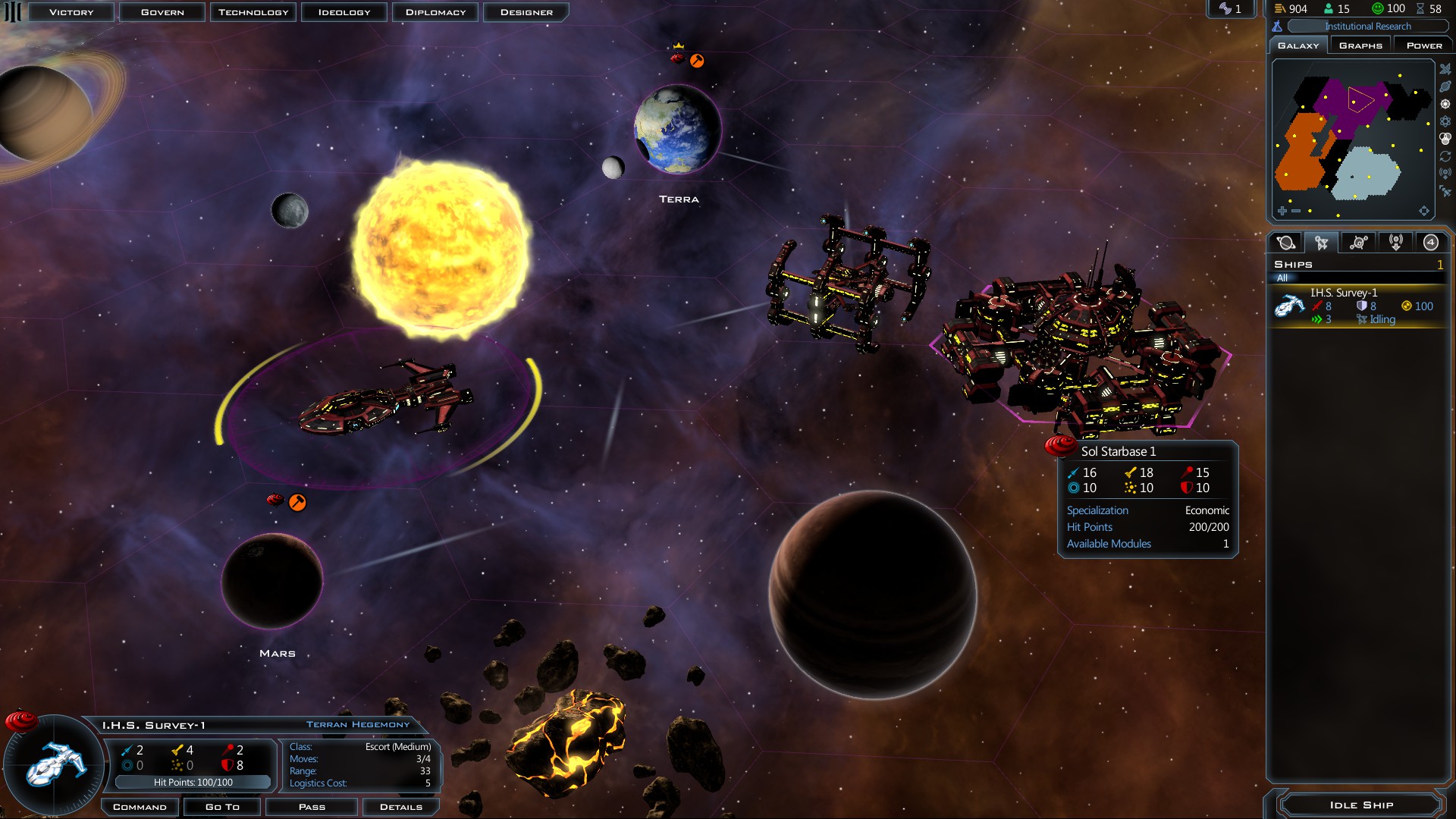
(not my game)
this is now the second engine i've tried and I get to the very first basics of trying to build the UI for the very first operations and then it gets so complex I end up wanting to give up 😦
winter goblet
One prefab for "a build slot". Just change the text and stats and icon on the instantiated copy for different build items. You presumably already have a database of buildings with all the relevant info attached...?
real sleet
heh
real sleet
winter goblet
One prefab for "a build slot". Just change the text and stats and icon on the in...
theoretically the other way around -- you would have a "build" button for each slot, and when clicking the "build" button, your choices would come up
so, in an RTS game, at some point in the tech tree, you can build X but not Y. You click on, say, the barracks, and you can only build 1 type of soldier (similar)
not quite exactly the same
I need to make a drawing
heh
right now in this early prototype phase all I have is a "trading post" building that could be built
winter goblet
Same deal. You probably want a prefab for a combo box list (so that all combo selections look consistent), and another prefab for a "unit type" entry in that list. Maybe another prefab for a "research type" entry which shows different stats.
Unfortunately it is probably the most UI-heavy genre in existence 🙂
real sleet
yeah, i know
bad first choice. technically it's not purely my first game. I have built some stuff with Godot/C# but this is way more complicated
winter goblet
Have to just start with the simplest possible implementation (eg. text-only buttons) and build it up as needed...don't try to clone a finished AAA UI perfectly straight out of the gate!
real sleet
oh yeah definitely not trying to do that
but just trying to get a list of buttons is like... hoa
real sleet
winter goblet
Have to just start with the simplest possible implementation (eg. text-only butt...
I really dislike having to drag/drop prefab references in the editor. is there a way to set them in code? In godot it's pretty common to use file path references
 distant cloak
So im new using this so for test Im trying to use this sprite for this button but it doesn't let me to use it
 mortal robin
distant cloak
So im new using this so for test Im trying to use this sprite for this button bu...
mortal robin
distant cloak
So im new using this so for test Im trying to use this sprite for this button bu...
did you import it as a sprite?
distant cloak
mortal robin
did you import it as a sprite?
no, as a normal asset, there are more importing ways?
mortal robin
distant cloak
no, as a normal asset, there are more importing ways?
Click on the image asset. In the inspector change Image Type to Sprite (2D and UI)
idk what you mean as "normal asset"
winter goblet
real sleet
I really dislike having to drag/drop prefab references in the editor. is there a...
Possibly, but it's WAY easier to work the way the editor is designed to work. You're going to be building all the static UI in the editor and drag/dropping all the textures anyway...unless you're attempting to build the entire UI from code, which I don't recommend.
real sleet
winter goblet
Possibly, but it's WAY easier to work the way the editor is designed to work. Yo...
fair point.
distant cloak
mortal robin
Click on the image asset. In the inspector change Image Type to Sprite (2D and U...
got it 👌
also, thx for the help
real sleet
@winter goblet made a little progress. clicking a planet the first time fills out the right number of buttons in a vertical layout group, but subsequent planet clicks don't display any buttons. Just need to debug dig-in. Thanks for the tips
winter goblet
Yeah UI can be a world of pain. If you can get your basic elements working reliably (eg. managing model dialogue lifecycle, in this case) you'll be able to reuse those building blocks to make the more complex UI arrangements more easily. But it's very satisfying when it works because the results are visual and immediate...
remote turtle
I created a background video for my lobby in after effect. I’m after effect the loop is smooth and doesn’t lag. When I put it in Unity and mark „loop“, it isn’t looping smoothly. Why is that?
winter goblet
remote turtle
I created a background video for my lobby in after effect. I’m after effect the ...
Probably because it's not buffering the start of the video, so it stalls on loop. What buffering settings are you using?
remote turtle
winter goblet
Probably because it's not buffering the start of the video, so it stalls on loop...
Never heard of buffering settings. Idk if it’s my English or if it’s actually a think
winter goblet
remote turtle
Never heard of buffering settings. Idk if it’s my English or if it’s actually a ...

Doesn't look like you have much control of buffering TBH. If the video is set to loop, the VideoPlayer should wrap the buffer back to frame 0, but maybe it doesn't 😬
If it's a smallish video you could try loading the entire thing into memory instead of streaming it from disk.
 small grove
Hi, I am using the latest lts 2022 unity and whenever I build the game, the coordinates of those panels change to 0, 0.
Every time I restart the unity they change to 0, 0 in the editor as well.
Is this some kind of a version bug or am I being a retard?


The upper panel is missing on the 2nd picture cuz I deleted it.
low pike
the 2nd picture doesn't show us anything
Press T to use the UI scene tools
If you are anchoring this UI to the center, then it will quite often not be aligned to the correct place, you need to anchor it to the bottom
Also, don't develop you UI with the game view set to 'Free Aspect'
small grove
low pike
If you are anchoring this UI to the center, then it will quite often not be alig...
no, I am aligning it to the bottom with the 75 value for the y offset
it looks just fine in the editor with any aspect ratio
low pike
by "aligning" do you mean anchoring?
small grove
it literally resets to 0 in the inspector after restarting the unity and I have to change it again
low pike
And you've definitely saved the scene change?
small grove
low pike
And you've _definitely_ saved the scene change?
100%
can record it if you want
you can't even build before saving afaik
I should mention that other scene changes apply
low pike
you do not need to save before building, it will just use the current changes without saving
 low pike
Got any components that are setting the pos?
small grove
low pike
Got any components that are setting the pos?
nope, not sure how that'd affect it on unity restart either way :/
low pike
small grove
That's new to 2022
low pike
small grove
nope, not sure how that'd affect it on unity restart either way :/
because code can be ran in editor time on components
small grove
low pike
because code can be ran in editor time on components
I am certain that I am not doing that
low pike
remake it from scratch
small grove
let me try to add some other UI elements and see what happens
I added another UI element and now it's working...
I am really confused rn

lets see what happens when I restart unity
It resets the plantbar position but keeps the cube one.
Unity is quite interesting ngl

it's not the element order either, I just tried moving the square above the panel in the hierarchy but the plantbar moved again
I should mention that this project was started in an earlier version of unity 2022 where it worked fine(half a month ago?) and that's where I made the panel.
I'll try completely remaking it and seeing what happens
low pike
Press T so you're using the correct tools for the job.
Change the pivot of the rect so it's at the bottom of the rect.
small grove
low pike
Press T so you're using the correct tools for the job.
Change the pivot of the r...
I've discovered something, as soon as I anchor the panel to the center it stays where it's supposed to be.
Anchoring it to the top or bottom messed up ONLY y axis.
I am about to test if the left/right anchor mess up the x axis only.
This is confusing
nope, it's the top and the bottom anchors that cause this behaviour
my brain hurts
low pike
small grove
It resets the plantbar position but keeps the cube one.
Unity is quite interesti...
this is after restarting Unity? (for the bottom bar)
small grove
low pike
this is after restarting Unity? (for the bottom bar)
any panel I added so far(with any name), it happens in the built version and in the editor after restarting unity
I'll try testing an image for example now
low pike
Answer the question asked!
small grove
I did
low pike
low pike
Press T so you're using the correct tools for the job.
Change the pivot of the r...
Seriously, do this with your rects pivot. Then 0 will be the correct place ¯_(ツ)_/¯
low pike
small grove
I did
It was a yes/no question
small grove
low pike
Seriously, do this with your rects pivot. Then 0 will be the correct place ¯\_(ツ...
I did, had you read my message you would've known that, using the bottom/top anchor mess up the y position
low pike
You haven't said Anything about changing the pivot
small grove
low pike
It was a yes/no question
and I specified when it happens, after restarting the unity the inspector value is set to 0 and when building the game the inspector value stays the same but it's placed at the 0y in the build
small grove
small grove
I've discovered something, as soon as I anchor the panel to the center it stays ...
.
small grove
it's the default one, center
 low pike
It's in the center of the rect. The pivot is not the anchor.
 small grove
I don't see how that affects the position restarting when the anchor is set to top/bottom?
low pike
Right, so put it at the bottom
because if it's at the bottom.. the Y value at 0 will have it on the line
0 = where the pivot is, not offset
small grove
that does make it work, doesn't fix the issue tho

this is a messy workaround which does work but results in weird inspector values
what if I want something on say 25y, anchored to the top/bottom?
low pike
It's the correct thing to do with UI..
small grove
low pike
It's the correct thing to do with UI..
in this example, what if I don't want something to be stuck to the top/bottom?
low pike
Then you'll have to wait for a fix in a newer version, or do an actual messy work around by having the rect parent bigger than the children
small grove
as I mentioned earlier, it worked just fine in the previous version
low pike
then roll back
small grove
low pike
Then you'll have to wait for a fix in a newer version, or do an actual messy wor...
yeah, that's really messy and not an option for a bigger project
low pike
Yeah, I wouldn't do that either
small grove
I reported the bug to unity, lets hope they'll fix it.
low pike
Let's hope it's already fixed for this weeks release
barren totem
Hello everyone !
In my UI, I would like to have a 2 column grid of elements.
The Container of these two columns has an unknown size.
I add elements in there via scripts, and that I want to fill the space row by row (left column row 1, right column row 1, left column row 2, etc...), so I was thinking that using a GridLayout would be great (to just add the elements in the grid), rather than making an horizontal layout with 2 column and 2 verticals layouts inside.
But using a Grid Layout, I don't understand how to get my elements to take 50% width each.
Even using the constraint fixed column number = 2, it uses a pixel-width and putting a high number just makes the second element of the row overflow on the right of the Grid.
How should I handle that ?
soft sail
gridlayout is garbo
barren totem
I realized all my elements would not have the same height anyway, so I think it's better if I go with 2 vertical layouts
soft sail
What I've learned from java and UI is use as many layouts for your elements as possible
reduces the chances of all the elements imploding into each other ;)
 jagged monolith
I've come to really enjoy setting the anchors directly like this

So I know that this element will always take up 33% of the space, right adjusted. Without using layout components
 leaden roost
jagged monolith
I've come to really enjoy setting the anchors directly like this
leaden roost
jagged monolith
I've come to really enjoy setting the anchors directly like this
Holy crap! This is genius... Always struggled to figure out a real use for the min max anchor stuff
jagged monolith
It just seems so predictable and straight forward compared to the layout groups haha
low pike
Just had a play with it, gotta keep remembering to change the left/top/right/bottom to 0 after changing the anchor
jagged monolith
Thats right
median iris
jagged monolith
I've come to really enjoy setting the anchors directly like this
I'm using the min/max anchors most oft the time, it feels so much more intuitive to me
remote turtle
why is my 20sec video not looping smoothly? i made this video in ae in mp4.
 jovial relic
https://cdn.discordapp.com/attachments/497872424281440267/1125509572187136153/image.png
How can I downscale my UI to 480p while keeping it not in a tiny box in the middle of the screen


 azure flame
So yea, if you want to preserve proportions of the menu, use scale with screen size. If your text becoming pixelated, increase scale.
jovial relic
azure flame
So yea, if you want to preserve proportions of the menu, use scale with screen s...
the problem is that the text isn't being pixelated
azure flame
you want to pixelate just the text?
jovial relic
no i want everything pixelated
but the text is way too clear


left is correct right is wrong
azure flame
You would need a specific text font for that. If you want to specifically reduce resolution for the text you need to reduce asset resolution when creating font asset for TMP
I think TMP ignores canvas scaling as well.
Or play around with softness, dilation of the text material
jovial relic
azure flame
You would need a specific ~~text~~ *font* for that. If you want to specifically ...
I don't see an option for resolution anywhere in the asset settings
azure flame
Window>TextMeshPro>Font Asset Creator
atlas itself has antialiasing settings too you can change
jovial relic
azure flame
atlas itself has antialiasing settings too you can change
im assuming i already turned that off when i changed the rendering mode to hinted raster
weirdly this turned the pixelated VHS font into smooth.. whatever this is

oh i used the wrong render mode nvm
 azure flame
SDF is very good at preserving the font, if you want pixelated font you would be better off finding actually pixelated font
jovial relic

the font is pixelated
tmp is making it smooth
or very bumpy rather
here are the options i used


 jovial relic
azure flame
jovial relic
azure flame
the simpler solution to all of this issue was apparently just a post processing effect

 foggy lake
Hi guys I can’t use Screen.safeArea in 2022.3.4 it tells me that Screen doesn’t contain definition for safeArea
 ionic beacon
I'm guessing you have your own class called Screen
 zenith tendon
How would I go about linking together multiple Scroll Rects?
I want to make a UI Image that can scroll in 2D, and I want to be able to have a horizontal and a vertical Image that can scroll horizontally and vertically respectively
now when I scroll the vertical Image the large Image should scroll vertically as well and the same with the Horizontal Image, and if i scroll the large Image, the movement should also be applied to the horizontal and vertical images, each moving according to the horizontal or vertical movement of the main Image
I am not asking how to make scrollbars, these two side images are not scrollbars, rather they are Scroll Rects themselves where they do not show completely and have to be scrolled to see what is off screen.
Think of it as projecting the Image on its two axis' and being able to scroll on each of the three components, which would then apply to all three Scroll Rects accordingly.
I dont really have an explanatory image to show at this moment but if my question is not very clear, feel free to ping me and as for clarification
vocal holly
Can we put a World Space canvas into another World Space canvas?
low pike
A world space canvas (all canvases) can have child canvases.
Child canvases don't have that option to change anything that the parent has
This also is a thing you could test in 2 seconds
vocal holly
Yeah true sry ><
 timber compass
Hi
Whenever I key in the background, the buttons work, or when I press one button, another button works. Where does the problem come from?
agile reef
Im using the fixed joystick from the joystick pack made by fenerax studios but when I click in the middle of the joystick it unexpectedly moves somewhere else as default position
also it's script doesnt have anything inside only public class and something

 agile reef
agile reef
agile reef
I had cursor in the middle
 willow scarab
i'm having trouble making a UI element (image) be the same width as a game object (sprite) in game
they're both PNGs with the same width, however the UI "image" element ends up smaller than my game object "sprite"
i set the sprite to be 100 pixels per unit
and the canvas to "constant pixel size", scale factor 1 and 100 pixels per unit
what else could i do to make them the same size during the game?
mortal robin
willow scarab
i'm having trouble making a UI element (image) be the same width as a game objec...
The orthographic size of your camera will also come into play
 rough kettle
@low pike this is it. The issue is that my pointer starts out of bounds (not visible in the netherworld above the list) this means that the display doesnt start at the beginning of the list but in the middle?

it is supposed to be a scrolling list of swords
its probably because the list grows "upwards"
low pike
This screenshot doesn't particularly help.. I meant show screenshots of the inspector(s) and scene view
rough kettle
low pike
This screenshot doesn't particularly help.. I meant show screenshots of the insp...
this?


thats the inspector of the EquipList
the issue is that after initializing the page, the list that is visible starts at 18... not at 1. Thats probably because how the list grows.
low pike
rough kettle
this?
now show this with the buttons populated
rough kettle
low pike
now show this with the buttons populated
thats the one above
low pike
low pike
now show this with the buttons populated
You haven't shared what this asks for
rough kettle
the buttons are dynamically populated
low pike
I'm aware
rough kettle
low pike
I'm aware


these are the button inspectors and the button itself
for the item list (with swords)
rough kettle
low pike
I'm aware
is this what you are looking for?
low pike
nope
rough kettle
low pike
nope
I cannot give you a in-editor version with the buttons populated because the buttons are completely dependant on ingame information. As such, that is not possible if you want that.
rough kettle
low pike
Go into playmode...
i am
rough kettle
low pike
Go into playmode...
The screenshot I sent prior was in playmode.
low pike
right, I get that, but it's useless.. it doesn't show the information I would like to see, the inspector
I've given up and concentrating on my own thing now
rough kettle
low pike
right, I get that, but it's useless.. it doesn't show the information I would li...

 rough kettle
low pike
I've given up and concentrating on my own thing now
rough kettle
low pike
I've given up and concentrating on my own thing now
Sorry, you were unclear. If you would have said (instead of this is useless) that you want THIS with the inspector visible I could have helped. But it seems you had prior bad experiences with people and are annoyed by this kind of stuff. I didn't mean to annoy you or use up your time. I will try stuff myself. Have a nice day.
 queen sentinel
I feel like im going crazy trying to figure this out, but how can i make the number (tmp) stay the same size relative to the parent panel? https://gyazo.com/813ee51f9cab82de6358558fdf37eafd

 honest belfry
Is there a way to change the interaction size of an input field without changing the size/spacing/area that the text is contained in? I want to be able to click near the input field and that be good enough to make it interactable
 rapid ferry
How to make UI objects in a layout group slowly(lerp) to its desired position when an object in that layout group was removed?
mortal robin
rapid ferry
How to make UI objects in a layout group slowly(lerp) to its desired position wh...
Use invisible ghost objects in the layout group and have the "actual" objects not be in a layout group but instead lerp towards their corresponding invisible twins in the layout group
rapid ferry
mortal robin
Use invisible ghost objects in the layout group and have the "actual" objects no...
oh like i'll just add an extra "foam" gameobject when removing items that slowly resize and kills itself?
that's doable ig lemme try
mortal robin
rapid ferry
oh like i'll just add an extra "foam" gameobject when removing items that slowly...
Nope not what I mean. I mean a completely parallel copy of the UI which has the layout group and you interpolate the real objects to the positions of the ghost objects
 lunar hamlet
Is there a way to make my layout groups work like the one in the first answer here? https://stackoverflow.com/questions/59274457
I'm trying to make a hand for a card game, but the cards never fit quite right. I want them to always fit within the zone and shrink like the boxes in that gif when more cards are added, but following those steps got me nowhere and I've only had partial success on my own.

Stack Overflow
I am trying to maintain the aspect ratio of child elements within a Horizontal Layout Group when the total width of children would exceed the Layout Group's width.
Given the Horizontal Layout Group...
rapid ferry
lunar hamlet
Is there a way to make my layout groups work like the one in the first answer he...
try to uncheck all checkbox in the layout group
rapid ferry
mortal robin
Nope not what I mean. I mean a completely parallel copy of the UI which has the ...
oh.. so the one with layout group is invisible, then the real object is using my own system and dont have auto layouts?
mortal robin
Yep
lunar hamlet
rapid ferry
try to uncheck all checkbox in the layout group
Not exactly sure why, but all that managed to do is make them spawn in with a width of zero. The closest I've been able to get was by disabling the aspect ratio fitter on my card prefab, where they then fit in hand perfectly but with incorrect proportions. The second I want them to maintain a set aspect ratio it all falls apart.
 dreamy warren
weird question but how do i make it so text in world space canvas is affected by lighting
mortal robin
dreamy warren
weird question but how do i make it so text in world space canvas is affected by...
You'd need a custom shader. I think TextMeshPro materials use SDF to render so it might be tricky to make a lit version of it
I'd just google "lit textmeshpro shader"
dreamy warren
alright
 wheat jasper
Hello, I need a help with a problem I am facing with buttons and how canvas is working at all. I have some buttons in canvas that are part of a game, but when player is under a certain effect, I want to display a semi-transparent image over the whole canvas on top of most of these buttons. Once anything overlaps buttons they stop working. Is there a way to display somehow (even if not using the same canvas, render different camera or anything) an image over buttons without ruining them?
mortal robin
wheat jasper
Hello, I need a help with a problem I am facing with buttons and how canvas is w...
disable "raycast target" or "blocks raycast" (forget what it's called) on the overlay image
wheat jasper
mortal robin
disable "raycast target" or "blocks raycast" (forget what it's called) on the ov...
😮 😮 😮 Holly fcuk, thank you so mcuh, this solved it without effort! I was already thinking I will have to recreate all button behavior! Thanks a lot you saved me! 😉
 carmine path
Hello, I have a Unity project with a screen scale of 1920 x 1080 (FullHD) but I have the scale set to 2.8. Now my canvas and UI are not visible. How can I fix that?
I tried modifying the scale with the screen size reference scale but didn't work
mortal robin
carmine path
Hello, I have a Unity project with a screen scale of 1920 x 1080 (FullHD) but I ...
a screen scale of 1920 x 1080 (FullHD)
What do you mean by this? The reference resolution in your canvas?
I have the scale set to 2.8
What do you mean? The game window zoom?
Now my canvas and UI are not visible. How can I fix that
Zoom out probably?
 native aspen
My UI elements aren't being batched even though they fill the criteria to be batched (co-planar, same material, etc...) any advice on this?
jovial relic
native aspen
My UI elements aren't being batched even though they fill the criteria to be bat...
did you set them to static
native aspen
I tried that, it made no difference.
Will they not get batched if they're animated?
 sleek stratus
Hey guys |
i am hard stuck in solving one ui problem
I have a diffrent scenes, in which Canvas screen space overlay is common in all scene (which is added to DontDestroyonLoad object,
So my question is How to convert a position of a object or ui which is in Canvas screen space camera to Canvas Screen space overlay
my goal is to : on button click (ui which is in screen space camera) get location of button and somehow convert it to location of screen space overlay and use this location to set an image
So in game the image and button should be in same position
lunar hamlet
Is there a way to make child objects in a parent with a layout group overlap rather than extend past the edges of the parent? They overlap a little when there's a lot of them, but they stick out on the left and right (the parent is the same width as the red box above.)
 vocal holly
Hi, i would like to make UI element as prefab. but i have a problem my canvas on the game is Scale With Screen. And in prefab the canvas is not Scale With Screen, and i can't change it. So when i put my prefab in the scene weird thing happend
someone have idea ?
 rare sky
Hello, how to calmp the child of the object and stick it inside the box? I dont want the child to go out, it's vertical but inside. Thank you!

 astral plover
Hi i have a problem with my UI: it looks fine in editor but is messed up in build


it's like theres no y translation being applied to it
 modest knot
i need help basically i have a canvas and it has a ui which is supposed to follow the mouse but as you can see in the vid when i rotate my camera the ui scales up and down idk why btw the canvas is screen space camera
low pike
astral plover
Hi i have a problem with my UI: it looks fine in editor but is messed up in buil...
share screenshots of the inspector for the UI that's not in the right place


 low pike
What version of Unity?
low pike
2022.3.4 is the latest.
Someone was in here the other day with the same issue, their UI wouldn't stay anchored correctly to the bottom of the screen
They submitted a bug
low pike
You've got the anhors/ etc setup correctly, so I reckon you've got the same issue
astral plover
alright thank you
astral plover
Yep that fixed my issue
low pike
rolling back to an earlier version ?
astral plover
upgrading to 2022.3.4
low pike
ah, great
low pike
not of the canvas component
of the text/ image
You've probably just got them anchored to the center
!learn
 onyx flowerBOT
🧑🏫 Unity Learn can offer you over 750 hours of free live and on-demand learning content for all levels of experience! Make sure to check it out at https://learn.unity.com/
low pike
Do the UI tutorials, you need to learn how to anchor UI to different places. top/ bottom/ left/ right/ each corner/ etc
 dense apex
Hmm came to post about UI components not translating on the Y axis - same problem lod had earlier.
I'm already on 2022.3.4f1 and still got the same issue 😦
If I anchor to the middle of the screen it's fine, but anywhere else just snaps to the top of the screen, regardless of which anchor point I use or what offset I enter
 dense apex
Apparently a known issue, fix due in 2022.3.5! https://forum.unity.com/threads/canvas-broken-after-loading-project-on-2022-3-3f1.1453069/
Unity Forum
When I try to edit UI right after loading my project, canvas size (which is set to scale with screen size by height to 1920x1080) is incorrect. But...
 vivid dock
I'm trying to left align text to view (canvas). I added an empty object to my canvas, gave it a horizontal layout group component, child alignment = upper left (default), added text to empty object and gave the text a layout element. The layout is actually worse now with the text in the middle of the window. How can i make this work?
Update: I've set the anchors - that seems to work.
 brave sequoia
Making my first menus + HUD, question is, do HUD/Start Game Menu/Settings Menus go on separate canvases or the same canvas?
vivid dock
@brave sequoia I'm not experienced in Unity yet, but I would think it might be easier to create different Canvases. But Unity has the concept of game objects too. So you could have a single canvas and then enable/disable game objects which represent each of your 'pages' as you need. Probably like if you made it yourself from scratch - Unity is flexible enough that you can choose how you do things and you can succeed in those choices to make what you envision. Yeah, it might be easier one way or another.
low pike
brave sequoia
Making my first menus + HUD, question is, do HUD/Start Game Menu/Settings Menus ...
Best to go on separate canvases
Start menu and HUD probably shouldn't even be in the same scene
 vernal eagle
Hello.
Why is that text not coming normally and is blurred out like that? It is also not showing in the game view. Can anyone help?
 low pike
1- Press T to use the UI scene tools
2- Don't use "Text" is deprecated and under the 'Legacy' menu for a reason
3- Use TMP
That also looks like you've positioned it off the canvas, so it won't actually be on the screen
!learn -> do the UI tutorials
onyx flowerBOT
🧑🏫 Unity Learn can offer you over 750 hours of free live and on-demand learning content for all levels of experience! Make sure to check it out at https://learn.unity.com/
vernal eagle
low pike
1- Press T to use the UI scene tools
2- Don't use "Text" is deprecated and under...
Ok I will try. Thanks  !
!
vocal holly
Hello, i have an issu i can't fix, my button is a prefab, and when i click it instantiate a card in a position of an empty game object. I made the button then i put in prefab, when it's prefab, the transform of the position where instantiate vanish. Do u have an idea. On the screen i'm in the prefab button, and the transform is none
 low pike
vocal holly
Hello, i have an issu i can't fix, my button is a prefab, and when i click it in...
low pike
vocal holly
Hello, i have an issu i can't fix, my button is a prefab, and when i click it in...
This isn't a UI issue.
Prefabs (in the project window) can't have references to scene objects
vocal holly
low pike
This isn't a UI issue.
Prefabs (in the project window) can't have references to...
wich channel should i post my question ?
low pike
None, I answered it for you. But it should have been in #💻┃unity-talk
vocal holly
"Prefabs (in the project window) can't references to scene objects
"
i have try to put the empty game object as prefab
brave sequoia
low pike
Start menu and HUD probably shouldn't even be in the same scene
oh thats awesome, i forgot to ask about that as well. Start menu on its own scene for a 2D game then? (I guess for a 3D game too but Im making a 2D game so I wasnt sure if that had more weight to doing it as a separate scene)
 brisk sandal
Does an EventSystem object have to have a collider on it to be recognised by a pointer event? Because I want to make sure that it does before I torment myself by figuring out and refactoring someone else's complicated code to include mesh colliders in a way that won't cause even more problems later on.
 young ocean
I created a new button on a canvas but the textmeshpro on it isn't showing up
I tried changing the colour of both the button and text but still nothing
nvm it's fixed
I just deleted and replaced the button
rapid ferry
hello, if you want to make something like this, would you pre-design this button icon in a app like figma and do the text in unity? if i make the button white and the shade on the button gray, the overlay colour on the sprite renderer can easily change the button and shade colour but im wondering about the shade underneath the button, how would that be implemented?
 low pike
brisk sandal
Does an EventSystem object have to have a collider on it to be recognised by a p...
low pike
brisk sandal
Does an EventSystem object have to have a collider on it to be recognised by a p...
No, UI does not use colliders
low pike
rapid ferry
hello, if you want to make something like this, would you pre-design this button...
Unless you're using some fancy custom font, always do the text in Unity and have the sprite blank, white where possible.
Doing this allows you to reuse the same sprite in multiple places, with different colours and different shapes/sizes
mortal robin
brisk sandal
Does an EventSystem object have to have a collider on it to be recognised by a p...
if it's a non ui object yes
brisk sandal
mortal robin
if it's a non ui object yes
yeah I've realised that, it was a bit obnoxious but I refactored the existing code to allow for that.
thanks mate
rapid ferry
low pike
Unless you're using some fancy custom font, always do the text in Unity and have...
how would i do the shadow underneath the button?
rapid ferry
how to make border for a button
 fossil prism
 keen ferry
inspect the Event System inspector during playmode it should tell you if you're hitting the correct Rect Transform
otherwise switch it to 2D mode and make sure the rect sizes are correct
do the former though is better
keen ferry
fossil prism
inspect the Event System inspector during playmode it should tell you if you're ...
aaaaaaaa thks
keen ferry
fossil prism
inspect the Event System inspector during playmode it should tell you if you're ...
i guess i found the problem thks
 low pike
rapid ferry
how would i do the shadow underneath the button?
low pike
rapid ferry
how would i do the shadow underneath the button?
Black sprite with some alpha
 fallow tartan
how do I change the image of a button usuing Code?
It won't let me use GetComponent on Image types, and I can't see these types in the Editor either
(NVM I was using the wrong "Image" type)
 floral yew
Hi! im building a good project but cant get link the GUI with scripts. Anyone with knowledge?
 tall wraith
Im making a button that would execute something when its tapped (touch) for a mobile game. Is there an easier way or the quickest way in making that other than the new input system?
mortal robin
tall wraith
Im making a button that would execute something when its tapped (touch) for a mo...
It doesn't matter which input system you're using. It's just a basic UI button.
https://learn.unity.com/tutorial/creating-ui-buttons#5f7d05ebedbc2a0020a3a29e
Unity Learn
Buttons are one of the most commonly used UI components. They are very easy to customize and quick to configure to complement any art style to match an application. In this tutorial, you will learn to create UI buttons.
tall wraith
sorry, i know about on how to create a button and execute it through onclick mouse. but Since its a mobile game, wouldnt it be a different way on execute it? By touch? Im not asking on how to create a button, the touch input is what im asking
mortal robin
tall wraith
sorry, i know about on how to create a button and execute it through onclick mou...
it's exactly the same
there is no difference
 keen fiber
Whenever I open a project, the canvas loads in into the middle of nowhere. it's fixed when I run the game for the first time, but then some of my texts' position gets reset to 0


 timber viper
keen fiber
Whenever I open a project, the canvas loads in into the middle of nowhere. it's ...
timber viper
keen fiber
Whenever I open a project, the canvas loads in into the middle of nowhere. it's ...
Well, canvas is often scaled or at least positioned to screen size, so the size of the game window will affect how stuff lines up.
Might have something anchored in a poor way.
Wouldn't really explain resetting positions, though. Unless a script is moving them.
deft sierra
can you edit tmp button hit area somehow without hassle with image whitespace or splitting it into invisible button and image
its such a basic thing you gonna always need it at some point but I just cant find straight up answer to this?
timber viper
deft sierra
its such a basic thing you gonna always need it at some point but I just cant fi...
Afaik there's no tmp button, it just makes a regular button but with tmp text.
Might affect Google search results if you searched for "tmp button" vs just "Unity button".
You could probably use a mask if you want the button to be a different shape.
If you want the area to be bigger, rather than smaller then just having 2 images is probably the way to go.
Dunno if there's a smarter way.
tall wraith
Is there any tutorial on how to create a horizontal drag level menu selection based on touch?
deft sierra
timber viper
Afaik there's no tmp button, it just makes a regular button but with tmp text.
M...
what do you mean 2 images? My particular issue is my button visual image and area where you can click on it both depend on button size but that doesnt make sense afaik all mobile phone uis give some additional space around for touches you want images to be small and neat without obstructing game view but still be easily touchable
low pike
nah, UI touch ends at the edge of the image..
It makes perfect sense for the graphics raycast to only work when it hits an image
deft sierra
it doesnt make sense to the user and you can open up random game and try out to click just outside images
low pike
If you want an extra buffer area round the visiual, then you need to add an additional image that's the size you want it to be.. and set the alpha to 0
deft sierra
yea thats just hacking well atleast now I know im not overlooking anything ty
timber viper
What I meant by 2 images is that you can have an invisible (or almost invisible, I forgot if it works with 0 alpha) image as the real button, and have a second image component for just the graphical area.
But yeah I dunno if there's a smarter way.
 ruby crown
why i cant press button in world space UI? I have EventSystem
mortal robin
ruby crown
why i cant press button in world space UI? I have EventSystem
Did you set the event camera on the canvas?
Does the canvas have a graphics raycaster?
Does the event system have an input module?
Are there any errors in console?
ruby crown
mortal robin
Did you set the event camera on the canvas?
Does the canvas have a graphics rayc...
yes i set.
yes.
yes.
no
mortal robin
Maybe something else is blocking the pointer then
check the event system preview window at runtime
ruby crown
mortal robin
check the event system preview window at runtime
how do i check it?
mortal robin
ruby crown
how do i check it?
it's at the bottom of the inspector for that object
 mortal robin
ruby crown
mortal robin
ruby crown
so what is this "Image" object?
maybe whatever that is is blocking your button
ruby crown
mortal robin
so what is this "Image" object?
crosshair i think, But how can i make this image not blocking cursor
 mortal robin
ruby crown
crosshair i think, But how can i make this image not blocking cursor
mortal robin
ruby crown
crosshair i think, But how can i make this image not blocking cursor
click it
disable "Raycast target"
or "Blocks Raycast"
ruby crown
mortal robin
click it
still not working

 craggy fiber
I've upgraded my unity version, but this caused the UI on all my games to mess up. Any idea how to fix it? (2022.3.0f1 -> 2022.3.4f1)
 mild dome
how should i handle chest interfaces?
like lets say i just open the inventory, i want the inventory to be in the middle of the screen, and then when i open a chest, i want the inventory to be in the left bottom corner
 hollow sleet
Anyone here have decent experience regarding Animators on UI and it's implications on performance?
I know its not a specific question but just want someones thoughts on some things
 frosty pewter
hollow sleet
Anyone here have decent experience regarding Animators on UI and it's implicatio...
frosty pewter
hollow sleet
Anyone here have decent experience regarding Animators on UI and it's implicatio...
Animators on UI? Don't
hollow sleet
I mean yeah
frosty pewter
See Optimisation tips for Unity UI in the pins
hollow sleet
A bulk of the tips online I've seen in this context are "just don't use them" Which I understand but it also has some stackoverflow type energy
I'm looking for advice on the best ways to use them
frosty pewter
There is no more advice than the one in the resource that's pinned
hollow sleet
So for example, Theres no benefit in having some sort of small sleep and wake system that turns Animator components on and off when I can?
frosty pewter
hollow sleet
So for example, Theres no benefit in having some sort of small sleep and wake sy...
No idea, I have never heard of anyone doing that. I can't see a reason why it wouldn't work
hollow sleet
I see. Not trying to “gotcha” you but I definitely think there’s room to improve animator UI use rather than just completely avoid it. That’s why I was curious if anyone else has messed with it
frosty pewter
hollow sleet
I see. Not trying to “gotcha” you but I definitely think there’s room to improve...
🤷 I use UIToolkit as all of my UGUI experience is filled with hatred of the experience 😉
 torpid vine
Two verticle layout groups, both have same values. One expands upwards, one expands downwards. I am not able to wrap my head around this one. Please help, thanks 🙂

 devout nimbus
- I need to make two different layouts for portrait and landscape orientations and dynamically switch those. And i mean different positioning of ui elements relatively to each other. NOT scaling, anchoring etc., this is no help here. Are there any tools to do this?
devout nimbus
torpid vine
Two verticle layout groups, both have same values. One expands upwards, one expa...
- Their anchors?
 alpine cypress
Hi. What is the best way for create this shop item. I have a large texture in my gameplay (2048 x 2048). Is it good to use this texture as raw image and use soft mask component for this rawImage?


 low pike
@deft sierra there's Raycast Padding on the Image component.. using a minus value increases the size of the raycastable area
 torpid vine
devout nimbus
\- Their anchors?
torpid vine
devout nimbus
\- Their anchors?
They are child of same parent canvas, so the anchor is just to place them accordingly, probably anchors is not the issue. I did try to put them in the same anchor too
torpid vine
devout nimbus
\- I need to make two different layouts for portrait and landscape orientations ...
Did something like this for Desktop and VR UI. relatively positioning desktop UI to VR UI. It does require a lot of proper parenting and organization. Basically Creating empty container and based on the orientation, maybe lerp the elements from one container to other.
 vague lagoon
Anyone know why there is no text option under UI in the hierarchy?
mortal robin
vague lagoon
Anyone know why there is no text option under UI in the hierarchy?
why would you expect a text box below it?
vague lagoon
Sorry I said the wrong thing
mortal robin
vague lagoon
Anyone know why there is no text option under UI in the hierarchy?
Isn't there a TextMeshpro Text?
vague lagoon
Yeah is thag the same thing
vague lagoon
Oh ok thanks
mortal robin
You must be following an older tutorial
vague lagoon
Does it matter which one I use?
mortal robin
Not really but you need to just make sure your code matches the one you use
if you use legacy you will use UnityEngine.UI.Text in code and if you use the TMP one you will use TMPro.TMP_Text in code
vague lagoon
Ok thanks
 rare shuttle
I'm trying to add UI elements to a worldspace canvas, at runtime.
The elements get added in the hierarchy, but it seems they don't "know" that they were added to a world space canvas.
Instead they appear as if they were added to a screen space canvas.
low pike
Do you create them with a null parent, and then make them a child of the canvas? Or do you set the parent with the instantiate?
low pike
Yes, you instantiate it and it's in 1 location and scale, then when you move it Unity keeps that scale
If you instantiate it under the correct parent, the scale will be correct
mortal robin
rare shuttle
Should I try the second method?
Always use the Instantiate(prefab, parent) form for instantiating UI
rare shuttle
Thanks @low pike and @mortal robin that worked 🙂
 buoyant token
how do i edit the vertical padding of a font?
 azure flame
@rapid ferry !collab
onyx flowerBOT

📢 Collaborating and Job Posting
We do not accept job or collab posts on discord.
Please use the forums:
• Commercial Job Seeking
• Commercial Job Offering
• Non Commercial Collaboration
 chilly niche
Does anyone know why all of my fonts have this background to them? I'm using TMP with SDF shader

They get this weird background only when the font has small size
Here are my settings
 mortal robin
chilly niche
Does anyone know why all of my fonts have this background to them? I'm using TMP...
mortal robin
chilly niche
Does anyone know why all of my fonts have this background to them? I'm using TMP...
Unity Forum
I have a problem with custom fonts in Unity 2020.3.6f1 and TextMeshPro 3.0.6
Although in the Editor the font is drawn and seen perfectly, in Play Mode...
chilly niche
mortal robin
https://forum.unity.com/threads/problem-gray-background-in-custom-font-padding-i...
Thanks!
 cedar raft
hey can anyone help me with keeping ui elements within the safe area?
mortal robin
cedar raft
hey can anyone help me with keeping ui elements within the safe area?
recommend this

Use the Safe Area Helper from Crystal Pug on your next project. Find this GUI tool & more on the Unity Asset Store.
cedar raft
mortal robin
recommend this
lol i'm actually using that rn but it isn't working for my particular case
i used it in another scene and it was working fine
not sure what's wrong
 sterile wedge
 clever fractal
Top and bottom being Nan might have something to do with it
Ah. Crossposted
rapid ferry
How the hell do I fix this?
 mortal robin
rapid ferry
How the hell do I fix this?
mortal robin
rapid ferry
How the hell do I fix this?
Your inspector is in debug mode
rapid ferry
I know, I turned it onto debug to get access to that field but it's grayed out
mortal robin
What is that field and why are you worried about it
Isn't that just based on whatever the parent object of this object is?
rapid ferry
Hang on I can't remember off top of my head, it might be a child
rapid ferry
Well I create the containers at runtime, so I'll need to set that up in code anyway.
I was just wanting to get rid of the errors in inspector for that field being null
But you might be right, I might need to have a placeholder child or something
rapid ferry
So yeh you are right, it's meant to be the child but they are not linked and it doesn't auto link and I can't manually link
So now I'm stuck and can't fix it
Erm... nvm it's linked again? I think it's because by default it was disabled... it's weird
rapid ferry
Okay so I figured it out, the error was showing in "Scrollbar Vertical" but the issue is in the parent, the "Scroll View" has the "ScrollRect" script which was missing the Content field
cedar raft
can someone help me to keep ui elements within the safe area independent of screen size?
rapid ferry
What do you mean by "Safe Area"?
low pike
on smartphones
rapid ferry
If it's a phone thing then no idea sorry
cedar raft
low pike
on smartphones
would you know how to do this?
low pike
good anchoring, canvas scalar set to scale with screen size, correct use of layout elements , etc
Your question is far too vague. You'll actually get more help/ replies when you ask something specific
 little relic
Hey guys, I am a programmer and I have no artistic skills so I need your feedback and advice!
I am making an upgrade system so everytime you press the button it will increase your health for example and then you can buy the second stage but itll obviously cost more money and give you more max hp everytime
I made a quick prototype and I genuinely need some advice on how to make this nicer. My game is low poly and I dont know how to make this look nice and not horrible to the eyes

ill take any kind of advice / feedback 😭
hollow sleet
It says I need a LayoutElement to override these values but do I need one to get them?

 reef cairn
I don't really know how to phrase this because I'm not familiar with Unity's UI system but how do I make something like this? "UI Stuff" is something that keeps adding and adding and I wanna know how to space it to something like this. The number of "UI Stuff" change from time to time. I wanna build a system that adapts to those changes. Are there any tutorials for that?
 sterile wedge
reef cairn
I don't really know how to phrase this because I'm not familiar with Unity's UI ...
sterile wedge
reef cairn
I don't really know how to phrase this because I'm not familiar with Unity's UI ...
Look at layout groups. It's a built in component
reef cairn
Thanks
 ionic drum
Got a problem with using screen space coordinates in a shader that's used on an image inside a scroll rect
It seems like objects inside a scroll rect exists in some kind of weird alternate space
Is there some way to convert screen space to "scroll rect space"?
Actually, that doesn't seem to be the problem after all
It looks like the problem is that the mask on the scroll rect is "taking control" of the material
If I set the image as not maskable, the shader works as expected
If I set the image as maskable, the material inspector is greyed out and the values look wrong
 hot oyster
hello guys, so I tried to render a canvas in a screen gameobject with render texture and connecting the texture to the camera, applying the material with the render texture on the screen and it works but sadly not showing everything on the canvas itself, only the middle and ignores the rest of it. I tried to increase field of view but when I start the game it ignores it as well. So do you guys have any idea on how to solve this?


 burnt jolt
hot oyster
hello guys, so I tried to render a canvas in a screen gameobject with render tex...
burnt jolt
hot oyster
hello guys, so I tried to render a canvas in a screen gameobject with render tex...
you may need to play around with the size of the render texture, it looks stretched which may be because it's a weird aspect ratio
hot oyster
I tried to adjust it but still the same problem happens
low pike
Don't use 'free aspect' on the game view, expecially when doing anything with UI
deft sierra
I want to briefly show damage numbers above enemy in my 2d game without involving my main canvas or any screen to world bs actually I wanted text to be just a gameobject with sorting layer as well but ig thats not possible?
low pike
there's a TMP which doesn't require a canvas
 tiny glacier
how do i put canvas elements under gameobjects
mortal robin
tiny glacier
how do i put canvas elements under gameobjects
you would have to use a canvas is SCreen Space - Camera mode (with plane distance further than the object) OR in World Space mode
 mortal wharf
why is my panel and canvas acting weird? It's not showing up like it normally does, and to get the panel to show i have to put the numbers into the negative? Even though it's stretched to fill?

 mortal robin
mortal wharf
why is my panel and canvas acting weird? It's not showing up like it normally do...
mortal robin
mortal wharf
why is my panel and canvas acting weird? It's not showing up like it normally do...
double click it in the hierarchy
mortal wharf
yea i tried that. Pressed F too.
mortal robin
though tbh i'm not sure what you mean in your image it appears to be showing?
mortal wharf
where?
 mortal robin
does restarting unity help?
I do see the eyeball with the cross thorugh it is highlighted
you may have scene visibility toggled off for those objects?
e.g.
 mortal wharf
no i don't. 😭 i hate restarting unity, I avoid at all costs. Project is big, takes forever to load. Will report back when it is finished 🫡
hot oyster
low pike
Don't use 'free aspect' on the game view, expecially when doing anything with UI
Its not about the ui on the screen but the render texture that is rendering the ui to the monitor screen gameobject
mortal wharf
mortal robin
does restarting unity help?
it worked
I thought something changed with the UI or smth tbh, haven't worked with UI in this version
deft sierra
I enter playmode to fix this
get this bug like 100% of the time when I edit scripts and go back
 shy hazel
Hi,
I'm having an issue of performances with my UI
I instantiate items on runtime in a list, but when I have too much items it start lagging
Is there a way to prevent it from lagging, like destroying or disabling not visible items ?
I think it comes from the event system checking all the buttons events
mortal robin
shy hazel
Hi,
I'm having an issue of performances with my UI
I instantiate items on runt...
You should look into a recyclerview style list
technically you only need enough objects to visibly show on screen
and you can reuse them in the list
shy hazel
Yeah it seems like what I need, but I have a tree view system, I will have a hard time using that XD
mortal robin
you can use the principles of a recycler view in your tree view
you wil;;l have to write some code tho

 lime cloud
 lean fog
can i get some feedback on the Game over screen ?
lean fog
can i get some feedback on the Game over screen ?
keep it simple. Don’t add random shit. It already looks fine. Just center some things a bit more
I have a UI issue. My UI has a menu that shows over another menu. Lower menu must be visible below, so it is active. Clicking a button that makes the upper menu disappear also clicks buttons on the lower menu.
How do I block it? I already have a panel between the menus that is a raycast target.
lime cloud
Just for some more clarity: I have a gamepad cursor. I press a button that causes the menu to go away, but that button is also the clicker that clicks the button underneath.
 frigid zephyr
ive got an issue with tmp text rendering for a single frame when the component is updated, but becoming invisible immediately after
nvm found the issue
 waxen matrix
Hi, how do I make children resize automatically when I shrink the parent UI?
So they always fit inside the bounds of the parent UI
low pike
Anchors and layout groups
waxen matrix
I've messed around with anchors and layout groups, can't seem to figure it out 😦
 long snow
Why is completely nothing happening to my button on highlight, select etc.??
 long snow
It does not change colors
sterile wedge
long snow
Why is completely nothing happening to my button on highlight, select etc.??
Looks like you don't have an EventSystem in your scene
sterile wedge
It's usually automatically added if you create a UI
 agile kayak
Has someone found a fix for the canvas Position values being at infinity ?

Im using Unity LTS 2022.3.4f1
long snow
sterile wedge
It's usually automatically added if you create a UI
So its just called EventSystem, right?
Is it a package or what
sterile wedge
long snow
So its just called EventSystem, right?
You just create it in the menu you get by right clicking in the Hierarchy
sterile wedge
Could've looked up how to add an EventSystem
 half gust
How could I make a UI system like this that doesn't just block the entire lower part of the screen during gameplay?
 soft sail
Isn't that what the UI is doing here though
or are you asking how to make a UI like this that fades in and out
which would be the answer with some design choices
half gust
More like I want to have the game map divided into boxes the same size as the camera, with the player free to walk everywhere in these boxes BESIDES the place where the UI is. But I'm having trouble thinking of a way to keep this consistent (Showing everything onscreen) whilst having the UI in the bottom. I was wondering if there was a way to have this kind of UI without having the player/ enemies cross onto it
soft sail
The field that the UI is over is still traversable in this game, there's just a bounding box where the player crosses for when the next area transitions to.
Likewise, if you dont want the screen transitions, then you'd just have the camera centered on the character
half gust
I see, so I need to make a limit as to when the camera will transition. I was thinking about using the camera for that but a custom bounding box makes more sense
Thanks!
soft sail
Yeah, it's less of a UI issue and more how you're restricting the player where they can go within the space that's available to them
 halcyon heron
Hey, I'm having problems when changing resolution. Should I set all UI elements with anchors only and never use size?
I've set everything for 16:9 aspect right now.
So I have a background in 1920x1080. I need to stretch it for other resolutions so that the image covers the whole screen, but then the scale isn't respected. How can I manage that?
The only solutions I'm seeing is to set my canvas to match with height, and to forget about about any aspect ratio superior to 16:9
 flint ledge
How does everyone Figma screens to Unity quickly? Can it work with visual scripting? Very new. Help appreciated. ❤️
obsidian dust
How to I make it so when I add slots to my inventory It goes down and stays in the same place


like this
rapid ferry
So I'm using the Vector Graphics package, and when I import in this SVG, I get these issues with gradients:


I use Inkscape for creating vectors, it looks fine when exported as a PNG, imported into unity it gets messed up though
None of the settings help either, PPU, Gradient Resolution, or Resolution
It's a Vector Sprite as well
sterile wedge
obsidian dust
How to I make it so when I add slots to my inventory It goes down and stays in t...
You need to set the pivot or anchor of the container to the top or bottom, it think. Look up how to set direction of layout group growing
 sharp crypt
Does anyone have any idea why the ui is not visible? I'm using imported water shader there.
 low pike
from the information provided.. no
sharp crypt
idk, i have world space canvas always facing the camera and at some rotations the ui just dissapears behind water
there isint much more information to give
rapid ferry
Layer sorting issue?
sharp crypt
 sharp crypt
rapid ferry
Layer sorting issue?
sharp crypt
rapid ferry
Layer sorting issue?
actually this might have been it, such a simple solution
didnt know materials had this
 rapid ferry
..neither did I, haha
Just taking a stab in the dark, luckily for me, I seem to have hit something
sharp crypt
Thanks anyways ❤️
deft sierra
ive got bunch of turrets in 2d game how could I replicate them onto ui? they got moving parts and whatnot I tried just instantiating real turret with disabled actual functionality and parent to ui element but I cant get it to draw on top of it even if it has higher sorting layer
 mild kernel
You can't put world objects onto the UI, they're different spaces. You either replicate it with the Image component, or you render "real" turrets to a render texture and use that on a raw image component.
deft sierra
https://docs.unity3d.com/Manual/class-RenderTexture.html this render texture? This gonna let me copy turret appearance without remaking ui version?
 shut thunder
I'm uncertain if this is the best channel to ask this. I was playing Star Trek: Bridge Crew over the weekend. That game has stations like you'd expect from an episode/movie from Star Trek. I was wondering how something like this could be done in Unity.
 low pike
The same way you'd do anything else, either UI (world space canvas) or sprite renderers/ TMP
mortal robin
shut thunder
I'm uncertain if this is the best channel to ask this. I was playing Star Trek: ...
world space canvases
the throttle thing would be an actual 3d object/model
in fact in VR all UI should be world space canvases as a rule
that's one of the guidelines
shut thunder
low pike
The same way you'd do anything else, either UI (world space canvas) or sprite re...
I guess my question was more about what's the current "best" system for doing that? It's a bit of a pity that UI Toolkit doesn't seem to support that
low pike
Aye UIToolkit hasn't got any worldspace stuff yet, afaik
I wouldn't use canvases for this tbh, it's too poor on performance
shut thunder
Also, I don't intend to do this in VR. Bridge Crew actually supports both modes. If that makes a difference
rapid ferry
rapid ferry
So I'm using the Vector Graphics package, and when I import in this SVG, I get t...
Bumping this
mortal robin
rapid ferry
So I'm using the Vector Graphics package, and when I import in this SVG, I get t...
Last I checked that package didn't support gradients
unless that changed
it will say in the docs
rapid ferry
I’ll take a look, the package has a gradient shader, but it doesn’t seem to work the same
 dense hornet
Why does my font look blurry when scaling up?
 low pike
show the inspector for the TMP game object
lean fog
how can i load a scene on top of a base scene
low pike
This is a UI channel, that is a code question. #💻┃code-beginner but you should google that first
lean fog
low pike
This is a UI channel, that is a code question. <#497874004401586176> but you sho...
ops, sorry i got the wrong channel open
 violet sandal
obsidian dust
How to I make it so when I add slots to my inventory It goes down and stays in t...
violet sandal
obsidian dust
How to I make it so when I add slots to my inventory It goes down and stays in t...
With Vertical and Horizontal Layout Groups
 slender charm
why can`t textmeshpro render ␣ ?
it always render it as a square

normal text can render it
 azure flame
If the symbol is not included in the font asset it would not know about it
slender charm
It is the same font but one as SDF
I tried using dynamic mode, including the hex of this character but nothing works
other hex works ..
azure flame
TMP is extensively coverer on forums and there are youtube tutorials as well for initial release https://forum.unity.com/threads/how-do-i-use-special-chacters-in-textmesh-pro.1007225/
 frail veldt
how could i set the dropdownmenu to show the list box on the right side and not the left?

i mean like i want the dropdown list box to be inside and not hanging like that
azure flame
frail veldt
how could i set the dropdownmenu to show the list box on the right side and not ...
Move template inside to where you want it to appear
frail veldt
thats not the template, i pressed play and it showed that as i clicked on the dropdown button
azure flame
There's deactivated element inside named "template". Its position used to instantiate a copy and fill it with elements. Move it
frail veldt
okay i have this (activated to show)

in which after i start the game, it showed this instead

should i add like a hidden panel or smtg?
 frail veldt
cool i think i got it now
 dapper elm
Looking to make it so the player can move and resize the hud like you can in Everquest. I'm entirely new to Unity and coding, but I thought I get all my eggs in one basket on what I'm trying to do while Unity downloads so I have everything to learn from while I'm in the act of doing.
 robust pawn
I confused about why when the image is used as a logo becomes like that. help me sir

 silver valley
Can you somehow make OUTTER outline in text mesh pro? Not inner like default?
 serene jackal
Hello Everyone! Hope you are doing well.
Currently I am facing a problem so need your help.
Problem: I am building a prototype in windows that would be rendered in 2 different displays. Basically I am using Unity's Multi Display Technique. In that prototype, I have a single overlay canvas. But the problem is I can not use Multiple Displays in a canvas component (In Target Display). That is why I am not able to render this canvas object to both displays.
Do you have any solutions for that to render a single canvas to different displays.
Also I do not want to duplicate the canvas or use render texture.
 novel arrow
having this issue in a lot of buttons

when it highlights when i'm not hovering on it but actualyy near it
(couldn't capture the cursor but i was right next to the button)
is this because of the post process and the canva begin set on camera instead of overlay ?
 gloomy marten
Is it possible for a text which is a child of a button to follow the button's alpha(transparency) without additional script?
Currently, when the button goes transparent (alpha = 0.5), the child text stays at alpha = 1.
mortal robin
gloomy marten
Is it possible for a text which is a child of a button to follow the button's al...
gloomy marten
mortal robin
use https://docs.unity3d.com/Packages/com.unity.ugui@1.0/manual/class-CanvasGrou...
I did, but using canvas group I still need to manually change the alpha
I'd like to automatically change the text color when a button color is changed via the color tint (like when hovered/clicked/disabled)
I use a script to change it every update but it seems that the image's color is not changed when the button color is changed
void Update()
{
Color c = text.color;
c.a = parentImage.color.a;
text.color = c;
}``` fluid mantle
Hi I have this issue that my UI gets cramped on some devices when build for android. It looks correct on my one test tablet. But on my phone the ui elements are cramped together. Its supposed to look like this, but on my phone it gets cramped to this.
If i run in simulator view from the editor i cannot recreate it :S
anyone got a pointer?

 fluid mantle
And if i run it in unity remote, the ui renders just fine :S
fluid mantle
hmm and it only happens for me on my oneplus 11, not on my friends oneplus 5t :\
 solemn ridge
Hey, can someone help clarify one thing. For example, the appearance and hiding of frames around the button when hovering and dragging the cursor, respectively. For example, I have the corresponding animations and their values are from 0 to 1 and from 1 to 0, respectively, but the problem is that if the previous animation did not have time to finish until the end (the button frames did not have time to appear) when I decided to move the cursor earlier, the hide animation still starts from 1 to 0, and not from the value that the object currently has. I don't understand why I have to strictly set animation values, why can't I set a key based on the current state of the object values, what should I do with it, how can I solve it? Thanks
low pike
I do all UI animations in code with DOTween
 digital siren
Hi guys! Can you recommend me any materials how to create good UI? I have strong believe that my UI isn't good enough
 golden cave
digital siren
Hi guys! Can you recommend me any materials how to create good UI? I have strong...
golden cave
digital siren
Hi guys! Can you recommend me any materials how to create good UI? I have strong...
I'd watch some UX design tutorials and videos. They even have/give demonstrations for apps and websites . . .
 stuck belfry
anyone got a browser image i can use ?
 lethal mortar
hi game devs
can u please help me out here
i have a ui dialoug prompt which plays on start but i need that ui prompt to play when i approach an npc character can someonehelp
thanks
sterile wedge
lethal mortar
hi game devs
can u please help me out here
i have a ui dialoug prompt which play...
Break down the steps
- how to detect when object is within range of another object
- how to "play"(did u mean show) a GameObject
 wide orbit
Hey I have a couple of question. I have animation with sprite renderer and animator components. I guess moving animation not working on canvas(or sprite renderer not working on canvas). I made animation with a couple of sprites and throw them to scene. Theres animaton created for me(with sprite renderer and animator components). In game view its visible but when I took build its not visible on phone. Actually my point is I want to make loading screen with moving animaton(2d anim) How I can make it?
mortal robin
wide orbit
Hey I have a couple of question. I have animation with sprite renderer and anima...
Canvases are for UI.
SpriteRenderer is not a UI element.
They should not be mixed
If you want to display a Sprite in the UI you need to use the UI Image component
wide orbit
mortal robin
If you want to display a Sprite in the UI you need to use the UI Image component
Not only sprite. Animation with many sprites. Will the image component help?
 dapper vine
Any idea why my button isnt working? I have highlighted and pressed to different colours but theyre not changing?

My canvas has event camera set
Ive checked with chatGPT and many posts but to no avail
sterile wedge
dapper vine
Any idea why my button isnt working? I have highlighted and pressed to different...
 royal solar
i'm having some issues with this scroll view, i'm unsure what's causing it but i simply cannot properly scroll. despite trying to scroll down to see the message clearly, it bounces back to where it originally stayeed
https://i.gyazo.com/80b8b3c5c6911b185665ffcc346e0733.mp4
i should probably show my hierarchy i think

 inland obsidian

Is this a Unity bug?
The colour in Unity is way greener than in Figma
Real helpful
royal solar
ok sorry, forreal
i thought i was in another server
😓
anyways, hmmm, no personally i dont know still, maybe check the canvas settings?

 burnt jolt
there should be some setting on the canvas scaler to make it scale well with the screen
burnt jolt
dapper vine
Any idea why my button isnt working? I have highlighted and pressed to different...
if you're using a fp controller, worldspace ui tends not to work well
i'm struggling to figure this out rn as well
it seems the cursor doesn't really exist
mortal robin
it's because you're hardcoding values in your code
 livid reef
I've been tweaking the inventory UI for a game I've been working on - when hovering the mouse over an item or piece of equipment the character's stats show what will happen if that item is selected or that equipment is equipped.
Is there a way to refresh this functionality after a mouse click ie. the stats are updated, and then if the mouse is hovered over a new item it will visually show how the stats would change? Since there's no collider on the UI objects I'm not sure that raycast would do it.
Just as an example - currently, after equipping a piece of equipment, the inventory then shifts and the mouse is now hovering over a new item, but this isn't visually updated until I move the pointer off and then back on
https://youtu.be/80nNrIf_br8
 soft sail
livid reef
I've been tweaking the inventory UI for a game I've been working on - when hover...
soft sail
livid reef
I've been tweaking the inventory UI for a game I've been working on - when hover...
What exact method are you using here for the mouse clicks? If you're using the event system and it's not updating with OnEnter, perhaps just call your own method to refresh the UI when an item is equiped, no?
livid reef
soft sail
What exact method are you using here for the mouse clicks? If you're using the e...
Thanks for your response! I'm using Event Triggers for this one. I do have it reload the info after a mouse click (hovering stats and non-hovering stats are stored separately), but I think the problem might be that the UI game object is the thing that moves after a mouse click, so it's not registering that the mouse is hovering over anything until I move the mouse.
soft sail
Event triggers such as the Pointer interfaces, correct? Either way, if you're using the event system and it's not updating, I'm pretty sure you can just force the current input module to process the next tick.
I forget the exact method name but scour the forums perhaps
I just remember having a problem similar with detecting if pointer is over UI and using something similar
https://docs.unity3d.com/2018.1/Documentation/ScriptReference/EventSystems.BaseInputModule.Process.html
Ah, I think that's what I'm referring to, or some similar method there
livid reef
I've been experimenting a little with different methods, but for the moment I'm using the Pointer Enter/Pointer Exit inspector modules inside an Event Trigger component. I just tried a method that I found online and it still isn't working but I will take a look at it. Thank you!
livid reef
soft sail
Event triggers such as the Pointer interfaces, correct? Either way, if you're us...
I just managed to get partway there with IsPointerOverGameObject() and then checking for specific components on the currentSelectedGameObject (potions/items now update after clicking, but not equipment for some reason). That was mainly what I was after anyway but I will likely try a few more things as well. At least it seems to be headed in the right direction. Thanks for your help!
livid reef
soft sail
Event triggers such as the Pointer interfaces, correct? Either way, if you're us...
So apparently it was working properly but executing a frame too early - I added the part of the code that checked IsPointerOverGameObject() into a coroutine and had it yield a frame before executing and now it works like a charm!
 runic coral
I presume I am missing something here, but I thought I set it up right.
I am trying to get a row of buttons anchored to the bottom left of the screen in an order with padding, with automatic scaling up, but above a certain size they just "stay" on the left side, rather than expanding to fill the entire bottom.
UI is a Canvas set to Screen Overlay with Match Width or Height of 0.5
Bottom has the following scripts attached to it
..._Neutral are game objects with just scripts to make their sprites fit to their Rect Transforms (that part is working right)


Current issue: Bottom is not horizontally scaling to fit the width of the screen with the settings in the first pic, when I change the screen to have a width < 2000, it doesnt horizontally shrink to fit, I thought with Preferred Width of 2000 and Min Width of 400, and my Content Size Fitter Horizontal Fit set to Preferred Size, it will shrink if the available width of UI is <2000?
Right now Bottom does this, its just a width of 2000 always no matter what

 slow crane
Hi guys, I'm currently trying to make a soft masked scroll rect and I'm using this repo https://github.com/mob-sakai/SoftMaskForUGUI
It works fantastic but there's this thing that's quite not how I want it to work. I was wondering if anyone had any solutions
GitHub
UI Soft Mask is a smooth masking component for Unity UI (uGUI) elements. - GitHub - mob-sakai/SoftMaskForUGUI: UI Soft Mask is a smooth masking component for Unity UI (uGUI) elements.
here's the intended look

here's the in game look

in case it's hard to notice, the dark colors in the image seem to be fading out before or in a different way than the rest of the colors, when it should remain the same
I'm using an image on top of the one of the right to make a fade effect
and when the soft mask starts fading the alpha out, it completely kills the dark colors first
resulting in this
 slow crane
and it looks like this while scrolling near the bottom

 deft mauve
Hi, I was figuring the best way to do games like Papers Please and that kind of games so I was wondering if its better to use only UI on a Canvas or theres a better way
mortal robin
deft mauve
Hi, I was figuring the best way to do games like Papers Please and that kind of ...
do not make your game out of UI
that is a classic mistake that a ton of people fall into
deft mauve
mortal robin
that is a classic mistake that a ton of people fall into
So its better to have 2D interactables or a mix of UI and 2D Objects right?
mortal robin
UI for UI elements
SpriteRenderers for 2D game world objects
deft mauve
The case is that the thing I wanted to try is very minimalist so there not a lot of 2d objects, its almost all UI buttons and that stuff with dark backgrounds
Thats why i was wondering
 wooden condor
i'm a bit confused , newish to unity is their multiple different systesm for UI in unity now, or did ui toolkit take over and replace the previous? i see some videos talking about ui toolkit being the new system, so wondering if i need to take that into account when following video tutes that things may be way different,
low pike
UIToolkit hasn't taken over yet, it's not got feature parity with UGUI
mortal robin
wooden condor
i'm a bit confused , newish to unity is their multiple different systesm for UI ...
Unity has 3 UI systems.
- the classic/legacy IMGUI system
- the "standard" system aka UGUI
- the "new" system aka UI Toolkit
UGUI is currently the main system and UI Toolkit will be in the future, when it's ready.
wooden condor
lol, thanks, you guys know any good skillshare or udemy UI courses, my employer has a new program where they pay for extra training and such, so figured i would pic up some UI knowledge
soft sail
Have you tested in a built version? I may recall a similar issue but it may have been because the editor game window would become unfocused when going between the editor UI and game scene.
 clear cobalt
Hello, I am working on a tycoon game where everytimethe progress slider reaches the end you gain money.
But after some upgrades the progress slider becomes too fast and the game becomes a big laggy. I was wondering if anyone had a solution or knew where to find an asset (free) of a continuous progress slider.
 mortal robin
clear cobalt
Hello, I am working on a tycoon game where everytimethe progress slider reaches ...
mortal robin
clear cobalt
Hello, I am working on a tycoon game where everytimethe progress slider reaches ...
No idea how an asset will help you here but to diagnose framerate issues you should use Unity's profiler
clear cobalt
because the progress slider is sliding in 0.03 seconds so I think its just faster to put a fake progress slider
like its continuously generating
instead of having the progress slider fill super fast
its also more visually pleasing
instead of this
mortal robin
but what does that have to do with performance
clear cobalt
and it gets faster after i buy 1k stores...
clear cobalt
mortal robin
but what does that have to do with performance
it just slows down the game i dont really know why im kinda new to this
clear cobalt
mortal robin
No idea how an asset will help you here but to diagnose framerate issues you sho...
okay thanks
violet sandal
clear cobalt
okay thanks
well i think something is wrong with your code ^^
 frozen girder
how to make a bended inward UIs?like this.
I saw GTFO already did this, and it's not prebaked (i mean use bended picture, not bend UI itself), can adjust this screwing effect in option

just curious. i'm still very very new in general game development
using shader? split vertically by pixel, then squish every group some amount using sin function...?
 shy iris
How do I export my UI Sprite sheet from Illustrator without loss of quality? I am working on 4k Resolution Canvas on both, Unity and Illustrator but when I import the PNG from illustrator, it is kinda blurry on Unity.
deft mauve
Ive been trying to do a Drag and drop for the UI but every image is in the top of everythin. I tried sorting groups and layers but the only difference is that they dissapear at all. Any common mistake with this situation?
 sterile wedge
deft mauve
Ive been trying to do a Drag and drop for the UI but every image is in the top o...
sterile wedge
deft mauve
Ive been trying to do a Drag and drop for the UI but every image is in the top o...
UI's sorting order is determined by order in hierarchy
or their Canvas's sorting layer
deft mauve
sterile wedge
or their Canvas's sorting layer
I know, its already where it should be, but the images do the same
sterile wedge
how about showing the hierarchy then
or are you referring to how UI images are on top of sprite renderers
deft mauve
I put it above in a separate canvas and still nothing.
 sterile wedge
deft mauve
I put it above in a separate canvas and still nothing.
sterile wedge
deft mauve
I put it above in a separate canvas and still nothing.
what's the sorting order of the canvases
sterile wedge
deft mauve
I put it above in a separate canvas and still nothing.
for UI, the lower it is in the hierarchy, the more on top it is rendered
so if those were both UI images for example, your "Canvas Under" will be on top of "Canvas Above"
deft mauve
Oh, okey, putting it in 2 separate canvas and moving it under the other worked, thanks
 tribal pumice
hey! my 27x28 ui icon is blurry can someone tell me why ?
low pike
from the information provided, no
sterile wedge
tribal pumice
hey! my 27x28 ui icon is blurry can someone tell me why ?
show its inspector
and blurry where
deft mauve
tribal pumice
hey! my 27x28 ui icon is blurry can someone tell me why ?
Have you changed the Filter Mode in the Icon Inspector?
sterile wedge
deft mauve
Have you changed the Filter Mode in the Icon Inspector?
you don't know if their art fits filter mode. usually that's for pixel art
deft mauve
sterile wedge
you don't know if their art fits filter mode. *usually* that's for pixel art
yeah but with small icons I used to need to change that. Its 27x28 that could change something
Just saying, it worked for me in past work without being pixel art
tribal pumice
this is icon
 sterile wedge
Try changing to point filter mode in the texture's inspector as suggested
Otherwise, get a texture with a higher resolution
tribal pumice
if i get higer resolution image, and i downscale it will look probably bad right?
sterile wedge
tribal pumice
if i get higer resolution image, and i downscale it will look probably bad right...
What size did you set the recttransform to
The texture should be close to its size
tribal pumice
sterile wedge
What size did you set the recttransform to
i set same size as png
 sonic geyser
for some reason I have a button that when its not interactable it displays the right colour/opacity but when its enabled it doesnt change the colour to what its set to it instead kind of finds halfway between disabled and normal? anyone know whats wrong?
these set the colours/images and ive done it all in the editor, and then when they meet requirements it sets the button to interactable

which does allow it to function but the colours dont change how they should?
mortal robin
sonic geyser
for some reason I have a button that when its not interactable it displays the r...
it instead kind of finds halfway between disabled and normal
The color block colors are multiplied by the basic "color" field of the image
Make sure the image color is pure white
sonic geyser
mortal robin
> it instead kind of finds halfway between disabled and normal
The color block c...
yeah i eventually found this out when reading what the setting was called in unity. I instead used image swap with a second image that had less opacity
 compact fiber
i need help, i made a UI of like a phone for my character (GTA style) but when i press buttons it doesnt work, (it works if timescale set to 0, so game is paused). Do i have to do something different to interact with buttons while game is running. Bcz ive only made pause menu's till now so i dont really know
mortal robin
compact fiber
i need help, i made a UI of like a phone for my character (GTA style) but when i...
you would have to show how you set it up
compact fiber
mortal robin
you would have to show how you set it up
All I did was, put a canvas, put a button in it. And in the unity OnClick menu I put the object with the script and called the function that should happen when clicked.
low pike
Got an active Event System loaded?
compact fiber
low pike
Got an active Event System loaded?
hmmm im little confused on what u mean so ill send pics
the first 2 are the code of the Mobile UI class and second is the inspector of button
The mobile UI works perfectly (opens, closes) it just the button press that dont work


Also im very noob so plz overlook and stupidness i have commited lol
low pike
Those pics do not show if you have an active 'Event System' in the scene
 lyric saddle
Hello, I am currently clamping my camera to the background so that the player can walk around freely. When the camera gets to the edge of the screen the camera stops and the player can then move to the edge with no issues. I have a sidebar on the screen which displays stats for the player. This is part of the ui canvas so it blocks the view of the background. I am currently just adding 5.07f so that the clamp of the camera is adjusted to accomidate for the ui. on different aspect ratios though the background shows as seen in the second image. How can i calculate this ui in the clamp so that no matter what aspect ratio it will always be at the edge of the background


float minX = mapMinX + camWidth;

float maxX = mapMaxX - camWidth + 5.07f;

float minY = mapMinY + camHeight;
float maxY = mapMaxY - camHeight;

float newX = Mathf.Clamp(targetPosition.x, minX, maxX);
float newY = Mathf.Clamp(targetPosition.y, minY, maxY);
here is that clamp code. i need a way to calculate the 5.07f automatically so it can add the size of the sidebar without doing it manually! thanks so much!
soft sail
Probably want to think in terms of percentages than hard coded values. Figure out how much it occupies with a specific ratio and apply how much it covers as a percentage.
mortal robin
lyric saddle
Hello, I am currently clamping my camera to the background so that the player ca...
I think what you want to be doing is adjusting your camera's orthographicSize based on the aspect ratio
lyric saddle
okay ill try that thank you
mortal robin
But if you do feel you need the world space "size" of the UI, you can use this as a starting point:
https://docs.unity3d.com/ScriptReference/RectTransform.GetWorldCorners.html
lyric saddle
i decided to check the Screen.width and then based on that im just using trial and error to check how far the ui needs to move to allow the player to see the background to the edge of the screen ex:
if(Screen.width == 1920) {
                UIWidth = 5.07f;
            } else if(Screen.width == 1280) {
                UIWidth = 4.55f;
            }
i tried cam.orthographicSize * cam.aspect to get the camera width and then divide it by the cam.aspect but its not the same each time the screen changes so its best to have hard coded values
mortal robin
But what if the screen width doesn't match one of those
lyric saddle
im checking all screen sized XD
2560x1440
2560x1080
1920x1440
1920x1200
1920x1080
1680x1050
1600x1200
1600x1024
1600x900
1440x1080
1440x900
1366x768
1360x768
1280x1024
1280x960
1280x800
1280x768
1280x720
1176x664
1152x864
1024x768
800x600
720x576
720x480
640x480
 kindred juniper
rip
mortal robin
lyric saddle
im checking all screen sized XD
2560x1440
2560x1080
1920x1440
1920x1200
1920x108...
that is not all screen sizes
lyric saddle
its ones you can select in the options menu... itll have to do i cant figure out how to find the size of my ui when the width is 500 for rectTransform but only needs to move 5.07f over
i even tried checking aspect ratios but thats not enough because its changing between 1920x1080 and 1280x720 which should be the same but still moves the ui slightly over
        float maxX;
        if(cam.aspect >= 1.7) {
            maxX = mapMaxX - camWidth + 5.07f; //4.5
            Debug.Log("16:9");
        } else if(cam.aspect >= 1.5) {
            maxX = mapMaxX - camWidth + 4.20f;
            Debug.Log("3:2");
        } else {
            maxX = mapMaxX - camWidth + 3.20f;
            Debug.Log("4:3");
        }
 thorny flame
any help plz?
 gritty jacinth
Why did my textmeshpro canvas become extremely large when i added it? My camera is in the bottom left for scale reference
 frosty pewter
gritty jacinth
Why did my textmeshpro canvas become extremely large when i added it? My camera ...
frosty pewter
gritty jacinth
Why did my textmeshpro canvas become extremely large when i added it? My camera ...
It's the size of your screen expressed in world units, it's how uGUI works
mortal robin
This is normal.
 fast stream
Hey guys, I'm working on a pause menu for my game but am running into an issue i cant figure out
Here's what the pause menu looks like in the editor, everything is in place and working as expected:
https://i.imgur.com/QPuDSRK.png
However when i build the project and run it, the positions of all the elements get changed for some reason:
https://i.imgur.com/C5rNUQQ.png
This is how my canvas component is configured:
https://i.imgur.com/ke5a4ab.png
And ive checked but im not doing anything programmatically in any scripts to change the positions. All the elements anchors and position are set to the top left of the canvas. Does anyone have any idea why this is happening?

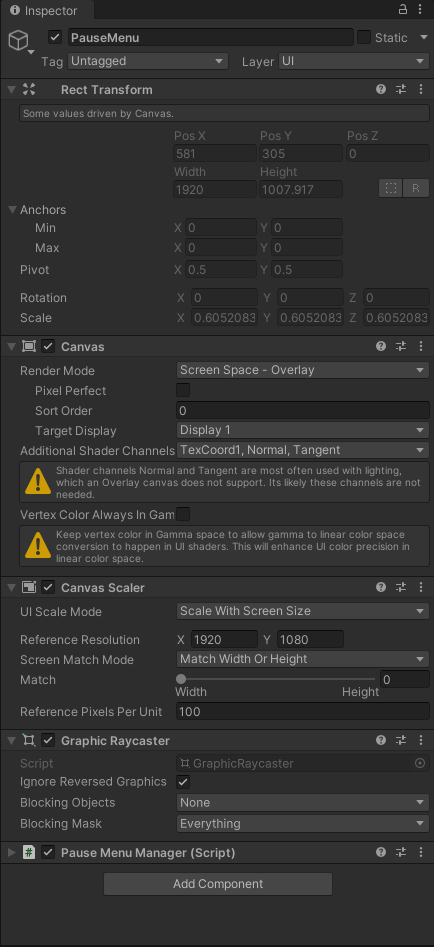 sterile wedge
fast stream
Hey guys, I'm working on a pause menu for my game but am running into an issue i...
sterile wedge
fast stream
Hey guys, I'm working on a pause menu for my game but am running into an issue i...
show your pause menu's recttransform
fast stream
sterile wedge
show your pause menu's recttransform
Isn't it the one in the third image?
sterile wedge
that's your canvas, didnt realise you named it pause menu
the actual UI element itself
show it please
should be an image
@fast stream
if you're not sure, show your UI hierarchy
fast stream
Here's the hierarchy: https://i.imgur.com/R4Epw5g.png
 sterile wedge
You should put all those children into a single empty recttransform
Then anchor the new parent recttransform properly
fast stream
Can i ask why that would be the way to do it rather than keep them separate children of the canvas?
sterile wedge
Because you can't anchor a canvas
The reason why your UI is not staying in the same place in the screen is because it's not properly anchored

In this video we are going to discuss in detail How Anchors and Anchor presets work in Unity and How you can use them to improve your project's UI .
.....................................................................................
📖Check out these resources :
►Adaptive UI in Unity - https://youtu.be/hJ831EXxkco
..............................

Something a lot of new developers struggle with but it's actually really simple! In this video I'll show you the basics of getting to grips with the UI anchors and scaling options inside of Unity!
Join me and learn your way through the Unity Game Engine, the C# language and the Visual Studio editor. Remember, if this video was useful then DROP ...
Lots of videos on this
fast stream
I'll take a watch thanks!
sterile wedge
fast stream
Can i ask why that would be the way to do it rather than keep them separate chil...
just something I realised. you can just keep them separate, but that would mean you'd have to anchor all those elements separately. Far easier to just put them under one parent and anchor that one parent instead
generally you'd want to group your elements using parents to keep it easier to anchor and organise though
fast stream
So, i just watched a few videos and realized i am doing it currectly, i am anchoring each element separately to the top left, example for the logo:
https://i.imgur.com/QB6cVa0.png
I tried creating an empty transform parent and doing it that way as well, but i'm ending up with the same result where the positions are different in build
sterile wedge
if you're still using free aspect, don't
change it to a fixed resolution for now, or an aspect ratio that fits your canvas scaler's reference resolution
fast stream
By build i mean actually building the game to an exe that i run
in the editor when i hit play the positions are correct to what i set them to
 sterile wedge
fast stream
Hey guys, I'm working on a pause menu for my game but am running into an issue i...
sterile wedge
fast stream
Hey guys, I'm working on a pause menu for my game but am running into an issue i...
change this to match height instead of width instead?
otherwise, i'm out of ideas i'm afraid
thank you for being forthcoming with the information though
fast stream
I will try, and it's okay i've just been stumped on this for a few days and thought someone here might have an idea. I appreciate the help very much though 😄
sterile wedge
do let me know if it works or not. I havent made a pc game in a while so i'm not sure
fast stream
Doesn't seem to have worked unfortunately, time for more debugging
low pike
fast stream
Here's the hierarchy: https://i.imgur.com/R4Epw5g.png
are you on 2022.3.4 or lower? It's a bug, update to 2022.3.5
 tawdry ferry
why does my prefab differ when ticking show override?
nevermind, I have fixed it, I think unity's ui is just not that good
sonic geyser
anyone know how to render particles in front of a UI?
fast stream
low pike
are you on 2022.3.4 or lower? It's a bug, update to 2022.3.5
I was on 2023.3.4 and this did fix it for me, thanks you! This was a headache trying to figure out if I was doing something wrong
low pike
sonic geyser
anyone know how to render particles in front of a UI?
Google this, there’s lots of info already out there
sonic geyser
low pike
Google this, there’s lots of info already out there
been trying to for about 2 hours haha for some reason nothing works
low pike
You need to follow the tutorials better than, if it works in the tutorial but not for you.. you've done something wron
rapid ferry
!ide
onyx flowerBOT
💡 IDE Configuration
If your IDE is not autocompleting code
or underlining errors, please configure it:
• Visual Studio (Installed via Unity Hub)
• Visual Studio (Installed manually)
• VS Code*
• JetBrains Rider
• Other/None
*VS Code's debugger plugin is unsupported.
We recommend using VS or Rider instead.
 burnt radish
keen fiber
Whenever I open a project, the canvas loads in into the middle of nowhere. it's ...
burnt radish
keen fiber
Whenever I open a project, the canvas loads in into the middle of nowhere. it's ...
did you ever resolve this?
keen fiber
burnt radish
did you ever resolve this?
Not the canvas in the middle of nowhere, but the text can be fixed by making it a child of an empty game object
burnt radish
keen fiber
Not the canvas in the middle of nowhere, but the text can be fixed by making it ...
yea its weird im having the same problem
 lunar sluice
is there a way to enable snap to grid for canvas elements?
 pale grove
how do i make a vertical layout group with a content size fitter place the layout elements from the top left? currently its adding from the center
mortal robin
pale grove
how do i make a vertical layout group with a content size fitter place the layou...
Pretty sure that's based on where you set the pivot for its RectTransform
pale grove
mortal robin
Pretty sure that's based on where you set the pivot for its RectTransform
it didnt work, i added the second ItemText obj after i changed the pivot

also every parent inside the canvas has its pivot on top left
pale grove
turns out when i deactivate the content size fitter it works fine
still trying to figure out why this is and how to fix it
solved it
just had to change the pivot to 0X 1Y
rapid ferry
so im having a problem with my 2D Title Screen UI not showing up for some reason would that be this discussion or ui-toolkits?
sterile wedge
rapid ferry
so im having a problem with my 2D Title Screen UI not showing up for some reason...
Are you using UGUI or UI toolkit?
 upper blaze
Do you guys know how to fix this weird TextMeshPro text glitch(??)? It happened only on some Android devices (tested on Samsung A23), and on other devices, some text just completely disappear.

 civic meteor
upper blaze
Do you guys know how to fix this weird TextMeshPro text glitch(??)? It happened ...
civic meteor
upper blaze
Do you guys know how to fix this weird TextMeshPro text glitch(??)? It happened ...
Maybe a Z-fighting issue?
low pike
upper blaze
Do you guys know how to fix this weird TextMeshPro text glitch(??)? It happened ...
This usually happens when you change the scale of the recttransform to something small, and then change the font size to something too small
RectTransform scale should always be 1,1,1 on UI, and the font size should be > 1
deft mauve
Whats the best way to avoid UI going crazy whith resolution changes?

It has something to do with canvas scaler?
 low pike
The canvas scalar is part of it
Another is anchor things correctly, and don't use 'free aspect' on the game view
deft mauve
I use a custom resolution yeah, but maybe its anchors, ill see
low pike
a custom resolution will probably give you issues too
Unless that custom resolution is a real resolution and/or aspect ratio
deft mauve
yeah 1920x1080
low pike
You're good there then!
deft mauve
by now setting the anchors that arent ok is not helping with for exaple 4:3 res
 low pike
Remember I don't know your game so I can't be 100% sure what the problem is
I'm assuming those three icons at the bottom should be below the white line
In which case you'll need a horizontal layout group and to control their size and to not have them as siblings of the white line
deft mauve
for now I see that is probably an anchor problem and im fixing it so thanks
low pike
well, maybe siblings is ok.. but you'd want a common parent that resizes
 ionic pulsar
upper blaze
Do you guys know how to fix this weird TextMeshPro text glitch(??)? It happened ...
ionic pulsar
upper blaze
Do you guys know how to fix this weird TextMeshPro text glitch(??)? It happened ...
I love the card art!
deft mauve
is there any way to outline a Gameobject that has opacity?
If you outline anything that has opacity it gradually becomes the color of the outline without the outline
 stray quiver
what size should inventory UI images be for a non pixel game?
i don't want to make the dimensions too small for user who play on bigger resolutions. whats a good size to make the UI elements and inventory items?
soft sail
Could always make it resizable
I'd aim for a portion of your screen, like 40-50% dedicated to an inventory, then divide it down from there.
stray quiver
so would 500x500 be to small for items?
kinda looking for like a size cheatsheet to know what sizes I should be making my various UI elements.
i'm gonna be drawing them all myself hence why i want the demensions to be consistent and visible
soft sail
Well, usually the icons for windows are around 250x250 128x128 so you can take that as a reference.
stray quiver
hmmm ok noted
low pike
Do tests.. make icons of different sizes and see which works for you
 chrome yacht
Hi! So I realized when I built my game it gives me an executable but I am not able to load my old game after I close the executable only when I am still playing. Is there some gui or something that needs to be created so I can play my game the next day from the same spot as before?
Also even if I load the game while it’s running the whole thing might freeze and crash
mortal robin
chrome yacht
Hi! So I realized when I built my game it gives me an executable but I am not ab...
It sounds like it's time for you to create a saved game system
yes, most games include UI to manage, save, and load saved games
chrome yacht
mortal robin
yes, most games include UI to manage, save, and load saved games
Thank you! Does the saved game system let me access where I left the game like another day or something?
I am able to save the game but only can access while I am playing.
Also do you know why the computer sounds like a jet engine when it loads the game and sometimes crashes. My computer is very good so I am surprised . Maybe I am enabling a feature I shouldn’t?
mortal robin
chrome yacht
Thank you! Does the saved game system let me access where I left the game like a...
A saved game system saves whatever information you decide it will save. It is something you need to build yourself
Also do you know why the computer sounds like a jet engine when it loads the game and sometimes crashes. My computer is very good so I am surprised . Maybe I am enabling a feature I shouldn’t?
That sounds like you have an infinite loop in your code. The quality of your computer isn't helpful for that
chrome yacht
mortal robin
A saved game system saves whatever information you decide it will save. It is so...
Thanks you!
Ah copy. Thanks!!
 finite iris
Hello, I am making a little passion project game and like usual, yesterday I saved my project and clicked the X at the top right to close. Today i open up my project and all my UI disappeared with the transformations of all of them having NaN in some of their position and anchors. Even after getting rid of said NaN's the UI will not show up at all. I am getting error "Invalid AABB inAABB UnityEngine.StackTraceUtility:ExtractStackTrace ()". The thing is that I can implement other new UI elements perfectly fine like creating a new text. I think it also worth mentioning I have a backup of my project from four days ago and I opened it up to discover it was also effected by the same problem.
finite iris
finite iris
Hello, I am making a little passion project game and like usual, yesterday I sav...
@mortal robin can you help me
violet sandal
finite iris
<@179367739574583296> can you help me
The Invalid AABB error occurs in Unity when an object has an Axis Aligned Bounding Box (AABB) that is invalid. An AABB is a box that determines the maximum range of an object in the world along the X, Y, and Z axes.
This error can occur when an object or part of an object has an extremely large size, making its AABB unimaginably large, or when an object has an invalid position, such as NaN or Infinity.
It may be caused by
A script changes the scale or position of an object to a very large value or to NaN/Infinity.
A physics simulator causes extremely large velocities or forces that result in large positions or scaling.
A shader changes the position of vertices to a very large value or to NaN/Infinity.
upper blaze
@civic meteor & @low pike thanks guys. In my case, it turns out that you shouldnot use the same font asset for TextMeshPro and TextMeshProUGUI.
finite iris
violet sandal
The Invalid AABB error occurs in Unity when an object has an Axis Aligned Boundi...
Thanks for the help
low pike
upper blaze
<@207358445689634816> & <@257975742820909068> thanks guys. In my case, it turns ...
That doesn't sound right, at all. But if it's working for you, great
 plush solstice
Hey, I'm working on animated text mesh pro effects and was wondering - how can I animate only certain words in a string? I'm also using localization package so I would like to avoid hardcoding the indices. Would greatly appreciate the help.
soft sail
if it's a single string of words, you can just move that game object itself easily, but if it's one paragraph* of words, and you want to move letters independently, then you need to get the vertices and change each of them
Like, you know what I mean. You can move them via gameobject as a whole, but if you don't want to chop it into hundreds of gameobjects then you need to change the vertices per character
plush solstice
I know that I have to manipulate the vertices manually
I found an article that uses text links and I think it's what I actually needed
 quasi parcel
So I have a problem with my UI. I have 2 objects that are sprite renderers instead of images. (Since they are animated, and a group of sprites). But I also have a fade out image that slowly raises its image fill to fade in and out. How could I make the sprite renderers below the screen fadeout image in the canvas. Since the sprite renderers do not follow the regular canvas rules.
 river tapir
does anyone know how to do outlines for grids? Ive been looking everywhere


 quasi parcel
is your game already tile based? if so it should be easy to place UI elements in world space over the squares.
Might be harder ot define what sqaures you need to put the UI sqaures on top of youd have to calculate movable sqaures
quasi parcel
river tapir
does anyone know how to do outlines for grids? Ive been looking everywhere
I guess I should @ u
U dont even have to use UI if you dont want
river tapir
The game is tile based, do you think they just have a texture for each section of the grid and thats what makes the line effect? Rather than using a line renderer or some kind of shader?
 vivid vortex
Hey guys, need your opinion on something. Which one do you prefer? Dark or Light?

 soft sail
river tapir
The game is tile based, do you think they just have a texture for each section o...
soft sail
river tapir
The game is tile based, do you think they just have a texture for each section o...
The 2D game probably uses a sprite atlas for each edge variation, the 2.5D seems to use a shader effect, and xcom could just be rendered with some line tool
 obtuse beacon
How to fix Textmeshpro being blocky when it is very small?

nvm fixed by increasing this scale
 low pike
quasi parcel
low pike
quasi parcel
Sprite renderers aren’t for UI. You can do this with UI. Or setting the canvas to screen space overlay (which it is by default?) should be covering everything
low pike
river tapir
does anyone know how to do outlines for grids? Ive been looking everywhere
You wouldn’t do this with UI
quasi parcel
low pike
Sprite renderers aren’t for UI. You can do this with UI. Or setting the canvas t...
How can I turn a group of sprites into an image? I didnt get anything from google. I understand UI shouldnt mix with Sprite Renderers but I have a group of sprites that I can't seem to turn into an image. and an Animated sprite renderer I cant seem to either.
would I just have to remake both, Idk if you can even animate Images I got conflicting info on that.
Heres what im talking about Idk if this is supposed to be animating but it just doesnt seem to move when using the cursorImage vs the cursor sprite renderer
 mint pine
I want to have a button that scales automatically depending on the size of the text but neither the rect transform scales nor is the text aligned properly, it's just horizontal
sterile wedge
mint pine
I want to have a button that scales automatically depending on the size of the t...
Look up how to make parent image scale with child UI unity
Something like that




 mint pine
thanks, that centers the text correctly, however the image still doesn't scale to the text
sterile wedge
Try changing vertical fit to preferred
mint pine
Thanks a lot!