#⛰️┃terrain-3d
1 messages · Page 8 of 1
 thin hearth
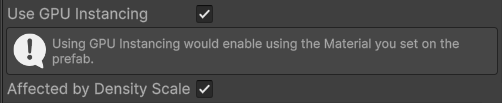
The terrain detail system has no support for LOD.
 tepid mantle
Oh yeah, even says it right there in the pic lol.
 limpid pewter
Yeah i was pretty sure about that, but someone said i should ask you guys here
tepid mantle
thin hearth
The terrain detail system has no support for LOD.
Any reason why you couldn't use Paint Trees and use a grass mesh since LODs are supported for that?
I know it's made for the speed-tree stuff, so I'm going to assume it probably doesnt work out as expected
thin hearth
tepid mantle
Any reason why you couldn't use Paint Trees and use a grass mesh since LODs are ...
Bad performance. Trees aren’t instanced at all
 graceful sequoia
So, I've been trying to figure out how to increase brush sizes for scene editing beyond their in app max of 128 (like for raise / lower), and I've just completely hit a brick wall. I'm working on a massive 60 x 60km landmass, and applying textures of any kind across that large of an area is just super tedious within the current limitations.
I'm not a programmer, coder or scripter, I've no clue how, or even if this is possible within the scope of things. I'm using Unity 6, of note.
thin hearth
graceful sequoia
So, I've been trying to figure out how to increase brush sizes for scene editing...
 sand karma
So one for the road and two separate ones for the sidewalks? 
thin hearth
sand karma
So one for the road and two separate ones for the sidewalks? <a:Thinkge:97809058...
Yep. Just add the component three times. Way cheaper than a mesh collider
graceful sequoia
thin hearth
https://docs.unity3d.com/Packages/com.unity.terrain-tools@4.0/manual/index.html
I may be missing something there, cause I've had that one installed since I first started and haven't seen anything in there that would let me increase brush sizes higher than the default maximums. Would you mind elaborating on your suggestion?
thin hearth
graceful sequoia
I may be missing something there, cause I've had that one installed since I firs...
You can expand the brush size to set a minimum and a maximum
graceful sequoia
thin hearth
You can expand the brush size to set a minimum and a maximum
Well nuts, it wouldn't let me use a gif to show that you just blew my mind with that one lol.
But yah, thank you, you just saved me so much time there. I had even tried asking chatgpt to help me figure out that one and it couldn't figure it out either lol. I guess U6 is too new for it. 😛
thin hearth
This is at least a few years old
graceful sequoia
I'm new to Unity, and really any 3d programs and digital art in general, and I'm old, trying to teach myself a new skill from scratch here to pass the time.
I really appreciate the help.
 meager linden
It says renderer component missing on any of the grass assets i try to use


Another thing to is why cant i use grass texture
thin hearth
meager linden
Another thing to is why cant i use grass texture
Grass texture is a legacy feature. Grass prefabs should have a single MeshRenderer component at the top of the hierarchy
meager linden
thin hearth
Grass texture is a legacy feature. Grass prefabs should have a single MeshRender...
How do i get legacy features?
thin hearth
You don't want this one 😉
meager linden
So i ill go with option 2
 dapper shell
any time i bring a model in from blender as an fbx it becomes non corporreal
i cant add a box collider because then i can twalk through the doorways i made in blender
 tight salmon
Working on my first terrain for my little game and was just going to use low poly assets but they're all just importing as pink. No idea how to fix that.

 gaunt cedar
tight salmon
Working on my first terrain for my little game and was just going to use low pol...
gaunt cedar
tight salmon
Working on my first terrain for my little game and was just going to use low pol...
Check back at the asset store and see if it’s compatible with your Unity version and/or render pipeline.
tight salmon
i figured it out. I was on the HDRP. The page did say it was compatiable with it but wouldn't work still. Swapped over to the built in redner pipeline and they all work now. Not sure what was going tbh.
 winter minnow
tight salmon
i figured it out. I was on the HDRP. The page did say it was compatiable with it...
winter minnow
tight salmon
i figured it out. I was on the HDRP. The page did say it was compatiable with it...
Assets that supporting multiple pipelines usually doesn't mean that the same assets work in the render pipelines, but that the packages for other render pipelines are contained within the asset itself
tight salmon
winter minnow
Assets that supporting multiple pipelines usually doesn't mean that the same ass...
Oh okay. That would get confusing pretty quick lol.
 desert rock
One of the laid off people from unity that worked on the (hopefully not cancelled) world building system, posted this video showing the work he has done on it, man...this system is insanely good I really hope its not going anywhere.
https://www.youtube.com/watch?v=bibvL5GSdwc
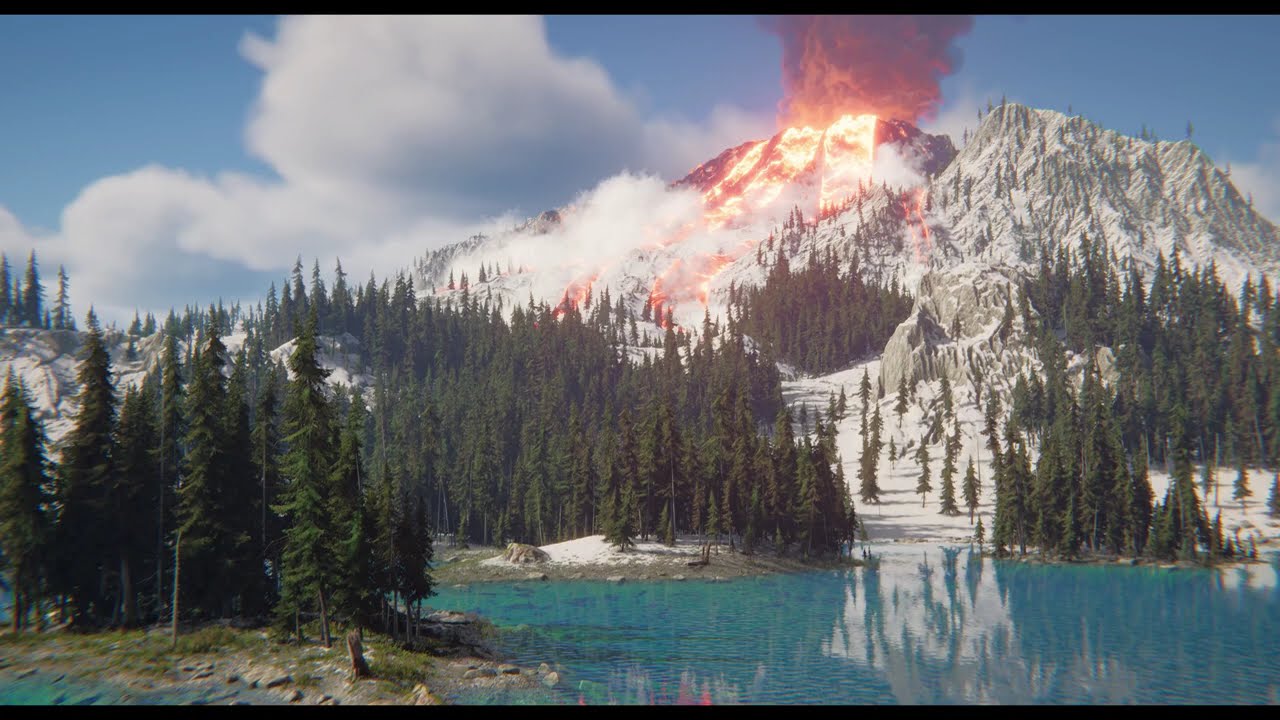
A quick run down of some of the things I did while at Unity. Most of the work I'm showing is from the new World Building tool that we were originally planning to ship before most of the team were laid off or moved onto other projects.
Detail breakdown:
Unite Volcano shot
I created this scene for the Unity Unite Conference in Oct 2024 in just u...
this video is showcasing more of the capabilities of the new system
some that we didnt see in the unite conference
graceful sequoia
desert rock
One of the laid off people from unity that worked on the (hopefully not cancelle...
dang, video was privated already. =\
desert rock
damn, probably was not allowed to showcase that
graceful sequoia
Anyone know of some good tutorial playlists that keep each tutorial item contained (no call-backs to prior videos), and easy to understand for someone with no real modeling or 3d tool experience? (and really bad adhd)
Or otherwise, anyone exceptionally bored or helpful that's willing to personally guide a newb through some U6 stuff? :p
I've got a decently sized landmass that I'd like to start applying terrain textures to, and trying to figure out some stuff with it – a lot of things, really, hence not just posting em.
 solar swan
desert rock
One of the laid off people from unity that worked on the (hopefully not cancelle...
solar swan
desert rock
One of the laid off people from unity that worked on the (hopefully not cancelle...
Most of the world building tools they showcased exist as assets on the store. The only thing missing is proper engine support for world streaming (particularly terrains being less memory intensive)
thin hearth
Nah, the asset store stuff is really jank because the underlying terrain engine is simply terrible. At best, it works with some caveats. But it'll never be performant or good looking, nor will the workflow be as good as it should be.
It's closed source, so it can't be modified, and it can't be reimplemented properly because Unity doesn't expose PhysX heightfield colliders.
 abstract lily
Hello sorry to bother is anyone free for anyhelp?
im new to unity 3D mapping and its actually really hard ha, Im currently trying to add trees into my map but no matter what there pink
 coral cliff
abstract lily
im new to unity 3D mapping and its actually really hard ha, Im currently trying ...
coral cliff
abstract lily
im new to unity 3D mapping and its actually really hard ha, Im currently trying ...
convert built in materials to URP (Shader Error
tepid mantle
https://i.imgur.com/JqcqpUC.jpeg
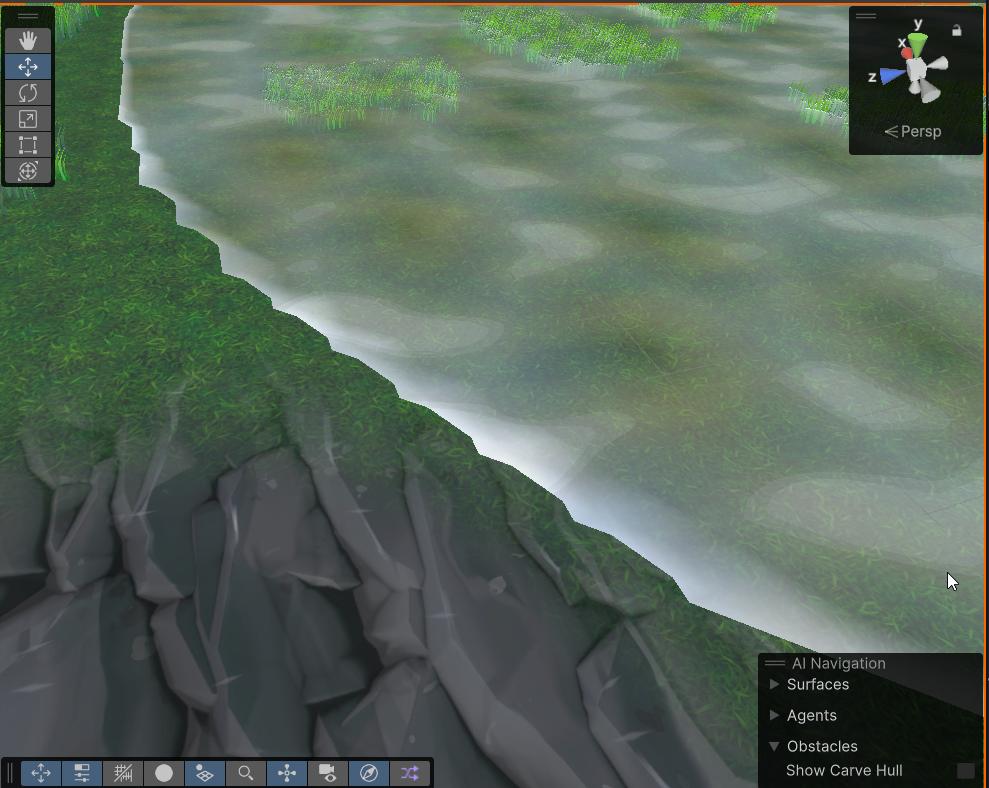
What are some ways to fix the hard edges here? Smaller terrain?

Tried smooth height and notta
I could probably do something in the shader but just wondering
graceful sequoia
tepid mantle
https://i.imgur.com/JqcqpUC.jpeg
What are some ways to fix the hard edges here? ...
Are you talking about the waterline or the edges of the dirt path looking part?
Adding some brush scatter could make the path look less straight and even as you paint it on.
The water, at least to me, looks just non-uniform enough to be somewhat realistic. Any more straight and it'd take on a more cartoony style, unless that's what you're going for.
Funny enough, I'm still trying to figure out how to paint on those textures myself, can only find how to apply to an entire layer so far. But, I figured out the scatter thing when building up my landmass itself at least.
If it's something else entirely, sorry, I wish I could help, I'm new af here myself, but your message was an hour ago when I saw it, I hope it's any help.
graceful sequoia
tepid mantle
Tried smooth height and notta
Also, for this one, try holding shift if you want to add a little more roughness back rather than just smoothing.
Idk, if any of what I'm suggesting will help, but yeah. Just trying to share what little I know heh.
tepid mantle
Shifting does actually smooth it out a bit more but it's still pretty rigid. I'm thinking doing some hard edge detection in the shader and maybe softening the up and maybe an outline will maybe make it seem somewhat more presentable
https://i.imgur.com/yk5jdPW.jpeg
Hmm, still kinda meh. Tried playing around with settings too
 signal quail
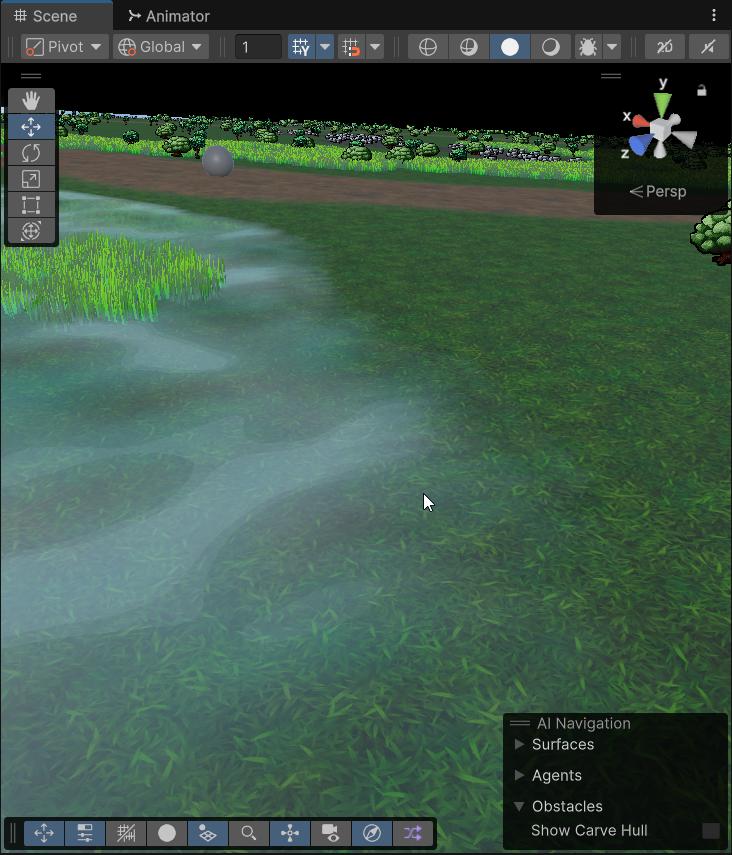
hello, do you know how to make the edges more softened and not raw like currently?
 tepid mantle
https://i.imgur.com/BC8znPB.jpeg
I guess soft edges work but I really wanted that edge foam
 graceful sequoia
signal quail
hello, do you know how to make the edges more softened and not raw like currentl...
graceful sequoia
signal quail
hello, do you know how to make the edges more softened and not raw like currentl...
A small amount of brush scatter, reduce brush strength a little and perhaps use one of the rounder brushes that maybe has a texture pattern to it to add variance. Those should help a little to prevent those shelves by playing around with those settings a bit.
signal quail
Ok thanks is anyone how to put ground on the tunnel and not go through it
 graceful sequoia
signal quail
Ok thanks is anyone how to put ground on the tunnel and not go through it
graceful sequoia
signal quail
Ok thanks is anyone how to put ground on the tunnel and not go through it
You "might" be able to do that with the bridge tool? I'm not certain, as I'm still learning a lot myself, but it may be worth a shot in case it works. I don't know for sure how interactions between multiple objects work yet, but there's always ctrl+z if it doesn't work.
The bridge tool is Sculpt > Bridge
signal quail
graceful sequoia
The bridge tool is Sculpt > Bridge
cant you help me for this ?
signal quail
I don't know why it still goes in the middle of the tunnel when I don't want it to go to the TOP
graceful sequoia
signal quail
cant you help me for this ?
Unfortunately, I'm still too new to offer much beyond "Try this until someone that knows better shows up to answer. Be willing to Ctrl+Z if that doesn't work."
My only other suggestion would be to perhaps use the hole tool: Make your mound over and through the tunnel, then cut the hole back out with the hole tool.
Not a perfect solution, and may not work how you want it to either, but it's the only one that I personally can think of.
signal quail
graceful sequoia
Unfortunately, I'm still too new to offer much beyond "Try this until someone th...
thanks anyway
graceful sequoia
Np, wish I could offer more, just figure trying a few things while waiting for better couldn't hurt.
That approach has helped me a lot. :)
thin hearth
tepid mantle
https://i.imgur.com/JqcqpUC.jpeg
What are some ways to fix the hard edges here? ...
Make the water fade out at the edges
thin hearth
signal quail
Ok thanks is anyone how to put ground on the tunnel and not go through it
Use the terrain holes tool to make a hole in it
Can be a bit finicky Probably need to use some meshes to cover up the edges of the hole, but it works
signal quail
no have "hole"
 coral cliff
signal quail
I don't know why it still goes in the middle of the tunnel when I don't want it ...
coral cliff
signal quail
I don't know why it still goes in the middle of the tunnel when I don't want it ...
you basically want to either put the tunnel in the ground, and create a hole through the terrain, or make a seperate gameobject for a road above
limpid pewter
I found out that enabling Height based painting works fine. Is this a standard method ?
solar swan
Precise texture splatting is not typically something that you would do with terrains, while the splats are accurate, they are not supposed to be used to make tile accurate effects. You are expected to always blend splats over multiple pixels. With a custom shader you could however change that and make up something that looks more precise
signal quail
coral cliff
you basically want to either put the tunnel in the ground, and create a hole thr...
so I have to fill the tunnel and at the end of my creation I remove what is inside but how?
 lucid trench
Pretty consistently, I'm getting the following error when adding trees to a terrain:

 lime thunder
How do I keep my material from shining? The smoothness and metallic are set to 0
 tepid mantle
thin hearth
Make the water fade out at the edges
tepid mantle
thin hearth
Make the water fade out at the edges
But let's say I do want some foam or some edge where the water makes contact with the terrain. What would the idea be here?

https://i.imgur.com/HLh6uly.jpeg
My thinking is perhaps feather a bit from the edge perhaps?
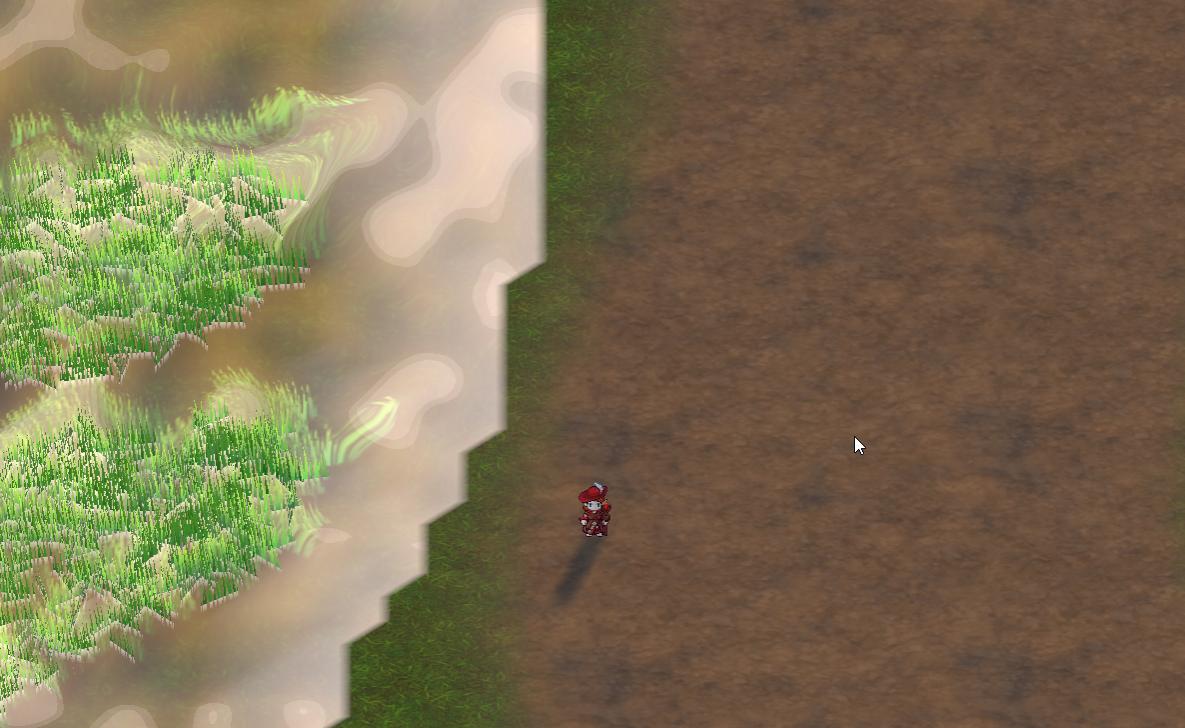 tepid mantle
What I find odd too is that decreasing the heightmap resolution does somewhat smooth the edges out a lot more too
it's like maybe I need some filtering applied to the map
tepid mantle
Seems like painting with the max heightmap does help a bit after redoing, and I think I got the idea of the heightsmooth tool. I thought it kinda blended between multiple heights, but seems to require to start near the edge and drag it in the direction
There is also that terrain slope tool which I should probably grab
thin hearth
tepid mantle
But let's say I do want some foam or some edge where the water makes contact wit...
Smooth tool should work 
The "pixel error" setting affects the density of the terrain mesh
tepid mantle

Maybe it's just ortho projection but it's so pixely
yeah and I got pixel error at 1
signal quail
I still can't make a HOLE in a tunnel, it's still incredible! if I make a hole the whole top comes off

if anyone has the solution i would like it
 rigid junco
signal quail
I still can't make a HOLE in a tunnel, it's still incredible! if I make a hole t...
rigid junco
signal quail
I still can't make a HOLE in a tunnel, it's still incredible! if I make a hole t...
With unity's built in terrain, you simply can't
It uses a heightmap so it is "2D" in a sense
You can't have overhangs, tunnels etc.
You'd need to make a separate mesh that goes over the tunnel, or use some other terrain asset
thin hearth
I managed just fine here

Literally just this

Don't make a hole on the top, make a hole in the front where the entrance is. Then make some props to clean it up because it's pretty imprecise
signal quail
for the other problem it's not serious I abandoned the idea of the tunnel x) can you tell me how to make the edges softened and not raw?
 lime thunder
How do I keep my material from shining? The smoothness and metallic are set to 0
lime thunder
lime thunder
How do I keep my material from shining? The smoothness and metallic are set to 0
can i get help?
thin hearth
signal quail
for the other problem it's not serious I abandoned the idea of the tunnel x) c...
Increase the resolution of the splatmap (control texture resolution setting)
Fair warning though, this can cost a lot of memory so if you have multiple terrains probably stick to 2048 at most 😅
 mystic terrace
noob in unity here why does my scene have this blue shade all over it?

 pliant bough
Ambient light
thin hearth
mystic terrace
noob in unity here why does my scene have this blue shade all over it?
Fog
Not really a terrain question, but depending on the rendering pipeline you chose, the settings are either on the environment volume (for HDRP) or in the lighting window (for the other two)
signal quail
thin hearth
Fair warning though, this can cost a lot of memory so if you have multiple terra...
wow I didn't understand what I should do
lime thunder
help.. please?
 mystic terrace
thin hearth
Fog
mystic terrace
thin hearth
Fog
Thanks!
thin hearth
thin hearth
lime thunder
help.. please?
Does your tree have a Meshrenderer?
 opaque jasper
I have sliced the png images to use them for terrain but they look like this when added:

any idea why and how could i fix this?
thin hearth
opaque jasper
I have sliced the png images to use them for terrain but they look like this whe...
 worthy quest
Hello
How can I resize a terrain without stretching the heigh and splat maps?
 heavy charm
guys why my grass fade out too quickly i want to fade out with far more distace in viewport

 thin hearth
worthy quest
Hello
How can I resize a terrain without stretching the heigh and splat maps?
thin hearth
worthy quest
Hello
How can I resize a terrain without stretching the heigh and splat maps?
You mean like extending it?
The easy way is to just add more terrains. The hard way is to write a script for it. Which I don't recommend because the terrain API is insane and will make you pull your hair out 🙂
thin hearth
heavy charm
guys why my grass fade out too quickly i want to fade out with far more distace ...
Hmmm, this doesn't seem like the doing of the terrain system. Grass is simply not rendered after the cutoff distance. It doesn't reduce density like that 
What shader are you using for the grass?
worthy quest
thin hearth
You mean like extending it?
Yeah extending. So I just add a terrain next to it, is ther a way to match painting height on them?
thin hearth
Yeah if you install the terrain tools package that should work automatically
worthy quest
thin hearth
Yeah if you install the terrain tools package that should work automatically
okay, what about making the terrain smaller without stretching. I need to increase its height and decrease the width
thin hearth
I don't know any tools to help with that
heavy charm
thin hearth
Hmmm, this doesn't seem like the doing of the terrain system. Grass is simply no...
a custom shader
also
i am using a custom shader why my grass which i set the material with gpu instancing nnot usig dynnamic butching ??
someone can answear my question ??

and also why my cpu usage is so hight its only rendering
tepid mantle
dynamic batching would be disabled with instancing
tepid mantle
Speaking of instancing:
Binding size (630784) of [Buffer "UniformBuffer 80"] is larger than the maximum uniform buffer binding size (65536).
 - While validating entries[2] as a Buffer.
Expected entry layout: {type: BufferBindingType::Uniform, minBindingSize: 0, hasDynamicOffset: 0}
 - While validating [BindGroupDescriptor] against [BindGroupLayout (unlabeled)]
 - While calling [Device].CreateBindGroup([BindGroupDescriptor]).```
Running into this problem when painting detailed meshes with WebGPU. The interesting thing is that it works fine on WebGL, so it seems to backwards for it to create problems for its successor lolbleh, i hate beta testing
 rocky folio
Hi all. I'm asking here even tho the goal is to achieve this without terrain
How does unity terrain trees sway? I don't use terrain, i'll be modelling my own trees, and i'd like to use windzone
What kinda setup do i need to do to make my tree sway with windzone?
solar swan
rocky folio
Hi all. I'm asking here even tho the goal is to achieve this without terrain
How...
the shader applies vertex displacement, it has nothing to do with the terrain, you can implement the source of that wind (wind zones, a global parameter or something else) any way you like. typically vertex colors on the mesh are used to mask different types of displacement (sway, flutter, bend, squash etc) to create separation between leaves, brances and the trunk
 candid python
What can I do to bring down performance cost here, I am looking into getting rid of wind as I don't use it. But why do trees take of 18.2% of the work!
 solar swan
candid python
What can I do to bring down performance cost here, I am looking into getting rid...
solar swan
candid python
What can I do to bring down performance cost here, I am looking into getting rid...
how many trees?
candid python
solar swan
how many trees?
Too many to count
solar swan
so you could try making them countable 😉
candid python
That's a good suggestions lol, I'll see if I can bring them down. Do you have any recommendations on better ways to make a forest other then spamming a bunch of terrain trees?
solar swan
candid python
That's a good suggestions lol, I'll see if I can bring them down. Do you have an...
add fog, so you need fewer and get a similar vibe, add impostors to the last LOD and bring it in closer.
you could always buy a GPU foliage instanced rendering asset and render 100k trees no problem
candid python
solar swan
add fog, so you need fewer and get a similar vibe, add impostors to the last LOD...
The game is open world, I do use fog but removing trees would make the forest seem more empty. I'll look into using imposters on that last LOD, it must look better then the default billboard I'd assume.
About the GPU foilage instanced rendering asset, do you think you could send me the link to one you'd recommend?
solar swan
candid python
The game is open world, I do use fog but removing trees would make the forest se...
this one works well and has responsive support: https://assetstore.unity.com/packages/tools/terrain/foliage-renderer-2-307081

Get the Foliage Renderer 2 package from Dicewrench Designs and speed up your game development process. Find this & other Terrain options on the Unity Asset Store.
candid python
solar swan
this one works well and has responsive support: https://assetstore.unity.com/pac...
Thank you so much for the help, I'll look into this asset!
solar swan
you can pair that up with various other assets, you would still need a proper foliage and terrain shader that supports masks, seasons and various other effects. Maybe also look into "The Visual Engine", "Microsplat", "Microverse", "Better Lit Shader" and associated modules.
candid python
solar swan
you can pair that up with various other assets, you would still need a proper fo...
Alright, once again thank you very much for the help
 warm urchin
hi there!
i was watching tutorials for adding grass and stuff like that in the terrain, however, i cant find the option for "edit details"> "add DEtail mesh"
Can anyone help me figure out how i can do this. thanks
(also i will next need help regarding this pink trees as well)


 topaz palm
im making a level for the first time, should each of the prefabs have a seperate collider or do i make bigger colliders for patches of tiles? not sure whats better for performance

 frozen mauve
For whatever reason, I opened up my project, tried to paint using Unity's built-in terrain system, and nothing appeared. Been tryin' to trouble-shoot this for the past few hours.
 velvet radish
Hello everyone! I coded a coustume script that generates my terrain and also gives it the given texture based on the height. And there always a section where it renders incorrectly or don’t even give it a texture.
 velvet radish
Hello everyone! I coded a coustume script that generates my terrain and also giv...
velvet radish
velvet radish
Hello everyone! I coded a coustume script that generates my terrain and also giv...
Can you help @sick coral ?
 novel monolith
When I'm trying to paint the grass from a detailed mesh, it's spawning below the terrain not exactly on the terrain
 zenith loom
velvet radish
Can you help <@104711806064287744> ?
zenith loom
velvet radish
Can you help <@104711806064287744> ?
dont directly @ the admins.
zenith loom
novel monolith
When I'm trying to paint the grass from a detailed mesh, it's spawning below the...
is mesh's pivot centred?
frozen mauve
For whatever reason when I texture paint it's low poly. This just started happening randomly
 severe sphinx
I'm really hoping a terrain wizard can help me solve this. I feel like it has such a simple solution. I've spent the past two hours trying to figure this out and have completely given up. I'm very new to unity and clearly not good at it.
Does anyone know why my grass is not sticking to the ground? What do I need to do to solve this?
 severe sphinx
novel monolith
When I'm trying to paint the grass from a detailed mesh, it's spawning below the...
severe sphinx
novel monolith
When I'm trying to paint the grass from a detailed mesh, it's spawning below the...
Did you find a solution? I am having the same problem, except my grass is above the terrain
novel monolith
severe sphinx
Did you find a solution? I am having the same problem, except my grass is above ...
Yes, I found a solution. I used trees instead of grass and had to put LOD on an empty parent object
solar swan
severe sphinx
I'm really hoping a terrain wizard can help me solve this. I feel like it has su...
where is the pivot of that grass prefab? is it at the bottom center of the model?
thin hearth
severe sphinx
I'm really hoping a terrain wizard can help me solve this. I feel like it has su...
The grass renderer ignores everything except the mesh. This probably means the mesh data itself is off-center
severe sphinx
@novel monolith @solar swan @thin hearth thanks for the responses, i will try to incorporate one of the fixes
 finite moat
hey guys does anyone know where i can find textures for my grass? i was going to use the default unity standard assets as thats what it seems like most people use online, but i cant seem to find it anywhere.
solar swan
finite moat
hey guys does anyone know where i can find textures for my grass? i was going t...
Look at the free demo assets published by Unity on the asset store. Most people use the Viking village assets for their demos.
thin hearth
finite moat
hey guys does anyone know where i can find textures for my grass? i was going t...
I’m sure you could find the old “standard assets” packages somewhere but here’s some newer ones.
https://assetstore.unity.com/packages/3d/environments/unity-terrain-hdrp-demo-scene-213198
https://assetstore.unity.com/packages/3d/environments/landscapes/terrain-sample-asset-pack-145808

Elevate your workflow with the Unity Terrain - HDRP Demo Scene asset from Unity Technologies. Find this & other Environments options on the Unity Asset Store.

Elevate your workflow with the Terrain Sample Asset Pack asset from Unity Technologies. Find this & other Landscapes options on the Unity Asset Store.
 lone ridge
solar swan
Look at the free demo assets published by Unity on the asset store. Most people ...
lone ridge
solar swan
Look at the free demo assets published by Unity on the asset store. Most people ...
Hey bro, do you know a way my camera can load all the grass at once? It just that it looks kinda ugly that the player can see the grass loading. I'm using the normal Unity Terrain.
frozen mauve
For whatever reason when I texture paint it's low poly. This just started happening randomly, and I've been trying to troubleshoot for the past week.
 nimble cairn
Using a shader to curve my terrain and it's creating seams along where it's bending. Any suggestions for smoothing this out?
 minor merlin
frozen mauve
For whatever reason when I texture paint it's low poly. This just started happen...
minor merlin
frozen mauve
For whatever reason when I texture paint it's low poly. This just started happen...
What do you mean by low poly, its pixelated? You can provide some pic tho
 dusk fern
nimble cairn
Using a shader to curve my terrain and it's creating seams along where it's bend...
dusk fern
nimble cairn
Using a shader to curve my terrain and it's creating seams along where it's bend...
Amazing.
solar swan
there are some techniques for blending terrain and object shaders, you can find them via google (it ends up needing a separate draw call for these objects though)
limpid pewter
solar swan
there are some techniques for blending terrain and object shaders, you can find ...
Im just not sure how would i target only the top of the models
solar swan
limpid pewter
Im just not sure how would i target only the top of the models
you could take the vertex normal and do a dot-product of it with the world.up vector, the resulting value would be a rating of how much "up-facing" the pixel is (-1 down, 0 sideways, 1 up)
limpid pewter
solar swan
you could take the vertex normal and do a dot-product of it with the world.up ve...
Thanks for the tip, will try right away ❤️
limpid pewter
Sorry if im spamming questions today, this is my only free day in the week 🙂
solar swan
make sure you're exporting them in the right coordinate space and size
are these are made in blender?
limpid pewter
Yes
solar swan
if so, you need to change the up-direction on export
unity is Y up, blender is Z up
also one blender unit imports as something like 1 or 10 cm into unity, you can change all that in your export settings, there is also a scale-adjustment in the import settings in unity
limpid pewter
Okay, thanks mate
Also your blending mesh-terrain tip was really helpful, managed to get it working 🙂
 worthy wind
Can anyone tell me how to make the terrain inside the park better?
Like more natural with more deformation on surface?
 rose sentinel
worthy wind
Can anyone tell me how to make the terrain inside the park better?
rose sentinel
worthy wind
Can anyone tell me how to make the terrain inside the park better?
Realistically speaking, parks like these usually have a pretty flat surface all around, but some subtle details like adding slightly higher terrain near edges like these might be worth exploring (I dont 100% know if it will improve the looks or not).
I would also tone down the motion blur by a lot, or more better turn it off, its pretty unpleasant when its this high
 worthy wind
rose sentinel
Realistically speaking, parks like these usually have a pretty flat surface all ...
worthy wind
rose sentinel
Realistically speaking, parks like these usually have a pretty flat surface all ...
thanks for the advice
 distant tapir
i messed up big times 5 months ago and created a huge hole, does someone know how to fix it? (theres a well in the middle  )
)

 buoyant pecan
WHy is it so hard to paint a tree :_: i get this error no valid mesh renderer altho both leafs and the tree have mesh renderers and filters i can place the tree manualy and everything works normally but in the paint trees it doenst let me ofc i tried a cuple of things but nothing seems to work


 solar swan
buoyant pecan
WHy is it so hard to paint a tree :_: i get this error no valid mesh renderer al...
solar swan
buoyant pecan
WHy is it so hard to paint a tree :_: i get this error no valid mesh renderer al...
the values on that transform are a bit crazy, maybe bring them closer to the origin and scale 1, disable dynamic occlusion (no idea if that helps). you should also put a LOD group on the root of the tree.
buoyant pecan
ill try it thanks
solar swan
 tacit ibex
How to fix floating trees
tacit ibex
How to fix floating trees
offset the position of the mesh in the prefab or modify the pivot in the source mesh. trees should always extend at least an amount equal to their trunk diameter below the surface to account for sloped terrain.
tacit ibex
Just to make sure the prefab is where the tree is floating with nothing around it
 azure veldt
Hi, can someone please tell me either how to delete splatmaps and/or how to completely delete a terrain, thanks
solar swan
azure veldt
Hi, can someone please tell me either how to delete splatmaps and/or how to comp...
delete the terrain data asset
azure veldt
solar swan
delete the terrain data asset
Thank you, is it possible to remove a splatmap?
solar swan
azure veldt
Thank you, is it possible to remove a splatmap?
there will always be a splatmap as part of the asset, but you can clear it
azure veldt
my problem is, I have 5 splatmaps, I added a new texture and painted with it now I have over 100MB in the terrain file
and cant see how to reset it back to one splatmap
solar swan
if the terrain has 5 layers you have 2 splat maps, if they are too large you can reduce their resolution in the terrain settings
azure veldt
I dont really want to reduce the resolution, I have 5 splatmaps
solar swan
you can't have 5 splatmaps
azure veldt
wana see a screenshot?
I have to reload the old project because I just deleted the terrain
theres 4 after restart

each splatmap is 21M so I need to reduce somehow
solar swan
if you remove the layers from the terrain you'll have fewer splat maps, every 4 layers/textures, you get 1 splat
azure veldt
I think this happened because I kept painting, then adding a new texture and painted more then added new texture and painted, and it seemed to add a new splatmap each time I added to the terrain textures
solar swan
if you make a terrain > 2k, nobody can help you anyway
azure veldt
solar swan
if you make a terrain > 2k, nobody can help you anyway
I dont know whats happening here, I am just using the tools Unity gives me
solar swan
in the "paint terrain" panel you see the layers, remove them
azure veldt
but doesnt that remove my textures?
azure veldt
are you sating I am using too many terrain texrtures?
solar swan
definitely
azure veldt
I see
solar swan
what resolution does your heightmap have?
azure veldt
yes I have 16 textures
solar swan
what render pipeline?
solar swan
you may want to consider getting microsplat if you have that many layers
azure veldt
well now that I know how critical the number of textures is, I will reduce that significantly
I dont know what microsplat is
but I can google it
you think thats a solution?
and is 2048 overkill?
solar swan
2k is fine, if you need more, make additional terrains
azure veldt
when you say 2k, do you mean 2048?
solar swan
microsplat may improve performance, depends on project specifics whether it matters
azure veldt
ok Ill check it out, thanks so much for your advice
solar swan
issue with 16 layers is that they are all sampled, even if blank, microsplat fixes that
azure veldt
to be honest I dont need 16 layers, I just added them to see how it looks and I dont even use some of them, I can easilly drop it to 8
 coral remnant
how do I make 2d tile textures take more space that the space they take up on the grid?
like to have it overflowing of sorts
if someone can help me, ping me please
candid python
Had a message before that I deleted, it turns out trees as gameobjects isn't way to more performance heavy then trees on terrain. Difference is I'm able to make them not use the SRP batcher and us GPU instancing on the imposters (drasticallg reduces batches in stats)
candid python
candid python
Had a message before that I deleted, it turns out trees as gameobjects isn't way...
This'll atleast be my solution till I am able to get foilage renderers and such in the future
 novel glade
How i can make this slope down smoothly so i can put a road on it but still make it look like a mountainous area?


 solar swan
 plush crypt
can anyone tell me how to remove this ugly edge of grass texture?
plush crypt
can anyone tell me how to remove this ugly edge of grass texture?
Try moving the alpha clip threshold
Can you show the prefab hierarchy and collider settings?
can you show the transform too please
your collider is tiny
what specifically didn't work?
have you checked the layers and collison matrix?
we'll from what you're showing it looks like your tree prefab is not set up correctly for use as a terrain tree, maybe try setting it up in the recommended way
scale = 1, no offset, all renderers under the LOD group, no renderer on the root
then your terrain settings might be broken
plush crypt
solar swan
Try moving the alpha clip threshold
Can you please tell me where is that
I am totally new 🙂
solar swan
plush crypt
Can you please tell me where is that
I am totally new 🙂
on the material
 ocean wadi
I am trying to figure our terrain for the first time and I so far have made planes and modified them using Perlin noise. I want to add paths onto the terrain to give direction on where to go. Probably some predefined points to objects that spawn in but the paths are random. What kind of options do I have?
Looking things up gave a bunch of examples but not much on how to actually get started on anything...
solar swan
ocean wadi
I am trying to figure our terrain for the first time and I so far have made plan...
Do you want to paint those paths as a splatmap, or do they modify the terrain shape, or both? Terrain, in the end, is still a plane that is generated continuously based on texture masks and camera positions.
plush crypt
solar swan
on the material
thanks man it worked
 ocean wadi
solar swan
Do you want to paint those paths as a splatmap, or do they modify the terrain sh...
ocean wadi
solar swan
Do you want to paint those paths as a splatmap, or do they modify the terrain sh...
Both.
 tall crypt
so after some researching I learned a way to make your ground texture look better is to rotate the tiles. I've been trying to figure out how to do this in Unity but keep getting search results for other programs. can someone point me in the right direction?
 tall crypt
so after some researching I learned a way to make your ground texture look bette...
tall crypt
tall crypt
so after some researching I learned a way to make your ground texture look bette...
Finally found a Reddit thread that seems to have an answer.
To diversify the ground texture on Unity terrain I would first have to create a shader graph to do so. But I can't use shader graphs on Unitys terrain, so I would have to disable draw mesh instanced, which would then make it so it doesn't line up with my neighboring terrains. Agh. Might be a lost cause and need to just create a bunch more custom ground textures and diversify it a bit that way
 rancid barn
trying to add grass model to my terrain, the mesh renderer is attached to the child of an empty parent, does the mesh renderer need to be attached to the parent?
 winter minnow
tall crypt
Finally found a Reddit thread that seems to have an answer.
To diversify the gr...
winter minnow
tall crypt
Finally found a Reddit thread that seems to have an answer.
To diversify the gr...
Unity's Terrain can't really be expanded so what you see in the docs is what you get
Tile rotation is a really neat technique, but it's also not that necessary
Most games with terrain ever have been doing fine with traditionally tiling textures
If you're able to cover large terrain areas with details like rocks, trees, grass, buildings and modeled terrain features, there are few areas where repeating can stick out
Unity Terrain gives you layer painting which helps a lot, and that's something you likely want even with the fancier non-tiling texture mappings
What helps the most is authoring the terrain textures while previewing them as tiled, so you can quickly notice repeating patterns and simply iron them out
A well visually balanced texture will not look harsh, even if the repetition is not particularly hidden
tall crypt
winter minnow
A well visually balanced texture will not look harsh, even if the repetition is ...
Thanks for the detailed response as always Spazi, I spent a bit reworking my ground textures hoping they look better now

before it was like this:
 winter minnow
tall crypt
Thanks for the detailed response as always Spazi, I spent a bit reworking my gro...
winter minnow
tall crypt
Thanks for the detailed response as always Spazi, I spent a bit reworking my gro...
No repetition to be seen ^^
solar swan
tall crypt
Finally found a Reddit thread that seems to have an answer.
To diversify the gr...
you may want to have a look at the "microsplat" asset which as various modules for anti-tiling, including a stochastic sampler that removes tiling entirely at the cost of x6 the texture samples. The technique is described here: https://medium.com/@jasonbooth_86226/stochastic-texturing-3c2e58d76a14

Medium
Back in 2019, Erik Heitz and Thomas Deliot release a wonderful paper along with a Unity implementation of an anti-tiling technique called…
the most common (and easiest) anti-tiling techniques are a) resampling and overlaying the texture at a lower uv scale and b) blending in various noise variations
tall crypt
Yeah since shaders on terrain is a bit above my wheelhouse for now I think I opted to make it look less tiled with variance in terrain colors/textures at different tiling amounts, I also want to add more things to nature (like bigger rocks or maybe the occasional snake in the grass) which I think should distract the average player enough to not notice
 drifting vector
is it possible to make cloud props move in the sky by connecting particles to them?
or am i just dumb
winter minnow
drifting vector
is it possible to make cloud props move in the sky by connecting particles to th...
I don't know what a "prop" means in this context, but you can't generally make anything move by "connecting" particles to it
Particles move on their own however the particle system dictates
finite moat
how can I increase my grass's density?
winter minnow
finite moat
how can I increase my grass's density?
Was my solution in the other channel not sufficient?
finite moat
winter minnow
Was my solution in the other channel not sufficient?
I dont believe so 😥
winter minnow
finite moat
I dont believe so 😥
You may want to be more specific
What happens when you crank up the opacity of your grass detail brush to the max and try painting
 scenic garnet
How to import fbx files
 small lintel
finite moat
how can I increase my grass's density?
small lintel
finite moat
how can I increase my grass's density?
On another note, unity is pretty good for details but if you want way more control I reccomend https://assetstore.unity.com/packages/tools/painting/prefab-painter-2-61331

Get the Prefab Painter 2 package from Funkybyte and speed up your game development process. Find this & other Painting options on the Unity Asset Store.
winter minnow
Unity's PolyBrush can also paint prefabs
Terrain grass and trees are not prefabs though, they're instanced meshes so they don't need to exist as individual gameobjects and take up resources
distant tapir
i messed up big times 5 months ago and created a huge hole, does someone know how to fix it?
 tall crypt
small lintel
On another note, unity is pretty good for details but if you want way more contr...
tall crypt
small lintel
On another note, unity is pretty good for details but if you want way more contr...
holy shit thanks for this, this is great timing for me 👍
small lintel
tall crypt
holy shit thanks for this, this is great timing for me 👍
Yw!
 minor salmon
Hi everyone, i wonder if anybody could help me. I am trying to create a really simple platformer to learn more about unity 2D. I was wondering if you have to place hitboxes for the ground and platforms with a tilemap collider or if is better to create colliders and place them with you hand (for platforms like create prefabs)
 jovial vigil
I'm having trouble with the collider on the terrain I exported from Blender to Unity. The terrain is quite large, and I need a solution for adding an efficient collider without affecting performance. I’m currently using a Mesh Collider, but I'm concerned about performance issues, especially on mobile devices. Can anyone suggest a better approach or any tips for optimizing the collider for large terrain in Unity?
 minor salmon
Hi everyone, i wonder if anybody could help me. I am trying to create a really s...
minor salmon
minor salmon
Hi everyone, i wonder if anybody could help me. I am trying to create a really s...
is there anyone who knows the answer?
 gaunt needle
i kinda wanna make a mountain like a gigantic mountain with curvy roads but all of the mountains i found were like not smt i can build roads off or they were just very expensive so should i make the terrain in belnder first and then put it into unity or make it in unity
dusk fern
Does anyone know if it is problematic to have more than one terain combined?
I would like to avoid mixing the natural ground of the trail with the bush.
candid python
Any recommendations for getting batches down on terrain? Hoping not to spend a lot of money on an asset
 candid python
Any recommendations for getting batches down on terrain? Hoping not to spend a l...
candid python
candid python
Any recommendations for getting batches down on terrain? Hoping not to spend a l...
Current Solution: Turn off static batching and use GPU Resident Drawer and GPU Instancing Materials (if that matters).
Downside: Trees had to be converted to GameObjects
dusk fern
dusk fern
Does anyone know if it is problematic to have more than one terain combined?
I ...
Anyone?
 tight stirrup
can anyone explain how to paint a new layer on top of terrain in unity's terrain editor when the default material uses a gradient shader? see picture for reference. i dont want to lose the gradient, i want to paint grass texture on top of it (grass texture being texture applied to the terrain, not a billboarded grass or 3d model):

 pliant tangle
Hi there! Anyone has an idea how to fix this while paiting terrain please? Thanks.

It only happens with Rock texure btw
 sour glade
Is there a way to disable shadow receiving on terrain? I see an option to disable shadow casting
sour glade
tight stirrup
can anyone explain how to paint a new layer on top of terrain in unity's terrain...
The terrain component passes the layer information to the shader, so you'd need to have your shader use the control and layer textures.
 somber trellis
How do I use terrain?
buoyant pecan
Hi is there a way i can mass place trees but not place all the trees i have added just the one i select (cuz i already placed some trees and i dont want to place more of them just the one i select but when i mass place it places every tree i added in the ispector)?
tight stirrup
sour glade
The terrain component passes the layer information to the shader, so you'd need ...
whats the most elogant way to write that? im super new to unity's terrain system. its confounding. im thinking of baking the shader into a texture, building up the terrain, rebaking at final, etc, just to get around the limitation
solar swan
tight stirrup
can anyone explain how to paint a new layer on top of terrain in unity's terrain...
you may want to look into microsplat (asset) which allows you to do all sorts of funky shader things with terrain (including applying a height gradient, procedural texturing and global textures on top of painted layers). Alternatively you would need to make your own shader.
winter minnow
sour glade
Is there a way to disable shadow receiving on terrain? I see an option to disabl...
If the option is not exposed, I would try setting it manually via Renderer.receiveShadows
sour glade
tight stirrup
whats the most elogant way to write that? im super new to unity's terrain system...
Just make inputs called _Control, _Splat0 through _Splat3, and... you'd have to look it up but there are specific inputs for the normal and mask maps too
As well as the float 4s _Splat0_ST - _Splat3_ST for the tiling(xy) and offset(zw)
The terrain script will just feed those textures off your terrain data
sour glade
winter minnow
If the option is not exposed, I would try setting it manually via `Renderer.rece...
I'll give it a try...
 stone flame
Hi, how to have any displacement with mask maps on terrain layers?
solar swan
stone flame
Hi, how to have any displacement with mask maps on terrain layers?
you're gonna have to rephrase that.
stone flame
solar swan
you're gonna have to rephrase that.
done. Hope that makes more sense.
solar swan
stone flame
done. Hope that makes more sense.
you need a different terrain shader, the built in one does not support tesselation, POM, vertex or pixel displacement. You could look into microsplat (asset) for that purpose. Others have recently published terrain shaders also, they might work for you too. You can also DIY such a shader, but that requires you to dive into undocumented APIs.
 slender glen
Is it possible to select a tree placed on the terrain? I want to rotate a specific tree - or will I need to remove it and add it normally (non-terrain wise)
solar swan
slender glen
Is it possible to select a tree placed on the terrain? I want to rotate a specif...
terrain trees don't really exist, they are represented by a position + rotation + prototypeID. you can replace that instance-handle if you can find the correct one. for that you probably need to make your own position lookup index to make that query fast.
Its also not trivial to figure out whether you've hit a tree or the terrain from a raycast against a generic terrain collider.
Best approach would be to use a custom terrain details/tree renderer that supports indirect drawing of actual prefab-trees that are placed on the terrain while keeping their physics body also in the scene.
slender glen
solar swan
terrain trees don't really exist, they are represented by a position + rotation ...
Cheers - I'll remove it and just place a prefab
 opaque quest
where do i find edit terrain layer
 opaque quest
any fix for these they are pink for some reason
 solar swan
opaque quest
any fix for these they are pink for some reason
solar swan
opaque quest
any fix for these they are pink for some reason

www.google.com
 dense gazelle
Hello, does anyone know how to fix this, mesh renderer problem? I can't seem to terrain foilage.
 winter minnow
dense gazelle
Hello, does anyone know how to fix this, mesh renderer problem? I can't seem to ...
winter minnow
dense gazelle
Hello, does anyone know how to fix this, mesh renderer problem? I can't seem to ...
Foliage prefabs need to be one mesh, yours is two separate ones in the hierarchy, plus the one incomplete one in your parent gameobject
 dense vector
I have a few rock models, and i am using the detail mesh on a terrain. but, i see that the rocks are often generated at a distance from my brush (a significant distance). is it some kind of issue with the mesh itself, or some kind of noise based randomisation? would really appreciate help thanks
dense gazelle
Ok, so it's suppose to be a 1 file, mesh, then it will foilage around after it's set?
dense gazelle
Is it imported right...? From Blender? Exporting it would have to be a certain file to start the mesh problem solvent?
thin hearth
winter minnow
Foliage prefabs need to be one mesh, yours is two separate ones in the hierarchy...
They can be many meshes. Just needs a LOD group @dense gazelle
winter minnow
thin hearth
They can be many meshes. Just needs a LOD group <@880555918083903499>
Isn't that just for LODs
Not for when the tree is composed of separate objects
Each LOD level should be just one mesh object as I understand it
winter minnow
thin hearth
I've got the trunk, canopy and branches all separate in some of my trees
What's the hierarchy like?
thin hearth
Same as the above, just has an LOD group
winter minnow
Feels more like a hack than something intended
Terrain uses GPU instancing for detail rendering for performance reasons, which can only function with identical meshes
thin hearth
That's for details. The above is a tree
Which uses 0 instancing and needs a custom renderer if you want shippable performance
winter minnow
Quite strange
Even if the warning in the console above says the tree should be one mesh to be instanced
thin hearth
Yeah if you don't have an LOD group it'll use the legacy renderer
winter minnow
That sounds preferable if we don't have actual lod models in this case
I wonder why each lod group would not be instanced together
Combining multi-mesh objects into one mesh and sharing materials across each part is good practice in basically any situation though
thin hearth
I think even Speedtree exports them as three materials
 pseudo stream
solar swan
Precise texture splatting is not typically something that you would do with terr...
pseudo stream
solar swan
Precise texture splatting is not typically something that you would do with terr...
How exactly can we make it look more precise using a custom shader
If you have some tips
solar swan
pseudo stream
How exactly can we make it look more precise using a custom shader
If you have s...
depends on what exactly you need, in most cases its an issue of resolution, and (video game) terrain is a performance optimization technique that is specific in its idea of what is commonly needed to eliminate as much data as possible to improve display performance, as such, splat precision was generally reduced in favour of adding in details on top of these lower resolution spat-maps... if you for example want to make a road, you will have trouble placing and delineating it with any kind of workable accuracy, so typically, when making roads, the details are added as meshes or decals that provide the specific precision for the specific problem (roads). The same goes with details like rock outcroppings, caves or break-off edges, hollows and any kind of terrain that has traces of 'human' modification, like excavation sites, tracks, explosion craters etc.
 bronze tangle
I'm getting this diamond pattern on my terrain material. I wanted to use a custom shader-graph shader so I could eventually modify colors by height, but without changing anything and just adding a base color I'm getting this. Any ideas on how to smooth these out? Adding more resolution to the terrain mesh itself isnt an option.
 solar swan
bronze tangle
I'm getting this diamond pattern on my terrain material. I wanted to use a custo...
solar swan
bronze tangle
I'm getting this diamond pattern on my terrain material. I wanted to use a custo...
You’ll have to increase your terrain heightmap resolution
bronze tangle
solar swan
You’ll have to increase your terrain heightmap resolution
there's nothing I can do in a shader to better blend the color together?
solar swan
bronze tangle
there's nothing I can do in a shader to better blend the color together?
Not so long as you want light shading.
winter minnow
bronze tangle
I'm getting this diamond pattern on my terrain material. I wanted to use a custo...
I'm not sure if this is SSAO but SSAO can also cause shadowing on polygon edges like this
 analog moth
How do I carry over all my layers, details and trees when creating neighboring terrains?
solar swan
analog moth
How do I carry over all my layers, details and trees when creating neighboring t...
That’s what the neighbors feature does
analog moth
solar swan
That’s what the neighbors feature does
ah ok I was making neighbours before tweaking settings 😂
solar swan
analog moth
ah ok I was making neighbours before tweaking settings 😂
If you change resolution and size, the neighbor relationship breaks
 mellow plover
hey guys, I'm making a flight simulation and wanted to get some feedback on terrain texturing techniques

I'm not quite hitting the level of detail I want to replicate (something like satellite imagery level of quality from higher altitudes)
in particular I think it kinda looks half-assed as soon as I start transitioning from one texture to another - just using the unity terrain painting tools with brush filters, etc.
does anybody have any feedback or experience with something similar?
 solar swan
mellow plover
hey guys, I'm making a flight simulation and wanted to get some feedback on terr...
solar swan
mellow plover
hey guys, I'm making a flight simulation and wanted to get some feedback on terr...
you may want to look into some texture splatting
mellow plover
solar swan
you may want to look into some texture splatting
Is splatmapping not what I'm doing by using the terrain brush and filters? Or are you talking about generating in an external program?
solar swan
mellow plover
Is splatmapping not what I'm doing by using the terrain brush and filters? Or ar...
idk what you're doing, the images look like its just blurry color, but if you're actually painting splatmaps, then thats all you can do, the rest would be in what you do in the shader and in terms of ground cover details you spawn on top
mellow plover
solar swan
idk what you're doing, the images look like its just blurry color, but if you're...
yeah it is splatmapped textures, at high altitudes they turn into just color obvs but that's the intended effect
 solar swan
your main issue with "flight sim" terrain in unity is that the terrains can't really scale far enough to have meaningful detail close to the ground and be large enough to fly over (regarding the height map / splat map)
mellow plover
solar swan
your main issue with "flight sim" terrain in unity is that the terrains can't re...
it
will be a mission-based game, so each map is about 80x80km made of 9 tiles - it's sufficient for my purposes but yeah if you go full like MSFS or something you'll run into problems
I actually think it looks okay close to the ground, especially once trees are in
solar swan
it doesn't matter how large it is in km, only the total resolution matters
if you don't want to spawn a lot of detail objects, you can actually do pretty decent streaming (by putting each tile into a separate scene)
mellow plover
I'm not sure if I need to do streaming for the size of the map, but figuring out how to render forests was tough
the biggest limitation up close is the splatmap resolution as you said
solar swan
what resolution do your tiles have?
mellow plover
you can see the individual pixels when two textures transition
mellow plover
solar swan
what resolution do your tiles have?
I'm not 100% sure - at work atm so I can't open the file, but it would be the default, I'm assuming
mellow plover
I think the takeaway here is that the close-up/low altitude stuff is okay, I can increase tile resolution if I want to get rid of the pixellation in the splatmapping
but the high altitude depiction needs work to match that kind of aerial photograph imagery - some kind of more realistic mix of colors or something
solar swan
mellow plover
but the high altitude depiction needs work to match that kind of aerial photogra...
without using actual satellite images and terrain that'll be either a lot of manual work or impossible, procedural stuff can only get you so far. you can however get to where it looks good regardless of any realism
mellow plover
yeah I agree that it'll be almost impossible to replicate a 100% realistic satellite/aerial image by hand - I do want some kind of stylized 'cinematic' realism however and that will involve some sort of color/distribution improvement at high altitudes
 glass galleon
is there a way to rotate a speedtree mesh? im trying to paint them onto the terrain but they are all sideways and my subscription has ran out so id rather do it in unity
finite moat
how can i fix my grass not showing at a distance?
 ashen rover
Help pls, for some reason I cannot see the bruhs in the Unity Terrain! It worked fine few days ago, but now it's like this! I cannot edit the terrain, even if I try to use ANY tool, it just makes my terrain reset to default height!

 hollow cypress
i was painting grass and used shift + click to delete some, now whenever i click to try and paint, it deletes grass, how do i get it back to normal so i can paint grass again?
 dusk fern
Has anyone ever had the problem where on completely flat terrain the character collided as if there was an object?
 crude warren
dusk fern
Has anyone ever had the problem where on completely flat terrain the character c...
crude warren
dusk fern
Has anyone ever had the problem where on completely flat terrain the character c...
Maybe you have an invisible tree or something? Try holding shift and left clicking that area and see
dusk fern
crude warren
Maybe you have an invisible tree or something? Try holding shift and left clicki...
Using every gizmo, it appear.

Any idea what is it?
Tried clear like a tree or grass, but no effects.
 crude warren
dusk fern
Using every gizmo, it appear.
crude warren
dusk fern
Using every gizmo, it appear.
No clue tbh. Try raising that part of the terrain. If the issue persists then it’s something part of the terrain
dusk fern
No one?
 half trench
dusk fern
No one?
half trench
dusk fern
No one?
what gizmo specifically turns this visual on? that will give you a clue.
dusk fern
half trench
what gizmo specifically turns this visual on? that will give you a clue.
nice tip, i will test one by one.
 tepid valve
I'm working on a topdown 3d dungeon crawler for school. How could i go best about terrain? Should i make the levels in blender and the just import them? Because i want very angular levels but i feel like terrain editing doesnt really allowed that
 cerulean ingot
tepid valve
I'm working on a topdown 3d dungeon crawler for school. How could i go best abou...
cerulean ingot
tepid valve
I'm working on a topdown 3d dungeon crawler for school. How could i go best abou...
You could either make the levels i blender and export them OR- sinnce you're doing a DC, you could make parts of a dungeon in a tileset that you can then slap together quickly withl ittle fuss.
cerulean ingot
tepid valve
I'm working on a topdown 3d dungeon crawler for school. How could i go best abou...
The terrain only really works for actual ground, rather than floors and walls for buildings. I am unsure where in a dungeon crawler you'd need full open terrain. My suggestion is just make any rooms with actual terrain in blender
 wide sigil
Hey guys! Does anyone know any cool HDRI's that are under water?
Cant find any anywhere
 quaint vine
I have an error with the trees that is when I move away it is like in a blue color but not without texture, and I get several errors

 crude warren
quaint vine
crude warren
quaint vine
Those are warnings. Also, try increasing billboard start in your terrain settings
quaint vine
crude warren
Those are warnings. Also, try increasing billboard start in your terrain setting...
thank you very much, it worked, I put 1000 and it works correctly, thank you very much
crude warren
quaint vine
thank you very much, it worked, I put 1000 and it works correctly, thank you ver...
Keep in mind a value that high could cost some performance if you have a lot of trees so find a somewhat lower value that renders nearby trees properly but exclude farther ones
quaint vine
crude warren
Keep in mind a value that high could cost some performance if you have a lot of ...
perfect, I reduced it to 500, I was going a little more haha, thank you very much
quaint vine
crude warren
Keep in mind a value that high could cost some performance if you have a lot of ...
Can I ask you another question?
where you can set the viewing distance of the shadow of the trees, i.e., I want to see some shadows from far away, since the viewing distance is quite short and practically when I'm next to the shadow is generated
crude warren
quaint vine
where you can set the viewing distance of the shadow of the trees, i.e., I want ...
I think a combination of increasing base map distance and terrain resolution can better render the shadows but if you are using URP, you can modify max distance for your shadows for your URP asset I believe. Would be better to consult in #archived-lighting though if you want to be 100% sure
thin hearth
crude warren
I think a combination of increasing base map distance and terrain resolution can...
Base map distance has nothing to do with shadows. The base map is a lower resolution render for the terrain splats so it doesn't need to calculate splatmaps for distant terrain. Some kind of optimization from 2006 that's not really worth doing in 2025
crude warren
thin hearth
Base map distance has nothing to do with shadows. The base map is a lower resolu...
For some reason I thought it increased shadow quality lol. But 2006? Damn that’s long ago. Thanks for letting me know anyway 👍
thin hearth
Yeah, the terrain system is from one of the earliest Unity versions. They never really did a proper overhaul of it, which is why it's so quirky.
crude warren
I thought they were relatively newer (within 10 years or so) but that makes sense because I noticed they aren’t as smooth as other unity components. Though one thing I wish they could add some sort of horizontal deformation to make caves and such rather than it being heightmap based only. Would be a good touch though idk how realistic it would be
crude warren
Is there an estimated date for unity 7’s release?
thin hearth
I wouldn't expect it this year
 rose night
thin hearth
We're getting an entirely new terrain system in 7
rose night
thin hearth
We're getting an entirely new terrain system in 7
I'm not sure that's the case. See https://discord.com/channels/489222168727519232/1352086343068684419
tepid valve
cerulean ingot
The terrain only really works for actual ground, rather than floors and walls fo...
okay thank you so much!
cerulean ingot
Very welc
 scenic acorn
rose night
I'm not sure that's the case. See https://discord.com/channels/48922216872751923...
scenic acorn
rose night
I'm not sure that's the case. See https://discord.com/channels/48922216872751923...
Just read it hope whoever makes these decisions gets scrapped too asap
 crisp oasis
how to paint my terrain ppl
 daring blade
Has anyone had an issue with the terrain toolbox where it removes the material, and even after reapplying it it gets removed when you play?
thin hearth
daring blade
Has anyone had an issue with the terrain toolbox where it removes the material, ...
By "removes the material" do you mean this gets unassigned?
 daring blade
thin hearth
By "removes the material" do you mean this gets unassigned?
daring blade
thin hearth
By "removes the material" do you mean this gets unassigned?
Yes sorry for the confusion
daring blade
Upon closer inspection I can’t find the URP lit terrain material, so either it’s just not shown usually, or It was actually removed
I see the shader, but not the material, this all happened after using the terrain toolbox apply all on my terrain
 proud parcel
Is there any way we can automaticaly place grass on the terrain according to the layer type? For example in UE we have the "LandscapeGrassOutput" parameter for terrain materials.
mellow plover
hey guys, trying to export splatmaps from my terrain to edit but doesn't seem like it's working particularly well - when I open it in paint.net the exported tga and png are transparent - I know the splatmap works with alpha but not quite sure I have it right
here's the exported png in unity, and then here's when I open it in paint


any ideas?
 muted mauve
Is there a way to create low poly angular terrain instead of normal smooth terrain? Like ps1 style.


Also can terrain have a shader applied to it? Like a PSX shader.
winter minnow
muted mauve
Is there a way to create low poly angular terrain instead of normal smooth terra...
Low poly angular? Technically yes
Like ps1 style? Hardly, that style uses rather particular modeling and texturing styles that are much different from Terrain
muted mauve
 Just trying to approximate it as close as I can while also taking a few shortcuts. A lot easier to just use the terrain system even if it isn't perfect than hand create ps1 style assets.
winter minnow
Terrain is purely a grid of polygons that's displaced vertically
Terrains in old games are more like rounded walls and floors
Terrain can use any shader, but only Terrain shaders support features like texture painting (and maybe tessellation), which you have to implement support for on your own
If you need them
muted mauve
winter minnow
Terrain can use any shader, but only Terrain shaders support features like textu...
Aw, dang.  Ok guess I'll see if I can figure out how to combine this PSX shader with the texture painting function.
muted mauve
Can you use FBX exporter to export a terrain?
winter minnow
muted mauve
Can you use FBX exporter to export a terrain?
I think so
crude warren
 craggy nova
how good culling works on terrain?
craggy nova
how good culling works on terrain?
If you mean occlusion culling, it doesn’t work that well (at least from my experience). For me, it culled a terrain behind another terrain leading to a spot of visible emptiness. Also, only place the buildings as trees if they don’t need to be changed much, just as props
winter minnow
<@&502884371011731486>
 unkempt vessel
Why does our terrain act like this?
crude warren
What is it supposed to act like?
unkempt vessel
the terrain literally shake the details
I hope you did not forgot to watch the video 🥹
crude warren
I watched it like 10 times now and still don’t know what you mean lol
unkempt vessel
Look at the game window and some portion of the terrain gets jumbled when the camera moves
it also happens in the scene camera while I move in the editor scene
this is the terrain settings if it helps
crude warren
Try lowering pixel error in your graphics settings
unkempt vessel
crude warren
Try lowering pixel error in your graphics settings
oohhh that actually is the problem
nice shoot! thanks
even at 2, it causes the problem, I hope making it 1 wont damage the performance or whatever
thanks again! I've been smoothing this terain for half an hour and cant figure what's going on
crude warren
Performance shouldn’t be an issue with pixel error unless your terrain is really big. Yours seems smaller so there shouldn’t be many drawcalls rendering your terrain details
 sacred robin
Hello i need help
When i select an asset in the project, it doesn't show up in the hierarcy, im using mass tree placing and need to add collider for those trees but since asset doesn't show up in the hierarcy all the inspector section is greyed out. It's in Unity 6, URP Project. I dont know if im writing this message to right channel so forgive me if its wrong one. Thanks.

I can only manually drag and drop the asset which is not i want.
solar swan
sacred robin
When i select an asset in the project, it doesn't show up in the hierarcy, im us...
You need to make a prefab and edit that to include only what you want. What you are looking at is just a mesh/model asset which in itself can’t be modified.
 glacial coyote
I am using terrains for different scenes in my game and the game size went high. So how to decrease the game size?.
crude warren
glacial coyote
I am using terrains for different scenes in my game and the game size went high....
Much like other meshes, you can compress textures that the terrain uses and lower any resolution heightmaps for the terrain. Reducing basemap resolution on painted materials could also help and consider using a master build to filter any unused assets
There are also tools to convert terrains to meshes (though I haven’t tried any) which might also save some disk space
glacial coyote
crude warren
Much like other meshes, you can compress textures that the terrain uses and lowe...
What is a master build.
crude warren
glacial coyote
What is a master build.
Normally unity projects use a release build which builds your game using all the assets in the project, even unused. Master build only builds used and referenced assets and code. You can find the option in your build settings
Which basically excludes anything unused which reduces your project size
glacial coyote
Oh I never knew this.
scenic acorn
yall prefer to create terrains using a node-editor or a microverse-like flow
solar swan
scenic acorn
yall prefer to create terrains using a node-editor or a microverse-like flow
My preferred way is to make my own base with a tool like gaea or world machine and then adjust details of it for gameplay with microverse.
scenic acorn
solar swan
My preferred way is to make my own base with a tool like gaea or world machine a...
Isnt gaia destructive tho? I remember it works with layers
thin hearth
I just sculpt the whole thing
solar swan
scenic acorn
Isnt gaia destructive tho? I remember it works with layers
Gaea, not Gaia
solar swan
scenic acorn
So nodes
I would say both (nodes and layers) depending on what achieves the desired end result more easily in the particular step of the workflow.
scenic acorn
solar swan
I would say both (nodes and layers) depending on what achieves the desired end r...
I have to decide between nodes and stamping for my game
solar swan
scenic acorn
I have to decide between nodes and stamping for my game
You mean you have to find a balance between generating, stamping and manually sculpting?
What needs does the design have in regard to terrain?
scenic acorn
solar swan
You mean you have to find a balance between generating, stamping and manually sc...
No its a game that lets players shape their terrain and im trying to decide the best flow
I personally like nodes for the ability to structure it from scratch but stamping is more visual and noob-friendly
thin hearth
Yeah I don't think nodes are the way to go here
mellow plover
hey guys, I've done some more experimenting with splatmapping and generally figured out how to create a texture in paint.net with R, G, B and A(black?) colors then apply it to my terrain using the terrain tools pack
what I don't 100% get is why it imports at like a 'low' strength or it seems like the texture colors are not coming through as strong as they can be

the blobs are the colors that appear when I manually draw in the terrain layer using the brush, and you can see the detailed splatmap behind it is very 'green' or weighted towards the A channel which is my green grass blob
what's more, I tried to reexport the splatmap into a png to see what it looked like and my brush blocks came out transparent

is there a way to get a full-strength transfer from the splatmap png to the terrain?
scenic acorn
thin hearth
Yeah I don't think nodes are the way to go here
why do u say that
thin hearth
scenic acorn
why do u say that
It's too complicated for a game
thin hearth
mellow plover
hey guys, I've done some more experimenting with splatmapping and generally figu...
A is the alpha channel. You need an editor with good channel packing like Photoshop for this
Photopea should work as well
Most editors handle alpha as transparency. That's not how these texture maps work.
scenic acorn
thin hearth
It's too complicated for a game
The alternative is stamps with a side menu for textures and spawning rules
thin hearth
mellow plover
I'll dig into channel packing and what that entails
Images have different channels, R, G, B and A (some formats allow more than one alpha channel but I've never seen it used).
Editors like Photoshop and Photopea allow you to edit each channel separately. So if you want specific values this works best.
mellow plover
it basically looks like you can turn different colors into grey scale images
thin hearth
This is typically red, green, blue and transparency information but it can be anything. In the case of the splat map these contain the strength of different terrain materials. So they don't relate to actual colors
mellow plover
right
would it be as easy as unpacking my current splatmap into RGBA channels and then repacking them?
thin hearth
You can just open them and edit, in a proper editor
mellow plover
as in I should just be able to draw stuff in each channel and then pack it up later
what I want to be doing is grabbing certain color values off of real life images and putting them into the different color channels so that I can turn them into a splatmap with different terrain layers
it sounds like I'm not 100% grasping the concept so I'll set aside some time later to do some googling and see what comes up
thanks for pointing me in the right direction though!
i think the ultimate problem I'm facing atm is that I'm assuming full opaque (fully white in the channel) should indicate maximum strength
but it doesn't seem like it
thin hearth
It should
mellow plover

I think just from this quick tool I found it's inverted, other way around
I really got to get to sleep, but I'll try it with inverted values tomorrow
thanks for your help! I'll post back on the channel if it's still broken
thin hearth
The actual algorithm in the shader is something like
for(int i = 0; i < LAYER_COUNT; i++)
{
  albedo += layers[i] * weights[i];
}
Where weights is the splatmap and layers is the actual texture multiplied by some weird value.
(In short, I see no reason this should be inverted)
 fair oxide
Does anyone have any ideas what I could be doing wrong? I am trying to use the paint tree tool and my trees and being painted sideways inside the terrain, the model used was made and exported from Blender as a .FBX
 glacial verge
Hi,
i have this problem where one part of my terrain is just kinda metallic, and also it becomes more white when i go close to it???? idk how to explain, i attached some images for help
I was trying to make a custom terrain shader and i had to go to debug mode and assign diffrent material to Material Template, after messing around i swtitched it back to the default material (its the one on the screenshot) and like i said before, the surface became metallic. I would really appreciate some help cuz i dont want to delete this chunk of terrain since i spent some time detailing these mountains 🙏
EDIT: Fixed it by deleting some random layer file in shaders folder


 bold ocean
Hi does anyone know how to pain a terrain in this case. I have terrain when I try to use brush all are read only. Creating new one does not help. When I try to choose texture via shortcut SHIFT + A it choose texture that is not even there
thin hearth
fair oxide
Does anyone have any ideas what I could be doing wrong? ...
Unity uses Y up coordinates, Blender uses Z up.
Normally when you add the mesh to the scene it automatically gets rotated, but terrain trees render the mesh data more directly.
There’s a setting for this in Blender’s FBX exporter that should help.
 potent crest
Hi, what would be the best way to go about using pbr textures with the unity's terrain system?
My project is foss, so unless I'm mistaken, I can't just use microsplat, again, correct me if I am wrong.
I just need to be able to use the diff, norm, metal and rough maps, nothing else.
Thanks in advace!
potent crest
Ok, I just figured out that Unity's terrain system natively supports this.
However, the material I downloaded off of Polyhaven might not have the same order for the mask map.
How can I check whether it's correct or not?
Thanks in advance!

 thin hearth
potent crest
Ok, I just figured out that Unity's terrain system natively supports this.
Howev...
thin hearth
potent crest
Ok, I just figured out that Unity's terrain system natively supports this.
Howev...
You can repack it with Photopea
Metallic, for a rock, will be black. Since rocks are not made of metal. AO typically looks something like this:
 potent crest
thin hearth
You can repack it with Photopea
potent crest
thin hearth
You can repack it with Photopea
thanks for the reply, I made a simple editor script that does it
thin hearth
Smoothness can be roughness in which case you'd have to invert it
potent crest
potent crest
thanks for the reply, I made a simple editor script that does it
This script was made with the assumption of ARM being:
- R - AO
- G - Rougness
- B - Metal
Am I wrong?
 frigid stag
how do I rotate terrain so the contents get flipped? Im rotating its y transform for example but the entire terrain tile rotates along some sort of pivot compared to the terrain itself being flipped essentially
crude warren
frigid stag
how do I rotate terrain so the contents get flipped? Im rotating its y transform...
You can’t rotate a terrain on X or Z axis
You might have to convert it into a mesh to have complete control over rotation
 merry river
Hey, I have a Poly Haven texture and I want to use it in my terrain, but it doesn't look realistic at all. What am I doing wrong?

This is my terrain layer

https://polyhaven.com/a/forest_leaves_02 and this is what I'm trying to use

 brisk wolf
merry river
Hey, I have a Poly Haven texture and I want to use it in my terrain, but it does...
brisk wolf
merry river
Hey, I have a Poly Haven texture and I want to use it in my terrain, but it does...
this tiling that you see will happen with any texture. one method is to use a different similar texture and paint that at a ~50% opacity above your current one
merry river
brisk wolf
this tiling that you see will happen with any texture. one method is to use a di...
So I'd have 2 terrain layers and the one above would have 50% opacity?
Also I got these 4 files but only could use 2 (diffuse & normal), where can I use the rest?

I could use them when I created a material, but I can't apply a material to a terrain
brisk wolf
merry river
I could use them when I created a material, but I can't apply a material to a te...
you dont apply materials to a terrain, you apply textures. im not 100% sure, but i believe those are the only maps that you can apply to a terrain
brisk wolf
merry river
So I'd have 2 terrain layers and the one above would have 50% opacity?
yes, that's what i've done in the past and it's looked great
merry river
brisk wolf
yes, that's what i've done in the past and it's looked great
Do I have to paint any of those layers manually?
brisk wolf
brisk wolf
yes, that's what i've done in the past and it's looked great
also consider increasing the tiling of the texture if it wont sacrifice that much quality
merry river
brisk wolf
also consider increasing the tiling of the texture if it wont sacrifice that muc...
So 1x1 instead of 2x2?
brisk wolf
merry river
Do I have to paint any of those layers manually?
yes, but you can just increase the size of your brush to the max and click down once
brisk wolf
merry river
So 1x1 instead of 2x2?
no, 2x2 instead of 1x1
merry river
brisk wolf
yes, but you can just increase the size of your brush to the max and click down ...
I assume I have to paint the second layer since first layer would be painted automatically
brisk wolf
it doesnt really matter which is on top or bottom
merry river
brisk wolf
it doesnt really matter which is on top or bottom
Where can I set the opacity of a terrain layer?
brisk wolf
you dont set the opacity of a layer, you set the opacity of your brush
merry river
brisk wolf
you dont set the opacity of a layer, you set the opacity of your brush
I guess I make the brush size 500 and brush strength 0.5?
thin hearth
merry river
Hey, I have a Poly Haven texture and I want to use it in my terrain, but it does...
It’s not a great tiling texture since it has a pretty obvious pattern with that line of green. I’d pick another
merry river
thin hearth
It’s not a great tiling texture since it has a pretty obvious pattern with that ...
Will check it out, thanks
 open creek
does anyone know how to use terrain in 2D game? I have to rotate the terrain 90 degree so it can work with my project
but it seems like the terrain doesn't allow rotation. What are the common solutions for this?
 smoky ridge
Move the camera?
Or render texture. Capture the terrain the way you want it and render it onto another surface.
thin hearth
open creek
does anyone know how to use terrain in 2D game? I have to rotate the terrain 90 ...
Save your sanity and don't try. Use a mesh 😅
open creek
thin hearth
Save your sanity and don't try. Use a mesh 😅
Would using a terrain to mesh tool a viable solution for this?
Like converting the terrain to mesh first, and then use the generated mesh
thin hearth
Yep
 halcyon saffron
What are your thoughts about using Blender and creating the Terrain there compared to using the Unity's inbuilt terrain tool. I know the Blender method is also not perfect but the Unity terrain tool is slowly annoying me ahahah
crude warren
halcyon saffron
What are your thoughts about using Blender and creating the Terrain there compar...
each to their own. unity gives you more flexibility since you're working directly with the editor but you are also dealing with some constrains such as heightmap limitations with the terrain. using blender allows you to treat it as a mesh in unity which can be great but a lot more manual work with foliage and also kind of harder to separate logic for terrain and scripting. at least for me, a lot of times, I check if an object collides with a terrain collider specifically
 analog scaffold
Im trying to fins a way I can have an oil slick form confined to the surface on a region of my terrain but also have a predefined envelope. I was goinf to try to make a mask in the terrain layers, but I cant seem to do that without affect the visual representation of the terrain. Is there another way I should be approaching this?
 polar agate

is this normal
im using 'paint details' to paint a grass mesh over an area of 50x50 meters
winter minnow
polar agate
is this normal
Don't know about normal exactly but it's expected when each blade of grass is flat shaded geometry and the grass distance seems very high
 dapper ruin
Is there a way to create a tunnel using Unity's default terrain system?
I wanna carve a tunnel through a mountain
 foggy jacinth
you can google Unity Terrain Holes. you'd need to make a mesh tunnel though. AFAIK
there may be some third party assets that support directly making tunnels through mountains, such as Digger, but it is my understanding that with 'vanilla' Unity, you'd make terrain holes, and then make the actual tunnel with a Mesh/Meshes
@dapper ruin
dapper ruin
OK, got it. Also, I have a question regarding the Road Architect plugin if anyone here uses it
 solar swan
 crisp notch
anyone know how to fix this
crisp notch
anyone know how to fix this
fix what?
crude warren
crisp notch
they show up pink or like that
Incompatible with your render pipeline or missing material reference
 nocturne chasm
if anyone knows about destructible terrain in 2D (Unity 6), can they tell me how i should implement Chunking in this
 lusty pumice
So I cannot be certain but it seems like I am seeing the same Draw Mesh Instanced call over and over again in the Frame Debugger. Only one draw is shown in the image since multiple cannot be selected, but the properties of the draw call seem to be the same; the same number of Instances, same matrices, same shader, etc. And when I cycle between the majority of these draw calls I don't see any changes in the preview area, so it's as if it's just repeating the same draw call multiple times.
Am I right or just misunderstanding the situation? If am right, how do I correct this?
The shaders in question are vegetation related shaders from some 3rd party (I am just a freelancer on the project and inherited these shaders), being used on Unity Terrain grass/detail objects which have GPU Instancing enabled. These specific draw calls are part of the shadow cascade drawing; does that have something to do with it?
Any help/insight would be greatly appreciated! Thanks.
 thin hearth
lusty pumice
So I cannot be certain but it seems like I am seeing the same Draw Mesh Instance...
thin hearth
lusty pumice
So I cannot be certain but it seems like I am seeing the same Draw Mesh Instance...
Is it one per detail per cascade?
Because that'd make perfect sense
lusty pumice
thin hearth
Is it one per detail per cascade?
I don't believe so. Aren't different Cascades shown in separate parts of the viewer that shows the draw calls? Changing between these draw calls doesn't seem to change the viewer at all, unless it's a very small region of pixels I'm overlooking.
Also, I think different Cascades are listed under separate drop-downs, and these are all under the same drop-down.
rose sentinel
hello! I don't understand where to add my layer as a brush , and if i want to paint with other brush, what do i do, how do i change it?

i make a layer called ground which paints the gravel part. How do i add it as a brush?
thin hearth
rose sentinel
hello! I don't understand where to add my layer as a brush , and if i want to pa...
Brushes and layers are two separate things. At the top of your inspector you have "new brush", and at the bottom "new layer".
rose sentinel
and if i create a "sand" layer, how do i switch to it
rose sentinel
thin hearth
Brushes and layers are two separate things. At the top of your inspector you hav...
yes but you can paint with a layer
i have seen it
thin hearth
Create a new terrain layer asset and assign your texture. Then do "add layer"
The new layer will appear in the list here and you can click it to select it for painting
 rose sentinel
yes. I have normal map and seamless tex for the new layer. Just be patient
rose sentinel
thin hearth
The new layer will appear in the list here and you can click it to select it for...
brush size stuck at 500
 thin hearth
rose sentinel
brush size stuck at 500
thin hearth
rose sentinel
brush size stuck at 500
Change "min" and "max"
 wind sky
Hey everyone!
Not sure where to ask this sort of question, but I need to create a look of a large world, while not adding any more terrain. My game takes place on a remote island, surrounded by ocean, and I want to make that ocean look vast and "infinite" while not increasing it's physical size?
Any visual trickery I can apply to the world (except for the fog)?
 frigid stirrup
I've used a heightmap to create a 17x17km area of a place in New Zealand, and scaled it down in unity to 5x5km area, which I assume has created this type of effect in the terrain, is there a way to fix it all at once without the smooth tool? Or am I gonna have to use the tool across the whole map?

It's for a VRChat world, hence why it was scaled down.
 cunning pilot
How y’all making high performance grass
crude warren
cunning pilot
How y’all making high performance grass
you'd need to be more specific than that. give us examples maybe
solar swan
cunning pilot
How y’all making high performance grass
Get the Foliage Renderer 2 package from Dicewrench Designs and speed up your game development process. Find this & other Terrain options on the Unity Asset Store.
thin hearth
cunning pilot
How y’all making high performance grass
It’s performant out of the box in HDRP. Faster than any assets I tried
 lament rivet
why might my grey "Roadway" terrain layer be rendering as brown when applied to terrain?
 lament rivet
I thought my brown road might be due to environment lighting, but that does not seem to be the case.
solar swan
lament rivet
I thought my brown road might be due to environment lighting, but that does not ...
That roadway seems perfectly gray to me. At least relative to the other textures. You may need to check post processing, light color, fog, ambient source and reflection source if you think it’s off.
thin hearth
lament rivet
why might my grey "Roadway" terrain layer be rendering as brown when applied to ...
On built-in and URP make sure color space is set to linear, not gamma
lament rivet
I have nothing in my post processing stack
the light is actually slightly blue tinted
the fog is strongly colored, but does not start until much further out
ambient shadows are again slightly blue tinted
my color space is already set to linear
I even tried placing some other grey objects in the world at that position. They all looked fine, as expected.
Where should I be looking for a reflection source?
I do have a workaroud, using a much lighter texture for this one terrain terrain layer. I would much rather get to the bottom of why this one is working differently to everything else
in case anyone is having trouble seeing what my issue is here, maybe this will clarify it.
 solar swan
lament rivet
in case anyone is having trouble seeing what my issue is here, maybe this will c...
solar swan
lament rivet
in case anyone is having trouble seeing what my issue is here, maybe this will c...
There is no issue illustrated in your picture. If you want to illustrate a color problem you need to show a reference of what known colors should look like. You might want to show your scene hierarchy, settings of any light objects in the scene, scene lighting & fog settings, global and local post processing volumes, renderer and pipeline asset settings, camera settings and quality settings. If present any terrain shader and layer settings + texture import settings.
Any of the above can affect color rendition. But the likely cause of color issues is in post processing, gamma, ambient lighting and light colors.
fwiw there are also optical illusions involved when judging whether a color is similar/dissimilar to a reference.
 tardy lark
what could be the reason my grass is spawning under the terrain slighty instead of exactly at the surface
it is much smaller because of that. when i put the prefab onto the terrain it is ok but when painting (tree mode) it does not have the full y size
crude warren
tardy lark
what could be the reason my grass is spawning under the terrain slighty instead ...
It’s because the terrain system places trees and grass at their pivot point. You’d want to adjust that to the bottom of your grass prefab
tardy lark
but in blender the pivot point is at the bottom already.
crude warren
But are they in unity?
tardy lark
nope
let me see you are actually right. at least i know the problem now.
ty mate
you helped me on that
crude warren
NP, you can also offset the mesh without even touching the pivot and move it towards it too, just an alternative to that
 signal finch
Morning
anyone had an issue painting layers where everything you paint turns a bright white? I suspect it's a to many layers or textures issue but not sure how it is exactly doing this
 marble rain
can someone tell me why all of my trees are coming up pink when they are placed
 grizzled frigate
I made a rough setup of how my terrain should be, how do I smooth it out? the smooth tool makes it look weird an ddoesnt remove the bulky look

Do I have to do it manually?
merry river
👋
I want to use a tree from Polyhaven, and it seems like I have to have a prefab of the tree I wanna use. Which one should I download to be able to get a prefab of the tree I want to use?
 thin hearth
merry river
I want to use a tree from Polyhaven, and it seems like I have to have a prefab o...
thin hearth
merry river
I want to use a tree from Polyhaven, and it seems like I have to have a prefab o...
FBX works best in Unity
glTF and USD are both supported with additional packages but kinda limited
solar swan
grizzled frigate
I made a rough setup of how my terrain should be, how do I smooth it out? the sm...
You need to use better input data. Smoothing is only useful for manual sculpting. If you source your heightmap from somewhere it should already be smooth. If you use 8bit elevation data, you will have terraces that you cannot fix without loss of detail
 plush orchid
how come mine looks like it has been smoothen out?

while the stampIT asset demo i saw looks so realistic with all the texture and depth it got
 solar swan
plush orchid
how come mine looks like it has been smoothen out?
solar swan
plush orchid
how come mine looks like it has been smoothen out?
Check your resolution and stamp import settings
The stampIT demo shows a 4K stamp on a 4K terrain
plush orchid
solar swan
Check your resolution and stamp import settings
im new to unity, sorry but how do i check that?
solar swan
plush orchid
im new to unity, sorry but how do i check that?
Click on all things that you can which seem related to terrain and make sure you understand every option that is given to you. Refer to the documentation for explanations. https://docs.unity3d.com/Manual/script-Terrain.html
 plush orchid
okayy
merry river
thin hearth
FBX works best in Unity
I tried importing the model but it didn't have the leaves which the pictures show that the model had it. Did I somehow import it wrong or does the model just not have it?
https://polyhaven.com/a/tree_small_02 that's the one I downloaded

And this is the result that I got
 solar swan
merry river
And this is the result that I got
solar swan
merry river
And this is the result that I got
check your leaf/foliage material and texture settings,
merry river
solar swan
check your leaf/foliage material and texture settings,

I don't see anything wrong
solar swan
merry river
I don't see anything wrong
alpha clipping is disabled
merry river
solar swan
alpha clipping is disabled
Enabled it and this is the result
 solar swan
merry river
Enabled it and this is the result
solar swan
merry river
Enabled it and this is the result
the texture needs to have an alpha channel and clip threshold must be ~0.5
merry river
solar swan
the texture needs to have an alpha channel and clip threshold must be ~0.5
It has an alpha texture, I'm not really sure where to put it
solar swan
the base map needs an alpha channel
not a spearate texture
also check if the model even has leaf meshes by turning on wireframe mode
merry river
solar swan
the base map needs an alpha channel
Not really sure what do you exactly mean by that, since I didn't make the model I assume the base map would have an alpha channel
solar swan
typically if it has leaf meshes you should see them when rendering with a basic material
merry river
Seems like it doesn't have leaf meshes
 solar swan
merry river
Seems like it doesn't have leaf meshes
solar swan
merry river
Seems like it doesn't have leaf meshes
you need to see the actual mesh, not some object in the hierarchy that promises to have a mesh
also you cannot expect anything from something you "just imported that was made by someone else"
merry river
solar swan
you need to see the actual mesh, not some object in the hierarchy that promises ...
I can check on Blender
merry river
solar swan
also you cannot expect anything from something you "just imported that was made ...
I'm obviously aware of that, but since it's a website a lot of game devs use afaik I thought it'd work
I imported the FBX file in Blender and only these two appeared, so I assume it doesn't have any leaf mesh?
 solar swan
merry river
I imported the FBX file in Blender and only these two appeared, so I assume it d...
solar swan
merry river
I imported the FBX file in Blender and only these two appeared, so I assume it d...
its completely meaningless what shows up in the hierarchy, you have to see the actual mesh
merry river
solar swan
its completely meaningless what shows up in the hierarchy, you have to see the a...
In Blender view, no leaf showed up if that's what you mean
solar swan
did you check in some kind of debug mode? no material applied and showing wireframe?
judging from the download options on that site, you need to assemble the correct textures yourself, i would not expect it to have a proper basemap and mask map for use in unity just from the looks.
 amber valve
Hey new to Making games, Have experience with enviroment making in other games but usally use angles and such and math to color terrain properly. Any videos or tutorials on painting terrain using maybe EDEN or some of the terrain color programs. I cant find any for some reason.
 summer jewel
Hey, is there a way for me to fix up my collisions for my driving course? I currently made a rainbow road style map, although the collisions is pretty much wrapped round the entire course instead of having it on the course. Any suggestions on how I can sort this out?

 gaunt hemlock
I'm trying to make my camera view farther distance within the terrain but for some reasons I couldn't edit the value of the clipping planes, how can I fix this or how can I edit it?
 merry river
👋
I have a simple terrain like this. I want to make it so that my terrain seems endless. How can I do that?

Do I just have to create a very long terrain?
thin hearth
Seeing some strange discrepancy between the detail distance in builds vs the editor
Ah, I see. I'm an idiot 🙂
The code is wrapped in #if UNITY_EDITOR
coral cliff
merry river
I have a simple terrain like this. I want to make it so that my terrain seems en...
- very long terrain, with loading and unloading at runtime. 2. procedural terrain generation
grizzled frigate
why are these white and gray spots apear?


Am using terrain tools and made my own terrain layers from sprites
winter minnow
grizzled frigate
Am using terrain tools and made my own terrain layers from sprites
Can you show the terrain layer setup?
grizzled frigate
I adjusted it an unholly amount of times to try to remove it but sure
Wait i gotta boot up my pc
grizzled frigate
winter minnow
Can you show the terrain layer setup?


 winter minnow
grizzled frigate
winter minnow
grizzled frigate
These are textures, not the terrain layers
But not irrelevant


 grizzled frigate
winter minnow
These are textures, not the terrain layers
But not irrelevant
grizzled frigate
winter minnow
These are textures, not the terrain layers
But not irrelevant
here they are
winter minnow
grizzled frigate
here they are
Clear all normal map and mask map slots
You should be able to click on the slot and hit delete
And set all normal scales to 1
Those texture fields are for normal maps and mask maps as the name implies, assigning color textures into them will result in totally incorrect values
grizzled frigate
winter minnow
Those texture fields are for normal maps and mask maps as the name implies, assi...
thanks it works now
 glass shell
I want to add a bridge or something that would go under the road to look like its not floating and supported by something would be cool so its like a raised road properly not hovering in air.

any ideas appreciated
winter minnow
crude warren
glass shell
I want to add a bridge or something that would go under the road to look like it...
Seems like you’re thinking about carving the terrain under the road which is not possible using unity’s terrain system
glass shell
crude warren
Seems like you’re thinking about carving the terrain under the road which is not...
Appreciate the input thank you, I’m thinking hmm. Maybe I can find an asset with some support beams or make some just to make it look better.
crude warren
glass shell
Appreciate the input thank you, I’m thinking hmm. Maybe I can find an asset with...
I’m sure there are some great (probably expensive) assets that will get that done, yeah
glass shell
crude warren
I’m sure there are some great (probably expensive) assets that will get that don...
I was thinking a reverse spline or trying to raise terrain up to the levels but feel like that could be a pain in the butt
crude warren
glass shell
I was thinking a reverse spline or trying to raise terrain up to the levels but ...
Or perhaps map the terrain into a mesh and do some modeling in blender which i’m not sure how that’ll go since i’m not a 3D artist lol
glass shell
yeah same im still learning unity so im trying to stay on this for awhile untill i want to make some better models and stuff then ill go learn blender
glass shell
crude warren
Or perhaps map the terrain into a mesh and do some modeling in blender which i’m...
ive built a support beam, now to build a script that might snap to nearest bottom of spline... 😮
possibly could put it on the store if its worth anything, looks cool to just fake the physics lol rather than floating
glass shell
so far its working well! maybe my first asset? hmm
merry river
👋
My terrain textures seem too repetitive, what can I do to make it more natural looking and randomly placed?

This is the terrain layer that's first in the list
 solar swan
merry river
My terrain textures seem too repetitive, what can I do to make it more natural l...
solar swan
merry river
My terrain textures seem too repetitive, what can I do to make it more natural l...
use a better texture or make a custom shader that blends in some noise, resamples and overlays the texture at different tilings, supports multiple tiles or does stochastic sampling. you could also add ground cover (grass, bushes, rocks).
dusk fern
Hi guys. I need to make holes in my terrain, but I'm bothered by the grid that appears.
Does it make sense to use 3D mesh instead of terrain or will I lose performance?
 knotty moon
thin hearth
dusk fern
Hi guys. I need to make holes in my terrain, but I'm bothered by the grid that a...
knotty moon
thin hearth
dusk fern
Hi guys. I need to make holes in my terrain, but I'm bothered by the grid that a...
A mesh should be more performant
That said you can just cover up the grid
thin hearth
thin hearth
That said you can just cover up the grid
Here's a level design tip; If there's something ugly, instead of switching up your tech or spending loads of time fixing it:
Put a rock on it.
solar swan
dusk fern
Hi guys. I need to make holes in my terrain, but I'm bothered by the grid that a...
Whether you can or should use a mesh terrain depends on the size of your map. Meshes have no suitable LOD mechanism for seamless tiling at different LOD levels, so for large maps a mesh terrain will perform worse.
 storm urchin
does anyone know how to make spline meshes seamlesly connect?
 thin hearth
storm urchin
does anyone know how to make spline meshes seamlesly connect?
thin hearth
storm urchin
does anyone know how to make spline meshes seamlesly connect?
There's something for that in spline examples. Loft road, I think it's called.
Has nothing to do with terrain though
crude warren
thin hearth
Here's a level design tip; If there's something ugly, instead of switching up yo...
I thought it was only me lol
 polar jewel
Hello!
I just started a new terrain which is really big (about 10x10km).
Does anybody know how to make smooth texture, because the brush is really small but the texture is just really big brush
crude warren
polar jewel
Hello!
I just started a new terrain which is really big (about 10x10km).
Does ...
you'd likely need a custom shader to blend in the texture tiling if that's what you are referring to. i'm not sure what you mean by "because the brush is really small but the texture is just really big brush" though.
polar jewel
crude warren
you'd likely need a custom shader to blend in the texture tiling if that's what ...
When im painting texture, the texture isnt really as big as the brush but bigger, so i cant get small details in
crude warren
polar jewel
When im painting texture, the texture isnt really as big as the brush but bigger...
you can lower the opacity of the brush or reduce the size. best I can think of to be fair. you can try reducing the brush texture dimensions and re-importing to see if that fixes it
polar jewel
crude warren
you can lower the opacity of the brush or reduce the size. best I can think of t...
even after maxing all the texture resolutions:
crude warren
polar jewel
even after maxing all the texture resolutions:
try increasing your terrain and heightmap resolution
polar jewel
i maxed them all(the warning pop up came up just now)
 crude warren
polar jewel
i maxed them all(the warning pop up came up just now)
crude warren
polar jewel
i maxed them all(the warning pop up came up just now)
not sure then. it seems the issue is with your terrain and not the brush settings since you maxed brush texture resolution and the problem persisted with multiple brushes. i'd try messing with the terrain settings more to isolate the issue further if possible
polar jewel
okay, one of the problems is probably that the terrain is masssive
crude warren
polar jewel
okay, one of the problems is probably that the terrain is masssive
is your terrain perhaps using a material or custom shader by any chance? it can potentially override how alpha maps and textures apply, making brush shapes look weird like that
polar jewel
i dont know about any shader, im just using the asset Real World Terrain and this material that is default:
 crude warren
polar jewel
i dont know about any shader, im just using the asset Real World Terrain and thi...
crude warren
polar jewel
i dont know about any shader, im just using the asset Real World Terrain and thi...
try painting on a separate terrain and see, my final guess is terrain asset corruption lol
polar jewel
thank you, i will try splitting the terrain on 4 tiles
solar swan
polar jewel
thank you, i will try splitting the terrain on 4 tiles
You can’t have a 10km terrain with splatmaps (painted textures) in unity at a resolution that makes sense for a near-character camera game. The required terrain data will not fit into RAM.
A reasonable maximum is 4km split into 16 tiles with a 2k resolution each. Beyond that, you need to employ asset streaming, generative terrain or design trickery that minimizes data (like a custom shader that procedurally textures the terrain)
Such a 4km terrain with just 4 textures consumes 1GB of memory, extrapolating to 10km, even the most basic terrain would take up ~7GB
polar jewel
Ohh okay, thank you. i will try to size it down or something. I currently have the terrain (i think its 8x4 km) and 16 tiles
thin hearth
solar swan
A reasonable maximum is 4km split into 16 tiles with a 2k resolution each. Beyon...
I do a bit more than that - 27km². But getting this to fit into 10 gigs of shared memory was a bit hacky
If you only care about PC you could probably get away with 50km² just fine
solar swan
thin hearth
If you only care about PC you could probably get away with 50km² just fine
I would expect the 8km square (64 km2) you usually find in large AAA to be more or less the extreme upper end of what’s possible with high end hardware without streaming. But editor performance will be atrocious
everyone who is serious about their game being successful (not necessarily financially) would aim to fit it into 8 GB on low settings. Unfortunately terrain data cannot realistically have quality settings.
thin hearth
10 is total here. Including VRAM. Which means 16 gigs with integrated (Steam Deck), 8 with a graphics card (low-end PC). Or Xbox Series S.
thin hearth
solar swan
everyone who is serious about their game being successful (not necessarily finan...
Splatmaps listen to the global texture quality settings, and can be targeted individually with mipmap limit groups
solar swan
thin hearth
Splatmaps listen to the global texture quality settings, and can be targeted ind...
Are you saying the resolution of splatmaps can be modified by quality settings?
thin hearth
Yes
Tested and measured
You get a few more options for them if you set your inspector to debug mode. Such as being able to assign a mipmap limit group
solar swan
thin hearth
You get a few more options for them if you set your inspector to debug mode. Suc...
does that also mean that mip streaming works on terrain splatmaps?
thin hearth
Nope. Also tested
 cerulean jackal
Anyone know why my Tree Billboards are this horrible colour rather than looking like the actual prefabs? :/
 thin hearth
cerulean jackal
Anyone know why my Tree Billboards are this horrible colour rather than looking ...
thin hearth
cerulean jackal
Anyone know why my Tree Billboards are this horrible colour rather than looking ...
How did you make the billboards?
cerulean jackal
thin hearth
How did you make the billboards?
They're just pre-generated by the Unity Terrain - I've tried updating the FBX model's material shaders to be Soft Occlusion as I was getting warning messages about that - And it looks like this now.... The billboard trees look great, but the actual prefabs are way smaller and purple. Classic 😛
 thin hearth
Ah
You'll probably want to use "speedtree" trees, with the LOD system
You don't need to use actual SpeedTree assets for that.
That does mean you'll need to arrange the billboards yourself
cerulean jackal
SpeedTree?
thin hearth
Yeah, terrain trees have two modes. Legacy and SpeedTree. The latter is for the SpeedTree software but it just works with any prefab that uses LOD.
I think if you add a LOD group it automatically uses that
cerulean jackal
Interesting... I'm not seeing anything to dowith SpeedTree in the terrain settings?
thin hearth
Yeah I think it's automatic. Just need to setup your trees with a LOD group
cerulean jackal
Ah okay - Thank you mate. I'll look into how to do that. First time using Terrain here 😛
thin hearth

In this Unity tutorial we're going to look at how we can use LOD, or ‘Level of Detail’, to help improve the performance of our games.
The project files are available to our patrons here:
► https://www.patreon.com/posts/57929659
Help support our work:
► Patreon: https://www.patreon.com/ketragames
► Ko-fi: https://ko-fi.com/ketragames
...
cerulean jackal
thin hearth
https://www.youtube.com/watch?v=1JRAPSStZ1w
Wondering if this could be a Render Pipeline issue - I'm using the Built-In one.
solar swan
 subtle bear
can i not get 8k resolution on unity's terrain ?
subtle bear
can i not get 8k resolution on unity's terrain ?
resolution is relative to size and at 8k a terrain performs poorly, you should look into multiple smaller resolution terrain tiles (1 -2k is said to be optimal)
 outer scarab
my trees that were placed with the paint trees tool never get colliders when I have "Enable tree Colliders" on. Basic cubes will just fall through the tree, is there some setting im missing? Im using a capsul as my player object, the collider is set right on my player. I've tried removing the collider from my tree prefabs to see if that was the issue and it didn't help. The terrain collider itself works fine, just the trees
and then when I do have mesh colliders on the prefabs i get a warning in the console saying "TerrainCollider: MeshCollider is not supported on terrain at the moment"
crude warren
outer scarab
and then when I do have mesh colliders on the prefabs i get a warning in the con...
Terrains don’t support mesh colliders. They only support primitive colliders so i’d use a box collider
outer scarab
crude warren
Terrains don’t support mesh colliders. They only support primitive colliders so ...
lol, I wonder how long people have been waiting for that to get supported.
crude warren
outer scarab
lol, I wonder how long people have been waiting for that to get supported.
Could be due to performance issues because imagine how many vertices the terrain would have to compute all at once since that’d run on the CPU and no amount of billboarding or LOD would lower the vert count precomputed
Considering you use hundreds of prefabs
outer scarab
crude warren
Could be due to performance issues because imagine how many vertices the terrain...
What if you use a really low poly model? would hundreds of sub 2000 triangle trees be too stressful? Im thinking about placing by hand but if its going to be a performance issue anyway then probably not worth the effort
I could test by spawning ~2000 trees in the air see how it goes
crude warren
If you must use a mesh collider for absolute realistic collisions then i’d do them by hand and completely cull the object (disable) if far away but I don’t see why you’d need to use mesh colliders (other than maybe for rocks which annoyed me one time lol)
winter minnow
outer scarab
What if you use a really low poly model? would hundreds of sub 2000 triangle tre...
As far as I understand every triangle of a mesh collider is comparable to a whole primitive collider in cost (or in the ballpark anyway), Unity even limits convex mesh colliders, which are cheaper than concave, to 255 triangles
So 2K for a collider mesh would be way too much in nearly any situation
 wheat edge
I created a terrain using terrain tools and assigned a shader graph to it. It gave me this warning and terrain itself started flickering like crazy. Any ideas on potential fix? Couldn't find any tags for terrains within the shader graph

okay, fixed by turning off "Draw instanced"
merry river
👋
I want to place a lot of trees on my terrain but if I place a lot of them it completely freezes my editor. Can I somehow make it more optimized?
thin hearth
wheat edge
I created a terrain using terrain tools and assigned a shader graph to it. It ga...
I’m not sure you can create terrain shaders with shader graph, but it’s pretty involved
thin hearth
merry river
I want to place a lot of trees on my terrain but if I place **a lot** of them it...
This is pretty user friendly https://assetstore.unity.com/packages/tools/utilities/gpu-instancer-pro-290293

Use the GPU Instancer Pro from GurBu Technologies on your next project. Find this utility tool & more on the Unity Asset Store.
There’s a cheaper version too that might work for your use case
merry river
thin hearth
There’s a cheaper version too that might work for your use case
Is there a free one? The price in my currency isn't really cheap lol
solar swan
merry river
Is there a free one? The price in my currency isn't really cheap lol
There is no free instanced indirect renderer like GPU instancer that works reliably
merry river
solar swan
There is no free instanced indirect renderer like GPU instancer that works relia...
What could I possibly do instead?
solar swan
merry river
What could I possibly do instead?
Live with the capabilities and performance of the builtin terrain details rendering
To get all the performance and features you typically expect from a nice terrain renderer, you are looking at $200-300… that would be terrain shader, foliage shader, impostor generator and instanced indirect renderer
thin hearth
And after that it’s still not good 🥳
thin hearth
merry river
What could I possibly do instead?
Learn how to do instanced rendering yourself. https://toqoz.fyi/thousands-of-meshes.html
Michael Palmos
GPU instancing is a graphics technique available in Unity to draw lots of the same mesh and material quickly. In the right circumstances, GPU instancing can allow you to feasibly draw even millions of meshes. Unity tries to make this work automatically for you if it can. If all your meshes use the same material, ‘GPU Instancing’ is ticked, y...
 green jetty
How do you make certain Terrain flat?
Say I make a hill and I’d like to make the top of it flat, how would I do that?
thin hearth
Finally, an easy and sensible question 
thin hearth
green jetty
Say I make a hill and I’d like to make the top of it flat, how would I do that?
You can use the "set height" tool to lock the brush to a specific height
As always, make sure you're using the terrain tools package https://docs.unity3d.com/Packages/com.unity.terrain-tools@4.0/manual/index.html
thin hearth
There's also "slope flatten" if you want it flat but not level
green jetty
That helps too
 fickle falcon
how different is terrain "tree"s, compared to single mesh objects? Is it any worth in performance matters?
thin hearth
fickle falcon
how different is terrain "tree"s, compared to single mesh objects? Is it any wor...
Both are pretty inefficient. The first issue you'd run into is if you use (CPU) occlusion culling. That doesn't really like high object counts
Best solution is to use GPU instancing, although collision is annoying with that.
fickle falcon
thin hearth
Best solution is to use GPU instancing, although collision is annoying with that...
does collision cease to work when I enable GPU Instancing, or?
thin hearth
Well, you need a GameObject to use a collider, so you'd need to solve that part separately
fickle falcon
hmm, it sounds like it's only optimal when it is used for grass etc
thin hearth
It's still optimal for rendering since you're sending all the trees in one big batch
fickle falcon
better than nothing, thank you
solar swan
 lapis arch
does anyone know any good free tree packs
lapis arch
does anyone know any good free tree packs

Get the Book Of The Dead: Environment | HDRP package from Unity Technologies and speed up your game development process. Find this & other Tutorial Projects options on the Unity Asset Store.
thin hearth
green jetty
It seems to stop after a set height
There's a max height in the terrain settings.
It works with a heightmap, where black is the lowest, and white is the heighest. So once you've reached full white you can't go any higher.

 neon sand
how can i get a hard edge in my terrain i know typically you dont want stretching of the quads, Im trying to create a berm with a raised section along the wall the other side of the wall is going to be at ground level.
 solar swan
neon sand
how can i get a hard edge in my terrain i know typically you dont want stretchi...
solar swan
neon sand
how can i get a hard edge in my terrain i know typically you dont want stretchi...
you cannot make perfectly hard edges on a terrain like in your illustration, you will always be limited by the resolution of the terrain and the grid-like subdivisions.
neon sand
solar swan
you cannot make perfectly hard edges on a terrain like in your illustration, you...
alright thank you
lapis arch
solar swan
https://assetstore.unity.com/packages/essentials/tutorial-projects/book-of-the-d...
thats not bad ngl

 mild oyster
lapis arch
how do i fix this pink thing
mild oyster
lapis arch
how do i fix this pink thing
change the materials to urp
wheat edge
In terrain toolbox addon, is there a quick way to get around the Random tree rotation requiring LOD group. Or is there some other way I can apply random rotation to the trees?
 thin hearth
wheat edge
In terrain toolbox addon, is there a quick way to get around the Random tree rot...
thin hearth
wheat edge
In terrain toolbox addon, is there a quick way to get around the Random tree rot...
No, legacy trees don't support rotation. It's as simple as that.
wheat edge
thin hearth
No, legacy trees don't support rotation. It's as simple as that.
what do you mean by legacy trees? I am using custom models
thin hearth
If you don't use a LOD group it uses the old tree system, which was replaced in 2021
Only the new system supports rotations
wheat edge
alright, thanks
 inland jetty
I have a custom terrain shader (it's working pretty well now!). I want to paint an extra texture to control how it looks, but I'm not sure how to go about this.
Ideally, I'll just plug in a texture asset and paint on it like I would to sculpt height/set textures on the terrain
I'm not sure how to do that
the plan is to use this to mark areas that should get wet first when it starts raining
I've used TerrainPaintUtility in the past to stamp patterns into terrain
but i'm pretty sure that's designed only to edit heightmap/splatmap/etc. textures, which are stored as part of the terrain data
 undone glacier
How do people import custom meshes as terrain? Do they always use the terrain tool and use a height map or some similar method? I'm trying to import an fbx/mesh from Blender and use a mesh collider on it but that doesnt seem possible.
winter minnow
undone glacier
How do people import custom meshes as terrain? Do they always use the terrain to...
Why not?
If you want to use Terrain, you import your external terrain as a height map
Otherwise it'll be a mesh
undone glacier
winter minnow
Why not?
If you want to use Terrain, you import your external terrain as a heigh...
I brought in a simple plane mesh with a “hill” and my player can stand on the ground but walks right through the hill.
winter minnow
undone glacier
I brought in a simple plane mesh with a “hill” and my player can stand on the gr...
Sounds like it depends on how your player moves
I'd try to drop a capsule with a rigidbody on the hill as a test instead
That'll exclude problems in your movement script
undone glacier
winter minnow
Sounds like it depends on how your player moves
I'd try to drop a capsule with a...
I’m using the XR rig straight out the box and had no problem with hills made with the terrain tool. I’ll try what you suggested.
winter minnow
undone glacier
I’m using the XR rig straight out the box and had no problem with hills made wit...
With any physical collisions you have to make sure the layers are right, and with player controllers the script may have properties determining collision as well
Terrain and other environmental meshes are usually so complex that there may be issues giving them mesh colliders especially if they must be non-convex
If it's convex, the space in the bend of the hill could be inside the collider and thus result in incorrect collision
For more than one reason I tend to slice mesh terrains into chunks with a script before exporting
That allows culling by chunk, and cheapens collisions by allowing physics engine to only consider the nearest chunks, and for the flat chunks to use convex mesh colliders
undone glacier
winter minnow
With any physical collisions you have to make sure the layers are right, and wit...
Maybe I’m just better off using the terrain tool and if I really need to, a height map 😂.
I’m wanting to have a custom gpu instanced shader on my terrain for grass and thought it would be easier to have a custom mesh as well. I know terrains can be particular about shaders.
winter minnow
undone glacier
I’m wanting to have a custom gpu instanced shader on my terrain for grass and th...
True that they are
Terrain generates its own foliage with direct rendering calls from code, which you can't modify afaik
You can use many kinds of shaders with it but to get terrain features like paint your shader has to support those separately and there aren't many references to do it
undone glacier
winter minnow
True that they are
Terrain generates its own foliage with direct rendering calls...
I may try using the terrain tool for collision and then use the height map to make a duplicate mesh for the custom shader. Thank you for your insight.
thin hearth
undone glacier
I may try using the terrain tool for collision and then use the height map to ma...
No need to do that if you just want to replace foliage generation. You can disable foliage only, or simply not have any
That said, the instanced detail rendering HDRP terrain comes with by default is really fast
Faster than GPU instancer pro in my testing
The inefficient parts are terrain rendering (mostly the way splats are stored in memory) and tree rendering (which isn’t instanced). But every part can be toggled individually.
undone glacier
thin hearth
That said, the instanced detail rendering HDRP terrain comes with by default is ...
That’s the thing, I’m using URP for meta quest.
inland jetty
inland jetty
I have a custom terrain shader (it's working pretty well now!). I want to paint ...
One "hack" I can think of is to paint the detail texture, then copy it out to a new texture asset. I'm not actually using details right now.
(actually, wait, is there even a "detail" texture?)
i only see Heightmap, Holes, and Texture in TerrainPaintUtility
thin hearth
No, I have no idea how details are stored but I don't think it's a texture
The API takes an int32[,] which is definitely not how it's internally stored
inland jetty
tangent, but thank god -- I was struggling to understand how unity uses the add pass for layers 5-8
i can just rewrite my shader to do all 8 splats at once
crude warren
not sure why this is happening on this terrain only (does this with any terrain layer in certain spots only, while in other areas it simply doesn't apply the layer at all). I want to guess it's corrupted but I do want to see if it could be because the terrain data asset has two splat textures it uses that I cannot remove. never ran into this issue before...
solar swan
crude warren
not sure why this is happening on this terrain only (does this with any terrain ...
textures should all have the same resolution and principal import settings, they should also not be larger than your hardware can handle.


 inland jetty
crude warren
not sure why this is happening on this terrain only (does this with any terrain ...
inland jetty
crude warren
not sure why this is happening on this terrain only (does this with any terrain ...
I'm not sure how this would've happened.
I guess I'd try running Assets > Reimport All
 terse cove
guys why is my terrain not repeating itself? I have set it to multiple and yet it doesn't repeat itself, what have I done wrong?
 terse cove
fixed
thin hearth
👆 texture set to clamp, for good measure
crude warren
@inland jetty @solar swan I think something was just wrong with that terrain asset. I copied the exact terrain settings to another terrain and it worked fine. Ended up just deleting that old one. I think it was an old asset I had got anyways
inland jetty
it looks like the terrain data thought a texture had size X, but it really had a size Y
mysterious
crude warren
inland jetty
it looks like the terrain data thought a texture had size X, but it really had a...
Yeah I thought it was an issue with the texture size or the heightmap resolution like Anikki mentioned but I guess that was probably a corrupted terrain asset
 ionic plinth
Hi all, I'm currently having a problem using the paint details tool with terrain, grass textures painted onto the terrain are affected by wind but detail meshes are not, could someone point me in the right direction to fix this?
inland jetty
What shader is being used by the detail objects?
inland jetty
ionic plinth
Hi all, I'm currently having a problem using the paint details tool with terrain...
I'd expect it to work as long as the details are rendering with a shader that's aware of wind
gaunt hemlock
I need help with the terrain please :<. apparently the terrain is too small for the player to traverse, I don't know any way to increase the terrain's size. and what are you guy's workaround for players to not go too far? but if they reached the end of the terrain they will only see more terrain behind it but they won't be able to cross it.. I couldn't find anything on youtube about this.. really appreciate any help I could get
 crude warren
gaunt hemlock
I need help with the terrain please :<. apparently the terrain is too small for ...
crude warren
gaunt hemlock
I need help with the terrain please :<. apparently the terrain is too small for ...
your terrain size options are in the terrain settings that is the button to the right of your selected one, which is the Paint Details. for a world border, i'd use an empty gameobject with a collider on it. if you are looking for something more graphical that indicates the world border when you collide with it, i'd look into decal shaders that interact with the player and the actual collider object
merry river
👋
This is how my grasses look in game

But from another POV, there are a lot of grasses placed as details that aren't shown

How can I see these grasses from this distance?
Changing detail distance doesn't seem to help
I'm using Grass C & D from Unity's Terrain Sample Assets
Detail distance over 80 doesn't change anything I think
merry river
They're somehow cutout after a certain point, could it somehow be related to fade distance?
solar swan
merry river
They're somehow cutout after a certain point, could it somehow be related to fad...
can you show all your terrain settings?
merry river
solar swan
can you show all your terrain settings?
 merry river
solar swan
can you show all your terrain settings?
merry river
solar swan
can you show all your terrain settings?
I think it's because of the grass prefab I'm using
 orchid marten
is tiling considered terrain? 😭
solar swan
orchid marten
is tiling considered terrain? 😭
If you mean terrain tiles, then yes, if you mean 2D tilemaps, then no
orchid marten
Yeah where can I talk about 2d tilemaps?
solar swan
orchid marten
Yeah where can I talk about 2d tilemaps?
Code related -> #💻┃code-beginner other -> #💻┃unity-talk or #🔀┃art-asset-workflow or #🔎┃find-a-channel
orchid marten
Ok
mellow plover
hi guys
just sharing my progress with putting an ever increasing number of trees on my terrain

we're at like 150k individual 'trees' - each tree being a cluster of like 6 individual tree
it's still not reaching the level of coverage I'd like, which is like MSFS level

franky, I'm a bit baffled at how they do it - even using imposters on my tree clumps, I'm eating up a lot of gpu power
not to mention handling floating point offset and moving these trees around with the origiun
winter minnow
mellow plover
just sharing my progress with putting an ever increasing number of trees on my t...
Unity's Terrain is designed to be adequate for general purposes
Massive terrain scales and huge numbers of trees are more of a special purpose, so you'll probably want a custom system with specially built optimizations for that need
mellow plover
yeah its tough
I have a weird system where I place the trees on the terrain, then move them to gpu cache at runtime and delete them off the terrain
that way I don't need to handle the tree data in the terrain object/cpu side, but it's still quite crazy on gpu
thin hearth
winter minnow
Unity's Terrain is designed to be adequate for general purposes
Massive terrain ...
I think "Unity's terrain is designed" is an overstatement.
solar swan
mellow plover
franky, I'm a bit baffled at how they do it - even using imposters on my tree cl...
Are you using instanced indirect rendering (matrices calculated on the GPU)? 150k impostors should not have a ‚massive‘ cost.
thin hearth
Keep in mind Flight Simulator isn't afraid to drop below 30FPS either
You may want to set a more reasonable target for your faster paced game.
thin hearth
mellow plover
franky, I'm a bit baffled at how they do it - even using imposters on my tree cl...
I ran a stress test. Seeing the same thing with Amplify Impostors with high (8ms) cost of Gbuffer pass. So this shader is simply too expensive.
thin hearth
Might want to look into the talk "Rendering Assassin's Creed Shadows"
 mellow plover
solar swan
Are you using instanced indirect rendering (matrices calculated on the GPU)? 150...
mellow plover
solar swan
Are you using instanced indirect rendering (matrices calculated on the GPU)? 150...
I'm using gpuinstancer which I believe uses indirect rendering already
I can't get to the profiler atm but believe last time I ran thr game with a 3090 150k meshes was a bit tough, but can't remember
mellow plover
thin hearth
I ran a stress test. Seeing the same thing with Amplify Impostors with high (8ms...
Which shades are you talking about? Just the standard lit?
I also got pointed to point cloud data in the amplify discord
Maybe worth digging into 😮
thin hearth
mellow plover
Which shades are you talking about? Just the standard lit?
That'd probably be the octahedral impostor shader
mellow plover
thin hearth
That'd probably be the octahedral impostor shader
I'll check when I'm home 👍
 cedar basalt
someone can help with setting up my bakemesh
 crude warren
cedar basalt
someone can help with setting up my bakemesh
crude warren
cedar basalt
someone can help with setting up my bakemesh
Not really related to terrain unless i’m missing something. Best to ask in #💻┃unity-talk or #🏃┃animation
 copper nebula
What method would y'all recommend using to create a Runescape-like floor? Not sure what would make the most sense/be most efficient/easy to edit in the future.
solar swan
copper nebula
What method would y'all recommend using to create a Runescape-like floor? Not su...
what is the key characteristic you see here?
copper nebula
solar swan
what is the key characteristic you see here?
Adjusting height by the tile edge, individually painted tiles, being able to snap a character to the center of a tile.
There's probably more that I'm not thinking of but that's the basics I need
solar swan
copper nebula
Adjusting height by the tile edge, individually painted tiles, being able to sna...
i'm sorry i don't quite understand what you mean in the context of 'terrain'
copper nebula
solar swan
i'm sorry i don't quite understand what you mean in the context of 'terrain'
Ahh sorry I guess this may not be the right place for this question.
dense vector
hi guys, i'm using a height map to create terrain via the terrain toolbox. i've got heightmaps (several of varying quality) but they are not seamless i.e.e not parts of the same terrain. is it better to get a high quality heightmap, break into chunks and then create different terrain from those, or just have a sigle high quality terrain
solar swan
dense vector
hi guys, i'm using a height map to create terrain via the terrain toolbox. i've ...
Multiple terrains with 1k or 2k heightmaps is said to be optimal
 swift yew
hi, how do I make my grass color match with the terrain texture? i dont understand what is causing it to be so light

 thin hearth
swift yew
hi, how do I make my grass color match with the terrain texture? i dont understa...
thin hearth
swift yew
hi, how do I make my grass color match with the terrain texture? i dont understa...
Make sure the normals of your grass model point up
And adjust the color until it matches
swift yew
i have no grass model
im just using the default grass model thing
I switched to instanced mesh bc from looking online theres no way to really get proper control over the color
 brittle jewel
anyone worked with large open world? If so then how you resolved large map navmesh?
im doing isometric game btw. As in 3D isometric terrain
solar swan
brittle jewel
anyone worked with large open world? If so then how you resolved large map navme...
how large is large? typically the solution is some sort of hierarchical navigation and a combination of multiple graph styles. A*PathfindingProject may be worth looking into unless you plan on DIY
brittle jewel
solar swan
how large is large? typically the solution is some sort of hierarchical navigati...
pretty big actually. It'll be something like RTS
as in open world like
deterministic sim
solar swan
this is all very relative
brittle jewel
getting chunked in some format
solar swan
unless you have numbers nobody can help you
solar swan
1440 what? meters, nodes, pixels?
brittle jewel
nodes yeah
1440 kmsq
though i wont do strict node based system
might go more liberal on this
solar swan
what does that mean?
brittle jewel
as in i wont do strict grid based placement like traditional RTS
placement of objects will be more friendly
just like every other games out there
solar swan
how detailed is the navmesh supposed to be? whats the smalles object it needs to be able to detect?
brittle jewel
im thinking of streaming. Loading and unloading navmeshes
solar swan
brittle jewel
im thinking of streaming. Loading and unloading navmeshes
why would you want to stream the navmesh?
brittle jewel
solar swan
how detailed is the navmesh supposed to be? whats the smalles object it needs to...
want to keep it simpler for started.
solar swan
brittle jewel
want to keep it simpler for started.
you need to be specific here
brittle jewel
solar swan
why would you want to stream the navmesh?
large open world map? Because I dont want to pathfind somewhere no npcs exist
brittle jewel
solar swan
you need to be specific here
i wont go deep detailed like lets say a navmesh on tiniest possible thing. If not I will do simpler box meshes just so navmesh captures hitpoints easily.
brittle jewel
brittle jewel
large open world map? Because I dont want to pathfind somewhere no npcs exist
ill be loading/unloading along the way
solar swan
i'm sorry but this too vague to really talk about
typically on a "large map" say 8x8 km with 0.5m accuracy you would do a runtime generated navmesh for local pathfinding (within a few hundred m of the player, where active NPCs are) and do some simplified point graph to do overland navigation (think roads as point graph and cross country paths via navmesh)
brittle jewel
what if i have multiple levels side to side?
solar swan
storing a detailed navmesh on a large map is a lot of data, usually makes everything overcomplicated, and is unnecessay in the first place
solar swan
brittle jewel
what if i have multiple levels side to side?
don't know what that means
brittle jewel
solar swan
don't know what that means
i mean as in, as player moves to the distance of new level. So you'll unload previous level/section of the map and have new one. Issue is how to exactly get navmesh working over there? One thing to note. I already tried chunked based navmesh loading but creates "gap" in betweens
brittle jewel
solar swan
storing a detailed navmesh on a large map is a lot of data, usually makes everyt...
but in my case i have large map so what to do exactly? Load it right away and say good luck? Wouldn't that be very expensive?
solar swan
brittle jewel
i mean as in, as player moves to the distance of new level. So you'll unload pre...
have you looked into how much work it is to construct a seamless open world streaming system in unity?
brittle jewel
solar swan
have you looked into how much work it is to construct a seamless open world stre...
i know and thats what i want to know
didnt saw a place which talks much about it
solar swan
the engine will be fighting you at basically every step
brittle jewel
just brainstormed GPT and got "gap" results
brittle jewel
any solution then?
solar swan
make your world fit into memory, use lower fidelity textures and models so you don't have to stream, generate at runtime, avoid any kind of baking
you can still load additively if you can "hide" the loading/framedrop caused by simple scene-loads
generally if you need seamless world streaming (because of your high fidelity assets or extremely large world), unity is the wrong engine.
brittle jewel
in my case, issue is i can generate 120x120 easily. But its just that, they arent exactly stitched together nicely. I used offmesh links but it has its own issue. So I am thinking this way now. I'll load things from adjacents chunks. Generate new runtime navmesh out of it. Previous ones will get cleared as my player moves into new chunk grid
might have to do small loading screen in that case
120x120x9 basically. Still expensive enough...
solar swan
brittle jewel
might have to do small loading screen in that case
its definitely worth investigating if that works in your particular case... but make sure you test that with an actual load as it would be in a finished game, not some greyboxing setup with minimal systems
eliminating initialization in Start/Enable/Awake and timeslicing it into a manageable UX can be a bunch of work.
thin hearth
brittle jewel
i know and thats what i want to know
My advise - don't use the terrain system. Don't get some band-aids from the asset store. It doesn't work, this system is closed source and you'll run into the limitations.
I can just barely fit 27km^2 into memory, with some hacks, because terrain doesn't stream. There's no way to fix this other than rebuilding it from scratch.
thin hearth
solar swan
generally if you need seamless world streaming (because of your high fidelity as...
No good options here though. Unless you can put up with a 50 year old programming language and an engine that still has bits of Unreal Tournament sticking out of it.
So it's either suffer through that for your gameplay code (it really is tremendously slow to work with), or replace half of Unity 😅
brittle jewel
thin hearth
I can just *barely* fit 27km^2 into memory, with some hacks, because terrain doe...
rebuilding from scratch as in?
I did heard of making navigation system using recast from scratch
but dont know where to do what
thin hearth
Oh I'm not even talking about navmeshing yet, just the terrain 🙃
brittle jewel
making terrain from absolute scratch? Thats very difficult with so many factors. lol
i hated internal terrain system as well
thin hearth
brittle jewel
making terrain from absolute scratch? Thats very difficult with so many factors....
It is. Really is. But the terrain system Unity comes with doesn't scale to open world size. Just my two cents after spending years mostly trying to get that to behave.
ECS has heightfield colliders you can use for collision at least.
A* Pathfinding project pro on the asset store also doesn't scale any bigger than what I'm doing. If the map were any bigger it'd run out of memory. From what I understand you can't cut it up into multiple navmeshes
brittle jewel
thin hearth
A* Pathfinding project pro on the asset store also doesn't scale any bigger than...
alright a food for thought
what if
you get all the edge points somehow
and to bridging
like the way you do with meshes in blender?
or merge by distance basically
 jolly turtle
yo can anyone help me with something
crude warren
jolly turtle
yo can anyone help me with something
!ask it then sure
 reef bayBOT
:thinking: Asking Questions
:mag: Search the internet for your question!
:book: Use the API Scripting Reference and User Manual and this troubleshooting site for commonly posted issues.
:wrench: Attempt to debug your issue.
:thought_balloon: Find an appropriate channel by reading the name and description in #🔎┃find-a-channel
:grey_question: And don't ask to ask, ask a full question illustrating with screenshots if needed.
-# For more posting guidelines, go to #854851968446365696