#archived-shaders
1 messages · Page 196 of 1
 sinful arrow
Well whatever node your toggling to blink it in/out is most likely where your bug is happening.

 regal stag
I'd double check the "Space" setting on the nodes compared to the video
 wet geode
In the position nodes?
regal stag
Yeah. If all the nodes are the same, then there's likely one with an incorrect space.
wet geode
guess ill skim over the tutorial once again
Lol seems like a node wasnt connected. But it's still rotated
ill keep going and see if i somehow missed something else
The shader itself has these errors

idk if that has anything to do with anything
 quiet girder
Is there a way to declare a sampler2D array in a shader? (2019 built in pipeline)
I'm trying to create a shader that does a voronoi-style splitscreen effect, so I have several cameras rendering to their own rendertextures. Then I'm going to have another camera using OnRenderImage to Blit them all together based on screen coordinates I give it. (I think that's the way to do that?)
I saw one version where each camera renders to a single stencil masked RT, but then each camera has to calculate the closest point for every pixel. I'm trying to do it so it's something like this:
fixed frag(v2f i) : SV_Target
{
int c = FindClosestCamera();
return tex2D(textures[c], i.uv);
}
Yea theres texture arrays but not sure if you can render to them https://answers.unity.com/questions/1162743/using-texture2darray-as-rendertarget-and-in-shader.html
Unity is the ultimate game development platform. Use Unity to build high-quality 3D and 2D games, deploy them across mobile, desktop, VR/AR, consoles or the Web, and connect with loyal and enthusiastic players and customers.
wet geode
Alright well it seems like it was a problem with the mesh? for whatever reason...
Though it still seems like there's some issues with it. The shader seems to downscale and reposition the vertex to somewhere they shouldnt be

oh. Changing the scale fixed that
lol shaders are weird
quiet girder
sinful arrow
Yea theres texture arrays but not sure if you can render to them https://answers...
Hmm this seems like a pain in the butt, thanks for the quick answer!
sinful arrow
Anyone know if https://docs.unity3d.com/ScriptReference/Rendering.CommandBuffer.html works for URP/HDRP and if not what the equivalent in URP/HDRP is?

There's https://docs.unity3d.com/ScriptReference/Rendering.RenderPipelineManager-beginCameraRendering.html but it offers about 1% of the features and controls that CommandBuffer's had...
regal stag
sinful arrow
There's https://docs.unity3d.com/ScriptReference/Rendering.RenderPipelineManager...
You can execute a CommandBuffer in the begin/end Camera/Frame Rendering events
sinful arrow
Yes but the main part of CommandBuffer events was hooking specific parts of rendering, like before/after transparent/opaque objects.
regal stag
Or use a renderer feature in URP
sinful arrow
I can't find any documentation on creating custom renderer features?
regal stag
I'm not sure there is any. You can do Create -> Rendering -> Universal Render Pipeline -> Renderer Feature and it'll create a template though
sinful arrow
That doesn't answer anything about hooking specific events in rendering?
I'm guessing its just not possible to do in URP, I just wish Unity documented this stuff.
wet geode
My shader doesnt seem to update when im not moving the screen. I assume this is an optimization thing, but it's quite annoying when testing shaders. How can i circumvent this?
or rather it does update. but it's very slow so it skips frames etc
sinful arrow
@wet geode Top bar where you can select features toggle on 'Animated Materials'
wet geode
Sorry where?
sinful arrow
Idk what its called, its the top bar with all the options like 'Gizmos', theres a drop down to the left that has it
 regal stag
sinful arrow
That doesn't answer anything about hooking specific events in rendering?
regal stag
sinful arrow
That doesn't answer anything about hooking specific events in rendering?
The ScriptableRenderPass part of the feature has a renderPassEvent variable which is set to when the feature should take place during rendering.
sinful arrow
@regal stag Is there any better documentation on ScriptableRenderPass https://docs.unity3d.com/Packages/com.unity.render-pipelines.universal@7.1/api/UnityEngine.Rendering.Universal.ScriptableRenderPass.html These fields are undocumented
regal stag
@wet geode It's on this part. It's either called Animated Materials or Always Refresh, depending on the version
 regal stag
sinful arrow
<@!357936113983291393> Is there any better documentation on ScriptableRenderPass...
regal stag
sinful arrow
<@!357936113983291393> Is there any better documentation on ScriptableRenderPass...
Not that I'm aware of really. I have some plans to write a tutorial on it to help but there's no official documentation on custom features yet.
sinful arrow
From the code I can find its so much more convoluted then CommandBuffer's https://gist.github.com/alexanderameye/bb4ec2798a2d101ad505ce4f7a0f58f4 I don't understand any of Unity's design choices from the past few years.

Gist
URP 10.3 ScriptableRenderPass Template. GitHub Gist: instantly share code, notes, and snippets.
regal stag
The best resource is looking at how the RenderObjects feature does it
I've also got a blit feature that I use quite a bit : https://github.com/Cyanilux/URP_BlitRenderFeature/blob/master/Blit.cs
sinful arrow
Well thanks for the help, seems like Unity 5 is still way better
regal stag
sinful arrow
From the code I can find its so much more convoluted then CommandBuffer's https:...
That's cool, didn't know they had a template
sinful arrow
I'm so confused at why Unity is pushing out all these new features without documenting them? How are people expected to use something with no documentation...
Like they created the custom post effects API for scriptable render pipelines https://docs.unity3d.com/Packages/com.unity.postprocessing@2.2/manual/Writing-Custom-Effects.html BUT IT DOESNT WORK IN URP
And all of this is doing what CommandBuffer's already did?
quiet girder
If I just want to copy a rendertexture to the screen, what material do I use to blit it without changing it?
regal stag
quiet girder
If I just want to copy a rendertexture to the screen, what material do I use to ...
I think you can just leave the material parameter out and do blit(source, dest)
 surreal sparrow
Hey guys, why my texture is shown as fully white (and outline is white too) even though texture has transparent background?
 quiet girder
regal stag
I think you can just leave the material parameter out and do blit(source, dest)
quiet girder
regal stag
I think you can just leave the material parameter out and do blit(source, dest)
hmm it really is that obvious haha. Only catch is if the destination is null it says it's an ambiguous call so I used the scale offset overload. Thank you!
regal stag
surreal sparrow
Hey guys, why my texture is shown as fully white (and outline is white too) even...
The previews don't show alpha/transparency, only RGB
 minor pewter
How can I translate a shader into a Shader Graph when the shader is for built-in? Targeting URP btw
What I mean by that is, is that even possible and if yes, are there any precautions I should know beforehand?
surreal sparrow
regal stag
The previews don't show alpha/transparency, only RGB
Ok, but why does it lose this greenish color anyway?
It's weird because for some textures it is transparent and working correctly and others.... does not
Can't really find what differs between these
regal stag
minor pewter
How can I translate a shader into a Shader Graph when the shader is for built-in...
Depends what the built-in shader is doing. There's no automatic way to convert it though, it needs to recreated manually. Shader graph doesn't have access to certain ShaderLab features like Stencil operations, ZTest (in URP at least) or Cull Front. Also no tessellation or geometry shaders, only vert/frag.
surreal sparrow
same shader - different texture
 sinful arrow
At least for me Blit with null doesnt render to the screen now in URP, I think its just broken
regal stag
surreal sparrow
Ok, but why does it lose this greenish color anyway?
Because (1,1,1) + (0,1,0) results in (1,2,1) which displays as white
sinful arrow
Seriously though previously in Unity you blitted to the screen via (RenderTexture)null, now that doesnt work what do you do?
regal stag
sinful arrow
Seriously though previously in Unity you blitted to the screen via (RenderTextur...
I think you're meant to blit to the camera color target. In a renderer feature it's renderer.cameraColorTarget. Might be able to use RenderTargetHandle.CameraTarget too, not sure.
sinful arrow
Nope
See its weird the docs say https://docs.unity3d.com/2020.1/Documentation/ScriptReference/Graphics.Blit.html If you are using a Scriptable Render Pipeline (like HDRP or Universal RP), to blit to the screen backbuffer using Graphics.Blit, you have to call Graphics.Blit from inside a method that you register as the RenderPipelineManager.endFrameRendering callback.
Here is CommandBuffer.Blit through endFrameRendering

Yet

I tried with Graphics.Blit as well as CommandBuffer.Blit and neither work.
regal stag
It has ScreenSpaceAmbientOcclusion in v10+, as a feature that can be applied to the Forward Renderer
sinful arrow
Oh my god I just realized if I turn off the custom render texture on the camera it displays, its this bug back from 5.3.5! https://issuetracker.unity3d.com/issues/graphics-dot-blit-rendertexture-null-doesnt-blit-to-screen-unless-main-camera-target-texture-is-null
Graphics.Blit(renderTexture, null) doesn't blit to screen unless main camera target texture is null Documentation says that blitting...
The state of Unity's graphics is an absolute mess.
minor pewter
regal stag
It has ScreenSpaceAmbientOcclusion in v10+, as a feature that can be applied to ...
so they added that ?
regal stag
minor pewter
so they added that ?
Yes in URP v10, Unity 2020.2 onwards
minor pewter
well im using unity 2020.3
is there a way to emulate surface shaders with urp shaders ?
regal stag
sinful arrow
No Unity got rid of surface shaders with scriptable renderpipelines.
regal stag
The Lit Graph uses a similar PBR setup to surface shaders
minor pewter
im very new to this whole stuff but would it be possible to do this in urp ?

Painting in video games is a very common practice, more than one might think.
It's often used to paint or interact with the environment,
but also it is used to dirt the player and create consistency between him and the game world.
Today we'll recreate this effect on Unity.
@Mix and Jam video:
https://youtu.be/FR618z5xEiM
Our sound designer a...
or is it done in urp and i missed something
regal stag
I believe they are using URP yes, I've done something very similar in URP too
minor pewter
then im fine to use urp i guess
 young rampart
I updated to unity 2020.3, and my water shader turned pink... when showing the compiled version it's just empty... is there some way to diagnose the issue? There are no errors compiling the shader, this is using built-in pipeline
 hushed depot
i'm trying to make a PS1 era looking game, and want to force an internal render resolution of 640x480, then have that just be scaled up to whatever screen resolution the player wants, anyone know how to get this working?
regal stag
hushed depot
i'm trying to make a PS1 era looking game, and want to force an internal render ...
Easiest way would likely be to create a Render Texture asset with that resolution in your assets, and assign it to your camera. Have a second camera (that turns off rendering everything via culling mask) and find a way to blit (Graphics.Blit / CommandBuffer.Blit) the render texture to it.
sinful arrow
Setting https://docs.unity3d.com/ScriptReference/RenderSettings-reflectionIntensity.html via code in URP doesnt work, how do you change reflection brightness at runtime?
hushed depot
regal stag
Easiest way would likely be to create a Render Texture asset with that resolutio...
Thanks for the suggestion, i'll look into this option
 radiant fiber
I'm having a problem where I'm getting these strange artifacts with my clipping shader. I have no clue what could be causing this


I'm just using a shader graph to alpha clip these meshes
 frigid folio
Thank you!
radiant fiber
Thing is, it looks like z-fighting but idk why its happening when nothing is overlapped.
regal stag
radiant fiber
Thing is, it looks like z-fighting but idk why its happening when nothing is ove...
Not too sure why it would be z-fighting either, but it may be better to make a custom mesh rather than using alpha clipping anyway.
radiant fiber
regal stag
Not too sure why it would be z-fighting either, but it may be better to make a c...
I'm using alpha clipping because I want to be able to make these elbows at any angle
It's strange because it's showing the clipped off mesh on the other mesh
 radiant fiber
Having trouble finding the depth output
I've never used the frame debugger before
It's on deferred
wet geode
 meager pelican
@sinful arrow Feeling for ya. Just say'n.
I went in to add a command buffer at the opaque texture point for the 2D renderer (it doesn't seem to create one for 2D) as ?you? or someone mentioned a while ago, and holy hell. Although the scriptible render feature is a good candidate like cyan said, it's something that I don't feel like digging into right now due to the fact that there's no documentation. I'm not 'feeling' it.
regal stag
meager pelican
<@!201328843246665728> Feeling for ya. Just say'n.
I went in to add a command ...
Also doesn't help that the 2D renderer doesn't actually support render features atm :
(though think it might be in progress for 2021.2 at least)
meager pelican
Yeah for that I was going to have to make a custom render pipeline. I skipped it.
sinful arrow
Well best of luck to engine devs, they haven't finished all their food and are still shoveling more on their plate.
meager pelican
@regal stag so the 2D doesn't support an Opaque texture AND it doesn't support render features, BUT, they might add render features 2021.2. ?
Oy.
IDK why the standard Opaque texture doesn't happen. Or I f-ed up. Doesn't seem to work at all. It should. It's in 3D.
I don't 2D much.
regal stag
meager pelican
<@!357936113983291393> so the 2D doesn't support an Opaque texture AND it doesn'...
Opaque texture should work fine in 3D / Forward Renderer but yeah, 2D doesn't support it. I think it's mainly because 2D tends to use transparent sprites so it maybe doesn't make sense to have one? I don't work in 2D a lot either.
meager pelican
It works in 3d.
Yeah, but kind of hard to do a distortion effect if you can't get the background. 😉
regal stag
Yeah exactly. I don't know of any ways to handle distortion in the 2D renderer atm. Maybe possible with a second camera setup, though I haven't looked into it that much.
With render features it should be fairly easy to inject some custom passes in at least though
meager pelican
It probably is with camera stacking, that's a good point.
And it's intended to be a scriptable pipeline, so maybe they just think "well, script it where you want it". IDK.
But if you put in in 3D, and it shows as an option even in 2D workflow...why not make it work?
Ranting, sorry.
 tranquil zephyr
Hello, total beginner with shader (graph), sorry if that question may seem odd 😅 If been looking at the 2D Lost Crypt Unity Demo and really like the generated shader graph (ShaderGraph_Water_Unlit) used for the water surface 🙂 I've watched the previous tutorials where it was explained that a texture can be offset with tiling and moving along. I wanted to ask, can this technique also be used for the result of a shader which is not based on a sprite but generated by the shader itself? 🙂 (Like when there is no sprite used which can be set to mirrored for making it loop)
regal stag
tranquil zephyr
Hello, total beginner with shader (graph), sorry if that question may seem odd �...
It can, though it may depend how something is being generated. For example, an Ellipse node can draw a circle based on the UV coordinates passed in, but will only draw the circle centered at (0.5, 0.5) in the space so typically the input remains between 0 and 1. The Tiling and Offset node (or just Multiply and Add) allows you to offset those UV coordinates to move the circle around or change it's scale, but it won't repeat by default. It's possible to make the UVs repeat between 0 and 1 by using the Fraction node though, which makes the circle also repeat. That node isn't needed for textures as they have wrap modes (Clamp, Repeat, Mirror, Mirror Once) which determines how the pixel is sampled when outside the 0-1 range.
You don't always have to use the Fraction for math/generated things though. Simple Noise node or Gradient Noise (which is actually used by that water shader) generates noise using the UV passed in. While you can repeat it with the Fraction node it would produce seams as the generated noise isn't intended to be used that way. Instead, the noise continues outside the 0-1 range basically infinitely, (or at least until floating point precision becomes a problem and it fails to generate properly).
tranquil zephyr
regal stag
It can, though it may depend how something is being generated. For example, an `...
Wow thank you very much for your thorough answer! 😊 The Shader does use all kinds of nodes, Tiling and Offset and also Gradient Noise. Okay, so if it does produce seams, is there a best practice way to achieve this? 🙂 I know this question is maybe very general, but I'm more than happy for any search terms that would point me in that general direction and read and acquire all the knowledge needed 🙂
regal stag
tranquil zephyr
Wow thank you very much for your thorough answer! 😊 The Shader does use all kin...
The noise only produces seams if you use the Fraction node too. If you just use the Tiling And Offset as is, it'll be fine. The good thing about the generated noise is that it doesn't "repeat" - but it still continues outside the UV 0-1 range. It's useful as using noise textures instead, while might be more performant sometimes (mostly for mobile I think, not really sure tbh), it also produces obvious patterns when viewed from a distance so generated noise can be better.
I think jumping into trying things out is the best way to learn. There's quite a few shadergraph related tutorials which are good to follow to start getting a better understanding how things work. I have some of my own written ones (https://www.cyanilux.com/contents/), as well as a big introduction post (https://www.cyanilux.com/tutorials/intro-to-shader-graph/) which you might find useful though might not go over this question in particular.
tranquil zephyr
regal stag
The noise only produces seams if you use the Fraction node too. If you just use ...
You are too kind a soul, thank you so much! 😊 Your tutorials look fantastic 👏 , I'll check them out! 
wet geode
Stupid question perhabs, but would it be possible to do everything you can do with hlsl inside shadergraph? say if i wanted to recreate this shader as an example https://assetstore.unity.com/packages/vfx/shaders/stylized-water-2-170386

Add depth to your next project with Stylized Water 2 from Staggart Creations. Find this & more VFX Shaders on the Unity Asset Store.
now i know this is more than just shaders
im just talking about the shaders specifically
 twilit elbow
wet geode
Stupid question perhabs, but would it be possible to do everything you can do wi...
twilit elbow
wet geode
Stupid question perhabs, but would it be possible to do everything you can do wi...
i can't tell you if it is possible to "do everything you can do with hlsl inside shadergraph", since i don't know that. but i know that this shader is doable in shader graph
wet geode
Do you know everything the shader does?
twilit elbow
i was judging by the image and i see a coast rim, water fraction and depth which is all possible inside shadergraph
wet geode
@twilit elbow what about stuff like caustics
 twilit elbow
Not sure about that. Never tried doing something like that
 devout sun

Que tal JetGuys, somos Jettelly y en esta ocación crearemos un efecto de causticas utilizando Shader Graph. Averigua como generar este efecto muy útil para tus proyectos en Unity. Que lo disfruten !
📁Descarga los archivos del proyecto: https://www.patreon.com/posts/49553653
⭐Link al Grupo Unity | VFX & Shaders: http://bit.ly/group-unity-vfx-sh...
wet geode
I assume Float3 in shaderlabs is vector3 in shader graph?

 vocal narwhal
yes
 small pecan
I am struggling to get depth working in a surface shader. I am rendering a planet with terrain, and then rendering a sphere over it that is transparent that will be the ocean. I am trying to calculate the difference in depth between the depth texture and the sphere in order to get a value that I can use to determine the transparency and color of the water in the surface shader. I am trying to use something like what i have below but it's behaving as if the _CameraDepthTexture doesn't include the depth from the terrain mesh. I have also added "GetComponent<Camera>().depthTextureMode = DepthTextureMode.Depth;" to my camera's Start() function. Anyone know what I might be doing wrong here?
float sampledDepth = SAMPLE_DEPTH_TEXTURE(_CameraDepthTexture, screenPos);
float waterDepth = screenPos.w;
float depth = sampledDepth - waterDepth;
I am not familiar with actual coding. Just used shader graph so far @small pecan but when I worked out a depth shader via shader graph I vaguely remember that I had to turn on a certain settings in unity to actually work with the depth. Maybe that's what you are missing.
My own question: has anybody worked with texture2darrays in shader graph yet and knows a good tutorial? I try to make a multi texture blend shader and try to get past the 16 sampler limit
 eager folio
Hey Cyan, is the version of your custom lighting shadergraph the updated one, or would I need to update it to include the fixes you mention in the article?
regal stag
small pecan
I am struggling to get depth working in a surface shader. I am rendering a plane...
Might need to convert the sampled depth to the same range using the LinearEyeDepth function.
This would also only work in perspective camera projections. If you're in orthographic it will need to be different
twilit elbow
cyan? have you worked with texture2d arrays in shadergraph yet or know any good tutorial? when i try to search for it even google shows me an almost blank page :I
regal stag
eager folio
Hey Cyan, is the version of your custom lighting shadergraph the updated one, or...
I updated the github... though now that you mention it I may have forgotten to change the package version if you're using that. Might be a way to force it to update, maybe deleting it in the package cache or something.
regal stag
twilit elbow
cyan? have you worked with texture2d arrays in shadergraph yet or know any good ...
Not really but I know there's a Sample Texture 2D Array node to sample a given index of the array. I think it's the only node that uses them tbh, except if you want to use it in a Custom Function
twilit elbow
i have seen the node but... i have not the slightest idea how it works. was hoping that a tutorial might explain it a bit
regal stag
It's exactly like the regular Sample Texture 2D, it just takes an extra index to select which index/slice of the texture array to sample.
If you right click the node there should be a View Documentation page though I don't know how helpful it'll be
eager folio
I haven't used it yet, so nothing to update, I was just checking 😄
Thanks for that! I am hoping to make a more stylized shader but the lack of shadows was really looking bad
twilit elbow
oh yes i understood how an array works in general and this one "seems to work like other ones do in c#" except for the point that it doesn't^^' In normal arrays you define a Size in the inspector (or code) and then can assign the variables to the slots. but the Smaple Texture 2D Array doesn't do that. it wants a TextureArray (T2A) which i sadly have no idea what that is ^^'
eager folio
There's still no way to have dynamic gradient editors directly in shadergraph, right? Would have to use either premade ones, or a script generating textures?
regal stag
twilit elbow
oh yes i understood how an array works in general and this one "seems to work li...
You can create a Texture2DArray property in the Blackboard. Don't know if they can be exposed, never really used them
But can at least assign textures there or (Graph Inspector / Node Settings in v10)
regal stag
eager folio
There's still no way to have dynamic gradient editors directly in shadergraph, r...
Yea Gradient type can't be edited outside SG. Best to use a texture atm which can be hand drawn or generated from C# Gradient
twilit elbow
regal stag
You can create a Texture2DArray property in the Blackboard. Don't know if they c...
already did that but i am not certain how to create a texture2darray itself. I might just be dumb but i have no idea what exactly it is or how it is made 😦
regal stag
Or if you just need 2 or 3 colours can lerp between Color properties
Riigght, I see what you mean
twilit elbow
i have the feeling that I lack some knowledge on how to create the Arrays itself in shadergraph or that it is currently not implemented
all things i find show a huge block of code for self written shaders... which is a thing that is way beyond my current skills
regal stag
I think the only way to actually create it might be from code. There's a Texture2DArray on the C# side too. https://docs.unity3d.com/ScriptReference/Texture2DArray.html
Should then be able to send it into the shader, possibly using the material.SetTexture(). Or save it as an asset with AssetDatabase.CreateAsset to assign manually to the material.
twilit elbow
that sounds so confusingly difficulty to me that i have to write an editor script to "bake" my arrays via a custom made script and then apply them and all that stuff, just so i can exceed the 16 sample limit 🙈
regal stag
Technically you can get past the 16 sampler limit by adding Sampler State nodes to the SS inputs to avoid using the texture samplers, but use the same sampler for all. Though, with a Texture2DArray you'd be sampling less textures so it would be a much better choice.
I'm gunna try putting together a quick editor window script
twilit elbow
hmm sampler state. another node i have read during my research that i don't fully understand how it works :I
twilit elbow
regal stag
I'm gunna try putting together a quick editor window script
that would be really awesome ❤️ i try to adjust my shadergraph in the meantime so it works with T2A because right now its a reeeally messy graph with tons of sample texture 2d nodes that almost all become arbitrary if i can use an array instead
 teal breach
Do any of you have good suggestions on how to avoid breaking all existing materials when renaming a property in a shader? Something like FormerlySerializedAs but for shaders?
the worst example of this is [Toggle(MY_KEYWORD)] _SomeVar("some variable", Float) = 1, because if you change MY_KEYWORD it will not reserialize assets - so every asset you inspect will have the tickbox chequed/whatever you had it last, but the keywords are not defined
So someone inspecting assets sees the tickbox has a certain value, but that doesn't actually represent the material's configuration
you can untick/tick your tick boxes to fix it, but that is a bit grim...
 limber fossil
Hello.
How can I make my particle effects masked with stencil
Stencil does not work properly for the particles.
regal stag
twilit elbow
that would be really awesome ❤️ i try to adjust my shadergraph in the meantime s...
Well I have something that works, though it can be a little awkward : https://gist.github.com/Cyanilux/e672f328c4cafb361b490a5943c1c211
The textures must all use the same width/height and the same format, can be changed on the texture import temporarily if necessary. It saves the asset directly into the Assets folder.
@teal breach Ideally I think you just don't change the keyword. If it's necessary though, the only workaround I can think of is providing a script that loops through all the materials using the shader, checking if _SomeVar is enabled or not, and setting the new keyword (material.Disable/EnableKeyword). I don't know if it's possible to do something like that when the editor starts up maybe? Or provide it as an "upgrade" thing somewhere that's manually triggered, though that's a bit ugly too.
teal breach
regal stag
<@!167003206151438336> Ideally I think you just don't change the keyword. If it'...
An upgrade tool sounds like a good idea, cheers!
It's because I unfortunately have some keywords using the _ON convention, and some from shadergraph which seem to not have that
so I'd like to make it consistent going forward, but that requires breaking one of them
twilit elbow
regal stag
Well I have something that works, though it can be a little awkward : https://gi...
same width / height / format is not a big problem since i try to keep that the same anyways. Time to try it out and see if it works ^.^
twilit elbow
it almost works \o/ @regal stag thank you very much
left is each texture with its own sampler and right uses all textures compressed into your array

only weird issue: the further away from the object i go the more turns into a texture that i am not even using right now xD

ok i figured out where the texture came from. it was a texture i had set as a placeholder for the old default mask map
i connected the array where the old mask map input was and... whelp. i destroyed it even further 🙈

i have multiple problems i don't understand / give me headaches.
- Why does it do this weird things depending on distance to the object?
- why has the SampleTexture2DArray-Node no "Type" and a "Space" Dropdown like the standard SampleTexure2D-Node and how do i fix it?
- why is everything broke when all that i did was feeding new textures into the old Input Slots? 😅
regal stag
twilit elbow
i have multiple problems i don't understand / give me headaches.
- Why does it ...
- The first would likely be because of the texture array's mipmap levels are wrong (should be able to view them on the asset), or something to do with how the index is being calculated if that's somehow based on distance.
- I think if you need to sample normal map based arrays, you can put the output into a Normal Unpack node. As for space, if you really need a space different from tangent can use the Transform node.
One thing I might not have accounted for is the sRGB setting on the textures, that might also change how the texture looks
twilit elbow
oh i got some mipmap based errors

this showed up when i created the arrays with your script.
i have ignored them at first because the script still created the arrays
regal stag
Yeah, looks like source is using a UNorm format while destination is sRGB. Though that's a little weird as I'm only trying to copy mipmap 0 over I think, not the entire mipmaps... and I'm not sure why the format would be different unless the texture 0 isn't the same as the other ones in the list. 🤔
It also doesn't like generating mipmaps for compressed texture formats. You can try changing the texture formats to the 32bit RGBA one, that one seemed to work with mipmaps. Might take up more memory though of course.
Oh, it looks like I also shouldn't call Texture2DArray.Apply() after, the docs say it's undefined results 😬
twilit elbow
that sounds... unpredictable ^^'
found the depth issue
it is the Compression
i have to set the texture compression to none and it works
ok yes checked it again. first things first: i forgot to enable the Read/Write Enabled, and after i did that and then turned off Compression it now shows the hole object
@regal stag It works 🥳 the colors look a bit dark but that might be something i did wrong in shader graph. the array itself works Thank you Thank you Thank you ❤️
 regal stag
@twilit elbow I think this works better
Texture2DArray tex2dArray = new Texture2DArray(tex0.width, tex0.height, textures.Count, tex0.graphicsFormat, mipmapsEnabled ? UnityEngine.Experimental.Rendering.TextureCreationFlags.MipChain : UnityEngine.Experimental.Rendering.TextureCreationFlags.None, tex0.mipmapCount);
            for (int i = 0; i < textures.Count; i++) {
                Texture2D tex = textures[i];

                if (mipmapsEnabled) {
                    // Copy only Mip0
                    Graphics.CopyTexture(tex, 0, 0, tex2dArray, i, 0);
                } else {
                    // Copy all Mips
                    Graphics.CopyTexture(tex, 0, tex2dArray, i);
                }
            }
uhm what is that doing?
regal stag
As in to replace the Texture2DArray creation in the Save button part
regal stag
Yeah, it has better support for the sRGB setting (which I think is important for normal maps), and should have the correct mipmap count now
twilit elbow
it looks so much like sorcery to me x)
 analog skiff
Hey guys Im experimenting with shader graph and have a small question. This is my scene, and what I'd like to do is have the textures blend into eachother. Note that each hexagon is a prefab, so there isnt anything connecting them.
I've been playing around with shader graph and reading up on it but I cant seem to find anything
 twilit elbow
never touched the mipmap topic or creating textures via code and all that shenanigans. am just a little 3d Modeller that fiddles around with the dark magic that is called coding. not doing anything serious x)
regal stag
Hmm seems it's still not working properly actually
Ah, the if is inverted. Also needed to change the mipmapCount a bit.
UnityEngine.Experimental.Rendering.TextureCreationFlags flags = mipmapsEnabled ?
      UnityEngine.Experimental.Rendering.TextureCreationFlags.MipChain :
      UnityEngine.Experimental.Rendering.TextureCreationFlags.None;

int mipmapCount = mipmapsEnabled ? tex0.mipmapCount : 1;

Texture2DArray tex2dArray = new Texture2DArray(tex0.width, tex0.height, textures.Count, tex0.graphicsFormat, flags, mipmapCount);
for (int i = 0; i < textures.Count; i++) {
    Texture2D tex = textures[i];

    if (!mipmapsEnabled) {
      // Copy only Mip0
      Graphics.CopyTexture(tex, 0, 0, tex2dArray, i, 0);
    } else {
      // Copy all Mips
      Graphics.CopyTexture(tex, 0, tex2dArray, i);
    }
}
It can be a little difficult to blend textures with completely different objects. The usual way to achieve something like that is to generate a hexmap. It may be more advanced than what you are looking for though. Catlikecoding has some good tutorials. https://catlikecoding.com/unity/tutorials/hex-map/
analog skiff
regal stag
It can be a little difficult to blend textures with completely different objects...
I've seen people code it by getting the object itself, but I am trying to do it trough shader only - seems to be rather difficult if possible at all. Ill keep looking
twilit elbow
analog skiff
Hey guys Im experimenting with shader graph and have a small question. This is m...
i have no idea how / if that is possible in shader graph since they are independent materials that you want to interact with each other.
what i would do to achieve what you want, is giving each hexagon a script that has a variable that defines what itself is "forest, city, grasland etc." and then split the mesh of the hexagons into 6 triangles and let it search for the neighbor hexagons and replace the "subhexagons" (triangles) depending on what the primary hexagons are.
in this example the grasland subhex number 6 would be replaced with a beach mesh, as well as the subhex number 4 of the green ocean hexagon.
that way you can individualize it by saying: ok gras to ocean becomes beach. but the subhex 6 of the pink city should become a harbor mesh

this is what i would do because i am reeeeeallly bad at shader writing xD
analog skiff
twilit elbow
i have no idea how / if that is possible in shader graph since they are independ...
thanks a ton for the write up. yeah that wouldn't work too well with the current base we have coded, but we have discussed something like that. Ill check it with my team
twilit elbow
analog skiff
thanks a ton for the write up. yeah that wouldn't work too well with the current...
when you did, tell me what your team thinks about that idea. i would love to know there opinion on that. doesn't happen often that i get feedback for my quirky coding ideas
analog skiff
twilit elbow
when you did, tell me what your team thinks about that idea. i would love to kno...
he I will, we actually planed to give each side a different attribute, but due to time constraints (we're doing this for uni), we put that in additional tasks
we might get to it or not 😛
twilit elbow
the attributes would fit well into that yeah^^
regal stag
@twilit elbow Have updated the script again if interested, should now support loading an existing Texture2DArray asset so it can be edited. https://gist.github.com/Cyanilux/e672f328c4cafb361b490a5943c1c211
meager pelican
analog skiff
Hey guys Im experimenting with shader graph and have a small question. This is m...
I'm not sure what you mean by "blend", but you could try some stencil operations and a dither where there's overlap. It would depend on draw order.
Just throwing a thought out there. Stencils are there to work across objects. What you're showing in your pic, though, is more like a transparency. Which you still might be able to pull off with a stencil, non-stencil hits would be fully opaque, stencil areas blended. But again, draw order would determine what overlayed what.
I think.
regal stag
twilit elbow
The loading sounds like an awesome feature
Yea, I can just imagine having a long list of texture slices and wanting to add another. Having to add all the textures again would just be annoying. I wouldn't want to have to go through that, so might as well add loading support too.
 gray elm
I haven't used Unity much but would a post processing effect which blurs areas with a similar depth value achieve a similar effect?
twilit elbow
regal stag
Yea, I can just imagine having a long list of texture slices and wanting to add ...
❤️
gray elm
actually that would blur a lot of things nvm
twilit elbow
gray elm
actually that would blur a lot of things nvm
yes but also no. you can mask out certain objects from the blur but that would become even more work
gray elm
yeah
Anyway, I was looking to see if there was a way to implement support for tension maps in Unity. It seems that using a Compute Shader to calculate edge length in a mesh and passing that on to the vertex shader would be the way to go but I'm not sure
and I assume the process would be very complex for a skinned mesh
meager pelican
If it's a skinned mesh, tensions change, no? Oy.
Otherwise, if you can pre-compute it you can "map" anything into a texture. I mean, you map UV's into things now to color it. You can map tensions on it too, with a "tension map" showing tensions at some vertex point, but recomputing based on skinning/animation would be...fun.
2cents.
I obviously haven't done it.
But other than animation, it's a precomputed lookup.
gray elm
yes, using a tension map on something that doesn't change tension would be pointless, hence it has to be a skinned mesh
meager pelican

Unity Forum
Hi, I'm new here and hope I am in the right place.
I'm interested in facial animation and in particular I wonder what is the state of the Unity art...
gray elm
well other meshes can deform too I guess
gray elm
precomputing would be quite difficult, I'm not sure how to do that on a skinned mesh
meager pelican
It's not only pre-computed, you'd have to start there, maybe store "streatchability" or whatever you're doing, and then somehow (Yikes) you'd have to dynamically generate a realtime change map for each frame from the animation changes. I think that's what the link is getting to.
gray elm
hmm, is it not feasible to somehow iterate over the edges of a mesh, store their lengths in a ComputeBuffer and pass that to the shader somehow?
every frame I mean
this is assuming I have a reference to the mesh post deformation
meager pelican
Did you see post #2 in that thread?
It's rough to follow this with no code, but he said he baked (precomputed) the normal edge length into a texture or something, and then he used a "hull shader" to compute the tension after animation, and he knew how much it stretched.
Then later there's a bunch more code and discussion. It seems to be a combination of things.
If you want TENSION, you have to have a lookup for the normal-length and compare to the current-length. You can only calc the current-length at runtime, so to get the delta, you need the lookup too. IIUC.
Not for the faint of heart. But really cool.
gray elm
got it, I did read it but I guess missed that detail
I probably need to do more reading on it to understand what is happening. Thanks for the help though.
meager pelican
😀
analog skiff
meager pelican
I'm not sure what you mean by "blend", but you could try some stencil operations...
actually I don't want them to overlap - I'd want some form of raymarching that blends the textures into eachother
but I assume thats not really possible with shader graph
meager pelican
What @twilit elbow said would allow you to compute things however you want, but it can get complex.
Everything in shaders is fake though. You can cheat, and the old saying is "If it looks good, it is good"...meaning they often don't do "real" things at all. Too much time to compute all the details of a full simulation in a 30th of a second.
BUT...you cheat. So just as an example, for your case, you could maybe do layers/camera-stacks. Draw it once with a simple color and BLUR THE HELL out of it maybe to a smaller texture, only drawing "Type" colors. Then draw it again, and make decisions on what the underlying color results were in the blur, and then decide what it is next to. (not even sure that works, just example)
Not for the faint of heart in SG though. I hate that node-based stuff for that reason, you end up with a spaghetti monster or a lot of custom-code blocks. But maybe you can cheat somehow and use a lookup table or something. I really don't know, you can INVENT anything you want, but it may not be worth it, and it will probably cost you several passes. And sometimes you settle for a different effect that ends up being "OK" but within constraints of time/ease/performance/etc.
But of course, you can quit and give up. 😉 😄
analog skiff
hahah I can feel you
I mean it's just me playing around with it, first I tried to make a basic toon shader but now I am wandering in the depths of raymarching
meager pelican
Yeah, raymarching would be tough with SG. Not saying impossible, but why?
meager pelican
Raymarching is more about light than it is blending sand with grass though.
analog skiff
oh by the way, quick question. I have these water tiles with wandering wave noise, which works well. But as they are prefabs, they all have identical patterns. There isn't a way of making that pattern "global" and then have them only render part of it, is there?

 last dust
hi, i am not pretty familiar with shaders. I made my first one today using blender and dont know, how to import it into unity.
meager pelican
You'd have to get the pattern from a screen-sized pattern (I'd make that tileable) and then use the object's screen space or worldspace position and figure out where to lookup into the "master" pattern. That's one way. Others may have other ways, like repeating a pattern in worldspace, kind of like you do with triplanar mapping.
It's basically a "big pattern" that you lookup each hex into, and map it's position somehow, tiled somehow.
Others might have specifics for you.
analog skiff
Yeah thats my take right now, take position node, take in high scale noise, then select region of it using some input from the position node
gray elm
You can't import shaders into Unity from Blender unfortunately, you'd have to recreate it
regal stag
last dust
hi, i am not pretty familiar with shaders. I made my first one today using blend...
Blender's shaders are not compatible with unity. It will likely convert to the Standard shader when imported. Might carry over textures, but won't handle any complex shader nodes/effects. Shaders in Unity are written in Shader code (ShaderLab + CG/HLSL), or if you're in the newer render pipelines such as URP and HDRP there's the Shader Graph node based editor. There's also Amplify Shader Editor which works in all pipelines, and Shader Forge which works in Built-in though may be outdated.
gray elm
If you're new to shaders then starting with Shader Graph in URP would be my recommendation
although I'm not very experienced in Unity so take it with a grain of salt
analog skiff
lmao
 meager pelican
@analog skiff Lookup triplanar mapping and tilable textures, that should give a good start. IMO
Particularly if you're "only" doing the top plane
You're basically tiling the tileable texture across worldspace, IIRC
And as you animate the tiles, it would "flow" across them properly.
😄
regal stag
analog skiff
regal stag
This might help, https://cyangamedev.wordpress.com/2020/01/28/worldspace-uvs-tri...
excellent link, it showed me the missing piece, I wasn't adding the position of the object correctly

now it works 😄
twilit elbow
Mentor Cyan strikes again ^-^
 left stump
Can someone help me with something not very difficult, how do i add Transparency to a shader, i want something like a slider from 0 to 1
 dusky tusk
Hey there, how to convert float2 to a one dimensional index value?
I am trying to sample a color from an input color array, but I get really weird result. However if I use source texture and I use a two dimensional value .xy the colors are sampled correctly.
Texture2D<float4> source; //An original source image

StructuredBuffer<float4>   input; //An array of colors that contain source image pixels.
RWStructuredBuffer<float4> output; //An output color array.

int width; //image width
int height; //image height

Buffer<float> sc; //precomputed sin and cos

[numthreads(1, 1, 1)]
void Rotate(uint3 id : SV_DispatchThreadID)
{
    int w = width;
    int h = height;

    float2x2 r2 = float2x2(sc[1], -sc[0], sc[0], sc[1]);

    float2 center = float2(w, h) / 2;
    float2 pos = mul(r2, id - center) + center;

    if (min(pos.x, pos.y) < 0 || max(pos.x - w, pos.y - h) >= 0 || id.x >= width || id.y >= height)
    {
        output[id.x + id.y * w] = float4(0, 0, 0, 0);
    }
    else
    {
        output[id.x + id.y * w] = source[pos.xy]; //Works
        output[id.x + id.y * w] = input[pos.x + pos.y * w]; //Doesn't work
    }
}
This is the result if I sample an input array. I use this equation x + y * w, which should work, but for some reason it produces the following result

And this is the desired result. Which is when I sample that source texture, using pos.xy
 last dust
can anyone help me create a shader, with chooses randomly between 2 colors?
basically i just need to know, what i did wrong here and what this error means

 shadow locust
Which render pipeline are you using
wet geode
Anywhere i can find a good comparison between Amplify and Shader Graph?
 white plover
Does anyone know where I can find a UV layout of unitys primitive sphere?
last dust
shadow locust
Which render pipeline are you using
i already changed it. the error doesnt appear any more but now it only shows the upper color
meager pelican
Put a conditional block in to select the random option and get a true/false back. (Like randomValue >.5)...and then a branch node to select one of the two colors based on that.
@last dust
last dust
where do i find these conditional blocks?
meager pelican
Sorry, bad term. Sec.
So randomRange-> Compare if < 0.5 -> true is one color, false is the other color fed from the branch node. Put the branch-node's result in the output color
last dust
how do i apply a color to the true/false value?#
i have basically no idea, how the if/else system in the shader graph works or if it exists.
 heady jewel
Can someone help me implement this in the shader graph please? I don't know how to deal with the 1 - at the beginning
 meager pelican
What's the vertical bar on the right? So far, 1 - X +1 by itself doesn't make sense.
@last dust Give me a bit
I'll have to start unity, pull up the SG, and show you.
wet geode
how do i make Sine Time slower inside shadergraph? As well as make sure it doesnt go all the way from 0 to 1
meager pelican
IDK why this 2D project in 2021.1.x is so slow in starting up
wet geode
and instead waves between perhabs 0.4 - 0.6
meager pelican
What is the sine wave based on? Scale the time value if you're using that. Multiply it by .5 to slow it by half, for example.
Scaling the heights of the wave is to multiply the result by some fraction. To move it up and down, add or subtract from that.
regal stag
heady jewel
Can someone help me implement this in the shader graph please? I don't know how ...
I would just be a Subtract node no? Or One Minus node (which is the same as Subtract with A set to 1). You have to calculate the other part first to pass it into the node though
wet geode
@meager pelican what do you mean what it's based on?
meager pelican
sin(x). The x. Whatever it is based on, scale it.
regal stag
wet geode
how do i make Sine Time slower inside shadergraph? As well as make sure it doesn...
The Sine Time output from the Time node is at a fixed frequency. You can only change it's amplitude. If you want a different speed you need to use the Time output and handle the Sine yourself as Carpe is mentioning
wet geode
So its possible to make your own Sine inside shadergraph?
regal stag
There is a Sine node yes, you can pass the regular Time output into it. Multiply before to change it's speed/frequency.
last dust
meager pelican
I'll have to start unity, pull up the SG, and show you.
thanks for the effort. i am trying to figure out how to shade my gameObject since 11 hours
meager pelican
This is what I was thinking
 last dust
mine looks like this. it just does a black one
 meager pelican
Huh.
Did you save it and run it?
IDK what randomRange defaults to in SG sample display.
last dust
meager pelican
Huh.
Did you save it and run it?
run it?
i thought it would be applied when saving
meager pelican
Make a material with it, and put the material on something. (run it is - go into play mode)
Cyan will probably comment here, so
regal stag
The Random Range would always generate the same value if the seed doesn't change. If you're trying to select between two random colours you'd need to use something to determine that seed. e.g. the object's world position from the Object node. (That's Vector3 though, so would have to Split and figure out a way to combine them).
Alternatively, just pass in a Color property and set it on the material from C#. Creates more material instances though.
meager pelican
Huh. I'm surprised they don't default to some internal random seed. But OK, throw time in or something.
But this whole thing will vary per pixel per frame......
But I thought that's what he was asking for.
last dust
well, i need something todetermine this individualy. i can show you my intention
regal stag
If you'd want it to change over time can add the Floor of time, so it doesn't constantly change the seed
Well, it would change every second, but not every frame
meager pelican
last dust
well, i need something todetermine this individualy. i can show you my intention
Per pixel per frame?
last dust
this is a lego hill, made out of single blocks. each one of them has the same material and i want the material to determine to be either the one or the other color

i already did something similar in blender and wanted to import it but unity doesnt seem to support other shaders
 meager pelican
regal stag
Well, it would change every second, but not every frame
meager pelican
regal stag
Well, it would change every second, but not every frame
pretty sure per frame too. Uses fractional part
Unless you use floor like you said (maybe that's what you mean)
regal stag
Yeah, that's what I meant
last dust
meager pelican
Per pixel per frame?
nope, only once
meager pelican
You can't do that this way.
You have to randomly assign it to the INSTANCE.
That's object-speak for each instance (game object) can have its own value assigned even if they all share the same material.
regal stag
How random do you even want them to be, that blender one doesn't look like pure randomness, it looks more like some kind of noise
last dust
its been chosen randomly (by shader)
alright. could you please send me your idea and how you would implement it? i´d prefer to do it myself but i am sitting on this problem since the morning and now its 11 pm in my country. so i dont really have the energy to do it myself today.
meager pelican
Hey @regal stag is instancing working in URP? Asking for a friend. 😉
lol
@last dust Are you using the Universal Render Pipeline?
last dust
no, what is it?
meager pelican
You're either using URP, HDRP, or "standard". But shader graph only works in URP or HDRP.
So I'm assuming you're using URP.
last dust
oh wait. do you mean this?
 meager pelican
The easiest way is to make two materials and assign them to one or the other material. Use .sharedMateral.
Yes that.
🙂
They'll batch into two groups instead of one, but meh.
In C#
regal stag
meager pelican
Hey <@!357936113983291393> is instancing working in URP? Asking for a friend. �...
GPU Instancing is a thing still, but SG doesn't support it if you use properties afaik. Supposed to just use material instances & SRP Batcher instead basically.
meager pelican
But I thought it would still work with things like _BaseColor, but I may misremember.
Probably easiest to just use 2 materials if he only needs 2 colors
regal stag
Not sure, I've never really used it
last dust
so basically i have to apply a c# script and (e.g. onAwake)set the color of the children of the Main-GameObject to a random color, based on a random boolean?
meager pelican
I'd make two materials.....block1Mat and block2Mat.
Then when you make the objects, you can just assign them a materiel using renderer.sharedMaterial. Randomly select one or the other material.
But make meaningful names.
last dust
pseudocode:
public Material material1 = white;
public Material material2 = black;
onAwake()
{
for(children in GameObject)
{
Material finalMaterial = randomchoicebetween(material1, material2);
GameObject.child(x).component<material> = finalmaterial
}
}
does this make sense?
meager pelican
Sure.
And you use the gameObject's renderer.sharedMaterial.
So something like your for loop and
{
find renderer on object
select one of the two materials.
renderer.sharedMaterial = selection
}
last dust
wait. sharedMaterial really exists?
meager pelican
Yeah, and it's what you want unless you want to make 100's of unique material instances (not a good thing).
Just trust me on that one. What you're telling it is that all these "white" blocks share one material and all these "blue" blocks share another material. Unity should "batch"/"instance" them up.
so you end up with 2 draw calls.
But in URP it does batching by shader, still, you'll end up with the same shader. It's a good practice to get used to using .sharedMaterial unless you're making a new material instance.
last dust
ok, i will try the sharedmaterial tomorrow.
but you cant believe how thankful i am for finally having the answer to the question, i searched for like 12 hours.
 rare wren
My shader for outlining objects/geometry works in editor but does not work properly when the game is built.
It has worked previously, but that was on another 2019 version last year, so the project has been updated.
Already tried:
Making an object with a material using the shader
Putting shaders in the resource folder
Having shaders under 'always included shaders'
Having shaders in preloaded shaders
Using 2019.4.21f1 LTS
If someone knows what could cause this please let me know (tag me)
meager pelican
@rare wren What do you mean "doesn't work properly"? Does it not show up, or is it hot-pink? Or no outline, or what?
You're implying that the shader is not included in the build.
rare wren
There is an outline on some objects, but not within the geometry itself, I will send some screenshots in a sec
meager pelican
So it's included, but not functioning. So what you "tried so far" is OK, but that's not the problem.
rare wren


I have not written the shader myself and never used custom shaders, so I am not sure if it's just not included or not working properly
The top one is how it should look (in editor)
meager pelican
What's the bright dot? Is that a cursor/pointer or from these shaders? It's in both.
rare wren
Pointer in UI
meager pelican
Anyway, it looks like the shader is included, so that's not the problem. The problem is either in the shader, or the data is different somehow. (Meshes, stuff your program sets, etc.)
Hard to tell from here.
Maybe if you use pastebin and post the shader, someone will help you dig in, but I don't have time right now, sorry.
Something isn't making it to the build, or the build is acting wrongly. Check for bugs too, in unity's "known issues" for your version.
Sorry I'm not much help.
rare wren
No problem!
I will try some more stuff with the shader itself and if it doesnt work post it in a pastebin!
Thanks
Shader: https://pastebin.com/yvjhVJ5k
From: https://roystan.net/articles/outline-shader.html?fbclid=IwAR26tdfinzWb-BeAy2yOXpFRKdG9VrWmvhqc0iBNNL5jBbPBpW3wt606fbw
What seems to happen is that it gets the sharp corners and draws a line onto it (I'm guessing). It looks like in the editor the value of this is different from the build.
There are the Post Processing shader settings I use:

Pastebin
Pastebin.com is the number one paste tool since 2002. Pastebin is a website where you can store text online for a set period of time.
Learn to write an outline edge detection shader for Unity engine, integrated with the post-processing stack. This effect is especially popular as a compliment to toon shading, or in CAD and architectural rendering.
meager pelican
If so, that would be the data, (used by the shader) not the shader.
HDRP?
I don't know much about it, but if you can find that object, I'd find a way to see if it's included in the build like the logs, or search the net for something like post process volume or data missing in build.
IDK, sorry.
wet geode
Anyone got any idea how to make a water shader similar to overwatch?


Not talking about the vertex coloring going on as much. But moreso the normals and how they seem "strong" without seeming too strong
idk how to explain it
even with the normal maps they use ( i extracted them from the game) i cant seem to get it right
This is what i've got so far

 hearty wasp
wet geode
hearty wasp
wet geode
Out of curiosity, what Overwatch map is that? Not sure if I can help you out that much right now but I'm doing a little research myself as well
hearty wasp
Thank you!
 low lichen
wet geode
This is what i've got so far
low lichen
wet geode
This is what i've got so far
The biggest difference here is that there's nothing being reflected off your water except the directional light.
rare wren
meager pelican
If so, that would be the data, (used by the shader) not the shader.
HDRP?
I do...
Most are telling me to include it in the shaders that must be included, which I've done.
And it's the built in renderer.
I'll mess around more tomorrow, can't really afford to spend much time on it so hope it will work fast haha
wet geode
I cant for the life of me figure out how to turn off drop shadows for my water plane
and of course right as i say this i find it straight away
very typical
 grand jolt
Hi, does anyone have an idea of why i'm missing water shader textures, how can i get them back ?

 inner totem
wow yall have good shaders, my water literally looks like crippled piece of paper
wet geode
The secret's in the normal map
grand jolt
pls
grand jolt
@wet geode can you help me?
wet geode
Sorry Dragon
grand jolt
grand jolt
hey guys
wet geode
inner totem
I use shader graph
I do too
grand jolt
why is it that i cant see the texture on my glass on the x axis
wet geode
Programming is hard
inner totem
being a designer and artist and sht is much harder than programming
it actually requires u to have a good brain unlike mine
grand jolt
@inner totem can you help me
wet geode
@grand jolt Dont ping anyone. Just wait till someone responds.
inner totem
bro i suck with shaders
wet geode
inner totem
being a designer and artist and sht is much harder than programming
idk i guess it all depends on the individual
grand jolt
i guess ill repost it here since it got lost in the log
hey guys
why is it that i cant see the texture on my glass on the x axis
wet geode
Ok so i've got this graph which uses 2 different colors. How do i combine their alphas together into one so i can control the alpha of my material only through their color?
grand jolt
i think everybody sleeping
wet geode
Seems like it
I've got two color inputs. The red one is one part which is controlled by a depth grab. I want it to be so that whenever i change the alpha of that color, that red area gets more transparent

and vice versa, with the black area, which is deep water, when i change the opacity of that color i want it to become more opaque only there
 pale anchor
Hello, I am going along with a udemy compute shader course, and for some reason I am unable to figure out why I am getting this error when running the program. Assertion failed on expression: 'index >= 0 && index < paramArray.size()' I am happy to provide the code for the shader and the code, but I was wondering if just by the error someone would know what is going on or be able to explain it so I can work through the error
Here is the C# code: https://pastebin.com/qZiiKMCX
Here is the Compute Shader code: https://pastebin.com/Fvt3Aqwm
Pastebin
Pastebin.com is the number one paste tool since 2002. Pastebin is a website where you can store text online for a set period of time.
Pastebin
Pastebin.com is the number one paste tool since 2002. Pastebin is a website where you can store text online for a set period of time.
wet geode
Is it possible in shadergraph to group these things in the inspector similar to how its done in scripts?
 eager folio
@wet geode I think one thing about your water is that the specular isn't very hard, it is soft and blurry which makes the water look less... wet?
Yes, you can do any of those. You can set float inputs to be sliders in the node settings, and vector2/3/4 will show up like that automatically.
 maiden turtle
Hi I imported the model from blender and now I can't change shader, why ?
 gray elm
A question about HDRP: I know ShaderGraph is what's meant to be used but if I wanted to write Vertex/Fragment shaders then what are the extra things I would have to add to it? Is there like a resource I could make use of or is my only option just trial and error?
Extra compared to the built in render pipeline I mean
 thick fulcrum
maiden turtle
Hi I imported the model from blender and now I can't change shader, why ?
thick fulcrum
maiden turtle
Hi I imported the model from blender and now I can't change shader, why ?
either assign new materials or export them from the materials tab on imported model asset.
maiden turtle
thick fulcrum
either assign new materials or export them from the materials tab on imported mo...
I found my material how to export them from this ?
 vocal narwhal
maiden turtle
thick fulcrum
either assign new materials or export them from the materials tab on imported mo...
vocal narwhal
maiden turtle
thick fulcrum
either assign new materials or export them from the materials tab on imported mo...
Thanks 😄
maiden turtle
thick fulcrum
either assign new materials or export them from the materials tab on imported mo...
I have another question I changed materials shader to URP Unlit and I clicked Upgrade Project Materials to URP and nothing happened, I don't know why
gray elm
gray elm
A question about HDRP: I know ShaderGraph is what's meant to be used but if I wa...
Perhaps I should just try and make sense of the Lit shader provided with HDRP: https://github.com/Unity-Technologies/Graphics/blob/master/com.unity.render-pipelines.high-definition/Runtime/Material/Lit/Lit.hlsl

GitHub
Unity Graphics - Including Scriptable Render Pipeline - Unity-Technologies/Graphics
maiden turtle
maiden turtle
I have another question I changed materials shader to URP Unlit and I clicked Up...
Someone know how to fix it ?
vocal narwhal
what you said doesn't make much sense
"materials shader to URP Unlit" - if your material is already a URP material, then there is nothing to upgrade
vocal narwhal
and is it configured?
vocal narwhal
well, you should check the graphics settings regardless
maiden turtle
should this have something ?
 vocal narwhal
Yes, as the configuration instructions say
 vocal narwhal
configuration is pinned to #archived-hdrp, I'm not going to dictate to you exactly what it already says in the documentation
maiden turtle
Okay
 last parrot
Hey :)
I search for a german person who use microsplat and a hdrp 2020 project ... I got some problems that I can't solve
maiden turtle
I need a Vector 1 variable but there aren't any variable called Vector 1, where I can find it ? It float is the same thing ?
 eager folio
Can you change the shader used for terrain grass?
 mental bone
@maiden turtle yes its the same thing
wet geode
eager folio
Yes, you can do any of those. You can set float inputs to be sliders in the node...
That’s not what im asking though
Im asking about stuff like headers
eager folio
Oh, ok. I have no idea about that, I only know about doing that in code.
Maybe a custom inspector
thick fulcrum
wet geode
Im asking about stuff like headers
there was https://github.com/needle-tools/shadergraph-markdown
But I'm not sure if it still works with latest version.
Or you can make a custom inspector

GitHub
Markdown-like syntax for ShaderGraph properties, to make better material inspectors - needle-tools/shadergraph-markdown
wet geode
Interesting. Thanks
This honestly seems like such asimple feature to implement im surprised they unity hasnt done it themselves
rare wren
@meager pelican Fixed it!
Had to disable 'optimize mesh data'
meager pelican
gray elm
A question about HDRP: I know ShaderGraph is what's meant to be used but if I wa...
There's a way to view the underlying source code that SG generates (see the inspector). So you could start with a "basic" version and then generate the code and then maintain it manually from there. It's a bit ugly in that you'll see a bunch of variants and stuff, it's not like editing a surface shader it's more like looking at the generated surface shader code.
Basically text-based surface shaders and node-based SG are code generators in the end. That said, there's not much documentation for the new pipelines yet. So you're on the bleeding edge, and once you edit it, you can't go backwards and go back into SG again. You'll have to google like hell to find the details and search the source code, particularly for HDRP which is more complex than SRP, and I can't tell you much about it.
Cyan has some stuff, and IDK if it's all SRP or how much of SRP applies to HDRP. You're venturing into the wilderness, basically, and you'll have to depend on your investigative skills.
Now that the newer versions of SG have vert/frag broken out you might be able to "cheat" and do custom code nodes for each, but you'll still have to be able to figure out the syntax and the includes you need and whatnot.
meager pelican
rare wren
<@!573586703202254878> Fixed it!
Had to disable 'optimize mesh data'
Good. 🙂 So it was the data-going-in. It got "optimized" up. 😉 :p
rare wren
Yeah I probably just switched it on without thinking
 simple jolt

how do i make the white parts transparent?
everything i see says to use cutout but it doesnt change anything
 rancid atlas
Hi why i cant connect Normal form height and Normal Strength
 regal stag
rancid atlas
Hi why i cant connect Normal form height and Normal Strength
regal stag
rancid atlas
Hi why i cant connect Normal form height and Normal Strength
The Normal From Height node can only be used in the Fragment shader stage. If you use the Lit Graph, it goes into the Normal (Tangent space) input listed there, instead of the Vertex Normal.
regal stag
simple jolt
everything i see says to use cutout but it doesnt change anything
Alpha Cutout expects the texture to contain an alpha channel (transparency). If you change the white parts to transparent (in whatever you preferred image editing software is), the alpha cutout should work.
simple jolt
thanks a million mate
regal stag
It would also make sense to make the grass white rather than black, you can then change the colour of the grass easily with the Color field on the material too.
rancid atlas
regal stag
The `Normal From Height` node can only be used in the Fragment shader stage. If ...
Oh Thanks it works now
 vague eagle
Hi, does anyone know how you can adjust hri of a texture in shader graph? I'm trying to use a texture in my emission input and then make the applied object glow with bloom but I can't get the material to glow like I would if I just used a colour into the emission input and changed the HDR?
Thanks
gray elm
meager pelican
There's a way to view the underlying source code that SG generates (see the insp...
Thanks for the detailed write up. I'll definitely try that out and see what I can do. There are many reasons that I can't use shader graph, the recent one being that I need to calculate the edge length in the hull shader stage to drive wrinkle maps. I also need to read data from a compute/graphics buffer, stuff the shader graph can't do as far as I know. I guess if I can't figure it out I'll have to look for workarounds.
meager pelican
Are you bound to using URP/HDRP?
If you're not using SG and such, you can still consider the "standard" pipeline. You'll find a lot more documentation for that too. Not saying you SHOULD do that, it's probably worth it to learn "the new stuff"... but it's pretty new, and not fleshed out yet. That said, I expect most of unity's work will go into the new stuff, but the old stuff will be around a while I'd assume. All depends.
Anyway, sounds fun and adventurous.
 civic holly
is it possible to have shader input values as public variables in the unity editor? how would i send an integer or float to the shader?
regal stag
civic holly
is it possible to have shader input values as public variables in the unity edit...
You setup Properties in the shader and set them per-material using Material.SetFloat.
civic holly
you do all that inside the shader code?
regal stag
No, you call material.SetFloat from a C# script. If you don't want a different variable per-material you can also use Shader.SetGlobalFloat instead. You should be able to find tutorials/examples online. I have some bits here but very brief : https://www.cyanilux.com/tutorials/intro-to-shaders/#materials
eager folio
Hrm, apparently unity won't add from git even though I have git installed-_-
civic holly
thanks a lot! i've done what i had in mind, but still have a lot to do to understand this stuff.
shadow locust
Wdym
eager folio
Woo hoo! It works!

Thank you @regal stag
First step!
My idea is to have basically a triplanar shader except with flat gradients for each side.
And then different ones for shadows
So totally fake lighting other than the shadows
hrm... can I just sample the lightmap like any other texture?
regal stag
Yeah, though "lightmap" usually refers to baked lighting (and it uses the lightmapUVs/texcoord1 input not regular uvs). If you want realtime shadows I've got the Main Light Shadows subgraph for that.
 sacred patio
Speaking of baked lighting, what would be the way to make this shader emmit baked lighting as well? Only know how to lightmap out of a simple material but this is already a material on it's own so I don't really know how to enable emission. Does that have to be done through some sort of a node?

Or do I just put an extra plane underneath and make the lava one not receive shadows
eager folio
It has an hdr color, so I believe if you enable 'contribute to lightmap' in the mesh renderer it should work?
(Assuming it is using emission.)
You need to also make sure the mesh is lightmap static
regal stag
<@&502884371011731486> ^
 ocean mural
... what
 small grove
he is spamming on every channel
regal stag
They've also posted in many other channels
ocean mural
I was just so confused on what they were trying to say 😭
minor pewter
What did i miss
regal stag
Same, think it was a scam site though. Thanks for sorting it out 💙
minor pewter
Some kid sending scam links
 trim ermine
How would someone design a shader like this? https://cdn.discordapp.com/attachments/179930516265369600/828292103011696670/chouji-lau-200107-toonshadertest-ar-output.png

 minor pewter
trim ermine
How would someone design a shader like this? https://cdn.discordapp.com/attachme...
minor pewter
trim ermine
How would someone design a shader like this? https://cdn.discordapp.com/attachme...
Google unity toon cel shader
You should find something
trim ermine
Do I then just go through each feature of the artists's style and put it into the shader?
minor pewter
Mostly you are looking for a tutorial or explanation
So maybe more like
Unity Toon Cel Shader Tutorial
And if you are using urp add URP
eager folio
Is that a cel shader?
minor pewter
That is cel shaded with an outline yes
trim ermine
I think it's arnold toon shader with a million settings in maya
minor pewter
trim ermine
I think it's arnold toon shader with a million settings in maya
Yeah but a cel shader should be able to look like this
minor pewter
Maybe it doesnt, i just think maybe it works
Worth a try
Or just search unity toon shader tutorial
eager folio
I mean, that you can just use a texture overlay blended based on the brightness.
 minor pewter
Ye
trim ermine
Oh nice this looks like pencil
eager folio
I say 'just' but it was actually kind of a pain in the butt
trim ermine
How did you do it?
eager folio
I used an animated screenspace texture overlay blended based on the brightness, that I panned based on the camera movement to avoid it looking like, well, a generic overlay 😄
trim ermine
I'll have to look up how these work, I don't know anything about them, like is it a node editor?
regal stag
eager folio
I used an animated screenspace texture overlay blended based on the brightness, ...
How are you determining the brightness, is this in an image effect and obtaining the luminance of the pixel colour, or is it just based on the diffuse (n dot l) shading & received shadows?
gray elm
meager pelican
Are you bound to using URP/HDRP?
If you're not using SG and such, you can stil...
I considered it but I really don't want to put a lot of time and effort into something that won't be supported anymore. I'd rather gain experience and expertise in something that can help me in the future too. Thanks for the suggestion though, I'll probably go with that if I hit a dead end with SRP.
eager folio
@regal stag Well, if I had discovered your nodes I probably would have used the latter. But in this case it is a screen effect.
Since it needed to use shadows
It ended up being very simple to use this way though 😄
regal stag
Yeah, it looks really nice too
eager folio
Thanks! It is really hard to capture the effect in video though. Looks much better in game. https://i.imgur.com/iixNDEP.mp4
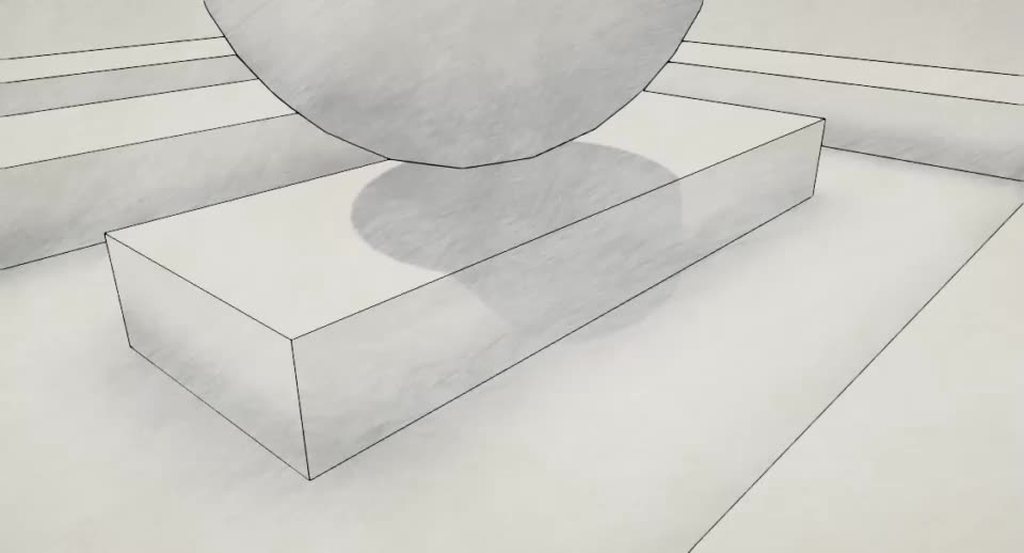 meager pelican
Agreed.
@eager folio Nice.
eager folio
Thanks ❤️
The animation is a bit aggressive for my personal taste but the person I made it for had a reference from another game. I think mine ended up a bit nicer looking though. (In fairness, theirs was quite old and low resolution so it's not their fault)
trim ermine
Is the light moving? the texture moves while it's still?
eager folio
Yes, to simulate a sort of hand animated effect where the shading is fairly consistent but the individual pencil strokes change each frame.
(Or in this case, at a user defined period of time)
The video basically kills the pencil strokes so it just kinda looks like blobs on the surface
meager pelican
I wonder.....(this is a separate thought)
You know how you often do dithering? With a matrix, and you have pixel values in the matrix that represent the fade/alpha value. And anything below that passes, above or = fails. So as you "fade to transparent" it has fewer dots in it.
You could probably do something like that with brush/pencil strokes. So the texture would look black at 100% opacity, but as you fade out, it would drop certain "strokes" fading out more and more for various degrees of "dark".
IDK how it would look though.
eager folio
The overlay also moves based on the camera
The shader can do that actually
But I was trying to replicate the look of the other game so I left it as just a blend
It has potential but I'd need to use a more suitable texture for it; the pencil texture I used wasn't really great anyway, but the strokes weren't discrete enough to make that technique really shine.
meager pelican
Yeah, it was a separate idea. I like what you did.
Just got me thinking about how to fade strokes
eager folio
I'm happy with how the experiment turned out
Yeah, I used the method used for heightmap blending terrain textures
With the right texture I think it could be great.
Especially for like, a ballpoint pen shaded look
I think another interesting thing to try might be to make a cubemap of strokes and use that instead of a flat texture
So instead of panning the flat texture with the camera you could actually use the 3d rotation of the camera
but that was a bit complicated, especially since you'd need to make such a cubemap 😛
I am thinking of incorporating some sort of screenspace overlay to my new shader, the gradient/shadow fake lighting one
pale anchor
Hello, I am going along with a udemy compute shader course, and for some reason I am unable to figure out why I am getting this error when running the program. Assertion failed on expression: 'index >= 0 && index < paramArray.size()'
Here is the C# code: https://pastebin.com/qZiiKMCX
Here is the Compute Shader code: https://pastebin.com/Fvt3Aqwm
Pastebin
Pastebin.com is the number one paste tool since 2002. Pastebin is a website where you can store text online for a set period of time.
Pastebin
Pastebin.com is the number one paste tool since 2002. Pastebin is a website where you can store text online for a set period of time.
 robust heath
Hello everyone!
I need to disable the shadowcaster pass of a shader based on a property value.
Is it possible? if it is, how?
If not, is there a way to disable shadows at runtime?
pale anchor
A restart of unity seemed to fix the issue
 swift loom
I can't find any compute shader resources that help me understand how to do what i want. i just want to copy select data from a texture array to another texture. do i just do Load with a for loop for the entire texture size?
sinful arrow
That sounds like something you can just do with regular shaders
swift loom
probably but i still dont know what method to use to do this in HLSL. the docs aren't exactly easily digested.
 lost lichen
nm got it
sinful arrow
Unity's shading language for regular and compute shaders is HLSL so its documented just not on Unity's site https://docs.microsoft.com/en-us/windows/win32/direct3dhlsl/dx-graphics-hlsl-reference

The HLSL reference documentation specifies the language characteristics. It is broken into several sections.
swift loom
i could just sample with tex2D i guess? yeah i know. the unity docs are good but the microsoft ones are really difficult to both browse and decipher
grand jolt
how to manually change shader
from builtin pipeline
to URP
i mean what code
eh my mats wont work with hybridv2 😒 will revert to builtin pipeline
meager pelican
@swift loom Check out "blit". You're "blitting" from the source texture array to the destination texture.
See post #2 here:
https://forum.unity.com/threads/copy-texture-area-all-platforms.610228/
Unity Forum
Hello! I need help with copying area.
I have RenderTexture N1 with size 1024x1024 and need to cut area (not erase, copy only) from center 128x128...
swift loom
@meager pelican yea but does blit (or Graphics methods in general) use the GPU then? that's the entire reason i'm trying to do this via compute shader
meager pelican
Yeah, it's a GPU operation, and the textures are on the GPU first (uploaded by unity).
Blit is a shader.
meager pelican
Should. Just do some research to set it up.
ur welcome. 🙂
swift loom
👍
wet geode
How do i distort a mask i've created inside shader graph?
I've got this setup

i want to kind of distort it a bit
eager folio
You insert something to alter either the UVs or the world position based on a noise or a texture
For instance you could use a tiling and offset node with a noise input to wobble the UVs a bit before feeding them into the texture samplers
 wraith wing
hi all so i want to move my UV only on x value controled by time, how to split the xyz input to achieve that?, try split the time and connect the R node to the B add node it appear to be move diagonal instead

ok nvm found it use combine node thanks all
 latent vigil
Hey does anyone know why only half my sparks are textured? I feel like I'm missing a ratio here.
 thick fulcrum
latent vigil
Hey does anyone know why only half my sparks are textured? I feel like I'm missi...
thick fulcrum
latent vigil
Hey does anyone know why only half my sparks are textured? I feel like I'm missi...
are they aligned to camera?
latent vigil
thick fulcrum
are they aligned to camera?
What do you mean?
thick fulcrum
are the quads which form the sparks set to face camera, I suspect this more belongs in #✨┃vfx-and-particles though
latent vigil
I was looking for the place to ask about this, I didn't know what category this fell under tho
latent vigil
thick fulcrum
are the quads which form the sparks set to face camera, I suspect this more belo...
And I dont think I get what you mean, the particles of the sparks are in front of the camera though.
wet geode
Are the particles billboards?
latent vigil
they are stretched
thick fulcrum
are these legacy particles or the new VFX graph?
latent vigil
Its this, I have never made particles before so I have no idea what your saying
 thick fulcrum
looks like legacy, I'd suggest moving to #✨┃vfx-and-particles for help. Apart from tweaking some prefabs I've avoided it, was just looking at some tutorials on the new VFX graph since I'm in URP and it looked easier and the tutorials explained it nicely 😉
grand jolt

some issue with lightning
You must declare all built-in engine properties in a single CBUFFER named “UnityPerDraw”. For example, unity_ObjectToWorld, or unity_SHAr.
what exacttly that means? eg glossiness?
regal stag
@grand jolt unity_SHAr is related to ambient lighting / light probes.
If you are trying to convert a shader from built-in to URP, you should be using HLSLPROGRAM & the URP Shader Library functions instead of CGPROGRAM & UnityCG.cginc.
Including Core.hlsl will handle the UnityPerDraw buffer for you, you just need to handle the UnityPerMaterial one. I have an article here that goes through it a bit : https://cyangamedev.wordpress.com/2020/06/05/urp-shader-code/
Alternatively, recreate the shader in Shader Graph.
grand jolt
okay its now compatible but lot of errors
grand jolt
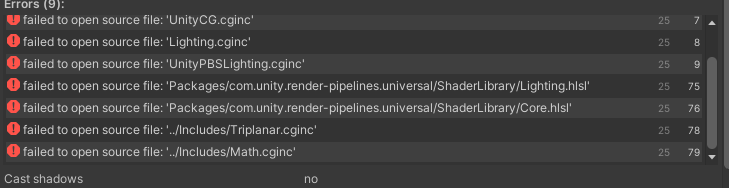
i have these lines btw
#include "Packages/com.unity.render-pipelines.universal/ShaderLibrary/Lighting.hlsl"
#include "Packages/com.unity.render-pipelines.universal/ShaderLibrary/Core.hlsl"
what is the best way to apply a shader to the entire screen? i've tried using an orthographic camera, and a plane facing the screen, but the plane needs to perfectly fit the (variable) screen dimensions which is proving difficult. is there a better way?
thick fulcrum
civic holly
what is the best way to apply a shader to the entire screen? i've tried using an...
if this is in URP you could use a render feature or if legacy then post processing maybe more suitable
civic holly
thick fulcrum
if this is in URP you could use a render feature or if legacy then post processi...
thanks. i've tried looking into post processing but will need to figure that out another time (couldn't get sample code working). i think i've got a script working that resizes the plane now though. do you know if this method i'm using is likely to be less performant than the others you mentioned?
regal stag
@civic holly If you're in Built-in RP, I'd look into using the C# OnRenderImage function, which is called if the component is on a Camera. https://docs.unity3d.com/ScriptReference/MonoBehaviour.OnRenderImage.html
Inside the function you can use Graphics.Blit to apply a shader/material to the screen perfectly. There's an example at the bottom of that page. (Note, shader should use _MainTex to obtain the camera's source texture, sample it and output changes).
swift loom
im not sure anyone can tell whats going on here with limited info, but my shader has wildly different behavior running in the game view in the editor and in the built version. it used to be identical, but after I switched to Graphics.CopyTexture to create my lightmap instead of SetPixels it is acting strangely. Maybe it's just some simple settings or something?
i also have a plane that i draw the lightmap preview on but that doesn't work anymore in the editor, yet works in the build
eager folio
So does posterize give NaN when you put in zero steps, or am I seeing something else?
 regal stag
eager folio
So does posterize give NaN when you put in zero steps, or am I seeing something ...
regal stag
eager folio
So does posterize give NaN when you put in zero steps, or am I seeing something ...
Posterize uses 1 / Steps, so yeah dividing by zero probably isn't good
eager folio
Yeah, I typed in the wrong box and suddenly there were colored outlines around my mesh which was like, very weird.
And it kinda makes me wonder if that could actually be harnessed somehow
Aha, figured it out. It is the NaN pixels + depth of field
regal stag
eager folio
And it kinda makes me wonder if that could actually be harnessed somehow
I wouldn't really recommend relying on behaviour like that 😅
eager folio
Yeah, I know, I know 😛 But when you see something neat happen sometimes you just want to poke it to see what happens
civic holly
why is nothing ever easy with unity. i saw 'art of code' video, where he just right-clicked in the hierarchy to create a UI-element, something i have done before on earlier versions, but apparently in unity 2020 there's no such option. does anyone know how to achieve this basic request of creating a canvas/ui element in unity 2020? or should i just revert back to an earlier version?
sorry that it's in the wrong area, but it is related to my shader problem. here's his video: https://www.youtube.com/watch?v=kY7liQVPQSc which seems to achieve what i wanted

This is the first of two videos in which we will create a mandelbrot fractal explorer. With only a few lines of code we will conjure up an endless universe of spirals and other patterns. At the end of this video you will be able to zoom and move around the mandelbrot fractal fluidly and with ease.
Twitter: @The_ArtOfCode
Facebook: https://www.f...
 calm jolt
Does anyone know how to fix that?
 regal stag
civic holly
why is nothing ever easy with unity. i saw 'art of code' video, where he just ri...
regal stag
civic holly
why is nothing ever easy with unity. i saw 'art of code' video, where he just ri...
Hm? I'm in 2020.2 and UI is still listed when right-clicking the Hierarchy 🤔
swift loom
swift loom
im not sure anyone can tell whats going on here with limited info, but my shader...
it behaves just like if you zoom out a bit in the editor actually? weird is this some kinda lod issue or something similar
civic holly
i'm 2020.3, i downloaded it a couple of days ago having been on 2019, and i know at some point in the last couple of days i could create UI elements. but i'm guessing not since i switched (only noticed now though)
regal stag
calm jolt
Does anyone know how to fix that?
I assume you are referring to the stars texture stretching. The UVs in a Skybox are 3D, so sampling texture (or using generated noise/voronoi) using the regular 2D uvs results in this stetching. There are ways to remap the coordinates into a 2D system, using Arctangent2 and Arcsine. e.g. https://medium.com/@jannik_boysen/procedural-skybox-shader-137f6b0cb77c
Or uv.xz/uv.y produces a flatter result, which this tutorial uses : https://www.patreon.com/posts/27402644
civic holly
if i right click where it says 'hierarchy' at the bottom of the pop up it says 'UI Tool Debugger' but this seems to do nothing
 regal stag
I also use this sometimes for Skybox UVs

@civic holly Check the Package Manager and see if the "Unity UI" package is installed
civic holly
under "project settings, package manager" there's nothing. but i never had to download any packages before. i don't know where to find it?
 civic holly
thanks. it says it's installed there.
regal stag
Ah okay, then the UI components should exist at least :\
civic holly
hm..
 regal stag
I've checked 2020.3 too and it still includes UI in that dropdown in the Hierarchy too, so I'm not sure why it would be missing for you.
civic holly
thanks for your help, i guess my only option is to try a fresh install and see if that fixes it.
ok i was just about done with this (unity is possibly the most frustrating thing i have ever tried to use lol), and then i noticed i had two windows with unity running: the one i had been focused on with the problems you very kindly tried to help me solve, and another i had been working on before and didn't realise was still open. anyway, i cautiously attempted right-clicking in the hierarchy of this other window, and it worked! i am utterly baffled why it would work in one and not the other, but fingers crossed all goes smoothly from here.
 tranquil bronze
How can I get this raymarcher to work in hlsl urp?
Pastebin
Pastebin.com is the number one paste tool since 2002. Pastebin is a website where you can store text online for a set period of time.
Pastebin
Pastebin.com is the number one paste tool since 2002. Pastebin is a website where you can store text online for a set period of time.
It works in cg without urp
when when i convert to urp it doesnt work
and i get no errors
regal stag
@tranquil bronze A few things, "RenderPipeline" = "UniversalRenderPipeline" should be "RenderPipeline" = "UniversalPipeline". You'll also want to include the _MainTex texture in Properties, which obtains the source from the blit. Otherwise you'll probably just be overriding what the camera's drawn completely.
More importantly, OnRenderImage is not called in URP. You will probably need to write a custom renderer feature.
 violet sage
why doesnt this work in unity hdrp?
 regal stag
violet sage
why doesnt this work in unity hdrp?
regal stag
violet sage
why doesnt this work in unity hdrp?
The Vertex Position port should be in Object space so if you're offsetting the Absolute World pos you'll want to use a Transform node to transform it.
violet sage
transform from what to what
regal stag
Absolute World (since that's what your Position node is using) to Object (as that's what the port needs), at the end before putting it into the Vertex Position port.
violet sage
okay
tranquil bronze
@regal stag I added the main tex to the properties and uv to varyings and attributes but still nothing
regal stag
@tranquil bronze Did you see the other part of my comment?
More importantly, OnRenderImage is not called in URP. You will probably need to write a custom renderer feature.
 solar sinew
regal stag
I also use this sometimes for Skybox UVs
solar sinew
regal stag
I also use this sometimes for Skybox UVs
I’ve been switching between your skybox UV setup and this one that I saw referenced/linked to in Harry’s sky shader
https://medium.com/@jannik_boysen/procedural-skybox-shader-137f6b0cb77c

This one seems like it works for clouds but also somehow not as well? Haven’t tested it enough
calm jolt
regal stag
I assume you are referring to the stars texture stretching. The UVs in a Skybox ...
Yes, I wanted to, but my internet didn't. I will try it, thanks
violet sage
regal stag
The Vertex Position port should be in Object space so if you're offsetting the A...
And how would i make the wave size actually be the wave size
because now it just changes height om the water
regal stag
solar sinew
I’ve been switching between your skybox UV setup and this one that I saw referen...
Yea, I also linked Jannik's tutorial above. It's a good setup though I wouldn't recommend using the subgraph multiple times in the same shader as it would just be extra unnecessary calculations. I also see mentions of inverse trig functions being kinda expensive in shaders, so using a custom mesh with those sort of uvs might be better too.
solar sinew
Most skybox uvs I’ve seen seem split between using the position and UV node. I like how the horizon looks in Jannik’s setup (as clouds get closer to the horizon they seem more distant) but I’m not sure about using it since it isn’t seamless if your tiling vector2 isn’t an integer
regal stag
violet sage
And how would i make the wave size actually be the wave size
I'm not too sure what you are referring to here. If you can provide a screenshot of the problem it would help.
regal stag
solar sinew
Most skybox uvs I’ve seen seem split between using the position and UV node. I l...
That's because for the Skybox mesh, the UV and Position node return the same thing 😛
solar sinew
regal stag
That's because for the Skybox mesh, the UV and Position node return the same thi...
That’s what I thought but I had seen a slight positional shift for my sky gradient when switching between the two. I’d have to double check
regal stag
That might just be because it needs to be Normalised to be a perfect per-pixel sphere, but that should happen with both
solar sinew
Ah okay, yeah I don’t think I was normalizing the UV node
thick fulcrum
violet sage
because now it just changes height om the water
just a guess but make sure your mesh has enough vertices / reduce the scale of your noise that generates the waves.
if you use the default plane in unity it does not have a lot of vertices, especially if you scale it up to cover more area

 thick fulcrum
you need to split the world position node, then put the x and z value into a vector 2 before feeding it into the UV channel of the Tiling and offset node
thick fulcrum
at a guess, I'm a little rusty getting though not touched this stuff in a week or more
violet sage
that does absolutly nothing
thick fulcrum
ah that's to do with your position, which also looks messed up.
You need to check the texture (color) branch for similar mix up to UV
I would suggest looking at some tutorials, there are some good ones out there which explain all these basic steps to help avoid these problems
violet sage
it just started working i reopened unity
thick fulcrum
lol
 vast timber
Is there a way I can have the "nointerpolation" flag in shadergraph? Usually I just see the compiled shader code and run a few find and replace but it's really painful
regal stag
vast timber
Is there a way I can have the "nointerpolation" flag in shadergraph? Usually I j...
No, you'd have to edit the generated shader code. (not the same as compiled)
 silk sky
using the PBR graph, how can I convert a white color to alpha?
 knotty juniper
silk sky
using the PBR graph, how can I convert a white color to alpha?
knotty juniper
silk sky
using the PBR graph, how can I convert a white color to alpha?
what do you mean ?
do you want o create a mask where a image is white and use that mask in the alpha channel?
silk sky
knotty juniper
what do you mean ?
do you want o create a mask where a image is white and use th...
I have a texture with white background, I need to exclude that white and transform it into alpha
knotty juniper
with that node you can set a color and a range range and gives you a mask as a output
that you can use for the alpha
solar sinew
silk sky
I have a texture with white background, I need to exclude that white and transfo...
Have you changed the texture's import settings?
silk sky
solar sinew
Have you changed the texture's import settings?
wym?
solar sinew
silk sky
wym?
when you click on the texture in the project window, the texture's import settings appear in the inspector
depending on the contents of your texture it may make sense to change your alpha source in the texture's import settings
silk sky
the alternative its grayscale, is that useful?
solar sinew
entirely depends on your texture
if the texture's alpha channel should be transparent then make sure to tick the Alpha Is Transparency box. If you need to mask a specific part of your texture but still want to display the white background then that's a different issue
silk sky
wait i'm dumb, seems like actually the bg of the textures is already alpha, at least outside Unity
but then when I apply to the model the alpha part becomes white
solar sinew
did you check the Alpha Is Transparency option for that texture? If that's the case then you should check your alpha clip settings in your shader graph
knotty juniper
you can just for debug pip the result of the tectures alpha into a color channel to see whats up
if that produces somthing usefull it might be some shader settings
solar sinew
to me it sounds like they just need help with alpha clip but idk
silk sky
solar sinew
did you check the `Alpha Is Transparency` option for that texture? If that's the...
toggle was off, i'll set it to true now, let me check what happens
solar sinew
always make sure to adjust your import settings for that asset's needs
silk sky
ok that fixed the issue
thanks man, that was such a dumb error, dont even need a custom shader anymore
 knotty juniper
Unity Forum
Hello there!
I needed a super simpler liquid simulation to be able to implement a viscous liquid without having a full-fledged system (I couldn't...
grand jolt
help pls
 terse shard
knotty juniper
https://forum.unity.com/threads/free-open-source-simple-liquid-simulation-with-m...
terse shard
knotty juniper
https://forum.unity.com/threads/free-open-source-simple-liquid-simulation-with-m...
Thanks!
knotty juniper
grand jolt
does anyone know if theres a way to make my decal brighter?
What option does the decal shader has?
grand jolt
idk
knotty juniper
click on the little triangle on the material to find out
grand jolt
 knotty juniper
you could either make the base texture britgher or you might try the emmisive option
solar sinew
Here's another approach. Mix and jam recently recreated splatoon's ink. Originally they were going to use a typical metaball implementation but found it too expensive and eventually landed on a URP custom pass that takes the image of a specific layer, blurs the result, then steps the image to give the impression of continuous liquid
https://youtu.be/FR618z5xEiM?t=170
second timestamp for metaball implementation: https://youtu.be/FR618z5xEiM?t=283

This project is a take on the Ink System from one of my favorite games: Splatoon! Let’s explore game dev techniques and try to achieve a similar effect!
Check out @TNTC 's complementary video: https://youtu.be/YUWfHX_ZNCw
PROJECT REPOSITORY
https://github.com/mixandjam/Splatoon-Ink
REFERENCES
------------...
terse shard
solar sinew
Here's another approach. Mix and jam recently recreated splatoon's ink. Original...
Cool, thanks for sharing this!
grand jolt

 humble inlet
heyo! I created a shader using 2019.whatever_version_it_was, and then updated to a more modern version. for a number of reasons, i downgraded again to 2019, and, upon opening these shaders, i get... this:
Exception thrown while invoking [OnOpenAssetAttribute] method 'UnityEditor.ShaderGraph.ShaderGraphImporterEditor:OnOpenAsset (int,int)' : ArgumentException: JSON parse error: The document root must not follow by other values.
i get that it's been serialised with a newer version, does anyone know any way i can fix this, or shall i just recode them? :/
 royal flume
I'm guessing my issue is shader related. I have a fishing net that has transparancy. When I look at the ocean or sky through the net, they appear black. This only happens when I do an android build, not on PC/in the editor.
 royal flume
It was shader related. I switched to the standard shader and it resolved it.
 gusty jackal
anyone experienced with compute shaders who can help me (absolute beginner, I understand the theory behind what compute shaders do but I don't know hlsl very well nor am I experienced writing shaders) understand how to transition a cellular automata simulation from non-shader code to a compute shader? I was previously just looping through every pixel and checking its neighbors but thats very unperformant and I want to turn it into a compute shader. The old code: (https://paste.myst.rs/bjzpp3p2)
grand jolt
idk if this is the right channel for this question but im trying to make a mirror reflection

like i tried adding a render texture but its adding it to the frame lol
teal breach
Found something which I was not aware of, wonder if I'm just missing something that was a trade secret - my android phone doesn't seem to like the ternary operator. I had a bunch of broken shaders, replaced the ternary with logically equivalent ops using min and addition and the shaders worked fine. 🤷
teal breach
grand jolt
like i tried adding a render texture but its adding it to the frame lol
does your mirror have two materials?
grand jolt
nope
teal breach
so, one uv map for both wood frame + metal mirror?
grand jolt
yep
thats how it was given to me


In this Mini Unity Tutorial I show you how you to create a mirror reflection by inverting scales .
✦ Subscribe: http://bit.ly/JimmyVegasUnityTutorials
✦ Patreon: http://patreon.com/jimmyvegas/
✦ FREE Assets: http://jvunity.com/
✦ Facebook: https://www.facebook.com/jimmyvegas3d/
✦ Twitter: https://twitter.com/jimmyvegas17/
-+-+-+-+-+-+-+-+-+-+-+...
i was following this guide and then i was like euhhhh something is not right
🤷♂️
teal breach
your options are: (i) make a shader that only applies the render texture to the parts of the mirror which are metal - you probably need a uv map to mark which is which
grand jolt
ugh
teal breach
(ii) add a separate mesh for the metal, and just inlay it in the frame (easier if you haven't done much in shaders)
could even just be the unity quad, scaled and translated with your mirror material applied
grand jolt
what do you mean
teal breach
is your mirror mesh 3d or flat?

 teal breach
if you can edit the model, you might find it easier to cut the middle bit of the mirror mesh out (the actual reflective bit), leaving just the frame in your current model. Then you can stick a quad in with your reflective material applied
to 'fill the gap'
grand jolt
 wet geode
Some of my planes are rendering in front of other things despite being in the back. How do i stop this?
 vocal narwhal
it's easiest if you use a cutout material
wet geode
A cutout material?
This is my current shadergraph setup

the mesh has 3 different materials applied to it
vocal narwhal
wet geode
This is my current shadergraph setup
it should be Opaque with Alpha Clipping enabled
 vocal narwhal
no idea what I'm looking at
wet geode
It's supposed to just look like this

but sometimes it randomly gives me that really weird blue-ish lighting
vocal narwhal
No idea, sorry
 toxic flume
Could you sort these shaders based on performance?
Mobile/Particles
Additive
Multiply
Alpha Blended
VertexLit
and between sprite/default vs cutout shaders (Android devices)
 ivory verge
hi
i have a question
i am trying to implement wireworld cellular automaton in compute shaders
an my electrons sort of disappear
i have a prediction why it could happen
i have 32x30x1 threads
and the texture is 800x600
and I think that when first rectangle of 32x30 pixels is calculated, gpu starts computing second rect
and first is already changed, so electrons are missing
my question was "is there a away to read pixels from before write"
but i think that i will add a second texture, which will not be changed
i think it doesnt work
low lichen
ivory verge
but i think that i will add a second texture, which will not be changed
This would be the solution. Have two textures that you swap each time, one to read from, one to write to.
ivory verge
should i swap them in update in c#?
low lichen
I made the Game of Life with a compute shader and I had weird issues when just using one texture
Yes
Each time you dispatch the compute shader, set the read texture to be the texture you last wrote into
And the write texture to the other texture
low lichen
You can define the read texture as Texture2D and the write texture as RWTexture2D, but I doubt there's any performance improvement over defining both as RWTexture2D
ivory verge
ok, thanks
it works
oh god
yes

time to calculate soe primes
oh godddd
it calculates
those
man
yeeeeeees
Ok, the main thing why i am doing it with unity's compute shaders is that shadertoy does not support custom textures, which i need to load initial state of the computer. Unity was easier than c++/OpenGL for me to learn.
Now I need to make it as fast as possible
from what I know, Update() is called only 60 times per second
since my project is only 2d camera with one script, I know that it can be faster
how to "unlock" fps?
low lichen
I assumed that the editor had unlocked FPS by default
But according to some Unity forum threads, the editor locks it at 60 FPS, even if the Stats window shows higher FPS
ivory verge
and how to call Update() as frequently as possible?
low lichen
Check if this setting is enabled?
 ivory verge
sorry but I downloaded unity just for this project, I am an absolute newbie
how to open this menu?
low lichen
At the top of the game view, where you defined a custom 800x600 resolution
low lichen
If you enable the Stats window (also at the top of the Game view), what FPS is it reporting?
 low lichen
How certain are you that Update is only running 60 times per second?
ivory verge
I am not
but Im about to check
wait a bit
oh, it runs at 800 ips
nice
thank you
 slate abyss
Hey all, I'm using Unity 2021.1 and some of my shaders aren't working, but they worked fine in 2020. Are there any notes on how to upgrade the shaders of fix issues?
 whole echo
Anyone here use Amplify Shader? I'm trying to get a sharper blend (via alpha smoothstep) on my triplanar albedo, but I'm stuck. I'm not even sure if I'm doing it correctly...

 vague quest
Hi guys, I'm on 2020.2 URP Windows and I don't see details of properties in Shader graph, is there some toggle somewhere that I don't know about?
This is what I see:

this is what I want to see:
 regal stag
@vague quest It's moved to the Node Settings tab of Graph Inspector window (toggled with button in top right).
 vague quest
regal stag
<@!290583517107322881> It's moved to the Node Settings tab of Graph Inspector wi...
vague quest
regal stag
<@!290583517107322881> It's moved to the Node Settings tab of Graph Inspector wi...
thanks a lot!
regal stag
whole echo
Anyone here use Amplify Shader? I'm trying to get a sharper blend (via alpha smo...
The blending in triplanar is usually based on the normal direction. While a gradient texture might work that setup would be dependant on the UVs the object is using.
Couldn't you use a single Triplanar Sampler node with the three textures set and use the Falloff to adjust the sharp/smoothness of the blend?
whole echo
regal stag
The blending in triplanar is usually based on the normal direction. While a grad...
I tried that first - but I don't seem to have the control that I'm looking for with the sharpness, and it creates some weird color issues on the terrain when only using the falloff:

This is more of the control I'm trying to achieve, just without the weird color issues happening... 🥴

 hazy egret
Where is the option to turn off backface culling?
sacred patio
Does anyone know if there's a reason for the water shader to act like this?
Did I make a mistake within the nodes to make the corners of the object dissolve or is this because of the shader being like this itself
humble inlet
you need to show us code or the graph, @sacred patio
oh
i assume you are talking about the refraction
quoted from the lovely @amber saffron:
That's an old issue with refraction.
As you are probably doing refraction by using the scene color node, the shader is displaying "what is on screen", and doesn't care if it is behind or in front of the current rendered object.
If you want to avoid that, you'll need to do a depth rejection, by also getting the value from the scene depth node, and compare with the actual depth of the object. You can then decide to show the refracted color or not.
It will avoid displaying the cube pixels, but will result in holes in the refraction.
sacred patio
Oh sorry, yeah it's the refraction but I probably am lacking the skill to adapt the suggestion above even though it explains a lot

It's a really good heads up for whenever I'll use this shader in future projects
sinful arrow
DX11 Texture2D.ReadPixels/GetPixels is bugged, the following code randomly outputs 0,0,0,0 half the time as if it reads a blank framebuffer. Works fine on OpenGL core and other graphics API's.
            if (readFrameDelay++ == 0)
            {
      UniversalRenderPipeline.RenderSingleCamera(ctx, cam);
            }
            if (readFrameDelay >= frameDelay)
            {
                RenderTexture.active = renderTexture;
                readTexture.ReadPixels(new Rect(0, 0, renderTexture.width, renderTexture.height), 0, 0);
                readTexture.Apply();
                Color[] px = readTexture.GetPixels();
                Debug.Log(px[0]);

                readFrameDelay = 0;
            }
}```Pretty sure its a URP only bug.
sinful arrow
Here is it visualized, the cube is reading the texture with GetPixels and then SetPixels on another texture, that texture is displayed on the cube. You can see GetPixels randomly returns black/incorrect values, its also visible on readTexture in the inspector.
 grand jolt
oh shit
i just did 1 shader for each of my environment elements
apparently i could of just done 1 for all of them
shit
wet geode
Heya all. I've got this grass using a ShaderGraph shader for my Detail Mesh on my terrain. For whatever reason it's not displaying the alpha which is referenced inside the material?

 small hinge
I'm pretty new to shaders in general. but ive been trying to research whether it would be possible to create a texel based lighting shader (something like this: https://forum.unity.com/threads/the-quest-for-efficient-per-texel-lighting.529948/) in shader graph 10.4. I would really appreciate any input on nodes/custom nodes that could help achieve it. I'm already using some custom nodes to get the main light ect. I did get kind of lost trying to port the shaders from the above thread into a graph, so i'm taking a step back and trying to learn more about the basics of making lighting based shaders to see if that could help. also anyone with input on this feel free to dm me because I feel like this is a loaded question, also sorry for the big text wall everyone.
 lapis grove
I'm looking for an HDRP compatible shader that produces a wavy distortion effect like heated air. Am I better off learning Shadergraph and how to do it myself, or does someone know of a good one? I tried searching around the asset store and found a few, but none of them mention HDRP and from what I understand it's different enough that unless it specifically says HDRP I should assume it won't work
 amber saffron
lapis grove
I'm looking for an HDRP compatible shader that produces a wavy distortion effect...
amber saffron
lapis grove
I'm looking for an HDRP compatible shader that produces a wavy distortion effect...
You can look at the spaceship demo that has some nice distortion : https://www.youtube.com/watch?v=rqMcPZoEc3U
https://github.com/Unity-Technologies/SpaceshipDemo

The Visual Effect Graph gives artists of all experience levels the power to create amazing visual effects. This node-based system is both easy to use and flexible, empowering artists to create stunning VFX quickly.
Learn More: http://unity.com/visual-effect-graph
GitHub
Spaceship Demo - AAA Playable First person demo showcasing effects made with Visual Effect Graph and rendered with High Definition Render Pipeline - Unity-Technologies/SpaceshipDemo
lapis grove
@amber saffron Thanks! There's a lot going on in that video, and a pretty large project; do you happen to know which thing I should look at offhand? If not no worries, I'll dig through it
amber saffron
If you grab the project, it has a nice discovery tool with sections to point you directly to some specific effects. I don't remember if there is some flame/heat distortion in there, but I definitively know they are in the project.
Else, I'm pretty sure the last section with the destroyed ship and flames is a good part to look at.
lapis grove
Yeah, I see the fire effects just browsing, but I'll have to see if the distortion is separate from the fire itself
Still, gotta be some good stuff in there, thanks!
I saw this video at some point, I don't think it occurred to me that the entire thing was available
 frigid pelican
Hi! i'd like to create/find some kind of "void" shader, but don't know where to search for tutorials or assets... Any Ideas?
quiet girder
I'm looking at someone else's shader and I see them passing i.uv.xy (from the standard v2f) as an argument to a function that takes a float2. Is there any reason to do this instead of just passing i.uv?
 fickle pewter
Super generic shader graph question(s).
If I make a standard 3D project in 2019... I am therefore not using either URP or HDRP. Right?
If I'm not using URP or HDRP, how can I get access to Shader Graph?
quiet girder
fickle pewter
Super generic shader graph question(s).
If I make a standard 3D project in 2019....
Shadergraph only works with one of the scriptable pipelines, see here: https://docs.unity3d.com/Packages/com.unity.shadergraph@11.0/manual/Getting-Started.html
fickle pewter
I was afraid so. If I'm not doing anything too crazy, is it worth switching my project to URP? At the moment I'm coding my graphical stuff by hand, like modifying a material's color's alpha value in Update. Last time I tried URP it wrecked my materials, including ones I imported from the asset store. And I couldn't figure out how to fix them so I just reverted.
regal stag
quiet girder
I'm looking at someone else's shader and I see them passing `i.uv.xy` (from the ...
If i.uv is a float2, then it doesn't really matter. But TEXCOORDn can be up to float4 in order to pack more data into the v2f struct. If that's the case, you are supposed to use .xy to obtain the first two components. While you don't have to do that for a function that's using a float2 input anyway, it will likely produce "implicit truncation" warnings if you don't.
quiet girder
Someone else might know, I haven't used URP
quiet girder
regal stag
If `i.uv` is a float2, then it doesn't really matter. But TEXCOORDn can be up to...
Okay, thanks! I tested and it works both ways but I wasn't sure if it was an optimization thing
regal stag
fickle pewter
I was afraid so. If I'm not doing anything too crazy, is it worth switching my p...
URP uses completely different shader code so requires switching from the built-in shaders to URP-specific ones (e.g. Standard to URP/Lit). There's a tool to handle this automatically (see https://docs.unity3d.com/Packages/com.unity.render-pipelines.universal@11.0/manual/upgrading-your-shaders.html). However it can't convert custom shaders, so anything from the asset store already using a custom shader would need rewriting which can be a lot of work depending on what they are doing.
URP also does not support all features that Built-in includes. e.g. No light cookies, Projectors. No deferred rendering yet, forward only. Post Processing Stack V2 isn't supported, it has it's own volume system. Point light shadows was only recently added in v11 (Unity 2021). More comparisons are listed here : https://docs.unity3d.com/Packages/com.unity.render-pipelines.universal@11.0/manual/universalrp-builtin-feature-comparison.html. If any of those are important for your project you may not want to upgrade.
There are also some node-based shader editors that work with Built-in, such as Amplify Shader Editor (supports all pipelines I think) though it's not free. There's also Shader Forge which is free but not worked on anymore and I have no idea if there's any versions that support Unity 2019. There are also tutorials for shader code which you could look into instead.
fickle pewter
so anything from the asset store already using a custom shader would need rewriting which can be a lot of work depending on what they are doing.
That's too bad. Means there's a ton of free stuff out there that just isn't compatible, and will probably never be.
URP also does not support all features that Built-in includes.
I have no idea if I'm using any of these features unaware, but that really sucks. I assumed URP was a straight upgrade, but seems like a step back in a lot of ways too.
Between shaders and wonky VR support, it looks like Unity has been in a transitional phase since 2019 at least, and will continue to be in it until at least 2022 for a lot of things I'd like to have.
If I want something stupidly simple like a pulse/glow effect that follows a sine curve, where would I even start?
(Sorry if this question is not shader related)
 open quarry
yo, im trying to convert an old LWRP shader to HDRP, what do i replace VertexPositionInputs with
toxic flume
Could you suggest any games (for example mobile shooting games) which has nice cool claim/collect button and achievement UI effects? (progress bar,etc.)
eager folio
So is there still no way to replace the default grass shader in URL reliably without crazy hacks?
grand jolt
Hii, i have a shader material that is simulating water (that's the shader from the cartoon water tutorial of Brackeys)
So i got a plane that is visually simulating my water, and this plane is on a procedurally generated world, and for performance issue, i want to have this water plane following the player instead of generating new planes of water, to make sure that there is water everywhere.
Soo, i created a script to make the water plane follow the player, and make it have always the same height in the world (the height of my world water level, which is constant), but the problem is : when i move, the water plane move too, following my player, and the visual effect that is suppose to be relative to the world is moving too, by following the player, so the visual ripple effect offset of my water is moving, which is absolutely not visually natural, is there a way to make the animation of the water relative to the world position, while the plane associated to the animation is moving in the world ?
Thanks in advance ❤️

Also, there is my PBR graph used !
 regal stag
grand jolt
Hii, i have a shader material that is simulating water (that's the shader from t...
regal stag
grand jolt
Hii, i have a shader material that is simulating water (that's the shader from t...
Instead of using the regular model UVs, use the Position node in World space to project coordinates using Split, take R and B into a Vector2 node and connect it to the UV input on the Voronoi node.
May need to adjust Tiling/Scale too (with Tiling And Offset or Multiply node, or just adjust Cell Density of the Voronoi).
grand jolt
regal stag
Instead of using the regular model UVs, use the `Position` node in **World** spa...
It worked ! thank a lot for this fast response, i'm a big beginner with shader, u saved me probably some hours !
 lean lotus
hey is there a general reason why my compute shader runs faster when using a script that consists of 7 nested for loops, each one having if thens in them, and runs faster than if I replaced that with a single for loop that constantly changes and uses a single variable(to index into a struct)? I am trying to making the traversal of an octree(used as an acceleration structure for raytracing a mesh) faster and tried using miss/hit links instead of a new for loop for each layer of the tree, but the performance has ended up quite a bit worse
fickle pewter
@lean lotus Sounds like a general-code question. You'd have to post the whole code snippet to get a response.
sacred patio
Hello, is there anybody here who made water ripples shader like thishttps://www.patreon.com/posts/shader-graph-30490169
I have created the particle system, but I do not understand what is all the code for rendering texture to shader for
To follow the player, there is a much simper code that can be done
So is it because of the distortion that needs to be added through shaders or
So far it looks like this, it has a camera(which idk what is it for sadly) and is for some reason black, where in the tutorial, that blackness just disappears at a certain point
regal stag
sacred patio
So is it because of the distortion that needs to be added through shaders or
I'm unsure if the distortion is being affected by the ripples in this tutorial in particular, but it's definitely something that can be done by capturing them using a camera and passing the resulting render texture into the shader (It was included in the built-in / code version of that tutorial).
It also allows you to project the ripples directly onto the water surface which is useful if the water shader includes vertex displacement as just using particles wouldn't really work then. The tutorial also smoothsteps the ripple texture result to provide a sharper edge.
sacred patio
Oh riight vertex displacement..I am guessing that even if my water doesn't really move that much, I still can't get away by just attaching the particles because the character has to jump.
But yeah I am moving between both of those tutorials for quite a while now but i struggle to get it right all this time because I can't even make the sample code given work 😂
 regal stag
sacred patio
Oh riight vertex displacement..I am guessing that even if my water doesn't reall...
regal stag
sacred patio
Oh riight vertex displacement..I am guessing that even if my water doesn't reall...
Yeah exactly. Even if you don't use any vertex displacement you'd still need a script like that and applying it to the particle system GameObject. It'll use the X and Z from the target/player, but keep the same Y coordinate the particle system was placed at. (oh or maybe it's just for the camera position, but still something similar could be used for the particle system too)
It also handles sending the data into the shader for the ripple texture stuff. The idea is that the main camera won't see these particles, only the second orthographic one does. It writes them to the ripple render texture, and that script passes it into the shader using those property references. In Shader Graph you'll want to make sure any properties use the same reference, and since they are global untick the exposed option. If you're in v10+ those settings will be in the Node Settings / Graph Inspector window.
I guess if you don't plan on using any vertex displacement, or add distortion to the ripples or use them for refraction, then you don't need to pass it in though. But those sort of effects can really help make the ripples actually look a part of the water and not just particles floating on top.
sacred patio
No yeah at least distortion is definitely needed... This is why I am trying to understand it as much as possible, I will definitely get back to this message again. It's been many months since I started making these ripples and many since I just left them behind because I have no idea if I should change anything in the script or not.(well probably do since there are compiler errors) but rip :'
quiet girder
I think I know the answer, but is there an IDE that makes writing HLSL less like pulling teeth? Error checking like typos in variables would be great, but even proper indenting would be nice
eager folio
I just use notepad++
Never been able to get anything fancier to work well
@sacred patio You can attach them to the character and just have the ortho camera either right up against the water surface or with the near clip set relatively high
sacred patio
eager folio
<@!214069507122003968> You can attach them to the character and just have the or...
But it still needs the script so the camera sticks to the ripples :/
quiet girder
I need to send an array of float2s to a shader, but there's only Unity methods for float array or float4 array. Is there any significant performance implication for a shader having a bunch of unused variables stored? (Basically wondering if it would be slower to change the array to float4 or to convert the data on the c# side every frame)
 fresh vigil
This thing is making me question my own existence. I'm starting to make a grid in object space along the xy axis and the following code produces different results switching the commented line with the one below, with the exposed values being exactly the same as the ones hardcoded. //float2 pos = IN.positionOS.xy / _WindowRepeat.xy; float2 pos = IN.positionOS.xy / float2(0.1, 0.05); pos = frac(pos); float minimum = min(pos.x, pos.y); return half4(minimum.xxx, 1.0);
Thats the whole fragment I have. _WindowRepeat is exposed as a Vector property, and it is defined as float2
Left is the exposed, right is hardcoded. I'm truly lost

 soft fern
question. Is there no Shader Graph tool left in Unity?
soft fern
is there a substitute for Vertex Painting?
wet geode
Heya. I've got a model which has embedded Vertex Colors inside of it. I want to make it so the red channel us used as a "mask" for a color inside shadergraph. How do i do that?
nevermind i think i figured it out
lost lichen
Anyone know how to do this in shader graph:
https://i.imgur.com/mUJLYLX.png



 icy spindle
fresh vigil
Thats the whole fragment I have. ``_WindowRepeat`` is exposed as a Vector prope...
icy spindle
fresh vigil
Thats the whole fragment I have. ``_WindowRepeat`` is exposed as a Vector prope...
That’s strange. This is going to sound dumb...but have you tried casting your exposed property as a float2?
lapis grove
I have an animation that changes the "Emission Intensity" property on my character. If I do that manually in the inspector outside of Play mode, the intensity does change as expected. But in play mode, I can see the value cycling as desired (hence this not being an animation problem), but visually nothing actually happens. I'm not sure this is a shader problem/question either, but is there something I'm overlooking or is this just not a property you can change at runtime effectively?
Oh, forgot to mention, this is with the HDRP/Lit shader
amber saffron
lapis grove
I have an animation that changes the "Emission Intensity" property on my charact...
This sounds like a bug, you could probably report it.
lapis grove
Ok, I'll look into that
gusty jackal
I want to have a struct that contains itself in HLSL, how should I go about doing that?
{
    float2 texturePosition;
    float4 color;
    Cell down;
    Cell downRight;
    Cell downLeft;
    Cell right;
    Cell left;
    Cell up;
    Cell upRight;
    Cell upLeft;
};``` Basically I want each pixel to know what it's adjacent pixels are. And this is really the only way I can think of doing that. Any ideas?IDK if it's possible in HLSL, never tried it myself. Does it compile ?
Else, can't you use something like this ? :
{
    float2 texturePosition;
    float4 color;
}

struct CellGroup
{
    Cell center;
    Cell down;
    Cell downRight;
    Cell downLeft;
    Cell right;
    Cell left;
    Cell up;
    Cell upRight;
    Cell upLeft;
};```Hey there, can anyone here help me to optimize my shader in Shader Graph for Mobile ? In Editor it works fine (a little bit of lag) bot on Mobile it lags hard 🙂
 shadow kraken
What lags? Are you sure your shaders are the problem?
grand jolt
Yes, i have one animated shader material to make my background image look like it is unterwater
When i attach it to my background image as material the game lags hard
without it it doesnt
fresh vigil
icy spindle
That’s strange. This is going to sound dumb...but have you tried casting your ex...
I've tried doing that, and defining it as a float4 too, I kind of solved it but still do not understand what the hell is going on. I'm using a scaled Unity's default cube with scale (20, 100, 5), but you know what, if I make the Y negative (-100), it works fine. It's not only that the tiling is messed but is messing with the "object space" in some nonsensical ways.
grand jolt
shadow kraken
What lags? Are you sure your shaders are the problem?
with lags i mean fps drop hard constantly
grand jolt
grand jolt
Yes, i have one animated shader material to make my background image look like i...
So i think it definitely has something todo with my shader
shadow kraken
You should use the Profiler to find out the source of performance problems
But do post the setup of your shadergraph
humble inlet
how would I go about doing a smooth water transition, so that, if the water level is halfway on the screen (it's a plane), the above part will be using the world post processing, and the under part will be using the water post processing? :)
please @ me if you respond, cheers!
grand jolt
shadow kraken
But do post the setup of your shadergraph
This is my Shader Graph. I already tried to profile, but in Profiler it looks like i still have ~60fps but that definitely isnt the case

Most of the CPU time is taken by Semaphore.WaitForSignal (85%)
amber saffron
grand jolt
This is my Shader Graph. I already tried to profile, but in Profiler it looks li...
Voronoi is probably the issue
Noise is something computational heavy in general
grand jolt
Okay, i already thought so
Is there a way to get the same effect with a different, lighter approach?
amber saffron
Basically you're distording an image right ?
grand jolt
Yes, right
amber saffron
What you could do is to use a subidivided grid instead of a plane to map the image, and distord the vertices.
So in fragment you only have to sample the texture
And replace the noise with maybe a static 1 channel texture that you scroll for the distortion (use sample texture 2D LOD in vertex stage)
That's basically how madfinger games did the shockwaves effect in the first shadowgun mobile game
grand jolt
Okay thanks, i dont know if i can do this, im pretty new to shaders , but i will try. Thank you!
humble inlet
humble inlet
how would I go about doing a smooth water transition, so that, if the water leve...
anyone? :')
lean lotus
is there a way to profile/debug/see whats taking up the most time in a compute shader on mac?
thick fulcrum
humble inlet
anyone? :')
you need to mask what is below the plane, relative to camera etc. I can't think of a way to utilize the built in postprocesing for both above and below, that is performant. The underwater imo would need to be a custom shader which handles that. There are some examples around Crest is on Github if you want to delve into their code to see how they achieved it 😉
humble inlet
thank you very much! :)
 sonic meteor
how do i fix this?
toxic flume
Could you suggest any games (for example mobile shooting games) which has nice cool claim/collect button and achievement UI effects? (progress bar,etc.)
 ancient gust
Hi! Hope I'm posting in the right channel for this.
I'm looking for a solution in Shader Graph to combine 2 textures together without blending them, just layered on top of each other. One is a full texture and the second has transparency on it and I would like the transparent one on top of the full texture. Is there a way to achieve this? I always end up darkening one of the textures since the opacity of the second one end up as black in the equation. Suggestions?
regal stag
ancient gust
Hi! Hope I'm posting in the right channel for this.
I'm looking for a solution i...
Use a Lerp node, or Blend node with Overwrite mode, with the A/Base as the full texture, B/Blend as the transparent texture, and the T/Opacity input as the alpha channel of the transparent texture.
ancient gust
regal stag
Use a Lerp node, or Blend node with Overwrite mode, with the A/Base as the full ...
Thanks a lot for answering Cyan, testing that right now. I did test with the blend and lerp but I admit I didn't use the alpha of the transparent one.
ancient gust
regal stag
Use a Lerp node, or Blend node with Overwrite mode, with the A/Base as the full ...
The blend node works with the alpha from the transparent one, thanks a lot!
sacred patio
I'm sorry, does anybody know what I'm lacking to be able to connect vector 3 to the position?
 regal stag
sacred patio
I'm sorry, does anybody know what I'm lacking to be able to connect vector 3 to ...
regal stag
sacred patio
I'm sorry, does anybody know what I'm lacking to be able to connect vector 3 to ...
Sample Texture 2D cannot be used in the vertex shader stage, need to use the Sample Texture 2D LOD instead to specify the LOD/mipmap level to use (likely 0 for full res)
sacred patio
Oh! Makes a lot of sense, noting it down, thank you
But if I wanted to adapt that to water which doesn't use a texture, do I need to work somewhere down with the water color?

Oh wait I probably had to do it in PBR didn't I
grand jolt
hey does anyone want a decal shader for particles that don't require any code?
no shadergraph
all you need to do is make the renderer a mesh cube
a default unity cube
lost lichen
lost lichen
Anyone know how to do this in shader graph:
https://i.imgur.com/mUJLYLX.png
bump?
 stone ibex
@lost lichen shadergraph does that automatically
lost lichen
weird, im getting some vertex position bug using shader graph with transparent, but with the other shaders i notice they have this line and not getting the bug, so not sure whats happening. Thanks though
 fervent tinsel
GitHub
Please read the Contributing guide before making a PR.
Read the Graphics repository & Yamato FAQ.
Checklist for PR maker
Have you added a backport label (if needed)? For example, the ne...