#💻┃code-beginner
1 messages · Page 814 of 1
 subtle mulch
 inland ruin
Hi everyone, I'm a noob at unity, so I'm asking for help on how to transform .bland in .unity3d? I use the mod in the 7days, where I can use the models, but I don't understand how to convert these files normally(
 sour fulcrum
we cant help with mods, sorry
inland ruin
sour fulcrum
we cant help with mods, sorry
As I understand it, converting files from the same blender or other formats to unity3d doesn't have much to do with mods, but maybe I'm wrong?
sour fulcrum
idk homie your the one who brought up the mod side of it, not me 😛
Unity uses .obj and .fbx files, you'll have to find a blender discord or other support online for exporting
 keen dew
Converting things to the unity3d format is only done for modding
 pallid holly
Guys, I wrote this code to make my player (a cube) move but it passes through walls. Can you give me some advice?

 teal viper
pallid holly
Guys, I wrote this code to make my player (a cube) move but it passes through wa...
teal viper
pallid holly
Guys, I wrote this code to make my player (a cube) move but it passes through wa...
Well, are you doing anything for it not to pass through walls?
Generally, that's the responsibility of physics, but with transform translate you ignore physics almost completely.
pallid holly
teal viper
Well, are you doing anything for it not to pass through walls?
Generally, that's...
ah I understand and what can I use in post to translate to make my player move I'm new and I'm just learning
teal viper
pallid holly
ah I understand and what can I use in post to translate to make my player move I...
"In post"? 🤔
pallid holly
Oh, I understand, and what can I use in the project (code) to make my player move? I'm new and just learning.
sorry for bad english i'm italian
teal viper
pallid holly
Oh, I understand, and what can I use in the project (code) to make my player mov...
There are various ways. The simplest ones are applying velocity or force to a rigidbody or using character controller component.
But I recommend you learn the basics properly:
!learn
 radiant voidBOT
teal viper
!learn
radiant voidBOT
teal viper
!learn
:teacher: Unity Learn ↗
Over 750 hours of free live and on-demand learning content for all levels of experience!
teal viper
Or follow some tutorials online.
pallid holly
So I think I'll learn the basics thanks to !learn. Do you think it helps a lot?
teal viper
Yes
pallid holly
teal viper
Or follow some tutorials online.
Yes, I was following a tutorial on Udemy but even in the tutorial where he followed it he did this and had this problem but it didn't solve it.
pallid holly
teal viper
Yes
thx very much
teal viper
pallid holly
Yes, I was following a tutorial on Udemy but even in the tutorial where he follo...
If a tutorial has an issue and they just let it be, then it's probably a very bad tutorial.
Also, if you want to grow as a developer I recommend improving your English. It's indispensable for a developer.
pallid holly
teal viper
If a tutorial has an issue and they just let it be, then it's probably a very ba...
yes then I think I'll leave him alone and not follow him anymore
pallid holly
teal viper
Also, if you want to grow as a developer I recommend improving your English. It'...
Thanks a lot for the advice I'm working on this too I'm about to start taking a Cambridge ❤️
you say that with !learn I can learn everything about the basics and then start doing a first mini project
teal viper
pallid holly
you say that with !learn I can learn everything about the basics and then start ...
Basically yes.
Reading the manual and the api docs can also be very helpful.
radiant voidBOT
<:error:1413114584763596884> Command not found
There's no command called
manual.
teal viper
!docs
radiant voidBOT
teal viper
!docs
pallid holly
yes I think these days I'll read everything and start with the Unity Learn Pathways
Do you have any advice on where to start?
teal viper
pallid holly
Do you have any advice on where to start?
There are specific beginner pathways. You should see them on the main page.
pallid holly
yes I saw that there are many and they last 12 weeks so I was wondering which one I should start with
 errant breach
Hello ! Im trying to play a death particle for enemies.
My particle is a prefab, given as a gameObject to the enemy. When he dies, the particle is Instanciated but as a child.
Because the enemy is destroyed at the same time, so is the child.
How can i make the particle is not instantiated as a child ? I tried looking on the web but it doesnt work.
public ParticleSystem TestParticle;Instantiate(TestParticle, transform.position, transform.rotation);
Thanks for the help !
 sour fulcrum
set the particles parent to null
errant breach
Nice ! So there is a way ! But how can i do it please ? Because my prefab does not have any code 😅
 sour fulcrum
Instansiate returns the thing it's creating
you can reference the particle via that
pallid holly
!learn
radiant voidBOT
pallid holly
!learn
:teacher: Unity Learn ↗
Over 750 hours of free live and on-demand learning content for all levels of experience!
errant breach
sour fulcrum
you can reference the particle via that
Is see, thank you ! Im trying to read the documentation but i really dont understand how it work... Do you know a tutorial that explain this easily ? Because ive watched a lot of instantiate's tutorial but i've never seen such thing. Or if you know how to achieve this in my scenario, i would be very grateful !
 subtle mulch
pallid holly
Guys, I wrote this code to make my player (a cube) move but it passes through wa...
subtle mulch
pallid holly
Guys, I wrote this code to make my player (a cube) move but it passes through wa...
we said yesterday to go look at tutorials on how to actually make a player controller
using transform is NOT how you make a player controller
pallid holly
yes bro but I wanted to ask for some advice then honestly I think I will do all the Unity courses so I can learn better if I already know something I will repeat it
thx very much ❤️
pallid holly
bro I told you I'm new now I'm going to follow all the courses so I think I'll learn thank you very much for everything
subtle mulch
yeah i was just saying what you should look for
pallid holly
yes yes I understood it I really appreciate it a lot
 nocturne hawk
wanting to make a reader/engine in unity to get data from .josn's for dynamic game character building for a 2D game, how can I find a 1:1 tutor?
subtle mulch
nocturne hawk
wanting to make a reader/engine in unity to get data from .josn's for dynamic ga...
you can literally find hundreds of tutorials on YT for that btw
and they are free
sour fulcrum
nocturne hawk
wanting to make a reader/engine in unity to get data from .josn's for dynamic ga...
you never find 1:1 tutorials
subtle mulch
sour fulcrum
you never find 1:1 tutorials
i think he meant a Tutor (a real person that will help him)
nocturne hawk
sour fulcrum
you never find 1:1 tutorials
tutors lol not tutorials loool
sour fulcrum
you will find a 1:1 tutor with money
nocturne hawk
ye that was the idea
sour fulcrum
and a place on the internet that offers those services
subtle mulch
yep, that's why you should go for YT tutorials
sour fulcrum
there's no paid type stuff on this server
 naive pawn
nocturne hawk
ye that was the idea
naive pawn
nocturne hawk
ye that was the idea
why not use the free resources available tbh
nocturne hawk
naive pawn
why not use the free resources available tbh
cus idk what I need / am looking for
subtle mulch
well, you explained in your message, read a json file, also, no one will help someone that doesn't know what they need
nocturne hawk
I knoe what I want I just have 0.1/10 coding experience
subtle mulch
and that's why you can search in youtube
teal viper
That's the point where you go and learn coding.
nocturne hawk
can I shoot an explanation here and mabye some1 can tell me what to look for?
subtle mulch
ye
teal viper
Or you can pay someone on upwork to code it for you.
 midnight plover
nocturne hawk
I knoe what I want I just have 0.1/10 coding experience
midnight plover
nocturne hawk
I knoe what I want I just have 0.1/10 coding experience
Go through basic tutorials on c# or on unity learn and learn how to gain knowledge. Going through this with a tutor might lead to spoonfed knowledge you gonna lose or dont even know how to translate in any context later.
sour fulcrum
paying for a tutor is totally valid too, just not something offered here
nocturne hawk
sour fulcrum
paying for a tutor is totally valid too, just not something offered here
where do yall recommend if I go for this option?
subtle mulch
fiverr or upwork prob
naive pawn
don't have any ngl lol
radiant voidBOT
subtle mulch
!collab
:loudspeaker: Collaborating and Job Posting
We do not accept job or collab posts on Discord.
Please, use Discussions to promote yourself as job-seeking, advertise commercial job offers, or look for non-commercial projects to participate in:
• ** Collaboration & Jobs**
naive pawn
subtle mulch
fiverr or upwork prob
those are freelance sites, not sure you'd get quality tutorship there..
subtle mulch
naive pawn
those are freelance sites, not sure you'd get quality tutorship there..
you might
tho they normally are pretty expensive+
sour fulcrum
1:1 education is inherently expensive, theres no getting around that
midnight plover
I think we can conclude the topic then, as long as you dont need any help with code yet to not clutter up this channel
naive pawn
nocturne hawk
I knoe what I want I just have 0.1/10 coding experience
remember: everyone started there once, you can learn anything if you put your mind to it 
nocturne hawk
subtle mulch
ye
character hitbox and collision box info on different states, keybind triggers, attack functions etc inside .jsons, I got examples, { "on_state": { "idle":[ { "binding_boxes": [ {"hurtbox":{"x":100,"y":160,"offset_x":0,"offset_y":0},"collisionbox":{"x":110,"y":165,"offset_x":0,"offset_y":5}} ] } ], "dash":[ { "binding_boxes": [ {"hurtbox":{"x":60,"y":80,"offset_x":0,"offset_y":0},"collisionbox":{"x":110,"y":165,"offset_x":0,"offset_y":5}} ] } ] } } For providing the hitbox on different states for example
nocturne hawk
naive pawn
remember: everyone started there once, you can learn anything if you put your mi...
thats where Im at
subtle mulch
converts to some struct
nocturne hawk
subtle mulch
make a script that reads it
ye, how lol
subtle mulch
and then process the struct
nocturne hawk
i Know 0
subtle mulch
nocturne hawk
ye, how lol
by using C#
nocturne hawk
🙁
subtle mulch
and YT tutorials
nocturne hawk
yes C#
naive pawn
tip: google is a very powerful tool
subtle mulch
yep
naive pawn
googling "c# read json" would get you a pretty good chunk of the way there
nocturne hawk
I use chat gpt but I want to know what the code does not just copy and paste
subtle mulch
bruh, just don't pls
naive pawn
tip: stop using ai tools, they'll include some weird misleading stuff with confidence lmao
 pine elm
guys, I'm trying to get a specific shader look for my game (im the game designer, not developer)
is it true that I can get a shader with pure code, without using shader graphs in unity ? I want a specific anime look
subtle mulch
pine elm
guys, I'm trying to get a specific shader look for my game (im the game designer...
well, shaders are code
nocturne hawk
thx for the help
midnight plover
nocturne hawk
I use chat gpt but I want to know what the code does not just copy and paste
Dont use a tool if you dont know the craftmansship. Get your basics up first 🙂
sour fulcrum
all shaders are pure code yes, shader graph is just a way to visually create them
pine elm
interesting, would Úou recommend using AI for it ? or AI isn't good enough yet for unity shader codes ?
subtle mulch
thesere are prob the places you are looking for
sour fulcrum
most people here wouldnt recomend ai for anything
subtle mulch
pine elm
interesting, would Úou recommend using AI for it ? or AI isn't good enough yet f...
don't use AI unless you already know what you are doing
naive pawn
@nocturne hawk
if you aren't familiar with c#/unity in general, i'd suggest learning that on its own first, eg working with the editor to familiarize yourself with the concepts, etc
doing that, and then adding the json-defined values, would be easier, rather than learning the entire workflow at once
sour fulcrum
shaders are written in HLSL, lot of stuff online for you to read or watch
pine elm
subtle mulch
don't use AI unless you already know what you are doing
my unity dev is really experienced in unity and c sharp, I will not be the one using it
subtle mulch
pine elm
my unity dev is really experienced in unity and c sharp, I will not be the one u...
well, shaders are NOT C#
they are their own languages
pine elm
its hsls
naive pawn
close
pine elm
hlsl
sour fulcrum
halal snack language
subtle mulch
or just learn it
subtle mulch
maybe?
sour fulcrum
not neccasarily
subtle mulch
it's more similar to C tbh
sour fulcrum
its maths on maths
pine elm
so in theory, he could use AI, and then try and modify / fix some element of it to get the rendering objective
naive pawn
faster than starting from absolute 0 i guess, since they'd already know some core concepts like how strings work or matching braces
subtle mulch
pine elm
so in theory, he could use AI, and then try and modify / fix some element of it ...
no
don't
sour fulcrum
Honestly i'd just suggest looking for a third party asset to work from/with
paid or unpaid
naive pawn
pine elm
so in theory, he could use AI, and then try and modify / fix some element of it ...
i mean, that's the AI companies' theory i guess. they want you to believe it's all-powerful :P
it's.. not quite there.
pine elm
I do intend on simply using toon shader assets from the store
naive pawn
you still need to know what you're working with
pine elm
but I would have prefered being able to make it from scratch to get more customization possibilities
subtle mulch
maybe this?
pine elm
well I had 2 or 3 in mind
I never heard of that one
looks cool though
i had the unity toon shader in mind for instance
pine elm
naive pawn
i mean, that's the AI companies' theory i guess. they want you to believe it's a...
apparently a lot of dev are using ai for 80% of their code today
pine elm
it's made a lot of progress recently, mainly through claude
lol, I guess it depends on the environment yea
subtle mulch
those percentages are very inflated
and if they use it, they just use it for autocomplete / comments
pine elm
right
subtle mulch
or repetitive tasks
naive pawn
also, look what it's doing to the ecosystem lmao
subtle mulch
and to RAM / SSD prices
pine elm
yea thats indeed a real drawback
naive pawn
naive pawn
also, look what it's doing to the ecosystem lmao
i mean the dev ecosystem here. the real environment is also a concern just not what i was referring to
pine elm
but surely, we will find a way to create new source of unlimited energy thanks to AI right, right ?
midnight plover
At least we will keep on having this topic in the coding channels daily now...
naive pawn
pine elm
but surely, we will find a way to create new source of unlimited energy thanks t...
yeah, unlimited positive charge... just ignore the fact electricity is negative...
pine elm
i guess my follow up question doesnt have a place here too then : also from my understanding, shaders are one thing, but texture is as important as shaders
😄
naive pawn
this is the coding channel
subtle mulch
textures are simple tbh
pine elm
can't you code texture ?
naive pawn
#1390346776804069396 would be able to more adequately answer
naive pawn
pine elm
can't you code texture ?
you can for some definition of "code", but it's certainly not our expertise
subtle mulch
but not "code" them
sour fulcrum
the difference your trying to make is nonexistent
naive pawn
i mean, everything on the computer is code. but you aren't gonna be asking us how pixels physically work
pine elm
you also generate shaders, you don't code them right
naive pawn
you can write shaders
this.. is not the proper channel for discussing shaders either
that would also be #1390346776804069396
pine elm
ok I will go there then, thanks for the answers guys though 🙂 really appreciate it
if we have some coding questions I'll be back
naive pawn
just because everything relates to code, or everything can be done by code, does not mean this channel is appropriate to ask in
imagine asking a fullstack developer how to make generative/procedural art lol. they might be able to do it, but that's not their professional expertise.
 real thunder
I messing with homing algorithms and I ve encounered... math
so through using the augmented proportional navigation homing I am getting a centripetal force
other basic algorythms I use just rotate transform like that
      target_rotation = Quaternion.LookRotation(to_target_prognosed - transform.position);
      transform.rotation = Quaternion.RotateTowards(transform.rotation, target_rotation, angularVelocity * Time.fixedDeltaTime);
question is: can anyone help me figure out a way to transform a centripetal force into rotation inbetween quaternions or transform rotation inbetween quaternions into a centripetal force?
going the second route I got
float force = rb.mass * R * angular_velocity * angular_velocity;
where R meant to be a radius I should somehow get from two quaternions... tricky math rabbithole it seems
any useful ideas?
I want to have those algorithms behave on same terms so I could compare
naive pawn
centripetal force in concept is a linear force, not rotational - what exactly is the behavior you're trying to get?
real thunder
yeah this is annoying
there is a "augmented proportional navigation" algorithms used for homing missles sicne WWII given what I read is true
and the formula (I understand inputs but I have no clue why it considered optimal) have a centripetal force as an output
not a torque or a quaternion rotation....
naive pawn
if you're trying to get it to rotate how it does physically, like a ball on a string or tidal locking, you would just have the object rotate to face the pivot
naive pawn
real thunder
yeah this is annoying
there is a "augmented proportional navigation" algorithms ...
hm, maybe it's using an equivalent/analogous circular motion?
i guess centripetal force encodes the curvature, assuming you already know the thrust/velocity?
real thunder
that formula even got a magic number in it
real thunder
naive pawn
i guess centripetal force encodes the curvature, assuming you already know the t...
yeah I am pretty sure there is a way to convert
sadly I suck at geometry and asking here if anyone can speed up my struggle
real thunder
naive pawn
hm, maybe it's using an equivalent/analogous circular motion?
also I don't understand what that means
naive pawn
real thunder
also I don't understand what that means
torque affects the rotation of the object, while centripetal force affects the trajectory
so if you want a certain trajectory, you would figure out the arc, then the centripetal force required to get that arc, i guess? and then from there you can calculate the gimbaling or control surface movement to get that centripetal force
naive pawn
real thunder
sadly I suck at geometry and asking here if anyone can speed up my struggle
this would be a physics thing rather than a geometry thing
centripetal force F_C = mv^2/r, so if you know the forward velocity, mass, and centripetal force, you can calculate the radius of the circle you travel along (or 1/r for curvature, if you need that)
real thunder
in that case, I would need to get a Quaternion change out of radius
jut to clarify
I got two homing algorithms (still finishing writing the second one, ugh, but it should work)
one is straightforward where I just calculate mean intercept position and get a LookAt quaternion and RotateTowards
another meant to be more effective for evasing targets but formula only gives me centripetal force
I want to make them use one same method of rotating the missle
 sage mirage
Hey, guys! I have a question. How I am supposed to get a reference to my emission of particle system?
I have used the Particle System itself but it doesn't allow me to get reference to it
you know what I mean the property of the particle

I am getting this
naive pawn
seems like you're trying to use it in an invalid context, given that it's complaining that the type isn't found
show some more context there
sage mirage
What I want to do is to Lerp from one value of my emission rate to another
but I cant get reference to my emission
 naive pawn
real thunder
in that case, I would need to get a Quaternion change out of radius
naive pawn
real thunder
in that case, I would need to get a Quaternion change out of radius
angular velocity ω = v/r, you can probably get that more easily from that
naive pawn
sage mirage
the error here is unrelated to how the particle system is set up, it is a compiler error
you likely have some syntax errors above that make this access not correctly parsable
sage mirage
No the problem is that I have to access the property I think otherwise I wont get reference to it
its like getting out the override/effect of post processing
you cant change directly from a post processing volume any effect you want, you first have to extract it lets say
real thunder
naive pawn
angular velocity ω = v/r, you can probably get that more easily from that
and then get a Quaternion out of angular velocity? that might work
naive pawn
real thunder
and then get a Quaternion out of angular velocity? that might work
yeah, ω = Δθ/Δt, so Δθ = ωΔt
(i'm using physics symbols/terms here out of familiarity/habit, if you need clarification on anything just ask)
also if you're using an rb, you could also assign to angular velocity
hm, this doesn't encode direction.
i'm thinking in 2d 
real thunder
well the direction is to the intercept point
naive pawn
are you in 2d or 3d?
real thunder
it's 3d but the plane of interception is easy to find
naive pawn
ah, alright, that should work i think
real thunder
yeah now given that and one post I found "Rotation quaternion to angular velocity" I got all the pieces
time to cobble them
 stuck cedar
How to use unity
 timber tide
¯_(ツ)_/¯
 polar acorn
stuck cedar
How to use unity
polar acorn
stuck cedar
How to use unity
!learn
radiant voidBOT
polar acorn
!learn
:teacher: Unity Learn ↗
Over 750 hours of free live and on-demand learning content for all levels of experience!
errant breach
Hey everyone, im trying to make so my enemies have both a colliderBox (to get damaged) and a DetectionBox (given as an invisible square, child of the enemy).
The issue is that using "OnTriggerEnter" make the enemy take a damage even if the player only hit the DetectionBox. How can i make so that the two boxes are different ? Thanks for those who can help !
 polar acorn
Multiple colliders on one object basically become the same collider (which you might see referred to as a "composite collider").
You'll need to put one collider on a child object, then check which object you hit to determine if you should deal damage.
 brazen pumice
I'm trying to get a mario kart style ghost system, using a gameobject that adds my players location to a list, then creates a copy and passes the list of positions over. However, I keep getting a Specified Cast is not Valid error
subtle mulch
brazen pumice
I'm trying to get a mario kart style ghost system, using a gameobject that adds ...
well, that error tells us nothing...
brazen pumice
yeah that's what I thought lmao
subtle mulch
send your code
brazen pumice
{

    List<Vector2> positions;

    public Transform player;
    public GameObject copy;
    public bool isRecording;

    private GameObject clone;

    void Start()
    {
        positions = new List<Vector2>();
    }

    void FixedUpdate()
    {
        Record();
    }

    void Record()
    {
        positions.Insert(0, player.position);
    }


    public void createClone(Vector2 spawnPos)
    {
        clone = Instantiate(copy);
        clone.GetComponent<dummyMovement>().positions = positions;
        positions.Clear();
    }
}```and the exact line where it fails
brazen pumice
it's the clone.GetComponent<dummyMovement>().positions = positions;
subtle mulch
what is dummyMovement?
brazen pumice
{
    public List<Vector2> positions;

    void Update()
    {
        Replay();
    }

    void Replay()
    {
        for (int i = 0; i < positions.Count; i++)
        {
            transform.position = positions[i];
        }
    }

    public void setPositions(List<Vector2> pos)
    {
        positions = pos;
    }
}```bruh, why did you name it with a lowercase at the start...
brazen pumice
i didn't name it lmao, collaborative game jam
subtle mulch
pls rename it
it's so confusing
now
show me the prefab you are passing as clone
and also what the error says precisely


 twin pivot
brazen pumice
it's the `clone.GetComponent<dummyMovement>().positions = positions;`
twin pivot
brazen pumice
it's the `clone.GetComponent<dummyMovement>().positions = positions;`
try making the list public
brazen pumice
no change, unfortunately
twin pivot
brazen pumice
no change, unfortunately
whats line 35 on the copy script
 silk night
brazen pumice
no change, unfortunately
silk night
brazen pumice
no change, unfortunately
are you sure the clone contains a dummy movement?
twin pivot
it has no errors in the editor?
subtle mulch
silk night
are you sure the clone contains a dummy movement?
yeah
he showed it in the screenshot
silk night
subtle mulch
he showed it in the screenshot
no he showed some object, doesnt mean that one is linked in the clone field
the only cast in that process is done on the dummyMovement generic
so if it can't cast to it theres something smelly going on with it
subtle mulch
also @brazen pumice
GameObject clone = Instantiate(copy, spawnPos, Quaternion.identity);
clone.GetComponent<dummyMovement>().positions = new List<Vector2>(positions);
try this
silk night
btw to make this a bit easier
public dummyMovement clonePrefab;
[...]

var clone = Instantiate(clonePrefab); <-- clone is automatically of type dummyMovement
will it have every other component too tho?
silk night
subtle mulch
will it have every other component too tho?
yes, you drag the prefab with all other components into the inspector field
subtle mulch
oh cool
silk night
it just returns the component instead of the gameobject when you do it like this
twin pivot
brazen pumice
```public class dummyMovement : MonoBehaviour
{
public List<Vector2> positio...
you never made a list here
silk night
twin pivot
you never made a list here
he doesnt need to
- he is writing a
new Listinto it - Unity serialization will write one into public fields
subtle mulch
twin pivot
you never made a list here
and?
he is trying to set one in that script
not get it
twin pivot
worth trying still
subtle mulch
nah
brazen pumice
subtle mulch
also <@131435206799392768>
GameObject clone = Instantiate(copy, spawnPos, Quate...
ok I fixed the error with this, thanks!
and I sorted out the name haha
subtle mulch
np
polar acorn
brazen pumice
ok I fixed the error with this, thanks!
Make copy of type dummyMovement and skip the GetComponent. Instantiate returns the type you give it, so by making your prefab of type dummyMovement it will just return that component directly
real thunder
assuming I copypaste code from a system where Vector3.Cross(a,b) is ruled by right hand rule into unity where left hand rule is working I should just add negative sign to it? Am I getting it right?
naive pawn
depends on what you're using it for
real thunder
oh no, it's complicated
naive pawn
["first time?" gif]
if you're using it for display, where you'd need the result to point in the same direction, you'd negate it
if you're using it for other calculations that would be based on the coordinate system, you might not need to
brazen pumice
one of my fixedupdates is going faster than the other lmao
naive pawn
either it's being called by something it shouldn't, or you're reading the wrong thing
 night raptor
brazen pumice
one of my fixedupdates is going faster than the other lmao
night raptor
brazen pumice
one of my fixedupdates is going faster than the other lmao
Based on what you have concluded that? Unity calls every fixedUpdate exactly once every physics step, there's no faster or slower unless you do something wrong as Chris suggests
 wintry quarry
brazen pumice
one of my fixedupdates is going faster than the other lmao
wintry quarry
brazen pumice
one of my fixedupdates is going faster than the other lmao
What makes you think that?
brazen pumice
becaused i did something wrong lmao
real thunder
sigh, this meant to be the homing code and fiddling with Vector3.Cross didn't help
originally this is from right hand coordinate system thingie
homing works.... the other way around
the projectile is pretty effective at flying away from the target
what have I even done wrong
if you have a clue what's wrong with that please tell
public float max_accel;
    public float N = 3;
    void PurePN()
    {
        Vector3 to_target = target.position - transform.position;
        Vector3 closing_velocity = targetRb.linearVelocity - rb.linearVelocity;
        float to_target_distance = to_target.magnitude;

        Vector3 angular_velocity_of_los = Vector3.Cross(to_target, closing_velocity) / (to_target_distance * to_target_distance);

        float missle_velocity = rb.linearVelocity.magnitude;
        Vector3 force;
        if(missle_velocity > 0)
        {
            Vector3 linear_velocity_normalized = rb.linearVelocity / missle_velocity;
            Vector3 force_direction = Vector3.Cross(linear_velocity_normalized, angular_velocity_of_los);
            Debug.DrawRay(transform.position, force_direction * 100, Color.red);
            force = N * missle_velocity * force_direction;
        }
        else
        {
            force = Vector3.zero;
            Debug.LogWarning("");
            rb.linearVelocity = transform.forward * speed;
            return;
        }
        float force_magnitude = force.magnitude;
        if (force_magnitude > max_accel)
        {
            force = force * (max_accel / force_magnitude);
        }
        rb.AddForce(force, ForceMode.Acceleration);
    }
I would not be surprised if it didn't work
but it works backwards
nevermind, replacing Vector3.Cross with - Vector3.Cross only at second calculation worked
if I negate both it it doesn't work
I don't understand but okay
naive pawn
Vector3 linear_velocity_normalized = rb.linearVelocity / missle_velocity;
.normalizedexists btw
real thunder
I know... I wonder if it's to save on calculations?
naive pawn
i guess, if this is a hot codepath
real thunder
I just basically copypasted python code as is
naive pawn
the python api mightve not had a .normalized method...
naive pawn
probably your idea is correct then
especially if this is a lib where performance matters a bit more
can't really imagine all the vectors in my head but if i had to guess, it's probably that it needs to be negated, but when you negated both it just ended up at the same value (since one of them depends on the other)
real thunder
well the code is "for educational purposes or as a starting point for more complex simulations"
probably went for best he could
I tried to copypaste it double checking triple checking so
either original code not working
or the issue is elsewhere
or I got sloppy ofc
in case anyone interested
https://github.com/alti3/missile-proportional-navigation-python/blob/main/3d_pure_proportional_navigation.py
GitHub
Contribute to alti3/missile-proportional-navigation-python development by creating an account on GitHub.
homing is a rabbithole apparently
timber tide
I just use rotatetowards and call it a day
real thunder
even if you use rotatetowards, what method do you use to predict target's future position?
what extra heading on top of that?
timber tide
why ya need a future position
real thunder
to intercept
timber tide
but if you do then grab the current transform value, dupe it, then translate it in the forward direction a few meters
real thunder
yeah you also need to account the time it takes to fly and at that point target would be even further
timber tide

translate the matrix towards some velocity value of the target transform
then rotate towards that
real thunder
I mean
timber tide
or if you want to use transforms, dupe the transform, move it, then destroy the gameobject at end of the frame
real thunder
it's annoying to predict the position taking into account missle speed
and travel time
timber tide
i mean that's how rigidbody's most basic speculation works
just predict where it's at using the velocity then sweep towards that direction
real thunder
I copypasted that without looking into it much
static bool GetInterceptDirection(Vector3 origin, Vector3 targetPosition, float missileSpeed, Vector3 targetVelocity, out Vector3 result)
    {

        var los = origin - targetPosition;
        var distance = los.magnitude;
        var alpha = Vector3.Angle(los, targetVelocity) * Mathf.Deg2Rad;
        var vt = targetVelocity.magnitude;
        var vRatio = vt / missileSpeed;

        //solve the triangle, using cossine law
        if (SolveQuadratic(1 - (vRatio * vRatio), 2 * vRatio * distance * Mathf.Cos(alpha), -distance * distance, out var root1, out var root2) == 0)
        {
            result = Vector3.zero;
            return false;   //no intercept solution possible!
        }

        var interceptVectorMagnitude = Mathf.Max(root1, root2);
        var time = interceptVectorMagnitude / missileSpeed;
        var estimatedPos = targetPosition + targetVelocity * time;
        result = (estimatedPos - origin).normalized;

        return true;
    }
and there is also option to add extra heading by several degrees just in case
...anyway this is way less efficient to hit a dodger and most efficient to hit a standing target
well, or one which just moves in a particular direction
 icy grove
Hey everyone, I was trying to follow the Unity Essentials pathway and during the Programming Essentials I ran into kind of a stoppage because of the input system. I was following along and this is basically the script they gave me (except the jump part that I added).
How could I make use of the input system to make this type of simple movement? Because I tried to follow the tutorial in #🖱️┃input-system but my controls were messed up (basically, A and D go back and foward, W and S go left and right), could I get some help with this?
    public float speed = 5.0f;
    public float rotationSpeed = 120.0f;
    public float jumpForce = 5.0f;
    private Rigidbody rb;
    private void Start()
    {
        //normal start
    }

    void FixedUpdate()
    {
        Vector2 moveInput = Vector2.zero;

        if (Keyboard.current.wKey.isPressed || Keyboard.current.upArrowKey.isPressed)   moveInput.y = 1f;
        if (Keyboard.current.sKey.isPressed || Keyboard.current.downArrowKey.isPressed) moveInput.y = -1f;

        if (Keyboard.current.aKey.isPressed || Keyboard.current.leftArrowKey.isPressed) moveInput.x = -1f;
        if (Keyboard.current.dKey.isPressed || Keyboard.current.rightArrowKey.isPressed)moveInput.x = 1f;

        // Move in facing direction
        Vector3 movement = transform.forward * moveInput.y * speed * Time.fixedDeltaTime;
        rb.MovePosition(rb.position + movement);

        // Y-axis rotation (invert when going backwards)
        float turnDirection = moveInput.x;
        if (moveInput.y < 0)
            turnDirection = -turnDirection;

        float turn = turnDirection * rotationSpeed * Time.fixedDeltaTime;
        Quaternion turnRotation = Quaternion.Euler(0f, turn, 0f);
        rb.MoveRotation(rb.rotation * turnRotation);

        //Added by me to add jump
        if (Keyboard.current.spaceKey.isPressed)
        {
            rb.AddForce(Vector3.up * jumpForce, ForceMode.VelocityChange);
        }
    }
}
So what's the problem
naive pawn
do some debugging, see where the issue starts - is it wrong from moveInput, or from movement/turnDirection?
icy grove
Hum I said it up there, but maybe it was confusing. How can I implement the player movement with the Input System?
The script I provided works fine, I just wanted to understand the Input System properly
timber tide
Oh right, A/D is mixed up I see. Reading comprehension
naive pawn
icy grove
Hum I said it up there, but maybe it was confusing. How can I implement the play...
my controls were messed up
The script I provided works fine
uh, so which is it
icy grove
Ok so I now see that I messed up my explanation, sorry about that. The word limit made me mess it up a bit.
That script I provided up there works fine, it just simply does not make use of the Input System, it's using the Keyboard.current.wKey.isPressed.
This is the simple script that DOES use the Input System:
{
   private Rigidbody rb;
   private float movementX;
   private float movementY;
   public float speed = 1;

   void Start()
   {
       rb = GetComponent<Rigidbody>();
   }

   private void OnMove(InputValue movementValue)
   {
       Vector2 movementVector = movementValue.Get<Vector2>();
       movementX = movementVector.x;
       movementY = movementVector.y;
   }

   void FixedUpdate()
   {
       Vector3 movement = new Vector3(movementX, 0.0f, movementY);
       rb.AddForce(movement * speed);
   }
}```
And in this one, A/D goes back and foward, W/S goes left and rightI wanted to know why that is happening and also, how can use the Input System to add jumping to my player controller
naive pawn
check if the composite binding for the Move action is set up correctly
timber tide
Kinda confused on what type of game composition this is. You have top-down movement it seems but also a jump button
naive pawn
doesn't third person with fixed camera basically also have this control scheme
icy grove
timber tide
Kinda confused on what type of game composition this is. You have top-down movem...
This is a prototype from the Unity Essentials course that exists in their website, but yes, it's a third person fixed camera
timber tide
oh it's 3D right, sorry too much 2D for me today
icy grove
These are my input actions. It's the default one


 naive pawn
icy grove
I wanted to know why that is happening and also, how can use the Input System to...
naive pawn
icy grove
I wanted to know why that is happening and also, how can use the Input System to...
well with the input method you have right now, you'd receive an OnJump message (provided you set the input action up) that you can use to trigger the jump
timber tide
Vector3 movement = transform.forward * moveInput.y * speed * Time.fixedDeltaTime;
rb.MovePosition(rb.position + movement);
Should just comment out your code and make sure forward at least works with y
naive pawn
icy grove
These are my input actions. It's the default one
alright, that looks correct. have you tried logging your movement vectors? is your rigidbody perhaps just not facing Z+? (AddForce uses global coords)
real thunder
silly question but what if your camera is tilted
or something like that
misaligned
naive pawn
that code does not use the camera
icy grove
timber tide
```
Vector3 movement = transform.forward * moveInput.y * speed * Time.fixedDelta...
I'm sorry Mao, that script is working perfectly fine at the moment. I simply put it there in order to show what I want to achieve with the Input System
real thunder
the code does not use the camera but if camera is 90 degrees turned
forward backwards becomes left and right
well, it's not the problem I see
naive pawn
i was thinking it would be distinguished by the 'facing' direction of the player, but i guess that actually could be plausible if it's just the default capsule/cube
icy grove
So, I have the camera attached to the player. BUT the player is indeed turned 90 degrees in the positve axis


So this could actually be the cause?
naive pawn
icy grove
So, I have the camera attached to the player. BUT the player is indeed turned 90...
that would be why then - AddForce, and most physics stuff, uses global coords as previously mentioned
polar acorn
icy grove
If you need it to be visually rotated, I would recommend making the visuals a child object of the actual "Player" object and keep that object's rotation at 0,0,0. Then you can rotate the visuals to align with what unity expects "forward" to be
timber tide
I'm confused what's being asked here besides the jump button. Are controls reversed? Then it's probably the z of the transform is rotated
icy grove
Then this prompts another question from me. If I don't set the rotation like it is at the moment, the player starts facing in the wrong direction.
Is there a way to rotate the player so that it faces the correct direction and won't mess up the movement system?
naive pawn
take the rotation/directions of the object into account when applying forces
eg, using transform.forward/transform.right like you were in the other snippet
timber tide
Keep the motor of the character at the top, but visuals as the child if the model isn't imported correctly
icy grove
timber tide
I'm confused what's being asked here besides the jump button. Are controls rever...
Well, the question I had initially about the controls being reversed has been answered, as well as the jump button with the input system. I'm sorry that it was very confusing from the beginning, that was totally my fault and I'll take it into account when asking stuff in the future
timber tide
regardless, always keep visuals child to the motor/controller
icy grove
naive pawn
take the rotation/directions of the object into account when applying forces
Ok that makes sense. So how would that look for the Input System?
naive pawn
exactly the same as it did before
changing input system only changes how you receive input
icy grove
Not sure I follow, if I use the Input System, like so:
   {
       Vector2 movementVector = movementValue.Get<Vector2>();
       movementX = movementVector.x;
       movementY = movementVector.y;
   }

   void FixedUpdate()
   {
       Vector3 movement = new Vector3(movementX, 0.0f, movementY);
       rb.AddForce(movement * speed);
   } ```
then if my rotation is messed up, it will mess up the movementX and movementY variables right?movement x would be in global here
so no matter the rotation you'll always move on the global x axis
naive pawn
(and that's because of the usage, not because of how you receive the input)
icy grove
Ok, I might be missing something here in respect to how the Input System works.
Just to see if I get it, by adding a Player Input component it makes it so that whenever I perform one of the mapped actions in my Input Actions it will send a message that can be caught, in this case, with the OnMove function in my PlayerController script?
So, if I create an action called Jump, it will send a message that can be captured with an OnJump function?
naive pawn
yes
timber tide
That's one way you can use it, yeah
icy grove
Ok, I guess that makes sense. Although I don't understand why movementVector.y will give me the input of A/D, because in Unity, the Y axis is the vertical one?
 naive pawn
it doesn't
have you actually checked/verified that?
the issue before was your character being rotated on Y, so local x/z didn't align with global x/z
you expected your character to move relative to local x/z, but physics works on global coords
icy grove
AH, here, only movementX is actually getting any type of input then?
icy grove
Sorry if these seem like dumb questions, just very new to Unity in general
icy grove
So if I wanted to keep that rotation I had initially, I would just need to add a minus to movementX and movementY?
naive pawn
no
that would work as a (honestly horrible) bandaid fix if your character was rotated 180°, but it's not
you would use the character's forward direction like you were in the working snippet
i said this 15 minutes ago
icy grove
Ah so, I could do for the movement, transform.foward * movementY?
naive pawn
yes
icy grove
Sorry if I'm just sounding dumb atm, but I just can't wrap my head around the X/Y/Z coordinates here
naive pawn
which part exactly? the global coordinates thing?
icy grove
Why is it that the movement in Y goes back/forward?
naive pawn
the x/y from input is unrelated to the x/y/z of the world
icy grove
AH
Ok I get it now, x/y from input is like in a normal 2D graph, with positive Y going forward and negative Y going backwards
And then I need to translate this into the global coordinates of unity
naive pawn
the x/y from input just tells you how the input is actuated. joysticks and mice work in 2d, WASD was designed for 2d, so they just have x/y
the unity world is 3d, so x/y/z, with Y being up
if you need to map the input onto the world horizontal plane, you use the input Y as the world Z
icy grove
Ok I think I understand very broadly how this will work and I can work with this now
Thank you very much for the patience and the explanations
naive pawn
this is not a social space , if you have a question just ask

please don't say just hello in chat
 naive pawn
please don't say just hello in chat
 fickle plume
@brazen river To follow up the warning that got cut short. There's no talk about hacking or cracking games here.
icy grove
timber tide
regardless, always keep visuals child to the motor/controller
Can I just come back to this real quick? What does this mean?
naive pawn
icy grove
Can I just come back to this real quick? What does this mean?
Controller
\ Visuals
as the hierarchy
 brazen river
.ok sorry 😐😞
icy grove
Because I have my movement script in the parent, here called Player. Should I put the Player inside a new Parent which takes the script?
 naive pawn
that's what mao is saying, yeah
brazen river
icy grove
Because I have my movement script in the parent, here called Player. Should I pu...
👍👍
naive pawn
i don't really do 3d so i don't have firsthand experience with setting this stuff up
icy grove
And the camera, should it be attached to the new Parent or stay like it is?
naive pawn
the new parent
icy grove
naive pawn
the new parent
Ok, thank you!
polar acorn
brazen river
Hey guys what game are you making?
Not a social server
fickle plume
brazen river
Hey guys what game are you making?
This is a code channel. Unless you have a specific question about Unity code, don't post off-topic here or anywhere on the server.
icy grove
icy grove
Because I have my movement script in the parent, here called Player. Should I pu...
Related to this @timber tide, how can I stick my visuals to my parent, so that the position and rotation of the visual matches that of the inputs I'm giving to the parent?
timber tide
ya just need to rotate your visual so it faces the direction of your motor/controller's z+ direction
icy grove
Yeah, that part is not hard, what I mean is that now my visual is not moving alongside my parent
naive pawn
is it actually in the parent?

 naive pawn
show the heirarchy
icy grove
 naive pawn
have you tried removing the rigidbody from the Player object
icy grove
Yeah ok that was it, I was trying to do it but I forgot it was a prefab so I had to alter the prefab first
Thank you
naive pawn
you don't have to do that
you can modify the instance and then apply the changes to the prefab
icy grove
I couldn't remove the component on the instance
naive pawn
weird, you should be able to..
icy grove
Ok weird you indeed can, I probably just did not see the option there
 final gazelle
Heya all. Sorry to waste your time with a simple question, but I'm creating a simple "escape room" game/app that I can use with some students of mine. I learned today that I can play simple audio sources using buttons, so I've been doing minimal code.
Ran intro a problem though. Previously, I saw a YouTube video on how to make menu buttons to change scenes, and felt like I understood it, but today is a different day and I don't seem to understand still. Anyone mind helping me?
My code is as simple as this:
using UnityEngine.SceneManagement;

public class GameMenu : MonoBehaviour
{

    [SerializeField] private string gameScene1;
    [SerializeField] private string gameScene2;
    [SerializeField] private string MainMenuScene;

    public void Play()
    {
        SceneManager.LoadScene(gameScene1);
        SceneManager.LoadScene(gameScene2);
        SceneManager.LoadScene(MainMenuScene);
    }

    public void Quit()
    {
        Application.Quit();
    }
}```

I've made a "MainMenu" object with the script attached. I'm referring to this object on the buttons necessary and have assigned the function "GameMenu.Play", but how do I actually choose which scene is loaded on button click? I feel like I've missed something elementary, but I can't pinpoint. Sorry for the long question to something I have a feeling is very banal.Why is your code loading three different scenes at once?
how do I actually choose which scene is loaded on button click?
You would need to pass a different scene name into Load Scene for each button
You could do this e.g. by making a function like this:
public void Play(string sceneName) {
  SceneManager.LoadScene(sceneName);
}``` And then you can set the scene name in the inspector when you assign the function to the button on clickAhhhhhhhhhh.... right, that makes sense. It clicked.
Do I need a new script for each button that needs to go to a different scene, then? I thought I was doing something smart (an array...?) so I didn't have to make the same script over and over again for each button.
And you answered my question before even seein it 🙂
Thank you very much, PraetorBlue. I think that fully answers my question and should give me something to experiment with until it works out.
naive pawn
also sidenote i'd recommend Eflatun's SceneReferences package, it makes it easier to manage specifying scenes to load ime
final gazelle
I'll check it out - thanks!
 brave robin
One annoying thing I found with [RuntimeInitializeLoadType.AfterSceneLoad] and SceneManagement, is that if I try to access a loaded scene it will fail, saying its not loaded. I have to add a one frame delay for it to work. So AfterSceneLoad doesn't seem to actually trigger after scene load, as not everything is done with loading.
Or it might not like that I have 2 scenes loading at the start. A main scene with logic that is always needed, and a level scene with that level's assets. My attempt to set the main scene as active will fail, with an error saying its not loaded yet.
sour fulcrum
brave robin
Or it might not like that I have 2 scenes loading at the start. A main scene wit...
you dont have two scenes loading at the start because there is an order
what causes the other scene to load?
brave robin
sour fulcrum
what causes the other scene to load?
Nothing in script, they're just both in the hierarchy when I hit play
sour fulcrum
not quite sure how unity editor handles that
but .AfterSceneLoad is what it says
it might not be after the scene your looking for
brave robin
It appears to be random, or in reverse order, as it sees scene 1 as loaded but not scene 0
sour fulcrum
yeah no clue
afaik multiple scenes in the hiearchy is purely an editor thing
in the context of a built game there is only 1 first scene that gets loaded
brave robin
Ahh, that probably explains it then. So for testing purposes I'll leave the one frame delay in, but the final build won't need it
sour fulcrum
have you tried your game built?
brave robin
Not this project yet, it's still too bare bones - not enough connective tissue yet to play it as intended
sour fulcrum
i'd check if your current setup works at all tbh, but I could be mistaken

 solar hill
 potent portal
how do i stop this from opening all the time
potent portal
how do i stop this from opening all the time
Is that opening up automatically for you?
potent portal
yes
solar hill
because i dont think thats default behaviour
for me its always project files that get open
thats it
you sure you dont have any extensions?
potent portal
the only extensions i have are C#, C++, Python, Discord RPC, Unity, and some Themes
its more like it opens whenever i open vscode
solar hill
i think the c# dev kit does it actually
potent portal
sad
teal viper
potent portal
how do i stop this from opening all the time
In unity preferences - external tools uncheck all the checkboxes and regenerate project files
 rough granite
why does c# not like type casting from ValueType here but is fine in this other instance?

 wintry quarry
rough granite
why does c# not like type casting from ValueType here but is fine in this other ...
wintry quarry
rough granite
why does c# not like type casting from ValueType here but is fine in this other ...
Is MeshGroup a struct or a class?
rough granite
class
wintry quarry
that's why
rough granite
is Matrix4x4 a struct?
wintry quarry
yes
rough granite
oh.. i see ty
do you know how one normally gets the value from a foreach of a dictionary i used to know but after taking a short few month break forgot
wintry quarry
rough granite
do you know how one normally gets the value from a foreach of a dictionary i use...
depends what you're foreaching over
rough granite
static Dictionary<string, MeshGroup> MeshGroups = new Dictionary<string, MeshGroup>();
where i just want the class MeshGroup
wintry quarry
foreach (var value in myDict.Values)

foreach (var key in myDict.Keys)

foreach (KeyValuePair<X, Y> pair in myDict)```:O thank you
i feel silly now
 swift crag
you can also do foreach (var (key, value) in myDict))
you can iterate over tuples of key-value pairs!
rough granite
sorry what's a tuple?
 acoustic sequoia
Hey anyone, looking for some help with project settings... been looking through the shadow settings and i can't figure out how to make the shadows sharper? also my 3D objects kinda have the same issue, ex. looking at a cude from a isometric view; the 45 degree edges are 'jagged' i want this to be smooth. maybe the shadows will follow suit if that is fixed but idk
sour fulcrum
rough granite
sorry what's a tuple?
tuple is a c# feature thats like a mini struct
you can make them just by doing
(int, string) myTup = (0,"hi");
its nice for situations in which your dealing with paired data that isn't neccasarily related to a dict
 wraith sage
Hello, a small question, do you know why when I press "No function" to select one, the options seen in the other image do not appear, but only "MonoScript -> string name" appears


 slender nymph
wraith sage
Hello, a small question, do you know why when I press "No function" to select on...
slender nymph
wraith sage
Hello, a small question, do you know why when I press "No function" to select on...
🤔 Unity, Huh, How?
Events should have an appropriate Component instance assigned to their object field.
wraith sage
slender nymph
https://unity.huh.how/unity-events/incorrect-assignment
It works, thank you
rough granite
sour fulcrum
you can make them just by doing
```cs
(int, string) myTup = (0,"hi");
```
oh never seen this before
though i assume these only have one instance
sour fulcrum
wym
rough granite
nvm dw, twas a silly statement
wraith sage
The WASD movement can only be done through the Update/FixedUpdate? It is not possible to do it through events so that it does not run in each frame? I found that, but it's still using Update.
https://discussions.unity.com/t/wasd-with-inputsystem/943982/5
solar hill
wraith sage
The WASD movement can only be done through the Update/FixedUpdate? It is not pos...
Its done in update because aye its the generally agreed upon best way to do it
events are not good for continuous movement
wraith sage
solar hill
Its done in update because aye its the generally agreed upon best way to do it
And why the update and not fixedUpdate?
solar hill
You should use fixedupdate to handle physics and update to handle the input
if youre using an rb
you can do something like
void Update()
{
    moveInput = moveAction.ReadValue<Vector2>();
}

void FixedUpdate()
{
    rb.MovePosition(...);
}
 grand snow
lets remember that you want to poll inputs such as jump in Update() but something like WASD can be done in FixedUpdate()
swift crag
It doesn't matter so much for joystick-style inputs
Mouse input should not be read in FixedUpdate. It'll only tell you the amount of movement that has happened in that frame.
(so at a very high frame rate, your mouse would slow down: most of the mouse inputs are completely lost)
wraith sage
solar hill
you can do something like
```cs
void Update()
{
moveInput = moveAction.Read...
Nice. I also think I understand why in this discussion they did it like in this image I sent. This way you don't have to update the moveInput value in each update frame, but only when the event is executed.
https://discussions.unity.com/t/wasd-with-inputsystem/943982/5
 wraith sage
grand snow
lets remember that you want to poll inputs such as jump in Update() but somethin...
wraith sage
grand snow
lets remember that you want to poll inputs such as jump in Update() but somethin...
I think Inputs like Jump can be done with Player Input event, since it is just pressing a button
sour fulcrum
depends on the kinda jump, no?
wraith sage
yes
swift crag
I find it more intuitive to use callbacks for "impulse" inputs, like jumping, attacking, etc.
 ivory bobcat
wraith sage
And why the update and not fixedUpdate?
ivory bobcat
wraith sage
And why the update and not fixedUpdate?
Fix Update by default occurs 50 times per second in the best given scenario. Update can occur more often and will occur at least once each frame. So if you had input for a single frame (button pressed but not held), logic in Fix Update (which might not have occurred that frame) might not behave the way you'd expect it to.
swift crag
If you need very tight control over execution order, then you want to manually check the state of the action
grand snow
wraith sage
I think Inputs like Jump can be done with Player Input event, since it is just p...
Im fine with either but events are often confusing for beginners
swift crag
grand snow
Im fine with either but events are often confusing for beginners
especially when doing them through PlayerInput, because it's a bit..."magic"
it's hard to tell that you typo'd a method name
grand snow
how so?
swift crag
(in the "Unity Messages" mode, that is)
grand snow
Nah im a get the action and sub to a real event kind of guy
swift crag
grand snow
Nah im a get the action and sub to a real event kind of guy
Oh yeah
That's what I always do
grand snow
I avoid magic invoke a function bullshit as much as possible
swift crag
(and then i even unsubscribe when the object dies!)
swift crag
grand snow
I avoid magic invoke a function bullshit as much as possible
yeah, it's really fragile and opaque
swift crag
swift crag
(and then i even unsubscribe when the object dies!)
I have Domain Reload disabled, so I have to tidy up
otherwise I am haunted by the Ghost of Play Mode Past
grand snow
we should unsub anything relating to a mono thats being destroyed
rough granite
swift crag
especially when doing them through PlayerInput, because it's a bit..."magic"
magic? (only replying cause it's my username, forgive me)
swift crag
grand snow
we should unsub anything relating to a mono thats being destroyed
yeah, it's not just a Domain Reload thing
(it's certainly a good motivator, though :p )
it forces you to clean up after even "singleton" objects, like the player
grand snow
I can never turn off domain reload because i like static things too much
sour fulcrum
clean up your statics then 😛
rough granite
man spent 10 minutes trying to debug why my function wasnt working then realized i had the < in the for loop a > 😭
wraith sage
What did I miss, why doesn't it print the message when I move the mouse?


 spare mountain
wraith sage
What did I miss, why doesn't it print the message when I move the mouse?
spare mountain
wraith sage
What did I miss, why doesn't it print the message when I move the mouse?
 opaque vine
Hey, guys I just wanted to ask a question really quick how do teams or people currently track and diagnose build time increases in. Do developers manually review editor logs and compare them when build times increase, or do you use a system to monitor build regressions? Like when builds explode from 50 mins to 2 hrs. Or sum like that
 modern lodge
is there a way to get a list of all of the variables within a class? or rather, is that ea list of all the animatable binding.propertyName s ?
I'm trying to figure out what all the possible binding.propertyName values are without putting a bunch of keyframes and printing out what type they are 😭
wintry quarry
modern lodge
is there a way to get a list of all of the variables within a class? or rather, ...
reflection - but generally that's not great to do at runtime. Is this for an editor script or what
modern lodge
yea this is an editor script, should i go to #↕️┃editor-extensions ?
ill look more into reflection, thank you!
wraith sage
spare mountain
<#763502300781477948> ?
The play input does work, it just doesn't work with the mouse, that's the strange thing.
 supple flume
What are these stuff
I remember seeing them last year and it took me around an hour to find where I saw it

 mint imp
Hey guys so in my game when you feel done with a level i want the player to press & hold a certain input for 5 seconds.
Then it would play a little animation and show an overview screen.
While holding the input the player should be vulnerable and unable to do anything
What would be the best way to disable multiple player related scripts during this period of holding the button down.
I dont want player to be able to move, look around, attack, all different scripts.
Looking for a better answer then having all these scripts subscribe to the event I'm calling from the script handling the press & holding input and exiting game code
I have this code that sends this event outward and have it effecting only my movement script right now.

Feel like i could broadcast to the entire object or something?
or maybe a manager that hears the inputs and effects all other scripts through public methods?
Better image
 ivory bobcat
!code
radiant voidBOT
ivory bobcat
!code
Posting code
📃 Large Code Blocks
Use links to services like:
https://paste.mod.gg/, https://hastebin.skyra.pw/, https://paste.ofcode.org/, https://paste.myst.rs/
📃 Inline Code
Surround code with three backquotes. Not quotation marks.
To format as C#, add cs to the first line:
```cs
// Your code here
```
Add a comment with a line number if there is an error message.
mint imp
oh interesting
My code isnt relevant to the question anyways i guess, just have had people ask for it before
 naive tapir
   void Update()
    {
        if (Input.GetMouseButtonDown(0))
        {
            Debug.Log ("clicked");

            mouseStartDownPos = Camera.main.ScreenToWorldPoint(Input.mousePosition);
            Debug.Log(mouseStartDownPos);
        }

        if (Input.GetMouseButtonUp(0))
        {
            Debug.Log("click released!");
            mouseDownPos = Camera.main.ScreenToWorldPoint(Input.mousePosition);
            Debug.Log(mouseDownPos);

            Debug.Log("Total Drag Distance Is" + (mouseStartDownPos - mouseDownPos));
        }
    }
The last Debug Log prints fine the first time, but for some reason every other time the coordinates appear as zero, why is this?
 spare mountain
naive tapir
```
void Update()
{
if (Input.GetMouseButtonDown(0))
{
...
spare mountain
naive tapir
```
void Update()
{
if (Input.GetMouseButtonDown(0))
{
...
it's saying your click released pos is the same as your click down pos
you're moving the mouse, right?
ivory bobcat
naive tapir
Click and release have the same value so it would be zero if you subtract the two. For example, 1 - 1 = 0.
Also, make sure to remove collapse mode in the console window.
naive tapir
spare mountain
it's saying your click released pos is the same as your click down pos
you're mo...
Yes, which is weird, they shouldn’t have the same value if it returns the correct number the first time
 frail laurel
naive tapir
Yes, which is weird, they shouldn’t have the same value if it returns the correc...
frail laurel
naive tapir
Yes, which is weird, they shouldn’t have the same value if it returns the correc...
quick question

yk how to fix
naive tapir
Uhh What’s the issue
slender nymph
frail laurel
quick question
- not a code question
- don't crosspost
- don't ping people into your questions
#📖┃code-of-conduct
naive tapir
My first bit of advice when asking for help is to at least like say what you need help with
Instead of sending a no context picture of something that gives zero indicator of what the issue is
Also I’d do what the moderator or whoever the other guy is is saying
spare mountain
naive tapir
Yes, which is weird, they shouldn’t have the same value if it returns the correc...
But you're dragging right? Not just clicking?
naive tapir
spare mountain
But you're dragging right? Not just clicking?
Yeah
That’s the weird part
spare mountain
naive tapir
Yeah
Print screentoworldpoint in mousedown and see if it changes
Sorry
In getmouse
So it's every frame
rough granite
frail laurel
Lets not ask the same thing in multiple places especially when it isnt related to the channel.
Ps i gave you your answer
naive tapir
spare mountain
Print screentoworldpoint in mousedown and see if it changes
I think that's already the one being printed if I'm not mistaken,
 spare mountain
naive tapir
I think that's already the one being printed if I'm not mistaken,
spare mountain
naive tapir
I think that's already the one being printed if I'm not mistaken,
No do it every frame
rough granite
slender nymph
1. not a code question
2. don't crosspost
3. don't ping people into your questio...
Ah you already said this man i suck at reading around messages
spare mountain
Just to test
naive tapir
spare mountain
No do it every frame
If my PC blows up, it was nice knowin ya
ivory bobcat
naive tapir
Yes, which is weird, they shouldn’t have the same value if it returns the correc...
Log the mouse position as well and more information if possible ```cs
void Update()
{
if (Input.GetMouseButtonDown(0))
{
mouseStartDownPos = Camera.main.ScreenToWorldPoint(Input.mousePosition);
Debug.Log($"Mouse Button Down. Screen position: {Input.mousePosition}, World Position: {mouseStartDownPos}");
}
    if (Input.GetMouseButtonUp(0))
    {
        mouseDownPos = Camera.main.ScreenToWorldPoint(Input.mousePosition);
        Debug.Log($"Mouse Button Up. Screen position: {Input.mousePosition}, World Position: {mouseDownPos}");

        Debug.Log($"Total Drag Distance Is {mouseStartDownPos} - {mouseDownPos} = {mouseStartDownPos - mouseDownPos}");
    }
}```
If your pc blows up you're running on a potato
rough granite
spare mountain
If your pc blows up you're running on a potato
i like potatos
spare mountain
rough granite
i like potatos
Good for eating not for pc
naive tapir
ivory bobcat
Log the mouse position as well and more information if possible ```cs
void Up...
 slender nymph
this is a perspective camera, isn't it?
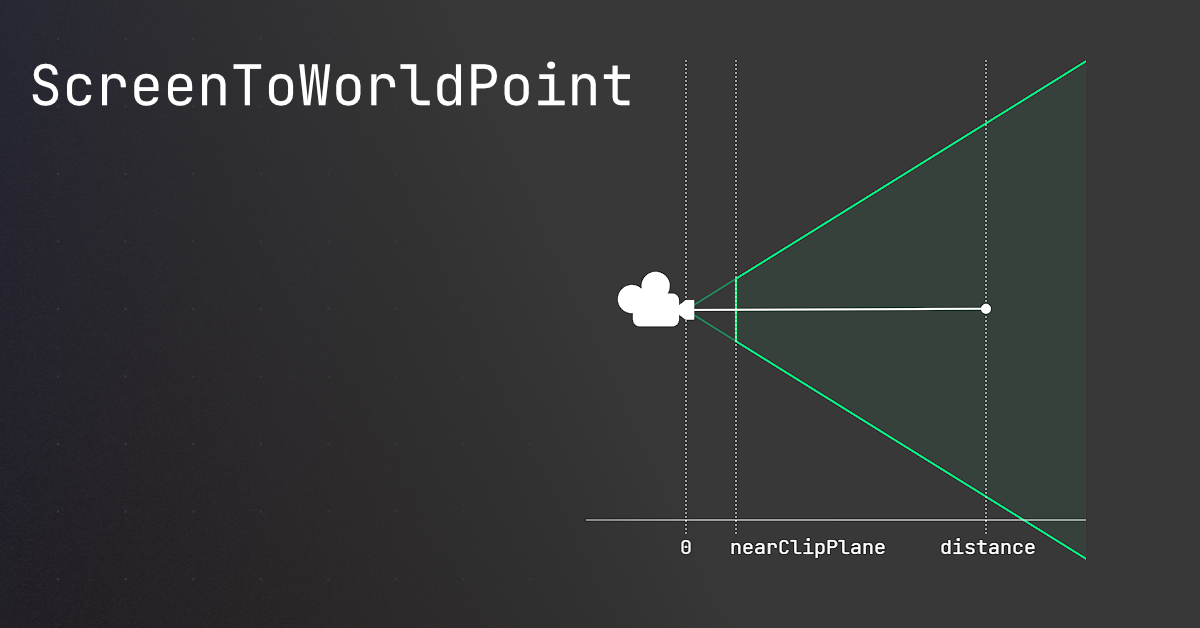
🤔 Unity, Huh, How?
Common ScreenToWorldPoint issues, and similar alternatives that may be better.
naive tapir
slender nymph
this is a perspective camera, isn't it?
yes
naive tapir
slender nymph
https://unity.huh.how/screentoworldpoint
I'll check this out, thanks!
ivory bobcat
||The world position would be where the camera is unless you provide some other value for z||
naive tapir
That might be why....
slender nymph
that's exactly what is happening, as explained in the link i sent
naive tapir
slender nymph
that's exactly what is happening, as explained in the link i sent
I've been reading it
Thank you all for your help! It's getting late in my timezone, I ought to get going.
Thanks again!
 gaunt cipher
Is there something that preserves transform values? Like I'm kinda annoyed that Transform is a thing that holds a position a rotation and a scale but if you try to snipe off Transform into a variable you just store a reference to transform. So when I want to preserve something I have to do Vector3 pos = x.transform.position, Quaternion rot = .. and so on
like a struct that contains two vector3s and a quaternion
sour fulcrum
you could make that struct
gaunt cipher
sour fulcrum
you could make that struct
very true but knowing Unity someone will be like omg, you haven't heard of the TransformInstance class that's half deprecated?!
so I figured I would cover my bases
wintry quarry
gaunt cipher
Is there something that preserves transform values? Like I'm kinda annoyed that ...
Matrix4x4 is what you want
gaunt cipher
wintry quarry
Matrix4x4 is what you want
thank you
wintry quarry
gaunt cipher
thank you
Use Matrix4x4.TRS to make one from transform position, rotation, and scale
gaunt cipher
wintry quarry
Use Matrix4x4.TRS to make one from transform position, rotation, and scale
deadass, thank you
 verbal dome
wintry quarry
Use Matrix4x4.TRS to make one from transform position, rotation, and scale
verbal dome
wintry quarry
Use Matrix4x4.TRS to make one from transform position, rotation, and scale
Would that be different from transform.localToWorldMatrix?
I guess the scale could be different if sheared or something?
 nova quest
hi all. has anyone run into this issue with unity before? revert doesnt fix the issue. deleting Usersettings/layouts didnt work. deleting library didnt work.
 midnight plover
nova quest
hi all. has anyone run into this issue with unity before? revert doesnt fix the ...
midnight plover
nova quest
hi all. has anyone run into this issue with unity before? revert doesnt fix the ...
When does this happen? When opening the editor? Do you still have access to the menu to run window -> layouts -> reset or pick one default?
nova quest
yes when opening the editor, when it gets to "open scene". i dont see the main unity UI so i cant do window > layouts > reset
 midnight plover
nova quest
yes when opening the editor, when it gets to "open scene". i dont see the main u...
midnight plover
nova quest
yes when opening the editor, when it gets to "open scene". i dont see the main u...
And when you hit cancel, it just closes the editor?
For future topics, this is not a coding issue, so #💻┃unity-talk would fit better next time 🙂
nova quest
yes, same with quit. and revert just opens the popup again. thanks sorry about wrong channel
oh, cancel finishes loading but i dont see the main unity UI, but i can see the menu bar options not greyed out now
midnight plover
Did you try to open it with another editor? I guess, there is some broken unity editor files being the cause
nova quest
oh that worked, it opened a panel and i was able to add scene to it
midnight plover
Oh, so its fixed?
nova quest
yes, i clicked cancel and it opened one of my panels but not the main ui, then i went to add tab and added scene, and back to where i was
midnight plover
Nice 👍
nova quest
it happens every restart, im gonna see if i can do window -> layouts -> reset
midnight plover
nova quest
it happens every restart, im gonna see if i can do window -> layouts -> reset
Yeh, probably reset or just changing to any default layout and save,close, reopen might fix it
 spare vigil
wondering something before i develop a possibly bad habit
is there any difference between the two? is one recommended over the other if they're the same functionally?
vs
float yValue = Input.GetAxis ("Vertical") * Time.deltaTime * moveSpeed;
first habit you could change is using the old input system 😉 Apart from that, the second line is way more readable but you are also missing spaces on your first way to format it more readable
spare vigil
oh yeah im just working thru this tutorial and they're using this one for ease sake i guess
i figure they will move onto the new input system later
well beside readability i think what i am mostly concerned with is with the first one the value is being modified in the arguments of the method and the 2nd example they're modifying the value within the variable itself
in my mind changing the value would be done in the method or arguments (?) rather than at the variable level because the variable should just stay what it is until it gets changed by a method
sour fulcrum
It's good to get into the habit of thinking about what your doing like this but in this case your overthinking it a little imo
spare vigil
yeah im sure hahaha
 plucky peak
erm, i have a bit of question if anyone has the time
sour fulcrum
because the variable should just stay what it is until it gets changed by a method
this bit is a poorly steered conclusion i think
espicially when in the second example it is being changed by a method, the one that code is in 😛
 umbral jetty
Guys i wanna make 3d platformer with no coding experience at all
i barely know variables, get components, instantiate and other basic stuff
but that is all
spare vigil
i guess ultimately it is all within Update()
so maybe i am just looking at it incorrectly
sour fulcrum
ah i didn't have that context, yeah ideally you'd probably have that stuff in a seperate function/method and just call it from update
something like MovementUpdate() etc.
spare vigil
genuinely that is probably some later step in this tutorial, im just getting ahead of myself
thank you for the responses! gonna get back to it and try not to overthink things
part of it is just me trying to work thru what it is im doing i guess
rather than just following along and not retaining it
sour fulcrum
forsure
midnight plover
spare vigil
genuinely that is probably some later step in this tutorial, im just getting ahe...
I generally try to go by the rule of reading the code as words. If you still can understand it without going on the same line several times to explain to yourself, whats happening, you got a good base. Of course, you will get into the habit of using linq and expressions to reduce code but they would still be readable and "easy" to understand. But thats something you develop over time. Where it makes sense to reduce code and where to use local variables and what not.
plucky peak
im a beginner and im trying to deal with vectors. there is a missile that shoots from a ship, and i want it to go into the direction of where it shoots. however i am having trouble with trying to make my direction accessible across functions. https://hastebin.com/share/nuradicoco.csharp
Hastebin is a free web-based pastebin service for storing and sharing text and code snippets with anyone. Get started now.
midnight plover
plucky peak
im a beginner and im trying to deal with vectors. there is a missile that shoots...
so to understand it correctly. Your missile should just fire in the direction of the ship heading?
plucky peak
yeah, im very new, so im not entirely sure what im exactly doing
but im trying to play with vectors and i am assuming that in the direction of the enemy in accordance to the missile position
it would go to that location?
ivory bobcat
plucky peak
im a beginner and im trying to deal with vectors. there is a missile that shoots...
Normally when you've spawned the projectile, you would set it's direction not long aftercs var bullet = Instantiate(bulletPrefab); bullet.direction = ...;
Assuming direction is public
plucky peak
hmmm, but would direction still be the transform.position - enemy.position?
is that how you'd determine a vector?
ivory bobcat
Ownership question. Who should direct where to bullet goes?
midnight plover
But you updating the direction does not have any effect for now, because your fixedupdate is using the movement vector from Start().
plucky peak
player
midnight plover
Which should be right, but does make update() useless in that case.
ivory bobcat
(Unless it's some sort of heat seeking missile where it ought to adjust itself according to some target)
The shooter would still provide the target in the above case though
plucky peak
let me give some more context, the player is able to rotate, not move, but how would you find the data on direction they face? i think i am having trouble on that and attempting to move that infomation towards PlayerMissile
*rotation of player is determined by mouse position
sour fulcrum
Transform component contains .forward which is a Vector3 pointing forward
midnight plover
plucky peak
let me give some more context, the player is able to rotate, not move, but how w...
Maybe you did not use it yet, but there is also something called vector3.forward, in your case transform.forward, which you could use if you want the missile to just go straight forward from the player. But your current script is trying to seek on the enemy. So you gotta decide here, what you are approaching
plucky peak
i think transform.forward is absolutely perfect for my case. im not trying to make a heat-seeking missile, i just want it to shoot from the direction of the player
midnight plover
plucky peak
i think transform.forward is absolutely perfect for my case. im not trying to ma...
if its shooting in a 90 offset from what you expect, transform.forward is not your actual forward 😉 Just in case, it could also be transform.right if you created a prefab with "mixed up" visual rotation
ivory bobcat
2d would be right
midnight plover
true. forward is always 0 on z in 2D 😄
sour fulcrum
oh btw, regarding this in your code
     //MovePosition expects a Vector2, but I am sending in a Vector3.
        //why am I doing it this way?
        //what is happening when I send it in?
        rb2d.MovePosition(transform.position + movement/1000f);
A lot of things with a Vector2 param will accept a Vector3 and just remake a Vector2 using the 3's x and y
it's just a convience thing
plucky peak
gotcha
tysm
another question
would i need to do anything within my playerscript, or can i just do everything within my playermissile? i am able to get information of the player from this script, so i don't think at the time i need anything from my player, right?
midnight plover
plucky peak
would i need to do anything within my playerscript, or can i just do everything ...
Thats a very generic question. What is "everything"!? you should not do everything from a missile script that gets destroyed at some point 😄 But if you mean like, you hit an enemy and probably get XP from it, you should use some manager/event system to fire the correct events that need react on this situation.
plucky peak
gotcha, i think, i dont need to make anything in the player script, as i just only need position of the player so it should be fine
tysmm guys i appreciate it
ill look into transform.right
errant breach
Hello, do i make a mistake ? Because my script cannot access c_EnemyAmount;
My script :
private ProgressionScript progessionScript;progessionScript.c_EnemyAmount += 1;
Crashes the game with the error :
NullReferenceException: Object reference not set to an instance of an object EnemyScript.Activate (System.Single timeBeforeSpawn)
But in another code (from a tutorial), this work just fine.. And i dont understand
Thanks !

 midnight plover
errant breach
Hello, do i make a mistake ? Because my script cannot access c_EnemyAmount;
My ...
midnight plover
errant breach
Hello, do i make a mistake ? Because my script cannot access c_EnemyAmount;
My ...
Null reference always means, the object you are targeting is not there. So where do you set the progressionScript? As its private, you might seem to use a look up somewhere, like getcomponentinchildren or findbytype or whatever
or not at all which would explain it
errant breach
midnight plover
Null reference always means, the object you are targeting is not there. So where...
Thanks for taking time to explain !
Here is the script, it should be public right ?
By the way, here's my sourcecode :
As for EnemyScript, the error is caused when i do :
progessionScript.gameProgressions.c_EnemyAmount += 1;
 midnight plover
errant breach
Thanks for taking time to explain !
Here is the script, it should be public ri...
midnight plover
errant breach
Thanks for taking time to explain !
Here is the script, it should be public ri...
you might wanna answer my question 😉
errant breach
The progressionScript is on the "Content" object, and i dont use getcomponentinchildren or findbytype or whatever because the tutorial didn't use any so im lost.
Here's how i do it :
private ProgressionScript progessionScript;
progessionScript.gameProgressions.c_EnemyAmount += 1;
midnight plover
errant breach
The progressionScript is on the "Content" object, and i dont use `getcomponentin...
blindly follow a tutorial is not the best way. in c# language your line just says:
create a "placeholder" for some script with the type ProgressionScript that is only accessible to this class (private). but the actual reference is never assigned, so this line
private ProgressionScript progressionScript;
can be read as
private ProgressionScript progressionScript = null;
So to actually tie it to an object, you gotta assign it with the runtime object in your scene. Either make it public and dragdrop it, or find it once on start/onenable or wahtever you prefer with Getcomponent or FindObjectByType or or
midnight plover
errant breach
The progressionScript is on the "Content" object, and i dont use `getcomponentin...
Just because the script is in the Scene does not mean, is automatically accessible to any script
silk night
!collab
radiant voidBOT
silk night
!collab
:loudspeaker: Collaborating and Job Posting
We do not accept job or collab posts on Discord.
Please, use Discussions to promote yourself as job-seeking, advertise commercial job offers, or look for non-commercial projects to participate in:
• ** Collaboration & Jobs**
wintry quarry
verbal dome
Would that be different from transform.localToWorldMatrix?
Oh wait yeah this might be the easier way
 desert vault
Does anyone know why this happened?


 desert vault
 rich adder
<#763500535554375750>
rich adder
<#763500535554375750>
👌
 onyx blaze
Someone can help with interfaces? :/
slender nymph
https://dontasktoask.com
just ask your actual question
onyx blaze
Ah, sorry
Is because I'm trying to implements an Interface about Naninovel asset, but the developer never helps
Just send the Unity documentations :/
I'm new with interfaces, then I'm very confuse
rich adder
still vague
grand snow
onyx blaze
I'm new with interfaces, then I'm very confuse
Okay what have you tried soo far?
 hexed terrace
onyx blaze
I'm new with interfaces, then I'm very confuse
hexed terrace
onyx blaze
I'm new with interfaces, then I'm very confuse
!learn <- time to start with the basics
radiant voidBOT
hexed terrace
!learn <- time to start with the basics
:teacher: Unity Learn ↗
Over 750 hours of free live and on-demand learning content for all levels of experience!
onyx blaze
rich adder
still vague
Ah, wait, I'm typing
Sorry ><
grand snow
keep it in one message
polar acorn
onyx blaze
Ah, sorry
Is because I'm trying to implements an Interface about Naninovel asset...

W3Schools offers free online tutorials, references and exercises in all the major languages of the web. Covering popular subjects like HTML, CSS, JavaScript, Python, SQL, Java, and many, many more.
onyx blaze
Okay
In a big resume, I got so many errors when I tried to use the interface
But I'm confuse about it
CS0535: Member does not implement interface member.
 slender nymph
you need to implement the methods that the interface declares
that is literally the entire requirement of implementing an interface
rich adder
time to go back to basics
polar acorn
onyx blaze
Okay
In a big resume, I got so many errors when I tried to use the interface
But...
So, implement those methods
rich adder
 night gate
does anyone know how to stop getting server tick batching warnings in NFE, been getting em since i made the project lmao
onyx blaze
Like everything empty?
But, will not get errors?
 polar acorn
The IDE can even create the stubs for you
polar acorn
onyx blaze
Like everything empty?
But, will not get errors?
Well, actually attempting to run any of those methods will throw a NotImplementedException
slender nymph
onyx blaze
Like everything empty?
But, will not get errors?
But, will not get errors?
you're literally throwing exceptions in every single one of those methods
polar acorn
Because that's what they contain
If you don't want them to throw exceptions, you should put code in there
rich adder
night gate
does anyone know how to stop getting server tick batching warnings in NFE, been ...
NFE?
onyx blaze
Wait, wait, each one are tell a different thing
I'm trying to solve it since weeks :/
slender nymph
you need to actually implement a body for the methods
grand snow
onyx blaze
Like everything empty?
But, will not get errors?
Ill be nice. Visual studio has filled in default definitions for the required functions. You are expected to do more with these as you can see rn they all throw an exception.
night gate
rich adder
NFE?
netcode for entities
hexed terrace
Compile errors will be gone.
Runtime will give you exceptions.
grand snow
can we stop all saying the same shit
night gate
the less likable networking option
onyx blaze
Probably I'll lost this job, because I'm the only programmer in years and I need to do everything alone
slender nymph
holy shit, you're getting paid to do this and you have no idea how to implement an interface?
polar acorn
onyx blaze
Wait, wait, each one are tell a different thing
I'm trying to solve it since wee...
I feel like the issue is that we're all saying the same thing
Not that it's different
rich adder
onyx blaze
Probably I'll lost this job, because I'm the only programmer in years and I need...
are they hiring ? lmk when.. Ima take the job 😆
hexed terrace
rich adder
are they hiring ? lmk when.. Ima take the job 😆
me first! 😄
sour fulcrum
pls i need my first job
rich adder
taking a job / getting as programmer without knowing how interfaces work is wild
 cosmic quail
probably a scam job that isn't planning to pay him 🤔
night gate
onyx blaze
Probably I'll lost this job, because I'm the only programmer in years and I need...
what kinda job are u doing that involves unity
plus
being the only programmer
plus the only programmer in years
did they specify they wanted whatever it is to be made in unity 😭
 midnight tree
Oh my god, my eyes are burning from the toxicity in the chat...
night gate
midnight tree
Oh my god, my eyes are burning from the toxicity in the chat...
tbf im just curious
sour fulcrum
ts just a rough industry
night gate
like what kinda company is needing a unity game (specifically one involving complex interfaces and the such) out of the blue and only hiring one programmer
im not saying i dont believe them like it sounds believable it also just sounds odd
night gate
sour fulcrum
ts just a rough industry
ofc ofc
midnight tree
night gate
tbf im just curious
I'm about chat at all
night gate
onyx blaze
Okay
In a big resume, I got so many errors when I tried to use the interface
But...
what exactly are you needing an interface for?
slender nymph
they're trying to implement a third party asset that requires the use of it
rich adder
night gate
what asset did they say
you can literally just scroll up and read it..
Naninovel asset
onyx blaze
night gate
what exactly are you needing an interface for?
I'm using Naninovel asset and Ultimate DLC Toolkit
I'm trying to create a custom provider in Naninovel to get the files in the DLC
But to do this, I need to use an interface
But I'm very confuse about how to do this :/
night gate
rich adder
> Naninovel asset
theyre using a paid asset on a one-person unity job after not hiring a programmer for years?!
average management decision tbf
rich adder
whats that got to do anything with it...nothing wrong with using a paid asset..
especially if the company foots the bill..
why reinvent the wheel if you have asset doing what you need
grand snow
onyx blaze
I'm using Naninovel asset and Ultimate DLC Toolkit
I'm trying to create a custom...
Are you sure you cant just inherit + override an existing implementation? Otherwise it appears like you need to re implement all those loading functions.
night gate
rich adder
whats that got to do anything with it...nothing wrong with using a paid asset..
im just judging the company
rich adder
night gate
im just judging the company
sorry but have you worked in a company before? pleenty of companies aquire different software for specific needs.. it wastes more money coding everything from scratch and mantaining it..
alas veering offtopic anyway..
night gate
rich adder
sorry but have you worked in a company before? pleenty of companies aquire diff...
fair enough ig
grand snow
Its a no brainer to spend like £50 to save a few days work
slender nymph
grand snow
Are you sure you cant just inherit + override an existing implementation? Otherw...
at this point i'm not even sure they need to be implementing the interface theirself rather than just getting an object reference
grand snow
slender nymph
at this point i'm not even sure they need to be implementing the interface their...
Yea im not sure but they seem to think they need a custom provider or something so who knows 🤷♂️
nice to see UniTask though
night gate
onyx blaze
I'm using Naninovel asset and Ultimate DLC Toolkit
I'm trying to create a custom...
are you sure you need a custom provider?
onyx blaze
night gate
are you sure you need a custom provider?
Yeah, because I need to read the files that are out of the builded game

So I need to create a ResourceProvider that Allows me to read this DLC content
sour fulcrum
grand snow
Its a no brainer to spend like £50 to save a few days work
this hour of troubleshooting in a lot of countries probably costed more in time lol
grand snow
onyx blaze
Yeah, because I need to read the files that are out of the builded game
Your best bet is to try to use addressables as this supports content outside a build.
Otherwise the only solution is asset bundles manually handled (which is harder vs addressables)
onyx blaze
grand snow
Your best bet is to try to use addressables as this supports content outside a b...
This issue is because, the files need to be inside the ProjectSettings to be readed
But when the game is compiled, ProjectSettings is unacessable
grand snow
That does not make sense
polar acorn
onyx blaze
I'm using Naninovel asset and Ultimate DLC Toolkit
I'm trying to create a custom...
You implement the interface, and add in the code you want to run on those functions.
grand snow
Are you thinking of a project setting scriptable object instance?
onyx blaze
polar acorn
You implement the interface, and add in the code you want to run on those functi...
That's the issue
I'm trying to understand how to do this ;-;
sour fulcrum
Not to derail the direct question but just a kinda vibe check with no disrespect, whatever solution you end up going here is probably gonna take you some time to learn about parts of what needs to happen here
just make sure you have the time budget necessary for that
polar acorn
onyx blaze
I'm trying to understand how to do this ;-;
What do you need those functions to do? Whatever asset has the interface probably has some sort of documentation
grand snow
Guys its clear they dont really need to do this
They somehow think getting project settings data needs some silly solution. They should just be in a scriptable object somewhere
polar acorn
I don't know the asset, so I don't have any context for what it's supposed to be
grand snow
TMP for example already does this but their settings are in a scriptable object in Resources
onyx blaze
Is because I cannot show the game here
I have a video about this dlc
slender nymph
you need to actually provide a proper description of what your goal here is, because right now this really seems like an XY Problem
onyx blaze
I have the Naninovel Asset, that is to do Visual novels
This asset uses the ProjectSettings to set the files the will be read, like dialogue scripts, as example

But when compiles the game, ProjectSettings isn't accessible anymore
To this I use a folder "DLC" to add the characters files that I need
Some files as images or sounds works because don't need to be inside the Project settings

 slender nymph
why can you not configure it before building the game
onyx blaze
I use this code to read the DLC files and load in the game
Pastebin
Pastebin.com is the number one paste tool since 2002. Pastebin is a website where you can store text online for a set period of time.
onyx blaze
slender nymph
why can you not configure it before building the game
Because the characters will be release separatedly, as DLC
slender nymph
whatever. continue the explanation, and for the love of all that is holy stop breaking the explanation up into multiple messages. it is incredibly fucking annoying to have to read only a small part of the explanation and then wait several minutes for even a crumb of context
onyx blaze
slender nymph
whatever. continue the explanation, and for the love of all that is holy stop br...
Sorry, is because I was pasting the printscreens ;-;
I don't want trouble
Sorry
 acoustic maple
I added a tag to a the ball in my pinball game now it falls through the floor
slender nymph
tags have nothing to do with physics/collisions. are you certain that the colliders/rigidbody are set up correctly
acoustic maple
I was adding a collision to a bumper. The only thing I changed was making it a trigger
slender nymph
trigger colliders do not provide physical collisions
slender nymph
use an animation event
slender nymph
you know you can google things, right?
 queen vale
acoustic maple
How do I wait for an animation to end?
queen vale
acoustic maple
How do I wait for an animation to end?
Inside of the animator/animation you can add events.
 queen vale
acoustic maple
Is that code?
queen vale
acoustic maple
Is that code?
Select the object containing the animator (0) > select the target animation > create an event (1) > select / place the event marker where it needs to trigger within the animation (2) > select a function within the script attached to the same gameobject, ie your script & function need to both exist on the gameobject that contains the animator (3).
 acoustic maple
queen vale
Select the object containing the animator (0) > select the target animation > cr...
acoustic maple
queen vale
Select the object containing the animator (0) > select the target animation > cr...
I made the animation in blender how do I do this?
bc the button is grayed out
queen vale
Which button?
queen vale
Go to the asset/animation within your "Project" tab, select it.
Ctrl+D to duplicate it.
Make adjustments to the duplicated file
acoustic maple
I found it is in the main fbx
queen vale
I'm not sure that I understand? What is in the "main" fbx? When you import a model/fbx that was animated within blender, so long as your export settings were correct, it should still carry the animation. When selecting the initial (within Unity/"Project") import file you have options to generate colliders, carry over materials, and import animations.
acoustic maple
queen vale
I'm not sure that I understand? What is in the "main" fbx? When you import a mod...
i got it
acoustic maple
I have the code but cant call it. I am getting this error 'bumper' AnimationEvent 'endbumperanimtion' on animation 'Cone|ConeAction' has no receiver! Are you missing a component?
slender nymph
do you have a method with that name on a component that is attached to the same gameobject your animator is on?
acoustic maple
slender nymph
do you have a method with that name on a component that is attached to the same ...
a method starts with void right?
slender nymph
void is a return type for a method, but it is not the only return type. in this case the method you write for the animation event should return void
acoustic maple
slender nymph
void is a return type for a method, but it is not the only return type. in this ...
can you give me an example? I am new to C#. I came from Java
slender nymph
there are beginner c# courses pinned in this channel, start there if you don't know how to write a method. but if you came from java then you should already understand what methods are and how to use them, as well as return types.
solar hill
acoustic maple
can you give me an example? I am new to C#. I came from Java
Java has void methods too though
cosmic quail
acoustic maple
can you give me an example? I am new to C#. I came from Java
it works the exact same in java
c# is basically identical to java in almost every way
polar acorn
acoustic maple
can you give me an example? I am new to C#. I came from Java
Return types in C# are known as return types in Java.
The Java equivalent of C#'s void is void
acoustic maple
polar acorn
Return types in C# are known as return types in Java.
The Java equivalent of C#...
In my basic java class we only used void.
slender nymph
then you didn't really "come from java" if you barely even learned the basics
solar hill
also what basic class would not teach you the other types??
sour fulcrum
solar hill
also what basic class would not teach you the other types??
a lot of them
acoustic maple
sour fulcrum
a lot of them
Yeah we were told to use void to compress code.
slender nymph
that makes literally 0 sense
sour fulcrum
your teacher is stupid but thats besides the point
acoustic maple
I can do alot in game maker but they use a wierd propritary language.
acoustic maple
acoustic maple
Yeah we were told to use void to compress code.
worded that wrong. use it to organize code
solar hill
what
slender nymph
still doesn't make sense. you can use methods to modularize and organize code within a class, but that doesn't really have anything to do with the method's return type
 swift sedge
you use any method to reorganise code, regardless of return type
the return type is only there to take it one step further and actually return some data from a method call
cosmic quail
splitting code into methods does help organize it better
queen vale
solar hill
what
Propriatary, GameMaker uses "GML".
 thats not what i was responding to
queen vale
thats not what i was responding to
queen vale
my bad 😓
 edgy tangle
I think probably teachers teaching beginners lean into just using void return types because explaining returns just adds more stuff that might confuse beginners
verbal dome
I'd say that not understanding return types leads to more confusion
Such a fundamental concept
(I did check GML a bit and the return type seems to be implicit or something https://manual.gamemaker.io/lts/en/GameMaker_Language/GML_Overview/Language_Features/return.htm)
edgy tangle
Could be. I remember when I started out I didn’t really get it for a while, but that may also have been due to following tutorials that only really ever used void return types
Just playing devil’s advocate that I could understand why that topic wouldn’t be covered right away
queen vale
I'm not formally educated in any of this, are we talking about
public GameObject Get_Menu()
{
  return menu.gameObject;
}
🥲 the sweating face does not give me confidence
cosmic quail
queen vale
🥲 the sweating face does not give me confidence
that's a head shaking vertically face
(nodding)
queen vale
Ahhhhh, need new glasses lol
cosmic quail
they were talking about method return types and GameObject is indeed the return type of your example method
edgy tangle
Back to @acoustic maple’s problem… yeah you need to have a public void method on a script attached to the same GameObject as the animator with the EXACT same name that you put on the AnimationEvent
I’m not positive if it MUST be a void return signature, but unless there’s a specific signature the animator can use then it won’t do anything with return types anyway
I don’t know how it works under the hood but I assume it’s using SendMessage
queen vale
acoustic maple
I have the code but cant call it. I am getting this error 'bumper' AnimationEven...
^ Like Owen said, needs to be public.
The event could be linked to
public void DesiredAnimation()
{
  // do things
  gameObject.SetActive(false);
  // etc...
}
Then so long as the animation actually plays and the event is in place. It'll trigger the desired behaviour.
acoustic maple
thanks
queen vale
As for the no reciever part, you need to make sure that:
- There's an animator component on the gameobject.
- The script with the desired function / behaviour is on that same gameobject.
swift sedge
verbal dome
(I did check GML a bit and the return type seems to be implicit or something <ht...
Much like Lua, GML doesn't have explicit type declaration support. It's all dynamically typed. Which is why, for general information, Roblox created and open-sourced Luau to add types, generics, etc. as a derivative of Lua, which makes game dev much easier, and makes code easier to understand with less errors
acoustic maple
time to work on geting the bumper to put more force on the ball to be relistic
 floral garden
Hi, i got an question while following a tuto , with the new input system
he put an input and a getter like
functionInput
// turn true the bool associated with it touch
then a function get
turn it off
and return true
else
false
is it a good way to manager the button ? will it have a data race ?
verbal dome
swift sedge
Much like Lua, GML doesn't have explicit type declaration support. It's all dyna...
Yeah. Having to read through the method to see what type it returns is beyond me 😅
swift sedge
also, Luau goes one step further and supports union types, i.e. (number | string) can either be a number or a string, which I think is so cool
acoustic maple
verbal dome
Yeah. Having to read through the method to see what type it returns is beyond me...
That’s why undertale is so hard to mod
queen vale
floral garden
Hi, i got an question while following a tuto , with the new input system
he put ...
Not sure what you mean, as for a data race I can't reliably say either.
Code runs from top to bottom (sorta) so if an input is read earlier in the script, it's value/variable with be updated sooner.
As for what will "react" to said input first, depends on the order of functions/calls that operate off of that condition/input.
grand snow
any moment
polar acorn
floral garden
Hi, i got an question while following a tuto , with the new input system
he put ...
I have no idea what you're referring to, if you have a question about a specific function in a tutorial, you should probably actually show it instead of trying to describe it
wintry quarry
floral garden
Hi, i got an question while following a tuto , with the new input system
he put ...
Can you try rewriting this and maybe give us the actual code? Your description here is really vague and your question about a "data race" is unclear.
queen vale
floral garden
Hi, i got an question while following a tuto , with the new input system
he put ...
Maybe this'll help (?)
void Test()
{
  Func_B();
  Func_A();
  Func_Test();
}

void Func_Test()
{
  Debug.Log("1");
  Debug.Log("23");
}

void Func_A()
{
  Debug.Log("Hello");
}

void Func_B()
{
  Debug.Log("Goodbye");
}

Output = Goodbye
         Hello
         1
         23
wasted effort if you ask me
queen vale
Only takes a moment, besides procrastinating on my project atm lol
 timber nacelle
i might be kinda annoying but i just saw a youtube video of a tutorial on how to make a player with movement, but the game is just spamming: "invalidoperationexception: you are trying to read input using the unityengine.input class, but you have switched active handling to input system package in player setting"
i already got 999+ error outputs with the same message lol
solar hill
!Input
radiant voidBOT
solar hill
!Input
How to Set Input
To set Active Input Handling, go to:
Project Settings > Player > Active Input Handling
• Input Manager (Old): Use the original Input settings.
• Input System Package (New): Uses the new input system package.
• Both: Use both systems.
solar hill
set it to both
timber tide
Project Settings > Player > Active Input Handling
grand snow
basic computer literacy required
timber nacelle
yessss it works now, thanks
verbal dome
timber nacelle
what do i do? i have unity since yesterday 😐
Did you not read the bot message
It says what Mao said
Not gonna get very far if you dont read instructions
wraith sage
Isn't it wrong to move the camera at the event instead of updating? To avoid unnecessary executions when the camera is not moved? I ask because they put it in update everywhere, I don't know if it's because it's not recommended to do it the way I did, or because they didn't think about doing it that way. (the camera works without problems)
 floral garden
wintry quarry
Can you try rewriting this and maybe give us the actual code? Your description h...
floral garden
wintry quarry
Can you try rewriting this and maybe give us the actual code? Your description h...
Yes wait a sec
        private bool _submitPressed = false;

        public void SubmitPressed(InputAction.CallbackContext context)
        {
            if (context.performed)
            {
                _submitPressed = true;
            }
            else if (context.canceled)
            {
                _submitPressed = false;
            }
        }

        public bool GetSubmitPressed()
        {
            bool result = _submitPressed;
            _submitPressed = false;
            return result;
        }
    // for any of the below 'Get' methods, if we're getting it then we're also using it,
    // which means we should set it to false so that it can't be used again until actually
    // pressed again.
this is the text he putted in the github
wintry quarry
wraith sage
Isn't it wrong to move the camera at the event instead of updating? To avoid unn...
It's not clear what the context of this is? This is presumably the listener for an Input Action - but what kind of input action with what kind of bindings?
wintry quarry
floral garden
```c#
private bool _submitPressed = false;
public void SubmitPr...
this is overcomplicated
whatever code is consuming GetSubmitPressed() should just run inside the SubmitPressed input listener.
or should be subscribed to an event fired from there
 white zinc
does anyone know why this doesnt work? It is suppose to get a random float from 1 to 5: randomValue = UnityEngine.Random.Range(1, 5);
wintry quarry
but no there's nothing in here that is a "race" of any kind
wintry quarry
white zinc
does anyone know why this doesnt work? It is suppose to get a random float from ...
you put integer parameters so you're using the integer version of Random which will return 1, 2, 3 or 4 randomly here
floral garden
and about the data race as all update is random (i think)
if 2 update use the input, one will be ignored
this is what my question
floral garden
wintry quarry
whatever code is consuming `GetSubmitPressed()` should just run inside the Submi...
oh ? input system has a listener for each input?
or should I create one?
white zinc
wintry quarry
you put integer parameters so you're using the integer version of Random which w...
it doesnt work for 1 to 4 either
I created a public float that should show the value in the inspector but it is always 0
floral garden
are you sure you set the value ?
solar hill
white zinc
it doesnt work for 1 to 4 either
reread what he said
floral garden
log the value then
solar hill
randomValue = UnityEngine.Random.Range(1f, 5f);
ohh yeah that makes sense
wraith sage
wintry quarry
It's not clear what the context of this is? This is presumably the listener for ...
Just a Delta [mouse]
wintry quarry
floral garden
oh ? input system has a listener for each input?
You already have one
white zinc
solar hill
```
randomValue = UnityEngine.Random.Range(1f, 5f);
```
it still doesnt really work: ```using UnityEngine;
using UnityEngine.UI;
public class BarSliderRotation : MonoBehaviour
{
public FNAFCamera fnafCamera;
public Slider slider;
public float randomValue;

private bool hasTriggered = false;

void Start()
{
    if (slider != null)
    {
        slider.minValue = 0;
        slider.maxValue = 100;
        slider.value = 0;
    }
}

void Update()
{
    if (fnafCamera == null || slider == null) return;

    slider.value = fnafCamera.rotationPoints;

    if (fnafCamera.rotationPoints >= 100f && !hasTriggered)
    {
        randomValue = UnityEngine.Random.Range(1f, 5f);
        hasTriggered = true;
    }

    if (fnafCamera.rotationPoints < 100f && hasTriggered)
    {
        hasTriggered = false;
    }
}
}```
wintry quarry
That's what SubmitPressed is
solar hill
white zinc
it still doesnt really work: ```using UnityEngine;
using UnityEngine.UI;
public...
have you considered its giving 0 because your conditional might not be triggering?
wintry quarry
white zinc
it still doesnt really work: ```using UnityEngine;
using UnityEngine.UI;
public...
If it's never being anything but 0 then the code is simply not running
solar hill
give randomValue a default value like 20
if it shows up as 20, then you know that youre never reaching random.range
wintry quarry
Nothing to do with the Range function
white zinc
wintry quarry
If it's never being anything but 0 then the code is simply not running
I put public float randomValue = 20f; and in the inspector it shows 0
solar hill
did you change the default value in the inspector or the code?
its a public value, the inspector will always override it
floral garden
wintry quarry
That's what SubmitPressed is
 ...?
...?
do you mean , I can juste read the value and remove the getter ?
white zinc
solar hill
did you change the default value in the inspector or the code?
in the inspector I put 20 now and it stays as 20 the whole time
solar hill
right...
so yes your If statement is failing somewhere
most likely your fnafCamera.rotationPoiints
floral garden

queen vale
using UnityEngine;
using UnityEngine.UI;

public class BarSliderRotation : MonoBehaviour
{
    public FNAFCamera fnafCamera;
    public Slider slider;

    public float randomValue;

    private bool hasTriggered = false;

    void Start()
    {
        if (slider != null)
        {
            slider.minValue = 0;
            slider.maxValue = 100;
            slider.value = 0;
        }
    }

    void Update()
    {
        if (!fnafCamera || !slider) return;

        slider.value = fnafCamera.rotationPoints; // How is this value getting set?
        Debug.Log(fnafCamera.rotationPoints);

        if (fnafCamera.rotationPoints >= 100f && !hasTriggered)
        {
            randomValue = UnityEngine.Random.Range(1f, 5f);
            hasTriggered = true;
        }

        if (fnafCamera.rotationPoints < 100f && hasTriggered)
            hasTriggered = false;
    }
}
log the value of that at the top of your update
floral garden
why don't you toggle debug and place a break point?
solar hill
its almost certainly fnafCamera.rotationPoints, my question is whats the point of setting sliders.value to it but then just using the rotationPoints in your if statements anyways
floral garden
what the print value of rotationPoints?
white zinc
solar hill
log the value of that at the top of your update
in the console it shows the correct value of rotationPoints
from 0 to 100
and it resets to 0 when reaching 100
 ionic mirage
hello wonderfull people hope evryone have a great weekend im looking for help right now it been 2 day trying to figure out why my new character dont want to move beofre i had a captuse and move normaly after download character only camara rotate left and right
floral garden
2d ? 3d ? Rigidbody or Character controler ? new input system or old ?
keyboard or xbox controler ?
queen vale
white zinc
and it resets to 0 when reaching 100
What we know
- It found the camera & slider.
- The rotation points is updating in value and reaching 100.
- The hasTriggered by default is false, leaving the first if statement possible but not functional.
Is rotationPoints an int or float?
white zinc
queen vale
What we know
- It found the camera & slider.
- The rotation points is updating ...
float
grand snow
I am confused what this is even trying to do
floral garden
maybe float accuracy ?
queen vale
Strike what I said, int/float shouldnt matter..(?)
ionic mirage
floral garden
2d ? 3d ? Rigidbody or Character controler ? new input system or old ?
keyboard ...
both in imput
 queen vale
It's >= so regardless so long as the value is met or exceeded
floral garden
ionic mirage
both in imput
both ?
queen vale
^^^ mod-10 counter
As soon as the 7-segment display reaches 10 it goes back to 0, never displaying 10
ionic mirage
 queen vale
solar hill
maybe its not reaching 100?
queen vale
solar hill
maybe its not reaching 100?
You could be on to something, but then it's an issue of order of operations
floral garden
hmm firstly i recommend you to use only one
New or Old
then for the question
from what i see , it is maybe a CC
can you show where you make the move?
ionic mirage
already try new and old nothing just the vcamara rotate left and right and jump
hexed terrace
!vscode
radiant voidBOT
hexed terrace
!vscode
Visual Studio Code guide
If your IDE is not underlining errors in red or autocompleting code,
please configure it using the link below:
floral garden
ionic mirage
already try new and old nothing just the vcamara rotate left and right and jump
do your input work ? have you try to print your input ?
ionic mirage
it was working before i download the character
anyways i can do screen share?would be faster?
floral garden
yes but does your input work ? I don't think we can do it here for the screen share
ionic mirage
how can i check if my imput wwork?
floral garden
place a log after the input in your code