#💻┃code-beginner
1 messages · Page 764 of 1
 tender mirage
Oh, that's what you were refering too. i was just making a quick example.
tender mirage
don't worry. the sound of progress is stress itself as they say.
 rough granite
tender mirage
Oh, that's what you were refering too. i was just making a quick example.
rough granite
tender mirage
Oh, that's what you were refering too. i was just making a quick example.
yeah but should make sure your examples work just the same -_-
tender mirage
Well i have no objections on that.
saying it would be a good thinking exercise would just be insulting as code has to always be readable
and that was not really a readable example in that sense
 spice burrow
ngl maybe ill skip out on smooth movement for now
tender mirage
It's not too hard, you can definitely get into it later, if this is literally your 5th hour of unity then yeah.
spice burrow
mhm
tender mirage
how about adding a rigidbody component then?
Try that around. Every components have parameters you can mess around with.
spice burrow
2d or just regular
tender mirage
What's your project. a 2D or a 3D one?
spice burrow
2d, so it must be 2d
tender mirage
Yup.
 viral rivet
heyy all im new here and in gameDev as well, it will be amazing if i get a guide anybody who can help me.
spice burrow
viral rivet
heyy all im new here and in gameDev as well, it will be amazing if i get a guide...
Have you read through #🌱┃start-here ?
 polar acorn
viral rivet
heyy all im new here and in gameDev as well, it will be amazing if i get a guide...
polar acorn
viral rivet
heyy all im new here and in gameDev as well, it will be amazing if i get a guide...
!learn
 radiant voidBOT
polar acorn
!learn
radiant voidBOT
polar acorn
!learn
:teacher: Unity Learn ↗
Over 750 hours of free live and on-demand learning content for all levels of experience!
viral rivet
spice burrow
Have you read through <#1067045012619137054> ?
thanks boss, im not complete beginner i done all this
viral rivet
polar acorn
!learn
ill
spice burrow
viral rivet
thanks boss, im not complete beginner i done all this
Was just making sure.
viral rivet
spice burrow
Was just making sure.
got it
 cosmic dagger
viral rivet
thanks boss, im not complete beginner i done all this
cosmic dagger
viral rivet
thanks boss, im not complete beginner i done all this
Then you need to specify on what type of guide or help is needed. What you ask is very broad . . .
viral rivet
spice burrow
Was just making sure.
how good u are btw with unity or programming just asking
spice burrow
viral rivet
how good u are btw with unity or programming just asking
very bad
viral rivet
cosmic dagger
Then you need to specify on what type of guide or help is needed. What you ask i...
my apologies after learning unity how to start as gameDev what to do
viral rivet
spice burrow
very bad
im here so i dont think so u r bad now lol
 warped sierra
A small Hyperswarm test in Unity. I'm having trouble displaying the logs in the Node.js console (although they do appear in Player.log).

 naive cradle
hello, ive never used unity before, but ive been wanting to try and make a game ive wanted for a long time, and unity seems like a good choice. are there any resources i can get to learn the basics? ive never used C languages
 slender nymph
there are beginner c# courses pinned in this channel. and the pathways on the unity learn site are a good next step to learn how to actually use the engine
naive cradle
ah alright, thank you
also id like to confirm a preconception i have about the mechanic of what i hope to one day make, i want to make a magic circle type game where the circles are sorta like a symbolic language, and my assumption is id need to figure out AI training to learn the symbols and their meanings right?
i cant think of another way to go about it
cause humans cant possibly draw perfect lines and such
 wintry quarry
naive cradle
also id like to confirm a preconception i have about the mechanic of what i hope...
wintry quarry
naive cradle
also id like to confirm a preconception i have about the mechanic of what i hope...
Glyph recognition existed before the modern age of LLM AIs
So that's not the only option
naive cradle
wow really?
polar acorn

In this legendary game, you have the ability to use The Celestial Brush - which allows the player to draw shapes on the screen to interact with the environment or attack enemies. In this episode I wanted to try and create a similar system using the Unity Engine!
Support Mix and Jam on Patreon!
https://www.patreon.com/mixandjam
PROJECT REPOSITO...
polar acorn
naive cradle
wow really?
Okami came out in 2006
naive cradle
thats good, i never understood ML
naive cradle
polar acorn
Okami came out in 2006
wow, thats amazing
 blissful fable
    private void OnTriggerEnter(Collider other)
    {

        if (other.gameObject.CompareTag("Player")) //if you collide with gameObject, see if it has the player tag
        {
            Rigidbody playerRb = other.GetComponent<Rigidbody>(); // get the Rigidbody from the player
            if (playerRb != null)
            {
                //Vector3 bounceDirection = new Vector3(transform.rotation.x, 1, transform.rotation.y);
                Vector3 bounceDirection = new Vector3(2, 1, 0);
                Debug.Log($"Original bounceDirection" + bounceDirection);
                playerRb.AddForce(bounceDirection * BPadStrength, ForceMode.Impulse);
                Debug.Log($"10 * bounceDirection" + bounceDirection*BPadStrength);
            }
        }
    }
I'm so confused. What I'm trying to do is, when the player touches this object, they get launched both horizontally (2 times BPadStrength) and vertically (1 times BPadStrength). However, as you can see from the debug messages, despite the player getting launched at (20, 10, 0), the player is launched completely vertically, the x doesn't change at all. Anyone know why this is happening?

 polar acorn
You are probably setting the horizontal velocity somewhere else
blissful fable
It's a rigidbody, I thought physics overwrote that
But ok, lemme check
polar acorn
blissful fable
It's a rigidbody, I thought physics overwrote that
But ok, lemme check
It does, and then you are probably overwriting it back
blissful fable
Thanks, gimme a bit to see if that's true
slender nymph
check where you are actually moving the player as that is the most likely place you would be doing it. if you assign to velocity there then you're probably not accounting for any knockback velocity. your best bet would be to either switch entirely to moving with forces (which is hard to make feel good) or prevent your input from modifying the velocity for a short duration to allow the knockback to happen, or the more complicated route and do all the calculations yourself and combine it all to assign velocity at the end instead of separately adding force. the last one is the most extendable and would feel the best gameplay-wise, however it is also the most difficult
blissful fable
Yup, I was manually overwriting it, thanks you two!
Well frick, this complicates things, but shouldn't be too bad to fix
 cerulean bear
guys any idea why line 141 gets a null reference exception? I think I define everything at the beginning? and also a public Vector3 shouldnt be null https://paste.mod.gg/asyngzvkeipl/0
A tool for sharing your source code with the world!
 sour fulcrum
collision.gameObject.GetComponent<Transform>().SetPositionAndRotation(collision.gameObject.GetComponent<CharacterControl>().startingPos, Quaternion.Euler(collision.gameObject.GetComponent<CharacterControl>().startingRot));
many
many
things could be null there
 night raptor
Oh, that's a line of code if I have ever seen one
rough granite
Honestly, use some debug logs at least
blissful fable
@polar acorn @slender nymph Fixed it! Thank you :D
The solution involved me adding a function that prevents the player from moving temporarily when launched
Which is something I planned on adding later anyways, so it all works out

(and I added controller.IsPushed(bounceDirection, timeFrozen); to the code the game object that launches people)
polar acorn
sour fulcrum
collision.gameObject.GetComponent<Transform>().SetPositionAndRotation(collision....
GetComponent<Transform>() is never required. Everything that has GetComponent also has .transform
Actually I should have replied to @cerulean bear instead of this one
slender nymph
don't worry, they've been told that before
polar acorn
Invisible profile pics are annoying I thought I was replying to the message above it
 dull grail
Hello, I can't figure out why _move always return Vector2(0,0). I didn't touched this part for a while so couldn't mess with it (worked on other scene) and I know it worked fine before
private PlayerInputActions _actions;
private InputAction _move;

private void OnEnable()
        {
            _actions.Player.Enable();

            _move = _actions.Player.Move;
        }

private void Update()
        {
            var moveDir2 = _move.ReadValue<Vector2>();
            // ...
        }
 cerulean bear
polar acorn
`GetComponent<Transform>()` is _never_ required. Everything that has `GetCompone...
cerulean bear
polar acorn
`GetComponent<Transform>()` is _never_ required. Everything that has `GetCompone...
i did that but i still need to fix the problem for the nullreferenceexception. do you think it could be because I left the rotation at 0, 0, 0?
sour fulcrum
its not the vector3
polar acorn
cerulean bear
i did that but i still need to fix the problem for the nullreferenceexception. d...
Why would a rotation being at 0 cause something to be null
slender nymph
cerulean bear
i did that but i still need to fix the problem for the nullreferenceexception. d...
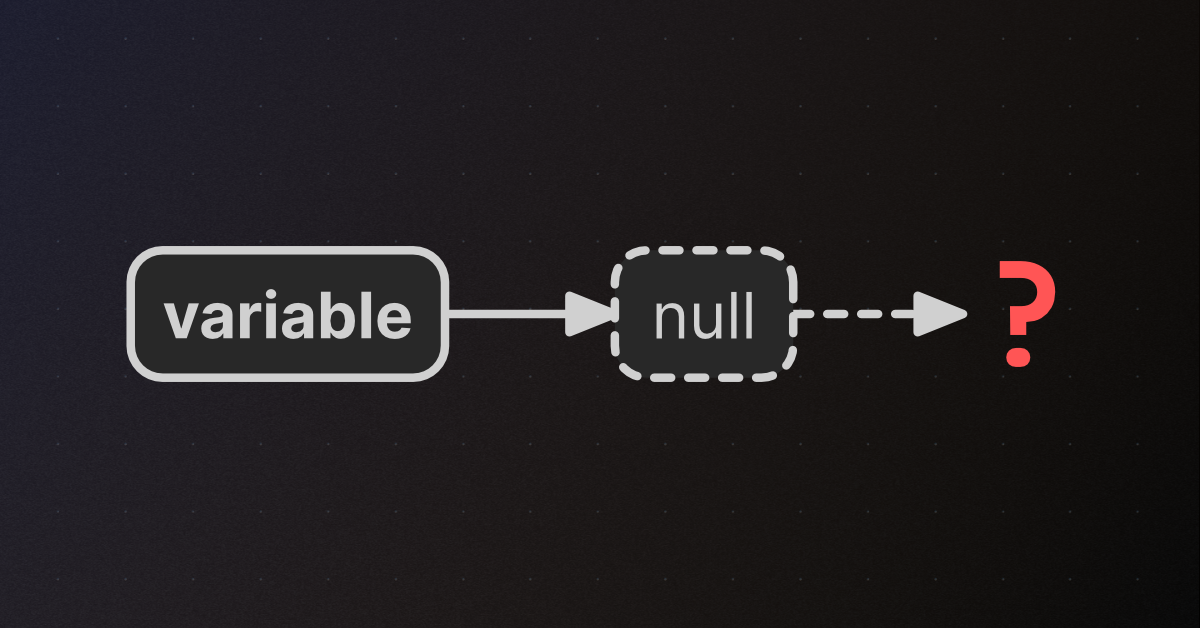
🤔 Unity, Huh, How?
A NullReferenceException (NRE) occurs when code tries to access a member of an unassigned variable.
polar acorn
Also don't do multiple get components for the same object. Do it once and re-use it
also makes it much easier to see what's null
cerulean bear
polar acorn
Why would a rotation being at 0 cause something to be null
idk just guessing
cerulean bear
i think its bc it might have been colliding with the child object which i removed
blissful fable
I'm having 2 problems, which I have a feeling are connected.
When my player is launched by IsPushed() and touches the floor, the player slides across the floor. Additionally, the player never becomes grounded again (where the Debug.Log is). Jumping manually doesn't cause either of these problems. Anyone know why?


As for the first problem, I'm assuming you need to program friction in manually, somehow?
wintry quarry
blissful fable
I'm having 2 problems, which I have a feeling are connected.
When my player is l...
share the full script and not as a screenshot
!code
radiant voidBOT
wintry quarry
!code
Posting code
📃 Large Code Blocks
Use links to services like:
https://paste.mod.gg/, https://hastebin.skyra.pw/, https://paste.ofcode.org/, https://paste.myst.rs/
📃 Inline Code
Surround code with three backquotes. Not quotation marks.
To format as C#, add cs to the first line:
```cs
// Your code here
```
Add a comment with a line number if there is an error message.
blissful fable
Sorry, one sec
wintry quarry
This is not the full script
sour fulcrum
radiant void
Gotta use one of these sites homie
blissful fable
I used the fourth one
wintry quarry
blissful fable
Fair enough
so when you run IsPushed you're doing allowMovement = false;
this disables your normal movement code
blissful fable
Yes
wintry quarry
this means your character will just follow normal physics
blissful fable
Yup
wintry quarry
so it will slide, yes
blissful fable
Gotcha
What's the best way to implement friction?
I suppose friction should apply regardless if you're in control or not
wintry quarry
blissful fable
What's the best way to implement friction?
friction is there by default
you can customize it with a physics material
otherwise, if that's not satisfactory, you could either add your own friction forces or manually reduce the velocity as you wish
blissful fable
wintry quarry
friction is there by default
On what? The ground, as a component?
wintry quarry
THis:
    private IEnumerator RestoreControlAfter(float timeFrozen)
    {
        yield return new WaitForSeconds(timeFrozen);
                if(isGrounded){
            Debug.Log($"Grounded"); //  <- Never Happens
            allowMovement = true; }
    }```
Is quite risky because if your player is not grounded at the exact moment the WaitForSeconds finishes, it will never get movement backThe ground and your player
friction is between any two bodies
sour fulcrum
(player probably preferable to isolate the related dev work to the player rather than all environment)
blissful fable
wintry quarry
THis:
```cs
private IEnumerator RestoreControlAfter(float timeFrozen)
{
...
OH
I thought that yield return new WaitForSeconds(timeFrozen); would just wait for that amount of time, then continue through the rest of the function, waiting for the player to hit the ground
But I see what you mean now, thank you
blissful fable
sour fulcrum
(player probably preferable to isolate the related dev work to the player rather...
Thanks, will do :)
wintry quarry
blissful fable
OH
I thought that yield return new WaitForSeconds(timeFrozen); would just wait f...
there's nothing that will wait for the player to hit the ground
you can certainly add that
but right now it's not there
it will just fail the if statement and end the coroutine
wintry quarry
you could do e.g.
yield return new WaitUntil(() => isGrounded));``` public void IsPushed(Vector3 pushStrengthAndDirection)
{
allowMovement = false;
rb.AddForce(pushStrengthAndDirection, ForceMode.Impulse);
if(isGrounded){
Debug.Log($"grounded");
allowMovement = true; }
}
Same code, no wait timer, just the grounded thing
Still resulted in sliding
wintry quarry
that will just check and set it back to true immediately if you're grounded
wintry quarry
blissful fable
Same code, no wait timer, just the grounded thing
so if your grounded check isn't working that's a whole separate issue that you need to solve
wintry quarry
Based on this I don't think 1.1 is a long enough raycast
 blissful fable
It doesn't seem to be a sensitivity thing, I massively increased the 1.1 number, but lemme try again
wintry quarry
your total height will be around 3.1 and half of that is like 1.5
blissful fable
huh
Even though it works when I jump normally?
wintry quarry
I would do some more debugging for the grounded check
blissful fable
RIGHT
wintry quarry
add Debug.DrawLine/DrawRay visualizations and such
blissful fable
That was the other problem
blissful fable
blissful fable
```js
public void IsPushed(Vector3 pushStrengthAndDirection)
{
a...
I think what's happening with this code
Is that when the player touches the bounce pad
The game counts that as Grounded
And thus never gives up control, causing the bounce pad to not work
Can I just...make the bounce pad not count for grounded checks?
wintry quarry
How are you calling IsPushed
sour fulcrum
blissful fable
```js
public void IsPushed(Vector3 pushStrengthAndDirection)
{
a...
Warning: non essential nitpick feel free to ignore
Sorry to detract from the core problem here but just a heads up on considering how you name your functions. generally if something is phrased like a question/query (eg. IsPushed) it's assumed that function would be returning something that answers that question. this function just does something so a name that reflects that behavior might be more fitting as something like PushCheck or RefreshPush. Personally i'd probably actually split that function into 1 that does the push and 1 that checks the movement state as this function right now is kind of doing 2 jobs.
wintry quarry
blissful fable
Can I just...make the bounce pad not count for grounded checks?
yes with layermasks
blissful fable
wintry quarry
yes with layermasks
Sweet, I'll give that a try
blissful fable
sour fulcrum
Warning: non essential nitpick feel free to ignore
Sorry to detract from the co...
Ah
I wrote IsPushed to mean "when the player is pushed, X happens"
I hadn't considered how it could be construed as a question!
Thanks, I'll fix that, and try to keep this in mind for next time
blissful fable
ApplyPush sounds good to me
sour fulcrum
Considering the naming of stuff helps in making your code easier to understand but also really helps in deciding what code should be responsible for what stuff. In this case I couldn't really think of a good function name that conveys this function does a push AND refreshes isgrounded state, which is a sign that maybe it should be split up a little
blissful fable
sour fulcrum
Considering the naming of stuff helps in making your code easier to understand b...
Well, it shouldn't reset the grounded state
The function takes away control, pushes the player, and then when the player is grounded again, it gives it back
 timber tide
Could do TryPush here where it would return a bool if it succeeded or not
Ah, actually you're adding force regardless
blissful fable
I'm going to try adding a layermask to the bounce pad (so it doesn't immediately cause isGrounded to be true when touched)
I just have to google what a layermask is and how it works 😆
Thanks for the help everyone
sour fulcrum
blissful fable
Well, it shouldn't reset the grounded state
The function takes away control, pus...
I'm not saying the function shouldn't do that, but perhaps it shouldn't be that (ie. maybe it calls something else).
In my head the big weird thing there is the if isgrounded, allowmovement logic sounds like that is a more general condition that isn't limited to just the context of pushing, so maybe the push just adds the force, disables the movement and thats it, knowing that something responsible for handling grounded checks will turn movement back on when it's ready
blissful fable
What about instead
private void CheckGround()
{
isGrounded = Physics.Raycast(transform.position, Vector3.down, groundCheckDistance, groundMask);
allowMovement = true;
}
I just add it to the CheckGround function?
timber tide
So what's the idea around the method? You are applying a impulse (one time force) but you also check for grounded while applying the force
to me it sounds like you want to be polling the grounded state afterwards but not inside of the impulse method
sour fulcrum
blissful fable
What about instead
once your abit more experienced in c# theres some fancier ways to do that but yeah that sounds a lot cleaner
blissful fable
timber tide
So what's the idea around the method? You are applying a impulse (one time force...
You touch a bounce pad
It launches you in the direction it's pointed
You can't change the trajectory in midair
When you touch the ground, you can move again
blissful fable
sour fulcrum
once your abit more experienced in c# theres some fancier ways to do that but ye...
Sweet, thank you for the idea
timber tide
blissful fable
You touch a bounce pad
It launches you in the direction it's pointed
You can't c...
So why do you check for isGrounded inside of the impulse? It's more likely you always want to disable themovement when you touch the pad regardless
blissful fable
blissful fable
Well, it shouldn't reset the grounded state
The function takes away control, pus...
I figured this was appropriate for one function to do
If it isn't, now I know
timber tide
Personally I'd just apply the impulse and remove the ground check and add a flag like "IsLaunched" where in your update you continuously check for IsGrounded as long as IsLaunched is flipped, and when IsGrounded and IsLaunched is true do you restore the controls back to the player
May need to add like a minor delay though so it doesn't instantly flip because the player can be touching the ground and be launched at the point of impulse
blissful fable
"where in your update you continuously check for IsGrounded as long as IsLaunched is flipped"
Shouldn't that be it's own function though?
timber tide
Sure, if you don't want a bunch of logic in update you can make this check its own method that update calls
blissful fable
timber tide
May need to add like a minor delay though so it doesn't instantly flip because t...
Yeah, that's kind of the problem, lol
Touching the bouncepad counts as touching the ground
I was gonna try using Layermasks, but this is a great idea too
Actually yeah a delay is better
In case the player is grounded, and is pulled upwards
timber tide
The delay idea would be to not flip back controls until at least like a 0.1 second delay or similar which you also check in that method before comparing any logic
So like a float of LaunchDelay you set when launched
blissful fable
Great idea, will do. Thanks for the help!
 torpid blaze
Hello I need help for putting a tiled background on a 2 d core project I have builded a shader graph and I’m kind of lost I want a professional help because it’s for an industry project so short cut solution and bad quality solution will be automatically refused by my boss with that proceed quality control
wintry quarry
torpid blaze
Hello I need help for putting a tiled background on a 2 d core project I have bu...
Typically professional help is paid for
torpid blaze
….
wintry quarry
that's kinda why it's called a profession
torpid blaze
Im not paying loosers ( for help ) on internet sorry
If you want money go get a job
wintry quarry
lol
You came in here begging for professional help. I'm not asking for your money, I'm telling you that you won't find professional help here.
what you will find is help from community volunteers if you describe your problem well and if someone knows about it and is willing to take the time out of their day to help
sour fulcrum
torpid blaze
If you want money go get a job
just an insane attitude from someone seeming to struggle with keeping theirs
torpid blaze
sour fulcrum
just an insane attitude from someone seeming to struggle with keeping theirs
Im not even impressed by what you are writing your just a looser that literaly will never make money in his entire life I’m 25 and self made millionaire your just not my level sorry
Im making my second games now im aiming for 200 milion dollar now
torpid blaze
You think your smart I’m the best ai expert on the planet the only reason I’m playing with unity is because I’m surrounded with loosers so I need to do it all by myself
Im not a game developper im a neuronal network researcher
sour fulcrum
absolutely man
torpid blaze
I don’t care about your opinion
Your just a whisper in the wind
Of course I’m struggling with unity I just started learning it yesterday because my game had to be done
 ripe shard
torpid blaze
I don’t care about your opinion
ripe shard
torpid blaze
I don’t care about your opinion
<@&502884371011731486>
torpid blaze
Now the multiplayer is working good
Im struggling with the shader graph
Because the map overlay is dynamic
And I find it hard to put some differential pression on the map to make it change shape
The only reason why you are all failures is because to succeed and make great games you need to go very in depth on a small game
Everyone want something big on the surface
Nah nah nah
The true success come from little games that the developper succed to reach extrem depth inside
In 2025 every 3d games will failed for indies
I don’t care about the past
I made 2 milion dollars with a 2 d game
If anybody here want to be milionar it’s 2 d without any hesitation
ripe shard
any particular reason you feel such an strong need to tell everybody?
ripe shard
great, tell that to a wall
torpid blaze
And I’m pushing now 200 milion dollars
So everyone here will regret
That no one dear helped me
This is why I’m talking so later you regret
ripe shard
lol
 fickle plume
@torpid blaze Don't spam off-topic here. This is a code channel. Read #📖┃code-of-conduct and ask a proper question
!ask
radiant voidBOT
fickle plume
!ask
:thinking: Asking Questions
:mag: Search the internet for your question!
:book: Use the API Scripting Reference and User Manual and this troubleshooting site for commonly posted issues.
:wrench: Attempt to debug your issue.
:thought_balloon: Find an appropriate channel by reading the name and description in #🔎┃find-a-channel
:grey_question: And don't ask to ask, ask a full question illustrating with screenshots if needed.
-# For more posting guidelines, go to #🌱┃start-here
torpid blaze
I ask a proper question and they told me they wanted to get paid to help me bruh ??´?
torpid blaze
torpid blaze
Hello I need help for putting a tiled background on a 2 d core project I have bu...
..´
torpid blaze
fickle plume
<@1340709490382606416> Don't spam off-topic here. This is a code channel. Read <...
I came here with good vibe and people are just anyway at this point why I’m losing my time …. I’m not gonna pay anybody
fickle plume
!collab perhaps is what you are looking for.
radiant voidBOT
fickle plume
!collab perhaps is what you are looking for.
:loudspeaker: Collaborating and Job Posting
We do not accept job or collab posts on Discord.
Please, use Discussions to promote yourself as job-seeking, advertise commercial job offers, or look for non-commercial projects to participate in:
• ** Collaboration & Jobs**
torpid blaze
Bro I ask a question about a fkn shader graph….
fickle plume
Again. This is a code channel. Read how to ask a question in the bot message.
torpid blaze
☠️
 unreal imp
GUYSS i will trust you all, my script cannot jump due to the isGrounded bad checking and it still can uncrouch in the ceilings (thing that i dont want)
wintry quarry
unreal imp
GUYSS i will trust you all, my script cannot jump due to the isGrounded bad chec...
so debug your ground check
timber tide
Get rid of the ceiling logic checking for now and just get your jumping working
unreal imp
wintry quarry
so debug your ground check
yeah i tried that, it doesnt debug
and by the way its recommended the character controller?
unreal imp
timber tide
Get rid of the ceiling logic checking for now and just get your jumping working
yeah
thats what i want first
yeah the Ground Check works
the jump execution doesnt
NONO IT DOESNT
the isground is never true
unreal imp
wintry quarry
so debug your ground check
whats your advice sir?
anddd yeah thats why the CC
wintry quarry
unreal imp
yeah i tried that, it doesnt debug
what does "it doesn't debug" mean
Debugging is the process of using tools (such as logging, an interactive debugger, or other debugging tools such a gizmos and Debug.DrawRay/Line) to identify and fix bugs in your code.
my advice is to debug your ground check to figure out why it's not working.
Visualize it in the scene
Add log statements when it runs and showing what it hit, if anything, etc.
that will lead you to the issue with the ground check
unreal imp
wintry quarry
what does "it doesn't debug" mean
Debug.log
wintry quarry
Yes what about it?
unreal imp
alright
wintry quarry
You should be using it
unreal imp
wintry quarry
Yes what about it?
thats the most common debug im using and is the only i know how
a bit
wintry quarry
unreal imp
thats the most common debug im using and is the only i know how
Ok - so can you be more specific about what you tried with it and what happened?
"it doesn't debug" is about as vague a statement as I can possibly imagine
Assuming you put a Debug.Log line somewhere in your code and you never saw it pop up in the console, that means the code you put it in is NOT RUNNING AT ALL
unreal imp
wintry quarry
"it doesn't debug" is about as vague a statement as I can possibly imagine
it means that the messages of the log doesnt appear, i know what is doing this
wintry quarry
Which is very variable information
wintry quarry
unreal imp
it means that the messages of the log doesnt appear, i know what is doing this
right htat means that code is not running
whcih tells us a lot
unreal imp
i just need to find a way to make my player script with a character controller
the character controller helps a lot
and i though it was very innecesary
wintry quarry
Well now you're talking about completely rewriting your script
unreal imp
wintry quarry
Well now you're talking about completely rewriting your script
is there any recommendation of a script already made? orrrrr can you give me suggestions or plans to earn it?
my english is bad as PD
wintry quarry
unreal imp
fpr example CharacterController contains IsGrounded
the built-in grounded check on CC is awful
unreal imp
what? why?
wintry quarry
I highly recommend avoiding it
wintry quarry
I mean, not necessarily, but you seem to be just wildly guessing at stuff here
You need to think about how you want your character movement to work and pick an approach that suits it
unreal imp
wintry quarry
You need to think about how you want your character movement to work and pick an...
like Source Engine? removing the run option
walk normal, crouch jump
obviously the camera 😉
looking at my script what i should change?
 naive pawn
wintry quarry
the built-in grounded check on CC is awful
naive pawn
wintry quarry
the built-in grounded check on CC is awful
is it? ive heard this only a few times and without reasoning, other times the issue is just a lack of gravity
why is it awful?
unreal imp
naive pawn
is it? ive heard this only a few times and without reasoning, other times the is...
lmao, it happened bc the up direction was 1
no wait, i missunderstood
OK YOU BOTH lmao, what is your recommendation? ❤️
wintry quarry
naive pawn
is it? ive heard this only a few times and without reasoning, other times the is...
I guess maybe it's more just misunderstood and easy to use incorrectly and get frustrated
naive pawn
so nothing inherently broken, just an unintuitive design, is what you're referring to?
unreal imp
naive pawn
is it? ive heard this only a few times and without reasoning, other times the is...
*scout tf2 theme
AHH i know what happens

thats all the ground check 🙁
its trapped
lmao, the same for the ceiling check ;p at the same pos
wintry quarry
there ya go
 trail shoal

 frosty hound
It seems your have no Android device connected, so make sure your device is plugged in. If you are sure that the device is attached, then it might be a USB driver issue. You can find details about that in the "Android environment setup" section of the Unity manual.
 oblique gale
IEnumerator DisplaySkillsUpgrade()
{
    while (skillPoints >= 1)
    {
        skillsDisplay.SetActive(true);

        // Wait until ObtainSkill() sets it to true
        yield return new WaitUntil(() => skillObtained);

        // Reset after using it
        skillObtained = false;

        Debug.Log("Called:" + skillPoints);
        skillPoints--;
    }
}
for some reasons it decremented twice bfore stopping on waitUntil? I don't even understand anymore...
 teal viper
oblique gale
```C#
IEnumerator DisplaySkillsUpgrade()
{
while (skillPoints >= 1)
{
...
teal viper
oblique gale
```C#
IEnumerator DisplaySkillsUpgrade()
{
while (skillPoints >= 1)
{
...
Either the condition is never true, or the coroutine for killed from outside(for example the object that was executing it got destroyed).
sour fulcrum
or something outside of the coroutine is manipulating skillPoints(?)
 fluid ether
Hi guys, can anyone help me figure out why my flashlight is spawning with 600 intensity when i have it set to 5000 ?
Additionally, do you know how I can set its radius in code ? Is that possible without switching to Experimental.GlobalIllumination.SpotLight ?
(I realized in the video the default value in the inspector is 150 but it doesn't change anything)
 midnight plover
fluid ether
Hi guys, can anyone help me figure out why my flashlight is spawning with 600 in...
midnight plover
fluid ether
Hi guys, can anyone help me figure out why my flashlight is spawning with 600 in...
I guess you using the filter and temperature mode is related to this: https://docs.unity3d.com/6000.2/Documentation/ScriptReference/Light-colorTemperature.html

 kindred dome
any idea if theres an easy way to make like physics based npcs
im wanting to simulate crowd movement so they need to be able to actually push each other and stuff
sour fulcrum
honestly no that sounds like one of the harder things you could possibly do in a game in general. you'd have to get pretty abstract with it
fluid ether
midnight plover
I guess you using the filter and temperature mode is related to this: https://do...
setting flashLight.useColorTemperature = true; during Awake() didn't change anything unfortunately... And I just cannot find lightsUseLinearIntensity in Graphics settings for the life of me lol
It used to work tho, it used to get set without any issue
midnight plover
fluid ether
setting `flashLight.useColorTemperature = true;` during Awake() didn't change an...
Are you sure, your light is not already on your prefab or something and therefore the addcomponent is targeting a wrong light or something?
kindred dome
sour fulcrum
honestly no that sounds like one of the harder things you could possibly do in a...
i saw something that was basically using a navmesh agent to get the generated path and use that to push a rigidbody in the right direction
so ill probably see if i can get that to work
also its not for a game, im using unity to make a simulator
fluid ether
midnight plover
Are you sure, your light is not already on your prefab or something and therefor...
Yup, there's no light prefab anywhere it's really just a light I spawn in code when the player spawns... I'm very confused, I'll try figuring out what's happening with some Debug logs
sour fulcrum
ah ok, that falls under the kind abstraction i was refering to
if your fine with stuff being capsules/blobs/not dealing with limbs and animations its more viable
kindred dome
kindred dome
i saw something that was basically using a navmesh agent to get the generated pa...
midnight plover
fluid ether
Yup, there's no light prefab anywhere it's really just a light I spawn in code w...
yes, good point. especially logging the value of your intensity and the one you wanna set would be interesting
midnight plover
fluid ether
Yup, there's no light prefab anywhere it's really just a light I spawn in code w...
Did you update unity or change something on your render pipeline? Also, jsut for testing, can you put the code out of awake?
fluid ether
midnight plover
Did you update unity or change something on your render pipeline? Also, jsut for...
I didn't update Unity and moving the code into Start() instead changed nothing.
I placed two Debug Logs inside the OnFlashlightToggle Inputsystem callbacks, one before the toggle logic and one after, and somehow the flashlight is coming with 408(?) and is at 5000 afterwards but in-game it's saying 600 and also the light does look like 600 lumens ?
I'm so confused
 midnight plover
There is a null reference error....
Do not expect anything to run correctly when you get NREs anyway in runtime. When fixed this, retest
fluid ether
yes that's unrelated it's because i reset the script instance in the player object and forgot to put back the AimAction input action reference
midnight plover
Ah okay
fluid ether
midnight plover
Do not expect anything to run correctly when you get NREs anyway in runtime. Whe...
Well, okay then but like I said it's unrelated...
 sour fulcrum
you wanna mess with the hdadditionallightdata component
fluid ether
The intensity is set to 5000 on spawn, then immediately gets set to 408, then gets reset to 5000 whenever I toggle the flashlight and immediately gets reset to 408
fluid ether
sour fulcrum
you wanna mess with the hdadditionallightdata component
I'll look into it, thank you
midnight plover
Just sounds to me like your lumen and the light settings are adding up to high and light calculations are lowering them
sour fulcrum
fluid ether
The intensity is set to 5000 on spawn, then immediately gets set to 408, then ge...
btw field initialized defaults are only considered when the class is constructed, which in unity's case is when you add the component, not when you run the game
if your adding this component and have it set to 150 in inspecotr it's never going to be 5000 because of that line of code
i know that doesnt solve your problem
fluid ether
sour fulcrum
if your adding this component and have it set to 150 in inspecotr it's never goi...
Yes i know that and thanks for the infos
fluid ether
midnight plover
Just sounds to me like your lumen and the light settings are adding up to high a...
It does sound like it, but then, why would I be able to just slide the slider up to that value without issues in editor if the value was supposedly too hight, you know ?
sour fulcrum
because the slider isn't 1:1 with the lumen value
api says .light is clamped from 0-8
the value your seeing in inspector is what .light is from 0-8 in the context of the light measurement setting your using
(i think)
fluid ether
sour fulcrum
the value your seeing in inspector is what `.light` is from 0-8 in the context o...
you're right it does make sense and it does say it's clamped between 0-8.
But then why is this still behaving this way while flashlightIntensity = 8; ?
I think something is setting the 408 value
it's too specific '408'...
 midnight plover
I guess its the top max setting calculated by all your predefined settings somewhere
fluid ether
midnight plover
I guess its the top max setting calculated by all your predefined settings somew...
I guess yes, kind of makes sense. I'll see what I can do lol
 onyx geyser
I think it's funny that half of the tutorials I watch on making ANY kind of movement system in Unity do NOT function very well because it's barely a couple years old
also for some reason player controller sends me flying like i'm being dragged around
anyone got some good suggestions for hopping into unity and understanding what exactly i'm doing after having learned the basics?
outside of the unity starter thing
 fast relic
onyx geyser
anyone got some good suggestions for hopping into unity and understanding what e...
fast relic
onyx geyser
anyone got some good suggestions for hopping into unity and understanding what e...
well I'd personally recommend you learn by doing - try stuff out, break things, and don't blindly follow tutorials
onyx geyser
I mean, it's less blindly and more, i see something I don't recognize, and go to the wiki to figure out what exactly it is.
I have NO CLUE what anything is, but I guess I could just rely on the wiki itself to learn for awhile
tender mirage
Ignore the clipping at the end but i've been working on a fall damage/crash hard script which makes the player take damage whenever they collide hard on something. But when i hug a wall/already collide into something else most commonly something on a horizontal side the fall damage doesn't apply, no clue how i would fix that with my contactpoint
private void UpdateMagnitude()
{
    //If player is not grounded
    if (!playerMovement.isGrounded)
    {
        //Get player recorded velocityY
        recordedvelocityY = playerRigid.linearVelocityY;
    }


}

private void OnCollisionEnter2D(Collision2D collision)
{

    print(collision.gameObject.name);

    Vector2 contactPos = collision.GetContact(0).normal;


    //If velocityY is relatively high
    if (recordedvelocityY >= dangerVelocityY || recordedvelocityY <= -dangerVelocityY)
    {

        //Only hurt if hit from above or below
        if (contactPos == Vector2.down || contactPos == Vector2.up)
        {
            print("Player hit something hard");

            TakeDamage(3);

        }


    }


}
since oncollision enter only triggers when you enter collision, if you're already colliding with an wall it doesn't work.
 vast pagoda
!code
radiant voidBOT
vast pagoda
!code
Posting code
📃 Large Code Blocks
Use links to services like:
https://paste.mod.gg/, https://hastebin.skyra.pw/, https://paste.ofcode.org/, https://paste.myst.rs/
📃 Inline Code
Surround code with three backquotes. Not quotation marks.
To format as C#, add cs to the first line:
```cs
// Your code here
```
Add a comment with a line number if there is an error message.
naive pawn
tender mirage
since oncollision enter only triggers when you enter collision, if you're alread...
haven't really checked the video or code, but have you checked out OnCollisionStay2D then
 hot wadi
Today I learn float Random.Range() and int Random.Range behaves differently
tender mirage
naive pawn
haven't really checked the video or code, but have you checked out OnCollisionSt...
I've tested it out. But i noticed it only ran ones per second
naive pawn
tender mirage
I've tested it out. But i noticed it only ran ones per second
it should be running each FixedUpdate they stay in contact. if they were coming out of contact you'd be getting extra enter messages
onyx geyser
Made my first system, after picking up the fundementals for C# a couple days ago
i'm pretty proud of myself for it, it's mostly functional (other than the weird shaking)
it's a movement system using Rigidbody, addforce, clamp, and linear velocity, so it may not be very much at all and probably incredibly simple, but for it being my first movement system, i'm pretty stoked.
 hoary heath
Hello there, i'm having an issue, I'm generating a buch of game objects, but as soon as i stop the playmode (not pause) the whole unity seems to not respond, it doesn't crashes nor having "unity isn't responding", its just there and not doing anything for minutes
 tulip stag
I have no idea why I'm getting this error, the line seems perfectly fine to me?
 naive pawn
tulip stag
I have no idea why I'm getting this error, the line seems perfectly fine to me?
naive pawn
tulip stag
I have no idea why I'm getting this error, the line seems perfectly fine to me?
that's not how you use a Header
it's an attribute, not an array
tulip stag
oh c:
naive pawn
it's basically reading as Header as the field type, some attributes, then a modifier after the field type
tulip stag
Thank you so much, lol
 tired python
so i am trying to create a button to make the enemies follow a certain spline when i press "start wave", i don't know how to go about making them work with each other.
slender nymph
if they all travel along the spline at the same speed then you only need to delay when they spawn so that they aren't overlapping each other
tender mirage
naive pawn
it should be running each FixedUpdate they stay in contact. if they were coming ...
I’ll try it again then.
👍
rough granite
slender nymph
if they all travel along the spline at the same speed then you only need to dela...
Im not sure if thats what they were asking but their wording was also odd
tired python
slender nymph
if they all travel along the spline at the same speed then you only need to dela...
i meant, i can't understand how i can make the "start wave" button and the enemies interact in a way such that when i do push on the "start wave" button, the enemies start moving across the spline.
slender nymph
the enemies don't need to "interact" with the button at all. your button just needs to call a method that starts spawning the enemies
tired python
slender nymph
the enemies don't need to "interact" with the button at all. your button just ne...
so...i just do smth like object.play()?
 vocal delta
Hi, I suppose this is a common question, but what is the cleanest solution to fix this colliders offset problem ? Thanks 🙂
 slender nymph
not a code question. but that's likely the contact offset in the physics2d settings. it's really only visible because of how small your objects are, if they were a normal scale that would be much less visible
vocal delta
Hmm, yes, okay, I see, thanks. Is it because I zoomed my main camera to 0.7x? I'd like the scene to look very zoomed in on my 16x16 tileset. Maybe keep the camera at 5x and increase the grid scale?
 slender nymph
set the pixels per unit on your textures to be the appropriate size. if you are using a 16x16 tileset and all of your objects are designed at that scale, then your pixels per unit should be 16
naive pawn
you can't scale the camera in the actual game, you would change the orthographic size and pixels per unit appropriately
 hot palm
!code
radiant voidBOT
hot palm
!code
Posting code
📃 Large Code Blocks
Use links to services like:
https://paste.mod.gg/, https://hastebin.skyra.pw/, https://paste.ofcode.org/, https://paste.myst.rs/
📃 Inline Code
Surround code with three backquotes. Not quotation marks.
To format as C#, add cs to the first line:
```cs
// Your code here
```
Add a comment with a line number if there is an error message.
hot palm
(Just needed to know)
slender nymph
you can also find that info in #🌱┃start-here
vocal delta
slender nymph
you can also find that info in <#1067045012619137054>
Oh great, thank you so much. I first encountered Unity around 2015, but I've kind of forgotten about it since then, haha. Thanks a lot! 🙂
 low copper
So I've got this method that I'd like to make available to all scripts:
public IEnumerator InvokeAfterDelay(float delay, Action callback)
{
    yield return new WaitForSeconds(delay);
    callback?.Invoke();
}
Since it is based off Coroutines, I think I need monobehavior which excludes static classes. I currently have a serviceManager but it feels overkill to utilze it for what amounts to a small method. Do I have other options? I'm new to Unity and don't feel like I fully understand whats available for this case.
slender nymph
you don't need to declare the method inside a monobehaviour, it can be static anywhere though, not just a static class
you would just need to be calling StartCoroutine on a MonoBehaviour
low copper
you would just need to be calling StartCoroutine on a MonoBehaviour
ok thats fine
so just wrap it in a static class and it should be accessible everywhere right?
| it can be static anywhere though, not just a static class
I don't really get what that means
slender nymph
again, the method needs to be static. it doesn't matter whether that method is declared in a static class or not
naive pawn
static things don't have to be in static classes. the requirement only goes in 1 direction, static classes can only have static things
 coral patio
Hey, is there some easy way to draw colliders for debugging? We use a sphere collider for our player and it gets stuck when jumping so we want to adjust the height of it based on the animation, but we cant necessarily see it in tests which makes it a lot of guesswork
naive pawn
-# man i still hate that c# and java both use "static class" to mean vastly different things lmao
low copper
But having a static class makes it accessible everywhere right?
naive pawn
no, that's not what makes it accessible
slender nymph
it being public and static does
naive pawn
coral patio
Hey, is there some easy way to draw colliders for debugging? We use a sphere col...
you could make methods to bundle the draw calls for the colliders, and iirc there are also gizmo methods for drawing boxes
naive pawn
low copper
But having a static class makes it accessible everywhere right?
it being public means other classes can access it.
it being static means you don't need an instance to access it.
being in a static class doesn't matter at all
low copper
Ok, got it...I think I was just mixing up the requirement to initialze a class with accessibility.
slender nymph
public class NotStatic {
  public static void Test() { }
}
public static class TheStaticOne {
  public static void Test() { }
}
both of these work just fine and are accessed identically
low copper
Hmm...there is actually a bit more to it..now that I think about it. Some scripts have to be attached to gameObjects to be available to run. Sorry, I'm not describing my question the best but I think this is part of my "accessibility" issues.
slender nymph
and that is also irrelevant. that part only matters where you call StartCoroutine
or rather, what you call StartCoroutine on
low copper
I'm not refererring to my prior question...just how Unity handles things
naive pawn
if the method mentions stuff like transform, then yes, that needs to be in a MonoBehaviour script
but otherwise, no, not really?
unless you're doing thread stuff yourself
maybe actually describe your issues rather than vague descriptions/complaints
https://xyproblem.info
low copper
Alright...I'll come back when I run into an actual problem that I can verbalize properly.
slender nymph
going back to the original question though, while the method doesn't need to be on a static class you probably want to put it on one anyway, i like to group utility coroutines like that in a static class (since the class will only contain those static methods and will never need to be instantiated)
as an example:
public static class Delay
{
  public static IEnumerator Action(float delay, Action action)
  {
    while(delay > 0)
    {
      delay -= Time.deltaTime;
      yield return null;
    }
    action?.Invoke();
  }
}
-# and I do have other relevant methods on it, not just this one so it makes sense to have them all grouped together
low copper
That looks perfect for what I'm trying to do. I'm gonna start building that out, I'm assuming eventually I'll have a collection of odds and ends and I wanted to make sure I had a sound starting point. Thanks very much everyone.
 cloud agate
How would one make a scene load another, then in that other scene load the initial scene exactly as it was?
I've made a scene load another scene and return, but it just loads the scene from the beginning
 hexed terrace
you have to save the state of all the objects you want in there non-starting position/state
polar acorn
low copper
So I've got this method that I'd like to make available to all scripts:
```
pub...
 forest cosmos
How to setup movement with animations?
a function/Script should only do one thing, so if i am moving jumping character using one script then setting animations in it too.
if i press jump, i do anim.setBool(jump,true)
whats the better way?
it gets confusing cuz its in middle of other code too
tired python
how should i go about creating a start stop button to stop enemy wave spawning in a 2d tower defense?
hexed terrace
decide what you want it to do
write the method, or methods to do it
link the button to the method
forest cosmos
tired python
how should i go about creating a start stop button to stop enemy wave spawning i...
simply link the button to the spawn/stop scripts.
tired python
so first i make a spawn stop script...should it be inside the main game manager class or some other class?
hexed terrace
wherever it makes most sense for it to be
probably in the class that controls the spawning
 brave robin
Is there a way to suppress the 'possible unintended reference comparison' warning when you actually do want a reference comparison?
In this example, I do want to know if nonPlayerCharacter is the exact same object as enemiesInCombat[index].

nonPlayerCharacter is a class type, and enemiesInCombat is a list of an interface, hence the warning
 grand snow
brave robin
Is there a way to suppress the 'possible unintended reference comparison' warnin...
grand snow
brave robin
Is there a way to suppress the 'possible unintended reference comparison' warnin...
you can use ReferenceEquals() instead of == to shut it up
its warning you I think in case a value or other comparison would be preferred
ripe shard
alt~enter also gives you this as a quickfix
brave robin
grand snow
you can use ReferenceEquals() instead of == to shut it up
its warning you I thin...
Thanks, that worked. And I understand the warning, since in some cases you'd overload == and Equals in a special way, and a reference comparison would skip all of that
grand snow
brave robin
Thanks, that worked. And I understand the warning, since in some cases you'd ove...
Indeed. Especially important for UnityEngine.Object and related types to let a == null be true when destroyed
brave robin
ripe shard
alt~enter also gives you this as a quickfix
alt+enter only gives a suggestion for wrapping in a pragma
Before this I was recasting the class to the interface type and then doing the ==, which is fine I guess, but was wondering if I could make it simpler
grand snow
If its a MonoBehaviour you would want to add something to handle that special case
 raw spindle
i posted something here #⚛️┃physics and i don't think it's a hard problem '^^
Could someone help me? idk what to doooooooo
 rare salmon
i can't see an asset in 2d for some reason
unreal imp
GUYS again with my question, how can I do an artificial ground check for my player? Now the player pass the floor and falls
Is there any already written script?
rare salmon
rare salmon
i can't see an asset in 2d for some reason
i'm in scene view and can't see the player
 rocky canyon
can you show?
hexed terrace
this is a code channel..
rocky canyon
rare salmon
i'm in scene view and can't see the player
oh ur right.. #💻┃unity-talk can you show here 👈
hexed terrace
unreal imp
Is there any already written script?
there are tons of ground check tutorials online.
unreal imp
hexed terrace
there are tons of ground check tutorials online.
For example?
 sullen epoch
Am i alright posting questions in here about math - that aren't explicitly code, but are related to it?
rough granite
sullen epoch
Am i alright posting questions in here about math - that aren't explicitly code...
Channels like #⚛️┃physics may do better
naive pawn
if you aren't sure, just ask, you'll be redirected if necessary
forest cosmos
forest cosmos
How to setup movement with animations?
a function/Script should only do one thin...
Anyone?
 wind apex
**
Script needs to derive from MonoBehaviour
**
wintry quarry
wind apex
**
```
Script needs to derive from MonoBehaviour
```
**
Have you got a question about this?
wind apex
wintry quarry
Have you got a question about this?
Yes
Even tho my script name and the name is same
It still shows iy
It
naive pawn
does it derive from monobehaviour
wind apex
Ye
slender nymph
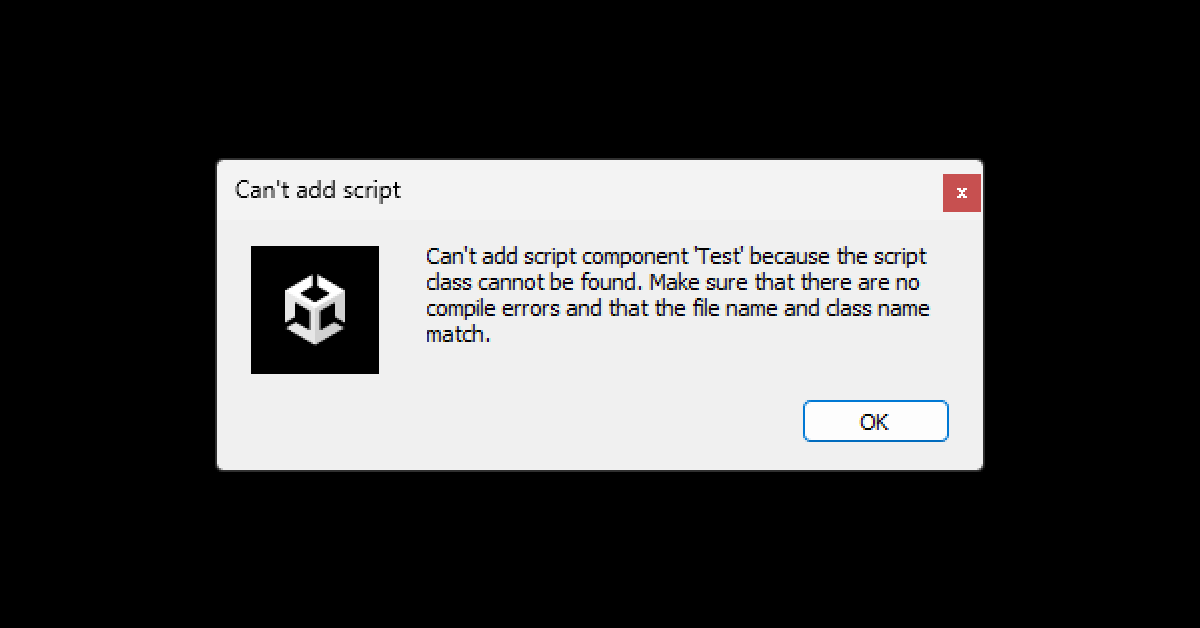 wintry quarry
If you have compile errors
it can cause this
Having two classes with the same name would cause an error yes
that's why I asked to see your console window
wind apex
No I had this subtitle manager script in my assets
I'll change one
"Later"
Cuz I'm lazy
unreal imp
WHY IS WRONG my ceiling check?

any tutorial which solved that in an easier way? in the same script?
wintry quarry
unreal imp
WHY IS WRONG my ceiling check?
your DrawRay is using an arbitrary 0.1 distance instead of the actual radius from the CHeckSphere
unreal imp
wintry quarry
your DrawRay is using an arbitrary 0.1 distance instead of the actual radius fro...
ahhh
i think this is the problem
 polar acorn
unreal imp
i think this is the problem
polar acorn
unreal imp
i think this is the problem
What about it do you think is the problem
tired python
a duck is supposed to be a gameobject. i can't add it onto hierarchy, because it shows compile error. how do i fix it?
 slender nymph
you need to fix your compile errors
polar acorn
tired python
a duck is supposed to be a gameobject. i can't add it onto hierarchy, because it...
What do the errors say
tired python
polar acorn
What do the errors say
i ain't recognising what duck even is
 slender nymph
right and does GameObject actually have either of those properties?
tired python
do i need to manually add it to script in unity
polar acorn
tired python
i ain't recognising what duck even is
Not sure why you think that is the issue when the errors tell you what the problem is
tired python
slender nymph
right and does GameObject actually have either of those properties?
the duck isn't a gameobject?
polar acorn
The error says "GameObject" doesn't have anything named Position, or Transform.
You can see all of the properties of GameObject here:
https://docs.unity3d.com/ScriptReference/GameObject.html
slender nymph
tired python
the duck isn't a gameobject?
the Duck variable is a GameObject
tired python
aren't gameobjects supposed to have transform and rotation field by default?
slender nymph
show me where on the documentation you see a Position and Transform property on the GameObject class
polar acorn
tired python
aren't gameobjects supposed to have transform and rotation field by default?
I've sent you the documentation. It lists everything they have
Check it out, see what you find
unreal imp
polar acorn
What about it do you think is the problem
SOLVED
tired python
wait, i am so confused. then where do the components even come from?
polar acorn
tired python
wait, i am so confused. then where do the components even come from?
what components
tired python
what class are they a part of
slender nymph
have you looked at the documentation yet
unreal imp
the core conditions here but btw i want the player to stay having the crouched height and he doesnt trying to stand up :/
 polar acorn
tired python
what class are they a part of
polar acorn
tired python
what class are they a part of
Right now your issue is simple, you have a variable of type GameObject, and you're trying to get properties that GameObject doesn't have. I don't know what you're asking here or how that relates?
slender nymph
slender nymph
have you looked at the documentation yet
i know you're trying to indicate that you have with that thumbs up react, but considering the fact you haven't bothered answering the question i asked about the documentation I know for a fact you have not
tired python
polar acorn
Right now your issue is simple, you have a variable of type `GameObject`, and yo...
every gameobject is supposed to have its own properties. those said properties, have to be a variable of some sort of a type. what's the name of that type? up until now, i have been thinking, that it is this gameobject class, which is supposed to have those properties. but the documentation says, that it doesn't have those properties.
slender nymph
have you actually looked at the documentation yet to see what properties teh gameobject class does have
polar acorn
tired python
every gameobject is supposed to have its own properties. those said properties, ...
Every GameObject has exactly the properties in the documentation I linked. No more, no less
tired python
gameobject.transform.position should work...
polar acorn
tired python
``gameobject.transform.position`` should work...
It does
slender nymph
tired python
``gameobject.transform.position`` should work...
have you actually tried that? because right now you have the equivalent of gameobject.Transform.position which is totally different
tired python
wait transform and Transform are diff
polar acorn
tired python
wait ``transform`` and ``Transform`` are diff
Yes
You can tell because they're not the same
slender nymph
well yes, transform actually exists as a property on the class. there is no property named Transform
tired python
slender nymph
have you actually tried *that*? because right now you have the equivalent of `ga...
 tired python
slender nymph
well yes, `transform` actually exists as a property on the class. there is no pr...
tired python
slender nymph
well yes, `transform` actually exists as a property on the class. there is no pr...
oh...so transform is a default property assigned to any class?
slender nymph
transform is a property that exists on the GameObject class. it is not just "assigned to any class" whatever that is supposed to mean
polar acorn
tired python
oh...so ``transform`` is a default property assigned to any class?
No, it's a property on GameObject. Which the documentation shows.
polar acorn
tired python
You just had it right why did you change it to something else
 slender nymph
notice how one of those is the name of the actual property and the other is just the description and referring to the type Transform, not the property that you are trying to access
tired python
slender nymph
notice how one of those is the name of the *actual property* and the other is ju...
Transform is a whole diff class O_O
polar acorn
tired python
Yes, that is what I was referring to. Notice how it's spelled with a t
slender nymph
tired python
Transform is a whole diff class O_O
there is a class called Transform, yes. that is the type the transform property is
you still do not use Transform as the property you are trying to access because you need to use the actual name of the property
tired python
InvalidOperationException: You are trying to read Input using the UnityEngine.Input class,
but you have switched active Input handling to Input System package in Player Settings.
UnityEngine.Input.GetKeyDown (UnityEngine.KeyCode key) (at <da9f38ff05704aa39409e488c3569f6d>:0)
ISpawnable.Update()(at Assets / Scripts / Spawn.cs:17)```
it's not rly working... slender nymph
!input
radiant voidBOT
slender nymph
!input
How to Set Input
To set Active Input Handling, go to:
Project Settings > Player > Active Input Handling
• Input Manager (Old): Use the original Input settings.
• Input System Package (New): Uses the new input system package.
• Both: Use both systems.
 slender nymph
tired python
tired python
slender nymph
https://discord.com/channels/489222168727519232/497874004401586176/1436088534615...
slender nymph
tired python
tired python
slender nymph
https://discord.com/channels/489222168727519232/497874004401586176/1436088534615...
is this something that i need to install?
 slender nymph
notice how you have four groups of settings hidden. try unhiding their contents to find what you are looking for
tired python
only took two space inputs...?
 tired python
slender nymph
notice how you have four groups of settings hidden. try unhiding their contents ...
tired python
slender nymph
notice how you have four groups of settings hidden. try unhiding their contents ...
worked out thx
wintry quarry
tired python
only took two space inputs...?
Either that error was before it got assigned or you have another copy of the script somewhere
tired python
another copy....O_O
slender nymph
search the hierarchy with t:ISpawnable to see what objects have that component attached
tired python
slender nymph
search the hierarchy with `t:ISpawnable` to see what objects have that component...
noice

my ducks are beautiful guys!!

what kind of a check do i run to destroy them?
polar acorn
tired python
what kind of a check do i run to destroy them?
what do you want to check for
tired python
polar acorn
what do you want to check _for_
i just wanna know whether they are out of the map or not, then i wanna destroy them, cus i know not destroying them takes up space...
slender nymph
hint: take a look at what you are using to move them. you might find that component has properties that can help you determine if it has reached the end of its path
tired python
slender nymph
hint: take a look at what you are using to move them. you might find that compon...
oh...if its position is the same as the pos of the last knot...?
just a guess...
slender nymph
i mean, that's certainly one way. if you actually look at the documentation you might find a better way
tired python
slender nymph
i mean, that's certainly one way. if you actually look at the documentation you ...
this? i check what time it is...?

using this thing
 slender nymph
What component is that?
tired python
slender nymph
What component is that?
spline animate
slender nymph
and where in the documentation for the SplineAnimate component do you see a Time property?
tired python
slender nymph
and where in the documentation for the SplineAnimate component do you see a Time...
at the end
slender nymph
that's not a property of the component, you need to look in the scripting api for its actual properties. that's part of the display on the component
tired python
!spline
radiant voidBOT
tired python
!spline
<:error:1413114584763596884> Command not found
There's no command called
spline.
slender nymph
hint: at the top of the page there's a big ol button labeled "Scripting API"
tired python
slender nymph
hint: at the top of the page there's a big ol button labeled "Scripting API"
this thing?
 unreal imp
slender nymph
tired python
this thing?
unreal imp
slender nymph
tired python
this thing?
before i actually answer that, what version of the splines package are you actually using?
tired python
slender nymph
before i actually answer that, what version of the splines package are you actua...
2.8.2
slender nymph
okay good, make sure your docs are actually set to that and not 2.4 still. then look at the actual SplineAnimate component and not whatever enum that is you were looking at
tired python
slender nymph
okay good, make sure your docs are actually set to that and not 2.4 still. then ...
oh wow
tired python
slender nymph
okay good, make sure your docs are actually set to that and not 2.4 still. then ...
i think i found it....?
 slender nymph
sure that could work, but there's an even better way that is much lower on the page
tired python
slender nymph
sure that could work, but there's an *even better* way that is much lower on the...

hehe
slender nymph
yep, that event would be the best way to determine when it has reached the end of the path. just subscribe whatever method destroys the object to the event
tired python
slender nymph
yep, that event would be the best way to determine when it has reached the end o...
thx sensei!
slender nymph
or better yet, you could look into object pooling. then when they complete the path they can be returned to the pool so you can reuse objects
 placid linden
 gloomy vine
okay so I have a really basic setup
public class DraggableItemUI : MonoBehaviour, IBeginDragHandler
    {
        public void OnBeginDrag(PointerEventData eventData)
        {
          ...


why OnBeginDrag is never called?
slender nymph
make sure there isn't anything overlapping the object (like perhaps a child object). you can also use the EventSystem preview to see what your mouse is on top of when you try to drag the object
slender nymph
placid linden
gloomy vine
slender nymph
make sure there isn't anything overlapping the object (like perhaps a child obje...
it only has a child textmespro but it has racyast disabled
placid linden
slender nymph
<#502171135350407168>
Oh sorry, I though it was here because it's a code that is doing that but sorry anyway!
slender nymph
if it's a code issue then why is there no code
gloomy vine
how can I use the EventSystem to see whats on top?
slender nymph
literally just select the event system in the hierarchy so it shows in the inspector and look at the preview window at the bottom of the inspector window (expand it if it is collapsed)
gloomy vine
 slender nymph
click back into the game view window and try dragging the object again
placid linden
slender nymph
if it's a code issue then why is there no code
sowyyy
gloomy vine
slender nymph
click back into the game view window and try dragging the object again
yep thats what im doing
and it doesnt show anything
slender nymph
you didn't remove the Graphic Raycaster from the Canvas, right?
gloomy vine
 polar acorn
I think the detailed view on the event system is different on URP (or maybe it was Input System?), I don't know how to get back the full detailed view that shows what you're hovering over
slender nymph
gloomy vine
okay, another important question: You're actually using the Game View and not something like the Device Simulator, right?
gloomy vine
yup
 slender nymph
gloomy vine
slender nymph
gloomy vine
in this screenshot is the game view super zoomed in? because i see a 5x where I assume the window scale should be. try zooming all the way out and try again
gloomy vine
thats 0.55x
slender nymph
if that's not it then i'm all out of ideas 🤷♂️
gloomy vine
I'm so lost, this makes no sense
slender nymph
could always give a restart a try. it's possible it's an editor issue. unless you haven't been clicking into the game view window before attempting to drag in which case you need to do that
gloomy vine
im holding tab while dragging btw. Tab keeps my inventory open
I hope that doesnt break it?
slender nymph
in the editor it might. set it to just some random letter for testing real quick or just make it always show up while you test instead of requiring a key to be held. if it works then that would indicate it's an issue with using Tab in the editor (it should work fine in a build)
kindred dome
any idea why vs code would autocomplete parent to that when i try to type parent.position?

when i type the . it autocompletes
its getting annoying
like if i try to type transform. it autcompletes Transformblock
ive realised that parent doesnt exist so ignore that part but the annoyance is still there
 barren lantern
when i look through water in specific angle i can see through it for some reason.. and when i move inch into the water i see normally

 wintry quarry
barren lantern
when i look through water in specific angle i can see through it for some reason...
wintry quarry
barren lantern
when i look through water in specific angle i can see through it for some reason...
It's your camera's near culling distance
unreal imp
unreal imp
The Collider tries to stand up while i want not to do it?
tired python
slender nymph
yep, that event would be the best way to determine when it has reached the end o...
been trying to get it to work, don't rly know how events worked. thing is, i added this, and i am assuming that when the duck reaches the end of the spline, it calls this function?

like, void update() calls Completed() when the gameobject reaches the end of the spline?
fast relic
you probably need to subscribe to the actual event
barren lantern
wintry quarry
It's your camera's near culling distance
cant find culling distance

all i found is this
tired python
fast relic
you probably need to subscribe to the actual event
elaborate pls
fast relic
barren lantern
cant find culling distance
that is it, it's the near clipping plane (closer than which nothing gets drawn)
slender nymph
tired python
elaborate pls
fast relic
tired python
elaborate pls
it has an event called Completed, which you can access like any other property and subscribe to it (using (...).Completed += OnCompleted)
tired python
slender nymph
<https://learn.microsoft.com/en-us/dotnet/csharp/programming-guide/events/>
i checked (this)[https://learn.microsoft.com/en-us/dotnet/api/system.action?view=net-9.0] out, and tbh, this kinda makes sense...but in this context, i don't get what i am supposed to do

Encapsulates a method that has no parameters and does not return a value.
fast relic
-# put the text in square brackets and link in parenthesis with no space
unreal imp
unreal imp
anyone knows? how to mantains the collider crouched?
grand snow
tired python
i checked (this)[https://learn.microsoft.com/en-us/dotnet/api/system.action?view...
You want this section of the docs where they explain how to subscribe to events https://learn.microsoft.com/en-us/dotnet/csharp/programming-guide/events/how-to-subscribe-to-and-unsubscribe-from-events#to-subscribe-to-events-programmatically
slender nymph
tired python
i checked (this)[https://learn.microsoft.com/en-us/dotnet/api/system.action?view...
read through how events work and how to subscribe an action to an event
barren lantern
fast relic
that is it, it's the near clipping plane (closer than which nothing gets drawn)
i changed it to 0.01 and it still doing the same thing...
kindred dome
any idea where the setting that controls wether the game recompiles if you edit a script or just exits play mode is?
i had a thing come up that said it needed to be turned off but i cant figure out how to turn it back on
found it
tired python
@slender nymph @grand snow i have tried understanding how events work, but it just ain't clicking.
using JetBrains.Annotations;
using System;
using UnityEngine;
using UnityEngine.InputSystem;
using UnityEngine.Splines;

public class ISpawnable : MonoBehaviour
{
    // Start is called once before the first execution of Update after the MonoBehaviour is created
    public GameObject Duck;

    public delegate void ReachedTheEnd();
    public event Action Completed;

    void Start()
    {

    }

    // Update is called once per frame
    void Update()
    {
        if (Input.GetButtonDown("Jump"))
        {
            Debug.Log("Space is pressed.");
            spawn();
        }
        if (Completed != null)
        {
            destroy();
        }
    }

    void spawn()
    {
        Instantiate(Duck, Duck.transform.position, Duck.transform.rotation);
    }
    void destroy()
    {
        Destroy(Duck);
    }
}
i get that during runtime, the compiler somehow calls the function by itself, but all the referencing and stuff ain't making sense
grand snow
tired python
<@175082927862841344> <@123135850560225282> i have tried understanding how event...
public event Action Completed; This is the correct way to declare an event but you do not use it.
What do you want to actually do??
polar acorn
tired python
<@175082927862841344> <@123135850560225282> i have tried understanding how event...
What is Completed? Are you subscribing to it on something?
And did you mean to invoke it somewhere? All you do is check if it has subscribers every frame
tired python
grand snow
``public event Action Completed;`` This is the correct way to declare an event b...
when gameobject reaches end of spline, it says that it invokes. i wanna use this invocation, to destroy the object
 grand snow
tired python
when gameobject reaches end of spline, it says that it invokes. i wanna use this...
grand snow
tired python
when gameobject reaches end of spline, it says that it invokes. i wanna use this...
Ah well then you want to subscribe to the event on a spline instance
polar acorn
tired python
when gameobject reaches end of spline, it says that it invokes. i wanna use this...
That's how it's declared on that class. You're supposed to subscribe to that, not attempt to recreate it
slender nymph
you do not need to create or invoke an event. all you need to do is subscribe your method to the Completed event on your SplineAnimate component
grand snow
e.g. spline.Completed += OnComplete;
You have somehow not understood this event is a member of that class
wintry quarry
barren lantern
cant find culling distance
Yea this
barren lantern
wintry quarry
Yea this
well yes iu set it to 0.01 the lowest i could do and its still doing the same thing
tired python
grand snow
You have somehow not understood this event is a member of that class
it's a method of the spline class, if i am right
polar acorn
tired python
it's a method of the spline class, if i am right
No, it's an event. Which is why it says it's an event
tired python

 tired python
grand snow
e.g. ``spline.Completed += OnComplete;``
tired python
grand snow
e.g. ``spline.Completed += OnComplete;``
what's Completed and OnComplete
one last time
polar acorn
tired python
what's ``Completed`` and ``OnComplete``
Completed is the thing that you highlighted in your screenshot
OnComplete is the thing you want to run
grand snow
tired python
what's ``Completed`` and ``OnComplete``
In this example i am subscribing to the event "Completed" on the object spline
polar acorn

Learn how to connect scripts & objects using delegates, actions & Unity Events in my in-depth beginner's guide.
tired python
oh!! i run OnComplete which destroyes the thing?
tired python
polar acorn
https://gamedevbeginner.com/events-and-delegates-in-unity/
don't just don't
i spent the last hour trying to figure this stuff out
slender nymph
you should have spent 5 minutes of that hour looking at a brief tutorial like the one digi linked
grand snow
someFuckinSpline.Complete += () => Debug.Log("SPLINE FUCKING COMPLETED YAY");
(subscribing an anonymous function to the event)
tired python
slender nymph
you should have spent 5 minutes of that hour looking at a brief tutorial like th...
i did...i did not understand it 
slender nymph
if you're struggling this much you should consider going through some beginner courses that teaches this stuff instead of throwing yourself at a wall and hoping something sticks
tired python
how many beginner courses out there teach about events...?
slender nymph
most of the good ones. even unity's junior programmer pathway covers them
polar acorn
tired python
how many beginner courses out there teach about events...?

Unity Learn
How to create and use delegates to provide complex and dynamic functionality in your scripts.
tired python
tired python
polar acorn
https://learn.unity.com/tutorial/delegates?projectId=5c88f2c1edbc2a001f873ea5
thx
grand snow
events are a special delegate so that tutorial above is useful
events can have many "subscribers" and can only be invoke/called by the owner
slender nymph
i think this one would be the more appropriate one here
https://learn.unity.com/tutorial/events-uh?uv=2019.3&projectId=5c88f2c1edbc2a001f873ea5#
the delegates one is still useful though. as is basically everything in that course
 grand snow
the old images make me feel nostalgic
tired python
guys...? umm...how do i say this...?

just...spoonfeed me at this point. i am too tired.
 tiny bloom
tired python
just...spoonfeed me at this point. i am too tired.
tiny bloom
tired python
just...spoonfeed me at this point. i am too tired.
copy paste it to chatgpt and ask it where's the issue
much faster and easier for self learning
tired python
don't rly use gpt
rough granite
tiny bloom
copy paste it to chatgpt and ask it where's the issue
much faster and easier for...
Been here since 2019 and telling people to use chatgpt bruh
tired python
gpt makes you work less
rough granite
tired python
You have your ide configured yeah whats the squiggles say
tired python
rough granite
You have your ide configured yeah whats the squiggles say
event is an lvalue
plswork does not exist in the current instance
polar acorn
tired python
just...spoonfeed me at this point. i am too tired.
You have been
#💻┃code-beginner message
Just instead of the () => ... use a normal function
You want to subscribe to the splines event with a function on this object
rough granite
tired python
plswork does not exist in the current instance
now i've never used delegate before but im pretty you got the order wrong https://learn.microsoft.com/en-us/dotnet/csharp/programming-guide/delegates/using-delegates

Learn how to use delegates. Delegates are an object-oriented, type safe, and secure type that safely encapsulates a method.
polar acorn
You add functions to events. Delegates let you define a type that can hold a function in a variable.
You have the event you want to subscribe to. Add the function you want to do to it
The event and delegate definitions are done by the SplineAnimator component
You don't do any of those parts. You use them to add your own function to that event
tired python
polar acorn
You have the event you want to subscribe to. Add the function you want to do to ...
so...this right?

onComplete() is the function and Spline.Completed is the event
polar acorn
tired python
so...this right?
You want to add the function, not the result of calling the function.
The () means "call the function"
grand snow
tired python
so...this right?
Soo close! Check your spelling!
polar acorn
You don't want to do that
grand snow
Spline.Completed += onComplete; would be correct for the code shown above
Oh also do NOT subscribe in Update()
it will keep subscribing more and more (it can subscribe multiple times)
Its like opening a new magazine subscription every second
polar acorn
Every frame it'll stack up another kill order. Then the spline completes and it'll kill the shit out of that duck
"Stop! Stop! He's already dead!"
tired python
polar acorn
Every frame it'll stack up another kill order. Then the spline completes and it'...
i don't want my duck to be killed the shit out of...
polar acorn
tired python
i don't want my duck to be killed the shit out of...
Then you want to add the function to the event once
tiny bloom
idk where to ask
but i think sebastian lague did it in his plane delivery game, im not entirely sure
and as far as i remember there's source code
tired python
using JetBrains.Annotations;
using System;
using UnityEngine;
using UnityEngine.InputSystem;
using UnityEngine.Splines;

public class ISpawnable : MonoBehaviour
{
    // Start is called once before the first execution of Update after the MonoBehaviour is created
    public GameObject Duck;
    public SplineAnimate Spline;

    void Start()
    {
        Spline.Completed += onComplete;
    }

    // Update is called once per frame
    void Update()
    {
        if (Input.GetButtonDown("Jump"))
        {
            Debug.Log("Space is pressed.");
            spawn();
        }

    }

    void spawn()
    {
        Instantiate(Duck, Duck.transform.position, Duck.transform.rotation);
    }
    void onComplete()
    {
        Destroy(Duck);
    }
}
 slender nymph
wait no, that's not right. you want this on the individual ducks, not the spawner
tired python
the ducks are invincible
polar acorn
slender nymph
wait no, that's not right. you want this on the individual *ducks*, not the spaw...
That's a spawn_able_, not a spawn_er_
slender nymph
the spawner only has a reference to the prefab. which will naturally never reach the end of the spline on account of it not existing within the scene
polar acorn
so I thought this was a duck
tired python
i only rly have two scripts...gamemanager currently does nothing
slender nymph
and now you need a third
tired python
slender nymph
and now you need a third
for the ducks....?
tired python
i need a reference to the spline animate inside that script?
and then do the event check?
slender nymph
you need a reference to the SplineAnimate component, not the spline, but yes
tired python
damn dese ducks
slender nymph
also consider renaming the spawner object to make it clear that it is what spawns the objects instead of having a name that implies two things:
- that it is spawnable by some spawner
- that it is an interface (it is not)
just call it DuckSpawner or something
tired python
why does this duck get to have plot armour while the rest don't?
public class DamnDeseDucks : MonoBehaviour
{
    // Start is called once before the first execution of Update after the MonoBehaviour is created
    public GameObject Duck;
    public SplineAnimate Spline;
    void Start()
    {
        Duck = GameObject.FindGameObjectWithTag("Duck");
        Spline.Completed += onComplete;
    }

    // Update is called once per frame
    void Update()
    {

    }
    void onComplete()
    {
        Destroy(Duck);
    }
}```why are you finding the duck by tag? this is the duck. just destroy its own gameobject
tired python

the massacre has been successfully perpetrated @slender nymph @grand snow @fast relic @polar acorn
now i shall sleep in solace

thx guys

 carmine summit
i've been having an issue with my UI where trying to set transform.position directly causes insanely high values
void Update()
    {
        Debug.Log("Original transform: " + transform.position + " New mouse position: " + mouse.position.ReadValue());
        transform.position = mouse.position.ReadValue();
    }```

this rect is getting its position set to the value logged on the right but visually and in editor reports a much larger position
polar acorn
transform.position is the world position of the object, including the position and scale of the canvas. You should use anchoredPosition instead.
https://docs.unity3d.com/6000.2/Documentation/ScriptReference/RectTransform-anchoredPosition.html
carmine summit
oh
i've been doing that but i keep looking at examples which use transform.position in ui
polar acorn
The inspector shows the local position, relative to the parent
unreal imp
HELLO My Mortal Enemis, here is my script that is without character controller, and i will recontext my problem, the Crouch Handle part when is under a ceiling it doesnt get stand up which is right, but whats not right is the collider or player trying to get stand while the detector and code tells him not to crouch and back to normal yet https://paste.myst.rs/x7m1wwfa
you all will see the details on the scripting 🙁
polar acorn
And for a rect transform, the inspector shows the anchored position (assuming it's not set to stretch all)
unreal imp
unreal imp
HELLO My Mortal Enemis, here is my script that is without character controller, ...
pay attention to the box collider component on the Vid
@sour fulcrum its a joke right? 🙁
If someone one knows pls let me know
teal viper
unreal imp
HELLO My Mortal Enemis, here is my script that is without character controller, ...
It seems like your ceiling check is not working correctly. You even have a debug ray there. Perhaps zoom closer to the character to see that debug ray to understand what's going on.
 tough lagoon
unreal imp
HELLO My Mortal Enemis, here is my script that is without character controller, ...
tough lagoon
unreal imp
HELLO My Mortal Enemis, here is my script that is without character controller, ...
My initial thought is that you may want to disable the lerp for now, so you aren't risking it being a lerping issue:
//size.y = Mathf.Lerp(size.y, targetHeight, Time.deltaTime * crouchSmooth);
But you are also resizing what looks like a collider with a rigidbody, presumably with gravity on. Lerping that resize leaves space under you and would cause a vibration at least for a bit.
So when you scale down, it scales at the middle. Making you fall down from the rigidbody. That may also be causing the jitter.
I didn't look beyond that
 rich adder
just gonna leave this here https://unity.huh.how/lerp/wrong-lerp
🤔 Unity, Huh, How?
Applying lerp so that it produces smooth, imperfect movement towards a target value.
rough granite
rich adder
just gonna leave this here https://unity.huh.how/lerp/wrong-lerp
Great lil website but it forgot to mention not to use lerp on an object with an updating target
cosmic dagger
rough granite
Great lil website but it forgot to mention not to use lerp on an object with an ...
A bit confused. Can you clarify?
rough granite
cosmic dagger
A bit confused. Can you clarify?
Thanks to a popular unity youtuber people use lerp for character movement which is a bad idea cause thats not how it works
cosmic dagger
rough granite
Thanks to a popular unity youtuber people use lerp for character movement which ...
Not necessarily; it depends on the type of movement for the game (or the character). If you're moving from one square or a spot to another, using Lerp wouldn't be a problem . . .
rough granite
cosmic dagger
Not necessarily; it depends on the type of movement for the game (or the charact...
Right but if while you were moving the other spot also moved it would be
Which is what i was getting at
cosmic dagger
That is true. For specific types of movement, it does not work. But you can use it for movement . . .
rough granite
cosmic dagger
That is true. For specific types of movement, it does not work. But you *can* us...
Right but the main thing unexperienced people use it for (player movement) is wrong
Thabks to popular youtubers that have it in their tutorials
 eternal needle
rough granite
Right but the main thing unexperienced people use it for (player movement) is wr...
eternal needle
rough granite
Right but the main thing unexperienced people use it for (player movement) is wr...
Then why would the website need to mention that? There are valid use cases for it when the target position is moving
This is a code channel, although I'm not sure it makes sense to give your camera a collider and have it on the UI layer. Cinemachine should have some settings so it doesnt end up inside walls
rough granite
eternal needle
Then why would the website need to mention that? There are valid use cases for i...
Do tell when this would be good, this completely removes the smooth part of using lerp
eternal needle
I see, haven't used 2d myself so dont really know the setup. Either way still maybe ask in #💻┃unity-talk or #🎥┃cinemachine since this isnt a coding issue
eternal needle
rough granite
Do tell when this would be good, this completely removes the smooth part of usin...
When you want linear interpolation over a fixed time frame. Lerp isnt specific to player movement and it'd really just be wrong if the website listed what you said about "not using lerp with an updating target"
unreal imp
FINAL QUESTION, it's recommended a character controller player movement script type?
kindred dome
any idea how i would share a value between multiple scripts on different objects?
just like make one seperate object with its own script to hold the variable then have all the other scripts reference it?
 worthy forum
scriptable objects or a static variable
are the easiest that i can think off. or you reference the same object between them
kindred dome
kindred dome
just like make one seperate object with its own script to hold the variable then...
i think i just made a race condition lmao
something is defintely wrong
cosmic dagger
kindred dome
just like make one seperate object with its own script to hold the variable then...
If the value is shared across mutliple components (scripts), an SO is a great candidate . . .
eternal needle
kindred dome
something is defintely wrong
you'd have to show code if you want actual help with this, like what kind of value you want to share in the first place
kindred dome
eternal needle
you'd have to show code if you want actual help with this, like what kind of val...
its an int
            if (count > population) {
                population = count;
            }
``` so basically im wanting to share the population variable between scriptsYep, I'd use an SO that represents the population . . .
eternal needle
kindred dome
```c#
if (count > population) {
population = count;
...
like you want other scripts to run this code, and modify population? Or what is this code for. You can just show the full context
!code
radiant voidBOT
eternal needle
!code
Posting code
📃 Large Code Blocks
Use links to services like:
https://paste.mod.gg/, https://hastebin.skyra.pw/, https://paste.ofcode.org/, https://paste.myst.rs/
📃 Inline Code
Surround code with three backquotes. Not quotation marks.
To format as C#, add cs to the first line:
```cs
// Your code here
```
Add a comment with a line number if there is an error message.
eternal needle
an SO might not make a ton of sense here depending how they want to use it. If its just some script thats trying to keep track of a global population, then maybe you just want a singleton, or a way to pass around the reference to some class which keeps track of the population. Or just making the population static might be an option (though I doubt it'd fit your case if multiple objects are setting it to different values)
kindred dome
actually i think the script is fine
i set the wrong variable to be shared between them
yeah its working just fine now
worthy forum
a singleton gamemanager could be useful
a single script that manages variables and other system globally. and you can access that data from other scripts
kindred dome
the idea was to get the highest number of npcs next to one another and share it so they all share the same gradient

(ignore the grey one)
 glad arrow
Hi, I am new to unity and am having issues after i build my game, after I build my game, I try to shoot my gun in game, but I get this error

 ruby python
Hi all, been a while, but I have a random question. I've been looking at a bunch of videos/guides/tutorials on how to build a minecraft-esque world and something I'm not overly clear on. In each of these things I've seen, the 'cube meshes' are generated dynamically through code. Is there a performance benefit to doing it this way rather than using a prebuilt cube mesh? I haven't seen it addressed as to why people do it this way.
ruby python
glad arrow
Hi, I am new to unity and am having issues after i build my game, after I build ...
When you run the game in the editor, do you get any warnings/errors? Just showing the crash screen isn't massively helpful if honest. There could be lots of reasons why it's crashing.
glad arrow
Yeah, but none of them have to do with the gun just some npc's i have laying around
 tired python
so..i have a spline animator which makes gameobjects zoom past the spline path, and i have a diff animator component on my gameobject, which has two animations attached to it. how do i link them? i want the animation to play when the gameobject is travelling across the spline and also flip its animation when it movetowards left and right directions
glad arrow
ruby python
glad arrow
Yeah, but none of them have to do with the gun just some npc's i have laying aro...
I'm completely guessing given available information, but, it's possible that the missing additional camera data component being missing could be the issue. I'm not totally sure what that component actually does beyond you need it for any of the SR pipelines. So as you say it happens when you fire the weapon (Making an assumption that you're using raycasting), it's missing something that raycasting needs. Like I say, completely guessing and could very well be wrong.
 placid jewel
tired python
so..i have a spline animator which makes gameobjects zoom past the spline path, ...
placid jewel
tired python
so..i have a spline animator which makes gameobjects zoom past the spline path, ...
When you say connect them, you mean to play a certain animation based on if travelling on a spline, and what direction, right?
How is the spline controlled? Does the spline animation start based on something in one of your scripts and can you start the sprite animation at the same point?
tired python
placid jewel
When you say connect them, you mean to play a certain animation based on if trav...
currently, the spline animation starts when i press the space button, i have set a spawner to be that way.
placid jewel
In terms of direction, I think you could use the evaluate function (it's a bit down this page https://docs.unity3d.com/Packages/com.unity.splines@1.0/api/UnityEngine.Splines.SplineUtility.html) which seems to be able to get the position and direction values
That might be the wrong version, I'm not sure which one you're using
tired python
2.8.2, i changed it
placid jewel
Then the evaluate tangent function here https://docs.unity3d.com/Packages/com.unity.splines@2.8/api/UnityEngine.Splines.SplineUtility.html might work
public static float3 EvaluateTangent<T>(this T spline, float t) where T : ISpline
I'm not exactly familiar with splines but it sounds like the thing you might be looking for
tired python
placid jewel
I'm not exactly familiar with splines but it sounds like the thing you might be ...
i was reading through the documentation, and i did get to that point, it at least looks like the right thing...
placid jewel
I remember from when you posted the pictures for a previous question, you have a very curved path right?
placid jewel
The issue I can see is that if you're getting a direction vector it might be the same going forwards along the path at one point as going backwards along the path at another point
this?
 tired python
placid jewel
The issue I can see is that if you're getting a direction vector it might be the...
tired python
placid jewel
The issue I can see is that if you're getting a direction vector it might be the...
the direction vector changes direction based on which direction the sprite move along, so i am hoping that it would give a negative x component when it moves towards the left and the positive x component the other way
tired python
placid jewel
this?
what does this even mean?
placid jewel
I think the function will get a tangent at a specific point on the spline, not based on the moving object's position
tired python
what's ratio got to do with a curve?
naive pawn
tired python
what's ratio got to do with a curve?
the position along the curve
placid jewel
placid jewel
0: start
1: end
0.5 - halfway
tired python
lemme try and print it out to see if it works or not
placid jewel
Alright fair enough lol
naive pawn
placid jewel
It should be like
you could say what you wanted to say spoilered if you want to, as like an optional hint/check
that way yall don't have to wait for each other if s1nth encounters difficulties
placid jewel
Oh real
I was gonna make a shitty ms paint diagram since I think it's easier to see visually
But I don't actually really think that part will be too big of an issue on second thought
tired python
my only main concern with the ratio thing is that tangents are supposed to give out inf values...dunno how that gets resolved. that's basically why i wanted to check it out myself
placid jewel
wait what do you mean by inf values?
naive pawn
the ratio doesn't have anything to do with the tangent, it specifies where to get the tangent
tired python
tan 90 ....?
placid jewel
like gradient of a vertical line is infinite?
naive pawn
tired python
tan 90 ....?
this is not the trig tangent function, this is a tangent line
placid jewel
I think ||it gives a vector not a number||
naive pawn

In geometry, the tangent line (or simply tangent) to a plane curve at a given point is, intuitively, the straight line that "just touches" the curve at that point. Leibniz defined it as the line through a pair of infinitely close points on the curve. More precisely, a straight line is tangent to the curve y = f(x) at a point x = c if the line pa...
tired python
damn the spoiler thing is such a tease
placid jewel
yeah like d/dx tangent not tan(theta) tangent
naive pawn
the tan function comes from the tangent line (specifically, the length of the tangent line segment from the contact to the x axis at the given angle)
 naive pawn
(oh yeah forgot that there's multiple ways to visualize tan, that one is different from my description fyi)
tired python
wait lemme draw
placid jewel
naive pawn
(oh yeah forgot that there's multiple ways to visualize tan, that one is differe...
did you mean like this?
 naive pawn
yeah, that's the other way
glad arrow
ruby python
I'm completely guessing given available information, but, it's possible that the...
you're right it is raycast
naive pawn
ah goddammit i got the wrong axis
glad arrow
when i switch it to projectile it dosent hit the zombies
tired python
length of this?
 naive pawn
what are you asking about exactly?
the definition of tan, or the tangents used for the curve as per your question
placid jewel
tired python
length of this?
wait is this back to the EvaluateTangent function? We got a bit sidetracked lol
tired python
placid jewel
wait is this back to the EvaluateTangent function? We got a bit sidetracked lol
nvm...lemme atleast print the damn tangent out
naive pawn
tan in trig is for the length of a line segment, but tangent lines in general are lines, not line segments
we don't care about the length here, but rather the direction of the tangent - that's what the vector most likely is, a normalized direction vector
placid jewel
I think I have a (very bad production quality) diagram to help explain if you need it (I'll spoiler tag it)
naive pawn
i have the other extreme, a link to a 1 hour video essay about splines lmao
tired python
public static float3 EvaluateTangent<T>(this T spline, float t) where T : ISpline
where do i get the float t argument from?
naive pawn
it's an argument, you supply it
placid jewel
And the return of the function will be ||a vector (float3 which has (float float float) for x, y, z) which is the direction of the vector shown||
 tired python
naive pawn
it's an argument, you supply it
tired python
naive pawn
it's an argument, you supply it
 naive pawn
that's not how you use it
you would use it like Spline.EvaluateTangent(t), it's an extension method (note the this in the first parameter)
and then you'd specify how far along the curve you want a tangent from
placid jewel
For the specific situation you'd want to find your object's ratio along the spline and use that as t
naive pawn
you can technically call it like this, but it's probably gonna make it harder to read (you'd have to specify the generic or let it infer though)
tired python
naive pawn
i have the other extreme, a link to a 1 hour video essay about splines lmao
ehm...sauce?
placid jewel
placid jewel
For the specific situation you'd want to find your object's ratio along the spli...
Then compare the tangent value with the direction it would be going in either left or right
I think
naive pawn
tired python
ehm...sauce?
https://www.youtube.com/watch?v=aVwxzDHniEw
https://www.youtube.com/watch?v=jvPPXbo87ds
both from freya holmer
tired python
naive pawn
<https://www.youtube.com/watch?v=aVwxzDHniEw>
<https://www.youtube.com/watch?v=j...
bro, this is a mesmerising video to watch O_O
placid jewel
naive pawn
it's an argument, you supply it
to find the t value would you be able to use:
public static float GetNearestPoint<T>(T spline, float3 point, out float3 nearest, out float t, int resolution = 4, int iterations = 2) where T : ISpline
with the point being the object's transform?
glad arrow
@ruby python You're the absolute man, I was able to finish my assignment and turn it in
ruby python
glad arrow
<@224097581494566914> You're the absolute man, I was able to finish my assignmen...
Oh very cool. Really glad I could help out. Good luck on the grade 🙂
glad arrow
you saved me and my partners lives
tired python
naive pawn
you would use it like `Spline.EvaluateTangent(t)`, it's an extension method (not...
apparently there's this struct which has a tangent field...

would i access it by doing smth like Spline.GetPositionTangenNormal.Tangents
tired python
this is the spawning mechanism
 placid jewel
@tired python that script doesn't appear to be actually making the duck move though, but when you press play, it moves across the spline?
tired python
placid jewel
<@391790933882175489> that script doesn't appear to be actually making the duck ...
when i press play, then i press space, it instantiates it and moves it by default
placid jewel
can you send a screenshot of the spline component?


 placid jewel
Ok so it's the Spline Animator premade script that is moving the object
 drowsy tiger
looks like the spline animate might be doing something
tired python
yes, i didn't rly find a spline component to add...
placid jewel
drowsy tiger
looks like the spline animate might be doing something
Yeah the thing we're trying to do right now is get the t value (ratio) of the object along the path
placid jewel
tired python
yes, i didn't rly find a ``spline`` component to add...
Think of it like how a mesh renderer has a mesh field
You don't just add a mesh to an object
tired python
haven't worked with meshes
placid jewel
The spline is the mesh and the spline container is the mesh holder
Or how a sprite renderer needs a sprite
You don't just put a "sprite" component
tired python
ya...
placid jewel
The spline is the "sprite" equivalent for the spline container
tired python
alright
placid jewel
So I think
Since you're using the SplineAnimate component to move it (which I think you could alternatively make your own but it may be difficult)
tired python
just saying this beforehand, i might have to leave so..i won't be able to reply in that case...
keep continuing for the time being
placid jewel
One option could be to use some of the vaues from this page https://docs.unity3d.com/Packages/com.unity.splines@2.8/api/UnityEngine.Splines.SplineAnimate.html
And essentially, use the Duration and ElapsedTime to get a ratio across it (since there's no easing)
I think like
tired python
so...that's the percentage resolved, then?
placid jewel
(ElapsedTime/Duration - floor(ElapsedTime/Duration))
Would be the ratio
Not the right syntax but the basic idea
placid jewel
placid jewel
(ElapsedTime/Duration - floor(ElapsedTime/Duration))
I haven't checked that
tired python
wait, what are you trying to do again?
placid jewel
Get the t value of the object along the path
tired python
it's just a ratio no? so you just divide the current timetaken by the total time taken
placid jewel
Since you're not controlling the animation you don't have direct access to t
placid jewel
tired python
it's just a ratio no? so you just divide the current timetaken by the total time...
Well
First
Current time taken and total time taken sound like the same thing
What SplineAnimate gives you is Duration, (the time to move across the spline once) and ElapsedTime (the time it's been running for)
tired python
ya...
placid jewel
So (ElapsedTime) / (Duration) is how many cycles it's done
tired python
so i get t by divying em up
tired python
placid jewel
So (ElapsedTime) / (Duration) is how many cycles it's done
are you sure?
oh wait gtg
tired python
sry, i will continue this later
placid jewel
Yeah, feel free to ping when you get back but I might not be here
 compact sandal
I have a system set up where i can burn enemies with a flamethrower which i made. I also have a particle pack that has fire particles. I now want to visually see when an enemy is burning? How do i start with that? (I have never scripted with particles before)
midnight plover
compact sandal
I have a system set up where i can burn enemies with a flamethrower which i made...
Guess you could add an extra particlesystem to the enemy object and control the emission rate and maybe the size of it to get started. later on you could add specific areas where you hit the enemy and "burn" their texture while also emitting particles from there. Same could be done with VFX Graph, if your target platform supports it
compact sandal
I tried emitting particles but the particle animation started at their location but stayed at the place it started while the enemy kept movingh
midnight plover
compact sandal
I tried emitting particles but the particle animation started at their location ...
if you want the particles to follow your player, either make their lifespan shorter, so they do not stay in the middle of nowhere when the enemy runs away or you could emit them locally, which can look weird, when moving or you could try to use the velocity feature, so they kind of travel with the renderer movement
#✨┃vfx-and-particles might be a better place to ask, as this does not seem to be code related (yet)
timber tide
particle systems usually have options to override the parent/child relationship even if attached to a moving gameobject
so you can have lingering particles that aren't affected by local position
midnight plover
Its called Simulation Space, its either local or world. Local will move with the parent, world not
But a moving smoke trail from fire wont look very realistic 😄
 wicked galleon
Hiya, can someone help out with this error im having.
CS1503, cannot convert from 'method group' to 'object'
im trying to implement a boxcast and return a bool value for a ground check.
heres the code (hopefully its not too long):
`using UnityEngine.InputSystem;
using UnityEngine;
using UnityEngine.InputSystem.Utilities;
public class Movement : MonoBehaviour
{
//Values for movement

[SerializeField] private float f_moveSpeed = 3f;

[SerializeField] private float f_jumpAmount = 5f;


//Get the reference to the players rigidbody so that we can use physics.

[SerializeField] private Rigidbody2D rigidBody;


private Vector2 moveVal;


void Start()

{

    //Fetch the RigidBody from the GameObject

    rigidBody = GetComponent<Rigidbody2D>();

}

// Update is called once per frame

void FixedUpdate()

{


    transform.Translate(new Vector3(moveVal.x * f_moveSpeed, moveVal.y, 0)  * Time.deltaTime);

}


private void OnMove(InputValue value)

{

    moveVal = value.Get<Vector2>();

}

public void OnJump(InputValue input)

{

    rigidBody.velocity = new Vector2(rigidBody.velocity.x, f_jumpAmount);

}
}`
midnight plover
wicked galleon
Hiya, can someone help out with this error im having.
CS1503, cannot convert fr...
!code try again
radiant voidBOT
midnight plover
!code try again
Posting code
📃 Large Code Blocks
Use links to services like:
https://paste.mod.gg/, https://hastebin.skyra.pw/, https://paste.ofcode.org/, https://paste.myst.rs/
📃 Inline Code
Surround code with three backquotes. Not quotation marks.
To format as C#, add cs to the first line:
```cs
// Your code here
```
Add a comment with a line number if there is an error message.
wicked galleon
A tool for sharing your source code with the world!
placid jewel
Does the error give you a line number?
midnight plover
Jesus, get some clean up in your code lines btw 😄 all those empty lines would kill me
 north kiln
Also the error should be red in your IDE, so you should see where it is
wicked galleon
49, but i also posted the wrong code gimme a sec im new to this 🙏
A tool for sharing your source code with the world!
wicked galleon
north kiln
Also the error should be red in your IDE, so you should see where it is
idk how to make visual studio do it properly, it might be to do w my unity version? cuz my uni is forcing me to use 2022.3.29f1
north kiln
!ide
radiant voidBOT
north kiln
!ide
💡 IDE Configuration
If your IDE is not autocompleting code or underlining errors, please configure it.
Select one:
•  Visual Studio (Installed via Unity Hub)
• Visual Studio (Installed manually)
•  VS Code
•  JetBrains Rider
• :question: Other/None
north kiln
Because you said it was like 49, but it's not. You should be able to see the issue quickly as you type.
 wicked galleon
north kiln
Because you said it was like 49, but it's not. You should be able to see the iss...
wicked galleon
north kiln
Because you said it was like 49, but it's not. You should be able to see the iss...
my ide says theres no issues for some reason
placid jewel
radiant void
!ide
radiant voidBOT
placid jewel
!ide
💡 IDE Configuration
If your IDE is not autocompleting code or underlining errors, please configure it.
Select one:
• Visual Studio (Installed via Unity Hub)
• Visual Studio (Installed manually)
• VS Code
• JetBrains Rider
• :question: Other/None
north kiln
then it's not configured and you need to follow the instructions linked above
midnight plover
After doing that, read carefully what the error tells you. You can not turn a method into an object. your isGrounded is a method, so you need to call it like that
placid jewel
(It needs to be isGrounded())
midnight plover
awww, do not take away the learnings 😉
wicked galleon
placid jewel
(It needs to be `isGrounded()`)
it fixed the error, but upon running it ig the camera gets messed up? as all i see is the background colour
placid jewel
midnight plover
awww, do not take away the learnings 😉
To be honest as a beginner myself if someone told me "you need to call that like a method" I probably would take less away than being told "It's a method, methods need to be called like this"
placid jewel
wicked galleon
it fixed the error, but upon running it ig the camera gets messed up? as all i s...
How is your camera set up in the scene?
wicked galleon
im using cinemachine to follow the player, but i tried disabling it and it poses the same issue
midnight plover
placid jewel
To be honest as a beginner myself if someone told me "you need to call that like...
When you argument with only the first level of interaction, yes, you are right. But making people start to google and read about (what is a method) and (how to call a method) as well as (what is an object in c#) and so on would give more benefits than just knowing, okay, someone ond iscord will exactly tell me, what to do. Lets come back here again 😄
placid jewel
midnight plover
When you argument with only the first level of interaction, yes, you are right. ...
Fair enough lol
placid jewel
wicked galleon
im using cinemachine to follow the player, but i tried disabling it and it poses...
Can you send a screenshot of the scene? Are any scripts interacting with the camera?
midnight plover
wicked galleon
im using cinemachine to follow the player, but i tried disabling it and it poses...
Thats not code related. you could ask in #🎥┃cinemachine or #💻┃unity-talk for general stuff, like why your camera is not rendering anything besides your background color.
wicked galleon
placid jewel
Can you send a screenshot of the scene? Are any scripts interacting with the cam...
 wicked galleon
placid jewel
Unless there's a script interacting with the camera
wicked galleon
placid jewel
Unless there's a script interacting with the camera
there is not 😔
placid jewel
In that case try asking in #🎥┃cinemachine , most likely to get an answer there
wicked galleon
alrighty, thanks guys for helping fix the error!
tired python
@placid jewel so I got how you would get the ratio. What next? afaik the evaluatetangent method isnt a member of the splineanimation class
placid jewel
In the time since I've been looking at the docs a bit more and thinking about it, I think I know how to go about it
tired python
damn u r a wizard
placid jewel
Firstly the ratio thing can be slightly simplified, there's another property called NormalizedTime which is basically just the result of dividing the two parts
 tired python
if I could navigate the docs half as much like the ppl here can do
placid jewel
So you can get the t value by doing (NormalizedTime - floor(NormalizedTime))
tired python
Ok makes sense
placid jewel
Then
This part has a minor caveat in that I don't know exactly how you want it to look
But that part should be modifyable
Yeah?
tired python
Wait a sec
Would it be possible for you to not just spill the beans and instead make me look for it....?
placid jewel
I think so
placid jewel
Do you remember the Evaluate Tangent function from before? Did you figure out what it does?
tired python
I know what it's supposed to do, but I can't understand how I can even get to understand it
fluid ether
Anyone knows how to set a Spot Light's intensity to 5000 Lumens or 3480 Lux in code ? Doesn't matter which.
The light is spawned in code.
placid jewel
tired python
I know what it's supposed to do, but I can't understand how I can even get to un...
I can explain that, since I think if you overcome that hurdle you might be able to figure out the rest
fluid ether
fluid ether
Anyone knows how to set a Spot Light's intensity to 5000 Lumens or 3480 Lux in c...
Documentation is super confusing regarding this, there's something about default values of 400-600 in additionallightdata, but spotlight documentaiton says the values in code are clamped between 0-8. but in-editor it's in the hundreds - thousands...
HDRP btw
tired python
placid jewel
I can explain that, since I think if you overcome that hurdle you might be able ...
Sure go ahead
I meant I dunno how to access the method
placid jewel
tired python
I meant I dunno how to access the method
oh but if you could access it you could use it? like put in a t value and get out the tangent vector?
tired python
I mean yeah...just put in the ratio I got as the second arg and the first arg is the current spline and it barfs out a float so I store it in a variable
midnight plover
fluid ether
Documentation is super confusing regarding this, there's something about default...
did you set your lightUnit to lumen via code?
fluid ether
midnight plover
did you set your lightUnit to lumen via code?
Yes, Hi again by the way. Thanks for trying to help me the other day


ignore the XML part about Lux, forgot to change that i was trying some things
midnight plover
fluid ether
Yes, Hi again by the way. Thanks for trying to help me the other day
I am wondering, if you need to change the HDAdditionalightdata instead of the light component values
placid jewel
tired python
I mean yeah...just put in the ratio I got as the second arg and the first arg is...
I think, in order to access it, you would do:
Using UnityEngine.Splines;
Using UnityEngine.Splines.SplineUtility;

Spline spline //Set this to your spline (obviously lol)
float tvalue //This one you know how to get in code

//Then, when you need to get the tangent:

Vector3 tangent = spline.EvaluateTangent(tValue)
And it outputs a vector3 not a float
float3 is a vector of 3 floats
naive pawn
tired python
<@592920933732188191> so I got how you would get the ratio. What next? afaik the...
the evaluatetangent method is an extension method on ISpline
placid jewel
placid jewel
I think, in order to access it, you would do:
```cs
Using UnityEngine.Splines;
U...
@naive pawn is this right syntax?
naive pawn
no, you'd do spline.EvaluateTangent(t);, like i mentioned before
placid jewel
Ohhh
naive pawn
placid jewel
So that
naive pawn
i mean, it works, but it's an extension method. using it as such makes it easier to read
placid jewel
(it's edited)
naive pawn
also it returns a float3 rather than a Vector3, is there an implicit conversion for that?
doesn't seem like there is
 tired python
Aight I will try this out once I reach home
naive pawn
placid jewel
ah, yeah. mustve missed that
placid jewel
I'm not perfectly familiar with implicit conversions and whatnot, this operator just means that you can simply make it a vector3 by saying that it already is, right? (Little informal vocabulary but you know what I mean hopefully)
tired python
Yeah
placid jewel
Alright great
placid jewel
tired python
Aight I will try this out once I reach home
Do you think you know what to do with the output of that once you've got it?
tired python
Yeah, it's a positional vector, I need to find out which way it points to...left or right and then adjust the animations...which I am unsure abt but once I get there we will see...