#💻┃code-beginner
1 messages · Page 716 of 1
 magic pagoda
Ill give it a try, thanks!
 earnest wind
i want to know something, if ther ewould be something like a lot of bools, how would i go on to globably make them public/private when in need for example?

i understand changing each one, but is there some c# thing i dont know?
 naive pawn
Not reproducible with: 2022.3.61f1
but.. that's the one i'm on.. what...?
well they said they couldn't reproduce on mac silicon either.. and it is pretty transient, so... 
magic pagoda
not reproducable with?
naive pawn
it means they didn't find the issue on that version (meaning it was introduced in a later version)
magic pagoda
sorry Im really tired rn and I may not get a few things ahah--
 polar acorn
earnest wind
i want to know something, if ther ewould be something like a lot of bools, how w...
polar acorn
earnest wind
i want to know something, if ther ewould be something like a lot of bools, how w...
Just try to use them and if it says that it's inaccessible let the IDE auto complete change it
magic pagoda
naive pawn
it means they didn't find the issue on that version (meaning it was introduced i...
ohh
naive pawn
but i mean.. this issue is transient so maybe it just didn't happen....
peak cope rn lmao
earnest wind
polar acorn
Just try to use them and if it says that it's inaccessible let the IDE auto comp...
huh???
no im saying like
magic pagoda
it would be funny if that was true though. like, an "FU in particular" moment since Im a single patch beyond that
naive pawn
earnest wind
i want to know something, if ther ewould be something like a lot of bools, how w...
you would generally use properties for exposing those
earnest wind
being able to make the private/public
naive pawn
magic pagoda
it would be funny if that was true though. like, an "FU in particular" moment si...
yeah it was found in .62
earnest wind
naive pawn
you would generally use properties for exposing those
is there any docs for that
naive pawn
look up "c# properties" and find the result from microsoft
also, if you want to change multiple lines, most ides support multicursor
try looking that up for your specific ide
polar acorn
earnest wind
being able to make the private/public
You already have them private. If you end up trying to use them elsewhere, your IDE can make them public for you
earnest wind
polar acorn
You already have them private. If you end up trying to use them elsewhere, your ...
nono thats not what i mean, i mean something like going into a "debug" mode, and when u do that then all of these fields are shown
(shown in editor via serialize field ig)
polar acorn
[SerializeField]
 naive pawn
oh
magic pagoda
why unity...
naive pawn
earnest wind
nono thats not what i mean, i mean something like going into a "debug" mode, and...
you can just use debug mode in the inspector for that
so you don't have to actually serialize them
magic pagoda
why must you do this to me... uhh idk 2023 time probably
naive pawn
2023 is alpha/beta only, the public release of 2023 is 6
 west sonnet
I have an object that has a script on it that references several objects in my scene. Whenever that object is added to my scene, I have to manually drag and down the references via the inspector. This is a problem as I want to instantiate the object. Is there a way for me to have it so that I don't have to manually add the references each time?
naive pawn
if it's the same objects that only exist in that one place, you could use singletons
or you could receive the Reset message to initially set the reference with like, Find or something
west sonnet
Yes, but some of them are also references to other scripts on other gameobjects
naive pawn
naive pawn
or you could receive the `Reset` message to initially set the reference with lik...
probably not Find
naive pawn
west sonnet
Yes, but some of them are also references to other scripts on other gameobjects
not sure why that prevents them from being singletons
west sonnet
I want the player to be able to change weapons but instantiated different weapon prefabs. Would Singletons work for something like that?
Like, the player finds the gun on the floor, picks it up and equips it
naive pawn
could probably use SOs for that
west sonnet
What are SOs?
west sonnet
Okay, interesting idea. I've never used Scriptable objects before. Trying to learning how they work
So, say I had a weapon slot on my player, I could use a Scriptable Object to define what weapon it is, and it's features when it's picked up
 low path
Theyre basically inspector viewable/editable objects whose life isn’t tied to the execution instance. Like a prefab without a gameobject. So they kind of just store data for you and can be viewed / edited in the inspector.
west sonnet
How could I use them to help me achieve what I want?
low path
Have a class of weapontype that inherits from scriptableobject
Then you can make a bunch of those, give them names and data and whatever
And they define your weapon types
 spring skiff
A variable name, straight from hell:
TextComponent_FromInputField[Parameter_AreYouSureDelete_WarningPanelSCRIPT.SHAREVAR_WelcherDeleteButtonVonDennGanzenSaveslotsWurdeBetaetigt].text = ""; //UI
its long and the only part that is colored are these "" symbols.
polar acorn
Shortest German Word Award:
spring skiff
polar acorn
Shortest German Word Award:
Do you understand it?
polar acorn
No I just know that German has very long words
I don't even actually know if that's German
but it kinda looks like it. I suppose it could be Dutch?
spring skiff
polar acorn
I don't even _actually_ know if that's German
It actually is.
My "special" and weird methode to name variables in Germlish.
west sonnet
Is it possible to define where an object is located in space using scriptable objects?
I have muzzle flash that I want to always be on the tips of my guns but the guns are different sizes
polar acorn
SOs don't have positions. Ideally, your muzzle flash would be at the position of a specific child object that is part of each gun prefab
The SOs probably wouldn't have anything to do with it
west sonnet
Can I load in a prefab using SOs?
polar acorn
west sonnet
Can I load in a prefab using SOs?
Yeah, your SO could reference the prefabs just fine and your object could get the reference from there
west sonnet
So if I understood correctly, I'm making an SO which I can then use to define each weapon, then they can be called from a script?

 tiny crag
digiholic i tried to understand what to do with the information i got earlier regarding the prefab existing before the manager object
i couldnt
so i took a break
 hushed granite
may someone help me pls?
i got this issue in my console after a long time scripting my npc dialogue system, but the thing is, before i start making this the whole player movement script was working perfectly and the body type is Dynamic so there is no reason to that happen
 tiny crag
i cant establish a connection between the prefab and the manager SO in start() {
polar acorn
hushed granite
may someone help me pls?
i got this issue in my console after a long time scrip...
What is Player.cs line 61?
hushed granite
polar acorn
What is `Player.cs` line 61?
void OnMove()
{
rig.MovePosition(rig.position + direction * speed * Time.fixedDeltaTime);
}
polar acorn
hushed granite
void OnMove()
{
rig.MovePosition(rig.position + direction * speed * Time...
Add this line right above the MovePosition:
if (rig.bodyType == RigidbodyType2D.Static) Debug.Log($"GameObject {rig.gameObject.name} has a Static Rigidbody!");
Then run it again and look at the log right above that warning
hushed granite
polar acorn
Add this line right above the MovePosition:
```cs
if (rig.bodyType == RigidbodyT...
 polar acorn
hushed granite
polar acorn
hushed granite
So, at the time this runs, Props has a Static Rigidbody
west sonnet
How can I apply a Scriptable Object to a gameobject?
So the player picks up a weapoon, how can I change the values in my Player_weapon script to make the game behave differently?
polar acorn
west sonnet
How can I apply a Scriptable Object to a gameobject?
You'd create a variable of that SO's type and drag in the asset file you've created
And then you can access that SO's data from that reference
west sonnet
polar acorn
You'd create a variable of that SO's type and drag in the asset file you've crea...
Do you mean make a variable of the SO script or .asset file?
polar acorn
west sonnet
Do you mean make a variable of the SO script or .asset file?
Make a variable of the SO's type
and then drag in the .asset file into it
hushed granite
polar acorn
So, at the time this runs, `Props` has a Static Rigidbody
props is a game obj with a tile palette to place some structure on the map, so isnt it supposed to be static?
polar acorn
hushed granite
props is a game obj with a tile palette to place some structure on the map, so i...
If it's supposed to be static, you probably shouldn't be calling MovePosition on it
hushed granite
the player mov script was not even supposed to do something with them
west sonnet
polar acorn
Make a variable of the SO's type
I'm not sure what you mean by SO's type
hushed granite
polar acorn
If it's supposed to be static, you probably shouldn't be calling `MovePosition` ...
its not
polar acorn
west sonnet
I'm not sure what you mean by SO's type
public class __________ : ScriptableObject
polar acorn
hushed granite
its not
It is though
that's what the log was for
You put it right before you called MovePosition on rig, and logged the name of rig.
That turned out to be Props
So, you're calling MovePosition on Props
west sonnet
Can I rename my .asset file or will that create issues?
polar acorn
west sonnet
Can I rename my .asset file or will that create issues?
You can call it whatever you want
west sonnet
Since I'll have a different .asset file for each weapon, I'd like to name them after each weapon
polar acorn
It's still the same type
west sonnet
When trying to assign a MeshFilter to my SO asset file, it says "Type Mismatch"
low path
Didn’t some guy make all his variables out of scriptable objects so they could be assigned in the inspector? I think there’s a talk about that.
polar acorn
west sonnet
When trying to assign a MeshFilter to my SO asset file, it says "Type Mismatch"
Assets cannot reference objects in the scene
naive pawn
low path
Didn’t some guy make all his variables out of scriptable objects so they could b...
that's terrifying
 grand snow
No that shows up when the old value is incompatible with the current field type
e.g. Changing GameObject to Texture2D
hushed granite
polar acorn
So, you're calling `MovePosition` on `Props`
i just checked and i had the player script in the props gameobj
tysm
naive pawn
grand snow
No that shows up when the old value is incompatible with the current field type
that also shows up with a scene object in a prefab
polar acorn
grand snow
No that shows up when the old value is incompatible with the current field type
It also shows up if you try to drag a scene reference into an asset
grand snow
huh well thats not a good description is it
polar acorn
It's somewhat recent that it does that I believe. It used to just silently fail
grand snow
Doesnt it usually just do nothing or change to None?
polar acorn
It used to do nothing
grand snow
Im stuck on 2022 so perhaps i've never seen the new way 😆
polar acorn
But now it shows "Type Mismatch"
west sonnet
Is it possible to load a prefab from an SO?
polar acorn
west sonnet
Is it possible to load a prefab from an SO?
Sure, Assets can reference other Assets just fine
low path
naive pawn
that's terrifying
It was an interesting idea…. Instead of doing some coding shenanigans to hook up variables to ui, you could just drag and drop the SO into a UI element
polar acorn
Just not scene objects
west sonnet
How can I reference a prefab in script?
low path
It’s a gameobject
polar acorn
naive pawn
that's terrifying
It was a GDC thing, they used SOs to store "global" data for a game session. It's a pretty old one though
low path
And you need to make it public or serialized it. And then drop it in in the inspector
polar acorn
west sonnet
How can I reference a prefab in script?
Make a variable of the type you want from the prefab and drag it in
Any component on the root object of the prefab is fair game
it'll still spawn the whole prefab
grand snow
polar acorn
It was a GDC thing, they used SOs to store "global" data for a game session. It'...
Today in my ted talk i'm going to show how I horribly over complicated my game for no reasonable benefit
polar acorn
grand snow
Today in my ted talk i'm going to show how I horribly over complicated my game f...
By "pretty old" I mean, like, predating UGUI old
So you didn't have access to things like UnityEvents and other things that could actually do this reasonably
grand snow
you can easily make do without unity events with alternate design
but i get those without experience may not be able to implement such things
polar acorn
This was a time when UI needed to be done with 100% code
grand snow
There were third party solutions back then, I started using unity pre ugui
polar acorn
Being able to assign anything in the inspector for the UI required such roundabout solutions
grand snow
hm well i make do without using unity event subs in the inspector for my UI
low path
Was it really that old of a talk I don’t even remember…
west sonnet
Okay so let's say my player picks up a weapon, how do I change the values on the script on my player to those that are defined in my scriptable object?
low path
I think you need a basic unity lesson
naive pawn
you generally would not, you'd just use the values the SO provides
west sonnet
I know I can reference the scriptable object in my player script (I think), but what about when I pick up a different weapon?
naive pawn
you would reassign the SO reference
west sonnet
naive pawn
you generally would not, you'd just use the values the SO provides
But how do I input those values into the script?
naive pawn
you don't
low path
Like just asking a bunch of questions here is gonna be less efficient than trying to build something that forces you to learn the basic knowledge
west sonnet
low path
Like just asking a bunch of questions here is gonna be less efficient than tryin...
I'm trying to build 😭
polar acorn
west sonnet
Okay so let's say my player picks up a weapon, how do I change the values on the...
You'd have whatever object represents that pickup reference an SO asset that holds the data about what weapon that is
low path
I kind of feel like SOs are intermediate knowledge that at least require the basics to be understood first
 rotund root
why's the button not working only on this scene? I copied the prefab on all the other scenes and they all work normally
https://streamable.com/29zvei

 nimble apex
the difficult part is not setting up SO , is to have a container object , a structure that can utilize SO
 rough granite
rotund root
why's the button not working only on this scene? I copied the prefab on all the ...
rough granite
rotund root
why's the button not working only on this scene? I copied the prefab on all the ...
Could you share the !code
 eternal falconBOT

Posting code
📃 Large Code Blocks
Use links to services like:
https://paste.mod.gg/, https://hastebin.skyra.pw/, https://paste.ofcode.org/, https://paste.myst.rs/
📃 Inline Code
Surround code with three backquotes. Not quotation marks.
To format as C#, add cs to the first line:
```cs
// Your code here
```
Add a comment with a line number if there is an error message.
rotund root
rough granite
Could you share the !code
using System.Collections;
using System.Collections.Generic;
using UnityEngine;
using UnityEngine.SceneManagement;
public class ChangeScene : MonoBehaviour
{
    public void MoveToScene(int sceneID)
    {
        SceneManager.LoadScene(sceneID);
    }
}
 wintry quarry
Is the button not reacting at all to your mouse? Like no color transition etc?
Can you show the inspector for the event system in the not working scene?
rough granite
nimble apex
the difficult part is not setting up SO , is to have a container object , a stru...
This isn't that hard? Or at least wasn't for me when switching from public instance classes to SO's
nimble apex
rough granite
This isn't that hard? Or at least wasn't for me when switching from public insta...
the whole workflow is easy to intermediate i believe
rough granite
rotund root
why's the button not working only on this scene? I copied the prefab on all the ...
Also sorry not to judge but you're swapping scenes for settings?
polar acorn
rotund root
why's the button not working only on this scene? I copied the prefab on all the ...
One of the following most likely:
- Blocked by something invisible
- No Graphics Raycaster on the canvas
- No raycast target graphic on the button
rough granite
nimble apex
the whole workflow is easy to intermediate i believe
Yeah i think i would agree someone that's got no clue how OOP works would struggle.
rotund root
wintry quarry
Is the button not reacting at all to your mouse? Like no color transition etc?
no reacting at all & inspector of the event system
i'm swapping scenes to show that the same prefab is working on other scenes
 wintry quarry
rotund root
no reacting at all & inspector of the event system
i'm swapping scenes to show t...
wintry quarry
rotund root
no reacting at all & inspector of the event system
i'm swapping scenes to show t...
What's this base input script
nimble apex
rough granite
Yeah i think i would agree someone that's got no clue how OOP works would strugg...
before i learnt SO , i tend to make monster objects one prefab by one prefab , setting up all stats , meshes , materials one by one
but after i learnt SO , i will make only one prefab as container , and a lot of SO to carry each monsters data
rotund root
wintry quarry
What's this base input script
idk it's there when i click create scene, it's there for all other scenes
polar acorn
rotund root
no reacting at all & inspector of the event system
i'm swapping scenes to show t...
See what shows up in that window at the bottom under "Selected" when you hover over the button
wintry quarry
rotund root
idk it's there when i click create scene, it's there for all other scenes
Can you check if the input module in the other scenes on the event system is the same?
nimble apex
nimble apex
before i learnt SO , i tend to make monster objects one prefab by one prefab , s...
and then on init() , i will extract the data and apply to the object
rotund root
thanks guys, turns out it's just the text box covering it
(idk why it works on other scene normally but it is what it is i guess)
 barren river
hi
 polar acorn
 remote vault
could someone explain this issue im quite confused
remote vault
could someone explain this issue im quite confused
Here you can see a list of every method and property available on the GameObject type.
https://docs.unity3d.com/ScriptReference/GameObject.html
As you can see, there's nothing named text on it
 remote vault
alr thanks dude
 cunning bramble
yo guys i am new here on this discord and i dont find and Helping channel so i have an question
 rich adder
cunning bramble
yo guys i am new here on this discord and i dont find and Helping channel so i h...
rich adder
cunning bramble
yo guys i am new here on this discord and i dont find and Helping channel so i h...
!ask 👇
eternal falconBOT
:thinking: Asking Questions
:mag: Search the internet for your question!
:book: Use the API Scripting Reference and User Manual and this troubleshooting site for commonly posted issues.
:wrench: Attempt to debug your issue.
:thought_balloon: Find an appropriate channel by reading the name and description in #🔎┃find-a-channel
:grey_question: And don't ask to ask, ask a full question illustrating with screenshots if needed.
-# For more posting guidelines, go to #🌱┃start-here
cunning bramble
Okay thank you
 devout socket
Pardon me, I have a question
I have a player controlled by a character controller; I want to implement inertia into their movement (so that, when the player changes movement direction, they keep going in the same direction they were going, decelerate while their direction changes, then accelerate normally)
I have already implemented acceleration/deceleration with C#; how can I implement movement changing inertia of the type I described? (Preferably without using a Rigidbody component, as I hear that using one of those with a character controller causes them to conflict with each other or something)
polar acorn
devout socket
Pardon me, I have a question
I have a player controlled by a character controlle...
You're right that they conflict, but since it seems like you want some physics-based movement you should probably use a Rigidbody instead of a CharacterController
devout socket
polar acorn
You're right that they conflict, but since it seems like you want some physics-b...
Perhaps you're right
Before I switch, though, do Rigidbodies support features like stepping up onto short surfaces and not rolling down slopes below a certain angle?
polar acorn
No, so I guess you'll need to decide if you'd rather deal with manually handling stairs or manually computing intertia
Since you can't really get anything that does both
 rocky canyon
devout socket
Pardon me, I have a question
I have a player controlled by a character controlle...
rocky canyon
devout socket
Pardon me, I have a question
I have a player controlled by a character controlle...
u just keep up with ur momentum.. when u release the input it takes the last velocity and lerps it to 0
my CC has momentum + sliding i can show u some code if ur interested in how i did it
devout socket
rocky canyon
my CC has momentum + sliding i can show u some code if ur interested in how i di...
Yes, that would be helpful
rocky canyon
k gimme 1 sec
 floral garden
!code
eternal falconBOT
Posting code
📃 Large Code Blocks
Use links to services like:
https://paste.mod.gg/, https://hastebin.skyra.pw/, https://paste.ofcode.org/, https://paste.myst.rs/
📃 Inline Code
Surround code with three backquotes. Not quotation marks.
To format as C#, add cs to the first line:
```cs
// Your code here
```
Add a comment with a line number if there is an error message.
rocky canyon
rocky canyon
k gimme 1 sec
alrighty.. so im sure ur aware ur only supposed to use the Move() function of the CC once per frame...
soo what ends up happening is you construct a finalVelocity and put that into the move function..
meanwhile ur modifying that finalVelocity all the time..
if ur putting inputs into it.. it calculates that.. adds it to it it..
if ur not using the inputs it takes the last velocity it has and lerps it down to 0 by a smoothing or dampening value
for mine is basically 3 vectors (a grounded vector, a airbourne vector and the jump)
the reason theres 3 is because i have different dampening values for each.. (say ur grounded ur momentum stops pretty quickly.. but if ur in the air.. its alot slower) this allows me to kinda change directions in the air.. or slow down my forward velocity if i overjump or something
 rocky canyon
devout socket
Yes, that would be helpful
rocky canyon
devout socket
Yes, that would be helpful
basically i have Lerps (which are wrong to be honest) i should probably end up using MoveTowards() -> 0 instead
but when im not giving it input its constantly taking the Vector i last had and slowly moving it towards 0
same for being in the air..
those two vectors are just added together and given to the Move() function of the CC
soo i can control them individually..
you can watch the vectors in the inspector.. and see how its working.. (while im giving it input its basically my movement speed..) but as soon as i release the keys.. it goes from where it was when i released -> to 0
devout socket
rocky canyon
basically i have Lerps (which are wrong to be honest) i should probably end up u...
I think I get what you're saying, but if I do, then I noticed a problem
If your code "constantly tak[es] the vector [you] last had and slowly mov[es] it towards 0" when "[you're] not giving it input", then it wouldn't help with my problem - I want to make it so that, when I change direction immediately after going in another direction, the momentum carries the player in the old direction before slowly changing to the new one, making the movement less "snappy" and more realistic; if your code only lerps the velocity towards zero when not inputting direction, then it's functionally identical to the working deceleration code I already made
rocky canyon
i get what ur saying.. but that can be changed to work out...
right now my airbourne vectors and stuff does that
if im running forward and i jump.. and i instantly press backwards.. my input first has to cancel out all that forward momentum.. b4 beginning to move in teh backwards direction
airVector = Vector3.Lerp(
    airVector,                  // ← your *existing* momentum
    airVector + airControlVector, // ← new input stacked on top
    characterSettings.airControlStrength * Time.deltaTime
);```airVector That’s your previous frame’s momentum.
Every update, you don’t throw it away — you start from it.
devout socket
rocky canyon
`airVector` That’s your previous frame’s momentum.
Every update, you don’t thro...
By "momentum" here, we mean velocity?
rocky canyon

yes velocity..
see when im dampening it ^ im actually creating a new vector for the new input.. and adding that onto the old vector
and then when i become grounded i zero it back out to zero to start over again
like here

this allows me to have a jump that i can control but not entirely.. i dont want it to instantly snap the other direction.. u must overcome the old vector first...
that said... my code isnt perfect.. i just figured it'd give u some hints or tips on how to do urs...
devout socket
rocky canyon
that said... my code isnt perfect.. i just figured it'd give u some hints or tip...
Thank you
Let me try implementing that
rocky canyon
good luck friend 🍀
im actually gonna try to clean up my code a bit as well.. now that i have it open and ready
but its basically all about caching vectors. inputs.. keeping what u need discarding what u dont.. and combining pieces to get ur Final end vector
 pliant coyote
Hello everyone, I am trying to create a spell that spawns a boulder that rolls and does damage in the battle scene. When I just put the prefab in the overworld it rolls just fine, althought when I try to use it as an ability its not rolling and giving me an error
*** BOULDER START: Initialize() never called, using defaults. ***
UnityEngine.Debug:LogWarning (object)
BoulderProjectile/<WaitForInitialization>d__43:MoveNext () (at Assets/BoulderProjectile.cs:219)
UnityEngine.SetupCoroutine:InvokeMoveNext (System.Collections.IEnumerator,intptr)
is this something that someone may be able to help me with in here?
polar acorn
pliant coyote
Hello everyone, I am trying to create a spell that spawns a boulder that rolls a...
This appears to be a custom message you've written into your script. Look at where you're printing it, and check what the conditions are that caused it to print
rich adder
probably copied without knowing what its doing

 pliant coyote
I am using claude to write the script am I cooked?
rocky canyon
lol.. well-done
pliant coyote
its worked fine for everything else actually, just not able to fix this issue 🙁
damn clanker
polar acorn
pliant coyote
I am using claude to write the script am I cooked?
Yes
polar acorn
You should actually know what the code you're putting in your project actually does
rocky canyon
when the skynet transition happens it'll be getting guys to code in trojans and viruses into their own codebase
pliant coyote
rocky canyon
when the skynet transition happens it'll be getting guys to code in trojans and ...
Haha I hear you, this is a side project ive been working on. I have tried to learn coding and still not at that level yet.
rocky canyon
i got an idea.. ask Claude wtf it did..
give it the code.. the error.. and tell it what we just told u
see how it responds 😄
rocky canyon
pliant coyote
Haha I hear you, this is a side project ive been working on. I have tried to lea...
just takes time.. and trial and error
rich adder
pliant coyote
Haha I hear you, this is a side project ive been working on. I have tried to lea...
small steps, build the knowledge up. All it takes it time and commitment
pliant coyote
rocky canyon
i got an idea.. ask Claude wtf it did..
I have 30 times literally for 5 hours, asked chat gpt, asked grok
 sour fulcrum
the lesson here is you wasted 5 hours eating slop
rocky canyon
then yea ur probably cooked... u might can pretend u didnt use AI and have someone help u debug it properly..
sour fulcrum
that 5 hours could have been spent actually learning
rocky canyon
but AI has a way of completely fubar'in itself 😅
pliant coyote
rocky canyon
then yea ur probably cooked... u might can pretend u didnt use AI and have someo...
Hey at least I was being honest lol
Didn't realize it was frowned upon
rocky canyon
true..
its not really frowned upon as a tool.
but once u start using it as a tutor.. and not knowing how to troubleshoot what it tells u
ur indeed cookin urself
sour fulcrum
its absolutely frowned upon as a tool
pliant coyote
I have fixed alot of issues myself, just this one I haven't figured out yet
 primal trench
how do i access this? in code
 rocky canyon
meh.. i disagree but each their own
sour fulcrum
it's literally banned as a way of giving people help here in this server
rich adder
primal trench
how do i access this? in code
myButton.OnClick.AddListener
rocky canyon
primal trench
how do i access this? in code
you press the + (chose the script/gamebobject) and use Public Functions
pliant coyote
sour fulcrum
it's literally banned as a way of giving people help here in this server
helping for ai created script is banned?
rocky canyon
or add listeners ye
primal trench
rich adder
`myButton.OnClick.AddListener`
thanks!!!!
sour fulcrum
pliant coyote
helping for ai created script is banned?
helping via providing ai generated solutions
but asking for help with ai generated code often is met with tumblweeds as people are pretty uninterested in helping fix code you dont understand
rocky canyon
sour fulcrum
it's literally banned as a way of giving people help here in this server
no its not.. if ur willy nilly copying and pasting yes... but again as a TOOL.. if u validate and confirm its results
sour fulcrum
rocky canyon
no its not.. if ur willy nilly copying and pasting yes... but again as a TOOL.. ...
this is not true
rich adder
its a waste of everyones time to debug AI generated code if you don't even know the basics though
every solution/explanation would be lost in translation
rocky canyon
theres nothing wrong with using it.. ive seen vertex say the same.. (if u post w/o knowing its true.. or confirming it actually works.. yea thats bad)
sour fulcrum
people constantly use ai without confirming how it works
that is how people use it
are you passively or actively ignorant of that fact
rocky canyon
 pliant coyote
I apologize, did not mean to open a can of worms, just needed some assistance
rocky canyon
im just pointing out a blanket ban saying yea AI is completely banned.. is passively or actively being ignorant as well
sour fulcrum
pliant coyote
I apologize, did not mean to open a can of worms, just needed some assistance
the solution is you really just need to learn tbh
no shade
rocky canyon
no shade indeed.. i dont disagree with that
sour fulcrum
ai usage like that will just rot your educational growth
rocky canyon
pliant coyote
I apologize, did not mean to open a can of worms, just needed some assistance
lol.. ur good 👍
rich adder
who knows where it even copied that LogWarning and why it never told you it might fail and how
apparently it expected an Initialized() method to run but never did , whatever that means
rocky canyon
can u show the code? im kinda curious on what it actually wrote
pliant coyote
Just curious, is my whole game just going to be shit because I use claude? or is there any hope whatsoever?
rocky canyon
start trying to understand what it is ur writing now
rich adder
pliant coyote
Just curious, is my whole game just going to be shit because I use claude? or is...
there hope if you slowly ditch the ai slop
polar acorn
Writing code is easy.
Reading code to figure out how to fix a bug you didn't write is significantly harder.
rich adder
its a steeper curve in the beginning but after a while you're literally writing mostly the same code, just used differently
polar acorn
By AI Generating code you've essentially ensured you'll spend 10x as long trying to fix it than it would have taken to just write it correct in the first place
pliant coyote
I have been using AI to explain it if that helps
sour fulcrum
It doesn’t tbh
polar acorn
pliant coyote
I have been using AI to explain it if that helps
If it was capable of explaining it it wouldn't have made the problems in the first place
rich adder
it will be like using a calculator to always do 5 x 5 but eventually you forget how to even do such a simple thing in your head
polar acorn
Next time ask it how may b's are in "blueberry"
 solemn bobcat
polar acorn
By AI Generating code you've essentially ensured you'll spend 10x as long trying...
solemn bobcat
polar acorn
By AI Generating code you've essentially ensured you'll spend 10x as long trying...
Not "ensured," but yeah, the odds are quite high.
rocky canyon
polar acorn
Next time ask it how may b's are in "blueberry"
lmao.. is that still a thing?
polar acorn
rocky canyon
lmao.. is that still a thing?
It is now even more confident there are 3.
rocky canyon
epic 🔥
sour fulcrum
The good news is if you genuinely did spend 5 hours trying to bruteforce ai generation that's probably a good sign that you can shift that effort into real troubleshooting and programming
pliant coyote
sour fulcrum
The good news is if you genuinely did spend 5 hours trying to bruteforce ai gene...
Yes I am on version 33 of the script
solemn bobcat
polar acorn
Next time ask it how may b's are in "blueberry"
 pliant coyote
I wake up at 5:30 to work on project before work
rocky canyon
solemn bobcat
lol.. someone manually had to go in there and change it 💯
sour fulcrum
I have faith you can skill up friend 🙏
rocky canyon
pliant coyote
I wake up at 5:30 to work on project before work
thats what i try to do..
rich adder
pliant coyote
I wake up at 5:30 to work on project before work
hit up c# courses like the gym. at least an hour a day you'll be making good progress
rocky canyon
after work im just burnt out
rocky canyon
rich adder
hit up c# courses like the gym. at least an hour a day you'll be making good pro...
some of those phone apps are pretty cool at teaching the basics
pliant coyote
rocky canyon
after work im just burnt out
I have 4 kids we just had our 4th just no time after work have a small break right now
rocky canyon
u can learn about strings while taking a big sh*t
rocky canyon
pliant coyote
I have 4 kids we just had our 4th just no time after work have a small break rig...
lol.. lord help you 🙂
im an uncle.. thats good enuff for me
polar acorn
rocky canyon
lol.. someone manually had to go in there and change it 💯
Entirely possible. This went viral about 2 weeks ago so they had time to probably hard-code in a fix for this specific question.
https://bsky.app/profile/kjhealy.co/post/3lvtxbtexg226

I had to try the “blueberry” thing myself with GPT5. I merely report the results.
Reposts
2414
Likes
9034
Quotes
932
Replies
482

 Bluesky
·
Bluesky
·

 sour fulcrum
beginners trying to understand why passing a string isn't based on reference but also they can be null
pliant coyote
I have designed every aspect of the game, just trying to code the structure now
similiar to pokemon in a sense
rocky canyon
pliant coyote
I have designed every aspect of the game, just trying to code the structure now
some people have the exact opposite problem
they can code really well.. but structuring a good game-flow is harder
sour fulcrum
Not to throw out any doubt at all but just worth noting a lot of design tends to drastically change once you can actually play it
It's why a lot of prototypes tend to not have everything designed from the start
pliant coyote
sour fulcrum
Not to throw out any doubt at all but just worth noting a lot of design tends to...
I understand, the core battle system is fun for me at least, different than pokemon
rocky canyon
ya, i come up with game ideas all the time... but even when i try to keep them super simple (down to 1 or 2 pieces, only a couple of mechanics) once u start fleshing out the entirety of the game.. u get into balancing.. and thats where i fall off the deep end
pliant coyote
better with unity editor now at least
sour fulcrum
Playtesting will confirm or deny that 😄
pliant coyote
sour fulcrum
Playtesting will confirm or deny that 😄
I don't disagree at least i am trying
sour fulcrum
Absolutely
rocky canyon
the fact that ur here.. and listening to real people is a step forward 😉
pliant coyote
rocky canyon
the fact that ur here.. and listening to *real* people is a step forward 😉
yes, agree!
rocky canyon
and always try to keep things in bite-sizes
even if u know how the full mechanic/system is gonna work
its best to do a little and test Thouroughly
and then do a little more.. and build up pieces u know work
rich adder
rocky canyon
and always try to keep things in bite-sizes
you mean byte sized?
ok..ill see myself out now
rocky canyon
much easier to debug an issue that happens that way
rocky canyon
rich adder
you mean **byte** sized?
ok..ill see myself out now
badum tissssssssss
pliant coyote
rocky canyon
and always try to keep things in bite-sizes
Thats exactly what I am doing, the other abilities work great I have made so far, just this one having a little issue
rocky canyon
thats actually good to hear
atleast ur not like "i built this big ass system that consists of 12 classes and now the entire game doenst work"
pliant coyote
rocky canyon
thats actually good to hear
I test everything when I implement it and also test to ensure everything else is working
rocky canyon
happens more often than i care to see
rich adder
pliant coyote
Thats exactly what I am doing, the other abilities work great I have made so far...
btw can you show the code , just curious what exactly it was even trying to do anyway
rocky canyon
true.. use a paste bin and share what u have
pliant coyote
rocky canyon
no ones gonna wanna sort thru a bunch of AI garbage.. but if it isnt too bad.. or something simple someone can help point u in the right direction
sour fulcrum
mr president another ai generated invoke has hit the channel
 sour fulcrum
we can tell you how to write things better, please don't ask us to teach you how to slop better 😛
pliant coyote
I can take it I am thick skinned so will continue trying until it works
rocky canyon
explain everything to me along the way tends to help weed out really dumb things.. but yea
sour fulcrum
Also like unironically once you get comfortable programming it's just gonna be faster than constantly rerolling ai shit
pliant coyote
sour fulcrum
Also like unironically once you get comfortable programming it's just gonna be f...
Probably lol, I will work on some courses as well
 patent hazel
Will i move slower when my cameraObjects forward is to the ground? since there are ground colliders, my character cant go in y while grounded but if i look downwards, my total magnitude of moving vector wont change but since i cant move in y axis, that means i will only move on z axis and it will be lesser than if i were to look in z axis ( might be hard to understand since i couldn't word it properly sorry)
movementDirection = (cameraObject.forward * inputManager.verticalInput) + (cameraObject.right * inputManager.horizontalInput);
movementDirection.Normalize();
movementDirection = movementDirection * moveSpeed;
remote vault
hello community
rocky canyon
pliant coyote
from what little i see i would say
why not create a Prefab of a rigidbody that u could use (with the values set up already)
and instantiate the rigidbody gameobject instead of Adding a Rigidbody.. and trying to configure it all in script
so u could have a different prefab set up for each kind of rb ur going for
pliant coyote
That is exactly what I thought was happening lol
remote vault
im working on this beginner course and for some reason the ai nav mesh agent just stops following the player after it reaches a certain distance in the players range
pliant coyote
I have the boulder prefab made with the projectible component and rigid body set up on it
rocky canyon
im just speculating.. but it seems like the Awake setup all that jazz seems too much
pliant coyote
rocky canyon
im just speculating.. but it seems like the *Awake* setup all that jazz seems to...
Thank you! I will go back to work on that
rocky canyon
u could just have prefabs set up for different Variants of the boulder instead
remote vault
remote vault
im working on this beginner course and for some reason the ai nav mesh agent jus...
do you think it would be something in the code or through unity?
cause it was working perfectly and then after i added this new part of code it just started acting different
pliant coyote
I will show you a little preview of one of the monsters
rocky canyon
pliant coyote
Thank you! I will go back to work on that
also dont be scared to use Debug.Logs() in ur code..
pliant coyote
 rocky canyon
after u write them urself..
pliant coyote
ai slop all around
rich adder
remote vault
cause it was working perfectly and then after i added this new part of code it j...
how should we know . we're not mind readers, without showing anything related to setup what context can we go on ..
rocky canyon
// do something in code
Debug.Log("I did something in code");

// else do something else in code
Debug.Log("I did something else in code");

float myFloat;
Debug.Log($"My float should be: {myFLoat}");```Appreciate it
rocky canyon
^ if u work like that as a beginner it really helps
esp when something breaks or acts like it shouldnt
remote vault
rich adder
how should we know . we're not mind readers, without showing anything related to...
idk just based on context mb let me go into further detail
rocky canyon
u can kinda catch it along the way while watching the console window
remote vault
ok so this is both for the code and on unity


ive tried asking chatgpt but its telling me run this debug script and when i paste it comes out with 7 errors
maybe should i try debugging?
rocky canyon
u should 100 percent try debugging like "All" of the time
rich adder
remote vault
maybe should i try debugging?
that should always be the first step..
remote vault
remote vault
maybe should i try debugging?
i dont even know how to debug in this scenario
rocky canyon
regardless if its working as u suspect or not lol
rich adder
remote vault
i dont even know how to debug in this scenario
what did you add that broke it
remote vault
rich adder
that should always be the first step..
bro i started like 3 days ago chillax
this piece hold on
rocky canyon
seemed pretty chill statement to me
pliant coyote
rocky canyon
regardless if its working as u suspect or not lol
If you are making a spawn boulder and roll x amount ability projectile, how many lines of code should that take?
 remote vault
rocky canyon
u should 100 percent try debugging like "All" of the time
remote vault
rocky canyon
u should 100 percent try debugging like "All" of the time
how do i do this
rich adder
nothing here should be affecting the navmesh agent, it probably stops entire playmode if you have an error
remote vault
what do you recommend i should do?
rich adder
did you check the console window when it stops ?
rocky canyon
pliant coyote
If you are making a spawn boulder and roll x amount ability projectile, how many...
not sure exactly what u mean.. but u can spawn things using their script as a reference...
    public BoulderScript boulderPrefab1;
    public BoulderScript boulderPrefab2;
    public RollXScript rollXPrefab;

    void Start()
    {
        BoulderScript myInstantiatedBoulder = Instantiate(boulderPrefab1, transform.position, transform.rotation);
        myInstantatedBoulder.certainValue = 10;

        RollXScript myInstantiatedRollX = Instantiate(rollXPrefab, transform.position, transform.rotation);
myInstantiatedRollX.certainValue = 10;```sorry i dont know what that means could you explain?
rocky canyon
so i could instantiate boulderPrefab and immediately afterwards i could access it to change any values from it i needed to
rich adder
remote vault
sorry i dont know what that means could you explain?
which part ? Do you know what the Console Window is ?
pliant coyote
rocky canyon
so i could instantiate boulderPrefab and immediately afterwards i could access i...
Got it!
remote vault
rich adder
which part ? Do you know what the Console Window is ?
no not really
sour fulcrum
pliant coyote
If you are making a spawn boulder and roll x amount ability projectile, how many...
how ever long it needs
rich adder
remote vault
no not really
remote vault
ok 1 second
ok i have it opened its saying this but i feel like its irrelevant from my issue no?
 rocky canyon
pliant coyote
If you are making a spawn boulder and roll x amount ability projectile, how many...
rocky canyon
pliant coyote
If you are making a spawn boulder and roll x amount ability projectile, how many...
instantiation in Unity is one line, and setting values after spawn is another 1–3 lines.. it all depends on what all u need to set up determined by whats dynamic on the prefab.. and whether the default values need changed at all
thats y i was saying.. if ur code only spawning a few different types it'd be easier and more scaleable to just have a handful of different prefabs already set up the way they should be..
then they'd be little need to change things around after the Instantiation.. but guy was right. its just however long it needs to be
pliant coyote
rocky canyon
instantiation in Unity is one line, and setting values after spawn is another 1–...
Makes sense thank you
sour fulcrum
errors are always relevant
rich adder
remote vault
ok i have it opened its saying this but i feel like its irrelevant from my issue...
that'll do it
sour fulcrum
if im driving down the highway and a car crash is infront of my lane the car crash is absolutely relevant to me
remote vault
💔
rich adder
how do you know they are irrelevant and whats wat, you only seen 4 out of 999+
remote vault
theyre all the same message
rich adder
select it and check the stack trace
rocky canyon
-
ur script probably should check if things are null before u try to use them...
-
don't try to change values or call methods on things that have already been destroyed (therefor becoming a null reference)
grand snow
no 2 is not always correct blah blah fake null
 limber stone
Hello, sorry to disturb but I have been having an issue in a 2d platformer game that I am working on where every time the player interacts with a collision, their position will be slightly different. I already vaguely know what could be causing this but I do not know how to stop it. The x axis glitch happens because I used Input.getAxis instead of Input.getAxisRaw making it so that the player moves and stops at varying speeds and possibly providing slight lag??? And the y axis glitch comes from my velocity calculations which probably is because of time.deltatime making it stop at a different location every time I think?? May I please request some help with fixing this behavior so that it always stops moving at the exact same location?

 rich adder
limber stone
Hello, sorry to disturb but I have been having an issue in a 2d platformer game ...
rich adder
limber stone
Hello, sorry to disturb but I have been having an issue in a 2d platformer game ...
I would not be using Translate for any of this..
earnest wind
rb.AddForce(new Vector3(0, FlightThrust, 0), ForceMode.Impulse);
Should something like this be situated in FixedUpdate or Update????
rich adder
earnest wind
rb.AddForce(new Vector3(0, FlightThrust, 0), ForceMode.Impulse);
Should somethi...
Update if its impulse is fine
earnest wind
i remember something that already was multiplied by delta time but cant remember
limber stone
I should probably add this, I do not want to use rigidbodies for this script
earnest wind
rich adder
Update if its impulse is fine
what wouldnt be fine? velocity change?
rich adder
earnest wind
what wouldnt be fine? velocity change?
anything that moves over a series of frames
limber stone
Oh, I forgot to add it as well, this is all in fixed update
rocky canyon
rocky canyon
1. ur script probably should check if things are null before u try to use them.....
actually reminds me of one edge-case i cant really recall. but im sure it had something to do with lists, for loops (collections) of some sort.. and if u destroy during a forloop you should instead liek collect all the things that need destroyed and destroy them all at the end of the loop.. but im having trouble remember the specificities of htat
googled it a bit and i think something along the lines of "Deferred Destruction"
unsafe to modify a collection as its iterating... instead of
   Destroy(enemy); //or
   enemies.Remove(enemy)```
```cs
foreach (GameObject enemy in enemies)
{
    if (enemy.GetComponent<Health>().IsDead)
    {
        toRemove.Add(enemy);
    }
}

foreach (GameObject dead in toRemove)
{
    enemies.Remove(dead);
    Destroy(dead);
}```wait im gonna search the docs and come back if i dont understand, one sec
rich adder
earnest wind
wait im gonna search the docs and come back if i dont understand, one sec
defacto is always in FixedUpdate. If its a 1 time frame thing like impulse (think like a jump) then yea Update is fine since it only happens once
earnest wind
honeslty no idea what the difference is
 earnest wind
rich adder
defacto is always in FixedUpdate. If its a 1 time frame thing like impulse (thin...
earnest wind
rich adder
defacto is always in FixedUpdate. If its a 1 time frame thing like impulse (thin...
no its not its a jetpack
rich adder
 limber stone
thanks for the help but as I mentioned previously, I don't believe I will be applying any of this to my project unless there is absolutely no other way of stopping this. It's a personal thing where I just don't want to rely on rigidbodies for my movement systems, I rather just make one from scratch instead since I feel like I would learn more transferable skills by doing so.
rocky canyon
limber stone
Hello, sorry to disturb but I have been having an issue in a 2d platformer game ...
love that bg music 😄 so calming
one simple way i think ive seen is to use raycasts or something to cast to where you'll be the next frame and if its within a wall or a collision u do something else..
limber stone
rocky canyon
love that bg music 😄 so calming
a friend got me to play that with them while coding...
sour fulcrum
Any chance your getting confused between rigidbodies and character controllers? Unless your studying some fairly heavy programming/non game dev programming/math stuff i don't see a reason why you'd wanna avoid rigidbodies
rocky canyon
can i move here -> yes -> keep going
-> no -> do something else
grand snow
"ill implement my own physics simulation!"
rocky canyon
💯 hell ya..
im working on translation / collisions atm myself
i saw this really cool video about how some games just project velocity along walls and stuff and take the total length of the vctor and just redirect you until its used up
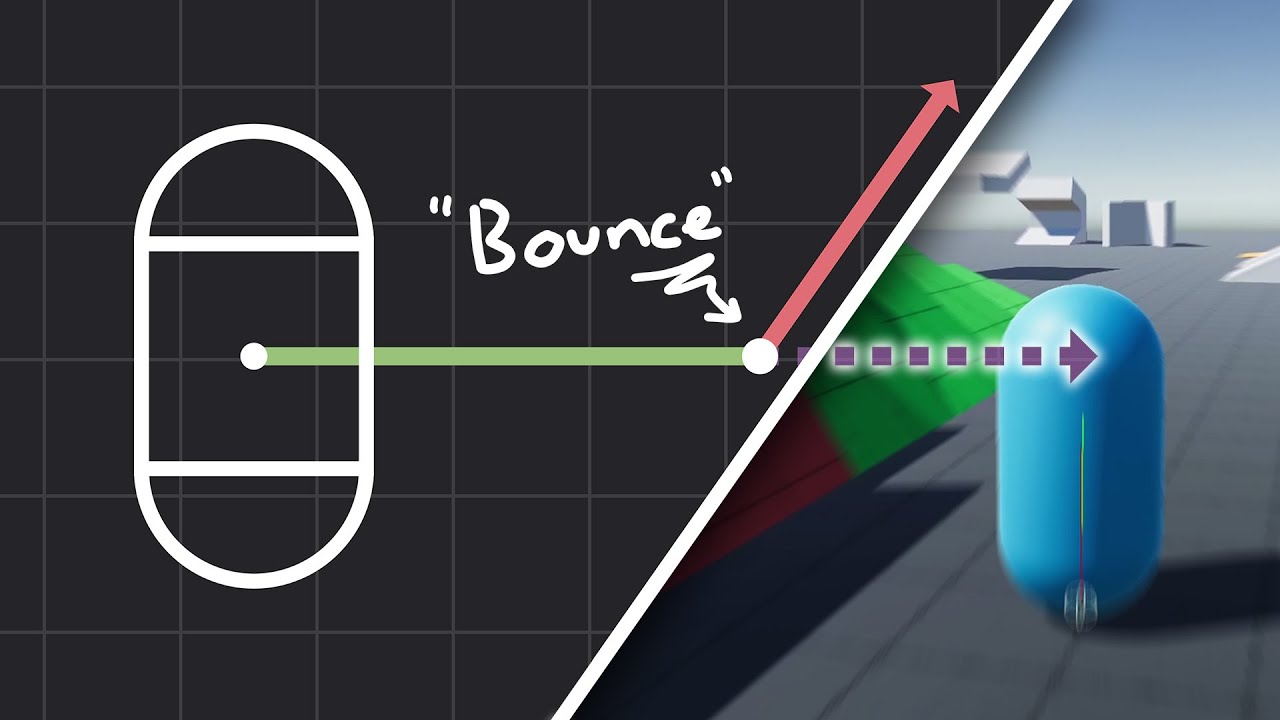
How to make actually decent collision for your custom character controller. Hopefully you find this helpful and people will finally stop saying "jUsT uSe DyNaMiC rIgIdBoDy!!!1!!11!!"
Chapters:
00:00 - Intro
01:09 - Algorithm
05:11 - Implementation
Improved Collision detection and Response (Fauerby Paper):
https://www.peroxide.dk/papers/collisi...
this is it.. collide and slide
limber stone
yeah!
I saw that a bit earlier and I should definitely implement that but I wasn't sure if that would completely fix the issue
sour fulcrum
Not sure why that comment got deleted
limber stone
wrong reply
sour fulcrum
Just a word of advice you can take or leave it
I would strongly suggest getting this prototype working with rigidbodies in a "complete" state then swapping to your own implementation after the fact.
limber stone
actually right reply and I panicked
limber stone
sour fulcrum
Just a word of advice you can take or leave it
I would strongly suggest getting...
alright
I'll try that in that case
sour fulcrum
It's probably gonna make life a lot easier for you since you will have the majority of the game functional and can slowly swap out chunks from that point
limber stone
maybe I could just use rigidibodies for moving the player but the gravity system can stay
rich adder
always ask yourself , do you want to make a game / some functional to get going or spent months rewriting whats basically done for you just to "learn" it and possibly come up with something worse
limber stone
procrastination at its finest
rocky canyon
lol... they should make medicine for that
rich adder
rocky canyon
should i "reinvent the wheel, this time"
oblong wheels
rich adder
lmao yes! forgot about this
rocky canyon
perfect analogy when i go to build character controllers
still gotta work in the bouncy, spring raycast CC soon
rich adder
aw fry go poof
limber stone
just wondering, when would you use transform.translate in code?
rocky canyon
 rich adder
very simple movements that don't need to be physically accurate
limber stone
alright
patent hazel
Can you please help me understand why we use local for the second one and also why not use local for the first one
rotation = Vector3.zero;
rotation.y = lookAngle; // rotation around y axis
targetRotation = Quaternion.Euler(rotation); // Quaternion.Euler(0,lookAngle,0)
transform.rotation = targetRotation; // transform.rotation = Quaternion.Euler(0,lookAngle,0)
rotation = Vector3.zero;
rotation.x = pivotAngle;
targetRotation = Quaternion.Euler(rotation); // Quaternion.Euler(pivotAngle, 0, 0)
cameraPivot.localRotation = targetRotation

 rich adder
like animations, tweening is okay usually
rocky canyon
limber stone
just wondering, when would you use transform.translate in code?
i use it for environmental stuff... gears rotating, hydraulics flexing and retracting, tumbleweeds rolling away
but yea things that dont need physics
limber stone
understood
rocky canyon
like the train in GTA5
limber stone
is there any benefit for using the character controller instead of rigidbodies?
rocky canyon
its gonna train itself across the map no matter what gets in the way 🤣
rocky canyon
limber stone
is there any benefit for using the character controller instead of rigidbodies?
u have total control..
rich adder
limber stone
is there any benefit for using the character controller instead of rigidbodies?
yes you get a kinematic controller out the box with collider detection out the box, easier to work with
patent hazel
limber stone
is there any benefit for using the character controller instead of rigidbodies?
stairs
rocky canyon
it comes with stairs built in
rich adder
Rigidbody are usually dynamic, hard to work with / control.
Kinematic is good to start a controller with but you need to make your own collider detections with something like rb.SweepTest
rocky canyon
rocky canyon
i use it to learn from
limber stone
I think I will depart now with this wealth of knowledge
rocky canyon
🍀
limber stone
oh my gosh, it's almost 1am
rocky canyon
day is young lol
limber stone
suppose so
rich adder
rocky canyon
https://assetstore.unity.com/packages/tools/physics/kinematic-character-controll...
I think the guy that made this turned it free because they got hired from unity now they make charactter controller for ECS
rocky canyon
rich adder
I think the guy that made this turned it free because they got hired from unity ...
wouldnt doubt it.. super solid implementation
albeit a bit complex
but i cant make a simple kinematic cc so more power to em
rich adder
I'm sure it took years of revisions haha if they got hired to make something as complex for ECS
sour fulcrum
I modified this package for a 3d platformer prototype where you could pass in functions that return velocity in order for the abilities to have a cool easy way to influence movement
was really fun to play with
rocky canyon
rich adder
its very well documented too
rocky canyon
this is a close second... (i had it when it was paid asset)
ya, any CC that allows me to create simple Knockback and influencing forces is a win in my book
pretty straightforward to make basic movements any way u go..
but external forces acting upon them is a total different scenario imo
rich adder
One thing I could never get right on CC was Elevators Up / Down
platform moves and creates weird studder
rocky canyon
rich adder
One thing I could never get right on CC was Elevators Up / Down
ya, i tend to make it a cutscene type situation
make an orbital cam attached to the elevator for the duration of the ride
sour fulcrum
i dont know if not implementing the mechanic counts as a solution 😛
rich adder
I seen some games they seem to switch controller to a non-jumping thing, probably one thats "glued" to surface of elevator
rocky canyon
ya, that'd work too gravity/jump be the big issue
its also much easier to code a CC to go down an elevator than up an elevator
rich adder
I tried using a kinematic platform and even with syncTransforms the CC just couldnt catch up properly
rocky canyon
make a trigger flip the world and have the elevator go down to get up  lol
lol
rocky canyon
rich adder
I tried using a kinematic platform and even with syncTransforms the CC just coul...
i've only ever used Kinematics for elevators.. gotta pay for that feature pretty much 🤣
sour fulcrum
rocky canyon
https://assetstore.unity.com/packages/tools/physics/kinematic-character-controll...
i wasn't a big fan of how this one does it tbh, it is flexible in implementation but it kinda didn't feel that way
rocky canyon
ive gotten my CC to work on a swaying pirate ship pretty convincingly but it was a slow sway
sour fulcrum
I think ideally I like the idea of just directly using transform parenting in some way or form
rocky canyon
if it were too much it'd still jitter. just found a sweet spot where it didnt.. but yea thast just avoiding the problem still lol
sour fulcrum
even if i maybe use a dummy object and a parent constraint or smth
rocky canyon
sour fulcrum
i wasn't a big fan of how this one does it tbh, it is flexible in implementation...
i agree.. the manual is a godsend.. just apply forces to the Motor
rich adder
thats pretty much how I do it, CC enters platform with trigger then it parents CC to platform
when player leaves trigger it unparents from elevator platform
rocky canyon
but i had 1on1 help via his discord.. so wasn't too hard to figure it out
rocky canyon
rich adder
thats pretty much how I do it, CC enters platform with trigger then it parents C...
thats how the Pirate ship functioned too
sour fulcrum
rich adder
thats pretty much how I do it, CC enters platform with trigger then it parents C...
this can be abit more of a pain in networked environments
rocky canyon
there was a bit of a transition problem when u jumped out of the collider as the ship was swaying
a harsh snap but its a good thing i abandoned that project..
all is well lmao


 sour fulcrum
DialogueText is null or DialogueText does not have a textmeshpro component
 cosmic dagger
primal trench
why is this error-ing
cosmic dagger
primal trench
why is this error-ing
A reference object is null on line 59 . . .
sour fulcrum
Or that array is null
rich adder
sour fulcrum
this can be abit more of a pain in networked environments
yeah true parenting was not fun to figur out on netcode
cosmic dagger
Check each reference on that line and you'll find the culprit . . .
sour fulcrum
rich adder
yeah true parenting was not fun to figur out on netcode
Thats why I think ParentConstraints might be a handy middleman
primal trench
i know that it's not the array, it has a textmeshpro, I'll check if it's null
sour fulcrum
Are you sure it is what you think it is
primal trench
 sour fulcrum
and is that the component throwing an error?
cosmic dagger
primal trench
We don't have the code, so we can't tell what is on that line . . . 🤷♀️
 primal trench
rocky canyon
if u had a reference wouldnt it just be `ActorText.text =`
primal trench
rocky canyon
if u had a reference wouldnt it just be `ActorText.text =`
it's a reference to the gameobject, i need the textmeshpro component
sour fulcrum
rocky canyon
if u had a reference wouldnt it just be `ActorText.text =`
no?
rocky canyon
why not use a public refernce to the TMPro instead?
primal trench
oh! did a few tests, the gameobject isn't null, the component is
rocky canyon
aye!
cosmic dagger
If you're dragging the GameObject then use the component instead . . .
primal trench
i dont know why...it's here
cosmic dagger
No need to go from the GameObject to the Component . . .
primal trench
cosmic dagger
If you're dragging the GameObject then use the component instead . . .
i need the gameobject itslef for other bits of the code
rocky canyon
public TMP_Text ActorText
if u have the TMP u can just go ActorText.gameObject <-- then u have a direct reference to the text.. and u can still access the gameobject from it
sour fulcrum
primal trench
i need the gameobject itslef for other bits of the code
Ideally you might want a new component on that then
cosmic dagger
primal trench
i need the gameobject itslef for other bits of the code
A Component always has access to its GameObject; there's no reason for a GameObject field . . .
sour fulcrum
rocky canyon
if u have the TMP u can just go `ActorText.gameObject` <-- then u have a direct ...
this is a dumb way to do that
rocky canyon
okiedokie.. its still a way tho.. im just talkin in examples
cosmic dagger
sour fulcrum
this is a dumb way to do that
What do you mean? This is the better way to do it (if you need access to the GameObject) . . .
rocky canyon
he just tell me that sht all the time.. lol
theres a reason i have to unfold his comments
 sour fulcrum
I guess it depends on what they exactly mean by other reasons but if that object has more jobs to do than just the text imo it should be it's own component that manges those jobs
cosmic dagger
rocky canyon
he just tell me that sht all the time.. lol
😆
rocky canyon
anywho.. if it is stupid.. and u want to use GetComponent..
atleast use the GetComponent off the gameobject and cache it in Start or Awake or something
primal trench
cosmic dagger
A Component always has access to its GameObject; there's no reason for a `GameOb...
did that, it worked!
 rocky canyon
so u can have the reference to the TMP later on in the code w/o having to call GetComponent everytime u wanna change the text
primal trench
also, been working on a dialogue scripting lang for my game, thoughts? is this the right channel for this
[ACTOR]"This is test text for UDM v.0.1!"
{1}"Option 1"
>[ACTOR]"You picked option 1!"
###
{2}"Option 2"
>[ACTOR]"You picked option 1!"
###
{3}"Option 3"
>[ACTOR]"You picked option 1!"
###
{4}"Option 4"
>[ACTOR]"You picked option 1!"
###
{5}"Jump to start!"
^TITLE```i have all the processing done (the image :))
sour fulcrum
probablyyy more suited to unity-talk or maybe even a thread in code-gen just based on vibes
Curious on how this works though, i haven't done dialog stuff before, feels a little boilerplately off the bat but might be my ignorance
 white girder
primal trench
why is this error-ing
white girder
primal trench
why is this error-ing
Seeing an array store dialogues reminds me of this video https://youtu.be/jDB49s7Naww?t=757 goes over how to store dialogue
primal trench
sour fulcrum
probablyyy more suited to unity-talk or maybe even a thread in code-gen just bas...
uhhhh a thread might be better but also might be buried
primal trench
sour fulcrum
probablyyy more suited to unity-talk or maybe even a thread in code-gen just bas...
https://discord.com/channels/489222168727519232/1407885336171905104 i can answer questions abt it on there
devout socket
rocky canyon
good luck friend 🍀
I was unable to find a way to implement your solution (regarding character controller movement inertia/momentum)
Could we talk about this over DMs or something? I get the feeling this is going to be a long and difficult process and I don't want to monopolize this thread
naive pawn
you could always make your own thread here
DMs are not a very good way of getting help, community servers exist for a reason
rocky canyon
☝️ and ya, it was trial and error for me when i was doing it.. its was basically me breaking up the vectors so i could watch the inspector and debug and see what was going on..
i would suggest googling it.. i remember looking around quite a while to figure out exactly what it was i was going to need to do.. and how it applied to the basic movement i already had.. (this was before AI) but the ai overview basically explains it pretty well.. and theres tutorials, unity threads, and whatnot further on down the page

i started with just 1 axis at a time.. (forward and backwards) once i had that figured out i applied it to the other axis..
then it was about whether i was grounded or i wasnt grounded.. then i applied it to that.. (but not all at once)
I get the feeling this is going to be a long and difficult process
it definitely was not a fast or simple addition so yea might be worthy of a thread and to post up some basics of ur codebase ur starting with
devout socket
Character Controller - How to keep momentum of previous movement when changing direction?
patent hazel
i dont see edit details am i just blind or does it not exist

 polar acorn
patent hazel
i dont see edit details am i just blind or does it not exist
polar acorn
patent hazel
i dont see edit details am i just blind or does it not exist
This appears to be a guide for using the Terrain Tools package. Do you have that package installed?
https://docs.unity3d.com/Packages/com.unity.terrain-tools@4.0/manual/index.html
 fading lynx
I'm not sure where the best place to post this but I'm trying to find a solution. I've recently downloaded Game creator 2 and Have installed on both in progress projects and new and I can never get the program to run correctly. most of the time I get an error: error CS0006: Metadata file 'Library/PackageCache/com.unity.collab-proxy@2.9.1/Lib/Editor/PlasticSCM/log4netPlastic.dll' could not be found
error CS0006: Metadata file 'Library/PackageCache/com.unity.collab-proxy@2.9.1/Lib/Editor/PlasticSCM/Unity.Plastic.Antlr3.Runtime.dll' could not be found
error CS0006: Metadata file 'Library/PackageCache/com.unity.collab-proxy@2.9.1/Lib/Editor/PlasticSCM/Unity.Plastic.Newtonsoft.Json.dll' could not be found
error CS0006: Metadata file 'Library/PackageCache/com.unity.ext.nunit@2.0.3/net35/unity-custom/nunit.framework.dll' could not be found
patent hazel
polar acorn
This appears to be a guide for using the Terrain Tools package. Do you have that...
i do
 hexed terrace
patent hazel
hexed terrace
patent hazel
oh sorry i couldn't see that channel
 gaunt raptor
question: i have 1 map let's say the player can explore the map all they want but when they interact with some npc it will trigger an event like a mission or spawn horde of zombie, should i reuse the scene and depend on the save file to keep track to what player already done or make a separate scene with the same map just to make the player do the mission, or is there a better aproach?
 low copper
@gaunt raptor : General advice is to try to reduce/reuse code as much as possible. I would assume reusing a scene would be the best approach but its impossible to know without more info.
I have a silly compile error I can't figure out. This code
        if (controller.stage == 1)
        {
            float[] floatArray = { .8f, .6f, .5f, .4f, .8f, .4f, .2f, .1f, 0f, .1f, .2f, .4f, .8f, .6f, .4f, .4f, .6f, .8f, .6f, .4f, .7f, .8f, .9f, .8f, .6f, .4f, .3f, .2f, .25f, .2f, .25f, .2f, .15f, .1f, 1.5f, 2f, 2.5f, 4f, 5f, 6f };
        }
        else
        {
            float[] floatArray = { .8f, .6f, .5f, .4f, .8f, .4f, .2f, .1f, 0f, .1f, .2f, .4f, .8f, .6f, .4f, .4f, .6f, .8f, .6f, .4f, .7f, .8f, .9f, .8f, .6f, .4f, .3f, .2f, .25f, .2f, .25f, .2f, .15f, .1f, 1.5f, 2f, 2.5f, 4f, 5f, 6f };
        }

        if (startTime >= 0f)
        {
            int floatIndex = (int)Math.Floor((value * 40));
            float currentValue = floatArray[floatIndex];
Produces the error : The name 'floatArray' does not exist in the current context. I don't understand why
wintry quarry
low copper
I have a silly compile error I can't figure out. This code
```
if (cont...
becasue of the {}\
the scope of a variable is defined by the brackets]
you defined it in one scope and you're trying to use it in another
declare the variable outside of those scopes then you can use it.
 silk night
the data seems to be the same in both anyways 😄
and if you have a data array like that you might want to ask yourself if you cant use a mathematical function to calculate the values instead 😄
low copper
Haha..it is, I haven't built the second stage yet. Are you guys referring to the {} when declaring the array? Sorry I don't get it.
silk night
(or use an AnimationCurve)
low copper
No math...its just random data
sour fulcrum
you can automate the randomness 😄
silk night
i assume its animation easing data?
low copper
No, its a value assigned to UI Slider
To trigger an glitch effect
So...I don't understand the {}...
silk night
oh yeah, then you might want to randomly generate some numbers 😄
low copper
I need it to be in the same place every time
silk night
if () {
  INSIDE SCOPE
}

OUTSIDE SCOPE
anything you declare in the inside scope is only available between the {}
you can access stuff from outside in the inside scope, not the other way around
low copper
Oh...those brackets...so how do I do if statements in this case then?
low copper
ah ok
wintry quarry
low copper
Haha..it is, I haven't built the second stage yet. Are you guys referring to the...
you did:
if (true) {
  int x = 5;
} else {
  int x = 4;
}

Debug.Log(x);```
You need to do:
```cs
int x;
if (true) {
  x = 5;
} else {
  x = 4;
}

Debug.Log(x);```bool success;
if(thing)
{
success = true;
}
Debug.Log($"{success}");
or you can do var floatArray = controller.stage == 1 ? data1 : data2;
but given the length of your data i wont advise that 😄
grand snow
perhaps too complex for someone who doesnt get scope
silk night
agreed
low copper
Thanks for explaining. Makes a lot of sense. I understand scope...I just didn't realize it was limited by if statements. Definitely beginner mistake of course
wintry quarry
low copper
Thanks for explaining. Makes a lot of sense. I understand scope...I just didn't ...
it's the {} not the if
silk night
i mean you can even create a scope without if
wintry quarry
{ } defines the scope
silk night
you can just randomly do { in code and open an inner scope 😄
 slow blaze
Are there better alternatives for remote version control for unity than github?
naive pawn
"better" is subjective
naive pawn
slow blaze
Are there better alternatives for remote version control for unity than github?
github isn't really remote version control - do you mean hosting?
there are indeed alternatives
gitlab, bitbucket
you can just search up "github alternatives" to get a list
wintry quarry
slow blaze
Are there better alternatives for remote version control for unity than github?
Maybe start with explaining what issues you have with GitHub?
 covert sinew
I have a few questions.
So, for items, I'm having items in my game generate a unique int ID, instead of using class comparisons to check if an item is a clone or not.
What are some good things I should know, going forwards? I know Int Comparisons are faster than String Comparisons, which is why I went with just generating a really big random number, but stuff like how big that number should be, post-processing to ensure I don't generate IDs that alredy exist, ect ect, I'm having more trouble finding info on.
I also saw some people using Unity's GUIDs, but for things that inherited from Object, which my items do not.
wintry quarry
You can make your own GUIDs
There are two main approaches:
- Have some central coordinator that uses a monotonically increasing ID number to ensure no duplicates
- Use GUIDs
 light mica
Sup i'm a newcomer tryna get into C# but i need some help with the script building itself
Look at the update part (it's an example of the problem i'm running into)

i don't understand what's happening
wintry quarry
light mica
Look at the update part (it's an example of the problem i'm running into)
because this private is INVALID inside there
you cannot write private inside a method/function
light mica
should it be public?
wintry quarry
ok - there is no reason you need to write private or public inside a method to write any code whatsoever
that is never valid C#
light mica
yea i see it now, thanks a bunch man!
hexed terrace
light mica
should it be public?
private/ public (others you'll learn about later) are called 'access modifiers' - they can't go inside a method
sour fulcrum
wintry quarry
There are two main approaches:
- Have some central coordinator that uses a monot...
One thing worth mentioning about guids is you still need to ensure copy pasting/duplicating assets using a generated guid refresh their value
covert sinew
sour fulcrum
One thing worth mentioning about guids is you still need to ensure copy pasting/...
If you instantiate an object from JSON that has a GUID, will new GUIDs created afterwards respect the existence of the "created" one, or does the system governing GUIDs only generate unique IDs from ones that were created using the method?
In the context of using a save/load system, specifically
sour fulcrum
Afaik new guids don’t respect anything they are just statistically reliably unlikely to collide naturally
sour fulcrum
But if your explicitly copying data you gotta watch out 😅
covert sinew
Yeah, I've got that part handled, My inventory system has a thing where it checks against existing entries and can force duplicates to regenerate their ID
sour fulcrum
I did this for the first time like a week ago lol
 rough sluice
Do someone know that why camera moves when I drag joystick to near bottom left corner?:
https://streamable.com/o827rv
 naive pawn
rough sluice
naive pawn
rough sluice
!code
eternal falconBOT
Posting code
📃 Large Code Blocks
Use links to services like:
https://paste.mod.gg/, https://hastebin.skyra.pw/, https://paste.ofcode.org/, https://paste.myst.rs/
📃 Inline Code
Surround code with three backquotes. Not quotation marks.
To format as C#, add cs to the first line:
```cs
// Your code here
```
Add a comment with a line number if there is an error message.
rough sluice
naive pawn
!code
A tool for sharing your source code with the world!
rough granite
rough sluice
Do someone know that why camera moves when I drag joystick to near bottom left c...
I assume the camera is meant to move when you drag on the screen yeah, if so this should be self explanatory.
hexed terrace
it looks like it's jumping to an odd position when the joystick is in a certain place
rough sluice
rough granite
I assume the camera is meant to move when you drag on the screen yeah, if so thi...
No, I don't want my codes to move camera by dragging joystick
 red igloo
How can I make the turning to another direction faster?
hexed terrace
insta change the velocity
polar acorn
red igloo
How can I make the turning to another direction faster?
- Set velocity instead of adding force, or,
- Add more force
rough sluice
rough sluice
No, I don't want my codes to move camera by dragging joystick
I want my codes to let players rotate camera in horizonal directions by dragging in empty space on screen but somehow my codes are also moving camera by dragging joystick but this is only happening for some area of joystick draggable range. This is happening in Joystick range's bottom left corner area
rough granite
rough sluice
No, I don't want my codes to move camera by dragging joystick
I was asking if dragging anywhere on the screen made it move
rough sluice
rough granite
I was asking if dragging anywhere on the screen made it move
yes, camera can be rotated horizontally by dragging on screen's empty space
But it should not rotate by dragging joystick in bottom left corner
hexed terrace
are you checking for the touch to be on the joystick? And if so, do not move camera
fading lynx
I'm getting this error on all my projects now even when I start a fresh one. error CS0006: Metadata file 'Library/PackageCache/com.unity.collab-proxy@2.9.1/Lib/Editor/PlasticSCM/log4netPlastic.dll' could not be found
error CS0006: Metadata file 'Library/PackageCache/com.unity.collab-proxy@2.9.1/Lib/Editor/PlasticSCM/Unity.Plastic.Antlr3.Runtime.dll' could not be found
error CS0006: Metadata file 'Library/PackageCache/com.unity.collab-proxy@2.9.1/Lib/Editor/PlasticSCM/Unity.Plastic.Newtonsoft.Json.dll' could not be found
anyone know a solution, I've deleted the PackageCache several times but doesn't seem to work.
wintry quarry
 tacit prism
im trying to set up sprinting for my character, but im getting these 3 errors, and im having trouble understanding the issue. I initially followed a tutorial that taught me to set up movement, so i tried to use the same logic to add sprinting but its giving me issues


 keen dew
Either you have two Updates in this class, or two classes called Player
the other errors are just basic typos
 keen dew
Yes, you can only have one Update method per class. You can add as much code as you want there
 tacit prism
keen dew
Yes, you can only have one Update method per class. You can add as much code as ...
tacit prism
keen dew
Yes, you can only have one Update method per class. You can add as much code as ...
YES it worked tysm
now i just need to find out how to make sprint not cancellable midair
pliant coyote
I did get the boulder sdript working, i simplified it a ton and just used the components on the prefab instead of trying to reset them
 toxic crypt
Guys unity cloud service got any API to get ip address upon authentication? 🤔
light mica
Hey can anyone help me understand why is my code not showing results? (sum advice could help me out as well)

 hollow spruce
my character keep stucking here what should i do ?
 wintry quarry
light mica
Hey can anyone help me understand why is my code not showing results? (sum advic...
wintry quarry
light mica
Hey can anyone help me understand why is my code not showing results? (sum advic...
What do you mean by "showing results"? What kind of results are you expecting to see?
Also !code
eternal falconBOT
Posting code
📃 Large Code Blocks
Use links to services like:
https://paste.mod.gg/, https://hastebin.skyra.pw/, https://paste.ofcode.org/, https://paste.myst.rs/
📃 Inline Code
Surround code with three backquotes. Not quotation marks.
To format as C#, add cs to the first line:
```cs
// Your code here
```
Add a comment with a line number if there is an error message.
wintry quarry
light mica
I will say your line 11 is wrong. You're probably getting NullReferenceException in the console right?
Line 11 needs to be controller = GetComponent<CharacterController>(); right now you're not assigning the variable.
light mica
wintry quarry
What do you mean by "showing results"? What kind of results are you expecting to...
From what i understood by watching a video bout the move function i tried to use it to create a simple character movement system
wintry quarry
you shouldn't ignore errors in the console. Make sure your console window is always visible
light mica
wintry quarry
I will say your line 11 is wrong. You're probably getting NullReferenceException...
So i should've referenced the controller
wintry quarry
light mica
So i should've referenced the controller
I'm explaining what you need to do, yes. Your code currently on line 11 does nothing.
light mica
wintry quarry
you shouldn't ignore errors in the console. Make sure your console window is alw...
yea i'm still tryna get used to unity's interface
wintry quarry
refer back to other code examples to see how to use GetComponent properly.
toxic crypt
Show inspector too maybe 🤔
wintry quarry
nothing in the inspector here will matter
the error is clear from the code alone
Well I guess you're right we'll see if the components are on the same object
toxic crypt
I think he trying to access the object but he didn't use the correct sytax to get the controller
wintry quarry
yes I already explained that above
toxic crypt
Yeah 🫶
Also try to post code directly in discord, so it can be copied and modified easily
 timid ferry
Im sorry because this is probably a really basic question. Basically in my game you can create towers and then when you click on the towers it opens an upgrade menu but I cant figure out how to pass information from the specific turret that was clicked on to the menu.
wintry quarry
timid ferry
Im sorry because this is probably a really basic question. Basically in my game ...
Have the code that opens the menu do it
timid ferry
ok but how
wintry quarry
How should we know without knowing your project? Presumably your Tower class
or whatever you use to represent a tower in game
toxic crypt
Built in button script will have option to trigger a specific code
timid ferry
ok
toxic crypt
Go to the bottom of the button inspector
There is onclick tab
Attach ur script there
And on right side drop down
U'll see which module to trigger on click
This is best if u r doing it from ui n buttons
But if u r doing on 3d space
Then i think best is ray cast
🤔
wintry quarry
I'm assuming they already figured that part out
light mica
Hey guys coming back to disturb y'all cuz idk how but i managed to get rid of the scene "shortcut" i could say
does someone know how to make it re-appear?
wintry quarry
Wdym by scene shortcut
light mica
In the top middle of the screen just sided with "game"
 wintry quarry
Right click the game tab and go to Add tab -> Scene
Or go into Window -> General -> Scene
light mica
oh damn, it was THAT simple, thx once again
rough granite
If you are trying to share code use one of these.
eternal falconBOT
Posting code
📃 Large Code Blocks
Use links to services like:
https://paste.mod.gg/, https://hastebin.skyra.pw/, https://paste.ofcode.org/, https://paste.myst.rs/
📃 Inline Code
Surround code with three backquotes. Not quotation marks.
To format as C#, add cs to the first line:
```cs
// Your code here
```
Add a comment with a line number if there is an error message.
 plush zealot
rough granite
If you are trying to share code use one of these.
plush zealot
rough granite
If you are trying to share code use one of these.
ty couldnt remember which website to use 
I'm getting an unreachable code detected error code on every "break;" line in the switch case :/
https://hastebin.com/share/secakaloci.csharp
rough granite
That's cause you have a return right before each one
plush zealot
oh should it just be after the entire switch case
or do you not even need breaks if you return out of the method?
rough granite
Im not sure I've hardly used switch cases, you can try though
plush zealot
alright ty
rough granite
Though does this need to even be a return type? Arent you setting the pageSprite in the functon?
plush zealot
technically not, but in this case a different script makes use of it returning something
also yes, you can just return out of a switch case instead of doing "break;"
compiler is at least not giving me any errors lol
rich adder
plush zealot
I'm getting an unreachable code detected error code on every "break;" line in th...
you don't need Break if you're returning , hence the error
plush zealot
yeah figured
rich adder
plush zealot
yeah figured
btw you can also do a switch expression
public TMPro.TMP_SpriteAsset LoadPageSprite()
{
    return element switch
    {
        "fire" => fireSprite,
        "water" => waterSprite,
        "earth" => earthSprite,
        "wind" => windSprite,
        "lightning" => lightningSprite,
        "dark" => darkSprite,
        "light" => lightSprite,
        _ => null
    };
}```how can i get rid of this line ???
 rich adder
hollow spruce
how can i get rid of this line ???
rich adder
hollow spruce
how can i get rid of this line ???
use pixel perfect.
also not a code question #💻┃unity-talk | #🖼️┃2d-tools
hollow spruce
rich adder
use pixel perfect.
also not a code question <#497872424281440267> | <#763500535...
mb
but what is pixel perfect ?
rich adder
hollow spruce
but what is pixel perfect ?
its a component, look it up
hollow spruce
alright ty
plush zealot
rich adder
btw you can also do a switch expression
```cs
public TMPro.TMP_SpriteAsset LoadP...
oh wait that's so much cleaner
rich adder
yea imo its cleaner if all you need to do is return based on value
rough granite
rich adder
btw you can also do a switch expression
```cs
public TMPro.TMP_SpriteAsset LoadP...
this doesn't do the setting that the other did does it?
rich adder
rough granite
this doesn't do the setting that the other did does it?
not sure what you mean with "the setting"
you mean the =
assigning value is redundant if you're returning a value
rough granite
the pageSprite = fireSprite; part
rich adder
rough granite
the `pageSprite = fireSprite;` part
ya thats redundant
if they need to they can just do
pageSprite = LoadPageSprite()
doing pageSprite = in each case unnecessary repetition
 spiral oak
Some peole here should get paid
 zealous talon
hi can someone help me? i'm making a moving platform and my goal is to let the player move with the platform, basically the player should move with the platform without clicking anything. a lot of tutorial basically puts the player as a child of the platform, buy when i do that the player makes "jerky" movement, i think he becomes a child but it's position doesnt change thew way it should. what could be the problem? the movement of the player is in another script and it is done with a rigid body
rich adder
zealous talon
hi can someone help me? i'm making a moving platform and my goal is to let the p...
post code using links
zealous talon
a powerful website for storing and sharing text and code snippets. completely free and open source.
rough granite
yes
rich adder
zealous talon
hi can someone help me? i'm making a moving platform and my goal is to let the p...
are you using rigidbody to move player?
zealous talon
yes
rich adder
you should probably look up the method for that, parenting afaik Only works with CC.
I gotta rememeber how I did it but basically you need to add the platform velocity to the player velocity
also you should be using a Kinematic on the platform itself too and move it via MovePosition instead of transform, that should also help sync the two
zealous talon
yeah i don't have he rigidbody on the platform only the colliders
 topaz chasm
can ı share my code im beginner i have a problem with state machine thing
rich adder
topaz chasm
can ı share my code im beginner i have a problem with state machine thing
dont ask to ask
zealous talon
zealous talon
yeah i don't have he rigidbody on the platform only the colliders
just noted that i had on collision exit in the script but it doenst matter
topaz chasm
a powerful website for storing and sharing text and code snippets. completely free and open source.
zealous talon
rich adder
you should probably look up the method for that, parenting afaik Only works with...
what do you mean by that? i saw a comment on a blog that said
"I’m assuming that your player script is overriding the player’s position, which will cancel out any movement coming from the platform. You will need to adjust your player script to take into account if you are currently on a platform."
it is something like that?
topaz chasm
didnt write in english fully
zealous talon
the fact is that i think the position is changing by parenting but in a very small way
topaz chasm
but the problem is after the attack ı cant get the idle parameter ıts just goes walking animation with idle timers
rich adder
zealous talon
the fact is that i think the position is changing by parenting but in a very sma...
dynamic rigidbodies arent meant to move via parenting
zealous talon
https://paste.myst.rs/x3d5ym8k this is my controller if it can help
a powerful website for storing and sharing text and code snippets. completely free and open source.
zealous talon
rich adder
dynamic rigidbodies arent meant to move via parenting
mh
topaz chasm
nav can you help me too after luketto's finish?
zealous talon
and what should i do?
rich adder
topaz chasm
nav can you help me too after luketto's finish?
help how ? you have to show the code + describe whats happening vs what you expect to happen
rich adder
zealous talon
and what should i do?
try the suggestions I sent
topaz chasm
a powerful website for storing and sharing text and code snippets. completely free and open source.
the problem is after the attack
ı cant go the idle animation
it just goes walking with idle timers
rough granite
why are we spamming the link?
topaz chasm
its works fine until go back to state normal
zealous talon
rich adder
you should probably look up the method for that, parenting afaik Only works with...
so should i add a rigidbody on the platform too?
rich adder
zealous talon
so should i add a rigidbody on the platform too?
thats another step yes, but the main thing here you need to get the velocity of the platform and add it to the player
zealous talon
rich adder
thats another step yes, but the main thing here you need to get the velocity of ...
okok
i tried something like that but it didnt work
i had on my controller something like
Vector3 targetVelocity = moveDirection * moveSpeed * speedMultiplier;
    targetVelocity += new Vector3(externalVelocity.x, 0, externalVelocity.z);
    targetVelocity.y = rb.velocity.y;
    rb.velocity = targetVelocity;
where external velocity was the platform velocity
rich adder
zealous talon
i had on my controller something like
Vector3 targetVelocity = moveDirection * ...
nah you need the difference in motion
actually on my old project I did
moveInput.x * movingStats.MoveSpeed + movingTile.MoveVelocity.x
so it should work
but if you use kinematic on the moving platform which is what is usually done you need previousPos - currentPos and use that
zealous talon
ok i did something like that
on the platform's script i added velocity
currentVelocity = (transform.position - lastPosition) / Time.deltaTime;
lastPosition = transform.position;
and i added an externalVelocity on the controller script
Vector3 targetVelocity = moveDirection * moveSpeed * speedMultiplier;
targetVelocity += new Vector3(externalVelocity.x, 0, externalVelocity.z);
targetVelocity.y = rb.velocity.y;
rb.velocity = targetVelocity;
and simply OnTriggerCollider in the platform script i get the controller component and put externalVelocity as the platformVelocity
private void OnTriggerEnter(Collider other)
{
if (other.gameObject == Player)
{
PlayerController playerController = Player.GetComponent<PlayerController>();
playerController.externalVelocity = currentVelocity;
}
}
private void OnTriggerExit(Collision other)
{
    if (other.gameObject == Player)
    {
        PlayerController playerController = Player.GetComponent<PlayerController>();
        playerController.externalVelocity = Vector3.zero;
    }
}
should it be ok?
polar acorn
!code
eternal falconBOT
Posting code
📃 Large Code Blocks
Use links to services like:
https://paste.mod.gg/, https://hastebin.skyra.pw/, https://paste.ofcode.org/, https://paste.myst.rs/
📃 Inline Code
Surround code with three backquotes. Not quotation marks.
To format as C#, add cs to the first line:
```cs
// Your code here
```
Add a comment with a line number if there is an error message.
rich adder
zealous talon
should it be ok?
did you try it ? does it work?
Kinematic will probably give you less (if any) jitters
rich adder
topaz chasm
its works fine until go back to state normal
wdym "ı cant get the idle parameter ıts just goes walking animation with idle timers"
maybe show a video as well? that can help
topaz chasm
a powerful website for storing and sharing text and code snippets. completely free and open source.
in this code
in case great
i cant work with if part
its just go else and ı dont want it
zealous talon
rich adder
did you try it ? does it work?
no 😢
idk bc i put a print in OnTriggerEnter and it enter in the function so it should modify the externalVelocity
but idk
topaz chasm
topaz chasm
in case great
same with normal too
rich adder
zealous talon
no 😢
so whats happening instead?
topaz chasm
after the attack ı cant reset the "bekle2" bool ı think
nav do you have an idea?
cant ı just pick a state while in a coroutine?
rich adder
topaz chasm
nav do you have an idea?
can you make a video show whats happening
topaz chasm
ok
zealous talon
rich adder
so whats happening instead?
nothing the player stays on the platform but he doenst move
also the externalVelocity is modified so idk because he remains stopped on the platform
topaz chasm
zealous talon
 topaz chasm
topaz chasm
topaz chasm
ı dont know if its the correct place to share a video but
everything is bugged lol
zealous talon
emirrk i feel you .....
polar acorn
topaz chasm
So is whatever this state is the one that it's supposed to be in at that point?
 topaz chasm
walking
it should go walking and idle but
it just go walking
and wait in idle times
polar acorn
So, what is the condition from this state to idle?
topaz chasm
walking false
idle true
the problem is ı cant see the idle
it waits with just walking parameter bcs
the if statement in great and normal case
doesnt work
polar acorn
This section, right?
if(anlık == durum.normal)
        {
            Debug.Log("durum normal2");
            animator.SetBool("yürü", false);
            animator.SetBool("idle", true);
        }
 polar acorn
topaz chasm
and this goes else
polar acorn
topaz chasm
and this goes else
Then bekle2 is false
topaz chasm
but ıt should be true as ı see
topaz chasm
yes ıt goes false but
oh
can coroutines interrupted by update method?

this place is sus
polar acorn
topaz chasm
can coroutines interrupted by update method?
Coroutines are intentionally designed to be "interrupted" by the update method
That's what makes them "co"
topaz chasm
makes sense
so bekle2 goes false here and gets interrupted by update and gets false maybe
polar acorn
They run until they hit a yield, then wait for their turn, and everything else continues to run in the meantime
topaz chasm
topaz chasm
so bekle2 goes false here and gets interrupted by update and gets false maybe
but without this
"bekle" coroutine will work multiple times
 eager elm
are you sure there is only a maximum of 1 instances of the coroutine running at a given time?
polar acorn
All of your coroutines can work at the same time as each other. This code is a mess to make sense of since I don't understand any of the language, but it seems like your problem stems from your coroutines all happening simultaneously and fighting over the animator parameters
It seems to me like you should be handling the timing of animations in the animations, using Exit Time instead of parameters and possibly using Animation Events
topaz chasm
the problem is a parameter (which is control) goes false bcs its get cuts by update and when the coroutine cant finish it cant be go true again
 remote sparrow
im currently making a movement script but whenever the player goes left it speed only goes to in between 0 and -0.99 it the speed cant go under -1 so i cant move left can someone please help?
rough granite
remote sparrow
im currently making a movement script but whenever the player goes left it speed...
!code please
eternal falconBOT
Posting code
📃 Large Code Blocks
Use links to services like:
https://paste.mod.gg/, https://hastebin.skyra.pw/, https://paste.ofcode.org/, https://paste.myst.rs/
📃 Inline Code
Surround code with three backquotes. Not quotation marks.
To format as C#, add cs to the first line:
```cs
// Your code here
```
Add a comment with a line number if there is an error message.
remote sparrow
rough granite
!code please
i sent it is it not showing up?
rough granite
remote sparrow
i sent it is it not showing up?
you sent a .txt file not one of the links
remote sparrow
oh alr hold on
topaz chasm
is there a way to see how many coroutines work in the same time
polar acorn
topaz chasm
is there a way to see how many coroutines work in the same time
All
There's nothing preventing any number of coroutines running simultaneously
rough granite
assume there is an infinite amount unless you only call a specific amount
polar acorn
If you run the line StartCoroutine it will start a coroutine
topaz chasm
alr
remote sparrow
polar acorn
Use a paste site
i cant get pastebin to work u know any other websites like that?
rough granite
the other 3
polar acorn
remote sparrow
i cant get pastebin to work u know any other websites like that?
The link you were sent has like 4
pick one of those
remote sparrow
oh
a powerful website for storing and sharing text and code snippets. completely free and open source.
 errant valley
hi im new here which channel to get help
rough granite
errant valley
hi im new here which channel to get help
depends on what for
but #🌱┃start-here
polar acorn
remote sparrow
https://paste.myst.rs/echx4wlx
And what was the problem again?
remote sparrow
im currently making a movement script but whenever the player goes left it speed only goes to in between 0 and -0.99 it the speed cant go under -1 so i cant move left can someone please help?
rough granite
polar acorn
And what was the problem again?
if (mathf.Abs(NegativeValue) == 1)
passes it would make NegativeValue positive after right?
polar acorn
It would return the absolute value of the number you pass it
rough granite
so for example
int horizontal = -1;
if (Mathf.Abs(horizontal) > 0.01f)
{
Console.Write(horizontal);
}
would horizontal log +1 or -1
rough granite
ok wasn't certain since i have seen it change data a few times with other stuff in if statements and thought that was where their problem was
polar acorn
Mathf.Abs operates exclusively on value types. It can't change the variables you pass it because those variables aren't references
rough granite
remote sparrow
https://paste.myst.rs/echx4wlx
you call horizontal = Input.GetAxisRaw("Horizontal"); twice in Update();
remote sparrow
ohh thank you
rough granite
sorry that wasn't it i just noticed that
polar acorn
Extraneous, but it won't affect anything
topaz chasm
what can ı do with animation events?
polar acorn
Still, worth getting rid of
rough granite
polar acorn
`Mathf.Abs` operates exclusively on value types. It _can't_ change the variables...
no i just meant seen it happen with other calls that happened in if statements
polar acorn
topaz chasm
what can ı do with animation events?
Call a function at a specific point in an animation clip
remote sparrow
polar acorn
Extraneous, but it won't affect anything
oh yea ur right it dident fix it but still a good catch
polar acorn
rough granite
no i just meant seen it happen with other calls that happened in if statements
Yes, the code in the if statement does actually run, so if the thing in there changes data, then it would change that data
rough granite
why are we using this? Mathf.MoveTowards(rb.velocity.x, targetX, accelRate * Time.fixedDeltaTime); when it's going in rb.Velocity right after
polar acorn
rough granite
why are we using this? ` Mathf.MoveTowards(rb.velocity.x, targetX, accelRate * T...
To move the X Velocity closer to targetX with a per-iteration limit
topaz chasm
also can ı see the circle in the overlapcircle?
rough granite
polar acorn
To move the X Velocity closer to `targetX` with a per-iteration limit
fair though why does a player controller have a target :?
remote sparrow
rough granite
fair though why does a player controller have a target :?
it was 12:30 when i was making it ok
rough granite
oh nvm just never seen someone handle movement like this
polar acorn
topaz chasm
also can ı see the circle in the overlapcircle?
Not by default, but you can grab packages that let you:
https://github.com/vertxxyz/Vertx.Debugging
GitHub
Debugging utilities for Unity. Contribute to vertxxyz/Vertx.Debugging development by creating an account on GitHub.
rough granite
polar acorn
Not by default, but you can grab packages that let you:
https://github.com/vertx...
is this made by the Mod Vertx?
topaz chasm
tysm
remote sparrow
rough granite
oh nvm just never seen someone handle movement like this
i dont know its diffrent form all the other ones ive made but it was pretty fun so i decedied not to mess with it
polar acorn
rough granite
fair though why does a player controller have a target :?
Why not? It seems like a way to handle acceleration/deceleration in a more granular, if less physically accurate, way
polar acorn
rough granite
is this made by the Mod Vertx?
yes
remote sparrow
polar acorn
Why not? It seems like a way to handle acceleration/deceleration in a more granu...
do you know what might be causeing the problem?
polar acorn
remote sparrow
do you know what might be causeing the problem?
I don't fully know what the problem is, actually.
rough granite
polar acorn
Why not? It seems like a way to handle acceleration/deceleration in a more granu...
fair i miss understood what it meant by target when you mentioned it and thought it was going after an object :/
patent hazel
any advice to what to do about this? its annoying when it plays falling animation on such places
polar acorn
Like, what is the actual problem that's occurring in terms of what is happening in the game?
Like, it can't move left?
remote sparrow
polar acorn
I don't fully know what the problem _is_, actually.
ill send you a video hold on
polar acorn
That would be great actually
rich adder
patent hazel
any advice to what to do about this? its annoying when it plays falling animatio...
add to the player the velocity on sloped
polar acorn
patent hazel
any advice to what to do about this? its annoying when it plays falling animatio...
How are you currently playing the fall animation? What's doing the actual ground checking?
patent hazel
polar acorn
How are you currently playing the fall animation? What's doing the actual ground...
its character controller so i dont check it
it does it for me
rich adder
when you go fast on CC and its sloped, it "skips" and ungrounds itself
there is a fix for that
polar acorn
patent hazel
its character controller so i dont check it
So you'll probably need to either write your own raycast to detect when you're grounded, or do a ProjectOnPlane for your movement so you move down the slope instead of just forward + gravity
polar acorn
remote sparrow
ill send you a video hold on
Encode the video as .mp4 and it will embed
patent hazel
going slow actually works, i tested it now
but how would i say make speed something else when on a slope, how do i detect im on a slope
remote sparrow
polar acorn
Encode the video as `.mp4` and it will embed
here i just made an unlisted yt vid https://youtu.be/uekstg0ukoI
 rich adder
patent hazel
but how would i say make speed something else when on a slope, how do i detect i...
rich adder
patent hazel
but how would i say make speed something else when on a slope, how do i detect i...
raycast down and check the angle / normal
going slow just skips the problem overall but its bandaid
patent hazel
so ill do playerPosition.y = hitpoint.y ? if not grounded
im not really good with raycast but i hope i can manage
polar acorn
remote sparrow
here i just made an unlisted yt vid https://youtu.be/uekstg0ukoI
Try logging some values, right after your MoveTowards, add this:
Debug.Log($"{gameObject.name} X Velocity {rb.velocity.x} -> {newX}, Target Velocity {targetX}, Accel Rate {accelRate}");
Add some debugs, is horizontal the value you expect? What about targetX etc.
polar acorn
See what happens when you try to move left
remote sparrow
eager elm
Add some debugs, is horizontal the value you expect? What about targetX etc.
the horizontal value when i hold a or left key is -1 like its supposed to be
rough granite
remote sparrow
the horizontal value when i hold a or left key is -1 like its supposed to be
and the rest of the debug logs?
remote sparrow
rough granite
and the rest of the debug logs?
gimme a min
rough granite
remote sparrow
here i just made an unlisted yt vid https://youtu.be/uekstg0ukoI
could the player also be moving down while left? feels like it's having friction with the ground.
eager elm
maybe it's just really windy
rich adder
patent hazel
so ill do playerPosition.y = hitpoint.y ? if not grounded
that will feel terrible
patent hazel
what about not instantly but in 0. something seconds
polar acorn
patent hazel
what about not instantly but in 0. something seconds
I would say instead of just passing your vector directly to Move, if you're grounded, use ProjectOnPlane.
https://docs.unity3d.com/ScriptReference/Vector3.ProjectOnPlane.html
So, raycast down, get the normal of the RaycastHit
https://docs.unity3d.com/ScriptReference/RaycastHit-normal.html
And pass that to ProjectOnPlane, then pass the result of that to .Move
remote sparrow
rough granite
could the player also be moving down while left? feels like it's having friction...
this is what i get when i move left Player X Velocity -0.3272377 -> -0.7972376, Target Velocity -16.6, Accel Rate 23.5
UnityEngine.Debug:Log (object)
rough granite
and if you moved right?
polar acorn
remote sparrow
this is what i get when i move left Player X Velocity -0.3272377 -> -0.7972376, ...
Okay, and does it trend closer to -16.6 as you go?
remote sparrow
no but i think i got it
rich adder
patent hazel
what about not instantly but in 0. something seconds
check this
https://youtu.be/PEHtceu7FBw
but yeah project also work, its similiar

In this Unity game development tutorial we're going to look at how we can prevent a character from bouncing, when moving down a slope.
We'll start off by explaining why the character bounces when moving down a slope, and then explain how we're going to solve the problem.
We'll create a method that will detect whether the character is on a slop...
remote sparrow
so mt gravity scale is 3 but i set it to one and now you can move left but your still moving noticibly slower then the right movement
rough granite
remote sparrow
so mt gravity scale is 3 but i set it to one and now you can move left but your ...
then you didn't get it :/
patent hazel
rich adder
check this
https://youtu.be/PEHtceu7FBw
but yeah project also work, its similiar
it will be great if i can understand this slope problem, my number 1 problem right now 😄 thanks im watching now
rough granite
also im sure you could change this if (Mathf.Abs(horizontal) > 0.01f) to if (horizontal != 0)
zealous talon
rich adder
check this
https://youtu.be/PEHtceu7FBw
but yeah project also work, its similiar
hey nav sorry do you have the project with player on the moving platform?