#💻┃code-beginner
1 messages · Page 625 of 1
 humble abyss
Hello everybody, I have a little game where i have enemies and i punch them on Sphere Colliders set as triggers on stomach and head. They have animator and it chooses a random animation. The animations all tend to be ones where they step back a bit when they get hit...So eventually they will reach the walls-boundaries in my scene. But for some reason even though my enemy(s) has a capsule collider and the wall has a collider, the enemy still goes through the wall. What exactly am I doing wrong? Here's my set up and Script. Unity 2022.3.50f1 URP. Ps in my script i'm also trying to reset their position back to the initial original positio back to what it is after they collider with the wall, that doesn't work at all. The enemies even go through the walls.


 slender nymph
you have to move the object in a physics friendly way if you want it to respect collisions. assigning the transform.position or moving via animation do not respect collisions
 fleet venture
Its not a problem to use UnityUI right?
https://assetstore.unity.com/packages/tools/gui/datepicker-for-unityui-68264 this is literally the only free datepicker that i can find
humble abyss
slender nymph
you have to move the object in a physics friendly way if you want it to respect ...
what do you mean? How would i do that?
slender nymph
fleet venture
Its not a problem to use UnityUI right?
Unity UI is the current standard gameobject-based UI solution. also not a code question.
slender nymph
humble abyss
what do you mean? How would i do that?
i mean if you are not moving the object in a way that respects collisions, then the object will move through colliders. you need to move it using a CharacterController or Rigidbody to respect collisions. unless you want to implement your own collision checks
humble abyss
oh i see. yeah it doesnt have character controller. Bummer.
slender nymph
and if you are using a CharacterController then it has its own separate collision message, it will not use OnCollisionEnter
fleet venture
slender nymph
Unity UI is the current standard gameobject-based UI solution. also not a code q...
Sorry I thought unityui was a code thing
slender nymph
you are thinking of IMGUI, but even still UI questions belong in a UI channel
 versed cove
shoddy ai attempt at making a cave generation system, does anyone have any videos that may be useful for learning about marching and 3d perlin noise?

 verbal dome
Looks like your triangle indices are messed up
Here's a bunch of web tutorials for mesh generation, probably helpful for you:
https://catlikecoding.com/unity/tutorials/procedural-meshes/
verbal dome
versed cove
shoddy ai attempt at making a cave generation system, does anyone have any video...
You can also show your !code
 eternal falconBOT

Posting code
📃 Large Code Blocks
Use links to services like:
https://paste.mod.gg/, https://hastebin.skyra.pw/, https://paste.ofcode.org/, https://paste.myst.rs/, https://scriptbin.xyz/
📃 Inline Code
Surround code with three backquotes. Not quotation marks.
To format as C#, add cs to the first line:
```cs
// Your code here
```
Add a comment with a line number if there is an error message.
verbal dome
Oh.. I missed the "AI" part
 wintry quarry
versed cove
shoddy ai attempt at making a cave generation system, does anyone have any video...
wintry quarry
versed cove
shoddy ai attempt at making a cave generation system, does anyone have any video...
Learn basic procedural mesh generation first
then worry about noise and marching cubes
versed cove
verbal dome
Oh.. I missed the "AI" part
Yeah normally I'll run through some docs, feed it through the ai and see what it spits out and go from there. But it didn't manage to get any proper example compared to some sources online
 surreal minnow
How can I toggle on / off lots of UI? I have UI for the game and for the menu and I want to easily enable/disable both of them.
I could use empty gameobjects and set them as inactive but the issue is that everything will be enabled in the scene when editing?
 naive pawn
surreal minnow
How can I toggle on / off lots of UI? I have UI for the game and for the menu an...
naive pawn
surreal minnow
How can I toggle on / off lots of UI? I have UI for the game and for the menu an...
you can hide elements in edit mode via the hierarchy
verbal dome
surreal minnow
How can I toggle on / off lots of UI? I have UI for the game and for the menu an...
If this is just to keep them out of the way in the scene view, you can hide the UI layer (or whatever layer they use) in the scene view
surreal minnow
Oh I see the checkmark, thank you.
Is the empty gameobjects still the best approach?
verbal dome
Ah you want them separate
surreal minnow
Yeah
So when the player presses start, all the UI related to the menu is disabled
verbal dome
surreal minnow
Oh I see the checkmark, thank you.
Is the empty gameobjects still the best appro...
Using gameobjects as "folders" is pretty common, yeah
surreal minnow
alr thanks
 hallow acorn
hey im writing some code right now and as it is code i want to reuse sometimes i was wondering if theres a way to make a comment for the values in the inspector so you know what the value changes for example "set to -1 for infinite"
hallow acorn
but these are only visible from the code right?
hallow acorn
 rocky canyon
`[ToolTip ("This is a tooltip that shows in inspector")]`
rocky canyon
`[ToolTip ("This is a tooltip that shows in inspector")]`
oh thanks
rocky canyon
something similar to that.. not sure thats the exact syntax
wintry quarry
Tooltip attribute yeah. You might find the [Range] attribute useful too
rocky canyon
or XML summaries are pretty banger too
hallow acorn
wintry quarry
Tooltip attribute yeah. You might find the [Range] attribute useful too
i already use range and header its pretty usefull but thanks

 hallow acorn
rocky canyon
something similar to that.. not sure thats the exact syntax
hallow acorn
rocky canyon
something similar to that.. not sure thats the exact syntax
i prolly have to import sth right? bc it gives me an error rn
hallow acorn
3 different
 hallow acorn
oh yeah just noticed thanks
 keen cargo
hey yall, so this is just kind of a general question, but is it worth trying to learn how the new input system works? (i know there's the #🖱️┃input-system channel, but i'm thinking there's more perspectives here + the input system is still deeply connected to code, from what i understand)
been reading a lot about how it's "not very modular/you don't have a lot of control over it", though that's making me quite skeptical - especially when these same discussion boards have some god awful takes
wintry quarry
keen cargo
hey yall, so this is just kind of a general question, but is it worth trying to ...
not very modular/you don't have a lot of control over it
Compeltely the opposite of my experience. Yes it's worth learning.
 hallow acorn
rocky canyon
hallow acorn
rocky canyon
thats cool thanks
hallow acorn
keen cargo
hey yall, so this is just kind of a general question, but is it worth trying to ...
in my opinion its very useful if you want to make your game crossplatform as its very easy to setup multiple control schemes
rocky canyon
ya, the quicker u jump on the bandwagon the better ull be off
keen cargo
wintry quarry
> not very modular/you don't have a lot of control over it
Compeltely the opposi...
alrighty thanks, knew something was off about that statement
i'll start looking into it once i get more time
hallow acorn
keen cargo
alrighty thanks, knew something was off about that statement
i'll start looking...
i personally like this tutorial on it if it helps https://youtu.be/m5WsmlEOFiA?si=s-jIKI6PFften86r
keen cargo
ahh i've seen one of their videos before, ok thanks!
rocky canyon
hey, not sure but i'll show u my setup.. someone told me the best way to do this is to use ActionReferences.. and apparently u can swap those out simply..

not sure im doing this 💯 correctly.. but it is a learning experience for sure
wintry quarry
Ultimately the new input system is extremely flexible. It can be used in a lot of different ways. This also makes it harder to learn, or at least harder to fully grasp, as things are pretty free-form. But when you understand what all the available pieces are and how they fit together it's very powerful.
rocky canyon
wintry quarry
Ultimately the new input system is extremely flexible. It can be used in a lot o...
yessir! getting there slowly but surely
lol
 sharp abyss
I have a 2D ragdoll character but I want to control its arms with Inverse kinematics so I wrote these https://scriptbin.xyz/amukafeyay.cs script on my upper arms that are also parent of lowerarms.
https://scriptbin.xyz/bozevacuki.cs script on targets(where I think the problem is on)
the targets are so different from my cursor
Use Scriptbin to share your code with others quickly and easily.
Use Scriptbin to share your code with others quickly and easily.
wintry quarry
sharp abyss
I have a 2D ragdoll character but I want to control its arms with Inverse kinema...
your objects are children of the character which is wiggling around wildly. They are going to therefore also move wildly
If you want the IK target to always go exactly towards the mouse, make it not a child
Or remove the Lerp there
(which is being used incorrectly regardless)
sharp abyss
Thanks I am trying a different system right now
sharp abyss
wintry quarry
Or remove the Lerp there
It wasnt there before and was still the same I just tried
 mortal ginkgo
HELP
i'm making a 2d top down roguelike
so far i made movement
now i wanna add a melee attack
how do i do that?
i looked up on youtube but couldn't find what i'm looking for
 rich adder
mortal ginkgo
**HELP**
i'm making a 2d top down roguelike
so far i made movement
now i wanna a...
rich adder
mortal ginkgo
**HELP**
i'm making a 2d top down roguelike
so far i made movement
now i wanna a...
Physics queries
or trigger
rocky canyon
raycasts, triggers
mortal ginkgo
rich adder
Physics queries
i'm a complete beginner and that means nothing to me
rocky canyon
ahh okay.. well !learn
eternal falconBOT
:teacher: Unity Learn ↗
Over 750 hours of free live and on-demand learning content for all levels of experience!
rich adder
mortal ginkgo
i'm a complete beginner and that means nothing to me
Raycasts, overlaps etc
mortal ginkgo
rocky canyon
ahh okay.. well !learn
i just couldn't
deal with ! learn
it's painful to use it
rocky canyon
ahh okay no worries
mortal ginkgo
any other way to learn?
 rich adder
!docs
eternal falconBOT
 rocky canyon
and then u can branch off when ur feeling frisky
 steady isle
where is edit terrain layer
 steady isle
ty
rich adder
steady isle
where is edit terrain layer
rocky canyon
mortal ginkgo
what are these 2 things?
Use Scriptbin to share your code with others quickly and easily.
this is what ur script would look simialr to
-> Detection
-> Action```old i think
mortal ginkgo
rich adder
if you want to learn inside out the editor
but i meant API and Manual
which one teaches me what
rich adder
steady isle
old i think
how so ? it says Unity6
steady isle
rich adder
how so ? it says Unity6
my unity look diff
rich adder
mortal ginkgo
but i meant API and Manual
which one teaches me what
API is focused on Scripting
Manual covers more of the How To s and other important information
mortal ginkgo
rich adder
API is focused on Scripting
Manual covers more of the How To s and other import...
ok thanks
 polar acorn
steady isle
my unity look diff
polar acorn
steady isle
my unity look diff
It's still there
rocky canyon
steady isle
see different for me

 rocky canyon
the only differences i found myself is they tucked in a little toolbar on the left there
different icons*
same functionallity
steady isle
rocky canyon
ty for this i found it
rich adder
btw dont forget the sidebar has more..
https://docs.unity3d.com/Manual/terrain-UsingTerrains.html
 rocky canyon
^ yea the toolbars are cheeky in unity6
always glance there to see if they snuck in some tools and stuff lol
ohh the website sidebar... yes that too lol
rich adder
soo much info tucked in there
 tawny grove
how can i go about finding the origin for this error (and errors similar to it in the future, i have no idea how to find errors with specific lines where its broken in the script)
 rich adder
its not necessarily a script you wrote
could be the Editor UI bugging out
try the usual stuff, Restart Unity, Reset the Layout, Delete Library Folder etc..
unless you have some whacked out asset throwing Editor UI errors
tawny grove
arlight, dont have a UI so ill go through that stuff. ty
rich adder
tawny grove
arlight, dont have a UI so ill go through that stuff. ty
by UI I mean the Unity Editor , like the inspector, property / fields
the Unity editor is basically running its own scripts for drawing all the windows and whatnot
tawny grove
Oh
okay cool a reset fixed it, spent too long looking for the error in the code earlier lol
rich adder
always check the original Namespace. usually UnityEditor is, or classes like UIElements are usually Editor Scripts / UI
the other ones are tricky because it does say UnityEngine not UnityEditor but if stacktrace isn't showing one of your scripts is very likely an editor issue
tawny grove
thank you! ill keep that in mind for the future
 hallow sun
Does anyone know why my collider2d is "going to sleep"?
It doesn't even have a rigidbody so it shouldnt be doing that
The collider darkens and stops responding to raycasts
 polar acorn
hallow sun
Does anyone know why my collider2d is "going to sleep"?
It doesn't even have a r...
polar acorn
hallow sun
Does anyone know why my collider2d is "going to sleep"?
It doesn't even have a r...
Colliders don't have any concept of "Sleep"
Rigidbodies do, but not colliders
hallow sun
I know that, idk how else to describe it
polar acorn
Where are you doing the raycast that's not hitting it?
wintry quarry
Maybe just a bug in the Raycast code
hallow sun
Food items that are dragged into it, raycast when dropped
rocky canyon
debug ur raycast.. see if its actually hitting anything
log what it hits.. (then you'll know a little more bout whats happening
hallow sun
Raycast works fine on other items (trashbag, counter)
wintry quarry
Something with your code and your scene setup ¯_(ツ)_/¯
without seeing all the details we can't know
a raycast doesn't sound like the correct thing to detect things being dragged into an area though
rocky canyon
is it an inactive collider?
wintry quarry
I mean sharing the code would be a really good start here
hallow sun
public class Food_Base : Food
{
    [Header("Ingredients")]
    SpriteHandler[] orderSprites;
    public int[] order = new int[4] {0, 0, 0, 0};

    private void Awake()
    {
        orderSprites = GetComponentsInChildren<SpriteHandler>();
    }

    public override void Dropped()
    {
        RaycastHit2D hit = Physics2D.Raycast(transform.position, Vector2.zero, Mathf.Infinity, LayerMask.GetMask("Interactable"));
        if (hit.collider != null) hit.collider.transform.gameObject.GetComponent<Interactable>().GiveFood(this);
        else ReturnToHolder();
    }

    public void GetToppings(int _category, int _id)
    {
        order[_category] = _id;
        orderSprites[_category].ChangeSprite(_id);
    }

    public void Reset(int _base)
    {
        order = new int[4] {_base, 0, 0, 0};
        foreach (SpriteHandler s in orderSprites)
            s.ChangeSprite(0);
        orderSprites[0].ChangeSprite(_base);
    }
}
you really want https://docs.unity3d.com/6000.0/Documentation/ScriptReference/Physics2D.OverlapPoint.html for this
not Raycast
hallow sun
Thanks ill give this a try and see if it solves the issue
wintry quarry
I suspect it won't solve your issue but it's definitely more correct.
but give it a twirl
hallow sun
Well this is awkward, i changed the color for asleep colliders, so im pretty sure they do sleep.
The issue was i forgot to set the correct layer after editing the prefab :/
 wintry quarry
hallow sun
Well this is awkward, i changed the color for asleep colliders, so im pretty sur...
wintry quarry
hallow sun
Well this is awkward, i changed the color for asleep colliders, so im pretty sur...
The collider itself can't sleep, but the Rigidbody it's part of can.
And sleeping Rigidbodies aren't simulated but their colliders are very much still part of the scene geometry
hallow sun
i guess it still counts as having one even if i dont add it to the object?
wintry quarry
Does this object have any parents?
hallow sun
Yeah, the area (pink background square) but this one doesnt have a RB either
either way problem solved
hallow acorn
hey does somebody know why my wallJump wont work at all? maybe i did something wrong with the boxcasts https://paste.ofcode.org/dUnT2PJStBHXyDhsFpFEKu
rich adder
hallow acorn
hey does somebody know why my wallJump wont work at all? maybe i did something w...
have you debugged all those values ? You got a lot of conditions to verify
only printing text that says IsOnRightWall etc.. isnt much useful. Print the actual Bools when you press a button or whatever you expect happening at certain time, before if statements
hallow acorn
rich adder
have you debugged all those values ? You got a lot of conditions to verify
not exactly i only debugged the if statements i think. can you display the boxcasts with gizmos or sth like that?
rich adder
yeah
 grand snow
hallow acorn
not exactly i only debugged the if statements i think. can you display the boxca...
grand snow
hallow acorn
not exactly i only debugged the if statements i think. can you display the boxca...
This is great for debugging physics: https://github.com/vertxxyz/Vertx.Debugging
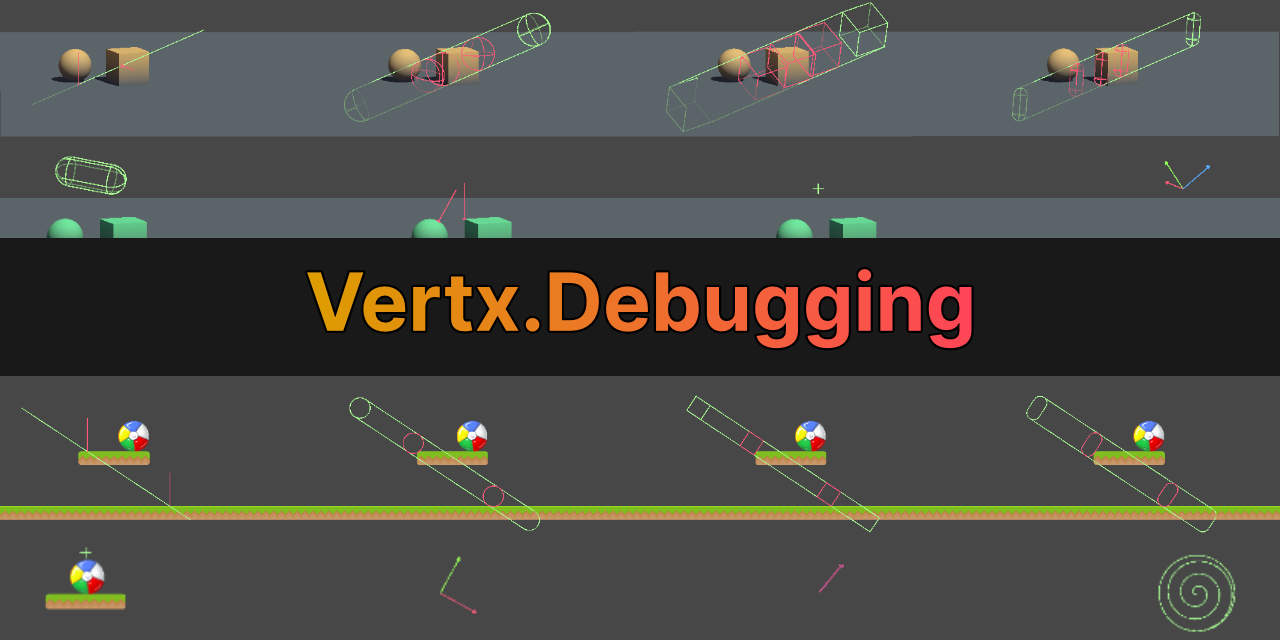
GitHub
Debugging utilities for Unity. Contribute to vertxxyz/Vertx.Debugging development by creating an account on GitHub.
grand snow
Also using a debugger is the best way to actually debug code, logs wont do it all
rich adder
3D has Physics Debugger for casts, Box2D doesn't for some reason
Ya learning the debugger goes a long way in the future
grand snow
logs for useful info over time on your game state, debugger to actually figure out wtf its doing and why
hallow acorn
grand snow
This is great for debugging physics: https://github.com/vertxxyz/Vertx.Debugging
how can i draw the shapes? i can import the package but not the Shape class
rich adder
did you put the namespace?
hallow acorn
rich adder
did you put the namespace?
wdym?
grand snow
They list all of the things but give examples too:
// Draw a sphere with the specified color.
D.raw(new Shape.Sphere(position, radius), color, duration);

// Draw green sphere if nothing was hit,
// or draw a red sphere if something was.
D.raw(new Shape.Sphere(position, radius), hit, duration);

// Casts draw in green, with red where hits were detected if no color is provided.
// Cast color and hit color can be overrided manually.
D.raw(new Shape.SphereCastAll(position, direction, radius, hits, hitCount, 10), duration);
"The type or namespace name could not be found (are you missing a using directive or an assembly reference?)"
i tried importing the class like this: using static Vertx.Debugging.Shape;
grand snow
using asm defs? if so add the reference on it
any half decent package now will use them
hallow acorn
grand snow
using asm defs? if so add the reference on it
using what?
grand snow
Assembly definitions (.asmdef)

tl:dr lets you split code up into smaller assembilies to aid in code complilation. They however need to manually be configured in editor to reference other asm defs to "see" their code (e.g. myscripts -> Vertx)
If you never added any to your project then unity is doing its automatic ones that should auto ref everything
hallow acorn
grand snow
tl:dr lets you split code up into smaller assembilies to aid in code complilatio...
i dont get it sry
what do i have to do
grand snow
Do you have compile errors? if you arent using asm defs it should just work
hallow acorn
hallow acorn
"The type or namespace name could not be found (are you missing a using directiv...
still like this @grand snow
grand snow
hallow acorn
still like this <@123135850560225282>
can you clarify, you put the using; at the top of the file and it gave an error?
hallow acorn
grand snow
can you clarify, you put the ``using;`` at the top of the file and it gave an er...
yes i did put it on top of the file.
grand snow
if that did not error then its working. Then try to use D.raw()
hallow acorn
grand snow
if that did not error then its working. Then try to use ``D.raw()``
The name "D" does not exist in the current context
grand snow
it uses a different namespace... if in VS plz use the lightbulb

could have fixed this in 2 seconds
you made it sound like nothing was working but in reality it was
hallow acorn
its in german but the lightbulb doesnt say anything usefull i think
 grand snow
 hallow acorn
now i get "The type or namespace name could not be found (are you missing a using directive or an assembly reference?)" twice
grand snow
can you restart your editor cus it should not show this error, it should reference it automatically
hallow acorn
grand snow
can you restart your editor cus it should not show this error, it should referen...
ok i try
grand snow
VS may let you reference the assembly but it wont really work
hallow acorn
thanks i think it works now!
hallow acorn
grand snow
was just unity being dumb then 😆
what is meant with RaycastHit2D? hit? i think i can be dumb too
grand snow
RaycastHit2D is a struct
 vocal nova
Hey does anyone know the best way to implament multiplayer into a game
My games is a 6v6 fps I need the multiplayer to allow matchmaking dedicated servers and more
 orchid cobalt
using UnityEngine;

public class PlayerMovement : MonoBehaviour {
    public Rigidbody player;
    public int speed;

    void Update() {
        if (Input.GetKeyDown(KeyCode.D)) {
            player.linearVelocity = new Vector3(speed, 0, 0);
        }
        else if (Input.GetKeyDown(KeyCode.A)) {
             player.linearVelocity = new Vector3(-speed, 0, 0);
        }
        else {
             player.linearVelocity = new Vector3(0, 0, 0);
        }
    }
}
is there a better way to do this?
 grand badger
orchid cobalt
```c#
using UnityEngine;
public class PlayerMovement : MonoBehaviour {
publ...
grand badger
orchid cobalt
```c#
using UnityEngine;
public class PlayerMovement : MonoBehaviour {
publ...
    void Update() {
        var inputX = Input.GetAxisRaw("Horizontal");
        player.linearVelocity = new Vector3(speed * inputX, 0, 0);
    }
well jeez
thats a lot prettier
grand badger
although mind this is NOT exactly the same as your code
grand badger
np
grand badger
no, not in this case
orchid cobalt
why if you dont mind me asking
grand badger
that's because you're altering linearVelocity -- which means you're just assigning a vector to a property
orchid cobalt
i see i see
grand badger
that property happens to be used (consumed) in FixedUpdate, but the time you assign it doesn't matter
orchid cobalt
whats the difference between GetAxis and GetAxisRaw?
grand badger
if you were to be doing player.MovePosition it would be optimal to do it in FixedUpdate
orchid cobalt
oh
grand badger
GetAxis can return float values, based on how long the key has been held for
whereas GetAxisRaw will instantly return -1/1 even if you JUST press the button
orchid cobalt
oh interesting
grand badger
(and 0 the moment you release it, vs GetAxis that'd lerp towards 0 smoothly)
orchid cobalt
so just that added functionality?
would it be detrimental if i used it in this context?
grand badger
GetAxis has added functionality yeah. The GetAxisRaw is the instant/raw connection with the input
depends on how you prefer your movement to work. If you like the speed buildup go for GetAxis -- try both
grand badger
np!
 gusty solar
can someone help me with my project, i tried creating a third person camera but the movement is bugged, i was following this tutorial https://www.youtube.com/watch?v=UCwwn2q4Vys&t=427s i also attached my project file

THIRD PERSON MOVEMENT in 11 MINUTES - Unity Tutorial
In this video I'm going to show you how to code full third person rigidbody movement. You can use this character controller as final movement for your game or use my other tutorials to build things like wall running, climbing, sliding, crouching and much more on top of it. (And of course you ...
 ivory bobcat
gusty solar
can someone help me with my project, i tried creating a third person camera but ...
ivory bobcat
gusty solar
can someone help me with my project, i tried creating a third person camera but ...
You might want to provide the !code you're needing help with
eternal falconBOT
Posting code
📃 Large Code Blocks
Use links to services like:
https://paste.mod.gg/, https://hastebin.skyra.pw/, https://paste.ofcode.org/, https://paste.myst.rs/, https://scriptbin.xyz/
📃 Inline Code
Surround code with three backquotes. Not quotation marks.
To format as C#, add cs to the first line:
```cs
// Your code here
```
Add a comment with a line number if there is an error message.
ivory bobcat
And describe what's not working
gusty solar
oh ok
sorry im new
i tried making a third person camera script but whenever i try moving the player spins around in circles
using System.Collections;
using System.Collections.Generic;
using UnityEngine;

public class ThirdPersonCam : MonoBehaviour
{
    [Header("References")]
    public Transform orientation;
    public Transform player;
    public Transform playerObj;
    public Rigidbody rb;

    public float rotationSpeed;

    private void Start()
    {
        Cursor.lockState = CursorLockMode.Locked;
        Cursor.visible = false;
    }

    private void Update()
    {
        // rotate orientation
        Vector3 viewDir = player.position - new Vector3(transform.position.x, player.position.y, transform.position.z);
        orientation.forward = viewDir.normalized;

        // roate player object
    float horizontalInput = Input.GetAxis("Horizontal");
    float verticalInput = Input.GetAxis("Vertical");
    Vector3 inputDir = orientation.forward * verticalInput + orientation.right * horizontalInput;

    if (inputDir != Vector3.zero)
        {
            playerObj.forward = Vector3.Slerp(playerObj.forward, inputDir.normalized, Time.deltaTime * rotationSpeed);
        }
    }
}
You're assigning the forward direction of the player to input from horizontal and vertical, so yeah.. it'll spin around - what's the problem?
Maybe explain what it's supposed to do instead? 
gusty solar
its supposed to move the player in the direction of the freelook camera
kinda like roblox movement
ivory bobcat
gusty solar
its supposed to move the player in the direction of the freelook camera
When.. pressing forward? I don't know about the game called roblox
gusty solar
its hard to explain but when you move forward your character moves forward relative to the camera
verbal dome
Is the camera a child of the player?
gusty solar
yea
verbal dome
I guess it makes a feedback loop then
You change player's rotation -> Camera rotates with it -> viewDir changes -> repeat
ivory bobcat
gusty solar
but the camera isnt spinning around just the player model
Show the inspector for the script component
gusty solar
 ivory bobcat
gusty solar
ivory bobcat
gusty solar
Your setup is a bit different from the video' setup. They've got the component script on a virtual camera that isn't a child of the player object
Which would have this cs Vector3 viewDir = player.position - new Vector3(transform.position.x, player.position.y, transform.position.z); behave different for their and your setup
Where the transform-position would be changing in yours but not theirs.
 gusty solar
so should i copy their hierarchy
ivory bobcat
If you're planning on following along with their tutorial, you ought to have the same setup as theirs else you'll need to improvise (this would require you knowing their setup)
gusty solar
i was just planning to copy the camera script and also i dont see how the hierarchy would affect the camera since everything is referenced with public variables
ivory bobcat
gusty solar
i was just planning to copy the camera script and also i dont see how the hierar...
If you're changing the orientation of the player (root) it would affect the position of the virtual camera object (the orientation object with the script). I have no clue if the virtual camera moves in their setup but your camera's forward direction would be dependent of the positioning of the player (root) and the orientation object. If the camera isn't changing direction or changing in an unwanted way, this would the key difference - orientation being a child of player.
gusty solar
so i need to make ure that the camera's direction isnt being changed
ivory bobcat
You need to make sure the difference in position between player and orientation remains the same in your setup as theirs. Their solution is specifically for their use case and will not behave correctly if the difference of position isn't the same.
 queen adder
unity keeps crashing when I click my button. not sure what it could be. this is the code:
it crashes with the click of the resetButton button
any help would be greatly appreciated
 teal viper
queen adder
any help would be greatly appreciated
teal viper
queen adder
any help would be greatly appreciated
Probably an infinite(or close to it) recursion.
Next time share !code properly btw:
 eternal falconBOT
Posting code
📃 Large Code Blocks
Use links to services like:
https://paste.mod.gg/, https://hastebin.skyra.pw/, https://paste.ofcode.org/, https://paste.myst.rs/, https://scriptbin.xyz/
📃 Inline Code
Surround code with three backquotes. Not quotation marks.
To format as C#, add cs to the first line:
```cs
// Your code here
```
Add a comment with a line number if there is an error message.
queen adder
teal viper
Probably an infinite(or close to it) recursion.
Next time share !code properly b...
its really long so I wasn't going to do an insert but I will next time. this is odd though, as the start script does the same thing, and doesn't have this problem. i'll try changing a few things around though
teal viper
queen adder
its really long so I wasn't going to do an insert but I will next time. this is ...
Well, only one way you can know. Debug it.
I'd assume by "crash" you actually mean freeze/not responding?
Or is there a particular error that causes the crash?
queen adder
teal viper
I'd assume by "crash" you actually mean freeze/not responding?
no particullar error just freeze with no response
teal viper
Then it's not a crash. Try attaching a debugger and breaking when it freezes
queen adder
teal viper
Then it's not a crash. Try attaching a debugger and breaking when it freezes
Ill try that. it's not the loop. just made it into this do while loop and it has the same problem
    public void callCopyScript(List<string> taskTextList, List<string> taskDataList, List<int> noDuplicates)
    {


        //random integer to find random task to make
        int listPlace = Random.Range(1, 20);

        do //if the list of noDupes contains the int, it will make a new one
        {
            listPlace = Random.Range(1, 8);

        } while (noDuplicates.Contains(listPlace));


        //get the list value of that int for both and save to the strings
        string taskText = taskTextList[listPlace];
        string taskData = taskDataList[listPlace];


        ModalController.gameObject.GetComponent<ModalWindowController>().CopyTask(taskData, taskText);

        noDuplicates.Add(listPlace);


    }
I'll see what I can figure out
teal viper
queen adder
Ill try that. it's not the loop. just made it into this do while loop and it has...
This could be an infinite loop too.🤷♂️
You're playing with dangerous code here. You don't know if the list does or does not contain the 1-8 range. It's very likely that it does. in which case it will loop forever
Use the debugger or add some safety checks
queen adder
teal viper
You're playing with dangerous code here. You don't know if the list does or does...
wait that second one should be a 1-20. also, its the only way I could figure out to not use the same option twice
teal viper
queen adder
wait that second one should be a 1-20. also, its the only way I could figure out...
There must be a safer and more efficient way
teal viper
What if by chance random just keeps on returning the same value? If not freeze, it would cause a huge performance spike
Why use random at all? Why not just loop the indices?
use a for loop
queen adder
they're random so that each set of 5 is different each time it is run.
teal viper
queen adder
they're random so that each set of 5 is different each time it is run.
It's fine to get an index randomly, but it's not fine to use random number as a loop condition. Definitely not in this case.
teal viper
queen adder
they're random so that each set of 5 is different each time it is run.
Is the goal to get a number between 0-20 that is not in noDuplicates list?
queen adder
teal viper
Is the goal to get a number between 0-20 that is not in `noDuplicates` list?
the goal is to get 5 random different numbers from 1-20
i think smth else is up as well b/c I can't even assign this in the onclick field
teal viper
Let's deal with this dangerous code first.
queen adder
agreed
teal viper
queen adder
the goal is to get 5 random different numbers from 1-20
Then I don't understand why you need to check the noDuplicates list..?
queen adder
the noDuplicates list is what stores the past values
so it makes a value, checks if its already in, and then runs, then adds the value before doing the next one
its absolute spagetti I know
teal viper
Instead of a list of previous values, keep a list of free values. Then get a random in range 0-listSize. Then remove that index from the free list. Done. You have a random element from your free values list.
Do that 5 times and you have 5 random values between 0-20(or whatever range you want)
queen adder
that is a much smarter way to do that.
teal viper
Most importantly, There's no way to get an infinite loop that way
queen adder
right
something like this?
    private void Start()
    {
        //the following will make list class of the text values
        List<string> taskTextList = new List<string> { t1, t2, t3, t4, t5, t6, t7, t8, t9, t10, t11, t12, t13, t14, t15, t16, t17, t18, t19, t20 };
        //this will make a list class of the task data values
        List<string> taskDataList = new List<string> { d1, d2, d3, d4, d5, d6, d7, d8, d9, d10, d11, d12, d13, d14, d15, d16, d17, d18, d19, d20 };
        //adds list to make it so tasks are not made two of same
        List<int> noDuplicates = new List<int> { 1-20 };
        newTasks(taskTextList, taskDataList, noDuplicates);
    }
    public void newTasks(List<string> taskTextList, List<string> taskDataList, List<int> noDuplicates)
    {

        //makes 5 tasks on start
        callCopyScript(taskTextList, taskDataList, noDuplicates);
        callCopyScript(taskTextList, taskDataList, noDuplicates);
        callCopyScript(taskTextList, taskDataList, noDuplicates);
        callCopyScript(taskTextList, taskDataList, noDuplicates);
        callCopyScript(taskTextList, taskDataList, noDuplicates);
    }
    //calls with the list values so that the lists are constant
    public void callCopyScript(List<string> taskTextList, List<string> taskDataList, List<int> noDuplicates)
    {


        //random integer to find random task to make
        int listPlace = Random.Range(1, noDuplicates.Count);

        int datalistPlace = noDuplicates[listPlace];


        //get the list value of that int for both and save to the strings
        string taskText = taskTextList[datalistPlace];
        string taskData = taskDataList[datalistPlace];


        ModalController.gameObject.GetComponent<ModalWindowController>().CopyTask(taskData, taskText);

        noDuplicates.Remove(datalistPlace);


    }
On the first glance seems fine, yes.
You probably want Random.Range(0, count) though
as the way you have it now, the first element would be ignored
queen adder
0, count would include 0. do lists start at 0 or 1?
teal viper
0 of course. All collections in most programming languages start at 0
teal viper
These here too:
List<int> noDuplicates = new List<int> { 1-20 }; =>List<int> noDuplicates = new List<int> { 0-19 };
And maybe have t0 and d0 as well
Though, that's not critical
Just for consistency
Just to make it clear Random.Range(the int version) accounts for that as Random.Range(1, noDuplicates.Count); would return noDuplicates.Count - 1 at max.
rich adder
^^ max exclusive, basically makes this work because if count is say 9
it omits 9 and uses 8. which is last index for a 9 count array
queen adder
teal viper
On the first glance seems fine, yes.
this is the current code. still does the same freezing.
    private void Start()
    {
        //the following will make list class of the text values
        List<string> taskTextList = new List<string> { t1, t2, t3, t4, t5, t6, t7, t8, t9, t10, t11, t12, t13, t14, t15, t16, t17, t18, t19, t20 };
        //this will make a list class of the task data values
        List<string> taskDataList = new List<string> { d1, d2, d3, d4, d5, d6, d7, d8, d9, d10, d11, d12, d13, d14, d15, d16, d17, d18, d19, d20 };
        //adds list to make it so tasks are not made two of same
        List<int> noDuplicates = new List<int> {0, 1, 2, 3, 4, 5, 6, 7, 8, 9, 10, 11, 12, 13, 14, 15, 16, 17, 18, 19 };
        resetButton.onClick.AddListener(() => newTasks(taskTextList, taskDataList, noDuplicates));
        newTasks(taskTextList, taskDataList, noDuplicates);

    }
    public void newTasks(List<string> taskTextList, List<string> taskDataList, List<int> noDuplicates)
    {

        //makes 5 tasks on start
        callCopyScript(taskTextList, taskDataList, noDuplicates);
        callCopyScript(taskTextList, taskDataList, noDuplicates);
        callCopyScript(taskTextList, taskDataList, noDuplicates);
        callCopyScript(taskTextList, taskDataList, noDuplicates);
        callCopyScript(taskTextList, taskDataList, noDuplicates);
    }
    //calls with the list values so that the lists are constant
    public void callCopyScript(List<string> taskTextList, List<string> taskDataList, List<int> noDuplicates)
    {


        //random integer to find random task to make
        int listPlace = Random.Range(0, noDuplicates.Count);

        int datalistPlace = noDuplicates[listPlace];


        string taskText = taskTextList[datalistPlace];
        string taskData = taskDataList[datalistPlace];


        ModalController.gameObject.GetComponent<ModalWindowController>().CopyTask(taskData, taskText);

        noDuplicates.Remove(datalistPlace);


    }
Okay. The the issue might be in CopyTask method
queen adder
teal viper
Okay. The the issue might be in `CopyTask` method
i just checked, it had the same possible infinite loop. This is what it looks like now
public void CopyTask(string newTaskData, string taskText)
{
    int listPlace = Random.Range(0, noDupes.Count);
    int colorInt = noDupes[listPlace];


    List<GameObject> colorPicker = new List<GameObject> { buttonPrefabBlue, buttonPrefabGreen, buttonPrefabTeal, buttonPrefabYellow, buttonPrefabLightBlue, buttonPrefabDarkGreen, buttonPrefabLightGreen, buttonPrefabBrown }; //makes it a random color
    GameObject newButton = Instantiate(colorPicker[colorInt], buttonParent.transform);//creates new button
    newButton.gameObject.GetComponent<buttonStringKeeper>().buttonString = newTaskData;
    buttonStringKeeper data = newButton.GetComponent<buttonStringKeeper>(); //this and ^^^ could be combined but that could break so redundancy = better

    newButton.transform.GetComponentInChildren<TextMeshProUGUI>().text = taskText;//gets text component and edits it

    Button buttonComponent = newButton.GetComponent<Button>();//gets the component

    noDupes.Add(colorInt); //adds to not have repeats

    if (data != null)
    {
        // Use lambda to capture the message dynamically
        buttonComponent.onClick.AddListener(() => OpenOverlay1FromInspector(data.buttonString, newButton.gameObject)); //adds onClick with the string
    }
    else
    {
        Debug.LogError("ButtonData component not found on the button!");
    }

    //need to add listener with the button script buttonStringKeeper
    //need to pull button string keeper string and use it when opening
}
(for context)
List<int> noDupes = new List<int> { 0, 1, 2, 3, 4, 5, 6, 7};
alright, it works now!
thanks guys!
yall are awesome
you have saved my STEM final project. I don't know how, but if I can return the favor in any way, just ask.
 onyx narwhal
i want to make the blue particle trail stop following the player when it collides with the ground (i am not sure how  )
)
 midnight falcon
You will need a reference to the particle, and also a script where can detect collide with ground. When it collide event been trigger, stop or hide the trail.
 keen rampart
guys is it poissalbe ot full screen unity
onyx narwhal
midnight falcon
You will need a reference to the particle, and also a script where can detect co...
I dont want to hide the trail, I just want the trail to not follow the player, like where I "crash" I want the effect to show up there
midnight falcon
onyx narwhal
i want to make the blue particle trail stop following the player when it collide...
You could just unparent it, which parenting is means to the child object follow where ever the parent object is going. Or if you using code to control its movement, then you need to have something to stop its function
onyx narwhal
oh dang there was something online that said I would just need to set my simulation space to world and it would fix it (but i guess it doesnt) i guess ill just make a seperate script then

thanks for help tho
 vague charm
Good evening, I am trying to get the player object to delete when it collides with an obstacle but they are going through each other. I put the colliders on them but it doesn't seem to be working. What am I doing wrong? x_x


 zenith mantle
guys i need help this isnt working

there isnt a new menu when i right click and create
teal viper
vague charm
You seem to be moving the object via transform. This would fck up most of the physics, including collision detection.
teal viper
vague charm
And moving physics objects need to have an RB. Also only convex mesh colliders can move correctly with physics.
You should also decide whether you want physics 2d or 3d
Basically everything is wrong. You should go over unity !learn pathways and learn how to use physics in unity.
eternal falconBOT
:teacher: Unity Learn ↗
Over 750 hours of free live and on-demand learning content for all levels of experience!
vague charm
teal viper
You seem to be moving the object via transform. This would fck up most of the ph...
So what should I use instead of transform?
teal viper
vague charm
So what should I use instead of transform?
Forces or velocity.
vague charm
Like add force? I was watching the tutorial so I'm going along with that but it's for 3d games mainly
teal viper
vague charm
Like add force? I was watching the tutorial so I'm going along with that but it'...
3d physics is quite different to 2d physics. You can't just apply that tutorial to 2d if you're a beginner.
And yes, add force or setting velocity
vague charm
I see
I wanted to start with a 2d one but this is what has videos and quizzes I wanted to finish it because it has taught me stuff that applies where I need but if there's a 2d one I'd start that right after this one lol
teal viper
#archived-networking, not a beginner topic too.
teal viper
vague charm
I wanted to start with a 2d one but this is what has videos and quizzes I wanted...
You're free to do whatever you want, but so far there are many issues with your setup. If that's all from the tutorial, I'd recomend ditching it as it must be pretty bad.
vague charm
Well I'll continue with the websites tutorial lol
 frigid sequoia
Hey, this a really stupid thing to ask, but is there an explanation for the convention that when you call or declare a method you use "Method()" but when you use something like if you use "if (X)"?
Like why the space in one but not in the other?
Do you use the space on methods call too or in none?
teal viper
frigid sequoia
Like why the space in one but not in the other?
That's very subjective or company/community/person dependent. I rarely run into space between if and () in my daily job(C/C++) and never put them myself. I don't remember if VS autoformats it like that or not by default, but you can configure this kind of preferences in the ide settings.
I don't think there's any particular functional reason for that.
frigid sequoia
I don't think it does so autmatically, no, but I 90% of the time see them with the space
Look at the recent code sample images on this channel
teal viper
frigid sequoia
Look at the recent code sample images on this channel
The last 2 examples are from complete beginner. I really doubt they put spaces there consciously.
Actually, I checked my project now, and I see spaces between if and the condition, which implies that the IDE autocompleted or autoformatted it like.
Yeah. When I type if and double Tab, it autocompletes it with a space. Probably the default settings.
Probably this
 frigid sequoia
It's kind of a weird default convention tbh
zenith mantle
i was trying to delete this script now its immortal and i cant delete it
 naive pawn
frigid sequoia
Hey, this a really stupid thing to ask, but is there an explanation for the conv...
naive pawn
frigid sequoia
Hey, this a really stupid thing to ask, but is there an explanation for the conv...
control structures and methods are not necessarily formatted the same
frigid sequoia
No, yeah, of course, you can pretty much use whatever convention you feel like as long as you and the machine can understand it lol
Why the fuck do I need the second condition there to not get a console error of trying to destroy a entity that is already destroyed?

Shouldn't that code not execute at all if the gameObject has been destroyed???
 cobalt flare
 lean basin
Hello. I'm currently having a hard time doing this simple task in Unity.
I wanted to convert screen position into position in canvas. This is the last method I did:
    void Update()
    {
        var parentTr = (RectTransform)gameObject.GetComponentInParent<RectTransform>();
        var tr = (RectTransform)transform;
        var result = visibilityChecker.GetVisibilityStatus();

        RectTransformUtility.ScreenPointToLocalPointInRectangle(parentTr, result.start, null, out startPoint);
        RectTransformUtility.ScreenPointToLocalPointInRectangle(parentTr, result.end, null, out endPoint);

        tr.anchoredPosition = startPoint;
        tr.sizeDelta = endPoint - startPoint;
    }
result has a Vector2 of startPoint and endPoint.
this doesn't work. How do I convert screen position to position in canvas and how do I assign it to the gameObject?
Update: fixed but I still can't wrap my head around the positioning system. to fix, parentTr is assigned manually from the inspector, probably something wrong with GetComponentInParent. also set pivot of the image to 0,0 and don't touch anchor.
teal viper
frigid sequoia
Shouldn't that code not execute at all if the gameObject has been destroyed???
Not necessarily. GO being destroyed, does not mean that the script instance is destroyed as well. GC would not release it as long as you have references to it, and even then, it would not be instant.
What you experience is often caused by the destroyed script not unscubscribing from events properly.
frigid sequoia
teal viper
Not necessarily. GO being destroyed, does not mean that the script instance is d...
Those are not handled by events, I assumed if a GO was destroyed all references to it would just point to null instantly
teal viper
frigid sequoia
Those are not handled by events, I assumed if a GO was destroyed all references ...
They would normally.
Can you provide a callstack that leads to the error?
frigid sequoia
teal viper
They would normally.
Can you provide a callstack that leads to the error?
Basically it's a check I do on the lateUpdate modifying the health with a +0 to make sure that it is updated at the very end of the frame no matter what
teal viper
frigid sequoia
Basically it's a check I do on the lateUpdate modifying the health with a +0 to ...
It could be that the GameManager instance was destroyed. I'm not sure why it wouldn't be treated as null. Is GameManager a MonoBehaviour?
Too many unknowns. We need to see more of your code and the callstack of the error.
frigid sequoia
Nah, the error is on the KillEntity lane. It is trying to access a method that no longer exists. Since well, the whole object does not exist, the class that is calling the method included.
teal viper
You're checking this though?
And the this is presumably the game manager?
Ah, It's backwards.
I thought the called method was on the game manager.
That's what happens when you cut half of the relevant code out of the screenshot
teal viper
frigid sequoia
Nah, the error is on the KillEntity lane. It is trying to access a method that n...
Share the relevant script, share the callstack of the error and we can work with this.
Until then there's not much I can help you with.
frigid sequoia
The upper part is on the healthManager, the bottom part is on the GeneralBehaviur. Both are attached to the same gameObject. I am checking for "this" aka healthManager, it should not exist, nor the GeneralBehaviur nor the whole gameObject
teal viper
Share more code/info/screenshots, as I said
 wild island
It is safe to use an ISelectable interface with MonoBehaviors?
they will not become null if a selected gameobject is destroyed, right? But if I get the gameobject through the interface and check it for null beforehand its safe?
wintry quarry
wild island
It is safe to use an ISelectable interface with MonoBehaviors?
they will not bec...
What you can do is:
if (mySelectable is UnityEngine.Object uobj && uobj != null) {
  // we know it's not destroyed here
}```That's what I figured, thanks!
 sour fulcrum
wintry quarry
What you can do is:
```cs
if (mySelectable is UnityEngine.Object uobj && uobj !=...
sour fulcrum
wintry quarry
What you can do is:
```cs
if (mySelectable is UnityEngine.Object uobj && uobj !=...
Will that type checking not null check too?
wintry quarry
sour fulcrum
Will that type checking not null check too?
It will check for actual null not Destroyed Unity Object null
sour fulcrum
👍
 sleek flare
teal viper
<#497874116246896640>, not a beginner topic too.
sleek flare
teal viper
<#497874116246896640>, not a beginner topic too.
Ah, apologies, misremembered the channels use, thought it was more beginner people ^^; I'll move it over.
 hexed terrace
click on the missingreference error and find out which class and line it points to
something is trying to use this gameobject after you destroy it
queen adder
Oh its only doing it when I have the projectile selected in the editor
hexed terrace
you can't have it selected if it's destroyed 🤔
queen adder
hexed terrace
click on the missingreference error and find out which class and line it points ...
Oh yeah my bad I should of read these lines, its all UnityEditor stuff.
And its this thing when I click on it

 hexed terrace
what are you trying to show with that second screenshot of the asset? An SO?
queen adder
hexed terrace
what are you trying to show with that second screenshot of the asset? An SO?
Thats what it shows in the inspector when I click on the error (the trail error)
 scarlet aspen
Hi everyone, I wanted to start programming on Unity (I have never programmed in my life so I am a beginner) and I wanted to ask you where should I start, I saw the documentation pinned on this channel
Can I start with unity learn "beginner scripting"?
verbal dome
scarlet aspen
Can I start with unity learn "beginner scripting"?
Go for it
 winged tide
Hi! I feel so dumb asking this but I cannot find the answer anywhere. I have been trying to do my first scripts and when I switch to VS Code to write it, it doesn't recognises the "Application" class (and doesn't suggest anything). I don't know what I am doing wrong. Any idea on how to solve this?
verbal dome
winged tide
Hi! I feel so dumb asking this but I cannot find the answer anywhere. I have bee...
Follow all steps on this guide:
!vscode
eternal falconBOT
Visual Studio Code guide
If your IDE is not underlining errors in red or autocompleting code,
please configure it using the link below:
winged tide
verbal dome
Follow all steps on this guide:
I think I did. I will try again. Thanks
scarlet aspen
Uhm, I started from “beginner scripting but It’s not understandable for a “newbie”…
I changed course to: Unity Essentials
keen cargo
scarlet aspen
I changed course to: Unity Essentials
Yes i recommend essentials first and then the programming basics
scarlet aspen
I kind of saw that he opened 200 things that I didn't understand what they were without even learning how to use the engine lmao
keen cargo
scarlet aspen
I kind of saw that he opened 200 things that I didn't understand what they were ...
Yeap that's why essentials is better first, that's where you start absorbing what the engine actually does
 royal apex
I would def learn the engine first it will help a tone 😄
scarlet aspen
Yeah, I'm looking forward to creating something
keen cargo
scarlet aspen
Yeah, I'm looking forward to creating something
My suggestion though:
Do unity essentials all the way through, watch the videos first and then do what they said - don't do anything while the video is playing
After that's done, do some C# learning, Microsoft provides a pretty good guide
After that do the programming basics
For the programming basics you should also watch the video all the way through, and then start working
scarlet aspen
Thank you so much
keen cargo
scarlet aspen
Thank you so much
https://learn.microsoft.com/en-us/dotnet/csharp/
For the C# part

The C# guide has everything you need to learn C# and get started writing .NET apps. Learn C# programming - for beginning developers, developers new to C#, and experienced C# / .NET developers.
scarlet aspen
keen cargo
https://learn.microsoft.com/en-us/dotnet/csharp/
For the C# part
Thank you very much, I'm going now because I have a lot to study ^^
royal apex
hf with learning!
scarlet aspen
I hope
 willow whale
im using textmeshpro and ive uploaded a custom font, and the shader seems to make the text go completely black no matter what i do- same settings with another font works fine its just the one i generated
wintry quarry
willow whale
im using textmeshpro and ive uploaded a custom font, and the shader seems to mak...
 odd radish
Hey guys, i'm following sabastian lague tutorial on procedural landmass generation. I did it before and had no problems with it. Now I'm doing it again and I'm at episode 6, where he manipulates the height of the mesh trough a curve. I did the scripts as he did, I get the variables in my inspector to change, but when I change the height multiplyer not much is happening. When I go above 0 I get a bit of a change and when I go below 0 I get a bit of a change (both heighest point and lowest point switch) but beyond that nothing really happens and my map stays pretty flat. Even when i got in the 1000 with the height multiplyer. Can someone help me with this?
This is the video: https://www.youtube.com/watch?v=417kJGPKwDg

Welcome to this series on procedural landmass generation. In this episode we generate the map mesh.
The source code for this episode can be found here:
https://github.com/SebLague/Procedural-Landmass-Generation
If you'd like to support these videos, I have a Patreon page over here: https://www.patreon.com/SebastianLague
And this is what I get, first picture is height multiplier by 5

Now height multiplier by 5000

I also went back to a previous episode and I copied/pasted the scripts from his github page to be sure they were the same, but I keep getting this result
verbal dome
I don't see a difference in the screenshots really
Is there even any height variation?
 ruby zephyr
Guys, in a situation where I watch a tutorial about a simple program: maybe character movement tutorial.
How would I actually learn?
Is there like ways on learning, because the first thing that I'd do is literally just to try and remember it.
Do we just remember things in programming to be able to create, sometimes we mostly forget though
rocky canyon
know what each part of code does
self-research.. check out the documentation for it if its available..
if ur not understanding something in particular learn what it is.. and again, self-research
if you still have problems return to very basics.. "intro tutorials" unity !learn, etc
eternal falconBOT
:teacher: Unity Learn ↗
Over 750 hours of free live and on-demand learning content for all levels of experience!
rocky canyon
i typically know generally how to build something from scratch.. but even still i'll refer to google or the docs or let my ide fill in the blanks..
u never remember everything
 thorn holly
ruby zephyr
Guys, in a situation where I watch a tutorial about a simple program: maybe char...
thorn holly
ruby zephyr
Guys, in a situation where I watch a tutorial about a simple program: maybe char...
The trick is to not remember the whole thing, but what each individual part does
What every part of every line is doing
Also don’t force yourself to memorize something that’ll come naturally. Google is your best tool, beginner or advanced
ruby zephyr
For example I'll be using the movement mechanics most of the time, so even though I don't have to memorize it, by doing it repetitively in many prototypes or testing I'd be able to get it most of the time and just memorize it.
 spiral dew
Hello everyone.
Which IDE are you coding unity?
thorn holly
spiral dew
Hello everyone.
Which IDE are you coding unity?
Visual studio
ruby zephyr
ruby zephyr
For example I'll be using the movement mechanics most of the time, so even thoug...
And also, I kinda like the way of learning by copying a tutorial, look at the code, gets confused, research about it, then comprehend.
Would this actually be effective if I could prove to myself that I'll learn by this?
naive pawn
well it would be effective if you consistently do the last 2 steps, but the general recommendation is to skip the "copying the tutorial" part
look at the tutorial code, perhaps get confused by that and research it, then comprehend; then utilize what the tutorial says to do / what you learned from researching to make what you want
odd radish
verbal dome
Is there even any height variation?
thats what i'm saying xD
that's my problem
it should be changing in height like in the tutorial video but it isn't for some reason
only difference it makes is when I go from 0 -> 0.1 it changes slightly in height and when I go from 0 -> -0.1 it also happens but in reverse
So the height multiplayer is being used but not completly
And this time I editted a few things in my scripts, after I noticed it wasn't working I got rid of the things I edited and simply copy/paste his scripts so they should be right
keen cargo
ruby zephyr
And also, I kinda like the way of learning by copying a tutorial, look at the co...
I think this is the actual way to learn most of the time
you gotta get confused about something, and then try to overcome the confusion
 red rover
If a rigidbody has kinematic enabled inside a trigger, then has kinematic set to false while still inside that trigger, will that invoke OnTriggerEnter on that trigger?
rich adder
red rover
If a rigidbody has kinematic enabled inside a trigger, then has kinematic set to...
why not just..test it?
isn't that the perks of development ?
 frozen yew
guys my player keeps falling through my floor but i checked all the collisions are on so i think there is a problem with my code can someone help?
rich adder
frozen yew
guys my player keeps falling through my floor but i checked all the collisions a...
if you think its the code then show the code
red rover
rich adder
why not just..test it?
I just figured I would ask in case anyone had the answer readily available.
frozen yew

 rich adder
frozen yew
rich adder
frozen yew
!screenshots
eternal falconBOT
 No
No
Be mindful, if someone requests your code as text, don't send a screenshot!
Posting code
📃 Large Code Blocks
Use links to services like:
https://paste.mod.gg/, https://hastebin.skyra.pw/, https://paste.ofcode.org/, https://paste.myst.rs/, https://scriptbin.xyz/
📃 Inline Code
Surround code with three backquotes. Not quotation marks.
To format as C#, add cs to the first line:
```cs
// Your code here
```
Add a comment with a line number if there is an error message.
frozen yew
A tool for sharing your source code with the world!
rich adder
frozen yew
https://paste.mod.gg/nfqeunbdcsys/0
you put a rigidbody ?
rich adder
frozen yew
nope
show inspector for this object
frozen yew
 rich adder
frozen yew
rich adder
frozen yew
you should not mix Capsule Collider with Character Controller
they're both capsule colliders fighting
remove capsule
frozen yew
same problem
wintry quarry
frozen yew
why is the player so high in the air?
frozen yew
if i put it on 0 0 0 its too low and goes below the plane
wintry quarry
where's the floor
frozen yew
0 0 0
frozen yew
i can send a ss one sec
wintry quarry
you need to be in the scene view looking atll ath gizmos and making sure you don't have child objects with huge offsets etc
You'll want to make sure this is set to Pivot, not Center as well
 frozen yew
 wintry quarry
frozen yew
wintry quarry
frozen yew
don't cut off your screenshots
select the object
Show the hierarchy
Show any parent objects etc
frozen yew
 wintry quarry
we need to see the inspector and the hierarchy window as well
rich adder
oh boy
player is child of Player
wintry quarry
Yeah you have a root object and a child object here
 rich adder
and it wayyy offset from parent
wintry quarry
you need to fix all the positions
wintry quarry
we know
frozen yew
i dont know what that means
wintry quarry
click on the parent object
look at where it is in the scene
You also seem to have hidden your tool settings overlay
Press the `/~ button on your keyboard in the scene view
and click on "Tool Settings" to show it again
and make sure it's set to Pivot, not Center for the position

Then you can selct the objects with the move tool and see where they actually are (as well as looking at the position in the inspector
frozen yew
alr
wintry quarry
long story short your player object is way below the plane
frozen yew
one second
wintry quarry
and that's the root of your problem

 digital kayak
 gilded canyon
show the full code
digital kayak
gilded canyon
https://paste.ofcode.org/CMSDgQkzrGhUxwXT9DJTjY
screen shot
digital kayak
gilded canyon
and this is better anyways
windows + Shift + s
then press the screenshot in notifications and press ctrl c
gilded canyon
mate why is this such a big issue this is litteraly how to send large code
slender nymph
why are you asking for a screenshot of the code when you have a perfectly good link with the code in it that will be much more readable than any screenshot
digital kayak
slender nymph
why are you asking for a screenshot of the code when you have a perfectly good ...
i dont trust links
gilded canyon
lmao
 rare elm
i'm trying to make my game look fancy. i'm new to this. i'm adding some vfx, some camera shake, lighting, and shadows. it's a top down. what other topics should i be looking into?
slender nymph
digital kayak
i dont trust links
well it's how code is supposed to be shared here
digital kayak
slender nymph
well it's how code is *supposed* to be shared here
ok
gilded canyon
digital kayak
i dont trust links
#854851968446365696 incase u dont trust me the link ive used is mentioned here
slender nymph
gilded canyon
anyway, you need to log the values you check to ensure they are what you expect them to be. also keep in mind that those i = 1 statements are all outside of the if statements 😉
gilded canyon
? i though they r indented. the debg.log runs so im not sure hwy this wouldnt
thought
digital kayak
sorry guys
slender nymph
c# does not care about whitespace. this isn't python
digital kayak
my fault
rare elm
slender nymph
c# does not care about whitespace. this isn't python
do i get banned for life if i pick a meaningless argument about vertical tab here
slender nymph
if statements will contain either one statement or a block statement. so each of those i = 1; and that Debug.Log("a"); are outside of the if statements you think they are in, they are only in the outermost if statement
gilded canyon
slender nymph
if statements will contain *either* one statement *or* a block statement. so eac...
ah i c i always put {} but i decided that i want to make my code take up less room so removed them.
slender nymph
that only works if the contents of the if statement is only a single statement
gilded canyon
yea i thought put everything in 1 line thats 1 statement right
slender nymph
nope, statements are terminated by ; (or are a block denoted with {})
gilded canyon
figured
gilded canyon
ello
slender nymph
!code
eternal falconBOT
Posting code
📃 Large Code Blocks
Use links to services like:
https://paste.mod.gg/, https://hastebin.skyra.pw/, https://paste.ofcode.org/, https://paste.myst.rs/, https://scriptbin.xyz/
📃 Inline Code
Surround code with three backquotes. Not quotation marks.
To format as C#, add cs to the first line:
```cs
// Your code here
```
Add a comment with a line number if there is an error message.
digital kayak
and sorrry about earlier
gilded canyon
digital kayak
and sorrry about earlier
all good
digital kayak
i am new here so didnt konw
i am going to try it here
hello
A tool for sharing your source code with the world!
digital kayak
digital kayak
https://paste.mod.gg/basic/viewer/mnwolwmylsmt/0
it works
slender nymph
pro tip for sharing paste.mod.gg links: do not click the "</> Basic" button first, just click save then copy/paste the link in your browser. the basic button gives the raw unformatted text which means no syntax highlighting
slender nymph
you also want to use .cs as the file extension when naming the file in the site for c# code
digital kayak
A tool for sharing your source code with the world!
it works
thanks for the guidance @slender nymph
naive pawn
slender nymph
if statements will contain *either* one statement *or* a block statement. so eac...
a block statement is a single statement
slender nymph
sure, but it also contains multiple statements and this is beginner code where some people don't quite understand that so i wanted to be super clear about it
 elfin gull
Iam very sorry if iam interjecting into a conversation, iam a super beginner "programmer" and im getting one error that will probably take a medium experienced unity user 3 seconds to solve max, dm me if you would like 2 help
 simple stump
Have someone tried a grid inventory system with 3D objects? I need help getting a better approach of this system, if someone can give other ideas. i want to make the inventory very similar to RE4 inventory, mine has a object rotated x, 90, -75, which i had to rotate Grid similary. Im using Tilemap with Gameobjects, those having colliders and i check if the item is within the colliders. The item is parented to an object, and having a offset to properly place the item in the Grid. this comes with a single issue for now; can be placed out of bounds and checking the nearest tiles to match the size is difficult. I was thinking on making it work behind the scenes as 2D and project to 3D giving an illusion but since the object is rotate a bit, its quite hard to find a way
Clip shows a system i made to check the last position and teleport to there if Mouse drag is stopped but it should instead get the nearest block and not a last position reference or else it teleports too far
 humble forum
using UnityEngine;

public class EnemySpawner : MonoBehaviour
{
    public GameObject enemyPrefab;
    public float spawnRate = 1.5f;
    public float minX = -2f, maxX = 2f;

    void Start()
    {
        Debug.Log("EnemySpawner script started");
        InvokeRepeating(nameof(SpawnEnemy), 1f, spawnRate);
    }

    void SpawnEnemy()
    {
        float spawnX = Random.Range(minX, maxX);
        float spawnY = Camera.main.ViewportToWorldPoint(new Vector3(0, 1, 1)).y + 0.5f;

        GameObject enemyInstance = Instantiate(enemyPrefab, new Vector3(spawnX, spawnY, 1f), Quaternion.identity);

        Debug.Log("Enemy gespawned op: " + enemyInstance.transform.position);
    }
}
uh no one is going to be DMing you.
you should post the problem clear and detailed o
humble forum
using UnityEngine;

public class PlayerCar : MonoBehaviour
{
    public GameObject PlayerPrefab;
    public float speed = 10f;
    public float laneSpeed = 7f;
    public float minX = -2f, maxX = 2f;
    private GameObject playerInstance;

    void Start()
    {
        if (PlayerPrefab != null)
        {
            float spawnX = Random.Range(minX, maxX);
            float spawnY = 0f;


            playerInstance = Instantiate(PlayerPrefab, new Vector3(spawnX, spawnY, 1f), Quaternion.identity);
            playerInstance.name = "Player";

            Debug.Log("Player gespawned op: " + playerInstance.transform.position);
        }
        else
        {
            Debug.LogWarning("PlayerPrefab is niet toegewezen!");
        }
    }

    void Update()
    {
        if (playerInstance != null)
        {
            float moveX = Input.GetAxis("Horizontal") * laneSpeed * Time.deltaTime;
            playerInstance.transform.position = new Vector2(
                Mathf.Clamp(playerInstance.transform.position.x + moveX, minX, maxX),
                playerInstance.transform.position.y
            );
        }
        else
        {
            Debug.LogError("PlayerInstance is niet geïnstantieerd! Controleer je prefab toewijzing.");
        }
    }

    void OnTriggerEnter2D(Collider2D other)
    {
        if (other.CompareTag("Enemy"))
        {
            Debug.Log("Game Over! Speler heeft een vijand geraakt.");
            Time.timeScale = 0;
        }
    }
}
please dont be sassy! i was just reccomending that someone use the dm function because i didnt want to interupt other people.,....... i didnt know that dming was forbidden.......
rich adder
its not forbidden, but its encouraged to get help here so we can all verify the solution is acceptable and not diverting you into bad habit
there is no interruption, its not like a 1v1 convo. There are multiple convos going on sometimes, if someone knows the answer they reply it
elfin gull
that is true, good idea, i will post the problem
rich adder
humble forum
```cs
using UnityEngine;
public class PlayerCar : MonoBehaviour
{
public Ga...
show both prefabs
and their gizmos / origins
btw use a link next time.. no need to make a wall of code

 rich adder
humble forum
rich adder
humble forum
show the Move Tool Gizmos
playerInstance.transform.position = new Vector2( Mathf.Clamp(playerInstance.transform.position.x + moveX, minX, maxX), playerInstance.transform.position.y this is moving your red car to 0z btw
vector2 zeros out the Z
so you're only printing when it spawns which is indeed at 1, but then you move it to 0
humble forum
rich adder
so you're only printing when it spawns which is indeed at 1, but then you move i...
should a vector3 fix it?
 rancid tinsel
if i inherit from the class, and override this method, can i make this a different menu item? like title it Custom Window2 and they'd both exist?
 rich adder
humble forum
should a vector3 fix it?
rich adder
humble forum
should a vector3 fix it?
or just have them all at Z of 0 and replace the 1f
humble forum
rich adder
or just have them all at Z of 0 and replace the 1f
but then it goes in the road
rich adder
the road can be at 0 too, just make the order in layer less
rich adder
humble forum
but then it goes in the road
use Layer Order to change which one renders first, or just put the road at 1
humble forum
rich adder
use Layer Order to change which one renders first, or just put the road at 1
why not -1?
elfin gull
GUIManager.Add (.MyButton but, Int32 layer) (at Assets/Plugins/Assembly-CSharp-firstpass/GUIManager.cs:310)
InGameStore.ShowGUIItems () (at Assets/Plugins/Assembly-CSharp-firstpass/InGameStore.cs:1530)
InGameStore.Show () (at Assets/Plugins/Assembly-CSharp-firstpass/InGameStore.cs:1324)
StoreButton.Clicked () (at Assets/Plugins/Assembly-CSharp-firstpass/StoreButton.cs:45)
UnityEngine.Component:SendMessage(String)
ControllerMenuManager:CheckClicks() (at Assets/Plugins/Assembly-CSharp-firstpass/ControllerMenuManager.cs:156)
ControllerMenuManager:Update() (at Assets/Plugins/Assembly-CSharp-firstpass/ControllerMenuManager.cs:113)
whenever i click my button, this error gets thrown and nothing happens, i have like 0 programming experience besides a cough of lua

my bad for sending a wall.....
rich adder
humble forum
why not -1?
isnt the camera at -10 ?
humble forum
rich adder
isnt the camera at -10 ?
so -1 is then fine?
rich adder
humble forum
so -1 is then fine?
-1 means its front
camera is at -10 look at 0
which one comes first -1 or 0 , from -10
wintry quarry
elfin gull
```NullReferenceException: Object reference not set to an instance of an object
...
Better to share using paste sites so we can see line numbers.
!code
eternal falconBOT
Posting code
📃 Large Code Blocks
Use links to services like:
https://paste.mod.gg/, https://hastebin.skyra.pw/, https://paste.ofcode.org/, https://paste.myst.rs/, https://scriptbin.xyz/
📃 Inline Code
Surround code with three backquotes. Not quotation marks.
To format as C#, add cs to the first line:
```cs
// Your code here
```
Add a comment with a line number if there is an error message.
humble forum
rich adder
which one comes first -1 or 0 , from -10
-1 but that is good cuz road is higher then cam?
rich adder
humble forum
-1 but that is good cuz road is higher then cam?
if the cars at 0, you want the road to be above ?
humble forum
rich adder
if the cars at 0, you want the road to be above ?
but o is higher than -1 don t understand you
rich adder
humble forum
but o is higher than -1 don t understand you
from -10 to 0
which one comes first, -1 or 0
count from -10 up to 0 if you have to
humble forum
-1
humble forum
tought cuz a negative value is less important alr but whatever unity😮💨
rich adder
nah this isn't about importance, more of like which one will the camera see first
position wise, Z is depth in 2D.
typically camera is at -10 looking towards 0 anything between -10 and 0 will always be infront of 0 cause they are closer to camera
 noble forum
hey
quick question

Im trying to replace the big board with the smaller one, how to do that without reassigning everything in inspector and all the scripts?
grand snow
Swap the mesh in the mesh filter
Then change the material and other renderer settings
 broken nest
Hey, I got this script and I want classStats to show in editor
{
    #region Singleton
    public static CharacterClassStats instance;

    void Awake()
    {
        if (instance != null)
        {
            Debug.LogWarning("more than 1 SaveLoad");
            return;
        }
        instance = this;
    }
    #endregion

    public List<CharacterClassAverageStats> classStats;
}

public struct CharacterClassAverageStats
{
    public int averageHealth;
    public int averageAtk;
    public int averageAtkSpe;
    public int averageDef;
    public int averageDefSpe;
    public int crit;
}```How do i do that
verbal dome
You can't draw static fields in inspector without a custom editor
Oh thought you mean the instance field
rich adder
broken nest
Hey, I got this script and I want classStats to show in editor
```public class C...
you need to Serializable
[System.Serializable]
public struct CharacterClassAverageStats
{
    public int averageHealth;
    public int averageAtk;
    public int averageAtkSpe;
    public int averageDef;
    public int averageDefSpe;
    public int crit;
}```
 broken nest
rich adder
```cs
[System.Serializable]
public struct CharacterClassAverageStats
{
publi...
broken nest
rich adder
```cs
[System.Serializable]
public struct CharacterClassAverageStats
{
publi...
Perfect thanks
rich adder
humble forum
now i don t see them on both the road order is 1 slowly going insane
put order in layer at 2 for the cars
humble forum
rich adder
put order in layer at 2 for the cars
okay that works thank you
noble forum
grand snow
Swap the mesh in the mesh filter
I tried, but something most peculiar happened

How do i rotate one without rotating the other? or simply disable the view?
grand snow
If the new model has multiple pieces then it won't work. Just make it a child and remove the old mesh stuff on the parent
Don't really understand what I am seeing anyway
 stray wigeon
Thanks! Installing an updated .NET SDK did the trick on my other pc. IMO this should be pinned somewhere or added into the ide instruction @frosty hound sent before in case anyone wants to stick to VSCODE, a couple of my friends had the same issue and it worked for them as well. The VSCODE setup that the bot sends does not mention the .NET SDK.
rich adder
stray wigeon
Thanks! Installing an updated .NET SDK did the trick on my other pc. IMO this sh...
normally it tells you in VSCode to install/download the SDK
it fails 99% of the time to auto-install it (permissions issues, who knows..)
slender nymph
the c# dev kit should install the .net sdk, but if it doesn't there will be a message in the output telling you to install it. you just have to actually pay attention to what your tools are telling you
stray wigeon
slender nymph
the c# dev kit *should* install the .net sdk, but if it doesn't there will be a ...
The thing is, I am 100% sure I had it installed for something else and it either failed to update or failed to reinstall when I got the dev kit.
slender nymph
note that the .net runtime is not the same as the sdk, if the sdk were installed then you wouldn't have had to install it again
slender nymph
visual studio is superior to vs code though, so if you can switch to that, i would strongly recommend it. it breaks far less than vs code does
and rider is even better, but is only free for non-commercial projects
thorn holly
slender nymph
visual studio is superior to vs code though, so if you can switch to that, i wou...
I can vouch for that…I use vs code for console apps and the amount of times I’ve had to fix an error by deleting and retyping a semi colon in the same spot is absurd
humble forum
rich adder
thorn holly
I can vouch for that…I use vs code for console apps and the amount of times I’ve...
weird. I use any .NET framework project, and for exception of MAUI Hybrid the experience is flawless
for me VS was actually what was breaking, it kept telling me namespaces were missing and underlining all the code red, meanwhile in unity no errors obv
VS quality has been degraded in the past 2 years
rich adder
humble forum
https://paste.ofcode.org/35E54Nr9STqd47yf9crPbdA
remove * Time.deltaTime
humble forum
rich adder
remove `* Time.deltaTime`
isn t that imp for the same some looks on different devices?
 keen owl
humble forum
https://paste.ofcode.org/35E54Nr9STqd47yf9crPbdA
keen owl
humble forum
https://paste.ofcode.org/35E54Nr9STqd47yf9crPbdA
I forgot, you're using 2D physics. might want to change your velocity to just velocity.x or velocity.y. and also, this issue didn't happen when you used update right?
rich adder
humble forum
isn t that imp for the same some looks on different devices?
you need that for consistency but inside FixedUpdate its already going to move when the rigidbody moves on the physics tick
var horizontial = Input.GetAxis("Horizontal")
Debug.Log (horizontial)
and see whats happening when you let go for keyboard
humble forum
keen owl
I forgot, you're using 2D physics. might want to change your velocity to just ``...
can t do y
 rich adder
make sure first inptus aren't drifting
GetAxis should return 0 if you aint touching the keyboard..
anything x 0 would be 0 so it would auto-fix the velocity an set it to 0..
keen owl
humble forum
can t do y
velocity.y. also I noticed you're clamping the positions and clamping only handles transform values, not rigidbody velocity
so you might want to handle velocity elsewhere
humble forum
don t make me even more confused atleast be in sync 
rich adder
also make a thread @humble forum lets not flood this channel
humble forum
how do i do that?
rich adder
Right click message and create thread
keen owl
humble forum
don t make me even more confused atleast be in sync <:notlikethis:10681345581234...
this is why you should learn what the code does. we're trying to fix your code
humble forum
keen owl
this is why you should learn what the code does. we're trying to fix your code
i mean im not used to unity or csharp mostly do cpp and python
keen owl
humble forum
i mean im not used to unity or csharp mostly do cpp and python
then check the pinned messages in this channel
hallow acorn
hey the tiles im using in my tilemap arent 100% full and i sometimes get stuck and cant move smoothly bc of that. what can i do about this?
rich adder
hallow acorn
hey the tiles im using in my tilemap arent 100% full and i sometimes get stuck a...
wdym not 100% full
hallow acorn
like there are some pixels not filled in
and i think the collider takes a chunk out then
hallow acorn
oh that fixed it thanks!
 summer shard
why doesn't this rotate correctly, it like depends on the focusCameraSmoothTime, when i increase the variable in the inspector it moves up but idk
    private void Update() {
        //Rotate the camera towards focus point
        if (shownDialogue == null) return;

        Transform target = shownDialogue.getCameraFocusPart();

        if (target == null) {
            Debug.LogWarning("Target is null");
            return;
        }

        Vector3 direction = target.position - mainCamera.transform.position;
        Quaternion targetRotation = Quaternion.LookRotation(direction);

        mainCamera.transform.rotation = Quaternion.Slerp(mainCamera.transform.rotation, targetRotation, focusCameraSmoothTime * Time.deltaTime);
        Debug.Log("rotating perhaps?");

        if (Quaternion.Angle(mainCamera.transform.rotation, targetRotation) < 0.5f) {
            transform.rotation = targetRotation;
            Debug.Log("adkawmdawnjd");
        }
    }
 timber tide
Looks fine to me. Perhaps locality is affecting it, but I would for testing sake just rotate unparented, also remove that bottom bit of code
summer shard
timber tide
Looks fine to me. Perhaps locality is affecting it, but I would for testing sake...
it was camera bobbing overlaying the rotation of the camera, but why remove the bottom code??
timber tide
It was just a suggestion for testing the slerp is correct
summer shard
oh okay thanks
 fallen mulch
Hello, I followed a tutorial on youtube to code a spinning wheel on Unity. I'm trying to add the text to my script nut it's not working. Any suggestions?
rich adder
fallen mulch
Hello, I followed a tutorial on youtube to code a spinning wheel on Unity. I'm t...
suggesting on showing the setup + code for starters.
sending video link wouldnt hurt either
 tribal wave
whats the difference between StartCoroutine(SomeCoroutine()); and SomeCoroutine()?
slender nymph
the former starts the coroutine correctly, the latter just calls the method (but nothing happens because you aren't calling MoveNext() on the returned Enumerator)
tribal wave
slender nymph
the former starts the coroutine correctly, the latter just calls the method (but...
so for the second one it just wouldnt listen to yield return new WaitForSeconds(0.1f); for example?
slender nymph
why would it? nothing is calling MoveNext on it so it doesn't even get there
tribal wave
im incredibly stupid, whats MoveNext?
slender nymph
a method on IEnumerator that makes it enumerate. basically what makes it work.
Try it yourself, make a method that has nothing but some logs and some yields in it that returns IEnumerator like a coroutine then just call that method and see what happens. then test it by calling the method and storing the result in a variable and immediately call MoveNext on it
polar acorn
tribal wave
whats the difference between `StartCoroutine(SomeCoroutine());` and `SomeCorouti...
The first one will actually do things. The second one won't
slender nymph
but basically the StartCoroutine call is handling the calling of MoveNext on the IEnumerator returned by your coroutine method
fallen mulch
rich adder
suggesting on showing the setup + code for starters.
sending video link wouldnt...
The video link https://www.youtube.com/watch?v=qlHJ1yPnSdM&ab_channel=AlexanderZotov
[SerializeField]
private Text winText;
//Use this for initialization
private void Start()
{
    coroutineAllowed = true;
}
#unitytutorial #unityandroidtutorial #untiywheeloffortune #untiyandroidwheeloffortune
In this video tutorial, I will show you one of the simple ways how to create a wheel of fortune feature. The player can spin the wheel by tapping the screen and get some prize or reward.
I play games here - https://www.twitch.tv/zzotoff
You are very welcome :-...
slender nymph
the text object in your scene is very likely a TMP_Text not a Text object, Text is the legacy text type but you are probably using text mesh pro which is the current standard
fallen mulch
slender nymph
the text object in your scene is very likely a TMP_Text not a Text object, Text ...
I didn't have the option for the normal text like he did, so I was using text - text mesh pro
slender nymph
right, and i'm saying your variable type is incorrect so you need to be using the TMP_Text type not Text
polar acorn
fallen mulch
I didn't have the option for the normal text like he did, so I was using text - ...
Because the legacy text has been basically replaced with TMP and you shouldn't use it
tribal wave
one last thing, does StopCoroutine stop it wherever it is? like it can be in the middle of the method and if i run for it to stop itll stop immedietly right
slender nymph
unless you are actually calling StopCoroutine from within the coroutine, it will only ever be called while the coroutine is yielding because the code is still run on the same thread so it isn't running concurrently with your other code
but yes, when you call StopCoroutine it will stop calling MoveNext on the enumerator so it will no longer continue from the point it was yielding at
 austere escarp
how should i implement raycast jump detection
i have no idea if im doing it right becasue
when you jump, the raycast might still hit the ground so it thinks you are grounded
to solve that i invoked a function that tells the player right after they jump, if the isGrounded variable can be set to false
slender nymph
give the raycast a max length or use a different query that only checks within a specific area (like a CheckBox, OverlapSphere, etc) instead of a cast. but it is also typical to immediately tell the object it is no longer grounded when you perform the jump
austere escarp
slender nymph
give the raycast a max length or use a different query that only checks within a...
the raycast has a max length, and i do tell the objec it is no longer grounded after jumping
slender nymph
okay, so what is the issue then?
austere escarp
but the raycast to check to check if the player is grounded or not immediatly gets sets grounded to TRUE because the raycast will still hit the ground when the player jumps
since when the player jumps its not like they teleport upwards out of the raycast range
slender nymph
then your raycast is probably too long? have you actually done any debugging (like drawing the ray or using the physics debugger to visualize it if you are using 3d)?
austere escarp
no
well
wit the raycast length
it starts at the center of my player
shouldnt the length simply be half the players hight
plus a tiny bit?
slender nymph
does it actually start at the center of the player, or is it starting at its feet? you've not really shared any code nor any scene details so i can only make assumptions
but, again, you can easily visualize your ray using the Debug class or the physics debugger (this option only works for 3d)
 slender nymph
that entirely depends on how your stuff is set up
typically in 3d that would be the character's feet
austere escarp
slender nymph
typically in 3d that would be the character's feet
are you saying that the start of the raycast is the characters feet
like it should be ?
slender nymph
again, i have no fucking clue if it is because i don't know how your scene objects are set up
 slender nymph
that is correct only if your tool handle is set to pivot and not center
austere escarp
it is set to pivot 👍
so ideally how long should my raycast be
the hight of the player is 1
slender nymph
long enough that it reaches the ground. again, visualize your raycast and make adjustments as necessary
right now your raycast is 1.5 meters long. if your character has a total height of 1 meter, then that means the raycast goes a full meter below the character if it starts in the center. if the character is 2 meters tall then the cast is still going half a meter below the character
austere escarp
thank you, not sure how i didnt realise that
 daring snow
Hello I was wondering if someone can review my script? Its working, but its not what I am trying to do.
 rocky mulch
slender nymph
that is correct *only* if your tool handle is set to pivot and not center
rocky mulch
slender nymph
that is correct *only* if your tool handle is set to pivot and not center
Where do I get help? Here?
slender nymph
i don't know why you are pinging me for that. but !ask 👇
eternal falconBOT
:thinking: Asking Questions
:mag: Search the internet for your question!
:book: Use the API Scripting Reference and User Manual and this troubleshooting site for commonly posted issues.
:wrench: Attempt to debug your issue.
:thought_balloon: Find an appropriate channel by reading the name and description in #🔎┃find-a-channel
:grey_question: And don't ask to ask, ask a full question illustrating with screenshots if needed.
-# For more posting guidelines, go to #854851968446365696
frigid sequoia
Is there a method I can call when a scene is loaded for objects that have DontDestroyOnLoad or do I have to do that manually?
slender nymph
there's a sceneLoaded event https://docs.unity3d.com/6000.0/Documentation/ScriptReference/SceneManagement.SceneManager-sceneLoaded.html
frigid sequoia
Mmmm... so I have to tell it what scene has been loaded for it to work?
I basically just want a bunch of objects to look for specific components they need on the scene to work properly when they are loaded into a new scene
sour fulcrum
frigid sequoia
Mmmm... so I have to tell it what scene has been loaded for it to work?
what do you mean by this
frigid sequoia
The arguments, what are they for?
sour fulcrum
they tell you what scene was loaded
sour fulcrum
then you don't need to use them
wintry quarry
frigid sequoia
I basically just want a bunch of objects to look for specific components they ne...
one of the easiest ways to do this is to have those objects register themselves with the DDOL singletons when they are created.
frigid sequoia
wintry quarry
one of the easiest ways to do this is to have those objects register themselves ...
The what? Like rn I just load all the persistent object and singletons on the scene 0 that is the default one and then, I load the actual current scene
On load they now search for the relevant components. Is there a better way to do that?
sour fulcrum
the relevant components should reach out to the singletons, rather than the singletons reaching out to them
wintry quarry
frigid sequoia
On load they now search for the relevant components. Is there a better way to do...
Jsut what I said, have them register themselves
e.g.
void OnEnable() {
  MySingleton.instance.Register(this);
}```Why would I make all other objects search for the singletons though? Like, the singleton can easily look for the objects I need as long as they follow the level hierarchy structure, and they are gonna do so
sour fulcrum
because looking for the objects is comparatively expensive and as you said requires a specific hierarchy setup
where-as the objects don't even need to search for the singletons because they know exactly where it is (the big reason why people use singletons in the first place)
frigid sequoia
So is it better for 20 items to call for a singleton than telling the singleton to look for an single object that has all the needed ones as childs?
sour fulcrum
Yes
Ideally nothing code related should be specific to child parent relationships like that
zenith mantle
is making the playercharacter an active ragdoll a thing
like it's TABS in first person
 eternal needle
zenith mantle
is making the playercharacter an active ragdoll a thing
eternal needle
zenith mantle
is making the playercharacter an active ragdoll a thing
is there an answer you're looking for other than yes? its a thing if you make it a thing
it being first person has no change on if its possible, thats just a difference in where the camera is
frozen yew
hey i seem to have turned off the window used to play and pause the particle system can someone tell me how i can enable it again?
 narrow pulsar
does anybody here know why 2 assets of the same type wont import properly if they are both for the same version


one works and the other one doesnt
is it me?
or the pack itself
timber tide
Just delete the materials and make your own new materials. It's the textures you want from the package anyway
 brave idol
how do i get these
 eternal falconBOT
💡 IDE Configuration
If your IDE is not autocompleting code
or underlining errors, please configure it.
Select one:
•  Visual Studio (Installed via Unity Hub)
• Visual Studio (Installed manually)
•  VS Code
•  JetBrains Rider
• :question: Other/None
brave idol
cheers
brave idol
still not workin
 frozen yew
hey so im trying to code a bullet impact effect but everytime i shoot and wwait a second the impact gets deleted can someone help?
 rough lynx
brave idol
still not workin
rough lynx
brave idol
still not workin
Doesn't look configured
MonoBehaviour shouldn't be white it should be blue like PlotManager
frozen yew
!code
eternal falconBOT
Posting code
📃 Large Code Blocks
Use links to services like:
https://paste.mod.gg/, https://hastebin.skyra.pw/, https://paste.ofcode.org/, https://paste.myst.rs/, https://scriptbin.xyz/
📃 Inline Code
Surround code with three backquotes. Not quotation marks.
To format as C#, add cs to the first line:
```cs
// Your code here
```
Add a comment with a line number if there is an error message.
frozen yew


A tool for sharing your source code with the world!
wintry quarry
frozen yew
hey so im trying to code a bullet impact effect but everytime i shoot and wwait ...
Isn't your code very explicitly destroying the impact effect after 2 seconds? What's the issue exactly?
frozen yew
even if i remove it
its still being destroyed
and if i dont destroy iy
it will clog up my hierarchy
wintry quarry
frozen yew
its still being destroyed
things don't get magically destroyed. if it's being destroyed you have a component or code that's destroying it
There's a setting on the particle system that destroys it when it's done playing, maybe you have that enabled
wintry quarry
frozen yew
it will clog up my hierarchy
If it's clogging your hierarchy then it's not being destroyed
So I'm confused by your question
frozen yew
wintry quarry
things don't get magically destroyed. if it's being destroyed you have a compone...
alright ill check it
frozen yew
wintry quarry
If it's clogging your hierarchy then it's not being destroyed
mb i didnt explain properly
so basically first i didnt have the destroy code and it was clogging up my hierarchy and then when i added the destroy code from that point on it kept getting destroyed even after removing the code
wintry quarry
make sure you save your code
as of now, there's a Destroy call in there
In the code you shared
frozen yew
wintry quarry
make sure you save your code
i have
frozen yew
wintry quarry
In the code you shared
i removed it now
wintry quarry
Start using Debug.Log
wintry quarry
frozen yew
i removed it now
Wouldn't it be nice to share your actual updated code here if you want to ask about the current state of it?
frozen yew
nono i removed it when you told me
im sorry ill js figure it out on my own
i apologise
digital kayak
brave idol
how do i get these
Input.GetMouseButtonDown(0)
this is when you want an action to happen when you press the left mouse button
brave idol
rough lynx
Doesn't look configured
everything looks correct from the guide so idk whats causing it
digital kayak
brave idol
everything looks correct from the guide so idk whats causing it
did you mean the function
brave idol
yeah
but like
its not configured correctly
but everything is right according to the guide
digital kayak
private void OnMouseDown()
{
}
 strong wren
brave idol
but everything is right according to the guide
strong wren
brave idol
but everything is right according to the guide
Try Preferences -> External Tools -> Regenerate project files
strong wren
digital kayak
private void OnMouseDown()
{
}
Looks like wxod is talking about IDE integration, not the code itself.
digital kayak
strong wren
Looks like wxod is talking about IDE integration, not the code itself.
oh i c
brave idol
strong wren
Try Preferences -> External Tools -> Regenerate project files
nope, didnt do anything
rancid tinsel
im looking at the Prototype pattern and I'm very confused - how do you get a performance increase by "cloning" an object instead of creating it from scratch?
wouldnt you also have to instantiate the clone anyway?
 upbeat ferry
guys somebody know i'm making a wolf ai
verbal dome
Now we know
rocky canyon
rancid tinsel
wouldnt you also have to instantiate the clone anyway?
one creates a new object from scratch each time.. the other clones an existing object, skipping costly initialization
upbeat ferry

 modest dust
rancid tinsel
im looking at the Prototype pattern and I'm very confused - how do you get a per...
modest dust
rancid tinsel
im looking at the Prototype pattern and I'm very confused - how do you get a per...
It's not strictly about performance, but rather cleaner code, flexibility, not having to depend on some concrete classes and their sub-classes, but rather an interface.
But if you wanna talk about performance, then cloning is just about making an exact copy of the original (be it a shallow or deep copy). If your initialization is resource-intensive then it would make sense to make the first object "from scratch" and then make clones of it.
Take for example, a database of entities. You have to spawn 10 entities of the same type.. so instead of accessing the database 10 times, you access it once and then clone that one instance 9 more times.
verbal dome
upbeat ferry
FYI, the barking speed of the wolf depends on the player's framerate here
Since you are doing it in update with no regard to deltaTime
Ah seems like it only barks once
Still though
rocky canyon
coward wolf
verbal dome
upbeat ferry
Did you have a question?
upbeat ferry
no never mind
rocky canyon
yea i think it was more of a flex/show-off 😉
rancid tinsel
rocky canyon
one creates a new object from scratch *each time*.. the other clones an existing...
i get that on paper, but i cant imagine the difference being that big
rocky canyon
Enemy enemy1 = new Enemy("Goblin", 100);
Enemy enemy2 = new Enemy("Goblin", 100);``` vs
```cs
Enemy prototype = new Enemy("Goblin", 100);
Enemy enemy1 = prototype.Clone(); // Clone instead of recreating
Enemy enemy2 = prototype.Clone();```for small projects it probably doesn't
but think about games that spawning 100s and 100s of objects
it adds up
rancid tinsel
modest dust
It's not strictly about performance, but rather cleaner code, flexibility, not h...
ah okay so if i have 2 standard gameobjects it wont really do anything, but i should use it if lets say a goblin needs to go through like 3 for loops when hes created to be properly initialised?
rocky canyon
if its the same data.. why not just copy the exact obj
instead of creating a new one.. and running the initialization again..
which can be omitted completely
im just speaking in very generalistic terms tho.. as i haven't done much of this myself..
rancid tinsel
so if im understanding correctly - initialisation logic is like getting the object from state A to state B using "x" resources as well as instantiation
rocky canyon
(smaller projects,, who cares) lol
rancid tinsel
and cloning is spawning a copy at state B still instantiating, but skipping the journey from state A to state B, which saves x resources
rocky canyon
rancid tinsel
and cloning is spawning a copy at state B still instantiating, but skipping the ...
pretty close
If that initialization is complex, then cloning (Prototype Pattern) helps because:
- It skips redundant setup
- It copies an object that’s already initialized
rancid tinsel
that makes sense
rocky canyon
Think of it like this:
If you make one goblin, sure, just instantiate it normally.
But if you spawn 500 goblins, and each goblin runs expensive setup logic, you're wasting resources.
set up (1) goblin
then clone the other 499
😉 lol
rancid tinsel
ok that makes sense
rocky canyon
u gotta think alot of "optimism" stuff is based really on how big or how often..
does it only save a second or so? well thats useless for (1).. but if ur building (1000)
makes a big difference
rancid tinsel
yeah the issue is i have to demonstrate these patterns in coursework (word games specifically)
the hardest part is figuring out where i could use them
rocky canyon
rancid tinsel
yeah the issue is i have to demonstrate these patterns in coursework (word games...
ohh good luck.. im sitting here still trying to write out a good example
😄
modest dust
rancid tinsel
ah okay so if i have 2 standard gameobjects it wont really do anything, but i sh...
Anything that's resource-intensive.. be it database access, grabbing data over the network, many calculations.. etc.
If the end result of the initialization is the same for many instances, then you can just clone one instance several times, to just copy the values needed, skipping the redundant initialization.
rocky canyon
rancid tinsel
the hardest part is figuring out where i could use them
shouldnt be too hard..
u dont have to show it working its best?
just show it present in the first place right?
rancid tinsel
well we are not meant to "force" them in
rocky canyon
ohh
rancid tinsel
but doesnt have to be necessarily best practice
rocky canyon
lol cheeky professor
rancid tinsel
yeah its rough lol
especially since i start a word game to include pattern A, but to add pattern B reasonably id have to make a new game in some cases
rocky canyon
class WordTile
{
    public string Letter;
    public int Points;

    public WordTile(string _letter, int _points)
    {
        Letter = _letter;
        Points = _points;
    }

    public WordTile Clone() => new WordTile(Letter, Points);
}

// Usage
WordTile prototypeA = new WordTile("A", 1);
WordTile tile1 = prototypeA.Clone();
WordTile tile2 = prototypeA.Clone();``` wordtile clonetbh it doesn't make sense to try to use the pattern in a very small project anyway
lol
rancid tinsel
yeah
btw in your example
wouldnt you be initialising every letter after cloning it anyway?
since youd have A, B, C....
rocky canyon
rancid tinsel
yeah
Medium
Imagine a bustling city scene in your game. You need to populate it with pedestrians, each with their own unique look and behavior…
rocky canyon
rancid tinsel
wouldnt you be initialising every letter after cloning it anyway?
no.. b/c if u already initialized a, b, or c
u can clone a,b,c for other instantances of a,b,or c
if u need different initialization values
rancid tinsel
oh okay so we are talking like a large grid of repeating letters right?
rocky canyon
u need to create a new one
yea, u could create 1 for each letter
w/ its corresponding score
rancid tinsel
i see
rocky canyon
if scores never change. u can clone all the rest
and again.. im just kinda spitballing w/ ya
as ive never used it myself 😄
the link i sent is a good read
rancid tinsel
the best example i think ive seen was instantiating groups of enemies
rocky canyon
has a better example than what i was using
rancid tinsel
doing a prototype of a goblin
 rancid tinsel
oh yeah
 rocky canyon
walkspeed for example
rocky canyon
all that jazz yea
rancid tinsel
and you skip those calls
rocky canyon
anything it needs to initialize itself
and when u clone it.. ur just carbon copying it
all the references and stuff already set up
rancid tinsel
ah nice
rancid tinsel
rocky canyon
all the references and stuff already set up
i saw that there are two versions tho
shallow and deep copies
rocky canyon
probably more
rancid tinsel
and apparently they work different with references
rancid tinsel
lol ill let you know if i find anything interesting
rocky canyon
oh okay
rocky canyon
rancid tinsel
lol ill let you know if i find anything interesting
Shallow Copy
✅ Copies only the top-level object
❌ References inside the object still point to the original memory
Deep Copy
✅ Copies everything, including nested objects (new instances, not shared references)
❌ More expensive (extra memory & processing time)
rocky canyon
u might be referencing the wrong renderer
rancid tinsel
do they both point to the same mesh renderer on the first pedestrian?
rocky canyon
yes
rocky canyon
lol.. best of luck 🍀 thats all my brain has time for this morning
rocky canyon
np.. 🙂
so for example if 1 of ur object has its own list...
say for collision points or something..
youd probably need a deep copy that one
so it gets its own list
dont need Enemy2 using the same list as Enemy1
 runic lance
not sure if it was mentioned already, but javascript uses prototypes for inheritance
it's interesting
rocky canyon
TIL
rocky canyon
runic lance
it's interesting
very much

 vestal anvil
how can i get the currently focused item? i want to make a terminal style UI where hovering or selecting a button makes it red with an arrow on its side,i did it with the event system but i want to optimize it using code instead
rocky canyon
vestal anvil
how can i get the currently focused item? i want to make a terminal style UI whe...
the eventsystem is the only way i know how to do it
w/o rolling ur own solutoin
verbal dome
Not sure if javascript's prototypes are related to prototype pattern, it sounds more like inheritance in C#
vestal anvil
rocky canyon
the eventsystem is the only way i know how to do it
how do you do it without calling double events? mine looks like this and sometimes when i use directional keys and mouse the previous selected item keeps being red without changing
 rocky canyon
vestal anvil
how do you do it without calling double events? mine looks like this and sometim...
rocky canyon
vestal anvil
how do you do it without calling double events? mine looks like this and sometim...
i remmeber that sometimes my Last Selected object got stuck
i would just clear it out manually
rocky canyon
vestal anvil
how do you do it without calling double events? mine looks like this and sometim...

this was my work-around for the issue i was having..
vestal anvil
oh tnx so i connect that to the update selected event?
rocky canyon
i just reference the event system in my game-manager
anytime i change screens or w/e else that causes it to get stuck w/ a selected object i dont want
i just call that method before hand ^
i can't really say much about the arrow keys and stuff.. as i haven't gottent that far into UI yet
vestal anvil
oh well its a minor bug atp there isnt really a reason to fix it,tnx anyway maybe the next unity update they will add a way to check focused items like in godot
rocky canyon
this whole thing 👇

ive been avoiding it for quite a while lol
tab and arrow key navigation.. never worked with it
vestal anvil
oh god...i see what you mean
rocky canyon
one day i'll tackle it 😉
vestal anvil
still better than in godot,there you need to manually set what the next focused item should be and it took me so much time to set on my old UI
at least you can visualize it here
rocky canyon
vestal anvil
still better than in godot,there you need to manually set what the next focused ...
ouch
verbal dome
rocky canyon
tab and arrow key navigation.. never worked with it
I think it becomes more unavoiladble when the player uses a controller
rocky canyon
good thing its automatic
imma trust unity that its close enough for someone to navigate around 😄
rocky canyon
vestal anvil
oh well its a minor bug atp there isnt really a reason to fix it,tnx anyway mayb...
maybe try ur luck in #📲┃ui-ux
 hallow rock
hey so my apk is not working, like if you put it on and post it to itch.io or mediafire it just won’t work. how can this be fixed.
wintry quarry
hallow rock
hey so my apk is not working, like if you put it on and post it to itch.io or me...
You'll have to be a lot more specific than "not working"
hallow rock
wintry quarry
You'll have to be a lot more specific than "not working"
okay. When you join the APK, it just crashes, or on CX file it just says package not installed or some crap.
wintry quarry
hallow rock
okay. When you join the APK, it just crashes, or on CX file it just says package...
What errors do you see in LogCat when it crashes
hallow rock
wintry quarry
What errors do you see in LogCat when it crashes
from what I know there’s none!
grand snow
android crashes should produce a "tombstone" and this should be logged
https://source.android.com/docs/core/tests/debug
Android Open Source Project
verbal dome
Tombstone is a great name for a crash log lol
grand snow
🪦"here lies mygame.apk"
rocky canyon
verbal dome
Tombstone is a great name for a crash log lol
good naming makes me all giddy 🙂
hallow rock
 dense mica
Hey folks, having a really strange issue in Unity 6 for my 2D game. Been developing scenes for a couple months w/o issue, but the last week or so I'm unable to move, resize or rotate game objects in the Scene view. I can still adjust their attributes in the Inspector and they take effect. And I can select the appropriate tool and see the widgets and try to interact with them. But clicking and dragging does nothing. I've googled for days now and can't seem to identify what dumb thing I must have toggled haha...
grand snow
dense mica
Hey folks, having a really strange issue in Unity 6 for my 2D game. Been develo...
you checked you are on the correct tool in the scene view?
check also in the hierachy that you didnt disable "interaction (hand icon)"
