#💻┃code-beginner
1 messages · Page 616 of 1
 queen adder
 azure wraith
Huh?
queen adder
Go to the particle object, and just drag the particle system component itself on the player object (in the hierarchy, not the scene)
its gonna automatically transfer it
 rich adder
then what is it ?
queen adder
However, having the particle system on the player directly is bad, keep it on a child object
azure wraith
Okay,
The system is a gameobject, the parent is the Player
I don't want this, I want it as a component to the player
but I don't know how to convert it
azure wraith
queen adder
However, having the particle system on the player directly is bad, keep it on a ...
What do you mean on the player
queen adder
 rich adder
azure wraith
Okay,
The system is a gameobject, the parent is the Player
I don't want this, I ...
rich adder
azure wraith
Okay,
The system is a gameobject, the parent is the Player
I don't want this, I ...
convert what
azure wraith
so its fine if its parented to player?
queen adder
Yes, its supposed to be like that
Having the particle system be directly a part of the player as a component is a bad practice
azure wraith
oh so I'm lucky
queen adder
Do you understand how components and prefabs work?
azure wraith
then how am I supposed to make the particle position to the player? unless it automatically positions
idk what a prefab is but I know what a component is
queen adder
You have to learn more of the basics before doing anything complex
azure wraith
Emitting dust particles upon hitting the ground is not complex
queen adder
When youre a beginner it is
Not the hardest in the world, but its better to spend that time learning the foundation
 polar acorn
azure wraith
then how am I supposed to make the particle position to the player? unless it au...
polar acorn
azure wraith
then how am I supposed to make the particle position to the player? unless it au...
Make it a child object of the player
 wicked pulsar
azure wraith
then how am I supposed to make the particle position to the player? unless it au...
wicked pulsar
azure wraith
then how am I supposed to make the particle position to the player? unless it au...
Child objects always move with their parents. The "local transform" of an object is its offset with respect to whatever it is parented to. Generally, a "player" consists of one root object (the player), then all the little parts that make it up. In AAA games, this can number to well over a hundred child objects on just the player.
An object's position is actually defined as the sum of the transforms of all its parents in the hierarchy.
 calm badge
Hey guys have you tried importing a 3D object to Android using Google's Sceneform?
 safe root
So i'm having trouble with my code for my dash, So the character dashes, it bascally teleports to said spot instead of actually dashes. Here the footage and the code https://paste.ofcode.org/jLA8vCkPbpSq6UKgZfLQDV
 timber tide
safe root
So i'm having trouble with my code for my dash, So the character dashes, it basc...
timber tide
safe root
So i'm having trouble with my code for my dash, So the character dashes, it basc...
What do the other force modes look like? Never actually used ForceMode.VelocityChange myself
 keen dew
well you literally have a function speedControl that limits the player speed
you'll have to not call it for the duration of the dash
 cosmic dagger
safe root
So i'm having trouble with my code for my dash, So the character dashes, it basc...
cosmic dagger
safe root
So i'm having trouble with my code for my dash, So the character dashes, it basc...
You're moving using AddForce, but your SpeedControl method sets the velocity directly. This overwrites any force you apply to the object . . .
safe root
I didn't think it affected since it did work before
timber tide
Even if the velocity is set, seems strange to just teleport like that
keen dew
The "teleport" is because they've had to crank up the dash speed to do anything so it gets massive speed for one frame before the speed control function kicks in
cosmic dagger
I think the teleport "effect" comes from setting the velocity when they attempt to add the dash . . .
safe root
I see, well what would be the best way to disable that for that moment?
cosmic dagger
timber tide
What do the other force modes look like? Never actually used ForceMode.VelocityC...
Basically, VelocityChange is assigning the velocity, but using force instead of doing it manually . . .
cosmic dagger
safe root
I see, well what would be the best way to disable that for that moment?
The simple solution is to return early (leave) the SpeedControl method if you are currently dashing . . .
keen dew
Make a boolean variable isDashing and set it to true when the dashing starts, then use a timer or a coroutine to set it to false after a few seconds. If the variable is true then don't call SpeedControl or return early
actually you could probably use the dash cooldown you already have
safe root
keen dew
Make a boolean variable `isDashing` and set it to true when the dashing starts, ...
That's what I was just about to do
cosmic dagger
And I would use coroutines instead of the Invoke method to reset your jump and dash . . .
timber tide
Ah, yeah that is quite a large dash amount. Also, throwing SpeedControl into the fixed update is an idea too since it wouldn't take affect till the fixed frame anyway
calm badge
Hey guys have you tried importing a 3D object to Android using Google's Sceneform?
 short fjord
Hey can anyone tell me what to look up so I can study how to make a render distance and load things in and out based on distance( I want to start making some bigger projects and figured this is a good place to start)
keen dew
LOD
 dapper mirage
Hey all, I just had a quick question. How could I change a simple boolean variable in my playerControls script from a different script attached to a trigger that the player touches?
I want the trigger to detect that the player has touched it and change a value in the playerControl script accordingly
timber tide
DifferentScript should have a reference to PlayerControls
public class DifferentScript
{
  [SerializeField] private PlayerControls playerControls;
}```Okay thanks :)
so here I can just drag the gameObject that contains my playerControls script and now the trigger can reference it?
 timber tide
yep, as long as it's part of the same prefab/scene
dapper mirage
Perfect, Thank you
 fleet venture
Is it possible to change the global scale of an object. Basically if i rotate my object 45 degrees i want it to scale down and not into the rotated direction which is what currently happens. If this isnt possible its fine but i did see lossyscale which says its global but its read only
 topaz mortar
Is MonoBehaviour.OnMouseOver() the proper way to handle hover events?
Is this extendable to other input devices like touch, controller, ...?
Hmm I probably need IPointerEnterHandler since it's UI
Same question though
fleet venture
uh what the fuck? how is comparing to null expensive, if i cant even do a nullcheck what am i supposed to do
 topaz mortar
fleet venture
uh what the fuck? how is comparing to null expensive, if i cant even do a nullch...
topaz mortar
fleet venture
uh what the fuck? how is comparing to null expensive, if i cant even do a nullch...
think you need something like vector3.zero, not sure what it is exactly
fleet venture
oh
topaz mortar
maybe transforms just can be null?
fleet venture
my IDE suggests this

ill try that ig
apparently its overloaded
that should check if the object still exists which is what i want to achieve
timber tide
What IDE is that? Rider?
wicked pulsar
@safe root Further to what others have said, your movement code breaks some conventions regarding time measurement. Generally, you want the amount of movement in your code to reflect some amount of change over time (in real time measurements, like seconds) and then multiply the final amount of movement by the amount of time that has passed since the last time the code was run. For Update, you would multiply your motion by Time.deltaTime and for FixedUpdate, you multiply by Time.fixedDeltaTime. This would be a good habit to get into.
If your fixed update loop runs 50 times per second, this would mean increasing your movement forces and velocities by 50x and then multiplying your numbers by Time.fixedDeltaTime before feeding them back to your rigidbody. This creates parity between how much stuff moves in FixedUpdate and Update.
Not directly related to your problem, and a bit of a nitpick, but something to think about. You should know that those precomputed values exist so you can structure your values around them.
 sour fulcrum
fleet venture
uh what the fuck? how is comparing to null expensive, if i cant even do a nullch...
sour fulcrum
fleet venture
uh what the fuck? how is comparing to null expensive, if i cant even do a nullch...
just out of curiousity here, how is that code running if transform is null?
fleet venture
sour fulcrum
just out of curiousity here, how is that code running if transform *is* null?
It’s a different transform I have a hiding field i just realized I should change that
sour fulcrum
Logic wise might be worth going down that line of thinking and having that code directly attatched to that object but i don't know the context so i'm sure you know best on that 👍
 hot harbor
Is it possible to use C#'s reflection magic to avoid having to do this for every single editor I'd like to redraw/customize? As in avoid having to findPropertyByName and type out everything
 fleet venture
sour fulcrum
Logic wise might be worth going down that line of thinking and having that code ...
fleet venture
sour fulcrum
Logic wise might be worth going down that line of thinking and having that code ...
Ye maybe I’ll try to look at it again and think it through
sour fulcrum
hot harbor
Is it possible to use C#'s reflection magic to avoid having to do this for every...
you can iterate through the serializedobject but thats more #↕️┃editor-extensions
at the very least if you wanna avoid spelling mistakes you could use nameof
eg. FindProperty(nameof(MyClassName._canEnterCombat)) etc.
hot harbor
any tips on learning more about editor extensions other than the official docs or is that hte best place
sour fulcrum
that thread, offical docs and just various tutorials/articles on places like medium, git and reddit have helped me a ton. a lot of the time it just comes down to knowing what you have to play with so code snippets can go a long way
hot harbor
sour fulcrum
you can iterate through the serializedobject but thats more <#533353544846147585...
Thanks!
 lethal smelt
hi guys, does anyone know how to sync hierachy between clients when using Photon to do multiplayer, I have pickUp function that used SetParent() but the parent happen only on player thats doing the pickup side and yes i did add both Photon View and Photon Transform view the only problem is with the parenting
from what AI told me there is no Photon specific function to do parenting but it did give me this code ```public class NetworkParenting : MonoBehaviour
{
public void SetParent(GameObject child, Transform parent)
{
PhotonView childView = child.GetComponent<PhotonView>();
PhotonView parentView = parent.GetComponent<PhotonView>();
    if (childView != null && parentView != null)
    {
        Debug.Log("99999");
        // Call the RPC to set parent on all clients
        //childView.RPC("RPC_SetParent", RpcTarget.AllBuffered, childView.ViewID, parentView.ViewID);
        childView.transform.SetParent(parentView.transform);
    }
}
}```
lethal smelt
well
sour fulcrum
if you don't understand your own code no one is going to be bothered
lethal smelt
ai was my last resort
sour fulcrum
if you came here after using the AI it was in fact not your last resort
lethal smelt
its not a problem that i dont undertand the code
just that parenting isnt workng in photon
 naive pawn
lethal smelt
hi guys, does anyone know how to sync hierachy between clients when using Photon...
naive pawn
lethal smelt
hi guys, does anyone know how to sync hierachy between clients when using Photon...
 quick fractal
fleet venture
uh what the fuck? how is comparing to null expensive, if i cant even do a nullch...
quick fractal
fleet venture
uh what the fuck? how is comparing to null expensive, if i cant even do a nullch...
Rider's judgement on what is and isn't expensive is.. Kinda inaccurate
Nearly everything in my Utils file is flagged as expensive, even simple stuff that just has a single nested loop
fleet venture
Ok
quick fractal
The redundancy stuff is really nice, but I don't think performance analysis is worth it to most people
naive pawn
fleet venture
uh what the fuck? how is comparing to null expensive, if i cant even do a nullch...
it's specifically Unity.Object comparisons
naive pawn
quick fractal
Nearly everything in my Utils file is flagged as expensive, even simple stuff th...
well yeah nested loops are relatively expensive
keyword relatively
naive pawn
fleet venture
my IDE suggests this
this is the same thing lol
quick fractal
naive pawn
well yeah nested loops are relatively expensive
Performance is pretty heavily based on how you're using it, which I wish rider picked up on
naive pawn
true, but i think that'd be pretty hard to make
quick fractal
Especially if I'm running a method once, before the player can even move 
quick fractal
naive pawn
true, but i think that'd be pretty hard to make
Well, Rider can pick up on Unity methods
naive pawn
in general for this kind of stuff, false positives are better than false negatives, so yeah, expect to find false positives
naive pawn
quick fractal
Well, Rider can pick up on Unity methods
only because unity tells it about those methods
it isn't magic
quick fractal

naive pawn
!ide
 eternal falconBOT

💡 IDE Configuration
If your IDE is not autocompleting code
or underlining errors, please configure it.
Select one:
•  Visual Studio (Installed via Unity Hub)
• Visual Studio (Installed manually)
•  VS Code
•  JetBrains Rider
• :question: Other/None
naive pawn
Install the bundled Unity Support plugin in Rider
yeah so this is the part where rider is informed about unity methods
and also about unity null checks being expensive, most likely
quick fractal
-# Yeah, It'd be nice if Unity also told rider that calling something in Start is less expensive.
naive pawn
well that's just not really true?
quick fractal
I'm not saying it should be perfect lol, I'm saying some more accurate context would be nice
naive pawn
context goes beyond what method it's in though
quick fractal
naive pawn
well that's just not really true?
I mean, if you're calling an expensive method in Update, it's going to be far more expensive than calling it once in start 
naive pawn
something in start being "expensive" could still be problematic if you instantiate that object frequently
quick fractal
Does rider not pick up on things being called frequently?
naive pawn
it'd be impossible to pick up on that scenario
it'd see Instantiate being called frequently, but there wouldn't be any link to any other method, since that link goes through unity serialization
quick fractal
I don't feel like performance analysis is a useful enough feature to warrant being more accurate than it is, but it's not as if it couldn't be done.
naive pawn
it's impossible to get "right" for everyone's definition of "right", though
quick fractal
Well, yeah, that's where customisation comes in
naive pawn
so, compromising middle ground is best you'll get, unfortunately
naive pawn
quick fractal
Well, yeah, that's where customisation comes in
well you can already do that
quick fractal

 stray cosmos
Just quick, I wanna use this function. Is it possible to put a sort of logical test in each parameter like "A=1", "B=1", "C=1"?

I feel like this is a thing but idk what it's called
quick fractal
I feel like we'd need a bit more context
naive pawn
you can't put logic directly on parameters, no
what are you trying to achieve, exactly?
cosmic dagger
stray cosmos
Just quick, I wanna use this function. Is it possible to put a sort of logical t...
Please explain what you're trying to do, then we can better help . . .
Unless you want default values for the parameters?
stray cosmos
Actually I guess I could just assign the logic to a new boolean and put that as the parameter
naive pawn
yeah no clue what you're talking about at this point
stray cosmos
I apologise I may have brainfarted
naive pawn
you can put, uh, conditions, as arguments
void Method(bool x);

Method(0 == 1);
if that's what you're talking about?
stray cosmos
Ok so that function takes in three values which are used for a save system. I bunched them together because they're supposed to be saved all at once at this one point. I essentially only want any one of those to be true if the corresponding save data for each is equal to 1
This is the function
 naive pawn
ok and what's your intended usage of the method?
stray cosmos
To save the data to a json file?
naive pawn
i mean, how do you want to call it
quick fractal
stray cosmos
Ok so that function takes in three values which are used for a save system. I bu...
Oh I see what you're doing with it, If I'm seeing it right would you not be better off with an enum?
naive pawn
im so confused what you're asking
quick fractal
It looks like a "level complete" sort of thing? 
 quick fractal
Oh, you've already got an enum for it, this is confusing
naive pawn
what is your actual question?
stray cosmos
Well I just wanted to know if there was some sort of way to call the function and put something like A==1 in the first argument
naive pawn
yeah you can do that
by.. calling the function and putting A == 1 in the first argument
stray cosmos
Huhhh so you can
 naive pawn
that's why i asked what your intended usage was lol
quick fractal
stray cosmos
Well I just wanted to know if there was some sort of way to call the function an...
comparisons return a bool, so if your argument is a bool, it'll work, you can also use a.. Terminary operator..? I think it's called. If you want slightly more messy but compact arguments
naive pawn
because if you just said SubmitNewPatternUnlocked(A == 1, B == 1, C == 1) i couldve just told you to 
naive pawn
quick fractal
comparisons return a bool, so if your argument is a bool, it'll work, you can al...
ternary
stray cosmos
Idk I got confused
quick fractal
That's the one thing I just can't remember the name of lmao
naive pawn
you can just call it a conditional operator
stray cosmos
Idk why I was so sure it wouldn't allow that
naive pawn
because that's what it does
ternary just describes how many operands it takes
the others are unary/binary operators
stray cosmos
Ah well, thanks anyways, we got there in the end 😅
naive pawn
(you generally wouldn't use a ternary to get a bool though. you would just take/negate the condition)
@stray cosmos though, regarding design;
- if A/B/C are 0/1, why not just use bools there?
- if the 3 cases are mutually exclusive, you could just use the enum you have
stray cosmos
Because A, B and C aren't binary. They are how many times an attack pattern has been played, passed or perfected respectively. I'm only interested in this bool being for if any of those things happen for the first recorded time (in other words, when they're equal to 1)
I suppose I could have used that enum though lol
naive pawn
i feel like i understand less about what you're trying to do lmao
stray cosmos
I have that effect on people
It's a pretty complicated system with a lot of stuff going into it but I just tested and this does indeed do what I wanted it to do
This stuff is for stat collecting that the player can browse in their records
fleet venture
quick fractal
Rider's judgement on what is and isn't expensive is.. Kinda inaccurate
i found out why i check it btw its cuz of this

but it never helped
it WAS the transform
of the object itself
it says i should check if its null
 steady oar
can someone tell me how to create 2d games in unity?
i need general advices and how to create games?
 stark prawn
when i change a script in unity and my friend changes it too when i get his update it gives error why?
 grand snow
stark prawn
when i change a script in unity and my friend changes it too when i get his upda...
grand snow
stark prawn
when i change a script in unity and my friend changes it too when i get his upda...
how are you collaborating? unity version control? git?
grand snow
steady oar
can someone tell me how to create 2d games in unity?
ask in the correct channel
stark prawn
idk its name but we used organization
naive pawn
steady oar
can someone tell me how to create 2d games in unity?
!learn
eternal falconBOT
:teacher: Unity Learn ↗
Over 750 hours of free live and on-demand learning content for all levels of experience!
grand snow
stark prawn
idk its name but we used organization
its probably caused by them not committing all changes needed, resulting in errors. (i presume you are using the unity ver control)
stark prawn
ok ty
grand snow
stark prawn
ok ty
btw if you both change files you can get merge conflicts when you pull in their changes. consult google for how these work and how to resolve em
stark prawn
grand snow
its probably caused by them not committing all changes needed, resulting in erro...
the problem is i cant update
grand snow
why?
stark prawn
it gives error
grand snow
😐 then share it
stark prawn
wdym
 kindred iron
grand snow
😐 then share it
kindred iron
grand snow
😐 then share it
wdym
grand snow
stark prawn
wdym
share in this chat the error? what else would i mean 😆
stark prawn
ok
naive pawn
we can't help you solve an error if we don't know what the error actually is lmao
grand snow
ill guess anyway, you are probably trying to pull changes that conflict with your current file changes, so it will just cancel the pull.
You need to stash or commit your current changes to pull in the new changes (which may then result in a merge conflict)
naive pawn
could you be more specific with "i can't update"? what are you trying to do exactly, pull changes?
(also what rob is saying also applies to using git)
stark prawn
grand snow
ill guess anyway, you are probably trying to pull changes that conflict with you...
i think like that too
so i deleted the script both of us changed and get it from the update
but now i cant see his changes
grand snow
er usually you want to just discard the changes you have, if you delete it that wont solve it.
a deletion is also a "change"
grand snow
I have never used unity vc but I would guess there is a UI you can use to see your changes? If so see if you can discard it.
 gleaming bridge
Hello guys, Would anyone mind helping me here, Im trying to instantiate a prefab from a scriptable object but when it does instantiate it, it loses certian game objects which are in the scene. Do i need to create a prefab for every game object i got in the scene for it to work?

For context this is how it should look

 echo kite
how do i make peeking around the walls
 thorn holly
gleaming bridge
For context this is how it should look
thorn holly
gleaming bridge
For context this is how it should look
So when you run the game the references disappear?
Can you show a video
thorn holly
echo kite
how do i make peeking around the walls
That’s a very general question. First, what kind of wall peeking do you mean, like rainbow 6 siege?
gleaming bridge
thorn holly
So when you run the game the references disappear?
do you want to call?
its very hard to explain on a video for me
polar acorn
gleaming bridge
Hello guys, Would anyone mind helping me here, Im trying to instantiate a prefab...
Prefabs cannot reference objects in scenes. You will need to set those references after spawning it in
thorn holly
oh i misunderstood the question
gleaming bridge
polar acorn
Prefabs cannot reference objects in scenes. You will need to set those reference...
like manually?
polar acorn
You could have whatever object spawns in the prefab set your variables after creating it
kindred iron
Guys how can i disable the lights icon?

I tried already gizmos from right up and deselected it but it still does show me
 grand snow
its the other things that get drawn in the scene view, the icons arent that
e.g. the camera frustum
echo kite
thorn holly
That’s a very general question. First, what kind of wall peeking do you mean, li...
like call of duty
idk what rainbow 6 siege looks like
polar acorn
I don't know what either of those look like but if it's anything like Time Crisis, you just apply some Z rotation to the player, which your camera is probably a child of
echo kite
polar acorn
I don't know what either of those look like but if it's anything like Time Crisi...
no
it locks on a wall
 red igloo
echo kite
it locks on a wall
red igloo
echo kite
it locks on a wall
wall mount?
gleaming bridge
public class PlayerCamera : MonoBehaviour
{
    [SerializeField] private Transform character;
    public float sensitivity = 2;
    public float smoothing = 1.5f;

    private Vector2 velocity;
    private Vector2 frameVelocity;

    [SerializeField] private GameObject inventoryPanel; // Assign your inventory UI panel in the Inspector

    void Reset()
    {
        // Get the character from the PlayerController in parents.
        character = GetComponentInParent<PlayerController>().transform;
    }

    void Start()
    {
        // Lock the mouse cursor to the game screen.
        Cursor.lockState = CursorLockMode.Locked;
    }

    void Update()
    {
        // Check if inventory is active
        if (inventoryPanel.activeSelf)
        {
            Cursor.lockState = CursorLockMode.None; // Unlock cursor when inventory is open
            Cursor.visible = true;
            frameVelocity = Vector2.zero;
            return;
        }
        else
        {
            Cursor.lockState = CursorLockMode.Locked; // Lock cursor when inventory is closed
            Cursor.visible = false;
        }

        // Get smooth velocity.
        Vector2 mouseDelta = new Vector2(Input.GetAxisRaw("Mouse X"), Input.GetAxisRaw("Mouse Y"));
        Vector2 rawFrameVelocity = Vector2.Scale(mouseDelta, Vector2.one * sensitivity);
        frameVelocity = Vector2.Lerp(frameVelocity, rawFrameVelocity, 1 / smoothing);
        velocity += frameVelocity;
        velocity.y = Mathf.Clamp(velocity.y, -90, 90);

        // Rotate camera up-down and controller left-right from velocity.
        transform.localRotation = Quaternion.AngleAxis(-velocity.y, Vector3.right);
        character.localRotation = Quaternion.AngleAxis(velocity.x, Vector3.up);
    }
}
Weird issue im having, if i collide with an object and open my inventory, my camera starts spinning in a singular direction, would anyone be able to give a hint on what the issue could be, because if when the inventory shows, it disable camera movement from my point of view
And once you exit, it returns back to the original position
 rocky canyon
or.. if its a rigidbody it might be external forces causing it to rotate..
because the rotation is momentarily paused when the menu is open..
may want to freeze rotations while u have the inventory open.. or maybe use isKinematic
or.. get the current rotation when u open inventory.. and keep it clamped there until u close it again
 urban marsh

this activated a single instance of "movement"
so one press sends my character (its just a ball atm) forward a set distance
how do I get a continuous forward/sideways input
whats the "word" for that
in the code
or am I missing a line of code that makes it check for "holding" a button?
 slender nymph
look into using GetAxis instead of polling the keys individually
 rich ice
urban marsh
rich ice
urban marsh
btw, == ture is pretty useless. the value you're checking is already a bool
urban marsh
oh
thank you
starting out sucksss
cause you dont even know what you dont know
so you just follow videos blindly until it makes sense
slender nymph
instead of following videos blindly, you should instead start by learning the language and then the engine. there are beginner c# courses pinned in this channel and the pathways on the unity !learn site are a good next step to learn the engine
eternal falconBOT
:teacher: Unity Learn ↗
Over 750 hours of free live and on-demand learning content for all levels of experience!
 willow breach
hey, I'm trying to use Discord SDK, I followed their instructions for Unity and it works fine but when I try to build they I get:
Assets/Plugins/x86/discord_game_sdk.dll would be copied to <PluginPath>/discord_game_sdk.dll
Assets/Plugins/x86_64/discord_game_sdk.dll would be copied to <PluginPath>/discord_game_sdk.dll
Please fix plugin settings and try again.
after deleing all the lib files```
and when click the inspector on those files i can only choose `Any CPU` or `x64` (on the dll i could select `None` and tick the `x86` checkbox so i resolved the duplicate issue for the dll)
https://discord.com/developers/docs/developer-tools/game-sdk#step-1-get-the-sdk
Discord Developer Portal
Integrate your service with Discord — whether it's a bot or a game or whatever your wildest imagination can come up with.
dapper mirage
Hey all, just need a little help with the HUD in my game.
I want to display a timer and what level the player is on in my game, but the text remains the default on the TextMeshPro gameobjects. I have them under one parent HUD gameobject that contains the script and has references to both text gameObjects
    public TMPro.TMP_Text slopeNumber;

    private Scene currentScene;

    private float elapsedTime;
    private bool timerRunning = true;

    void Update()
    {
        if (timerRunning)
        {
            // Set elapsedTime to current delta time and increment/add to it every second
            elapsedTime += Time.deltaTime;

            // Set minutes to an absolute integer
            int minutes = Mathf.FloorToInt(elapsedTime / 60f);

            // Set seconds to an absolute integer
            int seconds = Mathf.FloorToInt(elapsedTime % 60f);

            // Set formattedTime to a string using the minutes and seconds integers
            string formattedTime = string.Format(" TIME {0:00}:{1:00}", minutes, seconds);
            timerText.text = formattedTime; // Set Timer UI text to the formattedTime string (text)
        }


        int sceneIndex = currentScene.buildIndex;
        string slope = "SLOPE " + sceneIndex.ToString();
        slopeNumber.text = slope;
    }```

 sour fulcrum
You might want TextMeshProUGUI rather than TMPText
The latter is the base version of that class
naive pawn
that's perfectly fine
 cosmic quail
sour fulcrum
You might want TextMeshProUGUI rather than TMPText
cosmic quail
sour fulcrum
You might want TextMeshProUGUI rather than TMPText
all it does is prevent you from putting in 3d text though
naive pawn
dapper mirage
Hey all, just need a little help with the HUD in my game.
I want to display a ti...
have you tried debugging the code? just a basic debug.log before you set the text would be sufficient to verify that it's running

 obtuse ether
Made the enemy follow the player if its in range of its detection trigger
but when it follows the player across a gap it just kinda falls off pathetically lol
is there any way for me to check if it should be jumping across a gap?
queen adder
obtuse ether
is there any way for me to check if it should be jumping across a gap?
Ray casts, if the ray cast doesn’t hit anything, then it’s a gap, then you jump.
(Thats the easiest way)
obtuse ether
queen adder
Ray casts, if the ray cast doesn’t hit anything, then it’s a gap, then you jump....
alr
 ivory bobcat
obtuse ether
is there any way for me to check if it should be jumping across a gap?
ivory bobcat
obtuse ether
is there any way for me to check if it should be jumping across a gap?
You'd probably want to provide your implementation if you're needing help in fixing it
naive pawn
obtuse ether
Made the enemy follow the player if its in range of its detection trigger
https://www.youtube.com/shorts/0COus_uo8_k
this might help

Follow Isadora's Edge on Kickstarter: https://www.kickstarter.com/projects/inboundshovel/isadoras-edge
Wishlist Isadora's Edge on Steam: https://store.steampowered.com/app/3125320/Isadoras_Edge/
The game that I'm developing as an indie game dev is called Isadora's Edge! A 2D Pixel Art platformer game, that I'm developing in the Godot Game Engin...
obtuse ether
alright ty
 ember gate
how can I fix this, my character when it falls from jumping he gets dragged faster by using a downward key but for some reason he goes through the collider under it
 wintry quarry
ember gate
how can I fix this, my character when it falls from jumping he gets dragged fast...
wintry quarry
ember gate
how can I fix this, my character when it falls from jumping he gets dragged fast...
Make sure you're moving via physics only, and consider using continuous collision detection
ember gate
via physics only u mean without using rigidbody?
wintry quarry
I mean only via the Rigidbody
 burnt torrent
Do any of you guys know how to get an array of the positions of every tile on a tile map?
wintry quarry
ember gate
this is my script for the movement
Turn on continuous collision detection
You would use https://docs.unity3d.com/6000.0/Documentation/ScriptReference/Tilemaps.Tilemap-cellBounds.html with https://docs.unity3d.com/6000.0/Documentation/ScriptReference/Tilemaps.Tilemap.GetTilesBlockNonAlloc.html
@burnt torrent
 burnt torrent
wintry quarry
You would use https://docs.unity3d.com/6000.0/Documentation/ScriptReference/Tile...
burnt torrent
wintry quarry
You would use https://docs.unity3d.com/6000.0/Documentation/ScriptReference/Tile...
will this still return positions with no tiles in them?
Because that would not be good
wintry quarry
burnt torrent
will this still return positions with no tiles in them?
No, read the docs for what I sent
You have to use both of these
burnt torrent
alright i'll try it
burnt torrent
wintry quarry
You would use https://docs.unity3d.com/6000.0/Documentation/ScriptReference/Tile...
so this gives me all of the tiles as tilebases correct?
if so, how do I then get the world position of these?
fleet venture
Is it possible to give a single object in my canvas a different sorting layer than the canvas itself? or should i put that object in a separate second canvas
wintry quarry
burnt torrent
so this gives me all of the tiles as tilebases correct?
if so, how do I then ge...
The position in the array is the position within the block you requested
wintry quarry
fleet venture
Is it possible to give a single object in my canvas a different sorting layer th...
No.
Yes.
fleet venture
wintry quarry
No.
Yes.
okay ill do that then
i really dont understand where these are coming from
 burnt torrent
wintry quarry
The position in the array is the position within the block you requested
burnt torrent
wintry quarry
The position in the array is the position within the block you requested
just to be sure you mean the cell position?
which means i can get the world position through GridLayout.CellToWorld()?
wintry quarry
burnt torrent
just to be sure you mean the cell position?
which means i can get the world pos...
Yes
burnt torrent
alright i'll try it
burnt torrent
wintry quarry
Yes
wait but isn't cell position a vector3?
index is just an int
wintry quarry
burnt torrent
wait but isn't cell position a vector3?
index is just an int
Like I said it corresponds to the position within the block you requested
If you requested from (10,10,10) to (20,20,20) the first array element in the result corresponds to 10,10,10
 devout shore
where can i find the camera clear flags? following a tutorial on how to make a main menu but i want to change the background color
wintry quarry
devout shore
where can i find the camera clear flags? following a tutorial on how to make a m...
It only exists in built in render pipeline
For URP you want to look at the background setting on the base camera
devout shore
oh i just selected an empty 2d template cause i didn't know what any of that meant
so am i just out of luck?
wintry quarry
Wdym by being out of luck
wintry quarry
wintry quarry
For URP you want to look at the background setting on the base camera
^ if you're in URP use this
Either way you need to look at the inspector of your camera
devout shore
wintry quarry
^ if you're in URP use this
it's not there though
wintry quarry
Show a screenshot
 burnt torrent
wintry quarry
If you requested from (10,10,10) to (20,20,20) the first array element in the re...
burnt torrent
wintry quarry
If you requested from (10,10,10) to (20,20,20) the first array element in the re...
sorry for the constant questions but i'm still a bit confused, how do I actually get this cell position in the script so i can convert it to world position?
wintry quarry
burnt torrent
sorry for the constant questions but i'm still a bit confused, how do I actually...
Math
burnt torrent
i prolly should have figured
devout shore
another thing though: my buttons/text appear normally in the game, but not in the editor. how can i fix that?
on this tutorial everything works fine but for some reason it doesnt for me
wintry quarry
devout shore
another thing though: my buttons/text appear normally in the game, but not in th...
You're just not looking in the right place
Double click any object in the hierarchy to center it in scene view
Or click it once and press F
devout shore
oh whattt
 muted helm
does anybody know if unity has a contact email for career inquiry
i cant find one anywhere
devout shore
i was just extremely zoomed in for some reason without even realizing
that's one i'm gonna write down thank you so much 🙏
should be able to go on now
slender nymph
the canvas is just huge because it is typically 1 pixel per unit
see the documentation pinned in #📲┃ui-ux to learn how the canvas works
 rancid tinsel
guys what is this text file that my game generated?
 slender nymph
that is the log file
rancid tinsel
i have no idea where this came from and wasnt there before
oh is that because i ran the actual built version?
slender nymph
the editor should generate the same player log file
rancid tinsel
it definitely didnt before
 eternal needle
rancid tinsel
it definitely didnt before
eternal needle
rancid tinsel
it definitely didnt before
it probably did, maybe you just werent looking in those places for it
https://docs.unity3d.com/6000.0/Documentation/Manual/log-files.html
rancid tinsel
eternal needle
it probably did, maybe you just werent looking in those places for it
https://do...
looking at that, that is the directory
but the editor definitely didnt make one
im 100% sure because thats where i create my text files and i was testing them yesterday
devout shore
devout shore
should be able to go on now
well i found another issue
i'm using a custom font which i've imported and it works great, but unfortunately when i change the outline color it changes it for all elements that use that font
i want to only change the outline for the buttons but keep the title as-is
 timid quartz
Is there a way to set up a volume to control a skybox material? The docs are telling me to add an 'override' but skybox doesn't appear to be an option
slender nymph
this is a code channel
timid quartz
what is the appropriate channel to ask for this kind of help, then?
slender nymph
 tribal fulcrum
hello i need help with coding a flappy bird game
tribal fulcrum
is it bc u gave it physics
tribal fulcrum
send a screenshot of your unity screen let me see
 pseudo pagoda

 slender nymph

Learn how to take screenshots on many major platforms.
pseudo pagoda
slender nymph
https://screenshot.help
Oki
tribal fulcrum
pseudo pagoda
well i know rigidbody gives it physics but thats my best gues
pseudo pagoda
It worked
slender nymph
!ask
eternal falconBOT
:thinking: Asking Questions
:mag: Search the internet for your question!
:book: Use the API Scripting Reference and User Manual and this troubleshooting site for commonly posted issues.
:wrench: Attempt to debug your issue.
:thought_balloon: Find an appropriate channel by reading the name and description in #🔎┃find-a-channel
:grey_question: And don't ask to ask, ask a full question illustrating with screenshots if needed.
-# For more posting guidelines, go to #854851968446365696
tribal fulcrum
im watching a tutorial video and it has these lines of codes

but on my end its an error


it might be because the video is from 2 years ago but im not sure
slender nymph
compare what you have with what they have very carefully
tribal fulcrum
the only difference is the velocity and linearvelocityY
slender nymph
but also since you're using unity 6 you really only need to assign to the one axis so just remove the Vector2.up multiplication there
slender nymph
tribal fulcrum
the only difference is the velocity and linearvelocityY
yes, you are using linearVelocityY when the current property to assign to the entire velocity is linearVelocity
burnt torrent
wintry quarry
Math
Ok, it took me a long while but I finally figured out the math behind this formula and it is successfully accounting for all the grid spaces on which I placed tiles so thank you so much for that /gen.
But there is one more thing, there is some tiles in which I have not placed that it is still accounting for, is there a way to check if the cell of a given position actually has something placed on it?
 narrow pulsar
im extremely new to unity and im not sure what this error means
 azure wraith
let me see the script

 azure wraith
for the jump section
Try linearvelocity = Vector2.up jumpspeed;
narrow pulsar
oh thats a really useful link
does it just tell you whats wrong with every single error
slender nymph
not every error, but it does have a lot of useful info. the site is maintained by one of the mods here
azure wraith
Wait a minute
I think I understand that error
find your script in unity
hmmmmmm how do I say this
show me a picture of your script in unity
narrow pulsar
azure wraith
show me a picture of your script in unity
the side display
narrow pulsar
 slender nymph
azure wraith
like is it a component
slender nymph
azure wraith
like is it a component
instead of guessing since you clearly barely know what to do, just let them go through the incredibly useful link that takes them through everything they need to check.
azure wraith
yeah on the right side where it says all the code go up until you see boxes with soundcontroller and stuff like that
azure wraith
slender nymph
instead of guessing since you clearly barely know what to do, just let them go t...
nah ima do my own thang
slender nymph
well you're pointing them in the wrong direction anyway so good luck with that
azure wraith
Nice assumption
azure wraith
thanks for being open
slender nymph
azure wraith
Nice assumption
it's not an assumption, it's a fact. you're about to have them drag a reference into the default reference slot, but that won't necessarily work, especially if they object they want to reference is in the scene
azure wraith
well lets see
narrow pulsar
so you want me to just show the components on the player?
azure wraith
In the playerscript yes
slender nymph
narrow pulsar
so you want me to just show the components on the player?
you need to drag the reference into the component that actually exists in the scene, yes. that is what the site i linked would be telling you. ignore the person who doesn't know what they are doing and is trying to get you to do the wrong thing
slender nymph
azure wraith
Uhm... that was literally what I was dragging him into
#💻┃code-beginner message
it's literally not
narrow pulsar
this is the entire player

death script works and i know its trying to access jump in order to play a sound every time i jump
slender nymph
notice how The Sound Controller says "None"
narrow pulsar
it plays it on entering the scene but doesnt actually play it on jumping
slender nymph
azure wraith
exactly
oh fuck off, you were trying to get them to assign a default reference.
azure wraith
thanks for proving what I was gonna lead him to boxfriend
azure wraith
slender nymph
oh fuck off, you were trying to get them to assign a default reference.
still assuming?
slender nymph
slender nymph
i linked to your message where you were directing them to where they can drag in a default reference, not a reference on the instance of the component
those are two different things and what you were originally directing them to was wrong
azure wraith
slender nymph
i linked to your message where you were directing them to where they can drag in...
I most likely knew what I was doing
slender nymph
and, again, instead of just guessing, just let them use the resource that was already provided to them that very helpfully walks through each step and explains what they need to do
wanting to be helpful is great! unless you don't actually know wtf you're doing and you lead people in the wrong direction.
azure wraith
So the error means nothing was defined right?
slender nymph
no, it means nothing was assigned to the reference type variable
azure wraith
Are you talking about the empty sound controller box?
slender nymph
yes. the variable theSoundController was defined in the code, but it had nothing assigned to it
azure wraith
Oh okay so I did know what I was talking about
I can finally sleep at night knowing I wasn't an idiot
kindred iron
Can someone explain me please that why a interface is a compenent?
IInteractable interactableObj;

if (hit.collider.TryGetComponent(out interactableObj))
 teal viper
kindred iron
Can someone explain me please that why a interface is a compenent?
```cs
IIntera...
teal viper
kindred iron
Can someone explain me please that why a interface is a compenent?
```cs
IIntera...
An interface is not a component, but a component can be(or rather implement) an interface. Unity supports finding components by interface, assuming these components implement the interface.
kindred iron
oh, ty bro
azure wraith
I'm making jump particles whenever the player jumps, the player is a circle (intended)
whenever the circle rolls, for example, 180 degrees, the jump particles will emit on top, not on the floor, I'm trying to make the particles only appear on the bottom of the player, not the local bottom of the player
Is there any efficient way to do this?
wintry quarry
burnt torrent
Ok, it took me a long while but I finally figured out the math behind this formu...
it will be null if there's nothing there
burnt torrent
wintry quarry
it will be null if there's nothing there
well it seems to still pick up those tiles
i can try looking back at my code again and seeing if I did anything wrong
wintry quarry
burnt torrent
well it seems to still pick up those tiles
wdym by "pick up" those tiles
burnt torrent
their positions are still existent in the array
im gonna check back in my code to see if i did smthn wrong though
wintry quarry
burnt torrent
their positions are still existent in the array
yes but they will be null as I said
the array will be a continuous rectangle
 frosty cargo
im trying to follow a tutorial, but ive run into an issue, and the auto fix is just going in a loop that wont fix
 wintry quarry
frosty cargo
im trying to follow a tutorial, but ive run into an issue, and the auto fix is j...
wintry quarry
frosty cargo
im trying to follow a tutorial, but ive run into an issue, and the auto fix is j...
go back to the tutorial and copy the code properly
because you didn't
wintry quarry
what are you confused about
frosty cargo
i dunno how to copy the correct code properly and put it in the right spot
wintry quarry
put it exactly how they have it in the tutorial
don't change anything
that's all
copy
frosty cargo
thats what im doing
wintry quarry
frosty cargo
im trying to follow a tutorial, but ive run into an issue, and the auto fix is j...
I can assure you there is no tutorial that wrote code like this

 frosty cargo
oh yeah the second public void is the result of the auto fix
wintry quarry
auto fix of what? Copy the code as it is written and there will be nothing to auto fix
 wintry quarry
frosty cargo
this is what it looks like rn
wintry quarry
frosty cargo
this is what it looks like rn
ok you need to start by actually reading what that error message says
burnt torrent
wintry quarry
yes but they will be null as I said
i didnt really know what to do with this information but using TileMap.HasTile worked like a charm.
Thank you so much for helping me and being patient as well ♥️
wintry quarry
burnt torrent
i didnt really know what to do with this information but using TileMap.HasTile w...
if (tileArray[x, y, z] != null) basicallyt
burnt torrent
ah
wintry quarry
You cut off the error message in your screenshot @frosty cargo
mouse over it to read it
That's a lot of typing to just copy the error here
frosty cargo
The type 'Gun' cannot be used as type parameter 'T' in the generic type or method 'Object.Instantiate<T>(T)'. There is no implicit reference conversion from 'Gun' tp 'UnityEngine.Object'.
wintry quarry
frosty cargo
The type 'Gun' cannot be used as type parameter 'T' in the generic type or metho...
Your problem is not in this script then. Your problem is in the Gun script. You didn't copy that one properly.
rich adder
frosty cargo
The type 'Gun' cannot be used as type parameter 'T' in the generic type or metho...
sounds like Gun is a poco
frosty cargo
wintry quarry
Your problem is not in this script then. Your problem is in the Gun script. You ...
wait so what does that mean i need to do?
wintry quarry
frosty cargo
wait so what does that mean i need to do?
you need to open the Gun script
and look at it
and compare it to the tutorial
and copy it properly
frosty cargo
the tutorial hasnt done anything with the gun script yet
 frosty cargo
okay
wintry quarry
but why was it created as a plain class here
seems the tutorial created the script
and they probably created it from Unity as a MonoBehaviour, which you did not
wintry quarry
azure wraith
I'm making jump particles whenever the player jumps, the player is a circle (int...
Use ParticleSystem.Emit
frosty cargo
wintry quarry
then keep watching the tutorial
oh yeah forgot to tell you, but it fixed itself when he got to working on the gun script like you said so yeah thanks
azure wraith
wintry quarry
Use ParticleSystem.Emit
Ive done that, a long time ago. I'm talking about the positioning of the particles
wintry quarry
azure wraith
Ive done that, a long time ago. I'm talking about the positioning of the particl...
ParticleSystem.Emit allows you to position the emitted particles however you please.
wintry quarry
azure wraith
let me check then
It takes a parameter of this type: https://docs.unity3d.com/6000.0/Documentation/ScriptReference/ParticleSystem.EmitParams.html
which allows you to set the position as well as tons of other things. Check the docs https://docs.unity3d.com/6000.0/Documentation/ScriptReference/ParticleSystem.Emit.html
tribal fulcrum
can someone help me understand why i cant drag the obstacle into the slot
wintry quarry
tribal fulcrum
can someone help me understand why i cant drag the obstacle into the slot
because it's not a GameObject
looks like it's a Sprite
A sprite is just an art asset
tribal fulcrum
ok
wintry quarry
You're probably meant to be dragging a prefab into there
are you following a tutorial?
tribal fulcrum
yeah i am
wintry quarry
The tutorial should be covering this
tribal fulcrum
and youre right im trying to do a prefab
wintry quarry
to make a prefab you can drag that sprite into the scene, which will create a GameObject with a SpriteRenderer attached
then drag that object from the scene into the project folder
that will create the prfab
then you can delete the one in the scene
and use the prefab
azure wraith
wintry quarry
It takes a parameter of this type: https://docs.unity3d.com/6000.0/Documentation...
when I did that it worked, however it now conflicts with the emission shape, it used to produce particles around an arc but now it only produces at the given position
wintry quarry
azure wraith
when I did that it worked, however it now conflicts with the emission shape, it ...
https://docs.unity3d.com/6000.0/Documentation/ScriptReference/ParticleSystem.EmitParams-applyShapeToPosition.html does this work?
azure wraith
wintry quarry
https://docs.unity3d.com/6000.0/Documentation/ScriptReference/ParticleSystem.Emi...
Yes but now the rotation of the particles are relative to the rotation of the player
 tribal fulcrum
wintry quarry
and use the prefab
tribal fulcrum
wintry quarry
and use the prefab
ok thanks i got that to work
does anyone know what i did incorrectly?
wintry quarry
tribal fulcrum
does anyone know what i did incorrectly?
you spawned an obstacle every frame in your code
presumably.. you didn't share your code but that's what it looks like
tribal fulcrum
yeah i know its like that
i should probably clarify im following a tutorial by every single thing of code
this is what im comparing it to
wintry quarry
Yeah the tutorial does exactly the same
and has tons of pipes spawning too
did you listen to what the tutorial person said?
tribal fulcrum
i feel like i am but our obstacles are spawning differently
wintry quarry
you didn't set up your prefab the same way
or you didn't put your spawner in the same place
tribal fulcrum
ohhh i rewatched it and i realize i didnt do it correctly
thanks for pointing it out i didnt prefab right
 vagrant pendant
if you wanted to re-create the Stardew Valley fishing "minigame" would you use UI elements or regular 2D game objects?
https://forum.makecode.com/t/fishing-mini-game-ui-like-stardew-valley/8258 (GIF of what the minigame looks like is in this link)
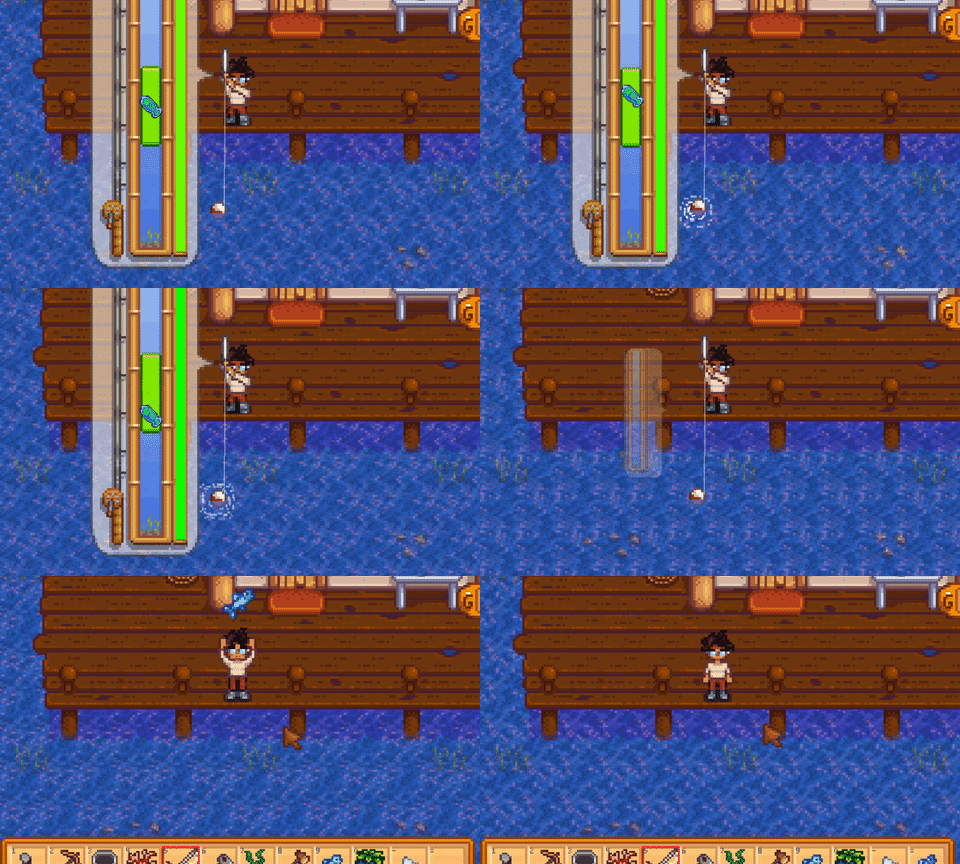
Microsoft MakeCode
Inspired by Stardew Valley’s fishing system (shown from the .gif); I’ve made my own version here 🙂 It’s just the core mini-game without any bells and whistles so feel free to adapt it and implement it in your own game 😄 All the best! Woody
 swift elbow
i would use UI
swift elbow
UI just feels like the simplest apporach
vagrant pendant
any reason for one vs the other? I got a similar mini game created using UI Elements (Images in particular)
yeah it was fairy simple to get going
wintry quarry
Ui elements are easier to lay out in terms of screen position, size, and distances from screen edges etc, as well as within itself
it's made for relative layouts.
Whereas with sprite renderers you basically... need to build that whole system yourself
 silent vault
Hello, I have an issue with Unity where when I activate a mesh which was already in the scene from the start, Unity creates instance of all its materials instead of using the sharedmaterials
I would need to use the sharedMaterials directly in the inspector (this is to allow me to quickly change original materials in the project)

Currently, I have to drag and drop all the original materials back in the materials array of the inspector to be able to edit the original materials easily.
Is there no way to modify the original materials in the inspector at runtime ?
hot harbor
Is hot reload work in a similar way as assembly definitions do? Where they define that only the scripts changed will be recompiled or something
 chilly vigil
using System.Collections;
using System.Collections.Generic;
using UnityEngine;
public class EnemyAI : MonoBehaviour
{
private Pathfinding1 pathfinding;
private Vector3 startingPosition;
private Vector3 roamPosition;

private void Awake()
{
    pathfinding = GetComponent<Pathfinding1>();
}

private void Start()
{
    startingPosition = transform.position;
    roamPosition = GetRoamingPosition();
}

private void Update()
{
    pathfinding.MoveTo(roamPosition);

    float reachedPositionDistance = 1f;
    if (Vector3.Distance(transform.position, roamPosition) < reachedPositionDistance) {

        roamPosition = GetRoamingPosition();
    }
}

private Vector3 GetRoamingPosition()
{
    return startingPosition + Pathfinding1.GetRandomDir() * Random.Range(10f, 70f);
}
}
is this right for an bad ai c#
sour fulcrum
Don’t post ai here
if you can’t write it and can’t proofread it no one is gonna be interested in assisting you
wintry quarry
chilly vigil
using System.Collections;
using System.Collections.Generic;
using UnityEngine;
p...
!code
eternal falconBOT
Posting code
📃 Large Code Blocks
Use links to services like:
https://paste.mod.gg/, https://hastebin.skyra.pw/, https://paste.ofcode.org/, https://paste.myst.rs/, https://scriptbin.xyz/
📃 Inline Code
Surround code with three backquotes. Not quotation marks.
To format as C#, add cs to the first line:
```cs
// Your code here
```
Add a comment with a line number if there is an error message.
chilly vigil
wintry quarry
!code
A tool for sharing your source code with the world!
wintry quarry
chilly vigil
https://paste.mod.gg/akvnzqozhghs/0
ok what's your question
chilly vigil
wintry quarry
ok what's your question
NullReferenceException: Object reference not set to an instance of an object
EnemyAI.Update () (at Assets/Scripts/EnemyAI.cs:24)
is what i get plus the npc not roaming around randomly althought the video makes me prefab the enemy
wintry quarry
chilly vigil
NullReferenceException: Object reference not set to an instance of an object
Ene...
looks like ppathfinding is null
which means this: pathfinding = GetComponent<Pathfinding1>(); returned null - which means you don't have that script attached to the same GameObject as this one.
 solid helm
Guys I have this code "https://paste.mod.gg/anttbeeivfwk/0" and already tried everything watching tutorials and codes of there more I just can't unlock my player client, the player host usually works but the player client does not leave the place, it even activates the animations but simply does not leave the place
A tool for sharing your source code with the world!
teal viper
solid helm
Guys I have this code "https://paste.mod.gg/anttbeeivfwk/0" and already tried ev...
And to tell you the truth, networking is not a beginner topic.
solid helm
oh sorry, thanks
 wintry dew
Hello, i would like to ask if it's better to use a character controller or regular rigid body and stuff for parkour physics
teal viper
wintry dew
Hello, i would like to ask if it's better to use a character controller or regul...
If you want it to be physics accurate, probably an rb.
wintry dew
Yeah and with that i can even change up the hit box with custom colliders
Rather than the capsule
 neon forum
trying to 2d raycast and hit an obj in the game but it's not doing anything
        if (hit.collider != null)
        {
            Debug.Log("Target Position: " + hit.collider.gameObject.transform.position);
}```Debug the mouse position and world point to see if it's getting any values
Ah, what could be happening too is the ray's origin is probably spawning inside of the collider plane so maybe add a unit or two in the up direction to the origin
neon forum
so a flat +2?
timber tide
https://discussions.unity.com/t/unity-2d-raycast-from-mouse-to-screen/520480/3
People saying putting a zero vector direction makes the ray instead consider what it's intersecting at that point
neon forum
zero vector direction does nothing
timber tide
The thread has a few other considerations so worthwhile to go over it
neon forum
ok
wintry quarry
neon forum
```RaycastHit2D hit = Physics2D.Raycast(Camera.main.ScreenToWorldPoint(Input.mou...
For a mouse intersection you usually want Physics2D.GetRayIntersection
Not Raycast
 slender sundial
im trying to make a scene where after reaching a certain y-cord and staying at it for 3/4 of a second, an animation plays. I've made the code and animator controller work (I can send proof of it if you need) but when the trigger happens and it goes to the state that the animation clip is in the animation just doesn't play. does anyone know what's wrong?
neon forum
ok I'll try that
sour fulcrum
slender sundial
im trying to make a scene where after reaching a certain y-cord and staying at i...
someone already helped you with this?
hot harbor
Does the generic T type not support getting the fields on the instance of said type? But the "Type" type can do this?
 neon forum
wintry quarry
For a mouse intersection you usually want Physics2D.GetRayIntersection
neon forum
wintry quarry
For a mouse intersection you usually want Physics2D.GetRayIntersection
how would I be able to view what I hit?
wintry quarry
neon forum
how would I be able to view what I hit?
From the RaycastHit2D like always?
neon forum
oh right lol
wintry quarry
hot harbor
Does the generic T type not support getting the fields on the instance of said t...
Example of what doesn't work?
neon forum
just a different declaration
hot harbor
wintry quarry
Example of what doesn't work?
the screenshot is someone talking about being able to use reflection to copy fields of a scriptable object to a copied instance of it, and he mentioned how specifically casting
Type type = Base.GetType();
was needed
wintry quarry
hot harbor
the screenshot is someone talking about being able to use reflection to copy fie...
That's not a cast
that's calling GEtType()
hot harbor
Ah my bad
wintry quarry
you have to call GetType on an object to get its type
slender sundial
sour fulcrum
someone already helped you with this?
i never ended up figuring it out
neon forum
wintry quarry
From the RaycastHit2D like always?
RaycastHit2D hit = Physics2D.GetRayIntersection(new Ray(Vector2.zero, Camera.main.ScreenToWorldPoint(Input.mousePosition))); this still isn't producing anything, am I doing it correctly?
hot harbor
wintry quarry
you have to call GetType on an object to get its type
Does T not already tell us what type the object is, though?
wintry quarry
hot harbor
Does T not already tell us what type the object is, though?
You can't write MyScriptiableObject.GetFields() just like you can't write T.GetFields()
You could do typeof(MyScriptableObject).GetFields() or typeof(T).GetFields()
wintry quarry
neon forum
```RaycastHit2D hit = Physics2D.GetRayIntersection(new Ray(Vector2.zero, Camera....
That ray is not correct
use Camera.main.ScreenPointToRay(Input.mousePosition) to create the ray
neon forum
got it, thank you
hot harbor
wintry quarry
You could do `typeof(MyScriptableObject).GetFields()` or `typeof(T).GetFields()`
I see, so it needs to get the fields from the object's Type not the object then
neon forum
wintry quarry
That ray is not correct
it's still not posting anything to the console...
hot harbor
wintry quarry
it's not a method on anything else
thanks
wintry quarry
neon forum
it's still not posting anything to the console...
what are you expecting to be logged?
What object are you expecting to be hit?
What does the code look like now?
neon forum
wintry quarry
what are you expecting to be logged?
What object are you expecting to be hit?
Wh...
What I'm expecting to be logged is whatever the ray is colliding with.
The object I'm expecting to hit is a tile(game object that was spawned with a grid code).
Current code:
    {
        RaycastHit2D hit = Physics2D.GetRayIntersection(Camera.main.ScreenPointToRay(Input.mousePosition));
        Debug.Log(hit.ToString());
        if (hit.collider != null)
        {
            Debug.Log("Target Position: " + hit.collider.gameObject.transform.position);
}```the tiles DO have box colliders
wintry quarry
neon forum
What I'm expecting to be logged is whatever the ray is colliding with.
The objec...
The object I'm expecting to hit is a tile
Can you show the inspector for a tile?
(it also probably makes sense to log the name of the object you hit)
neon forum
wintry quarry
> The object I'm expecting to hit is a tile
Can you show the inspector for a til...
(yeah that's true, let me edit that)

... why did it become a png


okay I split it
wintry quarry
neon forum
What I'm expecting to be logged is whatever the ray is colliding with.
The objec...
wait what is this OnMouseDown for?
This should be in Update
which object is this code on?
wintry quarry
yeah OnMouseDown is only going to run if the gamecontroller itself has a collider and you click on the game controller
 prime chasm
I started trying to learn C# and Unity a little while ago and I had an idea of something I wanted to make to experiment with and I can't find any resources online about it so I wanted to ask if anyone has a suggestion of how I should go about implementing my idea. It's pretty simple, I just want to make player movement similar to that of West Of Loathing since I really like the way that game handles movement. In West Of Loathing you can move back and forth as well as left and right like a 3d game but the camera is side-scrolling and the sprites are 2d. I particularly like how the shadows of the characters and objects work but I'm not even sure if I should try to make this in a 3d project or a 2d project so if anyone would be willing to help me figure out how I can start getting the desired result I would greatly appreciate it.
wintry quarry
prime chasm
I started trying to learn C# and Unity a little while ago and I had an idea of s...
there is no difference between a 2d project and 3d project except for the list of which packages are installed at the start
prime chasm
oh that's good to know thank you
wintry quarry
a quick google for that game shows it appears to be a pretty typical 2D game with sprites
I see it has a cute shadow thing going on in some scenes
prime chasm
yeah its just 'cause I was confused since in the game you can move back and forth which I thought was only possible in 3d
wintry quarry
not sure how they did that exactly
wintry quarry
prime chasm
yeah its just 'cause I was confused since in the game you can move back and fort...
Unity is always 3D
but - the style of movement you're talking about has been around in 2D "beat-em-up" games since the 80s
prime chasm
yeah
wintry quarry

Walkthrough of the arcade version of Double Dragon by Technos
prime chasm
alright thank you so much for the help

 snow warren
hey guys
need some help
is there any script for camera which mimics breathing effect
like when breath in camera goes up and to the right side a little bit randomly
and when breathe out it comes onto the normal position???
 verbal dome
snow warren
is there any script for camera which mimics breathing effect
verbal dome
snow warren
is there any script for camera which mimics breathing effect
Are you using cinemachine or not
snow warren
verbal dome
Are you using cinemachine or not
scripting i guess
lol
randomly moving camera
verbal dome
You can rotate your camera additively after you calculate its rotation each frame
You can use Mathf.Sin and/or Mathf.PerlinNoise to get some movement, for example
snow warren
any examples i can follow?
verbal dome
Well I suppose you can google "view bobbing"/"camera bobbing" or just additive camera animations in general
snow warren
verbal dome
Well I suppose you can google "view bobbing"/"camera bobbing" or just additive c...
ohk
verbal dome
Show your current camera code?
If you modify thet camera every frame, you can do something like ```cs
void LateUpdate()
{
// Update base camera rotation and position here first
// Now apply additive rotations
float sin = Mathf.Sin(Time.time * speed);
camera.transform.Rotate(sin * angleMultiplier, 0, 0);
}```
This rotates it on its local X axis which makes it bob up and down
topaz mortar
GameObject itemGO = Instantiate(IFGameManager.Instance.itemPrefab, new Vector3(0, 0, 0), Quaternion.identity, emptySlot.transform);
Why is this instantiating my object at a completely different position (I think it's the player's position)
teal viper
topaz mortar
`GameObject itemGO = Instantiate(IFGameManager.Instance.itemPrefab, new Vector3(...
It doesn't. It should instantiate at 0 0 0 in world space
topaz mortar
oh, it's a UI element
teal viper
Are you sure you're looking at it's world position and not local position?
topaz mortar
work perfectly like this:
GameObject itemGO = Instantiate(IFGameManager.Instance.itemPrefab, emptySlot.transform);
Guess the Quaternion messes up the position somehow
I'm looking at the transform in the inspector
It was instantiating at -1500, -1000 and the values changes as my player moved
teal viper
topaz mortar
It was instantiating at -1500, -1000 and the values changes as my player moved
The inspector is showing local position.
topaz mortar
dunno, it's showing 0, 0, 0 now and it doesn't change
teal viper
000 means that it's at the same position as the parent. And it wouldn't change even if the parent is moving.
 teal rapids
What do you think the better naming scheme for enemy classes are:
Suffix:
BaseEnemySlimeEnemySpiderEnemy
Prefix:EnemyBaseEnemySlimeEnemySpider
Here's my thoughts:
- Suffix reads better for natural-language
- Prefix better for IDE autocomplete
- Looking at Unity collider variants names (
BoxCollider,SphereCollider,CapsuleCollider) they use suffix
topaz mortar
I prefer prefix, since I need to constantly find them in my code
you could also just go with Enemy, Slime, Spider
sour fulcrum
i think suffix works nicely when you do more layers of inheritence eg.
BaseEnemy
SlimeEnemy
FireSlime
teal rapids
sour fulcrum
i think suffix works nicely when you do more layers of inheritence eg.
BaseEnem...
That's a good point, otherwise for prefix I think it'd have to be verbose like EnemySlimeFire. Basically it reads backwards in natural language (Fire Slime Enemy)
safe root
Is there a way to make a OnCollisionEnter or OnTriggerEnter (Collision) and be able to set what collision that would be?
 sour fulcrum
safe root
sour fulcrum
this?
https://docs.unity3d.com/6000.0/Documentation/ScriptReference/Physics.Over...
sour fulcrum
safe root
sour fulcrum
this?
https://docs.unity3d.com/6000.0/Documentation/ScriptReference/Physics.Over...
Yes, thank you
safe root
sour fulcrum
this?
https://docs.unity3d.com/6000.0/Documentation/ScriptReference/Physics.Over...
Wait, no. I make it a Collision but that still doesn't work
 sour fulcrum
you have shown me a screenshot that reflects nothing about the link i sent you
safe root
sour fulcrum
you have shown me a screenshot that reflects nothing about the link i sent you
What do you mean? I'm trying to use the public Collider on the OntriggerEnter so I can set what the collider is suppose to be but it's not working
eternal needle
safe root
Wait, no. I make it a Collision but that still doesn't work
This is not how parameters or defining a variable works. It still needs to take a Collider other as the parameter. You can just compare other and Radius to see if it's the same object, then do your logic
snow warren
verbal dome
If you modify thet camera every frame, you can do something like ```cs
void Late...
i trying like a lerp
breathing effect
i am using lerp to interpolate from end to start position for camera
this is my code
public class CameraBreathe : MonoBehaviour
{
    [SerializeField]
    private bool isBreath = true;

    [SerializeField]
    private float MinHigh = 0.8f;

    [SerializeField]
    private float MaxHigh = 0.9f;

    [SerializeField]
    [Range(1f, 10f)]
    private float freakness = 1f;

    private float movement;
    void Update()
    {
        if(isBreath)
        {
            movement = Mathf.Lerp(movement, MaxHigh, Time.deltaTime * 1f * freakness);
            transform.localPosition = new Vector3(transform.localPosition.x, movement, transform.localPosition.z);

            if (movement >= MaxHigh - 0.01f)
            {
                isBreath = !isBreath;
            }
        }
        else
        {
            movement = Mathf.Lerp(movement, MinHigh, Time.deltaTime * 1f * freakness);
            transform.localPosition = new Vector3(transform.localPosition.x, movement, transform.localPosition.z);

            if (movement <= MaxHigh + 0.01f)
            {
                isBreath = !isBreath;
            }
        }
    }
}```all it does is that once it goes to the max height
it stops
and waits for some time
 scenic notch
Why can't i access the public variable "isAlive" from the player script?
using UnityEngine;

public class PipeScript : MonoBehaviour
{
    public LogicScript player;

    void Start()
    {
        player = GameObject.FindGameObjectWithTag("Player").GetComponent<LogicScript>();
    }


    void Update()
    {
        if (player.isAlive)
        {
            //do something
        }
    }
}
and instantly jumps to the Min Height
when i want it to go from Min to High and then High to Min
how to fix it?
scenic notch
fixed it
snow warren
here
how to fix it

i want it to go high and then come down gradually
but it isnt
Any Helps??
 dusk prism
p8hjkew uiqn-c80 o3qs9tiyd-'0o
 onyx cove
Hello,
I'm making a build for an AR scene, and these warnings show up. Does anyone know how I can fix them?
 topaz mortar
rectTransform.position = new Vector3(0, 0, 0);
This doesn't set the position to 0 somehow? It's a UI element.
teal viper
topaz mortar
`rectTransform.position = new Vector3(0, 0, 0);`
This doesn't set the position t...
It does. How are you confirming it?
topaz mortar
 teal viper
topaz mortar
teal viper
topaz mortar
This is relative to the anchor.
topaz mortar
How do I set it to 0/0/0
teal viper
Use the properties of RectTransform
topaz mortar
so I just need anchoredPosition instead of position?
teal viper
topaz mortar
so I just need anchoredPosition instead of position?
Probably. What do the docs say?
topaz mortar
teal viper
Probably. What do the docs say?
Go read them if you don't know 🙂
teal viper
It's not me having the problem
 real thunder
I can of course do that manually but is there a perhaps a method to display seconds into min:sec 99:99 format?
nvm, TimeSpan.ToString(@"mm:ss") seem to work
 covert flower
https://scriptbin.xyz/dipasofayi.cs
Could someone help me with the issue here, Id like to try make it so that the enemies get back up where the ragdoll finished
Use Scriptbin to share your code with others quickly and easily.
ignore some of the other glitchy aspects
real thunder
teleport the agent to the ragdoll via code
covert flower
real thunder
teleport the agent to the ragdoll via code
Ah my idea to fix it before was to teleport the Rigidbody to the parents and it only made it more buggy. Ty
real thunder
maybe NavMeshAgent.Warp I am not sure
covert flower
real thunder
maybe NavMeshAgent.Warp I am not sure
how would I teleport it to multiple rigidbodies without breaking the code
im unsure how to do that
timber tide
what's wrong? The agent is disjointed from the ragdoll?
If you're using unity's pathfinding you need to disable the agent when you use any sort of rigidbody when applying physics
covert flower
timber tide
what's wrong? The agent is disjointed from the ragdoll?
I believe so. The ragdolls children move but the parents dont, however when i telported it to the parent object it broke
covert flower
timber tide
If you're using unity's pathfinding you need to disable the agent when you use a...
ohhh let me try this
timber tide
a* pathfinding project is better at this stuff
free version may be enough if you wanted to look into it
real thunder
how is it better?
timber tide
it works out of the box with rigidbodies
real thunder
I got so used that nothing works out of the box with unity...
except rendering I guess
timber tide
Unity's agent controller requires a lot of custom logic since it'll always override forces
real thunder
yeah I was about to start making my solution where it's only used for pathfinding
let alone trying to do "local avoidance" described at A* asset
timber tide
local avoidance is pretty non-existent with navagents
real thunder
default pathfinding is sad
timber tide
you can do some hacky stuff making agents also obstacles to kinda get it to work but it's pretty bad
real thunder
not pathfinding but agents
timber tide
https://arongranberg.com/astar/documentation/stable/localavoidance.html
Meanwhile it's pretty much solved with a* project
How to use the local avoidance in the A* Pathfinding Project.
covert flower
timber tide
If you're using unity's pathfinding you need to disable the agent when you use a...
this didnt work
timber tide
You probably need to start a new path too after enabling the agent, assuming the agent is actually parent to the ragdoll mesh
real thunder
I am very hesitant to use anything made by not Unity but I guess it would be very annoying for me to do anything like that
covert flower
timber tide
You probably need to start a new path too after enabling the agent, assuming the...
could you give me an example of how to do this
teal viper
covert flower
this didnt work
If you want to combine physics and navigation movement, you'll need to get rid of the agent and handle moving along the path manually.
timber tide
NavAgent and Rigidbody on the same parent gameobject. When you apply a force to the rigidbody -> turn off navagent. Once you decide a point where the zombie should get up, enable the navagent again and calculate a new path.
real thunder
he just want the agent to ragdoll and back transformation as I understand
covert flower
teal viper
If you want to combine physics and navigation movement, you'll need to get rid o...
nah i just want the ragdoll to play, then when the ragdoll ends it resumes back to no physics.
covert flower
timber tide
NavAgent and Rigidbody on the same parent gameobject. When you apply a force to ...
the rigidbodies are on all of the bones
I used the Unity ragdoll feature
timber tide
Sure, but the root of it all moves with it and that's what the agent should be on
covert flower
timber tide
NavAgent and Rigidbody on the same parent gameobject. When you apply a force to ...
I think it should already do this
hold on lemme try something i might get it
timber tide
turn on gizmos and make sure everything is moving with each other
covert flower
timber tide
turn on gizmos and make sure everything is moving with each other
as i thought the problem is that only the rigidbodies move and the parent components dont
I need to get the parents to effectively follow the ragdoll
real thunder
first thing I myself would try is to disable the agent on start and teleport it in the end to the main RB child
that's what you said, yeah...
covert flower
real thunder
that's what you said, yeah...
OMGGG tyyy
real thunder
don't make me feel bad
covert flower
i think you just told me how I was having it be so buggy before
I didnt realise ty
The nav mesh was causing it to glitch so much when it teleported
now ive forgotten what the code i Used before was TwT
real thunder
ok I am now confused but if you solved issues I glad
covert flower
real thunder
ok I am now confused but if you solved issues I glad
it might be fixed however ive gotta test first
timber tide
I'd feel like sticking the agent on the root of the skinmesh render would be fine, but maybe I'm mistaken how the ragdoll is moving
real thunder
I hope you are teleporting the agent itslef, not the gameobject
there is a difference right?
covert flower
real thunder
I hope you are teleporting the agent itslef, not the gameobject
there is a diffe...
Theres other components that i need to move
should I instead put those components on the root of the ragdoll?
real thunder
ah right right right I figured
yeah I can see how it can get screwed on teleportation
covert flower
theres a trigger collider and another one that Also dont move as well as the nav mesh agent
real thunder
timber tide
I'd feel like sticking the agent on the root of the skinmesh render would be fin...
yeah I think this is what you should do
so mesh and agent have the same relative positions always
this seems more complex than I initially thought
and you would also need some interpolation logic I guess
anyway I think there are guides on youtube to do ragdoll>agent
 bitter apex
So I have a game state manager object that persists in all scenes, and is initially created when you first load up the game. This means I can't assign something in the inspector immediately when it doesn't exist yet and will only exist in a different scene (I think?). I've been trying to get one of the buttons that are on my screen but it seems to keep saying that Object Reference is not set to a reference of an object.
UIButtonToggles digButtonScript = GameObject.FindWithTag("DigButton").GetComponent<UIButtonToggles>();```It's the GameObject.FindWithTag("") bit that is the problem, but I have no idea how to do it otherwise
I've tried it with just .Find() but that hasn't worked either
I also just tried this cs UIButtonToggles digButtonScript = GameObject.Find("Canvas").transform.Find("DigButton").GetComponent<UIButtonToggles>();
but that didn't work either. I feel like I'm just misunderstanding how buttons work or something
 visual linden
I feel like I'm just misunderstanding how buttons work or something
Not that, necessarily, but maybe architecturally you're approaching it in a not so ideal way
What exactly are you trying to do?
bitter apex
I apologise, yeah I think I've just been doing things in the wrong way. Turns out I was trying to find the wrong thing anyways and I managed to sort it out 🤦♂️
I'm not trying to make anything pretty I just wanted it to function and it was a logic thing, rather than a syntax thing
thank you
visual linden
Well it's less about making something pretty and more about making life easier for yourself. Setting things up "Correctly" helps reduce the chance of bugs, on top of all other benefits like better performance, faster iteration etc.
Glad you got your issue sorted though :)
bitter apex
Yeah I don't disagree, structuring my code better would definitely have helped but I'm rushing through this as I have a deadline for my game to meet soon, it's just a little project that I need to do for school. I initially realised that what I was doing now was going to become a problem so I came up with a solution, and then forgot I made that solution
covert flower
I have an issue where if the nav mesh is on the parent it causes 0 errors and works fine as movement. but when ive moved it to a child object it now comes uo with set destination can only be called on an active agent placed on a nav mesh
 shy cairn
Anyone know a good way to fill in attribute values of a prefab after instantiation?
When I drag and drop a prefab, I get reference errors, I have a script that fills in these attributes but I still get the reference errors
 hexed terrace
Have a component on the prefab which the spawner passes the relevant references to. Have either properties (getter/ setter) or methods which allow you to set the values from another class.
Don't spawn as a GameObject spawn as this component, so you get the reference to it straight away (no need to do getcomponent).
MyFancyComponent newlySpawnedObject = Instantiate(prefab);
newlySpawnedObject.Reference1 = someReference;
newlySpawnedObejct.Player = player;
okay thank you, im going to try it this way and see if I can solve the problem
hexed terrace
You'll need MyFancyComponent on the root of the prefab
 ripe shard
hexed terrace
Have a component on the prefab which the spawner passes the relevant references ...
ripe shard
hexed terrace
Have a component on the prefab which the spawner passes the relevant references ...
you just saved the world from a bunch of singletons ❤️
 fervent abyss
hey guys
so i have a vr game with hand grabbing locomotion, where you have to grab the floor in order to move, and it modifies rigidbody velocity using the hand position
but the issue is that whenever some object in the map with a collider pushes down on the player from above, the player is pushed out of the map (obviously)
how can i try to make so the player stays in the map? i thought that i should write some collider kind of thing using raycast or something?
playerRigidbody.velocity = playerRigidbody.velocity + (handLastPosition - handTransform.position) / Time.fixedDeltaTime;
fervent abyss
fervent abyss
hey guys
so i have a vr game with hand grabbing locomotion, where you have to g...
the objects are moved by modifying the position, they are not physics based
cosmic dagger
neon forum
```RaycastHit2D hit = Physics2D.Raycast(Camera.main.ScreenToWorldPoint(Input.mou...
Input.mousePosition only returns the x, y axes. You need to create a Vector3 using those values with a the z position (depth of the camera), and use that variable instead . . .

 cosmic dagger
 sage peak
What do you mean by, "don't work." What is not happening that you expect to. It's best to explain what is going wrong when asking for help . . .
sage peak
My bad, They... dont work?????
I just clip through the object like the collider isnt there
cosmic dagger
Clip through which object?
 cosmic dagger
How are you moving the player?
sage peak
First person, WASD and Arrows
hexed terrace
the controls aren't relevant
sage peak
If thats what you mean 😬
hexed terrace
what code moves it
shy cairn
hexed terrace
Have a component on the prefab which the spawner passes the relevant references ...
hey carwash, just to make sure, Instantiating the prefab return a gameobject type so I am getting cannot convert gameobject to component error. did you mean something like this? GunDataIntake gunspawn = Instantiate(selectedItem.prefab.GetComponent<GunDataIntake>());
hexed terrace
shy cairn
hey carwash, just to make sure, Instantiating the prefab return a gameobject typ...
no, that is wrong. Show the code where you declare your prefab..
cosmic dagger
sage peak
First person, WASD and Arrows
Do you manipulate (set) the transform, set the velocity, use AddForce, or a CharacterController?
hexed terrace
shy cairn
hey carwash, just to make sure, Instantiating the prefab return a gameobject typ...
You do not want to do
[SerializeField] private GameObject myPrefab;
You want to do
[SerializeField] private GunDataIntake myPrefab;
GunDataIntake gunspawn = Instantiate(selectedItem.prefab);
shy cairn
hexed terrace
You do not want to do
`[SerializeField] private GameObject myPrefab;`
You want ...
Would you by any chance know why I get the error: ""UnassignedReferenceException: The variable recoilTransform of ShootMechanics has not been assigned.
You probably need to assign the recoilTransform variable of the ShootMechanics script in the inspector"" straight after instantiating the object into the scene. The fields are correctly filled out in inspector thanks to my script but for some reason I still get that error. The error only comes up once after instantiation, after unpausing the game I dont get it anymore, making me believe that the error is being thrown before I get the chance to assign the attribute values. thank you
hexed terrace
because you're tyring to use something before it's assigned... at a guess
probably in Awake or something
polar acorn
shy cairn
Would you by any chance know why I get the error: ""UnassignedReferenceException...
Show !code
eternal falconBOT
Posting code
📃 Large Code Blocks
Use links to services like:
https://paste.mod.gg/, https://hastebin.skyra.pw/, https://paste.ofcode.org/, https://paste.myst.rs/, https://scriptbin.xyz/
📃 Inline Code
Surround code with three backquotes. Not quotation marks.
To format as C#, add cs to the first line:
```cs
// Your code here
```
Add a comment with a line number if there is an error message.
shy cairn
hexed terrace
probably in Awake or something
yes that was the case, i was trynig to use it in awake, now that part is fixed, thank you!
shy cairn
polar acorn
Show !code
I just got it fixed thank you. And also uh, apologies for my behaviour yesterday, you were correct there was also an error in my script!
🙏
covert flower
covert flower
I have an issue where if the nav mesh is on the parent it causes 0 errors and wo...
Can anyone help with this?
sage peak
Where do I ask for help with something not to do with code
naive pawn
sage peak
Where do I ask for help with something not to do with code
in one of the non-code channels #🔎┃find-a-channel
fervent abyss
fervent abyss
hey guys
so i have a vr game with hand grabbing locomotion, where you have to g...
pls
 ripe matrix
hello, how do i spawn a 2d ui in a canvas over the position of a 3d gameobject on the screen?
visual linden
ripe matrix
hello, how do i spawn a 2d ui in a canvas over the position of a 3d gameobject o...
ripe matrix
visual linden
https://docs.unity3d.com/6000.0/Documentation/ScriptReference/Camera.WorldToScre...
thank you, and how would i spawn the ui?
visual linden
ripe matrix
thank you, and how would i spawn the ui?
ripe matrix
thank you
 subtle hedge
how do i make the player move while being fixated to the surface under hit, in this case a sphere ```cs
private void Update()
{
float horizontal = Input.GetAxis("Horizontal");
float vertical = Input.GetAxis("Vertical");
 Ray ray = new Ray(transform.position, -transform.up);
 if (Physics.Raycast(ray, out RaycastHit hit, treeLayer))
 {
     transform.position = hit.point;
     transform.rotation = Quaternion.FromToRotation(transform.up, hit.normal) * transform.rotation;
 }
}
~~This presumes you are using an overlay ugui canvas. If using other modes you need to use this:
https://docs.unity3d.com/6000.0/Documentation/ScriptReference/RectTransformUtility.ScreenPointToWorldPointInRectangle.html~~
nvm i cant read 😆
hexed terrace
do not cross post, delete from here
post the same thing in multiple channels.
You could have left one of the messages.
Yes, ONE of the code channels you posted in.
(all channels are help channels)
 cobalt grotto
hello, im new to unity and im trying to make a turn based rpg could u please help me? i just made the system and works everything except that idk how to make the two characters chose their action and then the turn order kicks in instead i just made that based of whos the faster decide who act first and after selecting a move it get used instantly and its the turn of the other character and so on untill the gameover. how can i make it pokemon like or like game with multiple party member like in final fantasy where you select for each a move and then the action order its mixed btw enemy party member etc...
subtle hedge
subtle hedge
how do i make the player move while being fixated to the surface under hit, in t...
can i get help with this please ?
 soft creek
Hello, i have a block that i want to eliminate only when the player collide with it, how i can do it?
polar acorn
soft creek
Hello, i have a block that i want to eliminate only when the player collide with...
When it collides with something, check if that "something" is the player.
rich adder
subtle hedge
how do i make the player move while being fixated to the surface under hit, in t...
maybe look into ProjectOnPlane I think..
soft creek
polar acorn
When it collides with something, check if that "something" is the player.
public void OnTriggerEnter (Collider target)
{
Debug.Log("Entered");
}
I have this, but how i can instantiate the player?
polar acorn
soft creek
public void OnTriggerEnter (Collider target)
{
Debug.Log("Entered");...
- Does that log print
- Wait, Instantiate? That seems to be not what you asked for initially, what do you actually want to happen in this collision?
rich adder
soft creek
public void OnTriggerEnter (Collider target)
{
Debug.Log("Entered");...
Are you sure "instantiate" is what you want to do ? the original didn't sound like you want to instantiate
soft creek
reference sorry
polar acorn
soft creek
reference sorry
There are many ways you can identify the player. Tag, layer, component, reference equality
soft creek
i want to know how i can identificate the player collider and no other colliders
soft creek
polar acorn
1. Does that log print
2. Wait, Instantiate? That seems to be not what you asked...
yes, this log prints
rich adder
soft creek
reference sorry
You can also use tags, but its much easier to check for a component.
soft creek
rich adder
https://unity.huh.how/references/getcomponent-methods
I have this and this code: using UnityEngine;
using System.Collections;
public class ExampleClass : MonoBehaviour
{
void OnTriggerEnter(Collider other)
{
if (other.CompareTag("Wall"))
{
Destroy(other.gameObject);
}
}
}
But when i start the program nothing happen

 neon ivy
I'm trying to create a 3d biome map texture in code and was looking at how minecraft generates their biome map, and they seem to zoom a lot
sadly I don't see any way of doing this in Unity and I believe that such a stack of tasks drawing to a texture should be done in a compute shader? (might be wrong about this) which I also don't know much about. does anyone have any ideas for how I should proceed?
polar acorn
soft creek
I have this and this code: using UnityEngine;
using System.Collections;
public ...
Try logging other.gameObject.tag before the if statement and see what you're hitting. Also, !code
eternal falconBOT
Posting code
📃 Large Code Blocks
Use links to services like:
https://paste.mod.gg/, https://hastebin.skyra.pw/, https://paste.ofcode.org/, https://paste.myst.rs/, https://scriptbin.xyz/
📃 Inline Code
Surround code with three backquotes. Not quotation marks.
To format as C#, add cs to the first line:
```cs
// Your code here
```
Add a comment with a line number if there is an error message.
soft creek
polar acorn
Try logging `other.gameObject.tag` before the if statement and see what you're h...
nothing happens
polar acorn
soft creek
nothing happens
Then whatever object has this script on it isn't colliding with any triggers
soft creek
i'm testing with other objects and is not working
polar acorn
The Three Commandments of OnTriggerEnter:
- Thou Shalt have a 3D Collider on each object
- Thou Shalt tick
isTriggeron at least one of them - Thou Shalt have a 3D Rigidbody on at least one of them
 hardy hedge
can someone explain how I can limit velocity in a character controller
im new to unity
soft creek
polar acorn
The Three Commandments of `OnTriggerEnter`:
1. Thou Shalt have a 3D Collider on ...
ok, it worked, Thank you very much
polar acorn
hardy hedge
can someone explain how I can limit velocity in a character controller
The character controller moves by whatever ammount you pass to .Move. If you don't want that to exceed a certain value every frame, you can use ClampMagnitude on the value you want to pass to Move to limit it to a maximum distance.
https://docs.unity3d.com/6000.0/Documentation/ScriptReference/Vector3.ClampMagnitude.html
hardy hedge
@polar acorn thaanks I appreciate it
wintry dew
Is there a better way to make a new "type" of game object rather than making a tag and setting my certain "type" of game object to that tag?
 rich adder
wintry dew
Is there a better way to make a new "type" of game object rather than making a t...
rich adder
wintry dew
Is there a better way to make a new "type" of game object rather than making a t...
thats what components are for
 dense badge
just created it
dense badge
oh sorry
 west radish
wintry dew
Is there a better way to make a new "type" of game object rather than making a t...
west radish
wintry dew
Is there a better way to make a new "type" of game object rather than making a t...
I'm not really sure what you mean by a new type of game object, can you give an example?
polar acorn
dense badge
anyone know how to fix this
Hit ignore, look at compile errors, then fix them
Chances are a package is out of date
wintry dew
west radish
I'm not really sure what you mean by a new type of game object, can you give an ...
Like for example let's say i want to make a bunch of "room" objects, but they all are different types of rooms right. But i want to be able to access all objects of type room. Would i need to make an interface?
polar acorn
wintry dew
Like for example let's say i want to make a bunch of "room" objects, but they al...
Inheritence
rich adder
Interface also could work
wintry dew
Hmm but how would i access them from other scripts in like different scenes
west radish
an interface could work, or you could do
public class Room : MonoBehaviour {}

public class CornerRoom : Room {}
public class StraightRoom : Room {}
public class TJunctionRoom : Room {}```Would i also need to make it be singleton or sm i saw that somewhere
rich adder
do you know what singleton is for?
polar acorn
wintry dew
Hmm but how would i access them from other scripts in like different scenes
Why would you need to access it from another scene?
rich adder
kinda. its for ideally keeping 1 instance that easy to reference/access
wintry dew
Oh i see
polar acorn
wintry dew
I would only need one room script ig
You'll only ever have one room in the whole game? Then why do you need a script for it
wintry dew
polar acorn
Why would you need to access it from another scene?
Let's say i want to instantiate a room from multiple scenes
With the same script
polar acorn
wintry dew
With the same script
Prefabs
rich adder
Pretty much
wintry dew
Or every type of room prefab as well
rich adder
depends what you plan on adding to room that others wont have in prefab
wintry dew
So if i have a lot of different rooms that all share the features of a "room" its possible to get by only using the general "room" prefab?
rich adder
should be fine yea
wintry dew
Alright thanks guys
west radish
a quick solution could be if make a Resources folder, you can easily access objects inside that. I can write GameObject decoration = Resources.Load<GameObject>("Prefabs/Deco0"); from any script and it will load the object at the path
 wintry dew
Ohh that's handy
rich adder
I'd opt for Addressables if you plan on going the load by file route
its the newer system
rich adder
Resources can get slow if you start loading up too much stuff into it
wintry dew
I'll have to learn that then
rich adder
west radish
oh?
Basically Resources just Packs everything into one giant file in Build key/value type deal.. so imagine the bigger resources folders get, the bigger the file, the slower the lookup
Addressables skirts this by you accessing the resource directly at an address
wintry dew
That's pretty cool then
ripe matrix
hello, ive been trying to make a multiplayer game. i wish to have crosshairs be displayed over and follow every gameobject with the tag "Player" in the view of the camera of each player. how would i do that?
rich adder
ripe matrix
hello, ive been trying to make a multiplayer game. i wish to have crosshairs be ...
that question sounds unrelated to multiplayer, but if so.. if you don't even know how to search scene for such objects, why are you doing multiplayer int he first place 🤔
ripe matrix
rich adder
that question sounds unrelated to multiplayer, but if so.. if you don't even kno...
i do know, im just having difficulty displaying the the crosshairs
the poitn of multiplayer is that players might join or leave anytime
rich adder
ripe matrix
i do know, im just having difficulty displaying the the crosshairs
not clear what this means..
rich adder
ripe matrix
the poitn of multiplayer is that players might join or leave anytime
well yeah, but coding for multiplayer isnt trivial
ripe matrix
rich adder
not clear what this means..
like when a player comes into view, to have a crosshair (prefab) follow it
rich adder
ripe matrix
like when a player comes into view, to have a crosshair (prefab) follow it
yes but following a player isn't something directly related to multiplayer, the code would be the extact same.
transform.position = other.position
multiplayer in this case would only change that this function would run as a Server RPC o
ripe matrix
you're right im not sure why i mentioned multiplayer
rich adder
in an ideal situation the players all get spawned with the same components because they all stem from the same prefab
would be the same as spawning a bunch of "offline" player prefabs
ripe matrix
my main problem is that while instantiating the prefabs, it appears as a 3d element inside the world even though i parented it to the canvas?
rich adder
You never spawn something outside canvas and then parent to canvas
you should always spawn it as child of canvas if it needs to be a canvas object
this makes sure it has a rect transform properly set on spawn
ripe matrix
Instantiate(enemyUIPrefab, screenPos, Quaternion.identity, canvas.transform);
is this incorrect?
rich adder
looks fine
enemyUIPrefab should ideally contain the UI elements
eg not Sprite Renderers but instead Image.. etc..
ripe matrix
rich adder
eg not Sprite Renderers but instead Image.. etc..
is it possible to make a prefab with only an image?
rich adder
ripe matrix
is it possible to make a prefab with only an image?
you can make a prefab with any component you want
as long its on a gameobject, it can even be blank
of course all Gameobjects always have a Transform component, you can't change that part
(for UI should be a RectTransform ideally)
ripe matrix
rich adder
eg not Sprite Renderers but instead Image.. etc..
whats wrong with the sprite renderer
polar acorn
ripe matrix
whats wrong with the sprite renderer
Is this in a canvas or in world space?
 honest iron
which way is the best to hit enemies with melee attack?
ripe matrix
polar acorn
Is this in a canvas or in world space?
canvas
polar acorn
ripe matrix
canvas
Then don't use SpriteRenderer, use Image
ripe matrix
ill try
rich adder
honest iron
which way is the best to hit enemies with melee attack?
simplest: Trigger
harder but cleaner imo: physics queries like cast or overlap
ripe matrix
polar acorn
Then don't use SpriteRenderer, use Image
like so?
 honest iron
rich adder
simplest: Trigger
harder but cleaner imo: physics queries like cast or overlap
honest iron
rich adder
simplest: Trigger
harder but cleaner imo: physics queries like cast or overlap
forgot to mention, i have 2 colliders for detection and for physics , is it possible to use another collider to attack if im close enough and not just in the detection?
rich adder
honest iron
forgot to mention, i have 2 colliders for detection and for physics , is it poss...
if you do put colliders so close you can exclude / include specific layers in the filter found on the collider
ripe matrix
hm still doesnt seem to work
rich adder
what "doesnt work" mean
ripe matrix
the image is not appearing
rich adder
ripe matrix
the image is not appearing
not much we can go on from here..
if you intend to get any sort of help you outta show.
How you set it up, what is the expected result and whats happening instead
all with clear screenshots and code in context
 faint osprey
im using a joint as a tether for my my astronaught in space and it works but the player can not see that there tethered now obviously i could just do a line renderer from start to end but how would i add like slack to the tether rope and stuff cause i dont know where to start
ripe matrix
i have to leave now though, ill just ask again later. thank you for your help
rich adder
faint osprey
im using a joint as a tether for my my astronaught in space and it works but the...
there is a shader iirc that does "rope" slack line renderers
lemme see if I can find it again
slender nymph
faint osprey
im using a joint as a tether for my my astronaught in space and it works but the...
look up verlet integration to simulate ropes
faint osprey
rich adder
there is a shader iirc that does "rope" slack line renderers
that would be cool thanks
rich adder
faint osprey
that would be cool thanks
oh it was a custom component but yeah I think it was this
https://github.com/Ali10555/OptimizedRopesAndCables
subtle hedge
can i get a little help with this ? the player is standing in place and it's not moving```public float feetRadius;
public float walkigSpeed;
Vector3 movement,offset;
public LayerMask treeLayer;
private void Update()
{
float horizontal = Input.GetAxis("Horizontal");
float vertical = Input.GetAxis("Vertical");
Ray ray = new Ray(transform.position, -transform.up);
if (Physics.Raycast(ray, out RaycastHit hit, feetRadius))
{
    transform.position = hit.point + new Vector3(horizontal * walkigSpeed * Time.deltaTime, 0, vertical * walkigSpeed * Time.deltaTime);
    transform.rotation = Quaternion.FromToRotation(transform.up, hit.normal) * transform.rotation;
}
}```
i'm trying to make the player walk around a sphere
faint osprey
rich adder
oh it was a custom component but yeah I think it was this
<https://github.com/Al...
thanks
wintry quarry
subtle hedge
can i get a little help with this ? the player is standing in place and it's not...
What's the point of the raycast? What is the goal here?
honest iron
is there a collider that cover the gameobject and prevent other can go through it?
subtle hedge
wintry quarry
What's the point of the raycast? What is the goal here?
the raycast points twords the ground
wintry quarry
honest iron
is there a collider that cover the gameobject and prevent other can go through i...
You either want trigger colliders, or to use layer based collisions. Not sure which from this vague description
subtle hedge
and i want it to be fixed to the ground on the y aixs and to be able to move forward and horizontaly
honest iron
wintry quarry
You either want trigger colliders, or to use layer based collisions. Not sure wh...
i fixed my question
wintry quarry
subtle hedge
the raycast points twords the ground
Why? What is its purpose?
wintry quarry
honest iron
is there a collider that cover the gameobject and prevent other can go through i...
"prevent other can go through it" isn't that what all colliders do?
Souds like you just want a MeshCollider?
Your question is way too vague sorry
subtle hedge
wintry quarry
Why? What is its purpose?
to know where is the ground and to rotate it twords it

 steep rose
I believe they want certain gameobjects to go through eachother while others do not
honest iron
wintry quarry
Souds like you just want a MeshCollider?
i've tried mesh collider but i still going through
wintry quarry
honest iron
i've tried mesh collider but i still going through
What's going through
provide details
show what you tried
honest iron
wintry quarry
What's going through
through the game object