#💻┃code-beginner
1 messages · Page 440 of 1
 neat bay
by rotation calculation are we talking about this? : Quaternion.Euler(hit.normal * 90)
or this? : Vector3.down
 teal viper
The former
 pallid nymph
so... you need to check if it hits anything... I assume it does not in the first 3 cases
but also, yes, what dlich is saying 😦
neat bay
mm i should be using a collision instead of a raycast right?
and get the normal of the collision instead
https://docs.unity3d.com/ScriptReference/ContactPoint-normal.html this would work right?
 teal viper
neat bay
mm i should be using a collision instead of a raycast right?
teal viper
neat bay
mm i should be using a collision instead of a raycast right?
We don't know enough about the use context to answer that.
neat bay
the player throws a sphere in the direction they're facing. Then, when the sphere collides with a surface, a circle is instantiated that looks like this ^
I just need the circle to rotate to a point where its flat on any wall of surface
teal viper
Yeah, a collision event might be better
 exotic hazel
hello so i just mass placed 10000 trees in a terrain but now my game lags when i go near it. so what do i do so my game doesnt lag much. like if i can not render the treees far away with some code how do i do that
teal viper
exotic hazel
hello so i just mass placed 10000 trees in a terrain but now my game lags when i...
Reduce the camera dar clipping plane
You can also configure the culling distance based on the object layer
https://docs.unity3d.com/ScriptReference/Camera-layerCullDistances.html
exotic hazel
ok ill try that
teal viper
But really you should start with profiling and figuring out if it's a CPU or a GPU bottleneck
 stone elk
am i able to copy a component from a unity project and paste it in another project?
 languid spire
stone elk
am i able to copy a component from a unity project and paste it in another proje...
languid spire
stone elk
am i able to copy a component from a unity project and paste it in another proje...
no
stone elk
ok
 wintry quarry
stone elk
am i able to copy a component from a unity project and paste it in another proje...
wintry quarry
stone elk
am i able to copy a component from a unity project and paste it in another proje...
Assets -> Export Package
languid spire
wintry quarry
Assets -> Export Package
? That's for Assets in the project, not for components
wintry quarry
It's the closest you would get to "copying a component" from a project
Twas a vague question
languid spire
I think it was Copy Component/Paste Component Values (as new)
 gentle vortex
so i made 3d speedline particles, now, is there a way to make them always render above the environment?

(the particles are clipping through the floor)
 mossy crest
Been programming a little while, just learning C#/Unity now - why are behaviour class variables static and not this.variable?
languid spire
mossy crest
Been programming a little while, just learning C#/Unity now - why are behaviour ...
becaise this denotes an instance and static variables are not bound to an instance
mossy crest
but if i had 3 game objects controlled by the same script, surely they'd all affect eachother?
teal viper
mossy crest
Been programming a little while, just learning C#/Unity now - why are behaviour ...
Maybe clarify what you mean first
 eternal needle
what variables are you talking about? because Behaviour doesnt have any static values as far as i know
languid spire
each gameobject will have it's own instance. static varialbe will be shared by all 3
mossy crest
like if i have a PlayerCharacter with a health variable, damaging Character1 will damage Character2
the unity tutorials don't use instance variables
teal viper
mossy crest
like if i have a PlayerCharacter with a health variable, damaging Character1 wil...
Then it's an issue with your code, and not something intrinsic to behaviour variables
languid spire
mossy crest
the unity tutorials don't use instance variables
yes they do
teal viper
mossy crest
the unity tutorials don't use instance variables
Can you provide an example?
wintry quarry
mossy crest
like if i have a PlayerCharacter with a health variable, damaging Character1 wil...
As a beginner you should stay away from static variables until you understand what you're doing.
wintry quarry
mossy crest
but if i had 3 game objects controlled by the same script, surely they'd all aff...
Only if you use static variables.
mossy crest
PlayerController.ChangeHealth affects currentHealth instead of this.currentHealth
wintry quarry
Only if it's static
But also nobody knows what ChangeHealth does
You'd have to show the code
teal viper
mossy crest
`PlayerController.ChangeHealth` affects `currentHealth` instead of `this.curren...
then you made the variable static. So of course it would behave as a static variable
wintry quarry
You think we have specific tutorials memorized?
eternal needle
if you made it static, then its static. Also you dont have to explicitly write this unless its ambiguous
mossy crest
Pastebin
Pastebin.com is the number one paste tool since 2002. Pastebin is a website where you can store text online for a set period of time.
wintry quarry
mossy crest
https://pastebin.com/19hNrS0S
Each instance of this script is completely independent
mossy crest
eternal needle
if you made it static, then its static. Also you dont have to explicitly write `...
so, because ChangeHealth() isn't a static method, it affects instance.currentHealth instead of class.currentHealth
teal viper
mossy crest
https://pastebin.com/19hNrS0S
It's not static here. So the issue must be elsewhere. Or you're misinterpreting what is happening.
wintry quarry
mossy crest
so, because ChangeHealth() isn't a static method, it affects `instance.currentHe...
There is no class.currentHealth in this example
mossy crest
i might be misinterpreting then
languid spire
mossy crest
https://pastebin.com/19hNrS0S
in that script there is no such thing as PlayerController.ChangeHealth
mossy crest
line 43
mossy crest
mossy crest
i might be misinterpreting then
in c#, declaring a variable in the class/outside of initialisation makes it an instance var and not a class var?
languid spire
ChangeHealth is an instance method and so cannot be invoked using a class name reference
wintry quarry
mossy crest
in c#, declaring a variable in the class/outside of initialisation makes it an i...
Member variables are instance variables by default yes
teal viper
To be precise, you're confusign instance fields with static fields. Class fields are just fields declared in the class and include both static and instance fields afaik.
wintry quarry
"class field" isn't really a term that's used in C#
It doesn't have any specific meaning
teal viper
 but the loose interpretation would be that it's fields declared in a class.
gentle vortex
solved my previous issue, though how does one control a particle system through code?
ex: change the color gradient in Color Over Lifetime
wintry quarry
gentle vortex
solved my previous issue, though how does one control a particle system through ...
Have you checked the scripting reference for the particle system?
gentle vortex
i was looking for it while asking the question
man i really gotta make sure i have to ask a question before doing it
 barren vapor
gentle vortex
so i made 3d speedline particles, now, is there a way to make them always render...
barren vapor
gentle vortex
so i made 3d speedline particles, now, is there a way to make them always render...
Make them smaller. Just put it right in front of the camera. Don't make it too big
mossy crest
wait a minute
if things are instance variables by default
whats the point of this.
when you have an instance variable and a static variable of the same name?
 steep rose
probably used for clarity

 strong wren
mossy crest
when you have an instance variable and a static variable of the same name?
strong wren
mossy crest
when you have an instance variable and a static variable of the same name?
Or when parameter is the same name as an instance variable.
mossy crest
strong wren
Or when parameter is the same name as an instance variable.
why would anyone do that ;-;
 shell matrix
heii, i need help doesn t work to switch the state, just manually i dont know what to do
 eternal needle
mossy crest
why would anyone do that ;-;
eternal needle
mossy crest
why would anyone do that ;-;
Quite common when using a constructor, or a method which sets a variable
 slate badge
steep rose
when did it not work
slate badge
steep rose
when did it not work
I made a code where if u press q, ur character would freeze, after a certain amount of time, an invoke would make the character unfreeze
eternal needle
mossy crest
whats the point of `this.`
I also did write this up here
#💻┃code-beginner message
mossy crest
eternal needle
Quite common when using a constructor, or a method which sets a variable
oh right
wintry quarry
mossy crest
when you have an instance variable and a static variable of the same name?
No it's for when you have a local variable and an instance variable of the same name. Your example is a compile error
mossy crest
those make sense
wintry quarry
mossy crest
those make sense
this can also be used anywhere you need a reference to the object itself. I.e. as a function parameter
 tender wharf
Hello gamers, would anyone know why wheel colliders are clipping into the ground?


Last two days I've been trying to figure this out with no success
slate badge
Can anyone explain why my character won't freeze even when the rest of this code works?
 wintry quarry
tender wharf
Hello gamers, would anyone know why wheel colliders are clipping into the ground...
wintry quarry
tender wharf
Hello gamers, would anyone know why wheel colliders are clipping into the ground...
How are you moving the car
tender wharf
That's the thing I'm trying to get it to move xd
wintry quarry
slate badge
Can anyone explain why my character won't freeze even when the rest of this code...
How are you moving the character?
wintry quarry
tender wharf
That's the thing I'm trying to get it to move xd
You need to be moving it via the Rigidbody
Both of you
tender wharf
The colliders themselves spin on input, but the rigidbody doesnt move at all
 stark perch
why is this not working 0one of the objecs has the code and both have these settings for a rigidbody and collider


 wintry quarry
tender wharf
The colliders themselves spin on input, but the rigidbody doesnt move at all
wintry quarry
tender wharf
The colliders themselves spin on input, but the rigidbody doesnt move at all
You'd have to show how you tried to move it
stark perch
my debug is not going off
wintry quarry
stark perch
why is this not working 0one of the objecs has the code and both have these sett...
You're using the 3D function for 2D components
Use the 2D versions of the functions
Y'all should be in #⚛️┃physics btw
slate badge
wintry quarry
How are you moving the character?
Never mind I found the problem, for some reason when i used both .FreezePosition and .FreezeRotation in the same script. Neither would work
So I removed .FreezeRotation
wintry quarry
slate badge
Never mind I found the problem, for some reason when i used both .FreezePosition...
You did it incorrectly. Those need to be composed with |
They're bit flags
slate badge
Example?
wintry quarry
slate badge
Example?
There's an example in the docs: https://docs.unity3d.com/ScriptReference/Rigidbody-constraints.html
if you want to freeze all you can use either:
m_Rigidbody.constraints = RigidbodyConstraints.FreezeAll;
// OR
m_Rigidbody.constraints = RigidbodyConstraints.FreezePosition | RigidbodyConstraints.FreezeRotation;```it's the bitwise or operator
wintry quarry
slate badge
Why not js add seperate codes
because then you would need a list or something
instead of storing everything in a single int field
this lets us use a single int to store all the information
slate badge
Oh ok alr thanks
wintry quarry
here's an explanation if you want to learn how it works https://pressbooks.lib.jmu.edu/programmingpatterns/chapter/bitflags/
tender wharf
wintry quarry
You'd have to show how you tried to move it
public class DriveController : MonoBehaviour
{
    public WheelCollider[] wheels = new WheelCollider[4];
    public float torque = 200f;


    private void FixedUpdate()
    {
        if (Input.GetKey(KeyCode.W))
        {
            foreach (var wheel in wheels)
            {
                wheel.motorTorque = 500;
            }
        }
    }
}
Here you go gamer
wintry quarry
show the inspector of the rigidbody
tender wharf
 wintry quarry
tender wharf
wintry quarry
tender wharf
try reducing the mass to 1, just for testing purpsoes
tender wharf
Still same behavior. I just find it really weird how the box collider doesn't clip through the ground while the wheels do

hmm maybe i should have moved the position of the wheel colliders via the Center property?
 calm forge
someone pls help idk what i am doing wrong what does this means 😭
 tender wharf
it means that one of your properties in your script is null
calm forge
 slender nymph
https://unity.huh.how/runtime-exceptions/nullreferenceexception
slender nymph
https://unity.huh.how/runtime-exceptions/nullreferenceexception
ya i get that but my object has a variable defined
calm forge
slender nymph
you'll need to also show which line the NRE occurs on too
sorry i dont know much about coding mean?
slender nymph
huh?
 cosmic quail
calm forge
sorry i dont know much about coding mean?
cosmic quail
calm forge
sorry i dont know much about coding mean?
it means show which line the error happens on (double click the red error text to go there)
tender wharf
I think that I found the solution to my problem, the orange lines in wheel colliders should be pointing downwards

Now they actually collide with the terrain, god damn i wasted 2 days on this
Gonna have to rotate the model in blender
calm forge
cosmic quail
it means show which line the error happens on (double click the red error text t...
um what if their is no red error text
slender nymph
calm forge
um what if their is no red error text
my guy, you screenshot it
did you even bother going through the steps outlined in the link i sent? it explains how you can find the line the error occurs on as well as how to determine what is null
 pastel blade
https://gyazo.com/5c0110acfde6e70bd835d535b62ef30c
my object have a script that can rotate an object X axis rotation and Z axis with 4 button when i rotate X axis to the left or right it work fine Z axis too work fine but when press two button to rotate Z and X at same time it's not rotating as it should be as u can see in the GIF it's like rotating in one angle and not completly rotating in both axis anyone know why this is happening ?
here is my script with the help of gpt
 languid spire
tender wharf
Gonna have to rotate the model in blender
languid spire
tender wharf
Gonna have to rotate the model in blender
more likely you need to change the axis settings in the FBX export settings
slender nymph
!code 👇
 eternal falconBOT

Posting code
📃 Large Code Blocks
Use links to services like:
https://gdl.space/, https://paste.ofcode.org/, https://hatebin.com/, https://paste.myst.rs/, https://hastebin.com/
📃 Inline Code
Surround code with three backquotes. Not quotation marks.
To format as C#, add cs to the first line:
```cs
// Your code here
```
Add a comment with a line number if there is an error message.
pastel blade
tender wharf
languid spire
more likely you need to change the axis settings in the FBX export settings
you are absolutely right
pastel blade
languid spire
more likely you need to change the axis settings in the FBX export settings
where i can find it
slender nymph
pastel blade
where i can find it
that was very clearly not in response to you
pastel blade
slender nymph
that was very clearly not in response to you
oh sorry didn't notice lol
gentle vortex
imagine this: i need to rotate something to face the direction that a character is moving, and i have a velocity vector for said character, though rotation is in quaternions and this is a velocity vector, so how would i do this?
languid spire
gentle vortex
imagine this: i need to rotate something to face the direction that a character ...
to add to a quaternion you can do Vector3 * Quaternion
gentle vortex
unity tells me i can't multiply vectors and quaternions, that's kind of why im asking the question
languid spire
yes you can, I may have it the wong way round, it only works one way
gentle vortex
 gentle vortex
languid spire
yes you can, I may have it the wong way round, it only works one way
gentle vortex
languid spire
yes you can, I may have it the wong way round, it only works one way
i see
languid spire
gentle vortex
i see
        Quaternion q = Quaternion.identity;
        Vector3 v3 = transform.up;
        Vector3 vr = q * v3;
i'll be honest i think i confused you and myself with my phrasing
so lets just rephrase it
i have something (specifically a particle system object) that i need to be ALWAYS facing the direction that the player is moving, and after quite a few attempts i have zero idea what i'm supposed to do
languid spire
well the direction of the player should be player.transform.forwatd
 bitter walrus
how can I make it code
transform.Translate(Vector3.right * moveSpeed * 7 * Time.deltaTime);
I can dash through walls
hellpp?
languid spire
moving via transform will never respect colliders
bitter walrus
so I should move to a rb movement system?
languid spire
yes
mossy crest
why specify private when fields are private by default
 night adder
After having created a cinemachine free look cam, and having added my player to the "look at " and follow boxes my character just flies away lol
slender nymph
mossy crest
why specify private when fields are private by default
because being explicit shows intent
slender nymph
night adder
After having created a cinemachine free look cam, and having added my player to ...
do you perhaps have a collider on your camera that is colliding with your player's collider? because depending on how you handle collisions that would force it to depenetrate, but the camera's collider follows it so it would always be trying to depenetrate
night adder
No, and even when the game is not started my player is not moveable
because it always snaps back to a position where i dont want it
slender nymph
well then you'll need to actually provide details because i don't intend to play 20 questions just to get some basic information about what may or may not be causing that issue. see #854851968446365696 for what to include when asking for help
bitter walrus
Why is this happening
I played with the project settings earlier
Not sure what caused this
Why is my camera changing in size
wintry quarry
bitter walrus
Why is my camera changing in size
Check your resolution and zoom settings
 languid spire
@bitter walrus for future reference, please type in full sentences and do not share photos or vidios taken on a phone
tender wharf

The model is pointing towards z+ but the wheel collider is still in the wrong direction
im dumb
its pointing towards the ground
bitter walrus
languid spire
moving via transform will never respect colliders
I could never make a rb based movment have the same feel that I want, is there another way?
 summer stump
bitter walrus
I could never make a rb based movment have the same feel that I want, is there a...
summer stump
bitter walrus
I could never make a rb based movment have the same feel that I want, is there a...
I mean, you definitely COULD. But you can use a CharacterController instead 🤷♂️
languid spire
bitter walrus
I could never make a rb based movment have the same feel that I want, is there a...
not if you want to use physics collisions, no
summer stump
There are multiple ways to handle rb based movement
And many ways to handle each of those
You can make it feel any way you want
cosmic quail
bitter walrus
I could never make a rb based movment have the same feel that I want, is there a...
isnt rigidbody.moveposition on a kinematic rigidbody the same as moving via transform
summer stump
cosmic quail
isnt rigidbody.moveposition on a kinematic rigidbody the same as moving via tran...
No
Similar yes, same no
wintry quarry
bitter walrus
I could never make a rb based movment have the same feel that I want, is there a...
Set the velocity
languid spire
bitter walrus
I could never make a rb based movment have the same feel that I want, is there a...
concentrate on using rb.velocity, it will give you the kind of fine control that transform.translate gives you
bitter walrus
my character is a fish that constantly rotates towards the cursur, the drag of the velocity makes it move in diffirent direction then it is looking towards
I can set the velocity to reset when I stop moving
cosmic quail
yeah i mean same in the sense that if you are moving via transform then you can easily convert your code to non transform without changing much
bitter walrus
but I dont stop moving, I just rotate
languid spire
bitter walrus
my character is a fish that constantly rotates towards the cursur, the drag of t...
then you need to make a new physics material to negate this
wintry quarry
bitter walrus
my character is a fish that constantly rotates towards the cursur, the drag of t...
By "the drag of the velocity" you mean momentum. If you don't want momentum, you can just override velocity directly.
bitter walrus
wintry quarry
By "the drag of the velocity" you mean momentum. If you don't want momentum, you...
yes, how tho?
wintry quarry
bitter walrus
yes, how tho?
rb.velocity = whateverYouWant;
wintry quarry
you'd have to show your code
because it wouldn't unless you simulated momentum yourself
bitter walrus
Vector2 moveDirection = transform.right * moveSpeed;
rig.AddForce(moveDirection, ForceMode2D.Force);
wintry quarry
more of the code
wintry quarry
bitter walrus
Vector2 moveDirection = transform.right * moveSpeed;
rig.AddForce(mo...
Also this is using AddForce
which is not what I said
bitter walrus
oh yes
cosmic quail
also im still not sure if rigidbody.moveposition on a kinematic rigidbody respects collisions properly or not, heard a lot of conflicting statements on this
bitter walrus
how can I change it to how you did it
wintry quarry
cosmic quail
also im still not sure if rigidbody.moveposition on a kinematic rigidbody respec...
it respects them in that it will knock other dynamic objects out of the way realistically. It won't stop the object itself.
wintry quarry
bitter walrus
how can I change it to how you did it
rb.velocity = moveDirection * moveSpeed;
cosmic quail
wintry quarry
it respects them in that it will knock other dynamic objects out of the way real...
do walls stop you properly though?
summer stump
cosmic quail
do walls stop you properly though?
Not really
wintry quarry
cosmic quail
do walls stop you properly though?
no as I said
it will not stop the object itself
kinematic objects are unstoppable forces.
You could solve that with casts
bitter walrus
wintry quarry
`rb.velocity = moveDirection * moveSpeed;`
works good, but now its changing my rotation
wintry quarry
bitter walrus
works good, but now its changing my rotation
nope
that would be some other code of yours
or due to crashing into walls
if you want it not to rotate when colliding with things, you would constrain the rotation on the body
bitter walrus
I do want to be able to rotate it
but only in code
seems like the RB is rotating it
wintry quarry
wintry quarry
if you want it not to rotate when colliding with things, you would constrain the...
Let me reiterate
you can always rotate through code, don't worry about that
wintry quarry
bitter walrus
seems like the RB is rotating it
yes, think about what happens in real life when things collide
they rotate
 pine furnace
does rb.moveposition require deltatime?
bitter walrus
wintry quarry
yes, think about what happens in real life when things collide
ohhh yeaaa
can I stop that
 rocky canyon
yea, think someone shoulder checking u
bitter walrus
can I stop physics from rotating my character
wintry quarry
pine furnace
does rb.moveposition require deltatime?
It doesn't require anything, just a new position. But if you want to use it to move at a regular rate per second - you would use deltaTime generally to calculate the new position, yes
rocky canyon
you can constrain the rotations of the rigidbody
wintry quarry
bitter walrus
can I stop physics from rotating my character
I literally have told you how twice now.
wintry quarry
wintry quarry
if you want it not to rotate when colliding with things, you would constrain the...
Here let me tell you a third time
rocky canyon
 pine furnace
void Update()
{
horiozntal = Input.GetAxisRaw("Horizontal");
vertical = Input.GetAxisRaw("Vertical");
direction = transform.forward * vertical + transform.right * horiozntal;
direction = direction.normalized * walk_speed;
}
private void FixedUpdate()
{
rb.MovePosition(rb.position + direction * Time.deltaTime);
}
so i used it corectly
here
wintry quarry
yes
bitter walrus
wintry quarry
I literally have told you how twice now.
yes, you did, I have the mind capacity of a potato lol
pine furnace
whats the difference between rb.position and transform.position
rocky canyon
rb controls a rigidbody (uses physics)
setting position is teleporting (translation)
wintry quarry
pine furnace
whats the difference between rb.position and transform.position
The Rigidbody and Transform positions aren't always synced. Especially when using interpolation and when you're in between physics frames
the Transform position gets interpolated to make things visually smooth.
pine furnace
so what should i put in that code
wintry quarry
what you have is the most correct
in FixedUpdate it's best to deal solely with the Rigidbody
rocky canyon
time.deltaTIme gets converted to fixedDeltaTIme in FixedUpdate correct?
rocky canyon
non-issue since it handles it automatically
 stuck palm
i have this code that uses the handles class, and my game wont build because im using it. how can i fix this?
 slender nymph
stuck palm
i have this code that uses the handles class, and my game wont build because im ...
wintry quarry
stuck palm
i have this code that uses the handles class, and my game wont build because im ...
slender nymph
stuck palm
i have this code that uses the handles class, and my game wont build because im ...
wintry quarry
stuck palm
i have this code that uses the handles class, and my game wont build because im ...
Is this code for debugging purposes
or are you expecting it to work in the game?
stuck palm
wintry quarry
Is this code for debugging purposes
the code is for debugging
pine furnace
does add force require time.fixeddeltatime?
slender nymph
no
but you should also only be using AddForce with continuous forces inside of FixedUpdate. one-off forces like impulses are fine to do from update (assuming you aren't doing it every frame)
!code
eternal falconBOT
Posting code
📃 Large Code Blocks
Use links to services like:
https://gdl.space/, https://paste.ofcode.org/, https://hatebin.com/, https://paste.myst.rs/, https://hastebin.com/
📃 Inline Code
Surround code with three backquotes. Not quotation marks.
To format as C#, add cs to the first line:
```cs
// Your code here
```
Add a comment with a line number if there is an error message.
rocky canyon
!code start using paste bin sites.. or format ur code correctly
eternal falconBOT
Posting code
📃 Large Code Blocks
Use links to services like:
https://gdl.space/, https://paste.ofcode.org/, https://hatebin.com/, https://paste.myst.rs/, https://hastebin.com/
📃 Inline Code
Surround code with three backquotes. Not quotation marks.
To format as C#, add cs to the first line:
```cs
// Your code here
```
Add a comment with a line number if there is an error message.
eternal falconBOT
Posting code
📃 Large Code Blocks
Use links to services like:
https://gdl.space/, https://paste.ofcode.org/, https://hatebin.com/, https://paste.myst.rs/, https://hastebin.com/
📃 Inline Code
Surround code with three backquotes. Not quotation marks.
To format as C#, add cs to the first line:
```cs
// Your code here
```
Add a comment with a line number if there is an error message.
rocky canyon
read the embed
rocky canyon
and repost ur code since we just flooded it outta site
 rich adder
just use the links man, an entire class is Large Code
rocky canyon
if i have an input from 0 -100 on each x and y and then i hvae say a dozen or so min/max bounding ranges to check against is switch statements my best bet?
rocky canyon
that all u wanted to ask?
pine furnace
shall i use a ground check, or what could i do to make it better
rocky canyon
id lose the _s in ur variables
rich adder
rocky canyon
if i have an input from 0 -100 on each x and y and then i hvae say a dozen or so...
or big ass else if chain lol nah you can probably use a collection ?
rocky canyon
camelCase is proper way of doing it
rocky canyon
rich adder
or big ass else if chain lol nah you can probably use a collection ?
like a dictionary/
rich adder
yeah or array of Range
rocky canyon
sounds good.. do i do that with a forloop?
rich adder
yeah or foreach
rocky canyon
alright.. that does sound better than a switch
rich adder
foreach (Range range in ranges) {
    if (x >= range.minX && x <= range.maxX && y >= range.minY && y <= range.maxY) {
        // found the range
        break;```
ofc idk your usecase so just kinda guessingimo im at the point where a switch and if-else chains feel both bad to me
rocky canyon
rich adder
```cs
foreach (Range range in ranges) {
if (x >= range.minX && x <= range.ma...
screen coordinate -> cockpit button clicker thingy
stuck palm
anyone got any idea why the capsule goes through the polygon at a vertical angle?
https://imgur.com/56eYVJZ
https://gdl.space/etuxevefel.cs
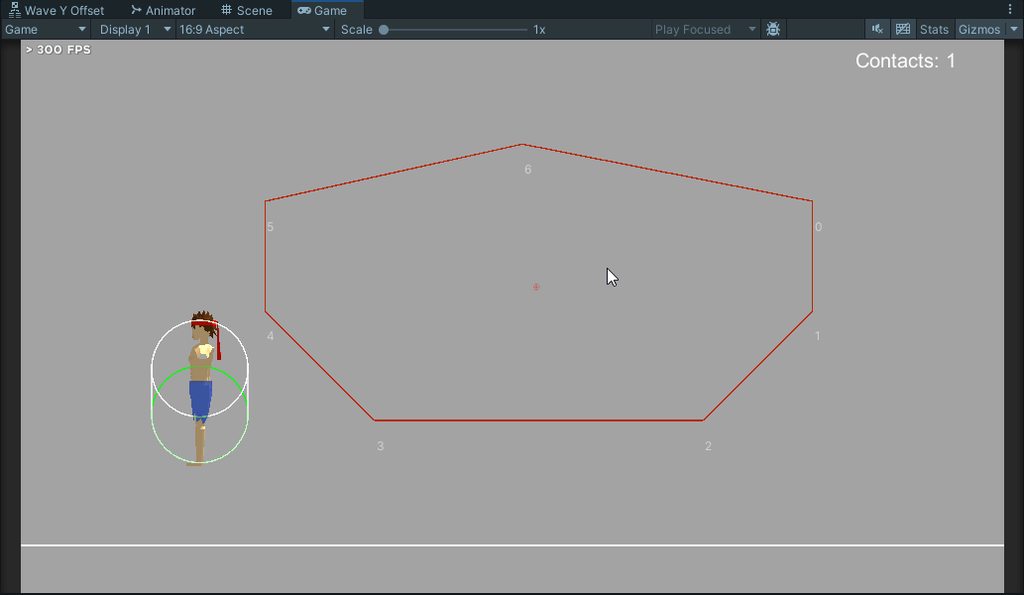
code
rocky canyon
if between 5 - 10 you musta pressed this button
stuck palm
rest of the collisions on the other angles work fine. no idea what the issues are with this
rocky canyon
rich adder
ahh ok
trying to avoid a clutter-fk of UI elements
languid spire
rocky canyon
imo im at the point where a switch and if-else chains feel both bad to me
generally if you are thinking about long switch or if else chains then your data design is wrong and there should be arrays/lists in there
rocky canyon
languid spire
generally if you are thinking about long switch or if else chains then your data...
yea, been neglecting those.. that the way imma do it now 👍
rich adder
been trying to wheen off the switches/else if chains myself
rocky canyon
its a process 😄
rich adder
ikr its so easy to use but then just becomes a unmaintanable mess sometimes
rocky canyon
i just gotta think ahead a little farther
 rare socket
Does anyone know how to have one script work independantly (track local variables) for multiple prefabs?
I'm currently making a game where various prefabs spawn. I have a script applied to each prefab that adds one to a counter each time a prefab spawns. Once the script reaches four, the prefab deletes itself. I'm unsure why, but the prefab that initially spawns is counting but not the rest. Once its counter finishes, the prefab that spawned second begins its counter. The counter is not a static variable.
The script is below:
https://gdl.space/ekifafomub.cpp
rocky canyon
stuck palm
anyone got any idea why the capsule goes through the polygon at a vertical angle...
not a clue.. just wanted to say, love ur D.raw class ;D
 rich adder
D.raw lel
eternal needle
rocky canyon
not a clue.. just wanted to say, love ur `D.raw` class ;D
I think that's from vertx's plugin
rocky canyon
ohh snap! i havent checked his out yet.. only NomNoms
stuck palm
rocky canyon
not a clue.. just wanted to say, love ur `D.raw` class ;D
lmao its vertx's debugging package,
i thought it was quite clever too
rocky canyon
rare socket
Does anyone know how to have one script work independantly (track local variable...
i was gonna ask if it was static.. soo thats 1 thing we can look over
rocky canyon
stuck palm
i thought it was quite clever too
i say b/c i have a D.bug function 😄
meaning his package would break my project 😄
stuck palm
agh im so close to sorting out this one issue
i'm having to write my own collision detection/solving for this fighting gmae
rocky canyon
ur doing ur own collision i see
stuck palm
no worries, thanks anyway
i put it in code advanced but no dice its a desert in there
so i thought i'd check here
as its usually the most active lol
rocky canyon
rare socket
Does anyone know how to have one script work independantly (track local variable...
each script instance is creating its own roomCounter
languid spire
rare socket
Does anyone know how to have one script work independantly (track local variable...
pretty obvious really.
this first script is finding (roomBehaviourScript.spawningRoom == true
then setting it to false so the rest of the scripts ignore it
rare socket
languid spire
pretty obvious really.
this first script is finding (roomBehaviourScript.spawnin...
OOOOOOOH
rocky canyon
languid spire
pretty obvious really.
this first script is finding (roomBehaviourScript.spawnin...
ohh there i missed tha
rare socket
I'm officially resigning as a game dev lol
rocky canyon
he said pretty obvious.. and i looked over it 😄
rocky canyon
rare socket
I'm officially resigning as a game dev lol
me too
rare socket
Thank you all so much 🤣
languid spire
learn to read the actual code, not what should be there. It is a very hard won talent
rocky canyon
yea.. i absolutely agreee.. the more i work w/ Unity the more i see things that arent there..
rare socket
Will do 🫡
rocky canyon
scratch paper helps..
go thru ur scripts and make a little flow chart.. it helps to break up laser focus.. (and gives u a chance to notice things)
languid spire
the biggest problem seems to be that people cannot multi thread their scrips in their heads, multiple instances and the Update loop makes for difficult comprehansion
rocky canyon
true, i struggled w/ that making an Enemy script.. (that relayed information to other Enemys)
finally made sense once i realized they needed to know if the enemy they were talkin to was themselves or not
still havent figured out a better way to do that.. besides just loopin thru them and asking if this = me
languid spire
rocky canyon
finally made sense once i realized they needed to know if the enemy they were ta...
very comon problem. How often do we see people assuming what 'other' hit their colliders?
rocky canyon
facts.. but what else could "other" possibly be? 😈
languid spire
rofl
rocky canyon
alright.. soo the coord system needs to know which button to press.. soo.. what i have so far is a list of ranges.. but.. then i grab the index of the true one..
and then i have to do another list and loop to know what function goes with what index...
a dictionary would combine these two i imagine
yet, ive never really worked w/ dictionaries.. 🫣
languid spire
rocky canyon
yet, ive never really worked w/ dictionaries.. 🫣
no time like the present to learn
rocky canyon
languid spire
no time like the present to learn
im already on it.. expect me to make appearances 😢
rocky canyon
here we go! lmao

 errant surge
Hey does anyone know why the sprite looks like that when it moves?
Its like, lagging
wintry quarry
errant surge
Hey does anyone know why the sprite looks like that when it moves?
your monitor doesn't update its pixels fast enough!
and/or you need to use pixel perfect
if you're not
errant surge
Ooooh thanks, can you tell me how i limit the fps? Or how i fix that?
rocky canyon
wintry quarry
errant surge
Ooooh thanks, can you tell me how i limit the fps? Or how i fix that?
It's not a framerate thing. It's monitor ghosting
https://www.makeuseof.com/what-is-monitor-ghosting-how-do-you-fix-it/
errant surge
Thanksss
rocky canyon
ohh! yea i see it now
that shoulda been obvious to you outside the game even..
try dragging around a window really fast
errant surge
When i do it with a window it doesnt happen
rocky canyon
weird..
anyway. my monitor had a setting inside it to fix it
im guessing urs is the same
errant surge
Maybe
 edgy vine
So in my game when a person picks up a block and trys to throw it the mouses momentum doesnt get added on. so im wondering how to do that. currently the person can pick up and drag the block but it doesnt actually let them throw it. Right now I just have it say "test" in debug but I am wondering if there is like a mouse.momentum I can take and add that force onto the cube?
using System.Collections;
using System.Collections.Generic;
using Unity.VisualScripting;
using UnityEngine;
using static UnityEditor.PlayerSettings;

public class Throwable : MonoBehaviour
{
    Vector3 pos;

    private void OnMouseDrag()
    {
        pos = Input.mousePosition;
        transform.position = Camera.main.ScreenToWorldPoint(pos);
        transform.position = new Vector3(transform.position.x, transform.position.y, 0);
    }
    private void OnMouseUp()
    {
        Debug.Log("TEST");
    }
}
 frigid quartz
How big of a deal is it to run an if statement in my update function?
I want to have a sprite be automatically updated if the sprite variable saved to a scriptable object changes.
I was just going to do:
    void Update()
{
  if (_avatarImage.sprite != _playerDataSO.Avatar)
  { _avatarImage.sprite = _playerDataSO.Avatar; }
}
Would this be too resource intensive? Would I use an event instead?
rocky canyon
u should avoid putting anything in the update loop if u can
frigid quartz
rocky canyon
u should avoid putting anything in the update loop if u can
Okay, that's what I thought. Thanks
rocky canyon
an event would be smarter / and more performant
 fathom bramble
I am SO confused. My "bullet" prefab keeps bouncing off another prefab when it's supposed to go through it. Now this is likely due to the rigidbody it has. So what I did was make the collider "istrigger" and that fixed it. But now the bullet won't register ANY collision with "Enemy" prefab. ?????? mass confusion
rocky canyon
frigid quartz
Okay, that's what I thought. Thanks
that being said.. 1 if conditional isnt gonna hurt anything
rocky canyon
fathom bramble
I am SO confused. My "bullet" prefab keeps bouncing off another prefab when it's...
if u were using OnCollision, and then u cahnged to trigger u should go to OnTrigger
Collisions use colliders Trigger uses colliders (marked as triggers)
frigid quartz
rocky canyon
that being said.. 1 if conditional isnt gonna hurt anything
Nah, I'll probably use this for stuff like name and level too, so I'll just make it an event. Thank you
rocky canyon
np, 🍀
fathom bramble
rocky canyon
if u were using OnCollision, and then u cahnged to trigger u should go to OnTrig...
so "oncollision" is for rigidbodies
rocky canyon
OnCollisionEnter/Exit or any of them wont work for triggers
OnTriggerEnter/Exit/Stay will
rocky canyon
fathom bramble
so "oncollision" is for rigidbodies
its not really related to rigidbody.. b/c u need a rigidbody (atleast on one of the objects) regardless if its OnCollision or OnTrigger
its the collider that makes the difference
fathom bramble
rocky canyon
its not really related to rigidbody.. b/c u need a rigidbody (atleast on one of ...
why is this a thing?
why do you need a mandatory rigidbody
rocky canyon
b/c its the Physics engine thats detecting collisions
needs a Rigidbody for that to happen
rocky canyon
Makes the Bounds of the object..
(so the engine knows how big it is) -> where and when it collides
fathom bramble
Interesting... Feel like they could have just made it into one component
but okay thanks anyway
rocky canyon
fathom bramble
Interesting... Feel like they could have just made it into one component
that would complicate things.. for example everyones ground object needs a collider.. no point in having a rigidbody on it thats not doing anything
more rigidbodies = more calculations.. even if its not moving
summer stump
fathom bramble
Interesting... Feel like they could have just made it into one component
That would be NOT good.
fathom bramble
summer stump
That would be NOT good.
Why not? Just have a single collider component that just has a flag bool usePhysics; If it's true, the physics engine will act upon collisions, and not otherwise
it's what I do in my own engine though to be fair
it is much smaller
so maybe idk
 half egret
The LTS version
languid spire
both are LTS
half egret
2022
Latest LTS* is usually your best bet
Depends on what you wanna make
This isn't a code question though
languid spire
 bleak kernel
where can i ask it?
bleak kernel
where can i ask it?
you've had your answer so you don't need to ask it anywhere else
bleak kernel
i deleted a msg
half egret
The answer still stands
bleak kernel
for future
half egret
Read #🔎┃find-a-channel and you'll get an idea!
bleak kernel
how to find the nearest object to a game object?
languid spire
raycast
edgy vine
Physics.SphereCast
edgy vine
bleak kernel
how to find the nearest object to a game object?
Id say make a spherecast get all objects near and find the one you want
either tag it or if it has a specific component or so
but thats just me there could be a better way
bleak kernel
i cant loop through objects, right?
summer stump
fathom bramble
Why not? Just have a single collider component that just has a flag `bool usePhy...
And smash everything else physics related into it too?
bleak kernel
ohhh
edgy vine
Yeah
and to find what object you want id tag the object if you can
then just find all that were hits and find the closest one
bleak kernel
oh thank you
edgy vine
No problem
I have a throw script for a 2d game and when I try to throw something it does move but it really doesnt move in the direction that i threw it. its a little off and the velocity feels weird
using System.Collections;
using System.Collections.Generic;
using Unity.VisualScripting;
using UnityEditor;
using UnityEngine;
using UnityEngine.EventSystems;
using static UnityEditor.PlayerSettings;

public class Throwable : MonoBehaviour
{
    Vector3 pos;
    public Rigidbody2D rb;
    Vector2 mouse;
    private void Update()
    {
        mouse = new Vector2(Input.GetAxis("Mouse X") * 1000, Input.GetAxis("Mouse Y") * 1000);
    }

    private void OnMouseDrag()
    {
        pos = Input.mousePosition;
        transform.position = Camera.main.ScreenToWorldPoint(pos);
        transform.position = new Vector3(transform.position.x, transform.position.y, 0);

    }
    private void OnMouseUp()
    {
        rb.AddForce(mouse);
    }
}
Any ideas?
bleak kernel
change force type?
stuck palm
@rocky canyon spent like 2 weeks working on this deterministic physics system only to find out photon quantum literally offers the exact same thing for free
languid spire
edgy vine
I have a throw script for a 2d game and when I try to throw something it does mo...
you are mixing transform and rigidbody movement, don't do that
summer stump
edgy vine
Does rigid body have its own type of .GetAxis?
That is not what they meant
summer stump
edgy vine
to find the velocity of the rigidbody?
And no. Just rb.velocity
But that is not anything to do with input
bleak kernel
edgy vine
AddRelativeForce?
relativ
edgy vine
I tried using that but it did not work
bleak kernel
oh ok
edgy vine
Relative force does make it better
summer stump
The transform.position = part is a problem
bleak kernel
can you send me a video private?
edgy vine
Thats just to pick up the block
edgy vine
summer stump
The transform.position = part is a problem
What is the problem with it?
it has nothing to do with throwing and it works fine
rocky canyon
stuck palm
<@317141358894645248> spent like 2 weeks working on this deterministic physics s...
rekt 🪦
fathom bramble
My bullet prefab keeps bouncing off objects its not supposed to. Is the best way to handle this to just not use a rigidbody on it?
fathom bramble
rocky canyon
https://docs.unity3d.com/Manual/LayerBasedCollision.html

I'll check that out but is there something bad about not using a rigidbody here?
steep rose
edgy vine
What is the problem with it?
your using rigidbody movement and setting the object position directly thats what he is saying, which is wrong
 willow scroll
edgy vine
What is the problem with it?
willow scroll
edgy vine
What is the problem with it?
Well, why do you even add force and change the position simultaniously?
steep rose
only use one
edgy vine
steep rose
your using rigidbody movement and setting the object position directly thats wha...
Okay. So instead of setting the objects position directly what should I do? set its rigidbody position instead?
Alright
rocky canyon
fathom bramble
no, u'd have to change the way u move it
but it wouldn't need a rigidbody.. (but if u removed hte rigidbody it wouldnt detect collisions anymore)
steep rose
edgy vine
Okay. So instead of setting the objects position directly what should I do? set ...
use rigidbody force to make what you want, dont set the rigidbody position
summer stump
edgy vine
What is the problem with it?
It is mixing rigidbody and transform movement and may be causing the problem
Ah, delayed response
edgy vine
Yeah I know that
So how would I go about a simple drag to move?
with 2D?
Because setting the transform is the only thing I could think of
Just add force until its on the cursor?
 queen adder
are animation curves useful for the cost of an upgrade
steep rose
queen adder
are animation curves useful for the cost of an upgrade
probably should talk in #💻┃unity-talk or #🏃┃animation
 static bay
queen adder
are animation curves useful for the cost of an upgrade
static bay
queen adder
are animation curves useful for the cost of an upgrade
they're useful for defining any change over some range honestly
assuming it's not step-like
queen adder
steep rose
probably should talk in <#497872424281440267> or <#502171313201479681>
Ooops my mistake wont happen again!
queen adder
static bay
they're useful for defining any change over some range honestly
I figued it out lol I had the whole thing messed up im good thank you
steep rose
you're not in trouble just a heads up 😅
rich adder
steep rose
probably should talk in <#497872424281440267> or <#502171313201479681>
animation curve is coding question
they're talking about this one [SerializeField] private AnimationCurve animCurve
 rocky canyon
rich adder
they're talking about this one `[SerializeField] private AnimationCurve animCurv...
rocky canyon
rich adder
they're talking about this one `[SerializeField] private AnimationCurve animCurv...
those cause errors for me
not sure y
rich adder
rocky canyon
those cause errors for me
what like UI ?
in 2021 i would get Null Refs when I'd fullscreen the Game view after using AnimaionCurve 🥲
glad thats fixed lol
rocky canyon
rich adder
what like UI ?
yes editor gui stuff
rich adder
ohh thats odd. you're in 2022 ?
rocky canyon
rich adder
ohh thats odd. you're in 2022 ?
.3.5
i just clear em out all the time.. it could be a package conflict
rich adder
hella old. Although i would only get those in 2021 havent gotten any in 22
rocky canyon
maybe with naughty attribs
but anyway.. yea they're great..
i tend to use them w/ DoTween
sucks that i get annoying errors
rich adder
yeah! they're dope. could be conflict with ui drawing
rocky canyon
if i keep them collapsed it typically wont happen as much
rocky canyon
rich adder
try with blank project
im unity6 now.. its bound to be fixed :d
these are older projects that are in process of porting
rich adder
yaa need to do this myself soon, im waiting for lts 6 though
 plush chasm
how to check if gameobject has a script attached to it that inherits from monobehaviour
rocky canyon
rich adder
yaa need to do this myself soon, im waiting for lts 6 though
i can never move an entire project in a single chunk anyway.. soo im adding bits and pieces.. and if they're working in this version i just assume they will in LTS
rich adder
plush chasm
how to check if gameobject has a script attached to it that inherits from monobe...
GetComponent or TryGetComponent
plush chasm
I am not looking for a specific script though will that still work?
rocky canyon
it can check if it inherits
languid spire
yes, if you use Monobehaviour as the generic argument
rich adder
use interfaces
rocky canyon
rich adder
use interfaces
 mint remnant
Why this error when a is assigned in Foo?
    public void Foo()
    {
        int a = 0;
        Bar(out a);
    }

    public void Bar(out int a)
    {
        print(a); // error Use of unassigned out paramater 'a'
        a = 1;
    }
unless ur not using it just to run if checks
rich adder
mint remnant
Why this error when a is assigned in Foo?
```cs
public void Foo()
{
...
because a isn't assigned when you print
languid spire
mint remnant
Why this error when a is assigned in Foo?
```cs
public void Foo()
{
...
because it's an out varialbe
rocky canyon
mint remnant
Why this error when a is assigned in Foo?
```cs
public void Foo()
{
...
do u run Foo first?
rich adder
a is the resulting out, you pass that after you try print it
mint remnant
ah it has no way of knowing if Foo will callit it or something else
rocky canyon
languid spire
because it's an out varialbe
you cant use out variables in a print() function?
languid spire
out and ref are dangerous af if you dont know what you are doing
mint remnant
well method extract created it, and I was just puzzled why it did an assign in the called method is all
plush chasm
I used getcomponent<MonoBheaviour>() != null and it found gameobjects without scripts attached to them, possibly because they had other unity components. How do I check if an object has scripts attached ?
 long jacinth
im getting this error
 half egret
!code
eternal falconBOT
Posting code
📃 Large Code Blocks
Use links to services like:
https://gdl.space/, https://paste.ofcode.org/, https://hatebin.com/, https://paste.myst.rs/, https://hastebin.com/
📃 Inline Code
Surround code with three backquotes. Not quotation marks.
To format as C#, add cs to the first line:
```cs
// Your code here
```
Add a comment with a line number if there is an error message.
long jacinth
like this?
languid spire
long jacinth
im getting this error
not the first null ref you've had, and you still dont know what to do?
long jacinth
languid spire
not the first null ref you've had, and you still dont know what to do?
its null?
half egret
Says it in the first line
rich adder
long jacinth
im getting this error
rich adder
plush chasm
I used getcomponent<MonoBheaviour>() != null and it found gameobjects without sc...
what are you trying to do exactly ?
not a code question mate
long jacinth
rich adder
fathom bramble
a good channel for this
huh ? have you looked in #📲┃ui-ux and #💻┃unity-talk
plush chasm
rich adder
what are you trying to do exactly ?
hierarchy editor thing where it will show a script icon if a gameobject in the hierarchy has a script attached to it. I have all the gameobjects and I am looping through all of their components already but not sure what to check to only find gameobjects with scripts attached
rich adder
plush chasm
hierarchy editor thing where it will show a script icon if a gameobject in the h...
dont they already have assets for this ? This is mode of #↕️┃editor-extensions question
you might need to use reflection
long jacinth
long jacinth
https://paste.ofcode.org/K6UUdwW6iRj9xXziCQ5kMg
currentWater is = to max water
plush chasm
rich adder
dont they already have assets for this ? This is mode of <#533353544846147585> ...
There are.... but nothing I found works exactly like I want and it is such a simple question, or at least I thought it was, I don't think it is editor specific.
rich adder
I need to check my eyes lol
rich adder
plush chasm
There are.... but nothing I found works exactly like I want and it is such a sim...
its an editor script you're trying to do
I need to refresh myself on this because its been a while since i used Editor class with hierarchy
summer stump
long jacinth
im such a dumb piece of
Don't do that..... 
half egret
if you're a world class developer with 30 years of experience you'll still wind up making silly mistakes like this, i wouldn't sweat it
long jacinth
ok lesson learnt: check everything
rich adder
long jacinth
ok lesson learnt: check everything
long jacinth
damn
i really need to adapt
but my bar is decreasing over time does anyone know how to make it looks smoothly decreasing
mint remnant
try a Lerp?
half egret
Lerp the values
long jacinth
lerp?
rich adder
L E R P
rich adder
long jacinth
lerp?
half egret
Linearly interpolate
long jacinth
i will try to lerp
half egret
Using something like DOTWeen can simplify your LERP, but you should learn how to do it the "proper" way first
rich adder
yes
mint remnant
and just because I like to say it, after you learn Lerp go lookup Slerp
rocky canyon
DoTween
just dont X = Lerp(X, Y); and ur fine
altho i still do this in prototype code 🫣
long jacinth
mint remnant
and just because I like to say it, after you learn Lerp go lookup Slerp
bruh thats the drink from fortnite
long jacinth
half egret
Using something like DOTWeen can simplify your LERP, but you should learn how to...
ok so i use a tutorial
half egret
The one Navarone linked is good
 worthy merlin
Ok this is driving me up a wall and throughout narnia. How do I disable the VSCode "feature" that autocompletes a line of code whenever I press Spacebar or semicolon. I am happy with it on tab, but anything else and I wanna pillage a village
 mint remnant
long jacinth
ok so i use a tutorial
mint remnant
long jacinth
ok so i use a tutorial
here's a fun one to try color = Color.Lerp(Color.white, Color.black, Mathf.PingPong(Time.time / 3, 1f));
long jacinth
mint remnant
here's a fun one to try color = Color.Lerp(Color.white, Color.black, Mathf.Ping...
what does that do
smoothly changes colors?
im in a game jam im getting too caried away
but i should try that
later
maybe i could find it useful
languid spire
worthy merlin
Ok this is driving me up a wall and throughout narnia. How do I disable the VSCo...
why the ++j ?
worthy merlin
Its a recursive backtracking program I am following. I was following it and brainlessly kept that. I feel like it does the same thing as j++ doesn't it?
languid spire
in that context, not at all
half egret
It's slightly different
worthy merlin
oh?
mint remnant
in a for loop at that point it does the same thing
languid spire
no it does not, increment before rather than increment after
worthy merlin
Copilot has saved 3 MC villages from burning this day forth 🥹
 long jacinth
also is there an asset or something that makes it so when i save vs and enter unity it doesnt take 10 seconds
i cant explain how unsatisfying that is
worthy merlin
languid spire
no it does not, increment before rather than increment after
this is good to know, thank you!
half egret
long jacinth
also is there an asset or something that makes it so when i save vs and enter u...
For entering play mode you can disable reload domain/reload scene
https://docs.unity3d.com/Manual/ConfigurableEnterPlayMode.html
long jacinth
half egret
For entering play mode you can disable reload domain/reload scene
https://docs.u...
is it a bad thing if i disable it?
languid spire
half egret
For entering play mode you can disable reload domain/reload scene
https://docs.u...
please don't tell him that, we are gonna get lots of problems because he 'forgot' to recompile
half egret
@long jacinth You'll get issues if you forget about mechanics that need their scripting state reset... But upon further consideration Steve is probably right. If you're this early on in learning, I'd deal with the "long reload" times for the time being. Just know, down the line, when you become more experienced it's something you can control. But it comes with caveats.
So yeah, don't change that.
long jacinth
ok
half egret
I often forget this is the code beginner channel..
languid spire
half egret
I often forget this is the code beginner channel..
in a lot more ways than just code, lol
fathom bramble

Why is only this object destroyed when I reset the scene? (load it again)
I get an error saying I'm trying to access it when I reload the scene
but then why does only it throw that error
it's just an empty gameobject
languid spire
because it is not DDOL
half egret
DontDestroyOnLoad
half egret
Everything is NOT DDOL by default
languid spire
that's the point, you probaly need to
fathom bramble
but then why did everything else load in just fine?
fathom bramble
half egret
How are you trying to reference it
 languid spire
fathom bramble
but then why did everything else load in just fine?
languid spire
fathom bramble
but then why did everything else load in just fine?
Hodo mentioned DontDestroyOnLoad, I said DDOL, did you bother to go and see what that means?
fathom bramble
it subscribes to certain messages
 cedar mirage
I have been making this basic level platform with this player. But for this whole project I have been using this little character Player (black) game object.
so all of my diff gameobject components have this gameobject dropped into them.
Is it possible to replace this gameobject with the White one in my assets?
without having to redo any settings and pasting into components?
thanks!

 oak tapir
im making a vr game but im in my vr and when i click play my screen and the vr just turns gray. what do i do
fathom bramble
languid spire
Hodo mentioned DontDestroyOnLoad, I said DDOL, did you bother to go and see what...
I understand what it means
I'm trying to find out why only that gameobject
is having this issue
languid spire
fathom bramble
I'm trying to find out why only that gameobject
because you are trying to reference it cross scene
fathom bramble
languid spire
because you are trying to reference it cross scene

I'm doing this
I'm reloading the current scene
but when I do, every other game object loads in
except that one
rich adder
oak tapir
im making a vr game but im in my vr and when i click play my screen and the vr j...
#854851968446365696 how to post , also #🥽┃virtual-reality
half egret
You'll likely have the same issue if you try referencing any other object on scene reload
A new instance is created on scene load, and the old one you were referencing doesn't exist anymore
This is my theory, but I don't have the full scope of the problem and your setup
fathom bramble
half egret
You'll likely have the same issue if you try referencing any other object on sce...
it doesn't. For example, when the scene reloads
the map object exists, the spawn points exist
they can be used
only the UIManager is gone
 half egret
Does the UIManager exist in the scene hierarchy on reload
languid spire
and do you unsubscribe before the scene reload?
 fathom bramble
languid spire
and do you unsubscribe before the scene reload?
fathom bramble
languid spire
and do you unsubscribe before the scene reload?
like unsub from the message?
I don't..should I?
languid spire
of course
half egret
Otherwise you're leaving a lot of event listeners open for no reason
languid spire
no
fathom bramble
languid spire
no
wait sorry but isn't that the entire error to begin with? That UIManager is destroyed upon scene reload?
Why would it still be subscribed
languid spire
the problem is the subscription is still active but the object that subscribed to it no longer exists
subscriptions to events do not automatically get removed, it is always a manual process
cedar mirage

Is there a simple way of knowing what the exact y-axis coordinate is for the bottom of this platform?
or for a specific point on the grid in general?
languid spire
cedar mirage
Is there a simple way of knowing what the exact y-axis coordinate is for the bot...
yes
edgy vine
Create a cube and put it where you want then look in the transform?
cedar mirage
edgy vine
Create a cube and put it where you want then look in the transform?
yeah my bad i know i can do this
is it like the simplest way though?
like is there a built in thing where i just click a spot
edgy vine
Not that I know of
languid spire
simple math
transform.position - (height / 2f)
fathom bramble
languid spire
the problem is the subscription is still active but the object that subscribed t...
 edgy vine
Just spawn a cube or something and put it on the position you want and write down the transform
fathom bramble
You were right!! I implemented the unsubscribe method in the messagebus and it worked! Thanks for your patience sir ^-^
cedar mirage
languid spire
simple math
transform.position - (height / 2f)
the f being?
or is that just a label for that constant
languid spire
doing float math
cedar mirage
ah i see thanks
also another question, is it generally better practice to avoid scaling objects when trying to change the size? and instead editing the actual size of the object
or does it not matter at all
languid spire
yes, scaling objects leads to all kinds of shit
rocky canyon
scale things as children
keep ur main obj 1:1:1
esp if its dealing w/ physics in anyway
 cedar mirage
facts
edgy vine
Hes tired
cedar mirage
i drew this dude in adobe in like 1 minute cuz i didnt wanna use a regular square
lmaoo
question though, im using rigidbody2d for the player's movement n physics, but I didnt want the player falling over like that, so I froze the Z in the rigidbody constraints
and now it doesnt fall over anymore
is that the best way to achieve that?
or is that like some brute force way
 spiral oak
cedar mirage
is that the best way to achieve that?
spiral oak
cedar mirage
is that the best way to achieve that?
yeah
at least the simplest
edgy vine
You could find a 2D Player movement script that does it all for you online easy
If you dont want to go through the hassel of doing everything
but if not then yeah thats the way to do it
cedar mirage
i see
ok another question, i'm seeing different ways to avoid a gameobject from getting stuck on edges like this, whats the best practice to just have the player slip off

 tardy needle
How can I display a score and increment it when I kill an enemy. I am having some null reference problems and dont know exactly why
languid spire
tardy needle
How can I display a score and increment it when I kill an enemy. I am having som...
look at the error and the stack trace it will tell you exactly why
cedar mirage
tardy needle
How can I display a score and increment it when I kill an enemy. I am having som...
go to 28:30 if you prefer video learning

🔴 Get bonus content by supporting Game Maker’s Toolkit - https://gamemakerstoolkit.com/support/ 🔴
Unity is an amazingly powerful game engine - but it can be hard to learn. Especially if you find tutorials hard to follow and prefer to learn by doing. If that sounds like you then this tutorial will get you acquainted with the basics - and then gi...
explains it in a simple way
tardy needle
Does the script of the text should be in the canvas or the text
queen adder
What would be the the most optimal way to use data from another scene
 sacred horizon
when i try to export my game i get a error
languid spire
queen adder
What would be the the most optimal way to use data from another scene
DDOL
queen adder
Okay good thats what im using
tardy needle
cedar mirage
go to 28:30 if you prefer video learning
https://youtu.be/XtQMytORBmM?si=dSGiE5...
Thanks this helped
cedar mirage
tardy needle
Thanks this helped
no prob bro
cedar mirage
cedar mirage
ok another question, i'm seeing different ways to avoid a gameobject from gettin...
any1?
rich adder
cedar mirage
any1?
best way is not applying force/velocity that direction is blocked
usally cast
cedar mirage
well this is how my player movement is set up right now
Move = Input.GetAxis("Horizontal"); // gets input of users keyboard

        rb.velocity = new Vector2(speed * Move, rb.velocity.y);

        if (Input.GetButtonDown("Jump") && !isJumping) {
            rb.AddForce(new Vector2(rb.velocity.x, jumpStrength));
        }
i dont see how id not add force in that direction when i need to be adding force in that direction so the player can move left and right
Also I added a physics material 2d and reduced the friction and it seemed to do the job
rich adder
yeah no friction material works ok but its not the best
I combine with just using a cast
rich adder
cedar mirage
i dont see how id not add force in that direction when i need to be adding force...
you just dont apply the speed if collision is detected in that direction, no big deal with casts
cedar mirage
i see ty

why cant i find the sizing section?
im trying to avoid using scale to make this square bigger but i dont see size anywhere
prolly a dumb mistake im doing lol
rich adder
you have to make a child object and scale that just for the graphics
use the size properties on the collider component on root
cedar mirage
i know i can size up/down the collider but that wouldnt make the square itself bigger
cedar mirage
rich adder
you have to make a child object and scale that just for the graphics
so i cant size without adding a child object?
 sand heath
if you want the sprite to be bigger you either need to change the reference resolution or change the scale
rich adder
copy and paste that sprite renderer in child object, resize however big you want then fix collider on root
cedar mirage
rich adder
copy and paste that sprite renderer in child object, resize however big you want...

sorry im just a bit confused
like u mean to copy and paste the sprite renderer that is in my root into the child?
btw I just created a blank gameobject and made it the child of my original red square which is Death
long jacinth
everything was working fine until suddenly this popped up
 rich adder
cedar mirage
btw I just created a blank gameobject and made it the child of my original red s...
rich adder
cedar mirage
btw I just created a blank gameobject and made it the child of my original red s...
is this just for a trigger?
long jacinth
18 errors that follow something like this
rich adder
cedar mirage
like u mean to copy and paste the sprite renderer that is in my root into the ch...
and yes
rich adder
long jacinth
everything was working fine until suddenly this popped up
duplicated class
long jacinth
why is this happening?
rich adder
you made a duplicate somewhere
cedar mirage
rich adder
and yes
ok sorry i think i figured out how to do what you meant, however, I'm only able to resize it to be larger, when i try to make it smaller it doesnt work
rich adder
cedar mirage
ok sorry i think i figured out how to do what you meant, however, I'm only able ...
wdym "doesnt work"
cedar mirage
like as i adjust the scale to be greater the square's size increases ofc.
when i pull the scale to make it smaller it just stays at it's original size

this is after i pull the scale to make it smaller, the little square outline is whats changing
rich adder
cedar mirage
wait did not delete the sprite renderer on the root
cedar mirage
ohhh
no i didnt
lemme try
ok it works now thank you!
another problem though...
im trying to readjust the box collider to fix this new size. but it isnt aligned correctly to the actual square object

i thought this would have to do with the root's transform scale size, but i set it to 1:1:1 and it is still unaligned
rich adder
cedar mirage
i thought this would have to do with the root's transform scale size, but i set ...
first make sure you reset the child position
it should be in the middle, then make sure the collider Center has no offset
cedar mirage
rich adder
first make sure you reset the child position
ohhhh ok perfect yeah that fixed it. and yeah it had no offset
ok so i kinda have a logic question
so based off all this, im assuming it is simply better practice when working with sizing and moving objects such as this, to always have a child object of the sprite to do all the sizing?
then if i want to move the object's position, that should be done in the root?
because why wouldn't I want to just change the scale of it straigt up in the root?
rich adder
scale usually messes with a lot of things including the physics, and rotations (if you ever want to resize something non-uniform)
it doesnt affect movement so much usually
cedar mirage
so its best to scale in the child because of that?
rich adder
since its only for visuals yea
if your gameobject scale is 1,1,1 you have a box collider scale 1,1,1 size you know for a fact its a 1 meter box
its more accurate for the physics too
cedar mirage
but what do u mean by box collider scale 1,1,1
rich adder
if you make something too big or too small with scale you will notice its "off"
cedar mirage
ah okay
ok but im just realizing this
i didnt even use the sprite renderer in the child lol
like i didnt change anything in it
is the only point of adding that so the child has access to the visual of the object?
cedar mirage
like you said i needed to copy and paste the sprite renderer that i originally had in the root
to the child right
rich adder
oh yeah , I meant more Cut and Paste but yea
cedar mirage
which i did
yea
so what is the actual reason
i feel like i get it but also dont
even though i do understand what a sprite renderer is
rich adder
well I originally thought this was some type of character
so can scale the red any size you want without affecting the original parent
cedar mirage
ohh nah its just something that my player will run into
and die by touching
my bad
rich adder
thats why I asked after if its only meant as trigger you dont really need to sepearate it and just scale it since it wont have rigidbody
I still do it for other 3D objects though
cedar mirage
rich adder
thats why I asked after if its only meant as trigger you dont really need to sep...
ahhh i see my bad yes it is a trigger in that case idk why i did thumbs down
rich adder
like if I have a sword, the original parent is 1,1,1 always but child has mesh which is scaled in gameobject scale
cedar mirage
rich adder
like if I have a sword, the original parent is 1,1,1 always but child has mesh w...
ah okay
so usually though i should have a child parent to scale it if im using rigidbody
like physics
rich adder
ideally yeah since graphics dont really affect the functionality
cedar mirage
makes sense
rich adder
if you start scaling a rigidbody too much/little for example you get very inaccurate colliisions
cedar mirage
so why is it generally said though to avoid using scale? do they mean if ur using a rigidbody?
and that it's fine to scale inside of the child
rich adder
aside from physics scale can mess with your parenting objects
cedar mirage
i see
rich adder
if you parent something to bigger scale it all gets multiplied too
rich adder
then you have non-uniform scaling which will cause skewing/distortion when rotating
cedar mirage
but i appreciate all the help
 ivory breach
I'm trying to make my main model's mesh as well as an array of other assigned meshes (in this case, all of the object's child meshes) flash white. It works as intended, but my fps drops significantly every time the flash happens. Can anyone explain what needs work to solve the issue?
https://gdl.space/arelequyip.cpp
Strangely, the freezes are only apparent in the editor's game window if it's in a small size
eternal needle
ivory breach
I'm trying to make my main model's mesh as well as an array of other assigned me...
look at the profiler to see specifically where your issues are, i suspect its probably just the double for loop of assigning materials to an array then assigning to the renderer.
Though I truly dont see why that double for loop is even needed, it doesnt seem like j relies on i or anything. And the GetComponent would just be returning the same value here anyways
ivory breach
eternal needle
look at the profiler to see specifically where your issues are, i suspect its pr...
Thanks, I'll try to investigate that part of my code
Update: Looks like you were right. The code worked the same even without the "j" loop, and I don't see the frame rate drops anymore
@eternal needle Thanks for your help
eternal needle
ivory breach
Update: Looks like you were right. The code worked the same even without the "j"...
You should still cache that GetComponent call, but hopefully you understand why it works rather than just doing it cause I said
 strong wren
hi
 silver forge
im new to unity and c#, and im trying to set up a laser for a game im making however its sorta broken and im not sure whats happening with it, the laser’s raycast midpoint is somehow set where the laser starts instead of the midpoint of the ray. i've done a ton of debugging and just cant seem to find the problem
 summer stump
silver forge
im new to unity and c#, and im trying to set up a laser for a game im making how...
summer stump
silver forge
im new to unity and c#, and im trying to set up a laser for a game im making how...
!code
eternal falconBOT
Posting code
📃 Large Code Blocks
Use links to services like:
https://gdl.space/, https://paste.ofcode.org/, https://hatebin.com/, https://paste.myst.rs/, https://hastebin.com/
📃 Inline Code
Surround code with three backquotes. Not quotation marks.
To format as C#, add cs to the first line:
```cs
// Your code here
```
Add a comment with a line number if there is an error message.
strong wren
https://hastebin.com/share/pelotasahu.csharp why isnt this code working?
Hastebin is a free web-based pastebin service for storing and sharing text and code snippets with anyone. Get started now.
oh wait leme be more detailed
the code is working but there is a basic if statement that if it doenst work the Rounds wont work it is located in the "Waves" method
        {
            Debug.Log("Check");
            WaveOn = false;
            WaveFinished = true;
            WaveCompleted = true;
}``` this is the snippet of code that isnt rlly workingand im confused asf
Line 57 - 63 that is the location of the snippet
https://hastebin.com/share/memafukuqe.csharp this is the code that contains the variable kill
Hastebin is a free web-based pastebin service for storing and sharing text and code snippets with anyone. Get started now.
it isnt important at all as it is pretty basic but yeah
 fair steeple
Hey, what's a good way to make camera changes a-la-silent hill? I have a bunch of box colliders with a script that turns all the cameras off except for one, but it's a bit cumbersome to edit and a bit buggy too. I have a navmesh where the player moves with a point and click mechanic. Is there something I can do with navmeshs, or a terrain to trigger the camera change?
sand heath
strong wren
it isnt important at all as it is pretty basic but yeah
you haven't said what the problem is yet
strong wren
sand heath
you haven't said what the problem is yet
the if statement isnt working
sand heath
fair steeple
Hey, what's a good way to make camera changes a-la-silent hill? I have a bunch o...
use cinemachine cameras
and then when you enter a trigger, swap the active camera
strong wren
its supposed to be true once the ChildSpawned Variable is as big as the S.Kills Varialbe correct/
sand heath
strong wren
its supposed to be true once the ChildSpawned Variable is as big as the S.Kills ...
then debug and see what the if statement evaluates to
fair steeple
I'll look into that, but I was looking for something to replace the triggers
strong wren
sand heath
then debug and see what the if statement evaluates to
i did some debugging but the if statement is never true
sand heath
fair steeple
I'll look into that, but I was looking for something to replace the triggers
why exactly?
sand heath
strong wren
i did some debugging but the if statement is never true
right so why is it never true
fair steeple
Not a fan of working with them, I want to see if there's an alternative that makes it easier
strong wren
sand heath
right so why is it never true
thats the thing i dont know its supposed to be true when 2 variables are the same size, and they are but its still false
sand heath
fair steeple
Not a fan of working with them, I want to see if there's an alternative that mak...
you could make your own colliders
fair steeple
Like meshes?
sand heath
no, I mean coding your own physics to detect when your player enters the trigger
strong wren
fair steeple
I only ever used the torus and box ones
its not that hard to do it btw
silver forge
silver forge
im new to unity and c#, and im trying to set up a laser for a game im making how...
https://gdl.space/hejesuqofi.cpp could i have help with this please?
 fair steeple
Thanks, I'll get to it
sand heath
strong wren
thats the thing i dont know its supposed to be true when 2 variables are the sam...
debug and hover over the values and make sure they're equal
sand heath
silver forge
https://gdl.space/hejesuqofi.cpp could i have help with this please?
is the ray hitting the inside of the collider
silver forge
sand heath
is the ray hitting the inside of the collider
nope, its hitting the square infront of it
 tardy needle
Is there an easy way to assure that a bullet hits 1 enemies and not multiple enemies at the same time?
strong wren
tardy needle
Is there an easy way to assure that a bullet hits 1 enemies and not multiple ene...
yes
if it collides with an enemy delete the gameobject
sand heath
they're already doing that most likely
tardy needle
strong wren
if it collides with an enemy delete the gameobject
Thats what I do but it won't work
tardy needle
I even added a boolean to make only 1 enemy hit
strong wren
so i found smth interesting
tardy needle
sand heath
they probably mean when a bullet hits multiple at the same time
exactly
sand heath
tardy needle
I even added a boolean to make only 1 enemy hit
I was going to suggest that
tardy needle
This is the code
sand heath
I can't fully read the code
strong wren
dude i fucking hate 60% keyboards
every time i want to use <> i have to type them in discord then copy and paste them into visual studios
sand heath
I meant because it's not in English, you need to translate it if you post it here
tardy needle
Oh, my bad
strong wren
tardy needle
Oh, my bad
u have to be the only one who programms in another language tbh
sand heath
I think Asia usually programs not in English internally
sand heath
but in this case you have to post in English because of the rules and also because i can't read it lol
tardy needle
Didn't know that my bad
public class Bullet : MonoBehaviour
{
    Rigidbody2D _rb;
    float _bulletSpeed = 34f;
    float _maxLifeTime = 1f;
    float _bulletDamage = 1f;
    bool _hitting = false;

    // Start is called before the first frame update
    void Start()
    {
        _rb = GetComponent<Rigidbody2D>();
        _rb.velocity = transform.up * _bulletSpeed;
        Destroy(gameObject, _maxLifeTime);
    }

    private void OnTriggerEnter2D(Collider2D collision)
    {
        if (collision.gameObject.tag == "Enemy" && !_hitting)
        {
            _hitting = true;
            Destroy(gameObject);
            Enemy enemy = collision.gameObject.GetComponent<Enemy>();
            if (enemy != null)
            {
                enemy.receiveDmg(_bulletDamage);
            }
        }
    }

    private void OnTriggerExit2D(Collider2D collision)
    {
        if (collision.gameObject.tag == "Enemy" && _hitting)
        {
            _hitting = false;
        }
    }
}
Dont know if there is a way to paste code with the colors that are in the IDE
strong wren
tardy needle
Dont know if there is a way to paste code with the colors that are in the IDE
there is
using external websites
!code
eternal falconBOT
Posting code
📃 Large Code Blocks
Use links to services like:
https://gdl.space/, https://paste.ofcode.org/, https://hatebin.com/, https://paste.myst.rs/, https://hastebin.com/
📃 Inline Code
Surround code with three backquotes. Not quotation marks.
To format as C#, add cs to the first line:
```cs
// Your code here
```
Add a comment with a line number if there is an error message.
strong wren
i think some of these do that but its not important
mossy crest
In the UI Builder, my UI looks like this

Good!
In the actual game, my UI looks like this!

Bad!
strong wren
mossy crest
In the actual game, my UI looks like this!
i think u need to do some layering?
i dont know
mossy crest
- Why is it doing this
- Why is there a preview that doesn't accurately preview
mossy crest
strong wren
i think u need to do some layering?
wdym
strong wren
mossy crest
wdym
you ever used anything related to editing?
like blender
photoshop
anything
you know how there is layers right?
unity does that to
wait
mossy crest
i've used photoshop yes
strong wren
you see this tree?
 mossy crest
the problem isn't the order of drawing, it's that the character and the bar are the wrong size and in the wrong position
strong wren
behind this tree there is a red tree but you dont see it as i put the green one above the red one in the hierarchy
i have no clue i tried to help, but as usal i fail, good luck with ur issue tho
mossy crest
you can see all the elements, they're just in the wrong place and too small
eternal needle
This is a coding channel. #🔎┃find-a-channel
mossy crest
ty
mossy crest
eternal needle
This is a coding channel. <#531961806646935564>
oh my b
strong wren
eternal needle
This is a coding channel. <#531961806646935564>
still could be a coding issue
sand heath
mossy crest
In the actual game, my UI looks like this!
might be your canvas reference resolution
eternal needle
It really isnt.
sand heath
also #🧰┃ui-toolkit
strong wren
eternal needle
It really isnt.
could be some of theyre code is fucked up therefor making the ui display wierd ass stuff
sand heath
xml isn't really code
strong wren
sand heath
xml isn't really code
technically it is 🤓
sand heath
ok
silver forge
sand heath
is the ray hitting the inside of the collider
i have not found a solution yet
eternal needle
strong wren
technically it is 🤓
So pedantic that it's just wrong. But if you wish to give them code solutions then it's not like I care to stop you
sand heath
silver forge
i have not found a solution yet
maybe #⚛️┃physics would be more help
it seems more like a physics problem than a code logic problem
strong wren
this is a scam
it looks real but hover over the link
DO NOT CLICK IT THO
text the speech taught me well
still not deleted
yaaay 🎊
silver forge
sand heath
it seems more like a physics problem than a code logic problem
that channel is kind of inactive lol
rare socket
Wait, I have a question about unity's animator, should I post that in animation rather than here?
strong wren
depends