#💻┃code-beginner
1 messages · Page 122 of 1
 verbal dome
 woven crater
do i need multiple text component for each item component like item name and item discription that is display on the same image object parent?
verbal dome
When?
 knotty gust
verbal dome
When?
knotty gust
verbal dome
When?
like when the script is added to an object i want it to be added to an array on another object instantly in the editor instead of having to add the object in runtime
verbal dome
woven crater
do i need multiple text component for each item component like item name and ite...
You can use one but having separate text with possibly different fonts will be more clear IMO
woven crater
thank
 unreal phoenix
verbal dome
Google blender to unity export/import settings. They use a bit different coordin...
unreal phoenix
verbal dome
Google blender to unity export/import settings. They use a bit different coordin...
Everything is upright and fine but I will double check that, I think I need to change the Up Vector on export or something
knotty gust
knotty gust
like when the script is added to an object i want it to be added to an array on ...
so if i wanted to load the scene instead of having to run the code to add it to the array it would already be in the array when the object containing the array is loaded
 gaunt ice
you can drag the object to the array slot in other object, unless you think making a script to do this is better
knotty gust
i wanna try using a script cus theres already alot of objects that need to be added in the scene
think it would be better so i dont risk missing any
verbal dome
You can try one of the built in methods: Reset, OnEnable, OnValidate
Reset probably makes the most sense here
Gets called when you add the component
(Or manually from the component's context menu)
The object with the array must probably be marked dirty after you do that tho, so that it saves the change with the scene
 potent echo
Figured I could also use direction = (Random.Range(0, 2) == 0) ? -1.0f : 1.0f;. Unity needs an official Random.choice though, I wonder why it doesn't exist.
 nimble scaffold
What's the problem
 wintry quarry
potent echo
Figured I could also use `direction = (Random.Range(0, 2) == 0) ? -1.0f : 1.0f;`...
wintry quarry
potent echo
Figured I could also use `direction = (Random.Range(0, 2) == 0) ? -1.0f : 1.0f;`...
public static bool RandomChoice => Random.value > 0.5f;```(Random.Range(0,2)<<1)-1;
knotty gust
verbal dome
The object with the array must probably be marked dirty after you do that tho, s...
this is a thing?
potent echo
wintry quarry
```cs
public static bool RandomChoice => Random.value > 0.5f;```
omg what
knotty gust
thats useful thanks
knotty gust
verbal dome
Reset probably makes the most sense here
how would reset work in this context tho
verbal dome
knotty gust
this is a thing?
Call EditorUtility.SetDirty on the object after the change
Im pretty sure thats needed, anyway
verbal dome
knotty gust
how would reset work in this context tho
Didnt you want to add the component to a list when you add that component?
knotty gust
ohhhhhh
verbal dome
Or is the object with the list/array created afterwards?
nimble scaffold
verbal dome
verbal dome
Call EditorUtility.SetDirty on the object after the change
This needs to be wrapped in using directives
#if UNITY_EDITOR
...
#endif
So that it is ignored in the built game
nimble scaffold
Well I have given some comments alos
Also so can you guys pls check the codes?
And what are issues in GitHub?
woven crater
i am suppose to use Sprite type to set image in the image component in ui?
wintry quarry
woven crater
i am suppose to use Sprite type to set image in the image component in ui?
Yes
 elfin eagle
{
var playerStats = collision.GetComponent<PlayerCombat>();
if (collision.CompareTag("Player"))
{
playerStats.takeDamagePlayer(25);
playerspriteRenderer.material.color = Color.red;
StartCoroutine(changeColorBack());
}
}
IEnumerator changeColorBack()
{
Debug.Log("started");
yield return new WaitForSeconds(0.5f);
playerspriteRenderer.material.color = Color.white;
}````
anyone know why ```yield return new WaitForSeconds(0.5f);``` wont trigger? like it starts the changeColorBack() but it does not excute anything after the debug.log keen dew
I'm guessing the object this script is on gets destroyed
elfin eagle
no it gets hidden, maybe thats the problem then
wintry quarry
elfin eagle
no it gets hidden, maybe thats the problem then
If by hidden you mean Deactivated then yes
Coroutines will only run on active objects
 rich adder
hey post code properly with link !code
 eternal falconBOT

Posting code
📃 Large Code Blocks
Use links to services like:
https://gdl.space/, https://paste.ofcode.org/, https://hatebin.com/, https://paste.myst.rs/, https://hastebin.com/
📃 Inline Code
Surround code with three backquotes. Not quotation marks.
To format as C#, add cs to the first line:
```cs
// Your code here
```
Add a comment with a line number if there is an error message.
rich adder
also is this 3D or 2D game
 vestal adder
so erm bashically i have the projectile instantiated thing then i destroy it
does not work tho
its 3D
!code
eternal falconBOT
Posting code
📃 Large Code Blocks
Use links to services like:
https://gdl.space/, https://paste.ofcode.org/, https://hatebin.com/, https://paste.myst.rs/, https://hastebin.com/
📃 Inline Code
Surround code with three backquotes. Not quotation marks.
To format as C#, add cs to the first line:
```cs
// Your code here
```
Add a comment with a line number if there is an error message.
rich adder
vestal adder
!code
you're supposed to like, read the message I sent ealier with bot not type command
it has link to site to post code on and sent link here
vestal adder
yeah im doing it now lol diddnt realise
rich adder
vestal adder
yeah im doing it now lol diddnt realise
make sure you dont cut anything off, post the whole class
ur supposed to send the link
rich adder
vestal adder
thanks for being patient
no prob. so which one is only one that doesn't work, the OnCollision or ray ?
vestal adder
nothing shows up in the debug log for collision so i think its that
rich adder
well your first mistake is thinking you can have 2 tags on the same object
so Tag1 && Tag2 can never be
vestal adder
i should get rid of the second tag?
rich adder
why does the gun have OnCollisionEnter in the first place
vestal adder
thats supposed to be for the bullet colliding rather than the gun
the script is on the gun tho
rich adder
vestal adder
thats supposed to be for the bullet colliding rather than the gun
you're writing if bullets collide with this gun. try to do something
vestal adder
oops
rich adder
vestal adder
oops
not even sure why gun would have a collider in the first place.
What are you trying to accomplish with that exactly , there. is prob a better way
vestal adder
i would like my bullets to disappear after hitting stuff
right now they just sit there
rich adder
vestal adder
i would like my bullets to disappear after hitting stuff
then put a script on the bullet itself
and put OnCollision enter logic there
vestal adder
how would i make the script on the bullet not destroy the bullet prefab
 finite socket
Hey I need some help with animator.SetBool I have the getcomponent but still not working say animator does not contain definition
 open kernel
Hi! Im currently trying the Alteruna Multiplayer and can`t fix one error. If needed, I can provide my code. The Error: No matter what I try, as soon as I leave the Lobby there are no Cameras rendering onto the display. It could be a conflict between my PlayerController and the camera, because the PlayerController says playerCamera = camera.main. I looked into the scene while the game was running and there were no cameras. At the start (before I join a Lobby), everything works fine. Thank you
rich adder
vestal adder
how would i make the script on the bullet not destroy the bullet prefab
why would the bullet script destroy itself ?
rich adder
finite socket
Hey I need some help with animator.SetBool I have the getcomponent but still not...
show the full stacktrace + script
wintry quarry
vestal adder
how would i make the script on the bullet not destroy the bullet prefab
the bullet in the scnee is not the bullet prefab
the prefab never goes in the scene
the one in the scene that the code actually runs on is a copy
the code will never actually run on the prefab itself
rich adder
open kernel
Hi! Im currently trying the Alteruna Multiplayer and can`t fix one error. If nee...
sounds like a scene editor error
vestal adder
i see
open kernel
rich adder
sounds like a scene editor error
it worked before, I didnt change anything and it didnt work anymore
rich adder
open kernel
it worked before, I didnt change anything and it didnt work anymore
clearly something changed if no longer works
 green briar
hi guys just wondering is there a reason why i get an error with this line of code? using Assets.Scripts;
rich adder
green briar
hi guys just wondering is there a reason why i get an error with this line of co...
!code
eternal falconBOT
Posting code
📃 Large Code Blocks
Use links to services like:
https://gdl.space/, https://paste.ofcode.org/, https://hatebin.com/, https://paste.myst.rs/, https://hastebin.com/
📃 Inline Code
Surround code with three backquotes. Not quotation marks.
To format as C#, add cs to the first line:
```cs
// Your code here
```
Add a comment with a line number if there is an error message.
green briar
Assets\Scripts\Knife.cs(1,14): error CS0234: The type or namespace name 'Scripts' does not exist in the namespace 'Assets' (are you missing an assembly reference?)
this is the error , i got this code from a github i found about slicing objects, checks the locations of my Scripts folder which is correct.
rich adder
green briar
Assets\Scripts\Knife.cs(1,14): error CS0234: The type or namespace name 'Scripts...
post the code properly
open kernel
rich adder
sounds like a scene editor error
so what do you recommend
rich adder
open kernel
so what do you recommend
how am I supposed to know , I dont have enough details on the project
green briar
my bad https://hastebin.com/share/voyofesibu.csharp is this the correct way?
Hastebin is a free web-based pastebin service for storing and sharing text and code snippets with anyone. Get started now.
rich adder
yea
gaunt ice
you are missing the namespace not the folder
rich adder
green briar
my bad https://hastebin.com/share/voyofesibu.csharp is this the correct way?
so do you have a namespace named Assets.Scripts;
green briar
yupp
rich adder
and are they in the same assembly
green briar
can i post images here?
rich adder
sure
green briar
 rich adder
green briar
OH they arent? alright at least i know where to start looking now
rich adder
green briar
OH they arent? alright at least i know where to start looking now
yeah unless you specified otherwise anything in Scripts folder is in the same assembly as the Assets one
gaunt ice
namespace is used to group the classes together
rich adder
green briar
OH they arent? alright at least i know where to start looking now
namespace ANamespace //defined namespace
{
    public class ClassA : MonoBehaviour
    {

    }
}
public class ClassB : MonoBehaviour
{
    [SerializeField] ClassA classA; // error cannot find ClassA
    [SerializeField] ANamespace.ClassA classA2; // no error
}
why this return null? i set the artifactlist SO in the inspector and the list is not empty
 gaunt ice
artifact is null not artifactList
 vague stag
hello
woven crater
ah.
green briar
rich adder
```cs
namespace ANamespace //defined namespace
{
public class ClassA : MonoB...
Thanks alot for the help guys i maanaged to solve it!
vague stag
woven crater
why this return null? i set the artifactlist SO in the inspector and the list is...
It looks like you're talking about a C# or Unity based piece of code. In the situation you mentioned, when you set a list named "artifactlist" to "SO" (ScriptableObject) via the inspector, there may be several reasons why the list returns empty:
There may be an error that needs to be taken into consideration when adding data to the list. Data addition may not have been done correctly.
The "artifactlist" list may be a part of your code that needs to be populated with the data you expect. It is useful to check this situation.
It may be the case that the "artifactlist" list you may have set up on the Inspector has a reference to a different list in your code. To check this situation, it is useful to review your code and inspector settings.
By gaining control over these cases, you can determine why the list is returning empty and update your code accordingly. If you need detailed help, you can get more specific help by sharing your code snippet or Unity project details.
woven crater
tldr
i just forget to create instance of the list
finite socket
https://pastebin.com/Kc0H6yc1 animator.SetBool is not working say Animator has no definition.
Pastebin
Pastebin.com is the number one paste tool since 2002. Pastebin is a website where you can store text online for a set period of time.
rich adder
vague stag
It looks like you're talking about a C# or Unity based piece of code. In the sit...
dont post AI generated answers
rich adder
nah its against server community guidelines(posting AI answers), you would've been fine pointing that out
rich adder
finite socket
https://pastebin.com/Kc0H6yc1 animator.SetBool is not working say Animator has n...
which line
woven crater
there still a tiny chance a person could talk like this. and im too social anxious
rich adder
finite socket
HandleAnimation
show the error and where you're getting it
screenshot it
finite socket
 rich adder
finite socket
rich adder
finite socket
Do you have a custom class named Animator
finite socket
animator
rich adder
so is that a yes?
rich adder
woven crater
why this return null? i set the artifactlist SO in the inspector and the list is...
artifact list was never initialized, therefore its Null
finite socket
 rich adder
finite socket
rich adder
finite socket
this isn't what I asked
Do you, have , another script that is named Animator
control click Animator
finite socket
yeah
woven crater
rich adder
artifact list was never initialized, therefore its Null
yeah. create an instance of the list in start. thank
finite socket
I dint noticed I named it that
finite socket
Thanks

 river roost
sprite
woven crater
nothing?
 rich adder
woven crater
rich adder
woven crater
also you should prob have a method on these objects for that
river roost
woven crater
nothing?
I think you got the wrong Image, make sure you have using UnityEngine.UI
gaunt ice
you should create a custom class and store the reference instead of relying on getChild(X)...
woven crater
rich adder
also you should prob have a method on these objects for that
thank yall
rich adder
river roost
if it works it works
using GetChild is dusty
woven crater
pondering
rich adder
you should not aim to write brittle code
woven crater
gaunt ice
you should create a custom class and store the reference instead of relying on g...
like a class that store EVERY reference?
rich adder
what if somehow you only had 2 child. your whole thing breaks
gaunt ice
imagine you fix your ui someday and your code no going to work anymore
river roost
rich adder
what if somehow you only had 2 child. your whole thing breaks
yeah, but i think its fine for a small beginner project
 cosmic quail
also getchild performance is terrible
wintry quarry
woven crater
you are using the wrong Image class.
But really - don't do this
it's awful
do this #💻┃code-beginner message
woven crater
okay.
wintry quarry
direct references
rich adder
river roost
yeah, but i think its fine for a small beginner project
its better to learn good early on...beginner or not
woven crater
understandable
 spring skiff
What can I do, If I have a "void OnCollisionEnter", that doesent react if I move a Collider with Trigger enabled to it?
cosmic quail
wintry quarry
you are using the wrong Image class.
wrong image class? you mean wrong textmeshpro class? cause the image class is named Image
and its the right one
wintry quarry
spring skiff
What can I do, If I have a "void OnCollisionEnter", that doesent react if I move...
Smile with satisfaction that Unity is working as intended?
rich adder
cosmic quail
and its the right one
its not tho
they're using Image from System.Drawing
which is a Microsoft class
wintry quarry
cosmic quail
wrong image class? you mean wrong textmeshpro class? cause the image class is na...
no according to your screenshot it's something from VisualScripting
Did you forget using UnityEngine.UI;?
cosmic quail
rich adder
its not tho
ooh i thought they imported UnityEngine.UI, that one has the right one and its also called Image
spring skiff
wintry quarry
Smile with satisfaction that Unity is working as intended?
Oh Wait, it was OnTriggerEnter.
rich adder
cosmic quail
ooh i thought they imported UnityEngine.UI, that one has the right one and its a...
nah says it right here
 wintry quarry
spring skiff
Oh Wait, it was OnTriggerEnter.
wintry quarry
spring skiff
Oh Wait, it was OnTriggerEnter.
choose your own adventure here to troubleshoot. Something is wrong with your setup: https://unity.huh.how/physics-messages
river roost
woven crater
like a class that store EVERY reference?
public class ArtifactUI : MonoBehaviour {
  [SerializeField] TextMeshProUGUI _nameText;
  ...

  public void Set(Artifact artifact) {
    _nameText.text = artifact.itemName;
    ...
  }
}
```you would do something like this, and then call `Set` from your original scripttrue i did not see that. i just saw "Image" and "thats not the right class for image" and suddenly i thought i have been using images completely wrong 😅
rich adder
cosmic quail
true i did not see that. i just saw "Image" and "thats not the right class for i...
idk about vscode but vs sometimes puts whatever namespace it thinks it should come from lol
 timid hinge
hi guys i have a question anyone know how can i put the character on the dungeon?
like spawn on it
 rich adder
timid hinge
hi guys i have a question anyone know how can i put the character on the dungeon...
rich adder
timid hinge
hi guys i have a question anyone know how can i put the character on the dungeon...
you need to Get tile pos on the Tilemap
woven crater
river roost
```cs
public class ArtifactUI : MonoBehaviour {
[SerializeField] TextMeshProUG...
is this referencing a component instead of gameobject?
timid hinge
rich adder
you need to Get tile pos on the Tilemap
how?
river roost
woven crater
is this referencing a component instead of gameobject?
Yes. You would do
child.GetComponent<ArtifactUI>().Set(artifact[0]);
where do you wanna spawn it?
probably easier to make a gameobject and spawn it from there
You can use gameobject brush so you can use the tilemap/grid snap
timid hinge
like here
 woven crater
river roost
Yes. You would do
```cs
child.GetComponent<ArtifactUI>().Set(artifact[0]);
```
woven crater
river roost
Yes. You would do
```cs
child.GetComponent<ArtifactUI>().Set(artifact[0]);
```
wow didnt know you can reference component instead of gameobject. been using alot of getcomponent<> lol
well not alot my game is not that big
gaunt ice
then reference your own script
river roost
woven crater
wow didnt know you can reference component instead of gameobject. been using alo...
Well, that's what GetComponent does. Image and TextMeshProUGUI are also just components with properties and methods
gaunt ice
(store them into a list, dont use list<gameobject>)
woven crater
river roost
Well, that's what GetComponent does. `Image` and `TextMeshProUGUI` are also just...
do i reference the component in the prefab? cuz its not in the scene yet
 rocky canyon
you'd want to spawn it first
and get a reference to the instance of the spawned component
finite socket
OK so I think I need some hep with my code where should I look to add animation to an fps Controller?
 toxic pasture
I'm having an issue with a very basic thing. Whenever I set an object as a child of the other object, it retains it's world position but doesn't retain it's world rotation. I'm trying to make a script that when a key is pressed, the box will become the "held box" and be snapped to a specific position. This position is set by an empty 3d gameobejct which kinda acts as a socket. The box is supposed to snap to the socket and then follow it as the player moves. When picked up, the box snaps to the socket, but afterward it remains in the spot where it was picked up. It moves to camera rotation but not when the player moves.
rocky canyon
it retains it's world position but doesn't retain it's world rotation.
? care to fix that or elaborate? lol
river roost
woven crater
do i reference the component in the prefab? cuz its not in the scene yet
Just change it from a GameObject to an ArtifactUI. You can use Instantiate the exact same way, but it will return the component instead of its game object (so you dont need to call GetComponent). If that makes sense
rocky canyon
ohh nvm, bit tired
woven crater
river roost
Just change it from a GameObject to an ArtifactUI. You can use `Instantiate` the...
change the gameobject to artifactUI from where?
rich adder
like here
 queen adder
toxic pasture
I'm having an issue with a very basic thing. Whenever I set an object as a child...
queen adder
toxic pasture
I'm having an issue with a very basic thing. Whenever I set an object as a child...
Are u setting the child thru the the Hierarchy or thru code ?
 summer stump
toxic pasture
I'm having an issue with a very basic thing. Whenever I set an object as a child...
summer stump
toxic pasture
I'm having an issue with a very basic thing. Whenever I set an object as a child...
If it's a child it should take the positional offset, so maybe something is moving it back? Can you show !code
Also show a screenshot of the entire editor after the object is picked up
eternal falconBOT
Posting code
📃 Large Code Blocks
Use links to services like:
https://gdl.space/, https://paste.ofcode.org/, https://hatebin.com/, https://paste.myst.rs/, https://hastebin.com/
📃 Inline Code
Surround code with three backquotes. Not quotation marks.
To format as C#, add cs to the first line:
```cs
// Your code here
```
Add a comment with a line number if there is an error message.
toxic pasture
queen adder
Are u setting the child thru the the Hierarchy or thru code ?
through code
queen adder
Yeah share code pls
rocky canyon
toxic pasture
I'm having an issue with a very basic thing. Whenever I set an object as a child...
is the socket (the empty) parented to the player?
river roost
woven crater
change the gameobject to artifactUI from where?
You have a public/serialized field with the prefab in it like this right?
public GameObject Prefab;
```Just change it to ArtifactUI
```cs
public ArtifactUI Prefab;
```and drop in the prefabHastebin is a free web-based pastebin service for storing and sharing text and code snippets with anyone. Get started now.
It's 40 characters over the limit
toxic pasture
rocky canyon
is the *socket* (the empty) parented to the player?
yes
 woven crater
river roost
You have a public/serialized field with the prefab in it like this right?
```cs
...
woven crater
river roost
You have a public/serialized field with the prefab in it like this right?
```cs
...
okay i think im starting to understand. by referencing ArtifactUI script i dont need to reference the gameobject when it instantiate?
queen adder
If im reading this correctly when u set the worldPositionStays parameter of SetParent() to false it doesnt change transform (Position, Rotation, and scale)
river roost
woven crater
okay i think im starting to understand. by referencing ArtifactUI script i dont...
Yeah, you can put it that way. You get the ArtifactUI component directly instead of having to call GetComponent
summer stump
queen adder
If im reading this correctly when u set the worldPositionStays parameter of SetP...
The opposite
Edit: actually, maybe I misunderstood what you're saying?
rocky canyon
does the object have a rigidbody or soemthing on it?
toxic pasture
rocky canyon
does the object have a rigidbody or soemthing on it?
yes
however I disabled it when I pick it up
woven crater
river roost
Yeah, you can put it that way. You get the ArtifactUI component directly instead...
thank alot i learn so much from 15 min of people arguing 
rocky canyon
the smartest person in the room is the normally the quietest
toxic pasture
queen adder
If im reading this correctly when u set the worldPositionStays parameter of SetP...
from what I understand, setting it to false makes it so that it doesn't retain it's world space, rotation, and sclae
summer stump
toxic pasture
from what I understand, setting it to false makes it so that it doesn't retain i...
Still waiting on that screenshot btw
#💻┃code-beginner message
queen adder
Oh?
rocky canyon
toxic pasture
yes
i do testing when i get problems like this.. and i try to break it down into bits i can understand..
in this case I would take the object and parent it to the socket.. move it where it needs to be and just test that singular thing..
toxic pasture
summer stump
If it's a child it should take the positional offset, so maybe something is movi...
before
 queen adder
Ur setting the position to Vector3.zero?
rocky canyon
if it follows the player and acts as it should from the git go.. you can take in that information and move onto the next kink in the chain

 toxic pasture
queen adder
Ur setting the position to Vector3.zero?
toxic pasture
queen adder
Ur setting the position to Vector3.zero?
I do
line 35
potentialObject.transform.SetLocalPositionAndRotation(Vector3.zero, Quaternion.identity);
toxic pasture
rocky canyon
i do testing when i get problems like this.. and i try to break it down into bit...
if I parent the box, and then disable it's box collider and turn of gravity, it acts the same way
queen adder
Aight just so i understand correctly
The box doesnt follow the player when the player moves
But when the camera rotates it does move
Could u possibly share a video of the problem?
With the game view and scene view running at the same time in it
also on line 67 i believe you only need to set the parent of the _currentObject once instead of doing it in Update
rocky canyon
toxic pasture
if I parent the box, and then disable it's box collider and turn of gravity, it ...
thats strange, i may be misunderstanding what ur trying to do.. it should follow around the player and it's rotation... by manually dropping it on there..
but i do know when ur parenting objects and expecting them to act a certain way its almost always beneficial to make sure that the containers are scaled to 1: 1: 1
any sort of mis-scaled object will have adverse reactions to the chain of children below
maybe something there? not sure tbh.. keep trying/ asking if it doesn't surely someone will come along and know
summer stump
I agree with Vee
Line 67 is an issue. Try commenting it out
You already set parent in PickupItem
 hazy crypt
I imported 2 pngs im going to put inside my canvas as UI, but it imported as textures, and cant be dragged into unity. How do I turn it back to normal?

 mystic oxide
can't figure out to fix the blurry text, even though i used Text TMP
 hazy crypt
I imported 2 pngs im going to put inside my canvas as UI, but it imported as tex...
hazy crypt
hazy crypt
I imported 2 pngs im going to put inside my canvas as UI, but it imported as tex...
 queen adder
Click on the .pngs and then go into the inspector set the type to Sprite 2D
Ur on the right thing spaced out just change the first option to 2D
Zwush Is that in the Scene view or while the Game is actually running
hazy crypt
queen adder
Click on the .pngs and then go into the inspector set the type to Sprite 2D
thanks
queen adder
Ofc good luck with development!
 jovial peak
heyo all -- im using gl draw to draw some lines but its rendering to multiple cameras (a render texture), how do i prevent this?
 timber tide
i'd check the docs as it mentions the camera
toxic pasture
rocky canyon
thats strange, i may be misunderstanding what ur trying to do.. it should follow...
ok I found the soution. I had to enable 'iskinematic' on the box
now I have a new issue
the dropitem functionality isn't working
rich adder
mystic oxide
can't figure out to fix the blurry text, even though i used Text TMP
check gameview zoom
also not code question
mystic oxide
my bad
 waxen oracle
I have a rly weird problem with my room. I have a platform at X 67.78 and to the right of it is an empty object which says its at 17.74. This should be impossible and every platform matches up correctly, i have no idea wth is going on
wintry quarry
waxen oracle
I have a rly weird problem with my room. I have a platform at X 67.78 and to the...
The numbers in the inspector are the local position of the object
aka position relative to the parent
they are not world space positions
 rare basin
with custom inspector - yes
with default inspector - no
only via code
Debug.Log(transform.position);
Debug.Log(transform.localPosition);
hazy crypt

any reason for that?
it doesnt seem to have any affects on the gameplay
but it only happened with the new font
 frosty hound
Looks like an editor bug, so can just ignore it if its not affecting you
 vast tangle
Im not sure what happened but I can no longer activate my start button, it refuses to execute my StartGame Method
NEVERMIND fixed it, i was missing the Graphics Raycaster... must've deleted it by accident

 meager steeple
i made a new tile palette but when i place then they appear really small im not sure what i need to do to make it so they fill up the size of the grid
 summer stump
meager steeple
i made a new tile palette but when i place then they appear really small im not ...
summer stump
meager steeple
i made a new tile palette but when i place then they appear really small im not ...
Set the ppu (pixels per unit) to the right size
Which will correspond to the size of the image
If, for example, it is 8x8, the ppu is 8
Oh, also not a code question
rocky canyon
waxen oracle
Is there a way to see the global position
I happen to have a little helper inspector that displays the Transform properties in Global space : https://gist.github.com/SpawnCampGames/f66b6ef1990588d27e06c29465cc4c88
not sure of your usecase but may help ya out somehow
lol wait i see a bug i think.. oof, i know the position part of it works / edit: but yea, i thinky theres some scaling stuff that isn't quite worked out..
meager steeple
summer stump
Set the ppu (pixels per unit) to the right size
where do i find that?
summer stump
meager steeple
where do i find that?
Sprite import settings.
Click the sprite, look at inspector

 amber spruce
can someone help me with making my character move properly im trying to adjust my current movement to use the new input system i have the input sysetm working just need to get the correct movement equation and stuff
meager steeple
it doesnt seem to change anything
rocky canyon
click apply
amber spruce
amber spruce
can someone help me with making my character move properly im trying to adjust m...
horizontalMove = Input.GetAxisRaw("Horizontal") * m_Speed;
Vector2 targetVelocity = new Vector2(horizontalMove * 10f, m_Rigidbody2D.velocity.y);
m_Rigidbody2D.velocity = Vector2.SmoothDamp(m_Rigidbody2D.velocity, targetVelocity, ref m_Velocity, m_MovementSmoothing);
thats my old code
rocky canyon
also not coding question, more of a rendering question
rocky canyon
rocky canyon
also not coding question, more of a rendering question
, m_c__j
meager steeple
is there a channel for that?
 serene barn
so i ran into an issue with this guide and I don't see any issue were I went wrong but I can't figure it out. When I'm spawning pipes I kept x the same y gets change to any postion that it can new Vector3(transform.position.x, Random.Range(lowestPoint, highestPoint) and z stays the same and when i run it nothing happens and so im lost
summer stump
meager steeple
is there a channel for that?
rocky canyon
yea, im sure not sure which one tho, art-asset flow, or 2d-tools mab
for general stuff u can use unity-talk, and stuff like window, and the layout panels
summer stump
I feel like Art Asset Flow is for third party tools. But could fit. I dunno haha
I don't go in those very often
serene barn
I'm generally stuck on one part of a flappy bird code and I had to restart to figure what I did wrong but I did nothing wrong and I'm just wondering if it's the code
rocky canyon
amber spruce
can someone help me with making my character move properly im trying to adjust m...
what's correct to you, and does ur current code work not do what u want it to?
rocky canyon
serene barn
I'm generally stuck on one part of a flappy bird code and I had to restart to fi...
ouch, when you say it does nothing you mean nothing? and did it ever get close to doing what its supposed to?
did you follow the tutorial and take it step by step?
serene barn
rocky canyon
ouch, when you say it does nothing you mean nothing? and did it ever get close t...
No errors it does nothing
I made unity crash because I change one thing
rocky canyon
im inclined to think if you did it would have been working up until the part / error in the code you say it might be
oh, well easy, change that thing back.. lol
and its probably b/c of that bit, might share the code
summer stump
serene barn
I made unity crash because I change one thing
Hmm, crash (the entire program closing) or freeze/hang (just not able to do anything)?
If the latter, probably an infinite loop
 rocky canyon
 sullen iron
can someone tell me why this looks pink
sullen iron
can someone tell me why this looks pink
i got u
summer stump
sullen iron
can someone tell me why this looks pink
Render pipeline mismatch
Not a code question
#💻┃unity-talk
Or #archived-urp or #archived-hdrp
serene barn
Like visual studio has never gave me the error lines at all and I've tried to figure it out but also visual studio didn't gave me a unity code prompt
wintry quarry
Wrong channel
rocky canyon
sullen iron
can someone tell me why this looks pink
sullen iron
rocky canyon
https://www.youtube.com/watch?v=V_EGF1M3fgY&ab_channel=SpawnCampGames
😻
❤️
rocky canyon
summer stump
Hmm, crash (the entire program closing) or freeze/hang (just not able to do anyt...
so which one is it mixity?
serene barn
summer stump
Hmm, crash (the entire program closing) or freeze/hang (just not able to do anyt...
Just froze but would ended up having to force stop the program
rocky canyon
yea, thats a bad crash
amber spruce
rocky canyon
what's *correct* to you, and does ur current code work not do what u want it to?
i may have gotten it let me check i found a good tutorial
rocky canyon
like code stuck
serene barn
I can't figure out what is wrong
summer stump
serene barn
Just froze but would ended up having to force stop the program
Ok. That is probably because you made an infinite loop. Something like doing while in Update(), which you should not do
serene barn
summer stump
Ok. That is probably because you made an infinite loop. Something like doing `wh...
I restarted and now I'm at the same issue
Can't get the pipes to randomly spawn on the y
rocky canyon
just create a value, with a random.range value or something
and then plug that value into ur spawn position
summer stump
serene barn
Can't get the pipes to randomly spawn on the y
You need to actually show !code to get proper help
eternal falconBOT
Posting code
📃 Large Code Blocks
Use links to services like:
https://gdl.space/, https://paste.ofcode.org/, https://hatebin.com/, https://paste.myst.rs/, https://hastebin.com/
📃 Inline Code
Surround code with three backquotes. Not quotation marks.
To format as C#, add cs to the first line:
```cs
// Your code here
```
Add a comment with a line number if there is an error message.
rocky canyon
on the y access
and if the tutorial is old and has remained up the code is probably fine in that tutorial
serene barn
Vector3(transform.position.x, Random.Range(lowestPoint, highestPoint) this is the line of the code that should of made it random, the 2 variables are lowest point and highest point
summer stump
serene barn
Vector3(transform.position.x, Random.Range(lowestPoint, highestPoint) this is th...
No, show all the code, as the bot shows
serene barn
Dec 2 of this year
rocky canyon
context matters
Give me a second
amber spruce
amber spruce
i may have gotten it let me check i found a good tutorial
nope i didnt for some reason now it doesnt even get recognized lol im using a Player input and the behavior is invoke unity events and it doesnt show it
public void OnMove(InputAction.CallbackContext ctx, InputValue inputValue)
{
    m_Rigidbody2D.velocity = Vector2.SmoothDamp(m_Rigidbody2D.velocity, inputValue.Get<Vector2>() * m_Speed, ref m_Velocity, m_MovementSmoothing);
}

 slender nymph
serene barn
slender nymph
serene barn
you need to get your !IDE configured
eternal falconBOT
💡 IDE Configuration
If your IDE is not autocompleting code
or underlining errors, please configure it.
Select one:
• Visual Studio (Installed via Unity Hub)
• Visual Studio (Installed manually)
• VS Code
• JetBrains Rider
• Other/None
serene barn
Is that a add on?
slender nymph
amber spruce
nope i didnt for some reason now it doesnt even get recognized lol im using a Pl...
OnMove should only have one parameter, not two. and the parameter type it has depends on how you've set up your PlayerInput component
summer stump
serene barn
Is that a add on?
No. It is settings and a workload for the ide
slender nymph
serene barn
Is that a add on?
it needs to be configured for use with unity so you get proper syntax highlighting, autocomplete, and error underlining.
having a configured IDE is also a requirement to get help here
summer stump
serene barn
Also, this is not how the bot said to share code
Although, I'll say it worked out this time so we could see it is not configured
sullen iron
Library\PackageCache\com.unity.jobs@0.2.10-preview.13\Unity.Jobs\IJobParallelForDefer.cs(73,85): error CS8377: The type 'U' must be a non-nullable value type, along with all fields at any level of nesting, in order to use it as parameter 'T' in the generic type or method 'NativeList<T>'``` how do I access this class evenchanged it to this ```csharp
public void Move1(InputAction.CallbackContext ctx)
{
Vector2 inputVector = ctx.ReadValue<Vector2>();
m_Rigidbody2D.velocity = Vector2.SmoothDamp(m_Rigidbody2D.velocity, inputVector * m_Speed, ref m_Velocity, m_MovementSmoothing);
}
how do i make it so it works when i hold the key down thoughif you are getting compile errors in unity packages then you should make sure that the packages are up to date. if the errors persist then close the editor, delete the Library folder (only that folder) from within your project and open the project again. unity will then regenerate the library folder
amber spruce
amber spruce
changed it to this ```csharp
public void Move1(InputAction.CallbackContext ctx)
...
have this already
 slender nymph
amber spruce
changed it to this ```csharp
public void Move1(InputAction.CallbackContext ctx)
...
slender nymph
amber spruce
changed it to this ```csharp
public void Move1(InputAction.CallbackContext ctx)
...
you instead assign the value from your input to a Vector2 variable and set velocity in FixedUpdate using that variable
summer stump
For holding, check the context state. Start the movement on ctx.started and end on ctx.canceled
serene barn
okay it works but no errors for the code so i still have no idea what i did wrong
summer stump
serene barn
okay it works but no errors for the code so i still have no idea what i did wron...
HeightTop and HeightBottom are 0
Did you change that in the inspector?
serene barn
summer stump
HeightTop and HeightBottom are 0
Did you change that in the inspector?
yea it was suppose to be change by the one line of code
amber spruce
slender nymph
you instead assign the value from your input to a Vector2 variable and set veloc...
thanks
serene barn
summer stump
HeightTop and HeightBottom are 0
Did you change that in the inspector?
its a Random.Range
summer stump
serene barn
yea it was suppose to be change by the one line of code
Which line? I don't see any that change those from 0.
slender nymph
serene barn
its a Random.Range
sure but what is the value of transform.position.y - 0
summer stump
serene barn
36
That does not change those values. It creates new ones based on it
They are still 0.
So your two values are just a range from transform.position.y to transform.position.y
serene barn
slender nymph
sure but what is the value of `transform.position.y - 0`
is its the x (spawn location) y(where they can spawn) z(and another where they can spawn)
summer stump
serene barn
is its the x (spawn location) y(where they can spawn) z(and another where they c...
Y is the same point for the range.
HeightBottom and HeightTop are ZERO lol and that is never changed in code at least
slender nymph
serene barn
is its the x (spawn location) y(where they can spawn) z(and another where they c...
the result of transform.position.y - 0 is transform.position.y. same for transform.position.y + 0. so your Random.Range is basically Random.Range(transform.position.y, transform.position.y) which can only return the value of transform.position.y
so every single time you spawn a pipe it spawns at the same exact position as the object spawning them
serene barn
changed two variable hope it doesnt freeze
oh god
i might have figure it out but i got to try
yea nope im still lost
slender nymph
how about actually describing what your current issue is
summer stump
Set HeightTop and HeightBottom to something other than 0. Like 10
Did you try that?
serene barn
summer stump
Set HeightTop and HeightBottom to something other than 0. Like 10
Did you try t...
it should be a random height tho
slender nymph
surely you read what i told you about why it isn't being random
 polar acorn
serene barn
it should be a random height tho
polar acorn
serene barn
it should be a random height tho
A random value between x+0 and x-0 is just x
serene barn
!code
eternal falconBOT
Posting code
📃 Large Code Blocks
Use links to services like:
https://gdl.space/, https://paste.ofcode.org/, https://hatebin.com/, https://paste.myst.rs/, https://hastebin.com/
📃 Inline Code
Surround code with three backquotes. Not quotation marks.
To format as C#, add cs to the first line:
```cs
// Your code here
```
Add a comment with a line number if there is an error message.
serene barn
public class PipeSpawning : MonoBehaviour
{
    public GameObject pipe;
    public float spawnRate = 2;
    private float timer = 0;
    public float heightTop = 0;
    public float heightBottom = 0;
    // Start is called before the first frame update
    void Start()
    {
        spawnPipe();
    }

    // Update is called once per frame
    void Update()
    {
        if (timer < spawnRate)
        {
            timer = timer + Time.deltaTime;
        }
        else
        {
            spawnPipe();
            timer = 0;
        }

    }
    void spawnPipe()
    {
        float lowestPoint = transform.position.y - heightTop;
        float highestPoint = transform.position.y + heightBottom;
        Instantiate(pipe, new Vector3(transform.position.x, Random.Range(highestPoint, lowestPoint), 0), transform.rotation);
    }
}
yea I've looked over this so many times and just can seem to figure out what's wrong. I've changed values, ive change variable locations and not to sure what is the issue and dont say remove this or it can end up spawning way to many pipes and freezing unity
slender nymph
did you change the value of heightTop and heightBottom in the inspector
polar acorn
serene barn
yea I've looked over this so many times and just can seem to figure out what's w...
Show the inspector of this object
serene barn
polar acorn
Show the inspector of this object
screen shot?
 thorn holly
Yes
polar acorn
serene barn
screen shot?
Either that or wood block painting would be fine
serene barn
 slender nymph
wrong object
polar acorn
serene barn
Why did you show this object
serene barn
why the heck

oh god i nearly made unity crash
now the question is WHAT IS MAKING IT SPAWN SO MUCH!
polar acorn
Still waiting on that inspector
slender nymph
at this point i believe their strategy has turned into "ignore the helpers and change random shit"
serene barn
i "fixed" the issue i had 2 game objects
polar acorn
slender nymph
at this point i believe their strategy has turned into "ignore the helpers and c...
Seems like it
serene barn
so deleted the 2 and added the one that was intened to be there

cant start it or things be getting crazy
polar acorn
serene barn
- #💻┃code-beginner message
- Why is this object spawning itself
serene barn
polar acorn
1. https://discord.com/channels/489222168727519232/497874004401586176/1190755981...
it the Instantiate
 celest holly
surely you should be putting the pipe spawning script within an empty game object?
polar acorn
serene barn
it the Instantiate
You've put this script on the object you are instantiating. Why.
verbal dome
This is like the 7th self-spawning pipe I have seen here
serene barn
yea i did that is why i said i "fixed" the issue
serene barn
polar acorn
You've put this script on the object you are instantiating. Why.
to have it spawn in random y locations
polar acorn
serene barn
yea i did that is why i said i "fixed" the issue
So why is it still there if you fixed it
serene barn
polar acorn
So why is it still there if you fixed it
i dont know at this point
i've been trying since 4am
polar acorn
serene barn
i dont know at this point
Why is the script that spawns pipes on the pipes that it spawns
celest holly
make sure the open the prefab and remove the script component
instead of just removing it on the current pipe
serene barn
heh?
polar acorn
serene barn
heh?
The script that spawns pipes should not be on the pipes.
celest holly
each pipe that spawns will spawn another pipe basically lol
polar acorn
Whenever you spawn a pipe that pipe spawns a pipe and then that pipe spawns a pipe and then that pipe spawns a pipe and then -
 charred spoke
Dear god pooh your eating recursion.
serene barn
oh, that makes more sense and now the are spawning behind me
now i have it on a separate game object and now i need to figure out what is happening
who has a FUCKEN GUN
becuase it just clicked
IT WORKED
HAHA
spring skiff
If I want to check, if a Collider with Trigger enabled enter another object with only a Collider, DO I really need a rigidbody in both of those object?
serene barn
spring skiff
If I want to check, if a Collider with Trigger enabled enter another object with...
no a colider and depends if its 3d or 2d
spring skiff
3d
thorn holly
serene barn
no a colider and depends if its 3d or 2d
It does?
I don’t really see why 2D or 3d would make a difference
serene barn
i was gonna say if its a 3D box colider or a 3D circle colider
thorn holly
I still don’t think that makes a difference
thorn holly
spring skiff
If I want to check, if a Collider with Trigger enabled enter another object with...
No, I don’t think both need a rigidbody
spring skiff
but does the Collider or the trigger need them?
polar acorn
spring skiff
If I want to check, if a Collider with Trigger enabled enter another object with...
At least one object needs a rigidbody
thorn holly
So I have a mesh, is there a way to add lines or something on the connections between vertices?
I kinda want to highlight the connections between the vertices to show the different triangles
 vast vessel
thorn holly
I kinda want to highlight the connections between the vertices to show the diffe...
vast vessel
thorn holly
I kinda want to highlight the connections between the vertices to show the diffe...
First thing id do is to search for wireframe effect on google.also its not really related to c# code, go to #archived-shaders
thorn holly
Got it, thx
amber spruce
summer stump
For holding, check the context state. Start the movement on ctx.started and end ...
how exactly would i do this could you provide a example or smth
because im looking at the docs and it seems to say to do what im doing rn
i think i got it i was over complicating it i think
only problem is i need to have it only move it on the x because moving it on the y messes with the gravity
 uncut hornet
how can i add a simple cooldown to this dash like ability i have. all the dash does is move the player forward a certain amount
amber spruce
m_Rigidbody2D.velocityX = moveAmount.x;
this should only affect the x right
vast vessel
uncut hornet
how can i add a simple cooldown to this dash like ability i have. all the dash d...
Have a timer,
Subtract time.delta time from that timer on update()
When doing the dash ability:
Check if timer is < 0
If so then do the dash and set the timer to the Cooldown duration
 distant prairie
hey guys did someone have the same problems recently? i cant find anything on google about it (Unloading broken assembly Library/ScriptAssemblies/Unity.Rider.Editor.dll, this assembly can cause crashes in the runtime)
vast vessel
amber spruce
```csharp
m_Rigidbody2D.velocityX = moveAmount.x;
```
this should only affect th...
Youve already written the code, why wont you see if it works or not for yourself
uncut hornet
vast vessel
Have a timer,
Subtract time.delta time from that timer on update()
When doing t...
thank you!
 fierce shuttle
uncut hornet
how can i add a simple cooldown to this dash like ability i have. all the dash d...
fierce shuttle
uncut hornet
how can i add a simple cooldown to this dash like ability i have. all the dash d...
An alternative approach to a timer could be either a corouttine, or what I do often is use Time.time to store a kind of "timestamp" and subtract the difference, for example:
public float delayBetweenInput = 5f;
float timePassed;

void SomeFunc()
{
if(Time.time < timePassed) {return;}

//do logic...
timePassed = Time.time + delayBetweenInput;
}
So in that example, spamming SomeFunc will only fire the logic every 5 seconds, this way you dont need to constantly iterate a value over frames (deltaTime), though both approaches are viable, just an alternative
uncut hornet
alright cool, ill try both. thanks you all
ok so i might be dumb but when using the first example, im encountering this bug where spamming the E button would set the timer back each time, which is how its written out. im just not sure how i can check if the dash happened
im pretty new to programming
 round scaffold
Put a debug log on the dash function to check
fierce shuttle
distant prairie
hey guys did someone have the same problems recently? i cant find anything on go...
Ive never gotten that specific error before but I have gotten library package errors before, some things you can try:
- right-clicking the package from your project browser and "Reimport"
- make sure you have the latest version of the package in Package Manager (in your case, Rider Editor"
- if all else fails, you can also try closing Unity and delete your Library folder (it will be regenerated when you open your project again)
This last option will increase the time it takes for your project to reopen though as that folder tends to be >50% of a projects total size most of the time, but then re-opening your project every other time after should be faster once its generated
uncut hornet
round scaffold
Put a debug log on the dash function to check
i mean, i suppose but i dont see how i can check if the dash happened, then restart the timer instead of restarting the timer, dash or no dash yk
sorry if my wording is off
my first thought goes to a bool but like i literally dont even know where to begin with that honestly, and i feel like theres a better answer
fierce shuttle
uncut hornet
i mean, i suppose but i dont see how i can check if the dash happened, then rest...
Could you show what your current code looks like? Usually youd have something like
void Update()
{
if(someInput) {SomeDashFunc();}
}
And that SomeDashFunc would handle doing the actual dash, and then also resetting the timer, the if-statement could also check for if the timer is valid, or the dash function can return before trying to dash if the timer is invalid
uncut hornet
its pretty not good lol

im like brand new to c# and coding in general honestly so yeah
so i should make a function for the dash?
OH YEAH the *50 is like way over so that i can actually see if it works haha
fierce shuttle
uncut hornet
so i should make a function for the dash?
You dont have to, its just often more "clean" to do so - as Kiatu suggested, after you set your dashTimer to 3, you can add a Debug.Log and put anything you want in it, such as Debug.Log("dashed"); - if that gets logged to the console every 3 ish seconds, you know your logic works, if not, then its possible your timer is not being decreased or there could be another problem
uncut hornet
also, this is definetly not right. feel free to laugh ha

and when i tested it it worked because i couldnt dash until after a few seconds after i started the game
distant prairie
fierce shuttle
Ive never gotten that specific error before but I have gotten library package er...
i've deleted the folder but now i get only 1 message : Internal build system error. read the full binlog without getting a BuildFinishedMessage, while the backend process is still running
thats the only error i get now
fierce shuttle
distant prairie
i've deleted the folder but now i get only 1 message : Internal build system err...
I dont think ive ever seen that specific error before, do you find any results on google when you search that error?
round scaffold
uncut hornet
also, this is definetly not right. feel free to laugh ha
Dashtimer -= time.deltatime should be wat ur lookin for
uncut hornet
ok ty
distant prairie
i've only found people deleting and not so clear messages on random forums
uncut hornet
ok its working now, thanks guys!
fierce shuttle
uncut hornet
im like brand new to c# and coding in general honestly so yeah
Glad you got it working - also if youd want to get some more practice with C# in general, id suggest the w3schools course, its completely free and has interactive lessons on the site - once your familiar with that, you can also try Unity Learn for Unity specific beginner tutorials, though if you feel youd like more info on C#, theres always MSDN and C# playlists on YouTube that cover more advanced topics, just some suggestions if your inclined, GL!
fierce shuttle
distant prairie
can i maybe message you in private if you have time?
It would be better to keep the convo here, as I may not know the answer and someone else might, how did you get that error? It doesnt seem like a normal one ive seen before, is it maybe platform specific?
distant prairie
so it started when i deleted a script
and somehow i got the error i told about earlier
so i deleted the folder library
and now i get that 1 error which doesnt say what the problem is
Internal build system error. read the full binlog without getting a BuildFinishedMessage, while the backend process is still running
thats the only error i get now
atleast i think it is because of deleting a script
 uncut dune
I have a custom list and a single variable to add values to the custom list
everytime I change the variable all the elements added through it get changed and are equal how can I add and make it keep the initial value
 fierce shuttle
distant prairie
atleast i think it is because of deleting a script
fierce shuttle
distant prairie
atleast i think it is because of deleting a script
Huh, deleting a script shouldnt even produce the first error you got, unless that script was somehow related to the Rider package - if you click "Clear" in your console or restart Unity, does the new error go away?
distant prairie
yeah i restarted unity after deleting the folder
and now i only get this error : Internal build system error. read the full binlog without getting a BuildFinishedMessage, while the backend process is still running
uncut dune
uncut dune
I have a custom list and a single variable to add values to the custom list
ever...
please ping me when u can
fierce shuttle
distant prairie
yeah i restarted unity after deleting the folder
Well it looks like its maybe a build error, so if you cleared your console, does it still show up? And does it only show up when you re-open your project? Or when you make a build or do something specific in Unity?
rare basin
uncut dune
I have a custom list and a single variable to add values to the custom list
ever...
What is current info?
Class?
Class is a reference type, you should make it a struct which is value type
distant prairie
fierce shuttle
Well it looks like its maybe a build error, so if you cleared your console, does...
it shows up everytime i open my project
uncut dune
rare basin
What is current info?
A class with a few variables put in a variable
Its the same as informação but not a list
rare basin
Typical begginer mistake
uncut dune
rare basin
Class is a reference type, you should make it a struct which is value type
What does that mean?
rare basin
Google it
 inland cobalt
Hey all, I'm trying to make a simplistic chess game as my first unity project and currently im setting the foundations for how the Pieces and the Board will be defined, so far i have a namespace called Pieces than i plan to fill with a class for each piece in the game, an example shown by the class Pawn.
namespace Pieces
{

    interface IPiece
    {
        public Vector2Int[] GetValidSquares();

    }


    public class Pawn : IPiece
    {
        public Vector2Int[] GetValidSquares()
        {


            return null;
        }

    }


}
I want to be able to reference a piece such as Pawn in the Square class, however as they may be different types, I cant define it the usual way, would i need to use generics for this, or is there a better approach? Hope that makes sense
using UnityEngine;
using Pieces;

public class Board : MonoBehaviour
{
    public static Square[,] boardSquares = new Square[8,8];

    public class Square
    {


    }
}```Ok thank you
rare basin
Basically when you have
CurrentInfo a;
CurrentInfo b;
Then after doing
a = b
And when you modify a it also modifies b
Because it is a reference type
distant prairie
fierce shuttle
Well it looks like its maybe a build error, so if you cleared your console, does...
should i just reinstall unity?
im gona try to open a new project and see if it has the same problem
fierce shuttle
distant prairie
im gona try to open a new project and see if it has the same problem
That could be a good idea, I dont think a full reinstall would help, but maybe trying a different version or a blank project to test with could help
fierce shuttle
inland cobalt
Hey all, I'm trying to make a simplistic chess game as my first unity project an...
What info about a specific piece, outside of your interface, might you need to access from inside Board? If its the GetValidSquares function, then the type of piece shouldnt matter, so long as every piece has that interface, unless im misunderstanding your goal
distant prairie
An error occurred while resolving packages: One or more packages could not be added to the local file system: com.unity.ads: Converting circular structure to JSON --> starting at object with constructor 'Error' --- property 'error' closes the circle com.unity.ai.navigation: Converting circular structure to JSON --> starting at object with constructor 'Error' --- property 'error' closes the circle com.unity.analytics: Converting circular structure to JSON --> starting at object with constructor 'Error' --- property 'error' closes the circle com.unity.nuget.newtonsoft-json: Converting circular structure to JSON --> starting at object with constructor 'Error' --- property 'error' closes the circle com.unity.purchasing: Converting circular structure to JSON --> starting at object with constructor 'Error' --- property 'error' closes the circle com.unity.services.analytics: Converting circular structure to JSON --> starting at object with constructor 'Error' --- property 'error' closes the circle com.unity.services.core: Converting circular structure to JSON --> starting at object with constructor 'Error' --- property 'error' closes the circle com.unity.xr.legacyinputhelpers: Converting circular structure to JSON --> starting at object with constructor 'Error' --- property 'error' closes the circle
now my new project gets this error too
but my old project only has the old error
inland cobalt
fierce shuttle
What info about a specific piece, outside of your interface, might you need to a...
well my plan was to have a 2D array of squares as shown in the second snippet, then each square contains properties describing whether or not the square is occupied, the piece on the square, etc. I want to reference the piece on the square in the event that it is occupied. However, the current way im doing it, each Piece is a separate class, so if i want to reference a piece within Square, there is no singular type i can use. Which is why i was asking whether or not there was a better way than using separate classes for each piece type
serene barn
so every time i close unity it resets it external tools is there a way i can stop that?
fierce shuttle
inland cobalt
well my plan was to have a 2D array of squares as shown in the second snippet, t...
Well you have your interface that could be used in your Square, but if each piece is literally the same code with a different class name, then you could just make Piece a regular class and have each Square hold that instead - if some pieces may be different than others but do similar things, then I think the interface and separate scripts can make sense in that context
fierce shuttle
distant prairie
`An error occurred while resolving packages:
One or more packages could not be...
Seems like there could be an issue with the template your using to make a project, specifically with how it handles packages, maybe a reinstall could help and double check that you didnt skip over any steps in the install process, it does seem like odd errors your getting though
inland cobalt
fierce shuttle
Well you have your interface that could be used in your `Square`, but if each pi...
Well each piece won't be the same code as they all have different logic to valid squares that they can go, the king cant move to endanger himself no matter what, the knight can go over pieces while all others can't, so i was planning to make separate logic that implements the GetValidSquares method to figure it out.
distant prairie
fierce shuttle
Seems like there could be an issue with the template your using to make a projec...
so you want me to reinstall whole unity?
fierce shuttle
inland cobalt
Well each piece won't be the same code as they all have different logic to valid...
Ah, then in that case I think the multiple classes makes sense, your Square can just hold that IPiece or a list of them if you prefer, you should still be able to do .GetType and check if its a specific piece if you need that info, or have it a part of your interface - if some pieces need to do different things than whatever logic each piece has for their version of GetValidSquares, youll then need to be able to cast to that type, otherwise the class "Knight", "King", "Pawn" etc shouldnt need to be known for their independent logic, though I could be wrong
fierce shuttle
distant prairie
so you want me to reinstall whole unity?
It sounds like that could help, though maybe you can also try a different version of Unity to be sure, you shouldnt be getting any errors when making a blank project with the default templates, but templates are version-specific
inland cobalt
fierce shuttle
Ah, then in that case I think the multiple classes makes sense, your `Square` ca...
Gotcha thanks, I think i'll need to read up a bit more about interfaces
fierce shuttle
inland cobalt
Gotcha thanks, I think i'll need to read up a bit more about interfaces
Personally I dont use them too much outside of cases like dealing damage to different things, I could put a IDamagable on a breakable crate, glass window, vending machine, enemy, car and even the player for example, all very different things with very different functions, but they all have "health" and therefore all take "damage" so whatever bullet or blunt object hits them, I dont care what was hit, just something that CAN take damage (IDamagable) was hit, then the object/class decides what to do after (glass might shatter at 0, a enemy might ragdoll, etc) - in your case, that kind of logic may or may not be useful to you but they are certainly worth looking more into, I believe the "abstraction pattern" uses them often
 empty yoke
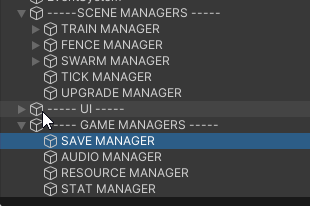
would it be fine to just throw a component script with "dontDestroyOnLoad" and nothing else on the ----gameManagers---- gameobject here for that to cascade down to all the managers I want to maintain through scenes? I want to make sure I understood the documentation
https://i.imgur.com/bpKPP6N.png
 inland cobalt
fierce shuttle
Personally I dont use them too much outside of cases like dealing damage to diff...
inland cobalt
fierce shuttle
Personally I dont use them too much outside of cases like dealing damage to diff...
Okay so i've just scrapped the interface as like you said it probably wasn't necessary. So I now have something like this for pieces:
namespace Pieces
{

    public enum Colour
    {
        White,
        Black
    }

    public class Piece
    {
        public Colour colour;

    }

    public class Pawn : Piece
    {
        public Vector2Int[] GetValidSquares(Board.Square[,] boardState)
        {
            return null;
        }

    }
}```

Looking in board now,

```cs
public static class Board
{
    public static Square[,] boardSquares = new Square[8, 8];

    public class Square
    {
        public object occupyingPiece;
        public bool isOccupied;


        public void AddPieceToSquare(/*Some piece object here*/)
        {
            if(isOccupied)
            {   // If already occupied, ensure colours don't match


            }


        }


    }
}```

I'm trying to define a method to as it sounds, add a piece to a square. And just to make sure, i want to add some logic inside of this function before proceeding with actually adding it to the square to ensure that im not trying to move to a space that is occupied by my own colour of piece, and if it is i want to throw an error as that should already have been handled. However this is where i was concerned about how to implement it before; I cant just simply check the object that is passed as a paramater for it's colour, as i cant define a singular type when there are multiple, so it could be any object which may not inherit from Piece. Basically what I'm asking is how can i make it so that this function takes in an instance of any one of the piece classes such as `Pawn`, without allowing any object. That way i know for certain that they will inherit from Piece, and they will contain a colour property. Hope that makes senseYes
 true pasture
whats a good way to stop a player from doing inputs in a text field for a little while after submitting it. I have a coroutine and im not sure how to disable the input field.

 kind cove
Making a platform held by chains. The chains are using HingeJoint2D's and it seems like the anchor points stretch causing a bounciness I don't want. Any Ideas?
inland cobalt
inland cobalt
Okay so i've just scrapped the interface as like you said it probably wasn't nec...
Following on from this attempting to solve it with generics, i've come up with something like this
using UnityEngine;
using Pieces;
public static class Board
{
public static Square[,] boardSquares = new Square[8, 8];
public class Square<T> where T : Piece
{
public T occupyingPiece;
public bool isOccupied;
public void AddPieceToSquare(T pieceToAdd)
{
if(isOccupied)
{ // If already occupied, ensure colours don't match
if(pieceToAdd.colour == occupyingPiece.colour)
throw new System.Exception("Error adding piece to square, a piece is trying to be placed over another of equal colour");
}
}
}
}```
But im getting the error with the boardSquares 2D array static that the generic requires 1 type arguments, but i thought that was the point of where T : Piece? I'm still trying to wrap my head around this so if anyone could explain where i have gone wrong here that would be appreciated tacit estuary
inland cobalt
Okay so i've just scrapped the interface as like you said it probably wasn't nec...
tacit estuary
inland cobalt
Okay so i've just scrapped the interface as like you said it probably wasn't nec...
Don’t use object, you can just use Piece
inland cobalt
tacit estuary
Don’t use `object`, you can just use `Piece`
Gonna be honest, i didn't realise if it inherits from it i can just use that as the type, that simplifies things so much thank you
works now
 open vine
Hey so I have rigidbody movement and it works but its jittering when I move both the player and camera at the same time. By itself the movement isnt jittery and the camera look isnt either, anybody know what might be the problem? I'm not sure if this helps but the player movement is in FixedUpdate() and the camera turning the player and looking around is in LateUpdate()
video if u want to c what i mean
inland cobalt
tacit estuary
Don’t use `object`, you can just use `Piece`
Nevermind, I just realised this won't work actually. The occupyingPiece variable needs to be a class like Pawn as an example, or others such as Rook that will be written up when necessary. They all inherit from piece, hence my original idea. occupying piece cannot just be Piece if that makes sense
thorn holly
open vine
Hey so I have rigidbody movement and it works but its jittering when I move both...
Can you show your code?
open vine
thorn holly
Can you show your code?
yeah sure for the movement or camera?
thorn holly
open vine
yeah sure for the movement or camera?
Both
open vine
!code
eternal falconBOT
Posting code
📃 Large Code Blocks
Use links to services like:
https://gdl.space/, https://paste.ofcode.org/, https://hatebin.com/, https://paste.myst.rs/, https://hastebin.com/
📃 Inline Code
Surround code with three backquotes. Not quotation marks.
To format as C#, add cs to the first line:
```cs
// Your code here
```
Add a comment with a line number if there is an error message.
open vine
thorn holly
Both
thorn holly
open vine
https://gdl.space/unamedabad.cs
Try multiplying speed by time.deltaTime and then increasing the speed till it’s normal
 teal viper
open vine
video if u want to c what i mean
teal viper
open vine
video if u want to c what i mean
This happens because something is breaking the interpolation on the rb. Are you rotating the character with transform?
open vine
thorn holly
Try multiplying speed by time.deltaTime and then increasing the speed till it’s ...
what do you mean increasing the speed till its normal?
thorn holly
Oh I didn’t notice it was moving fine when not rotating
teal viper
open vine
https://gdl.space/utaxetaxiy.cpp
Yeah, that would break interpolation if it rotates the rb, but does it?
open vine
ah yeah it only starts jittering when both are happenign
teal viper
What is the structure in your hierarchy and where is the RotateCamera method implemented?
open vine
teal viper
What is the structure in your hierarchy and where is the `RotateCamera` method i...
I have the Player empty holding the player movement and a virtual camera as a child holding the camera controller. The RotateCamera method is in LateUpdate() since I heard that works best for physics based movement
open vine
rb is on the player empty
teal viper
And the camera controller is on the same object?
open vine
i think ur right about the breaking on rotating the player. up and down camera movement has no jittering only side movement
no camera controller is on the camera child
teal viper
Do you have interpolation enabled on the rb?
open vine
yeah I have the Interpolate option in the Interpolate field
teal viper
Hmm... That's weird. If the camera controller is a child, it shouldn't affect the rb.
Aaa
open vine
the line that seems to be affecting it is transform.parent.Rotate(Vector3.up * mouseX);
teal viper
Yeah, I didn't notice that you're rotating the parent.
Why not just rotate the child itself?
At this point it's not really rotating the camera, but the character itself.
open vine
yeah i have it this way so that the player moves in the direction of the camera, is this a bad way of doing it?
teal viper
It is from many perspectives, but mainly because it breaks the interpolation.
Ideally, you want to rotate the character in it's own script using physics.
The vertical camera rotation can stay in the camera controller.
open vine
would making the camera do the rotation and in the player movement script setting the horizontal rotation equal to the child object work?
 shrewd swift
hello
so i have a NullReferenceException, but after mutliple check i cannot see why
all 3 Cameras are enabled


 queen adder
is there a place to go for help? I downloaded this asset, imported it and tested it, but how do I edit it? I don't see any code or anything on the top left of unity. I have previous coding experience in other languages, and learn quickly, but just wanted to get into editing something right away. I can't see anything on the Scene, or Game tabs, but if I build it, you can play it.
teal viper
open vine
would making the camera do the rotation and in the player movement script settin...
No, anything that sets transform properties directly would break physics interpolation.
open vine
teal viper
No, anything that sets transform properties directly would break physics interpo...
hmm is there any other way of rotating an object besides the transform?
teal viper
shrewd swift
hello
so i have a NullReferenceException, but after mutliple check i cannot see ...
- Enabled is not in the same league as null.
- It's probably the dictionary that is being null.
teal viper
open vine
hmm is there any other way of rotating an object besides the transform?
Yes. There are several ways via the rb. Torque, angular velocity and Move rotation.
teal viper
shrewd swift
wait, i need to init it right ? when declaring
Yes. In C# you have to initialize all reference types manually(aside from the cases where unity does it for you)
shrewd swift
okay im dumb adding = new Dictionary<CameraSwitcherCameras, Camera>() was the solution
i though this was only to init the dict with some pre values
ty
teal viper
queen adder
is there a place to go for help? I downloaded this asset, imported it and tested...
Might want to go through the basics of working with unity. You don't just jump into a program(yet alone engine) without even knowing how to operate it.
!learn
eternal falconBOT
:teacher: Unity Learn ↗
Over 750 hours of free live and on-demand learning content for all levels of experience!
teal viper
queen adder
is there a place to go for help? I downloaded this asset, imported it and tested...
I also suggest looking at the #854851968446365696 on how to ask questions and asking in the appropriate channel(maybe #💻┃unity-talk for this question), if you want to get better chances of getting an answers without sending you to the learning materials.
queen adder
Im not sure why this error is happening? It says "NullReferenceException: Object reference not set to an instance of an object trampleDetect.OnTriggerEnter2D (UnityEngine.Collider2D other) (at Assets/Scripts/trampleDetect.cs:18)
using System.Collections;
using System.Collections.Generic;
using UnityEngine;
using UnityEngine.SocialPlatforms.Impl;

public class trampleDetect : MonoBehaviour
{
    public ScoreScript score;
    public growScrip grown;


    void Start() {
        score = GameObject.FindGameObjectWithTag("Logic").GetComponent<ScoreScript>();
    }


    private void OnTriggerEnter2D(Collider2D other) {
        Destroy(gameObject);
        if(grown.isGrown) {
            score.addScore();
        }
        else {
            score.removeScore();
        }
    }
}
line 18 is the defining of the score variable
teal viper
This??
public ScoreScript score;
 north kiln
Then grown is null
queen adder
but i thought i defined it to be the growScript at the start?
north kiln
No, you declared a reference to an instance at the start
you have to assign the instance
serene barn
I have no idea what to do
north kiln
teal viper
queen adder
but i thought i defined it to be the growScript at the start?
Declaration != initialization.
queen adder
but when i try to assign it in the inspector it doesnt show it as an option
teal viper
Declaration just says "something of this type might exist at some point"
north kiln
have you added that script to an object?
serene barn
anyone go ideas how i can learn coding ive completed a tutorial but still have no idea what i'm doing
queen adder
serene barn
anyone go ideas how i can learn coding ive completed a tutorial but still have n...
Are you following the tutorial verbatim?
teal viper
serene barn
anyone go ideas how i can learn coding ive completed a tutorial but still have n...
What tutorial did you complete?
serene barn
queen adder
Are you following the tutorial verbatim?
who and what now
serene barn
teal viper
What tutorial did you complete?
a flappy bird remake type tutorial
queen adder
Are you following the tutorial line for line writing the exact same thing they are?
teal viper
queen adder
That script and the grow script are on the same prefab
Might want to show what exactly you're dragging where.
serene barn
queen adder
Are you following the tutorial line for line writing the exact same thing they a...
ye and it ended up smash my head for 12 hours
teal viper
serene barn
a flappy bird remake type tutorial
You're not gonna learn coding just from a flappy bird tutorial...
!learn
eternal falconBOT
:teacher: Unity Learn ↗
Over 750 hours of free live and on-demand learning content for all levels of experience!
queen adder
and i never recommend doing something exactly the same line by line
Thats just replicating not actually learning
serene barn
i dont like unity learn
queen adder
is it the tutorial by GMTK?
teal viper
serene barn
i dont like unity learn
Then go throught the Microsoft C# manual.🤷♂️
But that wouldn't really teach to work with unity. Just coding in C#.

 slender nymph
are you perhaps trying to drag a scene object into a prefab?
queen adder
yes
queen adder
yeah i forgot i cant do that
but then i dont know what to put in those options because teh Grown script is inside the same prefab
serene barn
well im gonna take a small break as my head feels like it's gonna explode
north kiln
queen adder
but then i dont know what to put in those options because teh Grown script is in...
If it's in the prefab, open the prefab and assign the reference directly?
queen adder
All im trying to do is read true or false value from a boolean of another script, so how do i create an initialization instead of an declaration to it
 vestal gazelle
serene barn
i dont like unity learn
vestal gazelle
serene barn
i dont like unity learn
If you want to learn, the way im doing it is,
I copied almost line for line this guys 3d controller. I then looked at what i typed and tryed to understand what each part does. Not just each line but each word in each line. If i couldnt figure out what something did i just looked up "unity localEulerAngle.y" and that took me to a manual that explained the little thing i didnt understand.
Also first time i tried learning unity i got overwhelmed, and didn't touch it for a year. When i came back i felt more comfortable so i do recommend maybe taking a small break (not recommending a year but still)
teal viper
queen adder
All im trying to do is read true or false value from a boolean of another script...
You need both a declaration and initialization.
In your case initialization, or rather referencing is by referencing the existing instance of it.
How you do it is explained in the Vertx's last message.
vestal gazelle
Most of the real learning happened when i started when i started trying to apply what i figured out to my own project
serene barn
vestal gazelle
If you want to learn, the way im doing it is,
I copied almost line for line this...
i did and im returning
queen adder
vestal gazelle
Most of the real learning happened when i started when i started trying to apply...
THIS
vestal gazelle
vestal gazelle
Most of the real learning happened when i started when i started trying to apply...
Yeah this is the 90% of learning
serene barn
vestal gazelle
Most of the real learning happened when i started when i started trying to apply...
ive literally did what u did, but i now have a full line for line and now im trying to expand it but still cant understand
serene barn
vestal gazelle
What did you write a script for?
flappy bird
vestal gazelle
What do you want to code?
serene barn
2d game
serene barn
ye its like a dungeon loot and shooter
vestal gazelle
So top down?
serene barn
ye
serene barn
my brain restorted to short words right now
queen adder
Create a script on moving a character using input
vestal gazelle
Fluid movement or attached to a grid?
queen adder
Is it even a tilemap based game?
serene barn
ye that is what im trying to do but even the movement is confusing, its either i do input.axisraw or inputaxis, or input key
serene barn
queen adder
Is it even a tilemap based game?
havent decided yet
serene barn
queen adder
assuming its not tilemap?
what if it its?
teal viper
serene barn
ye that is what im trying to do but even the movement is confusing, its either i...
These are all different. You use whatever works for you in the context of your project.
queen adder
no
Transforming a rigidbody's X and Y coords
transform as in move along x and y axis
teal viper
You mean "translate"?
queen adder
ah yea sorry
regardless
taking input from a player is something youll have to decide
serene barn
ye im still lost
queen adder
and there are tutorials for everything out there, you just need to be able to translate something they're doing for their project into your own
teal viper
serene barn
ye im still lost<:notlikethis:1068134558123442236>
Start learning and it will make sense eventually
queen adder
Lets take this tutorial for example https://youtu.be/XtQMytORBmM?si=Tk-vyjN2l9hplspC

GMTK is powered by Patreon - https://www.patreon.com/GameMakersToolkit
Unity is an amazingly powerful game engine - but it can be hard to learn. Especially if you find tutorials hard to follow and prefer to learn by doing. If that sounds like you then this tutorial will get you acquainted with the basics - and then give you some goals to learn ...
In my own game
I have a UI in which i need to add score based on collecting something right?
However he's giving a tutorial on how to add score based on going through pipes
However how you do it is whats important not what youre doing it for
amber spruce
hey so im using the new input system and i have a slight problem when i start to sprint it doesnt change my speed properly because it doesnt redo move1 it only sets the speed correct when you press a or d again ```csharp
private void FixedUpdate()
{
m_Rigidbody2D.velocityX = moveAmount.x;
}
public void Move1(InputAction.CallbackContext ctx)
{
Vector2 inputVector = ctx.ReadValue<Vector2>();
moveAmount = ctx.ReadValue<Vector2>() * m_Speed;
Vector2 currentSpeed = ctx.ReadValue<Vector2>() * m_Speed;
float currentspeed1 = currentSpeed.x;
animator.SetFloat("Speed", Mathf.Abs(currentspeed1));
if (currentspeed1 > 0 && !m_FacingRight)
{
Flip();
}
else if (currentspeed1 < 0 && m_FacingRight)
{
Flip();
}
}
public void Sprint(InputAction.CallbackContext ctx)
{
if (ctx.started)
{
m_Speed = m_SprintSpeed;
}
else if (ctx.canceled)
{
m_Speed = m_OriginalSpeed;
}
}
instead of multiplying by m_Speed inside of Move1, do it in FixedUpdate
amber spruce
ah ok that makes sense thanks
vestal adder
rich adder
then put a script on the bullet itself
this worked btw
thanks 😎
do you also perhaps know why it isnt shooting in a straight line
right now it shoots in a curve
rich adder
vestal adder
right now it shoots in a curve
show current script
 final trellis
If i had a string such as 1d20 + 4, how would i seperate it into the appropriate variables of rollMin, rollMax and rollMod, and have it be compatible with potential input variations such as 1d20+4, 1 d 20 + 4 and 1d20 - 4

I know i can use the String.Split() method but im not sure about the modifier part
timber tide
why strings tho
final trellis
because its a user input thing
sure i could have seperate text boxes for each
but its a lot faster for a user to type in 1d20 + 4 than typing 1, 20 and +4 all in seperate text boxes
timber tide
well, two ways I'd parse it. The smart way would be regex, otherwise split search parsing by numerical, alpha, ect
timber tide
regular expressions, usually useful for longer strings
final trellis
i see
 timber tide
pattern matching stuff, otherwise manual splitting like above
final trellis
because my problem with just using normal split is if the user formats it like 1d20+4, then i cant seperate the max from the modifier while preserving the sign of the modifier
i could still do that, and then preserve the original string so I can then search for a + or - in it anywhere
but it sounds like a really clunky way to do it
timber tide
well, there's obvious matching here so splitting it up into 3 different variables is just a matter of linear appending values until you hit values not numerical
final trellis
or i could use regex split bc actually, looking into it

I can split on plus and minus signs but preserve them in the output string
timber tide
right, usually the best idea especially if you're adding more complex string elements
timber tide
but if your requirements are small enough I usually just lazy it up and do linear string appending ;)
final trellis
true but the more i read on regex the more i feel like its a valuable thing to learn how to use
im surprised i havent heard of regex before so thanks for introducing me to it now rather than later lol
timber tide
ye, usually used in games to filter out the* 9 hundred variations of a single curse word
 swift crag
This should be pretty straightforward with a regex
(\d+)d(\d+)\s*[+-]\s*(\d+) matches anything like XdY + Z or XdY - Z, and (\d+)d(\d+) matches anything of the form XdY
they would grab X/Y/Z into capture groups 1, 2, and 3
If I wanted to do anything more complex I might just write a parser
in case you've never touched regex before, https://regexr.com/7pre5 explains the first one
RegExr
RegExr is an online tool to learn, build, & test Regular Expressions (RegEx / RegExp).
oops, i pasted garbage into the Text field
final trellis
swift crag
`(\d+)d(\d+)\s*[+-]\s*(\d+)` matches anything like `XdY + Z` or `XdY - Z`, and `...
would it even work with X d Y?
swift crag
for that I'd need more whitespace symbols!
I updated the link
As long as it's just one die plus a constant, you could get rid of the whitespace
but if you want to parse, say
1d6 + 2d5 + 2d4 + 5
actually, that'd still be fine. there are symbols in between each thing!
1d6+2d5+2d4+5
in that case, I would first chunk it up with a regex
then parse each entry
in that case, I would use ([^+-]+) to match a chunk of text that contains no + or - symbols. That would chunk out 1d6, 2d5, 2d4, and 5 (with extra whitespace). Trim the whitespace and then handle each one individually
final trellis
hmmm, if im giving the option to have more than 1 sided "dice" be rolled, I should probably modify the expression to preserve the d so the thing that eats the string knows what is another dice and what is just a modifier, also i should preserve the + and -
swift crag
[^+-]: any character that isn't + or -
final trellis
swift crag
in that case, I would use `([^+-]+)` to match a chunk of text that contains no `...
or that
swift crag
[^+-]+: at least one character that isn't + or - in a row
you can drop the parentheses; you'd just ask to find every matching substring
swift crag
swift crag
they would grab X/Y/Z into capture groups 1, 2, and 3
that's what the parentheses were for here.
getting smaller pieces out of a single match
another valid option would be to just go one character at a time
final trellis
my brain is being fried with these wacky words
swift crag
regexes are a lot :p
swift crag
swift crag
another valid option would be to just go one character at a time
the parser would be very simple
still non-trivial if you've never written anything like that before, though
final trellis
pain
swift crag
i'd start by just handling XdY + Z
delete all whitespace to crunch it down to XdY+Z, so that spaces don't matter
you can use myString.Replace(" ", "") to get a new string with no whitespace
split it with "+-d". if you get 2 results, it's XdY. if you get 3 results, it's XdY+Z or XdY-Z
if you got 3 results, check if the string contains +
if it doesn't, try -
if you got anything else, or it doesn't contain + or - despite splitting into 3 strings, or any of the split strings don't parse into ints, then display an error
final trellis
swift crag
split it with `"+-d"`. if you get 2 results, it's `XdY`. if you get 3 results, i...
split with regex or regular string split
swift crag
Regular string split
no regex here
You can pass a string with several characters in it to split with any of them
oh wait, I am wrong! you actually pass an array of strings. my bad
var results = "2d6+1".Split(new char[] { 'd', '+', '-' });
or an array of single characters
might as well do that
var results = "2d6+1".Split('d', '+', '-');
you may also just write it like this.
that's easier to read
god the String.Split doc page is so long
queen adder
    IEnumerable loghotdogs()
    {
        Debug.LogError("it1log");
        yield return new WaitForSeconds(2);
        Debug.LogError("itlog");
}```my worst coroutine so far, was wondering why it's not workingThis would produce an array of three strings: "2", "6", and "1", which you could then try to parse into ints
north kiln
queen adder
```cs
IEnumerable loghotdogs()
{
Debug.LogError("it1log");
...
Define "not working"
queen adder
north kiln
Define "not working"
coroutine thinks it's yield return null;
swift crag
you need to tell us what's actually happening
are both LogError methods running simultaneously?
queen adder
it's using IEnumerable instead of -rator
and no error, but it doesnt do what it's intended
swift crag
IEnumerable is something that can give you an enumerator
queen adder
took me like days til i realized the messed up
north kiln
Do you start coroutines via string
swift crag
yes, that's a compile error if you actually pass loghotdogs() to StartCoroutine
queen adder
 queen adder
no error
swift crag
hence why you didn't get a compile error
north kiln
I'm surprised it even runs at all
swift crag
and I imagine Unity just looked at that IEnumerable and thought "idk, whatever"
you can yield anything you want
queen adder
north kiln
I'm surprised it even runs at all
runs for days, and always wondered why my logs not working
queen adder
it was supposed to stop/slow things
swift crag
or yield return "potato";
north kiln
oh you're yielding it directly
that wouldn't even work fully if it was a coroutine with multiple yields
swift crag
non-generic collections my unbeloved
swift crag
north kiln
that wouldn't even work fully if it was a coroutine with multiple yields
loghotdogs().GetEnumerator() would work
oops, wrong reply
north kiln
you should yield StartCoroutine(...)
So if the coroutine actually had multiple yields then it would actually correctly wait for them
 ruby ember
so im making a new scene of the project im making i want to add a system to like you press the arrow it rotates left and right but i want it when i hold it it rotates but i don't know if is possible in unity
 final trellis
swift crag
This would produce an array of three strings: `"2"`, `"6"`, and `"1"`, which you...
final trellis
swift crag
This would produce an array of three strings: `"2"`, `"6"`, and `"1"`, which you...
ok I think im on the right track, thanks :3
queen adder
swift crag
`loghotdogs().GetEnumerator()` would work
lemme actually try
final trellis
also just to be sure, I can do a foreach loop for chars in a string right?
also lord java and C# being so similar makes their differences so jarring
final trellis
Im in a college course that involves java, so im used to typing String instead of string now 😭
swift crag
queen adder
get enumerator on an ienumerable member
of course, it's very silly
north kiln
is it silly 🤔
swift crag
north kiln
So if the coroutine actually had multiple yields then it would actually correctl...
I was under the impression that yielding an ienumerator would make the coroutine step through that enumerator before resuming the original method
north kiln
it yields the IEnumerable
which gets passed to Unity, and Unity does shit all with it
swift crag
right, I mean an IEnumerator, not the incorrect IEnumerable
yield return StartCoroutine(BogusMethod()) would be a compile error
which would be nice for catching that
 gilded pumice
Is it bad that I referred to my pregnant wife as a parent object and my unborn child as a child object?
teal viper
ruby ember
so im making a new scene of the project im making i want to add a system to like...
Anything is possible(almost).
north kiln
gilded pumice
Is it bad that I referred to my pregnant wife as a parent object and my unborn c...
yeah it's bad to be an asshole to others, who knew
queen adder
is it legal and/or possible to decompile unity api, I wanna know how they implemented Mathf.Pow
north kiln
public static float Pow(float f, float p) { return (float)Math.Pow(f, p); }
where from? 🥹
north kiln
You know that the Unity CS Reference exists
queen adder
does that have all?
north kiln
I am fairly sure this has been mentioned around you multiple times lol
It has whatever is declared in C#
because it is the C# reference (CSReference)
queen adder
oh, i thought it's just the source that has already been translated
north kiln
translated?
queen adder
fwom c++ to c# :3
north kiln
It is the source code of the C# portion of the engine
the C++ portion is closed source
teal viper
unless you pay some mony
queen adder
hmm, is getcomponent implemented in c++? I cant find anything related to it in c# ref
north kiln
If you see extern that is a call to C++
queen adder
 north kiln
The github search isn't that good, it's best to download it and use your IDE
queen adder
think I found it, yea it's c++ 🥹
 round scaffold

 violet lagoon
private string mSaveDataPath = "saveData.json";
string fullPath;
private void Awake()
{
if (Instance == null)
{
Instance = this;
DontDestroyOnLoad(gameObject);
}
else
{
Destroy(gameObject);
}
mPersistentDataPath = Application.persistentDataPath;
fullPath = Path.Combine(mPersistentDataPath, mSaveDataPath);
if (File.Exists(fullPath))
{
LoadGame();
}
else
{
Debug.Log("No save data found in " + fullPath);
}
}
public void SaveGame()
{
Debug.Log("We are saving the game in path " + fullPath);
// we write the file will not include in discord
string json = JsonUtility.ToJson(saveData);
//File.WriteAllText(fullPath, json);
StartCoroutine(SaveGameUsingWWW(json));
}
private IEnumerator SaveGameUsingWWW(string json)
{
// Use UnityWebRequest to save the data
using (UnityWebRequest www = UnityWebRequest.Put(fullPath, json))
{
yield return www.SendWebRequest();
if (www.result != UnityWebRequest.Result.Success)
{
Debug.LogError("Failed to save game data: " + www.error);
}
else
{
Debug.Log("Game saved successfully.");
}
}
}```
I dont understand why my path is not found and returning Failed to save game data: HTTP/1.1 404 Not Found when the idbfs/Game is in my storage in F12 in firefox
Can someone help please? steep shoal
https://gdl.space/iqagavilar.cs
Is there way to load my scenes using the same end level script for each level without copy pasting and putting in the new scene name each time? I just need a name of a function/functionality if there is. I can figure out how to use.
 cosmic dagger
steep shoal
https://gdl.space/iqagavilar.cs
Is there way to load my scenes using the same e...
cosmic dagger
steep shoal
https://gdl.space/iqagavilar.cs
Is there way to load my scenes using the same e...
Just make a string variable for the scene name or an int variable for the scene build index
Enter the scene name or build index on each instance of the component attached to the GameObject in each scene . . .
steep shoal
Got it thanks
 shrewd hare
// the mesh is a grid
// size is the size of that grid
Texture2D texture = new Texture2D(size, size);
Color[] colorMap = new Color[size * size];
...
texture.filterMode = FilterMode.Point;
texture.SetPixels(colorMap);
texture.Apply();

MeshRenderer meshRenderer = gameObject.GetComponent<MeshRenderer>();
meshRenderer.material = terrainMaterial;
meshRenderer.material.mainTexture = texture;
what's wrong with my code? the material is not being applied to the mesh correctly

got it. i didn't put the UVs in the mesh
steep shoal
cosmic dagger
Just make a string variable for the scene name or an int variable for the scene ...
Worked well thanks again.
uncut hornet
I dont understand this error with this code because im using things i see on the official documentation

 gaunt ice
why you name the variable as the name of built in class
gaunt ice
avoid using the name of built in classes as your class name/variable name

 gaunt ice
if(A=B){
}
also please dont use == operator for checking float, instead use Mathf.approximately
and you probably looking for getaxis raw (in this case using == is safe)
uncut hornet
i feel like the input manager should be easier to understand than this so what do you mean by that
negative button is A
Positive button is D
simple enough??
gaunt ice
getting input has nothing to do on how you compare two floats
btw did you notice that you type = (assignment) instead of == (logical and) in the two if statements?
uncut hornet
ok the == fixed it i looked over that. thank you
gaunt ice
getaxis returns float in range from -1 to 1, so you probably want to check if the returned value < 0
uncut hornet
yeah i did that
north kiln
uncut hornet
If your IDE is not underlining errors in red you need to configure it !ide
eternal falconBOT
💡 IDE Configuration
If your IDE is not autocompleting code
or underlining errors, please configure it.
Select one:
• Visual Studio (Installed via Unity Hub)
• Visual Studio (Installed manually)
• VS Code
• JetBrains Rider
• Other/None
queen adder
#💻┃unity-talk message anyone know
 ivory bobcat
queen adder
https://discord.com/channels/489222168727519232/497872424281440267/1190914206598...
ivory bobcat
queen adder
https://discord.com/channels/489222168727519232/497872424281440267/1190914206598...
Not code related, don't cross post.
 deft salmon
hello everyone. i need help to fix a playermovement skript. dm me please . thanks
queen adder
ivory bobcat
Not code related, don't cross post.
Have you had this issue? I've spent over 4 hours trying to just get the editor installed.
ivory bobcat
deft salmon
hello everyone. i need help to fix a playermovement skript. dm me please . thank...
Just post your question here and code using the !code format. People likely aren't going to dm.
eternal falconBOT
Posting code
📃 Large Code Blocks
Use links to services like:
https://gdl.space/, https://paste.ofcode.org/, https://hatebin.com/, https://paste.myst.rs/, https://hastebin.com/
📃 Inline Code
Surround code with three backquotes. Not quotation marks.
To format as C#, add cs to the first line:
```cs
// Your code here
```
Add a comment with a line number if there is an error message.
ivory bobcat
queen adder
Have you had this issue? I've spent over 4 hours trying to just get the editor i...
 deft salmon
hello everyone. i need help to fix a playermovement skript. it all works ,its just that when i look down 1. i dont move and 2. i cant jump. i have tried putting my camera movement to my main camera, but when i move i only move in a locked path.(the degault path of unity forward back side to side. i want my movement to follow my main camera.
eternal falconBOT
Posting code
📃 Large Code Blocks
Use links to services like:
https://gdl.space/, https://paste.ofcode.org/, https://hatebin.com/, https://paste.myst.rs/, https://hastebin.com/
📃 Inline Code
Surround code with three backquotes. Not quotation marks.
To format as C#, add cs to the first line:
```cs
// Your code here
```
Add a comment with a line number if there is an error message.
 wild cargo
Wrap your code in backquotes `` or like in this case, paste it in a !code website because it is quite long
eternal falconBOT
Posting code
📃 Large Code Blocks
Use links to services like:
https://gdl.space/, https://paste.ofcode.org/, https://hatebin.com/, https://paste.myst.rs/, https://hastebin.com/
📃 Inline Code
Surround code with three backquotes. Not quotation marks.
To format as C#, add cs to the first line:
```cs
// Your code here
```
Add a comment with a line number if there is an error message.
wild cargo
This will help us help you
deft salmon
using System.Collections.Generic;
using UnityEngine;

public class PlayerMovement : MonoBehaviour
{

   public CharacterController controller;

    public float speed = 12f;
    public float gravity = -9.81f * 2;
    public float jumpHeight = 3f;

    public Transform groundCheck;
    public float groundDistance = 0.4f;
    public LayerMask groundMask;

    Vector3 velocity;

    bool isGrounded;

    // Update is called once per frame
    void Update()
    {
        //checking if we hit the ground to reset our falling velocity, otherwise we will fall faster the next time
        isGrounded = Physics.CheckSphere(groundCheck.position, groundDistance, groundMask);

        if (isGrounded && velocity.y < 0)
        {
            velocity.y = -2f;
        }

        float x = Input.GetAxis("Horizontal");
        float z = Input.GetAxis("Vertical");

        //right is the red Axis, foward is the blue axis
        Vector3 move = transform.right * x + transform.forward * z;

        controller.Move(move * speed * Time.deltaTime);

        //check if the player is on the ground so he can jump
        if (Input.GetButtonDown("Jump") && isGrounded)
        {
            //the equation for jumping
            velocity.y = Mathf.Sqrt(jumpHeight * -2f * gravity);
        }

        velocity.y += gravity * Time.deltaTime;

        controller.Move(velocity * Time.deltaTime);
    }

}
like that
wild cargo
Well, I said put it in a website but whatever
Also delete that previous code message for less clutter
woven crater
i have two ui in a canvas that i can only set the "order in layer" on the canvas gameobject but i want a gameobject sprite to render between the two ui in the canvas
do i need another canvas or something?
wild cargo
deft salmon
```using System.Collections;
using System.Collections.Generic;
using UnityEngine...
Do you really need to use a sqrt when jumping? Also, to fix your problem, you could get the forward vector from the camera instead. Create a "public Camera cam" or use Camera.main to get it.
deft salmon
how would i add it in the code
wild cargo
Actually, does your rotation script rotate the player transform automatically? I suppose it does so then that "fix" I proposed would just create more bugs
woven crater
do i need all ui to be on screenspace camera to do stuff like screen transition effect?
 buoyant prawn
still very new to coding, I have a text mesh that I want to change if a specific public variable changes, how do I script that? (or if someone could point me to a page that explains the concepts)
gaunt ice
create a property (getter setter) that changes the textmeshpro at once when you change the variable
private int a;
public int A{
  set{
    a=value;
    theText.text=a.ToString();
  }
}
wait is this making the text set the variable? If not I dont think I understand this code properly
basically its an HP bar and Its normally set to 5 and i want the text on my UI to change if that variable that is 5 to change
 eternal needle
woven crater
do i need all ui to be on screenspace camera to do stuff like screen transition ...
eternal needle
woven crater
do i need all ui to be on screenspace camera to do stuff like screen transition ...
your UI just exists in the world, not specific to a single camera. you can use camera stacking to have something render over everything else if thats what you need
 violet falcon
Hello i installed a package on my unity project and it update somne packages and it broke some of my codes what i should do

 languid spire
buoyant prawn
```cs
theText.text=a.ToString();
```
languid spire
buoyant prawn
```cs
theText.text=a.ToString();
```
theText will be a reference to your TMP_Text object
north kiln
violet falcon
Hello i installed a package on my unity project and it update somne packages and...
Presumably someone has declared a class called Camera
and that is the reason nothing works
violet falcon
north kiln
Presumably someone has declared a class called Camera
where i can see that and change it?
north kiln
Search for it; I have no idea, it's your project
My guess would be you made the class
buoyant prawn
languid spire
theText will be a reference to your TMP_Text object
that makes more sense, thank both of you
 ionic galleon
I have code like this but I can't get the object name. If I use collision, the particle will have an error. It will be thrown away a lot. I don't want that to happen.
 north kiln
What do you expect to see? Particles don't have names, the only thing that has a name in this scenario is the object that emits them
 static cedar
Oh, never knew that's a thing.
north kiln
no
ionic galleon
north kiln
> What do you expect to see? Particles don't have names, the only thing that has...
I have a particle system with a fire-breathing effect. When fighting, I don't know how to check and subtract damage. Do you have any suggestions?
static cedar
I'm pretty sure most people use Visual Studio or Rider when programming in unity.
north kiln
ionic galleon
I have a particle system with a fire-breathing effect. When fighting, I don't kn...
Use a collider that approximates the shape of your particle system
static cedar
I heard there's one guy here in notepad. And a handful only on VSC.
ionic galleon
north kiln
Use a collider that approximates the shape of your particle system
mean is to create a box and attach it to the animation then adjust the scale according to that animation but I think there is a better way.
that right ?
north kiln
A box, spheres, whatever. Yes, that's the most common way to do it
languid spire
because you do not start Coroutines like that
 silent idol
WAIT
ionic galleon
If you do it like that, it's okay, but it takes a bit of time to set up and another thing is that if you change the scale particle, you also have to change its size box.
silent idol
I FORGOT TO START MY COROUTINE
FUCK
ugh looking at it in fanci colors
and i realize i forgot to start it
rip

queen adder

buoyant prawn
using System.Collections;
using System.Collections.Generic;
using UnityEngine;

public class Health : MonoBehaviour
public TextMeshProUGUI playerHealth;
{
   public string playerHealth = "5";
   private int a;
   public int A{
       set{
           a=value;
           playerHealth.text=a.ToString();

       }
   }


}
so I dont think im referancing my textmesh properly, Does anyone know how to
languid spire
missing a using for TMPro;
 short hazel
And it's outside the class
buoyant prawn
languid spire
missing a using for TMPro;
how do i do
short hazel
Stuff must be in the {}
languid spire
look at you code, you already have using statements
eternal needle
this would surely give you errors, you should configure your !ide
eternal falconBOT
💡 IDE Configuration
If your IDE is not autocompleting code
or underlining errors, please configure it.
Select one:
• Visual Studio (Installed via Unity Hub)
• Visual Studio (Installed manually)
• VS Code
• JetBrains Rider
• Other/None
buoyant prawn
eternal needle
this would surely give you errors, you should configure your !ide
I have been using notepad+ ill switch to visual studio
gaunt ice
pick an ide you like and switch to it now
static cedar
static cedar
I heard there's one guy here in notepad. And a handful only on VSC.
Wtf.
To think there is one rn.
eternal needle
buoyant prawn
I have been using notepad+ ill switch to visual studio
first step you should learn at least beginner c# and follow tutorials
buoyant prawn
eternal needle
first step you should learn at least beginner c# and follow tutorials
I have but I dont learn well from watching someone, I have to do things to learn, so just attempting to figure out how stuff works is more effective for me
eternal needle
there are even written lessons online
static cedar
Actual basic C# tutorials should let you give space for it.
buoyant prawn
also I jsut use np+ cuz i used to use it to edit stuff for minecraft mods and its just the default on my pc
 twilit pilot
buoyant prawn
I have but I dont learn well from watching someone, I have to do things to learn...
twilit pilot
buoyant prawn
I have but I dont learn well from watching someone, I have to do things to learn...
why are you asking someone to teach you how to do it here then?
buoyant prawn
twilit pilot
why are you asking someone to teach you how to do it here then?
im not, I ask when I hit a wall and if you look I specifically asked to be pointed to an explaination of the concept not for someone to do it
twilit pilot
buoyant prawn
im not, I ask when I hit a wall and if you look I specifically asked to be point...
sure - but you can still use a beginner tutorial and refer to it when you're stuck with something
static cedar
I'm hoping you at least make rock paper scissors, or a number guesser, just something simple that most tutorials would ask you to do.
Not in unity.
buoyant prawn
twilit pilot
sure - but you can still use a beginner tutorial and refer to it when you're stu...
i have been, when i dont understand something i come here
im sorry, i have been trying to do learn as effectively as I can, I came here bc its way easier to be able to ask people questions when I cant find a specific tutorial for something
sorry to bother you all
twilit pilot
It's not about bothering anyone, it's about what is best for your own education. When you are a complete beginner it's probably better to follow a complete introduction that will establish the ground rules and give you a proper foundation to build from
buoyant prawn
I have followed several, I genuinely cant learn something unless I can ask questions and i cannot ask a youtube video questions
I tried it that way now im trying here
eternal needle
buoyant prawn
I have followed several, I genuinely cant learn something unless I can ask quest...
this is unity, very different from hello world in c# and stuff like simple calculators. also the vast majority of youtube tutorials are gonna be shit. No one wants to sit there and watch a 10 hour video, and no one will learn from the "learn c# in 1 hour" video. there are other websites online, like this for example https://www.w3schools.com/cs/index.php
buoyant prawn
eternal needle
this is unity, very different from hello world in c# and stuff like simple calcu...
this is genuinely extremely helpful thank you
eternal needle
ionic galleon
I have a particle system with a fire-breathing effect. When fighting, I don't kn...
https://docs.unity3d.com/ScriptReference/MonoBehaviour.OnParticleCollision.html
there is particle collision if thats what you need
deft salmon
anyone got a simple playermovement and camera movement skript for a basic start for a character
languid spire
deft salmon
anyone got a simple playermovement and camera movement skript for a basic start...
Unity Starter Assets on the Asset Store
deft salmon
languid spire
Unity Starter Assets on the Asset Store
is it the one from unity with th emobile controls
languid spire
deft salmon
is it the one from unity with th emobile controls
iirc there are 3 different ones, chose the one that best suits what you are trying to do
woven crater
can i use a collider (not trigger) to detect a gameobject with trigger collider?
woven crater
yeah i have this on a game object with a collider. but its seem to use the trigger collider from it child game object instead
 eternal falconBOT
Posting code
📃 Large Code Blocks
Use links to services like:
https://gdl.space/, https://paste.ofcode.org/, https://hatebin.com/, https://paste.myst.rs/, https://hastebin.com/
📃 Inline Code
Surround code with three backquotes. Not quotation marks.
To format as C#, add cs to the first line:
```cs
// Your code here
```
Add a comment with a line number if there is an error message.
woven crater
sorry. i thought its just that
nah im pretty sure its just that.
so i cant use OntriggerEnter2D on a non trigger collider
but OnColliderEnter2D seem like it not detect gameobject with istrigger collider
i guess imma make another game object with trigger collider and make its the child then
woven crater
"OnCollisionEnter2D" my bad