#🔀┃art-asset-workflow
1 messages · Page 54 of 1
 raw pecan
 cloud saffron
I can link you this, which was the first videos I watched on mesh generation

JOIN THE DISCORD SERVER!
NOTE: I have NO idea what happened around the 6:30 minute mark with the epilepsy-inducing flashing red screen. Sorry about that :-/
This ...
but to be honest I don't get it fully enough to help
 stoic crescent
i mean its still a question for terrain channel since thats the description of terrain channel "Ask questions and discuss anything related to terrain and world building tools."
and this seems to be a world building tool he is trying to create there
raw pecan
can someone just help me and not tell me to move channel every single time
cloud saffron
This channel is for 3D art, I think the original channel (General Coding) was the honestly the best because I doubt people going to Terrain are looking to answer Mesh Generation and more Unity Terrain, and people here are probably just looking to discuss modelling ect.
I'd recommend you watch that playlist, or play around with making meshes in code yourself
stoic crescent
i can't. i am not that deep into this kind of coding otherwise i would. i just can try to direct you to the correct channel where people with more knowledge usually would hang around and also give you the pasta bin advice to post your code because nobody likes to see 30 lines of code containing a problem that they might not be able to solve and instead pushing there problems into nirvana.
sorry to be the rude guy saying it but i just try to be honest
 round sorrel
so im tryna make an asset bundle to throw this into a game and err i cant and idk how to fix it
 alpine cape
 crimson flint
i have a problem with my impact partial every time i shoot down or i little near the player the partical shoots the camera/body basically any way to fix that
 wet comet
im trying to make a collision scrips
script
Severity Code Description Project File Line Suppression State
Error CS1061 'Collider' does not contain a definition for 'comparetag' and no accessible extension method 'comparetag' accepting a first argument of type 'Collider' could be found (are you missing a using directive or an assembly reference?) Assembly-CSharp L:\Unity Games\KingRaccs game\Assets\Push.cs 24 Active
using System.Collections;
using System.Collections.Generic;
using UnityEngine;


public class NewBehaviourScript : MonoBehaviour
{
    public float pushammount;
    public float pushradius;


    // Start is called before the first frame update
    void Start()
    {

    }
    private void DoPush()
    {
        Collider[] colliders = Physics.OverlapSphere(transform.position, pushradius);
        foreach (Collider pushedObject in colliders)
        {
            if(pushedObject.comparetag("Enemy"))
            {
                Rigidbody pushedBody = pushedObject.GetComponent<Rigidbody>();
                pushedBody.AddExplosionForce(pushammount, Vector3.up, pushradius);
            }
        }
    }
    // Update is called once per frame
    void Update()
    {
        if (Input.GetKeyDown(KeyCode.G)) ;
        {
            DoPush();

        }


    }

}
 versed stirrup
@wet comet #archived-code-general
 winged creek
 cerulean pilot

Simple sword I made, and first model in very long time.
Like and Retweets appreciated!
#RobloxDev #Roblox #modeling #Blender3d

 Twitter
·
Twitter
·

 eager mist
type with your keyboard
 pseudo steeple
visual studio?
eager mist
can someone help me with 3D modeling?
 raven tide
can someone help me with 3D modeling?
@eager mist what do you need help with
 lyric nymph
Hey I'm not sure where to ask this but: does anyone have any advice for setting up a prefab to handle variants of props for a level? I've got a bunch of static props with different base color textures and I'd like to figure out the easiest way to start populating my levels
I guess what I'm trying to figure out is how I can easily select a material (or prop) within the editor without actually loading a bunch of different materials on runtime. I'm new to Unity, but the closest thing to what I'm describing would be the skingroup system in Source/Source 2
 sturdy heath
hey there, im new to unity and 3d modeling in general, im looking for some help. i have run into the issue of not knowing how to assign multiple materials for different parts of a model?
 crisp vault
me need pistol lol
lyric nymph
Make sure your model has multiple materials set up in your modeling program, if you need to assign the materials in Unity you can create your materials and assign them from the "materials" tab. There should be a socket per material from your model
 molten fable
hi, so im still very new to unity and was going to create a level with probuilder, i was just curious on one of Dani's newest videos, among us 3d, he put a image and used it as a guide, i was wondering how to do that
cerulean pilot
Click on the picture or it will look blurry for some reason.
https://twitter.com/BrokenSoulRBLX/status/1329994374042759168?s=20
Made another sword for fun, looks pretty cool.
Likes and Retweets are very appreciated!
Follow me for more!
#RobloxDev #Roblox #RobloxDevs #Blender3d #blenderart #3DModel #3dmodelling
 Twitter
·
Twitter
·

Likes and Retweets are very appreciated!
 stoic ferry
Would anyone be able to help me figure out how to make the camera not get rid of the meshes as seen in this video? It would be really helpful, thank you.
https://streamable.com/fdu4y1

 lucid frost
cerulean pilot
**__Click on the picture or it will look blurry for some reason.__**
https://twi...
lucid frost
cerulean pilot
**__Click on the picture or it will look blurry for some reason.__**
https://twi...
Bro u killed it cool
 potent lichen
@winged creek i think that window only appears once, when you added the object. But there might be a possibility to make it appear again
 maiden tangle
@stoic ferry hey, looks like you need to set your "near" to be lower
on the cam
depth is important as well, just fiddle with the settings during runtime till you find what you like
 steady tusk
Hi guys, some friends and me just started out with learning gamedev. One of them created his first model in blender. When i import it in Unreal it looks nixe like this
When i import it in Unity...you see what i mean 😄
Do i have some settings frong in Unity? its an fbx file
 cloud latch
the export setting in blender might be wrong
 carmine delta
Can anyone shed some light as to why my blockercubes look messed up now? Everything was angled perfect, I open my project and now it looks messed up? Did I accidentally hit a key to enable this?
 forest ice
@carmine delta download Greenshot or a similar app to take screenshots and upload those, much better than a blurry photo. As to your issue, you'll have to be a bit more specific. What is it supposed to look like? At first glance I would say you just accidentally moved something and need to move it back 🙂
Anyway, somebody know why Blender-exported fbx files might have draw order issues?
All normals look fine, I have several meshes, some work, some have these weird overlapping occluded faces in some spots
forest ice
Turns out a few of my meshes were just randomly set to generate materials on import and ended up making them of the surface type "Transparent". I have no idea why, but removing material imports and using my own fixed the issue.
 vestal hazel
 whole oak
What do you think guys
 eager zephyr
HI can someone say how to import Autodesk Navisworks 3d project in to Unity
forest ice
@whole oak the glow is a little too intense for my taste. Try toning it down a little
whole oak
@forest ice i will, thx
forest ice
@whole oak maybe a ridge pattern on the grip or a hole for a strap to increase detail on the main bits? 🙂
 umbral stag
This place is for modelling questions right?
 sullen plank
Yep, among other things.
umbral stag
How can i chop this fella in half?
I have no blender experience.
Is it hard to cut something?
 misty pier
@umbral stag select the verts above area you want to cut and delete them
then select the edges around the face thats missing
right click
and press bridge edge loops
umbral stag
Ummm....
umbral stag
umbral stag
I have no blender experience.
....
misty pier
i mean
not trying to be rude
but its better if you learn basics off of
yknow the millions of tutorials
umbral stag
Ye
 rose ember
My animations aren't importing to Unity correctly. When I import them they have an offset that makes them impossible to use in the project. As you can see, they have no such offset in Blender, and for some reason, the offset is different for each animation. The offset seems to be along the X and the Z axis.
 silver owl
The two guns are warped when looking up and down, can someone tell me why this happens and how to fix it?
this is what my player looks like, the capsule itself doesn't rotate, but the head component does and the camera (not main camera, just camera) component is locked to the head
(it has a capsule)
rose ember
this has hapened to me too
just search it on Google or something I can't remember why it happens
 worn quail
anyone else know why my player falls through the ground when i play? I replaced the ground, so there must be something wrong with the player.
 simple cedar
are you using rigid body for the player @worn quail
worn quail
yes
worn quail
nevermind, i fixed it!
stoic crescent
that red green background hurts my eyes but the couch looks really cozy#
 valid magnet
Hi, I wish to add a dynamic text (which is gonna change it's value by a script) to a gameobject with animation. I want that the text moves along with the arm. How can I do it?https://gyazo.com/cdccc2f45292cfbc6bb55b030b4109ba
 dire ermine
@stoic crescent thanks, and sry about the background 😅
 craggy bane
@valid magnet you have to set arm bone as parent of text
 left hazel

so if I were to make shooting animations
how would I do it?
do I do it in unity or blender
also do I rig the gun?
 frosty laurel
try simply dragging the texture in that folder onto the 3d model in the world
 scarlet raptor
done thanks
 cloud nimbus
@left hazel Rig the gun
in blender
also if you're gonna have hands I'd recommend animating them in the same model as the gun
umbral stag
Hello, For some reason when i mirror my cube it doesn't mirror
 tawdry valley
umbral stag
Hello, For some reason when i mirror my cube it doesn't mirror
tawdry valley
umbral stag
Hello, For some reason when i mirror my cube it doesn't mirror
it mirrors on the origin
umbral stag
so it mirrors on top of the other cube?
umbral stag
Thx
scarlet raptor
well an anyone help me the tree is following my camera
 unborn vector
as in the tree is remaining at the same point of the screen no matter where your camera goes?
scarlet raptor
unborn vector
as in the tree is remaining at the same point of the screen no matter where your...
i fixed that
also how to fix the tress
i mean its pink
scarlet raptor
well the material is also pink
unborn vector
change the materials colour?
scarlet raptor
unborn vector
click on the material and edit the pink box beside "albedo"
scarlet raptor
 glacial vector
Are you on URP @scarlet raptor? If that's the case then that shader is not compatible
scarlet raptor
glacial vector
Are you on URP <@!306060056271519745>? If that's the case then that shader is no...
yes im on urp
scarlet raptor
glacial vector
Are you on URP <@!306060056271519745>? If that's the case then that shader is no...
well is there a way to fix it ??
glacial vector
You'll need to use a different shader
If that one is from an asset pack, they might have a URP variant. If not, you'd have to make one yourself
 full crest
I'm getting this error saying 'invalid subscript 'shadowCoord'' in Varyings.hlsl
I'm on URP
scarlet raptor
glacial vector
If that one is from an asset pack, they might have a URP variant. If not, you'd ...
yeah thats from the assets store
raven tide
https://media.discordapp.net/attachments/780839164987441214/780887658083516437/unknown.png?width=1204&height=677
@left hazel yes

 upper meteor
I tried using 3D, but it's difficult for me to understand, but could anyone tell me that if I learn, if 3D is significantly or equally as hard as 2D (I use 2D all the time)
 obtuse hearth
3D can be harder for sure
the general concepts are the same though
what do you have trouble understanding?
obtuse hearth
Might be a better question for #🏃┃animation
left hazel
oh okay
obtuse hearth
or a blender discord
obtuse hearth
my mistake
left hazel
do you know it though?
obtuse hearth
nah I don't use blender, that's why I would suggest a blender discord.
left hazel
kk
upper meteor
obtuse hearth
what do you have trouble understanding?
I don't understand how to import my sprites. I'd have to make a 3D model right?
obtuse hearth
upper meteor
I don't understand how to import my sprites. I'd have to make a 3D model right?
Sprites are for 2d or UI only - 3d does require models, textures, and materials
silver owl
this is what my player looks like
 echo ivy
Hey guys,
Is it possible to add some parts of a model to another model in unity ?
I'm doing it but after trying to create prefab of that object all of them are disappeared.
craggy bane
left hazel
do I have to rig it so I can animate the shooting in unity?
you dont have to rig it to animate
but its easier with rig
 novel bay
is someone having problems with alt space builder now ? My builder is not working at all !!
novel bay
ok. now I have this message in the console, what does it means :
InvalidOperationExeption: destroying a game object inside a prefab instance is not allowed.
thank you.
glacial vector
#💻┃unity-talk @novel bay
 lost sphinx
Hi, I hope you can help me with a little beginner problem. I've downloaded some free materials and wanted to apply them, but as you can see it doesn't really look like it should. Any idea why?
lost sphinx
Ok, something I found out already: It works if I just put the material on a default 3d cube, but it doesn't work if I put it on the tiles from the prototype package I use.
 wary kite
are those all individual tiles?
lost sphinx
Yes
wary kite
jesus
lost sphinx
Jesus had nothing to do with that!
This is only part of an one week department event we have, coming up with innovative ideas. So some of us decided to try to exchange the web frontend of our business application with a frontend made in unity. So nothing that really will ever see the day of light.
 civic mesa
Messed up UV on the prototype tile?
lost sphinx
How could I check that?
wary kite
you'd have to open the model in blender or something like that and check the UV map, im not sure if you can do it inside unity
civic mesa
also why it's using some legacy shaders?
lost sphinx
No idea, that was preselected after the import. Guess I just discard the idea of using those materials
 harsh fjord
changing my imported model to legacy removes the entire model im for real WHAt
 frail thistle
Sorry. Didn't work with 3D.
lyric nymph
I realize this is more of a materials question but there isn't a channel for that - does anyone know the proper setup for going from Substance Designer to Unity without using the buggy substance plugin?
As in, how should I export my textures? Currently things are looking very different between the substance player preview and the material in unity
 toxic kindle
Hello, I'm wondering if ProBuilder is a useful tool for quickly creating prototype props or is it more for prototyping scenes and terrains?
maiden tangle
@toxic kindle In general it's used for scene layouts, have not seen it used as a terrain
 quick knot
Hey, Im a newbie at Unity and C#, but wanted to have a camera look only forward, left and right. How would I make this possible?
maiden tangle
Get horizontal input from player and change cam rotation @quick knot
if you know how to A get input from player and B reference an object or component in the scene, and C change a transform rotation thats all you need
 coarse tinsel
Anyone that has experience with Megascans and the Bridge plugin that has a fix for importing throwing warnings and the imported assets defaulting to internalErrorShaders?
 high mortar
what is wrong here
 leaden wadi
Anyone have any idea why polybrush rips apart my model when I try to paint textures?
leaden wadi
@high mortar looks like you need to set the reference to the rigidbody. You created a variable for it, but never actually set it.
high mortar
Thx @leaden wadi
maiden tangle
@high mortar vector2 does not have 3 axis right so
you passing xyz does not work here
high mortar
so what do i put
maiden tangle
lose the z or x I believe, I dont work in 2d (this is a 3d general, for models not code) but I would imagine its one of those two
high mortar
oh sorry
 frosty juniper
Hey, I'm extremely new to literally everything to do with unity but I have a rather ambitious project in mind I'd like to do. I want to create an interactive flower with proper rigging to allow for responsive movement akin to the ripples in water. ( Later on in the code I would like clicking on different petals to activate different code. {Think each petal would be mapped to a different note})
I know this is ambitious and I want to do it right so any help is appreciated.
What programs are best used to make models that can easily be imported into unity?
Is the rigging done in other programs or in unity itself?
How can I make it so that each petal activates separately/ create different interactable areas?
What is the best way to make effects like particles and lighting? (which would be easiest to implement for a beginner)?
Are there any specific videos or resources you'd like to share with useful tips on general tool usage for easier modeling and rigging?
Anything you'd like to tell me at all?
I am pingable and very aware that I might be doing something rather complicated but I'm willing to learn. Most of my background is in programming and 2D art so this will be a big learning experience for me. All help is appreciated.
maiden tangle
@frosty juniper
A: Free and most popular: Blender. It is done outside unity.
B: This is too vague. (activates? interactable? areas?)
C: Unity comes with a particle system, plenty of youtube tutorials.
You would be surprised how small scale and doable this really is, when compared to most newcomers planning on making an MMO with millions of players as their first game.
If you need code help for the interactable areas / clicking on petals w/e stop by #💻┃code-beginner / #archived-code-general
Though I would highly suggest if doing so you remember these channels are for figuring out problems you are already yourself actively trying to work through, many forget people can't just write scripts out for free
biggest thing though is definitely google, put your issue + unity in and it'll come up with loads of people doing things similar and usually an answer that solves it below.
as for rigging the petals that's all done in blender, blender + rigging beginners tutorial will help. 🙂
 lunar wagon
hello
i need help with animations
i want my animation to happen once at the start of the game
 turbid sapphire
how to make plane dont invisible when looked from the down?
i had this grass model that i make but when i export it to unity when i looked at the model from other side it become invisible
like this
 open barn
In order to use Subtance Designer materials in Unity, we need to add a plugin to Unity. Do you think this is a good idea for game projects?
frosty juniper
Thank you so much sleeper, that’s really helpful! ❤️
 gloomy hornet
@turbid sapphire u could go back in blender and add a modifier called solidify and then apply it
enable backface culling to be sure it works
 sacred vector
hey I want to export this blender file into unity but the grass texture wont come with it
what format do i export it as
 sick raptor
what 3D extension does unity use?
gloomy hornet
@sacred vector try sending your blend file here so I can see how u did it
 glass topaz
sick raptor
what 3D extension does unity use?
glass topaz
sick raptor
what 3D extension does unity use?
FBX i think
eager mist
I wanted to make an First person Charakter Contoller by myself and tried the ones from the asset store,but none of them worked properly so I wanted to ask if someone could help me with that
 green nimbus
 fluid oak
@sacred vector unity doesn't use blender hair.
sacred vector
ok @fluid oak I just made my own grass
frosty juniper
PROGRESS yeahhhh
I manually tried to place the petals so they looked more organic and didn't clip into one another
now time to die trying to learn rigging and the like
fluid oak
@frosty juniper neat! Maybe look up 'spiral phyllotaxis' for good references?
 thorny pumice
guys I have like the .blend files in my project, but when I double click it says blender not found, how do I put in the path to blender in unity?
gloomy hornet
@thorny pumice U shouldn’t have a .blend file in unity. U have to export it form blender as an fbx. To do it u have to be in blender click file>export>fbx and then save it in the assets folder of your unity project
thorny pumice
alright so i did gave very less info here but problem is solved
thorny pumice
the problem was that the .blend files in the models folder of the assets was there, but blender was not in path
so i added it and reimported
and voila
gloomy hornet
Ah i got now lol
 night girder
can anyone help me with this #401076282869415946 message
 mighty hound
 scarlet kayak
Cool
dire ermine
crimson flint
Why cant I add a modifier
 elder crow
hihi! I added custom hair to my character in Unity, added dynamic bones n all but now whenever i export it and use it in either 3tene or vseeface the hair doesn't move like it does in unity, anyone knows how to fix that? ^^
sick raptor
 night socket
@crimson flint you seem to be selecting an empty
not an actual object with geometry that can be modified
mighty hound
@gentle hornet flat planes will have transparent backfaces . so maybe look for an option to toggle backface culling. or add a little thickness to your models walls and make sure the normals are facing properly
 gentle hornet
ok thanks
 naive turtle
What would you say the size of the sentery bot in fallout is?
dire ermine
🎄
open barn
Character Rigged For Unity ❤️
❤️
 serene hedge
how can i make a sphere with lots of vertices
compared to the default unity sphere that doesnt have many
glacial vector
serene hedge
compared to the default unity sphere that doesnt have many
Just make a sphere in any 3D app and add more subdivisionz
naive turtle
Ideas for details? Total nub at the artistic side of modeling.
 blazing cypress
hey i have a .blend file in my assets how can i import it into the editor?
it isnt letting me drag and drop
thorny pumice
blazing cypress
hey i have a .blend file in my assets how can i import it into the editor?
it is...
i think you can like get a cubeand replace the mesh with your own blend file
also, can you like see the prview of ur model with .blend file
eager mist
hey i need help.
I got a model of mikasa from attack on titan (Free license)
But when i extract the .blend it seems to glitch out and does this
That is what it looks like in blender ^
 pale herald
@eager mist enabling "preserve hierarchy" the the asset import in unity solved some weird errors for me. Maybe give it a try if you haven't
otherwise it might work better if you export it as FBX instead of using the .blend
eager mist
Seems like Blender 2.91 rigify stopped working correctly wrt. to bone mapping. Head fails consistently on import to Unity. Anyone experienced this and know of a fix?
maiden tangle
I'd youtube it
 fervent talon
i did
lol
actually
i didnt
but i rigged it
and by rigged it i mean rigify
then i made a rigidbody
then a ragdoll
and nothin
'-'
ok i found the error
the collision is beeing a ragdoll but the mesh/skin isnt
but idk how to fix it
help plz?
maiden tangle
fervent talon
i didnt
I'd start with doing it first 😉
 brisk badger
Really needing some help with lighting and shadows. I have a model that is a plank of wood and is smooth edged, nothing jagged. The shadow casted however is very jagged when up close.
weird artifacts also when zoomed out a bit
This actually might be a lighting channel thing but not sure since it is happening only with my assets
 pseudo coyote
Lower the shadow distance in the quality settings for the light
Look up "Jagged shadows unity"
 sweet kite
This might be a real basic question, but what would be the best approach to modeling out buildings? Should it be just one .obj file modeled out in blender or do I need to make separate objects for each piece of the building that would have a different texture?
 stoic terrace
Heyo! making something in blender and was wondering if I need to make sure of anything in terms of how it looks when rendering? Or will all the lighting be taken care of by the environment its put in?
thus making render mode in blender more of a test mode for unity?
 finite wave
Wow, that looks dope
eager mist
 sterile lagoon
cycles?
cerulean pilot
Made a sexy , icey sword!
Likes and Retweets are very appreciated!
Follow me for more!
#RobloxDev #Roblox #RobloxDevs #Blender3d #blenderart #3DModel #3dmodelling
 Twitter
·
Twitter
·
 serene hedge
is there smoewhere to get assets apart from unity store
 upbeat trench
yeah tons of places
 frail flame
Hi
I have these nodes set up
They display a mouth on my character
But when I import it into unity with fbx, the mouth isnt there
Its just all gold
How would I apply the mouth in unity
Oy someone help me please
 misty rover
I'm sadly a beginner. ^^'
Can someone explain me how to center the selection cube of a group? Like when I select a group the position that is the location is off instead of in center.
cloud latch
frail flame
Oy someone help me please
You need to make a material and then add the mouth texture
frail flame
I fixed it already
maiden tangle
playing with an old model
 keen tartan
Hello! I have a question about sizing. Im looking to build/modify some 3D models to fit a specific size in unity for a building game on a grid.
I'd like to build in 10 "unit" intervals. Im not 100% sure what to lookup to try and convert blender "units" to unity "units" for modeling. I know this is a very basic thing, Im just lacking the vocabulary.
Does anyone understand what Im asking & know what I should be looking up?
maiden tangle
@keen tartan Blender and Unity units are 1:1 apart from the default Blender cube, which takes 2 grids if you look at it in orthographic camera mode (Keypad 5). That also means 1 grid = 1 meter in Blender thus in Unity
googling "blender units to unity" came up with that, you were not off
keen tartan
Ah tyty I guess I had some of the lingo down.
 rapid echo
Exploring some lights in a night scene using Unity. Thanks for viewing! :)
.
https://twitter.com/FarrukhAbdur/status/1334503166415605762?s=20


Setting up a new night scene with some light lamps.🕯️
#unity3d #madewithunity #gamedev #indiedev #b3d https://t.co/9sXQ7mLwVx
Likes
146
Twitter
·
 rigid pelican
lyric nymph
stoic terrace
Heyo! making something in blender and was wondering if I need to make sure of an...
rigid pelican
lyric nymph
stoic terrace
Heyo! making something in blender and was wondering if I need to make sure of an...
Late reply but I find using Eevee as a renderer as opposed to Cycles is more representative of working in Unity. Inverting your smoothness maps for blender's roughness is also necessary. It's not gonna be 1:1 but eevee isn't terribly far from Unity in terms of how the asset is being rendered. Lighting between blender and unity don't really have any parallel but if you're using lux values it'll probably be pretty close
 solid heron
Is it possible to just change the Mesh in Skinned Mesh Renderer to replace the character? I tried replacing mixamo to mixamo human characters but it doesn't go well.
frail flame
Uh I need help, this should explain everything
The shirt is on the rigged character but doesnt move separately
frail flame
Someone help?
 solar bay
@frail flame I think ask in general unity. No one is giving concentration here. And I don't know answer
eager mist
Hello everyone, I've finally just gotten into Photogrammetry and I'm having a very hard time understanding texture quality. I've watched tons of videos on tips from professionals, etc and follow the steps. The model turns out fine, however, there's simply not enough albedo detail. For example, lets say I scan a rock (like the image I'm posting), it'll look perfectly fine if it's like 6mm in size. But if I want to crank it up to look like a boulder the quality of the albedo is horrendous. So without falling to the use of 16K Textures is there any tips you can give on how to get decent albedos? (this rock is a 4K texture). (with normal maps at 4K). Looks like total garbage.
At a distance it doesn't look entirely bad. But just not enough detail for upclose.
rigid pelican
what do you guys think
rigid pelican
keen tartan
Hello! I have a really basic question. I am using an amazing material pack with "prototype" materials
Im using unity's builtin 3d primitives (cubes) scaled to different sizes
Im wondering the best way to get the textures/materials to tile correctly on each primitive instead of stretching
The "Tiling" option in the material I've found to have 2 problems:
1 - It only allows for X/Y tiling (not Z)
2 - Its globally changing the material (instead of on the particular prefab/mesh Im working on)
Im assuming Im just going about this wrong
After looking into it for fast prototyping I think I want probuilder
Otherwise I should model the things out myself in blender & create proper UV maps
 hoary pawn
@keen tartan the uv map decides how the material stretches
there are projection techniques you could use in a custom shader to get by without a uv map and instead use world coordinates
but its likely not going to work well with your grid texture
keen tartan
Yeah, I built that shader and it worked as well, but it seemed REALLY heavy handed and didn't really support everything I was using on the std shader.
Yeah, the UV map seems like the Right solution overall. Im kinda surprised unity primitives don't tile their UV maps vs stretching!
hoary pawn
unity "primitives" are just sample meshes, they're not procedural at all
keen tartan
Yeah, im trying to use builder pro, but its a bit of a pain :/
hoary pawn
what you want are probuilder primitives
you could use the fbx exporter package and work in maya/max on scenes linked with unity
keen tartan
I am using blender atm #free 😛
But yeah, I could also build it there & export. Im not a modeler at all so Im looking to do super low lift to get something on a scene & find friends that want to pickup where I lack! 😄
Ty for the advice it is SUPER useful
hoary pawn
since unity can't handle importing/exporting righthanded coordinate systems and blender cant export lefthanded, working on linked scenes is a major pain
keen tartan
Yeah, The blender experimental transform on export has worked decently!
hoary pawn
applying on export is not a good idea, it wrecks your hierarchies
and you can't roundtrip through unity that way
eager mist
I need help
im trying to make particles but the colour of them wont change
 hearty sluice
rigid pelican
what do you guys think
hearty sluice
rigid pelican
what do you guys think
Nice!
 minor sparrow
Detailing is ALMOST done, been working on this on and off for more then a month now 😂
 coarse sphinx
Hammer!
 mighty sundial
hi does anybody know if theres an artpack on the assetstore available like this.
worn quail
here's my first 3d model in Blender!
its not very good and i followed a tutorial to make it, but im proud that i could do it
maiden tangle
Looks clean and a great foundation well done 👍
 modern badge
minor sparrow
Detailing is ALMOST done, been working on this on and off for more then a month ...
modern badge
minor sparrow
Detailing is ALMOST done, been working on this on and off for more then a month ...
Nice, looks good. You have a lot of unnecessary polys on the front/top though, might wanna reduce/retopo
worn quail
thanks!
maiden tangle
modern badge
Nice, looks good. You have a lot of unnecessary polys on the front/top though, m...
would they be unnecessary if he plans to connect the fingers to the palm?
I'm terrible with topo, but it seems like that's the flow he's going for
modern badge
Follow my reply--I was talking to JGM not Lobster
maiden tangle
ah my bad
maiden tangle
mighty sundial
hi does anybody know if theres an artpack on the assetstore available like this.
the closest I've found would be a human asset with the mouth interior available, can't say you'll find a dentist pack easily
mighty sundial
@maiden tangle yeah thats fine im looking for an asset like that where the face has some level of articulation or if the exact asset is on the asset store. I also dont know what keywords to use to search for something like this
maiden tangle
I doubt you would find it on the unity asset store as it's such a niche thing @mighty sundial
I would search "realistic mouth model mesh"
*on google
mighty sundial
@maiden tangle I'll try that thank you
 small monolith
I have a problem where the skinned mesh of a model is not changing when I move the bones. do you have a way to fix this?
 shut juniper
small monolith
I have a problem where the skinned mesh of a model is not changing when I move t...
shut juniper
small monolith
I have a problem where the skinned mesh of a model is not changing when I move t...
did you import it with the animations baked?
dire ermine
Something I mad dor Christmas scene 🙂
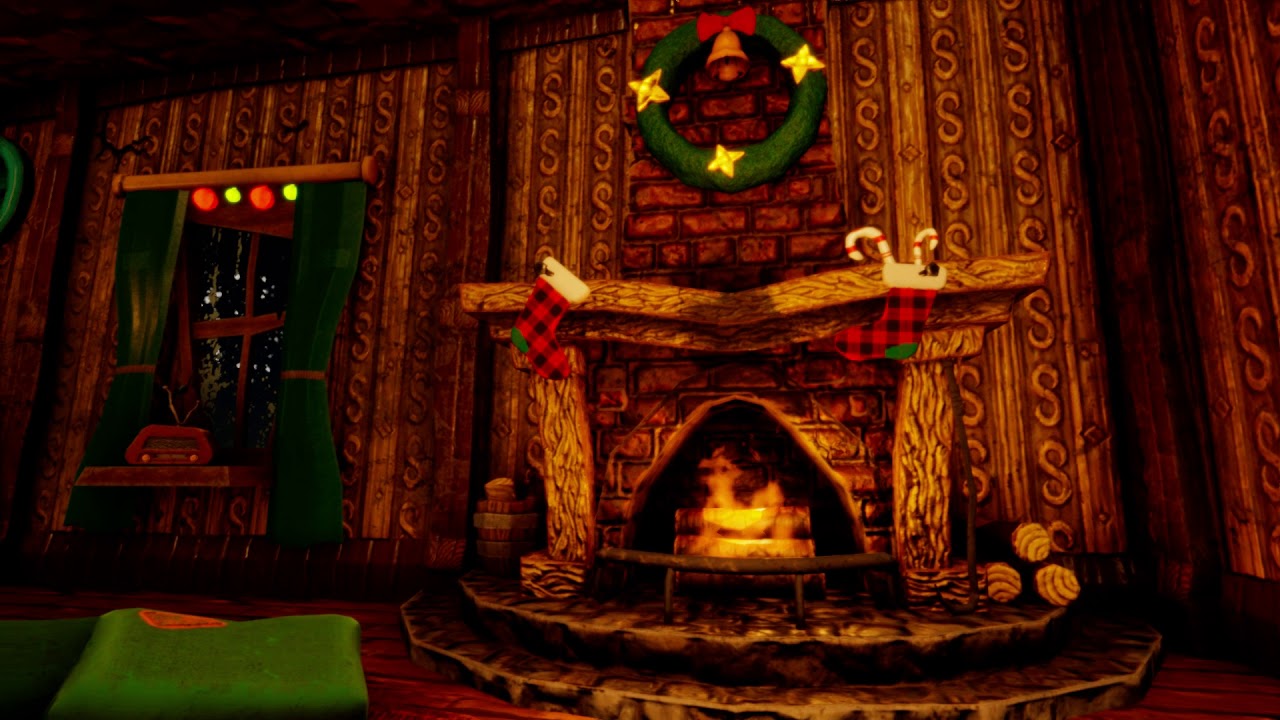
Game Ready Christmas assets.
Package includes over 20 models, Fire, Snow particles and demo scene for unity HDRP.
minor sparrow
modern badge
Nice, looks good. You have a lot of unnecessary polys on the front/top though, m...
Thx. yeah I used VBD to smooth some stuff there, but yeah once the modeling and the detailing is done, I will remesh it
eager mist
mighty sundial
hi does anybody know if theres an artpack on the assetstore available like this.
I could make it for you, you can write me a pm. I will make you a cheap price
rose ember
guys I'm getting this import error on my rigged model. How do I fix it?
shut juniper
did you mess with the rig after you put it in?
Basically it's saying the bones are out of place from where the animation was
shut juniper
Is your rig supposed to be in tpose? Or is he supposed to be just standing there normal
rose ember
that's previewing the idle animation
if you go into edit mode with the mesh selected, you'll see that it's in an A-Pose
shut juniper
I don't use blender that much, I use maya lol but I'll still check it out
rose ember
for some reason it's always previewing the last animation I had selected
shut juniper
have you tried making all your animations into one long frame?
rose ember
no
shut juniper
That's what I usually do for animations anyways
I have it all in the same model and then at the end of each animation I just typically have it go back to default pose, then you can separate the specific frames in the animation editor and set what animation is for x through x frames
rose ember
no
here's my workflow
I made the model in Blender
then I used Rigify to make a humanoid rig
then I used Rigify to Unity to make it work with Unity
then I made the animations
then I exported into Unity
I used these export settings
shut juniper
Wait so you made the animations in unity or blender?
shut juniper
Why don't you just rig it yourself?
I'm not really familiar with rigify unfortunately
rose ember
because I heard rigify was good and it seemed pretty good
basically all it does is generate rigs for things
like there's an animal rig, humanoid rig, etc.
I used the basic humanoid rig that doesn't include eyes, fingers, etc.
shut juniper
Do the bone names in blender match what it shows in unity?
rose ember
that's a good question I'll check
I would seem to think so because I've used Rigify before and never had this problem
yeah I'm pretty sure the names are the same
shut juniper
I'm out of options lol
 crude agate
I really need some help so the issue is I wrote If ( Input.Getkey("d") )
{ rb.AddForce(0, 0, 30*Time.deltaTime);
}
//And and error came('Input' does not contain a defination for 'Getkey').
What to do?????
small monolith
shut juniper
did you import it with the animations baked?
I was AFK but I don't know I just went in the animation tab and made a animation and just played the game
I did not import anything I made the animations in unity
rose ember
@crude agate you didn't capitalize Key
 steep dragon
who @'d me
crude agate
ok
rose ember
sorry public gameobject death I was trying to @ Putin but accidentally did you instead
 tiny cedar
Hi everyone! If anyone's interested on working on an FPS in Unity, dm me! We are modifying the existing Unity FPS template, so if anyone with 3D art and animation skills is interested in working on it, let me know! We're working on this for a game jam, ProcJam 2020. It's a procedural generation jam, so if you want to incorporate something procedural into the art / the tools for the art that'd be awesome too!
rose ember
new question: for some reason my player's mesh is offset from the skeleton in Unity. This is not happening in Blender at all.
see how everything on the skeleton (the spheres) looks right but the player himself is offset very weirdly
 nocturne stirrup
Can someone help me with my URP material? I downloaded a Concrete material from CC0 textures and have everything I need. URP won't let me use a Displacement map and make it higher quality
 final granite
It feels like you're missing cockpit, might be just me
crimson flint
Should I just buy AAA weapons and arms instead of making them because I really don't want to make them
raven tide
if you have the money, sure
 light otter
Low poly Gamma Glock
 silent minnow
duck
 broken flame
Me, tripping over my own unfinished skin weights on my way to export to unity https://gyazo.com/b321af706cae74501d60f7c22e15a8e3
cerulean pilot

I made this sword a week ago, but got busy with school. My first animation, and much love to @kxro_nxte, and @Lycoris_San for helping me.
Likes and Retweets are very appreciated!
Follow me for more!
#RobloxDev #Roblox #RobloxDevs #Blender3d #blenderart #3DModel #3dmodelling https://t.co/0gX0rboAw4
Twitter
·
 fresh minnow
That is a sick sword
 marsh stump
what tools do u people use to do a 3d model with a texture with it
mighty hound
I use blender and substance painter @marsh stump
mighty hound
Low poly dungeon wall example for ya
raven tide
very nice
marsh stump
nice
mighty hound
this is how the parts looked with basic color.... no textures at all. ......... substance painter is one heck of a tool
maiden tangle
It is pretty amazing!
I can only imagine what else you could do with environmental wear
dust dirt grime and whatnot
shut juniper
substance painter makes everything easier
mighty sundial
@eager mist thanks for the offer man but I found one off the asset store with all the facial animation stuff.
mighty hound
also did this with substance....... tho it was one of my first substance textures.
stylized cliff side
and ive only used the program a few times. its crazy what someone with some skill can do
maiden tangle
Then throw in substance designer for custom materials and it can get pretty wild
 zenith hill
 pale spindle
WHat is the recommended amount of vertices for ps4/xbox one consoles?
i mean, the new ps5 is supposed to do gears 5 on 60fps+ and i imagine that game having an average of at least a million+ vertices each frame
raven tide
I think Nathan Drake was around 500k poly's
pale spindle
Ok, it sure takes a powerful computer to work with this high poly count as well lol
raven tide
It may be 200k actually, trying to find the article
pale spindle
I have i7 with nvidia rtx2060 and blender uses at least 3-5 minutes to reduce 800k to 300k poly
cool
raven tide
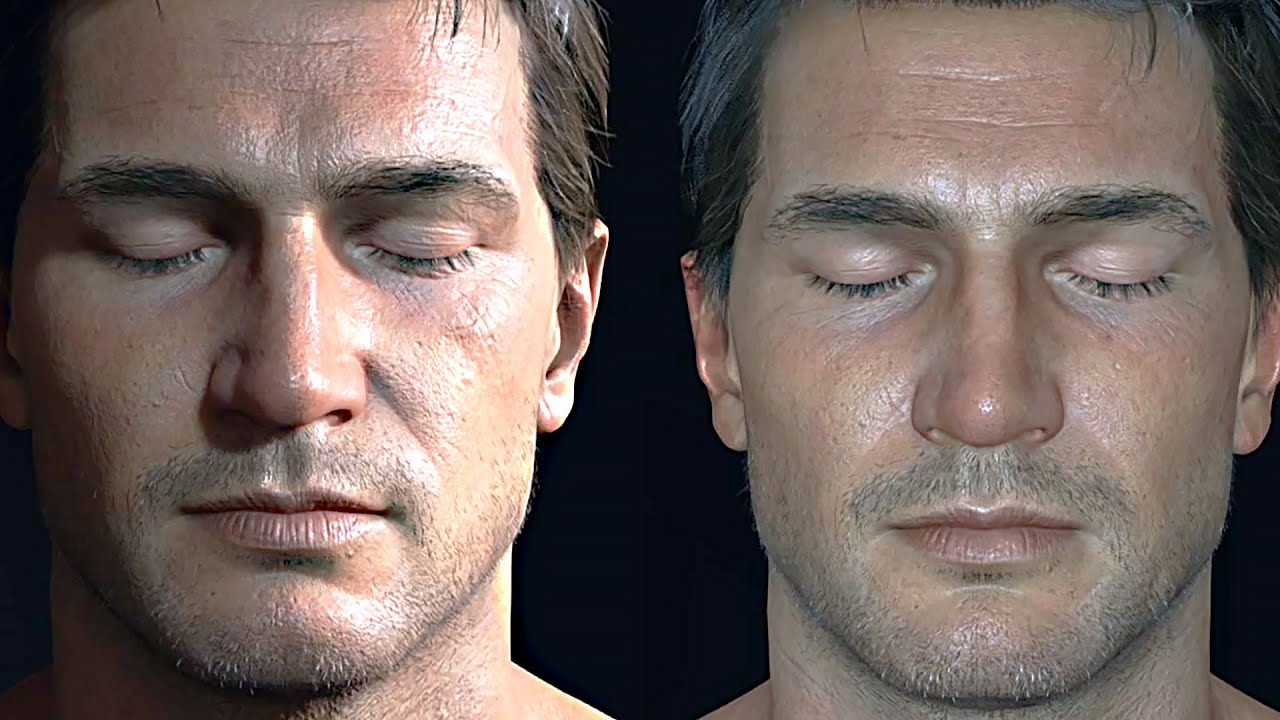
WATCH Uncharted 4 Gameplay Demo ► http://youtu.be/zgXKZF_Igj8
Subscribe for the Latest & Hottest Games News, Game Trailers, Teaser & Games Walkthroughs.
good video on his dev, might have some insight
200k would be more than enough for a hi-poly character though, the rest would be shading
could even go 120k
pale spindle
Nice! thanks for insights, i think i might go with something around 100k
 tired glen
I have this model in blender with textures, but when I import it to unity it imports with no visible textures, any fixes?
eager mist
save it a seprate texture then import it on the mesh.
 smoky owl
@obtuse oyster hey im having problems with unity's universal render pipeline
 obtuse oyster
 cobalt marlin
hello, how can i transfer exactly the same material from s.painter to unity and what should i do to see the same thing if my workflow is correct ?
"i don't use any render pipeline in unity, it is base one.(should i use ?)"
 digital dust
Question is it possible in unity to scale a model to a specific height? Like I have a character and her height is 5'5" how might I go about making her that
glacial vector
You would model them at the correct scale @digital dust
The default units in unity are in meters, so it's easy enough to bring in a cube and set it to the height you want for reference
digital dust
It's not my model so I didn't model it just like to change the height
Unity uses xyz for scale how would you convert height to that?
raven tide
digital dust
Unity uses xyz for scale how would you convert height to that?
the scale is in metres. So if y = 2, y is 2 metres
digital dust
Oh ok
digital dust
raven tide
the scale is in metres. So if y = 2, y is 2 metres
So all 3 numbers would be the same right?
Cause 5 feet 5 inches = 1.651 metres and that's too big
glacial vector
It would depend on the size of the imported model. Use a cube with y scale set to 1.651 as reference
 gilded geode
Hello there guys, more or less total beginner here - would this be the right place to search for some help importing something from blender into unity? I have a problem that is driving me crazy.
raven tide
gilded geode
Hello there guys, more or less total beginner here - would this be the right pla...
I think its the right place, whats the prob, bob?
gilded geode
I am trying to import a model i created in blender with booleans, since probuilder only causes stack overflow for me, but the option "generate colliders" doesn't do what I wanted.
This is what the model looks like (more holes to be added, just for testing purposes
digital dust
I actually have a another question I didn't have my cube on the ground anyone know the position for the ground so the cube is on the ground?
gilded geode
and this is what it generates
raven tide
looks like it still thinks the things you booleaned with are still there?
gilded geode
And the collision mesh generated actually is working even an other way ...
I'm fiddling around for two days already, but I cant seem to get it to work ...
raven tide
digital dust
I actually have a another question I didn't have my cube on the ground anyone kn...
ground is 0
gilded geode
Afaik not, this is what my blender looks like (I'm also new to blender too, soo ... might be my fault)
glacial vector
You need to apply transforms before you export @gilded geode
Currently it's scaling the thing back to 1 on Y
digital dust
I know ground is 0 but for new cubes the y 0 position is in the middle
So it's not on the ground it's through it
gilded geode
@glacial vector Did that. Also tried with convex (in unity) checked and unchecked ... nothings seems to do what i want, but I guess there is a way I'm just missing (?)
raven tide
press w to go to the move tool, and hold V to and snap the gizmo to one of the verts on the bottom of the cube. Then you can move it so the bottom is where the ground is
OR, divide the height of the cube by 2, and raise the cube by that amount
you can actually type that in the inspector
so like if your cube is 1.6 metres high
translate it "1.6/2" in y
and it'll raise it .8
 stuck karma
Hey guys sorry to interrupt but if anyone has any idea what's going on here, when I play my game all the objects are completely distorted, I think it has to do with the aspect ratio or something but I just made a video of it here https://www.youtube.com/watch?v=eGzanTCpSgc
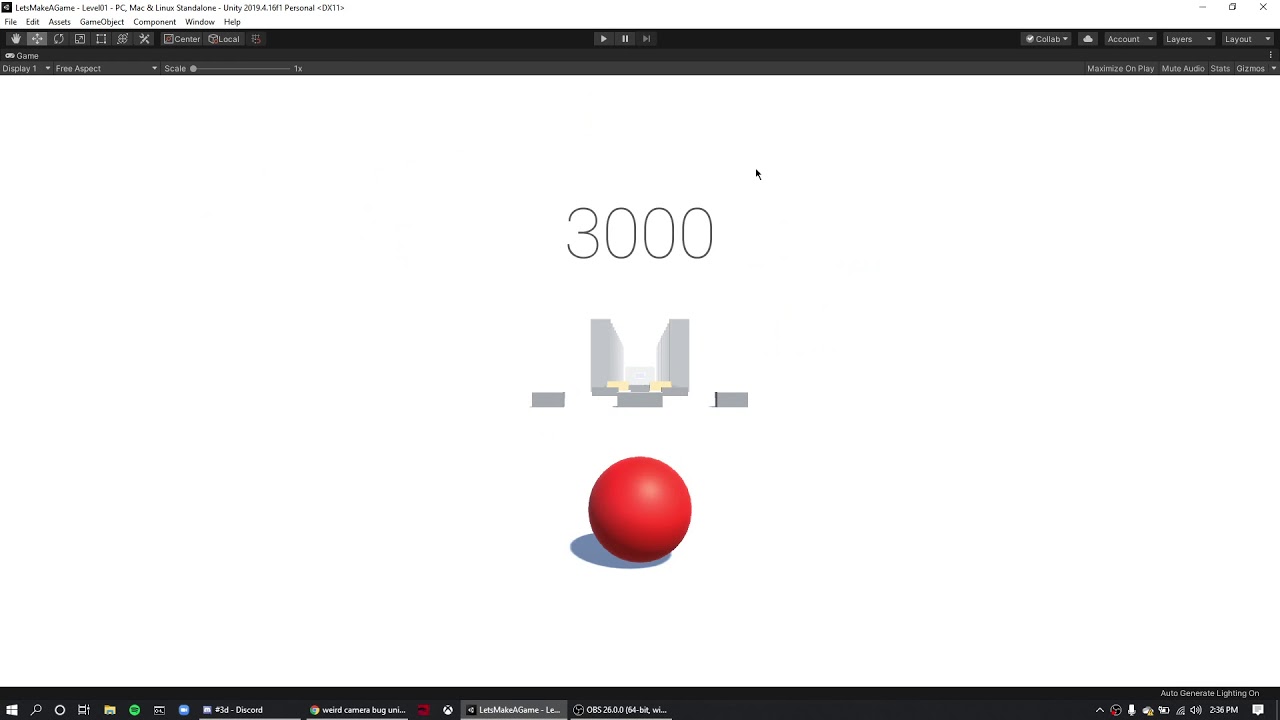
I'm doing the brackeys tutorial lol
digital dust
I actually tried 8 lol I just wanted to make sure it was right thanks for the help
raven tide
stuck karma
Hey guys sorry to interrupt but if anyone has any idea what's going on here, whe...
no idea whats causing it but its awesome lol
stuck karma
yeah lmfao not the most unattractive error to have
stuck karma
okay, yeah they are actually physically moving in the editor too when I'm playing
raven tide
it looks like their scaling/parented to something weird
gilded geode
So, I apllied all transforms again (so scaling says 1), now it looks right, but there seems to be still collision where a hole should be ...
glacial vector
You need to have convex unchecked
gilded geode
Wow, you guys are awesome!
I struggled for two days with this, and you solved it in like 10 minutes!
Thank you very much!
glacial vector
It all comes with time
nocturne stirrup
Can someone help me tile my PBR shader based on the object's size?
Also so that the X, Y, and Z tile based on their independent and respective scales
 viscid linden
Who here would like to tutor me in 30 mintues on the basics on unity and help me with some tips? Would highly appreciate the help.
sullen plank
@viscid linden Tutorials are pinned in #💻┃code-beginner on top.
viscid linden
@sullen plank I have watched a lot of tutorials over the last 5 days, and I'm just exploring my options and trying to learn more and new things. Only problem is, I am a hands - on learner with the asking questions approach.
sullen plank
@viscid linden "Hands on" means using your own "hands" to figure out stuff, not somebody else's. Learning from online materials is a most important skill programmer must have. And courses are a great shortcut to that.
You are welcome to ask questions if you find something you need help with in tutorial/courses.
viscid linden
@sullen plank Me having someone spectate me and telling me what to do while I did what he/she said, would be hands - on.
But thanks ! I appreciate the help
sullen plank
Not the purpose of this community. And personal tutor's time is valuable and costs money.
eager mist
What should i do if static batching and gpu instancing dont fit my project?
Static nope cus planets r moving
Instancing nope cus planet meshes r different, have different mats, AND planet treees buildings etc also mostly have unique mesh and mats
 harsh steppe
I have an object in a scene (fbx) that just wont light bake. It is set to static, and I tried removing it and reimporting it. Any ideas what could stop an object from baking?
pale spindle
in blender, when modeling and using mirror modifier, i get this extra edges that have no vertices (if thats understandable), is this something new in blender?
Ive never seen this before
 smoky juniper
pale spindle
in blender, when modeling and using mirror modifier, i get this extra edges that...
smoky juniper
pale spindle
in blender, when modeling and using mirror modifier, i get this extra edges that...
too bad so sad
pale spindle
Its like blender leaves a ghost of my previous mesh when i edit the mesh
So they do have vertices, but they dont reflect changes on the right side which they should since im using the mirror modifier (x axis), so whats this about?
 amber walrus
@pale spindle Did you figure it out?
Afaik the mirrored geometry shouldn't be selectable. Odds are you have geometry on the both sides of the axis.
pale spindle
Thats what it seems like, i dont think its the configuration for blender either since i managed to produced the same results from 2 different computers
Seems like a new feature in blender because ive never had this in previous versions
amber walrus
Are you splitting the mesh and deleting the other half before mirroring?
pale spindle
@amber walrus No, i never had to do this before. i just simply mirrored it and started modeling and it worked
pale spindle
You see it leaves the original vertice on the left and at the same time change the new
amber walrus
Yea afaik it's not supposed to destroy your own geometry
pale spindle
Lol eloborate, im quite a noob when it comes to blender or 3D modeling in general
"split and yeet", how does this work?
amber walrus
Well you already have the split. Select everything on the mirrored side and delete.
pale spindle
You mean i should select the vertice on the left and delete it?
amber walrus
Yes
pale spindle
Lol that worked, but i never had to do this before??
Seems like unnecessary overhead
amber walrus
There might be clever use cases for not enforcing that
pale spindle
You mean its possible to avoid blender leaving the original vertice behind?
amber walrus
@pale spindle I meant that there might be use cases where not automatically destroying the vertices is useful.
pale spindle
just ask the question
 subtle vortex
how can I create a skinned mesh? Is it in external 3D programs or in Unity? My Google Fu has failed me
raven tide
like a rig?
subtle vortex
yes, so that I can use the Skinned Mesh Renderer so that the item deforms accordingly with the animation
I already have a rigged character that I created in Character Creator 3, what is the next step?
raven tide
should just come in skinned and deform with the model
subtle vortex
what should?
the item was created separately
how do I make it deform to fit my rigged character?
 thorny silo

Sawed off shotgun or Lupara. No movimg parts. All one mesh. - Lupara - Download Free 3D model by madelinya (@madelinya) [8a19ad3]

As title says, Low poly revolver, fully rigged, ready to be animated. - Low poly animated and textured revolver - Download Free 3D model by madelinya (@madelinya) [13c80da]
Any cc?
 brisk trellis
wuts cc?
 zinc quail
Is there a way to control the transparency/alpha of a detail map in the editor?
thorny silo
brisk trellis
wuts cc?
Critique
eager mist
rendertexture.Create failed: 3D textures with depth are not supported
i get this error when i try to apply a render texture to this
 cobalt sierra
Anyone know why this happens in the clip? When i test played my game a bit i realised that when i spam change weapons the animations get very weird and the gun is in my face.
fluid oak
@eager mist either set it to be a 2d texture or disable depth
@cobalt sierra are the arms on a separate layer from locomotion? Is root motion disabled?
 tardy gate
Hello, I'm having an issue with the hierarchy in unity 2018.4.20f where if I add an object to say the hand bone, all other bones in the arm move in reference to the object.
Here I'm rotating the arm bone yet it's rotation point is the object
 hard kelp
Hey how do I remove a bone from a rig? Do I have to go into blender to do that?
I'm just trying to remove the "global" bone (and make the position bone the top bone), or at least put it into an irrelevant spot in the hierarchy.
 clear eagle
I have a question
I was trying to render an ender chest but when I put in the texture, this happened. Can someone tell me why?
'tis very blurry
I was expecting it to look more like this
glacial vector
Disable mipmapping on the texture in its import settings
subtle vortex
https://forum.unity.com/threads/skinned-mesh-renderer-scaling.1021783/ does anyone know how to solve this?

Unity Forum
Hi guys!
- I made a character in Character Creator 3, which already rigs it for you. I now want to make equipment items made in other programs fit...
solar bay
@vale echo Invoke("FunctionName", 2f);
want to freeze game? @vale echo
ohk
is invoke not working @vale echo
oh ya use IEnumerator
@vale echo
@vale echo inside function name use your function
let me tell
make a function
and put stamina -= in that function
or anything you want to wait
yea
then write Invoke("FunctionName", time); and in function name use your function name
yes
u can use 0.2f, 2f or anything
@vale echo you are understanding wrong
I am writing some code just wait (for you)
this will work https://hatebin.com/mvljdzcokm
but don't forget to write your class name
after public class
worked? @vale echo
okk
okk
but add in function
lol
glacial vector
Please move this to a code channel
solar bay
ok
 sacred halo
flat-shaded fighter plane
fervent talon
why its so pixelated
 low arrow
 steel geode
try alt+G for the object
 feral bay
Cool
final granite
how to fix this?
raven tide
hmm
raven tide
final granite
how to fix this?
to me that looks like it wants an 8 bit map and not a 32 bit one
final granite
how do i change it?
raven tide
where did you export it from
final granite
i took this .max file from my brother, he has some homework and thought I could help since i'm experienced with blender
final granite
yes
raven tide
ok load it in there, and save it out as an 8 bit map
instead of 32
see if that fixes it
bit of a shot in the dark tbh I'm not super familiar with 3ds max lens effects, but that error usually means it wants a different bit depth
although are you rendering with vray?
final granite
no, arnold
raven tide
ah
final granite
im on trial version, i literally downloaded it 2 days ago to help him out, it's very uncooperative when compared to blender
raven tide
yeah 3ds max is like a child movie star
used to be really popular, now nobody wants it and when it does work its for specific things
still popular in archviz though from what I hear
final granite
i did depth of field work in blender, cuz i can't bother with max
raven tide
but yeah, apparently the lens effects in 3ds max are limited to 8-16bit tiff or png format
final granite
yeah i've read that too, but i'm not sure what am i supposed to change to png
i've been looking plenty of youtube tutorials and they all do it seamlessly, and without hiccups 😄
raven tide
there should be an image plugged into the lens section of the camera or something
whever you plug in lens effects lol
final granite
resolved by changing the renderer and just frick it
 floral pendant
working on an alleyway
 brave cloak
@floral pendant that looks very good! did you model them yourself? how did you get those textures?
considering it's this good already, i can't imagine how good the finished one will look, good job!
floral pendant
@brave cloak Thank you and yeah everything is created from scratch,i modelled them,textured them
i textured them in substance painter
gilded geode
Hey again people!
I'm back with a problem 😅
This screenshot is from a model I made in blender, problem is, when I import it into Unity and put a tag on it, not every part of the model seems to get the tag assigned. To be more specific, the "ground" seems to work fine, while the "walls" seem to not have the tag. There is a ball rolling around, and I'm checking for collision with
void OnCollisionEnter(Collision collisionInfo)
and then
if (collisionInfo.collider.tag == "wall")
(the wall tag is applied to the whole model, since it doesnt matter in this case, just checking to play a sound on collision)
It does work though, if I don't join all objects in blender and assign the tag "wall" to every seperate piece of the model in Unity, but this is rather tedious and doesn't seem to be intended.
Any Ideas that might help me?
brave cloak
can you take a screenshot of the model in edit mode?
with everything selected (press a until everything turns orange)
floral pendant
brave cloak
how good is substance painter compared to something basic like GIMP?
substance painter is really really powerful as you can bake your textures,it's really easy to add dirt,make something metallic
brave cloak
i've heard it's powerful, i'm kinda doubting it's powerful enough for my beginner ass projects tho :p
gilded geode
Just had an idea, and tested it:
I added a Debug.Log to get a message in the console, whenever any collision happens, and theres nothing on the walls, so it seems not absolutely to be the lack of tag, but that it doesn't detect the collision (?)
floral pendant
brave cloak
i've heard it's powerful, i'm kinda doubting it's powerful enough for my beginne...
ohh yeahh definitely it doesn't matter if your advanced or a beginner
brave cloak
oh yes, i think i know what might be the issue...
@gilded geode what collider do you use?
on something like that, the collision stuff in unity might be fucky
as in it's definitely fixable, i've just been personally trying to avoid having to do it myself :p
gilded geode
@brave cloak
brave cloak
scawy
and yea, i'm not sure how you'd add proper collision to the holes and stuff like that, but by default your model will have either no collision, or extremely fucked up collision
gilded geode
@brave cloak I used the mesh collider, since (if I'm not mistaken) that's for having the collision generated based on the model(?)
brave cloak
here's a model i've made (extremely wip, so looks like trash)
but i'll use it as an example
that green line there, that's the collision
here's "better" lighting
as you can see, it's only covering the outside of it
if i go inside it
there's absolutely nothing
so i'd imagine your collider is at most a wall shape
one way would be to separate each little piece into its own mesh, and add a box collider for every one
but that seems very inefficient, and probably wouldn't work well for the holes
yea actually, i feel like doing some google search scavenging for help, since this issue is something i'm dealing with too
gilded geode
The holes work surprisingly well ... It seems like some very strange error since:
brave cloak
oh? could you show me?
gilded geode
If I understand correctly, this is the mesh unity generates as collider, and it looks okay.
Also the "walls" ARE there, I can't just go through them or smth like that, it's just It can't detect the collision in the script ...
brave cloak
...oh fuck
i just realised i'm a fucking idiot
so for some reason, unity has never shown me the mesh collider's collision stuff without the "convex" checkbox
turns out complicated shapes with holes DO work, i just have to disable that (even tho it's disabled by default)
..sometimes you just have a smooth brain sunday... no, tuesday.
also, question
how many individual objects are there?
in the model
gilded geode
Yeah, I had the same experience 😅
brave cloak
are all those walls their own objects, or are they part of a single mesh?
glacial vector
Note that physics only work with non-convex mesh colliders if they are static
gilded geode
That differs based on my "process"
In blender, i used a piece of wall, duplicate it, place it and so on.
If I then just import it, unity shows me all the seperate parts (every wall on its own as a child of the prefab), and I can assign the tag, and it seems to work.
However, when I join all the objects in blender, and then import (to not have to assign the tag to individual objects in unity), it doesn't seem to work ...
brave cloak
@glacial vector thanks for pointing that out! that makes sense, since most of the time simple colliders would work for moving stuff.
However, when I join all the objects in blender
your topology might be fucked
gilded geode
@brave cloak oh, and here are the working holes (pls don't mind the music, it's a placeholder 😅 )
glacial vector
And they are way heavier to calculate as well
brave cloak
yup, that's what i meant
basically no need to be literally 100% perfect, for a coffee cup that you can punch/shoot or a human you can.. u know, i can't imagine a situation where a concave mesh is needed
gilded geode
The strange thing is that the collisions do actually work as intended, only that I can't detect them in the script.
brave cloak
ohh, okay... huh.
w8, just realised
the object isn't static
maybe The Unity Spaghetti™ doesn't approve of that?
gilded geode
I mean, I could do a workaround, sure. That'd be either export it without joining the objects in blender, or I could add colliders in unity, but the latter one seems really stupid, and also the first option doesn't really seem nice to me ...
brave cloak
the first option is the best one i could think of
i doubt it would screw anything up
gilded geode
By the way: this is what the script looks like (maybe there's an error to be found?)
brave cloak
please copypaste it
i can read that fine, but sometimes i'm on my phone, and reading screenshots is pain
gilded geode
umm ... can't paste it here, might a textfile help you?
gilded geode
Whenever I paste it, discord instantly deletes my message 😅
I'd guess for security reasons?
gilded geode
checked again, it's "wall" (all lowercase like in the script), and still works on the ground, but not on the walls
brave cloak
uhh, sorry, i'm out of ideas, i'm too stupid.
glacial vector
Please post code in #archived-code-general
sullen plank
@gilded geode How to post blocks of code without triggering the spam protection is pinned in the #💻┃code-beginner on top. This is 3d art channel as well. You should repost your question there. But you need to debug what you are colliding with in the first place.
gilded geode
Just for those interested in the solution:
I'm stupid 😅
Of course it doesn't work to detect with "onCollisionEnter" since the ball is already rolling on the ground, and thus doesn't enter a "new" collision, when it touches the wall, so I have to have seperate objects, or to be more specific, at least one seperate object for the ground.
fervent talon
is there a way to make 3d text turn into a button?
brave cloak
@fervent talon i'd imagine you could use raycasts, or just use a button component in the 3d text
fervent talon
brave cloak
<@!507971620950900746> i'd imagine you could use raycasts, or just use a button ...
if i use the button component, the color animation dont work. probably the button either.
brave cloak
then maybe you could raycast from the camera to wherever the cursor is?
fervent talon
i dont know raycasting =/
brave cloak
then this is an opportunity to learn!
fervent talon
brave cloak
then this is an opportunity to learn!
ok ¯_(ツ)_/¯
i want to when the player press play, instead of disappearing, the play button slide across the scene with the camera, that will look back where have the singleplayer and multiplayer button
lyric nymph
I've got a question. If I'm doing a scene with realtime dynamic lighting for a day/night cycle with HDRP, is it better for reused assets (like a fence segment or a support girder) to be combined as one grouped mesh and UV unwrapped together, or should I keep the assets separate (ie, have one asset for the fence, uv unwrapped and textured, and duplicate the fence as needed inside Unity?)
My concern is efficient lightmap UVs. Is there a significant performance hit (or resolution hit to lightmaps) if I use one technique over the other? I don't know which is standard practice. I know grouped meshes will be culled together but that's the extent of information I've been able to find on the subject
 lyric trail
fervent talon
i want to when the player press play, instead of disappearing, the play button s...
lyric trail
fervent talon
i want to when the player press play, instead of disappearing, the play button s...
ay, theres a typo in Credits
creddits
steel geode
am i allowed to use book of the dead assets in my project? why are the trees and foliage invisible when i build my game
 subtle fjord
anyone know why my code doesnt work?
wait a sec
public class Movement : MonoBehaviour
{
    public Rigidbody rb;
    public float forwardForce = 50f;
    public float sidewaysForce = 50f;

    void FixedUpdate()
    {
        if (Input.GetKey("d"))
        {
            rb.AddForce(sidewaysForce * Time.deltaTime, 0, 0, ForceMode.VelocityChange);
        }

        if (Input.GetKey("a"))
        {
            rb.AddForce(-sidewaysForce * Time.deltaTime, 0, 0, ForceMode.VelocityChange);
        }
        if (Input.GetKey("w"))
        {
            rb.AddForce(forwardForce * Time.deltaTime, ForceMode.VelocityChange, 0, 0);
        }

        if (Input.GetKey("s"))
        {
            rb.AddForce(-forwardForce * Time.deltaTime, ForceMode.VelocityChange, 0, 0);
        }
    }
}
gives an error
cannot convert from UnityEngine.ForceMode to "float"
subtle fjord
hello?
solar bay
why? @subtle fjord
subtle fjord
?
it doesnt work
just returns an error
cannot convert from UnityEngine.ForceMode to "float"
solar bay
you wrote 0,0,ForceMode.VelocityChange, 0, 0
what is this
I think you wanting ForceMode.VelocityChange
@subtle fjord
solar bay
what you want
subtle fjord
i just want it to move forward and backwards
solar bay
because it took just 2 parameters
but you gave it too much
and with any brackets so if he know that you are calling function
brave cloak
@subtle fjord i know why it doesn't work, but #💻┃code-beginner
subtle fjord
did it there already
cerulean pilot

 lyric trail
thats roblox :0
 crude topaz
hi guys...im having this problem with this tree model.
as you can see the faces of the trunk that im facing disappear.
in blender they dont.
do you know what it might be?
that doesn''t happen with the green part
glacial vector
Your normals are inverted
crude topaz
sorry if i ask but im new to 3d , how can i fix it?
glacial vector
You can fix this by recalculating your normals in blender
It's under face settings I think
 analog flame
Sorry If this Is off-topic, but there any possibility that y'alls from Blender can tell me how to turn off the aim assist? Thank you
digital dust
Possible to export model in unity to fbx?
tired glen
I have my model in a .fbx format, but when I import it, it has no textures but when I change the element to Default-Line textures appear but missed up a bit?
it supposed to look like this
 bold condor


 south ruin
so fellas i got a quick question with some possibly long answers.
when making small buildings, is it better to join the separate objects and meshes, or leave them separated.
im working on a small 2 story log cabin, and trying to optimize as much as possible without loosing and of the old cabin feel if that makes sense. @ me if any one has an answer.
 elfin sorrel
quick work in progress for my current game project.
 sly grove
Hey, people! I'm working on a game(I'm new to Unity) and I use Blender for 3D Modelling. When I add my Blender models into Unity, for some reason the textures are not brought along with it, or at least not working properly. Anybody know how I can fix this?
elfin sorrel
Try importing the textures separately, is there still a problem? Blender noob here, but I usually import my textures separately just as a matter of course
sly grove
I use image textures, would that still work?
elfin sorrel
Are they Texture2D (i.e. Default) or Sprite/UI
sly grove
I'm not sure, but the textures are all from the CC0 Textures.
elfin sorrel
try dragging them into a new folder, and then drag them onto the model. See if that works
elfin sorrel
👍
elfin sorrel
you still need to at least unwrap your models and at least apply a test texture, and even more if you want separate material IDs
sly grove
Yeah, I guess.
sly grove
Hi, I guess I'm back here again. I'll probably be here a lot, since I'm pretty new to Unity.
I was wondering how I can make my own textures, preferably realistic ones.
 honest wyvern
You can use things like Photoshop (or any other art program) for texturing, or Substance Painter if you want really good results.
 lavish violet
I was wondering how I would insert a wedge (slope ) into unity?
 karmic plume
So i want to make a simple map or training area for my game but i have 0 experience with building in unity and i want to try blender what should i do ? Use blender for map making or unity
glacial vector
If you wanna stick to unity you can use ProBuilder for some simple modeling @karmic plume. But anything you want more complex is gonna be easier to make in blender
sly grove
Welp, I don't have Photoshop or Substance Painter-- and plus, I'm not good at art.
elfin sorrel
I'm not good at 2D art, except in specific areas (mainly UI and stream overlays)
but textures????? I use textures.com
sly grove
Oh, thanks :)
lyric nymph
Substance Designer is imo a dream come true for making textures without an art background. Very time consuming but perfect if you want detailed, custom materials without ever drawing things yourself
The benefits are compounded when you're working with PBR materials and not just base color textures
sly grove
I guess, it would probably be better to get someone else to do textures for my game.
But the problem is, nobody likes me and I have no money.
lyric nymph
Buy the textures you need or use royalty free stuff
Make the rest of your game with placeholder textures / programmer art then hire for the remaining textures if your game seems to be worth the cost (ie, if you think there's a possiblity for a return on your investment)
Don't get caught up in the art when you can still make the rest of your game
sly grove
Okay.
 gritty veldt
What's the best way to handle poofy comic/anime style hair like a mohawk or something?
glacial vector
+1 for substance designer
Mesh for silhouette/volume and hair cards for breaking it up @gritty veldt
gritty veldt
glacial vector
Mesh for silhouette/volume and hair cards for breaking it up <@!7259273434908590...
Would you mind explaining in further detail? I googled hair cards and it seems (?) like it's more for realistic simulated hair rather than blocky cartoon hair
But that's just from the cursory googling I've done
glacial vector
It depends on the style. If you can get the shape you want with just a mesh then great
gritty veldt
I'm more asking about stuff like hair physics, like having a little bit of drag in response to motion
glacial vector
Oh, well that would be included in your rig
That's more of an #🏃┃animation question
gritty veldt
Ahh gotcha
Do you know if that sort of thing is handled in blender or unity?
Like is it a bone constraint thing?
glacial vector
You could do either
worn quail
anyone up for some among us?
 outer ravine
I wanna do some among us
outer ravine
oki
 errant shoal
"Be mom of"
 rocky sky
Hey guys. I was wondering what the best method would be to render a water body across the entire level, without causing performance issues. Do I break up the water body into multiple plane meshes and load them progressively? Please note that this is for both Premium VR and Android platform (Quest).
Thanks for your help.
maiden tangle
rocky sky
Hey guys. I was wondering what the best method would be to render a water body a...
I've usually seen it done as the water mesh spreading the entire scene as a single plane, with a shader taking into account the detail density in waves / texture tiling
I can't imagine you would want to do otherwise if your water is on a single level and your terrain tiles are not being loaded as a chunk- even if they were again, single plane > many planes I would imagine
 tardy vapor
ok so i've just loaded up an old project and all of my .blend files have decided to not work, how would i point unity to my new blender install?
oop, just needed to set blender as the default for .blend files, oops!
 dapper spoke
regarding models made in Maya using blendshapes, can I modify the blendshapes in Unity to say change their body proportions using code?
glacial vector
Yes, a Skinned Mesh Renderer will list all the blend shapes on your model @dapper spoke
dapper spoke
@uneven ledge thank you.
 little crow
I have an image I want to place onto an object I made in blender, does anyone have a good guide for doing so?
maiden tangle
little crow
I have an image I want to place onto an object I made in blender, does anyone ha...
the object needs to be "uv unwrapped" so the object knows where to put the texture's pixels
I would go with youtube
brave cloak
little crow
I have an image I want to place onto an object I made in blender, does anyone ha...
so texture?
could you elaborate, what object?
but yea, uv unwrapping and applying the texture in blender should be enough
 obsidian maple
Hello. I have an issue with a rig creation for an existing model.
When it creates a humanoid rig it comes out next way:
Feet are turned in wrong direction and thumbs are inside the hand.
That's a "Forced T Pose"
If I reset pose it's this:
When trying to test the model in "Muscles & Settings" - torso, generally faces wrong direction.
How do I fix that?
This is how model looks in Blender:
obsidian maple
I set character in a proper T pose, and this is what it looks like:
It says its only hips and and legs are not in a t pose
obsidian maple
Someone from CATS(Blender to VRChat module) told me what was error in this:
Bones are named wrong - Left is right and vice versa
 mystic olive
What would be the best way to create stairs for unity, in blender
 merry gulch
does anyone ahve an idea of how i would go about making an 3d orthographic platformer with sprites?
i am trying to do that but the layering is completely off and im not sure how to approach it
mystic olive
merry gulch
does anyone ahve an idea of how i would go about making an 3d orthographic platf...
why do you need it to be 3d?
merry gulch
it needs to be 3d so that the player can jump on and from platforms and high places
i tried it in 2d a few months ago and it wasn't very good at all
mystic olive
what have you tried doing to set the layers
merry gulch
i tried changing the sorting order whenever the player stopped touching a platform (to 0) and whenever the player started touching a platform (to 3)
merry gulch
well yeah the layer order is changing
merry gulch
the front face is 3, the top face is 4
mystic olive
alright. Wait, I think the issue is that the player is going through the back of the crate, and it is not the sorting order that is the issue.
merry gulch
hmm there is no back of the crate, the collider i put on the crate covers the entire fake cube
mystic olive
oh
 pearl reef
Can maybe someone help me make a test game?
I can't code at all, but I know of Python and Java and C#
merry gulch
i dont think this is the right place/channel to ask for that stuff
mystic olive
pearl reef
I can't code at all, but I know of Python and Java and C#
this is not the correct place to ask this. If you need help, you can go on youtube, and search for a turtorial
or, ask someone in the correct channel
pearl reef
merry gulch
does anyone ahve an idea of how i would go about making an 3d orthographic platf...
Maybe try doing the object in blender
merry gulch
uhh can't do that, planning to have the player animated and i'm pretty sure that'd make me have to create a bunch of different meshes
unless i'm misinformed
pearl reef
Mhm.
You could make it into a 3D game and somehow code it that the sprite could be animated.
And put the textures on a cube.
And position the camera above the map.
But I'm stupid and can't code so don't take advice from me.
merry gulch
then why would you give me advice
merry gulch
alright then
 sand epoch
does anyone know why when i export a house from blender as fbx into unity, when i enter the house, the walls don't render from inside?
did i mess up a setting?
needed a double sided shader 🙂
 limber haven
it’s probably also caused by the fact that the walls have zero thickness or the normals are facing the wrong direction
rocky sky
maiden tangle
I've usually seen it done as the water mesh spreading the entire scene as a sing...
I see. I've been told that it's better to break the water surface up into smaller planes as the texture resolution is retained. I faced this issue when building something for the Quest (Android platform). When I used a single plane as a water surface, the texture got pixelated in run time. Thanks for the help!
maiden tangle
comes back to how big of a world it is yep
rocky sky
I've also been struggling to get physically accurate reflections on my water surface. Currently, while the reflections appear, they are greatly displaced. Does anyone know how to go about this? I'm building the scene for VR with a camera that moves constantly and I want to achieve it with static baked reflections as realtime/dynamic is performance intensive. I know it has something to do with the camera and probe position but beyond that I don't know how to go about it.
Anyone who's resolved this, please let me know. Thanks!
 silver sparrow
Is it fine if I ask for rigging questions here?
hh its my first time using unity so i dunno if this is a rookie question
Im trying to follow a tutorial on importing a mmd model into vrchat
I tried to configure the model rig but im missing quite a few bones?
some also aren't in place
I can discard the clothes bones and stuff i dont think thatd show up
but i dunno why a leg bone is missing?
is it cuz its rigged differently or something?
the clothes bone arent connected to the hip bone would that be why?
i dunno wtf I did but it worked aaa
How do I go about detatching this-
sorry for clogging up the chat
silver sparrow
lmaoo its k that was cringy old art i never bothered to change
XDD idk if the questions im asking are easily solvable by just experimenting tho ive been at this for 5 hours lmaooo
Help Unity why what am i doing wrong aaaaaa why is everything transparant-
I used the same old settings and everything the materials set to legacy shaders/transparant/vertexlit
solar bay
@silver sparrow in game view?
silver sparrow
ohh so its normal?
solar bay
i think u off skybox or solid color in camera
silver sparrow
This?
All I remember this one being different to the previus 3 trial documents were the background i think?
But then the one i tried before also had the model being weirdly transparant even though the background was the blue one
eager mist
Hello unity
 pine glacier
tired glen
I have my model in a .fbx format, but when I import it, it has no textures but w...
pine glacier
tired glen
I have my model in a .fbx format, but when I import it, it has no textures but w...
Those normals are fucked