#🔀┃art-asset-workflow
1 messages · Page 52 of 1
 dawn temple
 glacial vector
Hey we all wanna work comfortably 😉
 eager mist
Hi, i am developing a 3d game but I have a problem, I saved my project and closed unity, but when I open it again it shows compiler errors, how can i fix it?
 cunning thistle
share what the compile errors are
eager mist
Ok let me just open the computer
I work with playmaker and the errors are with the asset
 fluid oak
@thorny wasp If you want the files from the tutorial without doing the tutorial you can get them from the tutorial guy's patreon
 tired notch
Im new in game dev and I know there is tools to make models (like Blender). I built this in Unity, does it look like a Formula 1 car? ahahah
 shrewd mortar
Hey guys i have a question.. do i need to rig clothes or it is set up in unity with cloth component?
eager mist
so anyone got a good modeling app and a tutorial for it
i sugest blender allot of tutorials out there and even i vind it understandeble
find*
and it is free
k
Im new in game dev and I know there is tools to make models (like Blender). I built this in Unity, does it look like a Formula 1 car? ahahah
@tired notch to car looks good but i think the viewing angle makes it look a bit weird
how do i move in blender lol
@eager mist
like your model
my cam
with your mouse
but that dosent do anything

This is part one of my free course to learning Blender 2.8. Create this fun scene and learn the interface, how to add objects, lighting, build objects, create atmosphere, render images and movies and lots more.
Part 1 https://youtu.be/7MRonzqYJgw
Part 2 https://youtu.be/L0AY6...
i sugest watching this serie for the fundalmetals
ok
eager mist
the best thing in unity since the invention of 3d sliced cheese - is the prefab system introduced in unity 2018.
modular design has been so much faster since
 forest inlet
anyone got any idea how i can export each animation separately using blender?
 near river
Why? Exporting all of them and then just configuring which takes to import in Unity works fine for me
forest inlet
no real reason, id just like to have my animations in separate folder
so i can configure them once and leave them
and can iterate on the model separately
instead of re exporting full model each time
eager mist
How do I get unity to use two seperate UV maps on one mesh? I have a UV for lightmapping and a UV for the main texture but I'm unsure how to get them setup properly
forest inlet
so id like to do smth like export:
ModelFile.fbx
Animations/
  ModelFile@Walk.fbx
  ModelFile@Run.fbx
if u catch my drift
near river
Yup, I think you can still have a separate .blend file with just armature and dummy model rigged — import that in Unity, configure all your animations and leave it be. Roughly the same workflow, except fewer files, right?
Actually, just found a thread which suggests the same https://forum.unity.com/threads/export-actions-from-blender-by-separate-fbx-files-like-from-mixamo.470127/

Unity Forum
Hi, all.
My astronaut model made in Blender and contains 15 or more animation clips, so the final size of .FBX for Unity is not suitable for me (waste...
@eager mist which pipeline? Built-in? URP? HDRP?
In shader graphs you'll typically get UV0 for main and UV1 for lightmapping (generated). In .shader files you'll use TEXCOORD0 and TEXCOORD1 instead. Everything else depends on what you want to do with UVs
eager mist
Great question, no clue. I've mostly just begun using unity so I'm only a little lost. I'm used to using the cryengine and older game engines
So I'll have to write a custom shader to specify what maps use what UVs?
near river
I think so; standard shaders I've seen all use UV0 for main textures
eager mist
Well hold on, if the first UV set is used for main textures and the 2nd for lightmapping, maybe I can just reverse the order in blender and it'll work without a custom shader. But then it looks like I wouldnt be able to use detail maps since they use uv1
I might be SoL on the way I'm going about this then
near river
https://docs.unity3d.com/Manual/LightingGiUvs-GeneratingLightmappingUVs.html — this one says that uv2 (i.e. TEXCOORD1 if I understand correctly) is used for lightmapping. Sadly, I've no idea about detail maps + lightmapping (never used that combo myself)
eager mist
Well atm it looks like swapping the UVmap locations worked, I'll get to the whole detail mapping issue when I get there, but here's something else
What would be causing the artifacting on the triangles in the distance?
It follows the camera around at that set distance away, so if you move forward its static relative to your position and moves along the geomtry
near river
First obvious q: do you have gizmos rendered?
eager mist
No, and a bit of googling indicates this is a known problem thats been reported and has been persisting for years, apparently caused by over interpolation of normals
hmm
What doesnt make sense is I don't encounter this in other peoples content in the game I'm making content for, so what makes my circumstances different? I doubt each and every modder implemented a solution for this
Ooh interesting, it only happens in the local test build, and not in the games live client - nevermind it still happens
forest inlet
also, does anyone know of an addon for blender that will do the following:
-let me apply modifiers and merge all meshes into one object, generate the UV map, then bake all the materials into one texture?
forest inlet
btw if anyone is interested

GitHub
Blender addon for baking images. Contribute to Shahzod114/Blender-BakeLab2 development by creating an account on GitHub.
cut my work by 90%
all i have to do is combine the objects and make sure they're correct, set up armature etc
this addon can handle baking
btw, anyone can weigh in on the different textures they transfer to unity?
the base map -> i use the diffuse/albedo from blender
what do u guys use for metallic map?
 misty nymph
Hey everyone I have a quick question. I have a 3d model that I imported and you can see the model facing forward but if you walk behind the model it becomes transparent. Anyone know how to fix that?
 hoary pawn
@misty nymph make sure the triangles are facing the camera
and read up on "backface culling" it's an important concept that you need to know
 boreal rapids
Has anyone had any problems with probuilder where when you assign a 2nd material e.g Element 0, Element 1; The 2nd material shows but when you do it again to a 2nd object, the 1st object looses that 2nd material and will not show again. Sorry if that sounds confusing
boreal rapids
Basicly, I apply the Element 1 and it shows. I then do the same for another model and then it all disappears and If I try adding it again, it does not work and will not show any other materials other then Element 0
 solar current
i have a cloth simulation in blender, how can i export this animation to unity to make a scene? and if there's an easier way to animate cloth like a flag to export it to unity please let me know thank.
 grave eagle
is there a job listing spot on this server
 void thicket
Hi there
I have these 3d models that i made now free due to my birthday, https://creativesky.itch.io/

itch.io
eager mist
i have a model, and it shows up in the editor, but when i run the game the model immediately disappears... anyone know why this might happen?
(the model disappears, not the actual gameobject)
 brisk trellis
what are voxels?
glacial vector
A 3D pixel @brisk trellis
brisk trellis
ok thank for the info @glacial vector
boreal rapids
Any maya users know if there is a way to select all reversed uv shells at once?
 true dew
hi, what are some useful tools for autorigging?
true dew
then where can I find a tut on that?
 brave cloak
what software do you use?
A quick tutorial of how to rig a character in blender
the very very basics. nice quick and simple to get you started.
It's meant for people with a basic understanding of blender
this is the one i used to learn how to do it on blender
feel free to ask me though, since i know tutorials don't cover every question one might have.
true dew
👍
a bit more advance, with fingers and eyes I think, looking for that exact video tut full end to end, otherwise auto rig as I have a bunch of models. Just interest in finding out the names of state of the art autorig tools
 lapis lance
hiiii
guys
im using blender
so I got here
using ctrl r
so how do I cut the rest of the cube?
and just leave the front?
 teal tapir
press 3 on the keyboard, select the faces you want to delete, press x and on the topdown menu click faces
also, you youtube or Blender manual, don't be lazy
 urban roost
Could someone point me to a video/tutorial for making joysticks for a 3d mobile game?
 rain flax
If I'm making an apartment with multiple rooms and various props/lights, should I use blender to create it all or unity?
glacial vector
You can model everything in blender, or you can make a set of building blocks and actually assemble the scene in unity
 lone bough
Hey people, dose anyone know if it's possible to rig a Pro Builder model inside Unity?
 violet storm
I'm experiencing a bizarre issue for my blend shapes in Unity. I took a model that has shape keys from blender and imported to unity. However, parts of the mesh are changing even tho it didn't do that for the original shape key
glacial vector
On the import settings of your mesh @violet storm, make sure normals are set to imported and not calculated
glacial vector
No in unity
violet storm
they're already set to import
glacial vector
blend shape normals
violet storm
ahhhhhh
kk!
tried it and still messes up
but it seems like when I use legacy blend shapes it fixes it @glacial vector
Not sure what it means
or how to get it working without legacy blend shape normals
lone bough
Hey people, dose anyone know if you can create bones and rig things you've made in pro-builder?
 errant plover
You have to export it and add that in Blender.
 rapid echo
Made a new scene in Blender. A room with plants! Thanks for viewing! :)
.
https://twitter.com/FarrukhAbdur/status/1306818960218820609?s=20


I completed the room with plants! Hope you like it!🌿
Artstation: https://t.co/EZ5ZdkQefW
#b3d #substancepainter #gamedev #indiedev #blender3d #blender #polycount https://t.co/GwdFdNGCEv
 Twitter
lapis lance
Twitter
lapis lance
any guide to blender in less than 3hrs?
brisk trellis
hi, i want to make an game like minecraft an anyone pls link me to vid on how to apply textures to a cube made with verts and tris
any guide to blender in less than 3hrs?
@lapis lance u can watch blenderguru's donut tutorial
lapis lance
ty
lapis lance
anyone here online?
lapis lance
guys, im getting this error unplesant thing
the surface of object is not committed to the line
 sick junco
hey , I came here looking for some help
Im trying to make a prop of a jar jull of suckers ,(lolipops)
but Im dont know the best way about doing it
lapis lance
kkk
sick junco
espicailly as the jar can easliy fit like 30 in it
I tried giving the suckers a rigidbody and paced them so they fall in , but it looks like that isnt the most effiecien way to do it
 karmic lynx
what does the prop need to do?
is it just a jar full of stuff, seen, never interacted with?
sick junco
its a bit important so it needs to look good
yeah I want to fill it
as it will be looked at alot
karmic lynx
it it needs to look good and doesn't need to move, you don't need physics
you might be able to do it with rigidbodies, but getting that to work might take longer than doing it manually
rigidbody would be better if you had to fill dozens of jars with X stuff
karmic lynx
but for one jar that has to look nice, you can do it manually, and also make it look fancy while you're at it. put a ribbon on it or something 😄
glacial vector
There is also the option to do the physics simulation in blender, which isn't realtime so might give better results
sick junco
I think you dissolved a face earlier instead of deleting it earlier
guys, im getting this error unplesant thing
@lapis lance
lapis lance
like this
I think you dissolved a face earlier instead of deleting it earlier
@lapis lance
@sick junco it's because of incorrect alignment of points
this blender to be honest require huge amount of precision for me to avoid those errors
sick junco
oh ok
lapis lance
and btw
sick junco
lol yeah
lapis lance
do u know how to set to view mode to the image I've sent earlier?
mine looks so boring
lapis lance
but sure anyhting you can think of can be done
@sick junco yes, if I'm a pro and im not asking those who don't know (sorry for being rude but I have been programming for 8 hours and I'm getting irritated)
sick junco
I cant even imagine what programming blender is like
This is my result of what I tried to do
it has 30 suckers in it
I dont know if this will impact performance
as there will be anonther 8 of these jars in a level
lapis lance
I cant even imagine what programming blender is like
@sick junco well, I mean programming using python and other stuff, but unity and blender is about draggign' and typing numbers to me now :/
it has 30 suckers in it
I dont know if this will impact performance
as there will be anonther 8 of these jars in a level
@sick junco it wouldn't if u have 16gb+ ram pc
sick junco
hmm
well the whole level has like 300 + pieces of walls and floors
using it for prototyping and it isnt laggy
glacial vector
30 live rigidbodies * 8 will make a performance impact
glacial vector
Then it's fine
sick junco
ok , thanks
karmic lynx
@lapis lance transparency and glowy stuff can be done in many different ways
the simplest is probably Additive particle shader
it's not the best, just simplest
basically, black color does nothing
anything not-black is added on top of whatever is behind it, making it look like bright lights
it can be green, red, whatever
for better results, you can do emissive stuff, there's specific shaders and materials just for making glass with glowing things, etc
sick junco
ok I added a light in the middle , but it is realtime , so I want it baked
can I do it so it only affects the jar
and the suckers?
karmic lynx
but additive shaders is a Unity thing
Blender can't actually do additive shaders easily, it has its own bunch of things to do
@sick junco it doesn't look like lollipops atm. more like glowing red eyeballs or fish eggs
also, that vase shape doesn't look right for an object that'd be full of candy
sick junco
yeah lol
I wanted to give it a glow , but thas how it turned out
sick junco
its not going to be a tradional candy jar
sick junco
yeah I went with that
karmic lynx
fill the bottom with some smaller candies - or, well, maybe a mesh with a tiling candy texture on them. no need to have individual pieces there for real
karmic lynx
it's too case specific
I have no idea what you're going for, realistic or cartoony, well lit or night
it's all about the illusion you want to make
any way, I have to go do some other stuff
sick junco
basically magically suckers in a jar
and the suckers are glowing
any good glowing shaders ?
Here's what I tried
 limber quest
How is it
sick junco
better than what I could d
The street does look glossy
should get a hieght mpa for that
 outer hemlock
the car is good but lighting and scene isnt great
i agree, at least put a bump map on the road and just make the area less flat. i couldnt even tell at first that the sidewalk was raised
limber quest
You are right
eager mist
when i apply a material to an object, the texture gets stretched to the dimensions, what if i want it to crop accordingly?
depending on the size of the object, the texture is stretched
can anyone help me?
karmic lynx
most materials use object's UV scaling
UV changes if object's scale is changed
use a special material that ignores UVs
or use other tricks
there are tons of tricks to solve this issue, but typically "I grab a cube and scale it" isn't enough
eager mist
yes figured that out myself and made the map in blender
 golden berry
Hi Guys. I just wanted to check if anyone knows of any good tutorials for rigging from start to finish in unity? Moving over from maya and was hoping to try this out.
 solid kraken
I'm watching a bunch on Youtube and blender itself has a on point tutorial video.
So, People, Greetings.
I wanted to ask,
I am using Solidworks to model character and will import them to Blender for rig and Unity later.
Others who have done this before, how did it go and was it taxing for your system ?
Please @solid kraken if you wanna reply.
eager mist
@merry island is that blender
 merry island
ye
 plush aspen
@merry island temporarily turn off mirroring
plush aspen
Even if you pull it straight down you have a line that is going to create a face in the middle that will be hidden. You may also want to change your orientation to global if you want it to go straight down
merry island
i had to fix a bunch of small gaps
plush aspen
ok good glad you got it
 digital lynx
is there any other way to have a texture over all faces of a cube without making a seperate material for it, or is that the only way to do it?
 maiden tangle
@sick junco if you want something glowing I'd put some emission coloring + post
you probably want a fancy shader though for inner glow right? might try #archived-shaders
 quartz stone
If someone can help me with rigging in blender please, DM me
brave cloak
A quick tutorial of how to rig a character in blender
the very very basics. nice quick and simple to get you started.
It's meant for people with a basic understanding of blender
hope this helps x @quartz stone
quartz stone
I have given my rig and model the "with automatic weights" option though, which, which means I can't connect my mesh to bones cause it did it and I need to do it manually because it wasn't good, do you know how do I turn it off or something?
@brave cloak?
brave cloak
select the skeleton/mesh, right click, parent, clear parent
or actually
there's 2 ways
either clear parent and pair them again, this time with empty weights, then weight painting it manually
or just keep the automatic weighting and fix the bad parts
quartz stone
Idk how to fix them
brave cloak
weight painting it manually
quartz stone
Hm
Uh idk how to do that, it's my first time rigging
I made my rig, and now it's connected to the model and idk how to sperate them so I could try again...
brave cloak
select the skeleton/mesh, right click, parent, clear parent
 mellow eagle
Hi
can i get some help?
i'm a new with unity games development and i need help with some thing
player move
how i can move my player by clicking on keyboard
mellow eagle
can i get help 
 bleak turret
Get keyboard inputs and transform or manipulate object.
in update or fixedupdate
 sullen plank
@mellow eagle Locomotion is a complicated topic. Start with something basic to understand how it works. https://learn.unity.com/project/roll-a-ball
mellow eagle
ok thank you sir
 eager oyster
How can i convert a model into a mesh?
 teal pecan
 unreal crest
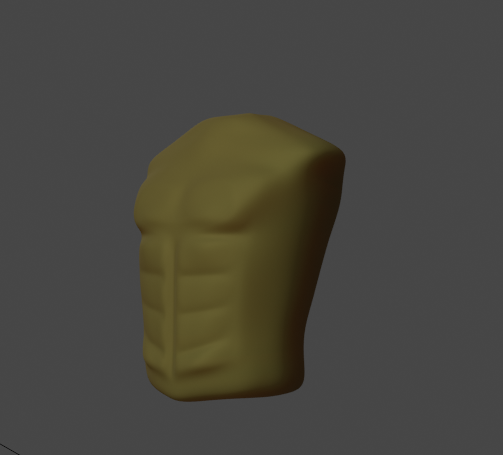
Why aren't my sky textures being rendered at their actual resolution? The texture I'm using is an absurd 16384x8192, and I may end up using a cube map instead since it seems to be more efficient having six 2048 maps, but just for the sake of testing, I set the texture to 8192 which is the max, and well... It's clearly not that resolution. In fact, I see virtually no change in the viewport as I reduce the size of the texture all the way down to 2048. Beyond that, I then see the expected degradation.
This is about how detailed the moon should look at 8192:
errant plover
Change filter mode to point. I also think that Unity will scale down your texture until its a power of 2. So 16834 will be cut down to 8192.
unreal crest
I don't think you understand the issue. I realize the 16384 texture will be scaled down to 8192. My second image is showing what that would look like, approximately as it is at 50% scale in photoshop. Technically speaking it is 8192x4096 there.
Nonetheless, the result I am seeing in Unity looks virtually identical to a 2048x2048 texture. Its not even remotely similar to how the texture would look if it were scaled down to 8192.
And in general, it's not a good idea to change filter mode to point, as that means there's no blending between mipmaps when scaling the image down in game to lower resolutions which can result in aliasing and sparkling and other unwanted artifacts.
For example, with bilinear filtering:
And with point filtering:
Of course I didn't have the texture resolution set to 8192 there, so I just did that and... As you can see the result is identical:
And yes, I know I have scaled up the game view there. I did that so you could more easily see the difference in the moon.
errant plover
Interesting. Not sure what else to recommend.
 modest ledge
 cloud latch
I posted a video on #archived-resources
eager mist
@unreal crest , if it is a spherical map, than that 16k or 8k is one texture. You will get higher resolution from cube mapped skyboxes.
because that 8K texture is is 8K for the entire sphere, from 0 to 360 degrees.
with a 6 sided skybox you can have 8K per face, so your radial resolution actually becomes 8K X4
by this i mean, try to export the cube map faces alone. And use a 6 sided skybox - instead of importing a texture cube, and see what you can get out of that.
eager mist
my walls look.. weird
i dont see anything wrong with the material
it only happens when i build
and not in all walls, in some walls
dont understand why
eager mist
anyone here?
ok so i tested it with a different material and the problem didn't occur so so far the only information i have debugged out of this thing is that it's the materials fault
brisk trellis
like that
@mellow eagle
how to set it as a C#
@mellow eagle its a c# script unity changed the picture in the update
mellow eagle
oh okay
 peak anvil
hi,this is my problem when i follow this tutorial and want to "Set Parent To AutomaticWight"

Quickly set up a basic skeleton!
In this series of tutorials i am going to teach you how to make a full custom rig!
Compatible with Unity 100% Tested.
Follow me in this series, and if you can't follow...
Ask questions. Easy peasy
Subscribe!
BG Musics by Ketsa!
 stable anchor
how do i put my blender thing in unity
stable anchor
thank mate
 odd wren
is it possible to copy albedo texture to emission
 rose dome
does anyone know where to find good fps models
or good 3d models that can be used for an fps
unreal crest
Is there a way to see how much data a scene takes up? When I upload a world to VRChat, it creates a package with everything required for the scene. I'd like to know how big that package will be before I go to all the trouble of building and uploading it. Even a list of just the textures used in a scene and how large those alone are would be useful, as I am using an asset pack but I have no idea which textures are being used in the scene and which I need to bother optimizing to reduce that size.
 strong rose
Does anyone know some soft of a free anime model without all the details just the body. I'm trying to make a character customization for my game and i need bodies to work with for blender
 round gale
@limber quest looks nice!
limber quest
Thanks
 rare rover

N64 era render, his name is Goobie but hes not a Yoshi hes a gecko that flies hes also the pet of Marco and Tyler they have been together sense they where small kids well umm there still kids lol, i hope u like the render! 👍😃 tell me what you think! #3dart #3DModel #N64 #rend...
 Twitter
 grave siren
how is it ??
@limber quest is it the blender renderer?
 twin needle
I have a script with a few values for saving. The inital values are loaded into the script and the level changes, the problem is that the scripts values don't carry across scenes. How can I get the scripts data to stay even when I load a new scene?
limber quest
@grave siren yes
lapis lance
I want to create a face, how do I start??
and why do other people's art look so smooth?
while everything I create isn't?
grave siren
@lapis lance Because they have years of practicing and you, i guess, is just starting
 thorny wasp
anyone know where or any has a rusty / post apocolypse style football goal?
rose dome
where is it good to create a 3d fps model
cunning thistle
That is because you exported a model full of ngons
rendering engines and game engines usually work with triangles, so if you have a ngon Unity will convert them along with quads to triangles
 rustic dune
@cunning thistle Thanks. Yeah, it was a stupid expectation it would import similarly.
 cyan jolt
Hi! Here is my problem.
Since I’m making an FPS shooter, I want to make visible bullets... but my problem is, since my weapon is not centrées with my camera, I’m trying to make the bullet lookAt a raycast hit point. What I don’t understand is, sometimes, it doesn’t go where I want at all!!!
Like, when I have multiple walls, the bullet will destroy on an other wall next to the one I’m aiming at...
So, I’m asking, is there a way to shoot a bullet and to make the bullet go where I’m aiming everytime ?
maiden tangle
@cyan jolt follow a youtube tutorial to get an idea of what to do
google is also a great resource
if google fails, #💻┃code-beginner
cyan jolt
Ok, thanks
But the only one I know is shooting with raycast and it doesn’t use a bullet... but I will try to find
maiden tangle
shooting a projectile, there are plenty of tutorials on instantiating
cyan jolt
Ok
 prime dove
whats the best way to reduce batches? I was trying out 2 different Earth map libraries, and one of them is able to get like 1000 batches and 500+fps with an order of magnitude more vertices and tris while the other gets like 30 fps and 20k batches after i tried merging some building meshes together. is it just a matter of one of these libraries building the meshes better than the other ?
hoary pawn
@prime dove set it as a static object and reduce the material count to 1
and turn on static batching
prime dove
@hoary pawn what if its not a static object tho
 oak radish
what is there in blender
What is there in unity
can someone help me whenever i export a mesh which has circles(Not cylinders) from blender to unity. some of the edges and vertices get cut.
I had changed the material.
glacial vector
Looks like either some faces are inverted or the mesh is messed up by the importer. For the first one the solution would be to recalculate normals. For the second one it might help to triangulate before you export out of blender
oak radish
Still it does not work. I triangulated the mesh
glacial vector
Did you recalculate normals?
oak radish
Woo hoo it worked. I added a solidify modifier and recalculated the normals. Thanks for the help!
peak anvil
why my bone like this?
 radiant ridge
I posess a large quantity of decompiled valve materials, (into tga format), this decompiling resulted in the separation of normal maps from their associated texture, please do not ask why, but I am within a project that utilizes about 1000 of these textures, the materials used were generated from the textures, but I want to properly apply all of their normal maps, materials are named like "concrete006a" and their normals are along the lines of "concrete006a_normal" is there a script or plugin i can use to detect this _normal string following a material name and apply it to that material?
 azure ether
@radiant ridge These are preview packages so they are incomplete and may have issues or limitations, but may be worth looking into as you can build custom asset import workflow automations for thousands of assets.
AssetGraph: https://docs.unity3d.com/Packages/com.unity.assetgraph@1.6/manual/index.html
Python for Unity: https://docs.unity3d.com/Packages/com.unity.scripting.python@2.0/manual/index.html
peak anvil
Rig An Hand with Drivers...
In this series of tutorials i am going to teach you how to make a full custom rig!
Compatible with Unity 100% Tested.
Follow me in this series, and if you can't follow...
Ask questions. Easy peasy
Subscribe!
BG Musics by Ketsa!
14:24 how can he do this scale?
 past eagle
Anyone here who can make 3d models but can’t make 2d sprite? I dunno why but my 2d sprite looks like crap but when I open up blender and try to make something like for example a table, I can make it look better than in 2d.
But everyone said 2d is supposed to be easier to make. I don’t understand.
 timid willow
@past eagle same lol
past eagle
@timid willow great to hear I’m not the only one. Lol
errant plover
2D is less work for sure. Depends on the skill set for what is easier.
brisk trellis
how do i make ai enemies for my game?
2D is less work for sure. Depends on the skill set for what is easier.
@errant plover sure 2d is easier but 3d is way cooler i wont be excited that much abt creating a 2d game than a 3d game (personal opinion)
 formal plaza
brisk trellis
formal plaza
brisk trellis
how do i make enemy ai for my 3 game?
 lost urchin
hey i have question i got a 3d model off sketchfab but i figure out how to put it in my unity project
wait i got it
eager mist
where do i get good tree models and graphics?
 fringe sapphire
this is a terrain, a worm and the green things are just blocks to make a double collision
becouse the worm just falls to deth instead, because it comes from a very steep slope and it goes vertical and just traspasses the terrain and the block collision and still falls...
 obtuse geode
can someone help me, I'm kind of new to unity and i wanted some help, I've watched a lot of tutorials but there just not helping me out, if we could talk that would be amazing but we could message either.
eager mist
@obtuse geode wanna watch charger game channe
brisk trellis
How do i make enemy ai for my game?
 vernal hinge
Having an issue with importing a mesh from MayaLT 2020 to Unity 2019.4.
In the project I’m working on there is a house model that has been placed multiple times in multiple scenes. I made a lower poly version and saved over the original file in the Unity project in explorer. When I opened the project again it had properly overwritten the original except that in the scene the model seems to have the wrong material assignments. It is supposed to be using 5 different textures which all show up perfectly fine in the inspector preview of the model and when dragging out a new instance of the model they show up fine but the previously placed models all look like they are only using 1 or 2.
Anyone else had this issue or know how I could fix this?
maiden tangle
@quasi forge your whole game folder disappearing isn't something unity does, so that'll be on your end
how do i do enemy ai
youtube it
short answer would be programming
maiden tangle
now i cant really do enemy ai without a game
just answering your question that followed you losing your folder lol.
maiden tangle
it's not possible it would delete itself, and if unity didn't do it- that pretty much leaves it up to user error but I have no clue what you've got going on in your computer.
also could just be misplaced, not deleted entirely.. I would search for some relevant files.
 quasi forge
i searched both drives
NTFS-Search returns nothing
so uh
it probably disappeared somehow
maiden tangle
you probably deleted it by mistake, moved it to a folder that was to be deleted by mistake, so on.. stuff doesn't disappear without logic driving it lol. off topic anyway though, try #💻┃unity-talk see if anyone's had similar problems.
quasi forge
most likely nobody
timid willow
@quasi forge are u on mac?
if youre on mac type command space and search up you unity project name
 primal mist
could someone help me out with my vrchat avatar rq?
 stone meteor
can someone link me a tutorial for 3D movement that you know for a fact works?
 void juniper
 glass falcon
Does anyone know the free ivy asset for Unity?
 fervent schooner
I have been trying to figure this out all day but I don't know what to google specifically because it's a strange bug...I'm having a problem with some odd glitching around the top and bottom of the screen when running my game. I'm not sure what's causing it, I'm using the Standard Asset's Advanced Water 4 tiles and flying over it with a plane while it's happening. I'm thinking it may be the edges of the water tiles I'm seeing on the screen but not 100% sure.
I have them spaced 100 units to each direction so they should be connecting perfectly and I'm only seeing it every couple of seconds at the very edge of the top and bottom of the camera angle
If someone could point me in the right direction I would really appreciate it.
 zealous slate

I missed #screenshotsaturday , but hopefully #screenshotsunday will suffice.
The first area of Symphony of Scraps, the Timeless Grove, given a considerable makeover!
#cuphead
#BENDY
#fangame
#Unity
#platformer
#crossover
#metroidvania
 Twitter
azure ether
Twitter
azure ether
@tepid radish this is a different topic really so posting here. It's very new and a bit of work to get set up but this new Houdini SessionSync for Unity feature is pretty exciting to me for procedural mesh generation workflows. No export / import or round trip just live updates in Editor: https://youtu.be/kzKGZnimYlo

The Unity plugin now lets you connect to a session of Houdini Engine running inside Houdini. The state of Houdini Engine can be viewed in Houdini while working with the plugin in Unity. Changes you make on either end, whether in Unity via the plugin or in Houdini via its vario...
 tepid radish
Oh wow that’s interesting
I don’t use Houdini but it looks good
Would be cool if blender did that but I don’t think it’s on their roadmap
azure ether
@tepid radish There is something similar called MeshSync that Unity Japan has been maintaining for Blender, Maya and some other software :
https://github.com/Unity-Technologies/MeshSyncDCCPlugins

GitHub
DCC plugins for MeshSync in Unity. Supported tools: Maya, Maya LT, 3ds Max, Motion Builder, Modo, Blender, Metasequoia - Unity-Technologies/MeshSyncDCCPlugins
tepid radish
Oh nice
 stoic crescent
hello fellow game devs,
i am mainly a 3d artist so my unity skills are quiet limited. i made some models and textured them in substance. but they are way darker in unity hdrp 2020.1 than they are in substance, and i have no idea why.
i know that i am stupid and i messed around with lighing settings without an idea what i am doing so i am not sure if i messed this up there or maybe in the substance export settings or somewhere completely else?
if someone needs screenshots of other settings please tell me
brisk trellis
no
@quasi forge chk recycle bin if on windows
if someone needs screenshots of other settings please tell me
@stoic crescent do u have automatically generate lighting to on?
stoic crescent
i haven't. i baked them manuelly and now most things looks dark :S
(except for the things that are not lightmap static)
this is how the scene looks after baking lightmaps
i also reduced the sun lux in the meantime from 50k to a more common 18k
whenever i try to make things better they get worse
i have the feeling that i should first fix my horrible lighting before i should think aabout minor color differences between substance and unity
maiden tangle
in zbrush my model's symmetry isn't working, I've zeroed out the position values, tried unify nothing seems to work
google hasn't been much help but maybe I just need to keep looking through the docs lol
maiden tangle
@eager mist wrong channel.. #💻┃code-beginner
 golden sparrow
is this chat about modeling
 wooden portal
Hi guys, I hve a stupid question but i tried a bit of everything... I averaged the sides of two object but somehow the normal doesn't show up properly in unity... and i'm wondering why...
I tried multiple different way of importing the normal informations but nothing does the trick
it's a 2 piece thingand dont ask me why but it need to be 2 pieces
Nevermind it's the top view grid that was doing somehow a weird thing to it
actually it does that when the mesh is under 0 0 0.
any clue ?
 dark jewel
When I generate a subdivided cube with greater than about 60,000 vertices, the mesh seems to break for some reason and have weird spots in it. The code I wrote for this has been run in monogame and godot and bot work properly. Is there any specific reason this would occur in Unity that I am not aware of?
maiden tangle
Try #💻┃code-beginner
Also would depend on what you mean by weird spots, unity is weird in many ways @dark jewel
 severe sorrel
i hope im able to get the same result if i export from blender to unity
maiden tangle
@severe sorrel you will never get as good of a result comparing blenders rendering to a game engine, especially unity's
about as close as you'll get is post processing
but if you just want the thing exported and looking similar in terms of design sure, just export and import to unity throw it in a scene there you go. Unity can also import camera's and lighting, but they will be different than in your blender scene.
severe sorrel
For sure :D a simple image Export wont do it. Its sort of a mana bar and needs to be fully animated. But i will try my best to get close to it.
maiden tangle
I was referring to the model itself but if you need it animated yea that's out my league sorry, best of luck. 🙂
eager mist
trying to make a war game right now
maiden tangle
Anyone know the sys palette hotkey in zbrush?
Cant seem to find anything relating to it in hotkeys or doc
 viscid mountain
Perhaps I'm just not looking in the right places but are there any good resources for skyboxes? I don't know where folks get so many great looking boxes but aside from the few I've seen on the asset store, are they all just custom made? Is there a trove somewhere that I'm missing?
eager mist
check out
HDRI Skies
they got like 500 or so skies all good quality and the 2048x1024 ones are free to use in commercial games
and if u want higher resolution theyre cheap
eager mist
so i've downloaded this 3d model to use in my little prototype, but when viewing it in the 3d viewer after I downloaded it it is only white with no textures. There is a seperate folder with textures tho. will i have to open up the model 3d modeling program like blender to assign the textures or can i just to that in unity?
rapid echo
@eager mist You can assign textures in Unity also. You can either create new material and assign texture through it or check if the model already has a material. Click the model and see if there is a material assigned to it in Unity editor inspector properties. You will then need to browse to the texture and assign it. Diffuse or in Albedo slot.
eager mist
ok thank you @rapid echo
 near prawn
HELP! Does anyone know how i can find positions for new verts to create a hole in a sphere? The yellow point is one example of where I want my new verts... I have to translate the space somehow, but cant figure out how :S
 drifting basin
probably just cuz the rendering program realised "huh this pc is really shit" and is just rendering in chunks instead of small pixels
unless u have a rly good pc
then maybe u changed something to do with quality in the settings somehow
severe sorrel
@drifting basin smart uv project ?
drifting basin
No I just marked 1 edge seam and made it do the rest lmfao
severe sorrel
Thats what i thougth xD. I mean if a smart Project could help you prevent blurry Details and edge Distortion
 slow gull
Idk if this is 2d, or 3d but I can't scale text with the circles in Unity
Or move it
the text/canvas is stuck unless I change the values dirrectly from the prop.
 night barn
Hi all, so this is my model I textured in it substance painter. When i import it in unity i got this uv seams and color difference problem, but when i import it in unreal engine 4 there is no seams or color diff. everything works perfectly. I didn't know how to fix it in unity. I'm trying to fix it like 2 days and i couldn't do it. Thanks for the help 😄https://cdn.discordapp.com/attachments/253401156250763264/760971335920123924/unknown.png


it should look like this, (in unreal it look like this but in unity its not)
 red pecan
@night barn well thats probable because... you know, unreal and unity, big difference
night barn
@red pecan Yeah i know, but isn't there anything i can do about this
 viral sluice
@night barn well thats probable because... you know, unreal and unity, big difference
@red pecan That is not what he is asking.
We all know that there is a difference between Unity and Unreal, they use different rendering engines. That's normal.
The problem we have is that one of the legs reacts different to lightning for some reason. The reason why my friend mentioned Unreal is that we tried to test the model and textures in Unreal to see if we get the same result with the hope of finding if this is due to a wrong application on our side.
When we saw that it worked just fine on Unreal we believed this might be due to regarding the export of the Substance painter for HDRP.
This is the screenshot of the leg we are talking about. Check the left leg, it reacts completely different to the lightning compared to the right leg
And this is only happening on the legs, all the other parts of the textures works just fine on both sides.
Here is an another picture, one side of the UV Seams reacting completely to the lightning but they are both part of the same material.
viral sluice
As you can see light reflection shouldn't just cut out like that. Any help regarding our issues will be appreciated ^^ we have been hitting rock bottom because of this problem for almost 3 days
azure ether
@night barn @viral sluice i have no idea how you are exporting or importing models / materials but perhaps try the substance for unity plug-in if you haven't already. See here for more information on that and other Unity integrations. I also recommend contacting Allegorithmic/Adobe support about this if you continue to have issues:
https://docs.substance3d.com/integrations/unity-170459323.html

Unity : The Substance in Unity plugin 2.5.2 currently supports Unity 2018 .3x and higher.
 molten island
Yo, so I just wanted to ask a quick question since I dont seem to find it anywere on Gogle, I have a Linux computure, and when I use Unity even thought my graphics card is really good, no mater if I have 1,000 rigidbodys, or only a character controler, my fps never gets higher then 10, and even thought I changed the quality of the graphics, they always look horendess.
any helps?
glacial vector
@molten island #💻┃unity-talk
night barn
@azure ether thanks, i will try
eager mist
As of right now i am trying to make an fps and i cant find a suitable video to help me do it ;-;
XD
maiden tangle
they plague youtube what are you looking for in particular that is not there? @eager mist
should be noted they're meant as a guideline so you can make your own game, which gives you the ability to add to it
red pecan
@night barn did you make the mesh in unity it's self or blender because if you did it in unity then you should download blender, it's free and you can model meshes in it to have a good graphic texture.
 pseudo coyote
@viral sluice Maybe your normals are messed up. You could try resetting the normals in blender, or turning "double sided geometry" on.
viral sluice
We forgot to set the texture as normal that was the issue lol
thanks for all the help ^^
 little crow
can anyone point me to a good guide for making humanoids in blender for unity?
round gale
my model's colors are darker when I import it into unity... I can't find out how to make the uv image in unity brighter? any help or advice is much appreciated.
sullen plank
@round gale You'll have to use more ambient or other lighting or use unlit shader for that.
 tough drift
@vestal hazel cool renders I'd like to say
maiden tangle
last one especially really really cool!
eager mist
11/10 good lighting
 simple ivy
yo i have this issue where i can not access the character so i can get his materials on him
simple ivy
anything that could help?
maiden tangle
@simple ivy those are just references you need to export them to a folder, through your model > materials
simple ivy
export package? (sorry still new at this)
if you want i can show you a video that sums up my issue
maiden tangle
I'll start unity to find the actual term but if you click on the model itself (where the arrow is pointing to there) and look in the inspector, there are tabs at the top
model > rig > animations > materials
simple ivy
nope no tabs
maiden tangle
whutcha clicking on?
simple ivy
this is the issue
simple ivy
im using the 2020.16f1 verson
maiden tangle
I'd stay off latest builds
2020 in general tbh
if you're not getting crashes you'll get a lot of UI bugs like that
simple ivy
ive worked pretty hard on the 2020 file that im on rn is there anyway i can get the whole file to be a older one? (aka 2019 unity)
maiden tangle
they don't support downgrading which is a bummer if you're in deep but you can salvage the files themselves into a new 2019 project @simple ivy
maiden tangle
@simple ivy no worries, the way I've done is to go to the projects directory (default is documents > unity projects I believe?) might be just in documents, but anyway you find the project directory > Assets and that's everything from scripts to models and textures, you can probably salvage more like project settings too from before Assets I don't risk it though and go fresh
simple ivy
thanks man for helping me out 👍 and who knows mabye ill get better by just starting fresh ya know
maiden tangle
can't go wrong with a fresh start yeah for sure buddy good luck to ya 👍
more you restart easier it gets is what I've found
 latent jungle
i needed a bit of help, i am a begginer - on unity i am making a 3D endless runner game but for some reason on my platform prefab the walls are a bit wierd. i can walk through one wall but not through the other. please help as this is my first unity game
 vernal schooner
in blender viewport there is an option where i can turn all my object to toon shader
is there a way in unity to do that? maybe in camera? i mean i know you can achieve this by putting shader 1by1 in every asset but thats so hassle to do when i need to turn it off
little crow
How can make a screen in unity, like an in-game computer screen?
cunning thistle
you use a render texture
Basically you have a dedicated camera to look at the "other things the screen should show"
and set this said camera to render to a texture
once it's a texture you can apply it to any material
and use it on a flat surfaced like a quad or curved plane
eager mist
can i ask here of review my model?
cunning thistle
Don't ask to ask, just ask. If someone wants to do it they will.
 idle olive
hey, is this the place to ask about an issue importing a model from blender to unity?
eager mist
idle olive
right, sorry, just meant to make sure i was in the right place
i have a simple model of a minecraft chest with two animations, which are separate actions, in blender
i've managed to import it into unity as far as model and textures go, but the animations only seem to contain the one on the timeline instead of both actions
maybe worth mentioning is that i'm importing as .blend
i've also tried importing as .fbx, which does show both animations (albeit it breaks them up into pieces for each object in the scene) but seems to apply some weird transforms i don't really understand to one of the objects; i'd rather import as .blend if it's possible
eager mist
idk why, you need to wait for other one. Sorry!
idle olive
yeah, no problem, i figured not everyone here used blender. just shoot me a ping if you have any ideas. thanks!
little crow
can anyone point me to a video guide on adding an image to a flat object? i basically want to make a circular phone screen, but i don't know how to do it.
cunning thistle
Circular phone screen? Could you share an example picture of how it is supposed to look?
little crow
anyone know how to make a screen like this? i can make the assets myself, so don't worry about any cropping or anything
little crow
i'll try that.
 prisma moat
I know you can use Canvas' in 3D to adhere to Cameras, so I would assume you can place a Canvas on an object as well. (I do 2D design, so it's a bit out of my field sorry.)
little crow
i'ts fine, i honestly have no idea what i'm doing.
at least you have an area of expertice
there is literally a video player object. why is adding an image to an object so hard?
 eternal junco
I think this is the right chat to post this in. But I need help figuring out an issue with attaching FBX models onto the bones of my model. I do it as normal, dragging and dropping the model onto the bone making sure the bone is fully highlighted. But then I'll try to rotate that bone, and it stretches and morphs instead of rotating like normal. I can send pictures if needed but I've tried every solution, google, unity website, and brute force.
 runic citrus
hey
i need help figuring out how OnTriggerEnter works
how do i find out what the trigger itself is?
eager mist
hi, why when i'm importing a 3d model from https://kenny.nl it'll import, but wihout color?
 vestal hazel
vestal hazel
vestal hazel
 dark tulip
@rigid rover Mate you better start studying
maiden tangle
unless you're paying glob..^^ lol
 south lake
 faint breach
anyone know how to make a screen like this? i can make the assets myself, so don't worry about any cropping or anything
@little crow have you tried render textute? May be it'll help
 rigid rover
@dark tulip Okidiki
@maiden tangle No, sorry i can't
Hey, i just found this guy on youtube named "Brackeys" he makes really good tutorials i am looking at his how to script tutorials rn.
 nova violet
is there a good 3d model for ragdolls?
eager mist
this is not uv mapped correctly
i have the blender window open
when i do smart uv project and click save, it goes normal
however when i click play, its back to this
why
the uv stays on blender regardless of whether or not the anim is playing
the other tentacles are fine (mostly)
eager mist
ok i figured it out, there were 2 identical objects in that position
 dim sable
Does anyone use Maya?
eager mist
No
dim sable
Why?
 crude topaz
hey guys! im kinda new to 3d and i have a problem that i cant solve
i made a rigidbody player with an fps camera attached to it , and it works fine except for the fact that when i move the camera , it shakes a bit and it loses focus.
i think it's because the player its a rigidbody and the camera has trouble following the player.
i tried putting the function in fixedUpdate() , turing on interpolation , changing Time.deltaTime with Time.fixedDeltaTime , but niothing works , and i can't fix iiiiit....
can someone help me please?
maiden tangle
@dim sable because unless you're in a studio that requires it there are free alternatives like blender that some would argue are better, and before you say well that's subjective sure but there is no denying blender is on a hot streak with it's 2.8+ update let alone all the community support/tutorials I haven't heard much from maya though, so who knows. (that's the issue)
@crude topaz #💻┃code-beginner
dim sable
@maiden tangle I think need to study both programs and figure out what's best for mine
glacial vector
I do @dim sable
If you're a student it's free, it has some value to learn an industry standard tool. But the moment you wanna make some money you're gonna have to pay for it
 unique ermine
If I make a room, do I separate the meshes of each wall panel or can i join them? Which is better?
glacial vector
You can do both @unique ermine. It's common in games to create modular assets so you can build environments in editor, but it depends on the size of your environment whether it's worth it or not
unique ermine
@glacial vector Thank you for the tip!
glacial vector
If you want some references on this I have this collection on artstation @unique ermine https://www.artstation.com/olemidthun/collections/698342
 versed ermine
hey ..
there is an ANR ..
What is the solution.. help me
ANR "Input dispatching timed out (Waiting to send non-key event because the touched window has not finished processing certain input events that were delivered to it over 500.0ms ago. Wait queue length: 4. Wait queue head age: 5604.6ms.) com.unity3d.player.UnityPlayerActivity"
lapis lance
guys
for a character
what should I need?
I'm learning blender
I mean sculpting and blender
I see ppl making some kinds of things inside characters
cunning thistle
Blender is fine
cunning thistle
The things you see inside characters are bones
lapis lance
do I need to have them for this?
cunning thistle
You use bones for rigging, each bone and joint has a weight on the faces around it that they can morph
yeah, all characters need rigging
lapis lance
and what about clothes? and hair?
cunning thistle
Look up "blender rigging"
lapis lance
where do they even have colors?
cunning thistle
Some clothes use bones too, but inside unity you can adjust how it behaves
It depends really
lapis lance
clothes use bones? I'm surprised
lapis lance
black of the kimono, orange of the hair I mean. I think of blender as a tool to create object, not object with textures
and albedo
cunning thistle
oh you need to learn UV mapping
and how to texture objects
you might need substance painter
But it's not needed if you know how to paint the textures directly in photoshop or another image editing software
So yeah, look up UV mapping in Blender
cunning thistle
Model your character in T-pose (makes it easier for rigging) -> UV map it -> Rig -> Export
I guess that's the same thing, and yeah UV unwrapping
lapis lance
heck, add more verticies frozen my blender
it crashed xD
how to add more verticies?
Ctrl 5 seems to add something else
lapis lance
k
 low flax
Heyo, I have quite the issue figuring out the "Grid and Snap" for 2020, anyone has any luck using it?
dim sable
are you saying that Blender is better to use?
maiden tangle
Use them both and compare if you have to ask
Blender wins in my book
run through a tutorial for both @dim sable you'll know pretty quick
 woeful wadi
I can’t seem to find the cloud layer to add to a volume in HDRP. Is this still available?
drifting basin
clothes use bones? I'm surprised
@lapis lance explains why sometimes my clothes are so hard
 clear vale
severe sorrel
clear vale
severe sorrel
Dont see a flat mesh
eager mist
Any one make a low poly map for my game
You will get past d after we make some xash
Soz about spelling
stone meteor
how do i make it that if i press backwards my player turns backwards.. note that i dont have any camera movment it just folloing him
boreal rapids
So when a ball (golfball) goes over this grass edge, its either bounces off of it or hops into the air. Is there a way to stop this so it smoothly goes over it or even partielly through it like real grass? (Grass layers are 3D modeled with probuilder)
lapis lance
it takes unity two minutes to export 10mb of data
grave siren
it takes unity two minutes to export 10mb of data
@lapis lance I guess it depends on your HD/SSD speed
 ornate quest
hi, i have a problem with tree creation, they are pink and im using the natural tree shader
anyone knows why?
 flint hull
Any possible fixes for this issue where parts of the model (and eventually the whole thing) disappears when the camera zooms in on it? This seems to only happen with a new model I exported to it via Blender.
cunning thistle
Change your camera's near clipping plane to a smaller value
It might have to do with the model scale, if you are exporting it and it's too small in the world I can see why the near clipping would cause issues
flint hull
Well there's others models in the game that's virtually identical in scale that don't have those issues, so idk about that
 late surge
@cunning thistle I'm working with Komodo to resolve this dilemma, would it be okay if I DM you to ask further questions about the near clip plane? We tried adjusting it but are still having the same issue, and I'd like to be able to chat further about this 🙂
 frozen vault
ignore the "active windows thing"
cunning thistle
@late surge You can just share screenshots and continue asking in this channel tbh
late surge
Okay! One sec I'll get some screenshots!
Okay, I'm ready! So, our team is using Blender to make a new 3D model for the game; When the camera gets too close, clothing parts and eventually the model disappears and just vanish from sight when the camera is too close, even like a meter or two away.
Turning on "Update When Offscreen" in the skinned mesh renderers fixes it, but that is costly performance wise, so we don't want to do that (And we have not needed to use it in the past)
Also, the issue of disappearing clothing parts happens even when not in game: It happens when adjusting Muscle Settings in the Unity Editor too.
I'm going to send 4 images: The first 2 images are pictures of previous models that have no problem and work fine. The second 2 images will be of the current model with the issue:
Previous Female Model: Works fine, no issue
Previous Male Model: Works fine, no disappearing issue
These next two are of the current model where we are experiencing the issue of disappearing clothing and model parts:
Current model with issue: Far away, you can see all clothing and parts
Same Model, Same Screen: Clothing, hair, and other parts disappear as you look at it closer. All parts disappear eventually if you get close enough.
For the last 2 images, I didn't do anything special: I was just in the muscle settings editor, and I zoomed in to look closer, and parts start vanishing from view.
@cunning thistle Do you have any idea why this may be happening, and how to fix it? I think it is blender/model-editing side, since it happens in the Unity Editor even in just settings menus like this.
Or does anyone else have any ideas either? Thank you so much for any help you can give 😄 !!
cunning thistle
Sorry to say this but I have no idea what could be causing that issue, it's unrelated to what I thought it was at first and I haven't experienced this myself
If no one replies try again at another time, gl~
late surge
Okay, thanks for trying!!!
Does anyone else have any ideas what is causing this issue above? ^-^
maiden tangle
anyone recognize this little guy? I know it's something in the zelda universe but I don't think it's official, if you know the medium used to create this please let me know! 🙂
 winter lotus
I made a 3d project and I installed URP, any ideas why I have no shadows?
eager mist
Turn on recieve shadows i guess
glacial vector
@flint hull are those skinned meshes?
Ah I see. @late surge I was gonna mention update when offscreen, but there is also dynamic occlusion, did you try toggling that? Also check the bounds of your skinned meshes
 ember shuttle
Hey guys, so I made this mock-cybertruck model in 3ds max. I spent a couple hours doing it since I am a complete newbie with little experience in 3D art and unity. I colored it already in 3ds max however when I exported it, it lost all color. Is this normal, or can I do something to fix and prevent this from happening in the future? Much obliged. 🙏
 final granite
You need to add material manually in unity
boreal rapids
So when a ball (golfball) goes over this grass edge, its either bounces off of it or hops into the air. Is there a way to stop this so it smoothly goes over it or even partielly through it like real grass? (Grass layers are 3D modeled with probuilder)
winter lotus
thanks, I got my shadows for 3d objects working now. the thing I wanted to do is have 2d sprites cast shadows in my 3d world, but as I'm reading around, it seems like unity just doesn't support that
ember shuttle
You need to add material manually in unity
@final granite oh dang that sucks, but thank you for the response!
final granite
I mean its not too hard just tedious if fbx doesnt load it right away :(
 dusk carbon
Hey, my Blender actions arent all uploading even when i tick all actions on export
 gilded bay
In ProBuilder, is there an easy way to move an Edge Loop along a cone, keeping the slope constant?
 lost solar
@dusk carbon - did you fix this?
 boreal heron
@everyone how to rotate skybox vertically?
 foggy gulch
this is my first ever 3d model! was going for a blocky style ofc. please be kind hehe
 dense torrent
sullen plank
dense torrent
sullen plank
Set metallic property on a shader to match with this.
 analog creek
Does anyone know why it does this?
glacial vector
 outer bison
there's any course... or videos.. or techniques related on building levels?
i'm just asking cause i'm seeking them for my videogame,
 spiral crow
@cosmic schooner yes
When i animate in scene it is shown ingron of the object
But when i see the same animation it is behind
maiden tangle
@dense torrent beyond material itself needing proper values like Fogsight mentioned blender is also using a cavity filter in your pic, so I would suggest painting edges white with a texture if you want to keep that sharp look
@outer bison youtube for free, udemy for cheap, lots of others on google
 shut hinge
Question. Is this one way to go about with UV where I want one texture file for multiple objects or is this absolutely botched?
I manually arranged them so the pixels don't look weird as I texture paint them in blender.
I'm planning to use a 1024x1024 texture file
cloud latch
Well if that object has the same uv map then the different textures should work
Also you might want to apply the mirror modifier and uv unwrap properly if you’re texturing be object
shut hinge
oh. Ummm. I kinda selected all of the objects so it appeared like that but that's several objects.
It does have a Mirror modifier for the necessary ones.
And how do I unwrap this properly?
cloud latch
Oh I miss read the question and didn’t noticed there isn’t a mirror modifier , well in order to have a single texture file for all the different objects you will mees to set the same single material to all the objects and that’s pretty much it
cloud latch
Yes ! That’s how most games are made instead of having multiples textures and materials for a single mesh you can have a single one and apply all the textures to an specific are
You can do that by vertex painting the models and using a 3D texturing software like substance painter but you can also use photoshop or gimp to make the textures but it’s hard that way
shut hinge
I see. I see. Thanks for the responses. Got a clear direction now. 
cloud latch
No problem
peak anvil

Unity Shader Graph - Shield Effect & Impact Detection Tutorial
In this Shader Graph tutorial we are going to see the steps I took to create an awesome Shield effect that detects hit collisions. The impact detection is done with a script that controls a property of a Sphere Ma...
how can i do like him in 1.55
i havent Other like him
 coral salmon
hey guys do you have any idea why when i change anti alliasing in my Universal RP-High Quality Pipeline from none to 8x nothing changes in my game?
 fresh sandal
https://timcoster.com/2017/05/27/mobile-tank-game-w-i-p-screenshot-4-tank-tracks-system/
i would like to replicate this....but dunno how
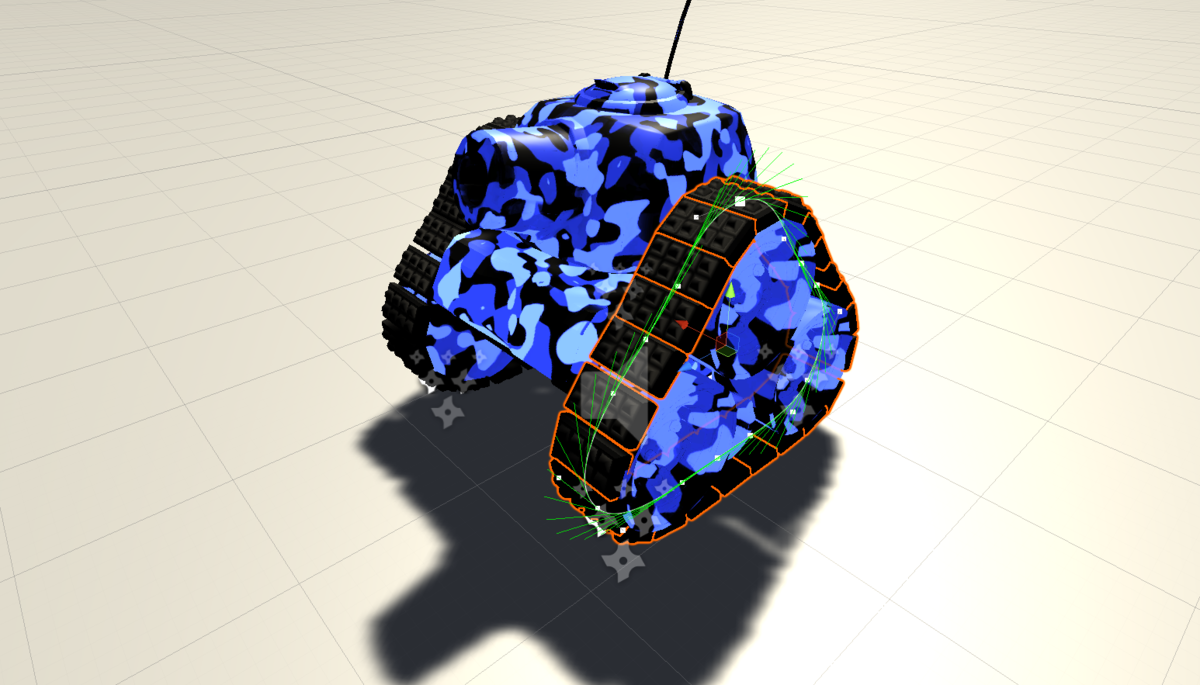
Triangular shaped tank tracks created with the tank tracks system To good to use When I began working on Tankmanious I wanted the tanks in the game to have realistically moving tank tracks with ind…
 rare heron
can i get help with vrchat models here or is this just unity general
 rose ember
so I'm trying to import a rigged character and this keeps happening
it keeps saying something about the normals being off
but I don't remember what it said exactly because the rror message went away when I reimported the new version of the model
dark jewel
I am generating a mesh in game and it works flawlessly, however, when I give it a mesh collider component, it will show the correct shape, but it appears to be rotated and doesn't match up with the original mesh. Does anyone know why this might occur?
 solar nova
So ivr been looking at a lot of 3d models hoping to improve and have noticed a lot of the examples i run into have sections that need a high number of edges as a seperate object. Is this a normal thing to do when making game assets? I cant really tell what the models im looking at are for.
rose ember
ok also my knees are bending backwards how do I fix that
 coral hemlock
Does anyone have a nice reference handy for a low poly 3d human with good topology for rigging? There's quite a few images showing certain parts, but I'd love a full model that I can spin around, or at least a bunch of good angle shots to compare mine to.
eager mist
so I'm trying to import a rigged character and this keeps happening
@rose ember if you did it in blender, go in edit mode and select all and then do "recalculate normals", maybe thatll work
rare heron
how hard would it be to make a map in valves hammer editor for it to bed used unity?
 nocturne stirrup
 languid tulip
press x and try the dissolve options with the ones you want to remove
I would try to help more but I'm on my way to bet -- 2:47am
eager mist
thats a lot of edges
eager mist
Anyone here that uses Cinema 4D? I am pretty solid in C4D but thinking if it would be better to just go with Blender for Unity.
glacial vector
Yes, C4D is not made for games/realtime applications
eager mist
Just better take the frustration and transition 🤪
 obsidian citrus
why my texture are like this ???? pls
ember shuttle
why my texture are like this ???? pls
@obsidian citrus probably the resolution?
obsidian citrus
can you help me with this ?
this model and his texture come from blockbench
??
rose ember
anyone have a clue how to fix his face? His normals seemed normal (ha get it) in blender but got weird once I exported to unity
also I know there are some wonky things but I'm fixing those
coral hemlock
@rose ember make sure your character in blender has no open seams in their skin, extra verts, etc. it looks like they do to me
rose ember
yeah I figured it out
taht was the problem
I was using the mirror modifier
and I turned off clipping for some reason and forgot to turn it back on before i applied it
 granite nexus
Its a fps but the characters r 3d. My question is, i keep seeing the side of my character as shown when ever i look to the side (its a test character drawing)
thorny wasp
@coral hemlock you 3D model?
coral hemlock
@thorny wasp I've been known to, but I'm not like...good or anything
thorny wasp
i er, im not touching blender, i hate 3D modelling. Is it possible you could help me out? Just adding armaturte to this book so it can open/close?
coral hemlock
send the model over? If I feel like I can do it in a few minutes then maybe
if you look at the geometry though, i'm not sure it'll look good 'fully' closed
 north apex
I have a proble with my mesh collider. I made a cube with rounded edges in blender, but when I create a Mesh collider it's a normal cube or the flat surfaces aren't flat
Why isn't Unity creating Mesh Colliders which actually fit my Mesh
 rocky sonnet
Is there any way to scale the vertices in blender relatively to their position on one axis. For instance, XZ scale * input value * Y Position
So vertices that are higher would naturally end up further outwards
coral hemlock
@rocky sonnet Funnily enough, I asked the same thing a while ago and couldn't find an answer. I'm sure you could script something to do it for you, but short of that the best I found was using proportional editing with a large radius
rocky sonnet
@coral hemlock I just got an answer on stackexchange. The suggestion is to use the Simple Deform -> Taper modifier which does just that.
Thank you for the suggestion as well
rose ember
ok so
I have an fbx file with animatinos
and
I made an animation called PivotLeft
so the player can turn left
but fsr it's not importing?
the rest of my animations are
any idea why this might be happening?
nvm I figured it out
 wintry grove
@obsidian citrus Is the texture sent to Point (No Filter) and No Compression in the inspector?
cyan jolt
Hi! I’m thinking about using a 3d modeler for making my game character... should I use Umodeler or blender to make a realistic one?
final granite
blender seems like more viable option, but in the end it all comes down to which one are you more comfortable with
cyan jolt
@final granite Ok, thx! Hmmm... any tutorials recommended for making 3d characters?
mellow eagle
how do i know if there is a wrong thing on my code?!!
like you see here there is nothing show if that wrong code
if you see in java i get this if i have a error in my code
 trail mica
I believe you have to put in 8xc8xc,,,123.
glacial vector
Wrong channel @mellow eagle. Check out the pinned messages in #💻┃code-beginner
mellow eagle
ok
 twin current
Can you load the AssetBundle back into unity editor somehow ?
final granite
@cyan jolt https://www.youtube.com/watch?v=Ljl_QFs9xhE I used this as starting point, because once you get the basic grasp, you can slowly upgrade

Learn how to model a Low Poly Character in this Blender 2.8 Beginner Tutorial!
The first 500 people to sign up via my link will get two FREE months of Skillshare Premium: https://skl.sh/cggeek7
Download finished Model on PATREON: https://www.patreon.com/cggeek
Blender 2.8: ...
cyan jolt
Thx!
 nimble heron
Hello guys !
Need some advices to how to create a VFX particle set (with Unity 2019-legacy mode) for a VR QUest project.
I would like to design a "cloud floor" like this (less sophisticated). I have some difficulties to constraint the particle effect on the "Y" axis. Any idea ?
 glossy panther
Hey guys, what do I do in probuilder to make a normal cube like this?
 long sand
do ctr+k then click flip normals
glossy panther
Ok thanks!
 somber hearth
Hello guys,
I'm using URP and changed all of shader to URP-Lit.Everything is prefect in scene menu till to play button.Some material turns again pink color.
I set URP preset in project settings.
OK.I found my issue.Unity version has been bug which is 2019.4.1f1. I moved my project to latest version of 2019.4.12f1 and fixed.
 polar ridge
Hey guys, i am new to this and i have a really stupid question lol, but is there any software available for windows which helps in 3d modelling and rendering w/o a graphic card.
 obsidian nest
Blender
polar ridge
Blender
@obsidian nest it's not working w/o a graphic card
final granite
Well your next best thing would be to use TeamViewer and use someone else's resources and graphic card :D
 tepid tartan
how do i cut holes in probuilder in a octagonal pipe?
pls ping me if somebody knows a solution...
 still beacon
is anyone able to help me in dms about a vrc avatar im trying to create? unity is my last step, and im totally lost with animations
thank you!! @obsidian pecan
 obsidian pecan
np again good luck!
 supple geyser
Hi, I'm modeling a simple wall with a bricks texture using a shader which supports displacement in URP. The shader is doing awesome work on the surfaces, but the edges of the model are split. I understood , that this is a common problem in displacement, due to vertex normal showing different directions, but I merged and smoothed them in blender to face that issue and heavily increased the vert / face count to round up the edges even more (which made result much better).
However, the edge split still is visible and annoying. I'm just wondering, if I do something completely wrong in preparing the model or can add additional workflow steps to change it to the better.
This was the result I could get so far (note the edges split apart) with already smoothed, merged normals and increased vert count (already 4k on that simple model)
 lunar wagon
hello im making a multiplayer game and i want to make a gun im done with everything but i just want the gun to shoot the projectile i dont want damage or anything i just want to shoot the projectile 😄
lone bough
Hey people, is anyone here familiar with Blender? I'm trying to do some light editing of a model I bought and I want to be able to select a... Hmm.. how to describe it? It's like apart of the mesh but at the same time the geometry isn't connected. I know there is a selection type in 3DS Max that just allows you to do this... in fact there is one inside Pro Builder as well but I'm not sure what it's called.
I think it might be the 'Select Object' tool in 3DS Max
eager mist
You can connect objects(2 separate ones) into just one by pressing ctrl + j
lone bough
That isn't what I'm trying to do. I'm trying to select an object that is apart of a mesh.
eager mist
left click on it? is the model one object or multiple?
lone bough
Here's an example, this is a part of the mesh where the faces are separated from the rest of it. Here is the front.
And here is the back showing that it's disconnected from the rest of the mesh.
In other 3D programs I'd be able to select it as a whole. I'd like to know how to do that in Blelnder
That is select just these separated faces not the entire mesh.
glacial vector
That's the sub-object selection in 3ds Max
lone bough
Ah, thanks @glacial vector . Do you know how to do that in Blender?
lone bough
Hmm... doesn't appear to be working.
glacial vector
it does for me
lone bough
Wait, you just hover your mouse over it and press L?
lone bough
It looks like it just selected that one face though
glacial vector
In my image?
lone bough
Yea
glacial vector
No, the white one is just the one that was selected last
all the green faces are selected
they are both grey
lone bough
Hmm... ok. Doesn't seem to be working for me though. When I try to move it around it's just that one face.
glacial vector
Try selecting one and then ctrl+L
lone bough
Oh, there we go!
Thanks @glacial vector
I don't supposes there are any extensions or anything like that that makes it closer to how 3DS Max works?
rose ember
I have a 3D movement system in my game
I have a Vector called input
it takes in Horizontal and Vertical axes
input = new Vector2(Input.GetAxis("Horizontal"), Input.GetAxis("Vertical"));
I want it to be based on thedirection the camera is facing
so that he always moves based on the cameras direction
anim.SetFloat("Horizontal", input.x);
anim.SetFloat("Vertical", input.y);
here's my current movement code
it uses animation based movement
how do I adjust this to apply for the camera's rotation?
I know I should be using it's forward transform or something
but I can't figure out how to use it right
 hollow rampart
i'm working on a project with cards (CCG, like Magic), and there's a frequent card flip animation that takes place.
Right now it's just a quad with front/back textures.
I'm wondering if it would look more realistic if I added some small depth to the card
If I do that, I'm not sure how to handle the radius of the curved corners... Is there some "bevel this box's corners to match the alpha on the texture" thing?
Or do I need to model out something in blender first with a matching corner radius?
rose ember
I've never done this before
but
what I would do is
I would model a card in blender
and UV unwrap it
and then just make a texture for each card that can be applied easily
and in code you could just wrap the texture onto the uv
but to answer your question
I would just bevel it in blender
and then export it
 frosty laurel
Hey, textures are shifted on 90% of items after i press play
 neat onyx


 azure dirge
I think this is the chat I gotta ask this (sry if I'm wrong)
the texture of my floor needs to be these tiles
but on this same path the upper horizontal line disappears after I go more to the right in my scene
there are even some weird lines showing up where the horizontal black line has completely disappeard
the texture is being projected as triplanar
so I am very confused about how this works and how to fix this
maiden tangle
@azure dirge why not just use standard shader?
trying to line a grid up perfectly with triplanar will be hell
if you have a slope on a cliff, and want the side to be dirt for example, the top to be grass you'd use triplanar
a basic one will be messy but because it's used mostly for organic shapes it all can blend well especially with noise
azure dirge
oh alright
eager mist
What sizes on the UV map do you guys use for the main character? A game that should be able to run on mobile.
eager mist
Thanks!
boreal heron
my android game looks yellowish on my Samsung Galaxy A6+. I checked on my father's Redmi phone, it looks exactly like i made it in unity editor. I checked night light option in my phone, it was turned off and everything else (photos, videos and other games) looks fine. Only my game looks yellowish on my phone. Its fine on other android phones. Anybody know how to solve it?
 dense furnace
hello @here
can anyone suggest me a good tutorial of 3d character animation in unity (on YouTube)
eager mist
Could someone help me recreate the smoke effect from Onward VR using the unity particle system
Any talented 3D artists looking to collab on a game?
 wide yew
anyone can help with blender
flint hull
So, I have a character with some objects attached to it that seem to be disappearing in the game when viewed at certain positions, and I found it's because they aren't staying within the boundary box under the skinned mesh renderer. Like here, the whole character just drops down into it when I view the Muscles & Settings menu, and I can't edit the parameters to make it stay over the objects consistently. Only thing that keeps it from happening is if "Update When Offscreen" is selected, which we don't want. Didn't help changing the origin points of each object, either. I also thought of merging them all into one object, but since the clothes at least are meant to be changeable, they should probably stay separate objects. Any other options?
azure ether
@magic acorn LWRP? you'll want to install a newer version of Unity with URP to start out with. It's not an embarrassing question, though. URP still needs work with improving shadow quality settings, it's a known issue and on the roadmap to be resolved relatively soon. So you aren't the only one.
azure ether
@magic acorn you're welcome. here are some related resources. if you have further questions on this matter i recommend trying the #archived-lighting or #archived-hdrp channels
https://docs.unity3d.com/Packages/com.unity.render-pipelines.universal@8.2/manual/upgrade-lwrp-to-urp.html
https://portal.productboard.com/unity/1-unity-graphics/c/17-shadow-settings-improvements

The improvements will give you a better and more flexible control over shadow settings in URP. These improvements will also address fragmentation of shadow configuration between URP and HDRP. We are improving the settings with the following items:
- Shadow Cascade Count (1,2,...
eager mist
hi idk if this is the right channel but does anyone know how to add multiple textures to a model
 viscid garden
hi idk if this is the right channel but does anyone know how to add multiple textures to a model
@eager mist
I believe your need a shader that allows it. Maybe add multiple materials on the mesh renderer.
cloud latch
you could also make a single material and then apply textures to an specific area in the UVs its quite easy with substane painter
wide yew
how to roate mesh plus rig in blender
cloud latch
use R to rotate and add bones to rig mesh
 spark vigil
btw most of u guys make animation in 3D software or inside unity?
 limber path
hey, im new to unity and i have no idea at all what im doing, im trying to fix a model rig for vr chat, does anybody know how do i fix the red parts?
 frail kettle
hello together i am currently developing a game with blender models and the unity engine. i am not able to use my shadernote textures in unity. can someone explain me how it works?
eager mist
can any body give the script for character controller??
lapis lance
Do you make characters animation in blender or in unity?
eager mist
anyone knows how to get better shadows?
lapis lance
anyone knows how to get better shadows?
@eager mist change light source?
eager mist
its directional. Anyway I mean that they looks staggered
lapis lance
change light intensity
 torn dragon
umm... does anyone know how to fix this weird line in my skybox
lapis lance
how to cancel unity's stuff?
maiden tangle
@lapis lance what?
 pale kiln
how do people animate separately the arms from the body
cloud latch
In your 3D software
eager mist
yes
little crow
how do i make a computer screen? i want to make a screen that changes images with a command or a script
coral salmon
hey guys, so I'm making 3D low-poly game about exploring etc. I'm looking for solution how can i make my terrain destructible like in "Astroneer" or "Deep rock galactic" should I use marching cubes?
 misty pier
@magic acorn make sure you generate lighting
or shadows will be completely black
@dim sable i use Maya, though its not the most common for small developers with how much that program costs
i also dont think theres any point in getting maya if you're good enough at blender theres not much you cant do
for modelling in games ofcourse
 fading elk
hello. i wanted to ask for some help im new to unity and all.
so i got a gltf and bin file and i want to add it to unity how could i go by doing this?
little crow
Is there a way to change the UV map for an object mid game?
misty pier
@little crow why would you need to ?
little crow
For a computer screen
misty pier
like
to switch whats on the screen of the model?
because you can just make a animated texture for something like that
little crow
I want to change images on the screen, how do I do that?
misty pier
with an animation on the model
or if you want the player to be able to actually use the computer just make a gui
little crow
Ok, thx
misty pier
@little crow but if you really want to know how to change a uv in runtime
little crow
Yeah?
glacial vector
Play with the import settings of your texture, especially filtering and mipmap settings
 tacit zinc
for urp materuals, can I use a black and white height map?
if not, what channel direction is Y? I guess I can ad a color filter over my height map
 timid totem

Unity Connect
Wait This Is Full Game But Iam Adding Rooms Always
my 3d game
i have problem anyone here?
i want to put a material in a wall half of the wall i pted material but on the top i cant why?
 cobalt marlin
hey, why it looks like broken ? textures are 4k and i will post uv too
it look ok inside substance painter
 stone bobcat
idk how you guys model this stuff
glacial vector
You sure it's not the lighting messing it up @cobalt marlin? Try unlit view
 river onyx
@cobalt marlin can you post an image of your lightmap in unity?
cobalt marlin
sorry for delay i was checking light, idk anything about that too but car is not static mesh ( if i remember correctly, in unreal engine i was not using lightning map for movable objects)
river onyx
oh, that's true
Which render Pipeline you use?
increase your lightmap resolution in the last picture
does that help?
cobalt marlin
nothing happendwith highest resolution
river onyx
read this, maybe you'll find something that helps:
https://docs.unity3d.com/Manual/LightingGiUvs-GeneratingLightmappingUVs.html
glacial vector
Lightmaps have nothing to say if the object isn't static