#🔀┃art-asset-workflow
1 messages · Page 16 of 1
 edgy hedge
 ruby atlas
The ppu under canvas scaling works the same as the ppu for sprites right?

I'm assuming the ppu for my ui must be the same for the ppu for my character and environment sprites?
 sweet marsh
I am looking to add a background to my space game that is designed around pixel art and am unsure of the best way to do it. I want it to have options so I can get one made with an asteroid and some made without. Should I just make the images separately? I remember seeing mentions of Tilemaps but idk how well that would work with my goal
 misty lantern
sweet marsh
I am looking to add a background to my space game that is designed around pixel ...
misty lantern
sweet marsh
I am looking to add a background to my space game that is designed around pixel ...
That really depends what your goal is
"Designed around pixel art" is infinitely vague
At minimum you'd draw one background with asteroids and one without
But maybe you want something different in a specific way, or within some specific constraint
sweet marsh
I'm completely new to making art for games, so my wording may not be clear. I don't really know how to ask the questions.
I guess my question would be... Is it better to just make seperate 64x64 images for a unique background and then try to randomly generate it in the game?
misty lantern
sweet marsh
I'm completely new to making art for games, so my wording may not be clear. I do...
That really depends on a lot of things
How big is the background relative to camera resolution? Does the background stick to camera, or to the level, or is there some kind of parallax? What kind of generation are you speaking of?
sweet marsh
misty lantern
That really depends on a lot of things
How big is the background relative to cam...
Will have to check the the cam res but the background sticks to the level, and I want it to kinda kust randomly place the tiles about the level and then I make adjustments if I need for that level.
misty lantern
sweet marsh
Will have to check the the cam res but the background sticks to the level, and I...
Unity's camera resolution will always adapt to the user's screen
If you want to enforce a resolution disregarding that, it's an artistic decision you make
It sounds like you want to use a tilemap with the starry space split into tiles
sweet marsh
Should the asteroids and other objects be something separate from that tileset?
misty lantern
sweet marsh
Should the asteroids and other objects be something separate from that tileset?
Do you think there's a reason they need to be?
 frail totem
Hello there. I want to rise some maybe not so great topic, but I am generally interested in hearing answers and opinions.
Quite short: China has huge game market and thousands of new games are produced annually. And well, it means that only a small percent actually sticks, other are getting closed.
Many of closed games (all their sourcecode and so on) then end up on chinese forums / websites. I literally have no idea about this: IF the game company no more exists in general and the sourcecode travels the internet and is being given away for free (not by publisher / company, but still) for like 8-10 years already, is it at least legal to use the assets from those games?
I mean the games might have been not successful or something, but it's just a shame sometimes, that so many assets are like... ditched into the trash.
So is re-using those assets a crime?
 digital mantle
if the grandma on the corner of the street hasn't driven her beater car in 8-10 years and is probably dead, is it legal to steal her car? What if somebody stole her car already, is it legal to drive the car then? Lol dude come on, just make your own assets
frail totem
digital mantle
if the grandma on the corner of the street hasn't driven her beater car in 8-10 ...
if noone knows where the asset is from, who's gonna sue / punish the one who re-uses it? 🙂 You are right though
digital mantle
well your question wasn't "if I do this crime, will I get punished?"
frail totem
true 🙂
edgy hedge
edgy hedge
https://www.reddit.com/r/blenderhelp/comments/f18yn7/duplicated_model_in_blender...
It turned out this blendshapes issue was an issue with vertex groups! Removing them in blender fixed the problem.
 burnt shard
Hey guys, anyone can give me an opinion about the asset from unity asset store called "Characters 7" ?
Im thinking about get it for a bomberman game that i've been solo doing with only placeholder 3d characters
 tame scaffold
It doesn't look like unity handles SVG's. How should I import things like vectors to use as sprites? Just make it a PNG instead?
Eg this flower from illustrator I'm using as a test

 obtuse oyster
tame scaffold
It doesn't look like unity handles SVG's. How should I import things like vector...
tame scaffold
obtuse oyster
tame scaffold
It doesn't look like unity handles SVG's. How should I import things like vector...
tame scaffold
Well I'll be, thanks!
Sadly it doesn't seem like they're still working on it 😦 but should work for now..
obtuse oyster
tame scaffold
Sadly it doesn't seem like they're still working on it 😦 but should work for no...
How do you mean? The last changes were in January. They will also have to integrate properly at some point for support in UI Toolkit
tame scaffold
obtuse oyster
How do you mean? The last changes were in January. They will also have to integr...
Oh jeez my bad, I stupidly glanced at the document revision history and thought it was the package update history
 golden citrus
Can someone please help me get my model into unity properly. Its pissing me off. The transforms are wrong, so everything is screwed up, and for some reason I can't see wheel colliders on my import even when it has its rigid body
sweet marsh
Does anyone know the right workflow to get Aseprite Tilemaps to Unity without them being really blury?
Every time I export as png all the pixels are blurred.
misty lantern
sweet marsh
Does anyone know the right workflow to get Aseprite Tilemaps to Unity without th...
"Blurring" is often a side effect of using bilinear filtering rather than point filtering
Or your imported texture being resampled when exceeding "max size"
I don't know about the aseprite importer, but psb importer compiles layers side by side in the file, so hitting the max import size unwittingly is very easy
sweet marsh
I exported as png and when I checked through windows photos it was blurry
misty lantern
Windows photo viewer is hardcoded to use image filtering, I believe, so it's not a reliable indicator of anything
sweet marsh
Oh ok, I'll try it and check in unity then
Also for seperating the tilemap, what is the best way to handle that. I remember some guy using a grid extension but idk if thats still necessary or the best way
misty lantern
sweet marsh
Also for seperating the tilemap, what is the best way to handle that. I remember...
"Separating" how precisely?
sweet marsh
misty lantern
"Separating" how precisely?
Well I would need to use each tile on its own. How would I use the tiles individually
misty lantern
sweet marsh
Well I would need to use each tile on its own. How would I use the tiles individ...
That's called slicing which you do in the sprite editor
You can slice by grid if they are in a grid
sweet marsh
gotcha
sweet marsh
Just wanted to check, I managed to slice them but are these values fine?
 sweet marsh
Also I sliced them but I can seem to access them outside of the sprite editor?
misty lantern
sweet marsh
Also I sliced them but I can seem to access them outside of the sprite editor?
Sprite slices will appear in the project window under the sprite asset and can be used in Sprite fields
sweet marsh
misty lantern
Sprite slices will appear in the project window under the sprite asset and can b...
I only have assets and packages for my categories, and under assets has no sprite asset folder
 eager mist
I'm making a game with classic dialogues, when a character talks their expression is instantiated near the text.
From what I read the point of having all the sprites in a single file is to reduce drawcalls, but does that matter if an expression is instantiated and destroyed at every phrase?
Right now all the expressions for each character is in a single spritesheet, but for some of them I would benefit from having each expression on its own file for sorting.
Can I have them in different files or that's gonna be bad for performance?
misty lantern
sweet marsh
I only have assets and packages for my categories, and under assets has no sprit...
The sprites are under your imported texture asset, in the foldout accessible from the arrow button
Folders are created by you if you so wish
misty lantern
eager mist
I'm making a game with classic dialogues, when a character talks their expressio...
Draw calls are saved only when multiple sprites are shown at once that are sharing the texture
Unlikely to have any measurable effect in any case
Try with sprite atlas and without and profile the performance if you're curious
eager mist
misty lantern
Draw calls are saved only when multiple sprites are shown at once that are shari...
If there isn't multiple sprites shown at once with the same texture, there is no advantage to having a sprite sheet, is there?
sweet marsh
misty lantern
The sprites are under your imported texture asset, in the foldout accessible fro...
oooh I see thx
 obtuse otter
I don't know where to post this, but for some reason the tiles on this moving platform have odd holes between them. The platform is built out of individual sprites which are the tiles, which are all parented to one big object that serves as the collision & rigidbody. How can I fix this odd issue?


 sweet marsh
Are we able to directly spawn in gif sprites into a scene or do we need to turn them into a prefab or animation?
I have 3 sprites of a flashing star that I am going to spawn into my scene but am unsure if I can spawn them as a .gif or if I need to turn them into a prefab
 violet walrus
would export the frames into indvidual images
then you can easily work with them in in unity and build a animation
sweet marsh
Should I turn it into an object with an animation?
 outer halo
 wicked citrus
I imported my mesh and it was transparent for some reason
wicked citrus
I imported my mesh and it was transparent for some reason
Your normals are flipped. Look at the pins for instructions how to fix it.
wicked citrus
thanks
tame scaffold
Are there any good UI sizing guides out there in terms of how to make properly sized assets for buttons, panels, etc for Unity projects? Right now I've just been making a 1920x1080 canvas, making my buttons / panels to scale, giving them borders, then playing with sizes in unity, but I'm not really sure if that's the way to go. I come from pixel art where a lot of the sizes are simpler.
 fluid oak
sweet marsh
Are we able to directly spawn in gif sprites into a scene or do we need to turn ...
fluid oak
sweet marsh
Are we able to directly spawn in gif sprites into a scene or do we need to turn ...
Well, unity doesn't support animated gifs directly, so for a three frame animation you'd probably want to use a sprite sheet. Then you have your choice of animating it using an animator, a shader, or a script.
outer halo
tame scaffold
Are there any good UI sizing guides out there in terms of how to make properly s...
That is how you make them. In Unity, set your screen space UI canvas to scale with screen size and use 1920*1080. That way, your images will be the proper size when you click the "use native size" on the image component.
sweet marsh
fluid oak
Well, unity doesn't support animated gifs directly, so for a three frame animati...
Turned it into a sprite sheet. should I Slice the sheet and then proceed with turning it into a animator.
Btw these are meant to be stars in the background, not sure if a animation or shader is better.
fluid oak
sweet marsh
Turned it into a sprite sheet. should I Slice the sheet and then proceed with tu...
If there are gonna be a lot of them, animating them as particles might be a good solution too. I suggest just looking up the various methods and deciding which fits your needs best.
sweet marsh
Will take a look
Gonna try paralax scrolling and then custom animation. Figure out which one I'd prefer
Given 3D paralax may be bad but we'll give it a go with randomly generated stars that appear to be in the background
 thorny lion
Hey guys, I am very new to 3D modelling and have been trying to make a mii like character in blender and unity. The problem I am having is when making the 2D face, I want the facial features to wrap to the face mesh, but also I want them scalable and movable in unity (like the mii maker). The issue I am having here is when using shape keys to add different positions and scales, the facial features will either clip into the face mesh, or it will be too far off the face. I want the eyes and stuff to be viewable from side angles. I also cant use a shrinkwrap, because that doesnt work with shape keys, or in unity. Does anyone have any alternate ways they think I can get this to work?
 fluid oak
thorny lion
Hey guys, I am very new to 3D modelling and have been trying to make a mii like ...
fluid oak
thorny lion
Hey guys, I am very new to 3D modelling and have been trying to make a mii like ...
Use decals?
thorny lion
hrrmm decals work. Kinda seems like a ducked tape together solution though
Thank you though, ill use this until I find something more efficient
fluid oak
Well, there are lots of potential solutions, but that should just work out of the box
misty lantern
thorny lion
Hey guys, I am very new to 3D modelling and have been trying to make a mii like ...
I think the most common solution might be to duplicate the polygons of the face so they have the exact same curvature, and then project the details and deform them using shaders as needed
Decals might be a better choice though
 broken plume
i made a sprite for my character in photoshop, how do i make it so it's not pixelated asf in the game


looks fine normally
misty lantern
broken plume
i made a sprite for my character in photoshop, how do i make it so it's not pixe...
Usually this happens when the sprite has no mip map generation
Make sure also that filtering is set to bilinear
Or trilinear
broken plume
misty lantern
Usually this happens when the sprite has no mip map generation
Make sure also th...
I think it's because I made thee pixel size too high, I have no idea on how importing sprites works so I assumed more pixels = higher quality. Do you have any advice on how to size things properly, ppi, etc? or like a guide?
misty lantern
broken plume
I think it's because I made thee pixel size too high, I have no idea on how impo...
Enable mip map generation and bilinear/trilinear filtering as I suggested
There's no guide (I guess I should make one) but the gist is that you get perfect quality only when displaying a sprite at its native resolution relative to screen, or at one of its mip levels
fluid oak
Well, also at exact multiples of the pixel size if you scale up.
 normal arch
how change it from pink to the car normal material

 lone topaz
normal arch
how change it from pink to the car normal material
lone topaz
normal arch
how change it from pink to the car normal material
Did you convert materials from standard pipeline to universal render pipeline?
normal arch
lone topaz
Did you convert materials from standard pipeline to universal render pipeline?
Yeah
nvm fixed it
 vale sparrow
how do I delete a sprite from a sprite sheet
 last granite
I made a logo in illustrator and exported it as transparent png. I was able to get it into my unity game, but im not able to pull it onto my U.I Canvas let alone the scene, what do i do?
not sure if i should be asking this in here or #📲┃ui-ux
 lapis elk
last granite
I made a logo in illustrator and exported it as transparent png. I was able to g...
lapis elk
last granite
I made a logo in illustrator and exported it as transparent png. I was able to g...
Change the import setting to 2D Sprite
 slim cedar
Hey Question: I'm making a character pack for unity and I was curious, is it standard that these packs come with a control rig or just skinned to bones?
 graceful mica
anyone know why i can see this door in editor view but not in game view?


 cold cairn
hiiii...im working with photogrammetry, and i needed to export the model from Metashape to Unity. This is how it looks on Metashape vs Unity. I exported the model with 50 textures of 4096x4096. I am also attaching my Unity settings cause I was trying to look for solutions on forums and it said to put compression to "None" and other things that I tried, but i cant see any changes. Is there anyway I can improve the quality? or make it look more like in Metashape?


 flat aspen
I'm having issues with importing mirrored animations from Blender. The animation is mirrored in Blender, but when I export, it only runs on the original half. How do I get the full animation into Unity?
I've noticed that the animation has 60 frames in Blender, but only 30 in Unity, so it's exporting the full animation, it seems.
flat aspen
Never mind. I figured it out.
 modest delta
I created a simple arena prototype for my game, when I go to add a material in unity it does not correctly project onto the model.

 outer halo
Is the mesh actually UVed to work with the texture?
modest delta
idk the tutorial I was watching the texture just 'repeats' across the modal
outer halo
Well, you can adjust the tiling value on the material for starters. But it really depends on how you've UVed the mesh.
 abstract carbon
completely new with unity, is there a faster way to reset all transforms on everything in the hierarchy instead of doing it one by one?
 inland thorn
How can I have a model for the render mesh but have a way lower poly for collisions?
inland thorn
abstract carbon
completely new with unity, is there a faster way to reset all transforms on ever...
Select all and on the transform feature type where do you want it to be or just click the 3 dots above and reset it
fluid oak
cold cairn
hiiii...im working with photogrammetry, and i needed to export the model from Me...
That's some really nice scanning!
Those settings you chose are the opposite of what you want; you probably don't need to disable texture compression, but you don't want point filtering; that is for, like, pixel art that isn't going to be scaled. If you are targeting any non-mobile platform you'll want trilinear filtering at least. It is absolutely trivial performance wise(compared to using 5 4k textures in the first place)
Also, make sure that your per-platform settings aren't setting a smaller max image size for your current platform.
As for making it look like metashape, the material settings will have an effect, too; you probably want to lower the smoothness to reduce the skybox reflection
cold cairn
fluid oak
That's some really nice scanning!
Those settings you chose are the opposite of ...
Thank you! Will try it!
 daring heath
I'm currently using glTFast to import GLTF models from Blockbench (weird stuff happens with FBX models from there) and it works perfectly aside from the fact that every model is opaque
I can't change the material and the docs don't say anything
Okay turns out it was a bug in the original glTFast which was supposedly fixed in 2022
So either the Unity fork doesn't have that fix, or it's something else
(or i'm just unlucky)
Well guess i'm gonna switch to it
It could also be Blockbench producing incorrect transparent materials?
 eternal thistle
ive modelled a character, made a rig and attatched the rig to the character (auto weight paint) in blender
now im tryna import it into unity(directly .blend file), and after a lot of bug solving and troubleshooting, ive finally made the bones and character show no errors
except for a warning, avatar creation failed
before i get to that warning
** can i just know the basic rules that must be followed while rigging a character so that it imports to unity properly?**
lapis elk
eternal thistle
ive modelled a character, made a rig and attatched the rig to the character (aut...
dont use .blend files 😛
fluid oak
eternal thistle
ive modelled a character, made a rig and attatched the rig to the character (aut...
Unity has an old blog post covering the exact needs.
 magic anchor
fluid oak
Unity has an old blog post covering the exact needs.
magic anchor
fluid oak
Unity has an old blog post covering the exact needs.
don’t link it or anything lol
fluid oak
magic anchor
don’t link it or anything lol
I'm on mobile, and it would take me just as long to find the fucking thing as it would take you.
eternal thistle
lapis elk
dont use .blend files 😛
yeaaaa
ive started using fbx
i dont encounter as many problems now
eternal thistle
fluid oak
Unity has an old blog post covering the exact needs.
link it?
pwease ive googled so many sentences and cant find the exact needs
i mean rn the rig ive imported with animations works fine. nothing wrong except a few stuff with ani
im curious whats the "right" way to do it
lapis elk
eternal thistle
link it?
pwease ive googled so many sentences and cant find the exact needs
i m...
i would recommend using the #🏃┃animation channel and add some videos for the guys there.
 paper bronze
hi, using the bump on the default cube, it is looking like it has cracks and other stuffs on the plane cube....now can i bake it to look the same in unity? without deforming the cube, can i see cracks on the cube using the baked map?....i tried but it doesn't seem to works...is there any way to do it?
misty lantern
paper bronze
hi, using the bump on the default cube, it is looking like it has cracks and oth...
Bump maps are already baked, there's no need to bake them
You may be misunderstanding the process
paper bronze
@misty lantern maybe....let me show what i am trying to say....


right one is in unity
i baked the texture in blender...
then when i apply the texture...(normal map + diffuse map)....nothing but a plane wall is showing up...no cracks are as real as it seems in blender
can you tell me what am i doing wrong?
lapis elk
paper bronze
then when i apply the texture...(normal map + diffuse map)....nothing but a plan...
is the normal map marked as normal map? ^^
paper bronze
lapis elk
is the normal map marked as normal map? ^^
couldn't understand your point..
lapis elk
by default all textures are set to "default"
 paper bronze
lapis elk
by default all textures are set to "default"
paper bronze
lapis elk
by default all textures are set to "default"
yeah yeah..it is marked as normal map in unity
lapis elk
paper bronze
yeah yeah..it is marked as normal map in unity
Ok.
- Is your normal map plugged in the normal map slot in your material? And the Normal map strenght is like 1?
- Does it have a good resolution? like > 512x512? Becasue your Albedo also looks very LowRes.
- Do you have a light source there, so you can even see light fractions on the wall?
(if you like, send over your normal map texture)
no just the png
paper bronze
 lapis elk
Your normal looks ok to me
 lapis elk
paper bronze
lapis elk
paper bronze
can you add a point light in the hallway and see if you can see the details better now?
 lapis elk
i think the resolution is to low.
Is your Hallway very large, so a 2k texture is not enough maybe?
paper bronze
so should i bake it in a higher res?
lapis elk
2k is more than enough normally.
Depends on the size of your model.
can you also send the fbx of your model?
paper bronze
 left dust
Hey I'm stuck im trying to put a sprite on an already existing item but it's currently in a png
 subtle timber
Hey!
I Think im Stupid but what am i Doing wrong...
my Export as FBX looks pretty well, but the (sorry i dont know the name of it) Mesh? looks completly deformed and therefor if i use the mesh it doesnt look like an arrow... is that something with my Blender Export or Something with my Unity Import?

 oak pulsar
Kinda looks like I took a shit on the platform with assets, I have no clue why but it just looks off. some of it just doesn't really blend well. Thanks for any feedback
 fluid oak
oak pulsar
Kinda looks like I took a shit on the platform with assets, I have no clue why b...
fluid oak
oak pulsar
Kinda looks like I took a shit on the platform with assets, I have no clue why b...
I mean, you kinda DID do that right? No real unifying elements or colors. The lighting isn't really helping either.
oak pulsar
fluid oak
I mean, you kinda DID do that right? No real unifying elements or colors. The li...
more specific
oak pulsar
fluid oak
I mean, you kinda DID do that right? No real unifying elements or colors. The li...
Actually kinda updated it and looks better imo, any feedback on this one
 fluid oak

Like, adding unifying elements makes things look less random
And using lighting color makes everything fit together better
You don't need a lot to go from 'generic props' to 'props that fit together'
oak pulsar
fluid oak
Looking back on it Im really underusing that thing I did for the bowl
I was looking at environmental art for some games Im taking inspiration from and usually they have on color/thing that is core to the map like u said
I also fixed a lot of the scattering with moving some props closer for more contrast
fluid oak
Also, where did those big dark colored blocks come from?
Did the original builders of this monument just leave a couple random sofa sized blocks of stone lying around?
oak pulsar
fluid oak
Also, where did those big dark colored blocks *come from?*
It’s an arena, if you look in my bio there should be a vid of some old gameplay
oak pulsar
fluid oak
Also, where did those big dark colored blocks *come from?*
No lore. Just titled Large Obstacle in files
misty lantern
oak pulsar
No lore. Just titled Large Obstacle in files
A great opportunity to invent lore, which will direct your design
oak pulsar
misty lantern
A great opportunity to invent lore, which will direct your design
ig
I also have other map designs though
idk
 supple vault
Hello guys someone help me out , so I installed a different version of UniGLTF and it caused many errors so I reverted back to previous but then I get this error .

 misty lantern
 zenith shale
The light doesn't change even though I set Universal render pipline
zenith shale
The light doesn't change even though I set Universal render pipline
What kind of lighting are you expecting? 2D or 3D? You did not show whether you are using 2D or 3D lights and whether you have the URP or URP 2D renderer in use
This is also not the right channel so post in #archived-urp instead
 dire lodge
Hi. I get this error when I try to extract textures from a model. The result is no textures. The Unity version is 2022.3.21f1

 hidden yoke
When you guys are creating your environments, do you typically make all your assets for one scene in one blend file and just export them individually, or do you do a bunch of separate blender files?
misty lantern
hidden yoke
When you guys are creating your environments, do you typically make all your ass...
Separately as FBX files so they all get the appropriate export settings
Having everything in one file is a nightmare for version control, or even just when you have to change or reorganize something
 half zealot
Hello friends, I will publish a model in the Unity Asset Store, but when I apply the Asset Store Validator, I get these errors, how can I solve them?
 misty lantern
half zealot
Hello friends, I will publish a model in the Unity Asset Store, but when I apply...
misty lantern
half zealot
Hello friends, I will publish a model in the Unity Asset Store, but when I apply...
You can maximize "check model import logs" and the other fields for more info by clicking the rightward pointed arrow
In either case check model import logs
Your console is showing some descriptive warnings as well
half zealot
yes I can see I wrote it here because I cant understand
misty lantern
half zealot
yes I can see I wrote it here because I cant understand
Can you click the arrows as I suggest
Model import logs should be viewable in the import settings of a mesh, if I'm not mistaken
There's a big number of concepts you potentially "can't understand" so you have to narrow it down
 fluid oak
Those seem fairly straightforward. What parts don't you understand?
half zealot
The model has already been imported, but I am getting this error. I did everything in Unity's tutorial video.
fluid oak
Well, I can tell right from your first screenshot that you have self-intersecting geometry, which probably means you didn't triangulate.
But could also mean that you incorrectly fused something somewhere.
half zealot
fluid oak
But could also mean that you incorrectly fused something somewhere.
Hmm thank you
misty lantern
half zealot
The model has already been imported, but I am getting this error. I did everythi...
You have to check the logs in the mesh import settings, in case there's more issues than the self intersecting geometry
 hollow root
hi guys, my render texture is really looking blurry how to make it better?
 misty lantern
hollow root
hi guys, my render texture is really looking blurry how to make it better?
misty lantern
hollow root
hi guys, my render texture is really looking blurry how to make it better?
It always will be if it's being displayed at a lower relative resolution from everything else
You can also change it from bilinear filtering to point filtering to give the pixels crisp edges, but the resolution will still be low
hollow root
misty lantern
It always will be if it's being displayed at a lower relative resolution from ev...
But I have not made any such settings, is there anything I can do to display at same resolution as everything else?
misty lantern
hollow root
But I have not made any such settings, is there anything I can do to display at ...
This is the fundamental way render textures work
The pixels that the RT camera renders are stored to an RT texture
If you display that texture up close or scaled up, you see the individual pixels
You can adjust its resolution so it's the same as the native display resolution, but the process is entirely different depending on where you are using this RT texture
Is it in your scene somewhere, or on your UI, and does its size change on screen?
hollow root
I have it in my scene yes
hollow root
Yes I've rendered it on a 3d cube
misty lantern
The simplest method is to set the RT texture size "big enough" that it's crisp even if the player gets as close as they practically can
misty lantern
Otherwise you may need to adjust it dynamically at runtime, or render it at native resolution but adjust the Viewport Rect of the camera at runtime to keep it optimized
 frigid vine
if i cant use aesprite what are better alternatives?
misty lantern
frigid vine
if i cant use aesprite what are better alternatives?
It depends why you cannot
Pixel allergy?
frigid vine
misty lantern
It depends why you cannot
Pixel allergy?
cant afford it ;3;
 obtuse flare
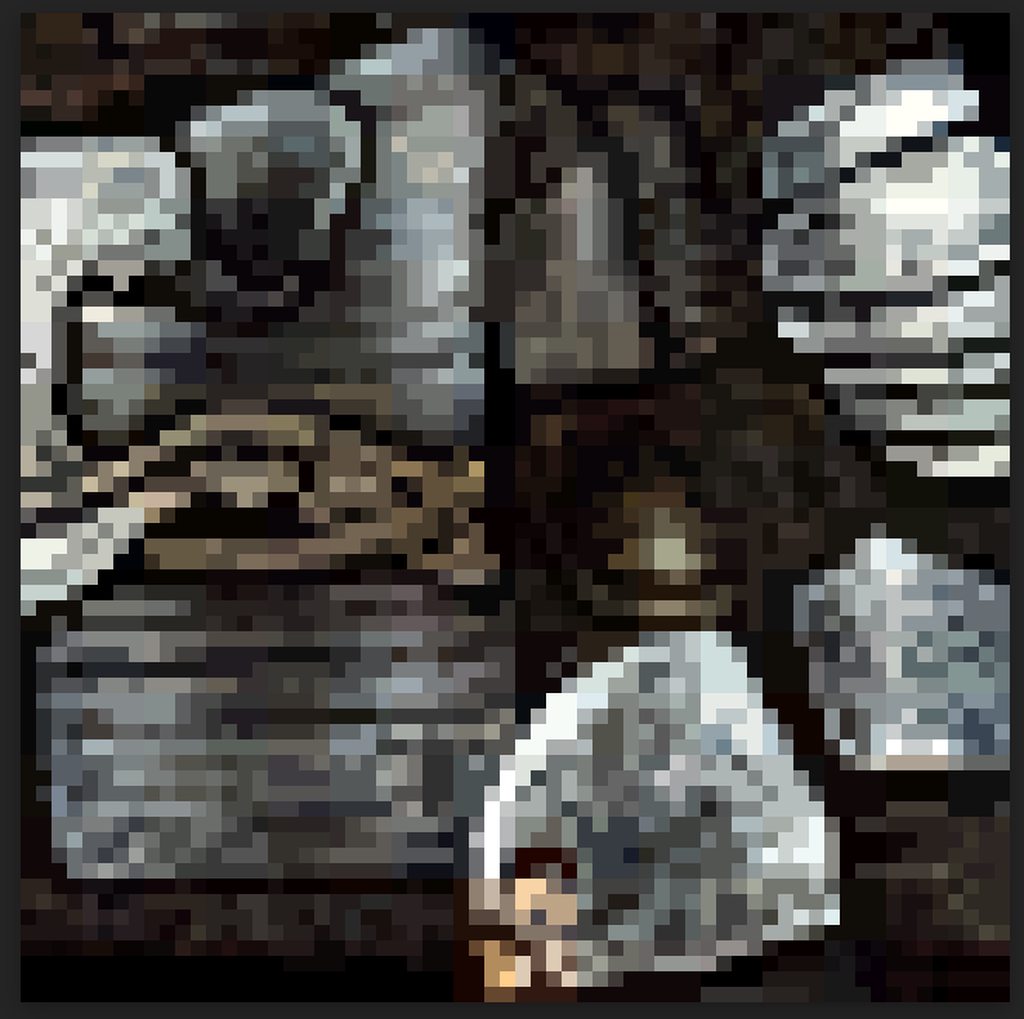
Can someone provide some insight into how the textures on this model have most likely been made? I'm trying to figure out how to recreate the style but I'm unsure if it was texture painted, pixel arted or made any other way;
https://imgur.com/a/FhQZc0v
 obtuse flare
frigid vine
cant afford it ;3;
obtuse flare
frigid vine
cant afford it ;3;
its free, you can download it from git / build it there yourself if I remember correctly
frigid vine
obtuse flare
its free, you can download it from git / build it there yourself if I remember c...
it has viruses
misty lantern
frigid vine
cant afford it ;3;
There's Libresprite, which is a free offshoot of an earlier version of Aseprite and perfectly decent
misty lantern
frigid vine
it has viruses
That's not correct
Aseprite is open source, so if you have the knowhow you can build the program from the source
It's not super easy to do though, so you may find executables someone else has built
Those however can have viruses
Even if the source is free, $20 is the price to always have the up to date built program with no risk of any malware
So I recommend Libresprite, if you cannot afford Aseprite
frigid vine
ohhh i see thanks
misty lantern
obtuse flare
Can someone provide some insight into how the textures on this model have most l...
This looks like "digital painting" that's been downscaled
And rendered with pixel art texture settings
obtuse flare
Thanks, will check that out!
 clear bolt
hi
I have a Sprite that I want to tile. But I want to tile just a specific parts of the sprite. is that possible with built-in tools or some asset?
here I have the sprite, I know I can 9 slice it but I don't want the middle part tiling. how to tile only parts in red?
 lapis elk
clear bolt
lapis elk
clear bolt
your end parts are not the same, so it will never tile without a seam.
ah. nvm. you only want to tile the red parts, sry ^^
misty lantern
I believe it might be necessary to use multiple 9-slicing, or make your own that supports more segments
Or more simply place the middle sprite on top of a 9-sliced border separately
clear bolt
misty lantern
Or more simply place the middle sprite on top of a 9-sliced border separately
I’ll probably go for this if I don’t find anything, thanks :)
 earnest pecan
Very specific eye shader question; My model has an eyeball, a separate mesh for the occlusion effect, and another for the tearline. It is pretty much identical to the setup seen here.

Currently, these are 3 separate shaders and materials, which makes 3 different draw calls, right? I'm hoping to reduce this to 1.
But there's a mix of opaque and transparent objects here. What should I be doing?
Maybe I should have posted in #archived-shaders when I think about it...
violet walrus
not making it 1
sure you want to reduce drawcalls, but making your whole character use a transparent shader just so eyes work will cost more and be more prone to sorting issues then just having eyes be its own material
for a character with this much detail i would not worry about it costing a handful of draw calls, unless you are going to have hundreds of them around at a time
earnest pecan
violet walrus
sure you want to reduce drawcalls, but making your whole character use a transpa...
Sorry, it's not the whole character thats one material
Just the eyeball, tearline and occlusion mesh.
The character itself has it's own shader
 silent haven
earnest pecan
Very specific eye shader question; My model has an eyeball, a separate mesh for ...
silent haven
earnest pecan
Very specific eye shader question; My model has an eyeball, a separate mesh for ...
What render pipeline?
 pure charm
there used to be a way to drop a material in the imported model to bind it at import, what's the combination of settings to get that?
silent haven
@plain knot I also sometimes use Mixamo's auto-rigger to save time, but here's the problem I constantly see with it:

gotta manually clean that stuff up, which I hate 
 plain knot
silent haven
<@968604165150507078> I also sometimes use Mixamo's auto-rigger to save time, bu...
plain knot
silent haven
<@968604165150507078> I also sometimes use Mixamo's auto-rigger to save time, bu...
oh yeah i've seen that happen on certain meshes 😢
espcially those with beards n such
inland thorn
Is there a way for me to import an new image and replace all the references from a previous instance of that image?
Like, replacing a placeholder img for the final one?
silent haven
plain knot
oh yeah i've seen that happen on certain meshes 😢
espcially those with beards...
I strip em down to nothing but deforming geometry first: no hanging cloth, no eyes, no hair, literally nothing but the "hull" the skeleton deforms

he has robes and cloak, hair strands and other stuff but I pack that geometry and capture/bind it afterward
I add face rig and prop slots and stuff onto the autorig skeleton after fixing skin weights
I could just use the biharmonic joint capture in Houdini and skip Mixamo entirely, but I like having a matching/compatible skeleton to get that whole library of base motions to then edit and do fun stuff with in Houdini and Cascadeur
(without needing to re-target)
plain knot
silent haven
I add face rig and prop slots and stuff onto the autorig skeleton after fixing s...
yeah I'll stick to coding lol
silent haven
I've been improving on this basic setup to get him production-ready
plain knot
nice, the unity hair system is dope
silent haven
plain knot
yeah I'll stick to coding lol
I do both haha, started off in engine dev actually and have a DirectX 12 engine project on the side 😄
(and machine-learning and way too many other things lolol)
I started doing "heavy duty" tech art and animation to solo-build my dreams though 😛
Found it impossible to assemble a team without lots of cash to throw around and since I've had to take over single dad duties with my 1.5yr old baby cash is in short supply 
think I've been doing this about 16 or 17 years now lol
Adopting SideFx Houdini as a core tool has been one of the most fun and rewarding choices I've made in a long time though, for sure
It's sort of like if your whole gamedev workflow became like a god-mode Shadergraph lol
earnest pecan
silent haven
What render pipeline?
URP
 trail cove
Hello everyone. What's the right way to import a glb model to Unity? I have been trying it since yesterday but couldn't get a good result so far
trail cove
Someone help me please. Half of the models in skechyfab are glbs. Unity cannot open glb in no fucking way!
obtuse oyster
Then convert them to a supported format
 open sleet
trail cove
Someone help me please. Half of the models in skechyfab are glbs. Unity cannot o...
open sleet
trail cove
Someone help me please. Half of the models in skechyfab are glbs. Unity cannot o...
there are only third party packages to import glb
trail cove
obtuse oyster
Then convert them to a supported format
i do it with blender but model is not visible when i import it to Unity. Is there some setting i need to change in unity in order for it to become visible?
obtuse oyster
Is it just too small? Models don't just become invisible on import
trail cove
open sleet
there are only third party packages to import glb
you mean the json.net and GITF? I tried them, didn't work
trail cove
obtuse oyster
Is it just too small? Models don't just become invisible on import
Or it wasn't exported/imported properly for some reason
obtuse oyster
Then I don't know what kind of setting your expecting in Unity
Check in another program to see if it exported properly
open sleet
trail cove
you mean the json.net and GITF? I tried them, didn't work
theres one GLTFUtility github package that works fine, I just tested it and is your model too big for it to not show on blender (far clip plane)?
trail cove
these are the export settings in blender
 open sleet
looks fine to me
trail cove
open sleet
theres one GLTFUtility github package that works fine, I just tested it and is y...
it shows on blender, it doesn't show on Unity
trail cove
yes
open sleet
thats not possible, can you show me how it looks on unity?(in the project window i mean)
trail cove
ok one of them worked when i converted to fbx. But it's upide down and it doesn't have textures on it. Textures are not included in the package but they showed in blender
open sleet
@trail cove One thing you can try while exporting or you would have to unpack the textures in blender and use them manually in unity if a texture folder is not provided with the sketchfab project.
 trail cove
oh thanks a lot , i was just going to ask you that. I think i solved the rotation problem. I made rotation values all zero in blender
open sleet
yep rotation values are always messed up by -90 whenever you take them to unity especially from blender
open sleet
 viral thistle
Does anyone know how to import from catia into unity?
viral thistle
Does anyone know how to import from catia into unity?
have you tried pixyz studio?
trail cove
open sleet
<@847091523329327164> One thing you can try while exporting or you would have to...
i can't see the embed textures options in the export settings
 trail cove
open sleet
<@847091523329327164> chnage the path mode to copy to be able to click embed tex...
trail cove
open sleet
<@847091523329327164> chnage the path mode to copy to be able to click embed tex...
i did that, still no textures when i import it to Unity. I tried extract textures and extract materials. No good
open sleet
@trail cove You can do one more thing

shading


then click on write to current directory
which will manually save your texture png in your system which you can use in unity
@trail cove if your image name is image_0 and if it is giving you a error, just rename it to something else and this should work
 viral thistle
open sleet
where you can import this and export it
viral thistle
open sleet
where you can import this and export it
i tried free cad and assim and they spit out the model in the photo
wait i didnt send it

its only like this in unity
open sleet
i guess normals are flipped there
to temp fix this, select your material and change the render face to both instead of front

if you are working on standard materials then you have to do this manually in a 3d software
trail cove
open sleet
<@847091523329327164> You can do one more thing
there's no base color window when i click on the shading tab
open sleet
trail cove
there's no base color window when i click on the shading tab
are textures even there in your model?
trail cove
open sleet
are textures even there in your model?
ok, i think they're not textures. Model is painted in substance painter
open sleet
then you can directly export the textures from substance painter which is much easier
trail cove
can't do it on blender?
viral thistle
open sleet
to temp fix this, select your material and change the render face to both instea...
where do i find this>
open sleet
trail cove
can't do it on blender?
do you have the png of the textures?
open sleet
viral thistle
where do i find this>
material of your model which you imported
trail cove
no
viral thistle
open sleet
material of your model which you imported
it isnt there
open sleet
@viral thistle
 open sleet
trail cove
no
open sleet
trail cove
no
do you have the substance painter file?
viral thistle

 trail cove
open sleet
do you have the substance painter file?
trail cove
open sleet
do you have the substance painter file?
no, i don have it. I think that the model is painted with substance painter, since there are no textures on it. I don't know it for sure
open sleet
you can if you change your material to universal render pipeline
viral thistle
ah
open sleet
 open sleet
viral thistle
oh god
open sleet
viral thistle
oh god
this process is a bit hard as you have to install universal RP package and change the graphics tier, its like a 2 min work in a 3d software
viral thistle
yea but catia is a bastard
open sleet
trail cove
no, i don have it. I think that the model is painted with substance painter, sin...
im not really sure what your trying to do exactly, but yh thats the procedure
xd
trail cove
open sleet
im not really sure what your trying to do exactly, but yh thats the procedure
can i unpack the material in blender?
viral thistle
ight got urp set up
open sleet
viral thistle
ight got urp set up
you can just change the render face to both
and it should be fine
open sleet
trail cove
can i unpack the material in blender?
without a texture why do you want to unpack?
trail cove
ok let me rephrase the question: How can i import this model exactly like this to Unity?

with colors on it
viral thistle
open sleet
you can just change the render face to both
and
nope
wait
i might be onto something


 eager mist
Hey all not sure if this is the right channel.
What is the best (free) mobile friendly app to draw sprite sheets?
It can be for pixel art or normal art.
The reason it must be mobile friendly is because im using a Tablet to draw on with a stylus (digital art) and i tried on pc with a mouse and i just can get the hang of it. The tablet and stylus is much easier.
Any info would be greatly appreciated.
trail cove
@open sleet i installed giltf fast package. Problem solved from the root. Turns out , i installed the wrong version of it before. I installed this from the package manager
 tight mural
Hey,
can anyone share some tips and tricks for performant in depth character customization? I already have a modular character, but it's comprised of a bunch of singular skinned meshes. If I have multiple players playing it creates way to many draw calls. What could prevent this?
silent haven
Another small pre-production victory for me: The early versions of Houdini 20.X.X w/ KineFx had some major bugs in the paint tool for skin weights that corrupted my .hip scene file and janked up my mesh, and although it's mostly fixed in 20.0.653 the scene where I meticulously hand-painted custom weights to control the face/jaw was ruined ... but I came up with a plan to work around it and avoid re-doing those jaw/mouth weights by hand ... exported the geometry data of the head with the weights I wanted and "spliced" it into an undamaged skin ... and it worked. So, with that blocker out of the way, I was able to start adding my "rigid" geometry bindings for non-deforming parts. Decided to use the HDRP "Digital Human" eyeballs because they're easily customizable with the shader/material ...


This is pre-production work to get a single "hero" character fully production-ready and figure out my full pipeline & workflow before comitting to a production schedule
Major part of it is working to encapsulate everything into a Houdini HDA asset (which works in Unity with the Houdini Engine plugin as well) and tear down workflow barriers between the engine as well as the external DCCs I use: Houdini, Maya, Cascadeur, etc
Had two major pre-prod experimental game concepts to choose between, and tested them both ... the first was a galaxy simulation "sandbox" (sci-fi/futurism sort of thing) with 4X/strategy mechanics ... the second, which this character belongs to, is an open-world "sword & sorcery" RPG, which I think has won out at this point ... I've proven both are feasible, but the galaxy sim thing is just way more exhaustive, research-intensive and time-consuming, and I'd need other experienced devs to pull it off in a timely fashion, whereas I can zoom through this RPG/magic sort of stuff much faster.
This is the character before the overhaul/remaster ... the way I got him from an artist online. When I'm done he'll have strand-based hair and the "Digital Human" eyes/skin/etc Unity used for Heretic/Enemies
Curious if anyone has worked with UMA 2 and their avatar customization system / addressables in here?
Been having a bit of a fight with HDRP's lighting system and ray-tracing configurations as well ... my only experience with ray-tracing has been with native DirectX 12 and a custom engine mainly
Guess I need to set up a LookDev library or something
frigid vine
Does Aseprite occasionally go on sale in Steam?
misty lantern
frigid vine
Does Aseprite occasionally go on sale in Steam?
Yes, you can check any steam app's price history from https://steamdb.info/
frigid vine
misty lantern
Yes, you can check any steam app's price history from <https://steamdb.info/>
okieee thanksss
can i connect my sprites made from aseprite to twitch?
misty lantern
frigid vine
can i connect my sprites made from aseprite to twitch?
I am unsure what that you mean by that or how is it related to Unity
Aseprite creates images, all modern websites (and game engines) support images
frigid vine
misty lantern
I am unsure what that you mean by that or how is it related to Unity
Aseprite cr...
ohhh i think its just how can i connect the animations made in aseprite to put it in twitch like a random character in my livestream. XD
misty lantern
frigid vine
ohhh i think its just how can i connect the animations made in aseprite to put i...
Twitch might let you upload animated gifs to display on some pages, but to have "characters" in your actual livestream requires some kind of middleware, I believe
OBS most commonly, but there are also some overlays that run Unity to produce interactive characters and other displays
frigid vine
i see i see thankss
 ember fractal

how do i make it so that he has no background
or blends in with the current
i thought a transparent one wouldve done the job
but it hasnt
outer halo
The sprite doesn't have transparency. You need to open it in an art program and crop out the background.
 lapis elk
ember fractal
lapis elk
ember fractal
You don’t need to, because unit will cull them as long as they are outside of the camera view.
If you set them as static, Unity will also batch them together into a few draw calls. (If they have same mesh and material they only need 2 draw calls)
 fluid oak
ember fractal
why does this happen
fluid oak
ember fractal
why does this happen
'this?'
 lime charm
fluid oak
'this?'
lime charm
fluid oak
'this?'
Cross-posted, helped them in another channel. The cam is at z 0, and so nothing shows
fluid oak
classic
 lofty gorge
Hello guys, I'm looking for a tutorial on how to optimize image textures by combining them into one file. Specifically, I want to join a diffuse map and an ambient occlusion map into one base color image file. I've been searching for a while, but all I can find are instructions for putting them in a shader graph, which is not what I'm looking for. I want a more optimized method. Do you guys have any link?
misty lantern
lofty gorge
Hello guys, I'm looking for a tutorial on how to optimize image textures by comb...
Why do you need to combine those two specifically?
lofty gorge
Just to optimized, I've seen a game file like that before, but I don't know how they combined it into 1 Image texture
misty lantern
lofty gorge
Just to optimized, I've seen a game file like that before, but I don't know how ...
They are called mask maps
However you generally shouldn't try to perform optimizations unless you know for a fact they are beneficial and how to confirm it by measuring
You can store non-color information like AO map in a color texture's alpha channel in an image editor
But you have to keep in mind that color and non-color textures are stored in different ways, with alpha channel being an exception I believe
Even if combining texture maps is generally good to avoid texture loads, it's possible to lose performance to it if it means you need more shaders to sample the maps in the specific way
And it's an extra step in your asset workflow which costs time
lofty gorge
Yeah I'm fully aware, I just wanted to reduce the draw call by combining multiple Texture images based on their family, gray and color/ color , non-color
fluid oak
Draw calls aren't based on textures, though
The details depend on which renderer you use, but generally it is based on the shader/materials.
 lone tundra
Anyone here familiar with converting the URP Starter Asset for the Third Person Controller to HDRP?
misty lantern
lone tundra
Anyone here familiar with converting the URP Starter Asset for the Third Person ...
There's no automatic upgrade or conversion utility to go between SRPs
Which means you swap the shaders by hand
The starter assets package contains only placeholder meshes so what materials they have isn't significantly important, as long as you can see them clearly
lone tundra
I converted the materials to HDRP. That didn't do anything so I changed the shader to HDRP/Lit (from Universal Render Pipeline/Lit.) At that point the materials looked correct in the project window. The character was no longer pink but was now just all white. Any other ideas about what might need to change? It's really surprising that a "starter asset" requires this kind of tweaking to make functional.
misty lantern
lone tundra
I converted the materials to HDRP. That didn't do anything so I changed the sha...
When you swap an URP/Lit material's shader to HDRP/Lit, the properties like texture map references will be kept whenever applicable
But you could even just make new materials and assign them to the meshes so they're no longer pink
Starter Assets is there to give you a base with movement, input, physics and an animator
The visuals are not there to look pretty
fluid oak
lone tundra
I converted the materials to HDRP. That didn't do anything so I changed the sha...
It is the starter pack specifically for a different renderer.
URP standard materials and HDRP ones expect different inputs, so you would probably need to at the very least rearrange the textures into a mask map, etc.
 jovial elm
Does anyone know of a good asset pack for a modular space ship? I.e. one you can take apart
Sorry if this is the wrong channel to ask this
 drowsy mica
Hey all, I'm planning to try and make my first proper 3D game however there's one pretty large roadblock that continually puts me off, actually making models, textures etc. I'm not really a very creative person when it comes to art and can't draw for the life of me, so I've always been hesistant. Recently i've started learning blender to try and get a better grasp, but one thing i was unsure about is what should be done in unity and what should be done in software like blender. For example I know unity has a shader graph system, but i dont know whether the same thing can be achieved in blender or not, and so on. I'd rather stick to using blender wherever possible as it just feels like that'd be more applicable than learning something specific to unity. What i'm really asking is, is there any advice any of you can give me of where to really look into this stuff and figure out what I need to learn to get started? Thanks, hope what i'm asking makes sense
fluid oak
drowsy mica
Hey all, I'm planning to try and make my first proper 3D game however there's on...
In regards to shader graph, bear in mind that unity cannot import shaders from blender, so any special effects in the shader would need to be done in unity.
Blender can bake maps for use in unity, so you usually do part of the process in each program (baking maps and painting in blender, shader and material setup in unity.)
Unity's modeling tools are rudimentary at best, and its animation tools are functional but mediocre. So most people do the majority of animation and modeling externally.
 stark sundial
im modelling a tank in blender which i will export to unity. In unity I want to be able to rotate the turret on the tank clockwise and anticlockwise, up and down. Should parts that can move in relation to each other be separate assets, or does unity have a smart way of handling rotation stuff in one asset?
lapis elk
stark sundial
im modelling a tank in blender which i will export to unity. In unity I want to ...
If you mean a mesh with "asset" then you have 3 ways:
- Make the Tank 1 Mesh, make the Turret 1 Mesh.
- Create a Simple Rig for the Tank and animate it (1 mesh for all)
- Create the Animation in Blender or something else and use shape keys
But different Meshes is the easiest way i would say
drowsy mica
fluid oak
In regards to shader graph, bear in mind that unity cannot import shaders from b...
Gotcha, thanks for the detailed explanation
stark sundial
lapis elk
If you mean a mesh with "asset" then you have 3 ways:
- Make the Tank 1 Mesh, m...
ah you're reminding me that I am not even sure what asset and mesh refer to! But now I got it. Replace asset in my message with mesh and it's what I wanted to say. I would guess that using simple rigs or shape keys would make more sense for more complicated animation? which makes several meshes seem like the better option in this scenario like you say
What if I wanted to animate the tank's wheels and tracks? The tracks' motion isn't simple rotation, is that to be done with shape keys or something else?
lapis elk
stark sundial
What if I wanted to animate the tank's wheels and tracks? The tracks' motion isn...
rotating wheels could be done as seperate meshes too. But i guess the tracks should be animated
 tired jacinth
I notice that glbs do not import correctly into my project, and I'm not sure why. I get the blank page symbol as if there was a problem with the file, but it loads just fine in a glb viewer. This happens to me with all glbs in Unity. I'm downloading them from places like Sketchfab and Free3D. Again, no issues in glb viewer or elswhere. Does anyone know why this may happen?
This is what I see in my Assets window for glb
 fluid oak
tired jacinth
I notice that glbs do not import correctly into my project, and I'm not sure why...
fluid oak
tired jacinth
I notice that glbs do not import correctly into my project, and I'm not sure why...
Unity doesn't support glb without using a third party importer, so that might be an issue.
 jade island
okay so im new to unity and im using it to try and make a model for vr chat. I cannot figure out for the life of me how to add a texture to a material for an object. I try and drop a texture thats in my assets folder into the "albedo" section but all it ends up doing is nothing. Can I get some help
fluid oak
jade island
okay so im new to unity and im using it to try and make a model for vr chat. I c...
There are lots of possibilities here. A lot depends on the shader of the material, but other things like bad uvs could also affect whether the texture is visible.
jade island
is there a way I can see? If it helps when i click on the hair (object im trying to add texture to), at the bottom where the "Hair (Material)" is all of my options are grayed out except edit at the top and that dosent let me do anything but change shaders and stuff
and in that shader edit its all just like for compiling stuff which im not doing
fluid oak
Well, it is very likely a vrchat specific issue with whatever specific materials/components you've got on there, but you might have a broken shader selected, or might be attempting to edit the wrong material...
jade island
alright. Thank you. Ill just keep playing with it and try to get it working. Thanks!
fluid oak
You can try posting some screenshots of your inspector perhaps.
 dark shadow
hey guys, what are your thoughts on using substance designer vs making/baking materials in blender? I guess substance will have much better workflow right?
fluid oak
Define 'better'?
dark shadow
ehm ... preferrable?
fluid oak
What I mean is that there is no objectively superior option there.
It is like asking if mucinex or aspirin is a better medicine without mentioning what illness you have. =p
misty lantern
On one hand Blender's material editor is not very competitive for anything complex
But on the other hand you'd be dealing with Adobe so "preferable" is a relative term
dark shadow
fluid oak
It is like asking if mucinex or aspirin is a better medicine without mentioning ...
well, if your goal is to just argue than sure ... I don't care about "objectively", nothing is objective, I care about what people who know a thing about both think
I'm not asking you to cure my illness, I'm asking what you think is better ... I literally put it in the question, "what are your thoughts"
fluid oak
Well, from what I have seen blender has better baking tools so you will likely wanna use that even if you are painting in substance after baking. They are synergistic.
Though blender's painting and procedural materials have been advancing much faster...
dark shadow
hmm, any idea if blender can "bake tessellation" into the mesh? e.g. if I create a material in substance designer that has a bunch of heightmap/displacement/tessellation, but want to avoid the cost of realtime tessellation in unity, I imagine it should be possible to bake mesh geometry right? as in using vertex displacement, but with the mesh subdivided in places where it matters
misty lantern
dark shadow
hmm, any idea if blender can "bake tessellation" into the mesh? e.g. if I create...
Blender has no realtime tessellation
Instead you use modifiers to modify the mesh to the same purpose
So basically yes
dark shadow
Blender has no realtime tessellation
nono I meant as opposed to using realtime tessellation in unity, i.e. HDRP/LitTessellation shader, instead using just vertex displacement (https://docs.unity3d.com/Packages/com.unity.render-pipelines.high-definition@14.0/manual/Displacement-Mode.html) ... but that requires the mesh to be subdivided --- with the question being about "baking" the subdivision from the heightmap in blender and importing the subdivided mesh into unity to be used with vertex displacement
misty lantern
dark shadow
> Blender has no realtime tessellation
nono I meant as opposed to using realtim...
Yes
The mesh can be subdivided
And at that point you might as well apply the displacement map to the subdivided geometry, unless you want to keep the option to use other displacement maps on the same mesh
dark shadow
oh right makes sense
fluid oak
It can be surprising how inexpensive tessellation is, unless you are on mobile. So it might be worth benchmarking to see how much you actually gain compared to having much larger mesh files.
 spice fable
Hello , I have some questions on how to use the asset store to publish art assets
 pastel veldt
Is the background/map 3d objects or do you think they are just a 2d image?

 lime pollen
pastel veldt
Is the background/map 3d objects or do you think they are just a 2d image?
lime pollen
pastel veldt
Is the background/map 3d objects or do you think they are just a 2d image?
hard to tell without video, my gut says 2d though
pastel veldt
lime pollen
hard to tell without video, my gut says 2d though

Playing through two hours of Guardian Tales on Nintendo Switch. Completing the game's Prologue and tutorial. Then moving on to complete levels in the first world and attempting a few summonings.
Game: Guardian Tales
Platform: Nintendo Switch
https://www.nintendo.com/store/products/guardian-tales-switch/
Release Date: October 3, 2022
Price: Free...
Thx for the help in advance!
lime pollen
pastel veldt
https://youtu.be/UV1w1dSxgVg?si=81-iVIVEJrvqllE4
looks like 3d or at least 3d models rendered to sprites
 bronze gust
this seemed to be a good place to put this question, but feel free to correct me.
Im importing a photoshop texture, however im getting this white square frame when importing to unity, not present in the photoshop window, nor can i seem to find the cause of it. Can anyone point me in the right direction?


removing the outer circle also removes the wierd square for some reason...
lapis elk
bronze gust
this seemed to be a good place to put this question, but feel free to correct me...
Could be the import setting of the image.
I would try to deactivate MipMaps and set wrap mode to clamp (or something like this, don’t know the exact name right now)
 upbeat girder
Hey do you guys recommend any specific software that is commonly used when designing something like a main menu?
Just trying to gather someideas
obtuse oyster
upbeat girder
Hey do you guys recommend any specific software that is commonly used when desig...
Figma
upbeat girder
thanks!
fluid oak
And Adobe wasn't able to buy figma so it'll be safe for at least a little while!
lapis elk
upbeat girder
Hey do you guys recommend any specific software that is commonly used when desig...
I use illustrator
 sudden fable
Hi, this seemed like the most likeliest place to ask, i just wanna know whats causing this shape key error and how to solve it
one is how it should look in blender and the other is how it looks deforms wrongly in unity


its suppose to be a simple left I blink (i was testing exporting to unity)
 slow pilot
I am having issues applying textures to a model that i imported from blender into unity. I believe i baked textures in blender ok. But when i add some textures to my model in unity, the orientation of the texure is off. Do i need to make sure my blender model has the same coordinates when imported into unity. If so, the how? Any advice appreciated
 sullen plank
Good idea is to use online guide the first time, you can find on YouTube even. Unity supports only simple shaders from Blender.
 pallid radish
Is there an easy way to swap out all tiles from a tilemap with another palettes tiles?
If I have, say, 10 different tile palettes that are all set up with rules and such and a single tilemap that is already set up to test the rule tiles, can I somehow just replace all tiles in the tilemap with the new palettes tile?
sullen plank
pallid radish
Is there an easy way to swap out all tiles from a tilemap with another palettes ...
pallid radish
Nice! That will take care of runtime changes. Would this perhaps work in the editor? I'm new to this so bear with me
What I'd like to do seems like it hints at it in the inspector but it's a disabled field so I cant just swap out the Rule Tile:
 pallid radish
Hey got it figured out, I'll definitely be using that for runtime but I ended up finding out how to do it in the editor! It's pretty cool being able to modify this stuff directly
Added some before and after screenshots to show what I accomplished in the editor as a before/after + the code


 rotund helm
is it ok to use a 32x32 character in a 16x16 art game?
i need to make a character but most of my art is 16x16 and I don't think 16x16 gives me enough leeway for my character
lime charm
rotund helm
is it ok to use a 32x32 character in a 16x16 art game?
It's of course ok to do anything you want
rotund helm
but like will it ruin the look of the game
cause I want stuff to match but not look hobbled together yknow?
lime charm
rotund helm
but like will it ruin the look of the game
That is a subjective opinion that depends on the look of the game and the character
But generally no
 slate frost

ArtStation
Hi guys,
Thank you for checking the page, It's my lasted art work, a stylized environment project implemented in Unity URP.
I hope you enjoy it :D


 misty lantern
slate frost
https://www.artstation.com/artwork/NyWqeN
misty lantern
slate frost
https://www.artstation.com/artwork/NyWqeN
Showcases go in #1180170818983051344, not in the question and discussion channels
slate frost
I didn't know, I'll fix it
sudden fable
sudden fable
Hi, this seemed like the most likeliest place to ask, i just wanna know whats ca...
Is there a place i can get an answer for this? I just wanna know why my shape keys are deforming wrongly even after I re- rig, reset the scale and even redo the whole model
 lost geyser
I wanted to import an asset to my scene, its an FBX file that looks like this:

But when i do import it, it looks like this:
 fluid oak
sudden fable
Hi, this seemed like the most likeliest place to ask, i just wanna know whats ca...
fluid oak
sudden fable
Hi, this seemed like the most likeliest place to ask, i just wanna know whats ca...
I am not familiar enough with gltf but that isn't how unity normally handles mesh blend shapes
fluid oak
lost geyser
I wanted to import an asset to my scene, its an FBX file that looks like this:
You need to apply textures and lighting to it, I suppose.
sudden fable
I exported as fbx and reported into unity with univrm
I could try just using animations from now on but I don't know how animations work with ARkit shapes
fluid oak
sudden fable
I could try just using animations from now on but I don't know how animations wo...
You are using a whole bunch of nonstandard stuff, so you really should mention it when asking for help rather than just throwing a screenshot and having peeps guess what might be wrong.The more information you provide, the more likely someone can help.
sudden fable
fluid oak
You are using a whole bunch of nonstandard stuff, so you really should mention i...
Oh sorry I didn't know this was not that common, well all I wanted was to get shape keys to work and nothing more since everytime I make a model it just deforms this way(over deforming and deforming differently from the blender file), I'll just have to try something else I suppose, thnx for the reply

 uneven hamlet
Hello, so I want to update an Avatar to have a new joint (this joint has no mesh influence and is just parented under root). Is there a way to just "update" that Avatar or do I have to switch all the rigs that used the old avatar to the new avatar for it to work?
 coarse meteor
Heya! I feel like this is probably a common problem: I'm working on a project and I'm iterating on animations to make sure they're right for the game. In order to properly add animation events and change the settings easily, I duplicated the animations and used those modified duplicates. I was wondering if there is a way to update those animation clips with the new animations without having to change every event and reference manually.
fluid oak
coarse meteor
Heya! I feel like this is probably a common problem: I'm working on a project an...
Writing a script to do it.
coarse meteor
fluid oak
Writing a script to do it.
Yeah I’ve been trying that but I’m stuck: i can’t replace the assets by creating new ones, bc it would ruin references, but i can’t figure out how to copy the animation data from one animation clip to another and persist it to the asset database. I’m guessing this isn’t the right channel for this, should i ask about this in #archived-code-general or #archived-code-advanced ?
fluid oak
Probably general.
uneven hamlet
When importing an export blender fbx I get this annoying Armature bone thats not meant to be there. How do I get rid of it on exports

The hierarchy matches in Blender but I dont know why it insists on adding the object itself as a bone

 wary granite
Hi @gritty raft
 gritty raft
Ok, first you need to install the MHX plugin for Blender, if you have not done that already
wary granite
doing just a minute
wary granite
gritty raft
Ok, first you need to install the MHX plugin for Blender, if you have not done t...
Could you please share the plugin link? I am able to find MHX2 plugin on net
Or is this the plugin you are talking about
https://github.com/makehumancommunity/makehuman-plugin-for-blender

GitHub
Plugin for makehuman and related programs. Contribute to makehumancommunity/makehuman-plugin-for-blender development by creating an account on GitHub.
misty lantern
uneven hamlet
The hierarchy matches in Blender but I dont know why it insists on adding the ob...
Maybe you're referring to the gameobject's transform? Unity doesn't differentiate bones and transforms
misty lantern
Don't crosspost
 brisk owl
misty lantern
Don't crosspost
brisk owl
misty lantern
Don't crosspost
my bad
eager mist
Is photoshop worth it even for basic sprite creation nothing fancy or awesome
lapis elk
eager mist
Is photoshop worth it even for basic sprite creation nothing fancy or awesome
if you start with graphic design, you could try something free first
lime charm
eager mist
Is photoshop worth it even for basic sprite creation nothing fancy or awesome
If you were to go for adobe, you would want illustrator. Photoshop is geared towards image manipulation, not creation.
Just like how I COULD use GIMP for creating sprites, but Krita is gonna do it better
wary granite
hi
I made a model in blender and tried to import it in unity, i get this error
The mesh =test_character:Short04 has invalid normals. Try cleaning and triangulating =test_character:Short04 in your 3D modeller before importing it in unity.
please could someone guide me how to fix this? I have no clue about blender, just trying to complete a small project thats due within the next few days
wary granite
i exported as obj file, no error
but my unity character appears like this

while this is how it looked in makehuman

please could someone help
 eternal acorn
wary granite
but my unity character appears like this
eternal acorn
wary granite
but my unity character appears like this
You have to assign the materials manually
wary granite
eternal acorn
You have to assign the materials manually
isnt it going to take a lot of time?
any other way?
eternal acorn
Not that I know of 🤷♂️
wary granite
ok i will explore, thanks
did a bit of messing around , got it imported as

how do i fix those broken textures?
coarse meteor
coarse meteor
Heya! I feel like this is probably a common problem: I'm working on a project an...
Hello! I made a script to solve this problem, hopefully it can be helpful to people, you can find it here: https://github.com/Primarter/AnimationClipUpdater
Hope this helps!

GitHub
Unity custom editor window to update exported animation clips from their source FBX without losing modifications - Primarter/AnimationClipUpdater
fluid oak
lime charm
If you were to go for adobe, you would want illustrator. Photoshop is geared tow...
Eh, depends. I wouldn't really wanna make pixel arr or animation in illustrator if I could avoid it =p
lime charm
fluid oak
Eh, depends. I wouldn't really wanna make pixel arr or animation in illustrator ...
I have a bit, it wasn't so bad. Definitely prefer other things
I just meant that it is more relevant than photoshop for that purpose
fluid oak
coarse meteor
Hello! I made a script to solve this problem, hopefully it can be helpful to peo...
Nice! @sullen plank can we get that pinned pretty please?
 austere blaze
Hello, does anyone know how I should make game UI?

I kinda want it like this
Would I have to draw all the sprites for the buttons then somehow make it clickable?
fluid oak
austere blaze
I kinda want it like this
Yes.
sullen plank
austere blaze
Hello, does anyone know how I should make game UI?
Canvas can be put in 3d space and rotated in it. Or any world object can be turned into buttons.
sullen plank
fluid oak
Nice! <@306009802096771072> can we get that pinned pretty please?
I'll do a temporary pin for now.
Custom Tools
AnimationClipUpdater - ([Original post](#🔀┃art-asset-workflow message))
sullen plank
sullen plank
***Custom Tools***
[AnimationClipUpdater](https://github.com/Primarter/Animation...
austere blaze
sullen plank
Canvas can be put in 3d space and rotated in it. Or any world object can be turn...
Ahh I see
austere blaze
fluid oak
Yes.
So I separate everything onto a digital art canvas like normal then just import the shapes into unity right?
fluid oak
That's how I'd do it
obtuse oyster
sullen plank
I'll do a temporary pin for now.
I'll pin it to the more appropriate channel that already has space for this, #🏃┃animation
 harsh path
I want to make the art style of the items and weapons im making more consistent cause right now it looks pretty all over the place.
Issue is that currently, armour and equipment items seem better when they have a black outline, while weapons look better with a black outline on parts of the sprite, but not all

 dense frost
Anyone has some knowledge how "The Vegetation Engine" differs from "Nature Renderer"?
My basic understanding is that both do the same - provide shaders for Vegetation and allow for control of wind, snow, etc.
Is it true? If yes - which one is better?
Or there are some differences and it's worth to get both?
 unborn iron
For working on level design, I was simply going to work on the level in blender then export it to unity, although since I will be iterating a lot, I feel like having to constantly re import it, resolve the materials, put it in the right spot and then scale it to match what was there before sounds like a lot of repeated hassle.
How would you usually go about setting up environments and testing them without it being too painful? Do you tend to make your base level foundation in unity or do it all in blender? I'm not quite sure which approach to take
 primal knoll
Hi!, i have a question here, anyone know how to put a Udims Textures in unity? i make a shader to create a material but is complicated create each material for all the pieces of the object, there is any other solution to create the same material from blender to Unity
 gritty raft
wary granite
did a bit of messing around , got it imported as
gritty raft
wary granite
did a bit of messing around , got it imported as
They are not broken, they are just set to Opaque when they need to be a type of Transparent. These are in the drop down options of the material in the inspector. at this point, it would be a good idea for you to start taking some tutorials on Unity and Materials, as these are basic usage things
tame scaffold
https://gyazo.com/5c71ec2c63cb91ece2d2408f6fb839aa.mp4 does this look like a dog? I think the player sprite size is throwing it off
 sick wren
How can I rename this to match?

 clear tartan
hi, I can't create sprites in my projects and I don't know why (it's a Unity 3D game project).
I don't have access to this

I only have this
 outer halo
You need to install the sprite package from the package manager first
 outer glen
How i can remove that pixelized look?
 dark shadow
any idea which asset has these prototype blueprint-ish textures? I guess many do, but I've seen something like this in so many youtube videos, I wonder if there's something easily available
 lime charm
dark shadow
any idea which asset has these prototype blueprint-ish textures? I guess many do...
lime charm
dark shadow
any idea which asset has these prototype blueprint-ish textures? I guess many do...
Pretty sure it's from probuilder?
misty lantern
ProBuilder has kind of jaggy edges on the squares
misty lantern
dark shadow
any idea which asset has these prototype blueprint-ish textures? I guess many do...
Might be these https://kenney.nl/assets/prototype-textures
There's many varieties of template/greybox textures out there since they've been used for decades
dark shadow
misty lantern
Might be these <https://kenney.nl/assets/prototype-textures>
nice, even CC0, thanks!
 empty sable
Is this happening to anyone else? Literally every single time I try to import the most basic fbx model I'm now getting this error. It could be a simple cube created in 10 seconds and I still get this error. What the hell is going on? Did a Blender update mess something up or could this be a Unity issue?
The mesh Cylinder has invalid normals. Try cleaning and triangulating Cylinder in your 3D modeller before importing it in unity.
This is a failure in the fbx exporter of the tool which exported the fbx file.```Did you change anything in your fbx export settings? Does recalculating normals in unity work or are there further issues?
empty sable
fluid oak
Did you change anything in your fbx export settings? Does recalculating normals ...
I'll try both of those, thanks.
 high harness
Hello! I imported my model from Blender to Unity and it got cut how to fix it? (The faces are cut)


And yeah I exported my model with .fbx
lapis elk
high harness
Hello! I imported my model from Blender to Unity and it got cut how to fix it? (...
https://www.youtube.com/watch?v=v-dcBY1-YS8
Have a look into my Tutorial Video, there you get everything answered what you need to know about exporting from Blender to Unity ^^

In this video we talk about the correct workflow to export your 3D models from Blender to Unity.I'll show you the right way and introduce you to common errors and show you how to fix them.
If you are interested in game design and gamedev, we are happy to offer you help on our Discord. You can also check out our Instagram or support us on Patreo...
You need the part at 4:20 minutes
lapis elk
empty sable
Is this happening to anyone else? Literally every single time I try to import th...
possibly you exported just a curve or something not a mesh?
 ripe vale
Doing some background assets
 misty lantern
ripe vale
Doing some background assets
misty lantern
ripe vale
Doing some background assets
#1180170818983051344 is the channel for showcasing
ripe vale
misty lantern
<#1180170818983051344> is the channel for showcasing
Ahh I see, this is for asking about implementing assets not really to show assets you're making
misty lantern
Quite so!
ripe vale
Though I don't think the other one fits too well since I'm only developing assets that will be released for free in the asset store.
misty lantern
ripe vale
Though I don't think the other one fits too well since I'm only developing asset...
How they're released doesn't really factor into it
ripe vale
misty lantern
How they're released doesn't really factor into it
Just being clear that I'm not really putting them in a personal project so I don't think it matches dev-log.
maybe game-design
misty lantern
ripe vale
maybe game-design
That's further off mark
Project Showcase category is the only one that allows showcasing of any kind
Others are for development discussion only
lime charm
ripe vale
Just being clear that I'm not really putting them in a personal project so I don...
If you develop something, and want input on it, or to show it, it belongs in #1180170818983051344
ripe vale
It's fine, just got things confused and thought asset workflow meant Producing assets not the act of implementing them.

 sweet sedge
lapis elk
possibly you exported just a curve or something not a mesh?
sweet sedge
lapis elk
possibly you exported just a curve or something not a mesh?
This is true!
A curve isn’t real geometry until it’s converted into mesh.
Same thing goes for objects with modifiers that haven’t been applied
Always make a backup mesh with the unapplied modifier, so if anything goes wrong, you can go back
earnest pecan
dense frost
Anyone has some knowledge how "The Vegetation Engine" differs from "Nature Rende...
I dunno if you got your answer to this, but these two things aren't the same thing at all.
Vegetation Engine is a shader. It's goal is to unify the shaders and materials for all your vegetation and foliage. It has a whole bunch of features for interactivity. While it supports many types of renderers, by default it uses Unity's renderer system.
Nature Renderer is a renderer. It changes how meshes are drawn and optimizes them in a way that is usually faster than Unity's default rendering. While it does come with sample shaders, it's not the goal of the product.
You can use both of these in together in one project. They tackle completely different things.
 novel pagoda
hi guys
im having a real hard time optimizing my scenes
even got this https://assetstore.unity.com/packages/tools/utilities/perfect-culling-occlusion-culling-system-193611#reviews and still my scene is so low on fps depending on where i'm looking at

Use the Perfect Culling - Occlusion Culling System from Koenigz, Inhb. Patrick König on your next project. Find this utility tool & more on the Unity Asset Store.
ive been told to use the profiler
but idk what to look for and what to do with the information in the profiler
so could any1 help me out with that?
dense frost
earnest pecan
I dunno if you got your answer to this, but these two things aren't the same thi...
Really, really appreciate your answer!
earnest pecan
dense frost
Really, really appreciate your answer!
I'd recommend Foliage Renderer over Nature Renderer if I had to choose though. Support is a lot better.
dense frost
Will check it. Thank you very much again.
What if I need good terrain shader - is the one from from Vegetation Engine series also good? (separate package) I was thinking it's probably good to have all from one 'provider' - but it doesn't have much reviews on Asset Store.
earnest pecan
While I own it, I haven't really used it much to give an opinion on it. There are already powerful terrain shaders like MicroSplat and InTerra, that I haven't felt the need to use anything else in production.
dense frost
earnest pecan
While I own it, I haven't really used it much to give an opinion on it. There ar...
So which one you recommend more? 😄
dense frost
MicroSplat or inTerra?
dense frost
earnest pecan
While I own it, I haven't really used it much to give an opinion on it. There ar...
Can you extend terrain texture from MicroSplat with your own code? (e.g. if I would like it to generate hexes in my turn base strategy game, etc.)
earnest pecan
dense frost
Can you extend terrain texture from MicroSplat with your own code? (e.g. if I wo...
This is something you would have to script on the terrain itself. Has nothing to do with MicroSplat really.
 spring drift
can someone help me with retexturing this object so that it works in unity

 humble lynx
what's a better way to animate my trees for hdrp?
shader graph to move the verts based on vertex painting, or skinned mesh renderers with armatures?
earnest pecan
humble lynx
what's a better way to animate my trees for hdrp?
shader graph to move the vert...
Definitely the former. Skinned mesh renderers are expensive.
misty lantern
spring drift
can someone help me with retexturing this object so that it works in unity
I don't see anything that would require retexturing
You probably need to import the texture
spring drift
misty lantern
I don't see anything that would require retexturing
You probably need to import ...
I did but it didn’t keep the colour texture
misty lantern
spring drift
I did but it didn’t keep the colour texture
Did you also import the texture into unity?
misty lantern
spring drift
But it was all white
Did you assign the texture into the material of the mesh?
The embedded materials look for the texture in the folder where the mesh is in your project, as well as from your project's /assets/textures/ folder
spring drift
Yes
misty lantern
If it's in neither you need to assign it manually
 misty lantern
You should be getting black and white stripes
To start with
Fixing the texture's color from black and white to blue and grey will have no change if no texture shows up at all
spring drift
Ok I will try to place the Texture on the object manually
In unity and see what happens
misty lantern
Yes, I meant assign the texture / material in Unity earlier
spring drift
Ok I can manually assign the texture and it works
misty lantern
spring drift
Ok I can manually assign the texture and it works
Good
So, to get your Mix node into the texture, you should create a new image texture node with a new image, make sure it's been clicked last so it has a white border, then with Cycles as the render engine Bake with these settings:
 spring drift
misty lantern
Good
So, to get your Mix node into the texture, you should create a new image te...
spring drift
misty lantern
Good
So, to get your Mix node into the texture, you should create a new image te...
Can you send a video of how to do that I’m confused
@misty lantern
Never mind it works
Thanks
But now how do I get the Image out of blender
misty lantern
spring drift
But now how do I get the Image out of blender
In the image editor viewport your can hit shift + alt + S to save externally
spring drift
misty lantern
In the image editor viewport your can hit shift + alt + S to save externally
Ok
spring drift
misty lantern
In the image editor viewport your can hit shift + alt + S to save externally
Thank for helping me
 quasi grove
If I'm creating sprites and the main character is in a 48x48 canvas, is there a general size that people use for tilemaps? Do they keep it consistent (48x48 in this case) or is a smaller canvas size usable such as 16x16 32x32? Take SOTN for example. What is it's tile size? I know Alucard is ~48 pixels high
lapis elk
quasi grove
If I'm creating sprites and the main character is in a 48x48 canvas, is there a ...
try staying in power of 2
16,32,64,128,256 and so on.
 hoary kindle
often times IT people just like powers of 2 (so do computers) but when it comes to texture compression for example, 48x48 might actually use the space of 64x64 anyways, though afaik it can highly depend on algorithms and hardware used. sticking to powers of 2 two won't harm you though
 unkempt turtle
why are the mats within my FBX not importing I have had this issue for months and didn't care as I was replacing them anyway but now it's bothering me as I want to use the included mats. Since first encountering this issue I have done a fresh install of windows including formatting all drives but problem still persists
Using version 2019.4.31f1
tight mural
unkempt turtle
why are the mats within my FBX not importing I have had this issue for months an...
I think this is not an issue. It's just like that. I've had this ever since I started using unity. Setting up the textures manually seems to be the only way, but I've never looked into it.
unkempt turtle
Yeah but this issue wasn't always around for me even in this version
I know it's possible to import an FBX with the included materials intact it's just not working
lapis elk
unkempt turtle
I know it's possible to import an FBX with the included materials intact it's ju...
with 3D Tool are you using?
unkempt turtle
lapis elk
with 3D Tool are you using?
blender
lapis elk
blender exports materials perfectly with fbx
unkempt turtle
okay but why are they not importing to unity
lapis elk
they do ^^
as long as you assigned the materials to the mesh, they export and import correctly
unkempt turtle
 lapis elk
or are you talking about textures?
Have a look into the import settings of your model, there is a material tab
 lapis elk
Click extract
unkempt turtle
 lapis elk
in a correct workflow, you dont import materials.
You create the textures in substance painter or similar programm, and import tthem into unity.
There you create a new Material and assign the textures to them.
unkempt turtle
materials broken which they shouldn't be as I have had it working in the past with this same model but suddenly they stopped importing properly months ago and I'm not sure what happened and as I've said on fresh install so unity is also freshly installed
unkempt turtle
so anyone got a clue as to why this is not working
fluid oak
unkempt turtle
materials broken which they shouldn't be as I have had it working in the past wi...
You haven't really given much to work with. Have you compared your input settings between the working version and the non working version?
unkempt turtle
fluid oak
You haven't really given much to work with. Have you compared your input setting...
Kinda hard to do that when it's not working in other unity versions like I said it was working in the past with this model and any others but now it's not.
as before when it was working it was in this version of unity
which to clarify again is 2019.4.31f1
 pallid echo
ive tried baking my blender texture for this prototype monster im making. but it seems to be completely inconsistent compared to when its imported in unity.
I dont know why but some of the uv's are not the same as the blender Uv's.
misty lantern
pallid echo
ive tried baking my blender texture for this prototype monster im making. but it...
You will want to show the material setup in blender and its appearance vs in unity
pallid echo
misty lantern
You will want to show the material setup in blender and its appearance vs in uni...
Alright let me just get it back up and I'll ping you
 crimson flicker
yo
Anyone will help me importing models
Model appears to have no textures
In 3ds max model has correctly applied textures
But when I export to fbx with embed media
It imports as it is with no texture
sullen plank
only basic materials are supported, you need to make new ones
misty lantern
crimson flicker
It imports as it is with no texture
Import textures separately
The workflow for embedding textures into fbx files kinda sucks so there's little point in doing it
Also, only solid colors or image textures using raw UV coordinates are supported by fbx
crimson flicker
misty lantern
Import textures separately
The workflow for embedding textures into fbx files ki...
I tried embedding texture , it opens in 3D viewer
Without embedding also
It opens in 3D viewer
With textures
I can't figure out if it is problem with unity or 3DS Max
I can send the model file if you can check it is 1.43 mb
misty lantern
crimson flicker
I can't figure out if it is problem with unity or 3DS Max
There probably isn't a problem
Unity won't use embedded textures before you "extract" them
Which has you create new assets in the project, that's basically the same process as importing them separately
except you also have to embed them and then you're tying meshes and textures together, which is a hindrance if you only need to change the textures later
crimson flicker
Ohk will try
 timid latch
helloop, i seem to have a problem when im exporting an fbx from unity, i have 2 models, both have 3 image textures. when i export them, 1 of them gets 3 materials made in unity for the 3 textures, but the other one only 2 materials. this causes the frot face of the model to be missing. anyone know why this is happening?
 fading bluff
is this the best place to ask about assets? if so does anyone know where I could find some free transparent spell icons?
 uncut grove
hey guys im having an issue, in my original scene (left one) I have soft shadows, after this i copy pasted the asset folder to a different unity project but got these very hard shadows, even though I use the same Post process and sky and fog volume

 hoary kindle
uncut grove
hey guys im having an issue, in my original scene (left one) I have soft shadows...
hoary kindle
uncut grove
hey guys im having an issue, in my original scene (left one) I have soft shadows...
Are you sure you are not lacking the ambient lighting?
uncut grove
hoary kindle
Are you sure you are not lacking the ambient lighting?
Euh idk how can I check that
 chilly sun
okay so ive found that I really dont like making tilemaps then building a world out of them lmao
so I was just wondering
how possible would it be to just straight up have the lowest layer of my terrain (2d game) be drawn as an entire scene then the foreground added later
so ig essentially one giant tile instead of a bunch of small ones
fluid oak
chilly sun
okay so ive found that I really dont like making tilemaps then building a world ...
I mean, lots of games do exactly that.
chilly sun
Oh ok
brisk owl
hi, im trying to make a house. i just completed the floors(a square) with textures and i thought it would look better if i made the individual planks alone and combined them to make a floor, instead of just it being a png. would this affect preformance alot or make some other problems?
 native inlet
unkempt turtle
native inlet
unkempt turtle
Did you try embed textures i dono if it should fix it or not

 marsh summit
brisk owl
hi, im trying to make a house. i just completed the floors(a square) with textur...
marsh summit
brisk owl
hi, im trying to make a house. i just completed the floors(a square) with textur...
More polygons, objects and materials means less performance. Usually youd fake it a single rectangle and texture it to make it seem like planks. But in practice, unless it's a very large floor or lots of small planks, it shouldn't be too much of an issue. Mark them as static and use shared materials as much as possible
unkempt turtle
native inlet
Did you try embed textures i dono if it should fix it or not
I figured it out it was a shader file in the project causing it
tired jacinth
I am trying to export a glb from Unity, (I have the Siccity GTLF utility installed) but when I hit 'export--->glb' nothing happens. This is the case with every 3D asset I try to export as glb. I get this in my console:

 crimson zephyr
Hello there, I'm trying to make a 3D top down game look 2D so I can essentially use better lighting, however I'm very inexperienced when it comes to lighting and texturing. i was wondering how i can fix the vary obvious seam lines in my texture where the vertical faces meet the flat ground faces
here's the look i have, vs the 2D look I'm trying to achieve
any assistance on this would be greatly appreciated.

 fluid oak
crimson zephyr
Hello there, I'm trying to make a 3D top down game look 2D so I can essentially ...
fluid oak
crimson zephyr
Hello there, I'm trying to make a 3D top down game look 2D so I can essentially ...
I'll be honest, I can't see the seams you're talking about. But generally speaking, to avoid seams due to lighting you'll want to match normals across seams.
lapis elk
no seams there ^^
fluid oak
And to avoid seams with tiles, adding padding is generally a good idea
misty lantern
crimson zephyr
Hello there, I'm trying to make a 3D top down game look 2D so I can essentially ...
Do you mean the way the top part of the wall is brighter than then middle section? Since you're using 3D geometry that would be their difference in angle, as they're reflecting ambient lighting or other lighting in different ways
That's kind of what the "better lighting" tries to do for you
It would be helpful to know what kind of lighting you want precisely
crimson zephyr
well after doing my research I was able to create a something closer to my desired look, I'm sorry for being vague, I've only really worked with primitives in the past.
 misty lantern
crimson zephyr
well after doing my research I was able to create a something closer to my desir...
misty lantern
crimson zephyr
well after doing my research I was able to create a something closer to my desir...
Primitives have the same "issue", but you won't really notice it when not using exact-color textures, as you probably noticed
crimson zephyr
well this is how it looked with my primitives 😅 i think using the grid creates a more 2D look

 astral stirrup
Why is my sprite getting a patch highlighted in the middle? viewing the file itself, it only has the 3 colors on the outside
 misty lantern
astral stirrup
Why is my sprite getting a patch highlighted in the middle? viewing the file its...
misty lantern
astral stirrup
Why is my sprite getting a patch highlighted in the middle? viewing the file its...
Might be that you've left texture compression on in the import settings
tired jacinth
I don't want to be repetitive, but I'm wondering if others have encountered an issue where exporting glb does not work? As in, nothing happens and console shows this:
I'm running the latest Unity on Mac OS Sonoma, and I do have the Siccity Gltf functionality installed
 fluid oak
tired jacinth
I don't want to be repetitive, but I'm wondering if others have encountered an i...
fluid oak
tired jacinth
I don't want to be repetitive, but I'm wondering if others have encountered an i...
Well, unity doesn't support glb so it'll depend on the glb library you are using. Have you checked the repo for that tool for similar issues?
tired jacinth
fluid oak
Well, unity doesn't support glb so it'll depend on the glb library you are using...
Thank you, I understand. And not to disrespect, but WHY doesn't Unity support this very common 3D format?
fluid oak
tired jacinth
Thank you, I understand. And not to disrespect, but WHY doesn't Unity support th...
I mean, they didn't ask my opinion.
Probably because they have trouble even managing to keep up with the formats they do support.
And prefer to have third parties handle other ones.
Just like they depreciated built-in support for substance, .blend, and other sorts of files in favor of third party packages for them
hidden yoke
do blender shaders work in unity?
outer halo
Nope
hoary kindle
hidden yoke
do blender shaders work in unity?
First of all, blenders renderer uses ray tracing making most of the features not possible at all in unity
hidden yoke
hoary kindle
First of all, blenders renderer uses ray tracing making most of the features not...
any chance you could help with this I have a real simple question: #archived-shaders message
 river halo
Hey guys I exported a model from blender into unity but I don’t know how to keep my objects separate?
fluid oak
Export them separately?
river halo
fluid oak
Export them separately?
But it’s like 50 different objects
I was told I could export together but keep them seperate when I go into unity
 winter creek
does anyone have tips on character model reuse for games?
fluid oak
river halo
I was told I could export together but keep them seperate when I go into unity
You can always separate them in unity, break the prefab reference.
winter creek
winter creek
does anyone have tips on character model reuse for games?
As in reshaping a character model or just changing textures/scaling a bone or something?
river halo
fluid oak
You can always separate them in unity, break the prefab reference.
How do I do that
fluid oak
Import it, and take the individual parts out from the imported file.
 hasty spruce
I was wondering if someone could help me with blender

how do i remove the black background
winter creek
hasty spruce
I was wondering if someone could help me with blender
there's a blender discord btw. In the materials you would get the alpha channel of the image and put it in the alpha socket. then you have to change the mode of the material in the side panel from opaque to alpha clip
hasty spruce
winter creek
there's a blender discord btw. In the materials you would get the alpha channel ...
Yeah I asked someone there
winter creek
Does anyone have tips for working with multiple characters for a game? Should I like use the same model for different characters but sort of shape key and use a different materials? Or changing the bones? https://youtu.be/_7aqykh6_p4?t=766 the technique is used in ff7 remake in a way. I have concerns if i need to add a limb or radically delete parts of the mesh
misty lantern
winter creek
Does anyone have tips for working with multiple characters for a game? Should I...
Depends what kind of characters you have and how you want to make them, really
The technique used in FF7 remake is specifically there to work with their face animation workflow, I believe
winter creek
misty lantern
Depends what kind of characters you have and how you want to make them, really
T...
It was useful in their face animation and could be used in face blending different characters. I'm guessing it would work however I don't see any tutorials or help with it at least with separate mesh segments. Shape keys alone I could probably work with
I should just try it out and see and not fear and procrastinate
Lol
Thanks
misty lantern
winter creek
I should just try it out and see and not fear and procrastinate
Yea basically
There's a lot of complex techniques that are hard to know beforehand, and each is designed to solve a specific problem
Like in the remake's case, by face animation workflow I mean they probably have a mocap setup and/or other kinds of tools that they want to be able to retarget to all characters in one go, so they're investing extra effort into making the characters in a specific way
Making the characters their way is not a better or easier process, but it helps another separate process
winter creek
misty lantern
Like in the remake's case, by face animation workflow I mean they probably have ...
That would make sense if it's for mocap, yeah it would be extra effort
sweet marsh
Is the blue pivot circle the 0 transform of the object? Need to manually set these so when I attach a gun to a mount it is perfectly zeroed

 hard moon
crimson zephyr
Hello there, I'm trying to make a 3D top down game look 2D so I can essentially ...
hard moon
crimson zephyr
Hello there, I'm trying to make a 3D top down game look 2D so I can essentially ...
Yeah it's perfect and you have done it right honestly
fluid oak
sweet marsh
Is the blue pivot circle the 0 transform of the object? Need to manually set the...
If you use it as a sprite renderer, then yes
 limber wing
Does anyone here happen to have a download link to photoshop?
lime pollen
limber wing
Does anyone here happen to have a download link to photoshop?
Pretty bold to ask about piracy in an official discord 😂
limber wing
lime pollen
Pretty bold to ask about piracy in an official discord 😂
When did I say piracy
?? I never said I wanted it pirated
lime pollen
limber wing
?? I never said I wanted it pirated
Thats usually implied when you ask for a download link for something like this, otherwise you should just get it from the official site
limber wing
I can't due to issues with school
outer halo
Then what are you asking for?
limber wing
outer halo
Then what are you asking for?
for a direct download link to photoshop
outer halo
limber wing
*for a direct download link to photoshop*
Access Adobe Creative Cloud apps, services, file management, and more. Sign in to start creating.
limber wing
Thanks that actually INSTALLS it for me, appreciate it. Hopefully the login works now
 twin veldt
hiya, I'm working on a little project for fun and while doing it I decided to try my hand at art for the first time, went with pixel art cause not an artist, but I'm having some issues with the colors "bleeding/bluring" once I put them into Unity, can anyone point me towards the right direction?
I started out with 32x32, noticed the issue when trying to add a "filled with water" state so I upped it to 64x64 but still have the same issue. Namely the issue is around the blue color for the water


 sullen plank
twin veldt
hiya, I'm working on a little project for fun and while doing it I decided to tr...
sullen plank
twin veldt
hiya, I'm working on a little project for fun and while doing it I decided to tr...
Low resolution pixel art assets should have point filter and no compression, or you'll have artifacts like that
also those border discolorations is indication some semi-transparent pixels, perhaps
twin veldt
sullen plank
Low resolution pixel art assets should have point filter and no compression, or ...
You are my MVP please take this cookie as the only reward I can offer 🍪

 compact hemlock
Has anyone encountered this situation where the Source Take option in the animation tab of a model is completely gone for all imported 3d .blend files with animations (first pic vs expected second pic)?
I updated unity and all the "takes" are completely gone with no way to bring them back other than to export from the blend file as fbx but I hate this workflow and it requires a lot of fiddling around for every single animated model in my game.


i assume it's something with the default blender-to-unity exporter breaking but even if i bring the file outside and back into the project folder it seems to retain the bug.
fluid oak
.blend files aren't really supported anymore, so bugs will just happen more frequently over time...
Do you have the same issue when exporting as fbx?
compact hemlock
no but i literally found it right after posting here
issue was this https://vxtwitter.com/jotapeh/status/1176627959618330626

I haven't had time to check this, but I'm pretty sure this is the culprit. A similar issue existed in a previous major version change.
Find the supporting http://Unity-BlenderToFBX.py and see if removing the highlighted lines (left) helps
Right side is the working 2019.2.5f1 version
💖 5
i edited the variable in the .py and boom they appear now
compact hemlock
was looking for this for 3 days 
 last jewel
How can I import a model with custom amounts of bones?

says "not enough bones to create human avatar". Mine has 9 bones
 slender owl
last jewel
How can I import a model with custom amounts of bones?
slender owl
last jewel
How can I import a model with custom amounts of bones?
For custom rigs you should set Animation Type to Generic
last jewel
slender owl
For custom rigs you should set Animation Type to Generic
alright thanks
 grave obsidian
I downloaded a character model from Mixamo, the actual model is only like 2MB but with textures it adds up to almost 140MB in a single file, which makes Git all weird. I can copy the textures into their own files, but how can I remove them from the original FBX?
I'm sure it's possible, I have another character model from Mixamo that's only like 2MB despite having a similar level of detail (I tried redownloading it and it also had a super high file size)
fluid oak
Open it up in your DCC and edit it?
grave obsidian
fluid oak
Open it up in your DCC and edit it?
dcc?
fluid oak
digital content creation yadda yadda... blender, max, maya, houdini, etc
grave obsidian
fluid oak
digital content creation yadda yadda... blender, max, maya, houdini, etc
ah yeah I forgot I have blender installed, yeah I can try that
lost geyser
Imported a vehicle model to game and the tyres looking kinda weird, can you guys help me out here?
 fluid oak
lost geyser
Imported a vehicle model to game and the tyres looking kinda weird, can you guys...
fluid oak
lost geyser
Imported a vehicle model to game and the tyres looking kinda weird, can you guys...
check 'inverted normals' under 'troubleshooting' in the pinned messages
lost geyser
fluid oak
check 'inverted normals' under 'troubleshooting' in the pinned messages
Ok thanks!
 thick steppe
does anyone have a solution to this problem
 fluid oak
thick steppe
does anyone have a solution to this problem
fluid oak
thick steppe
does anyone have a solution to this problem
Put the right transforms in the slots?
And if you are missing any, remember that all of those bones are optional
 crystal mortar
Mornin' all, can someone explain what I'm missing please, because this is making absolutely no sense to me at all.
I've imported a bunch of RGBA32 psd files into my project, but no matter what I do, Unity refuses to 'see' them as such, and sees them as RGBA8, and tbh, it's driving me insane.

I've also tried with 32bit PNG's and it does the same thing.
crystal mortar
Okay, so weirdly, seems to have resolved itself 😕
thick steppe
why isnt the inspector not working?
 fluid oak
About what
slow pilot
fluid oak
About what
Sorry i sent that in wrong chat
 azure sinew
so after ours of deleting and reimporting the tileset im working on bc it had missing tiles, i finally have every tile a topdown set needs. if somebody needs a templete just ask xD
 strong ibex
is it possible to add a post process to sprite atlas' packing process ?
i have a sprite atlas that is refereincg a folder that contains many sprites, however i would like to strip some sprites out (like future season's assets) without touching the existing folder structure
im using unity 2021 so scriptable packer is not available
thick steppe
does anyone have an explanation on why i cant find the inspector?
lime charm
thick steppe
does anyone have an explanation on why i cant find the inspector?
You closed it
The window menu at the top will allow you to open it again
 lethal shard

 hardy shadow
@hushed moth not allowed, dont share here pls
 hardy pawn
I'm working on a crafting system, and thinking about how I want to handle item fusion. I think how I want to handle it is with some sort of visual effect on a base model, so, for example, if you fuse a Sword with a Crystal, it will be the Sword Model, but have crystal models sprouting off of its surface in 3D.
Where should I start, for learning to do things like this as a novice?
fluid oak
hardy pawn
I'm working on a crafting system, and thinking about how I want to handle item f...
Do you plan to have a small set of premade combos, or to make it a system where you can fuse all sorts of things procedurally?
 lucid socket
Sorry I know there's already a question going but does anyone have experience with equipables on a game character?
Currently using a script to make it work by referencing the mesh renderer of the character but when I see free example characters on the asset store, they seem to be able to make it work without a script. Not sure if I'm missing something or what but help would be much appreciated!
hardy pawn
fluid oak
Do you plan to have a small set of premade combos, or to make it a *system* wher...
I plan on having a system, since I want to be able to do things like adding spikes or crystals or bolts to a model's surface proceedurally
I'm assuming it'll involve using VFX Graph
fluid oak
lucid socket
Sorry I know there's already a question going but does anyone have experience wi...
Not sure what you mean 'without a script '
lucid socket
fluid oak
Not sure what you mean 'without a script '
Ah sorry, I mean when looking at the asset store character, the equiptable object only has a skinnned mesh renderer on it, no scripts or anything as to why it's able to follow the motion of the character.
fluid oak
lucid socket
Ah sorry, I mean when looking at the asset store character, the equiptable objec...
Well, if you have an object that is just a child of a bone, or which is skinned to the same bones as the character, then you could just enable and disable it.
 robust oyster
hello! i've been trying to import a model for lethal company but i've been having trouble with some modelling.
the squares underneath the zippers aren't supposed to look as they do, and the stitching is supposed to show up on the model

any known fixes?
 jaunty vapor
hey guys, having some trouble getting a material to work in the build, it seems to be fine in the editor

this is the build (the circle is dim and not dotted)

The circle is a line renderer projected onto the canvas - I've tried to change the shaders I'm using for the material from UI/Default to URP/Unlit
as well as include both shaders into the always included shaders list, but doesn't seem to work at all
any ideas?
 cold musk
the colors of the crowd kinda make it hard to locate the players

 acoustic bramble
I am trying to put this image on my capsule, but I dont want it to fully cover the capsule. Is there a way for me to have the image show up as a square inside of the capsule?
lapis elk
acoustic bramble
I am trying to put this image on my capsule, but I dont want it to fully cover t...
Sure, there are many ways. The ccorrect way would be, that you create your capsule in Blender and UV Map it and place the faces texture inside this UV, so it sits on the correct spot. If you want to archive this in Unity only, you could try to use a Decal Projector, and project the face onto the capsule.
 balmy oak
hey guys, I was wondering if animating in unity or in blender is better. I've tried some animating in unity and this worked pretty good. But when I tried doing the animations in blender and then getting them in unity is not going well for me.. so can anyone tell me which way is better?
omg never mind I just found a very good video xD
fluid oak
acoustic bramble
I am trying to put this image on my capsule, but I dont want it to fully cover t...
In the material settings, you can change the scale and offset of the texture to make it sit where you want it. Then, in the texture importer inspector, set the edges to not loop.
flat aspen
Does anyone know how to automate material remapping? Unity doesn't allow it with multiple selection and I have 72 of just ground tiles to re-map and then even more of different objects.
 upper spindle
Ugh textures.com now is subscription only…. Where can I find free/royalty free textures?
fluid oak
flat aspen
Does anyone know how to automate material remapping? Unity doesn't allow it with...
Looks like a job for an asset preprocesser script!
 elfin gate
why does the art resolution become so much worse when i put it in unity?
is htere a setting to counter this
nvm
the colours are still gettingchanged a bit for somr eawons
fluid oak
There are several settings that might need changing.
flat aspen
fluid oak
Looks like a job for an asset preprocesser script!
Any free suggestions on the store? Or a YT tutorial? I'm having a hard time finding it.
 quaint jetty
upper spindle
Ugh textures.com now is subscription only…. Where can I find free/royalty free t...
quaint jetty
upper spindle
Ugh textures.com now is subscription only…. Where can I find free/royalty free t...
I hate to say it, but there is an free ai software that can generate textures of all kind, i forgot the name but googling should find it.
quaint jetty
flat aspen
Any free suggestions on the store? Or a YT tutorial? I'm having a hard time find...
What ? You want a Tutorial on how to use the Asset Store ? Or what store are you talking about
Or typo ?
flat aspen
quaint jetty
What ? You want a Tutorial on how to use the Asset Store ? Or what store are you...
Either a tutorial on how to create my own preprocessor script or a free asset pack that does it.
quaint jetty
Ah you mean a tutorial on the script
Not store
Unity material remapping on youtube might show how to do it how to do it for one and then you could just scale it up with jobs or without
fluid oak
flat aspen
Any free suggestions on the store? Or a YT tutorial? I'm having a hard time find...
Did you google the exact thing I suggested? Because when I do it, I see a lot of results.
flat aspen
fluid oak
Did you google the exact thing I suggested? Because when I do it, I see a lot of...
I did. None of them are quite what I need, so I'm trying to figure it out on my own.
outer halo
🤷♂️
 upper spindle
quaint jetty
I hate to say it, but there is an free ai software that can generate textures of...
upper spindle
quaint jetty
I hate to say it, but there is an free ai software that can generate textures of...
I don’t want to get sued for using ai to make my art. Everything I put into my game I want it either make my self or be able to credit the source
I can’t credit almost ai because it doesn’t give the option to show which artist it used to create art.
Not that Ai art isn’t cool. I’d just prefer not to get my butt sued. I’m too broke for that
quaint jetty
no they are all mostly garbage
quaint jetty
outer halo
🤷♂️
they arent that good, i tried them out
quaint jetty
upper spindle
I don’t want to get sued for using ai to make my art. Everything I put into my g...
you wont get sued for just using ai, thats not how it works
you just say textures by and then you say the different sites you used textures from, including the ai ones
and just incase a texture should be from someone else (which is near 0), just point at the ai and say "well i didnt knew that, sue them" and then just replace that texture
upper spindle
quaint jetty
and just incase a texture should be from someone else (which is near 0), just po...
That’s generally not a good practice. I’m gonna avoid that whole step of needing to replace if it I get caught.
Ig I’ll just stick with my own shitty textures until I can find an artist who can draw it for me
quaint jetty
its not "get cought", you can just use them
my point is that especially with textures you wont get sued, cuz you cant say hey i made that
with regular 2D / 3D art ai, you could get in trouble if they dont disclose their sources, so i would suggest against it for release, but for textures its fine
upper spindle
I’ve seen enough “kickstarter to court” videos on YouTube to know that it’s a bad idea. If a company can be sued over stealing a blade of grass, I can be sued for using AI art
quaint jetty
yeah no, but ok, just telling you that its normally fine and you shouldnt worry about getting sued
OpenGameArt.org
are also great options
outer halo
There's no hidden gem out there. If you've tried them, then those are your options.
quaint jetty
quaint jetty
no they are all mostly garbage
@static goblet 😬
lime charm
That is the current state of ai generation right now
outer halo
Obviously you have to make an account, nothing will be free. And obviously it's hot garbage, because it's AI generated.
Your expectations are too high.
quaint jetty
outer halo
Obviously you have to make an account, nothing will be free. And obviously it's ...

Especially 3D, AI is just not it
2D is barly getting there, for 3D you gotta wait atleast 2-3 more years
if not more


 valid kestrel
Im new to all of this i was wondering How do i add first person and a house
lapis elk
 crystal musk
i embeded my textures and materals from belnder and now they look like this
crystal musk
i embeded my textures and materals from belnder and now they look like this
Better create Material directly in Unity an apply your textures to them
 storm dome
I purchased a pack from the Unity Asset store that has 1000 rpg animations, I want to export them all to FBX files. How do I do this without having to do each one by one?
dense frost
Nature Renderer or Foliage Renderer - do they work with Unity 2023?
misty lantern
storm dome
I purchased a pack from the Unity Asset store that has 1000 rpg animations, I wa...
Why would you need to export them at all
Assuming they're Humanoid you can use the animations by retargeting
 fair wraith
Is there anyone who can help me with texturing on Unity?
upper spindle
I’ve noticed that too
 near juniper
Sorry if this isn't the correct place to ask this. But when I import my .fbx from Blender to Unity, the back of my sails dont render. Although when I preview the .fbx in 3D Viewer, the back of the sails show
(This might even be a question for Blender)
fluid oak
near juniper
Sorry if this isn't the correct place to ask this. But when I import my .fbx fro...
Unity doesn't default to using a double sided material.
fluid oak
storm dome
I purchased a pack from the Unity Asset store that has 1000 rpg animations, I wa...
They are not already fbx files?
storm dome
misty lantern
Why would you need to export them at all
Moving engine
lime charm
storm dome
Moving engine
Does the license for the asset allow you to use them outside of unity?
Also, what are the files NOW?
storm dome
lime charm
Does the license for the asset allow you to use them outside of unity?
Yes sir
 tiny fractal
i dont found site for free tiles

 little drift
I'm trying to decide between using blend shapes or separate models for character customization. Like if I made a town, all the people will either be unique models or variations of the same model.
I'm not entirely sure what performance advantages or disadvantages each option has.
lofty gorge
What is more optimized, the Manual placing of bushes or bushes scattered using polybrush?
fluid oak
lofty gorge
What is more optimized, the Manual placing of bushes or bushes scattered using p...
Don't believe that either are, but you can always profile it
lofty gorge
fluid oak
Don't believe that either are, but you can always profile it
What do you mean by profile it? can you send a youtube tutorial/explanation of it.
fluid oak
It essentially means try both and test to see which runs better with your setup
 opal glacier
Hello, I am confused about something in unity that might have a really easy answer
Lets say you have a material library, with wood, steel, concrete, etc, all with a _Color property
and then you have one wood box that you want to be red, and one wood box that you want to be blue
What are the different workflows available to make that a simple operation for an environment artist?
A) would you force them to create multiple copies of the material library material? (wood_red, wood_blue)
B) would you force the box into a prefab and make the color change a prefab change somehow?
C) write a component that handles the color change via materialPropertyBlocks?
D) ?
because at runtime I understand the difference between renderer.sharedMaterial and renderer.material, but at edittime you're not meant to access renderer.material at all?
C) feels okay to me, but apparently materialPropertyBlocks are super deprecated now
so I dont even get what the intended workflow is anymore
lapis elk
opal glacier
Hello, I am confused about something in unity that might have a really easy answ...
You can create MaterialVariants for this.
If you just want to change Material at Runtime, use renderer.material as you said.
If you want them to be visible in scene also, duplicate your wood material and make it a variant of you other wood material
 fluid oak
opal glacier
and then you have one wood box that you want to be red, and one wood box that yo...
fluid oak
opal glacier
and then you have one wood box that you want to be red, and one wood box that yo...
Personally, I would use one material and set the color using vertex colors probably. 
opal glacier
Thank you for the feedback!
 novel garden
So I have some card asset in photoshop that is separated into many layers. Some of these layers exist just as drop shadows to break up the image a bit.
Should I export the drop shadows separately and handle the layering in Unity, or just combine them with the top layer and export as one?
 buoyant trail
y my cone is bigger than all other figures? all of them r primitives that have the same scale (except cilinders, they have in 2 times smaller y scale). here is with msg a model of the cone

 uncut harness
why does my model have 152 verts, 300 tris in blender but 1.2k verts, 900 tris in unity?


i have removed the skybox
hoary kindle
uncut harness
why does my model have 152 verts, 300 tris in blender but 1.2k verts, 900 tris i...
I don't remember which if not all the passes are included in the tris and verts counts in the stats window but I think atleast shadow passes are included so the count will be higher than in blender due to the mesh being rendered multiple times for different purposes (depth prepass or something similar could also be counted). If you open the mesh in unity, you will see the actual vertice and triangle count which should more closely match the values you see in blender. The vertice count will still be higher for flat shaded meshes than in blender due to split edges (that's the way to go, don't worry about the vertex count increase)

well, if you use edge split modifier in blender, you should see the same vertice count to unity (in the mesh view again, not in stats)
hardy pawn
I know this is a gross abuse of Unity's retargeting system, but I want quadrupeds and humanoids to be able to share actions, and the way I've settled on this is to basically make it so quadrupeds can T-Pose, but the issue is with the hips and pelvis of the model, which do not respond well to a character going on all fours. What are some good ways I can make a character better able to do this, assuming I model all my quadrupeds as if they were humanoid?
Is there an alternative solution to this?
 strong hawk
Is there a good way to scatter objects using polybrush with randomized rotation and scale?
 tawdry valley


ive recalculated, deleted and redid the UVs.. added seams, smart UV'd, and i still cant figure out why it is saying the screen has no normals
tawdry valley
okay, i found a work-around but its jank... if i export to obj and then import that back into blender to export it again as a fbx it works
it will accept the obj, and the modified fbx, but not the original
 lapis elk
tawdry valley
lapis elk
tawdry valley
do you have modifiers on your mesh anywhere? Is your Mesh really a "mesh" or just a curve?
inland thorn
I want to combine a bunch of different masks into one, at the same time and I want all of them to have the same amount of effect on the final mask; what I am supposed to use there? Can I not like multiply with more than 2 parameters?
 misty lantern
inland thorn
I want to combine a bunch of different masks into one, at the same time and I wa...
misty lantern
inland thorn
I want to combine a bunch of different masks into one, at the same time and I wa...
Why not ask about shaders in #archived-shaders?
inland thorn
misty lantern
Why not ask about shaders in <#497874081329184799>?
Sure, I didn't remember that was a thing

 zinc mesa
be more specific with what you think is a "weird thing"
fluid oak
 blazing bay
Do you mean the orange outline(which means the object is selected) or the padding around the edges(which means you probably need to enable alpha clipping in the shader/material)
blazing bay
fluid oak
Do you mean the orange outline(which means the object is selected) or the paddin...
yep, aplha clipping solved it thanks
another question, why is my the texture on the terrain blurry?


this is how it looks in gimp

and texture settings
lapis elk
blazing bay
128x128 is quite small, are you sure its 128x128 in Gimp also?
 lapis elk
pikseli, thats sweet 😄
You already set it to Pooint, thats good.
You can also try to set Format to RGB 32
 lapis elk
Looks more like your material is fking glossy 😄


 lapis elk
only on the ground?
blazing bay
yep, it looks weird only on Terrain
lapis elk
maybe deactivate "mipmap" in the import settings
blazing bay
doesnt work
lapis elk
means the problem is your terrain i guess ^^
hoary kindle
blazing bay
its just a basic 3D Objects->Terrain
Seems more than likely that the terrain shader overrides the texture sampler so the value you set for the filter mode doesn't really matter. I assume that's just to ensure the wrap mode is set to repeat. If there's no option anywhere on the terrain to change that behavior, you'd have to use a shader for the terrain that uses the point filter mode
 stable sable
Can someone please help me understand why my roughness map doesn't seem to be doing anything when in scene/game view?
First picture is when I open the prefab, looks great and how I want it to look - seconds picture is after adding it to the scene.
Am I missing something? I tried playing aroun with all the light and mesh rendered settings I could think of but nothing seems to work. This is URP. Sorry if this isn't the right channel.


 hot prawn
Hello friends, I am developing a cabinet design center and i am finding a way to export the 3d model that i design inside unity, all of the meshes and materials that need to be exported are in one single parent(see image), specifically i want to export 3d file that is compatible with SketchUp(.fbx is not supportable). any idea how to do this? thanks!
 hot prawn
Hi, Can anyone help me here?
misty lantern
hot prawn
Hello friends, I am developing a cabinet design center and i am finding a way to...
I'm not familiar with SketchUp at all but some googling indicates it should support importing fbx and obj
Usually you'd not want to export out of Unity, but rather into it
 glacial vector
Usually with transferring models and materials I would recommend GLB or USD
But you'd need custom tools for that in Unity
misty lantern
I think FBX exporter is the only option out of the box
 ripe gale
Hello everyone,
I'm passionate about video game development and already have a clear idea of the story and type of game I want to create. Currently, I'm looking to improve my illustration skills to be able to create visuals in a style similar to the one attached. My goal isn't to reach a professional level but to acquire the necessary skills to produce appealing and functional graphics for my game.
I would be very grateful if you could share any tips, tutorials, or YouTube channels that could guide me in learning illustration. Any feedback or recommendations would be greatly appreciated.
Thank you in advance for your help and advice!

 south verge
one question, if i make a 40x40 cotton tile for the stage where it takes place in Cotton forest, how should it look like?


 hollow bramble
Hello! I'm trying to use a technic game make for stuff with a texture and make it like an "X", but I use sprite renderers and they overlap each other, is there a better way to do it?
 fluid oak
hollow bramble
Hello! I'm trying to use a technic game make for stuff with a texture and make i...
fluid oak
hollow bramble
Hello! I'm trying to use a technic game make for stuff with a texture and make i...
Use opaque cutout shader
hollow bramble
fluid oak
Use opaque cutout shader
How do I apply it on a sprite renderer?
fluid oak
Make a new material and apply it to the sprite
fluid oak
And set that material to an opaque cutout shader
ripe gale
Do y'all think my tileset is quite good or I need to redo some things ?

 viral depot
I’m having this problem, I have assets but it’s telling me I don’t have any, anyway to fix it?
 digital mantle
Probably by fixing whatever error is in the console
viral depot
Ah k
 silver ocean
Hey all, having this weird issue where I can’t snap the vertices of my meshes together when holding V.
It works to snap the mesh to some things (I have an EasyRoads road that my meshes seem to snap to just fine) but it doesn’t seem to work with anything else. Do you guys know if there’s some weird setting I’ve enabled that’s caused this to happen?
Never mind, vertex snapping is broken when you have the GPU resident drawer enabled in HDRP.
viral depot
digital mantle
Probably by fixing whatever error is in the console
How can I see the console?
south verge
what do you think of this cotton candy thing where you walk on it, it squishes down but when you walk off it goes back up?
 dense frost
I want to buy Foliage Renderer or Nature Renderer.
Anyone knows if they work in Unity 2023? (as I use it currently)
fluid oak
dense frost
I want to buy Foliage Renderer or Nature Renderer.
Anyone knows if they work in ...
You've been asking this stuff for over a month, why not contact the creators of the assets to ask?
unkempt turtle
what is the limit for maximum images in a texture2d array
I have 8610 images I need to be used and need to know how may so I can split them up into multiples if I need too
lapis elk
unkempt turtle
I have 8610 images I need to be used and need to know how may so I can split the...
I guess that’s something you could find in the docs
unkempt turtle
yeah trying to play a video as a screen space shader using animating and texture arrays
with the help of docme
and poiyomi/thry
unkempt turtle
Okay I see so it's a 2gb limit but that doesn't exactly explain it
my 8610 images are less than that and when making them into a texture array I get thrown error saying something like int32
misty lantern
unkempt turtle
yeah trying to play a video as a screen space shader using animating and texture...
Not usually a great idea
Videos tend to require temporal compression to have anywhere near reasonable size on disk and memory, and if long, data streaming for playback also
Texture arrays have neither
Better to use the video player component, or recreate the motion in engine
unkempt turtle
misty lantern
Not usually a great idea
Videos tend to require temporal compression to have any...
Oh I converted the video to a gif
misty lantern
Why so?
unkempt turtle
I want to basically play a video by means of animating and using texture arrays
misty lantern
Why also?
misty lantern
You'll still want to use a video player
Converting to gif does nothing besides mess up the quality
Unity uses entirely different file formats so compressing before importing doesn't help
unkempt turtle
I've just exported the frames from the gif so I can make multiple texture arrays since there does seem to be a limit besides the size
misty lantern
Videos can be much smaller than image sequences because they don't store the pixels of each frame, they only have to store chunks of pixels that have changed since last frame
unkempt turtle
misty lantern
Videos can be much smaller than image sequences because they don't store the pix...
But videos can't be played over the screen space using a shader
misty lantern
I'm not familiar with vrchat and this isn't the place for questions about it, but I doubt people there want to spend gigs of ram and vram for just one animated texture
In Unity at least video players can be in screen space, and they can override a material's texture reference meaning any shader can use them
unkempt turtle
misty lantern
I'm not familiar with vrchat and this isn't the place for questions about it, bu...
The only question I asked was what the limit was which was related to this channel
You asked me why and I gave you an answer
misty lantern
unkempt turtle
The only question I asked was what the limit was which was related to this chann...
I think we answered that as well as we can
What we also want to do is help you get closer to your goals, rather than only solve indivual problems