#🔀┃art-asset-workflow
1 messages · Page 15 of 1

 misty lantern
Merging them together in the modeling program is (in most cases) just a worse type of static batching as it doesn't support culling, and provides no benefit if they don't share materials also
Means they can't be moved separately either way
 leaden crane
In my case we're just fitting multiple objects onto one set of uv's/materials not actually merging the meshes together
but im not sure if there's a benefit unless they're going to be static meshes
misty lantern
As mentioned sharing the material is good for SRP batching
But you only have that when using a scriptable render pipeline (not built-in render pipeline)
leaden crane
I briefly looked into SRP and apparently that batches things together based on shader as opposed to material?
sorry im not getting it, i've been very used to just making singular objects that use the one material per object and if they're static unreal or unity would do the atlas/batch stuff
misty lantern
leaden crane
sorry im not getting it, i've been very used to just making singular objects tha...
What's there to not get? It's much simpler than other batching methods
Works automatically even if you don't know it's there
If something can be batched by sharing materials the traditional way, SRP batching works with full efficiency
If the materials are different but share the shader, it still works but only loses a bit of efficiency rather than failing entirely
leaden crane
well what im not getting is whether im wasting my time on putting stuff on the same mat/textureset in blender 🤔
misty lantern
leaden crane
well what im not getting is whether im wasting my time on putting stuff on the s...
It's unintuitive that you can in many cases simply forget about optimization
But it does require URP/HDRP
 lapis elk
leaden crane
well what im not getting is whether im wasting my time on putting stuff on the s...
lapis elk
leaden crane
well what im not getting is whether im wasting my time on putting stuff on the s...
i would put the container on one and the inside pieces on another material.
But i dont know your model, so maybe its still very easy to combine container and the inside stuff together
misty lantern
To test if it's worth the optimization to combine materials, you can temporarily assign any one material so they share it and then profile the frame time
lapis elk
misty lantern
To test if it's worth the optimization to combine materials, you can temporarily...
The frame time change of this optimization will not recognizable i guess 😄
misty lantern
lapis elk
The frame time change of this optimization will not recognizable i guess 😄
In this case yeah likely not
leaden crane
Say we have this item that's the same mesh with 20 different skins, would it be better to just copy and paste the mesh a bunch of times, fit them all to the same UV/Material or just to have that mesh once and have 20 different materials for each skin? 🤔
all 20 skins would be on screen at the same time but they wouldn't be static
lapis elk
im quite sure the approach with one material.
leaden crane
is there a way in unity to make a single mesh change it's UV coordinates without requiring multiple materials?
because having 20 different meshes of the same thing just seems kinda wasteful
lapis elk
Maybe a Flipbook will help with this
But thats more often used for sprites.
As Spazi said, you can also use 20 different materials, because they will be batched by SRP Batching
misty lantern
leaden crane
Say we have this item that's the same mesh with 20 different skins, would it be ...
Again, SRP batching shrugs off material variants
It's unlikely to be worth the time to optimize
leaden crane
what render pipeline does SRP require again?
misty lantern
leaden crane
what render pipeline does SRP require again?
URP or HDRP
You haven't specified which pipeline you're using
If URP's not an option there's not much point for me to keep including SRP batching
UV coordinates are mesh data, so it requires a new mesh asset or to modify the mesh data at runtime
leaden crane
I need to ask my boss, im just doin the 3D art im just making sure everything im doing is a good use of time lol

 quasi mesa
Anyone have any tips for how to determine import settings?
 quasi mesa
9 slice way to go
 dreamy saddle
i thought this was well unwrapped (im a beginner), why is the texture coming off so bad?
 lapis elk
dreamy saddle
i thought this was well unwrapped (im a beginner), why is the texture coming off...
lapis elk
dreamy saddle
i thought this was well unwrapped (im a beginner), why is the texture coming off...
as you can see, the uv shells are extremly compressed and not well relaxed, so you get a weird stretch effect on your model.
dreamy saddle
did i mark the seems badly
misty lantern
dreamy saddle
did i mark the seems badly
Doesn't look like it
But either you scaled your UV islands non-uniformly or used an automatic unwrap method that does that
lapis elk
dreamy saddle
did i mark the seems badly
looks like you didnt relax the uv faces correctly
 fluid oak
dreamy saddle
i thought this was well unwrapped (im a beginner), why is the texture coming off...
fluid oak
dreamy saddle
i thought this was well unwrapped (im a beginner), why is the texture coming off...
Generally speaking, you want your uv islands to have the same proportions as they do in 3d. Yours are very stretched.
dreamy saddle
new problem, after creating a barn with alot of seperate objects, i have seperate uv maps for each one
but when importing it into substance painter its merging all the uv maps and only letting me texture the entire barn at once

i dont really know whast to do
 drifting dew
dreamy saddle
drifting dew
dreamy saddle
Material ids is your friend
Even though it's seperate UV maps you're importing it as a single mesh
Apply a different material to every object in your modelling software
Also I wouldn't recommend using substance painter, personally I'd use a trim sheet or tileable materials for something like that
Idk if you know what those are, but definitely look into them. It's really good.
 fresh crest
can anyone help me with this? when viewed at a low angle, my landscape (made in blender) shows these strange lines. ive tried every filter mode, turning off mip maps, and texture padding, but im still getting these lines. any help would be greatly appreicated


 vestal cargo
ack my weight painting is fine in blender but importing to unity does this 😭 what am i missing?
 vestal cargo
nvm i had to recalculate my normals for the umpteenth time even tho the all looked good in blender
misty lantern
Humanoid animations can be played on any Humanoid-compatible rig, even with different proportions using retargeting
misty lantern
vestal cargo
nvm i had to recalculate my normals for the umpteenth time even tho the all look...
Normals don't affect mesh shape, only lighting so I assume it's something else that got fixed
Definitely looks like something to do with vertex groups
misty lantern
fresh crest
can anyone help me with this? when viewed at a low angle, my landscape (made in ...
The white in your texture is "bleeding" over the color parts
At far distances and glancing angles there's a slight texture sampling error that can cause UV coordinates to drift, basically
Disabling mip map generation usually fixes it, but if not, you'll need much more padding between the textures, or to use multiple textures
lapis elk
i'm more concerned about the model itself than the glitch there 😄
 quaint jetty
lapis elk
i'm more concerned about the model itself than the glitch there 😄
quaint jetty
lapis elk
i'm more concerned about the model itself than the glitch there 😄
i mean it has two pretty big features speaking for it 
sorry had to
lapis elk
quaint jetty
i mean it has two pretty big features speaking for it <:smuganya:624949025585627...
Its a fox with two big features 
quaint jetty
lapis elk
Its a fox with two big features <:pikachuface:1068136600460066877>
Most harmless Furry Model

lapis elk
i guess im to harmless / normal for this fetish ^^
quaint jetty
If you call that a fetish, then youre really havent seen much of that part of the internet

ive seen things i wish i didnt
vestal cargo
It is for vrchat yes!
Am just a girl that likes the chesties what can I say
Idk if it's a fetish I just think furry designs are cool and creative
fresh crest
misty lantern
The white in your texture is "bleeding" over the color parts
At far distances an...
thank you. turns out switching from forward rendering to deferred actually somehow fixed it lol
quaint jetty
vestal cargo
Idk if it's a fetish I just think furry designs are cool and creative
defenetly not imo, for that its way too harmless 
vestal cargo
quaint jetty
defenetly not imo, for that its way too harmless <:yuishrug:586674645692973077>
the furry fandom is wild but i just like the designs and pretty girl characters LOL
misty lantern
This is entirely off topic
quaint jetty
Its the furry models fault
 earnest pecan
Uhhh, is it normal for my LOD tris to shoot up like this during runtime? Just a visual bug I hope?

For reference, this is how it is during edit mode.
 vestal cargo
quaint jetty
Its the furry models fault <a:kekw:1068131243683762256>
vestal cargo
quaint jetty
Its the furry models fault <a:kekw:1068131243683762256>
bro took hours after a conversation to include himself after it was already done lol like wat
quaint jetty
vestal cargo
bro took hours after a conversation to include himself after it was already done...
what
we talked
about the model
vestal cargo
quaint jetty
about the model
right lmao minimod who
 abstract schooner
hey can somebody help me with importing an aseprite animation into a unity UI image? if I drag it into the scene it's a prefab with a small sprite renderer rather than an image on a canvas. When u drag it into the sprite of an image component, it doesn't get animated
misty lantern
abstract schooner
hey can somebody help me with importing an aseprite animation into a unity UI im...
Dragging sprites directly into animation clip is a shortcut for overriding the sprite reference
Images might not have a sprite reference that's recognized by the shortcut, so that may be why you can't do it
You should still be able to keyframe the Image component just the same
 dense heath
how do I import an fbx while keeping the filtering method of the textures

do I HAVE to make a new material for it
misty lantern
dense heath
how do I import an fbx while keeping the filtering method of the textures
The textures should be stored separately, so you can simply change the filter mode
dense heath
where? this is imported from an fbx
misty lantern
dense heath
where? this is imported from an fbx
By "should" I mean if you're seeing textures they probably are separately somewhere
But if they're embedded in the file, you can choose the option to extract materials and textures from the mesh import settings
In my experience the textures haven't shown up on the mesh if embedded before they're extracted
dense heath
so I just have to have them seperate in the unity file regardless basically?
misty lantern
dense heath
so I just have to have them seperate in the unity file regardless basically?
I believe so
In most cases it's practical to, anyway
earnest pecan
Is it possible to make roads or rivers using Unity's spline package? The Spline Extrude component seems to just make tubes/cylinders and that's not what I'm looking for.
 near juniper
I can't figure out why my fbx that I imported from Blender has this problem. It's like for the base of my palm tree, the textures are invisible when looked at from the outside, but the textures load when looked at from the inside. In Blender the textures look completely fine
earnest pecan
near juniper
I can't figure out why my fbx that I imported from Blender has this problem. It'...
Your normals are flipped incorrectly
In Blender, select all your faces, the Mesh > Normals > Recalculate Outside or press Shift+N. Then export again.
near juniper
That's it!!! Thank you!! ❤️
Def haven't been wrestling with exporting from Blender to Unity for 2 days. This was almost the breaking point XD
lapis elk
near juniper
That's it!!! Thank you!! ❤️
Def haven't been wrestling with exporting from Blend...
Hey! I have made a tutorial especially for this topic with a lot of troubleshooting examples:

In this video we talk about the correct workflow to export your 3D models from Blender to Unity.I'll show you the right way and introduce you to common errors and show you how to fix them.
If you are interested in game design and gamedev, we are happy to offer you help on our Discord. You can also check out our Instagram or support us on Patreo...
 worn coral
I am an absolute beginner, started out today. WIth the goal of creating my first short PSX style horror game. I ran intro a problem with importing .fbx models. When I import a scene I found on itch io, the tree graphich dont have an alpha channel or i dont know. Can someone help me fix this problem?

Im currently stuck with my project because of this
 marsh summit
worn coral
I am an absolute beginner, started out today. WIth the goal of creating my first...
marsh summit
worn coral
I am an absolute beginner, started out today. WIth the goal of creating my first...
You just need to change the shader on the material. You need to start with the basics first !learn
 lilac edgeBOT
:teacher: Unity Learn ↗
Over 750 hours of free live and on-demand learning content for all levels of experience!
marsh summit
It's similar to how you need to create a transparent alpha shader for Blender, only one click instead of setting up nodes and rendering types.
Open the material, enable transparency or use an alpha clip. Make sure the texture has an alpha channel etc.
worn coral
Thank you!
 hushed plover
Ping me when you answer.
How do I import Synty assets to Modular Building System?
https://assetstore.unity.com/packages/tools/level-design/mbs-modular-building-system-208505
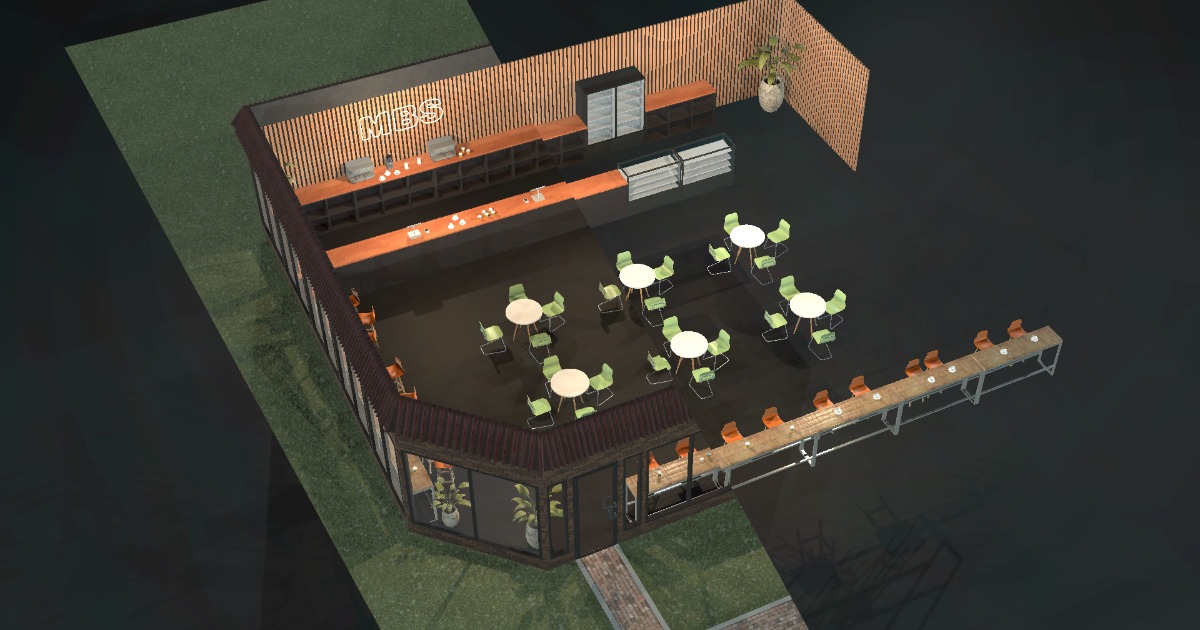
Get the MBS - Modular Building System package from Roman Ponomarenko and speed up your game development process. Find this & other Level Design options on the Unity Asset Store.
lapis elk
worn coral
I am an absolute beginner, started out today. WIth the goal of creating my first...
If you struggle with importing into unity, have a look into this tutorial:
In this video we talk about the correct workflow to export your 3D models from Blender to Unity.I'll show you the right way and introduce you to common errors and show you how to fix them.
If you are interested in game design and gamedev, we are happy to offer you help on our Discord. You can also check out our Instagram or support us on Patreo...
worn coral
Thank you ♥
 eager mist
Hi, could someone help me, please? I made a stage floor in Blender 3D, but when exported and imported into Unity 3D it looks completely different.

 fluid oak
dense heath
so I just have to have them seperate in the unity file regardless basically?
fluid oak
dense heath
so I just have to have them seperate in the unity file regardless basically?
They will be separated in the build, anyway, when everything is converted to unity's own format.
fluid oak
hushed plover
Ping me when you answer.
How do I import Synty assets to Modular Building Syst...
Have you asked the dev of the system you're using?
fluid oak
earnest pecan
Is it possible to make roads or rivers using Unity's spline package? The Spline ...
You can use the splines themselves but if you want more than tubes or strips you will need to extend it since the examples are relatively simple.
earnest pecan
fluid oak
You can use the splines themselves but if you want more than tubes or strips you...
Thanks, I managed to figure out how to build it from code. The next step is figuring out spline widths.
hushed plover
@fluid oak I'm waiting for him to get back to me.
 lapis elk
 gilded tangle
what do you guys think of this drawing of my game?
gilded tangle
what do you guys think of this drawing of my game?
for which usecase? ^^
 obtuse oyster
@azure shadow Your DMs may be closed to the bot, so here's the warning: Don't post asset store advertising outside of the asset-store-advertising channel (or disregard the rules of that channel).
 gritty raft
Is directly using the .blend file in Unity not supported correctly? I have super simple materials, just BDSF with a texture, and the texture does not appear in Unity. I have tried with Packed, Unpacked, Relative and Absolute paths. I can Extract Materials, but i cannot Extract Textures, nor are the Textures present. I have tried 'Normal mode' and Legacy.
Materials are present in either mode, but not the Textures
gritty raft
Seems this is on the list of "Don't expect this to work"
lapis elk
AMAZING Free OUTLINE for URP (Screen Spa...
 nova coral
What's the easiest way to make images that come in rectangular format but align to hexagons work correctly here?
 misty lantern
nova coral
What's the easiest way to make images that come in rectangular format but align ...
misty lantern
nova coral
What's the easiest way to make images that come in rectangular format but align ...
There isn't really any direct way to convert rectangular graphics to hexagons, since it's a totally different shape
Looks like your sprites are already hexagonal though, just with different proportions than your grid
nova coral
The actual image files are rectangles that are cropped perfectly to fit the sprite
Which really sucks because if they were just left uncropped it'd be fine
Once I do actually have them aligned to the tile map, how do I rotate them in 60 degree intervals? Do I really need a new sprite for each?
misty lantern
nova coral
Once I do actually have them aligned to the tile map, how do I rotate them in 60...
nova coral
Ah ty!
 hollow lotus
Not quite Unity specific, but when importing from blender, I put everything in collections for organization, but they aren't imported into unity. How would I make them appear as just like empty gameObjects/Is there a way to?
Or just child object meshes somehow
 novel garden
So I've been looking at Oli Oli world, since I'm interested in a style with heavy outline and flat colors. I understand that most of these outlines are likely handled by some edge detection shader, but there are some lines within meshes that dont seem to be from an edge.

For example the bottom of this mushroom in the background.

Would these lines be textured on? Or do they have some texture that's maybe telling the outline shader to draw line there?
 inland thorn
Don't know if this actually the channel to ask this, but how do I know which downloaded "for free" assets can I actually use if I were to make my product a comercial one. Like for example, I used whatTheFont to find a similar font of what I am looking for, it was for sale in there for like 500+$, I was like... No way I can afford that; and I found a free version of it from download, which made me raise an eyebrow. How do I know the actual thing I am using is actually fair for me to use freely?
 lucid anchor
Hi guys. I have a problem that causes me much confusion, resulting in me renaming my objects over and over again.
How do you guys name objects in a scene when it becomes more complex?
For example: I'm currently setting up colliders for a sail ship. So, this new object is the
First collider of the railing on the forecastle on the left side.
How would you name this object?
My current name for it is "Coll_RailingForecastle1_L"
But there is no Forecastle2, so i think it's still confusing. If i put the Railing to the end of the name, isn't it against the intuition that on the beginning of the word it should clearly say what it is, followed by where it belongs to?
 weary comet
Not sure if this is the right channel but unity is reporting one skinned mesh to be 220 thousand vertices, while blender is reporting the same one to be 6400
I've disabled shadow rendering on my camera and that appears to have shaved 40k vertices off but I'm confused as to how its multiplied the vertex count by 30
okay so I've just found I had a second camera
but I now have the issue of the gun still have 11x more verts than the source model does
 true trench
I made a chest with a single bone to animate the hinge joints/open it. Rig works well into blender, but in unite, the entire chest is affected by the single bone. Why?
ah, could that be the reason why there is always a "root" bone that seem to have no impact when I look at other people's work?
Okay, I'm getting warnings that certain verts have no bones/weight assigned, so they're given one by default by the importer. Looks like this was my issue
lapis elk
true trench
ah, could that be the reason why there is always a "root" bone that seem to have...
There is no need to open a chest with bones. Thats a little to much ^^
misty lantern
true trench
ah, could that be the reason why there is always a "root" bone that seem to have...
Bones in Unity require more than one bone, even if in Blender they do not
All non-weighted vertices will be assigned to the root bone so with just one bone you get no deformation
 tribal ravine
If i were to make a large map for a driving game with mountainous roads cities/towns, tunnels etc
What would be the best way to go about it
One of my ideas was to use something like Gaea to create a large landscape, Then draw a map onto the landscape where roads, cities etc will be
Like nature
But then it becomes alot more random and different from what i would imagine i assume
 umbral knoll
weary comet
Not sure if this is the right channel but unity is reporting one skinned mesh to...
umbral knoll
weary comet
Not sure if this is the right channel but unity is reporting one skinned mesh to...
To tell what Unity is reporting per model you have to select the model from the project window and then it will give you the stats on that model. Trying to gauge it from the camera view frustum stats will give you varied results.
weary comet
It said my gun model was a total of 15k or so vertices, but the info also said vertices, vertex normals and uv something
true trench
misty lantern
Bones in Unity require more than one bone, even if in Blender they do not
All no...
Thank you
gritty raft
Focal length is killing me!

 gritty raft
Is there a way to search within BlendShapes? this is not working..
 obtuse oyster
gritty raft
Is there a way to search within BlendShapes? this is not working..
obtuse oyster
gritty raft
Is there a way to search within BlendShapes? this is not working..
No, apart from making a custom editor
gritty raft
Ok, thank you
fluid oak
novel garden
Would these lines be textured on? Or do they have some texture that's maybe tell...
Those particular lines do look like they could be a texture, though to draw lines inside an object like that you could also draw each segment in a different color(or have a texture to do so) and use that to tell the shader where to put lines.
fluid oak
inland thorn
Don't know if this actually the channel to ask this, but how do I know which dow...
Unfortunately, there is no replacement for doing the research. Which isn't fun, but IP law usually isn't 
 cerulean widget
I'm also a personal trainer with extensive experience if you'd like some proffessional advice for your health or nutrition let me know
If you have any suggestions about my next ship project or which historical ship you would like to see let me know
 tawny echo
Is there a quick way to fix texture stretching? Material tiling doesn't work for me as it affects other meshes.

 potent wraith
tawny echo
Is there a quick way to fix texture stretching? Material tiling doesn't work for...
potent wraith
tawny echo
Is there a quick way to fix texture stretching? Material tiling doesn't work for...
Either tiling or editing the uvs of your mesh.
A custom shader that disregards uvs is an option too.
tribal ravine
tribal ravine
If i were to make a large map for a driving game with mountainous roads cities/t...
Any advice on this?
inland thorn
I think I saw some video about using a node to tell the texture to keep always proportional even after scaling the object, but it leads to other issues, you probably want to do UVs properly if you want precision over this
lapis elk
@hardy shadow - can you delete this advertisement 5 messages above? ^^
 hardy shadow
!warn @cerulean widget please don't use this channel for promotion
lilac edgeBOT
 PrimarisDiomedes#9554 has been warned.
inland thorn
Can I like, create a new Font Material contained within the font or do I have to create a new one to change it?
 tawny echo
I have two textures that are supposed to be seamless but still gets seams between meshes??
 lapis elk
tawny echo
I have two textures that are supposed to be seamless but still gets seams betwee...
lapis elk
tawny echo
I have two textures that are supposed to be seamless but still gets seams betwee...
could mean they are not seamless
gritty raft
In UE, i could take any black and white map and plug it into Opacity to control the Alpha clipping, basically, of the Albedo on the model. How can i do this in URP? I mean, am i just missing where the plugin is, or do i need to shadergraph it?
 proven veldt
everyone should use this now on to protect their art from ai training on it

Kin.art, an art commission management platform, wants to enable artists to defeat GenAI model training efforts that they haven't authorized.
tawny echo
lapis elk
could mean they are not seamless
I suppose so-
inland thorn
Is there any reason why that background is appearing in Game mode but not in the editor?

Like, what is happening there?
 inland thorn
To what?
inland thorn
 scenic fog
Like I want to see the skybox, I am refering to the black mask that appears behind the text
scenic fog
oh, the font you mean?
inland thorn
It only happens when the font asset is created with SDFAA; which I want to do cause I want to add effects to the font material
 scenic fog
I remember running into this issue before
it has to do with the padding IIRC
Unity Forum
I've got text in my scene and it seems to keep creating boxes around the text, like so:[ATTACH]
Im using Unity version 2019.1, and the newest text...


check this thread, I think it's the same issue you're having
inland thorn
Oh, is cause of padding being too low
Which... if I have to scale up makes is slightly blurry
Kinda inconvinient
But thxs 😄
 sullen plank
bump up resolution to compensate
 lusty spindle
anybody know how to deal with this?
I like the textures being transparent but I dont like that weird artifacting where it renders one over the other at the intersection
 olive matrix
heya, this is partially code related but with a smattering of shaders + probuilder stuff so I wasn't sure where to put it exactly
basically, I'm working with 2d tilesets and turning them into 3d buildings. I was wondering if there's any precedent for this kind of workflow/if anyone's aware of similar projects
right now I'm using probuilder to put several materials on one mesh (using the tilesets as 2d arrays). not positive if I'm on the right track or not though so advice would be great
 gritty raft
For Skeletal Mesh LODs, do they all Child under the same Skeleton, or a copy of the same skeleton?
Would it be
(Skeleton1 with Mesh LOD0), (Skeleton1 copy with Mesh LOD1), (Skeleton1 copy with Mesh LOD2)
or would it be
(Skeleton1 with Mesh LOD0), (Skeleton2 with Mesh LOD1), (Skeleton3 with Mesh LOD2).
Or perhaps
(Skeleton1 with all Mesh LOD0, LOD1, LOD2) together, and the LOD system would disable/enable as needed?
fluid oak
olive matrix
heya, this is partially code related but with a smattering of shaders + probuild...
The technical term would be 'trim sheet' I believe.
lapis elk
lusty spindle
I like the textures being transparent but I dont like that weird artifacting whe...
The problem is, that unity don’t know which transparent material is on front. You can handle this with a opaque shader with alpha clipping
 jovial elm
Has anyone here used Blender to convert models as an FBX file?
I'm having some issues doing it for a Ready Player Me avatar
Below are two screenshots of the avatar in Blender vs the Avatar after exporting


Have I done something wrong in Blender?
or is there a better app to do this?
 hexed shell
hello. I have 3d image i want to use as background image. But I couldn't make it so. I have 6 images split them into 6 to assign to skybox material (skybox material requires up,down,front,back,right,left images) 3 of 6 of them match perfectly but 3 of them dont. Is there anyone here who is experienced in this and want to help out? (3d image from blender)
lusty spindle
Anybody know a good way to import GLTF to unity? currently am trying to use https://github.com/Siccity/GLTFUtility#Important-shader-note and I installed this for json https://github.com/jilleJr/Newtonsoft.Json-for-Unity.git#upm but whenever i try to import gltf it crashes

GitHub
Newtonsoft.Json (Json.NET) 10.0.3, 11.0.2, 12.0.3, & 13.0.1 for Unity IL2CPP builds, available via Unity Package Manager - GitHub - applejag/Newtonsoft.Json-for-Unity: Newtonsoft.Json (Json...

GitHub
Simple GLTF importer for Unity. Contribute to Siccity/GLTFUtility development by creating an account on GitHub.
obtuse oyster
lusty spindle
Anybody know a good way to import GLTF to unity? currently am trying to use http...
Why not the official plugin that is pinned to this channel?
 upper spindle
i'm having issues with my model, it has textures but they turned into gray shaders. and i can't re apply the png files it did have
 obtuse oyster
upper spindle
i'm having issues with my model, it has textures but they turned into gray shade...
obtuse oyster
upper spindle
i'm having issues with my model, it has textures but they turned into gray shade...
You should remap the materials by extracting them and setting the textures on those extracted materials
 upper spindle
ohh so thats how. i'll go try that.
i didn't know what that meant before or where, ty. i'm sure i'll be back
well it duplicated the same materials just in another folder. it wont let me actually set anything on either of them. what do you mean by "setting the textures"?
i'm likely just too stupid to see this, i've been trying to get my model in unity all day (7+ hours) where will it let me pick the textures?
 obtuse oyster
upper spindle
i'm likely just too stupid to see this, i've been trying to get my model in unit...
obtuse oyster
upper spindle
i'm likely just too stupid to see this, i've been trying to get my model in unit...
The picker next to albedo
 rustic belfry
hello ive been trying to transfer my fbx file to unity and everytime it says "Can't generate normals for blendshape '...' on mesh '...', mesh has no smoothing groups." do you have any idea how to remedy to this?
misty lantern
rustic belfry
hello ive been trying to transfer my fbx file to unity and everytime it says "Ca...
Does it cause an issue?
rustic belfry
ye i cant seem to create avatar definition from this model
for the rig
like configure the rig
ay my bad i dont have any idea how it fixed itself but it fixed itself
im so so sorry for taking up your time
misty lantern
rustic belfry
ye i cant seem to create avatar definition from this model
The Avatar system has no knowledge of mesh normals so it's unrelated
rustic belfry
It just says that on repeat for the blendshapes
upper spindle
obtuse oyster
The picker next to albedo
all that does is let me pick a color not a texture

here you can see i hovered over the tongue texture, it only picks a color from the texture not the whole texture itself
 outer halo
The square box to the left of albedo is the texture. Put it there.
upper spindle
tysm
true trench
I have a rope that my character uses to fight with. In its neutral state, it's just a handle with points using verlet integration.
I want the ability to perform attacks with the rope. I need the attacks to be/look consistent, so for the attacks I am stopping the simulation and looking for ways to manually animate the points.
Currently, I am manually simulating the arcs/motions with trig maths but results are a tad rough.
Any ideas how I could achieve good looking results?
 tacit island
Guys when i create pixel art, would it be smart of me to make the "Character" made up from different pieces, like - Make the character but without arms, and then create the arms seperately, and then the gun model, to then add it all together in Unity as different objects, or?
true trench
@tacit island depends if you need the modularity or not. If you don't, then it sounds like you'd just be creating problems for yourself. You'd need to manually adjust the render order of things. E.g. hand is drawn over weapon who's drawn over torso, etc.
tacit island
true trench
<@160786756902453248> depends if you need the modularity or not. If you don't, t...
Uhh, yeah that's true. Still very new to all this design stuff. So i would be better off most likely just making the character and the weapon to be the 2 seperate objects instead of more limbs. I wanna learn Animating in Aseprite
 daring harbor
is there a way to set the asset bundle for every asset in a project directory at once?
eager mist
what's the best tool to like make spritesheet like this? where i can like just press right arrow to go to next frame/step, then edit that frame manually

any suggestion?
Aseprite animation system is weird, i dont know why they have to do their animation like that... multiple files for animating feels bad for making spritesheets. It's mostly helpful for making gifs, not spritesheets 🥹
misty lantern
eager mist
Aseprite animation system is weird, i dont know why they have to do their animat...
What are you referring to
You can export animations into sprite sheets
(and you don't need multiple files for making gifs either as exporting to gif is supported natively)
There's also Unity's Aseprite importer which generates the animation clips automatically
eager mist
misty lantern
What are you referring to
You can export animations into [sprite sheets](<https:...
Lemme try if i can do this
 violet walrus
i like the way it does animation, feels like flash to me but all pixel art instead of vector
 gritty estuary
Hello, i am trying to import this (https://sketchfab.com/3d-models/concert-barricade-porter-robinson-vr-7f77504ec49e400b8406ccb6cd73953c) model into unity but i cannot figure out how to apply the material with holes in it. The .blend file comes with a mask texture to make the holes but cant figure out how to use it.


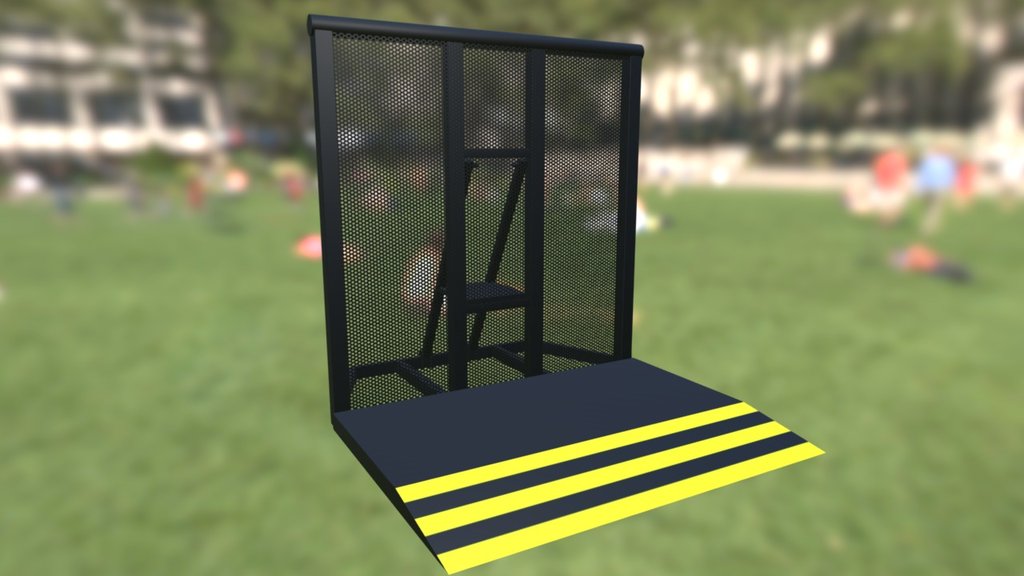
A general barricade used in a bunch of outdoor concert setups. This model is used for “Worlds VR”, a VR recreation of Porter Robinson’s fantastic live set.
Modeled in Blender
Textured using Photoshop. - Concert Barricade (Porter Robinson VR) - Download Free 3D model by lostdexter
misty lantern
gritty estuary
Hello, i am trying to import this (https://sketchfab.com/3d-models/concert-barri...
You'll want a material with alpha clipping (or "cutout")
 young wasp
yo guys
I use the phtoshop importer thing to import all my graphics into unity
and I had this:

and usually, in unity, the character is facing the right direction by default
so i flipped it:

but umm
for some reason, this is what unity imports:
 misty lantern
young wasp
and usually, in unity, the character is facing the right direction by default
so...
misty lantern
young wasp
and usually, in unity, the character is facing the right direction by default
so...
Seems like it'll be easier to flip the component than the sprite itself
young wasp
misty lantern
Seems like it'll be easier to flip the component than the sprite itself
it poses issues in the programming side of things
so I thought "why bang my head at vs code if I can do that?"
but damn unity flips me over no matter what i do
misty lantern
young wasp
it poses issues in the programming side of things
so I thought "why bang my hea...
Then I'd try importing it again with a new name, if forcing a reimport doesn't solve it either
I'd guess the psb importer is stuck somehow, it should adjust the sprite shape and other sprite meta data when changes are made

 halcyon pewter
I have a spritesheet which each tile is 1024x1024, and the total size is 8k.
is it a good idea to set the max size in the sprite's import settings to be more than 4k or even 8k?
How do you handle 2D animation spritesheet where each frame requires a rather big size (e.g. the game is not a 2D pixel game)?
lapis elk
halcyon pewter
I have a spritesheet which each tile is 1024x1024, and the total size is 8k.
is...
depends on the size you need this tile in the game. If this tile will be relatively small in the game, you should shrink the size as low as you need it.
Chaning the size in the import setting to 4k makes only sense, if you source file has a 4k resolution. And 4k makes only sense if your sprite is displayed as a 4k image in the game.
halcyon pewter
lapis elk
depends on the size you need this tile in the game. If this tile will be relativ...
Ok thanks I'll take that into consideration
misty lantern
halcyon pewter
I have a spritesheet which each tile is 1024x1024, and the total size is 8k.
is...
How big do those tiles appear on an average screen? 1024 is nearly the height of a full HD monitor
halcyon pewter
misty lantern
How big do those tiles appear on an average screen? 1024 is nearly the height of...
Imagine a football (soccer) field, which the whole field is the screen. The sprite is twice or 2.5 times the size of the center circle of the field, or little less from both penalty arena merged.
lapis elk
halcyon pewter
Imagine a football (soccer) field, which the whole field is the screen. The spri...
i guess 1k should be enough
(and if not, adjust it later)
misty lantern
Usually with large areas you don't have to capture the whole thing on a texture, instead you can use repeating textures for repeating features like grass, and re-use sprites where they occur multiple times
halcyon pewter
I'm still thinking. The tile is 1k. But it has 10 frames to the left and 4 to the bottom. so it's 10k by 4k in size. If I import it at 2k max, it's going to be 2048x814 px which 204x204 px each tile, looks far worse than 1k each tile.
But having 1k doesn't hurt the fps, the animation is just going to run for 1.3 second.
Aside from big file size or long asset load time, what are the consequences of importing these spritesheet with big max size?
misty lantern
halcyon pewter
I'm still thinking. The tile is 1k. But it has 10 frames to the left and 4 to th...
Taking up space in VRAM, which varies per user device
halcyon pewter
Oh yes, I forgot
gritty estuary
misty lantern
You'll want a material with alpha clipping (or "cutout")
doing that makes it so the holes stay but the grill part is transparent. Its needs to be the opposite
 misty lantern
gritty estuary
doing that makes it so the holes stay but the grill part is transparent. Its nee...
misty lantern
gritty estuary
doing that makes it so the holes stay but the grill part is transparent. Its nee...
Your grill texture is inverted for whatever reason
The transparency is wrong even on discord
If you have a modernish Unity editor you should be able to invert it in import settings
"1-A" means one minus alpha, which also means inverted

 jagged obsidian
I have a game, and I want to put some button in the bottom left corner. What should I put there in terms of design? (like "stop" button, power up, things like that)
misty lantern
jagged obsidian
I have a game, and I want to put some button in the bottom left corner. What sho...
Some button? Just any button? Why
jagged obsidian
misty lantern
Some button? Just any button? Why
I have a bug in this corner
And I think it's can be a creative Sulotion
misty lantern
jagged obsidian
I have a bug in this corner
And I think it's can be a creative Sulotion
I'd rather look into fixing the bug but maybe you'll get some ideas from #archived-game-design
gritty estuary
misty lantern
Your grill texture is inverted for whatever reason
The transparency is wrong eve...
I think that's because it's meant to be a mask instead of the actual grill. But I will try this when I get home.
 grand marsh
Why are some parts of the mesh visibile THROUGH the rest of the mesh??


Figured out the solution.
Changing Depth Write to Forced fixed it.
 misty lantern
grand marsh
Figured out the solution.
Changing Depth Write to Forced fixed it.
misty lantern
grand marsh
Figured out the solution.
Changing Depth Write to Forced fixed it.
That's not a very permanent solution
Transparency should not be enabled at all except for the parts that need to be semitransparent

 hollow tusk
So I have a room design from blender. But after importing it in unity the walls of the room keep dissappearing when ever I turn to them, and the room has no wall unless I zoom in view from inside, like a part is missing. Does anyone know what is wrong and how I can go about solving it?
I recaulculated the normal in blender but still when I import it nothing is changing in unity.
Technically it fixed the problem and created another problem. Not the walls are invisble from the inside.
misty lantern
hollow tusk
I recaulculated the normal in blender but still when I import it nothing is chan...
It sounds like it's indeed a normal orientation problem
Note that "recalculate normals" only takes a guess which way the normals should be facing
If your mesh has exposed insides then it cannot produce a result that's correct for every part
You should aim to create a manifold geometry that has no exposed insides, and you may also have to flip the faces manually rather than relying on automatic recalculate
 wild mango
Does anyone has experience with using AI tools for generating textures? I want to make "simple" textures for my terrain like rook grass and so on...
 modern remnant
what resolution should u draw game assets in
misty lantern
modern remnant
what resolution should u draw game assets in
depends on their visual size relative to the end-user's monitor
So, hard to say really
 edgy hedge
Hi all! I'm working with some very long thin textures generated by a VAT baker. (one is 6198x50!). I was wondering if I'm losing any memory by not wrapping them. Unity's docs say that non-power of 2 is a bigger issue but my intuition from when I started learning was that long textures could be problematic. Does anyone have any insight on this? https://docs.unity3d.com/Manual/ImportingTextures.html#TextureSizes

 tired wedge
I baked the lighting of my interior scene in Blender, and so far it looks great (minus windows/transparent materials). However there's no reflections

here's the render, notice the reflections on the ground

is there a way to add reflections to emissive materials?
lapis elk
tired wedge
is there a way to add reflections to emissive materials?
i think you wont get much support for blender in this discord
tired wedge
I was asking if there was a way to do it in Unity, sorry
it was baked in Blender though
but I figured it out, it turns out I could just plug the texture into emission and set the Color to black, and smoothness should work as normal
I also found a screen space reflection asset for URP
lapis elk
if you want reflections like in the second image, you should use screen space reflections, yeah
normal reflection probes wont get a result like that
misty lantern
@tired wedge You'll still additionall want reflection probes though, as SSR falls back to probes in places where it cannot function
Box projection helps

 celest fern
for some reason my tree that is made in blender looks like this in game and i dont know how to fix it can u help please?
 inland thorn
celest fern
for some reason my tree that is made in blender looks like this in game and i do...
inland thorn
celest fern
for some reason my tree that is made in blender looks like this in game and i do...
If you don't even show how it is supposed to look is hard to answer to that...
lapis elk
 mystic orbit
is my texture doing this simply because of size?
mystic orbit
is my texture doing this simply because of size?
What is your texture doing?
lapis elk
How does the import settings of your texture look like?
celest fern
inland thorn
If you don't even show how it is supposed to look is hard to answer to that...
ill send in a sec
this is what it is supposed to look like

i know how to add textures but for some reason in unity there are transparent parts as u can see
lapis elk
celest fern
this is what it is supposed to look like
Are all normals facing outside?
celest fern
ye
lapis elk
Can you show the wireframe and the face direction?
 lapis elk
celest fern
lapis elk
celest fern
Sometimes very long and thin triangles making problems in Unity. But normally they wont be invisible ^^
For me it looks like the normals are inversed
celest fern
oh ok thank you 🙂
lapis elk
celest fern
oh ok thank you 🙂
https://www.youtube.com/watch?v=v-dcBY1-YS8&feature=youtu.be
If you have problems with exporting from Blender to Unity, you can have a look here
In this video we talk about the correct workflow to export your 3D models from Blender to Unity.I'll show you the right way and introduce you to common errors and show you how to fix them.
If you are interested in game design and gamedev, we are happy to offer you help on our Discord. You can also check out our Instagram or support us on Patreo...
 trail nest
How can I fix that the textures are the same size on every object If i change the scale the texture will change aswell
 inland thorn
trail nest
How can I fix that the textures are the same size on every object If i change th...
inland thorn
trail nest
How can I fix that the textures are the same size on every object If i change th...
Use a shader that takes in account the size of the object to do the tiling
Or just, create a new mat with the same texture but different tiling
 silk kiln
hi did anyone know any program to create 2d characters for my game in unity?
celest fern
guys i need a little bit more help for some reason i keep fading into object quicker ill show a vid
i am not far away at all and for some reason this is happening how do i fix
 lapis elk
trail nest
How can I fix that the textures are the same size on every object If i change th...
lapis elk
trail nest
How can I fix that the textures are the same size on every object If i change th...
Adjust the UV size of the object where the tiling is wrong.
lapis elk
inland thorn
Or just, create a new mat with the same texture but different tiling
oh thats dirty 😄
lapis elk
celest fern
i am not far away at all and for some reason this is happening how do i fix
you must start telling the people what "this" is, when asking for help ^^
You mean the clipping at the bottom?
celest fern
lapis elk
you must start telling the people what "this" is, when asking for help ^^
You me...
i clip in everywhere even if i am far away
lapis elk
 celest fern
ty
oh wait it doesnt work ill send a vid instead
even if i am far away i keep fading into objects
lapis elk
celest fern
even if i am far away i keep fading into objects
Is it your game view or the scene view?
celest fern
lapis elk
Is it your game view or the scene view?
scene view
lapis elk
double click on your tree in the hierarchy.
Shouldnt happend then anymore
celest fern
yay it worked
trail nest
lapis elk
Adjust the UV size of the object where the tiling is wrong.
How do I do this?
lapis elk
trail nest
How do I do this?
In Blender or some other 3D Program
trail nest
ah so you mean that every object has the scale 1,1,1?
lapis elk
trail nest
ah so you mean that every object has the scale 1,1,1?
No. The UV-Shell of your door (or what it is) is to big. That means that your texture fits to often into it, thats why the texture is so small
If you shrink down your the UV shell, the texture will become bigger on it
lapis elk
trail nest
i know nothing about textures
i wrote you a PN
tired wedge
anyone know why screen space reflections isn't working? I can confirm post processing works, since the Color Grading is making everything red

the camera's rendering path is set to Deferred, and I can confirm it doesn't work in other fresh scenes
The ground's smoothness is also maxed out
This is using Post Processing Stack v2, not URP
tired wedge
huh, just restarted the entire project from scratch and it works
tired wedge
I figured it out... it was webgl?? When I switch the build to webgl SSR suddenly breaks
fluid oak
tired wedge
I figured it out... it was webgl?? When I switch the build to webgl SSR suddenly...
WebGL doesn't support shader model 5.0 does it?
So SSR might not be supported.
At least, not unity's version of it
tired wedge
okay, I found a sketchy asset for planar reflections that required a lot of setup, but it works on webgl at least

Add depth to your project with Simple Planar Reflection asset from Persephone's Chair. Find this & more VFX options on the Unity Asset Store.
 clear stone
hey does anyone have any Torso models, I need it for my fps project and will credit the creator. Will explain in more detail if needed but to generalise I need torso for an fps trench game that will be used with a m1911. I messaged the other chat but believe this is the appropriate channel# to ask in.
outer halo
clear stone
hey does anyone have any Torso models, I need it for my fps project and will cre...
This isn't the place to ask for handouts. You can search the asset store for what you want.
If you want to hire someone you can post on the forums !collab
lilac edgeBOT

📢 Collaborating and Job Posting
We do not accept job or collab posts on discord.
Please use the forums:
• Commercial Job Seeking
• Commercial Job Offering
• Non Commercial Collaboration
 proud cradle
Hi everyone! I imported a video (.MP4) w/ a transparent background into Unity, but Unity is showing the video with a black background instead of transparent. Does anyone know how to fix this?


 small fiber
hey! how do i determine how large a pixel art canvas should be for a top down 2d game? I made an example "world" on a default canva which was 32p x 32p and i had to zoom in in order to see it!
what i mean is this:


normal png vs full zoom
gritty raft
So, the USD importer (the one in 2023.x Unity, not the Github deprecated one) does not understand how to import the textures yet, or am i just Really missing something here? Oh, it may also be that Blender does not know how to Export USD properly. I will look into that
Ok, just read the docs on Blender USD Exporter limitations. there are some Major issue there.
misty lantern
small fiber
hey! how do i determine how large a pixel art canvas should be for a top down 2d...
What do you mean by "canvas" in this context
Unity's Canvas or something else?
small fiber
misty lantern
Unity's Canvas or something else?
Aseprite and other similar apps
misty lantern
small fiber
Aseprite and other similar apps
Fully depends on how big you want your sprite to be
Sprite based game levels are often composed of many individual sprites
small fiber
misty lantern
Fully depends on how big you want your sprite to be
Sprite based game levels are...
well idk how to know how big i want my sprite to be 😂
lets take the game forager as an example, what would the size be for a world / platform like it?
misty lantern
small fiber
well idk how to know how big i want my sprite to be 😂
lets take the game forag...
There are no hard or fast rules
Forager is probably built around 16 pixels per unit, with one-unit grid for the tilemap
Characters made to roughly fit in that kind of square as well
small fiber
I see, thank you!!
misty lantern
If you're not using tilemaps, you won't even have a grid to worry about or to use as a basis
It's difficult to decide, especially since how large the grid is on the modern and how large your characters are are arbitrary as well
Could start with "what resolution looks good for a character" and build from there
It's traditional to use power of two dimensions, but not necessary
small fiber
misty lantern
It's traditional to use power of two dimensions, but not necessary
lets say my camera is set to 1080p (1920x1080), should i make my canva the same size if i want to have the whole map in the scene?
idk if that makes sense haha
misty lantern
small fiber
lets say my camera is set to 1080p (1920x1080), should i make my canva the same ...
You could, but it's not very practical
Even if you have a 1080p screen, your players might not, so the zoom or cropping will change
Textures should have power of two dimensions so they can be compressed in memory
You rarely need to have the whole level be one image, rather 2D games are composed of many smaller images
The Forager game for example uses tilemaps
small fiber
misty lantern
You could, but it's not very practical
Even if you have a 1080p screen, your pla...
what is power of 2 dimensions?
misty lantern
small fiber
what is power of 2 dimensions?
4, 8, 16, 32, 64, 128, 256, 512, 1024, 2048, 4096, 8192
small fiber
misty lantern
4, 8, 16, 32, 64, 128, 256, 512, 1024, 2048, 4096, 8192
ah lol, thats what came to mind but wasnt sure. So what is the size do you believe of a platform/world in forager? thats roughly the size i would want.
misty lantern
small fiber
ah lol, thats what came to mind but wasnt sure. So what is the size do you belie...
16x16 I assume
Look up "tilemaps" if you're not familiar with that technique
small fiber
misty lantern
Look up "tilemaps" if you're not familiar with that technique
Im not, i will now!
Thanks so much for your help!
 void thistle
does anyone know what is causing this issue? certain parts of the mesh are only visible from certain angles, but when I created the mesh in blender everything is visible constantly

 misty lantern
void thistle
does anyone know what is causing this issue? certain parts of the mesh are only ...
misty lantern
void thistle
does anyone know what is causing this issue? certain parts of the mesh are only ...
Check out Inverted normals - Model appears inverted / see-through / transparent in pinned messages
void thistle
tyyy
proud cradle
proud cradle
Hi everyone! I imported a video (.MP4) w/ a transparent background into Unity, b...
Still need help with this. Thanks!
 foggy steeple
When making 9 slice assets? What resolution should I make em if I want super crisp edges for 1920x1080? Stuggling to get my assets looking right
outer halo
You should make it to scale what a square would look like at that resolution
 tribal pivot
outer halo
You should make it to scale what a square would look like at that resolution
tribal pivot
outer halo
You should make it to scale what a square would look like at that resolution
how do you support different resolutions this way? for example 4k monitor would look blurry then? how to fix that?
outer halo
You make for the largest resolution you intend to support, or you don't bother and accept it won't be as crisp.
tribal pivot
outer halo
You make for the largest resolution you intend to support, or you don't bother a...
but images look worse when scaled down, they become jagged like this https://forum.unity.com/attachments/upload_2021-5-12_22-17-37-png.852629/
 outer halo
There is no workaround. You choose which one you care most about.
Or if you really do care, you make multiple and dynamically load things based on the target resolution.
tribal pivot
outer halo
There is no workaround. You choose which one you care most about.
Or if you rea...
but this doesnt seem like a problem in other games, i checked out super auto pets because its made in unity and its images are 256x256 and when i drag one of them into my unity project and make it the same size as in super auto pets, mine looks more jagged. i tried turning compression off too but that didnt change it
misty lantern
@foggy steeple @tribal pivot How crisp an image or a sprite is depends on its display resolution, which is the same as size relative to screen resolution
Unity's only way of resampling textures when scaled are pre-generated mipmap levels, which means you see the resamples texture only each time the scale is halved, so 0.5, 0.25, 0.125 and so on
Scales between mip levels simply blend nearest mip levels which becomes blurry
The "ideal" resolution because of that is exactly the same as your image's real display resolution, or 2x or 4x that if you want to support larger resolutions as well
misty lantern
tribal pivot
but images look worse when scaled down, they become jagged like this https://for...
The jagged edges are because mipmap generation is disabled
tribal pivot
misty lantern
The jagged edges are because mipmap generation is disabled
i tried mipmaps too actually, and it becomes blurry. way blurrier than in super auto pets. i tried setting mip map bias to -0.5f but that didnt improve things either
outer halo
They're probably handling it with mipmaps
Oh, what Spazi said. Sorry, discord didn't scroll down lol.
tribal pivot
i tried mipmaps with default settings and it was blurry and tried setting bias to -0.5f but neither fixed it, i cant get it to look as crisp as super auto pets if i use mipmaps
misty lantern
tribal pivot
i tried mipmaps with default settings and it was blurry and tried setting bias t...
You definitely can, but as I explained avoiding the blur with mipmaps requires that the texture is displayed without rescaling, or rescaled to half intervals exactly
Unless your texture has a lot of noisy detail, the small level of blur that would appear should not be noticeable
The game you refer to also has resampling issues when the characters are scaled during animations, but those animations go by very briefly
That combined with the simple and clear artstyle the problem really doesn't chance to become a problem
If you want 100% crisp graphics and can't figure out the correct resolution to avoid mipmap blurs, you may also try the Vector Graphics package, as that one recently got the functionality to render vector graphics as geometry rather than converting them to rasters
tribal pivot
misty lantern
The game you refer to also has resampling issues when the characters are scaled ...
so does this confirm that super auto pets uses mipmapping? how do i make sure it gets rescaled to half intervals or something? i only tried mipmaps with default settings, how and where should i modify them further?
misty lantern
tribal pivot
so does this confirm that super auto pets uses mipmapping? how do i make sure it...
I can't decisively confirm that but as they use Unity and mipmapping is Unity's only built-in way to handle image resampling and most people are fine with it, I'd assume so
misty lantern
tribal pivot
so does this confirm that super auto pets uses mipmapping? how do i make sure it...
You wouldn't modify mipmaps, but you'd have to consider the resolution in which you author/export your sprites
If you're aiming for a 1080p screen, you'll know that with a 1920x1080 canvas in your image editor whatever scale your graphic is relative to it, that'll be its "optimal" scale
Double those dimensions and that's the optimal for 4K, and thanks to mipmaps being in halves it'll resample nicely to 1080p
tribal pivot
misty lantern
Double those dimensions and that's the optimal for 4K, and thanks to mipmaps bei...
Hmm but how do games handle this when things are being scaled during animations a lot, and those animations dont go by briefly? There are lots of games like this and they dont seem to have this problem
misty lantern
tribal pivot
Hmm but how do games handle this when things are being scaled during animations ...
They are either using an engine that does real image resampling instead of mipmaps, or they avoid it, I'd imagine
There may be some shaders that do some kind of "texture antialiasing" that resembles image resampling when scaling, but I'm not aware of them
Since I'm bad at explaining this whole thing I should underline that the important thing is:
The image should be displayed as close as possible to its native resolution, or half of it, or half of that
What makes it complicated is that user screen affects camera size, and camera size changes relative sprite size according to its PPU
(UI images however have some options to adapt them to different screen sizes)
tribal pivot
misty lantern
They are either using an engine that does real image resampling instead of mipma...
theres lots of unity games that handle this perfectly (with lots of animations and scaling) so its still the unity engine
tribal pivot
misty lantern
Since I'm bad at explaining this whole thing I should underline that the importa...
what options do ui images have?
misty lantern
tribal pivot
what options do ui images have?
Pixel perfect option to improve crispiness a bit by not letting the image have sub-pixel offsets that cause blurriness on their own, as well as canvas scaler options that let you define absolute pixel sizes for images
How absolute size canvases work with drastically different screen resolutions is a bit outside of my experience though
Also, enabling trilinear filtering improves the look of textures between mip levels somewhat
tribal pivot
misty lantern
Pixel perfect option to improve crispiness a bit by not letting the image have s...
isnt the pixel perfect option only good for pixel art? otherwise it looks like the images teleport slightly (and look laggy due to it) when they move
misty lantern
tribal pivot
theres lots of unity games that handle this perfectly (with lots of animations a...
I doubt a bit that they really do it that "perfectly", it's more likely that the issues are not noticeable with most graphics if you're not lasering in on them
Sure it's possible Unity has some solution for this or that there's some third party solution for this that I don't know of, but I haven't found em so let them know if you do
misty lantern
tribal pivot
isnt the pixel perfect option only good for pixel art? otherwise it looks like t...
Pixel perfect for canvas is not meant for pixel art specifically though it works with that too
The teleportation you get is no bigger than one screen pixel exactly, so you'd only get a laggy visual if you very slowly move the image around in so it jumps from pixel to pixel
But since it's your monitor's native pixel grid it's not significant
tribal pivot
misty lantern
But since it's your monitor's native pixel grid it's not significant
Hmm ok, one more thing, should all my images use the default import settings? It has Compression: Normal Quality, should all my sprites have compression: none? and should format be Automatic or should i change it to RGBA 32 bit or something?
misty lantern
tribal pivot
Hmm ok, one more thing, should all my images use the default import settings? It...
You should always use the lowest quality settings you can get away with without it hurting your eyes too much, as a rule of thumb
tribal pivot
misty lantern
You should always use the lowest quality settings you can get away with without ...
If i use mipmaps how do I use them properly for sprites and ui? should i use the default settings of mipmapping or should i adjust some things like the mip map bias? i want it to be less blurry but switching settings doesnt improve it
misty lantern
tribal pivot
If i use mipmaps how do I use them properly for sprites and ui? should i use the...
I don't think there's any settings you need to tweak
 upper thunder
So I'm using a trimsheet asset flow where I have multiple meshes use the same exact material. The idea is to use static batching to reduce draw calls. However, the typical static batching seems to be creating a batch for separate meshes even though they share the same material. And it appears to be inconsistent. Sometimes they combine, and other times they don't. I'm well under the 64k vertice limit so I'm not sure why this is happening.
I've alternatively used a "Mesh Combiner" script that converts them all into a single mesh within the editor and everything is working perfectly. However, this is not ideal since it requires me to manually create the meshes while setting up the levels and I'll have to keep track of vertice limits myself. If anyone has any guidance at all, it would be greatly appreciated.
 lofty rain
Does anyone know why when importing the textures for my model, my texture is working on one hand whilst not fully working on the other despite both hands having the same texture?

The model and textures work perfectly fine in blender btw it's just when I port it into Unity
misty lantern
lofty rain
Does anyone know why when importing the textures for my model, my texture is wor...
Not a typical problem at all
I think it's most likely you have exported the mesh along with other objects or modifiers that you have hidden in blender
Two overlapping hand meshes would explain it
misty lantern
upper thunder
So I'm using a trimsheet asset flow where I have multiple meshes use the same ex...
Which render pipeline are you using, and what are you using to track batches and performance?
lofty rain
misty lantern
Not a typical problem at all
I think it's most likely you have exported the mesh...
I think it's most likely you have exported the mesh along with other objects or modifiers that you have hidden in blender
It was exactly this, Thank you so much🙏
 cold panther
guys how can i achieve old point&click/adventure games graphic style?
For example: Labyrinth of Time (its really old game), or like the Planescape Torment's cutscenes. It looks like they are made of clay. I can give even Sanitarium's cutscenes for example and even some old point and click games (some of them looks too realistic for its time (like Drowned God)). How can i make my assets look like them? I really want to learn it. So please, can you guys explain and send some tutorials about it?
misty lantern
cold panther
guys how can i achieve old point&click/adventure games graphic style?
For exam...
Those games used now antiquated 3D modeling programs to make their graphics, which were saved to low-bitrate textures for rendering in the engine
cold panther
sooo is there a way to replicate them?
misty lantern
Those old 3D programs were all using ray-tracing which is why they got such cool effects for the time, though they were all prerendered
misty lantern
cold panther
sooo is there a way to replicate them?
Sure, if you can dissect why they look the way they do
Or even use the programs they had back in the day
Luckily there's been a bit of a resurgence on the internet delving into those programs and figuring out how they work, which would help you
cold panther
Hmm I got the second one that you said, I could try it. But what do you mean by dissect? How's that going to be? (I'm really new to these modelling things, sorry for my stupid questions if they are)
Ohh i see, you meant try until you make something similar to it. But isn't it kinda hard? Maybe not exact tutorial for this but at least some similar tutorials can help me? I'm searching it for days and couldn't find any. Can you help me to find tutorial videos if you are not busy? :P
Even if I use the older programs, they wouldn't be usable on Unity I think.
Because of the formats of the files i mean.
I'm open to any kind of tutorial at this point lol. If someone knows something like that please send some :((
misty lantern
cold panther
Even if I use the older programs, they wouldn't be usable on Unity I think.
As I mentioned they were converted to low bitrate textures so they could use them in engines
None of the games you listed were rendering anything in 3D
The process is called "rasterization" if done on 3D graphics, "digitization" if done on real life images or even clay models that old games did use
Here's one example of the rasterization process
Understanding how to imitate an old game's style precisely with modern systems requires quite a lot of understanding of 3D tools, rendering in general and a keen eyed inspection of the specific game's graphics
It's rare that you find a tutorial or any kind of resource like that for that specific game
cold panther
Oh, okay now i got it. Thank you so much
One more thing, can you send a digitization tutorial? :D
misty lantern
cold panther
One more thing, can you send a digitization tutorial? :D
I don't have one at hand, and that workflow certainly has changed since the 90s
It used to be a whole ordeal to turn a film photo into a digital format as you can imagine
Now it's not really an issue
cold panther
misty lantern
I don't have one at hand, and that workflow certainly has changed since the 90s
...
there is two game uses graphics like that, one didnt come out yet: judero and dreamwild
judero's assets are made out of clay for ex
but how did they turned the physical objects into asset?
this is my final question
misty lantern
cold panther
but how did they turned the physical objects into asset?
With photography
Then they imported the photos into an image editor, cut out the backgrounds and imported those into the engine as sprites
cold panther
misty lantern
With photography
what about moving things like character?
 dark shadow
not sure if this is the right place to ask, but do you guys have any tips for "normal" and "realistic/unstylized" character assets? literally everything I'm finding is either soldiers or zombies or medieval, but there's basically no assets of just "people" ... there are some that are highly stylized, but almost nothing realistic
as in think npcs that walk around in GTA
misty lantern
cold panther
what about moving things like character?
Multiple photographs shown in sequence, just like how sprite animation normally works
Or the sprite is animated to move around
cold panther
ohhh got it
 keen moss
Guys someone know what best way to make icon for my 3D model ?
misty lantern
keen moss
Guys someone know what best way to make icon for my 3D model ?
There is no "best way"
It depends on each case
keen moss
misty lantern
There is no "best way"
It depends on each case
what do you mean
misty lantern
keen moss
what do you mean
What part's unclear?
keen moss
misty lantern
What part's unclear?
how can i turn 3d model to 2d ?
misty lantern
keen moss
how can i turn 3d model to 2d ?
That's called "rendering"
All 3D modeling software are capable of it
keen moss
misty lantern
All 3D modeling software are capable of it
alright thanks
dark shadow
you could also just "take a screenshot" with your in-game camera in unity
we've done that before in past projects, have a scene setup for "icon", load a prefab, save screenshot, load another, screenshot again, etc.
as in take screeshot with code
 shadow cape
Im going for a low res pixel art style for my game. Do you guys have any advice for what to improve upon? (background was not made yet and i didnt make the birds myself)
 misty lantern
shadow cape
Im going for a low res pixel art style for my game. Do you guys have any advice ...
misty lantern
shadow cape
Im going for a low res pixel art style for my game. Do you guys have any advice ...
The pixels of the artwork are stretched and squashed into a bit of a mush, is that intentional?
fluid oak
cold panther
Ohh i see, you meant try until you make something similar to it. But isn't it ki...
Look up ancient print tutorials from old cg art magazines
 cold panther
fluid oak
Look up ancient print tutorials from old cg art magazines
cold panther
fluid oak
Look up ancient print tutorials from old cg art magazines
more magazine examples?
its not even on internet archive

Wait
okay i just saw it :P
cold panther
cold panther
more magazine examples?
but still its hard to find them since there are tons of magazines
fluid oak
It was just an example.
Point is that if you wanna learn how they made stuff in the 90s, there wasn't really an internet tutorial scene.
A few general pointers for the style- most software had very limited UV mapping capabilities, so you'll see a lot of planar, spherical, and triplanar textures. Not a lot of beveling. Generally no roughness maps or the like that you'll see in modern pbr materials. Usually hard shadows.
And if you are using URP, use Simple Lit instead of Lit.
 opaque mist
my first work ever

pixel art SLIME
ugh ok i know its not smoth but yk first time after 10 min learning
lapis elk
opaque mist
my first work ever
its quite cool!
misty lantern
<@&502884371011731486>
shadow cape
misty lantern
The pixels of the artwork are stretched and squashed into a bit of a mush, is th...
its not, it happens for some reason though
opaque mist
lapis elk
its quite cool!
Thank u haha
 serene briar
I am having a problem where my FBX texture will be the wrong size when I extract it onto my FBX model, what can I do? (the right one is the blender file that it should be, and the right one is the problem)

 lapis elk
serene briar
I am having a problem where my FBX texture will be the wrong size when I extract...
lapis elk
serene briar
I am having a problem where my FBX texture will be the wrong size when I extract...
Adjust the Tiling
serene briar
the top or bottom one?
lapis elk
well, i guess the texture on the top is wrong? So the Top ^^
serene briar
thank you, will try
that did not work earlier haha, thank you
but.. its sideways for some reason?
 lapis elk
serene briar
but.. its sideways for some reason?
lapis elk
serene briar
but.. its sideways for some reason?
That means your UVs are rotated 90°
serene briar
probably (I am relatively new to the editor) where could I find the editor for that?
lapis elk
Ive go a Tutorial for beginners when exporting from Blender to Unity. https://youtu.be/v-dcBY1-YS8
In this video we talk about the correct workflow to export your 3D models from Blender to Unity.I'll show you the right way and introduce you to common errors and show you how to fix them.
If you are interested in game design and gamedev, we are happy to offer you help on our Discord. You can also check out our Instagram or support us on Patreo...
But for your case, you have to go back to blender and rotate the UVs of your top part in the UV Editor Tab
serene briar
so the texture you see in my blender file is still 90° turned even tho it should not be.. I will check it out, thank you for the help!
lapis elk
serene briar
so the texture you see in my blender file is still 90° turned even tho it should...
may depend on your blender material. Maybe it uses world coordinates or something else.
In the end you have to fix it so it looks correct in unity, right? ^^
But you are right, normally it should look (nearly) the same in Blender and Unity
serene briar
lapis elk
may depend on your blender material. Maybe it uses world coordinates or somethin...
yep
serene briar
lapis elk
But you are right, normally it should look (nearly) the same in Blender and Unit...
I will watch the video and I hope it will work
lapis elk
serene briar
I will watch the video and I hope it will work
The video doesnt contain the UV part, but i guess it will help you with several other upcoming problems when exporting models ^^
serene briar
because I have the same issue when importing from a color pallet, the colors get all wonky, like the color green does not render in on my poker table
serene briar
lapis elk
Ive go a Tutorial for beginners when exporting from Blender to Unity. https://yo...
that plugin is really usefull!
lapis elk
its cool but what is this dark space?
I would also add some more details to the ground to make it more interesting
 shadow cape
lapis elk
its cool but what is this dark space?
I would also add some more details to the...
shadow cape
lapis elk
its cool but what is this dark space?
I would also add some more details to the...
The dark space is supposed to be a background kind of thing, not the main background which will probably be parallax
lapis elk
serene briar
that plugin is really usefull!
The exporter? Yeah i love it.
It seems like it makes some problems in blender 4.0 and above. Just FYI
lapis elk
shadow cape
The dark space is supposed to be a background kind of thing, not the main backgr...
like in terraria?
For me this dark Background is hard to read. Could also be a bunch of coal to harvest 😛
shadow cape
lapis elk
like in terraria?
For me this dark Background is hard to read. Could also be a b...
yeah exactly like terraria and this background could be considered walls. Might need to redo background color then because i cant find the right one haha
lapis elk
shadow cape
yeah exactly like terraria and this background could be considered walls. Might ...
i guess you have a good spot to "steal" ideas with Terraria and Starbound ^^
misty lantern
@serene briar blender material Mapping values cannot be exported
serene briar
so thats it! because I indeed use that in blender
and in blender it is without it 90 degrees turned
misty lantern
shadow cape
its not, it happens for some reason though
Happens when your pixel art is viewed at the wrong size relative to camera (which pixel perfect camera component aims to solve)
misty lantern
serene briar
so thats it! because I indeed use that in blender
You'll want to use the "UV" texture coordinate with no modifications to it in the material
That way you'll know that the result is the same as with Unity's materials
serene briar
misty lantern
You'll want to use the "UV" texture coordinate with no modifications to it in th...
in blender right?
misty lantern
serene briar
in blender right?
Yes
eager mist
When I drag a texture onto a plane it doesn't work, it just becomes one solid color. I'm not importing anything from blender, nothing like that. It's just a png file that I put in Unity and it got turned into one color. Any idea why?
tried fucking with the settings in the probuilder uv editor but
nothing
 lime pollen
eager mist
When I drag a texture onto a plane it doesn't work, it just becomes one solid co...
lime pollen
eager mist
When I drag a texture onto a plane it doesn't work, it just becomes one solid co...
Is the texture being applied to the material correctly?
eager mist
lime pollen
Is the texture being applied to the material correctly?
im very new to this so im just dragging it onto the plane through here
 lime pollen
eager mist
im very new to this so im just dragging it onto the plane through here
lime pollen
eager mist
im very new to this so im just dragging it onto the plane through here
Click the plane and look at the material
lusty spindle
so I am using urp and I want to get this texture working like how cutout mode works in standard.


transparent gets close but it still renders weirdly, I tried changing render face around as well and all of them looked off. Any help is appreciated thanks!
fluid oak
lusty spindle
transparent gets close but it still renders weirdly, I tried changing render fac...
Set it to opaque alpha clip
serene briar
misty lantern
Yes
thanks!
 solemn rock
hey,im importing a asset store model and its been loading for like 20 minutes,it stopped and started again for 8 mins
it is not that big with like 1.8G but still why does it take that long
rn its at the Crunch Compress and when it gets more than 50% it gets back like sometimes it is 68% then is back to 50%
its like loading every texture,right?
lapis elk
solemn rock
hey,im importing a asset store model and its been loading for like 20 minutes,it...
importing materials and textures need a bunch of time, especially if they are also compressed while importing
fluid oak
solemn rock
it is not that big with like 1.8G but still why does it take that long
I feel like we have a different idea of what counts as big here.
Especially if that is mostly texture files.
solemn rock
Thanks
 shell belfry
Hi, textures dont seem to load on unity build, Im doing a 2D game pixel art how come this happens. On the editor they are perfectly find and Im not registering any errors. Thank you for your help
fluid oak
shell belfry
Hi, textures dont seem to load on unity build, Im doing a 2D game pixel art how ...
Which build target?
shell belfry
Linux and windows
shell belfry
fluid oak
Which build target?
Maybe something about addressables? Don't understand them much. Gonna try deleting the library folder
I recently had an issue where many files got deleted . But managed to bring them back into the project
 undone wraith
google has done me 0 justice, How do I get my FBX models to stay as one mesh instead of 20 different meshes
outer halo
Make them one group in Blender?
marsh summit
Yup, select all, then Control+J
... in blender 😄
Don't forget to set the pivot point, and apply the scaling
opaque mist
Hey guys !
I m new Game developer , I m really noob at this
I hope from the pro guys to give me the best way to start and learn faster
lapis elk
opaque mist
Hey guys !
I m new Game developer , I m really noob at this
I hope from the pro ...
Good luck 🙂 if you like, have a look on my tutorial series. I started creating videos for beginner gamedevs, so you can avoid the mistakes I made back in the days ^^
We also have a small Dev community mentioned in the video.
In this video we talk about the correct workflow to export your 3D models from Blender to Unity.I'll show you the right way and introduce you to common errors and show you how to fix them.
If you are interested in game design and gamedev, we are happy to offer you help on our Discord. You can also check out our Instagram or support us on Patreo...
 lime charm
opaque mist
Hey guys !
I m new Game developer , I m really noob at this
I hope from the pro ...
lime charm
opaque mist
Hey guys !
I m new Game developer , I m really noob at this
I hope from the pro ...
Do not crosspost
Ask each question in only one channel only
#854851968446365696 #📖┃code-of-conduct
opaque mist
lime charm
Do not crosspost
Ask each question in only one channel only
<#854851968446365696...
Srry mate need the best answer
1 link wont help as u know
lime charm
opaque mist
Srry mate need the best answer
The best answer is the one you've been given
lime charm
opaque mist
1 link wont help as u know
?? Yes it will.
Either way, it is against the rules to cross-post
misty lantern
opaque mist
Srry mate need the best answer
Asking everywhere is disrespectful to people's time
 lilac crypt
hello there! im about to start a devlog for my 2.5D puzzle adventure game (inspired by such games as Fran Bow, Sally Face and Don't Starve), and I am currently working on a poster and the main screen for the game. i would gladly appreciate some opinions about the composition of the poster and which arrangement you like the most! (the last image is a reference for the overall visuals and art style)


 misty lantern
 flat cosmos
my color picker from unity is not getting the corect colors
flat cosmos
my color picker from unity is not getting the corect colors
In what kind of situation and how incorrect?
flat cosmos
i also tried putting in the hexadamical code or how is called and is not working either.
i thought was something from lights but i disabled them.
so do you have any idea?
@misty lantern
misty lantern
flat cosmos
so do you have any idea?
Unity by default is in linear colorspace and may have some camera effects besides that so color picker is rarely reliable with the kind of accuracy you expect here
flat cosmos
flat cosmos
i also tried putting in the hexadamical code or how is called and is not working...
like i said i tried puting the code in from aseprite and is not working
 misty lantern
flat cosmos
like i said i tried puting the code in from aseprite and is not working
misty lantern
flat cosmos
like i said i tried puting the code in from aseprite and is not working
If you're desperate you can try swapping your project to gamma space to see if that helps
I'd just live with it and eyeball the color values close enough rather than using the picker
Or using a sprite for the background that's imported with the same color as the tile
fluid oak
lilac crypt
How many 'L's are there meant to be in InkwellL?
lilac crypt
fluid oak
How many 'L's are there meant to be in InkwellL?
oh yeah, i know the logo looks a little confusing 😅
personally i view it as a specific decoration, i like the whole look of the logo
- it adds a certain confusion which suits the overall atmosphere of the game
thank you for pointing it out tho!
back here with another choosing help for my game. im designing a main screen for the 2.5 puzzle game, set in an enclosed psychiatric hospital. which main screen do you like the most or find the most fitting for the art style? (art style reference pics are the last two pictures)
again, any feedback and opinion will be celestially appreciated
!


 fluid oak
3rd
inland thorn
Does it matter if the animation clip that I exported has trasnfrom values that exclude rotations? Cause apparently Unity doesn't like that
 fluid oak
inland thorn
Does it matter if the animation clip that I exported has trasnfrom values that e...
fluid oak
inland thorn
Does it matter if the animation clip that I exported has trasnfrom values that e...
Read the error fully- the NaN values will be replaced by defaults. So it only matters if that messes your animations up.
inland thorn
fluid oak
Read the error fully- the NaN values will be replaced by defaults. So it only ma...
I read It fully, but usually red errors mean bad thing, should this be a yellow one?
fluid oak
You can ask the unity devs if they wanna change it 😄
It isn't a compilation error, it is an import error.
eager mist
Hey, what's the best way to handle trees? Do I model a different one every single time in Blender 3d or is there an easier way?
lapis elk
eager mist
Hey, what's the best way to handle trees? Do I model a different one every singl...
If you want it easy, buy a good asset 🙂
eager mist
lapis elk
If you want it easy, buy a good asset 🙂
i like doing things from scratch honestly
lapis elk
eager mist
i like doing things from scratch honestly
i would do maybe 3-4 tree trunks and a bunch of different leave patches.
With them you can craft yourself a good amount of different trees
opaque mist
When I move the camera away, the snake becomes blurry
 lime charm
opaque mist
When I move the camera away, the snake becomes blurry
lime charm
opaque mist
When I move the camera away, the snake becomes blurry
Check the sprite import settings

 misty lantern
opaque mist
When I move the camera away, the snake becomes blurry
misty lantern
opaque mist
When I move the camera away, the snake becomes blurry
Unavoidable
With filtering as "point / no filter" and mipmap generation disabled your sprite will be pixelated, and when its size relative to camera changes the pixels will warp and shimmer
With filtering as "bilinear" or "trilinear" and mipmap generation enabled, the sprite will blur in that situation instead
If camera zooming or sprite resizing is required, the common solution is to have filtering and mipmaps enabled and utilize sprites and artstyle that aren't bothered by resizing
Pixel art never scales well
misty lantern
eager mist
Hey, what's the best way to handle trees? Do I model a different one every singl...
You can reuse meshes
No need to model each tree of a forest
But I get the feeling that wasn't what you were really asking
undone wraith
what if you draw the pixel are with a gazillion pixels so it doesnt blur
opaque mist
undone wraith
what if you draw the pixel are with a gazillion pixels so it doesnt blur
And wuts dat
tbh i m not pixel art lover but i have no tablet
misty lantern
undone wraith
what if you draw the pixel are with a gazillion pixels so it doesnt blur
That falls under "utilize sprites and artstyle that aren't bothered by resizing"
opaque mist
for drawin'
misty lantern
Still, due to the way unity works with texture filtering an image that's displayed with more pixels than one sprite pixel to one screen pixel will become more blurred
opaque mist
misty lantern
Still, due to the way unity works with texture filtering an image that's display...
Means there is no solution ?
misty lantern
We're always limited to screen pixels
Any art that doesn't perfectly match those pixels must be resampled, so it will blur (or with pixel art it will warp)
While that's a fundamental rule, we can still minimize the extent of that issue with our choices
fluid oak
eager mist
Hey, what's the best way to handle trees? Do I model a different one every singl...
Unity has a tree generator.
 ashen prairie
violet walrus
ashen prairie
violet walrus
yeah for the pixel art, you need to never have your camera smoothly change scale, and really need to keep things in a locked resolution and use a pixel perfect camera, there is never in a position that is between pixels in the art.
all doable, but its not simple and things will have to be within those limitations
fluid oak
Or use shader tricks to scale the pixels smoothly.
outer halo
@frail hedge !collab
lilac edgeBOT
📢 Collaborating and Job Posting
We do not accept job or collab posts on discord.
Please use the forums:
• Commercial Job Seeking
• Commercial Job Offering
• Non Commercial Collaboration
 winter creek
Are udims a good idea for game characters or should they all be in one texture the UVs?
misty lantern
winter creek
Are udims a good idea for game characters or should they all be in one texture t...
Unity does not properly support UDIM workflow, and it's not very practical for any realtime application because of optimization reasons
winter creek
misty lantern
Unity does not properly support UDIM workflow, and it's not very practical for a...
Yeah just read what you posted a while back about this thing. Thanks for answering
 azure sinew
hi idk if this is the right channel for my problem but couldnt find the right one. I imported a 3D model into unity and i have no idea why but the front faces of the object are invisible, when i turn the camera the nearest faces diappear pls help me
misty lantern
azure sinew
hi idk if this is the right channel for my problem but couldnt find the right on...
Either you have inverted normals (see pinned) or you've messed up the near clip plane of the scene or game view
azure sinew
tried it but its still the same. know its just in blender too
misty lantern
azure sinew
tried it but its still the same. know its just in blender too
Are you saying the issue is also in blender or only in blender? Can you show what it looks like?
 spice atlas
Hello
gritty raft
Ok, can you screenshot the material with Inspector
spice atlas
 gritty raft
ok, that is the Texture, now how about the Material
spice atlas
is this correct?
 gritty raft
Ok, now Where is that Material in the Project/Assets list
 gritty raft
Ok, my problem is, i use a different pipeline, so Standard (Legacy) material is not something i am too familiar with. I use the SRPs which handle materials differently. What you are seeing there, is what i see when the material is not configured properly (I have to extract the textures and materials to make it work)
Of all the items in that scene, I am going to guess that the Gun has the most complex material setup.. I think the small amount of color we are seeing is actually Vertex Color, not material. could be wrong though
spice atlas
spice atlas
ahh... its in models, I did not put it in materials, let me try
Btw, after trying, it still the same
gritty raft
well that is the thing.. if it is working for your friend, he may have done something automatically. You should ask him EXACTLY what he did. is he using the BIRP or one of the SRP? did he have to Extract material and texture (people who have been doing this for a while do that automatically without thinking about it). Your best bet is to go through the Essentials courses. It looks like you reached a bit too far without going over the basics. A couple things are not super intuitive when it comes to materials. Check out the Essentials if you have not already
!learn
lilac edgeBOT
:teacher: Unity Learn ↗
Over 750 hours of free live and on-demand learning content for all levels of experience!
gritty raft
is he using Standard Legacy, Embedded, or something else. Have him screenshot so you can match what he has done
spice atlas
Roger that, Thank you, I'll get back to you in a bit
 sacred abyss
Could someone pls tell me how to fix this problem in unity, where 2d sprite look ugly (not blury) and break on movement, with default camera?
 misty lantern
sacred abyss
Could someone pls tell me how to fix this problem in unity, where 2d sprite look...
misty lantern
sacred abyss
Could someone pls tell me how to fix this problem in unity, where 2d sprite look...
Point-filtered pixel textures cannot be moved or scaled in sub-pixel increments without warping them
You can use the Pixel Perfect Camera workflow, or one of the third party solutions for BiRP or for URP
sacred abyss
misty lantern
You can use the [Pixel Perfect Camera](<https://blog.unity.com/technology/2d-pix...
but pixel perfect like lags and snaps.. I dont want that. I want smooth movement.. I find it hard to believe thats not possible..
misty lantern
sacred abyss
but pixel perfect like lags and snaps.. I dont want that. I want smooth movement...
The solution that I linked for BiRP does exactly that
Not exactly impossible
It is not a point-filtered style though
 signal echo
I have a question about what dimensions i should be working in exactly, for something like Tilemapping pixel art.
why is 1 Pixels Per Unit considered the "standard" size in alot of tutorials for tilemapping and in general ? its absolutely massive compared to a Default Unity Block of 1,1,1 (the white suqare next to it). working with tilemaps at 1 pixel per unit means i have to scale every other Unity asset up to massive proportions.
if i wanted a size relative to the basic 1,1,1 2d Unity Square, it would be more around 9 pixels per unit.

 kind flicker
Hi, i have a little problem with my asset and i don't understand why, who can help me ? So my player have a rigidbody 2D and a box collider 2D, a tilemap collider 2D for my floor too but when i run the game, my player is flying how to fix that ?


 kind flicker
kind flicker
kind flicker
In game it looks like that
azure sinew
misty lantern
Are you saying the issue is also in blender or only in blender? Can you show wha...
it was just in blender but after trying to fix it whit the pinned message its also in blender and it didn't change in unity
misty lantern
signal echo
I have a question about what dimensions i should be working in exactly, for some...
Tbh I have never seen 1 used as a PPU
If you have tile sprites, the most logical PPU is the width of a tile
Ultimately the PPU is just an arbitrary value used to keep graphics the same size relative to each other, but Unity's physics are still calibrated for unit scale
misty lantern
kind flicker
Hi, i have a little problem with my asset and i don't understand why, who can he...
Make sure the character and tilemap colliders are actually making contact by selecting them during play mode
Then make sure your animations or sprite pivots aren't moving the character sprite away from its own collider
misty lantern
azure sinew
it was just in blender but after trying to fix it whit the pinned message its al...
If you want us to do more you'll want to show a screenshot of the problem like I asked
kind flicker
misty lantern
Make sure the character and tilemap colliders are actually making contact by sel...
In play mode i can't see the edges of the colliders
misty lantern
kind flicker
In play mode i can't see the edges of the colliders
You must have selected the gameobjects with the collider components at the same time, and then make sure gizmo visibility is enabled in scene or game window, whichever you're looking at
kind flicker
misty lantern
You must have selected the gameobjects with the collider components at the same ...
Oh yes thank you it waus the gizmo
So it seems that the collider of the floor goes outward so i have a gap between the floor an the player
 azure sinew
misty lantern
If you want us to do more you'll want to show a screenshot of the problem like I...
azure sinew
misty lantern
If you want us to do more you'll want to show a screenshot of the problem like I...
ok but im on my phone right know a bit later
 snow pagoda
I have some colorless patterns (recolored in game) that I would like to use as materials for sprite and mesh renderers.
eager mist
How do most you design your assets? Is it with Blender?
azure sinew
eager mist
How do most you design your assets? Is it with Blender?
i think its the easiest way yes. for 2D i often use gimp bc its a free program a bit like photoshop
hollow tusk
do you copy and paste a design to extend it or is there another better way to do it?
Bacially I have this hall asset I just downloaded but need to make it longer, when I copy and paste, it is not really giving good quality
azure sinew
misty lantern
If you want us to do more you'll want to show a screenshot of the problem like I...
idk why this happens not even the materials get imported correct
 eager mist
azure sinew
i think its the easiest way yes. for 2D i often use gimp bc its a free program a...
eager mist
azure sinew
i think its the easiest way yes. for 2D i often use gimp bc its a free program a...
Im having self doubt honestly. Im “fairly” good at modelling in Blender 34, but texturing is difficult
azure sinew
texturing is just dawgshit
but with ucupaint its a lot better cause you have layers and more try it maybe
 pearl bloom
Good evening. I'm seeking some advice/feedback and possible ways to implement please.
I'm using at least a couple tilemaps [grids] for a Terreria like game that performs a proceeduraly generated underground system:
- Ground Tile Map
- Cave Tile Map
- Ore Tile Map
The TLTR on how it does it uses an array first places dirt using an auto-tile rule to properly shape the dirt on the Ground Tile Map. By shaping I'm referring to rounding edges, vertical shafts and ground covering depending on if there's no block around its surrounding area (aka the auto-tile rule). Second, any generated caves are filled with a black tile onto the Cave tile map. Third is where the ores are generated onto any existing ground tile placed.
With this design/parts background said, I found an aesthetic issue especially when the ores were placed, the auto-tile couldn't adjust. Seen here:
One need I'd like to accomplish is to have the light beige sand and vertical edging to apply overtop of ores.
The issue as I said earlier is I think that auto-tile rules are not aware of different tiles that are not part of their auto-tile rule or other tiles on different tilemaps - feel free to correct me if I'm wrong please.

The only current idea I have at the moment is to have an auto-tile map that only has tiles that contain transitionary surface dirt and stops where solid dirt begins and would be transparent for everything else on the tile. Then draw behind these transitionary tiles either ore or solid dirt. The transparency would ofc allow both tiles to appear as one.
example - a = current tile I have; b = transitionary/transparent tile; c = b on top of a full ore tile; d = b on top of a full dirt tile.
I haven't pictured in my head all the issues that are probably going to come up like rounded corners that will probably have the tile behind it show so probably going to need an auto-tile for that too.
Anyway, this is a brainstorm I'm having to again seek advice.
I do wonder if there is a way to export an auto-tile rule into c# code just in case I can somehow merge dirt, cave and ore onto a single tile map - please let me know if this is possible.
Comments/feedback very welcome - ty!!
 misty lantern
azure sinew
idk why this happens not even the materials get imported correct
misty lantern
azure sinew
idk why this happens not even the materials get imported correct
I'd have to presume you did not manage to confirm the normals are facing outward
Note that automatic recalculation may fail with some meshes, and that blender by default conceals face orientation
Note also that blender's shaders from the material editor cannot be imported, and that textures do not import automatically
lilac crypt
hello dear humanz! i will start posting my devlog tomorrow, but for that i need a poster. i've designed this one, but i feel like something is off with it. i would gladly appreciate if you could provide me a feedback and your opinion on this poster. thank you!~
and if you are interested in the topic of mental health, asylums and puzzle adventure games, be sure to follow the devlog on my itch.io: https://aclypse-ace.itch.io and kofi: https://ko-fi.com/aclypse

 ivory helm
not sure if this is the right channel for it, but I have a chibi character whose sprite turns out really pixely and choppy during rendering.. how can I fix this?

you can see how the outline looks a bit deformed, and sometimes the facial expression of the character, which is limited to thin strokes, is barely visible...
ivory helm
lilac crypt
hello dear humanz! i will start posting my devlog tomorrow, but for that i need ...
take my words with a grain of salt, but when i saw this I didn't think, "Oh, this is a game."
so it might have to do with that maybe.. you should look up game posters and see what they all have in common
lilac crypt
ivory helm
take my words with a grain of salt, but when i saw this I didn't think, "Oh, thi...
xdddd that's exactly what i did xdd
ivory helm
as for the art style, i really love it
lilac crypt
ivory helm
as for the art style, i really love it
aww im glad you love it ^^
ivory helm

misty lantern
lilac crypt
hello dear humanz! i will start posting my devlog tomorrow, but for that i need ...
If you want to ask for feedback or promote your work do it in #1180170818983051344
snow pagoda
snow pagoda
I have some colorless patterns (recolored in game) that I would like to use as m...
😳
 storm crown
someone know how I can find pixel art artist ?
misty lantern
@digital lion @storm crown !collab
lilac edgeBOT
📢 Collaborating and Job Posting
We do not accept job or collab posts on discord.
Please use the forums:
• Commercial Job Seeking
• Commercial Job Offering
• Non Commercial Collaboration
misty lantern
snow pagoda
😳
Is there an issue? Did you try doing that?
lilac crypt
misty lantern
If you want to ask for feedback or promote your work do it in <#1180170818983051...
thank you, noted!
snow pagoda
misty lantern
Is there an issue? Did you try doing that?
Yes, I did try that. When I applied the mat to a circle sprite, nothing happened
misty lantern
snow pagoda
Yes, I did try that. When I applied the mat to a circle sprite, nothing happened
Sprite renderers don't need materials besides the default sprite material
You'd simply assign your pattern as a sprite to the sprite renderer, and then additionally choose any color tint
For mesh renderers you do need materials, with your pattern as the material's texture as well as your color as the material's tint
snow pagoda
misty lantern
Sprite renderers don't need materials besides the default sprite material
You'd ...
Thanks
fluid oak
lilac crypt
hello dear humanz! i will start posting my devlog tomorrow, but for that i need ...
I think that the logo is still my biggest issue with it, but there are honestly a lot of things. The lighting is very strange, with highlights in all random directions, and there isn't a very clear separation between the characters. The glow on the text makes it look a lot less crisp, aside from the logo design.
At the end of the day, the logo says 'JvkweLLC JinsΨuTEC' and making it blurry doesn't make it clearer. 
 west apex
Hey, new here and also new to Unity. Not new to C# - Anyway I'm having a really hard time centering my gizmo so when I rotate the card it's not in the center. Pivot is set to 0.5x and 0.5y which is what should be the center to my understanding. Am I missing something?
(also sorry if this is not the right place)

Uhhh it seems like it's because of the children? If I remove the text the gizmo moves back to the center - but that seems odd to me since the gizmo should be attached to the parent, right?
 glacial vector
west apex
Hey, new here and also new to Unity. Not new to C# - Anyway I'm having a really ...
glacial vector
west apex
Hey, new here and also new to Unity. Not new to C# - Anyway I'm having a really ...

You have it set to centered, not pivot
The shortcut is Z so it's easy to press on accident
west apex
That seems to be it, but it doesn't seem to fix my issue. If I hover over the card when it has text, the hover is very off. I can be half a card to the left and it will still highlight it yellow. Once I remove the children, it does work.
glacial vector
west apex
That seems to be it, but it doesn't seem to fix my issue. If I hover over the ca...
This yellow square will count as collision area unless you disable raycasting on the textmesh pro component. Alternatively fix the bounds of the rect so it does not extend outside the card
 west apex
glacial vector
This yellow square will count as collision area unless you disable raycasting on...
west apex
glacial vector
This yellow square will count as collision area unless you disable raycasting on...
Oh I see, okay it's starting to make sense and I see how having bounding boxes on children can be useful.
One last question I think: The yellow box does not seem to be the bounding box, the white ones seem to be. Changing the yellow box does not seem to change anything in Rect Transform, either. What would that be?

It works to desire now, so thanks for that already, though 
glacial vector
The yellow box is the textmesh pro padding, you're right it's the white lines that matter
azure sinew
misty lantern
I'd have to presume you did not manage to confirm the normals are facing outward...
but why does it work with any other model? it makes no sense i didnt change anything
misty lantern
azure sinew
but why does it work with any other model? it makes no sense i didnt change anyt...
Specifically what works with any other model? Importing, the material, recalculating normals or something else?
azure sinew
i think recalculating normals. importing works just fine
its the only model where you see the model from the "inside"
misty lantern
azure sinew
i think recalculating normals. importing works just fine
Automatic recalculation is based on what amounts to a guess, as I mentioned it may fail on some models if they're not "manifold"
azure sinew
how do i change it?
misty lantern
Ensure the mesh is manifold meaning fully enclosed and with no overlaping or zero-volume geometry
Or enable face orientation view and flip all the necessary faces manually
misty lantern
azure sinew
or in blender
Did you check the pinned message I pointed you to first?
azure sinew
yeah and i changed the settings but this didnt help with the problem it just made it worse by flipping it in blender too
misty lantern
azure sinew
yeah and i changed the settings but this didnt help with the problem it just mad...
Can a flipped polygon become "flipped worse" than it already was
How does your mesh look in blender with face orientation view enabled
azure sinew
face oriantation mode?
misty lantern
azure sinew
face oriantation mode?
At the bottom
It's functionally the same as "backface culling" but rather than hiding backfaces it highlights them in red
 azure sinew
what does red mean?
misty lantern
azure sinew
what does red mean?
Bad
So, a backface
azure sinew
ok?
misty lantern
azure sinew
ok?
You are meant to flip the backfaces into frontfaces when viewed from the outside
azure sinew
misty lantern
You are meant to flip the backfaces into frontfaces when viewed from the outside
how do i do that?
misty lantern
azure sinew
how do i do that?
Select the inverted faces and flip their normals
 heady needle
Hey so I’m learning to do modeling in blender rn, basic low polly stuff, and I was wondering, if I wanted to have a character creator in my game, In that case would it be best to make each, face/body/hair preset a different model for that or should I make whole characters? (I’m just testing out how to make a character creator rn and I wanna know how to split up my models)
azure sinew
idk but i think its better to model everything seperate bc if you have many different hairstyles, body parts, shoes etc, it would be a crazy ammount of single models if you have to model each combination
hollow tusk
how is someone supposed to rescale an asset without losing the quality of the textures?
I edite the the textures in a photoshop app and scaled them but when I use it on the object it looks awful even tho I scaled it by the same amount
heady needle
azure sinew
idk but i think its better to model everything seperate bc if you have many diff...
Fair thats what I thought so I’ll do that, I’ll probably make like a base model to test out stuff on and then just delete it from each model after I make the piece, thank ya so much!
 west apex
Am I correct saying 1 Unity unit is 1 Meter?
Because it doesn't feel like a plane is following these rules
 misty lantern
west apex
Am I correct saying 1 Unity unit is 1 Meter?
misty lantern
west apex
Am I correct saying 1 Unity unit is 1 Meter?
Yes, 1 unit equals one meter
A plane is 10x10
The Scale of a Transform is a multiplier to the object's size, not the size itself
Remember that scale is inherited down the gameobject hierarchy multiplicatively
west apex
Oh I see, thanks
misty lantern
hollow tusk
I can't find the main map in inspector
Why do you expect that shader to have a property by that name
fluid oak
west apex
Am I correct saying 1 Unity unit is 1 Meter?
For physics simulation and illumination calculations, yes.
hollow tusk
misty lantern
Why do you expect that shader to have a property by that name
You are right. But I wanted to use a tiling setting. I wanted to resize something without the texture streching. Any idea how I can do it?
misty lantern
hollow tusk
You are right. But I wanted to use a tiling setting. I wanted to resize somethin...
You don't need a particularly special shader for that, the Standard and Lit shaders (depending on render pipeline) do that just fine and will be much easier to troubleshoot
Normally though you'd prefer to edit the mesh UV data rather than make a material for every different tiling
 wraith loom
If I chose to import materials in any way - Unity shits in the material search window with all the clutter materials created during the import that use default shader which is useless to me. So I need to remap them on each newly imported asset.
However, if I chose to not create materials during the import, unity... assumes that I mean "this mesh doesn't need ANY materials at all" >_<
Is there a way to disable new material creation but leave the ability to assign materials to material slots in the mesh? T_T

 lapis elk
wraith loom
If I chose to import materials in any way - Unity shits in the material search w...
lapis elk
wraith loom
If I chose to import materials in any way - Unity shits in the material search w...
Normally you tidy up your model before importing to unity, so you only have the needed materials imported with the fbx.
If you replace the imported Material in the Materail Slot with a Unity Material, the imported Material will be deleted automatically in the "material search window "
misty lantern
iirc material slots are preserved on import even if they have no materials in them and you set no materials to be imported
Material slots are internally "submeshes", so separate pieces of geometry
Then you can assign any material you want in the mesh renderer
wraith loom
So I digged around about import postprocessors and made them to go halfway to what I want, namely finding already existing material in the project, copying everything from it and creating a clone version of it in the AssetPostprocessor.onPreprocessMaterialDescription(). But now I wanna try, in order to get rid of the "excess materials in the mat finder" problem, to actually replace the newly created clone material with the original, but it doesn't seem to work despite the "devlog" function firing, indicating that script does work and reaches that step of execution. What might be the issue?
    public class FBXAssetMaterialReplacer : AssetPostprocessor
    {
        private void OnPostprocessModel(GameObject g)
        {
            Renderer component = g.GetComponent<Renderer>();
            if (component == null) return;
            int materials = component.sharedMaterials.Length;
            if (materials <= 0) return;

            for (int i = 0; i < materials; i++)
            {
                string matname = component.sharedMaterials[i].name.Replace("(IMPORT CLONE)", "");
                string[] foundMats = AssetDatabase.FindAssets(matname);
                if (foundMats.Length > 0)
                {
                    foreach (string asset in foundMats)
                    {
                        var a = AssetDatabase.LoadAssetAtPath<Material>(AssetDatabase.GUIDToAssetPath(asset));
                        if (a != null && a.name == matname)
                        {
                            component.sharedMaterials[i] = a;
                            DevLog.Log("orig mat found");
                            break;
                        }
                    }
                }
            }
        }
    }
Namely, it seems to find the original material just fine, but it seems that it doesn't replaces material listed in the renderer.
hollow tusk
How do you import a file from blender as it is because rn my house is not visible from the outside.
obtuse oyster
hollow tusk
How do you import a file from blender as it is because rn my house is not visibl...
See the Inverted normals pinned link
keen moss
Guys idk where to put my problem but i have few slider when i change resolution 2 of them i can't interact with them
 obtuse oyster
 hidden yoke
you guys think this zipper look bad?
hidden yoke
you guys think this zipper look bad?
You should create a #1180170818983051344 if you're looking for feedback
trail nest
How can I get a similar effect in unity like I got in blender? Here are the two current states(left is blender, right is unity):


 molten fog
if im designing a pixel art background what should i make the dimensions?
small fiber
molten fog
if im designing a pixel art background what should i make the dimensions?
Hehe thats me few days ago.
Well, as a wise person told me back then, depends!
molten fog
small fiber
Hehe thats me few days ago.
Well, as a wise person told me back then, depends!
I was told 640x360 for Hi-Fi pixel art, and 320x180 for lower quality pixel art
violet walrus
there is not standard for pixel art, and some games kinda mix things up
best to look for examples of the look you want, and research why they were doing
molten fog
okay, thank you
 graceful parrot
guys the tilemap gets a tear in it in different places when running the game how do i fix this

when the player jumps and falls back to ground the tears appear then disappear
fluid oak
trail nest
How can I get a similar effect in unity like I got in blender? Here are the two ...
You mean the cubemap reflection?
You'd either set the skybox to that cubemap, or use a different shader that allows you to pick a fake reflection souce.
trail nest
fluid oak
You'd either set the skybox to that cubemap, or use a different shader that allo...
Ok I will try it with a shader ty
misty lantern
trail nest
Ok I will try it with a shader ty
Additionally your normals are wrong so the reflections will be incorrect in any case
mystic orbit
what can i do about those lines into the void at the edges of my walls?
 steady marsh
im trying to make my first game with unity and got to importing assets before i had to stop because i didn't know what to do. i downloaded the assets but, even if i drag and drop the files, it wont show up on the project section
fluid oak
mystic orbit
what can i do about those lines into the void at the edges of my walls?
Black background? Make the walls slightly larger?
Add furniture 😛
ivory helm
ivory helm
not sure if this is the right channel for it, but I have a chibi character whose...
about this (bump), still not sure if it's the right channel to post but, I have a 3200x6400 image that looks really pixelated and weird when I put him in my game, well this happens with all of my characters. I'm not sure how to tackle this exactly...
 ivory helm
hidden yoke
ivory helm
hidden yoke
zippers typically don't show too much, and they go all the way up, sometimes not all the way down though as yours is
ivory helm
by dont show too much i meant they're like, you know, small
fluid oak
 fading oar
guys why my red beetle doesnt works?
fading oar
guys why my red beetle doesnt works?
I mean, it looks like it is working fine?
fluid oak
ivory helm
about this (bump), still not sure if it's the right channel to post but, I have ...
I'd have gone with #🖼️┃2d-tools probably.
Anyway, your image is probably larger than the max texture size you have set, which causes unity to scale it down to the max size.
ivory helm
i'm going to try setting my max texture size to 8192 then
unfortunately it's still pixelated.. also my sprite size jumped from 8mb to 78.1mb...
 fading oar
fluid oak
I mean, it looks like it is working fine?
fading oar
fluid oak
I mean, it looks like it is working fine?
also the wheels colliders are a bit forward of the mesh when i play it
 fluid oak
ivory helm
unfortunately it's still pixelated.. also my sprite size jumped from 8mb to 78.1...
fluid oak
ivory helm
unfortunately it's still pixelated.. also my sprite size jumped from 8mb to 78.1...
Well, yeah, you literally made it a larger file so it will be larger. Why do you need such a brobdingnagian texture for such an undetailed sprite?
Are you using point filtering? That could certainly cause ugly pixels.
ivory helm
oh yeah i am, but last time i did bilinear it didn't change anything so I thought it didn't really matter, but I'll pair it with the 8192 thing
as for the size...
fluid oak
fading oar
also the wheels colliders are a bit forward of the mesh when i play it
Sounds like a #⚛️┃physics issue?
fading oar
sorry
ivory helm
unfortunately, even bilinear paired with 8192 didn't work...
 fluid oak
ivory helm
oh yeah i am, but last time i did bilinear it didn't change anything so I though...
fluid oak
ivory helm
oh yeah i am, but last time i did bilinear it didn't change anything so I though...
I am on a 3 inch wide screen so I literally can't tell the difference =p
There's rarely a reason not to use the highest filtering if you're using filtering at all.
Are you using a pixel perfect camera?
ivory helm
yeah, it's 1920x1080

and here i thought higher resolution images would render better.. but...
when i zoom in, I get these pixels

he's at 0.1 size, the authentic size is like 0.03125
or is it
yeah it is
fluid oak
Pixel perfect camera snaps pixels to the grid rather than smoothly filtering them. It isn't designed for smoothly scaling giant sprites.
It is meant for chunky pixels, and that's what you are getting.
ivory helm
is it this external component that needs to be added? I haven't added a pixel perfect camera

so it must be something else after all...
i'm also using URP
 fluid oak
ivory helm
when i zoom in, I get these pixels
fluid oak
ivory helm
when i zoom in, I get these pixels
And why you zoom in, ANYTHING is gonna get pixelated
Because that's what zoom does
ivory helm
but even if I neglect the Scale thing that pixelates my things, and I build my game and try to render it as usual, it still ends up pixelated.. lemme get a screenshot

let me try rendering without URP
didn't change anything..
fluid oak
Do you have mipmaps disabled?
ivory helm
where can I find that setting?
fluid oak
the advanced settings you have collapsed in the texture inspector
ivory helm
yep, I do have it disabled
 fluid oak
you can try enabling mipmaps, and also enabling trilinear filtering. Since you're scaling your sprite down so much, you really should have mips enabled.
Disabling mips is only for sprites that will always be shown full size
fluid oak
Really, you should also probably make your sprite a more reasonable size
 fluid oak
It looks like your texture settings were set for UI or something
So you might wanna look at your defaults if you're gonna have a lot of sprites like this
ivory helm
i don't mind manually setting it, since i'm gonna be importing textures like this alongside some UI
thank you so much
now I can have smooth boys
fluid oak
I definitely suggest looking up the guidelines for texture sizes and compression. There's a lot to cover but it is worth reading.
ivory helm
found a good article, thank you!
 pine nova
anyone know how to add legs to a model in unity
misty lantern
pine nova
anyone know how to add legs to a model in unity
No different from any other body part really, nor any other object
Seems like a strange question
lime charm
pine nova
anyone know how to add legs to a model in unity
This is very vague. It kinda falls under the "don't ask to ask" umbrella.
You should describe what you're having trouble with in order to actually be helped
pine nova
lime charm
This is very vague. It kinda falls under the "don't ask to ask" umbrella.
You sh...
 pine nova
misty lantern
No different from any other body part really, nor any other object
Seems like a ...
pine nova
misty lantern
No different from any other body part really, nor any other object
Seems like a ...
this is what im trying to do
trying to get red of the legs and put theses in its place
misty lantern
pine nova
trying to get red of the legs and put theses in its place
Are you familiar with the process of rigging of 3D characters?
pine nova
misty lantern
Are you familiar with the process of rigging of 3D characters?
umm not really
misty lantern
You'll want to get on that, then
pine nova
misty lantern
You'll want to get on that, then
idk
iv been searching up videos but havent seen anything
and im not trying to go into blender
misty lantern
pine nova
and im not trying to go into blender
Rigging usually happens 100% outside of Unity, in modeling software
If your character is made of mechanical parts that are separate models, then it's possible to parent them to empty transforms representing the armature bones, and parent those bones to each other to form the armature hierarchy, thus the rig
But I believe you'll find the tools within Unity rather limited
If this is for a vrchat character or something similar you'll want to ask on the proper channels for that
pine nova
misty lantern
Rigging usually happens 100% outside of Unity, in modeling software
If your char...
ill figure something out
 livid lava
Hi, has anyone an idea for that. I have a cloth simulation on my character. If the object is one-sided the simulation works but i can see through the inner side (like it should be). If i make it double-sided the object is visible all the time but the simulation is flickering a lot (apparently because of the double-sided mesh). What is the right approach here to make the cloth visible from both sides and the simulation working?
misty lantern
livid lava
Hi, has anyone an idea for that. I have a cloth simulation on my character. If t...
How are you making it double sided and how does the simulation work
In my mind simulating and rendering should not be able to affect each other
livid lava
misty lantern
How are you making it double sided and how does the simulation work
in blender i copied the mesh, flipped normals and joined the mesh again. The simulation looks like this (it goes through the body because the colliders arent there yet, but the flickering remains even with them)
 misty lantern
livid lava
in blender i copied the mesh, flipped normals and joined the mesh again. The sim...
misty lantern
livid lava
in blender i copied the mesh, flipped normals and joined the mesh again. The sim...
If your simulation is based on the geometry itself rather than points that the geometry is bound to, you'd rather enable two-sided rendering on the material, or make a shader that flips the fragment normal based on face orientation
!collab
lilac edgeBOT
📢 Collaborating and Job Posting
We do not accept job or collab posts on discord.
Please use the forums:
• Commercial Job Seeking
• Commercial Job Offering
• Non Commercial Collaboration
 short jackal
i'm trying to figure out how to put a unity model into blender
someone help i feel dumb
lime charm
short jackal
i'm trying to figure out how to put a unity model into blender
Generally that's not the direction it goes, but there is an fbx exporter package iirc
short jackal
lime charm
Generally that's not the direction it goes, but there is an fbx exporter package...
can you tell me more about the fbx exporter package
lime charm
short jackal
can you tell me more about the fbx exporter package
Nope, never used it. But there's this
https://docs.unity3d.com/Packages/com.unity.formats.fbx@2.0/manual/exporting.html
 final mulch
Here is how pixel size looking on Windows and on Unity. I'm checking file on photoshop 2088x1368 image size is correct. But in unity it shows different how to solve it?

 misty lantern
final mulch
Here is how pixel size looking on Windows and on Unity. I'm checking file on pho...
misty lantern
final mulch
Here is how pixel size looking on Windows and on Unity. I'm checking file on pho...
Most likely because the default max size is 2048
You would not want to use such weird resolutions anyway
Weird means any width or height that's not a power of two value
It'd be best to crop or expand the empty space around the texture to make it fit such dimensions
 foggy vessel
when i import my pixel art and set point to no filter it messes up my pixel art what can I do
 glad bone
And again, we can only assume what you mean by "messes up my pixel art"
Show some examples and explain what do you exactly mean by that
 unborn spindle
in blender, when I export to unity, the origin is different, how to keep the origin
I found the answer, I need to change the export settings

I was using apply transform, I should untick it
misty lantern
unborn spindle
I was using apply transform, I should untick it
Did that work for you? The "apply transform" setting in fbx export is not the same as applying transforms, and despite the similarity does not alter the object's origin
As the setting's description says, it may change the rotation of the mesh to avoid unwanted orientations
unborn spindle
misty lantern
Did that work for you? The "apply transform" setting in fbx export is not the sa...
i was trying to get it to work without unticking, and it worked a bit, but I followed a video for blender export, i was using the wrong settings which was why applying transforms messed it up, but the video said to tick the transform and it worked ok
 versed jacinth
From Blender export*, I only have 'Apply Transform' ticked for static meshes. I don't apply it for skinned ones.
But I do Bake Axis' after the mesh is imported into Unity
lapis elk
unborn spindle
in blender, when I export to unity, the origin is different, how to keep the ori...
i did a tutorial video for exporting from blender to unity with a bunch of troubleshooting you may face when doing it:
https://www.youtube.com/watch?v=v-dcBY1-YS8
In this video we talk about the correct workflow to export your 3D models from Blender to Unity.I'll show you the right way and introduce you to common errors and show you how to fix them.
If you are interested in game design and gamedev, we are happy to offer you help on our Discord. You can also check out our Instagram or support us on Patreo...
 viscid cradle
Hii, i'm having a little trouble with the AQUAS Lite, I can't see the water's frontface, but the backface seems alright, any tips?

 wide wasp
viscid cradle
Hii, i'm having a little trouble with the AQUAS Lite, I can't see the water's fr...
wide wasp
viscid cradle
Hii, i'm having a little trouble with the AQUAS Lite, I can't see the water's fr...
Asking the publisher?
viscid cradle
wide wasp
Asking the publisher?
I figured it out, I was building on android, oopsies, thanks anyways
unborn spindle
how to import images? when i import image, they all have the same scale in ui even if i imported the other as smaller
and when i scale them down, they look jagged
how to import something smaller and not having the same size as everyone? and how to prevent jagged lines
if ok
outer halo
unborn spindle
how to import images? when i import image, they all have the same scale in ui ev...
You import it at the scale you want, then you use it on the Image component. Make sure you click the Set to Native Size on the image component.
This also assumes the canvas you're using is set to scale with screen resolution, and the reference resolution matches the resolution had created your artboard with (ie, 1920x1080 for example)
 old steppe
how to stop unity from deleting my nonface vertices in my model when importing ?
i want to keep them
unborn spindle
outer halo
You import it at the scale you want, then you use it on the Image component. Mak...
thank you steel
 empty island
Good evening! Does anyone know why my blender fbx object materials are not all being exported. The materials I directly applied to a mesh are exported but texture painted ones are not

 gritty raft
empty island
Good evening! Does anyone know why my blender fbx object materials are not all b...
gritty raft
empty island
Good evening! Does anyone know why my blender fbx object materials are not all b...
you would need to Save them as Images in the Textures folder. usually, you Pack them into the Blend file, then Unpack them back to make sure that they are written properly for the 'Use Relative' Texture export on FBX
empty island
gritty raft
you would need to Save them as Images in the Textures folder. usually, you Pack...
hmmm i dont understand what does that mean ahahah
gritty raft
it literally gives you a warning messages that says Texture Painted Textures are not saved
empty island
do you have any example? vid/own project... etc?
gritty raft
not really. just look up tutorials on how to get FBX to Unity with Textures and it should be covered by some of them
empty island
gritty raft
not really. just look up tutorials on how to get FBX to Unity with Textures and ...
ok thanks for the help 💪 🤟
gritty raft
empty island
ok thanks for the help 💪 🤟
did you figure it out?


you have to save the Image you Painted, then that message will not be there and it should transfer to Unity
empty island
gritty raft
did you figure it out?
still not ahah
empty island
gritty raft
😳 never saw that gonna try
gritty raft
then manually copy the Texture to Unity, into the Textures folder where the other ones are
ok
empty island
'No new files have been packed' it said this
gritty raft
did you ever Save the Image you painted?
empty island
this materials with color attributes are not exported but the normal ones are
 gritty raft
those are not expected to export. you can recreate them in Unity though
empty island
 empty island
gritty raft
those are not expected to export. you can recreate them in Unity though
empty island
gritty raft
those are not expected to export. you can recreate them in Unity though
ahahahah fr?
i have to remake them?
gritty raft
yep, those are just a number in a color field,not a texture
you may want to use Vertex Painting if you are trying to avoid textures
empty island
ahahhahahaha 💀 💀 💀
gritty raft
but yeah, AFAIK, those values do not transfer. it is unfortunate, as it seems it would be an 'easy' thing to program it to do
empty island
gritty raft
but yeah, AFAIK, those values do not transfer. it is unfortunate, as it seems it...
y i imagine hmmm
so to replicate this in unity is it easy?
gritty raft
yeah, just change the color slider to match the value you want
empty island
hmmmm... but how you mean that? how can i replicate this 'gradient' effect?

(the sqaures are case of edit mode 😂)
gritty raft
Match this value to the color you had in Blender

that depends.. its that a texture/material you made, or is that just a default Blender view?
empty island
gritty raft
that depends.. its that a texture/material you made, or is that just a default B...
its a 'color attribute' that if im not mistaken painted in texture paint 😅
or vertex paint cant rembember
gritty raft
no, i do not think you texture painted, as the Shader graphs you showed me would not allow that. Vertex paint would be possible though
empty island
gritty raft
no, i do not think you texture painted, as the Shader graphs you showed me would...
y i think it was in vertex paint
gritty raft
ok, so now you look up how to use Vertex Colors as Material ((or something like that) in Unity
empty island
y i tested right now and its a color attribute that i did in vertex paint
empty island
gritty raft
ok, so now you look up how to use Vertex Colors as Material ((or something like ...
hmmm y ill search that
thanks bro 🙌 💪 god bless ya uve already helped me in a lot of questions ahahah
 elfin drift
hi, i think this is the right channel
i am trying to import a video with an alpha channel, and my file seems to be getting corrupted in unity

what i did was: render this animation out in Blender with the webm encoder, that has the VP9 video codec
that didn't work at all in unity
so i then converted it to a VP8 online
it looks brilliant in windows media, but is corrupted in unity
i've tried all of the settings in the transcoding, but none of those do anything to fix this
i also have this error message when i load the scene:
Color primaries 0 is unknown or unsupported by WindowsMediaFoundation. Falling back to default may result in color shift. Library/Artifacts/5a/5aa3033e45336c9c6df995898f634b93
can't really find anything online, so i hope someone here has an answer
sullen plank
Make sure supported codec was used not just the container. https://docs.unity3d.com/Manual/VideoSources-FileCompatibility.html
HandBrake can be used to convert quickly.
elfin drift
sullen plank
Make sure supported codec was used not just the container. <https://docs.unity3d...
Yep, it's a .webm file, with a VP8 codec
I rendered it to VP9, and then converted it to VP8 online
sullen plank
That seems to be recommended for Linux, perhaps try H.264 instead
elfin drift
sullen plank
That seems to be recommended for Linux, perhaps try H.264 instead
i need to have an alpha channel
H.264 doesn't have one
sullen plank
Yea, that should work. Maybe the tool you are using to convert doesn't do it properly. Try downloading a working example somewhere and test with that first.
elfin drift
sullen plank
Yea, that should work. Maybe the tool you are using to convert doesn't do it pro...
what does a working example mean?
misty lantern
<@&502884371011731486>
 dense oar
What are possible reasons why an Image Mask would work in Game view but not in scene view?

Trying to google how to fix this but all the results are of it working in scene but not in game
My issue is the opposite, it works in Game but not in Scene
lapis elk
something is heavily wrong with the normals there 
elfin drift
elfin drift
hi, i think this is the right channel
i am trying to import a video with an alp...
I DID IT!!!!!!!!!!!!!!!!!!!!!!!!!!!!!!!!!!!!!!!!
it took me hopping through a dozzen hoops, but i did it!
you have to render it out in Blender with these settings: (+ check that you have film set to transparent in render settings)

then you have to convert that clip in Shutter Encoder with these settings

also, set this setting (enable alpha) on

and you also have to have quick time file importer installed
elfin drift
I feel like this is way harder than it should be
dense oar


What are possible reasons why this TMP text asset 's width isnt respecting its actual size?
Its within a horisontal layout group that should be setting its width to be flush to its actual element size, but its not setting it flush, and nothing I do is making it be flush, and I need it to be flush, and I cannot figure out how to make it flush, and it has to be
I dont know how to achieve what I need without mixing layout groups and size fitters, but those two elements cannot be mixed
but I know this CAN be solved because ive seen others solve it
fluid oak
elfin drift
I feel like this is way harder than it should be
Has there ever been a process involving Quicktime that wasn't harder than it should be?
elfin drift
fluid oak
Has there ever been a process involving Quicktime that wasn't harder than it sho...
Idk, I've never before encountered quicktime, as I'm new to unity and I use windows
fluid oak
Lucky!
 unborn iron
I've been putting together a scene that uses Blender's particle system to scatter various rocks about the place, is it possible to export this scene with those particles so I don't have to manually place them all in Unity?
misty lantern
dense oar
https://cdn.discordapp.com/attachments/669975874455732224/1215470980336455751/si...
This seems like a purely #📲┃ui-ux matter
sullen plank
unborn iron
I've been putting together a scene that uses Blender's particle system to scatte...
Yes, search how to convert particles to meshed in Blender.
unborn iron
Aha, got it
although in my case I've got 3 small rock models I'm using as the particle, which I took from another blend file. Those rocks have been imported separately into unity already.
If I apply these particles as a mesh in the scene, how would the texturing and UVs work? Would it know to use the textures from these rocks that I have imported separately, or would I need to bake the textures again as if this whole scene is a completely different object?

 sullen plank
From what I remember instanced things in Blender imported as instances (reusing material and mesh). Don't know about particle workflow though.
dense oar
What are possible reasons why a TMP text asset would change color between instanced prefab and scene view?

The vertex color value it doesnt isnt changing, its the same color, but its appearance changes when I go inside of the prefab vs. viewing it in scene
there is no post proccessing in the scene view
dense oar
change doesnt occur in a bog standard default scene, so its something about the scene it was in that is the culprit 🤔

when you go into the instanced prefab, the color becomes right, but only for the thing in instanced prefab

there's no scene light, no lighting param, nothing overlapping it, it makes no sense
 fluid oak
dense oar
What are possible reasons why a TMP text asset would change color between instan...
fluid oak
dense oar
What are possible reasons why a TMP text asset would change color between instan...
Is it in a ui? Are you using the default shader?
edgy hedge
Hi all - I'm having trouble with a skinned model with 5ish blendshapes imported as an FBX. The models work fine in other software but when I import them into blender my sliders wont move at all. Manually entering a number or setting the blend by script makes the skinned mesh disappear entirely. The mesh was made in blender and works fine there. Has anyone run into this before?
I've fixed this problem before but it was a year ago and I completely forgot how.
https://www.reddit.com/r/unity/comments/19a2dqy/blendshape_slider_not_working/
this is the closest thing i can find to my issue and it didnt solve my problem
only one slider works -- if i set the slider of one of them using the text entry field i can get the knob to disappear and my model to vanish with it

changing from relative also didn't solve my problem: https://discussions.unity.com/t/why-is-my-mechanim-animator-overriding-my-blendshapes/121379/4