#archived-lighting
1 messages · Page 45 of 1
 plucky smelt
 placid bolt
8 hours later... They're cool, but I don't really understand the relevance.
 jade fable

Hey guys. I'm having this odd issue with my baked lighting. I'm getting these extreme bright spots that pop up. This is with the lighting set to 0 bounces so I can find the faces that are causing the issues. I have generate lightmaps enabled on the .blend file

with bounces enabled. lol
oh also using the GPU light baker
jade fable
nvm got it. Moving the light source a few pixels around seems to have fixed it
 steel crescent
If I set depth only on camera, I don't see the player's shadow. How can I fix it? I set it up because the player's hands went through the textures
 bronze mirage
Anyone know how to get SSR to work in the new HDRP?
 timber lichen
Hey guys we updated our project from 2018.2.21f1 to 2018.4.2f1 and we are experiencing very high light build times for the same scenes that were building in an ok time before. Anyone experienced similar issues?
steel crescent
Is possible make shadows on particles?
 unkempt quarry
 novel meadow
bad uvs ?
 bronze bluff
 languid mural
Not sure if this goes under lighting or terrain, the Unity Terrain here shouldn't be receiving any shadows, but does when things get to far out from the camera.
Happens in squares on the terrain pops in and out at distance strange
sometimes if you get to close the dark will pop in as well 😦
here is another example, the middle portion all light and pixelated is correct the smoothish dark on the sides are wrong.
This is only happening to the terrain that is using the flat shader material
Going to move this into shader channel 😦
nvm it was base map distance set too low
 lethal talon
hi,
I am new to lighting and i think this may be a basic question but here it is anyway.
When making objects static the player (and other moving objects) are unable to be made static.
This ends up with odd looking lighting. Is there a way around this?
 stark temple
You light dynamic objects with Light Probes
lethal talon
thanks
 timber plank
hi all
we would like to work with shadowmask for lighting and baking and Unity HDRP wizard pop an error
any idea ?
 urban wigeon
Sprite-Lit-Default is not showing the _NormalMap secondary texture from my sprite.
Any ideas on this?
2019.2
urban wigeon

Unity Forum
I'm using Unity 2019.2.0b7 on Linux (Ubuntu 18.04 LTS) through Unity Hub set up with Lightweight RP 6.7.1. I have a sprite and its corresponding normal...
 vale dune
Hey folks. Any idea why a generated mesh with a lightmap flickers when a realtime light is lighting it and the camera moves?
I have a ton of other generated meshes that work fine, but this one just seems broken
this is on the legacy render pipeline btw
unity 2019.1.7, on mac
vale dune
it's one of my custom shaders thats the issue. lots of stencling and things going on, so something's up there
 supple pumice
I'm trying to make a emissive material using shader graph, i checked the "Emission" box, choose Global Illumation "Realtime", marked by map as static, baked, and the emissive texture i use is casted on the floor, BUT, here is my issue, my texture is animated in the shader, but it's not reflected on the casted light, it only is when i change it with the inspector, i guess unity is recomputing something about the GI then, but i con't figure out how to do this automatically
Here is what happens when i move the texture manually through the inspector :
And here is what happens when the movement is from the shader :
Is there a way to get the GI to behave the same in the second case ?
 feral pier
timber lichen
feral pier
timber lichen
can i bake light maps for 2 different layers and switch between them during runtime
 dense bramble
Hey guys,
i´m using the LWRP and my environment lighting has been set to realtime, however it says that this mode is not supported and will fall back on baked. does anyone know why realtime isn´t supported?
 timid lark
@supple pumice see: https://docs.unity3d.com/ScriptReference/RendererExtensions.UpdateGIMaterials.html
supple pumice
oh nice, do you know if it's supposed to be called at runtime often ?
or if it's very expensive
timid lark
Yeah it’s expensive, so make sure you call it once, and combine all your meshes that need to emit.
If you call it only once per frame it’s not that bad.
It processes on separate enlighten threads
The slow down is from copying to main thread
supple pumice
it only works with Enlighten ?
i'm using Progressive, since Enlighten is deprecated...
anyway i'll try !
thanks for the tips
supple pumice
@timid lark what do you mean by "combine all your meshes" ?
UpdateGIMaterials either take a renderer or is called from a renderer
i don't see how to call it once on multiple renderer
timid lark
If you want each of your renderers to emit GI real-time. Then attach a script to each that on every frame calls the function.
Or create an array of renderers and in a for loop call the function for each renderer in an update function.
Since it’s an extension function you can also call it via renderer.updategi
Directly on your renderer reference.
Combining the meshes is just a an optimization to reduce the number of times that update gi function is called.
Less renderers to update
 glass jungle
Does anyone know a good way to increase the strength of the volumetric lighting in HDRP. I’m trying to get some nice god rays going. Thanks!
 mystic dew
@glass jungle use Volumetric Light Quality in Render Settings or add Destiny Area
there for example volumetric light + Destiny Area in up area of arena https://media.discordapp.net/attachments/409685353893462016/586688487336443914/screen_1920x1080_2019-06-07_21-13-51.png?width=1202&height=677
 glass jungle
@mystic dew awesome thank you!
timber plank
destiny area ?
glass jungle
I assume h meant Density Area
timber plank
ahhh:p
 lunar pendant
Can anyone tell me good settings for good lightning in unity
 valid summit
Anybody have any idea what I might be doing wrong here?
valid summit
It turns out I had alpha clipping enabled on Baked Lit material that I was expecting to see light reflections on, which ended up causing it to ignore the emissive material when I'd bake the lightmap data. Disabling the alpha clipping did the trick... in case anyone was interested 👍
 high geyser
Hello everyone, question: do rectangle lights work with HDRP volumetric light? they have the option for volumetrics in there inspector however it does not seem to light the fog around here.
(here you can see a sucsessfuly volumetric point light, and my flacid, non volumetric rectangle light)
mystic dew
@high geyser only point light and spot light work with Volumetric Light
high geyser
@mystic dew Ok thanks!
Does standerd have real time tube and area lights? or is that just a HDRP thing?\
mystic dew
@Zag#7925 only for hdrp
 tropic flint
im new to lighting in unity and i have two question how do you make good lighting ? just having a directional light the graphics looks so bland no matter what i do
and two, i have like 10 cubes in one scene and some weapons from what i got you have to set your level geometry to static so it bakes but even with so few things why does the baking take 20 minutes ?!!
 lime venture
Depends on your pc. My old laptop took almost 40 minutes to bake the lights in a scene. My rig now can do it in seconds. Depends on your gpu and how fast it can compute the lighting
 vocal ice
I'm having an issue with the light from my particles messing up my spotlights. Any ideas on how to counter this? https://i.gyazo.com/3959935e57f281b2a8a8f418c84b21df.mp4
 quick swallow
Anyone any clue why the skybox isn't showing up in HDRP? I added a volume, vis enviro and selected the HDRI.. It's still just black.
quick swallow
Downloaded a preview after starting a new project..
It's working now, my word it's borked.
 tough eagle
Hey guys, after enabling the sun disk in the procedural sky settings all my shadow maps disappeared from the level, how can I fix that? Also the skies look weird, too cloudy. Can anyone please help me figure this out?
https://gyazo.com/fde479877775d05367d4df814cc745cf

Also wanna mention that Unity's dynamic lighting system is really good
 mystic dew
weird
tough eagle
is it ok for u if u do this same thing
im on 2019.3 btw, idk if that could be the issue
tough eagle
I still haven't figured this out
tough eagle
Oh, well, now my skies are way to bright
 sick ibex
currently having a problem where the LWRP 2d lights are culled when they shouldn't be
they dont take into account the falloff offset
as you can see the lights should clearly be visible, but they only appear when the main part of the light gets into view
anyone know a solution to this? or do I just wait for a patch?
 austere magnet
Guys still beginner i want my map to be darker i sick of downloading pdfs and reading ton of lines
i removed every single light
even directional light
sick ibex
Look up ambient light
sick ibex
It's a setting for the scene
 lime lagoon
Hey everyone, I'm looking for a good tutorial that goes over the new lighting system/options in 2019.
 noble saffron
Is it possible to create very simple lights that allow more than 4 visible? I have a top down game (simple 2D) but I'm using a directional light for shadows which works great, but i need simplistic lighting that allows me to have tons of lights similar to the new 2D lights. There's no way to combine the two lighting systems though...
Would it be possible to use emissive materials for simplistic lights? Can emissive materials provide light to areas in shadow? My attempts to do this seem to fail.
 light quartz
Hi, is there any a way to make Additional Lights -> Per Object Limit higher than 4 (LWRP)?
sick ibex
@mossy mesa I've played around with occlusion areas and looked at the documentation but still have no clue, any pointers on how to implement it for this specific case?
sick ibex
@mossy mesa nevermind, i have access to the LWRP source code and I've fixed the bug 😄
 mossy mesa
Glad you fix it ! :)
sick ibex
The Light2DShape's have a bounding sphere for frustum culling, it wasn't taking into account the falloff offset so I've added that. I wonder if I can make a pull request for their github
sick ibex
It is done
timber lichen
i have a problem, i have 6 game objects(cubes) acting as floor, walls, and ceiling for a box but i noticed that the directional light and the ambient light from my sky box is still lighting up the inside of the box. any idea on how to get it pitch black in the box other than changing the skybox and color of directional light?
sick ibex
@timber lichen add more cubes to cast shadows where you need them.
You can change the mesh renderer to shadows only so they will be invisible.
timber lichen
Hey I got some weirdness with my lighting in unity, whenever I generate my lighting, the outdoor mesh trees (they are gameobjects not terrain trees) cast shadows inside the buildings they are near, and these shadows are super jagged as well, is there anyway to get them to stop projecting their shadows inside as well as smooth out their shadows too? Here are some pictures for reference...
Oh and for some reason the trees aren't casting shadows on the terrain...I'm totally lost on how to fix that too
This is unity 2017.4.28f1 as I'm making this fir vr chat
 desert ridge
Hey guys! Quick question regarding Skinned Mesh renderers and light probe's contribution to em. Do skinned mesh render's Meshes need lightmaps to get lightprobe's contribution when using baked lighting? I guess moreover, does lightprobes use lightmaps to fake the dynamic lighting contribution?
Always been confused on this. Much thanks! I'll try to dig up some unanswered questions.
 loud solar
I feel like I've got to be missing something obvious, but where do I adjust the lightmap resolution/density for a specific mesh?
desert ridge
If its a static mesh is under the render props
be sure to mark it or the lightmaps as static
Its its a skinned mesh renderer, they do not bake lightmaps
loud solar
Perfect thank you!
desert ridge
no problemo, good luck!
 modern fractal
Hi, I have a problem with mixed lights on my scene.
I have this lighting setting:
all lights on the scene are set to mixed mode.
I have a problem because most lights behave like in the baked mode. Dynamic objects do not cast shadows and you can not change the value of light in realtime
white cubes are set to dynamic
but the cubes do not cast a shadow
modern fractal
anyone knows what could be the reason for this behavior?
 novel geode
what might be causing these artifacts?
behind the red emissivve material
these are my lighting settings in lwrp
 clever abyss
Hi guys
Is there any helpful lighting tutorial for profesionals out there? For horror if generals didnt found
 dreamy nexus
currently I am trying to figure out what the best approach would be for creating N64 based lightmaps
desert ridge
DId N64 even bake lighting at the time? pretty sure it was just unlit shaders
 worldly sleet
Baking time, how to I make it faster?
I just switched from CPU to GPU
Takes like forever
timber lichen
How do I make the darkest dark of shadows less dark, while retaining the current intensity of the brightest brightness?
timber lichen
The answer: Add an area light above your scene and tweak intensity as needed
 plucky anvil
novel geode
plucky anvil
novel geode
@plucky anvil swear alert 😉
plucky anvil
Noted
plucky anvil
What kind of lights should I use for a car ?
 supple crane
 languid cove
Likely yes
 sly hull
I baked lighting on a model that has 3 material IDs on it, and it looks like Unity's generated lightmap UVs are all on a single map, overlapping
Is there a way I can use the separate 3 UV maps I have for this model for baked lighting?
 copper patrol
where's the complaint that the experimental 2D point light has a dark line where the outer angles meet, like it isn't closed completely
 robust lance
hey so 2019.2 marks realtime GI as deprecated, I figure this means we have to stay on .1 to use it? i thought it wasnt happening until .3 ;x
plucky anvil
I want to make a boost on my car like Rocket league but there is no tutorial for that
Can anyone direct me to a tutorial please
@ me so I'll be able to see the msg faster
novel geode
@plucky anvil particle effect
Not really lighting, more vfx related I think
I have never played rocket league but looking at pictures you can add a particle system as a child to the car
plucky anvil
I sorta want to make a laser like kamehameha
if you know what that is
@novel geode
novel geode
You'll have more luck in #✨┃vfx-and-particles I think and add some pictures to illustrate what you're after
lime lagoon
Hi, I'm trying to figure out why these props won't seem to take any indirect lighting. Anyone have any ideas why?
 celest crystal
Hey folks, having some troubles with realtime Unity lighting and light leaks through walls (usually 8cm thick). Has anybody some experience with this? Basically building tiles for a procedurally generated dungeon...

 dark prism
@celest crystal thats odd. Are the walls and the floor one mesh? If its just boxes ontop of boxes some overlap might help. That doesnt really explain the light leaking even on places without corners tho. Maybe try playing with the texel size... 8cm seems quite thin for walls.
steel crescent
what is wrong? When I turn off the light texture (sprite) shines like this
celest crystal
Hi @dark prism! There's actually a variety of assemblages there, from completely segmented to fully-welded. I've taken on advice to increase UV2 island, to have a second shadow-catcher model with the normals inverted... nothing seems to solve this issue. Sorry, with the exception of quadrupling the thickness of the wall to 32cm, but these modules are designed to sit back-to-back with each other (resulting in a wall thickness of 16cm (quite close to the European average of 11-15cm thickness).
It's part and parcel of Unity realtime lighting (non-gi, non-baked) and ultimately I'm just going to have to work around the issue. The above is a worst-case scenario, and I just have to avoid that scenario from happening. =D Thank you for your interest!
dark prism
@celest crystal huh thats interesting... 16cm really doesnt sound that thin to me. Well good luck with your project!
celest crystal
Very kind of you, @dark prism ! And the very best of luck with your own! =D
dark prism
ask in #archived-hdrp
plucky anvil
❤
 sweet edge
I have a problem here where a lightmap size of 2048 is completed in like 5 seconds, but if I select 4096, the ETA just increases and increases
sweet edge
Also, can I get Unity to make use of more lightmaps? Cause 1 2048x2048 lightmap is just too small to pack all the static objects in a scene to without causing a lot of overlap issues
even a 4096 one would be too small
sweet edge
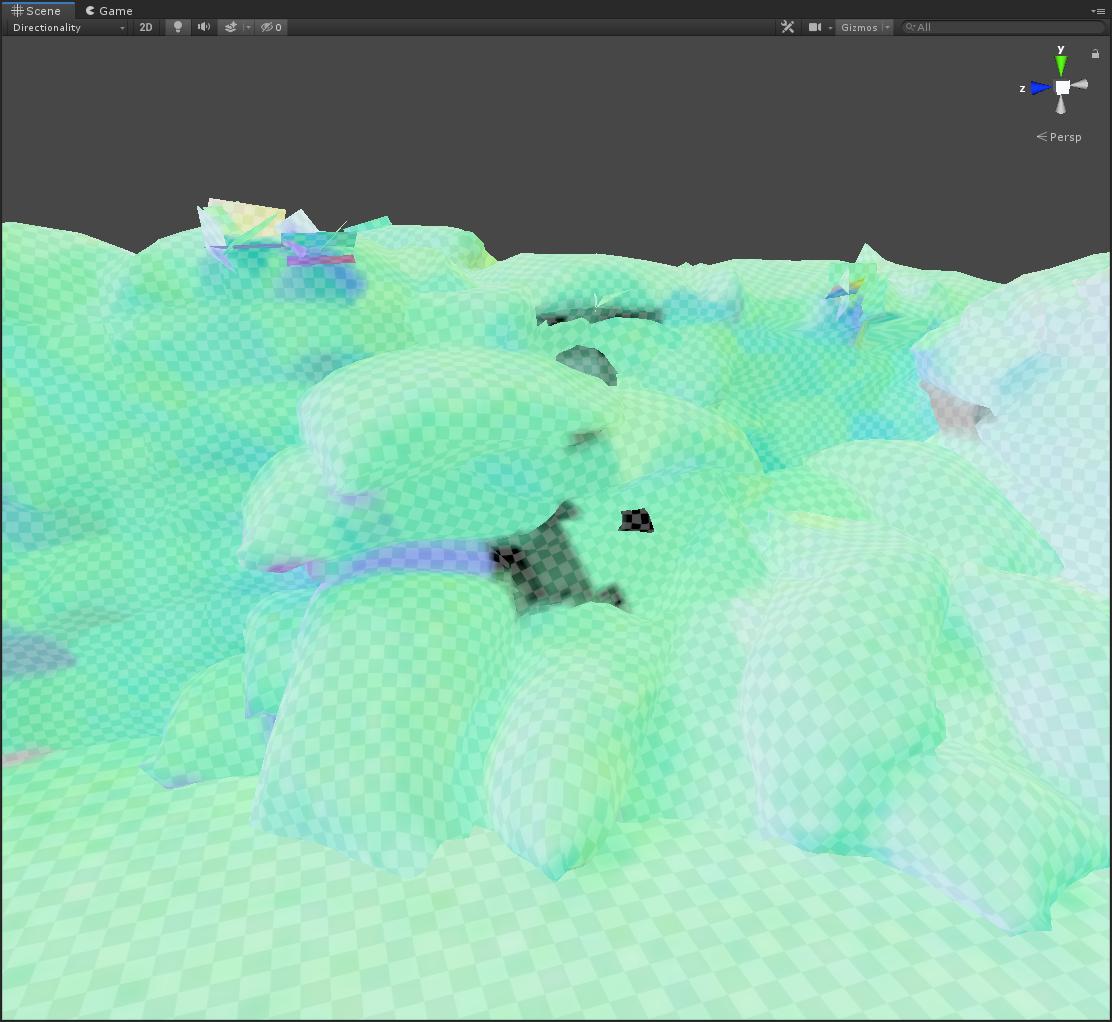
Directionality gets completely wonky for me as well, no matter how I change the parameters. This causes some glaring artifacts in shaded mode
And it gets much worse on lower LODs... :/
Honestly, the lightmapping experience in Unity has not been good so far. In UE4 you just had to add a lightmass importance volume, set your quality and bake and you'd get a good result
 zenith pilot
Question about the new 2D lighting in 2019.2 release.
I've installed the package, put everything in place and got a point light in my scene. Got my background material changed to the sprite-lit default to use the light and it works in the editor as intended.
However, in the game mode, it looks like the light isn't there, the background is still black, even though it's there in the editor doing what it's supposed to.
Am I forgetting a toggle switch or something?
nvm, somehow the z axis wasn't 0.
lime lagoon
Hey people, is it possible to swap backed lighting? I have some lights that I want to be able to turn on and off but don't move anywhere.
 untold gorge
Ello. got a pretty heafty problem.
So, I am making a 2.5d game which will also have lighting.
I made a modification to a shader I found that allowed me to shade a 2d sprite and turned off backface culling.
With this, I can easily flip my sprite.
I also made a script that turned on shadows. This is what happens
 queen silo
I'm new to unity so sorry for this a bit basic question
When creating a new scene, there is a default directional light with a bit yellow color.
Why is it yellow? Is it some kind of a color temperature simulation?
And if I want to achieve a realistic quality, I need to leave this color? Or change it to white?
 pulsar aspen
it's nothing complex really just gives the scene a less "artificial" color than you would have if you had a white light that felt cold like an office
colors do effect temperature simulation i would suggest looking at some color theory vids on youtube helped me a lot with my scenes grading
@untold gorge strange looks to be a sorting issue in the script/shader perhaps?
draw shadows on x face but now its flipped so its confused
just two cents im really not a 2d guy
untold gorge
Oh, I was able to fix it
timber plank
hi all. I bake my realtime lighting and I don't know why I get this warning : Requested realtime/indirect resolution on mesh 'Batiment_12' is too high, clamping to maximum system size (512x512). Lower the resolution setting. Is it because my mesh as not enought triangle and he could not bake a large lightmap ?
 restive field
I everyone, I'm currently working on a video game project in a new company. I'm a student and I "never" use unity. I need to do the lighting, I would like to know if you have some advice/tuto/asset to give me to start it properly.I'm using unity 2018.3.6f1
pulsar aspen
@restive field https://www.youtube.com/watch?v=VnG2gOKV9dw some great ones on youtube 😃
In this video we’ll learn a bunch about lighting and use it to light a simple scene using the Progressive Lightmapper. ● Get a discount on The Complete Unity...
restive field
Okay, Thanks a lot @pulsar aspen . I will look this at home to night 😃
 cursive otter
can anyone help me? my point and spot lights wont work in the scene or game view
they just literally dont emit light at all
it was in a fresh scene and wouldnt work, but after creating a new scene it worked :S
timber lichen
Any ideas why I have this light bug? It changes intensity when I change position and sometimes it doesn't even show up (it just happens to me with this lighting) I don't think it's my 3d model. It doesn't seem to have any bug. I might think is for the smoothing but I don't know, it helps.
I have already corrected it by changing the rendering mode to "important", but why does this happen?
dark prism
@timber lichen just a wild guess: but do you have many lights in the scene? Unity will only render a fixed amount of lights using pixellights and the rest uses vertex based lighting... i think theres something about that in the quality settings. But i dont know if thats the issue
timber lichen
@dark prism I have 9 in total, what would be the limit?
well I need to inform myself of the differences, thx.
dark prism
Uff... i think it was 4? Or sth... so it could already have an impact @timber lichen
Just look into the quality settings and increase that value... youll figure out if that caused the issue... still increasing the priority of the light is probably already the smart way to fix it
the top picture really looks like some messed up vertex lighting... since it has that diagonal line... id quess it follows the geometry there
timber lichen
@dark prism if it was that, you can see in the first image that the light points to a single vertex of the pier, mmm this will be a problem for me (I need a lot of lighting) I guess the only solution will be to bake the lights, right?
dark prism
@timber lichen uhm... im really not an expert on this... but maybe try switching from forward to deferred rendermode? i think its much more performant and can handle more pixel lights.
baking would of course also work...
pulsar aspen
I've had this issue in the past,. Just gotta increase light pixel in quality setting
But if you have a dramatically large light count I would think baking approach best
high geyser
(SP horror game)
is the lighting in that room to dark?
i wanted the tanks with hearts in them to really standing out and be the only thing of interest, with a lore blerb in that center console. hence why i went so dark with them emmiting there own light, but... did i go to far?\
pulsar aspen
The path generally needs to be fairly lit, nobody likes squinting at their screen for the entirety of a mission obviously even if it's just a long corridor I think if you want a dark setting to highlight a glowing item, give adequate lighting beforehand, and then dim progressively to the glowing items in question so they pop, could use some lights pointed in a very direct position so as to keep the room dark but highlight an area or path,. Think door cracked open at night with a light on the other side
Even in fantasy settings player minds will be looking for a relatable functionality visually
In this case I would give the edges of the door some blue glow for example so the path is lit but not disturbing the dark ambiance you're going for, games like mass effect? Or just stick with the lights you've got overhead in the door frame but let them be emitting down so the door is easy to see but the rest is progressively getting darker further away from it like mentioned previously
high geyser
good thinking, I want to keep the room dark so it stands out in comparison to the rest of the environments but you are right
the path i want the player to take from here is quite unclear, and they may even assume its a dead end (as there are quite a few in this level) https://media.discordapp.net/attachments/603247698744836096/609729921706885121/unknown.png?width=897&height=338
 pulsar aspen
Looking good, I would bring the fog down a teaspoon and darken the ambiance a bit so the lights themselves don't blend in with the fog so much which is itself picking up brightness
You could spend forever messing with that though I just love getting into playing with a good scene like this😄
high geyser
you idea of useing the door lighting as the "path hint" i love
turned out great
you are right about the fog needing to be reduced a touch im struggling with that becouse for some reason HDRP fog is a bit unreliable
some times it does not render at all, some times its all black, etc
pulsar aspen
Yeahh it really is a struggle finding that balance when the system itself is fighting you
high geyser
I find lighting often like a streat fight... one side gives up first eather the engine mysticly just says "fuck it fine, here, it can all work how you want just leave me alone" or the artist doing the lighting just says to the engine "fuck it fine, here, it can all work how you want just leave me alone"
xD
pulsar aspen
Hahah relate to this feel.. I usually find myself saying fuck it I'll be back when you've got your head together unity lol usually find a new way of doing it when I'm working on something completely different anyways.. comes full circle lol
Havint done lighting in forever got me motivated to try some stuff today💪
high geyser
Ya, i find the same happens a lot, im fighting trying to light something a spesific way, then i get a clever idea useing layers and multiple directional lights or somthing wonky like that
i am doing all of the art for this game form concept and modeling to lighting and post effects, but i by FAR enjoy lighting the most
i can hide all the shit that didnt turn out well in the earlyer stages 😛
(i didnt model EVERYTHING some things are assets, like the hearts and tanks they are inside of for example)
pulsar aspen
The first thing I thought in the red pic was the path itself, maybe the machines/tanks the scientists use could do with some glow (not like room filling light) of some kind so it gives that extra layer of believability, first glance it's a great shot but then in game my mind would quickly wander to "how would they work in these conditions" and get de-immersed but.. that's devs curse haha
Yeah I'm same way no need to reinvent the wheel use what you have
high geyser
My thoughts on darkness is this is more of a growing room, so that's why it's left dark most of the time,
But what my thoughts are don't really matter it's what the player thinks xD
pulsar aspen
Gotcha well the tank glow looks mint I see what you mean
high geyser
I may include some kind of post-it note Someware in some lore blerbs about turning off the lights in growing rooms
pulsar aspen
Yeah that's a good idea
An idea of dimly glowing mechanics to the tanks frame on the front to kinda say it's actually a life support of some kind that's online kinds crossed my mind but whatever works for the games lore like you said
How long have you been on this project?
Second last pic definitely a favorite ✌
high geyser
You mean the red tank light slowly pulsing?
pulsar aspen
Mm maybe subtely but I think with so many pulsing might be a little straining
Moreso a blue line to show power is being fed to the machine running the tank is what I was thinking
high geyser
ahhhhh
ok
hmm
one sec ill throw a random cable in, if it looks cool i can sculpt one to follow the machinery properly
pulsar aspen
Even just a glow button to kinda break it up a bit yeah whatever works to say like "I'm not online but I still function in stacis mode"
high geyser
i like the LCD pannel/buttons idea better then the cable, it also feels more functional
(the random lights floating around are just part of the doorframe lights which i used to test the LCD glowing pannel idea ignore them)
pulsar aspen
The blue definitely draws them closer as it triggers a focus in the eye I dig it!😄
high geyser
i just though, a small heartrate monitor pannel
pulsar aspen
Makes sense, a little dim flickering or whatever yeah you know what's up
high geyser
i could easly make a shader with a dark bar that just passes right to left, you know how the monitors update where they "rewrite" over the screen over and over,
and ive been working on this game for about 2 months now, but a lot of the enviroment i have been building over the past year , just hadent found a good programer partner to turn it into a game with until recently
pulsar aspen
Ah ok I see, was curious how far along to see what you were focused on early mechanical vs visual polishing I guess goes hand in hand sometimes
Finding that "look"
high geyser
I personally am focused almost purely on visual and ambiance, its what i think i am best and what i hopefully will one day have as a proper job. but i do think mechanics are equally as important, i just know I'm not the guy to make them awesome.
pulsar aspen
Good to have a focus,. Learning this myself recently after being too much of a generalist over the years
high geyser
I am not a professional or classily trained artist, i actually come from the bizdev side of the industry, but i got hurt out hard, and i allways loved art as a hobby, so i decided to give it a shot, and so far im really loving it, i wake up early exited to get to work, and it has been a true blessing
now i just need to launch some games and hopfully be able to make a living doing this xD
fuckin good idea
that pannel really makes the scene
the info pannel on the tanks i mean
pulsar aspen
Yeah for sure! Coming to life it's looking great
pulsar aspen
I'm on a similar boat, quit my day job trying to make this work full time lol, that alone is a good motivator but actually putting in the time to be good at something feels great
Ahh very nice
high geyser
pulsar aspen
Very "life monitor" look
high geyser
it plays really nice with the glas shaider
i found it on acdisent its ment to be a fuel gadge like thing for a reactor, but in this setting it fits the role of some kind of medical monitor perfectly
also it breaks up the similtry of the room with some color, as i only put them on one side
I completely agree, i feel before i would spend hours, days, weeks on somthing and the final result was totaly out of my control, here with game art i feel even if it fails (which it often does) i learn so much
making a proper production pipeline for modeling, sculpting, retopology, uv mapping, texturing, then importing into engine had about 10 catastorfix failers between each step that requierd i rethink all previuse steps, but that feeling of victory when i figured it out, and not only did it worked, i knew exacly why it worked, and i understood how it can go wrong in every way, and what are the signs to look out for to prevent a future issue.
honestly i havent been so geniuenly happy with myself in a very long time.
pulsar aspen
That's so cool to hear, powerful perspective more people should incorproate, if you're not challenging yourself you're probably not learning much, as they say
high geyser
yep, and its unbelievable what you can achieve if you just go for it, a year ago i knew nothing practical about 3d or game art
i knew how stuff worked in general becouse i worked in the videogame indestry for 10 years. but i had never really done anything
and now, i am honestly proud of what i create and every day i surprise myself a bit that i actually made this.
pulsar aspen
Only gets better from here👍 have a good one
timber lichen
@dark prism thx man 
dark prism
@timber lichen np. good luck with your project!
high geyser
I am having an odd issue in HDRP, for some reason the bounding boxes for my lights is no longer there. so i cant see when editing there scale or range etc. notice here is a rectangle light but no bounding box, facing, or light range indicator gizmo is available.
I must have pushed some button to turn it off but i cant figure it out for the life of me.
stark temple
Are the components expanded?
Expanding/collapsing components is the same as ticking them in the gizmos menu
Not sure, but with HDRP that might include the lighting data component next to the regular component for the gizmos
@high geyser please don't cross-post without giving plenty of time for an answer
high geyser
other post was deleted
@stark temple components do you mean the items that show up in the inspector tab for the light ?
stark temple
Yes
high geyser
they are all expanded =/
Ive been trying to google an asnwer and it seems everyones issue along these lines are allways just having turned the gizmos off, but mine are definitly on.
Ive reset all UI elements to factory defult, and i still dont have the size and facing elements to the light gizmo =/
stark temple
Just to be sure, it does have a Size, right? It's not just a 0.01x0.01 shape light 😛
high geyser
yep
stark temple
Hrm, might be worth asking in #archived-hdrp as I can imagine it being specific to some render-pipeline settings/versions.
I know I have had probe gizmos being totally invisible and unusable in some LWRP versions, through upgrading Unity and pipeline versions it's fixed itself though
high geyser
ok ill ask there, i am useing the latest final build, i cant remember if this started when i upgraded or after
 solemn ocean
So - am I missing something when it comes to the new 2019.2 2d lighing? Sometimes I can get it in the scene, but never in play mode (the lights dont work.) I have followed this video (https://www.youtube.com/watch?v=ZJvCphxCGJU ) to set it all up. Anyone have any similar issue sor know of a fix?
The new 2D Lights are now available in Unity in preview as part of the Lightweight Render Pipeline, through Unity 2019.2! Let's check out what they bring! (A...
I feel like global lights dont work, spot lights dont work, just struggling. :/
pulsar aspen
@timber lichen Particle system, check out some youtube tutorials on it "unity glitter particle effects"
timber lichen
@pulsar aspen i did but i didn't find out relevant video
pulsar aspen
yeah with how spescific particles can be to each user it's hard to nail an exact template on youtube but, once you understand the basic properties of a particle (emission shape, speed, count, lifetime etc) you can get the effect mentioned fairly quickly.
For example just from looking at the pic you mentioned, not that far off from default particle system
to start i would turn the speed down, in the top property panel
pulsar aspen
https://assetstore.unity.com/packages/vfx/shaders/lightrays-2d-effect-103506
as you can see it's just a semi transparent color gradient that could be made in photoshop etc

My Twitter | My other assets
A simple effect that imitates rays of light on a 2D surface. Note that it's not projecting any real light that interacts with objects or casts shadows - it's just an animated texture based on Perlin noise shader.
It can be pretty useful for a...
and they just grab the sprite and lay it into the scene by hand when designing the level
you could make a particle system use texture sheets though but im not very familiar with designing 2d games so you'd have to look around to find what suits your needs
timber lichen
@pulsar aspen thanks,
but you know particles and lights are 3d objects, and we just use an angle(z) to cast them on 2d plane
pulsar aspen
yeah i wasint too sure about that either but honestly the particle system uses sprites so i'm pretty sure as long as you set the angle of the particle to a 2d perspective it should be fine if performance or whatever is the issue @timber lichen
the lighting in the pic you send wasint actually coming from the particles themselves but the crystals also if thats what you mean by lighting
timber lichen
yes , only have to change the z value
yes
how about ccreaating glowing crystals or grass in this image, i didn't found any tutorials about them .
pulsar aspen
the crystals themselves are just a collection of sprites made probably in photoshop, with some variety in shape to mix it up, made into a each by copy and pasting, the light could have been done a number of ways but judging by the pic above i would say nothing too tricky like a 2d shader, probably more in the realm of a glow animation sprite in photoshop but again im not sure how unity 2d handles lighting
@timber lichen
check this out; https://github.com/Elringus/SpriteGlow

GitHub
A sprite glow effect for Unity game engine. Contribute to Elringus/SpriteGlow development by creating an account on GitHub.
timber lichen
unity 2d handles lightig by creating a 3d light and using the projection of light on 2d plane
pulsar aspen
oh ok interesting, the left white light in the pic would probably just be a sprite with a point light or something
timber lichen
i got about the crystals and i only want them to glow
light on the crystals which makes them glow
pulsar aspen
if you look closely, you can see there is 4 glowing textures for all the crystals glow
now if they used a shader thing like the one i showed above or not im not sure but, the glow texture itself is just a white dot with a color gradient going outwards, stretched sideways to cover a wider area
pulsar aspen
very cool, if that's the moon i would turn down the intensity a bit though just for the center
unless it's a focus point, draws a lot of attention for a background set just imo
timber lichen
i have an issue,
when i add two lights near to each other, one light overlaps or covers the effect of other light,
i want both light to glow without overlapping at same time,
pulsar aspen
so one light is reducing after you've added a second light?
or they're both glowing at the same intensity but the emission itself you want to merge together better
if you could show me an example of the problem might be able to help
timber lichen
@pulsar aspen one light is reducing
pulsar aspen
I believe you can fix that by going to quality settings, pixel light count and increasing slightly
@timber lichen
timber lichen
ah okay
solemn ocean
Mango, I thought 2019.2 introduce 2d lighting
3d lighting in a 2d scene is not performance worthy
timber lichen
i use 2019.1.2f1
solemn ocean
Did you see my post earlier? Any suggestions?
I'm new to 2d lighting, and I figured 2019.2 would be easy. Packages are installed and everything's created just not getting the lights to show in game
 hollow swift
Hi guys, I'm very new to lighting.. I am using LWRP and trying to achieve a Mixed lighting option. The lighting mode is Subtractive. So i have static objects in the scene with lightmaps I baked and have dynamic players moving around, but the players are not casting a shadow like I expected, I don't know why.. any idea?
restive field
Hi every one, I'm new in lighting. I'm working on a video game project and I have something like that. I would like to avoid the little yellow point flought in the air ? Is it possible ? (it's a point light)
I just found it !!! thanks (Volumetric -> Dimmer = 0)
pulsar aspen
@hollow swift the light you want to cast shadows, is set to mixed? the material of the player, can recieve shadows?
hollow swift
Yes, the light is set to mixed and the player material can receive shadows
I was able to cast a dynamic shadow for the player already, but it can't receive the baked shadows. I tried light probes but it wasn't working
 wise zealot
I'm stupid, so here is my question: How do I make this not that bright, turning down intensity makes it really ugly, this is mapbox in unity btw
 wispy terrace
Hi all 👋 I upgraded to 2019.2.1f1 and I am getting an OpenCL memory error whenever trying to bake Light Probes using the GPU Lightmapper. With the probes disabled my scene bakes fine in about 20 seconds. Am I using too many probes? I've got about 10-20 per room in my level.
OpenCL Error. Falling back to CPU lightmapper. Error callback from context: CL_MEM_OBJECT_ALLOCATION_FAILURE error executing CL_COMMAND_NDRANGE_KERNEL on GeForce GTX 1060 6GB (Device 0).
Hey guys, is it possible to achieve a "Shadowmask"-like mixed lighting using LWRP? As far as I know it's disabled
 azure lance
I was wondering why my 2d Point light is not working. It works fine for the player but not the scene objects themselves. They have the lit-material in LWRP. Any help will be nice
 dusky creek
Is there a way to create a completely dark area in generally outdoor scene in unity where skinned meshes inside this dark area are not affected by ambient light?
So far I only managed to keep normal meshes dark by turning them to static, but can't find solution for skinned meshes. Ideally i would not want to change shader of skinned mesh.
 teal stratus
@wispy terrace i have the same error with a GTX 1060 3GB. Lowering the lightmap resolution sometimes fixes the issue.
wispy terrace
@teal stratus interesting. Are you on the latest version also?
teal stratus
yea
 mighty cairn
Hi, is there way to stop Unity fading off shadows when objects gets closer to far clipping plane?
 steady latch
i dunno if I should ask this here or in #💥┃post-processing but
does anyone know how to do the strong colour tints that the game Tunic did? I dont even know where to start
If there's like videos or tutorials on how to apply strong post processing tints to your game without hurting the game's appearance i would love to see it
timber lichen
How would I go about making an object be more affected by lightning?
So that even if it's far away from the light source it will be highly lighted
 summer aspen
 toxic pelican
what could be causing this streak of light? it goes through anything anywhere, even in dark areas
hollow swift
Hi guys, been playing around with mixed lighting, has anyone encountered this kind of issue before? The realtime shadows appear as some kind of metallic red/blue, but it only happens when running on iOS. This was taken using Unity 2019.1.7 and using LWRP. Thanks
mystic dew
@toxic pelican do you use HDRP ?
mystic dew
it happened to me when i use light probe + physical based sky
but if its not HDRP - no idea why
toxic pelican
well thanks anyways lol
loud solar
I'm getting an error doing a lighting bake, Create ProbeSet' job failed with error code: 3 ('Failed loading Probe Set Positions file.')
what does that mean and how would I fix that?
and actually, it was like 250 of those errors
 raw raptor
Hi guys, my realtime point lights do not work running a webgl build on safari (Unity 2018.3) - just darkness. It works fine on chrome (webgl 1 or 2), firefox (webgl 2) but not safari (webgl 1). Its just a simple room with two point lights - no GI.
I also noticed that it looks like lowest quality settings - even I in the end removed all but Ultra. No antialiasing for example.
Update: no MSAA support on safari
Researching and trying to debug this for days now. Any tip would be much appreciated.
 icy tundra
Reflection probe placement?
 chilly tundra
the probe is in the center of the the ice
is this where i need to move it dynamically?
So it's always where the camera is?
icy tundra
I actually haven't used them yet, so not sure
 solemn crescent
heyho just to make sure I am not misunderstanding this - do lightmaps have to be super clean or can some of the shells be flipped and work anyway?
not stacked, not overlapped obviously, just flipped
I have a gut feeling that flipped uvs might cause problems but am not sure as to WHY
 vale depot
Hey I am working in a procedural environment, so at the start of the game the script will generate a level, any ideas on how to manage lightning in these situations? I searched a bit in the web but all the posts were super old.
since lightmapping is not possible because there is nothing to bake before starting the game, how is this handled?
icy tundra
Bake lightmaps outside of unity?
vale depot
@icy tundra yeah, that is kind of messy though, since sometimes light in the corridors connecting the main halls will be different due to procedural creation.
vale depot
Maybe using Realtime Global GI?
icy tundra
@vale depot the patch notes mentioned that when you load scenes additively, light probes are added together
you might be able to use that somehow
stark temple
As mentioned previously we will be shipping shadow this year
The entire thread is full of that question being answered
That post doesn't seem to do with shadows
Is that not just a shadow
 steel verge
Why do materials disappear when Raytrace material is on ?
I see this being asked by a few people, but couldn't find an answer 😦
All settings are green via the wizard. 19.3 0b1 HDRP 7.0.1
 cursive mason
Is it possible to do Raytracing in Unity without an RTX card? Tag me if you know
 remote sierra

ArtStation
Seasonal Leaves 100% Procedural Textured With Substance Designer. I Made This For My Future Game. After Creating The Base texture I Took Into SpeedTree And Made Clusters And Trees. Imported To Blender And Unreal Engine For Rendering. Hope you Like It Follow Me For More Posts.
steel verge
@cursive mason Afaik you may do it but with lots of performance issues and hangs. Unity does not use RTX but DXR which is a DirectX 12 feature supported natively in Windows 10.
So Theoretically, any DirectX 12 card from 1060 and up, the latest Nvidia drivers, and a recent windows build, can. But with a performance loss. There are videos of people doing it but they face occasional crashes.
But even on RTX cards do not expect miracles. I am still trying to make things work even though I got everything set up correctly. Turns out 19.3 0b1 is not really ready for DXR yet. You still need to download the latest version of HDRP from GitHub and manually upgrade it, and even then it may not work properly.
So yeah, do not hold your breath and go about your regular business. 😄
cursive mason
Ok cool thanks for the information. Really I just wanted to enable it so I could record some gameplay footage and tell players that raytracing will be available soon 😄
steel verge
nah, not gonna happen any time soon. mind you at this point it is nothing more than that. a marketing tool. Not a real option.
Someone after getting everything to work, in a minimal scene got 10-20FPS out of a 2080 Ti so yeah... mostly good for rendering videos. Not real time performance.
steel verge
Optimistically speaking yes.
Realistically I think Raytrace will be ready for general consumption with the next series of cards. (30xx series)
in a year or so.
cursive mason
There's other games that are doing it with reasonable FPS
So it's probably a Unity thing I would imagine
steel verge
I know I play them.
cursive mason
How's your FPS?
steel verge
They are not really doing it
I mean its mostly water pudles and such. very minimal use.
steel verge
Even Metro which looks amazing, RT has nothing to do with it.
It is only used in one light only when you are outside.
😄
This is only technically speaking "use of raytracing". Performance is ok, but nothing to write home about we are talking previous generation FPS. Around 60FPS peak and 45 average.
30 is your safe bet without a super strong graphics optimization team.
cursive mason
I suspect less than a percent of my playerbase even has an RTX card anyway
 boreal stream
Is there some magical settings to avoid this kind of effect with multiple realtime lights in a scene?
just out of curiosity
icy tundra
What effect
boreal stream
Basically is there a way to blend stacked realtime lightmaps
Because, to me, lightmaps just pasted on top of each other like that doesn't look good
@icy tundra did my image not send or something?
icy tundra
That is just normal realtime shadows, right?
boreal stream
yeah
icy tundra
Maybe soft shadows would help? I think that's just the way shadows look
icy tundra
I've not really used 3d stuff much yet
steel verge
This is normal and physically accurate with multiple sources of light. In order to avoid it, use a single source OR avoid having them all cast shadows, OR, make the shadows soft, OR use area lights, OR manage the ranges of your lights.
 halcyon karma
Just finished this level but one thing I'm worried about is that it has eighteen area lights (one for each ceiling fixture), is this likely to cause a lot of lag?
mystic dew
@halcyon karma you can bake area light in Unity.
halcyon karma
Thanks.
 drifting garden
guys
my model in blender has 2 uv channels
of which the second one is for lightmap
i want to bake the lightmap from unity to this uv map
but for some reason unity chooses to output something that doesnt fit in any uv
i did not tick to generate lightmap uv in the mesh properties
 velvet panther
I'm getting the typical dark splotches problem, looks just like this https://forum.unity.com/attachments/sans-titre-png.134760/

I understand this is supposed to be caused by overlapping UVs, but that's not the case here
additionally, the problem isn't visible at very low lightmap resolutions, but as the resolution goes up, the splotchy texture tiles at a higher frequency
1x/2x/10x lightmap resolution
stark temple
@velvet panther if you go to the object maps section of the lighting settings and change the dropdown on the texture to be Baked UV Overlap, everything is fine?
and none of the Mesh Renderers for the objects say that there are overlapping UVs?
because that really does look like that, although you're saying it's not the case
velvet panther
that's correct, and I've tried using both auto-generated lightmap UVs and imported UVs I've verified in the modeling package
actually one second maybe I'm not reading the Baked UV Overlap right
actually some of the MeshRenderers do have the overlapping UV warning box, but they say it regardless of if auto-generate UV lightmaps is checked
the only red I see on the Baked UV Overlap view is on islands that are thinner than one texel @stark temple
velvet panther
it's definitely not packed optimally but the UV unwrap looks fine for the most part right?
and no, primitives show the same blotching
if any of this matters i'm on 2019.2.0b7 using progressive CPU and GPU for these screenshots, no enlighten
and LWRP 6.7.1
stark temple
Hrm, it does look kinda busted. Similar to when you have duplicated geo. But the overlaps view seems fine. I don't know whether it'd be worth upgrading to a non-beta version. Perhaps someone can be of more help ):
velvet panther
no worries, thanks for taking a look
remote sierra

ArtStation
This Is My First Work On Twinmotion,
Building, Bag, Landscape Terrain, Wooden Bridge Model Done With Blender 3D, Character From Mixamo, Tie Downloaded From Turbosquid.
Rendered in Twinmotion With 4K Resolution.
 dusty ivy
Is there a way to exclude an object from getting the reflections from the hdri cub emap. I have a smooth floor but I don't want to have the sharp reflections from the hdri lighting.
 stark moss
hi guys, i know this is a common issue and the answer may be obvious but here i go, so i have some baked lights on my scene: 4 point lights and one directional light and the thing is that only the directional one and emissive materials are baked and the point lights get kinda ignored and arent baked, i hope u can help me
i have increased pixel light count to 1000 and my meshes are static and "generate uv's" enabled
i also have some realtime lights to toggle between baked and realtime lighting
 robust zodiac
Are the point lights and everything static @stark moss?
stark moss
@robust zodiac yes they are
plus i figured out that my lighs are beign baked but just a tiny bit
they're kindna weak
stark moss
okay so i fixed it by disabling shadows on the lights
but can someone tell me why does this happens?
robust zodiac
If its tooclose then the light gets shadowed by the wall and wont emit very far
stark moss
Oh that makes sense, thanks alot i'll try it later 
 safe pewter
What can I do to improve the lighting of my horror demo/proof-of-concept
I don't want to really bake anything since it's largely interactive (you can turn off lights, open doors, open draws etc etc
also because baking takes a long time on my CPU and the GPU baking tool just cries something about mem_alloc at me (GTX 1060 3GB).
 misty nova
i'm trying to get decent realtime shadows from a light mounted to the player's head (this is for VR). i know it's best to use forward rendering for VR for performance and anti-aliasing reasons, but the light needs to be a spot light, or at least appear to be one, and of course spot lights can only cast realtime shadows in deferred rendering.
is there a workaround for this?
 dull drift
Is there a way to stop my light from fading out and just stop at the edge of the range with everything in the range being 100% red?
 zealous loom
Im having some issues with 2d lighting not showing up, is there anyone around?
timber lichen
I'm having some problems with 3d scene lightning, objects are just way too bright but it looks just fine in-game
I'm using unity 2019.1.14 and HDRP
icy tundra
@timber lichen I've never used HDRP but I see that the 'lighting' button on your scene view(the lightbulb) is turned off
timber lichen
Enabling it didn't change anything
icy tundra
was worth a shot
 dapper widget
Lightbulb should have been the correct answer
Turn on the layers with the sparkle in that row as well
timber lichen
@dapper widget
That fixed it, thanks 😍
 soft apex
I'm pretty new to Unity, mainly dealt with Source in the past. Before getting too far looking in the wrong direction, I'm trying to get a general overview of what I should be utilizing lighting-wise for this project, as just at a quick glance there are a great deal of options, some that appear to be depreciated or in preview.
The scenes will mostly be large-ish but entirely indoors (no sunlight), and likely will have a pretty decent amount of individual lights
zealous loom
Im having an issue with the red lights, they show up in the scene but not in the game view, I have tried changing the orders and nothing happens. They worked for a while yesterday and then all of a sudden they stopped working again.
dapper widget
@soft apex what's you're question?
A bunch of point lights should be fine. If you don't want to bake them, they should automatically cull and only display the few that are closest/in view
soft apex
I guess mainly just seeing if there was a general best practice for indoor scenes primarily lit by point/spot lights in general, particularly when there will be a lot of large open areas where quite a few light sources may be visible at once. I'm assuming I don't want go entirely real-time as I'm guessing I wouldn't have any indirect lighting
icy tundra
The orthographic camera still won't render stuff behind it for some reason
zealous loom
@icy tundra That was the problem, figure it out shortly after posting here but thanks for the response!
 onyx hearth
is there a "common" thing that can happen when Everything vanishes from the editor window? i'm using Gaia and Enviro, something happent as i pressed a button in Enviro that now i can't see any objects in the editor, the skybox is black, the terrain and all objects are transparent, all i see is a dark blue grid and the outlines of like canvases and stuff, if i select an object i can see silhouettes of the selected objects aswell (such as the player, terrain, etc)
stark temple
Are you in the middle of a search?
onyx hearth
me? no
googled alot already and can't seem to find anything similar, so thought i'd try here
stark temple
I mean, at the top of the Hierarchy Window
onyx hearth
no
stark temple
It sounds like an issue with the plugins, and you should seek help there. Though you could post a screenshot here, that'd help clear up exactly what it might look like
onyx hearth
Screenshot of what i mean
the orange line is the silhouette of the terrain
the terrain, all objects on the terrain, etc, seem to still be there i just can't see them
stark temple
I assume you've restarted Unity?
onyx hearth
yes
this happent one time before, and that whole scene is still black too
would be fun to find out how to solve it
it sortof feels like something went amiss with the lights
i tried adding a spotlight but that one is also affected if that is the case
ah, indeed it was an enviro-related setting, there's a setting called "Directly to Camera Target" in there that gets auto-checked if you press the "Fix automatically" button amongst other occasions, and when that's checked, depending on your scene, the above happens
(i got a response from another discord server where another user had seen the same problem)
 silk bear
Quick Q for light probes. I'm trying to figure out the "best practice" for them regarding placing them with mixed lighting. With mixed lights, they're also baked, so I'd assume the light probe would pick up that when lighting dynamic objects, however, my uncertainty is with shadows and realtime lighting.
First scenario is light probe + mixed light w/shadows. Is the lit dynamic object just going to pull lighting info from the probe then use the mixed light itself to render the shadow or is there no benefit with using a light probe + mixed lights?
Then the second would be for realtime + light probes. I'm assuming it blends both?
Or do people just generally bake everything and do no mixed/realtime lights with light probes? 😕
timber plank
Do you have an idea why, in HDRP, my shadows are totally differente between the realtime (on the left) and the baked one (on the right) ? We use point light on mixed and distance shadowmask
loud solar
I've noticed sometimes the baked lights sometimes don't like small distances between it and objects, i'm curious if the light is so close to the rock and it thinks it should all be in shadow, which might account for the rock the light is sitting on not getting light shined on it verry well.
mystic dew
@timber plank i dont like real-time with hing quality resolution of shadows =D
Try setup 128 or 256 pixels resolution of shadows from that point light
timber plank
we find the issue, real-time Shadow don't have the same behaviour with transparency than baked
 blissful estuary
I'm using the LWRP in a VR project. My scene has 1 baked point light and three realtime spotlights. I shouldn't be exceeding the maximum for a Forward renderer however my lights still flicker around...
 cursive phoenix
have you tried setting the render mode to important?
if it is exceeding the maximum then that wouldn't be wise for performance but if you're not and it's just some weird issue you could try that
 silver plover
Hey everyone, new to baking in Unity. So when I bake my lighting I generate a LightingData asset. Since I load my "enviornments" with assetBundles and I stay in the same Unity scene, What's the proper workflow for this? Anyway I can have LightingData reference assetBundles instead of Scenes?
blissful estuary
@cursive phoenix That's actually a good idea. Totally forgot about the importance flag.
I'll try later.
 thorny vault
how can i make light shine like this thru objects in unity?
like these lines that shine thru
blissful estuary
@thorny vault You're looking for volumetric lighting. Unity does not support it by default. The new HDRP supports volumetric lighting. If you don't want to usie the HDRW, there are some free and paid assets of different quality and feature set that provide this effect.
@ Skyoo made a good beginner tutorial about it:
HDRP (High Definition Render Pipeline) in Unity enables many options for improving graphics. A couple of them are Volumetric Lights and Volumetric Fog. (AD) ...
thorny vault
thank you
glass jungle
Hey guys, I am working in HDRP and am running into an issue when I build. I am guessing that it is a lighting issue because in editor, the lighting looks perfect, whereas in the build everything is either super dark or stark white. Has anyone else run into this issue or know how to fix it?
 pearl rover
Usually, I found the best solution is to bake the scene, even if there isnt any baked lighting
 crisp wagon
Lighting has been disabled in at least one Scene view, how do I fix this
dapper widget
@crisp wagon lightbulb icon
crisp wagon
Didnt work
crisp wagon
nvm im dumb
 tight moss
if all my shaders are vertex lit, do additional point lights cost anything?
tight moss
actually i put my camera in the legacy vertex lit rendering path
it says right in the docs that all lighting should be done in one pass then
(using 2017.4)
but still i have 3 point lights, no shadows (they wouldn't render in the vertex lit path anyway), and when i enable/disable them it dramatically effects my batch count
 still orchid
Hello, i'm newbie here, and i dont know if this is the correct channel to ask this but here we go. How I can to make a 2D sprite cast shadows to walls? something like this:
icy tundra
There are a few ways. You could cheat it with image effects or shadow sprites, or you could use 3d lights and a shader that casts shadows.
There's no 'official right way' to do it right now,it'd really depend on the game.
 rugged summit
are there any real time gi solutions for hdrp? I want the vfx graph's particles to produce some light
I have seen some people writing their own vxgi solutions but they are mostly for the standard rendering pipeline
segi is one example
thanks
silk bear
Quick lightmapping question. When we bake down with the old Enlighten system we lose height/specular maps. You can see the settings and comparison in the screenshot. The door is not lightmapped but the brick is; you can see the lack of shadows in the 2nd shot. That spotlight is marked as mixed as well, so it's not just entirely relying on the baked information... Is there some setting that I'm missing with either the lights or the lightmapper? Where did our height maps/specular go? 😦
I'm going to switch everything over to the new progressive mapper, though I have a feeling this problem will still be present.
We're using Directional, which is what I thought was baked that info....
Ah crap, the resolution is real bad on that screen. let me re-upload.
Ok, now you can read the settings.
silk bear
Shadowmasking is what appeared to help, though I'm running into another problem where the mixed lights are no longer illuminating dynamic (non-lightmap static) objects 😦
silk bear
Ok, I've got two lights with almost the exact same settings, however, one affects dynamic objects and the other doesnt (you can see they're pitch black); I just tested disabling either and baking each, one works and one doesnt. Unless there's some mysterious setting that I cannot find on lights, I'm assuming this is a bug???
Ugh, I think I found the culprit. It's in inspector (in debug mode) the Baking Output changed the Lightmap Bake Type to "Baked" and not "Mixed" so the light was not affecting dynamic objects. Apparently this setting gets screwed with every time I bake. That's not good.
silk bear
Ok, it's definitely a bug. Everytime we open our scene our flags get forced to Baked from Mixed. Something in Unity is overwriting our changes.
 shadow yarrow
so I can't figure this one out.
my targeted device has more than enough poer for the level I am loading to not have any reason to drop shadow quality at a distance, so it isn't shadow quality since I maxed that out.
Realtime shadows aren't working correctly, so I defaulted to baked.
While cruising along, shadows flitter in and out of existence at some parts. The mesh is in such a way this shouldn't be an issue.
here is how it should be normally:
https://snipboard.io/Ot1acI.jpg
and here is what happens occasionally as I drive along:
https://snipboard.io/tTSlI0.jpg
Since it is hard to catch it in a screenshot, I highlighted a section with the issue occurring.
https://snipboard.io/tTSlI0.jpg
This is happening all over the track.


 flat jewel
Why baked indirect GI make that extremely bright lighting and artifacts?
timber lichen
Hey guys, question. There is a white fade on my terrain. or Specular. how can I fix this. The trees as u can see are much darker but the terrain has a this white fade on it
Anyone?
 hushed field
@timber lichen I once had a similar issue, the problem was that I had an extra layer on my terrain which shouldn't be there (was difficult to spot as the image in the layer section was transparent or so), can you check ?
 amber crypt
How do you disable ambient lighting in the HDRP? I can't find an option for it in the lighting tab.
mystic dew
@amber crypt you have need to tweak Light in scene rendering settings
vale dune
Hallo. I'm using the legacy pipeline, when baking scenes they are missing any ambient light. I have a bit of a funny set up as my game is pixel art so I'm using 0 bounces, and 0 indirect intensity.
is ambient light counted as indirect?
is there a way to get ambient light baked? or do i have to put in a hack like adding a directional light that copies the ambient light color?
vale dune
I guess it counts as indirect light. Turning in bounces brightens up the scene about the right amount
But this leaves me with undesired additions to the light map (it looks bad with the style of my game)
In the end I’ve had to add an extra directional light that grabs the scene ambient colour. Then I made a script that turns this on, baked and then turns it off again. If it’s on all the time it can add extra light that won’t reflect the final state
The only issue o have now is that even though it’s the same colour it doesn’t contribute quite the same amount of light as the ambient colour does
vale dune
I’m just rereading all the docs again to make sure o haven’t missed anything. If the environment/ambient light is real time, then why do objects with lightmaps no longer receive that value in the scene view or play mode? Could this be a shader issue?
I guess the next test will be to see what happens to an object with a material that uses the default standard shader rather than my custom one
Apologies for spamming the channel. Though it is helping me rubber duck a bit 😅
vale dune
Here's a thread with perhaps a clearer description and some screenshots of the issue https://forum.unity.com/threads/lightmapped-objects-no-longer-have-ambient-light-colour-applied.755945/
Unity Forum
Hi there,
I'm trying to bake my scene for performance reasons. I have some strange requirements due to the pixel art style of my game, namely that I...
 rapid moat
Hey all
 wind egret
hi
rapid moat
I get a far better result in unreal. but I'd like to make this work in unity, as I love this engine
Any advice would be much appreciated
@wind egret do you have any idea?
wind egret
at first glance id say Unreal is better at lighting than Unity
rapid moat
yea
wind egret
but through a bit of post processing im sure you can get the same results as Unreal
rapid moat
yes
agree
see how my lighting is murky? its forcing my uvs into a small space on a 2k index
wind egret
so id say mess around with post-processing and you light get better results
rapid moat
How can i get my objects baking into seperate lightmaps?
yea, but, I am not even at that point yet haha
 plucky bough
it could be the uv map
 covert stirrup
@rapid moat when you select your mesh in the editor you can increase the lightmap scale to make it bigger in the lightmap
 digital swan
Hey everyone- I have a basic set up with some lit mesh particles from VFX graph, and no post processing as far as I can see. When I play in editor I'm seeing crazy amounts of bloom on my particles and not sure why...I even turned off my one directonal light (so now no lighting active) and mesh particles are still glowing. anyone have an idea of what's going on? This may be super basic but im just getting back into Unity after last year and a half away
 visual thunder
Hey guys! I just recently started experimenting with HDRP and I'm having some trouble with lighting. I can't seem to be able to place more than a few point lights until Unity starts to prioritize lights above others. I know that this can be changed by either giving certain lights higher priority, or by increasing the pixel light count in the settings. However, with HDRP, the setting is gone, and changing the priority will not give me the desired result since I want the scene to be able to show more lights.
Any idea how to increase the light count in HDRP?
timber plank
Hi all, is there a way to avoid procedural sky color influence on objects with Unity 2019.2 and HDRP ?
 delicate slate
I'm trying to make dynamic lighting sources in my game such as a lantern that the player holds. The problem is that Unity lights don't reach very far, but increasing the intensity to make them reach farther makes close objects look really over-lit and bad.
Talking about specifics (see screenshot), I have a point light attached to the player that I want the close edge to look like intensity 5 but the far edge to look like intensity 60. I'm wondering if there's some way around this like scripting a max value for lighting so the close Objects don't look terrible, or maybe artificially making the light source reach farther.
I've tried multiple spotlights, I've tried putting a very small cube under the light to make the ground not so harsh. There is a little bloom making this worse, but disabling that doesn't help that much.
If you reply please mention me so I don't lose it. Thanks in advance!
boreal stream
@delicate slate Intensity is the light intensity, not how far they reach.
boreal stream
For me, just increasing the range and lowering the intensity worked. You are doing the opposite
just messing with those settings for a bit seemed to work fine
 hazy phoenix
@boreal stream is that stock HDRP?
hazy phoenix
Okay, do you use Aura2 ? Hx Lighting?
boreal stream
hx
I could never set up aura 2 correctly, there would always be strange issues with it
In my opinion, hx just looks better anyway
hazy phoenix
well I've got Aura 2 from the Humble Bundle package so I'll give it a try
if it doesn't work as expected then Hx is still an option
timber lichen
How do you guys work with the GPU lightmapper and LODS? I tried grabbing the script of LODProjection from the FPS sample but as they modified the static switch in 2019 to be a Contribute to GI the script doesn't seem to work
hazy phoenix
@boreal stream Does Hx Lighting work with Render Pipelines?
timber lichen
Also even with the directional lightmaps, the lighting seems to smudge the normal maps so much compared to lightprobes
As an example
The probes also don't seem to be picking up any occlusion from the ground. Is this considered normal behavior?
mystic dew
im just tried bake light wind denoiser 😦
boreal stream
@hazy phoenix I would imagine it does, but I do not know. I haven't worked much with the pipelines in general. If that's a deal breaker for you, I can make a blank LD or HD RP project to test
hazy phoenix
If you could I'd be really thankful 🙏
boreal stream
@hazy phoenix It works fine with LDRP, I'll try HDRP
https://gyazo.com/66512cd4ea24b1e8bf7096efa0bfd585
hazy phoenix
Okay!
boreal stream
@hazy phoenix Works in HDRP too
mystic dew
@boreal stream wait, is HX Volumetric Light working in LWRP?
boreal stream
@mystic dew Yeah, I just loaded up the basic LWRP project, deleted the default scene, and put in the Hx Camera, Hx density particles, and Hx point light
mystic dew
weird
its dint works at me 😦
what is your version of HX Volumetric Light?
and what version of LWRP are you use @boreal stream ?
boreal stream
1.3.6 hx and the newest LWRP. My unity version is the latest release version
mystic dew
thanks
hazy phoenix
Aura 2 seems like a cool asset but I need HDRP for my project so then Hx is probably the solution
mystic dew
The official dev said that you @boreal stream forgot to setup graphic render pipeline, because atm official HX Volumetric Light not support LWRP/HDRP
@hazy phoenix HDRP has own Volumetric Light system
solemn crescent
Heyhey,
I´ve been trying to figure out how I can bake single objects inside a scene with multiple already baked objects - so I do not have to rebake everything from scratch. Seen this question from 2011 on google already but dont think that anything from that far ago is still relevant to the current Lighmapper 🙂
boreal stream
Guess I'm an idiot, my bad. Like I said, I don't work with the pipelines much 😅 Hopefully Jakub didn't buy it based on my false information
hazy phoenix
No problem, thanks for trying either way 👍
@mystic dew Do you think the HDRP Volumetric Lighting is comparable to Aura 2 / Hx? What is your opinion?
mystic dew
@hazy phoenix hdrp volumetric light better that aura and hx =)
hazy phoenix
Really? I'll need to look it up
Thanks for letting me know, otherwise it doesn't make sense to use these assets if it works out of the box with HDRP
solemn crescent
so beautifull
hazy phoenix
Thank you @mystic dew for these examples! So HDRP makes assets like Aura 2 and Hx Lighting redundant?
mystic dew
@hazy phoenix HDRP - Yes.
LWRP/Standart render - HX Volumetric Light or Aura 2
mystic dew
thanks @solemn crescent
boreal stream
Wow, the 3rd one almost looks like it could be real
hazy phoenix
Thank you, this gave me a new view on the HDRP Lighting! I thought it would be kind of "clumsy" or "unfinished", but the pictures proved me wrong
timber lichen
How did you get the volumetric lighting to work? Mine is finicky and won't work
timber lichen
Probably a rookie mistake but I'm having this issue with my baked lights coming out very poor quality. There's no directional light in the scene, just a point light set to baked with hard shadows. It looks great while it's baking like in the top image, then it completes the process and looks like the bottom.
I'm using the universal render pipeline.
boreal stream
@timber lichen looks like really low lightmap resolution to me
timber lichen
1024 is too low?
timber lichen
weird enough a directional light with the exact same lightmap res creates perfectly nice shadows so im stumped
hazy phoenix
@mystic dew Okay, thanks for showing me the HDRP Lighting screenshots, HDRP is amazing
boreal stream
Anyone messed with particle system shadows? For some reason mine are cut short, like only the first part of the system has rendered shadows.

 versed ember
Got a spare Aura 2 key, posting it here for grabs since I don't know what to do with it. ASV-9GWH-C6NX-U4F7-DC77-VJX7 Just ask that you notify me if you succesfully redeem it 😄
 turbid jetty
Is there anything special I need to do to make baked Mixed Lighting show up in builds? I got a nicely lit scene in the Unity editor - but whatever I have tried so far to make this work in the build, the baked lighting just doesn't show up there. I also posted to the Unity forum, including screenshots of what I'm seeing and the setup: https://forum.unity.com/threads/different-lighting-setups-for-different-active-scenes.759569/#post-5061161
Unity Forum
In our project, we have wildly different environments. Some are particle based and don't use any lighting at all, others have fairly complex lighting...
Originally, I assumed it was an issue with me using different lighting setups for different scenes - but I'm getting the exact same results when I running a build that only has this one single scene in it. Also, in my current testing, there's only one quality setting (because apparently, that previously messed things up for other people, back in 2016 😉 ).
turbid jetty
Ah ... maybe it's because I stripped the "Baked Subtractive" shader. Oh well 😉
 velvet bay
hello ! I'm having an issue on unity after exported my blender scene into a fbx file
as you can see, there is a circle on the scene and game windows. It grow up/down when i change the camera position
does anyone already experienced this issue ?
 twin void
Im not sure try deleting all of your camera(s)/lights in your blender scene @velvet bay
Does anyone know how to use my HDR texture as a lighting source but still have the camera render a different skybox?
Im currently using my hdr as a lighting source but can only set my camera to display either a solid color or my HDR
velvet bay
i did it too but it wasnt that
it was about the default directional light in the sample scene of the "3D plus extra " template
the values caused this strange bug and it was by creating a new basic default direc light that the problem get solved ( so i deleted the other one )
but i still dont know "how" and why it happened 🤔
 rapid tree
Is working with real time lights a smart idea until ive figured out how i want the lighting in the scene to look? i think i have about 15 different lights in my scene (rather large.. think maybe 10 players in a scene if multiplayer)
im worried ill waste time playing with baked lighting and constantly waiting for baked lights to finish. maybe real time lights first is smarter way to go, then switch them to baked / mixed when im ready.
@timber lichen https://i.imgur.com/fFAZTn3.png
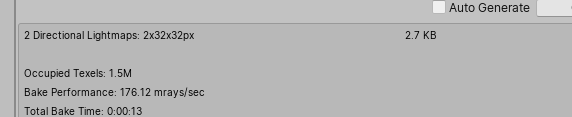
your lightmaps are very tiny. maybe your UVs need to be adjusted?
 raw quest
Is there any way to get volumetric lighting or a sun shaft effect in lwrp/urp? Or does anyone know of any lighting tutorials for lwrp/urp?
solemn crescent
@rapid tree I dont think having multiple realtime lights is a good idea, but maybe "some" to just have intermediate lighting effects available. You could also just reduce the lightmap size and go into photoshop, blur and brighten what you have and have some smooth stand in for a LM that should give you at least some direction on where you are going
rapid tree
Hm interesting. That's a quicker workflow than waiting each time.
Thanks for the reply
solemn crescent
also realtime lights reduce performance on big scene quite a lot. If you just want some light i would just get a directional in the scene and work with that for the really early stages. Thats my unprofessional suggestion xD
 prisma python
Ive been having this weird lighting discrepancy on my tree assets, I was wondering if anyone has had this problem before. In the build of my level they are way more dark in shadows than other meshes in my scene, but in the editor they look more evenly lit. Does anyone know how to make the build look more like the editor's lighting?
I want the player to be able to see at least some texture on the side of the tree facing away from the light source
but none of the intensity or shadow multiplier sliders seem to fix anything
twin void
May be the normals in the tree object
if you made it in blender, inside of blender go into edit mode and select all faces and then do a recalculate normals
prisma python
You might be right, they look okay from far away but once you get close enough to one its like purely black on one side.
twin void
Then yeah I'd say its probably a problem with the tree model themselves
nice looking game otherwise though :)
prisma python
thanks! Ill check out the model and report back haha
hazy phoenix
What shader are you using for the trees? That could be also some kind of problem
timber lichen
in #💻┃unity-talk I asked some stuff about lighting
I find that it doesn't look realistic enough
I think it just looks very weird, and the shadows are just strangely too sharp
none of this is actually even taken into consideration
ah, they were turned off from contributing, turned them on, still doesn't look very great..
prisma python
@hazy phoenix just default unity tree tool
timber lichen
this sure as hell got a whole lot better than it was
timber lichen
 wispy skiff
Hey! In HDRP, my Light Layer tab is grayed out and I can't change or use it. Anyone recognize this?
Oh, just had to enable it in the HDRenderPipeline Asset
Still can't see it in the inspector, but it's available through the light explorer
hazy phoenix
@timber lichen HDRP?
 tiny jolt
How do i get the HDRP procedural sky to not cause crazy exposure changing?
 lavish pumice
Hey! Will reducing the scale of my objects and baking the lights reduce the quality of lighting? Original sclae takes forever to bake while 0.0001 of the sclae takes less time.
timber lichen
you mean scale in the lightmap, @lavish pumice?
yeah, I'd guess that if you turn the scale of it down, it'll occupy less amount of pixels in the lightmap, leading to lower resolution shadering on the object
timber lichen
@tiny jolt Set your auto exposure from 16 to a fixed 1 or something
Anyone figured how to get rid of the ambient probe casting through the terrain?
The underside of my rocks are getting those weird specular and lighting leaks
timber lichen
Is there a way of having the ambient sky light in hdrp to cast shadows from the terrain?
timber lichen
Another problem seems that in HDRP, you can't have a directional light pointing and fog at the same time, the fog blocks out the light even with no shadows enabled
Has anyone figured a workaround?
 idle bramble
Always had this issue in Unity with the white dots in bakes. Any ideas how to fix it? Everything is set to Auto UVs
idle bramble
Ah, it seems to be the skybox doing it so have deleted it for now. Not the best solution.
timber lichen
@idle bramble Increassing the number of environment samples in your lighting window should fix that problem. Environment samples is the number of samples used for the sky
boreal stream
@pale rampart After you have baked lighting, it still doesn't work?
And are all the objects you want lighting on marked as Static?
 pale rampart
No they aren't I didn't know I had to do that. I'll give it a try and see if it fixes it
pale rampart
I marked everything as static and it still didn't work
The version of Unity I'm using is "Unity 2018.4.9f1 (64-bit)"
 jaunty briar
Anyone know why emissive and point lights sometimes gives me a square gradient instead of a circular one on surfaces directly affected by the light in my bakes?
idle bramble
@timber lichen What's a good default for environment samples?, that seems to be a new setting that I was playing around with and I can't remember what the default was
timber lichen
For what it's worth @pale rampart I've got the same issue. Area lights just do not work..
Except I'm on the latest 2019 beta with URP
versed ember
does anyone know what might cause directional cast shadow to fade like that?
oh found it, Shadow Distance under quality settings
timber lichen
restive field
Hi everyone ! I'm student. I would like to know if anyone can give me a tutorial to create a good lighting in unity and/or explain me the "right" process to follow. When bake the light, when bake the reflection how to apply it etc etc.
hazy phoenix
@restive field Hey, there are some good tutorials on YouTube.
 cinder frost
Hello I am looking for help with my lightning on my 2D game
I use a spot at
Z -1
Range 75
Intensity 3.66
And it gives me this weird result
If there a way to get a smooth result please ?
Whatever I do I always have these stripes
timber lichen
How to reproduce: 1. Create a new project or open an existing one 2. Create a Light Probe Group Expected result: Light Probe Group's...
 vocal haven
@cinder frost I think you need to tell it to use HDR, idk if the light itself has a HDR setting or you need to set it on the camera
vocal haven
glad to hear! 🙂
 runic gale
im making a demo and i want to have an indoor bit and an outdoor bit and to test lighting i turned off all the indoor lights and added a directinal light and its leaking indoors is there any way to fix this?
stark temple
On your MeshRenderers
runic gale
never mind i think i got it
idle bramble
So what's the general deal between Enlighten and GPU progressive? My understanding is Enlighten has better results but takes much longer, so you use progressive when testing and then for the final bake you use Enlighten. Is that the general idea?
cursive phoenix
enlighten is deprecated in 2019.2
shouldn't be used anymore tbh
it's so slow
and gpu now gives very good results
they upgraded the de-noisers
I'm never ever using enlighten again that's for sure
mystic dew
I like CPU bake. GPU not working for me, i have Intel HD Graphic and GTX1050Ti, but without any reason Unity dont see my GTx1050 tI ON LAPTOP 😦
vocal haven
@mystic dew did you try setting it in nvidia's control panel for unity to use the nvidia gpu?
mystic dew
@vocal haven hmm by defaults i setup High Perforamcne card - GTX1050ti
timber lichen
car 😂
mystic dew
@timber lichen i was sleeping xd
 cosmic breach
Is there a good workflow for baking lighting for procedural elements? I know that was an issue a few years back. As far as I’m aware the only real option is to make each individual room a scene which seems overkill
 stiff hound
@cosmic breach Edler Scroll Blades talk from Unite might help a bit wtr to lighting procedural rooms : https://www.youtube.com/watch?v=KbxiGH6igBk
Enjoy the videos and music you love, upload original content, and share it all with friends, family, and the world on YouTube.
cosmic breach
@stiff hound Awesome I’ll check it out, thanks!
 opaque vine
Not sure if I'm asking in the right channel...but I'm looking into doing a video clip for a song inside of Unity using purchased assets...but needless to say lighting, HDRP and proper shaders will make a huge difference in the look...any tips, courses or tutorials I should watch to help me in this quest? I already did some youtube search on tje subject but would like to see from recommendations what I've missed.
 past coyote
Hey guys, im having a bit of a problem baking light
I have several artifacts and have even tried to have a area light pointing directly at the model, still cant get rid of it, anybody know a solution to this ? 🙂
 pastel idol
Increase padding?
past coyote
Have already increased it to 12 from 2
And increased the pack margin in the importer
 pulsar crater
Does the lightweight render pipeline 2d lighting work with the 2d pixel perfect camera?
pulsar crater
actually, yolo
let's hope this works lol
hazy phoenix
@pulsar crater
pulsar crater
ok cool
pulsar crater
Well that's concerning
I set up the lighting following this tutorial (https://www.youtube.com/watch?v=nkgGyO9VG54), and with my pixel perfect camera the lighting doesn't work at all and the scene is pitch black. With a new camera, the lighting works, but it seems the update sprites to unlit didn't affect any of my tiles, only some of the player sprites and props.

Let's learn how to make 2D lights using the new 2D Renderer in Unity! ● Check out Zenva Academy’s curriculums: https://academy.zenva.com?zva_src=sponsored-br...
I tried adding the experimental script to the new camera, but the light has some strange artifacts in the form of the occasional 1-pixel wide line of darkness going from the edge of the light to the center right where the angle setting is positioned.
 celest leaf
why that are moult grey?
pulsar crater
probably just due to the scene lighting.
you should check that it's the right material though
icy tundra
@cinder frost is that a light texture, or just the lighting from a light on an object?
 solemn island
I have several point lights in my game. When walking around some are twinkling, can't figure out why. I even set them all to "important" but still have the issue. I precise that i'm using LWRP and i use the default forward renderer. Anyone has a tip ?
pulsar crater
Anyone have any good articles or other sources about arranging a good palette for an environment? trying to find something a bit more in-depth than some of the odd notes I've gathered so far.
light quartz
Hi, do you know where can I find my baked textures (Unity2019.3, HDRP)?
 still tiger
Hi, how should I approach lightning on mobile? is it better to make self illuminating textures and turn off the lights in the game completely? We're making a simple cartoon-ish hyper-casual game
solemn island
it's obviously way more optimized to use baking instead of realtime lightning
 gilded gorge
Not sure where the best place to post this is, but I could use some help figuring out a solution to a problem I'm having in a game jam game I'm working on. If you have any ideas or suggestions, please ping or DM me, thank you!
In our 2D side-scroller, we are using pixel art with normal maps to create the illusion of 3 dimensionality. The issue we've found ourselves in is that when we have 2 sprites on the same Z level, the normal maps sort of amplify, causing bright spots where 2 or more sprites are overlapping. (Image 1)
We realized that it's possible to avoid this problem by moving one of the sprites in front of or behind the other(s) in the Z axis. (Image 2)
However this isn't always practical. One such case is when using a tilemap with tiles that exceed their bounds. You can see bright lines where the tiles in this tilemap overlay, for instance (Image 3).
In worst case scenario, we'd normally be able to just switch over to a more orthodox tilemap where sprites do not exceed their bounds, however we cannot do this due to the nature of several of the sprites that we need to function in a tilemap. (example shown in image 4)
We would like to find a way to avoid these issues while still having dynamic lighting/shading on the pixel art. Thank you for any suggestions!
still tiger
@solemn island I'm aware of that, but I'm asking if there's a perfomance difference between using light probes and baked light or making a shader that is self illuminated (by emission) and disabling all light sources in the scene
solemn island
No idea then
 quaint kelp
@gilded gorge Why would you ever need to add 2 sprites on the same Z axis in a 2D game? When using tilemaps you normally have tilemaps as layers too, so for example, one tilemap could be "ground" with a tilemap collider where the character walk, then you have a background tilemap and a foreground tilemap. This is exactly how layering works when working with photoshop too, it's always layers, you don't add them to the same depth field. Imagine the confusion a CRT screen gets when it's trying to render 2 different pixels in the same spot.
I can mention that I use at least 5 tilemaps when working on 2d games to get an illusion of depth and foliage, you can also make them move independent of each other this way.
gilded gorge
@quaint kelp because in the way that I have designed my tileset, the edges overlap. Also making tiles that let me do stuff shown in the 4th image simply wouldn't be possible without an insane number of tiles
hazy phoenix
Set the smoothness to 0
timber lichen
i did all that
is there a way to completley remove the light from producing that
when I turn smoothness to 0 there is a white fade on the rock
jaunty briar
@timber lichen Could it be your environmental lighting affecting it?
timber lichen
it is but idk how to fix
jaunty briar
So you've tried setting the Environment Lighting source to color > black, and it eliminates it?
solemn island
you have white fade ? you mean it gets brighter ? In that case change the base color of your material and directly darken the texture
jaunty briar
Changing the material type to Standard (specular) and setting specular color to black might eliminate it too. But it sounds like you're just seeing the lighting giving it a slight wash which is completely normal without a specular map. You'll get a uniform, non detailed highlight without one
 sinful furnace
new 2D lighting is great


Something lurks in the dark.... 2D lights in 2019.3 are spoopy #madewithunity #gamedev #indiegamedev #pixelart https://t.co/AeGOvO3OiL
 Twitter

Finally figured out how to make some decent normal maps for Unitys 2D lighting system. Animating this beast soon! #madewithunity #gamedev #IndieGameDev https://t.co/pCYmN1TtiO
Twitter
timber lichen
Hi! Been looking to learn some lightning basics and while messing around with HDRP I keep having the following artifact
Could anyone give me some pointers on having light be more consistent?


NVM I think I found it, having a high FOV makes it so shadows get displaced
120
90
 vagrant crag
@timber lichen I reccomend you to play with shadow bias settings.
 gentle anvil
so there is a bug in unity (according to a thread on unity forums its been known since unity 5) where directional lights either ignore or misinterpret the culling mask. Has anybody ever found a way around it??
timber lichen
@vagrant crag thanks for your input
 burnt kindle
Hi, the bake of the lights creates some artifacts only near the bushes. I found the same problem in very narrow areas. I'm working in unity 2019.2 and bake in progressive GPU (same CPU error)
Has anyone had the same problem as me? I don't know how to solve it
steel verge
@burnt kindle I assume this is a texture. Do you mind showing us the setup of the base texture? (select it and take a capture of the options in the inspector)
burnt kindle
@steel verge Yes It is a texture, I also used it in other meshes and it works. The other shadows in the image are a material with the same texture.
steel verge
have you properly enabled transparency and cut-out options?
(both the material and the texture)
burnt kindle
Yes the material and the texture are the same
This is the same error but on a wall. In the same scene other wall have the baked light done right. It's like during the baking process some zones have different quality
initially I thought they were lightmaps but they were correct
steel verge
could you please show the setup of the material?
burnt kindle
Now i can't take a screnshot of it, but the material is a Simple lit with only albedo (i'm working with LWRP)
steel verge
without looking at how you have set up certain things it is not possible to help you resolve it.
burnt kindle
I know. Tomorrow i will take a screnshot of it, thank you for the support
steel verge
no problem
burnt kindle
@steel verge
steel verge
@burnt kindle try enabling alpha clipping.
steel verge
1019.2 12f1 and previous HDRP 6.9.1 and 6.9.2
this flickering in this capture is understated probably due to compression. in the actual scene it looks worse and applies everywhere. (it's like z-fighting everywhere but with shadows)
https://gyazo.com/4d9b9be7679a89297ca011244550f9f5
any idea what this could be?
 stone onyx
Anyone knows how to fix that?
It's stuck at "backing..." from the beginning
all objects are set to static and lights to mixed
jaunty briar
@stone onyx I'm not sure about this particular instance. But whenever I've gotten this issue, it's been because I've ran out of memory to run the bake. I think it should show a memory error in the 'Console' if that's the case. It happened whenever I had too many files open in Photoshop and Maya at the same time usually
steel verge
Usually it means out of memory. Try increasing your GI cache limits or lowering your lightmap settings.
stone onyx
Got it fixed
for some reason there were two unity processes in my taskmanager
probably an old baking process survived somehow and blocked new ones
 thick kestrel
Hi guys, i'm wondering why i can't get any shadows when i bake lightmaps. Any pointers?
point lights are set to baked, objects to static, ...
thick kestrel
It simply doesnt generate a shadowmap
jaunty briar
@thick kestrel looks to me like you've got shadows in that pic? Or do you mean cast shadow from your outer ring down to the floor? Have you enabled shadows on your point lights?
timber lichen
Hey guys, in unity my shadows are very unstable and shaky
hazy phoenix
Welcome to Unity
steel verge
@timber lichen same here. try increasing the resolution of your shadow map and see what happens.
@hazy phoenix that is not very funny. we should not be getting used to these. they get lazy and not fix them.
hazy phoenix
@steel verge Well I'm sorry if I offended you in some way, but I've seen many people mentioning the various problems of shadows in Unity throughout the years and it looks to me like an internal problem in Unity.
steel verge
@hazy phoenix You didn't offend me, even I have often problems with shadows 😄
I am not sure you got the spirit of my response properly. All I said is that if we use such serious issues as jokes, nobody will take them seriously. And they are VERY serious.
These are issues that should not exist at the level Unity is playing. If I was part of the team and my user base complained about such core issues, i.e. shadows should not flicker in a world class engine under any circumstances, I would consider it an insult. This is a very basic prerequisite if you want to call your engine "world class". Not just another bug that "should be fixed sometime in the future". I would feel ashamed for the quality of my work.
"Welcome to Unity" as a response, should be a huge insult to the team working on the particular feature set. Not me.
hazy phoenix
should be fixed sometime in the future
The problem is that these shadow issues have been in Unity for ages. Although I'm not sure whether it's fixed in the SRP's (as they come with improved rendering features)
Yes you can overcome the issues by using some kind of custom asset from the Asset Store, e.g. NGSS2.
But lighting & shadows is like one of the core parts of a renderer and it should work seamlessly out of the box just after having installed the engine.
I'm not any kind of Unreal Engine user of fan, but I must admit that one of the things they do perfectly is that you don't really need to spend any dollar in the UE Market. Whereas Unity is really dependent on assets if you want to push the limit.
@steel verge
steel verge
It is less dependent today than it was yesterday, but at the same time, there is a very helpful framework of 3rd party developers that really leverage Unity, and that is a good thing, not a bad thing. I am very glad that there is. But that is a completely different discussion.
Point is there should be no shadow or lighting, or reflection flickering. Ever. It is unacceptable for a tool like Unity. Whatever the reason it should have been fixed.
hazy phoenix
I totally agree
steel verge
Shouldn't the light shine through the transparent openings in the window? It is a mixed Direct light and the angle is appropriate.
Lighting is baked, but this window is outside the baking solution. When I deactivate the window, the light shines through properly.
Is there something I have set up wrong on the material perhaps?
 wraith cradle
I'm using baked lighting for almost everything but I'd like to use realtime lighting for player characters. That's working fine as far as illuminating players and self shadows go, but they don't cast a shadow onto the landscape, I assume because the landscape is not in the light's culling mask. The problem then is that if I add the landscape to the culling mask to accept the shadows, it'll then also start illuminating the landscape too. Is there any way to set it up so that the terrain can receive the realtime shadows without actually being affected by the light itself?
 trail knot
Hey any idea how to get that effect in a 3D game on our lights ?
like circle fade off around it following the intensity
teal stratus
@timber lichen Are you using terrain? try increasing a bit your camera near clip plane (something like 0.2 to 0.5) . I used to have these problems when using terrain and low near clipplanes. hope it helps
teal stratus
oh,ok
 quick steppe
hey guys I'm trying to make a completely dark scene and I'm trying to turn down the ambient intensity but i don't see it anywhere in 2019 unity how do i make a pitch black scene?
steel verge
Is this a baked scene?
@quick steppe You could actually reduce the exposure instead of tweaking your ambient light.
 desert crystal
My trees seem to be very dark, not quite sure why
Anyone got a clue on why this is happening?
It's just that the shadows are really dark, no idea what to do
steel verge
Ambient should be black. Ideally you should avoid changing the ambient color or you get erroneous results later.
The better way to do it is allow GI and reflections to do their work, use light probes or proxy for your trees.
Even at your brightest light of the day the shadows under a car look pitch dark due to exposure.
Increasing the ambient value will result in washed out colors, and then, when you will eventually start looking into exposure settings, it is going to become even more washed out. Chances are you do not want that.
@desert crystal Have you baked GI in your scene? Have you managed your exposure and color management settings properly?
desert crystal
I've totally forgotten about baking the scene, that was my problem. Thanks for the reminder, it looks perfect now! @steel verge
 wet yoke
for some reason when i have objects too close to my reflection probe, they dont appear
wet yoke
issue: clipping plane near
 last token
Hi, I'm trying to bake some lightmaps but the maps keep showing up completely black, I was wondering what could be causing that
Despite that, the lighting seems to work correctly on objects with a default material. The issue is that I need the baked GI for a shader I'm using.
And well, yeah, because of that the items with it just show up black
That's with the baked GI node plugged in directly into the output, but the shader itself is a different thing
Here's the settings I got on the one item that works, mostly to show that the baked lightmap is just as messed up there
Actually, let me make the lighting settings easier to read through
Also, the shader and the lightmapping works correctly on a different scene, so I have a feeling that I might've messed up something in these settings
Ah
Ugh
Figured it out
The directional light was in realtime mode
And not in mixed mode
Nevermind all that, I'm an idiot
 stiff seal
Does anyone know how to make sun shafts "god ray" in unity 2019.3?