#h1-tech-support
1 messages · Page 42 of 1
 stray elm
Follow-up to that, if you do a run (or start a run and suicide), do they pop back up as an option?
 crimson sedge
Even when I die or restart the game, I still can't activate them
they seem locked forever lol
I just did… no change
stray elm
Alright. That's...really weird, actually. Does it show up with all of the weapons or just the fists?
crimson sedge
all of the weapons
stray elm
Only other thing I can think of right now would be completing a couple runs, with and without heat
and that might update it?
 atomic stump
Hi! I found a weird bug during my last run (windows): I equipped Artemis keepsake in Elysium, but the game kept trying to give me Athena's boons, even though I had none at that point. I was never offered the possibility of an Artemis boon in any chamber (including the two shops). I got 3 Athena's boons offers (2 shops and 1 encounter). I think the game thought that Artemis keepsake was Athena's one for some reason. I don't have screenshots sadly.
stray elm
Hey @atomic stump ! Could you also report that in-game with  ? (Even if you've already finished the run, it'll still send some helpful data)
crimson sedge
oh btw how do u report in-game on mac OS ?
stray elm
crimson sedge
oh btw how do u report in-game on mac OS ?
unfortunately, doesn't work on Mac, so there currently isn't a way to. You can do the same thing by following the steps at the end of #h1-tech-fixes and also including your save files and any relevant screenshots
stray elm
atomic stump
I tried and the game crashed XD
most likely, the game didn't actually crash. The bug report window sometimes pops up behind the game, which can look like a crash. You can find it by alt+tabbing if that does happen again
crimson sedge
I'll prolly do that then, just tried a few runs and the bug is still happening
 frosty tiger
Chiron bow hammer in Elysium. Text layout in Chain Shot is misaligned.
stray elm
Thanks for the report @frosty tiger ! If you're on PC, could you also report that in-game with ?
frosty tiger
Oh sorry this is Switch version forgot to mention.
stray elm
No worries ^.^ Reporting here is fine 
frosty tiger
Thank you. 🙏
 brittle aspen
Hi there it's been a while since I posted here, I have experienced today an audio glitch of some sort when played and a momentary stutter when I was fighting the Hydra, even though I never had any trouble running the game or playing it or streaming it or recording it and today I was playing for myself and I happened upon the audio and game stutter twice once in the Hydra fight and once in the styx in a final room chamber (the area you get your rewards). I know the team is resting but I wanted to let you know since I it was too fast to report it in game. Also when I once exited and re-entered the game, the game crashed and closed but my save files remained intact thankfully. It happened when I hit start and the game tried to sync the saves. I reported the later one officially of course. Much love to the team!
Playing on the PC as well forgot the important stuff.
stray elm
Heyo! Thanks for the report! For the audio, you may want to try verifying file integrity and updating your audio drivers if the stutter keeps coming up. For the game stutter, there are steps in #h1-tech-fixes if that's an issue. Best of luck
Feel free to drop another message in here if any of those things become problematic ^.^
brittle aspen
Thanks will do that and if any problems persist I will let you know here!
 quiet oyster
Hullo everyone. I'm not sure where to seek help for this, but I'll try it here. I've unlocked and purchased ||music stand|| and purchased ||Lament of Orpheus||. I was able to play it the first time I unlocked it, but now everytime I return I cant seem to select it. I have a total of ||3 songs to choose from atm. The first 2 on the list, and then Lament in the 2nd column.|| Except when selecting ||a track|| to play, I cant move to the second column any more. In that, my selection choice only toggles btwn the first 2 but wont highlight my 3rd choice. Any suggestions are welcome. Thanks!
stray elm
Hey @quiet oyster ! What platform are you on?
stray elm
Alright--could you report that in-game with , preferably while you're looking at the music stand?
quiet oyster
I'll do that. Thanks!
stray elm
Sure thing, thank you!
stray elm
Hey @humble ridge ! Could you also send that in #hades-localization ?
 humble ridge
Oki i just did it
stray elm
Thanks!
 primal kettle
Hi everyone ! I have some issue to finish few things... I gave all the ||ambrosia I could to Dusa|| and I didn't get her face on her keepsake, do I have to wait till ||she talks to me to try to return me the ambrosia|| ? Talking about this, it's been like 20 runs since I finished to give it all to her and i still don't get ||the scene with her to "finish" the romance||... (maybe I just have to wait, I don't really know). Because of that (I think) I can't give the last ||ambrosia|| to Aphrodite...
Furthermore it might not be a bug but I made around 120 runs and I still haven't seen ||the legendary purpose of Chaos|| (I made at least 60 runs where I had at least one boon and i managed to see him again, even with the reroll to increase my chance...)
Thanks ! (and please excuse me for the length of my message, I tried to be very precise ^^)
stray elm
@primal kettle Dusa's || romance scene || is unfortunately gated behind RNG, so you may be getting unlucky with that. You're correct that that's what is preventing you from completing || Aphrodite's favor ||.
For Chaos' Legendary Boon, all I can suggest is that you also make sure to have the Mirror Talent that increases the odds of getting a Legendary Boon. It's a small chance, made to feel smaller because Chaos themself has a low chance to appear.
 urban lily
Having great issues with ps4 or any controller in steam big picture mode since I updated to Big Sur (yes on a Mac)
primal kettle
stray elm
<@!402505884862775296> Dusa's || romance scene || is unfortunately gated behind ...
Ok thanks ! 😁
stray elm
Hey @urban lily ! There are some issues with Big Sur compatibility right now, but there are a couple things to try. Could you try setting the launch options /UseNativeGaInput=true /UseNativeGaInputNoControllers=false, and add /PS4Gamepad=true if you're using a PS4 controller?
urban lily
Lemme give that a go!
Do I type it all in one row or one command line after the other?
this is what in the lauch options field: /UseNativeGaInput=true /UseNativeGaInputNoControllers=false /PS4Gamepad=true
all one long line
It’s weird I can tell it’s getting something from the controller
Cause if I go to options>settings> and if I hover with mouse over any of the volume controls they head to the left fast without any input change from me
I regret going up to Big Sur tbh
I also regret not getting it on switch, but that’s a whole bother convo
@stray elm it didnt change anything
stray elm
alright--do you have PS4 Controller Support enabled in Big Picture Mode @urban lily ?
 wheat void
I know Supergiant can’t control this but this seemed as good a start as any. Is anyone else on PC having issues with their McAfee flagging Hades.exe as a virus? 😐
stray elm
Hey @wheat void that's a known issue, because of how Hades' save system works. You should be able to whitelist the game in McAfee's settings, or temporarily disable McAfee while playing
wheat void
Got it, I’ll fidget with McAfee. Glad it’s not just me (sort of?)
stray elm
Yeah ^.^" Best of luck!
urban lily
stray elm
alright--do you have PS4 Controller Support enabled in Big Picture Mode <@!49065...
yes
stray elm
Could you try with it disabled?
urban lily
disable it then try using the game and seeing if the controller works in game but not in big picture?
stray elm
if you disable PS4 support in Big Picture does it stop working completely?
urban lily
You’re saying unclick that
stray elm
yup
urban lily
Ok done
stray elm
It may not end up working, but it has in some situations before.
Now try starting up Hades
urban lily
No controller inputs being registered
urban lily
It’s doing the same weird thing where it’s like it’s registering a left analog stick input
stray elm
hmm
urban lily
I have a video
I’ve tested the controller on the ps4 after that happened and there’s no drag on ther
And some other games through big picture and when the controller does work(bug Sur upgrade borfed a lot of them) it doesn’t pull left
Trying generic now tho
@stray elm yeah that is also a no go
stray elm
Figured, but it was worth a try
urban lily
That’s troubleshooting 101, I used to do tech support myself
stray elm
Ye
urban lily
One other thing that’s been an issue even when the controller worked for a few weeks
When it would start the game, the screen stayed in big picture
And you’d have to tab to like your browser and THEN into hades
That’s been a thing since the get go, but I got over with my little workaround
stray elm
I'm not sure what else to try, unfortunately. There are some more launch options related to input, but I don't think any of them are applicable here. That being said, they are:
/IgnoreGamepads=false
/UseMouse=true
/AllowControlHotSwap=true
You can set any of them to be true/false as well.
In terms of the Big Picture starting up thing, I've heard of that but don't know of any solution other than tabbing around
urban lily
Yeah it’s not something that was anything more that an easy work around I didn’t mind doing
Any chance they’ll be a bug report or if it’ll be worked on?
Thank you so much for your help! Fruitful or not we learned stuff
stray elm
The devs have mentioned that they're working on getting support for Big Sur figured out, and I imagine controller support is a part of that. Iirc, someone mentioned they got their Switch Pro controller to work, so if you have one of those that might be an option
stray elm
Sure! If you give me a moment, I can find the settings they used
urban lily
For you kind soul I have a moment!
stray elm
There you go! Somewhat of a weird workaround, and it's not perfect in terms of button layouts, but worth a try
urban lily
I’ll give it a go!
I’m getting sleepy but I’ll @ you and let you know if it works out
stray elm
Sounds good
urban lily
Have a good rest of your night and thanks again
stray elm
You too, and you're welcome!
 simple gull
every few hours my game randomly crashes and I lose all my progress on the run
im on the latest drivers and have totally fine specs to handle it. my firewall seems to be allowing all traffic just fine as well
it crashes my entire computer into a reboot
stray elm
Heyo--could you follow the steps at the end of #h1-tech-fixes about sending some info to support@supergiantgames.com? And include a description of what's happening.
@simple gull
simple gull
yep yep
stray elm
Thanks--I'm not sure how to help with that, and they'll probably be able to figure something out
 frail wing
can someone help me?
stray elm
Heyo @frail wing ! Could you include your discord tag or email, and fill out that report as best as you can?
If it's coming up consistently, can you tell what seems to be triggering it?
frail wing
I don't know what triggered it i was playing yesterday @stray elm
stray elm
That's fine--if it only popped up the one time, I wouldn't worry about it too much
frail wing
stray elm
That's fine--if it only popped up the one time, I wouldn't worry about it too mu...
what should i do
stray elm
I'd include your email and/or discord tag in the name/email fields, and then hit submit
frail wing
thanks
stray elm
sure thing!
 crude acorn
@quasi shard Hey, there's preliminary support for Apple Silicon/M1 in the new test branch on Steam, unlockable with code HadesTestBranchAccess if you want to try it out! Tagging @stray elm @rain cradle @faint jewel for visibility
stray elm
Sweet! I'll pass it along
 quasi shard
Awesome! I'll check it out right now
frail wing
I think I'll delete and reinstall the game
stray elm
is the crash message happening more than once, @frail wing ?
stray elm
Then I'd start by verifying file integrity, since that's faster than reinstalling
frail wing
stray elm
Then I'd start by verifying file integrity, since that's faster than reinstallin...
will anything happen to my save files?
stray elm
nope
crude acorn
@frail wing verifying file integrity is your best bet, I looked at the report you sent, it seems like some audio files are missing or corrupt
frail wing
crude acorn
<@!217671786286940161> verifying file integrity is your best bet, I looked at th...
okay thanks
quasi shard
@crude acorn Sorry for the tag! Maybe the update hasn't gone through on Steam? Just downloaded the test branch and it still crashes instantly :(
frail wing
@crude acorn how can i found my save files?
stray elm
@frail wing \Documents\Saved Games\Hades, though verifying file integrity is done by:
On Steam:
· Right-click on Hades in your Steam Library
· Select 'Properties...', then select the 'Local Files' tab
· Select 'Verify Integrity of Game Files...'On Epic Games Store:
· Locate Hades in your Library
· Click the three-dots symbol near the game title, and select 'Verify'
crude acorn
quasi shard
<@!239791531714674689> Sorry for the tag! Maybe the update hasn't gone through o...
can you send me the contents of Show Details, please?
here or in a DM
quasi shard
DM'd you :)
 muted egret
Greetings, I would like to report a bug.
I was playing with aspect of Beowulf on Elysium, and loaded all my blood gems before talking with one of the gods of a judgement. When the judgement started, I was out of gems all the fight. I recovered them on the next chamber. It's a pretty unlikely bug, but I think you should know
 last kettle
@muted egret Thanks! If you're on Windows, could you report that the next time it happens in-game with F10?
muted egret
Ok, I'll try to reproduce it
 clever wolf
Hi! I bought Hades on my Macbook Air through Steam, and have been having some issues.
I bought my Macbook Air a couple days ago (mostly for college work, but I figured I'd try playing games on it too lol) and it's all up to date. On Hades' Steam page (?) (idk the technical terms for these things sorry) under System Requirements it says the game works on the Macbook Air.
I bought and installed the game, but for some reason the game won't open. I click "play" and I get a window that says it's launching, but nothing happens.
I don’t know how to screen record on my laptop so here’s a bad video showing what happens
stray elm
Hey @clever wolf ! That's a known issue with the new Macs. The devs are working on a fix for it. You can try out the test branch on steam (#h1-tech-support message), which is where they're testing
stray elm
no worries! Just a moment, I'll show you--
clever wolf
thank you soooo much for your help
stray elm
right click, then click on Properties
then go to this tab and copy-paste the code (make sure there's no spaces before or after)
clever wolf
perfect thank you!
stray elm
sure thing!
I can't guarantee that it will work (they're still testing), but it's got a chance ^.^
clever wolf
I'm very new to gaming, and I was so worried I did something wrong for the game not to be working lol :,)
You've been a big help
thank you sooooooo much!
stray elm
No worries ^.^ And happy to help! Welcome to Hades, and if it doesn't work now, hopefully it will soon
clever wolf
ah it still wont work :c
I got a very big error message
I'll wait for the devs to fix it, and hopefully it'll work on my laptop
if it doesn't I'll come here again
sorry if I'm being a bother
stray elm
@crude acorn 👆 seeing that same one on Steam as well
And no worries 707! You're not being a bother at all
clever wolf
thank you
seriously
stray elm
If anything, you're actually helping the devs get closer to getting it to work
clever wolf
oh that's good to know!
crude acorn
@clever wolf very sorry about your experience, the new Macs are completely different beasts than the old ones, we are working on getting Hades up and running on them
clever wolf
no need to apologize at all!
I'm sure you all at Supergiant are doing your best, I know it must be hard to make games
I'm cheering for all of you!
I'm grateful that you all are being very kind to me
I've never been much of a gamer, but I'm excited to be a part of this experience
 steady surge
Hi team. I'm currently playing through Mac and the game has been running quite impeccably considering how old my computer is. There is only 1 issue that I encounter periodically which is the game some times crashing when a Thanatos encounter spawns. The progress isn't lost and it's only happened about 4-5 times in my 70 hours played so nothing crazy - just thought i'd make you aware if it wasn't reported before.
stray elm
Hey @steady surge ! Thanks for the report. Next time it happens, could you drop another message with your Hades.log file?
· On macOS, use Finder’s Go > Go To Folder menu and navigate to ~/Library/Application Support/Supergiant Games/Hades
steady surge
Here you go as it just happened 10-ish minutes ago! Hope that helps
frosty tiger
Hi super team, I've done around 30 runs now and never met Thanatos once and I feel like that's not normal?
I played the early access version of the game and the release version.
stray elm
Hey @frosty tiger - that's a bit long, but not totally unreasonable. How far have you been getting, on average?
frosty tiger
Till the Theseus and Minotaur fight and often times till the end but not making it.
stray elm
Alright. If it goes much longer, you could report it in-game with if you'd like, just make sure to include your discord tag and a message saying he's not showing up
frosty tiger
Ok, thanks for answering so fast. Have a good one ☺️ this game is FIRE
stray elm
Sure thing! Best of luck
 balmy yew
The boon Stubborn Roots didn't work for me. I even used a death defiance during the last fight (you can see one is missing). Health never regenerated.
balmy yew
balmy yew
The boon Stubborn Roots didn't work for me. I even used a death defiance during ...
I didn't know about f10 before, but now that I know about it I will use it in the future. Thanks for this amazing game, I've been having so much fun.
stray elm
@balmy yew Stubborn Roots only works when you have no Defiances left
Not when you've lost one
Glad you're having fun
balmy yew
Ohh I expected it to take them all away. Thank you!
stray elm
Sure thing!
 topaz bane
if i uninstall hades then re-install through steam will it recover my save files?
stray elm
@topaz bane your save files will be in the same state, they're stored in your documents folder
topaz bane
thanks
 grave crater
Saved Games are stored in My Documents\Saved Games\Hades
Also @stray elm congrats on the promotion
stray elm
Thank you 
 coral ember
Hi there tech support, can I ask for help here, in regards to an in-game event not triggering when it should?
stray elm
Sure!
coral ember
Thanks!
||My friend has been playing since 1.0 and finally got all the feast invites out, but he's not getting the option to talk to Persephone about it :/||
stray elm
It might take a few more runs before that dialogue triggers--has he already gone through that?
stray elm
Yup--it might take more than just one run, though it shouldn't take a lot longer
coral ember
Alright, thanks so much!
stray elm
Sure thing! Best of luck
coral ember
❣️
 atomic saddle
a prophecy is bugged out for me, Malphon's specifically. I've gotten all avaliable Daedalus upgrades for it but the list thinks I haven't used Quake Cutter yet so on the list it's the only one that is marked as incomplete. but when I get Quake Cutter as a choice during a run it doesn't have the prophecy marker next to it and even when I select it it doesn't give me the "prophecy complete" pop-up
just to be sure I'm doing another run with them right now and I picked Quake Cutter again just now, still nothing
stray elm
Hey @atomic saddle ! What platform are you on?
atomic saddle
Steam, running the latest version (not test branch)
stray elm
alright--could you send in a bug report with , and include your discord tag and the issue?
atomic saddle
should I just send it in anywhere in the game or should I go hunt down a hammer first?
stray elm
Anywhere is fine
 manic rover
Hello guys
I encountered a problem
If not i would not be here.......
During the ending of the game, when Eurydice and Orphea are singing together
i wanted to change resolution
the window has gone to the bottom of the screen
i closed the window
i reopen the game
and i just got the sound the game does not even appear
stray elm
are you on Epic or Steam?
manic rover
epic
stray elm
Mac or PC?
stray elm
You can manually change your resolution in Documents/Saved Games/Hades/Profile1.sjson , or set the launch options /x=1920 /y=1080 (with your preferred resolution instead)
stray elm
Sure thing
manic rover
have a great day man
atomic saddle
sent in the report
stray elm
You too, Lolo!
And thanks, warped--one of the devs can take a look at that when they're next on
atomic saddle
👍
 lyric sun
does anyone know how long the turn around on getting support is?
 gusty panther
Encountered a very interesting bug earlier
last kettle
Hi @gusty panther , are you on the Switch? This is a bug that was recently fixed on PC that hasn't been patched on the Switch yet.
@lyric sun We try to resolve all support issues as quickly as possible, though there may sometimes be a delay as we're a small team and this is an American holiday week. I noticed you were working with @stray elm before on getting your game to open. Are you still experiencing this issue?
crude acorn
@lyric sun if yes, could you give us your mac's specs, please?
 static tusk
I had this minor issue on Switch. It corrected itself. *Sorry if it was just a case of me not knowing how to get there.
 honest osprey
hey uh so me and my brother share a switch right? I saved and quit his game (because he didn't do it himself and I wanted to play) and then when I was done, I saved and quit my game and resumed his so it looked like I haden't touched anything. Fast forward about half an hour, and I see that I can't save and quit from his current area (The styx hub), is there a way to fix this? Did I do something wrong? If I quit from this point (not having entered any additional areas) will the save still be at the styx hub? Sorry if this doesn't exactly fit into tech support, but I didn't want to interrupt an active conversion
stray elm
Hey @honest osprey ! If you quit right now, it'll probably clear that run, unfortunately
honest osprey
oh god, thank you for telling me before I went ahead and did that
stray elm
Generally, you can only save after going through a door or finishing a room
Sure thing
honest osprey
I hope this could change? I guess it's to prevent any exploits or cheese right?
stray elm
Pretty much, yeah, so you can't pick up a boon, go "I don't like that," and reset the room to try again
honest osprey
oh that makes sense actually
still, I don't know, inconvenient in my very specific case
stray elm
Yup--as far as I know, you should've still been able to save, since you just loaded up his save and didn't do anything, but that room specifically is a bit finnicky
honest osprey
oh man, that makes even more sense, unfortunate but I'm glad to have learned this, thank you Swan
stray elm
Sure thing! Best of luck
lyric sun
crude acorn
<@!485844215461314583> if yes, could you give us your mac's specs, please?
I’m still experiencing issues!! We weren’t able to resolve them. Let me grab my specs for u!!
stray elm
(we tried manually creating the correct folders and inserting save files, but that wasn't enough)
lyric sun
Yeah!! And I really appreciate ur help so far
 slender fiber
Me and my wife have different accounts on the same computer and are sharing the game. I have turned off cloud saving on both games. Our save files somehow got overwritten when i played last. What is happening? I thought turning off cloud saving would fix this. (Steam Windows)
stray elm
Hey @slender fiber ! While I'm not sure why the overwrite happens with multiple windows accounts, your saves are stored locally in the Documents folder. The only guaranteed fix I know of is using different save slots, so they don't overwrite each other. Sorry for the inconvenience!
slender fiber
is there some cloud saving on your guys' end because steam cant or shouldnt be doing it at this point. Luckily you guys ahve a good backup system so neither my wife or i lost our saves.
stray elm
There isn't as far as I know? My best guess is the file path for the saves is somehow the same for both of you
 sharp narwhal
@slender fiber Are you sharing the game via Steam family share?
slender fiber
Yeah I am.
I have always been able to save the save files due to the .bak files but it's stressful lol
sharp narwhal
There's some sort of Steam-side issues with that, it's kind of a mess. We're looking into it and talking with some Valve folks but it sounds like a hairy issue so can't say for sure when it might be resolved. Using separate slots probably is your best bet for now
You can switch the number in the "ProfileX" filename format to "move" your saves to a different slot
 unreal tusk
Guys. I'm having a problem. I can't nominate Hades for more than one Steam Awards Category. D:
I'll just nominate it for GotY.
 versed ridge
I seem to have run into a weird issue where the game stutters during the encounter enter and exit animations when I have vsync off. If I have it on then it effects dashing too.
Pretty sure updating to the latest Radeon drivers caused it. Any ideas for what I could try to resolve it?
Oh, Epic store, Ryzen 3600+Vega56 on Win10
stray elm
@versed ridge how long have you been playing?
slender fiber
@sharp narwhal thanks!
 undone musk
Hi i have a question with interaction between arès boon. Can i ask it there?
stray elm
Sure ^.^ Depending on the question, #h1-builds-and-combat could also be a good place to ask
undone musk
Well if someone can answer me back and tag me in the answer i'll be gratefull. My problem is that i've got the attack and the technic of Ares and the malediction does not proc two times. It's the higher one who does. Is it done in purpose?
stray elm
Yup
There's actually a specific Ares boon that allows them to partially stack
@undone musk
undone musk
Yeah, i was aiming for that boon in the run but i wanted to be sure if it was normal ^^ Hoping for more damages 😇
stray elm
Best of luck 
undone musk
Thanks u too
 austere rock
hello! thanks for the reply, which I saw very late. The icons I get are correct (switch icons for a switch controller).
 sharp night
theseus rammed the corner and stuck there for a good while while i was fighting asterius
...please don't fix
stray elm
@sharp night Thanks for reporting The devs'll probably patch it at some point, but it's certainly something to enjoy while it lasts
 storm pivot
Hey, i wanted to comment that on the switch, it is very easy to hold down the L and R buttons on the Joycons, and while the R is held down, the ABXY buttons do nt respond.

 nova stag
Since last update, I hear the menu sound fx while moving, it's quite annoying 😦
stray elm
nova stag
Since last update, I hear the menu sound fx while moving, it's quite annoying 😦
What platform are you on?
stray elm
When you say Menu Sound FX, which menu? The main starting menu, the pause menu, ?
nova stag
Pause menu, the sound when you move the cursor.
I think it respond to the button press too, like I was selecting stuff
stray elm
Are you using Big Picture Mode?
stray elm
Alright--can you try alt+tabbing to another window (such as a browser window), alt+tabbing into Big Picture, and then back into the game?
stray elm
what kind of controller?
nova stag
Xbox
I rebooted once btw. Had quite a lot of visual glitches too in my last run. Hadn't started yet, I'm in the hub.
Euh steam just crashed 😮
stray elm
Two other things to try--verifying file integrity, and starting from outside of Big Picture Mode
oh!
ruh-roh
nova stag
Updating the computer, I'll try it after
It's ok if I launch outside of big picture, thanks
stray elm
neat--so most likely, Big Picture was picking up on some of your input as well
I saw a workaround for that recently, let me see if I can find it
nova stag
We just noticed it was sound from steam! But it did it too in the pause menu so I thought it was it
stray elm
Fair--I wasn't able to find the workaround, though if I do I can ping one. The devs aren't sure what's causing it either
stray elm
Ayy!
 runic heron
i have problems with the saving because i have bitdefender can someone help me? 😦
stray elm
Hey @runic heron ! You should be able to whitelist Hades in bitdefender's settings
runic heron
how do i do that sir?
stray elm
I'm not super familiar with Bitdefender, so I don't know off the top of my head, sorry
runic heron
thanks anyway ill look into the whitelisting
stray elm
@runic heron I found this, which might help? https://www.bitdefender.com/consumer/support/answer/13427/

Bitdefender
Bitdefender allows the exclusion of specific files, folders or file extensions from scanning. To add any of them to the Exclusions list, follow the steps below. Excepting files and folders from scanning 1. Click Protection on the navigation menu on the Bitdefender interface. 2. In the ANTIVIRUS pane, click Open. 3. In the Settings window, cli...
runic heron
thank you so much sir!
stray elm
Sure thing, best of luck
runic heron
got it @stray elm it worked perfectly! cheers mate have a good thanksgiving weekend!
stray elm
Sweet! And you too
urban lily
@stray elm ps4 controller mac guy again, with the big sur nightmare. tried to get steam to even recognize my pro controller and no dice on that. theres something about the way big sur encrypts drives now that makes gamepad updates near impossible unless theyr included as approved avenues to change https://steamcommunity.com/discussions/forum/2/2805133852509504767/

third comment down is the guy who explains it
stray elm
Alright--thanks for the update!
@crude acorn for reference
urban lily
"However, they recognize that some people still need them, so they're temporarily allowing the extensions to load when SIP is disabled, but this will be disabled when Big Sur releases into production. Steam needs to transition to DriverKit before then, or there will be no way to load the driver anymore."
bug sur has released into production so this workarund is dead
but again thank you for all your attempts looks like its gonna be an increase of mac steam complaints building up to steam and nmac having to figure how to unmess everyhting up
tldr, missed hades so much im thinking of buying it agian on switch
versed ridge
stray elm
<@!391685660517335060> how long have you been playing?
Erm, 150 attempts - got it a little after 1.0, main line story is all done as are most of the other bits
stray elm
versed ridge
Erm, 150 attempts - got it a little after 1.0, main line story is all done as ar...
Alright--there are some things to try in #h1-tech-fixes , I don't know about the Radeon
 hexed saddle
I don't know if this is the right channel for this, but Draining Cutter (with Fists) isn't triggered by Aspect of Talos when there's boons on top, and it feels unintentional. i.e. if they died from certain hits of the Magnet hit with Poseidon's knockback, it wouldn't proc
Even if the finishing blow was from Special
Oh, I should be F10'ing. Derp. It was a few runs ago, I'll see if I can get it to happen again in future
 icy cradle
hello....i just got the hades yesterday... i am running a 1070 and a ryzen 3700x.... everything is running 58-60 fps... ( caped)... i am ok with this... but sometimes there is like hiccups... like it just freezes for half a second or so... i dont know what is causing this... i have an nvme ssd and 32gb of ram...
 vagrant girder
I have the game on epic games store and when I connect my ps4 controller vai usb it lights up blue but it doesn't do anything in game I tryed DS4 windows and input mapper nothing worked can some one help please
stray elm
icy cradle
hello....i just got the hades yesterday... i am running a 1070 and a ryzen 3700x...
Heyo, sorry to hear that. Could you check #h1-tech-fixes and see if any of the things there help you?
stray elm
vagrant girder
I have the game on epic games store and when I connect my ps4 controller vai usb...
Heyo--there are some issues with the DS4 right now, I believe. There are some launch options in #h1-tech-fixes you can try, relating to controller issues, as well as /PS4Gamepad=true
vagrant girder
(/UseNativeGaInput=true /UseNativeGaInputNoControllers=false) I copyed and pasted it in the additional command line argument section for hades and when I lunch the game my controller lights up red but I still can't play it doesn't do anything
stray elm
Alright--could you also add /PS4Gamepad=true?
stray elm
ah, a space between them
vagrant girder
ok let me try
I put spaces between them and the color changed on the controller from blue to red but I still can't play
stray elm
Alright--could you follow the steps at the end of #h1-tech-fixes about sending in some information to support@supergiantgames.com, and include the issue there as well?
vagrant girder
Okay I sent them the issue waiting for there reply thanks for helping :D
 tiny meadow
Hi, so I have a problem with getting weapons in Hades. I've done about 25 runs and finished once, but the fifth and sixth weapon won't appear... I tried sending a bug report, but the game crashed everytime I tried.
 high nimbus
As some stated above my game does crash as well when starting on my m1 Macbook Air. Probably the same error message, so its a general bug.
 nova canyon
Hello! I'm not sure if this has been addressed before but on the Switch, there seems to be a bug that hides the characters but you could still detect & interact with them once you get close to them
 late portal
https://medal.tv/clips/37453681/d1337TLoW28a
How to fix this story bug?

Oof is one of the millions of Hades gameplay clips & videos on Medal. Join today and see more clips.
 ashen glacier
reload the game lmao
late portal
i quit the game and i have to repeat the dialog to this again
how do i reset myself inside the house without having to quit
ashen glacier
yeah and?
late portal
that happens again
ashen glacier
It’s saved already
huh
You’re not supposed to go down anyway
It’s not possible to even do that
late portal
what's weird is i can't go up nor left after the dialog finishes
i just tried again and again
late portal
tried quitting back to main menu and quitting the game itself and back. i'm back to where i was before the dialog and same thing happened
stray elm
tiny meadow
Hi, so I have a problem with getting weapons in Hades. I've done about 25 runs a...
When you hit the bug report button, it sometimes appears behind the game, which might turn blue or black. You can find it by holding alt and pressing tab a few times.
In addition, did you unlock the 4th weapon?
stray elm
high nimbus
As some stated above my game does crash as well when starting on my m1 Macbook A...
The devs are working on that! Their updates will be on the test branch first, if you want to help with that
stray elm
nova canyon
Hello! I'm not sure if this has been addressed before but on the Switch, there s...
Thanks for reporting!
stray elm
late portal
https://medal.tv/clips/37453681/d1337TLoW28a
How to fix this story bug?
What platform are you on?
tiny meadow
Well I got the bug report up, but it crashes itself and the game when pressing a single button. Unlocking the weapon did help tho so thanks!
stray elm
Sure thing!
late portal
stray elm
What platform are you on?
PC
stray elm
late portal
PC
if that's still happening, could you report it in-game with ?
late portal
alright
stray elm
You should be able to break out of that by reloading to your most recent backup .sav file (Profile1.sav.bak1)
You can reload to it by moving Profile1.sav to another folder and then renaming Profile1.sav.bak1 to be Profile1.sav
 subtle shoal
Just wondering, for hades on the switch, is it normal to have random sprites that are way lower res than everything else? The hydras head, but not neck, as well as the big orange enemies tend to do it the most
It's not game breaking, just out of place while the rest of the game looks crisp on the switches 720p screen
stray elm
subtle shoal
Just wondering, for hades on the switch, is it normal to have random sprites tha...
I believe that is one of the things that should be fixed with the next patch going out to the Switch
subtle shoal
Groovy! That's awesome.
 warped yoke
Hello I'm here to talk about Rare Crop issues, for some reason Rare Crop does not work on Hermes boons
warped yoke
Why??
stray elm
oh wait, sorry, I misread--let me check something
stray elm
warped yoke
Why??
Apologies, I had misread that as upgrading them with Poms of Power. I don't know for sure about Rare Crop--I'd ask in #h1-builds-and-combat if people know
warped yoke
Thanks
stray elm
Sure thing
Update: Yes it should work on Hermes boons, so that's potentially a bug, but it's been fixed in the test branch
 cold spoke
Hi! Is it normal for the hades game to lag a bit when trying to reveal the diff aspects of the weapons? Im using the switch btw.
stray elm
@cold spoke Heyo—there might be a bit of time slow during that event—was it slowed down or frame stutter/lag?
urban lily
@stray elm 😦 i miss playing hades 😦
stray elm
You can can theoretically use keyboard and mouse, though I absolutely understand that that's very different if you're used to controller. Unfortunately, I'm not sure that there's anything I can do to help, at this point.
urban lily
no i know man, and honestly youve been great. is there any boss of yours i can sing your praises to?
or are you the boss?
stray elm
...I guess Gavin/Amir? I'm the only full-time tech support person
 hardy zodiac
Hi i got the unable to read and unable to save warning but the game is saving(what i mean by that is the gold and keys i earned stays and i can use them does this mean the game is saving or i dont know otherwise but i need help
stray elm
@hardy zodiac heyo! There are some things in #h1-tech-fixes that you can try that should clear that message
hardy zodiac
oh thank you
 thick shell
Forgot to tell last night, game crashed when I tried to leave the administrative room (forgot what it's called — left of Achilles) and the directx prompt appeared. Didnt lose any save file/progress though. Currently on 30+ attempt.
stray elm
@thick shell Heyo! If that does happen again, there are some steps at the end of #h1-tech-fixes about sending in some information to support@supergiantgames.com , which could help them know what happened. No worries if you don't though, and glad you didn't lose any progress!
thick shell
I've tried the built-in bug reporter after that, just felt the need to speak about it. Also, will there be possibilites about having resolution options lower than 1280x720 (for compatibility purposes)? Thanks a bunch.
stray elm
@thick shell you should be able to set those manually, by using the launch options /x=1920 /y=1080 and replacing with your desired resolution
 broken crypt
Hello, I have an issue on Steam where I launch Hades but the window seems to be invisible. I can click it on the taskbar which gives me sound but the actual game seems to be invisible. I can't move the window into view with Meta + Arrow Keys or anything.
stray elm
@broken crypt Heyo! Are you on PC or Mac?
broken crypt
PC
stray elm
Could you go into Documents/Saved Games/Hades, then backup and delete Profile1.sjson and see if that fixes it?
broken crypt
Yeeep, fixed it immediately, ace.
stray elm
Great! Best of luck!
cold spoke
stray elm
<@464485042991923200> Heyo—there might be a bit of time slow during that event—w...
It would completely freeze
But would come back sooner or later
stray elm
Alright—thanks for reporting!
frosty tiger
is there an extended date for the M1 support? Planning on buying one and honestly this is the dealbreaker for me atm 😄
hardy zodiac
Hello earlier today i thought the game was saving, turns out the game is not saving and there is no 'Hades.exe' in my computer what should i do? is there an altrernative way?
late portal
stray elm
You can reload to it by moving `Profile1.sav` to another folder and then renamin...
this didn't work (i skipped the dialog just to play some more), and i just reported the bug right now
oh before i think about it as bug, is there a time where ||the garden southeast of the house was actually opened?||
stray elm
@frosty tiger not an expected date that I know of—Supergiant tends not to announce any dates until they're very sure though
@hardy zodiac if the game is running, that .exe exists somewhere. Did you try any of those steps in #h1-tech-fixes ?
hardy zodiac
Yea i did
stray elm
@late portal || the garden is opened after a certain condition is met, yes. The door all the way at the bottom doesn't open that I know of ||
@hardy zodiac which ones?
late portal
||i've done the true ending already but are there any other conditions required for it?||
stray elm
Nope, || I was referring to bringing Perse back home ||
late portal
||then ye, this seems like a bug indeed then since i did bring her home and this garden is still closed||
hence the bug
pretty weird
stray elm
As in, || you can't go there at all? ||
late portal
yes
hardy zodiac
documents the onedrive one (i dont use antivirus software)
i tried the ones in the warning sign as well
stray elm
hardy zodiac
documents the onedrive one (i dont use antivirus software)
Could you try the first launch option listed? (/SaveToTempAndMove=true)
hardy zodiac
im sorry i dont know how to do that so i couldnt try it
stray elm
No worries! There are instructions at the top of the fixes channel on how to set them
 rustic timber
I think I've tried everything (other than disabling BitDefender completely), but Hades is still unable to save my games.
rustic timber
I made sure the save folder and subfolders were not marked as read-only, tried with the SaveToTempAndMove=true and alternatesavemount launch options, witelisted all three Hades exes in Bitdefender and turned off Bitdefend protection for the save folders.
I am on Windows 10 + Steam, launching the game over Steam Link.
It works great, other than not saving.
Beautiful looking game that I just want to play (and save my progress as I go) 😄
stray elm
Just to make sure, you had the / in front of those launch options?
rustic timber
I did
I don't have this problem with any other games I play on this PC.
I usually launch them from Steam Link as well.
stray elm
Are there any files in Saved Games/Hades?
rustic timber
There are 4 folders and 3 files. Hadn't noticed the files earlier.
stray elm
Which 3 files? Screenshot would work if that's easier
rustic timber
actC3ED.tmp, ProAD07.tmp, ProE5ED.tmp. All folders are empty. The files were created around 20 minutes ago.
Also, I told Carbonite Backup not to back these folders up (just adding other steps I've done).
stray elm
Alright... I've got an idea. If you're alright with it, I'll send you a zip file containing an old save of mine—you can try unzipping that into your Saved Games/Hades folder. When you start up the game, delete the save in-game and then overwrite it
 near plinth
Can anybody walk me through attempting to recover my Hades save data that is supposedly corrupt?
hardy zodiac
stray elm
No worries! There are instructions at the top of the fixes channel on how to set...
that didnt work either i tried the /alternatesavemount too
stray elm
(assuming PC)
You'll want to go into Documents/Saved Games/Hades
There, backup and delete Profile1.sav
Then, rename Profile1.sav.bak1 to be Profile1.sav
@near plinth
@hardy zodiac if you look at the files in the Saved Games/Hades folder, are they marked as read-only?
hardy zodiac
no i changed it to hidden
stray elm
Okay—setting Hidden won't change anything here, that's mostly a user-side difference. You need to uncheck Read-only
hardy zodiac
when i uncheck read only and apply it then come back my screen looks like this it should be unchecked
stray elm
@hardy zodiac sorry for the delay—that means that an antivirus program has locked them. If you're on windows, that would be Windows Defender
 unborn turret
Hey! Are there any known Linux compability issues ?
stray elm
unborn turret
Hey! Are there any known Linux compability issues ?
Yup, are you using Proton?
unborn turret
I tried, i got a black screen with the ingame Cursor and Music in background
If i am running it with wine from terminal it runs well, just achivments are not synced wit h steam in that case
stray elm
Alright—give me a minute to pull something up
stray elm
Sir works
stray elm
alright--this link has helped in the past with Proton issues
https://github.com/ValveSoftware/Proton/wiki/Requirements#amdintel

GitHub
Compatibility tool for Steam Play based on Wine and additional components - ValveSoftware/Proton
if that doesn't, there's an older fix that could help
unborn turret
Thank you very much!
stray elm
Sure thing!
unborn turret
I always really liked Super giant, but with a tech support like this...
Do you ever hire programmers btw?
stray elm
Right now they're not hiring (their website mentions it on the Contact Us page). Picking me up for Tech Support was a bit of an exception to that, since I'm not on the dev team at all. That being said, I'm sure they appreciate the interest, and they'll probably make a post of some sort if they're looking for more people again
unborn turret
unborn turret
I always really liked Super giant, but with a tech support like this...
it sounds a bit wrong, i was trying to say that even the tech support is pretty good
stray elm
I figured, but good to have the confirmation
unborn turret
glad to hear, first thing first i wanna finnish University, and i already have a part time job, but working at a company like Supergiant would be just amazing
stray elm
definitely, I'm in the same boat actually, which is why this is perfect for me xD
unborn turret
Nice 😄
stray elm
Ye! Best of luck
unborn turret
Thanks man, same to you!
 twilit obsidian
Hello there !
I have a bug report to submit, is there a way to do it here (I have a video) or should I forget the video and go through the in-game system ?
(I know the ingame system's probably the best way, just asking)
stray elm
Hey @twilit obsidian ! You could upload the video to a sharing platform (such as Imgur or Youtube), and then include a link to that in the in-game bug reporter
If the video is small enough, you could upload it here and then include the discord message link
twilit obsidian
oh well, F10 just black screened my game 
stray elm
Sounds good! Thanks for reporting
Out of curiosity, what was the bug?
twilit obsidian
I had a run with Aegis, using the aspect of Zeus
Then got Artemis' "Support fire"
And I noticed that when I launched the shield, it would act normally on its way "away" and send seeking arrows when hitting enemies / vases only
but when I press Y to make it return to me, it considers Zagreus as a hittable thing and proceeds to send seeking arrows flying as well as long as I'm in the shield's special area
stray elm
Huh, neat. Hopefully that doesn't mess up your run at all
twilit obsidian
nope, it's actually buffing Artemis' boon by sending more arrows than it should
twilit obsidian
what's the file limit here ? 8 Go ?
stray elm
for discord, yeah, unless you have Nitro
imgur can handle bigger though, and it's pretty quick
 stray elm
oh my xD
urban lily
Hey Swan, I crumbled and got it on Switch, it was on sale for a little less and I was like, I miss it haha. Btw If I had like a Quality of life idea, would this be the place?

Also this always pops in my head when we talk
stray elm
urban lily
Hey Swan, I crumbled and got it on Switch, it was on sale for a little less and ...
You could mention it here, and there's also the Suggestions forum on Steam
The devs have closed the feedback channel here, as they're not planning on making any major changes, but QoL stuff is definitely on the table (as shown by the test branch)
stray elm
(Sending this here so I can easily reference it)
For anyone looking into using the new PS5 controllers with Steam, you need to opt into the Steam Beta at Steam > Settings > Account > Beta Participation. If you have any issues with it, please test it with other games to see if it seems to be Hades-related or Steam-related
 soft bough
I'd like to revoke 2 of my reports under the nickname VAV
stray elm
anything in particular they were about?
soft bough
an issue regarding getting the achievement of Well Stocked and the other one is regarding the achievements Friends in High Places
 upper trellis
Hades can't detect my graphics device, anyone faced this error before? I can't start the game
OS: Manjaro KDE (linux)
using proton and the graphics card driver has been installed
I verified the game files as well
stray elm
Hey @upper trellis , could you check here: https://github.com/ValveSoftware/Proton/wiki/Requirements#amdintel
GitHub
Compatibility tool for Steam Play based on Wine and additional components - ValveSoftware/Proton
upper trellis
sure, I'll check this out
 cloud kayak
Hi, I have sent support email to Supergiant and got reply from Gavin - thanks a lot
Went here and tried to install the test version - didn't help with stuttering at all
Stuttering is not caused by performance - I don't see any spikes on CPU/GPU (it can run Doom Eternal in 144fps+ on top settings without a jitter)
So I have tried everything described in tech FAQ - nothing helped. (tried all combinations of renderers/display options and all custom launch options,...)
I searched here for lag and stutter issues - didn't find anything relevant.
Issue seems to happen everytime game loads new effect in level - most intensively when fighting Hades unfortunately..
- it happens exactly same on SSD and HDD
- tried disabling all windows security
- happens with/without gamepad
I feel like I have tried everything up to this point.. any other ideas what to try please?
my latest attempt was to use ProcessMonitor to see if there is some process messing when hades loads new effects and try to filter all Hades events but data is overwhelming
frosty tiger
Exude me. I am kinda new to this server and also to this PURE EPIC MASTERPIECE.
As far as I can go, there’s only one issue that had actually being seen in my play through and have actually makes me lost
It’s in purge for gold .. I have completely purge my powers but haven’t gain any gold?
Is this has to do with a bugg or perhaps something to do with Chaos curse?
vagrant girder
cloud kayak
Hi, I have sent support email to Supergiant and got reply from Gavin - thanks a ...
Is it using the intergrade graphics? that might be the case .
cloud kayak
vagrant girder
Is it using the intergrade graphics? that might be the case .
Ah I was unsure if its to me. No I am on desktop, no integrated graphics.. and GPU usage is under 10 percent whole time. If I disable VSYNC it runs at like 600fps.. 😄
 faint jewel
@frosty tiger might be the Chaos' curs that prevents you from earning gold. If you experience it without the curse, it is worth F10 if you're playing on Windows.
frosty tiger
Probably?
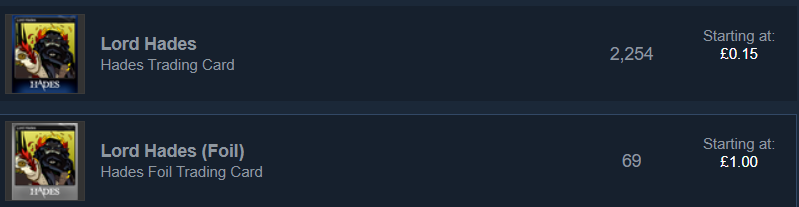
 copper cedar
Hello, I am Russian speaking, so there may be mistakes in the translation, sorry. In incentive, when trying to "buy missing cards" gives the following error
Error: Lord Hades card does not exist on Steam Marketplace
Correct please
faint jewel
@copper cedar I think you should contact steam support for that.
copper cedar
@faint jewel
Steam support is very difficult to contact, and there is no such error in the sections they offer
By the way, the card with which there was a problem, for some reason, was duplicated on the trading platform
I think that with this question, game developers should contact Steam
@stray elm
frosty tiger
Alguem pode ajudar??
faint jewel
@copper cedar I remember I had a weird issue when I tried to "buy missing cards"... have you tried buying Lord Hades card separately? Also, the reason why there are two Lord Hades' cards might be that one of them is "Foil" (so rare - more expensive as well). However, it should look like that: https://imgur.com/wwcc8zq
@frosty tiger If the steps listed there don't work, could you try steps listed in hades-tech-fixes in section If the Game Won't Start or Read/Write Save Data and see if something of that helps?
[Google translate:]
Si los pasos enumerados allí no funcionan, ¿podría intentar los pasos enumerados en hades-tech-fixes en la sección If the Game Won't Start or Read/Write Save Data y ver si algo de eso ayuda?
 pine wind
I have an issue with the game
I reach full hearts with Dusa but I didn't get the bond formed sticker
faint jewel
@pine wind You need to have a conversation with her in Zag's room, so I'd suggest doing a couple of runs as it triggers randomly.
pine wind
@faint jewel Ok Thanks
faint jewel
If it's persistent and you still don't get it after too many runs, then F10 it if you're on Windows so that the issue can be investigated, but usually it should happen after a few runs.
frosty tiger
faint jewel
<@456226577798135808> If the steps listed there don't work, could you try steps ...
I’ve tried to do everything on that list and the issue continues to happen
faint jewel
Are you on Windows or Mac?
Also, was it working fine before? Or is it like that all the time? I'd also try how it is on a new save file.
vagrant girder
cloud kayak
Ah I was unsure if its to me. No I am on desktop, no integrated graphics.. and G...
ohh ok same i am on desktop too i just tod u that cuz ik someone who had those issues and it was fixed by changing it
 lost spindle
i appear to have encountered an extremely minor glitch lol ,, it's in no way gamebreaking or anything but. i have completed the epilogue (which should complete zagreus' codex entry from my understanding), but zag's codex entry ends at ||"But this son of Lord Hades always regarded me, a mere shade, with respect; and the congenial manner of an old friend..."|| and then is marked with the entry finished thing instead of ending where it's supposed to at ||"Rumors swirl about the lad; about how he bleeds red like a mortal does. Well, if there's a trace of mortality in him, I am certain he is better for it. I should know."|| and THEN being marked with the entry finished thing
i'm a little confused as to how this happened since the last two chunks are supposed to be unlocked together by completing the epilogue from my understanding? does anyone know how to like. fix that lol?
i would have done the f10 thing but i'm playing on switch ;v; apologies if this is the wrong place to put this!
faint jewel
@lost spindle Could you show a photo of what you mean, please? Do spoiler tag it by putting "||" between a link so it's hidden.
lost spindle
yes!! it looks like this
sorry had to get the image from my switch to computer lol
it's missing the ||"Rumors swirl about the lad; about how he bleeds red like a mortal does. Well, if there's a trace of mortality in him, I am certain he is better for it. I should know."|| part, which is the very last part of the entry
faint jewel
Just to make sure, by epilogue you mean ||having had a conversation with Persephone and Hades about the Olympian Quest being finished and then having a cutscene about it? Not only getting Persephone back to the Underworld?||
lost spindle
afaik that part is supposed to be added to the codex as part of the whole ||"He was never insubordinate with me, despite his reputation. Perhaps my own lack of decorum in my youth made it easier for us to get along. He learned quickly, exhibiting his father's might, and even greater swiftness. Yet, he soon showed a quality that startled me much more. Forgive me, O gods! You are not known for your kindness. But this son of Lord Hades always regarded me, a mere shade, with respect; and the congenial manner of an old friend. Rumors swirl about the lad; about how he bleeds red like a mortal does. Well, if there's a trace of mortality in him, I am certain he is better for it. I should know."|| section, which is why i'm confused
yes the whole ||olympian quest|| thing
have completed the whole thing and ||have the little slice of olympus in the garden|| and everything
(also tysm for the help tiank i appreciate it!! ;;)
faint jewel
Yes, you're right that is should be like you're writing and it seems that ||completing Olympian Quest|| is the only requirement.
@sharp narwhal Could you have a look at this issue when you have some time? It seems that on Switch the last part of Zagreus' entry in codex wasn't unlocked despite meeting all the requirements.
faint jewel
lost spindle
(also tysm for the help tiank i appreciate it!! ;;)
No worries ;). Not sure why it is like that, so hopefully Ellis could have a closer look at that when she's around.
lost spindle
👍👍!!
sharp narwhal
@lost spindle have you finished another run since getting the epilogue?
lost spindle
not yet no
sharp narwhal
Give that a try and let me know if it still doesn't update. I think due to the way the unlock works you need to do another run and die and return to the House for the unlock to trigger.
lost spindle
okay!! thank you!!
lost spindle
@sharp narwhal that fixed it!! thank you sm!!
 livid violet
Hello Supergiant, just purchased Hades through steam and I'm very hyped to play it. Unfortunately I'm having an issue. I'm using a 2019 Macbook Pro 13
Quad Core i7, Iris Pro 655 graphics
The problem is - once I launch the game, I get the normal loading screen and after a few seconds, the game 'dimms' itself
as the brightness goes to like 15% or something
but that's just the game, everything else is working properly.. Any suggestions? I really want to play this masterpiece!
this is how it looks currently 😦
faint jewel
@livid violet Have you tried updating your graphic card drivers?
Also, veryfing the game files.
 fading mango
Hi, I’ve been unable to launch the game through steam on my M1 MacBook Air, is there a way to get by this problem?
When I click launch on steam nothing happens and it stays on my game library screen
stray elm
@fading mango this is a known issue. The devs are working on getting M1 support up and running
@frosty tiger do you still need help? There are some more things to try, potentially
fading mango
@stray elm okay thank you! Hopefully it’s soon, I’m itching to give this game a go
stray elm
@cloud kayak if possible, could you get a video of the stuttering? Stutter could mean more than one thing, so I want to make sure we're on the same page
@livid violet some devices have built-in automatic brightness adjustment, do you see anything like that with other games?
 bleak tundra
Report bugs in-game with F10.
Is there a bug report system for Switch? I'm seeing frame drops and minor graphical glitches right now; happy to restart but thought I'd drop off a bug report if there was an appropriate place to do so
stray elm
bleak tundra
> Report bugs in-game with F10.
Is there a bug report system for Switch? I'm see...
not currently, unfortunately. You can report them here though. Some of those glitches should be fixed in the next patch, but feel free to report them just in case
cloud kayak
stray elm
<@380622590630428672> if possible, could you get a video of the stuttering? Stut...
Yes I can. Record and share it here? I will post it tomorrow thanks.
stray elm
Sure!
bleak tundra
stray elm
not currently, unfortunately. You can report them here though. Some of those gli...
Cool! I'm on version 1.0.36054. In the weapon select area (where Skelly is) I'm saw frame drops and lag when the animation for selecting a weapon plays, and when firing the gun the shells are sticking around in midair for a while (possibly this is for some time, possibly it's until some maximum number of effects is hit and the old ones are GCed, not sure). Restarting software fixed the frame drops on weapon select animation but not the floating shells; they also seem to linger on other maps but they look like they're resting on the ground so it may be intended (though they can also rest over floating pits). I'm attaching an mp4 that demonstrates both the select lag and the floating particles; I'd initially assumed they were related but I'm not certain now.
If it's important or useful, Exagryph is ||Aspect of Zagreus upgraded to 16 ammo|| and I made that upgrade right before I noticed the issues, so upgrading weapons may be part of repro. I'd test that now but I just started a run to see if the issues persisted into additional maps 😆 .
lag on weapon select and lingering shells in midair
looks like the dash effect was causing lag too, so I'm guessing any particle effects animation was doing it (but again, don't know enough about the engine internals to say for sure)
I can reliably reproduce the effect lag issue by upgrading Exagryph before using it. Trying with other weapons and seeing if that also causes it, and then going to check if the issue persists with an upgraded Exagryph (I am dumb and missed that my first restart also cleared the upgrade since I hadn't moved into another room before quitting)
Upgrading any weapon causes the weapon select effect lag, it doesn't persist when the save is reloaded but does persist if just moving out of and back into the weapon select room, and I have no clue if this was happening when I upgraded weapons before since I pretty rarely upgrade a weapon and then switch to a different one (for that matter, haven't done a lot of upgrades yet). This is probably way too much info for a minor bug now so I'll leave it there but happy to answer any questions 🙂
Thanks for taking the report (and I really love this game, I just started playing a few days ago and I am entirely obsessed if that didn't come off clearly 😆 )
stray elm
Thanks for the report!
 agile zinc
Hades crashing on launch, any ideas?
stray elm
@agile zinc what platform are you on? And I'd take a look in #h1-tech-fixes
clever wolf
Hey sorry to bother you all about this again
A while ago I explained that Hades wasn't opening on the macbook air and I was told the devs are working on fixing it
I was wondering if anyone knows when the issue will be fixed?
stray elm
We still don't have a specific ETA that I know of, sorry ^.^"
clever wolf
No worries!
 royal cloak
A heads up on what looked like a bug to me - In the final boss fight, when he goes to his second phase, he emits an expanding ring explosion - like a skull blowing up. However, I summoned Dusa's pet just after this triggered... and the ring just vanished. It didn't grow to full size or hit anything, it just went away.
 proven badge
Spoilers for act 3 of Hades;
Is there a way to disable the cat meow in act 3? It sounds eyriely like my cat in pain and it keeps pulling me out of it thinking he's hurt / st wrong. Weird req ..
frosty tiger
There’s an issue with level rewards
I mean I have successfully beat the flames level and it says I should’ve get a Diamond but instead I get darkness?
Why?
 flint spade
hey theree just wondering if there was any fix that was going to be announced for the screen freezing issue with macs? (ive tried everything in tech fixes and its still quite bad - today ive had to reset 4 same runs in the final areas bc the screen freeze becomes permanent and the quit option is not available and so force quitting makes you reset in house of hades)
stray elm
@royal cloak That's intended, actually
@proven badge two things--you can spoiler tag text using two vertical bars (|| like this ||)
second thing, I don't believe there is a way to disable them, though you could talk to the modding server about replacing the audio file ( https://discord.gg/KuMbyrN )
stray elm
flint spade
hey theree just wondering if there was any fix that was going to be announced fo...
You can recover your progress using the steps at the end of #h1-tech-fixes . In addition, what're your specs, and what kind of freeze is it?
flint spade
forgive me if im a little tech illiterate haha
but i believe these are my specs?
1.4 GHz Dual-Core Intel Core i5
aka the one with known issues
the freezes are just screen freezes a majority of the time with the game still going on in the background (i can hear the audio still continuing) and usually it lasts for 5-10 seconds
when its the worst one it permanently freezes the screen and glitches out (my taskbar expanding will turn parts of the game border white) and if im lucky and the quit option isnt greyed out i can just blindly mouse over to the quit button and restart there without loss of progress - otherwise i start back at house of hades
ill try the recovering steps but it seems rather annoying especially since this problem happens around 20-30 times a day
stray elm
Alright--could you also follow the steps at the end of #h1-tech-fixes about sending in your system info?
 white plaza
I've noticed that there was a weird font thing that happened with one of the abilities in my run, where would i put a screenshot of that?
stray elm
@white plaza here is fine, or with if you're on PC. It's a known bug that the devs are trying to track down.
 bronze meteor
Hello guys. I'm having trouble with save file. I've read the instructions that SGG provides. But I need some clarification
I lost my save file just a while now. My PC storage was full because it was downloading stuff and the game couldn't save the progress
Question about the instruction:
· Sort by 'Date modified' to locate your most recent save matching one of these names (assuming you use Save Slot 1): Profile1_Temp.sav, Profile1_Temp.sav.bak, or Profile1.sav.bak
· Rename that file to Profile1.sav
· Then open the Play menu in-game and look for the save.
Do I need to rename the file and replace the existing Profile1.sav ?
white plaza
@stray elm Thanks :) its a glitch with the third option down "Revenge Damage"
stray elm
bronze meteor
Question about the instruction:
· Sort by 'Date modified' to locate your most r...
Yes, you'll need to move, rename, or delete (not recommended) the current Profile1.sav
upper trellis
Can't run the game properly...
I'm on Arch Linux, using proton 5.0-10
I've installed the driver and vulkan packages
stray elm
Heyo Lightbulb--do you have a way to export that in a different file type? I'm having trouble opening it, sorry.
Alternatively, what's the issue you're running into?
upper trellis
stray elm
Heyo Lightbulb--do you have a way to export that in a different file type? I'm h...
Yeah sure, I'll try exporting it to mp4
bronze meteor
stray elm
Yes, you'll need to move, rename, or delete (not recommended) the current `Profi...
I've renamed the Profile1_Temp.sav file to Profile1.sav . (I've moved the original Profile.sav to desktop). But the issue has not been resolved.
stray elm
What's the specific issue?
upper trellis
I'll try reinstall it and see if it works or not, changing the driver to the proper intel one
bronze meteor
I've lost all my progress with over 90 attempts due to my PC storage full during playing the game. When I re-opened the game, it starts from attempt 1.
stray elm
Alright--could you send me (here or DM) a screenshot of your Saved Games / Hades folder?
stray elm
upper trellis
I'll try reinstall it and see if it works or not, changing the driver to the pro...
you can also try this, if that doesn't work:
add the launch option
_NV_PRIME_RENDER_OFFLOAD=1
launch the game once, close it, then remove the launch option
upper trellis
thanks, I'll try that
stray elm
sure--though I'll also note that is a very old fix that may be out of date
bronze meteor
stray elm
Alright--could you send me (here or DM) a screenshot of your Saved Games / Hades...
The yellow highlighted file is the newly replaced file.
stray elm
bronze meteor
The yellow highlighted file is the newly replaced file.
alright--this may take a bit, but can you try with each of the .bak saves in turn?
bronze meteor
stray elm
alright--this may take a bit, but can you try with each of the .bak saves in tur...
You mean replacing each .bak files with Profile1.sav?
stray elm
Replacing Profile1.sav with each .bak file, the same way you did it with Profile1_temp.sav
specifically
the Profile1.sav.bak# files
 hushed bronze
Hi guys, when are you planning to release updates on switch version ? It's been long since we got anything...
bronze meteor
stray elm
Replacing `Profile1.sav` with each .bak file, the same way you did it with Profi...
Okay. I'll do that.
bronze meteor
stray elm
Replacing `Profile1.sav` with each .bak file, the same way you did it with Profi...
Thank you. I've recovered the game from this early morning progress. However, the afternoon session of the game was lost.
Better something that nothing. Thank you!
stray elm
Sure thing! Glad you were able to get some of it!
upper trellis
can't get the game working after the changes 😢
I tried to use proton 5.0.10 and directX according to the proton website
stray elm
Drat, sorry. I'm not super familiar with Linux/Proton, unfortunately. There's a thread on the Steam boards that might have an answer in it, though it's super long and a lot of it didn't look helpful from the quick scan I took.
upper trellis
no prob
I'll wait for those who are familiar with linux then. will try to fix this too
I hope Hades will be able on Linux as well too, maybe I'll play other games from supergiant that support linux first
stray elm
 royal patio
anyone running on 21:9 have a fix for sidebars not going down the whole way?
royal patio
anyone running on 21:9 have a fix for sidebars not going down the whole way?
you can try manually inputting your resolution with the launch options /x=1920 /y=1080, replacing with your preferred resolution
I believe there is also a launch option directly related to the side bar art, but I can't find it, unfortunately
royal patio
no issues with getting the right resolution, but I'll have to figure out what the side bar art resolution command is
but it seems to be the right resolution, just at the wrong location
I use 3840x1600 and have seen other people at this resolution get the same issue
do you know which config file the sidebar art is located in?
I can toggle sidebar art on and off, but that doesn't fix the issue
I put in a bug report, will unfortunately have to use black bars for the meantime
 blazing falcon
So both games where I've used the Exagryph I've noticed that its special is very temperamental when it comes to the target marker. In tight spaces and behind cover the marker seems to flit about once you've fired it, sometimes once from its original mark, sometimes twice, seemingly randomly. When you pair that with the wider blast radius boon that can hurt you, it can be an even bigger problem. On one occasion in Elysium I fired three shots off down a long area (so plenty of space) and they all came back at me, hurting me. Against ||Hades, if you stand behind those wide stumps,|| they often deflect the special back at you. This is the only real problem I've noticed in Hades and it makes that particular ability unreliable at times.
Not sure whether this is the right place to report this.
upper trellis
Are there anyone playing this game on Linux? I found that guys in the proton forum can't run it properly as well, maybe I'll play it after it has Linux support then.... 😢
 spare tusk
is this a good place to post a little graphics glitch I found in the game?
faint jewel
It is. If you're on PC you can also press F10 to send a bug report with screenshot as well.
 cunning orchid
With my i3-4005U 1.7GHz, GeForce 820M with 2GB Dedicated VRAM, and 4GB RAM, will I be able to run Hades without issues? I don't want to buy the game only for it not to run, especially since it will eat my whole gaming budget.
Thank you 🙂
 harsh ravine
cunning orchid
With my i3-4005U 1.7GHz, GeForce 820M with 2GB Dedicated VRAM, and 4GB RAM, will...
harsh ravine
cunning orchid
With my i3-4005U 1.7GHz, GeForce 820M with 2GB Dedicated VRAM, and 4GB RAM, will...
try this site out. When you download the software and it checks for you, you don't really have to be a tech genius to know if your pc can run it
cunning orchid
harsh ravine
try this site out. When you download the software and it checks for you, you don...
Thanks 🙂 I tried the version where you put your system in the form, it says the only thing I don't have for the recommend is the 8GB RAM. So I should be ok, probably need to dial down particle effects and such.
harsh ravine
cunning orchid
Thanks 🙂 I tried the version where you put your system in the form, it says the...
i guess so, and don't really worry if the game doesn't work, steam refunds you the game if you say that your pc can't run it.
cunning orchid
harsh ravine
i guess so, and don't really worry if the game doesn't work, steam refunds you t...
I know, but I really don't like to mess with those kind of systems, so I prefer to avoid having to do it.
harsh ravine
ohhhh,, makes sense
cunning orchid
harsh ravine
ohhhh,, makes sense
Off topic, if you buy a game using a steam card, and then refund, the money goes back to the steam wallet right? So it doesn't go through the bank?
harsh ravine
yes, it just goes to your wallet
cunning orchid
harsh ravine
yes, it just goes to your wallet
In that case I might just get a card, that way if I have to refund, I don't have to deal with bank issues.
Thanks again for the help 🙂
harsh ravine
my pleasureee
spare tusk
"Special" didn't rendered correctly
 cobalt wyvern
any idea why there's a delay between when I click the cast button and it actually casting
harsh ravine
cobalt wyvern
any idea why there's a delay between when I click the cast button and it actuall...
I think that's intended, there's a motion of zagreus where he casts attacks
faint jewel
cobalt wyvern
any idea why there's a delay between when I click the cast button and it actuall...
If you're using controller you could try adjusting Dead Zone in the settings. It seemed to work for me with dashing delay.
 tight parrot
Hi. My total of escape is good =9
But when you make the addition, you can count 8 !!
There's missing an escape with the Styx's blade.
(sorry for my bad english).
Do you understand ?
It is a bug ?
faint jewel
@tight parrot looks like bug. Press F10 next time you see it to send a report with screenshot.
tight parrot
tight parrot
Hi. My total of escape is good =9
But when you make the addition, you can count ...
an oldest screen
tight parrot
faint jewel
<@480738464606978059> looks like bug. Press F10 next time you see it to send a r...
This is an "old" bug. Every time i win the escape, the bug is still there. Do you understand ?
but, ok
faint jewel
Pressing F10 when you see that screen with that bug will send a report to Devs with the relevant data that might help them fix this bug.
late portal
update on the bug report i did
seems like it has something to do with my game files. just reinstalled it and it got fixed
 hidden sandal
ok strange question
I have a usb a-to-c cable i use to connect my switch controller to my pc, and while it recognizes the input as the controller it is (which is surprising, and i like it) but it seems as if the button mapping looks off. I have my steam set so that the controller gives the ABXY inputs as shown on the controller, but if I press X, my action bound to Y triggers, and vice versa. It's not game breaking or anything, but is there any reason that's happening? it's becoming frustrating, especially when i try to remap buttons to my preferred layout
stray elm
@tight parrot if you've done any runs with god mode, they won't show up unless you're in god mode
stray elm
cunning orchid
Thanks 🙂 I tried the version where you put your system in the form, it says the...
Let me know if you need help turning down particles, or check #h1-tech-fixes for performance issues
@blazing falcon what platform are you on?
stray elm
spare tusk
"Special" didn't rendered correctly
That's a known bug, thank you for reporting! (And please continue reporting whenever you find it ) If you're on PC you can do that in-game with
stray elm
hidden sandal
ok strange question
I have a usb a-to-c cable i use to connect my switch control...
If I understand correctly, this is a known issue—the in-game button icons are swapped. So you should be able to just swap which one is which in the in-game Controls menu
hidden sandal
stray elm
If I understand correctly, this is a known issue—the in-game button icons are sw...
yeah that's the issue, figured i'd say something just because it's an issue. I'll survive tho. Thank you!
 dusk tulip
Hello! I have a problem with gamepad, it just don't work after 27 nov. patch. I played about 2 hours with my DS4, and everything is ok, but now I can play only with mouse+keyboard. In all other games gamepad works correctly. I tried to play with my another gamepads, they don't work only on Hades. Reinstall change nothing. Please, help, this game is so nice, I wanna play more 😫
stray elm
dusk tulip
Hello! I have a problem with gamepad, it just don't work after 27 nov. patch. I ...
Could you try setting the launch option /PS4Gamepad=true ? Instructions for setting them are in #h1-tech-fixes
In addition, are you on PC vs Mac, Epic vs Steam?
dusk tulip
I'll try it, thank you! PC steam
 heavy heart
Help! My controller (a switch pro controller) seems to work for Steam on my iMac, but when I load up Hades it doesn’t register it. Am I doing something wrong or just plain missing a step?
stray elm
dusk tulip
I'll try it, thank you! PC steam
Are you using Steam's Big Picture Mode?
dusk tulip
Yes
stray elm
heavy heart
Help! My controller (a switch pro controller) seems to work for Steam on my iMac...
Same question to you, actually—are you using Big Picture Mode?
heavy heart
stray elm
Same question to you, actually—are you using Big Picture Mode?
Yes I am
 carmine cairn
Hi. I recently installed my first mod- it skips the death scene so i can get to playing again faster. For whatever reason, it put me in Greece, and now i'm stuck. And my game is saved to Greece. Any idea what I can do to fix this?
stray elm
@carmine cairn That's a question for the Modding server
carmine cairn
ok thanks
stray elm
They regularly post their link in #self-promotion if you need it
@dusk tulip @heavy heart Could you send a screenshot of your Big Picture controller settings?
heavy heart
stray elm
<@349237956688478219> <@262431424987136000> Could you send a screenshot of your ...
Hold pls gotta reconnect it haha
dusk tulip
Ok, I'll do it
I connect my DS4 by DS4Windows, so win10 think I play with xbox gamepad
stray elm
Okay. Let me know when you try that launch option, and how it goes
heavy heart
stray elm
<@349237956688478219> <@262431424987136000> Could you send a screenshot of your ...
Sorry it’s a picture lol
I’ve never used a controller before for my iMac so forgive if I’m clueless
stray elm
No worries—I wasn't totally clear though, apologies. I meant the screen where you toggle different controller configuration supports
heavy heart
So the general setting for the controller?

 heavy heart
stray elm
heavy heart
stray elm
Alright, I've got a weird workaround that might help. Can you try turning Switch Pro Config off, and setting the launch option /PS4Gamepad=false ? Instructions for setting launch options are in #h1-tech-fixes
dusk tulip
stray elm
@dusk tulip I wasn't super clear in my original message, apologies—can you send the same screen that thecomfywitch just sent?
dusk tulip
stray elm
@dusk tulip can you try enabling Xbox and PlayStation?
heavy heart
stray elm
Alright, I've got a weird workaround that might help. Can you try turning Switch...
Ok I think I got that down. Should I reconnect my controller now?
dusk tulip
It's works! Thank you so much!
stray elm
Sure thing tomato!
stray elm
heavy heart
Ok I think I got that down. Should I reconnect my controller now?
Yup, give it a try
 twilit summit
Hello ! I don't know if it's the right place to do this but I'll ask out anyway. In the French translation of the game on Switch, the description for the Hammer "Chain Skewer" on Varatha indicates that it's the **Attack **that bounces up to 7 foes, and not the **Special **as it works in game. Is there a way to fix this ? It's a bit frustrating, I had a build based on the Attack and took the Hammer but I soon realized that no, my attack did not bounce to several enemies 
heavy heart
I think it’s the steam gamepad drivers download that’s messing it up. I’m going to futze with that and see if it’ll stop being silly. 
stray elm
@twilit summit could you mention that (with a screenshot if possible) in #hades-localization ?
heavy heart
Found the problem. Apparently Valve/Steam hasn’t updated the drivers to be compatible with Big Sur(last Mac OS update) so until that’s fixed, I guess I’m SOL 
stray elm
Ah, yup. That would do it, sorry
heavy heart
stray elm
Ah, yup. That would do it, sorry <:friendly:459075377617436683>
It’s all good. There’s apparently a work around so if that works I’ll let y’all know
stray elm
Please do! What's the workaround you found, out of curiosity (if it does work)?
blazing falcon
stray elm
<@124590875991998464> what platform are you on?
Thanks for responding! I'm on PC, Epic, Windows 10.
stray elm
Alright--some of those, such as the pillars or tight spaces, are intended. Hades is partially 3D, so bombs are able to bounce off of walls. However, it shouldn't be bouncing in empty space, so when that happens could you report it in-game with ?
blazing falcon
Oh I didn't realise you could do that! Will do! Thanks 🙂
cunning orchid
stray elm
Let me know if you need help turning down particles, or check <#6750706210753740...
I need to buy the game first :p But thanks :)
stray elm
xD fair enough
There're definitely ways to ease performance if you do choose to get it though :3
heavy heart
stray elm
Please do! What's the workaround you found, out of curiosity (if it does work)?
There’s two (kinda). One is utilizing MDM and the other is....installing windows 10 via boot camp lol so. I may do the boot camp option
stray elm
Alright Best of luck!
cloud kayak
stray elm
<@380622590630428672> if possible, could you get a video of the stuttering? Stut...
Hi Swan, I recorded the video. The problem occurred only after first 5 minutes this time - it gets more and more common in later levels, in Tartarus its not happening often. Even for example if I close-open game - in Satyr tunnels the stutter is occurring quite often, in Hades fight very often..
stray elm
alright. Out of curiosity, did you also try these two launch options: /DrawBlendMax=8 /DrawLights=false?
stray elm
cloud kayak
Hi Swan, I recorded the video. The problem occurred only after first 5 minutes t...
Actually, a better way to ask that--what launch options have you tried?
cloud kayak
stray elm
alright. Out of curiosity, did you also try these two launch options: `/DrawBlen...
I tried these but only with swap effectsdiscard actually. Seemed to me like swapEffects made it worse. I can try them separately
Sorry only with*
stray elm
Yeah, I'd give that a try
twilit obsidian
Hello there ! Not a bug, but quality of life material (and I think I have noticed another suggestion here - please redirect me if I'm in the wrong place)
stray elm
(there currently isn't a defined "suggestions" area so here is fine )
twilit obsidian
Could you make the Special from Exagryph's ||Lucifer aspect|| targetable / same priority target as the enemies?
I often find myself wanting to shoot on the Special ||to trigger the explosion|| on a group of enemies, but end up shooting the enemies directly
Which makes the Special much less interesting
stray elm
Do you have aim assist on?
twilit obsidian
I think so, playing with Xbox 360 controller
Zag does lock on enemies - I don't recall checking for an autoaim option, so I may have missed it
I have checked, I do have aim assist on
stray elm
Alright. I know that that's something that was adjusted quite a bit in Early Access, though I don't remember all the details off-hand.
One thing you can try, either way--if you || drop one of the specials on top of another, or close to it, they should trigger each other to explode pretty quickly ||
 terse holly
i was lost my save in the game
stray elm
terse holly
i was lost my save in the game
what platform are you on?
terse holly
steam
stray elm
Mac or PC?
terse holly
pc
stray elm
alright--what specifically happened? As in, did the game crash; did you start the game back up and progress was missing/your save didn't show up; or something else?
terse holly
my pc was turn off alone and after that i lost my save
twilit obsidian
Yep, they can trigger each other. I just think it should be faster & more reliable to simply shoot them. Sending another Special takes aiming + travel time. But hey, if it's a game design decision made in EA, let it be 😉 thanks for your answer
stray elm
terse holly
my pc was turn off alone and after that i lost my save
Alright--could you try these steps?
· On Windows, navigate to \Documents\Saved Games\Hades
(assuming you use Save Slot 1)
· Rename or move Profile1.sav to a different folder
· Sort by 'Date modified' to locate your most recent save matching one of these names: Profile1_Temp.sav, Profile1_Temp.sav.bak, or Profile1.sav.bak#
· Rename that file to Profile1.sav
· Then open the Play menu in-game and look for the save
terse holly
ok
terse holly
i'm not able to do this like i'm not able to move Profile1.sav
stray elm
could you try just renaming it? Maybe to Profile1_old.sav?
terse holly
errr don't have Profile1_old.sav
stray elm
I'm saying to rename Profile1.sav to Profile1_old.sav, if you can't move it
stray elm
alright, then this step:
· Sort by 'Date modified' to locate your most recent save matching one of these names: Profile1_Temp.sav, Profile1_Temp.sav.bak, or Profile1.sav.bak#
· Rename that file to Profile1.sav
terse holly
rename all that files?
 sleek vale
Sometimes the game doesn't record my runs, like sometimes it doesn't acknowledge a run happened (it happened with me not getting heat bounties or credit, and today with the streak being as if the last run didn't exist and much of the dialogue being repeated, which also happened the last time this happened). Both these times I pressed "quit" in the house just after the run, is this a bug, and if so, how do I report it? If not what could be causing my runs to not be acknowledged by the game as having happened sometimes?
terse holly
stray elm
alright, then this step:
> · Sort by 'Date modified' to locate your most recent ...
ok i have just rename
stray elm
terse holly
ok i have just rename
you should only need to rename one of them, the most recent. After you've done that, your save should show up in-game
(if you're like help in a different language, let me know and I can try)
stray elm
sleek vale
Sometimes the game doesn't record my runs, like sometimes it doesn't acknowledge...
what platform are you on?
terse holly
stray elm
you should only need to rename one of them, the most recent. After you've done t...
ok and i can speak english and portuguese 😉
sleek vale
stray elm
what platform are you on?
I’m using a PC, Windows to be specific
stray elm
sleek vale
I’m using a PC, Windows to be specific
Do you get any error messages in-game?
stray elm
terse holly
ok and i can speak english and portuguese 😉
(usando Google Tradutor)
Depois de renomear o arquivo .bak mais recente, seu salvamento aparece corretamente no jogo?
sleek vale
stray elm
Do you get any error messages in-game?
No error messages, I only notice when I see the winning screen
stray elm
When you press 'Quit', does it say "progress last saved less than a minute ago" or something similar?
sleek vale
Usually it does, yeah
Pretty much every time, but I don’t always pay attention but it usually does
stray elm
alright, could you try this:
· Navigate to
\Documents\Saved Games\Hades
· (Assuming you're using Save Slot 1):
· Either renameProfile1.savor move it to another folder
· Sort by 'Date modified' to locate your most recent save matching one of these names:Profile1_Temp.sav,Profile1_Temp.sav.bak, orProfile1.sav.bak#
· Rename that file toProfile1.sav
· Then open the Play menu in-game and look for the save
sleek vale
What would that do and do I need to be careful that it doesn’t delete the save or what? I am using save file 1
stray elm
What I'm thinking is that your temp save might still have that run in it, and restoring to that could recover the lost run
that being said, I'd also try adding the launch option /SaveToTempAndMove=true
hmm
stray elm
sleek vale
What would that do and do I need to be careful that it doesn’t delete the save o...
do you lose just the last run you did, or all of your progress, if you do more than one run?
stray elm
alright
could you also send in a bug report in-game with describing that, when you come back in to missing progress?
sleek vale
The next time that happens, what should I do after pressing F10?
I never reported a bug before
stray elm
it'll pop up a bug report window (you may need to alt+tab to reach the window, it sometimes opens up behind the game). In that window, you can include your email and name/discord tag (optional), as well as additional information about the bug (also optional, but very helpful and in this case necessary)
terse holly
stray elm
(usando Google Tradutor)
Depois de renomear o arquivo .bak mais recente, seu sal...
não eu tento e tento mas não consigo
stray elm
terse holly
não eu tento e tento mas não consigo
Você poderia me enviar uma captura de tela da sua pasta de salvamento? Aqui ou a mensagem direta está bem
terse holly
ok
sleek vale
stray elm
it'll pop up a bug report window (you may need to alt+tab to reach the window, i...
Thanks! I’ll do it when I notice it happening again, I’ll check after each run if that run was logged for the time being
terse holly
stray elm
Você poderia me enviar uma captura de tela da sua pasta de salvamento? Aqui ou a...
a pasta ta ficando assim e eu tento mudar o nome de algumas pastas e mesmo assim não da
stray elm
Desculpas pela confusão anterior. Você poderia tentar desfazer a renomeação do arquivo e então reiniciaremos a partir daí?
terse holly
ok
eu to tendo um leve probleminha pra lembra aqui qual era qual ainda mais que tinham nomes iguais
stray elm
terse holly
eu to tendo um leve probleminha pra lembra aqui qual era qual ainda mais que tin...
pressionar ctrl + z desfaz alguma coisa?
terse holly
sim eu tentei isso mas desfez so um a maioria ficou a mesma coisa
stray elm
tudo bem. Só para esclarecer, você perdeu uma única corrida ou todo o seu progresso? Se for uma única execução, pode ser difícil recuperar
tudo bem. Só para esclarecer, você perdeu uma única corrida ou todo o seu progresso? Se for uma única execução, pode ser difícil recuperar
terse holly
todo meu progresso mesmo fiquei jogando por uma semana mas mesmo assim foi um grande progresso
stray elm
terse holly
todo meu progresso mesmo fiquei jogando por uma semana mas mesmo assim foi um gr...
Você poderia me enviar uma cópia de seus arquivos? A maneira mais fácil seria colocá-los em um arquivo .zip (selecionar tudo, clicar com o botão direito, enviar para -> pasta compactada) e enviar uma mensagem direta para mim. Vou ver se consigo encontrar o arquivo .sav correto
terse holly
ok me chame no privado que eu te mando os arquivos
 earnest sentinel
Hello, I think I have a small text bug? It’s the first boon, for Ares Aid... not sure what else I can say, lol. This is on the Nintendo Switch.
stray elm
earnest sentinel
Hello, I think I have a small text bug? It’s the first boon, for Ares Aid... not...
Thanks for reporting!
It's a known bug the devs are trying to track down
earnest sentinel
Oooh, I see! Thanks for the speedy reply :)
stray elm
terse holly
ok me chame no privado que eu te mando os arquivos
Preciso que você seja um amigo para enviar uma mensagem direta, está certo?
terse holly
ok pronto
 junior hill
What's the Switch performance like?
stray elm
junior hill
What's the Switch performance like?
From what I've heard, pretty good
60 fps docked and handheld, iirc
junior hill
Native res?
stray elm
Not sure, sorry, but I believe it's high quality
earnest sentinel
Random thing again, I walked into the lounge and Meg and Dusa were having a convo which I listened to, then Dusa went up into the sky as usual and said goodbye.
But then Meg started talking to invisible Dusa LOL.
So there were the speech bubbles and audio for Dusa even though she wasn’t there anymore
stray elm
Yup, that'll be fixed with the next switch patch
earnest sentinel
👍
royal cloak
The Tiny Vermin King guy got stuck in this spot, and I shot him down from 75% to 0% without either of us moving; might be a pathing issue?
stray elm
royal cloak
The Tiny Vermin King guy got stuck in this spot, and I shot him down from 75% to...
what platform are you on?
royal cloak
PC
stray elm
if you're still in that room, could you report that with ?
royal cloak
Sorry, a bit too late - I'm back in the main chamber now, if that's still useful
stray elm
no worries, you could send in a report with a link to that message (https://cdn.discordapp.com/attachments/520430049003044864/782800945536303144/unknown.png)
 royal cloak
Done!
 exotic wolf
Hi! I don't need a fix, but thought it might be good to know:
Was making a mess of things in the tunnels in Styx, and accidentally punted an enemy off the map. The bugger eventually died, but it was a bit trying since I had exactly zero ranged attacks at the time.
Happened on the Switch just a few minutes ago.
 warm tinsel
Hello, can I get some help? I haven't played Hades since October 25 and it appears that my save data is corrupt.
When I try launching my main profile, the game crashes. But I can create new game profiles or run a second one I haven't progressed much on.
I tried replacing profile1.sav with the .bak file but that did nothing
Ah, never mind. I tried quitting the game without loading into my save, and when I restarted the game, the save was working. Though I believe I was in the middle of a run, but it set me back to the house. Maybe
 dusty lintel
is this right? it sounds off like it should say Zagreus not Hades
 past matrix
Poseidon calls Zagreus "Little Hades", because he's Hades' son afterall.
 lunar sparrow
zagreus is hades’s kid
dusty lintel
ok i was so confused because it was my first time seeing it!
stray elm
exotic wolf
Hi! I don't need a fix, but thought it might be good to know:
Thanks for the report! Those should be fixed in the next Switch patch
stray elm
warm tinsel
Ah, never mind. I tried quitting the game _without_ loading into my save, and wh...
Glad you were able to recover it!
 primal turtle
Hi there! Not sure if this is a known bug already, but I never got ||“The Queen’s Plan”|| in the Fated List. But I’ve completed the epilogue and ||Family Reunion.|| I’m playing on the switch.
warm tinsel
stray elm
if you're still in that room, could you report that with <:f10:58847668460951961...
For what it's worth, I've had this happen to me at least twice. I believe I 'd it a couple of months back.
cunning orchid
I'm using a dualshock 4 controller with steam. I'm using it wireless, will the game detect it and show playstation button prompts?
crude acorn
It should, if it doesn't try adding /PS4Gamepad=true to the launch options
cunning orchid
crude acorn
It should, if it doesn't try adding `/PS4Gamepad=true` to the launch options
Thanks. I read somewhere it only detects if the controller is connected by cable, instead of bluetooth.
crude acorn
give me a couple of minutes to check
crude acorn
cunning orchid
Thanks. I read somewhere it only detects if the controller is connected by cable...
I'm able to play with no issues and have PS button prompts as well
cunning orchid
crude acorn
I'm able to play with no issues and have PS button prompts as well
Ok. Thank you 🙂
hidden sandal
tech question: what's the difference between the launch files? I'm in the Hades folder in steamapps, and I'm not sure if I'm missing out on higher quality graphics or smoother gameplay than I already have because of which executable I select.
additional image, the three launch options I have in my file folder
I've been launching with x64, no problems whatsoever, just curious
stray elm
hidden sandal
tech question: what's the difference between the launch files? I'm in the Hades ...
x64 and x86 refer to DirectX
DirectX and Vulkan are two different modes of processing graphics
32 bit refers to a version of Hades that uses less memory
 harsh stag
So, I've gotten this error message several times -
I've done most of what it's suggested (outside of running as admin). I'm using the steam launcher to run it...
Thing is I've played off and on for a week now, and it is saving... I've not noticed anything missing or wrong when I load my save profile, yet this error keeps cropping up
I notice my Hades folder does have the read only partially checked
but even after unchecking it and applying the change, it always reverts back to that... checking within the folders (Data dump / records, screenshots, and temp), those folders show the same thing. The save file properties in the documents/saved games/hades section do not have the read only check against them
stray elm
harsh stag
I notice my Hades folder does have the read only partially checked
Are you on Mac or PC?
harsh stag
PC
stray elm
Do you use Windows Defender (built-in) or a different antivirus?
harsh stag
Windows Defender and Malware Anti-Bytes... not seeing any reports of either blocking anything
stray elm
I'd go into Anti-Bytes and manually whitelist Hades if you can, and/or turn off controlled folder access in Windows Defender
One of those is most likely what's causing the pop-up
harsh stag
Any idea where to go for controlled folder access?
Think I looked for that before and couldn't find it
stray elm
On mobile so I can't link directly now, but there's a link in #h1-tech-fixes that I believe walks you through it
harsh stag
Just found it
It's already off
Just whitelisted the hades folders through malwarebytes as well
stray elm
Are you able to change them off of read-only now?
stray elm
Might need to reboot for that change to take effect? Not as familiar with malwarebytes, sorry
harsh stag
No problem. I'll reboot in a bit and see if anything changes here
 wicked hearth
Any legit/non-hacking way to copy a Hades Switch save to a new Switch? Not transfer. Duplicate.
Friend has a save on my Switch, finally got his own thanks to Hades... but it's looking like he will have to start over? 🤦
cloud kayak
stray elm
Actually, a better way to ask that--what launch options have you tried?
Hey Swan I have update on my issue.
The above command didnt help. I also tried to find if there is some list of commands for hades and didnt find much new except /DrawBloom=false /DrawColorGrading=false
These didnt help either :)
So I tried to set /DrawBlendMax=1 and it helped!
It helps only for a limited time. Example - Started with it in Elysium, up until Satyr tunnels not a single lag! Then it started to lag, so I turned off on Hades -> Went to fight Hades where lags were worst -> zero lags this time
Of course lot of effects are not visible because of this.. but it might hint at some issue? Game is not cleaning something?
could it be connected to Page File Size? I had it set to a lot before, but recently was debugging some other game (Tester karma 😦 ) and put it to System managed - and its only 4GB now
stray elm
wicked hearth
Any legit/non-hacking way to **copy** a Hades Switch save to a new Switch? Not ...
Once cross-saves are finished there should be a way to
sharp narwhal
if the system is managing your page file, it should be expanding it as needed, so don't think that would be an issue, Jarda
it would be an issue if you had set a hard limit on your page file size (I did that once...kept getting memory errors for like a week and was so confused 😅 )
cloud kayak
is there a list of commands somewhere for Hades? I could just go and try all of them I guess..
sharp narwhal
the ones listed in #h1-tech-fixes are basically all there are; the drawblend and colorgrading commands are already pretty extreme, they reduce a lot of visual polish.
have you also tried /UseSwapEffectDiscard=true?
cloud kayak
hmm.. well my issue doesnt seem to be due to performance, its just weird.. I havent tried to downgrade AMD drivers for GPU yet though..
yes I did. I tried all commands I could find 🙂 not helping unfortunately
stray elm
the only other launch options I have in my doc for performance are from a very old post and probably not likely to help :S
cloud kayak
stray elm
the only other launch options I have in my doc for performance are from a very o...
I am up for anything at this point if you are 😄
stray elm
I've got these two that someone (not an SGG person) mentioned for FPS stuff a while back, which is why I doubt they'll do anything:
/NoFixedStep=true /SwapInterval=0
cloud kayak
Thanks a lot guys I really appreciate it. Unfortunately it didnt help.. if I ever solve it I will let you know 🙂
stray elm
Best of luck!
royal cloak
Fishing in the butterfly ball room seems to put the fishing point in front of Zagreus instead of behind him
 dire dirge
hey guys the last 2 weapon slots before starting a run are empty for me
I only see the sword,spear,shield and the bow
is that a bug? Do I have to unlock them later?
I'm missing the gauntlet and the gun thing
stray elm
dire dirge
hey guys the last 2 weapon slots before starting a run are empty for me
Have you done a run since unlocking the 4th weapon?
 compact rover
Guys, what’s the max level for everything on the mirror?
stray elm
compact rover
Guys, what’s the max level for everything on the mirror?
It varies per Talent, some of them are one or two, some go up to I believe 8 or so
 noble lantern
Is there any guidance re: which version of Hades to run on Windows? I've noticed that on my PC with a dedicated GPU, the DirectX version seems to have much lower frame latency numbers (via the nvidia performance overlay thing), but on my laptop that has Intel UHD 620 graphics, the Vulkan version seems like it's running at a higher framerate. I haven't tried the 32-bit version
 night elk
aight, so I have a problem I already submitted a bug report but maybe someone here knows a solution
I can't give nectar to orpheus, I'm stuck on 2 hearts, have nectar and he's the only one I can't gift nectar to
I'm able to talk with him normally, but can't gift him nectar
it's not that I tried to give him multiple nectars at once btw, I can't give him any
I've had this issue for multiple runs now, going into a run and coming back doesn't help
stray elm
noble lantern
Is there any guidance re: which version of Hades to run on Windows? I've noticed...
DirectX and Vulkan are two different modes of processing graphics
32 bit refers to a version of Hades that uses less memory
Vulkan may work better on some setups, DirectX will work better on others
If one works better than the other, then use that one
stray elm
night elk
aight, so I have a problem I already submitted a bug report but maybe someone he...
did you include any info on the bug report, such as your discord tag or email?
night elk
yup, my email
there wasn't a space for a discord tag so I didn't include one, tho it might've been a good idea, actually
noble lantern
stray elm
> DirectX and Vulkan are two different modes of processing graphics
> 32 bit ref...
yes, I'm aware that they're different APIs (I actually do dev work for a living dealing with similar APIs). I was just hoping for any insight re: which to use in what situations, other than "try it and see how it works".
stray elm
noble lantern
yes, I'm aware that they're different APIs (I actually do dev work for a living ...
Ah, yeah I don't really have any advice other than just checking
stray elm
night elk
there wasn't a space for a discord tag so I didn't include one, tho it might've ...
I tend to put it under name ¯_(ツ)_/¯
That being said, I don't have a way to look at those myself, but Ellis or one of the other QA folk can when they get the chance
noble lantern
stray elm
Ah, yeah I don't really have any advice other than just checking
are there any kind of performance diagnostics built into the game? I was able to bring up the nvidia performance overlay to get FPS and more detailed performance numbers on one computer, but I don't have anything like that installed on my laptop with the intel iGPU
just being able to see FPS numbers would be helpful in figuring out how to tweak the settings to make the game run smoothly
stray elm
Steam has an FPS tracker you can enable
though I've heard one person mention it doesn't show up with Vulkan for some reason
haven't tested for myself yet
noble lantern
I'm pretty impressed that the game runs relatively smoothly at all on iGPU graphics
night elk
stray elm
I tend to put it under name ¯\_(ツ)_/¯
That being said, I don't have a way to loo...
uh it's 2 am so I'm gonna have to go to sleep for now, should I contact them somehow later on, besides submitting the ticket? I probably shouldn't ping them since they're devs, right?
noble lantern
but it's still kind of close to not running smoothly, so it would be nice to have the tools to dial in proper settings
stray elm
night elk
uh it's 2 am so I'm gonna have to go to sleep for now, should I contact them som...
Normally I'd ping Ellis for you, though it's a bit late for that for her, so I can make a note to do that tomorrow if you'd like. If you DM me the email you put on it, I can pass that to her to check, or you could submit another report with your discord tag
stray elm
noble lantern
but it's still kind of close to not running smoothly, so it would be nice to hav...
Hades does have some stuff you can change in the settings, and there are some launch options you can use to adjust performance. Most of them are in #h1-tech-fixes , under the Performance Issues section
noble lantern
ok, thanks
 strange flicker
Even if I already beat a miniboss in the Styx, right?
stray elm
yeah that's fine, bug reports are just easier to track than discord messages
strange flicker
True thing
 austere tinsel
Is there a way to rebind the give nectar button on switch? I have dash bound to zr which appears to be the default give nectar button so if I dash past people I often accidentally fine them nectar
stray elm
austere tinsel
Is there a way to rebind the give nectar button on switch? I have dash bound to ...
You can rebind buttons in the in-game controls menu, I don't know of another way beyond that
austere tinsel
There is not an option to rebind give nectar in the menu.
stray elm
Then right now I don't think there's a way to change it, unfortunately, sorry
You can change dash though, if that still works
austere tinsel
I changed dash to what feels most natural for me. Is there somewhere I can open a ticket about this?
stray elm
I think https://www.supergiantgames.com/contact/ would be your best bet, there's an option for feedback or similar stuff
Supergiant Games is an independent game developer in San Francisco, California. We created the games Bastion, Transistor, and Pyre.
austere tinsel
I emailed suppprt@
crude acorn
fading mango
Hi, I’ve been unable to launch the game through steam on my M1 MacBook Air, is t...
M1 support should be in the testbranch as of a couple of hours ago, you can activate it in steam using the password: HadesTestBranchAccess if you would like to try it out
tagging @frosty tiger @queen birch @quasi shard as well
quasi shard
Awesome ! Updating the game rightnow
high nimbus
I can confirm it starts on my Macbook Air
quasi shard
It does work ! Just played my old save file again and did a couple rooms in a new run quickly, smooth 60 fps and playing just like in my Windows PC :)
crude acorn
I was very glad to see it run so well on the M1 Macbook Air as well considering it has no fans and a different architecture 😅
quasi shard
Thank you for response to the issue and quick updates to everything :) Never seen such direct interaction and awesome job from a game dev before haha
stray elm
I'll update the Steam thread, thanks Nikola!
dire dirge
stray elm
Have you done a run since unlocking the 4th weapon?
yeah I have. I still dont understnad how other people have it and I dont I have done 12 runs and have like 4 hours...
stray elm
dire dirge
yeah I have. I still dont understnad how other people have it and I dont I have ...
Could you try verifying file integrity?
 azure kite
Hey guys, i think i just ran into a bug or a weird interaction that i'm not sure if it is intended: During a fight against hades, i was using Lucifer's aspect and Artemis's aid. The bomb (special atk) fully "ate" the call, all of the artemi's arrows.
I tried another run with the same setup but with aphrodite's aid instead and the same happened. I know that the bombs does have interactions with projectiles, but are they supposed to interact with calls? Also, if that is not a bug, could that be added to the list of exceptions somehow? Losing a fully charged call is really sad.
stray elm
azure kite
Hey guys, i think i just ran into a bug or a weird interaction that i'm not sure...
Heyo—what platform are you on?
azure kite
I'm playing on Steam
stray elm
Alright. Could you report that in-game with when it happens?
azure kite
Sure, will do if i'm able to replicate it. Also, trying to be more specific, the bug/interaction happens after i use the call, the projectiles do get blocked by the bomb and then the bombs explodes
 pale needle
Hi i recently purchased a new macbook pro with that M1 chip.. I played tons of hades on my switch.. (then bought it on a sale in the epic store) I was wondering if the EPIC version will support MAC OS (m1) in the near future? People are having issues with the steam version. And i am using the EPIC store version instead. (oh and 1 last thing.. any ETA on cloud saves?) Bless you all. This game came out of nowhere and is my personal GOTY. Beating TLOU2 in pure fun.
stray elm
pale needle
Hi i recently purchased a new macbook pro with that M1 chip.. I played tons of h...
Hello! Cloud saves within Epic are already functional, you just need to enable Epic Cloud Services. Cross-platform saves are not yet up and running, unfortunately.
Currently, M1 support is being tested on Steam. If I recall correctly, Epic doesn't have the same Beta testing features that Steam does, so it may need to wait until the adjustments are done being tested
 agile shadow
Hi, the other day I ran into a "bug" I could not F10. I loaded my save and it was an Athena/Aphrodite trial. The thing is that I died to it the day before (I quitted as Athena was making fun of me) and I got to try it again. This should not be possible... Happened in test branch btw, onlt once.
pale needle
Ah so i am a bit behind no worries. At least it's planned. Cheers!
stray elm
agile shadow
Hi, the other day I ran into a "bug" I could not F10. I loaded my save and it wa...
Heyo—if that was on the test branch, could you bring it up in #test-branch-tech-issues ?
agile shadow
Sure thing
dire dirge
stray elm
Could you try verifying file integrity?
what does that mean
stray elm
dire dirge
what does that mean
There are instructions at the top of #h1-tech-fixes
dire dirge
stray elm
There are instructions at the top of <#675070621075374090>
all files succesfully validated
stray elm
Alright. If that doesn't fix it, could you send in a bug report in-game with ? And include some form of contact info, such as your email or discord tag
fading mango
crude acorn
M1 support should be in the testbranch as of a couple of hours ago, you can acti...
Thank you so much! I’ll definitely be trying it 🙂
frosty tiger
Hades on M1 runs super smooth. Now if Steam can get their gamepad drivers updated for macOS Big Sur...
dire dirge
stray elm
Alright. If that doesn't fix it, could you send in a bug report in-game with <:f...
okay they both appearad
 fast whale
Hi, I sent in a bug report but I'll mention the issue here as well. I had three death defiance against hades and died with one remaining
also one of the skulls he shoots out was invincible even after the first hit which breaks the invincibility on heat 1
 sour axle
Hi! I experienced a few (very minor!) bugs while playing on the Switch version today. Fortunately nowhere near game-breaking but I thought it best I mention them just in case.
One of the death defiance icons disappeared temporarily following the fight with Tisiphone (despite not having used any).
There was a slight text formatting error for the Blinding Flash boon.,
Zagreus referenced Skelly's Lucky Tooth but it was Athena's Deathless Stand that was used (Lucky Tooth was equipped/had been used however).
Apologies if these are known issues! And please let me know if there's a more appropriate way I should be reporting these.
 queen birch
crude acorn
tagging <@456226577798135808> <@!780832745021636709> <@!187750794244784128> as w...
queen birch
crude acorn
tagging <@456226577798135808> <@!780832745021636709> <@!187750794244784128> as w...
Starts on my Mac Mini M1 😀
 woven bane
That looks like a font issue. I'm playing on PC. (or maybe it's normal ? it looks a bit out of place for some reason.)
 quasi heron
https://puu.sh/GT7GU/7377e9fa3e.png
i don't know if it's worth mentioning but on this victory screen the boon list goes a little bit over the right panel ?

 stray elm
@woven bane this is a known bug—can you report it with whenever it happens. The devs are trying to track it down
stray elm
pale needle
Hi i recently purchased a new macbook pro with that M1 chip.. I played tons of h...
Hello! I have a correction to what I said earlier. Epic does have a Beta test available. There should be a separate app called "Test Branch", that has a white logo with a black background
faint jewel
@quasi heron I believe that is more of a design thing than a bug. It will always be like this if you have a lot of boons and I don't think there's an easy way of fixing that, unfortunately...