#server-hosting
1 messages · Page 42 of 1
 final dove
 worn patrol
hello thanks for being the only person to give me a response what do i need to put in there or change in order for it to be evrima?
 ember rapids
@final dove I uninstalled steam on my VPS and for some reason I still get the error
final dove
Make sure the directory is gone as well
ember rapids
Is there a way to change the Evrima map?
 tropic wasp
Big sadface
Playerdata save changes in Update 3 is terrible.
Player data is now merged and encrypted, so no more injections or modifying of individual player data
Very disappointing.

 modest patrol
Are there settings to activate the global chat in evrima
 full fiber
what is the difference between s-ai and a-ai on server ? thx for asnwer
 violet marsh
How many are Active (a, near a player, "awake"), and how many are Sleeping (s, not near a player, etc...). That's been my theory on it anyways
 wind dew
tropic wasp
Big sadface
Playerdata save changes in Update 3 is terrible.
Player data is no...
wind dew
tropic wasp
Big sadface
Playerdata save changes in Update 3 is terrible.
Player data is no...
I just woke up and noticed that they changed that, my bot ain't gonna work now, sadface indeed... Is there any explaination to why is that a thing ? will we have a new way to allow server hosts to give dinosaurs away as discord prices and such ? My bot mainly focused on giving players the ability to save their progress, to get people's coords so they can use a command to check their position in a map, do player bounties, a nest system using discord, and I was hoping for RCON to even add a whitelist feature and much more to the bot, but right now all of that is not possible til we get another way ://
 versed bay
Im having the issue where the server shows as running but i cannot find it on the Steam servers..
 toxic spruce
versed bay
Im having the issue where the server shows as running but i cannot find it on th...
toxic spruce
versed bay
Im having the issue where the server shows as running but i cannot find it on th...
yeah many people are having that issue. Im not sure how to fix it and it seems others dont know either right now.
 queen sentinel
Guys, anyway to edit max group limits?
toxic spruce
Nope
queen sentinel
omg, the players gonna kill me hahaha
 fallow nexus
wind dew
I just woke up and noticed that they changed that, my bot ain't gonna work now, ...
fallow nexus
wind dew
I just woke up and noticed that they changed that, my bot ain't gonna work now, ...
having the same problem, is there an intended alternative to this method @hoary cave ?
wind dew
I asked him through DM's too
 merry urchin
versed bay
Im having the issue where the server shows as running but i cannot find it on th...
merry urchin
versed bay
Im having the issue where the server shows as running but i cannot find it on th...
Same problem here, people from PingPerfect are working on it for me
toxic spruce
Yep everyone is having this issue no matter the server host.
toxic spruce
merry urchin
Same problem here, people from PingPerfect are working on it for me
If you figure out the fix please share, ❤️
merry urchin
toxic spruce
If you figure out the fix please share, ❤️
Will do
ember rapids
How do I update my server through the SteamCMD for Update 3?
fallow nexus
app_update 412680 -beta evrima
ember rapids
Thanks!
fallow nexus
you might have to login first
ember rapids
I know
fallow nexus
alright, perfect
ember rapids

Btw should I save the windowsserver folder?
Ok this is weird

Ok fixed it
Forgot to turn the server off
versed bay
merry urchin
Same problem here, people from PingPerfect are working on it for me
Let me know if they fix it 🙂
merry urchin
versed bay
Let me know if they fix it 🙂
So far no news. They are still looking into it. At this point I think the devs needs to fix this problem
 west rock
my server just refuse to find Isla_Spiro map and wants to load default(Entry)
and the guide in sticky says no word on how to set map 😮 https://docs.google.com/document/d/1n2lxKdZTDi42H-1j0zQQPoghmqrp2KuQffD99RXNYcs/edit

Google Docs
EVRIMA Server Hosting Guide Made by NoClipSize. First download SteamCMD: https://developer.valvesoftware.com/wiki/SteamCMD Extract the .zip file to the location where you want your server stored. Mine is in a folder I created, named ‘SteamCMD’. Launch SteamCMD and let it update itself. Once...
without map line mine starts on entry default not spiro -_- probably because I messed up something earlier and it got saved as a default string somewhere
ahg found the file I think some CoreEngine.-ini defauult maps had changed to entry.
 tall cairn
west rock
ahg found the file I think some CoreEngine.-ini defauult maps had changed to ent...
tall cairn
west rock
ahg found the file I think some CoreEngine.-ini defauult maps had changed to ent...
Where did you find this file?
west rock
engine/config/
delted it hoped a verify would give me back the default one, but no luck, so now Im gonna just screw it and delet all of the dedicated server and download ita gain -_-
versed bay
Anyone know why other people can find my server but not me? :/
west rock
ohnoes, I had exact that issue with Valheim, hope it's not in Isle too for me
violet marsh
For evrima you do not need to manually set a map. It should automatically assign itself to Spiro.
 verbal jewel
violet marsh
For evrima you do not need to manually set a map. It should automatically assign...
verbal jewel
violet marsh
For evrima you do not need to manually set a map. It should automatically assign...
Anyway I found the map location is /Game/TheIsle/Maps/Game/Isla_Spiro/Isla_Spiro
west rock
violet marsh
For evrima you do not need to manually set a map. It should automatically assign...
I had messed around trying to set it manualy so it had asked me if I wanted to load entry instead and ye that messed up the setting for default to not be Isla_Spiro any more. But I fixed it now.
I got the server running now, or at least I could see it and join it in the list, dunno if anyone else can tho, Had no friend that could try yet.
verbal jewel
I can't get into mine, it shows but when i try to join it kicks me to the main menu
And In the log it outputs this: [512]LogOnline: Verbose: STEAM: FOnlineAsyncEventSteamConnectionRequest RemoteId: UNKNOWN [0x1D772970040]
west rock
some kind of conflic server is running on your steamid instead of anonymous? and same id tried to join?
verbal jewel
Maybe its because i'm running the server in the same pc that i'm playing
It worked before
Anyone knows if I can boot up the server in a VM?
 split ether
I'm running mine in a VM right now.
 fiery vault
[2021.04.30-21.38.53:589][ 17]LogLoad: Took 0.983467 seconds to LoadMap(/Game/TheIsle/Maps/Game/Isla_Spiro/Isla_Spiro)
server stuck there
 lime moon
is the evrima server always installed with "app_update 412680 -beta evrima" on steamcmd?
fallow nexus
yes
 maiden widget
@tropic wasp @wind dew My comment on the server side changes in Update 3: #general-feedback message
Let me know what you think, any other ideas, suggestions how we could improve interaction between TI devs and Server/Modding community?
merry urchin
"[2021.04.30-21.38.53:589][ 17]LogLoad: Took 0.983467 seconds to LoadMap(/Game/TheIsle/Maps/Game/Isla_Spiro/Isla_Spiro)
[23:41]
server stuck there"
we're running a root server, does anybody know why this happens, haven't seen this problem come up with game servers
 wise light
for evrima hosters here: if your server cap was 150 and it got full on patch day (because patch day), would your idea to solve the lag be to increase the cap to 200, or reduce it to official's 100-120? i'm trying to make sure my hardware/networking knowledge wasn't thrown out the door involving a community server
final dove
Stick to 150 or below
Going over looks to be smacking the server-fps hard & making server rubberbandy
 muted zealot
Anyone with a pingperfect server having issues after the update?
wise light
final dove
Going over looks to be smacking the server-fps hard & making server rubberbandy
150 even seems a stretch for some of these community server's hardware. they just want to blame the game instead of their hardware
muted zealot
My server randomly closes itself and sends emails saying "![MEMValue0] (Max limit ~ [MaxAllowedMemory])" and "![CPUValue=] (max limit 20%)"
telling me to clean up the world or buy more ram
wise light
muted zealot
My server randomly closes itself and sends emails saying "![MEMValue0] (Max limi...
that's the only suggestion i can provide then. what's your player count?
wise light
RAM?
muted zealot
memory and cpu
wise light
no i mean how much RAM do you have
muted zealot
oh
final dove
@wise light i agree. We had ours running at 255 for the fun on asura but yeah, experience horrible.
So we stick to 130,130,100,100 as servers atm
@muted zealot its your server host - are you renting at a place like PP?
muted zealot
yeah I'm renting a server on pingperfect
I've selected the option "No additional memory"
with normal CPU priority
no problems until update
and looking at a live feed of cpu and memory usage, no problems either
it just decides to kick everyone out of the server, glitch the server out so it says it's running but I have to restart it for it to exist again
with just me it takes around 15 minutes on average
with 2-3 people it's basically every 5 minutes
but my cpu and memory usage is doing just fine
no more than 10% at the very most
usually around 5%
wise light
memory usage obviously isn't fine, that's the primary reason for failure. you're running out of memory
muted zealot
5.48 GB memory, I only use 4% of that when I'm in the server playing
Just watched the feed as it crashed, since it decided to crash in under a minute this time
it goes from 4% memory usage to 0%, server down
the weirdest thing is it worked perfectly before the update, be it a little hard to find on the server list outside of the hosted area
It went from fine to totally unplayable, and the server is just fine until it crashes. No rubberband with other people, no lag, no loading problems, nothing. It just.. stops.
 wanton abyss
I have noticed that this new update does use around a gig more ram mine is sitting just under 6 gig so sadly your ram may no longer be sufficient
wanton abyss
The previous and legacy ran just under 5 gigs on basically idle with no players if I remember correctly and I the new evrima now idle is over 5 this is just my experience so it may be different for others but yeah
muted zealot
It must be different
this server had 2 gigs and could run 6 players on Update 2 without issues
now it can't run one for more than 2 minutes
wanton abyss
Ssve that money monthly and buy yourself a used i7 with 32 or 64 gig ram and host it on your own may end up cheaper
wise light
muted zealot
this server had 2 gigs and could run 6 players on Update 2 without issues
many extra textures and map features were added, increasing the amount of RAM your server is going to need sadly
muted zealot
Well if the best solutions are to drop the payment entirely and find a totally new method of hosting, I think I'm kinda screwed here.
wise light
the best solution is to just upgrade your current server
the future proof solution is to buy your own bare metal
muted zealot

wanton abyss
Agreed with soul try looking at some refurbished dell servers sometimes you can get decent last gen servers for not bad prices sorry bud but for now it is what it is
muted zealot
guess so
It's not worth the effort for me to go and buy 'my own bare metal' if I'm just using the server to have a good time with friends until sandbox is added ig
if it isn't gonna work then it isn't gonna work
I appreciate the advice though
I've spammed myself with enough emails telling me I need to buy more ram anyway lmao
I've got like 25 already from any time someone attempts to connect for more than 5 minutes
wanton abyss
If it's just for a couple of friends even an i5 with 16 gig ram may do the job you don't need a crazy gpu even if it's built in gpu will be fine but yeah good luck hope you come right
muted zealot
thanks
 sullen scroll
any idea if we can toggle global chat on/off on evrima guys?
 pseudo turtle
is there a way to use motd (server message) when someone logs in on evrima server hosting? also the discord button before you join a server down right. is there a way to make that work? if so what to do in config file?
toxic spruce
Hey just wondering on peoples opinions. What would you guys say the best server provider is because im trying to find a good one for my own server right now ❤️
 potent ibex
i use pingperfect for my evrima server hosting
ember rapids
How do I freecam? I used / to freecam but now it does not work
merry urchin
holding Alt should work
ember rapids
It does not work
merry urchin
check your keybinds
potent ibex
Shift /
tropic wasp
pseudo turtle
is there a way to use motd (server message) when someone logs in on evrima serve...
Not now, thx "Update".
tropic wasp
maiden widget
<@!135782841144442880> <@!305744618392125440> My comment on the server side chan...
I wish I could say I understood the reasons why things like this are changed. Does nothing but hurt those of us who care the most about the game and about offering something unique to the player community.
Ways to improve interaction? More than a single point of communication, or a point of communication that is supportive and replies to queries / concerns?
 brisk root
My PingPerfect Evirma server is seemingly out of date?
the option titled "Evirma update" doesnt seem to work either. It shows the server is 7.13.10 instead of 7.85.04
brisk root
anyone understand this? Error: (210) TCP Server not started on 0.0.0.0:27019. Please check IP,Port or your firewall.
trying to create a small server for some friends
 wind pivot
Is there some way to actually join a localhost server? I can't seem to get it working.
 light wave
brisk root
My PingPerfect Evirma server is seemingly out of date?
the option titled "Evirma...
light wave
brisk root
My PingPerfect Evirma server is seemingly out of date?
the option titled "Evirma...
Same problem
merry urchin
brisk root
My PingPerfect Evirma server is seemingly out of date?
the option titled "Evirma...
yes, same issue. I sent a ticket and firstly it was answered as this is an issue since the new update.
A senior technician will see what he can do on monday. 
It's annoying, something obviously not working as intended
brisk root
i relocated the host server and it seemed to fix it.
merry urchin
wich host ?
merry urchin
Well yeah, the only bad thing with this that you potientially have a higher chance of your server being a lag fuckfest, due to ping
brisk root
agreed, just letting you know what actions i took to fix it.
its not a satisfactory fix
merry urchin
I appreciate your help, but I rather wait out if it can be solved without any serious negative changes 
 lethal notch
How to set discord link on game.ini?
 heavy storm
[2021.04.30-21.38.53: 589] [17] LogLoad: Took 0.983467 seconds to LoadMap (/ Game / TheIsle / Maps / Game / Isla_Spiro / Isla_Spiro)
is the last message.
The root server cannot be found either.
Anyone have an idea?
light wave
brisk root
agreed, just letting you know what actions i took to fix it.
i dont understand how can the host change fix this xD but i belive u we had Germany hosting
 topaz stream
Can someone send me their game.ini file? just want to make sure mines up to date.
light wave
@brisk root how can i change the hosting location? Is there an easy way or i have to make a ticket?
merry urchin
brisk root
My PingPerfect Evirma server is seemingly out of date?
the option titled "Evirma...
Same problem here, been in contact with people from Ping to solve this, so far not luck yet
brisk root
I made a ticket, I'm unaware of how else to change the hosting location.
light wave
ty
 primal shadow
What is the command for spectator mode, and esp?
lethal notch
primal shadow
What is the command for spectator mode, and esp?
Shift + /
lethal notch
topaz stream
Can someone send me their game.ini file? just want to make sure mines up to date...
use WinRAR to unzip
lethal notch
shift?
lethal notch
o/ NP
lethal notch
primal shadow
ty!
has a little bug
lethal notch
primal shadow
ty!
if you are flying with ptero, when you exit spectator mode, you may or may not be invisible, in case you do not see your dino, but the other players still see you.
enter spectator mode again and exit again once you see your dino.
And one more detail, when you leave the viewer you start to fall, so just use a little stamina to tighten space and fly.
primal shadow
Ty very much ^^
lethal notch
🙂
I do not remember which key to activate and deactivate to show players' names, but I know that there is one that shows when in spectator mode.
wanton abyss
Some other bugs when using spectator. You sometimes can't use any function keys also sometimes you get infinite stats no stamina drain ect you can't fish it's gives you the prompt but you don't catch any thing you can't drink water you can no longer open the admin menu
 shrewd frigate
Hi ^^
Is the Discord button after you choose a server already functional?
 zenith thorn
Is there a way to change the limit of people allowed to group within the same species? Example: Deinos from 2 in a group to 4, etc
 ornate cedar
zenith thorn
Is there a way to change the limit of people allowed to group within the same sp...
ornate cedar
zenith thorn
Is there a way to change the limit of people allowed to group within the same sp...
Also interested in this.
 high lintel
so can we not set a message of the day on private servers now?
ornate cedar
Is bServerGlobalChat= removed?
fallow nexus
ornate cedar
Is bServerGlobalChat= removed?
yes, the globalchat is completly disabled
 bright ledge
Are unofficial servers region locked still?
wise light
brisk root
anyone understand this? Error: (210) TCP Server not started on 0.0.0.0:27019. Pl...
Don't know if you're still having this issue but it means you need to open that port to allow traffic through, like it says
 rancid vessel
Is there a list of server settings for the new Evrima update? Like if there's admin slots, and other things.
 open dome
Yeah a list of server settings would be very nice.
And for the administration it would be much easier to write with other people not only in species only chat or with a direct announcement.
wise light
i'm sure that'll come but writing docs on all the features definitely shouldn't be priority. they have many different things that will be added eventually i'm sure, needing them to update the docs again every time
open dome
We only need a list of all the parameters. I think that's enough for the most who know how to configure a server or to edit the config-files.
wise light
i understand what you need but it's still a small task that derails their focus. there's enough general knowledge already across the community to know what does what and what doesn't work. i'm sorry, i just don't see a need to ask them to take time out of their day for something like that
ember rapids
Do I put a message of the day in the config for my evrima server?
fiery vault
So for whatever reason I can't get the evrima server online anymore .... it stays at the point where it loads the map and then it's over
open dome
fiery vault
So for whatever reason I can't get the evrima server online anymore .... it stay...
Than your server is still working
If you cannot join there are problems with the ports
merry urchin
I have a question please. Let's say I want to host a server on my computer. How can I do?
Is there somewhere to download "the files to put on server"?
fiery vault
open dome
Than your server is still working
I didn't change anything ... before the update everything worked and now it doesn't
split ether
merry urchin
I have a question please. Let's say I want to host a server on my computer. How ...
There is a guide in the pinned messages for this channel.
merry urchin
Okay thank youuu ❤️
 thorn holly
Ive set up a server using the pinned message guide. Everything looks to be running, the steamcmd starts normally ports are all forwarded but it wont show up in the game server list still any ideas?
merry urchin
[2021.04.30-21.38.53: 589] [17] LogLoad: Took 0.983467 seconds to LoadMap (/ Game / TheIsle / Maps / Game / Isla_Spiro / Isla_Spiro)
after this nothing happened, we tried port forwarding, installing the server maybe 4 times now, nothing works, can anybody please explain what is happening here? Why does it work for everybody but for our server?
My suspicion is that the server can't access the rest of the files after loading the map, do you have any ideas?
 stoic garnet
Anyone know where Evrima ban files are saved? For the life of me, can't find them to back up
final dove
stoic garnet
Anyone know where Evrima ban files are saved? For the life of me, can't find the...
The files are cleared with patch update sadly - All your evrima bans are laying in a file called "PlayerBans.json" next to the encrypted dinosaurs https://i.imgur.com/IMIbsyP.png
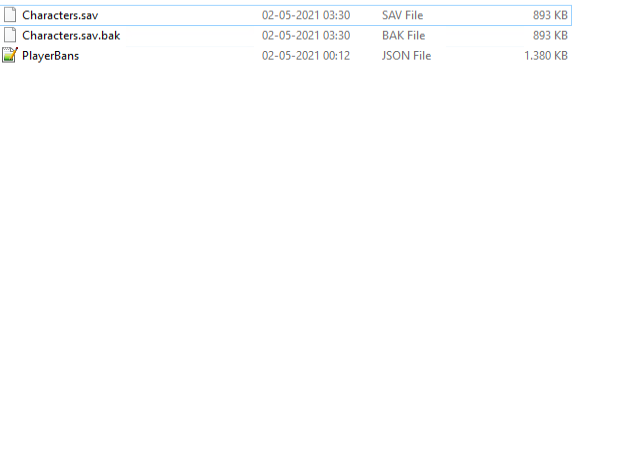
The file is first generated upon the first ban.
stoic garnet
thanks
final dove
rancid vessel
Is there a list of server settings for the new Evrima update? Like if there's ad...
I don't think reserved slots are a thing rn soap
Looks like some servers have figured a way to bypass, but i dont believe its officially supported no.
final dove
bright ledge
Are unofficial servers region locked still?
If its intentionally i dont think so - more so a error on steams end, but yeah.
I found myself not being able to find US servers (if 0 players on) without a VPN.
But if theres players on it, you should be able to find.
final dove
zenith thorn
Is there a way to change the limit of people allowed to group within the same sp...
@ornate cedar - Not as of yet, all the groups limits are hardlocked.
(And yes, global chat removed)
final dove
fiery vault
So for whatever reason I can't get the evrima server online anymore .... it stay...
Double check your Game.ini is correct, or if your "Command line" is correct.
A friends community of mine experienced the same, game should have been up - but they had a Legacy version of the game.ini file in, and it made it not pop
fiery vault
final dove
Double check your Game.ini is correct, or if your "Command line" is correct.
A f...
I got the files from the site that was posted here ... and also evrima worked before the update ..
topaz stream
lethal notch
cheers man had a whole chunk of stuff missing appreciate it
stoic garnet
So after importing 457 bans from legacy into evrima, our evrima server started to become unresponsive. Commands through the admin panel took up to 30 seconds to go through sometimes just completely didn't work, you could literally die and then still control your dead body (was hilarious watching a ragdoll dino running around flopping everywhere), people started losing connection, etc. All bans showed in the admin panel ban list correctly and the file was verified to have the correct syntax, no errors or anything like that. Removed the ban file and the server worked fine like before.
Is there any known limit to how large the evrima ban file can be (or a limit on number of bans) before it causes a server to become unresponsive? Is this a known issue or no?
Has anyone else had an issue with larger ban files? Since Evrima takes the individual ban file approach of legacy and combines them all into one file?
 runic sinew
Hallo alle zusammen Bei mir auf meinen Evrima Server werden keine Spieler daten mehr gespeichert. Woran liegt das
ornate cedar
Does anyone know how to enable this in the serverlist?
 final dove
Should show if you got a dino automatically
 nimble plank
i followed all steps and it doesn't work and i don't know why, there stands i should start the "batch exe" and then this happens and i dont know why, someone help me please.

 runic sinew
Hello everyone can someone tell me where I can find the save games of players since the new update they are no longer where they were before have an evrima server
final dove
stoic garnet
So after importing 457 bans from legacy into evrima, our evrima server started t...
Hey, I'm having the same issue after a certain threshold where bans doens't show in the ban manager ingame.
I'm sure its on the check list - as i hear multiple community servers have the issues after importing massive bans (I personally imported 5.412 & suddenly theres just no bans on the manager XD)
final dove
runic sinew
Hello everyone can someone tell me where I can find the save games of players si...
They don't exist anymore - its encrypted into the PlayerSaves.sav file (or what the name now is)
Seperate player files do not exist.
runic sinew
@final dove the thing is i restarted the server once and all had to start over
final dove
runic sinew
<@!113616977779621895> the thing is i restarted the server once and all had to s...
Yeah :/ I think there might be an issue with corrupted files or deleting dinosaurs - in general.
However, theres nothing you can edit in terms of files personally 😦
runic sinew
final dove
Yeah :/ I think there might be an issue with corrupted files or deleting dinosau...
yes then i have to run the server first
 vivid ruin
my server dont shows up in server list. can someone help me with this
zenith thorn
I've tried changing the safe log time to 30 seconds in the files and it still has a 60 second timer to safe log. The setting was changed and is still set at 30. Any clues?
Also the discord link isn't working for when I press the Discord button on the server. I've made sure the link is one that doesn't expire
maiden widget
ornate cedar
Does anyone know how to enable this in the serverlist?
The Dino info should work on every server where you as a player have played before and did safe logout last time you played on that server.
final dove
zenith thorn
I've tried changing the safe log time to 30 seconds in the files and it still ha...
Hardcoded, file safelog doesnt change
zenith thorn
final dove
Hardcoded, file safelog doesnt change
Ah okay no worries
wise light
final dove
They don't exist anymore - its encrypted into the PlayerSaves.sav file (or what ...
has anyone figured out the algo they use yet or tried to decrypt until they offer a solution?
final dove
wise light
has anyone figured out the algo they use yet or tried to decrypt until they offe...
No idea. Personally i have no interest in even trying to figure out.
shrewd frigate
Hi ^^
Is the Discord button after you choose a server already functional?
 plain dagger
My server isnt showing on the list please help
 lapis sapphire
Hello I am having trouble I just got the isle and am trying to join a few others who do not live far from me although it seems all of my servers are based in china when I live in Canada is there a way to fix this?
<@&818552355796287508>
 sonic sentinel
Tick hide empty when searching for servers, should help
lapis sapphire
ok thank you I will try that
lapis sapphire
ok I got it working thank you very much
 woeful plume
Damn gif, Discord reboots me
 compact lake
sorri plis sorri
 sinful herald
Any clues what’s going on? Server wont start and I get this message ;n;

This is Evrima Pingperfect - suspecting it’s been like this since our restart 50 minutes ago.
 tawdry sentinel
More then likely a issue pingperfect side, I would contact them
 radiant scarab
The server appears to be running What did I do wrong? [2021.05.03-13.36.33:394][ 78]LogLoad: Took 0.481300 seconds to LoadMap(/Game/TheIsle/Maps/Game/Isla_Spiro/Isla_Spiro) however it's not listening on the port ``` >netstat -an | grep 7777
 ornate steppe
Hello, I did everything as in the guide and after I open server_start i get these consoles opening with no errors and it just stays like this. server is not showing up in the game

 fleet sluice
Atm I'm hosting my server through PingPerfect. But I wanna see if I can manage to host it on my computer instead. So far I have followed the guide and now at that point where I start the server. I noted following "red errors" showing in the "SteamCMD" window. I'm guessing that's why I can't see my server either in the server list?
Does anyone know how to solved this error?

 static spire
what is happend whit the ai i have planty of ai and the fish come to de side of the water
 acoustic beacon

 pliant magnet
tropic wasp
pliant magnet
tropic wasp
What are your thoughts re. The changes to server structure to lock down the player save files?
Am I overreacting? Or is this causing major issues for just about all of us?
 fast glacier
are linux server supported for the isle?
 uncut ibex
fast glacier
are linux server supported for the isle?
uncut ibex
fast glacier
are linux server supported for the isle?
i remember that about 2-3 years ago all support for linux and mac was discontinued. I don't know if it's still up to date
fast glacier
sad life :/
 pure cosmos
What would I put for the servermap if i'm hosting a dedicated server for Evrima?
fast glacier
wat
pure cosmos
This:
@echo off
:: Server Config
set "ServerName=My_Isle_Server"
set "ServerMap=Isle_V3"
set "ServerGameMode=Survival"
set "ServerPlayers=100"
cls
title The Isle Dedicated Server
:: Auto Restart loop
:start
echo (%time%) server started.
start /wait TheIsleServer.exe %ServerMap%?ServerName=%ServerName%?MaxPlayers=%ServerPlayers%?Game=%ServerGameMode%
echo (%time%) WARNING: server closed or crashed, restarting.
timeout /t 60
goto start
fast glacier
what has that todo with the dedicated serverß
?
just chose a map you want your players to play on
pure cosmos
What map do I choose for Evrima..
fast glacier
@echo off
cls
echo Protecting isle server from crashes...
title Your server name
:TheIsle
echo (%time%) Checking for updates...
start /wait C:\SteamCMD\steamcmd.exe +login anonymous +force_install_dir C:\SteamCMD\steamapps\common\TheIsleDedicatedServer +app_update 412680 -beta evrima +quit
echo (%time%) isle server started.
start /wait C:\SteamCMD\steamapps\common\TheIsleDedicatedServer\TheIsleServer.exe MultiHome=your public ip address?Port=7777?QueryPort=7778 -log | set /P "="
echo (%time%) WARNING: isle server closed or crashed, restarting in 5 seconds.
timeout /t 5
goto TheIsle
check pins there is a tutorial.
pure cosmos
Thanks
fast glacier
np
 bronze jacinth
someone here familiar with editing the .sav file with the playerdata
It would be very useful for bots
but I feel The Isle's developers having this change is hurtful
if you cannot edit it that is
 broken badger
Has anyone else encountered the problem of the server making two small stutters in a row at almost even intervals? Every player has this on our server and it started today.
 sour vault
is anyone in the crossfire server? if so can I have a link to there discord please

 static spire
click first theisle server.exe not the bath file
ands than ctrl alt del for the isle exe end task and than restart it whit the bat file
the network url is normale i have it to
pure cosmos
Im still getting the errors

Ive also got this error, i've done the firewall so i'm confused.
 lime moon
@pure cosmos you can open your port tcp
pure cosmos
The server won’t start
pure cosmos
pure cosmos
Im still getting the errors
I’m also getting these errors
lime moon
no it's normal this, your probleme it's your port
lime moon
go disable your firewall
pure cosmos
Okie
lime moon
also, I have a problem, after activating theisleserver.exe, I only got a GameUserSettings.ini file in the WindowsServer folder. And I just have to put the Game.ini with this config : ```
[/Script/TheIsle.TIGameStateBase]
AdminsSteamIDs=YourSteamID
[/Script/TheIsle.TIGameSession]
ServerName=ServerNameHere
MaxPlayerCount=Amount
bEnableGlobalChat=true
bGlobalIsSpeciesOnly=false
bLocalIsSpeciesOnly=true
LocalChatRange=20000.f
[/Script/Engine.GameSession]
MaxPlayers=Amount
Ya need to run the .exe for the isle in TheIsleDedicatedServer then ya can do the .bat
I know that part
pure cosmos
lime moon
go disable your firewall
And this should fix my issue right?
lime moon
yerh i think or else go look any tuto for how open your port tcp and udp
pure cosmos
I already did the port so yeah it should work now
broken badger
Maybe i am blind, but i can't find an option to limit AI on my server. Is it not possible? And while we're at it, how to change AI Spawn Rate from low to high (or high to low)
tawdry sentinel
broken badger
Maybe i am blind, but i can't find an option to limit AI on my server. Is it not...
You on legacy?
broken badger
tawdry sentinel
You on legacy?
oh, no sorry, evrima.. didnt mention, im sorry
there is an "Toggle AI" Button in the admin panel, but I can't figure out what it does, since it is not stopping AI from spawning
tawdry sentinel
broken badger
there is an "Toggle AI" Button in the admin panel, but I can't figure out what i...
No need to apologize lol, and not sure if it does work atm, might just be something that they still have to work on
I have tried it myself but I've never noticed a difference
broken badger
and do you know how to set spawn rate from low to high? I see servers advertising with high rate, but is that even possible?
I'm kinda lost rn, haha
 flint pine
Is there a global scalar exposed for sever owners to increase grow times?
tawdry sentinel
broken badger
and do you know how to set spawn rate from low to high? I see servers advertisin...
Again I don't think you can, as in legacy all the servers that say high ai arnt high ai as you can't change the ai count in legacy and I think it might be the same in evrima
pure cosmos
My server won't appear on the server list
 tawdry sentinel
pure cosmos
My server won't appear on the server list
tawdry sentinel
pure cosmos
My server won't appear on the server list
It seems as you've got the name set as default which is "QA Test Server" might be best to change the name so you can find it easier
 austere ferry
My Nitrado server won’t stay running..
 spiral oriole
How do I set up to play the server by myself?
Not via the internet
Stand-alone operation
Someone helped me?
pure cosmos
tawdry sentinel
It seems as you've got the name set as default which is "QA Test Server" might b...
That ain't the name I gave it.. Did I do something wrong?
tawdry sentinel
pure cosmos
That ain't the name I gave it.. Did I do something wrong?
You are setting the name in the correct game.ini file right? There is two different ones one is defaultgame.ini the other is just game.ini
 tawdry sentinel
Seems right
pure cosmos
So why is it not naming it correctly?
tawdry sentinel
Not sure why it's not, have you tried to search for QA test and log on to any to see if it is your server with the wrong name
tawdry sentinel
Would to be able to dm me your log file so I could read it quick?
pure cosmos
Sure
 shrewd frigate
"toggle AI" and "wipe AI" is this working?
AND is there a possibility to adjust AIs on the privat servers?
pure cosmos
pure cosmos
^ This is still an issue ^
 mint moon
Does anyone know how to use a database instead of .sav files for player data within evrima servers? The configuration doesn't seem to be working but I could be making a mistake. Would be nice to know that it is indeed possible. Thank you.
 fiery epoch
.json files for players saving is ended?
 grave dome
Having trouble finding a new evrima server i just set up through pingperfect wondering if someone had some pointers?
grave dome
I can find my server on the server list in steam itself but can not find it in the game.
final dove
fiery epoch
.json files for players saving is ended?
yes
final dove
grave dome
I can find my server on the server list in steam itself but can not find it in t...
Issue with the game (more actually steam), try to enable the Hide full or Hide Empty filter in browser
or use a vpn
 muted plume
Good morning I have a question?
How can I prevent my server for Evrima from deleting the dinosaurs after a restart?
flint pine
Just to let you guys know, the ports have been updated. 27019 is now the range.
sullen scroll
Any idea yet if we can have global chat enabled? I can see only local chat is available and its for same species communication only
pure cosmos
sullen scroll
Any idea yet if we can have global chat enabled? I can see only local chat is av...
Global chat got removed..
 ancient kestrel
Is anyone's server crashing or is it only me > ?
broken badger
ancient kestrel
Is anyone's server crashing or is it only me > ?
Servers keep crashing rn, you're not alone
 wet yarrow
ancient kestrel
wet yarrow
ancient kestrel
Alright cheers..
pseudo turtle
flint pine
Just to let you guys know, the ports have been updated. 27019 is now the range.
@flint pine what do you mean?
worn patrol
please someone anyone please help me how do i change my nitrado.net hosting server from legacy to evrima please guys help!!!
 fallow nexus
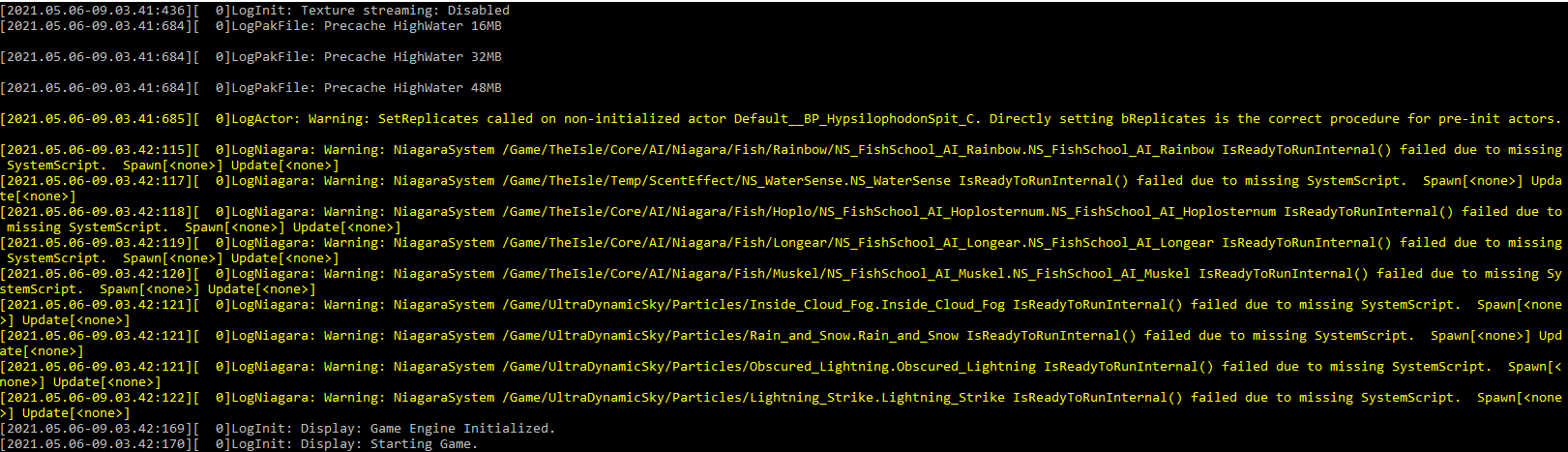
server-warnings regarding some objects, nothing that should hinder your server, nothing you should be able to fix
topaz stream
my server wasn't showing on list which was odd @fallow nexus
fallow nexus
i have the same warnings on our server and its online
have you tried to find your server via steam serverlist?
woeful plume
Does this option work for you that they supposedly have fixed it? * Added the ability to teleport to players in spectator mode for admins.
 uneven citrus
hello i'm encountering this problem: i update my server today but when i launch it it goes online but seem that is on the same previus version 0.7.85.04 so when i start the game for play i cant see the server, anyone can help?
 quiet rivet
@uneven citrus There is another Version out.
0.7.92.02 is the newest Version of the game.
It seems some Server Host Websites don't have this update until now.
I have the same Problem.
 shrewd frigate
Hi folks!
I know this question was asked a lot, but there nearly no AIs on our dedicated servers...
Was the amount of AI decreased? Is there a way to manipulate the amount of AI in the game.ini?
 primal rain
I did everything in the pinned message. Installed steamcmd, installed and updated the app, made server.bat, port-forwarded the ports, but still nothing. I start the server, then I start the game and try to find my server (they both on the same PC), but cant find my server in the server list
pure cosmos
primal rain
I did everything in the pinned message. Installed steamcmd, installed and update...
Same
primal rain
I manage to run my server and I see it in the server list, I joined - but the admin thing - does not work for some reason
pure cosmos
primal rain
I manage to run my server and I see it in the server list, I joined - but the ad...
How can ya see your server? I can’t
primal rain
I turned it off untill I manage to figure the admin stuff. What part of steamID to put (the numbers or its something new)
Which line should I put in the .ini file - to get admin rights in my server?
 pure cosmos
Your regular steam ID
 plucky dragon
how I can change my server to evrima? (nitrado)
pseudo turtle
pure cosmos
Why am I getting this error?
any fix solution? i got the same thing. ports and firewall is open
pure cosmos
Still ain’t got a solution
 pulsar viper
pure cosmos
Im still getting the errors
pulsar viper
pure cosmos
Im still getting the errors
I have this issue too 😦
 shy mirage
for admin commands I do not seem to have the option for Admin warp anyone know why that is or maybe a fix to get it in the options?
primal rain
@shy mirage Did u manage to get some admin access? I've tried but does not work with me. AdminsSteamIDs=and my steam id numbers, then save and restart server, also game - but still nothing. I still have only green nickname and no access
shy mirage
I did yes and sorted out the Admin warp option in the controls but the command does not seem to work for me X(
@primal rain
merry urchin
Hello. We're having some big issues on our server with some big crashes. I managed to capture the moment the crash happened and what came up afterwards. We've restarted the server a few times. I'm not sure if it's related to something that's already known but here's the crash log if anyone has a clue.
topaz stream
can someone send me their engine.ini file please or please tell me if this is correct
[Core.System] Paths=../../../Engine/Content Paths=%GAMEDIR%Content Paths=../../../Engine/Plugins/Runtime/SoundUtilities/Content Paths=../../../Engine/Plugins/Runtime/WebBrowserWidget/Content Paths=../../../Engine/Plugins/FX/Niagara/Content Paths=../../../TheIsle/Plugins/SteamCore/Content Paths=../../../TheIsle/Plugins/ImpostorBaker/Content Paths=../../../Engine/Plugins/2D/Paper2D/Content Paths=../../../Engine/Plugins/Developer/AnimationSharing/Content Paths=../../../Engine/Plugins/Editor/GeometryMode/Content Paths=../../../Engine/Plugins/Enterprise/DatasmithContent/Content Paths=../../../Engine/Plugins/Experimental/ChaosClothEditor/Content Paths=../../../Engine/Plugins/Experimental/GeometryProcessing/Content Paths=../../../Engine/Plugins/Experimental/GeometryCollectionPlugin/Content Paths=../../../Engine/Plugins/Experimental/ChaosSolverPlugin/Content Paths=../../../Engine/Plugins/Experimental/ChaosNiagara/Content Paths=../../../Engine/Plugins/MagicLeap/MagicLeapPassableWorld/Content Paths=../../../Engine/Plugins/Media/MediaCompositing/Content Paths=../../../Engine/Plugins/MovieScene/MovieRenderPipeline/Content
lime moon
I've been waiting for a while and nothing is happening, is that normal?
 pure cosmos
lime moon
I've been waiting for a while and nothing is happening, is that normal?
pure cosmos
lime moon
I've been waiting for a while and nothing is happening, is that normal?
Restart
It sometimes stops working for some odd reason
lime moon
@pure cosmos I keep restarting it
@topaz stream #server-hosting message for engine.ini
zenith thorn
Hey all, one of my admins doesn't have two options in their settings and neither work for them - The setting to toggle names and the setting to toggle player details (hunger, thirst, growth etc) Any ideas?
ornate cedar
Did anyone get Discord link to work in server list Evirma?
open dome
zenith thorn
Hey all, one of my admins doesn't have two options in their settings and neither...
He has to delete the config folder of theisle under …\appdata\local\… and restart his game.
zenith thorn
open dome
He has to delete the config folder of theisle under …\appdata\local\… and restar...
Thank you!
lime moon
@pure cosmos Did you restart it several times to make it work?
pure cosmos
lime moon
<@!548161806393147403> Did you restart it several times to make it work?
Yeah
lime moon
How many times? xD
pure cosmos
I did it a couple times then it ran fine
lime moon
...
 shy coral
Does anyone have a link to the zoo discord?
 west stump
dose any one have link for the isla nublar discord
 austere ginkgo
If you wonder how to spawn from spectator mode: alt + left click. Spectator mode itself is shift /. Both keys have to be pressed and released at the same time, this comes very precise. Try until it works
 neon trench
Do any of you know how to make a server and how much does it cost?
 subtle acorn
Is there a Ai multiplier setting for Evrima?
open dome
subtle acorn
Is there a Ai multiplier setting for Evrima?
Not now
open dome
austere ginkgo
If you wonder how to spawn from spectator mode: alt + left click. Spectator mode...
No, not after the last update.
Read the last changes.
The default keys where switched.
quiet rivet
Can someone tell me who uses Zap-Hosting for Server Host, if your Server have Evrima 0.7.92.02 running or if you stuck to the Evrima 0.7.85.04 Version like my Server?
worn patrol
Hello,
Thank you for your support request.
EVRIMA Public Branch" is a beta version of the game and is only in testing
officially currently, we only offer the 'stable release'.
We know about it and are aware, however, the branch has not yet been
implemented to our system. The situation is under review.
who else has a server with nitrado.net?
merry urchin
I have a server on the old the isle without the crocodiles and the birds ... But how can I transfer my server to the BETA the isle evirma
<@&818552355796287508>
@here
lime moon
@pure cosmos excuse me but you did the right thing, open the incoming port: 7777 tcp and 7778 udp. And outgoing: 7777 tcp and 7778?
 warped eagle
 oblique cosmos
dose any one have link for the isla nublar discord?
merry urchin
3+
 vivid basin
Apologies if this has been asked but...
Are there dedicated server files for evrima yet or how does server hosting work at the moment? Any information would be greatly appreciated.
Please @mention me if you communicate with me as I have the server muted. In the meantime I'll Google for the information I need.
final dove
Check the pinged messages
pinned*
You use the same server files - you just smash -beta evrima at the end
@vivid basin
vivid basin
Oh thank you, I did not see that! Appreciate it
merry urchin
 Help pleas !!!!!
I have a server on the old the isle without the crocodiles and the birds ...
But how can I transfer my server to the BETA the isle evirma
@here
i for one don't know what else to do to make the server appear in serverlist. i tried no multihome, i tried different ports , made a server on minecraft with those ports to confirm the ports are open (on minecraft port checker said port is open on the isle it says they are closed) . i put ?listen in the command line, i put all ports on my firewall, tried disabling my firewall, tried to have both queryport and port be the same nr.....
 merry urchin
can cofirm server is up, found by ip in favorites, but can't see it ingame or in the server list of steam svs. it also appears on lan
lime moon
i have this
 merry urchin
means the ports u are using for the server are used by something else, change the ports
 merry urchin
yes , try 25565 (port forward them as well)
lime moon
for tcp?
merry urchin
both tcp and udp
lime moon
ok thks i go test
merry urchin
been trying for 5h already, got to make the sv, but does not publish to public, just lan, works to see sv with 127.0.0.1 , and with 192.168.1.x but the multihome ip / public ip does not work =/ and portforwarded it
tried seeting it on both my public ipv4 and ipv6
lime moon
I wonder if my problem is due to the fact that I opened theisleserver.exe and then started the server with .bat
yerh it's weird
merry urchin
yea only start with .bat or with .exe not both
use task manager to end task the.isle
merry urchin
can you see the server/join it?
if yes can you send me yer bat file (remove yer ip) and game.ini ?
lime moon
@merry urchin yerh
@echo off
cls
echo Protecting isle server from crashes...
title test server
:TheIsle
echo(%time%) Checking for updates...
rem start /wait C:\steamcmd\steamcmd.exe +login Anonymous +force_install_dir C:\theisle +app_update 412680 -beta evrima validate +quit
echo (%time%) isle server started.
rem start /wait TheIsleServer.exe MaxPlayers=200? -log | set /P "="
rem start /wait TheIsleServer.exe MaxPlayers=100? -log | set /P "="
start /wait C:\theisle\TheIsleServer.exe ?MultiHome=....?Port=?QueryPort=....?MaxPlayers=....? -log | set /P "="
echo (%time%) WARNING: isle server closed or crashed, restarting in 1 minute
timeout /t 0
goto TheIsle
merry urchin
thanks, you can dm them , i am curious what am doing wrong
lime moon
you can remove "validate" if you want
merry urchin
and the game.ini please
merry urchin
yea game.ini is the same for me. thx. i used the same as u, but i can't see it on public ip/steam sv list so i can't join it. i see it on 127.0.0.1 or 192.168.1.x aka lan only
lime moon
mmmh it's weird
we can give link discord now?
@merry urchin are you open your port and open your firewall?
merry urchin
yea, also disabled my firewall
primal rain
Anyone have any idea what those errors mean? (the red lines)

 split wasp
We can't edit player data on the evrima server ?
 tropic sigil
Do people host servers on their own PCs? Or do they go to a 3rd party site to rent them? anyone that hosts their own, how much of a toll does it run on your pc and can you still play while hosting it on that pc? (guessing not, but curious). And if anyone uses a 3rd party site, which would you recommend, if any?
primal rain
One day I CAN see my server in the server list, next day - I can't. Without changing any settings. All my ports are forwarded.
The game.ini file where you put your steam ID to have admin access - also never worked. I do it exactly correct but still nothing.
I'm so disappointed. You follow instructions step by step with double/tripple check to be sure - and still ain't working
 torn chasm
does hosting my own server cost money? In my own PC, without renting it?
final dove
split wasp
We can't edit player data on the evrima server ?
No
final dove
torn chasm
does hosting my own server cost money? In my own PC, without renting it?
If on your own pc = no.
But don't expect it to work, since you will have issues running the game & hosting a server same time; also your experience will most likely be bonked.
final dove
tropic sigil
Do people host servers on their own PCs? Or do they go to a 3rd party site to re...
Most people rents them online - or have dedicated servers to manually make them on
final dove
primal rain
One day I CAN see my server in the server list, next day - I can't. Without cha...
Theres a current issue with region locking, in case theres 0 players on your server.
Try to play around with the ingame filters, and see if you can find it then (Like enable hide full etc)
final dove
lime moon
i have this
Always expect this message to come if you host more than 1 server - even if the ports are open.
Theres an issue with the Steam Info/Firewall info - making this error (falsely appear).
Ea, I'm hosting 10 servers.
Whatever server i open first, does not get this issue - but the 9 others will.. However All the servers are still playable, and can be found
final dove
merry urchin
<a:alertblue:813779584025755678> **Help pleas !!!!!**<a:alertblue:81377958402575...
Add -beta evrima in the launch line
tropic sigil
final dove
Most people rents them online - or have dedicated servers to manually make them ...
Any affordable sites you know of? Most sites I came across want hundreds of dollars for server renting
primal rain
final dove
Theres a current issue with region locking, in case theres 0 players on your ser...
Ok thank you - I will try that. But what about game.ini and admin adding? Why isn't working? I am starting the server on my computer and also enter the game from the same computer - to play in my server. Is that causing a problem?
neon trench
Do you guys know how to make a server and how much does it cost?
 devout torrent
nope
ornate cedar
Can i find save files somehow? or did they remove them?
muted plume
Hello, I have a question about evrima we have a server and if we restart it after 1 day all dinosaurs are gone and the players have to start over. Why is that so please help
 jaunty raven
final dove
jaunty raven
final dove
@ornate cedar gone
final dove
muted plume
Hello, I have a question about evrima we have a server and if we restart it afte...
Even if you rejoin it?
muted plume
final dove
Even if you rejoin it?
No, if they die before a restart, the dino is there.
As soon as it is restarted it is no longer there and you have to start over again
 clear fox
I followed the pinned tutorial on making a server, but I am getting these errors:


Anyone know of a fix?
final dove
I think those errors are default - and not an issue per say, i think everyone gets th em.
Especially the first one
The second one - i would double check if you are hosting for Legacy or Evrima, and have the map specified in your command line.
Because that there looks like you are trying to host a legacy server?
 zealous forge
can someone help me in the isle evrima i am stuck with my stego
open dome
clear fox
Anyone know of a fix?
We have the same errors on our server. Seems like this is default at the moment.
Our servers are still working fine and you could play on them.
 pure gyro
@final dove He was trying to host evrima and not legacy
lime moon
discord links don't work, is that normal?
muted plume
@final dove What about my problem
pseudo turtle
as a server hoster for legacy, its kinda disturbing to have these chinese servers that steal our name. is there a way to take them away?
 slender turtle
I'm having a problem where my server isn't showing up in the isle. I set up everything and tried the router post forwarding but it still didn't show up. Does anyone have a fix for this?
 robust mica
how to remove puertasaurus from the sandbox ??
 chrome aurora
I'm running a server for evrima on a dedicated server. Everything works just fine. Only issue im having is it randomly won't show up for some people. Theres like a 50% chance the people trying to join will just never see it on the list. Has anyone else had this issue? And does anyone know of a way to fix this?
muted plume
Good morning I still have not received an answer from you how I can prevent that when I restart my server from evrima that the dinos are all gone.
 near comet
anyone know if there will be a server hosting update for the isle evrima where you can host a server ingame
 frosty mirage
does anyone know how to make yourself a server admin for your server in the config file
final dove
frosty mirage
does anyone know how to make yourself a server admin for your server in the conf...
Theres a guide in the pinned messages i believe 🙂
final dove
near comet
anyone know if there will be a server hosting update for the isle evrima where y...
Nothing has been announced regarding this yet
frosty mirage
final dove
Theres a guide in the pinned messages i believe 🙂
i already followed the guide and have my server setup but it doesn't explain how to add yourself and others as admins
fallow nexus
@frosty mirage go to TheIsle\Saved\Config\WindowsServer\Game.ini
and add your steam id:
[/Script/TheIsle.TIGameStateBase]
AdminsSteamIDs=77777777777777777
src : https://docs.google.com/document/d/1ICO2wfpasJwdVgDZDxNOosCx3OZpWc9SIdwS5bDowuU/edit point 7

Google Docs
88Download https://developer.valvesoftware.com/wiki/SteamCMD Place SteamCMD.exe where you would like the server to be located Launch SteamCMD.exe Login Anonymous app_update 412680 -beta evrima Port Forward the following ports on the Firewall Inbound Rules 27015-27017 tcp 0.0.0.0/0, ::/0 777...
frosty mirage
thats for evrima
is it the same for legacy
in my game.ini i have [/script/theisle.igamesession] not [/script/theisle.tigamestatebase] as well
fallow nexus
then this one might help: https://gist.github.com/jpylypiw/f551f98ac05280e58aae18dadddb6287

[/script/theisle.igamesession]
ServerAdmins=123456789
fallow nexus
no quotes in .ini-files
frosty mirage
maybe thats why it didn't work
it worked
if i wanted to add another admin would i just go to a new line and paste their ID in

 bitter palm
 frosty mirage
anyone know how i can have my home hosted server restart automatically at a specific time and have a discord webhook announce that the server is restarting
bitter palm
Frequent occurrences, my server will crash
final dove
frosty mirage
anyone know how i can have my home hosted server restart automatically at a spec...
You will need to read into making bat files to shut off server/cmd Windows & use Task Schedule to start it back up.
Also you will need to find bots or search for webhook timer announcements
 hearty skiff
hi there, i have my own server and im kinda wondering what the A-Ai and S-AI means
final dove
Active AI & Static AI.
Static is inactive.. kinda like in the cloud - while active is on map running
 rough jungle
I am computer dumb and my group is counting on me to get this injection bot working, but for the life of me when I load up our FTP into filezilla I can't find the path for the player files. "/TheIsle/Saved/Databases/Survival/Players/ " Is what Im looking for but I don't have the databse folder.
ornate cedar
So i restarted my dedicated server, now the isle is automatically running two processes with the isle and is eating up my RAM. Any idea why? Oh and i cant force shut down the "ghost" process.
 fading kernel
Anyone know how to do the port forwardinf for xfinity? Kind of confusing
fading kernel
bitter palm
Whenever I'm starting my server, I'm not getting a command prompt like this to show either
 storm aspen
I don't know if I can ask this here, but do someone know how to use a mysql instead of a sav in the server.
if that isn't posible, how can I read data from players?
ornate cedar
storm aspen
I don't know if I can ask this here, but do someone know how to use a mysql inst...
not possible
fading kernel
Is Port Forwarding absolutely necessary? If so, which ports do I forward?
 covert trail
odd question but anyone got a good server hosting site in mind? kinda new to that and just wanna get a decent one if i'm going to have to spend a decent amount on it
merry urchin
hello, i seem to have an issue where i cant access my own server, i get stuck in the air without being able to do anything. Does anyone have a fix??
slender turtle
I can't see my server. I've done the router thing but it still doesn't work. Does anyone know a fix?
 jade lake
I switched my server over from Legacy to Evrima and it's not showing up in the server listing. According to the hosting company (PingPerfect) my server is online, but is not showing up in the listing - and therefore isn't playable - due to an issue with a game, not the server. This is what they say:
"Your game may not show up on the in-game listings but I can confirm that it's up and running successfully at present. We are aware of some issues around the in-game lists at the moment that are unfortunately out of our hands, but we're hoping that the devs should be releasing a hotfix or a patch for this soon."
Is this a familiar issue? Is this being worked on?
chrome aurora
If you firgure it out let me know, theres a few others having the same issue.
 cursive aurora
So with hosting your own server do you need to rent a server from a host like pingperfect first? Or do you just follow the guide from scratch ?
 green fog
Does The Isle offer Dedicated Server software?
 jade lake
chrome aurora
If you firgure it out let me know, theres a few others having the same issue.
jade lake
chrome aurora
If you firgure it out let me know, theres a few others having the same issue.
my server randomly showed up today. Unfortunately, I don't have a solution, because we (me or the hoster) didn't do anything. Maybe it just takes a really long time or maybe there was a mini patch in the meantime
Does anyone here know how to access spectator mode in Evrima? (it's not any combination of shift, alt, or ctrl with / or \ )
chrome aurora
@jade lake try using DEL and END. It will glitch out sometimes and kill your dino but you can just insta grow another.
Sometimes it wont work for some admins but that should put you into noclip
jade lake
thanks I'll try that! For my other admins the command was just shift + /, so there's something glitched out for me specifically.
 native vine
How does one adjust the AI spawn rate etc for Evrima servers?
 keen lark
hello im looking for the discord bot who manage dinos gives and currency of players
 quartz bear
keen lark
hello im looking for the discord bot who manage dinos gives and currency of play...
quartz bear
keen lark
hello im looking for the discord bot who manage dinos gives and currency of play...
Thats not in this server
native vine
@hoary cave Hate you disturb you but is the more in depth documentation for the server software? For example how to set group limits, AI limits and global chat? Or is this something planned in the next update? Its kinda hard to operate a server when we have little to no control over our players. People not being able to record others like in the legacy version is killing us. As we are unable to identify rule breakers and deal with them like we can only be in so many places and when servers can have 100s of people on them it gets overwhelming.
quartz bear
native vine
<@!115385482384375810> Hate you disturb you but is the more in depth documentati...
Don't ping Developers.
native vine
quartz bear
Don't ping Developers.
Read the rules.
- Please do not tag/pm developers
We are diligently working on the game itself and would appreciate a lack of disturbances. If you have an issue that you’d like assistance with please use the Discord Mod or tag/pm Punchpacket#TeamFoszor who is exempt from this rule. (Sorry for the miss tag Mods.)
 fiery zephyr
^
quartz bear
native vine
Read the rules.
My apologies.
 real fox
If anyone is able to help, I'm a bit stuck right now in hosting an Evrima server. I followed the Google Docs guide, and everything seems to be running ok. However, I'm unable to see my server in Steam's View->Servers->TheIsle.
This is my log, everything seems okay??
 real fox
Some things I've tried :
- Removed MultiHome from the .bat file query. As some have said this can assist in making the server appear.
-Added ?listen to the query in the .bat file, for same reasons as above.
-Made the queryport one number higher than the port. 7777, 7778.
-Removed port info from query all together in the .bat file.
Still no luck! >_<
real fox
OMG I GOT IT!
https://docs.google.com/document/d/1n2lxKdZTDi42H-1j0zQQPoghmqrp2KuQffD99RXNYcs/edit Best Guide Ever!
Did not know that you are supposed to have your server name included in the .bat file. Also that you cannot specify the map in the .bat. Leave it out of there and everything works and fires up correctly!!!
Google Docs
EVRIMA Server Hosting Guide Made by NoClipSize. First download SteamCMD: https://developer.valvesoftware.com/wiki/SteamCMD Extract the .zip file to the location where you want your server stored. Mine is in a folder I created, named ‘SteamCMD’. Launch SteamCMD and let it update itself. Once...
 sly mist
What is everyone's favorite option for legacy hosting?
merry urchin
i dont understand a single thing here but nice
 left salmon
Hi I have set up a root server for myself at home and released all ports in the firewall and did everything according to the instructions only I see my evrima server not on the internet but only in the lan but I can also log in via net I hope who can help me
i can hardly speak english so i wrote this with the google translator
 final dove
real fox
OMG I GOT IT!
final dove
real fox
OMG I GOT IT!
Server name does not need to be included in the bat file - the reasons yours did not work was due to the map being listed
final dove
left salmon
Hi I have set up a root server for myself at home and released all ports in the ...
Try to turn your firewalls off and see if you see it publicly - if you do its still a firewall issue somewhere
final dove
sly mist
What is everyone's favorite option for legacy hosting?
Dedicated server - not renting it through any server hosts because they resell servers for double the Price 😐
left salmon
@final dove My firewall is off and ports are enabled
robust mica
How to add this message???

 outer mortar
how can i add more than 1 admin to my server in the ini file, i already have myself an admin but whenever i put another steam id, weather it's just a space, a comma, or a new line it removes my current admin and the person i'm trying to add
robust mica
outer mortar
how can i add more than 1 admin to my server in the ini file, i already have mys...
ServerAdmins=76561199114284337
ServerAdmins=76561198314448585
ServerAdmins=76561199024151545
ServerAdmins=76561198316108328
ServerAdmins=76561199099452678
merry urchin
Im using ping perfect as my server hosting service
Is there any way I can see a players hunger percentage before and after they eat something in the logs?
frosty mirage
merry urchin
Im using ping perfect as my server hosting service
yes you can
i've only used ping perfect's 48 hour trial before i did a home hosted but everything you need to know or want to know is in the player config files and the logs
frosty mirage
 charred helm
idk if u got help but make sure you port forward your server for TCP and UDP in your internet configuration
frosty mirage
cursive aurora
So with hosting your own server do you need to rent a server from a host like pi...
you can home host via your laptop/desktop (has to run isle with bare minimum lag) or you can use a hosting service like zap, or ping perfect
frosty mirage
fading kernel
Is Port Forwarding absolutely necessary? If so, which ports do I forward?
tcp and udp
 ocean pawn
Just wondering how I can add my discord to the discord link in my evrima server and if theres anyway to allow users with higher ping to connect
 faint maple
desbloquei eu
 cloud anchor
<@&818552355796287508> I am having issues with evrima i added my self as admin but when i am in game the admin panel not coming up i triple checked everything
frosty mirage
ocean pawn
Just wondering how I can add my discord to the discord link in my evrima server ...
use your game.ini file and put in your discord link where it asks for it. you can also put it in your defaultgame.ini as well if your home hosting
frosty mirage
cloud anchor
<@&818552355796287508> I am having issues with evrima i added my self as admin b...
make sure you dont have any commas or spaces when ur add your server admins
@ocean pawn you can also add a MOTD text document in your saved folder and put what you want in the text document for your motd
@cloud anchor should look something like this
ServerAdmins=76561198326628491
ServerAdmins=76561199145648166
ServerAdmins=76561198326628491
ServerAdmins=76561199145648166
(no spaces or commas, new line for every new admin)
and obviously put your steam ID after the =
cloud anchor
@ocean pawn found the issue it's not ServerAdmins= anymore its AdminsSteamIDs=
ocean pawn
this is for evrima
toxic spruce
Ello dearest comrades- how does one set daily reset times for your server?
final dove
toxic spruce
Ello dearest comrades- how does one set daily reset times for your server?
You do that by example, making a windows task shutting down the servers at a set time (running a bat file)
- and then either use the bat to autostart the server; as if it was crashing (or) close everything, have a task 30 seconds later opening everything up
Its not something you do through any isle server settings.
If you rent the server online the host most likely has something for it
toxic spruce
final dove
You do that by example, making a windows task shutting down the servers at a set...
Appreciate it!
 thick narwhal
This is a problem I have with hosting a server.
Followed the guid to the detail
I think it's Legacy server
near comet
could someone help me make a isle evrima server i have tryed so many time and filed
native vine
near comet
could someone help me make a isle evrima server i have tryed so many time and fi...
If you self hosting just make sure your opening your ports. plus check the pinned messages there are some guides.
 hexed wyvern
I got some issues and I thought the right people to bring it to in efforts of brainstorming the issue is where people with more technical knowledge than myself would be.
Its not a problem isolated to The Isle, while the isle isnt currently playable with this isssue ongoing, one of the other games tested with this issue is, and I think I rounded it down to some sort of steam issue regarding communication with servers.
The problem looks like this In regards to The Isle.

 quick wolf
wtf now the players number is in - ??
hexed wyvern
I think I found my fix.
It was something involving the steam beta opt in account settings.
 pulsar robin
This is the fix, to opt out of the steam beta
Article "Steam Client Beta"
near comet
do you need to port these into your firewall 27015-27017 TCP
7777-7778 TCP
27015-27017 UDP
7777-7778 UDP
do the ports need to be privet or public
near comet
do you need to rename the folder
to TheIsleDedicatedServer in step 9
as my laptop will not let me rename the file
 clear python
does anyone have a list of commands for the island evrima
 slate river
When i do the use the following IP and DNS address thing it just stops letting me access any website besides youtube, am i doing something wrong or is the legacy installation guide outdated
This guide i mean https://steamcommunity.com/sharedfiles/filedetails/?id=1502947359

Having had trouble finding a clear and updated way to do this, I decided to create this guide for those of you who wish to host a dedicated server. This is a server you can host on your computer and n
And it only fixes it if i revert it to "obtain IP address/DNS Server automatically"
slate river
nevermind, looks like i had to enter my default gateway as well even tho it wasn't mentioned in the guide
slate river
Alright i give up, my internet provider only has local/public port options, not external/internal
 faint wind
how do i make a server in evrima
clear python
faint wind
how do i make a server in evrima
Google Docs
EVRIMA Server Hosting Guide Made by NoClipSize. First download SteamCMD: https://developer.valvesoftware.com/wiki/SteamCMD Extract the .zip file to the location where you want your server stored. Mine is in a folder I created, named ‘SteamCMD’. Launch SteamCMD and let it update itself. Once...
faint wind
clear python
https://docs.google.com/document/d/1n2lxKdZTDi42H-1j0zQQPoghmqrp2KuQffD99RXNYcs/...
Thx Bro
clear python
does anyone know if there is a way to reduce the time of the carcasses (the isle evrima) ?
clear python
I was wondering if it is possible to reduce the time for the carcass to disappear faster on the server the isle evrima
 cursive gull
no
not possible
If server is powerful enough should run fine though, lots of bodies can cause client side lag on mid to low spec pc's as they need to render all the extra models.
If you need to clean up only thing you can do is go around as a deino and munch on them bodies
 lapis totem
Who knows the code for TSL
clear python
changing the dwell time of the carcasses to 15 minutes on the server would help in the rendering of the players
so the players have a better performance in the game
near comet
do the port need to be public or private
clear python
near comet
do the port need to be public or private
I leave both
near comet
so both for it to work
0]LogLoad: Error: Failed to enter /Game/TheIsle/Maps/TitleMap: Servers can't open network URLs. Please check the log for errors. what does that mean
near comet
the server start.bat as the app will not run on my laptop and it was working before
near comet
is there anybody that can make me my dream server as i can`t do it I have someone that can make me a discord server I just need someone that can make a isle evrima server if you willing to help me make my dream server please dm me i would be very appressed.
 fiery ginkgo
Hello was wondering if anyone has or uses a Injection Bot
near comet
@smurfy you know how to make a server if so can you make me one as i can`t do it I have someone that can make me a discord server I just need someone that can make a isle evrima server if you willing to help me make my dream server please dm me I would be very thankfull
 strange zinc
@near comet my guide to set up a server is in the pinned messages of this channel, its very easy to make a server if you follow the steps
 storm apex
any hypos dino server ?

 granite galleon
ServerAIMax?
granite galleon
change it to a lower number
final dove
It doesnt work
The Ai code in game.ini has been removed for dacades.. the Line is there, but all functionality to adapt Ai ingame is gone - so changing that Value will not do anything sadly
 lost ether
im stuck in server #537187256717541376
strange zinc
my server doesnt seem to show up in the serverlist anymore after the update, anyone know why?
 dawn thistle
strange zinc
my server doesnt seem to show up in the serverlist anymore after the update, any...
dawn thistle
strange zinc
my server doesnt seem to show up in the serverlist anymore after the update, any...
server not updated to the latest version
strange zinc
it is, it even updates automatically in the script
dawn thistle
the current version is 0.7.103.07 and the dedicated server version is 0.7.92.02 and it does not update itself. I do not know what's happening
strange zinc
hmm
 vital blade
How i create a server?
 lethal urchin
Yes how does one host a server?
lime moon
i have this, but my server still untraceable

 sullen fossil
hey, anybody know where i could browse hosting services for evrima in eu ? tried to look after a few hosting services, and didn't found many, plus they all charge for 20 slots, which is too much for the use i plan to have.
strange zinc
vital blade
How i create a server?
@lethal urchin pinned messsages
lime moon
Is it possible to have an Engine.ini file, pls?
Do I also have to open port 27015 or 27016?
native vine
lime moon
Do I also have to open port 27015 or 27016?
Yes. 27015.
For those setting up servers I'd suggest look at the top message in the Pin messages for this channel.
lime moon
@native vine If I understand correctly, if you go into the firewall settings to open tcp port 7777 and udp port 7778, we will also have to open tcp/udp port 27015? Would this have anything to do with the game.ini file?
lime moon
and I've already seen this 2 guidebook in length several times
i don't anderstand this guide

and then do this!

 cloud idol
Not sure if this is correct channel to ask this in or not but trying to find the discord for an Isle server the zoo... took this screenshot while in game which shows their discord link but it doesn't work for me.... can someone help?

Dm me please if have a link or something as am at work
native vine
lime moon
and then do this!
Your game port can not be the same as your Query Port.
lime moon
yerh, and so what do I put, so that it corresponds to this

and why there are 27015 and 27016?
native vine
Like this as done in the pinned post in this channel. ?Port=7777?QueryPort=7778
native vine
lime moon
and why there are 27015 and 27016?
Those are the steam Query ports.
lime moon
we can put 27017 or 27019?
native vine
7777-7778 is the game port and the Query port for The Isle Master server.
I dont know the command line to change it for Evrima.
lime moon
and why for this guide, there are 27017 and no 27016?

Google Docs
EVRIMA Server Hosting Guide Made by NoClipSize. First download SteamCMD: https://developer.valvesoftware.com/wiki/SteamCMD Extract the .zip file to the location where you want your server stored. Mine is in a folder I created, named ‘SteamCMD’. Launch SteamCMD and let it update itself. Once...
native vine
 It means open ports from 27015 to 27017....
So all three.
Plus all the guides aren't gonna be the same. Some are for Evrima and others are for legacy.
lime moon
rahh it's complicated, plus I don't speak English
native vine
The steam Query port (27015-27017) can be open for multiple servers. Most other game servers can change this buuut The Isle has not documented how to or if possible yet.
lime moon
mmh ok I'm starting to understand more or less, thanks a lot
 gusty hedge
cloud idol
Not sure if this is correct channel to ask this in or not but trying to find the...
gusty hedge
cloud idol
Not sure if this is correct channel to ask this in or not but trying to find the...
i entered the exact thing and had no problem. i am bugged on that server or something bc every time i join my game crashes
cloud idol
gusty hedge
i entered the exact thing and had no problem. i am bugged on that server or some...
Really? Huh...invite doesn't work for me. Is it possible for someone to join even if temporarily and dm me a link? To see if that works? I even tried just entering the info directly into discord search and nothing 😞
 slender tusk
Is somewhere a guide to Evrima server?
I found only guide to legacy
Please, can somone give me guide to this
slender tusk
Okay, i ll say, but now clearer
Do somebody knows how to host EVRIMA server, i am want to ""do"" one like in this guide
Having had trouble finding a clear and updated way to do this, I decided to create this guide for those of you who wish to host a dedicated server. This is a server you can host on your computer and n
slender tusk
I am waiting to your answers, devs
 stone pike
slender tusk
I am waiting to your answers, devs
stone pike
slender tusk
I am waiting to your answers, devs
Google Docs
88Download https://developer.valvesoftware.com/wiki/SteamCMD Place SteamCMD.exe where you would like the server to be located Launch SteamCMD.exe Login Anonymous app_update 412680 -beta evrima Port Forward the following ports on the Firewall Inbound Rules 27015-27017 tcp 0.0.0.0/0, ::/0 777...
maybe this will help
 errant pilot
lime moon
errant pilot
lime moon
why make this? "-betapassword"

 grim field
So am I unable to host a server on evrima with nitrado??
robust mica
how to add the discord link
 merry urchin
Hey which server do I use to play as hypo
 craggy sapphire
How to use the database on the server, is there a tutorial?
pulsar robin
merry urchin
Hey which server do I use to play as hypo
The hacked servers
final dove
native vine
The steam Query port (27015-27017) can be open for multiple servers. Most other ...
Its always been possible to change both in evrima and legacy - you litteraly just define your QueryPort after port in your command launch Line
final dove
robust mica
how to add the discord link
You dont atm as far as i know
 golden hemlock
General 1
 white goblet
hey guys, whats different between ServerTimeOfDayInSeconds and ServerLengthOfDayInSeconds
white goblet
thanks
 balmy forum
does anyone have correct config files, looking for engine.ini and game.ini information.
or an example game.ini I can look at?
balmy forum
slender tusk
Is somewhere a guide to Evrima server?
I updated it to hopefully be more clear and make more sense.
bitter palm

How to ban it
He will cause my server to crash

BAT

game
How should i solve
balmy forum
Who can I talk to about server config files and available settings?
 graceful aurora
Why are all the servers so laggy right now?
balmy forum
graceful aurora
Why are all the servers so laggy right now?
dunno, can you join the one i setup and see if it's laggy
graceful aurora
For envrima
balmy forum
yeah
graceful aurora
I'm mid switching to legacy sorry man
balmy forum
ouch
graceful aurora
I was just wondering cause I keep dying to bs issues
balmy forum
ya not sure honestly, the official servers seem to have the issues, i have not noticed it with 3rd party servers as much, but I play official ones mostly so.
balmy forum
What is A-AI and S-AI ?
final dove
Active AI, Statis AI.
Active is the one currently running on the map & Statis AI is kinda.. in the cloud waiting to spawn/inactive/invisible... you know
balmy forum
final dove
Active AI, Statis AI.
Active is the one currently running on the map & Statis AI...
I was thinking this, but wanted to verify, thanks bud
I wish I could find a list of working commands to use in the game.ini
at any rate, I was able to setup a couple servers, get the game.ini to work and adjust the tickrate with engine.ini, created a bat to update, start, reboot on crash, multiple servers and left a guide in this channel, so overall good day.
no way to know if the servers are performing well until there are lots of players...
balmy forum
Here is the updated How To on setting up a dedicated server, if you're interested in doing so.
https://steamcommunity.com/groups/sourceunderground/discussions/1/3106901028654144187/

Welcome, everyone! An old-school gaming group. We've been around. We've played tons of games and spent 1000's of hours in front of our computers. We all have bad backs now and have drunk about 48 thousand cans of soda. Yes yes, my friends, we're still here, and we're still waiting for more. Hopefully, the planet doesn't die before we can pop tha...

 hasty terrace
when dedicate host server the isle evrima just need game client install ?? or not have game client can dedicated host already?
final dove
balmy forum
Here is the updated How To on setting up a dedicated server, if you're intereste...
But theres already a guide pinned 😮
 balmy forum
final dove
But theres already a guide pinned 😮
balmy forum
final dove
But theres already a guide pinned 😮
The more the better my friend. 🙂 I find things in one that are not in another so anyway just shared my experience and a guide for people if they want to use it and then ya if there are issues there are the other guides that may help. I also did it for my own good so if I lose interest and want to come back later I have my own guide to follow. 😉
I'm still not sure how or when the .ini files appear...
@bitter palm I have no idea honestly at this point bud. And if Menix can't help you well, I surely can't.
balmy forum
@final dove is there a way to set overall brightness and night time brightness in the game.ini permanently?
final dove
nope
balmy forum
final dove
nope
bummer
balmy forum
any idea why the fish as swimming so fast?
have like ninja fish on the server end up swimming onto land to avoid me lol
but seriously, what's up with the fish and is there a way to adjust that?
balmy forum
Nobody knows how to change the speed of the AI fish and what have you?
 jagged herald
i rent an EVRIMA server on G-Portal, i was wondering how to add a valid link to my discord in my Game.ini o-o any tips?
 open dome
balmy forum
Nobody knows how to change the speed of the AI fish and what have you?
open dome
balmy forum
Nobody knows how to change the speed of the AI fish and what have you?
You cannot change the speed of the AI fish. It‘s hardcoded.
open dome
jagged herald
i rent an EVRIMA server on G-Portal, i was wondering how to add a valid link to ...
There is no possibility at the moment. The parameters are not working.
open dome
bitter palm
That are no errors. It is an infolog.
There are some possibilities to remove this ones from the batch log.
 solar granite
excuse me
bitter palm
@open dome How can i solve him
This log keeps refreshing, which will cause my server to crash
open dome
bitter palm
<@!255087174297321490> How can i solve him
That is only for the legacy version. Don't know if it also working for evrima.
Create an Engine.ini with following:
[Core.Log]
LogNetPlayerMovement=error
bitter palm
OK
balmy forum
open dome
That is only for the legacy version. Don't know if it also working for evrima.
C...
Would you have any idea how to change the speed of the AI or the fish more specifically?
balmy forum
open dome
You cannot change the speed of the AI fish. It‘s hardcoded.
ah man, so then why are they slow on the official servers, but fast on mine?
maybe a bug i should report it?
keen lark
hello im looking for a discord bot who show server statut of theisle serv , can you help me???
 teal sleet
https://gyazo.com/fdd029e2f786246109209db0bc3b1194 Getting this error, anyone know why?

It'll install fine without a folder
Problem is finding it
teal sleet
Found it but it did not install everything? It only created 1 config file
open dome
balmy forum
maybe a bug i should report it?
Seems like a bug than or maybe you haven’t the newest version? Is your server searching for updates if you restart?
 open dome
keen lark
hello im looking for a discord bot who show server statut of theisle serv , can...
open dome
keen lark
hello im looking for a discord bot who show server statut of theisle serv , can...
The bot calls „ServerStats“. It shows the name, IP Adress, Map and Playernumber in a channel you want to.
open dome
teal sleet
Found it but it did not install everything? It only created 1 config file
That is normal. The other config files were generated after the first start of the server. After that you can edit them how you like.
teal sleet
I just started the application
teal sleet
open dome
That is normal. The other config files were generated after the first start of t...
How do I get the other files to show up to even edit my server/host my server?
open dome
teal sleet
How do I get the other files to show up to even edit my server/host my server?
That is strange. You are using the legacy version or?
I could send you the others when i am on my pc today.
teal sleet
Yeah I'm using legacy
I started the application and tht's the only file that popped up
Not only that but when I forced it to try and install to a folder, it gave me a write disk failure
I'd really appreciate that
open dome
teal sleet
Not only that but when I forced it to try and install to a folder, it gave me a ...
Sounds like there are not enough rights at this folder. Are you using linux or windows?
Hosting the server on your own working station or do you have a dedicated server?
topaz stream
teal sleet
https://gyazo.com/fdd029e2f786246109209db0bc3b1194 Getting this error, anyone kn...
yeah same
cloud anchor
Why was RCON Removed? That's a valuable feature
 young urchin
cloud anchor
Why was RCON Removed? That's a valuable feature
young urchin
cloud anchor
Why was RCON Removed? That's a valuable feature
I wonder the same thing
cloud anchor
young urchin
I wonder the same thing
As they are working mainly on Evrima, they probably will never add anything back to legacy again.
young urchin
however it could be added to evrima as well.
cloud anchor
young urchin
however it could be added to evrima as well.
Yeah, but I am staying away from Evrima for a bit as the last big update screwed a few things up. Too many bugs at this point.
balmy forum
open dome
Seems like a bug than or maybe you haven’t the newest version? Is your server se...
Yes. It checks for updates before it starts and the updates if needed and then starts.
I'm also looking for someone who is good with .bat files
balmy forum
Nevermind, I setup a nice .bat to update, start, restart on crash and restart after a few hours automatically. woot.
 wind pawn
Can I get some assistance around being unable to find my Evrima server in the games list?
Tried all manner of steps in the Steam community, ports are definitely forwarded (tried changing them also, not my first time hosting games at all).
jagged herald
Hey, can we still teleport to a location while in spectator mod as admin on evrima? o-o
balmy forum
jagged herald
Hey, can we still teleport to a location while in spectator mod as admin on evri...
click environment and there are some locations you can tele to
dunno about spectator mode though
 lilac flume
anyone willing to help me setup a dedicated server?
wind pawn
There are a few guides in the Steam Community: https://steamcommunity.com/sharedfiles/filedetails/?id=1502947359
I'm waiting for some assistance as I'm having issues with mine also, but the above should get you started.
lilac flume
i walked through all that still having issues on files not showing up
wind pawn
Ah well, I hope someone can help us soon 🙂
open dome
@wind pawn @lilac flume What files do you mean? We installed the isle on a dedicated server without problems.
wind pawn
open dome
<@230589295080112128> <@622254315934973953> What files do you mean? We installed...
My files are fine - my server isn't showing up on the list despite ports being forwarded and server live
open dome
Where are you forwarding the ports? In the Windows Firewall?
Our dedicated server has also an external hardware firewall where you only can configure the port forwarding on the website.
wind pawn
i have made exceptions on the windows firewall and on my router. I have many other games being hosted on there so I know the port forwarding works XD I even tried changing the ports to make sure they didn't conflict
open dome
Yeah that ofc no other games or something else should use the same ports.
wind pawn
even tried removing the multi home option from the cmd and that didn't help either
open dome
Hosting on your own home pc is probably a bit harder if you have no definitive ip adress from the outside.
wind pawn
We have a static IP from our internet provider 🙂
open dome
Maybe via Steam. There you can add a server.
wind pawn
oh right
not tried that one!
had to do that with ARK and the likes, cheers for the help!
open dome
No probs
wind pawn
Still not working if I add them to the Steam Server list, whether it be the local IP, or static (external) IP. Very odd.
This is evrima, not base, if that makes a difference
open dome
Sounds strange, i dunno what it could be. If there are no errors in the logs something is definitely blocking at the ports to show the server online.
 quartz folio
Hey guys, my Evrima server use to show on the server list, and I have an update script that works, but it since probably last week, I can't get my server to show on the Server list. Any ideas?
 minor crest
Is is possible to host my game server on hamachi or smth like that? i cant open ports on my router
open dome
minor crest
Is is possible to host my game server on hamachi or smth like that? i cant open ...
No, don't think so.
minor crest
It should be possible imo but dont wanna test this because i prolly do smth wrong anyways and opening ports is not an option for me
open dome
You always need port forwarding that the clients could find the server. I don't think that this technically works well because you only create a virtual LAN with hamachi or software like that but the clients need to communicate via the internet with the server.
Seems like the communication goes through the steam server as well and so you have to open the ports.
topaz stream
i dontknow how these devs keep messing up the steamcmd stuff. the amount of times i have to wait for an update to sort there code jesus..
trying to run a community here and cant update servers cause they genuinely wont dsownload new files or not pickup anything and not show up, ive had these servers running for for over a year so yes i know how to setup the isle.
Wtf is this new jibberish ?
not showing my servers name i console even though game.ini is editted.
https://prnt.sc/1542ggk
bitter palm

@open domeHow can I solve this problem, the yellow code will cause the delay of my server
 open dome
bitter palm
<@!255087174297321490>How can I solve this problem, the yellow code will cause t...
open dome
bitter palm
<@!255087174297321490>How can I solve this problem, the yellow code will cause t...
Write LogNetPlayerMovement=error in the Engine.ini under the Header for the Logs.

 lilac flume
can some one help ive tried 2 different ways to start a server but it keeps missing the game files to edit them
craggy sapphire
@bitter palm 哈哈哈兄得
bitter palm
@craggy sapphire你有过这个问题吗?
 young crystal
hello i am planning make a server but i got weird questions
-can i remove the server?
-how i remove it
-will it come back if i want it?
young crystal
?
 craggy sapphire
@bitter palm上回更新258BUG 后我就玩不了了,就没管过服务器了
young crystal
young crystal
?
?
young crystal
<@&818552355796287508> can you guys help me?
 stable jasper
been having Outdated clients upon clicking server. both the actual client (my pc) and server batch and steamCMD are fully up to date, what am i missing? Also seems to remove default and base files
sorry trying to figure out where this question belongs to but yes. Before the June's Patch I can host a server normally without fail, but when it comes to after the patch, I have an Outdated Client error
went as far as app_update/app_uninstall, made a different folder, updated steamCMD
young crystal
calm down xD i cant follow it i will copy your message 🙂
balmy forum
https://discord.gg/mWFbNBcg I have some server configs and .bat files I'm sharing in this discord, so if you want to take a gander.
lime moon
Hi, what is the port of The Isle? For example for minecraft it is 25565
final dove
Depends what the server hosters put it to
typicaly its 7777 port 7778 query default in unreal engine/isle
- but lets say some people host multiple servers they tend to put the next server at port 7779 query 77780 & increase it further for more servers

 river needle
are you trying to run the server on the same computer you have steam installed on
merry urchin
Is it, alright if I ask for help here? Im stuck in a tree, on NA 1 and my friend cant push me out please tell me how to fix.
woeful plume
Hello, good afternoon, I have a little problem and I would like to know if someone else has suffered it.
I have a private The Isle server and it was restarted the other day by a windows update (the server is on a pc), when starting the server, all the players lost their dinosaur, it is a problem with the new file where the files are saved player data? is there more information?
balmy forum
anyone been able to figure out how to add discord so the button works in the server list in game?
I've tried
ServerDiscord=https://discord.gg/NxmtsgvUEd
ServerDiscord=NxmtsgvUEd
Can't seem to find much more on this otherwise, both do not work, always get invalid invite.i
As you can see the invite link is valid.
balmy forum
merry urchin
Is it, alright if I ask for help here? Im stuck in a tree, on NA 1 and my friend...
I know this is late reply, but if you have that happen go to the #evrima-na and request help via @ official admin. Not in here.
merry urchin
I'm sorry, thank you though.
balmy forum
merry urchin
I'm sorry, thank you though.
No need to be sorry and you're welcome. 😉
 simple sorrel
I'm experiencing some problems when I try to host a server (wanted to create one to try the game with few friends), after I finish the configs all I get is a black screen
final dove
simple sorrel
I'm experiencing some problems when I try to host a server (wanted to create one...
The host feature ingame doesnt work, thats why! :p
You need to use steamcmd as the guides above tells you - however since its on the same pc as you, it might not 95% work
simple sorrel
Just found it, thank you! But now I'm stuck again xD
Can't rename the folder
It says I'm using it, hence I can't rename it
Don't know how to fix this
 open dome
balmy forum
anyone been able to figure out how to add discord so the button works in the ser...
open dome
balmy forum
anyone been able to figure out how to add discord so the button works in the ser...
Does not work at the moment on the servers.
open dome
 shy urchin
Getting this error
shy urchin
Getting this error
That‘s no error just an Information and it‘s normal. You can hide this if you want. You have to change the log configurations in the Engine.ini.
open dome
simple sorrel
Can't rename the folder
Maybe restart your computer. Seems like there is a running process in the background.
 silver obsidian
Greetings. I've been struggling to get a server up and running for quite some time now and I can't for the life of me figure out what's wrong. One of the problems I'm seeing is "Steam Dedicated Server API failed to initialize"
Any word on what's up?
stable jasper
alright o think im running into an updating issue
the server im hosting is version: 0.1.62, the updated onee is 0.1.7. How can i revert or make sure the server is truely updated?
merry urchin
Where do I host a evrima server?
silver obsidian
@open dome Terribly sorry to tag you, but you seem to have a clue so I figured I'd give it a shot:
Server is up and running but lists the game as "Unreal Test!" rather than "The Isle" with the server name of an absolute fuckload of numbers rather than what's in Game.ini. Any help?
open dome
silver obsidian
<@!255087174297321490> Terribly sorry to tag you, but you seem to have a clue so...
Where does it show this name? Ingame at the Serverlist or only at you console?
silver obsidian
open dome
Where does it show this name? Ingame at the Serverlist or only at you console?
Steam server list, not ingame. I'll grab a screenshot, give me a sec
 open dome
silver obsidian
open dome
silver obsidian
Seems like your Start.bat is wrong.
There is one in the pinned messages of this channel
silver obsidian
open dome
There is one in the pinned messages of this channel
Looks almost exactly like the one I'm using, but I'll give it a go. Many thanks.
silver obsidian
open dome
Seems like your Start.bat is wrong.
Same result with the pinned one
 open dome
silver obsidian
Same result with the pinned one
open dome
silver obsidian
Same result with the pinned one
Than maybe something went wrong with your installation. Delete everything and download the full game again.
silver obsidian
open dome
Than maybe something went wrong with your installation. Delete everything and do...
Tried that one too, I'm afraid. I'll give it another go, I suppose. Should you come across anything else I'm more than happy to hear
Cheers
open dome
silver obsidian
Tried that one too, I'm afraid. I'll give it another go, I suppose. Should you c...
The Name of the Game and Name of your Server are only displayed in the settings and the start.bat. These two options i think could be the only ones.
silver obsidian
open dome
The Name of the Game and Name of your Server are only displayed in the settings ...
That is mighty unfortunate, cause it still looks like this
 open dome
silver obsidian
That is mighty unfortunate, cause it still looks like this
open dome
silver obsidian
That is mighty unfortunate, cause it still looks like this
Can you join on the server? Is it evrima or legacy?
silver obsidian
No, I cannot, since it does not show up ingame. It's legacy.
open dome
It‘s a local server on your own pc?
Did you use the steamcmd for download as the guides show it?
You did the port forwarding in every way?
The server should show up also with that comical name.
silver obsidian
open dome
It‘s a local server on your own pc?
Did you use the steamcmd for download as the...
Yes, the server is on another PC in the same LAN.
Yes, I used steamCMD as the guides show.
Yes, I did. I also tried disabling the windows firewall completely but that made no difference.
I'm no expert, but I suspect the reason it doesn't show up is because it lists it as "Unreal Test!" rather than the actual game
silver obsidian
open dome
It‘s a local server on your own pc?
Did you use the steamcmd for download as the...
Right. I decided to give Evrima a go instead of Legacy which didn't seem to be working very well and as you can it shows up as it should in the steam server browser. However, it does not show up at all ingame when searching for the name or scrolling through the list. Any ideas?
 final dove
silver obsidian
Right. I decided to give Evrima a go instead of Legacy which didn't seem to be w...
final dove
silver obsidian
Right. I decided to give Evrima a go instead of Legacy which didn't seem to be w...
Its not your server, Legacys branch have different Steam Subsystem - which uses Numbers (Server ID) instead of Name - thats why its numbers.
you can't change this. Your server showing Unreal Test! is also normal for Legacys branch atm.
just to show.
It will show numbers on Steams Browser - but actual name ingame.
If you can find it on the server browser, you should be able to find it ingame - just refresh a couple of times, steam tends to have severe refresh issues in the ingame browser

 thin pike
Is there a good source for Admin panel commands? Found some old ones, but not a good complete list. (The main command Im looking for is to hide AI nameplates when in the freecam mode aka shift /)
merry urchin
river needle
are you trying to run the server on the same computer you have steam installed o...
yes
river needle
merry urchin
yes
must have steam uninstalled; you cant run the server on the same computer with client side steam
silver obsidian
final dove
Its not your server, Legacys branch have different Steam Subsystem - which uses ...
Interesting. I had no idea.
silver obsidian
final dove
just to show.
It will show numbers on Steams Browser - but actual name ingame.
...
Regarding that.... I've got my server showing up on another PC but I can't seem to find it in game. I've been abusing the update button for a good 10-15min without getting anywhere. Got any wisdom to share?
Might be worth mentioning this is on an Evrima server, not legacy
 paper path
So everything is port-forwarded correctly through router/pc etc, and all the files are correct. My server starts and loads up perfectly fine, but for some reason still isn't showing up on the server list, any ideas?
silver obsidian
paper path
So everything is port-forwarded correctly through router/pc etc, and all the fil...
Does it show up in the steam browser? If it does, but not in game, we're in the same boat.
 arctic steeple
We are having the same issue getting our own Evrima server running. Everything is correct, it just wont show. Not our first rodeo with hosting either.
silver obsidian
arctic steeple
We are having the same issue getting our own Evrima server running. Everything i...
DItto, fam. Ditto
I thought I might have scuffed something somehow, so I tried hosting multiple other games (although one at a time for obvious reasons) on the exact same ports, one of them being ARK which is also Unreal Engine if I recall
Worked perfectly fine for me on LAN and friends on WAN
open dome
Dunno what is wrong on your side. We are using a dedicated server with 3 different games running at the same time without any problems. 2 times the isle and one ark server.
paper path
silver obsidian
Does it show up in the steam browser? If it does, but not in game, we're in the ...
Yeah it's not showing up on the steam server list either, for some reason
silver obsidian
paper path
Yeah it's not showing up on the steam server list either, for some reason
Unlucky, not quite the same boat, then.
paper path
Its probably something with port forwarding through my router, but thats weird because it worked perfectly fine before this last update
silver obsidian
I actually can't wrap my head around it. Why does the server show up as expected in the steam server browser but never in game? How would one go about fixing this?
silver obsidian
Got some new text popping up at the bottom of the log window, including checksum and 2 warnings. Can't say it gave me much in terms of information, but maybe some of you can make more use of it than I can 
 white goblet
any one has issue with server brower(session?)?
wind pawn
silver obsidian
I thought I might have scuffed something somehow, so I tried hosting multiple ot...
Yep. Same here. We have other things hosted on our same box (different ports) so it isn't a port forwarding issue yet the server is apparently live but we cannot see it in the server browser nor the server list in game.
wind pawn
Can someone who has their Evrima server working post their port forwarding, and their command line they run, perchance? There are a few different guides on the internet but I have a feeling they may be out of date, somewhat.
open dome
wind pawn
Can someone who has their Evrima server working post their port forwarding, and ...
Our port forwarding is only the one, which is written in this channel.
TCP/UDP forwarding the Ports, you want to use from the isle.
For which version you want the command line/start.bat?
We have both versions working fine on our dedicated server.
wind pawn
Evrima, please. Yeah I have the same ports written in this channel.
open dome
wind pawn
Evrima, please. Yeah I have the same ports written in this channel.
We took another ports, but works also fine.
I send you the bat as a dm.
wind pawn
Cheers
wind pawn
Hi all, out of interest, who has an Isle or Isle Evrima server working behind a router, rather than through a rented/paid service? Just want to clarify how you set it up before taking the plunge and renting something I could host for a lot cheaper 😄 Cheers!
 buoyant nexus
wind pawn
Hi all, out of interest, who has an Isle or Isle Evrima server working behind a ...
buoyant nexus
wind pawn
Hi all, out of interest, who has an Isle or Isle Evrima server working behind a ...
i have one but still stugling with in game errors
wind pawn
Can you send me your command line you run? You can cut out the IPs, I just want to see if mine is different to yours
silver obsidian
wind pawn
Can you send me your command line you run? You can cut out the IPs, I just want ...
I'd like to see it as well, if you don't mind
 tranquil marlin
hey whats the most common website to buy an isle server with? :>
wind pawn
Seems to have gotten a bit better - I re-installed following the exact instructions on the pinned post here, not changing path or anything. Now our external friends can see and connect to our server via the server list, but us locally (connected to the same router) cannot see it in the Steam Browser, nor in the game. 😦
open dome
wind pawn
Seems to have gotten a bit better - I re-installed following the exact instructi...
Which ip adress are you using in the steam browser? The local one or the external as well?
wind pawn
We have both setup in the steam browser as a test 🙂
Can see our local IP (192.168.*.**:7778, query port) in the steam browser and it shows correctly. However, if we load the game, we cannot see it in the list.
External people - still all good.
 warm carbon
anyone ever seen this when trying to run a dedicated

nvm, i scrolled up and people said its normal
warm carbon
For longer day cycles, is that a setting?
open dome
warm carbon
nvm, i scrolled up and people said its normal
Yeah, that‘s nornal. You can hide it if you want.
open dome
warm carbon
For longer day cycles, is that a setting?
In evrima the parameters are in the config. But dunno if they are working or not.
hearty skiff
is there a way to become the ai creatures for admins on evrima yet?, i tried looking into the server player files like how you can change someone to a sandbox dino on legacy but that didnt work
open dome
hearty skiff
is there a way to become the ai creatures for admins on evrima yet?, i tried loo...
What you want to do?
You can play more Dinos than AI is in the game. The only ai at the moment is the dryo which you can choose as player if you want.
hearty skiff
open dome
What you want to do?
You can play more Dinos than AI is in the game. The only ai...
i heard something about all ai creatures being playable for unofficial servers, so like lets say the fish that are ingame right now is it possible to become one of those as admin
open dome
hearty skiff
i heard something about all ai creatures being playable for unofficial servers, ...
Never saw that. Only the developer play with them.
warm carbon
Hmmm so Ive added a steamid in the game.ini file, cant seem to open the console via "~" when im in the server
wind pawn
So turns out, unless the Isle Devs release a "Connect via IP" option most in-house hosters that do not have a router with a "Hairpin/NAT loopback" (which itself is technically a security no-no) option, or wish to add "additional IP" to their network cards to simulate they are "off network" (again, security risk) are a bit screwed.
I'm hoping it's on the dev timeline.
tranquil marlin
silly question but dose global chat not work on private servers?
balmy forum
tranquil marlin
silly question but dose global chat not work on private servers?
what version, legacy or evrima?
legacy you add the command to turn it on in the game.ini evrima does not have global chat, just local.
balmy forum
warm carbon
Hmmm so Ive added a steamid in the game.ini file, cant seem to open the console ...
~ doesn't do anything, it's tab to open the panel, and you can find the rest of the keys in the controls under settings.
warm carbon
yea i just used commands in local and it worked Thanks!
balmy forum
warm carbon
For longer day cycles, is that a setting?
not working to my knowledge.
you can however, use the admin panel to lock the time of day, change brightness etc.
but you'd need to do this each time you reboot
 sharp juniper
I am looking for a free host
tranquil marlin
Is there a way to change how fast bodies despawn on a server or a way to wipe dead dino bodies if it starts to lag a server?
 raven pewter
Someone knows why I can see my Evrima server on steam servers in Lan,but no in-game?
open dome
tranquil marlin
Is there a way to change how fast bodies despawn on a server or a way to wipe de...
Restart the server
open dome
raven pewter
Someone knows why I can see my Evrima server on steam servers in Lan,but no in-g...
Because you use the ip of the workstation in steam and it can connect there. At the moment there is no option to host an own server behind a modem or router.
raven pewter
open dome
Because you use the ip of the workstation in steam and it can connect there. At ...
Oh,ok thank u so much
tranquil marlin
open dome
Restart the server
thank you for the info!
 rotund sandal
Hi guys, I think I already know the answer to this question, but there is no linux version for servers (steamcmd)?
 frigid marsh
merry urchin
frigid marsh
merry urchin
So currently I am going through a server hosting service for my server but I would like to eventually run it from a PC at my house to have more flexibility with what it runs on
Is their a hard limit for tick rate for the game?
Currently is running off of a NVME, 8gb of ram, and high CPU priority ( It doesn't say which CPU but Im assuming its just a high core count cpu that they divide out for their customers)
Im still kinda new when it comes to networking and running a server through my own hardware so there is a lot of stuff I don't know
One thing I have noticed is that the higher the number of players the more laggy servers get. Is this a amount of ram issue or a cpu thing?
From my understanding the game is only designed for there to be 100 players on a server at a time. Obviously you can go much higher than a 100 player cap but I am assuming its not recommended
open dome
rotund sandal
Hi guys, I think I already know the answer to this question, but there is no lin...
At the moment the isle is only working on windows.


 open dome
 velvet pumice
<@255087174297321490> help plz
velvet pumice
<@255087174297321490> help plz
That is only a warning no error. You can hide that or let it be as it is.
velvet pumice
@open dome ty so much
raven pewter
Anyone knows why I kept getting this errors?

 velvet pumice
@open dome hi bro,i am an Admin,i cannt use'GO TO'by Admin mode,can u help me plz?
ty so much
velvet pumice
I mean I just want to tp my view to player,not my dino,when I use the Admin mode, then press GO TO ,nothing happend
I just can tp my dino to player
open dome
velvet pumice
<@!255087174297321490> hi bro,i am an Admin,i cannt use'GO TO'by Admin mode,can ...
Which version do you mean? Legacy or Evrima?
open dome
raven pewter
Anyone knows why I kept getting this errors?
The first errors are normal the second one you should have an eye on it but it seems it does not come every server start or does it?
velvet pumice
and when I use Adminmode i am very lagging to see other players,can u help me plz
raven pewter
open dome
The first errors are normal the second one you should have an eye on it but it s...
Those errors appeared every time I start the server u know why?
 ancient barn
I want to run a server, what should I do?
open dome
ancient barn
I want to run a server, what should I do?
See the pinned messages
open dome
velvet pumice
and when I use Adminmode i am very lagging to see other players,can u help me pl...
Maybe your power of your pc is not enough for the game.