#server-hosting
1 messages · Page 5 of 1
 cedar ibex
 buoyant nexus
cedar ibex
Did you get the Session has loaded message when starting the server when it's do...
buoyant nexus
cedar ibex
Did you get the Session has loaded message when starting the server when it's do...
no
 mystic pollen
can i name my server Unofficial Evrima - Eu 1 ?
 tepid island
I've never had to do that before. I'm unsure as to how. My apologies.
buoyant nexus
mystic pollen
can i name my server Unofficial Evrima - Eu 1 ?
lol probably not a great idea
cedar ibex
buoyant nexus
no
if you don't get a message like this then that is the reason and you properly have an error in your setup somewhere

either engine.ini or game.ini
For an updated config for the latest patch for The Isle Evrima 6.5+ look here #server-hosting message
buoyant nexus
cedar ibex
if you don't get a message like this then that is the reason and you properly ha...
 mystic pollen
Community Evrima - Eu 1 what about?
mystic pollen
i just don't want to break any rules just making sure
buoyant nexus
damm i dont understand il show now
cedar ibex
tepid island
I've never had to do that before. I'm unsure as to how. My apologies.
2 sec let me find the command
cedar ibex
mystic pollen
Community Evrima - Eu 1 what about?
I don't see an issue, your not trying to look like them and you will be under unofficial anyway
cedar ibex
tepid island
I've never had to do that before. I'm unsure as to how. My apologies.
cat serverfiles/TheIsle/Saved/Logs/TheIsle.log
buoyant nexus
cedar ibex
then you have a port forward issue
 cedar ibex
just copy past a good chunk to pastebin and send the link @tepid island
tepid island
cedar ibex
`cat serverfiles/TheIsle/Saved/Logs/TheIsle.log`
directory is empy
cedar ibex
buoyant nexus
sorry bud, I don't do tech support on that level, they don't pay me 😉 It could also be firewall on you server.
buoyant nexus
 cedar ibex
and you are in the folder where you installed it right? @tepid island
 tepid island
cedar ibex
and you are in the folder where you installed it right? <@146078971631501312>
tepid island
cedar ibex
and you are in the folder where you installed it right? <@146078971631501312>
Indeed.
cedar ibex
could you do a ls -laand send screendump
tepid island
Just a second, doing it on another PC.
 sudden crest
@echo off
cls echo Protecting isle server from crashes...
title The Isle Server - Thurman Server
:TheIsle echo (%time%) Checking for updates...
start /wait C:\SteamCMD\steamcmd.exe +force_install_dir C:\Isle_Server\steamapps\common\TheIsleDedicatedServer +login anonymous
+app_update 412680 -beta evrima +quit
echo (%time%) isle server started.
start /wait C:\SteamCMD\steamapps\common\TheIsleDedicatedServer\TheIsleServer.exe ?Port=7777?MaxPlayers=100 -log -ini:Engine:
[EpicOnlineServices]:DedicatedServerClientId=xyza7891gk5PRo3J7G9puCJGFJjmEguW -ini:Engine:[EpicOnlineServices]:DedicatedServerClientSecret=pKWl6t5i9NJK8gTpVlAxzENZ65P8hYzodV8Dqe5Rlc8 | set
/P "="
echo (%time%) WARNING: isle server closed or crashed, restarting in 10 seconds.
timeout /t 10
goto TheIsle
anyone know why this wont launch my server just waits on steam cmd
cedar ibex
buoyant nexus
even done it on inbound and outbound rules
for me it's more that it's on windows it's hosted there are so many thing that can break it so it takes forever to troubleshoot. If it was linux it's more cut and dry to TS
buoyant nexus
cedar ibex
for me it's more that it's on windows it's hosted there are so many thing that c...
sucks but thanks for your time bro much appreciated
cedar ibex
but from what you are showing I still think it's a port forware OR your missing the keys for epic in the engine.ini
mystic pollen
noob question where do i add server discord link which ini?
cedar ibex
For an updated config for the latest patch for The Isle Evrima 6.5+ look here #server-hosting message
tepid island
cedar ibex
could you do a `ls -la`and send screendump
 cedar ibex
cd serverfiles/TheIsle/Saved/Logs/ and a new screenshot
never mind i see that LinuxGSM won't start
well that is your issue
i thought it was the server
try sudo ./tiserver update-lgsm
tepid island
Fail Do NOT run this script as root!
cedar ibex
do it anyway if you can 🙂 else same command without sudo
tepid island
Same command without sudo worked.
tepid island
Update is finished.
tepid island
./tiserver force-update worked
cedar ibex
now start it
tepid island
Failed to start.
cedar ibex
do su - tiserverto login as tiserver and then start it
tepid island
Failed again.
cedar ibex
did you install lgsm as tiserver or the user i can see in the image
tepid island
installed it as tiserver
tepid island
 cedar ibex
sry also need to do the ls -la
tepid island
 cedar ibex
you are still trying to run it as hugh user and not tiserver
 tepid island
I mean, I don't know how much more logged into user tiserver than I already am
the PC's name is hugh-112y
hugh-122y isn't a user
cedar ibex
looked in the wrong location xD
multitasking xD
could you do the ls -la in the log folder so i can see whats in there
buoyant nexus
yeah mine is not there Dino World Evolution
 buoyant nexus
cedar ibex
but from what you are showing I still think it's a port forware OR your missing ...
buoyant nexus
cedar ibex
but from what you are showing I still think it's a port forware OR your missing ...
no its there
 cedar ibex
then all i can say since that is where logs should be, you need to start over and follow the guide on LGSM again. delete the tiserver account (and there for also the data. and create it from scratch. because can can't dig deeper into whats going on. I simply don't have enough knowledge about linux desktop to know what could be wrong @tepid island
i always run ubuntu server builds
pure CLI no GUI junk to take up resources
tepid island
cedar ibex
then all i can say since that is where logs should be, you need to start over an...
Decided to fresh install Ubuntu, tried it again, and failed. Lol.
sudden crest
cedar ibex
then all i can say since that is where logs should be, you need to start over an...
#server-hosting message any idea what wrong here?
cedar ibex
sudden crest
https://discord.com/channels/401464048610312193/401466217744957460/1123363719196...
since it's the bat and not the log/error you posted, no, no clue 🙂
 cedar ibex
i would guess an incorrect linebreak in the bat file, but it's really hard to see when it's posted to discord
sudden crest
 mystic pollen
searching my server is aids; takes me 10 mins to find my server on unofficical
cedar ibex
cls
echo Protecting isle server from crashes...
title The Isle Server - Thurman Server
:TheIsle
echo (%time%) Checking for updates...
start /wait C:\steamcmd\steamcmd.exe +force_install_dir C:\theisleserver +login anonymous +app_update 412680 -beta evrima +quit
echo (%time%) isle server started.
start /wait C:\theisleserver\TheIsleServer.exe ?Port=7777?MaxPlayers=100 -log -ini:Engine:[EpicOnlineServices]:DedicatedServerClientId=xyza7891gk5PRo3J7G9puCJGFJjmEguW -ini:Engine:[EpicOnlineServices]:DedicatedServerClientSecret=pKWl6t5i9NJK8gTpVlAxzENZ65P8hYzodV8Dqe5Rlc8 | set /P "="
echo (%time%) WARNING: isle server closed or crashed, restarting in 10 seconds.
timeout /t 10
goto TheIsle```@sudden crest ^^ you can copy paste this
it will keep correct linebreak
cedar ibex
mystic pollen
searching my server is aids; takes me 10 mins to find my server on unofficical
make the name unique if it's not so it's the only one showing when you search the unique part 🙂 that is what I do
mystic pollen
i did change the name it's short rustin.peace Eu
sudden crest
cedar ibex
it will keep correct linebreak
I think it worked I did not se failed to start session
 silver dew
For those that got the rcon connection to work, what port number did you put in the config? Was it base port + 2, or something else?
cedar ibex
just using 8888
silver dew
are you a self-host?
cedar ibex
yes
silver dew
hmmm, ok. I can try it, but I doubt the service we use is going to let us use that port
cedar ibex
well you can use any port. just remember the config has to be correct
For an updated config for the latest patch for The Isle Evrima 6.5+ look here #server-hosting message
sudden crest
but i cant see it in the isle still so
silver dew
cedar ibex
## For an updated config for the latest patch for The Isle Evrima 6.5+ look here...
as far as I know it's correctly set up:
ServerName=Brick's Bot Playground
MaxPlayerCount=50
bServerGlobalChat=true
bServerNesting=true
bServerFallDamage=true
bAllowReplay=true
bServerDynamicTimeOfDay=true
ServerTimeOfDayInSeconds=21600
ServerLengthOfDayInSeconds=1800
bServerDynamicWeather=true
bQueueEnabled=true
QueuePort=9998
bRconEnabled=true
RconPassword=<password>
RconPort=7797```look at what i linked to. it's been thoroughly tested 🙂 and i'm sure there is no spelling errors or anything 🙂 otherwise just use another port if unsure you provider will allow you to use that port and make sure firewalls are set up correct on the game server port forwarding is only needed if you need to access it externally
silver dew
cedar ibex
look at what i linked to. it's been thoroughly tested 🙂 and i'm sure there is ...
do you have any references on hand from the game logs if the rcon is listening properly?
cedar ibex
no there is nothing in logs unfortunately
silver dew
damn. Thanks for helping
cedar ibex
np
mystic pollen
silly question; how do i become admin on my own server
cedar ibex
For an updated config for the latest patch for The Isle Evrima 6.5+ look here #server-hosting message
it's at the top of that config
Steam ID Finder is a tool that allows you to find your steam ID quickly and easily. Use our checker for SteamId lookup and as a Steam Hex Id finder
steamID64 (Dec)
sudden crest
do you happen to have an example of engine.ini
mystic pollen
thank you
cedar ibex
mystic pollen
thank you
welcome 🙂
cedar ibex
sudden crest
do you happen to have an example of engine.ini
Paths=../../../Engine/Content
Paths=%GAMEDIR%Content
Paths=../../../Engine/Plugins/2D/Paper2D/Content
Paths=../../../Engine/Plugins/AI/MassAI/Content
Paths=../../../Engine/Plugins/Animation/ControlRigSpline/Content
Paths=../../../Engine/Plugins/Animation/ControlRig/Content
Paths=../../../Engine/Plugins/Animation/IKRig/Content
Paths=../../../Engine/Plugins/Bridge/Content
Paths=../../../Engine/Plugins/Compositing/OpenColorIO/Content
Paths=../../../Engine/Plugins/Developer/AnimationSharing/Content
Paths=../../../Engine/Plugins/Editor/BlueprintHeaderView/Content
Paths=../../../Engine/Plugins/Editor/GeometryMode/Content
Paths=../../../Engine/Plugins/Editor/ObjectMixer/LightMixer/Content
Paths=../../../Engine/Plugins/Editor/ObjectMixer/ObjectMixer/Content
Paths=../../../Engine/Plugins/Editor/SpeedTreeImporter/Content
Paths=../../../Engine/Plugins/Enterprise/DatasmithContent/Content
Paths=../../../Engine/Plugins/Enterprise/GLTFExporter/Content
Paths=../../../Engine/Plugins/Experimental/ChaosCaching/Content
Paths=../../../Engine/Plugins/Experimental/ChaosClothEditor/Content
Paths=../../../Engine/Plugins/Experimental/ChaosNiagara/Content
Paths=../../../Engine/Plugins/Experimental/ChaosSolverPlugin/Content
Paths=../../../Engine/Plugins/Experimental/Dataflow/Content
Paths=../../../Engine/Plugins/Experimental/FullBodyIK/Content
Paths=../../../Engine/Plugins/Experimental/GeometryCollectionPlugin/Content
Paths=../../../Engine/Plugins/Experimental/PythonScriptPlugin/Content
Paths=../../../Engine/Plugins/Experimental/UVEditor/Content
Paths=../../../Engine/Plugins/FX/Niagara/Content
Paths=../../../Engine/Plugins/Media/MediaCompositing/Content
Paths=../../../Engine/Plugins/Media/MediaPlate/Content
Paths=../../../Engine/Plugins/MovieScene/MovieRenderPipeline/Content
Paths=../../../Engine/Plugins/MovieScene/SequencerScripting/Content
Paths=../../../Engine/Plugins/Runtime/AudioSynesthesia/Content
Paths=../../../Engine/Plugins/Runtime/AudioWidgets/Content
Paths=../../../Engine/Plugins/Runtime/GeometryProcessing/Content
Paths=../../../Engine/Plugins/Runtime/MassEntity/Content
Paths=../../../Engine/Plugins/Runtime/MassGameplay/Content
Paths=../../../Engine/Plugins/Runtime/Metasound/Content
Paths=../../../Engine/Plugins/Runtime/ResonanceAudio/Content
Paths=../../../Engine/Plugins/Runtime/SmartObjects/Content
Paths=../../../Engine/Plugins/Runtime/SoundUtilities/Content
Paths=../../../Engine/Plugins/Runtime/StateTree/Content
Paths=../../../Engine/Plugins/Runtime/Synthesis/Content
Paths=../../../Engine/Plugins/Runtime/WaveTable/Content
Paths=../../../Engine/Plugins/Runtime/WebBrowserWidget/Content
Paths=../../../Engine/Plugins/Runtime/ZoneGraphAnnotations/Content
Paths=../../../Engine/Plugins/VirtualProduction/Takes/Content
Paths=../../../TheIsle/Plugins/DLSSMoviePipelineSupport/Content
Paths=../../../TheIsle/Plugins/DLSS/Content
Paths=../../../TheIsle/Plugins/EOSOnlineSubsystem/Content
Paths=../../../TheIsle/Plugins/ImpostorBaker/Content
Paths=../../../TheIsle/Plugins/RVTObjectLandscapeBlending/Content
Paths=../../../TheIsle/Plugins/SkinnedDecalComponent/Content
Paths=../../../TheIsle/Plugins/Tether/Content
Paths=../../../TheIsle/Plugins/UIPF/Content```another stupid question; admin panel how
cedar ibex
mine is 10000 i think the server report the port to Epic Online Services (EOS) when it connect
 merry urchin
cedar ibex
mine is 10000 i think the server report the port to Epic Online Services (EOS) w...
merry urchin
cedar ibex
mine is 10000 i think the server report the port to Epic Online Services (EOS) w...
ok thank you
cedar ibex
so do we need to change settings somewhere?
sudden crest
i cant see my server but i can see on the log that someone played as a stego on it any help
cedar ibex
sudden crest
i cant see my server but i can see on the log that someone played as a stego on ...
restart game and search for it again, multiple times
some times i have to click search 3-4 times
sudden crest
yeah nothing
cedar ibex
let me have a look and see if i can see it @sudden crest
sudden crest
Yeah
cedar ibex
@merry urchin await playerList() still give connection timeout, changed it to await connect() and it works
sudden crest
Is the bat on game.ini that determines the server name
I can see in the log that someone joined I have there steam Id and see they were a stego and left without safe logging
mystic pollen
thank you geek; server running soomthly
cedar ibex
mystic pollen
thank you geek; server running soomthly
you are welcome 🙂
sudden crest
Evrima
cedar ibex
btw @merry urchin had enough of waiting on devs to give us a proper config so I've spend hours testing server variables one by one xD
For an updated config for the latest patch for The Isle Evrima 6.5+ look here #server-hosting message
I've seen it a few times it's when it switch to thunder and rain
but it's also the only one i'm unsure off regarding the latest version sine UE5
sudden crest
Would you suggest changing the name?
cedar ibex
because I've only seen it on UE4 so time will tell
 silk fractal
My server does not appear in the isle server list, who can tell me how to solve it if you know
 cedar ibex
he programmed some software to pull it from EOS
sudden crest
is [/Script/Engine.Game] not needed in game.ini anymore?
tepid island
@cedar ibex In the config file, I've been adding the name of the map, servername, and serverpassword manually, since it seems there isn't anywhere for me to modify those things.
cedar ibex
I didn't find any settings that needed it, so i would say no and i have no errors related to it


@tepid island ^^
 tough ember
since latest patch the numbers are p consistent btw 😄
cedar ibex
and regarding password see my post i've link quite a few times now @tepid island
 tepid island
cedar ibex
and regarding password see my post i've link quite a few times now <@14607897163...
tepid island
cedar ibex
and regarding password see my post i've link quite a few times now <@14607897163...
That's the thing. There's no line in the _defult to modify any servername or password.
cedar ibex
no, thats because it's in the game.ini for the game, and not the lgsm common file
tepid island
cedar ibex
no, thats because it's in the game.ini for the game, and not the lgsm common fil...
Lord almighty.
sudden crest
why did they have to make it harder to run a server it was so easy last update i had no issues
cedar ibex
btw just watching a YT video of the map Gateway, can't wait till they hopefully release it. I love the wide rivers, big lakes and just the overall design.
merry urchin
cedar ibex
btw just watching a YT video of the map Gateway, can't wait till they hopefully ...
gateway will be super fun to explore
tepid island
cedar ibex
no, thats because it's in the game.ini for the game, and not the lgsm common fil...
Where's the game.ini file located usually? For the love of god, I cannot find it.
cedar ibex
tepid island
Where's the game.ini file located usually? For the love of god, I cannot find it...
serverfiles/TheIsle/Saved/Config/LinuxServer/
if there is nothing there or it's missing just start and stop the server once
btw @keen merlin gave me a tip today he saw on some stream, if you pause day cycle in the Admin panel -> Environment, some players will get FPS boost, I've been testing and both my machine with 1080 and the one with 3080TI both get like 20 FPS more. first my 3080TI didn't get any (got fps cap on) but after cranking everything to max and upping the resolution it also get FPS boost. I'd wish they could do something to optimize it
tepid island
cedar ibex
if there is nothing there or it's missing just start and stop the server once
Well, I tried modifying it, and still no luck in getting the server to start.
 analog geyser
Is there anyway to ban player IDs from the server, without using the in game panel?
tepid island
cedar ibex
if there is nothing there or it's missing just start and stop the server once
Think it could be a distro issue? I was using the same distro with the other lgsm servers.
I'm honestly out of things to troubleshoot.
 bold forge
So I see that ServerGlobalChat is an option. Will that actually turn on global chat or is global chat still ultimately disabled?
 ocean swallow
Is there anyway to make autorestart in the .bat file?
sudden crest
bold forge
So I see that ServerGlobalChat is an option. Will that actually turn on global c...
kissen said it has to be modded back in
bold forge
 Feel that should be a server option. For the community. Something that doesn't need to be modded.
cedar ibex
bold forge
So I see that ServerGlobalChat is an option. Will that actually turn on global c...
For an updated config for the latest patch for The Isle Evrima 6.5+ look here #server-hosting message
cedar ibex
So I've been playing around with the replay server variable and finally got it to work. I updated my post
 royal fog
wait i think there is a bug or something on ingame server list, sometimes i see my server, sometimes not, its the same with officials servers ...
just restarted my game and now im see my server, what the hell
cedar ibex
yes the Epic Online Service has a limit of 200, just search for your server multiple times with name filter on it
cedar ibex
How to possibly fix recording not working
- Go to steam and uninstall the game
- Delete the folder
%AppData%\Local\TheIsle - Reinstall the game
- Start Game and join a server and when loaded fully, press F2 and you should see a blinking camera in the upper left corner
You can try without uninstalling the game but if that still don't work, you need to uninstall it
royal fog
on my replay i dont see the water
cedar ibex
royal fog
on my replay i dont see the water
i do but it looks broken af 🤣

 abstract flare
cedar ibex
# How to possibly fix recording not working
1. Go to steam and uninstall the gam...
abstract flare
cedar ibex
# How to possibly fix recording not working
1. Go to steam and uninstall the gam...
Deleting the save files in AppData should be enough.
buoyant nexus
cedar ibex
i do but it looks broken af 🤣
how does the reply work?
cedar ibex
abstract flare
Deleting the save files in AppData should be enough.
Some times it's just better to cover all bases because with this game there will for sure be someone out there where that isn't enough, and i try to cover as many as possible with the information 😄
cedar ibex
buoyant nexus
how does the reply work?
I've explained it in my post 4 messages up from yours??
abstract flare
Well for people with slow internet it would not be fun to uninstall the whole game 
cedar ibex
i get that, but I'm also not a paid employee that can spend most of his time supporting the game 😉
there we go i updated the post
abstract flare
You don't have to 👀
Just wanted to less annoy the people with the uninstall part. And from my experience deleting the save files should do the trick.
Also it only works in server with it enabled.
cedar ibex
I would rather have people redownload the game, even if they have a slow connection, and make sure it will work after 🙂
And i know but we are in the #server-hosting channel so i guess people are aware and if not i can just link them this
For an updated config for the latest patch for The Isle Evrima 6.5+ look here #server-hosting message

 west rock
My server is finally in the list as well, and it seems others can join it but I can't join it my self from another computer in the same network, no solution to that? :S
 stiff crown
EU1/7/5 are down?
buoyant nexus
west rock
My server is finally in the list as well, and it seems others can join it but I ...
Mine is fine and I use my local network aswell
buoyant nexus
stiff crown
EU1/7/5 are down?
Sadly yeah
royal fog
not even devs can handle the server problems xD
 keen merlin
New server patch but no patch notes
 wind dew
keen merlin
New server patch but no patch notes
wind dew
keen merlin
New server patch but no patch notes
are you able to find your server after the patch ?
wind dew
thought so :/
 runic sierra
wind dew
are you able to find your server after the patch ?
runic sierra
wind dew
are you able to find your server after the patch ?
I think they will push out a client update soon
wind dew
Yes sir
keen merlin
Has anyone ventured to edit the PlayerData files?
buoyant nexus
servers is so unstable im to scared to touch anything when you get it to work
cedar ibex
just waiting for the client update now 🙂
tough ember
keen merlin
Has anyone ventured to edit the PlayerData files?
they're encrypted, i would advise you to not try and decrypt them as it can have ugly consequences if certain parties choose to act on it
keen merlin
I miss legacy files, no bureaucracy
buoyant nexus
Guys any help on how to add that discord thing to the server

 hazy fern
Is there a fix for servers not showing up due to the evrima server list being limited to 200?
It feels like unofficial servers are getting shafted here
stiff crown
still same problems.. unreal servers info and crash when u try to conect.
 golden flare
hazy fern
Is there a fix for servers not showing up due to the evrima server list being li...
golden flare
hazy fern
Is there a fix for servers not showing up due to the evrima server list being li...
Sure is annoying, half the discord can't find the server anymore ^^ Should at the very least be able to find it when using search, or add a direct connect
hazy fern
Correct, the only fix I've found is restarting the server every couple of hours to bump it up the list but then you loose your current population.
It's a real shitshow killing communities like what happened with legacy and the Chinese servers.
It seems Devs are primarily focused on official servers......
stiff crown
tbh now it worse... they show permanently a fix amount of players-85-89... and the crash game is more present every time u try to conect a server... for example i try to conect on eu4 ..first try=full
secound try= crash
 narrow locust
i with firedaemon pro
 wind dew
Another server patch ?
 polar shale
Yea, did anyone get any specifics on admin improvements? I would like to know what they altered.
wind dew
I'd say internal improvements on how the commands and stuff are handled, causing less lags or something, can't really say what has changed
stiff crown
i noticed if u sort servers by players ping etc.. u take crash at first conect.
but an improve for lag and fps shoud be very nice.
polar shale

stiff crown
another black spot to fix... entering in a server...spend some time playing till u get disconected and put in a queue list...end the queuelist at position 1 ...server start to show u conecting message"and after that u take "server is fulll"how? explain how...is this possible i mean..i playing why the sv get me out and put me in a waiting list like "why u try to steal position get off and wait ur time":|
west rock
So, this is whtt happens when I try to connect to my own server on the same network, for 2 minutes.
While client is showing connecting.

followed with timeout.

But it looks very different and seems to be working when other players connect
stiff crown
it like discriminatory selection for playing XD
narrow locust
Is it right ?

 lime moon
hey, what i must do for desactivete the password server?
 median pelican
@west rock did you find a fix mine is currently doing the same
west rock
median pelican
<@135159265546600449> did you find a fix mine is currently doing the same
Nah I only saw that other players might have issues as well.

Next tiem there is also red stuff but after there is join sucess and a nick.

and now if I connect my self nothing even happens in server console and it gets another timout error after 20 sec.

Would be soo nice if stuff made sense. :<
Aaaand now it started doing that old thing again.
Anything obviously wrong/bad in my game.ini that can cause this?
bServerGlobalChat=true
bServerNesting=true
bServerFallDamage=true
bServerDynamicTimeOfDay=true
bServerDynamicWeather=true
ServerTimeOfDayInSeconds=21600
ServerLengthOfDayInSeconds=3600
bEnableHumans=false
bServerAllowChat=true
bGlobalIsSpeciesOnly=false
bLocalIsSpeciesOnly=true
MaxPlayerCount=160
bAllowReplay=false
bQueueEnabled=false
QueuePort=10000
bRconEnabled=false
RconPassword=asdddasdeeerwer
RconPort=8888

[/script/engine.gamesession]
MaxPlayers=160
You can remove it
[/script/engine.gamesession]
MaxPlayers=160
cedar ibex
west rock
Anything obviously wrong/bad in my game.ini that can cause this?
```
bServerGlob...
For an updated config for the latest patch for The Isle Evrima 6.5+ look here #server-hosting message
west rock
I'll try that
ocean swallow
cedar ibex
## For an updated config for the latest patch for The Isle Evrima 6.5+ look here...
Is it up to date?
cedar ibex
ocean swallow
Is it up to date?
yes as best as i can without any information from the devs. and that is impossible to get
west rock
some lone player got on and did some jumping then started accusing "someone" for hacking in chat... don't get random Isle players.

Maybe was talking to a boar,because they are hacking.
but ye it still odes the exact same thing if I try to connect my self.
you can disable all this log spam? 😮
merry urchin
Anyone now how to make announcements through console?
merry urchin
Also if there a way to clear dead bodies?
narrow locust
is correct
cedar ibex
narrow locust
is correct
bServerGlobalChat=true
bServerNesting=true
bServerFallDamage=true
bServerDynamicTimeOfDay=true
ServerTimeOfDayInSeconds=21600
ServerLengthOfDayInSeconds=3600
bServerAllowChat=true
bGlobalIsSpeciesOnly=false
bLocalIsSpeciesOnly=true
Does nothing to your server. I've spend hours testing every single command i could find.
Also why i posted this
For an updated config for the latest patch for The Isle Evrima 6.5+ look here #server-hosting message
narrow locust
this ,Steam, launcher really works?
 cedar ibex
yes it's the same files SteamCMD downloads
narrow locust
cedar ibex
yes it's the same files SteamCMD downloads
ok thanks
cedar ibex
np
narrow locust
error
 cedar ibex
narrow locust
error
cedar ibex
narrow locust
error
you are using incorrect pathing for windows this is linux style using forward slash. you need to use backslash

well it's up to you as your the dev behind it 🙂
well if it makes it eaier for you, then sure 🙂
could you implement auto restart if it crashes when server restarts
buoyant nexus
how do i impliment it?
a specific bot that i need to add to the discord to run or i donno
yes

that?
i thought its a bot that you can link with discord that shows how many people are online
narrow locust
this solves '-'
 buoyant nexus
narrow locust
this solves '-'
buoyant nexus
narrow locust
this solves '-'
?
my server runs fine im talking on how to add the discord bot from tatzy
cedar ibex
nope looks like RCON tool, right?
buoyant nexus
oh oky so jsut show population then?
narrow locust
I'm trying to open a server but it doesn't appear in the list
 ocean nebula
Can you get the isle on play station
sudden crest
ocean nebula
Can you get the isle on play station
only pc
 wanton topaz
Does anybody know if nitriado does evirma ?
narrow locust
SUMMARY👌


even doing everything right the server does not appear in the server list
I've been trying to figure this out for hours
mystic pollen
can i install mods to the isle?
 paper yoke
mystic pollen
can i install mods to the isle?
paper yoke
mystic pollen
can i install mods to the isle?
Technically speaking you can, but it’s severely frowned upon and goes against TOS so could result in legal action if the company wanted to do so.
So no, don’t do it
paper yoke
I don’t think there are server plugins, even in the modded community. Either way, I’m 99% certain it’s also a no go
mystic pollen
ah okay thanks i guess
keen merlin
What's the use of making something available that doesn't work right?
 mystic pollen
is there way to add the isle server to fav on steam game server?
 hollow seal
We had someone come in our server named Punchpacket. We are trying to determin if it was the real Punchpacket or a hacker due to the dino they spawned in as and the colors

@hoary cave did you come into a server called Life breaks free?
 stable wagon
does anyone has found the fix for this issues?

 sullen gull
hollow seal
We had someone come in our server named Punchpacket. We are trying to determin i...
sullen gull
hollow seal
We had someone come in our server named Punchpacket. We are trying to determin i...
 cursive gull
west rock
Anything obviously wrong/bad in my game.ini that can cause this?
```
bServerGlob...
cursive gull
west rock
Anything obviously wrong/bad in my game.ini that can cause this?
```
bServerGlob...
you fixed it?
if not is bEnableHumans=false that breaks it, wether set true or false
west rock
cursive gull
you fixed it?
Not much change sadly, it still seems to work, except I can't join my self. So it's hard to know.
mystic pollen
queryable port for server ?
west rock
all them 7777-7779 and 27015 are forwarded correctly
mystic pollen
ah okay thank you
west rock
I have no idea if you asked me if I had checked if my port was queryable or if you wondered what port is queryable for the servers.
 wintry sierra
Does anyone of you have the same problem like me:
Everytime I join our server I've to create a new char... Don't know why...
wintry sierra
merry urchin
How the hell do you get RCON working
as I know at the moment you can only read what the server does, but actions are not possible.
If that changes I would proud to be informed 😄
 final dove
wintry sierra
as I know at the moment you can only read what the server does, but actions are ...
final dove
wintry sierra
as I know at the moment you can only read what the server does, but actions are ...
You can do actions with Rcon 🙂
We are both banning and kicking etc.
merry urchin
wintry sierra
as I know at the moment you can only read what the server does, but actions are ...
yeah lol. Im struggling even connecting to it
wintry sierra
final dove
You can do actions with Rcon 🙂
We are both banning and kicking etc.
Is this is new with the latest update?
final dove
Yep, but we're using our own protocol i coded for Asura - nothing public
wintry sierra
merry urchin
yeah lol. Im struggling even connecting to it
Probably MENIX can help you.
merry urchin
Maybe. It keeps changing the RCON to false
wintry sierra
final dove
Yep, but we're using our own protocol i coded for Asura - nothing public
Good to know. I think that's not the problem, just to know the new functions.
wintry sierra
wintry sierra
Does anyone of you have the same problem like me:
Everytime I join our server I'...
You not have heart from an issue like this? I'm really struggling fixing it 😄
 sullen scroll
Where do you configure the rcon exactly?
i configured it in game.ini but it shows on the server console unauth rcon connection
this is what i got in game.ini
bRconEnabled=true
RconPassword=pass
RconPort=rconport
buoyant nexus
merry urchin
Maybe. It keeps changing the RCON to false
how are you using rcon?
merry urchin
buoyant nexus
how are you using rcon?
wym?
buoyant nexus
merry urchin
wym?
im struggling myself donno how to impliment rcon or use i have it enabled
 tropic wasp
@narrow locust Did you sort it? I'm having the same exact issues. I'm wondering if it's because the game server requires some dependencies that Windows Server 2019 (or 2008) doesn't have. Identical install on Win10 works fine.
I'm not getting any error messages in red or anything, it just won't show up on the server list....
Anyone else running a dedicated server on Windows Server 2019?
merry urchin
Is there a way to despawn dead bodies ?
 raven fjord
what do i do if i stuck\
 ornate cedar
Ports are open, setup guide followed, ini files edited. firewall disabled. Any ideas?
stable wagon
not working
cedar ibex
stable wagon
not working
it's running just fine here
 golden vale
cedar ibex
it's running just fine here
golden vale
cedar ibex
it's running just fine here
Have you apply modification on Tatzy bot ?
cedar ibex
golden vale
Have you apply modification on Tatzy bot ?
you haven't applied the latest update i see 🙂
golden vale
latest update of what ?
cedar ibex
of the bot ofc 🙂 https://github.com/Tatzy4/evrima-discord-bot

GitHub
Simply rewritten script to display players on the server in the discord bot status. Inspiration: aspect - GitHub - Tatzy4/evrima-discord-bot: Simply rewritten script to display players on the serve...
cedar ibex
i can see on that screenshot that you haven't
golden vale
 cedar ibex
you have a bug that was fix late yesterday
golden vale
is the last ...
cedar ibex
yes but not the config.
golden vale
i have file config.ini
cedar ibex
there was an error in the config
compare it to the one on git and you will see there is a difference in password variable
copy paste both script and config from the git. do not copy paste anything over from the old config to the new and see it work. The error you posted is an error in the config for the password and how it's written. i fixed the config myself and made the pull request
that is why i know 110% that it is your issue
golden vale
I used all the latest git files :'c
cedar ibex
also delete your image of the error it shows your rcon password so i would change it from ---------- to something else for your own sake
 golden vale
AAAAAAAAAAAAAA
cedar ibex
let me compare the git with mine, because I sent tatzy the files with some minor changes in it, and that was what should have been uploaded to git
golden vale
cedar ibex
done
import discord
from discord.ext import commands
import socket
import sys
import os
import asyncio
import configparser

__author__ = "tatzy"

# Discord intents
intents = discord.Intents.default()
intents.typing = False
intents.presences = False

# Discord client
client = commands.Bot(command_prefix='!', intents=intents)

config = configparser.ConfigParser()
config.read('config.ini')

ip = config.get('Server', 'ip')
port = int(config.get('Server', 'port'))
password = config.get('Server', 'password').encode()
timeout = int(config.get('Server', 'timeout'))
packetMainLength = int(config.get('Server', 'packetMainLength'))
prefixText = config.get('Discord', 'prefixText')
serverSlots = config.get('Discord', 'serverSlots')
TOKEN = config.get('Discord', 'token')

def cls():
    os.system('cls' if os.name == 'nt' else 'clear')

def playerList():
    cls()
    LIST = b'\x02@\x00'
    with socket.socket(socket.AF_INET, socket.SOCK_STREAM) as s:
        # Connect to the TCP Socket
        s.settimeout(timeout)
        s.connect((ip, port))
        s.send(LIST)
        message = s.recv(10192)
        message_str = message.decode()
        print("Server returned: " + message_str)

        # Extract player names from the message
        player_names = []
        count_next = False
        for name in message_str.split(","):
            name = name.strip()
            if name and count_next:
                player_names.append(name)
            count_next = not count_next

        print("Player names: " + ", ".join(player_names))

        # Count the number of players
        player_count = len(player_names)
        print("Number of players: " + str(player_count))

        # Update Discord bot status
        update_status(player_count)

async def connect_and_run():
    with socket.socket(socket.AF_INET, socket.SOCK_STREAM) as s:
        # Connect to the TCP Socket
        s.settimeout(timeout)
        s.connect((ip, port))
        print("TCP connection established with server")
        # Form our login Packet
        payload = b'\x01' + password + b'\x00'
        print("Sending: " + str(payload) + "\n")
        s.send(payload)
        message = s.recv(10192)
        if "Accepted" in message.decode():
            print(message)
        else:
            print(message)
            sys.exit()

    while True:
        playerList()
        await asyncio.sleep(60)  # Wait for 1 minute

def update_status(player_count):
    game = discord.Game(name=f"{prefixText} {player_count}/{serverSlots}")
    client.loop.create_task(client.change_presence(activity=game))

@client.event
async def on_ready():
    print(f'if errors hit tatzy#2190')
    client.loop.create_task(connect_and_run())

client.run(TOKEN)
this is file on git
 cedar ibex
and it is identical to mine. so it will run if you have installed discord.py as the instructions says
this is how i know it will run

so if it won't run, again, it's something on your end that's the issue
golden vale
cedar ibex
and it is identical to mine. so it will run if you have installed discord.py as ...
It's installed as standard on my bot host.
cedar ibex
change your rcon password in the config file and delete some characters from the middel of the token and send me a copy in PM so i can see how you actually write the config
 upbeat spear
!bal
wanton topaz
hey so for admin how to i remove all thge info in the right corner ?
cedar ibex
wanton topaz
hey so for admin how to i remove all thge info in the right corner ?
you can't, but you can reduce the amount of info by going to settings under game i think, there is some option about FPS, if it's enabled, disable it
wanton topaz
cedar ibex
you can't, but you can reduce the amount of info by going to settings under game...
Ok thanks
sudden crest
i finial got my server to show i was opening it in the wrong location i did not update the new location when i redid the server
 cedar ibex
put your start script in a code box here on discord
narrow locust
cedar ibex
cls
echo Protecting isle server from crashes...
title The Isle Server - Capybara
:TheIsle
echo (%time%) Checking for updates...
start /wait E:\steamcmd\steamcmd.exe +force_install_dir E:\TheIsleDedicatedServerEvrima +login anonymous +app_update 412680 -beta evrima +quit
echo (%time%) isle server started.
start /wait E:\TheIsleDedicatedServerEvrima\TheIsleServer.exe ?MultiHome=143.208.186.184?Port=7777?QueryPort=7778 -log -ini:Engine:[EpicOnlineServices]:DedicatedServerClientId=xyza7891gk5PRo3J7G9puCJGFJjmEguW -ini:Engine:[EpicOnlineServices]:DedicatedServerClientSecret=pKWl6t5i9NJK8gTpVlAxzENZ65P8hYzodV8Dqe5Rlc8 | set /P "="
echo (%time%) WARNING: isle server closed or crashed, restarting in 1 minute.
timeout /t 60
goto TheIsle```try it
narrow locust
is correct Port Forwarding
 cedar ibex
narrow locust
is correct Port Forwarding
cedar ibex
narrow locust
is correct Port Forwarding
27015 is incorrect
now i have no clue what the titles says so i can't help you but noramlly one box is inside port and the other is outside and make them the same
you need to forward port 7777-7779 and the queue port if you have queue enabled
normally it can be written like this both for service/outside port and internal port 7777-7779,10000 (if 10000 is your queue port)
narrow locust
cedar ibex
27015 is incorrect
now i have no clue what the titles says so i can't help you b...
👍
 cedar ibex
looks fine, the animation thing is a bug in the game, just pretend it's not there
narrow locust
now where is my server in the list


 cedar ibex
no clue check that your forwarded ports are the same as the configured ports and make sure both windows firewall and your router has them forwarded.
sorry bud. it's 2 in the middle of the night. not doing tech support for windows also there are tons of video and text guides that tells you how to do it. not trying to be an ass, but i have my limits 🙂
narrow locust
correct

see if there's something wrong
https://www.youtube.com/watch?v=Th7NHFezDOUan example video
ocean swallow
Is there anyway to make the server auto-restart every X mins?
How? I was thinking with the start.bat file but idk how
Btw do you have any video tutorials on how to enable and make scripts for the isle? Like, the thing is that i don't understand how I can make code that interact with the server and stuff like that, if you have any could you send it to my dms?
Alright, yea that works, i want to learn on how to make scripts on my own so anything helps :p
 silent slate
When banning a player, what is the message the player will get when trying to rejoin?
 twin obsidian
Good morning, dear. I ran into a problem. I created a server in Evrima, I don't change the configuration files in the settings for a hundred - I see it in the server console. That is, the server seems to have started, but I don't see it in the list. I run the server through a plugin in the Windows GSM program. All ports are configured both in the router and in the firewall. Please tell knowledgeable people what the problem may be. Thank you in advance for your help.
 twin obsidian
As far as I understand, the server is running. But it is not visible in steam, not in the game itself. The ports are spelled out correctly.Changed ports. It doesn't help. Servers in another game are running on the same computer and they are perfectly visible.
 runic sierra
twin obsidian
As far as I understand, the server is running. But it is not visible in steam, n...
runic sierra
twin obsidian
As far as I understand, the server is running. But it is not visible in steam, n...
You are for sure not gonna see it in steam I think as it's now on EOS
twin obsidian
runic sierra
You are for sure not gonna see it in steam I think as it's now on EOS
But I don't see my server in the game either
runic sierra
twin obsidian
But I don't see my server in the game either
the list is buggy sometimes I need to refresh like 4-5 times before i see mine
twin obsidian
runic sierra
the list is buggy sometimes I need to refresh like 4-5 times before i see mine
Updated 20 - 30 times))
ornate cedar
narrow locust
correct
27015-27018 ports open?
 fast vault
Server shows up in the server list, can't connect to my server. Anybody recognize this error?
 twin obsidian
Unfortunately it is not on the list

Can anyone share the working configuration files?
I've just tried everything already
 robust edge
i dont know where to go but fix the dam queue waiting for so long finely 1 in queue and then i got 5 min connting and then it say full
ornate cedar
fast vault
Server shows up in the server list, can't connect to my server. Anybody recogniz...
Thats a server side issue.
Life Finds A Way had this issue yesterday, i believe they contacted their hosting company to fix the issue.
ornate cedar
I am having issues activating RCON, is there any good guides on how to get it going? I have put the information into the config files but it doesnt seem to wanna allow connections despite that
 sterile lantern
helo , do the pinned message tutorial work for evrima or legacy serv or both ?
ornate cedar
sterile lantern
helo , do the pinned message tutorial work for evrima or legacy serv or both ?
I use it for Evrima works fine
twin obsidian
I don't understand why. I created a bat file, started the server without GSM. the server is running. But it is not in the list in the game.
keen merlin
Hello, is it possible to put the discord link in game.ini again?
 stoic trellis
my admin panel not working 😦 how to fix it? its like im not a admin on it i have put in my steam id on the server can somone dm me and maby help 😦
narrow locust
ornate cedar
27015-27018 ports open?
yes bro
 west rock
w00t 27015 alone isnt enough? 😮
Doubt opening 16 17 18 too will solve my joining issues for my self tho.
thinking of ways to allow my self to join ym server on same network tho, if I can somehow trick the server that Im jooining from outside by rerouting the port from my play PC to outside and then back to the external IP or something -_-
narrow locust
invalid multihome
 sullen gull
Hey everyone, I have been trying to start a server for the past couple of hours but I can simply not get it to work. Any person trying to join will get this error:
https://media.discordapp.net/attachments/1124097019640815627/1124374839776530472/image.png

What am I doing wrong?
sullen gull
fast vault
Server shows up in the server list, can't connect to my server. Anybody recogniz...
This is exactly what's happening to me... did you manage to find a solution?
ornate cedar
sullen gull
Hey everyone, I have been trying to start a server for the past couple of hours ...
you using a host?
 thin mountain
sullen gull
This is exactly what's happening to me... did you manage to find a solution?
thin mountain
sullen gull
This is exactly what's happening to me... did you manage to find a solution?
If it was working prior too all the updates then it could be your .ini files. Wipe all the ini files and start fresh. Make sure [EpicOnlineServices] is in the engine.ini. Game.ini wipe it. Wipe your PlayerData folder as well. Also recheck all firewall rules.
tough ember
stoic trellis
my admin panel not working 😦 how to fix it? its like im not a admin on it i hav...
did ya put it in the game.ini like this?

 frigid knoll
heyho can anyone help me to host my own Evrima Server on Nitrado? because Nitrado says only Legacy Maps but how can I get the Evrima map
west rock
sullen gull
This is exactly what's happening to me... did you manage to find a solution?
Its not you its the game.. you cant connect to your own servers but others can, so its impossible to test if its working or not for you...
keen merlin
Can anyone tell me if there's a way to set the despawn time of a bodys?
narrow locust
what is evrima's QueuePort?
cedar ibex
it's set in your game.ini
For an updated config for the latest patch for The Isle Evrima 6.5+ look here #server-hosting message
@narrow locust
 shy beacon
Has anyone managed to join there own server from there host?
sullen gull
why does this happen when trying to connect to my server?

it was indeed something to do with my ports, thanks a lot!
Only problem now is that I can not connect to my own server :/
 spice knoll
Does anyone have a rough estimate on how many official and unofficial servers there are and what a typical server population is
median pelican
Hi, My server doesnt seem to be opening the port needed and i am not sure why as i have forwarded it in my router as well as doing through windows firewall
if anyone could please help shed some light that would be greatly appreciated
 thorn niche
Any admin??
 azure marten
--Geek, I have pretty much everything you've placed in here. Global chat i am assuming doesn't work at all?
cedar ibex
No global
 dusky swallow
Good morning! Is there a master list of all toggleable features in the .ini by chance? I see a lot of different documents and some have like 1 or 2 things that others aren't running. I was wondering if anyone's compiled them all somewhere.
I was hoping to find things like FF while in parties, specific dinosaur selections, ect.
azure marten
cedar ibex
No global
Alright awesome, you recon I can dm you and ask you some questions?
cedar ibex
azure marten
Alright awesome, you recon I can dm you and ask you some questions?
Unless it contains sensetive data, then no, but i will gladly answer them here when i got time 🙂
azure marten
cedar ibex
Unless it contains sensetive data, then no, but i will gladly answer them here w...
Alright awesome man, was just gonna save space in here and just ask you some questions but that’s fine man I appreciate it anyway
cedar ibex
i want questions in here so if some one else ask i can link instead of repeating myself 🙂
thats why i mosty say no to PMs
azure marten
Nah that’s absolutely fine my man, 🙏 you’re doing amazing I appreciate you
cedar ibex
azure marten
Nah that’s absolutely fine my man, 🙏 you’re doing amazing I appreciate you
Thx 🙂
narrow locust
why does my server not appear in the list

even with the launcher open
I don't know what it could be but I already released the firewall ports even so it doesn't appear in the list
 primal ermine
[2023.07.01-19.15.32:435][  0]LogSockets: Invalid multihome IP address 192.168.1.200?Port=7778?QueryPort=7779?```

Any solution for this?Do passwords work or no last I heard they don’t
ocean swallow
Anyone could help me add an automatic restart to my server?
narrow locust
primal ermine
```[2023.07.01-19.15.32:434][ 0]LogSockets: Warning: Could not serialize 192.16...
appears on mine too
primal ermine
I'm not using the command line. I bind the local because my public ip changes and I use a ddns to point to my home server. and I already tried binding it to my public ip, still failed to bind
It worked fine before the update
and this isn't the first server I've hosted
the multihome is new because I saw it in another server bat
I've tried every combination of set up I've had
what would I use instead
where did you find this information?
 robust burrow
Is there a tutorial on how to set up EVRIMA server?
primal ermine
come here, I need to pop it open. finding up to date hosting info on this game is almost as painful as scp:sl's server
I guess I need to go through the new server's exe to find all the commands and parameters again
 azure marten
Has anyone been able to figure out injections yet for dinosaurs?, or is everyone just kinda giving grows out on their server and running it through admins?
 upbeat depot
hello, there is an error in slots, it shows 85 out of 100 and writes the server full despite the fact that 15 is still free. Who can tell you?
<@&401466542140817419>
 opaque iris
anyone also having issues with servers just crashing? https://paste.shockbyte.com/uxixosurafeketunemes
golden flare
sudden crest
Do passwords work or no last I heard they don’t
tested it earlier today, works fine
sudden crest
golden flare
tested it earlier today, works fine
yeah i went on and added it
 proper cairn
azure marten
Has anyone been able to figure out injections yet for dinosaurs?, or is everyone...
proper cairn
azure marten
Has anyone been able to figure out injections yet for dinosaurs?, or is everyone...
some servers i've seen have auto grows but idk how they do it
ahgem
I'm trying to set up a public dedicated Evrima server, but I'm inexperienced in doing this sort of thing. Anyone have a good article or guide to help me out?
proper cairn
robust burrow
Is there a tutorial on how to set up EVRIMA server?
^^
cedar ibex
Should you host a server?
I see a lot of up-and-coming server hosters/owners, so here is a "guide" to figure out if you actually should go ahead and pull the trigger on running a server. It's not meant to discurage anyone, but it's just how it is and some one has to ask the hard question to make you think if this is the right move.
Do you have your own hardware or do you have to rent with a monthly fee?
Do you have the experience to run AND maintain the server yourself or do you have to rely on others? If you have to rely on others, then rent, or it could kill off your server if you cannot fix it and your playerbase is gone.
Do you have a community that wants the server or do you just host one because you think it would be cool to be an admin? Don't do it if it's the last part, especially if you have to rent because it's a waste of money then.
Have you seen the unofficial server list and seen how many empty servers there are? We are all running the same game with no mods, so unless your giving out free grow as admin to everyone, and skipping 90% of the game for them, then what will make your server stand out from the masses and not just be a money pit and another empty server in the list?
(server name means nothing, so don't think you can stand out using that)
Have you thought over the fact that running a server isn't just fun and games. There are admin duties to catch cheaters, maintaining the server (if you have your own hardware), updating the game, figuring out local bugs, port forwarding, figuring out why server is suddenly lagging and so on. there are tons of stuff that can go wrong and do you have the technical skills to actually run it?
If you want to run a server just for the part of learning to set it up, do port forwarding and such, and you think that's super fun. Then go ahead, google, watch YT and actually learn it and become a server admin. But if you just want it set up, you don't have the skills, and your whole reasoning is because you want to be an admin, I'm sorry to tell you that your project is doomed from the beginning.
Just a little rant from an "old man" with about 20 years of hosting servers behind him 🙂
golden flare
cedar ibex
## Should you host a server?
I see a lot of up-and-coming server hosters/owners,...
This is all very true, unless you have a YouTube or is a streamer it's almost impossible to get a playerbase on a game with no modding or customizable options.
I got tired of helping people with their servers and put up a admin server for people instead as most just want to test out stuff and its no easy task moderating that one 😅
runic sierra
cedar ibex
## Should you host a server?
I see a lot of up-and-coming server hosters/owners,...
The simple answer is no. I currently run 1 server 130/130 every evening at max capacity (we had a 115 players in queue on friday lol) and it's running in the cloud at Gportal absolutely flawlessly with nothing to complain about. And I'm a software dev myself, i could take the time to do it all myself but why in the world would I do that? At the end of the day you're paying a competitive price for a good service and if you're not remotely technical you can forget hosting yourself. Just go with a reputable provider, it's a game server not a space shuttle, they will sort you out and have dedicated staff to support you. Also shameless plug hit me for 10% off, I use their service myself and put my money where my mouth is
🤙
runic sierra
golden flare
This is all very true, unless you have a YouTube or is a streamer it's almost im...
That I told you a long time ago my dear lol. Why do you think I started doing CC in the first place?
😅
It started from my server project as a way to advertise it
and grew bigger than my server project
By accident
 paper pilot
<@&505047238674874368> im stuck please someone help im on eu4
golden flare
runic sierra
That I told you a long time ago my dear lol. Why do you think I started doing CC...
haha yeah I'm aware. With the direction this game is going, I'm probably gonna shut down my isle servers and move on to something else anyways, even though I've got full server on most days. Can't even get a reply from the devs on simple matters, and simple things that should've been fixed ages ago. They simply don't care about server hosters and I don't see a reason to why anyone should host a server for the game, might as well just play on official servers, it's not like you can truly customize anything
 misty pond
golden flare
haha yeah I'm aware. With the direction this game is going, I'm probably gonna s...
misty pond
golden flare
haha yeah I'm aware. With the direction this game is going, I'm probably gonna s...
I don't believe that to be entirely true...there have been a few mentions of things that would be only on for Community Servers, and not Officials (Like the playable T-Rex);
I do understand your frustration. I think we all experience that. I often try to think of things from a development stand point, and while it's hard to truly understand their point, I simply thing it all comes down to that they are still building a base level game. I think our concerns are noted, they just don't reply to them. I've seen a few things adjusted that were talked about during play tests.
While I certainly cannot tell you how to play, or where to play, I'd say keep your head up. If you have a successful server, you have something that a lot of us (Myself included) wish we could have.
cedar ibex
Yep they should take note on what coffeestain studios does with satisfactory. having a dedicated community manager that engages with the community, answers questions and get the information that we need as server hosters and players. Ofc. there will always be information they can't give us or want to keep as a surprise but the fact that the only information we can get is from half arsed dev blogs is insane -.-
 tawdry mist
Anyone had success with executing rcon commands via discordjs?
sullen scroll
Hey guys, anyone know a fix to a self-hosted server I have, it sometimes shows on the server browser and sometimes doesnt, what could be the problem?
keen merlin
tawdry mist
Anyone had success with executing rcon commands via discordjs?
No, i'm trying but without success
tawdry mist
keen merlin
No, i'm trying but without success
Im getting somewhere with what Im doing Ill lyk if I find good results
keen merlin
I tried to convert the code you sent here into PY, but it's giving errors and I'm afraid of ending up crashing the server.
Good look
keen merlin
No
runic sierra
tawdry mist
Anyone had success with executing rcon commands via discordjs?
my bot is in node.js. You're not gonna execute rcon commands through the discord.js library...
it is doable
tawdry mist
Was able to connect to rcon with node js. Had to leave before I could to much of anything with it. Have yet to dig in when I’m back home
 weak cypress
Does anyone know how the .sav files inside /Saved/PlayerData/ are encoded on evrima?
I came across an opensource InjectionTool for legacy servers (json files) however I am looking to get something set up running an evrima server
 rapid rune
I just downloaded the game, why does mine didn't have any servers?
 scarlet thicket
rapid rune
I just downloaded the game, why does mine didn't have any servers?
scarlet thicket
rapid rune
I just downloaded the game, why does mine didn't have any servers?
go to steam, properties, betas and choose evrima
merry urchin
@hoary cave please make some documentation of all working configs. The community has been asking for this for ages.
It’s so hard to get a response from any dev
cedar ibex
for now since they neveeer respond i've done some legwork 🙂
For an updated config for the latest patch for The Isle Evrima 6.5+ look here #server-hosting message
merry urchin
cedar ibex
for now since they neveeer respond i've done some legwork 🙂
Nice job. I still don’t know why they haven’t added a remove dead body option yet.
merry urchin
Do all these work cause i don’t think they do
cedar ibex
use the one i linked. I've tested ever single one from what Kein linked including some extra, and what I've posted is what actually affect the server
spend over 4 hours restarting after every single command was changed 🙂
cedar ibex
so funny, the only time anyone looks in this forum is to remove messages from frustrated server hosters who finally had enough of the silence and tags a dev GG But giving a damn and answer anything in here is about as believable as santa 🤣 Great way to treat your community! Honestly, every unofficial server hoster should shut down their server or even lock it for a week or a month and let the playerbase flood official so they start to complain, then we might stand a chance to get an answer when there are hundreds or thousands of players not being able to join a server, and start giving low score feedback on steam. I've shut down mine for public access just in spite 🙂 At this point i don't care about having players but sending a message
 solar snow
cedar ibex
so funny, the only time anyone looks in this forum is to remove messages from fr...
solar snow
cedar ibex
so funny, the only time anyone looks in this forum is to remove messages from fr...
Breaking rule 1 results in a mute and the deletion of the message, yes. You're more than welcome to personally talk to Punchpacket of you'd like
 random python
the dino allow thing do stuff to right?
cedar ibex
solar snow
Breaking rule 1 results in a mute and the deletion of the message, yes. You're m...
But what is the point of this channel if we can't get a single answer on a simple thing like, "What are we able to use in the game.ini"
It's comically sad that some sort of staff will watch this channel for rule breaking, but not a single one of you, seems to give 2 cents about the massive amount of server hosters having issues or even try and contact the responsible devs on our behalf and get some answers.
cedar ibex
random python
the dino allow thing do stuff to right?
Out of pure spite, I'm not helping a single soul with this game any more. I'm done with that since the devs and any staff watching this channel don't give 2 cents so why should I. Sorry buddy, nothing to do with you, but i have my limits
merry urchin
cedar ibex
Out of pure spite, I'm not helping a single soul with this game any more. I'm do...
It would be nice to have more answers
golden flare
solar snow
Breaking rule 1 results in a mute and the deletion of the message, yes. You're m...
It's not like he replies to anything in dm's either, and like Geek is saying, what is the point of this channel if none of the official staff helps out in here
cedar ibex
golden flare
It's not like he replies to anything in dm's either, and like Geek is saying, wh...
At some point, if they don't start to engage the server hosting platform, people will be fed up with it, kill off their server and never look back and move on to other games in the genre. And when people like me who will go on stream and give them awful review based on their lack of engagement with the community, and enough does it so they get ranked down on lists, it will kill off their income, because it will curb their sales. It will end up only be the diehard fans that will run servers, but not enough will play. As you could see the game was heading before the 6.5 update. there was no growth in the player base before this update for the first half of 2023, it actually was declining. And what's frustration is that they can't seem to see the issue, and their lack to any sort of approach of communicating except warning and deleting messages when anyone tries to communicate with them, is mindboggling. We don't do it because we hate them or the game, it's the opposite, we like the game and we want them to do better, but their response to it is punishing instead of engaging. Great job, really great job devs and staff. you have blown my mind yet again as to how bad your communication skills are, and I really didn't think that would be possible 🤯
 nova vault
does anyone have the server id for steamCMD
merry urchin
cedar ibex
At some point, if they don't start to engage the server hosting platform, people...
When you stop having expectations, then you also loose the capacity to get disappointed.🤗
cedar ibex
merry urchin
When you stop having expectations, then you also loose the capacity to get disap...
I've just stopped all together. closed my server. Removed my post about configuration, and stopped answering questions in here. If they don't care why should I 🙂 👎
solar snow
Rule 1 states that Punchpacket, the community manager, is exempt. He encourages pings and dms for any questions or issues. You can read rule 1 here #rules-and-info
 tribal compass
Can someone send me there dedicated server start .bat I can't figure out what's wrong when my ports are all open that need to be, firewall is off. only thing I can think is the start .bat isn't right
I would really appreciate it ❤️
silk fractal
@echo off
cls
echo Protecting isle server from crashes...
title The Isle Server - Your Server Name
:TheIsle
echo (%time%) Checking for updates...
start /wait C:\steamcmd\steamcmd.exe +force_install_dir C:\steamcmd\server +login anonymous +app_update 412680 -beta evrima +quit
echo (%time%) isle server started.
start /wait C:\steamcmd\server\TheIsleServer.exe ?Port=7777?QueryPort=7779?MaxPlayers=100 -log -ini:Engine:[EpicOnlineServices]:DedicatedServerClientId=xyza7891gk5PRo3J7G9puCJGFJjmEguW -ini:Engine:[EpicOnlineServices]:DedicatedServerClientSecret=pKWl6t5i9NJK8gTpVlAxzENZ65P8hYzodV8Dqe5Rlc8 | set /P "="
echo (%time%) WARNING: isle server closed or crashed, restarting in 1 minute.
timeout /t 60
goto TheIsle
❤️
is this right? isn't this supposed to be 7777?
 twin obsidian
tribal compass
Can someone send me there dedicated server start .bat I can't figure out what's ...
twin obsidian
tribal compass
Can someone send me there dedicated server start .bat I can't figure out what's ...
Is your server not listed in the game?
tribal compass
twin obsidian
Is your server not listed in the game?
No it won't show up. I swear I've enabled ever combination of ports
The server looks like it's running fine It just doesn't show up
twin obsidian
I have the same problem. I've been struggling with it for several days now. I tried a bunch of configs, the ports are dropped, the server starts on them in another game and is visible in the list. Evrima doesn't want to.
I have created servers in different games. None of them had as many problems as with this server
tribal compass
twin obsidian
I have the same problem. I've been struggling with it for several days now. I tr...
Same here. I even made an isle server before and didn't have this problem
twin obsidian
tribal compass
Same here. I even made an isle server before and didn't have this problem
I reread a lot of resources, rewrote configs repeatedly. But this did not solve the problem. I didn't find an answer here either. And I have already temporarily stopped working on the server. Since I've run out of ideas.
tribal compass
twin obsidian
I reread a lot of resources, rewrote configs repeatedly. But this did not solve...
if I figure it out I'll try and let you know
twin obsidian
tribal compass
if I figure it out I'll try and let you know
I will be very grateful to you
tribal compass
twin obsidian
I will be very grateful to you
are you with GTX?
twin obsidian
tribal compass
are you with GTX?
With GTX?
tribal compass
twin obsidian
With GTX?
server provider
I'm pretty sure my port is blocked on there end
twin obsidian
tribal compass
server provider
I changed ports, tried different ones. Now I have 6781 , 27235
tribal compass
twin obsidian
I changed ports, tried different ones. Now I have 6781 , 27235
Did you open the ports on your router?
and forward them to your IP (which you have to set as static btw)
twin obsidian
tribal compass
Did you open the ports on your router?
Of course I did. I have servers in other games. And even on this computer the servers are working now and there are no problems with them)
tribal compass
twin obsidian
Of course I did. I have servers in other games. And even on this computer the se...
Yea I don't know then. it might be your ISP blocking it
That's what I think my problem is.
twin obsidian
Everything can be
twin obsidian
tribal compass
That's what I think my problem is.
This is very strange by the way. This problem concerns this particular game. I checked 3 more games. They're all right. And their servers are in the lists.
cedar ibex
that is not an excuse for not documenting what they have implemented.
cedar ibex
solar snow
Rule 1 states that Punchpacket, the community manager, is exempt. He encourages ...
Having a theoretical Community Manager who says he encurages pings is great, but when in practice he doesn't reply to people asking for help, then what good does it that he's community manager?
Here are 5 examples just within the last two weeks that have no response what so ever from @hoary cave
I'm not trying to dunk on you guys, I love the game and I'd wish that the communication was better. But when it's this easy to find core problems it's hard not to point it out, when there is an ongiong issue with lack of information and, at least from our perspective, you (as in company/staff) act like there isn't a problem
golden flare
Patience is key... You have not been around long enough to make that statement lmao, we have been patient long enough... for years actually, and pushing out an update every 6 months with no documentation and having core server settings breaking the entire server at update release is not good enough. They could've also pushed out hotfixes for stuff like RCON kick and whatnot outside of the major updates, but they don't
silk fractal
If someone has already done this, I have a doubt, is it possible to execute an announcement or ban command by someone using a discord socket connection bot?
 dusk trout
silk fractal
If someone has already done this, I have a doubt, is it possible to execute an a...
dusk trout
silk fractal
If someone has already done this, I have a doubt, is it possible to execute an a...
Yes with RCON
silk fractal
dusk trout
Yes with RCON
Do you have an example for evrima, I'm trying but I didn't get a result
 untold karma
is the game down? no servers showing up?+
dusk trout
silk fractal
Do you have an example for evrima, I'm trying but I didn't get a result

Google Docs
RCON Communication Protocol Version 0.11.53.08 LAST UPDATE: June 24th 2023 This communication protocol is TCP/IP based and applies to the communication between RCON clients and The Isle Servers. COMMUNICATION PROTOCOL The most common use o...
dusk trout
untold karma
is the game down? no servers showing up?+
try going back to main menu and try again
untold karma
dusk trout
try going back to main menu and try again
should i try unplugging it and plugging it back in?
silk fractal
dusk trout
https://docs.google.com/document/d/1JI_qVdKIZrqcVTY2Tqnm1T_Ws3_1r5nINGxfprbWw7w
Thanks
dusk trout
untold karma
should i try unplugging it and plugging it back in?
no lol, just relaunch the game if it keeps happening. Its working fine for everyone else
silk fractal
dusk trout
https://docs.google.com/document/d/1JI_qVdKIZrqcVTY2Tqnm1T_Ws3_1r5nINGxfprbWw7w
Bro, last doubt, if you can clear this doubt I will be grateful, this documentation does not have about the grow. is there a way to send grow via rcon?
golden flare
silk fractal
Bro, last doubt, if you can clear this doubt I will be grateful, this documentat...
there is not
silk fractal
golden flare
there is not
Thanks
dusk trout
silk fractal
Bro, last doubt, if you can clear this doubt I will be grateful, this documentat...
no there isnt, I believe those are the only rcon commands available at the moment.
silk fractal
dusk trout
no there isnt, I believe those are the only rcon commands available at the momen...
Oh ok, thanks
narrow locust
how to host using VPS?
silk fractal
narrow locust
how to host using VPS?
Windows Server 2022
[/Script/TheIsle.TIGameSession]
ServerName=Your Server Name
MaxPlayerCount=150
bEnableHumans=false
bServerGlobalChat=true
bServerNesting=true
bServerFallDamage=true
bServerAllowReplayRecording=false
bServerDynamicTimeOfDay=false
ServerTimeOfDayInSeconds=21600
ServerLengthOfDayInSeconds=3600
bServerDynamicWeather=true
QueueEnabled=true
QueuePort=7779
bRconEnabled=true
RconPassword=Yourpassword
RconPort=1556

[/Script/Engine.GameSession]
MaxPlayers=150

[/Script/TheIsle.TIGameStateBase]
AdminsSteamIDs=ID Steam Admin
 cedar ibex
So i just took a long shot and hoped to not get banned and joined amaroks stream and asked for an updated game.ini documentation, and he promised to deliver, I'm so stoked!
silk fractal
narrow locust
how do i do now
this does not seem to be a vps panel, but a ready-made game hosting
narrow locust

bro
using hostinger
I paid R$ 55.99 to buy this vps
and I already have a headache of not being able to host my server
merry urchin
how do i host a server on my pc 🤪
narrow locust
merry urchin
how do i host a server on my pc 🤪
shopping👌
cedar ibex
cant find it, but with that said, thx i guess 🙂 But that is still beside the point. I asked him to do some sort of documentation of server variables like they done with RCON, and for the variables that actually work, and not all the old inactive stuff, and then document it so it's easy to find. New hosters shouldn't have to search through a mile long #server-hosting channel to find basic information that should be readily available. And he said that he would look at it and agreed it should be available 🙂
I already know what variables work, because I've tested them. I'm not asking for me, I'm good. I was asking for all the people in this channel who isn't 😉 and also me in the future when they release new versions with new variables
 cedar ibex
write part of the server name and search multiple times
and just ignore that animation bug. nothing you can do
 quaint quest
Did I make a mistake in building it?
cedar ibex
quaint quest
Did I make a mistake in building it?
I'll refer back to my last message 🙂
quaint quest
OK
cedar ibex
@merry urchin explained that when fetching a server it will only get 200, it's apparently a limit of Epic Online Services (EOS) so if multiple server have the same word in server name as you search for, and it's more than 200, it's a draw of the luck if your are one of the 200
so in-game, search for a full word of your server. So I've set up a server called "Get Rekt", i can search for one or both of those words and it will show up. But I can't search "get r" then it won't show up. That is my experience at least
quaint quest
@cedar ibex If I want to learn how to build this server, where should I go to find tutorials

I would like to check if there are any errors
cedar ibex
quaint quest
<@245623461332910080> If I want to learn how to build this server, where should ...
build, you mean configure and run or actually compile? because you can't compile it.
for an easy solution, i would just host using LinuxGSM. or setup Pterodactyl. although if you struggle with server setup, i would stick with LinuxGSM
because Pterodactyl is way more complicated to setup
runic sierra
cedar ibex
<@456226577798135808> explained that when fetching a server it will only get 200...
That's some proper crappy api right there
keen merlin
Is there a way to reduce the time to safely logout?
cedar ibex
keen merlin
Is there a way to reduce the time to safely logout?
from what i've tested, no
it's legacy it seems like
azure marten
cedar ibex
I already know what variables work, because I've tested them. I'm not asking for...
when you get this document let us all know please
cedar ibex
I should not get it directly. I think they will post it on the Discord
 mossy steppe
Hello guys.I set up a test server to play with my friends. When I clicked on the player archive data folder, I found that all the player data are in sav format, and they seem to be encrypted. Is there any way Can archive data be saved in json format and not encrypted?
quaint quest
I need some help
Dino Storage
How to do this function

The file seems to be encrypted
tribal compass
OK guys I just found out something. I had a tech look at my server and it turned out that the Prereq install that comes with the isle is broken. as soon as we installed a fresh copy from a different source it started working @twin obsidian
Anyone having an issue not knowing why it won't show up after doing everything right try getting and installing a new copy of this
 twin obsidian
tribal compass
OK guys I just found out something. I had a tech look at my server and it turned...
twin obsidian
tribal compass
OK guys I just found out something. I had a tech look at my server and it turned...
Download a new server from steam?
tribal compass
twin obsidian
Download a new server from steam?
as I told Minatrix an older version was used to fix the problem. I do have it but I couldn't find a copy for download on the internet
twin obsidian
tribal compass
as I told Minatrix an older version was used to fix the problem. I do have it bu...
Understood. Thanks
golden vale
Hello, I finally managed to get the discord bot that displays players working, but sometimes I get an expired connection error message, anyone have the same problem? @cedar ibex
 cedar ibex
it happens when your server restarts. you have to restart the bot when your server has restarted and running
I looked over the code and from what i understand there is no catch when loosing connection and try and reconnect every 10 seconds.
it has to be implemented. I might look into in the weekend, but no promises as I'm getting my Steam Deck tomorrow 😛 But @merry urchin who is the developer might be able to implement it faster than me
 keen vapor
Hi everyone. New server setup on a home machine. I followed the directions step by step, the server starts, but I can't find it in the list, and I notice that everytime I start it, it wipes my Game.ini. Like just blank. I've tried with the shortcut and the bat file directions, but same deal with both. Any ideas what I might be doing wrong? Thanks!
Edit: Figured it out. When I started the server I had to CTRL+C on the window and not just close the window so the server closed cleanly. Then the game.ini was fine. Leaving this here for anyone else having the same issue.
keen merlin
In game is 128/130
 golden vale
cedar ibex
it has to be implemented. I might look into in the weekend, but no promises as I...
golden vale
cedar ibex
it has to be implemented. I might look into in the weekend, but no promises as I...
Tatzy wont help "furry" people....
cedar ibex
golden vale
Tatzy wont help "furry" people....
I'm too old to know what that means 🤣
golden flare
golden vale
Hello, I finally managed to get the discord bot that displays players working, b...
I am working on a public bot that does this, you can test it out if you want, just send me a dm
 copper junco
cedar ibex
I'm too old to know what that means 🤣
copper junco
cedar ibex
I'm too old to know what that means 🤣
wont work with furrys
google it
lol
cedar ibex
I know what that is, was confused about the "furry" people part, as it wasn't referenced as furries as I'm used to see from time to time, so i thought it was something else that was referenced. I don't spend my time googling the latest and greatest term for something i could care less about, i spend my time on stuff that matters to me, like gaining knowledge about how to do something technical install that i have no idea how to do. so save you "lol" for some one else 😉
 earnest sequoia
Do the devs still know there is an issues of players getting kicked from servers randomly, before hotfix it was anywhere from 40-60 players, hadn't had an issue until today but still dropped half the server. I run a DS and I doubt the hardware is the issue knowing there was an known issue prior.....
golden vale
cedar ibex
I'm too old to know what that means 🤣
He won't help me because of my profile picture for short. It's just people creating a character that takes shape on an animal or a fantastic / imaginary but still humanoid creature. Some people act out their characters, others make them into stories or even "costumes". Tatzy doesn't like these people and won't help me until I have another pp...
golden vale
golden flare
I am working on a public bot that does this, you can test it out if you want, ju...
Yes, I would!
cedar ibex
golden vale
He won't help me because of my profile picture for short. It's just people creat...
Well it is his choice whether or not to help some one, weather we like the reasoning behind it or not.
golden vale
cedar ibex
Well it is his choice whether or not to help some one, weather we like the reaso...
OK, why not, but then I can't contact him for his bot, so I'm at a dead end.
keen merlin
<@&933486433342222376>
merry urchin
@hoary cave I beg please add more options for unofficial servers. We support a masive part of the player base and its been really hard with the limited resources

 pearl burrow
Hey can someone help me please is there any way to allow Mixed groups for Herbivores on legacy I have seen some servers that allow it but i have no idea how to
keen merlin
pearl burrow
Hey can someone help me please is there any way to allow Mixed groups for Herbiv...
DM...
cedar ibex
merry urchin
<@115385482384375810> I beg please add more options for unofficial servers. We s...
You're not going to get an answer 😞 #server-hosting message
 buoyant meadow
Hello i am new here. I wanna try the isle in single player. sadly when i want to hoste my own game i just get a black screen the game ist noch freezing because i still have the sound
 tranquil pilot
Hi! How can I send announcements from the console?
buoyant meadow
@kein thanks. how can i join one. how can i finde one? is there a filter function?
merry urchin
Can anyone help me? I enabled "Allow Replay" on my server yet I can't toggle it.
merry urchin
anybody having troulbe with it?
dusk trout
merry urchin
Can anyone help me? I enabled "Allow Replay" on my server yet I can't toggle it.
If its enabled on the server then pretty sure you just press F2 or F1 in game and it should start recording with an icon flashing on your screen.
dusk trout
buoyant meadow
@kein thanks. how can i join one. how can i finde one? is there a filter functio...
go on the server list, filter the servers to unofficial and choose one thats empty
dusk trout
tranquil pilot
Hi! How can I send announcements from the console?
you can only send announcements through the in-game admin panel or through RCON
not through console
 cobalt mist
What can this be when trying to connect to the server?

 wintry leaf
Where is Thera sever?
merry urchin
dusk trout
If its enabled on the server then pretty sure you just press F2 or F1 in game an...
I did that and its not working. Do u have a server?
dusk trout
merry urchin
I did that and its not working. Do u have a server?
yes i do
and it works fine
must be something wrong in your game.ini file
dusk trout
cobalt mist
What can this be when trying to connect to the server?
make sure your ports are configured properly
merry urchin
dusk trout
must be something wrong in your game.ini file
Can I dm you later? Like in an hour
dusk trout
merry urchin
Can I dm you later? Like in an hour
go for it
runic sierra
Is there a way to reduce the duration of the night?
 bitter tusk
runic sierra
Is there a way to reduce the duration of the night?
bitter tusk
runic sierra
Is there a way to reduce the duration of the night?
there is only one for day not just night
i cant remeber how do i show all players without going into spectater
dusk trout
bitter tusk
i cant remeber how do i show all players without going into spectater
END button i believe
bitter tusk
dusk trout
END button i believe
thx
cobalt mist
dusk trout
make sure your ports are configured properly
all portforwarded correctly still comes up with that
cobalt mist
ping -1000
 cedar ibex
cobalt mist
ping -1000
cedar ibex
cobalt mist
ping -1000
you need to allow ICMP reply to your router on WAN traffic. It's done in different ways, based on what hardware you have
cobalt mist
cedar ibex
you need to allow ICMP reply to your router on WAN traffic. It's done in differe...
its VPS windows server
cedar ibex
cobalt mist
its VPS windows server
doesn't matter, you need to allow ICMP reply on the router. It has nothing to do with the server itself.
 fathom flicker
How do you get your own Discord invite link to work with Evrima on the server screen?
cedar ibex
you can't it's broken
dusk trout
cobalt mist
all portforwarded correctly still comes up with that
well clearly something isnt right otherwise it wouldnt do it
make sure the ports are open in ur firewall too
cobalt mist
All ports are open firewall sorted
This vpn used and did run different game servers just fine
cobalt mist
no, no NAT on the server i used to run other games port forwarded on it completely fine
cobalt mist
done ICMP even the ping start to show up

but still this happens on connection i give up till they either fix this or there is more documentation on this or server in general

 glossy rapids
cobalt mist
but still this happens on connection i give up till they either fix this or ther...
glossy rapids
cobalt mist
but still this happens on connection i give up till they either fix this or ther...
I have the exact same issue currently. It is very odd.
Other than I know for a fact all ports including ICMP is open/allowed. 🤔
cobalt mist
glossy rapids
I have the exact same issue currently. It is very odd.
Other than I know for a f...
yeah same all opened all allowed, my vps is made for server running runs anything else but this game, is not like i forgot or dont know how to open the ports)
glossy rapids
cobalt mist
yeah same all opened all allowed, my vps is made for server running runs anythin...
Wait are you using Linux to host the server?
(I am using Linux with the Pterodactyl panel)
If so it could be the same problem lol
cobalt mist
glossy rapids
Wait are you using Linux to host the server?
(I am using Linux with the Pterodac...
i use windows server 2012 R2 my own license to run all the game servers
keen merlin
Does anyone know what this ID is that appears in the playerlist command of RCON? Trying to rack my brain to figure it out, but I haven't found anything.
golden flare
glossy rapids
Wait are you using Linux to host the server?
(I am using Linux with the Pterodac...
If you're using my latest egg, it should work just fine
glossy rapids
Yeah I am.
Sadly I am not home atm but I'll send logs when I am
Could it be because the server is hosted on the same network as my pc?
 vague jetty
yo, has anyone else struggled with some community servers not popping up when searched (making you restart the game multiple times for it to) and know why this is? We aren't sure if it's the server hosting service itself being a bit outdated or if it has something to do with the overall state/struggle of community servers atm.
 brittle parcel
what specs are needed for hosting?
keen merlin
0002bc5a935e438a9aa532afde35d374
0002296dcec24543b735c785897b409a
glossy rapids
Yeah I have tested them just now.
I also used to have other games run on them ports too.
I have my log here if it helps:
 glossy rapids
Yeah I have tested them just now.
I also used to have other games run on them po...
glossy rapids
glossy rapids
Yeah I have tested them just now.
I also used to have other games run on them po...
Okay so found something interesting. When my server is active. I can't join "any" other servers even the official ones. But when my server is offline I can connect. 👀 😄
 south turret
fatal error file unknown line 868 how do i fix this?
 dapper willow
i have created my server and theisleserver says "isle server started" but server wont show on list
can someone please assist i have started from scratch three times with same results
 slim coral
when i host a server my game freezes
 trim ruin
 heavy rain
hi when i want to host a server after creating it its just black screen
what is the problem?
 true glacier
there needs to be an announcement, there was a fire affecting the isles servers
narrow locust
 slender reef
heavy rain
hi when i want to host a server after creating it its just black screen
slender reef
heavy rain
hi when i want to host a server after creating it its just black screen
afaik self hosting on Legacy was disabled... you can host a dedicated server...
slender reef
slim coral
when i host a server my game freezes
same here^^
azure marten
Anyone recongise this error?
 azure marten
@cedar ibex I know you know whats going on, you are a genius
cobalt mist
azure marten
Anyone recongise this error?
many people have this problems seems no one know how to fix this, people telling to portforward properly which we already did
azure marten
Yeah nah its not a portforward issue lmao
cobalt mist
its not)
i think devs might not want us to self host on dedicated and forcing us to use hosting servers 🤷♂️
i never had problems with evrima before, same dedicated server machine, same windows server, same open portforwarded ports, all used to run like a clock before
slender reef
azure marten
Yeah nah its not a portforward issue lmao
It is. We had the same Problem... We just Double Checked the Ports and the Firewall and now it works.
slender reef
cobalt mist
i think devs might not want us to self host on dedicated and forcing us to use h...
The devs cant change anything on your end 😉
glossy rapids
I am pretty sure mine is from trying to connect from the same network. Tried adding the MultiHome parameter but server ends up crashed with that
 grim crane
Wussup all
I was wondering if anyone else is facing the same issue, a couple of server owner friends and me are noticing that our servers are getting cloned and funny enough, they link this official Discord to their ''SERVER''
This is annoying because we are doing marketing, just for someone else to get free adverticement...
cedar ibex
azure marten
<@245623461332910080> I know you know whats going on, you are a genius
Can't say for sure what it is, I've only encountered it a few times myself. But from the looks of it it's the communication with the EOS thats getting closed on the client side, hence your loosing unique ID, basically what the server uses to verify you and then kicks you off. if you have antivirus software or firewall software, try and make an exception in you AV and allow all communication for the game in your OS firewall. That's the only thing I can think of could be a solution. Again it's pure speculation as I have no deeper knowledge about how EOS communicate and authenticate
upbeat depot
[CrashReportClient]
bHideLogFilesOption=false
bIsAllowedToCloseWithoutSending=true
CrashConfigPurgeDays=2
cobalt mist
if someone here running server on vps windows server and it able to start and you can join, could you please share your game.ini engine.ini and bat files 🙏
cobalt mist
also wanted to ask when i download server with steam_cmd update i dont have WindowsServer folder that contains configs, is this normal or i doing something wrong?
cobalt mist
is done
yes
i did mc and dayz standalone server on 7777 all probed and worked
doing the isle it doesnt
upbeat depot
explain what to do? the server crashed
[CrashReportClient]
bHideLogFilesOption=false
bIsAllowedToCloseWithoutSending=true
CrashConfigPurgeDays=2
cobalt mist
yes engine.ini have keys
i get this when connect, there is no connection log poping up on the server cmd
 cobalt mist
here is the log Kein
cedar ibex
is there really no console commands we can run to send announcements? is it really RCON only? Was just setting up servers restart and backups and figured i would drop a "5 minutes to restart"
azure marten
The reason why I know it has nothing to do with Ports is because I run a dedicated server.
The server runs fine, I personally can play.
I have had 10 people play and run fine for 2 hours with no problem.
What I noticed in my console was one individual in particular joined it relayed a messaged 4 times.
(Still no errors or abnormalities)
But apparently apon his arrival 3 people crashed with that message/error
The console still has no errors thoe when this happens and doesn’t even say people have left the server
Me personally I have never gotten the error
azure marten
cedar ibex
is there really no console commands we can run to send announcements? is it real...
Yeah nah. I have tried anything and everything with announcements lmao. It’s all through rcon it’s self.
runic sierra
Anyone has any idea how to bypass the issue that when a server crashes with queue on and it was full when people attempt to join back they get left in a phantom queue
 autumn raven
Hello Everyone. I am the lead developer of LinuxGSM. I am reviewing The Isle as part of my Dockerisation project (I am getting all LinuxGSM 130+ servers in to docker containers) and found that I am unable to get my test server to be listed in the server browser. I would like to get assistance from someone to check the default settings and configs to ensure everything is correct. I was also wondering if there is a working query port as we use query ports to monitor the server is working, typically we use GameDig to achieve this.
Here is the Game.ini we use https://github.com/GameServerManagers/Game-Server-Configs/blob/main/ti/Game.ini
The start parameters are listed here https://github.com/GameServerManagers/LinuxGSM/blob/master/lgsm/config-default/config-lgsm/tiserver/_default.cfgs
(I am also using the evrima branch if that makes a difference)
I get the feeling something is not quite right but unsure what. Thanks for your help
autumn raven
@merry urchin thats helpful 😄 makes it hard to tell if the server is actually working or its just not being listed
If the game server has a working query port I can "ping" that to confirm its working
I got it listed my using the Game.ini listed here https://steamcommunity.com/sharedfiles/filedetails/?id=2952501611
I will do some more testing and update the configs 🙂
cedar ibex
I hosted my very first server using LGSM and i want to give back to you. Can i drop you a PM with the information I've gathered since i started hosting this game on linux?
@autumn raven
autumn raven
Of course Thanks 🙂
azure marten


<@&933486433342222376> @hoary cave come on… this is happening on your official servers too…
merry urchin
azure marten
<@&933486433342222376> <@115385482384375810> come on… this is happening on your ...
I think you should say it on #🔧-evrima-troubleshooting-🔧 or #🔧-legacy-troubleshooting-🔧
azure marten
This is a server side issue thoe 🤨 I can definitely give it a shot thoe
 carmine kite
azure marten
<@&933486433342222376> <@115385482384375810> come on… this is happening on your ...
carmine kite
azure marten
<@&933486433342222376> <@115385482384375810> come on… this is happening on your ...
Thats a connection issue
It says connection timed out because the user was unable to connect to the server
azure marten
5 people have all disconnected at the same time on the server I am hosting. The server also goes down after this happens.
Could you also please explain how they might be having this issue.
It’s not happening when they try and join the server they get in and play for 15 minutes then all of them at the same time get yeeted
azure marten
carmine kite
Thats a connection issue
It says connection timed out because the user was unabl...
I can send you my console and you can see the abnormalities for sure I just don’t understand it
golden flare
autumn raven
Hello Everyone. I am the lead developer of LinuxGSM. I am reviewing The Isle as ...
Shouldn't it be fairly similar to the pterodactyl eggs ?
carmine kite
azure marten
5 people have all disconnected at the same time on the server I am hosting. The ...
You don't need to send me the console, I don't know that much about server hosting. The error is saying that the player lost connection to the server. If the server goes down after that then it likely crashed for some reason. Make sure your server has enough ram to support the game. Based on past experience of helping manage a legacy server, you'll want a minimum of 16GB ram for your server.
If you continue to have this problem I'd recommend sending a ticket to the server hosting platform or dming punchpacket for advice.
silk fractal
I wanted to clear a doubt, there is a server that announces a code in the ad and everyone on the server receives a grow at the same time, does anyone know how to do this?
golden flare
silk fractal
I wanted to clear a doubt, there is a server that announces a code in the ad and...
Prob a Chinese server? Iknow they've started modding their servers
 plucky geyser
dapper willow
can someone please assist i have started from scratch three times with same resu...
plucky geyser
dapper willow
can someone please assist i have started from scratch three times with same resu...
trying to work this out myself got mine running but not showing in server list and can not join via direct ip
silk fractal
My server did not appear in the server list, when I was using Windows Server 2012, I upgraded to windows server 2022 now it appears normal
plucky geyser
silk fractal
My server did not appear in the server list, when I was using Windows Server 201...
do i need to upgrade manually?
 sleek oyster
Yo guys. Is there a South African server for Evrima? I joined an EU server which is usually fine but I think with the amount of people playing it was struggling. So my ping was 300 instead of 150.
(I’m new so not sure if there are maybe stress tests or something happening)
autumn raven
Managed to get the fixes in. So The Isle will work properly again with LinuxGSM on the next release 🙂
 uncut cliff
WHY ARE THERE NO OFFICAL SERVERS
silk fractal
plucky geyser
do i need to upgrade manually?
Yes
 late lintel
how do i make my own unofficial server?
azure marten
Anyone understand how to fix this?
LogNetPartialBunch: Error: Attempted to send bunch exceeding max allowed size.
BunchSize=203880, MaximumSize=65536
 visual cape
No way i send a video if a terminal why its been deleted lmao
WARNING: setlocale('en_US.UTF-8') failed, using locale: 'C'. International characters may not work.
Redirecting stderr to '/home/container/Steam/logs/stderr.txt'
[ 0%] Checking for available updates...
[----] Verifying installation...
Steam Console Client (c) Valve Corporation - version 1689034828
-- type 'quit' to exit --
Loading Steam API...dlmopen steamservice.so failed: steamservice.so: cannot open shared object file: No such file or directory
OK
Connecting anonymously to Steam Public...OK
Waiting for client config...OK
Waiting for user info...OK
Success! App '412680' already up to date.
steamclient.so rendben
:/home/container$ /home/container/TheIsle/Binaries/Linux/TheIsleServer-Linux-Shipping -Port=${SERVER_PORT} -QueryPort=${QUERY_PORT} -ini:Engine:[EpicOnlineServices]:DedicatedServerClientId=xyza7891gk5PRo3J7G9puCJGFJjmEguW -ini:Engine:[EpicOnlineServices]:DedicatedServerClientSecret=pKWl6t5i9NJK8gTpVlAxzENZ65P8hYzodV8Dqe5Rlc8
/entrypoint.sh: line 676: /home/container/TheIsle/Binaries/Linux/TheIsleServer-Linux-Shipping: No such file or directory
golden flare
visual cape
Are you using the latest egg?
visual cape
golden flare
Are you using the latest egg?
I dont know what they use. Its a server hosting. I played on this server like a day ago but now its dead and if i reainstall or the website developers its still not working.
Any suggestion what is the problem?
golden flare
visual cape
Any suggestion what is the problem?
Seems like the server file has been deleted, I would try to reinstall and see if that works
plucky geyser
ive just done it from fresh afte a failed attempt and error previously
visual cape
golden flare
Seems like the server file has been deleted, I would try to reinstall and see if...
Well thats the problem. If i reinstall its dont do anything afterall. But i can send u a video rn if u want to see.
golden flare
visual cape
Well thats the problem. If i reinstall its dont do anything afterall. But i can ...
Best way to truly reinstall is to delete all the files and hit the reinstall button, otherwise you'd need to contact the hosting site and have them fix it
visual cape
golden flare
Best way to truly reinstall is to delete all the files and hit the reinstall but...
They r trying to do something so maybe i can try what did u say
plucky geyser
late lintel
how do i make my own unofficial server?
i have made one and got it runnning but cant figure out why its not showing in the server list
visual cape
golden flare
Best way to truly reinstall is to delete all the files and hit the reinstall but...
So, just to be clear. I need to remove all of this?
 golden flare
visual cape
So, just to be clear. I need to remove all of this?
golden flare
visual cape
So, just to be clear. I need to remove all of this?
Yes, backup player saves if thats interesting and delete everything and then do reinstall
plucky geyser
Anyone?
Evrima server running
Not showing in server list
Pulling my hair out trying to get this to work...
visual cape
golden flare
Yes, backup player saves if thats interesting and delete everything and then do ...

Its a litte bit weird. The reinstall is just like seconds wtf
 golden flare
visual cape
golden flare
visual cape
You'd have to get your host to fix it then
visual cape
golden flare
You'd have to get your host to fix it then
Yes
silver dew
Anybody ever experience this happening? It just started today after our server restarted:
 velvet rivet
Am I doing something wrong?
[2023.07.14-00.05.09:931][ 0]LogWorldPartition: Display: WorldPartition initialize took 1 ms
[2023.07.14-00.05.09:931][ 0]LogLoad: Game class is 'BP_SurvivalGameMode_C'
[2023.07.14-00.05.09:932][ 0]LogInit: BSD IPv4/6: Socket queue. Rx: 262144 (config 131072) Tx: 262144 (config 131072)
[2023.07.14-00.05.09:932][ 0]LogNet: Created socket for bind address: 0.0.0.0:7777
[2023.07.14-00.05.09:932][ 0]LogNet: GameNetDriver EOSNetDriver_2147482209 IpNetDriver listening on port 7777
...
[2023.07.14-00.05.53:680][ 2]LogEOSSessionListening: Verbose: Session '[CA] WestCoastOnyx' is being set as 'listening' in the ApplyConnectionSettingsToModificationHandle function as listening addresses are available.
[2023.07.14-00.05.53:700][ 2]LogNet: UNetDriver::TickDispatch: Very long time between ticks. DeltaTime: 12.35, Realtime: 12.35. EOSNetDriver_2147482209
[2023.07.14-00.05.54:955][ 34]LogTemp: Display: Session started succesfully!
[2023.07.14-00.05.55:925][ 62]LogTemp: Queue system listening on: 0.0.0.0:10000
[2023.07.14-00.07.04:104][ 93]LogNet: NotifyAcceptingConnection accepted from: 192.168.1.90:60695
[2023.07.14-00.07.26:396][757]LogAbilitySystem: Error: FMinimalReplicationTagCountMap::RemoveTag called on Tag Cooldown.Skills.Bite and count is now < 0
[2023.07.14-00.10.47:125][753]LogNet: NotifyAcceptingConnection accepted from: 192.168.1.90:53756
[2023.07.14-00.13.36:536][814]LogNet: NotifyAcceptingConnection accepted from: 192.168.1.90:49852
Trying to connect to a local game of mine.
I've started it (Linux-based) with ./TheIsleServer.sh ?Port=7777?QueryPort=7778
But from Steam's Server window it says there are no servers found, yet the server log says other wise.
In Wiresharek I see the incoming UDP packets on 7777
I have 7777, 7778 and 10000 opened.
silk fractal
Bot Server manager discord js 🙂
keen merlin
silk fractal
Bot Server manager discord js 🙂
Gênio
 steady yacht
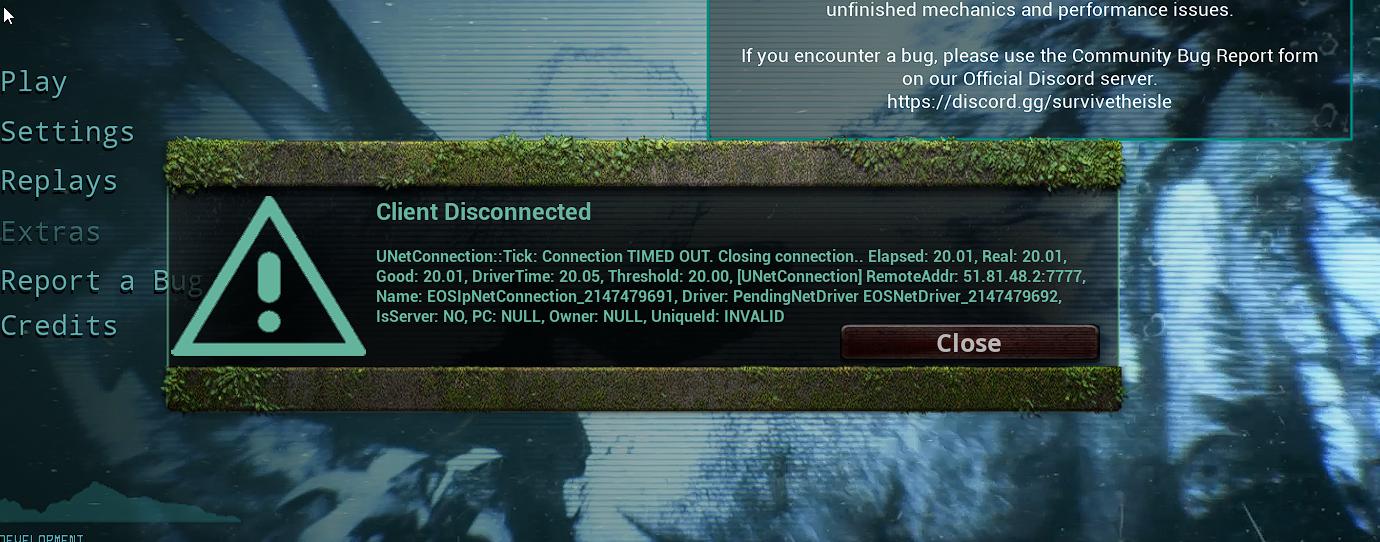 azure marten
Mate amarok was supposed to bring out a game.ini according too this geek guy
we're still waiting
we are all experiencing errors
 runic tulip
how do you get free grow?
azure marten
runic tulip
how do you get free grow?
On your own server?
azure marten
we're all getting this error man, People are gonna say its just your connection, I wish i could help you but the people i have asked just say its generic

Thats what punchpacket said to me
ill leave it to someone else that knows a little more but i have searched far and wide, On every internet source i could. Even asked server owners including developers and everyone just has the same answer "I have experienced this before it just happens randomly"
 sterile panther
Its probably an ip link problem
because you have like a "wireless" and an "ethernet"
thats what id imagine
azure marten
If you can find a fix and recon you know by all means do what you can and help us out brother hahaha, I have tried everything.
At this point a rope is probably a better investment then wasting time...
silk fractal
keen merlin
Gênio
vlw
narrow locust
silk fractal
Bot Server manager discord js 🙂
temos um BR
 narrow locust
fix error ?
 visual cape
Yo i finally fixed and the server is running. There is another problem lmao. I cant see the server in the server list 😦
plucky geyser
visual cape
Yo i finally fixed and the server is running. There is another problem lmao. I c...
same here no one seems to want to help with that issue I've asked on several occasions with no reply 🤷♂️
I'm thinking maybe the host computer cant see the servers but others might ....
i will be running some tests over the next couple days to see if i can figure it out.
will keep you posted 👍
plucky geyser
visual cape
Yo i finally fixed and the server is running. There is another problem lmao. I c...
i have tested on another host machine and still the same problem so hosting from a separate ip makes no difference the server still does not show up i have tested with different ports and still nothing so server is running but not showing.
wish someone would shed some light on this!
plucky geyser
LogNet: NotifyAcceptingConnection accepted from: 1**...*:61753 so i get this when i try to direct connect to the server and it creates a sav file for me but i get error from steam that server couldn't be found at that address.
my server is detecting it has something incoming and accepts it but steam blocks it?
also the port in the log is not the port i have set up each time i try to connect via direct ip the port changes on the log
dusk trout
narrow locust
fix error ?
ask tatzy the dev
visual cape
plucky geyser
same here no one seems to want to help with that issue I've asked on several occ...
The hosting fixed this problem for me.
plucky geyser
visual cape
The hosting fixed this problem for me.
You able to join your own server?
 versed lake
Hallo, today I tried to host a server with LinuxGSM. I Installed everything, startet the server and opened all ports (27015-27030, 7777-7779) but I can't find the server in the server browser or server browser from steam client. server log shows nothing special (Display: Session started succesfully!). Anyone similar experience with TheIsle on Linux?
 nova orchid
Hello I would like to shorten the night now I don't know whether I should increase "serverTimeOfDayInSeconds" or "ServerLengthOfDayInSeconds" I hope you can help me thanks
for a Evrima Server
visual cape
plucky geyser
You able to join your own server?
Yes there is a problem about the official documents for dedicated servers. They r outdated and wrong.
If u dont know how can u fix it, the official the isle documants not help u out. My hosting fixed the problem, they overwrite the files.
plucky geyser
visual cape
If u dont know how can u fix it, the official the isle documants not help u out....
Your hosting?
visual cape
plucky geyser
Your hosting?
Exactly not mine, i just have a server on it.
 exotic bronze
hello everyone, is there a way to log the commands used by admins in legacy? something like increase log level or anything else?
someone once said it was possible, but not sure if this one person just said it so the other admin pay attention to not abuse the commands
velvet rivet
so if its a dedicated server on a separate computer but local to me, it won't let me join eh?
 verbal eagle
Hoping this is the right place to ask... Anyone know how to perma ban someone on Evrima? I'm admin on a community server, but when I put the hours as '0' it only kicked the player, didn't perma ban them
 silk flame
Hopefully a quick question, but has anyone got password working on Evirma servers?
I've tried ServerPassword= in multiple locations on the Game.ini but not asking for password when I join the server.
golden flare
silk flame
Hopefully a quick question, but has anyone got password working on Evirma server...
Then you're placing it in the wrong section, should be under [/Script/TheIsle.TIGameSession] and also have bServerPassword=true
silk flame
that second part is missing, thank you very much @golden flare I should probably see if I can find some updated Game.ini and Engine.ini files floating around.
Infact, do you have any base configs I can use and check for missing options. If so, feel free to DM me them, would be greatly appreciated.
 velvet pumice
silk flame
Hopefully a quick question, but has anyone got password working on Evirma server...
velvet pumice
silk flame
Hopefully a quick question, but has anyone got password working on Evirma server...
set hours as 1000000
upbeat depot
how to ban permanently in Evrima?
golden vale
narrow locust
fix error ?
i have same, tel me if tatzy share solution
 inner jasper
is there still no fix for this
 sterile panther
inner jasper
is there still no fix for this
sterile panther
inner jasper
is there still no fix for this
its a nat type problem apparently has something todo with ports/your router being blocked
narrow locust
error
 inner jasper
sterile panther
its a nat type problem apparently has something todo with ports/your router bein...
inner jasper
sterile panther
its a nat type problem apparently has something todo with ports/your router bein...
Others people can going the server but I can't
sterile panther
inner jasper
Others people can going the server but I can't
Your router has the problem i have the same problem had to purchase a server couldn't be asked trying to figure that out hopfully they fix it soon
 stuck cobalt
how can i play im new
late lintel
How do i make my own server?
cedar ibex
versed lake
Hallo, today I tried to host a server with LinuxGSM. I Installed everything, sta...
They are using Epic Online Services, not steam, so you will not be able to find the server on steams server list. Also you only need to open 3 ports, Game port, queue port (if you want to use it) and RCON port if you need to connect over the internet to it.
 raven cairn
@severe zephyr Stay respectful please, also, if you have something in mind you want to discuss, use the correct channels.
raven cairn
I'll say it again, use the correct channels if you want to discuss something politely.
If you came across harassment in any form, feel free to report it in your corresponding evrima channel (#evrima-na and so forth).
You can find instruction how to request assistance in the pinned comments. Now please do not respond in this channel anymore.
plucky geyser
can anyone tell me if this is wrong?
as far as i can see the server is running but its not showing on server list...

 heavy lotus
can anyone help me the game don´t show me any servers and when i try to host one its just a black-screen
solar snow
heavy lotus
can anyone help me the game don´t show me any servers and when i try to host one...
The hosting feature is broken. Some fixes for getting servers to appear are pinned in #🔧-legacy-troubleshooting-🔧
heavy lotus
solar snow
The hosting feature is broken. Some fixes for getting servers to appear are pinn...
thx
 obsidian kite
heavy lotus
can anyone help me the game don´t show me any servers and when i try to host one...
obsidian kite
heavy lotus
can anyone help me the game don´t show me any servers and when i try to host one...
go to your game folder (steam>steamapps>common>theisle) and double click the exe there... make sure the game isn't running yet and your steam is active/logged in)
next time your restart the game just use the regular way, had the "bug" myself
heavy lotus
obsidian kite
go to your game folder (steam>steamapps>common>theisle) and double click the exe...
big thx now it works
obsidian kite
np
 bold helm
how to host a sever?
late lintel
how to make a server
plucky geyser
anyone able to help me i cant seem to get my server showing in the list
plucky geyser
so the server detects and accepts my connection via direct ip according to the log but steam tells me it couldn't find the server and i cant find the server in game... any ideas what the issue could be?
the server is running right now (Reapagames server) if anyone else is able to see/join it on evrima please let me know
plucky geyser
versed lake
Hallo, today I tried to host a server with LinuxGSM. I Installed everything, sta...
have this same problem on windows still searching for a fix no one seems to know anything and everything online is outdated and broken. someone on here must have there own dedicated server running that can help
 sour slate
hello - i just bought this game on steam and i cant find any servers to play or host myself a server- only black screen after starting 😦
 deep remnant
sour slate
hello - i just bought this game on steam and i cant find any servers to play or ...
deep remnant
sour slate
hello - i just bought this game on steam and i cant find any servers to play or ...
for the not being able to find any servers, you should make sure you swap to the evrima branch if you want to play the most update to date version of the isle. as for hosting a server, this is the right place to ask
deep remnant
sour slate
I mean this evrima?
go to steam, rightclick the isle, properties - betas, select the dropdown and click evrima
sour slate
Ok thx downloading
late lintel
how to make own server?
sour slate
How can i get this error With anticheat bot installed solved besides checking for files? Did it twice... still got error 😔
obsidian kite
Open your game folder and use the install antrcheat file that is located in the root of that game folder @sour slate
 thick arch
im like 99.9% i have all my port forwards done correctly and im also having the issue of not being able to see my server in the server list thoughts?
 plucky torrent
what is the best server for middle east
twin obsidian
plucky geyser
so the server detects and accepts my connection via direct ip according to the l...
Your server is not visible, as well as mine. EvrimaDI
plucky geyser
twin obsidian
Your server is not visible, as well as mine. EvrimaDI
strange as it runs with no error must be something wrong with ini files or bat command... spent quite a few days and late nights on this someone must have the correct working server config
 spare nova
can anyone recommend a non laggy official server? so far havent been able to play the game on officials...
 north herald
plucky torrent
what is the best server for middle east
north herald
plucky torrent
what is the best server for middle east
EU
plucky geyser
ok so I've spent about a week on this damn dedicated server stuff and come to the conclusion is just doesn't work with evrima (unless you pay which i guess the devs get a cut from) i have managed to get a server working on legacy and also host my own server on ark so i know things are working my end but evrima just wont show in the server lists even though the server looks healthy and is running with no error i have tried multiple solutions just to end up back here.
the reason i wanted to host my own dedicated server was to allow public families to join along with myself my kids friends and there kids i would be investing in three more copies of the game and friends also would be purchasing multiple copies so we can all play together.
if anyone knows of any updated files/configs that can help fix this please let me know.
cheers
cedar ibex
plucky geyser
ok so I've spent about a week on this damn dedicated server stuff and come to th...
If all you want to do is have a place to play with family and friends then just join a server with room for it 🙂 You more than welcome to jump on mine, all of you. Now I don't know where you are situated, so it might not be an option as I'm hosting in EU (denmark more specific). But with that said, it does work as there are multiple community hosted servers and we don't pay them anything 🙂 Don't know where you get that from? I can spin up as many servers i have resources for and they all show, but you just have to search multiple times, some times it's just there other times i have to search 3-5 times before it show up. Anyway, i got an empty server running, just search for GameLinx and you will find it
plucky geyser
cedar ibex
If all you want to do is have a place to play with family and friends then just ...
i want to be able to configure it to our liking. the community servers are rented from other companies if you can host your own let me know how you did it
cedar ibex
plucky geyser
i want to be able to configure it to our liking. the community servers are rente...
i am hosting my own, i've done it with both SteamCMD on Linux, LinuxGSM for better management, and now with Pterodactyl because I'm managing multiple physical servers to host game servers on. But regarding to customization, you really can't do anything as it is right now with Evrima. It's not like legacy where you can do tons of stuff. The only reason to host your own is to be an admin as the game is right now. You can enable and disable humans, that is it 🙂
plucky geyser
and set player limits dinos growth etc...
what are your configurations so i can compare them to my own...
I've just wiped the server folder and starting again not sure how many times I've done that lol
cedar ibex
player limits (yes)
dinos growth (only using in-game admin)
Game.ini
AdminsSteamIDs=ADMINID
AdminsSteamIDs=ADMINID
AdminsSteamIDs=ADMINID

[/Script/TheIsle.TIGameSession]
ServerName=[EU] GeekGarage #1
bServerPassword=false
ServerPassword=nopass
bServerDynamicWeather=true
bEnableHumans=false
MaxPlayerCount=150
bQueueEnabled=true
QueuePort=10000
bRconEnabled=true
RconPassword=RCONpassword
RconPort=8888```

Engine.ini
```[Core.System]
Paths=../../../Engine/Content
Paths=%GAMEDIR%Content
Paths=../../../Engine/Plugins/Runtime/SoundUtilities/Content
Paths=../../../Engine/Plugins/Runtime/Synthesis/Content
Paths=../../../Engine/Plugins/Runtime/AudioSynesthesia/Content
Paths=../../../Engine/Plugins/Runtime/WebBrowserWidget/Content
Paths=../../../Engine/Plugins/FX/Niagara/Content
Paths=../../../Engine/Plugins/Experimental/PythonScriptPlugin/Content
Paths=../../../TheIsle/Plugins/SteamCore/Content
Paths=../../../TheIsle/Plugins/RVTObjectLandscapeBlending/Content
Paths=../../../Engine/Plugins/Runtime/Nvidia/DLSS/Content
Paths=../../../TheIsle/Plugins/DonMeshPainting/Content
Paths=../../../TheIsle/Plugins/UIPF/Content
Paths=../../../TheIsle/Plugins/EOSCore/Content
Paths=../../../Engine/Plugins/Experimental/ControlRig/Content
Paths=../../../Engine/Plugins/Runtime/Nvidia/DLSSMoviePipelineSupport/Content
Paths=../../../Engine/Plugins/MovieScene/MovieRenderPipeline/Content
Paths=../../../Engine/Plugins/Compositing/OpenColorIO/Content
Paths=../../../Engine/Plugins/MovieScene/SequencerScripting/Content
Paths=../../../TheIsle/Plugins/ImpostorBaker/Content
Paths=../../../Engine/Plugins/2D/Paper2D/Content
Paths=../../../Engine/Plugins/Developer/AnimationSharing/Content
Paths=../../../Engine/Plugins/Editor/GeometryMode/Content
Paths=../../../Engine/Plugins/Editor/SpeedTreeImporter/Content
Paths=../../../Engine/Plugins/Enterprise/DatasmithContent/Content
Paths=../../../Engine/Plugins/Experimental/ChaosClothEditor/Content
Paths=../../../Engine/Plugins/Experimental/GeometryProcessing/Content
Paths=../../../Engine/Plugins/Experimental/GeometryCollectionPlugin/Content
Paths=../../../Engine/Plugins/Experimental/ChaosSolverPlugin/Content
Paths=../../../Engine/Plugins/Experimental/ChaosNiagara/Content
Paths=../../../Engine/Plugins/Experimental/MotoSynth/Content
Paths=../../../Engine/Plugins/Media/MediaCompositing/Content
Paths=../../../Engine/Plugins/Runtime/OpenXREyeTracker/Content
Paths=../../../Engine/Plugins/Runtime/OpenXR/Content
Paths=../../../Engine/Plugins/Runtime/OpenXRHandTracking/Content
Paths=../../../Engine/Plugins/VirtualProduction/Takes/Content

[EpicOnlineServices]
DedicatedServerClientId=xyza7891gk5PRo3J7G9puCJGFJjmEguW
DedicatedServerClientSecret=pKWl6t5i9NJK8gTpVlAxzENZ65P8hYzodV8Dqe5Rlc8
thanks for this, do specific ports make a difference?
cedar ibex
you can choose almost whatever ports you want. for game, rcon and queue. but to keep it safe just stay above 8500
below that some ports are designated for specific stuff
also rcon, queue, and game cannot be the same port
plucky geyser
thanks ill change some router settings i really apricate your help on this
cedar ibex
your welcome
plucky geyser
do you launch with .bat?
plucky geyser
cedar ibex
your welcome
it works thank you so much the issue i had was mismatch in the .bat launch commands and the game.ini file so my server was probably there just under a different name and configuration hence i couldn't find it.
i think we need an updated guide for 2023 with some common problem fixes hopefully i can help others in the future with similar problems.
silk fractal
There is a server sending automatic grow, does anyone know any method of sending automatic grow?
it is possible that there is some byte for grow that was not updated in the server's rcon there in google drive
golden flare
Thank you devs for including the server settings in the new patch 👌
narrow locust
wind dew
Whitelist has been added, but I do not see any way to actively update it without restarting the server everytime you wish to add another player. Am I missing something ?
golden flare
wind dew
Whitelist has been added, but I do not see any way to actively update it without...
I assume it works the same way as admins, requires a restart


 silk fractal
Allow entry and exit rules


 silk fractal
Did you pay for a machine or are you using Google Cloud, Azure or Amazon?
@narrow locust
narrow locust
only on pc
silent slate
narrow locust
to be continued -1,000 ping
are you trying to connect to your own server using your remote ip?
runic sierra
What are the available bots out there for evrima inventory system. I am strickly inteterested in using one to handle saving and retrieval of saved dinosaurs (I guess manually since everything is encrypted). Is there a reliable one that you can strip out all the economy / lotteries garbage from easily?
It needs to have a configurable cooldown and that the aount of slots be configurable per role
I could write one myself but don't feel like reinventing the wheel on that one
 teal gull
How does EVRIMA automatically send announcements?
silent slate
narrow locust
yes
Some routers do not support such a loopback on the same interface. Basically in that case the source and destination ip cannot not be the same. Can you ping your remote ip using cmd?
If that fails too maybe traceroute can give you an idea which jump is denying the round trip.
Ofcourse it would be easiest to connect using localhost but I am not sure how that is done in this game.
narrow locust

 cedar stag
Is it normaly, that on every EUW Server i join, that i have ping of 300?
I dondt have any parallel Downloads or Internet problems
 vagrant fox
Anyone know why all of a sudden the admin mode is broken in case of showing corpses/AI/plants ? It never shows anything
golden flare
<@&933486433342222376>
 mellow wagon
golden flare
<@&933486433342222376>
mellow wagon
golden flare
<@&933486433342222376>
I appreciate that u respect the rules and try to keep the server clean by telling mods but I don’t get mad if you tell me first that I made a mistake 🥲
golden flare
mellow wagon
I appreciate that u respect the rules and try to keep the server clean by tellin...
I did, left it for 10-15 min or so ^^
mellow wagon
golden flare
I did, left it for 10-15 min or so ^^
Ooh sry I was eating ssssspaghwtty at my grand mom’s house
This is why I didn’t read
XD
silent slate
I am thinking you need to claim the external IP adress on your local interface so it doesn't try to go into the internet
https://serverfault.com/questions/171850/redirect-request-to-an-external-ip-to-localhost-emulate-a-server
this also looks promising
https://serverfault.com/a/712997

Server Fault
Can I map 146.112.61.106 IP address to my 127.0.0.1 adress ?
so when I type 146.112.61.106 I got redirected to 127.0.0.1 ?
(some netsh command maybe ?)
 pulsar anchor
how do i make a severt
 cobalt hill
Hey guys. I got my Evrima Server running with the right config and so on. But i cant connect to it. Client Disconnected UNetConnection Timed Out. Anyone has and idea why this happens?
 granite karma
cobalt hill
Hey guys. I got my Evrima Server running with the right config and so on. But i ...
granite karma
cobalt hill
Hey guys. I got my Evrima Server running with the right config and so on. But i ...
I would double check port forwarding on your router and firewall on your computer
cobalt hill
granite karma
I would double check port forwarding on your router and firewall on your compute...
I am hosting the Server on a RootServer and have allowed the Server .exe to have access to all UDP/TCP ports in the firewall in inbound rules
Oh Ok found the Issue. It was with the ports.
Do i only need to put in the ports that i configured in the start arguments for query and game or also some other ports?
silent slate
Probably the router won't like that the same ip would be bound on 2 different interfaces/MAC addresses.
final dove
 glad marlin
will there be a dedicated server app for steam ?
glad marlin
will there be a dedicated server app for steam ?
Dont expect that
merry urchin
Guys, how I create an evrima server?
 buoyant nest
How does on make so you can do injections for grows?
I thought mods was not a thing?
and would it get servers banned to reverse enigneer the encryption ?
 tough warren
How do I open server ports?
silent slate
tough warren
How do I open server ports?
check the pins
tough warren
silent slate
check the pins
How?
 tough warren
silent slate
at the top right of this channel
tough warren
silent slate
at the top right of this channel
What is Rcon?
tough warren
tough warren
What is Rcon?
Is the server password?
 rapid fractal
Hello, I need the pass to enter the server, how do I do it?
tough warren
Hey, @silent slate , It's not working, did I write it wrong? @silent slate ?
 narrow locust
 silent slate
tough warren
Hey, <@122860317985210371> , It's not working, did I write it wrong? <@122860317...
silent slate
tough warren
Hey, <@122860317985210371> , It's not working, did I write it wrong? <@122860317...
sry, I have no idea about server setup, never done it
obsidian kite
having a setup guide for linux would be nice 🙂 i know most gameserver wich run on linux are being installed via steamCMD but i'm not sure if this is relateable for TI
golden flare
obsidian kite
having a setup guide for linux would be nice 🙂 i know most gameserver wich run ...
Pterodactyl and use my egg ^^
 north cipher
Hello everyone. I wanted to ask how do I get the password for the Isla Antigua server?
or who do I have to contact?
 scarlet timber
Hey, peeps. I'm trying to setup a dedicated Evrima server on my Win10 PC via SteamCMD. I've installed SteamCMD, the base game w/ beta for Evrima via Steam, & followed multiple seemingly outdated guides since I can't find a current one.
The issue I'm running into is that the server says it's displaying & loaded, but it's not showing up in the Steam Server list & not showing in-game. I've set ports 7777-7781 & 27015-27020 as accessible in my Unifi router & in my PC's firewall, but still no change. I find it odd that the only ports mentioned for setting up the .bat file was port 7777 & I found one guide comment that included network info into the Engine.ini file, but this last bit has not been mentioned by the guides themselves.
Got any ideas? I did have to make both the Engine.ini & Game.ini files since none of the WindowsServer files were being generated during installation w/ SteamCMD.
cedar ibex
@torpid parrot Hey bud, I was trying to get a hold of you regarding that server, let me know if you want to take me up on the offer 🙂 I've opened up for DM since we share discord as i couldn't DM you directly
 coarse yarrow
i can see my server but i cant join it
 daring sorrel
narrow locust
daring sorrel
narrow locust
I have the same Error in red. Did you get over it?
narrow locust
daring sorrel
I have the same Error in red. Did you get over it?
no
Does anyone know how to resolve the ping error
velvet rivet
 silent herald
is it possible to run server at 60fps
silent herald
is it possible to run server at 60fps
Isnt it the client that determines FPS?
Server doesnt send graphical data?
silent herald
client and server fps are seperate
my ingame fps stays at 140+
but server fps is locked to 30
narrow locust
🔧 my server is in trouble🔧
 keen merlin
@narrow locust
 magic crescent
Hi,
Does someone know why my dedicated server is not showing for some people? You have to refresg 50 times to finally find it. This means people just go to other servers. But is this something isle related or do i need to do something? Can i do something?
golden flare
magic crescent
Hi,
Does someone know why my dedicated server is not showing for some people? Y...
 raven warren
where can i find a server to play?
random python
raven warren
where can i find a server to play?
deep remnant
This isnt the channel to request unstucks. you should read the pins in #evrima-eu to see how to best request assistance
 midnight linden
ok. thanks for you kind help
narrow locust
keen merlin
<@888237128637624330>
I already did that and it didn't work
narrow locust

 shrewd barn
Anyone else have issues with evrima spiking to 100% cpu usage for no obvious reason?
This is an empty server, no players active:
%CPU     PID     TID COMMAND
69.4   19806   19806 /home/steamcmd/evrima/TheIsle/Binaries/Linux/The
 0.0   19806   19808 /home/steamcmd/evrima/TheIsle/Binaries/Linux/The
 0.0   19806   19809 /home/steamcmd/evrima/TheIsle/Binaries/Linux/The
 0.3   19806   19810 /home/steamcmd/evrima/TheIsle/Binaries/Linux/The
 0.7   19806   19811 /home/steamcmd/evrima/TheIsle/Binaries/Linux/The
 0.0   19806   19812 /home/steamcmd/evrima/TheIsle/Binaries/Linux/The
 0.0   19806   19815 /home/steamcmd/evrima/TheIsle/Binaries/Linux/The
 0.0   19806   19816 /home/steamcmd/evrima/TheIsle/Binaries/Linux/The
 0.0   19806   19817 /home/steamcmd/evrima/TheIsle/Binaries/Linux/The
 0.0   19806   19818 /home/steamcmd/evrima/TheIsle/Binaries/Linux/The
 0.3   19806   19819 /home/steamcmd/evrima/TheIsle/Binaries/Linux/The
 0.1   19806   19820 /home/steamcmd/evrima/TheIsle/Binaries/Linux/The
 0.1   19806   19821 /home/steamcmd/evrima/TheIsle/Binaries/Linux/The
 0.1   19806   19822 /home/steamcmd/evrima/TheIsle/Binaries/Linux/The
 0.0   19806   19823 /home/steamcmd/evrima/TheIsle/Binaries/Linux/The
 0.0   19806   19824 /home/steamcmd/evrima/TheIsle/Binaries/Linux/The
 0.0   19806   19825 /home/steamcmd/evrima/TheIsle/Binaries/Linux/The
 0.0   19806   19826 /home/steamcmd/evrima/TheIsle/Binaries/Linux/The
 0.0   19806   19827 /home/steamcmd/evrima/TheIsle/Binaries/Linux/The
 0.0   19806   19828 /home/steamcmd/evrima/TheIsle/Binaries/Linux/The
 0.0   19806   19829 /home/steamcmd/evrima/TheIsle/Binaries/Linux/The
 0.0   19806   19830 /home/steamcmd/evrima/TheIsle/Binaries/Linux/The
 0.0   19806   19831 /home/steamcmd/evrima/TheIsle/Binaries/Linux/The
 0.0   19806   19832 /home/steamcmd/evrima/TheIsle/Binaries/Linux/The
 0.0   19806   19833 /home/steamcmd/evrima/TheIsle/Binaries/Linux/The
 0.0   19806   19834 /home/steamcmd/evrima/TheIsle/Binaries/Linux/The
 0.0   19806   19835 /home/steamcmd/evrima/TheIsle/Binaries/Linux/The
 0.0   19806   19836 /home/steamcmd/evrima/TheIsle/Binaries/Linux/The
 0.0   19806   19837 /home/steamcmd/evrima/TheIsle/Binaries/Linux/The
 0.0   19806   19838 /home/steamcmd/evrima/TheIsle/Binaries/Linux/The
 0.0   19806   19839 /home/steamcmd/evrima/TheIsle/Binaries/Linux/The
 0.0   19806   19845 /home/steamcmd/evrima/TheIsle/Binaries/Linux/The
 0.0   19806   19846 /home/steamcmd/evrima/TheIsle/Binaries/Linux/The
 0.0   19806   19974 /home/steamcmd/evrima/TheIsle/Binaries/Linux/The
 0.4   19806   19975 /home/steamcmd/evrima/TheIsle/Binaries/Linux/The
 0.0   19806   19977 /home/steamcmd/evrima/TheIsle/Binaries/Linux/The
 0.0   19806   19979 /home/steamcmd/evrima/TheIsle/Binaries/Linux/The
 0.0   19806   19980 /home/steamcmd/evrima/TheIsle/Binaries/Linux/The
 0.0   19806   19982 /home/steamcmd/evrima/TheIsle/Binaries/Linux/The
 0.0   19806   19983 /home/steamcmd/evrima/TheIsle/Binaries/Linux/The
99.9   19806   19984 /home/steamcmd/evrima/TheIsle/Binaries/Linux/The
 0.7   19806   19985 /home/steamcmd/evrima/TheIsle/Binaries/Linux/The
 0.0   19806   19986 /home/steamcmd/evrima/TheIsle/Binaries/Linux/The
 0.0   21990   21990 ps -To pcpu,pid,tid,args
server was empty the entire time (and pinned to cores so not shared by other workloads)

 candid rover
hey y'all, I'm trying to make my own legacy server and I'm having some trouble. i followed the steam guide and It looks like everything is starting up correctly but i cant find the game.ini files to edit things like server name n such. i found where the game.ini file should be and ive tried making the game.ini file and populating it with the correct txt settings but i dont think its working because i still dont see the server on the server list. Any held would be appreciated 😄 thank you
 fiery plover
Can we have a World Chat for unofficial Servers? Hosts could active it If they want.
raven cairn
fiery plover
Can we have a World Chat for unofficial Servers? Hosts could active it If they w...
You should use #general-feedback for these type of suggestions.
fiery plover
raven cairn
You should use <#401481371249541120> for these type of suggestions.
Ty, sorry 😄 can someone move it? Im on cooldown
raven cairn
fiery plover
Ty, sorry 😄 can someone move it? Im on cooldown
No worries, and you can post another suggestions once your cooldown is over.
 meager moon
Are there any mods on ? I am stuck between rocks on the AU 2 server
raven cairn
meager moon
Are there any mods on ? I am stuck between rocks on the AU 2 server
You‘ll want to use the evrima channels corresponding to your region to request ingame assistance. Check the pinned comments there.
 cold herald
tough warren
What is Rcon?
cold herald
tough warren
What is Rcon?
Rcon stands for remote control i guess...
its usally used to manage the server/users for moderating or configuration purposes
i dont get it why my queserver runs and is reachable... my server is listed... but my server seems not to open on 7777.

my router is set up correctly.
in the log i can see this:

my start.bat @echo off cls echo Protecting isle server from crashes... title The Isle Server - Unicos Server :TheIsle echo (%time%) Checking for updates... start /wait C:\Servers\steamcmd\steamcmd.exe +force_install_dir C:\Servers\theisle +login anonymous +app_update 412680 -beta evrima +quit echo (%time%) isle server started. start /wait C:\Servers\theisle\TheIsleServer.exe ?Port=7777?MaxPlayers=100 -log -ini:Engine: [EpicOnlineServices]:DedicatedServerClientId=xyza7891gk5PRo3J7G9puCJGFJjmEguW -ini:Engine: [EpicOnlineServices]:DedicatedServerClientSecret=pKWl6t5i9NJK8gTpVlAxzENZ65P8hYzodV8Dqe5Rlc8 | set /P "=" echo (%time%) WARNING: isle server closed or crashed, restarting in 1 minute. timeout /t 60 goto TheIsle
my Game.ini ```[/script/theisle.tigamestatebase]
AdminsSteamIDs=noting in just for show on discord
[/script/theisle.tigamesession]
ServerName=Unico Isle
MaxPlayerCount=100
bEnableHumans=false
bServerPassword=false
ServerPassword=noting in just for show on discord
bQueueEnabled=true
QueuePort=9998
bRconEnabled=true
RconPassword=noting in just for show on discord
RconPort=9999
bAllowReplay=false```
my Engine.ini
any my router settings ... but this works 100%

 fading grove
cold herald
my start.bat ```@echo off
cls
echo Protecting isle server from crashes...
title ...
fading grove
cold herald
my start.bat ```@echo off
cls
echo Protecting isle server from crashes...
title ...
is this working for you?


