#dedicated-server
1 messages · Page 21 of 1
 final current
 river kraken
Incompatible version
river kraken
final current
When you say you can't use it, what do you mean? Getting an error?
Incompatible version
final current
river kraken
Incompatible version
Alright. Can you post the output of your SteamCMD app_update attempt?
river kraken
It download the update still not working
final current
river kraken
Thanks, and what's the SteamCMD command line you're using when it's not working?
If you had participated in the public beta, you'll want to pass -beta public to the app_update in order to switch back to the main branch.
river kraken
final current
Thanks, and what's the SteamCMD command line you're using when it's not working?
/usr/games/steamcmd +force_install_dir '/home/valheimserver' +login anonymous +app_update 896660 validate +quit
final current
Cool. I would try it with -beta public in the app_update portion
 frigid basalt
trying to join my friends dedicated server.. bunch of my friends was able to connect to it via ip/port but I cant even see that it is up (110% checked ip and port is correct and written correctly), any common adivce to give me to get it working? im playing via xbox gamepass (on pc)
i can also add that I am able to see a number of servers on the community tab, so valheim is connected out to the www
 main viper
im trying to make a new dedicated server on a windows server but it intantly crashes when starting
 floral jay
What version of windows? Server 2019 is now the minimum requirement.
main viper
realy im using 2016 dang
floral jay
It's from the recent upgrade in Unity version.
 chilly sonnet
HI. I am new to the game, looking to join a server i can play with people
 rose scroll
Hi, I have some question about running the server
I've been running it for a couple days now and our experience with it is having some micro-stutters like attack landing late or players sometimes just looks like they lag out a bit (like vibrating when sitting in a moving boat)
And this has been consistent, not with a specific player but with other player that is not you
I'm running it on a VPS, 6 CPUs 8gb RAM and the resources doesnt seem to be an issue, only using around 8% CPU 15% Mem
Any suggestion?
When I check with F2 the ping is good too and there is no packet loss
Oh and I have 3-5 players active at a time, mostly together but sometimes 3 players are away and 1 stay in base
I'm using the config that is used on the wiki
final current
rose scroll
Hi, I have some question about running the server
I've been running it for a cou...
Take a look through this list and see if any apply to ya: #dedicated-server message
rose scroll
final current
Take a look through this list and see if any apply to ya: https://discord.com/ch...
so its actually a client issue then? when one player loads it first that client hardware dictate it more than the server itself?
I'm not running with crossplay and AFAIK nobody on my group is using VPN
final current
Yep, the first player to an area is responsible for its simulations/decisions, though if the server is using Crossplay that's also a major lag contributor.
rose scroll
Well that is.. interesting..
First time I heard of issue like this and I ran servers for other games before 😅
final current
frigid basalt
trying to join my friends dedicated server.. bunch of my friends was able to con...
You will need to make sure they hosted it as a Crossplay server for any Microsoft Store/Gamepass client to be able to connect. They should be able to give you a numeric invite/join code to use if this is the case
rose scroll
Thats why on the server its so light and despite us having built bases and explored more of the map the resource usage stayed the same
Usually with other games when you load bigger areas it take a strain on the server but not with this game
final current
Right, server just needs some RAM for live world data and good connectivity to act as an RPC router on the network side.
 proven niche
It's probably just me but it seems like 8gb RAM is a lilttle light for a world played by 3-5 characters. Are you sure that 15% usage is accurate?
And the ping you checked, is that just your own with the server or respresentive of other players as well?
rose scroll
proven niche
It's probably just me but it seems like 8gb RAM is a lilttle light for a world p...
Thats my thought too, but I checked htop and it only use 15% Mem
The ping I checked mine is around 5ms and other player is also around 10-15ms max
 proven niche
rose scroll
Thats my thought too, but I checked htop and it only use 15% Mem
The ping I chec...
proven niche
rose scroll
Thats my thought too, but I checked htop and it only use 15% Mem
The ping I chec...
5ms? Is it in the same room as you? LOL
rose scroll
proven niche
5ms? Is it in the same room as you? LOL
Did I misunderstand reading the info? let me login real quick and I'll give you the F2 screen
ping is the number beside ping or the one in brackets?
 proven niche
rose scroll
Did I misunderstand reading the info? let me login real quick and I'll give you ...
proven niche
rose scroll
Did I misunderstand reading the info? let me login real quick and I'll give you ...
Do you have anything else running on the server in the background?
rose scroll
proven niche
Do you have anything else running on the server in the background?
nope, only this
rose scroll
rose scroll
@proven niche you can see it here
proven niche
rose scroll
<@449765565507043329> you can see it here
Yeah, you're not wrong. It just seems like an amazingly good comm route to me. It's apparently downhill in both directions.
rose scroll
proven niche
Yeah, you're not wrong. It just seems like an amazingly good comm route to me. ...
thank you, our sysadmin definitely worked hard LMAO
So yeah I guess the issue really was just client side loading then?
proven niche
And no mods of any kind? Either on the server or any of the player's games?
rose scroll
Nope its all vanilla
proven niche
And you did get other player's F2 Comm stats?
rose scroll
Not right now, but I can ask them again later when they are online
Last time I asked when we were having issue they said the ping were also low
proven niche
Yeah, you checked that. That should be good enough. It's just that you've done everthing right and still have stutter.
rose scroll
Yeah thats what confused me too..
So really asking here was my last way of troubleshooting because I couldnt spot the issue myself
If what Justin said about the client actually doing the process then that kind of a flaw in the server imo
proven niche
And you only notice the stutter when 2 or more players are on? And it makes no difference which players? Could it be something weird with the way the VPS networking is configured that has good ping but somekind of throttling that doesn't show up?
rose scroll
proven niche
And you only notice the stutter when 2 or more players are on? And it makes no ...
What I can say is if I'm alone its buttery smooth, but with 3-4 players it starts to stutter
rose scroll
rose scroll
If what Justin said about the client actually doing the process then that kind o...
Adding more to this
I'm running a server in hope that the server would process the heavy load so that the user client are not burdened with loading the map
Right now its no different than me just hosting it locally thru steam
Whats the point of running a server then other than persistent uptime?
proven niche
rose scroll
Right now its no different than me just hosting it locally thru steam
Whats the ...
And yet there are many servers with 3-5 players going through the game without the stutter. So, it's not 'normal' or expected to have a dedicated server work like yours is. Something about your sserver and it's situation is causing it. We just can't seem to figure out what that is.
rose scroll
proven niche
And yet there are many servers with 3-5 players going through the game without t...
I'll see it more later and maybe test with some of my players and see maybe if I can spot what or who is causing the lag
I'll try to ask them play with me and with each other and see if there is a pattern on the cause
I will also try asking the VPS network about the throttling that you mentioned
proven niche
That seems like a good plan. One or another of the clients could be the culprit. The player clients are always kind of an unknown factor 'cause you get all your info from them rather than getting it first hand. That's pretty normal.
 earnest nymph
Is the steam dedicated server download broken? when i go to update, it is either corrupt or content unavailable
proven niche
earnest nymph
Is the steam dedicated server download broken? when i go to update, it is either...
No one else here has mentioned it. How are you doing the update?
earnest nymph
Via steam GUI, not the update.bat method
Works through steamCMD
but not the steam application. Weird
proven niche
I don't know. It's acting strange for me, too. Steam Library may be having problems or doing updates or something.
I had to reinstall it but now it's working normally in my SteamGUI. Odd.
 tranquil ibex
Any idea how this could happen?
I restarted the server and they seemed to be able to get in. Are codes reused by other people?

 cyan umbra
are these files my dedicated world saves? which one do i download to save a backup
 proven niche
cyan umbra
are these files my dedicated world saves? which one do i download to save a back...
proven niche
cyan umbra
are these files my dedicated world saves? which one do i download to save a back...
Your world needs a file pair. Not an individual file. It needs a .db with the exact time/date as it's .fwl file. That's the file pair. Going by the time/date choose the pair that you want to save as a backup.
cyan umbra
proven niche
Your world needs a file pair. Not an individual file. It needs a .db with the ...
ohhh so like these two right?
 proven niche
cyan umbra
ohhh so like these two right?
proven niche
cyan umbra
ohhh so like these two right?
Yes. Those two will do nicely.
 cyan igloo
any server I can join?
proven niche
cyan igloo
any server I can join?
------> #1024264966712340510 🙂
 plain trellis
Do this test to verify that your network hardware isn't at fault:
https://www.waveform.com/tools/bufferbloat
proven niche
What kind of speed test is that? Most speed tests only test your best possible speed to/from a local bandwidth test server. Not your speed to/from your Valheim game server.
The point being that the two may be two very different comm routes going through many different 'hops'. And, if that's the case here, the test is meaningless. Sorry.
@final current will need to confirm this but I believe that, if your player can get the IP address of the Valheim server, he/she could go to a command window for their PC's OS and try a couple commands to check the comm link between them and the Valheim server.
One would be the tracert [IP address] command for Windows or the **traceroute {IP address] ** (don't use the [ ] ) for MAC or Linux. The [IP address] there would be the external IP address for the server. And both Windows and MAC or Linux, would support the 'ping ]IPaddress]' command there, too. That way you're getting info relative you the actual comm route to/from the Valheim server.
rose scroll
proven niche
What kind of speed test is that? Most speed tests only test your best possible ...
Thats speedtest from my server, you were saying that there might be throttling on the server and I checked and nothing there
I know traceroute, no issue from client to server
I have sussed out a bit of the issue and high chance its the hardware
Some of the player are running on laptop and when they load first like you said, it lags a bit
So yeah, it was mostly because of me not understanding how Valheim dedicated specifically handle the process
It runs closer to a peer-to-peer with the server just managing which client is loading the areas and not the server itself handling the bulk of the process
proven niche
rose scroll
Thats speedtest from my server, you were saying that there might be throttling o...
OIC, ok. Then, so is there enough traffic during the speed test to trigger any possible throttling? It sounds like you've got a good handle on the comm links possibility.
I think you've got the right idea here. Hopefully, it leads to a solution for you guys.
rose scroll
proven niche
OIC, ok. Then, so is there enough traffic during the speed test to trigger any...
Short term solution is just have the guy with the beefiest pc login and load the areas first if we are going together
Basically, I didnt read the Overview portion of the dedicated server and that was my bad 😅
The main culprit is basically this
"The server does not simulate any of the game logic—it is not server-side authoritative"

I expected it to work like most dedicated servers where it handle most of the processing and the client just pull from the server
So I apologize and thank you for all the help you provide 🙏
@proven niche @final current
(Also deleted the speedtest screenshot because it have private info I didnt clear)
proven niche
rose scroll
So I apologize and thank you for all the help you provide 🙏
<@44976556550704332...
You've got nothing to apologize for. I'd say you've done excellent trouble shooting and arrived at that solution. Sometimes troubleshooting is all about the destination not about the journey you took to get there. 😛
rose scroll
proven niche
You've got nothing to apologize for. I'd say you've done excellent trouble shoo...
I think you got it backward because the journey have taught me a lot haha
Also how I sussed it was basically we play together, load our base, then take turn reconnecting
That helped me figure out who was causing the lag (Spoiler: it was me lmao) because when you log out, the process gets transfered to another player, and when they join again it runs fine
Might help if anyone is having similar issue in the future
floral jay
There is a work in progress mod to make the server a real dedicated server. And I think the author of serversideqol is working on a way to control which clients get control
proven niche
floral jay
There is a work in progress mod to make the server a real dedicated server. And ...
That's good info Thanks.
Can't wait to see how that turns out. 😄
floral jay
The first one is already on thunderstore but I can't remember the name
rose scroll
That would be cool but also I hope they support it in an official way too, even if its closer or after 1.0 launch
I ran servers for Terraria Minecraft Palworld etc and this is the first time I'm seeing dedicated running like this so its kinda eye opening haha
proven niche
rose scroll
That would be cool but also I hope they support it in an official way too, even ...
Probably due to the Valheim game originally intended to be a solo game. But then later on added the optional ability to play with a friend or two. Never really meant to be an RPGMMO.
rose scroll
I see, that makes sense. Well the game kinda wants it to be played together and its more fun with friends.
 hybrid gulch
anyone ever got the issue "Assertion Failed: IPC call to IClientHTTP::ReleaseHTTPRequest returned failure code 12" and has a solution for it?
my server ran once, after restarting it only ever get this error
final current
hybrid gulch
anyone ever got the issue "Assertion Failed: IPC call to IClientHTTP::ReleaseHTT...
Yes, it means the server shut down in the middle of an HTTP request, perfectly normal. If you didn't mean to shut the server down, you'll want to consult its log to see why it did.
The most common reason we see is too small a password or a password containing the server or world name.
hybrid gulch
final current
The most common reason we see is too small a password or a password containing t...
well it the password could be too small, however i wonder why it started without any issue the first time and only fails now after 2nd attempt +.
will try a longer password
okay welp, ty for the quick help, apparently the password was actually too small.
doesnt explain the flawless first start.
also the error message is absolutely "useless" for someone not knowing smth with http request with failure code 12 means issues with the set password, but anyway; tysm!
final current
hybrid gulch
okay welp, ty for the quick help, apparently the password was actually too small...
That's why the real message is always before it in the log, like I said.
hybrid gulch
🤔 i did look at the previous messages, apparently didnt see it then. ty!
final current
When it's the password at fault, it's usually pretty logged pretty early on. If your logs are exceeding your terminal buffer, you might consider the -logFile option, which stops logging to stdout/stderr and will log to a file instead (rotated-on-start)
As for flawless first start, the stricter password checking only goes into affect when you're publicizing the server. So if your first start wasn't public, it might have been ok with the shorter password.
 valid flower
i wanna join a server
final current
valid flower
i wanna join a server
Hit up #1024264966712340510
 teal aspen
making a fdorever world heavymodded with deep north epic loot building mods and more let me know if youre interested
proven niche
teal aspen
making a fdorever world heavymodded with deep north epic loot building mods and ...
If you're looking for players to join you, you should look in the #1024264966712340510 channel.
This channel is just for help with setting up and running your dedicated server.
 ionic vale
hi all. i am going to open modded dedicated server and i have gathered a modlist and tweaked them how i like them to be. So, i dont know what needs to be installed to server and what can be lefted to client. I dont want players to be able to use devcommands or adjust the mods, any help is precious thank you!
plain trellis
ionic vale
hi all. i am going to open modded dedicated server and i have gathered a modlist...
You need to look into AzuAntiCheat mod, that need to be on Server and all clients.
 worn latch
Greetings, Vikings of Valheim! I need your help!
My friends and I want to create a server with mods to spice up our gameplay. I'm looking for advice from someone who has experience with modding and setting up a server. Specifically, I need help with:
Choosing a hosting provider for our server.
Selecting mods and confirming that our current list is compatible and works well together.
Suggesting other potential mods or offering any personal recommendations.
Please contact me via private message or recommend someone who might be able to help.
I just want to say that I don't want to take up too much of your time or take advantage of anyone; I just need a few pieces of advice, and that's all.
Thank you in advance for any help and guidance you can offer.
final current
worn latch
Greetings, Vikings of Valheim! I need your help!
My friends and I want to creat...
#mods-discussion would be a good place to get some ideas on this, and chatting in the public channels about these kinds of things is just fine.
If you end up self-hosting, this channel (#dedicated-server ) can be a good place to get help if you run into issues or want to know how something is done. We'll be less equipped to help when it comes to wrapping the server with BepInEx and loading various mods, though.
worn latch
final current
<#1202934289898151966> would be a good place to get some ideas on this, and chat...
We plan to set up our server through an external hosting provider so that players can join anytime. We've found dathost.net, which seems okay, but I'd like to get advice from someone here. Additionally, the mods we currently plan to add are: Fight Club, Mod First Person View, Better UI, and Trading.
I'd like to know:
Is this site suitable for our server and our idea?
Do we need to add mods via Nexus Mods or Thunderstore? Which one is better and how does it work?
Are the mods we have prepared okay? Could anyone recommend any other mods? I personally looked at Epic Loot and ValheimPlus, but I don't know if they are good. We don't want to change the game too much or make it easier. We're thinking about improving textures with shaders, adding some RPG elements like Epic Loot, and maybe new biomes, items, or monsters. However, our main goal is to start with these few mods and then add or change them later.
final current
All those questions are great for #mods-discussion
plain trellis
worn latch
We plan to set up our server through an external hosting provider so that player...
Why pay others to host a server, when you can do it yourself for free on an old computer?
Regarding mods; Both sites are valid sources for mods, the most popular site is Thunderstore. You need to make sure all mods are updated to work with latest version of the game.
I wouldn't recommend Valheim Plus. That all-in-one mod alters a bunch of stuff in the game, and works very poorly with most other mods.:
No one can give you the answer of what mods to load. The group need to talk about what with Valheim they like to have different. Then seek out specific mods for those needs. You can add mods as you play the game. Not all mods can or needs to be on server, and are client only. Read the mod descriptions.
 pastel forge
plain trellis
Why pay others to host a server, when you can do it yourself for free on an old ...
pastel forge
plain trellis
Why pay others to host a server, when you can do it yourself for free on an old ...
I can answer the first question, but maybe this isn't the case for everyone. I recently was able to reduce my friend's ping by approx. 100ms by buying server located in Poland opposite to my PC located in Serbia, so sometimes it does make sense. Also I don't need to bother with local PC, I just go and check console on the hosting site from time to time
pastel forge
floral jay
There is a work in progress mod to make the server a real dedicated server. And ...
Did you mean this one https://thunderstore.io/c/valheim/p/Smoothbrain/DedicatedServer/ ? Did anyone tried it, is it worth it, is it safe to try?
 floral jay
yes that one, I havent tried it but the description points out the risks
 dreamy hatch
pastel forge
Did you mean this one https://thunderstore.io/c/valheim/p/Smoothbrain/DedicatedS...
dreamy hatch
pastel forge
Did you mean this one https://thunderstore.io/c/valheim/p/Smoothbrain/DedicatedS...
im using another mod called real dedicated server nexus, another mod i have is an inventory mod, if you dont have any other mods that say, adds new stuff, it may not work well but for qol stuff id say it works
its working cause a chest now opens when a player exits
 sinful sand
pastel forge
Did you mean this one https://thunderstore.io/c/valheim/p/Smoothbrain/DedicatedS...
sinful sand
pastel forge
Did you mean this one https://thunderstore.io/c/valheim/p/Smoothbrain/DedicatedS...
steam got built in dedicated server
floral jay
sinful sand
steam got built in dedicated server
read up in the conversations. we were talking about how even with a dedicated server the clients still do most of the processing and control
 quartz quest
Hello fellows admins, any ideas how to make notifications about new updates on plugins ? And is there any way to automate plugins update in headless mode ?
proven niche
quartz quest
Hello fellows admins, any ideas how to make notifications about new updates on p...
quartz quest
proven niche
Here's some ideas:
https://thunderstore.io/c/valheim/p/Tristan/ValheimRcon/
htt...
Thanks! It seems to me that these are just webhooks for Discord. They allow sending commands from Discord to the server, but I don’t see any information about the installed plugins 🙁
plain trellis
quartz quest
Thanks! It seems to me that these are just webhooks for Discord. They allow send...
Can you give an example of what information you think you need from the server to Discord?
If you go to Thunderstore and search for 'discord', you'll get a bunch of hits.
 sage nexus
floral jay
There is a work in progress mod to make the server a real dedicated server. And ...
sage nexus
floral jay
There is a work in progress mod to make the server a real dedicated server. And ...
theres also https://thunderstore.io/c/valheim/p/Smoothbrain/DedicatedServer/, but it dropped the ball by not updating with a terrain fix that jere wrote, and probably anyone who was trying to use it gave up waiting. Has a lot of potential to be great for multiplayer servers however.
proven niche
quartz quest
Thanks! It seems to me that these are just webhooks for Discord. They allow send...
They allow you to send a /s type shout announcement about the mods, or whatever, from the discord channel to the server so that all players see it. None of them will announce anything about specific mods unless you do that manually in the server announcement.
If you use a mod manager like r2modman then you can create a profile code for the mods and send the code in a shout msg to the players. You send the command manually unless you use a cron job to automate it to be sent on a schedule.
 untold swift
Hey guys im trying to help a friend set up a modded dedicated server. They are using Amp, by cubecoders
Im using the standard steam dedicated server app for me every thing seems to be fine but they cant get it to start with any mods. Any one have experience with amp that could help us out?
final current
untold swift
Hey guys im trying to help a friend set up a modded dedicated server. They are u...
#mods-issues would be my recommendation for getting help on this. We're more focused on the core software stack in this one.
untold swift
final current
<#1202550198174486599> would be my recommendation for getting help on this. We'r...
Saying that amp should be able to manage and run a modded dedicated server?
I can move the chat if thats true
final current
CubeCoders have historically advertised BepInEx support in AMP, so my guess is yes: https://discourse.cubecoders.com/docs?topic=1828
but I don't have a license to be able to look into it myself.
CubeCoders' Discord server might also be helpful.
untold swift
Thank you I'll look in to that
 odd shale
anyone interested on playing on new chill server?
final current
odd shale
anyone interested on playing on new chill server?
Take a look at #1024264966712340510 and feel free to post there to gather some players.
odd shale
thank you!
 queen flower
okay, super weird issue here. i have a dedicated server running on a virtual machine, and for some reason, the build thread seems to completely lock up when trying to generate some things, notably some of the caves in the mountains.
for some reason, moving the server to my main PC seems to have fixed the issue and now it can generate just fine. does anyone have any idea why that would be the case?
 lime vine
anyone know how to reset server or file location dedicated server? help me, please
 nocturne trout
Hello! I am trying to update my Dedicated Server (Linux Ubuntu) and it keeps giving me Incompatible Version when I try to connect to it
I did the steamcmd "app_update 896660 validate" command, but it doesn't appear to work
When I try to connect, I can see in the logs that my server runs the 0.218.15 build while my client is on the 0.221.4 build.
nocturne trout
Went nuclear and deleted the Valheim install and started it from scratch, it appears to work
 vernal radish
[Warning: Unity Log] The character with Unicode value \u0430 was not found in the [Valheim-Prstartk] font asset or any potential fallbacks. It was replaced by Unicode character \u0020 in text object [name].
Good afternoon. Has anyone encountered such a problem for Cyrillic?
final current
vernal radish
[Warning: Unity Log] The character with Unicode value \u0430 was not found in th...
If you don't have any mods running, that could be a bug. I would consider reporting the message and anything you're seeing in the game as a result here: https://valheim.com/support/
vernal radish
final current
If you don't have any mods running, that could be a bug. I would consider report...
There are mods. That's why I'm asking in this section, because I noticed that this is also sometimes discussed here.
final current
nocturne trout
When I try to connect, I can see in the logs that my server runs the 0.218.15 bu...
Would you mind checking back in your SteamCMD content log and see if you have logs from the time you were trying this?
If it looks like the message here, I would love if there were some confirming reply from others in this thread: https://steamcommunity.com/groups/SteamClientBeta/discussions/0/597411554294506565/
as otherwise, Valve will probably not budge
final current
lime vine
anyone know how to reset server or file location dedicated server? help me, plea...
Could you explain what you mean by reset? And are you using Linux, macOS, or Windows? Installing with Steam, SteamCMD, Apple App Store, or Microsoft Store?
final current
vernal radish
There are mods. That's why I'm asking in this section, because I noticed that th...
Sometimes, but we focus on the core dedicated server software and infrastructure for running it. If it the query is mods-specific, #mods-issues and #mods-discussion will be more helpful
lime vine
final current
Could you explain what you mean by reset? And are you using Linux, macOS, or Win...
I’m using Windows, Steam. My mean is remove old data of the server
final current
lime vine
I’m using Windows, Steam. My mean is remove old data of the server
Your data like worlds and adminlist/banlist will be stored in the location passed to the -savedir argument to server launch. If you aren't specifying a -savedir, the manual should give a hint as to what the default directory is.
On Windows, I think the default directory is %USERPROFILE%\AppData\LocalLow\IronGate\Valheim
If you also run the game/client on the same PC, note that it shares the default savedir, so be careful what you move/remove.
Your world's <world name>.fwl and <world name>.db and their automated backups will be in <savedir>\worlds_local.
lime vine
Thank you sir. I have other problem about admin mode in dedicated server, I added my platform ID into adminlist.txt, and console can detect my role account with devcommands: true , but when i tried to type some commands its msg me "not valid in the current context". Idk if admin role can't do this or somethings else?
 sinful rock
How do you change world modifiers on dedicated servers? hosted on hosthavoc
 nimble storm
sinful rock
How do you change world modifiers on dedicated servers? hosted on hosthavoc
nimble storm
sinful rock
How do you change world modifiers on dedicated servers? hosted on hosthavoc
With commands: setworldmodifier
The only way to restart back to normal modifiers is by typing setworldpreset default
nimble storm
sinful rock
How do you change world modifiers on dedicated servers? hosted on hosthavoc
And here is the post for of the commands https://www.reddit.com/r/valheim/comments/16us3ql/how_to_world_modifiers_in_game_works_on_dedicated/

Reddit
Explore this post and more from the valheim community
floral jay
Most of the presets are really just a combination of global keys you can change with setkey/removekey

Valheim Wiki
Global keys are used to track progress in game worlds. Boss keys determine which events and spawns are active. defeated_bonemass — Set when killing Bonemass defeated_gdking — Set when killing The...
 rancid leaf
Hopefully someone has the answer for this. I have a dedicated server on Host Havoc, works fine for pc buddies, I have a friend on Xbox that wants to join but needs a "join code". pausing doesn't show me an code. Is there a what do find this info?
final current
rancid leaf
Hopefully someone has the answer for this. I have a dedicated server on Host Hav...
It would only appear if the server was operating with the Crossplay networking backend. This is currently required for Xbox clients.
rancid leaf
Got it, so this is probably a command line thing. Thanks
sinful rock
is there something else you need to do to make a player admin on a server besides adding the steam id to the whitelist? all I have on the player menu is mute, but no kick/ban buttons. I've restarted the server as well
 clever cypress
sinful rock
is there something else you need to do to make a player admin on a server beside...
clever cypress
sinful rock
is there something else you need to do to make a player admin on a server beside...
You've enabled console commands via Steam?
sinful rock
while yes, I'm not talking about console stuff. I'm just talking about regular escape - player list - kick buttons

 covert jewel
Can anyone run down how KEYS work on a dedi? Does the StartTemple need resetting, or will the trophies placed remove themselves? If I reset Eik/Eld, (how) will that effect those players @ BoneMass+? I'm trying to noodle a nice CronJob/Upgrade_world reset schedule so I don't dork too many players
covert jewel
sinful rock
while yes, I'm not talking about console stuff. I'm just talking about regular e...
I don't recall any capability of admin 'levels' (admin vs. moderator vs. ... or even lvl 1 = admin, 50 = mod & {X, Y, Z} can be executed by levl 50 [admin & mods])
Something like 7D2D:
<commands>
<permission cmd="dm" permission_level="0" />
<permission cmd="kick" permission_level="1" />
<permission cmd="say" permission_level="1000" />
final current
covert jewel
Can anyone run down how KEYS work on a dedi? Does the StartTemple need resettin...
Removing the global progress keys should stop the nighttime mobs and random events associated with the boss kill if you're not using the PlayerEvents mode. I'm not familiar with the logic that copies player-specific progress keys to global, but I think such a thing exists so could end up re-progressing you if the boss-defeating player rejoins?
On that note, the PlayerEvents mode (activated by server-config global key) might do well for your use-case.
The trophies-on-stones are items or locations, and I don't think removing global progress keys will affect their placement on the sacrificial stones and the ability to get forsaken powers from them. To actually remove the trophies, it might be possible with deep console commands or some of the resets available from a mod like Upgrade World.
 woeful path
How do you get a private world on a dedicated server?
Got it just having a problem with connecting to the sever
I put those numbers for the add server IP but it just says failed to connect using bisect hosting
 covert jewel
final current
Removing the global progress keys should stop the nighttime mobs and random even...
covert jewel
final current
Removing the global progress keys should stop the nighttime mobs and random even...
TY. I've enabled PlayerEvents already... ~300 game days into the world 🤦♂️ Learned that using Update_world & resetting the StartTemple will clear out the trophies (yeah for back-ups). Now trying to keep things fresh for all via the keys+
covert jewel
woeful path
I put those numbers for the add server IP but it just says failed to connect usi...
Can connect via local IP address? If so, networking (port forwarding) issues still. If not, you got dedi problems
final current
They are using a 3rd-party host
covert jewel
woeful path
Yeah using besect hosting
What does their support say/suggest (mean, you ARE paying for it)
woeful path
Got it
 agile pecan
final current
Removing the global progress keys should stop the nighttime mobs and random even...
agile pecan
final current
Removing the global progress keys should stop the nighttime mobs and random even...
Removing the keys will disable the night spawns, but trader items will also be locked again accordingly.
Player keys are never synchronized from player to server, the player only sends the list of events for which the player qualifies for to the server. I. E. The server does not know what keys a player has set, only which events are allowed for that player. I don't know however if the server still checks the server's global keys even for player-based raids.
 proven flint
Looking for some help regarding commands as an admin on my own private dedicated server. Using the latest version server/client, no mods, completely vanilla, although -crossplay is enabled. I've added my Steam ID to the adminlist.txt file. While it recognizes devcommands being true, I can't seem to make any changes, such as spawning an item, or enabling god mode.
proven niche
proven flint
Looking for some help regarding commands as an admin on my own private dedicated...
You'll need the ServerDevcommands mod on both the server and your game in order to access the commands you want.
proven flint
proven niche
You'll need the ServerDevcommands mod on both the server and your game in order ...
An unmodified Valheim server needs a third-party mod to do simple console command administration changes?
proven niche
proven flint
An unmodified Valheim server needs a third-party mod to do simple console comman...
Perhaps you'll find a different solution more to your liking. Good luck with that!
final current
proven flint
An unmodified Valheim server needs a third-party mod to do simple console comman...
The commands associated with tactical administration like ban, banned, kick, resetworldkeys, save, setworldmodifier, setworldpreset, unban can all be run without entering the devcommands context and they don't require any mods.
Some of the devcommands commands will work as an administrator without a mod such as removekey and setkey but you won't see the return messages from the server.
A mod like Server Devcommands would be required for the vast majority of devcommands-context commands (including debugmode) though. Most will work with the mod applied client side, a few like find will require the mod installed server-side as well.
proven flint
final current
The commands associated with tactical administration like `ban`, `banned`, `kick...
Awesome, thanks!
 keen grail
Hello, I have planned a dedicated server hosted at my place via AMP for the release of 1.0, but there will be about 15 of us. Will it work, or do we need to wait for mods or other things?
final current
keen grail
Hello, I have planned a dedicated server hosted at my place via AMP for the rele...
We don't know the specs on 1.0, but if it's anything like the early access: 15 players is fine unless more than 10 will be connected at the same time. At that point, you can only support more via modification.
keen grail
final current
We don't know the specs on 1.0, but if it's anything like the early access: 15 p...
At first, there will be more than 10 of us in the early days, especially for the server launch party (role-playing with friends). Thank you for your reply.
covert jewel
final current
The commands associated with tactical administration like `ban`, `banned`, `kick...
With OUT D.C. or any mods....I did not know that. That makes things kinda, uh, 'interesting'. Rando can just reset world keys? Ouch. Shame no such 'lock-down' that D.C. has available (list of 'admins', else open to all). Apprec. the info @ least
final current
covert jewel
With OUT D.C. or any mods....I did not know that. That makes things kinda, uh, ...
You still need to be on the adminlist to use those admin commands, so it's not as big a concern.
covert jewel
final current
You still need to be on the adminlist to use those admin commands, so it's not a...
Whew. I thought I had miss (read) or finally going senile w/ old age 😛
 dense owl
trying to update my dedicated server (running steamcmd on win7) but it keeps getting stuck at 37.26
i have tried deleting steamapps, and various other things
I've seen both 0x402 and 0x406 errors, but not seeing a lot on what to do besides deleting the server folder, pointers?
final current
dense owl
trying to update my dedicated server (running steamcmd on win7) but it keeps get...
Your SteamCMD is likely out of date and may not be able to auto-update itself. I recommend grabbing the latest from Valve and check your free hard drive space. If you still get the error after that, check SteamCMD's content log.
Finally, you'll likely have issues with the latest version of Dedicated Server on Windows 7. You'll need at least Windows 10 21H1 or Server 2019 to work with the new engine Valheim uses, sorry.
dense owl
was afraid of that, funny it worked fine until the bears came along
appreciate the reply though @final current
 old basalt
Any PH/Sea players here who's currently using a hosting server? Can you suggest one? We're a maximum of 9 players.
final current
old basalt
Any PH/Sea players here who's currently using a hosting server? Can you suggest ...
Give #1024264966712340510 a try
 tardy monolith
---------- Mod Issue ----------
- Mod: ServerCharacters by Smoothbrain
- Linux Server / Docker
- Docker Image: mrbround18
Issue
Character data is not saving to the server when players log on. It requests players create a new character every time they log on, even after trying to move character files over to the server manually.
All other files are saving normally. backups/worldfiles/configs
I would appreciate any input to guide me in the right direction to remedy this issue.
covert jewel
tardy monolith
---------- **__Mod Issue__** ----------
- Mod: ServerCharacters by Smoothbrain
-...
Log? And, IIRC, character data is a client-side thing, not server
covert jewel
There's no 'pin' or thread around w/ those blacklisted, is there (crossing fingers)? Other day was the 2nd time since creating a new world ('cuz of hacking).
Even going whitelist would still involve 'letting in, getting hit, blacklisting, restore/fixing'. Still, can't keep the admin tools+ from being brought in to cause havoc🙄 No server-side MOD to help (that I'm aware)
proven niche
covert jewel
There's no 'pin' or thread around w/ those blacklisted, is there (crossing finge...
I sympathize with you. I guess whitelisting players is the best you can do and that's about 50/50 effective.
Maybe there are some mods that search for any admin type commands from players happening on the server and either flag them or kick the player for using them? Best to ask in #mods-discussion I think. I'm pretty sure the anti-cheat mod does some of that.
 gilded vine
proven niche
I sympathize with you. I guess whitelisting players is the best you can do and ...
gilded vine
proven niche
I sympathize with you. I guess whitelisting players is the best you can do and ...
Yes. Good idea. The AZU anti-cheat mod does a lot towards catching admin type stuff from players. Nothing's perfect, of course. And checking your recent backups now and then is a good idea, too.
clever cypress
covert jewel
There's no 'pin' or thread around w/ those blacklisted, is there (crossing finge...
Try "You Are Being Logged" or "Player Activity" to keep track of who is doing what (plus lets players know they're being monitored, as they need to install the mod too). "AzuAntiCheat" will stop players using disallowed mods. "ServerCharacters" stops players bringing in items from other servers.
tardy monolith
covert jewel
Log? And, IIRC, character data is a client-side thing, not server
This mod saves chacter data to the server itself using steam IDs to link the player and character. This keeps people from being able to cheat items and things in another world.
It should be saving the character data when someone logs in for the first time, but it is not saving the data.
I've used the mod before and this is the first time having any issues with it.
Everything else works as planned
Here are the logs
Login 1 = loggin in with a new character
Login 2 = Trying to relog with the previously made character
covert jewel
tardy monolith
This mod saves chacter data to the server itself using steam IDs to link the pla...
Have to 2x check, but if this is 'ServerCharacters' mod, I believe the repo has an issue posted that the new update broke it
nimble storm
I want to transfer my server save to my single player game since me and my friends stopped playing but I've managed to build something bigger and I dont want to lose it. Anyone knows a program which would allow me to change the name of the server save to the new one since I want to restart the map?
It seems like the saves are "connected" when Im trying to launch the actual server save on single player.
nimble storm
Update: I've changed the name of the world but nothing have changed when it comes to the worlds feeling connected.
 ocean jay
is there a way I can see if someone is connected to my server without joining myself?
final current
nimble storm
It seems like the saves are "connected" when Im trying to launch the actual serv...
Are you running the game client on the same PC as Dedicated Server? And is your server using a specific -savedir or is it using the default?
final current
ocean jay
is there a way I can see if someone is connected to my server without joining my...
You can get a count of players from the Steam query port (default 2457) if the server is not using crossplay and is public. Otherwise, your best bet will be to inspect the server logs.
nimble storm
final current
Are you running the game client on the same PC as Dedicated Server? And is your ...
I need to log in to the hosting page, one sec
final current
Ah, 3rd-party host? If so, let us know which files you copied and where.
nimble storm

those two are there now in world_locals

as i said ive changed the name of the world and the guy on the video said that it needs to match the name of the db and fwl file to work
I just want to be sure if i restart the world on a 3-party host it would not reset the singleplayer mode
final current
Looks good to me. Yes, if the .fwl and .db names match, it should work with the game client. Renaming the files will not rename the internal world name, which is probably Dedicated. When the file pair doesn't match the internal world name it will work just fine, but will appear as
<internal name> (filename)
in the worlds list. So in your case:
Dedicated (brukiew)
When performing world management tasks, it's highly recommended to set your file management application to show all file extensions. I can see from your screenshot that yours are hidden, making it easy to make mistakes.
It should be safe to use this world without the changes affecting your server's world state. They aren't connected in that way. Just make sure you don't accidentally use muscle memory and join your server instead of starting a local game.
nimble storm
final current
Looks good to me. Yes, if the .fwl and .db names match, it should work with the ...
It actually appears as "brukiew" in game
 final current
Interesting, had you performed a modification to rename the world outside of simple file renaming?
final current
That makes sense. Hopefully it is compatible with the current world schema version.
nimble storm
The server was on auto-update so its should be.
Anyways, thanks for helping me out.
tardy monolith
covert jewel
Have to 2x check, but if this is 'ServerCharacters' mod, I believe the repo has ...
I look into this. Ty
final current
tardy monolith
I look into this. Ty
Had a chance to try it with the Discord notifications disabled?
 fiery trench
Shoutout to Valheim devs having a dedicated_ass. 😉 (Also, don't forget to update your servers today, but save your batch file first.)
final current
Did you figure out what was in the update?
fiery trench
Unity had a big security breach. SotF had the same patch today.
final current
Thank you!
covert jewel
tardy monolith
I look into this. Ty

GitHub
Contribute to blaxxun-boop/ServerCharacters development by creating an account on GitHub.
tardy monolith
final current
Had a chance to try it with the Discord notifications disabled?
I have not. Buddy was over last night. Ended up staying till 7am and I work all day today. Will try when I get home
 steep briar
hello, i've enabled port forwarding and my firewall TCP/UDP yet my server is still not up when checked from the geekstrom website, and i cant even join it from another PC in my house connected to the same internet. Anyone knows whats going on and how to fix it?
ok nvm i think its a problem with my ISP rather than my settings
final current
steep briar
hello, i've enabled port forwarding and my firewall TCP/UDP yet my server is sti...
Are you using the Crossplay network backend or direct/Steam? If Crossplay, your port forwarding will go unused and the geekstrom website will not be able to access your server, nor will other players on your LAN, nor you locally with the loopback IP.
steep briar
final current
Are you using the Crossplay network backend or direct/Steam? If Crossplay, your ...
i dont have the -crossplay settings in my "start-headless" bat
final current
Geekstrom website will only be able to check if it's non-crossplay AND it's public as that opens up the query port for the version query it uses.
steep briar
yeah i got the -public to 1 as well
i checked with canyouseeme.org as well and they can't connect either
i've enabled port forwarding in both my main router, my extender, and my laptop's firewall (the intended server)
still nothing lmao
final current
Well, you mentioned your ISP, and if you think you might have CGNAT, you can certainly check for that:
https://valheim.fandom.com/wiki/Dedicated_servers#Working_with_Carrier-grade_NAT_(CGNAT)
But if crossplay truly is disabled, you should be able to connect using LAN IP address (192.168…) if on the same LAN or loopback IP address (127.0.0.1) if on the same PC, regardless of ISP NATs, double NATs, public setting, or port forwarding.
steep briar
yeah i dont think my IP is a CGNAT, it doesn't start with a 100.
there must be something else im doing wrong then
covert jewel
steep briar
there must be something else im doing wrong then
Suggest (re)starting w/ a vanilla instance & the minimal amt. of parameters (world, password, name). Nothing more. Get that working...locally. THEN you can build up from there.
That you can't connect locally == bigger issues than just 'public/crossplay', etc.
Logs help here too.
vernal radish
final current
If you don't have any mods running, that could be a bug. I would consider report...
It's a vanilla bug after all) I sent the countdown to the link you provided. I hope that it will be fixed in a future patch.
steep briar
covert jewel
Suggest (re)starting w/ a vanilla instance & the minimal amt. of parameters (wor...
update: i enabled crossplay to bypass my router's port forwarding and now it works perfectly
 warped halo
I've had my server running for quite some time now, and made a copy of all the files to run as a creative instance. I renamed all the files, etc. How would I make the server creative? What files/configuration are needed?
final current
warped halo
I've had my server running for quite some time now, and made a copy of all the f...
Well, if you renamed your world files pair (.fwl/.db), then you'll need to change your -world argument to match the new world file pair. There are two popular approaches after that:
- The fully-supported vanilla approach is to run your server with the Hammer preset (
-preset Hammer), which will make there no build cost for all players, passive creatures, and no events like raids. To prevent abuse, it also disables item drops by enemies as well as item drops from hammer deconstructions. - Another popular approach is to add players to the adminlist, have them install the Server Devcommands mod (obviously not officially supported), and they can enter the
debugmodedevcommand in the console followed by pressingBto enter build mode (giving full crafting menus and no build cost) andZto fly around. The players' characters will get a "cheater" stat as a result of being in the devcommands context.
covert jewel
steep briar
update: i enabled crossplay to bypass my router's port forwarding and now it wor...
So, network(ing). That's great it's working. No so much if you didn't want/need CROSSPLAY
 worthy saddle
Hellooooo! Sorry to interrupt but my issue fits in here perfectly. I am using networking. And for the sake of troubleshooting, I enabled crossplay on my server. Now it’s kinda hard to get rid of it again, like some nasty STD. Please, please tell me how to fully get rid of it again. I tried many things and still I have that /playfab prefix telling me it’s still there
Thank you a million times in advance
final current
worthy saddle
Hellooooo! Sorry to interrupt but my issue fits in here perfectly. I am using ne...
Can you paste us your starting command line arguments?
worthy saddle
final current
Can you paste us your starting command line arguments?
I can if you tell me where to find em 😅
final current
worthy saddle
I can if you tell me where to find em 😅
Well, are you hosting the server on Linux, macOS, or Windows? And how are you starting it?
worthy saddle
final current
Well, are you hosting the server on Linux, macOS, or Windows? And how are you st...
I am hosting a dedicated server, headless, on windows. As a provider I use gtxgaming
worthy saddle
final current
Well, are you hosting the server on Linux, macOS, or Windows? And how are you st...
You have been very helpful in the past, nice to see you’re still going!
worthy saddle
final current
Well, are you hosting the server on Linux, macOS, or Windows? And how are you st...
TBH I just wanna get rid of crossplay again but don’t know how 😢
final current
worthy saddle
TBH I just wanna get rid of crossplay again but don’t know how 😢
Well, if gtxgaming is hosting it, that'll be up to their toolchain. I don't see it in their documentation. My first guess would be under Advanced Settings here: https://www.gtxgaming.co.uk/wp-content/uploads/2024/12/valheim-server-hosting-screenshot-6-scaled.jpg

But if you can't find the option, I'd ask them. You are paying them, after all.
worthy saddle
final current
Well, if gtxgaming is hosting it, that'll be up to their toolchain. I don't see ...
Yeah that’s where I checked the box. Adding it was no problem. Removing it seems to be another issue. Unchecking the box didn’t change it
worthy saddle
final current
But if you can't find the option, I'd ask them. You are paying them, after all.
There’s truth in that
final current
Hmm, did you restart after unchecking?
worthy saddle
I did 🙂
final current
Yeah, I got nothing, sorry. You might be able to download their copy of the .bat file to see if the -crossplay argument is still lingering. Probably best to hit up their support.
worthy saddle
final current
Yeah, I got nothing, sorry. You might be able to download their copy of the .bat...
Thank you for your time and advice! I appreciate it! I might be back later but let’s hope I won’t 😅
worthy saddle
final current
Yeah, I got nothing, sorry. You might be able to download their copy of the .bat...
To see said -bat file I will most likely have to connect via FTP I think
Gtxgaming handles most of their stuff through this neat interface, just it doesn’t work sometimes.
proven niche
worthy saddle
Yeah that’s where I checked the box. Adding it was no problem. Removing it seems...
How do you know it isn't already removed? Are you going by the check box in the hosting Co.'s menu system? Are you still getting the Join Code in game?
worthy saddle
proven niche
How do you know it isn't already removed? Are you going by the check box in the...
I know it’s not removed because me and my players are still getting that /playfab prefix in the F2 menu 🙂
TBH I wish I’d never checked that box
proven niche
worthy saddle
I know it’s not removed because me and my players are still getting that /playfa...
Join code in game?
worthy saddle
proven niche
Join code in game?
Well it gives a join code but we never use it. I use r2modman with FastLink. Things were fine before enabling crossplay, just one member had issues. Now, multiple members are having issues. So I am looking to remove crossplay again…
Is it in-removable? Cross play is the devil to me rn but I let myself be tempted
final current
Definitely removable, though it can take some time for Microsoft's relay to forget the crossplay registration, causing your players to attempt crossplay connection. I suspect an issue on the hosting provider's side in this case, though.
proven niche
worthy saddle
Well it gives a join code but we never use it. I use r2modman with FastLink. Thi...
Yes, I know. I guess my post wasn't clear enough. I was thinking that, if you actually did successfully remove the crossplay, it may still be showing crossplay even though it's really gone. Some of the indicators lag that way. However, if you join the server and still see the Join Code in the upper center of your game screen, then the crossplay is actually still turned on or off in spite of what the F2 or other indicators might show.
worthy saddle
proven niche
Yes, I know. I guess my post wasn't clear enough. I was thinking that, if you ...
Thank you sincerely for that insight! And your words! But crossplay seems to be hard to get rid of…
So do you have any advice? I am waiting for an answer from my provider…
Also, this goes out to anyone; NEVER USE CROSSPLAY! Like, ever. Don’t do it
Tell people to but a PC or fuck off 😂
worthy saddle
proven niche
Yes, I know. I guess my post wasn't clear enough. I was thinking that, if you ...
If I see the code cross play is still turned on or off? 😂 which is it?
proven niche
worthy saddle
If I see the code cross play is still turned *on or off*? 😂 which is it?
If it gives you the Join code on your game's entrance screen (adtually inside the game) then crossplay is ON. If there's no Join Code there, then crossplay's OFF.
If it's still actually on, then your only options seem to be to wait for their customer support or to see if you can get into the server's start up .bat or .sh file via FTP or SFTP and manually change it there and restart the server. I think that was covered here earlier so sorry if I'm just repeating stuff now.
worthy saddle
proven niche
If it gives you the Join code on your game's entrance screen (adtually inside th...
Nah fam, I’m grateful for your advice!
gilded vine
worthy saddle
Also, this goes out to anyone; NEVER USE CROSSPLAY! Like, ever. Don’t do it
Yeah, crossplay annoys everyone sooner or later. Even the Xbox users are annoyed when they find out they can't use mods like everyone else can. So, that's some small comfort, I guess. 🤷
proven niche
gilded vine
Yeah, crossplay annoys everyone sooner or later. Even the Xbox users are annoye...
Yeah, I blame MIcrosoft. They've done some really spectacularly great work creating the Windows OS and enabling PCs in the past 45 years or so. But they're not perfect and they have a spectacularly bad record for actually fixing some of the really bad problems, mistakes or bad decisions they've made along the way.
gilded vine
proven niche
Yeah, I blame MIcrosoft. They've done some really spectacularly great work crea...
 covert jewel
proven niche
Yeah, I blame MIcrosoft. They've done some really spectacularly great work crea...
covert jewel
proven niche
Yeah, I blame MIcrosoft. They've done some really spectacularly great work crea...

 lethal plume
Need some guidance and a suspicion confirmed. I am trying to set up a new dedicated server for some buddies and I to play on and they are not able to access the server. Here is the setup; Ubuntu VM on a TrueNAS server, SteamCMD tool downloaded and installed; the Valheim server is all set up. I can access the server via my local machine using both the IP address of the Ubunutu VM and my "outside" IP with the correct port. I have my local network port forwarding set up to allow the Ubuntu IP and port as the pass through. However, no one outside my network is able to access the server. My guess is this is because the Ubuntu VM has 'two' IP address; that of the TrueNAS box and that of the VM. Could this be the issue, any way to correct this?
proven niche
lethal plume
Need some guidance and a suspicion confirmed. I am trying to set up a new dedica...
Has your ISP got you connected with CGNAT? That would explain it.
Also, does your server use -crossplay in order to support Xbox users?
Is it correct that you can enter the server from your desktop PC on the same LAN by using both the server PC's internal IP address as well as your LAN's external IP address?
lethal plume
proven niche
Has your ISP got you connected with CGNAT? That would explain it.
Also, does y...
CGNAT: I am not sure; but doing some googling I think so. Router IP (unifi) is 10.102.... and my IP via whatsmyip is 66.118....
I do not believe -crossplay is enabled.
Yes i can access the game from my desktop via the 192.168 and the 10.102 IP address. I have not tested access via the 66.118, but I will right now. - I am unable to connect to the server via the 66.118 IP address.
proven niche
lethal plume
CGNAT: I am not sure; but doing some googling I think so. Router IP (unifi) is 1...
See if this post in here helps: #dedicated-server message
Also, do a search in here for CGNAT and see if any of the results offer info that could help you.
I wish I could give you a quick easy answer but I'm just not experienced enough with CGNAT for that. I know what it is and basically how it works but I don't know how to make it work for you.
It's possible that using -crossplay might let you power through the extra NAT layer of CGNAT but I'm not at all sure of that. You could try it, if you don't get better info about it from one of the other guys in here.
Be aware that, even if turning on -crossplay worked, it's likely to give you de-sync problems with your server/players later. So, not a great idea.
I think your only other option would be to get hold of your ISP and get yourself un-CGNATED. Or rent a commercially hosted Valheim game server exernal to your home ISP and run the server that way. That usually costs around US$9-13/mo.
lethal plume
proven niche
See if this post in here helps: https://discord.com/channels/391142601740517377...
Thank you for the link. It does seem that CGNAT is the problem. I am going to work my way through the guide and see if I can do anything on my end. Otherwise I will call my ISP and see if they can bridge or passthrough the IP. I know when I got my new ISP provider they screwed up my system for a few days.
final current
lethal plume
CGNAT: I am not sure; but doing some googling I think so. Router IP (unifi) is 1...
Do you have two routers or are subleasing this connection? 10.x as WAN could easily mean double-NAT
Or a layer 3 switch over VLANs?
lethal plume
final current
Do you have two routers or are subleasing this connection? 10.x as WAN could eas...
Just a single router, but my ISP has something that converts the Fiber to Cat6 and I think seems to be acting like a Router. When they first installed the connected I had to call them to solve that problem.
lethal plume
proven niche
See if this post in here helps: https://discord.com/channels/391142601740517377...
I was able to update the batch file to have a unique port address and add the -crossplay argument. I had to try a couple different ports, but I finally had a successful PlayFab handshake and my server showed up on the Community tab. So maybe it is working with that process. I am still going to contact my ISP and see if they can help me out on their end as well.
proven niche
lethal plume
I was able to update the batch file to have a unique port address and add the -c...
Excellent. I was hoping @final current would jump in, too. He knows his way around the networking, NAT, etc. stuff.
Just don't forget what I said above about -crossplay. 🧐
covert jewel
Least per my Docker notes
 clever cypress
Sometimes the best way to manage this is to ask the hosting company to help, as they can make sure it doesn't switch back. Mine has a special way for me to change the world modifiers from the control panel of the server
final current
I actually recommend -preset Default these days vs normal.
Alternatively, if the command line has had any -preset, -modifier, or -setkey args removed and there is a player in the adminlist, that player can use the in-game console to supply the resetworldkeys command. It does not need the devcommands context or any mods to use. Just be careful to not use any of the other reset commands as some are more destructive.
 frozen zephyr
lethal plume
CGNAT: I am not sure; but doing some googling I think so. Router IP (unifi) is 1...
frozen zephyr
lethal plume
CGNAT: I am not sure; but doing some googling I think so. Router IP (unifi) is 1...
10.102 is not a normal cgnat ip range, my guess is you are double nat (have more then one router)
final current
frozen zephyr
10.102 is not a normal cgnat ip range, my guess is you are double nat (have more...
frozen zephyr
So double nat it is, they also probably cgnat on top of it, both major ISPs that use IP in the range from his whatsmyip use cgnat
final current
Excellent

 digital oak
I am running a dedicated Valheim server. I have a custom script I wrote myself that parses the server log for regex matches, and posts certain chat messages to my Discord channel via webhook. This works fine for announcing player deaths and logins. But is there any way to log player shouts to the log file? I would love if I could post player shout messages to the Discord, since the shouts are server-wide anyway.
final current
digital oak
I am running a dedicated Valheim server. I have a custom script I wrote myself t...
Shouts used to be logged to stdout or the logFile, but Iron Gate removed it around the Bog Witch or Ashlands update (don't remember which one). I don't know of a way to log them in vanilla any more, but could certainly be done with a BepInEx plugin if you want to get your hands dirty with modding.
digital oak
Got it, thanks.
 storm lantern
Hey all, looking for some advice. For some reason my 'start headless server' file went back to default settings and when I corrected it to the right name and password I joined and appeared at spawn without any map data. Any ideas what happened?
I should say this is after I got a new router, my public IP changed during setup
final current
storm lantern
Hey all, looking for some advice. For some reason my 'start headless server' fil...
Were you working off of a copy of the original shell script or batch script, or were you using the original? If you were using the original, Steam likely replaced it on the last update. At the very least, the world name changed. If this is your case, I would go ahead and make a copy of the script this time, and in your copy figure out what world name you used previously and supply it in the -world <world name> argument and any other arguments you might have customized previously.
If you had not changed anything from the original, then you likely want -world Dedicated in your copy of the script.
storm lantern
final current
Were you working off of a copy of the original shell script or batch script, or ...
I did change the world name back to what I originally used, but that did not seem to help since I still spawn with zero map data at the world spawn
Disregard, I changed the server name, not the world name. I was my own problem
final current
Can you show us your starting command line and the directory listing for your <savedir>/worlds_local?
storm lantern
final current
Can you show us your starting command line and the directory listing for your `<...
Sorry for the trouble, you were right about me missing the world name. Thanks for the help dude!
final current
No problem at all, glad you got it working
 earnest cradle
Updating the mods for my server and having a problem when connecting. The game tells me the server does not have the PlanBuild mod even though it does. The DLL is in the proper folder. I can connect fine when I disable the mod.
covert jewel
final current
I actually recommend `-preset Default` these days vs normal.
Alternatively, if ...
I'll have to update my notes.
covert jewel
earnest cradle
Updating the mods for my server and having a problem when connecting. The game t...
Bepin log shows it loaded fine? Does the mod itself have its own log (can turn on DEBUG/etc.)?
 vestal garnet
Friends, I've run a bunch of servers since launch on TrueNAS scale both in the Docker container as well as in Windows VMs. My server is 2 x Xeon Gold 6130's, 384GB RAM and the disk hosting the server is NVME. Consistently I've had issues where Mountain Caves, Boss Stones, and Infested Mines (maybe other locations too) take 20-25 minutes to spawn after visiting an area. Sometimes they don't spawn at all. They are all there instantly in the same world file if I run it locally. I've tried a brand new Tiny11 VM and a brand new dedicated server install with no luck. I just ran the Upgrade World mod "generate_zones start" which took a few days (CPU load was almost non-existant) but that doesn't seem to help.
vestal garnet
vestal garnet
Friends, I've run a bunch of servers since launch on TrueNAS scale both in the D...
Any ideas?
gilded vine
vestal garnet
Any ideas?
I'm no expert but just a couple of thoughts... Is your server creating a log file with the -logfile start up option that you can check for info? And, could it be a comm problem between your game and the server?
vestal garnet
gilded vine
I'm no expert but just a couple of thoughts... Is your server creating a log f...
There are no errors or any indication of issues within the logs unfortunately. As far as networking, I don't think the issue lies there, my network is all 10g and the issues exist on hard wired, desktop wifi and laptop wifi as well as remote connections. We just visit the locations and have to wait for the spawn (if it does) while happily lag free killing mobs or exploring
final current
vestal garnet
There are no errors or any indication of issues within the logs unfortunately. ...
Using Crossplay or direct/Steam networking?
Using any firewall features in front of the server (e.g. UDP Flood Protection)?
Any mods?
Is your <savedir>/worlds_local bind-mounted to a host dir, a named docker volume, or in-container file system only?
vestal garnet
final current
Using Crossplay or direct/Steam networking?
Using any firewall features in front...
Have servers running crossplay as well as servers running through Steam. I have DDNS set up and have used hostname:port for some as well as direct local IP for some. Same effect. Some servers are modded, most are vanilla. Same issue. Currently all are using VMs since the Docker container was a little slow with updates sometimes and VM management seemed better for mod potential where needed.
vestal garnet
final current
Using Crossplay or direct/Steam networking?
Using any firewall features in front...
Oh and no firewall stuff, just port forwarding through Ubiquiti Dream Machine SE. We mostly play locally though through direct IP connection though anyway. I really don't think networking is an issue, the game runs flawlessly with very low latency (0-1ms) even with 5 or 6 people playing in the same area as a mix of local and external connections. I know my CPU isn't the best single threaded performance chip but even with 4 or 5 servers running in a VM the CPU load is very low. I'm only running 1 now though and it is the same slow to load effect.
final current
vestal garnet
Oh and no firewall stuff, just port forwarding through Ubiquiti Dream Machine SE...
And is this one using Crossplay?
vestal garnet
final current
And is this one using Crossplay?
No, currently no Crossplay anywhere since my Xbox friends don't play anymore.
and thanks for thinking it through with me, helps sometimes for me to think of new perspectives and ideas to try
final current
Server connected directly to the UDM-SE? And to a copper port or SFP+?
vestal garnet
final current
Server connected directly to the UDM-SE? And to a copper port or SFP+?
Directly through SFP+ and Intel X540 NIC.
final current
That could be an issue when you have some local players, given the UDMs don't usually take their SFP+ ports to a switch chip. IPS/IDS is disabled?
vestal garnet
final current
That could be an issue when you have some local players, given the UDMs don't us...
No IPS/IDS on this vlan. Why would you think it ONLY affects loading of caves/boss spawns and nothing else about the game? Just curious.
I just copied the world file from server to local, booted it up, every cave/mine is there. copied the local world back to server, booted it up, same locations not present
Lol, just tried going into a frost cave on local world, moving it to server, logging in there and i just fell through the world
final current
Got virtualization features of the CPU(s) enabled in the BIOS? VMs do tend to be slower than docker containers, though that wouldn't be my first guess as culprit.
vestal garnet
final current
Got virtualization features of the CPU(s) enabled in the BIOS? VMs do tend to be...
Yep, every other game server I've hosted is fine. I could try the Docker container again but management is pretty annoying compared to a VM.
final current
Next thing I would check would be UDM-SE's CPU load when you enter one of those dungeons that is slow to load
vestal garnet
I cant enter any dungeons, they arent there
There is generally just a divot in the ground
vestal garnet
CPU load for last 24 hours is about 10% and steady
 final current
That's the UDM-SE's CPU? If so, looks pretty good.
vestal garnet
final current
And are you running any mods on either client or server?
I have run about a dozen modded servers and at least as many fully vanilla since launch. The issue has always persisted on every server including the old Docker ones.
I wish I had another server to try, I do have an old 8 series NUC lol. Worth a shot maybe
I see people with no issues using a Raspberry Pi 5 so it's hard to believe my Xeon 6130 lacks enough single thread. such a weird issue
Moved the server to 10g port on Ubuiqiti Enterprise 8 switch. same thing
 gilded vine
vestal garnet
https://tenor.com/view/rage-angry-gif-20121278
gilded vine
vestal garnet
https://tenor.com/view/rage-angry-gif-20121278
Ah, I see the problem now. It's the panda bear! You must have left the front door open....
Seriously, I wonder what would happen if you tried getting on the server and using the UpgradeWorld mod to add in a location? Would that generate an error?
Then, if it adds the location, logging out and back in again to see if it's still there? Or restarting the server after adding the location to test that?
vestal garnet
gilded vine
Ah, I see the problem now. It's the panda bear! You must have left the front ...
I will try to add one specific location with upgradeworld, let me research the commands
final current
vestal garnet
Moved the server to 10g port on Ubuiqiti Enterprise 8 switch. same thing
You're connecting via the LAN IP or a domain name pointing to the LAN IP?
vestal garnet
final current
You're connecting via the LAN IP or a domain name pointing to the LAN IP?
LAN IP when I'm at home like right now. Domain name when I'm on the road. I've tried Wireguard to local IP when on the road too, same stuff
final current
So definitely not crossplay, good deal. I would try it without even BepInEx wrapping either the client or server if you don't have any mods the world depends on. True vanilla.
vestal garnet
final current
So definitely not crossplay, good deal. I would try it without even BepInEx wrap...
Yeah, i have run tons of vanilla worlds and same problems. i'm out of ideas at this point. i might try it on the NUC just to see but I'd hate to run a separate machine when I have a monster server sitting there
final current
vestal garnet
Yeah, i have run tons of vanilla worlds and same problems. i'm out of ideas at ...
That'll be interesting to see for sure. Out of curiosity, what's the host OS? And when you were using docker, was it itself in a virtualization layer?
vestal garnet
final current
That'll be interesting to see for sure. Out of curiosity, what's the host OS? An...
Host is TrueNAS Scale. Docker was used when TrueNAS used kubernetes and now upgraded to native Docker compose support. I think I even used to run it on TrueNAS Core in a jail if I remember right. This issue has plagued me since the beginning of Valheim lol
vestal garnet
Just for giggles I'm going to try running it in a Ubuntu VM
 gilded lintel
how do i make a dedicated server easily
proven niche
gilded lintel
how do i make a dedicated server easily
Two main choices. Download it from your Steam Library and follow the Instruction PDF that comes with it.
Or, rent one from a local game hosting Co. roughly US$ 9-13/mo.
proven niche
gilded lintel
how do i do it for free
Option A above.
gilded lintel
thats very helpful thanks
proven niche
gilded lintel
thats very helpful thanks
Maybe check out a Youtube tutorial about it, too. Couldn't hurt.
 harsh thicket
i have a server i started like 6 months ago, does my world on that server still work with all the new content like bears?
final current
harsh thicket
i have a server i started like 6 months ago, does my world on that server still ...
Yep. Areas that your players have already visited will just not get new points of interest that might have been introduced. If you had started before the Ashlands update, some of your outer regions might have been re-shaped to support the new biome if they had previously been visited/built-upon.
 chrome lagoon
Hey there, I'm very new to this server. Just want to check are there any guides available for adding mods on a MacOS hosted server?
I'm looking online and can't seem to find any
me and my friends use a self hosted server on my mac mini so any help needed would be appreciated. We love this game lol
 idle anvil
Hey quick question. Starting up a new server and world on gportal (have done many in the past) and the server is one version off of steam. Both are set to “Valheim” branch but the numbers are off by one so I can’t get any clients to connect. I can’t see any reference to a hot fix for the version that gportal has so I don’t know what to do to try to get them to use the same.
Steam: 0.221.4
Gportal: 0.221.5
plain trellis
idle anvil
Hey quick question. Starting up a new server and world on gportal (have done man...
Can you play?
 merry saffron
Anyone got experience with having a discord bot monitor their valheim dedi server?
Trying to use a2s.info to pull down basic info but always seem to get a timeout when using address = ("127.0.0.1", 2456)
Both bot and server are on the same machine and valheim query seems to only want to run on IPV6?
udp6 0 0 :::2456 :::* 973/valheim_server.
covert jewel
merry saffron
Anyone got experience with having a discord bot monitor their valheim dedi serve...
Try '0.0.0.0'? Depends on the 'monitoring', but I have both RustyMods & DiscordConnector on my dedi (former for the admin BOT, but I like the latters notification options via webhook)...Maybe try a diff. mod (yours might be out-of-date/broken?)
final current
merry saffron
Anyone got experience with having a discord bot monitor their valheim dedi serve...
A2S happens over the query port, 2457 by default. You'll only get A2S responses when the server is launched as public.
final current
idle anvil
Hey quick question. Starting up a new server and world on gportal (have done man...
You'll want the "public" branch, not "Valheim" if you've been swapping around recently.
final current
chrome lagoon
Hey there, I'm very new to this server. Just want to check are there any guides ...
#mods-issues should be able to help. Note the Apple App Store version is currently unmoddable. Steam version is though.
 median flint
final current
You'll want the "public" branch, not "Valheim" if you've been swapping around re...
median flint
final current
You'll want the "public" branch, not "Valheim" if you've been swapping around re...
That's not an option, I'm struggling with the same issue
 plain trellis
median flint
That's not an option, I'm struggling with the same issue
plain trellis
median flint
That's not an option, I'm struggling with the same issue
I don't see this in my Steam client. Where do you see this?
covert jewel
plain trellis
I don't see this in my Steam client. Where do you see this?
Steam on Linux. Same list. Like the verbosity here though 😛 :
 final current
covert jewel
final current
covert jewel
Yours looks normal. None is the labeling for the default branch, which is public.
final current
idle anvil
Hey quick question. Starting up a new server and world on gportal (have done man...
and @median flint, looks like everything's fine and you've done nothing wrong. Linux server version was incremented in one of the recent stealth updates but it still uses network/objects version 35 like the 0.221.4 clients. You should have no issues with compatibility between client and server.
Sorry for not realizing it earlier, it's rare that they differ, but it can happen.
median flint
I made a ticket with gportal and it works now, ty guys
median flint
plain trellis
I don't see this in my Steam client. Where do you see this?
This is gportals website
plain trellis
median flint
This is gportals website
Maybe you should contact them, since you pay them money for this free server tool.
 shy ibex
Hi everyone, I am in need of assistance please. My wife and I started playing, we since got more people to join us, so I decided to buy a hosting server. I downloaded the save files .fwl and .db and uploaded it to the worlds_local folder on the server. Here is my headache whenever I start the server, I start at the very first Spawn point and the world is reset, Still got my character and progress though. Please help.
gilded vine
shy ibex
Hi everyone, I am in need of assistance please. My wife and I started playing, w...
Make sure you are uploading the correct world file pair to the server. And that they are being placed successfully in the server's worlds_local folder. You can check to see that both the .db and .fwl file sizes are correct on the server.
Then, check that the server has the right name for the -world option in it's start up file.
plain trellis
shy ibex
Hi everyone, I am in need of assistance please. My wife and I started playing, w...
I'm sure your hosting service will help you, since they put up the GUI system you're using.
 rancid raft
interestingly, when my dedicated server on experimental starts up, it will throw a stack overflow error everytime:
Stack overflow in unmanaged: IP: 0x14685eb8590a, fault addr: 0x55c5f25333db
but it does start and seems to work
 white robin
Anyone have suggestions of good hosting services?
proven niche
white robin
Anyone have suggestions of good hosting services?
Depends on where you and your players are and what you need in terms of support and mods, etc. You're better off reading game hosting review sites for your area.
plain trellis
white robin
Anyone have suggestions of good hosting services?
Valheim has a free dedicated server tool you can use to host your own server. You can run it on very old/weak hardware.
white robin
plain trellis
Valheim has a free dedicated server tool you can use to host your own server. Yo...
I’ve used that in the past but I don’t want the processing on my pc. Ups the workload when streaming
 royal spoke
white robin
Anyone have suggestions of good hosting services?
royal spoke
white robin
Anyone have suggestions of good hosting services?
We use Phantom Hosting. You can customize most of it as you need. Only downside is you have to learn the coding a little more. I have used different hosting companies for different games. I was not happy within them
white robin
royal spoke
We use Phantom Hosting. You can customize most of it as you need. Only downside ...
I’m a software dev so I’m not too worried about that. Just looking for fairly priced, and stable services. 👌
royal spoke
white robin
I’m a software dev so I’m not too worried about that. Just looking for fairly pr...
I’ve never had issues with stability with them. If you have issues, they respond great. Honestly, you don’t need much to run this game when it comes to the numbers. We used run Ark ascended cluster with them. It ran better than the Nitrado and others.
gilded vine
I've heard that Nitrado support stinks. But that's just rumour and hearsay.
plain trellis
white robin
I’ve used that in the past but I don’t want the processing on my pc. Ups the wor...
I never suggested to use your primary computer for running the dedicated server.
Can't understand why people pays for server hosting of Valheim, when the tools are free and can run on a Ras-Pi.
gilded vine
plain trellis
I never suggested to use your primary computer for running the dedicated server....
It's because some people aren't technical and don't want to have to mess with the whole start up process, which is non trivial especially if you're not technically oriented.
plain trellis
gilded vine
It's because some people aren't technical and don't want to have to mess with th...
So they say, because they have never done it. I have never regretted using a few days setting up my server rig with proxmox and portainer to run Valheim. The few $ I spent setting it up, has been nothing compared if I was spending it on hosting. Helps when it comes to run server for multiple games...
gilded vine
plain trellis
So they say, because they have never done it. I have never regretted using a few...
Oh, well then... I'm sure we're all very happy for you. But, just FYI, your priorities aren't the same as everyone else's.
And, for the record, you can usually rent a Valheim server for the cost of two lunches at McDonald's or Burger King per month.
white robin
plain trellis
I never suggested to use your primary computer for running the dedicated server....
I can’t understand why people would rather go on about something I didn’t ask about. Thanks for the raspberry pi suggestion but I was asking about hosting services.
royal spoke
gilded vine
I've heard that Nitrado support stinks. But that's just rumour and hearsay.
You can’t even talk to a person anymore. There was a huge code error on their side of things, nothing. We had a server lose pretty much all players saved data. Because they don’t have people actually help you or are trying to fix the issue.
median flint
Anyone else having issues with gportal
 lunar brook
Hey gang, I'm trying to run a dedicated Valheim server on a Debian container, with crossplay enabled, and I keep getting these error messages every 30 seconds, and I am unable to connect to the server.
I have already tried installing libpulse-dev libatomic1 libc6 libpulse0, no worky, and I can't quite wrap my head around the Microsoft Visual C++ Redistributables, but I believe thats just a windows thing?
 plain trellis
gilded vine
Oh, well then... I'm sure we're all very happy for you. But, just FYI, your pr...
plain trellis
gilded vine
Oh, well then... I'm sure we're all very happy for you. But, just FYI, your pr...
Price of McDonald's vs hosting are very different around the world.
plain trellis
white robin
I can’t understand why people would rather go on about something I didn’t ask ab...
Most people don't know about the free tool that hosting providers are charging you to use.
covert jewel
lunar brook
Hey gang, I'm trying to run a dedicated Valheim server on a Debian container, wi...
What are you using as a guide to setup?
Local container? Can you connect bare vanilla (no CP, 2 ports open in container)?? Can post the log in full to get a better idea
floral jay
lunar brook
Hey gang, I'm trying to run a dedicated Valheim server on a Debian container, wi...
The MSVC++ wouldnt be relevant to linux. I know playfab blocks some countries but I'm not seeing any easy way to test connectivity to it.
lunar brook
covert jewel
What are you using as a guide to setup?
Local container? Can you connect bare ...
Yeah, I can join with no crossplay, as can my friends who use steam. Will get the logs as soon as I'm out of a meeting lol. Will also get the guide I used soon but I just downloaded directly from SteamCMD and started it up.
lunar brook
floral jay
The MSVC++ wouldnt be relevant to linux. I know playfab blocks some countries bu...
I figured it wouldn't, yeah. I don't imagine Playfab blocking Canada?
floral jay
No I think its just blocked in countries sanctioned by the US like Russia and NK
covert jewel
lunar brook
Yeah, I can join with no crossplay, as can my friends who use steam. Will get th...
Do you use any IP/ad blockers that might be dorking the works?
I use Docker & had to specify my router as DNS (I didn't see anything in the AdGuard but CP would NOT work letting the container pass-through) Gave me the same type of problem: NO connections, even from local
I keep the ports in there, case I want to test/revert
services: lgsm-vhserver: container_name: lgsm-vh image: gameservermanagers/gameserver:vh volumes: - /etc/localtime:/etc/localtime:ro - /etc/timezone:/etc/timezone:ro - ./:/data dns: - 192.168.1.254 ports: - 2456-2458:2456-2458/udp
lunar brook
covert jewel
Do you use any IP/ad blockers that might be dorking the works?
I use Docker &...
I do not, it just goes directly through my router
@covert jewel Would the logs just be the connection_log?
covert jewel
Maybe (using LGSM via Docker, mine is non-vanilla for sure :P) Maybe use the start-up param to set & be sure? or pipe out
-password "secret" >> "<pathTo>\VH_dedi.log"
or
-logFile “d:\log.txt”
lunar brook
Fair fair, let me try -logFile
lunar brook
covert jewel
Maybe (using LGSM via Docker, mine is non-vanilla for sure :P) Maybe use the st...
covert jewel
lunar brook
I was getting that same type of response (no join code & would re-attempt forever w/o success), before I switched DNS.
Said this is a Linux container? What's the host??
10/14/2025 15:22:21: New session server "NerdWorld" that has join code , now 0 player(s) 10/14/2025 15:22:21: Register PlayFab server "NerdWorld" with IP 216.25.253.30:2456 10/14/2025 15:22:21: Server 'NerdWorld' begin PlayFab create and join network for server
lunar brook
covert jewel
I was getting that same type of response (no join code & would re-attempt foreve...
Just Proxmox, the gateway is linked directly to my router so it shouldn't be passing through anything extra
covert jewel
lunar brook
Just Proxmox, the gateway is linked directly to my router so it shouldn't be pas...
My Proxmox usage, & thus know-how, is limited. VPN? Proxmox/VM firewall disabled?? End of my spit-balling
lunar brook
Lol all good, all my networking is as stock as it comes. No VPN, no firewall, it's very similar to running bare metal atp
covert jewel
Maybe try an LGSM container for Proxmox?
lunar brook
Hmm I'll probably look into that actually yeah, automated server setup for other game servers would be nice too lol
covert jewel
Prob. whole diff VM OS, but least you can test your sanity 😛
 fossil spear
Hey, I posted this in the xbox channel too but thought I’d try here too:
Hey, I’m trying to play Valheim on xbox. I just canceled gamepass because it had raised the prices. I bought valheim just on my own. When I try to start my game to play online, it’s saying I have to have buy gamepass. I felt like this was a bug before. Where like people got a popup about gamepass when trying to play Valheim on a server. Am I crazy? I don’t need gamepass to play Valheim server on console when I’ve bought the game right?
 dense bluff
Me and a few friends pay for a dedicated valheim server, last night when we are only, my game crashed about 5-7 times in a few hours. Every time I logged back in I would show up naked in my bed. No grave stone where my body was during the crash. My other friends didn’t crash but had some server lag. Any idea why my game was running horrible? Thanks in advance.
final current
lunar brook
Using your own image or an off-the-shelf one? What debian base image tag are you using?
lunar brook
final current
Using your own image or an off-the-shelf one? What debian base image tag are you...
One of the images provided by Proxmox directly, Debian 12.7-1 (Should probably use 12.12-1 or even 13 atp)
plain trellis
lunar brook
One of the images provided by Proxmox directly, Debian 12.7-1 (Should probably u...
I use Proxmox, with 1 vm on Debian, and on that running Portainer, and in that running the Valheim image from Justin.
tranquil ibex
My server is going on a loop with this, is this normal?
 plain trellis
tranquil ibex
My server is going on a loop with this, is this normal?
plain trellis
tranquil ibex
My server is going on a loop with this, is this normal?
Search this discord for "playfab reconnect", to see if any of the other instances matches your case.
lethal plume
Will adding a GPU help? Searching the channel I see quite a few posts that a dedicated-server operating in headless mode a GPU is not required, but can it help? I am running the server on a Ubuntu VM on my TrueNAS machine. I have been looking into an Intel ARC for other uses within the NAS and just wonder if utilizing the GPU in the VM would benefit the Valheim server.
floral jay
a gpu will have no positive impact on the server
final current
tranquil ibex
My server is going on a loop with this, is this normal?
It is normal only if Microsoft's relay servers are having trouble or being worked on, or when you are having network problems. For the former, sometimes you'll be able to correlate incidents from https://status.playfab.com/
If neither of those are true, and it's just always happening, it's usually an issue with one of PlayFab Party's dependencies. If this is the case, you can tell us what operating system you're using and if you're using a container image, which image.
final current
lunar brook
Hey gang, I'm trying to run a dedicated Valheim server on a Debian container, wi...
I would recommend execing into the container, or whatever the lxc equivalent is and running ldd /path/to/valheim's/libparty.so and make sure you have the libraries it refers to. libpulse-dev should have given you the glib mainloop supplementary library for libpulse, but sometimes that's missing.
I'm assuming you installed those deps in the container and not on the host
 heady depot
Hi there, I am getting an version incompatible error after the update of my linux server, the server seems to run on 0.221.5 and die client is 0.221.4, did i miss something?
 chilly oyster
Hello! Trying to setup a docker server with lloesche image. Or, I am able to setup the docker server but trying to find a way to change modifiers? More specifically the portal modifer so that its possible to travel through with metal and ingots.
heady depot
chilly oyster
Hello! Trying to setup a docker server with lloesche image. Or, I am able to set...
SERVER_ARGS: "-modifier resources more -modifier portals casual -modifier deathpenalty casual -setkey playerevents"
heady depot
chilly oyster
Hello! Trying to setup a docker server with lloesche image. Or, I am able to set...
You can set it via the arguments
chilly oyster
heady depot
SERVER_ARGS: "-modifier resources more -modifier portals casual -modifier deathp...
Ah awesome! Thanks a lot!
 sick forum
Hi guys, i'm trying to setup a dedicated server through Docker and playit tunnelling. this is the compose file i made and trying to use.
services:
  playit:
    image: ghcr.io/playit-cloud/playit-agent:0.16
    network_mode: host
    environment:
    - SECRET_KEY=mysecretkey
  valheim:
    image: mbround18/valheim:latest
    ports:
      - 2456:2456/udp
      - 2457:2457/udp
      - 2458:2458/udp
    environment:
      PORT: 2456
      NAME: "name"
      WORLD: "name"
      PASSWORD: "pass"
      TZ: "Asia/Calcutta"
      PUBLIC: 1
    volumes:
      - ./valheim/saves:/home/steam/.config/unity3d/IronGate/Valheim
      - ./valheim/server:/home/steam/valheim
but im not able to connect to this server through LAN, let alone through playit public ip tunneling.
it's just saying failed to connect
can u please guide me, it's gotta be some stupid shit im missing. running this on an old laptop with basic endeavour os
mbround18
proven niche
sick forum
Hi guys, i'm trying to setup a dedicated server through Docker and playit tunnel...
As you may already know, the password has to be 5 chars or more.
Do a search in here for "mbround18" and see if any of it seems to apply to your situation.
Are you sure it's not something as simple as a blocked port on the server's PC?
covert jewel
sick forum
Hi guys, i'm trying to setup a dedicated server through Docker and playit tunnel...
Does it work without playit?
 scarlet cape
Hello, I am having a bit of trouble trying to add myself as admin to my linux dedi server. It keeps telling me i am not an admin when i try to use devcommands. Could anyone help me out please? ( i have already added my steam64id to the adminlist.txt file in the unity3d folder as well and restarted)
proven niche
scarlet cape
Hello, I am having a bit of trouble trying to add myself as admin to my linux de...
You have to add your Steam64 ID to the server's adminlist.txt file. The one along side it's worlds_local folder.
scarlet cape
proven niche
You have to add your Steam64 ID to the *server's* adminlist.txt file. The one a...
theres more than one??
proven niche
scarlet cape
theres more than one??
I'm having a little trouble following you. What did you mean by "the adminlist.txt file in the unity3d folder"? I'm trying to say it needs to be along side the server's worlds_local folder. No where else.
scarlet cape
I thought it was the one located at ~/.config/unity3d/IronGate/Valheim/adminlist.txt
According to what im reading the worlds folder is similar: ~/.config/unity3d/IronGate/Valheim/worlds
proven niche
scarlet cape
According to what im reading the worlds folder is similar: ~/.config/unity3d/Ir...
Is your server running on the same PC as your game?
proven niche
All right, at the risk of repeating myself. your SteamID has got to go on the server's PC not on your game's. And, if you're already doing that, make sure you're using the correct syntax for the ID. It's 17 numeric characters. You only need the numbers and it's got to be on it's own line in the adminlist.txt file.
scarlet cape
Yes. i listed the steam64id in the adminlist.txt file and rebooted the server. Console says You are not an admin.
proven niche
scarlet cape
Yes. i listed the steam64id in the adminlist.txt file and rebooted the server....
Then, I don't know what you're doing wrong. Sorry.
scarlet cape
I wish there was a traditional console where you can telnet in
Just doing some reading.... what is the purpose of starting the server using Docker?
proven niche
scarlet cape
Just doing some reading.... what is the purpose of starting the server using Doc...
The idea for docker is to keep the server operation totally seperate and isolated from the other stuff going on with the server's PC. It's considered to be more secure than just installing it without a docker container. Personally, I install my servers without the containers and have never had a problem. And it's much simpler that way.
scarlet cape
Yeah i have never had an issue adding admins and i have been running dedicated servers for over a decade
my server is a commercial linux server
i tried adding -console to the startup script but it made no difference
it just keeps spitting out that i am not an admin
proven niche
Is ServerDevcommands loading properly on your game?
scarlet cape
not sure what you mean
proven niche
scarlet cape
not sure what you mean
Properly as without any errors.
scarlet cape
According to my directions you type in devcommands in the console
this is what i get back for either command
 proven niche
Then, it appears that your problem is getting the server to recognize and accept your Steam64 ID in it's adminlist.txt file. I have no idea why it isn't.
scarlet cape
K....admin commands work in single player
proven niche
scarlet cape
K....admin commands work in single player
You're automatically an admin on your solo game. Not so on a server.
scarlet cape
seems quite a few people on reddit are having the same issue
The debugmode command is not valid on a standard dedicated Valheim server because it requires a server-side mod. To use cheat commands, you must install the Server Devcommands mod on both the server and all clients, along with the BepInEx framework.
So i need to mod it to use admin functions?
proven niche
scarlet cape
```The debugmode command is not valid on a standard dedicated Valheim server bec...
I believe you only NEED the ServerDevcommands on your game. However, you'll only get the actual "admin" commands and not the entire "devcommands" on the server that way. So, that's why most folks put the mod on the server, too. Either way the server needs to recognize you as an admin.
scarlet cape
downloading the dll file for it. Just trying to find where to stick it
proven niche
The .dll files go in the BepInEx > plugins folder.
scarlet cape
hrm...there is no BepinEx folder
lemme run the steamcmd updater to see if it will add it
sick forum
covert jewel
Does it work without playit?
nope
sick forum
proven niche
As you may already know, the password has to be 5 chars or more.
Do a search in...
yeah i removed the password before sending the dockerfile here, it is more than 5 characters
about blocked ports i was able to access web ui
ive checked netstat and the port is open
scarlet cape
So i did a fresh brand new installation with identical results. Does anyone have any ideas?
covert jewel
scarlet cape
So i did a fresh brand new installation with identical results. Does anyone h...
DevCommands on dedi shown in the BepinEx log (as loaded)?
Added steam ID in admin list
Added steam ID in DC.CFG (Root user) [not such "NEEDED"]
Added DEBUG mode to DC.CFG (for now)?
Installed BepinEx w/ DC mod locally.
Once you login & hit F5 it should show you're able to utilize DC
 spare wagon
Why can't my friends join my dedicated server? I have port forwarded and everything. They see the server when they add the ip. But they can't connect.
proven niche
spare wagon
Why can't my friends join my dedicated server? I have port forwarded and everyth...
Make sure the forwarding in your router is UDP and has the correct internal IP address for the server's PC. Check your Firewall to see that the server's ports are not blocked. Disable your VPN, if you have one, for a test. Check your server's and your friends logs for any errors there.
spare wagon
proven niche
Make sure the forwarding in your router is UDP and has the correct internal IP a...
I can join via local or public IP. thats not the problem. Ports are opened i checked that, I have opened them in my router and on the second linux pc that im using to host in UFW. Friends see my server when they type my ip ingame but they get stuck on connecting. The logs are clean no errors.
plain trellis
spare wagon
I can join via local or public IP. thats not the problem. Ports are opened i che...
Are IP:Port only way you have tried? Do you get a Join code in game/server-log that you can try sharing?
 daring basin
Hello. How can I change the amount of resources that fall out on server?
Command setworldmodifier Resources 2 does not bring the expected result
plain trellis
daring basin
Hello. How can I change the amount of resources that fall out on server?
Comman...
I don't think Resources are the correct name for that? Where did you find the command?
proven niche
daring basin
Hello. How can I change the amount of resources that fall out on server?
Comman...
Use "setworldmodifier Resources more".
You can do "muchless", "less", "more", "muchmore", or "most".
daring basin
ok, thanks
 ocean kelp
Can I run detached from Steam? If my "server" can't run Steam, but can run valheim server, do I need an emulator or some additional settings or modifications to make it work?
I haven't yet tested whether it actually can run the server, knowing this would save me the hassle of trying and failing
spare wagon
plain trellis
Are IP:Port only way you have tried? Do you get a Join code in game/server-log t...
Yup i found the join code in the log but crossplay is disabled. It was initially enabled for like 2 minutes.
proven niche
ocean kelp
Can I run detached from Steam? If my "server" can't run Steam, but can run valhe...
Your game needs you logged into Steam while running but your server doesn't. The dedicated server only needs you logged in when you are starting the server not whiile it's running.
And starting the server with SteamCMD logges you in as "Anonymous" so that it can start the server as well as run it.
ocean kelp
Why does it complain about the GPU? Why does it even need one?
proven niche
ocean kelp
Why does it complain about the GPU? Why does it even need one?
Mine never complains about anything.
ocean kelp
I'm not exactly running it in a supported environment
final current
ocean kelp
Why does it complain about the GPU? Why does it even need one?
It doesn't need a GPU. There's just no guard code at the moment preventing the dedicated server build of the game from trying to load shaders. It may be something they address in a future release, but for now it's just log noise.
ocean kelp
Well it's definitely not what causes it to crash, but I assume this isn't the place to ask for help running it on the phone
final current
ocean kelp
Can I run detached from Steam? If my "server" can't run Steam, but can run valhe...
The dedicated server launches its own Steamworks API server (provides API server to the dedicated server on one side and acts as client to Valve's proprietary services on the Internet). You can see it listening on a random HTTP-over-TCP port bound to your loopback interface when the server is running.
This internal Steamworks server/proxy is launched by Dedicated Server by incorporating the Steamworks SDK Redistributable library (this is the steamclient.so lib on the Linux version, similar names on other platforms). Because of this it doesn't need Steam or SteamCMD to be running as they normally provide the local Steamworks API server to games.
If you're using an x86_64 emulator, the 64-bit steamclient.so library absolutely needs to be run under emulation. That library also statically embeds libsdl and a few other libs.
If you're trying to host an airgapped server without access to the Internet, you would need an additional Steam emulator to act as Valve's proprietary services. The dedicated server uses Steamworks Internet-hosted APIs to identify/authenticate players connecting as Steam users (e.g. for comparing against the adminlist/banlist). There are such emulators in the wild, but they're somewhat off-topic here.
ocean kelp
Yes, according to logs, steamclient.so is indeed being run emulated. What seems to be the cause of crashing is futex robust lists and, as far as I understand, it's a limitation I cannot overcome with proot
final current
Are using box64, PEX, or something else? That sounds like what one PEX user was encountering recently.
ocean kelp
Or I didn't search for the solution enough, it's 11PM and my phone is almost flat
ocean kelp
final current
Are using box64, PEX, or something else? That sounds like what one PEX user was ...
box64
I think I'll return to this tomorrow and test more things. I just don't want to be running docker on Android, considering it's not a permanent installation, but just a proof of concept
 fervent lion
Yo i need help with hosting server
covert jewel
fervent lion
Yo i need help with hosting server
They usually have their own IT. You should hit them up, since you're paying for their service.
 grand gate
Does anyone use a mini PC to host a server? I've been using my desktop but wifi is bleh and I am thinking about hosting on a small mini pc hardwired into my router
ocean kelp
grand gate
Does anyone use a mini PC to host a server? I've been using my desktop but wifi ...
Shouldn't be a problem as long as it's x86 and runs a real OS
proven niche
grand gate
Does anyone use a mini PC to host a server? I've been using my desktop but wifi ...
And 16GB RAM would be better than 8GB. 8GB might work for a while but as your server's world got more complicated, it would need more RAM.
And at least a 256GB SSD H/D would probably be a good idea, too.
Also, you can set it up as a 'headless' (no monitor, keyboard or mouse) server, if you want to. I do that with mine using the NoMachine remote desktop app. The residential version is free and it's been working well for me for years now.
ocean kelp
proven niche
And 16GB RAM would be better than 8GB. 8GB might work for a while but as your s...
Headless usually refers to complete lack of video too. Running desktop on it isn't true headless.
I'd recommend setting up a small Linux-based system if you're planning to run headless, that way you could always start a graphical environment on demand. Though in reality you should just ditch it altogether.
However if you're not comfortable learning to work in text mode, probably just use Windows
grand gate
okay awesome. sounds like it isn't a completely ridiculous idea.
ocean kelp
grand gate
okay awesome. sounds like it isn't a completely ridiculous idea.
It's definitely better than running it on your desktop computer
grand gate
Yea. Its been working but definitely not ideal
 mellow gust
my server and clients seem to work well but when any toon logs out it creates a ".old" character file. then they cannot log back in unless they delete that ".old" file. how can i fix this?
 somber storm
I'm looking for help regarding managing a server hosted on AWS. I have the server set up and I've connected successfully, but I'd like to change the seed and learn more about how to install mods. Read a lot of documentation but couldn't find anything specific. I set this up using the instructions here: https://aws.amazon.com/blogs/gametech/hosting-your-own-dedicated-valheim-server-in-the-cloud/

Amazon Web Services
Authored by Duncan Parsons and Patrick Palmer Hosting your own personal gaming server is increasingly common given all the benefits and flexibility it provides, however, doing so in a secure, flexible, and cost-effective manner is not simple. To achieve low cost many people host a server on their home computer, requiring them to open up […]
floral jay
Sounds expensive to use aws
 mystic wagon
I setup a dedicated server and it wiped the whole world is gone, the batfile changed and is day 1 when I login.
Anyway to restore it?
Prevent problem in the future?
I'm hosting it out of a Lenovo tiny in my house, any help appreciated.
proven niche
It's unclear what you're doing. Is this a brand new server you set up and you put an old world on it from your game or another server?
When the server can't find an old world file pair you might have moved there, it just starts everything from scratch. Sounds like that's what probably happened.
mystic wagon
proven niche
It's unclear what you're doing. Is this a brand new server you set up and you p...
At the time it was brand new I played it for about a month and then one day I restarted the computer the server was hosted on and it seems like the entire .bat file was changed to defaults.
I had cloud saving enabled for Valheim the game on the dedicated server I setup, and I think that is what overwrote it. Not sure how to recover this.
proven niche
mystic wagon
At the time it was brand new I played it for about a month and then one day I re...
I'm not sure either. Can you start your game and go to the Manage Saves menu select Worlds and try and find an older copy of the world and restore it?
mystic wagon

I join the server in this way, I use my laptop to connect to my Lenovo Tiny that I host downstairs, people external to my network can access this. Right now the server is down and that's okay.
proven niche
So, your server is saving it's world to a local worlds_local folder on the server's PC or in Steam's cloud saves. Are you starting the server with SteamCMD? Because that loggs you onto Steam as "Anonymous" and I don't know where it would put those cloud saves.
mystic wagon
I'm not starting with SteamCMD, steam wanted me to use my account to launch this for some reason or purchase another copy otherwise so I'd turn on the server and then use the game upstairs, it'd log me out on the server
proven niche
Ok, then you should be able to find the world backups using your Steam acct. to start up your game and find the world there and restore it to your game PC and then move the world file pair from the game PC to the server's worlds_local folder.
mystic wagon
On the server there are some worlds_local and worlds and I'm noticing that it has everything from my history, I'll check the worlds worlds_local on my game PC (haven't done that yet) thanks for the advice
proven niche
Wouldn't hurt to back up that worlds_local folder somewhere just to be safe.
mystic wagon
Game computer local only has something from 2023
Server computer local has a lot more in terms of files in worlds_local, maybe I didn't load them back in correctly
proven niche
I think you're on the right track there. So, archive a spare copy of the server's worlds_local folder.
mystic wagon
I'll report back when I try it thanks again
Might end up checking https://store.steampowered.com/account/remotestorage on the server computer as well

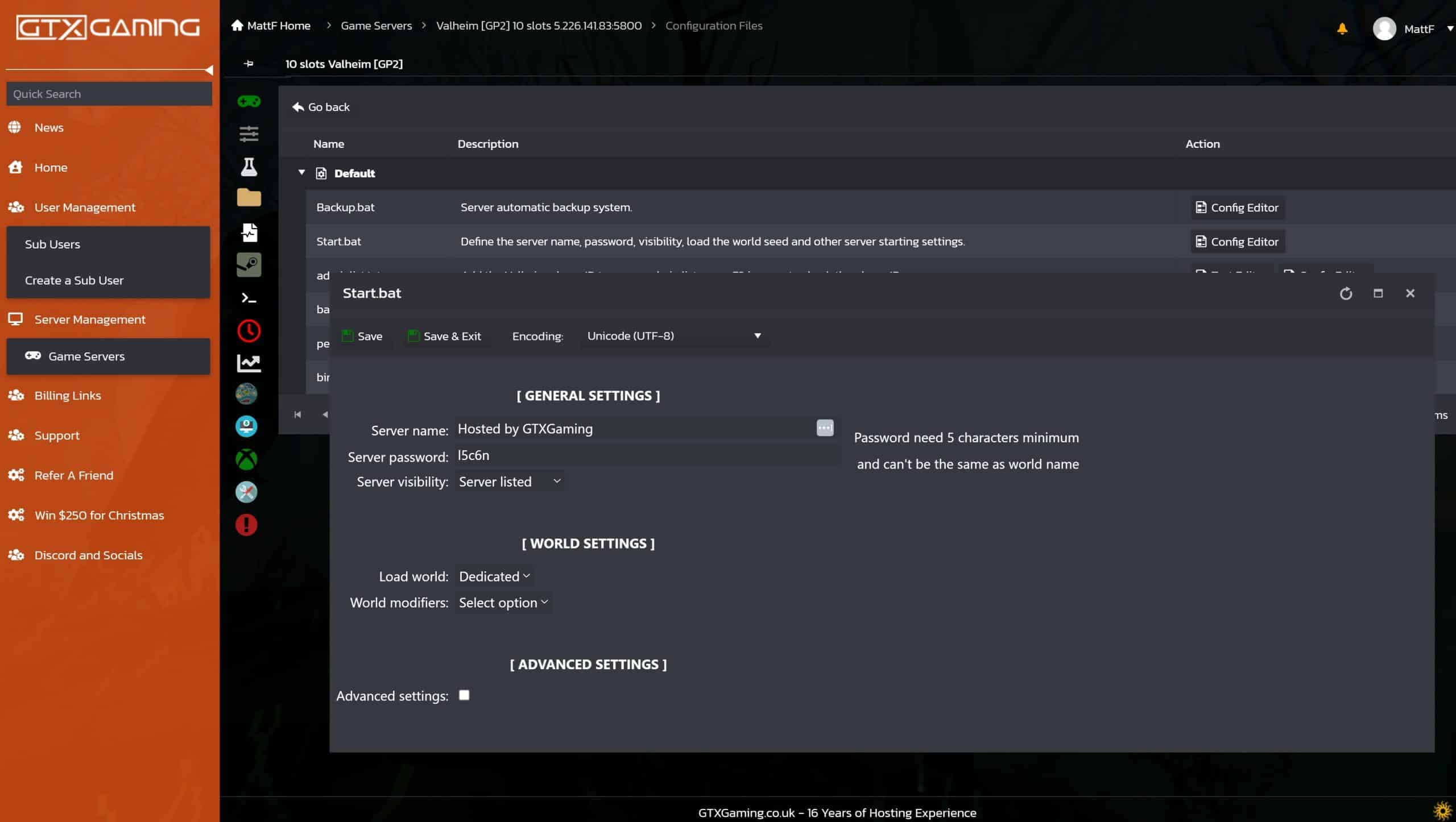 grand gate
Is it possibly related to that patch that changed the world name a few weeks ago?
I had to set my world name back from my backup files
 frigid summit
Alright since I keep getting bounced around and getting no help.
I set up gportal for some friends, Im trying to put a simple list of mods on the server but cant seem to get them to work with Filezilla. Anyone able to help?
 keen folio
Hey guys, ive hosted a server before, but i moved and now my friend is hosting the server. My apartment has CGNAT, ive been trying to no avail to get around it. I game on xbox, I dabble in pc stuff but not for gaming. My ISP does provide ipv6 so 90% of my xbox functions work, except i cannot get playfab to log in, nor sign into a server. I either get stuck in perpetual playfab login while connected to my VPS, or it instantly goes to red X on my regular network… please help. I think i just need a nudge in the right direction. I thought a VPS would fix this for me but maybe its just missing a piece. The ISP already said they cant tunnel me through the network.
 ember root
I don’t know if it’s bugged but I can’t get the Native Mac Valheim Server to work with Mac OS Tahoe 26? 🤔
final current
keen folio
Hey guys, ive hosted a server before, but i moved and now my friend is hosting t...
https://valheim.fandom.com/wiki/Dedicated_servers#Working_with_Carrier-grade_NAT_(CGNAT) has the basics. Last I checked, there were still bugs preventing IPv6 from working well on the client side, unfortunately.
final current
ember root
I don’t know if it’s bugged but I can’t get the Native Mac Valheim Server to wor...
I haven't personally tried that combination yet, but there ought not to be anything preventing it. Are you using the Steam version or Apple App Store? What are you seeing the logs?
ember root
Mac version
final current
mystic wagon
Server computer local has a lot more in terms of files in worlds_local, maybe I ...
If your startup script was replaced, it's often as simple as the world name as others have mentioned. Just make sure your -world <world name> argument points to the correct <world name>.fwl/<world name>.db pair from your server's worlds_local dir. The default one had been -world Dedicated so if the new one is something else, you'll just need to change that.
Note I'm not talking about the -name argument.
final current
ember root
Mac version
There are two Mac versions, one from Steam and one from the Apple App Store. Which one are you using?
ember root
Apple App Store
final current
Thanks. What are you seeing in the server log when you start it?
ember root
 final current
ember root
final current
ember root
That looks pretty great, does it not get any further?
ember root
No it look like it froze?
final current
ember root
No it look like it froze?
Custom start_server.command or out-of-the-box? If custom, you can attach it here.
ember root
mystic wagon
final current
If your startup script was replaced, it's often as simple as the world name as o...
Checking this out tonight I appreciate everyone's support
ocean kelp
keen folio
Hey guys, ive hosted a server before, but i moved and now my friend is hosting t...
Use a proxy, a reverse proxy
final current
ember root
Can you attach your start_server.command here? Feel free to obfuscate the world name or password if they are private. If you decide to paste the contents here instead of the file, make sure to not include any comment lines as the auto-mod hates them (e.g. # comment text)
And had this been running fine for your under Sequoia or this this is the first time trying it at all?
ember root
First time running it, I did not know it existed til now lol
I think I got it working, I just started over with the demo file and worked off that
Ya all is working and I got to use my already built world! 😊👍
 molten apex
Hey people, can anyone help me out and tell me how I would lower the death skill drain on my dedicated server? It’s with Valhost. I’m kinda dumb so explain it to me like a child lol
final current
molten apex
Hey people, can anyone help me out and tell me how I would lower the death skill...
If you were self-hosting, it would be a matter of adding a -setkey "SkillReductionRate 50" argument, replacing 50 with your desired % of normal rate. As you're using a 3rd-party provider, it would be best to ask their support dept if it's not clear in their documentation.
Alternatively, if you're an adminlisted player, you can use the in-game console, enter the devcommands context and setkey SkillReductionRate 50. Without a mod like Server Devcommands, you won't get much feedback on whether the command worked or the current global keys. Your player profile will also get marked as a cheater in its internal stats.
final current
 verbal breach
I’m trying to find ppl to play with
verbal breach
I’m trying to find ppl to play with
Welcome. Check out #1024264966712340510
worn latch
Hi, we need advice on server choice. We've paid for hosting at dathost.net, but after constructing over a dozen buildings, we're encountering severe lag. This affects basic mechanics like opening chests and picking up items. Can anyone recommend a website or host offering a proven, stable server that can comfortably support around 7 players who primarily focus on building?
final current
worn latch
Hi, we need advice on server choice. We've paid for hosting at dathost.net, but ...
I don't have any good provider advice, but if all of your players are using the Steam version of the game, consider dropping Crossplay if you haven't already.
floral jay
worn latch
Hi, we need advice on server choice. We've paid for hosting at dathost.net, but ...
Valheim dedicated servers mostly just do communications between players and some controll actions. Most of the processing is done client side. If you are experiencing high lag you need to start with troubleshooting every player on the server.
 harsh gyro
Hi, i have two questions, first, the only way to use commands is from the game client? I'm running valheim inside a screen session but i cant use commands (help for example). Second, is there a way to know how many players are connected to the server from linux?
mystic wagon
Okay I have resolved my problems I was dumb and needed to repoint the .bat file at my server world file, it wasn't named what I expected it to be named
Thanks again for assistance
frigid summit
I solved my gportal mod issue mostly, but what I've run into is that Gportal doesnt seem to like OdinShipPlus. As it seems to cause failure.
Removed it. Now the server works but when Valheim shows it I got a red X. I feel like Im missing something.
floral jay
frigid summit
I solved my gportal mod issue mostly, but what I've run into is that Gportal doe...
I believe you need to pay to use OdinShipPlus on a server
final current
harsh gyro
Hi, i have two questions, first, the only way to use commands is from the game c...
The Dedicated Server doesn't currently support stdin input, unfortunately, so about the most you can really send it in screen or tmux is a Ctrl+C to kick off an interrupt signal.
If you want to get the current players count and you're using the Steam/direct backend and the server is public, you can send an A2S query to the Steamworks query port (UDP port 2457 by default)
Python library: https://github.com/Yepoleb/python-a2s
JavaScript library: https://gamedig.github.io/
Otherwise you are looking at mods or log analysis.
 teal kite
I had to restart server PC for windows update, it seemed to have reset my world and server name.
Servername has been fixed...world not so much, any tips?
ocean kelp
Don't use windows for servers, if you consider that a tip
teal kite
not really helpful but ok
ocean kelp
Unless you have backups, there's not much you can do really
worn latch
final current
The Dedicated Server doesn't currently support stdin input, unfortunately, so ab...
Thank you
teal kite
ocean kelp
Unless you have backups, there's not much you can do really
I do I believe
Do I just use the backups name for the "world" part of the headless server.bat?


i've tried two backups now swapping the .db file name in the -world"_" section and they still start me back at the ritual stones
my worry is that I overwrite the world we've been building
final current
teal kite
From your file list DirtyValhalla looks pretty fresh. Have you tried just Dedicated as your world name?
-world Dedicated
That was the default one a few versions ago and at 7 MiB DB size, is your most established one.
final current
Optional. It's only required if you're grouping together space-delimited words.
If you like the syntax, it definitely doesn't hurt anything
teal kite
awesome, worked perfectly, thank you so much!
 shell monolith
Anyone know how to change the world modifiers through a 3rd party server renting company like nitrado without having a pc?
 upbeat parcel
what settings do we change to make base raids happen more often ?
final current
shell monolith
Anyone know how to change the world modifiers through a 3rd party server renting...
I recommend chatting with their support team if they don't have it documented. You're paying them after all.
final current
upbeat parcel
what settings do we change to make base raids happen more often ?
See EventRate in https://valheim.fandom.com/wiki/Global_Keys#World_Modifier_Keys
Can be set at start with something like -setkey "EventRate 50"
final current
shell monolith
Anyone know how to change the world modifiers through a 3rd party server renting...
If they give you access to the shell script or batch file that launches the server, you could override the starting arguments. See the manual in this channel's pins for some examples if that's the case.
shell monolith
Thanks
median flint
Anyone know how to handle running a modded dedicated server through r2modman when the server is being hosted by gportal with valheim plus built in to gportal?
We originally played the server with having to download valheimplus and put it into our local valheim steam folder
When we launch valheim through r2modman it doesn't launch with the valheimplus that we put into our steam folder
Do we need to just not use valheim plus? Add valheim plus to our r2modman? (Concerned about it being a different version and not containing all of the settings we use from the gportal interface)
final current
median flint
Anyone know how to handle running a modded dedicated server through r2modman whe...
#mods-issues or even better gportal support is bound to be a bit more helpful than us on this one. From what I understand, the advice tends to be either to use only ValheimPlus' infrastructure+plugin(s)/libs or to use the Valheim BepInEx pack with any other mods unrelated to ValheimPlus.
median flint
final current
<#1202550198174486599> or even better gportal support is bound to be a bit more ...
Thank you
heady depot
Does anyone have a clue why i have a verison 0.221.6 on my linux dedicated server, with docker image from lloeschle?
frozen zephyr
There was an update this morning for server and client, not sure what version number it is
heady depot
Awesome, cannot connect 😄 Any idea how to fix this?
plain trellis
heady depot
Does anyone have a clue why i have a verison 0.221.6 on my linux dedicated serve...
Shouldn't be any issue with connecting a client 0.221.4 to a server running 0.221.6.
Not sure if anything is off with the old and original (outdated?) image by lloeschle.
You could upgrade to the updated fork, and see if that resolves things.
heady depot
I cant connect with the clients, either geforce now nor mac os client
plain trellis
heady depot
I cant connect with the clients, either geforce now nor mac os client
So since my linux server v 0.221.6 works with windows Valheim v 0.221.4, something could be off with your mac and GeForce.
heady depot
plain trellis
So since my linux server v 0.221.6 works with windows Valheim v 0.221.4, somethi...
geforce now basically just runs a windows system...
plain trellis
heady depot
geforce now basically just runs a windows system...
Yeah. Much could be wrong in your end. You need to check the log files on server and client.
harsh gyro
final current
The Dedicated Server doesn't currently support stdin input, unfortunately, so ab...
Understood, thank you i'll try that
 white pilot
Hey can someone help me with making a dedicated server?
final current
white pilot
Hey can someone help me with making a dedicated server?
Sure, out of your friends, I'd find the one with the best connection to the Internet (e.g. no CGNAT at ISP. Has ethernet, fiber, or DAC to router instead of Wi-fi).
If that person owns the game on Steam, they can enable the Tools filtered in in the Library view, and from there can download the dedicated server. If this is a headless machine or they haven't purchased the game yet, they could use SteamCMD or the 3rd-party Depot Downloader from a shell instead to download it
Once downloaded, there will be a manual PDF in the installation dir that will give some hints on the starting arguments to add to the launch line of the shell script (or batch file if using Windows).
white pilot
I have the most stable one out of the 3 (ethernet), I searched in YouTube but found nothing helpful and we want to play even if the host (me) isnt playing and afk. I did everything but I dont get one thing, where do I find the password and how do I know i did everything correctly
final current
white pilot
I have the most stable one out of the 3 (ethernet), I searched in YouTube but fo...
That should be covered in the manual, but it's one of the arguments you give to the server executable in the shell script or batch file.
white pilot
Ill try, but if I dont manage are you able to help me in a vc?
final current
I'm afraid I can't, sorry. Too late at night for me. Look for the -password argument. If you made a copy of the template file included in the installation dir, it will already have a password filled in you can replace.
white pilot
Oh okay, thanks!
 silver mica
Hey, anyone able to help out with admin commands on my dedicated server hosted by Dathost?
 halcyon lion
Hi there, is there any way to force server return online players names in 2457 port response ?
proven niche
silver mica
Hey, anyone able to help out with admin commands on my dedicated server hosted b...
What sort of help do you need with admin commands?
proven niche
halcyon lion
Hi there, is there any way to force server return online players names in 2457 p...
I believe you'd need a mod to do that. You can ask in the #mods-discussion channel, if you like.
 sharp crypt
hello, looking for a little assistance, cant host a dedi server with crossplay enabled and join it within the same network, it loses the connection to playfab and kicks everyone after a few minutes, i've searched about and cant really find anything which helps
final current
sharp crypt
hello, looking for a little assistance, cant host a dedi server with crossplay e...
I've not seen anything like this. You're connecting using the join/invite code while on the same LAN?
sharp crypt
yes, once i connect it seems unable to distinguish the client from the server on the same subnet and everyone gets disconnected after a few minutes, the server then reconnects to playfab and everyone is able to reconnect
final current
sharp crypt
yes, once i connect it seems unable to distinguish the client from the server on...
I would start by looking at your router. If you have any QoS, traffic shaping, or advanced security features like UDP flood protection, consider trying this again with those disabled. Same goes for local firewall on the server.
sharp crypt
i was wondering if it uses upnp and mapping the ports manually has caused it
for most issues like this i'd just connect to the local ip but with crossplay enabled thats not an option
final current
sharp crypt
i was wondering if it uses upnp and mapping the ports manually has caused it
It doesn't currently use UPnP and if you have any ports forwarded over your NAT, that forwarding goes unused with Crossplay. Instead, your server will make an outbound communication to a relay server hosted by Microsoft. Your player client will make another outbound communication to that relay server. They'll be talking to eachother over that relay. So ports-wise, it's just using the basic stateful connection tracking that your router provides to see that replies get to the right place.
If you aren't triggering traffic shaping, QoS, or a security feature, there's a chance you're either saturating your outbound bandwidth or your router's CPU capacity.
sharp crypt
well ive tried all that too now and its still no go. i guess my cross plat mates are out of luck
sharp crypt
turns out it was something else not able to ping the server due to some changes made last month, then restarting it thinking it had crashed
final current
LinuxGSM?
sharp crypt
yes and i looked for hours and didnt spot that issue till minutes ago, now i cant get the monitor to stop on it
final current
Yeah, no one seems to be bothering to fix it. Maybe I can if I get a moment this weekend. https://github.com/GameServerManagers/linuxgsm/issues/4821
sharp crypt
i just took the heavy handed approach and commented out all the calls to restart the server from the script and it'll do for now 😉
the sever console is being spammed but it cant restart the fully working server
final current
sharp crypt
the sever console is being spammed but it cant restart the fully working server
You can just revert that and set querymode="1" in your own config for vhserver. That's what I'd be doing in the source code if I submitted a PR.
final current
Project owner is strict on commit structure/syntax. Hopefully I did it up to his standard.
https://github.com/GameServerManagers/LinuxGSM/pull/4840
GitHub
Description
Following Valheim's Call to Arms update in summer of 2025, Crossplay-enabled Valheim servers don't expose a Steamworks query port even when public. With this change, the...
 flat nymph
Looking for some help getting server running on a linux box. The output isn't very telling and no log.txt is created: ./data/valheim_server.x86_64 -vvvv -name noobsoonly -port 2456 -world asdftest -passwo rd fffff -savedir ./config -logFile ./log.txt [UnityMemory] Configuration Parameters - Can be set up in boot.config "memorysetup-bucket-allocator-granularity=16" "memorysetup-bucket-allocator-bucket-count=8" "memorysetup-bucket-allocator-block-size=4194304" "memorysetup-bucket-allocator-block-count=1" "memorysetup-main-allocator-block-size=16777216" "memorysetup-thread-allocator-block-size=16777216" "memorysetup-gfx-main-allocator-block-size=16777216" "memorysetup-gfx-thread-allocator-block-size=16777216" "memorysetup-cache-allocator-block-size=4194304" "memorysetup-typetree-allocator-block-size=2097152" "memorysetup-profiler-bucket-allocator-granularity=16" "memorysetup-profiler-bucket-allocator-bucket-count=8" "memorysetup-profiler-bucket-allocator-block-size=4194304" "memorysetup-profiler-bucket-allocator-block-count=1" "memorysetup-profiler-allocator-block-size=16777216" "memorysetup-profiler-editor-allocator-block-size=1048576" "memorysetup-temp-allocator-size-main=4194304" "memorysetup-job-temp-allocator-block-size=2097152" "memorysetup-job-temp-allocator-block-size-background=1048576" "memorysetup-job-temp-allocator-reduction-small-platforms=262144" "memorysetup-allocator-temp-initial-block-size-main=262144" "memorysetup-allocator-temp-initial-block-size-worker=262144" "memorysetup-temp-allocator-size-background-worker=32768" "memorysetup-temp-allocator-size-job-worker=262144" "memorysetup-temp-allocator-size-preload-manager=262144" "memorysetup-temp-allocator-size-nav-mesh-worker=65536" "memorysetup-temp-allocator-size-audio-worker=65536" "memorysetup-temp-allocator-size-cloud-worker=32768" "memorysetup-temp-allocator-size-gfx=262144"
final current
flat nymph
Looking for some help getting server running on a linux box. The output isn't ve...
I'd recommend removing the -vvvv as I don't think that is an argument interpreted by Valheim or the underlying engine. As for log.txt, it should be in the current directory, which looks to be the one that contains data and config. Make sure that dir is writable by the user you are running Valheim as.
You will not get anything beyond those memory config params once it starts logging to the file.
flat nymph
final current
I'd recommend removing the `-vvvv` as I don't think that is an argument interpre...
Oh you know what I actually just added the -vvvv recently to see if I could get more output but it had no effect and the behavior seems to be the same without (no ouput and no log).
[UnityMemory] Configuration Parameters - Can be set up in boot.config
    "memorysetup-bucket-allocator-granularity=16"
    "memorysetup-bucket-allocator-bucket-count=8"
    "memorysetup-bucket-allocator-block-size=4194304"
    "memorysetup-bucket-allocator-block-count=1"
    "memorysetup-main-allocator-block-size=16777216"
    "memorysetup-thread-allocator-block-size=16777216"
    "memorysetup-gfx-main-allocator-block-size=16777216"
    "memorysetup-gfx-thread-allocator-block-size=16777216"
    "memorysetup-cache-allocator-block-size=4194304"
    "memorysetup-typetree-allocator-block-size=2097152"
    "memorysetup-profiler-bucket-allocator-granularity=16"
    "memorysetup-profiler-bucket-allocator-bucket-count=8"
    "memorysetup-profiler-bucket-allocator-block-size=4194304"
    "memorysetup-profiler-bucket-allocator-block-count=1"
    "memorysetup-profiler-allocator-block-size=16777216"
    "memorysetup-profiler-editor-allocator-block-size=1048576"
    "memorysetup-temp-allocator-size-main=4194304"
    "memorysetup-job-temp-allocator-block-size=2097152"
    "memorysetup-job-temp-allocator-block-size-background=1048576"
    "memorysetup-job-temp-allocator-reduction-small-platforms=262144"
    "memorysetup-allocator-temp-initial-block-size-main=262144"
    "memorysetup-allocator-temp-initial-block-size-worker=262144"
    "memorysetup-temp-allocator-size-background-worker=32768"
    "memorysetup-temp-allocator-size-job-worker=262144"
    "memorysetup-temp-allocator-size-preload-manager=262144"
    "memorysetup-temp-allocator-size-nav-mesh-worker=65536"
    "memorysetup-temp-allocator-size-audio-worker=65536"
    "memorysetup-temp-allocator-size-cloud-worker=32768"
    "memorysetup-temp-allocator-size-gfx=262144"
I can confirm that user running the command has read/write/execute access to both the data and config dirs
If it matters, my server should be up to date: ```[ 0%] Checking for available updates...
[----] Verifying installation...
UpdateUI: skip show logo
Steam Console Client (c) Valve Corporation - version 1759461699
-- type 'quit' to exit --
Loading Steam API...OK
Connecting anonymously to Steam Public...OK
Waiting for client config...OK
Waiting for user info...OK
Please use force_install_dir before logon!
Update state (0x61) downloading, progress: 6.04 (107476144 / 1780754080)
Update state (0x61) downloading, progress: 24.89 (443147425 / 1780754080)
Update state (0x61) downloading, progress: 34.90 (621563137 / 1780754080)
Update state (0x61) downloading, progress: 44.79 (797585116 / 1780754080)
Update state (0x61) downloading, progress: 53.77 (957507706 / 1780754080)
Update state (0x61) downloading, progress: 62.56 (1114056973 / 1780754080)
Update state (0x61) downloading, progress: 72.85 (1297322207 / 1780754080)
Update state (0x61) downloading, progress: 81.86 (1457750696 / 1780754080)
Update state (0x61) downloading, progress: 92.50 (1647112749 / 1780754080)
Update state (0x61) downloading, progress: 98.40 (1752182348 / 1780754080)
Update state (0x81) verifying update, progress: 48.38 (861526771 / 1780754080)
IPC function call IClientAppManager::GetUpdateInfo took too long: 53 msec
Success! App '896660' fully installed.
Unloading Steam API...OK```
final current
flat nymph
I can confirm that user running the command has read/write/execute access to bo...
It's the directory above them you told it to put the log file in though.
flat nymph
final current
It's the directory above them you told it to put the log file in though.
Ah thank you. Log is getting dumped to data/log.txt. I thought it would be put into where I ran the command. Here's the log from a run: https://bpa.st/EFF54
I'm not too sure what's going on but NullGfxDevice: Version: NULL 1.0 [1.0] Renderer: Null Device Vendor: Unity Technologies Looks like the server might not be picking up my GPU?
There's no indication of any error before the server just shuts down though: 10/27/2025 13:20:47: Console: Emotes: wave, sit, challenge, cheer, nonono, thumbsup, point, blowkiss, bow, cower, cry, despair, flex, comehere, headbang, kneel, laugh, roar, shrug, dance, relax, toast, rest 10/27/2025 13:20:47: Console: 10/27/2025 13:20:47: Fetching PlatformPrefs 'GuiScale' before loading defaults 10/27/2025 13:20:48: Steam manager on destroy 10/27/2025 13:20:48: ZNet OnDestroy 10/27/2025 13:20:48: Net scene destroyed [Physics::Module] Cleanup current backned. [Physics::Module] Id: 0xf2b8ea05 Input System module state changed to: ShutdownInProgress. Input System polling thread exited. Input System module state changed to: Shutdown.
final current
flat nymph
I'm not too sure what's going on but ```NullGfxDevice:
Version: NULL 1.0 [1...
Yeah, it's not picking up your GPU, but that's intentional/normal for the server binary.
I don't know why it didn't use your current directory, which was the one above data. Maybe a Unity quirk. Valheim just passes -logFile through to the engine to handle. I guess it does it relative to the savedir. Sorry about that! good to know though
As for your problem, you're just missing some boilerplate setup. If you take a look at the shell script template, you should be able to see what you'd be missing. At the very least, the Steam APP ID environment variable needs to be set
flat nymph
Hum where would one find such a boilerplate setup? I'm looking at the pinned PDF and don't see anything in there relating to the steam APP ID.
Ah I found it thank you.
flat nymph
A fews I had to change to get the server to run:
- Export the app ID
- The server expects to be run from the data directory, I had to pushd in the script to get it to work.
Here's my final script:
set -ex
export templdpath=$LD_LIBRARY_PATH
export LD_LIBRARY_PATH=./linux64:$LD_LIBRARY_PATH
export SteamAppID=892970

echo world=$world, pw=$pw, name=$name
echo "Starting server PRESS CTRL-C to exit"
pushd /media/games/valheim/data
./valheim_server.x86_64 \
    -name $name \
    -port 2456 \
    -world $world \
    -password $pw \
    -savedir /media/games/valheim/config \
    -public 1
popd /media/games/valheim/data
export LD_LIBRARY_PATH=$templdpath```Are world modifiers applied at runtime or during world creation? e.g. If I create a world without modifiers, and then run the server with -setkey nomap, is map supposed to be disabled?
Is there a way to inspect the world modifiers inside the game?
final current
flat nymph
Are world modifiers applied at runtime or during world creation? e.g. If I creat...
- Modifiers supplied by command line are applied at server start regardless of whether the world is new or established.
- They are applied to the world metadata file and are persistent across starts, so if you use some combination of
-preset,-modifier, or-setkeyarguments then start the server later without those arguments, the previously applied ones are still in effect unless you reset them with a command or new preset. - Admin-listed players can also change modifiers during gameplay using the
setworldpreset,setworldmodifier, andresetworldkeysconsole commands. They can also theoretically enter thedevcommandscontext to run thesetkeycommand, but the game won't give you any feedback from the server to know if it applied correctly.
final current
flat nymph
Is there a way to inspect the world modifiers inside the game?
- For Crossplay servers as well as public ones, many of the basic modifiers are reported in the server list to clients in the server metadata popover you get when hovering.
- Most should be reported to any player in the F2 window available in-game (in the "World Modifiers" section or whatever your localized version is)
- An admin-listed player with the Server Devcommands mod can use the
listkeysdev command to get a list of what specifically is applied currently. - With the right tools or knowledge, you can gleam the current modifier sliders/keys from your
<savedir>/worlds_local/<world name>.fwlfile, which is where they are persisted.
flat nymph
final current
* Modifiers supplied by command line are applied at server start regardless of w...
Thanks for the detailed response. If I want to pass multiple values to -modifier or -setkey, do I pass the option multiple times? For example, if I want to pass "nobuildcost" and "nomap" to setkey, should I do "-setkey nobuildcost -setkey nomap"?
final current
flat nymph
Thanks for the detailed response. If I want to pass multiple values to -modifier...
You got it!
 graceful seal
debian 13, latest valheim dedicated server from steamcmd

running with start_server.sh, server just hangs at that gpu device message
final current
graceful seal
running with start_server.sh, server just hangs at that gpu device message
Any command line argument customizations to that script?
graceful seal
nope
i tried some docker images too and no luck so far, i'll wipe that vps later on today and try again, i was planning to reinstall anyway
final current
graceful seal
i tried some docker images too and no luck so far, i'll wipe that vps later on t...
Try with removing the -crossplay argument just in case.
And if you can, try attaching the full log in a post here (e.g. as a .txt or .log file)
 hoary night
Hello! I've got a rather severe issue with my dedicated server where it won't load the world in properly, and won't sync changes/builds between me and my brother, whom I'm playing with.
final current
hoary night
Hello! I've got a rather severe issue with my dedicated server where it won't lo...
When you say it won't load the world in properly, do you mean there's an error, or something else? Also is this Dedicated Server running on the same computer that hosts the game?
When you say it won't sync changes, you mean you're both in the game and can see eachother but when you start building something, the other party doesn't see those pieces getting put down? Or something else?
hoary night
final current
When you say it won't load the world in properly, do you mean there's an error, ...
Hey! It doesn't load the world in as in it doesn't load in all of the assets - as if the game hasn't synched with the server properly. The lack of syncing for changes is exactly as you describe, yes. None of us are running the game locally, it's run on a third-party dedicated server.
final current
hoary night
Hey! It doesn't load the world in as in it doesn't load in all of the assets - a...
The issues you describe with syncing are often client-side, as in one player's client who has been designated as the "chunk-master" happens to be on Wi-fi or has a subpar CPU, preventing new objects like building pieces from getting saved to the server.
When one of those players is on the server alone, do those same issues appear? And how about for the other player?
If even one player connecting isn't getting structures that should be there, it could be a server-side issue, such as corrupt or slow storage, or the server is bugged and needs a restart. Your 3rd-party host likely has at least a restart action. These issues are rare, but it's not impossible.
hoary night
It works fine when either of us leave the chunk - the other player can manipulate the world and stuff without issue.
Could it maybe be because I've got the VR mod installed, though not enabled?
And my brother does not @final current
final current
Definitely possible, yes, any mods can, especially when one player doesn't have it. I would try it one time with both players without the mod in use. I would make sure the mod is up to date (0.9.20) and see the note about "nonVRPlayer" mode for the other player in the documentation here: https://www.nexusmods.com/valheim/mods/847?tab=description
If there are any other mods in use by either player or you need to dive deeper on the VHVR issue, I would take it to #mods-issues for more immersive help around those.
hoary night
final current
*Definitely* possible, yes, any mods can, especially when one player doesn't hav...
I tried uninstalling the VHVR mod (Which is AWESOME, by the way, but it does modify some DLLs and stuff) and that solved the issue entirely, as far as I can tell. I am SO RELIEVED. We've both got over 100 hours on this save/world, and it's the first time my brother's played the game so we're very attached.
Thanks for helping me troubleshoot! It really was very much appreciated.
final current
Nice! Glad you got it working. Hopefully you can find a way to keep the cool VR stuff, but if you can't, vanilla Valheim is still pretty rad 😄
hoary night
final current
Nice! Glad you got it working. Hopefully you can find a way to keep the cool VR ...
I'm thinking it'll probably work if my brother also installs the VHVR mod and either disables it but keeps it installed, or also plays in VR
final current
I think in that case, that documented nonVRPlayer mode should hopefully do the trick
hoary night
Yah, that's my hope as well
hoary night
final current
I think in that case, that documented nonVRPlayer mode should hopefully do the t...
Ach, I celebrated too soon it seems. My brother disconnected and reconnected, and now he's got the issue again. What might it be?
Is there any known cause for problems like this other than mod mismatch?
final current
hoary night
Is there any known cause for problems like this other than mod mismatch?
It's usually one player having a bad connection or slow PC if observed in vanilla. Note that Crossplay will also amplify issues with either of those. If you are also not located in good connection proximity to your 3rd-party host (or the chosen PlayFab Party relay if using Crossplay), that can certainly be a factor.
hoary night
final current
It's usually one player having a bad connection or slow PC if observed in vanill...
Hmm. Will Crospplay low it down even if neither of us are utilizing it?
final current
hoary night
Hmm. Will Crospplay low it down even if neither of us are utilizing it?
If it's enabled on the server, then you're using it. If not, then no worries there.
hoary night
final current
If it's enabled on the server, then you're using it. If not, then no worries the...
Hmm. I'll have to rigure out where to check if crossplay is enabled
final current
hoary night
Hmm. I'll have to rigure out where to check if crossplay is enabled
Might as well see if they have a restart button while you're at it.
Given there is no clear culprit for your situation, the next thing I would do is log analysis. When a player encounters the missing assets, have both players grab a copy of the current Player.log from the game clients to analyze. The server host may also provide the server log.
 dapper ruin
am thinking about renting a server, am looking for suggestions on affordable and relatively simple/beginner-friendly hosting sites (preferably Canadian if possible for way better ping and stable exchange rates). probably won't be doing any mods, or possibly just a couple very small basic ones. 3-5 players, probably just the 3 of us.
i did keyword search in here but my eyes went kinda swimmy trying to find names of sites
(please let me know if this question isn't allowed)
tysm ♥
i had a provider that i really loved for minecraft, but i looked at their pings for valheim servers and they're pretty high atm
final current
This is not a recommendation, but I do know that valhost.net offers a Quebec edge. Canada region seems harder to find amongst the big names.
dapper ruin
it's also often just one data centre in the whole country so it can be thousands of km away and high ping
hoary night
final current
Might as well see if they have a restart button while you're at it.
Given there...
I'm sorry to be replying to you specifically - I'd welcome help with this issue from anyone - but the issues are persisting, and we're having a really hard time troubleshooting. It's tough. I managed to disable crossplay, which seems to have made no difference at all, and I've installed a mod that supposedly ups the data limit from 64kbs
Neither of which seem to have fixed the issue.
final current
hoary night
I'm sorry to be replying to you specifically - I'd welcome help with this issue ...
Log analysis is still my recommendation. You're welcome to post the Player.logs here. You can omit or obfuscate IP addresses and other bits you deem private.
hoary night
This is my log, I'll post my brother's and the server's in a bit
Brother's log
Server logs - are either of these helpful?
final current
hoary night
This is my log, I'll post my brother's and the server's in a bit
Those are helpful, sure. You're running a set of mods, and it looks like you're at least consistent in versions in the environments. Assuming you've already checked each of the mods' sites/news to make sure you're on the latest version and that the mod version is compatible with your Valheim version, you might mention the mod+versions list in #mods-issues to see if there are known issues with any of them. I see exceptions from adventurebackpacks in your brother's log at the very least.
hoary night
Oh really now? If that's the issue then maybe we can fix it
Troubleshooting is always the toughest part of these types of issues
final current
Yeah, It is tough, and one reason it has its own channel. With Valheim being early access and getting both stability refactors, engine upgrades, new biomes/locations/items, an attentive mod developer has a lot to keep up with (assuming they are attentive).
hoary night
final current
Yeah, It is tough, and one reason it has its own channel. With Valheim being ear...
Plus there's the additional human factor of us nimrod players having to make sure we install everything correctly and at least try to check for compatibility
Really, in some ways it's more amazing that sometimes it does work.
 white river
how to fix guys
 final current
white river
how to fix guys
final current
white river
how to fix guys
#mods-issues would likely be of more help here
 frail vigil
Is there a way to improve the server's ping?
For context:
Self-Hosted Server
Average temp over the past 4 days of the server being on: 22°C (no this isn't a joke)
Internet speed: 1000 up 100 down (server can do 800up 100down)
Server specs: i5-4590 8gb ram
Average ping from server to my game client on my other pc: 160ms
Considering that both computers have wired internet on the same router, I feel like this ping is abnormal.
Maybe someone could enlighten me on wether this is a game engine limitation, or something that can be improved, either way an answer will make my day.
ps. I know it's playable and I'm fine with it but I'd still want better if possible
final current
frail vigil
Is there a way to improve the server's ping?
For context:
Self-Hosted Server
Ave...
- Number one optimization you can make is to drop Crossplay if you're using it and connect using your LAN IP.
- Disable "smart" security features of your server's firewall. For players connecting over your router, same goes for router's firewall (definitely drop UDP Flood Protection if enabled).
- Lower Steam's game browser ping frequency in settings/preferences.
- If using QoS or traffic shaping, consider dropping it (for your Internet-connecting players)
- If using Iron Gate's container image builder, make sure the Steam-delivered steamclient.so is used instead of the one included in Dedicated Server's docker dir.
- If using docker, podman, or Kubernetes, use ipvlan networking instead of the usual bridge networking (especially avoid "overlay" networks)
frail vigil
final current
* Number one optimization you can make is to drop Crossplay if you're using it a...
Could I perhaps steal some of your free time for you to explain me these things in detail please? Can be done in DMs if need be. Only thing I really know how to do out of all of these is turn off crossplay and I'd like to learn why these things would be better.
final current
frail vigil
Could I perhaps steal some of your free time for you to explain me these things ...
The Crossplay one is pretty simple: Crossplay launches a relay server hosted by Microsoft and the server and all players communicate through that relay server. This adds an extra hop in both directions of communication (worse than both when you consider the server itself already acts like a relay for most things). It makes setting up networking very easy because there's no inbound routing to set up with your router, but has obvious drawbacks in latency. When it's engaged, there is no way to connect to the server directly, which you definitely want when you're on the same LAN.
The Steam one mostly affects behavior when you or another player on your LAN is in the lobbies lists.
QoS or traffic shaping… you'd want to get familiar with your router's administration features (or your switch's if you're using managed switching, most home users aren't).
The bottom 2 mostly apply to folks hosting the service on Linux.
flat nymph
Question: I'm playing with "-setkey nomap" but my waystones (the boss stones) don't shift my camera to the direction of the boss like it does in the "-preset hardcore" setting. Is this intentional? Is there a way to turn the camera adjustment for boss stones on?
final current
flat nymph
Question: I'm playing with "-setkey nomap" but my waystones (the boss stones) do...
Hmm, it should work the same way. The presets just end up setting a set of flags.
If you have set a different preset, make sure any -modifier or -setkey arguments come after it.
flat nymph
Hmm indeed that's how I have it. Interacting with the seer stone just gives the message "Location already added to map" with no camera adjustments 🙁
final current
flat nymph
Hmm indeed that's how I have it. Interacting with the seer stone just gives the ...
Sounds like you're not the only one https://www.reddit.com/r/valheim/comments/1d7ifyt/locating_bosses_in_no_map_games_is_sort_of_a/
final current
But someone in that thread says "keep trying and they'll work again"
 vapid frigate
so im trying to join a dedicated server i played on previously, it is still active and i have been trying to get back on it. It will start connecting but then before i get to input a password it fails and sends me back to title screen. Anyone know any fixes? ive tried removing the server and readding it, restarting steam, restarting my computer, nothing seems to work
final current
vapid frigate
so im trying to join a dedicated server i played on previously, it is still acti...
Does it just say Failed to connect or is it a longer message in the dialog? Your Player.log after the failure dialog might shed some light. You're also welcome to attach it here with any private parts obfuscated. If the server switched backend (e.g. Crossplay vs Steam/direct) then you might need to remove and re-add it to your server list.
vapid frigate
final current
Does it just say *Failed to connect* or is it a longer message in the dialog? Yo...
just the failed to connect one
i have also already tried to remove and readd it to server list
final current
Make sure the server operator hasn't changed the IP address or domain name since you've been gone.
vapid frigate
i dont believe it did but let me make sure
 thick shore
Hi everyone.
Im looking for advice on the best hosting services for a valheim server, I would like to start one of me and my work comrades in the near future.
Merci d'avance!
dapper ruin
^ I'd like to know too please 💜
sage nexus
Giving that kind of advice risks violating this group's rules, and an awful lot of effort to make a good attempt to cover all of the aspects based off such a low-effort and common question, so is something people prefer not to give advice on. You will mostly need to do your own research. That said I'm sure there are appropriate places to ask such a question. But within the domain of the official game discord it's not really appropriate for them to be fielding/hosting such a subjective topic.
If you have a disused PC/non-crap spare laptop, and a half decent internet connection you should consider installing the dedicated server package off steam - instead of paying for a hosting service. That will force you tolearn how to operate a server in its simples tpossible form, so you can then assess if you really want to pay for a similar service that adds numerous layers of abstraction between you and the actual game server, which often do not make it easier unless what you want to do is already within the scope of the way they have their gameserver template set up.
Either way: be it steam dedicated on spare machine, or hosting service; you will to some degree have to spend time/effort learning how to do it.
...and questions about running your own dedicated you can discuss here :)
dapper ruin
no need to get sniffy at us, saying it's low effort is a little mean and makes some assumptions 😕
not able to do those things, I'll try to find somewhere else to ask
sage nexus
qq, not being sniffy. Stating fact
 upper quail
dapper ruin
no need to get sniffy at us, saying it's low effort is a little mean and makes s...
upper quail
dapper ruin
no need to get sniffy at us, saying it's low effort is a little mean and makes s...
i dont think its about that. just the devs dont want to play favs to any host in particular.
Youtube had guides last I was looking into it and I managed to get it to work for a while.
dapper ruin
upper quail
i dont think its about that. just the devs dont want to play favs to any host in...
makes sense yea
I'd been thinking along the lines of like, mods discussion is allowed and I wouldn't ever assume third party mods are endorsed by the devs so it'd be the same for server hosts
There is absolutely 100000% no way I can run a dedicated server from my computer
am not arguing, just saying I didn't realise it was frowned on asking
sage nexus
its not really frowned on, im just stating why you may not get a response, and your alternatives
also Irongate doesnt make any mods, those are all 3rd party [edit] oh i see what you meant.
But a dedicated is by definition run on another machine, and it can be fairly a feeble one due to the low server load this game involves.
dapper ruin
I do get what you're saying, really don't wanna explain why it's not feasible for me to do. just believe me, it's not happening lol
I'll try to find a hosting site
vapid frigate
final current
Make sure the server operator hasn't changed the IP address or domain name since...
update, nothing has changed for the server, one of my friends is able to get on the server just fine but it doesnt seem to exist for me. even trying to add it with the game servers steam menu it says the server doesnt exist. but it does or how else can someone be playing on it?
final current
vapid frigate
update, nothing has changed for the server, one of my friends is able to get on ...
Are they using Crossplay or not? And are you connecting with IP address, domain name, or Crossplay join/invite code?
What did your Player.log say?
vapid frigate
final current
Are they using Crossplay or not? And are you connecting with IP address, domain ...
pretty sure the ip address and yes they have crossplay i believe
player log^
when i try to add through the steam game servers tool i get this
 floral jay
I think crossplay has to be disabled to be able to connect through steam that way. you can input the ip ingame with crossplay
final current
vapid frigate
pretty sure the ip address and yes they have crossplay i believe
Their server isn't coming up in Crossplay queries for either that port or 2456 and like you I can't connect with Steam backend. You might need to check if they're using a whitelist, in which case you'll need to be added to it. If they are using Crossplay, it's at a different domain, IP, or port than what you've tried.
vapid frigate
final current
Their server isn't coming up in Crossplay queries for either that port or 2456 a...
i see, thank you
sage nexus
Earlier I joined a game with a steam friend via the ingame friends tab, and he had just restarted the server to explicity disable crossplay. So it appears a steam friend running a localhosted server is all you need to see and be able to NAT around router ports you would otherwise have to pre-open, and the IP isnt required. This is not something i knew you could do before. (assuming he didnt accidentally leave crossplay enabled)
final current
sage nexus
Earlier I joined a game with a steam friend via the ingame friends tab, and he ...
Nice. Yep, Steam-invited gameplay is great. It's often direct and not relayed like Crossplay, and can use UDP hole-punching to traverse NATs as an alternative to listening on incoming ports.
sage nexus
i'm surprised ive never known about this before. Makes me think that a lot of people don't despite it being an excellent option, possibly even the best option.
final current
It would be nice for CGNAT users if there were an option for dedicated server for friends to reverse-invite themselves with that flow, but dedicated server generally runs anonymously.
sage nexus
is there a downside/risk to running logged in though? It's only steamcmd that has the login option anyway right?
final current
I don't know of an easy way to do it out of the box. Maybe some environment variable tricks. Installing as an authed user in SteamCMD won't affect your Steam auth for the server run as that's done independently (e.g. via steamclient.so)
frozen zephyr
sage nexus
is there a downside/risk to running logged in though? It's only steamcmd that ha...
Not sure if Valheim does it, but there is a risk to that if using same account as the one on your gaming PC steam only lets you run a "game" from one steam login (comp) at a time
For some the dedicated server and the game are considered the same, so when opening the game steam closes the dedicated server because your trying to use same account on 2 PC to play the same thing
final current
It does do it, yeah, if you're launching with Steam instead of launching it stand-alone, Steam's license counting takes hold. I don't know if that authenticated session is actually passed to the server's Steamworks stack, though.
floral jay
Steam normally won't even let you launch two different games on two different computers from the same account. But I've never tried it with things under the dedicated server category.
final current
It's the same with a dedicated server, at least it has been in the past, and that assumes the dedicated server has the main game as a parent app id (which Valheim Dedicated Server does).
sage nexus
Steam is a fairly evolved system, so logically the steam login system should recognize any dedicated binary or headless command parameter...and as you infer: export SteamAppId=$clientAppId is asserted prior to steamcmd execution. Maybe one of their git management people like kisak could answer that question directly?
sage nexus
i imagine someone who actually has a use-case for it will test it eventually.
 mossy holly
are devcommands unavailable on dedicated?
sage nexus
the dedicated console itself accepts no input, but you can put a mod called serverDevcommands on the server and an admin client to get access to various superuser commands
mossy holly
ah ok thank you
final current
Mod is only needed on the client for most of the commands to work and players with it will still need to be admin-listed on the server.
Without the mod, an admin-listed player can enter the devcommands context and enter a couple of commands like setkey, but you won't see feedback from the server.
mossy holly
oh so i just have to install mod for clients not server then?
final current
sage nexus
Steam is a fairly evolved system, so logically the steam login system should rec...
SteamCMD doesn't officially support launching games or servers w/ the usual context setup that Steam the rich client does.
The Steam goodness happens by Dedicated Server launching a mini Steam client of its own, a proxy really. It communicates with Valve's proprietary APIs one one side, and provides a Steamworks HTTP API server for your Dedicated Server on the other side. The Dedicated Server launches this itself with code in steamclient.so (or the macOS/Windows equivalent). Because of this and the fact that Dedicated Servers are often started standalone, there's a different auth mechanism.
With this mini Steam proxy in place, you can either log your server in anonymously (separate from the "anonymous" session SteamCMD can use for app_update and whatnot), or you can pass it a token linked to a person's account. I don't think the rich Steam GUI passes such a token in env var context if you were to launch a dedicated server with it. The normal procedure is pretty manual. Server operator gets this token themselves using a website (https://steamcommunity.com/dev/managegameservers) or web API.
The server operator then conveys this token to the Dedicated Server software to use when it initializes Steamworks goodness. I don't think Valheim Dedicated Server supports this particular process without a mod. That is to say, no matter how you launch vanilla Valheim Dedicated Server, I think your server is anonymous as far as Steam goes.
I assume Steam would let you invite people to the dedicated server through Steam UIs at that point, but I don't actually know… I don't dev with Steam APIs on a regular basis, so have to learn it all from scratch every time I dive in.
final current
mossy holly
oh so i just have to install mod for clients not server then?
That's correct, but a few commands that require server object data like find will not work without the mod installed server-side.
sage nexus
@wide cipher
 wide cipher
sage nexus
<@260480620054970378>
wide cipher
sage nexus
<@260480620054970378>
yes
 somber pond
We are playing on a server that my friend created on his computer. Yesterday, suddenly, his computer's graphics card started to reach 100% temperature, causing the game to close. The graphics card model is Asus RTX 4070. Does anyone have any recommendations?
 south gull
i5-6600K CPU @ 3.50GHz, 16 GB DDR4 2400 RAM, 500GB SATA SSD, GTX 1060 6GB : Would this be sufficient to run a dedicated server?
plain trellis
south gull
i5-6600K CPU @ 3.50GHz, 16 GB DDR4 2400 RAM, 500GB SATA SSD, GTX 1060 6GB : Woul...
A dedicated server demands less then minimal specs to run the game client side. And don't need GPU. That is because almost all game calculations in the game are on client side, and not on Server. Some crazy people claim they had a valheim server on RasPi.
plain trellis
somber pond
We are playing on a server that my friend created on his computer. Yesterday, su...
And not with any other games? Nothing else running on the computer hosting the server? Any Overclocking? Dusty cabinet, low air flow? Maybe faulty thermal pads on the GPU cooler/chipset?
somber pond
plain trellis
And not with any other games? Nothing else running on the computer hosting the s...
He tried to play 7 days to die .Nothing happened.But valheim give that error

by the way I wrote it wrong.GPU reached %100 not tempature
south gull
plain trellis
A dedicated server demands less then minimal specs to run the game client side. ...
Thank you for the info, this is reassuring. Now I just have to figure out what distro of Linux I want to use and how to configure it correctly.
plain trellis
south gull
Thank you for the info, this is reassuring. Now I just have to figure out what d...
There are plenty of guides on youtube that would fit your level of knowledge and linux setup. Personally I built a server back in '20 running Proxmox, with a VM running Portainer, running Valheim docker image. Have 4 different Valheim worlds running at the same time
 river plinth
I am trying to setup a dedicated server on a spare computer I have. I have it running and I am wanting to use Devcommands and to add my wife as an admin. Everything I am finding says to add our steem IDs to the adminlist.txt file in the root directory. My installation does not have that file. I created it, but it still says I am not authorized to use dev commands. Can anyone help me figure this out please?
final current
river plinth
I am trying to setup a dedicated server on a spare computer I have. I have it r...
That file goes in your savedir, if you haven't set one using the -savedir argument, then you'll want to consult the manual for where it will put it for your operating system. I recommend setting a savedir, but if you choose to go with the default and the manual doesn't help, let us know.
river plinth
Thanks
 hardy marten
Is 3rd party modding the only way to increase max players past 10 still in 2025?
I see they removed the DLL setting that would just mod in seconds...
 runic coyote
I'm sure this has been asked a dozen times, but I'm having a problem where, after receiving the .db and .fwl files from a friend and hosting them a linux dedicated server, the seed is correct but the buildings are not there anymore.
The world files are called "IDKwhatimdoing.db" and "IDKwhatimdoing.fwl", they are in ~/.config/unity3d/IronGate/Valheim/worlds_local. My startup script arguments are:
./valheim_server.x86_64 -name "IDKwhatimdoing" -port 2456 -world "IDKwhatimdoing" -password "password" -saveinterval 900 -backups 12 -backupshort 5400 -backuplong 21600 -crossplay
(Except the password is not actually "password").
Have I missed anything? Any ideas?
somber storm
I'm running a docker server, and today the server went down and restarting the server isn't fixing the issue. As far as I can tell the server seems to be operating normally. Any ideas what I could try to figure out the issue? It had been working fine for the last month
runic coyote
runic coyote
I'm sure this has been asked a dozen times, but I'm having a problem where, afte...
I have since managed to resolve the issue. Interestingly, it seemed to be tied to crossplay function - one player could see the buildings while another could not while crossplay was enabled. Removing crossplay resolved that issue. I also moved the files to a different directory, specified by -serverdir. Furthermore, I ran the shell as root.
Some combination of these changes has the server functioning as intended
covert jewel
somber storm
I'm running a docker server, and today the server went down and restarting the s...
What is 'the issue'? Post the log, best chance of getting assistance.
somber storm
covert jewel
What is 'the issue'? Post the log, best chance of getting assistance.
Thanks.. bit of a newbie at this. I have this set up on AWS and I don't actually know how to access the filesystem to check the log. Gotta learn a bit more I guess.
floral jay
Seriously, running things as root is never the proper solution
final current
somber storm
Thanks.. bit of a newbie at this. I have this set up on AWS and I don't actually...
If you're running the server in docker, most of the images out there log to stdout, so your container runner should have the logs (e.g. docker logs my-vlheim-container). If the container is exiting, you can run it again in your shell, but not in daemon/forking mode so you can see the logs as they come in
runic coyote
floral jay
Seriously, running things as root is never the proper solution
Absolutely, I know full well that running as root is very dumb. That said, I wanted the server up as fast as I could. I'll be taking it down once my friends and I finish playing for the day to continue troubleshooting to get it to run as a less privileged user.
 void swan
it's showing me this any idea on how to fix, I installed valheim server via steamCMD.

 dull gyro
i think i came to u guys with du*b question
to add admin to GAMe (dedicated server) u need to add steamID in admins.txt in irongate location right ?
hello btw
 edgy solar
dull gyro
i think i came to u guys with du*b question
to add admin to GAMe (dedicated serv...
edgy solar
dull gyro
i think i came to u guys with du*b question
to add admin to GAMe (dedicated serv...
yea, that should be it
dull gyro
so it aint working - but someone told me that it can be issue iff dedi is on different steam acc (i have one steam acc for dedicated server) and one for playin. Anyway i added it and it doesnt not work - someone told me to check mod for that
final current
void swan
it's showing me this any idea on how to fix, I installed valheim server via stea...
You'll need to look at the server logs to determine what the problem is. It shut down in the middle of making a Steamworks API request, which is normal; the real error will be earlier and is what triggered the shutdown.
final current
dull gyro
i think i came to u guys with du*b question
to add admin to GAMe (dedicated serv...
It will be found in <savedir>/adminlist.txt where <savedir> is the value you passed for the -savedir argument. If you aren't specifying a savedir, you can consult the manual that came with Dedicated Server for a hint on the default path for your operating system.
dull gyro
hi ! i managed it with devmod mod 🙂 but thank u for ur help
 scarlet nimbus
I'm having an issue where player's ingame characters are being rolled back 5-20 minutes when they log back in, modded server using serversidecharacters, I'm curious if anyone else has run into this issue and how they fixed it? I assume theres an issue where characters arent being saved serverside when they log out.
final current
scarlet nimbus
I'm having an issue where player's ingame characters are being rolled back 5-20 ...
#mods-issues will be better suited to answer this question
And consider collecting your server log (obfuscating private details if you want), which you can attach to a post there.
 real badger
Hello friends, im looking into setting up a server, would like it to be a live 24/7 server, can anyone recommend a server host?
 native raptor
Are you installing any mods?
 ivory kiln
gooday im running a server for my friends and had my server migrated to another host. I reinstalled the game and my friend couldn't join. After some debugging I found out that the steam downloaded a newer version of the server 221.6 while all the clients are on 221.4. I downgraded the server back to 221.5 and it seems to work.
ivory kiln
Prior to that I was running the docker image with version 221.6, clients with 221.4 do connect but not without frequent disconnects
 quiet cradle
Quick question, we are self hosting a dedicated server, is it a known issue of items disappearing when someone goes through a portal?
I have a clip I can pull, but I was putting bear meat onto cooking racks when my wife went through a portal in our base, the meat never appeared on the cooking rack, however it was removed from my inventory.
From what we can see server logs don't detail crafting station interactions, and I'm just wondering if it's desync.
final current
ivory kiln
Prior to that I was running the docker image with version 221.6, clients with 22...
221.4 clients should be able to connect to the 221.6 Linux server as I don't think there was a network/objects version change. As for the frequent disconnects, I would check your server logs when it happens (and the client's Player.log if you have access to it). Note that if you're using Crossplay, some disconnects can be caused by poor connectivity to the relay server, and if this is one of the all-in-one container images, make sure the update cron job wasn't scheduled for around the time of the disconnects.
final current
quiet cradle
Quick question, we are self hosting a dedicated server, is it a known issue of i...
That's a bummer. If you aren't using any mods, it could have been a desync in a way, where she had been the "chunk leader", but hadn't released the meat ZDO back to you before leaving the area. If it was vanilla Valheim, you could mention it in #steam-bugs-discussion
ivory kiln
@final current i checked the player.log, only thing notable is the zrpc timeout on 211.6
ZPlayFabSocket::Dispose. State: CONNECTING
ZPlayFabSocket::Dispose. leave lobby. LobbyId: 9779d64e-30f3-4718-b4ef-76137709a87b.r-20230509
ZPlayFabSocket::Dispose. State: CLOSED
ZPlayFabSocket::Dispose. State: CLOSED
11/03/2025 21:46:48: Lost connection to server:ErrorConnectFailed```which doesn't occur on 211.5
final current
ivory kiln
<@287433598825660417> i checked the player.log, only thing notable is the zrpc ...
Hmm, I'd be quicker to blame Microsoft for a poorly chosen or poorly provisioned relay server than an issue with 211.6
ivory kiln
server is running on linux and i have crossplay disabled
final current
ivory kiln
server is running on linux and i have crossplay disabled
ZPlayFabSocket would only be used for a connection to a Crossplay relay. May want to double-check your launch arguments or container image env vars.
Unless that part of their Player.log was for their connection to a different server?
ivory kiln
startparameters="-name '${servername}' -password ${serverpassword} -port ${port} -world ${worldname} -public ${public} -savedir '${savedir}' -saveinterval ${saveinterval} -backups ${backups} -backupshort ${backupshort} -backuplong ${backuplong} -instanceid ${instanceid} ${logFile:+ -logFile '${logFile}'} ${worldmodifiers:+ ${worldmodifiers}}" no crossplay
it is the same server ip
final current
ivory kiln
```startparameters="-name '${servername}' -password ${serverpassword} -port ${po...
Looks like LinuxGSM's syntax. If you confirm with ./vhserver details that those are the params that took hold, then that might explain why that player had issues connecting. You likely had an old Crossplay registration for your external IP address that had not yet expired from Microsoft's servers from a prior start of a Valheim Dedicated Server on a PC in your LAN (or the same one).
You can look in that Player.log for the 'string_key10 eq '…' query for the IP address when it first tried to connect. If that query came back with anything other than 0 lobbies, then Microsoft told that player your server was only reachable through a Crossplay relay. Either waiting for your registration to expire from Microsoft's servers or switching ports can do the trick when that happens.
sage nexus
wait, what?
${logFile:+ -logFile '${logFile}'}
if $logFile isnt defined then subsittute -logFile (null) or would that be -logFile ''
${worldmodifiers:+ ${worldmodifiers}}"
if $worldmodifiers isnt defined then substitute (null)
wtf
ivory kiln
Yeah I turned off cross play hoping it would help with disconnecting issues.
final current
ivory kiln
Yeah I turned off cross play hoping it would help with disconnecting issues.
It probably will, assuming you are forwarding the ports over your NAT if applicable and if you don't have CGNAT. In that case, you just didn't wait long enough
ivory kiln
sage nexus
wait, what?
`${logFile:+ -logFile '${logFile}'}`
if $logFile isnt defined then s...
It is a newly setup vps from ovh. The config and saves are the same from before the migration.
Wrong ping oops. This is a bash feature that expands to nothing if the var is not set
https://www.gnu.org/software/bash/manual/html_node/Shell-Parameter-Expansion.html
ivory kiln
It's from linuxgsm I did not change the option beside cross play
sage nexus
ok, so not passing worlmodifiers is valid, but setting no logfile instead of just letting it hopefully fall back to its default...also valid i guess, but it looks a bit like somebody did a search/replace and messed it up also :)
final current
sage nexus
wait, what?
`${logFile:+ -logFile '${logFile}'}`
if $logFile isnt defined then s...
You may be thinking of :-. :+ is kinda the opposite: https://tldp.org/LDP/abs/html/parameter-substitution.html#PARAMALTV
So yea, I would consider bringing back 221.6 if I were you. The frequent disconnects on Crossplay were likely due to bad relay, bad relay proximity to players, or this bug: https://github.com/GameServerManagers/LinuxGSM/issues/4821
Players having a hard time connecting afterwards were likely just due to lingering Crossplay relay registration that hadn't expired yet.
ivory kiln
@final current appreciate your insight. do you know what's the timeout for registration
final current
I don't, sorry. I don't think it's more than a couple hours, though. Some folks will temporarily chose a different port just to get around that.
If you actually need Crossplay, then my workaround for the aforementioned LinuxGSM issue is to just set querymode="1" in your instance config. I've submitted a PR to fix that but the author has been taking a bit of a break.
ivory kiln
Ay I will try that. Does different port require client changes?
final current
Yeah, they'd have to use that port when adding the server, and re-add if you switch it back, unfortunately.
e.g. 146.268.24.51:56788
I personally prefer waiting. If this was a recent change, I'm happy to test connect to your old IP/port combo if you DM them to me and I can tell you from my end if it shows the entry still lingering.
sage nexus
you might be able to use some ssh to magic around that
and lol, I was thinking about it backwards... but ${worldmodifiers:+ ${worldmodifiers}} is still tautological
final current
yep
frail vigil
I'm in the market for a new server.
Current one is trying to end it's own life.
(Kernal inpage data error bsod)
Already tested the SSD and it's healthy, fresh windows install doesn't fix it, currently running a memory diagnostic and if it's that then I'll most likely not want to bother changing the ram since it's ddr3 and it's becoming harder to find everyday so I'm looking for a server now.
Requirements: low power consumption, DDR4 ram, VGA port on the motherboard (i know that's basically not possible to have with DDR4 ram, but I'm shooting my shot, otherwise I'll just use my gt 710 for the monitor) sub 200CAD for the total build cost (that's probably too much to ask aswell, but I really don't need anything powerful for one mere valheim server) and the use of standard components.
I'm not looking to buy from one of y'all, rather I'm looking for recommendations like what cpu and platform I should use.
If anything helps I do have a Ryzen 7 2700x in a box somewhere, I just need a motherboard
final current
frail vigil
I'm in the market for a new server.
Current one is trying to end it's own life.
...
I like this server motherboard+CPU: https://www.asrockrack.com/general/productdetail.asp?Model=EPYC3451D4U-2L2T2O8R
Comes in under 1200 USD so a little pricey. Will give you VGA and DDR4 slots per your specs, lots of connectivity. If your VGA monitor is inconvenient it also has an HTML5 monitor available through the management port. Not as low power as some of those mini-PCs out there, but should be pretty good. I might be able to measure mine later today to give you an idea.
What I don't know is if it supports Microsoft Windows, if you're still looking to use that.
Amazon USA has it for 1045 USD.
frail vigil
final current
I like this server motherboard+CPU: https://www.asrockrack.com/general/productde...
That is way out of my budget sadly, even my main rig isn't that expensive
ivory kiln
Thinkpad t450
ivory kiln
At this range you will find a lot of think clients and old business machines
Anything larger (standard PC component ) and shipping will eat into your budget

eBay
Find many great new & used options and get the best deals for HP Prodesk 600 G2 Mini, i5-6500, 8GB RAM, 128GB SSD, WIN 10 at the best online prices at eBay! Free shipping for many products!
This is desktop class tho it idles on higher power consumption
Alternatively you can look into ovh vps1 those are very budget friendly 7cad monthly
frail vigil
ivory kiln
Alternatively you can look into ovh vps1 those are very budget friendly 7cad mon...
I'd rather own
quiet cradle
final current
That's a bummer. If you aren't using any mods, it could have been a desync in a ...
cool. I will mention it in there, cause we were just able to reproduce it. I think you're onto something with the chunk leader.
frail vigil
ivory kiln
https://www.ebay.ca/itm/326797900543?_skw=mini+pc&itmmeta=01K981ATZG8FCC9W3Y2J7K...
This one is 60 cad but has 75 cad shipping on top lmao, at this kind of scummy behavior I'd be better off shopping at my local scummy computer shop
Does fit the criteria though
ivory kiln
shipping is 10cad for me, you have to shop around there are many options
frail vigil
ivory kiln
shipping is 10cad for me, you have to shop around there are many options
Yeah I'll go have a look at the local shop, last time I went there I got a think station with a 1tb ssd for 50$
void swan
final current
You'll need to look at the server logs to determine what the problem is. It shut...
this file ?
final current
void swan
this file ?
That looks like Steam or SteamCMD logs. You want Valheim Dedicated Server's logs. If you didn't specify a -logFile argument, the server will log to stdout and stderr on Linux & macOS, the console of your Command prompt in Windows.
void swan
final current
That looks like Steam or SteamCMD logs. You want Valheim Dedicated Server's logs...
if I didn't sepcify where the log file will be where'll log goes in window server ?, showing on console ?
Okay fixed password was 1 charecther short
 upper nebula
Hi everyone, I need a bit of a help here and I don't know if this is a server problem or mods problem... It's a bit of a long text, apologies, but I feel detail matter.
My friends and I are running a modded Valheim server on Valhost, and I’ve run into a strange issue: whenever I log out and back in, the last 5–10 minutes of my world progress are gone. My inventory saves fine, but world changes — like building, terrain edits, or moved objects — revert to an earlier state.
I’ve also noticed it happens more often when I’m playing alone. When another player is online and nearby, my builds seem to save properly. However, when my friend was online but hadn’t come to the area where I was building, my progress still disappeared after relogging — which makes me wonder if having someone else see the build (i.e. having it render on another player’s client) somehow helps it save correctly. And if that’s the case, what could that indicate as the underlying issue?
The problem started recently, right after we added the Rune Magic, Longship Upgrades, and VikingsDoSwim mods. Since then, we’ve also noticed other strange behavior although less consistently — like missing décor, fish disappearing from chests, and carts reverting to old locations after logging back in.
I'm sharing our full modlist below. Could one of these be causing this rollback issue?
Server-side mods:
Odin Horse,
Odin Campsite,
Odin Food Barrels,
Odin Hares,
Seasonality,
Plant Everything,
Network
Longship Upgrades,
VikingsDoSwim,
Rune Magic
Client-side mods that I and most others have:
Combat Owner,
Extra Slots,
Zenpath,
Better Archery
Gizmo
Render Limits
And here's the server log
final current
upper nebula
Hi everyone, I need a bit of a help here and I don't know if this is a server pr...
Mods could definitely be responsible for those issues. You may get a more thorough answer from #mods-issues.
 scenic terrace
how do i remove/add modifiers on my world?
i have a no map modifier even though i never added it
frail vigil
Just bought a "server" with an i7 3770 and first thing it does when I turn it on is try to end it's own life
Power supply about to explode lmao
 orchid ginkgo
Hey All, having an issue on a dedicated server, every time anyone picks up food items that can be fed to tames (mushrooms, raspberries, blueberries, etc) plus a few others such as bukeperries, we can't throw them from our inventories. If we turn off auto-pickup, the items will float midair until we get far enough away from them, after which they'll fall. We are running the ServersideQOL mod from Argus Magnus as well, but this seems to be a recent issue that's popped up. Any ideas?
final current
orchid ginkgo
Hey All, having an issue on a dedicated server, every time anyone picks up food ...
Doesn't sound like a vanilla Valheim quirk. Make sure everyone running the same versions of the same mods if there are any running client-side. Consider running it by #mods-issues and be ready to post your server logs (and Player.log if running any client-side mods).
orchid ginkgo
final current
Doesn't sound like a vanilla Valheim quirk. Make sure everyone running the same ...
Awesome, thanks for the quick reply! I've posted over in #mods-issues now.
scenic terrace
sage nexus
i managed to remove it by reinstalling the world, it was caused by having the zenmaps mod when i first launched it, but thank you
my friend has an issue where his ping is high on his own hosted server, even though my ping is fine on it. does anyone know what might cause that
final current
scenic terrace
my friend has an issue where his ping is high on his own hosted server, even tho...
If it's on his own LAN and he's still getting that, Crossplay is the usual culprit. If all players are on the Steam version of the game, they can drop Crossplay, which will allow direct networking over LAN (e.g. 192.168…) or loopback if on the same PC (127.0.0…). It does mean that making the server routable from the Internet will be up to the server operator, e.g. ensuring no CGNAT and forwarding the UDP ports over their NAT if on a home router.
scenic terrace
final current
If it's on his own LAN and he's still getting that, Crossplay is the usual culpr...
for me removing crossplay made the server get stuck in loading and not open, is that because i had loaded the world before?
i dont know if the same would happen for him but thats an issue i had when i tried
the server is modded too if you need to know
final current
scenic terrace
for me removing crossplay made the server get stuck in loading and not open, is ...
Dedicated Server or in-game? Nothing about removing Crossplay would directly cause that as far as I know, but it can easily happen if Valve's servers were under maintenance or there was an issue with Steam (when using the in-game server). Or if this is Windows or Windows Server, the Command program will indefinitely stall Dedicated Server if you accidentally click within it (Quick Edit mode).
scenic terrace
final current
Dedicated Server or in-game? Nothing about removing Crossplay would directly cau...
dedicated server on steam
adding -crossplay back to the thing fixed it
final current
scenic terrace
adding -crossplay back to the thing fixed it
If the "Loading…" you were referring to was the client-side wording, it could have to do with how you were trying to connect to the server and what setup you performed to make it Internet-routable (if you had been connecting via external IP address)
Removing Crossplay puts the IT networking setup in the server operator's hands. Wheras when using Crossplay, it's up to Microsoft and mostly handled for you.
scenic terrace
wait so if i remove the -crossplay from the .bat file do i have to do something for it to work
also i meant that the server stopped loading in the console after loading the last mod
like it never said its open or whatever like it normally does
and when trying to connect it failed
final current
Yes, there's a lot to do to make it connectable via external IP address if you're not using Crossplay.
Removing Crossplay does open up direct access though, so as I mentioned before, you'd be able to at least test a LAN or loopback connection regardless of what you've done for making it Internet-accessible.
For some hints if you're fresh to residential networking: #dedicated-server message
scenic terrace
final current
Yes, there's a lot to do to make it connectable via external IP address if you'r...
im really not sure what most of this means
final current
Well, you mentioned you couldn't connect, how were you trying to connect?
scenic terrace
through the server list on valheim
final current
How did you add your server to the server list?
scenic terrace
i just looked up the username my server had and it popped up
final current
Ah, so a public server and you looked it up in the Community tab?
final current
There's a good chance that was your Crossplay entry then, still lingering. It takes a while sometimes for Microsoft to drop the prior Crossplay registration. If you tried to connect to it after switching Crossplay off, it wouldn't have been able to connect. You'd want to make sure the entry doesn't have the ⤮ symbol (indicating Crossplay).
You can find the IPv4 LAN address of the ethernet adapter on the PC or Mac you're running the server on, usually starting with 192.168…, and try just adding a server by that IP address (and :port if not using the default port) and connecting to it. That should work regardless of whether you've gone through the steps to make your server Internet-accessible.
scenic terrace
nono the server didnt even start after switching crossplay off thats the thing
it loaded the mods then did nothing
final current
Do you have the server log from that attempt handy? The server doesn't usually give much feedback when it's ready for connections.
scenic terrace
final current
Do you have the server log from that attempt handy? The server doesn't usually g...
i can try to launch it again with it off see what happens
because i dont think i have it
final current
Sure, up to you.
If your terminal program is a pain to copy+paste from, you can use the -logFile <path> argument to log to a file instead of stdout.
final current
scenic terrace
this what youre looking for?
Yep, looks pretty good to me, assuming you shut it down yourself at the end.
scenic terrace
final current
Yep, looks pretty good to me, assuming you shut it down yourself at the end.
yeah i did
also noticed i dont even need ship navigator so i removed that
final current
Yeah, I see nothing wrong there, your server is starting just fine.
scenic terrace
final current
Yeah, I see nothing wrong there, your server is starting just fine.
it is? usually it has a little thing at the end where it says the player amount, an ip or whatever and some other stuff
final current
You will see some periodic updates about connections count as well as flushes to disk on the save interval, but if you're looking for the PlayFab Party lobby information and join/invite codes, you won't see that unless you're using Crossplay.
scenic terrace
final current
You will see some periodic updates about connections count as well as flushes to...
oh. ill try to connect to it then and see
final current
Sure. If this is on the same PC as the game client (which I don't recommend), you can try adding 127.0.0.1 to your server list or 127.0.0.1:<port> where port is the port you selected if you didn't use the default.
scenic terrace
i do see a game server connected line now, which i didnt see before
scenic terrace
final current
Sure. If this is on the same PC as the game client (which I don't recommend), yo...
this worked, its connecting me now
thank you
i wouldnt run it on the same pc but i kind of have no choice
final current
In that case, you might consider using the -savedir argument to give it a fresh save dir separate from the one used for the game client so there's no risk of conflict. You'd have to copy over your adminlist.txt and worlds_local as you see fit. Up to you.
Sure thing! Next steps would be making it Internet-accessible via the external IP address. Some hints here: #dedicated-server message
scenic terrace
final current
Sure. If this is on the same PC as the game client (which I don't recommend), yo...
although how does this work for other players trying to connect? is it the same thing?
final current
They would connect with your external IP address (or a domain name you've pointed to that IP address). To make it connectible, the linked post has some hints. If you've done everything right, you can leave it public and eventually your new entry should appear in the Community tab. You can also find your external IP address using a site like https://checkip.amazonaws.com/
This is the painful part about removing Crossplay and going direct. Always good to learn the IT networking stuff, though.
scenic terrace
final current
They would connect with your external IP address (or a domain name you've pointe...
ill try that, thank you
scenic terrace
final current
This is the painful part about removing Crossplay and going direct. Always good ...
yeah, it seems so, looks confusing to me but ill hopefully figure it out
scenic terrace
tried doing this, but it doesnt seem to work
 final current
You followed the steps in the linked post to make it connectable?
scenic terrace
final current
You followed the steps in the linked post to make it connectable?
well i did some stuff and im getting my friend to try it now so we'll see
scenic terrace
final current
You followed the steps in the linked post to make it connectable?
it works
final current
Nice!
If you stick with your server, you can continue to connect via the loopback IP address 127.0.0.1 for the lowest latency possible even if the other party connects via the Community tab or external IP.
scenic terrace
seems like my friend isnt lagging at all anymore aswell
final current
Beautiful. Things tend to be smoother when they're direct like that.
 magic latch
Guys dm me to join vanilla we just kill first boss
 thorn goblet
Hey, we're currently playing on my root server with the following specs:
AMD EPYC™ 9645
16 GB DDR5 RAM (ECC)
8 dedizierte Kerne
Any ideas on how the nine of us can play more fluidly? The biggest problem is when we're close together. (We started about 3 hours ago and haven't built much so far.)
 lusty cave
can you make more world modifiers in files other then just -presets? like combat/death penalty/resource rate customize?
scenic terrace
thorn goblet
Hey, we're currently playing on my root server with the following specs:
AMD EP...
i mean you can check if all the ram is being used whilst the lag is happening, because 16 gb is limiting on its own, larger servers like that might just be too much
and idk what 8 dedizierte kerne is
thorn goblet
scenic terrace
i mean you can check if all the ram is being used whilst the lag is happening, b...
yes he can use all of the ram.
scenic terrace
thorn goblet
yes he can use all of the ram.
then thats whats causing the lag, youll need more ram
thorn goblet
scenic terrace
then thats whats causing the lag, youll need more ram
no....that is not what i say..
scenic terrace
thorn goblet
no....that is not what i say..
what do you mean then?
i thought you meant the server does use all the ram
thorn goblet
all find i test by myself thank you :)
floral jay
thorn goblet
Hey, we're currently playing on my root server with the following specs:
AMD EP...
that server has more than enough resources. the problem isnt the server but each players internet connection
thorn goblet
floral jay
that server has more than enough resources. the problem isnt the server but each...
we try the plugin NetworkTweaks now
floral jay
you should first find out if its caused by one specific player being in the zone first and getting ownership of the chunk
thorn goblet
floral jay
you should first find out if its caused by one specific player being in the zone...
and if we found the one person?
floral jay
tell them they need to follow behind other people, dont be the frist through a portal, dont run ahead into an area infront of others
@agile pecan is working on a solution in their ServersideQoL mod too that would shift chunk ownership to players with a better connection
thorn goblet
floral jay
tell them they need to follow behind other people, dont be the frist through a p...
dank dir!
thorn goblet
floral jay
<@1232258161508089950> is working on a solution in their ServersideQoL mod too t...
if the mod is ready i need ping :D
floral jay
also are all your players on steam? if so you can disable crossplay if you have not already
thorn goblet
floral jay
also are all your players on steam? if so you can disable crossplay if you have ...
i think so
but is disabled
agile pecan
thorn goblet
if the mod is ready i need ping :D
Define ready 😋
It's released, but marked as experimental. I lack the means to test it myself (my group is not playing currently), so I'm reliant on feedback, otherwise I'm won't be able to improve it.
( @warped halo are you still using it?)
scenic terrace
if i add more mods to an already existing server, will it break?
thorn goblet
agile pecan
Define ready 😋
It's released, but marked as experimental. I lack the means to t...
is this server side only? than we can test it and give feedback
agile pecan
thorn goblet
is this server side only? than we can test it and give feedback
Yes, it is.
thorn goblet
agile pecan
Yes, it is.
give ma your github or somthing
agile pecan
thorn goblet
give ma your github or somthing
https://thunderstore.io/c/valheim/p/ArgusMagnus/ServersideQoL/
The relevant config options are in the Networking section

Thunderstore
Serverside-only QoL mod, compatible with vanilla (e.g. XBox) clients. Stack from player inventories into nearby chests, generated portal hub, auto-sort chests, refuel smelters from containers, disable rain damage, infinite building/farming stamina and more
(the github repo is linked on the mod page)
thorn goblet
agile pecan
https://thunderstore.io/c/valheim/p/ArgusMagnus/ServersideQoL/
The relevant con...
thank you! Any ideas this mod make problemes with the Networktweaks mod? :)
agile pecan
thorn goblet
thank you! Any ideas this mod make problemes with the Networktweaks mod? :)
I don't think so but I'm not sure
final current
thorn goblet
Hey, we're currently playing on my root server with the following specs:
AMD EP...
Biggest change you can make if all players use the Steam version of the game and if you have networking savvy is to drop Crossplay. And if by "close", you mean on the same LAN, you can connect using the LAN IP once Crossplay is disabled to avoid taxing your router's CPU with their traffic.
ECC RAM is slower than non-ECC, but won't be as impactful as Crossplay networking, someone playing with an underpowered PC, or a player connecting over Wi-fi.
final current
For those affected by LinuxGSM constantly restarting Crossplay servers, fix will be in LinuxGSM 25.2.x once released.
 radiant ginkgo
Hey yall. I'm running a server through HostHavoc but we're getting a ton of lag together. Even in Meadows. Would a host change help?
 main spade
radiant ginkgo
Hey yall. I'm running a server through HostHavoc but we're getting a ton of lag ...
main spade
radiant ginkgo
Hey yall. I'm running a server through HostHavoc but we're getting a ton of lag ...
Are you running the server fully vanilla?
plain trellis
radiant ginkgo
Hey yall. I'm running a server through HostHavoc but we're getting a ton of lag ...
Most of game calculations are client side in this game. So if the hosting provider uses NASA computers, and you play on a potato, you will lag. That goes for any of the players on the server. Even network issues with one player will cause lag for everybody.
My best advice is stop paying for hosting, and use the free server setup provided by the devs, and host a server your self.
final current
radiant ginkgo
Hey yall. I'm running a server through HostHavoc but we're getting a ton of lag ...
Take a gander at this checklist: #dedicated-server message
radiant ginkgo
@plain lily look at this, this our desync issues list
 signal bridge
Hi! Is it normal that you can't type in the dedicated server console?
floral jay
yes
 cold shore
is there a way to turn raids off with out a mod on a dedicated server hosted my cmdsteam
final current
cold shore
is there a way to turn raids off with out a mod on a dedicated server hosted my ...
If you mean it was installed via SteamCMD and you're hosting it yourself, then definitely. In the shell script or batch file you use to launch the server, you can add -setkey "EventRate 0" to the launch arguments (quotation marks are important in this case). The event rate is also zeroed in Hammer mode (-preset Hammer), which has other effects.
When you want to restore the original event rate, you can remove the new argument then have an admin-listed player use the resetworldkeys admin command in the in-game console or you can add -preset Default to the launch arguments for a similar effect on next start.
cold shore
final current
If you mean it was installed via SteamCMD and you're hosting it yourself, then d...
ty justin I'll give that a shot, also I'm assuming this would be a mod, but if I wanted to make it so we can use the portals with ore in our bags that would be a mod?
dapper ruin
vanilla server, i've only ever dealt with minecraft servers before so i have no clue what the console stuff means
is this something to need to do anything about? the saves were smooth before but now we're getting some lag spikes occasionally

also has lagged a few times when it says the lobby is refreshing
scenic terrace
im suddenly failing to connect to my dedicated server, even though i just played yesterday
anyone know what could cause that
final current
scenic terrace
anyone know what could cause that
Connecting using loopback IP, LAN IP, or external? Verified that the IP didn't change? If you're on Microsoft Windows, make sure you didn't accidentally click inside the Command window and activate Quick Edit. If your client is on macOS, make sure you didn't revoke permission to connect to local network endpoints.
scenic terrace
final current
Connecting using loopback IP, LAN IP, or external? Verified that the IP didn't c...
using my ip
final current
scenic terrace
using my ip
Your loopback IP, LAN IP, or external IP?
scenic terrace
the one that pops up when i search my ip idk what lan external and loopback means
final current
scenic terrace
the one that pops up when i search my ip idk what lan external and loopback mean...
127.0.0.1 is your loopback IP address and the one you were connecting with when we last discussed your setup. LAN IPs usually start with 192.168… assigned by your router's DHCP server. Your external one would have been assigned to your router's WAN port by your ISP's DHCP server
scenic terrace
final current
127.0.0.1 is your loopback IP address and the one you were connecting with when ...
when i connect with 127 it works, but my external one doesnt work so my friend cant connect
i didnt change anything so idk why it broke
checked if the port forward somehow got deleted but its there
final current
scenic terrace
checked if the port forward somehow got deleted but its there
Are you using a DHCP reservation for your LAN IP (aka static LAN IP) so that your forwarding rule is stable?
scenic terrace
idk what a dhcp reservation is
scenic terrace
final current
Are you using a DHCP reservation for your LAN IP (aka static LAN IP) so that you...
i just followed a youtube tutorial to set all of that up
final current
LAN IPs can change over time (just like external ones). With a DHCP reservation, you assign your server's Ethernet adapter's MAC address to a LAN IP that won't change. As long as your port forwarding rules point UDP traffic to that reserved LAN IP, you don't have to keep re-making the rules.
scenic terrace
final current
LAN IPs can change over time (just like external ones). With a DHCP reservation,...
so how do i set one up
final current
You would have to consult your router's documentation on where to find it in its admin webapp.
scenic terrace
i dont have that
final current
These are my recommended steps for a home setup: #dedicated-server message
scenic terrace
final current
These are my recommended steps for a home setup: https://discord.com/channels/39...
i see smth about dhcp lease time on my router's page
does that have to do anything with it
final current
Yep. When you have a reservation, the lease will always get renewed for the same LAN IP instead of it expiring and you getting a new LAN IP.
But the lease time itself is not something you need to set in this case
scenic terrace
theres a beginning and ending adress, what about those
final current
I would not change that either. Is there a table for IP addresses/MAC addresses somewhere in the DHCP section?
final current
What make and model is your router?
scenic terrace
final current
What make and model is your router?
i have no idea