#dedicated-server
1 messages · Page 1 of 1 (latest)
 lyric shore
hi, is there any working arm64 docker host image right now ? for use with oracle ampere cloud (or raspberryPI - should be the same)
where using https://hub.docker.com/r/arokan/raspiheim with no problem - but no longer works after update 😦
 mental escarp
 lunar ermine
might be helpful to pin this?
lunar ermine
mental escarp
might be helpful to pin this?
I will 😄
 lusty rivet
lyric shore
where using https://hub.docker.com/r/arokan/raspiheim with no problem - but no l...
lusty rivet
lyric shore
where using https://hub.docker.com/r/arokan/raspiheim with no problem - but no l...
iirc box64 update has caused some issues, people reported about useful info on their github
lyric shore
lusty rivet
iirc box64 update has caused some issues, people reported about useful info on t...
any stable version ?
lusty rivet
no idea, arm is unsupported architecture. we have a few users running it, so maybe someone here can chime in.
lyric shore
well it worked suprisely stable year ago ;D
lusty rivet
there have been updates ;>
https://github.com/ptitSeb/box64/issues/1182 this may offer some insight, but it seems its still an open issue
 cobalt abyss
Hi everyone. I am modifying the parameters of the 'server.bat' file of a dedicated server. Do you know if there is any reference table to specifically understand how the options affect the game world?
For example, in 'portals' there is 'Casual, Hard, Very Hard and Default', but exactly what changes when you set one of these?
lusty rivet
cobalt abyss
For example, in 'portals' there is 'Casual, Hard, Very Hard and Default', but ex...
there is a good overview in the wiki https://valheim.fandom.com/wiki/World_Modifiers

Valheim Wiki
World Modifiers allow the player to customize a variety of parameters to increase or decrease the challenge of the game. They can be found on the Join World screen. Modifiers can also be used via...
cobalt abyss
lusty rivet
there is a good overview in the wiki https://valheim.fandom.com/wiki/World_Modif...
I already looked there but the parameters are different. Maybe the wiki is out of date.
For example, do you see that in the image it says 'Player based raids'? It is not in the server.bat file.
Or, the settings for the portals described in the wiki are different. In the file it gives other difficulty references.
 lucid ingot
Useful Links
Dedicated Server Help Info, compiled from this server
Is My Valheim Server Up? by Geekstrom
Dedicated Servers article in the Valheim Fandom Wiki

Valheim Wiki
lucid ingot
lucid ingot
## Useful Links
**[Dedicated Server Help Info](https://valheim-server-help.gith...
lucid ingot
lunar ermine
Links taken from the Steam community page FAQ, thanks to @harsh sequoia for pointing them out~
 lusty rivet
as you arent forwarding one of those common services, you should have an option to define your own, or something like custom/other
 eternal bison
i see! i'll try naming it randomly and see if i get to connect to my own dedicated server
still getting this error
 eternal bison
lusty rivet
as you arent forwarding one of those common services, you should have an option ...
eternal bison
lusty rivet
as you arent forwarding one of those common services, you should have an option ...
i have 2 modems. one from my ISP and the other for i got personally. when port forwarding should i do the ISP Modem 1st using the IP of the personal modem then when in the personal modem then i do the normal port forwarding to my PC IP?
lusty rivet
eternal bison
i have 2 modems. one from my ISP and the other for i got personally. when port f...
modem connects to the internet. forwarding is done on the router. modern devices today combine those features into one. do i understand correctly that you have an additional router behind your WAN connected device?
eternal bison
lusty rivet
modem connects to the internet. forwarding is done on the router. modern devices...
yes, i do. my isp has a proprietary modem and i connect my better modem to that one
lusty rivet
you need to forward traffic from the internet to the machine the server runs on. if you have daisychained two routers, you need to forward the traffic on both.
eternal bison
lusty rivet
you need to forward traffic from the internet to the machine the server runs on....
i see, so i just use the IP Address of my PC right on both the routers?


these are their port forwarding tabs
lunar ermine
eternal bison
these are their port forwarding tabs
can yo see if it's TCP or UDP forwarding?
 round sleet
Protocol says "ALL", so it should be both. But you need to specify the private IP (the internal one of the PC that's hosting the server, often 192.168.1.x or 10.x.x.x for most home routers)
 deft jacinth
are u able to add a previous world to a dedicated server im tryna set one up so me and my friends can just launch it whenever but im not tryna restart from scratch
 knotty oracle
Yep, just copy the fwl and db files for the world into the worlds folder of your server and point your batch file at it.
deft jacinth
ok thx sm and is there any like free dashboard so my friends can launch it wtv for example like how minecraft has aternos
 proven niche
deft jacinth
ok thx sm and is there any like free dashboard so my friends can launch it wtv ...
proven niche
deft jacinth
ok thx sm and is there any like free dashboard so my friends can launch it wtv ...
How are you setting up the dedicated server? Is it running along side your game on the game PC? Or on another different PC on your home LAN? Or remotely hosted by a game hosting Co.?
 trim locust
Anyone had issues connecting to servers? Like it might take 4 or 5 attempts to get to the password screen instead of the fail to connect message?
lusty rivet
trim locust
Anyone had issues connecting to servers? Like it might take 4 or 5 attempts to g...
there is no universal "servers". all servers are community hosted, and thus, connectivity always depends on how the server is hosted, configured, and most importantly, how good the connection is between the user connecting, and the hosting location
trim locust
I know that, but just wasn’t sure if any other factors in like settings or something, happens to me all the time, connecting to my own server that’s right beside me, and also someone else’s server, but my internet is fine and working all those times
I changed internet providers recently and noticed around that time it’s doing it
lusty rivet
it shouldnt be a factor within your LAN. if you connect to crossplay servers, there is always the factor of connections being handled in the cloud by playfab, so connectivity to the next azure data center also factors in
 stoic gull
hey any word if we will get dev commands on dedicated servers for ease of admin
lusty rivet
dev commands are not administrative tools. i would not expect them being added, rather admin commands being possibly expanded. there is no word on that though
 final pine
I'd be interested in sending messages to the server community. Heads up about resets or general message upon joining about restart times etc. Would be nice to have an API available to setup a webpage with server information. Player list, player info, etc...
 vocal oracle
apart from adding my SteamID64 to adminlist.txt is there anything else required done for admin commands to work? do admin commands work in the chat or how does that work?
lusty rivet
vocal oracle
apart from adding my SteamID64 to adminlist.txt is there anything else required ...
yes and yes
lusty rivet
final pine
I'd be interested in sending messages to the server community. Heads up about re...
#suggestions is open again. server messages and api endpoints for server status monitoring are two distinct things in this regard
vocal oracle
lusty rivet
yes and yes
mkay, my SteamID64 is in the adminlist.txt file, yet when I run /pos in the in-game chat the command is ignored: nothing happens. I double checked my ID, it's the only one in the file apart from the factory comment and yes the ID is on a separate line. /pos is supposed to report my position afaik.
or does it report the position in the dedicated server's console and I didn't know to look there?
lusty rivet
admin commands != devcommands. /pos is part of devcommands, these are not available on dedicated servers
#mods-discussion may have insights on a workaround
admin commanads are administrative tasks like kick, ban etc
vocal oracle
ah ok. well, the wiki page I found listing commands didn't exactly make that distinction obvious. pardon my mistake
is there an admin command available that can get a character unstuck?
lusty rivet
i fear not
vocal oracle
alright, thank you for your time
knotty oracle
vocal oracle
ah ok. well, the wiki page I found listing commands didn't exactly make that dis...
They're in three different sections. What would make it clearer for you? Assuming you're on the Fandom one.
vocal oracle
knotty oracle
They're in three different sections. What would make it clearer for you? Assumin...
if you have nothing positive to contribute, kindly keep it to yourself. I already apologized for my mistake so this snarky remark of yours is not needed
knotty oracle
I was offering to fix the Wiki for you
vocal oracle
I got the answers I was looking for hours ago already, so please don't spend any futher time on this 🙂
lusty rivet
knotty oracle
I was offering to fix the Wiki for you
if you could format the They won't work on a multiplayer server. part in devcommands section as **bold ** Derek, you'd do me a solid
seems not prominent enough
thanks mate 
 crude tulip
Hey guys, I have played around 100h on the game on a private server. but now i want to try to join a public server to have the exploration vibe. you guys know how to join these public servers? and are they any good? or are they just trolls
 fathom quail
this is for support in setting up your own dedicated server
crude tulip
fathom quail
this is for support in setting up your own dedicated server
yeah i saw that lol thnx
 ancient sinew
uff sooo Hello guys,
i ve installed my own dedicated server on a raspberry pi 5 with box 64 and box86 after a tutorial and it worked well for a while but now when i connect to it after like 4/5 minutes i get disconnected and then i get failed to connect.
The server also is shown as : Active: active (running)
but the server logs don t show me disconnecting and also don t show me retrying to connect.. I have no clue what s wrong.. The firewalls should be fine since it works for a time and the port forwarding aswell.. Anybody knows? I have found simmilar issues on the internet but apparently no one found a fix
and yeah i get those: mono_crash.mem.11070.1.blob in my vallheim server dir
 graceful gale
Hey, wanting to get back into Valheim with the buds and I just went into G Portal and found that all the Servers are sold out
That is what we were hosting on, before we stopped
Any recommendations for other Server Hosting Companies? We will have Xbox & PC Players
lusty rivet
ancient sinew
uff sooo Hello guys,
i ve installed my own dedicated server on a raspberry pi 5 ...
check box64 github, there have been issues with mono since the last update
lusty rivet
graceful gale
Hey, wanting to get back into Valheim with the buds and I just went into G Porta...
i cannot confirm that gportal has stopped offering valheim servers. is this for a particular hosting location?
graceful gale
I can confirm, they are sold out for every game
lusty rivet
graceful gale
I can confirm, they are sold out for every game
is this for a certain location?
I can easily order valheim servers from g-portal for Frankfurt, London and Washington locations
what country are you connecting to gportal from
graceful gale
I'm in US and every location was make as sold out
Their latest tweet was apologies for no more servers and they are trying to buy more hardware
Was marked**
ancient sinew
lusty rivet
check box64 github, there have been issues with mono since the last update
damn i saw that too.. sad.. i ll have to check for updates but doesn t seem to have any fix yet
graceful gale
Anyway, I went with nirtrado, we are back in.
Didn't want to discuss, wanted other hosting options. Tnx for ur concern and attempted help tho!!
lusty rivet
weird, im not aware of anything that would cause that for US residents. Thanks for reporting though, i will keep an eye out for possible reasons.
we dont really suggest particular game service providers to not evoke the appearance of improper advertising, so i'd have advised your own research anyways 🙂
 devout marten
Can anyone recommend a good server hosting site to use that isn't gportal. Any that speak fluent English?
devout marten
Is nitrado ok?
 tawdry creek
@devout marten try g-portal thats what ive used plus they incorperate valhiem plus for use
nevermind xD
 floral stirrup
The specs for running your own server are pretty light, why not use an old beater pc for the server? Im using an old HP mini thats like eight years old
 analog pebble
Heh fellas, hoping someone can help me out here. I’m renting a Valheim server from GPortal. Will my file get affected if I adjust the difficulty? I want to switch to a harder difficulty but I don’t want my world to reset.
 echo crystal
It won't reset your world no
 shadow hamlet
Hi when i try join to my friend's server i got a error "Failed to connect" but i can joined ago 3 days. But i can't join at now. I tried restart my internet settings, change dns (Google, Cloudflare etc.) but it didn't work. Can someone help me?
 dull breach
Hey - I've tried to search around for this answer but I'm seeing conflicting information and was hoping to get some knowledge. I want to rent a crossplay server and play on PC/have friend play on Xbox. We're used to playing modless but thought it would be cool to do a nomap server and add a mod that allows the world map to be viewed at the cartography table strictly.
So my question is if anyone knows if this would work at intended for the Xbox players? The way I understand it is - mods should work for Xbox players so long as they do not add assets. Seeing as this is essentially changing the functionality of the cartography table I was hopeful that this was a possibility.
Any insights or advice is greatly appreciated regarding getting this to work!
fathom quail
Asking in one channel is enough, and keep it to the mod channels please
 rancid delta
Hola
Is there any server in Spanish, without mods, if possible runned from Latin America?
Thanks for reading.
Chau
fathom quail
rancid delta
Hola
Is there any server in Spanish, without mods, if possible runned from Latin...
 hearty locust
devout marten
Is nitrado ok?
hearty locust
devout marten
Is nitrado ok?
I recommend Imperium Hosting! They provide a complimentary two-day trial to ensure you're happy prior to committing. The servers also come mod-friendly ready.
 feral sluice
analog pebble
Heh fellas, hoping someone can help me out here. I’m renting a Valheim server fr...
feral sluice
analog pebble
Heh fellas, hoping someone can help me out here. I’m renting a Valheim server fr...
GPortal I heard is not good at hosting Valheim, try another hoster.
lusty rivet
feral sluice
GPortal I heard is not good at hosting Valheim, try another hoster.
what issues did you have with your gportal server?
feral sluice
lusty rivet
what issues did you have with your gportal server?
When shopping for a server hosting rental service, read some articles, google who is top ten, research is important.
https://codeless.co/best-valheim-server-hosting/
We have tested and ranked the best Valheim dedicated server hosting with cheap and free plans, based on price, server latency and features.
lusty rivet
feral sluice
When shopping for a server hosting rental service, read some articles, google wh...
vast majority of such "articles" serves to drive traffic and has little merit. you will find hundreds of such seo optimized articles, codeless is no different. many of them will also offer paid ranking opportunities to the hosters. so yes, research is important. that codeless listicle aint it though, if you read it, there are no metrics which would transparently compare the services and determine their quality
feral sluice
lusty rivet
vast majority of such "articles" serves to drive traffic and has little merit. y...
We'll wait with aniticipation for what articles, metrics, and sage advice you supply us.
Or are you just limited to criticising like the majority of clueless people?
lusty rivet
feral sluice
We'll wait with aniticipation for what articles, metrics, and sage advice you su...
why are you so defensive, i merely wanted to know what issues you had with that service?
unless you are one of the Roshi brothers, in that case, sorry for disrespecting your wordpress theme sales operation
 last summit
is there any way my friend can start up my dedicated server?
 winter lance
last summit
is there any way my friend can start up my dedicated server?
winter lance
last summit
is there any way my friend can start up my dedicated server?
No, unless you give them a way to remote into your PC
fathom quail
I use teamviewer to control my server pc, but youd have to trust them
 fair basin
Hello, I'm trying to setup a dedicated server (in my case it's for players within LAN), but the console just shutdowns after a moment, before starting the server.
It worked when I launched the server from Steam, but then, I cannot play the game, as it tells me my account is already used. Running just the .exe / .bat ain't working.
I also tried downloading the server via steamcmd, but same issue occurs - the server just closes.
What's up with that?
The reason I wanted to setup a dedic is because I wanted to reduce load on my main machine, possibly also reducing lags and the like for the other players. A local dedic did wonders in 7days to die, so I was thinking splitting work between two machines would perform better in Valheim too.
Thanks~
fathom quail
You cant be logged in to the same steam acc on two pcs at the same time
fair basin
Yes, I know that, but what I am supposed to do then? Server doesn't want to run when started directly from folder.
I mentioned running from Steam because it did work there, but doesn't want to when run from the folder, with the same exact settings.
fathom quail
I run it from frlm the folder(shortcut) and it opens steam. But i have a separate steam account on the pc
fair basin
Hmm.. I could try creating an alt account then. It's still weird though, in 7 days to die it just worked without any fancy tricks.
fathom quail
No idea
fair basin
I'll give it a try then, would be always something. I was thinking, that maybe I overlooked something, but welp.
Thanks.
 novel lagoon
@fair basin I had a similar thing happen when I set up my dedicated server. Since noone in my group was using console I removed the crossplay switch which shutdown the Playfab service (sp?) and it worked after that. I think it was a conflict with my security settings but didn't much care to fix to enable crossplay
fair basin
We're all on PC's, so we don't need crossplay either. I can't get it to work, it closes without saying why.
It launched fine with default settings when run from Steam. Launching manually from the folder doesn't, with default settings and otherwise, unless I'm overlooking something.
novel lagoon
world name is differnt from server name and the password is different too correct?
 lavish depot
Can somebody help me with dedicated server.
I have second pc and i want to make it run like a dedicated server using Radmin VPN. Does anyone know anything about it?
fair basin
It did mention the password should be different, so I've put random characters for testing, still didn't work. Tried putting a long password too, as I saw threads mentioning that being an issue, didn't help.
There was no mention the server and world names need to be different, so I actually had the same.
But still, I did try to run it with the default settings the server came with, and it still didn't work.
lusty rivet
fair basin
Hello, I'm trying to setup a dedicated server (in my case it's for players withi...
add -logFile "<path\to\logfile>" to your launch parameters, so it pipes the console output to a file for easier troubleshooting, in the hope that it does generate output before closing. and ensure you are executing the .bat, not the executable directly
fair basin
lusty rivet
add `-logFile "<path\to\logfile>"` to your launch parameters, so it pipes the c...
I was trying both, the .bat closes immediately (basically nothing happens); the .exe was opening the console, doing something and closing after a moment.
I'll try catching logs once i get back home. ~thanks
Actually since I'm here, let me just ask - When I run the server within the game (host&play) can the performance on my machine (framerate likes to drop a bit around base with all these things and swarm of boars/wolves) affect clients? If so, then yeah, I probably want to setup a nographics dedic.
novel lagoon
depends on your computer
round sleet
You can put cmd /k as the last line in your .bat file and that should keep it from closing the window so you can see the output
novel lagoon
but ya it definitely can affect performance
round sleet
fair basin
Actually since I'm here, let me just ask - When I run the server within the game...
And yes, it can. If you're the chunk master, your local performance slowing down can make it take longer to communicate the information to connected machines. But that's regardless of whether you run the server or not, Valheim is client-based networking, the server more or less just holds state.
fair basin
Alright, I'll try toying with that again today, thanks.
If running a dedic would help even a little bit with reducing risks of performance drops / lags, then I'd like to switch to dedic. Otherwise I don't have the need for that.
In 7 days to die host&play greatly impacted framerate (it was noticable when players were joining/leaving), which then generated further problems for others when there was a lot going on. Setting up a dedicated server not only removed framerate drop, it made a completely lag-free experience no matter what.
round sleet
Yeah, a dedicated server won't likely do that at all. It will just make things worse if they're all on the same computer. Play with your settings, turn the render scaling down from native/auto to like, 70% or less, and turn down the number of lights and shadows as the most impactful settings.
lusty rivet
fair basin
Alright, I'll try toying with that again today, thanks.
If running a dedic woul...
keep in mind that vh dedicated server does offload a lot of game logic the the client first entering a map area, so the performance of individual players machines and network still matters.
round sleet
lusty rivet
keep in mind that vh dedicated server does offload a lot of game logic the the c...
The server will do the initial state calculations and such of a chunk, right, but then basically hand control over to the client? That's what my understanding is overall, in general.
fair basin
In my case it's a server for two players in LAN, so network quality shouldn't be an issue. Given it's a sandbox and crazy stuff impacting performance can be placed, I've been wondering if it would be better to have a dedic on a third machine.
If placing a dedic wouldn't make a difference, then host&play would be totally okay. The game doesn't run horribly on my machine per se, but the more we build and/or the more animals pop out from the sky (I've built these animal farms), it becomes slightly visible the performance ain't as smooth as being in a wild forest and I'm wondering, if supposedly my framerate dropped to say, 40, will that impact other players? Would a dedic on third machine help?
Nvidia maxed the settings out when i optimized the game in nvidia experience, and it runs okay as it is, unless I look at my clogged with animals base, and reducing settings didn't seem to help much with that.
Basically, would a separate machine running the server in LAN make a difference?
 wooden mountain
Is there any additional dedicated server options than to whats in Valheim Dedicated Server Manual.pdf?
fair basin
Man, I have no idea what happened, but... it just works now. I've been struggling with it for hours yesterday and it refused to work no matter what I did, but now I wanted to check these things, catch logs, but for whatever reason the server actually started working normally. In an attempt to recreate the issue, I downloaded the dedic through Steam and tried to run the server from the folder with the default settings it came with and would you look at this, it just works, even with that -crossplay tag and all. Can normally connect to the server and play too.
I don't know what was up with that then, but if it works, whatever, I just hope it won't change its mind now.
Is it fine to leave -crossplay when it's meant for PC players only, or should I remove it?
knotty oracle
Crossplay is only needed for, well, crossplay use. If you're all on Steam you don't need it.
fair basin
I noticed, that with crossplay enabled, I had a cool invite code and the server stats were nicely shown on server list (name, players online etc.), whereas with crossplay disabled, I have to connect via IP and there's "?" status on server list, but the server is reachable when connecting anyway.
So crossplay had some more convenience in it, but joining via IP is fine too, so if it would be better to keep it disabled, then that works too.
Either way, thanks everyone for your time.
fair basin
knotty oracle
Crossplay is only needed for, well, crossplay use. If you're all on Steam you do...
Just to be sure, considering what I mentioned above,
I don't need it, or I don't want it?
Does it make any difference if it's enabled for Steam only players?
knotty oracle
You don't need it, as it's only needed if one of you is on a different platform to Steam, like the Xbox. As you've discovered it's very flaky so if you don't need it, you might as well not use it.
fair basin
Thing is, that with that enabled, the server stats were available on the server list - its name, players online etc., but without crossplay, it's just listed by IP, the status shows "?" then "X" after some time.
knotty oracle
Steam will show the number of players too.
fair basin
Generally it looked nicer with crossplay enabled, so to speak.
I removed the -crossplay and I don't see the stats on the in-game server list.
It shows the server as offline, but I can still normally join it regardless.
knotty oracle
You'll need to make sure you forward your ports.
fair basin
Port forwarding... yeah, that fun stuff, now that is an issue. I'm not sure I can do such thing unfortunately. Earlier I was playing astroneer and its dedic required the server to be public, and I did everything I could in the router settings, but it just didn't work. I've been told I'd probably have to contact the internet provider for that.
Well, as long as the server is reachable - at least in LAN - it's fine as it is.
Been trying to follow various instuctions - I set a static IP for the machine I run servers on, I forwarded the ports I was using, but the server was still unreachable.
 pulsar barn
So because the server is a vm on a virt os do I need to forward the ports of the virtual os as well. I’m running it on proxmox so I’m wondering if I need to forward the ports in there too.
The Valheim check says the server is up but I can’t grap a connection. I reinstalled the windows vm took out the-cross play left it as is still nothing
 outer goblet
To get mine to work outside of the LAN, I had to set the port forwarding on both my local router and my IP provided modem, basically every device between my computer and the outside world. Depending on how you have your network setup, pretty much every device on the way to your public facing IP address needs to be forwarded to the correct device. For me this was: 1.) my IP provided modem routes to my local network router, 2.) local network router routes it to my dedicated server computer, 3.) my computer server routes it from the external network adapter to the Docker virtual network running the dedicated server (note this step was taken care of in the Docker compose file). If you are running it on a VM, I'd imagine you need to make a bridge network between your virtual machine and your actual machine and then allow the port through? I don't have much experience with networking with VMs.
 oak holly
Is it normal that after all my friends left the dedicated server I hosted, me as the one and only player in the world got desync problems. I think this is desync based on what I observed: I sometimes can not hit the enemies and some of the logs can not be chopped, however the stumps or uncut trees still can be chopped. So anything that can be moved or moves on itself become not interactable.
outer goblet
I've experienced this when playing with others...some things get locked and become unresponsive, but then if I walk a distance away, and walk back, the thing works again. I'm assuming it has something to do with a server hiccup, and the stroll away causes it to reload that asset. I've also seen things not respond and then suddenly pop into existence, I'm assuming this is server lag on my end.
oak holly
I have seen a better networking mod on Nexus, could that mod help?
outer goblet
I've never used it, so I can't answer that question, sorry. Maybe someone else can?
 gilded vine
oak holly
I have seen a better networking mod on Nexus, could that mod help?
gilded vine
oak holly
I have seen a better networking mod on Nexus, could that mod help?
some say it works others say it doesn't. probably depends on exactly what your particular network problem is. you'll have to try it and see.
lusty rivet
36+
echo crystal
#mods-discussion for mods, but better networking doesn't really do anything, it's a placebo.
pulsar barn
this is the error im getting
 outer goblet
Hmm...when I connect, I get the line: "Accepting connection k_EResultOK" and then it goes through the Steam identity check, password check, banned check etc. It looks like it isn't passing the very first check which, I assume, identifies itself as a Valheim game client trying to connect. Question 1: This is probably silly, but...are you using the same versions for the Valheim game client and server (same with any mods)? Question 2: (Shot in the dark) Are you using any kind of data encryption on your VM or on your game client? It does seem like the server recognizes incoming data, so it may not be an issue with ports being open or not.
pulsar barn
I actually finally got this. The virtual OS is really weird. I had to add in seperate fire wall for each layer of my os. I think it’s stable but not sure
From the top all the way through to the bare bones hypervisor
lusty rivet
#1024264966712340510 would be the correct place. this channel is about troubleshooting dedicated server installations
round sleet
pulsar barn
From the top all the way through to the bare bones hypervisor
Networking can be fidgety like that, but it should be fairly stable once you get it working, as long as you have it baked into the appropriate config to persist through a reboot. If you need to punch a hole, you've got to do it through every layer 😉
pulsar barn
im a cybersec employee and i hate networking some times lol
also im thinking its an issue with proxmox itself im getting disconnects on both sides of crossplay and no crossplay
will host a palworld server to test if its prox
round sleet
Yeah, I know cross play in general has been fidgety because of the way it works. Direct IP connection should be reasonably stable from the game level.
pulsar barn
yeah ive only hosted on a direct copy of windows server 19 and 22. so using a VM is different for me
fathom quail
Just question. I run deficated server on a spare pc, set it to autostart on boot, otherwise controlled through team viewer. But i was wonderkng, is there a risk in turning off the pc before closing down the server properly?
pulsar barn
it could in theory corrupt files like your data/world files. its always a safe bet to stop it before you shutdown
fathom quail
Thats what i was wondering
pulsar barn
editied**
fathom quail
Yeah, thats what i figured
round sleet
In theory shutting down the PC should properly ask the server to shut down and be safe in general, but I'm not sure how the kill signals are treated or sent in detail. It's definitely safer to make sure the server is shut down first, but it's likely that it should be safe to just shut down anyway.
wooden mountain
Speaking of shutting down: What is the most appropriate kill signal for linux to shutdown a running server ? Just SIGINT (ctrl + c)?
round sleet
Yeah, pretty sure that's how it's designed to work.
 short glade
ye
short glade
Ok i’m late but
short glade
wooden mountain
Speaking of shutting down: What is the most appropriate kill signal for linux to...

 hollow bay
When running a dedicated server there are obviosuly inherent risks but is valheim as a service secure? Would it be safe practice to put my server behind some form of firewall or NAT device? Or will running a server on a machine directly on my lan with ports opened to it be safe as long as i dont make it public and only give my friends access?
pulsar barn
It really depends. The risk is always there. Valheim I’m 99% sure is safe. The only thing people could attack in this situation is the ports. That being said it would be ideal to combat dos or ddos threats
round sleet
hollow bay
When running a dedicated server there are obviosuly inherent risks but is valhei...
Your machine should be behind a firewall/NAT as well, and just allow through the specific ports you want. It should in general be as safe either way, the biggest risk would be if someone found some sort of remote execution exploit in Valheim, but it's a pretty small target and low risk of that kind of thing in general.
 boreal gale
Hey guys 😉 we've been playing on a dedicated hardcore server with combat at very hard and we're loving it 🙂 so much that other of our friends joined, which meant that creatures got even deadlier (Dynamic Difficulty Scaling by number of players). Anyone know how to disable this completely ? Goal will be to balance game to be very hard but consistent so we can plan in advance "what can we tank with that gear / there's a troll there, we need to be 3 to even attempt it"
lusty rivet
boreal gale
Hey guys 😉 we've been playing on a dedicated hardcore server with combat at ver...
scaling happens for players nearby, meaning within~~ 200m~~ 100m radius . the bonus was +40% HP and +4% damage per player in the vicinity, so prepared players outscale the enemy buff. there is no way to disable scaling to my knowledge
HP bonus was reduced to 30% as i was informed
Creature damage is further increased by 4% and effective health is further increased by 30% for each additional player within 100 meters. These are also applied to tamed creatures. This scaling caps at 5 players. - https://valheim.fandom.com/wiki/Creature_Level

Valheim Wiki
Creature level determines the damage, health and the amount of dropped items by creatures. A creature's level is indicated by the number of stars displayed next to the creature's name. Level 1 – 0...
boreal gale
Thanks for your reply @lusty rivet 🙂 i'll be moving this to the #mods-discussion
novel lagoon
morning - need some help. Looking to change the difficulty of my established dedicated server. I'm having difficulty finding the correct switch to add/change in the bat file. I've look through the pins and the wiki and I see the modifiers but what is the direct command modifier you type in the autoexec bat file. Thanks for any help! Nm.. I made an error in typing my switch. All is good now.
lusty rivet
its documented in the server manual pdf. each setting requires its own -modifier flag, a keyword and a value.
cobalt abyss
Greetings. Is there a way to disable time advance when sleeping on a dedicated server?
 winged gale
Is it possible to teleport to someone ?
gilded vine
not in vanilla game, no
winged gale
With thunderstore mods ?
gilded vine
ask in #mods-issues
winged gale
Got it thanks!
lusty rivet
#mods-discussion may also offer insights
cobalt abyss
cobalt abyss
Greetings. Is there a way to disable time advance when sleeping on a dedicated s...
@lusty rivet do you know if this is possible? 🥺
lusty rivet
not to my knowledge
cobalt abyss
I mean if I can disable time passing if there is only one player in the dedicated server and he uses the bed.
Oh 😔
Thanks anyway 🍺
lusty rivet
the dream sequence and progression to the morning is kinda the whole reason of sleeping
 glossy warren
Greetings all, anyone here tried running a LAN only dedicated or otherwise server? I've been trying for a couple of days to get one running, and i can only ever connect to it via my external IP, even with the firewall on the server completely turned off.
I can only connect to the servers external IP if i have crossplay enabled, even though i have all the ports forwarded. When i do connect, its only for a few minutes before i end up loosing internet to my whole house for a few minutes, it will come back for a couple of minutes, then go down again. Only happens when trying to run a Valheim server.
 arctic epoch
Hi, been trying to run a dedicated server through a virtual machine and I've got it set up but I can't connect from an external network. It works using the local ip. I am pretty sure it isn't a portforwarding issue, because I have a minecraft server running that already works just fine with port forwarding in a different virtual machine. By the way this is on a ubuntu server os running within proxmox. Anyone know a way to try and fix this?
proven niche
arctic epoch
Hi, been trying to run a dedicated server through a virtual machine and I've got...
If the server works using the local IP, then doesn't that mean that the problem is with the comm route between your WAN IP address and the server's internal IP address? It certainly sound's like the problem is with your virtual machine's network configuration or it's port forwarding.
 worn loom
isnt this how u add admins? tried both with and without "steam_" prefix

 icy pawn
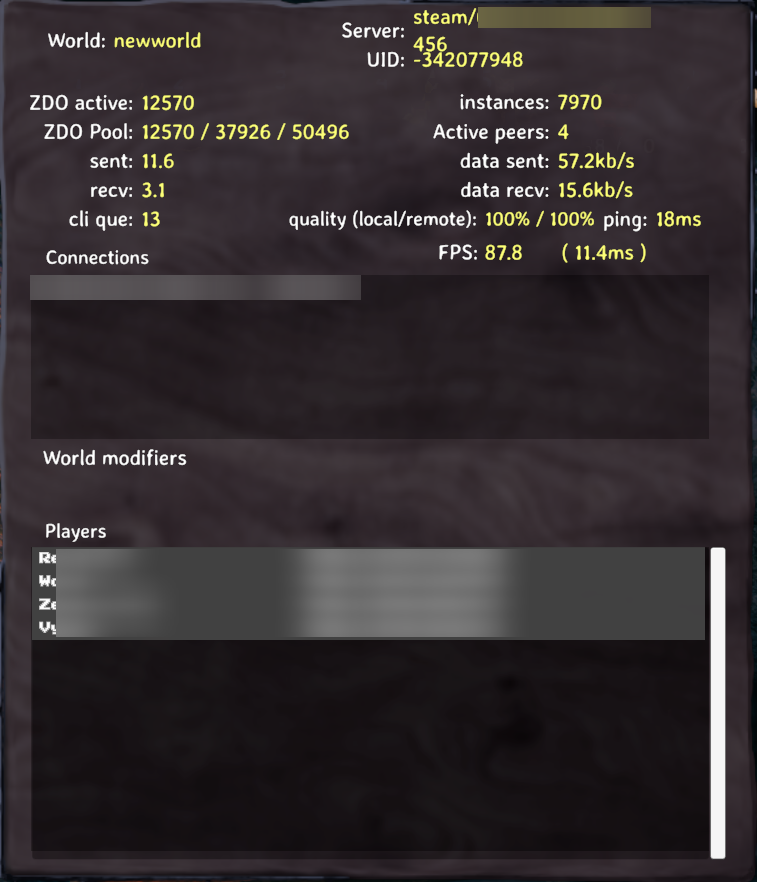
Any reason we have to restart our dedicated server for valheim every couple hours?
it has 32 GB of DDR6-6600, Ryzen 7800X3D, Fresh install of windows server 2022
only have 4 players on it with roughly
https://i.imgur.com/BS2G4gX.png
What starts to happen : Mobs seem to become invincible, you can stab them millions of times , but nothing happens, they can still bite your face off and youll die.
You can open and close doors, but they wont move until minutes later, where they just open and close as if you were doing it at the moment.
The server itself does not have any network congestion or packet loss.
 formal owl
icy pawn
Any reason we have to restart our dedicated server for valheim every couple hour...
formal owl
icy pawn
Any reason we have to restart our dedicated server for valheim every couple hour...
Do the players log off/on during this timeframe? And is there anything in the logs for the server (bepinex that is)
icy pawn
formal owl
Do the players log off/on during this timeframe? And is there anything in the lo...
server is not modded, its vanilla
No players log off during the time.
formal owl
Is this a really old world? Also non-modded server logs would be useful too
formal owl
do you have the same issues with just one player on? do you have a lot of really big builds at your base?
icy pawn
Id say there is around tops 500 pc of buildings
formal owl
ok does the server box itself have a static IP on your subnet and portforwarding setup for the ports you are hosting on?
formal owl
through a hosting provider? or self setup?
icy pawn
Its something to do with the game, is there a setting that I can set on startup args
Self host, my own hardware. ~2500 server sent to TX for cohost
formal owl
how are you starting up the server? setting
-nographics?
since its a windows server I assume you've looked at its resource usage? and Valheim isn't using much?
icy pawn
valheim_server -nographics -batchmode -name "x" -port 2456 -world "newworld" -password "x"
formal owl
you could use the steam cmd tools (or UI however you have the server installed) to verify your install
also does the lag occur when you just have one player on or does it increase with more players on?
icy pawn
Did that already too
steamcmd.exe +force_install_dir F:\GameServers\Valheim +login anonymous +app_update 896660 validate +quit
Just happens after a couple hours. restart server, only takes 2-5 seconds but immediately stops for a few hours again
Seems like its garbage collection problem or something, I want to know if there is settings to resolve this.
formal owl
there is not magic setting to resolve this, it does sound like a GC setting likely related to ZDOs, but without some logs its hard to say.
It sounds like the things that are slower, doors? chests? etc- those are all ZDO heavy, and your network upload for the server is nearly at the vanilla limit, so I'd imagine you are hitting throttling there which makes everything like mud- but makes it easy for your players to still die to things
icy pawn
Heard of this, does it work
Close your dedicated server
Download all the game files from
SteamLibrary\steamapps\common\Valheim\valheim_Data\Managed and make sure you make a backup!
Download dnSpy (Github link)
Open the assembly_valheim.dll file found in valheim_Data or valheim_server_Data
Find ZDOMan
Find m_dataPerSec, right-click, select Edit class, and change the value to at least 122880
Click Compile located in the bottom right corner
Restart the server and start playing again
Forget About Lag With Valheim Server Hosting
While each Valheim server lag fix in this article can help resolve latency issues, setting up a dedicated server for Valheim is the best preventative fix for lag. Try Valheim Server Hosting for free for 24 hours and see the difference for yourself! We’re so sure you’ll love it, we’ll even buy out your subscription from our competitors.
formal owl
One thing you might consider trying is if you don't need crossplay, disabling that
I'd advise against doing dnSpy edits of the server files- if you don't know what you are doing its going to be a world of difficult and awful things.
It will also break every update 🤷
But yes, if network limit is your issue that would help.
However, that being said, you can just download a server-side only mod to do the same thing and fix it- which is what I would suggest, or hell have all of your clients download the mod too and have even better performance 🤷
https://valheim.thunderstore.io/package/CW_Jesse/BetterNetworking_Valheim/
"compatible with players not running the mod"
you could setup your server to run with that mod, startup using the defaults (which will already be much better) and if that fixes your problem- great!
if it doesn't, you can remove the mod and its not going to harm things
icy pawn
formal owl
One thing you might consider trying is if you don't _need_ crossplay, disabling ...
What arg is needed to do that
formal owl
icy pawn
What arg is needed to do that
If you don't have any other args valheim_server -nographics -batchmode -name "x" -port 2456 -world "newworld" -password "x" it should already be removed, but if you see any warnings its enabled, you can try settings -public 1
 fluid pebble
Hello! I am having some difficulties setting up a dedicated server, if anyone with experience has a few moments to guide me a bit, i would appreciate it. 😦 sorry noob here
 vague cove
glossy warren
I can only connect to the servers external IP if i have crossplay enabled, even ...
vague cove
glossy warren
I can only connect to the servers external IP if i have crossplay enabled, even ...
Sounds like there are too many variables in this equation to solve it straight away. Try to isolate the problem.
E.g., simplify your network, try it on local LAN only first (remove -crossplay and set -public 0) through LAN IP.
Does your server (the HW) have more than one network interface? What OS do you host the Valheim DS on?
I (and most guides out there) assume Internet --- ISP router --- LAN Sounds like your LAN setup could be more complex and the cause of your issue.
vague cove
fluid pebble
Hello! I am having some difficulties setting up a dedicated server, if anyone wi...
Have you followed a guide? Do you host on your own hardware?
fluid pebble
vague cove
Have you followed a guide? Do you host on your own hardware?
Hello! Yes I tried but got stuck. The actual owner basically quit on us to play Enshrouded and just gave me the credentials for scalacube and said figure it out 😅
i'll find a way or just join a server with proper owner no worries
and ty for your answer
vague cove
Oof, I doubt that I am going to be able to help you - my "experience" for what it's worth is only with hosting it myself.
What is it you define as stuck? If it's a paid service, you should be able to contact their support.
 stray forum
Hey, i have a world that has been standard for some time, but recently decided to disable raids, to make sure the lower level players didnt get punished for me progressing. The issue is: the raids didnt disable. I have added '-modifier raids none' to the start server script, but that didnt seem to do anything. is there anything i have to do to disable them, or is that not a possible thing to do anymore, as it didnt start without raids? Thank you
Did a little googling, and it said the easiest way to remove raids was to use "resetkeys" after each time you kill a boss. As the raids are supposed to now be off, does that mean that resetting the keys would remove the current raids, and the '-modifier raids none' would keep them from getting enabled again?
glossy warren
vague cove
Sounds like there are too many variables in this equation to solve it straight a...
No you are spot on when it comes to the layout. Internet - ISP modem/router (ftth so no getting around it being there) then LAN. The server does have more than one NIC, but it was my understanding that it binds to all NICS. But the odd thing is that I've tried it on my gaming PC and my son's surface tablet and the result is always the same.
I'm using Windows for everything. The firewall is off and it will never connect via the private ips.
 mild field
I have a dedicated server
anyone wants to join?
also we are looking for builders to improve the server
so you are free to build
vague cove
glossy warren
No you are spot on when it comes to the layout. Internet - ISP modem/router (ft...
My current setup is very similar. Win PC as server and a second one where I play from. FW on both, but with entries for Valheim and valheim_server.
Internet --- ISP router --- switch --- Server
                               \-  --- Game PC```
Can you ping your LAN devices in either direction?Maybe better target audience in the "servers-and-lfg" channel? 😉
mild field
yes sure I am just waiting the slow mode chat to cooldown LOL
glossy warren
vague cove
My current setup is very similar. Win PC as server and a second one where I play...
Yes. In fact I'm using RDP to access the server at the same time. Same server also running my Minecraft and space engineers servers (not all running at the same time)
 lofty zephyr
hey i have a world that i share with 1 friend. The world works fine for me. when my friend loads in he cant see trees, buildings,animals, or anything else. is there any fix?
hey i have a world that i share with 1 friend. The world works fine for me. when my friend loads in he cant see trees, buildings,animals, or anything else. is there any fix?
vague cove
glossy warren
Yes. In fact I'm using RDP to access the server at the same time. Same server ...
Remove at least the server name and PWD before sharing, but how does your start_server.bat look like?
glossy warren
vague cove
Remove at least the server name and PWD before sharing, but how does your start_...
Well, i have tried pasting it a couple of times, but i keep getting a timeout, so all the settings are default except the server has a unique name, it has a different unique pass, and im using public 0. I did discover it is not binding to all NICs it is picking one at seeming random. Now that I discovered that i am able to connect using the local IP, but it is still Killing my internet connection after a couple of minutes.
arctic epoch
proven niche
If the server works using the local IP, then doesn't that mean that the problem ...
Thanks for the help. Been messing with network configurations and port forwarding for the last couple days and I’m pretty much ready to just give up and buy a server lol
Very cool of you to go out of your way to help me though
 quasi basin
When the dedicated says "Failed to place all TarPit2, placed 14 out of 100" -- why does this happen; is there a way for me to resolve this, or is it standard based on the layout it's trying to place on or something?
knotty oracle
The game will rarely be able to place every POI it tries to place. 14 sounds low but not inconceivable.
quasi basin
knotty oracle
The game will rarely be able to place every POI it tries to place. 14 sounds low...
To be fair, it places more than just 14 -- 14 was just for TarPit2. On TarPit3, I got 91/100
knotty oracle
Yeah, I'd say that's absolutely fine then.
 tight kettle
I am running a dedicated server. I can connect, friend #1 can join, friend #2 cannot
proven niche
tight kettle
I am running a dedicated server. I can connect, friend #1 can join, friend #2 ca...
Check the server log and player2's game log to see what the error is.
tight kettle
connection_log_2456.txt
I searched for their name and it didn't not appear in the log
i'm watching the command line as he joins and nothing happens
proven niche
tight kettle
connection_log_2456.txt
I searched for their name and it didn't not appear in t...
Sounds like the problem may be with him rather than the server. Probably.
tight kettle
😭
he's uninstalled and reinstalled, he's prayed to the mormon god, I just helped him port forward valheim ports (even though I know that would do nothing), we're at such a loss
proven niche
What error msg does he get when he fails to connect, if he gets an error msg... Could he possibly get in here and participate in the discussion?
tight kettle
he tries to join the server, it gives the wooden plank with "connecting on it" then says "failed to connect". I just invited him
proven niche
Where is the dedicated server located? Are all of you plaing the Steam version of the game rather than the MS game pass version?
tight kettle
Steam version. Dedicated server is located in my living room, (port forward setup to it).
@bold sparrow here
he can't host his local world either we just found. We tried to join his world but it wouldn't let him start one
proven niche
How is he trying to find and join your server? Through Steam friends? Using the server's WAN IP address? Finding it in the game start server list?
proven niche
Has he ever been able to connect? Does his solo game work ok? Is he or the server using any mods?
tight kettle
never been able to connect. Just started the server 3 days ago. his solo game works fine
proven niche
Is he playing with Windows or Linux or MAC?
tight kettle
windows
proven niche
His Firewall or anti-virus could be blocking the communication to/from the server, etc. Is he using a VPN service? Is there anything 'odd' with his internet connection? Are you guys or the server using crossplay?
tight kettle
I just reinstalled windows for him a couple weeks back. It's just running windows defender and no VPN
nothing odd that I can think of about his connection otherwise
we shouldn't be using crossplay. I have tried started the server both with and without crossplay to no avail
proven niche
The big thing with crossplay is that it requires all communication to go through the playfab lobby which is an external site. It doesn't use port forwarding at all. Plus it has a lot of problems with valheim stability right now. I would avoid it always, if no one needs it.
tight kettle
I'll try without again, ty for the info 🫡
proven niche
Have him check his Playerlog file, which is in the Valheim folder next to his worlds_local folder, not in the Valheim game files folder. The log may show why his attempt to connect fails.
tight kettle
do you know the location of the playerlog file? I searched in the steam install but don't see it there. Trying to find if it's in appdata somewhere now
found it
proven niche
Yes, It's usually C:\Users\userID\AppData\LocalLow\IronGate\Valheim
tight kettle
proven niche
It appears that he might not be successfully logging into Steam. Can he verify the game files while in his Steam client?
tight kettle
lolz weird. I'll have him log in and out of steam and see if that helps.
He can play other steam games fine with us.
yes, he can verify them and has. He has also re-installed
IT WORKED
oh my mormon god
proven niche
Good. It's nice to win one once in a while.
tight kettle
ty kindly good soul, you're troubleshooting skills are impeccable 👌
enjoy the evening 🫡 💜 namaste 🙏
proven niche
Thank you for the compliment. I'm sorry it took so long. But I'm not one to argue with success, for sure. And, for all I know, Elohim may have had more to do with it than I did. 🙂
 kindred ravine
Having an issue where people cant join our server unless we make them admin
proven niche
kindred ravine
Having an issue where people cant join our server unless we make them admin
Sounds like thats mod related to me. Probably get better help in the #mods-issues channel. 🙂
kindred ravine
Roger that. Thanks
 ionic sage
Hello! I had an issue with my Dedicated.
I was playing all yesterday on it and when I signed out I closed everything down. When I started it up just now the world seemed to have not saved.
How can I find out what happened.
I assume what's gone is gone.
I don't want this to happen again, how can I prevent it?
proven niche
ionic sage
Hello! I had an issue with my Dedicated.
I was playing all yesterday on it and...
Does your dedicated run on your game PC? Another PC on your LAN? A remote hosting Co.? How did you close it down yesterday, exactly? Is your world brand new with only yesterdays things on it or is it older and still had stuff from before just not yesterday's stuff?
ionic sage
proven niche
Does your dedicated run on your game PC? Another PC on your LAN? A remote host...
Game machine
Closing the window which in my testing did a whole shut down process.
Not brand new, only the changes from that day are lost.
proven niche
So, unless you've added a special option to the server's start up file, the server and your solo game both use the same world file.
Have you checked your worlds_local folder to see if there's backup copies of the world there that would have the stuff from yesterday? Like maybe auto-save files or .old files?
You can back up all the files to a temp folder and then rename one or another of the world pair files (keep the .db and .fwl pairs together) in the world_local folder to see if you still have your stuff in one of those pairs.
Just keep the file pairs together and don't mix them up.
ionic sage
I checked my local world and it was also not the most recent.
proven niche
I think the important thing here, if you're running the game on Windows OS, is that you probably shouldn't stop the game by just closing the game window.
I don't believe that lets the game do a final save of your world and it's stuff.
Instead, use the game Esc menu's "Quit" option and wait for the delay while it saves your stuff on the way to shutting down gracefully.
ionic sage
I was running it as a headless dedicated
Closing that console window runs the shut down from waht I see
proven niche
Are you using Windows or Linux for the server?
proven niche
Then, what you see isn't what you're getting. Use the proper Quit option in the menu.
proven niche
In game, type the Esc key for the menu. Select the Quit option there and wait patiently.
ionic sage
I feel your confusing something.
The server is what I'm talking about. It's a headless nogui console running along side my client as a seperate exe
proven niche
Wouldn't be the firs time...
Then, do a Ctrl+C in the console window and wait. Then "Y" when it asks you to confirm the shutdown.
ionic sage
So the server was being stuck. I went to restart as you said. Went to it and hit Ctrl+c and it stopped being stuck.
It did not close though lol.
proven niche
Make sure you're waiting long enough. Just because the console msgs stopped doesn't mean the server isn't busy with some server related stuff. If you're not giving it at least a full 60 seconds, you need to wait longer.
It got awfully quiet in here... I hope he's all right! 😮
ionic sage
It's not closing, but we're playing. I'll panic later when I close it for the night or I might just leave it up. lol
It didn't close I should say. I only tried it once. Maybe I wasn't focused. idk.
proven niche
Be patient with your server and it's more likely to behave. Give it the Ctrl+C and then wait for the Y/N promt and tell it "y".
 shy bane
for anyone who had trouble with arm64 architecture, follow these instructions :
sudo nano /etc/box64.box64rc
then add the following :
[valheim_server.x86_64]
BOX64_DYNAREC_STRONGMEM=3
BOX64_DYNAREC_BLEEDING_EDGE =0
##Also for raspberry pi users they should also add the following (thx inferno)
##BOX64_DYNAREC_BIGBLOCK=3
do the same for box86.box86rc
Now start the server without -crossplay.
enjoy
(Assuming box64 box86 is downloaded & built)
wooden mountain
So wait, what is the typical time it takes a server service to shutdown?
wooden mountain
shy bane
for anyone who had trouble with arm64 architecture, follow these instructions : ...
???
shy bane
wooden mountain
???
yes?
wooden mountain
Woah weird it just showed a ' 1s ago lol
shy bane
oh yep, accidentally hit enter haha
wooden mountain
Someone pin that post you made!!!
Also for raspberry pi users they should also add:
BOX64_DYNAREC_BIGBLOCK=3
Otherwise there is major in-game stability desync issues (at least from what I experienced).
shy bane
wooden mountain
Also for raspberry pi users they should also add:
```
BOX64_DYNAREC_BIGBLOCK=3
`...
oh, i'll add that
thanks
 graceful grail
what about crossplay? Still exploding?
shy bane
graceful grail
what about crossplay? Still exploding?
yes
 lone dock
I keep getting disconnected after some time when on a dedicated server, and this keeps happening on totally different servers. Can play at first just fine, for hours at a time, eventually I get disconnected and when logging back in, the disconnect sign soon reappears and I get disconnected again. Valheim may actually hang and not even properly close at that point, and I then either need to reset my router or use some system commands to reset / flush / renew my connection. After which the cycle begins again.
This is getting rather old, and I only have a connection problem with Valheim dedicated servers, playing e.g. GW2 gives me no connection problems at all.
Is there something else I can do to fix this?
proven niche
lone dock
I keep getting disconnected after some time when on a dedicated server, and this...
Are you playing on Xbox or PC game pass?
lone dock
PC via steam
proven niche
Try re-verifying your game files from the Steam client.
lone dock
done that, no change
proven niche
Are you or the servers using crossplay?
lone dock
not sure - can I see that in the F2 window on the server?
proven niche
You should be able to see it with the server listing when you choose a server and start the game.
lone dock
ok, I assume the crossed arrows behind the server name mean crossplay enabled, yes?
proven niche
Yes. And without crossplay you see just a little key symbol.
lone dock
Then the server is crossplay enabled.
proven niche
Crossplay isn't playing well with Valheim right now. They're working on fixing it but no ETA for resolution. I don't know of anything you can do that would help.
All the server you use are crossplay enabled?
proven niche
If you're getting the disconnect symbol in the upper left of the screen when on a crossplay server and getting disconnected, then you're pretty much out of luck. Sorry.
lone dock
Yes that is what keeps happening. Ok I'll try my luck asking the owner. Thanks a lot for your help!
proven niche
The other players should be having the same issues with it that you are.
lone dock
Maybe they do, I'll try and find out
proven niche
Good luck with it. I know it's frustrating.
 gilded lintel
I’ve never paid for a server before but I’m thinking I might start today. Any host recommendations and tips for owning a server?
proven niche
gilded lintel
I’ve never paid for a server before but I’m thinking I might start today. Any ho...
You can do a search in this channel for the information you need.
gilded lintel
proven niche
You can do a search in this channel for the information you need.
not a lot to search
gilded lintel
 latent crypt
Your residence?
latent crypt
Your residence?
Al usa
I ended up using survival servers and I think I wasted my money
shy bane
gilded lintel
Al usa
I can host you one, but its located in france paris
gilded lintel
I ended up purchasing a second one I'm trying to configure it now and I'm seeing if survivalservers will refund me but I doubt they will
shy bane
Oh alright, if you need help with anything lmk, id be glad to help
fathom quail
gilded lintel
I ended up purchasing a second one I'm trying to configure it now and I'm seeing...
If you have a simple spare pc it is easy to set up
proven niche
6-7GB RAM available would be good. Any old graphics is fine. Server doesn't use graphics at all.
gilded lintel
Imperium hosting is honestly so amazing
They showed me everything I was doing wrong and were patient with me after I broke it immediately after they fixed it for me.
proven niche
Where are they and how much do they cost?
gilded lintel
Also the support was practically instant compared to survival servers taking over an hour just to tell me to use valheim+ to change my settings which didn’t actually have the settings I needed to change
gilded lintel
proven niche
Where are they and how much do they cost?
Seattle and La, 16usd monthly but there’s a 12usd sale currently
proven niche
Crossplay available?
gilded lintel
Yeah
proven niche
That's good info. Thanks.
gilded lintel
They also have a discord so I ended up doing my support ticket through their server and he was there the whole time being super helpful
Honestly such a blessing after the frustrating experience I had with survival servers.
 kindred saddle
My husband is in the process of building a pc for hosting a dedicated server. I have been able to find many how to videos on setting one up, but not much information of setting one up with mods. Can someone point me in the right direction? We are paying for a dedicated server now, but are looking forward to setting up and running our own. We are using Thunderstore mod manager.
proven niche
kindred saddle
My husband is in the process of building a pc for hosting a dedicated server. I...
Will the server PC use Windows or Linux to run the server? Using r2modman with Windows is pretty straightforward.
But, my experience with r2modman is that it's only partially useful with managing mods for a Linux server. You can easily use r2modman on the server PC under Linux and create a server profile there and install the mods in it. But don't start the server from inside the mod manager.
Instead set up the server manually per the Linux instructions in the server .pdf manual that comes with it and install the BepInEx modloader there manually.
Then use the server profile in the mod manager to copy/paste the server's plugins folder over to the server's manual BepInEx installation and start the server from there not from the mod manager.
Either way, you can use the existing servers profile to produce a profile export code and use that to create the new profile on the new server's PC.
kindred saddle
proven niche
Will the server PC use Windows or Linux to run the server? Using r2modman with ...
We will be using Windows 10 as the os. Is thunderstore the same as r2modman? Or do I need to switch
proven niche
Good. 8GB of RAM would be 'Ok', depending on what else will be running on the server. 16GB RAM would be great.
kindred saddle
proven niche
Good. 8GB of RAM would be 'Ok', depending on what else will be running on the s...
Husband says he is putting 32GB of Ram on it
proven niche
Perfect. And, yes thunderstore and r2modman are the same except r2modman doesn't have the adds, etc. Their function is identical.
kindred saddle
proven niche
Perfect. And, yes thunderstore and r2modman are the same except r2modman doesn'...
ahh wonderful! If I understand I need another steam account and another valheim game for the server, is that correct?
proven niche
No, I've always only used my one Steam account to play the game on one PC and run the server(s) on another. You may need to log in at the server PC to d/l the server but you don't need to be logged in there to run it, IIRC.
You just buy the game once and get the server for free and run it on the other PC.
kindred saddle
proven niche
No, I've always only used my one Steam account to play the game on one PC and ru...
yes i set another account up just in case... so just follow instructions for the steam server install thunderstore and use the server button and thunderstore will set themods up?
proven niche
Yes, create a profile and import the mods with the exported profile code from the existing server's r2modman.
kindred saddle
ok let me make sure i understand 🙂 I am exporting the code from my play pc and importing and creating the profile on the server pc?
proven niche
If the existing server is on your PC, then yes. That's right. You can always individually just install new mods on the new server profile easily, too.
kindred saddle
Well it is on DATHost and I have to update the mods from my pc to the server .. Yes ok 🙂 looks like i have been stressing over this for nothing, thank you so much for taking time to explain this to me
proven niche
The server doesn't usually need all the same mods as the game clients use. Ordinarily, many of them don't get installed on the server at all. You can go through the mod's web pages to see which ones are 'client' and which ones are also 'server'.
And I'm glad to help. Have fun with it!
kindred saddle
proven niche
The server doesn't usually need all the same mods as the game clients use. Ordi...
Ok yes Thank you again, case is coming in tomorrow so hubbie will be getting it going in the next few days.. fingers crossed this goes as easily as it sounds.. You have a wonderful nite, we are off to bed
 thin obsidian
I have an idea to "soft relaunch" my server. We started with 9 players on day1 but now we're down to 3 who play much if at all. We're in the Mistlands but things have slowed down quite a bit now. My idea is to use a mod to refresh all resources, and then blockade our main meadows town using walls and wards to bar entry to new players using the advanced tech and setup we have there. They'll need to build a new town. I'll rename all portals into the meadows town except perhaps the Bonemass portal - so when new players reach Bonemass they can have access to the original town. For the relaunch week we can only use new charaters, so estabilshed players can create a new character to help the new wave, or just wait. Has anyone tried this before? any advice? also.. what mod is good to refresh resources?
fathom quail
thin obsidian
ah thanks,
wooden mountain
if we specify a log dir is there a way to make it not overwrite the log, and instead create a new one? or would we need a separate script for this?
for example setting: -logFile “d:\log.txt”
 sonic prism
wooden mountain
for example setting: -logFile “d:\log.txt”
sonic prism
wooden mountain
for example setting: -logFile “d:\log.txt”
I don't know much about making a log file but I'd presume you will need a script to not overwrite the old one because with -logFile “d:\log.txt” it will only ever make a log.txt and overwrite that or even not do anything but make 1 log file till that log file is removed / renamed.
Depending on the software you are using for it there might be a baked in command that does it.
wooden mountain
im on linux - so wasnt sure if I could pass that filepath arguments like a date variable
such as: -logFile “dirtopath/log_$(date +%Y%m%d).txt"
sonic prism
wooden mountain
such as: -logFile “dirtopath/log_$(date +%Y%m%d).txt"
You'll need something along the line of:
var=$(date +"%FORMAT_STRING")
now=$(date +"%m_%d_%Y")
printf "%s\n" $now
today=$(date +"%Y-%m-%d")
So a short script to add the date to the filename, you can then use the month in another script to start overwriting the existing files so you only keep on month of logfiles.
lusty rivet
you can use logrotate
wooden mountain
Oh? How do I use logrotate?
wooden mountain
Nevermind think I got it its a linux command, neat!
 chilly aurora
now i don´t know why I want to join a friend server, it doesn´t allow me, when a few days before I can join and play normally, the only change I did in that days was change my Antivirus, but on It i excluded the game for the Firewall

someone had the same issue?
lusty rivet
hard to tell without the server hosts perspective. what does your player.log say when you try to connect? can you join other servers?
chilly aurora
I can not join other servers, it still the same error message
where i can find the player.log?
 hybrid siren
Game Server connected but I can't connect. (steamcmd on server)
anyone know what I did wrong based on the text above?
there's no IP / Game Code to copy as well.
I just tried to connect using the public IP address of server+port
 frozen zephyr
Game code and IP only show in log if using crossplay
hybrid siren
frozen zephyr
Game code and IP only show in log if using crossplay
got it.
any idea on why it won't let me connect though?
frozen zephyr
Without crossplay need port forwarding working for people outside your lan to connect, if it's running on a computer on your lan use the lan IP to connect to it. Most home routers don't do nat loopback
 astral torrent
Super new to this just wondering is it normal to have mesh & shader errors ? Running on windows if that helps any, I tried looking at the pdf it says linux needs extra packages does windows need any?
frozen zephyr
astral torrent
Super new to this just wondering is it normal to have mesh & shader errors ? Run...
It's normal dedicated server don't use GPU
astral torrent
frozen zephyr
It's normal dedicated server don't use GPU
Danke!
hybrid siren
frozen zephyr
Without crossplay need port forwarding working for people outside your lan to co...
Added crossplay to the server. It still does not show code or ip.
Will try to re-do everything
frozen zephyr
hybrid siren
Added crossplay to the server. It still does not show code or ip.
Log show any errors
frozen zephyr
That from the server, it don't look like a server log to me
hollow bay
cant connect to my own dedicated server or any other community ones
Is this because of perhaps an update coming out?
 dark cipher
hollow bay
Is this because of perhaps an update coming out?
dark cipher
hollow bay
Is this because of perhaps an update coming out?
It's because of Crossplay. We are having the same issue, if you untick the crossplay, you will be able to join
hollow bay
I am trying this solution now, but for the past few days have been grinding with friends with cross play turned on in the batch file with no issue. Some of the boys are on xbone and need that crossplay 😫
dark cipher
hollow bay
I am trying this solution now, but for the past few days have been grinding with...
Same here, we had no issues just yesterday lastnight. We gave up for tonight
hollow bay
ashlands inbound, manifest it with me
worn loom
all of the sudden players cant connect to the server, is this what youre talking about - with crossplay?
 real river
PlayFab service is down. Lobbies are unavailable. IronGate needs to open a ticket with PlayFab.
restarting the server = Failed to deactivate lobby
PlayFab find lobbies failed: /Lobby/FindLobbies: ServiceUnavailable
real river
translation: the middleware used for networking and multiplayer lobbies is experiencing an outage
hollow bay
is playfab part of azure?
real river
No
hollow bay
oh i see now
real river
It's a cloud service though
worn loom
I cant connect even with crossplay disabled
real river
ah it looks like they were acquired by Microsoft recently, so yes, it's been rebranded under Azure
crossplay isn't related to this
no one is going to be able to connect while the service is down
worn loom
thanks waffle, where did you get the status update?
echo crystal
The server Iron Gate uses to determine whether a server is using Steam or PlayFab is down, so everything is down.
[Info : Unity Log] 02/16/2024 11:59:02: Backend not retreived yet, checking again in 0.25 seconds...
[Info : Unity Log] 02/16/2024 11:59:03: Backend not retreived yet, checking again in 0.25 seconds...
[Info : Unity Log] 02/16/2024 11:59:03: Backend not retreived yet, checking again in 0.25 seconds...
[Info : Unity Log] 02/16/2024 11:59:03: Max retries reached, reloading startup scene with connection error
round sleet
Only if they're using Crossplay. If you have a server you can use the IP for and it isn't using Crossplay, you should be able to connect as it doesn't require any kind of middle-man.
echo crystal
No, because the game can't determine if the server is using crossplay or not so it just errors out.
worn loom
round sleet
Only if they're using Crossplay. If you have a server you can use the IP for and...
just tried, even with diff port to ensure no cache behind it - nothing
so i think ersan is right
echo crystal
@wide cipher maybe, if you're online - nobody can connect to any dedicated servers right now.
real river
worn loom
thanks waffle, where did you get the status update?
Several of us were playing, and we all showed a different number of players online (F2 status menu). Another player could not login and messaged me to ask if he had been banned. Found that PlayFab's service was inaccessible after rebooting our server and looking at the console.
echo crystal
Most likely the backend retrieval server is also hosted on Azure or by PlayFab
real river
I had a separate, unrelated Azure outage for about an hour. That was yesterday.
worn loom
real river
Several of us were playing, and we all showed a different number of players onli...
exactly same happened here, minus the banned part
real river
No one was banned, he just didn't know why he couldn't login.
worn loom
Is there a status page or similar for these kind of stuff
real river
Playfab has a status page in the developer console, or at least they used to. I haven't used it since before 2018 when they were acquired.
echo crystal
it still exists, just says everything is fine
gilded lintel
Hey reading through the chat above. Wee bit confused. So is everyone unable to log on at all or is it sporadic? Not been able to for any of us, using a g-portal server.
Is there any issue that has been confirmed or is it speculation?
echo crystal
Nobody can connect to any dedicated servers at all right now.
hybrid siren
echo crystal
Nobody can connect to any dedicated servers at all right now.
did it start around 3hours ago?
gilded lintel
Hope it won't last all weekend...
echo crystal
First ticket we got about it was about an hour ago
Could have been down before that.
 upbeat flax
Ive been playing the last few hours, but when my friend couldnt get on I decided to log off and log on to see if it was just his PC, turns out im now stuck logged out also 😛
echo crystal
It could also be a regional outage, haven't tested from outside the US
 spare nexus
echo crystal
It could also be a regional outage, haven't tested from outside the US
spare nexus
echo crystal
It could also be a regional outage, haven't tested from outside the US
from South Africa and having the same issue
upbeat flax
Im from UK and having the issue
gilded lintel
down in EU (france) at least too
echo crystal
Yeah I have tickets from US-East, US-West and London atm so I guess it's global
gilded lintel
echo crystal
It could also be a regional outage, haven't tested from outside the US
ireland, same issue.
 rotund sandal
South America is also affected. Tested it a few minutes ago.
 velvet condor
South East Asia same issue
upbeat flax
Secret mars moon base - Im also having the same issue 😛
 amber drum
Same here fam
upbeat flax
Sorry lol
 viscid token
Down in EU (Czech) :/
 wide cipher
echo crystal
<@260480620054970378> maybe, if you're online - nobody can connect to any dedica...
wide cipher
echo crystal
<@260480620054970378> maybe, if you're online - nobody can connect to any dedica...
No one?
Its either Steam is down. Or Microsoft playfab is having issues atm ..
 dense depot
i remove -crossplay
 unreal quarry
ok so I'm not the only one 😛
echo crystal
wide cipher
No one?
Its either Steam is down. Or Microsoft playfab is having issues atm ..
Both steam and playfab not working, because the server that retrieves the backend isn't working - it tries 50 times and then errors.
[Info : Unity Log] 02/16/2024 11:59:02: Backend not retreived yet, checking again in 0.25 seconds...
[Info : Unity Log] 02/16/2024 11:59:03: Backend not retreived yet, checking again in 0.25 seconds...
[Info : Unity Log] 02/16/2024 11:59:03: Backend not retreived yet, checking again in 0.25 seconds...
[Info : Unity Log] 02/16/2024 11:59:03: Max retries reached, reloading startup scene with connection error
unreal quarry
I'm getting a playfab error when I relaunch the server
PlayFab find lobbies failed: /Lobby/FindLobbies: ServiceUnavailable
dense depot
yea both is dead
wide cipher
@echo crystal https://status.playfab.com/
Welcome to PlayFab's home for real-time and historical data on system performance.
hollow bay
they lie
echo crystal
Yeah that page is worthless unfortunately
real river
No reports today. Fake news.
echo crystal
I'm looking at the code and I see that it's supposed to default to Steam if PlayFab errors out, but I think that the playfab server is just timing out instead of erroring. Or returning invalid data maybe, idk.
 gilded forge
echo crystal
I'm looking at the code and I see that it's supposed to default to Steam if Play...
gilded forge
echo crystal
I'm looking at the code and I see that it's supposed to default to Steam if Play...
i am getting the same issue and i can not find why is it happening
gilded forge
let me try
hollow bay
oh yeahhhhh(sike)
real river
PlayFab login success, but it's doing a Retry join-code check countdown from 100
gilded forge
nope still not working
real river
same error, PlayFab find lobbies failed
unreal quarry
different error now though. It's trying to re-hit the join code over and over
echo crystal
PlayFab is still down, I think Steam is back up.
real river
 echo crystal
Yeah, sorry - STEAM is back up, playfab still down.
real river
it's progress
dense depot
dense depot
can i use my dedicated save ?
any help?
fathom quail
dense depot
can i use my dedicated save ?
Yes
hollow bay
if u went into the dedicated server files and pull the world and then put it into ur valheim game local files itll work
unreal quarry
where does the world file live for the dedicated server
upbeat flax
UK confirming I am back online
dense depot
AppData\LocalLow\IronGate\Valheim\worlds_local
hollow bay
^^
echo crystal
new error
[Error : Unity Log] 02/16/2024 09:54:45: PlayFab find lobbies failed: /Lobby/FindLobbies: The client has exceeded the maximum API request rate and is being throttled
echo crystal
Yeah steam works again, crossplay is still not.
real river
confirmed, same error for US East (crossplay enabled)
sounds like the service is being hammered with new requests as everyone's trying to get back online
echo crystal
I got one server to register again. It doesn't seem to automatically try to reregister with this particular error so you have to restart your server to fix it.
 dense ocean
My server is working again. Didn't disable cross play or anything
real river
Back online. Thanks team.
unreal quarry
I'm not having any luck reconnecting :/
dense ocean
I think if you keep retrying it will eventually work
real river
give it a couple of minutes
unreal quarry
the server isn't giving any errors I just cant connect via the game now 🙃 I'm up and running
real river
world progress has been lost (30-45 minutes of construction for me), no big deal
gilded lintel
Working on our side. Thanks to whoever is working hard on a friday evening for this!
 tawdry quarry
frozen zephyr
echo crystal
new error
[Error : Unity Log] 02/16/2024 09:54:45: PlayFab find lobbies failed:...
tawdry quarry
frozen zephyr
echo crystal
new error
[Error : Unity Log] 02/16/2024 09:54:45: PlayFab find lobbies failed:...
why ya flooding the API lmao
 visual shale
when i start a game and check 'start server' no new listening ports appear on my pc. is this related to the network issues that are ongoing?
 dusk widget
hi guys i have a bit of a problem with server my friend is the host and its giving me failed to connect to server yesterday we were playing just fine and today this i tried restarting wifi and computer and my friend did the same still not working i tried some yt tutorials on fixing and still not any help please?
worn loom
same here, still cant connect, @real rivercan you?
real river
we've been playing for an hour or so
 lament pine
should i be running my server (modded) as administrator on windows? for some reason it just will not allow me to connect or even see that it is online? yes i portforwarded everything under the sun in both windows and router. i run all sorts of servers for alot of different games and this one is just kicking my A...... lol
 honest cloud
Do any server providers allow fewer than 10 slots? I see it's quite common for other games to allow 4/6/8 slots.
wide cipher
honest cloud
Do any server providers allow fewer than 10 slots? I see it's quite common for o...
I think that's a "bug"
since the server doesn't have the kind of way to adjust player numbers
honest cloud
Think I'll just need to hook up an old mini PC. I'm being a cheapskate but I can't justify paying €9 a month 😄
real river
you'll pay that much in electricity
dense depot
again? 😦
 rustic harbor
Has anyone seen a bug where scrap piles drop zero iron?
I've mined over a dozen piles on this server and zero iron.
wide cipher
rustic harbor
Has anyone seen a bug where scrap piles drop zero iron?
I've mined over a dozen ...
are you playing solo or multiplayer?
chilly aurora
@wide cipher how could I join a friend server? Because I get the error connection all the time, and my friend is inside the server
I bought the game 2 weeks ago or something and we could play normally together
but now we cant
wide cipher
chilly aurora
<@260480620054970378> how could I join a friend server? Because I get the error ...
usual issues:
VPN
WIFI
Bad peering
firewall
chilly aurora
wide cipher
usual issues:
VPN
WIFI
Bad peering
firewall
Maybe was the firewall, because i get a new AV these days, but I excluded the game manually and the error continue
I don´t use VPN so I dont think could be that, WIFI i restared a few times and nothing changes
wide cipher
chilly aurora
I don´t use VPN so I dont think could be that, WIFI i restared a few times and n...
are both on steam or xbox or mixed?
chilly aurora
both on steam yes
 sage flower
Anybody know where the password is located for a dedicated server? I didn't set one but it's asking for one
 opal saddle
sage flower
Anybody know where the password is located for a dedicated server? I didn't set ...
opal saddle
sage flower
Anybody know where the password is located for a dedicated server? I didn't set ...
It's set on the command line
round sleet
sage flower
Anybody know where the password is located for a dedicated server? I didn't set ...
You aren't allowed to run without a password, I don't know what the default might be though.
sage flower
Oh, I've never messed with dedicated servers before so I wasn't sure. Thank you both for the info 🙂
rustic harbor
wide cipher
are you playing solo or multiplayer?
On a dedicated server, but I was the only one on
rustic harbor
Seed is amazing280
 ember girder
Hey all. I run a dedicated server that my wife and I play on. When I shut it down last night, everything seemed fine. When I logged in this morning, 3+ of my portals are now "unconnected." I have a powershell script that runs every 30 minutes and zips up the %userprofile%\AppData\LocalLow\IronGate\ directory and copies it to a network folder. I tried unzipping and copying one of the backups to the running directory. when I restart the server after restoring the backup, nothing changes - i spawn in the same location, and the map is the same.
i'm wondering if i'm backing up/restoring the correct directory.
the portals that became unconnected are way far apart in different parts of my world. the names are simple (just single-digit number). the names haven't changed recently. i just used at least 2 of the portals yesterday to return to my home base.
i just want to avoid sailing to each portal just to rename it to its current name...
any ideas?? thanks!!
ember girder
lament pine
should i be running my server (modded) as administrator on windows? for some re...
I open command prompt as admin and browse to the startserver.bat
dense depot
guys can i have some help
i download some mods with thunderstone, but i dont know how can i edit server name, save , passwords, etc
i run the server from my pc
gilded vine
Use Notepad to edit the
C:\Program Files (x86)\Steam\steamapps\common\Valheim dedicated server\start_headless_server.bat file.
It contains the server name, password, and the world files names as well as other options.
dense depot
hmm but mods dont work
i press modded button but it starts vanilla

what i'm missing? :S
 scarlet kiln
Where can I Join a server
knotty oracle
scarlet kiln
Where can I Join a server
#1024264966712340510 has a list of those posted by members.
scarlet kiln
Thanks
gilded vine
dense depot
hmm but mods dont work
Don't use r2modman to launch the server. Just use it to manage the mods. Here's what the r2modman Help section says:
"Dedicated servers
Dedicated servers aren't directly supported through the manager however a solution is to instead copy the contents of your profile folder into your dedicated server folder yourself."
r2modman will manage the mods but you have to launch the server manually outside of r2modman.
dense depot
ok
dense depot
gilded vine
Don't use r2modman to launch the server. Just use it to manage the mods. Here'...
so where is my profile folder? 😛
gilded vine
dense depot
so where is my profile folder? 😛
Find it in Settings inside r2modman.
dense depot
gilded vine
Find it in Settings inside r2modman.
i copy paste profile
but no mods again 😦
i have to run also my game modded?
gilded vine
dense depot
i have to run also my game modded?
Some mods are required on both the server and the game. Others are just for the game or just for the server. The mod's webpage tells you if the mod is 'client' or 'server' or both.
ember girder
ember girder
Hey all. I run a dedicated server that my wife and I play on. When I shut it dow...
it seems that some things are saved in %userprofile%\AppData\LocalLow\IronGate\ and some are synced to the cloud that i didn't realize would be
Cloud:
- character inventory ( i already knew this though)
- character location in world
- map waypoints
- unlocked map area
i didn't figure out the portal issue though. and 1 randomly started working again, so that's nice
 calm grail
TDLR (Portal got screwed, help) SO having a portal issue: 1 of our players somehow got a portal stuck off the world. It did NOT get a title before he died when he went over the edge. Apparently he got glitched by some fish and was just hanging off the edge, was able to get a portal up to try and escape and then died before he could finish naming it. Now any unnamned portal connects to it, and anytime anyone steps thru, they die instantly. ---- This is on a dedicated server. The only Mods being run are BepinEx and MaxPlayerCount. ---- Things I have done to fix it. I pulled the map to single player world, used admin commands, and was UNABLE to find the portal. I placed an unconnected portal in the world and it refused to connect. So I uploaded this map back to the server. Logged in with a character, dropped an unnamed portal, and it didn't connect to anything. All SEEMED to be good. -- Fast forward a few days, and any unanmed portal starts intermittently connecting to the phantom portal off the edge of the world. I say intermittently, because it started happening again, and to add spice to it, I logged in and placed an unnamed portal, and on my screen, it did NOT connect, but on another players screen it DID connect. Screenshot below to prove it. Any thoughts? (Sorry for wall of text).

 gilded nest
Anyone have a Rented Dedicated server that uses a Join Code? I've never heard of Gportal or any of these other server rental places using Join Codes, only IP address.
fathom quail
Join code changes every restart, at least for my dedicated server
gilded nest
Wow....guess I learned something new regarding that. Thought for sure join codes were only hosted servers, not dedicated servers through a hosting company.
ember girder
calm grail
TDLR (Portal got screwed, help) SO having a portal issue: 1 of our players some...
I'm having strange issues with portals too on my dedicated server world. They are randomly disconnecting even when the name isn't changing. One reconnected...now after an hour and a server restart, it's disconnected again.
knotty oracle
gilded nest
Wow....guess I learned something new regarding that. Thought for sure join cod...
Typically join codes for crossplay (PlayFab) IP for Steam.
gilded nest
knotty oracle
Typically join codes for crossplay (PlayFab) IP for Steam.
Meaning join codes would be for Xbox servers and privately hosted servers? Just seems weird I've been on dozens of servers and hosted several myself and never seen one with a join code. The couple that had join codes ended up being people hosting a game and not a dedicated server through a service such as Gportal.
knotty oracle
gilded nest
Meaning join codes would be for Xbox servers and privately hosted servers? Ju...
Not sure where you've got the privately hosted servers bit. As I said, AFAIK, play codes are only used in crossplay.
gilded nest
knotty oracle
Not sure where you've got the privately hosted servers bit. As I said, AFAIK, pl...
By "privately hosted", I mean when someone starts up a game, then makes it multi player they then get a "join code" to give out to people to join.
proven niche
Derek is right. Only crossplay servers have a Join Code. And they always do. And it changes everytime the server starts up. Doesn't matter if the server is at a hosting Co. or someone's private PC at home. 🙂


 opal saddle
ember girder
it seems that some things are saved in %userprofile%\AppData\LocalLow\IronGate\ ...
opal saddle
ember girder
it seems that some things are saved in %userprofile%\AppData\LocalLow\IronGate\ ...
These are all character-specific data. So they are and should be saved by the account playing (and in cloud if enabled) - they are not saved by the server.
So, in other worlds, the server only saves the generated world and changes made by players into it. Everything else is saved by the clients (players).
I can't help with the portal problem, I haven't really played any Valheim recently. But sounds like it might be some bug, as there is another user with a similar problem?
dense depot
i think it is
 harsh schooner
So I was messing around with dedicated server settings and even though I have modifier portal hard it still sets it to casual. At one point had no map too but we didn't like it. Thoughts?
 spare stratus
I have an odd issue, I moved my dedicated server to a new machine and now it will not start. For more details, I am running my server on a VM running on proxmox, the old valheim server host was a windows 10 VM, my new one is a windows 11 VM. I installed the dedicated server via SteamCMD, I can run a dedicated server fine on windows 11, just not my old world. If I run the default and unedited "start_headless_sever" that will start and end with the line: Session "My Server" with join code XXXXXX and IP XXX.XXX.XXX.XXX:2456 is active with 0 player(s). I can even connect to this server, this shows me that the windows 11 server host is able to run a valheim dedicated server. Yet when I either edit, copy and edit, or use my old bat file to launch the world file I do want hosted it will always hang on the line "Total: 403.891700 ms (FindLiveObjects: 178.237800 ms CreateObjectMapping: 33.372400 ms MarkObjects 187.501400 ms DeleteObjects: 4.779500ms)" Above this line 2 lines up I see "Game Server connected" Yet no game is being hosted publicly or privately. Also to be 100% clear I do have my old world files in the proper folder and location, I also have all ports configured properly both on the VM and on my firewall.
I really hope somebody here knows what is going on and how to fix this.
spare stratus
spare stratus
I have an odd issue, I moved my dedicated server to a new machine and now it wil...
Of course as soon as I ask I figured out the issue myself after like 2 hours of being frustrated.
Ok so I think the issue was the world had not been shutdown properly on the old host, so it was failing to start properly on the new host.
So what I did exactly was went back to the older dedicted server host the windows 10 machine, started the server, once it was up and running shut it back back with Ctrl+C, then moved the world files and the bat file to the new server, placed them in the proper locations, and now the new server (windows 11) can start the server up, adn I can connect privately and publicly.
 remote cargo
I am trying to bring my existing server world to a dedicated server, I have all the names correct in the .bat file, when i start the server everything launches and I see the server and world names, but when i log my existing character in, its is a completely new world and map and he's nakid of armor, but every other items are in inventory. I didn't have to fly in or anything, I just landed at the trophy stones.
I am new to doing my own server, I have l watched a lot of youtube to try and figure this out, but nothing is hitting on my issue...and I dont know enough to make adjustments.
Some Points to add
I started this world through thunderstore with a few mods. Would that cause this issue?
proven niche
I think if you start the server from inside thunderstore, the mods don't load. Including the ExtendedPlayerInventory mod. You have to start the server by running the start server .bat file outside of thunderstore instead.
Here's what the r2modman Help section says:
"Dedicated servers
Dedicated servers aren't directly supported through the manager however a solution is to instead copy the contents of your profile folder into your dedicated server folder yourself."
You can use thunderstore to keep track of the mods and when they get updates copy the profile folder's plugins folder to the server's plugins folder outside of thunderstore manually.
remote cargo
proven niche
I think if you start the server from inside thunderstore, the mods don't load. ...
Thanks, but let me clean this up some on info.I meant I originally created this solo world through thunderstore. 3 days ago. My grandson wants to join me and I have done a lot of work on my base already so didnt want to lose the progress.
I started this server through steam but cant get the world to load...using the world name. Its completely different world map.
I did not attempt to use thunderstore and then log on the new dedicated server.
I used the Valheim launcher to log in to the dedicated...its not the correct world
proven niche
remote cargo
Thanks, but let me clean this up some on info.I meant I originally created this ...
When you move or copy a world from one place to another you have to keep the world file pair together. If they get mixed up the world doesn't work right. You might not have copied the correct world files, like if you got the cloud storage files instead. Or you might not have pasted them into the right place for the new game.
remote cargo
well...there is no pasting a coping, its just the editing the name of the steam server .bat files
valheim_server -nographics -batchmode -name "Hobbs Ranch" -port 2456 -world "SargonSeason2" -password "x1234x" -crossplay
proven niche
When you move or copy a world from one place to another you have to copy the two world files (.db and .fwl) and keep the world file pair together. Using the world name in a new server start up file isn't enough.
remote cargo
interesting, not one of the youtubes said anything about copy/paste files unless it was for a hosted server
if I need to move the 2 files, where do I move them to? I see nothing in the server folder to put them in
proven niche
If the server is running on your game PC, then you don't need to copy files as the server uses the same folder as the game would. If the server is running anywhere else, like on another PC or a hosting Co., then you do need to copy the files.
remote cargo
I am using it on my own PC
proven niche
Then, I don't know what's wrong. Sorry.
gilded vine
maybe on the same PC his game stores the world files in steam's cloud and the server doesn't use the cloud and looks for them locally. then the server just creates new worlds cause it can't find any world files.
proven niche
Good thought. I shouldn't assume folks don't use Steam's cloud 'cause of the problems it creates. I'll keep that in mind. Thanks.
remote cargo
i dont know enough to know there are issues
but yes I am saving to the cloud...and as i mess with things I am losing armor on my characters as well at the log in screen..lol
gilded vine
characters are stored as cloud or local just like worlds. you should do Manage Saves and move it all to local. then learn how and where they get saved locally and in what folder so you can control them for backups or copies or what ever
 mighty bronze
Hello, how do i apply world modified keys on server startup?
do i just apply some command line arguments on server_startup.sh? There isn't really a documentation about this.
wide cipher
mighty bronze
do i just apply some command line arguments on server_startup.sh? There isn't re...
look in the pdf file that comes with the server program 🙂
or click the 📌 on this channel and get the same file
real river
Valheim Wiki
World Modifiers allow the player to customize a variety of parameters to increase or decrease the challenge of the game. They can be found on the Join World screen. Modifiers can also be used via...

Valheim Wiki
Global keys are used to track progress in game worlds. Boss keys determine which events and spawns are active. defeated_bonemass: Set when killing Bonemass defeated_gdking: Set when killing The...
you can change the modifiers after starting the world by using the console commands
such as SetWorldModifier Combat Hard as an example
mighty bronze
was there syntax for this?
real river
setworldmodifier [modifier type] [setting]
mighty bronze
and this in the commandline?
real river
if you screw it up, use "resetkeys"
this is in the console (F5), which you need to enable as your startup paramater, then you need to add your SteamID to the adminlist.txt for your server, which you'll find in C:\Users{Username}\AppData\LocalLow\IronGate\Valheim
 mighty bronze
but this is only serversided modding right? No need for client configuration
real river
no players need to install any mods or anything, this is only for your admin setup
fathom quail
If you wanna reset keys without mods you can just load the world up in your game and use devcommands like that
But yeah you need devcommands to resetkeys
mighty bronze
yea I have dabbled with devcommands in the past while developing
creating dedicated server with Linux was new for me so I had to come here for help.
real river
GitHub
User story I want modifiers in the setup Game No response Linux distro Ubuntu 20.04 Command command: update-lgsm Further information -preset hard Sets world modifier preset. Setting a preset will o...
generally easier to set world modifiers by command line for a server rather than loading the world and then moving the world file, etc.
plus you can change settings on the fly if you feel the need
mighty bronze
yea fair
I notice on the github issue there was no modification mention of moving ores through portal. Is this on the casual setting?
real river
in the console, when you type setworldmodifier it will show some of the options such as combat, portals, etc....you can also use the help command in the console
Valheim Wiki
World Modifiers allow the player to customize a variety of parameters to increase or decrease the challenge of the game. They can be found on the Join World screen. Modifiers can also be used via...
there is also the global key:
setkey TeleportAll
 indigo portal
So far I have not found any issues around changing server-parameters like "Hammer+" or such.
Admittedly, I am hosting Valheim at home, so I can load the server into a local copy, amend settings, then transfer the files back into where the server lives.
Takes me just one chat with the guys and probs 30 minutes downtime.
Experiences might well differ on 3rd-party hosted servers but the principle should be the same.
Take a local copy of the server, amend as required and upload to your cloud server provider.
knotty oracle
Surely changing the parameters is quicker?
real river
changing the parameters takes 20 seconds, not 30 minutes
you don't even have to restart the server
I don't know why anyone would want to do it any other way besides typing the command into the console
icy pawn
Is there a way to increase or decrease node size.
I dont mind editing DLL files and such, just need to know what modifications to make
 tropic crystal
Hey, don't suppose there's a dedicated server without a password I could join. Just wanna try online for once and have a look mabe meet some people. I do come in peace lol.
 versed goblet
Anyone able to help me with server modding? I uploaded the files from the r2modman profile into the server at the correct location but it seems i did something wrong since it tells me im missing the mods when i try to connect
knotty oracle
tropic crystal
Hey, don't suppose there's a dedicated server without a password I could join. J...
All servers will have passwords. You can find some at #1024264966712340510
tropic crystal
oh ok cheers.
versed goblet
guys any idea why I'm getting this when i literally copied entire content of my r2modman profile to server?

is there anything else i need to do on server?
round sleet
versed goblet
is there anything else i need to do on server?
You will want to ask in #mods-issues , this channel is for the vanilla server support. Helps keep things more easily searchable and separated.
dense depot
can you help me fix network lag guys? 🙂
proven niche
There are many possible causes for network lag. It's usually due to one or another of the players on at the time having a poor connection to the server. Possible causes for that vary but could be their PC being weak in general or busy with other stuff or using a poor VPN route. Other causes could be an overly complex building activity in a particular area or even some world corruption of one sort or another. You need to gather as much information as you can about the lag like when, where, who's on with you in the same area, and see if you can pin down the cause.
There aren't any 'magic' fix things you can do that always work for everyone.
 graceful shuttle
Good evening all, our community is new to the game and we have a server up and running with people having their own play thrus, which is great but i have a couple of questions that we would be grateful if anyone could answer.
-
Someone has played SP before and knows what they are doing, and a few of us are just venturing into the Black Forest/Swamps. But when we head back home at night time, we are getting green goblin type enemies and I've just died a couple of times to Ticks (that one shots us). We have Player Based Raids switched on, so am a little surprised that I'm seeing these higher tied enemies. Any thoughts on why they are coming and we have been able to combat this by using "resetkeys" command - but if admins aren't around (due to real life commitments) doesn't make for enjoyable experience.
-
Length of day and night. Is there a way to change the length of day and night. I've seen that a day is 30 mins with day time being 21 mins and night 9 mins. While we haven't actually timed it ourselves we don't think that this is true as nights seem to last longer than it is day time and come round so quickly.
Many thanks for any responses.
lusty rivet
graceful shuttle
Good evening all, our community is new to the game and we have a server up and r...
#mods-discussion might be a good place to ask. this channel is scoped on vanilla server installation and troubleshooting 🙂
graceful shuttle
lusty rivet
<#1202934289898151966> might be a good place to ask. this channel is scoped on ...
Thanks. I don't have any mods running (don't want to tinker with mods until we have played vanilla first to get an understanding of the game) which I why I posted here.
lusty rivet
sorry i misread your initial statement
round sleet
graceful shuttle
Good evening all, our community is new to the game and we have a server up and r...
So for your first question, the nighttime spawns are tied to the world progression and not the player progression. That is unfortunately working exactly as expected for right now, and I don't know if there are plans on changing that. Best way to avoid it at lower levels is for everyone to sleep at night. The Swamps are actually the "safest" biome at night as they don't have any nighttime spawns except for Wraiths and Oozers, which are native to the Swamps. As for the second one, no, there is no way outside of mods to change day/night length, and those numbers should be accurate. It's just that time flies when you're having fun during the day, and it crawls when you're terrified at night 😉
outer goblet
graceful shuttle
Good evening all, our community is new to the game and we have a server up and r...
My understanding is that the "player-based raids" affects only base raids, which is when the text appears on your screen and mobs start appearing in large numbers around your settlements. It won't affect enemies found naturally in the wild and kited towards your settlements. Furthermore, if you are with people who have unlocked higher tier raids, my understanding is that whoever first loads in the "chunk" (the section of the map with your base on it) dictates what raids can happen. And as Pitabred indicated, the day/night length is fixed and there isn't any way to change it (though perhaps you can with mods).
graceful shuttle
round sleet
So for your first question, the nighttime spawns are tied to the world progressi...
Thanks (and to @outer goblet) . So running the "resetkeys" regularly is the only way to stop them from spawning for new/slower players (I was the only player on the server this evening when the Ticks attacked me)?
Regarding timings, Ill pop a question in the mod channel and see what comes out of there.
round sleet
graceful shuttle
Thanks (and to <@690093690781433896>) . So running the "resetkeys" regularly is...
Yeah, resetkeys is the only way to fix the nighttime spawns for everyone, unfortunately. Sleeping at night is the best non-mod way around it. I've avoided mods entirely myself, so I'm not sure what the solutions might be in that realm.
wooden mountain
ancient sinew
uff sooo Hello guys,
i ve installed my own dedicated server on a raspberry pi 5 ...
Sorry for late reply. Its a box64 issue. The solution/work around has been somewhat found.
Solution:
Set box64 parameters to:
BOX64_DYNAREC_BLEEDING_EDGE=0
BOX64_DYNAREC_STRONGMEM=3
Roll back box64 to v0.2.6
Also may need to set BOX64_DYNAREC_BIGBLOCK=2 or 3
Link to open issue here: https://github.com/ptitSeb/box64/issues/1182

GitHub
Hello there, I had been running Valheim dedicated server on Ampere arm based server, using the below install script: https://gist.github.com/husjon/c5225997eb9798d38db9f2fca98891ef This was working...
icy pawn
Anyone know if its possible to edit the assembly to change node size? I understand clients and server would have to do this.
 hexed harness
Hi, i have my own server for 2 weeks on Gportal, im now trying to change world modifiers on gportal website so i can just build but the no build cost option & passive enemies does not work any advice?
gilded lintel
hexed harness
Hi, i have my own server for 2 weeks on Gportal, im now trying to change world m...
I think you can download the world, put it in your local save folder for valheim, change the world modifiers, and then upload the world again. At least that’s what I did to add player based raids to my world
You can also edit the config file but I didn’t know what to edit until I changed it in game
Which you probably have to download it anyway just to edit it
trim locust
Anyone have issues connect to a server that you know is online? Like I host my own server, and I only noticed this happening when I changed internets, so wondering if it maybe an issue with the port forwarding ect sides of thing, anyways, I’ll load up the game and go to join my server that I can see is online, and it says ‘failed to connect’ and I’ll try again and it might take 5 or 6 try’s before it gets me in, once in I’m fine untill I’m logging off for the night
What I do know is I know it’s not my internet connection as someone else will be doing stuff online, and also I know speeds isn’t an issue as I have like 400+ download speeds and 10 upload
To add to this, I had the same problem connecting to someone else’s server too
wide cipher
trim locust
To add to this, I had the same problem connecting to someone else’s server too
do you use VPN?
trim locust
Nope
wide cipher
do you run crossplay on it?
trim locust
I think so, I think that’s default
wide cipher
it usually are
trim locust
Something I could check
wide cipher
there have been a problem for some time now with crossplay. microsoft did an update and we need to adjust things
you can check if you press ESC and see the invite code when your logged in on your server
or check the entire startup file
trim locust
With my old internet it never had this issue, that was with a new mistlands playthrough, between time I changed internets and started a new server and it seems to be the new provider, not sure if there’s something maybe in the firewall or port forwarding
wide cipher
if you use crossplay. you don't need port forwarding
trim locust
wide cipher
or check the entire startup file
Yea the startup file I’m sure I’ve seen crossplay there
trim locust
Pretty sure yes
wide cipher
then you can edit the file, remove the -crossplay and it should be easier to connect
but it also require the portfowarding
trim locust
No worries, cheers
wide cipher
the PDF help file have most info 🙂
graceful grail
wide cipher
there have been a problem for some time now with crossplay. microsoft did an upd...
Any ETA for this? Thanks 🙂
 wide cipher
graceful grail
Any ETA for this? Thanks 🙂
wide cipher
graceful grail
Any ETA for this? Thanks 🙂
sadly no 🥲
ASAP is what I want to say
but it's very delecate to work and update networking without breaking things
wide cipher
trim locust
just remove the entire -crossplay end
then you have to port-forward UDP ports (and TCP also sometimes in certain routers) port 2456,2457,2458
 supple wind
Hello! I run a server at home and I would like to disable raids. I've read that if I copy the .db and .fwl files locally, adjust the world modifiers and put them back on the server, that will work. Is that the expected behavior?
 atomic wyvern
Hey when I try to host a modded dedicated server the cmd window just crashes after a minute when it finishes loading all the mods. It works fine on a vanilla server, so is it just a mod causing the issue?
 nocturne copper
probably a mod issue .. either 1 mod you did not update or the moder did not update hes mod for the last version of valheim be sure to check the bepinEx file if you got the last update
atomic wyvern
How can i find out which mod is causing it? Checked rn and my mods are up to date
I can send the thunderstore modpack too
fathom quail
atomic wyvern
fathom quail
<#1202550198174486599>
I keep getting referred back and forth.. who tf do i ask then?
fathom quail
if its mods issues, that's where to go.
hearty locust
supple wind
Hello! I run a server at home and I would like to disable raids. I've read tha...
Yes, that is the correct method.
knotty oracle
hearty locust
Yes, that is the correct method.
The old longwinded method, sure.
gilded lintel
If I take a world save and want to put it on my server, will the world modifier be the same as when the world where made?
Or do I have to change them somehow in the server stuff
It's an Ubuntu server if that makes any difference
 native pelican
Hello all. Whenever someone quits my server (docker image running on a separate machine), the world "soft hangs": the other person can't open chests, doors, etc. Last a minute or two, and their character hangs around, till eventually it disappears and then everything works again. Has anyone else come across this?
 cloud mist
Been playing for 3 weeks anyone have a server I could play on chill
fathom quail
cloud mist
Been playing for 3 weeks anyone have a server I could play on chill
this channel is for support in running dedicated servers, you'll want to look in #1024264966712340510
cloud mist
fathom quail
this channel is for support in running dedicated servers, you'll want to look in...
Thank
 fair lagoon
Hello team! I'm running into some issues with getting a dedicated server working on a standalone Windows 11 Pro box. I've been through the Troubleshooting FAQ and I'm running into some inconsistent connection issues. I'm playing Valheim on a
Windows 10 machine. If I try to connect to the local box using a private IP address (192.168.x.x) I can connect about every 10th or so time and play the game just fine. I'm also noticing that through the geekstrom.de site, I'm never able to query the port which leads me to believe the connection request is never making it to my dedicated server. I've setup Port Forwarding correctly, I believe and I've even created rules on the firewall (both incoming and outgoing) for the dedicated host while also trying to disable the firewall momentarily to rule that out. I was hoping someone could help me out with a sanity check.
Here are my .bat file settings:
valheim_server -nographics -batchmode -name "DeadServerTest" -port 2456 -world "***" -password "" -public 1 -backups 4 -preset hard -modifier resources more
Anything else I can try? The frustrating thing is that it is happening inconsistently. I was able to for a brief moment have a friend connect from the outside in but I'm unable to have anyone connect since he was able to.
I can provide any screenshots requested.
Any and all help is appreciated, thank you so much!
proven niche
fair lagoon
Hello team! I'm running into some issues with getting a dedicated server working...
If you look at the Task Manager resource screen, is the server PC running low on any of it's resources? And, unless you 'need' to run the server in a container, consider running it without one. At least, try that as a test.
fair lagoon
No, the resource utilization is fine. It's a fresh install with the intention of only using it as a dedicated server. Only steam, The Valheim dedicated server tool is installed on it.
vague cove
fair lagoon
Hello team! I'm running into some issues with getting a dedicated server working...
You're using your public IP when you test with geekstrom?
fair lagoon
vague cove
You're using your public IP when you test with geekstrom?
Yup! Never a green on that
So right now the modem is bridging to the router I purchased. I think my next move is to disable the bridge on the modem and connect the server directly into the modem to eliminate the router as being a possibility. At least that will tell me if it's something on the box or the router that's preventing that traffic
vague cove
Where did you configure the port forwarding?
atomic wyvern
fair lagoon
So right now the modem is bridging to the router I purchased. I think my next mo...
Are you using more than one router/modem?
vague cove
Your ISP modem needs the forwarding to start with
fair lagoon
atomic wyvern
Are you using more than one router/modem?
Currently, yes.
fair lagoon
vague cove
Your ISP modem needs the forwarding to start with
Even if the modem is in bridge mode?
atomic wyvern
Ive got the same setup, what worked for me was port forwarding the 2456-2458 port from the first router to the SECOND router, not your pc. From your second router's port forwarding, do the same ports to your pc.
Its a bit confusing to explain but its the easiest way of doing it
no bridging necessary
fair lagoon
No, I'm following you. So forward the ports from the modem to the WAN IP of the router, then forward the ports from the router to the dedicated server?
I only bridged to let the router be in total control of the network
 atomic wyvern
Lol gotcha, im still teaching myself how to network
fair lagoon
Yeah, this has been a little bit of a struggle, especially considering I'm getting such inconsistent results. All good though! I've got a couple of things to try.
round sleet
fair lagoon
I only bridged to let the router be in total control of the network
If you're in bridged mode, the modem should be largely invisible and the public IP is the address your external WAN port on your router has. You will just need to forward from the WAN to whatever internal device you're aiming at, it should be super simple based on how you describe your network. The confounding factors with Valheim are usually the crossplay function, turn that off if you don't need it. With it on you don't need to do any port forwarding, but you are also going through an intermediary server in that case that can be flaky.
fair lagoon
round sleet
If you're in bridged mode, the modem should be largely invisible and the public ...
Right, that's what I was thinking. I think I'm going to leave it in bridged mode to make it less complicated. I haven't and won't be using crossplay with this setup.
fair lagoon
atomic wyvern
Ive got the same setup, what worked for me was port forwarding the 2456-2458 por...
So with what @round sleet is saying, is that if I'm bridging the modem to the router, there SHOULDN'T* be a need for port forwarding because in bridge mode I'm telling the modem to forward any and all traffic to whatever is connected to the next hop which in this case is my router.
round sleet
fair lagoon
So with what <@334067430877822976> is saying, is that if I'm bridging the modem ...
No, you will need to port forward from the Router, just not from the modem. The modem, in bridge mode, is "invisible" because it's just acting as an interface translation from the phone line/cable/whatever to the ethernet on the router.
atomic wyvern
If that works for you then you can certainly try it. Neither of my routers are bridged so the method i provided was what worked for me.
round sleet
I've got an Edgerouter-X set up with bridging mode from a DSL modem. I have PPPoE login stuff setup on the WAN interface of my router so that it can log in and connect, and the modem is completely invisible to my network. When I want to run a server I log into my router and forward the appropriate port(s) from the WAN/Public IP to whatever internal machine I am running the server on.
Now, that all is a huge caveat based on your provider; many European ISPs don't allocate real public IPs to their subscribers, they are often running CGNAT in order to preserve IPv4 network space. If that's the situation you're in, your only real recourse is to use a crossplay server unfortunately.
fair lagoon
I'm based in the US and I'm given an IPv4 IP as my WAN
round sleet
As long as it's not in the 192.168.x, 10.x or 172.x ranges, you should have a publicly accessible IP. The other thing is some ISPs will filter and prevent servers from running, even if you have an actual public IP, and there's not much to do to fix that, either 😦
fair lagoon
I do have a public IP, I believe. I've tried using the Open NAT feature on the router to forward the ports to the server along with creating a rule in the Port Forwarding section of the router to reflect those same rules for both TCP and UDP
atomic wyvern
I feel this process is turning more complicated than it needs to be 😭
I can share these and hope they sort of help


this is my setup
fair lagoon

So unless I'm mistaking what Pita is suggesting, I'm doing the same thing here on my router. The modem shouldn't need any forwarding because it's bridged.
So I went and totally disabled the firewall on the server itself, turned off the wireless connection (even though it wasn't getting an IP) and the Bluetooth connection (I know) and it seems like it's being consistent now. When I tried this previously, it wasn't working but maybe the combination of bridging the modem (i wasn't forwarding ports then) along with this is doing the trick. I can reach it from Geekstrom now
round sleet
Now try re-enabling each one of those things one at a time and see which one is causing the issue. Having a firewall turned off is dangerous, and wireless seems useful for other devices.
fair lagoon
It's a headless server that's hardwired in so I'm less concerned about the wireless, but you're right about the firewall
round sleet
fair lagoon
It's a headless server that's hardwired in so I'm less concerned about the wirel...
Ohhh, you turned off wireless on the server... yeah, that's definitely a good call. Sometimes network device enumeration can get weird with multiple interfaces. It might have been binding to the wifi interface instead of the wired one for whatever reason.
fair lagoon
It was doing something really weird
Pita and ENTROPIC shout outs to both of you for helping me out with this. I appreciate both of you bouncing ideas off of me ❤️
 solemn cloak
how can I change the difficulty on a dedicated server?
I only want to change the resource rate from 1x to 1.5x
gilded lintel
solemn cloak
how can I change the difficulty on a dedicated server?
Edit the config file
I think it’s the .fwl one
Or another longer way but without editing is download the world, put it in your saves, edit world modifiers in game, upload save back to server
 gilded lintel
I edit it in notepad
But then I also ended up taking the long way to make sure it was edited right
solemn cloak
ehm
 gilded lintel
Hmm usually it says more than that I think
Or maybe it’s the .db folder
I know one of them had the worlds modifiers but maybe it doesn’t say much if there isn’t any already
solemn cloak
db in notepad is even worse
 gilded lintel
It’s definitely .fwl then but idk why it’s not showing much unless it just doesn’t need to for default settings
This is why I usually end up putting the save in my game and doing it through the in game world modifiers menu
solemn cloak
damn so weird this hasnt been properly integrated
this is what the manual says but I cant find the file

I can only find one named "start_server.sh" that has the same contents but when I reset the server the modifiers dissapear
 gilded lintel
Sorry but I won’t be anymore help idk any of that. I’m sure someone will be by soon
solemn cloak
no problem
 wet cloud
Hey guys. I would like to create a new world with 5 friends. I’m pretty new to the „server game“ any sugestions to safe money?
solemn cloak
solemn cloak
how can I change the difficulty on a dedicated server?
I found the solution, you can just use commands via the console. Use "help (number)" to see all available commands like setworldmodifier ... and setkey ...
gilded lintel
wet cloud
Hey guys. I would like to create a new world with 5 friends. I’m pretty new to t...
Need a host recommendation? I’ll dm you?
wet cloud
gilded lintel
Need a host recommendation? I’ll dm you?
Sure 👍🏼
 versed smelt
Been a while since I asked but has anyone used a dockerized solution on windows?
gilded vine
versed smelt
Been a while since I asked but has anyone used a dockerized solution on windows?
Yeah, dockers are often used for Valheim dedicated servers. So, if you were wondering whether dockers work for Valheim servers, then 'Yes', they do. There's several to choose from on github. 🙂
versed smelt
gilded vine
Yeah, dockers are often used for Valheim dedicated servers. So, if you were won...
I've been running one on a barebones Windows machine for months now pretty successfully but I'd really like to take advantage of containerization but I don't use docker much professionally so I'm less familiar with it and administrating it. Using this one has been on my todo list but i get lots of people saying that its possible but nobody ever says that they are doing exactly what im asking about https://github.com/mbround18/valheim-docker

GitHub
Valheim Docker powered by Odin. The Valheim dedicated gameserver manager which is designed with resiliency in mind by providing automatic updates, world backup support, and a user friendly cli inte...
All the instructions seem to be linux based and I'd rather not have to mess with WSL just to translate
worn loom
my queryport is resulting in wrong data about the server, such as uptime and playercount etc
anyone got any idea on why that is?
port is forwarded etc of course 🙂
trim locust
I’m trying to remove crossplay to my server, I was told to just remove the -crossplay but that seems to not allow me to fire up the server now
 proven niche
trim locust
I’m trying to remove crossplay to my server, I was told to just remove the -cros...
proven niche
trim locust
I’m trying to remove crossplay to my server, I was told to just remove the -cros...
When you remove crossplay, you need to have proper port forwarding in place in your router for the PC running the server. And without crossplay you won't have a Join Code to use to join the server. You'll need to find it in the Steam server list window you get at game start or use the server's WAN IP address and port to add the server to your list there.
proven niche
worn loom
my queryport is resulting in wrong data about the server, such as uptime and pla...
Is the mod that's getting the data from the server log up to date and working correctly? That's the most likely cause of the bad or lagging data.
worn loom
which mod would that be - i thought it was native dedicated server, not using mods
trim locust
proven niche
When you remove crossplay, you need to have proper port forwarding in place in y...
Yea all ports are done and I only use the ip adress and port for the server list
 static spruce
Any active dedi's out there looking for members?
fathom quail
static spruce
Any active dedi's out there looking for members?
you seemed to have asked something else in #valheim-chat this is if you want to host a dedicated server yourself. if you're looking to join an existing server, look in #1024264966712340510
static spruce
fathom quail
you seemed to have asked something else in <#1202177337328934973> this is if you...
Thanks sorry I was referred to this chat when asking for a good dedi to join
knotty oracle
I think because your question read like you wanted to set one up.
 wraith pecan
hello everyone.. do i need to deploy valheim on a specific release of ubuntu or debian? also linuxgsm or steamcmd which is better?
opal saddle
linuxgsm uses steamcmd for all steam games. It's just a collection of scripts which make automating things a bit simpler / easier.
I can vouch for steamcmd Whoops I mean LinuxGSM but there is no one-size-fits-all
You can use any distribution which is somewhat up-to-date. Just don't choose anything exotic
wraith pecan
so i have it installed and setup... via the linuxgsm instructions
are there any recommended configurations i should apply in the configuration files like a server password or anything
gilded vine
What are the actual advantages to using steamcmd or linuxgsm to install and manage a dedicated server? i started out by just downloading the valheim server tool and running that manually. I've done that on both Windows and Linux now. How does steamcmd improve on that?
kindred saddle
I am having issues getting my dedicated server to work with mods, as well as having issues with people outside the house connecting, is there anyone that can help me?
hearty locust
kindred saddle
I am having issues getting my dedicated server to work with mods, as well as hav...
What mods are you trying to upload?
kindred saddle
Hi, we run around 20 mods on Dat host, Iwould like to carry them over to our server as well. We use marketplace with their assorted mods, Odin plus ships,farmheim, server dev commands and a few more
hearty locust
Just so I understand correctly. You're moving your server from a host provider to self hosting?
kindred saddle
I am not sure where I am supposed to load them , so location would be helpful, so far the server jas not ran them, so guess I haven't got it right yet
Yes exactly, from Dat host to self hist
Self hist, husband built me a bang up comp for the server
Host not hist sorry
hearty locust
Do you currently have BepInEx installed in your server directory? It's required for mods to work.
kindred saddle
Well I read u had to manually install, so I put it in the steam dedicated server valheim, that did t seem to work
Is that where I was supposed to put it?
hearty locust
You extracted all these files into your server directory and it didn't work?

The dedicated server directory should look something like this.
 kindred saddle
I think so, will have to check when I get home, is that the proper directory to put it in? I have put it in about every file folder I can find from the one under user to the steam ones
Sorry it has been very confusing
So I should open the zip and put them in the valheim folder that is inside the steam dedicated server
File folder?
hearty locust
Yes just drag and drop it into the main directory
 kindred saddle
I seen that, I will need to check and make sure I didn't delete it again
hearty locust
Once you extract it to your server directory start the server once so BepInEx generates the necessary files it needs to operate.
kindred saddle
Ok. So not in the valheim directory but in the oarent directory of steam dedicated server, notary it, let it run a few then drag and drop the plug in folder from thunderstorm profile?
hearty locust
Then you can extract all the plugin .dll files into the plugin folder and start the server again for them to generate their config files and such.

Easiest way to access the directory from your home pc
 hearty locust
Of course! Feel free to DM if you need additional support.
kindred saddle
Thank you I definitely will
 wheat sigil
hello, its been a couple years since i played and i cant seem to get my server to run. game just goes to loading and crashes ..any suggetions or direction on how to fix it
kindred saddle
hearty locust
Of course! Feel free to DM if you need additional support.
It is working great, thank you again.
hearty locust
kindred saddle
It is working great, thank you again.
I'm glad I could help 😊
opal saddle
gilded vine
What are the actual advantages to using steamcmd or linuxgsm to install and mana...
Main benefit (applies for both) is running things headless. Of course this depends on how you run/want to run your server(s) currently. SteamCMD is just a tool do to stuff without a GUI (I can not think of / am not aware of any other way to do this with steam games or servers from that platform). This is mandatory for headless setups or for anything involving scripting / automatization (well, you could install via Steam GUI, and still automate starting the server, but what about updates?).
LinuxGSM is not at all mandatory. The main benefits I see are: you can do a lot of the work in a very similar manner on many of the games, and streamline updates, have logs in neat organized locations, backups, manage different instances etc...; They also have their own docker / podman images if you want to go that route. But what LinuxGSM does overall is quite simple - if your servers are simple, you could throw your own scripts (and systemd units and whatnot) in less than an hour. The more complicated your setup - LinuxGSM will have made a lot of useful stuff ready for you and is an easier starting point. Everything is editable as it's just somewhat simple scripts.
All these benefits multiply if you run many dedicated servers for different games, or many instances of them... things get much more hairy without LinuxGSM, if the alternative is DIY from the ground up.
But this is what I meant with the "there is no one-size-fits-all"... look at LinuxGSM documentation and see yourself if it works/is at all useful for your use case.
EDIT: There are probably many ready-made scripts out there for managing Valheim dedicated servers, but I'm not aware of any other project besides LinuxGSM which would consolidate the support many different game servers besides Valheim. Having a common ground indeed simplifies things.
fathom quail
wheat sigil
hello, its been a couple years since i played and i cant seem to get my server t...
is it "crashing" when you're loading in to the world, IE "not responding"? if so, you just need to wait, because new stuff has been added that needs to be generated
 orchid lagoon
Hello, I am geting back into Valheim with a bunch of friends. I have a second PC (WIN10Pro) that I successfully used in the past to host our Dedicated Server. I updated my PC, Steam, Valheim, and Valheim dedicated server.
Launch the headless server
From my second PC (Win10Pro), updated Steam, and Valheim. The game launches, select Join game > -MyDedicatedServer we use to play on > Attempts to join > Spins > fail with error message 'failed to connect
I went back and checked the ServerHostPC to ensure my firewall rules are still there, yes.
Double checked the public IP, not changed
Confirmed the Port number relayed from the headless server cmd window, also unchanged
Not sure what troble shooting steps to take next. I'm under the impression it is a network issue becuase I am never being prompted for a password and am assuming that is because it never finds the ServerHostPC.
I also tried to 'Add server' and manually keyed in the External IP address to ensure it was pointing in the right direction. It updated the IPaddress with the ServerName, which makes me question if it is a network issue, because my gaminPC is able to query something to tell it what the name of the server is.
 zealous sigil
Hiya. Friend and I started a dedicated server with mods. The way we do it is we create a google drive folder with all the mods AND valheim.exe so the game with mods can simply be launched from the folder we have people download.
I recently got a steam deck and would like to join this server from there. I have the file downloaded and extracted but I can't seem to get the game to launch.
This is my very first experience with anything involving linux so if anyone has any suggestions I would love to hear them. You may need to dmb down the instructions a bunch for me
trim locust
orchid lagoon
Hello, I am geting back into Valheim with a bunch of friends. I have a second PC...
This happens to me too, it takes about 4 or 5 attempts to connect to my server that’s clearly online
trim locust
orchid lagoon
Hello, I am geting back into Valheim with a bunch of friends. I have a second PC...
Do you get to log in still after several attempts? Or can’t get in at all?
proven niche
How you can or cannot connect to a server is determined by whether you're using crossplay on the server. If crossplay is there, you can use the server's Join Code to add it or you can use the server's WAN IP and port number.
If there's no crossplay, there's no Join Code and you must have forwarded the server's port in the server's router and then use the server's WAN IP address and port or, if you're local to the server, you can use the server's internal IP address.
gilded vine
Also, in my experience, using crossplay and having to go though the MS playfab network is usually unstable when trying to connect. I don't know why but MS is having a LOT of trouble getting it to work right and be dependable for Valheim servers. With crossplay there a LOT of "Failed to Connect" messages and multiple tries at the connection before it works. 😦
trim locust
Yea I assumed it was my crap internet making me failed to connect 5 times before getting through
I took away the -crossplay in the file and it just won’t connect, I have ports forwarded
gilded vine
Where is the server? Local LAN? Remotely hosted?
trim locust
At my house on a second PC that’s always on, that’s my server
gilded vine
Then, without crossplay, try adding it with the server PC's Internal IP address:port.
trim locust
Yes that’s how I always do it
gilded vine
See if the geekstrom.de/valheim/check web site can find the server ok with it's WAN address.
trim locust
I must be doing something wrong somehow with the port forwarding
gilded vine
Make sure you've got the right internal IP address for the server's PC and forward both the primary port and one port higher using UDP protocol.
trim locust
How long has this cross play issue been around for? About a year ago I did a fresh mistlands playthrough doing the same server method with 4 of us and it wasn’t an issue
gilded vine
Doesn't really matter. It's an issue today.
trim locust
Yea I know that, but if crossplay was around then and I had no issue then somethings changed between time
I changed internet providers, I assumed that was the issue
gilded vine
If the server isn't using crossplay and it's on the same LAN and you can't add it with it's internal IP address:port then either the server isn't running or you've got the wrong internal IP address or port number.
trim locust
The server won’t run
gilded vine
Then check it's console log for errors.
trim locust
I can’t find where to look for the errors
 idle oyster
Hi, I really need help I try to play valheim with a friend but who ever host de game (in game) we have connexion issues : we can connect but after few seconds one or another don’t see anyything moving. It does the same thing with dedicated server. Anyone as a solution ?
wide cipher
idle oyster
Hi, I really need help I try to play valheim with a friend but who ever host de ...
sounds like a VPN issue
Valheim don't work with VPN
and if the connection is bad (like someone is using wifi or mobile hotspot internet) they will crash alot
idle oyster
Thanks a lot i will ask my friend if he use a vpn
And he was running on 4g but connect with a cable to his pc (he was having arround 30mbps)
wide cipher
idle oyster
And he was running on 4g but connect with a cable to his pc (he was having arrou...
speed does not matter at all
package loss is what matters
orchid lagoon
trim locust
Do you get to log in still after several attempts? Or can’t get in at all?
I can't get in at all. Granted after each failure I tried some for of trouble shooting, so I don't know if I had multiple attempts during the same session. I'll see what happens when I get home tonight m
trim locust
idle oyster
And he was running on 4g but connect with a cable to his pc (he was having arrou...
I hosted a server a year ago with me and 3 others, I had shit internet so wasn’t sure how far we would get, I was on about 35 download and only 5 upload and we finished it without a problem,may of had the rare occasional lag but hardly happened
 fair vigil
I can't get the no cost build to work on my g portal server restarted it Several times still wont-work Is there something I'm doing wrong
idle oyster
Thanks a lot for you help I bet i wouldn’t be able to play the game with my friends cause he don’t have any rooter 🤣
Or I’ll try to lower my packet size to find if he can catch it but i don’t give it much hope
worn loom
is it possible to bind ip for dedicated server? i think i need it in order to get the player count correctly in gamedig etc
trim locust
I finally got to connect to the server with no crossplay, someone mentioned a few days away about the WAN and LAN been diferent and i tried another IP and it worked, I had to do the ports forwarding too that was already done though
wide cipher
worn loom
is it possible to bind ip for dedicated server? i think i need it in order to ge...
not really.
but there are free DNS hosts you can use to get like a address to your server instead of IP.
like server.dyndns.org
 tacit monolith
Dear all,
My Ubuntu 22.04 delicated valheim docker server got this issue:
02/28/2024 17:47:48: Console: [Info : Unity Log] 02/28/2024 17:47:48: Sending PlayFab login request (attempt 1) 02/28/2024 17:47:48: Sending PlayFab login request (attempt 1) 02/28/2024 17:47:48: Console: [Info : Unity Log] 02/28/2024 17:47:48: Login postponed until ID has been set. 02/28/2024 17:47:48: Login postponed until ID has been set.
The loading process just stuck at this login thing like ~45 minutes..... Please help me 😢
worn loom
wide cipher
not really.
but there are free DNS hosts you can use to get like a address to yo...
got it through my domain, but for some reason the player count is incorrect when 3rd attempts to read it
serverlist in game works tho so im stuck

GitHub
Describe the bug 2 people online, server is running on 2460, i tried both 2460 (game port) and 2461 (query port) but both gives 0 players online Steps To Reproduce Start valheim server, try gamedig...
wide cipher
worn loom
https://github.com/gamedig/node-gamedig/issues/539#issuecomment-1967961949
huh?
afaik. the game shouldn't count the "players" incorrectly
since the dedicated server shouldn't count as a player 🤔
worn loom
wide cipher
since the dedicated server shouldn't count as a player 🤔
well, ingame and server list it appears correct so im as unsure as you seem to be..😅
i was thinking it could be Crossplay that does something that Battlemetrics/Gamedig doesnt look for?
See the GitHub issue for more🥹
wide cipher
worn loom
well, ingame and server list it appears correct so im as unsure as you seem to b...
Valheim dedicated server is almost the same as the player-client.
but you can see if this is a issue by being more than 2 players
worn loom
We were 5 online but query still said 0
worn loom
worn loom
We were 5 online but query still said 0
GitHub
Describe the bug 2 people online, server is running on 2460, i tried both 2460 (game port) and 2461 (query port) but both gives 0 players online Steps To Reproduce Start valheim server, try gamedig...
 final current
@tacit monolith to use Valheim's crossplay option, you'll need to install any dependencies that Microsoft Azure PlayFab Party requires:
https://learn.microsoft.com/en-us/gaming/playfab/features/multiplayer/networking/linux-specific-requirements#platform-dependencies
In addition to Pulse Audio libraries mentioned, you might also need libatomic.

Linux supplement for PlayFab Party quickstart
final current
@worn loom as you suggest in your ticket, when crossplay is enabled, the local query port will show 0 players. The real number is exposed through another (less-accessible) channel to Valheim clients. @wide cipher, he's talking about Valve A2S query.
worn loom
wide cipher
and do you guys use any mods?
no mods
worn loom
final current
<@262362431722881035> as you suggest in your ticket, when crossplay is enabled, ...
Ah! So this is why gamedig and battlemetrics cant read?
final current
Yep.
To work around this restriction, server operators typically query the operating system for UDP endpoints using a tool like netstat, ss, or lsof. It's not as pretty:
https://github.com/lloesche/valheim-server-docker/blob/5c2b3262ef26832ffa9201fea441246f341c8548/common#L163
And I should note that example will only tell if there are any players online. Getting an actual player count… I haven't seen someone figure that out from surface-level data yet.
worn loom
Thanks Justin
 wanton stone
If I’m wanting to use in-game commands as an Admin meaning using “F5”. Do I need to have the mod server commands downloaded and config the file by putting my steam64 ID in?
final current
wanton stone
If I’m wanting to use in-game commands as an Admin meaning using “F5”. Do I need...
Yes to needing the steam ID or otherwise configured to ID you as an admin on the server. See the PDF included with Dedicated Server for details on that. A limited set of dev/debug commands are available from F5 if you've started the client with -console. Most commands that add/take/move from the world (like you can in a local world) would require a mod in order to use though.
wanton stone
Thanks brotha!
 strange plover
Hello. FYI, it is possible to run a server with BepInEx on ARM64/AArch64, using the latest beta game version, using the FEX emulator. Details in this Gist comment: https://gist.github.com/husjon/c5225997eb9798d38db9f2fca98891ef?permalink_comment_id=4954217#gistcomment-4954217
There is a chance the performance will suck compared to box64, but it hasn't been tested yet. At least it works, might help some. People couldn't get BepInEx to work with box64 for 3 years and the latest game patches didn't work with box64...
Edit: Performance seems to be good enough at least with 2 players
 tepid stratus
Hello, i wanna ask something,i want to make dedicated server using my pc,so anyone know how much network traffic it takes?like 100mb/hour or like that,cause i still use mobile data not wifi, thanks before
 spare crown
tepid stratus
Hello, i wanna ask something,i want to make dedicated server using my pc,so anyo...
spare crown
tepid stratus
Hello, i wanna ask something,i want to make dedicated server using my pc,so anyo...
you wont use a lot of network traffic, but dedicated servers are not recommended to be ran on wireless, too many variables that can degrade performance vs even a slower hard wire. suggest you try some co-op direct connect to see how your connection performs before putting effort into a dedicated server.
 silver pulsar
Are we able to force servers to bind by IP now?
tepid stratus
spare crown
you wont use a lot of network traffic, but dedicated servers are not recommended...
The pronlem is my play time and my friend are different, so i need server that can online when i offline,and i don't want to spend money for rent server
spare crown
tepid stratus
The pronlem is my play time and my friend are different, so i need server that c...
Honestly it might work fine for you being on local network and 1-2 persons connecting, only way to know is to test it!
final current
silver pulsar
Are we able to force servers to bind by IP now?
I have not seen it mentioned or documented, unfortunately. The server binds to 0.0.0.0 by default. A container-based deployment might give you the level of control you want in allowing you to choose an interface to expose the port on.
 vagrant plinth
Bonjour, nous avons du lag sur un serveur dédié. De 1 à 4 joueurs pas de soucis, mais à 5 ou 6 joueurs connectés il y a parfois du lag, les coffres ne s'ouvrent plus, les oiseaux sont figés dans leurs vols, les monstres ne bougent plus, ou se téléportent... Mais pas tout le temps. J'ai vu des solutions sur Reddit, comme installer DNSPY et changer la vitesse max par client, ou d'autres liens sur d'autres patchs, mais qu'en pensent les devs? Est-ce sûr comme solution? Est-ce que ce ne serait pas mieux de rendre ce paramètre plus accessible? Nous avons aussi contrôler nos connexions avec nperf, qui apparemment sont assez bonnes, 110Mbs/30Mbs avec une latence à 15ms. Merci! Et bravo pour ce super jeu!!!
fathom quail
vagrant plinth
Bonjour, nous avons du lag sur un serveur dédié. De 1 à 4 joueurs pas de soucis,...
This server is english only
vagrant plinth
Hi, we're experiencing lag on a dedicated server. From 1 to 4 players there's no problem, but with 5 or 6 players connected there's sometimes lag, chests don't open, birds freeze in flight, monsters don't move or teleport... But not all the time. I've seen solutions on Reddit, like installing DNSPY and changing the max speed per client, or other links to other patches, but what do the devs think? Is this a safe solution? Wouldn't it be better to make this setting more accessible? We've also checked our connections with nperf, which apparently are pretty good, 110Mbs/30Mbs with a latency of 15ms. Thanks for this! And congratulations on a great game! And thanks Deepl....
lusty rivet
vagrant plinth
Hi, we're experiencing lag on a dedicated server. From 1 to 4 players there's no...
valheim dedicated servers are not authoritative, and game logic for each active map chunk is delegated to the first player loading that map chunk. this makes the server more of a relay, as the data then is routed through the server to all other players. this makes the gameplay experience dependant on good network perofrmance of all players, not only the server connection. if the chunk master role is assigned to a player who has a suboptimal route to the server, or suffers form performance bottlenecks, then all players will experience the effects.
final current
@vagrant plinth are any players seeing the server connectivity status graphics in the top left when these issues occur? And are you using crossplay?
If the answer to both is yes, note that crossplay adds another layer of relay you have less control over. If you are using crossplay but don't have any Xbox players, you might consider going through the effort of exposing this server's listen ports to the Internet, pointing to it with DNS, and disabling crossplay so that the other players are connecting directly.
If one of the players that joins is having their CPU or GPU over-utilized or over-heated, that can also demonstrate lag when their client is responsible for a map chunk in the way @lusty rivet suggests. Additionally, if a player is on Wi-Fi and their connection is erratic, it can cause that region's gameplay to suffer even if it measured as high-bandwidth at some point. This is more likely to happen if they are on Wi-Fi and live in an apartment complex or condominiums building or if they're attempting to use 5GHz or higher frequencies through several walls.
 drowsy ingot
Hello, I have created a Valheim Dedicated Server on the same machine I'll be playing on, and want to make myself and another player admins. I created a text file called "adminlist.txt" in the root of the server and added our steam id's to the file. But in game the console says we are not admins. Can someone help?
 final current
drowsy ingot
Hello, I have created a Valheim Dedicated Server on the same machine I'll be pla...
final current
drowsy ingot
Hello, I have created a Valheim Dedicated Server on the same machine I'll be pla...
Did you restart your server after editing the file? Also take a look at F2's pop-up while connected or the server logs to determine your current <platform>_<user_id> combo. If you're using crossplay, the IDs might be from Azure PlayFab Party instead of Steam.
lusty rivet
drowsy ingot
admin commands and dev commands are two different things. admin commands, like kick and ban, can be made available to other players on dedis via admin list. devcommands are a host only feature and as such not available to players on dedicated servers, where the server instance is technically the host. folks in #mods-discussion may have a solution for that though, if you are so inclined
drowsy ingot
Thank you both, i removed the prefix "Steam_" from id in the file, and that did the trick.
and installed server dev commands
final current
Cool
 real nest
World Modifier Help. Modifiers not working. I am hosting a local Valheim server on a 2nd PC. I created the world with modifiers enabled, but when logging in with my primary PC, the modifiers are not working. The No Build Cost modifier is the one I'm trying to get working. Soon as I run out of wood, I can't build anymore. Any suggestions?
trim locust
Need to copy the world file to the server
 lost tulip

 full panther
anyone got a newer fresh dedicated? Im newer been playin a few days in bronze age but id like to join a server with some people and play that as well with a fresher start. im decent at game im in bronze age and havent died yet lol. im central US time
final current
Take a look at the #1024264966712340510 channel, @lost tulip and @full panther
 true ferry
I keep getting a playfab network error on my dedicated server (4379). It's hard to recreate on purpose but it never fails to eventually rear it's ugly head and cause more unnecessary lag, again(typically at the most inopportune moments). The only thing I can find is this reddit thread -
https://www.reddit.com/r/valheim/comments/xpw0b5/valheim_server_disconnected_from_playfab/
the two solutions posed in the thread are:
- remove -crossplay
- install Microsoft Visual C++ redistributables
I have xbox and steam users in my server so removing crossplay is not an option, and the second "fix" does not resolve the issue.
I used the search function in this group and a few people have raised this concern, but I have not found anything that appears to solve this problem, yet.
PLEASE help
TIA
 wise spindle
hello, is it generally not possible to use devcommands on dedicated servers?
knotty oracle
Without mods, yeah.
wise spindle
And why does the save file from the dedicated server not "work" if i download it and start it from my own pc?
knotty oracle
Have you copied both files?
final current
The dedicated server only flushes world changes to disk every once in a while. You can force a save in a couple ways prior to the copy
Ctrl+C or sending SIGINT (interrupt) to shut down the server is one way. Do not SIGTERM (terminate) or SIGABRT (abort) the server.
If you're in the server's admin list, I think you can also use /save in the chat window to force a flush.
final current
true ferry
I keep getting a playfab network error on my dedicated server (4379). It's hard ...
Sorry you're in that situation. Like you, I never had luck with the stability of the PlayFab Party relay. I assume this is a wired/Ethernet connection with no VPN or anonymizing security suite enabled?
final current
@wise spindle you see above?
wise spindle
final current
<@348866044384772108> you see above?
yes, thank you
 tight meteor
Hey, anyone uses Gportal here to host their Valheim server?
 finite stirrup
Anyone know why all of the joinable servers for me have "?" Instead of player count?
knotty oracle
I don't think player count is readable from the server.
finite stirrup
It usually just has like 2/10 players next to the server name
final current
@finite stirrup are you looking at public servers or private ones? Public servers have their stats and server version available, but private ones don't unless they're using crossplay.
finite stirrup
final current
<@455409928966766612> are you looking at public servers or private ones? Public ...
Private dedicated servers.
So it'll depend if they have cross play enabled
final current
Yep
And if the servers are working well for the players, I don't recommend turning on crossplay just to get stats. I wish there were a toggle, but I don't know of one.
final current
finite stirrup
Private dedicated servers.
So it'll depend if they have cross play enabled
wise spindle
final current
<@348866044384772108> you see above?
does not work. the save file is last edited today, but it still appears to be outdated compared to what it looks like on the server
final current
wise spindle
does not work. the save file is last edited today, but it still appears to be ou...
Alright, following the save, where did you place both files in the local game dirs and which OS are you on?
wise spindle
C:\Users\MyUser\AppData\LocalLow\IronGate\Valheim\worlds
on windows 10
final current
wise spindle
C:\Users\MyUser\AppData\LocalLow\IronGate\Valheim\worlds\
on windows 10
Thanks. Probably in conflict with either a cloud version of the world or local cache from the server. Copy the the server-saved .fwl and .db to Valheim\worlds_local instead of Valheim\worlds
Depending on the state of things, you might need to delete the old \worlds one, potentially from the UI in order to keep things clean and clear… sometimes worlds in there can end up restored from the cloud (e.g. Steam) when you don't want them to be.
If you do actually want it synced with cloud for use on your other machines, you will want to just delete the current out-of-date cloud-saved world from the game UI, stop the game, restart it, stop it, ensure world is not in \worlds, copy the good/newer files to \worlds and start the game again.
wise spindle
alright, i made it work. thanks for the help
final current
wise spindle
alright, i made it work. thanks for the help
Sure thing! Was it the worlds/cloud stuff in the end or something else?
wise spindle
i deleted all traces of the save ingame, the valheim worlds folder and the local steam cloud
tight meteor
Is it possible to increase the player slot count on a dedicted server with Valheim Plus, if the server host doesn't phisically let me increase the slot count from their part?
 summer moon
Hey guys, why is it when I have -name "Cat Gaming" -port 2456 -world "Cat" -password "Cat" the server does not start, but when I do something like -name "Dog Gaming" -port 2456 -world "Monkey" -password "Elephant" the game does start
 arctic furnace
summer moon
Hey guys, why is it when I have `-name "Cat Gaming" -port 2456 -world "Cat" -pas...
arctic furnace
summer moon
Hey guys, why is it when I have `-name "Cat Gaming" -port 2456 -world "Cat" -pas...
Password has a minimum length, Cat is too short
summer moon
well it's 6 spaces in my batch