#steam-bugs-discussion
1 messages · Page 21 of 1
 gilded sluice
 bright coral
Whatever [g]libc came with your distro is likely fine if it's recent. It's different from the glib-related dependency You ought not to need any -devel packages as Valheim uses runtime linking. You'll want these packages if not included via larger packages:
https://software.opensuse.org/package/libatomic1
https://software.opensuse.org/package/libpulse0
https://software.opensuse.org/package/libpulse-mainloop-glib0
If you follow their "official distribution"s for tumbleweed via those links, it might lead you to the larger package they're included with though they should all let you "expert download" an individual RPM in worst case.
You'll need outbound UDP allowed in your firewall if it's not already, including stateful return packets allowed. If you're using any DNS man-in-the-middle proxies like Pi Hole, make sure you're not blocking random Microsoft Azure domains. Of note, you'll also not be able to connect from most Russian ISPs. If you still run into an issue, feel free to attach your Player.log here after removing or obfuscating anything private.
 pale fox
If you activate a power while sprinting, during the activation animation, you keep draining stamina while the shift key is held.
This should clearly not happen as your character is stationary during power activations.
gilded sluice
pale fox
If you activate a power while sprinting, during the activation animation, you ke...
there are 100's of these interactions in the game. it's small minor issues
it's mostly a problem since we don't want to "root" you to the floor rendering you unable to move
 torpid breach
Hi,
I was playing Ashlands, I was in a cave and fighting against Morgen when it pushed my character out of the game area and then my hero was constantly falling down. I had to kill my hero. I lost my weapons and stuff and I can't collect them back like I normally would. Developers, Is it possible to restore my weapons and stuff back ?

 gaunt mist
torpid breach
Hi,
I was playing Ashlands, I was in a cave and fighting against Morgen when it ...
gaunt mist
torpid breach
Hi,
I was playing Ashlands, I was in a cave and fighting against Morgen when it ...
If you were not aware so far you are going to be:
dungeons layouts are located in very high altitude, so high that you cannot see them from the ground, so if you had have taken your cape you'd have ended up on surface faster.
So if you used the die command then the gravestone should end up on the location on surface you died in.
Sometimes some bigger mobs like Queen or Morgen can push you through the wall on your fall from the dungeon.
However, if your gravestone is nowhere to be found you can load back up save of your character and world.
torpid breach
gaunt mist
If you were not aware so far you are going to be:
dungeons layouts are located ...
I was falling like 15 mins constantly
gaunt mist
torpid breach
I was falling like 15 mins constantly
With cape on?
torpid breach
yes with cape on
gaunt mist
torpid breach
yes with cape on
Yeah, it will take very long to reach the surface with the cape on.
Damage from falling is capped to 100 so you would have survived the fall if you had more than 100 HP.
torpid breach
Good to know, thanks!
gaunt mist
torpid breach
Good to know, thanks!
Btw, very important advice: prepare better foods for yourself, it will increase your survivability. 
 stark meadow
torpid breach
Hi,
I was playing Ashlands, I was in a cave and fighting against Morgen when it ...
stark meadow
torpid breach
Hi,
I was playing Ashlands, I was in a cave and fighting against Morgen when it ...
You can use the manage saves button in the starting menu to chose earlier save backups.
Be sure to select character tab and expand the backup list for your character.
 fringe brook
hi, i have an issue with my mouse cursor not being visible in UIs ,it's present when i launch the game on the main menu but not in my inventory for exemple
i started having this issue after switching OS (arch linux)
anyone got an idea why this happens ?
i'm on wayland
stark meadow
fringe brook
hi, i have an issue with my mouse cursor not being visible in UIs ,it's present ...
You will most likely have to use gamescope to fix mouse problems
Or run the game in x11 rather than wayland
fringe brook
stark meadow
You will most likely have to use gamescope to fix mouse problems
Or run the game...
i tried both but i still get the same issue
stark meadow
fringe brook
i tried both but i still get the same issue
Are you using multiple monitors? Have gamepad also plugged in?
fringe brook
stark meadow
Are you using multiple monitors? Have gamepad also plugged in?
yes multiple, no gamepad
i added --force-grab-cursor parameter to gamescope and it fixed it i think!
 ashen dagger
We have a buddy we want to play with but he has a severe disability and has to play with a controller and map the buttons a specific way. The game doesn't allow for controller button remapping. is there a workaround on PC or is this a quick fix on the developer side?
gilded sluice
@ashen dagger sadly no.
There are a bunch of different controller layouts tho. Not just 1 if you (him) look in the settings menu ingame
ashen dagger
gilded sluice
<@456960975837462528> sadly no.
There are a bunch of different controller layout...
Ah ok yeah we tried that but he couldn’t reach and/or press all the buttons. He can do it on ps5 we were just hoping to play it with him before that port comes out.
gilded sluice
ashen dagger
Ah ok yeah we tried that but he couldn’t reach and/or press all the buttons. He...
You can play on a PS controller on steam atleast. Unsure about Xbox compability.
When I try controllers in valheim. I try with s PS3 Clone (om steam pc) mostly
ashen dagger
Thanks he uses either a custom ps4 controller because the ps5 controller is too big/heavy or the adaptive controller. If the buttons can be custom mapped through a configuration on steam he could play.
stark meadow
ashen dagger
Thanks he uses either a custom ps4 controller because the ps5 controller is too ...
Have you tried editing the controller layout via Steam input?
ashen dagger
I think last time he tried all he could and it wouldn’t work with valheim. Sounds like the accessibility issue with most PC games he’s played is the lack of controller button mapping in game. I’m going to take any and all of these suggestions and pass them along/ try them out next time I see him.
Thank you!
gilded sluice
ashen dagger
I think last time he tried all he could and it wouldn’t work with valheim. Sound...
and please report back your findings 🙂
we want to hear about people with special needs to see if we can make the game more accessable for them if we can
(within reason)
ashen dagger
Yeah you bet thanks. There’s an untapped market for sure, if it’s reasonable to map the buttons valheim might see more players at least 🤷♂️
 candid laurel
I've used Steam Input to add extra keyboard binding for mods to my controller, it should work straight forward for basic 1 to 1 remapping like swap L1 and B. If they need anything complex like swapping certain buttons in specific situations its a lot harder but might be doable with layers.
 analog crest
Hi, i have a Problem with my Valheim. It freezes every 2min For about 15 secs. I've tryd many things, but nothing helps. Has anyone a solution? I really lost the fun since then. Also it occured recently, i have played for 2years lag free.
 trail halo
I've had 99% bug free valheim experience, so first just wanted to shout out to the devs for making such a stellar game! A few connectivity issues is all. Recently though, I've had problems with what I believe is an unintended gameplay mechanic. I believe it is tied to multiplayer. Parrying golems is inconsistent. It has happened with both types. Occasionally a golem will recover from stagger after 0.5 seconds instead of the usual 3-4 seconds. I parry golems just fine with a silver shield but when we get the "Stun immune" golem, even parrying him multiple times does nothing. He almost instantly recovers. I haven't found a satisfactory answer on steam forums or reddit. It seams that other people have experienced the bug, but other people assume they just don't understand block mechanics. Maybe I'll try and get a video to back up my experiences. Thanks for all the work you guys do!
gilded sluice
trail halo
I've had 99% bug free valheim experience, so first just wanted to shout out to t...
a video helps alot
do you have any mods running?
trail halo
no I'm only vanilla
gilded sluice
or playing multiplayer?
trail halo
yes playing multiplayer
gilded sluice
try it singleplayer and see if it's the same behaviour
trail halo
yeah, I'll try and get a video for today or tomorrow. Thanks.
gilded sluice
you can also add a few helps
so you can just try and try and try until it kicks in
like godmode, infinite stamina etc
trail halo
Sure, If I need to use dev commands I'll go that route.
stark meadow
analog crest
Hi, i have a Problem with my Valheim. It freezes every 2min For about 15 secs. I...
Are you playing with mods? Playing on a laptop? What are your system specs?
stark meadow
trail halo
I've had 99% bug free valheim experience, so first just wanted to shout out to t...
There are two types of golems. By design, each golem has an attack that you can parry, and one attack that it recover from parry much faster.
analog crest
stark meadow
Are you playing with mods? Playing on a laptop? What are your system specs?
no mods, otherwise i would use mods-issues, Windows 10 PC, AMD Ryzen 5 3600 6-Core, 16 GB RAM, Nvidia GEFORCE GTX 1660 Ti
stark meadow
analog crest
no mods, otherwise i would use mods-issues, Windows 10 PC, AMD Ryzen 5 3600 6-Co...
Then your stutters are most likely happening due to thermal throttling.
The very first thing you should test is which maximum temperatures is your PC reaching when playing Valheim.
I recommend using free HWiNFO program (not programs that only report AVG temperatures).
Run it in sensors only mode and check under GPU and CPU which MAX temps are being hit.
trail halo
Here is a video that I just took that shows the differences. The third golem I found had the bug. The others two were fine. The time stamps showing the three stone golems I tested:
0:52-2:28 Cone Golem behaving normal
5:55-7:16 Brick Golem behaving normal
20:02-23:54 Brick Golem behaving abnormal
Possibly a multiplayer glitch.
 ashen dagger
No luck with the workarounds, if any of the devs want to be a legend and add controller button reassignments in game that would be sweet. already made brother a place to sleep and some chests lets get him in here. I will talk to your boss about how this will increase revenue if needed just lmk
gilded sluice
@ashen dagger what kind of setup does he use for his controller? 🤔
analog crest
stark meadow
Then your stutters are most likely happening due to thermal throttling.
The very...
thanks for this program, but i think the CPU-and GPU-Temp is not the reason for the freeze, the hottest temp was 80°C at CPU and 71°C GPU, but there Valheim ran totally fine, lags occurred random at average temp. But for some reason, running the program while playing reduces the occurrence of lags
stark meadow
analog crest
thanks for this program, but i think the CPU-and GPU-Temp is not the reason for ...
Yeah, those temps should be fine. Then it's something else causing this issue.
Try to see if it happens in your base after alt-tabbing out of the game while you are in the base.
Also, next time this freezes happen, open up your task manager and check which app uses a lot of CPU and GPU (for GPU you will have to add additional column in the task manager - right click on any column name then select GPU to show).
 tepid glade
Yo everyone,
me and 2 friends are having massive problems in the Ashlands right now.
Since we entered that biome, the game is basically unplayable for us.
We’re getting extreme lag spikes all the time, and it feels like there are WAY too many enemies spawning at once. Like… this can’t be normal anymore.
FPS drops hard, desync everywhere, combat turns into a slideshow.
Before Ashlands everything was fine, but now it’s just pain 🥲
Anyone else experiencing this?
Is this a known issue or are we doing something wrong?
Any tips or fixes would be appreciated 🙏
stark meadow
tepid glade
Yo everyone,
me and 2 friends are having massive problems in the Ashlands right ...
How many of you are playing in total?
 remote jasper
Does anyone else have the issue where, when you open Spotify while already playing Valheim on PC, my PC freezes for like a solid minute or more.
Sometimes it resolves itself after a long freeze, but most of the time it straight crashes and even causes my monitors to reset.
I don't remember this happening before, and it happens every single time now. But only with this game.
 zenith comet
I use spotify with mine all the time and have never had this issue. I'm on windows, no mods and about 1/3 of my hard drive is open if that helps.
remote jasper
It's weird, if I have Spotify open and running first, it works fine. But if I launch Spotify AFTER I am already playing Valheim, both Spotify and Valheim(and the rest of my PC) immediately freeze, and after a long while one or both will crash, or one will prevail. I have no mods and a fairly powerful desktop.
 lethal cape
tepid glade
Yo everyone,
me and 2 friends are having massive problems in the Ashlands right ...
lethal cape
tepid glade
Yo everyone,
me and 2 friends are having massive problems in the Ashlands right ...
For us we just have a little bit of lag as soon as we enter Ashlands but not that bad
stark meadow
remote jasper
It's weird, if I have Spotify open and running first, it works fine. But if I la...
In any case you should start the throubleshooting by re-installing the graphic drivers (choose custom installation and select the option to preform clean install.
Also test what happens when you have hardware acceleration in your browser disabled.
zenith comet
Other stuff running in the background and space may also contribute to the issue.
 ruby hound
The trees in Black Forest have more fog than the air surrounding it.

 robust rain
Tiles lose texture? They come back if I step on them
 gilded sluice
robust rain
Tiles lose texture? They come back if I step on them
gilded sluice
robust rain
Tiles lose texture? They come back if I step on them
LOD issue? 🤔
robust rain
gilded sluice
LOD issue? 🤔
Hm it was set to 0 idk why, that fixed it
gilded sluice
0?
stark meadow
robust rain
Hm it was set to 0 idk why, that fixed it
Did you change any graphic settings before noticing this?
gilded sluice
stark meadow
Did you change any graphic settings before noticing this?
it's the build piece itself
LOD is very aggressive on that specific build piece
robust rain
stark meadow
Did you change any graphic settings before noticing this?
Changing lod fixed it
stark meadow
robust rain
Changing lod fixed it
I understood that. The question is before you did the fix, and before the issue arose, did you change any settings?
gilded sluice
stark meadow
I understood that. The question is before you did the fix, and before the issue ...
her LOD setting was set to 0
robust rain
Yeah I had changed it for a video and forgot, it's my bad, I'm elderly
pale fox
I'm not sure if this is related to the just-released patch, but It seems like bear aggro is a bit off.
I just accidentally ran head-first into a bear (we almost kissed) but when I turned to run around it I noticed it hadn't actually spotted me.
So I walked back, did a half-circle, and then it noticed me and started trying to chase.
Unrelated, but bears have the same problems trolls do: they get so easily stuck by even mild terrain inclines.
 ionic niche
hello i have an issue since this morning on my multiplayer server there is a swamp empty from trees, and when i look at it on local game everyting is fine
gilded sluice
ionic niche
hello i have an issue since this morning on my multiplayer server there is a swa...
any mods on the multiplayer server?
 unique raven
2 garlands released and both have stupid hitboxes
i'd like the hitbox to be on the whole garland and not the ends of it cuz it's annoying to break them
 gilded sluice
ionic niche
gilded sluice
ionic niche
I mean.. just having the mod loader can do stuff
stark meadow
unique raven
2 garlands released and both have stupid hitboxes
i'd like the hitbox to be on t...
It has been the same for Yule Garland for a long time.
stark meadow
ionic niche
just 1 to allow 30 slot
Probably a networking issue.
Try to deconstruct all boats in the area, and check if there is an issue when you invite others to your world from in-game option (not dedicated server).
 craggy pewter
Just updated and checked out the emote wheel. It doesn't load all the way unless you circle the mouse around the whole thing. Even then, some of the emotes go missing as you go.


 stark meadow
craggy pewter
Just updated and checked out the emote wheel. It doesn't load all the way unless...
stark meadow
craggy pewter
Just updated and checked out the emote wheel. It doesn't load all the way unless...
that is intended
you should circle around in clockwise to each next emotes and anticlockwise direction to go back to previous emotes
craggy pewter
btw the sweetbread is super cute
craggy pewter
stark meadow
you should circle around in clockwise to each next emotes and anticlockwise dire...
Oh, I get it. There's more emotes than would fit in one circle so it has to scroll.
Sorry for being dumb 😅
 spare pagoda
Game fails to start for me after update on linux; anyone else having issues?
Same thing without bepinex: only no stack trace.
stark meadow
spare pagoda
Game fails to start for me after update on linux; anyone else having issues?
Then please post a log without BepInEx. This is vanilla only server.
Check that your valheim_Data and valheim.x86_64 start with non-capital letter (lower case).
spare pagoda
How do I increase the verbosity of a vanilla launch? All I get is this when launching valheim.x86_64 directly: [UnityMemory] Configuration Parameters - Can be set up in boot.config "memorysetup-bucket-allocator-granularity=16" "memorysetup-bucket-allocator-bucket-count=8" "memorysetup-bucket-allocator-block-size=4194304" "memorysetup-bucket-allocator-block-count=1" "memorysetup-main-allocator-block-size=16777216" "memorysetup-thread-allocator-block-size=16777216" "memorysetup-gfx-main-allocator-block-size=16777216" "memorysetup-gfx-thread-allocator-block-size=16777216" "memorysetup-cache-allocator-block-size=4194304" "memorysetup-typetree-allocator-block-size=2097152" "memorysetup-profiler-bucket-allocator-granularity=16" "memorysetup-profiler-bucket-allocator-bucket-count=8" "memorysetup-profiler-bucket-allocator-block-size=4194304" "memorysetup-profiler-bucket-allocator-block-count=1" "memorysetup-profiler-allocator-block-size=16777216" "memorysetup-profiler-editor-allocator-block-size=1048576" "memorysetup-temp-allocator-size-main=4194304" "memorysetup-job-temp-allocator-block-size=2097152" "memorysetup-job-temp-allocator-block-size-background=1048576" "memorysetup-job-temp-allocator-reduction-small-platforms=262144" "memorysetup-allocator-temp-initial-block-size-main=262144" "memorysetup-allocator-temp-initial-block-size-worker=262144" "memorysetup-temp-allocator-size-background-worker=32768" "memorysetup-temp-allocator-size-job-worker=262144" "memorysetup-temp-allocator-size-preload-manager=262144" "memorysetup-temp-allocator-size-nav-mesh-worker=65536" "memorysetup-temp-allocator-size-audio-worker=65536" "memorysetup-temp-allocator-size-cloud-worker=32768" "memorysetup-temp-allocator-size-gfx=262144"
stark meadow
spare pagoda
How do I increase the verbosity of a vanilla launch? All I get is this when laun...
Try deleting Preft file in the .config/Unity3d/valheim and then launching again
After ofc being sure that you are indeed running clean instllation folder + both files lower case
The crash is probably related to FPS being capped during intro screen. Can you launch on OpenGL?
spare pagoda
Launch with -force-glcore works
I can confirm the filenames are correct: ⋯ steamapps common Valheim arch ↑5 +9 stat valheim.x86_64 File: valheim.x86_64 Size: 15072 Blocks: 32 IO Block: 4096 regular file Device: 0,55 Inode: 1826117 Links: 1 Access: (0755/-rwxr-xr-x) Uid: ( 1000/ tzhuang) Gid: ( 1000/ tzhuang) Access: 2026-02-02 10:17:42.500547332 -0500 Modify: 2026-02-02 10:16:23.116349167 -0500 Change: 2026-02-02 10:16:42.220393859 -0500 Birth: 2026-02-02 10:16:23.116349167 -0500 ⋯ steamapps common Valheim arch ↑5 +9 stat valheim_Data/ File: valheim_Data/ Size: 464 Blocks: 0 IO Block: 4096 directory Device: 0,55 Inode: 156054 Links: 1 Access: (0755/drwxr-xr-x) Uid: ( 1000/ tzhuang) Gid: ( 1000/ tzhuang) Access: 2026-02-02 10:19:38.246636641 -0500 Modify: 2026-02-02 10:19:38.246582449 -0500 Change: 2026-02-02 10:19:38.246582449 -0500 Birth: 2025-12-29 03:07:51.083707097 -0500
spare pagoda
stark meadow
Try deleting Preft file in the .config/Unity3d/valheim and then launching again
Tried this but issue still persists.
stark meadow
spare pagoda
Tried this but issue still persists.
If you also crash on OpenGL, then it's not the issue I'm thinking of.
Do you also crash in proton compatibility mode?
 keen badger
Lingering Stamina Mead doesn't have a model when placed from the serving tray.
stark meadow
keen badger
Lingering Stamina Mead doesn't have a model when placed from the serving tray.
Yes, can happen, but it's an older known issue.
bright coral
spare pagoda
How do I increase the verbosity of a vanilla launch? All I get is this when laun...
On Vanilla, logs are blocked from stdout by default. You can override with -logFile - or just check your Player.log, which is where they are tee'd to with or without BepInEx.
bright coral
spare pagoda
https://pastebin.com/raw/kqxk6KXE
Can you give us your Mesa version as well as your kernel (and AMDGPU module package if not using the kernel's)?
 brittle flare
I didn't see any other comments on this in the server. I can't seem to de-construct Fey Lights that I built. They don't highlight to de-construct them. Is this a user error, or is this how they're designed?
 desert zinc
On a multi-player game, me and 5 other buddies hopped into a troll cave. I went first. And found the troll. Just as I attempted a sneak attack. He saw me. I alerted my fellow comrades outside the cave. The flowed in with haste to my side. But as I turned back twards the troll. I thought my eyes deceived me. But alas. It was all too real. The troll had called his comrades, and before us 6 vikings stood 6 blue trolls. 2 of them stared. We made a hasty retreat and survived by the tips of our capes. The cave lie guarded still. Any hope to enter is thwarted immediately by a log to the face. Pushing us back outside before we could get a chance to adjust our eyes to the darkness.
TLDR: an extra troll spawned in the troll cave for each of the 6 players causing 6 trolls in one cave that push you back out before you can move.
stark meadow
brittle flare
I didn't see any other comments on this in the server. I can't seem to de-const...
You deconstruct them by hovering over points where you also attack them (so ends of the garland).
brittle flare
stark meadow
You deconstruct them by hovering over points where you also attack them (so ends...
Thank you for this. I just discovered that. I was targeting the middle and not the ends.
stark meadow
desert zinc
On a multi-player game, me and 5 other buddies hopped into a troll cave. I went ...
Dedicated server or someone hosting the game?
Anyone using mode?
desert zinc
stark meadow
Dedicated server or someone hosting the game?
Anyone using mode?
Hosting Dedicated server from my own pc. No mods
My best guess is because we were all located in different parts of the world it had to do with latency and communication time. So might not be a bug bug. But I thought id post it here in case
spare pagoda
stark meadow
If you also crash on OpenGL, then it's not the issue I'm thinking of.
Do you als...
Running with Proton gives me this

Tried with both Proton-GE and Proton 9.0-4
stark meadow
spare pagoda
Running with Proton gives me this
Hm.. seems like a general driver/kernel issue.
Do you have any external FPS limiter running or any special Valheim launch settings in Steam library?
spare pagoda
bright coral
On Vanilla, logs are blocked from stdout by default. You can override with `-lo...
My Player.log doesn't seem to update on starting the game client? ie it's from an older launch.
spare pagoda
stark meadow
Hm.. seems like a general driver/kernel issue.
Do you have any external FPS limi...
I don't think so. I explicitly set my output refresh rate through sway if that's something that might make a difference: ```output $primary_display mode 2560x1440@180Hz adaptive_sync on bg /media/pictures/the_legend_of_zelda_breath_of_the_wild_the_master_trials_dlc_4k_8k-2560x1440.jpg fill pos 2560 0
Oh you know what that actually fixed it
Rather it's not the VRR but setting the refresh rate on my monitor to 180
```output $primary_display mode 2560x1440 adaptive_sync on bg /media/pictures/the_legend_of_zelda_breath_of_the_wild_the_master_trials_dlc_4k_8k-2560x1440.jpg fill pos 2560 0
Let me double check that my old config breaks it
Wait no it just works now lol I don't know what changed
Oh wait I'm running with gl-core doh
Okay nm the output config in my sway config has no bearing on the crash
spare pagoda
bright coral
Can you give us your Mesa version as well as your kernel (and AMDGPU module pack...
https://pastebin.com/raw/P31K7qDS Let me know if this is the info you're looking for
stark meadow
spare pagoda
I don't think so. I explicitly set my output refresh rate through sway if that's...
Think that crashes might be related to things disrupting boot process (so any kind of launch setting sending inputs during boot increases the chances of crashing).
spare pagoda
In that case then no
spare pagoda
stark meadow
Think that crashes might be related to things disrupting boot process (so any ki...
I shouldn't have anything interfering with the game launch
I'll try a resintall
bright coral
spare pagoda
https://pastebin.com/raw/P31K7qDS Let me know if this is the info you're looking...
Thanks, is your vulkan-radeon package the same 1:25.3.4 version as the rest of mesa?
spare pagoda
bright coral
Thanks, is your vulkan-radeon package the same `1:25.3.4` version as the rest ...
It is: Name : vulkan-radeon Version : 1:25.3.4-1 Description : Open-source Vulkan driver for AMD GPUs Architecture : x86_64 URL : https://www.mesa3d.org/ Licenses : MIT AND BSD-3-Clause AND SGI-B-2.0 Groups : None Provides : vulkan-driver Depends On : expat gcc-libs glibc libdisplay-info libdrm libelf libx11 libxcb libxshmfence llvm-libs spirv-tools systemd-libs vulkan-icd-loader vulkan-mesa-implicit-layers wayland xcb-util-keysyms zlib zstd Optional Deps : vulkan-mesa-layers: additional vulkan layers Required By : lib32-vulkan-radeon steam Optional For : proton-ge-custom-bin sdl3 vulkan-icd-loader Conflicts With : None Replaces : amdvlk<=2025.Q2.1-1 Installed Size : 16.01 MiB Packager : Jan Alexander Steffens (heftig) <heftig@archlinux.org> Build Date : Fri 23 Jan 2026 06:56:53 PM EST Install Date : Mon 26 Jan 2026 12:44:06 PM EST Install Reason : Explicitly installed Install Script : No Validated By : Signature
 tiny rivet
Does anyone have problems with character textures after the update? Mine are totally crazy now.
I tried reinstalling the game, updating my graphics drivers, but the problem is still there.
It hadn't happened to me before.
stark meadow
tiny rivet
Does anyone have problems with character textures after the update? Mine are tot...
Do you have Nvidia app?
tiny rivet
Yeah, I tried turning off the nvidia optimization as well
stark meadow
tiny rivet
Yeah, I tried turning off the nvidia optimization as well
Ok, please also try restoring default Valheim profile in Nvidia control panel as well (not Nvidia app).
Then restart PC. Did you also test if you get the glitches in d3d11?
tiny rivet
Ok, thanks for helping me, to be honest I don't know how to check that (d3d11), that is a kind of run command?
tiny rivet
stark meadow
Ok, please also try restoring default Valheim profile in Nvidia control panel as...
I tried this, I mean restoring the Valheim profile and rebooting my computer, but te problem is still there
spare pagoda
spare pagoda
I'll try a resintall
This did nothing for me unfortunately 🥲
stark meadow
tiny rivet
Ok, thanks for helping me, to be honest I don't know how to check that (d3d11), ...
Yeah, you should be asked how you wanna launch Valheim when you press start on Steam
But if you selected to not be asked again, then you would have to right click on Valheim in steam library and open its properties
Under general tab you can chose how you wanna launch Valheim.
stark meadow
spare pagoda
This did nothing for me unfortunately 🥲
And launching in OpenGL works?
tiny rivet
stark meadow
Yeah, you should be asked how you wanna launch Valheim when you press start on S...
I understand, I'll try. (Doing this I realized that I have the command "-force-vulkan" as launch param seted
spare pagoda
stark meadow
And launching in OpenGL works?
Yes. If I launch with -force-glcore the game loads.
stark meadow
tiny rivet
I understand, I'll try. (Doing this I realized that I have the command "-force-v...
Remove that one, then select:
 tiny rivet
stark meadow
Remove that one, then select:
tiny rivet
stark meadow
Remove that one, then select:
Thanks, I did it. I selected the "play valheim" when the game starts and I deleted the param "-force-vulkan" too.
It seems the problem was fixed, thanks for helping me my friend
stark meadow
spare pagoda
Yes. If I launch with -force-glcore the game loads.
Will DM you a specific prefs file, wondering if you gonna be able to launch on Vulkan with it
bright coral
spare pagoda
It is: ```Name : vulkan-radeon
Version : 1:25.3.4-1
Descript...
You've got a pretty up to date system. It's too bad you're still seeing Vulkan issues on the new engine 😢. Those stack traces and yours from previous all seem to happen in Unity's garbage collector, but that doesn't mean much to me in terms of where to take troubleshooting.
tiny rivet
Just a question, if I play the game using the no vulkan version, the bug that I mentioned deseapear, the problem with that is that the game looks work bad for a reason.
And if a play the game using vulkan, the bug with the character's textures is still there.
How can I fix it then?
This is my PC:
RXT 3090
I9-12900k
32GB RAM
stark meadow
tiny rivet
Just a question, if I play the game using the no vulkan version, the bug that I ...
Could you dm me a screenshot of how the game looks at d3d11?
Please also screenshot your in-game graphic settings
tiny rivet
stark meadow
Could you dm me a screenshot of how the game looks at d3d11?
Please also screens...
Sure, when you say "d3d11" you are talking about the vulkan version, right?
stark meadow
tiny rivet
Sure, when you say "d3d11" you are talking about the vulkan version, right?
No, the non Vulkan one that looks bad.
tiny rivet
stark meadow
No, the non Vulkan one that looks bad.
Just to clarify, the game looks good but is not smooth.
It seems like stutering or something, it's strage because the fps are on 60 all time.

 spare pagoda
bright coral
You've got a pretty up to date system. It's too bad you're still seeing Vulkan i...
spare pagoda
bright coral
You've got a pretty up to date system. It's too bad you're still seeing Vulkan i...
Alright guys time to move to godot 😆
stark meadow
spare pagoda
Alright guys time to move to godot 😆
Have you tried Prefs files I sent you?
spare pagoda
stark meadow
Have you tried Prefs files I sent you?
You dm'd it to me? i don't think I see it
 vapid frigate
Hi guys, my game keep crashing, i tried everything but nothing works...That's my log.
stark meadow
vapid frigate
Hi guys, my game keep crashing, i tried everything but nothing works...That's my...
Game crashes with Unity popup?
vapid frigate
no
stark meadow
vapid frigate
no
How then? Black screen, just closes without popup, freezes on returning to the game after alt-tabbing, freezes then you click into the widnow and it crashes...
vapid frigate
just closes without popup and return to desktop
 ashen pivot
Anyone have issues with your ingots disappearing? I’m using ValHost to host a dedicated server and we’ve been using Valheim+ mod. I set it so that instead of of dropping, items will go to nearest chest.
Others have their own bases and have not encountered this issue.
Thank you in advance for any help.
stark meadow
vapid frigate
just closes without popup and return to desktop
Try removing entire like gfx-enable-gfx-jobs=1 from boot.config located in C:\Program Files (x86)\Steam\steamapps\common\Valheim\valheim_Data (location depends on where you installed Steam)
Which CPU do you have?
stark meadow
ashen pivot
Anyone have issues with your ingots disappearing? I’m using ValHost to host a de...
Try checking #mods-issues. This is vanilla only channel.
However, ingots can duplicate/disappear in vanilla as well if you travel a lot through portals while they are smelting.
Similar things can happen if you lose network packets.
vapid frigate
i can try, my cpu is ryzen 5 7600x and my gpu is rtx 5060
 serene sleet
are anyones fey lights bugging out
i was hovering different wooden beam build pieces over a corner of a building where i had some fey lights constructed and the lights turned into something else


 quiet tundra
Hello i can not access anyones worlds when invited, I get the same message of failed to connect and we have tried a fresh reinstal of the game, flushing the files and verifying them, restarting my router, and making sure cross play is off. None of this has worked so far any help would be appriciated.
 proud pond
also cross play is not enabled, we've tried with and without a password. Other people are able to connect to the server
we weren't sure if this was the right place to ask but were hoping for some assistance if possible
serene sleet
weird lil thing
stark meadow
quiet tundra
Hello i can not access anyones worlds when invited, I get the same message of fa...
@proud pond Have you tested sending crossplay disabled + Steam invite while while Xander waits in the character selection screen?
proud pond
stark meadow
<@239873735358808064> Have you tested sending crossplay disabled + Steam invite ...
yes we have
 storm star
hay im new to the game. only bine on a few months but ever since the new update it keeps crashing my friends steam game. on are shaired server and his solo game. is there anything we can do to fix it?
stark meadow
quiet tundra
Hello i can not access anyones worlds when invited, I get the same message of fa...
Can you screnshot your network adapters?
Start → type and open device manager → expand network adapters → screenshot
stark meadow
storm star
hay im new to the game. only bine on a few months but ever since the new update ...
Who is crashing from the two of you and in what way are they crashing?
quiet tundra
 storm star
i was fine but he wasn't. ill ask him to. give me a moment. he was getting disconnected every time he came on. within about 20 minutes or less every time
quiet tundra
we have tried turning off fire wall that also did not work
and from what we saw drivers were up to date
stark meadow
quiet tundra
we have tried turning off fire wall that also did not work
Try right clicking on the Cloudflare Warp adopter and disable it. Then restart the PC.
stark meadow
storm star
i was fine but he wasn't. ill ask him to. give me a moment. he was getting disco...
Crashing (game closing) or disconnecting (returning to main menu)?
quiet tundra
that worked thank you!!!!!
stark meadow
storm star
its freezing or just flat out not responding before kicking him he said
Tell them to forward you their PC specs.
Tell them to try playing in d3d11 ("Play Valheim" option) when asked how they wanna launch Valheim on Steam.
Also tell them to test removing gfx-enable-gfx-jobs=1 from boot.config file that is located at C:\Program Files (x86)\Steam\steamapps\common\Valheim\valheim_Data (depends on where they installed Steam).
storm star
@stark meadow i sent him the discord server he will be on soon
ok he cant come on because he doesn't have a phone number. nut he said he changed the way he launched it from volkon to just launching it and now he said its working. thank you for your time
stark meadow
serene sleet
weird lil thing
Apparently it happens when you try to destroy it.
serene sleet
i didnt try to destroy it
stark meadow
serene sleet
i didnt try to destroy it
Rain can do it for you.
 woeful nacelle
I have these weird spikes sticking out from a build, no idea what's causing them.

 pale garden
woeful nacelle
I have these weird spikes sticking out from a build, no idea what's causing them...
pale garden
woeful nacelle
I have these weird spikes sticking out from a build, no idea what's causing them...
I literally just fixed mine, they're the "Fey Lights". Half mine had a broken texture like that and I had to break them and put them back up. Visual or graphical bug...?
gilded sluice
woeful nacelle
I have these weird spikes sticking out from a build, no idea what's causing them...
oh. could be damaged Fey lights 🤔
when they take damage, their model goes bonkers
woeful nacelle
@gilded sluice I just put them up, and it persisted after I took them down.
woeful nacelle
pale garden
I literally just fixed mine, they're the "Fey Lights". Half mine had a broken te...
Was thinking that, and it remained after replacing them.
Though to be fair, I also didn't disable what few mods I run. All two of them. So it might be because of that.
pale garden
I've never ran mods for this game (yet), and it still happened to me too. Haven't made my way back home to see if they're still fixed or not though
gilded sluice
woeful nacelle
<@260480620054970378> I just put them up, and it persisted after I took them dow...
Hm... funky 🤔
doesn't happen for me tho
gilded sluice
woeful nacelle
Though to be fair, I also didn't disable what few mods I run. All two of them. S...
MODS!
all mods are mega-broken atm
so....
yeah
but we are working with modders to solve issues with(for) them 🙂
pale garden
Still worth it to keep taking them down and putting them up again. I love the Fey Lights 
woeful nacelle
I run Torches Eternal, so it might be that since it's related to a light effect, but it could be BepInEx as well. I'll have to remove the mods and try again. Was actually surprised that I didn't have to in order to load anything.
 steel monolith
Screenshots with Steam F12 are no longer working for me in Valheim since the patch. It works in my other Steam games. Any ideas what to check?
serene sleet
pale garden
I literally just fixed mine, they're the "Fey Lights". Half mine had a broken te...
how did u break them while they were in buggy texture mode
serene sleet
woeful nacelle
I run Torches Eternal, so it might be that since it's related to a light effect,...
it's not mods doing it. i use no mods
gilded sluice
steel monolith
Screenshots with Steam F12 are no longer working for me in Valheim since the pat...
Hm... 🤔
works fine for me
F11 for ingame screenshot; F12 saves for steam screenshot
what happens when you click F11 and F12?
steel monolith
gilded sluice
what happens when you click F11 and F12?
F12: nothing happens. No popup in the lower right of the screen, no audio like a camera shutter. cntl+F11 is also nothing nothing.
 gilded sluice
C:\Users<username\ AppData\LocalLow\IronGate\Valheim\screenshots ?
nothing?
but it's just F11, not Ctrl+F11
have you steam overlay turned on/off?
pale garden
serene sleet
how did u break them while they were in buggy texture mode
It took a bit to get them down, but I had to aim where they connected to the poles (where the end of the Fey Lights touched to make contact with the surface I applied them to), and the distorted graphic turns completely green when you have it highlighted. You have to aim at the very end of the string of lights, not anywhere in the center of them. (It’s invisible since the texture is broken and you have to remember where it is)
pale garden
serene sleet
how did u break them while they were in buggy texture mode
Here's a more detailed example of how to break them down again. You pretty much target the spot where they connect to surfaces, and the entire broken texture turns green when you have it highlighted. (Sorry they didn't break until now, but I figured I would show how to fix them)

 serene sleet
ya i got it ty
 ivory fog
Trying to be vague to avoid mid-game spoilers: since the update, I haven't seen any night spawns from after the fifth boss. Anybody know why not?
listkeys does list the required key
hm, I am in the centre of the world, perhaps they only spawn past a certain radius now?
gilded sluice
ivory fog
hm, I am in the centre of the world, perhaps they only spawn past a certain radi...
spawns only happens in mistlands afaik
ivory fog
gilded sluice
spawns only happens in mistlands afaik
Since when? After defeating Plains boss, they used to spawn in Meadows and Black Forest at night?
I've actually never seen them in Mistlands.
gilded sluice
Hm..
lets look at wiki 🤔
you mean killing yagluth and the queen night spawn?
or you mean fulings should spawn?
ivory fog
I was trying to be vague, but yes, I haven't seen any fulings in the meadows or black forest at night.
Also not sure what you mean by queen night spawn
gilded sluice
Hm.. that's wierd 🤔
ah no sorry. i was tired (it's getting late here in sweden)
I thought you ment the invasions from a boss,
ivory fog
No worries. Now that you understand, I think I'll delete those minor spoilers. :)
ivory fog
Eh still :)
gilded sluice
but wierd you don't get nightspawning 🤔
ivory fog
it's a fun surprise
Would it possibly be related to Raid Rate: None?
Shouldn't be, but I do have that enabled right now, just an idea.
gilded sluice
Hm.. shouldn't but 🤔
ivory fog
lemme re-enable them to test
Okay I did get some with raids enabled. Let me turn them off again.
and now I've got them
That's weird. Didn't see any for two hours lol
gilded sluice
wierd
 glacial galleon
has anyone had issues with textures getting stretched across the screen? like player and other enemy models, my boat was also doing it.
stark meadow
glacial galleon
has anyone had issues with textures getting stretched across the screen? like pl...
Don't play in Vulkan.
 fading panther
anyone else have a issue with vulkan not launching after the new update? performance on dx11 vs vulkan was huge on my laptop, so I prefer to use vulkan
stark meadow
fading panther
anyone else have a issue with vulkan not launching after the new update? perform...
Yes, it's a bit unstable. Best use d3d11 until a hotfix comes.
steel monolith
gilded sluice
C:\Users\<username\ AppData\LocalLow\IronGate\Valheim\screenshots ?
Sorry, RL intruded yesterday. cntl-F11 does not work. No screenshots in C:\Users<username\ AppData\LocalLow\IronGate\Valheim\screenshots. My Steam (F12) screenshots have always gone to C:\Program Files (x86)\Steam\userdata\steamid\760\remote\892970\screenshots ?
gilded sluice
steel monolith
Sorry, RL intruded yesterday. cntl-F11 does not work. No screenshots in C:\Users...
no only F11 button, no ctrl
unsure if the button is having a conflict somewhere for you, since it's not a bindable key 🤔
steel monolith
gilded sluice
no only F11 button, no ctrl
Yes, f11 puts screenshots in C:\Users<username\ AppData\LocalLow\IronGate\Valheim\screenshots 😀
gilded sluice
than that feature works as intended atleast
steel monolith
gilded sluice
than that feature works as intended atleast
Yep. I plan to to a reinstall in a coulpe of hours when spme time frees up
gilded sluice
the game or steam? 😄
steel monolith
gilded sluice
the game or steam? 😄
Sounds like both as it is a Steam issue (seemingly)
stark meadow
steel monolith
Sounds like both as it is a Steam issue (seemingly)
Probably related to Vulkan. Check if your Steam screens work in d3d11
steel monolith
stark meadow
Probably related to Vulkan. Check if your Steam screens work in d3d11
I don't use Vulcan? I don't get the "do you want to use the Steam Overlay" prompt for Valheim. I do with other Steam games.
gilded sluice
then try with vulkan 🤔
but I suspect it's a steam issue somewhere
enable or disable steam overlay
steel monolith
ok
stark meadow
steel monolith
I don't use Vulcan? I don't get the "do you want to use the Steam Overlay" prom...
Then you are probably using Vulkan. At some point you selected to not be asked in which render to launch.
Check your launch settings for Valheim Steam library properties
(play Valheim is d3d11, so not-Vulkan)
 steel monolith
gilded sluice
but I suspect it's a steam issue somewhere
steel monolith
gilded sluice
but I suspect it's a steam issue somewhere
So major embarrassment: Steam Overlay was off for Valheim. No I idea how, when or why I did that. Thanks for helping me overcome my obvious disabilities.
gilded sluice
steel monolith
So major embarrassment: Steam Overlay was off for Valheim. No I idea how, when o...
nice
issue solved then 🙂
it's always testing testing to see what was wrong
glad that it was a easy fix tho
steel monolith
gilded sluice
it's always testing testing to see what was wrong
I should have checked that first, but yeah, it was easy. Soryy to have wasted your time
gilded sluice
steel monolith
I should have checked that first, but yeah, it was easy. Soryy to have wasted yo...
oh no, no problem
helping users is part of my job 🙂
 pale mesa
I think in the recent update, the 32:9 aspect ratio option was removed from the game
I have a 5120x1440 and the game only goes to 3440x1440
stark meadow
pale mesa
I have a 5120x1440 and the game only goes to 3440x1440
Please test both Vulkan, d3d11 and d3d11 with exclusive fullscreen (use exclusivefullscreen sommand in console)
pale mesa
One sec
Im on linux so I only have "Play Valheim" and "Play Valheim using OpenGL" options
pale mesa
stark meadow
Please test both Vulkan, d3d11 and d3d11 with exclusive fullscreen (use exclusiv...
Both have 3440x1440 as the max. The "normal" version creates black bars on the sides, and the opengl version stretches the window
 cedar edge
vulkan is the unnamed default in llinux
stark meadow
pale mesa
Both have 3440x1440 as the max. The "normal" version creates black bars on the s...
Have you also tried exclusivefullscreen command in OpenGL?
pale mesa
stark meadow
Have you also tried exclusivefullscreen command in OpenGL?
In the steam launch options?
stark meadow
pale mesa
In the steam launch options?
No, console command. Launch in OpenGL → In-game open Settings → Gameplay → Enable console → Press F5 → type exclusivefullscreen → hit enter → after that don't change any settings
cedar edge
 pale mesa
The game is fullscreen
The game was 5120x1440 by default, but whenever I change any setting it automatically sets it to 3440 and I have to say "didn't work"
I don't want to accidentally change something and be stuck in 3440
When changing settings in fullscreen mode, it still sets the game to 3440 in fullscreen, which stretches the render
stark meadow
pale mesa
When changing settings in fullscreen mode, it still sets the game to 3440 in ful...
Understandable, didn't think it as solution, just wondering if that works.
Might be fixed via next hotfix.
stark meadow
You can also run exclusivefullscreen command multiple times, but you will have to run it each time you change something
pale mesa
Is there an opposite of exclusivefullscreen?
Because I can't disable it in the settings without making the aspect ratio change
stark meadow
pale mesa
Is there an opposite of exclusivefullscreen?
Is there something that bothers you about exclusivefullscreen mode that you wanna disable it now?
pale mesa
And should I submit a bug report somewhere
pale mesa
stark meadow
Is there something that bothers you about exclusivefullscreen mode that you wann...
Just harder to switch between tabs
stark meadow
pale mesa
Just harder to switch between tabs
Try adding this line to your launch settings in Valheim Steam library properties:
-screen-fullscreen 1 -screen-height 1440 -screen-width 5120
pale mesa
That crashed with opengl and didn't change anything with vulkan
stark meadow
pale mesa
That crashed with opengl and didn't change anything with vulkan
How about -screen-fullscreen 0 -screen-height 1440 -screen-width 5120 ?
pale mesa
On opengl or vulkan
stark meadow
pale mesa
On opengl or vulkan
Try both
 meager flume
the new fairy lights are doing this weird clipping thing

they seem to only do it when they get water damaged?
stark meadow
meager flume
the new fairy lights are doing this weird clipping thing
Will be fixed soon
meager flume
sweet
 jovial wolf
Any news on a new patch to fix the broken mod situation?
 tropic torrent
jovial wolf
Any news on a new patch to fix the broken mod situation?
tropic torrent
jovial wolf
Any news on a new patch to fix the broken mod situation?
No news yet.
gilded sluice
jovial wolf
Any news on a new patch to fix the broken mod situation?
sadly not yet
it's not like a 5 second fix sadly
it needs to be verified and such
 solemn niche
jovial wolf
Any news on a new patch to fix the broken mod situation?
solemn niche
jovial wolf
Any news on a new patch to fix the broken mod situation?
The news will come when the hotfix arrives, as always and just how we like it.
 silent juniper
gilded sluice
it needs to be verified and such
silent juniper
gilded sluice
it needs to be verified and such
so you're saying the fix is completed and awaiting verification? Nice!
gilded sluice
@silent juniper Yeah, for that specific issue Yes. We are adding more fixes for other issues aswell.
silent juniper
Very cool! Good luck getting it all working!
 minor canyon
anyone have an idea why my screen is black when I join my friend? self-hosted
Have same mod version too
stark meadow
minor canyon
anyone have an idea why my screen is black when I join my friend? self-hosted
Mod related issue. Try disabling crossplay.
minor canyon
oh ok ty, will try that
 solid locust
anyone know if this is a glitch or if theres a way out? was fighting a morgen in a putrid hole and it smacked me through a wall to a section of the hole that has no escape

funnily enough there was also loot back here- idk if theres a way to break through the walls but nothing i do seems to deal any damage to the walls in the putrid hole
 gilded nacelle
use another world to drop off your stuff, then use /die to go back to spawn then retrive your stuff?
id say use a chair to sit through the wall but you'd need a workbench
cedar edge
devcommands
ghost
fly
then just leave through the floor, the ground is 5000m below
or
devcommands
debugmode
and LeftCtrl+middleclick on the map to teleport to groundlevel there
 main mulch
meager flume
the new fairy lights are doing this weird clipping thing
main mulch
meager flume
the new fairy lights are doing this weird clipping thing
yeah, was wondering what was happening. good that it will be fixed, as it looks good in swamp base
It makes them invisible from below, appearing only from same height or above. which just looks interesting tbh
 torn leaf
trying to launch Valheim after todays patch crashes my game on the Irongate logo and shows me this error "screen". anyone know what might be wrong?

worked not using Vulkan, so I guess it's something to do with that
stark meadow
torn leaf
trying to launch Valheim after todays patch crashes my game on the Irongate logo...
Vulkan has some issues atm, so best to use d3d11. Should be addressed on the next patch.
gilded sluice
torn leaf
trying to launch Valheim after todays patch crashes my game on the Irongate logo...
we didn't update today tho
torn leaf
gilded sluice
we didn't update today tho
my bad. meant to say after the most recent patch. I simply launched the game for the first time today after it
gilded sluice
torn leaf
my bad. meant to say after the most recent patch. I simply launched the game for...
did you ever have mods?
torn leaf
nope. never installed a single mod but did have steam choosing vulkan by default
gilded sluice
verify the game files and see if that solves that
torn leaf
kk will try that tomorrow. thanks
 urban flicker
When roaming around I often find "bare patches" in the world that can take several minutes to fill in ground cover. Also, some structures have no ground supporting them and will start to fall apart. It can also take several minutes for a dungeon to spawn after loading.
Are these common problems that other people see?
 alpine sail
I'm having an issue with the game stuttering badly (talking like 2fps) in fullscreen or windowed borderless since switching monitors. None of the Steam properties commands seem to work. I can play it windowed fine, or windowed borderless at 16x9, but I have an ultrawide. Can't find a solution. It's unplayable unless windowed or at 16x9. Worked fine on my previous ultrawide.
 stable nimbus
Although the solution might've been discussed already and I’m new to this server. My buddy and I just started playing, and the last few times I logged back in my progression didn’t save even though I saved before logging off. Is there any way to recover my stuff or fix this going forward? Appreciate any help
stark meadow
urban flicker
When roaming around I often find "bare patches" in the world that can take sever...
These are usually a sign you have IO issues, like slow hard drive.
Do you have Valheim on a external drive, hard disk, RAID setup? What is your CPU/GPU?
stark meadow
alpine sail
I'm having an issue with the game stuttering badly (talking like 2fps) in fullsc...
Switch to d3d11 renderer (or OpenGL on Linux), by finding Valheim in your Steam library → Right click → Properties → General → Select launch Option → Play Valheim. Settings menu → Gamplay tab → Enable console. Press F5 to open console → type exclusivefullscreen→ hit ENTER → after that don't change any settings or else you will have to activate exclusivefullscreen again.
Dropping to 2FPS is probably a separate issue (like your OS/platform and PC specs).
stark meadow
stable nimbus
Although the solution might've been discussed already and I’m new to this server...
Did your game crash before this started happening? Do you have Steam account signed in two devices? You probably don't have a more recent save then, but you should test if you game saves properly now at all (hop into world, change something in inventory, logout, log back in).
gilded sluice

Tom's Hardware
FPS drops? Game artifacting? You're not alone.
it's not always our fault tho 🙁
 green saffron
ok. so after I got my new hard drive and fixed my mods, I realized i lost progress, but idk how much. other than just looking at the sunken burial grounds and seeing if they are complete, is there another way to determine how much progress I lost? I only realized bc I notice some things I built in my camp are gone.
stable nimbus
stark meadow
Did your game crash before this started happening? Do you have Steam account sig...
Sorry I just saw this but thank you for responding. My game didn’t crash and I have my steam logged in on my pc and only mobile. I do see my latest backups which seems like it saved but when I press restore backup, it fails.
stark meadow
green saffron
ok. so after I got my new hard drive and fixed my mods, I realized i lost progre...
You can refer to what in-game day it is vs which one your remember it should be, you can also look at timestamp in autobackup files in the starting menu (manage saves, expland backup list for the world save on the world tab).
Saves made later also have larger file size on disk, so check how large is your currect save vs how large are your backups.
stark meadow
stable nimbus
Sorry I just saw this but thank you for responding. My game didn’t crash and I h...
The action of restoring backup fails? Can you try to restore a character backup one more time, and then after it fails, go back to the starting menu, and in bottom left corner of screen click on the white Show Player.log button. It will lead you to a folder where you will see Player file. Send that Player log file to me directly.
stable nimbus
stark meadow
The action of restoring backup fails? Can you try to restore a character backup ...
I’m not at my pc rn so once I’m able to, I’ll check it out. Thank you
 fresh plaza
Game is literally unplayable

 violet pier
fresh plaza
Game is literally unplayable
violet pier
fresh plaza
Game is literally unplayable
Literally game ruined cant play it anymore
 stable cliff
-# hithere! was unsure to report this since looks very machine-bound, playing Valheim on 3 pcs, depending on day of week and i have ths problem with just one.
-# never happened tho and started clearly on last update, the pc is the one i can keep higer graph setting also, and regular performance seemed even smoother.
have some kind of startup-roulette, usually misses the first and often second game startup tries, usually at the Valheim logo loading screen with no crash report, one time on Coffe Stain's logo with crash report.
-# startup crashes never happened before, in-game crashes happen sometimes, but not lately, when the game finally start it goes smooth
stark meadow
stable cliff
-# hithere! was unsure to report this since looks very machine-bound, playing Va...
Best to not launch the game in Vulkan until the hotfix.
stable cliff
oh ok i see, always used Vulkan indeed, thanks!
 exotic musk
Probably already a known issue but ovens tend to eat up Food when spammend while in Multiplayer. This is similar to the Charcoal Kilns or Furnaces, the all known 21/20, but in this Case the surpuls is just deleted instead of being cooked aswell.
main mulch
exotic musk
Probably already a known issue but ovens tend to eat up Food when spammend while...
That has happened to me before too. Just be more patient with the oven(?). Because I don't think we are that busy that we don't have time to be bit more patient with cramming raw food in there.
Also the bug (21/20) does happen with the eitr refinery
exotic musk
Jup, its just a bit counterintuitive for certain "Containers" spamming is "encuraged" or the best way to fill them, while for the oven it might lead to a penalty
cedar edge
where does the steam dedicated server store characters?
stark meadow
cedar edge
where does the steam dedicated server store characters?
Characters are saves on the client side, not server, unless you use server side characters mod ofc.
gilded sluice
cedar edge
where does the steam dedicated server store characters?
it doesn't 🤔
cedar edge
lolwut
like i assume its saving them client side, and in <os specific>/unity3d/IronGate/Valheim/characters_local/
but that also seems like it would cnflict with the cleints saves,,, so im asking
why would it not save them at all?
i know where they are on my system and my dedicateds in linux, but i'm trying to advise a windows guy running a dedicated from the steam menu
stark meadow
cedar edge
i know where they are on my system and my dedicateds in linux, but i'm trying to...
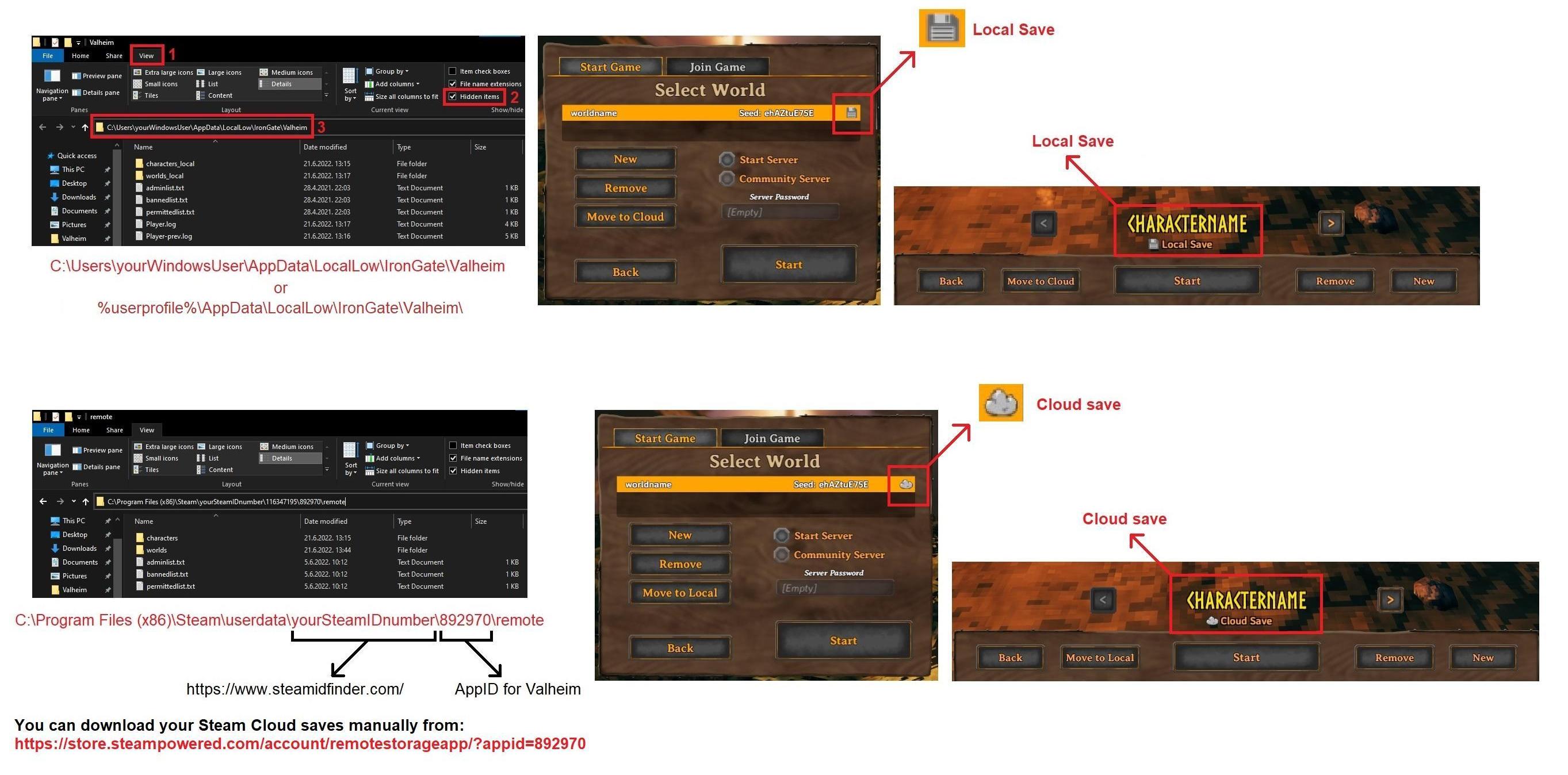
Dedicated server app doesn't save character saves, the client does.
On Windows it's:
https://i.imgur.com/mTVKf1J.jpg?4
 cedar edge
ok, so when a steam dedicated is using serverCharacters (sorry, forgot that important word), where are the saves?
stark meadow
cedar edge
ok, so when a steam dedicated is using serverCharacters (sorry, forgot that impo...
Please mod questions #mods-discussion
This is vanilla only channel
cedar edge
double doh
gilded sluice
cedar edge
ok, so when a steam dedicated is using serverCharacters (sorry, forgot that impo...
doh
you better ask the mod maker 😉
 spiral anvil
Think I might have found a possible bug: bonfire is burning crystal walls in the ashlands
 fair jasper
The no skill drain timer is incorrect. I have repeatedly noticed that it is higher than I expected it to be (for example, right now it says 8:29 left, but I know it's been more than 4:53 + 0:20 since my last death based on my rested buff). I'm pretty sure that last time I died I lost skills despite the 'no skill drain' still showing, so I think it's just the icon and timer that are incorrect and not the effect.
 young bay
The Elder does not react to my arrow shots, standing still
stark meadow
fair jasper
The no skill drain timer is incorrect. I have repeatedly noticed that it is high...
It can trigger twice due to a bug.
stark meadow
young bay
The Elder does not react to my arrow shots, standing still
Is it stuck, or a multiplayer issue?
young bay
stark meadow
Is it stuck, or a multiplayer issue?
doesn't seem stuck. it just doesn't react, looking away
stark meadow
young bay
doesn't seem stuck. it just doesn't react, looking away
Playing with mods? Singleplayer or server?
young bay
stark meadow
Playing with mods? Singleplayer or server?
singleplayer no mods
fair jasper
sometimes I see all sorts of enemies (valkyries, loxes etc) not react to arrows if they are far away
idk if I've seen bosses act that way
young bay
to be precise, when I walked close it turned around and aproached me.
but that only happened after I ran out of arrows leaving 1% of hp to deliver final blow.
about 30-ish fire and flint arrows he didnt react to at all
 ionic sparrow
I am encountering a very strange issue with the newest patch. My mouse wheel is not being detected in game at all and I'm not able to rotate buildings. Rotation works with the controller, but I can't get it to work with the mouse at all. I have even tried using a different mouse and also rebinding mouse wheel controls using autohotkey, but the issue persists. Reverting to the previous patch resolves the problem and rotation works just fine, but when I use the new update, I can't rotate anything. I have tried fully uninstalling and reinstalling with no mods, and have fully deleted the valheim folder from my registry, but still no luck. Any suggestions?
stark meadow
ionic sparrow
I am encountering a very strange issue with the newest patch. My mouse wheel is ...
Saw your report on Steam. Which exact mouse model do you use?
Does scrolling work in map, for camera, in menus/starting screen (e.g. community servers)?
Also, is your scroll properly registered here: https://www.scrolltest.net/
ionic sparrow
I use a logitech MX Master 2S, but I've also tried using a cheap microsoft branded mouse I have lying around with the same result. And my scroll is properly registered on the scrolltest site you linked. I just tried scrolling on the map in game, and it didn't work there either. So it seems like the mouse wheel just doesn't register in game at all. Like I said, I even used autohotkey to rebind my scroll to ctrl+q and ctrl+e. That works everywhere, just not in game. It's so strange! It must be something particular to me and my setup with the new patch. Rolling back to the previous patch works as expected, but as soon as I update, mouse wheel is totally unresponsive
stark meadow
ionic sparrow
I use a logitech MX Master 2S, but I've also tried using a cheap microsoft brand...
Do you have any logitech programs installed where you can influance scrolling behaviour?
So far we had one more report of scrolling not working on Logitech mice on MacOS
ionic sparrow
I do, but I have also tried disabling that as well
Not a full unistall though, just stopped it from running in the background
The scroll test sit did show 2 anomalies though for Basic Signal Detection, but the Stroke Algorithim Analysis is very healthy
stark meadow
ionic sparrow
Not a full unistall though, just stopped it from running in the background
Maybe logitech program still applies certain settings to the mouse even after closed.
Is there a smooth scrolling option there? Also at which pooling rate is mouse operating atm? (https://cpstest.org/polling-rate-test/)
ionic sparrow
It does have a smooth scrolling option, but I have that turned off. And I think I did polling test right, it gave a max of 140 Hz and an average of 125 Hz when just moving the mouse around
stark meadow
ionic sparrow
It does have a smooth scrolling option, but I have that turned off. And I think ...
That should be ok then.
Any firmware updates available there?
Found a reddit thread for a MX Master 3 fix scrolling fix, so could you try these steps as well?
https://www.reddit.com/r/logitech/comments/141ds1b/
ionic sparrow
The logi app says I have the latest firmware
ionic sparrow
stark meadow
Found a reddit thread for a MX Master 3 fix scrolling fix, so could you try thes...
I'll try it, thanks!
stark meadow
ionic sparrow
I'll try it, thanks!
It's for MacOS, but there should be equivalent options on Windows as well.
ionic sparrow
Hmmm, the logi+ app may have changed. There is no option to set scrolling speed. I can set the pointer speed, which is just the DPI setting, but no option to set scrolling speed
There's an option to set the scrolling speed for the thumb wheel on the side, but not the actual scroll wheel
stark meadow
ionic sparrow
Hmmm, the logi+ app may have changed. There is no option to set scrolling speed....
Can you the ‘Point and Scroll’ section and click the image of the scroll wheel, then turn the SmartShift option to OFF and set it to either Ratchet or Free Spin ?
It would also be good to test uninstalling logitech options+ just to confirm if the issue goes away or not
ionic sparrow
I already have the smartshift option off and set to ratchet. But I'll try uninstalling it now
I just tried uninstalling it and doing a reboot. Problem is still happening in game though. Such a weird problem...
gilded sluice
Wierd indeed. I also have a Logitech mouse and logi software. But no issues so far 🤔
Do you have any mods?
ionic sparrow
I have tried doing a full clean reinstall with no mods and it still won't work for me
The only way I can get the scrolling to work is to rollback to the last patch
Or switch to a controller whenever I need to build 😆
gilded sluice
how did you clean it?
ionic sparrow
Manually deleted all the files in the valheim folder and then uninstalling through steam. I also deleted the valheim folder in my registry under HKEY_CURRENT_USER\SOFTWARE\IronGate\
gilded sluice
ionic sparrow
Manually deleted all the files in the valheim folder and then uninstalling throu...
and how does your install folder look now?
ionic sparrow
Well, I've reinstalled my mods after the last time I tested. But I can try doing a full uninstall again

Same results, scroll wheel not responding. Clicking the mouse scroll wheel for pinging the map works fine though
gilded sluice
Hm.. could be the fast scrolling thing then 🤔
Logi Options+ Configuration: Open the Logitech Options+ software, select your mouse, go to "Point & Scroll," and adjust the scroll wheel speed or disable "Smooth Scrolling" if it causes erratic behavior in Unity.
you seen this?
ionic sparrow
Smooth scrolling is disabled already, and I have even tried uninstalling Logitech Options+ completely
 naive patio
The main menu screen under changelog says 2025 instead of 2026 for the newest version
 worldly lantern
A while back I had reported that wild Lox no longer make any ambient sounds outside of combat. The only ones that still do are the lox calves. That still seems to be the case. Do the devs have a public list of bugs to be fixed or is there way to inquire about the status of reported bugs?
stark meadow
worldly lantern
A while back I had reported that wild Lox no longer make any ambient sounds outs...
They stopped making ambient noises around hearth and home update (even before wolves stopped howling)
Not sure if intentional or not
worldly lantern
Back when I first reported it, I believe I was told that it was a bug and reported it on the official website. I had posted it on the suggestions channel and was told that it was a bug as they should still make sounds.
Can’t remember who as it’s been a good while since. I want to say it was Smiffle but I could be mistaken.
stark meadow
worldly lantern
Back when I first reported it, I believe I was told that it was a bug and report...
Not sure if @gilded sluice told you here to report it as a bug or feedback, but someone should have a second look at it.
I checked some of old youtube videos, and they were indeed making ambient growls.
gilded sluice
It is not me handling our contact email 🤔
ionic sparrow
ionic sparrow
I am encountering a very strange issue with the newest patch. My mouse wheel is ...
I just wanted to flag this issue again. I know it seems to be an extremely limited bug, but it is really impactful and makes it difficult to play the game at all. Are there any other troubleshooting steps I can take? Again, it is only an issue for me with the current patch and rolling back resolves it completely.
stark meadow
ionic sparrow
I just wanted to flag this issue again. I know it seems to be an extremely limit...
I sent you a DM about it.
 keen ocean


not sure if this is a bug but some down right horrendous alignment that seems to get worse when running/sprinting. only on female vikings our male plays are correctly animated
 junior vector
Just a quick observation after reading a reddit thread about piece_beehive idle sfx loops not working properly.
The sound works fine when the hive is placed, but if player waits for the bees to sleep through the night & wake back up in the morning, the sfx loop doesn't start replaying for them until client reloads the objects by leaving area & coming back.
Can't find anything fishy in the ZSFX component either, and disabling & enabling the BeeEffect child of the hive doesn't help.
AudioSource.isPlaying & .loop are both True when checking with Unity Explorer as well.
stark meadow
junior vector
Just a quick observation after reading a reddit thread about piece_beehive idle ...
Thx for reporting it. We had a similar thing happen with music in dungeons.
 still oracle
I was playing the new update and noticed that I was able to cook on both the cauldron and cooking stations placed above an unlit hearth. I checked the fuel just to make sure it wasn't something weird happening with the weather because it was raining. It was at 0. I left the area and came back and was no longer able to cook.
The cauldron and cooking stations were placed prior to running out of fuel. I'm thinking it just wasn't updating after the fuel expired?
stark meadow
still oracle
I was playing the new update and noticed that I was able to cook on both the cau...
It's a known issue, originated in BogWitch update, but still not fixed.
 keen oyster
I don't think this issue has been discussed a lot, and it's not so much of a bug as much as it is neglect... Some of the oldest items in the game have bad or no descriptions. For example, raw boar or deer meat have no descriptions at all; and, for example, the hoe's description is "A farmer's tool for working the earth." Experienced players don't care about that too much, but newbies might think this also has the cultivator function, which comes a bit later in the game. Another, later example, the black metal shield's description starts with "Fashioned from the strongest metal...", this is not the case ever since Flametal was introduced. Just a tip to glance over all the descriptions of all items to make sure they match the actual up-to-date state of the game, as facts might change over time.
 grim hollow
Greetings peeps. Im having an issue that I join my friend's server and I get this popup and I get disconnected after a few seconds. We have been playing normally for the last 4-5 days but today this issue popped up. We disabled crossplay, reset my router, restarted pc, tried alot of stuff and still nothing. Any idea what can I do?

 lethal geyser
Cyrillic fonts are still partially broken. The only difference from vanilla is the installed Bepinex mods have removed everything. I sent a report about the same thing about six months ago, but it probably didn't get through.
That is, everything related to this font from the error is broken for Cyrillic. The error appeared after one of the latest patches of the game. I had to make my own mod for this problem - replace this font with another one.

 gilded sluice
lethal geyser
Cyrillic fonts are still partially broken. The only difference from vanilla is t...
gilded sluice
lethal geyser
Cyrillic fonts are still partially broken. The only difference from vanilla is t...
please report those on https://valheim.com/support under "translation issues"

Please leave your feedback in the forms.
gilded sluice
grim hollow
Greetings peeps. Im having an issue that I join my friend's server and I get thi...
Sounds like a VPN issue. or wifi problems
grim hollow
gilded sluice
Sounds like a VPN issue. or wifi problems
Not using VPN, and when my friend hosts from his PC the same world it works fine, but on the server i have that issue
gilded sluice
grim hollow
Not using VPN, and when my friend hosts from his PC the same world it works fine...
what kind of internet does you and your friend have?
wifi? satelite? mobile?
grim hollow
gilded sluice
what kind of internet does you and your friend have?
I have Wifi, he has ethernet
gilded sluice
grim hollow
I have Wifi, he has ethernet
how close are you to your router?
I would probably say the problem is package loss
grim hollow
1 meter away. Like I dont have issues with any game
grim hollow
Alrights, and what can I do about it?
Keep in mind we've been playing normally the last 4 days, so what changed now?
gilded sluice
if you are so close, test with a cable and see if the issue persist, it if does. something else is the issue
could be a neighbour also bought a wifi hotspot / router and now is creating issues for you
grim hollow
Dont have a cable to test it sadly. Also with all the testing that I did i saw that my wifi's MTU was at 1500 with a bit of packet loss. I changed that to 1200 thats supposed to not have packet loss and still the same thing. Not sure if that helps but just saying
 dim raven
Is anyone else having a problem with sailing desync in multiplayer right now? We are all playing on the default_old version and with mods set to the correct version to account for this. Any time we sail together and anyone other than the driver touches the boat storage, it freezes the boat and then everyone is unable to open the chest or use the rudder, including the driver. The issue resolves upon everyone logging out and logging back in.
stark meadow
dim raven
Is anyone else having a problem with sailing desync in multiplayer right now? We...
Try re-building the boat. In any way, sounds like a mod issue. Try to test vanilla in a new world with someone hosting normally.
dim raven
stark meadow
Try re-building the boat. In any way, sounds like a mod issue. Try to test vanil...
unable to break the boat, but we can try no mods too
 indigo atlas
grim hollow
Alrights, and what can I do about it?
indigo atlas
grim hollow
Alrights, and what can I do about it?
Where is the server machine? Remote or one of your homes?
grim hollow
Remote, it's a paid provider
indigo atlas
Ping the server to test your connection and check for issues. I'm sure windows has some kind of ping command you can do in command line.
Sometimes an ISP will start messing around and not say anything. This last year was a fun time with comcast for me, with at least a dozen maintenance outages after performance issues.
 novel willow
Does anyone know why F5 doesnt work anymore for me after the Hearth & Home update. I used to be able to open the console but now no matter what I do it wont open. My F5 key works fine, and I have removed -console, launched then readded it in the properties. Yet still nothing worked. Any help would be appreciated thanks.
lethal geyser
novel willow
Does anyone know why F5 doesnt work anymore for me after the Hearth & Home updat...
Go to the game settings and turn on the console there.
grim hollow
gilded sluice
could be a neighbour also bought a wifi hotspot / router and now is creating iss...
It's kinda not that possible since I'm in a bad spot overall. My internet is satellite based even
gilded sluice
grim hollow
It's kinda not that possible since I'm in a bad spot overall. My internet is sat...
so you have wifi connection to your router which is a satelite connected?
so wifi starlink?
grim hollow
It's not star-link but ye same logic
grim hollow
Yeap it's depressing I know 💀
Overall the only real issue is ping on most games but thats not even that much of an issue
gilded sluice
wifi can be prone to package loss depending on how many units shares the connection and how many walls, metal objects etc is in the way
but satelite is on a whole diffrent level
your "ping" goes up, as the game client drops packages and meaning your client goes "sorry server, re-send that that data again"
valheim will disconnect you if you have to much of that
grim hollow
It's kinda weird tho cause I've been playing fine for like 4-5 days
Perhaps due to the weekend the provider's bandwidth was more stressed thus higher ping & more packet loss idk
gilded sluice
it's the unpredictability of wireless internet
grim hollow
So the only solution is just a friend hosting the server and that's it?
gilded sluice
well. to avoid as much wireless as possible
specially satelites
since those aren't ment for gaming..
grim hollow
Welp it's only Valheim the issue tho :v
gilded sluice
yes
since valheim has alot of things you can do, that reqiures syncing information with the other clients
imagine your client cuts down a tree. that information packages is lost in the void of package loss. meaning
for you, the tree is cut down, for them. the tree is still standing
or you build a house, that data is never transfered since all those packages with "house has been build" is gone
so they can't see your house
grim hollow
Yeah I can understand that. It's just weird that any other game works fine, even more survival/sandbox but Valheim specifically has this issue and only on a dedicated server, when someone else is hosting it's fine
grim hollow
Perhaps
gilded sluice
and each game company have decided on what is a good / bad player experience due to lagging
grim hollow
For sure. Dont want to sound offensive but atm it seems to me that the server logic behind the game requires some changes. Or of course no change at all and people with satellite internet cant enjoy the experience but ye you get the point
gilded sluice
satelite internet isn't really for gaming :/
since a bird can block your internet traffic
we can't make bird go away with programming
grim hollow
Obviously, but there is never really that big of an issue, even with satellite internet. Small spikes sure but thats about it
gilded sluice
the problem is "how much shit is in the way of my data transfer"
rain? rainclouds? heat rays?
and the the speed is a huge limit
since ethernet cables can have alot faster speed, mening "re-sencind a failed package" is alot faster for ethernet, than satelite
and fiber it's even faster
grim hollow
Would love to live in a developed country that actually has fiber cables on most places, but since thats not the case unlucky for me. Still seems wierd from my side that specifically this aspect is failing to sync properly. Since maybe valheim has more stuff to work with than other games but still could be poor optimization choices when it comes to the server setups. Not expecting any change atm but just saying
stark meadow
grim hollow
Greetings peeps. Im having an issue that I join my friend's server and I get thi...
The fault might also be on your friend's end.
Let me know when you are free to test connecting on my server.
grim hollow
stark meadow
The fault might also be on your friend's end.
Let me know when you are free to t...
Just got back into PC, i can try now
We tried multiple different host locations if thats in question aswell
stark meadow
grim hollow
Just got back into PC, i can try now
Ok, will send you a DM
 crimson hedge

i think the flower garlands are kinda bugged
we also cant take them off
they arent destroyable, neither with hammers nor with attacks
even breaking the builds behind them where they are attached to doesnt make them break
gaunt mist
crimson hedge
they arent destroyable, neither with hammers nor with attacks
They are, but you need to find the spot.
 onyx sparrow
hi, where can I report that I didnt find my grave and lost all my stuff?, sorry im a bit new in the game
gilded sluice
onyx sparrow
hi, where can I report that I didnt find my grave and lost all my stuff?, sorry ...
not really no
no one besides you have access to your own world
onyx sparrow
okay
gilded sluice
but you can roll back your character with the backup feature
onyx sparrow
I did, and theres when the grave disappeared, I think i just messed up with my cloud saves
stark meadow
onyx sparrow
I did, and theres when the grave disappeared, I think i just messed up with my ...
You have to be careful whether you are rolling back world save (location of tomstone) or character save (active inventory).
onyx sparrow
yes I actually was able to get my stuff back, now I understand how it works, thanks a bunch for your time
 keen wolf
anyone else experiencing save issues that refuse to upload
i get the unable to sync thing every time i try to open the game now
 coral perch
Any ETA on the audio issues being fixed in ashlands?
stark meadow
coral perch
Any ETA on the audio issues being fixed in ashlands?
Next patch
stark meadow
keen wolf
anyone else experiencing save issues that refuse to upload
Syncing saves is not that important if you play only on one device
You can't complete the sync even when your press sync button?
gilded sluice
coral perch
Any ETA on the audio issues being fixed in ashlands?
soon™
cedar edge
are any server owners experiencing what looks like huge network desynch between players inside the US since a few hours ago?
 sand wing
the crouch button on a controler (with steam input) is not working for me after the update, does anybody else had this kinda problem ?
stark meadow
sand wing
the crouch button on a controler (with steam input) is not working for me after ...
You have to hold it now for it to works. It will soon be reverted to how it was working before.
sand wing
oh aright then, thanks
 inland mango
While playing on a server with some friends, we discovered that destroying T.W.I.G. with non wooden weapons causes T.W.I.G. to drop double the resources that it took to make him. I could not replicate this on a single player world so it may just be on our end.
gilded sluice
might be someone with a mod 🤔
bright coral
inland mango
While playing on a server with some friends, we discovered that destroying T.W.I...
Try hitting F2 to see if any published server modifiers are in play. It won't show all possible ones, but many.
 finite shore
hi, anyone knows why this is happening? everything seems to be unlimited on my newly made world
stark meadow
finite shore
hi, anyone knows why this is happening? everything seems to be unlimited on my n...
Probably mods. Used any in the past?
finite shore
stark meadow
Probably mods. Used any in the past?
Yes i think i did try some mods before i quit valheim last year. i cant remember what mod that was. Is there a way to reset everything to vanilla?
stark meadow
finite shore
Yes i think i did try some mods before i quit valheim last year. i cant remember...
The only way to do it would be to manually delete the contents from Valheim installation folder (just Steam re-install won't cut it).
And only then going for re-install.
finite shore
stark meadow
The only way to do it would be to manually delete the contents from Valheim inst...
oh, i did try to uninstall and install via steam only. Thanks, will try this
 sand mason
Hey guys, so the modifiers seem to be having issues. No matter how we start them the world modifier has a - in it
gilded sluice
it has a - ?
stark meadow
sand mason
Hey guys, so the modifiers seem to be having issues. No matter how we start them...
Are you talking about not being able to turn off certain modifier on dedicated server?
To delete modifers via start server config file, you would have to delete previous -modifers and add -resetmodifiers to it
You can't delete/turn-off modifiers individually though start server config file. This can only be done via console commands when you are actively on the server, as an admin.
sand mason
stark meadow
Are you talking about not being able to turn off certain modifier on dedicated s...
Thank you so much, working currently
urban flicker
Anyone else experience long dungeon load times? For me, when I go through a portal or walk into an area with a large dungeon or two it can can take 2, 5, 10 and even 20 minutes to load. When going through a portal, you are stuck there for up to 20 minutes.
stark meadow
urban flicker
Anyone else experience long dungeon load times? For me, when I go through a port...
There have been cases. Mostly related to slow IO.
What CPU and storage are you using for Windows and your Steam library?
Also check what FPS you have while loading a dungeon
 low ocean
20 minutes to load? Do you really wait that long and not quit the game?
gilded sluice
20 minutes sounds like a broken harddrive if you're playing from local storage
or something is seriously wrong
 paper sparrow
Question for the devs and other players ...
Today, I was in the mistlands and ashlands, and I used my Staff of the Wild to attack a seeker soldier and a bunch of charred and a morgen. The mobs took the poison damage, but the roots didn't whack them. Has the staff changed? Or, is this a bug? Anyone else get this issue?
paper sparrow
Welp, the "bug" was a "You have to update Windows, so we'll mess up whateverr you do until you update Windows" situation. It's fixed now.
gilded sluice
paper sparrow
Welp, the "bug" was a "You have to update Windows, so we'll mess up whateverr yo...
super-wierd tho
a windows update shouldn't mess with our game files
 past wagon
Not sure if reported before, but whenever you’re inside a stone structure in the mountains, both mountains music and mist lands music play, sometimes overlapped
 bronze cliff

 dense lion
Is a game crashing a lot recently for anyone after alt tabbing on a pause menu? (music keeps playing in the background while game is frozen)
 deep pilot
my game crashes just randomly now after the update
 fluid topaz
i need help
where i can find folder lootmultiplier bc i want to change lootmultiplier
i use r2modman
stark meadow
fluid topaz
i need help
where i can find folder lootmultiplier bc i want to change lootmulti...
This is vanilla only channel. Go to #mods-issues or #mods-discussion
fluid topaz
?
stark meadow
deep pilot
my game crashes just randomly now after the update
What are you PC specs and in what rendered do you play?
stark meadow
dense lion
Is a game crashing a lot recently for anyone after alt tabbing on a pause menu? ...
This is usually related to Nvidia drivers. Which GPU do you have?
fluid topaz
so can y help me or no? @stark meadow
stark meadow
fluid topaz
so can y help me or no? <@196192010581835776>
We don't deal with mod related questions in this channel.
If you mod your game, developers can't help you with the game you modified.
You should ask for help other modders and mod authors, which is at the channel links I pasted above.
dense lion
stark meadow
This is usually related to Nvidia drivers. Which GPU do you have?
7700 XT
stark meadow
dense lion
7700 XT
Does it freeze every time you come back after alt-tabbing? Do you have in-game V-sync enabled?
If you do, disabling it might be a workaround. However this is usually indicative that drivers are faulty, so I would recommend a simple driver reinstall (select custom installation and option to clean game profiles). If it doesn't work then I would recommend doing full procedure: #steam-bugs-discussion message
It's also possible that there could be differences when you launch the game in Vulkan vs d3d11 (default), so test both.
 harsh laurel
Me and my friends are playing on a locally hosted server off one of our PCs. When we log any ship that were in render distance just seemingly disappear. Not sure what happens but I know for a fact that boat is stopped in its place
stark meadow
harsh laurel
Me and my friends are playing on a locally hosted server off one of our PCs. Whe...
Are you are talking about dedicated server, or someone just hosting their world via in-game option from their PC?
Are you sure it's just the boats disappearing, and not items from chests also?
harsh laurel
stark meadow
Are you are talking about dedicated server, or someone just hosting their world ...
Sorry I meant hosting it via the in game option on their pc and yes it’s only boats disappearing
stark meadow
harsh laurel
Sorry I meant hosting it via the in game option on their pc and yes it’s only bo...
Does you friend stay in the game when you are not around, or he only opens the server when they are actively playing?
The boats are probably just getting destroyed by enemies or sometimes waves, rather than disappearing.
Do you have any workbench near the boats to prevent items from boat item drops from despawning in case they get destroyed.
tropic torrent
stark meadow
Does you friend stay in the game when you are not around, or he only opens the s...
Even a workbench won't necessarily save them. AFAIK anything under 5m of water will be removed, even if a workbench is right beside it.
stark meadow
tropic torrent
Even a workbench won't necessarily save them. AFAIK anything under 5m of water w...
True but people usually leave boats on shore
tropic torrent
fair point, and I guess the wood would survive in that case anyway.
deep pilot
stark meadow
What are you PC specs and in what rendered do you play?
19-14900k 64gb DDR5 rtx 4070 super. i play in 1920x1080
 lofty horizon
what's the problem, i constantly get thrown out of the servers im playing, like i can play for 5 mins then i get the picture of a pc and a cord with the X in the top left and get thrown out.
stark meadow
deep pilot
19-14900k 64gb DDR5 rtx 4070 super. i play in 1920x1080
Do you play at default rendered (d3d11) or do you launch Valheim in Vulkan?
What's the nature of the crash (black scree, crast to desktop, unity popup message, pc restarts)?
stark meadow
lofty horizon
what's the problem, i constantly get thrown out of the servers im playing, like ...
Packet loss probably. Are there more clients on the server that have stable connection?
deep pilot
I launch in default render. I believe it’s a unity crash to desktop. no black screen and no restart, just a small window popup for a couple seconds
lofty horizon
stark meadow
Packet loss probably. Are there more clients on the server that have stable conn...
my 2 friends, other is the host of course he has no problems and my other friend never gets thrown out. only i get thrown out
ive lost a lot of stuff like 30 silver cus i put them in a chest right before i got thrown out and they just dissappeared
stark meadow
deep pilot
I launch in default render. I believe it’s a unity crash to desktop. no black sc...
Then it's most likely due to your PC starting to showcase degradation issues.
Are you aware of Intel 13th and 14th gen CPU issues? If you don't address is right now, it will get worse over next couple of months.
How old is CPU?
stark meadow
lofty horizon
my 2 friends, other is the host of course he has no problems and my other friend...
That narrows it down then to the problem being on your end.
Do you have any VPN installed (please screenshot and paste how your network adapters look like at: start → type and open device manager → expand your network adapters list → screenshot)
How's your router connection to ISP? (fiber, copper, vdsl, satelite, mobile, etc)
How are you connected to the router?
What your buffer bloat score? (preform this test? (https://www.waveform.com/tools/bufferbloat?) (please also screenshot)
 hidden schooner
SUBJECT: MAX SETTINGS ON 5070TI OC + I9 14900K + 32 GB RAM CAUSES CRASHING ON STEAM VERSION (NON VULCAN)
when i have my settings on max (draw distance anything over medium... and fps uncapped (over 60) with distant shadows.... the game crashes constantly causing me to lose progress. i tested it thoroughly and its 100% the draw distance causing the crash...
the newest windows 11 update was causing my dedicated server stability issues (connection problems and crashes) so i reverted the update to a previous version and that fixed it
but draw distance was causing game instability
just for me

build info
(the crash would always be a unity crash)
also a QOL update would be to make wind completely silent while inside a stone castle
i like sitting in base and listening to music but the wind in the plains is to fricken loud
 grave skiff
Ooof. the dual axes alt attack does not play well with hills. It's a good thing there isn't a mountains tier one.
gaunt mist
grave skiff
Ooof. the dual axes alt attack does not play well with hills. It's a good thing ...
It's not actually a bug tho.
grave skiff
the intended function is to yeet you 10' above the mob ?
I've always wondered how the game decides if you're "targeting" a mob. I know it will do a different attack depending on if it's going to hit a mob or not with axes
gaunt mist
The animation forces movement forward, not downwards, which causes the yeet if you're on the edge of a cliff.
Similarly with knife secondary attack.
It's not bug still, just how the animation for them attacks work.
grave skiff
It seems like the axes' attack doesn't seem to really jump you if you're midair while the knife one does
gaunt mist
It's not an actual jump with either animations.
stark meadow
hidden schooner
the newest windows 11 update was causing my dedicated server stability issues (c...
If you are not playing in Vulkan, also like I mentioned in the comment above yours, probably Intel 14th gen stability issue.
How old is your CPU?
hidden schooner
stark meadow
If you are not playing in Vulkan, also like I mentioned in the comment above you...
brand new, not on vulcan
stark meadow
hidden schooner
brand new, not on vulcan
Then you probably have to update your BIOS on motherboard + select a different default profile (there's two, Intel and Motherboard default, choose Intel one).
stark meadow
hidden schooner
ill have to do that later
I would personal also recommend that you lock all the cores on same frequency (prevents some cors from boosting higher) and prolongs lifespan of the CPU at minimal performance impact. Can send you a video explaining why, let me know in DMs
hidden schooner
ill get back to you tomorrow or tonight after i defeat moder with 2 friends
dont want to shut down the server now because they are farming
cedar edge
stark meadow
I would personal also recommend that you lock all the cores on same frequency (p...
lock all the cores on same frequency
thats a thing? i know i can do it manually, but i always assumed they throttled freq together (linux)
Sorry, was in conversational mode. What i should have said was: "video URL please"
dense lion
stark meadow
Does it freeze every time you come back after alt-tabbing? Do you have in-game V...
Ok. Think it is fixed. Reinstalled drivers, didn't work.
V Sync is disabled always. Vulkan also crashed.
In the end downgraded driver to one of the older versions and worked.
 fiery hornet
We have the same problem. When I play with a friend he will be frequently kicked out. Most of the times when the food timers end. It’s not the pc or hardware. Even games with higher graphics play well on our pc’s. I think there is a bug in synchronization
hidden schooner
stark meadow
I would personal also recommend that you lock all the cores on same frequency (p...
updating bios fixed my problem
stark meadow
cedar edge
> lock all the cores on same frequency
~~thats a thing? i know i can do it manua...
Sent you the additional link in DM about that
stark meadow
fiery hornet
We have the same problem. When I play with a friend he will be frequently kicked...
There are no game related bugs that would lead to connection loss. You should have no connection issues by playing with only 2 people.
fiery hornet
We do and mostly in the evening. It never happened before. We buy after the last update
stark meadow
fiery hornet
We do and mostly in the evening. It never happened before. We buy after the last...
I would recommend to read through this one and do tests I mentioned there: https://steamcommunity.com/app/892970/discussions/1/612032374411149472/#c612032512885010678
fiery hornet
Thank you. Will do that.
stark meadow
fiery hornet
Thank you. Will do that.
The issues can be on either side, so both of you should do the same tests. Let me know how it goes.
fiery hornet
I will let you know the results. 👍
grave skiff
Anybody had an issue with asks not taming? This is twice now when they'll just sit in the whole i dug and not eat
stark meadow
grave skiff
Anybody had an issue with asks not taming? This is twice now when they'll just s...
Raise the ground floor a bit and put a stone block inside
grave skiff
like a stone floor? or just a 1x1 block?
stark meadow
grave skiff
like a stone floor? or just a 1x1 block?
Any block
urban flicker
stark meadow
There have been cases. Mostly related to slow IO.
What CPU and storage are you u...
I've tested everything. There is nothing wrong with my system. I'm running this on Linux, and my PC is a pretty high-end. There is no performance problems with any other game or software.
I recently tried splitting the system up. I now run a dedicted world server on MacOS, and the client on Linux. That did improve things a little, but loading dungeons can still take several minutes. If I'm in-game and near it, it sometimes doesn't even have ground support and the outer structures start falling apart.
urban flicker
low ocean
20 minutes to load? Do you really wait that long and not quit the game?
I do wait that long. Good time to stretch out. 😉
urban flicker
gilded sluice
20 minutes sounds like a broken harddrive if you're playing from local storage
Nothing wroing with my system. THe game files are on an NVME SSD. Running IO tests shows no performace problems. I check the system stats when the game is running and loading the dungeon (or spash page). CPU utilization is low, disk IO is very long. It's not even trying. It seems to be mostly just deadlocked much of the time.
gilded sluice
urban flicker
Nothing wroing with my system. THe game files are on an NVME SSD. Running IO te...
which CPU you got and what RAM sticks?
you didn't run any mods did you?
stark meadow
urban flicker
Nothing wroing with my system. THe game files are on an NVME SSD. Running IO te...
Is SSD is in RAID, ZFS setup? How long are your game boot times? How much FPS do you have during that dungeon loading? Did you test new world to see if it's related to specific save? Do you have Transparent Huge Pages (THP) enabled on your distro? Running a VM?
urban flicker
gilded sluice
which CPU you got and what RAM sticks?
Operating System: KDE neon 24.04
KDE Plasma Version: 6.6.0
KDE Frameworks Version: 6.23.0
Qt Version: 6.10.2
Kernel Version: 6.8.0-100-lowlatency (64-bit)
Graphics Platform: Wayland
Processors: 8 × Intel® Core™ i7-9700K CPU @ 3.60GHz
Memory: 32 GiB of RAM (31.3 GiB usable)
Graphics Processor: NVIDIA GeForce RTX 3070
urban flicker
gilded sluice
you didn't run any mods did you?
no mods, stock Valheim from Steam.
gilded sluice
Hm.. nothing that stands out. as likly issue 🤔
do you store locally or cloud saves?
urban flicker
gilded sluice
Hm.. nothing that stands out. as likly issue 🤔
Exactly, everything on my system works just fine, and fast. The FPS I have vsync on and frame limiting to 60 fps, and it's always at that. The graphics rendering is not the problem. The world building is.
I can also walk into areas where the ground is all blank. I wait a few minutes and then the ground cover fills in. But the play scene is always fast.
Also, the ground cover seems to be blocked by a nearby dungean loading. Only after it is "spawned", all of them if there is more than one, does the ground cover fill in.
urban flicker
gilded sluice
do you store locally or cloud saves?
cloud saves, but I have also tried local storage. Same thing. I've tried many different things, and many parts of the software stack have been updated over time. This problem is always there.
stark meadow
urban flicker
Exactly, everything on my system works just fine, and fast. The FPS I have vsync...
In the past 2 years, we only had few such reports. I haven't seen any resolution on Linux yet, but on Windows long dungeon loads have been related to IO issues (either disk or CPU related), like using external disks, playing over VM, antiviruses halting threads while Valheim was executing.
As I said, you should also check your FPS during load times. The final step of the asset loading process is something called "asset integration" which is basically making the assets loaded in the background available to the main thread. The integration step is also performed on the main thread but is time sliced per frame. Integration time limit is dynamic for loading screen, but during normal gameplay, it's set to just 2ms per frame. This means that on low FPS, locations will load slower.
urban flicker
stark meadow
In the past 2 years, we only had few such reports. I haven't seen any resolution...
I've had this problem for a long time now. It does seem to be uncommon. I don't have any of those IO issues. THe main games files on on NVME SSD, but Steam does put some files, like the save files, under my home directory which are spinning disk drives (RAID1). But I did try moving those to the SSD as well but it didn't change anything. My FPS is always 60 because of vsync/frame limiting.
stark meadow
urban flicker
I've had this problem for a long time now. It does seem to be uncommon. I don't ...
So your Steam is installed on this RAID setup? That would mean that some cache files might still be there, like ~/.steam/steam/steamapps/shadercache/892970/ (app ID for Valheim). If so, I would also recommend re-installing Steam on SSD. Are you symlinking any of these files? Are you running any security feature that would resemble anti virus software on Windows?
Btw. went on to comment on your Steam thread to ask the other person 2 years ago if they fixed their issues, and realised you are the same person XD
urban flicker
stark meadow
Btw. went on to comment on your Steam thread to ask the other person 2 years ago...
Yes, same person and I've come up with work arounds for this. Mainly, just pause the game and tial the Player.log to watch for an equal number of "spawning" events corresponding to "loading" events. Those can be sever minutes apart. I count the number of loading lines, and wait for an equal number of spawning lines. Only then will I pop out of a portal. Mistlands seems to add extra time.
urban flicker
stark meadow
So your Steam is installed on this RAID setup? That would mean that some cache f...
I checked the Steam install. It is on the SSD, and the cache files are also on the SSD. Under /games/steamapps/shadercache/892970. The /games is on the SSD.
stark meadow
urban flicker
Yes, same person and I've come up with work arounds for this. Mainly, just pause...
Valheim won't go back to synchronous loading of location on main thread like before. Switching to asyncronous loading resolved many Vulkan crashes people has while sending input during load screens, which was the biggest issues at the time.
Tried temporary disabling Transparent Huge Pages (THP) (should clear after reboot):
echo never | sudo tee /sys/kernel/mm/transparent_hugepage/enabled echo never | sudo tee /sys/kernel/mm/transparent_hugepage/defrag
urban flicker
stark meadow
Valheim won't go back to synchronous loading of location on main thread like bef...
Cool, I'll try that.
stark meadow
~/.config/unity3d/IronGate/Valheim/ is also on SSD? (no symlink?)
What does findmnt -T ~/.config/unity3d/IronGate/Valheim return?
 wet bone
if one player has PVP on, and another has it off, the player with PVP on can infinitely train their skills by attacking the PVP disabled player.
urban flicker
stark meadow
`~/.config/unity3d/IronGate/Valheim/` is also on SSD? (no symlink?)
What does `f...
It's not, but there is nothing in it. That's the default location. It is possible to configure Steam to use a different location, so that's what I have done. So /games, which is on the SSD, is where everything is.
urban flicker
stark meadow
Valheim won't go back to synchronous loading of location on main thread like bef...
So tried that, no difference.
02/23/2026 09:45:42: Teleportation TRIGGER
02/23/2026 09:45:42: Teleporting Nightowl
02/23/2026 09:45:48: Loading dungeon
02/23/2026 09:45:48: Dungeon loaded with 45 rooms from old format in 0.15 ms.
02/23/2026 09:45:48: Loading room prefabs asynchronously
02/23/2026 09:45:48: Loading dungeon
02/23/2026 09:45:48: Dungeon loaded with 41 rooms from old format in 0.07 ms.
02/23/2026 09:45:48: Loading room prefabs asynchronously
02/23/2026 09:45:50: Activating default element Continue
02/23/2026 09:45:58: Skipping unloading unused assets
02/23/2026 09:49:45: Spawning dungeon
02/23/2026 09:57:18: Spawning dungeon
02/23/2026 09:58:07: Spawned Hare x 0
02/23/2026 09:58:42: Setting saddle:False
02/23/2026 09:58:42: Setting saddle:False
02/23/2026 09:58:54: Random event set:hildirboss1
02/23/2026 09:58:54: Starting music CombatEventL1
02/23/2026 09:58:55: Spawned Skeleton_Hildir_nochest x 1
02/23/2026 09:58:55: Spawned Skeleton x 2
02/23/2026 09:58:55: Spawned Skeleton x 2
02/23/2026 09:58:55: Spawned Skeleton_Poison x 1
02/23/2026 09:59:06: Activating default element Continue
so over 12 minutes to portal to the porch of a Queen in this map. The loading time is proportional to the number and size of the dungeons. Since I do this often, I now have an intuition on how long it will take. So if I see 2 40-50 room dungeons in Mistlands, I know it will be at least ten minutes.
I don't know why I put up with this.
 nova lynx
hi was wondering if someone could help me with crashing issues only in the past 2days?
i have crash log reports
stark meadow
nova lynx
hi was wondering if someone could help me with crashing issues only in the past ...
In what manner are you crashing? (black screen, freeze, pc restart, unity popup, etc)
What PC specs do you have?
Do you play in Vulkan or default?
nova lynx
stark meadow
In what manner are you crashing? (black screen, freeze, pc restart, unity popup,...
unity popup, default launch.
Z790 eagle ax
i7-13700k
4060ti
stark meadow
nova lynx
unity popup, default launch.
Z790 eagle ax
i7-13700k
4060ti
If you are not using mods then crashes are most likely happening due to degraded 13th gen CPU.
Are you aware of issues that Intel has with those CPUs?
nova lynx
stark meadow
If you are not using mods then crashes are most likely happening due to degraded...
im not
stark meadow
nova lynx
im not
To sum it up, Intel boosts voltage/frequency on some cores too high, which degrades CPUs of 13th and 14 gen faster, which then start crashing, first in some games like Valheim, later even when browsing and navigating windows. Your first course of action should be checking which BIOS you have installed on your motherboard (CPU-Z app, or go to start → type system information → System summary → BIOS version/Date), and then you should compare it with the newest BIOS on motherboard manufacturer website.
nova lynx
was just doing that, noticed my bios is currently on version f3
then i read this on the website

which is the version above mine
stark meadow
nova lynx
was just doing that, noticed my bios is currently on version f3
From which year was F3?
nova lynx
stark meadow
From which year was F3?
9/27/2024
do i just go straight to the latest of f6?
 stark meadow
nova lynx
9/27/2024
stark meadow
nova lynx
9/27/2024
Best to update then + also important, after updating, enter BIOS and be sure that Intel defaults are applied for your CPU profile (not motherboard defaults).
There should be two kinds of defaults that you can load.
nova lynx
stark meadow
Best to update then + also important, after updating, enter BIOS and be sure tha...
copy dat, i will be back with results in like 10minutes or so. appreciate you
nova lynx
stark meadow
Best to update then + also important, after updating, enter BIOS and be sure tha...
im not seeing where the cpu profile is

 stark meadow
nova lynx
stark meadow
nova lynx
Seems like it already is on Intel Default settings. Instead of preformance, what else can you select there?
nova lynx
everything that is in white
stark meadow
nova lynx
everything that is in white

This line, to what else can you set it except on Performance which is already selected
nova lynx
oh apologies
performance or disabled are the only options

should I just try playing now since the bios update?
stark meadow
nova lynx
Hm, it's pretty confusing naming convention here, so I'm not sure which one you should select.
Best way would be to test how CPU behaves in frequency and voltage to know for sure.
Will also send you a video in DM that I think you should watch on this topic.
nova lynx
awesome thank you
stark meadow
In the video, he locks all cores to specific multiplies 56, which makes cores run at 5.6Ghz, but he's doing in on a different CPU.
Your CPU works on 5.1Ghz to 5.3Ghz, so you should lock in to 51, 52, 53 multiplies. The lower you go from those options, the more stable.
stark meadow
In your case, it would probabl be good idea to also set "Intel POR" option for "Turbo Power limits"
 pale fox
The skill menu updates stats and bonuses when you open it, not while it is currently open, so if you remove a piece of equipment and then open the menu, you can still have a skill bonus being listed even though it is not active.
 stark meadow
pale fox
The skill menu updates stats and bonuses when you open it, not while it is curre...
stark meadow
pale fox
The skill menu updates stats and bonuses when you open it, not while it is curre...
It's not really a bug, rather a lack of feature to update the menu actively. No change in skill updates while you have it open
pale fox
If a menu for displaying stats are showing the wrong stats, that is a bug.
Since, you know, menus for showing stats are supposed to show the stats as they are when you are looking at them, not a snapshot of what they were at an arbitrary moment in time.
stark meadow
pale fox
If a menu for displaying stats are showing the wrong stats, that is a bug.
Since...
Nothing from the right side of menu updates actively (skills, trophies, recipes, active effects) and it never was, because it was never intended to.
I don't see much point into doing so either. Maybe you can convince @gilded sluice
gilded sluice
me? 😄
I would probably say if the skills would update more often, it would use more performance
fluid topaz
can someone help
 stark meadow
fluid topaz
can someone help
stark meadow
fluid topaz
can someone help
Are you playing on Xbox PC app?
stark meadow
fluid topaz
pc
Do you have the game installed on Xbox PC app or Steam?
fluid topaz
STEAM
@stark meadow
why the quick stack sorter trash it doesnt work it doesnt show in inventory
fluid topaz
fluid topaz
can someone help
i have no problem with that
fluid topaz
fluid topaz
why the quick stack sorter trash it doesnt work it doesnt show in inventory
@stark meadow
stark meadow
fluid topaz
i have no problem with that
Where are you from? Egypt?
This kind of error is usually rare, and related to someone blocking playfab services
Have any VPN apps installed?
fluid topaz
xd
 gritty plume
Hey just want to point out that the video link for Hervor’s journey from the last steam blog post isnt working for me. Anyone else having the same issue?
 gilded sluice
gritty plume
Hey just want to point out that the video link for Hervor’s journey from the las...
gilded sluice
gritty plume
Hey just want to point out that the video link for Hervor’s journey from the las...
Hervor's journey is coming to an end. Will you be brave enough to follow in her footsteps?
Valheim is available for purchase on the Steam, Microsoft/Xbox, Humble and Mac App stores.
Valheim is made by developer Iron Gate, published by Coffee Stain Publishing.
Find us on:
https://www.valheim.com
https://www.youtube.com/@irongateofficial
https...
should be this video 🤔
gritty plume
gilded sluice
should be this video 🤔
yeah it is this video. found it by manually searching the video. But there are links in the steam blog post. Every link for example the "Switch wishlist" link works for me except the video link.
it is just a minor inconviniece but was wondering if this is a me problem or a malfunctioning link
stark meadow
gritty plume
yeah it is this video. found it by manually searching the video. But there are l...
The link is fine, but you are not the only one for whom it doesn't work.
It's not related to Valheim. You probably won't be able to open other youtube links linked in Steam also.
Could be related to your VPN, antivirus, steam settings (hardware acceleration, smooth scrolling, clean steam download cache)
gilded sluice
YouTube was under attack last night. So try again today @gritty plume
wet bone
idk wtf happened but this is unnaceptable. im host.
it keeps freezing like this, after like 30 seconds of sailing, somebody please help if this is a known issue
gilded sluice
wet bone
idk wtf happened but this is unnaceptable. im host.
doesn't matter if you are the host or not
are you stearing?
did someone open the storage while you are stearing?
wet bone
idk if he opened storage or not
i wasnt steering, and either way, its an unnacceptable bug
this deserves a hotfix
the second time it froze he was afk
so i can assure you there was no storage opened
and he was holding the pole
sorry im just a bit upset
wet bone
to what? its a local server
i can understand if he got kicked
but im hosting there has to be something wrong backend if i got disconnected
stark meadow
wet bone
to what? its a local server
You both were playing on same home connection? How exactly were they connecting to your server?
It looks like here you friend lost connection, so boat stoped while the server waits for them to reconnect
wet bone
why not store where he logged off relative to the boat and just put him back there
hes remote, im hosting via the "host server" button and he joined via steam
stark meadow
wet bone
hes remote, im hosting via the "host server" button and he joined via steam
Ah, then it's not a local server. Local means your connection is on the same router.
Since you friend probably last touched the storage they were the one controlling the boat (network related)
wet bone
local relativce to me. i thought you were saying i lost connection to my own session
either way, its a pretty easy fix
stark meadow
wet bone
local relativce to me. i thought you were saying *i* lost connection to my own s...
No, it's not possible for you to experience that. But specific objects in the game are not necessarily hosted by you.
The boat was in your friend's control. There's no easy fix.
wet bone
i was steering the ship
just store where he is relative to the boat server side if he disconnectes, and put him back based on those local coordinates
im a unity dev i know its possible, i dont know how your backend works but there has to be a better way to do this than just freezing the boat with no explination
at the very least make a diaglog onscreen explaining whats happening
make it not jitter like crazy so people dont think shit crashed
you have to think of user experience first
i do believe it was a connection issue since my router had a few crash logs and had to restart, but this could be improved from a user experience standpoint
its very panicing and confusing
just pass a word to the devs is all i ask and thank you for making such an amazing game devs <3
stark meadow
Went about explaining why it's not an easy fix, but gave up on it XD I mean you are right, it's not a great system.
You can try loading earlier character and world save (separated save) (in-game manage saves menu) and see where that gets you (current save gets backed up). If you are lucky, you might have save just before you took the trip. If you wanna avoid this happening again, when you control the ship, don't let them open storage, and in case they do, you should also open yourself after to take back ownership of the ship (network wise) (think that re-sitting on the rudder also re-takes ownership). That way if they disconnect, you will still control the ship.
wet bone
Ok, thank you. Definable take a look into if there’s any way to at the very least communicate it to a player. Even a hacked together pop up saying “Ship owner has disconnected, the ship will be frozen until they reconnect”
Thank you for staying respectful even though I got a bit heated
Have an amazing day <3
gilded sluice
wet bone
just pass a word to the devs is all i ask and thank you for making such an amazi...
I am a developer 😄
but it's 11:05pm on a friday night
gilded sluice
yeah. US I guess?
wet bone
i hope you enjoy your weekend! I have about 210 hours and have bought like 3 different friends copies i love this game so much
gilded sluice
nice ^^
gilded sluice
<-- sweden

 river dragon
me and my friend just opened the game after a month or so of not playing havent played it since around the end of Jan this year and both our character saves and our world have gone...
neither of us have touched the valheim files on our computers nor have we uninstalled it since we last played only change has been updating the game when patches have come out
stark meadow
river dragon
neither of us have touched the valheim files on our computers nor have we uninst...
Check if you Steam Cloud is enabled in Steam general settings and additionally specifically for Valheim.
You should also check if you can see saves here: https://store.steampowered.com/account/remotestorageapp/?appid=892970
Login with your Steam account in the browser.
river dragon
ah thankyou, mustve turned it off by mistake or something...oops..
gilded sluice
wet bone
now this one is just funny
yeah. randomness makes those impossible sometimes sadly.
wet bone
gilded sluice
yeah. randomness makes those impossible sometimes sadly.
Yeah I know, if you spent all your time catching edge cases we’d never get the deep north XD
this one isn’t a bug but I thought I might share, yknow how worlds are stored in two files, one for terrain and one for objects, I once managed to corrupt one and somehow had one on a different seed than the other, so every alter made these giant holes or pillars lol
Not a bug imo since it took a manual fuck up with the files
But it was funny
 viscid owl
So I don't know if anyone else is having this problem, but here's my issue: F5 Console Will Not Open Despite Being Enabled
I am running the latest Steam version of Valheim (Build ID 21981559).
I have -console correctly added in Steam launch options, and the game confirms on the main menu that the console is active and can be opened with F5.
However, pressing F5 in-game does absolutely nothing. There is zero response — no flicker, no UI change, no freeze.
Additional details:
Steam version (not Game Pass)
Tested in single-player
Fully up to date
Disabled all mods (renamed BepInEx and removed winhttp.dll)
Verified game files
F1 and F2 menus work normally.
Tried Fn + F5 (no effect)
F5 works in other applications (Notepad)
Console still does not open in a completely vanilla state.
The console is reported as enabled, but the F5 key does not trigger it.
Has anyone experienced this on the current build? Is this a known issue?
bright coral
viscid owl
So I don't know if anyone else is having this problem, but here's my issue: F5 C...
Any clue from yourPlayer.log for a session with the failure to bring up console? If not, you could look at your Valheim Settings for F5 being bound to something else or try something like https://github.com/ITachiLab/hotkey-detective?tab=readme-ov-file#running-steps when you try it to see if something outside of Valheim is trapping F5.

GitHub
A small program for investigating stolen key combinations under Windows 7 and later. - ITachiLab/hotkey-detective
stark meadow
viscid owl
So I don't know if anyone else is having this problem, but here's my issue: F5 C...
Probably related to your mods. You should try clean vanilla first (not just disabling mods but cleaning out installation folder)
 serene dome
Im having some strange things happen when server gets laggy. Sometimes when killed we get duplicate and psuedo duplicate items. Psuedo meaning instead of duplicating my lvl 3 helmet, a lvl 1 duplicate appears in my inventory when I respawn but the lvl 3 will be in my tombstone. There is also random deaths with nothing around, usually when just entering the game...sometimes in our monster free bedrooms. Often our tombstones are not even close to where we died. All of us have respawned in the middle of the ocean nowhere near the land biome we died at. Great game btw.
gilded sluice
serene dome
Im having some strange things happen when server gets laggy. Sometimes when kil...
sounds like some kind of mods going on 🤔
serene dome
gilded sluice
sounds like some kind of mods going on 🤔
Vhvr and land Animals but it happened in Vanilla before we started VR.
gilded sluice
well. as long as you or someone runs mods. we cannot rule them out since I never ever heard those issues in vanilla
serene dome
Id also add lag causes vikings falling off the boatS as well. Im just reporting what bugs my group is running into. No worries if they never get fixed. We beat games and move on anyways.
 languid flax
I'm having a strange "phantom fire" bug. Sometimes, when leaving the area of campfire, the fire buff is not removed and persists until I reenter and leave the campfire area. It's not just visual either, I dry faster with this and it triggers resting while in shelter. No mods, character and world created afer latest patch
gilded sluice
serene dome
Im having some strange things happen when server gets laggy. Sometimes when kil...
do you guys run with any world modifiers?
gilded sluice
languid flax
I'm having a strange "phantom fire" bug. Sometimes, when leaving the area of cam...
do you play solo or with people?
languid flax
gilded sluice
do you play solo or with people?
singleplayer
serene dome
The only world modifier is we set portals to easy. ie Everything goes through.
Ive never noticed any of these problems in single player
gilded sluice
languid flax
singleplayer
no mods?
languid flax
gilded sluice
no mods?
No. Pure vanilla. It's rare, noticed it about three or four times in ~12 hours of gameplay
 scarlet cradle
languid flax
I'm having a strange "phantom fire" bug. Sometimes, when leaving the area of cam...
scarlet cradle
languid flax
I'm having a strange "phantom fire" bug. Sometimes, when leaving the area of cam...
I'm having a similar issue, but there doesn't even have to be a fire nearby. Me and my buddy have been playing for around 15 hours now and have experienced the said "phantom fire" bug. We will be walking around and suddenly a fire buff will appear even if no fire is around. The fire buff stays for about 2 minutes and then disappears as we continue to explore.
gilded sluice
Th fire bug has been a thing for quite some time. Its a known issue at this time 🥲
 tired gorge
Camera keep glitching out, fixes I tried so far
- Relaunching the game couple times
- Verifying game files
- Reinstalling the game
stark meadow
tired gorge
Camera keep glitching out, fixes I tried so far
1) Relaunching the game couple ...
Quickest fix would be to not play in Vulkan.
stark meadow
tired gorge
what's the 2nd fix
Otherwise you would have to re-install your graphic drivers and select custom installation + clean installation options during installation process.
And then after that not use external FPS limiters for Valheim profile (just use the one built into Valheim), or the same bug can trigger, requiring re-installation.
tired gorge
A year ago I had a camera mod but I just deleted it now, do u think that's related to the issue?
stark meadow
tired gorge
A year ago I had a camera mod but I just deleted it now, do u think that's relat...
No, we are aware of this issue on Nvidia cards.
tired gorge
stark meadow
No, we are aware of this issue on Nvidia cards.
Ohh, so it's a new thing
so how do I launch the game without vulkan
 gilded sluice
tired gorge
so how do I launch the game without vulkan
gilded sluice
tired gorge
so how do I launch the game without vulkan
 stark meadow
tired gorge
Ohh, so it's a new thing
stark meadow
tired gorge
Ohh, so it's a new thing
Btw. you should probably also re-do your FPS comparison between Vulkan and d3d11 now.
They should be about same FPS. Just remember when comparing fps, it's best to force clear weather and same time of day via devcommands, because FPS can vary a lot depending on those every second.
tired gorge
gilded sluice
Thanks, one last thing. I had my armour equipped in slots that don't exist now (modding), so it's all gone
is there console commands to give myself new armour?
tired gorge
stark meadow
Btw. you should probably also re-do your FPS comparison between Vulkan and d3d11...
I will, I remember back then vulkan would give me 20-30+ fps
also I see there's new graphics settings.
gilded sluice
tired gorge
Thanks, one last thing. I had my armour equipped in slots that don't exist now (...
there are multiple commands for that
tired gorge
stark meadow
Btw. you should probably also re-do your FPS comparison between Vulkan and d3d11...
Holy sh** I just tried d3d11, is the game super-optimized now?
I'm getting 80fps on ultra which I couldn't play on Ultra before
gilded sluice
which GPU do you have?
 shell copper
anyone else usually crash when loading the game?
stark meadow
shell copper
anyone else usually crash when loading the game?
Can be related to the same thing we just mentioned above, so check if you are also launching in Vulkan and have Nvidia card
shell copper
stark meadow
Can be related to the same thing we just mentioned above, so check if you are al...
i do launch with vulkna and i do have nvidia card
vulkan*
 hidden jewel
shell copper
anyone else usually crash when loading the game?
hidden jewel
shell copper
anyone else usually crash when loading the game?
i have noticed this as well.
My game crashes consistently when tabbing out on start up or clicking on start up. Basically any input crashes the game during start up.
gilded sluice
shell copper
anyone else usually crash when loading the game?
running any mods?
gilded sluice
hidden jewel
i have noticed this as well.
My game crashes consistently when tabbing out on ...
that has always been a thing. don't do anything while it's loading
shell copper
gilded sluice
running any mods?
Na
gilded sluice
shell copper
Na
which nvidia card you got?
I always recommend people with issues to do a "clean re-install" of drivers when they run into issues
click these. and then  the clean install

and update your windoes. windows 11 have been super-bad latly with games and rescent updates 🙁
stark meadow
hidden jewel
i have noticed this as well.
My game crashes consistently when tabbing out on ...
Yep, same thing, as already mentioned: #steam-bugs-discussion message
Playing in Vulkan + Nvidia card + new GFX tweaks + using external FPS limiters will result in crashes and glitches.
If you continue crashing without Vulkan, then it's something else.
shell copper
gilded sluice
which nvidia card you got?
gtx 1650
gilded sluice
shell copper
gtx 1650
windows 11?
shell copper
gilded sluice
windows 11?
10
gilded sluice
Hm.. ok
shell copper
gilded sluice
Hm.. ok
I still do get updates on my win 10 even though they stopped the support cause of some free 1 year support
 copper relic
i dont know if this is the correct channel to ask this in, but for some reason when i die with no skill drain i sometimes still lose skills, i even have a clip of one occurence
stark meadow
copper relic
i dont know if this is the correct channel to ask this in, but for some reason w...
Would be nice to see the clip
copper relic
is it ok if i send it in this channel?
stark meadow
copper relic
is it ok if i send it in this channel?
yeah
copper relic

Watch Untitled by Prussakas and millions of other Valheim videos on Medal. #valheim
top left it says skills lowered
and i went from run 28 to around 27
stark meadow
copper relic
https://medal.tv/games/valheim/clips/mdYVnCgYj_cXFJJeB?invite=cr-MSxLWFYsMjI2MjQ...
How many times did you die in 30min prior to dying in this video?
stark meadow
copper relic
if so then i died once
Did that death happen 2 min prior to the one in this clip or more like 12min prior?
stark meadow
copper relic
yeah about 2 minutes
There's a bug where you can get no-skill drain twice in a row from one death, that's why I ask
Yep, just tested, if you die in that case (when second no skill drian shows up), you skills will be lowered
So you most likely didn't die 2min before the video death, rather 12min. Please review your clips if you have a longer recording
@copper relic
stark meadow
copper relic
but i suppose it was an error on my end then
Still, it's indeed a bug.
wet bone
not really a bug but i crashed my video drivers with an overclock setting lol
 errant tusk
lol , i think it's because of the cloud layer or something (i didn't use any mods)
 supple verge
what's the problem with my valheim, before i got my this gaming pc, I'm using my 10yr old gaming laptop and i can play valheim smoothly, but now that i have powerful pc, I'm having this fps issue.
 pale fox
Are Tunas supposed to be swimming and surface splashing at the bottom of the ocean?
 tropic torrent
pale fox
Are Tunas supposed to be swimming and surface splashing at the bottom of the oce...
tropic torrent
pale fox
Are Tunas supposed to be swimming and surface splashing at the bottom of the oce...
all fish do that if you run out of stamina while fishing and get the 'Lost Catch' message
pale fox
tropic torrent
all fish do that if you run out of stamina while fishing and get the 'Lost Catch...
This one started on the bottom of the ocean, splashing around on the ocean floor.
I'm not even fishing in this picture, and it's not a behaviour I've noticed when fishing before.
stark meadow
supple verge
what's the problem with my valheim, before i got my this gaming pc, I'm using my...
Wrong GPU is probably being used. Start → type and open Graphic settings → Find Valheim on the list or add Valheim.exe → Select Valheim and choose which GPU to run Valheim under GPU preference
stark meadow
pale fox
Are Tunas supposed to be swimming and surface splashing at the bottom of the oce...
Not sure what is happening from the screen alone. Were you playing in multiplayer?
pale fox
stark meadow
Not sure what is happening from the screen alone. Were you playing in multiplaye...
Single player. I was just ruddering on the ocean, and while looking down saw some splashing on the bottom of the ocean near some coral cods.
That's when I took this screenshot.
That fish is at the bottom of the sea. I got a fishing rod and bait and noticed that it was a tuna afterwards. That's when I decided to post here and ask about it.
It made me realise I've never seen tuna swimming with coral cod. I see pufferfish swim with coral cod, but never tuna. And now I'm wondering if this is a bugged behaviour since pufferfish is a mistland biome fish and will only bite on misty bait but I keep seeing them in the ocean biome. But I don't see Tuna in the ocean biome (until I noticed this).
Not using any mods either. If that helps.
 median dome
At 115% HUI Yagluth's "Activate power" is out of the screen. Maybe a recenter could help

 cloud crescent
game crash, other people had same one in valheim help channel. sometimes it happens when i try to start the game (i need 3 to 4 tries to open the game) and sometimes during the playtime it crashes me and deletes my progress. I play vanilla and did update my drivers and delete shaders cashe.

@fallen heath has/had same issue
gilded sluice
cloud crescent
game crash, other people had same one in valheim help channel. sometimes it happ...
could you upload your player.log file here?
cloud crescent
gilded sluice
could you upload your player.log file here?
sure, where is it exzactly in the files?
gilded sluice
In this hidden folder in windows:
C:\Users\ <username> \AppData\LocalLow\IronGate\Valheim
stark meadow
cloud crescent
game crash, other people had same one in valheim help channel. sometimes it happ...
Did you read what I mentioned about Vulkan? #steam-bugs-discussion message
 fallen heath
gilded sluice
cloud crescent
sure, where is it exzactly in the files?
fallen heath
gilded sluice
cloud crescent
sure, where is it exzactly in the files?
most what happens in the game when it runs.
Personal info is mostly what GPU you got and your windows profile name is shown
I usually delete the logfile once I read it
cloud crescent
stark meadow
Did you read what I mentioned about Vulkan? https://discord.com/channels/3911426...
soo just disable the vulkan for now?
stark meadow
To fix Vulkan related character glitches and crashes when launching the game:
- It's not about exclusive mode
- Don't play in Vulkan
- If you wanna play in Vulkan, you have to re-install your drivers (mandatory custom installation + select clean profile), and after re-installing drivers, you would have to **NOT **use Nvidia FPS limiter nor any other 3rd party FPS limiter for Valheim. Use only FPS limiter built in Valheim. If you use 3d party FPS limiter even once on Valhiem + Vulkan, you can trigger that driver related issue again, requiring another re-install to fix it.
- There's no real difference in FPS when playing in Vulkan compared to d3d11 anyway (before there was)
gilded sluice
yeah. try playing without Vulkan.
And/or do a clean re-install of the nvidia drivers
 cloud crescent
stark meadow
To fix Vulkan related character glitches and crashes when launching the game:
1...
cloud crescent
stark meadow
To fix Vulkan related character glitches and crashes when launching the game:
1...
you are right its seams to be vulcan problem soo far. i did had a lot of graphicla stater around my character yesteday soo i deleted my shader cashe but lowering my fps from unlimited to 120-140 and dissabling v sinc and antyanalasing fixed that
cloud crescent
gilded sluice
ty for the help
gilded sluice
cloud crescent
ty for the help
problem solved?
cloud crescent
gilded sluice
problem solved?
yup seams fine soo far. i deleted my player log, if you need it again let me know, ty
gilded sluice
cloud crescent
yup seams fine soo far. i deleted my player log, if you need it again let me kno...
nah it's fine
wanted to see which order things happend mostly
and if it loaded your actual GPU, or your build in processor GPU (for example)
or if any lingering mod files where loaded
etc etc
cloud crescent
gilded sluice
wanted to see which order things happend mostly
uff i hope i didnt delete it 2 soon
gilded sluice
nah
I saw where it happend and it's most likly driver related
so either the new "common issue" with Vulkan, or your driver(s) where stacked ontop of 100's of small updates which usually breaks eventually
 rough thorn
I remember a while ago seeing a conversation here about "bugged" fulings hitting the air. That happened to me with two fulings today, and now also with Brenna. I am in the Smouldering Tomb rn, and she just stopped in one place hitting the air. 🤔
She saw me, then I ran away and now I'm hiding so she can't see me at all, but she's there alone hitting the air. 🤷♀️
stark meadow
rough thorn
I remember a while ago seeing a conversation here about "bugged" fulings hitting...
Can you send me your world save file?
And, were you using mods?
rough thorn
stark meadow
And, were you using mods?
Never used mods in any playthrough.
I hit brenna again and did the same to test hit. she only runs after me until she arrives at a specific door. then I sneak, she stops seeing me an starts hitting the air and using her ability on the ground. Does that two or three times and goes back to her room. basically that.
stark meadow
Skeletons do attack doors in the dungeon
Are you saying she continues to attack the same spot even though the door is not there?
rough thorn
she doesn't leave a certain spot and doesn't come after me past that spot. she is kinda hitting the door but not directly. she is just kinda hitting it because she doesn't go further after that door anyway.
why wonder if something in the dungeon "terrain" or composition doesn't allow her to come further.
rough thorn
stark meadow
Can you send me your world save file?
How can I send a world file?
I destroyed the door and still she doesn't come further
stark meadow
rough thorn
I destroyed the door and still she doesn't come further
But she still attacks the door spot or?
rough thorn
yeah. she only comes to a certain point, like one or two steps after the place that had the door. She sees me. Im right in front of her. but she's casting the attacks in the same spot everytime.
if I hide now, she just turns and goes back to her room.
Yeah, it's not just Brenna. I tried leading another skeleton to the same place and he also doesn't come past that point. Might be something with the dungeon layout... 🤔
stark meadow
rough thorn
Yeah, it's not just Brenna. I tried leading another skeleton to the same place a...
Seems like an issue with those dungeons we are already aware of (not the same as fuling story).
There's probably a stone on the floor they can't pass. Playing on harder difficulty also makes enmies larger.
rough thorn
Yeah... Makes sense. I thought that after trying with the other skeleton. basically, Brenna and the skeletons that are in her room don't come out. And skeletons from outside that room don't go in. It's like a barrier for them that ther can't cross.
rough thorn
stark meadow
There's probably a stone on the floor they can't pass. Playing on harder difficu...
I see 🤔 I'm playing with normal difficulty, but it might be a stone.
stark meadow
rough thorn
I see 🤔 I'm playing with normal difficulty, but it might be a stone.

This is how they look
rough thorn
stark meadow
Seems like an issue with those dungeons we are already aware of (not the same as...
She hitting the air when she can't see me is different from the Fulings too?
rough thorn
stark meadow
yeah, there seems to be something like that on the corner of the corridor.
stark meadow
rough thorn
She hitting the air when she can't see me is different from the Fulings too?
Not sure about that one
stark meadow
rough thorn
How can I send a world file?
You can grab worldname.db and worldname.fwl files from one of these locations (depends on your using cloud or local saves).
Upload those two files to google drive, send me a link to those files and allow anyone with the link to access them. You can also upload those two files on valheim.com/support via bug reporting tool.
https://i.imgur.com/mTVKf1J.jpg?4
rough thorn
Also, I'm not even sure if this is related, or if my current seed is just supposed to be like this, but this world has some weird map locations. Might just be the world generator for this world/seed... But some places on the map are marked as a certain biome, and then in the game world they are not that biome but they have things there that belong to the biome that is marked on the map, for example.
One of them was a stonehendge in the meadows that I sent to the #screenshots chat the other day. Then I also found a place that was supposed to be mountain, according to the map, but it wasn't. And I found Plains terrain with birch trees covered in snow, high up in a mountain. Things like that.
stark meadow
Think I can reproduce the fuling hitting air situation, so you don't have to send me the world save file.
Active biome you stand on is only accurate in large map (minimap is inaccurate).
Certain trees and locations from other biomes can be found in wrong biome on occasions, we don't see it as big issue, more like a feature, but it is originally unintended.
rough thorn
stark meadow
Think I can reproduce the fuling hitting air situation, so you don't have to sen...
In this case, both minimap and large map are incorrect.
solemn niche
rough thorn
Also, I'm not even sure if this is related, or if my current seed is just suppos...
I've noticed parts and bits being off myself. And for some reason, I've found older maps better than newer ones. Maybe it's just bad luck, but some of the maps I've recently generated are filled with tiny biomes scattered within larger ones.
I feel older maps was kinda better.
stark meadow
rough thorn
In this case, both minimap and large map are incorrect.
You can see plains in the minimap: #screenshots message you were probably technically in plains there. You can hover a mouse on a spot to check which biome you are in (only on big map).
rough thorn
Yeah, I've found small biome areas too. Like, a single pixel of plains in a swamp or something. But in this case the biome marked in the map is just incorrect. And in another place that has meadows, plains and mountains around it, theres birch threes covered in snow in place that has mountain height. I don't think those trees should be there. Then the Stonehenge location is in the Meadows and the border of the meadows and plains on the map there is also not correct. I mean, it's kinda fun tho.🤷♀️ Unexpected stuff. But maybe it wasn't supposed to happen? idk
stark meadow
rough thorn
Yeah, I've found small biome areas too. Like, a single pixel of plains in a swam...
Again, minimap doesn't show correct biome. Big map does, and to see in which you are standing it, you have to hover your mouse on your position on the big map. Minimap is just inaccurate for performance reasons.
Certain locations/objects appearing in the middle of other biomes are unintended (e.g. sunken crypt in meadows), but not seen as issues.
rough thorn
The Stonehenge might be ok in the large map (gotta go there again to be sure). But one place in the starting island that says "mountain" in both the minimap and large map, that one is not correct. it's 100% just meadows there. And the large map shows mountain, not just in the name of the biome, but in the appearance of the area in the map as well.
rough thorn
stark meadow
Certain locations/objects appearing in the middle of other biomes are unintended...
Yeah, those appear sometimes. I don't mind them... haha They weren't supposed to be there, but looks kinda cool.
solemn niche
rough thorn
Yeah, I've found small biome areas too. Like, a single pixel of plains in a swam...
Had a map a few months back that had troll-caves in Meadows, far from BF. Fair enough, had a laugh and went on. A further out Meadows had a sunken crypt several houndred yards from Swamp, in a hill. No other sign of swamp, weather-wise, map-wise or on the ground. Kinda funny.
rough thorn
solemn niche
Had a map a few months back that had troll-caves in Meadows, far from BF. Fair e...
I have that in this map too. There was a troll cave in the Meadows. I forgot about that one...
basically my current map has a lot of those "exceptions", I guess...
solemn niche
It's become regularly irregular
rough thorn
I went to check the Stonehenge location and that one is probably ok. It is clearly not in the plains but the map has some pixels there that say Plains, so that must be it.
The "mountain" location in the Meadows in the starting island shows mountain terrain in both maps, says "mountain" in the large map, and says meadows in the minimap.
The troll cave in the meadows says meadows in the minimap, but says black forest in the large map.
(The birch trees in the mountain I'd have to go there to check)
It's an interesting seed... 🤷♀️
solemn niche
Winter is coming, even the seeds are going nuts 🤭
rough thorn
Oh, actually, my seed might be easy to check. It's the famous seed with a super tiny Spawn island.
I wonder if it has these interesting locations in other players games too... I know many people have tried this seed.
In my case, I generated this world before the call to arms update tho, so it's not that new. Might have some differences.
 proud dagger
Why is playing on steam multiplayer even with two players so laggy (with minimal network issues) ? Would booting up a dedicated server fix most related issues?
stark meadow
proud dagger
Why is playing on steam multiplayer even with two players so laggy (with minimal...
Could help, but I wouldn't recommend taking that directions before figuring out what's wrong.
You should not have any issues while playing as two player team.
I recommend going through this comment on steam: https://steamcommunity.com/app/892970/discussions/1/612032374411149472/#c612032512885010678
Check buffer bloat, VPN, 3rd party programs that act as network optimisers, etc...
proud dagger
thanks, will do
fallen heath
gilded sluice
problem solved?
It would seem the problem is still happening for me. The exclusive mode helped me run for about 4 hours, but now it's back to crashing instantly. I have previously tried the nvidia custom reinstall as well, and I just tried again now and it's still happening.
stark meadow
fallen heath
It would seem the problem is still happening for me. The exclusive mode helped m...
You have a different issue if you are crashing in d3d11. What are you PC specs?
fallen heath
fallen heath
stark meadow
You have a different issue if you are crashing in d3d11. What are you PC specs?
here they are
stark meadow
fallen heath
here they are
In what manner are you crashing? Unity popup and game crashes?
fallen heath
stark meadow
In what manner are you crashing? Unity popup and game crashes?
yup, the screenshot is included in #screenshots
stark meadow
fallen heath
yup, the screenshot is included in <#1202267437647527977>
Are you aware of Intel 13th and 14gen CPU degradation issues?
fallen heath
stark meadow
Are you aware of Intel 13th and 14gen CPU degradation issues?
I am not, is there something I can do to fix that?
stark meadow
fallen heath
I am not, is there something I can do to fix that?
Yeah, Intel messed up with those CPU and they are degrading over time too quickly.
First you should install free HWiNFO tool, launch in sensors only mode and check which MAX temps on CPU and GPU is your system hitting after 10min of gameplay + after crashing. If that's ok, then you next step should be visiting your motherboard manufactures website, finding your motherboard model, download latest BIOS and reading how to install it. After new BIOS gets installed, you would have to apply Intel default settings (not motherboard settings) in BIOS settings. This can depend on the motherboard.
Recommended additional step, or necessary additional step if you continue crashing, is also locking your cores to not allow certain cores to boost higher (more advanced).
This is how it looks like in HWiNFO tool when CPU is overheating (notice Maximum column):
 fallen heath
stark meadow
Yeah, Intel messed up with those CPU and they are degrading over time too quickl...
fallen heath
stark meadow
Yeah, Intel messed up with those CPU and they are degrading over time too quickl...
Yes I have tried these things and it has not worked. Also it doesn't seem possible for it to be a hardware issue as it would have compatibility problems with other games, or games ran using the same engine, which isn't the case.
What I noticed a bit ago was that my game was updated at the time it started to crash, and I will link the screenshot of the update in #screenshots. If a Developer or someone with knowledge of troubleshooting for the game could reply I would be extremely appreciative.
All I want to do is play a casual game with a friend, and this has been an absolutely nightmare experience over the last couple days.
stark meadow
fallen heath
Yes I have tried these things and it has not worked. Also it doesn't seem possib...
It is very much possible to only Valheim to be crashing at not other games. Over time other games and programs start crashing as well. When Intel degradation issues came to light I talked to 50 players who had those CPU and only Valheim has been crashing. Here's a recent example: #steam-bugs-discussion message
Which other games are you running using the same engine?
fallen heath
stark meadow
It is very much possible to only Valheim to be crashing at not other games. Over...
I realized after watching my resources when it crashes, my gpu would spike right before. I thought it would show high usage during, but it's only during the crash.
I've ran every bios update I could find, motherboard, gpu, cpu, but nothing has worked so far.
stark meadow
fallen heath
I realized after watching my resources when it crashes, my gpu would spike right...
On unstable systems crashes usually do happen during power, voltage spikes, and Valheim unfortunately has plenty of those. Unity popup is usually not a GPU issue, but can be. If you want, you can send me ew of your crash logs located at: %username%\AppData\Local\Temp\IronGate\Valheim\Crashes
Which motherboard do you have? Did you apply Intel default after updating BIOS? (BIOS has two kinds od default, Intel one and motherboard one).
 royal blaze
royal blaze
https://discord.com/channels/391142601740517377/1202263390056357928/147947301616...
royal blaze
royal blaze
royal blaze
https://discord.com/channels/391142601740517377/1202263390056357928/147947301616...
this is without mods, two players, I am the server, but italso happened the other way around too
stark meadow
royal blaze
this is without mods, two players, I am the server, but italso happened the othe...
Yep, known issue
royal blaze
stark meadow
Yep, known issue
Awesome
 exotic radish
