#steam-bugs-discussion
1 messages · Page 20 of 1
 neon violet
 tulip trench
Error: Freezing
Error Description:
The program valheim.exe version 6000.0.46.37820 stopped communicating with Windows and has closed. For more information about the problem, see the problem log in the Security and Maintenance control panel.


 stark meadow
So Windows, Valheim and Steam are all on the C drive?
Something might be wrong in the game not being able to fetch some libraries, so might be worth to test installing Valheim on another drive.
Before that, try just restarting the PC and moving your saves in the starting menu, via manage saves button, from Cloud to Local (move character save ofc).
neon violet
stark meadow
So Windows, Valheim and Steam are all on the C drive?
Something might be wrong i...
ill be honest with you, this is a lot of hoops to jump through for soemthing that doesnt seem like its gonna get fixed, i appreciate the help but im just gonna call it here cuz nothing is working
stark meadow
tulip trench
Error: Freezing
Error Description:
The program valheim.exe version 6000.0.46.37...
Select and check all the dates., including the 20th of November, which does have a yellow report.
You don't have to screenshot them.
Do you have any anti-virus programs installed and running?
Are you running any overclocking software in background, od did you tweak the card's clocks in Nvidia app or other programs (e.g. MSI afterburner, asus armory crate)
Send me some crash.dmp fiel from one of your crashes, located at %username%\AppData\Local\Temp\IronGate\Valheim\Crashes
stark meadow
neon violet
ill be honest with you, this is a lot of hoops to jump through for soemthing tha...
Try the PC restart at least.
It's not a common bug that happens to players, so there's no confirmed fix.
Think I've seen this happen a few times now in the span of 2 years, and it's probably not the game's fault alone.
neon violet
stark meadow
Try the PC restart at least.
It's not a common bug that happens to players, so t...
when you ran into the bug in teh past did you ever find a fix for it
tulip trench
stark meadow
Select and check all the dates., including the 20th of November, which does have...
There is no folder with crashes, only a binary file- vulkan_pso_cache.bin
I don't use overclocking software or antivirus software.
no acceleration, everything is stock.

 neon violet
stark meadow
Try the PC restart at least.
It's not a common bug that happens to players, so t...
neon violet
stark meadow
Try the PC restart at least.
It's not a common bug that happens to players, so t...
also the restart didnt work, yeah idk its weird it makes the game quite literally unplayable since i just cant unlock any recipies, its unfortuntate but idk what to do
tulip trench
tulip trench
There is no folder with crashes, only a binary file- vulkan_pso_cache.bin
I don...
no Crasches
 stark meadow
neon violet
when you ran into the bug in teh past did you ever find a fix for it
stark meadow
neon violet
when you ran into the bug in teh past did you ever find a fix for it
Yeah, reinstall of the game or PC restart usually helped. Maybe your Steam is downloading an incorrect version of game (it would also be worth to test wiping download cache on steam). Point is, there's many things to try still, but I understand if you don't want to hassle with it.
When you test it, always throw the item on ground and pick it back up, recipes show up on item pickup.
Doubt we would see anything suspicion in player.log file (at least I didn't see in the past), but you might also wanna look at it as well (starting menu, show player.log button bellow patch notes)
stark meadow
tulip trench
no Crasches
Right, no crash dumps cuz the game didn't actually crash, it just froze.
Are you using any launch arguments added to Valheim properties in steam libary, like gfx teaks?
Check if Valheim is optimised in Nvidia app (it shouldn't be). It's still most likely that it's a GPU issue, so try playing in d3d11 and limit FPS to 60 for some time, and let me know if it crashes regardless.
When you did driver reinstall, you did the custom + clean install options, right?
tulip trench
stark meadow
Right, no crash dumps cuz the game didn't actually crash, it just froze.
Are you...
-window-mode exclusive in steam, but I tried disabling all launch options - the problem persisted
Valheim is optimized for the NVIDIA app, isn't it necessary? Why?
The installation of the drivers was done cleanly, not expressly.
Explain in more detail about "so try playing D3D11 and limit FPS to 60"
don't understand. Do not use Vulkan ?
By the way, I noticed a while ago that the NVIDIA app/GeForce Experience has a setting that isn't available in Valheim itself.
I think it used to be related to grass?
Now the settings are set to maximum, and the NVIDIA app offers the same settings, but the game isn't optimized. If I optimize Valheim through the NVIDIA app, the graphics in Valheim's settings show "Special" instead of "Quality."
stark meadow
tulip trench
-window-mode exclusive in steam, but I tried disabling all launch options - the ...
Exclusive mode doesn't work in Vulkan anyway. You can keep that launch command for d3d11, but it won't work every time (has to be enabled in a different way).
Change launch mode for Valheim steam library properties from Vulkan to default (d3d11), and set FPS limit to 60 in Valheim settings.
Don't optimise Valheim in Nvidia app was my point. We had cases where it messed up Valheim settings.
None of these are fixes. Your card should work with all options regardless. There tweaks are more used to narrow down what the crash might be related to. I still stands that it's more common for freezes to be related to GPU.
DM me if you crash on d3d11/60 fps, or not, so we don't spam the channel here.
 upper bronze

 gilded sluice
upper bronze
gilded sluice
upper bronze
it should fall dawn after about 30 seconds at worst
 fervent holly
Hi this is my first time asking for help, this is what all new generated terrain looks like on my friends server. btw the world is new and was made after the mistlands and ashlands update

also the world only recently started doing this
stark meadow
fervent holly
Hi this is my first time asking for help, this is what all new generated terrain...
It probably related to you playing with mods
Try using genloc command to repopulate the world with locations
stark meadow
fervent holly
is genloc a command possible without mods?
It won't do anything if you are on a server
You can create issues on vanilla servers if you are using client mods as well
stark meadow
How did your friend setup the server?
fervent holly
not entirely sure, i know there are no mods all around
fervent holly
stark meadow
How did your friend setup the server?
SteamCMD
stark meadow
fervent holly
SteamCMD
Running on the same PC they play on or separate PC?
fervent holly
seperate
stark meadow
fervent holly
seperate
How much RAM dedicated for the server?
You would have to download the world save and run genloc command in singleplayer, but already explored location won't be fixed
fervent holly
stark meadow
How much RAM dedicated for the server?
16gb
fervent holly
stark meadow
You would have to download the world save and run genloc command in singleplayer...
thanks for letting me know
stark meadow
fervent holly
thanks for letting me know
It might be useful to us if you could extract server log and recent player logs from clients
For clients, logout, show player.log button in the starting menu, send me player.log and player-prev.log
 finite rose
hello hello, i am the one who is running the server that @fervent holly is attempting to troubleshoot
I am running valheim in a proxmox vm on a consumer-grade pc.

Where can I get the logs for the server?
I see these locations:
$ ls root/logs/
appinfo_log.txt    configstore_log.txt      content_log.txt           stats_log.txt           systemdisplaymanager.txt  systemperfmanager.txt
bootstrap_log.txt  connection_log.txt       shader_log.txt            stderr.txt              systemdockmanager.txt     transport_client.txt
compat_log.txt     connection_log_2459.txt  sitelicense_steamcmd.txt  systemaudiomanager.txt  systemmanager.txt         workshop_log.txt
$ ls steam/logs
appinfo_log.txt    configstore_log.txt      content_log.txt           stats_log.txt           systemdisplaymanager.txt  systemperfmanager.txt
bootstrap_log.txt  connection_log.txt       shader_log.txt            stderr.txt              systemdockmanager.txt     transport_client.txt
compat_log.txt     connection_log_2459.txt  sitelicense_steamcmd.txt  systemaudiomanager.txt  systemmanager.txt         workshop_log.txt
$ pwd
/home/steam/.steam
If you haven't specified the logFile path, the log is only available in the terminal console
If you close the server, you lose the log
finite rose
stark meadow
If you haven't specified the logFile path, the log is only available in the term...
right, I thought so, I did not specify a log path
I am piping logs to a log now
fervent holly
Btw we figured out something, the world lost about 110 days of progress unfortunately but we should be good with backups from now on
 wicked pelican
When you select an arrow or bolt type (right click for a mouse), all other arrows and bolts are deselected. So you can't have a selected arrow type and selected bolt type at the same time.
Admittedly, this is only going to affect things if you carry both bow and crossbow, and more than one type of arrow/bolt at one time. But I would still guess this is a bug.
 fervent isle
So... I found this weird bug where my shield just disappeared right when I exited my inventory.
I don't know what's the cause... I do have it clipped though:

Bekijk Shield disappeared van JustAperson55 en miljoenen andere Valheim video's op Medal. #valheim
It's not re-appearing either btw, it's just gone.
stark meadow
You put the shield on the armor stand
 gaunt mist
Just noticed the same, the one with troll armor.
gaunt mist
Just happened you tried to equip it but put it accidentally there.
fervent isle
Worst timing ever
gaunt mist
Well, at that state that raid should not be huge problem to you.
 coral knot
Is it a prevalent issue for audio to start bugging out in the Ashlands, especially near the shoreline and inside Putrid Holes?
too many sounds playing at once maybe?
stark meadow
coral knot
Is it a prevalent issue for audio to start bugging out in the Ashlands, especial...
It's a known issue yeah. Fixed already by Unity, engine update needed.
coral knot
ah ok
 sacred hatch
Wondering if anyone can help.
When I load into any online server, it loads the ground, hills, and water but nothing else. No spawn stones or anything. It kicks me after a few minutes of running around the empty landscape. No mods, checked file integrity, uninstalled and reinstalled, steam cloud is on.
I am also running the latest version
sacred hatch
Tried deleting files, didnt work
Also reset all driver settings, didnt work. The game is painting it as a connection issue but my internet is fine.
stark meadow
sacred hatch
Wondering if anyone can help.
When I load into any online server, it loads the g...
You’re disconnecting immediately after joining, which results in an empty world. This usually happens when using a VPN.
sacred hatch
I am on a VPN, which might explain a lot. I’ll try it.
It worked! Thanks a lot, I never had issues before so didnt think it mattered, idk what changed. i really appreciate it.
 shy swan
guys i'm having troubles updating Valheim to the latest version
I'm stuck at 0.220.5 and latest version is 0.221.4
Someone on reddit had this same issue and still hasn't figured out a solution for it. are we doomed?
 bright coral
shy swan
I'm stuck at 0.220.5 and latest version is 0.221.4
bright coral
shy swan
I'm stuck at 0.220.5 and latest version is 0.221.4
Are you using Steam or SteamCMD for the update?
Do you have a Beta branch set, such as one of the …_old branches?
If using Steam, does the library entry show highlighted/blue as if there were an update pending?
Checked file owner/permissions for the installed files?
Any chance you have two copies of the game installed?
shy swan
bright coral
Are you using Steam or SteamCMD for the update?
Do you have a Beta branch set, s...
yes, no, no and no
how do i check file permissions?
bright coral
Are you on Linux, macOS, Windows, or Windows Server?
shy swan
just windows
gilded sluice
shy swan
guys i'm having troubles updating Valheim to the latest version
are you using mods?
or did you not swap out from the PTB?
shy swan
I did use some performance mods but i have them disabled
gilded sluice
could be your mod loader preventing you
gilded sluice
vanilla files don't remove mod files
bright coral
Also if this is Steam (and not SteamCMD), can you right-click on Valheim, Properties, Updates, and tell us what the Build ID is?
And the date of the "content updated" underneath it
 bright coral
That is indeed an old one. In that same dialog, under Betas, do you have Beta Participation as None?

 outer ocean
Can someone help me understand what may be wrong with my Valheim?
My water looks like this. It's constantly flickering.
This only happens when playing with Vulkan. No such issue in OpenGL.
This is linux so if #linux is the better forum I'll post there.

 bright coral
shy swan
here
bright coral
shy swan
here
That is actually the latest build, sorry I missed that. So Steam thinks it has updated you all the way. I'm inclined to agree with Smiffe on clearing modifications/customizations from that installation.
shy swan
bright coral
That is actually the latest build, sorry I missed that. So Steam thinks it has u...
I guess i can delete the whole game folder (after backing up my files of course) and reinstalling the game all over
is there a better option?
shy swan
done
shy swan
oh yeah lol that's the character folder
gilded sluice
still wrong version?
shy swan
i'll check once it downloads
gilded sluice
for some 0.221.4 is the latest, and some 0.221.5
both are identical, it's just a platform thing
shy swan
gilded sluice
still wrong version?
whelp still wrong version after download
guess I'm not destined to play the latest patch

could i perhaps copy the game files from someone's directory and paste em in my directory?
i guess it should work right?
gilded sluice
time to update steam?
 shy swan
21 GB left
bright coral
Where are you seeing the bad version number? How do you normally start Valheim? If you right-click on Valheim / Manage / Browse local files… / then start Valheim.exe manually, do you see the same bad version number?
gilded sluice
Clear Download Cache
Clearing the Steam download cache will cause the Steam client to flush locally cached configuration data and acquire it from the Steam servers again.
Navigate to your Steam -> Settings -> Downloads -> Clear Cache
shy swan
bright coral
Where are you seeing the bad version number? How do you normally start Valheim? ...
i see the version number inside of the game itself on the bottom right
shy swan
gilded sluice
## Clear Download Cache
Clearing the Steam download cache will cause the Steam c...
i'll try it again
still.

nothing works
might as well give up at this point
bright coral
shy swan
still.
If you right-click on Valheim / Manage / Browse local files… / then start Valheim.exe manually, do you still see the same bad version number?
bright coral
That's the network and objects schema version. It's what determines whether clients/servers are compatible with eachother.
shy swan
ah
well..since nothing works out i'll just copy the game's files from someone who has the latest version running
only thing is that i have no friends that play Valheim lol
bright coral
Running any anti-virus/anti-malware software suite that could be interfering?
shy swan
bright coral
Running any anti-virus/anti-malware software suite that could be interfering?
i have windows security enabled if that helps
bright coral
Windows Security shouldn't cause any big issue.
Can you make a copy of SteamLibrary\steamapps\appmanifest_892970.acf and attach it here? You can edit the copy in a text editor to omit the LastOwner number if you wish to hide your Steam64ID.
shy swan
bright coral
Windows Security shouldn't cause any big issue.
Can you make a copy of `SteamLi...
sorry i was having dinner with my family
but of course give me a sec
bright coral
no prob
shy swan
here
bright coral
ok, this might be more promising
bright coral
shy swan
👀
So, two options that I can think of here. One is to uninstall the game with Steam, close Steam, and make sure to delete or move steamapps/appmanifest_892970.acf. You could then re-install.
The other option is to manually edit steamapps/appmanifest_892970.acf to correct the build mismatch where it thinks this old manifest ID is from the latest build.
shy swan
well i'm tired of wasting my internet plan with all of these reinstallations haha
i guess i'll go with the second option
bright coral
ok, give me a second to figure out the correct values for you then…
gilded sluice
Justin is a very nice person
shy swan
I love Justin too
gaunt mist
He is Justin time. 
bright coral
shy swan
i guess i'll go with the second option
♥️ well, let's try this. So, assuming you've backed up this appmanifest_892970.acf somewhere in case we mess it up and you've shut down the Steam program, this is the set of files Steam keeps downloading for you:
https://steamdb.info/depot/892972/history/?changeid=M:3554916302746035764
I'd change your appmanifest's "buildid" to "20219838" to match your files manifest version. Change your "StateFlags" to "6" to put it in update pending mode.
Leave the TargetBuildID alone. We want it to target the new version.
With those two changes in place, Save and start Steam again and hope it highlights blue.
bright coral
No update option?
 tropic rock
Did you fully shut steam down or just close it?
shy swan
i fully shut it down
tropic rock
Just checking
bright coral
If you look at the appmanifest again does it still say "buildid" is "20219838"?
shy swan
no it went back to 20460509 which is what TargetBuildId is at
shouldn't "TargetBuildId" be the one to change?
Anyhow looks like the problem is deeper than we thought
bright coral
20460509 is the latest and what you actually want
bright coral
Right, you want the plain "buildid" to reflect the older build that you actually have, so it attempts the upgrade.
shy swan
this is very interesting
bright coral
Was Steam already shut down when you saved the changes?
shy swan
it was
Then i changed the values you said and started steam
Steam really doesn't want me to play the latest patch huh
bright coral
Give me a few to simulate on my env. Probably just some of the other vars need to be changed alongside the ones we did
shy swan
Take your time
Again i appreciate the time and effort you're putting into helping me. Thank you❤️
gilded sluice
@shy swan your on windows right?
shy swan
yeah
gilded sluice
which windows you on?
bright coral
I had the old buildid wrong. Should be "17878707". I'll try to test those changes either way though see if I get same result.
gilded sluice
worst case. re-install steam 😬
or move the install folder if you got multiple drives
it is a steam issue tho AFAIK
bright coral
shy swan
i'm still wondering why steam isn't even updating the game
I think it's the appmanifest like you attached. One thing I tried which fixed it pretty quickly was to just change the size under "AppState"/"InstalledDepots"/"892972" to something bad like "Size" "45". Started Steam and it triggered an update due to bad manifest.
bright coral
Tried starting the game again just in case it just finished real fast? It did for me

 bright coral
We can hop on a voice chat if you're up for some screen-sharing. If you're already burned out on this troubleshooting though, I understand!
shy swan
oh i can hop on for sure
bright coral
We never found underlying cause. Steam kept using manifest 3554916302746035764 from April fools as the latest public Windows build. It's possible that relationship was cached somewhere that kept persisting, even when we deleted the appmanifest. We got around it with a manual depot_download from the Steam Console, but obviously not ideal. Smiffe suggested a full Steam re-install may be in order.
 rugged coral
Hi all, I havnt played in a little while and recently got back into it. Every 5-10 minutes the game is crashing. I have adjusted my graphics and nothing seems to be working. Any suggestions?
gilded sluice
@rugged coral usually it's outdated graphics drivers
rugged coral
gilded sluice
<@866683592275787797> usually it's outdated graphics drivers
thank you! I will try to update my drivers 🙇♀️
bright coral
outer ocean
Can someone help me understand what may be wrong with my Valheim?
My water look...
Assuming your AMDGPU module or Linux kernel is pretty up to date, this could unfortunately come down to either hardware, drivers, or Unity 6 Vulkan shader compilation woes outside of your control. If it only appears near water or highly reflective features, you could try disabling Bloom in graphics settings. If elsewhere, you could try disabling Tessellation.
If it's a temporary hardware issue in VRAM caused by overheating, some times a full shut down, wait, and new boot is enough.
If you figure it out, let us know!
outer ocean
bright coral
Assuming your AMDGPU module or Linux kernel is pretty up to date, this could unf...
I'm up to date on PopOS but PopOS is not at bleeding edge for both kernel and driver.
Kernel 6.12.10
GPU Mesa 25.3.1
I may have to consider moving to something bleeding edge like Cachy
bright coral
Ah, yeah, though that was an LTS kernel that only really got replaced about a month ago in the support schedule. Hopefully you get a chance to try something newer soon.
outer ocean
Thankfully it's not a crushing issue just makes sailing and underwater terraforming awkward
bright coral
Understood. If it's happening around water, definitely try disabling Bloom in graphics settings. Also, what GPU model is it, or are you using the CPU's GPU?
outer ocean
Bloom is disabled. Toggling it makes no diff. Tesselation being active makes the black lines translucent at the furthest edges which helps me see.
GPU: AMD ATI Radeon RX Vega 56/64
stark meadow
outer ocean
Bloom is disabled. Toggling it makes no diff. Tesselation being active makes the...
This version of Unity has some issues with Vulkan/AMD motherboards and cards not supporting ReBAR. Playing on OpenGL is recommended. However plz check if you have steam recording enabled or not.
stark meadow
rugged coral
Hi all, I havnt played in a little while and recently got back into it. Every 5-...
What are your PC specs and in what way are you crashing? (app freezes and you are forced forcefully quit the game, black screen, pc restart, app closes with eeeor popup,...)
outer ocean
stark meadow
This version of Unity has some issues with Vulkan/AMD motherboards and cards not...
Steam recording is off.
So you think even if I hopped up to bleeding edge drivers I wouldn't be able to get past this because I'm on an older mobo/gpu?
Host: X570 AORUS MASTER -CF
Kernel: 6.17.4-76061704-generic
CPU: AMD Ryzen 5 3600 (12) @ 3.600GHz
GPU: AMD ATI Radeon RX Vega 56/64
Unfortunately if I try to launch the game modded with OpenGL, it crashes trying to load Warfare by Therzin which is a mod my friend group is using. No error appears in the BepInEx log. I do see, prior to the crash while loading other mods, the error "[Error : Unity Log] Desired shader compiler platform 15 is not available in shader blob" which is what made me try Vulkan after which I could at least launch the game.
If there's a way for me to enable debug output/log dump on the valheim exec itself (if that's not what BepInEx is already doing) please lemme know
oh would you look at that
 outer ocean
I'm going to do a BIOS update and see if I can get the rebar option to show. Long overdue anyway.
outer ocean
Updated my BIOS, enabled Resizable BAR. Water no change, and now the sky is spazzing out too.
gilded sluice
@outer ocean water is still broken?
outer ocean
gilded sluice
<@852614023554924605> water is still broken?
Yes, no change to the water issue and now there's a sky issue where I see long pillars of pink+black flashing in/out I'll take a pic when I'm back at my keys.
gilded sluice
Hmm.. might be the Vega card don't have all the shaders required 🤔
outer ocean
I got an nvme today and am installing a second OS where I'll have latest kernel & drivers. We'll see what happens...
outer ocean
no change, just fyi
I'm going to disable rebar since that made things worse, and I suppose I'll just have to live with the weird water, not the end of the world
gilded sluice
really wierd. Rebar should make pretty much most games work better
outer ocean
This miiiight be relevant? I'll be giving it a go. Basically the resizable bar option in BIOS is needed for windows but actually bad for linux and linux enables rebar by just doing the 4G option.
https://www.reddit.com/r/linux_gaming/comments/v58ts5/quick_heads_up_about_something_i_discovered/
https://www.reddit.com/r/linux_gaming/comments/1bc9vas/if_you_have_gigabit_bord_disable_resizable_bar_it/

Reddit
Explore this post and more from the linux_gaming community
Reddit
Explore this post and more from the linux_gaming community
alas same issue, though fps is better
outer ocean
RIP, disabling rebar entirely doesn't fix the sky issue
I'm officially giving up and will resort to using an older/weaker NVIDIA card as the render with prime-run
 fresh pilot
If I use discord at the same time as the game, the game audio gets really tinny and crackly.
This only seems to happen with my BT headset and not the wired set, fwiw.
Anyone have any ideas?
outer ocean
fresh pilot
If I use discord at the same time as the game, the game audio gets really tinny ...
discord overlay?
fresh pilot
outer ocean
discord overlay?
oh hmmm...is that a known issue?
outer ocean
fresh pilot
oh hmmm...is that a known issue?
just a theory based off what you said... if you turn off discord overlay does the issue go away
fresh pilot
outer ocean
just a theory based off what you said... if you turn off discord overlay does th...
no difference. it only happens if I'm in a voice channel in discord while playing the game
stark meadow
outer ocean
Steam recording is off.
So you think even if I hopped up to bleeding edge drive...
We got info from Unity that systems not supporting ReBAR crash on Vulkan. You can't do anything about it other than playing on OpenGL.
However, if you crash on OpenGL as well, it's another problem. Min Valheim requirements require a dedicated GPU. Exception to that are integrated GPUs on Mac.
stark meadow
fresh pilot
If I use discord at the same time as the game, the game audio gets really tinny ...
Try disabling hardware acceleration in Discord, and applying these tweaks: https://www.youtube.com/watch?v=VWasr1N0Z-M
 crimson hedge
IS IT Just me or are the askvin hatchlings kinda bugged, they are AS loud AS grown askvins, move very fast and weirdly Like they would have Animations for grown askvins and the Nameplate IS also on a Spot where IT would BE for grown one
gilded sluice
crimson hedge
IS IT Just me or are the askvin hatchlings kinda bugged, they are AS loud AS gro...
it's just what it needs to be sometimes
crimson hedge
how so? seems very buggy to me, considering all other baby variants seem fine
even the lox babies XD, and they are much bigger then askvins
gilded sluice
🤔
crimson hedge
anything u dont understand what i say? do tell me please, i try to explain it better, im decently bad at explaining in english XD
since i want to help to make this game even better then it already is
gilded sluice
picture helps 😉
crimson hedge
sadly they are grown up already so, needa wait til they poop out some more children XD
AAAAAAND i cant get on the server since its owned by my friend
well i cant provide screenshots from our game but i just googled some images and there its basically the same what i try to explain
gilded sluice
Imma look into it tomorrow then. not working atm 😄
crimson hedge
sure thing, i provide a tiny bit of info here
like basically what i noticed with askvin hatchlings is, first of, they move absurdly fast as if their speed is based of grown up askvins but the model are askvin hatchlings, they dont really move like i expect a hatchling version to move, in addition their stomping, their grunting, in general their sound dont sound like they would fit to an askvin baby either, in addition the nameplate, telling us its an asking hatchling is very high up over their body, non other baby variant has them that far over their body.. suggesting the askvin hatchlings are basically grown askvins but with an baby model
here as comparison


(those are random screenshots from google, i do not own any of those screenshots)
outer ocean
stark meadow
We got info from Unity that systems not supporting ReBAR crash on Vulkan. You ca...
I was able to enable rebar by updating my bios but that update made the game worse by introducing a new graphical glitch similar to the water but it was flashing pillars stretching from sky to land kinda like lightning, as well as making my lighting issues worse (lights bounce around offset from their source & the environmental lights bath the whole world in rotating hues). Rebar on/off had no impact.
This is a dedicated GPU.
I am now using prime-run to render Valheim with a weaker/older NVIDIA GPU and that has resolved the graphical glitches but I do need to play on weaker settings. I'm content with this.
On the AMD GPU my game runs fine in OpenGL unmodded but the mod "Warfare by Therzie" crashes the game whilst attempting to load in OpenGL. I have assumed this is out of scope for your diagnostics since it is not your base game, but I'm happy to do anything in this regard if you have ideas.
 gusty echo

hey Sir-Rumps just noticed that only +14 was being applied instead of 15 with the fenris set
gaunt mist
gusty echo
hey Sir-Rumps just noticed that only +14 was being applied instead of 15 with th...
IIRC it's only visual.
gilded sluice
gusty echo
only visual and will fix itself if you relog
gusty echo
gilded sluice
only visual and will fix itself if you relog
I'll try it, but someone else mentioned seeing it so I just popped in quick to check and saw it as well. I'll do a couple test log ins to see if it fixes itself.
 sterile kestrel
On occasion when i die in Valheim my tombstone doesn't spawn and the screen fades to black and never revives me.
I can log out and log back into the server and I'll respawn like normal but with my full inventory. This will happen on both local server and on my friend's server.
After this happens for a few times like 6 or 7 times i think, my frame rate starts to tank hard that it becomes unplayable. Restarting the game has typically fixed this and I'll properly die and my tombstone will spawn.
Was curious about this as this issue as its been a nice QOL unintended feature but it's also annoying when it starts to lag my game
BepInExPack_valheim and ValheimVRM are the only mods i run for Val
 bright coral
sterile kestrel
On occasion when i die in Valheim my tombstone doesn't spawn and the screen fade...
bright coral
sterile kestrel
On occasion when i die in Valheim my tombstone doesn't spawn and the screen fade...
Your Player.log after one of these deaths (but before restarting Valheim) would yield the biggest clues if there were any. Mods are going to the most likely answer if there are any running though. Otherwise, sounds like it could be some severe network desync.
sterile kestrel
bright coral
Your `Player.log` after one of these deaths (but before restarting Valheim) woul...
12/15/2025 01:14:00: Vis equip model set to 1
Can't add component 'Animator' to Player_ragdoll(Clone) because such a component is already added to the game object!
NullReferenceException: Object reference not set to an instance of an object
at ValheimVRM.Patch_Humanoid_OnRagdollCreated.Postfix (Humanoid __instance, Ragdoll ragdoll) [0x00046] in <f50374f7f46b45beafb8536202268df2>:0
at (wrapper dynamic-method) Humanoid.DMDHumanoid::OnRagdollCreated(Humanoid,Ragdoll)
at Player.CreateDeathEffects () [0x00091] in <d22e5e8de7fd45e3a0f0d74171a7826a>:0
at (wrapper dynamic-method) Player.DMDPlayer::OnDeath(Player)
at Character.CheckDeath () [0x00016] in <d22e5e8de7fd45e3a0f0d74171a7826a>:0
at Character.CustomFixedUpdate (System.Single dt) [0x000d5] in <d22e5e8de7fd45e3a0f0d74171a7826a>:0
at Humanoid.CustomFixedUpdate (System.Single fixedDeltaTime) [0x00037] in <d22e5e8de7fd45e3a0f0d74171a7826a>:0
at MonoUpdatersExtra.CustomFixedUpdate (System.Collections.Generic.List1[T] container, System.Collections.Generic.List1[T] source, System.String profileScope, System.Single deltaTime) [0x00017] in <d22e5e8de7fd45e3a0f0d74171a7826a>:0
at MonoUpdaters.FixedUpdate () [0x000fa] in <d22e5e8de7fd45e3a0f0d74171a7826a>:0
recreated this on a local server
looks like joining a favorited server that is not online recreated it instantly
gilded sluice
@sterile kestrel probably broken mods that needs to be updated 🤔
sterile kestrel
yep, i turn off my mods and it doesn't occur. Just wanted to make sure this wasn't something on the game's end, or at least wanted to know why it does it
gaunt mist
sterile kestrel
yep, i turn off my mods and it doesn't occur. Just wanted to make sure this wasn...
When mods are involved, they're usually the culprit when one encounters unexpected issues with the game. There is https://discord.com/channels/391142601740517377/1202550198174486599 for that too.
 untold coral
Frostner upgrade missing? I have tried restarting the server, rebuilding the forge/upgrades and even creating a new character
 stark meadow
untold coral
Frostner upgrade missing? I have tried restarting the server, rebuilding the for...
stark meadow
untold coral
Frostner upgrade missing? I have tried restarting the server, rebuilding the for...
Who made the Frostner?
untold coral
stark meadow
Who made the Frostner?
My friend did... Does that change anything?
stark meadow
untold coral
My friend did... Does that change anything?
You probably haven't picked up all ingredients needed to make it, so you are missing the recipe.
untold coral
Ohhh that would make sense, I haven't touched Ymir flesh yet, he's the one who made it for me to surprise me
I'll buy some and report back to see if I can upgrade
Yep, that was it. Thank you so much!
gilded sluice
you always need to touch the ingrediences to unlock recepies
 cunning gull
Not sure if people have mentioned this issue before, but when placing items into the stone oven (uncooked bread, pie, meat platters etc) too quickly, one of the items will disappear. It does not reappear after destroying the oven, nor does it cook or burn. The item seems to be completely discarded. I have had this happen when putting items in slowly also, so it may very well not be speed dependant.
Putting this in xbox and steam, as it only seems to occur when joining an xbox world, cross platform, from my steam client.
gilded sluice
cunning gull
Not sure if people have mentioned this issue before, but when placing items into...
never had that problem 🤔
you playing singleplayer, co op?
mods?
I litterally spam the E key to slap as many things as possible into the oven
cunning gull
gilded sluice
you playing singleplayer, co op?
See last sentence.
It seems to be significantly worse when I do spam E to place food into the oven, but can happen regardless.
stark meadow
cunning gull
It seems to be significantly worse when I do spam E to place food into the oven,...
It's a networking issue. Avoid putting things in the oven when other players are walking in-out of the base through portals.
Can also happen when interacting with stations when you have packet loss (unstable wifi).
gilded sluice
was gonna ask, if wifi is involved 🙁
 slate grove
I am hoping someone can help me with a "disconnecting" problem.
I have Valheim on my desktop and laptop.
When I am on my laptop (wifi), I do not experience any issues when connecting to my friend's server.
When I am on my desktop (ethernet), I will get disconnected from my friend's server every 3-30 minutes (Valheim is the only thing that disconnects, discord voice calls and any other running connections stay connected)
Since I am the only one disconnecting and only when on my desktop, the assumption is that the issue is on my client.
Valheim has been allowed through both public and private networks in firewall settings, the active connection when I get disconnected is a private network.
My antivirus software (Malwarebytes) is not reporting any blocked connections or applications when I am getting disconnected.
My router security (Netgear Armor) is not showing any blocked connections when I am getting disconnected.
I have verified game files and no issues are being found.
I have verified that all drivers are up-to-date on my computer through the Nvidia App, Windows Update (including optional updates), and ArmoryCrate
I am not running any mods.
The only thing that I have on my mind to test would be disconnecting my desktop from ethernet and trying to connect it through the same router via WiFi. Even then, it would just be a diagnostic test and would not actually provide an answer as to what is causing the problem. If anyone here has any ideas as to what might be causing my issues, any help would be greatly appreciated.
p.s. The only "hint" in the player log is "ZRpc timeout detected" ... basically just saying that it lost connection.
stark meadow
slate grove
I am hoping someone can help me with a "disconnecting" problem.
I have Valheim ...
Do this test on both PCs: https://www.waveform.com/tools/bufferbloat
slate grove
stark meadow
Do this test on both PCs: https://www.waveform.com/tools/bufferbloat
hmm, so the results are different between the two computers, but not in the way that I would expect to cause an issue. On the laptop (which doesn't have any issues), the bufferbloat was graded a C (16ms baseline, 82ms under load); for the desktop (the one with issues), the bufferbloat was graded an A (15ms baseline, 32ms under load).
stark meadow
slate grove
hmm, so the results are different between the two computers, but not in the way ...
How long is the Ethernet cable via which you have your PC connected?
Also, can you send me a screenshot of your network adapters (start → type device manager and open → network adapters) and resource monitor monitoring processes using network (Open task manager via CTRL + SHIFT + ESC → Performance tab → Resource monitor (on w11 click on three dots, on w10 click at bottom blue link) → Network tab → Processes with Network activity → Sort those process by those with most Internet traffic)?
slate grove
sent in DM
 limber rain
I think it fails while saving sometimes. I just loaded a backup through the menu and my boat was not where I was at that time. I went to where it was on the previous and following save, and it's not there either
stark meadow
limber rain
I think it fails while saving sometimes. I just loaded a backup through the menu...
That's a different scenario. There is a known issue where world save doesn't save character position in a world, so if you restore such backup (not made by manual save), you character will load on a position of a previous save.
limber rain
stark meadow
That's a different scenario. There is a known issue where world save doesn't sav...
My character is in the correct position for the time of the save. The boat is missing
It's not a 1-save-off issue - I checked both positions where the previous and following save would have the boat at, it isn't at any of them
stark meadow
limber rain
My character is in the correct position for the time of the save. The boat is mi...
Were you sailing before attempting to restore a backup?
limber rain
Yes, I was sailing during the first save, sailing during the one I restored, and on shore for the final save that I 'undid'
stark meadow
Then your boat is probably somewhere in the ocean. You character found themselves on previous position, which was on the land.
limber rain
No, my character was in the water without a boat
at the middle save location, without the boat at any of the 3 locations
I have checked the entire path I traversed today - the boat is gone
stark meadow
Then you saved two times while in water probably. You won't find a save where character and boat and both in water.
limber rain
Yes, I explained the order of events above
stark meadow
You will find a bakcup where both are on land, but you will have to restore both world and character backup, and it will probably be a older save not worth restoring.
limber rain
So the bug is that the boat is missing, we agree now?
stark meadow
No 😅
limber rain
Okay
stark meadow
limber rain
Okay
SAVE 1
Boat location: Land
Character location: Land
SAVE 2 (world save)
Boat location: Sea A
Character location: Should be Sea A (but is land)
SAVE 3 (world save)
Boat location: Sea B
Character location: Should be Sea B (but is Sea A)
You die
You restore both world and character saves from save 3, and you won't find the boat because it won't be on the same spot as character. You restore both world and character saves from save 2, and you won't find the boat because character will be on land, and boat on Sea A.
Conclusion: Boat is somewhere in the sea. You can use fly + search command and look for it to make sure.
 sullen dew
has anyone had a bug with bear trophy drops? i've killed like 40 and haven't had a trophy drop
stark meadow
sullen dew
has anyone had a bug with bear trophy drops? i've killed like 40 and haven't had...
Not a bug, just RNG. There's 1.48% chance to not get a drop in 40 tries.
sullen dew
stark meadow
Not a bug, just RNG. There's 1.48% chance to not get a drop in 40 tries.
yeah i wondered if it was bad luck. it was just getting harder and harder to attribute it to luck at a certain point
 cedar edge
limber rain
I have checked the entire path I traversed today - the boat is gone
cedar edge
limber rain
I have checked the entire path I traversed today - the boat is gone
devcommands
debugmode
find VikingShip
leftCtrl and middle click that position on the map
 marble venture
Hello, I have no sounds in my game. I have tried re-installing, made sure it is not muted in Windows as an app, all the volume settings are maxed up, this is the only game that doesn't play any sounds/music. Can someone help or let me know how do I log a support ticket for this please?
stark meadow
marble venture
Hello, I have no sounds in my game. I have tried re-installing, made sure it is ...
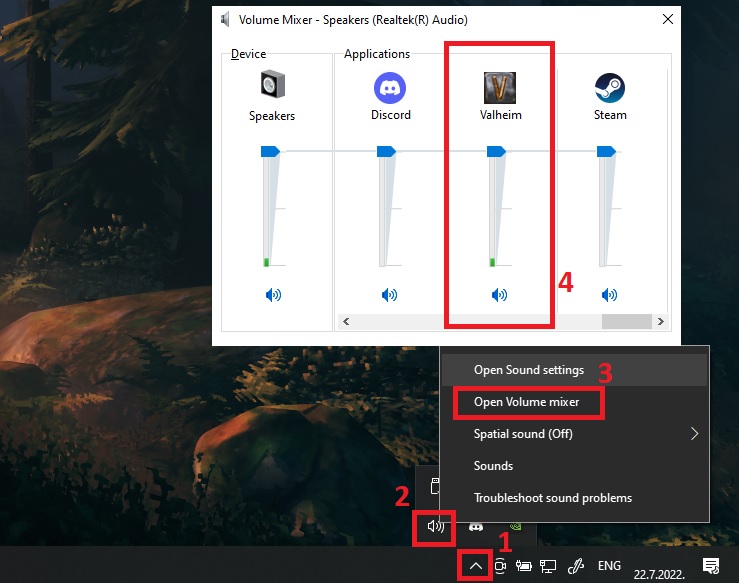
Check Windows Volume mixer: https://i.imgur.com/rCMjZGt.jpg
 marble venture
yep, all the way up
stark meadow
marble venture
yep, all the way up
It can be all the way app and still be muted, check the mute button
marble venture
 stark meadow
marble venture
stark meadow
marble venture
Do you have gamepad plugged in with speakers? (e.g. PS dualshock controllers)
After you launch the game, whilte the game is still running, check what is main output audio device.
marble venture
I don't


same outcome if I set my sound card as default device and try it on speakers
stark meadow
marble venture
Did you use mods before at any point for Valheim?
Are you running 3rd pary program for you inzone bugs?
stark meadow
marble venture
Click on Valheim app as shown in screenshot to chekc default audio device for Valheim app
Should be set on default
marble venture
it is set to default
yes, the buds have an app for equalizer profiles
but I switch my default device to an external sound card and it is the same problem on the speakers
I did play Valheim with sound with these earbuds like a year ago
stark meadow
marble venture
I did play Valheim with sound with these earbuds like a year ago
Did you use mods before at any point for Valheim?
marble venture
no and now I do, but I also tried to launch a vanilla Valheim directly from steam with the same outcome
stark meadow
marble venture
no and now I do, but I also tried to launch a vanilla Valheim directly from stea...
Then it's likely your mods messed something up. Try clean re-install
Step 1:
- Open your Valheim installation folder: Steam library → right mouse click on Valheim → Manage → Browse local files.
https://i.imgur.com/05339BW.jpg - Manually delete every file and folder you see in that installation directory.
- Uninstall Valheim from Steam: Steam library → right mouse click on Valheim → Manage → Uninstall
https://i.imgur.com/iD1CI2h.jpg - Install Valheim on Steam again.
- Your installation folder should now look like this
https://i.imgur.com/6sVC2Pt.jpg - Launch Valheim through Steam library.
Step 2:
- Click on Windows start and type
regeditorregistry editor. - Manually navigate to Computer\HKEY_CURRENT_USER\SOFTWARE\IronGate\Valheim.
- Delete Valheim folder in the left panel
https://i.imgur.com/pJ90jaP.jpg - Launch the game.
marble venture
same outcome:/
stark meadow
marble venture
same outcome:/
You did Step 2 and you did launch throgh Steam library?
marble venture
yes
stark meadow
marble venture
yes
Did you do any changes to Valheim launch settings in Steam library or for .exe?
marble venture
no, I didn't
I mean, I thought I'm quite experienced, but at this point I think it is some bug
stark meadow
marble venture
I mean, I thought I'm quite experienced, but at this point I think it is some bu...
What ever it is, the bug must be on your end. Nobody else has it.
marble venture
is there a way to raise a support ticket? I bet I can't see the debug logs or so
I think I found the web
stark meadow
marble venture
is there a way to raise a support ticket? I bet I can't see the debug logs or so
This is the best way to get support. Official bug reporting tool on main website is for Valheim bugs, as the site warns you before you do submit a bug.
Do you have a headset that you can plug directly into motherboard input jack?
inzone buds transmitter unplugged, external audio card unplugged, 3rd party software closed via task manager
marble venture
these are wireless headphones/earbuds
I can totally kill the app and disconnect them, speakers are still silent
stark meadow
marble venture
I can totally kill the app and disconnect them, speakers are still silent
That's why I said unplug USB transmitter, don't you have one? Are speakers plugged into your botherboard or external card?
marble venture
the only problem is that I report it as a bug, but there's no place to leave my contact so they can tell me what's up
I do, no difference, this is purely software I believe
external card
stark meadow
marble venture
the only problem is that I report it as a bug, but there's no place to leave my ...
Exactly, Because the website is not tech support. It's for Valheim bugs. When you are sure there's a bug, you report how you can reproduce it in Valheim.
marble venture
so I am doomed if there's no tech support:))
stark meadow
marble venture
so I am doomed if there's no tech support:))
This is tech support, haha
I'm telling you nobody has the issue you are having. We monitor all bugs here, reddit, steam and main website.
Can you then do a test where you:
- plug the speakers in motherboard directly
- 3rd pary software closed
- transmiter bug buds (the one that goes into PC if you have one) unplugged
marble venture
can't plug speakers directly
they are using XLR jacks, I am using standard focusrite 2i2 usb card
the signal is not coming in from the app
I have volume mixer open and if I play any sound from browser, another app - I see the fluctuation visually
if I launch Valheim it stays at 0
stark meadow
marble venture
can't plug speakers directly
So no other 3.5 jack in house, or USB headset to test if Valheim/Windows work in general?
Have you tried changing Sample Rate in your 3rd party programs, putting it lower to see if it makes a difference?
marble venture
you mean the inzone buds app?
marble venture
stark meadow
So no other 3.5 jack in house, or USB headset to test if Valheim/Windows work in...
unfortunately
same PC was used to play it when I initially purchased the game
same accessories
stark meadow
marble venture
you mean the inzone buds app?
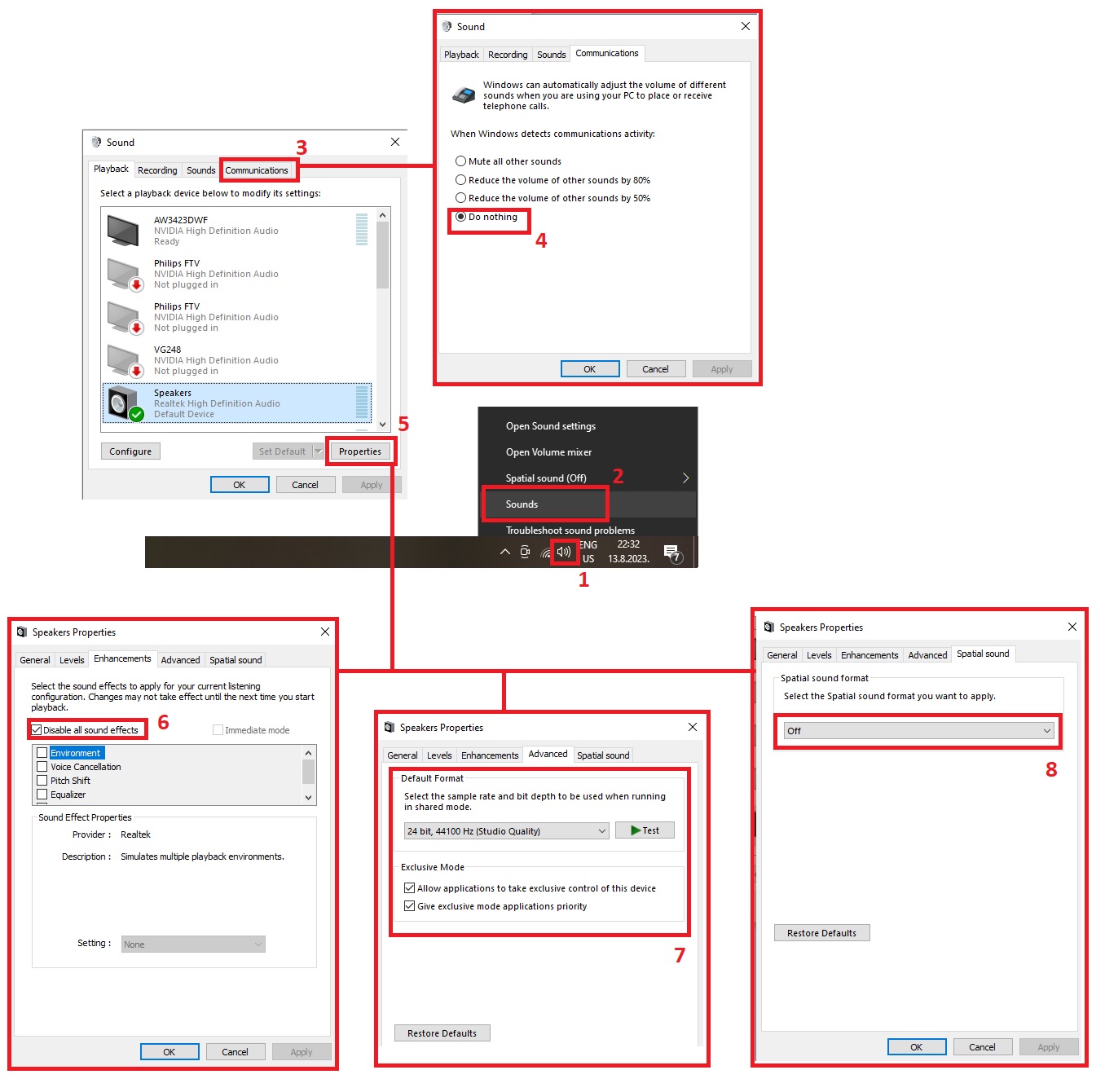
Yes, or you can try doing the same in Windows as well
https://i.imgur.com/jN3asnT.jpg
 stark meadow
marble venture
same PC was used to play it when I initially purchased the game
stark meadow
marble venture
same PC was used to play it when I initially purchased the game
You can also test launching the game from a year ago
Steam library Valheim properties → BETA → default_preal
This will launch Valheim pre-Ashlands biome
marble venture
the app is basically an equalizer

 marble venture
stark meadow
You can also test launching the game from a year ago
Steam library Valheim prope...
marble venture
stark meadow
You can also test launching the game from a year ago
Steam library Valheim prope...
so I can basically launch a previous version?
marble venture
stark meadow
Yes, or you can try doing the same in Windows as well
https://i.imgur.com/jN3asn...
this I can confirm is all set like in your example
previous version didn't help, well, I appreciate your time, I will just go ahead and email the developer to see what they can suggest
stark meadow
marble venture
previous version didn't help, well, I appreciate your time, I will just go ahead...
Then you can be certain it's not Valheim, if it indeed worked before for you.
I can't really help in setting up 3rd party software or external sound cards, as I don't use any.
But I'm still interested in knowing what the issue could be.
Some players have Discord messimg up their in-game audio and vice versa, so also try testing with Discord completely closed.
marble venture
good point, I will try that
stark meadow
marble venture
good point, I will try that
Also try PC restart. Some weird cache related issues tend to go away after, but I haven't encountered any related to sound system.
You might also wanna double check if you at some point in the past set Valheim.exe to launch in Admin mode, in either way try opening Valheim properties and test what happens when you set it to run the opposite of how it's being run currently.
Btw. when you did the Step 2 in clean re-installation (registry settings), did you Valheim launch in a window (not full screen) - (proof you reset registry setting correctly).
marble venture
stark meadow
Also try PC restart. Some weird cache related issues tend to go away after, but ...
dude
this is why I am never buying windows again
probably clean re-install was the trick
we just needed a reboot
thanks a lot
stark meadow
marble venture
this is why I am never buying windows again
Output channel probably being wrong then and Valheim/Windows kept sending audio to wrong one.
There isn't really a setting in Valhiem that we could reste to fix this, so it was on Windows.
Like you said, not surprised, but glad it works.
marble venture
yeah, but why the hell they would choose an app to screw and by doing uninstall/install + reboot it didn't work - mystery
outer ocean
gilded sluice
we watch all platforms for people reporting issues
I apologize for double sending my issue then 'cause I made a report on your website at the same time I made one here
gilded sluice
outer ocean
I apologize for double sending my issue then 'cause I made a report on your webs...
it's fine
 kind swift
outer ocean
I apologize for double sending my issue then 'cause I made a report on your webs...
kind swift
outer ocean
I apologize for double sending my issue then 'cause I made a report on your webs...
I've been doing the opposite. I've sent details bug reports with logs, stack traces, and hwinfo. I didn't want to post it here due to the volume of the data.
outer ocean
kind swift
I've been doing the opposite. I've sent details bug reports with logs, stack tra...
well the trouble was I sent the request in both places identically
stark meadow
 outer ocean
stark meadow
outer ocean
stark meadow
 kind swift
stark meadow
kind swift
stark meadow
I guess I'm not sure what the difference is between a "bug" and a "technical issues". I run Ubuntu 24.04 LTS and a Dec 7 update has caused Valheim to regularly crash in mono/libgallium/libc.
stark meadow
kind swift
I guess I'm not sure what the difference is between a "bug" and a "technical iss...
99% of crashes are between Unity engine and OS. Out of those, 99% are unstable systems in general.
For the other 1% that's on OS/Unity side, the most we can do is report it to Unity when it's clear which systems are crashing in reproducible manner. One such case (almost the only one ever) is related to AMD and Vulkan that Unity kinda acknowledged. No fix for it, only work arounds, such as launching the game in OpenGL and proton.
kind swift
stark meadow
99% of crashes are between Unity engine and OS. Out of those, 99% are unstable s...
I ran into the AMD/Vulkan bug and, after switching to opengl, Valheim has been stable since, until the Ubuntu Dec 7 update.
I'd be interested in troubleshooting if you have any ideas. Unfortunately, the crash is unpredictable and happens 15 to 60 minutes into the game. Since I'm currently playing a nomap run and am in the mistlands I've given up playing completely.
stark meadow
kind swift
I ran into the AMD/Vulkan bug and, after switching to opengl, Valheim has been s...
Updated kernel and tried re-installing graphic drivers?
I only recently had a report for Ubuntu 25.10 with a RTX 3060 TI, where Steam recording was the cause of crashes.
Tried any other Unity based games?
kind swift
stark meadow
Updated kernel and tried re-installing graphic drivers?
I only recently had a re...
I'm using the open source AMD drivers in the kernel so I don't think there's anything to do about the graphics drivers. I'm running an LTS distribution because I want stability. Is there a safe way to install a new kernel and easily back out? The current kernel is 6.14.0 with whatever ubuntu has decided to patch.
I'm not sure what other games I have use unity. Looking at various lists on the internet, I don't see any Unity games that I play. Obviously a lot of games don't have a linux port so I end up running them on proton.
FYI Valheim has had zero crashes for me for a year and a half before the AMD/Vulkan crashes that started in Oct. The hardware and OS have been the same for all that time. I reinstalled the OS recently to see if it would help but no luck.
kind swift
I've played "Peak" recently with no problems. I think that uses the Unity engine but I guess I play it via proton.
bright coral
kind swift
I'm using the open source AMD drivers in the kernel so I don't think there's any...
AMD does recommend using the kernel's drivers like you are, but they do make a standalone .deb of the AMDGPU module that is kept more up to date that targets the Hardware Enablement (HWE) kernel version for LTS Ubuntu versions:
https://www.amd.com/en/resources/support-articles/release-notes/RN-AMDGPU-UNIFIED-LINUX-25-30-1.html for the download links
https://amdgpu-install.readthedocs.io/en/latest/install-prereq.html for installation hints
If you're on Ubuntu Desktop, you're probably on an HWE kernel
Updating the Mesa vulkan stack and libgallium past the Ubuntu milestone versions might be tricker, could involve 3rd-party PPAs… not something I've tried myself to be honest.
I know you've probably sent it to Iron Gate already via the ticket system, but if you'd be up for attaching a stack trace here, such as in a text file, you could get a couple more eyes on it.
outer ocean
where can you get crash logs from valheim?
kind swift
Yeah I'm on an hwe kernel. I'm a little nervous about installing the AMDGPU deb. The contents of the file are just an executable and config files so whoe knows what they stomp on. I run an LTS distro for stability.
Here's my stack trace. It's crashed multiple times and the trace is similar each time:
stack trace
bright coral
outer ocean
where can you get crash logs from valheim?
Depends on what layer the crash occurred in. I'll go from the bottom to the top:
If it occurred during hardware operations or the process was killed by the operating system for security violations or exceeding memory, you would find the details in your kernel's ring buffer, which can be printed using the dmesg command and many operating systems also log it to a file such as your syslog or messages.
If the crash is within the process itself, then it's up to your OS how it's configured to dump the process' core if at all. You can cat /proc/sys/kernel/core_pattern to see if your kernel is already configured to send those crashes anywhere. Popular handlers include systemd-coredump (see https://wiki.archlinux.org/title/Core_dump) or Canonical's Apport (which has to be enabled manually, see https://wiki.ubuntu.com/Apport)
If the crash happened at a higher level, such as in CLI code being run by Unity's CLI interpreter, you can find that in Valheim's Unity Player log. Assuming your game isn't sandboxed, it would be in:
~/.config/unity3d/IronGate/Valheim/Player.log for the current or just-crashed one.
~/.config/unity3d/IronGate/Valheim/Player-prev.log for the previous session if you've already restarted Valheim
kind swift
outer ocean
where can you get crash logs from valheim?
I find stack traces in the Player.log file ~/.config/unity3d/IronGate/Valheim/Player.log
outer ocean
good to know
bright coral
kind swift
stack trace
Thanks! Any error message that went along with the stacktrace such as some kind of violation?
kind swift
Here's the full player log. I've got another one from the day before but they are similar.
When the crash happened there was no error. The whole app went away and I was just looking at the desktop.
bright coral
Thanks for posting the full thing. Tough to troubleshoot when it happens in the native code. Given it happens in garbage collection, hopefully it's something that gets fixed in a future Unity update.
You might consider installing gdb if you haven't already in case it's able to use that for a supplemental debugger trace the next time it happens (that bottom empty section in the log)
kind swift
bright coral
Thanks for posting the full thing. Tough to troubleshoot when it happens in the ...
So if I install gdb and repro the bug, then Player.log will have more info such as files and line numbers in the stack trace?
bright coral
Potentially, yeah
kind swift
Any idea when a new version of Valheim with a new Unity will be released? For me personally, the one from October has caused a lot of problems.
bright coral
As an aside, I do see at least one segfault fix for libgallium in Mesa 25.3.0 and 25.2.4: "Segfault while trying to compile a shader with differing UBO contents in fragment and vertex stage" but I have no idea if Valheim has a shader like that.
kind swift
bright coral
As an aside, I do see at least one segfault fix for libgallium in Mesa 25.3.0 an...
I guess I'm on mesa-libgallium 25.0.7 plus ubuntu patches
Not to make this rabbit hole deeper, here is the ubuntu update that seems to have surfaced the behavior that causes this crash.
Start-Date: 2025-12-07 09:22:29 Commandline: aptdaemon role='role-commit-packages' sender=':1.3338' Upgrade: netplan-generator:amd64 (1.1.2-2~ubuntu24.04.2, 1.1.2-8ubuntu1~24.04.1), mutter-common-bin:amd64 (46.2-1ubuntu0.24.04.10, 46.2-1ubuntu0.24.04.12), libgtk-4-common:amd64 (4.14.5+ds-0ubuntu0.6, 4.14.5+ds-0ubuntu0.7), libglib2.0-bin:amd64 (2.80.0-6ubuntu3.4, 2.80.0-6ubuntu3.5), xserver-xorg-video-amdgpu:amd64 (23.0.0-1build1, 23.0.0-1ubuntu0.24.04.1), gir1.2-glib-2.0:amd64 (2.80.0-6ubuntu3.4, 2.80.0-6ubuntu3.5), libgdm1:amd64 (46.2-1ubuntu1~24.04.4, 46.2-1ubuntu1~24.04.5), python3-netplan:amd64 (1.1.2-2~ubuntu24.04.2, 1.1.2-8ubuntu1~24.04.1), libmutter-14-0:amd64 (46.2-1ubuntu0.24.04.10, 46.2-1ubuntu0.24.04.12), libinput10:amd64 (1.25.0-1ubuntu3.1, 1.25.0-1ubuntu3.2), gir1.2-gtk-4.0:amd64 (4.14.5+ds-0ubuntu0.6, 4.14.5+ds-0ubuntu0.7), mutter-common:amd64 (46.2-1ubuntu0.24.04.10, 46.2-1ubuntu0.24.04.12), libglib2.0-data:amd64 (2.80.0-6ubuntu3.4, 2.80.0-6ubuntu3.5), libmysqlclient21:amd64 (8.0.44-0ubuntu0.24.04.1, 8.0.44-0ubuntu0.24.04.2), gdm3:amd64 (46.2-1ubuntu1~24.04.4, 46.2-1ubuntu1~24.04.5), gnome-shell-extension-desktop-icons-ng:amd64 (46+really47.0.9-1ubuntu4, 46+really47.0.9-1ubuntu5), gir1.2-mutter-14:amd64 (46.2-1ubuntu0.24.04.10, 46.2-1ubuntu0.24.04.12), gir1.2-gdm-1.0:amd64 (46.2-1ubuntu1~24.04.4, 46.2-1ubuntu1~24.04.5), libgtk-4-1:amd64 (4.14.5+ds-0ubuntu0.6, 4.14.5+ds-0ubuntu0.7), netplan.io:amd64 (1.1.2-2~ubuntu24.04.2, 1.1.2-8ubuntu1~24.04.1), libgtk-4-bin:amd64 (4.14.5+ds-0ubuntu0.6, 4.14.5+ds-0ubuntu0.7), libgtk-4-media-gstreamer:amd64 (4.14.5+ds-0ubuntu0.6, 4.14.5+ds-0ubuntu0.7), libnetplan1:amd64 (1.1.2-2~ubuntu24.04.2, 1.1.2-8ubuntu1~24.04.1), libglib2.0-0t64:amd64 (2.80.0-6ubuntu3.4, 2.80.0-6ubuntu3.5), libglib2.0-0t64:i386 (2.80.0-6ubuntu3.4, 2.80.0-6ubuntu3.5), libinput-bin:amd64 (1.25.0-1ubuntu3.1, 1.25.0-1ubuntu3.2) End-Date: 2025-12-07 09:22:36
gilded sluice
kind swift
Any idea when a new version of Valheim with a new Unity will be released? For me...
which problems?
AMD GPU issues?
kind swift
gilded sluice
which problems?
My hope is that future releases fix "my problem". Justin said that a new version of Unity might fix my crash.
gilded sluice
which crash is it tho?
since we don't have any updates comming atm before deep north. and that one isn't anytime soon 🤔
kind swift
gilded sluice
which crash is it tho?
It's the problem that Justin and I have been discussion for the past couple hours in this channel. I don't think we know the cause.
kind swift
gilded sluice
since we don't have any updates comming atm before deep north. and that one isn'...
That's good to know. Maybe I should just take a break from Valheim until the Deep North and maybe Ubuntu 26.04 LTS.
gilded sluice
kind swift
That's good to know. Maybe I should just take a break from Valheim until the Dee...
yeah
sadly it's what I would recommend since no patch within the close time period
like. some of us goes on vacation soon™
kind swift
gilded sluice
like. some of us goes on vacation soon™
You guys sure deserve a good vacation. My friends and I have gotten hundreds and hundreds of hours of fun out of Valheim.
stark meadow
kind swift
That's good to know. Maybe I should just take a break from Valheim until the Dee...
Were you crashing on Proton as well?
kind swift
stark meadow
Were you crashing on Proton as well?
I haven't tried proton yet. I'm a little worried it might mess up my saved worlds and players.
stark meadow
kind swift
I haven't tried proton yet. I'm a little worried it might mess up my saved world...
It should not affect saves, at least not if you are not using mods.
kind swift
stark meadow
It should not affect saves, at least not if you are not using mods.
I'm not using mods.
stark meadow
Should be ok the.
The important thing is to wait for all proton dependencies to be downloaded before you launch the game (will be listed as tools in steam library)
kind swift
stark meadow
Should be ok the.
The important thing is to wait for all proton dependencies to ...
So switching from linux to proton won't mess up steam cloud saves? I feel like I've played other games where this happened.
stark meadow
kind swift
So switching from linux to proton won't mess up steam cloud saves? I feel like I...
Save files are transferable between platforms and different OS, so they will be unaffected.
You can back up saves before you switch to proton.
kind swift
stark meadow
Save files are transferable between platforms and different OS, so they will be ...
I'll give it a shot. Can you point me to the linux locations and names of the files I neeed to back up?
stark meadow
kind swift
I'll give it a shot. Can you point me to the linux locations and names of the fi...
~/.local/share/Steam/userdata/<steam-id>/892970/worlds and characters folders
kind swift
stark meadow
~/.local/share/Steam/userdata/<steam-id>/892970/worlds and characters folders
On my system the files in ./local/share/Steam/ are many years old and there is no directory /892970/
There are characters/ and world/ directories in .config/unity3d/IronGate/Valheim but they just contain ascii .acf files. There is a worlds_local/ dir which may have my worlds but I don't see the equivalent for characters.
stark meadow
kind swift
There are characters/ and world/ directories in `.config/unity3d/IronGate/Valhei...
These are Local files. You can also move your savs from Steam Cloud to Local, and the saves will then appear there.
Steam Cloud files should be in the Steam installation directory, then Valheim ID (892970) should be in userdata folder
 kind swift
I think my steam installation directory is ~/.steam/
Even if my characters are in the cloud, don't they have to be downloaded locally like my worlds?
stark meadow
kind swift
Even if my characters are in the cloud, don't they have to be downloaded locally...
All saves are always first stored on the disk. It's only when the game closes that Steam uploads a copy to the Cloud.
kind swift
My local worlds are clearly in ~/.unity/.config/unity3d/ Where are my characters?
I think I've found them in this directory: .steam/debian-installation/userdata/91146461/892970/remote/ under worlds/ and characters/ Are the characters .fch files and the worlds .db and .fwl files?
I think the files in .config/unity35 are something else. The world directory within that contains TexCache files.
stark meadow
kind swift
My local worlds are clearly in ~~`~/.unity/`~~ `.config/unity3d/` Where are my c...
Yes, those are the files.
stark meadow
kind swift
I think the files in `.config/unity35` are something else. The world directory w...
Save files only appear there if you move them from Cloud to Local via in-game
kind swift
stark meadow
Save files only appear there if you move them from Cloud to Local via in-game
Thanks. I'll back my files up then switch to proton and see what happens.
kind swift
stark meadow
These are Local files. You can also move your savs from Steam Cloud to Local, an...
I wonder why my steam installation is in ~/.steam/debian-installation/ while your table says it should be in ~/.local/share/Steam/ ?
 candid laurel
it depends on the which package and from when you first installed. but ~/.steam/steam should always be a symlink to the correct location
on my steamdeck ~/.steam/steam points to ~/.local/share/Steam, but on my 10y old debian laptop it points to ~/.steam making ~/.steam/steam/steam/steam/ an endless recursion
kind swift
candid laurel
it depends on the which package and from when you first installed. but `~/.steam...
Thanks. I run steam as a special, unprivileged user and usually wipe the home dir on reinstallation of the OS and reinstall steam and games. Maybe my directory location is the "new" location for the default ubuntu package.
candid laurel
ive seen that directory mentioned before but I dont know if its set by the .deb from valve, debian, or ubuntu that made that choice
 stoic dawn
Hi everyone.
Please help me. I'm hosting some games for friends, and only one of them is experiencing lag and getting disconnected. It's not their internet connection, because we're playing other games normally. What could be the problem?
stark meadow
stoic dawn
Hi everyone.
Please help me. I'm hosting some games for friends, and only one o...
Other games usually don't send as much data as Valheim. Tell them to do a buffer bloat test: https://www.waveform.com/tools/bufferbloat, to check if they are playing over VPN, and to list their system specs.
stoic dawn
stark meadow
Other games usually don't send as much data as Valheim. Tell them to do a buffer...
It didn't work, bro, unfortunately, this friend is being disconnected from the server and it's only happening on Valheim.
stark meadow
stoic dawn
It didn't work, bro, unfortunately, this friend is being disconnected from the s...
What didn't work? I'm waiting for you to relay info about whether your friend uses VPN and results of his buffer bloat score, and their system specs
stoic dawn
stark meadow
What didn't work? I'm waiting for you to relay info about whether your friend us...
I couldn't run the test; the website simply didn't work. When I clicked to start the test, the process disappeared. On my PC, the test ran normally. Let's play something else, I don't want to stress myself out with a game.
stark meadow
stoic dawn
I couldn't run the test; the website simply didn't work. When I clicked to start...
The test was meant for your friend to run. It's obviously not an issue on your side, rather theirs if they are the only ones being disconnected
stoic dawn
stark meadow
The test was meant for your friend to run. It's obviously not an issue on your s...
🙁
stoic dawn
stark meadow
The test was meant for your friend to run. It's obviously not an issue on your s...
 stark meadow
stoic dawn
stark meadow
stoic dawn
That's your test or your friend's test result?
Are they immediately getting disconnected upon joining the world or after some time playing?
stoic dawn
stark meadow
That's your test or your friend's test result?
is my friend's
He stays on the server for about 2 minutes and then disconnects.
stark meadow
stoic dawn
is my friend's
They have a higher latency during download, which is probably one of the reasons they are disconnecting.
This type of latency plays a bigger role in Valheim, as Valheim sends a lot of data.
They should repeat the test while being on Valheim server as well.
From quick things you can do, if you are all on Steam, you (as world host) can disable crossplay option before starting your server.
stoic dawn
stark meadow
They have a higher latency during download, which is probably one of the reasons...
Where do I disable the cross-platform option?
stark meadow
stoic dawn
Where do I disable the cross-platform option?
Right before you press start server button, it's above the start button.
 stark meadow
Yes, start the server without that option.
That's the most you can do as host.
What you can be sure, is that their connection issues are related to their network.
stoic dawn
stark meadow
That's the most you can do as host.
Okay, thanks friend.
stark meadow
It doesn't matter that they can play other games. Valheim is more demanding.
Send your friend this link if they wanna check few things that could disrupt their connection:
https://steamcommunity.com/app/892970/discussions/1/612032374411149472/#c612032512885010678
In most cases, if disconnect happens after 2min, it's usually unstable WiFi.
stoic dawn
Bro, it seems to have worked. Thank you so much. He's online and hasn't disconnected, lol.
Thank youu ...
 storm robin
Im cross posting from valheim help cause I wasnt sure where to put this:
Ever since entering the plains biome, despite defeating bonemass and NOT Modor, we have deathsquitos spawn randomly on occasion at our home in the meadows by the sacrificial stones. Is this a bug? Because I dont know if they should be spawning at our camp. Note: these are not raid events
stark meadow
storm robin
Im cross posting from valheim help cause I wasnt sure where to put this:
Ever si...
On which platforms are you and the host playing? Anyone using mods?
storm robin
stark meadow
On which platforms are you and the host playing? Anyone using mods?
We are all on pc with steam, I am the host. We play with 3-4 mods, YouHaveBeenReplaced, plant easily, plant everything, and bepinex so the others work
tropic rock
Check the config for YouHaveBeenReplaced. Mosquitos shouldn’t spawn in meadows at all, they don’t even have a raid associated with them.
kind swift
stark meadow
Were you crashing on Proton as well?
FYI I've been running the game in proton for 20+ hours and am no longer seeing crashes. Thanks for the early xmas present!
stark meadow
storm robin
We are all on pc with steam, I am the host. We play with 3-4 mods, YouHaveBeenRe...
It's probably related to one of the mods, but could you upload your world save file on google drive and send me the link in DMs (world.db and world.fwl)
 sleek steppe
I'm having issues with my smelter not working properly. The fire keeps going on and off and sometimes just doesn't smelt anything while full. I have no mods installed.
 thick tangle
anything above it smothering it? it needs open air above it
 wispy yarrow
Can someone help me with depot downloader?
i need to download the dedicated server version before 12/3
wispy yarrow
Steam>download_depot 89660 89661 8626142906162840635
Depot download failed : missing license for depot (No subscription)
bright coral
wispy yarrow
Steam>download_depot 89660 89661 8626142906162840635
Depot download failed : mi...
You'll need to auth. Steam is stingy about old manifests even if they're licensed for free download. If you have the GUI version of Steam on a desktop, you may find Steam's Console to be more friendly for the job given you're already authed there. see below
Once in Steam's Console, type download_depot and press enter for the usage hint. Just be warned it often won't give much feedback while it downloads, but it will tell you where it put it once it's done.
bright coral
Oh, I see, you tried that first. You just didn't put enough 6s in there. Assuming you actually want that Sept 17th stealth release:
download_depot 896660 896661 8626142906162840635
But also note that the latest and greatest Linux dedicated server files were from October 22nd, released before 12/3.
The recent December 8th stealth release just upgraded Valve's Steamworks SDK for servers, whose depot is copied on top of the Valheim Dedicated Server depot files. If you want the old Steamworks SDK then copy steamclient.so and linux64/steamclient.so from:
download_depot 90 1006 5587033981095108078
and remove libsteamwebrtc.so from both dirs.
All that said, did you observe a bug in the new release? If so, let us know. Valve has been talking about upgrading their glibc requirements recently.
wispy yarrow
Thank you for the feedback @bright coral i did figure out the 6s at some point.
No it just turned out to be a world corruption issue, not related to "vanilla"
However, I did notice the improvement in networking performance, with the newer steamworks, is that not unthrottled or is there still an artifical networking or engine limitation in regard to throughoutput
gilded sluice
wispy yarrow
Thank you for the feedback <@287433598825660417> i did figure out the 6s at som...
what is broken with your world now?
I've seen a site you can maybe "remove mods" from it
but unsure it if still works
wispy yarrow
@gilded sluice Ended up basically with a very broken day, night timing and counting cycle
gilded sluice
wispy yarrow
<@260480620054970378> Ended up basically with a very broken day, night timing an...
oh?
if you go mad on days. you can just turn back time
or move it forward if needed
if you go negative in days. game stops working
and mega-high numbers could break the game before
wispy yarrow
Good to know for the future! ty @gilded sluice , but while i have your attention, is there a simple way to increase the datacap on steamworks?
gilded sluice
wispy yarrow
Good to know for the future! ty <@260480620054970378> , but while i have your at...
datacap?
cloudstorage you mean?
wispy yarrow
No, network throughoutput is probably a better term, an example, abiet probably a poor one, when viewing data in the F2 menu, combined network throughout almost never goes over 200kbps
gilded sluice
not really no
I'm not a programmer nor networks expert when it comes to steam_API stuff
routning and switching is my thing back in the days 😄
wispy yarrow
Understood, would you do me a huge solid and run it up the flag pole?
stark meadow
wispy yarrow
No, network throughoutput is probably a better term, an example, abiet probably ...
Look into setting up Better Networking mod, where you can adjust queue size
High values might crash your router tho
wispy yarrow
@stark meadow none of those networking mods actually address the core issue that im seeing
This never breaks over 200kbps combined
 gilded sluice
why you need so much data tho?
the usual issue is package loss, not lack of data transfer
wispy yarrow
We live in age of information and high speed internet, why is there a bandwidth cap?
gilded sluice
unsure 🤔
stark meadow
wispy yarrow
We live in age of information and high speed internet, why is there a bandwidth ...
Bandwith isn't a bottleneck, latency is
Did you try to setup better networking mod?
 wispy yarrow
yes it lowers these numbers even when maxed out and lag complaints pile up
stark meadow
wispy yarrow
yes it lowers these numbers even when maxed out and lag complaints pile up
The mod can also change min/max send rates in Steamworks when crossplay is disbabled
wispy yarrow
Also tried that as well with the same results
Right now, to get this "higher" in-game numbers and have little to no lag complaints using NetworkTweak mod set to 50, according to that mod it only changes update tick rate to amount of peers
gilded sluice
check every players internet connection type
WIFI / wireless / phone hotspot or those types are prone to drop packages left-right-center and makes valheim almost unplayable
wispy yarrow
Let me go deep, please hold
Okay recently we had a player from the UK join our beloved group, the server currently is ave 5-12 people at a time,
We tested this 16 ways from sunday
During an Elder boss fight same spot each time
Only that player,
"better"Networking In-game reading max combine 120kbps, maxed out, and tweaked settings
lag during tenta-roots
Network"Tweaks"mod ingame reading max combine 190kbps, maxed out mod,
no lag during tenta-roots
So, im concerned, why is this game and or steam, or game engine, limiting network bandwidth?
Obviously, i wish i had more imperical data and things to share, but it just seems silly to me to have to mod a game for internet performance in this day and age
gilded sluice
12 people at the same time? 🤔
wispy yarrow
Indeed, there are servers with 10s 20s 40s 80 people at a time without issue, i guess they figured out how to remove this "cap"
gilded sluice
well. above 12 the game for sure would be wierd
above 6-7 is already stretching it
wispy yarrow
 thick tangle
its a simple mod that removes the cap ... many servers have it and have 40-50 players running for several hours together. Generally 20-30 through the day/evening/night.
why does 6-7 stretch it?
my server without the cap removal mod runs 8-9 steadily like 6 days a week .. it does die off on sundays (and holidays)
wispy yarrow
We got network code from 1995 not 2025 in this game smh
bright coral
wispy yarrow
No, network throughoutput is probably a better term, an example, abiet probably ...
Are you using PlayFab/Crossplay or Direct/Steam networking backend?
wispy yarrow
Steam
bright coral
Make sure you don't have UDP flood protection enabled in the router's firewall then. I'd similarly encourage disabling any QoS or traffic shaping features. Both networking backends are taxing on the router's CPU so that's also a bandwidth-limiting factor.
wispy yarrow
I will double check with my contact at my ISP
bright coral
Do they give you access to your router's administration features?
wispy yarrow
Not exactly, the options are fairly limited, I had to call them and talk to a system engineer to even get the public ip to run this server
I was offered a pilot program for higher speed, fastest in the state, but im having trouble being that the game is only sending paulty amounts of information over the existing connection
bright coral
Re your question on the new Steamworks SDK, they rarely disclose much on the dedicated server redistributable. The prior client-side SDK update doesn't mention anything networking related, but the fact that they split out the webrtc lib could mean some architecting for efficiency. The client-side update is here:
https://steamcommunity.com/groups/steamworks/announcements/detail/627817201164877826
Their updates are often "better" though.
wispy yarrow
Wasnt this one of the updates we discussed on a prior day?
bright coral
The server-side part of that landed on December 8th, but like I said, details are sparse
wispy yarrow
Okay, I did update the server to the newest version before relaunching it with a new world, so its safe to assume the server already has that
bright coral
yep
gilded sluice
something we did?
bright coral
gilded sluice
something we did?
Nah. Valve upped it for everyone who uses their out-of-the-box Steamworks SDK redistributable on Linux & Windows, including Valheim Dedicated Server:
https://steamdb.info/changelist/32675286/ (for all game servers publicly affected)
Server operators using Steam or SteamCMD would have seen it as an update, but the Valheim/Unity assets remained the same, just the Steam libs changed.
gilded sluice
ah right
bright coral
Thorium mentioned an improvement from it here: #steam-bugs-discussion message
so that's good probably
stark meadow
wispy yarrow
Let me go deep, please hold
You probably haven't set it up correctly. Did you set it up on both client and the server?
Just did a quick test, two players, bunch of elders
 wispy yarrow
yes client and server
 thick tangle
been that way for years
 unkempt quartz
but I saw it for the first time
stark meadow
unkempt quartz
Campfires can't be placed on wooden floors
thick tangle
stark meadow
Campfires can't be placed on wooden floors
ya can like that.
 stark meadow
thick tangle
ya can like that.
stark meadow
thick tangle
ya can like that.
You placed wood into fire, not fire onto wood.
thick tangle
exactly. but it still the appearance of fire on wood
you do not know if that is what happen in the above pic or not ..
unkempt quartz
stark meadow
Campfires can't be placed on wooden floors
there is a stone fireplace there
stark meadow
unkempt quartz
there is a stone fireplace there
Yeah, I agree, heart shhould be tweaked
 spare pagoda
Anyone know how I can get more info on these crashes? `
stark meadow
spare pagoda
Anyone know how I can get more info on these crashes? `
AMD gpu?
 royal estuary
spare pagoda
Anyone know how I can get more info on these crashes? `
royal estuary
spare pagoda
Anyone know how I can get more info on these crashes? `
is this a Flatpak Container?
Player.log would be helpful
spare pagoda
Yes, AMD. No mods. This is me running the client from steam. let me try to get the player.log.
royal estuary
should be somewhere in the irongate folder
gilded sluice
spare pagoda
Yes, AMD. No mods. This is me running the client from steam. let me try to get t...
is it on iOS? 🤔
spare pagoda
gilded sluice
is it on iOS? 🤔
No, linux. 9070 XT. I'm not at my computer right now but I'll try to get you a player.log when I crash. Would a core from the dump be helpful?
gilded sluice
spare pagoda
No, linux. 9070 XT. I'm not at my computer right now but I'll try to get you a p...
not to me to be honest. I know very little about linux over all
@stark meadow knows alot more
stark meadow
spare pagoda
No, linux. 9070 XT. I'm not at my computer right now but I'll try to get you a p...
How many monitors?
Please test if you crash in OpenGL. If you do, you will have to play in proton until Unity engine gets updated.
 desert junco
Hello, I don't like that in my world there are so many mobs that are simply impossible to defeat if you play alone.
gilded sluice
desert junco
Hello, I don't like that in my world there are so many mobs that are simply impo...
you can turn down the settings to easy mode 🤔
or are you playing modded? or did you enter ashlands?
desert junco
gilded sluice
or are you playing modded? or did you enter ashlands?
No, I play without mods.
gilded sluice
Hm.. ok 🤔
only place the game normally have alot of mobs, are in ashlands
and that is by design
 near igloo
gilded sluice
and that is by design
near igloo
gilded sluice
and that is by design
default settings are intended one, by design
spare pagoda
stark meadow
How many monitors?
Please test if you crash in OpenGL. If you do, you will have ...
2 monitors. Sure I'll test GL. There's an upcoming Unity update for the game client? Is there an ETA?
spare pagoda
stark meadow
How many monitors?
Please test if you crash in OpenGL. If you do, you will have ...
Here's one of my player logs; although I don't think it was from the crash. I think that one got overwritten already:
Just to be clear, testing GL is to gather more information? I recall that performance in GL was much worse for me than in vulkan.
spare pagoda
desert junco
Hello, I don't like that in my world there are so many mobs that are simply impo...
You can also turn off raids in the world settings. Also not sure how experienced you are with combat but make sure you're rested, skipping nights, not cold/wet if you're having issues. More stuff spawns at night.
stark meadow
spare pagoda
Just to be clear, testing GL is to gather more information? I recall that perfor...
Trey to add -gfx-enable-gfx-jobs -gfx-enable-native-gfx-jobs to Valheim launch settings in Steam library when playing OpenGL
near igloo
spare pagoda
You can also turn off raids in the world settings. Also not sure how experienced...
stamina issues as always :(
desert junco
spare pagoda
You can also turn off raids in the world settings. Also not sure how experienced...
200 hours of pain and suffering
near igloo
even if you're rested
 lament arrow
In regards to the new update with the hoe being able to place rocks:
- Get rock
- Get hoe
- Place rock with hoe
- Pick up rock
Get 2 rocks.
This allows people to duplicate rocks on servers and worlds with increased item yields. You can just place 20 rocks, pick up all of them, and have 20 extra rocks in a few seconds for nothing.
This can be easily fixed by giving player placed rocks a separate id than the wildly spawned rocks in world.
royal estuary
spare pagoda
Here's one of my player logs; although I don't think it was from the crash. I th...
Do i read this log correctly? Nearly 1 million zdos?
Also allocation errors
spare pagoda
Seeing memory leak warnings
To Debug, run app with -diag-job-temp-memory-leak-validation cmd line argument. This will output the callstacks of the leaked allocations.```Your on wayland + vulkan, have allocation issues and a world with nearly 1 million zdos (huge). I can see why its crashing
Really give opengl a try first then send a log again
Also maybe generate a new world for now. If you need the current one back up both files
spare pagoda
royal estuary
Your on wayland + vulkan, have allocation issues and a world with nearly 1 milli...
Is 1M zdos not within the nornal range of gameplay? We don't even build that much.
royal estuary
Well....define normal gameplay
This world is huge. When i see 1 million zdos i think of big terraforming, alot of buildings and alot of exploring
Also i dont think the zdos are the cause
stark meadow
royal estuary
Your on wayland + vulkan, have allocation issues and a world with nearly 1 milli...
The crash is not related to the world file nor ZDOs
spare pagoda
royal estuary
This world is huge. When i see 1 million zdos i think of big terraforming, alot ...
We just build small outposts when we move around. Nothing extravagant. We like to use existing structures where possible (eg. Draugr villages, abandoned towers). We have 4 "bases" just minimally covered with repair stations and maybe ~15 outposts that are basically just shacks with beds. We focus purely on function so there's not a lot of terraforming going on.
I know it was already mentioned zdos count was not the issue; just wanted to provide accurate information
royal estuary
spare pagoda
I know it was already mentioned zdos count was not the issue; just wanted to pro...
Thanks for the context. And ye ur right its not the cause. Its simply "alot of stuff". It could cause instability. But zdos alone dont crash. Just wanted to recommend to diagnose with a smaller world
gilded sluice
spare pagoda
2 monitors. Sure I'll test GL. There's an upcoming Unity update for the game cli...
No planned engine update atm.
There will be one at 1.0 launch probably. But that's not anytime soon 🤔
gilded sluice
lament arrow
In regards to the new update with the hoe being able to place rocks:
1. Get roc...
This only works with world modifiers tho
spare pagoda
Is there a way to adjust the frequency of character saves in the interim. Or trigger a character save manually? My character gets rolled back on crashes and makes sailing super tedious, since my boat is now in the middle of nowhere and my body is back before I sailed off. It also means I lose or duplicate inventory items sometimes.
gilded sluice
you can trigger manual save either by sleeping, menu <save> mode. or type /save in the console
spare pagoda
gilded sluice
you can trigger manual save either by sleeping, menu <save> mode. or type /save ...
Does this work if I'm the client of a dedicated server? I'm specifically referring to character not world saves btw.
gilded sluice
spare pagoda
Does this work if I'm the client of a dedicated server? I'm specifically referri...
if you have admin rights, yes
else, force the game to sleep
game saves every morning by default
spare pagoda
Okay SIGSEGV during lauch with these options: -force-glcore -diag-job-temp-memory-leak-validation -gfx-enable-gfx-jobs=1 -gfx-enable-native-gfx-jobs=1 -console +connect 192.168.0.100:2456
It's not deterministic as a second launch attempt was successful.
bright coral
spare pagoda
Alright here's a crash with GL
You might try to reproduce with gdb installed in case it's able to give you the native backtrace at the end.
 alpine arch
Does Artisan Table Spawn Prevention currently match its build radius?
stark meadow
spare pagoda
Alright here's a crash with GL
The crash is GPU related, but fix probably has to be done on Unity/Linux side. Supposedly it started happening after Linux update this moth. There is no info on when the engine is going to be updated for Valheim.
In any case, best workaround would be to play in proton compatibility mode, like sizezero had to: #steam-bugs-discussion message
stark meadow
alpine arch
Does Artisan Table Spawn Prevention currently match its build radius?
No, the build area and spawn prevention area doesn't match all the time. There's a bug related to it.
alpine arch
Ah, I was told in #valheim-chat that it matches
stark meadow
alpine arch
Ah, I was told in <#1202177337328934973> that it matches
It should, but it doesn't due to a bug. It provides 20m all the time. Extra protection starts works only after you equipt a hammer at least once when being close to it
lament arrow
gilded sluice
This only works with world modifiers tho
Still an unintended dupe glitch easily fixable. Infinite free stone isn't really the intended side effect of a lot of servers using that setting.
gilded sluice
lament arrow
Still an unintended dupe glitch easily fixable. Infinite free stone isn't really...
eventually yes it will be fixed
but it's not a priority
alpine arch
stark meadow
It should, but it doesn't due to a bug. It provides 20m all the time. Extra prot...
If I equip a hammer once and restart the server, does it still apply extra protection?
Or would I need to do that on every server restart?
stark meadow
alpine arch
If I equip a hammer once and restart the server, does it still apply extra prote...
You would have to do it every time you come to the base.
alpine arch
Okay! Thanks
spare pagoda
stark meadow
The crash is GPU related, but fix probably has to be done on Unity/Linux side. S...
Thanks for looking into it. Do you have a link to the bug report on the linux or unity side?
kind swift
spare pagoda
Thanks for looking into it. Do you have a link to the bug report on the linux or...
FYI, AMD+linux was horribly unstable for me after the early October patch. Switching from Vulkan to OpenGL didn't fix it. The only thing that worked was running the game via emulation. (windows exe via proton). Since then I've had no problems.
gilded sluice
kind swift
FYI, AMD+linux was horribly unstable for me after the early October patch. Switc...
AMD's GPU drivers wasn't up do date enough with the game engines updates 🙁
kind swift
gilded sluice
AMD's GPU drivers wasn't up do date enough with the game engines updates 🙁
That could have been it but I didn't test it. I run an LTS distro (1-2 years old) for stability. I'll be ugrading to Ubuntu 26.04 in August.
gilded sluice
oh jikes
yeah, the last engine update didn't even have support from AMD vulkan
which was suprising
spare pagoda
I'm on arch so my vulkan-radeon drivers should be pretty up to date
I'd like a link to the kernel/unity issue so I can subscribe and follow along
bright coral
spare pagoda
I'd like a link to the kernel/unity issue so I can subscribe and follow along
The leaks past 4 frames reported in your Player.log could easily be UUM-113839:
https://issuetracker.unity3d.com/issues/memory-leak-warnings-are-thrown-when-creating-a-particle-system-gameobject-2
Steps to reproduce: Create a new Unity project using the Universal 3D template Create a new Particle System (GameObject > Effects...
A lot of devs reported it after the security vuln patch release.
 west tide
Help please, i have an account with 3 characters on it, i was on my main Mavrik, went to my wifes world and crashed, now mavrik dont show up on my moad screen, its like he dissappeared, please help
spare pagoda
bright coral
The leaks past 4 frames reported in your `Player.log` could easily be UUM-113839...
Thanks 🙏 what version of unity is the latest publicly available Valheim client currently on?
bright coral
I think it's 6000.0.58f2. That's the one you're on per your logs at least.
bright coral
west tide
Help please, i have an account with 3 characters on it, i was on my main Mavrik,...
Are you Linux, macOS, or Windows? We can point you to locations where you might find a backup at least.
gilded sluice
bright coral
I think it's `6000.0.58f2`. That's the one you're on per your logs at least.
the game version always shows in the player.log
 main nimbus
i need help with save files
west tide
I am windows based
I am version 0.221.4 (n-35) and crash happened ar around 2:30ish pm on dec 31
bright coral
west tide
I am windows based
OK, then you'll want to look in these places for <character name>.fch or its most recent backup:
%ProgramFiles(x86)%\Steam\userdata\<steam user ID>\892970\remote\characters%USERPROFILE%\AppData\LocalLow\IronGate\Valheim\characters%USERPROFILE%\AppData\LocalLow\IronGate\Valheim\characters_local- Or the cloud itself: https://store.steampowered.com/account/remotestorageapp/?appid=892970
west tide
Sorry, not very computer literate
I followed top one til it got to steam user id, dont see thst anywhere
bright coral
west tide
I followed top one til it got to steam user id, dont see thst anywhere
It will be a number. If you only see one numbered folder in there, that's you
 bright coral
Then keep going through the path elements in that first bullet point above until you get to the characters directory.
892970 is Valheim
west tide
Ok got into character folder

So what do i do with this?
Saw yq typing but nothing showed up
bright coral
west tide
So what do i do with this?
OK, good. First thing I would do would be to manually back up every file in there starting with mavrik. You can create a new directory somewhere and copy (NOT move) them to that new directory.
After backing them up manually, I would open Valheim, then Start Game, Manage Saves, Characters…
west tide
Like just to a new folder on the desk top?
bright coral
Sure
west tide
 bright coral
west tide
bright coral
west tide
Inside the Characters tab in saves management, select the mavrik.fch.stmp file and press Remove. This file was partially saved during the crash and may not be recoverable. You can always experiment on the copy you backed up in the earlier step.
Then expand mavrik, click on mavrik.old and click Restore Backup.
west tide
Do i just copy one from that folder on desk top and paste into manage saves window?
bright coral
west tide
Do i just copy one from that folder on desk top and paste into manage saves wind...
Nope. After manually backing up the mavrik* files from that directory, you no longer need to work with the files through the desktop or file manager. That was a precautionary step.
bright coral
west tide
I got a. Mavrik back but he is brand new in a brand new world with a porupine cl...
This will be an earlier copy of Mavrik. Hopefully he's not too different from where you left off. As for world, he should be able to enter any world you had previously been able to, new or old.
You had performed Restore Backup on mavrik / mavrik.old, right?
 bright coral
So you expanded that, clicked on mavrik.old, then clicked Restore Backup?
west tide
I went to the one that was last night
bright coral
If that was mavrik.old, then that was your latest stable backup. The other ones in that directory were much older.
west tide

If i click on one highlighted and click restore back up, it puts another 12/31/2025 file up there
Used to only have 3, now i have 7 12/31/2025
bright coral
Yes, you only need to restore it once.
west tide
But when i did i was a new character in a new world holding a porcupine (high level) club
bright coral
Mavrik had previously never had that club? And when you say new world, you created a new world or you tried to join an existing one with you restored character?
west tide
He did have it
But if he is new and world is new he shouldnt
Can you call me so not typing as much?
bright coral
Characters will keep their inventory when you introduce them to a new world. If you had meant to keep the porcupine club safe in another world, you can start a game on that world and put the club away. If this backup effectively gives you a duplicate porcupine club due to being an hour too old, then you can throw this extra club away.
I'm afraid I've got some NYE stuff going on so won't be able to hop on a call, sorry.
west tide
But how do i get my old world back and all my stuff
It keeps starting me in a new world
bright coral
When you click Start Game, select Mavrik, then Start, it should prompt you to pick a world to join. Is your old world not on there? Or is your old world on someone else's server?
bright coral
It may have also got corrupted in the crash, unfortunately. Hopefully you'll be able to restore a backup in the same way.
bright coral
Success?
west tide
I beliece so
bright coral
Nice. Happy new year!
west tide
Im naked but inthink its because i crashed in her world, maybe have to go loot my corpse?
bright coral
Naked with the porcupine mace? If the tombstone exists, hopefully. Crashes can be weird.
west tide
Ok, thanks a ton, happy new year to you as well
unkempt quartz

The texture of the walls in the burial chambers is not perfect and allows us to look behind the map
thick tangle
that happens occasionally.
gilded sluice
unkempt quartz
known issue
 versed quest
anyone play co-op and have connectivity issues? vanilla no mods
stark meadow
versed quest
anyone play co-op and have connectivity issues? vanilla no mods
Did you manage to solve your issues?
If not, please provide more details about which platform is the host using and who can't connect.
versed quest
stark meadow
If not, please provide more details about which platform is the host using and w...
windows PC in a co op game. i am the host and the two other players will desync. rubberbanding, enemies in different locations for each of us (resulting in lots of death lol), and freezing where doors and chests can't be opened etc.
stark meadow
versed quest
windows PC in a co op game. i am the host and the two other players will desync....
Are all of you playing on Steam? In which biome are you in? Anyone using mods or have VPN running in background?
versed quest
stark meadow
Are all of you playing on Steam? In which biome are you in? Anyone using mods or...
all of us are playing via steam. the glitches get worse when we're in the ashlands. no vpn or mods being used by anyone.
 cyan gull
Valheim constantly crashes in combat, especially against bosses...
i9 -13900k, 64GB, RTX4090
Happens with or without mods, done a fresh install... im at a loss.
Any ideas - I've tried so many fixes...it only happens with Valheim
stark meadow
cyan gull
Valheim constantly crashes in combat, especially against bosses...
i9 -13900k, ...
It's probably random, most likely CPU related. Are you aware of Intel degradation issues?
Do you have in-game Vsync enabled?
Have you checked Player.log after crashing?
Do you experience black screens, PC restarts, app freezes (forced to kill the app), app closing with Unity popup?
stark meadow
versed quest
all of us are playing via steam. the glitches get worse when we're in the ashlan...
Playing with mods? How đany playing?
Try telling the host of the world to disable crossplay before they start their world as server. In Ashlands, decostruct boats and pickup as many dropped items (don't leave them on ground).
Let me know if it doesn't help.
cyan gull
stark meadow
It's probably random, most likely CPU related. Are you aware of Intel degradatio...
It only happens in Valheim. I can play Ark, HD2, Enshrouded, 7D2D, Conan, Starfield and No Man's Sky all at Max settings without any issues.
In game V-Sync us disabled. Max frames is capped at 240.
The black screen only occurs in Valheim and it seems to happen when there is a lot of combat, especially in dungeons.
This happens even when I uninstalled the mods and did a clean install of Valheim.
Ive got 5 mods but there are dependencies for them, so a total of 10 including Bepinex.
I had a Unity pop up and the game crashed for the first time as result of that. All the other times the games crashed and my screen go black.
stark meadow
cyan gull
It only happens in Valheim. I can play Ark, HD2, Enshrouded, 7D2D, Conan, Starfi...
It's always black screen? Then it's not CPU rather GPU, where 4090 doesn't get enough power. Check your power supply and whether you have multi rail to single rail switch on it, and switch it to single.
The fact that it happens only in Valheim doesn't mean much (more info why in pinned crash guide in this channel Section1:Point6).
 odd bane
are the devs aware of the bug where items can duplicate in multiplayer if the host crashes and the second player doesnt?
stark meadow
odd bane
are the devs aware of the bug where items can duplicate in multiplayer if the ho...
Yes, but it's not considered as a bug. It's just the nature letting players save their own characters on their PC.
If you wanna play fair, you can always ask that player (that didn't crash), to roll back their character save so that it's aligned with the host saves (in-game manage saves menu).
odd bane
stark meadow
Yes, but it's not considered as a bug. It's just the nature letting players save...
oh ok. just kinda broken when you buy something from a merchant then get double but
gilded sluice
odd bane
are the devs aware of the bug where items can duplicate in multiplayer if the ho...
yes. but it's not a issue to be honest if someone chooses to abuse those bugs
there are probably 100 ways to duplicate items
but since Valheim isn't a MMO with economy. it's not a problem we need to fix unless we really have time over
 main glade
i hope its the right place to ask, but im having issues when i connect to a friend's server (its an in game made server) whenever i connect to the server a lil icon shows up on my upper left corner of the screen resembling a computer and a cable with an an x on it, i assume trying to tell me im having connection issues, and a few seconds after it disconnects me from the server, restarting didnt work, resetting the router didnt do it, i tried different things like unparing my router from the other devices manually, unplugging the wifi cable from my pc, the only thing i didnt try yet was reinstalling the game since the issue only appears in that specific host's server, it seems for my hosted worlds the issue doesnt exist, so im hoping that someone has an answer to that at this point, since reddit posts were 3 years ago, so i assume someone has prolly figured out by now whats wrong..
stark meadow
main glade
i hope its the right place to ask, but im having issues when i connect to a frie...
Most commonly, this happens when either the host or client had a VPN running in background, so check that first. Disable VPN network adapters on start → device manager → network adapters
main glade
stark meadow
Most commonly, this happens when either the host or client had a VPN running in ...
i have different WAN miniports and im not sure if any of these could be a VPN, is there a specific name im looking for?
stark meadow
main glade
i have different WAN miniports and im not sure if any of these could be a VPN, i...
Host should check it as well. You're probably fine. You can screenshot it if you want me to check as well.
If you and the host are both on Steam, host can also disable crossplay option before starting their world as server (crossplay is often incompatible with VPN).
main glade
he has disabled crossplay ever since the server was made, which was 2 or months ago. and about that with the screenshot, i can just dm you those if you want to.
stark meadow
main glade
he has disabled crossplay ever since the server was made, which was 2 or months ...
Be free to DM me. Mind you crossplay has to be manually disabled every time you start the world as server. Are there any other client's playing on this server beside you?
main glade
stark meadow
Be free to DM me. Mind you crossplay has to be manually disabled every time you ...
we are 3 players, and the others dont have the same issue as me, it's just me.
main glade
stark meadow
Be free to DM me. Mind you crossplay has to be manually disabled every time you ...
i asked him if its awlays disabled, he said it is. i never have it on whenever i play on my hosted servers.
stark meadow
main glade
i asked him if its awlays disabled, he said it is. i never have it on whenever i...
Send me a screenshot of you network adapters
 wheat cedar
anyone else go delving into a dungeon, and suddenly, you are swimming? Then when you leave said dungeon, you keep swimming and eventually float into the sky?
wheat cedar
wheat cedar
anyone else go delving into a dungeon, and suddenly, you are swimming? Then when...
for example
 main glade
stark meadow
Send me a screenshot of you network adapters
main glade
stark meadow
Send me a screenshot of you network adapters
i did
 sick dragon
Nothing really I can do to fix it, but not sure where else to post this. Tower shield handle shows as not in the characters hand properly.

 sacred trellis
i wanted help unlocking mistlands biome bro ;-;
 olive bison
Hey guys, unsure if this is the correct forum, but I've been having a lot of crashes recently and I was wondering if someone can help.
Backstory
Been playing for years, previously on a Windows 10 machine, no problems. Built a new PC recently (Linux Mint). Reinstalled Valheim a couple of days ago.
The Problem
The game plays normally, without any obvious issues. However, anywhere between 15 and 50 minutes after loading a world, the game will freeze briefly and return to desktop. There is no warning, and no obvious in-game cue. I think it may be related to saving or memory as I have been able to extend the time before the crash by saving regularly (~5 mins).
Crash Logs
I've copied what I think are the two error reports from the Player and Player_prev log, where are:
Player.log
Invalid memory pointer was detected in ThreadsafeLinearAllocator::Deallocate!
Invalid memory pointer was detected in ThreadsafeLinearAllocator::Deallocate!
Internal: JobTempAlloc has allocations that are more than the maximum lifespan of 4 frames old - this is not allowed and likely a leak
To Debug, run app with -diag-job-temp-memory-leak-validation cmd line argument. This will output the callstacks of the leaked allocations.
Internal: JobTempAlloc has allocations that are more than the maximum lifespan of 4 frames old - this is not allowed and likely a leak
To Debug, run app with -diag-job-temp-memory-leak-validation cmd line argument. This will output the callstacks of the leaked allocations.
Caught fatal signal - signo:11 code:1 errno:0 addr:0x18
Obtained 11 stack frames.
#0 0x00740b273883ef in (Unknown)
#1 0x00740b2738a5c1 in (Unknown)
#2 0x00740b281e2ccf in (Unknown)
#3 0x00740b281e3568 in (Unknown)
#4 0x00740b281d2758 in (Unknown)
#5 0x00740b276d694b in (Unknown)
#6 0x00740b276d698a in (Unknown)
#7 0x00740b279a7af5 in PlayerMain(int, char**)
#8 0x00740b2602a1ca in (Unknown)
#9 0x00740b2602a28b in __libc_start_main
#10 0x00000000201029 in (Unknown)
Player_prev.log
Caught fatal signal - signo:11 code:128 errno:0 addr:(nil)
Obtained 8 stack frames.
#0 0x007b89e99f0b67 in (Unknown)
#1 0x007b89e9a3077c in (Unknown)
#2 0x007b89e90d694b in (Unknown)
#3 0x007b89e90d698a in (Unknown)
#4 0x007b89e93a7af5 in PlayerMain(int, char**)
#5 0x007b89e7a2a1ca in (Unknown)
#6 0x007b89e7a2a28b in __libc_start_main
#7 0x00000000201029 in (Unknown)
The ask
This is well beyond my ability to diagnose and fix - please help! I'm in the middle of two multiplayer playthroughs, one of which I host, and this is making it unplayable!
stark meadow
olive bison
Hey guys, unsure if this is the correct forum, but I've been having a lot of cra...
AMD card?
Can you send me full player.log file
olive bison
stark meadow
AMD card?
Radeon
stark meadow
olive bison
Don't think the crash is related to JobTempAlloc. That issue has been there for a long time (related to tar pits)
You would probably crash even without seeing plains biome.
If you can please test if you also crash in OpenGL + in-game vsync disabled.
You will most likely have to play in proton compatibility mode until Valheim gets an engine update.
olive bison
stark meadow
Don't think the crash is related to JobTempAlloc. That issue has been there for ...
Will test tomorrow
When you say Proton compatibility mode, is that an option ingame, or do I have to force compatibility through Steam on a specific version of Proton?
stark meadow
olive bison
When you say Proton compatibility mode, is that an option ingame, or do I have t...
Compatibility layer in Steam. Be sure to wait for all dependencies to finish downloading before launching the game (listed under tools in steam library)
olive bison
Is there a specific Proton version I need to use?
stark meadow
olive bison
Is there a specific Proton version I need to use?
Latest non experimental version is prob best
 undone mural
Why am I getting rested only in one corner of the house?
stark meadow
undone mural
Why am I getting rested only in one corner of the house?
Probably holes in the roof?
undone mural
Only the chimney
stark meadow
undone mural
Only the chimney
That's where you lost the shelter in the video, under chimney
How did you make the chimney?
stark meadow
undone mural
Lol
Try putting a one sided roof piece above that hole, but not in a way that you also cover the hole
undone mural
Ok
undone mural
stark meadow
Try putting a one sided roof piece above that hole, but not in a way that you al...
This is the chimney I made

Idk why it's not working
 rocky fox
floors don't count as roofing, so it's probably the part next to the chimney
gaunt mist
undone mural
Friendly fire not working
Both having enabled it?
gilded sluice
Friendly fire only enables you to take damage, not to deal damage
undone mural
Oh
 bronze cliff
undone mural
This is the chimney I made
bronze cliff
undone mural
This is the chimney I made
Change the roof piece to a slope.
 maiden moss
undone mural
This is the chimney I made
maiden moss
undone mural
This is the chimney I made
as the person above me stated, or what i like to do is overlap two of the corner pieces to make it a proper hood
 dusky light
Hello. I am trying to create a new character, but the game wont let me choose my hair/beard/skin color. Any clue how to fix this? I validated my files already.
stark meadow
dusky light
Hello. I am trying to create a new character, but the game wont let me choose my...
What do you mean by my hair/beard/skin?
dusky light
Like choosing my hair style and such.
When I hit the arrow to change what hair I want, it remains Hair1
The only thing it lets me change is my gender.
stark meadow
dusky light
Like choosing my hair style and such.
Have you played with mods before?
dusky light
Yes. Only a few. Namely Epicloot, Monsterlabs, and V+
stark meadow
dusky light
Yes. Only a few. Namely Epicloot, Monsterlabs, and V+
What you have is definitely a mods issue still. Do you still wanna play with mods or you wanna go clean vanilla?
dusky light
I just bought a dedicated server which I fully intend to use those mods on. I ran them before ~10 months ago, didnt have this issue.
stark meadow
dusky light
I just bought a dedicated server which I fully intend to use those mods on. I ra...
Then it's best that you visit #mods-issues. You will most likely have to re-install some mods.
Before doing anything, manually clan out your valheim installation folder. Validation won't do.
dusky light
Ya I did a clean install. Wiped out all my old files and such about 1/2 hour ago
Because there was residual mod stuff from last playthrough
Ill move this issue to the appropriate channel, thanks for the assist 🙂
dusky light
MonsterLabZ was the culprit. I found a patch in the mod comments that fixed it. Now im good to go 😛
cunning gull
Hi all,
I am running Valheim on Steam, joining girlfriend's world on Xbox. Completely unmodded, no devcommands. We returned from sailing to find our base overrun with upwards of 40+ seagulls on screen at any given time. Brenna (the skeleton miniboss) was also on the shore, submerged underwater and attacking deers. There is no raid, we are not being raided, there were no other skeletons. Why are there so many seagulls and why was brenna in the meadows???
Posted in #xbox-bugs-discussion and #steam-bugs-discussion as it involves both versions.

 keen mango
Brenna
stark meadow
cunning gull
Hi all,
I am running Valheim on Steam, joining girlfriend's world on Xbox. Comp...
Could you login with your gf's xbox account on your PC (Xbox app), and transfer the world save so you can send it to us?
Also, you should change your password just in case when starting the world as server
 dusk terrace
im trying to join my friend and it keeps saying that its the wrong password
yes i am entering in the correct password
stark meadow
dusk terrace
im trying to join my friend and it keeps saying that its the wrong password
Can others connect?
dusk terrace
yes
stark meadow
dusk terrace
yes
How did you add the server that you are trying to connect to? Are you or host using mods?
dusk terrace
im joining him through friends and we arent using mods
stark meadow
dusk terrace
im joining him through friends and we arent using mods
Try typing password in notepad and copy pasting it from there to Valheim
Also, try just being in character selection screen while your friend sends you the steam invite (no friends in-game tab)
dusk terrace
just tried both of those and neither of them worked
just gonna try again tomorrow thanks for trying
stark meadow
dusk terrace
just tried both of those and neither of them worked
Have you used mods before, or the host?
dusk terrace
never used mods
stark meadow
dusk terrace
never used mods
The host is hosting their world normally on Steam, or is it a dedicated server?
dusk terrace
hosted on steam
stark meadow
You can ask the host to logout, and start the server again, with password being only numbers, and with crossplay option being disabled.
If you can, aslo send me the passwrod so I can try also
cedar edge
INB4 capslock
gilded sluice
cedar edge
INB4 capslock
possibly 🤔
 compact ledge
does anyone know why there is so much fog now

when i started building its wasnt there now I build the house and I have this big as white fog there
I cant even see through a bit
 cedar edge
not a bug
if you turn bloom off its probably a bit more tolerable
and build in a place where mist doesnt naturally accumulate, like on a raised area.
 wild cypress
compact ledge
does anyone know why there is so much fog now
wild cypress
compact ledge
does anyone know why there is so much fog now
just name the base fogtown
 serene patrol
Sooo, I’m not sure if it is a bug or a game mechanic, but lately playing Valheim i have freezes all the time. When I explore the map, new territories, I have microfreezes every few seconds, but when I'm running on my discovered(loaded) territories i dont have any freezes.
To test what it was I created a new world and new viking. Then in the new empty world when I started running around I was getting a lot of freezes like I was loading something (maybe chunks like in minecraft) while I was exploring. Then I lowered mine graphics settings (normally I play on middle graphics with stable 50-60fps) and set those on absolute minimum (game looked like just pixels) but still with the lowest graphics settings it was freezing the same way as before while I was exploring. So it wasnt problem with my PC.
In conclusion, I still don’t know if it is a bug or it should be like that, but in the game where you want to explore, those microlags every few steps you make just make the game unenjoyable and kills any interest to play. Also I don't remember having any similar problems before the grizzly update, as a player with 700+hours it's sad that I can't enjoy the game right now due to that thing, so I would be really glad if someone has a solution for it.
gilded sluice
serene patrol
Sooo, I’m not sure if it is a bug or a game mechanic, but lately playing Valheim...
how "bad" is it?
what kind of processor, RAM and GPU you got?
is it in ashlands? or everywhere?
 dense bone
serene patrol
Sooo, I’m not sure if it is a bug or a game mechanic, but lately playing Valheim...
dense bone
serene patrol
Sooo, I’m not sure if it is a bug or a game mechanic, but lately playing Valheim...
I was having the same issue today. There was a recent Steam update to my computer before it started happening.
I’ve also have been having Steam cloud sync issues
serene patrol
Wait a sec I will test it and check RAM and GPU, and about other questions. I was testing it in new world in spawn location meadows running around and like every minute or less i was getting small freeze, lag. Its not big deal if it happened once im not a picky, but when you have it all the time when load new area its annoying
gilded sluice
did you guys rescently update GPU drivers?
dense bone
gilded sluice
did you guys rescently update GPU drivers?
Me? No
dense bone
gilded sluice
steam sync issues shouldn't matter tho
Unfortunately my world and character were built on the old file system
I got things working for myself again tho
gilded sluice
dense bone
Unfortunately my world and character were built on the old file system
I got t...
old file system?
serene patrol
There is new driver update for Nvidia "Released on Mon Jan 5, 2026" But i tested it before it and i think i had driveres up to date when i was testing, I will update drivers and test it again tho
gilded sluice
serene patrol
There is new driver update for Nvidia "Released on Mon Jan 5, 2026" But i tested...
mostly guessing if you rescently updated drivers, and got a problem
serene patrol
Btw, at the moment i still have that issue, made a new world new char and it freezes every few meters
serene patrol
gilded sluice
how "bad" is it?
what kind of processor, RAM and GPU you got?
RAM: 16GB
Processor: AMD Ryzen 7 2700X Eight-Core Processor 3.70 GHz
GPU: NVIDIA GeForce RTX 2060 (6 GB)
serene patrol
So, back to the problem. I updated drivers and still have the same problem. Any idea how I can fix it? Should I install older drivers?
gilded sluice
any mods?
sure, your processor is on the lower end, but it's not a bad one 🤔
usually the "hitcing" or stuttering while loading in new chunks shouldn't be noticable unless you're in ashlands (we know about that issue and are looking to make it better)
serene patrol
I have played with mods before, but when I was testing I was playing vanilla without any mods, because I thought the problem could be in mods.
stark meadow
serene patrol
I have played with mods before, but when I was testing I was playing vanilla wit...
It's not related to GPU.
You won't be able to eliminate this stutters completely.
You can improve them by disabling C-states and CPPC in BIOS, and enabling ultimate power plan in Windows.
serene patrol
Okay, but even if I do those things (I will try them out) and the situation will improve and it will stop being annoying, still it's kinda “shortterm solution” and the problem will remain for other players. Maybe it's a processor problem or RAM? Also, as I said earlier, I don't remember that kind of problem before. Even on my laptop which is much weaker then my PC, when I played before I haven't seen those stutters, so maybe the problem came with new patches.
stark meadow
serene patrol
Okay, but even if I do those things (I will try them out) and the situation will...
Valheim always exhibited stuttering on crossing zone borders, especially if dungeons are around.
DDR5 systems stutter less than DDR4 ones. Depending on how you tweak your RAM and CPU, you can improve things, but you can never have it stutter free. New gen Xbox consoles have the least stutter because of unified memory.
Certain Windows updates and driver updates can make things worse from time to time.
You can compare how much you stutter to my system: https://www.youtube.com/watch?v=bDVxASRf-eI (instructions in video description)
serene patrol
Okay, thx for info
 prisma ermine
if we press s while the chcarcter is about to sleep this happens

 vast thunder
prisma ermine
if we press s while the chcarcter is about to sleep this happens
vast thunder
prisma ermine
if we press s while the chcarcter is about to sleep this happens
thats happened to me and my friend, and when we started moving, we were just scooting around in this position
 unkempt raven
Hey people what should I do now?
 gaunt mist
unkempt raven
Hey people what should I do now?
gaunt mist
unkempt raven
Hey people what should I do now?
Is there some bug to ask about or just general question?
unkempt raven
gaunt mist
Is there some bug to ask about or just general question?
I want to ask about this bug with seagulls.
gaunt mist
Ah. Did they occur like that or are they spawned?
Iirc there is console command for removing them, removebirds.
unkempt raven
I saw i have in that location low fps and i just looked up. So they occur.
gaunt mist
Hmm, shooting them grants lots of feathers tho. But if the fps is too low you could try that command I mentioned.
unkempt raven
Ok. thanks i will try it tomorrow.
cedar edge
vast thunder
thats happened to me and my friend, and when we started moving, we were just sco...
worms. You might have worms.
wild cypress
prisma ermine
if we press s while the chcarcter is about to sleep this happens
ive had this happen i thought it was funny can you recreate it every time? ill hae to see if i can. could make for a funny video or something
vast thunder
cedar edge
worms. You might have worms.
:|
yes
but also usually no one says anything to me in this server, so i thought valheim posted something
 stone sedge
Why can’t I connect to a friend’s world? I get disconnected after about 1 minute, and the same thing happens to him if I create the world.
stark meadow
stone sedge
Why can’t I connect to a friend’s world? I get disconnected after about 1 minute...
One of you is probably playing through VPN.
If you are both on steam, disable crossplay option before starting the world as server.
stone sedge
We don’t use a VPN, and crossplay was not enabled.
stark meadow
stone sedge
We don’t use a VPN, and crossplay was not enabled.
Anyone using mods?
Anyone on WiFi?
VPN can create issues even when not active.
Both of you should go to start → type device manager and open → check if any VPNs are listed under network adaptors
stone sedge
I checked, we don’t have any mods, we’re playing vanilla, and we don’t use a VPN.
It’s neither enabled nor disabled — it doesn’t even appear in the network settings.
stark meadow
stone sedge
It’s neither enabled nor disabled — it doesn’t even appear in the network settin...
It doesn't show in network settings.
stone sedge
no
stark meadow
It doesn't show in network settings.
You have to check network adaptors like I mentioned.
Here's an example of how they look like:
https://imgur.com/3S6NgGE
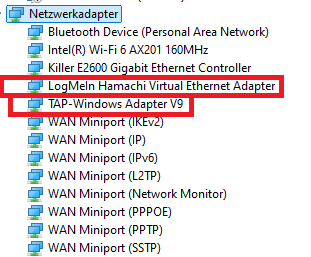
If you are not sure, you can send me a screenshot of your network adapters (in DMs is also fine).
stone sedge
 stark meadow
stone sedge
stark meadow
stone sedge
That's good. Have your friend send you theirs as well so we can check
Is anyone from you two on a WiFi?
stone sedge
no
stark meadow
stone sedge
no
Ok. Each of you should now do this test: https://www.waveform.com/tools/bufferbloat
Report back which score you get.
stone sedge
 stark meadow
stone sedge
stark meadow
stone sedge
They have 2 VPN's installed, and probably running in background.
They should right click on these two and disable them:

Example...
 stone sedge
It still doesn’t work, even after disabling those things. Our internet connection is good.
stark meadow
stone sedge
It still doesn’t work, even after disabling those things. Our internet connectio...
How do these network adapters look like now on your friend's end?
Have them also restart their PC now after they send you their screenshot
stone sedge
ok
 tight shore
Could use some help! I am trying to get my game started after a while but its not starting up for some reason. Tried to "Play Valheim" then "Play with Vulkan" and neither work.
I've verified the files, uninstalled, reinstalled, you name it. The thing just won't start up.
stark meadow
tight shore
Could use some help! I am trying to get my game started after a while but its n...
You will probably have to manually clean up your installation directory, and only after that, re-install the game. Mods files don't get removed by Steam.
tight shore
I manually deleted the files then reinstalled and it worked.


 stone sedge
GPU its going to 100%
stark meadow
stone sedge
GPU its going to 100%
That's normal in Valheim. Important thing is that GPU temperature is not a problem, which you can't see in task manager.
I would recommend installing HWiNFO tool to check that (also reports GPU hotspot temps on some GPUs)
To reduce the stress on GPU, you can also ensure that in-game V-sync in not enabled (has to be disabled), and then you can also set FPS limiter (e.g. 60fps). This is often required on laptops, which tend to overheat in Valheim.
stone sedge
ok ok
 high lichen
Hi, any idea how i can fix "Please wait" taking so much time
 stark meadow
high lichen
Hi, any idea how i can fix "Please wait" taking so much time
stark meadow
high lichen
Hi, any idea how i can fix "Please wait" taking so much time
Arabic calendar?
high lichen
yes!, Should I swap it?
stark meadow
high lichen
yes!, Should I swap it?
Yeah, change the format to English when you wanna manage saves.
It's a known issue not yet fixed.
 cedar edge
so https://steamid.io/lookup/ has been unresponsive for a few days... is this just something that happens to this type of ad-driven site?
 tribal echo
Maybe I missed it. Does anyone know how you can play your game from PC to the steam deck? It just wants me to start a new game
gilded sluice
@tribal echo steam cloud will solve that. Just dont be logged in on the game on both pc and steam deck the same time
So the steam cloud can sync correctly
tribal echo
I wasn’t logged onto both. I’ll have to go check some steam cloud stuff. Thank you!
stark meadow
tribal echo
I wasn’t logged onto both. I’ll have to go check some steam cloud stuff. Thank y...
Steam Cloud has to be enabled on both devices.
On each device, both in general steam settings and specifically in Valheim Steam library properties.
 junior scaffold
I've been having some sort of major problem with Valheim since late 2024. Basically, my entire computer locks up randomly (and some sort of awful buzzing noise starts to emit from my speakers) and I have to manually cycle the power on my machine to get it back. This ONLY happens with Valheim and no other game. I've tried a bunch of different things to address this issue and nothing works. Assuming this is the correct channel for this kind of issue, does anyone have any ideas or am I just out of luck?
stark meadow
junior scaffold
I've been having some sort of major problem with Valheim since late 2024. Basica...
Valheim might be the trigger, but it's not the root cause of your issue. What are your PC specs?
Are you left with black screen when PC locks up?
tribal echo
Still not letting me. I double checked the cloud and made sure the cloud severs were both the same. On my steam deck I can see my cloud saved games but it won’t let me load it. Always making me start a new game with my character from my pc
stark meadow
tribal echo
Still not letting me. I double checked the cloud and made sure the cloud severs ...
What do you mean when you say "it won’t let me load it"? You see the character save in your manage saves menu, but you can't select that character in character selection screen?
tribal echo
I’m a dumb ass😂 I was just saving my character to the cloud and my world to the pc. I moved my world to the cloud and character. Now I have it! I’m sorry
 glad matrix
Hi all I'm using the native Linux Client with Steam and am unable to connect to any crossplay servers at all (never get password prompt, get sent back to main menu with "Failed to Connect". Is there any work around for this?
stark meadow
glad matrix
Hi all I'm using the native Linux Client with Steam and am unable to connect to ...
Which Distro and which version? Do you know if you are behind VPN or CGNAT?
Try installing libpulse0, libpulse-dev, libatomic1, libc6 dependencies
 mystic mica
^^^^ That step is required for almost any linux distro setup for crossplay.
You might also make sure the name of the server has no special char's in it.
glad matrix
@stark meadow
Opensuse Tumbleweed version 20260113
I am not behind VPN as I do normally use one and have confirmed it is disabled and I can see my normal IP on https://whatismyipaddress.com/
I do not believe I am behind CGNAT, a traceroute from my router to the IP address I see on whatismyipaddress shows only one hop
I am not sure about the libpulse or libc6 libraries, as it seems that opensuse has a different packaging approach for some software and I'd need to know whether opensuse is actually packaging equivalent or the same software under different names. For example, libpulse-dev is not installed/available on opensuse repos, but libpulse0 is. Libc6 is not specifically available, but I am able to see the binaries it supposedly is related to. If someone can confirm what is specifically needed for opensuse that would be extremely helpful
stark meadow
glad matrix
<@196192010581835776>
Opensuse Tumbleweed version 20260113
I am not behind VPN...
Try sudo zypper install pulseaudio pulseaudio-devel libatomic1 glibc glibc-devel
The easiest solution would be to play with proton compatibility mode (enabled from Valheim properties in Steam library).
You can also probably use a symilar methor to this one to find out which libraries are equivilent on your Distro:
https://steamcommunity.com/app/892970/discussions/1/6644556627477003989/
glad matrix
stark meadow
Try `sudo zypper install pulseaudio pulseaudio-devel libatomic1 glibc glibc-deve...
sudo zypper in libatomic1 glibc glibc-devel
Refreshing service 'NVIDIA'.
Refreshing service 'openSUSE'.
Loading repository data...
Reading installed packages...
'glibc-devel' is already installed.
No update candidate for 'glibc-devel-2.42-2.1.x86_64'. The highest available version is already installed.
'libatomic1' is already installed.
No update candidate for 'libatomic1-15.2.1+git10392-2.1.x86_64'. The highest available version is already installed.
'glibc' is already installed.
No update candidate for 'glibc-2.42-2.1.x86_64'. The highest available version is already installed.
Resolving package dependencies...
Nothing to do.
Looks like those 3 are good. However, pulseaudio is an issue:
sudo zypper in pulseaudio pulseaudio-devel
Refreshing service 'NVIDIA'.
Refreshing service 'openSUSE'.
Loading repository data...
Reading installed packages...
'pulseaudio-devel' not found in package names. Trying capabilities.
Resolving package dependencies...

Problem: 1: the installed pipewire-pulseaudio-1.5.84-2.2.x86_64 conflicts with 'pulseaudio' provided by the to be installed pulseaudio-17.0-5.1.x86_64
 Solution 1: Following actions will be done:
  deinstallation of pipewire-pulseaudio-1.5.84-2.2.x86_64
  deinstallation of pipewire-alsa-1.5.84-2.2.x86_64
 Solution 2: do not install pulseaudio-17.0-5.1.x86_64

Choose from above solutions by number or cancel [1/2/c/d/?] (c):
Is pipewire not able to be used with Valheim on native linux? If so, I'll try the proton version.
stark meadow
glad matrix
Looks like those 3 are good. However, pulseaudio is an issue:
```
sudo zypper i...
Have you tested it now, maybe it works? Otherwise rather try proton, should work.
glad matrix
stark meadow
Have you tested it now, maybe it works? Otherwise rather try proton, should wor...
I'll try but nothing was actually installed, sorry I wasn't clear when I said they are good I mean I already had them.
 vital sable
Hey, I'm having an issue with pretty frequent game freezes\crashing, has anyone had a similar problem?
stark meadow
vital sable
Hey, I'm having an issue with pretty frequent game freezes\crashing, has anyone ...
What are your system specs?
stark meadow
vital sable
lemme see
And in what manner are you crashing? System restart, black screen, Valheim just closes, Valheim freezes and you have to kill the app, Valheim freezes with Unity popup, etc..
vital sable
Game freezes and I have to restart the computer, cant even alt f4 out of it. No error code unless its in the files somewhere
I should add, no black screen, it just freezes in place
stark meadow
vital sable
Game freezes and I have to restart the computer, cant even alt f4 out of it. No ...
Do you know how you are lauching Valheim? Default or in Vulkan?
vital sable
I've been doing default, should I try Vulkan?
Also tried running as administrator, got this error message
 stark meadow
vital sable
I've been doing default, should I try Vulkan?
stark meadow
vital sable
I've been doing default, should I try Vulkan?
No, you would be more stable on default then on Vulkan.
Do you still get a popup asking how you wanna launch Valheim when you press Play on Steam library?
vital sable
Yes, I still have the popup
stark meadow
vital sable
Yes, I still have the popup
Good, keep launching default option.
You are most likely experiencing GPU related crashes, might also be related to a software (overlay, recording software).
What I would recommend first, is going through these steps: #steam-bugs-discussion message explaining how to re-install drivers for your GPU properly.
vital sable
I will, thank you! A commenter on reddit also suggested I turn off Vsync, so I'll try that too
gilded sluice
vital sable
I will, thank you! A commenter on reddit also suggested I turn off Vsync, so I'l...
did it work?
else I might have to ask how old your harddrive is
vital sable
I don't think its that old but that could totally be the issue. I havent opened the game yet and tried, but its usually about an hour in that it happens so I can report back
gilded sluice
when did you buy your computer?
I had a intel I5-6500 before. and I bought it late 2016
and I see you got a i5-6400 so should be around the same time (and age)
vital sable
I have had it for about a year and a half, but i bought my pc from a local shop that builds them from scrap parts
gilded sluice
ah. hopfully the harddrive isn't old 🤔
vital sable
So any of my shit could be ancient. the free keyboard, mouse, and monitor shouldve been a tell haha
I just tried reinstalling AMD as that message suggested, but It's hitting a wall because of Windows update
Could this be because I haven't updated to 11?
stark meadow
vital sable
So any of my shit could be ancient. the free keyboard, mouse, and monitor should...
Did you first disable iGPU and disable windows from installing drivers automatically, as mentioned in the steps I gave you?
It should be done in the order I mentioned
vital sable
I couldn't find Igpu anywhere, I didnt think I had it
I did disable automatic driver install
stark meadow
vital sable
I couldn't find Igpu anywhere, I didnt think I had it
Your i5-6400 comes with Intel HD Graphics 530, whcih is iGPU
It should to be disabled in Windows, so that your PC doesn't get confused which GPU to use while gaming, and so that it always uses RX580
I mean, you can first try just re-installing Adrenaline, and then go though the steps again properly if just re-installing doesn't help
vital sable
Im in the intel browser, I cant see where it says disable anywhere
stark meadow
vital sable
Im in the intel browser, I cant see where it says disable anywhere
You restarted PC and entered BIOS?
vital sable
Let me try that again
stark meadow
vital sable
Let me try that again
Send me a DM if you get stuck, so that we don't spawm the channel
vital sable
Will do, thank you
 hexed anchor
vital sable
Also tried running as administrator, got this error message
hexed anchor
vital sable
Also tried running as administrator, got this error message
check ur antivirus mine got bypassed and was stored somewhere else all i had to do was restore and restart and it should be back in the folder but idk just a suggestion
 still glacier
Im getting som serious performance issues in Ashlands, and it only happens in this biome. I'm getting stutter and the sound is "cracling". Is this a know issue? Anyone have tips how to fix this?
gilded sluice
still glacier
Im getting som serious performance issues in Ashlands, and it only happens in th...
known game engine issue