#xbox-bugs-discussion
1 messages · Page 5 of 1
 twin steeple
 sharp elk
Sounds good. Appreciate it.
 slate oracle
Guys, how do I open the developer console on Xbox? lb+rb+menu doesn't help. Maybe I need to enable something first?
 whole maple
My buddy gifted me a code foe the game through the Xbox store and it wont let me redeem it because we're in different regions. Is there a way to fix this?
 bold locust
slate oracle
Guys, how do I open the developer console on Xbox? lb+rb+menu doesn't help. Mayb...
bold locust
slate oracle
Guys, how do I open the developer console on Xbox? lb+rb+menu doesn't help. Mayb...
look in the settings menu first
twin steeple
whole maple
My buddy gifted me a code foe the game through the Xbox store and it wont let me...
That's more of a question for the Microsoft support, or Reddit community for r/Xbox
Look into your region settings for your Microsoft account
whole maple
twin steeple
That's more of a question for the Microsoft support, or Reddit community for r/X...
Microsoft support told me to contact Valheim support. That led me here.
twin steeple
whole maple
Microsoft support told me to contact Valheim support. That led me here.
Valheim developers have no control over how you can buy products on Xbox/Microsoft store
whole maple
twin steeple
Valheim developers have no control over how you can buy products on Xbox/Microso...
No, but they would be able to give me the proper code for my region. That's the solution offered by both Microsoft support and Xbox support.
And both of those support systems have no actual human representatives.
twin steeple
whole maple
No, but they would be able to give me the proper code for my region. That's the ...
That's not how this works. For how to purchase Valheim, you have to contact each respective platform you want to purchase it from. If your friend purchased a code for you, and didn't know that it's region limited, they they are the one that should open a ticket on the platform they purchased it from, and ask for a refund.
bold locust
whole maple
No, but they would be able to give me the proper code for my region. That's the ...
we have no codes or control over any online stores
when you click "buy" on Xbox store, they generate a code on their end
same for steam
so if we as a developer want codes for Xbox or Steam for our own testing, we have to ask Xbox or steam for a code to our own game.
whole maple
bold locust
so if we as a developer want codes for Xbox or Steam for our own testing, we hav...
As the developer, if y'all have received your profit from a customer paying for your game and that customer gets a useless code, then they go through all the channels to get the situation rectified, is the appropriate response generally "Hey get shafted."?
I don't mean to sound like a jerk but I've been trying to get this situation dealt with for days and the only human beings I have received a response from are essentially telling me it's not their problem. It's a joke. My friend paid AU$30+ for the game. I have the code to prove said purchase. Both Microsoft and Xbox support sent me to you guys saying it's a developer issue and now I'm on a discord essentially being told that not a single person can rectify the problem. I'm honestly quite frustrated by the fact that the only solution being offered is for him to refund the game on his end. That's a non solution.
bold locust
whole maple
As the developer, if y'all have received your profit from a customer paying for ...
no we can't do anything on our end
I would probably also tell you / your friend to refund the game, send the money to you and you buy it yourself
and as long as you are eligable for a refund (less than 14 days since the purchase and less than 2 hours playtime) they shouldn't even put up a fight about it 🤔
so it is Xbox problem 🙁
and it is your friend who need to do the redeem
Reddit
Explore this post and more from the XboxSupport community
btw, I wouldn't recommend using the "VPN trick" since it might flag you in their system
but this reddit thread have some useful links and pointers
bold locust
@whole maple did your friend try to refund?
 lapis narwhal
wanted to ask about a Missing DB world i recently got. my game crashed which i think is due to a big file size (im on xbox series s btw) and it happened just as the game was saving, and i come back to a Missing DB which wasnt able to be recovered with backups at all, i was using local save and not cloud.
idk if this is a xbox bug, or just unfortunate timing with the crash happening but if anyone knows why and how i can avoid this for future worlds that would be appreciated
twin steeple
lapis narwhal
wanted to ask about a Missing DB world i recently got. my game crashed which i t...
It's not possible to use local saves on Xbox.
So if your save is indeed marked as local, then Xbox probably ran out of memory (weird things can happen).
Could you take a photo of how your backups currently look like?
I assume you weren't closing Valheim app at the end of your play sessions?
 runic ibex
Hey have any of you gotten the update today? I haven’t yet
lapis narwhal
twin steeple
I assume you weren't closing Valheim app at the end of your play sessions?
nah it crashed mid save so it was out my control
and the saves had their icon with the Save Icon and not the cloud so i thought that meant local. and i dont have the save anymore but if you are wondering about the backup names they didnt have any weird words in them, just the normal world name and the numbers
i just really love the game and would love to play without fear of it happening again
thats why im tryna prevent this somehow
twin steeple
lapis narwhal
i just really love the game and would love to play without fear of it happening ...
I mean in general, are you closing Valheim app at the end of your play sessions?
Depending on how your saves bakcups look like (screenshot would be nice), you might need to reset entire console if you wanna wavoid the same issue again.
Once Xbox internal memory becomes corrupt, and starts affecting saves, I didn't find a way on how to clean it other than doing full reset (doesn't delete games saves) + in future to avoid the issue, closing Valheim app when you are done playing.
twin steeple
runic ibex
Hey have any of you gotten the update today? I haven’t yet
It should be available, so might be a region thing for you. Try restarting the console and going offline/online.
runic ibex
I’ll give it a try thank you
lapis narwhal
twin steeple
Once Xbox internal memory becomes corrupt, and starts affecting saves, I didn't ...
yea the way i do it and alwayd do it is
i save, im always careful with saving, once the save icon in the top left goes away + text. i quit the game, and then i wait for it to load the screen and then i close the game with the "quit" and not just click off
its just cuz it crashed which led to the "log out mid save" situation
unfortunately out of my control
runic ibex
Still haven’t gotten the update sad 😢
twin steeple
runic ibex
Still haven’t gotten the update sad 😢
Did you sign up for public beta testing before?
runic ibex
No
twin steeple
runic ibex
No
Do you have Xbox insiders hub installed?
runic ibex
I am joined actually
twin steeple
runic ibex
I am joined actually
Then best to opt out of Valheim preview there and restart the console.
lapis narwhal
wait there was an update meant for today?
bold locust
lapis narwhal
wait there was an update meant for today?<a:Hugin:808713392067444788>
yup
 river oriole
The mouse cursor on xbox is super tiny after this update
 strong sun
I'm getting this message when I try to launch the game on my Xbox series X:

Any advice? The update is available if I uninstall the game and play via cloud gaming, so not sure what the issue here could be.
twin steeple
strong sun
I'm getting this message when I try to launch the game on my Xbox series X:
That's on PC or Xbox?
twin steeple
river oriole
The mouse cursor on xbox is super tiny after this update
What's your TV/monitor resolution?
strong sun
twin steeple
That's on PC or Xbox?
Xbox series X
twin steeple
strong sun
Xbox series X
When you press the Xbox button, do you have all the network features available (like recording). Do you also have Xbox Insiders hub installed?
strong sun
twin steeple
When you press the Xbox button, do you have all the network features available (...
Not all features are enabled, I do have Insiders installed.
twin steeple
strong sun
Not all features are enabled, I do have Insiders installed.
Some are grayed out? Then you are probably not online.
It could also be that Xbox servers are going through maintainance:
https://support.xbox.com/en-US/help/errors/error-code-8b050033
strong sun
I have some disabled, like auto uploads and background recording, but my console is online.
river oriole
twin steeple
What's your TV/monitor resolution?
My resolution is 1920x 1080
twin steeple
strong sun
I have some disabled, like auto uploads and background recording, but my console...
Last time it happened to someone, the quicker workaround was to switch to Insiders Hub version of the game:
#xbox-bugs-discussion message
But this won't work now as that version of the game is older one than the one live.
twin steeple
river oriole
My resolution is 1920x 1080
It's an issue then. Forwarded.
river oriole
twin steeple
It's an issue then. Forwarded.
Okay thank you
strong sun
twin steeple
Last time it happened to someone, the quicker workaround was to switch to Inside...
Factory resetting my xbox and reinstalling the game seems to have fixed the issue and allowed me to update. Hope this helps anyone else with this issue!
twin steeple
strong sun
Factory resetting my xbox and reinstalling the game seems to have fixed the issu...
Did you do soft rest or hard one (uninstalls all games)?
strong sun
twin steeple
Did you do soft rest or hard one (uninstalls all games)?
Soft reset, but I did reinstall Valheim seperately.
 delicate heart
is anyone else just not getting patch 0.221.10 on xbox?
 loud sonnet
Is anyone else having issues with the scroll wheel immediately scrolling to the bottom of the crafting bench/forge menu after the update? Is there somewhere I can report this bug?
 old holly
delicate heart
is anyone else just not getting patch 0.221.10 on xbox?
old holly
delicate heart
is anyone else just not getting patch 0.221.10 on xbox?
If you joined the ptb, you have to leave it and restart your console to get the update
delicate heart
okie thanks I will try that
 summer owl
I have 221.4 version my friend has 221.10 version we both from eu but he can’t join me now because old version and funny thing is why I’m not getting update lol.


Hiiii help pls
They updated but update isn’t successfull other people also getting problem 🤣
old holly
summer owl
I have 221.4 version my friend has 221.10 version we both from eu but he can’t j...
summer owl
old holly
If you joined the ptb, you have to leave it and restart your console to get the ...
Thx it worked
old holly
bold locust
yeah.. this isn't a PTB version. we pushed straight to live
As a suggestion, could you consider also updating the ptb next time? Since it's kind of a hassle to join/leave the ptb on xbox 😅
bold locust
welll....
it's not ment to be the same version anyways
when PTB is done, people should swap back to normal
lapis narwhal
@twin steeple sorry to ping you directly but should i have it on local immediately on a new world instead of cloud. i heard local is safer for progression
 twin steeple
lapis narwhal
<@196192010581835776> sorry to ping you directly but should i have it on local i...
twin steeple
lapis narwhal
<@196192010581835776> sorry to ping you directly but should i have it on local i...
Can you send me a DM with a screenshot of full backup list for you world?
Local saves should not exist on Xbox, if they do, it's a sign of a serious issue
lapis narwhal
twin steeple
Can you send me a DM with a screenshot of full backup list for you world?
yea i can
 rain spire
I can't join my server because it received the new game update, but I haven't received the new client update yet. I'm still on version 0.221.4 on my Xbox. When will we receive it? Or is it only for PC players?
twin steeple
rain spire
I can't join my server because it received the new game update, but I haven't re...
Best to sign out of Valehim preview on Xbox Insiders Hub app
That branch is for public beta testing and latest update skipped that process
rain spire
twin steeple
Best to sign out of Valehim preview on Xbox Insiders Hub app
I don't have access to Xbox Insider.
twin steeple
rain spire
I don't have access to Xbox Insider.
Everyone has access. Check if you have the app installed
rain spire
Okay, I left the public test, I still haven't received an update even after rejoining, I'm still on version 0.221.4 and since I'm renting a Nitrado server I can't change the game version...
@twin steeple
twin steeple
rain spire
Okay, I left the public test, I still haven't received an update even after rejo...
So you did have the app installed? (making sure you haven't signed up for testing by mistake)
Restart the console now to refresh the changes, make sure you are online, start the game.
rain spire
twin steeple
So you did have the app installed? (making sure you haven't signed up for testin...
I have internet access, the application is properly installed, I left the public test program and after several restarts of my console, I received the update.
Thx for your help 😉
 quiet tinsel
I dont know if its intended or not, but since the new update I suddenly can only start and exit crouch when holding the button down for a secound or so. Thats very annoying, I hope, the next update will revert it back to a simple button press.
bold locust
quiet tinsel
I dont know if its intended or not, but since the new update I suddenly can only...
known issue. we will look at it
 sterile mountain
Hey guys, hope you can help me. Me and a friend used to play online, he hosted the server on his PC, I joined on my Xbox. Since Sunday I can't connect to his server anymore. Either it says no connection possible, the game crashes or I spawn in an empty world. I see him on the map, as well as all of our markings, however there's nothing in the world, no trees, no enemies, nothing. Theres a symbol blinking in the top left corner (a cable with a red X) and after about 60 seconds I'm kicked out again. We both have version 221.10 and we both deleted and re-installed the game already. Anyone who could help?
bold locust
sterile mountain
Hey guys, hope you can help me. Me and a friend used to play online, he hosted t...
sounds like one of the world files is missing 🤔
or a VPN issue
VPN issue typically shows by you can join, but you disconnect after 30~ seconds. and no trees and nothing loads in
 mystic ridge
quiet tinsel
I dont know if its intended or not, but since the new update I suddenly can only...
mystic ridge
quiet tinsel
I dont know if its intended or not, but since the new update I suddenly can only...
Same thing is happening to me. It's very annoying. I think it's tied into the Emote update....added this in and we lost the easy sneak.
My whole controller felt off last night- Had a heck of a time with a troll who killed me 2x! Not sure specofocs as the controller just felt unresponive- run, jump, dodgeg all felt slow or not reacting. After picking up my bodies and giving up on the troll, that's when I learned that the snak/coruch needed to be held down to activate. So I wonder if the other controller fnuctions are delayed as well?? 😢
 cinder sky
It's not just an Xbox issue. PC with controller has it too with control scheme 2
quiet tinsel
Luckily I´m currently mostly preoccupied with divinity 2, would suck, if I died with hard penaltys because of this
Because I decided to do an almost hardcore playthrough a week ago (No portals, no map, hard death, hard combat, but less frequent raids and 1.5 ressource rate)
bold locust
mystic ridge
Same thing is happening to me. It's very annoying. I think it's tied into the Em...
sneak will be addressed in the hotfix
 willow wadi
Me and my friend have some issues on our server that we cant explain so if someone could call us and help us
twin steeple
willow wadi
Me and my friend have some issues on our server that we cant explain so if someo...
Try to explain it still. If the issue is not new, we can recognise what it's about even from the faintest descriptions.
 sinful night
Hello. Is there a fix for PC players not being able to join Xbox game?
twin steeple
sinful night
Hello. Is there a fix for PC players not being able to join Xbox game?
Mostly has to do with PC players playing over VPN.
Did you manage to solve the connection issue?
sinful night
twin steeple
Mostly has to do with PC players playing over VPN.
I asked my friend on the PC and they said they don't play over VPN
twin steeple
sinful night
I asked my friend on the PC and they said they don't play over VPN
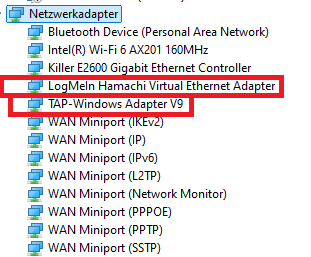
Just having VPN installed can be enough for it to disrupt connections, because it's almost always running in background.
Ask them if they can screenshot their network adapters. E.g.
start → type device manager and open → network adapters
https://imgur.com/3S6NgGE
 fallen spruce
I couldn't enter my friends world bc they play on steam and I play on gampass. I uninstalled the Xbox insider hub, restarted my PC and closed and reopend the Xbox app several times: I still don't get the update. if I reinstall the game, will it install the most recent version?
twin steeple
fallen spruce
I couldn't enter my friends world bc they play on steam and I play on gampass. I...
Before uninstalling, did you sign out of Valheim preview on Xbox Insiders Hun?
fallen spruce
I did not, I thought just uninstalling the hub would work
so I need to reinstall the hub and sign out first?
twin steeple
fallen spruce
so I need to reinstall the hub and sign out first?
That would be my guess. I didn't attempt to uninstall it to see if it would could as leaving PTB version
fallen spruce
I just left the PTB in the hub
do I need to restart my PC or just the Xbox app is enough?
twin steeple
fallen spruce
do I need to restart my PC or just the Xbox app is enough?
It should pick it up, but you never know with Microsoft
fallen spruce
yep, just got it, Thanks!
mystic ridge
bold locust
sneak will be addressed in the hotfix
LB (Blocking) isn't as reponsive either. Slow to react and really have to hit teh LB it make it work. A frined in my world also experienced this (Draugers hit hard and so do thier arrows)
bold locust
mystic ridge
LB (Blocking) isn't as reponsive either. Slow to react and really have to hit te...
ty for reporting
twin steeple
mystic ridge
LB (Blocking) isn't as reponsive either. Slow to react and really have to hit te...
There are no issues with responsivness. When it comes to crouch, its has mistakenly been set to hold instead of press.
Nobody else has reported issues with pressing LB
sinful night
twin steeple
Just having VPN installed can be enough for it to disrupt connections, because i...
They don't have a VPN installed. Is there anything else we can try?
twin steeple
sinful night
They don't have a VPN installed. Is there anything else we can try?
Do you have multiple friends on PC not being able to join?
sinful night
twin steeple
Do you have multiple friends on PC not being able to join?
Yes.
twin steeple
sinful night
Yes.
They the issue is probably on your end. What result do you get when you do NAT type test on your Xbox (test located in box network settings menu)
 civic summit
My weapon that is displayed on character selection and start screen turns into bright white ball of graphics once i log in it goes away
twin steeple
civic summit
My weapon that is displayed on character selection and start screen turns into b...
Playing on Windows? WhatnGPU do you have? Playing in Vulkan?
civic summit
twin steeple
Playing on Windows? WhatnGPU do you have? Playing in Vulkan?
this is xbox bug discussion not pc
twin steeple
civic summit
this is xbox bug discussion not pc
Makes more sense. Was on the phone and didn't see the channel you posted in correctly
I recommend doing this to fix it: #xbox-bugs-discussion message
 scenic token
I've noticed that the couch button isn't sensitive anymore I have to literally push down the RS for like 2-3 seconds to see a response of a crouch animation. Idk if that's a bug or a new thing 🤔
twin steeple
scenic token
I've noticed that the couch button isn't sensitive anymore I have to literally p...
This should be fixed already. Make sure that your game is updated (It has to say 0.221.12 version in the starting menu)
 open pier
Is there a way to leave the server without loosing inventory?
twin steeple
open pier
Is there a way to leave the server without loosing inventory?
What do you mean by loosing the inventory?
bold locust
open pier
Is there a way to leave the server without loosing inventory?
inventories are always stored in your character
open pier
twin steeple
What do you mean by loosing the inventory?
I mean, having no inventory at all
Completely blank.
Happened 2 times already.
Also for some reason forgets where character was
twin steeple
open pier
I mean, having no inventory at all
Completely blank.
Happened 2 times already.
A...
Sounds like you are closing the game shorty after dying
Who is hosting the server?
open pier
twin steeple
Sounds like you are closing the game shorty after dying
Hmm, that was case one time before, though pretty sure that time it was fiine.
But this last time - nope. Only cna add that he tp-ed one minute prior to disconnecting.
Me hosting on pc
twin steeple
open pier
Hmm, that was case one time before, though pretty sure that time it was fiine.
B...
You are hosting on PC, your friend is connecting via Xbox and he's the one losing inventory?
Generally when you have a disconnect symbol in top left corner of screen, the person disconnecting shouldn't be interacting with the inventory or dying
The game will usually wait for 30sec before trying to re-connect you, before it log out to main menu, but in that 30sec
During that 30sec, since character is being saved on their end, any changes in inventory will be saved on their end, but the contents they might put from inventory to chest or their tombstone won't be saved on the server
If you are on top of that using mods, it can be worse
open pier
twin steeple
During that 30sec, since character is being saved on their end, any changes in i...
Hmmm
Disconnect in the sense of "leaving" I guess.
Also, at some point we had the opposite - he died, his tombstone generated, he left empty, but when he joined back he seemed to have inventory just like in tombstone.
Is there just some manual save step we are missing?
Or just some kind of bug?
I am using some server mods like serversideQol but there doesn't seem to be anything crazy or related to inventory changes.
twin steeple
open pier
Hmmm
Disconnect in the sense of "leaving" I guess.
Also, at some point we had th...
Sounds like a mod issue to be honest. Are you sure that you are not using server side characters mod?
open pier
twin steeple
Sounds like a mod issue to be honest. Are you sure that you are not using server...
not sure what would they be tbh.
Will add that first time we encountered issues was before using mods (the rejoin with full inventory after death and first instance of appearin empty and at wrong place)
twin steeple
open pier
not sure what would they be tbh.
Will add that first time we encountered issues ...
That one is normal behaviour assuming they closed the game from Xbox menu after dying, while still being on the server (not logging out).
Ask them if they can take a phote of their character backups as well (starting menu → manage saves button → character tab → expand backup list for the character in question → take photo)
old holly
The server side character mod is also required on the clients, it would prevent xbox players from joining so it's probably not involved here.
A server-only mod like ServersideQoL has no way to empty a character inventory completely, so it cannot be the direct cause. Logging out while being in the connection is interrupted seems like the only explanation to me. If you are experiencing these connection interruptions (flashing icon top right) often, a server-only mod (e.g. by sending too much data) might play a part in it
bold locust
old holly
The server side character mod is also required on the clients, it would prevent ...
if it's mods involved. we cannot help
 obsidian osprey
Is it known to the devs that there is high input delay with mouse and keyboard on the console version of the game?
twin steeple
obsidian osprey
Is it known to the devs that there is high input delay with mouse and keyboard o...
Try playing in performance mode
obsidian osprey
twin steeple
Try playing in performance mode
It worked but I’m confused as to why.
 jovial gulch
Why isn't valheim on Xbox game pass anymore
bold locust
jovial gulch
Why isn't valheim on Xbox game pass anymore
Because our contract ended
So of you want Valheim back on game pass. Send a email to Xbox and say so.
 lone cliff
Is there an expert who can help?
My world saves suddenly disappeared; they aren't showing up in the game files or the in-game menu. What could be the reason for this?
and its solution
twin steeple
lone cliff
Is there an expert who can help?
My world saves suddenly disappeared; they aren'...
Are you playing on console or PC?
lone cliff
with the Xbox app on the computer
twin steeple
Check whether you are logged into your Xbox PC app with the same account as in your Microsoft store app?
Did you remember moving your saves from Cloud to Local in the past?
lone cliff
My main character is still present, but my world is not visible.
lone cliff
twin steeple
Did you remember moving your saves from Cloud to Local in the past?
I can't remember
twin steeple
lone cliff
I can't remember
Did you re-install windows or change your hard drive since last time you played?
lone cliff
My friend created the world. He doesn't see the world, but I do.
lone cliff
twin steeple
Did you re-install windows or change your hard drive since last time you played?
Yes, he bought a new computer.
twin steeple
lone cliff
My friend created the world. He doesn't see the world, but I do.
Wait, I'm confused. How is now your friend involved in your saves?
Have you played together in the past where he creates the world on their pc/console and they were the one hosting it?
lone cliff
Let me explain it more clearly
My friend and I both play Valheim on PC via the Xbox app.
He created the world, and I joined her. We played 650 game days and we were still playing.
My friend bought a new computer. When we tried to log back into the game, we couldn't access that saved game.
twin steeple
But your friend still sees their character when they log in?
lone cliff
But the recording shows up for me and not for her, so neither of us can access that recording.
twin steeple
How about if they click on the manage saves button, and go to the worlds tab, do they still not see any world backups there?
lone cliff
No, He says it's not visible.
twin steeple
lone cliff
No, He says it's not visible.
It sounds like the world save was moved from Cloud to Local at some point in the past, at which point it stops being saved in Xbox Cloud and it can't be transfered to new PC automatically. The save is still on the old PC. What happened with old PC / hard disk?
lone cliff
he gave his old computer to a friend, but according to his, he reset the computer before giving it to his friend.
twin steeple
lone cliff
he gave his old computer to a friend, but according to his, he reset the compute...
Then I'm afraid you won't be able to recover such file. Some data recovery on that old hard drive would be the only hope, and that is beyond the help you can find here.
World saves are only saved on host side, so it doesn't matter that you also player in the world (you won't have the save).
The fact that your friend still sees the character means that Xbox Cloud is working with correct account, and the only reason I can think of that would make the world save disappear is the one I mentioned (your friend prob moved the saved from Cloud to Local).
People usually move saves from Cloud to Local when they need to access the save files directly, for purposes of sending them to someone or dedicated server. They don't remember doing anything like that?
lone cliff
twin steeple
Then I'm afraid you won't be able to recover such file. Some data recovery on th...
He didn't do anything like that because it was just the two of us playing.He was deliberately saving the recordings to the cloud.
Is there no solution at all? After all, I can see the saves of that world.

I don't want all that progress in the game to go to waste.
twin steeple
lone cliff
Is there no solution at all? After all, I can see the saves of that world.
This on your screenshot is not a world save.
It's a server name entry in your server favorites list.
This entry only contains info about the server you played on (join code, IP, friend who invited you), but it's not a world save (actual file containing data about the world).
If your friend can't see anything when they click on "manage saves" button, there simply is no world.
 lone cliff
twin steeple
This on your screenshot is not a world save.
It's a server name entry in your se...
lone cliff
twin steeple
This on your screenshot is not a world save.
It's a server name entry in your se...
yes I know
twin steeple
Be sure that your freind chekc manage saves button properly.
World saves can be not shown in world selection menu, but they still show up in manage saves menu.
lone cliff
twin steeple
If your friend can't see anything when they click on "manage saves" button, ther...
He says no world is visible.
twin steeple
If they are not in manage saves menu, then you need the old PC drive and you need to execute data recovery tools there to find .db and .fwl files.
There aren't any known issues which could result in Xbox Cloud only deleting just the world saves, but somehow not characters.
lone cliff
Isn't this it? manage saves
 twin steeple
lone cliff
Isn't this it? manage saves
twin steeple
lone cliff
Isn't this it? manage saves
If you click on that one, it will open saves for the character, so you will have to click on worlds tab.
lone cliff
true ,So, it means he must have transferred that data from the cloud to the local computer in a way he doesn't remember.
The only solution is for his to access their files from his old computer. Can't the developers help?
If my friend cannot access the files
twin steeple
lone cliff
true ,So, it means he must have transferred that data from the cloud to the loca...
I can't think of any other explanation that would fit.
There might be some weird bug, but I never got a report on it happening to any other player, at least not a case where someone would lose only some saves. There were few reports where people claimed losing all saves, but those were never investigated because those reports came through channels we can't talk to players.
Developers don't have access to your saves. Only Microsoft / Xbox support, if the saves are in Xbox Cloud.
lone cliff
twin steeple
I can't think of any other explanation that would fit.
There might be some weird...
This is the first time we've encountered a situation like this. he previously formatted his computer while playing the game, but nothing was lost because it was on Xbox Cloud.
lone cliff
twin steeple
Developers don't have access to your saves. Only Microsoft / Xbox support, if th...
If there was a problem, could contacting Xbox support lead to any improvements?
twin steeple
lone cliff
If there was a problem, could contacting Xbox support lead to any improvements?
I very much doubt that their support has access to Cloud sync logs.
Can your friend screenshot their character backups so we can see the dates involved there (when they last played)?
lone cliff
He's sleeping right now. I can send it during the day if you want.
Actually, that was the last time we played together. If I check the date of my last game, I can find out her as well.
12.10.2025
But if we want to be sure, I'll ask my friend for a screenshot when he wakes up tomorrow.
lone cliff
That's why it might be. '' You may experience issues syncing game saves to the cloud.''

 solid pumice
Pls make the controls more easy for Xbox
Or that we can. Change them
I have gotten used to it
But at the start it was so confusing
bold locust
solid pumice
Pls make the controls more easy for Xbox
Or that we can. Change them
I have ...
you know therw are multiple to choose from?
solid pumice
bold locust
you know therw are multiple to choose from?
Yes but i meant the way i want myself
I still dont like the button you change weapons
 bold locust
solid pumice
What is this help
bold locust
solid pumice
What is this help
erm. portals are 2 way. you don't "open" them
if it's unconnected like it says. and doesn't connect to anything. either the other end is destroyed, or wrong letters
 wise glacier
Hi everyone i have an issue in my game
Whenever i try to go to manage saves in my xbox game
It keeps me at “please wait” forever
I slept and woke for almost 7h and it still says the same “please wait” im using 39.7mb of my cloud save and i have 4.3GB free space
twin steeple
wise glacier
Hi everyone i have an issue in my game
Whenever i try to go to manage saves in m...
There's an issue where manage saves menu won't load for Arabic date and time format, so changing that to English is a workaround to this issue.
wise glacier
But my game is in english
And my system xbox is in russian
twin steeple
wise glacier
But my game is in english
And my system xbox is in russian
Russian is set as first option when you go to:
Go to Xbox settings → System → Language and Location ?
twin steeple
If so, that would imply you have some other issue with manage saves menu.
Russian language has no issues on Xbox.
Did Xbox crash recently or display an error that it ran out of memory?
wise glacier
twin steeple
If so, that would imply you have some other issue with manage saves menu.
Russia...
Yea i think
twin steeple
wise glacier
Yea i think
Is the same issue still persisting? Do you happen to also have an access to a PC?
 celest widget
So I'd like to report a bug that has been plaguing me for the whole eight months I've been playing the game and, somehow, I managed to live with it but at this point, I lost my patience and decided to let the game go and play something else:
Sometimes my boats show up completely trashed (which I think is lore accurate - maybe the monsters destroyed it while I was away, which is cool), and here I can always salvage the components and rebuild it again, no problem, but sometimes the boat simply vanishes. I realized that if I save the game while on the ocean, I respawn on dry land but the boat stays adrift, being nearly impossible to get it back. But it happened quite a few times that even having the boat parked right in front of a safe spot (no enemies, I was outside the boat, calm waters, no rain), makes it vanish when I reload the game. And to make it worse, sometimes I had valuables stashed in its chest. I made a tour around the mistlands mines to collect the required sealbreaker pieces and it was all in vain, since all my 9 shards were gone with the boat. It was right in front of my safehouse, I still have the pin (I usually pin where I anchor my ship) on the map, but the boat is not there anymore. Talking about the mistlands, playing on it sometimes felt like I was watching a Power Point slideshow. The frame drop was brutal. I feel the wasplight and the wet animation played a huge role in it. At some point, it was unplayable, literally. The character kinda teleported from point to point, until he found a Soldier Seeker and died.
The platform is Xbox ONE and I had all the most recent updates. I tried reloading from a previous save from the cloud, but interestingly enough, it restores the state of my inventory but not my boats. Sorry if it came out as a rant, the game is amazing and all but is too much grind just to lose everything in a blink of an eye.
twin steeple
celest widget
So I'd like to report a bug that has been plaguing me for the whole eight months...
Xbox one still needs a lot of optimisations. Atm Xbox One has low amount of RAM (can lead to save corruption) and can't it handle AI of multiple enemies (low FPS).
Boat location in a world is a part of a world save, and character inventory a part of character save, so when you are restoring previous progress, you have to be careful whether you are restoring character or world backups.
Are you putting workbenches next to your boats, and ensuring that they are not in deep water, so that in case of them getting destroyed, they do drop materials.
How often are you closing Valheim from the Xbox menu?
celest widget
Now this is an interesting question. I always close Valheim from the Xbox menu (since I always leave in a rush). Even if it's only to resume playing few minutes later.
 stone sierra
Does the game support cross save between xbox and steam?
Nvm. Got my answer: 🙂Valheim does support cross progression between Xbox consoles and the Microsoft Store version on Windows. Your world and character sync via Xbox Cloud saves. Cross-progression between Steam and Xbox requires manual file transfers.
twin steeple
stone sierra
Nvm. Got my answer: 🙂Valheim does support cross progression between Xbox consol...
You will need access to Windows PC to transfer the saves
twin steeple
celest widget
Now this is an interesting question. I always close Valheim from the Xbox menu (...
That would be best to do, but you always have to save before that, either by manual save or logout, but you should avoid both
 robust quest
Probably not exclusive to Xbox but I'm doing a playthrough with enemies at 150% using setkey EnemySpeedSize 150 and the lox and asksvin are not ride-able, the saddle works but it will not move at all. I know it's kinda not vanilla but thought it could be worth mentioning if it's an easy fix although it's not intended. Would have been pretty awesome to be super fast on a giant lox 🤣
 pulsar forum
solid pumice
What is this help
pulsar forum
solid pumice
What is this help
You need to place another portal and name it the same as the first. Then it'll activate automatically and bring you between the portals just by walking through either one.
 steep holly
Would anyone know why the game would randomly kick me out? I’m getting highly irritated because I have lost a lot of gear because I would put something in a chest and before I can save I will get kicked and the gear is gone.
I was just in my boyfriend’s server helping him. He glitched out of his ship and was in the middle of the ocean. He died before I could get to him. So I retrieved all his items. I was in the middle of sailing to land to portal back to where he spawned back. Game froze and sent me back to the start page. All of the items I picked up is now gone because his tombstone is gone and when I logged back on the stuff was not in my inventory
 broken pilot
Can anyone tell me how to open my command chat on the controller? I’m a returning player and it seems to be changed and I’m too slow to figure it out
twin steeple
broken pilot
Can anyone tell me how to open my command chat on the controller? I’m a returnin...
You have to enable the console first. Pause menu - settings - gameplay tab - enable console. Then press LB+LT+start
twin steeple
steep holly
I was just in my boyfriend’s server helping him. He glitched out of his ship and...
Last one sounds like a crash, upon which gađe does not save (not a kickout/disconnect)
Who was the world host from the two of you? On which platforms are you both playing?
steep holly
twin steeple
Last one sounds like a crash, upon which gađe does not save (not a kickout/disco...
This particular time it was my boyfriend’s server. But it has happened in my own server quite frequently
 hollow furnace
Hello, I'm having a problem with the game. I'm on Xbox Series X and I'm playing with a PC friend via Xbox Live Pass. The problem is that I can no longer invite other players to join my game. Can you help me?
twin steeple
hollow furnace
Hello, I'm having a problem with the game. I'm on Xbox Series X and I'm playing ...
Have you tried just giving them the join code?
Join code is visible on top of the pause menu (if you don't have it visible, you didn't start your world as a server).
Then have to add that code to their server favorite list.
hollow furnace
twin steeple
Have you tried just giving them the join code?
Join code is visible on top of th...
Thank you so much for your reply. The problem comes from the quick resume feature on Xbox; you have to restart the game and not resume it via quick resume to invite people again, otherwise the game doesn't recognize the online connection.
 stark ruin
Hi, I have my game on Steam and my friend bought it (on PC) through Xbox Live. I'm creating a server so we can play together, but the game won't connect. I've already searched for videos, but nobody has this problem. Could someone please help me?
??w
bold locust
stark ruin
Hi, I have my game on Steam and my friend bought it (on PC) through Xbox Live. I...
you need to enable crossplay
twin steeple
stark ruin
Hi, I have my game on Steam and my friend bought it (on PC) through Xbox Live. I...
Both of your joining some random server in the community tab, the same one, and see which one from you two won't be able to reach password prompt for that random server. I can also host one for you to test.
 carmine reef
😄 what??
twin steeple
carmine reef
😄 what??
Yeah, it's an older Mistlands bug. Try to avoid dodging into enemies when you are standing on a slope.
The likelihood of getting clipping into wolves is higher since they clip very close to players.
carmine reef
heard, first time ive been sent to this extent like this. usually chalked it up to lag so im glad its at least a known bug
 orchid yoke
Yo guys, i bought valheim recently on the xbox store for windows cause my finals got over and it was 50% off there, im 60 hours in within 5 days and im going CRAZY a privacy notification KEEPS popping up whenever i try to rename a boar or place a sign for the millions of portals i have. I tried changing all the privacy settins on the xbox thing but nothing is changing even after going to page it tells me to go to. I really need ehelp
twin steeple
orchid yoke
Yo guys, i bought valheim recently on the xbox store for windows cause my finals...
You would have to login here and adjust your privacy settings: https://www.xbox.com/en-US/user/settings/privacy-and-safety
orchid yoke
twin steeple
You would have to login here and adjust your privacy settings: https://www.xbox....
thanks i was on the wrong account the whole time :C
 tardy solstice
carmine reef
😄 what??
tardy solstice
carmine reef
😄 what??
now imagine you die to this in hardcore permadeath...
carmine reef
tardy solstice
now imagine you die to this in hardcore permadeath...
yeah idk if i could reset after that. id have to meet budda or sum idk
 pale yoke
So, my Internet is pretty garbage, xbox likes to force "sync data" on me and if I cancel it on valheim, valheim just stops working. Seems like something that should be fixed really.
twin steeple
pale yoke
So, my Internet is pretty garbage, xbox likes to force "sync data" on me and if ...
Do you know your download speed?
That's on console or pc?
pale yoke
It's miserable, there is ongoing maintenance in my area, it's rally bad. Xbox
 devout osprey
Im playing on an Xbox One. Games worked okay on it until today. Any time i try to switch to the "Join Game" page, game freezes. Music plays then stutters, then plays and repeats this. Any ideas? I dont have money to upgrade consoles but i like hanging with my friends
twin steeple
devout osprey
Im playing on an Xbox One. Games worked okay on it until today. Any time i try t...
Have you tried just restarting the console?
You can also try this: Close Valheim → press the menu button while selecting Valheim game n your Xbox home screen → goto manage game and add-ons → saves data → delete both reserved spaces (don't delete your profile name). After that do the power cycle of the console (turn off, unplug power cable for 30sec, turn back on).
devout osprey
twin steeple
Have you tried just restarting the console?
That did it! Thanks so much!
 uneven coral
So this entire corner of my house became uninteractable. You cant access the barrel,destroy or damage anything by hitting it. Any ideas?

 past grove
Did you relog?
twin steeple
uneven coral
So this entire corner of my house became uninteractable. You cant access the bar...
That happened while playing in singleplayer or on a server?
uneven coral
It was dedicated server. It seemed to fix itself after about 4 restarts
 shadow hatch
Wondering if anyone on Xbox is having staggering issue when loading in new areas. I have it set to performance. When I walk around in an area I haven't discovered it staggers/stutters for about 2 seconds to seemly load the new chunk.
twin steeple
shadow hatch
Wondering if anyone on Xbox is having staggering issue when loading in new areas...
Yes, it's a known issue, will be fixed next patch.
shadow hatch
twin steeple
Yes, it's a known issue, will be fixed next patch.
Thank you for the update!
 sly obsidian
Hello, has anyone experienced the game crashing in multiplayer while exploring the Ashlands?
twin steeple
sly obsidian
Hello, has anyone experienced the game crashing in multiplayer while exploring t...
Have you summoned Fader yet?
Which console model?
sly obsidian
twin steeple
Have you summoned Fader yet?
We have not summoned Fader yet, but my fiancé and I playing on the Xbox series S, one of our friends playing on pc, and the other friend of ours playing it on Xbox series X
twin steeple
sly obsidian
We have not summoned Fader yet, but my fiancé and I playing on the Xbox series ...
Are both of you on Xbox crashing or only one of you?
Another player recently told me they crash when playing on a dedicated server, usually when they are about to parry or lock an enemy
sly obsidian
I see, but nah, this is different, my fiancé hosts the world. He tries to explore the Ashlands, but crashes and it’s not on a dedicated server. 🤔
twin steeple
sly obsidian
I see, but nah, this is different, my fiancé hosts the world. He tries to explor...
Probably due to memory related issues. This next upcoming update should help with that.
For now, try disabling quick resume for Valheim:
Press Xbox button to open Xbox menu → Select Valheim in the Xbox menu and press start button → Quit Valheim → find Valheim app on home screen → press startbutton on Valheim app in home screen → Manage game and add-ons → Quick Resume settings → Disable quick resume
Also, try limiting your play sessions to 1h30min, then quit Valheim app and restart it
sly obsidian
Alright, I’ll definitely let everyone who is playing on Xbox know what’s going on and we should be getting back to playing the game again, thank you very much for the help and I’ll let you know if there’s anymore issues after doing all that!
twin steeple
sly obsidian
Alright, I’ll definitely let everyone who is playing on Xbox know what’s going o...
Yes, please do