#steam-bugs-discussion
1 messages · Page 16 of 1
 polar rune
 gilded sluice
GL HF and keep in touch incase drivers wasn't the issue
gilded sluice
GL HF and keep in touch incase drivers wasn't the issue
Issue fixed! Thanks for your time 🙏
gilded sluice
polar rune
Issue fixed! Thanks for your time 🙏
Happy to hear 🫡
 hushed snow
May have the solution. Meadow house is heated by a Hearth. Noted that in the Plains Farm house, where the eggs are heated by the ovens, eggs hatch regularly when I show up. The hearth often blinks off for no known reason, and the eggs get cold. Built a campfire on a stone bracket even with the 2nd floor of the Meadow house, and when I came home this time, a backlog of ~8 eggs all hatched at once. Problem seems to be something with the Hearth shutting down periodically.
gilded sluice
hushed snow
May have the solution. Meadow house is heated by a Hearth. Noted that in the Pla...
blinking fire are usually the result of smoke cannot ventilate
 stark meadow
hushed snow
May have the solution. Meadow house is heated by a Hearth. Noted that in the Pla...
stark meadow
hushed snow
May have the solution. Meadow house is heated by a Hearth. Noted that in the Pla...
Think the problem was that you put a campfire on top of a hearth down bellow, thus smothering it.
Actually not, it's the water. You've built too close to water it seems

 crimson elk
This bug still around?
both stations working without fire (I'm with fire hazard on, maybe it have something to do with it?).
 gilded sluice
crimson elk
This bug still around?
both stations working without fire (I'm with fire hazard...
gilded sluice
crimson elk
This bug still around?
both stations working without fire (I'm with fire hazard...
yes. known issue
 delicate vine
idk if this is a common issue but I may have found a bug?
When you press R you sheathe what you have equipped, but if you swim while your thing is "sheathed", R won't re-equip it, you have to press the hotkey again.
hushed snow
stark meadow
Actually not, it's the water. You've built too close to water it seems
Yes, added the campfire in there as an attempt to keep the heat from dropping. It snuffs the campfire, too. The only visible water gets into the far seaward corner of the farm area. I've never seen water in the house itself, even during storms. Where is the screenshot from? -add-Oh, I just saw the floor flood. Never noticed before. There's no way to block the water, either. Would have to elevate the hearth.--add2--I've been insetting my hearths into the stone floor. I'll try building them on the floor instead.
 chilly frigate
anyone else ever had this happen?I'm not anywhere close to the edge of the map. I don't use mods.
gilded sluice
chilly frigate
anyone else ever had this happen?I'm not anywhere close to the edge of the map. ...
Hm.. never ever
let me look at your player.log file
the fact it says [Biome_none] in your top right corner is very wierd
chilly frigate
what would I be looking for? zone failed to load maybe?
gilded sluice
idk. hence I want to look at it
chilly frigate
I'm at work rn but I'll try to find it later. where do I find it?
gilded sluice
in valheim directory on C:
don't start valheim before finding the file
you have 2 of them always. player.log and player-prev.log
In this hidden folder in windows:
C:\Users\ <username> \AppData\LocalLow\IronGate\Valheim
the issue is usually the world didn't load in correctly
so depending on if you play dedicated or singleplayer locally. it can be a sign of implications
stark meadow
chilly frigate
anyone else ever had this happen?I'm not anywhere close to the edge of the map. ...
We only had a couple of such reports.
They were usually related to slow IO and playing on low FPS (e.g slow disk, someone using faulty RAID or external drives) or playing on low RAM usage which forces windows to interact with page files (starts accessing disk and slowing everythig down).
- What are your PC specs?
- How much RAM does the PC have?
- What type of hard drive you have? (had disk, SSD, list model please and if possible also download CrystalDisk check to test speeds on your drive)
Next time this happens, chekc in task manager how much memory you are using in total (performance tab, memory and screenshot that part of task maanger if you can).
chilly frigate
stark meadow
We only had a couple of such reports.
They were usually related to slow IO and ...
my memory usage never goes above 80%, but I am playing on a weird rig, so page file might have something to so with it.
...you gotta admit that was funny to watch, though.
stark meadow
chilly frigate
my memory usage never goes above 80%, but I am playing on a weird rig, so page f...
It would be extremely helful if you can let us know your specs in more detail.
So far, everyone who reported this also didn't provide much information.
chilly frigate
I don't have em in front of me I'm at work.
is there a link to a bug report support ticket thing on the website? I'm kinda uncomfortable putting specific details like that out on a discord server with like 150k people in it.
stark meadow
chilly frigate
is there a link to a bug report support ticket thing on the website? I'm kinda u...
You can send me or Smiffe a personal message, or upload the details at valheim.com/support via bug report tool
We would prefer Discord, as we can't reply to you on the official site
 hard fjord
hey yall I have a question regarding the dev commands im trying to figure out a base design, so the problem im running across is that pressing F5 isnt pulling up the command console, and I do have the -console in the advanced launch options
 bright coral
hard fjord
hey yall I have a question regarding the dev commands im trying to figure out a ...
bright coral
hard fjord
hey yall I have a question regarding the dev commands im trying to figure out a ...
If your keyboard has a Function or Fn key, make sure it's held so F5 isn't treated as a media key.
If you're running any mods you might try backing up the world, disabling them and trying again.
Make sure you're using a hyphen (-) instead of a dash (–, —, ‒, ―) in that launch option. They look very similar and can come from copy+pasting from browsers and doc apps.
hard fjord
yes I play on a laptop so when I hold the FN key it makes it so I just turn up the volume unfortunately, I will go and double check that im using a hypen
hyphen*
bright coral
If you typed it with your minus/hyphen key on the keyboard with no modifier keys pressed, you probably did it right. It's a long shot, but has definitely come up before 🙂
stark meadow
hard fjord
yes I play on a laptop so when I hold the FN key it makes it so I just turn up t...
Check which key gets registered when you press F5 on this website:
https://en.key-test.ru/
 hard fjord
it says im pressing the F5 key and It was a hyphen that is typed in
to the advanced launch
stark meadow
hard fjord
it says im pressing the F5 key and It was a hyphen that is typed in
How are you launching your game? Through shortcut, some mod manager, or steam library?
stark meadow
hard fjord
through the steam library
Ever installed mods?
stark meadow
hard fjord
I have not for valheim
Double check how your installation folder looks like:
https://i.imgur.com/vdpdeOA.jpg
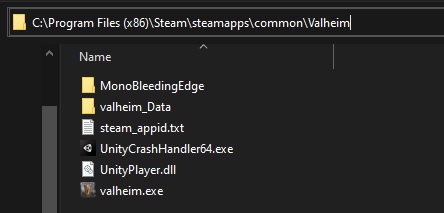
Should look like this
hard fjord
ok
Im going to be honest I tried getting to that location but I dont know how to navigate my files that well
nvm I was able to get to that area and yes it looks like that
stark meadow
hard fjord
nvm I was able to get to that area and yes it looks like that
You added the argument like this?
https://i.imgur.com/e8Vpfhx.jpg
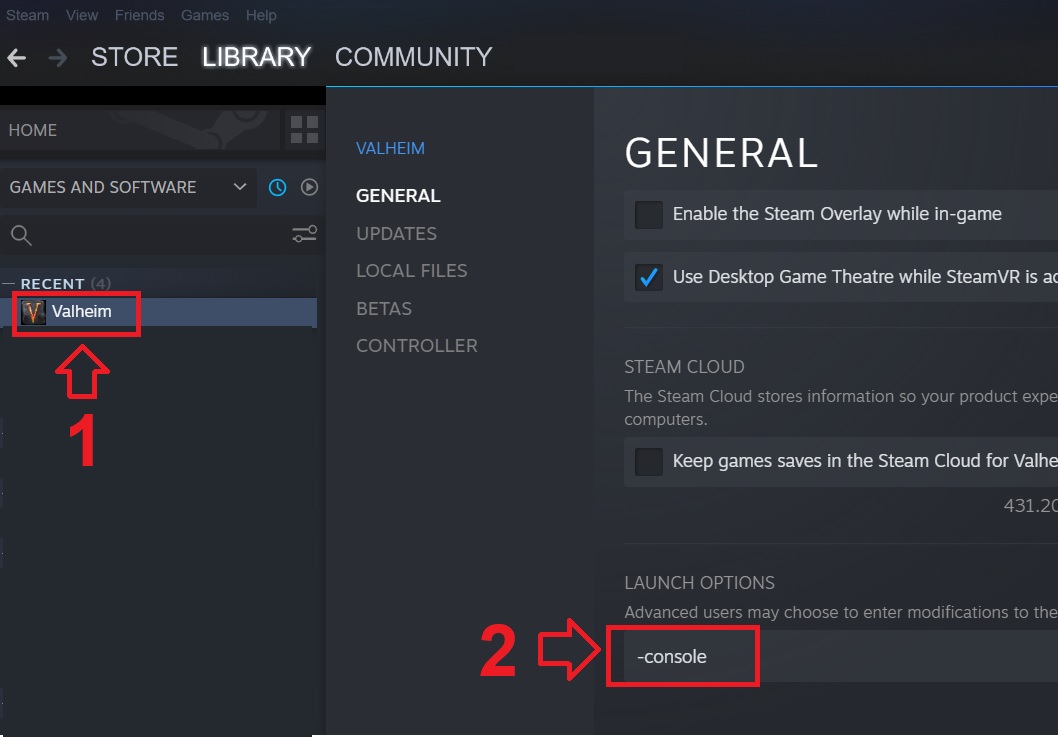
The website says you press F5 when you press F5
hard fjord
yes
stark meadow
And you launch through Steam library, and console still won't summon?
Try copy pasting "-console"
stark meadow
hard fjord
no quotations right
Yeah, without quotes
Did you add any more arguments there besides -console?
hard fjord
no and i copied it and got rid of the quotations and it didnt work
stark meadow
hard fjord
no and i copied it and got rid of the quotations and it didnt work
Are you running any overlay programs for recording?
Steam recording, discord overlay?
hard fjord
I think I have discord overlay on but I dont know how to turn that off
stark meadow
Try testing first if pressing f2 registers in the game (you have to be in the world)
hard fjord
it works it pulls up a littl menu with the world modifiers and my fps and all that
its just the console menu that isnt pulling up
stark meadow
hard fjord
it works it pulls up a littl menu with the world modifiers and my fps and all th...
Do you have the game opened this entire time or have you re-launched it since all the tweaks?
Hm.. try resting controls in Valhiem settings
hard fjord
yes I have closed the game and relaunched it
stark meadow
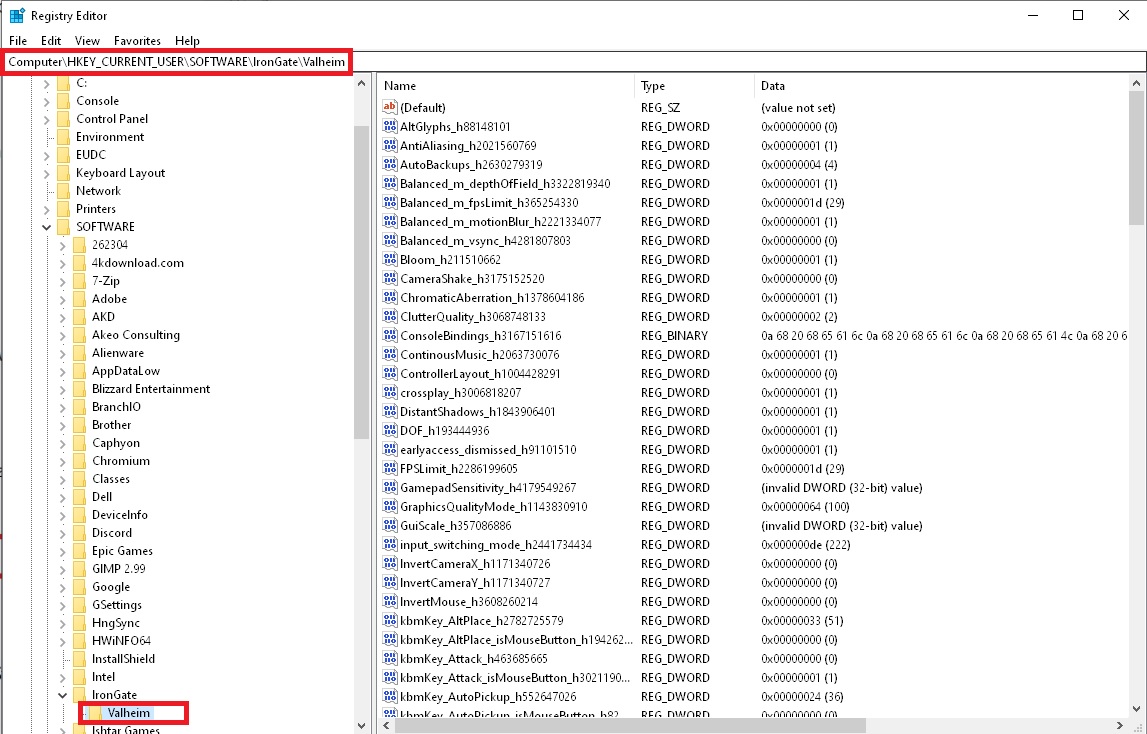
If resetting controls doesn't work, try manually deleting Valheim registry settings by doing the following:
Click on Windows start and type regedit, or type registry editor.
Manually navigate to Computer\HKEY_CURRENT_USER\SOFTWARE\IronGate\Valheim
Delete the Valheim folder in left panel: https://i.imgur.com/pJ90jaP.jpg
 hard fjord
which file do I delete
stark meadow
hard fjord
which file do I delete
Delete the entire Valheim folder marked in red on the pic (left panel)
hard fjord
ok will this delete my current gear and worlds
stark meadow
hard fjord
ok will this delete my current gear and worlds
No, this only related to game settings
hard fjord
ok
stark meadow
So keybinds, graphic settings...
hard fjord
Ok i deleted it what should I do now
stark meadow
hard fjord
Ok i deleted it what should I do now
Launch and test F5
stark meadow
hard fjord
no it didnt work
Did you edit Steam or Valheim at any point and force them to launch in admin mode?
hard fjord
yes I am using the green play button and I dont think ive ever force launched it
in admin mode
stark meadow
hard fjord
yes I am using the green play button and I dont think ive ever force launched it
Try going to installation folder:

Keep that folder opened, and don't close it, now go to steam library and uninstall Valheim from Steam library, then go back to installation folder and check if all files go removed (report back if they all get removed or not). if they did get removed, reinstall the game again
Won't affect your saves
Then we can try creating a Valheim shortcut and adding "-console" argument through the shortcut
hard fjord
uninstalling wont get rid of my gear, sorry for double checking that its just that I have alot of good stuff
and I put alot of time into it
stark meadow
hard fjord
uninstalling wont get rid of my gear, sorry for double checking that its just th...
no saves are on another location and don't get touched by reinstalling the game
stark meadow
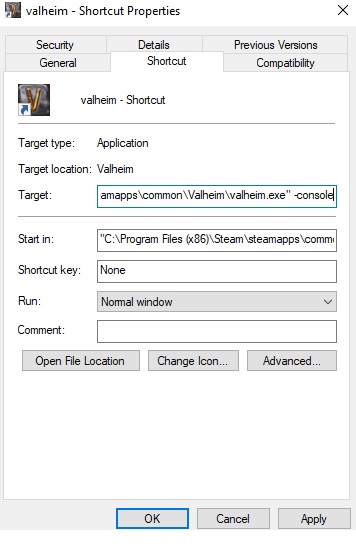
When it gets installed, go to installation folder again, right click with your mouse on valhiem.exe and choose to create a shortcut option.
Then right click with your mouse on that shortcut you just created (not Valheim.exe) and choose properties.
Then under target field, at the end of the line (don't delete the line) add one space, and then "-console" (no quotes)
After that, launch Valheim through that shortcut you created
https://i.imgur.com/W25Lug3.jpg
 hard fjord
is the exe called just valheim
stark meadow
yeah
hard fjord
would it be possible to join a call I dont know how to do this part
ive never made a shortcut before
stark meadow
hard fjord
would it be possible to join a call I dont know how to do this part
Sure, give me a sec
hard fjord
kk
 still oracle
Is there a known bug involving the mistiles spawned by dvergr mages becoming invisible? I looked through the list, but didn't see anything
 iron steppe
it just dawned on me - is there a reason "no skill drain" doesnt show the timer? Its a timed buff that expires - therefore it should show a clock like all other timed buffs/debuffs do?

 gaunt mist
iron steppe
it just dawned on me - is there a reason "no skill drain" doesnt show the timer?...
gaunt mist
iron steppe
it just dawned on me - is there a reason "no skill drain" doesnt show the timer?...
It hasn't as far as I remember it.
iron steppe
gaunt mist
It hasn't as far as I remember it.
yeah - but it should in theory right? like its a timed buff - why not show the clock?
I cant think of anything else that is timed that doesnt show a clock...
gaunt mist
Yeah, wouldn't hurt having timer for that.
stark meadow
still oracle
Is there a known bug involving the mistiles spawned by dvergr mages becoming inv...
From a lantern mage in Mistlands? Never saw such bug report. Playing with mods? In Multiplayer? What GPU?
If you didn't see the mage itself, it was probably a networking issue (can sometimes happen on dedicated server).
The server has to be restarted to fix it.
 warped solstice
Is it working as intended for item stacks to not consolidate when picking up items from your corpse? I can't help but feel like it's a bit ridiculous for stray items like wood, stone or perhaps a partial stack of food in my inventory to prevent me from quickly picking up all the items from my corpse and getting the corpse run buff, especially when I already have the same item type in my inventory. Far more times than I'd like to admit, duplicate stacks of items that aren't even close to being filled have effectively gotten me killed multiple times because they don't automatically consolidate into a single item stack. I can't think of a single good reason to needlessly force the player to fiddle with inventory management in a situation that is highly likely to involve deadly enemies already being present when the player is in a weakened state. Furthermore just adding insult to injury if the player was using megingjord, failing to collect all your item in these situations frequently results in your character being encumbered effectively removing your ability to move in an already dangerous situation. This seems completely counterintuitive to the whole purpose of the corpse run buff and basically sabotages the entire attempt at retrieving ones corpse. I can't help but feel like this must be some kind of bug or simply bad game design, unless there is some totally separate reason why the developer wants to deliberately punish the player in such situations that is beyond my understanding. A simple improvement would be for the act of clicking "Take All" to always trigger the corpse run buff regardless of having collected every last item, and of course to just allow the consolidation of things like a stack of 3 stone and a stack of 40 stone into a single stack of 43 stone.
gilded sluice
warped solstice
Is it working as intended for item stacks to not consolidate when picking up ite...
why do you post the same posts in 2 channels?
stark meadow
warped solstice
Is it working as intended for item stacks to not consolidate when picking up ite...
Yes, there are some known issues with some items not stacking properly.
However if you constantly have this issue it's likely that the issue is not items not stacking for you, rather that item stacking would result in you becoming overburdened.
During tombstone recovery, it's recommended to disable autopickup so that you don't pickup unnecessary items while running.
warped solstice
not sure where the correct location would be since i dont know if its a bug or a suggestion
warped solstice
happy to delete the message from the suggestion channel if it is in fact a bug
gilded sluice
it's a bug, which is known
but it's not something we prioritize atm. there are worse issues to solve 😦
warped solstice
id think anything that results in needless death loops should be a priority, especially when it can effectively result in losing all progress
 marble wolf
It doesn't though.
warped solstice
if you can never retrieve your corpse and you cant replace your gear without farming it out again then it might as well be a reset if you arent counting boss heads
marble wolf
You can pretty much always retrieve your corpse unless the gravestone clips through the world but that's rare.
warped solstice
im guessing you've never stumbled into a high level area and been pinned down by numerous enemies before
marble wolf
No, I tend to be more cautious than that. Stumbling anywhere in Valheim is a bad idea.
warped solstice
a full inventory in such situations can be devastating, especially when its far out and you need to have food with you to even survive the journey
gilded sluice
more pressing issue is the over 300 weight
where the game only give you the +150 carry capacity when the tombstone breaks. so you can't just auto-pickup it
warped solstice
seems like it would be an incredibly simple fix to just trigger the buff when you click "take all"
gilded sluice
that does solve the problem, but not the best solution
warped solstice
likely superior to the way it is now
marble wolf
I'd rather time is taken to resolve the underlying issue. Quick wins are a false economy.
warped solstice
take time? we are probably talking about a single line of code
stark meadow
warped solstice
likely superior to the way it is now
Take all button will always result if getting the buff if you have room in inventory.
Another thing is automatic tomb pickup not working (without the need to see tombstone inventory) because of disparaging weight.
warped solstice
im saying it should trigger the buff regardless of whether or not you've taken every last item
one time use
that would be a better situation than what we have right now
and it would be simple to implement
marble wolf
warped solstice
and it would be simple to implement
I didn't realise you were a developer.
warped solstice
thats not an argument
stark meadow
warped solstice
im saying it should trigger the buff regardless of whether or not you've taken e...
That makes no sense to me.
So you don't pickup all items and buff activates.
So what happens when you come back after 1min and press take all item again?
marble wolf
warped solstice
thats not an argument
I agree.
stark meadow
Then you would get players saying they didn't need the buff the first time, rather second time would be more useful.
warped solstice
you cant get the buff multiple times from the same corpse
stark meadow
Or players forgeting they got the bufff
warped solstice
make your corpse turn gray
instead of red
only red tombstones can give you the buff
problem solved
marble wolf
And this is why we need a proper solution not a kludge.
stark meadow
The problem where players might want for the buff to apply the second time, rather than first is not solved by your suggestion.
warped solstice
proper solution... stop being obtuse, in what way would anything suggested above be anything less than improvement on the current situation
stark meadow
Player essentially has no control when the buff will apply with your suggestion, and they do have control in the way game works now. Buff gets applies when you clear the tombstone.
marble wolf
warped solstice
proper solution... stop being obtuse, in what way would anything suggested above...
You're adding more complexity to a mechanic that we already agree is bugged. How is that sensible?
warped solstice
complexity? im making it simpler, it reduces the need to screw with your inventory and gives you a single button to force the buff in tight situations
which is the whole purpose of the buff, to escape tight situations
gilded sluice
basicly. sorting needs to be able to sort correctly 100% of the time
warped solstice
not to foce you into inventory management when 10 things are trying to kill you
marble wolf
warped solstice
complexity? im making it simpler, it reduces the need to screw with your invento...
No you're not. You're talking about haven't different variants of gravestone rather than just letting them fix the actual issue.
gilded sluice
and a fix for how the carry weight applies correctly so you don't need to use the "take all" button really
warped solstice
marble wolf
No you're not. You're talking about haven't different variants of gravestone rat...
how brain dead does someone need to be to not understand a mechanic that simple
marble wolf
Well, that's uncalled for.
warped solstice
portals glow when they are active, and are less colorful when inactive
marble wolf
Also, when did I say I didn't understand it?
warped solstice
its already a mechanic in the game
this is never explained
its intuitively obvious
marble wolf
That's not the issue.
warped solstice
its within the scope of the existing game mechanics
marble wolf
warped solstice
its within the scope of the existing game mechanics
It would be an entirely new mechanic both in terms of gameplay and coding.
And only temporary which is even worse.
warped solstice
id be willing to bet chatgpt could write the fix if given the source code, this is script kiddy level adjustments to the game
marble wolf
Oh, I have now lost any respect I might have had for you.
ChatGTP has no access to the game source and wouldn't have a clue.
warped solstice
i could probably force the changes into the game through a hex edit on the exe, this isn't even remotely as complicated as you are suggesting
gilded sluice
please just stop this un-nessessary argument
iron steppe
warped solstice
i could probably force the changes into the game through a hex edit on the exe, ...
Yep. You could.
Make a mod using ChatGPT, fix the issue the way you think it should be. Play with that mod. Now you are happy.
The devs focus on what they believe are priority. You can focus on your fix, and play the game you want.
Everyone wins. Pretty simple really.
warped solstice
The point I was making is that the existing situation can be game breaking, in the same realm as restarting the entire farming process, and that such a solution even a partial one that resulted in a superior build of the game could likely be implemented in an afternoon and probably by someone with little to no knowledge of the broader game in a development capacity. @marble wolf makes it sound like this would be some sort of major expense when it could likely be pushed out in a patch in less than a day.
iron steppe
And the fact you say “likely be pushed out in a patch in less than a day” tells us exactly that you know nothing of proper development and process pipelines for real companies with millions of customers.
Source; I am a developer with 20 years XP.
You have no idea what you are talking about.
Go make a mod, enjoy the game how you want, have fun. It’s a great game, we all look forward to the patches.
warped solstice
fascinating, an appeal to authority
iron steppe
Just an observer with realism.
warped solstice
its basically the same line the @marble wolf gave me
iron steppe
Well, you know what they say; great minds think alike.
gilded sluice
🤔
I would just wait for us developers to fix the problem 😅
or put the game on a pause until 1.0 where most issues should be fixed (or 1.1 when even more stuff is done) 😄
1.0 will be the finished gameplay loop and last biome release
warped solstice
Just pointing out that its more than likely a simple improvement that could be done by most people with basic programming knowledge
gilded sluice
but can't promise all known issues will be solved. but hopfully as many as possible
yeah but when we have 1000's of simple fixes and also need to focus on more complex biome development. can't split people into halves sadly
and hire more staff doesn't solve anything since we then need more meetings and syncing which just takes more time from actual fixing and development
warped solstice
well I hope you guys choose to prioritize things that can destroy hundreds of hours of progress
gilded sluice
of course. the worse a issue is, the higher we prioritize it
still oracle
stark meadow
From a lantern mage in Mistlands? Never saw such bug report. Playing with mods? ...
Yes, the lantern mage in the Mistlands. No mods, single-player, 2080ti. I lured a few dvergr away from their base, one of which was a lantern mage. I killed them and started walking back towards the base, I got hit by a Mistile out of nowhere. I stopped, looked around and there was nothing around me. Then I got hit by another invisible Mistile. I was standing in the open. It killed me.
I came back to that spot and there were no more hostile dvergr in the area. There was another lantern mage in the base, but again it was not hostile.
I wonder if the mage cast it when it was out of my LoS and it didn't have a target and didn't render? So it was just sitting that area until I approached?
iron steppe
Sometimes what happens is the Dverger spawn inside rocks in the area; so you can’t see them, but they can see you.
They can’t run out of the rock, but they can shoot magic from inside to out through it.
I’ve seen it a few times now; it would explain this situation
I think because the procedural placement of POI occurs before vegetation rock pass, so the dverger get placed, then the rocks get placed over them.
still oracle
iron steppe
Sometimes what happens is the Dverger spawn inside rocks in the area; so you can...
I'm positive it wasn't this. There was an infested mine entrance with the long staircase a few feet away, but it was otherwise wide open. The dvergr would not have generated in the staircase. They generate like that when they spawn next to wisp lights. The proximity of the dungeon entrance wouldn't have let that structure generate as far as I am aware.
And again I returned to the area and there was nothing. No mobs attacking me. I could understand not seeing the first mistile, but I was very cautious about looking around. And then after getting hit the first time I literally stopped and scanned all around me before I got hit by a second one.
iron steppe
still oracle
I'm positive it wasn't this. There was an infested mine entrance with the long s...
but dverger were there somewhere to have fired at you at all. A dungeon entrance and dverger spawn locations can be very tight together.
Do you have a video recording of it by any chance?
As a side point I've seen the mage missle things "float" very slowly for a long time. So did you kill the original dvergers, is that correct?
still oracle
iron steppe
but dverger were there *somewhere* to have fired at you at all. A dungeon entran...
I had lured dvergr past that area and then killed them. I then walked back to where I had lured them from. That's when I got hit. I did not get a recording of it unfortunately.
I believe that is what happened. The dvergr cast it and then for whatever reason, it didn't render and sat in the area.
Could be because I was too far away or out of line of sight when it was cast or it could have failed to render because of the fog and lighting effects.
Regardless, I'm 100% sure the mistile were not visible.
 main charm
I got my world emptied just now ._.
everything went away not even a tree is there. nothing spawns either.
gilded sluice
main charm
everything went away not even a tree is there. nothing spawns either.
network issue perhaps?
main charm
playing solo
gilded sluice
yeah but by default, valheim uses cloud-saves unless you tell it not to
main charm
I thought it was because I logged out while the game almost saves probably I logged right at the same time?
ah it cloud saves yeah, I'm not sure either haha
gilded sluice
It could be of you logout during saving. Game does save backups tho
main charm
eh it does?
I can find the worlds_local folder but there's only one file for each worlds rather than timed/dated backups
gilded sluice
yes
in world saves in the game, you have backup files made always
but why didn't it save. is the question.
main charm
guess it's something for you guys to figure out then haha
no worries on my part, it was at the very early stage of the game i'll just restart the world
gilded sluice
usual problems are no space on C: or issues with cloud saves
just click Manage saves button in game, then worlds tab, find the world, open the world, find the latest backup and restore it
main charm
oh it works, thank you! i don't have to rebuild
 worldly lantern
I’m curious if anyone else has noticed something about the raid music. I’m asking here as I’m not sure if it’s a bug or something the devs chose to do. But the raid music that plays for enemies depending on which boss you’ve yet to beat has always had a progressing number of instruments added to it to show how intense the raids are becoming. But I’ve noticed this has stopped from the seeker raid on up and the raid music has defaulted to the Greydwarf version. Where it lacks the horn and string addition that was part of the drake and Fuling raids.
Is this something that is only a thing happening on my end, a bug, or a choice by the devs? I ask because I was enjoying the gradual intensity to the raid music and found it odd it had changed for the more recent raids.
(Posting here so it’s not lost in general chat.)
stark meadow
worldly lantern
I’m curious if anyone else has noticed something about the raid music. I’m askin...
This channel is meant for reporting/discussing vanilla bugs.
If you want to offer feedback on current game, you can do so on valheim.com/support then head over to the "leave feedback" tab.
Change suggestions are best to discuss at #suggestion-discussion
worldly lantern
stark meadow
This channel is meant for reporting/discussing vanilla bugs.
If you want to offe...
Right. Just didn’t want to report something if it was an actual bug or not. Thus trying to prompt a discussion.
 haughty wedge
Hey does anyone else have issues with the game freezing on a intel arc b580? The game occasionally stutters and sometimes freezes after about half an hour playing. I switched out my b580 for my old evga 1060 and updated to the latest driver from nvidia to troubleshoot, and I had zero issues in a 2 and a half hour session. Before I had the b580 I had a intel arc a770 and that never gave me any trouble with game ether which is why I'm confused. When my friend is hosting the freezing isn't that big of an issue, but its frustrating in single player when the game freezes before the world auto saves and I lose progress.
gilded sluice
haughty wedge
Hey does anyone else have issues with the game freezing on a intel arc b580? The...
Sadly I don't own a B580. but works great (still) With a A770 🤔
could be a windows update lurking which is needed for the B580 to work propperly
stark meadow
haughty wedge
Hey does anyone else have issues with the game freezing on a intel arc b580? The...
Did you use DDU to wipe out the old driers when switching cards like that?
haughty wedge
Whats that? When I update the intel arc driver I just do a clean install and reboot my pc. The issue has been persisting before I started swapping gpus to troubleshoot. I upgraded back in February and I don't ever remember having this problem but I have been absent from the game for awhile.
stark meadow
haughty wedge
Whats that? When I update the intel arc driver I just do a clean install and reb...
We have no other crash reports in general, let alone b580.
Was your b580 the first card installed on your fresh windows?
DDU is a 3rd party program designed to remove old drivers, commonly used when one uses multiple cards on same system and wants to ensure old drivers are cleaned out properly.
haughty wedge
nah I havent reinstalled windows since I built the pc years ago and ive had the 1060 and a770 before the b580. I dont have any nvidia drivers left on my system because I was having conflicting issues with my intel card's driver in windows. I guess I can try and give that program a try and then reinstall the latest intel driver and see if theres any difference.
stark meadow
haughty wedge
nah I havent reinstalled windows since I built the pc years ago and ive had the ...
I would recommend DDU, simply due to seeing it help on about dozen cases so far, where regular driver un-instlation didn't work properly. Have you also check which BIOS version you have on b580?
haughty wedge

this is what I could find intel's graphics software, I'm gonna give ddu a try and see if the issue still persists.
stark meadow
haughty wedge
this is what I could find intel's graphics software, I'm gonna give ddu a try an...
Checked on the net a bit, seems like updating firware is a bit comlex on Intel GPU's so best to not go into that anyway.
Regarding DDU, make sure to read the guide. Drivers have to be removed in safe mode to ensure none of driver coponents are active when removing them.
haughty wedge
should I try updating the firmware after I reinstall the driver?
stark meadow
haughty wedge
should I try updating the firmware after I reinstall the driver?
Wouldn't recommend based on what requirements for that are.
Best to leave it to Intel Arc Control
If you crash again, check your player.log (button to it available in starting menu of Valheim)
and check windows "view reliability history"
gilded sluice
haughty wedge
I use to have alot of issues with my intel GPU combined with a AMD processor
so I am very careful what package I download and install
since one of them assumes you got a intel processor and that just causes mayhem
haughty wedge
Tell me about it, my a770 limited edition felt like a prototype product. It got better with every driver update but there were so many times I wanted to just put my 1060 back in lol
gilded sluice
oof
I started with a A750.
and my specific 5800X processor in that computer.. was incompatible with a any intel GPU's
so i had to wait over 1 year for intel to fix it
haughty wedge
So I was able to play for about an hour and a half with no interruptions and I thought I was in the clear because I didn't even experience any stuttering. It did eventually freeze again though.
This was from the last minute of the player.log
05/21/2025 14:12:11: Setting selected recipe 0
05/21/2025 14:12:17: Placed wood_beam_45
05/21/2025 14:12:24: Placed wood_pole
05/21/2025 14:12:34: Setting selected recipe 0
05/21/2025 14:12:51: Stopped music meadows at 2332243
05/21/2025 14:12:51: Starting music home
05/21/2025 14:12:51: Resumed music home at 312345
gilded sluice
look in windows logfiles
haughty wedge
 stark meadow
haughty wedge
So I was able to play for about an hour and a half with no interruptions and I t...
stark meadow
haughty wedge
So I was able to play for about an hour and a half with no interruptions and I t...
Are you playing with an FPS cap or not?
haughty wedge

no i shouldn't be
let me double check
it was set to the refresh rate of my monitor 165
stark meadow
haughty wedge
it was set to the refresh rate of my monitor 165
Try to play with 60FPS cap for some time to see if it will have an effect on crash frequency.
Also, have you tried playing in Vulkan vs d3d11?
haughty wedge
I was having really bad artifacts when I launched it in vulkan but I wanna try again after using ddu and reinstalling the graphics driver
stark meadow
haughty wedge
I was having really bad artifacts when I launched it in vulkan but I wanna try a...
Did you use any apps to optimise Valheim settings at any point? (e.g. Andrenalin, not sure if Intel uses one)
haughty wedge
nah nothing like that
I launched the game in vulkan and my fps is worse but theres no artifacts or other graphical issues
which is weird because both my intel cards usually performed better with vulkan over older versions of directx
Im gonna try playing capped at 60fps and see what happens
i am on the public test branch if that makes a difference
stark meadow
haughty wedge
i am on the public test branch if that makes a difference
Shoulnd't matter. Live version is the same atm.
Btw. you can also try setting this setting in your control panel for Valheim profile.
It doesn't fix the crashes, but these tweaks were needed on some older Intel GPU's to fix weird glitches with waves.
#steam-bugs-discussion message
haughty wedge
like on the intel graphics software?
stark meadow
haughty wedge
like on the intel graphics software?
Yeah. It should have a seciton where you can tweak setting for individual games
haughty wedge
So making a profile in the intel graphics software did nothing, so I capped the game at 60 fps and I think that solved my problem. I was able to play for four hours straight without interruption.
stark meadow
haughty wedge
So making a profile in the intel graphics software did nothing, so I capped the ...
Play for some longer time on 60fps to get a feel for it.
When a game becomes more stable at 60FPS, it's usually an indication the card isn't tuned properly when it comes to its voltages and power draw, or that some kind of hardware power issue surfaced (PSU, cable, board). Would also be a good idea to post your finding on Intel related forums, as they can help you tune the card via Intel software or maybe just update drivers that woudl do so.
 chilly plinth
Hello, I have been having issue with binding emotes to certain keys. Before the bog witch update, I could do it fine, but now when i type "bind f dance" for instance, it does not register and I do not dance. Is this a known bug or have the devs removed emote binding?
stark meadow
chilly plinth
Hello, I have been having issue with binding emotes to certain keys. Before the ...
Did you also post about this issue on reddit?
Think I replied to you there, but you haven't responded
chilly plinth
Oh no i didn't post this issue on Reddit. Different guy, but I can refer to that post. What are the keywords I should type in?
To search for it
stark meadow
chilly plinth
Oh no i didn't post this issue on Reddit. Different guy, but I can refer to that...
Judging you both have the same issues, reported in the same span of time, it's most likely mod related
Using mods or ever used mods?
chilly plinth
Oh interesting. I have definitely, but this was on Vanilla
stark meadow
chilly plinth
Oh interesting. I have definitely, but this was on Vanilla
Double check that you indeed don't have any excess files in your installation folder, as presented here:
https://i.imgur.com/vdpdeOA.jpg
Then use resetbinds console command in game, to reset your binds to default.
chilly plinth
Will deleting the modded files affect my modded worlds or characters?
stark meadow
chilly plinth
Will deleting the modded files affect my modded worlds or characters?
Depends on the mods. We don't deal with mods in this channel
You should probably back up entire installation folder to be sure
And test you binds on proper vanilla setup with new saves
chilly plinth
Right. Thank you for your help!
gilded sluice
I've had more people who are vanilla, but still have key-binding issues with emotes.
but it was still old mod files lingering about
 stoic goblet
over 40% of morgen caves i find are like this , very small cuz there is wall that splits them on half and u can only get to that second half by chair glitching into the wall

 stark meadow
stoic goblet
over 40% of morgen caves i find are like this , very small cuz there is wall tha...
stark meadow
stoic goblet
over 40% of morgen caves i find are like this , very small cuz there is wall tha...
Info about your position and world seed would help
Do you have console enabled?
stoic goblet
stark meadow
Info about your position and world seed would help
found it on all seeds
stoic goblet
stark meadow
Do you have console enabled?
nope not on this one and this is not new image
i will give u the seed and the position
@stark meadow

ku5iUfvyum
this is the seed and there is more glitched caves on it
stoic goblet
also this always delete my progress in worlds and once it deleted my character

 sly badger
hello! does anyone know what could be the issue with my forge? i do have the materials needed to craft the item but it doesnt let me, i even have the right level forge :/
 stark meadow
stoic goblet
also this always delete my progress in worlds and once it deleted my character
stark meadow
stoic goblet
also this always delete my progress in worlds and once it deleted my character
Where are you from in the world?
Do you often get cloud conflict?
https://i.imgur.com/ytYxvWa.jpg
 stark meadow
sly badger
hello! does anyone know what could be the issue with my forge? i do have the mat...
stark meadow
sly badger
hello! does anyone know what could be the issue with my forge? i do have the mat...
Your iron bars are corrupt most likely.
Did you or someone else spawn them via devcommands?
sly badger
ohhh, that could be the problem, thanks!
stoic goblet
stark meadow
Where are you from in the world?
Do you often get cloud conflict?
https://i.imgu...
im from algeria and no i never get this , btw did u check the putrid hole ?
stark meadow
stoic goblet
im from algeria and no i never get this , btw did u check the putrid hole ?
Yeah, I checked the hole 👍
Do you usually wait for your saves to get upload to the Cloud when you exit the game, and before you shutdown your PC?
stoic goblet
stark meadow
Yeah, I checked the hole 👍
Do you usually wait for your saves to get upload to...
yes sometimes i quit valheim and play another game for like 1-3 hours but still gets it
stark meadow
stoic goblet
yes sometimes i quit valheim and play another game for like 1-3 hours but still ...
Cloud sync errors mostly have nothing to do with Valheim, rather your Steam and your network connection.
You will get this error when Cloud saves you have on local disk don't match Cloud saves on Steam server, which can happen if you don't let Steam upload saves after you close the game.
There can be variety of causes that can result in losing character saves, so no way of telling why it happened to you.
It's usually related to players not noticing their game actually crashes during saving when they were exiting the game.
stoic goblet
so the solution is letting steam open for like 5 or 10 mins after closing the game or moving saves to local
stoic goblet
stark meadow
There can be variety of causes that can result in losing character saves, so no ...
characters are ez to restore i only lose some skills but world when i upload backup i lose like 30mins-2hours gameplay
stark meadow
stoic goblet
so the solution is letting steam open for like 5 or 10 mins after closing the ga...
Depends on your connection.
Valheim can have large saves compared to other games, so if your upload is low, you might consider moving saves to local.
This error alone (Cloud out of sync) it usually not the cause of losing saves, rather something else that happened, which then results in saves being out of sync.
If you lose save progress due to crashing or some memory corruption (e.g. I had a bad motherboard that resulted in Cloud saves corrupting my saves), chances are moving saves to local might stop that (as then Steam isn't involved in saving the game).
stoic goblet
stark meadow
Depends on your connection.
Valheim can have large saves compared to other games...
but i tried moving a save to local and the error happened and made it cloud again XD , my connection download speed is 1.2 mbps average
stark meadow
stoic goblet
but i tried moving a save to local and the error happened and made it cloud agai...
Be sure to move both world and character saves separately to local.
You can also after that, exit Valheim, disable Steam Cloud for specifically in Valheim Steam library properties) and launch it again.
stoic goblet
stark meadow
Be sure to move both world and character saves separately to local.
You can also...
will try it ty , if the error keeps happening ill tell u
stark meadow
stoic goblet
will try it ty , if the error keeps happening ill tell u
Also, it would be a good idea to backup saves manually from time to time when using local saves, and make yourself a reminger to move them back to Cloud when you wanna transition to a new PC, reinstall Windows, replace the storage... Many players move saves to local, and forget about them, do something drastic with their PC and lose access to their saves...
stoic goblet
stark meadow
Also, it would be a good idea to backup saves manually from time to time when us...
how do i make backups
i thought its like auto saves
stark meadow
stoic goblet
how do i make backups
Backups in the sense of uploading your local save files manually to some Cloud, like google drive.
Or copying saves and putting copies on some other storage drive.
Valheim will create autobackups, but e.g. if you reinstall Windows, all saves will be lost anyway, including autobackups.
stoic goblet
ah i thought there is option in the game that makes backups
gilded sluice
stoic goblet
ah i thought there is option in the game that makes backups
the game always have 2 backups per default, but if you don't have cloud saves turned on, things can go missing
stoic goblet
gilded sluice
the game always have 2 backups per default, but if you don't have cloud saves tu...
btw u have any clue about the putrid holes ?
stoic goblet
stoic goblet
over 40% of morgen caves i find are like this , very small cuz there is wall tha...
.
gilded sluice
stoic goblet
btw u have any clue about the putrid holes ?
we know about the issue with them
stoic goblet
so no solutions yet , we use chair glitch until its fixed
stark meadow
stoic goblet
so no solutions yet , we use chair glitch until its fixed
The wall separating chambers was intentional at first.
Not all loot in putrid holes should be accessible by design.
The main reason the wall got removed for some of the cases is because players got confused and saw this as a bug.
We are just making a list with example for other caves that should get the wall removed as well.
stoic goblet
its like more than 50% loot will be lost if u dont use chair glitch like in the world i sent u it was a community server that doesnt allow chair glitching and i found 3 holes with that wall so i lost a lot of loot
im happy that morgen still spawns in the first half
stark meadow
stoic goblet
its like more than 50% loot will be lost if u dont use chair glitch like in the ...
As I said, that was intentional. If there was something called as bug, it was that loot still spawning behind the closed wall.
stoic goblet
stark meadow
As I said, that was intentional. If there was something called as bug, it was th...
so u telling me instead of creating small caves they just put wall ?
stark meadow
stoic goblet
so u telling me instead of creating small caves they just put wall ?
Essentially yes, but it has been decided to open up the wall instead of actually deleting loot or making smaller caves.
stoic goblet
stark meadow
Essentially yes, but it has been decided to open up the wall instead of actually...
all the holes will be opened ? or u r talking about the already opened holes
feels good
stark meadow
stoic goblet
all the holes will be opened ? or u r talking about the already opened holes
All should have been open already, but some variants were missed.
stoic goblet
makes sense
 delicate plinth
Need help with this, been struggeling for hours☠️
 delicate plinth
Need help with this, been struggeling for hours☠️
delicate plinth
delicate plinth
Need help with this, been struggeling for hours☠️
Ive also restarted pc + turned fully turned off for a good 10secs
iron steppe
delicate plinth
Ive also restarted pc + turned fully turned off for a good 10secs
can you send us your player.log file after a crash please. Most likey maybe a PlayFab or Steam networking issue - you got VPN at all?
delicate plinth
No i dont use vpn
iron steppe
is that literally after a crash? What is the "crash" exactly? Any messages on screen - or does it just exit?
delicate plinth
Can i still accses the report after the crash
iron steppe
also just delete this - has your steam name in there - so dont want you to dox yourself if you didnt want to - i mean to DM it directly to me (but that means I'll know your steam name if you care - I dont, just letting you know)
iron steppe
delicate plinth
Can i still accses the report after the crash
yes - its a text file on your PC - after game crashes, before you open Valhiem again - please send me the full player.log file
delicate plinth
I did manage to click on player log before crash
iron steppe
delicate plinth
I did manage to click on player log before crash
we need the file AFTER the crash - it might write the cause why its crashing into that. It overwrites it on each new play (and creates player-prev.log with the previous log file - so that might have it too)
It'll usually be here:
C:\Users{USERNAME}\AppData\LocalLow\IronGate\Valheim
delicate plinth
Somehow its just working now, after 3 hours of struggle
Didnt do anythin either just opened the game for the 100th time😅
Thanks for trying to help tho 🙂
iron steppe
delicate plinth
Thanks for trying to help tho 🙂
if it happens again - copy the player.log file after the crash (so it doesnt get overwritten)
delicate plinth
Might of spoken too soon😂 managed to make a world tho
The time on the player report isnt the same even when after the crash
Honestly it might be the gpu , last longer before crashing the lowef the grhapics
iron steppe
to be clear - dont open the player.log before the crash.
Just play, and when/if crashes - grab the file.
iron steppe
delicate plinth
Honestly it might be the gpu , last longer before crashing the lowef the grhapic...
kk - so in that case - monitor temps and do a clean install of drivers etc
delicate plinth
Ye no i did that this time
I waited til aftef crash
Weird that it handles bo6 perfectlt stable 144fps but not vaheim😭
Even at lowest setting now it crashes at the end of the text at start of loading into a new world, ill look at crash report now
Only removed id name in there so u can see @iron steppe
 iron steppe
delicate plinth
Only removed id name in there so u can see <@396238932242595842>
iron steppe
delicate plinth
Only removed id name in there so u can see <@396238932242595842>
when you say "it crashes" - what exactly happens?
delicate plinth
It just freezes and i get the blue circle just keep spinning
Then pops up end window or wait till the programs responds
iron steppe
the fact nothing in your player.log suggests to me personally its more likely a GPU issue - but I'm not an expert here - just an educated guess.
I would try clean full install of GPU drivers from scratch (google for your relevant card for specifics) AND do some temp monitoring of GPU to ensure not overheating.
Then go from there...
delicate plinth
Ill try, just seems little odd it runs black ops 6 mid settings completely fine, but not vaheim, not struggled with this before🙃
delicate plinth
Unforently it didnt work ,clean new install drivers, temps are fine
Tried launching with vulkan, screen froze at the end of the beginning text, but i can hear myself running around😂
iron steppe
delicate plinth
Tried launching with vulkan, screen froze at the end of the beginning text, but ...
Tried a different resolution?
Send me your player.log file at the moment you have black screen but can hear yourself moving?
stark meadow
delicate plinth
Need help with this, been struggeling for hours☠️
Do you know which exact PC specs you got? This sound like GPU related crashes, espetially if you reduced the frequency of crashes by limiting FPS
gilded sluice
@iron steppecan you send me his log file?
iron steppe
gilded sluice
<@396238932242595842>can you send me his log file?
he never sent it
gilded sluice
oh
iron steppe
only what he screenshot post above
gilded sluice
ah
it shows 1 world missing and then that no mods loads in
so could be hardware issue with either PSU or GPU
maybe disc
iron steppe
I cant decide if this is a bug or not. Its pretty funny though; triggering the feather cape off just before touching ground makes the game calculate the intense fall damage from the original height.
It feels wrong on the basis fall damage is a by-product of approaching terminal velocity in real life, so you're not really falling fast at the last second. Like if someone detaches a parachute at the final 2m, they dont get 100m of fall damage in real life.
But meh - edge case - not a priority; funny either way...
Valheim: 1
Afrayedknot: 0
gilded sluice
?
I'd say it's a issue we don't really need to deal with
calculating that ingame is near impossible
iron steppe
gilded sluice
calculating that ingame is near impossible
well, you just make it when the feather cape is unequipped the calcuialted fall distance variable tracking on the player is reset to 0, that would solve it.
But yep, I dont disagree with just leaving it... was just that moment of death and funny I thought about it
gilded sluice
😄
there are worse offenders ingame
that can actually be used for fun
just the cap on falldamage itself is an actual issue
iron steppe
gilded sluice
just the cap on falldamage itself is an actual issue
the 100HP? yeah - that's been a useful little mechanic for some things
gilded sluice
just have 100+ HP and drink HP-regen potion and jump
iron steppe
yeah - I tend to jump off the Sealed Tower when exiting, quicker than taking the stairs down..
delicate plinth
gilded sluice
so could be hardware issue with either PSU or GPU
@gilded sluice @gilded sluice i did get it to work, some reason i needed to put fps limit to 100 with low settings, the weird thing is that games like black ops 6 runs perfectly fine with good settings on it:/ so just didnt realize/think that my pc would struggle with valheim
delicate plinth
 delicate plinth
delicate plinth
delicate plinth
@stark meadow
Now medium settings work fine with 100 fps, strange😂
gilded sluice
delicate plinth
<@260480620054970378> <@260480620054970378> i did get it to work, some reason i ...
you could have an issue that exists in the later nvidia drivers
I've had some issues with it in other games than valheim
576.28 works fine tho
go to drivers and then at the bottom, you can re-install older drivers
delicate plinth
Aa havent tried that, tried uninstall driver and clean install newest
gilded sluice
don't clean install the newest
stark meadow
delicate plinth
Aa havent tried that, tried uninstall driver and clean install newest
We also have few other reports of players crashing in the same manner after latest driver updates, so I agree that it would be a good thing to try.
delicate plinth
gilded sluice
don't clean install the newest
Gonna try the one u sent
gilded sluice
delicate plinth
Still could not play higher settings then these, seems like these settings works fine without crashing

This is on the driver u sent
But i think my gf will be ok with this😅
stark meadow
delicate plinth
Still could not play higher settings then these, seems like these settings works...
Are you running any third party apps along side Valheim that also use the GPU?
Like overlays or recording software (e.g. Medal, MSI afterburner)?
delicate plinth
No, turned off steam and discord overlay aswell, only got valheim on this pc and only the game running, might just be the pc cant handle more
stark meadow
delicate plinth
No, turned off steam and discord overlay aswell, only got valheim on this pc and...
The game is always freezing when you crash? No black screens?
DM us your player.log and player-rev.log files next time you crash
delicate plinth
Tried getting the player and rev log, but it never logs the crash, thats why i struggled yesterday getting it, yea it freezes then
the blue mouse spins then i get the pop up to close or wait for the game to response
Ive sent a dm @stark meadow
stark meadow
delicate plinth
Ive sent a dm <@196192010581835776>
Yeah, I see what you mean. Cut off player.log with no particular error is usually indicative of GPU issues, and mostly related to drivers.
Noticed any other games misbehaving?
About those 3rd party apps, also check them in task manager processes tab, but add the GPU column so you can see which apps use it while Valhiem is running.
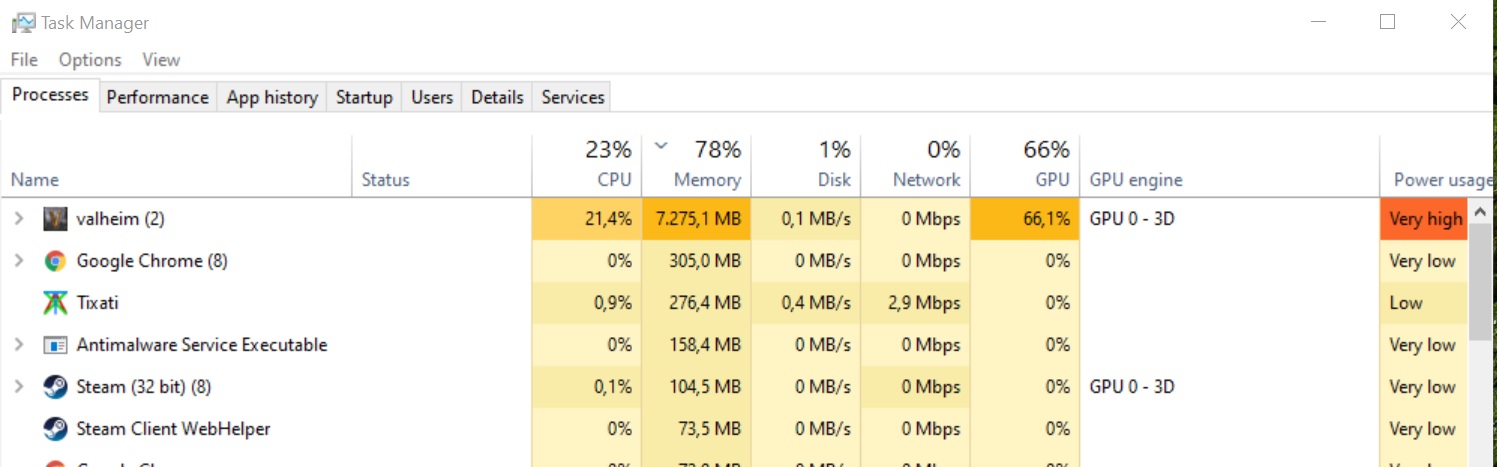 delicate plinth
 stark meadow
delicate plinth
stark meadow
delicate plinth
Did you add the GPU column there?
stark meadow
delicate plinth
No how do u do that😅
Right click on any column name
 stark meadow
delicate plinth
Its around 60% on gpu * mid settings
stark meadow
delicate plinth
Its around 60% on gpu * mid settings
Now sort by that column and check what other apps use the GPU
gilded sluice
stark meadow
Yeah, I see what you mean. Cut off player.log with no particular error is usuall...
send it to me also 😄
delicate plinth
Yes its only valheim using gpu other then basic window stuff, i think its just the gpu getting old or something
 delicate plinth
gilded sluice
send it to me also 😄
delicate plinth
gilded sluice
send it to me also 😄
Sure in dms
gilded sluice
I ment macarbre could 😛
I would probably tell you to look in windows logs at this point
stark meadow
delicate plinth
Yes its only valheim using gpu other then basic window stuff, i think its just t...
Would say the same thing, but it's usually the power that goes first, so you start seeing black screens rather than freezes.
Anything useful popping in the "start → view reliability history"?
gilded sluice
how old is your power supply?
how much hardware have you changed since you bought the PC?
delicate plinth
Not sure how old, some parts on This pc is from my older build from 2 years ago, gpu from a friend so probaly older the 2 years
delicate plinth
Aa dont remember is there a easy way to see?
gilded sluice
no
the wattage is on a label on the side of the power supply
but not the age.
kinda obvious usually how much it has
 delicate plinth
stark meadow
Would say the same thing, but it's usually the power that goes first, so you sta...
delicate plinth
stark meadow
Would say the same thing, but it's usually the power that goes first, so you sta...
Hard ware error then valheim crashes🙄
 delicate plinth
gilded sluice
kinda obvious usually how much it has
delicate plinth
gilded sluice
kinda obvious usually how much it has
Yeye ik what u mean , gotta dig in pc to see 😅 2 secs
gilded sluice
windows logs -> system
stark meadow
delicate plinth
Hard ware error then valheim crashes🙄
Probably nothing useful then. Was hoping to see some failure of windows services or something along with Valheim crashes.
gilded sluice
your GPU "only" needs like 400 - 450 W
delicate plinth
750 i belive, gotta screw up the case, but i belive its 750 or 800
stark meadow
delicate plinth
Hard ware error then valheim crashes🙄
I would still try doing repairing of system files, and DDU reinstall of drivers + install of old driver after.
Check Section4 in this guide: https://www.reddit.com/r/valheim/comments/uq9b8x/my_valheim_is_crashing_fix_for_crash_guide/ for those (driver un-installation via DDU has to be done in safe mode).
You also might notice a difference in frequency of crashes if you were to run the game in Vulkan vs default rendered (d3d11).
If those fixes don't help, windows re-installation is unlikely to help, so I would consider down-volting the card via MSI afterburner.
stoic goblet
delicate plinth
Still could not play higher settings then these, seems like these settings works...
I always play with high draw distance and 65% render scale and other settings are disbled and low 🤣🤣 and still fps too low and it crashes sometimes
gilded sluice
stoic goblet
I always play with high draw distance and 65% render scale and other settings a...
um. render-scale doesn't do what you think it does
stoic goblet
gilded sluice
um. render-scale doesn't do what you think it does
It lowers fps when its high no ?
gilded sluice
it's not a setting for PC players at all honestly 😄
run either native or automatic
stoic goblet
gilded sluice
run either native or automatic
It lags XD
stoic goblet
Idk
stoic goblet
When im at base it lags more
gilded sluice
well. you have more things usually
stoic goblet
gilded sluice
processor / graphicscard
Laptop that is not mine i dont know anything about it i just know that its potato and old
gilded sluice
ah
you probably got heat issues after a while 🤔
but you can use it for that. but..
stoic goblet
gilded sluice
you probably got heat issues after a while 🤔
Ye im thinking about frying an egg on it
gilded sluice
renderscale for performance. but it's not the best 😄
😮
cooling pad with fan highly recommended (and de-dusting perhaps)
stoic goblet
In community server just now i used 30% render scale to fight fader
stoic goblet
gilded sluice
cooling pad with fan highly recommended (and de-dusting perhaps)
I dont really have a problem with it cuz i was playing like that since i returned to the game
Since 2023
stoic goblet
What is de-dust ? Like opening and cleaning it ?
stoic goblet
Its already broken if someones open it we cant put it back again XD
gilded sluice
😮
stark meadow
stoic goblet
I always play with high draw distance and 65% render scale and other settings a...
Sounds like a laptop without GPU. Know the model or its specs?
gilded sluice
Frankensteins laptop
stoic goblet
stark meadow
Sounds like a laptop without GPU. Know the model or its specs?
Lenovo
gilded sluice
lenovo model?
stoic goblet
Yes
gilded sluice
it usually says on the under-side
stoic goblet
What do u mean by under

 stoic goblet
Ah u mean i find this information under it ?
gilded sluice
yea. flip it
 iron steppe
Ok so confirmed issue with Dverger Wards + Infested mines that @tiny knot mentioned here: #valheim-chat message
I was able to replicate the issue on his seed QktZE5cqqK at the dunegon at approx -5632,-2561. There is a Dverger camp right next door at approx -5576, -2572.
A small small section of the internal dunegon overlaps with the ward outside vertically. Destroying the internal lanten that happens to be on this infested mine wall agro's the Dverger outside.
What's worse is you dont hear/see the ward effect when hitting the lanten since you are so high up - so you have zero idea it overlaps.
I'm guessing the bug was introduced on the Hildar patch where workbenches etc lost their vertical checks as well?
What's funny is this might actually explain something I saw a few months ago - but dismissed it at the time as an oversight on my part. And since Dverger camps and Infested mines dont have a min proximtry to each other - its not that uncommon they are nearly right next door to each other - this is probably happening elsewhere and no one fully understood...

 sand sigil
Logged out of a game for dinner. Logged back in and standing torches that show as having fuel are not lit. Even tried adding resin, shows fuel added but still not lit. ???
iron steppe
sand sigil
Logged out of a game for dinner. Logged back in and standing torches that show a...
you running any mods?
sand sigil
No, vanilla.
 devout pine
looks like the fishing rod is not sitting right on the horizontal item stand.
 iron steppe
 stark meadow
stoic goblet
stark meadow
stoic goblet
Yeah, no dedicated GPU on that one, so laptop is below minimum specs to play Valheim.
You might be better off trying installing mods that enable Valheim to tweak setting even lower, like texture sizes.
stark meadow
iron steppe
Ok so confirmed issue with Dverger Wards + Infested mines that <@410583726263762...
It was probably always a thing. Early on we had their wards blocking gates from opening.
iron steppe
stark meadow
It was probably always a thing. Early on we had their wards blocking gates from ...
But in Hildir update you guys removed vertical checks. So now workbenchs+forges affect mines. I think this is that?
stark meadow
devout pine
looks like the fishing rod is not sitting right on the horizontal item stand.
Yeah we know, there's about few dozen items atm that need tweaking on item stands.
stark meadow
iron steppe
But in Hildir update you guys removed vertical checks. So now workbenchs+forges ...
Wards always had a infinite protection upwards, whether they are player built or dverger placed.
But I don't think anyone reported destroying lanterns agroing camps so far
Probably cuz nobody figuring it's related
iron steppe
stark meadow
Probably cuz nobody figuring it's related
yep - I garuntee some of the "i dont know why the dverger agro'd" posts are probably this. And/or most players not putting it together
regardless - not a massive issue relative to the fact its not super obvious. I'm guessing adding a vertical check to ward is not super quick to add?
guess its like anything - this vs something else, this would be low priority. Anyway - leave it with you.
delicate plinth
stoic goblet
I always play with high draw distance and 65% render scale and other settings a...
yea render scale on 100 made me crash everytime,had to put it at 65
 tawny nest
I have a question for devs, why vsync does not respect framerate limit setting in game? I use vulkan API and did some research. Valheim uses same present modes as CS2 for example, but does not allow limiting framerate while vsync is on
stark meadow
tawny nest
I have a question for devs, why vsync does not respect framerate limit setting i...
It's unity engine limination. Both can't work together at the same time.
You can however use FPS limiter in your control panel graphic card in conjunction with Valheim V-sync.
I prefer to set both the FPS limiter and V-sync though graphic card control panel anyway, as driver settings offer different variety of V-sync modes anyway.
tawny nest
stark meadow
I prefer to set both the FPS limiter and V-sync though graphic card control pane...
it's still better if game itself implements features, some things cannot be forced by driver, that is why i asked about it
like nvidia reflex or antilag+
tawny nest
stark meadow
It's unity engine limination. Both can't work together at the same time.
You can...
that is really unfortunate :(
stoic goblet
stark meadow
Yeah, no dedicated GPU on that one, so laptop is below minimum specs to play Val...
But when playing online everyone needs to download the mod no ?
Like if they dont have the mod too i need to disable it or they need to download it so we can play together
stark meadow
stoic goblet
But when playing online everyone needs to download the mod no ?
Custom graphic settings mod for example just changes how graphics will be rendered on your side. It doesn't touch game content so others don't have to have it installed.
stoic goblet
Hmm nice do u know any mod that i can download from steam or modman ?
stark meadow
tawny nest
it's still better if game itself implements features, some things cannot be forc...
Are you in a situation where you can't set FPS limiter in graphic card control panel?
stark meadow
stoic goblet
Hmm nice do u know any mod that i can download from steam or modman ?
Better to check with #mods-discussion for more info about recommended mods and mod managers that players use in Valheim community. I only know that a lot of players with integrated graphic use the custom graphic settings mod
https://www.nexusmods.com/valheim/mods/169?tab=description
stoic goblet
Okay ty
tawny nest
stark meadow
Are you in a situation where you can't set FPS limiter in graphic card control p...
kind of, i wanted to make this more accessable to everyone, i'll find what works for me the best myself
iron steppe
Naked furling issue hasnt gone away after all (no mods)
 stoic goblet
delicate plinth
yea render scale on 100 made me crash everytime,had to put it at 65
stoic goblet
delicate plinth
yea render scale on 100 made me crash everytime,had to put it at 65
U dont really need other settings that much try using render scale on native and draw distance high and other setting low or medium
stoic goblet
iron steppe
Naked furling issue hasnt gone away after all (no mods)
Heyo wth is this XDDD
Btw most of times when i get raid and mosnters fight each other (druagr vs greydwarf) sometimes when one of them dies the body doesnt burst and dont drop any loot , u can see the health bar and all monsters will hit the dead body and never care about anything else
Like this one
iron steppe
stoic goblet
i've never seen or heard of this - but maybe others have. Do you have any mods? and/or playing on a server?
stoic goblet
iron steppe
i've never seen or heard of this - but maybe others have. Do you have any mods? ...
No mods
This pic was from server yes
tawny nest
I have another question, why Exclusive Full Screen is not supported in Valheim? Unity Engine limitation too or is it a windows-only thing?
in vulkan* Valheim
stark meadow
tawny nest
I have another question, why Exclusive Full Screen is not supported in Valheim? ...
Vulkan bypasses windows desktop manager so exclusive mode cant' be used
You can use exclusive mode with d3d11
It's either Vulkan, or d3d11 + exclusive mode + gfx tweaks
Less hassle with Vulkan
stark meadow
stoic goblet
These are typical networking issues. How many of you were playing there?
stoic goblet
stark meadow
These are typical networking issues. How many of you were playing there?
In that moment 2 or 3 were online and only 1 was close
stark meadow
stoic goblet
In that moment 2 or 3 were online and only 1 was close
Judging by your PC specs, I would say that your laptop probably doesn't finish game calculations in time, so when it needs to send the updated info about mods to other players, it's more prone to not send that information in time.
You can probably mitigate this to an extent if you don't go through portal and engage a large number of enemies first, rather let your team mates go first.
stoic goblet
stark meadow
Judging by your PC specs, I would say that your laptop probably doesn't finish g...
What mods i wasnt using any mods and a player was nearby me saw it but he said he couldnt see the dead greydwarf's health bar
gilded sluice
iron steppe
Naked furling issue hasnt gone away after all (no mods)
yeah. not sure why that happens sometimes. it's like the randomizer breaks and the monster isn't hostile
 warped lintel
 gilded sluice
warped lintel
gilded sluice
warped lintel
yeah. you cought it on a thing
warped lintel
gilded sluice
yeah. you cought it on a thing
just happened after i portaled back. bad weather as i left the ship, good weather when i was back 😄 and a floating ship 😅
warped lintel
i had to build the ladder to get on top :D, so it was stucked in air as i arrived
It seems the bug occurred because, during high wave amplitudes, the rendering system froze the boat's status as i portaled. When the scene was later refreshed, there was no logic to determine if the boat was airborne or on the water, so the status was not updated accordingly. This led to incorrect behavior after the rendering update. ... or sth like that
gilded sluice
it should fall down in about 30 seconds 🤔
warped lintel
it didnt
gilded sluice
funky 🤔
stoic goblet
warped lintel
i had to build the ladder to get on top :D, so it was stucked in air as i arrive...
its looking so good i would let it like that if it happened to me 😆
 bitter fjord
i dont know if its the instances or tabs but sometimes i get a little freeze for 1 sec and then it resumes
stoic goblet
bitter fjord
i dont know if its the instances or tabs but sometimes i get a little freeze for...
that always happen to me and most of times after 30 like 1 min from joining the world
stark meadow
bitter fjord
i dont know if its the instances or tabs but sometimes i get a little freeze for...
Could be a number of things. Most commonly a freeze during world saving. Are you aware of that one?
 frozen geode
can anyone help, i press my "pick-up" key and it doesnt pick anything up. Any Solutions?
stark meadow
frozen geode
can anyone help, i press my "pick-up" key and it doesnt pick anything up. Any So...
Probably mod related. Using any?
stark meadow
frozen geode
even auto pick-up doesnt work
Double check that your installation folder looks like this and doesn't have additional files:
stark meadow
frozen geode
i saw another file and deleted it
Better to delete all then and re-install the game
Save won't be touched
stark meadow
frozen geode
thats what im gonna do
When you launch the game next time, also check how things work in a new world with a new character, and if resetting controls in the game settings helps
 low ocean
stark meadow
Better to delete all then and re-install the game
low ocean
stark meadow
Better to delete all then and re-install the game
You can also rename to Valheim folder to something else, if you wanna save the previous installation just to be sure. Thats what I do with most games.
Also I rename the configuration folder if it is different from the game, which it often is. So I wont accidentally delete something important.
You can always delete later.
iron steppe
gilded sluice
yeah. not sure why that happens sometimes. it's like the randomizer breaks and t...
They are hostile - he was trying to run up to me, but would then realise he had no weapon and just run around. But more interestingly is he is also immune and cant be hit.
gilded sluice
iron steppe
They are hostile - he was trying to run up to me, but would then realise he had ...
yeah. it's an issue as old as valheim itself 😦
iron steppe
all good - was more funny in my video this naked furling comes out the smoke and hugs me...
gilded sluice
that and the invisible mob are ancient issues
iron steppe
I personally have never had the invisible mob - only had the naked one 3-4 times over the years - so its super rare.
...although maybe I had the invisible mob and never knew 🙂
 tiny knot
Holy shit, iron chests really are more efficient, I suppose. A mere two iron ingots as opposed to the blackmetal chests' six whopping blackmetal ingots, all for an extra eight storage spaces
marble wolf
Is that a bug?
gilded sluice
is it a plane?
marble wolf
No it's SuperSmiffe!
tiny knot
marble wolf
Is that a bug?
Which part?
marble wolf
Any of it.
tiny knot
Uhhh...
tiny knot
Anyways, yes, iron chests, apparently more efficient than blackmetal chests
marble wolf
tiny knot
Anyways, yes, iron chests, apparently more efficient than blackmetal chests
But where's the bug?
tiny knot
Oh fuck, I forgot I was in the steam bugs discussion, I meant to say this in the valheim chat

 high crest
Are you also having sound issues in the Ashlands?
gaunt mist
high crest
Are you also having sound issues in the Ashlands?
It is known issue.
high crest
gaunt mist
It is known issue.
Thanks
gilded sluice
high crest
Are you also having sound issues in the Ashlands?
it's a game engine issue 😦
 tardy pulsar
trying to play again and everytime i try to start server it says "logging in to backend service...logging in..." but never goes into game
 lucid geyser
Please don't post same thing in multiple channels 🙂
stark meadow
tardy pulsar
trying to play again and everytime i try to start server it says "logging in to ...
Playing on Steam, Windows? Which world region? Using an VPN?
 sand dagger
Hello everyone i need help i reinstalled valheim after ages and wantet to join a friend on his World but i Lose connection very quickly and also i dont see trees and stuff only Grass landscape
Help plz
stark meadow
sand dagger
Hello everyone i need help i reinstalled valheim after ages and wantet to join a...
Are you all using Steam platform? Most likely VPN related. Have any of them installed?
sand dagger
stark meadow
Are you all using Steam platform? Most likely VPN related. Have any of them inst...
it was vpn ty it solved it
 proven narwhal
I am desperate at this point for help so I joined the server. I am on a single player ofline world. All my boats take a constant 10 damage every second or so when I am near or on them. I cannot figure this issue out and the only discussions I have seen have been about online play with lag issues
Also any boat I place in the water has this same issue. There is also an animation that plays every time it takes damage. Its like its hitting the water really hard but i have placed the boat in 10 different spots and used different boats but nothing I have tried has fixed this issue
iron steppe
proven narwhal
Also any boat I place in the water has this same issue. There is also an animati...
Are you using any mods? And/or have you used mods in the past?
proven narwhal
No. I am
No I am not using mods nor have i ever installed them
this is only my second play through of the game
iron steppe
Try verifying your game files on Steam? Then try a brand new world, new character, and spawn a boat in, does that have the damage?
proven narwhal
ill try it out
okay so I fixed the issue and it could be 1 of 2 fixes just incase anyone else deals with this. 1: I was on the grind for the game and left it open for about 4 days while playing in between those times and restarted the game. 2: Veryified game files
I assume its a memory leak of some sort and im stupid for leaving it open for so long
iron steppe
turning it off and on again - solves everything 🙂
proven narwhal
Yeah lol sorry about that
even reloaded a backup 3 hours before the glitch before even thinking of turning it off and back on again
lucid geyser
If I recall correctly, the devs are aware of this (but I don't know the status or progress regarding this bug), but please report it anyway to the official bug tracker, in pinned comment in this channel.
gilded sluice
proven narwhal
I am desperate at this point for help so I joined the server. I am on a single p...
do you have below 30 FPS ingame?
but the game is ment to punish the player if they use the wrong boat in to harsh weather also
gilded sluice
Have you had mods before?
proven narwhal
this issue is fixed but I will explain in the best detail I can. I had to game opened for around 4 days becasue I had to work in between playing. It was every boat I placed and it didnt matter where I placed it. I tried joinging with a second character and it was still an issue. I tried reloading a backup from 4 hours before and it was still an issue. I verified game files and restarted the game and have had no issues since. Im assuming some sort of memory leak from me being stupid and lazy and not closing the game
it also wasnt happening while off the boat, only when i was near it or on it. A constant 10 damage every second and a weird animation like it was being hit by big waves. I even tried placing it on land and it was still taking "wave" damage. I was just so into the game I forgot to close it 😦
iron steppe
proven narwhal
this issue is fixed but I will explain in the best detail I can. I had to game o...
4 days real life you mean?
proven narwhal
Yes lol
 remote whale
Hi hoping someone can help. Im currently trying to start a game with 3 people including me. 2 on pc 1 on xbox all on the same network. When either pc players host a server ingame with crossplay enabled the xbox player can join but the other pc player gets failed to connect. When the xbox hosts no pc players can join and when the pc players host with crossplay disabled they can join eachother but obviously the xbox players cant. I cant find a solution online and have no idea what the fix is. It cant be isp as its all under the same network
lucid geyser
remote whale
Hi hoping someone can help. Im currently trying to start a game with 3 people in...
Are the 2 PC both Steam? How are the other PC player trying to connect?
gilded sluice
proven narwhal
this issue is fixed but I will explain in the best detail I can. I had to game o...
but which boat was it? karve? drakkar? longship? raft?
 muted jackal
When trying to use an item on the ||Battering Ram|| to fuel it, it doesn't show its name. Instead it shows, "You can't use (whatever material) on"
If you try using the material anywhere else on it, it displays its name normally.
 spare sentinel
Hi guys, i have a big issue, i was playing with my friend valheim in multiplayer and after i warped in a portal the game just dissapear my staff of ember level4, i want to recover it please, i worked so hard to have it. Also my friend has lost a shield he was carrying in that moment
stark meadow
spare sentinel
Hi guys, i have a big issue, i was playing with my friend valheim in multiplayer...
Are you playing with mods?
proven narwhal
gilded sluice
but which boat was it? karve? drakkar? longship? raft?
I tried the karve raft and long ship. Dont have access to the drakkar as of now in my playthrough
sorry for the delayed response
spare sentinel
stark meadow
Are you playing with mods?
no i'm not, im playing it in steam legally with anything else
marble wolf
spare sentinel
no i'm not, im playing it in steam legally with anything else
Mods are still legal.
spare sentinel
marble wolf
Mods are still legal.
anyway i just want to have my staff back i worked too hard to make it 🥺
remote whale
lucid geyser
Are the 2 PC both Steam? How are the other PC player trying to connect?
Both on different steam accounts. Connecting through steam overlay, invite code even through the browser
stark meadow
spare sentinel
anyway i just want to have my staff back i worked too hard to make it 🥺
There are multiple ways through whcih you can make it back.
But before we do that, can you send me two files though personal message, so we can see what happened?
Those files are player.log and player-prev.log. You can get to them by clicking on the "show player.log" button in the starting menu (bottom left portion of the screen in the starting menu).
stark meadow
remote whale
Hi hoping someone can help. Im currently trying to start a game with 3 people in...
Think I responded to you on reddit as well. Did you do any of the tests I suggested you should?
Additionally on Xbox, just try re-installing the game as well.
Let me know if you would be available to run your world on Xbox so I can try connecting to its world via my Xbox.
gilded sluice
proven narwhal
sorry for the delayed response
how much RAM does your computer have? 🤔
don't think we have some kind of memory leak that would show so slowly as of 3-4 days later


 gilded sluice
doesn't matter if it's DDR4 or DDR5 🤔
tho if you tab out, the game will go down to 30 FPS
there is a setting called "reduce background performance"
lucid geyser
remote whale
Both on different steam accounts. Connecting through steam overlay, invite code ...
@stark meadow Do you have any suggestion about this conundrum?
gilded sluice
Xbox can only use Crossplay
stark meadow
lucid geyser
<@196192010581835776> Do you have any suggestion about this conundrum?
My guess is that it might be a similar issue as you had it.
gilded sluice
PC can choose both
lucid geyser
stark meadow
My guess is that it might be a similar issue as you had it.
This is the original post from @remote whale #steam-bugs-discussion message
I don't grasp why the 2 PC and 1 Xbox on same LAN can't all connect to a world on either of the 3 clients.
stark meadow
lucid geyser
This is the original post from <@241163966821171200> https://discord.com/channel...
The glaring issue there is that when Xbox hosts, no PC can connect.
Which might indicate a Xbox sided issue, PC using VPN or router preferring Xbox packets too much.
I'm leaning towards thinking it's QoS thing, but waiting for OP to respond to what I already told them on reddit.
lucid geyser
Cool. Thanks.
iron steppe
gilded sluice
don't think we have some kind of memory leak that would show so slowly as of 3-4...
If he was on the pause menu it might - the audio leaks there because repeating sounds get added to the SoundManager array, but the removal of audio from the array is done on game clock time, so a paused game the array grows indefinitely
Its most evident as a leak in Ashlands; but could occur anywhere.
4 days, who knows…
proven narwhal
Most of the afk was on the main menu screen never on the pause screen. Had a lot of anxiety about dying even though the game pauses (dumb I know)
 cunning flame
Root harnesk giving +14 skill bow instead of 15 ?
marble wolf
Yep. Rounding issue, IIRC.
cunning flame
Ok
gilded sluice
cunning flame
Root harnesk giving +14 skill bow instead of 15 ?
solves by logging out and in again
but it's just shows incorrectly. you get the correct amount
cunning flame
Oh well nothing terrible then
Thanks
proven narwhal
anyone have any fixes for the mounds of dirt that wont go down?

Yes i mined an entire mountain
gaunt mist
proven narwhal
anyone have any fixes for the mounds of dirt that wont go down?
There are limitations to how deep you can dig terrain. That might be limit for that spot.
gaunt mist
One level of stairs and those bumps get covered.
proven narwhal
yeah there are some areas where i am having to do two stories but I think it will be okay. going for a compound type build
gaunt mist
proven narwhal
yeah there are some areas where i am having to do two stories but I think it wil...
Seems like a fun project. Have fun. 👍
 cursive fjord
While playing with custom modifiers(resource rate) You can dupe stones by using a hoe
gilded sluice
cursive fjord
While playing with custom modifiers(resource rate) You can dupe stones by using ...
yes
cursive fjord
is it a feature?
gilded sluice
cursive fjord
is it a feature?
no :/
 rare nexus
hello my friend has a problem that when he dies he spawns back at the beginning where you start
and even tho he sleeps at our base and sets his spawn point at our base he spawns every time at the beggining
stark meadow
rare nexus
hello my friend has a problem that when he dies he spawns back at the beginnin...
How is the server being hosted?
Anyone using or used mods?
rare nexus
no one is using mods
the host is my other friend
it's not a community server
it's one with a password
gilded sluice
did he claim the bed? 🤔
gilded sluice
would be nice to see his player.log file 🤔
stark meadow
rare nexus
no one is using mods
There is no known vanilla issue that would cause a player to not spawn at the bed that would fit your description.
- Both the host of the world, and your friend who can't spawn at bed, should check if they have any extra files in their installation folder: https://i.imgur.com/vdpdeOA.jpg
- Re-construct the bed.
- Tell your friend to test new character.
- Grab player.log files after dying and not spawning at the bed (logout → starting menu → show player.log button → send Smiffe or me the player.log file)
- Tell your friend to test moving their character files from Cloud to Local (starting menu → manage saves button → character tab → select the character → select move to Cloud button)
rare nexus
thank you i will send this to him
rare nexus
hi i'm back he replied and said to me that he is scared that he will do something he isn't supposed to do, and lose all of his progress
stark meadow
rare nexus
hi i'm back he replied and said to me that he is scared that he will do somethin...
It's extremely unlikely that they unknowingly do something that would mess up their saves in a unfixable way.
They can also come here if they want.
In fact, it would be better that way
rare nexus
i will them him
i will sent him invitation for the server
just one question
does he need to be in the server to do the thing
or not
stark meadow
rare nexus
does he need to be in the server to do the thing
What thing?
rare nexus
the lag
stark meadow
rare nexus
the lag
What lag? You mean get the "log" file?
rare nexus
yes
stark meadow
rare nexus
yes
Tell them to do the thing in order I listed them
 dusk narwhal
idk if this counts as a steam bug but i keep getting the failed to connect every time i try joining my freinds server (i have verified my files, reset, tried launching with /without vaulkin, and no its not on his side since everyone else is able to join him)
marble wolf
Are they usng Steam or Crossplay? Are you using wifi and/or a VPN. If yes, try removing both.
dusk narwhal
marble wolf
Are they usng Steam or Crossplay? Are you using wifi and/or a VPN. If yes, try r...
- they use steam, 2. im using wifi
gilded sluice
dusk narwhal
idk if this counts as a steam bug but i keep getting the failed to connect every...
are you using a old link? steam friends list to join?
using the joincode or IP address?
dusk narwhal
gilded sluice
using the joincode or IP address?
ive tried IP and joincode, and everytime ive used freinds list to join it dosent work
gilded sluice
are you on PC or xbox?
dusk narwhal
gilded sluice
are you on PC or xbox?
PC
gilded sluice
have you played together before?
dusk narwhal
gilded sluice
have you played together before?
nope
marble wolf
Join code? On Steam?
gilded sluice
steam friendslist is rather unreliable. so try inside the game client
dusk narwhal
gilded sluice
steam friendslist is rather unreliable. so try inside the game client
yep ive tried inside the client
gilded sluice
usually wifi is somewhat bad since it drops packages depending on how bad the conection is
dusk narwhal
gilded sluice
usually wifi is somewhat bad since it drops packages depending on how bad the co...
i would say i have good connection but ill try messing with it and get back to you
dusk narwhal
got it
gilded sluice
tho some internet service providers will activly prevent you from hosting game sessions
iron steppe
Maybe boss procedural location generation checks should include a "median" zone check; so you dont get Bonemass deep in the plains all alone...
 marble wolf
A median zone check?
bright coral
iron steppe
Maybe boss procedural location generation checks should include a "median" zone ...
That's pretty neat. I'd try to build something around it 😁
gilded sluice
iron steppe
Maybe boss procedural location generation checks should include a "median" zone ...
The problematic micro biomes 🥲
iron steppe
marble wolf
A median zone check?
https://valheim.fandom.com/wiki/Zones
When a biome is 100% of the zone (1 biome) - it counts as a median zone. I think the technical check is the 4 corners of the zone (I dont recall exactly off the top of my head). That is used to spawn certain things - i.e. some mobs like Seeker Solders etc only spawn in the median zones. The idea is to stop them spawning right on the edge of a biome leading into another one - instead they are "deeper" in the biome in theory.
edit: seems I'm wrong about this
iron steppe
gilded sluice
The problematic micro biomes 🥲
huh... its already a median check? Then I'm confused how this occurs - since its clearly not a median zone? Surely thats bugged?

... lol - if we use the faulty dirt lines - we can see the zone outline.
So median is just middle? I thought there was a check for zone coverage in 4 corners - guess I'm wrong there. I'm sure I read it somewhere - but must be wrong.

Ok - so I'm not going crazy - that is what everyone thought it was.

Haha - found the cause. The median check code has a bug.
It is only checking the 4x corners are the same - but not what they are. Which in my screenshot - they are the same: plains.
So when it went to check if it can place bonemass there - it doesnt check if the corners are swamp - just that it is "median" (which it is - for Plains) - and so it passed the median check - not realising that is not a Swamp median - its a plains median.
 iron steppe
gilded sluice
The problematic micro biomes 🥲
iron steppe
gilded sluice
The problematic micro biomes 🥲
so this is how you can potentially fix micro biomes spawning key things; the median/edge biome check stuff probably needs to be more specific - that the zone is a median, with a corner edge of the type expected.
gilded sluice
iron steppe
so this is how you can potentially fix micro biomes spawning key things; the med...
yes. correct
 tawdry owl
Friend of mine has constant issues with his video freezing (not crashing) and has to altf4 to exit.
I have found a number of examples from accross the web and reddit with no luck finding a solution.
Game unistalled and reinstalled.
Video drivers (3080) unistalled and reinstalled.
gpu/cpu overclock disabled.
Bios updated.
vulkan launch toggled.
running world locally / multiplayer.
Lowest video preset.
and a number of other things I don't recall
He can play for around 5-10 mins then his game just softlocks, he can alt tab and even shift enter to go window mode but the video is just frozen. he can still do* things like swing an axe and sounds verify an action but video is frozen.
Any insight on this?
stark meadow
tawdry owl
Friend of mine has constant issues with his video freezing (not crashing) and ha...
Definitely a GPU problem.
I suggest that you use DDU to uninstall current drivers, and then install drivers from April 30th
After that don't optimise Valheim app via Nvidia app
We recently had a couple of cases with freezes like this that were all confirmed to be driver related issues
tawdry owl
stark meadow
Definitely a GPU problem.
I suggest that you use DDU to uninstall current driver...
Thanks for the prompt reply, I will forward to him and hope it works
gilded sluice
tawdry owl
Thanks for the prompt reply, I will forward to him and hope it works
yeah. I'd recommend 576.28
tawdry owl
stark meadow
Definitely a GPU problem.
I suggest that you use DDU to uninstall current driver...
Thank you much, we had a three hour session without issues! He had actually refunded because he was so frustrated, but I gifted it so he would roll back his driver and it worked:)
stark meadow
tawdry owl
Thank you much, we had a three hour session without issues! He had actually refu...
Glad it works. Thanks for reporting backi. Hopefully Nvidia fixes this on their next drivers, they have been lacking in that department for the past few months since 5000 series came out. Some other games were affected as well with this latest drive release.
gilded sluice
Prett much all games that used DLSS for me I own is broken with 576.52 and newer drivers 🥲
 patent sand
Me and a friend of mine cant join the server of our host .. though we see it and are able to click on it .. it always says "no connection possible" .. our host did everything as usual as we left the last time .. anyone know a tip for him? :/ he is albe to open the world and play on it, but we others cant join and getting the error message 😦
stark meadow
patent sand
Me and a friend of mine cant join the server of our host .. though we see it and...
If you are all using Steam, tell your friend to disable crossplay before starting the world as a server.
patent sand
Waaoww. it works! Thank you legend ❤️
stark meadow
patent sand
Waaoww. it works! Thank you legend ❤️
The reason connection didn't work before is probably because the host connected over VPN.
Since that can create other problems during gameplay, then should disable it.
tawdry owl
@gilded sluice @stark meadow Seems we are running into the same issue again today... we did have a solid session last night and all a sudden it's having the same issue. Confirmed there was no auto update on the video driver or anything. Any other ideas or anything else I can provide to help trouble shoot?
stark meadow
tawdry owl
<@260480620054970378> <@196192010581835776> Seems we are running into the same i...
Did your friend specifically use DDU program to re-install the driver?
tawdry owl
stark meadow
Did your friend specifically use DDU program to re-install the driver?
I will touch base and come back with results
 unreal gull
Is there a bug with Tonic of Ratatosk saying it gives +10 to Run still but only displays +9? I don't recalling seeing this in the past but admittedly I don't check my skill page that often.
 stark meadow
unreal gull
Is there a bug with Tonic of Ratatosk saying it gives +10 to Run still but only ...
stark meadow
unreal gull
Is there a bug with Tonic of Ratatosk saying it gives +10 to Run still but only ...
It's a known bug that triggers on all types of blue bonuses on skills
unreal gull
stark meadow
It's a known bug that triggers on all types of blue bonuses on skills
Ah, I see. Are there any known workarounds to get the bonuses to apply correctly?
stark meadow
unreal gull
Ah, I see. Are there any known workarounds to get the bonuses to apply correctly...
Not really. Dying will trigger the bug.
In some cases restarting the game can help.
 sharp swift
Hello, I am having something of an issue. I can run Valheim with out issue. But if I run my world with the server option checked, then after about thirty minutes my GPU drivers crash and there are instances the GPU gets disabled in Windows. Would any one happen to know why this is happening?
I am running a Radeon RX 6700 XT GPU with current drivers.
stark meadow
sharp swift
Hello, I am having something of an issue. I can run Valheim with out issue. But...
Do you get black screens and are forced to shut down your PC in order to make your GPU works again?
gilded sluice
sharp swift
Hello, I am having something of an issue. I can run Valheim with out issue. But...
how much RAM do you got?
sharp swift
stark meadow
Do you get black screens and are forced to shut down your PC in order to make yo...
Yes
And from time to time, after the system will disable the GPU and I have to re-enable it in the device manager.
sharp swift
gilded sluice
how much RAM do you got?
32GB
gilded sluice
2x16 Gb or 4x8Gb?
stark meadow
sharp swift
Yes
And from time to time, after the system will disable the GPU and I have to ...
Try pressing Win + Ctrl + Shift + B next time to reset the driver.
Generally black screens are hardware related GPU issues, mostly to power.
How old is your power supply?
sharp swift
gilded sluice
2x16 Gb or 4x8Gb?
2x16GB DDR5
gilded sluice
windows logs would probably tell what the problem is 🤔
sharp swift
stark meadow
Try pressing Win + Ctrl + Shift + B next time to reset the driver.
Generally bla...
When I rebuilt this system I bought a new PSU, it is an 850 with a Ryzen 7700-X limited to 85c
sharp swift
Bios settings, you can tewak the power curve and put a hard temp limit.
gilded sluice
sounds dangerous IMHO
I got a 7700X aswell
and it can easily not-kill-itself around 90-95
sharp swift
AMD recomends doing that...so...and I am in a small space so haveing a 95 degree space heater is not prefered.
sharp swift
Basically you set where the power curve stops ramping up. So yeah I loose some omph...but about 5% to keep temps from my room hitting 90F.
gilded sluice
mostly just curious. that shouldn't be the issue since the extremly tiny diffrence between running server shouldn't even put a dent in the heat
sharp swift
AIO 240 x 120
stark meadow
sharp swift
When I rebuilt this system I bought a new PSU, it is an 850 with a Ryzen 7700-X ...
GPU has 2 x 8-pin power connectors? Using separate cables or pig-tail cable to connect it?
Also, if it's a newer PSU, check if it has a multi rail switch or eco mode.
From driver related issues, since you have 7700X, which has integrated graphics, there could be a driver related issues that results in switching active GPU during gamplay due to some issue dedicated GPU encounters. I haven't encountered a black screen issue that was driver related so far (except one that was antivirus related, Malwarebytes), but it's worth a shot doing a procedure that usually resolves AMD driver issues:
- Disable iGPU in BIOS
- Un-install current drivers with DDU
- Install Andrenaline again
- Don't tweak Valheim settings with optimisers
sharp swift
I have no optimizers, all vanilla Game.
Odd thing is that it only does this when the server button is ticked.
So played for 3 hours...local is fin. Tick the button for server and Boom after 30.
gilded sluice
you played any since then?
sharp swift
I have been trouble shooting this for a couple days. Wanted to make sure I was sane.
sharp swift
Yeah, it is very consistant.
stark meadow
sharp swift
Odd thing is that it only does this when the server button is ticked.
I've seen planty of cases where people claimed that issues only happen when hosting servere.
None of the crashes were actually network related in terms of their root cause.
I would only consider networks elements to be an issue after going though the things you already listed (only one example so far from a player having stutters from a ethernet switch).
sharp swift
stark meadow
I've seen planty of cases where people claimed that issues only happen when host...
I get it and why that tick would cause the GPU to die is...well makes no sense. But I replicated it...so that is why I am talking.
gilded sluice
windows event-viewer then 🤔
stark meadow
sharp swift
I get it and why that tick would cause the GPU to die is...well makes no sense. ...
All I'm saying is that networking isn't the root cause.
There can absolutely be differences in terms of how game operates when networking is turned on that would cause you to crash, most often how saving works.
You can try opening a server, and spamming /save in chat to see if it would crash. Stand next to water.
sharp swift
gilded sluice
windows event-viewer then 🤔
I will do some digging but may need to look tomorrow.
gilded sluice
look for things with big evil red (!) on it. and just google then "windows event-ID <number>"
windows -> System tab is where you want to look
sharp swift
gilded sluice
look for things with big evil red (!) on it. and just google then "windows event...
😄 I am familiar, working helpdesk and tracing why a system reboots...event log helps.
gilded sluice
nice nice
stark meadow
sharp swift
I will do some digging but may need to look tomorrow.
This crashes are in 99% of cases not software related, so it's unlikely you will see anything useful in log files, Valheim logs or event viewer. But you can also check "reliability history" if you want easier place to check for errors.
sharp swift
I am loking more for an error from the GPU driver on why it blew up.
gilded sluice
dumb question, but never had mods. right?
sharp swift
gilded sluice
dumb question, but never had mods. right?
Correct, no mods.
gilded sluice
lemme see your player.log file 🤔
sharp swift
gilded sluice
lemme see your player.log file 🤔
Sure, where would that be stored.
gilded sluice
In this hidden folder in windows:
C:\Users\ <username> \AppData\LocalLow\IronGate\Valheim
stark meadow
sharp swift
I am loking more for an error from the GPU driver on why it blew up.
Never saw anything useful there, unless another program is crashing as well at the same time, which indicates incompatibility of sorts (e.g. Fraps that records gameplay and uses GPU as well).
If what I mentioned about how to properly re-do drivers on AMD cards doesn't work (multiple players who did this and resolved their crashes, not black screens tho), and you use two separate power cables on the GPU, and PSU doesn't have a multi rail switch, you will most likely have to downvolt the card in Andrenaline to make it stable.
AMD GPU can be unstable in Valheim at 100% GPU usage, and when sudden power spikes occurs during saving or other actions (e.g. opening crafting menus). Locking FPS in graphic control panel can help, but it's also not the solution of the root cause, more a workaround, but worth to test.
sharp swift
I may need to triger it again, I was making sure at those times, that my small server was working.
gilded sluice
yup. those looks like they suppose to look like
sharp swift
gilded sluice
yup. those looks like they suppose to look like
I will trigger the event tomorrow, get you the log then. I think though as it is a driver failure, I will clean install them after...fun fun.
Now it is 12:15am...and sleep calls. 😄
gilded sluice
sweet dreams
stark meadow
sharp swift
I will trigger the event tomorrow, get you the log then. I think though as it is...
If you opt for reinstall of drivers, I encourage you to re-install them in the manner I suggested.
Had multiple cases where a typical driver re-install by re-installing Adrenaline + selecting clean profile wasn't enough.
@sharp swift here's an example of 6600XT user I talked to, having black screen crashes in Valheim and how they solved it
https://www.reddit.com/r/valheim/comments/uq9b8x/comment/j9p80fm/
 glossy marsh
experienced player. Solo world. Died on flametal spire. Went back for tombstone. As I approached (about 3 meters) it seemed to fall down under the spire. Then I could not get the spire to sink. (other spires have on this seed.) with freefly could not find it. Tried god mode and fly. Could not get under lava. Flew off worlds edge, could not do anything due to lava. Any ideas?
stark meadow
glossy marsh
experienced player. Solo world. Died on flametal spire. Went back for tombstone...
With free fly you can enter the spier and see it from the inside. You still didn't see the tombstone inside?
If not, then there is no tombstone there.
Did you crash or close the game when you died?
glossy marsh
stark meadow
With free fly you can enter the spier and see it from the inside. You still didn...
I did exit and re-enter. Yes I looked inside the spire, twice, thinking I missed it. I just spawned my gear, but I would like to understand. The spire not sinking, very odd.
stark meadow
glossy marsh
I did exit and re-enter. Yes I looked inside the spire, twice, thinking I missed...
Sounds like you managed to close the game without saving. Do you remember how you closed your game?
Generally, when something like this goes down, it's usually easier to just restore previous character save from the manage saves menu (accessible from starting menu).
 paper agate
I recently built a tall octagonal tower with a large platform coming out from the top. The support is flammetal pillars (blue at the base) embedded in each corneer of the tower. I'm finding that some of the grausten 4x4 sections of thee platform break at random and instantly re-break when I try to rebuild them. I can temporarily fix this by restarting the game, but I'd like to know if there is a way to stop this from happening.

 dull kernel
not a game breaking bug,
but player will inadvertently disconnect themselves from server when kicking a player via the player list GUI,
assuming the Character name was never properly resolved due to incorrect platform format sent to them
this results in an incomplete rpc call for the 'Kick', missing the player name because i guess its null,
where the rpc serializer doesnt have a failure mode in the case of a null, just skips it entirely.
gilded sluice
dull kernel
not a game breaking bug,
but player will inadvertently disconnect themselves fr...
Hm... 🤔
stark meadow
paper agate
I recently built a tall octagonal tower with a large platform coming out from th...
Do you have iron or flametal beneath your grousten tiles there?
Chances are that they should break, and that the issues is that they are not breaking sooner
stark meadow
dull kernel
not a game breaking bug,
but player will inadvertently disconnect themselves fr...
We never had a case of someone reporting getting disconnected by kicking a player.
Played with someone with a cracked game?
paper agate
stark meadow
Do you have iron or flametal beneath your grousten tiles there?
Chances are that...
Flammetal
stark meadow
paper agate
Flammetal
Could you send me your worldname.db and worldname.fwl file so I can take a look at your tower?
 signal pecan
I need help--I can hear the game, but the screen will not open. I have rebooted as well as unistalled and reinstalled the game. No mods ever used.
gilded sluice
signal pecan
I need help--I can hear the game, but the screen will not open. I have rebooted...
there is a file called player.log
I'd like to look at it 🙂
In this hidden folder in windows:
C:\Users\ <username> \AppData\LocalLow\IronGate\Valheim
signal pecan
gilded sluice
there is a file called player.log
I sorted the problem--for some reason I had to go into task manager and manually maximize the game, no idea why
signal pecan
is it my steam user name?
gilded sluice
no. username is your windows login username
signal pecan
oh dear, i have no idea what that is
gilded sluice
just click in windows so you can see hidden files and folders
you should be able to find out by clicking the folders where it is )(
signal pecan
gilded sluice
you should be able to find out by clicking the folders where it is )(
found it--which file do you wish?
gilded sluice
player
it's full file name is player.log
there is also a player-prev.log
can send me both
signal pecan
is that safe to do?
signal pecan
now i have to figure out how to send it 🙂 im old so this is tough
gilded sluice
the player.log file?
signal pecan
yes discord says its to big to drag and drop
this is the prev one
i can email it to you if you want
gilded sluice
oh
it's big because it crashed
ArgumentException: RenderTextureDesc width must be greater than zero.
Parameter name: desc.width
gilded sluice
um
something wrong with the installation probably
you can go to steam library, right click valheim, choose properties
signal pecan
ok
gilded sluice
installed files and that tab has a "Verify integrity of game files"
signal pecan
783 successfully validated
signal pecan
seems to be working now and i dont think I lost anything
thank you for helping me!!
gilded sluice
nothing should be lost, besides a few play hours 😄
signal pecan
and my sanity 🙂
gilded sluice
but a word of caution.
in nvidia app, you have the "optimize game" button. don't use it on valheim since games in early access isn't usually setup for any kind of normalized optimization by 3rd party software
signal pecan
should i turn the windows game mode off too?
i dont know how to open any of the nvidia stuff
gilded sluice
if it happens again, try turning it off 🤔
 urban patrol
Im having a problem where im mining copper ore and its not dropping copper, is it a bug or am i doing something wrong?
lucid geyser
urban patrol
Im having a problem where im mining copper ore and its not dropping copper, is i...
You break the ore, and nothing drops?
urban patrol
lucid geyser
You break the ore, and nothing drops?
its only stone
lucid geyser
urban patrol
its only stone
Not heard of that before. Is it only copper ore, or also Tin?
urban patrol
lucid geyser
Not heard of that before. Is it only copper ore, or also Tin?
only copper, tin works fine
lucid geyser
urban patrol
only copper, tin works fine
Strange. Using mods?
urban patrol
lucid geyser
Strange. Using mods?
no, im playing vanilla
lucid geyser
urban patrol
no, im playing vanilla
I don't have a clue what's going on. It have never happen to me in my 1400h of playtime.
Let's hope MaCarBre have heard of it.
urban patrol
i searched it up earlier and couldnt find anything
lucid geyser
Just curious; Does it happen to any world / character? Server or Solo?
urban patrol
just started playing like a week ago after not having played in over a year
lucid geyser
Welcome back 🙂
I would cross-test worlds and characters, to see if you can pin point what might causing it.
Is the world "bugged"? Character? All or some copper deposits?
urban patrol
i dondt have any other worlds or characters in the bronze age
urban patrol
lucid geyser
Is the world "bugged"? Character? All or some copper deposits?
so far i`ve mined like 3-4 ores and only gotten stone
it worked fine a couple of days ago
lucid geyser
So create new character, spawn into the world, go into admin and check. If it persist; Create a new world, with a 3rd character, spawn in, go into admin and check.
What does the player.log say?
urban patrol
lucid geyser
What does the player.log say?
how do i check it?
gilded sluice
@urban patrol
there is a file called player.log
In this hidden folder in windows:
C:\Users\ <username> \AppData\LocalLow\IronGate\Valheim
urban patrol
I just fixed it
gilded sluice
what was the problem?
urban patrol
i had to increase the drop rate to 1.5x
urban patrol
thanks for trying to help tho
gilded sluice
it's my job 😄
helping people is the best
there is also a issue with fracturing pieces. where drops can end up between fractured parts. and will "pop" up once you removed more parts of a copper node 🥲
 sweet sedge
so i get this weird bug where when i hit a slope or an object while walking it snaps my camera straight up and makes me spin
stark meadow
sweet sedge
so i get this weird bug where when i hit a slope or an object while walking it s...
Do you have multiple mouse devices plugged in?
Playing with controller or mouse?
Using mods?
sweet sedge
nope, i can rarely get it to happen. its just walking into a cart or up something really steep while looking back
stark meadow
sweet sedge
nope, i can rarely get it to happen. its just walking into a cart or up somethin...
So what input device are you using?
sweet sedge
Mouse and keyboard
stark meadow
sweet sedge
Mouse and keyboard
We don't have any similar reports so probaby some kind of mouse issue then
What's mouse model and at what polling rate are you using it?
https://mousedpianalyzer.com/polling-rate-tester/
sweet sedge
Logitech G502 Hero Pollrate max 1100
stark meadow
sweet sedge
Logitech G502 Hero Pollrate max 1100
Try to set it below 1000 while playing Valheim.
Let me know if the issue stops happening or not.
sweet sedge
K, i should be recording full session. if it happens again i could send a clip?
 green yacht
is it a bug, that 2 star ticks only drop 1 blood clot?
they do massive damage but the result, if you kill them is sad
gilded sluice
green yacht
is it a bug, that 2 star ticks only drop 1 blood clot?
no
green yacht
ok. thx for info.
another question - i already wrote it via the formular. is it a bug, that a fireplace is effected by rain if it is under the shield?
i replaced the roof of the chimney and then found out, that it does not work for my fireplace
stark meadow
green yacht
another question - i already wrote it via the formular. is it a bug, that a fire...
Known issue, will be tweaked eventually
green yacht
thx for the info
 sharp stratus
My framerate gets absolutely demolished when i enter swamps and witness leeches spawn
lucid geyser
sharp stratus
My framerate gets absolutely demolished when i enter swamps and witness leeches ...
Most people with FPS issues, have either low end PC, problematic software/drivers, using bad mods, playing on server, overclocked GPU/CPU/RAM. Or all of them.
sharp stratus
I do have low end, but when i was playing few months ago i didnt have such issue
gilded sluice
sharp stratus
I do have low end, but when i was playing few months ago i didnt have such issue
how low end? 🤔
swamps usually don't bring someones PC to their knees
first common problematic area is mountains with snowstorms, and then ashlands overall
sharp stratus
I have 12 ram i3 10100f rx570, ashlands runs slower, but not even close to the swamp
gilded sluice
you got any mods running?
 clear reef
sharp stratus
I have 12 ram i3 10100f rx570, ashlands runs slower, but not even close to the s...
clear reef
sharp stratus
I have 12 ram i3 10100f rx570, ashlands runs slower, but not even close to the s...
Do you have any other software run in the background of your pc what be using resources on pc
sharp stratus
gilded sluice
you got any mods running?
I have epicloot and other few small mods
sharp stratus
clear reef
Do you have any other software run in the background of your pc what be using r...
Only discord
I was trying to remove leech effects using unity explorer, but i cant figure out how
stark meadow
sharp stratus
I have epicloot and other few small mods
Doubt you would have the same issue in vanilla.
sharp stratus
ill check later
gilded sluice
sharp stratus
I have epicloot and other few small mods
I guess it's mods related
usual aproach is to remove all mods, try in vanilla if it's the same issues (new character and world might be required since mods still persist in those 2 files even tho they aren't loaded)
Also we have a channel for people with mods related issues #mods-issues
sharp stratus
Just did that, the problem was mod UseEquipmentInWater
gilded sluice
sharp stratus
Just did that, the problem was mod UseEquipmentInWater
nice
 hidden mural
This is my console, I was sucked to the bone maw's location, like ripped off the shore, and now I'm in a semi-invincible limbo. Is this a vanilla bug, or am I doing the mod shuffle too? XD
Info:
-It seems to glitch out the whole area even if I go there on another character.
-It overrides dev flight

As it turns out, tis because I am using an outdated version of an 'all items float' mod. If I had to make a guess, I'd say some part of the bone maw is coded similar to an item, but it controls itself... and I, the player entity am trying to also send commands to the same object. Constantly. Thus: limbo state.
gilded sluice
hidden mural
As it turns out, tis because I am using an outdated version of an 'all items flo...
mods mods mods
--> #mods-issues
If you know you have any mod install. post in that channel
gaunt mist
hidden mural
As it turns out, tis because I am using an outdated version of an 'all items flo...
Item float mod has occured as a problem in Ashlands waters many times as far as I've seen it, but yeah it's not Vanilla game problem but mod problem.
 drifting matrix
Hello, I am currently trying to connect to my friends server, and I had this problem before, so I removed the server from favourites, quit the game, re-added and the failed to connect issue was fixed. Now I am doing it again and it fails every time. In the favourites list I can see the server with two people on, like it is in reality, but in thefriends list I only see one person and everytime I remove and re-add it produces a failed to connect message...
 hollow raven
Hi, I have a problem logging into the game. After the last server update and of course after updating my R2MM profile, my game stays on the login screen all the time. I've tried different things. Other players don't have this problem. Is here anyone who can help me? 🙂
marble wolf
hollow raven
Hi, I have a problem logging into the game. After the last server update and of ...
Best ask in #mods-discussion as its almost certainly a mod issue.
stark meadow
drifting matrix
Hello, I am currently trying to connect to my friends server, and I had this pro...
Removing and re-adding servers is usually recommended for old server, but this won't resolve connection issues on new servers.
Be sure to only interact with favorites tab, and none of other tabs (like friends tab)
Are you using any VPN? Connected over WiFi? Using mods?
 dim knot
ever since i got an ultrawide screen random games have been doing this to me

a lot of games dont have this problem but it was also a problem with enlisted and hell let loose for example
although for hell let loose it was fixed simply with a change in directx
which did not fix valheim or enlisted
stark meadow
dim knot
ever since i got an ultrawide screen random games have been doing this to me
Where do you have windows, steam and Valheim installed? (which disk, what kind of disk)
stark meadow
dim knot
on my ssd
Everything I mentioned is installed on your one SSD?
dim knot
yes, it allows everything to run smoother
the other option is a hard drive
should i send my pc specs?
gilded sluice
what is your C drive?
dim knot
 dim knot
gilded sluice
what is your C drive?
dim knot
gilded sluice
what is your C drive?
476gb ssd
ill load it up again on my hard drive to see if it works after another reinstallation
it even persits in the menu
 stark meadow
dim knot
it even persits in the menu
stark meadow
dim knot
it even persits in the menu
Try setting these setting in Arc Control:
Game Compatibility - Advanced
Frame Delivery - VSYNC ON
Post Processing - Sharpening On (12%)
3D Overrides - Anisotropic Filtering x16
Adaptive Tessellation: ON (Quality at 100%)
At what resolution is your ultra wide screen running at?