
#steam-bugs-discussion
1 messages · Page 15 of 1
 gilded sluice
 gilded sluice
some people have issues with nvidia drivers
and it might be worth rolling back to december 2024
 stark meadow
 ocean magnet
If you already haven't you should install latest BIOS updates and apply Intel based CPU profile.
When BIOS gets upated or reset, your default CPU profile will be your motherboard profile, which isn't good for your CPU.
ocean magnet
Ill check, but pretty sure that i have the neweste BIOS update. Will try to roll back Nvidia driver
thank you for aswering
 lucid geyser
I was trying to navigate the bug tracker over at Support, but out of luck. Can someone confirm if the log spam of
[Info : Unity Log] PlatformUserID "" failed to parse!
are a known issue?
It comes in old and new worlds where portal and tamed are nearby.
lucid geyser
lucid geyser
I was trying to navigate the bug tracker over at Support, but out of luck. Can s...
Deng it. :p
Could it be the "Log spam when hovering over objects with UGC that don't have Author tag set" ?
gilded sluice
lucid geyser
Deng it. :p
Could it be the "Log spam when hovering over objects with UGC that ...
- you're using mods so you can get any log spam vanilla don't get
- I belive that issue is fixed on our end, but it's not out yet
 dire charm
Is anyone aware of a bug that causes the controller D pad to stop selecting the weapon slots? I'm using controller but my dpad suddenly stopped responding to weapon slot selections. It works fine as usual otherwise though. Never had this issue before
stark meadow
dire charm
Is anyone aware of a bug that causes the controller D pad to stop selecting the ...
Try closing discord entirely and ensuring it doesn't run in background.
gilded sluice
dire charm
Is anyone aware of a bug that causes the controller D pad to stop selecting the ...
or disable discord overlay.
to me, it seems like a discord issue more than valheim since it happend for to me personally between discord updates and not valheim updates 🤔
lucid geyser
@ Smiffe
True, I can tweak the log-settings with BepInEx.
I was returning to Valheim to look for Rock 🙂
Tried removing all mods (but didn't remove BepInEx aka test with clean vanilla), testing with new character in brand new world. Still got the spam, if I tamed or placed portals/signs.
Came here to your excelent discord for advice, and to have a look at your bug-tracker (that part was a bit challenging, I couldn't see a search function)
Thank you for over 1400 h (and counting) of fun with this game.
stark meadow
lucid geyser
@ Smiffe
True, I can tweak the log-settings with BepInEx.
I was returning to Va...
There is a vanilla bug that creates this log spam when hovering your mouse over un-named animals and portals
Mods just exacerbate the issue everywhere
gilded sluice
lucid geyser
@ Smiffe
True, I can tweak the log-settings with BepInEx.
I was returning to Va...
it's fine to @gilded sluice 🙂
 iron steppe
gilded sluice
or disable discord overlay.
to me, it seems like a discord issue more than valh...
iron steppe
gilded sluice
or disable discord overlay.
to me, it seems like a discord issue more than valh...
Yeah; I’ve had to disable discord overlay for keyboard/mouse even.
 native ridge
Guys pls help everytime i try to join my friend it says i cant connect and then i close the game it says my cloud isnt working happens everytime and i redownloaded the game and its still not working, when my friend joins my server there are no buildings its fully empty
stark meadow
native ridge
Guys pls help everytime i try to join my friend it says i cant connect and then ...
You are probably using a VPN. Check which network adapters you have installed under start → type and open device manager → network adapters.
native ridge
stark meadow
You are probably using a VPN. Check which network adapters you have installed un...
im sorry i cant find it bcs my steam is on finnish can you help me by some otherway? And my dumbass cant figure anything out
 gaunt mist
native ridge
im sorry i cant find it bcs my steam is on finnish can you help me by some other...
gaunt mist
native ridge
im sorry i cant find it bcs my steam is on finnish can you help me by some other...
Switch from Finnish to English on Steam settings.
stark meadow
native ridge
im sorry i cant find it bcs my steam is on finnish can you help me by some other...
Should be start → type and open Laitehallinta → expand Verkkosovittimet
native ridge
like where is the start thingy
stark meadow
You can screenshot what you see there by pressing shift + windows + S, then you select portion of the screen with mouse which you can then paste here
stark meadow
native ridge
like where is the start thingy
Bottom left corner of your screen. Windows icon.
native ridge
ohh
stark meadow
 native ridge
what do i do here now
im at the verkkosovittimet part
i've got 10 different things here
stark meadow
native ridge
i've got 10 different things here
You can screenshot what you see there by pressing shift + windows key + S (all three keys are on your keyboard), then you select portion of the screen with mouse which you can then paste here
native ridge
ik but are any of these like private things or what
cuz ik i got a adblocker or sum like that
stark meadow
Depends what you consider to be a private
You can send me a personal message if you want
native ridge
ok but idk any of these things that i see here
hollon 1min ill go ask my dad if any of these are private
stark meadow
Network adapters are just names of network cards and interfaces you have installed on your PC that are used for networking
A person with same devices will have same thing listed. It's like a name of your CPU or GPU, and to that extent it's private.
stark meadow
native ridge
my dad said we dont got vpns
I hope that you dad double checked that.
We often get that a lot: "I don't have any VPN", then it turns out they are installed and running in background.
native ridge
actually he said we do but i dont got nun
stark meadow
native ridge
actually he said we do but i dont got nun
Ten you probably shouldn't have isuses connecting. Maybe your friend does.
Can you host a server and send me your join code and pass, so I can attempt to join you? I can also host a server you can test connecting to.
native ridge
nope my other friend can still join the server and my brother can but its my problem i think
ok
native ridge
stark meadow
Can you host a server and send me your join code and pass, so I can attempt to j...
can you host
dire charm
gilded sluice
or disable discord overlay.
to me, it seems like a discord issue more than valh...
It doesn't seem to be the overlay. I've disabled it and quit discord too, the D pad just stops responding after a while
 balmy garnet
Hey guys! I know its late, however, we are trying to play in a local server with 4 of my friends, the thing is one of them is still having an issue that disconnects him from the server, hes is the only one experiencing this problem, everything freezes and hes disconnected from the server, the only message is "unloading unused assets", anyone knows why is this happening? and how can our friend fix this? big hug from Colombia! 🇨🇴
 gilded sluice
Unloading assets is just a clean up duty
And it's 08:37am here in Europe 😅
I bet your friend either uses VPN or have wifi that is'nt stable enough
 placid ruin
Erm - One of the indestructible rocks has randomly decided to double in size on my server...first pic is from before raised ground, 2nd is after raising ground and about 2ish hours of time. the rock doubling was not instant, and randomly appeared when i came thru tele.

 placid ruin
Another bug - I have a fire nearby, but cannot sleep with it saying there is not a fire nearby.
I have been able to sleep until this literly tonight lol.

 marble wolf
placid ruin
Another bug - I have a fire nearby, but cannot sleep with it saying there is not...
marble wolf
placid ruin
Another bug - I have a fire nearby, but cannot sleep with it saying there is not...
Where is the fire?
iron steppe
placid ruin
Another bug - I have a fire nearby, but cannot sleep with it saying there is not...
the fire distance check is probably slightly off - i.e. you are getting fire buff where you are standing, but if you go to other side of bed, it probably isnt there.
As Derek said - where is the fire? Just try and move it closer
iron steppe
placid ruin
Erm - One of the indestructible rocks has randomly decided to double in size on ...
probably the ground raising has "raised" the rock, since it probably does a ground proxmitry check on placement.
placid ruin
iron steppe
probably the ground raising has "raised" the rock, since it probably does a grou...
I thought that too - but theres a 2nd rock. I thought i captured the double size in the picture, apologies.
placid ruin
iron steppe
the fire distance check is probably slightly off - i.e. you are getting fire buf...
Yeah - I was able to re-adjust the room - confused how I played with around 100 days in this setup, sleeping multiple times no issue. Seems like the check somehow changed without me changing anything.
gilded sluice
placid ruin
Another bug - I have a fire nearby, but cannot sleep with it saying there is not...
there is a edge case when the game will tell you, you are within distance, but you are like pixels away and you actually aren't 😄
this is one of those 1 in million cases
you can also have part of the bed being within / without distance, so depending if you are standing and clicking sleep on the head side or the feet side of the bet, it's diffrence
 fierce quarry
Good evening,
While progressing on a larger build, I noticed the location where I previously had a temporary portal placed to assist in moving construction materials produced a poof of smoke each time the location is loaded in to despite the portal having not been there for some time. Is there any way I can remove this effect?
Thanks
stark meadow
fierce quarry
Good evening,
While progressing on a larger build, I noticed the location where...
Base loading seems very slow here. What's your instance count there? Using mods? Every played in multiplayer? Bread a lot of tamed animals there between Nov2023 and Aug2024?
fierce quarry
- No mods, only world modifier is no map
- Up to ~12k instances and likely reaching 20k on this base
- This is on a dedicated private server which I launched about a month ago on a fresh save, but loads of tamed lox and wolves around the base if relevant
stark meadow
fierce quarry
- No mods, only world modifier is no map
- Up to ~12k instances and likely reach...
Have you treid restarting the server yet?
fierce quarry
I can't remember if this popped up before the last restart or not, I'll give that a try - thanks!
That did the trick! Thank you again MaCarBre!
stark meadow
There are some known portal related issues that can cause this.
gilded sluice
fierce quarry
That did the trick! Thank you again MaCarBre!
I would recommend that you logout outside of such a big build.
the game have about 30 seconds time to place objects before they start to be affected by physics and checking for stability.
logging in inside will trigger a 360 degree spawning of the entire base, versus coming in from one side and having the loading easier on the server / your client
fierce quarry
That is very useful advice, thank you! Having not yet made the comfort area / sleeping area in this build I'll try and get creative keeping that ideal linear load in mind 
gilded sluice
the game have a logic behind the loading process. so it loads from closest to furthest in a sphere. but it can still become a hassle to place objects since the further away from the player, the more items it will be processing
🙂
the things you learn along the way will help you is what I've learned over the years
 toxic geyser
I'm not sure if it's considered a bug but what's the deal with enemies spawning/showing up when you get very close? I just had a frustrating experience with a gjall popping up within aggro range and instantly beginning to attack my ship. It's also very noticeable when you go into troll caves and don't see a troll and then all of a sudden there is one.
gilded sluice
toxic geyser
I'm not sure if it's considered a bug but what's the deal with enemies spawning/...
inside the trollcave is intentional. that one spawns as soon as the cave is finished loading in.
the gjall tho shouldn't spawn "in your face"
do you run any mods?
toxic geyser
No mods, I feel like this happens every now and then with mobs in general but most noticeably with big ones like trolls and loxes because its quite jarring when they pop up. Hard to say what distance but maybe at two karves length.
gilded sluice
toxic geyser
No mods, I feel like this happens every now and then with mobs in general but mo...
singleplayer or multiplayer?
the monsters have a distance setting for how close they are allowed to spawn to the player 🤔
since no one likes what you just describe. popping up in your face
toxic geyser
Singleplayer. Do monsters in the overworld have the same behaviour you described with the caves? Waiting for loading to finish before showing up? I wonder if a high draw distance could affect this - loading new terrain and delaying close up monsters.
gilded sluice
what is your processor and graphics card?
and what do you play on? Mac? PC? laptop or desktop?
toxic geyser
gilded sluice
and what do you play on? Mac? PC? laptop or desktop?
Intel Core i7-14650HX 2.20 GHz,
NVIDIA GeForce RTX 4070 Laptop GPU,
Laptop
gilded sluice
toxic geyser
Intel Core i7-14650HX 2.20 GHz,
NVIDIA GeForce RTX 4070 Laptop GPU,
Laptop
send me your player.log file in a DM
In this hidden folder in windows:
C:\Users\ <username> \AppData\LocalLow\IronGate\Valheim
iron steppe
toxic geyser
No mods, I feel like this happens every now and then with mobs in general but mo...
Trolls would be especially noticeable due to 30% chance to spawn on outside front of troll cave. So what happens is you see troll cave, start running towards it , and the troll “pops” in.
Lox are noticeable because plains is… plain… and Lox are big, so they kinda pop in. What happens is once a mob is rendered in, it visually can then appear further before defendering.
I.e. you might not see it render first till 100m. But then you can run to 150m and still see it (no idea actual range numbers, just examples)
dire charm
I've got a bug where while using a controller the camera will pan to the right without any right stick input. It only happens when using the sprint button. It's not my controller as I tried it in another game without issue.
Disconnecting and reconnecting controller doesn't do anything
 quiet cave
is this normal
 stark meadow
dire charm
I've got a bug where while using a controller the camera will pan to the right w...
stark meadow
dire charm
I've got a bug where while using a controller the camera will pan to the right w...
Have 3 different controllers types and no such issues.
Are you using mods? What console layout are you using? Which controller?
stark meadow
quiet cave
is this normal
Not ideal, but not considered as a bug either.
gilded sluice
quiet cave
is this normal
yes
 inner tangle
Hey all. I see there has been a few questions about this but not sure if anyone has discussed it here as a potential issue so wanted to mention my experience of a problem I've noticed...
Issue: There seems to be a recurring issue with connection to multiplayer games for some players.
Platform: PC / Steam.
When? This started just after the update before the April Fools update.
What? When trying to join a multiplayer game (that you have played in previously) you receive a 'failed to connect' message, this persists despite quitting and reloading the game or rebooting the PC.
Further Info:
- This seems to be an issue in both hosted games and dedicated servers and is happening with both vanilla and modded games. (I've seen this issue happen in at least 5 different games now and I'm seeing it pop up in questions in the wider community too.)
- The workarounds we have found are (for hosted games): Not joining from the recent or favorites tab but instead from the friends tab or (more reliably) through a steam game invite. (for dedicated servers) removing the server from your list and re-adding it (some people are finding they need to do this every time they want to play).
- The people most effected seem to be: The people with the least reliable internet connections in the group or the people farthest away from the host/server location. (But I've also experienced games where several people are having this problem at the same time, some with better connections than others so this may not be a reliable observation).
marble wolf
inner tangle
Hey all. I see there has been a few questions about this but not sure if anyone ...
Not sure that's a game bug, if your Internet is poor your connection will be poor.
inner tangle
These are people who were able to play and connect just fine prior to the update with no issues. I've also had the same problem in a couple of games and I have a solid gigabit fibre connection, so while it seems to effect people with worse connections than mine more often it doesn't seem to just be that
marble wolf
Well, the April Fools update didn't change the net code so that isn't to blame.
inner tangle
marble wolf
Well, the April Fools update didn't change the net code so that isn't to blame.
It was the update before that one where this started (sorry I don't know what update # that was so I realise that was probably confusing to read in my initial post!)
marble wolf
Either way, poor connections will always cause issue with Valheim becuase of the chunk master code. Use wired connections where possible, turn off any VPNs and ideally use servers that are geographically near players.
inner tangle
Mmm, agreed and these are things we have tried (where possible, I'll note that most of them are already on wired connections and not using VPNs) - but as I've said prior to that update these were players that did not have issues joining and all of them were able to join the games just fine through the workarounds I mentioned: steam friend invites or by re-adding the server details.
stark meadow
inner tangle
Hey all. I see there has been a few questions about this but not sure if anyone ...
There are some known issues yes
Best to connect via favorites tab without clicking on other tabs at all
Remove others servers from the favorites tab except the ones you need the most so limit the number of servers you gonna ping
Steam invites skips pinging servers is best, but don't work for dedicated servers
inner tangle
Thanks! That explains why the steam invites are working (but yes not a thing we can use for the dedicated ones) I'll pass that on (I'm mostly seeing it effecting people I am playing with, though I have occasionally seen issues myself). I did recently clear out my servers list so I wonder if that is why I'm seeing it less! Appreciate the suggestions 🙂
 cursive kite
I have the same issue. My gf is sitting next to me hosting the server on the same internet. It can take 20+ min to connect by just retrying over and over. Restarting games and computers don't help.
inner tangle
cursive kite
I have the same issue. My gf is sitting next to me hosting the server on the sam...
Ugh that sounds so frustrating! If it's a self hosted game try asking her to invite you to it via steam? (She right clicks on you in steam friends list and then 'invite to game'). That's been a reliable work around for us so far
cursive kite
inner tangle
Ugh that sounds so frustrating! If it's a self hosted game try asking her to inv...
Yeah im going to give that a shot now. Forgot that was a thing lol. I've just been getting frustrated and logging off after 10m cause I couldn't figure out a solution this whole time lol
inner tangle
cursive kite
Yeah im going to give that a shot now. Forgot that was a thing lol. I've just be...
Fingers crossed you have as much luck with it as we have!
gilded sluice
inner tangle
Hey all. I see there has been a few questions about this but not sure if anyone ...
known issue and you need to re-add the favourite link in the game
only 1 time tho
ah right. just as my mate MaCarBre said 😄
inner tangle
gilded sluice
ah right. just as my mate MaCarBre said 😄
Epic, thanks :D!
inner tangle
It's been a mix of people using different things (it's happened in several games all hosted in different ways). At least four people effected (myself included) are not using VPNs and are using high speed wired connections. This has all been through steam.
gilded sluice
valheim and VPN is a no-go normally
speed doesn't matter to be honest
just like watching netflix with a 1Gb connection, but you're in the deepest forrest with crappy stutter connection 😄
inner tangle
Good to know! I don't think the others are using VPNs but if I see it happen again I'll make sure to double check that with them. I do know a couple of them have the wifi equivalent of a chocolate teapot so we weren't really surprised that they were having issues (even if they haven't before) but i've seen it happening often enough now with people who do have stable connections that I thought it was worth raising!
gilded sluice
wifi is.. bad.. usually
and mobile hotspot internet or satelite / some kind of wireless internet connection is also very bad
inner tangle
Yeah I know some people don't have a choice but I would rather need to buy the worlds longest cable than rely on wifi for anything like that :/
gilded sluice
Valheim works by the "lead player", which is most often the first person through a portal or the one steering a boat.
so if the person with fiber internet or a good normal connection is first doing things when you party up, it helps alot
you can see it ingame if you press F2. and the thing called data sent number is higher than data recived. that means you are the "leader"
inner tangle
Ah! That is good to know, I will run and touch all the boats in future 😛
inner tangle
More reasons to build a dock you say? Say less! 😝
gilded sluice
personally I protect my boats in a box 😄
inner tangle
Safe boat is very safe!
inner tangle
I hope you are providing other forms of 'enrichment' if you're taking their favourite toy away like that!
inner tangle
gilded sluice
sometimes I leave a workbench by the sea
Ah yes, the smaller wood is so much better for their teeths 🤣
dire charm
stark meadow
Have 3 different controllers types and no such issues.
True, I didn't think of mods etc. I'll do some testing
 plain dragon
Seeker soldier knocked on the floor in this infested mine (one of the rooms with a plank going across a chasm), pretty sure this hole ain't supposed to happen

I built a cooking station and pushed myself out
idk pretty far south, you think I can glide to Ashlands?
 stark meadow
plain dragon
Seeker soldier knocked on the floor in this infested mine (one of the rooms with...
stark meadow
plain dragon
Seeker soldier knocked on the floor in this infested mine (one of the rooms with...
It's a known issue
Don't recommend you leaping from dungeons
 heavy sluice
Hello, my dad has been have a crop bug that keeps the crops from growing, it just says that it's healthy and no changes even after 20+ ingame days, the issue happened after last update, he's also not playing on a server and his save is local, this is effecting all of his world saves
stark meadow
heavy sluice
Hello, my dad has been have a crop bug that keeps the crops from growing, it jus...
All crops?
Sounds like mod issues.
plain dragon
stark meadow
Don't recommend you leaping from dungeons
||VIKING PARATROOPAAAAA||
stark meadow
Ask your father if their Valhiem installation folder looks like this:
https://i.imgur.com/vdpdeOA.jpg
Or if it has more files there
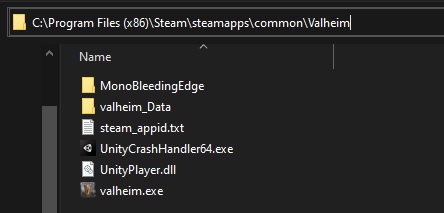 heavy sluice
Yeah it looks like that
stark meadow
heavy sluice
Yeah it looks like that
So what crops exhibit this issue? Is it all crops?
Are you sure he's planting them in correct biome?
heavy sluice
He's planted carrots in meadows
stark meadow
heavy sluice
He's planted carrots in meadows
And what, not a single carrot has grown in 20 days?
Does he have a roof over them?
plain dragon
blocking sunlight usually doesn't mean healthy plant
heavy sluice
No roof, open flat platform, he got one set of plants to grow but after that nothing has grown, it took bout 2 ingame weeks for that first batch, and second set of plants he planted on around day 30, his world is on day 73
He's also playing vanilla
stark meadow
heavy sluice
No roof, open flat platform, he got one set of plants to grow but after that not...
Can he provide a screenshot of the garden?
Or bettter yet send me his world save?
heavy sluice
Yeah give me a sec
stark meadow
heavy sluice
Yeah give me a sec
For world save, would need worldname.db and worldname.fwl file for the world, fount on one of these locations:
https://i.imgur.com/mTVKf1J.jpg?4
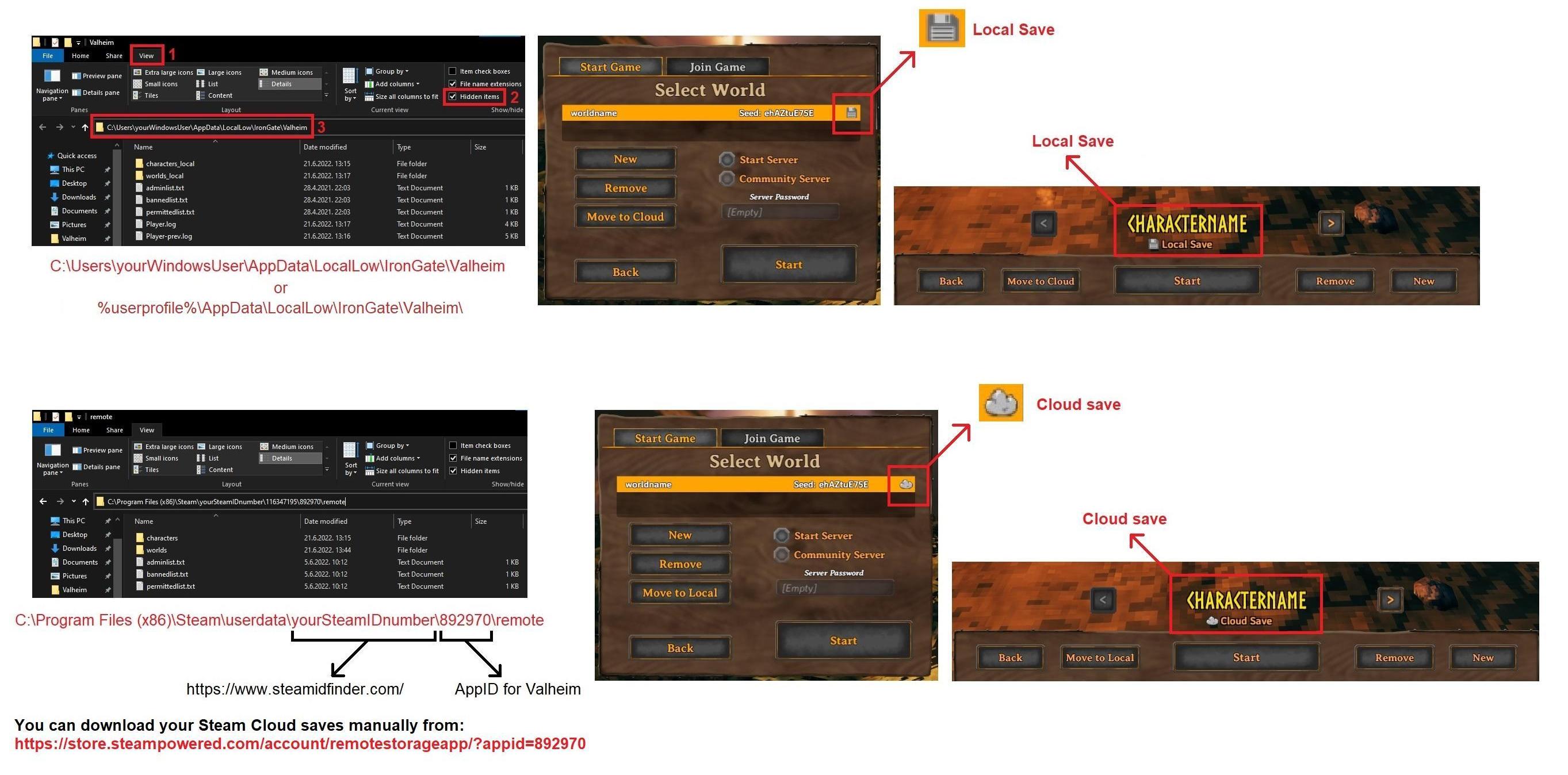 stark meadow
heavy sluice
stark meadow
heavy sluice
Are those the carrots?

I can pick them up without problems
If your father can't, probably best to reinstall the game
heavy sluice
Ok ill tell him that, there currently still not working
heavy sluice
Verify didn't work either, he's working on reinstalling the game
gilded sluice
anyone else use mods?
heavy sluice
heavy sluice
Verify didn't work either, he's working on reinstalling the game
Reinstall didn't work either
 bright coral
Might want to try "E" key in other apps to make sure keyboard working fine.
heavy sluice
@bright coral that's not the issue, the crops aren't growing they just say that their healthy, it updates and says that their harvestable when you load the world on another computer, it just won't for his computer even after a reinstall
iron steppe
plain dragon
idk pretty far south, you think I can glide to Ashlands?
you can - its a 'glitch' method for getting across [i.e. its not allowed in non-glitchless speedruns]. There are faster ways (just sail in Karve) - but you can defintely float across. There was a reddit post recently where someone used a deathsquito to get height then float to ashlands - that was very creative...
gilded sluice
heavy sluice
<@287433598825660417> that's not the issue, the crops aren't growing they just s...
and no one else isn't using any mods?
heavy sluice
No mods
gilded sluice
heavy sluice
No mods
Hm.. could you get him to try it ingame, then quit the game, and then grab his player.log file and send it to me?
heavy sluice
Ok, ill have to wait until morning to get the file from his computer, he's asleep right, so it maybe be until about noon PST
 tender spire
how long are the snow particale suppose to last onve you leave the mountain biom?
 distant valley
Two asksvin in an 8m deep taming pit, 1 w/ a star, 1 without. Started attacking eachother as soon as I added the no star to the pit. Doesn't seem intended.
No mods, of course
iron steppe
tender spire
how long are the snow particale suppose to last onve you leave the mountain biom...
Most weather effects have about a 5-10sec fade as you move (either across biomes or through teleporters).
It’s annoying because it causes you to incorrectly (?bug) get wet from rain in situations you are not supposed to when teleporting.
dire charm
stark meadow
Have 3 different controllers types and no such issues.
Turns out it was just my controller 😫
gilded sluice
dire charm
Turns out it was just my controller 😫
which one do you got?
dire charm
gilded sluice
which one do you got?
Nacon Pro Compact. For some odd reason the right stick view pulls to the right if I walk forward, but pulls to the left if I walk backwards, ie towards the camera. Happens in other games as well. It's not stick drift as it only happens while moving around, so it seems to be some sort of software issue but I can't work out how to rectify it.
The Nacon software is beyond useless. And unistalled the drivers but it still happens.
dire charm
gilded sluice
or direct input?
I'm not sure 😶
gilded sluice
dire charm
I'm not sure 😶
Hm.. on my own controller, I got a switch between D and X
dire charm
Mine has a black switch on the back but the issue happens regardless of what I select
I'll play around with more settings and see if I can work out the issue
gilded sluice
it doesn't have any labels on the switch?
stark meadow
dire charm
Nacon Pro Compact. For some odd reason the right stick view pulls to the right i...
Yeah, can happen on controllers with bad anologue sticks. Main reason I stopped using Xbox/Nacon controllers and went PS4, which perfectly returns dticks to center. Playing Rocket league often would make sticks break in less than a year.
dire charm
stark meadow
Yeah, can happen on controllers with bad anologue sticks. Main reason I stopped ...
Well given my description of the problem I'm fairly sure it isn't stick drift
dire charm
gilded sluice
it doesn't have any labels on the switch?
According to the online manual it's for custom profiles/button mapping
stark meadow
dire charm
Well given my description of the problem I'm fairly sure it isn't stick drift
Stick drift is not the same as stick not resetting to center.
dire charm
It's definitely resetting to the center, as I said the issue ONLY occurs when I'm moving the character around
gilded sluice
could it be wear and tear of the controller?
dire charm
I haven't used it that much. Maybe but I don't know 🫤
stark meadow
dire charm
It's definitely resetting to the center, as I said the issue ONLY occurs when I'...
Yeah, you're right, reading it again, sounds like it's trying to compensate for something
Looked at if windows is doing something? https://www.youtube.com/watch?v=YNDRmNeZpcU
Also try closing game bar from task manager
dire charm
I'll try. It's easy to compensate though, I can just gently nudge the stick to keep the camera aligned, but knowing what's causing it would be nice.
dire charm
@stark meadow @gilded sluice A vid of the problem. This is without any right stick input whatsoever until 0:12. And it only stops if I gently nudge the right stick, but then it will randomly happen seconds or minutes later again.
Definitely weird 🤷🏻♂️
stark meadow
dire charm
<@196192010581835776> <@260480620054970378> A vid of the problem. This is withou...
Tried tweaking anything further?
dire charm
Not yet but I will tomorrow.
stark meadow
dire charm
Not yet but I will tomorrow.
It's been a while since I used Nacon controller, but I believe you should have an option to tweak stick deadzone curves there as well.
gilded sluice
Hmmm... I wonder if I got one of them 🤔
 floral sorrel
im living in japan and my friend is in the states hosting a server. When i try joining i get the same message "Cant connect to server" with no error message. He has looked at the console and gets nothing unique in there and we have also attempted using a IP spoofing app to say that we are playing in a "lan" IP. Weve also tried adding the server through steam but no server was available on there. Any help?
gilded sluice
floral sorrel
im living in japan and my friend is in the states hosting a server. When i try j...
are you using crossplay?
so you use join code?
floral sorrel
gilded sluice
are you using crossplay?
no. pc to pc. we have tried with cross play enabled and disabled on the server as well. ive used connection through IP and join code
gilded sluice
floral sorrel
no. pc to pc. we have tried with cross play enabled and disabled on the server a...
LAN ip connection over crossplay doesn't work
floral sorrel
gilded sluice
LAN ip connection over crossplay doesn't work
well we have tried it with and without cross play enabled. and we only tried to make it seem as lan a couple times.
gilded sluice
there is a bug atm we are aware of
so inviting on steam works sometimes, sometimes now
floral sorrel
gilded sluice
there is a bug atm we are aware of
heard that thank you
floral sorrel
gilded sluice
there is a bug atm we are aware of
also btw, i eventually got in the server through using a VPN to look like im in the US, but i loaded in with a bare grass ground, no trees, and no structures loading in. It disconnected me each time after 3 minutes
stark meadow
floral sorrel
im living in japan and my friend is in the states hosting a server. When i try j...
You should disable any kind of software like hamachi that puts you behind VPN and also avoid any kind of VPN. Many of this VPN can also create issues even when disabled but still running in background. They often come with network optimisers to create further issues.
If you are all on steam, tell the host to disable crossplay before starting the world as seever. Then for players that plan to join, tell them to be in character selection screen while the host sends them a steam invite. Upon accepting the invite, and while being on character selection screen, when they click start button next to character, they will start connecting to the server.
If this doesn't work, 99% you have VPN or some network optimiser running in background.
floral sorrel
stark meadow
If this doesn't work, 99% you have VPN or some network optimiser running in back...
yeah we tried it with hamachi and a vpn but after that i turned them off. Those are the only net optimizers i own. I could only get in the server when i had a VPN, thats the only way i could get into the server but even so, we continued to try w/o a vpn. I believe he reset without crossplay but ill double check again when he wakes up. time zones and shit
stark meadow
floral sorrel
yeah we tried it with hamachi and a vpn but after that i turned them off. Those ...
It's often not enough to turn them off. I went here into more detail how to check if you have they are running in bagro: https://steamcommunity.com/app/892970/discussions/1/612032374411149472/#c612032512885010678
 steep bay
anyone having issues with the windmill not working?
nvm i restarted game and it started working
 brisk plover
Has anybody had capes fail to unlock? I just took down a few trolls and went to make a troll skin cape for the set bonus and can't find it in the crafting menu. Then I realized I don't have the deer skin cape either. I have all the materials and a level 3 workbench, so these items should be craftable...
floral sorrel
brisk plover
Has anybody had capes fail to unlock? I just took down a few trolls and went to...
have you collected bone frags
iron steppe
brisk plover
Has anybody had capes fail to unlock? I just took down a few trolls and went to...
requires crafting bench lvl 2, make sure you have that
if it hasnt unlock - drop the troll hide, and pick it up again.
Same for the workbench - destroy it, replace it and the upgrades, and try again
 stark meadow
balmy garnet
stark meadow
balmy garnet
Played in multiplayer recently, or just single player?
stark meadow
balmy garnet
All along single player
Can you DM me your last few world backups? Would be nice to have a backup just before this happened, and a save right after.
Ever managed save files?
balmy garnet
never
stark meadow
balmy garnet
never
worldname.db and worldname.fwl files are needed, and they can be obtained from this locations (depends on your using Local or Cloud saves):
https://i.imgur.com/mTVKf1J.jpg?4
You will also see worldbame_auto-backup-timestamp.db and worldbame_auto-backup-timestamp.fwl
Send that one also. If they are too large to send via Discord, you can upload them on google drive, easyupload.io and send me the link to the files
Uploading to valheim.com/support (report bug tab) also works fine
 deft wyvern
You can duplicate stone if you have resource multipliers on if you use the hoe to place a stone and then pick it up and you have resource multipliers on you will have a multiplier on the placed stone which means you can place a stone for 1 stone and then pick it up gaining 3 if the multiplier is set to 3
marble wolf
deft wyvern
You can duplicate stone if you have resource multipliers on if you use the hoe t...
We know. Not a bug.
deft wyvern
what would it be then?
stark meadow
deft wyvern
what would it be then?
It's considered as an issue, so will be eventually tweaked, as it was for some other items (fishing rod findable in caves doesn't scale with resource modifier). It's just that balancing world modifiers is not a priority.
deft wyvern
thanks for letting me know
 bronze drift
Hi, i apologize if i'm in the wrong channel but i could use some help. Ever since the april 1 update i have had major stuttering problems. It's noticeable in multiple biomes but the mistlands almost freezes entirely. My FPS counter says i'm anywhere between 40-60 but visually it looks closer to 15-20. I have an rtx 2060, 32gb of ram, and Intel(R) Core(TM) i7-8700K CPU @ 3.70GHz. I have attempted multiple reinstallations by deleting the folder and by installing it on a different ssd with no fix. Dropping the settings to the lowest or switching to vulkan doesn't fix it either. right now, the game runs more smoothly on my macbook air than on my pc. I don't have issues with any of the other games that i play.
there have been a couple occasions where uninstalling, reinstalling, and restarting my computer has let me play with it looking like it used to. However, the next time i boot the game the issue is back. I can't make any sense of it to be honest.
Thanks for any help!
stark meadow
bronze drift
Hi, i apologize if i'm in the wrong channel but i could use some help. Ever sinc...
What ever you are experiencing, it's not related to the update.
Are you using mods? Playing on Windows? Tried reinstalling your graphic drivers?
bronze drift
stark meadow
What ever you are experiencing, it's not related to the update.
Are you using mo...
Hi,
-I am playing on windows
-i was using some mods but the issue has persisted even after the clean install on unmodded worlds and on a multiplayer server (i was using thunderstore if that matters)
-I updated my graphics driver when i first noticed the issue. I haven't tried reinstalling it though
stark meadow
bronze drift
Hi,
-I am playing on windows
-i was using some mods but the issue has persisted...
Cached data and game specific driver setting can also gets messed up, so I would definitely suggest to attempt reinstalling them again, with emphasis on selecting custom installation + selecting to reinstall with clean profile. After that doesn't optimise Valheim via Nvidia app.
When you say that you tried clean reinstall of Valheim, it's important to double check that these are all files and folders you have in installation directory: https://i.imgur.com/vdpdeOA.jpg
Have you done that already?
bronze drift
Ok, i will try reinstalling the drivers. here is my folder:

i think that might have been it, it's running smooth again. hopefully it will persist. thank you!
 static marsh
So just wondering if the stuttering on instances dropping while exploring is normal? Feel like it happens every 5-10 seconds when exploring. Have a 9800x3d and rtx5080 with ddr5 64 gb 6000mhz ram. I don't remember there being this stutter around two years ago when I used to play on my old pc. When I'm in the same area the experience is as smooth as butter but as soon as I start exploring is when the stuttering happens.
stark meadow
static marsh
So just wondering if the stuttering on instances dropping while exploring is nor...
Currently no way to eliminate that type of stutter. It was always happening. This is the amount of stutter you can expect on DDD5 system:
https://www.youtube.com/watch?v=61ueJz0ZJns
Lately I've been hearing a lot of users with 9800x3d complaining about stuttering, more audio stuttering in Ashlands, so there might be an additional thing going on for your CPU. Try to compare the stutters and record them. The video I linked needs updating tho as world seed is not the same these days.
static marsh
stark meadow
Currently no way to eliminate that type of stutter. It was always happening. Thi...
Ah okay thank you see that clears up some of the worries I had. I mean from the video you posted the stutters are the exact same. When I'm running around and the instances drop down suddenly I get a stutter. But when I stay in any area without moving too far around my game doesn't stutter at all. It's literally only when I'm exploring or moving around a lot. I guess I just don't remember the game stuttering like this. At least not as much. It sucks because it happens like every 5-10 seconds when exploring and it kills the vibe but at least I know it's just how the game works and it hopefully doesn't anything to do with my hardware.
I probably don't remember it stuttering as much because my old pc used to run valheim at like 60 - 80 so the lower frames made it harder to tell. Who knows
iron steppe
Is it intended that Fader's attacks penetrate into putrid caves?
Discovered the hard way on my recent speedrun - was an unexpected surprise...
 gilded sluice
iron steppe
Is it intended that Fader's attacks penetrate into putrid caves?
Discovered the...
gilded sluice
iron steppe
Is it intended that Fader's attacks penetrate into putrid caves?
Discovered the...
it will find you
and attack you
gilded sluice
static marsh
So just wondering if the stuttering on instances dropping while exploring is nor...
there are a few issues with the 9800X3D.
- windows must be updated
- Update your BIOS to the latest version and not the one that came with your motherboard
- set your power setting in windows to PERFORMANCE
- Don't even think of using Riva Tuner or MSI afterburner. you'll slowly fry your 9800X3D (like most X3D processors do with those kind of programs)
I know. I got a 9800 X3D myself and I am looking into all the issues that exists with it atm
static marsh
gilded sluice
there are a few issues with the 9800X3D.
1. windows must be updated
2. Update yo...
damn that's unfortunate to hear but I'm thankful for the reply. I've done all the things you've mentioned already. I guess only with time will the issues hopefully be resolved.
gilded sluice
do you use windows 10 or 11?
static marsh
windows 10 and up to date currently.
static marsh
64 gb 6000 mhz cl30
gilded sluice
G.skill or?
static marsh
negative
gilded sluice
no bios overclocking?
static marsh
nope stock
gilded sluice
I still run my 7700X since I've heard so many had issues with the 9800X3D
but I use the bios overclock profile, and it works great
I would definitly recommend trying
static marsh
I did have some stuttering in a game or two when I first built my system but a bios update and chipset update fixed it for me. Only stuttering I get now is on valheim but from what I've gathered it's just how the game works?
gilded sluice
it's a issue in ashlands
since to many sounds can overload a issue with Unity game engine
static marsh
Like the biome ashlands? I'm only in meadow/black forest currently
static marsh
well it's only when I explore, and the instances quickly drop. If I'm not exploring and at my house for example the experience is smooth
From what someone told me that stutter on instances dropping is normal though
static marsh
yeah it'll drop 1000-2000 when exploring
static marsh
do you want my current instances or do you want me to tell you how much it drops
gilded sluice
both
static marsh
I live in meadows and at my base there is 5738 instances
gilded sluice
should be childsplay for your PC 🤔
static marsh
when I explore through meadows and black forest the instances go to 6800 - 7000
and when the instances drop as I explore is when I get the stutter
gilded sluice
like. your PC should start to be anoyed around 15,000
or more
but wierd stutter
do you use DX11 or vulkan?
static marsh
dx11
gilded sluice
use vulkan
static marsh
I did already, same issue if anything feels worse
gilded sluice
wierd 🤔
static marsh
stark meadow
Currently no way to eliminate that type of stutter. It was always happening. Thi...
It's basically what this person posted when I first asked about it.
static marsh
Ah I see, so you've experienced it as well.
Yeah I just figured that's how the game worked.
gilded sluice
kinda
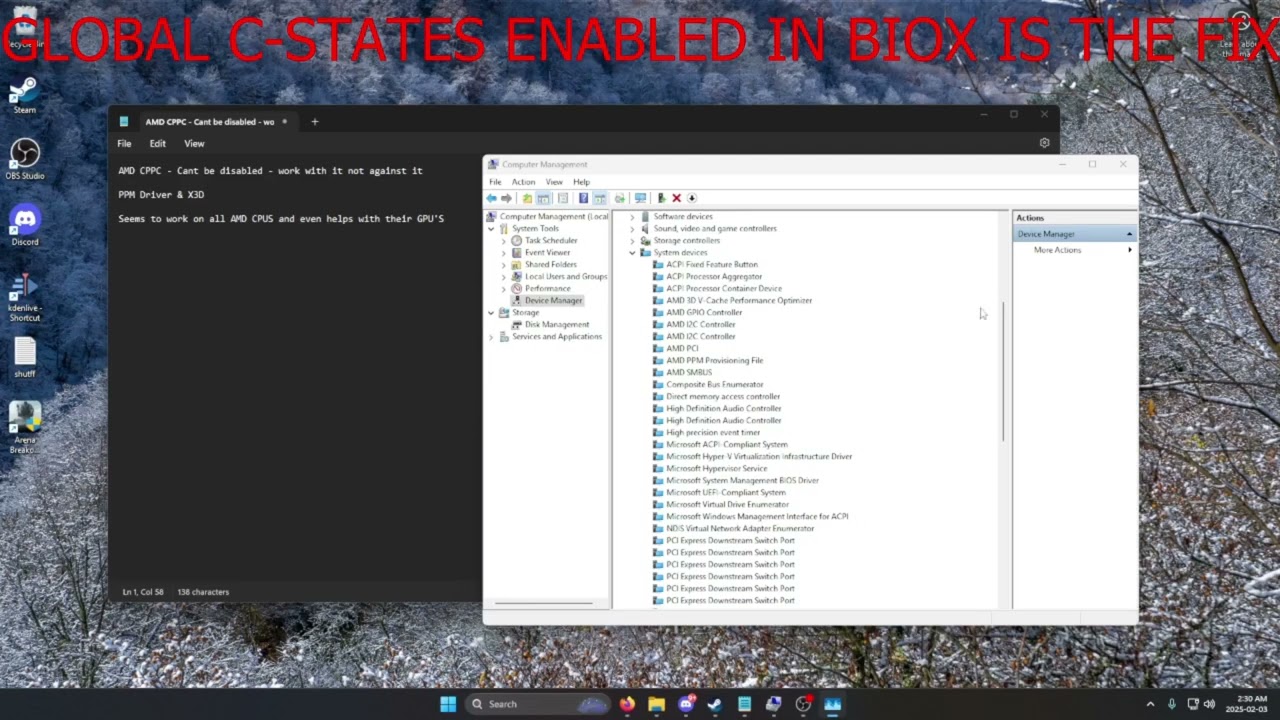
TLDR: Enable Global C-States in the bios, must be Global C-States
Just wanted to make this video to further explain my thought process behind the solution, it may not be 100% correct. This also expands to INTEL CPU'S paired with AMD GPU's I think, due to AMD's driver relying on c-states for proper boosting. Further testing is necessary on the I...
could be a C-state thing 🤔
static marsh
tried the game c-state enabled and disabled already. Nothing changes
dire charm
@stark meadow This is interesting. Steam shows the controller sensing right stick input despite only touching left stick. I've read this has been a known issue for years, but I haven't found a fix yet. So it seems to be a Steam issue.
 stark meadow
dire charm
<@196192010581835776> This is interesting. Steam shows the controller sensing ri...
stark meadow
dire charm
<@196192010581835776> This is interesting. Steam shows the controller sensing ri...
Have you tried disabling Steam input yet or tweaking stick behaviour in nacon software?
 dire charm
stark meadow
Have you tried disabling Steam input yet or tweaking stick behaviour in nacon so...
dire charm
stark meadow
Have you tried disabling Steam input yet or tweaking stick behaviour in nacon so...
Enable steam input for Xbox controllers? Turning that one off completely disables the controller. Haven't tried the software yet
stark meadow
dire charm
Enable steam input for Xbox controllers? Turning that one off completely disable...
No, in steam library properties for Valheim app. Valheim has its own controller support and doesn't need Steam input to be enabled for basic controller functionality. Change the input mode on the back of controller if it doesn't work at all in Valheim menu.
dire charm
stark meadow
No, in steam library properties for Valheim app. Valheim has its own controller ...
Got it. Doesn't have any effect. I'll try the nacon software when I get a chance.
Damn persistant problem.
bronze drift
bronze drift
Hi, i apologize if i'm in the wrong channel but i could use some help. Ever sinc...
so, it seemed like updating my drivers helped but I think it was actually just the fact that i restarted my pc. This morning, i turned my computer on and launched valheim and it was stuttering really bad. I restarted my computer and launched it again and it is running just fine. it's nice to know a workaround but it seems really weird. my only other thought is that i upgraded to windows 11 last month so maybe that is part of the issue? I'd appreciate any thoughts you might have, thanks. @stark meadow
stark meadow
bronze drift
so, it seemed like updating my drivers helped but I think it was actually just t...
Probably related to fast boot then, or PC not starting from stand by mode properly. Try disabling fast boot first.
bronze drift
stark meadow
Probably related to fast boot then, or PC not starting from stand by mode proper...
oh, interesting. i'll give that a try
bronze drift
stark meadow
Probably related to fast boot then, or PC not starting from stand by mode proper...
i'm really hoping that was it. i did a full shut off to test it and the stuttering came back. I then disabled fast boot and did another full shut off. it launched without any stuttering this time. thanks again!
 thick wagon
Is anyone elses computer just shutting down on them?
Not even with the shutting down text just black, off.
stark meadow
thick wagon
Is anyone elses computer just shutting down on them?
Check section1:point6 of this guide: https://www.reddit.com/r/valheim/comments/uq9b8x/my_valheim_is_crashing_fix_for_crash_guide/
What PC specs you have? How old is power supply?
thick wagon
Ryzen7 5700x 8 core
Rtx3060
Windows 10pro
32GB ram
Power supply from october 2022
Notting else seems to have this issue
Nothing*
Only valheim
stark meadow
thick wagon
Only valheim
That's exactly how it starts, as explained in that part of the guide I suggested you should read.
Don't usually see power related issues with 3060, so would lean more towards unstable clocks and memory in your case.
Ensure you have all components properly attached (power cables and ram sticks) and resetting your BIOS setting to default, would be the first things I would do.
Did you do any Adrenaline tweaks to CPU? On tweaks to Nvidia app to GPU? Or some other 3rd party software?
thick wagon
No to all 3
Turned all the graphics down, have task manager open, and it isn't folding over itself
Yet at least
It folded over itself
 fickle quartz
Hello, not sure if anyone can help me... I had a problem with synchronisation on Steam's cloud save and now my world (I was hosting for some friends) is perfectly reseted as if was just created. No portals, no bases, no nothing. I even tried loading a previous save from earlier this morning, and one from yesterday. But nothing seemed to help. Seems like everything is lost. No mods ever installed, don't know if this has any effect, just mentioning.
gilded sluice
fickle quartz
Hello, not sure if anyone can help me... I had a problem with synchronisation on...
clearing your cache in steam could help
fickle quartz
completely noobish Q, but... how do I clean my steam cache?
 fickle quartz
cheers, will try it
But to be honest, I have a feeling that everything is permanently lost :S
gilded sluice
oh?
fickle quartz
really appreciate your efforts, but sadly, nope, nothing came back
fickle quartz
tried to check from local saves, but my limited knowledge isn't helping. Still loaded a save from 19 April, but still I spawn fresh in the bosses stones and nothing is there, no boss heads , no constructions
fickle quartz
Really appreciate you trying to help. But for the last 30 - 40 minutes I'm at the edge of depression (ok, not literal - but you get the point)
gilded sluice
you might either be able to return files with the built in backup system
but there is a steam folder on C aswell
C:\Program Files (x86)\Steam
this folder
but can't remember exactly 😄
C:\Program Files (x86)\Steam\userdata\SteamIDnumber\892970\remote\worlds
this folder 🤔
fickle quartz
ok, found the folder and the files
from the looks of it, it should be the last saves that in-game show in the "manage saves"
gilded sluice
try it 🤔
fickle quartz
picked one of those files, but now I don't know where to paste it. Tried looking in the folder steamapps>common>valheim
But can't seem to find a folder there that holds any saves
gilded sluice
this is how mine looks like
 fickle quartz
Found this folder, and I copied a save from the "worlds" folder

But don't know how to push it into valheim's (or steam's?) cloud save
stark meadow
fickle quartz
Found this folder, and I copied a save from the "worlds" folder
I wouldn't recommend manually moving files, as you can restore saves from the in-game manage saves menu
Have you tried that already?
fickle quartz
yeap
every "previous" save, spawns me in the first spawn at the bosses stones, with no heads attached, no structures, no portals etc...
stark meadow
fickle quartz
every "previous" save, spawns me in the first spawn at the bosses stones, with n...
Can you screenshot the saves in your worlds folder (last screenshot you posted)
Make file sizes visible, full names visible and date modified visible

 fickle quartz
tried in-game, this one, it's from earlier this morning
stark meadow
Best that you make a copy of that one before you do anything else. Put the copy some place safe
stark meadow
First check if you have enough free storage space on your drivers, all of your drives
fickle quartz
532 GB on my main disk (the one that has windows installed) and 1.3 TB on my 2nd disk
stark meadow
Did you crash recently? Played while in offline Steam mode recently? Tried to start a dedicated server?
fickle quartz
nope, this is how things went... I opened game this morning (trying to locate the boss stone for 5th boss-the one from plains)
looked arround a bit, then I had to leave suddenly, so I closed game. Earlier (about one hour ago, came back, loaded game and it was working just fine, closed game cause I wanted to try dev commands and help my self with looking around easier in 'fly' mode, but then after opening again, I payed the price for wanting to cheat ... everything was wiped clean
paied - or payed ... sorry English isn't my best language so I'm probably making some spelling errors
stark meadow
fickle quartz
nope, this is how things went... I opened game this morning (trying to locate th...
"closed game cause I wanted to try dev commands"
Do you remember how you closed the game before attempting to use commands?
Close it forcefully via alt+f4 or via task manager?
Usually when players die, they tend to abruptly close the game in hopes the game won't save, which can lead to corrupt saves that gets preformed on game exit.
fickle quartz
Nope, never using alt+f4, closed with "quit" when I was in base.
After I died and spawned in base, but still, closed game normally with quit
opened the site to check how to activate dev commands (https://valheim.fandom.com/wiki/Developer_console) made the steps and tried to open game

Valheim Wiki
The developer console, or just console, is an in-game interface for entering text-based commands used for debugging, cheating and server administration. To be able to use console commands, the...
game actually opened, I spawned at the place that my base used to be... but no longer was there
flew arround to the place we build our first base, for a stupid reason I thought that maybe that part was not affected ... but yeah ... everything was wiped clean and world was fresh as if it was just opened from it's box
stark meadow
fickle quartz
Nope, never using alt+f4, closed with "quit" when I was in base.
Not something that usually happens when you normally quit the game. But regardless of how you closed the game, your game didn't close properly, crashes while it was saving, and that's why your save got corrupted.
fickle quartz
but shouldn't the previous saves work?
stark meadow
If this continues to happen, you should move your saves from Cloud to Local, and then we can take a look at why your game might not be closing properly.
You previous save is fine.
fickle quartz
at this point, I'm not sure if I want to start fresh
stark meadow
This save is fine, restore it via in-game menu:
 fickle quartz
stark meadow
You previous save is fine.
fickle quartz
stark meadow
You previous save is fine.
nope, every previous save that I've tried spawns me at the bosses stones and still nothing hanging on the bosses stones, and no portals leading to bases are there
fickle quartz
stark meadow
This save is fine, restore it via in-game menu:
Ok, will give it another try
Ok, MaCarBre ... dude I don't know what kind of magic you did ... this time I loaded the save and it worked
Honestly, did exactly the same 3 clicks to restore the previous saves about 30-40 minutes ago ... and still spawned in the bosses
Now, I still spawned at the bosses, but the portals were there, I currently am sitting inside the second base my friends and me build and I can't start describing how grateful I am for this.
I alone spent about 40 to 45 hours in making this base. I thank you so very much (this sounds wrong, I know) but still thank you very very much
One thing is certain ... not gonna try popping dev commands ever again 🙂
stark meadow
fickle quartz
Now, I still spawned at the bosses, but the portals were there, I currently am s...
How much RAM does your system have? Can you screenshot your memory usage bar in the task manager, under performance tab, memory

 stark meadow
fickle quartz
stark meadow
fickle quartz
Is that last portion of memory registered as "stand by" or free?

When you hover with your mouse over last portion of memory bar
fickle quartz
 stark meadow
fickle quartz
stark meadow
fickle quartz
Can you do me a favor and restart your PC, then check how that bar will look when you boot again?
Lot's of cached data there, which might be connected to why saving failed
fickle quartz
100% , will close game and restart
waiting for "uploading..." to finish

hypothetically ... if someone force closes steam or pulls the power plug or something like that to instantly close pc ... what would happen?
I'm guessing the last saved (auto saved data every new morning) will be used, right?
stark meadow
fickle quartz
hypothetically ... if someone force closes steam or pulls the power plug or some...
Most likely the game will still try to save, and get cut off in the middle of preforming a save.
Not recommended to close the game abruptly
If you must, do so from task manager, details tab (not processes tab), which will close the game quickly without saving
fickle quartz
Obviously ... just the thought came to mind while waiting for the cloud status to go "up to date" ... ok, now making the restart

This is how it looks right after restart, only discord opened, which it does automatically every time.
stark meadow
fickle quartz
Thx. Was wondering how much of your cache will empty out. Looks much healthier now. Best to restart your PC once in a while. Do you remember last time you did so? Or just shut it down?
fickle quartz
Every time I stop playing, I shut down. Maybe the earlier shown cache was like that because I opened Path of Exile 2 after the "mess" I made, even thought I couldn't find the will to play and ended up closing seconds after opening it 🙂
No matter the case, I thank you from the heart. I can't stress enough how relieved I feel seeing everything working properly 🙂
Gonna dive in Valheim now, even thoo it's 00:20 here and I've been through a really tiring day, hope you have a great day (or evening). Also many thanks to @gilded sluice for offering his help. Many thanks 🙂
gilded sluice
fickle quartz
Gonna dive in Valheim now, even thoo it's 00:20 here and I've been through a rea...
teamwork 🙂
 smoky kestrel
my game keeps on crashing after a couple hours of playing and ive tried re-installing and verifying the files and i am lost on what to do
gilded sluice
smoky kestrel
my game keeps on crashing after a couple hours of playing and ive tried re-insta...
update windows and do a clean re-install of your graphics cards drivers
that's the first things to do
 sly sable
Any fix against very choppy/laggy audio specifically in ashlands? Both the host and client having it, while the fps never drops below 100
stark meadow
sly sable
Any fix against very choppy/laggy audio specifically in ashlands? Both the host...
Which CPU do you have?
sly sable
stark meadow
Which CPU do you have?
i5 8600k i am client. Host has something has something similar
stark meadow
sly sable
i5 8600k i am client. Host has something has something similar
There are known issues with audio stuttering, mostly noticeable on music, that happen when too many audio sources are playing.
Does the host know how to use devcommands?
sly sable
Yea
stark meadow
sly sable
Yea
Would be useful to know when you get the stutters, how many sound effects are playing around you two, which host can find out by typing "find sfx" command
sly sable
Will try tomorrow, but i guess no fixes except get a better pc? We both have to play on 1% audio most of the time right now to not destroy the ears
stark meadow
sly sable
Will try tomorrow, but i guess no fixes except get a better pc? We both have to ...
Disabling C-states in BIOS for the CPU (ensures CPU doesn't osculate between low and high clock modes), and setting 100% power usage for min and max CPU (advanced settings in windows control panel) might be beneficial.
 slate canyon
stark meadow
Would be useful to know when you get the stutters, how many sound effects are pl...
slate canyon
stark meadow
Would be useful to know when you get the stutters, how many sound effects are pl...
I'm having the same audio choppiness issue when it comes to Ashlands only though. Ryzen 9 5950x, dedicated server is a Ryzen 7 5800X. Friends on the server experience the same issue at the same time. I do have the console commands enabled, but "find sfx" is not showing up on the list of available commands.
Nevermind, I forgot I have to activate them. I'll see what information I can get when we play tomorrow night.
gilded sluice
slate canyon
I'm having the same audio choppiness issue when it comes to Ashlands only though...
everyone does
stark meadow
slate canyon
I'm having the same audio choppiness issue when it comes to Ashlands only though...
You won't be able to use find command on a dedicated server. Only world host can use them while hosting their world they also play in.
slate canyon
stark meadow
You won't be able to use find command on a dedicated server. Only world host can...
Yeah, I just discovered that after adding the -console to my start-up and then making sure my steamID64 was listed as an admin, lol
slate canyon
gilded sluice
everyone does
Ok, good to know. I saw it in the "Known Issues" list that was being looked into, along with some network issues as well.
fickle quartz
@stark meadow sorry to once again trouble you... Just logged earlier today. Made some harvesting, a bit of cooking preparations and things, now I get this ...

Followed by this error message when I tried to click "play"
 stark meadow
fickle quartz
<@196192010581835776> sorry to once again trouble you... Just logged earlier to...
stark meadow
fickle quartz
<@196192010581835776> sorry to once again trouble you... Just logged earlier to...
That alone is usually not as problematic, and it shouldn't lead to save corruption.
You are from Russia right? Using any VPN?
fickle quartz
clicking to retry sync with cloud , but it's not working.
Nope, I'm from Greece (Southern Europe)
And no , never used VPN
stark meadow
fickle quartz
clicking to retry sync with cloud , but it's not working.
Try going offline then back online on Steam.
 fickle quartz
lol , didn't know there was an option like that 🙂 went offline then back online, still out of sync 😦
Oh, now the message is different

honestly, I'm just logging in game, doing nothing weird and then quiting from menu
Would it be safe to uninstall and reinstall game?
stark meadow
fickle quartz
Would it be safe to uninstall and reinstall game?
No, it's not a game issue
Rather something related to your connection and steam cloud server
Were you playing Valhiem while not having Internet lately? Or on a different PC?
File conflict message usually appears when Valheim save that's on your PC doesn't match with the last save in Steam Cloud server.
You will have to choose which one you want from those two
fickle quartz
Nope, same PC, as for internet connection, nothing I noticed, I'm also talking with a friend so all I can say is that we were talking normally with no disconnections
stark meadow
fickle quartz
Nope, same PC, as for internet connection, nothing I noticed, I'm also talking w...
Can you do a quick screenshot of your worlds folder again, as you did here?
fickle quartz
Now this popped when I hit "play" and exactly as you wrote, I can choose the later save
 fickle quartz
stark meadow
Can you do a quick screenshot of your worlds folder again, as you did here?
fickle quartz
stark meadow
Can you do a quick screenshot of your worlds folder again, as you did here?
Sure thing, few seconds please.
stark meadow
fickle quartz
Now this popped when I hit "play" and exactly as you wrote, I can choose the lat...
Don't select anything here yet. Check your worlds folder first
 stark meadow
fickle quartz
stark meadow
fickle quartz
Local saves seems to be the best option to select. When was the last time you played? 22th of April 5:09 pm ?
fickle quartz
yeah, it was about 15 minutes ago
stark meadow
fickle quartz
yeah, it was about 15 minutes ago
Ok, just select the local save then. That should be it
fickle quartz
Okie, will do and tell you what happens shortly
Currently it seems like it's on standby
 stark meadow
fickle quartz
Okie, will do and tell you what happens shortly
stark meadow
fickle quartz
Okie, will do and tell you what happens shortly
Meanwhile, can you also screenshot what you have under your network adapters?
start → type device manger and open → expand network adapters list → screenshot the list
fickle quartz
No idea what's all the above... but here it is 🙂
 stark meadow
fickle quartz
No idea what's all the above... but here it is 🙂
stark meadow
fickle quartz
No idea what's all the above... but here it is 🙂
All good here
Might be that Steam has issues on Greece servers. Try to switch your download region to some other country for some time.
Or you can move your saves from Cloud to Local so you don't have to bother with this, but then you should be doing manual backups of your saves every so often, and you have to be careful to not reinstall windows or replace disk without backing up your saves first.
fickle quartz
If i change to local saves, can my friends log in the same world?
stark meadow
fickle quartz
If i change to local saves, can my friends log in the same world?
Yeah, shouldn't change anything regarding hosting.
You can switch your saves from Cloud to Local in the in-game manage saves menu.
fickle quartz
Sweet. Thanks again 🙂
 humble stirrup
howdy yall. since the april fools update ive been having trouble connecting to friends' games. it usually works after 4-7 attempts, but its kind of annoying. the only mod we were using was plant everything and bepinex for that. when using the mod i usually get a black screen on joining, but can hear music and access the menu. i havent changed anything on my setup before or after the update so im clueless. anyone know what happen?
stark meadow
humble stirrup
howdy yall. since the april fools update ive been having trouble connecting to f...
I'm not sure if plant everything got updated to latest patch. You can check in #mods-issues , but getting black screen while connecting to servers is a confirmed mod issue. Many mods need updating to latest playfab changes (crossplay), so another workaround is to disable crossplay on your server if you want/need to play with outdated mods.
humble stirrup
i forgot to add that the multiple attempts needed has been happening regardless of whether the mod is installed or not, on either end
but i will check the crossplay
thank you
stark meadow
humble stirrup
i forgot to add that the multiple attempts needed has been happening regardless ...
That's a separate issue.
humble stirrup
and now i cant seem to even see the game or join through friends/steam
stark meadow
humble stirrup
i forgot to add that the multiple attempts needed has been happening regardless ...
To avoid connection failures and multiple attempts use steam invites to the server, or connect only via favorite tab and only by using favorite tab (don't click on other tabs, like recent or friends). Clicking on other tabs can cause the game to start pinging other servers and throttle your connection, which will make connecting impossible for next 20 sec. Best to clean up favorites tab so that it doesn't have too many servers and use only that tab.
humble stirrup
ok thank you for the suggestions
humble stirrup
stark meadow
To avoid connection failures and multiple attempts use steam invites to the serv...
disabling crossplay resulted in zero issues joining, thank you again!
 olive sorrel
Hello guys! Can someone help me with a constant crash problem in random moments?
-Tried the game on windows 11 and windows 10.
-Reinstalled the game.
-Checked the files.
-No modes were ever installed.
-No overheating or overclocking.
-Armory create is on performance mod.
-Laptop is with Gforce 4070 , i9-14900HX and 32gb ram.
Gpu temp is near C78-83.
Crashes on solo and multiplayer mode on any settings.
Help
Thank you.
stark meadow
olive sorrel
Hello guys! Can someone help me with a constant crash problem in random moments?...
Most likely a faulty 14gen Intel CPU
.dmp also point in that being the issues
Do you also have a accompanying playeg log file?
gilded sluice
Looks indeed like time to do a stress-test on your processor 🤔
doesn't look healthy
9/25/24 - Please go to the following link for the latest updates: Intel Core 13th and 14th Gen Desktop Processor Vmin Instability Issue Root Cause Update 8/26 clarifying support guidance for Intel Core 13th/14th Gen desktop tray CPU purchases *Update 7/29 regarding customer support process guida...


 olive sorrel
stark meadow
Do you also have a accompanying playeg log file?
olive sorrel
stark meadow
Do you also have a accompanying playeg log file?
Thank you! I will take a look if I have a log file.
Faulty you mean defective ?
stark meadow
olive sorrel
Thank you! I will take a look if I have a log file.
Faulty you mean defective ?
Yeah, it's well known that Intel 13th and 14gen CPU have high failure rates.
If you still have your warranty, I would ask for a new one.
olive sorrel
I get it, thank you. Yes, it’s still on warranty.
stark meadow
olive sorrel
I get it, thank you. Yes, it’s still on warranty.
Since you are on a laptop, yours might not be failing yet, but it might be operating on dangerous temps, so be sure to check which MAX temps it hits while playing Valheim. I recommend HWiNFO tool to monitor that, as most other temp monitoring programs miss some sensors or don't report on MAX temps. E.g. for 13gen
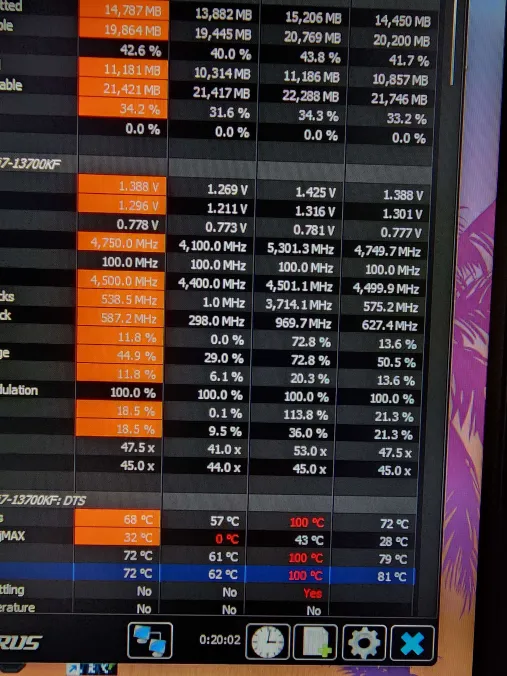
You tried both w10 and w11 on the same laptop right?
olive sorrel
I use exactly this one. So mostly it’s on 89-95 but often have fast splashes to 100
olive sorrel
stark meadow
You tried both w10 and w11 on the same laptop right?
Yes, right
olive sorrel
stark meadow
Do you also have a accompanying playeg log file?
is it a log file you asked ?
olive sorrel
gilded sluice
https://community.intel.com/t5/Processors/July-2024-Update-on-Instability-Report...
thanks I ran the diagnostics test and seems like it's ok
 olive sorrel
gilded sluice
https://community.intel.com/t5/Processors/July-2024-Update-on-Instability-Report...
olive sorrel
gilded sluice
https://community.intel.com/t5/Processors/July-2024-Update-on-Instability-Report...
on windows 11 I had this blue screen issue by the way
 stark meadow
olive sorrel
is it a log file you asked ?
stark meadow
olive sorrel
is it a log file you asked ?
You can check Section2 in this guide on where to look for player.log files.
https://www.reddit.com/r/valheim/comments/uq9b8x/my_valheim_is_crashing_fix_for_crash_guide/
But's it's unecessary to do so in your case. It's pretty obvious it's CPU related issue, and no more useful information can be obtained anyway using logs.
stark meadow
olive sorrel
thanks I ran the diagnostics test and seems like it's ok
I don't have any reports from players confirming or denying if this tool properly accessed the CPU.
You should be hitting 100°C while playing, so whether it's defective or not, that alone can be responsible for crashes.
olive sorrel
stark meadow
You should be hitting 100°C while playing, so whether it's defective or not, tha...
I have only player log file here. Yes it's reaching 100
stark meadow
olive sorrel
I have only player log file here. Yes it's reaching 100
Has to be taked right after a crash happens. Random log doesn't contain anything useful
olive sorrel
ok I get it. I'll wait for a next crush then and put it here just in case. Thank you for the information.
can I ask how do you understand it's CPU, what is pointing on it ?
stark meadow
olive sorrel
ok I get it. I'll wait for a next crush then and put it here just in case. Tha...
Check BIOS updates for your laptop model, look for BIOS setting after and check if you can set Intel CPU profile. I'm not sure if Intel made this possible for laptops or not, but they had to make this "fix" for all desktop CPUs.
stark meadow
olive sorrel
can I ask how do you understand it's CPU, what is pointing on it ?
Failing a basic calculations, outside of Valheim game logic, in the Unity engine.
You can read the crash guide I linked you to understand crash causes in Valheim in more detail
olive sorrel
stark meadow
Check BIOS updates for your laptop model, look for BIOS setting after and check ...
I searched something like that but asus laptops have just a few options in bios, nothing like that.
stark meadow
olive sorrel
I searched something like that but asus laptops have just a few options in bios,...
Yeah it's generally like that.
Did you check which BIOS version and laptop model you have, and confirmed you have the latest BIOS?
Start → System information → System summary lists both of those pieces of info
 stark meadow
olive sorrel
now it';s
stark meadow
olive sorrel
now it';s
Which laptop model?
olive sorrel
stark meadow
Which laptop model?
 stark meadow
Just checked with my brother who also has a faulty 14th gen Intel, this Intel diagnostic tool doesn't pick up the problem:
#steam-bugs-discussion message
 olive sorrel
 stark meadow
olive sorrel
stark meadow
olive sorrel
Version 320
14.74 MB 2024/11/13
https://rog.asus.com/laptops/rog-strix/rog-strix-g16-2024/helpdesk_bios/
That's the latest BIOS for your model
What BIOS version do you have installed, and what's its date?
olive sorrel
on windows 11 I was updating it from the site you gave. Now its
 stark meadow
olive sorrel
on windows 11 I was updating it from the site you gave. Now its
stark meadow
olive sorrel
on windows 11 I was updating it from the site you gave. Now its
Maybe you should also check your BIOS versoin by actually going into BIOS:
Doesn't seem like the latest one, or else the date would be November of 13th
But it has 320 in the name, hm.. don't know
Did you also download it manually or some software did the update?
olive sorrel
I think the latest one is just an iteration of the version 320
I manually downloaded it from official asus site and then instilled
gilded sluice
oh I know this one
XInput1_3.dll not found. Trying XInput9_1_0.dll instead...
you probably rescently re-installed windows and you're lacking the bigger directX library
@olive sorrel
olive sorrel
gilded sluice
you probably rescently re-installed windows and you're lacking the bigger direct...
that's right, I put 10 instead 11 to see if it have same problem
gilded sluice
that text I saw in your player.log is typical when you are missing files from DirectX
download the biggest you can find 😄
olive sorrel
ok here I have a crash files
stark meadow
olive sorrel
ok here I have a crash files
Crash while CPU was processing audio, still points to CPU and memory.
Do you have Intel XTU installed?
Intel Extreme Tuning Utility
And/or Asus Armoury crate?
olive sorrel
stark meadow
Intel Extreme Tuning Utility
I instaleld it to make a test also but deleted it
gilded sluice
XInput1_3.dll not found. Trying XInput9_1_0.dll instead...
olive sorrel
stark meadow
And/or Asus Armoury crate?
yes, armory create is on board
olive sorrel
so is it 100% because defective cpu ?
gilded sluice
it's like driving a car with non-working blinkers
car tells you "no blinkers, will use hazard lights instead"
And when you activate blinkers, car spontaniously explodes
gilded sluice
olive sorrel
so is it 100% because defective cpu ?
no no no
your missing files in windows
did you install direct X?
olive sorrel
gilded sluice
did you install direct X?
not manually, can't tell. Can I check it somehow ?
olive sorrel
ok, can I ask the question, I tried Vulkan also and as I know it used OpenGL not directX, but crashes happened also.
olive sorrel
gilded sluice
<https://www.microsoft.com/en-us/download/details.aspx?id=35>
thank you
gilded sluice
try it until you crash and show us the new player.log file
stark meadow
olive sorrel
so is it 100% because defective cpu ?
99% that it's the CPU issue. You will only know when you start to having temps in check, but still crash. Until then I would contribute the crashes to your temps. You should play around Armory crate profiles, windows power plans (lower max CPU power to 80-90%), throttle stop to see if you can keep temps in check first.
It's highly unlikely that you were also missing directX on your previous windows 10 installation, but no hurt in installing what Smiffe is trying to tell you should install.
olive sorrel
stark meadow
99% that it's the CPU issue. You will only know when you start to having temps i...
I got it , so GPU is very normal

CPU is hot, and it tells it is 100 but it noticed a spalshes to 100
 stark meadow
olive sorrel
I got it , so GPU is very normal
stark meadow
olive sorrel
I got it , so GPU is very normal
I would say if you can get your CPU below 85°C, and still crash, I would say it's definitely defective, and would push for the warranty.
olive sorrel
gilded sluice
or time to buy a cooling pad
this temps were from all the beginning, it is quite new, only a couple of month
olive sorrel
gilded sluice
or time to buy a cooling pad
its on pad but whiteout cooling, just raised up
olive sorrel
stark meadow
I would say if you can get your CPU below 85°C, and still crash, I would say it'...
I get it, thank you. The thing is in games or 3D soft it's never below 85 XD
stark meadow
olive sorrel
this temps were from all the beginning, it is quite new, only a couple of month
It's not common to see this CPU's go berserk. My brother has the same issue on his PC, 14gen i9 going to crazy temps, even on Intel default clocks, that you can't even set on your laptop cuz BIOS is too poor. He's RMA-ing it as we speak. Your only non-RMA shot would be to force CPU to work less and work at lower frequency and voltages using Windows apps. I also talked with about few dozen players with various 13gen and 14 gen CPUs, and all had same issues. Most got their CPU stable with latest Intel default BIOS profile. However, if you ask me, it's only a matter of time til these CPU start exhibiting issues even on default clocks. Intel messed up big time with them.
olive sorrel
stark meadow
It's not common to see this CPU's go berserk. My brother has the same issue on h...
Time to switch to Ryzen.
Thanks for the information, seems like it's really common problem
stark meadow
olive sorrel
Time to switch to Ryzen.
Thanks for the information, seems like it's really com...
Won't be so easy, cuz you'll have to switch up RAM and motherboard as well to do that 😅
They will probably give you another 14gen CPU.
Would be nice if you could find some benchmark that could consistently make CPU crash while running it.
Sadly I have no recommendations. Players didn't report back much, and those that did, they passed the benchmarks, but still had constant crashes in games, most notably Valheim, cuz it's sensitive to memory issues.
olive sorrel
stark meadow
Won't be so easy, cuz you'll have to switch up RAM and motherboard as well to do...
Yeah,only Valheim crashes, no other games or 3d software.
I hope this laptop is temporary and I just switch to Ryzen one.
thank you very much for all the recomendations
about benchmark I even don't know which one could do that
stark meadow
olive sorrel
Yeah,only Valheim crashes, no other games or 3d software.
I hope this laptop is ...
You will probably be unstable in most Unity games with recent Unity engine version, but not really worth testing cuz you are not really crashing immediately, rather much later into play session. That's why I'm more inclined to ensuring your temps are in check first.
gilded sluice
olive sorrel
this temps were from all the beginning, it is quite new, only a couple of month
ouch 😦
which one is it?
olive sorrel
stark meadow
You will probably be unstable in most Unity games with recent Unity engine versi...
interesting that in Tarkov or Vrising for example there are no crashes, but its Unity also.
olive sorrel
gilded sluice
ouch 😦
I mean its not 100 in Idle , in idle its normal, like 50-65
gilded sluice
to much IMHO
olive sorrel
but if you run something its going to 100, but looks more like splashes like 87-100-95-97-100-95-87-100
stark meadow
olive sorrel
interesting that in Tarkov or Vrising for example there are no crashes, but its ...
Can you check on which version of Unity are they running on? (right click on their game.exe, properties, details, product version)
 olive sorrel
I gladly would do it, but it was on windows 11 and after reinstalling to 10 I didn’t install it again.
Tarkov runs on 2022.3 as I know
 smoky moss
 gilded sluice
Yes. If you sit down. Your friends can push you into the water and nothing happens 😅
 cunning flame
You mean if I fall from the boat but managed to sit before I will stay alive?
 grizzled leaf
steam bugs
iron steppe
small UI issue - pressing the "TAB" key while the new world modal is open causes the background tab to change to the server menu instead. What should happen is the cursor changes from Name to Seed, but instead the background menu changes to server menu.
Its really annoying -but a small thing.
 stark meadow
iron steppe
small UI issue - pressing the "TAB" key while the new world modal is open causes...
stark meadow
iron steppe
small UI issue - pressing the "TAB" key while the new world modal is open causes...
Stuff like this bothers me as well. There are few cases where this happens. Might even be fixed on upcoming patch, not sure, but we know about it.
iron steppe
Interesting bug someone found on reddit. Just posting here for visibility (not taking credit for finding this one);
“Cinder rain can set a charred fortress's charred chests on fire and you will loose the loot if you don't raid it before the items despawn”
https://www.reddit.com/r/valheim/comments/1k7s5ik/psa_cinder_rain_can_set_a_charred_fortresss/
stark meadow
iron steppe
Interesting bug someone found on reddit. Just posting here for visibility (not t...
We follow reddit as well
Agree that it should be fixed
iron steppe
stark meadow
We follow reddit as well
Agree that it should be fixed
no probs - just wanted to be sure - leave it with you
 knotty siren
can anyone help me with joining my friends local server
all my friend can join but i failed to connect
iron steppe
Try asking in #dedicated-server - probably get faster answer there
iron steppe
knotty siren
all my friend can join but i failed to connect
Usually VPN or Firewall issues. Or get server to disable cross play
 hoary rune
i havent been able to play valheim since ashlands came out last year, because it does this and lags my whole pc before crashing. I rolled back my game to the last stable build before ashlands and the game runs perfectly fine. I really want to play this game any ideas on what could be causing this?
 marble wolf
Looks like an issue with your drivers. Are they up.tp date? Try DirectX / Vulkan (whichever you don't normally use).
hoary rune
i switched it to vulkan and changed my resolution to 1920x1080, and it seems to be working fine now Thank you. Was even able to move my old save to the current patch so i dont have to start over.
stark meadow
knotty siren
can anyone help me with joining my friends local server
Did you resolve your connection issue?
knotty siren
stark meadow
Did you resolve your connection issue?
gladly did, thank you
it's from VPN
gilded sluice
hoary rune
i switched it to vulkan and changed my resolution to 1920x1080, and it seems to ...
did you use a larger resolution than your monitor could handle perhaps? 🤔
 weary brook
Morgens in morgen caves don't spawn if you place a campfire before you do anything else in the cave btw
stark meadow
weary brook
Morgens in morgen caves don't spawn if you place a campfire before you do anythi...
Shouldn't matter. Are you playing with mods, multiplayer or dedicated server?
weary brook
nope on mods, doesn't matter where it's hosted from is my understanding 🤔
stark meadow
weary brook
nope on mods, doesn't matter where it's hosted from is my understanding 🤔
Did a quick test on a new world, placed campfire outside, entered, morgen normally spawned.
 cedar plume
Hello guys, I'm getting ping spikes after clicking "Join Game" making me unable to play with my friends. Anyone know why is this happening and know how to fix?
the ping gets worse after some time too then i keep getting disconnected
stark meadow
cedar plume
Hello guys, I'm getting ping spikes after clicking "Join Game" making me unable ...
Don't click on other tabs than favorite tab.
Delete your previous server entries in favorite tab.
Add a new server in favorite tab with the new join code.
Try connecting.
cedar plume
stark meadow
Don't click on other tabs than favorite tab.
Delete your previous server entries...
Alright will try in a bit and see how it goes
 jovial wolf
Has there been any discussion from Devs on the orientation changes many trophies underwent in last updates? Broom standing vertical on horizontal item stand for example. Seemed to effect mostly mob trophies on horizontal item stands.
cedar plume
stark meadow
Don't click on other tabs than favorite tab.
Delete your previous server entries...
Did the first 2 and it's still spiking my ping
iron steppe
jovial wolf
Has there been any discussion from Devs on the orientation changes many trophies...
All we know is it was intended - something to do with the creative team wanting it or something... I remember Smiffe mentioning it...
stark meadow
jovial wolf
Has there been any discussion from Devs on the orientation changes many trophies...
They will all be tweaked.
knotty siren
i already dowloaded the newest version of BepInEx...
stark meadow
Check with #mods-issues This channel is for vanilla gameplay only
knotty siren
stark meadow
Check with <#1202550198174486599> This channel is for vanilla gameplay only
thank you
stark meadow
cedar plume
Did the first 2 and it's still spiking my ping
Could you connect to the server with gives instructions?
gilded sluice
jovial wolf
Has there been any discussion from Devs on the orientation changes many trophies...
we are looking into the oritentations
we had to re-orientate a few so they would work with the april fools item
jovial wolf
gilded sluice
we are looking into the oritentations
Understood! Someone mentioned it being intentional earlier however what is strange is that the change is mostly that they now mirror the vertical orientation in many cases. In other cases they now face in the direction of the tab on the item stand, whereas before it was backwards…that is nice, lol except all the neck trophies I placed as pillows look backwards now ;), easy fix for that.
It was nice to have multiple options for how mounted trophies appeared by interchanging vertical and horizontal stands
gilded sluice
jovial wolf
Understood! Someone mentioned it being intentional earlier however what is stran...
they can be flipped a multiple way on itemstands form our point of view.
it's just that players like yourself are used to them being in one orientation
and when we adjust that orientation to work with something else. it's "wrong" 😛
jovial wolf
Not wrong, just different 🙂
You made a game so great people like me have played 7k hours.
Sometimes we players just need time to adjust 🙂
only mentioned in case it was “unintentional”
Thank you for giving us this gift of a game!
gilded sluice
I can understand a frustration from builders since they have found out a great way to use someting in a creative way
we are looking into how to make it the "best" kind of orientations 😄
cedar plume
stark meadow
Could you connect to the server with gives instructions?
I did everything as instructed and the ping spikes still persists :/
stark meadow
cedar plume
I did everything as instructed and the ping spikes still persists :/
Thought you said that you are unable to play, meaning your can't connect
What's happening in your game that makes you unable to play?
cedar plume
Ahh could've worded that better
but it's unplayable cuz of the ping spikes but yea i can still connect
stark meadow
cedar plume
but it's unplayable cuz of the ping spikes but yea i can still connect
What's exactly happening in your game?
Ping doesn't have the be the culprit
cedar plume
stark meadow
What's exactly happening in your game?
nothing, usual lag and getting disconnected
stark meadow
cedar plume
nothing, usual lag and getting disconnected
Where's the server and where are you in terms of geo location?
Connected via WiFi or cabel to your home router?
cedar plume
stark meadow
Where's the server and where are you in terms of geo location?
Uhh right now i'm testing with my friend who's just hosting on his pc, and we're from the Philippines
I'm connected to the wifi
stark meadow
cedar plume
Uhh right now i'm testing with my friend who's just hosting on his pc, and we're...
What's your buffer bloat score? (best to paste your results)
https://www.waveform.com/tools/bufferbloat
You should test this once while Valheim is closed, and once while your are on the server in Valheim
cedar plume
stark meadow
What's your buffer bloat score? (best to paste your results)
https://www.wavefor...
alright will get back to you soon
cedar plume
stark meadow
What's your buffer bloat score? (best to paste your results)
https://www.wavefor...
Sorry it took a while
Valheim Closed: https://www.waveform.com/tools/bufferbloat?test-id=40f0ab18-8291-4252-8a7a-f712af664389
Valheim Server Connected: https://www.waveform.com/tools/bufferbloat?test-id=72ab36bc-62c4-48e9-9bdf-376734b9d8cb
stark meadow
cedar plume
Sorry it took a while
Valheim Closed: https://www.waveform.com/tools/bufferbloa...
Seems like your connection has problems with latency during upload, even when Valheim isn't working. Do you have an option to temporarily connect your PC via cable to your router? Or preform the same test on your phone when you are much closer to the router?
cedar plume
stark meadow
Seems like your connection has problems with latency during upload, even when Va...
i'll try the phone, my lan cable is not long enough from where i'm set up
cedar plume
stark meadow
Seems like your connection has problems with latency during upload, even when Va...
speed on my phone seems to be slower? idk why or if that matters
stark meadow
cedar plume
Here's the phone: https://www.waveform.com/tools/bufferbloat?test-id=a8e4daa3-e6...
You sure you tested WiFi with yoir phone and not the mobile connection?
cedar plume
also i've been connected to my friend for 10-15 minutes now and it seems the lag spikes are gone o.o
cedar plume
stark meadow
You sure you tested WiFi with yoir phone and not the mobile connection?
Yea 100%. Maybe it's some phone limitation?
stark meadow
cedar plume
also i've been connected to my friend for 10-15 minutes now and it seems the lag...
Prob depends on whether you are uploading a lot of data or not. Router prob emits WiFi at dual frequency 2.4 and 5. But tests haven't confirmed whether the issue is in WiFi or the connection router gets from your Internet Service Provider. You should prob call them and ask them to test your conection as well and mention that you have high latency when router preforms upload.
Also ask them to change WiFi channel if they can so you can check if there's gonna be any difference in the test.
If they won't be able ro do it remotely, you can try it yourself by accessing router settings.
cedar plume
Alright will do that first thing tomorrow.
Thank you so much for your help and I hope it was not too much of a bother
 chilly frigate
how often has anyone else had a root from an un-choppable tree in the swamp block a sunken crypt door?
 cunning flame
You may be able to point the door and press E to enter, but yeah the issue is pretty common. Unfortunately it looks impossible to solve, this is RNG
chilly frigate
rats.
gilded sluice
cunning flame
You may be able to point the door and press E to enter, but yeah the issue is pr...
no you can't use E on the entrance actually
even I forgot that 😄
cunning flame
Uh ? Why ?
gilded sluice
not sure why to be honest 🤔
the entrance is further back than other most dungeon entrances also.
gaunt mist
cunning flame
Uh ? Why ?
The entrance in Sunken crypts are different, you cannot press E to get inside unlike all other dungeons.
chilly frigate
I'll find a way in.
cunning flame
gilded sluice
not sure why to be honest 🤔
the entrance is further back than other most dunge...
Maybe because of the key ? Pressing E would activate the key instead of letting you in, and devs removed the normal use to avoid cross-function and conflicts
iron steppe
There is a bug with noise and sneaking;
-
Walking = 15 noise
-
Sneaking = 0 noise
-
Dodging (standing still) = 5 noise
-
Dodging (sneak not moving) = 5 noise
-
Dodging (walking) = 15 noise <- expected as you are walking - which is 15 noise
-
Dodging (sneaking) = 15 noise <- should be 5 - sneaking is zero noise and dodging is 5
Video of the bug: https://www.youtube.com/watch?v=tZX7BaNthNc
(Before anyone says it is a bug with the mod - I just made the mod now myself to visual noise - and the ONLY thing this mod does is visualise noise calculated by the game. So it is the game that decided the noise levels - not the mod. You can test with no mods by doing these actions near deer - which is why I was trying to understand it at all since it didnt make sense. No other mods running).
 cloud river
So I just discovered that, if I shift-craft raw fish using a tier 1 fish, while it claims it takes 5 fish, it only consumes 1, whilst yielding 5 raw fish. I am playing a fairly heavily modded game (Though no mod modifies the fish recipes) - have people reproduced this in vanilla?
Steps to reproduce:
- Procure 5 level 1 fish of any type.
- Go to a preparation table to convert it to raw fish, and shift-click the raw fish recipe.
- Watch as only 1 fish is consumed, whilst 5 raw fish are obtained.
EDIT: As said further below, this is a mod-related bug. I re-tested it in vanilla and, no, it does not occur. Discard this post.
chilly frigate
cunning flame
You may be able to point the door and press E to enter, but yeah the issue is pr...
actually, I think it's intentional. I managed to get in there and there's nothing down there, no sunken crypt. I've seen one burial chamber that was collapsed (rocks blocked entrance) in a similar fashion, so looks like the devs just borked me intentionally.
 gilded sluice
chilly frigate
actually, I think it's intentional. I managed to get in there and there's nothin...
gilded sluice
chilly frigate
actually, I think it's intentional. I managed to get in there and there's nothin...
no 🤔
you can delete the tree and go inside
chilly frigate
how
gilded sluice
forcedelete command. it will litterally remove things from the game
so stand next to the tree. and not the dungeon 😄
and devcommand. and forcedelete 10 (number is range)
stark meadow
cloud river
So I just discovered that, if I shift-craft raw fish using a tier 1 fish, while ...
Pretty sure it's a mod issue.
stark meadow
iron steppe
There is a bug with noise and sneaking;
- Walking = 15 noise
- Sneaking = 0 noi...
Don't necessarily see why dodge noise should be lower just because you are sneaking.
Why would you even want to dodge while sneaking?
chilly frigate
gilded sluice
and devcommand. and forcedelete 10 (number is range)
wouldn't that only delete the part of the tree in that range and not the branch?
chilly frigate
stark meadow
Don't necessarily see why dodge noise should be lower just because you are sneak...
diving from cover to cover to avoid line of sight
iron steppe
stark meadow
Don't necessarily see why dodge noise should be lower just because you are sneak...
Dodge noise is 5. So sneak plus dodge should be 5, not 15.
So it’s not about been quieter; it’s actually a bug that is is way louder than it ever should be for that situation.
The reason is some terrain angles and very small rocks are not transversble while sneaking, but a roll allows you to “roll” over it.
gilded sluice
chilly frigate
wouldn't that only delete the part of the tree in that range and not the branch?
the entire thing
make a backup of your world. and then go bananas 😄
stark meadow
iron steppe
Dodge noise is 5. So sneak plus dodge should be 5, not 15.
So it’s not about b...
Don't think it was even intended for dodge to be quieter for sneaking, so it's not a bug.
It's about whether you are dodging while your velocity is 0, another case for when you are moving.
However I would agree it would be nice for dodge to be quiter when sneaking when traversing slopes.
gilded sluice
if you dodgeroll. you touch stuff that makes sounds IRL 🤔
and alot of thingfs in the game are made with IRL in mind
iron steppe
stark meadow
Don't think it was even intended for dodge to be quieter for sneaking, so it's n...
But dodging “with velocity” and dodging stationary give same effect since the dodge moves you with its own velocity.
So sneak position; no velocity, dodge = 5 noise.
Sneak velocity = 0
Where is the “quieter” part of your statement coming from?
If dodge is noisy; then it should be 15 on its own. But it’s not.
It’s not about dodge been quieter while sneaking; it’s that it is unexpectedly louder than it should be.
Anyway, it’s a small thing; probably been in the game since day 1. But it does explain some unintuitive behaviour, especially early game with deers…
I think I found the cause of the bug; dodging is putting you briefly back into a non sneak position.
So moving while sneaking + dodge is counting as walking, giving you 15 noise from the brief walk that is hidden inside the dodge roll.
When stationary it doesn’t matter because stationary has no noise.
 kindred roost
Hi, I was sorting boxes and while holding down the left ctrl key I moved the boxes with the HUD and moved the mouse. The HUD disappeared and I have no idea how to fix it. Please help
marble wolf
Ctrl F3 toggles the HUD.
marble wolf
... that's literally what toggling it should do. I do wonder how you're even moving boxes though.
Try restarting the game.
kindred roost
already did
marble wolf
Remove your mods.
gilded sluice
kindred roost
already did
sounds like mods or something
or do you play on a controller?
iron steppe
yeah there's no way to move the HUD elements without mods right?
 mighty widget
um, not sure if this is a bug, but I am finding my smelters and kilns are eating mats on a dedicated server, wood and ore randomly gets placed into it, but they dont operate, they have plenty of breathing room out in the open
iron steppe
mighty widget
um, not sure if this is a bug, but I am finding my smelters and kilns are eating...
mods most likely - either you or server running them?
mighty widget
its a vanilla server, no mods
gilded sluice
@mighty widget can happen if friends use mods aswell
mighty widget
friends arent using mods
stark meadow
mighty widget
um, not sure if this is a bug, but I am finding my smelters and kilns are eating...
Any kind of interaction with crafting stations where you would be giving resource, while the player interacting is disconnected from the server, will result in resource loss.
It could be server's fault or some client that had unstable connection, packet loss, high ping, etc..
You should tell your friends to test their buffer bloat while Valheim is closed, then again once they are on the server:
https://www.waveform.com/tools/bufferbloat
Also, if you have a crafting station that eats mats while players are clearly connected, you will have to restart the server to fix that station.
olive sorrel
stark meadow
It's not common to see this CPU's go berserk. My brother has the same issue on h...
Hey mate. Seems like I found how to run Valheim smoothly on i9-14900HX.
I will leave the settings to set that made in my case stop crushes on this particular CPU. Maybe it will help other players.

 stark meadow
olive sorrel
Hey mate. Seems like I found how to run Valheim smoothly on i9-14900HX.
I will l...
stark meadow
olive sorrel
Hey mate. Seems like I found how to run Valheim smoothly on i9-14900HX.
I will l...
Did you check your temps before and after auto tuning?
olive sorrel
yes, they are better. Way better for CPU even not on full fan speed. 77-78 max. Gpu is on 81 -82 max.
 stark meadow
olive sorrel
yes, they are better. Way better for CPU even not on full fan speed. 77-78 max. ...
stark meadow
olive sorrel
yes, they are better. Way better for CPU even not on full fan speed. 77-78 max. ...
CPU might be fine then in terms of flawed hardware. Might have been just the temps
But be careful when your warranty is running out. Better to replace it if you notice crashes while temps are fine
olive sorrel
stark meadow
CPU might be fine then in terms of flawed hardware. Might have been just the tem...
hope so, it cost some time and some nerves to find the solution for now.
olive sorrel
stark meadow
But be careful when your warranty is running out. Better to replace it if you no...
Thank you. And thanks for previous support. Hope this setting of mine will help other players .
stark meadow
olive sorrel
Thank you. And thanks for previous support. Hope this setting of mine will help ...
Yeah, every bit of info helps us help other players, thx 👍
 halcyon saddle
dire charm
<@196192010581835776> This is interesting. Steam shows the controller sensing ri...
halcyon saddle
dire charm
<@196192010581835776> This is interesting. Steam shows the controller sensing ri...
I had a controller that did this. I could not figure out what was wrong with it, sometimes pulling one of the triggers did it too. I notice a lot of newer manufactured controllers have this problem. I did a lot of research and purchased a controller that doesn't do that stuff
halcyon saddle
dire charm
<@196192010581835776> <@260480620054970378> A vid of the problem. This is withou...
I notice a lot of new controllers have this problem. It's really annoying. I think they are poorly manufactured, ever since 2020 the quality of everything took such a bad nosedive
dire charm
I'm pretty sure it's steam and not the controller.
halcyon saddle
dire charm
I'm pretty sure it's steam and not the controller.
Well, I used to purchase this third party controller that was great years ago, but eventually the sticks would wear out and I replaced it. Used it on both pc and console it had the same problem suggesting it's the hardware. My friends experience similar issues with modern controllers too, xbox and ps4. I purchased a controller with hall effect sticks that won't wear out and mouse switches for the buttons and have not had any issues with it.
dire charm
dire charm
It's definitely resetting to the center, as I said the issue ONLY occurs when I'...
It's not stick drift as it only happens when receiving input from the right stick.
Left stick I mean
halcyon saddle
dire charm
It's not stick drift as it only happens when receiving input from the right stic...
Yeah I see another comment where you said it does not do this on another game you are playing, hmm
Have you checked your deadzone settings?
dire charm
I've read online other people have having a double input issue, so I'm sure it's steam.
But I've gone back to keyboard and mouse because it got too annoying
gilded sluice
I got 2 controllers myself.
My Ps3 emulated 3rd party works great. But my Ps4 emulated works super-bad with all steam games 🥲
halcyon saddle
I have been trying to figure out which mods disable tool switching and build item rotation when placing build items while using a controller.
I tried switching between xinput and direct input to see if the software registering the controller differently helps, but it didn't
dire charm
I loathe things that don't work properly
halcyon saddle
dire charm
Is anyone aware of a bug that causes the controller D pad to stop selecting the ...
yeah, this
iron steppe
Is it an intended design/mechanic that ashland trees on fire break, crash into other trees, and then give the nearest player 100 noise, attracting all the mobs in the area, even though the player didnt do anything?
I understand why it is occurring - but it does explain the constant incoming of enemies even without player action - because a random tree nearby decided it doesnt want to live anymore...
Just not sure if intentional or not?
gilded sluice
iron steppe
Is it an intended design/mechanic that ashland trees on fire break, crash into o...
yes
and the breaking sound doesn't attract mobs to the nearest player anymore
that's a old issue that was resolved 🤔
iron steppe
gilded sluice
and the breaking sound doesn't attract mobs to the nearest player anymore
The breaking sound doesn’t, but most trees are in groups; so the break results in a log falling, and the falling log hits those trees, resulting in noise been attached to player.
So that part is ok?
 stone swift
https://medal.tv/games/valheim/clips/kcgbzkiy1ntfLbF6w?invite=cr-MSxqSWUsMjExMDc2ODIy um so is this normal? (i know this isnt this is tthe first time this specific incident has happened but a lot of the time my game will have like black rectangles flash then my game freezes?? it might just be my pc being junk.) ((please help))

Watch Uh oh and millions of other Valheim videos captured using Medal.
iron steppe
stone swift
https://medal.tv/games/valheim/clips/kcgbzkiy1ntfLbF6w?invite=cr-MSxqSWUsMjExMDc...
That seems GPU/driver issue?
stone swift
iron steppe
That seems GPU/driver issue?
ive updated my drivers etc many a time and it still does that perhaps i will try again tho and get back to you...
iron steppe
stone swift
ive updated my drivers etc many a time and it still does that perhaps i will try...
Check temps etc as well.
Maybe try a stress test and see.
Those types of graphical issues tend to always be CPu/driver…
stone swift
iron steppe
Check temps etc as well.
Maybe try a stress test and see.
Those types of gra...
my bios is over 5 years out of date and thats probably part of the reason...
chat my pc might be cooked
stark meadow
stone swift
https://medal.tv/games/valheim/clips/kcgbzkiy1ntfLbF6w?invite=cr-MSxqSWUsMjExMDc...
Are you using Medal to record/stream your gameplay?
Be sure that when you re-install drivers, that you also select to preform custom installation + go for clean profile on next step.
This one is a GPU issue related to cache. If it happens during gameplay, you can disable anti aliasing in Valheim settings temporarily to make it stop.
stone swift
stark meadow
This one is a GPU issue related to cache. If it happens during gameplay, you can...
ohhhh okay thankk you that helps a lot
stone swift
stark meadow
Are you using Medal to record/stream your gameplay?
its just convenient for things likek this
and also for funny things i suppose
stark meadow
stone swift
its just convenient for things likek this
Medal was known reason that would cause Valheim to crash, and was for a long time, so I don't recommend it.
Might be that they updated it now, so it's overlay doesn't hook into the game in a way it would cause it to crash.
stone swift
stark meadow
Medal was known reason that would cause Valheim to crash, and was for a long tim...
You might be on to something cause when it crashes from the black rectangles (sorry I have no idea what I’m talking about) it also affects medal kinda like that to. But I don’t think it’s the whole reason, cause yk idk
 robust rain
Slight (and cute) visual bug, I looted a lantern and I put it away on my hip. I got home and put the lantern in a chest, but it's still visually on my hip. If I press R nothing happens, so it's just visual ^^

Aw equipping hammer made it go away
stark meadow
robust rain
Slight (and cute) visual bug, I looted a lantern and I put it away on my hip. I ...
Yeah, just a visual thing.
Can happen with weapons also, triggered with upgrading items or stacking them.
robust rain
Cool! Good to know
gilded sluice
iron steppe
The breaking sound doesn’t, but most trees are in groups; so the break results i...
it's not okay if the innocent player attracts monsters for actions it hasen't done 🤔
but are you sure about it?
because we did change how that mechanic work
gilded sluice
stone swift
ive updated my drivers etc many a time and it still does that perhaps i will try...
it's HIGHLY recommended to perform a clean re-install of your GPU drivers every 6-12 months to avoid getting corrupted drivers
iron steppe
gilded sluice
it's not okay if the innocent player attracts monsters for actions it hasen't do...
Yep, I’m using that noise visualisation mod I made; just running around the world practicing things.
Kept noticing I was getting tagged with 100 noise while in Ashlands despite doing nothing relevant to generate that much noise.
Further testing/investigations showed it’s the trees etc.
In a way it’s semi expected behaviour; if you roll two logs together in Meadows, you generate 100 noise.
Ashlands is the same.
The problem is Ashlands triggers falling trees at random unlike any other biome, leading to the same outcome but this time not intended.
gilded sluice
well. the log breaking from cinders buring them until they break was a bug
iron steppe
gilded sluice
well. the log breaking from cinders buring them until they break _was_ a bug
But that still occurs? Or you mean the noise from it?
I.e. logs still break from cinder
gilded sluice
shouldn't occur anymore
iron steppe
They definitely do
Well; they break from fires
And fires start from cinders
Not sure if we are both talking about the exact same mechanic though.
gilded sluice
exactly when does the noice from the tree or logs come from the player in your case?
gilded sluice
when the log is just rolling on the ground after it broke apart?
stark meadow
I don't see a problem with sound being generated by multiple trees colliding even if player is not at fault.
There has to be something that would attract enemies when players are not hitting trees directly, otherwise we would all be cutting trees with catapults to avoid noise, which in itself sounds wrong.
Burning damage from cinders was happening way to often to be ignored, so that one had to be fixed.
gilded sluice
depends on when
if a random logs rolls around, and the sound comes from a player, then it's not okay IMO
iron steppe
gilded sluice
exactly when does the noice from the tree or logs come from the player in your c...
A log interacting with another log or tree.
The actual “break” of a tree due to fire doesn’t create noise.
iron steppe
stark meadow
I don't see a problem with sound being generated by multiple trees colliding eve...
Yeah; I sort of get both sides. It’s more how everyone is always complaining mobs just. Keep. Coming. All. The. Time. In Ashlands, and this is heavily contributing to it.
(I personally don’t mind; just the vibe from all posts)
Partly because it is outside the players control, and 100 noise is very far, so what is the mechanism to counter it…
iron steppe
gilded sluice
if a random logs rolls around, and the sound comes from a player, then it's not ...
Yeah, that’s literally what is occurring.
gilded sluice
iron steppe
A log interacting with another log or tree.
The actual “break” of a tree due to...
yeah, that was the old issue
 atomic iris
Is this water tile split considered a bug? If so is there a workaround? It isn't always like that but it makes it hard to use that area to dock a boat as I intended.

 gilded sluice
atomic iris
Is this water tile split considered a bug? If so is there a workaround? It isn't...
gilded sluice
atomic iris
Is this water tile split considered a bug? If so is there a workaround? It isn't...
it's something that can happen. it is a bug/issue but it's only "cosmetical"
usually goes away if you leave the area and come back so it can reload
atomic iris
gilded sluice
it's something that can happen. it is a bug/issue but it's only "cosmetical"
The problem is if i put a boat there along side the dock, it was getting damaged. The height of the water for the two areas would vary quite a bit, maybe 4-6 meters during thunderstorms, so the boat would get tilted and take falling damage either against the water or the wall. It was unfortunately more than a cosmetic issue in my case. But good to know it will go away if I reload the area, thank you!
gilded sluice
atomic iris
The problem is if i put a boat there along side the dock, it was getting damaged...
does always re-apear in the same spot?
atomic iris
gilded sluice
does always re-apear in the same spot?
It will go away from reloading, but I have seen it in the same spot often.
gilded sluice
wierd 🤔
 vestal drift
Hi is this an appropriate place to ask for help with an issue my friend has with his game crashing?
stark meadow
vestal drift
Hi is this an appropriate place to ask for help with an issue my friend has with...
Yeah, but would be better if your friend can come here.
List their PC specs and the manner in which they are crashing.
vestal drift
stark meadow
Yeah, but would be better if your friend can come here.
List their PC specs and ...
Specs:
- NVIDIA GeForce RTX 3080
- CPU AMD Ryzen 7 5800X 8-Core Processor
Description: - Only started crashing a few days into starting a new world that I was hosting - to note, we've never had issues with valheim before and we've been playing on and off for a few years
- The first few crashes occurred randomly in the middle of a session but then this changed to crashing within the first few minutes of joining the world
- He changed to a lower resolution and we thought that fixed the crashing but he still crashes randomly in the middle of a session and sometimes would still hear the game audio continuining in the background
- So far we've tried: repairing files, fresh install and underclocking the GPU
I also have his player.log but I'm not sure what I need to post from it that is relevant
stark meadow
vestal drift
Specs:
- NVIDIA GeForce RTX 3080
- CPU AMD Ryzen 7 5800X 8-Core Processor
Descri...
You tried fresh install of what? Valheim, drivers or Windows?
Do all crashes result in black screen with sound?
Or some are fully system crashes, screen freezes, to desktop crashes?
 storm mesa
stark meadow
You tried fresh install of what? Valheim, drivers or Windows?
storm mesa
stark meadow
You tried fresh install of what? Valheim, drivers or Windows?
hiii its me im her friend
I just see a frozen picture of the game its never a black screen
I tried fresh install and tried the steam verify game files
Its not a full system crash i can open task manager and i believe even alt tab to other programs
stark meadow
storm mesa
hiii its me im her friend
I just see a frozen picture of the game its never a bl...
Tried fresh install of Valheim, Windows or drivers?
storm mesa
stark meadow
Tried fresh install of Valheim, Windows or drivers?
Valheim and GPU drivers not windows
im not able to fresh install windows at this time due to work :/
stark meadow
storm mesa
Valheim and GPU drivers not windows
Which program are you using to underclock the GPU are have you had this program running before attempting to underclock?
storm mesa
afterburner
i had an issue with Apex another game creashing a long time ago and so implemented this fix that someone found https://www.youtube.com/watch?v=aeWHJzLdUl8&ab_channel=TechWithSean

Amazon Affiliate Links (We get a kick back if you use these to buy anything!)
Amazon's RTX 3080 page: https://amzn.to/367Lsbu
MSI Ventus RTX 3080: https://amzn.to/3hXOyAR
MSI Trio 3080: https://amzn.to/3427cmc
ASUS TUF RTX 3080: https://amzn.to/3hXOMYJ
Crazy stuff going on in the gaming world with the random crashing of some new RTX 3080 cards....
stark meadow
storm mesa
i had an issue with Apex another game creashing a long time ago and so implement...
Undervolting is generally a good thing to know how to do, but it often not simple. Each card has to be tweaked individually.
I would recommend that you first try resting your voltages to default using afterburner, then re-install your GPU drivers again with emphasis of selecting custom installation + then selecting to preform clean profile installation. Keep Afterburner closed after.
You would also have to install HWiNFO tool that will report on MAX temps being reached during gameplay (AVG temp monitors are not useful for crash cases).
When it comes to how your GPU looks in your PC, does it have a sag or vertical mount? Does your power supply have a single to multi-rail switch? (like you PSU model if you don't know). Are you using two separate cables to supply power to your graphic card, or one cable that goes from PSU and then splits into two cables that go into GPU?
Screen freezes are indeed a GPU issues before anything else.
storm mesa
Undervolting is generally a good thing to know how to do, but it often not simple. Each card has to be tweaked individually.
I would recommend that you first try resting your voltages to default using afterburner, then re-install your GPU drivers again with emphasis of selecting custom installation + then selecting to preform clean profile installation. Keep Afterburner closed after.
-I have done this My GPU is set to run as default unless im playing apex where i use after burner to underclock
You would also have to install HWiNFO tool that will report on MAX temps being reached during gameplay (AVG temp monitors are not useful for crash cases).
- my GPU doesnt over heat it also when running valhiem doesn't get fully utilised compared to other games i play which pumps the usage up to 100%
When it comes to how your GPU looks in your PC, does it have a sag or vertical mount? Does your power supply have a single to multi-rail switch? (like you PSU model if you don't know). Are you using two separate cables to supply power to your graphic card, or one cable that goes from PSU and then splits into two cables that go into GPU?
Doesn't sage not sure about the bracket, is a multi rail switch like setting it to Eco/power mode? if so yes and its set to max power i believe one cable from psu to gpu
Screen freezes are indeed a GPU issues before anything else.
but its worth noting the issue i have with apex that undervolting fixes isnt it crashing its an inherent bug with the 3080 and apex
no other game freeze like this even once whereas Valhiem will crash intially a minute into running the game till i set the resolution to 1920x1080
and now i might be playing about an hour before it crashes but after it crashes that first time it will crash a couple minutes after loading each time
stark meadow
storm mesa
Undervolting is generally a good thing to know how to do, but it often not simpl...
- Running MSI afterburner alone can cause crashes on some systems, by just it being active in background and not applying any profile. For this reason, it's important that you test default clocks + afterburner being closed.
- Driver re-installation is as good as none if you don't also reset driver specific settings for specific games - clean profile.
- Valheim can create hotspots on GPU that other games wouldn't. In case of crashes, it doesn't matter what you think about your GPU not thermal throttling, if you base this opinion without monitoring MAX temps.
- Double check that your GPU switch is set to single rail. Eco mode is something different and only affect power supply fans.
- If you have spare power cables from your power supply, hook up one more cable from PSU to your card. Depending on cables, some cables won't deliver necessary power though pig tail cable.
It is only after checking all the listed things, is when I would recommend to go into tweaking and undervolting your card. A good undervolt should be stable on all games, and over time it might need to be adjusted.
Btw. are you also running any other overlays that use GPU, for recording for instance? Like Medal?
storm mesa
No recordings and I don't believe any overlays after burner isn't running constantly i onpy used after burner when the game kept crashing :/
Gpu temp averages at about 45 I think when the ambient temp is hot it does climb to 60 max but valhiem is not that intensive of a game compared to valorant I can't really do the last two suggestions 🤔
gilded sluice
storm mesa
No recordings and I don't believe any overlays after burner isn't running consta...
did MaCarBre solve your issue btw?
storm mesa
Not quite I don't know if it can be solved easily he gave me some steps but I can't really do them like fresh install of windows and changing the cable to my gpu not sure how it could positively impact valhiem it's not like my crashes were pc wide I didn't have to restart pc or force shut down it was just the game froze pc was still functioning correctly
stark meadow
storm mesa
Not quite I don't know if it can be solved easily he gave me some steps but I ca...
Didn't say you should re-install Windows at any point.
storm mesa
stark meadow
Tried fresh install of Valheim, Windows or drivers?
Sorry I misunderstood this then
stark meadow
storm mesa
Sorry I misunderstood this then
Said that you should reinstall graphic drivers with selecting custom install + clean profile.
I'm talking to you from perspective of hearing what fixed screen freezes for other players, not some guess work.
This in not an issue that you can solve by reinstlaling Valhiem, as problem is not with Valheim and never was in any case.
Valheim is just an app that isn't optimised, has a lot of jumps from low to high FPS due to procedural worlds and opening menus, which on unstable systems cause crashes.
The root cause is unstable system, the instigator is Valheim.
You can mitigate issues by lowering Valheim resolution and limitng FPS to 60fps, but those won't solve the root cause.
storm mesa
Idk I played valhiem before in 2021 on the same pc didn't have this issue and then returning back to play now I'm having this problem I don't have the problem with any other game or program I run. Most other games my pc runs at max graphics with no problems
stark meadow
storm mesa
Idk I played valhiem before in 2021 on the same pc didn't have this issue and th...
You're free to think what you want, but it won't help you is what I'm saying.
We know how many people crash in Valheim, and what solves those issues for people who solve them.
If what you are implying is true, the problem being in Valhiem, we would be seeing a lot more crashes that wound't get solved in any way.
And we have 0 of them.
Over the course of 4 years, you have also updated your drivers, windows, tweaked you clocks, components degraded on physical level, and all this things can affect games individually.
 short burrow
Hello everyone. I need some help, I was planning to play valheim again with a friend. but when I Booted up the server. I can't seem to find the invite code for my server, and my friend cant join my server. I already ticked off the crossplay option when running the server. can anyone help me pls?
stark meadow
short burrow
Hello everyone. I need some help, I was planning to play valheim again with a fr...
If you disable the crossplay, you won't be seeing the invite code. It's a crossplay only feature.
You would have to invite your friend through Steam invites via Steam overlay or friends tab in Steam.
short burrow
Ahh I see. I did not know this since the last time I played the crossplay option wasn't a thing. I will try it now and see if it works. Thank you so much
stark meadow
short burrow
Ahh I see. I did not know this since the last time I played the crossplay option...
Your friend should also see your server in in-game friends tab if your are Online on Steam, but I would currently advise not to use that atm,. as there are some known issues with that tab that can lead to connection problems. They can use it the firs time to find your server and then favorite it so that it appears in favorite tab.
short burrow
stark meadow
Your friend should also see your server in in-game friends tab if your are Onlin...
My friend tried this way. but they cannot join the server
I'll try to use steam overlay for now and see if it works.
 peak quail
On the older servers I noticed this terrain glitch? Reddit mentions it is known issue? Is there a way to fix the rocky parts, please?
 stark meadow
peak quail
On the older servers I noticed this terrain glitch? Reddit mentions it is known ...
stark meadow
peak quail
On the older servers I noticed this terrain glitch? Reddit mentions it is known ...
To fix it, you have to run "optterrain" console command in those areas, while playing in singleplayer
peak quail
stark meadow
To fix it, you have to run "optterrain" console command in those areas, while pl...
Thank you for quick response. On dedicated server "Nothing to optimize" confirm message appeared. Is restart server required?
stark meadow
peak quail
Thank you for quick response. On dedicated server "Nothing to optimize" confirm ...
You can't run console command in a server enviroment. Had to be singleplayer.
peak quail
stark meadow
You can't run console command in a server enviroment. Had to be singleplayer.
Thank you, pulling world file to local, run fix, , push world file to server again. WORKs
 stark meadow
peak quail
Thank you, pulling world file to local, run fix, , push world file to server aga...
stark meadow
peak quail
Thank you, pulling world file to local, run fix, , push world file to server aga...
Mind your, you would have to do run this command in each zones you did terrain modifications pre-Mistlands era.
gilded sluice
welcome back @peak quail 🙂
there is a little Tip from the developer you can do.
Bind a key like this (for example)
Bind T optterrain
then you can just run around and press T every 5-10 seconds in all areas you previously have terraformed to remove old issues like this 🙂
so you don't have to press F5, type the command each time
 gaunt cosmos
Maybe I should put this here.
I have an issue with joining my world that is being hosted on one of my laptops. (But my friends can join it)
I want to play with friends but still have the server up for when they want to play even if I can't,
so I logged into my steam on a laptop, then transferred our world file to local (instead of cloud),
then I logged into another steam account on the laptop and hosted the world from there. (so i could join and leave on my account on my pc)
but I can't join it on my pc for some reason. and it doesn't show up under friends worlds even though I have that steam account added as friend.
stark meadow
gaunt cosmos
Maybe I should put this here.
I have an issue with joining my world that is bein...
Are you talking about running a dedicated server on the same machine (one laptop) that you also use to play on the server from steam client, but with another steam account?
Or are you running two game instances on same machine? (no dedicated server)
Or are you running a dedicated server or one instance of game on one laptop, and second instance of game on another laptop where you intend to play?
gaunt cosmos
stark meadow
Are you talking about running a dedicated server on **the same machine** (one la...
Hey sorry for the late reply. It's not on the same machine but it's not really a dedicated server either.
I'm just running an instance of the game on the laptop with an afk character, and trying to join it from my main PC.
stark meadow
gaunt cosmos
Hey sorry for the late reply. It's not on the same machine but it's not really a...
It's much more efficient to run a dedicated server on your second laptop.
It's a free tool that you can download on steam and can run your world without graphical interface, so that you laptop doesn't have to render the game and heat up.
gaunt cosmos
That sounds great. Where can I find it? Is there a simple guide?
stark meadow
gaunt cosmos
That sounds great. Where can I find it? Is there a simple guide?
You can find some guides in #dedicated-server channel pinned comments.
gaunt cosmos
aha i see there's lots of stuff pinned there. thanks!
stark meadow
gaunt cosmos
aha i see there's lots of stuff pinned there. thanks!
Use your weaker laptop to run it. If all of your are playing on Steam, disable crossplay on the server.
Once you have it set up, connect to it via your main laptop and connect via local IP (local IP won't work if you set it with crossplay enabeld, needed for Xbox console, PC MS Store, Apple Store clients to connect).
gaunt cosmos
My one friend is on xbox so i'll need crossplay on until he gets a pc
stark meadow
gaunt cosmos
My one friend is on xbox so i'll need crossplay on until he gets a pc
Then you gonna connect to it via join code and add the join code via add server button in favorites tab (on your gaming client laptop).
Join code will be visible to you at the end of your server console (servers runs in command promp concole mode).
Not that you can't have VPN running on either laptop.
gaunt cosmos
I'm gonna need some help with that lol. Maybe tomorrow tho
 frosty spindle
My friend's game crashes with Discord at the same time randomly, ONLY when connected to a Discord voice channel. He is using Windows 10. Edit: He is using Windows 10
stark meadow
frosty spindle
My friend's game crashes with Discord at the same time randomly, ONLY when conne...
What PC specs do they have?
What's their buffer bloat score? https://www.waveform.com/tools/bufferbloat
Tell them to try:
- disabling hardware acceleration in Discord
- disabling overlay in Discord
- enable quality of service (high packet priority) in Discord
gilded sluice
could be discord overlay being the issue
 hushed snow
I bought two eggs, and put them in the large upstairs room of my main house. they are near the hearth, and indicate "warm". Game-weeks later, one hatched. I now have one mature hen and an unhatched egg, in identical conditions. I've raised chickens in the house in about half a dozen playthroughs, and have never had this problem before. The second egg seemingly is never going to hatch.
stark meadow
hushed snow
I bought two eggs, and put them in the large upstairs room of my main house. the...
Are you playing on a dedicated server or in singleplayer? Using mods?
Still playing on this system? #steam-bugs-discussion message
hushed snow
stark meadow
Still playing on this system? https://discord.com/channels/391142601740517377/12...
No mods, solo. Finally got a new system.
stark meadow
hushed snow
No mods, solo. Finally got a new system.
How did you obtain these eggs? Use console commands on any of them?
Anything weird with the item tooltop when you hover over that egg with your mouse?
E.g. it saying it's an Egg[4]
hushed snow
Got two eggs from Haldor. Tooltip says "Egg (warm) [E]pick up". I learned to separate the eggs long ago.
New system [wouldn't repeat the XFX purchase]: Summary
Operating System
Windows 11 Pro 64-bit
CPU
AMD Ryzen 5 5600 91 °F
Vermeer 7nm Technology
RAM
32.0GB Dual-Channel DDR4 @ 1064MHz (15-15-15-36)
Motherboard
Gigabyte Technology Co., Ltd. B550 AORUS ELITE AX V3 (AM4) 83 °F
Graphics
8192MB ATI Radeon RX 570 Series (XFX Pine Group) 88 °F
Storage
1863GB Crucial CT2000P3SSD8 (Unknown (SSD))
Generated with Speccy v1.33.075
Troubling that one egg eventually hatched and the other didn't.
stark meadow
hushed snow
Got two eggs from Haldor. Tooltip says "Egg (warm) [E]pick up". I learned to sep...
Can you DM me your world save file so I can check that egg?
hushed snow
Can you remind me how to find it?
stark meadow
hushed snow
Can you remind me how to find it?
You would need to upload your world.db and world.fwl files to easyupload.io or google drive and send me the link to the files.
Files can be found on these two locations, depending on you using steam or local saves: https://i.imgur.com/mTVKf1J.jpg?4
hushed snow
Note that I tried making a third egg with the console later to see if it was different somehow.
stark meadow
You can also send me the links via personal message, then allow anyone with the link to download them (right click, share, change "restricted" to "anyone with the link"
Right now, can't download the files
hushed snow
Ok, trying again.
 lone magnet
hey guys this spot says that should be here a sealed tower

but its not, should be right in front of me
but , really close is the boss location stone dunno if that affects anything
btw im playing with the mod - torches eternal
bu talso this is my cousin's server not mine, in my worlds never had this happen
gilded sluice
lone magnet
hey guys this spot says that should be here a sealed tower
usually if you get the co-ordinate. and then we update the game. they can more
so you need to go back to Hildir and re-add the markers
lone magnet
oh i see ill try that
iron steppe
If "fire" scaring vultures is an intended design mechanic - then I would argue that Dyrnwyn not scaring vultures is a bug.
 marble wolf
What about Voltures?
iron steppe
yeah - those too 🙂
its even worse for me because the correct spelling is in the screenshot I just posted - lol
marble wolf
I didn't like to say.


 marble wolf
I have no idea where in the code dump (if at all) that would be. It doesn't appear to be on the creature.
iron steppe
marble wolf
I have no idea where in the code dump (if at all) that would be. It doesn't appe...
Its "scared of fire" in the code.
So torches, campfire etc scare Greydwarf, boars, Voltures™ etc.
But the Dyrnwyn is not counting as a fire source. Would just need to be modified to add the flag like the torch has, and would be perfect IMO
stark meadow
iron steppe
Its "scared of fire" in the code.
So torches, campfire etc scare Greydwarf, boa...
It's not a bug, but a suggestion. Devs are also considering it should
iron steppe
Creatures are scared of fire. You have the largest fire stick in the game, and its not a bug? 🙂
 cyan vigil
I have a question, so I run the house through pihole. Through it Valheim crashes instantly, black screen. Not through it it works fine, nothing seems to list as denied in the live list, I got a bit further by allowing playfabapi.com and playfab.com. Are there any other URLs/domains I could allow?
gilded sluice
cyan vigil
I have a question, so I run the house through pihole. Through it Valheim crashes...
pihole?
did you use chatGPT to write a question?
cyan vigil
gilded sluice
pihole?
Pihole is a domain level adblocker.
cyan vigil
gilded sluice
did you use chatGPT to write a question?
No though I have tried getting an answer from GPT and Google before asking here.
iron steppe
cyan vigil
I have a question, so I run the house through pihole. Through it Valheim crashes...
so if you set Pihole to allow all - does Valheim work?
iron steppe
cyan vigil
Yes
so then what do you want the Dev's to do? You need to slowly enable different black lists until you find the one blocking your connection
cyan vigil
It’s not that Valheim is the problem, I was wondering if there was a list of domains available before going through that process
gilded sluice
cyan vigil
It’s not that Valheim is the problem, I was wondering if there was a list of dom...
not really no 🤔
iron steppe
cyan vigil
It’s not that Valheim is the problem, I was wondering if there was a list of dom...
are you using Steam? Is it a PC?
gilded sluice
playfab (crossplay) uses trusted microsoft networking NETpunchthrough
cyan vigil
iron steppe
are you using Steam? Is it a PC?
It is steam, on a Linux distro
cyan vigil
gilded sluice
not really no 🤔
That’s cool I’ll look to find the domain. Thank you
iron steppe
cyan vigil
It is steam, on a Linux distro
did you try googlging Steam and Pihole for whitelisting? Valheim uses the Steam network, so its probably more a Steam issue
gilded sluice
iron steppe
did you try googlging Steam and Pihole for whitelisting? Valheim uses the Steam ...
per default, valheim always crossplay
cyan vigil
iron steppe
did you try googlging Steam and Pihole for whitelisting? Valheim uses the Steam ...
Yeah the playfab was the main one that was shown
Well not even main, the only one
I’ll work it out, thank you for your time
gilded sluice
playfab or microsoft Azure is what crossplay is called
iron steppe
cyan vigil
I have a question, so I run the house through pihole. Through it Valheim crashes...
when does it crash - when you start a new map in game, or at the very beginning?
gilded sluice
tho I guess those crashes are GPU related
cyan vigil
On launch, I get a full sized black screen then done
gilded sluice
it's a very typical behaviour of either drivers or microsoft directX issue
cyan vigil
Without the filter I get all of the coffee stain logos etc
gilded sluice
or you might have used mods, they got removed / outdated.
iron steppe
cyan vigil
Without the filter I get all of the coffee stain logos etc
send us your player.log file after a black screen - the answer is probably in there what is failing to load.
iron steppe
gilded sluice
per default, valheim always crossplay
it always starts a Steam connection though
when booting
cyan vigil
iron steppe
send us your `player.log` file after a black screen - the answer is probably in ...
Will do
iron steppe
so if a Steam connection fails on boot due to PiHole - I can see how Valheim might be upset

but player.log would show the cause hopefully...
stark meadow
Valheim can absolutely crash from just blocking playfab on launch
It's seen as an issue, but low priority to fix atm
stark meadow
cyan vigil
It’s not that Valheim is the problem, I was wondering if there was a list of dom...
Haven't tried to make my Distro crash by blocking playfab, but my try pinhole later to see
cyan vigil
stark meadow
Try checking here:
https://learn.microsoft.com/en-us/gaming/playfab/multiplayer/...
I had the right domains but the wrong regex to catch all. As an FYI for anyone this is working:
(.|^)playfab.com$
(.|^)playfabapi.com$
Thank you all for your help today
 polar rune
I am on windows, steam, no leftover mod files, game files verified, anytime I alt tab and click on another application, game crashes. This is not during a world save, nor doing loading of any sort, it will just crash immediately no matter what
Screen will go black when I click on the application, like my monitor is being disconnected, then the game will stop responding, the audio will still play but the games tab will become a white screen
Not getting a crash log afterwards and the only thing that will close the game is through task manager or steam
gilded sluice
polar rune
I am on windows, steam, no leftover mod files, game files verified, anytime I al...
No leftover modfiles?
so you had mods before?
iron steppe
polar rune
I am on windows, steam, no leftover mod files, game files verified, anytime I al...
try opening console and doing exclusivefullscreen 0 and exclusivefullscreen 1
i.e. try one, see if crashes still, try other.
I cant remember which is default - so the idea is you want to try the other
polar rune
Hey guys, went through some more troubleshooting, seems like launching via Vulkan has fixed the issue, I still have no idea what could have caused the original bug but Vulkan seems to be the only fix that works well for me
marble wolf
Well, Vulkan is just an alternative graphics engine so it would seem to be some sort of issue with your graphics cards, probably a driver problem.
gilded sluice
polar rune
Hey guys, went through some more troubleshooting, seems like launching via Vulka...
could be you're missing the full directX
it's a common issue if you rescently re-installed windows for example
polar rune
Haven't done anything like re-installing windows, it likely could be a driver problem, recently updated those and the black screen very well could be due to an issue with my graphics drivers
polar rune
gilded sluice
which GPU you got?
AMD Radeon RX 5600 XT
But the issue just occured while I am running a different game
gilded sluice
what game?
polar rune
seems the issue is a hardware one and not a game one, apologies for reporting it as such
polar rune
gilded sluice
what game?
Armored Core 6
polar rune
Could be the card or the drivers but i am leaning towards drivers being the issue
gilded sluice
and even tho it isn't valheim related. just enabling someone to game is nice
Hm.. AC6 uses Hawok as game engine 🤔
valheim uses unity
polar rune
Well, the radeon app that is used to update drivers and configure all the different optional features of radeon stuff, Radeon adrenaline or whatever, has also crashed
gilded sluice
AMD.com
The following article was written by the Radeon Software Vanguard Beta Tester team. Vanguard is a global community of hundreds of end user software beta testers and AMD employees geared towards fixing issues and shaping the future of AMD Software: Adrenalin Edition™. You can learn more about them ...
gilded sluice
basicly what happens if you just keep installing and updating updating updating
you will stack drivers on eachother
and eventually, something will not uninstall correctly or some other issue
polar rune
gilded sluice
you will stack drivers on eachother
ahhh, that makes sense I haven't done a clean install in a hot minute
gilded sluice
so a clean re-installed is adviced every 6-12 months
polar rune
oof I am about 6 months past that advised limit lol
Thanks bro, I'll get that re install done
gilded sluice
so 1.5 years? 😄
polar rune
gilded sluice
so 1.5 years? 😄
I'm bad with keeping things updated properly 😶🌫️
polar rune
uhhhhhhhhhhhhhhhhhhh
gilded sluice
yeah 😉
polar rune
Appreciate the help, gotta go! 😎
gilded sluice
😄