#steam-bugs-discussion
1 messages · Page 12 of 1
 stark meadow
 mossy mist
thanks, will try
 shadow lily
Steps to reproduce
- Launch the game
- Press start game
- Select your character and press start
- Press the "join game" tab
From here it doesnt really matter, pressing back, or joining a server both result in the queries continuing.
The way I filtered it was by source IP being my own machine's IP. When not connected to anything else (like discord voice) you shouldn't see any traffic without valheim running. On launch you'll see a flurry of requests, I assume analytics + fetching changelog and such.
Filter example: ip.src == <your-ip> && ip.dst_host != <your-server-ip> && _ws.col.protocol == "UDP"
Once you've pressed the join game tab you'll see your IP sending udp packets to many external ips. Looking at the packet it contains the string "TSource query" or something along those lines. Some will contain the server name as well. Quitting valheim will cause these packets to no longer be sent/recieved
awesome, though it should be noted it's not just the server browser. It doesn't stop pinging after joining a server or pressing the back button 😄
 gilded sluice
@tulip vault english only mate.
 forest oriole
hi guys my friend just bought the game and when he create charakter it is instantyly deleted is there a solution?
gilded sluice
forest oriole
hi guys my friend just bought the game and when he create charakter it is instan...
Hm... have had the game before?
does he have issues with steam cloud?
 iron steppe
Maybe disable steam cloud and use local saves.
 rose token
both me and my bf just tried to start valheim and both found our characters "deleted" . from several to non on the list suddenly. is there a bug goin on? I was playing the game as usual yesterday. there were no problems.
 earnest matrix
same here
 minor cipher
There is a thread in #valheim-help as well! #valheim-help message
 steel turtle
same
 oak blaze
same here
stark meadow
rose token
both me and my bf just tried to start valheim and both found our characters "del...
Characters won't be visible if Steam Cloud isn't working
From which regions are you all in the world?
oak blaze
was played for 100+ hours
rose token
europe
stark meadow
Apparently Steam has some issues with the Cloud syncing
 weary shuttle
my character is gone and I went to steam and I found few players saying the same thing.
what's going on.
steel turtle
Steam Cloud for Valheim appears to be bugged or down atm. guess we wait.
oak blaze
southeast asia
stark meadow
Yeah, seems like it's only Valheim that is broken. Should be fixed asap. Please don't mess with your savs in the meantime.
earnest matrix
the weird thing is, it hasnt affected other players that play on my server, its just me
minor cipher
They might have selected local save
 regal solar
Same here 😦
 sullen nimbus
 long thorn
so best way to fix this is to just wait and hope that steam restores the lost files?
minor cipher
It will be back I assume, just waiting for steam cloud to fix the indicent.
steel turtle
it might affect them in a minute, lol. my wife's was gone, and mine was there. then suddnely it wasn't
minor cipher
Unless it was a big ass fire at the datacenter, they will most likely have it.
 long hollow
Italy here same issue, i used https://store.steampowered.com/account/remotestorageapp/?appid=892970 to restore my files
 stark meadow
long thorn
so best way to fix this is to just wait and hope that steam restores the lost f...
stark meadow
long thorn
so best way to fix this is to just wait and hope that steam restores the lost f...
The more you mess with the saves, the higher the chance you will create additional problems.
minor cipher
Yeah I would just wait, then enable local save once the files are back.
Off to play ghosts!
 earnest inlet
From what I can see, the cloud save is there, but Valheim is not syncing. So I would belive that the characters and wordls are OK.
long thorn
gotcha i backed up my old files before clearing out the local saves should i restore all the old files or just leave the local files alone
minor cipher
leave em alone I reckon. when cloud tries syncing later it might cause issues.
earnest matrix
long hollow
Italy here same issue, i used https://store.steampowered.com/account/remotestora...
this actually worked
regal solar
Its ok. just Wait and lets hope its will be solved
 gaunt mist
After it's fixed I'd move them to local saves. I've only used local so far so never had issues with saves.
 naive oxide
long hollow
Italy here same issue, i used https://store.steampowered.com/account/remotestora...
naive oxide
long hollow
Italy here same issue, i used https://store.steampowered.com/account/remotestora...
did you see your world there?
i dont see mine there 🥲
stark meadow
naive oxide
did you see your world there?
i dont see mine there 🥲
Please stop messing with saves. Just wait a bit until this gets resolved.
minor cipher
earnest matrix
this actually worked
We can also submit a steam support ticket incase they were not aware.
stark meadow
minor cipher
We can also submit a steam support ticket incase they were not aware.
Everyone is aware.
minor cipher
Oh did they send out comms?
 sullen fossil
 gilded sluice
minor cipher
Oh did they send out comms?
gilded sluice
minor cipher
Oh did they send out comms?
Working on it 🫡
minor cipher
gilded sluice
Working on it 🫡
Thank you!
gilded sluice
 stark meadow
Steam Cloud should be operational now. Everyone you can restart steam and check.
minor cipher
gilded sluice
yewwwwww
 fallow pendant
YAY ALL WORKING
 open gate
I think there's a problem with the steam cloud. Hope it's fixed soon 😆
 young flame
What greydwarf caused it?
gilded sluice
open gate
I think there's a problem with the steam cloud. Hope it's fixed soon 😆
Its fixed
 marsh wolf
restart steam#
gilded sluice
Worst case, logout and login on steam
You need it to update the Valheim information
marsh wolf
also move your main world and character to local saves if possible, then you can avoid this issue in the future, its in the manage saves option when you boot up the game and press start game
stark meadow
marsh wolf
also move your main world and character to local saves if possible, then you can...
Not recommended for most users. People forget that they moved their files to Local, change hard driver or get new PC and they lose saves forever.
Not something you should generally recommend to players without properly warning them about how to keep backups and keep them safe.
minor cipher
any chance to learn what happened? I'm learning game dev and it would be interesting to understand.
all good if not!
open gate
gilded sluice
Its fixed
Thanks for letting me know! I'm safe as I only use local storage 🌄
marsh wolf
is it possible to keep both local and cloud save?
 mellow river
Steam Cloud is there a problem with steam?
minor cipher
yoooo.....
 marble wolf
That name...
stark meadow
mellow river
Steam Cloud is there a problem with steam?
There was, not anymore, but you have to restart steam.
mellow river
stark meadow
There was, not anymore, but you have to restart steam.
thanks
 sudden bear
tried restarting steam, relogging to steam. still can't find my cloud saves
gilded sluice
open gate
Thanks for letting me know! I'm safe as I only use local storage 🌄
That's a big brain move
stark meadow
sudden bear
tried restarting steam, relogging to steam. still can't find my cloud saves
Check if Steam Cloud is enabled for Valheim and if it's enabled in general Steam settings.
If it's enabled, when you reach Valheim starting menu, check if your saves are visible by pressing the manage saves button.
sudden bear
cloud is on. can only see some old local files in manage saves
stark meadow
sudden bear
cloud is on. can only see some old local files in manage saves
Can you see Valheim Steam Cloud saves by logging into Steam on your browser?
https://store.steampowered.com/account/remotestorageapp/?appid=892970
You can also check if you see them on Steam Cloud location that is on your disk (bottom part of this image):
https://i.imgur.com/mTVKf1J.jpg?4
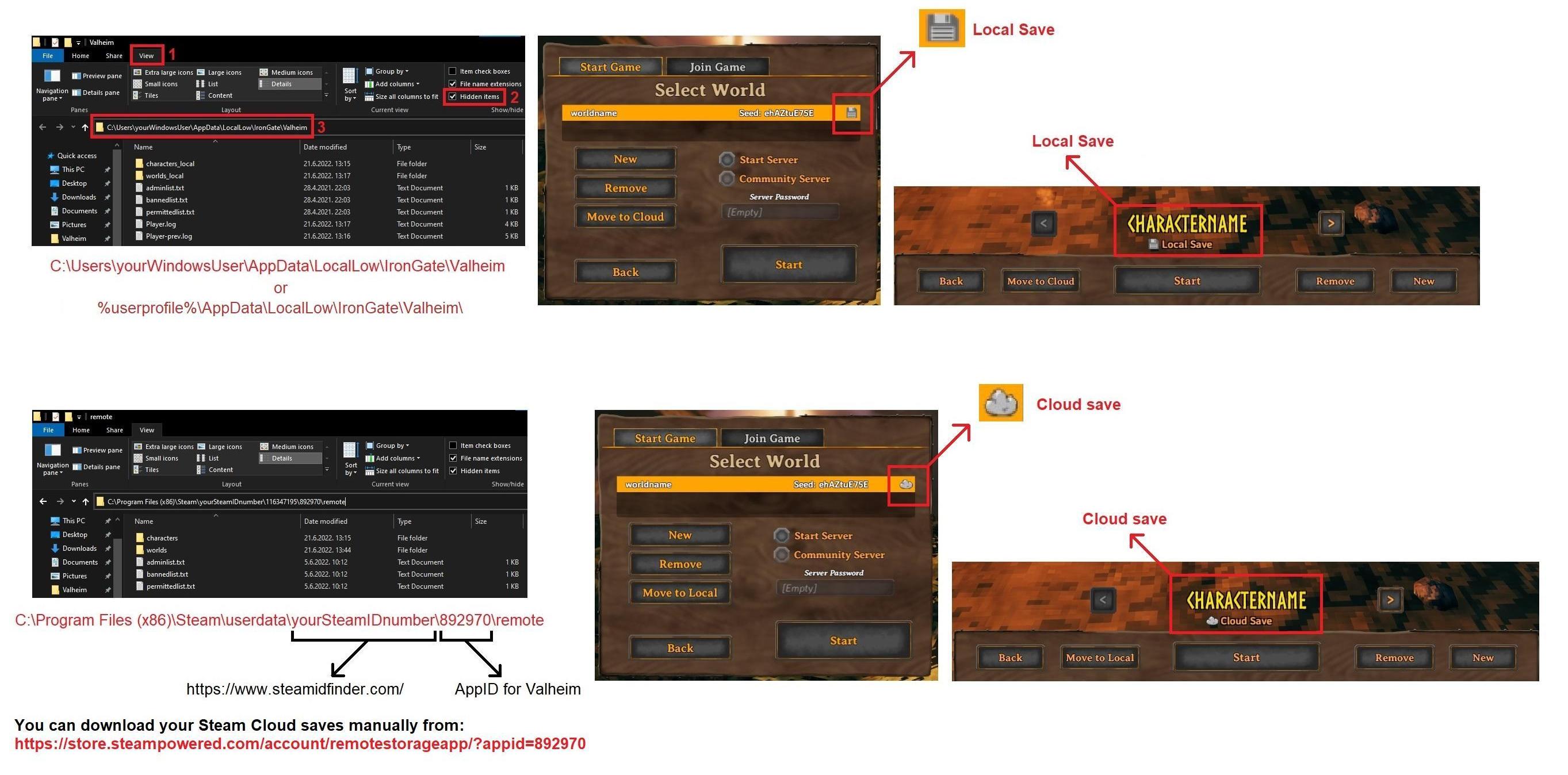
If you can see them, they should be visible in game also. If they are still not visible in game, try restarting you PC, and if that still doesn't help, take a screenshot of how your character and world saves look at you disk (that bottom part of the screenshot).
sudden bear
stark meadow
Can you see Valheim Steam Cloud saves by logging into Steam on your browser?
htt...
yes i can see them in browser
stark meadow
sudden bear
yes i can see them in browser
Should work then. Restart you PC, launch Steam, double check again if Steam Cloud is enabled for Valheim and in general.
Steam can sometimes get borked, so purposely disabling Steam Cloud → restarting Steam → enabling Steam might also help.
open gate
gilded sluice
That's a big brain move
I've been backing up since 2021 so that's fine..
today I got some briefings from some users about the Steam Cloud issue and was wondering if there were any issues, so I just asked. Anyway it's solved! Have a nice day 😆
sudden bear
how do i check if valheim cloud is on? i can only find steam general setting
tried everything else, still don't show
stark meadow
sudden bear
how do i check if valheim cloud is on? i can only find steam general setting
Right click on Valheim in Steam library, then click on properties, and under general there should be a Cloud option.
sudden bear
there isn't
stark meadow
sudden bear
there isn't
Then your Steam is still borked
sudden bear
lovely
stark meadow
You need to restart it properly, by killing it via task manager or closing the little icon next to the clock in windows task bar
Or you need to restart your PC
Closing Steam on the upper right "X" button isn't enough to restart Steam
sudden bear
stark meadow
Or you need to restart your PC
did this and everything els
stark meadow
sudden bear
did this and everything els
Are you using any VPN? (nord VPN) In which world region are you?
sudden bear
no vpn. in finland
stark meadow
sudden bear
no vpn. in finland
Should be fine then. Hm... you can also try deleting Steam download cache and changing the region in Steam settings → downloads
gilded sluice
sudden bear
did this and everything els
did you really logout and back in again?
sudden bear
yes
stark meadow
sudden bear
yes
Try these two:
 sudden bear
trying now
wow, i think that did it. at least there's a cloud option under valheim now
stark meadow
sudden bear
wow, i think that did it. at least there's a cloud option under valheim now
Should be good now then.
sudden bear
actually i only cleared the cache, didn't change the region. thanks a lot!
yeah, confirmed. now i have all my chars and worlds back
 lapis narwhal
stark meadow
Can you see Valheim Steam Cloud saves by logging into Steam on your browser?
htt...
lapis narwhal
stark meadow
Can you see Valheim Steam Cloud saves by logging into Steam on your browser?
htt...
this, have my savegame back
you maybe should create a post on reddit and in the steam discussion forum, so the other players can fix it as well
stark meadow
lapis narwhal
this, have my savegame back
you maybe should create a post on reddit and in the...
I replied to all threads on reddit, so don't think there is a need for a special post.
When did you encounter the issue? Just now?
lapis narwhal
stark meadow
When did you encounter the issue? Just now?
after the update, just now, yes
stark meadow
lapis narwhal
after the update, just now, yes
Just now, as if you didn't know about the issue an hour ago, you went to play now and still couldn't see your saves until you restarted Steam?
Or you encountered the issue an hour ago, decided to wait, and just now tried again and figured that you have to restart steam?
lapis narwhal
stark meadow
Just now, as if you didn't know about the issue an hour ago, you went to play no...
i started the game and tried loading into my savegame and it wasnt there, i looked if others had the same issue and when i did see that, i suspected that someone might have some idea, reddit didnt have the answer for me, so i came here and found your post earlier
i loaded the savegame stored in the cloud manually
lapis narwhal
stark meadow
Just now, as if you didn't know about the issue an hour ago, you went to play no...
was quite the emotional rollercoaster^^
stark meadow
lapis narwhal
i started the game and tried loading into my savegame and it wasnt there, i look...
If you moved your saves to Local, please be aware that Steam is no longer in charge of syncing your saves, and that if you change your hard drive, format it or get onto a new PC, you saves won't be there.
This wasn't necessary to do however. You just had to restart steam.
lapis narwhal
stark meadow
If you moved your saves to Local, please be aware that Steam is no longer in cha...
jup, i know
stark meadow
lapis narwhal
jup, i know
The important information for us is at what time did you notice your characters missing, because we have to know if that happened before or after Devs got it fixed.
Was it an hour ago or few minutes ago, half an hour?
lapis narwhal
probably before, am sitting here for a while now
 bitter abyss
So.. anyone else currently get a black screen and freeze everytime u save, portal or similar... ? 😰 Steam save, all bloody tutorials how to solve it followed except overclocking.
stark meadow
bitter abyss
So.. anyone else currently get a black screen and freeze everytime u save, porta...
The most common cause is an unstable system due to overclocking, or power issues, like GPU not getting enough power.
What are you PC specs and how old is your power supply?
Are you limiting your FPS in Valheim and if so, have you confirmed that FPS is indeed limited?
bitter abyss
stark meadow
The most common cause is an unstable system due to overclocking, or power issues...
It is 1week old lol.
Amd ryzen 5 8600g
32gb ddr5
Freshly installed worked better yesterday tofay just crashing.
Vsync disabled frame limit 59 and graphics medium low and all extras disabled..
Ive spent so much money to upgrade to this, (much for me) and mainly to get this game to work! Others work fine, like wow.. no issue.
I just dont get it and will break down soon
stark meadow
bitter abyss
It is 1week old lol.
Amd ryzen 5 8600g
32gb ddr5
Freshly installed worked bett...
What the wattage on your power supply?
What GPU do you have?
bitter abyss
stark meadow
What the wattage on your power supply?
What GPU do you have?
Corsair 550watt, was counted to be enough. Gpu is integrated in the amd processor.
stark meadow
bitter abyss
Corsair 550watt, was counted to be enough. Gpu is integrated in the amd processo...
That's generally not enough to play Valheim.
Dedicated GPU is required. Valheim relies heavily on GPU power.
However, from what I can see about 5 8600g, a lot of players have issues all over the place with black screen (https://www.reddit.com/r/AMDHelp/comments/1bjhruo/screen_freezegoes_blackgreen/)
I would do the same as one user mentioned, and restore your BIOS setting to default.
bitter abyss
stark meadow
That's generally not enough to play Valheim.
The friend who helped me asked me to go bios and make the ram.. something 4800 to 6000 (?).
I shall try revert this..
Many thanks. If this works, i am forever in ur debt..
stark meadow
bitter abyss
The friend who helped me asked me to go bios and make the ram.. something 4800 t...
I would also advise that you also check your motherboard model and compare which BIOS you have installed vs what is the latest motherboard BIOS on the motherboard manufacturer site
You can check your BIOS version and motherboard model by clicking start → typing and opening system information
 bitter abyss
stark meadow
I would also advise that you also check your motherboard model and compare which...
bitter abyss
stark meadow
I would also advise that you also check your motherboard model and compare which...
i have gone form 6000 whatever to 4800 on my dram, and updated bios to a 6months is newer version.
i managed to save once, no crash, seems promising will try mnore later.. thank you for now, i very much appreciate it.
stark meadow
bitter abyss
i have gone form 6000 whatever to 4800 on my dram, and updated bios to a 6months...
Nice, so it's pretty much a confirmation that black screens were related to that.
Now if you want to increase performance, you can experiment with raising those speeds.
Usually, any raise in clocks should be followed by increase in voltage or the system might become unstable.
You can search for your CPU on youtube and look for how other players have it set up so that it's stable.
Raising voltages too much can lead to instabilities itself or temp problems, and even brick the CPU, so it's risky business.
 long ruin
Tons of objects/creatures fully render in from great distance in Ashlands even at LODBIAS .00001. In all other biomes virtually everything disappears. I suspect this could negatively affect ashlands performance.
stark meadow
long ruin
Tons of objects/creatures fully render in from great distance in Ashlands even a...
Yeah, it a part of a problem, but not the main cause of stuttering there.
long ruin
Word. Is the main cause known? All the buildings?
stark meadow
long ruin
Word. Is the main cause known? All the buildings?
Instantiation of locations is causing the most of the stuttering. There are larger and there's more of them.
long ruin
That sounds like a difficult problem to remedy. Given that the LOD's are totally fixable I hope they address it at some point.
bitter abyss
stark meadow
Nice, so it's pretty much a confirmation that black screens were related to that...
Ye.. now 2nd save same tthing happened. 😦
stark meadow
bitter abyss
Ye.. now 2nd save same tthing happened. 😦
Try just resetting your BIOS to default insted of tweaking things manually.
If you continue crashing, you DM me so we can look at this in more detail.
You can also speed up testing by typing /save in the chat at any time
 teal patio
Just noticed that when rolling or doing any other activity that consumes stamina eitr regen stops for a moment. Not really big deal just putting it out here in case its a bug/not known 🙂
gilded sluice
yeah. both stops when you do stamina using activities
teal patio
Seems weird, i kinda understand why when stamina is used/stops regenerating when using magic, puting strain on you, that stuff, but why the other way?
stark meadow
teal patio
Seems weird, i kinda understand why when stamina is used/stops regenerating when...
Mage is already OP, it doesn't need a single additional buff going its way.
teal patio
Oh yeah, as i said it really is not a big deal, it just seemed strange 🙂
stark meadow
It's intentional. If it were up to me I would stop Eitr regen even while sprinting cuz it's too OP, but it would be too much for people that have difficulties figuring out how to play mage.
 kindred flicker
I'm trying to connect to a friend's dedicated server but I get the Incompatible Version message. His server is on 0.219.16. I have a Steam client on both PC and Mac, the Apple Mac version and Xbox version. I cannot connect with either Steam client (version 0.219.16). I can connect on the Mac version and Xbox version. I can connect all my clients to my own Linux dedicated server. This seems to point to an issue with Steam clients and his host or server config. Has anyone had this issue and resolved it or have any suggestions?
gilded sluice
kindred flicker
I'm trying to connect to a friend's dedicated server but I get the Incompatible ...
could be mods
stark meadow
kindred flicker
I'm trying to connect to a friend's dedicated server but I get the Incompatible ...
Yeah, does the server have mods installed? Double check your Steam installation folder for leftover mods there.
If it's not that, it can be a hanging crossplay connection that usually gets resolved in an hour. Restarting the server and re-adding ip:port to favorites menu as client can help.
gilded sluice
mod makers have been getting alot better to make sure compatibility between client and host 🙂
hence that is my number 1 bet
kindred flicker
gilded sluice
could be mods
Thank you. I'll work with him tomorrow to troubleshoot.
kindred flicker
stark meadow
Yeah, does the server have mods installed? Double check your Steam installation ...
Thank you. I'll look at the mods with him tomorrow. He did restart it after updating it recently.
 rotund lark
Hi, I was wondering if anyone was also unable to load Valheim on steam? I saw a post on steam from a dev saying they had cloud issues and that you should log out/back into steam, but I've tried that and a host of other things as well and every time I try to load into the game I'm met with a low resolution blank screen, I hear the in game music but I can't interact or see anything.
Any help would be greatly appreciated!
stark meadow
rotund lark
Hi, I was wondering if anyone was also unable to load Valheim on steam? I saw a ...
Not the same issue. Best to reset Valheim settings in your case.
rotund lark
stark meadow
Not the same issue. Best to reset Valheim settings in your case.
Will this affect my world/character saves in any way?
stark meadow
rotund lark
Will this affect my world/character saves in any way?
no
kindred flicker
Thank you @gilded sluice and @stark meadow...it turned out to be an outdated Jotunn mod on the server.
rotund lark
stark meadow
no
OMG you're a genius thank you so much it's working now 
gilded sluice
kindred flicker
Thank you <@260480620054970378> and <@196192010581835776>...it turned out to be ...

thankfully it wasn't something worse 🙂
gilded sluice
@tulip vault I'¨ve told you multiple times now.
ENGLISH ONLY
the server automaticly removes non-english messages
 cunning flame
-# Especially Portuguese ones 😂
 hushed falcon
Guys what is with the invisible hitboxes on stuff when I try to jump? Like, if I'm next to a wall and jump, I get forcefully pushed back to the ground and can't jump. Got both me and my duo killed in the ashlands
stark meadow
hushed falcon
Guys what is with the invisible hitboxes on stuff when I try to jump? Like, if I...
Do you have jump bound on a custom key like ALT key?
hushed falcon
stark meadow
Do you have jump bound on a custom key like ALT key?
Nope default space key
stark meadow
hushed falcon
Nope default space key
Playing on Linux, using numbered keys on mouse?
hushed falcon
stark meadow
Playing on Linux, using numbered keys on mouse?
Windows 10, regular mouse and keyboard
stark meadow
Generally, if you jump on a vertical wall, depending on how you input latency, you can either get pushed from the wall or climb it. Ground walls are easier to climb as they are not perfectly vertical.
That behaviour was there since day one, but what might be an issue if you couldn't jump after getting pushed back
marsh wolf
getting the wierdest bug right now, holding shift to sprint is bugging out, tried reopening the game not sure whats happening, will struggle to sprint then start walking then might sprint for a few seconds
stark meadow
marsh wolf
getting the wierdest bug right now, holding shift to sprint is bugging out, trie...
Do you have any custom key binds for actions? Using mods?
Could be ghosting in general from your keyboard. Test if your shift remains pressed when you press multiple other keys while you hold shift. You can use sites like this one to test this: https://en.key-test.ru/ Shift key should remain green as you hold it, no matter how many other keys you press simutaniously. Try pressing those keys that you usually press in game as well (not some random letters on the other side of keyboard).
marsh wolf
yeah shift remains green even when holding all wasd
ill reset laptop and hope that fixes it, no mods or custom key binds that would interfere with shift
stark meadow
marsh wolf
ill reset laptop and hope that fixes it, no mods or custom key binds that would ...
How often does this happen? Would also be useful to test new character in a new world.
marsh wolf
upon further inspection when i slide my finger around the shift key on that website there are certain places it goes white, this has only just started happening tonight when i hopped on
thanks for the help, ill have a look at seeing if theres anything under the shift key
stark meadow
marsh wolf
upon further inspection when i slide my finger around the shift key on that webs...
What's the laptop model btw? Gonna guess Dell
marsh wolf
MSI GP68 bought it like 8 months ago
 delicate cypress
When I middle click in-game nothing happens 99% of the time and then every now and then it will go through correctly. When I try to rebind mouse-3 and it says to select a key, I middle click and the game registers the input as left control. Then left control works, but middle clicking still doesn't. Anyone know what gives? I've found posts of other people complaining about the issue, but no solutions.
stark meadow
delicate cypress
When I middle click in-game nothing happens 99% of the time and then every now a...
First time I heard of this in particular. Most if not all middle click issues are hardware related.
Do you have the link of the post you found?
Are you using mods, or have you in the past?
delicate cypress
I've had valheim plus in the past, but I was using it on a different computer with no issues. Just installed valheim on this (older) computer and its giving issues. Any posts Ive found are years old. MMB works just fine outside of the game and in other games.

I verified files
stark meadow
delicate cypress
https://www.reddit.com/r/valheim/comments/ll4jf9/middle_mouse_button_not_working...
Not the same issue.
What do you mean by rebinding mouse-3? Do you mean when rebinding deconstruction action, and you press middle mouse button, you get a left control as result?
delicate cypress
yes
stark meadow
delicate cypress
yes
What mouse model do you have?
delicate cypress
no, not exactly the same issue, just the most recent post I was looking at for similar issues. special attack and deconstruct both dont work right
I am using a laptop trackpad. I'm not sure what that classifies as for a model
stark meadow
delicate cypress
I am using a laptop trackpad. I'm not sure what that classifies as for a model
Do you have a button for middle mouse click or you hit with 3 fingers on a touch pad?
delicate cypress
3 fingers
I'm sure its some weird interaction, and I know almost no one plays games with a touchpad so I know asking here is a longshot
stark meadow
delicate cypress
3 fingers
Your laptop is probably sending multiple keys and Valheim is interpreting only the first one.
An Online Testing Utility that helps you to test all keys on
your keyboard. Works accurate with any keyboard and any browser
What inputs get registered on this site when you tripple tap?
delicate cypress
oh thats fascinating. Middle click, windows, l-ctrl, l-shift and undefined
well, thats not a game issue. Thats uh.. I'm not sure what that is. or why that is.
that solves the interaction at least so I can go figure out whats causing it. It only sends middle click if I tap while moving. It jsut sends a buttload of inputs if I tap without moving
stark meadow
delicate cypress
well, thats not a game issue. Thats uh.. I'm not sure what that is. or why that ...
Will check if this worked on previous game versions. It might be an issue since Nov2023 when Valheim transitioned to custom input system.
Checked. Seems like tripple tap on touch pad could never be used. Will list this as an issue so that it can be checked if it can easily be fixed. In the mean time, use a different key.
delicate cypress
triple tap on touchpad does work on my other laptop
stark meadow
delicate cypress
triple tap on touchpad _does_ work on my other laptop
Also by tripple tap on touch pad?
delicate cypress
yes
stark meadow
delicate cypress
yes
How does it get registered on the site?
delicate cypress
I dont know, I'm not using that laptop because its off for repairs
but the difference may be windows 11 sending the input differently than windows 10
old post about an unrelated software says
Reason this is happening: Although not visible to the user, these gestures are made up of keys. For example, the three finger tap gesture uses the following keys: Ctrl Left + Shift Left + Win Left + F22
stark meadow
delicate cypress
old post about an unrelated software says
> Reason this is happening: Although ...
Might be a windows 11 thing.
Try to disable gestures in bluetooth and devices settings.
delicate cypress
if I disable it, I cant middle click at all


 hollow cape
Hello team, been having issues with valheim, not responding I've tried many things and followed the reddit guide but nothing seems to work. I've left it alone for over 20mins and it's stuck on not responding or "Loading the world" as some describe it. I will list my specs, and a latest picture of it happening, game is completely frozen, I can still hear audio in the background, no sounds from NPC's however only ambient sounds:
CPU: Ryzen 5 7600x
GPU: AMD Radeon RX 6600
Ram: 32gb ddr5 6000mts
Installed on m.2
 stark meadow
hollow cape
Hello team, been having issues with valheim, *not responding* I've tried many th...
stark meadow
hollow cape
Hello team, been having issues with valheim, *not responding* I've tried many th...
Which exact model of RX 6600 do you have (manufacturer).
Have you tweaked any clocks on it?
Do you have Adrenaline installed and which profile do you have selected for the card?
Have you looked what does player.log say?
Are you running any other overlays in the background (MSI afterburner, OBS, Medal)?
gilded sluice
hollow cape
Hello team, been having issues with valheim, *not responding* I've tried many th...
don't mask links 😄
hollow cape
Sorry wanted to send the message as clean as possible lol.
- Model is Gigabye Eagle 8gb https://www.gigabyte.com/Graphics-Card/GV-R66EAGLE-8GD#kf
Questions 2 and 3 in attached picture:
-
Have not check player log
-
Don't have any installed overlays
 gilded sluice
hollow cape
Hello team, been having issues with valheim, *not responding* I've tried many th...
gilded sluice
hollow cape
Hello team, been having issues with valheim, *not responding* I've tried many th...
usually the not responding during world creation atleast is due to players clicking in the game window something 🤔
but completly freezing sound like a issue outside valheim
the question is why and what
hollow cape
Am I able to share the player log file?
gilded sluice
sure. just drag-n-drop it into chat
stark meadow
hollow cape
1. Model is Gigabye Eagle 8gb https://www.gigabyte.com/Graphics-Card/GV-R66EAGLE...
Try setting your CPU to default, and GPU to undervolt and see if it affects the crash rate. Upload player.log next time your crash. You can also check the guide on where to look for previous player.log file that got created as result of crashes.
hollow cape
Just to confirm, this is the file you need?
 stark meadow
hollow cape
Just to confirm, this is the file you need?
stark meadow
hollow cape
Just to confirm, this is the file you need?
But the file has to be taken right after a crash happens and before you launch the game again
hollow cape
Yep, I have not launched the game since my initial picture, Right after the crash.
hollow cape
stark meadow
Try setting your CPU to default, and GPU to undervolt and see if it affects the ...
Trying
stark meadow
hollow cape
Yep, I have not launched the game since my initial picture, Right after the cras...
Looks like typical GPU crash, so I stand by what I said, undervolt GPU, default CPU profile.
gilded sluice
can we see the player-prev also?
gilded sluice
Direct3D: detected that using refresh rate causes time drift. Will stop trusting refresh rate until the game window is moved.
Direct3D: detected that vsync is broken (it does not limit frame rate properly). Delta time will now be calculated using cpu-side time stampling until the game window is moved.
🤔
@stark meadow
Hm.. just some wierd stuff if you enable V-sync in the AMD tools instead of ingame
@hollow cape did you ever have mods before?
hollow cape
Should I be launching with Vulkan or normal?
hollow cape
gilded sluice
<@120374943434145792> did you ever have mods before?
I have not
gilded sluice
could I see your install folder?
hollow cape
 gilded sluice
ty
unless MaCarBre's idea works out
try to do a clean re-install of the GPU drivers
hollow cape
Launched it just now and stop responding right after the logos, where the character is by the fireplace
hollow cape
Yes
hollow cape
Also Drivers are freshly installed, with the help of DDU as well.
stark meadow
hollow cape
Launched it just now and stop responding right after the logos, where the charac...
And that crash just now was with default CPU profile and GPU underclock?
hollow cape
Yes it was.
 gilded sluice
can you show us the last player.log file?
hollow cape
stark meadow
hollow cape
Yes it was.
You will probably have to manually tune it then. Crash usually happens due to to lower power delivery or too high voltage.
You can try looking at tutorials like this on how to do it: https://www.youtube.com/watch?v=HqG_0d8hqIk
I have a SAPPHIRE as the guy in the video, however mine was also stable on default as well.
hollow cape
Should I launch as administrator from the exe file, or from steam? and with Vulkan or without?
stark meadow
hollow cape
Should I launch as administrator from the exe file, or from steam? and with Vulk...
Shouldn't matter. In terms of stability more people are stable on default (d3d11, so not Vulkan), but some people crash in d3d11 and not Vulkan.
On a stable system, both should work always, and then Vulkan gets you more preformance.
hollow cape
Understood
stark meadow
hollow cape
Understood
Let me know when you try tweaking your clocks a bit and how it went.
hollow cape
So far no luck, a small unity box appears with a loading bar and then the game closes right after launching it.
stark meadow
That's how generally all abrupt crashes go on 6600 6700 cards. We have many reports.
I've heard from only only one user actually trying to solve it, who reported back being successful.
These were their clocks: https://i.imgur.com/QXjbpAp.jpg I however completely forgot was it 6600 or 6700 card, but they basically adjusted only percentages, and didn't touch smart access memory and power. The just decreased both voltage and frequency by 4%.
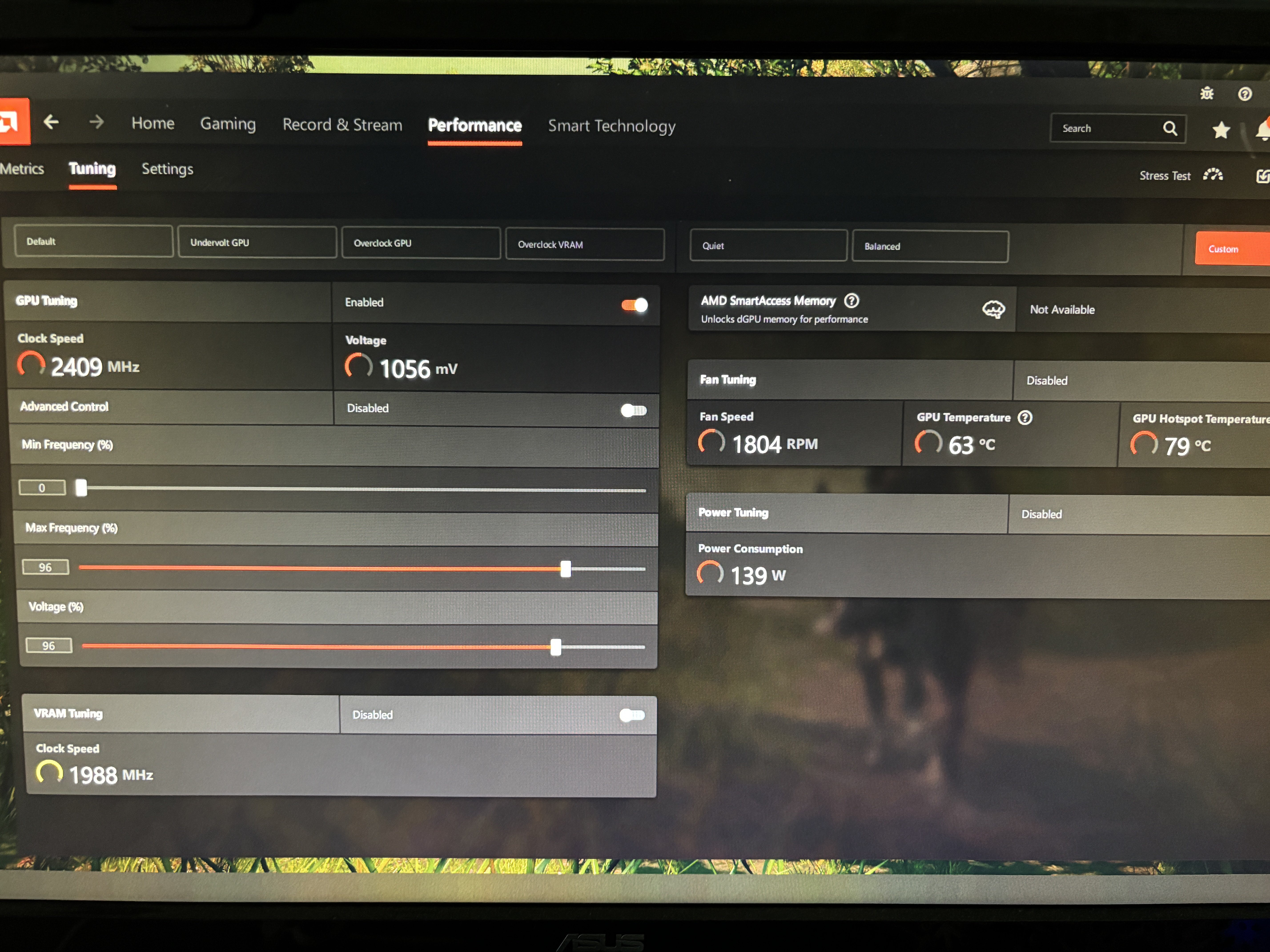
You can also try 3% and 5% to see if there is a difference.
If that happens to not help, we can continue this in detail though DM. I would like to to someone who might be determined to see this through the end and solve their crash issue.
hollow cape
no luck, using previous version now
 hardy prism
haven't found the relevant channel, so i'm sending it here, there is a bug on the website ui
#screenshots message
stark meadow
hardy prism
haven't found the relevant channel, so i'm sending it here, there is a bug on th...
What burger? Do you have some sort of browser plugin or is there a burger on the site somewhere that I'm not seeing?
Ah, I see now what you mean. Didn't have a hamburger menu on Linux
hardy prism
stark meadow
Ah, I see now what you mean. Didn't have a hamburger menu on Linux
hamburger sounded tastier, that's why i didn't dare to say it 🥲
 maiden cloud
I need some help from honestly anyone. My buddy and I are having a hard time playing together. Whenever he tries to connect to my game, whether i make it a community server or not he gets a pop up saying, "Failed to connect" and whenever I try to connect to his server, no matter if it's community or not, it gives me "Incompatible Version". Anyone have any idea how to fix these? I've reinstalled and verified files but nothing works.
iron steppe
maiden cloud
I need some help from honestly anyone. My buddy and I are having a hard time pla...
Make sure cross play is disabled.
Make sure both of you are running zero mods at all
Get your friend to verify their install.
Both of you check the version number on the main menu.
maiden cloud
iron steppe
Make sure cross play is disabled.
Make sure both of you are running zero mods ...
Were both running the exact same mods on R2MODMAN, and making sure they're the exact same mods. We never had any issues in the past but now were unable to join one another.
stark meadow
maiden cloud
I need some help from honestly anyone. My buddy and I are having a hard time pla...
Incompatible version error message is usually related to mods. You can get more support at #mods-issues This channel is for vanilla issues only.
If you want to test a vanilla connection, you have to ensure that your installatoin folder looks like this: https://i.imgur.com/vdpdeOA.jpg and has not more extra files.
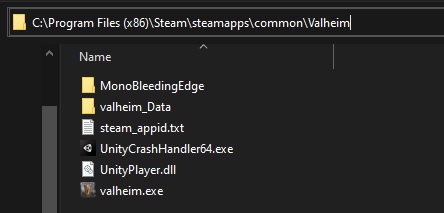 maiden cloud
stark meadow
Incompatible version error message is usually related to mods. You can get more ...
maiden cloud
stark meadow
Incompatible version error message is usually related to mods. You can get more ...
I appreciate it and sorry about that. Been trying to figure this out for neearly 4 hours now.
iron steppe
maiden cloud
Were both running the exact same mods on R2MODMAN, and making sure they're the e...
100000000% it’s a mod issue.
Just turn them off. Connect. Then turn them on one at a time.
maiden cloud
iron steppe
Just turn them off. Connect. Then turn them on one at a time.
Not to sound to stupid, but how do you turn them off and then back on 1 by 1 while in game? Don't they have to be all installed on r2modman before hitting the "Start modded" button
gilded sluice
maiden cloud
Not to sound to stupid, but how do you turn them off and then back on 1 by 1 whi...
no clue. ask in #mods-issues 🙂
but you 100% some kind of mod-miss match
or you two perhaps found a mod that is broken
maiden cloud
gilded sluice
or you two perhaps found a mod that is broken
I had a feeling that might be the case, only reason I stopped thinking it was that was because we were both getting different messages when trying to connect to each other. I got incompatible version and he was getting Failed to connect
gilded sluice
usually disable all mods, then re-enable them 1 by 1 is one way find out which one is broken
also use new world and new characters since some mods will stop you from joining
maiden cloud
I'll give it a shot, we only have like 12 mods but it's better then what we've been doing.
iron steppe
maiden cloud
Not to sound to stupid, but how do you turn them off and then back on 1 by 1 whi...
You can tick them as enabled/disabled in r2modman somewhere. So that way you can do it one at a time.
maiden cloud
iron steppe
You can tick them as enabled/disabled in r2modman somewhere. So that way you can...
So like should we disable them all, start the game and then join one another and tick them on one by one while still being in the gamee or restarting after each?
iron steppe
maiden cloud
So like should we disable them all, start the game and then join one another and...
You have to restart after each.
But step one is connect with zero mods and confirm that works.
 balmy garnet
nicee
 kindred ingot
im getting "failed to connect" trying to join a friend after they got a world transferred to them
they restarted their game and i did too and it still didnt help
stark meadow
kindred ingot
im getting "failed to connect" trying to join a friend after they got a world tr...
If you are both on steam, disable crossplay option before starting your server.
kindred ingot
bet lemme try
kindred ingot
stark meadow
If you are both on steam, disable crossplay option before starting your server.
didnt work
stark meadow
kindred ingot
didnt work
Double check instalation folder, for leftover files from mods. The installation folder for you and your friends should look like this:
https://i.imgur.com/vdpdeOA.jpg You both should not have any access files there other than you can see on screen.
Also check when you are trying to connect to a friend's server, after they have disabled crossplay, how they server looks like in your steam friends tab before you try to connect to it. When crossplay is disabled, it should not have a intertwined arrows icon anymore.
gilded sluice
kindred ingot
im getting "failed to connect" trying to join a friend after they got a world tr...
if you don't use Crossplay.
you have to open ports to be able to connect
as in. the host needs to
does any of you use Wifi or VPN?
or mods?
kindred ingot
stark meadow
Double check instalation folder, for leftover files from mods. The installation ...
she had that and thunderstoremm on it but she doesnt use any mods on valheim so we just deleted it
kindred ingot
gilded sluice
does any of you use Wifi or VPN?
or mods?
nope
they just transferred the world to eachother and it started happening
when starting the world it said that its using old file structure, so could that be the problem
maybe we sent the wrong files or did it wrong
stark meadow
kindred ingot
she had that and thunderstoremm on it but she doesnt use any mods on valheim so ...
Your friend is hosting their world through the game options right?
Deleting mod organiser is not enough usually, nor is reinstallation of the game. The installaton folder has to be manually cleaned from those files.
Make sure she checked the files manually.
stark meadow
kindred ingot
when starting the world it said that its using old file structure, so could that...
She probably put the world files into worlds folder instead of worlds_local, should matter to connection issues.
gilded sluice
kindred ingot
maybe we sent the wrong files or did it wrong
you only need 2 files to host 🤔
but hosting doesn't care. if either file is wrong, it will make a new one and the world will be probably wierd.
but there will be a server up
kindred ingot
stark meadow
She probably put the world files into worlds folder instead of worlds_local, sho...
yeah we put it in world instead of worlds_local, but since she alrdy launched the world it now has some files in world_local, does that matter or do we just move it there again
stark meadow
kindred ingot
yeah we put it in world instead of worlds_local, but since she alrdy launched th...
Shouldn't matter what so ever.
kindred ingot
gilded sluice
you only need 2 files to host 🤔
yeah we sent 2 files and the world looked fine
gilded sluice
then it should be fine
there are some issues when it comes to connecting
- if you use crossplay. you usually cannot use VPN and wifi internet, mobile hotspot or any other wireless internet. usually are dropping packages.
- if you use steam, the host needs to open ports in the router.
- some people are locked by the internet service provider in a grouping, making it impossible to host games since they force you to share IP address with multiple people
- mods can stop connections if they aren't correct
kindred ingot
gilded sluice
1. if you use crossplay. you usually cannot use VPN and wifi internet, mobile ho...
we might just have to open ports
gilded sluice
where is the manual 🙂
stark meadow
kindred ingot
we might just have to open ports
You shouldn't need to open ports if you are not running a dedicated server.
kindred ingot
stark meadow
You shouldn't need to open ports if you are not running a dedicated server.
yeah thats what i was thinking too but idk anymore
stark meadow
kindred ingot
yeah thats what i was thinking too but idk anymore
That's why I asked if she's hosting from withing the game.
If so, then the issue is somewhere else.
kindred ingot
yeah she is hosting from in the game, not a dedicated server
gilded sluice
open ports 🙂
stark meadow
kindred ingot
yeah she is hosting from in the game, not a dedicated server
You haven't confirmed how your and her's installation programs looks like now. How do they?
gilded sluice
both are the same (client / dedicated server)
the dedicated program is the normal game client without visuals basicly
hence all the warnings when you start it 😄
kindred ingot
ok hold on
gilded sluice
default ports are 2456 and 2457
kindred ingot
guys im sorry
gilded sluice
oh?
kindred ingot
she had a damn vpn on 😭
kindred ingot
yeah thx for the help anyways
gilded sluice
just disable it (for valheim only if you can) and then use crossplay for the easiest connection
gilded sluice
😄
stark meadow
kindred ingot
she had a damn vpn on 😭
VPNs usually work when crossplay is disabled, so you probably missed that part as well
Did you notice if the server had crosplay icon before trying to connect this last time?
stark meadow
kindred ingot
she uses warp
Think warp uses IPv6 only. Was probably some IPv4 to IPv6 conversion issues then.
When you have some time, please ask her what she gets when warp is disabled on this site: https://test-ipv6.com/
Does she have both IPv4 and IPv6 address available.
gilded sluice
don't know Warp to be honest 🤔
I just know that most VPN cannot make all valheim networking working correctly
you can establish a connection, but when the data wants to be sent, it doesn't work
kindred ingot
stark meadow
Think warp uses IPv6 only. Was probably some IPv4 to IPv6 conversion issues then...
oh we alrdy fixed the problem alrdy
stark meadow
kindred ingot
oh we alrdy fixed the problem alrdy
Yeah, I know, just wondering why warp didn't work.
kindred ingot
ah ok
stark meadow
kindred ingot
ah ok
When you find the time, ask her to spin that test. Might be indicative of some other problem we might have.
kindred ingot
stark meadow
When you find the time, ask her to spin that test. Might be indicative of some o...
it does use ipv6
stark meadow
kindred ingot
it does use ipv6
IPv6 only or IPv4 as well?
kindred ingot
its ipv6 and ipv4
 cosmic rose
very annoying performance issue? the whole game just takes mind of its own. cant pick anything up player auto walks cant attack jump roll nothing. for a solid 3 seconds. happening every minute or so
getting 150+ fps
iron steppe
cosmic rose
very annoying performance issue? the whole game just takes mind of its own. cant...
You running ANY mods?
You running Discord with overlay on?
cosmic rose
iron steppe
You running ANY mods?
You running Discord with overlay on?
nope and nope
gilded sluice
cosmic rose
very annoying performance issue? the whole game just takes mind of its own. cant...
Is it on multiplayer ?
iron steppe
cosmic rose
very annoying performance issue? the whole game just takes mind of its own. cant...
The player auto walking sounds strange to me. Kind of like your input keyboard is doing something.
And/or that some other app is stealing input focus.
gilded sluice
My guess is a handcontroller
I've seen really wierd issues with some of them.
And games like elite and dangerous installs a "fake" handcontrol even
cosmic rose
gilded sluice
Is it on multiplayer ?
singleplayer
gilded sluice
cosmic rose
singleplayer
do you have some kind of game controller plugged in, but you're not using it?
cosmic rose
gilded sluice
do you have some kind of game controller plugged in, but you're not using it?
nope lol
gilded sluice
cosmic rose
nope lol
playing any games like a flight simulator or space flight?
stark meadow
cosmic rose
very annoying performance issue? the whole game just takes mind of its own. cant...
My first thought is thermal throttling or some kind of app running in the background stealing disk or CPU utilisation.
What are your PC specs? If on laptop, which model?
 supple sable
hey, i found a way to brick one of my worlds, instantly crashing my game, with sign reformatting, is this a known bug and if not where should i take it to so it might get fixed?
stark meadow
supple sable
hey, i found a way to brick one of my worlds, instantly crashing my game, with s...
By increasing the size of signs? If so known issue. Not sure when it will be fixed or if the feature will be removed. Rich text editing wasn't intended as a feature in the first place. Devs are more inclined on fixing it atm, just not a priority.
supple sable
stark meadow
By increasing the size of signs? If so known issue. Not sure when it will be fix...
well it involved the resizing of text, but that wasnt what made it crash, sorry if im being vague im just not too familiar with valheim so idk if people would use this to brick other players servers or smt
stark meadow
supple sable
well it involved the resizing of text, but that wasnt what made it crash, sorry ...
Will send you a DM about the example we are aware of.
gilded sluice
supple sable
well it involved the resizing of text, but that wasnt what made it crash, sorry ...
well. things can usually be restored with backups
but still consering for sure
delicate cypress
delicate cypress
triple tap on touchpad _does_ work on my other laptop
Update from a few days ago in case it's relevant to anyone: the windows 11 laptop does indeed only send middle mouse click when using 3-finger tap
 ripe igloo
interesting carry stat. I didn't have any other modifiers active besides the belt. It happened when I picked up a bunch of stuff from the ground
 marble wolf
ripe igloo
interesting carry stat. I didn't have any other modifiers active besides the bel...
marble wolf
ripe igloo
interesting carry stat. I didn't have any other modifiers active besides the bel...
Do you the death run buff?
ripe igloo
marble wolf
Do you the death run buff?
oooh that's it. Didnt know that also gave you extra carry weight
marble wolf
Yep, to make sure you can get everything from your grave without the belt.
 abstract oyster
Am I the only one having trouble playing with friends?
they can´t connect my world
stark meadow
abstract oyster
Am I the only one having trouble playing with friends?
If you are all on steam, disable crossplay on the server. Don't use VPN.
abstract oyster
ok ill try
 lyric yacht
Hey, anyone have any advice - my game keeps crashing when I'm on multiplayer.
I turned the VPN off, that seemed to help, but it's back to crashing again.
Just now, for a moment, I saw a Valheim Unity error notification, or sth like that.
stark meadow
lyric yacht
Hey, anyone have any advice - my game keeps crashing when I'm on multiplayer.
I...
Crashes are not network related usually. List your PC specs. Are you using any mods?
 graceful lintel
Eitr consumption listed in staff tooltips doesn't reflect real required values based on blood skill magic (seems like a bug) unless this is intentional. Didn't see it mentioned anywhere else in here.
balmy garnet
I’m not able to join my friend’s server. We made a server last night and we played on it for like 4 hours with no issues. Now today I tried getting into it and it keeps saying “Failed to Connect.” I’m completely lost on how to fix the issue. We both restarted our games and everything and it still doesn’t work. The first server we made before this one, we only played on it for only a few minutes before it kicked me out saying “Failed to Connect” So we abandoned the server to make the one I can’t get to now with the same issue. Any help would be appreciated
stark meadow
balmy garnet
I’m not able to join my friend’s server. We made a server last night and we play...
Using mods? Any of you on WiFi? Tell to whoever is hosting to disable crossplay before starting the server. Both of you should not be running VNP (start → device manager → network adapters → check if you have VPN installed and disable it). Both of you can also try to lower steam browser pings per minute in steam general settings → in game → from 5000 to 250.
stark meadow
graceful lintel
Eitr consumption listed in staff tooltips doesn't reflect real required values b...
Some staves don't scale with blood magic skill atm. Will be tweaked later.
 balmy ginkgo
can't make the carry mead with two different sizes troll fish
stark meadow
balmy ginkgo
can't make the carry mead with two different sizes troll fish
It was intentional, so you don't waste a higher level fish when you could get more raw fish from it. Probably will be tweaked later so you can craft with it as well.
balmy ginkgo
oh ok ty
balmy garnet
stark meadow
Using mods? Any of you on WiFi? Tell to whoever is hosting to disable crossplay ...
No mods, we're both connected on WiFi, crossplay is disabled, no VPNs. And we both lowered steam browser ping per minute to 250 and it still doesn't work for me
 wintry apex
What kind of Wifi?
balmy garnet
wintry apex
What kind of Wifi?
Idk
wintry apex
Not using a phone for the internet connection?
Because we had an similar issue earlier today and turned out the person who had it was using a phone as modem, which caused the lag / connection problem.
balmy garnet
Yeah we're both not using a phone for the internet connection
stark meadow
balmy garnet
Yeah we're both not using a phone for the internet connection
Will start a test server for you both so we can figure out who has the issue
balmy garnet
stark meadow
Will start a test server for you both so we can figure out who has the issue
Sounds good
balmy garnet
stark meadow
Will start a test server for you both so we can figure out who has the issue
I gotta head out rn, my bad. We can do it later if you can, all good if not
graceful lintel
stark meadow
Some staves don't scale with blood magic skill atm. Will be tweaked later.
sweet thanks for getting back!
 ancient wadi
Hi
Just posting here to mention that I hardly bought the game a few hours ago, and every 10 minutes the character starts to run from himself and no way to stop him.
REALLY NO WAY.
No key react at all, and I can't even get out of the game with the usual alt + tab.
NOTHING works. I HAVE TO FORCE SHUT MY PC DOWN COMPLETELY with pressing long time on the power button ! I's completely unplayable
On my end I'm fed up with this and will delete it from my steam account, not the first time i throw money in the air this way though. But i just connected here to share it, hoping you'll solve the issue for next players in the future. Take care.
 stable cliff
ancient wadi
Hi
Just posting here to mention that I hardly bought the game a few hours ago,...
stable cliff
ancient wadi
Hi
Just posting here to mention that I hardly bought the game a few hours ago,...
could be else, but the default "autorun" key is very close to wasd, maybe try to reconfigure keyboard imputs and see if problem is solved?
nevermind, if alttab doesn't work, it's something else
ancient wadi
I already mapped the keys at the very beiginning. i didnt touched it and its not the autorun since it would have stopped when i push the button again, and theres no way that a simple autorun would normally get executed forever blocking any other game feature to be used until forcing me to systematically shut the pc off !!
moreover, last time it happened i was cutting woods so only button that i touched at this moment was left mouse...
its clearly a game bug
wintry apex
Could also be a dirty keyboard, sticking keys or whatever.
Or a mod interfering with something.
stable cliff
ancient wadi
I already mapped the keys at the very beiginning. i didnt touched it and its not...
uhm, yup it looks like one, neverhappened to me, can't be of much help here besides suggesting to check https://www.valheimgame.com/support on "known issues" section

Please leave your feedback in the forms.
wintry apex
My reasoning because of that: If it clearly was a game bug, it would've been reported a lot more often as it is now.
Which for me means: you're the 2nd person reporting this. So that makes a game bug very unlikely.
stable cliff
uhm, yup, it's strange, i would expect a game freeze upon not beig able to force-close the executable..
marble wolf
wintry apex
My reasoning because of that: If it clearly was a game bug, it would've been rep...
There'd be absolute riots with a bug like that. My money is on a plugged in controller.
stark meadow
ancient wadi
I already mapped the keys at the very beiginning. i didnt touched it and its not...
If your entire PC freezes, it's not a game bug, rather something happening with your system.
What specs do you have? Do you have any other input devices plugged in other than mouse and keyboard (USB hubs, controllers, controller mods, etc..)
gilded sluice
PC freezes are mostly due to hardware issues
like cooling for the CPU / GPU not working correctly
not under stress usually
or a storage drive is on the verge of stop working
 exotic light
Not sure if it’s a bug or just an oversight on my part. I deleted a world and started a new one same name new seed.. but the map is not the same. Currently it says I’m walking over the ocean
Saw a Reddit post that told me to me delete my worlds local maps but I’m on Steam deck and the Linux path is confusing
cunning flame
By map you mean minimap ?
exotic light
Yep that
cunning flame
makes more sens now. Not sure if you can delete only the minimap information, and I fear the post you saw was talking about deleting the world map (not the minimap)
The issue comes probably from the naming, even if it looks strange. If you create a new world with a different name do you still get the issue ?
gilded sluice
exotic light
Saw a Reddit post that told me to me delete my worlds local maps but I’m on Stea...
you can find the backup files in the game
stark meadow
exotic light
Not sure if it’s a bug or just an oversight on my part. I deleted a world and st...
Try selecting show player log button in the starting menu, it should lead you to the folder where worlds files are located, you have to delete cache files from the previous world (3 such files).
gilded sluice
manages saves. then click the world and delete the old one
 ancient wadi
stark meadow
If your entire PC freezes, it's not a game bug, rather something happening with ...
ancient wadi
stark meadow
If your entire PC freezes, it's not a game bug, rather something happening with ...
Hi ! Sorry for the delay!
I got Ryzen 7 with i7 11th and 8Gb Ram. The only thing plugged is the USB of my wireless mouse. Hardly bought the game so I didn't put any mod at all I didn't even know we could do it.
stark meadow
ancient wadi
Hi ! Sorry for the delay!
I got Ryzen 7 with i7 11th and 8Gb Ram. The only thing...
When you say Ryzen 7 and i7 11th gen, are you talking about CPUs? Those are both CPUs. Which of those do you have? Any GPU?
Did this issue start happening from the first 10min of you playing, or were you playing fine for a while before this started happening?
ancient wadi
Ohh sorry I mixed with my pro computer,
Yes i7 11th and rtx 4060.
I'd say, after 30-40min it started
stark meadow
ancient wadi
Ohh sorry I mixed with my pro computer,
Yes i7 11th and rtx 4060.
I'd say, afte...
Are you also playing in your world or on some server that someone is hosting?
Could you DM me your character save file, wanna try it on my PC, while I think you should try a new character, to see if the same issue will happen or not
The character save file can be found on the location shown in this bottom part of the screenshot (steam cloud saves). Naming format is charactername.fch
iron steppe
What is interesting is you are the 2-3rd person to mention auto run and no input issues after X period of time in the past few days.
My money is on some 3rd party driver/update somewhere causing the issue.
gilded sluice
we have had so many wierd "ghost inputs" from wierd stuff over the years
iron steppe
Do you run Win11?
It’s funny cause the past week after I did the most recent Win11 update I noticed my usb mouse disconnecting and reconnecting 3 times, and it has never done that in the past 3 years… I’ve been meaning to look into it.
gilded sluice
wireless controllers, games with faked controllers like elite and dangerous or other flight sim games, 3rd party drivers for mouse/keyboards etc
iron steppe
Yeah; the joys of software support 🙂
gilded sluice
usually turning off game pad / game controllers for valheim in steam + ingame solved the issues before
these


 grizzled void
something quite off with the Hitbox of the kart. this is as close to the wall I can bring it. it won't budge to be brought closer.
 gilded sluice
Stuck on one of the roots?
exotic light
stark meadow
Try selecting show player log button in the starting menu, it should lead you to...
Im assuming you mean I should delete the ones ive circled

Cause both the mini map and map function are off
 stark meadow
exotic light
Im assuming you mean I should delete the ones ive circled
stark meadow
exotic light
Im assuming you mean I should delete the ones ive circled
No. You have to delete files manually in steamdeck desktop mode. Don't delete anything inside the game.
Did you attempt to select show player.log button that is in the game starting menu?
It should lead you to the folder where you can then find worlds_local subfolder, in which you can find cache files that need to be deleted
exotic light
Ah okay i see what you are saying now
So the button doesn’t exist on Steam deck, verified on windows that it’s there but not seeing on Linux
grizzled void
my black metalshield seems to be affected by the sunset's light. when clearly everything else is in the dark. 🙂
 balmy garnet
stark meadow
Will start a test server for you both so we can figure out who has the issue
balmy garnet
stark meadow
Will start a test server for you both so we can figure out who has the issue
Hello, would it be alright if we tried out the test server?
stark meadow
balmy garnet
Hello, would it be alright if we tried out the test server?
Sent you a DM
 tawdry niche
i got stuck on manage saves for like ever, i reinstalled the game and cleared my cache, but nothing worked
i want to move my save from cloud to local but i can't
 stark meadow
tawdry niche
i got stuck on manage saves for like ever, i reinstalled the game and cleared my...
stark meadow
tawdry niche
i got stuck on manage saves for like ever, i reinstalled the game and cleared my...
Do you know how to reach your Steam Cloud saves folder based on this screenshot?
https://i.imgur.com/mTVKf1J.jpg?4
tawdry niche
i saw this solution on the internet but it didn't work for me
stark meadow
tawdry niche
i saw this solution on the internet but it didn't work for me
That's not a sulution per se, rather I just asked if you can navigate to that folder, is that a yes?
tawdry niche
yes i can
stark meadow
tawdry niche
yes i can
Nice, send me a screenshot of how that folder looks like for you
With file extensions showing, and dates showing
tawdry niche
ok give a sec
stark meadow
tawdry niche
ok give a sec



 stark meadow
tawdry niche
is this what you want?
stark meadow
tawdry niche
is this what you want?
Close, screenshot the insides of worlds and characters folders
You can DM me the screens so that we don't spam the channel unnecessarily
tawdry niche
ok
 tame spire
hi, is anyone else struggling with their (non-dedicated)servers right now? im EU based playing with someone US based. they keep getting disconnected from it despite me not having anything else open in background to eat up network bandwith.
we played together before with other people as well and had no issues. they were hosting.
stark meadow
tame spire
hi, is anyone else struggling with their (non-dedicated)servers right now? im EU...
Do you have crossplay enabled on your server?
tame spire
stark meadow
Do you have crossplay enabled on your server?
i do not. we're both on PC
stark meadow
tame spire
i do not. we're both on PC
What are you PC specs and which result do you get when you test your connection on this link:
https://www.waveform.com/tools/bufferbloat
Test this while Valheim is closed first and then the second time when someone else is on the server
It would be a good idea for them to also do this test
Valheim also recently got updated with some network fixes (new version only available by opting into public beta test on Steam), for which it would be great to know if it would alleviate what ever issue you have right now.
tame spire
stark meadow
What are you PC specs and which result do you get when you test your connection ...
W10 home
NVIDIA GeForce RTX 3050
16GB RAM
AMD Ryzen 5 4500 6-core
(valheim closed)

@wise jetty
 wise jetty
W10 Home
NVIDIA GeForce RTX 3060
16GB RAM
AMD Ryzen 7 5800X 8-Core
:/
 tame spire
(its weird cause we played before and it was fine??? we even had multiple people join us)
stark meadow
tame spire
(its weird cause we played before and it was fine??? we even had multiple people...
Can others join normally? Just @wise jetty can't?
tame spire
i joined Danger's server before with others and it was fine
im the one hosting now and he keeps getting disconnected from it
wise jetty
We did briefly join my server and they got similarly disconnected
tame spire
today yeah
wise jetty
but that only happened today
stark meadow
tame spire
i joined Danger's server before with others and it was fine
im the one hosting n...
Is there anyone else playing on your server except Danger?
stark meadow
Send me a DM, so I can try to connect as well. I can also host by world as a test, but from test results, seems like the problem might be on Danger's side. How fast do you get disconnected since joining the server? Or getting disconnected even before passowrd input?
tame spire
with Danger in my server atm
 stark meadow
tame spire
with Danger in my server atm
stark meadow
tame spire
with Danger in my server atm
You connection is super stable, so unlikely that you have a problem. @wise jetty do a test while being on a server as well
tame spire
stark meadow
You connection is super stable, so unlikely that you have a problem. <@186189621...
gotta add you to friends/steam to join
wise jetty
with game open
 stark meadow
wise jetty
with game open
stark meadow
wise jetty
with game open
With just game open, or game open and you being on a server?
wise jetty
on the server
tame spire
we played fine in the weekend..?? (Danger was hosting)
stark meadow
tame spire
we played fine in the weekend..?? (Danger was hosting)
Network issues don't have to be stable over time. Unlikely that the issue is Valheim related either.
In Danger's tests, we can see that their latency is worse when there is an download active.
That means they will have a connection problem when they have download going on in background, on their PC or any other PC, and Valheim in general downloads more data than most other games out there.
A scenario in Valheim where a download load would stress Danger's connection would be you @tame spire loading into the base first (arriving to a base base first via portal) and then Danger arriving to the base right after you. @wise jetty try to preform that bugger bloat test while being in that scenario.
@wise jetty are you on a WiFi connection or wired to your router?
 rotund vapor
Anyone else getting strange artifacts like stretched grass that leads to fragmenting and splotches? It doesmt happen all the time but enought o be annoying and a little concerning. Asus Rtx 4080, 64g ram, rog strix b550xe, ryzen 9 5950
stark meadow
rotund vapor
Anyone else getting strange artifacts like stretched grass that leads to fragmen...
Do you have a screenshot or something?
wise jetty
stark meadow
<@186189621632303104> are you on a WiFi connection or wired to your router?
Wifi connection, I have an extender.
Just curious because I've had no previous problems with disconnection before, and neither has Devellix
rotund vapor
stark meadow
Do you have a screenshot or something?
rotund vapor
stark meadow
Do you have a screenshot or something?
it all started after the last nvdia driver. i rolled back and done all kinda of things
stark meadow
rotund vapor
it all started after the last nvdia driver. i rolled back and done all kinda of ...
Yeah, looks like a graphical glitch. Are you running any overclocks on your card or CPU?
rotund vapor
stark meadow
Yeah, looks like a graphical glitch. Are you running any overclocks on your card...
im running at the dohcp setting i belive its called in ai tweaker but thats it. ive turned it to auto and its actully worse
rotund vapor
stark meadow
Yeah, looks like a graphical glitch. Are you running any overclocks on your card...
im kinda a noob.
stark meadow
rotund vapor
im running at the dohcp setting i belive its called in ai tweaker but thats it. ...
Yeah, seems like an aftermath of a bad overclock
Or could be some cache issue due to drivers being updated
Did you chose to preform custom installaton + clean install or express installation of the new nvidia driver?
rotund vapor
stark meadow
Did you chose to preform custom installaton + clean install or express installat...
i used the cleanup tool then clean install. even cleared the cache manually
rotund vapor
rotund vapor
i used the cleanup tool then clean install. even cleared the cache manually
99% of games are fine which is weird. only shows up in very rare times. usually when i apply any setting in global
but valheim persists to have issues
stark meadow
rotund vapor
99% of games are fine which is weird. only shows up in very rare times. usually ...
Would probably be a good idea to check what's happening with your MAX temps as well (not AVG temps)
I find HWiNFO being the best tool for monitoring that
Which cleanup tool for drivers did you use?
rotund vapor
stark meadow
I find HWiNFO being the best tool for monitoring that
ok ill look into that. thanks. really weird im running kingdom come 2 on ultra at 90fps without a hitch but valheim is just funky. almost like its engine is causing it
rotund vapor
stark meadow
Which cleanup tool for drivers did you use?
nvivida
rotund vapor
stark meadow
Which cleanup tool for drivers did you use?
Would a DDU be somthing that might help?
gilded sluice
usually performing a clean install for nvidia is enough
stark meadow
rotund vapor
Would a DDU be somthing that might help?
If you ever had a different card in your system, DDU would be recommended. If this 4080 was there from the start, go for it as last resort. Valheim is famous from stressing GPU in certain ways other games don't. Your GPU is probably pulling more power in Valheim than in kingdom come, but you are welcome to check that.
rotund vapor
stark meadow
If you ever had a different card in your system, DDU would be recommended. If th...
Im almost at the point of trying a new PS and see if thats the issue. Last thing I want is to send to Asus to be butchered lol. Thanks for the insight
stark meadow
rotund vapor
Im almost at the point of trying a new PS and see if thats the issue. Last thing...
If you start seeing fire emitters emitting a one monotone colour engulfing an entire screen, then it's most likely a cache issue that can be resolved. Right now yours looks like unstable clocks. If you have Nvidia app, return clocks to default. Definitely check temps before anything else just in case. Always good to eliminate that as potential issue. From physical issues, check if your power cable is properly attached on 4080 (some can burn if not fitted properly on high power load) and support GPU so that it isn't sagging.
gilded sluice
which exact model 4080 is it? 🤔
I got a Asus 4080 Super
and what power supply you got?
rotund vapor
gilded sluice
I got a Asus 4080 Super
asus 4080 oc edition and 1000w asus as well
rotund vapor
stark meadow
If you start seeing fire emitters emitting a one monotone colour engulfing an en...
This is very strange but i just installed the lastest update through armory crate and i cant recreate the issue at all for now. Could it really be that simple? Ive been fighting with this for weeks now lol
gilded sluice
I don't trust armory crate
stark meadow
rotund vapor
This is very strange but i just installed the lastest update through armory crat...
I wonder if it applied a better cooling profile for your fans
Did you check the temps before hand?
Most programs out there won't monitor MAX temps
rotund vapor
gilded sluice
I don't trust armory crate
Well its seems to have worked. Before the update i would look at a treeline andy picture would shatter and get weird splotches. Now clean as a whistle andgreat fps
rotund vapor
gilded sluice
atm I got 572.16 installed
572.42 is better
gilded sluice
ASUS GeForce RTX 4080 Super 16GB TUF Gaming OC
this is my exact card btw
rotund vapor
Ryzen 9 5950
gilded sluice
I would probably close the PC down, open up the side, push in the power cable maximum
just in case 😄
rotund vapor
stark meadow
I wonder if it applied a better cooling profile for your fans
Wish i knew but ill take it
rotund vapor
gilded sluice
just in case 😄
I reseated everything shortly after i noticed the issue but thanks
rotund vapor
stark meadow
I wonder if it applied a better cooling profile for your fans
Thanks for your help. Really appreciated
Ill keep u posted
Someone else might habe the same issue here soon
gilded sluice
I also bought a vertical mount and stop using a anti-sag bracket
rotund vapor
Ya i got a mount as well. Very sturdy
gilded sluice
nice nice
rotund vapor
Im not the best with the cables but at least nothing is strained lol
gilded sluice
the issue was mostly that it wasn't pushed all the way in
rotund vapor
Ya i can see that. It takes some force
 open forge
So Ive had Valhiem for a few months now and since I downloaded the game I have been able to join my friends worlds with no issues but every one of them says they are banned when they try to join my. I haven't banned them I wouldn't know how and I can't seem to unban them.
stark meadow
open forge
So Ive had Valhiem for a few months now and since I downloaded the game I have b...
Did you edit your permitted list?
 open forge
Where would I do that
stark meadow
You can file this files and folers at:
%username%\AppData\LocalLow\IronGate\Valheim
Or access them by clicking show player log, which can be seen at the bottom left corner in the starting menu
gilded sluice
don't forget that's a hidden folder ^
open forge
Thats great I have not been ablew to find that yet. So I just need to specifically add my friends steam ID's to the prmitted list?
stark meadow
open forge
Thats great I have not been ablew to find that yet. So I just need to specifical...
No, best to remove them from that list
Check if you have anything written in permited and banned lists first
open forge
I did and they are both empty
stark meadow
open forge
I did and they are both empty
Check now the other two lists (Steam Cloud location as shown in the screenshot):
https://i.imgur.com/mTVKf1J.jpg?4
So in:
C:\Program Files (x86)\Steam\userdata\yourSteamIDnumber\892970\remote
Depends where you installed Steam really, so might not be on C drive
open forge
this is what my files look like
 stark meadow
open forge
this is what my files look like
stark meadow
open forge
this is what my files look like
Shouldn't be any issues then. Are you using any mods, have any other people hosting Valheim on your home network?
How did you friend try to join your server, via steam invites, join code or?
Also, is it a dedicated server or you just hosting by checking the start server option in the game?
open forge
I don't have any mods, and I've tried both invite methods through the start server option
stark meadow
open forge
I don't have any mods, and I've tried both invite methods through the start serv...
Can you host a server now and DM me your join code to the server and pass?
open forge
Yeah
stark meadow
open forge
Yeah
Also before doing that, double check your Valheim installation folder. It should look like this:
https://i.imgur.com/vdpdeOA.jpg
stark meadow
open forge
I can't seem to get the join code to show up
Did you check the crossplay option before starting the server?
open forge
Yes
stark meadow
open forge
Yes
Are you playing on Windows OS? Can you DM me your Player.log file, also located here:
 stark meadow
open forge
stark meadow
open forge
Are you sure you attempted to start your world as a server?
open forge
I clicked start server and had to put in a password
stark meadow
open forge
I clicked start server and had to put in a password
So like this?
 open forge
Yes
stark meadow
open forge
Yes
Seems like you were starting a steam server, and didn't have crossplay option enabled as shown on the pic above
open forge
yep that worked
stark meadow
open forge
yep that worked
You can send me a personal message about your join code and password
marsh wolf
Not sure if youd consider this a bug or not but found 2 leviathans spawning off the edge of the world

while the image fails to show this they arent connected to the waterfall
gilded sluice
marsh wolf
Not sure if youd consider this a bug or not but found 2 leviathans spawning off ...
it's not a bug
marsh wolf
is it intended? kinda sucks there could be loads of leviathans around that you will never be able to gather
gilded sluice
marsh wolf
is it intended? kinda sucks there could be loads of leviathans around that you w...
no
but it's nothing we are adjusting atm
we can just set a max spawn distance from spawn
 limber cedar
Anyone have any idea why I can't select a recipe to craft with a controller? I can cycle through the different tabs like inventory, crafting ect. But when I get to the crafting tab im stuck on whatever is selected, can't seem to select a different recipe! I do have the equipment slot mod
stark meadow
limber cedar
Anyone have any idea why I can't select a recipe to craft with a controller? I c...
Sounds like a mod problem
Can you switch from crafting to upgrade tab?
limber cedar
Yes I can, I also have the trash item mod and I can switch to that n delete stuff. I can navigate the inventory with the d-pad or left stick but not the crafting menu
stark meadow
limber cedar
Yes I can, I also have the trash item mod and I can switch to that n delete stuf...
You should be able to move in the craft menus with both Dpad and Left Stick
Try checking with #mods-issues if anyone had a similar issue
limber cedar
Will do, thank you for the response, im lookin at the mod page n seeing if the bugs relevant with one of them!
balmy garnet
Im trying to play with a friend (@dusk sapphire) but we are having trouble with setting up a server. We are both on windows/steam.
When creating a world, I selected "Start Server", enabled Crossplay, and set a password. I then clicked New and named the world.
After i loaded in my friend could see my server in the 'Join game' tab, but when he selects my server and presses "Connect" he gets an error, that it "Failed to connect". It does not ask for a passwrod.
We both tried hosting and had the same issue. What are we doing wrong? (We both are completely new to the game)
gilded sluice
balmy garnet
Im trying to play with a friend (<@679333580463144971>) but we are having troubl...
VPN or Wifi or mobile internet?
it's the usual issue unless someone uses mods
balmy garnet
Wifi
gilded sluice
both or one of you?
gilded sluice
crossplay puches through firewalls usually unless the game / program itself is blocked
 dusk sapphire
wifi
gilded sluice
wifi sadly have package loss which is a problem with networking in valheim
dusk sapphire
so what should we do?
stark meadow
balmy garnet
Im trying to play with a friend (<@679333580463144971>) but we are having troubl...
If you are both using Steam, the first thing you should try is just disabling crossplay option before starting the server. You don't need that option. It's mostly there if you want to play with Xbox console, MS store or AppStore players.
balmy garnet
stark meadow
If you are both using Steam, the first thing you should try is just disabling cr...
Thank you. It worked!
dusk sapphire
stark meadow
If you are both using Steam, the first thing you should try is just disabling cr...
thanks, it worked finally!
stark meadow
balmy garnet
Thank you. It worked!
If you ever gonna need to enable crossplay to play with someone, you will have to looks a bit more into whether you have a VPN running in the background as some service (start → device manager → network adapters → check if any have VPN in their name). Other than that, you own Internet service provider could have placed you behind CGNAT (similar to VPN) which might be incompatible with crossplay. Usually calling your ISP and asking if they could remove you from CGNAT helps, and they usually do it for free.
balmy garnet
stark meadow
If you ever gonna need to enable crossplay to play with someone, you will have t...
Alright, ill keep that in mind. Btw will i need crossplay if using steam on linux to play with others on windows using steam?
gilded sluice
steam has 2 options
Xbox, microsoft gamepass and Apple store version only has Crossplay as option
balmy garnet
Is linux/steam ↔ windows/steam considered crossplay?
balmy garnet
Alright thank you. Sorry, this is my first game on pc
balmy garnet
Yeah. Kinda. Im not really a gamer anymore
gilded sluice
welcome back then I guess 🙂
balmy garnet
Thanks 😅
gilded sluice
but you should be able to use crossplay using steam also
but crossplay is more sensitive to package loss
balmy garnet
I see. For now i only plan to play with SOLO, who's also on steam. We bought the game to play together
gilded sluice
crossplay also don't require any ports to be opend in firewalls / routers
but yeah. elimininate wifi if you can. else game will feel choppy from time to time
 ornate widget
hi smiffe
 cinder musk
Hello, When i launch the game it will give the Valheim loading screen and then both my screens will flash black and i will hear the audio in the background and be forced to restart my computer to have access to my screens. I have a 3080 and 32 gbs of ram and an I9 11900k cpu around 40 degrees. Ive updated drivers for the GPU rebooted verified game files I PLAYED JUST YESTERDAY FINE. Gta launches no issue im so confused
anyone have any advise?
gilded sluice
ornate widget
hi smiffe
Hello
stark meadow
cinder musk
Hello, When i launch the game it will give the Valheim loading screen and then b...
Usually indicative of power issues. Have you overclocked your card?
gilded sluice
cinder musk
Hello, When i launch the game it will give the Valheim loading screen and then b...
you might have the Nvidia problem atm.
nvidia have pushed patch after patch after patch rescently
I also had some issues yesterday, so I had to do a clean re-install of my drivers
cinder musk
stark meadow
Usually indicative of power issues. Have you overclocked your card?
No
Will try that
gilded sluice
cinder musk
Will try that
no no. the oposite
overclocking your GPU can cause issues
cinder musk
No, I tried unistalling and reinstalling the drivers. Issue persists
Relly only hapening for valhiem too. Ive reinstalled the game too
stark meadow
cinder musk
No, I tried unistalling and reinstalling the drivers. Issue persists
Doubt you will be solving it easily. You can check Section1:Point6 in this guide for more details:
https://www.reddit.com/r/valheim/comments/uq9b8x/my_valheim_is_crashing_fix_for_crash_guide/
cinder musk
The game isnt crashing. Its crashing my graphics card i think
Specifically this game
I can run baulders gate and GTA fine
stark meadow
cinder musk
The game isnt crashing. Its crashing my graphics card i think
Did you read the section of the guide I mentioned?
I explained it there
cinder musk
Ahhh okay checking it
marble wolf
stark meadow
I explained it there
Is that written by you?
stark meadow
marble wolf
Is that written by you?
Yeah, compiled by me, based on player reports.
It's not like I'm guessing there what fixed might be
marble wolf
stark meadow
Yeah, compiled by me, based on player reports.
Oh cool. Makes sense that it's the one you always recommend.
cinder musk
Its strange because this game worked for me 2 days agp. It is a 3080 card tho. and this perfectly describes my issue. Not to try to figure out a fix. I dont want to steam it off of my surface laptop again .
marble wolf
stark meadow
It's not like I'm guessing there what fixed might be
Wondering if it's worth putting it on the Wiki (with permission of course).
stark meadow
marble wolf
Wondering if it's worth putting it on the Wiki (with permission of course).
I prefer it being on reddit as the guide is top search result on google for Valheim crashes, where it easier to comment and personally contact me (got hundreds of users sending me DMs). I'll also be making a revised version soon.
marble wolf
That's fair enough.
stark meadow
cinder musk
Its strange because this game worked for me 2 days agp. It is a 3080 card tho. a...
That how it usually start, out of the blue, as power supplies get weaker over time. How old is yours?
Check if your power supply supports multi rail vs single rail mode.
Your problem doesn't have to be power supply related tho, but that's most common.
cinder musk
Well...... i have some good news and bad news. I think its powersupply related......bad news I REALLY HOPE it is... my pv unplugged and now wont turn on lol.
Ill probably get a new powersupply.
stable cliff
Just to be sure: stuff concerning Steam-purchasable Valheim OST and inaccuracies about in-platform Steam music player are Steam issues and don't belong here, correct?
 bright coral
If the inaccuracies are in text provided by the publisher, Coffee Stain, definitely won't hurt to bring them up here, @stable cliff
stable cliff
bright coral
If the inaccuracies are in text provided by the publisher, Coffee Stain, definit...
It's just a matter of track listing, in Steam music player tracks you play don't match with the actual ones due to the old problem of picking them by alphabetical order from the files, so it would be 1, 10, 11... 19, 2, 20, 3... Etc.
EDIT: the problem stands only for the "Valheim Soundrack disc 1" folder, the other one is fine
stable cliff
if you manually rename the files adding "0" to the first 9 tracks it's fixed, still would be nice if the "package" comes polished by itself, i understand it's just a minor thing, but i like the o.s.t. so bad i get picky about it 🙂↕️
 keen grove
Hey, we have a problem on the server with my friends, some items dropped on the ground duplicate themselves to enormous stacks like this
 stark meadow
keen grove
Hey, we have a problem on the server with my friends, some items dropped on the ...
stark meadow
keen grove
Hey, we have a problem on the server with my friends, some items dropped on the ...
If you are not using mods chances are someone from your teammates is. Probably cheat engine.
 worldly notch
Interesting this mention of crashing - I have never had problems with Valheim crashing, but three times today in the last 2 hrs it has crashed out and lost a ton of character progress. No idea why
It's a unity crash to desktop, going to try to check log
stark meadow
worldly notch
Interesting this mention of crashing - I have *never* had problems with Valheim ...
What are your PC specs? Check what updates recently at start → reliability history
worldly notch
Ryzen 5 7600, GTX 1060 6GB, 32 GB RAM. I've been playing this game for years, and this is bizarre and new. Sorry, reliability history?
 stark meadow
worldly notch
Ryzen 5 7600, GTX 1060 6GB, 32 GB RAM. I've been playing this game for *years*,...
stark meadow
worldly notch
Ryzen 5 7600, GTX 1060 6GB, 32 GB RAM. I've been playing this game for *years*,...
Unlikely that something in the game caused you to crash. Probably something else on your system, so check what updates (e.g. Informational events in your screenshot). Check day before also.
Are you using mods in Valheim?
worldly notch
No, it's entirely vanilla. Played for 3 hrs with my kid yesterday, no issues at all. Trying to find something in the log around the time of the crash
stark meadow
worldly notch
No, it's entirely vanilla. Played for 3 hrs with my kid yesterday, no issues at ...
Player log resets every time your start Valheim. Previous player log gets stored in player-prev.log
You might be able to find crash logs on another location, as described in Section2:
https://www.reddit.com/r/valheim/comments/uq9b8x/my_valheim_is_crashing_fix_for_crash_guide/
worldly notch
I've got the most recent crash, a sec
02/23/2025 17:49:13: Player 1062659403 wants to open piece_chest_wood(Clone) im: 1062659403
02/23/2025 17:49:13: Setting selected recipe 0
02/23/2025 17:49:17: Setting selected recipe 0
Crash!!!
There's a bunch of debug information below
The end of the stacktrace has this:
ERROR: SymGetSymFromAddr64, GetLastError: 'Attempt to access invalid address.' (Address: 00007FFEBCDA237B)
0x00007FFEBCDA237B (UnityPlayer) (function-name not available)
ERROR: SymGetSymFromAddr64, GetLastError: 'Attempt to access invalid address.' (Address: 00007FFEBCF2606B)
0x00007FFEBCF2606B (UnityPlayer) (function-name not available)
ERROR: SymGetSymFromAddr64, GetLastError: 'Attempt to access invalid address.' (Address: 00007FFEBCDE2F8D)
0x00007FFEBCDE2F8D (UnityPlayer) (function-name not available)
ERROR: SymGetSymFromAddr64, GetLastError: 'Attempt to access invalid address.' (Address: 00007FFEBCF987F8)
0x00007FFEBCF987F8 (UnityPlayer) (function-name not available)
ERROR: SymGetSymFromAddr64, GetLastError: 'Attempt to access invalid address.' (Address: 00007FFEBCF98BE1)
0x00007FFEBCF98BE1 (UnityPlayer) (function-name not available)
ERROR: SymGetSymFromAddr64, GetLastError: 'Attempt to access invalid address.' (Address: 00007FFEBCF98C64)
0x00007FFEBCF98C64 (UnityPlayer) (function-name not available)
ERROR: SymGetSymFromAddr64, GetLastError: 'Attempt to access invalid address.' (Address: 00007FFEBD0D7C9C)
0x00007FFEBD0D7C9C (UnityPlayer) (function-name not available)
0x00007FFF71D3E8D7 (KERNEL32) BaseThreadInitThunk
0x00007FFF72D3BF2C (ntdll) RtlUserThreadStart
stark meadow
worldly notch
The end of the stacktrace has this:
ERROR: SymGetSymFromAddr64, GetLastError:...
Seems like CPU and memory related crash.
Did you check what updated in your windows recently?
Check Windows update history as well, anything related to AMD or chipset drivers there?
Have any pending optional windows updates you haven't installed?
worldly notch
Haven't yet, still looking at the logs
stark meadow
worldly notch
Haven't yet, still looking at the logs
You won't find much in Valheim logs, as 99% the crash has nothing to do with what happens in game
Otherwise all players would be crashing and we would already know about the problem
worldly notch
okay there's a crash dump file in the temp folder too. Does tyhe unity engine not actually report what failed?
stark meadow
worldly notch
okay there's a crash dump file in the temp folder too. Does tyhe unity engine n...
It reports useful data when game code is at fault, not where drivers fail
worldly notch
There are no updates deployed between yesterday and today. Odd that I'd see this three times in under two hours today, and not at all yesterday with no apparent system changes
stark meadow
worldly notch
There are no updates deployed between yesterday and today. Odd that I'd see thi...
Have any pending optional windows updates you haven't installed?
worldly notch
just looking at that but doesn't appear so
stark meadow
worldly notch
just looking at that but doesn't appear so
On w11, windows update, additional options, then optional updates
worldly notch
there's a .NET cumulative update preview from January, that's it
Looks like Nvidia dropped a new Geforce driver this week, I'll push that through and reboot the system. This is very strange
oh wait. Hun. Microsoft Defender updated today
just definitions though
stark meadow
worldly notch
there's a .NET cumulative update preview from January, that's it
Doesn't look like GPU crash, however your CPU might be using integrated GPU and messing things up, and Nvidia and Windows messing with display drivers can be at fault. There very first thing I would recommend to do in your case is reset your BIOS to default settings + enable XMP profile again + disable iGPU for Ryzen 5 7600 in BIOS. If crashes don't stop, then I would install latest AMD drivers
stark meadow
worldly notch
oh wait. Hun. Microsoft Defender updated today
Even if it's at fault, it's not worth messing with it.
worldly notch
The iGPU has been disabled since this system was built, XMP was reset at the time. This is what's weird, there haven't been any hardware/firmware changes in months, and today is the first time I'm seeing these crashes
It's also strange that it's only Valheim, though it's the only full 3D game I've been running lately, otherwise I've just been making my way through Baldur's Gate 2
stark meadow
worldly notch
The iGPU has been disabled since this system was built, XMP was reset at the tim...
Last time I was helping with 7600, was here: #steam-bugs-discussion message
We did a bunch of things and crashes stopped after 3rd run at reinstalling Andrenaline software.
Those crashes were GPU related tho.
worldly notch
I don't even use AMD's extra software, it's disabled.
I'll reboot and pop into the BIOS to be sure there isn't something going on there.
Though..... well this is interesting, the software for my laser printer seems to be clogging the application log in event viewer with critical errors. I wonder.
stark meadow
worldly notch
I'll reboot and pop into the BIOS to be sure there isn't something going on ther...
Started recently or beein going on for some time? Got a screenshot of those error? wondering how it looks like...
worldly notch

once per second for the last 3 hours. Apparently a known issue with Brother drivers, I'm following the steps to resolve
worldly notch
stark meadow
Doesn't look like GPU crash, however your CPU might be using integrated GPU and ...
BIOS was set to dGPU mode, but I found a separate option to disable iGPU entirely, will see if that makes a difference. The crashes weren't predictable so will have to try it over the next couple days when I have time to play again. Thanks for the suggestions!
stark meadow
worldly notch
BIOS was set to dGPU mode, but I found a separate option to disable iGPU entirel...
Prob a good idea to have HWiNFO running im background as well, so you can check which MAX temps get hit during a crash. Always good to eliminate temps as being an issue.
 near saddle
ive the game from steam, cant play with a friend who has it from microsoft store due to last update, any help or advice?
in microsoft store the last update is obligatory, but from steam is a publictest, when i try to use the publictest it always give a concection error, otherwise cant cause of different versions
gilded sluice
near saddle
in microsoft store the last update is obligatory, but from steam is a publictest...
Does either of you play the public test version and the other one is'nt?
As long as both of you use crossplay. It should work just fine 🤔
 final harness
Check the network version number, "(n-[network version])" after the game version number in the start menu. Those numbers have to match between clients. The PTB is not network compatible with the current live version as Smiffe said.
cunning flame
It has been noticed (by Sakke) that scythe can’t harvest mushrooms, especially mistlands crops.
Is that normal?
stark meadow
cunning flame
It has been noticed (by Sakke) that scythe can’t harvest mushrooms, especially m...
Will be tweaked eventually so that I can harvest them
gilded sluice
cunning flame
It has been noticed (by Sakke) that scythe can’t harvest mushrooms, especially m...
it's a design feature for now. very deliberate that you cannot do it on mushrooms
cunning flame
Okay
marble wolf
stark meadow
Will be tweaked eventually so that I can harvest them
It will?
 heady hornet
Hi. Been playing Valheim on Windows for a couple of years. Just starting to switch to Linux (Mint, Xia update) with a dual-boot system (Ryzen 7 7800x3D, AMD RX 7900GRE). And I'm having a strange problem with the controls. For some reason, it usually registers a single keypress fine, but if you try to push 2 buttons at once, it will only register one at most, and frequently will just make all key presses stop registering until all keys are released simultaneously. And sometimes even after releasing all keys, it won't register any key presses again for about 1 second. Obviously, this is unplayable for Valheim.
Any idea what would cause this? I've got a Cherry MX RGB keyboard, which doesn't appear to have a Linux software package. I booted up Borderlands 2 through Steam (which also has a Linux native version) and it does not have this keyboard problem.
stark meadow
heady hornet
Hi. Been playing Valheim on Windows for a couple of years. Just starting to swi...
Try wiping out your installation folder manually and installing the game again. Also delete Prefs file (in-game starting menu → show player log folder). Check if the same issue happens when you unplug the mouse, and if there is any difference when game runs on low FPS compared to high (try disabling Vsync). You can also try the new PTB patch (Valheim properties in Steam library → beta → yesimadebackups) which had some input changes.
 sweet matrix
I am currently facing this issue when I join a friend the game just starts showing that icon and then the game just disconnects
 stark meadow
sweet matrix
I am currently facing this issue when I join a friend the game just starts showi...
stark meadow
sweet matrix
I am currently facing this issue when I join a friend the game just starts showi...
If you are both on Steam, the host should attempt to disable crossplay before starting their world
Crossplay in incompatible with strict NAT, so using VPN usually doesn't work.
sweet matrix
stark meadow
If you are both on Steam, the host should attempt to disable crossplay before st...
How do I do that ?
stark meadow
sweet matrix
How do I do that ?
The host has to toggle off crossplay option that is right next to start world button.
sweet matrix
Okay lemme check
sweet matrix
Well I tried but they can't join in for some reason
stark meadow
sweet matrix
Well I tried but they can't join in for some reason
Did you sent them friend invites to the server after disabling crossplay?
Ask them to check if your server lost the crossplay icon after you disabled it
From their point of view, while checking favorites/recent and friend server list, you server should not have this icon 🔀 if crossplay has been properly disabled
The problem might also not be on your side, so each one of you should test connecting to some random crossplay server in the community tab, in order to see who from you all can't reach the password prompt.
sweet matrix
Okay I'll check
gilded sluice
sweet matrix
I am currently facing this issue when I join a friend the game just starts showi...
looks like connection issue either VPN or not correct port forwarding 🤔
 brisk harness
my rested buff isnt showing up at all and it wont show that there is any comfort level anymore. what can i do to fix this?
 stark meadow
brisk harness
my rested buff isnt showing up at all and it wont show that there is any comfort...
stark meadow
brisk harness
my rested buff isnt showing up at all and it wont show that there is any comfort...
Are you using mods?
Tried restarting the game?
Is there any difference if you reposition to another place in the room?
How about if you go outside and sitting next to a campfire?
brisk harness
no mods at all, just the vanilla version
ill try to go to bed in game and see if that helps
gilded sluice
brisk harness
my rested buff isnt showing up at all and it wont show that there is any comfort...
where is your fire? 🤔
brisk harness
lol i didnt do anything and just was about to sleep and my comfort lvl showed up ha
brisk harness
gilded sluice
where is your fire? 🤔
ohh its there haha
gilded sluice
brisk harness
ohh its there haha
the fire went out? 😅
brisk harness
nah the dirt was cover it i had to wit out da hoe

the fire was always active when the comfort lvl wasnt showing up ha it was just buggin i guess
gilded sluice
😉
 stark meadow
brisk harness
nah the dirt was cover it i had to wit out da hoe
stark meadow
brisk harness
nah the dirt was cover it i had to wit out da hoe
Does comfort re-apply when you sit back at the chair?
brisk harness
stark meadow
Does comfort re-apply when you sit back at the chair?
comfort starts when i enter the room

havent seen my bud in a while so just put the table over there bed 😂
stark meadow
brisk harness
comfort starts when i enter the room
Does rested status re-apply when you keep sitting on a chair?
brisk harness
stark meadow
Does rested status re-apply when you keep sitting on a chair?
ya ha everything is all good now ha it was just a minor bug i was dealin with
 open dawn
Hi All, i'm new on this discord channel but not to the game, played 308 hours, took a break but came back this week but can't play for more than 15 mins without AMD drivers timing out crashing the game. Only happens with Valheim which is weird. Has anyone one else who uses AMD had the same issue? (GPU -7900XTX / CPU-RX7900x) I'll troubleshoot more tomorrow just curious if it's a known issue with AMD
iron steppe
open dawn
Hi All, i'm new on this discord channel but not to the game, played 308 hours, t...
have you tried checking you are running latest drivers on GPU+BIOS etc? And are you using ANY mods?
If it is a time based thing - is the GPU overheating? Are you monitoring temps?
open dawn
iron steppe
have you tried checking you are running latest drivers on GPU+BIOS etc? And are ...
Hey, the drivers bios are up to date yeah, no mods being used. no overheating, it does say a driver timing out, 3 out of 5 crashes
heady hornet
stark meadow
Try wiping out your installation folder manually and installing the game again. ...
Thanks. Strangely, when I booted up this morning, Steam was acting like the SSD I had installed my games onto didn't exist anymore (even though it was still there in File Explorer [or whatever that program is called in Linux]), and when I installed on the main Linux drive, the controls were working fine this time.
I guess time will tell if it was a bad install, or some other intermittent issue.
gilded sluice
heady hornet
Thanks. Strangely, when I booted up this morning, Steam was acting like the SSD ...
is your disc alright?
stark meadow
open dawn
Hi All, i'm new on this discord channel but not to the game, played 308 hours, t...
Players generally report driver related crashes on AMD cards, more than on Nvidia. AMD also had a history of corrupting Windows installations in 2023.
- Reset BIOS to default, don't tweak anything further.
- Disable iGPU if your CPU has it
- Disable Windows driver updates (Start → Settings → System Settings → Advanced system settings → Hardware → Device installation Settings → Select "No" option)
- Uninstall Adrenaline
- Install Adrenaline again, select custom installation and Clean profile, leave everything default
- If crashes still persist you might need to use DDU program to clean up drivers or tweak your default GPU profile in Andrenaline. Grab some log files as descibed in the guide linked in pinned comments.
gilded sluice
open dawn
Hey, the drivers bios are up to date yeah, no mods being used. no overheating, i...
I would do a clean re-install of the drivers
or possible check if your card is seated correctly or if it started to sag alot? 😮
 vague vortex
Does the trees respawn in this game homies ??🤔
gaunt mist
vague vortex
Does the trees respawn in this game homies ??🤔
Not from stumps, but you can plant their seeds with cultivator.
vague vortex
Dang… alright
Yooo I think understanding the bow more and more ever since you guys gave me a hint. Plus the controls learn to dodge roll with it —dope cuh! Turn me up
Is there a way to increase carrying capacity and slots inventory?🤔
marble wolf
vague vortex
Is there a way to increase carrying capacity and slots inventory?🤔
Carrying capacity can be increased using an item from Haldor. Slots can't be increased, nor really need to.
Not really a bug either.
gaunt mist
@vague vortex For general questions about game mechanics and if you need help you could post in https://discord.com/channels/391142601740517377/1202320491377856512 👍
vague vortex
gaunt mist
<@162057007652667393> For general questions about game mechanics and if you need...
Wait I thought this was the general chat my bad I thought I was in the right ugh
vague vortex
marble wolf
Not really a bug either.
This was an accident
gaunt mist
vague vortex
Wait I thought this was the general chat my bad I thought I was in the right ugh
Yeah no problem, it happens sometimes. 👍
marble wolf
Is this a game bug?
heady hornet
gilded sluice
is your disc alright?
From the Linux side, the drive/partition seems to be fine. I can browse around and write to it just fine. But in Steam, I can't select it, and both Valheim when I installed it again and Borderlands 2 if I go to reinstall it now give a message "Note: this game was installed on a drive that is not currently connected", and it won't let me select it as a place to install them.
Not sure what the issue is, but reinstalling on the main Linux drive fixed the gameplay issue I had, so I think it's safe to say it's not a Valheim issue. And the main partition for Linux is on a newer/faster SSD and has about 75% of the space of the SSD I was trying to use, so I'm not really worried about the issue. Might just make me hesitant to ever completely ditch Windows, and really, that's unlikely to happen any time soon anyway.
gilded sluice
heady hornet
From the Linux side, the drive/partition seems to be fine. I can browse around a...
you got any program to check how alive / dead it is?
like parition magic or samsung magic?
heady hornet
gilded sluice
you got any program to check how alive / dead it is?
Samsung Magician says it's in good shape, but there's no Linux version of that and the drive is a single ext4 formatted partition, so it can't perform any SMART tests or other active diagnostics. smartctl program in Linux also shows a pass on health self-assessment. The benchmark in the Disks utility has a couple of steep valleys in the read speed, but it otherwise clear.
So shrug
bright coral
heady hornet
From the Linux side, the drive/partition seems to be fine. I can browse around a...
Where do you have the drive mounted? Has that mount point been changed recently? And have you been running Steam as a user that has permission there?
If you had previously mounted that drive somewhere by accessing it in a file manager, you'd need to do it the exact same way before starting Steam again.
If this is the case, you may want to assign a permanent mount point for that drive instead of continuing to use the temporary ones performed by the file manager. If you're using a desktop distro, this can usually be done from the disk management app (like you'd do it in Windows Disk Management). If using a more bare-bones distro, you can usually set up a permanent mount in /etc/fstab
heady hornet
I'm running Cinnamon Mint. Just stepping my toes into the Linux world so far.
Pretty sure I didn't change the mount name, but it does look like partition mounting was in some way the problem. I think it started out (when I first installed the drive) as available to mount in File manager, and I just clicked it there to mount it. That apparently sets it up to use User Session Defaults in the Disks. I unmounted it, turned off User Session Defaults, and configured it in there. Now the install locations in Steam show up and the games are still showing as installed after a reboot. So I think that was it.
Thanks everyone for the help! (especially since it wasn't a Valheim issue!)
bright coral
Nice. Glad you got it working
gilded sluice
heady hornet
I'm running Cinnamon Mint. Just stepping my toes into the Linux world so far.
P...
Usually we can't know what issue it was until we fix it. So fixing it is the only solution 😅
 fair bay
idk if this is a bug report channel but I just spawn in the middle of the ocean. Last time I disconnected was in the middle of the mountain (disconnected manually)
 stark meadow
fair bay
idk if this is a bug report channel but I just spawn in the middle of the ocean....
stark meadow
fair bay
idk if this is a bug report channel but I just spawn in the middle of the ocean....
It's a known issue if your last save is a world save. Usually the act of logging out should be your last save, so if you crash or deliberately quit your game in order to force it to not save you character, that would cause this.
 rose heart
Anybody managed to fix floating bench bug?
 gilded sluice
rose heart
Anybody managed to fix floating bench bug?
gilded sluice
rose heart
Anybody managed to fix floating bench bug?
no since it's a bug. no one can fix it besides us at irongate 😄
 tiny marsh
anyone have experience with sleeping bug where it never stops? have to relog everytime to actually get to next day on a dedicated server btw
 low ocean
Never. Do you have mods installed or have you ever had them?
tiny marsh
low ocean
Never. Do you have mods installed or have you ever had them?
no mods ever this server is relatively new but the bug is being persistent didnt start happening until today but wont stop
low ocean
Tried restarting server? Hmm. That sounds odd. If that was a widespread bug, it would affect so many people already...
PTB version or normal?
tiny marsh
low ocean
Tried restarting server? Hmm. That sounds odd. If that was a widespread bug, it ...
normal and yeah im gonna try a restart definitely not a widespread bug just wasnt sure if anyone would have a quick fix fingers crossed lol weird one for sure
stark meadow
tiny marsh
anyone have experience with sleeping bug where it never stops? have to relog eve...
On which OS are you running the server? Have you looked into server and client log files? Probably something happening with saving process
gilded sluice
tiny marsh
no mods ever this server is relatively new but the bug is being persistent didnt...
mods can still take affects
as long as you have them for your client or another server
 gleaming wyvern
sometimes when i die i have in inventory 450 limit weight without equip Megingjord
marble wolf
gleaming wyvern
sometimes when i die i have in inventory 450 limit weight without equip Megingjo...
Yep, that's the death run buff. Not a bug.
gleaming wyvern
thanks
tiny marsh
gilded sluice
mods can still take affects
no mods ever lol actually ended up having the server host doing something to it idk what happened it was weird
 halcyon latch
My root Fang bow when shooting straight, no issues. When I am up or down, the release point of the arrow is wonky. It appears to leave from the top or bottom of the bow.
gilded sluice
tiny marsh
no mods ever lol actually ended up having the server host doing something to it ...
Does it work as intended now tho?
tiny marsh
yeah thank god definitely a server issue not a game issue
iron steppe
halcyon latch
My root Fang bow when shooting straight, no issues. When I am up or down, the re...
Yep. The point it leaves from is a bit higher than you initially think. It’s kind of weird and off putting, closer to the top of the bow itself; but all bows have always been like this. It’s only super apparent went you are close, of trying to shoot around something right next to you.
 lyric glacier
why cant i open valheim from steam? it keeps closing the second it is booting up

idk if this means anything?
i tried to install valheimPlus
gilded sluice
lyric glacier
i tried to install valheimPlus
don't think valheim+ works anymore
but any mods related issues --> #mods-issues
 ebon zenith
How is it going with work on stutters/lag in ashelands?
Or as otherwise known "the land of stutter and desync"
stark meadow
ebon zenith
How is it going with work on stutters/lag in ashelands?
Depends on with what kinds of stutters you have, and with how many teammates you play with.
Generally, Ashalnds stutters will be hard to solve without making the biome more barren
An overhaul of how locations get loaded would have to be done, which would be quite an undertaking.
From the things that you can do, is ensure you don't have hundreds of rocks laying around. They won't despawn if near bigger ruins (has to be tweaked), which can contribute to network lag. You shouldn't have any network issues with 3 players if you connections are ok.
gilded sluice
ebon zenith
Or as otherwise known "the land of stutter and desync"
we are constantly looking into making stutter and lag fixed. but some issues are in the unity game engine itself.
hence we constantly are looking for updates in the engine to solve problems we otherwise have to make a work around for
 noble gate
Why is my character still getting Eikthyr raids? We have the server set to player-based raids, but I've picked up anything that would have increased the difficulty since.
gilded sluice
noble gate
Why is my character still getting Eikthyr raids? We have the server set to playe...
you need either to kill eikthyr, poke the trophy or pickup his power 🤔
but are you living near someone else?
noble gate
I'm completely on my own. I have used Eikthyr frequently since we made the switch, and have slain other bosses since. I'm also getting other raids. I'm not sure why it's still giving me the occasional wild animal raid.
On a humorous note, my town watch are 2* wolves, and they started breeding after eating the boar invasion 😅
The other day I had a blob raid on the same character, same location
gilded sluice
noble gate
I'm completely on my own. I have used Eikthyr frequently since we made the switc...
so what is happening is the Eikthyr raid not stopping? 🤔
noble gate
seems like it
gilded sluice
interesting
cunning flame
Free food, why complaining? 🙃 😂
marsh wolf
Not sure if mistranslation are considered bugs but don’t know where better to put it #valheim-help message
iron steppe
Is it intentional that premade structure SwampHut3 has the chest so far offset from the building itself? Its not a bug on any specific map - its the premade object has that chest offset. No other structures does it that far from what I've seen. The problem is it results in floating chests offset from the location.
They tend to eventually break (cause they have no support) - and loot is then despawns if you dont see it

 gilded sluice
iron steppe
Is it intentional that premade structure SwampHut3 has the chest so far offset f...
gilded sluice
iron steppe
Is it intentional that premade structure SwampHut3 has the chest so far offset f...
ah nice catch
might be old, or new. but non-theless. nice
balmy garnet
hi guys i have a problem with my world. i cant save and when i go to manage saves it stuck there do you have a solution?
 astral thicket
Could someone help me, the drakar boat is being sunk immediately and getting stuck underwater when it arrives in ashlands
gaunt mist
astral thicket
Could someone help me, the drakar boat is being sunk immediately and getting stu...
Any mods? I've heard floating items mod would cause such problem.
gilded sluice
balmy garnet
hi guys i have a problem with my world. i cant save and when i go to manage save...
do you have internet connection? steam cloud issues?
or are your harddives filled?
 remote ledge
i need help, i boot up the game and it loads for a few seconds. then a unity window pops up and the game crashes?
stark meadow
remote ledge
i need help, i boot up the game and it loads for a few seconds. then a unity win...
What PC specs do you have? Are these all the files you have in your installation folder, or do you have more than that?
https://i.imgur.com/vdpdeOA.jpg
remote ledge
stark meadow
What PC specs do you have? Are these all the files you have in your installation...
all i got. rtx 3070. Processor AMD Ryzen 7 3700X 8-Core Processor, 3600 Mhz, 8 Core(s), 16 Logical Processor(s)
 stark meadow
remote ledge
all i got. rtx 3070. Processor AMD Ryzen 7 3700X 8-Core Processor, 3600 Mhz, ...
stark meadow
remote ledge
all i got. rtx 3070. Processor AMD Ryzen 7 3700X 8-Core Processor, 3600 Mhz, ...
Installation folder seems fine. Is your system running with tweaked CPU or GPU clocks?
Have any pending AMD chipset drivers when you check additional setting and optional windows updates?
Have any unconventional USB devices plugged in? (like controller mods, USB hubs).
Running any programs along Valheim (check known incompatible programs in Section1 of this guide: https://www.reddit.com/r/valheim/comments/uq9b8x/my_valheim_is_crashing_fix_for_crash_guide/)
remote ledge
stark meadow
Installation folder seems fine. Is your system running with tweaked CPU or GPU c...
normal cpu and gpu clocks. cant see any amd driver updates. controller mods? i have an xbox controller and some external ssds?
stark meadow
remote ledge
normal cpu and gpu clocks. cant see any amd driver updates. controller mods? i h...
Try to unplug those additional USB devices during launch.
Also, check in Section2 of the guide where you can find log files, which might contain more info about the crash
You can DM me your player.log file as well if you want me check it out
heady hornet
heady hornet
Hi. Been playing Valheim on Windows for a couple of years. Just starting to swi...
Hi. Back with more on my key press responsiveness issue.
It all was working fine as I was running around my base until I decided to remap my keys to how I like them. Then it broke. Resetting the keymapping to default didn't fix it. Uninstalling, manually deleting the Valheim install folder under Steam and the .config\unity3d\IronGate\Valheim folders before re-installing and letting Steam/Valheim rebuild them didn't help. Unplugging the mouse and turning Vsynch on (it was off before) didn't help.
The only thing I'm seeing that provides any possible insight is that my Player.log file is just spammed with this error message:
The key you just pressed is not recognized by SDL. To help get this fixed, please report this to the SDL forums/mailing list https://discourse.libsdl.org/ X11 KeyCode 248 (240), X11 KeySym 0x0 ((null)).
It makes it sound like it thinks some key that it doesn't recognize is stuck, but that's just a guess, and I don't seem to have this problem elsewhere. Could this be a Cherry keyboard problem that doesn't manifest in Windows?
stark meadow
heady hornet
Hi. Back with more on my key press responsiveness issue.
It all was working fin...
Were you using mods or binding keys using console, or just simply binding them via keyboard/mouse settings?
As I mentioned before, you need to wipe Prefs file or use command resetbinds to reset custom binds to default
iron steppe
I dont see this on the issue tracker; the Bonemaw is not 'rigged'/animated correctly.
You can clearly see the neck is twisted. It "pops" as he moves around, twisting him unnaturally. It is why they look kind of funny compared to a sea serpent that does not have this issue.
Screenshot and short 10 second video attached clearly showing the issue.
No mods at all - pure base game playthrough.
 heady hornet
stark meadow
Were you using mods or binding keys using console, or just simply binding them v...
heady hornet
stark meadow
Were you using mods or binding keys using console, or just simply binding them v...
Never used mods for Valheim. I was keybinding using the Keyboard and Mouse section of the Options menu while a character/world was loaded up.
I had tried using the "Reset Controls" button on that screen, and deleting the entire .config\unity3d\IronGate\Valheim folder (which contains the perfs file,)while the game was uninstalled, and have now tried the resetbinds command in the console. None have worked. I've also found someone talking on a forum about having a similar issue generally in Linux with a Cherry keyboard, and holding down the Fn and Pause keys for 5 seconds to set it back to factory defaults did not fix it.
 verbal lynx
did anyone else fight fader but kept having issues with him destroying portals outside of his range with spikes and fire when the name bar isnt visible and fader just wondering off into the ashlands for no reason?
gilded sluice
iron steppe
I dont see this on the issue tracker; the Bonemaw is not 'rigged'/animated corre...
yeah. if you slow down the game, it's clear that it twist the model like a paper-wrapper candy
iron steppe
gilded sluice
yeah. if you slow down the game, it's clear that it twist the model like a paper...
yeah - and as it moves around it sort of 'pops' around - its pretty offputting once you notice it. I only see it cause I shoot them up close from land alot... all good - small thing in the end...
gilded sluice
iron steppe
yeah - and as it moves around it sort of 'pops' around - its pretty offputting o...
they share the same skeleton tho
but it's the skin that twists
iron steppe
gilded sluice
but it's the skin that twists
so its an animation issue then? its rotating one of the neck bones 180' or 360' or something?
gilded sluice
if you slowdown time, you can see it clearly
use timescale 0.5
then you can see the skin twisting 😄
I've made a ticket on it
iron steppe
cool - thanks - leave it with you
gilded sluice
the ticket will be handeled by the team for sure 🙂
I wonder if something happend to the model, or if it's always been like this
I noticed while recording it, it flips it's entire body alot more now than it did before
stark meadow
heady hornet
Hi. Back with more on my key press responsiveness issue.
It all was working fin...
Interesting that the issue persists even after Valheim removal. Do you have multiple languages installed as your keyboard layouts? (I had some issues on Linux with keys being registered as Dvorak keys in the past when steam overlay keyboard was on and was always triggered by me adding an additional language to English). Do you have any keys active when you test it on this site? https://en.key-test.ru/. Have steam overlay disabled or enabled for Valheim?
stark meadow
verbal lynx
did anyone else fight fader but kept having issues with him destroying portals o...
This is about MAX distance (spikes in background) at which Fader can target the other players. Spikes will appear instantly at locations of players to prevent players from spamming mage attacks from afar. Atm this is intentional behaviour. You would have to move the portal further, or have all players load into the area together, so that one player doesn't trigger the attack by staying close to Fader.
 heady hornet
stark meadow
Interesting that the issue persists even after Valheim removal. Do you have mult...
heady hornet
stark meadow
Interesting that the issue persists even after Valheim removal. Do you have mult...
Keyboard shows only English (US). That active keys page was the clue I needed, though I don't know why what I did fixed it (at least for now). It was showing LMB being held down, and any key press would be preceded with a quick release and re-press of LMB and then another LMB press immediately after (or that was how it was displaying for holding LMB through the key press). This was even if I unplugged my mouse, so I'm guessing it was getting some false touchpad mouse button inputs. I disabled Touchpad in Mouse settings, but that didn't fix it, though I have no touchpad, so may as well leave it off. What did fix it was unplugging the keyboard and plugging it into a different USB port.
I hope my adventures in Linux aren't always like this. I want to move away from Windows.
Thanks again!
 grave cypress
Boys, at some point the base raids stopped, i dont know why, but for more than 30+ days no any raids. In settings i set it on normal. Please help
marble wolf
Could just be RNG.
bright coral
grave cypress
Boys, at some point the base raids stopped, i dont know why, but for more than 3...
Did you spread your base items out more? You need to have 3 player base items within scope of you. Or did you reset your keys with devcommands? Or did you enable Player Events?
grave cypress
bright coral
Did you spread your base items out more? You need to have 3 player base items wi...
i think i used once devcommands when i was trying to increase the grass draw distance with one graphics mod, but what "spread your base items out more" means?
bright coral
Most raids target a home in a way and for your current location to be eligible you need to have 3 player base items nearby. These are generally things that give you comfort or let you craft. The things that in most circumstances prevent enemies from randomly showing up.
Re devcommands, it's probably not a factor unless you removed global keys, reset global keys, set world modifiers, or set gameplay presets
grave cypress
bright coral
Most raids target a home in a way and for your current location to be eligible y...
like workbenches etc? If there is a lot of workbenches far from each other? Should i remove them?
bright coral
What's your typical comfort level walking around in there? If you've spent time building it up at all, you probably have enough home base density to be eligible for events
grave cypress
bright coral
What's your typical comfort level walking around in there? If you've spent time ...
in the house about 7-9, and outside the house but inside the base 0
grave cypress
bright coral
What's your typical comfort level walking around in there? If you've spent time ...
too much density?
 bright coral
grave cypress
too much density?
bright coral
grave cypress
too much density?
Too spread out (too little density) could be it, sure. I'm betting you that if you hang around in the house where you have 7-9, you'll be much more likely to see a raid.
I think this is mostly up to date on the calculation and which items are involved (warning, later biome spoilers): https://valheim.fandom.com/wiki/Player_base
http://valheim.kirilloid.ru/events for a tool showing the events possible for a given biome after given enemies killed. Also spoilery.
grave cypress
bright coral
Too spread out (too little density) could be it, sure. I'm betting you that if y...
so i just need to spread out more items between the house and the wall to fill the empty space?
bright coral
If you generally hang in that area and really want events, sure 🙂 3 items within 40m
grave cypress
bright coral
If you generally hang in that area and really want events, sure 🙂 3 items withi...
ok thanks for help mate!
iron steppe
grave cypress
i think i used once devcommands when i was trying to increase the grass draw dis...
you are using mods?
99% likely a mod is breaking it
grave cypress
iron steppe
you are using mods?
99% likely a mod is breaking it
yeah, during the second walkthrough i decided to install some mods, like QuickSlots, BetterArchery, PlantEverething and HDtextures, thats all i think
iron steppe
grave cypress
yeah, during the second walkthrough i decided to install some mods, like QuickSl...
ok - so with you running mods - and now you have an issue with raids not working - there's your answer. No one here is going to be able to help further unfortuanately
 thorn swallow
Hello I am hoing to find help restoring a backup of my world.
I logged on today to find all my worlds had been wiped, the maps still in tact, but all in game progress is completely gone.
I'm trying to understand HOW I restore the most recent backup in hopes of retrieving all my lost progress. I've read through some things online and in the discord but I'm just not understanding what I'm supposed to be doing.
Thanks in advance.
stark meadow
thorn swallow
Hello I am hoing to find help restoring a backup of my world.
I logged on today ...
Were you playing the game on Steam? Were you using mods?
Do you see any saves when you click on manage saves button in the main menu?
thorn swallow
stark meadow
Were you playing the game on Steam? Were you using mods?
Do you see any saves wh...
Thanks for responding so quickly!
I didn't realize there was a manage saves button, the fix I had found was from years ago and made it seem like that wasn't an option.
I was able to restore 1 of my worlds, but no matter what backup I restore from my other world, when I load in, everything is still completely wiped.
Yes I am playing on steam, yes using mods, but a friend has been using the same mod pack for a while and has never experienced the issue so I figured it wasn't related, that and seeing others with the same issue. Both worlds were using the mods.
I see the saves, but no matter what I restore for 1 world, it is still wiped.
stark meadow
thorn swallow
Yes I am playing on steam, yes using mods, but a friend has been using the same ...
Were you using mods that effect worlds in significant way, like better continents?
Can you screenshot the world saves for the world that's not working? (manage saves menu screens of backups for that world)
thorn swallow
stark meadow
Were you using mods that effect worlds in significant way, like better continent...
no, only QOL mods like crafting from chests, a clock for time of day, quick moving items, that kind of stuff.
 stark meadow
thorn swallow
no, only QOL mods like crafting from chests, a clock for time of day, quick movi...
stark meadow
thorn swallow
no, only QOL mods like crafting from chests, a clock for time of day, quick movi...
Do you remember on which in-game day you were in on VikingyName world?
stark meadow
thorn swallow
Uhhh, I wanna say around 20? maybe 25?
Yeah, looks like early world, and the top save (5.1MB looks like the latest save). But you might wanna try restore one of those 5.2MB ones, the top one.
thorn swallow
The 5.2MB one was a restore. I tried to restore 3x (the top 3 saves) and all came in blank.
I restored from the two top 4.9MB. I think the most recent one (4.9mb, 4 down) I tried twice
The last time the world was working was 3.3.2024 10:15pm, any from this morning were all wiped
stark meadow
thorn swallow
The last time the world was working was 3.3.2024 10:15pm, any from this morning ...
So when you load into the save from 03.03 does it have the progress that is supposed to be there for that time frame? (missing progress from today's morning but having everything else).
thorn swallow
No. All progress is wiped.
I had logged off last night far away from base, the only save I can really tell is wiped is the most recent 3.3.2024 save. if I load into an older save, I have no way of telling if it's wiped or not as the area I'm surrounded by is completely new.
Is there a way I can fast travel back to spawn or something to see if the entire save is corrupt?
stark meadow
thorn swallow
Is there a way I can fast travel back to spawn or something to see if the entire...
It's highly unlikely that entire save is corrupt, unless the mods you were using were making corrupt backups in the first place, which is also unlikely to happen.
Without using devcommands to fly and teleport, the easiest way to test your worlds would be to get a new character, which will spawn at ritual stones.
thorn swallow
Okay thank you I will try that out and see what happens.
thorn swallow
stark meadow
Without using devcommands to fly and teleport, the easiest way to test your worl...
Okay I was able to restore a save file on the world, have lost some progress but better than nothing. Thank you for your help.
I was wondering if there was a possible reason why this happened? Or how I could avoid this in the future?
stark meadow
thorn swallow
Okay I was able to restore a save file on the world, have lost some progress but...
I'm not really sure what even happened to your saves. Were you playing today in the morning and for how long?
thorn swallow
stark meadow
I'm not really sure what even happened to your saves. Were you playing today in ...
No, last I played was last night. Shut the game down, and my PC. Went to log in this morning and the world was just wiped, shut the game down and reloaded in case it was a glitch and came back in to it being still empty
Well hopefully it doesn't happen again lol
stark meadow
thorn swallow
No, last I played was last night. Shut the game down, and my PC. Went to log in ...
Your initial assumption that the world was wiped might be wrong.
World save is separate to character saves. Character position in a world is stored on a character save, so if something happens to character save, you can end up on a previous position in your world.
thorn swallow
I was in the same spot I logged out in, just the progress made in the world (the base I had just made) was gone
and all my map locations were still marked, so I assumed it was world and not character
stark meadow
Can you DM me your backup from 3.3.2024 10:15pm?
That was the last time you played, and it got created after you built your base?
thorn swallow
stark meadow
That was the last time you played, and it got created after you built your base?
I believe so, assuming the game saves when I close it, that was the last thing I had done before I logged off but I'm not sure the exact time, just basing it off the backup time.
Will DM
halcyon latch
iron steppe
Yep. The point it leaves from is a bit higher than you initially think. It’s kin...
The actual arrow is off target though.
 tame pumice
A friend cannot join my world after the latest update due to the game not even showing me having a server started.
 sudden sundial
Same thing happening to me
stark meadow
tame pumice
A friend cannot join my world after the latest update due to the game not even s...
@sudden sundial On which platforms are you playing? If you are both on Steam, the host of the world should try disabling crossplay option that is next to start server button. Connect via Steam invites and via friends tab in the game, as opposed to server list in favorites/recent tab.
sudden sundial
stark meadow
<@427669545822584832> On which platforms are you playing? If you are both on Ste...
I'm on Xbox
 chrome badge
Host (me) is steam
sudden sundial
Yeah
stark meadow
@sudden sundial and @chrome badge Just so that I clarify something, you two are not playing together right? Or?
chrome badge
we're trying to play together yes
sudden sundial
We are playing together
 main mulch
tame pumice
A friend cannot join my world after the latest update due to the game not even s...
main mulch
tame pumice
A friend cannot join my world after the latest update due to the game not even s...
am the one with him (both steam)
stark meadow
Haha, I'm getting confused here. So there's three of you now playing together?
chrome badge
sry... Turtle and I are together I dont know anyone else
tame pumice
stark meadow
Haha, I'm getting confused here. So there's three of you now playing together?
No. Two separate groups. Me and @main mulch are playing on steam together.
main mulch
stark meadow
<@427669545822584832> On which platforms are you playing? If you are both on Ste...
how does the steam invite thing work?
stark meadow
tame pumice
No. Two separate groups. Me and <@725043643630616608> are playing on steam toget...
Ok, then for the two of you, you should just disable crossplay, or most accurately the host of the world should. Then invite each other via steam invites and connect through friends tab (not recent or favorites tab).
stark meadow
main mulch
how does the steam invite thing work?
If you are both Online on Steam, and one is hosting the world and they are in the world, the other players should see that worlds on their in-game friends tab (join servers → friends)
stark meadow
sudden sundial
We are playing together
@sudden sundial Is your friend also on Xbox that you are trying to play with?
Try to delete their server from your favourites menu, and then tell them to logout and start a new server, and then try adding that server via join code again.
chrome badge
chrome badge
Host (me) is steam
Im steam
main mulch
and why is there a problem now? everything worked just fine yesterday
sudden sundial
Bri is steam
chrome badge
We've been on this server for weeks... is there no hope of staying on it?
tame pumice
stark meadow
Ok, then for the two of you, you should just disable crossplay, or most accurate...
Is the "steam invites" a feature in the steam launcher or in game?
stark meadow
chrome badge
launcher...
Sorry, finally got it right who is playing with who.
You should not disable crossplay, and you can't use steam invites.
Since you are trying to invite your Xbox friend @sudden sundial you have to keep crossplay enabled.
tame pumice
@stark meadow Thx, me and @main mulch got it working now 👍
stark meadow
@chrome badge So the most likely reason the connection is not working for you, is probably because you are behind VPN.
@sudden sundial I will send you a personal DM message with a join code for a server of mine, and password.
I would like for you to connect to it so we can see if there is an general issue on your side.
sudden sundial
Okay, sounds good
main mulch
Could the patch update have something to do with the issues?
chrome badge
most likely bc Im not using a vpn
main mulch
Because everything has worked the same way until today
stark meadow
main mulch
Could the patch update have something to do with the issues?
No, not really. More crossplay and VPN related issues.
main mulch
But how? Me and @tame pumice are both on steam and before the update, server things worked the same and now it had to be done differently
stark meadow
main mulch
But how? Me and <@656582792552906755> are both on steam and before the update, s...
It doesn't have to be done differently, rather that's the easiest way to fix your problem, without going into testing if have VPN installed, which tunneling protocol it uses, did your ISP put you behind CGNAT and all other shenanigans.
Generally, you should not use crossplay if you are playing on Steam. It's better that you don't.
stark meadow
sudden sundial
Okay, sounds good
Sent you a DM.
main mulch
But what things affect it? Cuz we have done the server thing the same way for like a year and there has veen no problems
stark meadow
main mulch
But what things affect it? Cuz we have done the server thing the same way for li...
We can test it out what really happened in your case if you want. I just assumed that you would prefer to just play.
At least you can attempt starting a crossplay server again and trying to connect to it now
main mulch
Well i played the this the same, with sane network and location without vpn yesterday and it worked. Now when updated and after night it suddenly didn't work
(Also no vpn today)
chrome badge
not even a steam friend can join... still not using a vpn
 spring imp
Hi, my friends can't connect to my server today. We played just fine yesterday. Is there a problem going on?
chrome badge
read up
main mulch
I am starting to be more sure it was a problem with the update...
chrome badge
exactly
stark meadow
main mulch
Well i played the this the same, with sane network and location without vpn yest...
Do you have VPN program installed?
main mulch
No
stark meadow
main mulch
No
Let me know if crossplay continues to now work for you if you wanna test it.
main mulch
main mulch
I am starting to be more sure it was a problem with the update...
Could it be this? Cuz if others have the problem too
stark meadow
main mulch
Could it be this? Cuz if others have the problem too
There are no known issues atm. Everyone who tried to connect, got to connect successfully.
main mulch
But it worked perfectly yesterday in the conditions that today, and just today don't work
stark meadow
There can be many different individual problems, and I don't feel the need to repeat which ones can be related to it. I mentioned some of them above. VPN is just one of the issues that can cause hanging connections.
As I said, if you test crossplay again, and it continues to not work for you, let me know and we'll look at it in more detail
Not point in repeating same phrases
main mulch
tame pumice
<@196192010581835776> Thx, me and <@725043643630616608> got it working now 👍
Also, we got working this way but if we have to do this from now on, i think it's more annoying than the old way.... + this way we cannit play with possible console friends