#steam-bugs-discussion

1 messages · Page 11 of 1

winged trout
#

Sorry if the issue has been previously posted. I hopped on with a couple a friends to play and only one of them seems to have the issue. For some reason at random times the game crashes and one of two scenario happens. 1 He looses all his items and the tombsotone is nowhere to be found, especially if the game crashes when he sails the seas. 2 He respawns, with items, and the gravestone is found and the items are there but he has the items on him as well as he had never lost them. I have no clue how to help him to stop these crashes. He turned off OC for his PC, he has deactivated steam cloud save as when we created the server he was unable to join. When he created the character, it would instantly disappear from the menu and sent him back to the char creation screen.(Deactivating steam cloud has helped with this.)

Has anyone else encountered the above mentioned issue where the game crashes and the inventory either doubles or is nowhere to be found? Thanks in advance for any help.

stark meadow
wheat lagoon
#

I mean that I have reported it on the new site. Not the old one. But I referenced the old site, since the old bug report is still visible there.

#

Oh my god, to my huge surprise, enabling the steam overlay actually makes the problem go away! Thank you so much, I wish I had known this for the last two years...

feral stone
#

the serving tray can place carrots and onions,
but not turnips?
you can place bukeberries but not rotten meat?

balmy garnet
#

you can't eat turnips, and i assume by rotten meat you mean entrails? can't eat those either

feral stone
balmy garnet
#

oh i completely missed that being a thing hehe yea that's strange, that should be placeable

feral stone
#

i can see turnips, tho. Couldnt remember if those were consumable on thier own

balmy garnet
#

never were, and they originally weren't placeable on item stands either, but that was changed at some point despite them still not being food

gilded sluice
#

but the serving tray is only for foods you can eat. and you cannot eat a turnip ingame

winged trout
#

As far as RAM goes, no idea...

winged trout
#

Also to be worth mentioning, the issue has not happened before and game was running very smooth for him....

noble dagger
#

So I’m having an issue with the staff of the wild. If I cast my roots too far away. And walk away even further they fail to despawn. Until I’m in the vicinity again. I had slept, fully eaten, couple days gone by. Went to use my staff and it said I couldn’t cast more and I only had 2 (max staff btw). Went back to an old fortress and could see them in the distances chilling until I got within range. Then they de spawned.

gilded sluice
#

then click "performance" tab

#

and then you can see your CPU, GPU and memory (RAM) and also the speed of your RAM

stark meadow
stark meadow
stark meadow
# winged trout It is a Desktop pc

Tell them that the first thing they should do, is reset their BIOS setting to default.
And then do the general fixed secribed in Section4 of this guide: https://www.reddit.com/r/valheim/comments/uq9b8x/my_valheim_is_crashing_fix_for_crash_guide/
Next time they crash, have them grab a player.log file (Section2 of the crash), and let us now in which manner they crash (crash to desktop, PC restart, black screen with sound, error popup, frozen screen with color, etc...)

Reddit

Explore this post and more from the valheim community

graceful lintel
#

so experienced something very bizarre. Had a dedicated server world crash, and it reverted part of the changes in the world to a state as it existed hours before the crash - even after the world had saved numerous times since the changes to the world were made. How's this possible?

graceful lintel
#

also to note resources gathered and stored in chests in another location in the world were retained and not lost. Which indicates to me at least some of the world was saved.

stark meadow
graceful lintel
#

I'm hosting experimentally on a raspberry pi 4 using a Debian os. only using a few client side light weight mods, nothing server side.

I understand this is not an ideal setup. Just trying to understand how this would be possible. are all saves not created equal or can a crash cause some corruption to a world file where it reverts some of the world to a 'safe' state?
@stark meadow

#

Been running like this for over a year now and never seen anything similar to this (I've seen data loss from a crash because the game hadn't saved since before a crash which makes sense)

#

only thing I changed recently is I changed the world save from 25m to 3hrs. Opting to rest or manually save instead of relying on automatic save. Though in this instance both manual and auto saves completely successfully per the logs prior to a crash which occured roughly 5hrs after

stark meadow
graceful lintel
#

some mistlands trees that were chopped down and a few mist lights a dozen or so I placed.

stark meadow
#

Any those were placed how far back compared to the gathered and stored stuff in another part of the world?

graceful lintel
#

yes they were in way different parts of the world!

stark meadow
#

How far back in terms of time I mean

#

E.g. Mist torches 5h ago, chest filled 2h ago

graceful lintel
#

I'd say probably -5hrs from crash then -4.5 hrs stored the resources in a chest portaled across the world

stark meadow
#

Yeah, doesn't make much sense. How much RAM on raspberry?

graceful lintel
#

very minimal 4GB 😰 haha

#

what's strange is I saved manually before logging out then it automatically saved, and then crashed roughly 1-2 hrs after the auto save.

stark meadow
#

Have you tried restoring any of the autobackups to see if there is anything different there?

stark meadow
# graceful lintel very minimal 4GB 😰 haha

Probably not an issue, but shouldn't hurt to check what happens with RAM if you are manually saving a lot.
The server can technically use more if more players are operating in different parts of the world at different times and discovering new areas.

graceful lintel
#

that's a good idea, I'll have to grab one of the auto backups see if it's different

graceful lintel
#

backup and save complete successfully after per logs well before the crash. (I have log in reverse so latest is at top)

#

crash from logs

noble dagger
iron steppe
#

FYI - I can replicate this.

A mob dying after you die (i.e. due to fire) - which starts its death animation loop while you are fading out - will/can result in no loot been dropped, because when the body was meant to "pop" and the loot drop, the area is not loaded.

stark meadow
teal patio
#

The tonic of ratatosk seems a bit bugged, it says that it raises skill lvl by 10 but it only raises it by nine

stark meadow
iron steppe
stark meadow
lean plinth
#

A small bug concerning dreams: in DreamTexts.prefab two dream conditions use the non-existent global key "defeated_moder", whereas the global key for defeated moder is "defeated_dragon".
This result in one dream never ceases to show even after Moder has been defeated, while the other dream never show.

hearty tinsel
#

Hello, have no idea if this is the correct place, but i got a issue. I am hosting a server for some friends, but one friend cant connect. He keeps getting failed to connect and the other 2 have no issues. When he starts a game, we can't connect to him, so the issue seems to be on his end, but we have no idea what. Could be something with firewall or ports forwarding but we are noobs on that area. We all have the vanilla game, same version, no mods. Cross-play was deselected and still he can't join.

stark meadow
#

If you are all on Steam, you can simply disable crossplay before starting the server. Crossplay is not needed in that case anyway, and is often sensitive to CGNAT or VPN if their NAT is strict.

hearty tinsel
#

we are all on steam and crossplay is disabled

#

He also has a simular issue with Empyrion even thou we managed to play together last week

tulip trench
#

I have Vanilla Valheim without mods or anything else.

I wanted to destroy the stone with a pickaxe - I noticed that its “Blinking” texture looked like 2 identical stones spawned in each other.
At the same time, I can destroy 1 stone with a pickaxe, and the second stone cannot be destroyed by absolutely nothing - it is immortal like sacrificial stones.

Who can help with this bug, how to remove such stones, what to do about it?

stark meadow
# hearty tinsel we are all on steam and crossplay is disabled

What happens with the rest of their connection? Lagging on Discord?
As I said, check installed network adaptors in device manager and look for keywords such as VPN.
How are they connected to home router? How is home router connected onwards to the ISP? (fiber, vdsl, adsl, mobile, sateite, ...)
Tell them to try lowering steam browser pings per minute in Steam general settings → In game tab → from 5000 to 250
Let them test their buffer bloat at: https://www.waveform.com/tools/bufferbloat

gilded sluice
#

A picture could help

stark meadow
hearty tinsel
#

massive lag on discord on his end, couldnt talk and only heared the rest for like 0.5 sec

tulip trench
#

Now I recorded a video about the second one. But I can't send from discord block

potent marten
#

Hi. I have a problem with world [MISSING META]. On a scale to 1 to 10 how screwed am I and can it be solved?

stark meadow
potent marten
#

I've noticed that Valheim recently failed to pass loadings screen. BepInEx says something about loading player fab. It's stays stuck there. I have to force close Valheim. I haven't touch any files manually, tried to restore a backup as everything is cload saved.

#

cloud saved*

stark meadow
stark meadow
potent marten
#

Yes. It's all reset when I load the world. Except character, that's untouched.

stark meadow
#

Then depending on you using local or cloud saves, take a screenshot of your world saves folder and paste it here
Enable file name extensions before that and keep the dates showing

potent marten
stark meadow
potent marten
potent marten
stark meadow
stark meadow
# potent marten Is this what you meant?

Yeah, that's correct location. But I'm not sure what would solution be fore you here, since you are using better continents mod.
These saves are the latest and not corrupt:
To fix your problem, you will probably have to copy these 3 files and paste them to the local location (worlds_local folder in Valheim Appdata where you, not worlds folder but worlds_local)

#

After copying them, you will have to rename those files so that those files have their name shortened, and end up with:
creative.db
creative.fwl
creative.fwl.BetterContinents

When you are done with renaming, launch the game, press menage saves menu in the starting screen, find your world, expand the backup list for your world, and find this save on the list of your backups.
Notice the date: 202412-14 21:22 and the save should have a disk icon when in the backup manager.
Select that save, press restore button and try loading into your world.

Make sure that you have enough disk space on all of your drive before continuing playing.

potent marten
stark meadow
potent marten
#

Will regulary backup foles to me Drive. Thank you for your time and help. Merry X-mas!

#

folders to my*

stable lodge
#

Heloo My Frends host a server and toad non of us can join on that server

stark meadow
stable lodge
#

aha ok ty broooo

gilded sluice
#

it happens when the pre-fab is suppose to switch to a mineable rock. but doesn't

tulip trench
gilded sluice
tulip trench
gilded sluice
#

cannot say neither when the next update will be. or if this specific issue will be fixed by then

#

the command is forcedelete

#

you can give it a radius so Forcedelete 5 (will remove all any any things within 5 meters of you)

tulip trench
gilded sluice
#

oh sure you can

#

just move files to local, and copy those local files

#

I usually take manual backups of all my worlds

tulip trench
gilded sluice
#

I got it on Mac, steam and Xbox game pass (pc)

tulip trench
#

😢

gilded sluice
#

well. download the world, make a copy, delete it, overwrite the original, play 🙂

tulip trench
gilded sluice
#

and

#

you need to activate devcommands first

tulip trench
gilded sluice
#

problably how you write it is the issue

#

works fine for me 🤔

tulip trench
gilded sluice
#

you need to have the world started locally

#

cannot do it if you connect to it as a client

tulip trench
balmy garnet
#

i'd say try it with a bigger radius since the command has to hit the center of the object to delete it, but add a filter word like forcedelete 20 rock to make sure it only deletes things with "rock" in their ID

gilded sluice
#

depends on what rock it is tho

#

there are so many

#

and we only want to remove the "skin" here 🤔

gilded sluice
#

telling the game the specific name of a thing only makes it easier to delete that thing specificly.

#

if you don't specifly, it will just delete EVERYTHING in the radius

#

so the name don't matter unless you want to nuke an area like 500x500 meter and remove a certain object

tulip trench
gilded sluice
#

try larger radius

#

5,10,15, etc until it's gone

tulip trench
#

I think I understand. It deletes in a certain ball, not in an area

gilded sluice
#

yes

#

the 5 is a 5 meter cylinder around the player

tulip trench
gilded sluice
#

you can find it if you want to

#

just find the identical stone by spawning it usually

tulip trench
#

Thank you very much for the tour of the console.

gilded sluice
#

you can test spawn items by using

#

spawn and then add 1 letter. like r

#

then press TAB key to cycle

#

so spawn r <tab> and cycle

#

to find the ID's of things

#

then just reverse engineer that to then forcedelete <ID> and delete a specific item

#

for example a common thing griefers do it spawning level 50 trolls in peoples bases

#

to get rid of them, just type Forcedelete troll 5000

#

then all troll enemies within 5000 radius, goes bye bye

#

nothing else is removed

#

super handy

balmy garnet
#

i've been using this command like crazy ever since it was added for all kinds of stuff hehe

#

if the word you use is too generic, there is a risk of deleting more than you want. "wood" for example is used in a ton of IDs, so that would catch a lot of objects, but "rock" should be pretty safe, i can't remember any non-environmental rock objects with "rock" in their ID off the top of my head

#

and also like 95% of the rock objects in the game have "rock" in their ID so it's a safe bet.

balmy garnet
rare dock
#

I died and my items disappeared

#

Why did that happen

jagged hamlet
obtuse lintel
#

Might be intentional, but noticed that you don't get any farming skill XP from picking vineberries, and you don't seem to be able to get the bonus yields when harvesting vineberries

gilded sluice
#

don't think we should gatekeep vineberries

stark meadow
bright kettle
#

Game keeps crashing

stark meadow
bright kettle
#

Steam deck

bright kettle
stark meadow
stark meadow
bright kettle
#

And do i need to sign in to the app it dowloaded

stark meadow
stark meadow
bright kettle
#

And if so how

#

And do i play valheim or play valheim using vulkan

stark meadow
bright kettle
#

Hm thank u for ur help

stark meadow
rotund blaze
#

hello i try to start valheim and it doesn't start the game it opens but doesn't start the game
i never used mods and the error started after the last update.

stark meadow
rotund blaze
stark meadow
rotund blaze
# stark meadow What PC specs do you have? Do you get a black screen, or no game window at all? ...

DESCRIPCIÓN GENERAL
Modelo del ordenador: ASUSTeK COMPUTER INC. ASUS TUF Dash F15 FX517ZC_FX517ZC
Sistema operativo: Microsoft Windows 11 Home Single Language (10.0, Build 26100)
Procesador: 12th Gen Intel(R) Core(TM) i7-12650H 10/16
Placa base: ASUSTeK COMPUTER INC. FX517ZC
RAM: 16 GB
ALMACENAMIENTO1: NVMe INTEL SSDPEKNU512GZ (476,9 GB/Fixed hard disk media)
ALMACENAMIENTO2: WD Elements 2621 USB Device (1,8 TB/External hard disk media)
Tarjeta gráfica1: NVIDIA GeForce RTX 3050 Laptop GPU (4 GB)
Tarjeta gráfica2: Intel(R) UHD Graphics (1 GB)

these are the specifications
and if I put the game in full screen there is a brown square and then it goes black.
and if I open it in windowed mode it appears that a window opens but nothing appears.

stark meadow
rotund blaze
stark meadow
#

What about them doesn't work?

#

You have to press B keyboard key in order to activate nocost mode

tranquil badge
#

Ahh. Thank you! I'll remove my post.

random spade
#

Is there a way to get freefly mode to honor invert mouse setting? (regular fly does honor invert mouse setting though)

Also is there a way to get regular fly to use my crouch keybind instead of L-Ctrl for downward movement? (freefly does use my crouch keybind for downward movement though)

If not should I submit a bug report?

stark meadow
lyric mirage
#

Bug Query - Is it already known that Seeker Soldiers suddenly turn you face you when you stagger them?

lyric mirage
#

They do.

gilded sluice
#

can you screen record it?

#

mine don't

#

I stagger it's AoE attack from behind, it staggers, then when it comes out of stagger, it turns around

#

oh

#

now I managed

#

think I've seen it before

stark meadow
#

It's not just about soldiers

#

Happens to all mobs, think since forever

gilded sluice
#

yeah. I think it's a unity issue 🤔

stark meadow
#

The only problem with it is that mobs like cultist hit you with their flame attack after you stagger them

hollow lynx
#

Hello, does anyone know how to fix this issue when I play on Steam and connect my controller up to it? For some reason I can’t run? I have changed all of the key bind and everything with no success but the funny thing is if I stay on long enough sometimes it starts working again and I can run while holding left bumper. It’s an issue. I really want to try and sort out as it’s slightly irritating me when I’m trying to kill bosses and running away from the mosquitoes. (It’s not the controller it self btw I’ve used a lot of different ones but still same issue)

stark meadow
hollow lynx
stark meadow
hollow lynx
stark meadow
hollow lynx
stark meadow
hollow lynx
stark meadow
hollow lynx
#

Including my Xbox Xbox 360 wired

stark meadow
# hollow lynx Including my Xbox Xbox 360 wired

I also have Xbox 360, no issues there.
It's unlikely that you have any kind of software issue if you are not using mods.
Xbox controllers are notorious for their bumpers getting faulty. I replaced 2 of my Xbox 360 until I finally switched to PS controllers, after third x360 had dead zone issues.

#

Are you using any 3rd party controllers apps like ds4 for windows or steam input and have cutom binds?

hollow lynx
# stark meadow Are you using any 3rd party controllers apps like ds4 for windows or steam input...

it’s not the controllers I’ve tried more games I’ve even checked. It’s definitely not the controllers. They fully work fine nothing wrong with them at all they connected by Bluetooth. I also have a special controller made for pc gaming where I plug in a USB and use that controller same issue but after awhile, it just works I can switch the key bind of the run to a different key bind and it’s still the same issue. It’s only sprinting I could be jumping and switch to keep eye to jump to sprint and it wouldn’t work. I wouldn’t be able to sprint.

stark meadow
hollow lynx
stark meadow
hollow lynx
#

I’ll try that

thin stratus
#

I have a problem, I bought the steam version of valheim after using the xbox version on my pc, ive mangaged to move my character and world over but they are both almost a month behind for some reason and I don't know how to get the up to date file

stark meadow
thin stratus
#

yeah I can but ive uninstalled it last night

#

so ill have to download it again

stark meadow
thin stratus
#

well the one from xbox were in the same file as the steam ones so I'm not sure where else i would find them

#

app data, locallow, irongate, valheim, worlds local

#

I think I might have to start a new run

#

its time for a new one I never finished my current run im in the ashlands currently but Ill do this run more smoothly

#

bye carl😭

stark meadow
thin stratus
strong trench
#

Just wondering if there's a way to have a key to equip say, a helmet from my inventory. Currently, I use my right mouse button to jump, and it won't let me equip something unless I map jump to something else first.

cedar edge
#

above post confirmed, looks like a bug: which i guess should be reported to the official valheim issue tracker:
when i bind:
secondary attack > Back (on the mouse)
jump > mouse-2
it is impossible to 'use' items inventory by right clicking without also jumping, this removes the ability to 'use' an article of clothing as the player is jumping while doing it
reproduced in windows10 and kubuntu24.04

marble wolf
#

So you've bound jump to the use key and wonder why it's not working?

strong trench
#

no

#

use is bound to "Back" or what used to be mouse 5

stark meadow
#

It's not a bug, rather a lack of feature.

#

There is not custom binds for various actions, main mause buttons actions included.

strong trench
#

yes. There is no way to separately specify a key for this

#

There needs to be though

#

it's a very easy fix that would only take a few mins

marble wolf
#

Well, possibly worth requesting in #suggestions No idea if that's been suggested before, though I imagine it would have.

#

Does that link actually work incidentally? I can't tell.

stark meadow
cedar edge
#

mhmm, and is essentially the same as my bug which is my mouse thumb button i normally use to run will lock the player in place if i push it, until i release all keys and wait a fraction of a second before pressing anything again. I'm only able to play bogwitch version becasue i swapped that button with 'use'... so now i cant even harvest on the move. It's extremely tedious, and almost certainly a function of the work they did on console controllers and changes made to the input system. Worked perfecctly on pre-bw, utterly fubar on bw

#

so not a steam bug at all, but theres no val bug channel, and although the opacity of the official issue tracker doesnt inspire a lot of confidence, it does seem to list a similar sounding issue as being looked into

#

maybe

meager aspen
#

tried joining friends game this is what i see theres supposed to be a base here. it also happened to him when he tried to join one of mine

gilded sluice
#

hence you have the disconnect symbol in the top left corner

meager aspen
#

we restarted, backed up saves, tried to join different worlds, nothing helped

gilded sluice
#

do you guys use the crossplay feature or not to connect?

#

could also be wifi connection not being able to have a stable connection 🤔

stark meadow
cedar edge
# stark meadow No, it's not the same bug as movement stoppimg when using mouse keys. That one i...

So then it IS a knownissue? It's very difficult to tell from the official issue lists. Hopefully its an issue they are fixing as a priority? Anyhting that suddenly breaks basic mouse button functionality is a bit of a dealbreaker, especially when its difficult to impossible to work around. As a linux user i havent resolced it, and thats extremely surprising given how many tools linux offers to remap/rebind and how efficient I have become at doing exactly that in various other games with similar issues.
In my case the only reason I can play bogwitch at all is becaseu I switched run and use, so now i have to stop and repush buttons any time i push use, but at least i can run. Retraining 20 years of muscle memory that says use and run are now switched is another story though.

autumn plaza
#

Cauldron / Mead Kettle is working without fire - not that i mind 😄

meager aspen
gilded sluice
#

it's not really a steam issue 🤔

safe verge
#

so i had a mysterious location in the ashlands spawn inside a rock but i cant find the fragment anywhere. even after destroying the rock

stark meadow
safe verge
tropic torrent
#

So there are multiple possible locations for the piece. I found a vegevisir in one putrid hole but didn't visit it, went another direction and found another vegevisir in a second hole on the other side of Ashlands. When I went back to visit the first 'Mysterious Location' it was just another Monument of Torment.

#

Try finding another Vegevisir that will point to a different location for it; it may fix your glitch.

iron steppe
#

if you found the first marker before the patch, then it needs to be redone post the patch. That is the most likely cause here.

little yoke
#

Steam Screenshot not working in valheim [thing i tried , reinstall steam, reinstall valheim, run steam as administrator, change the keybind] when the screenshot button press there is noticeable stutter, opening the steam overlay, the screenshot will initiate normally

gilded sluice
#

you better ask on steam forums

#

we don't know what problems are on their end

#

because steam screenshots works flawlessly for me in both clients

magic maple
marble wolf
magic maple
#

the rocks are shifting like crazy in the background

gilded sluice
magic maple
#

It's like AI Minecraft for the hill in the background

gilded sluice
#

that's not a bug

balmy garnet
#

the low detail terrain gradually sinks as you get closer to it to reveal the high detail terrain below.
it's a bit jarring if you pay attention to it, but less distracting and segmented-looking than it would be if it just instantly switched to the high detail terrain

magic maple
#

Ah. I saw it in the corner of my eye and had to do a double-take

gilded sluice
#

and since you don't have the "blurr" effect by distance either activated

#

it's quite visable

little yoke
stark meadow
#

Look into which options you have enabled in AMD control panel.

tranquil seal
#

Haven't been on the server for a while and went to record my discoveries next thing i see is two almost perfect circular shapes have revealed much of the map and even the deep north so i wont get the update anymore

#

also

#

if nobody has been to the deep north but its slightly revealed on the map will we still get the update or are my 200+hours doomed

iron steppe
iron steppe
#

Oh, your on a server? Using cartography table?

tranquil seal
#

yeah my own server

iron steppe
#

One of your friends is using a mod

tranquil seal
#

could be but the thing is i havent been on for a while and it wasnt like this when i left it

iron steppe
#

There is an option to “turn off” the shared map in bottom right.

tranquil seal
#

did that and its gone

#

so, even if one of my friends may have used a mod behind my back, the actual biome itself can be safe? aslong as they havent been up there

iron steppe
tranquil seal
#

appreciate it alot

iron steppe
#

The Bonemaw is not rigged/animated correctly - some of the bones are wrong.

I always thought the Bonemaw looked a bit strange, and I couldnt put my finger on it. But tonight I got some up close video druing one of my speedruns - and you can clearly see the neck is twisted. It "pops" as he moves around, twisting him unnaturally. It is why they look kind of funny compared to a sea serpent that does not have this issue.

Screenshot and short 10 second video attached clearly showing the issue.

No mods at all - pure base game playthrough.

mystic star
#

Hi everyone. I'm currently facing an issue with my character saved on the game cloud; I can't find it anywhere.

Here is what happened:

  1. I went into a portal.
  2. The portal loading screen kept going on for ages (probably a bug?).
  3. I closed the game using task manager cause it wouldn't let me do it otherwise.
  4. Reopened the game and the character is gone!
    P.S. I have a few mods installed but I don't think they're the reason.

What should I do? Would appreciate any help.

stark meadow
frigid fable
#

i pretty much have to dl a tiny file every single day. why could that be? (btw i'm using R2MM with a few mods, as well as willybachs HD texture pack)

stark meadow
frigid fable
mystic star
paper elk
#

Im playin on a laptop dell G3. I noticed that after playing for like 2/3h my battery is almost empty. Not sure what the issue is. The only thing I found online is that some guys charging stops upon entering multiplayer world.

gilded sluice
paper elk
#

That’s not it

#

It’s at about 70-80 Celsius in valheim

#

A few times I had it at like 90ish and it was still charging

autumn plaza
# paper elk Im playin on a laptop dell G3. I noticed that after playing for like 2/3h my bat...

Google Shows: I have the same problem with the same unit. At first I thought it was a problem it turns out that it is their "Hybrid Power Mode" that makes G3 stop charging while under heavy load.

They say that it will make your laptop work while DELL give us under power AC. The default AC in G3 is 130w

So I tried to use 180w with the same port, Volts(laptop AC usually has 19.5v) & Polarity (which is positive polarity default DELL)

and it turns out it solve my problem. (Hybrid Power my a$$) it is just a lame excuse to give us a low wattage AC. but I understand that G3 is a budgeted gaming laptop so nevermind buying extra AC.

#

also says that happens when the battery or the charger needs to be replaced

gilded sluice
#

Laptops have alot of settings that needs to be adjusted if someone wants to do gaming 😓

stark meadow
paper elk
#

The only game that has this issue is valheim

marble wolf
#

Pretty sure he does.

marble wolf
paper elk
marble wolf
#

If I'd wanted to say that, I would have done.

paper elk
marble wolf
#

And yet...

gilded sluice
#

First to buy really is a cooling pad with a biiiig fan (less Noice)

#

To keep the laptop cool while gaming

#

But then there are tons of settings to adjust

#

Hybrid battery mode, cpu settings mode, power settings

#

Etc etc etc

#

Ontop of all the normal limitations like XMP and other settings

stark meadow
paper elk
#

I know I have my gpu capped so it doesn’t try to get more then needed

#

I Have the power settings at max performance

#

I have bought more ram for my laptop

tardy moss
#

Hello, I am looking for help with an issue related to creating new characters. I have a fresh install on a new PC but when creating a new character nothing happens. I think it is related to Steam cloud saves but have been unable to fix it so far. Any suggestions?

stark meadow
tardy moss
#

The PC just has 1 drive (C)

stark meadow
# tardy moss The PC just has 1 drive (C)

If you had clean setup and this happened on first character creation, try reinstaling Steam non the less. Could also be a file permission issue. If this happened sometime later after creating first character you will have ro clean up .stmp files from folder where character saves are at.

tardy moss
#

I will try this thank you!

autumn plaza
tardy moss
#

I did a fresh install of steam and Valheim and the existing characters are there but am unable to create new characters. Any other help or ideas?

#

We can turn off cloud saves and make new characters, but then all the cloud saved characters and worlds are gone.

wintry apex
#

Have you considered to put the cloud save characters on a backup (like usb), then delete them completely and try again?
Could be one of them is corrupted.

tardy moss
#

I do have a backup so I could try that, is there any way to tell which character is the corrupted one?\

wintry apex
#

Nope. You should try them one by one.

Also, if you're able to create new characters when you're not using cloud saves, I'd say the problem is most likely with Steam and not with Valheim.

Have you checked at the Steam Forum if there's anything listed over there about similar problems?

#

And have you actually tried to play with any of the characters in the cloud save?

tardy moss
#

I haven't I am out of my depth here. Everything else is working fine on steam. The new PC was purchased just to play Valheim lol. I am not super technical, not sure what went wrong

#

The other characters on the cloud saves are playable

#

but when creating a new character it just disappears instantly

wintry apex
#

If you create a new character while not using the cloud save, then exit the game, enter it again, turn cloud save on.... Does the new character show up in the cloud save?

tardy moss
#

Changes made on existing worlds with cloud save are updating, so that is working

tardy moss
#

I can see the character under manage saves with the suffix fch.new but it does not appear with the other characters

wintry apex
#

If you mean on your PC, those are the locally stored characters.

tardy moss
#

It shows the cloud icon beside it in game under manage saves

#

Unable to create new worlds either

wintry apex
#

Just a silly thought but......

Your cloud save isn't filled up to the brim, is it?

stark meadow
#

Or check for .stmp files?

#

Open you save location via windows explorer, enable file extensions and check if any file ends with .stmp
Since you are using Cloud save, you have to use the location listed at the bottom part of the screenshot:
https://i.imgur.com/mTVKf1J.jpg?4

tardy moss
#

I did reinstall steam but the issue persisted. I did not see any files ending in .stmp. I ended up copying all the saves from the cloud folder, disabled cloud saves, and copied the saves into the local folder. New characters can now be created so I am just not going to use cloud save any longer and hope for the best

#

Thanks for your help

willow estuary
#

Hey, when one of my friends tries to join me, this is how everything looks, and no trees load in or anything. As you can see, in the top left of the screen there is some icon, could someone please tell me what the problem is? (Also, he can load into his own world without a problem with the same character)

#

also, I would like it if you could either DM me when you think, or just DM me if you answer, because I might not see that I have gotten a reply

marble wolf
willow estuary
#

NVM, I fixed it

trail dove
willow estuary
#

well, All I did was turn off crossplay, and then he could join

plucky galleon
#

guys someone play with mods here?

wintry apex
willow estuary
plucky galleon
marble wolf
#

It's still the correct channel to ask your questions.

wintry apex
#

Also, there's no need to ask the same question in multiple channels.
Those who use mods will see it sooner or later and reply to it. Or not.

plucky galleon
wintry apex
#

I'm not using mods, so I won't be able to help you anyway.

And also:

It's New Year's Eve.
A lot of people who play Valheim may be celebrating that with friends or family or simply being out to a pub or something to have a good time.

You may have more luck tomorrow at day time when more people are around. Although I won't guarantee they're all sober.

plucky galleon
marble wolf
#

Ooh, you're not lasting long in this server, are you?

trail dove
wintry apex
# plucky galleon if you have not idea about that please dont talk

With all due respect, mate, but you asked a question and I replied to it.
I even gave you some free advise which you didn't ask to make it easier for you to get that answer from the right persons at the right time.

But if you're going to use the attitude of "don't talk to me if you don't know things", I and most likely many others will not help you next time.

I - and many others - help players who come here because we want them to enjoy the game in a similar manner as we do.
Not to be slammed in the face by some brat who thinks that he'll get around showing no respect.

plucky galleon
marble wolf
#

Yeah, that nonsense is worth a report.

plucky galleon
marble wolf
#

Oh, I have, trust me.

plucky galleon
#

bro its just another server of discord and that not gonna change my life but your maybe cuz you are a screenhero not you?

plucky galleon
trail dove
random fern
#

Having an issue on a local multiplayer game I am playing with my wife. We are about 250 days in and all of a sudden, she can no longer see our base or the terrain modification we made. Having strange anomalies with showing visibility of what we are trying to build.. tried reverting to a previous world save and no luck.. tried verifying integrity of game files.. we do not have a VPN and it is not a dedicated server.

trail dove
willow estuary
#

yeah

plucky galleon
stark meadow
wintry apex
#

Perhaps it's worth it to see if your problem is the same as the one in the first link?

random fern
# stark meadow Can she see you playing, but not the base?

Yes.. we can see each other.. we could interact with an exclave outpost.. then when we sailed back to our main base/island.. she couldnt see the base or terrain modifications made.. we had some weird anomalies a few hours earlier as well with interacting with doors at some outposts

wintry apex
#

You playing over LAN, I asume?

stark meadow
random fern
wintry apex
#

It may be a 'simple' lag issue.
One solution could be to both closing the game, then re-starting it, loading the world and see how things are when you two join the game.

It's also a good idea if the one having the best computer being the host. (If you didn't do that already).

#

And before you reboot the game after closing it, it's better to wait about a minute to make sure all left overs are removed from any memory banks and cache.

random fern
stark meadow
random fern
jade patio
#

sorry, I know there are probably a lot of posts like this, but my Valheim absolutely refuses to launch. I tried everything I can think of and still every time I try to launch it gets to the "Coffee Stain Presents" screen and then just stays there forever. Can anyone help?

#

I've spent a few hours googling and trying the solutions people suggested on reddit/steam forums and nothing has worked

marble wolf
#

Have you previously used mods?

jade patio
#

I have never used any mod

marble wolf
#

Have you verified your files in Steam?

jade patio
#

and when I uninstalled I deleted the valheim folder from windows explorer

jade patio
marble wolf
#

Are you using DirectX (default) or Vulkan?

jade patio
#

I've tried both and neither will launch

#

It stays on that "coffee stain presents" screen until I click anywhere and then it says "Valheim is not responding" and crashes, but on steam it still says the program is running. If I click "stop" it says "stopping" and just stays that way forever. I've tried clicking "stop" and going to bed and when I wake up it still says "stopping". The only way to stop that is to restart my computer

#

I've tried disabling antivirus and making sure no other program is running and it still won't launch. It worked totally fine until a few days ago when I unplugged my computer, moved it to a different place in my appartment, and plugged it back in, and now it won't launch

stark meadow
#

You can also grab player.log file and DM it to me for inspection

#

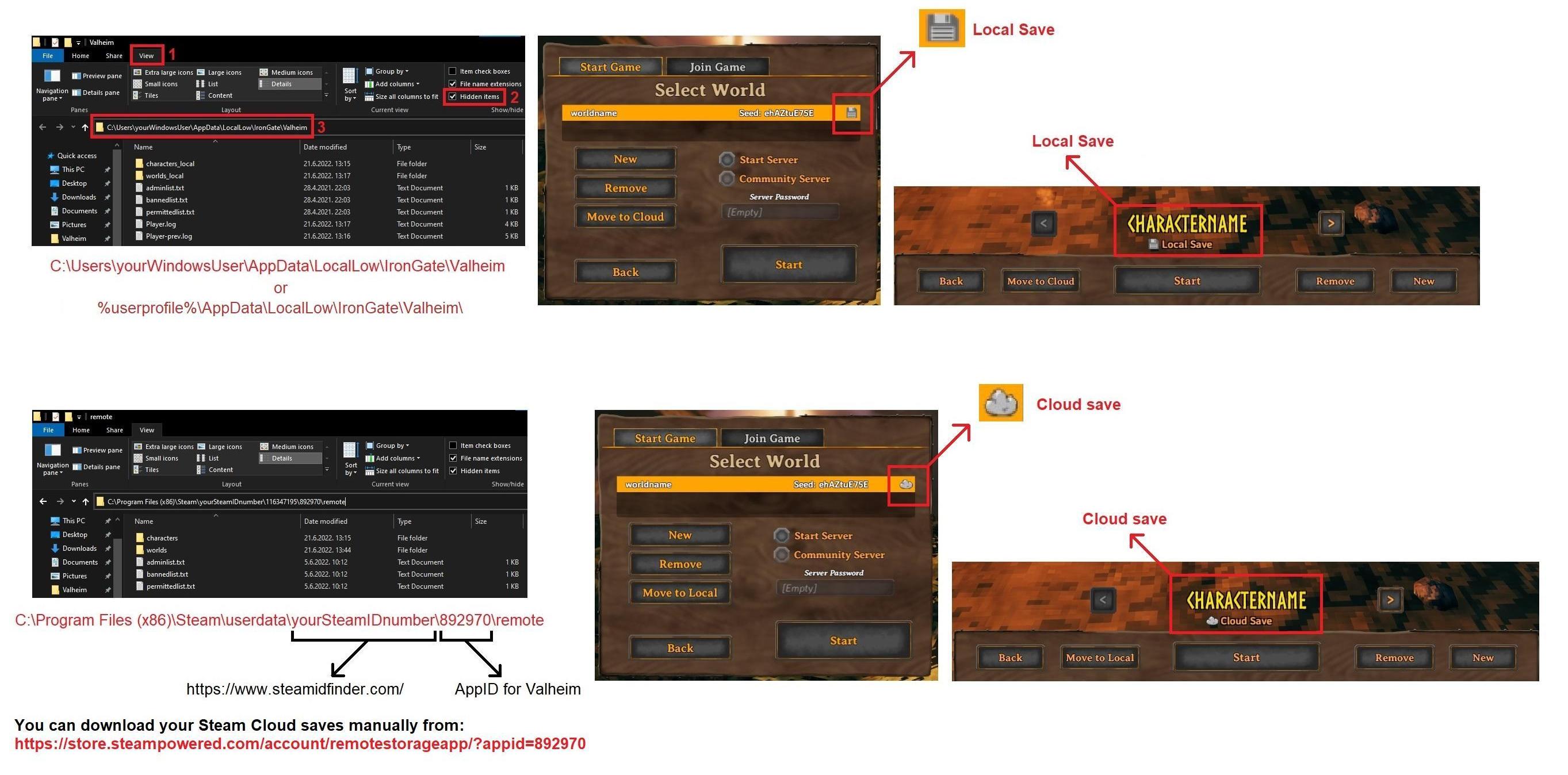
Located at %username%\AppData\LocalLow\IronGate\Valheim

jade patio
#

You can see how many times it crashed as I kept tweaking things and trying over and over to launch lol. You can also see me updating things and deleting things to see if that would help

#

there's a lot more that doesn't show up there. I've been at this for days. I started a new save file because I wanted to try to grind my way to the ashlands and just got there recently so it would be really disappointing if I just have to give up on the game now

lyric mirage
jade patio
#

for posterity, the issue was that I had plugged my computer into my big tv to stream a movie, and then plugged it back into my monitor, which fucked with the resolution. He had me put something in the launch options which forced Val to launch in a tiny window and then manually fullscreeen it, which fixed the issue

lyric mirage
faint apex
#

Got an issue, so, I keep trying to connect to community servers, ye?
But I keep getting an "Enter password" prompt despite the server not having the key icon next to it, any reasons why?

gilded sluice
#

All servers are hosted by players

faint apex
#

Good to know, well then.

gilded sluice
#

Np

faint apex
#

Wonderful!

grizzled void
#

I really feel like the hide on top of the bed is way too pixelated. even for valheim standards.

graceful jetty
#

encountered a bug where boat takes 10 damage every 2-3 seconds, relogging didn't work. Does anybody know a fix by chance?

wintry apex
#

It's caused by a lag-bug in co-op games. KNown, but somehow the devs aren't able to solve it (yet).

Best solution I can think of is to stop along a shore every once in a while, drop a workbench, repair, demolish workbench and sail on.
And perhaps hosting the game on the person with the best PC and internet connection to reduce the chance for the lag.

gilded sluice
cunning flame
marble wolf
#

Oh great, it's children hour.

#

No-one else could find this nonsense entertaining.

marble wolf
strange island
#

first time it happened to me yesterday: on a server (with only two people) I added ore (7 iron) to the smelter and the ore was consumed (disappeared from my inventory) but the smelter remained empty

jagged hamlet
robust rain
#

Just a lil thing.

gilded sluice
robust rain
#

Also yesterday, I placed a Troll potion down with the tray, then removed it with the tray to replace it, and it just disappeared. Wasn't in my inventory, or ground, nor did I drink it

jagged hamlet
robust rain
gilded sluice
#

find troll potion ability to see if it was mega-deleted 🤔

jagged hamlet
gaunt mist
jagged hamlet
lyric mirage
#

This seems like a bug. I have enough gold to purchase 'Powdered Dragon Eggshells' from the Bog Witch, and a partial stack of them in my inventory. But, I can't buy more and am getting a "No space in inventory" error.

#

(Don't hate me for being too lazy to crop properly).

#

Additional info - freeing an inventory slot allows purchase, and adds to the existing stack (edit: and thus doesn't occupy the freed inventory slot)

balmy garnet
#

hey guys my game seems to be glitched i cant move or touch the items in my inventory slots from 1-6 hotbar row and first row

low ocean
stark meadow
low ocean
#

Many have answered that already in other channels. Might be problem with Discord in the background, someone said.

gilded sluice
#

seen it 100's of times when a person comes back, old mod-loader still is active. interact button stop working

#

classical bepinex outdated issue

silent lichen
#

hey guys, when i go to "manage saves" the game stuck at please wait for hours,
i am truying to change my save world from cloud to local

mortal lance
#

guys the game is not using my dedicated gpu?

bright coral
# mortal lance guys the game is not using my dedicated gpu?

On Linux, macOS, or Windows? And is it only display that's not going to your dedicated GPU or is it compute not going there either?

If your GPUs are detecting/driving multiple displays, you can troubleshoot display using:
valheim.x86_64 -monitor 0 or valheim.x86_64 -monitor 1 on Linux

open -a Valheim.app --args -monitor 0 or open -a Valheim.app --args -monitor 1 on macOS

valheim.exe -monitor 0 or valheim.exe -monitor 1 on Windows

If you aren't using OpenGL, you can troubleshoot compute(+display) using:
valheim.x86_64 -force-device-index 0 or valheim.x86_64 -force-device-index 1 on Linux

open -a Valheim.app --args -force-device-index 0 or open -a Valheim.app --args -force-device-index 1 on macOS

valheim.exe -force-device-index 0 or valheim.exe -force-device-index 1 on Windows

Depending on your GPU set and drivers, you might have indices above 1 you can substitute in those commands.

sturdy salmon
#

When I go between my broken roofs, it shakes.

stark meadow
# sturdy salmon

Turn off camera share in accessibility setting if it bothers you

sturdy salmon
#

doesn't bother but is it a bug

stark meadow
stark meadow
stark meadow
silent lichen
stark meadow
#

Is it a world save or character save that you get stuck on when attempting to move it?
Check how that save folder looks like in windows explorer, and post a screenshot of it.
They can be found at one of these locations:
https://i.imgur.com/mTVKf1J.jpg?4

silent lichen
gilded sluice
mortal loom
#

hi guys, ı am having an fps problem, this is started to annoying me really. is there anyone help me on this?

stark meadow
mortal loom
#

its called memory leak ı suppose ı tried to solve this with every way

#

my specs;

#

13th intel i7 / 32g ram / rtx 4060 8 gb

stark meadow
mortal loom
#

its a laptop but ı am using a monitor. its 165hz connected to the laptop with dp. what ı learned the game will work on 60fps more efficently. so ı locked the fps 60. in game and in nvidia panel. turned off the game mode. checked the power mode (performance) checked the virtual memory. give priaorty to the game. tuned off all the background apps. ı am playing the game on steam but also using mods from r2modman. ı am sharing my mods with an image below. tried to using vulkan but it does not work. the game installed on ssd and ı have 100gb more empty space on it. the problem is when ı started the game everything is normal. stabilized on 60-50 fps. but after 1 hour its started to decrease. 40,30.20 until 6 fps! after that ı have to restart the game. then all over again. every hour ı have to close the game an reopen it. its really annoying and ı cant find the way. ı also checked the data on cpu. its around 4020mb (%25-30) when its started to decrease.

stark meadow
# mortal loom its a laptop but ı am using a monitor. its 165hz connected to the laptop with dp...

Sounds like a mod problem. We don't deal with mod related bugs here. For that you can try asking in #mods-discussion and #mods-issues
There are no known vanilla issues that would slowly degrade performance over time.
When you get to 6 FPS, does that 6 FPS still apply when you teleport somewhere else outside of base?
The only thing that you should definitely be checking regardless of playing vanilla or modded, is the temperature of your CPU/GPU
I recommend HWiNFO tool and checking which0 MAX temp values you hit after that issue happens (not AVG temps).
That's the most common system related caus for low FPS for laptops and 13 and 14th gen CPUs

mortal loom
#

yes still proceed as in 6 fps when its down. its only fixed when ı restarted the game.

#

laptop does not open all the fans during the low fps. ı do not think its because of temperature

#

and the laptop its new. ı bought that 5 mouth ago. also using a cooler front it

stark meadow
# mortal loom laptop does not open all the fans during the low fps. ı do not think its because...

It's most likely a mod issue, as temp issues cause stuttering mostly. However you should still check your temps rather than guessing it's not an issue.
It's not hard to check and you gain nothing by ignoring it.
From vanilla issues that affect performance you have implosion of ore nodes in a single hit, which my cause low FPS when returning to the base.
That one usually clears up when you leave the base, so it's probably not the issue you've been dealing with.

mortal loom
#

okay you re right. ı will check my temp

#

thank you btw

gilded sluice
#

Disable all mods, see if the problem still exists

mortal lance
mortal lance
stark meadow
#

and laptop model

mortal lance
#

Dell g16 7630
16 gigs ddr5 ram
1 tb SSD
4060 8gb

#

I don't have a external monitor yet

mortal lance
stark meadow
#

Power cable properly attached?

mortal lance
mortal lance
bright coral
# mortal lance Dell g16 7630 16 gigs ddr5 ram 1 tb SSD 4060 8gb

I didn't see if you answered my question on which operating system you're using. Your graphics driver may not be making the Optima switch at the right time or it may not properly enter the right power profile.

  • You might try the latest firmware release if you haven't already: https://www.dell.com/support/home/en-us/drivers/driversdetails?driverid=r0k07&oscode=w2021&productcode=g-series-16-7630-laptop&lwp=rt
  • Dell laptops with Intel processors have an overly sensitive movement sensor that will trigger low power profile and can theoretically affect the switch to discrete. On Linux, you can disable this by adding intel_ish_ipc to your module blacklist. On Windows, you can go to Device Manager/System Devices/Intel® Integrated Sensor Solution and disable it. If this doesn't solve the problem, you might consider re-enabling it.
  • It'll be a pain, but you might be able to disable Optima in the BIOS while you're gaming to have it stick to discrete GPU.
  • If you have Windows, there's a strange flow to force performance power mode using Dell's Alienware Command Center Application if you are finding it switching to lower power even with the ISH driver disabled:
    https://www.reddit.com/r/GamingLaptops/comments/152tvzm/comment/kwsxpjh/
high crest
#

Does anyone know of a mod or tool that fixes the save issue on dedicated servers? Many times, I'm sailing, need to stop playing, click save, close the game, and when I reopen it, I'm in the sea, far from the boat. I've already lost hours of gameplay because of this problem.

stark meadow
#

Saving before logging out does nothing when playing on dedicated server as a non-admin, because as the act of logging out will anyway initiate a character save.

undone quarry
#

cant craft certain items/feast I have all the materials is it something wrong with my world seed or what

wintry apex
undone quarry
#

yes it was the plains one

somber flare
#

I've been away from Valheim for a bit and just came back. I am in playtest mode. My graphics settings reset themselves to default settings every time I start the game. I turn off items like sun shafts because it hurts my eyes. Why is the game constantly resetting to default graphics?

wintry apex
# undone quarry yes it was the plains one

Plains feast or plains boss?

If you've defeated Yagluth, did you build the required table for it, did you get the serving platter and ingredients from the Bog Witch?
And have you crafted all plains food at least once?

undone quarry
#

ive defeated the boss cant remember if ive made every plains food tho ill test that out

#

i have gotten the platter and ingredients from bog witch

tranquil tree
#

is there a fix for the game crashing WITHOUT SAVING if you alt tab on linux?

#

Started happening with the bog witch updates

#

solved

#

changed to proton experimental and run with vulkan

ember quartz
#

Playing Valheim on steam, after less than 1 minute my computer crashes with a green screen and shuts off, only happens with valheim. Anyone have an idea and also I dont think there are logs becasue i cnat find them in my files

stark meadow
stark meadow
stark meadow
stark meadow
ember quartz
undone quarry
#

@stark meadow yeah still cant craft

stark meadow
gilded sluice
undone quarry
#

Nope just standard

stark meadow
# ember quartz Yes entire system crash CPU: AMD Ryzen 9 3900x 12 core GPU: AMD Radeon RX 5700...

My suspicion would be on 5700XT. Some AMD cards from some manufacturers are not stable at default high clock and power usage, and most games don't push the card to go there. Valheim does. The fact that you have green screen issues also points to GPU failing. I recommend doing general fixes that I listed in Section4 of this guide: https://www.reddit.com/r/valheim/comments/uq9b8x/my_valheim_is_crashing_fix_for_crash_guide/
Before doing them, you should also monitor your GPU temps in a text log format where you can check which MAX temp was reached before crash. I recommend HWiNFO tool.
If general fixed don't help and temp is fine, you'll probably have to manually downclock/downvolt your card.
Check if you can draw any info from other logs that I listed in Section2.

gilded sluice
#

yeah

#

almost a "known" issue on the 5700XT 😦

keen delta
minor prawn
#

I need help, i never open my main server since 2021 after i found mistland area, and now i play again a month ago but my mistland biome still has big trees and spider web. How to update all biome? because i spent almost 200hours on that server and i won't make new server, it will hurt me if i must start from beginning..

somber flare
stark meadow
stark meadow
somber flare
iron steppe
stark meadow
gilded sluice
hexed dagger
#

@gilded sluice hi

#

My controller works even when disabled. Is this a bug?

gilded sluice
#

usually controllers need to be enabled on all places

hexed dagger
#

can i call you privately

gilded sluice
#

no

#

it's a sunday

#

and I don't have time to sit down with a call with every user to help

hexed dagger
#

I have a video of this bug

gilded sluice
#

don't think it's a bug tho

#

there are like 4-5 places to enable and disable controllers

#
  • more if you count simulated flight controllers
hexed dagger
#

my controller is disabled and i can control the character

gilded sluice
#

leave the bug report here

#

I got to get back to family dinner now

hexed dagger
#

thanks

magic maple
#

i'm not sure if this is valheim specific but omtimes this happens when i'm switcghing between va;heim and for example discord. anyone know what's happening?

shrewd kiln
#

Anybody notice nametags of people in your vicinity showing up on the edge of your screen even if they arrent actually in view.
They are behind me on a roof on my left side about one story and I'm looking out away from them, ground level, maybe about 5 meters/wall lengths away. I wiggle my camera around and noticed half their name tag pops in and out randomly but I have to aim it just right. I can even follow their movements. No Mods active. Vanilla experience

stark meadow
magic maple
stark meadow
shrewd kiln
#

I'll see here in a bit.

stark meadow
magic maple
stark meadow
# magic maple Checking this on mobile, they don't show on a screenshot, but basically there's...

If they don't show on screenshot. It's probably a monitor related issue. Do you have HFR enabled?
Them not showing up in screenshot could also be related to when the screenshot gets captured (launching the game in Vulkan vs d3d11, and using F12 (steam screenshot) vs F11 (in game screenshot) can capture screens at different times and capture different post processing effects and artifacts. You should test all combos, and if these don't show up on any, it's likely a monitor issue, might be related to the cable as well, GPU producing artifacts due to it being on high power usage or high clock.

magic maple
#

Hmm, I'm using a laptop. Could this be because of overheating?

stark meadow
magic maple
#

So that's why it happens more often in the ashlands Ragnar_laugh

stark meadow
#

I recommend checking which MAX temps your laptop reaches when gaming Valheim to be sure, best to use HWiNFO tool (checking MAX temps is better than AVG temps).

gilded sluice
high blade
#

The sitting log arrow does not point in the direction of the character when sitting on it as you would expect.

tender spire
#

Strange thing happened to me. I made a New Seed. Played a Older charater ,just striped her to nothing. Still have the skills and such. In this new seed. I have not kill Stag Boss < can't spell> .Yet i experanced a Troll raid. How? That even isn't suppose to be in my raid pull until i defeat The Elder , least that I thought. Anything change that I'm not aware of?

iron steppe
tender spire
stark meadow
iron steppe
tender spire
#

I thought the Troll Raid was also linked to death of The Elder? So if Elder hasn't died in that seed. That Raid should not happen?

bright coral
gilded sluice
#

yes

#

usually if you have "player based raids" enabled in the world settings

fervent magnet
#

The Queen flew our of the map after getting to Quarter health

#

What should I do

stark meadow
fervent magnet
stark meadow
fervent magnet
#

Yes, not in this play through though

stark meadow
fervent magnet
#

...

#

Wait a few mins

stark meadow
#

She might be on top of the dungeon cliffs as well, but can be stuck in the dungeon walls also.

fervent magnet
#

It didn't work

#

She doesn't exist

#

So women really are THAT afraid of me huh

stark meadow
#

The command didn't find her? Does find command work in general (test finding something else, like ||find entrance||)

#

Never heard of her just plainly disheartening as of yet. Are you using mods?

fervent magnet
#

I think she got sent so far that she just despawned or something

stark meadow
fervent magnet
#

Then returned like 8 seconds later

#

Then got sent to the wall on the left

#

And then disappeared

stark meadow
#

Were you playing in multiplayer?

fervent magnet
#

No

stark meadow
#

If you can, send me your world file so I can search for her. You can probably restore an earlier backups of your world to get her spawn again, or spawn one via devcommands.

fervent magnet
#

Maybe she just got clipped into some random building block and got sent idk

fervent magnet
gilded sluice
#

you can use forcedelete seekerqueen

#

to not spoil the fight

desert meadow
#

Small issue I just found with the Scythe. I just maxed it out and on the forge menu it says that the scythe has 800 durability while when you hover over it in your inventory it has 600.
Nothing game breaking, just a little inconsistency.

gilded sluice
#

ah

#

it shows you "next" level in the upgrade window

#

so it shows you a level that you cannot level to

desert meadow
gilded sluice
#

you scared me there for a sec 😄

pearl hatch
#

There's no fire in this crypt, but the game thinks the entire crypt is within range of a fire. So everywhere I go I'm resting

pearl hatch
#

What? No, that's a torch

stark meadow
pearl hatch
#

Okay good to know. No fires outside the crypt, but there is one in another crypt about 80 - 100m away - well outside the fire buff range, yet the buff fills this entire crypt. Perhaps it's a bug with the range limit.

stark meadow
opal tiger
#

cool bug I found in the the world me and my friends played in for over 4 years

#

it has so much potential for base building

gaunt mist
gilded sluice
tender spire
gilded sluice
glossy pagoda
#

Gamepad glyphs switch back to Xbox from PS every time the game is booted up.

stark meadow
stable cliff
#

player based raids turned off, never turned on once actually, and seems some raids stick to the player as glue

gilded sluice
#

Hm... 🤔

stable cliff
#

one of my secondary characters got troll raids with these conditions:
-never killed any boss in any world
-killed trolls, but in a world where not even Eikthyr was ever summoned
-only character that ever bought/drank the love potion, i first tought it was an hidden side effect of that potion

#

started a new world with that character, with raids set to much more and obviously player based raids turned off, made a small base near sacrifical stone and just waited:
-after 6 Eikthyr rallies there comes the Troll raid
so i went on testing

#

Test number 2: brand new character, brand new world, troll potion brought from outside, killed a troll:
-10 consecutive Eikthyr rallies, no sign of troll raids, so i discarded the potion hipotesis

#

Test number 3: my main character:
-killed first 5 bosses in other worlds
-killed trolls, surtlings, wolves and bats in other worlds
-never drank love potions
-started a new world with much more raids
-first ten raids: 3 Eikthyr rallies, 4 Bat raids, 2 Surtling raids, 1 Troll raid
-i assume it would be wolves too, but i stayed in the meadows so it could not be triggered

#

This is very strange because also the first troll-raided character killed surtlings and bats before

#

this is all i got, coulnd't test more than 10 raids per try for obvious reasons, sadly turned off raids in all my secondary/utility worlds and went back to properly play the game

stark meadow
#

You don't have to test anything, we know about the issue. It just seemed you were talking about something else the first time.

#

Items that old characters picked up will triger raids in other worlds, which should only happen on player based raids modifers, but now happens in regular worlds aslo

stable cliff
#

oh, ok i also posted the thing on steam discussion some time ago but it seemed no one knew the issue

#

and yes, i had to test it to save my dear raid-free worlds with very undefended buildings 😉

#

it was like a month ago and at the time i did'nt find the issue reported anywhere, maybe i'm outdatet about this

stark meadow
#

I mostly read bug reports thread on Steam forums. Mods sometimes move threads from general to bugs if they identify there might be an issue so I tackle them.

stable cliff
#

(also got on discord for this reason, never checked it before, i usually don't use the platform at all)

#

ok so basically a bug is turning on "player based raids" regardless of world modifiers, no big deal, i will just miss my world list free of "custom modifier" label i guess

glossy pagoda
tender spire
winged moat
#

Don't mind the aggressive keyboarding lol, blast furnace froze and doesn't register what we feed it. I'm on crossplay, playing on steam with someone hosting on xbox

strange island
#

(ah yes I just saw it again...it consumed your coal but the smelter didn't register it)

#

it was the same for me, I lost almost 10 of iron

#

(I was playing on a Mac with someone playing on a PC)

stark meadow
#

It's a networking issue. Restart he server to fix it.

ebon zenith
#

The anvil is invisible depending on where i stand - i guess it has something to do with the roof

gilded sluice
#

That's a new one

summer bough
#

hi, i have an issue with the game, i play on PC, everything was working well and suddenly i couldn't join my friend's servers anymore. I tried executing the program as an administrator, renew my ip, disable firewall, re-install the game, checked game's files, upgraded my network drivers, put my game's graphics on low and it still doesn't work. does anybody has an idea to solve the issue please?

stark meadow
summer bough
#

yes i reach the password prompt but then the screen goes dark for a long time. i can still hear the games sounds such as waves but then it says disconnected even though i never reached the server

#

and yes we tried disabling crossplay and it didn't work either

stark meadow
summer bough
#

we don't use mods and i have tried to join different worlds, it always did the same dark screen. my friends can still join when i host the world. i haven't tried with a new character, i will do it thank you

stark meadow
summer bough
#

Intel(R) Core(TM) i7-7700K CPU @ 4.20GHz 4.20 GHz
Installed RAM 16.0 GB
System type 64-bit operating system, x64 processor

#

nvIdia geforce RTX 2070

#

i tried with a new character, i could join the server my friend hosted, so honestly that's great, but i couldn't join the dedicated server so i'm probably in the wrong channel, thank so much for your help!

stark meadow
#

Check what's written in the player.log after you connection fails. Btw. after it fails, are you returned to the main screen or do you stay on black screen until you have to end the game process?

summer bough
stark meadow
summer bough
#

Apparently yes, I can, as long as it's not a dedicated server. I couldn't before, but with a new character, I can

wintry apex
#

OK, perhaps a silly question, but has that dedicated server had an update recently? Something that you and your friend didn't have yet?

Meaning, have you checked the version numbers you and your friend have and which the dedicated server have?

gilded sluice
stark meadow
gilded sluice
#

could be to many players?
or server being offline?

summer bough
summer bough
stark meadow
#

Let us know what happens after the owner restarts it.

summer bough
summer bough
gilded sluice
dusky raptor
#

I've noticed on the southern edge of the world map, just north of the ashlands, that there's no ocean biome, despite being all water. the biomes are only land biomes. I presume this is because of the way the world generation cuts off the landmass that would otherwise be just north of the ashlands. would this be considered a bug or an accepted artefact? interesting space to go fishing at least

marble wolf
#

So you're saying at the edge of the map there's an edge?

cunning flame
dusky raptor
# marble wolf So you're saying at the edge of the map there's an edge?

No, Derek. I'm saying that the world generation at the south-side of the world map, to the North of the Ashlands, has some quirks not found elsewhere on the world map. I believe this is because the world map cuts off its usage of the 'master map' abruptly at that point, to create an ocean between the regular map, and the Ashlands. The 'ocean', however, appears to retain the biome despite having its height map set very low to create the appearance of an ocean. And that I wondered whether this was considered to be intended behaviour - given that, as Matt said, many of its characteristics match that of a land biome, as opposed to an Ocean, making it a strange sort of hybrid that isn't found elsewhere in-game.

gaunt mist
dusky raptor
gaunt mist
dusky raptor
#

between ashlands, and other biomes

wintry apex
#

It's most likely the result of the rework of the Ashlands when that biome was released.

Before the Ashlands being a seperate series of islands, they were landmasses connected to other biomes.
All these connections were removed in the release of Ashlands, but it's possible they're still there under the water, instead of being turned into the ocean biome.

I won't call it a bug, but more likely an oversight of the devs.

gaunt mist
#

Also between Deep North and other biomes. It is the world gen change after Ashlands patch.

dusky raptor
#

Aye - that's fair, I hadn't checked Deep North, but it'd make sense

dusky raptor
gaunt mist
#

I'm just thinking what will happen to those Mountain areas inside DN when the DN patch will be released.

dusky raptor
# gaunt mist I'm just thinking what will happen to those Mountain areas inside DN when the DN...

Not sure it'll matter, really? Since the expectation is that if your world hasn't generated that terrain yet, then it will follow the new deep north terrain generation later.

My guess so far as to how the games world generation works is that it starts with a terrain/height map generation, and seemingly any landmass above a certain elevation becomes 'mountain'. There's the sea cut-off north/south of the general master map, and deep north/ashlands seems to be taken from its own areas.

I'd guess that terrain will therefore stay the same, and either mountains will be re-worked so that in deep north area, they're simply considered part of that biome, or they'll be left as they are and the deep north area will be a mix of the two biomes. But I think since the ashlands update seemed to finalise the terrain generation that you're not going to see the terrain change at all in deep north update, just the way biomes are presented.

cunning flame
#

It is still probable that DN will have a specific generation in its area

#

So the nothern part of all maps created before will have similar illogical generation if players gone to far before the release

balmy garnet
#

but it's also worth noting that ashlands already overrode oceans and mountains before their worldgen was so heavily separated from the rest of the world.
back then, you could still recognize the shape of the usual islands down in ashlands, their land was just pulled up towards and beyond the surface of the water, and mountains were flattened into hills. (which still looked snowy on the map but were actually ashlands if you went there, despite being above mountain height)
the fact that ashlands have always bulldozed mountains while DN never did and still doesn't gives me hope that the update might preserve DN mountains, i just really hope it does.

olive iris
#

Mum's PC is having trouble running Valheim again. We have artifacts as seen in this image and the game runs at about two seconds per frame.

stark meadow
olive iris
#

I'm gonna look at that next time, but yeah, if it's the GPU that'd be disappointing because it's supposed to be new

gilded sluice
#

Because that looks like a GPU hardware issue for sure

tranquil tree
#

@gilded sluice Hey mate! Hope the holidays been treating you well!
Do you reckon there's any chance Irongate would want to sponsor a gamdev-school attached LAN event that takes place right outside Skövde?

Just a cup or shirt or something ☺️

tranquil tree
#

We emailed like a year ago with no response, I'll try again haha

gilded sluice
#

welll..... :/

tranquil tree
#

I got dreamhack to sponsor us a few times but getting through to gamestudios is really hard haha

gilded sluice
#

you are probably more in line with customers for dreamhack 🤔

tranquil tree
#

i guess but they gave us like 15k worth of prizes over two lans

gilded sluice
#

nice ^^

tranquil tree
#

It was really good haha

gilded sluice
#

what kind of item tho?

#

pc parts?

#

merch?

tranquil tree
#

Just having their name on the posters made a lot more companies want to sponsor

#

It was dreamhack tickets so not really a loss for them

gilded sluice
#

ah nice

#

expensive tickets 😮

brittle finch
#

I mentioned here a while back that I wasn't able to use feasts because they disappear after logging out of my dedicated server (valhost). That's still a problem and makes feasts unusable. I took some time yesterday and today to put together a video demonstrating the problem. It seems that sometimes when loading the world after logging in, the feast spawns above the table. If no portions have been taken, the feast will drop and become an item you can pick up (i.e. not placed on the table any more). If you have taken any portions, it goes away. It doesn't seem to do it unless nobody's been on the server for a decent amount of time. Here's the video: https://www.youtube.com/watch?v=0aBQGRLWpmg

Nobody else logged in or out of the server during this time.

▶ Play video
#

I wonder if it's something to do with spawn order when loading the world. I notice in my rather large (13000 instance) castle that it seems to load furniture last, and sometimes there's a good 5 seconds between when the main building is there and the furniture loads in.

stark meadow
#

Didn't see them end up below tables yet, but it must be the same issue related to terrain.

#

You sure this is a world created after Ashlands?

#

If you please DM me the world files

brittle finch
#

Other thing to note that I just realized is this table is in a room where the terrain was flattened because there had been one of those mountain fortress things there that I tore down. Maybe that's related.

stark meadow
#

I assume it is related cuz it's the same issue as in other example, mountain location where someone modified terrain on.

brittle finch
stark meadow
#

The previous example was a old world tho, and I couldn't reproduce it easily on a new world, so thought it's related to the old worlds only, and not really something worthwhile to fix.

#

If it's happening on new world, it's a problem. Let me know when you upload the files.

brittle finch
#

Hmm. I am actually trying to remember when we started the world. I'm 99% sure after Ashlands. Some time this summer.

robust rain
#

shield on wall turns default but its actually styled blue, same with a linen cape, turned red on armor stand but it's actually blue
I'm sure its been reported but I can't scroll much

#

(also why is it tilted pls it triggers me)

stark meadow
grizzled void
#

Lingering Stamina potion doesn't appear on an item stand.

#

it also doesn't appear when trying to place it with the Tray.

balmy garnet
#

nicee

gilded sluice
signal dawn
cunning flame
#

Considering how long the issue is lasting, it seem to be one of those “where the f* this comes from” bugs… all my support for the devs potion_health_minor

dusky raptor
#

After a chat in #valheim-help - When I place sap extractors, if I leave the zone, then over time, the ancient roots will re-fill with sap. However, the extractors do not. An example here - a branch left a long time, with 40+ sap in it, but a single extractor filled to 10 the others are 0. Another branch was at 8, 1, 1. Another player suggests this doesn't occur for them, and the extractors are always filled, even if they are far away. Any ideas if something's up here? Extractors do fill when I'm within the zone at the usual 1 per minute.

gentle socket
#

i was picking my troll staff from that stone when you die, but i died before placeing it in my inventory and when i opened a chest at my base and picked an item it turned into that troll staff

#

but can someone tell me how im supposed to get my stuff when there is 3 morgen 5 ashkvin 20 of those ashlands skeletons and a fallen valkyrie on my death stone

merry brook
#

Hi all, hopefully someone can help me with this issue:
When I join my friends coop server, I do not see any creatures, passive or aggressive. I also cannot chop trees etc. The issue is only for the joining player, not the host.

This used to not be a problem before (weeks), then it suddenly became a problem.

I use Bepinex with the following mods:

AzuCraftyBoxes
BetterLadders
EquipmentAndQuickslots
FenceSnap
ForeverBuild
SmartContainers
SnapPointsMadeEasy
SpeedyPaths
TripleBronzeJVL
UseEquipmentInWater
MoreGatesExtended

What we have tried:

  • Hosting the server on someone elses computer (Windows vs Linux)
  • Improving connectivity
  • Waiting

I have looked at:

  • Logs: I see no interesting messages between my joining and leaving, neither on the server side nor on the client side
  • Leaving the chunk in which we have our base seems to "fix" the issue, as in, there I can see creatures.
  • Leaving the chunk, logging out, and logging back in
  • The host leaving the chunk and the other player entering it

Some information that might be relevant:

  • The house is partially built with free build turned on
toxic river
foggy summit
#

Why can't I upgrade ?

stark meadow
foggy summit
#

yes

foggy summit
gilded sluice
foggy summit
foggy summit
iron steppe
foggy summit
gilded sluice
#

could be a friends mods also

foggy summit
grizzled void
#

the Hildir coach Rest animation isn't showing or shared. The player sees himself resting, the others only see them standing.

grizzled void
#

glad! as a game devellopper myself. I know how usefull it is to learn about these tiny bugs(such as these) that are easy to miss

cunning flame
#

It looks very nice

vestal abyss
#

Ashlands armor (Ask Set) with Feather cape (mistlands), not sure abt the headband on the 2nd guy

gaunt mist
cunning flame
#

Thanks you

bright coral
#

@gilded sluice I spent weekend time investigating remaining IPv6 direct connection bugs on the client side of the game. I have some notes for the devs on how to fix what I think are 3 remaining issues. I can put the solutions here but they include internal-ish code notes. Let me know if you want me to PM them instead.

marble wolf
#

Valheim doesn't use IPv6. That probably won't help.

stark meadow
bright coral
#

It's been fixed on the server-side as of a couple releases now, but client-side has some blockers.

stark meadow
#

You talking about these or other issues?

bright coral
#

And @marble wolf, even though it's a little broken now, it would be a nice low-latency alternative to NAT and port-forwarding, as well as provide an alternative for folks who can't serve at all with a CGNAT ISP.

#

The DNS issue and 2 more.

#

I could probably put together a mod to fix all 3, but it seems like it would be more valuable to help get it done in vanilla.

stark meadow
gilded sluice
#

yeah. mods to fix vanilla issues isn't great 😅

#

better for our people to look at it if they get good "look at this here. this is the problem right here"

coral narwhal
#

I noticed yesterday that in the on-screen tips about which buttons do what (on pc) the spacebar was not translated to English but was written in Swedish. I can't be the first to see this right?

gilded sluice
#

so no. your not the first, but far from many actually see that 😄

coral narwhal
#

Has it always been like this? I'm 600hours in 😂

toxic river
#

The name of the key will depend on what your keyboard's language is set to on an OS level

storm kernel
#

Hey guys! I'm having trouble starting Valheim on steam. I clicked play but it just won't start, is that a known issue stm?

stark meadow
storm kernel
#

I made sure to turn off "-console" too...

gilded sluice
#

@storm kernel did you run any mods before?

strange inlet
#

hi guys! I've watched a lot of bronze age videos and the problem is that I haven't been shown the cultivator recipe for a very long time. I have the materials for production and I also have the improved forge, what is the problem?

marble wolf
#

You have bronze and core wood?

strange inlet
marble wolf
#

Wait, you just said fine wood. You need core wood.

strange inlet
marble wolf
#

Pine trees in the Black Forest.

strange inlet
marble wolf
#

Pine trees will give you a mixture of both.

strange inlet
stark meadow
#

Or you playing a modded game that has a bug

strange inlet
strange inlet
gilded sluice
sand crow
#

anyone noticing display items vanishing. Like mounted food, trophies , ect..

stark meadow
sand crow
#

hosted by a 3rd party. long time running with no issues

stark meadow
#

Were you breading lots of animals in vicinity?

marble wolf
#

Hmmm, breaded boar.

sand crow
#

anyone noticing display items vanishing. Like mounted food, trophies , ect..

stark meadow
sand crow
#

I have been noticing small things around base.. decorations gone, brackets missing , ect, ect.. but not all at once. It is little by little until every display is gone. Last night "again" I replaced every decore item in the kitchen and replanted the same crops for a 3rd time. This morning all of the decore are gone again and Just half of what I replanted is missing. Other items I replaced in other buildings are still in place. Wards on all night.. nothing else disturbed... It is a vanilla server with client mods.. been running for over 1500 days without issues.. this started about 1 week ago. hats, mounting brackets, tray placed food items.

gilded sluice
#

it doesn't have to be server mods

sand crow
#

few thousand hours in game. I have never experienced this.

jagged hamlet
stark meadow
# sand crow I have been noticing small things around base.. decorations gone, brackets missi...

If the world is older than August 2023, and if you have been breading animals in the same base, your base might be corrupt.
To test if it is, measure how fast the first person who arrives at the server loads the base (by looking at how fast the instance count rises to MAX when you open F2 menu) vs how fast the base would load for the second person that attempts to arrive to the base (while the first person is at the base). Use stopwatch to time it and use the same portal to arive at the base from some distant place. If the first person loads the base much slower, your base is corrupt.

If both people load the base in aprox. the same amount of time, it's probably a mod issue, so the first thing you should test, is to tell everyone to stop using mods and restart the server. Valheim installation folder has to be clean. Mod bugs can also have cause permanent issues in bases even after being uninstalled.

#

The first thing you should probably do is restart the server, to see if that clears up the issue right away.
After you test what I mentioned, and if the issue still occurs, DM me your world save files.

sand crow
#

a better computer would cuase that between players.

soft edge
#

Hey guys can anyone help, I recently got a new Gpu and haven't played valheim in ages except now the performance is extremely bad

It's only utilizing like 20% of the gpu and up to 70% cpu and dropping down to 5 fps plus super laggy

It was perfectly fine on my previous card which was quite alot less powerful and much older 1070 to 4060ti

It used to run at 60fps everything set to high

It's on an ssd

I've done tons of troubleshooting already, reinstalled the game twice making sure to go and delete any left over folders as well and a whole bunch of other stuff yet to no avail please help

#

Also to add it's only valheim that's being dodgy all my other games steam and non steam run perfectly fine

proper grove
#

hey guys im on pc joining my buddys server on xbox, it runs good for a few mins then eventually i get a losing connection symbol at the top left then get disconnected. any thoughts? also when i host a server they cant join from xbox when im hosting from pc but i can join them vice versa. i have turned on cross play

bright coral
stark meadow
stark meadow
gilded sluice
cedar edge
#

is playfab breaking again? i keep getting RPC disconnect after entering pass despite everything looking like it should work

#

2025-01-23 19:00:07: Retry join-code check 99 2025-01-23 19:00:10: Session "CraterIsland" with join code 454891 and IP 203.87.65.138:2456 is active with 0 player(s) 2025-01-23 19:01:34: PlayFab listen socket child connected to remote player F535D4DD08284415 2025-01-23 19:01:34: Player joined server "CraterIsland" that has join code 454891, now 1 player(s) 2025-01-23 19:01:34: ZRpc timeout set to 90s 2025-01-23 19:01:34: Muted PlayFab remote player F535D4DD08284415 2025-01-23 19:01:34: PlayFab socket with remote ID playfab/F535D4DD08284415 received local Platform ID Steam_76561197977100993 2025-01-23 19:01:34: Got handshake from client playfab/F535D4DD08284415 2025-01-23 19:01:42: RPC_Disconnect ZPlayFabSocket::Dispose. State: CONNECTED ZPlayFabSocket::Dispose. leave lobby. LobbyId: ZPlayFabSocket::Dispose. State: CLOSED

gilded sluice
#

do you use VPN ? 🤔

stark meadow
cedar edge
#

@stark meadow turns out i typo'd the start script, and broke my /plugin symlink - so it's a false alarm

proper grove
gilded sluice
#

I promise, MaCarBre is nice in DM

lusty crater
#

im having trouble joining my mates server been on it all week but roomate wanted to join, now im just getting failed to connect

stable hedge
#

my friend keeps on crashing on valheim on different time intervals of playing (from 3 mins to maximum of 15 mins of gameplay whether if she goes singleplayer or in my server), we tried to do clean install, changing the registry, switching from opengl to vulkan, updated drivers, etc. nothing works on her side.

she runs the game on her laptop, it's a 2022 asus tuf model iirc, I can't remember the specific specs of it.

stark meadow
stark meadow
# stable hedge my friend keeps on crashing on valheim on different time intervals of playing (f...

The prime suspect on laptops is always overheating. Look up the laptop model number and specs as well.
I recommend installing HWiNFO tool and monitoring which MAX temps the laptop hits after a crash occurs.
Additionally, Asus laptops often come with Asus Armory crate which can overclock the system, leading to instabilities, in which case resetting the preformance profile to default can stop the issue and uninstallation of the app would then be advised. You should know that if the app gets uninstalled, laptop won't be able to go into performance mod and spin fans faster, which might be required for it to stay cool while playing Valheim. Definitely test temps before and after.

stable hedge
gilded sluice
#

I would recommend to try and lift the laptop from the surface it's standing on while playing. if that makes your friend being able to play longer playsessions, then it's time for some kind of dust-cleaning and probably buy a cooling pad with a fan.

most laptops isn't made for gaming longer sessions :/

stable hedge
#

yeah I did tell her about lifting her laptop to help out with the heat too, we'll try it out again and get back here if it doesn't help :/

gilded sluice
stable hedge
#

she had the default profile in her armory but we tried playing with the auto and max fans. sadly after tweaking, temps aren't really changing and it keeps on crashing. she tried playing with a cooling pad too but the issue still occurs.

I told her to get her laptop cleaned up since she isn't really tech savvy and hoping for the best too

gilded sluice
#

Could be drivers related

stable hedge
#

her drivers are up to date

lusty crater
gilded sluice
#

it's recommended by the manufacturers actually

stark meadow
#

This channel is meant for vanilla issues

quiet ore
#

oh sorry

stable cliff
#

hi, upgrade problem, i'm very sure i upgraded it from level 2 to 3 after last pach, maybe different level tuna bugs it?

#

(pc, steam, vanilla, never used a mod)

stark meadow
stable cliff
#

ok thanks

iron steppe
#

Just so it doesnt get lost on the other channel. Smiffe suggested Smoke Bombs should drop agro etc.

#valheim-chat message

But this video proves doesnt work. I tested a few things. OR doesnt work in the way everyone expects: https://www.youtube.com/watch?v=svbB3NumqQU

Either way - it seems "bugged" if the intention of the Valheim devs is to do something else besides putting out fires.

stark meadow
iron steppe
gilded sluice
iron steppe
#

So not a bug? I.e. a feature that never made it to production? Damn; would have been an awesome game mechanic. Oh well… maybe someone can mod one in 🙂

iron steppe
#

When loading coal kilns, why does it prioritise finewood over core wood?

Currently it is wood > fine wood > core wood.

Surely wood > core wood > fine wood is what more people would find easier?

cunning flame
#

Go to #suggestions cause you are right and this is not a bug but a suggestion for improvment

stiff arch
#

can some help

iron steppe
gilded sluice
#

or VPN?

#

or the person your playing with?

stiff arch
#

one friend have wifi

#

i have ethernet witch cabel

gilded sluice
#

and you connect to your friend?

stiff arch
#

no i hosting server

gilded sluice
#

Hm.. wierd

stiff arch
#

after 10 min he have lag

gilded sluice
#

try to get your friend to use a cable instead of wifi

stiff arch
#

okay

gilded sluice
#

usually wifi is bad for game that requires a stable connection without package loss

#

wifi connections usually don't care about package loss, since it can just "ask" for a new package that was lost.
but that works bad with a game like valheim that requires constant flow of packages without interuptions

#

(easily explained)

#

so basicly, if you or your friend have a connection with package losses, everyone will notice it and have a bad connection :/

stiff arch
#

okay

#

thanks

balmy garnet
#

@gilded sluice hi there, sorry to bother you, I'm a Georgian 🇬🇪 translator, if I can help you about translating, just tell me, it's an honor to me.

iron steppe
marble wolf
#

Apart from all the ideas that subsequently went into the game.

iron steppe
#

well - I look forward to been proven wrong then 😉

lament ether
#

Anyone know the mod that causes the workbench to ask for longsword with a bunch of metal? we cant get it off

cunning flame
iron steppe
gilded sluice
#

Indeed. It's usually a outdated one causing that problem

smoky aurora
#

So I was messing around my world and noticed this Leviathan on the world's edge near Deep North. When it rendered, it moved downwards slightly. There was also a second Leviathan right next to the waterfall, but I didn't screenshot it.

I admit, it gave me a good laugh.

stark meadow
smoky aurora
#

Fair enough. It's still kinda funny.

gilded sluice
bright coral
#

@stark meadow are you pretty familiar with the item corruption bug that was mentioned in a few of the pre-Ashlands releases? I haven't been able to find much info on the specifics, how it can be detected, and whether the Ashlands+ releases will self-heal affected worlds.

stark meadow
# bright coral <@196192010581835776> are you pretty familiar with the item corruption bug that ...

If one was playing between November 2023 - August 2024, and breading animals in their base, while playing in multiplayer, chances are that objects in their base might be permanently corrupt.

To test if it is, measure how fast the first person who arrives at the server loads the base (by looking at how fast the instance count rises to MAX when you open F2 menu) vs how fast the base would load for the second person that attempts to arrive to the base (while the first person is at the base). Use stopwatch to time it and use the same portal to arrive at the base from some distant place. If the first person loads the base much slower, the objects in the base are corrupt.

The bug couldn't be easily retroactively fixes, so base reconstruction is necessary.

gilded sluice
#

@tulip vault this server is English only.

#

If you want help
You have to write in English

unique wren
#

hey i found a bug that crash the game

pale coyote
#

Hey guys, not a bug but I never had this issue until the last 6 months or so. I have constant micro stuttering. Not peaking my CPU/GPU/RAM usage. Not noticed any patterns for a cause.
I've;

Restarted worlds
tried with and without mods
Graphics settings make no difference
Changed priorities and core usage in task manager
Verified integrity of game files
Fresh install

Still having the same issues, does anyone have any advice please? (besides "potato PC, get upgrade" xD i7-7700k gtx1080ti if relevant btw) tia

unique wren
#

rtx 3050 amd 5 5500 16gb of ram

stark meadow
unique wren
pale coyote
stark meadow
# unique wren placing a log

Placing logs doesn't cause crashes in general. Is is some kind of particular scenario? Are you playing with mods?

unique wren
stark meadow
stark meadow
unique wren
pale coyote
stark meadow
stark meadow
pale coyote
unique wren
stark meadow
stark meadow
#

If those are fine, I would then uninstall the graphic drivers + install new ones again with emphasis on selecting custom installation and check ticking the clean installation option.

#

Those two are the most common stutter causes. Everything else is kinda individual, v/g sync related, cpu related or some 3rd party software being responsible for stutters, so we can look that in more detail then (send me a DM).

stark meadow
pale coyote
mossy mist
#

Hello!

I've got an odd issue with Valheim: it's muting me in voice chat.

As soon as I enter a world (no matter if it's multiplayer/singleplayer, hosted or remote), my discord stops transmitting my voice - I have to alt-tab out of Valheim for it to restart transmitting.
I've tried it in Discord, Steam Voice Chat and Microsoft Teams. It's like the Valheim "takes control" over the microphone and doesn't let any other programs use it.

This happens even without any mod loaded.

Things I've tried:

  • Check file validation on Steam
  • Reinstalling Valheim
  • Reinstalling WINDOWS and trying again.
  • Disabling the "let apps take exclusive control" on the microphone properties.
  • Restarting Router

This happens only with Valheim, any other game/work app doesn't block my voice.

unique wren
#

but i turned that off now

stark meadow
unique wren
mossy mist
stark meadow
mossy mist
#

I've tried restarting my router as well

stark meadow
# unique wren but i turned that off now

Did crashing stop now when you closed it?
You will probably need to reset your profile before closing afterburner. Did you do any CPU overclocks as well in BIOS?

unique wren
#

and what do u mean bu resetting profile in afterburner

mossy mist
stark meadow
#

We expect to notice upload latency increasing considerably.
Are you on a WiFi? Do you know on what kind of connection is your router connected towards your Internet Service Provider? (mobile, satelite, copper, fiber)

mossy mist
stark meadow
mossy mist
#

Yes

#

didn't change much vs Valheim Off

stark meadow
mossy mist
#

Let me try on an older version of Valheim

stark meadow
#

If you reside in the same zone as some player that was there before you, you won't be uploading much.

warm coral
potent stream
#

yo anyone experienced a bug where it goes suddenly day when typing in your signs?

#

I labeled a sign to "COAL" and when I typed the capital C night suddenly became day

stark meadow
potent stream
gilded sluice
worn quail
# gilded sluice Sadly not a bug

Although something maybe should be done about getting stuck when you exit a structure thats blocked like that. I had a pretty much identical looking crypt and had to do /die to get out, only way to exit is to use a chair to clip out

gilded sluice
#

it's a known problem, but it's not the scale of a bug

#

hard to explain since it's a matter of "how would you rate this problem"

gaunt mist
#

It's world gen doing world gen things.

cunning vector
#

we went out exploring, found swamp.. mined iron.. had 3 different chests, with different amounts of iron in them, then we went and found mountains, mined up a whole cart full of silver.. 2 days ago, today we went back, took the silver down the mountain, towards a boat, and 4 stacks of silver disapeared after the cart was broke, we looked everywhere. then we went on to the swamp, parked the boat, went to the chests. opened the chested, iron there, closed it and opened it again and its gone.. sooo tonight we lost 4 stacks of silver and 6 stacks of iron...

shadow lily
# mossy mist Let me try on an older version of Valheim

I've been bashing my head against this for the past couple of days too. Something you can do is try reducing the number of pings/minute in your server browser settings in steam. Mine was set to 5000/minute, reducing it to 250/minute has improved the situation by a lot

#

Looking at the network traffic with wireshark valheim is constantly sending queries to all sorts of servers

shadow lily
#

I submitted a bug report for the above along with some screenshots. It looks like there's a bug where once these queries start they never stop being sent, even after connecting to a server (or pressing the back button)

iron steppe
iron steppe
#

@shadow lily - how did you filter the traffic on wireshark to be sure it was Valheim as the origin? I'm not really seeing anything wrong, but I might not be replicating it correctly.

stark meadow
stark meadow
cunning vector