#steam-bugs-discussion
1 messages · Page 8 of 1
 rigid patrol
 stark meadow
rigid patrol
There is one hop that starts with 192 but the ping only goes to 30. The game is ...
stark meadow
rigid patrol
There is one hop that starts with 192 but the ping only goes to 30. The game is ...
Can you DM me the trace route results?
 south lance
If you're getting damaged at melee range while playing archer it's absolutely not the game's problem
And ranged combat in general is broken op
It is not
 willow tiger
few askvins, valkyrie, morgen and hol lot of skeletons they all attack me in the same time in ashlands , and no matter which class your play u will be still getting damage
but i of course agree that mage and other ranged build more powerfull than melee
willow tiger
willow tiger
few askvins, valkyrie, morgen and hol lot of skeletons they all attack me in th...
and then one more valkryie and few morgens again, so you just can't deal with them all without taking damage and it's too hard to runaway from them espically from valkryie
might be only i so lucky idk
 sonic estuary
You have to make yourself vulnerable to get the strongest shield, that seems ok to me.
Otherwise you could refresh it after every hit and it would never break
 rich crane
NVIDIA GeForce GTX 970 CPU
Intel(R) Core(TM) i7-4790 CPU @ 3.60GHz Datenträger 0 (C:)
Fanxiang S102 Pro 2TB Arbeitsspeicher
16,0 GB DDR3
should be the important ones i guess
stark meadow
rich crane
NVIDIA GeForce GTX 970 CPU
Intel(R) Core(TM) i7-4790 CPU @ 3.60GHz Datenträger ...
Have you tried resetting your BIOS setting to default yet?
rich crane
No
stark meadow
rich crane
No
That's the first thing to you should try.
As you can see, crashes due to unstable BIOS tweaks are the most common causes when it comes down to random crashes.
https://www.reddit.com/r/valheim/comments/uq9b8x/my_valheim_is_crashing_fix_for_crash_guide/
rich crane
its not just valheim tho the hole pc crashes when i play Valheim
stark meadow
rich crane
its not just valheim tho the hole pc crashes when i play Valheim
Yeah, that's what usually happens when one runs unstable clocks.
There can be other causes that would induce full system crashes, mostly listed in Section1:Point6 of the guide.
Just try resetting BIOS to default first. Ever been to BIOS?
rich crane
yes i will try that thanks
willow tiger
sonic estuary
Otherwise you could refresh it after every hit and it would never break
It’s doesn’t work , when you refresh shield it’s only refreshing shield time but not hp so shield still keep be damaged, until it will be fully destroyed and only then you can cast new one with full hp
@sonic estuary Check this video, i show it here
sonic estuary
That’s completely intentional, so you can’t keep your shield up forever
willow tiger
sonic estuary
That’s completely intentional, so you can’t keep your shield up forever
But you anyway can’t keep up your shield forever because of the time limit it’s has
sonic estuary
You can refresh the timer by using the staff though
willow tiger
I agree, you can refresh time if spend your eitr and health
sonic estuary
But you need to become vulnerable by breaking your shield or waiting for it to disappear before you can get max hp again, so you can’t constantly have a max hp shield and be completely invincible.
willow tiger
But i predict that most people think that when they refresh shield they also refresh it’s hp and not only the time
sonic estuary
Even at 1hp the shield can block infinite damage
But maybe it should be made more obvious what using the staff is actually doing
willow tiger
Yes , but in fight(esp in ashlands) you get a lot of hits from ranged thing atleast
So you tanky 1 arrow/shot/hit and then fully new refreshed shield destroys and you lose your protection
sonic estuary
But then you get a full health shield after that
willow tiger
But hol lot of enemy still around you
sonic estuary
If you could refill the shield’s health at any time you could keep it up forever
willow tiger
To keep it forever you must spend your eitr, hp and limit your mobility which all three you need during the fight
So it’s still kind not so effective thing
At the moment you start fight with very damaged shield, loose it during 1-2hit and then get a lot of damage which often leads to death and all it because you was sure that when you refresh your shield it became new-fully restored and you ready to getting in hard fight, i mean like most people don’t know about this shield secret with non regen hp after refresh and most people dying because of it hidden surprise
Maybe game at least should tell people hot does this magic shield works
sonic estuary
sonic estuary
But maybe it should be made more obvious what using the staff is actually doing
That’s why I sent this. If players knew their shield wasn’t healed, that would fix the problem.
 dawn epoch
I had only one stmp that i deleted. Looks like every time i go to a different location and save, it just creates a new save and respawn at the same spot. I do have a lot of files in \892970\remote\characters

 stark meadow
dawn epoch
I had only one stmp that i deleted. Looks like every time i go to a different lo...
stark meadow
dawn epoch
I had only one stmp that i deleted. Looks like every time i go to a different lo...
You have one more stmp file in the screnshotted folder, or was that the one you deleted already?
stark meadow
dawn epoch
I must be blind, what file is that?
Yeah, check that entire folder.
stark meadow
Whn steam crashes during saving, it does not clean up those files, but it should.
 sand delta
I need help this happens when i press start game

 gilded sluice
sand delta
I need help this happens when i press start game
gilded sluice
sand delta
I need help this happens when i press start game
remove your mods probably
sand delta
gilded sluice
remove your mods probably
I have no mods started literally 2 days ago
I downloaded it on the xbox app on pc if that helps
gilded sluice
sand delta
I downloaded it on the xbox app on pc if that helps
Hm... looks like something failed
sand delta
Do you know a solution?
gilded sluice
find your player.log In this hidden folder in windows:
C:\Users\ <username> \AppData\LocalLow\IronGate\Valheim
send it to me
 surreal herald
Hey, everyone!! I have a issue with a finewood ... I made a new world and a new character just over a month ago, playing hard+, map+portal and more raids, no mods. I was killed several times near my portals, by the time i get back, my portals get destroyed, workbench is there, cores, eyes, only finewood vanishes. If i have a fine wood with me, its not in a tombstone.... all is there, just finewood is gone! Anyone has seen anything like it? That did not happen in the previous 3 worlds i had before!
stark meadow
surreal herald
Hey, everyone!! I have a issue with a finewood ... I made a new world and a new ...
Sounds like a broken installation. Can you reproduce the issue by destroying the portal yourself?
 vapid charm
so... the queen clipped me out of the map #screenshots message
I have everything backed up, so I'm fine, but uhh yeah didn't know that could happen

definitely getting closer to this blob

I fell back into my world lol. Valheim is a klein bottle
 weary tulip
surreal herald
Hey, everyone!! I have a issue with a finewood ... I made a new world and a new ...
weary tulip
surreal herald
Hey, everyone!! I have a issue with a finewood ... I made a new world and a new ...
Where are those portals located?
If you are in Ashlands, there is firestorm instead of rain and also ground on some places is too hot for buildings.
Main problem is finewood being turned into charcoal when portal burns.
stark meadow
weary tulip
Where are those portals located?
If you are in Ashlands, there is firestorm in...
Good point, that's probably it.
surreal herald
Thanks for a replies!... @stark meadow When i destroy it, fine wood stays there, i can collect it! @weary tulip No, not in ashlands yet, it happened 3 times in meadow/black forest and twice in a swamp. I didn't even found a coal, at least i would know it burned...
stark meadow
surreal herald
Thanks for a replies!... <@196192010581835776> When i destroy it, fine wood stay...
I would definitely recommend reinstalling the game yet, if you already haven't.
However, after uninstalling the game, double check that everything in Valheim installation folder got removed.
Have you seen any gaps in the terrain/ground, like huge chunkts of land loading slower or sometimes not loading?
weary tulip
surreal herald
Thanks for a replies!... <@196192010581835776> When i destroy it, fine wood stay...
There are mods reducing despawn time. maybe you are using some of them? And when your portal and workbench gets destroyed, you don't have base building anymore and stuff despawns after 3600 seconds - 1 hour
it's very strange behavior. It sounds like if some creature was taking it to annoy you :-D
Let us know if reinstall helped.
 hard bridge
vapid charm
I fell back into my world lol. Valheim is a klein bottle
hard bridge
vapid charm
I fell back into my world lol. Valheim is a klein bottle
For reference, all the dungeons are actually super high up in the sky as far as the game engine is concerned 😉 that's the same reason you can sometimes find tetra on the ground near the entrances to frozen caverns.
 marble wolf
Partially, though I don't know to what extent.
surreal herald
@stark meadow Slower loading/rendering.. i seen that, but only on a location i am building(there i watch carefully), other than that... i don't think so... but today i'm playing again, will definitely watch closer everywhere. Should i save the local files or it will be resynced back from the cloud? @weary tulip I don't use mods. i know about despawning when no objects are in range. But, how can i find everything else but finewood.
weary tulip
surreal herald
<@196192010581835776> Slower loading/rendering.. i seen that, but only on a loca...
that's the only thing in this case what makes it strange.
Offered solutions were all quite general, including reinstall and removing all game related files.
Btw. have you tried reinstalling? Please confirm this, it's important.
weary tulip
surreal herald
<@196192010581835776> Slower loading/rendering.. i seen that, but only on a loca...
Your problem is very specific which should lead to specific solution, yet at the same time it should be not present, or other problems should be also present.
On the highest level of game layer, closest to player, it can be caused by missing model or inverted normals on the model(model is there, but you see through it - you will get "pick up" text in this case)
surreal herald
@weary tulip i will play it today, see if those loading stuff is happening as MaCarBre said. If it happens again, will reinstall it.
weary tulip
surreal herald
<@196192010581835776> Slower loading/rendering.. i seen that, but only on a loca...
As you can see, you must look at many different stuff, so:
- do reinstall
- if problem persists, set log level options to highest levels (debug).
- Ask here for someone with experience with these debug logs, describe your problem and tests/situations when you noticed it again.
 proud ibex
Been trying to troubleshoot my game hard locking. everytime i think i've got it fixed i'll get well into a play session and the game will crash again. its not leaving behind any crash log, it just freezes the computer, and i have to do a hard reboot. specs:
Processor 12th Gen Intel(R) Core(TM) i7-12700H 2.70 GHz
Installed RAM 16.0 GB (15.7 GB usable)
System type 64-bit operating system, x64-based processor
I've gone through the crash troubleshooting guide. any help or insight would be appreciated.
gilded sluice
proud ibex
Been trying to troubleshoot my game hard locking. everytime i think i've got it ...
send me your player.log file 🙂
In this hidden folder in windows:
C:\Users\ <username> \AppData\LocalLow\IronGate\Valheim
stark meadow
proud ibex
Been trying to troubleshoot my game hard locking. everytime i think i've got it ...
I've gone through the crash troubleshooting guide. any help or insight would be appreciated.
What does this mean? That you already tried resetting BIOS to default? Do you have a GPU in that system?
 humble shard
Black marble bench reads as wood bench when mousing over after building.
gilded sluice
humble shard
Black marble bench reads as wood bench when mousing over after building.
known issue
proud ibex
gilded sluice
send me your player.log file 🙂
In this hidden folder in windows:
C:\Users\ <use...
next time it crashes i'll shot one to ya. right now its been running okay. the trick seems to be deleting the settings registry.
gilded sluice
proud ibex
next time it crashes i'll shot one to ya. right now its been running okay. the t...
deleting that sounds like a mod issue for sure
proud ibex
stark meadow
> I've gone through the crash troubleshooting guide. any help or insight would b...
I've been going through the troubleshooting guide, i haven't messed with my BIOS but i reset it today and we'll see
proud ibex
gilded sluice
deleting that sounds like a mod issue for sure
i haven't modded yet, i wanna get through my first playthrough with my fiancee first XD
gilded sluice
ever played skyrim?
proud ibex
dunno if it makes a diff but it crashes only on my laptop
yes? though I cannot remember if i've played on this laptop
sounds like the fiancee has XD
stark meadow
proud ibex
yes? though I cannot remember if i've played on this laptop
Do you have a GPU on your system or only CPU with integrated graphics?
gilded sluice
proud ibex
yes? though I cannot remember if i've played on this laptop
back in the days. skyrim modloader could auto-sence Valheim and enable mods for it aswell without the players consent 🥲
proud ibex
GPU, 3070 laptop
proud ibex
gilded sluice
back in the days. skyrim modloader could auto-sence Valheim and enable mods for ...
okay lemme go digging XD weird that its only affecting the laptop though cause i know for a fact that we both have modded skyrim on our pc's
stark meadow
proud ibex
GPU, 3070 laptop
Should be fine, but install HWiNFO and have it in sensor mod reporting MAX temps.
After you crash in Valheim, check which MAX temps have been reported in it.
proud ibex
Got it! i'll get back to ya'll next crash :D
gilded sluice
proud ibex
Got it! i'll get back to ya'll next crash :D
don't need to crash
proud ibex
oh okay :D
gilded sluice
just start the game, load up a world and your player.log fills in info
proud ibex
gilded sluice
send me your player.log file 🙂
In this hidden folder in windows:
C:\Users\ <use...
sent
 low marsh
Is there a bug atm with building? Been waiting for this to fall to the ground and then realised
 gilded sluice
low marsh
Is there a bug atm with building? Been waiting for this to fall to the ground an...
gilded sluice
low marsh
Is there a bug atm with building? Been waiting for this to fall to the ground an...
should start falling apart after 30 seconds 🤔
low marsh
gilded sluice
should start falling apart after 30 seconds 🤔
Nah, was still up for hours after. Never fell as far as I know
gilded sluice
low marsh
Nah, was still up for hours after. Never fell as far as I know
it shouldn't fall unless a player is there. and spends minimum 30 seconds
low marsh
gilded sluice
it shouldn't fall unless a player is there. and spends minimum 30 seconds
I was building next to it for the entire time.
stark meadow
low marsh
I was building next to it for the entire time.
Try stopping building for some time.
Why is that in the air anyway? You removed support beams?
low marsh
stark meadow
Try stopping building for some time.
Why is that in the air anyway? You removed ...
Yeah, I took out the lower half, figured I'd let gravity do its thing whilst I was doing other stuff.
hard bridge
low marsh
Is there a bug atm with building? Been waiting for this to fall to the ground an...
Looks like you're flying there... do you have any mods as well? Are you using any other commands?
low marsh
hard bridge
Looks like you're flying there... do you have any mods as well? Are you using an...
Just server dev commands and fly.
Mod is server dev commands*
Command used is fly*
Just to be clear
hard bridge
Ahh... yeah, if you're on a remote server things can sometimes get desynched with structural calculations and such, and I don't know about that mod but it might trigger that effect as well. My suggestion would be to see if it properly recalculates after restarting the server and your client.
And secondarily, mods are not supported in the main channels like this, it makes things confusing because they aren't officially supported in the game. If you're running into issues, make sure all mods are uninstalled and you still have the problem, or ask in #mods-issues
low marsh
To be honest, I'm just going to rip it down myself when I go on next. Was more curious if it was something in the game.
And that's fair, makes sense. I didn't see that channel, but as far as I know, this just enables Dev commands. Shouldn't interfere with anything else.
hard bridge
If I had a dime for every time a mod shouldn't have interfered with anything but it did for people asking for support here, I'd have at least a couple more bucks in my pocket 😉
low marsh
Yeah, silly of me to say.
If it happens again, I'll go through all that and report again in the correct channel. 😂
 lilac dagger
Does someone else have a problem with Valheim and Firefox open at the same time?
When I have and when I tab out to Firefox on my 2nd monitor then the game crashes.
Is there some log that I can send in so someone can take a look at it?
Havent had that problem before.
Only happens with Firefox. Havent noticed it with other programs yet
stark meadow
lilac dagger
Does someone else have a problem with Valheim and Firefox open at the same time?...
Is there some log that I can send in so someone can take a look at it?
Yeah, you can grab player.log and player-prev.log after you crash, and before you open your game again.
On windows located at: %username%\AppData\LocalLow\IronGate\Valheim
Regardless, I would recommend re-installing your graphic card driver with emphasis on selecting clean profile during custom installation of drivers
lilac dagger
stark meadow
Regardless, I would recommend re-installing your graphic card driver with emphas...
Have done that every time with a new driver update. No change so far.
 cold pagoda
I always have Firefox open when playing Valheim. Never had crashes, also not when switching between them.
lilac dagger
stark meadow
> Is there some log that I can send in so someone can take a look at it?
Yeah, y...
Had already opened the game again, but I can replicate it later after my little session. 😄
gilded sluice
lilac dagger
Does someone else have a problem with Valheim and Firefox open at the same time?...
never ever happens 🤔
and I do play the game quite alot
lilac dagger
gilded sluice
never ever happens 🤔
must be something I did then. But I cant say what I do different than all the years before 😄
lilac dagger
But it crashes with some notification from my adrenaline software. I have a rx5700xt. I will pay closer attention to that next time
gilded sluice
🤔
lilac dagger
gilded sluice
Firefox tab's likes to use that stuff
At that time I havent opened any websites yet
gilded sluice
sounds like a GPU drivers issue more than firefox related problems
I do recommend most people to do a clean re-install of the GPU drivers every 6-ish months to get rid of any wierd stuff that can happen 😄
lilac dagger
But only when opening firefox it triggers that. I have tried with many others but it never happened with that.
I'll try a clean install from your recommandation tomorrow. Thanks!
gilded sluice
🫡
 viscid dock
I hadn't rejoined the discord yet after the prior hack, so I didn't report this back when I saw it in July, but here is a rip in space-time. I haven't ever noticed a surface discontinuity in the game before (or since).
 gilded sluice
viscid dock
I hadn't rejoined the discord yet after the prior hack, so I didn't report this ...
gilded sluice
viscid dock
I hadn't rejoined the discord yet after the prior hack, so I didn't report this ...
What is close to that? 🤔
usually the world breaks (or broke) when it's a big structure nearby
stark meadow
This one is probably just an aftermath of an lava blob explosion.
viscid dock
gilded sluice
What is close to that? 🤔
Was I supposed to know that?
gilded sluice
viscid dock
Was I supposed to know that?
What things are close to that rip in the ground?
You can always fix it by pickaxe it or useing a hoe
viscid dock
gilded sluice
What things are close to that rip in the ground?
Sorry, I assumed your original question was rhetorical because of the emote. Nothing is close other than what's in the pic. It's only the natural gen, and no terrain manipulation when the pic was taken (no evidence of any lava blob explosion which usually makes a more even divot). Just running by and noticed it. Can't remember -- I might have pickaxed it closed after that.
lilac dagger
gilded sluice
I do recommend most people to do a clean re-install of the GPU drivers every 6-i...
I tried that today and made a clean install of my GPU drivers, but the crash still happened.
My Adrenaline Software said something about a driver-timeout. Ive send now a bug report via this software.
Its really strange and its only happening with Valheim and Firefox in combination. Every other game is fine and valheim also doesnt crash with other programs. Dont know if it happens with other browsers.
I can send you some logs, if you'd like. Which ones from the appdata folder are helfpul for you?
gilded sluice
lilac dagger
I tried that today and made a clean install of my GPU drivers, but the crash sti...
sounds like a drivers issue 🤔
super wierd
gilded sluice
viscid dock
Sorry, I assumed your original question was rhetorical because of the emote. No...
Hm.. the fortress or the ashlands village isn't even close to the rip?
stark meadow
lilac dagger
I tried that today and made a clean install of my GPU drivers, but the crash sti...
Did you check how your player.log file looks like after a crash? Tried disabling GPU acceleration in firefox?
lilac dagger
stark meadow
Did you check how your player.log file looks like after a crash? Tried disabling...
I dont know yet how to read them, but if they could hold some information to solve the problem then I will have a look.
GPU acceleration, I will try that.
lilac dagger
stark meadow
Did you check how your player.log file looks like after a crash? Tried disabling...
Wow! You have to explain to me, why that did work! 😄
No crashes so far. @gilded sluice
sonic estuary
 silk cairn
didnt fill up, just disappeared all of it
silk cairn
didnt fill up, just disappeared all of it
Are you in multiplayer?
silk cairn
yup
sonic estuary
It was probably bad connection at a bad time?
silk cairn
is there any way to get it back
viscid dock
gilded sluice
Hm.. the fortress or the ashlands village isn't even close to the rip?
The fortress is the shield bubble in the original picture and the house icon on the map in my picture. Not sure what you count as village -- the buildings shown in the picture aren't it? They are the buildings that have the fiddleheads in them. I went back, and the following 3 pics are 90 degrees clockwise each time from the original picture. I did apparently pickaxe the rip closed. You can see where it was as the altered terrain in these.


 latent sparrow
When you get some time, would you mind taking a look at this parts list based on your recommendation and let me know if you have any swapout suggestions? I do appreciate and value your input. Thanks. https://pcpartpicker.com/list/3gk67R
Part List - AMD Ryzen 7 7800X3D, GeForce RTX 4070 SUPER
 ornate schooner
ok. can anybody please explain why sometimes when i breakdown an item with my hammer, if my inv is full, why the pieces just disappear instead of staying on the ground? ive lost WAAY too much bronze and iron this way. And how do I fix it?
 olive night
Not sure if this is the right channel, but does anyone know how to handle sound issues on Linux;
there's an open bug which is related to the Unity version which selects the incorrect audio channel on valheim launch, I can get around this for now by selecting one in my mixer.
However; when I use my headphones there's no audio when I switch to them, all other apps and games work fine (they don't use unity of course). <-- this is what I would like some tips on if anyone knows.
Also that Unity bug should be patched afaik, but I guess that requires another engine update so I guess it'll have to wait.
gilded sluice
latent sparrow
When you get some time, would you mind taking a look at this parts list based on...
without going into super-details on each thing in the list. it's not a bad list of parts. nice RAM with CL's good overall computer.
do you have a case already to put it in?
no extra fans?
latent sparrow
gilded sluice
without going into super-details on each thing in the list. it's not a bad list ...
Thank you for replying. Going to reuse the case I have currently nzxt which has two large fans on top and one exhaust fan on left, and two fans bottom.
gilded sluice
sounds like enough fans 🙂
did you pick the 4070 super because of cost or any specific reason?
latent sparrow
can't afford higher, but was looking at Tom's hardware reviews
gilded sluice
ah
stark meadow
olive night
Not sure if this is the right channel, but does anyone know how to handle sound ...
You can launch the game in proton mode to avoid the issue, or after the game gets launched with your main sound output being on headphones, you will have to minimise the game and re-apply the sound output to your headphones (swithcing main autio device from something else, and then back to the headphones).
gilded sluice
latent sparrow
i'd look at that lol
really comes down to what is important for you
olive night
stark meadow
You can launch the game in proton mode to avoid the issue, or after the game get...
Yeah so the last step doesn't seem to work, because I can get it to play on my speakers. But It must be a me issue I guess 😄
stark meadow
ornate schooner
ok. can anybody please explain why sometimes when i breakdown an item with my ha...
Sounds like a mod problem, or you deconstructing something that was placed on something specific.
gilded sluice
I'd argue a 4070 ti super is tiny tiny bit better because 16Gb Vram over 12Gb Vram. but also depends on what type of games you gonna play
olive night
As an AMD fanboy I would recommend AMD GPU
gilded sluice
like my 3060 ti couldn't play Hogwarts Legacy on all nice settings because to little Vram 😦
latent sparrow
oh wow
I tend to play Valheim, GTAV as of late.
I love survival games mostly, and they are starting to get graphic heavy.
gilded sluice
yeah.. sadly a 4070 ti super is 200$ more expensive
prince diffrence for me at my store is like 70€ so that's acceptable IMO. but not 200€ diffrence for 4Gb more Vram
latent sparrow
ahh ok that makes sense
Curious, do you recommend amd gpu or intel gpu for performance
gilded sluice
AMD atm
13 and 14th gen intel have had hardware problems when they just destroy themselves
but AMD gives lower temp, better performance and higher speeds
olive night
Especially with upcoming windows updates for some raisin
ornate schooner
stark meadow
Sounds like a mod problem, or you deconstructing something that was placed on so...
It has happened both with and without mods. Though it happened only once on a mod-less server. As far as mods go, I have PlanBuild, Perfect Placement, Plant Everything, and Plant Easily. Could one of those be the culprit?
 simple phoenix
I booted up valheim and I haven't played since before Mistlands was released and whether I'm playing solo or on a server my game seems to stutter every few seconds, both the game and audio will freeze. Kinda like a micro-stutter. Anyone else experience this? Maybe my cpu?
simple phoenix
Followed some guides from a year ago and tried reinstalling my graphic driver, disabling c states, enabling ram acceleration. Vulkan on and off, low/high settings. Reinstalling valheim, boot options, boot.config commands. Changed resolution to lowest.
Maybe mistlands/ashlands patched me out of the game since last I played it ran nice and smooth, however, many posts online say they have the same issue with no fix even with people having super computers compared to my PC. 😦
gilded sluice
simple phoenix
Followed some guides from a year ago and tried reinstalling my graphic driver, d...
sounds like mod issues
people just don't post "oh, this solved my problems" enough for people to find those posts
stark meadow
@simple phoenix list your system specs
stark meadow
ornate schooner
It has happened both with and without mods. Though it happened only once on a mo...
You can try asking in #mods-issues if anyone had a similar problem. This is not a remotely common problem on vanilla (only one other report about player losing fine wood when deconstucting portals). We deal with vanilla game here.
 carmine narwhal
I'm having a unity crash error everytime i open the game... after 4 attempts the game crashed my computer so hard it changed my wallpaper
Looks something like this - verifying files doesn't help 😦

Fresh install also doesn't help... anyone have any ideas?
marble wolf
Mods?
carmine narwhal
None
carmine narwhal
If anyone else gets the above - i was using the "Vulkan" version - just launch normally and it (should) fix it
 simple phoenix
gilded sluice
sounds like mod issues
simple phoenix
gilded sluice
sounds like mod issues
Don’t have mods
gilded sluice
carmine narwhal
Looks something like this - verifying files doesn't help 😦
did you remove all old mods then?
This 99% happens due to mod files still linger in the valheim directory
\SteamLibrary\steamapps\common\Valheim
this folder
should look like this and nothing else
 gilded sluice
simple phoenix
Don’t have mods
gilded sluice
simple phoenix
Don’t have mods
ever had any mods?
carmine narwhal
gilded sluice
did you remove all old mods then?
This 99% happens due to mod files still linger...
Never had any
simple phoenix
gilded sluice
should look like this and nothing else
my valheim directory looks like this. I've reinstalled a few times now.
Deleted all my characters and worlds from the app and the folder Irongate from AppData/LocalLow
It'll be once I'm in the title screen of Valheim I'll wait and then the audio and game will micro freeze. This is quite the pickle as I'm wondering if it's my cpu dying on me or something. My roommate does not have any issue and he has mods.
No mods installed.
RAM: 16gb
OS: Windows 10 64bit
CPU: Intel i5-7400 3.00GHz
GPU: AMD Radeon RX 6650 XT
gilded sluice
carmine narwhal
Never had any
let me see your player.log file then
gilded sluice
simple phoenix
my valheim directory looks like this. I've reinstalled a few times now.
Delete...
You don't need to touch the local low folder. that's only loading and saving worlds. no mods ends up there
it could be your CPU
or atleast the cooling sollution would need to be re-applied
carmine narwhal
gilded sluice
let me see your player.log file then
How does one show/share this?
gilded sluice
carmine narwhal
How does one show/share this?
you can drag and drop the file into a DM to me
stark meadow
simple phoenix
my valheim directory looks like this. I've reinstalled a few times now.
Delete...
Although it sounds like it might be a temp issue, you should first check if you have any optinal windows updatess reasy for download.
Have you monitored your temperatures?
If not, I would recommend downloading HWiNFO and checking which MAX temps are your components reaching while playing
Tried re-installing graphics driver?
simple phoenix
stark meadow
Although it sounds like it might be a temp issue, you should first check if you ...
"Analysis of Valheim Log Files
Action:
    Provided multiple Valheim log files for analysis.
Findings:
    Missing Script Errors:
        "The referenced script on this Behaviour (Game Object '<null>') is missing!"
    Mesh Generation Warnings:
        "Couldn't create a Convex Mesh from source mesh 'default' within the maximum polygons limit (256)."
    Audio Errors:
        "Only custom filters can be played. Please add a custom filter or an audioclip to the audiosource (Amb_MainMenu)."
        "Missing audio clip in music respawn"
    Extended World Generation Times:
        "Done generating locations, duration:150888.0711 ms"
    Memory Allocation Statistics:
        High peak allocations and overflow counts in several allocators."
This is what my log tells me everytime. I enabled trace logs and developer mode. There are no mods installed and any residual mod files are gone from my computer. Thunderstore folder had an old valheim folder from years ago and it's gone, but problem persist. Reinstalled, verified game files, cleared steam cache, disabled steam cloud. Problem exists right from Title Screen.
There are no temp issues, throttling, or spikes from my hardware and I did a memory test on reboot, used CrystalMark to review my CPU and SSD Drive and everything is working fine. Used CPUID to monitor temps and everything is fine, no irregularities.
I've switched between Vulkan and DirectX and I don't think my AMD GPU likes Vulkan so testing was done via DirectX launch options. I updates my graphic drivers with no luck.
Reinstalled Visual C++ Redistributables
Updated BIO and Chipset Drivers
This has me scratching my head mannn
stark meadow
simple phoenix
"Analysis of Valheim Log Files
Action:
Provided multiple Valheim lo...
Which GPU is being listed on top of the player.log file as being used?
Have you tried disabling your integrated graphic card in the BIOS?
When you re-installed graphic driver, did you select a custom installation + clean profile?
simple phoenix
stark meadow
Which GPU is being listed on top of the player.log file as being used?
Have you ...
my AMD GPU is being used
I believe I installed the driver just defacto/express
Just to show the audio/game micro stutter
stark meadow
simple phoenix
my AMD GPU is being used
I believe I installed the driver just defacto/express
I can't tell if only audio is stuttering or you have frame freezes as well.
simple phoenix
it's both
stark meadow
simple phoenix
it's both
If both, I would definitely do driver re-installation but with a clean profile.
Then I would open msconfig go to services tab, hide all microsoft services and then disable all the non-Microsoft services, and restart the PC so it starts without them, to see if any 3rd party app is responsible for this.
Tried disabling XBox game bar already?
simple phoenix
Yes I did the msconfig disabling. I will try reinstalling my drivers
simple phoenix
No change unfortunately
I appreciate your help but I think I'm going to shelf valheim for now
stark meadow
simple phoenix
I appreciate your help but I think I'm going to shelf valheim for now
Do you know how did your CPU and GPU usage look like when Valheim is running?
simple phoenix
yes and when the game stutters there are no spikes happening on anything
no temperature spikes either
stark meadow
simple phoenix
yes and when the game stutters there are no spikes happening on anything
I meant in a exact sense, what was the CPU and GPU usage, for instance in the main menu?
It would probably be a good idea to check per core CPU usage.
Also, what did you mean by your AMD GPU not liking Vulkan?
Checked event viewer or windows reliability history monitor for any obvious error spam?
simple phoenix
GPU is around 20% in title
and CPU is 27%
By that I mean, when it freezes, my computer isn't freezing
simple phoenix
stark meadow
Checked event viewer or windows reliability history monitor for any obvious erro...
I checked it earlier and yeah, no errors
Have no clue what this all is:
Findings:
Missing Script Errors:
"The referenced script on this Behaviour (Game Object '<null>') is missing!"
Mesh Generation Warnings:
"Couldn't create a Convex Mesh from source mesh 'default' within the maximum polygons limit (256)."
Audio Errors:
"Only custom filters can be played. Please add a custom filter or an audioclip to the audiosource (Amb_MainMenu)."
"Missing audio clip in music respawn"
Extended World Generation Times:
"Done generating locations, duration:150888.0711 ms"
Memory Allocation Statistics:
High peak allocations and overflow counts in several allocators."
But it's in every log. Trying to reference a script and can't find it so the game constantly tries to find it and can't so that could be causing it.
And an audio clip that is trying to be found and can't be so this could be the cause as well
stark meadow
simple phoenix
Have no clue what this all is:
Findings:
Missing Script Errors:
...
That's normal part of a player.log that everyone has, and not related to your issue.
It's unlikely that you will find an error in the player.log file if you re-installed the game properly (short and long re-installation process explained in the Section5 of this guide:https://www.reddit.com/r/valheim/comments/uq9b8x/my_valheim_is_crashing_fix_for_crash_guide/).
stark meadow
simple phoenix
GPU is around 20% in title
and CPU is 27%
By that I mean, when it freezes, my...
20% GPU usage in the main menu seems off in the main menu.
How much GPU usage do you see in full screen at 1080p in the main menu, and quality preset?
Also enable Steam FPS overlay at least to check if FPS is properly capped at 60 in the main menu.
Do you have more than keyboard and mouse plugged in when it comes to input devices?
 rocky stag
Not sure if a bug but a friend & me were summoning Moder & she flew away & died in mid air. Bug?
stark meadow
rocky stag
Not sure if a bug but a friend & me were summoning Moder & she flew away & died ...
Doesn't sound like a vanilla bug. Anyone using mods?
It also could be that someone was using console commands, and they killed his via a console command.
rocky stag
stark meadow
Doesn't sound like a vanilla bug. Anyone using mods?
It also could be that someo...
No mods, no commands, I was host & friend was up to Moder so I offered to kill Moder on my world
sonic estuary
How much health did she have when she died?
rocky stag
sonic estuary
How much health did she have when she died?
almost full. landed maybe 3 or 4 shots from arrows on her. That was it.
stark meadow
rocky stag
almost full. landed maybe 3 or 4 shots from arrows on her. That was it.
If you were in debugmode, you might have killed her by accident by pressing K button on the keyboard.
Other than that, the only known issue that can cause this is one of the players using cheat engine, which suffers from a bug where things around the player running the app can suddenly receive 9999 damage. If the issue happens again in a different scenario, then you can be sure it's that.
In another words, it is extremely unlikely that it's a vanilla bug. Did somebody re-log right after the summoning process, or were you both there the entire time?
rocky stag
stark meadow
If you were in debugmode, you might have killed her by accident by pressing K bu...
I had no commands active, I don't bother with them. Me & my friend were there the entire time, nobody relogged at all. it was the second fight after a previous fight, we fought her twice. It was the second fight that she died in mid air, so not sure if that helps or no. I'll have to ask about the cheat engine thing probably. Not sure if I'll get a straight answer though, cheers.
 worldly tulip
i have played Valheim a long time but since yesterday i become a funny screen at the front screen , i have uninstalled the game, reinstalled and same
 gilded sluice
worldly tulip
i have played Valheim a long time but since yesterday i become a funny screen at...
gilded sluice
worldly tulip
i have played Valheim a long time but since yesterday i become a funny screen at...
mods?
looks very much like you need to clean your \SteamLibrary\steamapps\common\Valheim folder
this is how it should look

 light helm
My keybindings are not saving for some reason
gilded sluice
you also got mods or?
I know I've heard of that before 🤔
keybindings are stored in windows registry btw
gilded sluice
we did put out a few micro-patches the past days. so many one of those broke some mods 🤔
gilded sluice
\HKEY_CURRENT_USER\SOFTWARE\IronGate\Valheim
light helm
Thanks Smiffe! what I am currently trying to know is what is the hex or decimal number for each letter haha, asking chatgpt for help 😛
haha

 manic orbit
light helm
haha
manic orbit
light helm
haha
somehow i have the feeling that isn't hexadecimals in that table xD
light helm
yeah chatgpt is wrong lol
light helm
I am still not able to change the keys:( Been an hour trying with windows registry, and different apps that allow to change keybindings
 scenic bone
anyone know why the game is louder when i tab out of it?
 trim bay
There are MASSIVE frame drops in multiplayer, some weird performance locking depending on who the network owner is of the chunk. "Lag" in terms of rubberbanding is not the issue.
I could provide more detail. Performance gets exponentially worse when following factors get thrown in:
- Multiple NPCs
- More players are in the server
^ These cut frames by up to 75% with bad circumstances. If I'm not the network owner (can run the game in 300+ fps easily with lots of instances) in an area with about 30 npc's present and 3 other people, my framerate goes down to the 20's.
Factors that play a much smaller role that affect personal PC's but not this issue at hand:
- Instances (static build pieces) present
- Ping
 gilded sluice
trim bay
There are MASSIVE frame drops in multiplayer, some weird performance locking dep...
gilded sluice
trim bay
There are MASSIVE frame drops in multiplayer, some weird performance locking dep...
you know how we use chunks and chunk owner?
1 person streams what happens in the area to the other 2 players (in your example)
 boreal gazelle
I am getting this message when I load up Valheim, and it's preventing a friend and I from playing together. We aren't sure why we are suddenly getting this message, or how to fix it. Can anyone help please?
 stark meadow
boreal gazelle
I am getting this message when I load up Valheim, and it's preventing a friend a...
stark meadow
boreal gazelle
I am getting this message when I load up Valheim, and it's preventing a friend a...
On which platfroms are you both playing? And does anyone have VPN running in the background (regardless of it being in use or not)
boreal gazelle
We both use steam, I usually do have Express VPN running, but it has Valheim as an approved program, although I don't know if that would prevent it from connecting or not. Let me ask if he has a VPN he is using.
He said normally he doesn't. Could my VPN be affecting that?
stark meadow
boreal gazelle
He said normally he doesn't. Could my VPN be affecting that?
It's the most common cause of problems when playing via crossplay.
In some cases not only the tunneling won't work, but even the VPN running in the background without being active can mess things up.
You should play on non-crossplay server if all your teammates are on Steam anway, which works ok with VPN
boreal gazelle
I had it running when we first started playing Valheim and we had no issues. This just started happening within this past month. I'm not sure if it something with mod updates or not.
stark meadow
boreal gazelle
I had it running when we first started playing Valheim and we had no issues. Thi...
You can't have perfect control on how the tunnelling is being handled on VPN NAT, only on your machine, and express VPN can switch things up.
However, connection issues can be mod related as well
You won't know until you start eliminating variables. I suggest first having VPN completely not running in background (services has to be disabled and windows services app).
boreal gazelle
I'll start there, and I suppose we can go from there with the mods we have installed. Thanks so much @stark meadow. 😊
 modest cosmos
I’m guessing there is a bug with Vineberries? The current server I’m on now, I’ve probably gone 20 days with zero vineberries. Did a change happened where they need a certain direction to grow or 100% light?
gilded sluice
modest cosmos
I’m guessing there is a bug with Vineberries? The current server I’m on now, I’v...
the bug is that they don't start growing until you have run into the area where they grow
so go back to places you already been and look for them
modest cosmos
@gilded sluice sorry i should of been more specific. i am talking about when you plant your own. i am not getting anymore
stark meadow
modest cosmos
I’m guessing there is a bug with Vineberries? The current server I’m on now, I’v...
The vineberries will despawn every time you log out, so avoid doing that until the bug is fixed. You need at least 1.5 days in the world for them to start spawning
gilded sluice
yea... it's a known issue atm 😦
modest cosmos
@stark meadow nope. the problem is worse than before. I remember when they DEspawned when you log out. They would at least come back. now they are not spawning at all. its been days Upon days and zero berries.
stark meadow
modest cosmos
<@196192010581835776> nope. the problem is worse than before. I remember when th...
Days upon days with you being on the server playing?
modest cosmos
@stark meadow yes
stark meadow
modest cosmos
<@196192010581835776> yes
Mods? Server is dedicated or someone hosting form their game?
Have you checked how they behave in singleplayer?
You can also DM me your world so I can check if something is wrong.
modest cosmos
@stark meadow well i have two servers with no mods they both have issues right now. they did work properly before
@stark meadow ok, well shoot me in the foot. strange how they just pop up now. but wow its been several in game days. probably at least 10. is that normal?
modest cosmos
@gilded sluice I have had them planted for many hours, like i said they worked fine for a while now looks like super duper slow, does the timer reset when you log out? like 10 days in game?
gilded sluice
modest cosmos
<@260480620054970378> I have had them planted for many hours, like i said they ...
How the problem shows itself Yes. Every time you log out. It resets
modest cosmos
@gilded sluice it seems way longer than it use to be
 analog rune
hey guys, i need help with something:
so I had an issue with my D-drive (Kingston 2TB M.2) where drive load shot up to 100% whenever playing Valheim resulting in system freezes and I did some stuff such as windows minimal startup and Steam reinstall to fix it. it resulted in all my Valheim worlds (potentially some other games having save issues too) getting wiped to the point where my characters are safe with their inventories, and worlds... are... still... there?? but they are "re-seeded" or the seed is the same, and the map looks the same in terms of discoveries, but everything and I mean EVERYTHING that i've built with my friends is wiped. same thing for my solo worlds, everything is wiped and most worlds were even completely wiped with no map discoveries, nothing.
now I found backups in cloud but whenever I try to load up a world, its just wiped, and for my most important world, says "MISSING DB" and I tried to locate the db file on my pc, and can find nothing
so tl:dr; my most important world is wiped in terms of buildings, but the map discoveries are the same, characters with their items are safe, but we got nothing else left any more. and we played almost up to Ashlands boss. so a TON of stuff is wiped (forever?) what can I do?
gilded sluice
analog rune
hey guys, i need help with something:
so I had an issue with my D-drive (Kingst...
um. your saves is stored on a few places
missing DB is usually because you only got 1 of 2 files for your world
world.db and world.fwl
analog rune
so why are some of my files wiped? and i cant locate the missing ones so what do i do now?
stark meadow
analog rune
so why are some of my files wiped? and i cant locate the missing ones so what do...
First things first, did you fix your drive? Checked if the drive is healthy via some tool?
analog rune
and how come cloud doesnt have it backed up?
stark meadow
No matter what you do after, you will end up with same problems if drive is not fine
analog rune
yes drive is new and no problem anymore
oh and i moved steam from D to C drive in the reinstall process, could this explain ?
stark meadow
analog rune
oh and i moved steam from D to C drive in the reinstall process, could this expl...
Depends if you moves steam app or just the library for the games. Steam Cloud saves are always located only in the drive where steam is installed, regardless of your steam library location.
gilded sluice
analog rune
oh and i moved steam from D to C drive in the reinstall process, could this expl...
could be
Valheim stores local files on C:
stark meadow
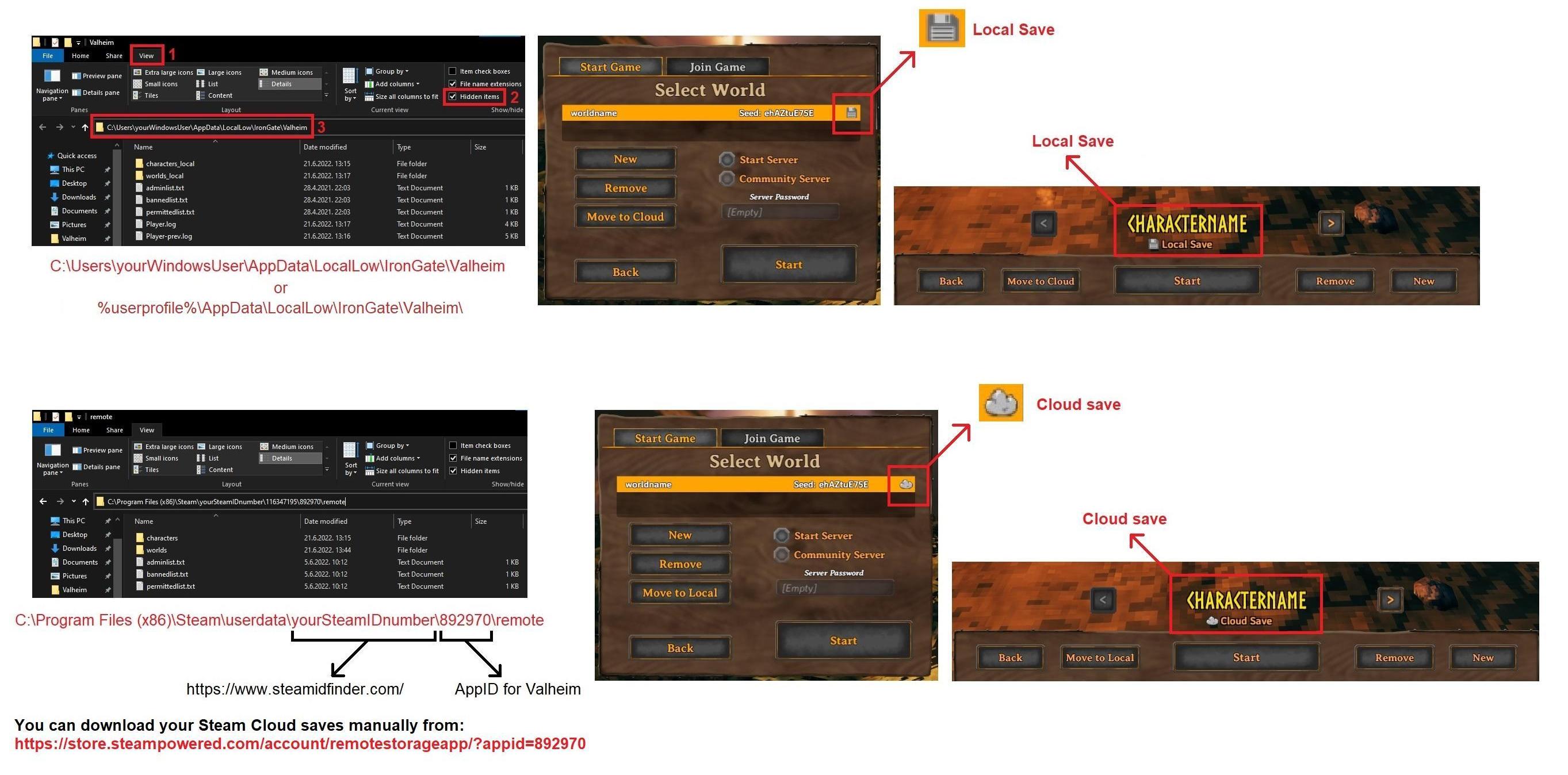
These are the main save locations on windows depending on your using Cloud saves or Local saves:
https://i.imgur.com/mTVKf1J.jpg?4
 gilded sluice
the worlds and characters. besides the steam cloud
analog rune
im confused. so where should I look for the .db file
i think i saw most of my worlds' .db files in the right place but even with them, the worlds got hardwiped
stark meadow
analog rune
im confused. so where should I look for the .db file
On one of those locations, or you can download it from the Steam Cloud link in the browser, which I assume you already did.
Once you've gathered them all, screenshot them with their file sizes showing and date/time showing.
analog rune
i did not, do you have the link in a copyable form?
stark meadow
analog rune
i did not, do you have the link in a copyable form?
For the Steam Cloud viewer in the browser?
https://store.steampowered.com/account/remotestorageapp/?appid=892970
analog rune
thanks
stark meadow
@analog rune You should also enable file name extensions or else you will be renaming fils in a wrong way.
https://i.imgur.com/U0UwiJd.jpg
 stark meadow
analog rune
so where should i place my downloads again?
stark meadow
analog rune
so where should i place my downloads again?
In some random folder, screenshot them with date/time and size so I can tell which ones are corrupt.
If you think you know which ones are right, place them in worlds_local folder both world.db and world.fwl
When you launch the game, you have to then check if that backup is on the top in the manage saves menu, if it's not (locate it by size, date/time and the fact it has to have local disk icon), you have to select it and hit restore button.
analog rune
you mind if i DM the image?
stark meadow
analog rune
you mind if i DM the image?
Yeah, np
analog rune
stark meadow
Yeah, np
sent
 marble yarrow
I have noticed that the spinning wheel will lose its sound effect on and off. Returns if you move away and return, sometimes you can make it go away and return just by panning around the camera so structures come in view. Is this a known thing, otherwise I could save some video of it happening.
 near vault
Is it typical to not find any flametal in fortresses? So far I have found flametal in 1 out of 4 forts. Just wondering if there is a known bug, or if this is normal. Thanks!
sonic estuary
near vault
Is it typical to not find any flametal in fortresses? So far I have found flamet...
It's random, you could be having average valheim luck.
near vault
Thank you. Off to the spires then!
marble wolf
You are checking both chests, right?
 bronze turtle
I just logged into our dedicated server. All my items are here but my worn armor, menjingford, and wishbone are gone? They are the only things missing wtf
 balmy garnet
Every time i join a server with my friend in it says they are blocked automatically on the leaderboard as soon as i join
The button on player list next to their name is red each time i join. I always unmute before i leave
stark meadow
bronze turtle
I just logged into our dedicated server. All my items are here but my worn armor...
Where were the items, in your inventory or chest?
stark meadow
balmy garnet
Every time i join a server with my friend in it says they are blocked automatica...
Will send you a DM about this issue, as I would need to see your config files.
balmy garnet
latent sparrow
Curious, do you recommend amd gpu or intel gpu for performance
There are many many computer forums and groups that can help you with that.
 warped yarrow
Evening all, might be the wrong place but I’ve recently started playing with a buddy of mine from the USA (I’m in the UK) I setup a dedicated server on my server located in my garage and after a few hours of him playing Valheim, be that on the server or local his PC will freeze and the sound that’s playing will be like stuck and continue playing. It only started with Valheim. Anyone come across this? His temps look OK. His PC is about 12 years old but it’s got a 980Ti. Not sure of the cpu and the rest of it. Are there any Valheim ligs to check that might indicate if it’s Valheim causing it?
Personally I’m thinking it’s a hardware issue due to the age of the pc. But it’s weird that it started with Valheim. He can play warframe without any issues
gilded sluice
warped yarrow
Personally I’m thinking it’s a hardware issue due to the age of the pc. But it’s...
do you or your friend use VPN or wifi?
warped yarrow
Nope. My house is hard wired. I’ll ask if he’s on WiFi but I doubt it.
Would WiFi cause a system freeze? Seems unlikely tbh
stark meadow
warped yarrow
Evening all, might be the wrong place but I’ve recently started playing with a b...
Valheim puts a lot of stress on the GPU, so it's probably power↔gpu related.
How long does it take him to freeze?
warped yarrow
It can be hours but then another day it could be 30 minutes.
stark meadow
warped yarrow
It can be hours but then another day it could be 30 minutes.
Is his power supply also 12years old? It might help if they would reduce render scale to 90%, limit their FPS or downclock their card slightly.
Generally, it's probably that type of issue mentioned in Section1:Point6 of the crash guide linked in the pinned comments.
 oblique plinth
Hey, I got a small problem: I am unable to see new arrow or bow recipies. RN, I am about to head into the mountains with a finewood bow instead of a hunting bow, and all I can use are flint or fire arrows
stark meadow
oblique plinth
Hey, I got a small problem: I am unable to see new arrow or bow recipies. RN, I ...
Using mods? Iron/Bronze feathers nothing?
If you are vanilla, re-install your game.
oblique plinth
stark meadow
Using mods? Iron/Bronze feathers nothing?
I am using modded for wizardy/planting any crop
oblique plinth
stark meadow
Using mods? Iron/Bronze feathers nothing?
I got iron, and I got wood, and feathers. Nothing popped up
sonic estuary
oblique plinth
I got iron, and I got wood, and feathers. Nothing popped up
Is the crafting station upgraded?
oblique plinth
sonic estuary
Is the crafting station upgraded?
Yes
sonic estuary
And you’re looking in the forge, not the workbench?
oblique plinth
sonic estuary
And you’re looking in the forge, not the workbench?
Yep
I'll post my mod list here to see if maybe there is a conflict
01921b92-b898-b158-8303-d38372fca24c is the mod code for the thunderstore mod thing
marble wolf
If you're running mods it's best to test without.
oblique plinth
marble wolf
If you're running mods it's best to test without.
Won't that break the save?
marble wolf
Depends on the mods.
sonic estuary
You could backup your saves if you’re worried about breaking them.
oblique plinth
How do I do that?
oblique plinth
sonic estuary
You could backup your saves if you’re worried about breaking them.
How do I back up a save?
sonic estuary
You can manually create backups by moving saves off the cloud if they’re saved there, and then copying those save files into a new folder. Valheim creates automatic backups accessible from the manage saves button on world or character select, so you can use those.
oblique plinth
sonic estuary
You can manually create backups by moving saves off the cloud if they’re saved t...
Where do I find the save file to make a folder?
Sorry if I am asking dumb questions, I am just really confused and a bit new to modding ^^
oblique plinth
marble wolf
Depends on the mods.
IS there anything I can do? You sort of just said depends on the mods and not much else, not trying to sound rude but I did know that it could be a risk due to some items(potions, a wizard staff, my mushroom farm, etc) could be at risk. How can I test this/fix this without risking all my progress essentially?
marble wolf
oblique plinth
IS there anything I can do? You sort of just said depends on the mods and not mu...
Without an intimate knowledge of each mod I don't know if anyone could say off the top of their head.
oblique plinth
marble wolf
Without an intimate knowledge of each mod I don't know if anyone could say off t...
So how do I save a backup file, like where do I locate it so I can at least secure a save to load into since I just got to bone mass and made a good base I don't want to loose it
😑
So nobody can help me fix this, great...
stark meadow
oblique plinth
So how do I save a backup file, like where do I locate it so I can at least secu...
If you want to backup your current saves files you should copy this two folder and paste them to some safe location:
https://i.imgur.com/mTVKf1J.jpg?4
If you want to backup the game and your mods, you can copy your entire Valheim installation directory.
You can right click on Valheim in Steam library → manage → browse local files
Then I would just recommend re-installing the game (should not delete mods).
Next you can try vanilla game or you should go to #mods-issues
oblique plinth
stark meadow
If you want to backup your current saves files you should copy this two folder a...
Thank you for the help
oblique plinth
stark meadow
If you want to backup your current saves files you should copy this two folder a...
So when I get that done, what do I do after loading into a vanilla save?
also I can't see the appdata route
stark meadow
oblique plinth
So when I get that done, what do I do after loading into a vanilla save?
The act of backing saves and installation folder is done so you can restore to previous state if something goes wrong.
When you backup everything, reinstall the game and test if the issue went away.
If the issue doesn't go away, you can either remove all mods, or go to the mod channel.
stark meadow
oblique plinth
also I can't see the appdata route
If you have Steam Cloud enabled for Valheim, you should have both folders.
oblique plinth
stark meadow
The act of backing saves and installation folder is done so you can restore to p...
Alright, I found the steam route and downloaded the saves manually
I got the character save, and the world FWL and Data Base File
How will I use those to launch?
stark meadow
oblique plinth
How will I use those to launch?
I'm not sure what you mean by asking this.
Are you trying to ask how you will restore those saves later if something goes wrong?
oblique plinth
stark meadow
I'm not sure what you mean by asking this.
Are you trying to ask how you will re...
I think? Basically how do I use those saves, or access them now that I have a back up
Also, I did ininstall and redownload, and it did not work. I launched in vanilla
stark meadow
oblique plinth
I think? Basically how do I use those saves, or access them now that I have a ba...
Backup is just a copy of saves on another location on the PC.
The originals aren't altered so the game should launch like before.
There is no point in explaining how to restore those backups and replace the current active saves in nothing went wrong.
oblique plinth
Still no arrows or bows
stark meadow
oblique plinth
Also, I did ininstall and redownload, and it did not work. I launched in vanilla
You haven't launched in Vanilla, because to launch a game without mods, re-installation of Valheim isn't enough.
oblique plinth
IT WORKED
I literally just touched a piece of gunk, and now I got the unlocks
But like, I touched thousands of gunk before this, so I got no idea what went wrong, or how to avoid this going back when I return to the modded save
stark meadow
You have the recipes now so it should be fine in modded as well
As to how it happened, you installation was corrupt, probably due to improper mod installation.
stark meadow
oblique plinth
Since if it's vanilla only, a ton of items just died
Yeah, you should have launched a modded game not vanilla.
oblique plinth
stark meadow
Yeah, you should have launched a modded game not vanilla.
fuk
stark meadow
You can now restore a modded save I guess. Which might be more complicated that anythign you've done so far 😅
oblique plinth
stark meadow
You can now restore a modded save I guess. Which might be more complicated that ...
It is saved locally at least
It did not work. On modded, I got no new arrows or bows even after touching the gunk
stark meadow
What ever you do, don't cut/move backups.
stark meadow
oblique plinth
It did not work. On modded, I got no new arrows or bows even after touching the ...
Then your mod installation is messed up, or the mod you are using has additional bugs, for which I can't help.
Someone in #mods-issues might.
oblique plinth
stark meadow
Then your mod installation is messed up, or the mod you are using has additional...
well...thanks for trying to help ^^ Hopefully I get some help from there soon, since in the mountains and plains, I'll need a bow yeah?
stark meadow
oblique plinth
well...thanks for trying to help ^^ Hopefully I get some help from there soon, s...
Yeah, you would definitely want a bow if it's your first play through.
gilded sluice
warped yarrow
It can be hours but then another day it could be 30 minutes.
a 12 year old power supply probably outlived it's expexted worklife by 5-10 years
warped yarrow
gilded sluice
a 12 year old power supply probably outlived it's expexted worklife by 5-10 year...
Agreed. But he’s not in a position to replace it at the moment unfortunately.
gilded sluice
warped yarrow
Agreed. But he’s not in a position to replace it at the moment unfortunately.
that sucks 😦
warped yarrow
Yep. If we knew it was 100% the PSU then he could start to budget for it. But seems a bit of a waste of money on a whim
gilded sluice
I mean..
what's next to break
cooling paste on GPU / CPU is probably very very solidifed aswell
stark meadow
warped yarrow
Yep. If we knew it was 100% the PSU then he could start to budget for it. But se...
I also agree that you should never buy stuff on a whime, but since I've been in a similar situation, you can always buy a stronger power supply that would fit your next PC as well.
warped yarrow
I have mentioned that as a possible next step
stark meadow
warped yarrow
I have mentioned that as a possible next step
Let them try the software based fixes first that I mentioned, which can reduce the power draw.
When my power supply started failing, just unplugging my big TV from the GPU manages to keep the power supply running for another year.
However one should be aware that the old power supply can fry everything else on the build.
warped yarrow
stark meadow
Let them try the software based fixes first that I mentioned, which can reduce t...
I did pass on those recommendations, whether or not he tried them im not sure as i haven't spoken to him yet. He lives in the US and im in the UK so there is a bit of a delay. I did logon to the server this morning and he'd been busy building a new base on another island and some portals so it was at least working for a while before crashing (if i even did!)
Come to think of it im sure he runs 3 monitors. I'll suggest he unplugs one to see if that helps.
 fringe fog
Hey there,
today I have had a really weired bug during my Livestream on Twitch,
Here is the Clip about my experience.

#shorts #valheim dunkelwald #mine
stark meadow
fringe fog
Hey there,
today I have had a really weired bug during my Livestream on Twitch,
...
Can you DM me your world file and a character file?
Bonus useful if you also have backups before this happened.
fringe fog
stark meadow
Can you DM me your world file and a character file?
send it to you
 lyric mirage
Hi hi! I'm finding that I'm picking up a number of items of which I already have partial stacks in my inventory, and they're not stacking together; they take up a new slot. It feels like a bug - is anyone aware of anything like that?
stark meadow
lyric mirage
Hi hi! I'm finding that I'm picking up a number of items of which I already have...
Yeah, there are some known stacking issues. However you might find something that we are unaware of, so if you notice which item, be free to write it down here.
 smoky granite
Anyone having a issue when you first load up Valheim it locks up your whole system and you have manually restart your computer? Only started happening these last few weeks, around the last small patch.. No other game does these for me.. Ive even validated the files, fresh install.. still happens time to time..
lyric mirage
stark meadow
Yeah, there are some known stacking issues. However you might find something tha...
Oh, it's at the item level?
stark meadow
smoky granite
Anyone having a issue when you first load up Valheim it locks up your whole syst...
What are you system specs?
stark meadow
lyric mirage
Oh, it's at the item level?
Some issues are item based, some related to the item position in the inventory. But generally just writing down the item is enough.
 ebon ginkgo
hello there
i'm getting "Logging into backend service" when i try to connect to a server (not dedicated). me and my friends have been playing in the world for a month and now it gives this message to all of us and we can't connect to the world. any solutions?
i've also found the exact issue we're facing in a reddit post from 2 years ago and there's no fix in there
edit: just tried to connect to other servers, no such window as "Logging into backend service"... and loads them all...
gilded sluice
smoky granite
Anyone having a issue when you first load up Valheim it locks up your whole syst...
Sounds like either mods issue or you have some problem with hardware perhaps?
let me look at your player.log file In this hidden folder in windows:
C:\Users\ <username> \AppData\LocalLow\IronGate\Valheim
stark meadow
ebon ginkgo
hello there
i'm getting "Logging into backend service" when i try to connect to ...
Generally if there is more of you having issues with logging into background services, chances are that crossplay went out in your region.
If you are all playing on Steam, there is no need for you to run a server on with crossplay enabled (PlayFab)
ebon ginkgo
stark meadow
If you are all playing on Steam, there is no need for you to run a server on wit...
ik, but we weren't playing with crossplay
stark meadow
ebon ginkgo
ik, but we weren't playing with crossplay
Do you still have the same problem or was it resolved?
ebon ginkgo
stark meadow
Do you still have the same problem or was it resolved?
We still have it
stark meadow
ebon ginkgo
We still have it
In which region are you?
Does everyone gets the error when joining the list of community server for example?
ebon ginkgo
stark meadow
Does everyone gets the error when joining the list of community server for examp...
Yea we all do
We're in the middle east
stark meadow
ebon ginkgo
Yea we all do
We're in the middle east
Egypt for example is known to block playfab services (crossplay) on a government level, where VPN is needed to play on crossplay servers.
Every server is launched with crossplay by default if you don't specifically disable it
Let me know when you'll have some time to try Steam only server, will host it
analog rune
okay once again getting the issue of 100% D drive and valheim lagging out... afraid its gonna corrupt my saves again if i dont do something faster this time
there were some hardcore gaming sessions with no issues inbetween but here we go again
and again, event viewer says "Reset to device, \Device\RaidPort2, was issued."
seems to be only steam or valheim related
stark meadow
analog rune
okay once again getting the issue of 100% D drive and valheim lagging out... afr...
How long does it last? Try checking what file is being written or read when there is 100% disk usage.
Task manager → performance → Resource monitor (w10 blue link, on w11 three dots) → Disk → sort by Total bytes being read/written
analog rune
stark meadow
How long does it last? Try checking what file is being written or read when ther...
it lasts for minutes, sometimes up to 15 or so that the usage is at 100% or atleast spikes there for very long periods
usually i have just forced shutdown at that point
so how do i decipher what im seeing on resource monitor?
right now the disk usage has gone down to 0-1% though
after just quitting valheim and letting the pc sit
stark meadow
analog rune
so how do i decipher what im seeing on resource monitor?

It shows by which files is disk occupied with
A problematic file can give you a clue into what's going on
analog rune
so should i be looking at the top one or?
and it doesnt seem to specify which disk its viewing, i have 3 plugged in
stark meadow
You should sort the list by total bytes by clicking at the name of that column
It's of no use to you know if the problem is not active
Next time, if you don't see any suspicious files, it's probably driver related
analog rune
im gonna try to "recreate the problem" and see what it says, but we'll see
stark meadow
analog rune
im gonna try to "recreate the problem" and see what it says, but we'll see
Also grab Valheim Player.log file next time this issue happens
It's in the same folder as worlds_local folder
 hot dragon
Hey, I've got this annoying bug, where sometimes the bloom & light goes crazy. And I can't see anything.
It's especially bad in Infested Caves.
Any ideas?
The bug comes & goes on its own. Even without moving.

 gilded sluice
hot dragon
Hey, I've got this annoying bug, where sometimes the bloom & light goes crazy. A...
gilded sluice
hot dragon
Hey, I've got this annoying bug, where sometimes the bloom & light goes crazy. A...
disable your mods first and see if that helps / is the issue
hot dragon
First thing I tried, still happens pretty consistently.
hot dragon
gilded sluice
disable your mods first and see if that helps / is the issue
First thing I tried, still happens all the time.
Usually in mistlands & infested caves.
VERY rarely in Meadows.
hot dragon
I have a GTX 1070.
Freshly formatted machine.
These are the mods I had as of taking the screenshots.
But it's been happening even without mods.

 jagged hamlet
hot dragon
I have a GTX 1070.
Freshly formatted machine.
These are the mods I had as of tak...
jagged hamlet
hot dragon
I have a GTX 1070.
Freshly formatted machine.
These are the mods I had as of tak...
Installed all the latest updates for the graphics card?
 rigid jungle
Hi! I'm a fairly new player and I'm looking for some help with an error I keep getting. I've looked through some posts that mention the phrase "meta file" on reddit but none of them quite addressed my issue.
I play on PC, and every time that I start my world, I get an error message saying that the meta file is missing and asks me if I would like to restore from the backup. I have included screenshots of the error message and the files in my worlds_local file and my worlds folder in the steam folder - any advice would be really appreciated ❤️ I don't want to start playing one day and have it be unable to restore! ratnest is the world that is not working and crowcity is the one that is, i think the problem is that no .fwl files seem to be getting created but i'm not sure what to do about that!


 gilded sluice
hot dragon
I have a GTX 1070.
Freshly formatted machine.
These are the mods I had as of tak...
gilded sluice
hot dragon
I have a GTX 1070.
Freshly formatted machine.
These are the mods I had as of tak...
could you send me your player.log file?
In this hidden folder in windows:
C:\Users\ <username> \AppData\LocalLow\IronGate\Valheim
stark meadow
rigid jungle
Hi! I'm a fairly new player and I'm looking for some help with an error I keep g...
Have you made copies of your .fwl files like I mentioned on Reddit you should?
rigid jungle
yeah i have!
rigid jungle
gilded sluice
could you send me your player.log file?
will find this now!
stark meadow
rigid jungle
yeah i have!
Ok, have you tried then clicking "Yes" to that dialog where the game tells you that it can restore Meta file for you?

Seems like you have matching .fwl files now
rigid jungle
stark meadow
Ok, have you tried then clicking "Yes" to that dialog where the game tells you t...
yeah, and then it restores it and i can play, but when i log out and back in again the same error reoccurs
hot dragon
gilded sluice
In this hidden folder in windows:
C:\Users\ <username> \AppData\LocalLow\IronGat...
Thank you for the help 🙏
rigid jungle
gilded sluice
could you send me your player.log file?
oh whoops just realised that was in response to someone else, ignore me!
stark meadow
rigid jungle
yeah, and then it restores it and i can play, but when i log out and back in aga...
That's a bit strange indeed. Usually stuff like this happens when one quits the game, rather then just logs out.
Are you sure that if you restore META file, play in a world and just logout (not quit), the same issue will occur?
This usually happens due to faulty graphic drivers crashing the game when one tried to quit it and saving it in progress.
Since you have NVIDIA Quadro T1000 with Max-Q Design, something like that could happen.
Do you have an FPS monitor enabled so you can see FPS in the game?
rigid jungle
i'll try restoring and just logging out now!
and no i dont have an fps monitor but i could set one up!
restored:
 stark meadow
hot dragon
Hey, I've got this annoying bug, where sometimes the bloom & light goes crazy. A...
stark meadow
hot dragon
Hey, I've got this annoying bug, where sometimes the bloom & light goes crazy. A...
This is probably related to this kind of issues: https://www.reddit.com/r/valheim/comments/lmawc5/screen_will_turn_green_yellow_or_blue_let_me_know/
Solution is unknown due to lack of players reporting back how they fixed it. Pretty common on 1070 card.
I also have a 1070 (gigabyte g1) but never had an issue. Which 1070 manufacturer you have?
Is your monitor connected over HDMI,DVI or display port?
Reddit
Explore this post and more from the valheim community
rigid jungle
after logout:
 stark meadow
rigid jungle
and no i dont have an fps monitor but i could set one up!
stark meadow
rigid jungle
and no i dont have an fps monitor but i could set one up!
Try enabling FPS overlay is Steam settings
Steam settings → in Game tab

You should check if your FPS is properly capped to 60 when you are navigating through menus
Also, after the issue happens, send your player.log file then
So that the error/issue is captured in the player.log file properly
hot dragon
stark meadow
This is probably related to this kind of issues: https://www.reddit.com/r/valhei...
EVGA GTX 1070 SC GAMING (08G-P4-6173)
DisplayPort.
 rigid jungle
stark meadow
This is probably related to this kind of issues: https://www.reddit.com/r/valhei...
rigid jungle
stark meadow
This is probably related to this kind of issues: https://www.reddit.com/r/valhei...
ooh how do i check manufacturer?
i do often have a monitor connected via hdmi, though i always play on the laptop screen and the error still happens even when i dont have the monitor plugged in
rigid jungle
stark meadow
Try enabling FPS overlay is Steam settings
will do this now!
stark meadow
rigid jungle
ooh how do i check manufacturer?
i do often have a monitor connected via hdmi, t...
The HDMI comment was intended for another person. @rigid jungle you don't have to check that. On Discord you can see to which comment/person one replies to.
rigid jungle
stark meadow
You should check if your FPS is properly capped to 60 when you are navigating th...
seems to flick about in the range 25-40
rigid jungle
stark meadow
The HDMI comment was intended for another person. <@338761543976091659> you don'...
whoops sorry i noticed that after replying 😭
thank you for your patience i am not the best with tech generally 💔
player log after restoring
stark meadow
hot dragon
EVGA GTX 1070 SC GAMING (08G-P4-6173)
DisplayPort.
I don't see any BIOS updates available for that model.
Try to check if the issue temporarily goes away when you disable anti aliasing in the game or change your resolution back and forth. If it does, it's the same issue. I would recommend clean driver re-installation with DDU software at that point. Ever had a different card on that Windows system? Are you forcing some custom graphic setting through Nvidia control panel for Valheim?
stark meadow
rigid jungle
player log after restoring
Hm... seems like the issue might be happening because you renamed your world file at some point from ratnest to RatNest
Do you remember doing something like that?
rigid jungle
oh i well may have yeah! probably very early on
stark meadow
Ok, best to wipe all the saves clean then and reintroduce them as ratnest
You have made copies of everything here right?
 rigid jungle
yep i've got copies of all of those things in a separate location on my computer now!
what does wiping the saves clean mean? deleting them is that?
stark meadow
rigid jungle
what does wiping the saves clean mean? deleting them is that?
Yeah, but you have to do it from the in-game menu.
Open up manage saves button, expand the backups for your RatNest world so you can see all of the backups in the game.
Then delete the top backup that has the RatNest name, then quit the game after that and let Steam sync up
Then we continue
rigid jungle
just this one? or all of them?
 hot dragon
stark meadow
I don't see any BIOS updates available for that model.
Try to check if the issue...
hot dragon
stark meadow
I don't see any BIOS updates available for that model.
Try to check if the issue...
Nvidia Control Panel is currently set to default settings besides upping the hz and turning on 10 bit colors.
I'll try DDU and download Clean Nvidia Drivers.
I've had this GPU for 8 years at this point.
Brought it over from my old system.
I'll attempt resolution change & anti aliasing.
This computer is a pretty fresh install. Literally not even 2 weeks old.
stark meadow
hot dragon
Nvidia Control Panel is currently set to default settings besides upping the hz ...
Unlikely that it's a driver issue then. Have a spare HDMI cable to try also?
I've only used DVI and HDMI on my card so a far, and haven't messed with the color depth.
hot dragon
stark meadow
I've only used DVI and HDMI on my card so a far, and haven't messed with the col...
Actually, I've got dual screen setup. My other monitor is connected via HDMI.
I'll just mirror the two.
rigid jungle
@stark meadow
i deleted the top file, quit the game, restarted steam and then reopened the game, and this is the current status, still missing the meta file

 stark meadow
rigid jungle
<@196192010581835776>
i deleted the top file, quit the game, restarted steam an...
stark meadow
rigid jungle
<@196192010581835776>
i deleted the top file, quit the game, restarted steam an...
Yeah, still not good
Go ahead and from the manage saves menu delete every backup file related to that RatNest save

So delete all of those. Quit the game. Don't launch it again. Let me know when you are done
rigid jungle
deleted them so it looked like this and i have now quit the game!

worlds folder looks like this now
@stark meadow
stark meadow
rigid jungle
deleted them so it looked like this and i have now quit the game!
You still haven't deleted them
RatNest has to be completely gone
rigid jungle
ohhhhh the top folder too i see! ok one sec
stark meadow
rigid jungle
ohhhhh the top folder too i see! ok one sec
Yeah, it's not a folder, it's just an active save
rigid jungle
OH gotcha sorry misunderstood what that was!
so yes to removing the world?
@stark meadow
 stark meadow
rigid jungle
so yes to removing the world?
<@196192010581835776>
stark meadow
rigid jungle
so yes to removing the world?
<@196192010581835776>
Yes, remove it, Then quit the game
rigid jungle
ok done! removed and i quit the game!
stark meadow
Then we have to transfer you backups that you've made of your saves, from your backup folder, to the worlds_local folder at
%username%\AppData\LocalLow\IronGate\Valheim
rigid jungle
is that the backup from the remote > worlds folder? then going into worlds_local?
stark meadow
rigid jungle
is that the backup from the remote > worlds folder? then going into worlds_local...
There is nothing in the removt → worlds folder now. Where did you put your backups?
I told you to make copies of the saves first, and you said you did?
rigid jungle
yep i've got copies of the worlds folder AND the worlds_local one
this is from the worlds folder
 stark meadow
rigid jungle
yep i've got copies of the worlds folder AND the worlds_local one
stark meadow
rigid jungle
yep i've got copies of the worlds folder AND the worlds_local one
Yeah, good. Those saves now have to go to the original worlds_local folder
So copy all files from steam backp into the original worlds_local folder
Then launch Valheim and open manage saves menu
rigid jungle
and this is the worlds_local backup

ok worlds_local is now looking like this, is that right?

(i just pasted in the ratnest stuff)
stark meadow
rigid jungle
ok worlds_local is now looking like this, is that right?
That RatNest.fwl is no good
rigid jungle
i have an earlier backup which is lowercase if that's better?
stark meadow
rigid jungle
i have an earlier backup which is lowercase if that's better?
yeah, use the lower case one
rigid jungle
stark meadow
yeah, use the lower case one
awesome, got this now

ok my manage saves is looking like this now! @stark meadow
 stark meadow
rigid jungle
ok my manage saves is looking like this now! <@196192010581835776>
stark meadow
rigid jungle
ok my manage saves is looking like this now! <@196192010581835776>
You can now select the top save and press the "Move to cloud" button
Then go play and logout to see if you get META error
rigid jungle
stark meadow
You can now select the top save and press the "Move to cloud" button
is that the higlighted one, or the first _backup one?
stark meadow
rigid jungle
is that the higlighted one, or the first _backup one?
Here it is unclear, as usually the save with biggest file size is the latest one, so the first backup one should be the latest save
But that's now always true, it depends if you did any removal in your world and reduced it's file size
Do the thing for the first save for now
rigid jungle
ok will do!
omg it started without an error!!!!!!!!! and progress is up to date!!!!!
thank you SO SO SO much for your help with this, i NEVER would have figured all that out alone 💜
stark meadow
rigid jungle
thank you SO SO SO much for your help with this, i NEVER would have figured all ...
Np, glad it works 👍
gilded sluice
hot dragon
Actually, I've got dual screen setup. My other monitor is connected via HDMI.
I'...
you still got problems?
hot dragon
gilded sluice
you still got problems?
@stark meadow
Just attempted, issue persists.
Attempted Changing resolution.
Attempted changing anti aliasing on, off, on, off.
Enabled scaling from Native to Automatic, to 95%, and back to native.
Issue persisted.
hot dragon
Terrible.

 warm mica
Today I noticed my Valheim is crashing upon trying to start, I can't get anything to pop up after hitting the play button on Steam, and this is the crash error log:
I don't know how this stuff really works I just tried uninstalling and reinstalling the game and I still have the same problem and I verified game file integrity and it also didn't change anything. I also haven't ever installed any mods that I can remember. If anyone has some tips I would greatly appreciate it!
 hot dragon
warm mica
Today I noticed my Valheim is crashing upon trying to start, I can't get anythin...
hot dragon
warm mica
Today I noticed my Valheim is crashing upon trying to start, I can't get anythin...
Not from the staff here, but try manually deleting the files. In steam/steamapps/common/Valheim
Just delete the whole thing folder.
And rename
AppData\LocalLow\IronGate\Valheim
Rename the Valheim folder to Valheim Backup
Then uninstall via steam, and reinstall.
Helped me before with similar errors.
Take note, any characters you have saved locally, and any worlds, will go poof.
So back them up to cloud!
gilded sluice
hot dragon
<@196192010581835776>
Just attempted, issue persists.
Attempted Changing resolu...
try to do a clean re-install of your GPU drivers 🤔
do this
gilded sluice
hot dragon
Not from the staff here, but try manually deleting the files. In ``steam/steamap...
the local saves don't uninstall / is removed when you uninstall valheim 🙂
gilded sluice
warm mica
Today I noticed my Valheim is crashing upon trying to start, I can't get anythin...
looks like missing GPU drivers 🤔
is your harddrive okay? or did you rescently restore a backup of windows?
hot dragon
gilded sluice
the local saves don't uninstall / is removed when you uninstall valheim 🙂
When you manually rename that folder, it would.
As that's where the local save files for characters & worlds are on Discord.
marble wolf
It would be even less likely to be removed if you renamed the folder as the uninstaller wouldn't have a clue where the folder was.
hot dragon
When he opens the game, he'll not see his characters.
Or worlds.
Which he saved locally.
From his perspective, they were just deleted.
marble wolf
I'll go with Smiffe's explanation.
gilded sluice
hot dragon
When he opens the game, he'll not see his characters.
Or worlds.
Which he saved ...
could be he installed on another harddrive
but they are always on C:
but say for example. you played prior to mistlands, then you uninstall and reinstall. since the game is in early access, sometimes when we do changes and the players don't keep up with patches, things can "fall out of sync" and you don't get the updated folder structure as intended for example
this is how it looks for me since I've had valheim since 2020
 hot dragon
So that's not AppData\LocalLow\IronGate\Valheim ?
Also that's identical to my folder.
gilded sluice
hot dragon
So that's not ``AppData\LocalLow\IronGate\Valheim`` ?
it is
did you do the nvidia clean re-install btw? @hot dragon
hot dragon
gilded sluice
it is
Didn't have the time to play Valheim yet. Will do tomorrow!
gilded sluice
hot dragon
Didn't have the time to play Valheim yet. Will do tomorrow!
usually, doing a clean re-install of the graphics card drivers is recommended by AMD/Nvidia every 6 months or so to remove old drivers that isn't removed automaticly
hot dragon
gilded sluice
usually, doing a clean re-install of the graphics card drivers is recommended by...
This is an almost brand new install. But I'll do as requested ^-^
gilded sluice
hot dragon
This is an almost brand new install. But I'll do as requested ^-^
how brand new? 🤔
is it windows 10 or 11?
hot dragon
I've factory reset it 2 weeks ago. Windows 11.
Hardware is extremely dated.
So I reset every 6 months or so.
Keeps PC quick.
gilded sluice
hot dragon
Hardware is extremely dated.
So I reset every 6 months or so.
Keeps PC quick.
can you find the file called doorstop.ini ?
hot dragon
gilded sluice
can you find the file called doorstop.ini ?
That's from Modman I think?
There is also one in game folder
gilded sluice
Move the file out of the game directory. This should quickly stop mods from loading btw.
warm mica
gilded sluice
looks like missing GPU drivers 🤔
I don't know how I would have any drivers missing but I tried updating drivers for my GPU anyways. I also havent done anything odd lately with restoring windows or any drive issues that I know of. None of my other steam games ive noticed any issues with.
I also manually deleted all valheim files and reinstalled and no luck :(
gilded sluice
warm mica
I don't know how I would have any drivers missing but I tried updating drivers f...
did you re-install valheim on diffrent harddrives?
warm mica
gilded sluice
did you re-install valheim on diffrent harddrives?
I think it was on my D drive before but I changed it to my C drive when I did the reinstall
gilded sluice
warm mica
I think it was on my D drive before but I changed it to my C drive when I did th...
could possibly explain the problems with "missing files" 🤔
if you open the steam library, right click valheim and choose "properties" then browse local files

might be the reinstall-problem
where the game thinks your install is in one folder, and steam says it's in another folder
do you start with a shortcut or from steam library?
 scenic flare
spears seem to sometime vanish when thrown at the ocean. this has happened to me on two occasions
stark meadow
scenic flare
spears seem to sometime vanish when thrown at the ocean. this has happened to me...
They don't disappear rather can stick to the ocean floor. If you left them there for 2 in-game days, they will despawn.
scenic flare
you’re right my bad, I retrieved it when I jumped where I had thrown it
 wintry bloom
Anyone else got its valheim crashing after a few minutes? Two times gave and error and close, the third the computer just turned off 😦
stark meadow
wintry bloom
Anyone else got its valheim crashing after a few minutes? Two times gave and err...
List you PC specs, and check Section1:Point6
https://www.reddit.com/r/valheim/comments/uq9b8x/my_valheim_is_crashing_fix_for_crash_guide/
 flint wyvern
I've been noticing an issue with the texture of the ocean water in my game where there are shimmering shapes on the surface that move like waves, but do not move in the direction of the wind like the actual waves. I've changed everything in the graphic's settings and nothing has worked. The only solution I've found so far is that starting a new game and going back to the game I was in "resets" the ocean, but the shapes return gradually within a minute or two.
Might be a related issue, I've also noticed that when emerging from a sunken crypt, the swamp water appears white for a second before going back to normal.
warm mica
gilded sluice
do you start with a shortcut or from steam library?
I start from steam library. Also I looked in properties, and it shows Valheim in the C drive too. Should I try deleting everything and trying my other drive again?
stark meadow
flint wyvern
I've been noticing an issue with the texture of the ocean water in my game where...
there are shimmering shapes on the surface
Have a screenshot? Which GPU are you playing with?
gilded sluice
warm mica
I start from steam library. Also I looked in properties, and it shows Valheim in...
Hm.. 🤔
old harddrives?
Samsung 990 NVME's ?
flint wyvern
stark meadow
> there are shimmering shapes on the surface
Have a screenshot? Which GPU are yo...
11th Gen Intel
I've been playing for a while now and haven't had the issue, so maybe there's something that triggers it?
stark meadow
flint wyvern
11th Gen Intel
I've been playing for a while now and haven't had the issue, so ...
Valheim needs a dedicated GPU to run properly, so I'm not sure if you'll be able to fix this
Inteal Arc and Iris GPUs have a similar problem tho
warm mica
gilded sluice
Hm.. 🤔
old harddrives?
Samsung 990 NVME's ?
Are you saying to install in a different drive or what are you asking? Sorry Im a bit confused. I was playing like last week with no issues and I hadn't done anything that I know of that would've messed anything up this severely. I made a backup of my characters/worlds so I dont mind trying anything :)
flint wyvern
stark meadow
Valheim needs a dedicated GPU to run properly, so I'm not sure if you'll be able...
Gotcha, thank you
stark meadow
flint wyvern
Gotcha, thank you
If you can access specific graphic settings for a particular game (usually in graphic card control panel), you can try these, as these fix the problem on Intel Arc/Iris GPUs, but I'm not sure you have an option to tweak these:
Game Compatibility - Advanced
Frame Delivery - VSYNC ON
Post Processing - Sharpening On (12%)
3D Overrides - Anisotropic Filtering x16
Adaptive Tessellation: ON (Quality at 100%)
stark meadow
warm mica
Are you saying to install in a different drive or what are you asking? Sorry Im ...
When you jsut un-install your game, without installing it immediately after, how does your Valheim installation folder look like?
Does it become empty?
warm mica
stark meadow
When you jsut un-install your game, without installing it immediately after, how...
How do I find that folder after I uninstall Valheim?
 warm mica
It looks like this: and theres data in these files
 stark meadow
warm mica
It looks like this: and theres data in these files
stark meadow
warm mica
It looks like this: and theres data in these files
Delete all this files, and only then re-install Valheim
warm mica
Okay I just deleted them and cleared from recycle bin and now ill try reinstalling
gilded sluice
warm mica
Okay I just deleted them and cleared from recycle bin and now ill try reinstalli...
doesn't help with those mod files still in the folder
uninstalling and then re-installing doesn't remove any modded file 😦
warm mica
stark meadow
Delete all this files, and only then re-install Valheim
It worked somehow!! Thank you so much I have a feeling that since I have a ton of files- maybe I moved something important to a place where it shouldn't have been. But everything looks to be in order and I have my character/worlds on since they were on the steam cloud. Thank you kindly and thanks to everyone who tried to help!! I really appreciate your time
stark meadow
warm mica
It worked somehow!! Thank you so much I have a feeling that since I have a ton o...
I'm amazed that your Valheim recently worked at all with mod files from 2022 being there XD
 hollow geyser
Not sure if it's a bug, but I do believe that is a two-handed sword
 gilded sluice
stark meadow
I'm amazed that your Valheim recently worked at all with mod files from 2022 bei...
gilded sluice
stark meadow
I'm amazed that your Valheim recently worked at all with mod files from 2022 bei...
might been deactivated but lingering
 desert lintel
I was hoping if anyone could help me out with this one! All my characters seem to have been reset. The game wont allow me to load a world, and the game isnt playing any music. The only reason why i think this might have happened is because my partner and I share a PC, and they recently logged me out of steam while valheim was running. Is there any way I can recover this?
stark meadow
desert lintel
I was hoping if anyone could help me out with this one! All my characters seem t...
Have you tried restarting the PC and re-installing Valheim?
desert lintel
stark meadow
Have you tried restarting the PC and re-installing Valheim?
Restarting yes, re-installing valheim no. I will give that a go now!
OH MY ODIN that was an easy fix thank you so much @stark meadow I was really worried that 500 hours would be gone!
 last ermine
Is anyone else having issues with not being able to join any one else's server? My GF and I play nearly every day, even played yesterday with no issues. Today I can't get into her server, and she can't get into one of mine. We've tried modded, and vanilla straight through steam, (We play modded usually) and we cannot get in.
stark meadow
last ermine
Is anyone else having issues with not being able to join any one else's server? ...
If your are both playing on Steam, try disabling crossplay before you start your server
 fathom vessel
Hello, I was playing this game on an Xbox account, but since it’s no longer on Game Pass, I bought it on Steam. The problem is that I can’t retrieve my character and world saves... Is there a solution?
gilded sluice
fathom vessel
Hello, I was playing this game on an Xbox account, but since it’s no longer on G...
Xbox console or Game pass PC ?
fathom vessel
gilded sluice
Xbox console or Game pass PC ?
game pass pc
gilded sluice
fathom vessel
game pass pc
Hm.. I wonder if not there are files on the PC you can grab 🤔
do you have that folder?
it's usually hidden folders in windows so you need to enable "view hidden files/folders"
all our files are very close to be honest if you find it.
\Users\smiff\AppData\LocalLow\IronGate is where we store locally worlds and characters
viscid dock
Whenever I use the workbench, it always starts me in the middle of the list (maybe always at the Stone Axe?) even if I have ingredients of something to make that would appear at the top. All other crafting stations start at the tops of their lists. Is this a known thing, or something weird going on for me?
 gilded sluice
viscid dock
Whenever I use the workbench, it always starts me in the middle of the list (may...
gilded sluice
viscid dock
Whenever I use the workbench, it always starts me in the middle of the list (may...
um. do you enable debugmode? 🤔
viscid dock
No. Have never used commands in valheim.
gilded sluice
ok
because it's a "thing" if you aren't at a workbench, and open the build menu. it will sticky the last item you had selected
viscid dock
Any way to un-sticky it? I can't seem to deselect in the personal crafting menu.
I do see how if I select something different then it starts there.
gilded sluice
not really no
it's like. the game remembers what item you had selected last time before closing the workbench
viscid dock
Ah. Even in the workbench itself. So I fixed it by selecting the Fenris Coat at the top. Thanks! I see the forge works that way as well, so I guess it's consistent, but I know that if I have something in inventory that I can make, that thing that's makeable at the top of the list, rather than the last thing I made, seems to get selected on the other crafting stations. Is that what the workbench is missing?
Selecting Fenris Coat worked until I went through a portal to a different workbench, then it went back to Stone Axe. It's definitely wonky.
OK, it was opening inventory that reset it, even though I didn't touch the selection on the inventory crafting menu.
gilded sluice
nothing I have reflected on before
ah, was gonna say that
everytime you open your inventory. you have the 4 core item craftables
viscid dock
So I did confirm that even with something else selected (Silver Sword) putting ingredients (copper, tin) in inventory resulted in the Forge selecting Bronze at the top of the list. If I do the same on the workbench though (e.g. needles and feathers), it doesn't select the makeable thing. So, that's the main inconsistency.
 daring saffron
Bug Report: I recently added two more furnaces for three total. On occasion, the kiln near the three smelters will eat resources
Restarting the server seems to help.
gilded sluice
daring saffron
Bug Report: I recently added two more furnaces for three total. On occasion, the...
eat resources?
picture? video?
running any mods?
 gaunt mist
Visual bug? My character keeps having that heating effect after swimming in red (Ashlands) water next to the mountain biome.

It stopped after logging out tho.
gilded sluice
gaunt mist
Visual bug? My character keeps having that heating effect after swimming in red ...
what is that green thing around your waist?
sonic estuary
gilded sluice
what is that green thing around your waist?
Jade axes
gaunt mist
I was wearing Flametal armor and Ask trousers, tried to take them off to see if it went away with that.
gilded sluice
sonic estuary
Jade axes
ah
daring saffron
gilded sluice
picture? video?
running any mods?
I would press insert into the smelter and it would remove the iron from my bag but then the smelter would still show 0
No Mods. Server. I'm personally using a mac
I reset the server and the bug disappeared. Materials were still gone though.
gilded sluice
daring saffron
I would press insert into the smelter and it would remove the iron from my bag b...
is it multiplayer?
did you exit a teleporter and shove materials into the smelters, and then it was gone?
viscid dock
I had an interesting little glitch today that I'm not going to spend the materials to try to reproduce, but I'll tell you what I *think *happened: I made the Slayer and I wanted to just test swing it a bit before doing the upgrade on it, after which I hit R to put it on my back. Went to the black forge and crafted the electric version and upgraded that, then went and dropped it in my chest. That's when I noticed the regular Slayer model was still on my back. (Wish I had pressed R to see if I would have wielded a nonexistent one or not.)
stark meadow
viscid dock
I had an interesting little glitch today that I'm not going to spend the materia...
Yeah, It's known issue, low priority to fix
 wild current
After a while, item stands seem to forget what kind of style the item had (also happens with items like capes on armor stands) If broken and on relogging, the item reverts to the correct style again. Version 0.218.21 no mods.
Edit: seems to be triggered while hovering over the item stands in repair mode.
 stark meadow
wild current
After a while, item stands seem to forget what kind of style the item had (also ...
stark meadow
wild current
After a while, item stands seem to forget what kind of style the item had (also ...
Probably the same issue as yet unfixed bug that makes them revert to default on starting screen when viewing the character wearing them.
 rotund elm
I'm trying to play Valhiem remotely from my laptop. Usually this works well but the stream option strangely doesn't show up sometimes
Anyone have any idea how to troubleshoot?
Edit: NM. I remoted in and started steam manually, then I was able to remotely connect
stark meadow
rotund elm
I'm trying to play Valhiem remotely from my laptop. Usually this works well but ...
You can also make a Steam Valheim shortcut that will always launch Steam first
 slow owl
Started some new characters on a new world with friends to play the new content after a year away.
I was doing some resource gathering while they are offline, and "The Forest Is Moving" event occurred at our base even though we have not yet beaten Eikthyr
The wiki says the only trigger to start the event is beating that boss
Could anything else cause army_theelder to occur before Eikthyr is defeated?
manic orbit
slow owl
Started some new characters on a new world with friends to play the new content ...
it might be possible that someone killed Eikthyr while you were away. Are there any greydwarfs spawning in the meadows at night?
slow owl
manic orbit
it might be possible that someone killed Eikthyr while you were away. Are there ...
Only 3 players, I am host, neither of them fought Eikthyr without me, and raids are set to the thing where it is dependent on the player
gilded sluice
slow owl
Only 3 players, I am host, neither of them fought Eikthyr without me, and raids ...
oh. you have the world modifer for "player based raids" ?
slow owl
gilded sluice
oh. you have the world modifer for "player based raids" ?
Yes; but all three of us are new characters
gilded sluice
slow owl
Yes; but all three of us are new characters
yeah......
sorry to say. but it's not working flawlessly
we have some potential fixes for that. but for now. turn it off
slow owl
gilded sluice
we have some potential fixes for that. but for now. turn it off
Thanks for letting us know!
We're willing to try out the potential fixes if more player feedback is needed to verify their success; but we're also fine switching to world based raids
gilded sluice
slow owl
Thanks for letting us know!
We're willing to try out the potential fixes if mor...
it doesn't really work like that 😅
slow owl
gilded sluice
it doesn't really work like that 😅
Apologies for misunderstanding, by "we have skme potential fixes for that" I thought you meant potential ways players could try on their end
gilded sluice
slow owl
Apologies for misunderstanding, by "we have skme potential fixes for that" I tho...
the fixes will be in the Public test branch whenever we do that next
 marble wolf
Where are you even seeing that? @vivid willow
 vivid willow
marble wolf
Where are you even seeing that? <@976715339578605568>
vivid willow
marble wolf
Where are you even seeing that? <@976715339578605568>
on steam i posted a link to a chat and this is what came up
im assuming they just messed the url up for the regions
marble wolf
Still trying to work out how that's a game bug.
vivid willow
Aren't you just a regular smart ass. This is a STEAM BUG SECTION. Thus a steam related bug.
You're obvisly not the guy to fix it so dont worry your little self about it
okay then bye bye now
 vivid crown
vivid willow
okay then bye bye now
vivid crown
vivid willow
okay then bye bye now
Just a reminder to be respectful and civil when speaking with other members in this discord as outlined in the #rules-and-info channel. Thank you 
of course if you believe someone is breaking the rules feel free to reach out with modmail to report them
vivid willow

 sonic sun
Hey folks! I was building some green pots in base and when deconstructing it from the build menu, it didn't refund the charcoal resin. Is this by design?
I tested it a few times to be sure it wasn't just falling through the floor or something.
 white arrow
i don't see anything about that on wiki, while there are a few recipes that don't refund, usually it's think with like internal storage for fuel or like the defensive stakes
marble wolf
Yeah, that's a new one to me. Could be a genuine bug. Can you replicate this?
 delicate geyser
no mods, ive reinstalled 5 times, ive restarted my pc
the game starts up on a square resolution. for some reason the recording is a square resolution toooo??????????????? on mmy screen the game has black bars on the left and right and my monitor is normal and game capture is normal
no vlaheim or r2modman files and then i reinstal and does the saame thing


turns out it works on my normal hd display when i unplug my 2k monitor?
anyone knows how to get it working on this 2k/main monitor?
sonic sun
marble wolf
Yeah, that's a new one to me. Could be a genuine bug. Can you replicate this?
I don't know if you mean me. I can try again on a future session and report back but if anyone could give it a go to verify if it's just me, I'd appreciate it.
rotund elm
Wow. I am having the hardest time getting my xbox controller to work.
I am running Ubuntu on my laptop, and Ubuntu on my remote machine. I am streaming Valheim from my remote machine. Steam recognizes the controller. I can control steam from my controller, but Valheim doesn't recognize it. I can switch it to mouse mode (clueless what that means) and then my controller can interact with Valheim, but not in any useful way.
I have been steaming with Valheim without issue for a bit now, but this issue just started popping up. I recently installed some things and rebooted the server, and initially I couldn't stream afterwards. I logged in via a remote desktop to start Steam, and suddenly I can now stream but the controller doesn't work.....WTH????
Can someone suggest some things to try?
gilded sluice
delicate geyser
the game starts up on a square resolution. for some reason the recording is a sq...
you probably have mod-files changing your screen resolution
try adding this to the launch argument on steam
screen-height 1080 -screen-width 1920
like this
 delicate geyser
gilded sluice
try adding this to the launch argument on steam
delicate geyser
gilded sluice
try adding this to the launch argument on steam
this worked.
its just weird since i shouldnt have mod files when ive re-installed and combed through every file
thanks tho 🙏
gilded sluice
delicate geyser
this worked.
its just weird since i shouldnt have mod files when ive re-instal...
some mods for valheim does wierd stuff with the aspect ratio. not sure why it does that. but it's a typical fix atleast
and you only need to force the setting once. you can now remove it and just adjust it ingame as you wish
 spiral anvil
has the vineberry bug been fixed?
also, ashlands seems to make a big ocean in the north. keeping the mountains would have definately been cooler.
marble wolf
The Deep North will definitely be cooler.
 unique echo
is there any news on the dev's working on the unity crash problem caused by the particles?
it's getting out of hand for real, can't play for 10mins without it crashing
marble wolf
What Unity crash?
 marble wolf
Looks like a driver issue.
unique echo
I know, i've update every driver on my pc, found the same claim when googling it
This is my system, should be good enough to play it smoothly

 wispy willow
that's one of the systems affected by intel's manufacturing SNAFU
unique echo
i know it's pretty unstable, but i can run far MW3 at max graphics without a problem, that's what is throwing me off
i'm still sticking with it being a problem with unity since that's what's crashing and not my CPU/GPU
i've had preformance stats running and it's not getting to a point where it is getting to warm or overloaded
marble wolf
unique echo
i know it's pretty unstable, but i can run far MW3 at max graphics without a pro...
MW3?
wispy willow
unique echo
i've had preformance stats running and it's not getting to a point where it is g...
doesn't matter
unique echo
Modern Warfare 3
wispy willow
and Modern Warfare 3 is not indicative of how much a PC is being taxed since it's a multi-platform release
AAA games can be surprisingly economical in their resource use
gilded sluice
unique echo
Either broken mods. or do a clean install of your drivers
unique echo
No mods, refreshed install like you suggested, still same crash
unique echo
This fix worked for me in combination with a bios update
 gilded sluice
unique echo
This fix worked for me in combination with a bios update
gilded sluice
unique echo
This fix worked for me in combination with a bios update
Seems most likely something is broken
You do know about the intel 13/14 gen processor voltage issue where the processors basicly kill themselves?

The Verge
Here’s the latest on Raptor Lake instability.
unique echo
gilded sluice
https://www.theverge.com/24216305/intel-13th-14th-gen-raptor-lake-cpu-crash-news...
thanks for the article link, i have heard about it before and for now it's not trying to rapidly disintegrate, i even had a stresstest on my system with OCCT, my problem was due to a setting in my MOBA's built-in AI
stark meadow
unique echo
This fix worked for me in combination with a bios update
Disabling Turbo boost cripples the CPU too much.
If your CPU is still under warranty, replace it as soon as possible, due to chance for physical damage being present on 13th Gen CPUs due to oxidation being very high.
If you bough CPU in a box, go to Intel directly, if not, you will have to contact who ever build your system.
stark meadow
spiral anvil
has the vineberry bug been fixed?
Not yet. A new content update it cooking, so has priority atm.
stark meadow
sonic sun
Hey folks! I was building some green pots in base and when deconstructing it fro...
Should be fixed on next patch.
 silver shadow
I'm playing 100% vanilla, and I'm experiencing a small visual bug with the basic, round Wood Shield (specifically, the red + white pattern variation). I'll stick it on the wall using an item stand and go about playing for a little white. When I come back, the pattern is gone, and it looks like I only have a basic Wood Shield displayed, not the actual patterned one. (The texture is disappearing.) I have screenshots of this, but I can't figure out what I'm doing to trigger it.
manic orbit
silver shadow
I'm playing 100% vanilla, and I'm experiencing a small visual bug with the basic...
when you take it off the stand and pick it up, does it return to the red and white patterned version?
gilded sluice
silver shadow
I'm playing 100% vanilla, and I'm experiencing a small visual bug with the basic...
just like this, right?
silver shadow
manic orbit
when you take it off the stand and pick it up, does it return to the red and whi...
Yes! When I pick it up, it's showing in my inventory as the red/white version, and I'll place it back exactly where I had it and it'll still be the red/white version. But it's happened to me four or five times now, where I'll go out and play for a little while, come back, then it's the plain version again. I'm playing solo, so there's no one swapping it out on me behind my back. And to Smiffe: yes! I didn't realize someone mentioned it earlier
gilded sluice
probably some unload bug issue
stark meadow
rotund elm
Wow. I am having the hardest time getting my xbox controller to work.
I am runn...
There is a general issue when it comes to displaying non default colors on items, even after logging out, so prob the same issue.
silver shadow
gilded sluice
probably some unload bug issue
Okidoki, I'm glad it wasn't just me. I thought I was losing it there for a second, but it keeps happening and I thought I should say something
 south oar
Hello! im not sure if this is the right server to write but i have an issue where my inventory hud went away, and i just cannot get it back at all, i tried everything, and google was no help, does anyone know how to fix this issue? Mnay thanks ❤️
 gilded sluice
south oar
Hello! im not sure if this is the right server to write but i have an issue wher...
gilded sluice
south oar
Hello! im not sure if this is the right server to write but i have an issue wher...
press CTRL+F3
south oar
gilded sluice
press CTRL+F3
doesnt work, tried that
south oar
none
gilded sluice
press F2. does it do anything?
south oar
prievously yes, but this is new server, as well as reinstalled, and it just happend today after 2 days of playing
south oar
gilded sluice
press F2. does it do anything?
server statistics
south oar
yes
gilded sluice
I wonder if someone enabled nomap then 🤔
stark meadow
south oar
Hello! im not sure if this is the right server to write but i have an issue wher...
When you press F3, is the registered as F3 on this site?
https://www.keyboardtester.com/tester.html
south oar
stark meadow
When you press F3, is the registered as F3 on this site?
https://www.keyboardtes...
yes
south oar
gilded sluice
I wonder if someone enabled nomap then 🤔
sorry, im not sure what that is
gilded sluice
if you press V key. do you get a input written in the left corner of the screen?
and does TAB key open your inventory?
gilded sluice
nomap mode is when you play without the minimap
south oar
i do have mini map
gilded sluice
Well.. if you don't have anything in your inventory slots 1 -> 8. they auto-hide
south oar
I'm actually sorry for the waste of time
gilded sluice
np 😄
south oar
I'm sorry for being stupid
gilded sluice
we are all beginners at some point
south oar
I love you all , thank for the help ❤️
gilded sluice
south oar
I love you all , thank for the help ❤️

 placid grove
Why do blood textures look so greyish-white at night now? Is this a visual bug? I don't remember them looking this way before.

It almost looks like snow.
stark meadow
placid grove
Why do blood textures look so greyish-white at night now? Is this a visual bug? ...
Not sure if intended but was white during night since it was added.
placid grove
stark meadow
Not sure if intended but was white during night since it was added.
Any idea if there's an easy way to change it back to the way it looked before or if there's a mod that adjusts the appearance of blood textures out there somewhere?
stark meadow
placid grove
Any idea if there's an easy way to change it back to the way it looked before or...
No vanilla option to disable it. Try #mods-discussion for mod tips.
 desert fossil
Ok, I've looked on the server and I can't find the answer: Anybody got their whole ashlands area lowered underwater entirely? I built a fort next to the biome (but not inside it) and when I loaded back in, the whole ground was under water, to the point where my construction was floating in mid-air and ended-up destroyed. Vultures spawned under water and the only thing we could see was spires everywhere, but no ground. Is this normal?
The only thing that stayed in place was the prop-rocks that float high above the ground.
stark meadow
desert fossil
Ok, I've looked on the server and I can't find the answer: Anybody got their who...
You world.fwl file probably got corrupted during saving (part of a world save). Were you playing on a dedicated server or managing saves manually?
desert fossil
stark meadow
You world.fwl file probably got corrupted during saving (part of a world save). ...
A Dedicated server I hosted on my PC. However, I checked some videos online (and tried to avoid too many spoilers, but had no choice to see if this was an issue) And it's probable that we simply didn't go deep enough in the ashlands waters to find the continent. (We only started playing it recently)
stark meadow
desert fossil
A Dedicated server I hosted on my PC. However, I checked some videos online (and...
To fix the issue, you will have to find the .fwl file from some of your backups (world_auto-backup_timestamp.fwl) and use it to replace your current main one which is not correct (backup has to be renamed into world.fwl)
When running a dedicated server on the same PC you are playing it, you have to be extra careful not to run the world from the in-game settings as well (double server using same world save files). You must also be careful how you end the server process, as abruptly stopping it while saving is taking place will corrupt the save files for sure.
 little ingot
How to fix this evrytime i login in 1min
 gilded sluice
little ingot
How to fix this evrytime i login in 1min
gilded sluice
little ingot
How to fix this evrytime i login in 1min
don't use wifi
or VPN
it's either of those 2
little ingot
I use LAN cord only
gilded sluice
little ingot
I use LAN cord only
so look for a VPN program
it could be the server hosting
but hamachii or any VPN program will cause that problem
specially if you use crossplay
 latent dust
I am hosting the server. So i am in middle east and his in the east asia
but @gilded sluice his the only one that got always that problem. Some of em are alright though.
gilded sluice
are all others from the same country as you?
I know Egypt closed some of it's internet accesses 🤔
latent dust
nah all others are from his. i am the only one on the middle east
gilded sluice
ah
latent dust
i am in Dubai to be specific
gilded sluice
if only Squirtyyy is the one with problem. then he have something causing it
latent dust
Any possible fix?
gilded sluice
well. depends on what's the cause
latent dust
we really wanted to create a new seed and play again after a few years.
latent dust
no one.
gilded sluice
no satelite internet, or mobile hotspot internet?
latent dust
No...
gilded sluice
then either of you have a VPN program running somehow
latent dust
lemme check on his side
neither of us, uses vpn though.
so we usually used to play with no problem at all, then we started a new seed then the issue occurs.
latent dust
@gilded sluice fixed it with file integrity with steam.
gilded sluice
latent dust
<@260480620054970378> fixed it with file integrity with steam.
that sounds like a wierd issue 🤔
did he use to have mods?
latent dust
no not really.
 wise pier
Sometimes in the swamp I found iron ore just lying on the ground. And today, as I climbed the mountainside, I found... Fish...
 sonic estuary
wise pier
Sometimes in the swamp I found iron ore just lying on the ground. And today, as ...
sonic estuary
wise pier
Sometimes in the swamp I found iron ore just lying on the ground. And today, as ...
Sometimes fish spawned in frost caves fall outside the walls, and because dungeons are located far above the world they fall down to the land below.
 solid frigate
had a friend join my world while I was playing and they spawned where they last were in the mistlands and then they died, respawned in their bed, went back to their corpse with a single weapon (black metal pickaxe) and some food, then before they got to their body their game crashed. They logged back in, only for them to have all of their gear from before they died on them, and the weapons they took to retrieve their gear completely disappeared. Its a weird bug, as the other person on the server and myself had 0 issues during all of this and we could not find the black metal pickaxe they had as it simply ceased to exist, and I know for sure they had it as I had given it to them.
stark meadow
solid frigate
had a friend join my world while I was playing and they spawned where they last ...
Weird things can happen when the game crashes, that goes for any game, so this is not really a bug.
The game couldn't save their character state properly when they died, because they crashed.
Send them the link for how to troubleshoot crashes (pinned comment under this channel).
Next time they crash, tell them to come and post their specs and player.log file
solid frigate
okay! I will let them know, thank you
viscid dock
How long should an infested mine take to respawn its royal jelly, etc.? I have one that seems not to be, and wondering if it's a bug. Is there any difference for terrain/mines generated prior to the respawning change vs. after?
Is it a real-time clock, or an in-game days clock?
marble wolf
I would imagine that those mines generated before the change won't respawn.
viscid dock
Possibly, but looking for confirmation of the fact.
viscid dock
A mine generated after Ashlands release did respawn, so 90% sure that is the cause.
marble wolf
Was pretty sure, which is why I said it. But good to see you've narrowed it down.
 abstract vault
Has the spawn prevention and build radius been unified? I'm not on the test branch and the game is 100% vanilla.
Earlier I was testing for the spherical nature of spawn prevention and ended up with two weird conclusion, one of them definitely seems like a bug. The other depends on the above question.
1st, the spawn prevention didn't seem to be a sphere anymore. I placed workbenches (lvl5, radius = 36m) at different heights and it didn't seem to matter. They prevented spawns in the build radius of 36m, no matter the height. Even at 36m of height, still prevented spawns in the complete 36m radius on the ground. Last I did the same thing, like half a year ago, this was not the case for the same setup.
2nd, this one definitely seems like a bug. While benches did prevent spawns in the full 36m radius regardless of height, as soon as I logged out and relogged in the world, the radius seemed to default back to 20m (the build radius was unaffected and still 36m). This was true even if the workbenches were built on ground, and should theoretically prevent spawns in the whole 36m radius even if it was still a sphere, they still only did so in 20m after restarting the world. Weirdly enough, if I destroyed the workbenches and rebuilt them, they were back to the full 36m until I restarted the world again..
Can anyone else verify this behaviour?
sonic estuary
abstract vault
Has the spawn prevention and build radius been unified? I'm not on the test bran...
I think the areas have been cylinders instead of spheres since Hildir’s Request
abstract vault
Only the build radius was made cylinder afaik
the spawn prevention was still sphere
last i checked, much after hildir's request
either way the unification thing is planned anyways so it didn't bother me but the second one is weird
 rancid moss
I encountered a yagluth arena overriding a sealed tower
so I had to sail further east
viscid dock
Curious ... was the tower missing entirely?
gilded sluice
rancid moss
I encountered a yagluth arena overriding a sealed tower
you got a screenshot? 😮
 bright coral
Is there a way to detect the object corruption issue that was fixed in these recent Ashlands releases? Does upgrading to the release reverse the corruption?
rancid moss
gilded sluice
you got a screenshot? 😮
noe, the tower was just missing
gilded sluice
rancid moss
noe, the tower was just missing
wierd 🤔
 muted ruin
Hey i need help, i can't connect to server
it say failed to connect
i tried to uninstall/ verify folder / reboot pc / connexion
stark meadow
muted ruin
Hey i need help, i can't connect to server
On which platform is the server being hosted?
muted ruin
PC
stark meadow
muted ruin
PC
Linux, Mac, Windows? Server has mods? Dedicated server? Crossplay enabled on the server?
muted ruin
Windows / no mod / Dedicated ? idk it's just local i'm trying to join a friend / and not it's disabledd
stark meadow
Does the server have this icon next to its name? 🔀 (intertwined arrows)
muted ruin
Yes !
stark meadow
muted ruin
Yes !
Is everyone on the server playing on Steam, or do you also have players from Xbox, MS store, Applestore?
muted ruin
They are all playing on steam
stark meadow
muted ruin
They are all playing on steam
You should then tell the owner to disable crossplay on the server. There is no reason to run it on the server if you don't have friends from cross platforms connecting, as it will only cause more incompatibility. You probably can't connect right now due to running VPN, your friend running the server on VPN, or your Internet Service providers might have you behind strict NAT.
Also, is someone hosting their world from their game (not a dedicated server), or is the server running independently of Valheim (dedicated server that can be connected to even when the game is closed)?
muted ruin
idk he don't have VPN on his computer, and i don't think it's my internet first time i have a problem like this on a game :/
And it's hosting from their world
stark meadow
muted ruin
idk he don't have VPN on his computer, and i don't think it's my internet first ...
Just tell them to logout, start the server again but with crossplay option toggled OFF.
You don't need it anyway, so no point in throubleshooting what kind of NAT issues you have.
muted ruin
stark meadow
Just tell them to logout, start the server again but with crossplay option toggl...
They doing it actually
That work now ty 🙏 1 hour struggling
stark meadow
muted ruin
That work now ty 🙏 1 hour struggling
If you will ever need to run crossplay again, you will have to look into if you are running VPN services in the background, or having an ISP due to their CGNAT, or simply byb locking crossplay (e.g. Egypt government).
 short charm
Swamp biome enemies hyper prioritise player built light sources (such as torches) is this a bug?
stark meadow
abstract vault
Has the spawn prevention and build radius been unified? I'm not on the test bran...
No, spawn prevention and build area hasn't been unified yet. There are some issues with spawn prevention depending on where the player is standing.
stark meadow
short charm
Swamp biome enemies hyper prioritise player built light sources (such as torches...
Prioritise light sources over what? Over players?
abstract vault
stark meadow
No, spawn prevention and build area hasn't been unified yet. There are some issu...
Oh? Can you elaborate a bit on the last part?
I honestly tried it on two different worlds at three different locations, and it always showcased the same behaviour of the prevention of upgraded workbenches/forges reseting to 20m after world restart. It was weird.
short charm
stark meadow
Prioritise light sources over what? Over players?
yes if the enemy aggroed the light source first they wont take note of the player
short charm
stark meadow
Prioritise light sources over what? Over players?
until its destoyed ofc
short charm
short charm
until its destoyed ofc
also ive noticed they will only attack light sources and doors when it comes to base structures
stark meadow
short charm
yes if the enemy aggroed the light source first they wont take note of the playe...
Creatures should always prioritise players if they are reachable.
For which enemy and light source have you notice otherwise?
short charm
stark meadow
Creatures should always prioritise players if they are reachable.
For which enem...
Draugr, Ghosts, and Ooze enemies
short charm
stark meadow
Creatures should always prioritise players if they are reachable.
For which enem...
as for light source ive only the standard wood placeable torch available atm so limited atm sorry about that
stark meadow
abstract vault
Oh? Can you elaborate a bit on the last part?
I honestly tried it on two differ...
If you are in the centre of your spawn prevention radius, the spawn prevention granted by the extended workbench areas should apply normally even after re-logging. Issues happen when you are not at the centre of workbench spawn prevention area. Other issues can be related to you expecting for spawn prevention to work as a 3D cilinder, which it won't, except maybe the first time you craft a workbench, but if you reload the area (e.g. just walking out and in of render distance or re-logging), enemies will start to spawn inside of marked build areas if workbench isn't on flat ground.
How do you know that the spawn protection radius reverts exactly to 20m after you re-log?
stark meadow
short charm
Draugr, Ghosts, and Ooze enemies
So you are walking across swamps, enemies start attacking you, so you place a torch and enemies switch to attacking the torch?
Or are you first engaging with enemies by placing a torch around them, they attack it, you reveal yourself and they still don't target you?
Playing with mods?
short charm
stark meadow
So you are walking across swamps, enemies start attacking you, so you place a to...
I have built full bases and put down quick "camps" with teleporters and all and so long as there are no light sources or doors the structures remain ignored
And no I'm playing vanilla no mods
short charm
stark meadow
So you are walking across swamps, enemies start attacking you, so you place a to...
If the enemy spots torch first or door it'll prioritise that until its destroyed but if I'm spotted first it will go for me then torch/ door
stark meadow
short charm
If the enemy spots torch first or door it'll prioritise that until its destroyed...
So the enemy ends up hitting the torch, you are hitting the enemy and the enemy ignores you?
short charm
stark meadow
So the enemy ends up hitting the torch, you are hitting the enemy and the enemy ...
Yes
stark meadow
short charm
Yes
Haven't observed this at any point. Record it if you can.
stark meadow
short charm
I have built full bases and put down quick "camps" with teleporters and all and ...
Enemies get attracted by light sources from further away.
So they will see a torch before a workbench, but will attack both.
short charm
stark meadow
Haven't observed this at any point. Record it if you can.
No problem boss
abstract vault
stark meadow
How do you know that the spawn protection radius reverts exactly to 20m after yo...
i have a properly marked setup, I tried having the workbench at 36m of which if you assume a sphere shouldn't really prevent any spawns but 🤷♂️ it prevents spawns till the 36m mark anyways. All of this has been weird.
I tried benches at different height, and everytime I logged back in, all marks beyond 20m spawned regardless of height. I killed them off and skipped time again, and they spawned after 20m mark again. I destroyed the bench and rebuilt it (didn't touch upgrades) and it was back to 36m. Repeated the restarting step, and now it was 20m. Wait lemme send ss.
I am using Spawner_imp_respawn
the respawning surtling spawn points basically for this
basically this setup, 36m high, 44m horizontally
a spawner every 4m
I did consider that maybe it's too many spawn points or something, so in a separate world I tried this with one spawn point at around 24m. Before restarting, an uprgraded workbench, completely suppressed it. But as soon as I started, that stopped and the range was back to 20m.

(i just checked my message history, and I had used this same setup back in february of this year, at that time, it definitely worked as a sphere and I don't think it had this problem?)
 plucky compass
is this actually the only attack that happens, at day 200ish? and appart from 1 troll and surtling attack in the beginning this has been the only type
 marble wolf
plucky compass
is this actually the only attack that happens, at day 200ish? and appart from 1...
marble wolf
plucky compass
is this actually the only attack that happens, at day 200ish? and appart from 1...
Days have no bearing on what raids you can get.
 little epoch
Okay. I have a fairly high end PC (Ryzen 7600X, 6800XT). I've never had crashes. But it is constant crashes now. Firstly I was having issues where my CPU would over heat (which I've never had in any game ever), so I replaced my Air cooler with a water cooler - solved this issue.
Now I'm constantly getting game engine crashes with Unity. I've had enough of this as I keep losing my inventory as I save once in a while (but enough to lose stuff). Where can I get help where someone can look at the logs and work out what the issue is? I've had three crashes in the last hour for no apparent reason.
No GPU or CPU issues either, but game side.
I'm playing on my mates server - he's hosting off his PC.
 stark meadow
little epoch
Okay. I have a fairly high end PC (Ryzen 7600X, 6800XT). I've never had crashes....
stark meadow
little epoch
Okay. I have a fairly high end PC (Ryzen 7600X, 6800XT). I've never had crashes....
When you check windows updates, then optional windows updates, see anything there related to AMD and chipset drivers?
You can DM me the crash.dmp and player.logs from those crashes
little epoch
stark meadow
You can DM me the crash.dmp and player.logs from those crashes
Sent you a DM
little epoch
Anyone had an issue where they load back in after a crash and you can not stop left clicking? Like kicking, hitting anything. It don't drain your stamana either, and its infiniate, no matter what you do it won't stop.
stark meadow
little epoch
Anyone had an issue where they load back in after a crash and you can not stop l...
Crashes can generally corrupt game files, so you should definitely re-install the game at this point as well. Although very low chance that the crash itself is caused by corrupt installation files.
little epoch
stark meadow
Crashes can generally corrupt game files, so you should definitely re-install th...
Will I lose the game saves tho? They're backed up on steam cloud i believe too
stark meadow
little epoch
Will I lose the game saves tho? They're backed up on steam cloud i believe too
Re-installation doesn't touch save files, whether they are in Steam Cloud or just local (they are at different location than the game installation folder)
plucky compass
asksvin standing in the open and is taming
 plucky compass
marble wolf
Days have no bearing on what raids you can get.
plucky compass
marble wolf
Days have no bearing on what raids you can get.
but always the same raid is meh. and always bats .... as bats are just annoying anyways
marble wolf
plucky compass
but always the same raid is meh. and always bats .... as bats are just annoying ...
That's just RNG. You'll have at least the boss raid as well potentially plus probably the Troll raid assuming you're already at Mountains.
stark meadow
abstract vault
i have a properly marked setup, I tried having the workbench at 36m of which if ...
it prevents spawns till the 36m mark anyways.
Did the same test as you. Only one workbench placed higher and it does suppress spawns in a 3D cilinder with radius of 36m. At least not in general, as you can see here:

However, I did notice some irregularities depending on more than one variable, where it can so happens that the workbench seems to spawn suppress even on 3D cylinder range. Something is definitely off, will look further into this. The other issue of it not spawn suppressing when it should is confirmed as I said in previous comment as well.
abstract vault
stark meadow
If you are in the centre of your spawn prevention radius, the spawn prevention g...
I forgot to try being in the centre and verifying actually, I'll check it later for my setup.
stark meadow
abstract vault
I forgot to try being in the centre and verifying actually, I'll check it later ...
Thanks for pointing this issues out. You don't have to do more tests, as I'm doing them now as well to make an official report to the Dev team. Currently checking in which build this got broken.
abstract vault
Aye
 turbid patrol
I have a problem with Characters and Maps saved in the Cloud. I open them and play on them but after leaving and re-entering I suffer a Rollback of how I was I can't advance.
And I have discovered that if I do not disable the Cloud option on Steam I cannot create new characters.
jagged hamlet
Have you validated your files trough steam?
stark meadow
turbid patrol
I have a problem with Characters and Maps saved in the Cloud. I open them and pl...
Check the last paragraph in the Section1:Point5 of this guide:
https://www.reddit.com/r/valheim/comments/uq9b8x/my_valheim_is_crashing_fix_for_crash_guide/
turbid patrol
ty
 brave fox
hello. did anyone have this? what is it? its not a big deal, little inconvenient i guess
 stark meadow
brave fox
hello. did anyone have this? what is it? its not a big deal, little inconvenient...
stark meadow
brave fox
hello. did anyone have this? what is it? its not a big deal, little inconvenient...
Using any mods? How much RAM does your system have?
brave fox
zero mods. 16gb ddr4
stark meadow
Does it look like that ever after you restart the game?
brave fox
never looked like that ever. getting to 400hrs. only thing new, i wanted to try console yesterday, didnt work, deleted the option on steam
stark meadow
Ask if any of your friends have been using client side mods
Try restarting the game to see if it will go away
But actually, before that can you upload your player.log file and player-prev.log?
You can reach them by logging out and clicking on the show player.log button that can be found at the bottom left corner of the starting menu.
You can DM the files to me.
brave fox
brave fox
hello. did anyone have this? what is it? its not a big deal, little inconvenient...
resolved after restart of pc.
stark meadow
brave fox
resolved after restart of pc.
Did anyone else on the server have this issue?
 dusty coral
Hi, my friends and I started playing last week. Three days ago, we built a house and everything was great until today. Today, I started building a large platform with a roof, and while I was nearly done with the construction, everything suddenly started falling apart. I was confused, wondering what was happening, and then suddenly everything collapsed, and I fell into a huge hole. The hole was about the same size as the platform but very deep and filled with water, and it wasn’t there when I started building. At the same time I fell, I noticed a huge hole had also appeared under the house, causing it to collapse. Is that normal, or is it a bug? Luckily, I was able to restore a previous save before the collapse.
 wintry barn
Hi guys, I'm looking for some help with an issue I'm having while playing on my friends modded dedicated server. I am the only person on the server having the issue, so I don't believe it's a mod conflict of any kind. The issue is that when I attempt to move items from my inventory to a chest or workbench inventory (mod), the items won't go, they appear in the storage for a moment and then poof back into my characters inventory. What is worse is sometimes they just straight up disappear. The only error being thrown is
[Error : Unity Log] MissingMethodException: Method not found: bool .Chat.IsTakingInput()
Stack trace:
Any help resolving this would be greatly appreciated, just tag me because otherwise ill never see the response.
gilded sluice
dusty coral
Hi, my friends and I started playing last week. Three days ago, we built a house...
um no. that's the first time I ever hear a random hole just apear like that 😮
gilded sluice
wintry barn
Hi guys, I'm looking for some help with an issue I'm having while playing on my ...
---> #mods-issues
stark meadow
dusty coral
Hi, my friends and I started playing last week. Three days ago, we built a house...
Have you noticed this holes appearing and lingering for longer when you explore the world?
 viscid dock
Is Asksvin stamina regen a known issue? I haven't ridden this Asksvin in many hours (certainly 20+) of gameplay and its stamina didn't come back at all. As it is, why does it take multiple in-game days for it to regenerate?
 stark meadow
viscid dock
Is Asksvin stamina regen a known issue? I haven't ridden this Asksvin in many h...
stark meadow
viscid dock
Is Asksvin stamina regen a known issue? I haven't ridden this Asksvin in many h...
You have to feed it. Not sure if you can feed it and leave, probably not.
viscid dock
OK. Knew that was important to hp regen, wasn't aware it played a role in stamina. Thanks.
dusty coral
stark meadow
Have you noticed this holes appearing and lingering for longer when you explore ...
For now, such a thing as in the picture hasn’t happened to me, but that hole is not a graphical bug. It looked like the terrain somehow collapsed inward. A lot of wood from the construction and a lot of stones, which are probably from that hole while it was forming, remained inside.
I apologize if something is wrong or unclear because English is not my strong suit.
dusty coral
gilded sluice
um no. that's the first time I ever hear a random hole just apear like that 😮
And it's my first time seeing that.
 lone parcel
not a critical bug, but if fire hazard is on, pulling out a torch in bed should set both the bed and you on fire, for the sake of consistency lol
 spiral anvil
anyone notice a huge ocean appearing near the deep north with the ashlands update? seems unintentional
 tropic torrent
Both deep north and ashlands lost a lot of real estate after the update. A lot of the placeholder 'land' in those biomes was dropped into ocean/water
spiral anvil
Ah. in one of my worlds it has resulted in two super-tall mountains becoming shorter with a hilarious number of floating boulders. Itd be a shame if those mountains never regain their former height when the deep north gets developed
 glass seal
This is a small bug, but when I booted up the public test for the first time, my middle click controls were reassigned to "system left." At first I thought my mouse was broken but I just reassigned and it hasn't reverted back. Running on Mac M2 Pro.
marble wolf
glass seal
This is a small bug, but when I booted up the public test for the first time, my...
#valheim-public-test or #bog-witch-feedback-only for PTB feedback.
glass seal
Oops sorry!
 low ocean
glass seal
This is a small bug, but when I booted up the public test for the first time, my...
low ocean
glass seal
This is a small bug, but when I booted up the public test for the first time, my...
There is a known issue about controls reverting like that in the PTB version, maybe that is the problem you've encountered.
I am sure they will fix it soon.
 spring stag
hey does anyone know how you can send world files to a friend, so that friend can launch the same server from their pc?
low ocean
if you manually copy the files from your game directory, that should at least be one sure way to do it.
But you will need to send files back and forth that way to play the same up to date version
spring stag
my friend sent me the files from world and localworlds and i put those files in the appropriate files but i still couldt launch the server.
low ocean
Oh...
spring stag
it would either not appear or it would launch a completly new server
marble wolf
Do you have both the fwl and db files for your world?


 low ocean
Sigh what world names 🙂
spring stag
and these in localworlds
 marble wolf
spring stag
these are in localworlds the folder "worlds"
marble wolf
spring stag
these are in localworlds the folder "worlds"
I don't see a .db or .fwl file that's not a backup.
spring stag
marble wolf
I don't see a .db or .fwl file that's not a backup.
where do we find the correct ones?
marble wolf
They should be in the same place.
spring stag
these are all the files we can see with .db and .fwl

 marble wolf
Are your worlds in the Cloud?
spring stag
marble wolf
Are your worlds in the Cloud?
where can we find that?
gilded sluice
spring stag
where can we find that?
you can see that ingame in the file sorting system
also you can move files to cloud from cloud in the editor in client
 eternal plume
Not sure if this is the place to post this but i'm having trouble launching Valheim
it keeps bringing up this thing and then ending itself
 stark meadow
eternal plume
Not sure if this is the place to post this but i'm having trouble launching Valh...
stark meadow
eternal plume
Not sure if this is the place to post this but i'm having trouble launching Valh...
Try the short version of re-installation described in the Section5 of this guide: https://www.reddit.com/r/valheim/comments/uq9b8x/my_valheim_is_crashing_fix_for_crash_guide/
Reddit
Explore this post and more from the valheim community
marble wolf
 hidden mural
No access