#steam-bugs-discussion
1 messages · Page 7 of 1
 ashen token
I read a lot about this problem in valheim and noticed a lot of players get stutters as well and at the same times a lot don't, some say it could be because of the old engine
Could it be a ram issue? I have 32gb 3200hz(allegedly) but recent windows update is showing the speed of ram as 3200mt/s
Appreciate your help in this matter man
 stark meadow
ashen token
You didn't see cuz of the video fps yeah, but my point is for example i play ape...
stark meadow
ashen token
You didn't see cuz of the video fps yeah, but my point is for example i play ape...
Can't say why you are stuttering as it's not clear how you are stuttering.
Stutters due to instances resetting shouldn't be different on Vulkan vs d3d11 (default renderer), so that fact your stutters gets worse is probably not related to that.
Did you monitor your MAX temps and read the reddit thread I liked?
stark meadow
Did you lower clock speed for state 7 already? Voltage for state 7 look stock tho. I would recommend to check video like these: https://www.youtube.com/watch?v=w03bINVnXGo. Best to google your card exact model and manufactures and try to find someone who has a undervolting video/article for the same card model. Players usually have to go through few crashes until they find stable voltage, but they usually end up with more fps and cooler temps, which would in your case also result in more stable card.
Valheim optimisations are constantly on the menu, but can't really say when or what will get optimised next. There are more imporant things that need to be optimised.
 hybrid jungle
My game isn’t starting anymore via steam. When it starts I see a Valheim utility and after a short time it closing again. Anyone got help?
stark meadow
hybrid jungle
My game isn’t starting anymore via steam. When it starts I see a Valheim utility...
You can't reach the main menu?
 void robin
stark meadow
Did you lower clock speed for state 7 already? Voltage for state 7 look stock th...
void robin
stark meadow
Did you lower clock speed for state 7 already? Voltage for state 7 look stock th...
Stock voltage was 1150 and stock speed 1360. I have the rog strix OC version of RX580.
hybrid jungle
stark meadow
You can't reach the main menu?
I can’t
stark meadow
hybrid jungle
I can’t
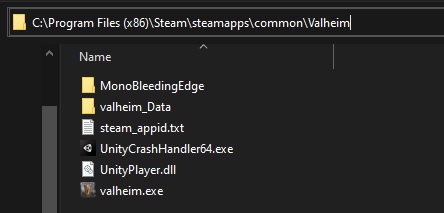
Check if your installation folder looks like this or if you have more files there: https://i.imgur.com/vdpdeOA.jpg
 hybrid jungle
stark meadow
Check if your installation folder looks like this or if you have more files ther...
hybrid jungle
stark meadow
Check if your installation folder looks like this or if you have more files ther...
It doesn’t look like that. I’ll delete everything else
It’s working again tyyy
stark meadow
void robin
Stock voltage was 1150 and stock speed 1360. I have the rog strix OC version of ...
Did you check that video I linked? People just tweak the voltages by lowering them to make the card more stable. Only in the case of voltage not being high enough to maintain the desired frequency, you would also need to lower the frequency as well.
void robin
stark meadow
Did you check that video I linked? People just tweak the voltages by lowering th...
at work right now but will later today and let you know
void robin
stark meadow
Did you check that video I linked? People just tweak the voltages by lowering th...
That is pretty similar to the video I had watched and did. He runs 1300hz 1000v I ended up with 1200hz 1050v, My initial was 1360hz, 1150 vand his was 1340hz, 1150v.
It does seem like a voltage issue from what you, the video guy and everyone else is describing. The snowstorms do stress the GPU a lot and it can be that the kind of load makes the issue surface. It can just be the after 7 years running everything on ultra it just has started dying. Which makes sense but sucks...
If I end up applying new thermal paste I will test the storms again and will let you know
stark meadow
void robin
It does seem like a voltage issue from what you, the video guy and everyone else...
No one is saying that it's a voltage issue. It's just that lowering voltage lowers power usage, this drops the temps.
By lowering frequency and keeping the voltage the same, one doesn't do much in the stability department.
 fossil lodge
I think Lox Trophy is bugged
 marble wolf
In what way?
stark meadow
fossil lodge
Anyone playing with mods?
fossil lodge
100% vanilla.
I slept and managed to get it off me, but once I got near it it latched back on.
stark meadow
fossil lodge
I slept and managed to get it off me, but once I got near it it latched back on.
Playing on a dedicated server or someone hosting their world?
Do you have other issues in your base? Like randomly taming enemies, slow loading of base, chests not opening, base loading slowly?
fossil lodge
Host, Peer to Peer.
Nothing of the sort. Music skips every now and then but I always assumed that normal
Ah, I managed to outrun it. I guess it's just stuck in the interim of reducing to a normal item and going into my inventory.. so it just follows me as all items do but doesn't go into my bag.

You think deleting all my files and reinstalling will help?
stark meadow
fossil lodge
Have you tried just restarting the game already?
fossil lodge
I logged out and in, haven't restarted fully though. Will try it.
Cursed thing remains.
I think I'll just drag it somewhere into the distance.
stark meadow
fossil lodge
Cursed thing remains.
Could you send me your world and character save?
fossil lodge
I don't have the net sadly to move such a sizely file
stark meadow
fossil lodge
I don't have the net sadly to move such a sizely file
K, make a backup of your saves tho, so that in a case where you get a better connection, you can send them for inspection
 prime chasm
not sure if this is known but sliding bug on fllamemetal is not fully fixed, I just slid to my death
marble wolf
prime chasm
not sure if this is known but sliding bug on fllamemetal is not fully fixed, I j...
It's still the same known bug.
 rare spruce
Hello guys. I'm playing with a friend and i'm the host. My friend collected 400 onion seeds and had a connection issue. When he joined the server again all seeds just went missing. Is there anything we can do to get ours seeds back?
void robin
stark meadow
No one is saying that it's a voltage issue. It's just that lowering voltage lowe...
My bad. I misunderstood. So what is the best guess for the root of the issue?
 gilded sluice
void robin
My bad. I misunderstood. So what is the best guess for the root of the issue?
gilded sluice
void robin
My bad. I misunderstood. So what is the best guess for the root of the issue?
stuff and things
unity engine colliders
so it's not something we just can magically fix
 rocky orchid
Remove the Ashlands
marble wolf
rocky orchid
Remove the Ashlands
Remove part of the game? What a silly idea.
 dense crest
So i was Just Playing rn First i Logged in and Everything was Black i could hear myself walking around but everything Black so i Restart the game everything good now i did play fight a boss sail back home and all i click save game crashes and i log in again and my boat is gone and i dont rly have the same items in my inventory as before someone got a tip how to fix this?
 fluid smelt
is it intended that the ashen cape's block stamina cost reduction has no effect on the stamina cost of parrying?
stark meadow
dense crest
So i was Just Playing rn First i Logged in and Everything was Black i could hear...
What specs does your system have? How old is your power supply?
stark meadow
fluid smelt
is it intended that the ashen cape's block stamina cost reduction has no effect ...
Not sure. Have to check with the devs.
dense crest
stark meadow
What specs does your system have? How old is your power supply?
i dont know either but i def never before had problems running the game
stark meadow
dense crest
i dont know either but i def never before had problems running the game
You don't know how old is your PC?
You can click on help button on top of steam → then click system information → select the text there and paste it here on discord
dense crest
stark meadow
You don't know how old is your PC?
You can click on help button on top of steam ...
yeah gonna check that later to tierd now i dont even remeber what i did yesterday so cant rly remeber how old my pc is i dont even know how old my sister is
 marsh rain
hey, my friend and i were playing on the prt before ashlands and would like to keep playing, our world shws up fine as does my character, but his does not. looking in back ups theres backups for his charater but they dont seem to work, it does not display any error message, hes just not able to see or select his character.
stark meadow
marsh rain
hey, my friend and i were playing on the prt before ashlands and would like to k...
Public beta saves (0.217.17) can not be selected on live version of valheim (0.217.19)
Either you all have to play on PTB, or if you are playing on LIVE, your friend has to restore a pre-Ashlands backup of their character. Valhiem creates those backups automatically upon transitioning from pre-Ashlands to Ashlands version, and never deletes them.
dense crest
dense crest
So i was Just Playing rn First i Logged in and Everything was Black i could hear...
So when i logged in this morning my char was still there now the char is gone but the world is still there
 grizzled kraken
I understand that the game has many interactions but is this really necessary?

like I am not sure if this is caused from the actual game design or poor coding
I don't really care about the temp
I am just not sure if this is healthy for the GPU
stark meadow
dense crest
So when i logged in this morning my char was still there now the char is gone bu...
Could be the same thins I just wrote about in the comment above. Did you at any point play on public beta testing?
However, in your case, due to crashing during saving, the character if probably not loading because the game crashes while the character saving was in progress. This usually leaves temporary steam files (e.g. charactername.new.stmp) that disrupt character loading. Such .stmp files must be removed. Do you see any .stmp files when you click on manage saves button in the starting menu?
dense crest
stark meadow
Could be the same thins I just wrote about in the comment above. Did you at any ...
yeah it showed something like that and i never played on testing
stark meadow
dense crest
yeah it showed something like that and i never played on testing
Can you screenshot it? (windows key + shift + S to cropa a portion of the screen which can then be pasted on discord)
If you see that .stmp file, delete it. Then you'll need to restore the latest character backups that is closest to the top on the backup list.
dense crest
stark meadow
Can you screenshot it? (windows key + shift + S to cropa a portion of the screen...
lemme start up the game again just updated my pc
dense crest
stark meadow
Can you screenshot it? (windows key + shift + S to cropa a portion of the screen...
 stark meadow
dense crest
stark meadow
dense crest
Delete all 3 of those saves
Then restore the one below those 3. Probably called ashlands.fch.old
dense crest
stark meadow
Then restore the one below those 3. Probably called ashlands.fch.old
none like that there
stark meadow
dense crest
none like that there
How do you backups look like, once you have deleted those 3?
dense crest
stark meadow
How do you backups look like, once you have deleted those 3?
than i have none named ashlands anymore ig
i deleted 2 now i have this but i cant press the button

 stark meadow
dense crest
than i have none named ashlands anymore ig
stark meadow
dense crest
than i have none named ashlands anymore ig
You should have many more backups. Did you expand the backup list for ashlands?
Click that arrow button
 dense crest
stark meadow
You should have many more backups. Did you expand the backup list for ashlands?
dense crest
stark meadow
You should have many more backups. Did you expand the backup list for ashlands?
that is impossible
bc there is no button
stark meadow
dense crest
that is impossible
Can you screenshot how your backups look like here:
https://store.steampowered.com/account/remotestorageapp/?appid=892970
Steam login into your web browser required to showcase all of your steam cloud saves
dense crest
stark meadow
Can you screenshot how your backups look like here:
https://store.steampowered.c...
 stark meadow
dense crest
stark meadow
dense crest
Download that one.

When did you start playing with that character? This month?
dense crest
stark meadow
When did you start playing with that character? This month?
like a week ago
stark meadow
dense crest
like a week ago
Checks out then. However, it's weird that you have this file there, but you don't see it in game
If you really don't have this ashalnds.fch.old file in game, you must download this one from the browser
dense crest
stark meadow
If you really don't have this ashalnds.fch.old file in game, you must download t...
i did do i have to pull it in some folder?
stark meadow
Download that file, then rename that file into ashlands.fch, then copy that ashlands.fch file and paste it into characters_local folder. Characters_local folder can be located on this location which you can copy and paste into your file path on windows (similar how you would paste web address):
%username%\AppData\LocalLow\IronGate\Valheim\characters_local
(copy paste the above line in the windows explorer address line)
If you have trouble reaching that folder, an another way to do so would be to launch the game and then click on the white button in the bottom left corner of the starting menu, called "show player.log"". By clicking that "show player.log" button, a folder will open up on your PC, where you will see characters_local folder.
dense crest
stark meadow
Download that file, then rename that file into ashlands.fch, then copy that ashl...
in the characters ordner bc i dont got a characters_local
stark meadow
dense crest
in the characters ordner bc i dont got a characters_local
You can place it in characters folder as well.
Then you need to relaunch the game. Open manage saves menu. Ensure that you now see ashlands.fch.old save file.
If you do, delete all of the previous saves we talked about:

Then restore ashlands.fch.old
dense crest
Seems to have worked
 stark meadow
dense crest
Seems to have worked
stark meadow
dense crest
Seems to have worked
You have to delete ashlands.fch.new as well
This however won't stop your crashes. That is another issue that has to be dealth with.
If you crash one more time during saving, the same issue that you just solved will repeat itself.
Until you solve your crashes, it's best that you move your save from Cloud to Local (special button in the manage saves menu).
dense crest
well it only rly crashed 1 time so i dont rly think that thats gonna happen more often this was the only time in my 200 - 250 hours it ever crashed
stark meadow
dense crest
well it only rly crashed 1 time so i dont rly think that thats gonna happen more...
You should at least start limiting your FPS in Valheim if you are not already.
 robust gale
Hello there 🙂 I would consider this a small bug I suppose but it's purely based on a string of dialog so not much to it. To me this dialog does not make sense to happen in the Meadows biome. I am just now going through the Mistlands and when I finally used magic for the first time, Hugin comes to talk to me but his message seems to reference "These lands". While he could be talking about Valheim itself, it would make more sense if he said that while we were actually inside the mistlands since he references the mist. Do all creatures have a connection to the mist? (i.e. Greydwarfs, Skeletons, Wolves etc.) I'm not sure if this is an issue or not but I hope it was helpful. Loving the game so far!
 gilded sluice
robust gale
Hello there 🙂 I would consider this a small bug I suppose but it's purely based...
gilded sluice
robust gale
Hello there 🙂 I would consider this a small bug I suppose but it's purely based...
is it your first playthrough?
 fading adder
Hi mates,
today I noticed a serious problem within my Valheim playthrough and I hope you can give me a hint how to solve it.
While fighting my way through the Ashlands I noticed there ist a new (3rd) update for the Galdr table available, named the Feathery wreath.
I managed somehow to get all the needed resources but the game doesn’t let me place the Wreath?!
I didn’t have a problem with the Runetable and the Unfading candles. Im sure it is not an issue of too less room, I just get the message „Invalid placement“ no matter what I do. Any ideas would be highly appreciated.
KR Andreas
 sonic estuary
fading adder
Hi mates,
today I noticed a serious problem within my Valheim playthrough and I ...
sonic estuary
fading adder
Hi mates,
today I noticed a serious problem within my Valheim playthrough and I ...
Where are you placing it? I think it needs to go on a wall
 jagged hamlet
fading adder
Hi mates,
today I noticed a serious problem within my Valheim playthrough and I ...
jagged hamlet
fading adder
Hi mates,
today I noticed a serious problem within my Valheim playthrough and I ...
Might be that you need to hang it from the rafters or a wall.
fading adder
Ok, now I feel a little bit stupid 😄
Problem solved! I was already prepared to something like „Common issue you need to restart the game…“ 🤪
Thank you so very much!!!
gilded sluice
fading adder
Ok, now I feel a little bit stupid 😄
Problem solved! I was already prepared to ...
slap it on a wall 
robust gale
gilded sluice
is it your first playthrough?
Yes 🙂
gilded sluice
robust gale
Yes 🙂
some texts are mostly flavour filled and isn't actual
 winged ivy
Unsure if bug or hidden feature, but I popped a health potion right as I dodge rolled, and my viking entered a matrix like state, all the enemies slowed right down and I could move normal speed for duration of potion. Vanilla Version, never ever installed a mod.
stark meadow
winged ivy
Unsure if bug or hidden feature, but I popped a health potion right as I dodge r...
It's an old bug. Can happen with consuming food also.
 pearl jackal
Anyone know how to stop the stuttering, i have a good graphics card with 32gb ram and every graphices setting it still stutters
jagged hamlet
As in when it is saving?
stark meadow
pearl jackal
Anyone know how to stop the stuttering, i have a good graphics card with 32gb ra...
What are your system specs?
gilded sluice
pearl jackal
Anyone know how to stop the stuttering, i have a good graphics card with 32gb ra...
🤔
gilded sluice
pearl jackal
Anyone know how to stop the stuttering, i have a good graphics card with 32gb ra...
- remove mods
- apply V-sync or limit FPS
- update drivers
- manage heat
- ask me in a DM if you still have problems and we shall look at it
 hollow geyser
Something I noticed- am not sure if it's intended: While raining, when you portal to a biome where precipitation does not apply 'wet' debuff (ex. mountain), you still get wet after traveling through portal
 toxic river
Its the way that the game handles weather and location while going through a portal
It'll register that you are outside the first biome before it registers that you're in a different one
hollow geyser
Ah- so you'll see and be affected by rain before it quickly corrects. It's not game-changing, but I wanted to mention it. Is it something devs are aware of?
gilded sluice
hollow geyser
Ah- so you'll see and be affected by rain before it quickly corrects. It's not g...
yes
super old thing
 stray sorrel
so can anyone help me on knowledge of y valhiem keeps closing the game and dashboarding to my desktop screen?
stray sorrel
so what if i go to the common folder and i dont see a valhiem folder in the common one what do i do after
 bright coral
stray sorrel
so can anyone help me on knowledge of y valhiem keeps closing the game and dashb...
bright coral
stray sorrel
so can anyone help me on knowledge of y valhiem keeps closing the game and dashb...
Are you on Linux, macOS, or Windows, and does the game remain on, just hidden/minimized?
stray sorrel
windows
no after the emblem pops up with one of these ! IT CLOSES THE GAME
sorry caps lock was on
bright coral
It's worth checking your Player.log then in %USERPROFILE%\AppData\LocalLow\IronGate\Valheim\Player.log. If you've already restarted the game, there may be a previous session log from the crash in the same folder.
You might also find a crash log in %USERPROFILE%\AppData\Local\Temp\IronGate\Valheim\Crashes with timestamp around the time of that closing. If there is a crash log, that's going to be a good hint as to what component was responsible for the crash.
stark meadow
stray sorrel
no after the emblem pops up with one of these ! IT CLOSES THE GAME
So you can't reach the main menu? Ever used mods?
stray sorrel
the only mods that is used are the modifiers that com with the game and thats what changes the world effects
bright coral
Is it closing before reaching the menu screen every time or closing at random?
stark meadow
stray sorrel
the only mods that is used are the modifiers that com with the game and thats wh...
If you can't reach the starting menu, the first best thing to do is to do a clean re-installation of the game.
Check how to do the short re-installation in the Section 5 of this guide: https://www.reddit.com/r/valheim/comments/uq9b8x/my_valheim_is_crashing_fix_for_crash_guide/
Other issues launch issues are usually related to input devices, antivirus that might be clocking Valheim or some issue with GPU or graphic drivers.
List you PC specs if re-installation doesn't help.

 hard bridge
stray sorrel
hard bridge
stray sorrel
That icon indicates a mod issue. What mods do you have installed? Even Bepinex with nothing enabled can cause issues.
stray sorrel
i need someone to discord call me cause i have no clue and im getting comfused
stark meadow
stray sorrel
i need someone to discord call me cause i have no clue and im getting comfused
So you are basically crashing at random time while playing the game?
stray sorrel
yes
stark meadow
Do you know your system specs (cpu, gpu, if laptop, which laptop model)
stray sorrel
on minute
stark meadow
If you pick Systeam informaion on Steam, you can copy paste this info here:
 stray sorrel
 stark meadow
stray sorrel
stark meadow
stray sorrel
Doesn't seem like anything is wrong with the specs alone.
stray sorrel
thats what im not understanding
stark meadow
stray sorrel
thats what im not understanding
What program are you using to display these on your screen?

And have you been using it before the crashing started?
stray sorrel
yes and yes
stark meadow
stray sorrel
yes and yes
How's that app called?
stray sorrel
Valhiem [public test]
stark meadow
stray sorrel
Valhiem [public test]
How's the app called that you use to display these in the corner of your screen
 stray sorrel
i think its called MSI afterburner
stark meadow
stray sorrel
i think its called MSI afterburner
Did you use MSI afterburner to tweak any of your GPU settings? (e.g. clock speed, memory clock, power, adjust fan curve)
Or are you just using it to display FPS, and GPU usage on top of the screen?
stray sorrel
im only using it to see the stats
 quick gyro
Hi everyone. I have tried everything on the internet to correct the valheim.exe is not responding error that I get after playing for 10-30 minutes (steam client). I have an AMD processor, nvidia 3060 ti, and have gone through everything I've found on the internet with no success. Can anyone help with this?
quick gyro
My DMs are open 🙂
 quick pulsar
Anyone know if turnips are suppose to be able to be displayed on item stand?
gilded sluice
quick gyro
Hi everyone. I have tried everything on the internet to correct the valheim.exe ...
Hmm... Interesting
That's a new issue
stark meadow
stray sorrel
im only using it to see the stats
Try playing Valheim with it completely closed. Must not be visible running in task manager or as a small icon next to clock. Next time you crash, don't lauch Valheim again, rather send me a DM.
stark meadow
quick gyro
Hi everyone. I have tried everything on the internet to correct the valheim.exe ...
Take notice next time if this happens during saving. How much RAM do you have?
gilded sluice
MSI afterburner are a known problem for valheim, but also alot of other Unity game engine based games 🤔
quick gyro
stark meadow
Take notice next time if this happens during saving. How much RAM do you have?
I have 32gb. I turned off steam cloud saving and played for a little over an hour last night without crashing, which is my new PR
stark meadow
quick gyro
I have 32gb. I turned off steam cloud saving and played for a little over an hou...
How do you currently have your in-game Vsync and FPS limiter set?
quick gyro
Vsync off and I believe I’m at 150 fps limitaa at
 mighty ibex
Alright yall, I'm at my wit's end on this. My GF and I have several hundred hours in the game and we took a break at the end of January. After Ashlands released, we tried playing again BUT she has not been able to play the game. Upon starting the game she sees the Coffee Stain splash screen (sometimes makes it as far as the Irongate screen) and the "Loading" hammer in the lower right. The screen locks up or goes black there. I can still see/move the sword mouse pointer. Sometimes I can ALT+F4 out, other times the PC needs a manual restart because it doesn't respond to keystrokes. Vanilla game, no mods ever. Tried reinstalling to no effect. Tried using the nVidia control panel to force vsync off and limiting refresh rate to 60 (just makes it crash faster).
I can post steam's system info if wanted
Last time I let the game 'run' for a good 5 minutes to see if the Player.log wrote up anything helpful, but it barely writes anything at all, much less any useful errors
hard bridge
Do other games work alright? It might be worthwhile to clear/backup your local user game data in case there's an issue loading something there.
mighty ibex
Other games work fine, in fact we play other much more graphically demanding games all the time.
mighty ibex
The strangest thing is that I went to load up the game on her PC the other day intending to see if I could get the log file to write anything and the game LOADED. Logged into the world and played for a few minutes without any issue. After that, however, it went right back to crashing while loading to the title screen every time
Zero changes were made (I didn't want to risk something being off in the logs), so I have absolutely no idea what caused it to work or start crashing again
gilded sluice
mighty ibex
Alright yall, I'm at my wit's end on this. My GF and I have several hundred hour...
sounds solveable 🤔
gimme the player.log file
 slender charm
Hello I am getting a bug with my Karve where it is always splashing even when holding still and it has been moving of it own accord
mighty ibex
Here's the Player.log file, but I think you'll find it as underwhelming as I did
I also have a Player-prev.log which has more in it, if you'd like that
gilded sluice
mighty ibex
Here's the Player.log file, but I think you'll find it as underwhelming as I did
so looks like something else is the problem 🤔
drivers issue or sometthing
windows event viewer is amazing tool
could be. steam cloud issue, steam not running when it wants it to run (starting from a shortcut on the desktop), drivers issue, windows update issue
stark meadow
mighty ibex
Here's the Player.log file, but I think you'll find it as underwhelming as I did
I'm willing to beat that every time you end up with Valheim crashing at launch, you would be able to load it under reduced GPU load.
If that turns out to be the case, it means that you GPU is not stable at 100% GPU usage = high power consumption.
An important test that you should do, is locking Valheim FPS to 30 via Nvidia control panel and reducing Valheim resolution before launching it.
You can read more about this in Section:Point6 of this guide for more details:
https://www.reddit.com/r/valheim/comments/uq9b8x/
Other games that you play on that system are probably not as intensive as Valheim when it comes to GPU utilisation and power usage. They usually aren't.
If you were to run some serious GPU benchmarks, you would most likely experience same issues.
mighty ibex
We had already locked the FPS and shut off vsync to no effect. If anything, that just made the game lock up sooner. Yes, I have read that very guide and tried a number of fixes from it - none have worked
Amusingly, locking down the framerate with nVidia control panel made the game behave strangely - the splashcreens and rotating hammer were significantly sped up. Still crashed, but it was odd nonetheless
stark meadow
mighty ibex
We had already locked the FPS and shut off vsync to no effect. If anything, that...
To what number have you tried locking FPS to?
Are you able to you launch Valheim at this moment without crashing?
mighty ibex
Not right this second (that PC is in use for something else right now). We locked it to 60fps for Valheim specifically. Monitor is otherwise set for 144 (native freq) in OS and such
stark meadow
mighty ibex
Not right this second (that PC is in use for something else right now). We locke...
Ok, be free to DM me when you will have some time to launch Valheim later.
 frosty spindle
Game randomly crashes, no error messages unfortunately.
Happens when i join my friends server and play on it for a while
Playing on a 3090 Ti + 12700k
Hardware and temps are fine, this does not happen in benchmarks or other games, only valheim.
I tried both the regular engine and vulcan.
I also tried reducing the graphics settings, it runs completely fine on max for me but was just trying to troubleshoot.
Tried googling and tried to troubleshoot, but nothing really matches up that much
No mods are being used, completely vanilla game and no old bepinx folder
It doesnt crash during the main menu, only upon joining my friends server after like 10-20 minutes
Tried with vsync enabled and disabled
fresh re-install and verifying files didnt solve anything too unfortunately
32GB Ram
stark meadow
frosty spindle
Game randomly crashes, no error messages unfortunately.
Happens when i join my f...
In what way do you crash? Which benchmarks apps? Did you reset BIOS to default + no tweaks after?
 versed oriole
At least I am not the only one seeing start-up forever hammer screens and complete power shutoffs during play. All of this is very recent too. 🥴
gilded sluice
versed oriole
At least I am not the only one seeing start-up forever hammer screens and compl...
in the PTB?
power shutoffs isn't valheims fault. it's hardware or drivers related usually
slender charm
slender charm
Hello I am getting a bug with my Karve where it is always splashing even when ho...
Any idea why The boat would be acting this way? It was changing direction on its own and going forward and backward. Also it sounds like it is moving all the time even when nobody is on the boat and it is staying still. It creeps me out. Like the boat is possessed.
slender charm
oh and the other players in the boat vibrate
stark meadow
slender charm
Any idea why The boat would be acting this way? It was changing direction on its...
Playing with mods? Have you tried reconstructing the boat and restarting the server?
versed oriole
gilded sluice
in the PTB?
Correct.
versed oriole
gilded sluice
power shutoffs isn't valheims fault. it's hardware or drivers related usually
We went to Reddit and had to stop using Vulcan. That seemed to settle the shut-off problem for now. The loading forever thing, I'm going to start looking at now.
 stuck cairn
whenever i try and make a new world or load an old world my game crashes to desktop
stark meadow
stuck cairn
whenever i try and make a new world or load an old world my game crashes to desk...
Please be aware of the following whne loading worlds: #steam-bugs-discussion message
gilded sluice
versed oriole
Correct.
if you are on the PTB. don't report the issue in this channel. you must post in #valheim-public-test
versed oriole
gilded sluice
if you are on the PTB. don't report the issue in this channel. you must post in ...
Oops. Okay, I'll move it over.
gilded sluice
versed oriole
Oops. Okay, I'll move it over.
if it happens in vanilla, I would be very scared.
if it happens in PTB: we know about the problem already
stuck cairn
stark meadow
Please be aware of the following whne loading worlds: https://discord.com/channe...
Oh ok
frosty spindle
stark meadow
In what way do you crash? Which benchmarks apps? Did you reset BIOS to default +...
furmark and occt, so tested both the gpu and cpu for temps and the crashing is just the game closing, thats it
slender charm
stark meadow
Playing with mods? Have you tried reconstructing the boat and restarting the ser...
nope vanilla
and yeah tried rebuilding and even restarted the game
I uninstalled and reinstalled and still the boat is still doing it
what is PTB?
 untold briar
most of the time roofing over campfires dont work as the campfire will still go out in the rain, the only way i have seen to fix this issue is to destroy the roof and rebuild it which can get tedious after while because even that does not always work
stark meadow
untold briar
most of the time roofing over campfires dont work as the campfire will still go ...
wind is able to put the campfires down as well, so you might need side walls
stark meadow
slender charm
and yeah tried rebuilding and even restarted the game
Are you the owner of that world and hosting it via in-game solution?
Or is it a dedicated server?
stark meadow
frosty spindle
furmark and occt, so tested both the gpu and cpu for temps and the crashing is j...
Random crashes are usually CPU related. Did you try resting BIOS to default + no tweaks after?
Did you grab any of the player.log files after a crash?
Furmark is more of a performance tester.
Not sure how OCCT is good for stress testing, as it failed to show any Intel microcode related instability when I asked players to test their 14th Gen Intel CPU-s (while they were crashing randomly only in Valheim). It's pretty much confirmed that the issue was in their CPUs not Valheim.
This however doesn't apply to your 12700k, just proves in my eyes that what ever is causing crashing in Valheim is not getting stress tested in OCCT. In fact nobody from them found a benchmark program that would show their system instability, so I can't recommend any in particular.
slender charm
stark meadow
Are you the owner of that world and hosting it via in-game solution?
Or is it a ...
I am the owner and in game invite, but we switched worlds and went with my friend as hosting and still have the same problem.
Also we do have a dedicated server we play on we checked there also and all three boats were spraying water as if moving while staying still
stark meadow
slender charm
I am the owner and in game invite, but we switched worlds and went with my frien...
Does the issue happen in single player?
slender charm
The waves yes
But only the other players vibrate so I am unable to check that
It has happened before, but usually resolves itself or will resolve with a logout and reload. But this time it is not resolving itself
I could hop on and do a share screen if it would help
I don’t know where the logs are
stark meadow
slender charm
The waves yes
Which GPU do you have? Also check how much FPS you have when you are near the boat (F2 button).
 upbeat ore
I am not able to play valheim whatsoever. Ive been able to launch the game and get to the main menu, character select and world select with no issues but as soon as i launch any world, even a brand new one with any character pre ashlands or brand new the game says valheim.exe is not responding and im given the option to wait or close it. I've reinstalled the game. checked to make sure only the essential valheim files are installed (they are) updated graphics drivers, made new characters and worlds and verified the integrity of the game files themselves with no success. I have no idea what the issue is or how im supposed to fix it
this is what pops up after i launch any world. Ive waited for more than 10 minutes for it to sort itself out and its never worked
 marble wolf
upbeat ore
I am not able to play valheim whatsoever. Ive been able to launch the game and g...
marble wolf
upbeat ore
I am not able to play valheim whatsoever. Ive been able to launch the game and g...
You need to wait a few minutes without tabbing out or touching the mouse. The game is updating your world.
 boreal light
I'm not sure that can call a bug, but wild run and corpse run have the same icon and it's not cool. it seems like a small thing, but it affects the feeling of the game
 marble wolf
Definitely not a bug. Maybe a change to suggest in #suggestions?
boreal light
maybe yes
 rapid vessel
Is it intended that chickens won't eat Ashvine seeds?
gilded sluice
boreal light
I'm not sure that can call a bug, but wild run and corpse run have the same icon...
Totally agree with you on that one 🤔
 rich pier
still no bug fix for fires getting wet inside Shield Generator... 🫠
stark meadow
rich pier
still no bug fix for fires getting wet inside Shield Generator... 🫠
There might not be a fix for that.
Shield Generator wasn't envisioned to act as roof replacement entirely.
However, Devs are considering it.
There are more important bugs that need fixing tho.
rich pier
stark meadow
There might not be a fix for that.
Shield Generator wasn't envisioned to act as ...
Player doesn't get wet same way the fire should get wet. Didn't type anything about roofing.
That would be like saying we want the rested buff on a Shield Generator while not under a roof. Clearly not what I typed.
stark meadow
rich pier
Player doesn't get wet same way the fire should get wet. Didn't type anything ab...
Fires can also be put out by wind, there was also no plans for shield generator to provide protection over wind.
Even with the rain fix for fires under shield generator, your fires will still get put off by the wind during storms.
rich pier
stark meadow
Even with the rain fix for fires under shield generator, your fires will still g...
Sure. But again, that's not what I typed. Not sure which messages you are reading.Rain is disabling fires in Shields.
No one talked about wind, which is necessary for windmills.
stark meadow
rich pier
Sure. But again, that's not what I typed. Not sure which messages you are readin...
I understand what you are saying. I'm just explaining to you why the bug **might **not be fixed. The issue has been reported, it's Dev's choice.
You can think of it this way, shield generator is strong enough to protect building pieces from the rain, but is not strong enough to protect fires (rain mist).
rich pier
stark meadow
I understand what you are saying. I'm just explaining to you why the bug **might...
How do you know it's a dev choice? Can you provide the source? Or is this your understanding from the dev's silence about this? I only saw Smiffe answer with a shrug gif.
stark meadow
rich pier
How do you know it's a dev choice? Can you provide the source? Or is this your u...
I'm saying it's a Dev's choice whether the shield generator should protect fires. I'm saying it's not my choice.
I'm just explaining to you why it might not get fixed. It was never intended for shield generator to protect fires in the first place.
rich pier
stark meadow
I'm saying it's a Dev's choice whether the shield generator should protect fires...
Ahh yes, so it's a dev choice in the same vein that everything in this game is their choice, because it's their game.
Very useful information and explanations from a non-dev, non-moderator. Gotcha. Nice hobby you got here.
marble wolf
rich pier
Ahh yes, so it's a dev choice in the same vein that everything in this game is t...
It's true though.
rich pier
marble wolf
It's true though.
obviously
stark meadow
rich pier
Ahh yes, so it's a dev choice in the same vein that everything in this game is t...
The reason why I went into unnecessary explanation for it being a Dev's choice, is because you misunderstood me in the comment before, thinking I was saying that the Devs have already decided not to fix it, which I did not say.
The reasons I listed as to why it might not get fixed, are the Devs reasons. I've been helping Devs report and reproduce bugs for a long time now, and this was not considered as a bug. In fact, the reported issue was once closed already with a decision to not be fixed. I re-opened the issue again, as I was under false impression that the wind was the main reason for fires going out under the shield.
gilded sluice

what some people assume is a bug. might something be a feature, or something we don't deem we need to fix / solve
sometimes something unexpected happens. and we just think it's a fine thing to exist
jagged hamlet
Sometimes it would involve too much work for something minor and gets put on the "when we feel like it and have time but maybe never pile".
 pliant pebble
Hey, I just arrived here... My games crashes me out suddenly without any dialogs or anything it just exits the game
how can i fix the issue
stark meadow
pliant pebble
Hey, I just arrived here... My games crashes me out suddenly without any dialogs...
What are you system specs?
pliant pebble
very high, a decent pc
stark meadow
pliant pebble
very high, a decent pc
That might be the problem. Please check exact specs
pliant pebble
RTX 3060 Ti / Ryzen 9 3900X
The thing is i used the run the game few days ago without any issues
stark meadow
pliant pebble
RTX 3060 Ti / Ryzen 9 3900X
Did you grab any log files after a crash?
Check yout optional windows updates, do you have any mentioning AMD related stuff or new chipset drivers?
pliant pebble
stark meadow
Did you grab any log files after a crash?
I've fixed it, seems i cant use discord on my second screen
gilded sluice
pliant pebble
I've fixed it, seems i cant use discord on my second screen
Sounds like you use some 3:rd part program for something and then you crash
Like medal, msi afterburner or something
pliant pebble
oh not really i fixed the issue thanks a lot
gilded sluice
Because you're the first person with that issue in that case
Because I sit constantly with discord open and Valheim running 🤔
 midnight cedar
i have some issue with the game. at random times on the game it close my screen and i have to restart my computer.
jagged hamlet
Using mods? Updated gpu and other drivers?
stark meadow
midnight cedar
i have some issue with the game. at random times on the game it close my screen ...
What system specs do you have? Is the new monitor drawing more power than the last one?
midnight cedar
i change the old moniter bicase it was 7-10 old
but
i had the same problem with the old one too
stark meadow
midnight cedar
i change the old moniter bicase it was 7-10 old
What system specs do you have? (CPU, GPU)
How old is your power supply?
midnight cedar
sorry im not to expert on this. were i can check my system?
stark meadow
midnight cedar
sorry im not to expert on this. were i can check my system?

If you are playing on Steam, you can copy text from here.
How old is your PC?
midnight cedar
2 years
Processor Information:
CPU Vendor: AuthenticAMD
CPU Brand: AMD Ryzen 5 5600 6-Core Processor
CPU Family: 0x19
CPU Model: 0x21
CPU Stepping: 0x0
CPU Type: 0x0
Speed: 3500 MHz
12 logical processors
6 physical processors
Video Card:
Driver: NVIDIA GeForce RTX 3060
DirectX Driver Name: nvldumd.dll
Driver Version: 32.0.15.5585
DirectX Driver Version: 32.0.15.5585
Driver Date: 5 13 2024
OpenGL Version: 4.6
Desktop Color Depth: 32 bits per pixel
Monitor Refresh Rate: 164 Hz
DirectX Card: NVIDIA GeForce RTX 3060
VendorID: 0x10de
DeviceID: 0x2504
Revision: 0xa1
Number of Monitors: 1
Number of Logical Video Cards: 1
No SLI or Crossfire Detected
Primary Display Resolution: 1920 x 1080
Desktop Resolution: 1920 x 1080
Primary Display Size: 23.50" x 13.23" (26.97" diag), 59.7cm x 33.6cm (68.5cm diag)
Primary Bus: PCI Express 16x
Primary VRAM: 12287 MB
Supported MSAA Modes: 2x 4x 8x
stark meadow
midnight cedar
2 years
Entire PC is 2 years old, or do you remember upgrading only certain parts of it?
stark meadow
midnight cedar
all the pc
Your components don't have any obvious problems so the problem is most likely related to software.
Can you check windows updates, but specifically also check optinal updates as well
midnight cedar
i will try again
stark meadow
midnight cedar
i will try again
If you are on w11, it should be under windows updates → advanced options → optional updates

Do you have any optional updates on this list?
midnight cedar
 stark meadow
midnight cedar
stark meadow
midnight cedar
Look ok. Have you tried re-installing your Nvidia drivers yet?
stark meadow
midnight cedar
i did try olso the drive manager
Ok, will send you a personal message, so we can continue talking there, so that we don't spam the channel.
midnight cedar
k
 lapis grove
I tried to launch the game with vulkan and it crased by the "valheim is not responding" thing
now whenever I try and open the game it crashes within the first few seconds
shows a little unity crash report thing, and I cant create a new charecter
stark meadow
lapis grove
I tried to launch the game with vulkan and it crased by the "valheim is not resp...
At which point did you get "valheim is not responding" message the first time?
When loading a world? Or even before starting menu loaded?
stark meadow
Can you now launch in d3d11?
lapis grove
what is that?
stark meadow
default, so not vulkan
lapis grove
no that freezes and crashes prettu quickly
but it shows the unity thing not the windows thing
stark meadow
lapis grove
no that freezes and crashes prettu quickly
Using mods?
lapis grove
no
sonic estuary
Have you used mods before?
lapis grove
no
stark meadow
lapis grove
no
Try doing the short re-installation then (Section 5): https://www.reddit.com/r/valheim/comments/uq9b8x/my_valheim_is_crashing_fix_for_crash_guide/
If that doesn't work, list your specs
lapis grove
i tried un-installing and re-installing but that didnt help
stark meadow
lapis grove
i tried un-installing and re-installing but that didnt help
Read the Section 5 first, before you say you tried it
lapis grove
stark meadow
Read the Section 5 first, before you say you tried it
it says it is for problems with leftover mod files, I have never downloaded a mod for this game, is that still what i should try?
stark meadow
lapis grove
it says it is for problems with leftover mod files, I have never downloaded a mo...
It helps with more than that
You also might have mod files without even knowing about it
lapis grove
stark meadow
You also might have mod files without even knowing about it
Appears to have worked
what exactly did deleting that one file do?
also, will launching with vulcan work now?
stark meadow
lapis grove
what exactly did deleting that one file do?
It reset your game settings to default. You can try Vulkan.
It generally increases performance, at the cost of power draw and raising temps, which can make some systems unstable
 celest island
Weird glitch, just noticed. If I put wolf into a hole in the ground and leave the area through the teleport, then come back the wolf is gone.
lapis grove
well it just froze again, so its likely not in the cards for me
stark meadow
lapis grove
well it just froze again, so its likely not in the cards for me
What specs do you have?
lapis grove
AMD Ryzen 5 3600 6-Core Processor 3.60 GHz
32.0 GB of RAM
NVIDIA GeForce RTX2060 SUPER
stark meadow
celest island
Weird glitch, just noticed. If I put wolf into a hole in the ground and leave th...
There are no generall issues like that. If it's happening consistently for you, must be related to somethign else.
Night wolves despawn in the morning.
celest island
Never noticed that in the game before updates. Used to shove as many wolves as I wanted into mountain pit and come/leave as I want without them despawning. happens to both night and day.
stark meadow
lapis grove
AMD Ryzen 5 3600 6-Core Processor 3.60 GHz
32.0 GB of RAM
NVIDIA...
If you really wanna run in Vulkan, I would look at Section4 in the guide. Additionally some apps are incompatible with Vulkan, like FRAPS used for recording. If Section4 doesn't help. chances are that you card is slightly overtured, so Vulkan is pushing it too far. I would try downclocking the card slightly via MSI afterburner (google downvolting RTX2060 SUPER + add your manufacturer).
lapis grove
how big of a deal is vulcan, I just tried it cause I thought it would be intresting
well failed to try it, I should say
stark meadow
lapis grove
how big of a deal is vulcan, I just tried it cause I thought it would be intrest...
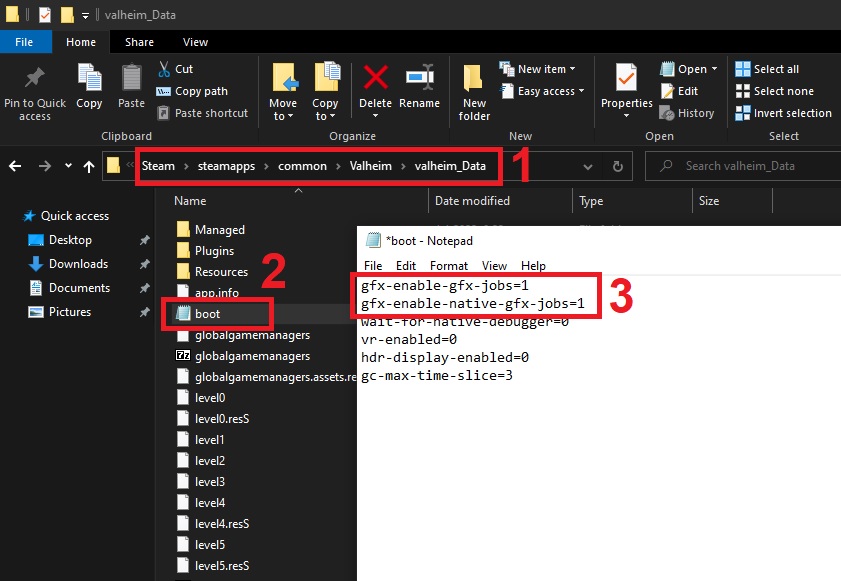
Can increase FPS in large bases when everything else won't, which is often very much needed. You can also attempt playing in d3d11 but with these tweaks:
https://i.imgur.com/Atd2zaE.jpg
 lapis grove
meh, Ill prolly just keep playing normal, if FPS comes to that I'll try those tweaks, thank you for all of your help
stark meadow
celest island
Never noticed that in the game before updates. Used to shove as many wolves as I...
Did the wolf die or despawn?
Night wolves will always despawn in the morning if you don't start the taming process.
celest island
wolf despawned during the day, the meat was still there. i'll try again and stay till it's tamed
stark meadow
celest island
wolf despawned during the day, the meat was still there. i'll try again and stay...
Are you playing on a dedicated server? What ever the type of server, was it recently restarted before the wolf died?
celest island
no, just personal server
 spare jewel
Hi 👋🏻
I have a strange bug that occurred today. It's about teleports.
I have one teleport that says it's not connected even though it worked perfectly fine yesterday. I went to the location where the other teleport is, and that one worked (said it's connected) and when I went through it, it brought me to the random location in the house instead where the problematic teleport is. And ofc it still shows that that one is not connected. 🤦🏻♀️
Did anyone have a problem with it or knows how to fix it? I tried to rebuild the one that was bugged but it didn't help.
stark meadow
spare jewel
Hi 👋🏻
I have a strange bug that occurred today. It's about teleports.
I have...
You will have to reconstruct both teleporters in singleplayer, in order to fix it
You can aslo attempt to deconstructing them, restart the server, then build them again.
spare jewel
Yeah, seems like that will be the only way. I hope it will work.
Thank you for your time. 😁
stark meadow
spare jewel
Yeah, seems like that will be the only way. I hope it will work.
Thank you for ...
Btw. if you are taming animals close by, in cases when the owner restarts the server, ensure that all clients that were connected completely restart their game, before joining the server again. At least until the current public beta versoin of the game doesn't go live.
 urban magnet
old world and spawn is somehow in the middle of the ocean high up in the sky and my builds got destroyed

trees sinkign underwater

 gilded sluice
urban magnet
old world and spawn is somehow in the middle of the ocean high up in the sky and...
gilded sluice
urban magnet
old world and spawn is somehow in the middle of the ocean high up in the sky and...
Did you use to play with mods enabled?
stark meadow
urban magnet
old world and spawn is somehow in the middle of the ocean high up in the sky and...
Looks like you mismanaged your world save files and combined wrong. fwl with wrong. db file.. Was your world being hosted on a dedicated server?
gilded sluice
possibly a case of restoring files incorrectly. or steam cloud being problematic
urban magnet
stark meadow
Looks like you mismanaged your world save files and combined wrong. fwl with wr...
yes
its vanilla nd its dedicated
stark meadow
urban magnet
its vanilla nd its dedicated
Some 3rd party hosting site like gporal?
If you are the owner of the server, you will have to connect to your dedicated server via some FTP program, and copy all the backups you have from your world. Then you would have to locate the latest pair of .db and .fwl file that match (same timestamp + timestamp from the time when world was ok) and you would have to rename those backup files to orginal names. Like renaming (worldname_auto_backup-timestamp.db into worldname.db)
Best to test the newly formed saves files in singleplayer (place them in this folder:https://i.imgur.com/NjqMdru.jpg), before uploading them back to the dedicated server via FTP program

 hoary remnant
Is it only me or does the Fader fight cause alot of lag?
When I was fighting him it was ok but when I went back to my meadows base to restock both me and my friend had tremendous amounts of lag (5-6 fps)
We went back to the ashlands to finish the fight where the fps returned
lapis grove
Valheim started crashing again? I didn't change anything
I just started a new world yesterday, it was fine. now it crashes before I can load in. I didn't start vulcan or anything of the sort
marble wolf
Crashes or you just get program not responding?
If it's the latter, you just need to wait a few minutes without tabbing or moving the mouse.
lapis grove
marble wolf
Crashes or you just get program not responding?
Crashes, like a full unity one. What happens is when it is zooming out for the world select it freezes and then crashes
marble wolf
Any mods installed?
lapis grove
Nope, never used them
lapis grove
marble wolf
Any mods installed?
Update it also just crashes if I wait long enough
I opened the settings menu and after a bit it crashed
stark meadow
lapis grove
Update it also just crashes if I wait long enough
Which system specs?
lapis grove
It seems like I can get in a game if I outrun the crash
like quickly press charecter select and world select
gilded sluice
lapis grove
I just started a new world yesterday, it was fine. now it crashes before I can l...
let me look at your player log 🙂
lapis grove
gilded sluice
let me look at your player log 🙂
How would one do that?
gilded sluice
lapis grove
How would one do that?
In this hidden folder in windows:
C:\Users\ <username> \AppData\LocalLow\IronGate\Valheim
lapis grove
that whole folder or just a part of it?
lapis grove
stark meadow
lapis grove
How would one do that?
Oh so your crashes are not related to Vulkan then. Enable Steam FPS overlay, check if FPS in the menu is capped at 60fps
gilded sluice
lapis grove
and the player-prev file?
lapis grove
lapis grove
stark meadow
Oh so your crashes are not related to Vulkan then. Enable Steam FPS overlay, che...
Appears to be, in that it doesent go above 60, but my monitor refresh rate is 60hz
gilded sluice
Hm... 🤔
gilded sluice
lapis grove
Appears to be, in that it doesent go above 60, but my monitor refresh rate is 60...
I would start with cleaning your GPU drivers
do this
lapis grove
gilded sluice
do this
Would this require administrator powers?
gilded sluice
not sure to be honest. maybe? 🤔
lapis grove
My dad has covid rn so I cant then
gilded sluice
oof. sorry to hear
lapis grove
but I can load into a game
gilded sluice
but I don't think you need admin for it
lapis grove
I just need to speed past the menu
gilded sluice
no. when your GPU drivers start to mess up, it can crash after 1 minute, or 200 minutes
like. game wants your GPU to do something, GPU asks driver and driver can't do it because the instructions are wrong. so you crash
hence you need to do a clean install every now and then
since GPU drivers just add ontop of the old ones
always
stark meadow
lapis grove
Appears to be, in that it doesent go above 60, but my monitor refresh rate is 60...
Yeah, crashes in the main menu when FPS is locked point out that you will crash while in game as well. Grab a playerlog next time after you crash tho, but after you launch the game again. Def. reinstall drivers. I've seen quite a few super variants of nvidia cards crashing lately. Undervolting is usually permanent solution, but best to leave that as last resort.
lapis grove
gilded sluice
like. game wants your GPU to do something, GPU asks driver and driver can't do i...
It appears I need admin powers
gilded sluice
lapis grove
It appears I need admin powers
Damn :/
lapis grove
Why does it end up crashing tho?
And why does it not crash near immediately if I load into a game?
Also, sometimes the crash causes both my monitors to seemingly restart, like both go black and one shows a symbol it shows on startup
gilded sluice
lapis grove
Why does it end up crashing tho?
basicly valheim tells the graphics card to do something, and the driver responsible for that something is corrupted and then it just breaks
 pallid ridge
I just got the game and I started a new world but I’m stuck on an infinite loading screen what do I do?
bright coral
pallid ridge
I just got the game and I started a new world but I’m stuck on an infinite loadi...
Chances are it's not done creating your world yet. I recommend waiting a few minutes longer. You don't get much feedback on the process unless you're following the internal log output.
 worldly salmon
Has anyone else had experience with the game occasionally deciding "this one specific enemy is going to be invulnerable to attack for as long as I see fit"? It was all fun and games when we were using the occasional immortal greyling as a punching bag, but then the game decided to throw an arrowproof deathsquito at me (I'm still in the bronze age) and I nearly ragequit.
gilded sluice
worldly salmon
Has anyone else had experience with the game occasionally deciding "this one spe...
yes
usually happens in multiplayer with some lag
worldly salmon
Ah. Yeah there's about a 10 timezone gap between some of the players in the server so that's probably it
Seeing a deathsquito fly towards you while actively on fire and taking zero damage is pretty demoralising ngl
 misty terrace
Hey all, for some reason my Valheim starts up, only shows the Valheim text, but never actually reaches the main menu before crashing. I was playing with mods, now I've tried uninstalling and reinstalling and nothing worked.
Any idea what's happening? I last played normally at about 19 Aug
stark meadow
misty terrace
Hey all, for some reason my Valheim starts up, only shows the Valheim text, but ...
Do the short re-installation of Valheim as Section5 in this guide suggests: https://www.reddit.com/r/valheim/comments/uq9b8x/my_valheim_is_crashing_fix_for_crash_guide/
misty terrace
Done that, didn't seem to fix anything
stark meadow
misty terrace
Done that, didn't seem to fix anything
Have you double cheked that you installation folder now looks like this?
https://i.imgur.com/vdpdeOA.jpg
Restart steam next, probably best to restart the entire PC tbh.
Are you using any 3rd party security anti-malware software?
stark meadow
It was probably Steam that wasn't functioning.
Valheim can't be launched if Steam is not working properly.
misty terrace
Huh okay, I launched it from steam so I didn't think steam was the fault
Thanks again for the help!
gilded sluice
worldly salmon
Seeing a deathsquito fly towards you while actively on fire and taking zero dama...
yeah. do you know if the server uses crossplay or not?
worldly salmon
gilded sluice
yeah. do you know if the server uses crossplay or not?
nope, we're all on PC
gilded sluice
worldly salmon
nope, we're all on PC
crossplay is still default on PC
press escape key ingame and see if you have a join code
 loud wasp
where are tickets for bug report?
just found dupe glich
xD

 languid knot
hey, i recently bought the game and wanted to play, but everytime when i tried to start a world and clicked "start" button i get into the loading screen black and the loading logo at the bottom and it just freezes there, i tried to do it with local save, with cloud save, same result, i even tried it with my steam deck i still get the game to the same spot with the black loading screen and freeze, in the log file it says that is is missing myworld.db, i have the fwl files, so what else should i try? (i deleted both local and cloud saves as well)
stark meadow
languid knot
hey, i recently bought the game and wanted to play, but everytime when i tried t...
Check this comment: #steam-bugs-discussion message
stark meadow
loud wasp
where are tickets for bug report?
Reporting here is enough. Probably happened due to rag doll being on top of it. Haven't seen this one before.
languid knot
stark meadow
Check this comment: https://discord.com/channels/391142601740517377/120254967592...
it worked after waiting 1-2 min tnx
gilded sluice
languid knot
it worked after waiting 1-2 min tnx
Everyone is to eger to start playing. so you interupt the game trying to make your world 🥲
languid knot
gilded sluice
Everyone is to eger to start playing. so you interupt the game trying to make yo...
cant this be done like by implementing some kind of block-ui feature for the user and then adding a loading which spins/moves, so that the user does not unintentionally crash their game 😄
gilded sluice
languid knot
cant this be done like by implementing some kind of block-ui feature for the use...
well... what if it don't unlock 
I can't remember on the top of my head... why not. but there was some technical reason why 🤔
 trim spoke
Is it known that you can multiply throwable objects with the catapult? once I throw for example 1 eitr on the ground I will find the entire stack I have on me!
stark meadow
trim spoke
Is it known that you can multiply throwable objects with the catapult? once I th...
It's already fixed on public beta version of the game, unfortunately accompanied by another bug.
lapis grove
gilded sluice
basicly valheim tells the graphics card to do something, and the driver responsi...
I just played for a few hours and had no issue, I think its largely a main menu thing
gilded sluice
main menu don't have to many known issues tho 🤔
lapis grove
well heres a new one i guess
gilded sluice
lapis grove
well heres a new one i guess
did your dad fix your admin rights btw?
lapis grove
gilded sluice
did your dad fix your admin rights btw?
nah hes still sick
its more about just installing the drivers
lapis grove
gilded sluice
seen simular issues many times before
elaborate
gilded sluice
it's either lack of direct X full install. or drivers
and fun fact. the main menu is.. a mini version of the game
that entire "scene" is a world itself in the game
it's just that you cannot play in it
lapis grove
gilded sluice
that entire "scene" is a world itself in the game
whats the seed
gilded sluice
you can't play it.
sonic estuary
It generates differently to a real world so even with the right seed it will look different
lapis grove
gilded sluice
you can't play it.
(shame) either way, what would you suggest I do? It seems like playing is fine, but the menu is where it crashes
 south lance
gilded sluice
you can't play it.
south lance
gilded sluice
you can't play it.
Literally stated above...
lapis grove
south lance
Literally stated above...
I interpreted as like the minecraft menu seed, where its used as a backdrop but you cant take action in it
south lance
Even if you could, it would be a very, very old world
It's been like dozens of updates ever since, it would not be like what is shown
gilded sluice
lapis grove
(shame) either way, what would you suggest I do? It seems like playing is fine, ...
the thing I told you before. do a clean install of your nivida drivers
lapis grove
Alright
 latent sparrow
I've been unable to play Valheim past 15 minutes before it crashes with no error message. I see the Unity error for a sec before it disappears. With this said, I ended up doing a complete clean install of windows, all drives wiped. Did a clean installation of all drivers and updates for windows. Did a benchmark test of all devices to ensure they were working properly. Installed Directx11 in addition to 12. The only game I have installed so far is Valheim, so everything is clean.. Still can't get it to remain stable for longer than 15 min. The specs meet more than the minimum required.
I did follow the steps in troubleshooting. So far no luck.
 balmy garnet
Hey guys, I'm Brazilian and I have a problem with the game, I just installed it and I can't enter my personal world, the game doesn't load, the message appears saying that it's not responding, does anyone know how to fix it?
stark meadow
balmy garnet
Hey guys, I'm Brazilian and I have a problem with the game, I just installed it ...
Check this comment: #steam-bugs-discussion message
Next game version will be more intuitive when it comes to world loading.
stark meadow
latent sparrow
I've been unable to play Valheim past 15 minutes before it crashes with no error...
What PC specs do you have?
 random iris
I've noticed that the warriors in ashlands have like a strange glitch when attacking. Looks like it lags before hit or sometimes it moves for half a meter before striking it's realy vierd to time your defence on that. Anyone got simmilar issues?
gilded sluice
latent sparrow
I've been unable to play Valheim past 15 minutes before it crashes with no error...
did you use the big installer for DirectX or the windows build in installer?
latent sparrow
gilded sluice
did you use the big installer for DirectX or the windows build in installer?
Big Installer
gilded sluice
latent sparrow
Big Installer
what kind of hardware you got? CPU, RAM, GPU?
latent sparrow
Intel(R) Core(TM) i7-7700K CPU @ 4.20GHz
NVIDIA GeForce GTX 1080
Primary VRAM: 8191 MB
RAM: 32697 Mb
Number of SSDs: 2
SSD sizes: 960G,120G
Number of HDDs: 1
HDD sizes: 1000G
stark meadow
latent sparrow
Intel(R) Core(TM) i7-7700K CPU @ 4.20GHz
NVIDIA GeForce GTX 1080
Primary VRAM: 8...
Did you try resetting your BIOS setting already?
latent sparrow
I believe they were reset correctly
Just trying to find a way to validate it's correct the past hour.
latent sparrow
Yesterday
gilded sluice
can I see your player and player-prev files? 🤔
latent sparrow
yes sir
Also, I've tested using Vulkan as well as just launching it without Vulkan.
@gilded sluice sorry that file is no longer available. I reinstalled Valheim and it wrote over it. Launching Valheim now to test again today. Do you have a preference how I launch to test? Vulkan or not?
gilded sluice
doesn't really matter
latent sparrow
okies
 gilded sluice
go see in the event view, what also might have crashed along with unity.exe or valheim.exe
latent sparrow
I did take a look at that yesterday and it reflected nothing before, during or after
which is why i'm scratching my head, as I have no event ID that is specific to research.
latent sparrow
just the generic ones, eventid 100, when it closes unexpectedly
gilded sluice
funky 🤔
latent sparrow
mhmm.. this is the first time i've been unable to solve an issue with game crashes lol
can't find the culprit.
gilded sluice
there can be almost anything
seen like infinite amount of issues the past 4 years 😄
latent sparrow
i agree lol. which makes this more tasking lol It took me a few weeks of dealing with this to finally come here lol.
gilded sluice
I've seen deer running in shallow water in high speed causing crashes
latent sparrow
lolol
gilded sluice
I've seen skeletons trying to pathfind inside rocks, causing crashes
latent sparrow
those make sense though.. to some degree.
gilded sluice
I've had 1 person not removing the plastic cover on his graphics card, hence he went from 25 C to 120 C in 0.4 second after launching
latent sparrow
not sure why, the cpu fans are working. When I play Valheim.. i hear them working hard lol
gilded sluice
ye
latent sparrow
its not Valheim causing the issue though.. but I do hear them working.
gilded sluice
I use to run my i5-6500 for years
latent sparrow
yeah I want to upgrade, but I'm stingy about not paying these prices atm. Waiting to see the price cuts on CyberMonday or holidays soon.
latent sparrow
i was just typing that
gilded sluice
and AMD 7000 series is okay but expensive. and... 9000 series AMD is... no ty
latent sparrow
i agree, been watching the issues going on
gilded sluice
I got a 7700X myself. love it but... it's to expensive
latent sparrow
not sure what to go with right unde 13 though.. seeing incompatibilities with gpus and cpus creeping up
btw, So far I have not crashed with Valheim and its been 7 min
gilded sluice
- C:/Users/ <username > /AppData/Local/Temp/IronGate/Valheim/Crashes
you got that folder btw?
latent sparrow
I do have the folder, but recall I have to create a new instance of the crash since I uninstalled it and reinstalled it earlier this morning.
another note, i have never run mods...
gilded sluice
oh I've had plenty of never had mods
but other games mods have interfeared in the past
mostly skyrim mod managers 😅
latent sparrow
lol
I have a clean drive though.. completely wiped all 3 drives.. and did a clean install of windows, drivers, etc.
latent sparrow
i don't run those
gilded sluice
how old is the CPU and harddrive?
latent sparrow
don't have them installed even. only game i have installed since the wipe is Valheim and GTA.
and the CPU and HDD is about 6 years old
gilded sluice
you know what brand it is on the HDD?
stark meadow
latent sparrow
Just trying to find a way to validate it's correct the past hour.
If you re-installed windows, there's so much that can cause crashes.
Most commonly it's the unstable BIOS tweaks.
From the thing that you can manage, you should look into this things first:
- improper BIOS tweaks (update and reset BIOS)
- windows installing wrong chipset drivers (disable Windows from installing drivers automatically and install chipset drivers from motherboard site manually) - check Section4 in the crash guide pinned in the comments
- check which MAX temps get reported via HWiNFO program
- check SSD health
latent sparrow

I didn't let Windows install the chipset drivers for sure. I did that separate when I was 'resetting" the Bios.
SSD health is fine, checked that when i was running benchmarks
Learned a bit on what causes SSD health to go down doing that lol
Smiffe you may be the good luck charm so far. This is the longest Valheim has been running without crashing in weeks lol
The fans are running though lol..
EVENT ID 1796
The Secure Boot update failed to update a Secure Boot variable with error Secure Boot is not enabled on this machine.. For more information, please see https://go.microsoft.com/fwlink/?linkid=2169931
EVENT ID 10016
The application-specific permission settings do not grant Local Activation permission for the COM Server application with CLSID
{2593F8B9-4EAF-457C-B68A-50F6B8EA6B54}
and APPID
{15C20B67-12E7-4BB6-92BB-7AFF07997402}
to the user DESKTOP-M0B42C7\sburk SID (S-1-5-21-3302322643-2672441465-176775918-1001) from address LocalHost (Using LRPC) running in the application container Unavailable SID (Unavailable). This security permission can be modified using the Component Services administrative tool.
EVENT ID 131
Metadata staging failed, result=0x80070490 for container '{00000000-0000-0000-FFFF-FFFFFFFFFFFF}'
Ok valheime just crashed
stark meadow
latent sparrow
Seems like your BIOS could use some updating: https://rog.asus.com/motherboards/rog-strix/rog-strix-b250f-gaming-model/helpdesk_bios/
Best to enter your BIOS and check which version is listed there as well.
 stark meadow
latent sparrow
just one sec for file
stark meadow
latent sparrow
just one sec for file
DM me crash.dmp file from C:/Users/sburk/AppData/Local/Temp/IronGate/Valheim/Crashes
And check which other files you have there as well besides it
latent sparrow
ok
gilded sluice
latent sparrow
EVENT ID 1796
The Secure Boot update failed to update a Secure Boot variable wit...
Hm.. 2 issues comes up when I look at sollitions
1 is bad power supply
2 is bad RAM memory stick
did you ever swap out any hardware?
latent sparrow
nope never did. And after updating the bios with the lastest I have been stuck in a BSOD loop lol
gilded sluice
why? 🤔
gilded sluice
remove both RAM sticks and see if it will do anything
then put 1 in, and then the other in. then both again
latent sparrow
ok, I see now why people toss their pcs and get new ones lol.
Smiffe, have you shared your specs yet for anyone looking into getting a new pc?
gilded sluice
my current PC's spec?
latent sparrow
yeapes
latent sparrow
lol
gilded sluice
depends on what you want, your needs, what games you play. it always "depends"
latent sparrow
so interesting.. When i pull up event viewer, I get "QueryError" popup.
gilded sluice
and then budged
 gilded sluice
Hm.. looks like a feature that breaks if you use SSD's discs in windows
latent sparrow
ty guys for helping.. looks like a new pc is in order
gilded sluice
depends on budget. you can always get a idea of a PC if you DM me or macarbre
depends on where you live and if you want to build it yourself or not 🤔
marble wolf
There's always GFN.
gilded sluice
marble wolf
There's always GFN.
won't help when something else is the problem mate
marble wolf
Eh, maybe.
 narrow moth
sorry to border you but if i play valheim on xbox game pass on pc should i say my problem here or in the xbox channel?
gilded sluice
narrow moth
sorry to border you but if i play valheim on xbox game pass on pc should i say m...
yup --> #xbox-bugs-discussion
narrow moth
okay ty
gilded sluice
marble wolf
Eh, maybe.
for example, hardware issues don't resolves by GFN usage
gilded sluice
*Good for now? 😉
marble wolf
gilded sluice
for example, hardware issues don't resolves by GFN usage
I meant as an intermediary solution, but you're probably right.
gilded sluice
Geforce Now
latent sparrow
Smiffe, that partslist, is that part of what you have now?
gilded sluice
no
it was one I made for a mate. but it was outdated
damn. I can never remember to be "impartial" 😄
latent sparrow
rofl
gilded sluice
but I'd say. if you can afford it. a 7800X3D is the best gaming CPU you can buy
there are bundles and deals online
depending on your country etc
gilded sluice
but since we have 130,000 users here. we probably about the same amount of ideas on a descent PC 😄
latent sparrow
lolol
gilded sluice
I am the type of person who goes by the "pay once, cry one" type of deals
better to spend money, and then don't have to buy a new PC in 4-5 years
latent sparrow
you pay full price vs deals?
gilded sluice
whatever get me the best price what I want 😄
I build my own PC's
but.. some stores let you pick parts, and then they assamble it for a cost
latent sparrow
ah
I was building my own pcs, then iBuy... let me pick parts for this current pc and they built it
latent sparrow
lasted me a few years.. this is the first time i've had issues
gilded sluice
sad to hear 😦
but your issue could be.
Broken RAM sticks
CPU issue
CPU cooling paste dried up or went rubbery and can't fix your heat when it goes high
Harddrive being problematic (3+ years varrenty for a reason)
GPU having issues
power supply being to weak over time (varrenty also low for a reason)
etc etc
latent sparrow
yaep
gilded sluice
and these are only a few common hardware issues
latent sparrow
wait.. did that get automodded?
gilded sluice
don't think so 🤔
latent sparrow
its in all red lol
latent sparrow
well i said "blackfriday"
gilded sluice
blackfriday
latent sparrow
lol yea, i'm gonna be going through withdrawals for a while now lol.. until end of Nov when Black Friday and CyberMonday hit lol.
latent sparrow
I did the memtest using Microsofts' mem test tool, said no issues.
latent sparrow
UserBenchmarks: Game 88%, Desk 86%, Work 76%
CPU: Intel Core i7-7700K - 82.7%
GPU: Nvidia GTX 1080 - 105.7%
SSD: Kingston SSDNow V300 120GB - 398.7%
SSD: SanDisk Ultra II 960GB - 51.5%
HDD: WD Blue 1TB (2012) - 103.9%
RAM: G.SKILL F4 DDR4 2400 C15 4x8GB - 65.6%
MBD: Asus STRIX B250F GAMING
gilded sluice
RAM: G.SKILL F4 DDR4 2400 C15 4x8GB - 65.6% ?
latent sparrow
thats what the benchmark says
 crude geyser
anyone know why my game doesnt let me load a world even with fresh character fresh world - both cloud saves enabled or disabled
toxic river
crude geyser
anyone know why my game doesnt let me load a world even with fresh character fre...
What exactly happens when you try to load or create a world?
crude geyser
I get: Loading... then the game has stopped responding
just tried on an old version and it seemed to load a new world however obviously have no saves....
toxic river
Right
When windows pops up with that the game has stopped responding, that's a result of the game working to either generate a new world or update an older one between versions
It can take a couple minutes of work during which any interaction with the game - clicking or alt-tabbing are often the trigger - will cause Windows to think it's frozen
I'd suggest you try again in the latest version of the game, and just let it load for a few minutes - don't alt-tab or click around too much. It should load eventually
crude geyser
toxic river
I'd suggest you try again in the latest version of the game, and just let it loa...
lmao worked first time thanks again
toxic river
There ya go~
 hearty blaze
hello all, seeing if maybe there is any updated methods to fixing this problem...I have posted in here before a while ago (months now) and I have been trying to find a permanant solution to unity crashes as they seem to keep happening for me. I was told that turning v-sync off helps to alleviate the problem, which for a while it did. but now it is back to crashing quite frequently, and the worst part is when it does it, it puts me way back with old inventory that I had previously put in chests and whatever else. simply put, the crashes are really annoying as this is one of my favorite games I have played in a long while and it just breaks my spirit to try and play when I am constantly unable to have a long play session which I used to be able to on my older computer that had a GTX 970 (I now have a 4070). does anyone have any suggestions they can think of for this problem? any and all help would be appreciated. I would just like to be able to play the game without crashing every 10 minutes.
stark meadow
hearty blaze
hello all, seeing if maybe there is any updated methods to fixing this problem.....
There's 99% chance that you are crashing because of your Intel Core i7 14700KF.
Depending on how long you have the CPU, it might be already permanently damaged and unstable.
I recommend watching this video in its entirety to get the know the problem better: https://www.youtube.com/watch?v=OVdmK1UGzGs
What you should do first, is update your BIOS on your motherboard, and after check if Intel default profile is set, and if not, you have to chose and set Intel default profile to be active. If you continue crashing after that RMA your CPU as fast as possible.
gilded sluice
hearty blaze
hello all, seeing if maybe there is any updated methods to fixing this problem.....
probably what ^ MaCarBre said if you own a 13 / 14 gen Intel CPU.
Also, did you buy an entire new PC with new parts, or did you only swap out a few parts?
hearty blaze
Entirely new PC with new parts. Thank you both for the responses. I watched the video and am now concerned that maybe the computer has issues. It should still be under warranty. Valheim is the only game is seems to crash on consistently though which is odd. Also kinda scummy if intel knows about this and hasn’t done much of it
gilded sluice
hearty blaze
Entirely new PC with new parts. Thank you both for the responses. I watched the ...
you got a brand new intel 13 or 14 gen?
hearty blaze

Micro Center
Get it now! The PowerSpec G446 desktop computer with Windows 11 Pro is an incredible versatile multiuse machine featuring the Intel Core i7-14700KF unlocked processor with a AIO Liquid Cooler, a MSI Pro Z690-A system board powered by a 750W Gold PSU, 32GB DDR5 5600 RAM, a 2TB PCIe 4.
gilded sluice
yeah... 14th gen and it got the big problem 😦
hearty blaze
this is the exact PC I have. I went the prebuilt route this time. wishing I had built it like my first one
stark meadow
hearty blaze
Entirely new PC with new parts. Thank you both for the responses. I watched the ...
Intel has released a microcode patch mid August which you can get by updating your BIOS.
You should do so asap, as each crash has potential to permanently damage your CPU.
There's talk that you won't be able to RMA CPU directly from Intel if CPU came with pre-built system.
Only boxed ones can be shipped directly to Intel.
For the rest you have to contact the retailer.
balmy garnet
guys why i have to lag when i go to black forest
5fps
gilded sluice
balmy garnet
guys why i have to lag when i go to black forest
5fps
what's your computer processor, RAM, graphics card?
balmy garnet
gilded sluice
what's your computer processor, RAM, graphics card?
i play on xbox one s
gilded sluice
balmy garnet
i play on xbox one s
 sullen swan
Does anyone know if PlayFab is down? Have a linux dedicated server and it was working fine earlier with crossplay, but now it wont let me connect to any server stating Log into Playfab
marble wolf
sullen swan
Does anyone know if PlayFab is down? Have a linux dedicated server and it was wo...
Yep, we have about 50 messages about it now.
sullen swan
Gotcha. Just checked and it looks like Xbox Game Services are down. https://support.xbox.com/en-US/xbox-live-status
For anyone else asking, If you are playing on Xbox or PC Gamepass dedicated servers will not work since cloud saves are synced to servers via Xbox Live services. The more you know...
 supple turtle
what was that fix for the low poly waves when on intel xe/arc graphics
stark meadow
supple turtle
what was that fix for the low poly waves when on intel xe/arc graphics
Try this first:
Disable global settings in Arc Control and set it to
Game Compatibility - Advanced
Adaptive Tessellation: ON (Quality at 100%)
gilded sluice
Hm.. should try the latest version my intel card..
which one do you have @supple turtle ?
supple turtle
gilded sluice
Hm.. should try the latest version my intel card..
which one do you have <@69929...
using a asus zenbook duo whilst im away which runs on iris xe graphics
gilded sluice
oh.. um..
so it's the built in aGPU basicly?
*processor working as a graphics card
supple turtle
yes
suprisingly valheim runs perfectly on it
averaging 40fps
the only issue is the low poly waves
stark meadow
supple turtle
the only issue is the low poly waves
Have you tried the listed setting changes yet?
supple turtle
stark meadow
Have you tried the listed setting changes yet?
i have they seem to be working
 ocean hull
yop, any of you having a bug at startup, where character is blocked in a looping sit in the middle of the Stone circle ? (it might be mod related though... I have to test)
stark meadow
ocean hull
yop, any of you having a bug at startup, where character is blocked in a looping...
mod related for sure, check #mods-issues
ocean hull
TY 🙂
 stark meadow
loud wasp
https://streamable.com/w7dffk
stark meadow
loud wasp
https://streamable.com/w7dffk
Seems like a feature I would like to have in my base to get to the upper floors. Can you reproduce it?
supple turtle
stark meadow
Have you tried the listed setting changes yet?
on second thought, they worked well to begin with but seem to have slipped back into their old ways
any further suggestions?
stark meadow
supple turtle
on second thought, they worked well to begin with but seem to have slipped back ...
Try the full combo then:
Game Compatibility - Advanced
Frame Delivery - VSYNC ON
Post Processing - Sharpening On (12%)
3D Overrides - Anisotropic Filtering x16
Adaptive Tessellation: ON (Quality at 100%)
supple turtle
stark meadow
Try the full combo then:
Game Compatibility - Advanced
Frame Delivery - VSYNC ON...
which retro scaling type?
stark meadow
supple turtle
which retro scaling type?
Not sure, leave on default for now?
supple turtle
ok
 elfin sorrel
my friend cant connect to my server, its only him, and he can connect to other servers. i finally "fixed" the issue by backing up the world and wiping the server. he was able to log on once until the server had a hiccup and froze everything, we all went back to the menu and the same problem started happeneing again
the friend who isnt having the issue says he thinks it was maybe some mod files that only he had on his client, so i guess we'll try again tomorrow
gilded sluice
elfin sorrel
the friend who isnt having the issue says he thinks it was maybe some mod files ...
mod files causes problems 100% of the time when we update the game
elfin sorrel
gilded sluice
mod files causes problems 100% of the time when we update the game
Part of me finds it unlikely that One players mods would cause issues for another player and not myself, but it could have something to do with the order we logged in
gilded sluice
elfin sorrel
Part of me finds it unlikely that One players mods would cause issues for anothe...
depends on what the mod does and who is chunk owner
if the player with mods tells the non-modded player "there is a nuclear bomb here"
the non-modded players client will just don't know what to do with that information
elfin sorrel
I think it's possible that everytime it was the modded player who loaded in before the one with issues
Is chunk owner sort of similar to like a P2P system
Like even though it's a dedicated server some players get assigned tasks for their PC to compute for the server?
gilded sluice
elfin sorrel
Is chunk owner sort of similar to like a P2P system
yes. the first player into an area is defined as the chunk owner and all things happening in that area is calculated by that players hardware and that players client tells the other clients what happens in that chunk
so..
Lag and everything depends on who is owner
easiest way on PC to determain if you are owner or not. is to press F2. and see the data sent vs data recived. if you send more than recive, your owner
elfin sorrel
Thank you so much for the info. When we get home I'm going to do a fresh install the server and make sure the modded friend had a clean copy and post results
I'll also note that when the issues started again for the second time, we were fighting yagluth and he froze for all three of us, but me and the modded friend could still move and see each other moving while the connection issues friend was completely frozen
gilded sluice
elfin sorrel
Thank you so much for the info. When we get home I'm going to do a fresh install...
tell your friend with mods to actual delete files in the folder. a mod-loader will still be active in the background
and then vaildate the game files
it might also be a problem with hand-over between 2 users causing the issue
there are multiple things can be problematic. like wifi / wireless internet connections are usual problems
 fleet summit
Pretty sure there's some kind of issue that's not my connection.
Moved to the city recently so my internet's the best it's ever been
but on valheim I randomly get like 30 seconds of "connection issue" randomly every now and then
I know it's not my connection because I'm on a discord call the entire time and that shows no signs of any issues
I'm playing on a host server where the host is croatian
other guy playing is also croatian but I'm from a different place
not stupidly far away but
I doubt that's even the issue
 silk summit
Hi! When quickly listening through the downloadable album from steam I noticed that the song files are scrambled, the audio file for the corresponding song title is wrong. If this is not where I should report this I would love to hear where I should put this. Thanks in advance!
stark meadow
fleet summit
Pretty sure there's some kind of issue that's not my connection.
Moved to the c...
Do you automatically reconnect back to the server after connection issue happens?
If you are all on Steam, just ask them to disable crossplay on the server to see how you do.
Generally, I would recommend for everyone to individually do the buffer bloat test to see which rating you all get:
https://www.waveform.com/tools/bufferbloat
fleet summit
stark meadow
Do you automatically reconnect back to the server after connection issue happens...
yeah, I do reconnect. I don't even get kicked out, it kinda just freezes the world for like 30-45 seconds, and then snaps back to working
fleet summit
stark meadow
Do you automatically reconnect back to the server after connection issue happens...
Also I just checked the bufferbloat test thing and it gave me an A
I'll have em try disabling crossplay next time we hop on though
gilded sluice
fleet summit
yeah, I do reconnect. I don't even get kicked out, it kinda just freezes the wor...
that feels like something is wrong, somewhere 🤔
gilded sluice
silk summit
Hi! When quickly listening through the downloadable album from steam I noticed t...
hi Elbon. please send a email to contact@irongatestudio.se and ask.
we can't help you with that kind of issue here on discord sadly
silk summit
gilded sluice
hi Elbon. please send a email to contact@irongatestudio.se and ask.
we can't hel...
Thank you!
south lance
gilded sluice
hi Elbon. please send a email to contact@irongatestudio.se and ask.
we can't hel...
I mentioned that a very long time ago and got lost in the sands of chatting...
Is it worth sending another email?
gilded sluice
yes
 main flicker
anyone finding things are duplicating? like shrooms in BF crypts and cores? had it happen with stones now also across 2 servers one with just a few mods and another with tons. not sure if its game update or mod bug. so far seen it with yellow shroom surt core and single rocks today
fleet summit
gilded sluice
that feels like something is wrong, somewhere 🤔
yeah, I'll try disabling that cross play thing and see if that does anything, but I have no clue what's going on
gilded sluice
fleet summit
yeah, I'll try disabling that cross play thing and see if that does anything, bu...
if everyone is on steam client, disable crossplay. you don't really need it
fleet summit
yeye, I will
fleet summit
I don't think so
both of the other guys are from croatia
nah no one's using a vpn
But yeah hopefully disabling cross play helps
gilded sluice
and where in the world are you in?


 lofty plaza
Hey! firstly i want to apologize, i didn't read the description of this channel reguarding that this was a vanilla bug discussion thread, and to answer your question, no i havn't updated any mods as of yet.
Here are the mods i'm using incase any mod devs see this xd
 jagged hamlet
lofty plaza
Hey! firstly i want to apologize, i didn't read the description of this channel ...
jagged hamlet
lofty plaza
Hey! firstly i want to apologize, i didn't read the description of this channel ...
You could take it over to #mods-issues or #mods-discussion for more in depth and specialized help.
lofty plaza
You're right, i sgould turn off the mods and see if i can stack them the same way! ty
fleet summit
gilded sluice
and where in the world are you in?
Lithuania
so only like a few countries away


 gilded sluice
fleet summit
Lithuania
so only like a few countries away
gilded sluice
fleet summit
Lithuania
so only like a few countries away
yeah. in europe atleast 🤔
fleet summit
yup
no clue what it is then
but yeah I guess I'll just try turning off cross play next time we get on like I said
gilded sluice
lofty plaza
https://i.imgur.com/1vpJS7u.png
you still having the folder can create problems tho. but lemme try
lofty plaza
im envisioning a fine wood staircase made out of stacks of wood!
 stark meadow
It has always been like that.
gilded sluice
lofty plaza
yeah.... known issue. not ment to be working so..
lofty plaza
all good homie, looks like it might be a cool way to make staircases for builds. inlay them into some stone flooring or something. sorry!
gilded sluice
find a tiny tree to build around for extra secret support
lofty plaza
for sure! https://i.imgur.com/78NSvCp.jpg
 fickle hinge
Whenever I spawn into the game, my FPS drops significantly to around 10, making the game almost unplayable. Someone already saw this?
 stark meadow
fickle hinge
Whenever I spawn into the game, my FPS drops significantly to around 10, making ...
stark meadow
fickle hinge
Whenever I spawn into the game, my FPS drops significantly to around 10, making ...
Have you played with mods before?
fickle hinge
Tried, didnt work and then I reinstall the game. It occours only in a new map and new char. In old char it doesnt happen
stark meadow
fickle hinge
Tried, didnt work and then I reinstall the game. It occours only in a new map an...
Does your Valheim folder look like this now, or does it have some extra files in the installation folder?
https://i.imgur.com/vdpdeOA.jpg
fickle hinge
Yes
 stark meadow
fickle hinge
Yes
stark meadow
fickle hinge
Yes
I would guess that your performance issues is probably related to the new windows updates for Ryzer processors
Check if there are any optional windows updates
stark meadow
fickle hinge
Got a update here, updating now
Any related to AMD, or chipset?
fickle hinge
AMD I guess, it is for x64 based processor and windows defender as well
or chipset, idk tbh
@stark meadow it worked
updated, created a new world, and everything is just fine.
Thx a lot
 long ruin
Not game breaking, but figured I'd report: On release branch an ash storm persisted for about a full minute after portalling back to meadows. Can't think of having experienced this long of a weather transition before. Have BepInEx installed but this was vanilla playthrough. 3080, Ryzen9 5900x
^
gilded sluice
Could be that the game wanted to play the entire weather loop before changing enviroment over to medows 🤔
 quaint magnet
is it a bug that my graphics card runs at over 85 degrees celsius with the fans at full power the entire time im playing this game? have a EVGA RTX 3080 FTW3
legitimately worried it will fry my card because that is not a healthy temp
stark meadow
quaint magnet
is it a bug that my graphics card runs at over 85 degrees celsius with the fans ...
On what resolution are you playing?
quaint magnet
stark meadow
On what resolution are you playing?
1440p
stark meadow
quaint magnet
1440p
It should be operating on lower voltages then. Not a game bug tho.
How much is your card being utilised in the main menu when the game freshly starts? And at what temp is it running?
Also check d3d11 (defualt) vs Vulkan
quaint magnet
stark meadow
Also check d3d11 (defualt) vs Vulkan
well i can tell you already theres no difference between default and vulkan as i tried both and got the same results
on main menu, gpu seems to be running at about 1900 MHz at 75 celcius but the main menu isnt where i have temp problems
stark meadow
quaint magnet
on main menu, gpu seems to be running at about 1900 MHz at 75 celcius but the ma...
What's the utilisation in the main menu in %?
quaint magnet
stark meadow
What's the utilisation in the main menu in %?
where could i find that
stark meadow
quaint magnet
where could i find that
GPU utilisation
How are you monitoring freq and temps?
quaint magnet
stark meadow
How are you monitoring freq and temps?
MSI afterburner
stark meadow
GPU usage is called there
 quaint magnet
stark meadow
GPU usage is called there
quaint magnet
stark meadow
GPU usage is called there
its at around 85%
after running for a while just on main menu my gpu temp is around 80 C
stark meadow
quaint magnet
its at around 85%
Try to now enable V-sync in the main menu. That should uncap the FPS limit to your monitor refresh rate.
It's capped at 60FPS right now in the menu.
quaint magnet
vsync is on lol
stark meadow
quaint magnet
vsync is on lol
You mean, it was on?
quaint magnet
yeah
stark meadow
Generally you shouldn't have it on, as it in-game FPS limiter will not work then, so menus won't be capped at 60.
How are temps in main menu when you disable V-sync? Check if FPS in main menu then locks to 60
quaint magnet
yeah it locks to 60
ok now im sitting a 50% util and 71 C
ok so the issue is that i cant have the game at over 60fps or it freaks out?
stark meadow
quaint magnet
ok so the issue is that i cant have the game at over 60fps or it freaks out?
If FPS in uncapped, Valheim will try to bring the most of the GPU, so temps and utilisation will raise. Seems like your GPU might have a problem operating at too high voltage, which can on high GPU usage raise temps.
You can mitigate this by employing FPS limit or decreasing some settings, so GPU won't be used as much.
Generally first variants of 3000 series were a bit overtuned, so generally most benefit from undervolting, which can usually result in more performance even at lower temps. I wonder how would your GPU temps look like at 100% GPU usage. Try to run some free benchmarks. If cards gets too hot, I would personally undervolt it, but 85°C is ok temp.
quaint magnet
well it wasnt uncapped i had the fps limiter set to 144 which is my monitor hz. Also as for the voltage/temp why would this issue only present itself for valheim when i can run any other game fine most of them being more demanding than valheim?
leads me to believe its a problem with the game and not my hardware
stark meadow
quaint magnet
well it wasnt uncapped i had the fps limiter set to 144 which is my monitor hz. ...
If other games are not using your GPU more in terms of GPU usage, they are not more demanding.
Different GPU tasks can heat up different parts of GPU as well.
quaint magnet
so cyberpunk 2077 running on high settings isnt more demanding? this just seems like valheim isnt optimised for systems to run at over 60 fps
stark meadow
quaint magnet
so cyberpunk 2077 running on high settings isnt more demanding? this just seems ...
It depends on how much is your GPU getting utilised when running cyber punk. Test it. Test a benchmark.
I recommend Furmark for testing temps. For example, by 1070 which is much weaker cards than yours, at 100% GPU usage doesn't get higher than 75°C.
If you card can't keep reasonable temps at 100% GPU utilisation, it's running at too high voltage or has problems with cooling.
quaint magnet
well cyberpunk has a built in benchmark so ill test that
ok ran that and it had 100% util and never got hotter than 76 C with an avg fps of 95. i also have a 144 fps cap on cyberpunk. again this seems like a problem only valheim has
stark meadow
quaint magnet
well cyberpunk has a built in benchmark so ill test that
I'm unfamiliar with how Cyber punk benchmark tests for temps. Can only vouch for Furmark, it's free.
Different GPU tasks hit GPU differently. I don't have any issues on my 1070 in Valhiem so how can it be Valheim problem?
My laptop with 3060 runs at 85°C MAX, a laptop.
quaint magnet
cyberpunk benchmark only does fps. but i had msi afterburner running furing the benchmark
stark meadow
quaint magnet
cyberpunk benchmark only does fps. but i had msi afterburner running furing the ...
I don't mean how Cyberpunk monitors temps, rather does it stress different GPU components.
quaint magnet
its most likely a graphics driver problem for valheim its a combination of nvidia and valheims fault as they should work in tandem to fix the issue
different graphics cards run different drivers so if a newer card is running worse than an older one, it is most definately a driver issue
marble wolf
Not sure how an indie developer is supposed to magically fix the driver issues for the largest company in the world.
quaint magnet
i never said they have to fix the issue but if the issue is happening specifically for their game is most definitely is their fiduciary responsibility to let the graphics company know about it
gilded sluice
quaint magnet
i never said they have to fix the issue but if the issue is happening specifical...
85C isn't really a problem tho
but you should perhaps look into your overall placement of your PC so it can get enough air in and able to push away the warm air from the computer
quaint magnet
gilded sluice
85C isn't really a problem tho
respectively disagree. also i said they ran hotter than 85 C, not that 85 was the hottest it got
it got to about 89 before i decided to quit the game
gilded sluice
which card do you have?
quaint magnet
and my pc is on top of my desk, has a breathable case, and the room temp is 70 F
gilded sluice
but usually. the card knows when it's time to panic and slow down
quaint magnet
EVGA RTX 3080 FTW3
quaint magnet
89C
gilded sluice
is it a enclosed behind or just open space?
quaint magnet
open space
gilded sluice
Hm.. doesn't sound like you should have much problems at all 🤔
when did you remove dust last time?
I personally bought a stupid case for the looks, so I have my front fans actually shreadding dust into fine powder into my PC. so I usually remove dust every 2-3 weeks 🥲
quaint magnet
i dust about every year and it never has very much dust
stark meadow
quaint magnet
its most likely a graphics driver problem for valheim its a combination of nvidi...
You can check temps of the rest of the community that also have 3080 here: https://www.youtube.com/results?search_query=3080+valheim&sp=CAI%253D
I struggle to find anyone with your temps.
This person has the highest temps I found, at it's only 85°C on the VRAM, and the core temp which MSI afterburner shows is low 65°C
https://www.youtube.com/watch?v=lb_n25LDuv0
gilded sluice
I never had mine running hot either before I swapped out my Asus TUF 3080 🤔
it should be on par with the EVGA 3080
quaint magnet
https://www.reddit.com/r/valheim/comments/lfx4so/comment/gtj9ak4/?utm_source=share&utm_medium=web3x&utm_name=web3xcss&utm_term=1&utm_content=share_button i found this thread with a few people with the same issues

Reddit
Explore this conversation and more from the valheim community
stark meadow
Many 3000 series cards had problems then
gilded sluice
using cheap cooling sollutions on Vram was a problem for 3090
trying to remember the manufacturer who had the big problems
Gigabyte I think it was
stark meadow
I would say most early variations of 3000 by manufacturers had problems
I mean I know some people that didn't even have thermal pads over VRAM, just by mistake
gilded sluice

Finally fixing my EVGA RTX 3080 running too hot.
Check out the process of me mounting the AIO here: https://www.youtube.com/watch?v=k6B6bNzOyfQ
-Here is a link to my Patreon page, it would be awesome if you check it out: https://www.patreon.com/DawidDoesTechStuff
-Follow me on whichever Social media you don't hate-
Discord: https://discord.gg...
🤔
stark meadow
gilded sluice
https://www.youtube.com/watch?v=ND_lX8CbCEw
Nice find
gilded sluice

In How to cool the EVGA GeForce RTX 3080 Ti FTW3 ULTRA GAMING Graphics Card in this Step By Step Guide, We walk through controlling RGB lighting, fans and more.
Learn how to Install the EVGA GeForce RTX 3080 Ti FTW3 ULTRA GAMING here: https://youtu.be/qsOC2IkKi1s
Check it out on on my Amazon Affiliate link: https://geni.us/8rfws
I hope you can...
quaint magnet
its hard to believe that this is an issue with my card when valheim is the only game i have issues with. i dont see how the problem could be anything other than a driver issue or a game bug
also both of those cards are not my cards
gilded sluice
The thing with Valheim is that it will use whatever hardware it can
quaint magnet
i have 3080 ftw3 not 3080ti
gilded sluice
but Valheim have shifted from using alot of your GPU, to alot on your CPU + RAM
stark meadow
quaint magnet
its hard to believe that this is an issue with my card when valheim is the only ...
It's hard to believe it's Valheim problem, when I can't find dozens of people on youtube without problematic temps.
Different games affect different GPU components differently.
Let me know how the furmark test goes if you ever do it.
gilded sluice
quaint magnet
i have 3080 ftw3 not 3080ti
I know, but the tool might help you 🤔
quaint magnet
stark meadow
It's hard to believe it's Valheim problem, when I can't find dozens of people on...
ill download it
gilded sluice
many times, your fancurve is set lower than you might want it since manufacturer wants the fan noice to be as low as possible
stark meadow
quaint magnet
ill download it
This is the main source: https://geeks3d.com/furmark/
FurMark - GPU stress test and graphics card benchmark
quaint magnet
gilded sluice
many times, your fancurve is set lower than you might want it since manufacturer...
i have a pretty aggressive fan curve lol

 stark meadow
quaint magnet
stark meadow
quaint magnet
It's best that you use the same monitoring tool, so if you used MSI afterburned use that.
I would personally recommend HWiNFO tool in general.
Captures the most amount of sensors, and you can see VRAM temp vs Core temp there as well.
In Furmark you can also perform VRAM specific temps to see if there is different in temps
quaint magnet
look respectively this feels like im being gaslit into thinking i have a hardware problem when from my perspective i feel i don't. maybe im looking at it all wrong or havent communicated properly but i feel as if it isnt a problem with my setup. i am however glad that through trial and error with the fps limit setting ive found a way to play the game where it wont degrade my pc so thanks for that even though it isnt my preferred fps. im kinda done with the jumping through hoops though so im finished explaining my problem
stark meadow
quaint magnet
look respectively this feels like im being gaslit into thinking i have a hardwar...
Nobody is gaslighting you that you don't have a problem. If anything you are gaslighting us that the game has a problem, based on your expeirence, while most players out there don't.
I'm just trying to help you figure out what's going on. I've even had cases when MSI afterburner was showcasing wrong temps in the past.
gilded sluice
quaint magnet
look respectively this feels like im being gaslit into thinking i have a hardwar...
we mearly want to try to figure out what you have, and might cause the problem 🤔
stark meadow
If we do figure out where the problem is, game or card, we can help many more players.
gilded sluice
both me and MaCarBre are tech nerds
and both love to help people
so we aren't trying to gaslit / shame you
quaint magnet
i wasnt specifically accusing you so dont take it personally its just how i feel. like i said i could be looking at it wrong or communicating poorly. what even more can i do to figure out what the problem is?
gilded sluice
neither me or MaCarBre are native english speaking people either. so sometimes our way to expressing ourselves might come out as very direct 😄
we just want to figure what, if there is a problem. or if it's just a case of "yeah. it runs warm"
quaint magnet
stark meadow
I'm just trying to help you figure out what's going on. I've even had cases when...
well i just sent the picture of the furmark test and its unlikely both furmark and afterburner are wrong on temps
stark meadow
quaint magnet
well i just sent the picture of the furmark test and its unlikely both furmark a...
What you can't test by doing this is what furmark picked up sensor measures in playing Valheim.
MSI afterburner could be reading a wrong sensor, so you should use the same app for both, and in your case, the only app is MSI afterburner.
If furmark is good even with afterburner and VRAM test, then it's unlikely that you have a GPU issue on a hardware level.
quaint magnet
so i should run afterburner on furmark?
stark meadow
quaint magnet
so i should run afterburner on furmark?
It should display the same OSD with GPU usage and temps.
Then you need to check if MSI afterburner is faulty for specifically Valheim.
If another app, like HWiNFO shows high temps for Valheim, then you are sure it's not the sensor reading problem.
Then we can look at drivers and Valheim driver settings specifically.
For VRAM test in furmark, use

Just run the test instead of doing benchmark button.
It mighte be a good idea to monitor what is happening with your TDP when running Valheim/Cyberpunk/Furmark (power usage)
quaint magnet
am i supposed to choose the test congruent to how much vram my card has total?
 stark meadow
Just do 4GB, Valheim doens't use more than that
quaint magnet
ok for furmark its 100% tdp around 380 W and it doesnt get higher than 78 C
stark meadow
quaint magnet
ok for furmark its 100% tdp around 380 W and it doesnt get higher than 78 C
That's temp reported by MSI right?
quaint magnet
yeah
gilded sluice
do you have any heat measurement in the windows activity manager ?

it may not be the best way to see heat. but it's something 🤔
quaint magnet
yeah
gilded sluice
how fast does your temps rise when you have valheim running?
it it quickly up to high temps?
quaint magnet
when i load into the world it jumps to about 80 C pretty quickly and then gradually gets hotter
gilded sluice
if you limit the FPS to 80?
tho it might just run like mad anyhow if you are in a place with 15-20k instances anyways 🤔
stark meadow
I would recommend now testing Valheim temps via HWiNFO tool, since you have Rivatuner already, which both MSI afterburner and HWiNFO tool use to show temps. MSI afterburner should be closed.
stark meadow
gilded sluice
tho it might just run like mad anyhow if you are in a place with 15-20k instance...
This amount of instances will only cool down the GPU.
quaint magnet
no this is with fps limit of 144 to match my monitor
gilded sluice
stark meadow
This amount of instances will only cool down the GPU.
I got that feeling it... should cool it down.
quaint magnet
what do i choose?
 stark meadow
You can download portable version as well, local US.
Rivatuner has to be running, MSI afterburner closed, you can enable which setting to have displayed here.
Chose so that label is displayed, show value in OSD, and choose a line position for each thing you add.

GPU power, and temps, fans, is what we need for now.
stark meadow
quaint magnet
for fans do i track rpm or %
% is fine I think
stark meadow
MSI afterburner isn't running now, so a different fan curve might be used
quaint magnet
oh true
stark meadow
Rivatuner should be able to display both OSD from both apps, so you can try to turn of MSI afterburner now so it can take charge of the fan curve
I will DM you regarding what Valheim settings we might wanna tweak to see what causes this temps. (so that we don't spam the channel anymore).
Maybe best that you send me your world and character saves first.
quaint magnet
ok
 bronze cliff
Bird appears where the sunken metal once was. Taken before latest patch.
 lofty plaza
may just bee cooking up a tutorial hint for ya 🫣
 desert spruce
hey guys, just noticed that dverger lose health when in ashland water but they don't seem phased at all so they just keep swimming despite dying, which seems like a bug? not sure if it's been reported before or where best to post this
 tidal hazel
Skeleton knocked into stone, he can still shoot me inside of it too lol

 dawn epoch
Hey, not sure if someone can help me out here but all help is appreciated. After i had a issue with my keyboard i ctrl alt delete the game and after that i got some issues loading my character progress. If i choose "cloud" the progress is not saved. If i move from A to B, it just starts from A again after i reload the server. I changed it back to local and i don't have any issues. I have tried resync, verify game files steam, choose some of those backup files..
gilded sluice
tidal hazel
Skeleton knocked into stone, he can still shoot me inside of it too lol
cool. how the hell did you manage to get him in there?
tidal hazel
gilded sluice
cool. how the hell did you manage to get him in there?
I just hit him into the stone lol. I think he was entering in his shooting animation so that might be why, but he just kept shooting me (through the stone) and I couldn't attack him back. I ran away, not sure if he chased after me and escaped the stone
gilded sluice
tidal hazel
I just hit him into the stone lol. I think he was entering in his shooting anima...
yeah... it's an old issue
basicly what happens is that monsters inside walls or things will be able to shoot out because how shooting works
it's like one of those 1 in 10000000000 things nowdays
tidal hazel
gilded sluice
basicly what happens is that monsters inside walls or things will be able to sho...
"It's not an issue, it's a feature" - mojang
gilded sluice
tidal hazel
"It's not an issue, it's a feature" - mojang
spiderjockey moment
monsters cannot spawn inside things anymore
tidal hazel
gilded sluice
basicly what happens is that monsters inside walls or things will be able to sho...
yeah, I think its goofy. Why does this happen? Does only the outside have physical properties to stop projectiles?
gilded sluice
tidal hazel
yeah, I think its goofy. Why does this happen? Does only the outside have physic...
probably
we solved a few issues back in the days so stopping monsters spawning inside objects
so we never really had to fix the other thing, because it would just end up breaking a infinite amount of things
tidal hazel
gilded sluice
so we never really had to fix the other thing, because it would just end up brea...
That would make sense lol. Sometimes coding do be like that.
tidal hazel
If it's as rare as you say, then its probably not something to actually spend time fixing really. I've only played about 100 hours so I didn't know if it was rare or not
tidal hazel
gilded sluice
and fixing that 1 in a trillion chance? 🤔
Exactly
sonic estuary
I’ve only seen one enemy inside an object. It was also a skeleton archer and killed a 1-star troll for me 
tidal hazel
sonic estuary
I’ve only seen one enemy inside an object. It was also a skeleton archer and kil...
feature
stark meadow
dawn epoch
Hey, not sure if someone can help me out here but all help is appreciated. After...
Check your character backups in the manage saves menu and delete every save that end with:
fch.new
fch.stmp
fch.new.stmp
 dawn epoch
stark meadow
Check your character backups in the manage saves menu and delete every save that...
dawn epoch
stark meadow
Check your character backups in the manage saves menu and delete every save that...
Thanks for the suggestion. I will try this when I got back in the game 😊
tidal hazel
weird tree texture becoming green
 sonic estuary
tidal hazel
weird tree texture becoming green
sonic estuary
tidal hazel
weird tree texture becoming green
That’s because the silver is sheltering it from the snow, look at the ground below
 indigo ruin
have someone trying to enter a server but he says game says OldVersion, he did a reinstall and still same thing., Any tips on how to get this up to date
marble wolf
Is the server old or the client? Which versions are they?
indigo ruin
marble wolf
Is the server old or the client? Which versions are they?
not sure but he has seemed to fix it
stark meadow
tidal hazel
weird tree texture becoming green
That's normal. If you put cover above objects, the snow shader will disappear under the cover.
gilded sluice
indigo ruin
have someone trying to enter a server but he says game says OldVersion, he did a...
someone might be on public test or something 🤔
or mods 😄
 rich crane
Hi i could need some help or advice, i started a new world to play the update with friends but i have issues with my pc cause when im in Valheim for some reason my Pc just randomly shuts down and reboots again, and it only happends when i play Valheim any other game is fine so i wanted to ask if anyone has made the same expierience.
 narrow egret
Sup, need an explanation or smthng, quite new to this bug when mid-game there is a all sounds cut permanently until death/rejoin, can't quite put my finger around it, anybody else encountered such bug? Bug occurs randomly, has no obvious precursor to it and just cuts all audio except music and weather effects. 
stark meadow
rich crane
Hi i could need some help or advice, i started a new world to play the update w...
What PC specs do you have?
stark meadow
narrow egret
Sup, need an explanation or smthng, quite new to this bug when mid-game there i...
Sounds like a mod problem. Using any?
narrow egret
I do infact
stark meadow
narrow egret
I do infact
Try to check in #mods-issues if anybody happens to know a mod that might cause this.


 strong garden
stark meadow
Playing on a dedicated server or someone hosting their world?
Do you have other ...
strong garden
stark meadow
Playing on a dedicated server or someone hosting their world?
Do you have other ...
Hi, we do have this issues your mentioning, found your text/comment via search-function. We are playing on a dedicated server and since linke 3-4 months we have severe issues with slow loading base, chests not opening, not being able to pick up stuff, somehow wrong contents in chests - linke copies stuff from other boxes... do you know anything about this problems? worked fine before but gets worse and worse...
stark meadow
strong garden
Hi, we do have this issues your mentioning, found your text/comment via search-f...
Can you DM me your world files .db and .fwl?
strong garden
stark meadow
Can you DM me your world files .db and .fwl?
Sure!
 rigid patrol
Hey guys, I’m having an issue with Valheim crippling my internet. I’m the host and I do a speed check before opening the game and it goes from 80mbps to 0.4mbps once the game is open. As soon as I close the game, the internet is fast again. I’ve seen people complaining online and some people have resolved it by changing the steam server ping setting, but this didn’t work for me. I’ve also read that some people just don’t play anymore cos they couldn’t fix it 😦
stark meadow
rigid patrol
Hey guys, I’m having an issue with Valheim crippling my internet. I’m the host a...
Playing on lenovo laptop?
rigid patrol
stark meadow
Playing on lenovo laptop?
No, desktop PC
 willow tiger
Magic shield doens't regen it's own hp after recast/renew/refresh it
stark meadow
rigid patrol
No, desktop PC
Do you have network optimisation tools running?
rigid patrol
stark meadow
Do you have network optimisation tools running?
Not that I can find. I’ve checked and can’t find anything
stark meadow
willow tiger
Magic shield doens't regen it's own hp after recast/renew/refresh it
That's intended behaviour.
stark meadow
rigid patrol
Not that I can find. I’ve checked and can’t find anything
Try opening task manager, go to the performance tab, there open resource monitor either at bottom blue link (w10) or click three dots to open it on (w11). In resource monitor, go to the network activity and check which processes use the network while Valheim is running, screenshot those.
willow tiger
stark meadow
That's intended behaviour.
So when you recast your shield it's refresh shield time but don't refresh shield hp, do you think it;s normal?
this is a reason why you die a lot of time while play for a mage
i think it's just a bug that must be fixed
stark meadow
willow tiger
So when you recast your shield it's refresh shield time but don't refresh shield...
Yes, that's intended behaviour. Shield would be over powered otherwise. It already is if you ask me.
Mage is the most powerfull build in Valheim, if you learn how to play it.
willow tiger
stark meadow
Yes, that's intended behaviour. Shield would be over powered otherwise. It alrea...
Overpowered ? where?
willow tiger
stark meadow
Mage is the most powerfull build in Valheim, if you learn how to play it.
say to archer 100lvl with lighting bow
mage is very weak to armor and stamina, magic skills is hard to lvl up especially blood magic
and that thing with the shield is not overpowered
it's a bug and a reason why people die a lot because of the crunky shield doesn't update despite they spend they eitr and recast
rigid patrol
 stark meadow
rigid patrol
stark meadow
rigid patrol
The corsair software looks it might be doing some optimisations when playing.
Try do disable it and then restart your PC. Best to open start → type msconfig → open services → hide Microsoft services → find corsair services and disable them, restart the PC. If it doesn't help, enabled them back again and restart PC.
rigid patrol
It did not work unfortunately
stark meadow
willow tiger
Overpowered ? where?
You can see how mage can be powerful when you learn to play it here: https://www.youtube.com/watch?v=HSKCIYzTEvc
Check how low skills are, no boss powers, no potions, didn't even use the shield nor other staves.
Mage is the most common build people clear Ashlands with. It's dubbed as easy mode, and it doesn't need more buffs. Some staves in fact need nerfs. It can't be balanced based on one staff alone, because the player can use all staves in synergy.
Mage doesn't need a lot of stamina, because it's not spending stamina while attacking.
The only build that can run backwards and attack and cast shield at the same time while keeping the momentum, makes it the easiest build to survive with and to pull that off you don't need high skills.
Shield always protects you from any attack even when it has 1 HP (e.g. except troll meteor), which makes it better than any light build. Shield is easy to recast even in the middle of combat if you know how to move.

Video was recorded on latest PTB patch that made Seekers more aggressive. Previous test here (bad Seeker AI): https://www.youtube.com/watch?v=H719H9jUEnU
00:00 Lv2 Fire staff, Lv2 Mage robe, 0 Elemental skill, 40 running and jumping skill, nothing else
00:15 Quick dodge technique (press block + movement direction key + jump, press each key indi...
stark meadow
rigid patrol
It did not work unfortunately
Can you do the trace route test to check if you are behind some NAT or CGNAT. You can go to start → type "cmd" → open command prompt → type "tracert 8.8.8.8" and hit enter. You will start pinging google server. First IP hop will be your router IP address, so you can ignore it. What you should be focusing on it checking if other IP addresse from 2nd forward start with numbers 192., 172., 10., (behind NAT) or with 100.* (behind CGNAT).