#steam-bugs-discussion
1 messages · Page 5 of 1
 stark meadow
 ember star
yes. i'm saying it cant go 100% if it cant even get the gpu to spool up. it breaks at the coffee stain page
Aaaad even in your config setup it broke
stark meadow
ember star
yes. i'm saying it cant go 100% if it cant even get the gpu to spool up. it brea...
If you had in-game Vsync enabled, the in-game FPS limiters won't work, initial logos won't be limited to 60FPS, making them possible to render at higher FPS and causing crashes is system is unstable during high power usage. Dual monitors don't help when this is happening.
Try to restore original setting in registry by deleting Valheim folder in registry: https://i.imgur.com/pJ90jaP.jpg
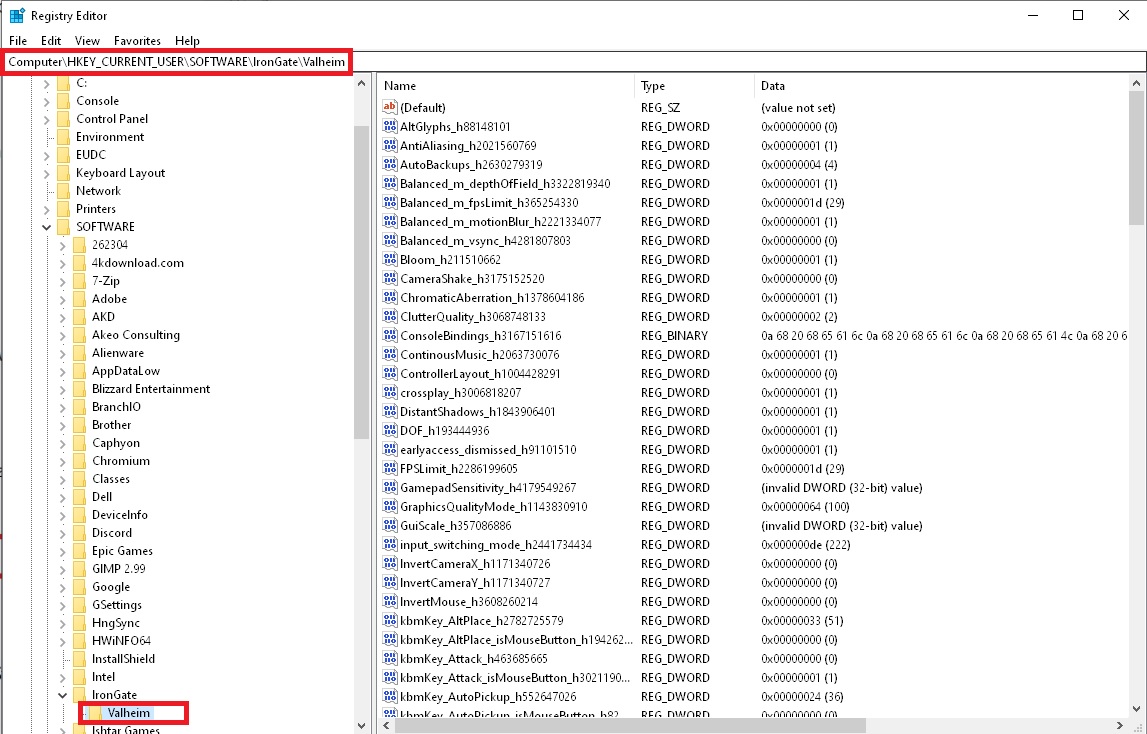
Then set FPS limit to low in your control panel again and launch with steam arguments I mentioned.
If your system still crashes after that, the issue is not related to power rather to just corrupt drivers probably. In which case I would recommend to do all the steps from Section4 in this guide: https://www.reddit.com/r/valheim/comments/uq9b8x/my_valheim_is_crashing_fix_for_crash_guide/
ember star
Which line in regedit?
stark meadow
ember star
Which line in regedit?
The entire Valheim folder
Computer\HKEY_CURRENT_USER\SOFTWARE\IronGate\Valheim
stark meadow
ember star
Thanks for the help.
I guess i'm cursed
Does anything interesting show up in the player.log file?
ember star
Its in steam or in another app data folder?
stark meadow
ember star
Its in steam or in another app data folder?
You can check Section2 in the guide for more details about best placed to check for log files.
DM me Player.log
ember star
Nvm found it
Direct 3d caused time drift
I'm sending you the file
I'm stuck on the phone data plan due to isp d**ing around, so it'll tale a while
dm sent
 crude lake
I just accidentally double-axe charged through a portal into the lava behind it, but immediately entered the teleportation animation and teleported back to base before I saw that I took any damage, but was perpetually on fire once through the portal until I died, i.e. I had the burning status effect stuck on 5 seconds and it wouldn't go down. Is this normal or a bug?
ember star
Aaaand it went to the valheim screen this time. And crashed.
ember star
crude lake
I just accidentally double-axe charged through a portal into the lava behind it,...
has to be a bug related to your portal transfer lol
dm'd you the new log
stark meadow
crude lake
I just accidentally double-axe charged through a portal into the lava behind it,...
It's not really considered as an issue. Especially in multiplayer, portals sometimes don't react instantly, so it's possible to go through them a bit before they teleport you, or even sometimes go through them without them teleporting you (if re-enter the same portal you exited). Any status effect you get before portaling will stay.
crude lake
stark meadow
It's not really considered as an issue. Especially in multiplayer, portals somet...
Yea I get that, but the status effect wasn't ticking down. It was stuck on 5 seconds, and I just kept burning until I died, even drinking a Major healing potion only delayed my death a few seconds
stark meadow
crude lake
Yea I get that, but the status effect wasn't ticking down. It was stuck on 5 sec...
Oh, that would be a bug then.
 fickle heron
The resolution selector doesn't scroll down to the currently selected resolution when clicked.
Bug or not bug?
On the New World menu...
When focused on the Name textbox, pressing Tab results in alternating between the Start Game and Join Game dialogs as opposed to changing focus to the Seed textbox.
Bug or not bug?
stark meadow
fickle heron
The resolution selector doesn't scroll down to the currently selected resolution...
Both are not really bugs, although resolution selection needs more work (scrolling via controller messed up).
However I find both annoying as well. That and the fact that adding a server via mouse doesn't automatically activate the input field.
fickle heron
I think both are bugs because they don't behave like similar UI elements in every other windowing system I've used.
But also why I asked because discussion
Definitely "Mild" in severity if anything - that's usually how I classify annoying-but-nowhere-close-to-gamebreaking bugs.
 cyan oar
Hey all, not sure if there is a place to post solutions but I was getting random crashes on save, either auto or manual, every one in a while. This reddit thread fixed it, basically the 13/14/ Gen Intel CPUs are being given too much power in the BIOS settings making them unstable: https://www.reddit.com/r/intel/comments/1awpon0/is_your_intel_core_i913900k_crashing_in_games/

Reddit
Explore this post and more from the intel community
stark meadow
cyan oar
Hey all, not sure if there is a place to post solutions but I was getting random...
We are aware of the problem. Which motherboard do you have?
 signal pecan
help needed. my husband and I are playing normal game, no mods, Game saved on my computer (new) and when he is at our home base the game lags so much he cant use it. This is only fairly recently as we had no problems before. Once he moves far away from our home base so its no longer rendering at all, the lag disappears. We really need him to be able to open chests and fight off raids at our base as we are just 2 players. Please, I need help. His computer works fine for all other video games so buying a new computer for 1 game is not affordable.
cyan oar
stark meadow
We are aware of the problem. Which motherboard do you have?
GIGABYTE z790 AEROG
 wraith gazelle

is there a fix for low gpu usage after 2-3 hours of playing the game?
cpu is intel i5 14600kf
signal pecan
signal pecan
help needed. my husband and I are playing normal game, no mods, Game saved on...
problem solved.
 gilded sluice
signal pecan
problem solved.
gilded sluice
signal pecan
problem solved.
what was the sollution?
gilded sluice
wraith gazelle
Hm.. you're using 57 watt out of 180W maximum 🤔
so something is limiting your GPU
signal pecan
gilded sluice
what was the sollution?
remove cross play and slaughter the way too many wolves and chickens and remove light sources from the base to get the fps to increase
signal pecan
husband was down to 5 fps, now he is up to about 20 so can play
gilded sluice
we have actual limits to how many can be spawned in a area. but people keep building "farms" to circomvent our set limits 😦
signal pecan
a very nice community member logged on to our game and spent a few hours trial and error to sort it
we had a wolf farm and a chicken farm in our base--so about 50 or more of each
plus 75 portals and 100 sconces
gilded sluice
oh. scones also kills FPS (well any fire and smoke emitter)
signal pecan
30 braziers
plus a huge garden with room for 800 carrots
we didnt mod anything so we were kept to set limits for an area, but had a huge area and it was all in the top floor of large base. so lots of sets.
stark meadow
cyan oar
GIGABYTE z790 AEROG
Will send you a DM
 gray dome
@gilded sluice I got a question, I made berserkir axes, upgraded them to level 2, then found a jade gemstone and crafted primal berserkir axes (they become level 1) and basically lost 14 flametal (upgrade from level 1 to level 2), will this be addressed in the future? At least keep the axes level or something?
 tropic pine
hello im having issues loading into the game when i start a map both new saves and old saves it keeps crashing when loading how do i fix this?
stark meadow
gray dome
<@260480620054970378> I got a question, I made berserkir axes, upgraded them to ...
We are aware of the issue related to upgrading high level flametal weapons. It should be addressed later.
stark meadow
tropic pine
hello im having issues loading into the game when i start a map both new saves a...
Would you be willing to try the new PTB version of the game? It's specifically made to fix this kind of issues. If you check out latest steam news, you can see how to join it.
Otherwise you have to be aware of the following:
Once the loading process starts you shouldn't touch anything on the PC until the process finishes, or else you might break the loading by activating the game window at wrong time. Before doing that however, you should ensure that you don't have any extra files in your installation folder other than these: https://i.imgur.com/vdpdeOA.jpg
Another method is; as soon as the game starts to load the world, minimise the game and don't return to the game for 5-10 min at minimum. Basically don't switch back to game until you are sure it loaded by the sounds you hear.
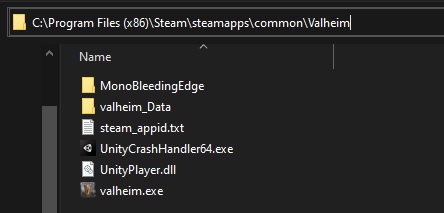 tropic pine
stark meadow
Would you be willing to try the new PTB version of the game? It's specifically m...
tropic pine
stark meadow
Would you be willing to try the new PTB version of the game? It's specifically m...
thank you, when i joined the PTB it worked
 viral spire
Is it intentional for dundr to use a bloodstone? seems like a giltch.
stark meadow
viral spire
Is it intentional for dundr to use a bloodstone? seems like a giltch.
Yeah, intentional. I personally think iolite would fit it better and have the VFX be blue, but main devs like it red, so red gem fits better.
viral spire
Yes that is extactly what i was thinking! Make te red part blue and use iolite that would make more sence but okay good to know.
 leaden sky
so, we have a tame deer, no mods:

it appeared after transferring a save from a PC to a dedicated server running the official valheim server binary, no mods either
it appeared near some tamed wolves
stark meadow
leaden sky
so, we have a tame deer, no mods:
Did you update your game recently to the new version, and when?
leaden sky
this world was started on the latest version
gilded sluice
leaden sky
so, we have a tame deer, no mods:
you playing solo or multiplayer?
leaden sky
multiplayer
gilded sluice
Then it highly likly someone runs some kind of mod
stark meadow
gilded sluice
Then it highly likly someone runs some kind of mod
It's happens on vanilla also. Wolves turn into tamed animals. Haven't been able to reproduce it, and it's kinda cool.
gilded sluice
I only seen it when someone had some QoL mods 🤔
leaden sky
gilded sluice
I only seen it when someone had some QoL mods 🤔
My friend create the map locally, we played on that for a few days, then I moved it to a server I host myself, all vanilla.
 lethal harness
anyone else's portals not working?
stark meadow
lethal harness
anyone else's portals not working?
What's happening? Re-cocstructed a portal pair and now they are not connected?
 dry coyote
Hello Everyone, i just started my valheim again and have a bug with walking. When i hold down the key for a while and walk after released my character still continues to walk . Not forever though, so not autowalk. All the other keys work perfectly fine. Any ideas? Would be much appreciated 🙏
stark meadow
dry coyote
Hello Everyone, i just started my valheim again and have a bug with walking. Whe...
If you are using mods, it's probably mod related. If you are on clean Valheim installation, try resetting controls to default values in the menu. If it still happens, it's probably a keyboard issue. Which keyboard do you have?
dry coyote
Sorry, what is a mod? Done the default controls already. And also tried another keyboard
I also tried to give the walk key to another key and then back to default didn't help
stark meadow
dry coyote
Sorry, what is a mod? Done the default controls already. And also tried another ...
Are you running any 3rd partly programs that come with your mouse and keyboard?
dry coyote
stark meadow
Are you running any 3rd partly programs that come with your mouse and keyboard?
Not that i am aware of no.
stark meadow
dry coyote
Not that i am aware of no.
Check which apps start with your windows by going to start and typing startup apps.
Which keyboard language/layout on Windows?
lethal harness
stark meadow
What's happening? Re-cocstructed a portal pair and now they are not connected?
portal says connected, but the flames don't stay active and won't let me go through. I have nothing in my inventory that prevents traveling (and i have the world modifier that lets me travel with anything active anyways). tried retagging, rebuilding the portal, restarting the game, verifying game files, nothing
stark meadow
lethal harness
portal says connected, but the flames don't stay active and won't let me go thro...
Are you using any mods? Do new portals work?
dry coyote
stark meadow
Check which apps start with your windows by going to start and typing startup ap...
Startup apps look fine, windows yes and english/US
stark meadow
dry coyote
Startup apps look fine, windows yes and english/US
Test your ghosting on this site: https://www.microsoft.com/applied-sciences/projects/anti-ghosting-demo
Microsoft Applied Sciences
Try pressing multiple keys at the same time as you would normally when walking
E.g. hold W while pressing A+S, holding W and A while pressing S, etc...
lethal harness
stark meadow
Are you using any mods? Do new portals work?
no mods, havent tried making a new portal
stark meadow
lethal harness
no mods, havent tried making a new portal
This pair only might be buggest so you should try reconstructing to portals to make a new pair.
dry coyote
stark meadow
Test your ghosting on this site: https://www.microsoft.com/applied-sciences/proj...
Works fine
stark meadow
dry coyote
Works fine
Tried holding W key for some time also then releasing it, on that site?
Have you ever tried to bind some keys to console commands?
Do you have another input device, like controller, plugged into your PC along with your mouse and keyboard?
On how much FPS are you playing?
dry coyote
stark meadow
Tried holding W key for some time also then releasing it, on that site?
Have you...
Holding the W key works fine. Sorry what do you mean by binding keys?
No other input device
Not sure about the FPS
Where can i check?
stark meadow
dry coyote
Holding the W key works fine. Sorry what do you mean by binding keys?
No other i...
You can press F2 while in game to see your FPS.
After the issue happens, send me your player.log (logout, in the starting screen on bottom left you'll see "show player.log" white button that will lead you to the file).
dry coyote
Ok on it
dry coyote
stark meadow
You can press F2 while in game to see your FPS.
After the issue happens, send me...
The fps changes, between 6-15 I would say
dry coyote
dry coyote
The fps changes, between 6-15 I would say
But it was lagging a lot right now... First time too
stark meadow
You should also try reducing your graphic settings to see if the bug stops at when playing on high FPS.
Which PC specs do you have?
dry coyote
stark meadow
You should also try reducing your graphic settings to see if the bug stops at wh...
Already done. Which of the small files should i send you?
stark meadow
The called Player
stark meadow
dry coyote
Already done. Which of the small files should i send you?
Also, what do you mean by aldready done? The bug still happens when you have high FPS? What's high FPS for your standards/system?
dry coyote
I reduced the graphics to a minimum already while playing before. And went quite smooth. 8gb ram, IC i3 2.1ghz, win 11
stark meadow
dry coyote
I reduced the graphics to a minimum already while playing before. And went quite...
Nothing useful in the logs. Seems like your issue is just related to playing on low FPS.
Due to some input changes that happened in October/November, the game doesn't capture input proprly when played on low FPS.
dry coyote
stark meadow
Nothing useful in the logs. Seems like your issue is just related to playing on ...
How can i increase the fps then? And should this not also influence the other keys?
stark meadow
dry coyote
How can i increase the fps then? And should this not also influence the other ke...
How high did you manage to get your FPS go by just decreasing graphic settings? And did the bug stop happening then?
dry coyote
stark meadow
How high did you manage to get your FPS go by just decreasing graphic settings? ...
Around 20fps but the game works smooth and all the other actions too, its only the 3 (front, left, right ) buttons who maks this bug
Is there a way to increase the fps?
wraith gazelle
gilded sluice
Hm.. you're using 57 watt out of 180W maximum 🤔
so something is limiting your ...
so when i start the game it works at full power and after that it starts to tank for no reason gpu and cpu usage just drops to 20%
 stark meadow
dry coyote
Around 20fps but the game works smooth and all the other actions too, its only t...
stark meadow
dry coyote
Around 20fps but the game works smooth and all the other actions too, its only t...
20 FPS might still be low. You are playing on a laptop right? It has below minimum required specs to run Valheim, so the only way to get more FPS is to decrease Valheim settings. Players who use old laptops also use custom settings mod to enable additional graphic options they can tweak.
When you said that you tested different keyboard, you meant external keyboard that you plugged in via USB? Do you have a controller to test?
wraith gazelle
these are i guess only error that pop up?


 stark meadow
wraith gazelle
stark meadow
wraith gazelle
Does this happen even while you are in main menu?
I would recommend Installing HWiNFO and after this happens, checking if any components in your PC reached MAX temps.
How are other games doing?
wraith gazelle
i checked the temps but it only happens in Valheim
stark meadow
wraith gazelle
these are i guess only error that pop up?
This looks like a mod issue. Mods can generally cause bugs that wreck performance.
You should do a vanilal test in a new world + new character also.
wraith gazelle
will do
dry coyote
stark meadow
20 FPS might still be low. You are playing on a laptop right? It has below minim...
I see. Yes i use a plugged keyboard. Controller you mean like a game controller? To test what?
stark meadow
dry coyote
I see. Yes i use a plugged keyboard. Controller you mean like a game controller?...
To test moving forward via controller. Or bind the forward key to one of the mouse buttons as a test (rebind the actions that already use mouse buttons to something else).
 dense whale
Has anyone else seen this? There is seemingly a random person on my server with a generic "Gamertag" name and "Character name". My server is password protected so I hope it's just a bug and that someone didn't guess or brute force my password.
I can kick the player but they come back instantly. I have also changed the password to the server but the player returns. A human can not guess the password that fast so either a machine is attacking my server or this is a bug. I'm hoping for the latter.
 stark meadow
dense whale
Has anyone else seen this? There is seemingly a random person on my server with ...
stark meadow
dense whale
Has anyone else seen this? There is seemingly a random person on my server with ...
Yes, it's known PTB issue that happens when you open player list on Steam only server
Don't open it if you don't use crossplay, for now, until fixed.
dense whale
stark meadow
Don't open it if you don't use crossplay, for now, until fixed.
Appreciated thank you!
 sharp bough
any ideas why this error suddenly start showing up?
Comfort becomes capped at 1. Seems it only occurs after teleporting
gilded sluice
sharp bough
Comfort becomes capped at 1. Seems it only occurs after teleporting
if we get the whole player.log, perhaps
but it's either modded or broken valheim files
 dull kayak
So I found a possible bug while scanning the game code for use on the wiki - actually it could be unused code that's Working As Intended, but I wouldn't know that:
The Staff of the Wild has some level-up settings defined which are apparently supposed to be limiting the max # of roots which a player can spawn, depending on their skill level in Elemental Magic. But these limits are not being obeyed - which IDK is unintended behavior or not. See first image.
Proof they're not working: My character has skill level 40 which should cap at 4 roots spawned according to these settings, but I was able to spawn up to 9 roots at once in-game with three good Eitr foods plus Embla set and lingering eitr mead.
Why they aren't being obeyed: The correct limit is set for the roots (ZDOVars.s_maxInstances), but that variable is only ever checked in the Tameable MonoBehaviour, in method RPC_Command (see second image). The roots prefab, staff_greenroots_tentaroot, does not contain a Tameable component.


 abstract delta
Ashlands music overlaps with any other track in the game and even with itself. Right now there's an event happening at my ashlands base and the raid music is overlapping with the ashlands music.
really annoying. Happened in the beta branch, reported the bug once there but it's still happening in the live branch as well
gilded sluice
abstract delta
Ashlands music overlaps with any other track in the game and even with itself. R...
it's a known issue 😦
stark meadow
dull kayak
So I found a possible bug while scanning the game code for use on the wiki - act...
We are aware of that also. Trollstav has a similar problem.
Thanks for poiting out what's exactly wrong. Will helps Devs fix it faster when they look into it in more detail.
 gentle heart
In the Mountains, items with copper highlights, such as spiral stairs, show snow effect indoors.

 hardy pier
Hi there!
So i got a bit of an issue with some grapics glitches, hope this is the right channel.
As you can see in the Video, there are weird textures popping in and out of existance everywhere.
I tried tuning the graphics settings, testing each one individually, but nothing helped.
The only thing that seems to help is to set the graphics to minimum and then back to my custom settings, prevents the glitch from happening for a few seconds up to a few minutes if i´m lucky.
It happens on our dedicated server as well as in singleplayer.
Playing in Vanilla so no mods could cause this mess either.
Tried reinstalling the game twice, didn´t work either.
Tried reinstalling my graphics driver, also didn´t work.
The game worked perfectly fine for two days and yesterday these glitches started.
I´m out of ideas on what could cause this or how to fix it since I didn´t change anything.
 modern galleon
My game keeps crashing. Single player, not hosting, when the game saves or I use the hoe to flatten land sometimes. 7900xtx so gpu is not the issue…. Really annoying as I have lost progress 3 times now. It’s only happened in one area so far, maybe it’s tied to that specific spot, not sure.
stark meadow
modern galleon
My game keeps crashing. Single player, not hosting, when the game saves or I use...
Your full specs and OS info please. There are no known crashes related to only one area. Did you check the crash guide in the pinned comments?
stark meadow
hardy pier
Hi there!
So i got a bit of an issue with some grapics glitches, hope this is th...
Did you test if it happens with new default character (not customised character) in a new world?
If you already properly reinstalled drivers, I would suggest monitoring your temperatures with HWiNFO.
The chance is high that it's a GPU issue before anything else. What are you full system specs? Tried disabling V-sync?
hardy pier
stark meadow
Did you test if it happens with new default character (not customised character)...
Didn´t try that yet.
I´m also pretty sure it isn´t a heat related problem since my GPU doesn´t exceed 70°C when at 100% which it doesn´t even get to while playing Valheim.
Specs are:
AMD Ryzen 7 2700X
MSI B450 Gaming Plus Max
AMD Radeon RX 5700 XT
16GB DDR4 RAM
Samsung SSD 860 EVO 1 TB
Samsug SSD 990 PRO 2TB
(running Win 11)
Disabling VSync drastically improves my Fps, but doesn´t solve the issue
Just noticed the issue also appearing in the main menu (to a lesser extend) after waiting like 10 sec.
stark meadow
hardy pier
Just noticed the issue also appearing in the main menu (to a lesser extend) afte...
I had similar artefacts when my GPU was overheating, but they were more distinct. Vsync shouldn't cause issues.
Does your monitor have freesync? Try disabling it if does. In what way did you reinstall your graphic drivers?
Have you tried running both in Vulkan and d3d11?
hardy pier
Already tried running Vulkan, gonna try d3d11 and freesync off now. Reinstalled my graphics drivers the way the AMD website says to, going to settings > apps > installed apps and uninstalling "AMD Software", restarting my pc and then installing via the official setup.exe
hardy pier
Trying different combinations of freesync on/off vulkan/dx11 and vsync on/off sadly didn´t change anything
gilded sluice
hardy pier
Hi there!
So i got a bit of an issue with some grapics glitches, hope this is th...
can you send me your player.log file?
stark meadow
hardy pier
Already tried running Vulkan, gonna try d3d11 and freesync off now. Reinstalled ...
Be sure to try a different character and a world. There are some weird stuff going on with some beards that could potentially cause similar problems. Like royal 2 beard. Do you know which beard your character has?
When it comes to re-installing drivers, be sure that you select custom installation + perform clean installation during the installation process. Otherwise any driver related issues connected to game profiles will stay.
hardy pier
stark meadow
Be sure to try a different character and a world. There are some weird stuff goi...
my current character is using the royal 1 beard. Made sure to do a clean install. sadly not my first time reinstalling my graphics driver over the last years, though it never was the issue
gilded sluice
hardy pier
Hm.. can't see anything that would do this 😦
um. wierd question but. can you see if your GPU is fully inserted in your motherboard?
hardy pier
I only installed my 2TB SSD recently, with that opportunity we redid the cable management and checked everything else, including that. 😦
Well it isn´t the end of the world, i´m kind of used to being cursed with this kinda thing....
Had to install Sea of Thieves (105GB) 6 times (with 5 MB/s) until it properly worked, but the issue was with the Xbox launcher and not with my pc 😦
stark meadow
hardy pier
my current character is using the royal 1 beard. Made sure to do a clean install...
Then it might be related to the beard. Try removing your beard via barber station if you don't want to test new character.
hardy pier
stark meadow
Then it might be related to the beard. Try removing your beard via barber statio...
I tested a blank standard character in that world just now, didn´t help. Trying it in a new world now, but since the issue persists in the main menu I don´t have much hope...
 glossy badger
Is it only my server where I cannot get the tar from the bottom of the pit? I dont know if its a known issue so sorry if this message is repeating another one.
hardy pier
glossy badger
Is it only my server where I cannot get the tar from the bottom of the pit? I do...
Is it maybe stuck in a small leftover puddle of tar? happend to me some time ago
glossy badger
I try to elevate the terrain but the tar clips through the elevated terrain and remains in the same position
stark meadow
hardy pier
I tested a blank standard character in that world just now, didn´t help. Trying ...
Try after restarting the game first, as I'm not sure to which extent glitches from royal builds last on different systems.
I would recommend that you try the general fixes from by crash guide (Section4): https://www.reddit.com/r/valheim/comments/uq9b8x/
I would also recommend to check which 3rd party programs use your GPU while you play, by adding a GPU column in task manager and sorting process by GPU usage percentage. I would personally also test if down-clocking your card helps with artefacts if nothing else helps (usually done in MSI afterburner - best to google your card on youtube and how to downclock it).
 unreal siren
@gilded sluice @stark meadow Just tried to play the game again, with Valheim not optimized in my Geforce Experience and Vsync not enabled in Valheim, but after 10 mins my game (and laptop) crashed again... So unfortunately the problem is still present
it is about this issue, hopefully this makes it easier for you guys to jump up to the chat 🙂
 quiet pulsar
Is it intended gameplay that you can summon a troll with the trollstav on top of dvergr, even hitting them with the meteor, and them not turning hostile to you? Seems odd.
 rain rampart
Hey anyone here had a problem, in which hes game kept Crashing/PermaFreezing whenever there was too many particles? (i guess thats the case?) When im in Mountain biome, whenever snow storm is present my game crashes within a few seconds. Same happens in mistlands (because of that fog i guess). Happens both in single and multiplayer, also my graphic drivers are up to date. Tried many things from reddit to fix on my own, but sadly nothing worked for me.
In the crash report at the end there are a few lines:
"ERROR: SymGetSymFromAddr64, GetLastError: 'Próbowano uzyskać dostęp do nieprawidłowego adresu.' (Address: 00007FFE082FED13)
0x00007FFE082FED13 (UnityPlayer) (function-name not available)
0x00007FFE84D27344 (KERNEL32) BaseThreadInitThunk
0x00007FFE862026B1 (ntdll) RtlUserThreadStart"
But that doesn't really tell me anything.
Would really appreciate some help, because i can't play with my friends unless im avoiding those biomes (so at this point i can only be afk in base, can't progress with them).
 pastel forge
so apparently we can place firepits on the giant indestructible trees in the swamps, but they wont register as a fire to nearby beds even if lit
gilded sluice
rain rampart
Hey anyone here had a problem, in which hes game kept Crashing/PermaFreezing whe...
D3D11: Failed to create RenderTexture (1920 x 1080 fmt 27 aa 1), error 0x887a0005
your issue easy fix tho mate
rain rampart
How?
 rain rampart
could you teach me some magic then xd
gilded sluice
or had mods before, and then removed them? and now valheim won't work?
rain rampart
from the begining valheim was working like that, also i dont have any external programs unless nvidia have optimalization turned on (i turned it off long time ago so) still gona check it
gilded sluice
because you have render-scale setting wrong
I've never worked out what changes that setting
but I've seen this exact issue since 2021
it's not very common tho
probably like less than 100 cases out of like 12 million players
rain rampart
gonna check that, giv me a while
rain rampart
Well, valheim not responding
It didn't even fully crash now so no new crash report was created
gonna try second time, maybe so a crash report will be made now, after than gonna try to reinstall drivers but i already tried installing newer/older ones
gilded sluice
validate game files
and then Clean install Nvidia
https://help.bethesda.net/#en/answer/57037
rain rampart
gonna try that, brb in a few min then
hardy pier
stark meadow
Try after restarting the game first, as I'm not sure to which extent glitches fr...
Hello again, so i worked through Section 4 and 5 as well as some of 6 and well... nothing... from updating windows to installing amd chipset software to to deleting the registry entries to forcing the game to run in d3d12. nothing changed
Gonna give up for today since i gotta work tomorrow, if i can provide you guys any log files or anything of interest i´d be glad to do so
gilded sluice
hardy pier
Gonna give up for today since i gotta work tomorrow, if i can provide you guys a...
did you try to push your GPU into the socket?
hardy pier
yes
hardy pier
still the same. Only thing you mentioned i didn´t try yet is to underclock my gpu
gilded sluice
looks mostly like something is doing something really wierd
I never seen "teleporting objects" like that
hardy pier
thing is, my pc kept crashing a while ago. long story short: noone could figure out why. we ruled out everything plausible. so as a last ditch attempt we copletely wiped the thing and set it up freshly with win11. That was 2 weeks ago, since then it didn´t crash or do any other weird things, but for some reason Valheim and Vermintide 2 seem to really dislike the new environment 😦
gilded sluice
2016?
hardy pier
nah
hardy pier
Dec 2019 if i remember correctly
gilded sluice
ah
I can probably try to help you disect the issue
I've built 100's of computers and found alot of wierd issues with hardware, drivers or just.. random issues
the problem is probably not valheim or vermintide. but it shows there int those games
hardy pier
wanna dm me so we don´t spam this channel?
hardy pier
aye, thx
gilded sluice
I am sick irl so I try not to "work" at all 😄
but I can't help myself from trying to figure out funky issues either
rain rampart
gilded sluice
and then Clean install Nvidia
https://help.bethesda.net/#en/answer/57037
Well, made clear reinstall, and verified files and game freezed while in snowstorm anyway
Game is just stuck like that, so it didnt made a crash report
 rain rampart
you mean, from these crash report folders?
or is there another player.log location that im not aware of
gilded sluice
In this hidden folder in windows:
C:\Users\ <username> \AppData\LocalLow\IronGate\Valheim
rain rampart
i see 2 here, so i send the newer one

Im really sorry for taking your time but im really really tired of that issue
gilded sluice
player.log is always the newer one. player-prev.log is the "previous" one 🙂
rain rampart
yeah i've noticed that after i already send it, but i send correct one i guess
gilded sluice
yup
rain rampart
but it doesnt look like there is anything wrong in it?
rain rampart
okok
 final cedar
hello, not sure if it is a known bug, but trolls in black forest stop to knock/fight you if stick close to a fir tree, they are just waiting here and leave
gilded sluice
final cedar
hello, not sure if it is a known bug, but trolls in black forest stop to knock/f...
that's because they can't pathfind to you and after 30 seconds. they just give up
final cedar
even if there is an open area to walk by?
 lucid siren
Anyone can help me understand why my character does not jump on first press sometimes.
I am running in the plains currently ( where i noticed it the most) and a lot of jumping and it just does not jump when i Spacebar.
I thought maybe it was the really bumpy uneven terrain we have in the plains that when running your feet do not touch the ground.
But it still happens going uphill.
Is there something that I can use to help with it ? Maybe a mod that if sees your are running and are barelly off the ground, it still lets you jump and ignore the flawed aspect of the floor being bumpy?
Anything to fix this issue helps.
Added: I am thinking also of a mod that Massivelly increase the gravity on my character and increase the strengh of my jump to compensate the lack of hight, this would allow my character to stick to the ground and not float when running over bumpy terrain.
ALSO i have the feather cape, does that impact on plains ?
stark meadow
lucid siren
Anyone can help me understand why my character does not jump on first press some...
What ever you are experiencing is not normal. On how much FPS are you playing and what are you PC specs?
lucid siren
stark meadow
What ever you are experiencing is not normal. On how much FPS are you playing an...
around 120 fps, with loads of fire around i am at 80 average
stark meadow
lucid siren
around 120 fps, with loads of fire around i am at 80 average
Are you using any mods?
lucid siren
stark meadow
Are you using any mods?
No, vanillla all the way and the included world modifiers
stark meadow
lucid siren
No, vanillla all the way and the included world modifiers
Ever spilled water on your keyboard? Try doing a ghosting test for your keyboard. Press and hold as many keys you can and then press space while you are holding this other keys.
https://www.microsoft.com/applied-sciences/projects/anti-ghosting-demo
Repeat the test a good number of times. Also using any 3rd party software that controls your keyboard? (RGB lights and so on..)
lucid siren
stark meadow
Ever spilled water on your keyboard? Try doing a ghosting test for your keyboard...
Really good link, i was wondering for that too, ( I never spilled anything) but similar thing happened in the past with some random keys( i assumed some other issue)
Tho playing a beat of a music on it, and pressing spacebar, it lit up every time and did not miss a beat for over hundred of presses. So i assume it is not the keyboard so maybe something in game, or maybe even something interfering with the game.
stark meadow
lucid siren
Really good link, i was wondering for that too, ( I never spilled anything) but ...
Rather than beat test, focus on ghosting tests. It can happen that one particular key on keyboard, when you are hodling it, causes that space doesn't get registered on press.
Btw. check if your valheim installation folder looks like this: https://i.imgur.com/vdpdeOA.jpg and that you are laughing Valheim from the Steam library as opposed through some shortcut.
lucid siren
Oh alright, I had mods enabled but not now but it looks like this https://imgur.com/a/THzFmPv

i do start the game from steam and this is the folder i can manage from steam
stark meadow
lucid siren
Oh alright, I had mods enabled but not now but it looks like this https://imgur....
Yeah, definitely mods there, and the most likely cause of your issues.
Can't say which mods is the issue. We've seen BepInEx alone causing some jump problems in the past also.
lucid siren
yeah let me delete what I do not see in your immage. It should still work right?
stark meadow
lucid siren
yeah let me delete what I do not see in your immage. It should still work right?
Best to delete everything in the instalaltion folder and only then re-install the game. Your saves won't be touched by doing that.
lucid siren
stark meadow
Best to delete everything in the instalaltion folder and **only then** re-instal...
true, the game is very small anyway will be fast
thanks I will try that, will post update of the resulta
 sage pagoda
Not sure if this is the right server for this but I was hoping for help with missing meta data and deleted worlds
sage pagoda
I still have the game files but for some reason I cannot load any on them in the game when I load it up. It says missing meta data and just tells me to load a previous save but I can't load any saves because none of them work. I tried what youtube videos suggested but nothing worked. If anyone has any advice please let me know or dm me. Worked on this world for 600 hours over hte past year and a half

 stark meadow
sage pagoda
I still have the game files but for some reason I cannot load any on them in the...
stark meadow
sage pagoda
I still have the game files but for some reason I cannot load any on them in the...
Did you at any point use mods in your world?
Before attempting to restore anything further, be sure sure that you have enough free disk space on all of your drives, by going to start and typing "This PC"
sage pagoda
stark meadow
Did you at any point use mods in your world?
Before attempting to restore anythi...
I never used mods because I'm not really savvy enough to be able to download them and get them set up. I also have 25GB of space left on my PC, is that enough?
stark meadow
sage pagoda
I never used mods because I'm not really savvy enough to be able to download the...
It should be enough if you have only one disk. Did you check storage space for each of your disks?
sage pagoda
stark meadow
It should be enough if you have only one disk. Did you check storage space for e...
I only have the one disk I believe. No external hard drives or anything, have had all of my games just on my laptop and only play low file size games like Valheim and Stardew Valley to keep space open and have it running well ao should only be one disk if I understand the question
stark meadow
sage pagoda
I only have the one disk I believe. No external hard drives or anything, have ha...
Did you specifically go to "This PC" app to check?

@sage pagoda Btw. will DM you about this issue specifically
sage pagoda
stark meadow
Did you specifically go to "This PC" app to check?
I really appreciate it, thank you. I can send you a screenshot of what my PC screen looks like over DM tomorrow morning when I get up
 spare heart
Hey guys, have others ran into an issue fishing for magmafish in ashlands? They do not seem to bite
 sage crypt
Do anyone know whats going wrong here? I also gets ton of fps-lag at the same time

 jagged hamlet
sage crypt
Do anyone know whats going wrong here? I also gets ton of fps-lag at the same ti...
jagged hamlet
sage crypt
Do anyone know whats going wrong here? I also gets ton of fps-lag at the same ti...
Using mods?
jagged hamlet
sage crypt
Yeah, tons 😦
I'd suggest moving over to #mods-issues.
9 out of 10 it is a mod related problem.
Turning off all mods and turning a few back on at a time to find the culprit will be your best course of action.
sage crypt
Ok, thanks
 light jolt
spare heart
Hey guys, have others ran into an issue fishing for magmafish in ashlands? They ...
light jolt
spare heart
Hey guys, have others ran into an issue fishing for magmafish in ashlands? They ...
im standing here with 5-6 Magma fish for around 40mins and none of them biteing,
Tried Day and Night they swim around it but not actully bite.
jagged hamlet
light jolt
im standing here with 5-6 Magma fish for around 40mins and none of them biteing,
Known issue, it is being worked on.
 jagged hamlet
light jolt
Damit. I want my
jagged hamlet
light jolt
Damit. I want my
You can build a fishtrap though that the fish will beach / trap themselves, then you can pick it up and voila.
light jolt
jagged hamlet
You can build a fishtrap though that the fish will beach / trap themselves, then...
Oooo thats a good point.
 restive timber
hi, not sure if this has been reported before. Was sailing to land and the trees were falling from the sky
 jagged hamlet
restive timber
hi, not sure if this has been reported before. Was sailing to land and the trees...
jagged hamlet
restive timber
hi, not sure if this has been reported before. Was sailing to land and the trees...
Old world, prior to ashlands?
If so was this spot close to ahslands or deep north? If so the terrain got changed and weird stuff like that can happen.
restive timber
ahh i see. Yeah it's a world made before ashlands update, we were heading south close to the ashlands
jagged hamlet
restive timber
ahh i see. Yeah it's a world made before ashlands update, we were heading south ...
Weird but normal tree behavior at that point ^^
 cyan depot
i just made basalt bomb bridge to a leviathan. when i jumped on the leviathan, i was perpetually falling and i could not jump. i died because i was basically stun locked at the bottom of the leviathan. extremely frustrating, not the levi whatever the flametal sinking objects are
quiet pulsar
Does anyone know if it's intended behavior that you cannot auto-pickup items while riding an asksvin? They already feel a bit mediocre as a mount what with them running off every chance they get and no follow command, but I was hoping they'd have utility for grabbing dropped flametal
 scarlet pumice
The bug with item codes being exposed in Korean has persisted for a really long time. But it hasn't been resolved.

 marble wolf
Not really a bug, a translation error. Report on the website.
scarlet pumice
translation error is no bug?
marble wolf
Correct.
scarlet pumice
Is the connection between item code and translation file also covered in translation?
marble wolf
Yes... Not sure why were still discussing this.
dull kayak

this has been getting worse and worse - Steam just refuses to sync Valheim for me
it sometimes works but when it does it takes like 15 minutes
the slow part is syncing my world file (WorldName.db, approx 43 kB)
According to my Steam logs, apparently it's trying to upload them to servers with "us-east" in their name, which is not the region I have told it to use
e.g.
[2024-06-06 15:28:15] [AppID 892970] HTTP upload for file 'worlds/Utanfell_backup_auto-20240606141937.fwl' (offset=0, length=206) to ([ip addresses removed
], host: steamcloud-us-east.s3.dualstack.us-east-1.amazonaws.com), path [server path removed

I've tried changing that setting to a few different nearby regions but none work any differently in this respect
And I basically cannot play Valheim until the Steam cloud sync finally decides to work, because if I launch it and select "play anyway" and load up this same single-player world, it triggers a worldgen pass, and I'm worried that'll mess something up so I just have to force-quit before it saves whatever it's doing in that
*and I just got my 3rd Cloud Sync error in a row, just now...
- Edit to add: Okay I just ran another network test on my end and my upload speed is in the dirt right now, which would explain this possibly
(630 kbps / 8b) = 78 kB/s max upload speed = 9.2 minutes to upload my world.db
So I guess nevermind about this?, because I just need to schedule an umpteenth Xfinity service request this year 😡
stark meadow
dull kayak
Let's say you finished your play session, closed the game. Then the upload of worldname.db save file to Steam servers begins.. if PC is shutdown at that point before that process gets completed the file transfer can be stack in limbo for 24h and there is nothing you can do about it.
It shouldn't be imporant to you, if you are playing only on one device.
dull kayak
thx, good to know
I am only on one device right now tho
anyways I did a full power cycle of my networking hardware and uhhhhhhhhhh

(yes, I do cycle them regularly, so IDK either)
and hey whaddaya know, I tried a cloud sync this time (since it had failed x3 in a row) and it worked in ~20 seconds like it's supposed to
... sighs exasperatedly why does Xfinity have to be so 


 ...
...
 void tinsel
Hey all having an issue on the normal branch, no mods. When I go to connect I cannot join anyone the connect button and refresh buttons do nothing. If I try to join a friend off steam it acts like it wants to work but then it zooms out on my character and locks up - password prompt does not show up. If I host a game then people can join on me.
stark meadow
void tinsel
Hey all having an issue on the normal branch, no mods. When I go to connect I ca...
If all of your are playing on Steam, try disabling crossplay option before you start the servers.
If you are joining via Steam invite, you might also additionally have to select start button on character creation screen.
void tinsel
stark meadow
If all of your are playing on Steam, try disabling crossplay option before you s...
Tried this. Does not work.
stark meadow
void tinsel
Tried this. Does not work.
Are you using any VPN servies? What type of IP do you get when you google "my IP" (do you get IPv4 or IPv6)
stark meadow
void tinsel
No VPN. Public IPv6
Try locking to IPv4, by disabling IPv6
 void tinsel
I fail to see how this could be an issue - I was working fine up until a week ago
Okay I tried for the sake of troubleshooting let me try to connecdt to a server
stark meadow
void tinsel
I fail to see how this could be an issue - I was working fine up until a week ag...
I've seen routers mismanaging when they should use IPv4 vs IPv6 before, especially if your main public IP is IPv6.
void tinsel
I disabled it and tried to join a server still cannot hit refresh its grayed out
Also still cannot connect. Now I see less servers populating on the community tab
stark meadow
void tinsel
I disabled it and tried to join a server still cannot hit refresh its grayed out
Try connecting to my server by adding its IP. Will DM you.
 sacred sinew
I need some help with an age old problem. I fixed it once when i played valheim along time ago but I cant figure out how to fix it again. Im playing VIA steam with an xbox controller and i cant remember how to enable rotating building pieces!
stark meadow
sacred sinew
I need some help with an age old problem. I fixed it once when i played valheim ...
Depends on the controller layout you use, did you check the scheme in the pause menu?
sacred sinew
Ive tried every single scheme
stark meadow
sacred sinew
Ive tried every single scheme
Do you have key hints enabled in the setting? When you equipt a hammer you should have key hints for how to rotate pieces, which will depend on your layout. For example, for console layout, just pressing L2 and R2 rotates the pieces. Make sure that you hover your cursover over gound or some other build peice first.
Other than that you might have mod related problems
 proven surge
curious if anyone knows why theres no dungeons appearing for me for the Hildir locations? I completed one but the last 2 I went to weren't actually there, I'm guessing maybe something to do with the ashlands terrain height changes since these 2 were near the south of the map? ill add pictures, no worries if no one knows


 stark meadow
proven surge
curious if anyone knows why theres no dungeons appearing for me for the Hildir l...
stark meadow
proven surge
curious if anyone knows why theres no dungeons appearing for me for the Hildir l...
You'll need to interact with HIldir table again to get correct map pins
proven surge
thanks brother
sacred sinew
stark meadow
Other than that you might have mod related problems
I cant imagine what mod it might be. The only mod i have installed that could possibly be an issue i turned off and still had an issue.
stark meadow
sacred sinew
I cant imagine what mod it might be. The only mod i have installed that could po...
If you want to do a vanilla test, you should do as instructed in Section5 of this guide: https://www.reddit.com/r/valheim/comments/uq9b8x/my_valheim_is_crashing_fix_for_crash_guide/
Just disabling mods might no be enough. Broken BepInEx alone can cause input issues.
Is rotating build pieces working with a mouse for you?
 potent lotus
hi, we encountered a problem when mining fire metal ore. The ore pillar seems to be slippery. You can’t stand on it and your character slides and rides on it. The same problem happened several times when extracting chitin from a kraken in the ocean. please solve this bug. I have almost 1.5k hours of play time.
light jolt
potent lotus
hi, we encountered a problem when mining fire metal ore. The ore pillar seems to...
we have seen this to makes for a trip to lava town.
 plucky compass
the eityr rafinery that uses 20 of both components leaving ALWAYS 1 ingrediant item. So after 1 full run of 20/20 its 19/20 or 20/19. bit strange
stark meadow
plucky compass
the eityr rafinery that uses 20 of both components leaving ALWAYS 1 ingrediant i...
Known issue. Low priority to fix atm.
stark meadow
potent lotus
hi, we encountered a problem when mining fire metal ore. The ore pillar seems to...
If you want to avoid the bug while waiting for a fix, you can build around the leviathan to stop yourself from siding into lava, mine it via catapult, use shield generators to block lava meteors from spawning. Before you start to pickaxe lava leviathan, log out, log back in, build a campfire and sit next to it to get some rest bonus, then go for pickaxing attempt and you shouldn't start sliding.
plucky compass
will there also something be against those massive FPS drops in our base ? or bases in general. just need to walk away or look in a different direction and its getting better.
 stark meadow
plucky compass
will there also something be against those massive FPS drops in our base ? or ba...
stark meadow
plucky compass
will there also something be against those massive FPS drops in our base ? or ba...
Hard to say if this will get optimised as it's probably the hardest thing to optimise in Valheim. Devs are aware that it's the most wanted optimisation that players would like to see. As a player, you should attempt to play in Vulkan to increase FPS in bases.
stark meadow
plucky compass
.
Also a known issue.
plucky compass
those lava/magma balls ...

kick you off those basalt platforms

we just died while mining this ore that sinks
its shooting through. not sure its intended
 hallow meteor
Hi, I can't play the game, every single I want to save the game crashes, I tried everything I found online (disabling cloud save, reducing settings, OpenGL, no fullscreen, disable steam overlay) nothing fixed it
(I'm on linux too)
stark meadow
plucky compass
kick you off those basalt platforms
Not really intended but you can use shield generators to stop them from spawning.
stark meadow
hallow meteor
Hi, I can't play the game, every single I want to save the game crashes, I tried...
Did you stumble upon this crash guide?
https://www.reddit.com/r/valheim/comments/uq9b8x/my_valheim_is_crashing_fix_for_crash_guide/
plucky compass
stark meadow
Not really intended but you can use shield generators to stop them from spawning...
the lava balls were shooting from underneath the basalt platform. or does the shild prevent it completely from spawning ?
hallow meteor
stark meadow
Did you stumble upon this crash guide?
https://www.reddit.com/r/valheim/comments...
None of it works
stark meadow
plucky compass
the lava balls were shooting from underneath the basalt platform. or does the sh...
As I said, the shiled generator prevents them from spawning
stark meadow
hallow meteor
None of it works
Did you read the beginning of the guide where I talk about Fedora 40 issues?
stark meadow
hallow meteor
Yes
So on which Distro are you playing at?
hallow meteor
Bazzite
stark meadow
hallow meteor
Bazzite
Bazzite is a custom build based upon Fedora.
hallow meteor
I tried almost all 8+ proton versions, and even 7-43 which works for most problems, but 7-43 makes the game crash on launch
hallow meteor
stark meadow
Bazzite is a custom build based upon Fedora.
I know so?
stark meadow
hallow meteor
I know so?
I feel like if you knew so, and read the guide, you would mention that you tried proton mode first, as opposed to everything else.
stark meadow
hallow meteor
.
Did you confirm that your proton mode works? OpenGL isn't used during proton mode. Natevly launched game in proton should launch in d3d11
hallow meteor
I know
stark meadow
hallow meteor
I know
Alternative workaround is to use flatpak version of Steam.
hallow meteor
I'll try this
plucky compass
is a summoned troll meant to be hostile against me ?
 midnight pond
plucky compass
kick you off those basalt platforms
midnight pond
plucky compass
kick you off those basalt platforms
First time?
midnight pond
plucky compass
is a summoned troll meant to be hostile against me ?
Yes cause it use blood stone
plucky compass
midnight pond
First time?
yes
plucky compass
midnight pond
Yes cause it use blood stone
ok
midnight pond
Inside that blood stone may have some bad power in it but the power is too powerful
midnight pond
plucky compass
yes
Not sure if that magma have life or sth but it kinda intended to shoot ppl when u nearby it
plucky compass
but the forcefield tip worked. so this ok now
midnight pond
Glad to here that
plucky compass
2nd valheim.exe. crash today. is there a log somewhere ?
was working on the pig farm with pickaxe. exe crash. log back in. naked in base. go to crash location. no corpse. all inventory gone.
stark meadow
plucky compass
was working on the pig farm with pickaxe. exe crash. log back in. naked in base....
If your inventory has been lost, you most likely crashed during saving. You can reffer to this guide when it comes to crashes:
https://www.reddit.com/r/valheim/comments/uq9b8x/my_valheim_is_crashing_fix_for_crash_guide/
plucky compass
alot within this wall of text is refering to resetting cpu / gpu modifications and what not. unsually when a certain game crashes and others dont, then personally blame the game that crashes, especially after a mayor update. dont want to be too negative but from zero crashed since i have the game to 2 withing a few hours ...
stark meadow
plucky compass
alot within this wall of text is refering to resetting cpu / gpu modifications a...
While it's true that players first start exhibiting instability problems in Valheim rather than in other games, due to Valheim inducing power spikes if FPS is not capped, or due to driving GPU to 100% usage, the cause of crashes are, in 99% of cases, happen due to system instability. From players that fixed their crashes, they rarely experienced them in other games, and the fix for their crashes in Valheim was **always **related to their system configuration. Those players that didn't fix Valheim crashes, over time started to experience them in other games also.
In what manner did you crash? (screen froze, black screen, CRT, BSOD, etc..) And with what specs?
plucky compass
game stopped. small window appeared saying valheim.exe something (dont remeber) and back to windows desktop.
specs are roughly 13th Gen Intel(R) Core(TM) i5-13600KF 3.50 GHz
32,0 GB ddr4
4070ti super
everything on m.2 or ssd
cores were at 80°C +/- and 50-60% cpu
also we are 3-4 ppl playing. one cant play at all since the ashlands update
thats while being in our base
 stark meadow
plucky compass
thats while being in our base
stark meadow
plucky compass
thats while being in our base
Please check what happens with your temps and GPU wattage during next time you crash. You can also try inducing some saving on purpose, aftwer world saves happens (not before so you don't delay the world save for another 30min).
What happens to you other teammate that can't play at all? Also crashing?
plucky compass
once our base got bigger, he just bsod'ed when doing something in it or moving arround or entering via portal. he's playing on older spects tho. 1080ti and 6 core cpu. but we played mistlands all together before and cant remember any troubles.
there have been driver updates in the meantime, where i think not every update must necessarily benefit every game. so, its difficult i guesss
stark meadow
plucky compass
once our base got bigger, he just bsod'ed when doing something in it or moving a...
I would guess that they are most likely crashing due to 1080ti having a 250 W MAX TDP which Valheim can often pull, due to pushing GPU to 100% usage, and their PSU no longer being able to supply the GPU.
I would recommend then to downclocking their card and check if they have two separate cables coming out of their PSU into the GPU, or if they have a single pig tail cable coming out from the PSU and then that cable splitting into two separate parts that go into GPU. Generally one should avoid having one pig tail cable, and go for two separate cables. Over time PSU can also get weaker and might not be able to supply the card properly.
You can see few examples of 1080ti users having the same problem, in the comment of my guide:
https://www.reddit.com/r/valheim/comments/uq9b8x/comment/isj59w8/
plucky compass
might download something to record temperatures.
 uncut bluff
So while playing, the game crashed and when I loaded back in my character no longer existed. The cloud says my character still exist and saved before the crash, but when I try to restore it, nothing happens. Is there a way I can get my character back?
 turbid plume
hi peepz, not really a bug but somebody forgot to change the placeholder name on the black marble bench 😄

 humble tendon
Invisible, cannot move, making noise, cannot lose hp
 stark meadow
uncut bluff
So while playing, the game crashed and when I loaded back in my character no lon...
stark meadow
uncut bluff
So while playing, the game crashed and when I loaded back in my character no lon...
Check the last paragraph in the Section1:Point5 of this guide:
https://www.reddit.com/r/valheim/comments/uq9b8x/my_valheim_is_crashing_fix_for_crash_guide/
 novel jungle
I don't know if this is a feature or a bug, but typically when you die to a creature and respawn the creature is no where near your grave to let you retrieve your stuff but with draugr they just be there waiting for you
 thick karma
I have my pc hooked up to a bigger tv and it trys to auto set my resolution r3ally high when I try to play on 1920 1080 and I get random freezes in the game where the screen like snaps back to a before point and then I have to click to get the game to go back to what I was doing. I found that the game keeps trying to put me at a higher resolution. Is there a way to set the resolution so it stops trying to change? I seen a few pe9ple have a similar issue
 winged whale
why cant i create a world it just shows up as a black screen with "loading..."
and nothing actually loads
 ebon dock
Hi all, recently I've noticed that running Valheim causes my Windows Driver Foundation process to use over 15% of the CPU and lots of power. I don't have this issue with any other game or app, and it seems to be affecting performance. Looks like someone else posted an identical complaint on the Valheim subreddit earlier this week, but had no luck finding support. Is this a known issue?
Sadly, I can't just end the process via Task Manager. I can't disable it from Control Panel or with the command prompt. My drivers are up to date. Reinstalling the game also didn't help.
stark meadow
ebon dock
Hi all, recently I've noticed that running Valheim causes my Windows Driver Foun...
Have you tried some of the other Unity based games? To my understanding, Windows Driver foundation is just a process that encapsulates some of the hardware drivers, so if there is something wrong, it's usually due to some hardware driver not being used correctly. From what I've seen by googling just now, people usually had problems with USB drivers. Have you tried running the game both in Vulkan and d3d11?
stark meadow
winged whale
why cant i create a world it just shows up as a black screen with "loading..."
Once the loading process starts you shouldn't touch anything on the PC until the process finishes, or else you might break the loading by activating the game window at wrong time. Before doing that however, you should ensure that you don't have any extra files in your installation folder other than these: https://i.imgur.com/vdpdeOA.jpg
Another method is; as soon as the game starts to load the world, minimise the game and don't return to the game for 5-10 min at minimum. Basically don't switch back to game until you are sure it loaded by the sounds you hear.
stark meadow
thick karma
I have my pc hooked up to a bigger tv and it trys to auto set my resolution r3al...
At which point does the game try to switch back your resolution to higher one? Just randomly while playing or?
ebon dock
stark meadow
Have you tried some of the other Unity based games? To my understanding, Windows...
Thank you for the response. Just now, I tried running the game in D3D11, as I was using Vulkan before. I still see the Windows Driver Foundation/WUDFHost.exe going nuts, unfortunately.
I don't see anything unusual when running Death's Door, one game made in Unity. I think I have some other Unity games, like Darkest Dungeon or Ori and the Blind Forest, which I could reinstall and test.
If there's a hardware driver that's misbehaving, well... I can't say I really know about computers, just how to use Google-fu to solve simple problems. It could take me a while to identify what driver might be the issue. I did try the game without my USB peripherals (a Razer mouse and keyboard), if that helps any.
stark meadow
ebon dock
Thank you for the response. Just now, I tried running the game in D3D11, as I wa...
Try going through these steps to check and repair corrupt system files:
https://support.microsoft.com/en-au/topic/system-file-checker-finds-corrupt-files-after-installing-kb2821895-12d6d944-25f5-fc42-551b-05607a026e9d
If it doesn't work, will DM you, so maybe we can take a look at your event viewer.
 balmy garnet
if you time when the lox attack you and then shoot the abalest you might fly straight thru the map
 river kayak
Please advise. Installed Valheim on a new laptop through stim. The game started (tried to log in using Vulkan), everything was normal. Decided to change the localization to Ukrainian, after which the screen turned into an incomprehensible stain. Clearing the cache stim did not help, uninstall and install again too. Also tried to run on another laptop and change the localization, also nothing changed. Screenshot taken at startup without Vulkan, at startup with it all the same, but on the full screen. In the network information about such cases did not find. OS version - Windows 10 Pro 22H2, processor - i5-6200U, integrated graphics. Thank you in advance for your help.

Forgot to write, the game sound and sword cursor is there.
stark meadow
river kayak
Please advise. Installed Valheim on a new laptop through stim. The game started ...
Did you already launch some mod organisers on this laptop? Or tried to install BepInEx?
river kayak
Yes, I tried to install BepInEx, but after it happened - I uninstalled the game, deleted everything from the folder where I downloaded BepInEx and mods, cleared the cache and downloaded the game again. BepInEx can still affect after that? (If it is not passive aggression, I really don't know). If this is the case - what else can I try to do.
stark meadow
river kayak
Yes, I tried to install BepInEx, but after it happened - I uninstalled the game,...
It seems it messed up your registry settings and more specifically resolution. Do the short re-instlalation process from Section5 of this guide: https://www.reddit.com/r/valheim/comments/uq9b8x/
river kayak
stark meadow
It seems it messed up your registry settings and more specifically resolution. D...
Thank you so much, I will try it now and report back.
river kayak
stark meadow
It seems it messed up your registry settings and more specifically resolution. D...
It worked, thank you very much again!
If I may - one more question, if another player has these mods installed (and they work fine) can we play together?
stark meadow
river kayak
It worked, thank you very much again!
If I may - one more question, if another p...
Can't really give any advice on how to play with mods. From my perspective, dealing with bugs reports, mods can potentially come with performance bugs, save breaking bugs and cause issues during multiplayer. It's best to be in touch with others in the modding community at designated channel, like #mods-discussion.
river kayak
stark meadow
Can't really give any advice on how to play with mods. From my perspective, deal...
I got it, thank you very much. It was very nice to get help so quickly and efficiently. You are the best!
 slim narwhal
Not really a bug, but tunips can no longer be placed on an item stand? I almost cried because I use them to decorate my kitchen area ....
ebon dock
stark meadow
Try going through these steps to check and repair corrupt system files:
https://...
Tragically, there was no change (and no irregularities detected with /scannow). I'd be happy to keep working with you via DM. Thanks for your help so far.
 noble loom
small update for PC today ... oooh
 rapid peak
After the macOS version was released, rotating the building direction using the mouse wheel in the Windows version was reversed compared to before. @gilded sluice
gilded sluice
rapid peak
After the macOS version was released, rotating the building direction using the ...
ah. that has been fixed
 pastel sapphire
hello, Valheim in Linux is broken. I've checked in two distros.
 gilded sluice
pastel sapphire
hello, Valheim in Linux is broken. I've checked in two distros.
gilded sluice
pastel sapphire
hello, Valheim in Linux is broken. I've checked in two distros.
we know!
pastel sapphire
perfect! thank youuu!
gilded sluice
pastel sapphire
perfect! thank youuu!
reload the page. should be fixed
(or up to 9 minutes for it to auto-update)
 north sluice
@gilded sluice is the issue with dedicated servers also known and being worked on? any updates if so?\
 ripe zinc
gilded sluice
reload the page. should be fixed
ripe zinc
gilded sluice
reload the page. should be fixed
Can confirm it works now, thanks! Love your work 🙂
 sleek siren
Also having problems with dedicated servers on linux. Seems (for me anyway) the executables are not downloading.
nevermind, discussion is on-going in #dedicated-server as you'd expect
gilded sluice
north sluice
<@260480620054970378> is the issue with dedicated servers also known and being w...
should work now 🤔
try-reloading
sleek siren
I tried about 5 minutes ago, but can try again
gilded sluice
yes please 🙂
 sly glade
hey everyone ! long wait for the Mac Install but now Steam cant sync the Cloud so its not possible to start the Game on a Mac Studio !? any help ? THX
gilded sluice
Hm... 🤔
sly glade
do i have to buy the game again at the app store ?
north sluice
@gilded sluice fixed! thankyou!
gilded sluice
sly glade
do i have to buy the game again at the app store ?
sadly yes
or use steam on Mac OS?
it's platform specific where you buy it
sleek siren
can confirm fixed for me too
 gilded sluice
rapid peak
After the macOS version was released, rotating the building direction using the ...
gilded sluice
rapid peak
After the macOS version was released, rotating the building direction using the ...
are you sure this is a thing?
rapid peak
gilded sluice
are you sure this is a thing?
Sure, you can switch to the PTB which is the original rotation direction. Scrolling the mouse wheel down would rotate the workbench anticlockwise. In the latest version, it has been reversed.
 honest mortar
All, looks like the Mac version of Valheim is unable to sync to Steam Cloud. At least it's happening to me right now. It tries to upload, but never finishes. It also doesn't seem to create a preference file.
 queen verge
honest mortar
All, looks like the Mac version of Valheim is unable to sync to Steam Cloud. At ...
queen verge
honest mortar
All, looks like the Mac version of Valheim is unable to sync to Steam Cloud. At ...
just ouf of curiosity: did you use the unofficial Mac port previously? (haven't been able to test the official version myself yet, still at work)
honest mortar
Yes, I did. But I removed the unity.valheim.blabla folder completely.
Well, I DID put the Valheim Cloud save folder back in. That might be the problem.
I probably need to put this in the Steam userdata folder.
 cinder pebble
rapid peak
Sure, you can switch to the PTB which is the original rotation direction. Scroll...
cinder pebble
rapid peak
Sure, you can switch to the PTB which is the original rotation direction. Scroll...
You are correct, rotation was reversed. It's unintentional and will be fixed.
sly glade
gilded sluice
sadly yes
thank you for ure help !
sly glade
honest mortar
Yes, I did. But I removed the unity.valheim.blabla folder completely.
see the answer of @gilded sluice that you have to visit app store again 😉
queen verge
sly glade
see the answer of <@260480620054970378> that you have to visit app store again �...
if you own the game on Steam you are not obliged to make another purchase on the Mac App Store (although that would be a good idea to support the developers for porting it in the first place ❤️ )
gilded sluice
sly glade
see the answer of <@260480620054970378> that you have to visit app store again �...
indeed 😄
cinder pebble
queen verge
if you own the game on Steam you are not obliged to make another purchase on the...
Oh hey it's you! Thanks for making the unofficial port 🙏
honest mortar
I purchased it on the AppStore.
Ok, Valheim data is stored in ~/Library/Containers/Valheim.
gilded sluice
the reason why we don't store Valheim in the iCloud is the non-existing free space
users have 5Gb in the iCloud
honest mortar
Inside the Valheim folder, you need to get into Data/Library/Application Support/com.coffeestain.valheim.
gilded sluice
and valheim would devour that space in mear seconds
honest mortar
Yeah, I don't like cloud anyway. 😉
That is the AppStore version. The Steam version is located in ~/Library/Application Support/com.coffeestain.valheim.
And yes, both versions seemingly have issues creating a preference file. At least my changed screen settings are not being remembered.
Ok, looks like you can't just change a preset and have it remembered. You need to choose "custom". 😛
Nope, still doesn't work. It automatically switches back to "Performance".
 lunar wolf
Is anyone else having an issue with the mouse wheel spinning build pieces the opposite way it used to?
gilded sluice
lunar wolf
Is anyone else having an issue with the mouse wheel spinning build pieces the op...
we know. only on mac, right?
rapid peak
gilded sluice
we know. only on mac, right?
on win
gilded sluice
validate game files. but it's a problem had found before
but it shouldn't be on the live version 🤔
 teal juniper
It's very disorienting that the build pieces rotate the wrong way
rapid peak
gilded sluice
validate game files. but it's a problem had found before
no work. many people are encountering the similar problem
gilded sluice
rapid peak
no work. many people are encountering the similar problem
yeah 😦
lunar wolf
@gilded sluice pc
gilded sluice
we gonna look at it but no promises it's a quick fix sadly. can't just add a fix for it atm
lunar wolf
👍
rapid peak
Could it be possible that the programmer unintentionally reversed the scroll wheel direction to maintain consistency across all platforms, despite macOS and Win having opposite directions?
lunar wolf
Thank you Smiffe
marble wolf
rapid peak
Could it be possible that the programmer unintentionally reversed the scroll whe...
Different developers.
cinder pebble
rapid peak
Could it be possible that the programmer unintentionally reversed the scroll whe...
Yes, this is exactly the issue. Windows accidentally got this as well, will be fixed in an upcoming patch.
 river igloo
lunar wolf
Is anyone else having an issue with the mouse wheel spinning build pieces the op...
river igloo
lunar wolf
Is anyone else having an issue with the mouse wheel spinning build pieces the op...
yeah, this is throwing me off so bad.. on windows as well
gilded sluice
rapid peak
Could it be possible that the programmer unintentionally reversed the scroll whe...
yes and it's being worked on!
 south lance
Devs broke gaem
novel jungle
kinda a minor bug but karves have a bow splash effect when going backwards kinda wierd
 ocean frost
I'm also suffering from the inverted build rotation bug 😦 impossible to build, it's like my brain is on backwards! (On Windows)
 lost plover
On a couple occasions I’ve had a small group of Fulings spawn on my starter island right by the Boss runestone circle. There’s not been any kind of raid beforehand. They’re just randomly there. Is this a bug?
 lucid geyser
lost plover
On a couple occasions I’ve had a small group of Fulings spawn on my starter isla...
lucid geyser
lost plover
On a couple occasions I’ve had a small group of Fulings spawn on my starter isla...
The "minions" of latest boss you killed will spawn in all biomes at night
 elder aurora
I have a problem when running the game on mac os using steam and tabbing out of the game and back in the character seams to be stuck in the secondary attack, I already switched secondary attack and destroy to middle mouse button from command but it still happens
stark meadow
elder aurora
I have a problem when running the game on mac os using steam and tabbing out of ...
Try to disable Steam input for Valheim in Valheim Steam library properties.
 fading willow
Everything seems to work nicely with Macbook Pro M1 Pro 16GB... except I am not able to deconstruct anything.. or remove anything I build :D.. I have tried to change keybinding and nothing works.. cannot remove anything without destroying with weapon haha 😄
stark meadow
fading willow
Everything seems to work nicely with Macbook Pro M1 Pro 16GB... except I am not ...
Try resetting the controls and change the deconstruct keybinding to something on the keyboard?
Also, try without Steam input being enabled for Valheim, if you have it installed over Steam.
fading willow
Tried letter O and other letters but still did not work :P.. also Steam upload is not working.. will not sync. Will try again tomorrow 🙂
elder aurora
stark meadow
Try to disable Steam input for Valheim in Valheim Steam library properties.
I did but the behavior still persisted despite restarting the game after changing that setting in steam
stark meadow
elder aurora
I did but the behavior still persisted despite restarting the game after changin...
Can you click on the show player.log file in the starting menu, and DM me that player log file?
Also, did you check if deconstruct key works for you?
elder aurora
deconstruct worked with the default command and after changing it to something else
and I just noticed that if I tab out with cmd+tab and tab back in with cmd+tab it seems to work but if I instead of tabbing back in click in the window it gets stuck on secondary attack
 upbeat fossil

anyone know wtf is going on here, ive tried verifiying files and uninstalling
im at the main menu and wherever i click opens my browser to the valheim merch shop
stark meadow
upbeat fossil
Try doing the same steps as here: #steam-bugs-discussion message
upbeat fossil
stark meadow
Try doing the same steps as here: https://discord.com/channels/39114260174051737...
yeah just took a scroll up and seen that while i was waiting, will give it a shot ty :)
upbeat fossil
stark meadow
Try doing the same steps as here: https://discord.com/channels/39114260174051737...
got it, had to do the "Long (almost never needed): " steps
 amber granite
Hi, mods. Every time I try to join a server or a friend's world my Pc crashes with a blue screen. If I run the game solo or someone joins my world, it works fine. I reinstalled the game once and verified file integrity many times. Nothing works. I really like this game and want to play it with people. Please help.
 stark meadow
amber granite
Hi, mods. Every time I try to join a server or a friend's world my Pc crashes wi...
stark meadow
amber granite
Hi, mods. Every time I try to join a server or a friend's world my Pc crashes wi...
What are your PC specs?
stark meadow
amber granite
It's a few years old ROG with an Nvidia 1080
Asus laptop? Can you check which model exactly, start → system information
amber granite
This only happens when I try to join someone else's world or a server. Never on my own world.
Its an Asus RoG GL553VD
stark meadow
amber granite
This only happens when I try to join someone else's world or a server. Never on ...
How long did you play as you being the host without crashing? Is anyone using mods?
amber granite
No mods
I have played for 170 hours in total
I was the host for like 80% of that duration. The rest was single player. My friend joined my world with no problems.
stark meadow
SInce crashes started happening, how long did you test playing with your as a host?
Due to the nature of your crash, where your Windows crashes, it's more serious problem that Valheim not working correctly.
amber granite
The crash first happened on day one. When I tried to join my friends world. That was almost 15 days ago. Since that time we decided that I'll be the host.
Yeah but my pc never crashes while playing valhiem solo or hosting a world or when playing another game. It only crashes when I try to join someone's world.
stark meadow
amber granite
Yeah but my pc never crashes while playing valhiem solo or hosting a world or wh...
I don't see this very often, if at all. Probably related to corrupt system files or corrupted network drivers then.
amber granite
Can you suggest some fixes? I can't find any solutions through Google.
stark meadow
amber granite
Can you suggest some fixes? I can't find any solutions through Google.
I would start with general fixes in my guide (Section4): https://www.reddit.com/r/valheim/comments/uq9b8x/my_valheim_is_crashing_fix_for_crash_guide/
Before that maybe check some logs and install HWiNFO just to confirm it's not any kind of temperature related issue.
What does your windows reliability history lists as the source of a crash? (start → reliability history)
DM me the screenshot of how your reliability events look like on the day you crashed.
 stark meadow
amber granite
stark meadow
amber granite
Send me a DM so that we don't spam the channel. Copy paste the details of your crashes for those critical events
sacred sinew
A few days ago i had asked for help for solving a game pad building rotation issue. i havent done a vanilla test to see if its a mod issue but someone suggested i see if piece rotation works with my mouse...and it does sadly. I still cant get any control schemes on game pad to work so im going to find the link someone posted and do a vaniilla test
Ok so section5 of a clean install worked and i can rotate peices, now its time to see if it was mods that broke it lol
sacred sinew
Fixed
 grim marsh
I need help, my game is crashing every time I try to start it up. I can't get past the loading screen without getting a unity crash error notice and the game shutting down.
I've tried:
- Updating my graphics driver
- Verifying the game files
- Reinstalling Valheim
- Reinstalling Steam
None of my other games crash on startup, I just don't know what to do. I've played for over 100 hours and this has only just started happening
I also haven't had any mods installed ever, it's really confusing why this started happening all of a sudden
gilded sluice
grim marsh
I need help, my game is crashing every time I try to start it up. I can't get pa...
it's probly your drivers
or. you need to just don't click while it's loading if it's your first time making a world
 honest token
gilded sluice
it's probly your drivers
honest token
gilded sluice
it's probly your drivers
does the bug report on the forums accept pictures? i found a nre regarding the rockfingers when being hit
gilded sluice
honest token
does the bug report on the forums accept pictures? i found a nre regarding the r...
NRE?
It should allow pictures
honest token
NullReferenceException
honest token
gilded sluice
just send me the info, files, pictures in a DM and I can sort it
i have send u a FR
gilded sluice
👍
stark meadow
grim marsh
I need help, my game is crashing every time I try to start it up. I can't get pa...
Did you check the crash guide link in the pinned comments?
 shy owl
Has anyone had an issue where the battering ram won't break the fortress gate? I've tried 5 different fortresses and my ram doesn't do any damage to it. I have it fully loaded with wood and am aiming it in the right direction. the ram works. But it doesn't do anything to the door.
midnight pond
Draugr spawn inside the stone at the spawner circle
And when I use hoe to make the terrain flat the draugr and skeleton spawner just disappear
stark meadow
midnight pond
Draugr spawn inside the stone at the spawner circle
What do you mean by spawner circle?
midnight pond
Idk what it call for sure but it the stone around it
jagged hamlet
The stones that contain 2 draugr and 1 skeleton spawner.
jagged hamlet
midnight pond
And when I use hoe to make the terrain flat the draugr and skeleton spawner just...
That is quite normal, if you heighten or lower the ground under them they tend to break.
So be careful with flattening, make sure you don't affect the area under the spawners.
midnight pond
Got it
stark meadow
midnight pond
Draugr spawn inside the stone at the spawner circle
Were they constantly spawning in the stone?
jagged hamlet
stark meadow
Were they constantly spawning in the stone?
They will spawn new ones till a maximum is reached I think it is 2 draugr per spawner and 1 skeleton.
So each time you kill a draugr it will respawn.
jagged hamlet
midnight pond
Sometime
That shouldn't be happening frequently they tend to spawn on or just next to the spawner, if a stone is close to the spawner it might happen though.
If I'm not mistaken they have a 2m area around the spawner they can spawn in.
midnight pond
Only if I rasing the ground around it
 atomic iris
Has anyone else had an issue with sunken crypts having the materials you mine appear outside the dungeon above in the swamp? We will clear a crypt and go outside to find leather scraps, scrap iron, and withered bones randomly around the area. This has happened on all 6 of the crypts we have cleared so far this playthrough.
stark meadow
atomic iris
Has anyone else had an issue with sunken crypts having the materials you mine ap...
Yes, it's a known issue. Doesn't happen to just crypt rather all mines rocks.
Items spawn below them instead on top
atomic iris
Thanks!
leaden sky
leaden sky
so, we have a tame deer, no mods:
So, we now also have a Neck for some reason. still no mods, official dedicated server.
 stark meadow
leaden sky
So, we now also have a Neck for some reason. still no mods, official dedicated s...
stark meadow
leaden sky
So, we now also have a Neck for some reason. still no mods, official dedicated s...
Do you ever restart your dedicated server? like every 24h for maintainance?
 tiny sun
My game be crashing whenever i try to open a world
Tried reinstalling, updated drivers, messed with graphics settings, tried different worlds/characters
stark meadow
tiny sun
My game be crashing whenever i try to open a world
Once the world loading process starts you shouldn't touch anything on the PC until the process finishes, or else you might break the loading by activating the game window at wrong time. Before doing that however, you should ensure that you don't have any extra files in your installation folder other than these: https://i.imgur.com/vdpdeOA.jpg
If game becomes unresponsive even when you don't touch PC, try minimising the game, as soon as the world loading process starts, and don't return to the game for 5-10 min at minimum. Basically don't switch back to game until you are sure it loaded by the sounds you hear.
3rd thing that you can try is opt into testing public beta version of the game (more details on steam news tab).
tiny sun
stark meadow
Once the world loading process starts you shouldn't touch anything on the PC unt...
The 5-10 min thing worked
leaden sky
stark meadow
Do you ever restart your dedicated server? like every 24h for maintainance?
I restart it every couple of days when there is an update
but not the OS, just the game
 plain flare
Me and a friend have run into a problem with gathering ||flametal|| in Ashlands, where you would ||slide around on the vein like ice and it happened to me twice now that i fell to my death, either by lava or enemy||. Anyone had a similar problem? Dunno if spoiler tag was necessary, but for those who haven't reached Ashlands yet, maybe it might describe some things you haven't found yet.
marble wolf
It's a well known issue, sadly.
plain flare
Dang. Well atleast i hope it gets looked at if it is known then. Thanks
marble wolf
Oh, they're definitely working on it.
gilded sluice
plain flare
Me and a friend have run into a problem with gathering ||flametal|| in Ashlands,...
it's a known issue and we are reworking the entire flametal gathering process
shy owl
Has anyone had an issue where the battering ram won't break the fortress doors? I've tried 5 different fortresses and my rams don’t do any damage to them. I just sit there taking damage from the spikes. I have it fully loaded with wood and am aiming it in the right direction. The ram works I’ve tested it on other things. But it doesn't do anything to the fortress door.
gilded sluice
shy owl
Has anyone had an issue where the battering ram won't break the fortress doors? ...
did you put wood into your battering ram ?
oh nvm I see you did 🤔
could you record it?
shy owl
Yeah let me grab a clip
shy owl
gilded sluice
did you put wood into your battering ram ?
Did this on five other fortresses each one with a different ram and didn't break one door. Tried so many times lol https://clips.twitch.tv/PiliableLongWalletVoteYea-nJRflpEQnD-TnT2O

Twitch
Watch Inaband's clip titled "battering ram doesn't break the door "
gilded sluice
shy owl
Did this on five other fortresses each one with a different ram and didn't break...
any mods?
this is how it works for me doing the same 🤔
or did you play the PTB ashlands and you have a old fortress perhaps? 🤔
stark meadow
shy owl
Has anyone had an issue where the battering ram won't break the fortress doors? ...
Battering ram should break walls too. Were walls also unbreakable to you?
 violet tangle
whem i loading the world the game stop sunning
stark meadow
violet tangle
whem i loading the world the game stop sunning
Check this comment: #steam-bugs-discussion message
 crimson cave
Hey I've got a weird issue when running the game and I don't know if this is the correct channel to bring it up in. Whenever I try to launch the game and join my dedicated server, my entire network cuts out. I've found that my computer is pinging a crap ton of other Valheim servers (public servers available to join), and it's causing an internal DDoS attack since there are sooooo many packets it's sending out at once. Also, when I have attempted to connect to a server and I do a ping to Google's DNS, it changed my reply from being Google's DNS to a private IP address that does not exist on my network. Has anyone else ran into this issue or know of a way to fix this?
I've also done a Wireshark Capture and saved it too if specific details are needed on this issue.
stark meadow
crimson cave
Hey I've got a weird issue when running the game and I don't know if this is the...
Will DM you about this so we don't spawm the channel.
 serene bobcat
I don't know if anyone has already reported this bug, but here it is: We have noticed that sometimes there are items in a chest that shouldn't be there, like the items are switching between chest randomly. We are playing in a server (nitrado) and we have lag issues when we are all conected (8 in total).
gilded sluice
serene bobcat
I don't know if anyone has already reported this bug, but here it is: We have no...
any mods?
or anyone using a client sided mod?
 upbeat dragon
Hello. I just got a wishbone but it doesn't seem to be working. I've climbed two mountains so far and it hasn't beeped on either. And now I'm standing right on a buried ship and it's not doing anything. No beeps or flashes. I'm using mods via thunderstore but now that I'm testing it I'm playing without mods on steam. I didn't find anything on google or reddit so I'm trying it here. Thanks for the advice
gilded sluice
upbeat dragon
Hello. I just got a wishbone but it doesn't seem to be working. I've climbed two...
it works just fine. you just need to get above the line where obsidian stones are. but some moutains are to small for silver to form
stark meadow
upbeat dragon
Hello. I just got a wishbone but it doesn't seem to be working. I've climbed two...
You should also be aware that playing without mods implies strictly launching the game from Steam library + have your installation folder have no more than these file: https://i.imgur.com/vdpdeOA.jpg Simply re-installing the game or launching it via some custom shortcut or mod manager, won't cut it. Wishbone never worked for whip wrecks I believe.
 obsidian canopy
Has any one came across this glitch stops me from making a world to test the Ashlands beta through steam
stark meadow
obsidian canopy
Has any one came across this glitch stops me from making a world to test the As...
What happens when you try to make a world on PTB?
gilded sluice
obsidian canopy
Has any one came across this glitch stops me from making a world to test the As...
not really no 🤔
do you have space on your computer?
shy owl
gilded sluice
any mods?
Figured it out last night. It was the crazytricks twitch integration mod. Disabled it and the door busted right open! So glad you mentioned mods. Thank you!
serene bobcat
gilded sluice
any mods?
No mods, none of us have any mods.
gilded sluice
serene bobcat
No mods, none of us have any mods.
Hm.. wierd 🤔
never really heard of items moving around unless some mod involved
serene bobcat
gilded sluice
Hm.. wierd 🤔
never really heard of items moving around unless some mod involve...
That's why we don't understand what it's the problem 😢
gilded sluice
one issue that I know is if someone jumps out of a teleporter and then goes very fast into chests. they can drop things into boxes, that don't get syncronized fast enough. so things ends up gone
but from what I understand. 2 diffrent users, see 2 diffrent things in the same box?
serene bobcat
Yeah! We know that issue, so when we pass throw a portal, we drop in the ground and we sort the things after a few minutes.
No, all of us open the chest and we see the same things, but it shouldn't be there. Like that chest should have onions, but it's full of another thing like wood or jotunpuffs.
Usually it happens with chest that were empty before we saw the wrongs things in it.
I only can think that the issue can be related to the activation of the ingame console or something with nitrado server. But we have played with the console and Nitrado since the begginning of the game and this is the first time that we have this issue.
 worn sedge
Magmafish doesnt bite the bait, this is a know issue? @gilded sluice
gilded sluice
worn sedge
Magmafish doesnt bite the bait, this is a know issue? <@260480620054970378>
yes
fixed in the PTB
stark meadow
serene bobcat
I only can think that the issue can be related to the activation of the ingame c...
What do you mean by console on dedicated server? Do you have server devcommands mod installed?
serene bobcat
It's not the console on nitrado server, I mean the console in Valheim (the one you open with F5). We have it activated because it's the way that you can modify the world presets (we have x3 resources) in a dedicated server, you can't modify it like you play in your computer. But no mods.
stark meadow
serene bobcat
It's not the console on nitrado server, I mean the console in Valheim (the one y...
That's normal and shouldn't be related. I thought you were talking about installing console mods that allow you to use other commands, such as flying.
Check if Valheim plus is enabled on your server by mistake.
serene bobcat
On it
stark meadow
serene bobcat
On it
Also, next time this problem happens, please ask all PC players that are on the server to send you their player.log files. They can logout, then click the white button in the bottom left corner called "show player log".
serene bobcat
It's not even installed
serene bobcat
stark meadow
Also, next time this problem happens, please ask all PC players that are on the ...
And then? what i should look?
stark meadow
serene bobcat
And then? what i should look?
DM us the player.log files from PC players.
serene bobcat
ok!
stark meadow
serene bobcat
It's not even installed
So, it looks like this?
 serene bobcat
stark meadow
So, it looks like this?
serene bobcat
stark meadow
So, it looks like this?
Yep
 prime chasm
Hello, I have a bug with revealed map. It was fine initally but at some point my revealed ashlands map changed to showing incorrect terrain (only in Ashlands as far as I can tell, I noticed when I launched the game one time). We explored a tiny bit more and it keeps showing incorrect terrain.
I am hosting a server on my PC for my and my friend. No mods or anything, full vanilla. World was cretaed pre-ashlands update but we only reached this biome after recent major update.
First pic shows how it should look like, second is what I see. My friend doesn't have this issue.

Here's a second pic.
 stark meadow
prime chasm
Hello, I have a bug with revealed map. It was fine initally but at some point my...
stark meadow
prime chasm
Hello, I have a bug with revealed map. It was fine initally but at some point my...
Delete this 3 cache files for your world in worlds_local folder:

 prime chasm
that fixed it, thank you! <3
serene bobcat
@gilded sluice Could my problem be caused by the lag created by one bad internet conection of one of my colleages?
gilded sluice
serene bobcat
<@260480620054970378> Could my problem be caused by the lag created by one bad i...
maybe but shouldn't be very likly
it sounds like something else
serene bobcat
;S
gilded sluice
things randomly changing in boxes isn't something lag should be able to do
lag would more likly don't sync boxes so items being placed into them, would just dissapear
stark meadow
serene bobcat
<@260480620054970378> Could my problem be caused by the lag created by one bad i...
It's more likely that it's related to the way how Nitrado hosts the server.
I just did few tests by hosting the same world on my server vs Nitrado server, and on Nitrado server I noticed chest sync issues pretty much straight away.
serene bobcat
stark meadow
It's more likely that it's related to the way how Nitrado hosts the server.
I ju...
But it never happened before... we are playing on the same Nitrado server since at least two years and we've never experience issues like this. We had the issue of dsync when crossing portals but nothing more.
stark meadow
serene bobcat
But it never happened before... we are playing on the same Nitrado server since ...
I've heard reports of this long time before as well. It was always Nitrado, but never went there to check if something is different with their servers.
Will have to do some more testing to figure out what it is that's going on there. Maybe it's just related to ping.
Your base probably grew in size, creating more latency, lag and load times, which makes the issue more apparent.
serene bobcat
Well, I'll notice the issue to Nitrado and we'll see what can they do about it.... Thanks for the intel and the help @gilded sluice and @stark meadow
stark meadow
serene bobcat
Well, I'll notice the issue to Nitrado and we'll see what can they do about it.....
They had some issues in the past on their servers where Xbox players were complaining about increased lag, but think they fixed that.
It's still unclear what's causing the issues to me.
I didn't get the wrong items appearing in wrong chests, but opening of chests before the changes made by another player were synced was much easier on Nitrado server than mine. I couldn't make that issue happen on my server at all.
serene bobcat
We are experiencing a lot of lag since Ashlands came out and to be clear, we have a really big base, so that can make the issue worse...
gilded sluice
serene bobcat
We are experiencing a lot of lag since Ashlands came out and to be clear, we hav...
that's probably on our side tho
we have found over time alot of things that makes more lag than it suppose to in ashlands
 graceful lintel
Is there any plan to update the send receive limits to fix/address said lag above? It's literally a 10 minute fix, on 2 lines of code. Unless there is an underlying design basis for why the limit is so low, I cannot see why this wouldn't be updated.
marble wolf
I don't think that was ever the issue.
stark meadow
graceful lintel
Is there any plan to update the send receive limits to fix/address said lag abov...
The option might be made tweakable in the future, but it probably won't be increased. Some player's routers crash even with default limits.
graceful lintel
Ah so it's an end user hardware constraint? Aren't the send/receive limits as-is similar to throttling to dial up speeds?
graceful lintel
Some sources I've read state the default send receive caps are limited at ~60kb/s. (This is consistent with what I've seen based on F2 menu). Dial-up is 56kb/s.. if end users routers are crashing from default caps/speeds - then I think its safe to say the problem is on their side.
gilded sluice
graceful lintel
Is there any plan to update the send receive limits to fix/address said lag abov...
the limit isn't 60Kbps..
 ocean vale
@stark meadow @hallow meteor @orchid ermine @void rock I replaced faulty libMonoPosixHelper.so in game's mono directory, with version from rawhide repo (mono-core package available here https://dl.fedoraproject.org/pub/fedora/linux/development/rawhide/Everything/x86_64/os/Packages/m/ Rawhide package fixes https://src.fedoraproject.org/rpms/mono/pull-request/10 (mono's dispose). Seems to work without crashes on my Fedora 40.
 orchid ermine
ocean vale
<@196192010581835776> <@191491822839791616> <@364128591279292429> <@736050441367...
orchid ermine
ocean vale
<@196192010581835776> <@191491822839791616> <@364128591279292429> <@736050441367...
nice
orchid ermine
but rn i am using KDE Neon so i think i should be alr
 feral portal
sth wrong with my rotation, anyone knows about anythign?
feral portal
allg fixed
 tropic torrent
Umm, I just tossed a stink bomb in a howling cavern to smoke out Geirhaffa and it destroyed a stone chest. Shouldn't they be immune to poison?
stark meadow
tropic torrent
Umm, I just tossed a stink bomb in a howling cavern to smoke out Geirhaffa and i...
Did you hit the chest directly?
tropic torrent
nope. saw multiple 40s. It was definitely poison damage. looks like the chest is (very weak) instead of immune.
I mean I saw tick damage hits.
 amber merlin
how do i fix this my autopickup isnt working even tho its enabled.

 dusky zealot
Need a bit of help, a friend of mine using laptop to play valheim and his game is like lagging sometimes, but it's not about internet speed (we using same internet, mine works well, he had this problem long time ago but didn't want to burden us), something with performance issue. Even at lowest setting, his game still lags but runs game like Ghost Tsushima, Red Dead, Baldurs, those big graphic games, didn't have this problem, only Valheim does. So is there like a settings guide or launch options thingy that we can try to help with the performance issue?
gilded sluice
amber merlin
how do i fix this my autopickup isnt working even tho its enabled.
if you have thrown an item out from your inventory, auto-pickup won't pick up items
 placid yoke
dusky zealot
Need a bit of help, a friend of mine using laptop to play valheim and his game i...
placid yoke
dusky zealot
Need a bit of help, a friend of mine using laptop to play valheim and his game i...
Have you had them try the exclusive fullscreen fix? Using that solved my stuttering. Also there's the boot.config edit which gave me an additional 20fps without any stutters
 granite turtle
one of my friends has encountered an issue where he cannot start a game, multiplayer or otherwise, without the game crashing. not 100% sure on the details, but has anyone experienced anything similar/fixed it? (ping me if you have a response)
dusky zealot
placid yoke
Have you had them try the exclusive fullscreen fix? Using that solved my stutter...
Thanks for the reply. I don't think I heard about that but we could try. Do you have any tutorial for the fullscreen fix and the boot.config?
placid yoke
dusky zealot
Thanks for the reply. I don't think I heard about that but we could try. Do you ...
this covers it: https://hostari.com/blog/2022-valheim-fps-fix-optimization-guide

Hostari Blog
Despite the lack of hyper-realistic graphics, Valheim is still stunning on its own. There’s nothing ..
dusky zealot
placid yoke
this covers it: https://hostari.com/blog/2022-valheim-fps-fix-optimization-guide
Alright, we will try this out. Thank you!
lucid geyser
granite turtle
one of my friends has encountered an issue where he cannot start a game, multipl...
With this little info, it could be 1000 things. But start with the pinned post here, and try each step.
balmy garnet
How do I stop my game from having fps drops? I’ve got it on lowest settings, done vulkan and normal, gone into confit and typed the gfx. But still get the random drops??
stark meadow
dusky zealot
Need a bit of help, a friend of mine using laptop to play valheim and his game i...
If they are using a laptop, the first thing they should be monitoring is the temperatures. I recommend HWiNFO software, which will report which MAX temps has Valheim reached during a play session. Also ask your friends which exact laptop model they have. Unlike other games, Valheim can use 100% of the GPU, and if a laptop is not configured properly, this can lead into thermal throttling.
stark meadow
granite turtle
one of my friends has encountered an issue where he cannot start a game, multipl...
Tell your friend to check this crash guide:
https://www.reddit.com/r/valheim/comments/uq9b8x/my_valheim_is_crashing_fix_for_crash_guide/
List their system specs if you want us to speed up the troubleshooting process.
stark meadow
balmy garnet
How do I stop my game from having fps drops? I’ve got it on lowest settings, don...
Stuttering can be caused by many different things, and is different problme that just FPS being lower in some areas.
What are your system specs?
balmy garnet
stark meadow
Stuttering can be caused by many different things, and is different problme that...
Gtx 1650, AMD Ryzen 5 3550H, 16gb ram. Fully updated drivers
stark meadow
balmy garnet
Gtx 1650, AMD Ryzen 5 3550H, 16gb ram. Fully updated drivers
Which laptop model?
balmy garnet
stark meadow
Which laptop model?
I’ll try find it hang on i know it’s an asus
ASUS tuf gaming
stark meadow
balmy garnet
I’ll try find it hang on i know it’s an asus
I see your DM message, will reply there.
 thick sun
Hi, im having some trouble with valheim crashing randomly? Is this where i can get some help? It will normally crash the whole pc, and sometimes it will stop responding then crash to desktop. I have seen it blue screen before but not often. Appreciate any help
stark meadow
thick sun
Hi, im having some trouble with valheim crashing randomly? Is this where i can g...
Hi, what are you PC specs and how old is your power supply?
All known issues that cause PC to crash while playing Valheim are listed in Section1:Point6 of this guide:
https://www.reddit.com/r/valheim/comments/uq9b8x/my_valheim_is_crashing_fix_for_crash_guide/
thick sun
Basically brand new, new install over everything 2-3 months ago. Whole new pc so recent
stark meadow
thick sun
Basically brand new, new install over everything 2-3 months ago. Whole new pc so...
Highly probably that your issues are then related with unstable clock/RAM configuration in BIOS. What CPU and GPU do you have, and motherboard model? (motherboard model can be seen on start → system information → system summary → base board produce and manufacturer)
thick sun
CPU 14900k
GPU 4070ti
32gbs ram (tried on both stock and xmp)
Motherboard Gigabyte Z790 Aorus Elite X AX
I havent overclocked anything, just stock whats in there apart from xmp atm since it didnt help by turning it off
i believe i changed cpu back to intel limits too
stark meadow
thick sun
CPU 14900k
GPU 4070ti
32gbs ram (tried on both stock and xmp)
Motherboard Gigaby...
Did you also install newest BIOS that came on June the 6th?
https://www.gigabyte.com/Motherboard/Z790-AORUS-ELITE-X-AX/support#support-dl-bios
(Configures 14900KS for "Intel Default Settings"?)
thick sun
I did have, ill double check cause im not 100% sure
stark meadow
13th and 14th CPU are known to have stability issues on Gigabyte boards more so than on Asus boards. I have a group with 6 people all experiencing the same issues. Would you like me to invite you to it?
dusky zealot
stark meadow
If they are using a laptop, the first thing they should be monitoring is the tem...
Sorry for the late reply, was a bit busy today. Anyway, thanks for the reply! my friend's laptop is:
Acer Nitro 5 AN515-52
Intel(R) Core(TM) i5-8300H CPU @ 2.30GHz
Memory 16 GB 1200MHz
NVIDIA GeForce GTX 1050
And we tried the HWiNFO software and screenshot the result... it looks bad I guess? 😬

jpg version for faster load
 stark meadow
dusky zealot
Sorry for the late reply, was a bit busy today. Anyway, thanks for the reply! my...
stark meadow
dusky zealot
Sorry for the late reply, was a bit busy today. Anyway, thanks for the reply! my...
Yep, that's the main cause of stuttering. Basically AN515-52 is a older model of Acter Nitro 5 laptop model, that doesn't have a MUX switch. Caleb has the same problem here: #steam-bugs-discussion message, but with a Asus laptop.
These old laptops basically always use both the GPU and iGPU and unnecessarily, which in Valheim causes too high temperatures, as Valheim often drawn 100% of GPU usage.
You can double check if that laptop features a MUX switch by accessing BIOS and looking for an option to disable discrete GPU, or iGPU (integrated GPU), but I'm highly doubtful you will be able to.
The best solution for these older laptops is to play ever USB type C to HDMI cable that connects to external monitor, as then only the dedicated GPU gets used, and there are less overheating problems.
Other workarounds would include making sure that you fans are de-dusted, buying a cooling pad that is placed below the laptop to keep it more cool. From software fixes, locking Valheim FPS to something like 40FPS via FPS limiter, and decreasing the setting and render scale could help out with reducing the load. One should also try launching Valheim through Valheim.exe directly and not through Steam, as well as launching via both Vulkan and d3d11 renderer.
 potent shoal
I have not found 1 Vegvisir for Fader after looking in 10 fortress towers. Is this a bug? Also 1 fortress had no loot at all. Anyone having the same issues?
south lance
I think I have been seeing that probable glitch regarding the AI for some enemies:
Almost every time I hit a fuling once they just run away, it doesn't matter if they have a very clear pathway to hit me back, they just immediately run in the exact opposite direction of where I am at the moment.
Wolves have done the same thing multiple times
 dusky lion
so far on this patch, my thrown spear has gone through the middle of a, boar, deer, greydwarf, draugr, wraith, drake, fuling, solo map so it's not network latency - is this a known issue with the ashlands patch?
doing a no bow run atm so I'm throwing the spear quite a lot
not yet landed in mistlands nor ashlands but I'll keep track of it there too, it connects with mobs most of the time so it's like 1/20 throws or something
stark meadow
south lance
I think I have been seeing that probable glitch regarding the AI for some enemie...
I find that it happens on starred mobs more often.
stark meadow
dusky lion
so far on this patch, my thrown spear has gone through the middle of a, boar, de...
Are you aiming at the middle of the monsters? I'm not noticing any problem with spear hit registration, as we had in the past. Record some gameplay if you can. I would recommend installing Nvidia Experience and use shadow play that will record the last 5min of your gameplay, with minimal loss in performance. For AMD cards you can use AMD ReLive.
dusky lion
yeah it's happened both from front and side, middle of the mobs
I'll try to get you some clips
stark meadow
potent shoal
I have not found 1 Vegvisir for Fader after looking in 10 fortress towers. Is th...
It's unlikely that this would happen. Forst usually have 2-4 chests. Is anyone playing with mods?
I recommend going to that CharredFort and type the command "printseeds" to get information about the fort, so we can spawn the exact same one.
 rotund plover
Is someone able to catch fishs in ashlands?? They never take the line... and yes, I have the news baits, not the old ones
marble wolf
rotund plover
Is someone able to catch fishs in ashlands?? They never take the line... and yes...
A well-known bug. Fixed in the current test patch.
 empty sable
Heyho! I have a problem with loading of landmark-chunks, especially on the coastline, but sometimes also inland. The problem manifests in the chunk simply not loading in at all for a couple of minutes, leaving a empty square in the world that caused me to fall through and lose two boats already, though my character got reset to the location they fell through in. Relogging fixes the problem for a bit/for the chunks in sight, but the boats stay lost.
 deft wyvern
I dont know if anyone has said this but the test versions terrain loads wierdly. It is like a small bit of the terrain has moved like 20 meters. Just go to a plains biome and fly above it and you will see what I mean.
stark meadow
empty sable
Heyho! I have a problem with loading of landmark-chunks, especially on the coast...
On which OS are you playing, and with what PC specs? Using any mods?
empty sable
Windows 10, 12th gen intel i7, 32gb ... let me look for my amazon order history, i put this thing together half a year ago ...
Also completely unmodded
the other probably important parts are a Gigabyte Z790 D mainboard and a Dual Radeon RX6750 XT
stark meadow
deft wyvern
I dont know if anyone has said this but the test versions terrain loads wierdly....
Do you have a screenshot of what you are seeing? There are some known issues in plains where edges of zones can be visible.
Terrain in old worlds that close to north and south will sink.
empty sable
originally i used the old HDDs from my previous PC but uninstalled and re-installed Valheim onto a MSATA when the problem first occured, but it's persisting
only one of many occasions
 deft wyvern
this happens and this is in every biome
 stark meadow
deft wyvern
this happens and this is in every biome
stark meadow
deft wyvern
this happens and this is in every biome
If you are referring to those lines, yes, that's a known issue. It started happening since first Ashlands patch.
stark meadow
empty sable
originally i used the old HDDs from my previous PC but uninstalled and re-instal...
Are you using any 3rd party antivirus? Like malwarebytes?
Could you upload your world and your character save file?
empty sable
i use Avast antivirus, for the world and character files i'd need an explanation how to ^^'
stark meadow
empty sable
i use Avast antivirus, for the world and character files i'd need an explanation...
For world, I would need world.db and world.fwl files, and for characters I would need character.fch file.
Those files can generally be found on two locations, depending on your using Cloud or Local saves (you are most likely using Cloud ones).
https://i.imgur.com/mTVKf1J.jpg?4
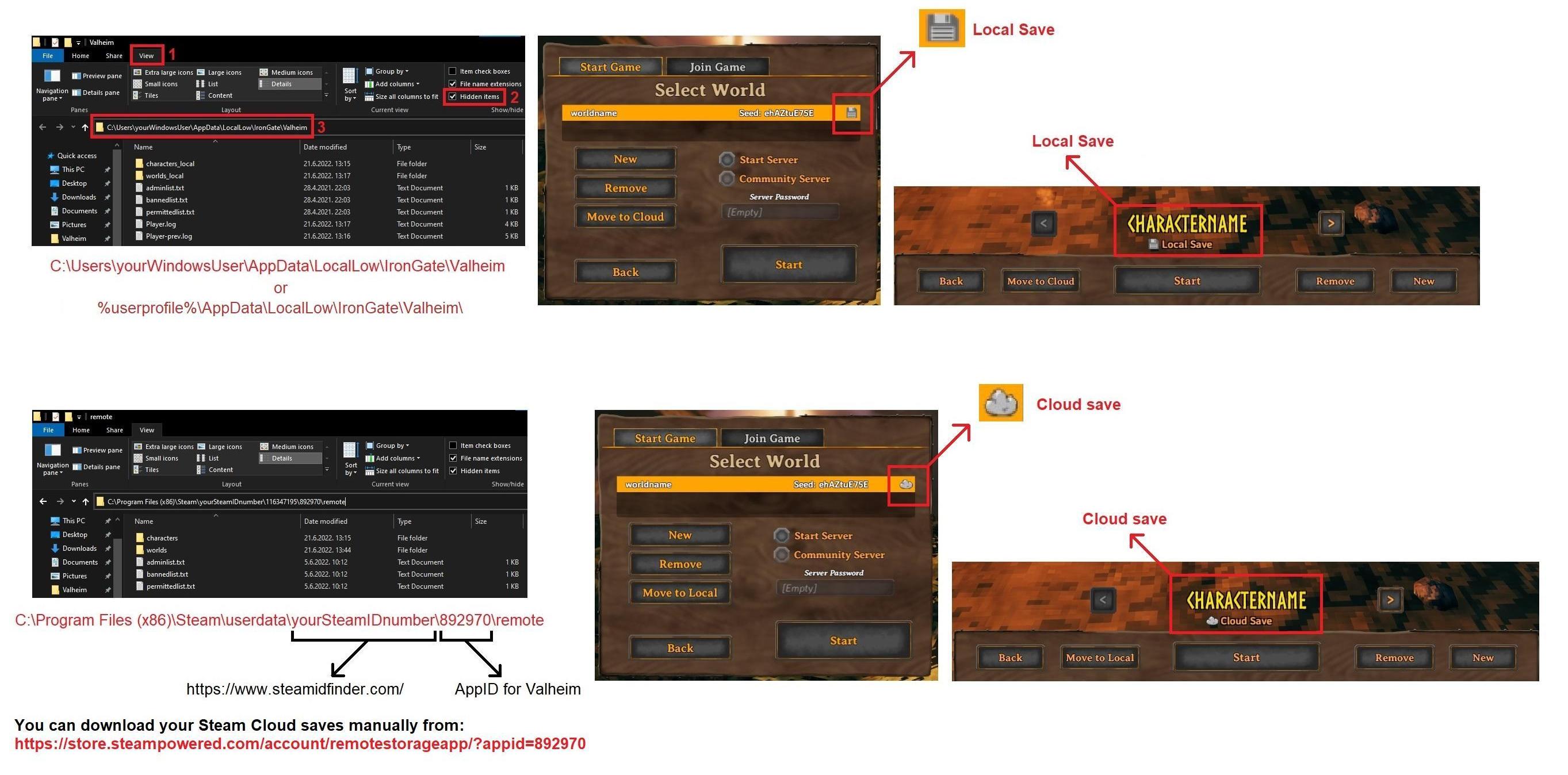
Please also test if the issue goes away when you temporarily disable Avast for some time. Think Avast might have a feature to be disabled for 1h or something like that, like a temporary measure.
empty sable
my currently used world is local (since i at first thought the issue was caused by cloud-delay, will try disabling avast for a while and report back how it went
stark meadow
empty sable
my currently used world is local (since i at first thought the issue was caused ...
Ever tried using debug mode and console commands to fly? I feel that this could trigger the issue much sooner.
empty sable
as for the files ... i found my local world file, but for the character (that is actually cloud-stored) the path you showed doesn't even exist for me ^^'
and no, i never tried using the debug-flightmode before
put the character in a local file now too, that one i could actually find at least ^^'
Also the reason why i never used the debug-flightmode is at least in part due to me having no clue how to even access the debug console and what command to use. ^^'
 stark meadow
empty sable
put the character in a local file now too, that one i could actually find at lea...
stark meadow
empty sable
put the character in a local file now too, that one i could actually find at lea...
Please DM me these 3 files.
 cold mason
Hello, not sure if it's a bug, but ever since the Mistlands update, I can't turn off continuous music. I uncheck the box for it, but it still plays. Don't get me wrong, I like the soundtrack, but I have auditory issues and the constant music in the background is distracting. I've been having to just turn the music volume down, which is fine, but I DO like it when the boss music kicks on. But then I have to open up the settings again and turn it back up.
empty sable
Okay, i give up, how do i get into debug mode?
I typed /devcommands into the chatbox and got a response warning that i activated it, but the IGN-proposed "Press F5 to open the command console" doesn't do anything for me and typing commands into the chatbox makes them just vanish without effect so far. (I made a new test character, a new test world, have both set to save locally and singleplayer so i have no clue what's keeping me from entering debug mode)
stark meadow
empty sable
Okay, i give up, how do i get into debug mode?
I typed /devcommands into the ch...
Have you enabled debugmode in the Steam launch settings?
https://i.imgur.com/e8Vpfhx.jpg
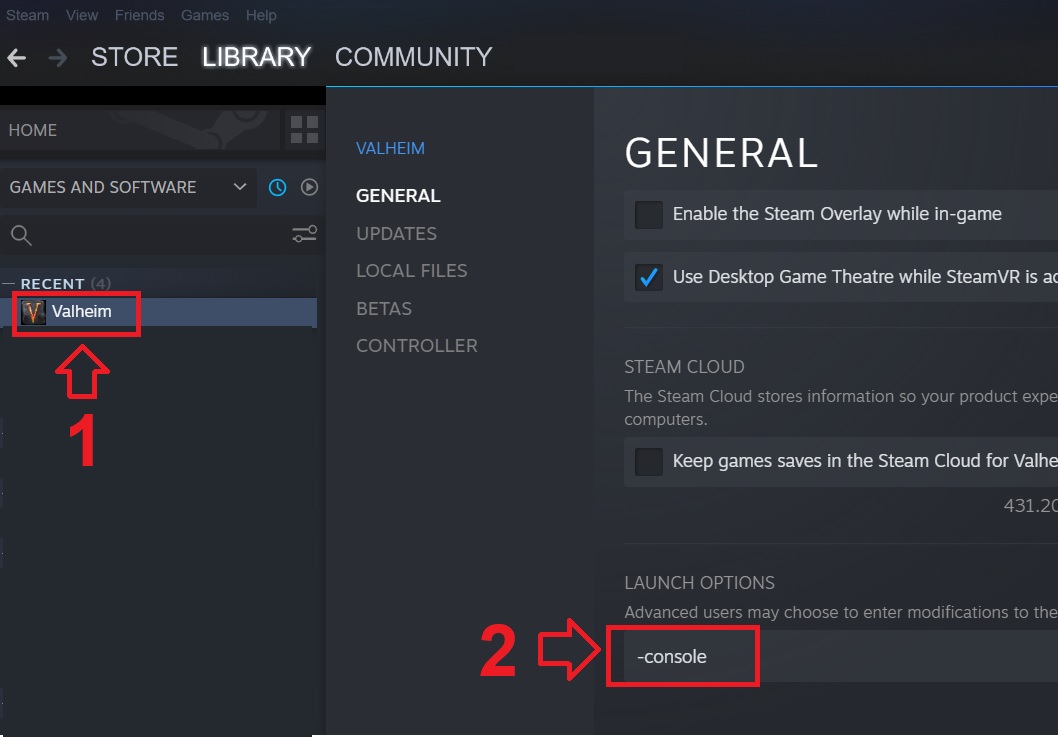
Are you launching Valheim through some short cut or through Steam library?
empty sable
Steam library. Will try if i can get it to work once i'm back home in ~7 hours
 low ocean
Hey does that debugmode bring something useful to the game? More settings etc?
jagged hamlet
low ocean
Hey does that debugmode bring something useful to the game? More settings etc?
The console lets you spawn in items and mobs, change your skill level and more.
Debugmode makes you able to fly, build without cost (if you haven't got the materials in the inventory else it will use the materials), kill everything in a certain radius with a button, clear all the loot on the ground with a button and more.
More info to be found here: https://valheim.fandom.com/wiki/Developer_console
I don't know exactly how it works and what all the possibilities are, I just know it can be done.

Valheim Wiki
The developer console, or just console, is an in-game interface for entering text-based commands used for debugging, cheating and server administration. To be able to use console commands, the...
low ocean
Oh so its kinda like a cheat mode... hhe
Figured maybe could add some optional features or make some stuff more difficult
jagged hamlet
low ocean
Oh so its kinda like a cheat mode... hhe
More like a gateway to all the cheats.
jagged hamlet
low ocean
Figured maybe could add some optional features or make some stuff more difficult
You can make bosses harder by adding another one, want a harder yagluth fight?
Fight 2 instead.
low ocean
Hehehe interesting idea, but thats not what i had in mind 🙂
south lance
low ocean
Hehehe interesting idea, but thats not what i had in mind 🙂

Valheim Wiki
World Modifiers allow the player to customize a variety of parameters to increase or decrease the challenge of the game. They can be found on the Join World screen. Modifiers can also be used via...
low ocean
south lance
https://valheim.fandom.com/wiki/World_Modifiers
I know about these but i figured something else
south lance
low ocean
I know about these but i figured something else
Read the article
Global keys
marble wolf

Valheim Wiki
Global keys are used to track progress in game worlds. Boss keys determine which events and spawns are active. defeated_bonemass — Set when killing Bonemass defeated_gdking — Set when killing The...
 tired scaffold
Vineberry growth seems extremely slow compared to how much a player using the new foods would want.
Game running for 4 hours, I have 17+ vine plants covering a combined surface area of around 70+ 2x2m walls
6 interactable/harvestable clusters so far
And if I shut down the world and log in later, without harvesting them, they will all be gone again (vineberry harvestable state doesn't seem to persist)
 cold pagoda
Known bug
 frosty crane
Anybody knows why when using F12 on steam to het a screenshots it comed out too overexposed/ too bright? It just happens with valheim, other games are fine. Im using an AMD card
cinder pebble
frosty crane
Anybody knows why when using F12 on steam to het a screenshots it comed out too ...
You can also take screenshots F11 in Valheim - the result is stored next to your world / character saves in a folder called screenshots. Those are not washed out. As for why it happens - not sure!
 lyric topaz
jagged hamlet
You can make bosses harder by adding another one, want a harder yagluth fight?
F...
lyric topaz
jagged hamlet
You can make bosses harder by adding another one, want a harder yagluth fight?
F...
I’m pretty sure you can summon two bosses in at once in vanilla if you have the resources
jagged hamlet
lyric topaz
I’m pretty sure you can summon two bosses in at once in vanilla if you have the ...
Experimentation is called for!
Lets slay some deer for science!
frosty crane
cinder pebble
You can also take screenshots F11 in Valheim - the result is stored next to your...
Yep, using F11 seems to work just fine. Weird thing.
 civic veldt
The game won't start (valheim - unity 2022.3. "17f1_4fc78088f837")
Laptop specifications
dell inspiron 7110
Processor: Intel Core i5-2410M 2 x 2.3 - 2.9 GHz, Sandy Bridge
Graphics adapter:
NVIDIA GeForce GT 525M - 1024 MB VRAM, Core: 600 MHz, Memory: 900 MHz, shader rate: 1200 MHz, DDR3, ForceWare 265.94
Memory:4 GB, 1x 4096 MB DDR3 SDRAM (1333 MHz)
Intel HD Graphics 3000, Core Speed - 350 - 1350 (Boost) MHz, Memory Bus Width, 64/128 Bit
The problem
Bought and installed the game. When I started it I noticed that the discrete video card (NVIDIA) was not loaded at all. But the game started on the integrated video card (Intel), although it worked with large drops in FPS. I was then able to launch the game on the discrete video card, but upon launch an error window appeared with the title "valheim - unity 2022.3. "17f1_4fc78088f837"". After searching for answers on the Internet, I found a discussion with the same error (this discussion), but clean re-installation did not help. I will be glad for any help.
No modification or corrections were made to the files.
stark meadow
civic veldt
The game won't start (valheim - unity 2022.3. "17f1_4fc78088f837")
Laptop specif...
When it comes to a GPU, a minimum requirement to play Valhiem involves having GeForce GTX 950. You dedicated GPU is x10 times weaker than that.
The error is probably happening due to it having not enough VRAM. You might be better off playing on iGPU and install some mods that can lower some graphic setting more, or lower render scale in Valheim settings.
Did you check what does your player.log file say when you get the Unity error?
You can DM me the file so I can check it. You can find it at
%username%\AppData\LocalLow\IronGate\Valheim
stark meadow
frosty crane
Yep, using F11 seems to work just fine. Weird thing.
You can also use d3d11 whne launching Valheim, as your screen should not be washed then.
Washed screens only happen on Vulkan and AMD cards
frosty crane
stark meadow
You can also use d3d11 whne launching Valheim, as your screen should not be wash...
You are right, it was vulkan. Now its fixed
 patent haven
i can see the servers in my game
 inland fiber
i cannot get my tamed asksvin to eat. i have placed vineberries, smokepuffs, and fiddleheads but none of them will eat.
 stark meadow
inland fiber
i cannot get my tamed asksvin to eat. i have placed vineberries, smokepuffs, and...
stark meadow
inland fiber
i cannot get my tamed asksvin to eat. i have placed vineberries, smokepuffs, and...
Probably a mod issue. Try going into a new world in debugmode, dig a hole that is at min x2 his size, kill all enemies, spawn one Asksvin and try to spawn him some of those foods.
inland fiber
i dont use mods
stark meadow
inland fiber
i dont use mods
Do you have any other files in your installation folder other than these: https://i.imgur.com/vdpdeOA.jpg
Playing in singleplayer or on a server?
inland fiber
playing in singleplayer
 stark meadow
inland fiber
playing in singleplayer
stark meadow
inland fiber
playing in singleplayer
Can you DM me your character and world files?
inland fiber
the data base file?
stark meadow
inland fiber
the data base file?
world.db, world.fwl, character.fch file
For windows, they can be found in different folders, dependin on you using Cloud or Local saves: https://i.imgur.com/mTVKf1J.jpg?4
graceful lintel
Not sure if this is related to beta build, but found a bug where sap extractors on a fresh yggdrassil branch only awarded 10 sap before it said dried up.
Branch was never used before, but had 3 extractors on it, all others showed 0/10
marble wolf
graceful lintel
Not sure if this is related to beta build, but found a bug where sap extractors ...
If you're on the PTB, then feedback goes in that channel.
graceful lintel
K wasn't sure whether its related or not so I'll post there as well
 soft anchor
Heya, guys. I had some hours of game missing and tried to use the backup in the game but now it shows that BD file is missing. I checked local and cloud files and it only shows that fwl file and backup list and thats it. Is it possible to recover it? I just have such a nice lighthouse I almost finished and won't try to build it again. Kinda sad to lose it.
screenshots


 icy bronze
my char doesnt want to pick up items by itself
can it be that some mod is preventing me from doing so ?
thats all im using, so idk if its general bug, or mod related
 stark meadow
soft anchor
Heya, guys. I had some hours of game missing and tried to use the backup in the ...
stark meadow
soft anchor
Heya, guys. I had some hours of game missing and tried to use the backup in the ...
Did you crash recently?
On which day were you in your world?
Also, really important, check how much free storage you have on **all **of your driver, by opening "This PC" app
stark meadow
icy bronze
my char doesnt want to pick up items by itself
Does pressing V key on keyboard toggle the autopickup?
icy bronze
yeee thx lol
 devout spire
My character got deleted for no reason.. I played on it yesterday, today it doesn't exist anymore.
Anyone experienced something like this?
stark meadow
devout spire
My character got deleted for no reason.. I played on it yesterday, today it does...
Did you switch Valheim versions (PTB) or crash?
devout spire
Neither.
stark meadow
devout spire
Neither.
Do you see your character backups in the manage saves menu? (button available on starting screen)
devout spire
I have multiple old characters, mainly played on two: one character when my GF and I play together, and one where I only play solo. Last character I played on was the one I play with when my GF is playing. Gonna check!
Hmmm yes, I see it there.
Seems like an old backup though.
stark meadow
devout spire
Seems like an old backup though.
Can you screenshot?
devout spire
Gonna login with it just to check if everything is there.

NVM! I see a newer version of it from 20.06.2024, that may or may not be the last time I played on that character, I'll give you an update. 🙂
stark meadow
devout spire
Gonna login with it just to check if everything is there.
Seems like you were zipping files recently, which might have messed someting up.
You shouldn't have any .zip files synced to the cloud.
 devout spire
Ahhh, yes. I did make a backup recently.
stark meadow
That has to be deleted or your zip file moved to some other folder.
devout spire
Cheers ❤️
stark meadow
Actually you have to delete it here, from this menu, no way to move, as it's already synced to the cloud.
Before you delete it, ensure that you have the backup somewhere else.
Then delete and then restore some recent backup.
devout spire
Ohhh? But when I zipped it, the standalone files were still there.
But gotcha, I'll do that. Thanks a bunch 🙂
 tulip stump
does anyone know why whenever i open the game with vulkan mode it just loads into the menu as just a black screen?
this didnt happen before
stark meadow
tulip stump
does anyone know why whenever i open the game with vulkan mode it just loads int...
Are you then forced to restart PC? What are your PC specs?
tulip stump
no, i can just close the game normally, its not like it crashed, just black screen
i7 4790 gt740 (really old pc)
stark meadow
tulip stump
no, i can just close the game normally, its not like it crashed, just black scre...
Are you using mods? Have you checked when was the last time your Nvidia display driver updated?
tulip stump
no mods, drivers are up to date
stark meadow
tulip stump
no mods, drivers are up to date
The fact that your driver are up to date can be the problem. When was the last time your display driver updated?
tulip stump
 stark meadow
tulip stump
stark meadow
tulip stump
Have you played Valheim on Vulkan in between now and May?
You can go start → type cmd → open command prompts → type vulkaninfo → see if any errors pop up which should be listed on top of the console window
After you fail launching Valhem with Vulkan, grab the player.log files as well, and DM it to me.
The player.log can be found in: %username%\AppData\LocalLow\IronGate\Valheim
tulip stump
i played it yesterday, literally
 slim thorn
I had captured a lvl2 askvin but it just disappeared, does anyone know why?
im very very sad because is too hard to find a 2 stars askvin
 solar lynx
Hello, I hope I'm in the good chan. I want to retry Valheim before to play with a friend. I have already played one year ago and everything worked perfectly. But today I reinstall the game and I retry, and when I click on the start button, there is the normal scren with the "loading icon" at the bottom left, the music, but nothing happen and when I click on the screen, windows say " Valheim isn't responding"... And I can't play...
I've try to reinstall, to verifiy the game's file but nothing work...
I anyone can help me ^^
Thank you 🙂

 toxic river
solar lynx
Hello, I hope I'm in the good chan. I want to retry Valheim before to play with ...
toxic river
solar lynx
Hello, I hope I'm in the good chan. I want to retry Valheim before to play with ...
Launching an old world on a new version means that the game will need to upgrade the world to the new worldgen, which means running a few processes that will take some time. When you start loading the world, just wait a few minutes; don't try to alt-tab out of the window or click around too much. It should sort itself out eventually, and once it's done, it won't take this long to load again.
solar lynx
toxic river
Launching an old world on a new version means that the game will need to upgrade...
Thanks for your response, but I have also tried with a new word (the one of the picture), the bug is it normal ?
toxic river
Yes, creating a new world will also take some time as well.
This is not a bug, it's normal behavior.
 keen night
 gray charm
Having a Loading problem. crashes every time I try to run the game. on windows 11. all drivers up to date. player log at crash point. C:\WINDOWS\SYSTEM32\SspiCli.dll:SspiCli.dll (00007FF98FCD0000), size: 311296 (result: 0), SymType: '-exported-', PDB: 'C:\WINDOWS\SYSTEM32\SspiCli.dll', fileVersion: 10.0.22621.3646
ERROR: SymGetSymFromAddr64, GetLastError: 'Attempt to access invalid address.' (Address: 00007FF8F25096CB)
 worldly notch
Dunno if this one has been reported yet - the "attack toward look direction" setting is not persisting between settings. It keeps untoggling every time I quit and re-launch the game
stark meadow
gray charm
Having a Loading problem. crashes every time I try to run the game. on windows 1...
What are your system specs?
stark meadow
worldly notch
Dunno if this one has been reported yet - the "attack toward look direction" set...
Are you playing on Steam Windows/Linux/Mac, using mods?
 karmic nest
Hello, this is my first post here and I hope I choosed relevant section on this discord. I have a little problem with "Valheim", what is happeing? After new patch coming out I have a problem with fps when I going to my main base. Of course when I'm in everything works fine. Maybe I will show record (link under the message). First think I thought it was a problem by too many torchs or light in my base, but it's not.
My PC:
3070 rtx
i5-11400
16 GB ram DDR3
https://www.youtube.com/watch?v=0YJHbajL2ek
Or maybe many people have got the same problem like me and I didnt know about it. Then I am sorry for the wasting of time.

I don't know why is so laggy when I coming to my base.
gray charm
@stark meadow AMD Ryzen 5950X, 32gb DDR4 ram, Nvidia 4080 supper 16gb GPU, Windows 11, Game installed through Steam on a M.2 980 PRO. I have not played in some time but the game used to run very smooth.
stark meadow
karmic nest
Hello, this is my first post here and I hope I choosed relevant section on this ...
How old is your base? Do you remember when you formatted that area (year, month)?
stark meadow
gray charm
<@196192010581835776> AMD Ryzen 5950X, 32gb DDR4 ram, Nvidia 4080 supper 16gb GP...
Check if you have any AMD related chipset drivers offered by optional windows updates to install.
Generally for this type of crash, the first thing I would do, is to test does it stop happening if you reset your BIOS setting to default + not tweak anyhting else.
karmic nest
stark meadow
How old is your base? Do you remember when you formatted that area (year, month)...
I checked my one old screenshot with my base and I see I started building it like 3 march 2021.
worldly notch
stark meadow
Are you playing on Steam Windows/Linux/Mac, using mods?
Steam windows, no mods. And after further testing, it's not every session that it loses the setting, just some
stark meadow
karmic nest
I checked my one old screenshot with my base and I see I started building it lik...
That happened then during old terraforming behaviour. After June of 2023, all bases with old terraforming edits will load slowly and while loading is taking place, FPS will be much lower. This happened as result of some wanted ZDO optimisations and side effect on old worlds couldn't be fixed easily.
You can try to impove it a bit by running optterrain command areound your base
stark meadow
worldly notch
Steam windows, no mods. And after further testing, it's not every session that i...
Which Valheim version is being listed in your bottom right corner during starting menu?
Are you using controller or k/m ?
karmic nest
stark meadow
You can try to impove it a bit by running optterrain command areound your base
Thanks! I will try it 🙂
karmic nest
Hey, it's works! Thank you very much for help! Of course still I have little lagging but it's much better before when I used optterrain command.
stark meadow
karmic nest
Hey, it's works! Thank you very much for help! Of course still I have little lag...
Glad it worked to an extent. The command unfortunately does not fix terrain modifications on yone edges, so those will still cause performance issues when loading.
worldly notch
stark meadow
Which Valheim version is being listed in your bottom right corner during startin...
Current release (I can give the exact number when back at my PC), not PTB. Keyboard and mouse
worldly notch
stark meadow
Which Valheim version is being listed in your bottom right corner during startin...

 graceful fulcrum
Hello all, I've got a bug that I wanted to report. I recently toggled the "Fire Hazard" world modifier for my game, Normal settings for everything else. I'm making fire places with a bonfire, and no matter how it's arranged, the Black Marble Quarter Spire will catch fire and spread that fire to everything around it. I'm playing on Steam, version 0.218.15 (n-27)
graceful fulcrum
My build has been placing the quarter spires partially into the bonfire. I can put most other black marble pieces directly into the fire and nothing happens to them.
stark meadow
graceful fulcrum
Hello all, I've got a bug that I wanted to report. I recently toggled the "Fire ...
Let us know if you manage to burn some more stone
graceful fulcrum
@stark meadow I've just confirmed that both the black marble quarter spire and floor triangle will catch fire as if it's wood, and will throw sparks catching other things on fire. I've tested each building piece and these are the only 2 that burn.
Just tested all of the stone build pieces as well, and they don't catch fire.
 lapis sparrow
Could anyone help me?
 earnest skiff
Hi, i just died in Ashlands (got hit into Lava)
when i respawned there wasnt a death marker though i knew the location. i got there and all my kit was missing ie no marker stone with all my dropped items 😦
also the ore i was mining at the time (that had started to sink) has reapeared..
 ornate anchor
Group of 5 of us finally got to Ashlands last week--the biome is completely unplayable with all the lag/rubber banding. Mobs are killing us before they load; Morgens are all over the place. Is everyone having the same experience?
 trim epoch
earnest skiff
Hi, i just died in Ashlands (got hit into Lava)
when i respawned there wasnt a d...
trim epoch
earnest skiff
Hi, i just died in Ashlands (got hit into Lava)
when i respawned there wasnt a d...
happened to me once, in my case its lag, cuz the server rewind and my char saves without the items
stark meadow
earnest skiff
Hi, i just died in Ashlands (got hit into Lava)
when i respawned there wasnt a d...
Were you playing in multiplayer, and did you attempt to quit or logout from the game at moment of death?
stark meadow
ornate anchor
Group of 5 of us finally got to Ashlands last week--the biome is completely unpl...
Did you perhaps try splitting into smaller group going to separate directions to see if those small groups also have network issues?
Ashlands generally sends more data over network, so any network related issues can be extenuated.
Please take a look at things I write under this post on Steam: https://steamcommunity.com/app/892970/discussions/1/6171701036705947758/
Depending on you finding someone in your team who has issues on their end (e.g. buffer bloat) on top of Ashlands demands, you might be able to make things more manageable.
ornate anchor
we have universal issues in Ashlands when we're 3+. Things definitely run smoother when there are less players nearby. That post is very informative (thank you!). Unfortunately it's likely out of the scope of many of our players. It's good to know, however, that ping can be affected by clients even though the world is "ran" on a server.
Has there been anyword on the devs for this issue (applogies if there has, I didn't see any in the search)? It seems important since so many people play this game with multiple friends
marble wolf
Any word? That's just how the game works.
 teal patio
not really sure if i would consider this a bug, but i just noticed that when you go to upgrade tab and look at upgrading something thats already max lvl it shows stats of theoretical item that would be 1 lvl higher, doesent really matter much since its not affecting literally anything but just pointing it out 🙂

 ornate anchor
marble wolf
Any word? That's just how the game works.
ornate anchor
marble wolf
Any word? That's just how the game works.
as in doesn't work? Not sure how this response is very helpful. The game supports up to 10 players, but a whole biome is completely unplayable after 4 players.
marble wolf
The game is perfectly playable with 10 players with good interconnectivity. I play with 7 and have minimal lag.
ornate anchor
so why do so many players indicate that Ashlands biome is very very laggy? both on discord and on Reddit.
and on steam (indicated above)
marble wolf
Because Ashlands is more demanding than others so if there IS a problem it'll become more obvious there than in other biomes.
ornate anchor
right. back to my original point/question: there is a problem and I was curious if the devs have indicated that this is a problem, or if this is how they intented the game to be running.
with all respect to the game and the devs, players shouldn't have to know how to modify .dll files or run Assembly to play with 5 friends.
marble wolf
Or isn't a problem. It's just a outcome of how the net code works.
marble wolf
ornate anchor
with all respect to the game and the devs, players shouldn't have to know how to...
You don't need to.
ornate anchor
marble wolf
You don't need to.
OK great. Can you please tell me then how to get my game to lag less in Ashlands? the data i just received had a variety of solutions, one of them being file modification and running Assembly
marble wolf
ornate anchor
OK great. Can you please tell me then how to get my game to lag less in Ashland...
File modification is a terrible idea and won't achieve anything but break the game. Aside from fixing any underlying network issues, your options are limit instance count in each area to avoid lag from that and then ensure that the player with the best connection always becomes chunk master when moving around.
ornate anchor
marble wolf
File modification is a terrible idea and won't achieve anything but break the ga...
How can i limite isntance count in Ashlands with 0 buildings that are player built? I'm literally talking about walking around the biome, exploring, sieging strongholds.
What is the Chunk Master?
marble wolf
Whoever enters a map chunk first becomes master and network communication goes through them.
ornate anchor
so goes through the portal first?
Also I can't do anything about instance count--it's a native environment with 0 player buildings and its still unplayable
marble wolf
I never mentioned portals.
ornate anchor
"Whoever enters a map chunk first becomes master and network communication goes through them."
what does "enters a map chunk first" mean
teal patio
chunk master is simply the one who loads a chunk first, doesent have to involve portals 🙂
earnest skiff
stark meadow
Were you playing in multiplayer, and did you attempt to quit or logout from the ...
Nope just a normal solo game. Didn't try to quit or log out.
ornate anchor
teal patio
chunk master is simply the one who loads a chunk first, doesent have to involve ...
thanks for the clarification!
teal patio
ornate anchor
thanks for the clarification!
thats basically what derek said tho 😅
ornate anchor
it's disappointing that there's so much hidden network information and that Ashlands runs so poorly with a handful of players.
ornate anchor
teal patio
thats basically what derek said tho 😅
sure. you clarified portal portion, is what I was appreciative of.
marble wolf
ornate anchor
it's disappointing that there's so much hidden network information and that Ashl...
It generally doesn't? Also remember that this is primarily a single player game. Coop is optional.
ornate anchor
marble wolf
It generally doesn't? Also remember that this is primarily a single player game....
we're talking in circle now. As I said above, it's a big enough problem that enough posts exist on reddit/steam and questions popped up here.
marble wolf
Reddit is fairly safe to ignore. They'll complain about the sky being the wrong shade of blue.
ornate anchor
marble wolf
Reddit is fairly safe to ignore. They'll complain about the sky being the wrong ...
except this isn't about the sky being blue; it's about a game not running. 😅 Also that doesn't account for comments being made on steam/here.
and fine to ignore a playerbase that may not like a design decision or w/e, but a buggy/nonfuncting game is a bit of a different story.
marble wolf
Once again, the game does run.
ornate anchor
marble wolf
Once again, the game does run.
right. technically yeah. it's a lot of fun to play in the ashlands and get killed by invisible mobs.
marble wolf
Look, is the net code brilliant? No. Do we universally think it was a good decision? Also no. But with the game 90% complete I'm afraid I can't see them rewriting it at this stage.
stark meadow
ornate anchor
Has there been anyword on the devs for this issue (applogies if there has, I did...
All I can say is that Devs are aware that more people started reporting stuttering issues and network related issues after reaching Ashlands.
It's not clear what has to be done to reduce the problems, aside from stripping away content in the biome.
There might be even some unknown underlying bug that causes issues, so it helps the more info we get from players.
Please let me know if you managed to get all of your friend to perform the buffer bloat and ping test.
ornate anchor
stark meadow
All I can say is that Devs are aware that more people started reporting stutteri...
Will do, thanks! I understand this is still in early access. I appreciate the help/links/info.
stark meadow
earnest skiff
Nope just a normal solo game. Didn't try to quit or log out.
Are you playing with mods?
HM.. what you are describing sounds really weird. So you didn't logout/quit after dying, and you went straight back there to retrieve a tombstone?
How much time has passed since your death to you going back to that area?
 trim nexus
@gilded sluice reaching out from the reddit post
I was the guy with the burial chambers spawning in plains
stark meadow
trim nexus
<@260480620054970378> reaching out from the reddit post
Oh great, did you come to help us by sharing your saves? (I asked for that on your reddit post)
trim nexus
how do i do that
stark meadow
trim nexus
how do i do that
Playing on Steam right? Depending on your using cloud saves or local saves, you can find your saves on one of those two locations:
https://i.imgur.com/mTVKf1J.jpg?4
For world file we would need world.db and world.fwl and for character file, character.fch
Let me know if this doesn't help.
stark meadow
trim nexus
Yeah, nice. Btw. can you also DM me some info about which dungeons have you explored prior to this happening in that same play session?
gilded sluice
trim nexus
<@260480620054970378> reaching out from the reddit post
hi. can I look at your player.log files?
In this hidden folder in windows:
C:\Users\ <username> \AppData\LocalLow\IronGate\Valheim
just drop them to me in a DM 🙂
 gilded sluice
yes 🙂
marble wolf
I forget that people don't have always have extensions visible.
 glacial birch
Having some trouble joining my buddy who is the host of our Valheim world. He's on xbox and I'm playing on PC through steam. We've never had issues playing before but today when I attempted to join I got a message that read "Your platform privilege settings prevent you from playing on servers that allow crossplay with other platforms." Any ideas on how to fix this?
stark meadow
glacial birch
Having some trouble joining my buddy who is the host of our Valheim world. He's ...
Try your friend to restart their console + remove their servers from your favourites list,
then re-add the server again using new join code that will be provided after console restart.
glacial birch
stark meadow
Try your friend to restart their console + remove their servers from your favour...
Well it must have been one of those things and I even revalidated my game files on steam. All good now! Thanks!
 half steeple
Hi (sorry about my English, I'm using the translator) I wanted to report a bug that happened to me I was playing on a server created by my friend at stem and when we were playing there was a power outage at home when I came back and reconnected I had appeared on yours and I was falling when I reached the ground I died from fall damage and when I resurfaced I couldn't find my items. the icon where I had died appeared on the map next to where I disconnected, but there wasn't even a tombstone. I hope someone can help me I had important items 🥲😔
gray charm
@stark meadow Tested on another PC. default Bios settings. Windows 11, AMD Ryzen 3950x 32 gb DDR 4 Ram, Nvidia 2080 Supper. Installed through Steam on a M.2 970 evo. Same problem. No optional drivers to install. And I redownloaded and installed AMD chipset Drivers for windows 11 and Reinstalled Nvidia Drivers. So far All other games I have work with no problems.
 reef berry
The positional audio for the Stone Golems in the Mountain biome seems to be off. When they are close and directly in front of you, the audio seems to be coming from the left. There may be a L/R channel volume imbalance
stark meadow
half steeple
Hi (sorry about my English, I'm using the translator) I wanted to report a bug t...
The easiest solution for your problem would be, to load an earlier character backup, by clicking on the Manage Saves button in the starting menu, navigating to the characters tab, expand the backup list for your character. The backup save that will most likely work for you, is the character auto-backup that will show up the closes to the top of the list of character backups. Restore that save. You should immediately see in the character selection screen if your character will have the lost equipment.
stark meadow
gray charm
<@196192010581835776> Tested on another PC. default Bios settings. Windows 11, A...
The came crash on two different systems? Did you use the same Steam account on both? Was there anything they had in common, like input devices? Might also be a specific 3rd party program that can be incompatible with Unity. Are you crashing before reaching main menu or during world loading?
 steady junco
ornate anchor
we're talking in circle now. As I said above, it's a big enough problem that en...
steady junco
ornate anchor
we're talking in circle now. As I said above, it's a big enough problem that en...
You're not alone in this. My playthrough is usually 3+ players. We all have godly connections and machines. No matter who loads the "chunk" of the map first, there is a considerable amount of lag in the Ashlands. This results in lots of rubberbanding, and invisible enemies. This has never been an issue with us before Ashlands.
 wet turtle
Hello, I'm hosting a world (non dedicated) and when one of my friends join they only see a barren landscape with nothing besides the land and sky but it works fine for me and another friend.
Is this some sort of bug or my internet connection being bad?
 glossy phoenix
Hello, i have a problem with playing valheim this year (last games 1-2 years ago was ok). I changed my gaming pc to some other, and my friend also. Now he is playing on macbook pro m1, im playing on hp opmen with 3070 video. Sometimes my game crashes and my friend (who is hosting game) cannot open the chests. After i do relog - we have have to roll the dice, because i dont know what kind of items i will have, few times i duped our mage items, but last two times i lost 2 sets of sets items, what do we have to do, to avoid the game crashed? Also i figured out that after game crashes, also discord crashes, maybe its somehow connected? Please help, we lost our pleasure to play, because of this crashes. https://www.reddit.com/r/valheim/comments/uq9b8x/my_valheim_is_crashing_fix_for_crash_guide/ Will this guide helps me?
Reddit
Explore this post and more from the valheim community
stark meadow
wet turtle
Hello, I'm hosting a world (non dedicated) and when one of my friends join they ...
If it works for another friend, the issue is probably on the friend's side that can't see anything. Usually caused by playing over VPN.
stark meadow
glossy phoenix
Hello, i have a problem with playing valheim this year (last games 1-2 years ago...
It's a bit weird that the Discord crashes together with Valheim. Does your internet connection crash in general?
Try disabling hardware acceleration in Discord to see if it would stop crashing together with Valheim.
Starting by reading the most common crashes in that guide is often then best initial approach.
slim thorn
hi guys, solution for magma fish bug
 gray charm
@stark meadow No the steam accounts are not the same. only input device that is the the same is our headphones. the file in question SspiCli.dll is windows authentication system. Only thought I have is a windows update that took the access parameters unity uses out of line with the new windows update? again so far the only program that is giving problems is Valheim. so a system problem though possible it is very unlikely. Games that run just fine. Star citizen, DCS, Captain of industry, BG3,7 days to Die, Eco, Enshrouded, Manor Lords, Medieval Dynasty, Pacific Drive, Raft, Starfield, Stranded: Alien Dawn, Total War: Warhammer 3, X4 Foundations.
 wise spruce
Hi, I'm opening the game and it is launching like this:

I haven't used mods ever, not even try PTB version of it
I have about 1300 hours played, and played Ashlands around 3 weeks ago and was ok
 wild wolf


 tardy oracle
Game keeps crashing my whole pc! Happens in mistlands everytime!
 limber wasp
Remove the mods
tardy oracle
Don’t have any mods on, and not on PTB
limber wasp
@wise spruce
wise spruce
i dont have any mods, I haven't even tried PTB yet
I have the most vanilla version of it
wise spruce
Thanks, it worked
 olive herald
hi guys i was wondering if you can get in to debug mode on a multiplayer game when ever i try type anything in console it just comes up with this (i have mods installed)
 earnest skiff
stark meadow
Are you playing with mods?
HM.. what you are describing sounds really weird. So ...
earnest skiff
stark meadow
Are you playing with mods?
HM.. what you are describing sounds really weird. So ...
Nope, no mods.
I died, respawned, consumed food, grabbed some basalt bombs and then went back to try and reclaim my stuff.
stark meadow
gray charm
<@196192010581835776> No the steam accounts are not the same. only input device ...
Other players don't have crashes on launch, so what ever it is, it's specific for your two systems.
Can you double check that you have no extra installation files other than these: https://i.imgur.com/vdpdeOA.jpg
Running any 3rd party security software, like Avast, Malwavebytes? I listed more of the incompatible apps in the pinned crash guide:
https://www.reddit.com/r/valheim/comments/uq9b8x/my_valheim_is_crashing_fix_for_crash_guide/
stark meadow
olive herald
hi guys i was wondering if you can get in to debug mode on a multiplayer game wh...
Try #mods-discussion . Vanilla doesn't support various devcommands if you are not the host.
stark meadow
earnest skiff
Nope, no mods.
I died, respawned, consumed food, grabbed some basalt bombs and t...
Did you die on the spot where Lava leviathan was? It might be covering the tombstone.
The solution would be to restore an earlier character backup, but I'm more interested in what exactly happened.
Youd should definitely change something in your inventory and world to check if that change will persist after you quit the game, just to confirm that the saving works.
earnest skiff
stark meadow
Did you die on the spot where Lava leviathan was? It might be covering the tombs...
i died a couple of metres away from the leviathan as it was sinking. When i respawned the leviathan had also respawned fully intact
 still karma
after secondary attacking using double handed sword, your cape would end up backwards

 uncut steppe
i made a flat spot next to my base for dismantling my boat (also next to a large rock) in the meadows, but after flattening, and when i dismantled the boat (longship) over the spot, the mats for the boat where GONE (fell through the world or simply disappeared)... it did have something in the cargo hold, but that ended up in a floating box like usual, just no boat mats... i hope you can find this a simple task to fix. LOVE THE GAME so far though, a go-to of mine even after over 2500 hours! peace

stark meadow
uncut steppe
i made a flat spot next to my base for dismantling my boat (also next to a large...
You probably have a world backup that was created just before you did that. Could you upload it and DM it to me?
uncut steppe
certainly, but idk how to find the backup
stark meadow
uncut steppe
certainly, but idk how to find the backup
Sent you a DM
uncut steppe
i dont find a save file for the game
stark meadow
uncut steppe
i dont find a save file for the game
Did you see the direct message I sent you personally on Discord?
uncut steppe
its a multiplayer world i've been playing with my son
i saw the message, followed what i could find that was relavent, lead me to a list of save files that didnt contain the game you want to see.
stark meadow
uncut steppe
i saw the message, followed what i could find that was relavent, lead me to a li...
Was your son hosting the world then?
uncut steppe
no
it says the game file is saved on cloud
but i host the play in that game
actually, i should correct something i said... the page did NOT lead me to the save files, but i found them myself by looking around using what it gave me
it lead to the wrong place
stark meadow
uncut steppe
it lead to the wrong place
Cloud saves first have to be moved from Cloud to Local, in order to show up in the place I mentioned you should be looking at.
If you don't move them, then they are on another location as shown here: https://i.imgur.com/mTVKf1J.jpg?4
uncut steppe
oh ok
glossy phoenix
Hello, guys im trying to find a way how to avoid crashes, could anyone help me to figure out what's the reason of my crashes?
Player.log after crash looks like that
06/27/2024 00:33:00: Player 304660820 wants to open piece_chest_blackmetal(Clone) im: -149887455
06/27/2024 00:34:04: Stopped music home at 6220434
06/27/2024 00:34:04: Starting music meadows
06/27/2024 00:34:04: Resumed music meadows at 395135
06/27/2024 00:34:22: Refresh complete 6275 eServerResponded
D3D11: Failed to create RenderTexture (2560 x 1440 fmt 27 aa 1), error 0x887a0005
D3D11: Failed to create RenderTexture (2560 x 1440 fmt 19 aa 1), error 0x887a0005
Crash!!!
SymInit: Symbol-SearchPath: '.;C:\Program Files (x86)\Steam\steamapps\common\Valheim;C:/Program Files (x86)/Steam/steamapps/common/Valheim/valheim_Data/Plugins\x86_64;C:/Program Files (x86)/Steam/steamapps/common/Valheim/valheim_Data/Plugins;C:\Program Files (x86)\Steam\steamapps\common\Valheim;C:\Windows;C:\Windows\system32;', symOptions: 534, UserName: 'User'
OS-Version: 10.0.0
stark meadow
glossy phoenix
Hello, guys im trying to find a way how to avoid crashes, could anyone help me t...
Display driver is probably not working correctly. Using any mods? Ever tweaked your driver settings via Nvidia inspector?
glossy phoenix
No, not using any mods, and graphic driver is up to date, by nvidia expirience
stark meadow
glossy phoenix
No, not using any mods, and graphic driver is up to date, by nvidia expirience
First try resetting your Nvidia profile for General and Valheim back to default, in Nvidia control panel.
If it doesn't help, un-install the drivers, then install them again, but during installation choose custom installation + perform clean installation option.
glossy phoenix
glossy phoenix
Hello, guys im trying to find a way how to avoid crashes, could anyone help me t...
and i was playing using 1920x1080 resolution, why error goes with 2560x1440??!!
glossy phoenix
stark meadow
First try resetting your Nvidia profile for General and Valheim back to default,...
thx
and as i said before, on each crash, my discord stops working in channel, so i have to rerun it also... god damn, maybe thats because of this rare video-card geforce 3070? (((
stark meadow
glossy phoenix
and as i said before, on each crash, my discord stops working in channel, so i h...
Most likely it's just a driver issue, not related to hardware.
Discord also uses graphic card if you have hardware acceleration enabled in the advanced settings.
Try to disable it to see if Discord would crash next time Valheim does.
glossy phoenix
stark meadow
Most likely it's just a driver issue, not related to hardware.
you know, that same thing i have in PUBG, but thats starts only 1-2 months ago, before that everything was OK with pubg, but after driver update that ****** starts
glossy phoenix
stark meadow
Discord also uses graphic card if you have hardware acceleration enabled in the ...
i run discord on mobile phone, did the driver reset to default (clean install), did the uninstall and install valheim - and again got crash 😭 😭 😭 😭 😭 😭
Developers, help! How to play valheim?
stark meadow
glossy phoenix
i run discord on mobile phone, did the driver reset to default (clean install), ...
How do this settings look like on your nvidia control panel?

 spark fiber
hello, ive had an issue with just valheim since like, day one of playing but i always just dealt with it but at this point, im not sure what to do. when i start sailing or fighting a boss like yagluth, my microphone will straight up stop working until i unplug it and plug it back in. its connected to a powered usb hub so its not a power issue, ive made sure my microphone is my main communication device in control panel. not sure what it could be, was hoping someone might know if its valheim since its the only game i experience this or smth up with my pc
gray charm
@stark meadow You my be correct. It may be something to do with the two systems I have. But it also only has to do with Valheim. As it is the only program that is having a problem. I have done a uninstall through steam. then reinstall. I do not have any 3rd party malware or antiviruses software installed on these PC's as I have found that most of the time they are a virus themself. It's all good though. We will just play something different.
stark meadow
gray charm
<@196192010581835776> You my be correct. It may be something to do with the two ...
Steam re-installation won't fix the problem if you have mod files in the installation folder, as those were not added there by Steam. That's why I asked you to check the installation folder specifically. Send me your full player.log if you get some more will to troubleshoot.
stark meadow
spark fiber
hello, ive had an issue with just valheim since like, day one of playing but i a...
Still sounds like a power issue. Most power related problem in Valheim happen around oceans, as FPS there is highest and GPU usually gets utilised to 100%, leading to extra power draw. Which GPU do you have and how old is your power supply?
spark fiber
i have a 3060 and ill have to check on the psu, i have a prebuilt so not certain
stark meadow
spark fiber
i have a 3060 and ill have to check on the psu, i have a prebuilt so not certain
Try to limit your FPS really low via FPS limiter, and reduce graphic settings in Valheim, then go to oceans to see if the mic issue will stop.
spark fiber
this is all i know about it
