#steam-bugs-discussion
1 messages · Page 2 of 1

 jovial nova
Caan someone help me find support of valheim steam. My account characters and worlds got wiped after i changed windows on my pc. But my world was in cloud so can i restore them?
 stark meadow
jovial nova
Caan someone help me find support of valheim steam. My account characters and wo...
stark meadow
jovial nova
Caan someone help me find support of valheim steam. My account characters and wo...
You can check if you saves are in the cloud by logging in to Steam in your browser and opening this link: https://store.steampowered.com/account/remotestorage
If they are not there, they are not in the cloud, which would mean they were only on the disk, most likely due to you moving them from cloud to local at some point.
 white jackal
Hey guys the mouse, is now showing up again for my gf on win11 after some recent updates to windows that happened in the last day
Did you ever get your cursor back? my gf just got hers back after some recent win11 update
stark meadow
white jackal
Hey guys the mouse, is now showing up again for my gf on win11 after some recent...
It's not a Valheim bug rather Windows Insider program bug. It's supposed to be fixed on this build: https://blogs.windows.com/windows-insider/2024/03/20/announcing-windows-11-insider-preview-build-26085-canary-and-dev-channels/
so be sure to update your windows again.
 prime bough
white jackal
Did you ever get your cursor back? my gf just got hers back after some recent wi...
prime bough
white jackal
Did you ever get your cursor back? my gf just got hers back after some recent wi...
Yeah I got an update for my insider a few days ago, works fine now
 hard bridge
 barren cedar
Might be settings, but that looks normal to me. The textures are low res like that by design.
 thorn heath
when i launch the game im unable to get to the start screen, it gets to the Iron Gate logo then closes to desktop. totally vanilla valheim, never used a mod with it. verified files twice, reinstalled, regardless of it being launched with or without vulkan it does the same. no issues last time i played it. ive tried launching without "-console -windowed -noborder" too, no change
 gilded sluice
thorn heath
when i launch the game im unable to get to the start screen, it gets to the Iron...
gilded sluice
thorn heath
when i launch the game im unable to get to the start screen, it gets to the Iron...
send me your player file from C:\Users\ <username> \AppData\LocalLow\IronGate\Valheim
it's a hidden folder in windows
 silent sequoia
the game wont load into anything
it shows the character select world select but nothing further than that. after that it crashes
Update: Just got it to load but it took forever
gilded sluice
silent sequoia
the game wont load into anything
it shows the character select world select but ...
yup yup. was gonna say that "don't click or alt+tab" while it loads
and loading depends on our CPU/RAM
silent sequoia
64GB ddr4 ram and i9 9900
gilded sluice
still takes a few minutes I guess
thorn heath
@gilded sluice DM?
gilded sluice
thorn heath
<@260480620054970378> DM?
sure
 spark pivot
Modera x2

 coral narwhal
Is it a bug that the hatch of the preview model of the karve seems to be open?
stark meadow
coral narwhal
https://discord.com/channels/391142601740517377/1202267437647527977/122158054064...
Doesn't look like much of an issue.
stark meadow
spark pivot
Modera x2
Should be fixed in the next PTB patch. You can kill the extra one with console commands to fix the issue.
It happened because two or more players activated the altar at the same time.
gilded sluice
stark meadow
Should be fixed in the next PTB patch. You can kill the extra one with console c...
it's not the old "2 people activate" issue?
 forest pendant
Wonder Twins power activate??? :d
 cosmic star
My friend and I just discovered what seems to be a bug.
We were testing horizontal building stability when we reached a point where she could place a support pole, and it would turn the horizontals green, but when it was deleted and I tried to place it—the horizontals stayed red.
We tested it and realized that if one player build a few horizontals, and another player tried to place a vertical support beam—it won’t register, leaving the horizontals unsupported.
Is this a known issue?
 echo moon
cosmic star
My friend and I just discovered what seems to be a bug.
We were testing horizon...
echo moon
cosmic star
My friend and I just discovered what seems to be a bug.
We were testing horizon...
does it stay green or change after some time?
cosmic star
Nope, we tested this multiple ways.
- I placed a vertical pole with 6x2m poles horizontally
- My friend placed a vertical 2m pole on the end to support it, but it stayed red. Nothing changed. Even after several seconds.
- The moment I (or she) deleted the supporting pole, and then I replaced it, it would stabilize.
It’s almost like the game is registering each piece as placed by a certain player (which makes sense for wards), but then the stability system can’t see if another player is adding to someone’s build.
We only tried this with the 2m core wood poles
gilded sluice
@cosmic star are you guys playing in the PTB version or normal client?
And do you guys run any mods?
cosmic star
What is PTB?
- We’re playing on a dedicated server through Host Havoc
- No mods
- Me and two friends are on Steam Decks; one friend is on an XBox Series X, and one is on PC (Microsoft I believe).
gilded sluice
cosmic star
What is PTB?
- We’re playing on a dedicated server through Host Havoc
- No mod...
PTB is public tests
cosmic star
Oh! I don’t think so? We all just bought it on Steam a couple weeks ago. @gilded sluice
stark meadow
cosmic star
Nope, we tested this multiple ways.
1. I placed a vertical pole with 6x2m pole...
Yeah, I'm noticing the same problem on the latest version, so it's probably going back few versions.
There were few structural integrity optimisations, but this one was probably not intended.
The building pieces that the second player places will sync with the rest, when the player who had built the first pieces leaves the area.
cosmic star
stark meadow
Yeah, I'm noticing the same problem on the latest version, so it's probably goin...
Oh that’s interesting. We’ll test leaving the area and see if it syncs. Thanks!
stark meadow
cosmic star
Oh that’s interesting. We’ll test leaving the area and see if it syncs. Thanks!
Didn't test it on a dedicated server yet, so it might sync there by doing that. Let me know if you happen to test it before I do.

 last narwhal
why is this not working? is it meant to work now?

 marble wolf
last narwhal
why is this not working? is it meant to work now?
marble wolf
last narwhal
why is this not working? is it meant to work now?
Which item did you select from the drop-down menu? Also, if you're going to be testing you'll want to join the PTB channel by clicking the option in Channels & Roles.
last narwhal
okay sorry, now it works. seems to be steam being annoying, but yea, i can join
i was just pressing enter and enter in frustration haha
 spiral parcel
Hey Viking-bros and Viking-devs. Any advice you can give on how to fix sun rays that go through a wall of round logs?
I also posted a video on reddit in the hopes that someone already found a solution to this.
https://www.reddit.com/r/valheim/comments/1bovs71/sun_rays_through_round_logs_wall/

Reddit
Explore this post and more from the valheim community
gilded sluice
spiral parcel
Hey Viking-bros and Viking-devs. Any advice you can give on how to fix sun rays ...
not really no :/
not unless you make a double wall to block
or put something between the logs
but it will give a diffrent look so..
 light zodiac
hello, me and my friends want to play together but we always got incompitable version, i told them to update the game but they says it's up to date, but the version is clearly not up to date how do i fix this?

 light zodiac
hello, me and my friends want to play together but we always got incompitable ve...
light zodiac
light zodiac
hello, me and my friends want to play together but we always got incompitable ve...
figure it out
spiral parcel
gilded sluice
or put something between the logs
This worked for me. Thanks! I could be in the wrong here assuming it's a bug; my bad < _ >
Now that I think of it, sun rays through round logs can be by design; lel
hard bridge
spiral parcel
Hey Viking-bros and Viking-devs. Any advice you can give on how to fix sun rays ...
Looks kinda awesome to me, ngl
marble wolf
Isn't that just how it works in real life?
gilded sluice
marble wolf
Isn't that just how it works in real life?
no. you can see the issue with wood walls aswell
and those should be 100% covering the sun rays
but at certain exact angles.....
marble wolf
Oh, I've never noticed (not that that means anything)
spiral parcel
gilded sluice
no. you can see the issue with wood walls aswell
that's actually what I added; and though the sun rays are still there, it looks *better to me
spiral parcel
gilded sluice
but at certain exact angles.....
Right, specifically sunrise.
 summer tendon
Anyone else experience a stutter/freeze every 4-5 seconds? It's happening to me with and without mods. With and without other programs running/reboot. I've updated drivers. I've rolled them back. Nothing seems to help.
Video showing the stutter/freeze:
https://www.youtube.com/watch?v=MZL1f4VDC7k
SYSTEM:
Windows 10
AMD Ryzen 7 3800XT
64GB RAM
GeForce RTX 2070 Super
stark meadow
summer tendon
Anyone else experience a stutter/freeze every 4-5 seconds? It's happening to me ...
- When was the last time you played Valheim without problems?
- Tested any other games? Stuttering only Valheim live or PTB version?
- When it comes to Valheim and mods, vanilla Valheim has to have BepInEx removed from installation folder.
- Did you enable some on screen monitoring so you can see what happens with temps and CPU/GPU clocks?
summer tendon
stark meadow
1. When was the last time you played Valheim without problems?
2. Tested any oth...
- Haven't played regularly for a month or so, but remember the issue prior to that.
- Issue only in Valheim. No other games have the issue.
- Not installed in installation folder and makes no difference if deleted: C:\Users\username\AppData\Roaming\r2modmanPlus-local\Valheim\profiles\ProfileName
- No on screen monitoring
Strange, when I have the pause menu up, the game rotates back and forth without stuttering/freezing, but as soon as I close it, it acts up again.
stark meadow
summer tendon
Strange, when I have the pause menu up, the game rotates back and forth without ...
Pause menu will limit your FPS to 60, which might might help. Try locking your FPS down to lower numbers (like 30fps) via FPS limiter (check FPS if it's indeed limited) to see if it helps with the stutters.
stark meadow
summer tendon
1) Haven't played regularly for a month or so, but remember the issue prior to t...
- There has been no increase in stutter reports, so it's not a Valheim only issue.
- So Valheim only stutters or Valheim is the only game you tested?
- Launch Valheim directly from valheim.exe to see if there is any different + new world + character saves to eliminate it being a save issue.
- I would recommend installing some overlay software so you can see what's happening with your clocks and temps. I personally usually use MSI afterburner + Rivatuner.
- When it comes to Nvidia drivers, be sure that when you do a driver re-instalaltion, a custom installation has to be chosen + an option selected that would set clean profile. For more in-depth graphic driver cleanup, you can use program called DDU.
- When it comes to CPU, check you optional Windows updates, as some of the might be related to special AMD chipset drivers. You can also use AMD tools to check for updates: https://www.amd.com/en/support
- I've read that some Ryzen 7 3800XT users experiences stutters due to TPM being enabled on Windows. One of the solution would be to disable it in BIOS. Prior to that I would try updating the BIOS for your motherboard. You can check which motherboard you have by going to start → system information → check BIOS version/date and BaseBoard Product → go to motherboard manufactures site and compare BIOS versions
summer tendon
stark meadow
1) There has been no increase in stutter reports, so it's not a Valheim only iss...
I play dozens of games and have never seen this issue before. Only in Valheim.
Will look into those other suggestions. Thanks.
stark meadow
summer tendon
I play dozens of games and have never seen this issue before. Only in Valheim.
It's probably a CPU related issue then (more related to Unity engine than Valheim in particular), or might temp related as Valheim is one of few games that will get GPU to run at 100%.
 orchid folio
you could try using a gpu control program, like msi afterburner, to slightly decrease the maximum power limit, to like -5 or -10 etc
that prevents the system from going nuts on gpu use, i've used it for stutter issues in games like new world
summer tendon
Noticed that FPS drops from around 60 to 30 every 5 seconds when it freezes. I Installed AMD drivers. Rebooted. During each freeze, load on GPU drops from 100% to 50-80%. You can see each dip in the graph. Load on CPU never above 24% but dips during each freeze. CPU temperature constant around 55 °C.

 stark meadow
summer tendon
Noticed that FPS drops from around 60 to 30 every 5 seconds when it freezes. I I...
stark meadow
summer tendon
Noticed that FPS drops from around 60 to 30 every 5 seconds when it freezes. I I...
Drops every time to 30 fps?
summer tendon
yep, but when i limit FPS to 30, it drops to 17 or so each freeze
stark meadow
summer tendon
yep, but when i limit FPS to 30, it drops to 17 or so each freeze
Sounds like a Vsync issue now. What's the refresh rate on the monitor? Are you using any Gsync? How do custom Vsync settings look like in Nvidia control panel for Valheim?
orchid folio
feels like a bump into a ceiling somewhere, power draw, memory limit, dodgey disc shiffling
hows memory use at those times?
summer tendon
I have a 60hz 4k monitor. I tried vsync on and off in game.
stark meadow
summer tendon
I have a 60hz 4k monitor. I tried vsync on and off in game.
This one how does it look?
 summer tendon
stark meadow
This one how does it look?
summer tendon
stark meadow
This one how does it look?
checking
summer tendon
stark meadow
This one how does it look?
It's set to "Use the 3D application setting"
stark meadow
summer tendon
It's set to "Use the 3D application setting"
Try setting it to off, so that it's forced. If monitor has Gsync support, you might want to disable that one also.
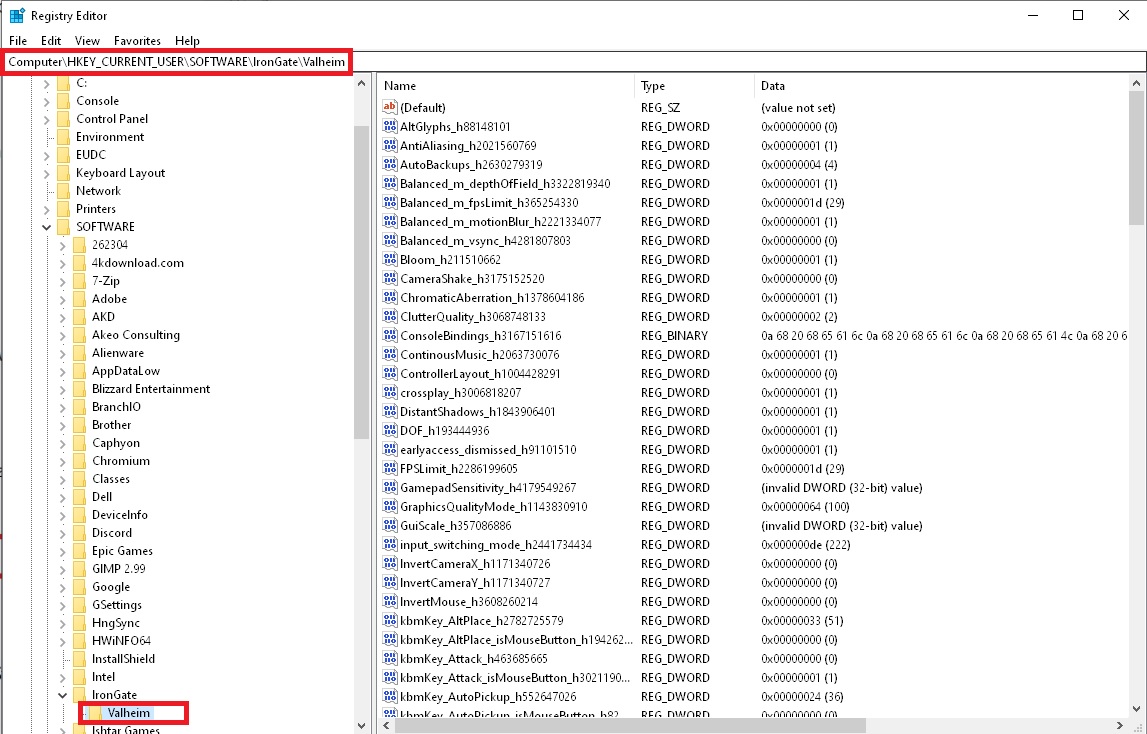
Another thing that comes to mind is some overlay that you might be using, maybe screen capture program like overwolf or OBS that could be interfeering with Valheim. You can generally open task manager and uder process tab add a new column so that GPU usage shows up next to each process. Try closing all processes that use GPU as a test. For Valheim, some mod might have potantially messed up registry settings for FPS limiting, so I would also reset all Valheim registry settings to default.
- Click on Windows start and type
regeditorregistry editor. - Manually navigate to Computer\HKEY_CURRENT_USER\SOFTWARE\IronGate\Valheim.
- Delete this Valheim folder in the registry: https://i.imgur.com/pJ90jaP.jpg
 summer tendon
stark meadow
Try setting it to off, so that it's forced. If monitor has Gsync support, you mi...
summer tendon
stark meadow
Try setting it to off, so that it's forced. If monitor has Gsync support, you mi...
Tried all that. No luck.
stark meadow
summer tendon
Tried all that. No luck.
Will DM you about this.
 unkempt jasper
summer tendon
Tried all that. No luck.
unkempt jasper
summer tendon
Tried all that. No luck.
The issue occurs on your solo game, yes? Have you used your Steam client to re-verify your game files? Also, check your start options there to make sure that's not causing it. Does it happen on all worlds?
stark meadow
unkempt jasper
The issue occurs on your solo game, yes? Have you used your Steam client to re-...
It looks like it was a save corruption issue, probably related to mods. We'll check later.
 last sleet
I found a BLACK CORE STUCK inside a rock in a taken crypt the room was at a t junction next to a room that goes downstairs
summer tendon
summer tendon
Anyone else experience a stutter/freeze every 4-5 seconds? It's happening to me ...
After trying everything to fix the stutter/freeze problem, from drivers, to bios, to regedits, to shutting down programs and services in msconfig, I finally discovered the issue. Some of my older worlds were causing the issue. New worlds did not have the issue. Something is corrupted with them. Oh well, there went half a day of productivity. 🤦♂️ Special thanks to MaCarBre for helping me troubleshoot. Much appreciated!
unkempt jasper
summer tendon
After trying everything to fix the stutter/freeze problem, from drivers, to bios...
That's good information. Thanks for sharing your experience. 🙂
 last shard
I have experienced freezing like this when I was using UpgradeWorld mod
 fresh cloak
Dont Think think the Queen should have left her cage


 stark meadow
fresh cloak
Dont Think think the Queen should have left her cage
stark meadow
fresh cloak
Dont Think think the Queen should have left her cage
No it indeed shouldn't. This issue has already been fixed on the current PTB patch that's available for testing.
 idle tiger
So when will it be fixed in the real version?
fresh cloak
and if fixed will she get back in or do we still need to kill her where she currently is?
stark meadow
idle tiger
So when will it be fixed in the real version?
In 1-3 weeks probably PTB patch goes live, unless more issues are found.
idle tiger
She is running around following me around the Mistlands and I can't get my body 🤣
stark meadow
fresh cloak
and if fixed will she get back in or do we still need to kill her where she curr...
Best to kill her with console commands. Update to PTB, spawn a new queen (cheat: spawn comamnd, legit:3 soldier throphies or new queen location) and defeat her that way.
Actually the best solution would probably be restoring a previous world backup.
How is the world being hosted? Somebody hosting from their in-game options or are you playing on a dedicated server?
fresh cloak
stark meadow
How is the world being hosted? Somebody hosting from their in-game options or ar...
Its a personal game where i get the invite to join in
stark meadow
fresh cloak
Its a personal game where i get the invite to join in
The the host can open up the manage saves menu (from starting screen), locate the world, expand backups, choose an earlier backup (usually the top most autobackup) and restore it. They should note the time and date of such backup file and communicate it to other clients (other players which are not the host). Clients should then restore their character saves in the same manner (look for character save autobackup with mathcing date/time as the world autobackup that the host restored).
That way both the world and all characters should roll back their save prior to the Queen escaping. You can all update your games to PTB if you want to finish the fight without issues.
fresh cloak
Thank you, will have a look at this
idle tiger
Thanks @stark meadow
 worthy sorrel
I saw a blinding orange light. It grew larger and larger until it "ate" me. Now i have this strange blue enchanted effect... Greylings have green eyes and campfires burn neon green.
Edit: Logged out and came back, everything's perfectly fine now.
 stark meadow
worthy sorrel
I saw a blinding orange light. It grew larger and larger until it "ate" me. Now ...
stark meadow
worthy sorrel
I saw a blinding orange light. It grew larger and larger until it "ate" me. Now ...
Which GPU do you have? Try to disable antialiesing next time it happens. For permanent solution you'll probably need to do clean reinstallation of your graphic drivers.
worthy sorrel
Intel Arc A750
 rugged socket
Have the hidden Rooms in ifested mines been removed and are the cultists no long in the ice caves we have not found a single Cultist and It seems as though the Core drop is almost non existant for mistlands Have cleared 6 infested mines and almost no cores and no dwarven hidden rooms
 south lance
rugged socket
Have the hidden Rooms in ifested mines been removed and are the cultists no long...
stark meadow
south lance
rugged socket
Have the hidden Rooms in ifested mines been removed and are the cultists no long...
stark meadow
Be sure to give the game enough time to do the world loading/generating process uninterrupted by something that you are trying to do on the device.
That means from the moment loading starts, you shouldn't touch anything on the device, and that included alt tabbing and minimising while the game is not done.
Unity engine can be prone to crashes when working with RAM if OS tries to activate the game window at wrong times.
It's not really common for Steam deck to exhibit the same issue.
 severe moat
Red jute curtain does not provide comfort.
 toxic river
Correct
This has been pointed out and known since frost caves release, pretty sure it's intentional.
Red jute carpet counts as a rug, though, so that does give comfort.
 desert quarry
Game keeps crashing when loading a world.
Happens with new worlds aswell as new characters.
reinstalled, verified game files, no mods installed
 modern gust
desert quarry
Game keeps crashing when loading a world.
Happens with new worlds aswell as new...
modern gust
desert quarry
Game keeps crashing when loading a world.
Happens with new worlds aswell as new...
i am assuming its "not responding" instead of crashing
when youre making a new world or loading in to an old one after locations have been added it needs to generate location, you need to let it do its thing, even if it says its not responding
desert quarry
i had it runing for 2 minutes already but i can try giving it even more time.
But if it actually needs to generate some new stuff, i feel like the game should tell me that so i know whats up
modern gust
desert quarry
i had it runing for 2 minutes already but i can try giving it even more time.
Bu...
it might take longer, especially if you switch to other windows
desert quarry
Seems to be working now, but this realy should be adressed.
on the steam forums seem to be many more people with the same "issue"
gilded sluice
desert quarry
Seems to be working now, but this realy should be adressed.
on the steam forums...
Be patient while loading 🤔
this is a super common issue in 1000's of games where people click around, ALT+tab out etc etc while the game tries to load
desert quarry
I didnt 👍.
But if there is no indication of the game doing jackshit for a few minutes i just close it through task manager.
This wouldnt be an issue if the game made clear that it was working on something in that time
gilded sluice
🥲
toxic river
Does it not say 'loading' in the corner?
south lance
Remember this is a time period where, for gamers, if something doesn't happen in 0.000003 sec then it's an extremely long time to wait and game is boring/broken/unplayable/etc.
desert quarry
toxic river
Does it not say 'loading' in the corner?
it does, but that doesnt mean its actually doing anything, and the game never loaded that long in the past.
 analog wraith
I posted this a couple days on the public bug report website, but haven't gotten a response. I'm not sure if there's a delay due to the holiday weekend or if Discord is a better place to report bugs, so I figured I would repost here as well.
I've started having a seemingly random crash occur. Once this past Friday and again Saturday. I get a small windows dialog box for about 1 second and then my game crashes to desktop. The dialog box appears to have a nonsensical string of numbers and letters, but it disappears before I can make any sense of it or react to get a screen shot. I'm playing on a server that my wife hosts on her PC, and we're the only two who play. My wife's game is not affected. I've never had any stability issues before; although I don't have a ton of time in the game. No mods. Let me know if there's any way I can send a crash report or whatever, either from mine or my wife's computer.
 mossy hinge
analog wraith
I posted this a couple days on the public bug report website, but haven't gotten...
mossy hinge
analog wraith
I posted this a couple days on the public bug report website, but haven't gotten...
They are sometimes slow to respond even during business days, especially if the report is only affecting a few people or even sporadic. A screenshot of this window could be useful.
This could be an issue with your computer, not a Valheim bug (as I don't recall any similar reports recently?). What I would do, is check file integrity via Steam. Then check with other CPU -demanding and GPU-demanding games that they are stable. Check that your computer temperatures are in sensible range when running Valheim. Only then you could narrow down the issue to (more likely) residing in Valheim.
Your GPU drivers could have gone corrupted (in Windows). It's rarer these days but could happen (but should manifest in other games, if this is the case).
Valheims log files could contain useful information (as to a HW problem, SW problem within Valheim, or a driver issue).
Also see the pinned message if you didn't notice it already.
analog wraith
Thanks for your help. I will look through all of this and see if anything turns up. I did validate game files, and there weren't any issues there. But I'll see if any other games decide to crash or if it's only Valheim.
stark meadow
analog wraith
I posted this a couple days on the public bug report website, but haven't gotten...
Check the most common crash issues listed on the link accessible form the pinned commend section for this channel.
Grab some player log files after a crash as instructed in Section2 in this guide.
You probably already have some crash logs, which you can send via DM here on Discord.
 dense flower
Hello Vikings! I noticed a key mapping / user interface bug how should I go about sharing this here?
gilded sluice
dense flower
Hello Vikings! I noticed a key mapping / user interface bug how should I go abo...
what happens and do you use any mods?
dense flower
Hi Smiffe. No just the Vanilla build and no mods.
I remaped my WASD keys to ESDF as its easier on my wrist for games
when in game, If i hit ESC and bring up menu, the menu still uses WASD to navigate. so W for Up S for down, rather than E for up and D for down. I know Tiny bug but i thought worth mentioning.
gilded sluice
AFAIK. that's hard coded
if you mouse over the menu. does the WASD / ESDF stop working aswell?
dense flower
let me check
gilded sluice
or. if you click once with mouse 1 key?
dense flower
so in game when i hit ESC
I am able to move the mouse over and select "continue save setting logout quit" and simultaneous use W for up and S for down through them as well
dense flower
i have a screen snapshot i could send if you want too.
gilded sluice
and a few issues since Xbox input have re-shuffled a few things
nah dw
I tested it already on my end and confirmed it as broken
or non-working as intended
 strange island
desert quarry
I didnt 👍.
But if there is no indication of the game doing jackshit for a few m...
strange island
desert quarry
I didnt 👍.
But if there is no indication of the game doing jackshit for a few m...
I don't think it's a priority, but I also had the same experience the first few times I tried to load a world I thought the game had crashed (especially since if you minimize the window Windows tells you that Valheim is no longer responding, which is super confusing).
I had to search the forums before I understood that it was normal for the screen to freeze and that I just had to wait.
I think what's really disturbing (even if it says loading at the bottom of the screen) is that the page is all black and nothing moves at all, and the first time you might wonder if this is normal, especially as it can take a few minutes.
Minecraft gives us a weird animation when we generate a world for example, it's stupid but just seeing the screen move and one square grow into another makes us understand that the game is "working" somehow
stark meadow
strange island
I don't think it's a priority, but I also had the same experience the first few ...
It's not normal for screen to freeze with "white not responding overlay". That happens when you don't let the game to load in piece, by trying to interact with the game window when you shouldn't. It's the windows desktop manager that messed the loading process up, sending input, apps not receiving it because it loading, and windows flagging it as non-responsive, thus putting RAM contents into pagefiles on the disk. Even more problematic with Vulkan, because Vulkan ignores some driver logic and windows desktop manager so once the game gets to unresponsive state it often can't be revived back.
That being said, we've been aware for quite some time now, that players have problems with this and some kind of message warning players to wait and not touch anything would be beneficial.
strange island
stark meadow
It's not normal for screen to freeze with "white not responding overlay". That h...
Yes, that says it all. I don't think it's either critical or urgent, but it may avoid some confusion.
 queen verge
stark meadow
It's not normal for screen to freeze with "white not responding overlay". That h...
queen verge
stark meadow
It's not normal for screen to freeze with "white not responding overlay". That h...
fwiw: I seem to recall this happening on the macOS build as well (no Vulkan, only OpenGL, and different desktop management). kind of wondering whether this is a Unity player issue and it blocks the main / UI thread when loading assets / scenes (not a Unity expert so take this with a grain of salt)
stark meadow
queen verge
fwiw: I seem to recall this happening on the macOS build as well (no Vulkan, onl...
Yeah, it's a Unity issue that happens when lots of assets need loading on main thread. There are better asynchronous solutions, but require a lot of restructuring to implement.
 pale plover
game crashes for my friend when we try to continue our save , we not using any mods it just shuts down without any messages or any error codes , any suggestion why i does ?
stark meadow
pale plover
game crashes for my friend when we try to continue our save , we not using any m...
Is your friend the host of the world, and can then load their world in singleplayer?
pale plover
he is the host of the world but i can ask him to load it in singleplayer
stark meadow
pale plover
he is the host of the world but i can ask him to load it in singleplayer
Tell them also try not pressing anything on the PC, once the loading of the world starts.
If they crash, before starting the game again, tell them to grab a player.log file from this location: %userprofile%\AppData\LocalLow\IronGate\Valheim
 iron loom
I was trying to do a no map run and I spent two hours bouncing back and forth between two dungeons. Turns out that the dungeon I sailed to faces 180 degrees opposite while inside from the direction the outside faces. It had me sailing back to the main continent rather than to continue sailing a little further in the same direction. Had to turn the map on because I knew it just didn't make sense. I feel like this must be a bug because what point is there in spinning me to face a direction when interacting with a rune if that direction is going to be wrong?
 ionic niche
Hello. Yesterday i had an issue with my character.
I played multiple time with new character but same name. And after 3h playing. When i left. The old character took place of the new one one the title screen. So the new character was deleted
 robust rain
ionic niche
Hello. Yesterday i had an issue with my character.
I played multiple time with ...
robust rain
ionic niche
Hello. Yesterday i had an issue with my character.
I played multiple time with ...
Old saves gone from the menu?
stark meadow
iron loom
I was trying to do a no map run and I spent two hours bouncing back and forth be...
Are you talking about vegvisirs on no map mode?
That's not a bug as much as no-map game mode hasn't been developed.
The no map world modifier has been added simply because some players requested it.
Dungeons indoor exit doesn't corresponds with cardinal directions, becaouse there was never a need for it, so interacting with dungeon vegvisirs to reveal boss locations is clunky on the no-map mode.
You can use hammer and building mode to determine in which cardinal direction vegvisir pointed you to when you are in the dungeon, and the same direction of that building piece will be maintained when you get out of the dungeon.
stark meadow
ionic niche
Hello. Yesterday i had an issue with my character.
I played multiple time with ...
Generally Steam Cloud saves have priority over being displayed in the game menu over Local character saves.
Have you noticed any issues with Steam Cloud being out of sync?
Regardless of the cause of problem, you should make sure that your current character state is getting saves properly.
To do that, enter into a world and change something in its inventory, logout then go back to confirm the change got saved.
ionic niche
This is the 1st time it happens to me. I have 5k hours on the game. So i never noticed anything like that before. And i play mostly speedrun so i delete world and character very often. And usually i use the same name for speedrun character
I was on twich live when it happened so i can link the video if needed
stark meadow
ionic niche
This is the 1st time it happens to me. I have 5k hours on the game. So i never n...
Do you any point remember crashing or getting this dialog?
https://i.imgur.com/ytYxvWa.jpg
 ionic niche
No i don't remember having this message
stark meadow
ionic niche
I was on twich live when it happened so i can link the video if needed
You can post a twitch link so I can check it out, maybe I notice something of significance.
ionic niche

It is at 4h14
iron loom
stark meadow
Are you talking about vegvisirs on no map mode?
That's not a bug as much as no-m...
MaCarBre, thank you for taking the time to respond and provide helpful information and tips! Yes, it is the vegvisirs. It had appeared to work from other dungeons I had been inside of in the past, but I wasn't aware that it wasn't a fully developed feature yet.
 lone parcel
Is it a bug that wood doesn't take water damage when placed on stone floors?
toxic river
If it clips a bit into the stone as you place it on, it might count as protected from rain
Since stone pieces are rainproof themselves and count as shelter
gilded sluice
lone parcel
Is it a bug that wood doesn't take water damage when placed on stone floors?
can you show a picture?
lone parcel
gilded sluice
can you show a picture?
https://youtu.be/WKzSzFk0hUU?si=LfLbyuyKbPjwj4Ik&t=275
I saw this video and at 4:35 you can see the process. It's straightforward, just put a wood floor on a stone floor. I tried it myself, one with a stone floor underneath and one without, and the one with it doesn't take water damage

Hello everybody! Today I'd like to share some decorating tips and ideas I use around my builds to make them look a little more realistic and lived in, including a way to make wooden weatherproof docks!
#valheim #valheimgame #valheimbuilding
Timestamps:
0:00 Intro
0:12 Mine Entrance
2:12 Tents
3:29 Street Lamps
4:35 Weatherproof Dock
5:45 Cha...
gilded sluice
lone parcel
https://youtu.be/WKzSzFk0hUU?si=LfLbyuyKbPjwj4Ik&t=275
I saw this video and at 4...
ooh gotcha 😮
ah yeah.
probably because how the "hitbox" of the stone, actually protects the wood
lone parcel
I'm now second guessing reporting this because you guys might patch it
stark meadow
Not worth patching. Players have been using this feature for years.
gilded sluice
lone parcel
I'm now second guessing reporting this because you guys might patch it
nah
 trim yew
 hard bridge
Are you playing on a server, or locally?
 ornate anchor
Is it normal for Brenna to not spawn in one of the Smouldering Tombs?
hard bridge
ornate anchor
Is it normal for Brenna to not spawn in one of the Smouldering Tombs?
Have you defeated her already in another one?
ornate anchor
hard bridge
Have you defeated her already in another one?
In a different tomb, yeah
hard bridge
ornate anchor
In a different tomb, yeah
Yeah, that's a known bug unfortunately. I believe it is fixed in the current PTB version, which has been seeming pretty stable and working well so hopefully will be released to the mainline soon.
ornate anchor
hard bridge
Yeah, that's a known bug unfortunately. I believe it is fixed in the current PTB...
ah, gotcha. thanks for the info!
 balmy garnet
Hoping this is the right channel for this. Had a friend recently buy Valheim through steam and play it for a decent chunk of time. Only for today upon trying to launch it see that its been marked to "Purchase" from their own steam library as if they never bought or installed it. Is this an issue on steams end or is it a local file issue? Nothing seems to work, they tried verifying game files, contacting steam support (waiting for response), and launching the game through other shortcuts. Everything leads back to their steam account no longer having access to the game itself.
hard bridge
That unfortunately is pretty much just a Steam thing. There's no central anything Valheim does for authentication or validation of the game.
gilded sluice
balmy garnet
Hoping this is the right channel for this. Had a friend recently buy Valheim thr...
that's a steam thing
usually what happend is when you have a game installed, but not purchased in steam. it will do that
like siblings sharing PC
and family share isn't activated
 safe spoke
new here. tried to buy game for friend. I get an error message in Steam about not being able to purchase for someone in another region... any help/suggestions on how I can make this work?
 stark meadow
safe spoke
new here. tried to buy game for friend. I get an error message in Steam about no...
stark meadow
safe spoke
new here. tried to buy game for friend. I get an error message in Steam about no...
Best to ask Steam for a gift refund and then buy a Steam wallet gift card for your friend. Steam and many other shops that have special discounts for specific regions, usually don't allow gift sharing.
safe spoke
stark meadow
Best to ask Steam for a gift refund and then buy a Steam wallet gift card for yo...
huh. That seems odd, as I've done this 6-7 times before (different games/players) without issue - and just yesterday morning, purchased "Satisfactory" as a gift for the same person I'm trying to get "Valheim" for.
stark meadow
safe spoke
huh. That seems odd, as I've done this 6-7 times before (different games/players...
You can read more about region restriction on this link: https://help.steampowered.com/en/faqs/view/58D3-B80D-2943-3CC6#gifts
safe spoke
stark meadow
You can read more about region restriction on this link: https://help.steampower...
They live in the land of the free LOL! I'm confident it is not a regional restriction ;-p
stark meadow
safe spoke
They live in the land of the free LOL! I'm confident it is not a regional restri...
What do you mean? You pasted a screenshot proving that it's a region restricted gift. If you don't think you purchased a gift in another region at a cheaper price, contact Steam to resolve the issue.
safe spoke
- they live in USA and can purchase it themselves
- the "regional restriction" mentioned in the above image has to do with pricing
Apparently Steam is unable to calculate the price difference. I only posted here, because Valheim is losing a sale (probably not only one) as a result of this debacle, and may want to contact Steam to sort it out.
I can log into any number of online merchants, and buy something "from" one country and ship "to" another country - they calculate the price difference and charge me accordingly - not sure why Steam is still in the dark ages on this.
I've googled, and see the various workarounds - most popular send them a giftcard. Nope. Not my gig. I'll surprise them with the gift I want to send - Or I'll find a different "sendable" gift. I just thought the game devs would want to consider that. Anyways - peace. Enjoy the journey
stark meadow
safe spoke
1. they live in USA and can purchase it themselves
2. the "regional restriction"...
- It's not about where they live, rather in which region you bought the gift.
- How does it have nothing to do with the pricing when the sentence starts with: "Due to regional price difference?"
Certain games, by developers choice, can be purchased for lower price in the listed countries and regions.
If you buy a game for a lower price in one country, it's normal that you then can't send it to a country where the game is more expensive.
Steam can't automatically convert the price for the gift at the time of it's purchase, as it can't know to whom you are going to send the gift to.
Adjusting the price of a gift during a sending step, and additionally charging the buyer depending on the region they intend to send the gift to, is a feature I've never seen on any website.
safe spoke
I appreciate you trying to help.
There's a tangible "meat boiled off the bone" situation in reality:
Due to the convoluted nature of the transaction, the transaction will not occur. Full stop.
toxic river
Bear in mind that region locking doesn't even have to involve a price conversion. As someone who lives in Ecuador, which uses USD, I get the same region locking restrictions if I try to send a gift outside most of latin america - even to US recipients. There's unfortunately nothing to do in this case.
stark meadow
toxic river
Bear in mind that region locking doesn't even have to involve a price conversion...
It's usually not related to price conversion, rather devs making game more affordable in certain regions:
https://www.youtube.com/watch?v=lSofMoSdMqw

Localize your games.
Localize your prices.
Watch the stream here:
https://piratesoftware.live
#Shorts #PirateSoftware #GameDev
safe spoke
"Nothing to do" = "lost sale" and ripple effect in reputation. As a business owner I thought it prudent to inform someone who may care. I doubt I'm the only player to experience this situation.
The game is $20 in my region (Canada). I'd gladly pay $100 for a "one click solution" to get it to my friend in the USA.
As it stands, the mess involved makes it abundantly easier for us to simply play any number of the other Steam games we already share. It's not a loss for us.
Again - as a player - the "why" is completely irrelevant to me.
stark meadow
safe spoke
"Nothing to do" = "lost sale" and ripple effect in reputation. As a business own...
I don't see nothing wrong in requesting and getting a refund from Steam.
I've refunded hundred games by now due to all sorts of issues.
As the above linked video suggests, there is often more good that comes to developers from region based prices than bad.
safe spoke
there's no "quit" in you is there?
stark meadow
I'm not sure if a gift bought in Canada should be restricted for sending it to US region.
Be sure that you are not using a VPN during your purchases, and accidentally buying games in another regions. Your whole Steam account could be suspended.
safe spoke
I don't want a refund - never suggested that. I'd suggest you get your medication re-evaluated
safe spoke
stark meadow
I'm not sure if a gift bought in Canada should be restricted for sending it to U...
Did you want to also remind me to hold my breath while swimming underwater? LOL!
stark meadow
safe spoke
I don't want a refund - never suggested that. I'd suggest you get your medicatio...
You can't swim underwater in Valheim
safe spoke
Is there a point here where this can be dropped?
goes to server, finds toxic environment while attempting to buyy game for friend... wtf really?
 finite kiln
I see one toxic person here and a few people attempting to help despite the person needing help refusing to accept that they're asking for help in the wrong place (i.e. not the place that can do anything about the problem).
I suggest you leave your attitude and then contact Steam about steam issues.
 drowsy sedge
In the Ashlands test server we are running into a problem where the Queens drop is not doing anything. We have tried a few things from dropping it and picking it up to logging out with the drop sitting out and even going back to her chamber and dropping it. Any one else having this bug?
finite kiln
The Queen's drop won't have any function until Ashlands is out, similar to how Yagluth thing didn't have a use until Mistlands was out.
The Ashlands boss will presumably have a similar useless drop until Deep North is out.
There is no Ashlands test server anyway except for internal testing (and here would be an odd place to ask questions about that), if you're talking about the PTB then the Ashlands isn't on the PTB yet. It will be announced when they are (probably a bit more than normal PTB patches, and the internet will certainly announce it properly even if Iron Gate decide to not make any more fuss of it than any other PTB patch).
drowsy sedge
I am literally on the test server now lol
finite kiln
I figured, that's why I clarified that the current PTB isn't for Ashlands but for other stuff.
drowsy sedge
Make sure to back up your saves. Like in the last PTS you need to get it saved
Thats odd. THe ashlands are there and there are the drops for the metal but maybe its not actually ready then
finite kiln
The ashlands on the PTB are exactly like the Ashlands have been since the game was released to Early Access in 2021.
The entire world has always been in the game, but the undeveloped biomes have just been empty or had placeholder stuff.
drowsy sedge
I meam. its not empty. I am fighting enemy's and finding new items.
Got some new drop for metal called hot metal or something. ITs kinda cool looking
finite kiln
Flametal has been there since the start.
 slim panther
so... my karve is taking damage and there's nothing attacking it. i destroyed it and rebuilt it, logged out - and it's still taking damage. idk what to do
same thing is happening to my longboat...
idk why
drowsy sedge
Well heck I guess I got too excited when I saw the PTS opened up lol
finite kiln
The current test patch is a unity engine upgrade and some other stuff iirc, but Ashlands is scheduled to be released some time in the first half of this year so it's not far away now. :>
stark meadow
slim panther
so... my karve is taking damage and there's nothing attacking it. i destroyed it...
Are you playing on Steam? Single player or multiplayer?
slim panther
stark meadow
Are you playing on Steam? Single player or multiplayer?
on steam. singleplayer
stark meadow
slim panther
on steam. singleplayer
Can you check on whcih game version are you playing? (please check the number visible in main menu as there are multiple "latest" versions)
Are you still experiencing this issue ever after restarting the game?
Did you recently sail or encounter a thunder storm?
slim panther
stark meadow
Can you check on whcih game version are you playing? (please check the number vi...
i'm running version 0.217.38 (n-201) i am not experiencing this issue after quitting the game and logging back in. and there was a thunderstorm - but i was not sailing in one 🤔
stark meadow
slim panther
i'm running version 0.217.38 (n-201) i am not experiencing this issue after qui...
Do you happen to remember how it started?
Like, you portaling to your base during thunderstorm and noticing board are getting damaged?
slim panther
stark meadow
Do you happen to remember how it started?
Like, you portaling to your base durin...
something like that happened... i have been using the portals alot...
stark meadow
slim panther
something like that happened... i have been using the portals alot...
Did you use any devcommands in that play session?
Do you remember logging out prior to this happening?
Also, might be irrelevant, can you list your system specs? (CPU and RAM amount)
slim panther
stark meadow
Did you use any devcommands in that play session?
Do you remember logging out pr...
no dev commands - no logging out - gpu rtx 4060, 32 ram
 errant oriole
so i have two bugs that have been driving me nuts, I randomly get tarred in the middle of the plains when im nowhere near a tar pit, no rhyme or reason either, just randomly happens
next issue is in mistlands dungeons i randomly encounter water where there isnt any and it force me into a swim animation, when i exit the dungeon i go flying into the air
only fix for either is logging out and back in, but it always happens again
stark meadow
errant oriole
so i have two bugs that have been driving me nuts, I randomly get tarred in the ...
On which version of the game are you playing? (please check the version number in the starting menu)
Are you playing with mods?
errant oriole
0.217.38 (n-20) and yes we have mods, however out of the 6+ players on our server, it only happens to me
stark meadow
errant oriole
0.217.38 (n-20) and yes we have mods, however out of the 6+ players on our serve...
There are some vanilla bugs that haven't yet been solved (like carts starting to float in air (as if in water) when updating their inventory while they are in tar pits).
However what you are describing is caused by mods, as certain mods exacerbate the above mention issue, so that it happens in more situations.
E.g. you might have a modded item that updates you inventory in particular way when being in liquids, or you might do some specific action that other players are not doing.
errant oriole
OK, so is this vanilla bug fix in the upcoming ashlands patch?
stark meadow
errant oriole
OK, so is this vanilla bug fix in the upcoming ashlands patch?
At this point no, as it's low priority bug, because players don't go about submerging the cart in tar pits on purpose.
It's also not clear if fixing this vanilla bug would also render the mod related bug fixed. It's just my guess that it will.
lone parcel
no tar here

 leaden aspen
I see this when i log onto my world after the most recent update, i do have mods on so is it a problem regarding those? Most of them are only QOL no content mods
 finite kiln
You can probably get help with the broken mods in #mods-issues , but as a general rule a game update will make a lot of mods not work anymore. Probably a good idea to remove them all until they've been updated.
(This channel is for game bugs, not mod issues).
leaden aspen
finite kiln
You can probably get help with the broken mods in <#1202550198174486599> , but a...
Ah, all good then, i didn't think of mods being involved here too much so i rather redirected it as a game bug, but seeing as no one else is probably facing this problem then yes this should be a mod problem
gilded sluice
leaden aspen
I see this when i log onto my world after the most recent update, i do have mods...
just like Pegster stays. I see multiple mods issues 😄
toxic river
Mods issues in #mods-issues, main help and bugs channels should be strictly vanilla

 past pine
Please make the player saves more robust when connected on servers, I don't care if you add an option to also save the player data on the server, or give us an option to save more frequently~~, or manually (without needing to log out/in)~~.
Since the update, about 4h of play, I've crashed 4 times and I've lost, fully upgraded:
- 2 fenrir armor sets, Silver swords and Iron bucklers
- 1 archer armor set
- 60 silver ore
Before the update (~190h of play), I got about 1 crash/day. Notable things that I lost which I'll probably never forget:
- My first stacks of silver
- My first purchase of Megingjord when gold was short
- All my turnip+seeds, had to restart from scratch
- I lost a bunch of higher tier cooked food for what I reached thus out of the ressources I had collected to cook them...
These are just the notable ones, lost of bunch of other random crap I don't care much about.
That's not counting the issues about you then spawning in wack places with all your buffs gone and your food reset to whatever it was back on the last save; I've had two notable things happen: spawn naked in the mountain biome. And spawn on a lone island where I had just destroyed the Portal and no ressources to build a new one.
You also lose all the map data you had discovered/marked.
I know I can spawn all that that it but it breaks the game, and I can't always remember all that is lost...
south lance
past pine
Please make the player saves more robust when connected on servers, I don't care...
"or manually"
Contrary to the "save" button that's right in the menu while in-game when you press escape?
past pine
Fine, I crossed out that part since I'd just like to point out that being on a server, I never expected to find a "save" optuion on a "client"... Though knowing how it works it makes sense. I just never looked there 😅.
My point remains though. Now everytime I pick something important up I'll friggen save the game :/ This is rather annoying.
gilded sluice
 bleak glade
remove your mods. validate game files
bleak glade
gilded sluice
remove your mods. validate game files
I think I added the mod one year ago and I already forgot howto remove it🥲
I konw it should be somewhere in locallow/irongate
or the game file folder
bleak glade
gilded sluice
remove your mods. validate game files
fixed,thx for help
gilded sluice
bleak glade
or the game file folder
you're welcome 🙂
stark meadow
past pine
Please make the player saves more robust when connected on servers, I don't care...
Did you ever attempt to resolve your crashes? You can check out the link to the crash guide that's pinned as a comment in this channel.
99% of crashes in Valheim happen when a system is unstable in Unity engine, rather than something happening in game's logic.
past pine
stark meadow
Did you ever attempt to resolve your crashes? You can check out the link to the ...
Yes and no, missed that pin seeing as I missed the "save" option in the menu that's not suprising 🤣. But I did most of that stuff. I had written a 10 line explanation of everything but the tl;dr is I'll look in the logs see if pinpoint if it's GPU specific and try to tweak if I can.
stark meadow
past pine
Yes and no, missed that pin seeing as I missed the "save" option in the menu tha...
Send me some logs if you have any of the previous ones saved (multiple locatons where log can get saves according to Section2).
past pine
Nah, the logs I have right now are of none crashes (I think); though this made me realize I'm using the Vulkan version, I'll try the DX version tonight.
 pseudo widget
I'm sure this has been discovered
 gilded sluice
pseudo widget
I'm sure this has been discovered
gilded sluice
pseudo widget
I'm sure this has been discovered
yes
 young light
Hi, I have a problem, when I try to create a new character, it simply is not created, in the saved game management section the name of my character appears and as deleted, it is as if the game deleted the character immediately, not only with the character but also with the worlds. Finally it doesn't let me join my partner either,
neither by Steam invitation nor by the game code and I don't see their server in the friends servers section either. I have already tried uninstalling the game, as well as deleting all the files but the problem has not been solved.
i have the game in steam
stark meadow
young light
Hi, I have a problem, when I try to create a new character, it simply is not cre...
This usually happens when one re-installs windows but leaves their old Steam installation on another disk. You will also have to reinstall your entire Steam app.
young light
💀 💀 💀 💀 💀 💀 💀 💀 💀 💀 💀 💀 💀 💀 💀 💀
finite kiln
pseudo widget
I'm sure this has been discovered
That's just lag on multiplayer. If you smash the "insert thing" button faster than the server notices you smashing it you can fill smelters and kilns and stuff up with more than there's supposed to be room for.
Known issue and not really worth spending time addressing as it's not as if it's breaking anything.
 vivid reef
has anyone had any weird world generation bugs on a dedicated server after the patch?
unkempt jasper
vivid reef
has anyone had any weird world generation bugs on a dedicated server after the p...
I haven't. What kind of generation bugs are you noticing?
vivid reef
unkempt jasper
I haven't. What kind of generation bugs are you noticing?
empty mountains, tar pits in meadows/mountain, just really odd things lol
unkempt jasper
vivid reef
empty mountains, tar pits in meadows/mountain, just really odd things lol
Are you or anyone on the server using any mods? Is it possible that the server's two world's file pair (.db and .fwl) have become mixed up and are no longer kept with their proper mates? Are the world oddities exactly the same for everyone on the server?
vivid reef
unkempt jasper
Are you or anyone on the server using any mods? Is it possible that the server'...
i'm using some client side mods, havent been able to confirm with others if they have seen anything like this
vivid reef
unkempt jasper
Are you or anyone on the server using any mods? Is it possible that the server'...
the world generation is super weird tho, like completely empty biomes with weird elevation
unkempt jasper
vivid reef
the world generation is super weird tho, like completely empty biomes with weird...
That sounds more and more like the server's world file pair have become mis-matched. Has anyone been moving the world from one server to another or to a solo game and back to the server? Anything like that? Maybe had to load a backup world up to the server?
vivid reef
unkempt jasper
That sounds more and more like the server's world file pair have become mis-matc...
not that i know of
unkempt jasper
vivid reef
the world generation is super weird tho, like completely empty biomes with weird...
If the world file pair have become mis-matched, there's really no way to fix that without finding the right files for the pair. Maybe you can restore a recent world backup that's still more or less current and hasn't become mixed up.
unkempt jasper
vivid reef
not that i know of
Wait until tomorrow when others in here may have other ideas of what's causing your issues. I'm not entirely certain that I'm right about the mis-matched world files. Although, I do think it's the most likely cause.
vivid reef
unkempt jasper
Wait until tomorrow when others in here may have other ideas of what's causing y...
i just sent u a ss of the weirld empty biomes
unkempt jasper
vivid reef
i just sent u a ss of the weirld empty biomes
That's now looking more like the server's having long pauses while trying to finish rendering an area you've moved into but properly completing it eventually. Do the backup and power cycle of the server PC and see if it makes any difference. How much RAM in the server? 4gb? 8GB? The game could be RAM starved and using the PC's swapfile when it needs to. Is the PC's HD swap space available to Valheim, if needed? Otherwise, you'll be looking at server crashes and world corruption.
gilded sluice
vivid reef
i just sent u a ss of the weirld empty biomes
could be your mods not being updated and supported, and the world-generation breaks
past pine
stark meadow
Send me some logs if you have any of the previous ones saved (multiple locatons ...
Just an update; ever since I switched to default d3d rendering, I've not had any crashes.
stark meadow
past pine
Just an update; ever since I switched to default d3d rendering, I've not had any...
Are you using any specific software to record your gameplay? Some might be incompatible with Vulkan at time. Think I only encountered Fraps causing problems so far. Otherwise, if you with to make Vulkan work, try reinstalling your display drivers with DDU software. Before that you might try re-installing regularly, but with emphasis on choosing custom installation + perform clean installation options during installation process.
 fair laurel
past pine
Please make the player saves more robust when connected on servers, I don't care...
fair laurel
past pine
Please make the player saves more robust when connected on servers, I don't care...
this is very important, same thing happend to me and my friend, some things just disappear when you log out suddenly to
 manic escarp

 muted jackal
Didn't move, was alt-tabbing, can someone tell me what happened?
stark meadow
muted jackal
Didn't move, was alt-tabbing, can someone tell me what happened?
You were to close to the traps. The question is why didn't they trigger before.
muted jackal
I was sitting there for several minutes.
past pine
stark meadow
Are you using any specific software to record your gameplay? Some might be incom...
Nope, given the issues I was having when playing I was making sure everything was optimal for the game (minimal processes running (nothing at all but sometimes I'd have a single chrome tab or Discord running). Vinalla never used mods. I update/check drivers. I would always reboot to make sure my system was "as clean as possible".
Given it works flawlessly for now I've actually turned rendering features back on without issues and stopped worrying about closing other applications and rebooting.
I will not bother with DDU unless I find I have other issue - and one thing is that I find my Commit memory is rather high; I will be investigating first what services are taking memory since after closing all services I knew I could close "safely" the commit memory is in a more sensible range (from 28Gb to 5Gb, though my physcical memory always reported plenty of free memory); so I'm wondering if some software/driver update is actually kinda "maxing out commit memory" and in that scenario the Vulkan rendering has more while DX handles it better...
[As an example, the stupid Window 11 Widgets actually take close the 2Gb even though I have disabled them and never click it.]
mossy hinge
past pine
Please make the player saves more robust when connected on servers, I don't care...
I've seen the discussion following this - but the issue of losing progress is a real one.
There can be several reasons the client and/or server crashes, things like a misconfiguration, a power outage or just bugs in Valheim (although rare). Point being, they can not be eliminated.
This combined with the facts that the client and server both have their own data, and the fact that progress in this came is inventory/resource heavy, can easily cause a situation where hours or even days of progress can be lost because of a simple crash.
A few hypothetical but certainly possible real game situations: 1) the player picks up many stacks of iron and the client crashses (or vice versa). 2) The player is in the process of changing gear, puts inventory in a chest and the server crashes (or vice versa).
The point being, items, even those the client and/or server has been aware for a very, very long time (for weeks and or even days) and have been saved persistently on disk, can easily be lost or duplicated, if a crash happens for whatever reason.
I somewhat simple fix would be to keep logs of client <-> server inventory transactions, and detect if items are "missing in crash" or even duplications, but it would involve some work. Before the Discord hack, I think I've suggested this here ...
 mental stratus
Anyone ever get a bug where if you teleport to a location where there is a hot tub nearby, it will force you to "swim" in the air at whatever height the hot tub is?
stark meadow
mental stratus
Anyone ever get a bug where if you teleport to a location where there is a hot t...
Using mods?
mental stratus
yes though I've not yet correlated it to a particular mod. This just started happening after building a regular vanilla hot tub.
stark meadow
mental stratus
yes though I've not yet correlated it to a particular mod. This just started hap...
Could you DM me your world files actually?
mental stratus
I could? But you'd need my mod pack to load it right?
stark meadow
mental stratus
I could? But you'd need my mod pack to load it right?
Sometimes not required. We'll see I guess
mental stratus
It's on a ship. 😛
At the very least you'd need the Raft mod. I'm currently going over all the mods to make sure the recent patch did not break them. But this swimming in air bug happened before the patch. I'm going to try and narrow it down.
stark meadow
mental stratus
It's on a ship. 😛
At the very least you'd need the Raft mod. I'm currently goin...
Basically any mods that plays with water level, making items float or inventory mods that borrow inventory spaces from crates could make it happen. Similarly to this one: #steam-bugs-discussion message
mental stratus
I have a floating items mod so sinking items don't sink.
never had any issues with it. But perhaps it does not play nice with the hot tub.
I'm not a fan of floating items but I'm even less a fan of not being able to dive down to grab nails that just happen to be slightly out of reach. 😉
past pine
mossy hinge
I've seen the discussion following this - but the issue of losing progress is a ...
I'm not sure where you're getting at (or coming from either...)
Everything involves work, obviously....
The question is really what amount of work fixing this would involve vs the benefits it would bring the game in respect to their other priorities; we can only speculate on the work, as only the devs choose how they would implement this and there are easy ways to do this but they could also choose a complicated way (Shared stash tabs in Diablo 4 anyone?).
I just find it very annoying when people claim this "would be complicated" when we have no real idea if it is, and yet we have a mod that does most of this already.
Your assumptions on transactions is wrong; in a proper server authoritive transaction, the client would ask the server "Drop X item(s) from slot 1"; if the server doesn't get the request properly because of network issues/corruption then it shouldn't ack the request and so the client should "lose the connection" and resynch/reconnect. As such you wouldn't get duplication. The game already needs to do these types of transactions for containers, dropped items, world/structure changes and tombstones, though I doubt they currently have an "ack" feature (ie: it's probably not authorative r/n, especially since the game currently simulates the environment on the first client machine that loads a "chunk")
past pine
stark meadow
Are you using any specific software to record your gameplay? Some might be incom...
Still got crash, sadly, just 1h in, nothing special on system, tuned down video settings actually for higher FPS (~80); logs didn't have anything just regular game play data.
stark meadow
past pine
Still got crash, sadly, just 1h in, nothing special on system, tuned down video ...
It's still not surprising that you were crashing less by using d3d11, as Vulkan generally pulls more resources from the system.
Did you go through most common crash causes that I listed in the guide? Reset BIOS settings, grabbed log files?
Also, since you spoke about monitoring your RAM usage, did you ever tweak your page files on Windows?
 stiff jay


 lone parcel
the fix is to teleport to another place and then teleport back
mossy hinge
past pine
I'm not sure where you're getting at (or coming from either...)
Everything invol...
It was just a suggestion I made. I agree I have no idea how much work it would be. In the ends it's up to Irongate to decide. I do feel this is severe enough issue there is some room for improvement; have you ever seen any other software which would lose already saved work, needing to backtrack/redo many days worth of work?
However I think you've misunderstood my proposal. The sever and client already acknowledge what they've done. There is no problem in this (unless there are network issues, but that is another issue, and easy to detect at run time). The problems arise when the server and client have changed inventory, but either one crashes - and there is no way for the other one to know when was the last time it saved all data persistently.
The log is in place to improve in these sitautions only. When a save has been made, the client/server will notify the other, and it can discard the log and start again.
Currently, when the client<->server has been doing transasctions, anything not saved in the world or client data is only in RAM, and can be easily lost.
When a reconnection is made, the client and server could re-play any pending logs. In normal situations (no crash has happened) there is no need for replay. In case there is a pending log, it should clearly show what items have gone missing and/or which have been duplicated (reconcilation is the difficult part).
To clarify, the one having the useful log is the one who has not crashed. Something like:
- transaction A
- transaction B [client saves, acknowledges server -> server discards log]
- transaction C [server saves, acknowledges client -> client discards log]
- transaction D
- transaction E [server crashes]
On reconnection, transactions D and E are known by client. It will ask server, do you have these items (or know I have them)? The client and server try to reconcile and restore the situation.
EDIT: Heavily. My brain was not working.
mossy hinge
Currently, in the above scenario server will always be in state C, or last save (or vice versa, if it was the client who crashes).
past pine
stark meadow
It's still not surprising that you were crashing less by using d3d11, as Vulkan ...
From the list, there are three things I can still do, no of which I am willing right now:
- Disable "Clock boosting" (if I had an option to disable it just while that game is running, I would, but there's no way to set it up in such a way).
- DDU driver resets
- Reinstall Windows
My system is fairly unstable right now and has been getting worst for the past ~2-3 months, so I can't fairly blame the game for it however the way it saves it's data while connected to servers is still something I don't enjoy. I didn't notice as I was 90% playing Valheim, but started playing other games and am getting the same amout of crashes (1 per 8h of play, about).
past pine
mossy hinge
It was just a suggestion I made. I agree I have no idea how much work it would b...
Typical for me, I dont' agree and yet we're mostly saying the saem thing but in defferent ways 😓...
Right now, the game is probably not communicating the player inventory at all, since it doesn't need to. It only needs to send "interactions that impact the world" (ie: stuff that other players could see), I'm pretty sure I mention a pretty good amount of them in a previous post.
Now given the game crashes, it could have saved the transaction log during it's deployement until it receives an ACK from the server, however I think it would just be easier to save the critical player data on disk every, like minute or so (excluding the map as that actually takes much more processing as it's a texture that needs to be compressed).
Saving the network stuff would mean them creating a saving mechanism for it, and creating a queue to put/retreive data in/out of it
This would need to be written to disk, just like a player save... So my conjecture is that saving the critical player data would be a small enough footprint to be written to disk every minute or even more.
mossy hinge
Yeah... it's a problem arising from the design of the game (infrastructure). Many games (i.e. Minecraft) have all data on the server. Some have all of it on the client. But in Valheim it is split -> there can be situation where an intact game state is nowhere to be found, for any point of time.
past pine
Well that's an issue with most unity games I now understand as the inherent protocol mechanism encourages developers to take this path.
I started to understand this better when seeing issues with other mutiplayer games that feature a dedicated servers like Valheim does.
 azure lagoon
I've been getting consistent game crashes today. I am not very technical and I don't know if it's a linux issue or a valheim issue but I found this in player.log
 unkempt jasper
azure lagoon
I've been getting consistent game crashes today. I am not very technical and I d...
unkempt jasper
azure lagoon
I've been getting consistent game crashes today. I am not very technical and I d...
If you don't need -crossplay, disable it.
azure lagoon
I will try that
azure lagoon
unkempt jasper
If you don't need -crossplay, disable it.
It seems good so far and I appreciate your help! If I find anything else I will say something.
azure lagoon
I am still experiencing some problems, let me know if these logs are helpful.
 unkempt jasper
You might try going to your Steam client and using a different Compatibility Layer. Or even none as a test.
stark meadow
azure lagoon
I am still experiencing some problems, let me know if these logs are helpful.
On which Distro are you playing?
Seems like you are still connecting over PlayFab (crossplay).
Are you running your own server or connecting to someone's server?
If you don't have any Xbox or PC gamepass players on the server, tell the host to disable crossplay before starting the server.
Otherwise you will probably have to install some of the PlayFab dependencies or launch the game via proton compatibility mode (use Vulkan in this case).
azure lagoon
I am playing single player on my own PC. My distro is OpenSuse Tumbleweed. And I am certain I disabled crossplay and the start server button is unchecked.
unkempt jasper
I think MaCarBre is right about the missing library(s) for your distro. Check on line for any add'l info about them. Also, there's three libraries listed in the dedicated server manual that comes with the d/l of the Server Tool from Steam. Those might or might not apply here.
azure lagoon
I really appreciate both of you for taking the time to help me! I will go find and install those missing libraries.
unkempt jasper
azure lagoon
I really appreciate both of you for taking the time to help me! I will go find a...
You're very welcome. I just wish I could be more certain... 🤷♂️
azure lagoon
If all else fails I'm 90% certain that proton will work fine.
 scarlet cobalt
I do not know if anyone else sees this but after the patch I observe issues with portals. I am reconnecting one portal to several portals based on the actual need and it links correctly. But often right after I go through the portal it gets disconnected. I have to rename and put back the desired name to reconnect it again. Is it just me or anyone else had the same issue?
stark meadow
scarlet cobalt
I do not know if anyone else sees this but after the patch I observe issues with...
There are some known portal issues, yes.
Are you playing in multiplayer or singleplayer?
Do you have or are you using multiple nameless portals?
I'm guessing that you have one portal at your base, but more portals around the world, so you keep renaming the portal at the base depending on your needs?
When you do enter through the portal does it teleport you to correct location, but the problem is that it becomes disconnected right after, or does it even teleport you to a wrong location?
scarlet cobalt
Multiplayer on dedicated server. Not nameless, I am using simple names like SWAMP,PLAINS and GDFARM and switch in between. Yes, one portal at the base and the rest on multiple different locations. Going through the portal from the base works fine and it teleports to correct location. But gets disconnected the second you end up on the other side. It happened also to other players when they went through and it seemed disconnected for them. I could still go through the main portal even after that, ended in the correct location but then it appeared disconnected for me as well. And had to reconnect by renaming. But it probably looks ok on the main side.
stark meadow
scarlet cobalt
Multiplayer on dedicated server. Not nameless, I am using simple names like SWAM...
If you can, ask the server host to upload those world files and to send you the link to the world world files. DM me the link later, so we can check that world on our servers where debugging will be easier. How is the server being hosted?
 kind topaz
is it normal to wake up and have a monster inside your base there to smack you right as you wake up?
or even for it to flee and then just randomly disappear once it goes around the corner? or for a troll to spawn and then get still within eyesight (say 45 meters or less) and it just vanishes?
 cerulean cedar
Numpad mousekeys broken ingame?
 manic stone
Since the last update y get massive FPS drops sometimes, and some elements like stones and the sky starts flickering out of the blue. Is there anbody else with this problem?
 scarlet cobalt
stark meadow
If you can, ask the server host to upload those world files and to send you the ...
scarlet cobalt
stark meadow
If you can, ask the server host to upload those world files and to send you the ...
I tried to reproduce the problem extensively again yesterday but did not succeed. I had it like 5 times over the weekend but not anymore. So it could have been related to certain server or network conditions. Unfortunately I have no access to server logs. I will get back to you if it occurs again with exact times and possibly ask the server admins for support.
gilded sluice
kind topaz
is it normal to wake up and have a monster inside your base there to smack you r...
sounds like broken mods or something 🤔
gilded sluice
manic stone
Since the last update y get massive FPS drops sometimes, and some elements like ...
um.. flickering sounds.. bad..
any mods or?
kind topaz
gilded sluice
sounds like broken mods or something 🤔
no mods just normal mode
gilded sluice
multiplayer?
kind topaz
single offline
kind topaz
gilded sluice
sounds like broken mods or something 🤔
does it matter that it's not through steam but through microsoft?
gilded sluice
kind topaz
does it matter that it's not through steam but through microsoft?
no. they are the same
the usual thing to fix it.
Validate game files and see if that helps
monsters can spawn semi-close to you if your unlucky
if they spawn during night, they will try to run from you during morning hours to de-spawn
kind topaz
Then that is what happened when they vanished because they were running away but they didn't get very far before they de-spawned.
stark meadow
manic stone
Since the last update y get massive FPS drops sometimes, and some elements like ...
We didn't have similar reports. Probably your GPU. What are your system specs?
I recommend installing HWiNFO which will tell you if any of your component are hitting max temps.
stark meadow
cerulean cedar
Numpad mousekeys broken ingame?
For some older mice yes. It's a known issue. Probably won't be fixed before Ashlands.
 tropic torrent
Has anyone confirmed if the swamp floating bench bug has been fixed in this release?
gilded sluice
tropic torrent
Has anyone confirmed if the swamp floating bench bug has been fixed in this rele...
 scarlet cobalt
stark meadow
If you can, ask the server host to upload those world files and to send you the ...
scarlet cobalt
stark meadow
If you can, ask the server host to upload those world files and to send you the ...
portal disconnect just happened again few minutes ago after I went through. Is there any local log file I can provide ?
stark meadow
scarlet cobalt
portal disconnect just happened again few minutes ago after I went through. Is t...
You can grab logout and then press Show player.log white buttin in the starting menu, which will lead you to the player file (log).
Logs probably won't help much. World files might. Were you playing with more people there now?
scarlet cobalt
just two players in currently
stark meadow
scarlet cobalt
just two players in currently
Did you build or deconstructed any portals in this session?
Where was your friend when you went through the portal?
scarlet cobalt
No new portal built. Just renamed one from PLAINS to GDFARM. Went through and it was disconnected. He was nowhere near my location.
coral narwhal
First time playing since the latest patch, and parts of my castle wall are breaking down. I'm quite sure they were stable enough last time I checked. But in the patch notes I can only find "Fixed inconsistent support calculations for “Cage floor” 1x1 piece" that has anything to do with support calculations, and there is no cage floor near this wall. Were there any other changes in the patch that aren't written down in the patchnotes?
mossy hinge
Are you on the release branch? Or the beta? IIRC I've seen something about terrain calculation changes (fixing bugs) recently. But I may misremember. If the terrain changed, that could cause buildings to collapse, too.
coral narwhal
normal release
marble wolf
Live is the same as PTB right now anyway.
coral narwhal
that sounds like it could have catastrophic results 😅 our whole castle is shiny red on most parts
 dusky zealot
Any changes to how trees are grown on the ground in the latest patch? We have this one oak tree in the middle of our base, and we realize that the oak tree somewhat looks a bit taller after the patch, seems like the tree elevate a bit. We also made this huge slope with many trees planted on them so it's easier to farm instant wood, and apparently that place cause a really bad lag for everyone when they get near it, didn't seem to happen before the patch. Though, I probably will clean up those trees as necessity, just telling here if I can get some info or someone else experiencing the same
stark meadow
coral narwhal
First time playing since the latest patch, and parts of my castle wall are break...
Yes, when fixing cage floor, there have been some changes to how structural integration works in general, so that pieces not really intended to act as support give correct support (they were giving out too much before). This specific pieces will be tweaked backed in the Ashlands PTB update, so you can wait till then and restore and older backup. You can also send me your backup of a world file, so we can check if everything is ok before you do.
stark meadow
dusky zealot
Any changes to how trees are grown on the ground in the latest patch? We have th...
Is anyone in your team group playing with mods?
dusky zealot
stark meadow
Is anyone in your team group playing with mods?
Only "Plant Everything" mod (client only) so we could plant bushes, few players install mass farming mod, nothing that very heavy mods or things would change the game. But after the patch, all of us uninstall mods in case it's outdated.
But I think I found the problem... in the screenshot, there's this line on the ground, I assume this what you call; Chunk map? so whenever I went to the next chunk, the game stutter or fps drops for split seconds, probably it's unload/loading the next chunk. We were running around this area that time which cause the bad lag
 stark meadow
dusky zealot
Only "Plant Everything" mod (client only) so we could plant bushes, few players ...
stark meadow
dusky zealot
Only "Plant Everything" mod (client only) so we could plant bushes, few players ...
The plant issues is most definitely not a vanilla issue, and probably caused by plant everything mod.
I have no knowledge of what mod author's yesterday patch fixed, but I know that people initially had world loading problems because of the mod.
People also currently have performance and stuttering problems because of certain mods, but I haven't hear about which ones caused it.
It is not uncommon that the issues caused by mods persist even after uninstalling the mod.
We didn't have any vanilla reports related to performance drops.
Stuttering during zone loading issues could happened for the same reasons or be a separate problem.
At which patch did you make your world?
Did you try launching a backup of your world on default_old version of the game to see if stutters can be exhibited there?
dusky zealot
stark meadow
The plant issues is most definitely not a vanilla issue, and probably caused by ...
Yeah I won't deny if our current world might have a bit problem due to that mod, since I did test during PTB on different world without mods and no issue with game performance, though didn't build/explore as big as the current world. I'll try to remove them plants manually nonetheless, see if the problem fix
As for which patch, I'm not sure, but we create the world around 16 March, 2024. Though there's some players bringing old armors and equipment from their world, which I think it might not be much of a case here, just letting know. Myself is using an old character since Mistland update.
Did you try launching a backup of your world on default_old version of the game to see if stutters can be exhibited there?
Sorry, I'm not quite sure what you meant here. Do I need to try launch default_old version to test it out?
stark meadow
dusky zealot
Yeah I won't deny if our current world might have a bit problem due to that mod,...
The only known vanilla issues related to zone loading happens for worlds pre-April 2021.
You can switch to the previous version of Valheim via Steam library → Valheim properties → BETA → default_old
However you should use the same save that you already loaded on the new version of Valheim, so a backup of your save prior to the latest patch would have to be restored and maybe even some old versions of old mods.
Check the #mods-discussion is people have identified which mod causes stuttering and performance issues.
dusky zealot
stark meadow
The only known vanilla issues related to zone loading happens for worlds pre-Apr...
Okay so I did a little test, in this test I don't have mods installed. What I found is that;
default_old (previous stable); my fps around those area is better than the current stable, and less noticeable stutter. The current stable have lower fps, more random drops when walking in that area. However, I do have older save file that we haven't try using mods yet, and after testing both previous and current stable version (no mods), the result was pretty the same for both; fps is good and almost unnoticeable stutter.
So I supposed the conclusion is that, the previous mod (which is either Plant Everything or Mass Farming) is effecting the new update, even though it was uninstalled.  Guess we need to like; remove all plants that were planted or not meant to be plant-able, will see if it works or solves a bit
Case solve I supposed lol. Thank you btw! I'll check on the mods discussion later on.
stark meadow
dusky zealot
Okay so I did a little test, in this test I don't have mods installed. What I fo...
Thanks for checking. It might be that the updated version of those two mods will fix all the issues. I haven't seen anyone reporting performance issues to these authors, so maybe check their nexus pages or github to see if similar has been reported.
coral narwhal
stark meadow
Yes, when fixing cage floor, there have been some changes to how structural inte...
ain't nobody got time to wait for ashlands 😂 Can't stop playing valheim for that long. 🥰 Now I fixed it by adding some more iron wood. Hope there aren't more things that broke but that I didn't see.
 wild fulcrum
After last patch our server is having issues where connected portals do not work at times until they are renamed and then named back. It doesn’t happen all the time but periodically. Also having multiple people with client side crashing after last patch.
hard bridge
wild fulcrum
After last patch our server is having issues where connected portals do not work...
Are you running any mods of any kind, server or client side?
 tame fox
Anyone elses game crash when joining a server? I get the windows crash error, but if I wait, the game still loads.
toxic river
That's just Windows thinking the game is 'not responding' while the game loads a world. Nothing to worry about, just try not to alt-tab or click a lot during loading.
wild fulcrum
hard bridge
Are you running any mods of any kind, server or client side?
No mods
stark meadow
wild fulcrum
After last patch our server is having issues where connected portals do not work...
I doubt that crashes are related to multiplayer aspect. Tell your friends to check the pinned guide dedicated to crashes.
The portal issue is known. Avoid re-naming portals until fixed. Portals that displayed such issue will have to be deconstructed and maybe even named differently than before.
 digital patio
HELP!!! For about 4 months now, every time I play Valheim I'm good to go for about 15-20 minutes. Then my system slows way down. The video gets reallyl choppy. I exit the game and my computer runs slow for a few minutes then everything is ok. Any ideas what might be happening?
 thorny mirage
Hi, i have a bug when playing with Vulkan API with AMD graphics card the fog and lighting starts to glitch
stark meadow
digital patio
HELP!!! For about 4 months now, every time I play Valheim I'm good to go for abo...
Playing on Windows? Sounds like temperature related issues. I would recommend installing HWiNFO, which will tell you which components hit the MAX temperature once this happens in Valheim. Playing on a laptop?
stark meadow
thorny mirage
Hi, i have a bug when playing with Vulkan API with AMD graphics card the fog and...
Try to see if disabling in-game Anti-aliasing makes it go away. You probably need to monitor temps and reinstall graphic driver (custom installation + perform clean reinstallation).
thorny mirage
stark meadow
Try to see if disabling in-game Anti-aliasing makes it go away. You probably ne...
I set everything to low and I reformated my pc, but it still glitches
stark meadow
thorny mirage
Does it happen on default d3d11 also? Which card? How much fps when it happens? When you switch back to previous version, do you still have the same issue? (Steam library, valheim properties, beta, default_old)
gilded sluice
thorny mirage
and what graphics card do you have?
thorny mirage
rx 7600xt, doesn't happen on dx11, and happens on any fps
stark meadow
thorny mirage
rx 7600xt, doesn't happen on dx11, and happens on any fps
We have no similar reports from other players, but the patch is young.
I recommend testing the previous version of the game to see if you have the same issue there, as that version is from January, and since we didn't have any reports back then either, it's not a Valheim issue. Check if you have any available BIOS updates for your card.
When you installed Windows again, did you let windows install your graphic driver or did you do that part manually?
gilded sluice
thorny mirage
rx 7600xt, doesn't happen on dx11, and happens on any fps
could it be that AMD is doing it's normal thing and "building shaders" in the back ground?
or check your FPS counter
I just had a friend having really wierd issues in another game, and he got a 7900 GRE
he had to adjust his FPS limiter / ingame FPS setting
digital patio
stark meadow
Playing on Windows? Sounds like temperature related issues. I would recommend in...
Playing on an Alien Ryzen 14, RAM=64G, AMD Ryzen 16 core 3.4 processor, NVIDIA GeForce RTX 3080 10GB VRam
gilded sluice
digital patio
Playing on an Alien Ryzen 14, RAM=64G, AMD Ryzen 16 core 3.4 processor, NVIDIA G...
when did you remove the dust from it last?
 manic path
... How frequently do you need to remove dust?
 knotty hamlet
i have problem with other apps losing connection whenever i play valheim
the server runs fine but i lose connection on browser and in discord after few minutes of playing..
stark meadow
digital patio
Playing on an Alien Ryzen 14, RAM=64G, AMD Ryzen 16 core 3.4 processor, NVIDIA G...
Yeah, check the dust first, and definitely install HWiNFO to check temps.
Laptops aren't generally known to have good thermals and since Valheim can stress the GPU to 100%, this can cause overheating.
stark meadow
knotty hamlet
the server runs fine but i lose connection on browser and in discord after few m...
Usually a rouhter issue. How are you connected to the internet (cable, WiFI), and could you check the model of your rouhter?
When all apps that use internet are closed (e.g. Valheim, Discord, Steam), do this test to see your buffer bloat rating: https://www.waveform.com/tools/bufferbloat
knotty hamlet
stark meadow
Usually a rouhter issue. How are you connected to the internet (cable, WiFI), an...
wifi, and valheim doesnt lose connection but all other apps do
gilded sluice
knotty hamlet
the server runs fine but i lose connection on browser and in discord after few m...
sounds like a VPN issue or wifi
 fading crag
Hey I have a bug where my portal often disconnects after I went right through it. And I often come out and it is directly disconnected but it still has the right name on it. My only way of reconnecting it is to give it a new name, wait a few seconds and then switch to the previous name again. For reference I play vanilla so no mods but on a server via VPN.
knotty hamlet
knotty hamlet
i have problem with other apps losing connection whenever i play valheim
okay quick bad update on this issue, so not only do i lose connection but the entire house that is connecting to the wifi rooter because i open valheim 💀
 next karma
knotty hamlet
okay quick bad update on this issue, so not only do i lose connection but the en...
next karma
knotty hamlet
okay quick bad update on this issue, so not only do i lose connection but the en...
i had that same thing, from what i could find browsing the internet the game is causing the router to crash and reboot
this ended up fixing it for me and it hasn't returned
https://www.reddit.com/r/valheim/comments/lsrb89/valheim_crashes_internet_potential_fix/
knotty hamlet
next karma
i had that same thing, from what i could find browsing the internet the game is ...
ye thats ive done and it worked there
but i'm not entirely sure if its working perfectly or not
 topaz ember
Was playing on my steam deck for 60+ hours and since an update i cant change my control layout.
I was using the official layout for the deck and it was perfect. Now i cant even change the layout. It always come back to just the mouse in the screen and i cant setup a new layout.
Ive try uninstalling and instaling again. Ive try playing with a ps4/ x box controller and its not working.
My character is constently attacking like if the button was hold down but its not the case.
Every other game are normal, its just on valheim.
I am playing on a hosted server but i try single player and its the same.
Sorry for my english and thanks for your help
gilded sluice
topaz ember
Was playing on my steam deck for 60+ hours and since an update i cant change my ...
we know the controller layout thing
stark meadow
knotty hamlet
ye thats ive done and it worked there
Valheim send rates are configured in a sweet spot where they are just low enough so that it does't cause lag for majority of players, but also high enough so that it wouldn't cause majority of modems to crash. However, weaker modems might crash even with the default send rates. The best solution would be to call your ISP and request that they change your modem for the better one. While not doing anything else, I recommend that you perform this test on your PC and inform us which score/rating you get, and with which modem mode: https://www.waveform.com/tools/bufferbloat
Lowersing steam browser pings per minute can help for some modems, but won't for others.
 red wagon
anyone know about the thing when you load it and then it shows a red !
and dosent load???
gilded sluice
red wagon
and dosent load???
what doesn't load?
finite kiln
I guess it's the standard Valheim logo with a red ! that generally means broken mods.
But actually describing the problem could make troubleshooting easier. :p
 prisma sail
toxic river
prisma sail
toxic river
Issues related to PTB should be reported in #valheim-public-test. If you can't see this channel, tick 'I want to be a public tester' in the Channels & Roles tab at the top of the channel list.
 graceful dirge
Valheim keeps crashing after trying to load any world.
marble wolf
Crashing? Or 'Windows is not responding'?
toxic river
graceful dirge
Valheim keeps crashing after trying to load any world.
When upgrading worlds to a new version, don't click around or alt-tab, just wait. Valheim runs heavy processes to upgrade worlds that will trip Windows into thinking it's not responding.
 jolly yacht
feedback in #ashlands-feedback-only, no spoilers for us who don't want to see them, please
marble wolf
This needs to go in the PTB channel. If you can't see it, opt-in via the Channels & Roles page.
gilded sluice
now you can see #ashlands-feedback-only 😉
summer tendon
gilded sluice
now you can see <#1231942311986855957> 😉
one hour delay to post? I'm finding sooo many things
gilded sluice
summer tendon
one hour delay to post? I'm finding sooo many things
😄
sorry
it's to prevent spam
marble wolf
summer tendon
one hour delay to post? I'm finding sooo many things
Edit the post?
gilded sluice
your welcome to harass my DM's tho
summer tendon
marble wolf
Edit the post?
cant add new pics to show issue
gilded sluice
go look in your game settings 🤔
summer tendon
gilded sluice
your welcome to harass my DM's tho
i'll just post here i guess
summer tendon
gilded sluice
god not here 😄
well, i'm making vids like crazy and finding issues, so, let me know where you want it
 marsh marten
could probably jsut compile a list, and then post them all at once
gilded sluice
summer tendon
well, i'm making vids like crazy and finding issues, so, let me know where you w...
DM ❤️
summer tendon
marsh marten
could probably jsut compile a list, and then post them all at once
too much bookkeeping
stark meadow
There is a separate build menu action in the controls menu that is set to mouse2 as default, so you will have to rebind it.
summer tendon
gilded sluice
DM ❤️
done
 west reef
is the portal not linking thing known with the patch on PTB?
stark meadow
west reef
is the portal not linking thing known with the patch on PTB?
Yes, it is. It's also present on the live version
 sullen pasture
Why is my CPU using 80% for Valhiem just in the main menu? Even with all my graphics turned down to nill it still take 80%. This is what I'm using: AMD Ryzen 5 3600 6-Core Processor @ 3.59 GHz
 stark meadow
sullen pasture
Why is my CPU using 80% for Valhiem just in the main menu? Even with all my grap...
stark meadow
sullen pasture
Why is my CPU using 80% for Valhiem just in the main menu? Even with all my grap...
Doesn't seem right. RAM usage amount also doesn't seem right (too little).
Playing through Steam or do you have standalone copy of the game? Using mods?
I would suggest checking if you have any optional windows updates related to AMD CPUs.
After that I would recommend manual installation of AMD chipset drivers and BIOS updates for AMD CPU if your motherboard has them.
sullen pasture
stark meadow
Doesn't seem right. RAM usage amount also doesn't seem right (too little).
Playi...
playing through steam, and I never play with mods for games that are in beta
all drivers are up-to-date as well. just ran a full check on everything
stark meadow
sullen pasture
playing through steam, and I never play with mods for games that are in beta
Can you doublecheck that your installation folder doens't have any other files other than these: https://i.imgur.com/vdpdeOA.jpg
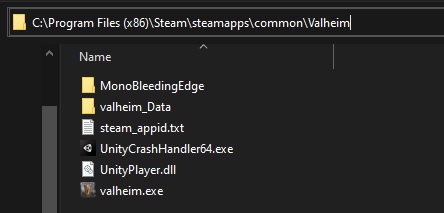
When you reach the starting menu, you'll also be able to click on the white player.log button on the left side of the screen, which will lead you to the player log file.
You can DM me that file so we can see if there are any errors getting listed there.
 broken grove
I know this is a minor issue, but I've noticed since the last update (April 10th) that the turnips no longer can be attached to item stands.
 sterile pendant
I got to an Elder spawn. but there is nothing here. The alter is not here
 dusk spruce
Is this where to post bugs encountered with the PTR?
 crisp galleon
I reported a bug with the new ship taking infinite zero damage hits and freezing the game, I can't even load the game anymore, 🙁
stark meadow
sterile pendant
I got to an Elder spawn. but there is nothing here. The alter is not here
It's location probably shifted. Intereact with the vegvisir again.
stark meadow
crisp galleon
I reported a bug with the new ship taking infinite zero damage hits and freezing...
There is a separate channel for public beta testing. Bugs related to Ashlands shouldn't be posted here.
However the boat taking damage is probably an older bug. Did it started happening right after bulding the new ship?
stark meadow
dusk spruce
Is this where to post bugs encountered with the PTR?
No, there is another channel. Issues related to PTB should be reported in valheim-public-test. If you can't see this channel, tick 'I want to be a public tester' in the Channels & Roles tab at the top of the channel list.
crisp galleon
spoiler free I took to the coast in the new area and started taking zero damage in every piece, so now you have like 200 zeroes constantly around the ship, and just going nearby slow the game to zero FPS
ok
stark meadow
crisp galleon
spoiler free I took to the coast in the new area and started taking zero damage ...
Will send you a DM about this
 manic moat
Hello, I'm looking for help regarding crashing on boot. I have not updated the game to PTB. It has been a number of months since I last played the game (No issues before) and since that time about the only thing I have done to the computer is update GPU drivers, here is the player.log file generated when trying to start the game.
stark meadow
manic moat
Hello, I'm looking for help regarding crashing on boot. I have not updated the g...
Try performing a clean installation. Check the pinned commend and the crash guide there. Section 5 describes how to do a short clean installation.
manic moat
stark meadow
Try performing a clean installation. Check the pinned commend and the crash guid...
Fixed it, thanks!
 burnt mountain
Hi - I'm looking for help on linux native version where sound disapeared in the ashland public test. Works fine via proton.
stark meadow
burnt mountain
Hi - I'm looking for help on linux native version where sound disapeared in the ...
It's a known unity engine issue. The other workaround is to re-set your main output device in linux sound setting, after the game gets launched.
 slate raft
I updated to try the ashlands, but I am getting an error and cannot launch valheim just a triangle with an ! point and no message. Should I just do a fresh reinstall? anyone else seeing this
toxic river
slate raft
I updated to try the ashlands, but I am getting an error and cannot launch valhe...
PTB issues should go to #valheim-public-test, but the error you describe is most often caused by modded games. You'll want a fresh reinstall with no mods installed (including Bepinex, look in #valheim-help pins for a guide) if you want to join the PTB without errors
slate raft
As far as I am aware I am playing modless. I'll go to that channel, I just thought since the game won't launch it might be here and not be the PTB channel. TY
 digital niche
So, I have a question does anyone else generally encounter Trolls and Abominations weirdly de-aggroing and just walking super far away from you?
 trim pebble
my friend is trying to load valhiem. he updated it and it's not lauching anymore even on while not on the public test servers. he has verified files and he's not using any mods. He just uninstalled and reinstalled the game as well as restarted his computer. Any tips or ideas to try?
stark meadow
trim pebble
my friend is trying to load valhiem. he updated it and it's not lauching anymore...
Tell your friend to perform clear re-installation, described in the crash guide Section5.
The link to the guide can be found in this channel's pinned commends.
stark meadow
digital niche
So, I have a question does anyone else generally encounter Trolls and Abominatio...
Yes, it's known that all enemies can behave in this way on occasions.
 next flame
Can you guys give me access to the PTB server
Im having issues with the beta access code
gilded sluice
next flame
Im having issues with the beta access code
if the code yesimadebackups don't work
you have to ask steam support
we can't do anything else on our side
 red delta
Im having issues with wood portals on a PTB dedicated server
the portals do not consistently connect, I will have to break them down and rename them constantly
I just renamed one and walked through it only for it to say UNCONNECTED on the other side
stark meadow
red delta
Im having issues with wood portals on a PTB dedicated server
the portals do not ...
It's a known issue.
However, issues related to PTB should be reported in valheim-public-test. If you can't see this channel, tick 'I want to be a public tester' in the Channels & Roles tab at the top of the channel list.
red delta
stark meadow
It's a known issue.
okay thank you
 quasi glacier
already shows ashlands on non ptb version
 dusky zealot
Not sure where to ask but we're playing in Mistland (not PTB version) and... first time going there, 1 star seeker already spawn for us. And the no star seekers are quite difficult to fight unlike our previous saves even with fully upgrade Plain's armor + weapons. Even the 4-5 dvergrs (magician & crossbow dude, no star) were instantly killed by literally one seeker soldier. I'm not sure if this was intended or they got buffed at some point. Does using old character that have killed the boss's biome in previous save also causing the next save to be a bit more challenging?
toxic river
That's not a thing, no. Could've just gotten unlucky with the spawns, could've been an infested mine nearby which often spawn starred seekers
dusky zealot
toxic river
That's not a thing, no. Could've just gotten unlucky with the spawns, could've b...
Okeyh so apparently it's just skill issue or we were panicking 😅 it's all good now, manage to kill few easily now, just need to do the Atgeir spin or stun often. Thanks btw
Though the dvegr part were quite strange, though we will observe them, not that it's a big of a problem, just a shock.
 spice jackal
I was playing in ashlands yesterday then the portal broke due to the fire in the region, And my game just dropped to 0fps and became unplayable. I believe it was the portals because my boyfriend was still on the server and could see the broken portal and was unable to get the drop. I enter in my backup, crossed the ashlands portal and then starts to lag. I went into an older save, where it rendered all of Ashlands again and it was fine. I cant find bug report channel.
toxic river
spice jackal
I was playing in ashlands yesterday then the portal broke due to the fire in the...
Issues related to PTB should be reported in #valheim-public-test. If you can't see this channel, tick 'I want to be a public tester' in the Channels & Roles tab at the top of the channel list.
 shrewd pagoda
Seed: whYidP5AZH
Infested mines with 0 chests, black cores, sealbreaker fragments. Could be bugged
 marble wolf
No, that's just unluckly RNG.
 worthy vortex
guys, redoing a save to make shit happen, dying on black forest gathering copper as usual, rage quited, when i was back, no gravestone in the death spot
 frank crow
been testing the dmg values of certain AoE attacks, and I found it odd that the only attack that doesn't seem to scale with starred enemies is the unblockable 50 dmg from ground slam from trolls. is this a bug?
 shell dew
Is it normal for wooden cooking racks to burn over a fire and break?
toxic river
shell dew
Is it normal for wooden cooking racks to burn over a fire and break?
Issues related to PTB should be reported in #valheim-public-test. If you can't see this channel, tick 'I want to be a public tester' in the Channels & Roles tab at the top of the channel list.
Hecc, you have the same macro I do~
Gotta fix the channel link~
stark meadow
frank crow
been testing the dmg values of certain AoE attacks, and I found it odd that the ...
Not sure to which extent it's intended. Might be due the troll being the first creature that can dish out serious damage in early game to the building pieces.
 odd stream
I'm not sure if this is a bug, or intended - and I am sure it would have been discussed but cant see it in the chat here - cooking stations with the everything burns modifier on - makes cooking impossible. I asuume the iron stand wont burn, but we are still in the medows with no meat
toxic river
odd stream
I'm not sure if this is a bug, or intended - and I am sure it would have been di...
Known issue, best to play without that modifier on
Also, PTB issue, PTB channel, y'all know the drill
 rocky wigeon
My friend and I play on a dedicated server. Friday night we installed mods to do some building, server devcommands was the one we installed on our server. Ever since the update yesterday our terrain has been screwed. We had a terrain wall around our base and now this is whats in it's place. One hit takes it down to the lowest level and the ground cannot be raised. Any idea what to do? I REALLY don't want to start a new world. We're around 600 days in.
toxic river
rocky wigeon
My friend and I play on a dedicated server. Friday night we installed mods to do...
Restore a backup and run the game without mods, please
Also, PTB issues to the PTB channels, please
rocky wigeon
Im not on ptb
toxic river
Then #mods-issues
 jagged hamlet
 scarlet pumice
I can't find the channel
scarlet pumice
I can't find the channel
Go to roles and check the appropriate response to get the ptb channel.
scarlet pumice
jagged hamlet
Go to roles and check the appropriate response to get the ptb channel.
Thank you, I'll check it out.
jagged hamlet
scarlet pumice
Thank you, I'll check it out.
https://discord.com/channels/391142601740517377/customize-community
"I want to be a public tester"
Discord
Discord is the easiest way to communicate over voice, video, and text. Chat, hang out, and stay close with your friends and communities.
stark meadow
Issues related to PTB should be reported in valheim-public-test. If you can't see this channel, tick 'I want to be a public tester' in the Channels & Roles tab at the top of the channel list.
stark meadow
Read the comment above 👆
 coral shard
Hello, I've noticed that the Lox can climb on top of each other fairly easily and I'm not sure that it's suppose to be the case. It can be complicated to keep them in an enclosure, even a stone one.
 kindred pebble
coral shard
Hello, I've noticed that the Lox can climb on top of each other fairly easily an...
kindred pebble
coral shard
Hello, I've noticed that the Lox can climb on top of each other fairly easily an...
Yeah I keep mine in giant holes in the ground
I'm having an issue where I have 3 friends I play with, 3 of us including myself are on steam and one is on Xbox. I'm the host. If crossplay is enabled, the xbox player can connect, and one of the steam players can. When crossplay is off the steam player who couldn't connect can, and the other steam player can no longer connect. Obviously I need crossplay on to allow us all to play, has anyone else had this issue? We are all on the PTB but I am pretty sure it was happening before we joined it a week or so ago.
stark meadow
kindred pebble
Yeah I keep mine in giant holes in the ground
So when you have crossplay disabled, all Steam players can connect, expect the Xbox?
The Steam players that can't connect to crossplay server is probably using VPN (they put their clients behind strict NAT e.g. NordVPN), have missing PlayFab packages, or their ISP put them behind double NAT which is incompatible with crossplay. For the latter they can try port forwarding, but a better solution would be to call their ISP and ask to be removed from NAT. To fix VPN issues, usually the entire services has to be disabled, and not just the program closed or VPN turned off. PlayFab dependencies can be installed here: https://learn.microsoft.com/en-us/cpp/windows/latest-supported-vc-redist?view=msvc-170
kindred pebble
stark meadow
So when you have crossplay disabled, all Steam players can connect, expect the X...
No, one steam player cannot connect when crossplay is disabled, but can when it's enabled. There are no VPNs involved, we tried that. I'll have them try the PlayFab packages. It couldn't be something on the host end then?
And the other Steam player can connect to it normally but not with crossplay
marble wolf
coral shard
Hello, I've noticed that the Lox can climb on top of each other fairly easily an...
Been that way ever since they became rideable. Their saddle attachment points make great climbing points it seems.
stark meadow
kindred pebble
No, one steam player cannot connect when crossplay is disabled, but can when it'...
A Steam users being able to connect when crossplay is enabled, but not when it's disabled, is really odd.
It's not a host issue, it's definitely them. They should check how their public IP looks like first. Is it IPv4 or IPv6 when they type "what's my IP" in google.
kindred pebble
It is very weird but it's a constant everytime we try to play lately
We keep having to take turns playing
So I play with 2 of them early in the evening and the other player gets on later, it is unfortunate
stark meadow
Issues related to PTB should be reported in valheim-public-test. If you can't see this channel, tick 'I want to be a public tester' in the Channels & Roles tab at the top of the channel list.
kindred pebble
stark meadow
It's not a host issue, it's definitely them. They should check how their public ...
I'll have to ask them about that later
 vernal aurora
Mod Custom Audio
With update 217.46, with the inclusion of this particular mod, the ambient sound disappears, and writes in the console:
[Error : Unity Log] Error: Cannot create FMOD::Sound instance for clip "" (FMOD error: Error loading file. )
[Error : Unity Log] NullReferenceException: Object reference not set to an instance of an object
Stack trace:
CustomAudio.BepInExPlugin+AudioMan_Awake_Patch.Postfix (AudioMan __instance, System.Collections.Generic.List`1[T] ___m_randomAmbients, UnityEngine.AudioSource ___m_oceanAmbientSource, UnityEngine.AudioSource ___m_windLoopSource) (at <30a33bd122f74b3e99e06d945d8098cd>:0)
(wrapper dynamic-method) AudioMan.DMDAudioMan::Awake(AudioMan)
 scarlet scroll
hello, since tonight I cant log into a friend's world. it worked until yesterday night. I either cannot log in (error message: failed to connect) or I can log in and there is nothing in the world except for terrain. Any advice?
toxic river
vernal aurora
Mod Custom Audio
With update 217.46, with the inclusion of this particular mod, ...
Mod issues in #mods-issues
toxic river
scarlet scroll
hello, since tonight I cant log into a friend's world. it worked until yesterday...
If on PTB, there was an update this morning, make sure you both are in the same version
scarlet scroll
we are on the same version, and no, neither of us is using beta
scarlet scroll
no mods on either side, both on steam
 pure haven
Hey guys! I wonder if it s a bug or just my fault. I went to test ashlands
Don’t have my last death marked on a map (maybe I deleted it, don’t remember)
Is there a console command to reveal it?
 digital mural
Better off asking in #valheim-public-test for all stuff related to the Ashlands content
pure haven
It s not even in ashlands 🥹 though
marble wolf
But you're using the test version of the game.
unkempt jasper
Probably easier to just restore the character from a backup.
 thin spruce
Hello, I got an odd issue. I switched to the public test version and now it seems some Hildir's quest locations have changed. I got to a Howling Cavern marker that was already on my map, and there is nothing there. I checked the map generator and it seems other mountain locations have changed as well. Did the new patch change how Mountain biomes are arranged?
marble wolf
thin spruce
Hello, I got an odd issue. I switched to the public test version and now it seem...
Please report PTB issues in the PTB channels. But yes, most updates will change the locations of POIs.
pure haven
pure haven
Hey guys! I wonder if it s a bug or just my fault. I went to test ashlands
Don’...
The situation is that I went to play after a long break, and realized my character is naked and no grave on a map.
Is there a console command to see it?
toxic river
pure haven
The situation is that I went to play after a long break, and realized my charact...
Unfortunately not, sorry
thin spruce
@toxic river @marble wolf Thank you for clearing that up 🙂 I don't see a PTB channel but thanks for the heads up.
toxic river
Issues related to PTB should be reported in #valheim-public-test. If you can't see this channel, tick 'I want to be a public tester' in the Channels & Roles tab at the top of the channel list.
toxic river
thin spruce
<@145010734550482944> <@321702508374392842> Thank you for clearing that up 🙂 I ...
But yeah, this is a general 'new version that changes worldgen' issue, happens every time
thin spruce
Oh I found it in the Channels & Roles section, thank you
toxic river
Cheers, have fun~
 feral sky
Any channel for ash beta ?
feral sky
marble wolf
<#831071697817305128>
Yeah, found it, thanks
 sonic portal
marble wolf
<#831071697817305128>
sonic portal
marble wolf
<#831071697817305128>
Is their any major game breaking bugs in the pt? And how can one get access to the channel it’s locked for me
marble wolf
You can get the Tester role by going to the Channels & Roles page. And no, I'd never expect truly game breaking bugs to reach PTB and we've already had a patch for the first two day's bugs we found.
 subtle ledge
I keep getting 1fps locked on the menu. Its driving me insane and i cant find a fix at all
 blissful oasis
The footprint in the mountains at night looks like it does in the day. Too bright. Possible bug

 gilded sluice
sonic portal
Is their any major game breaking bugs in the pt? And how can one get access to t...
gilded sluice
sonic portal
Is their any major game breaking bugs in the pt? And how can one get access to t...
no real gamebreaking bug anymore.
we had the teleporters breaking, but it's fixed now
stark meadow
subtle ledge
I keep getting 1fps locked on the menu. Its driving me insane and i cant find a ...
Playing on a laptop?
Check your player.log to see if your graphic card is getting recognised properly
It can be found in %username%\AppData\LocalLow\IronGate\Valheim
 desert zinc

 cobalt ermine
game is keep crashing after few minutes, sometimes 20 sometimes 5. public test version. Any fixes?
 deft bear
cobalt ermine
game is keep crashing after few minutes, sometimes 20 sometimes 5. public test v...
deft bear
cobalt ermine
game is keep crashing after few minutes, sometimes 20 sometimes 5. public test v...
me too, i can't start my world
cobalt ermine
deft bear
me too, i can't start my world
I managed to start it, yesterday it was loading for a long time, today loading time is shord, but its very unstable.
stark meadow
cobalt ermine
game is keep crashing after few minutes, sometimes 20 sometimes 5. public test v...
Check the most common crash causes in the guide linked in the pinned comments section.
cobalt ermine
stark meadow
Check the most common crash causes in the guide linked in the pinned comments se...
thanks i will take al ook
stark meadow
deft bear
me too, i can't start my world
Make sure that once the loading process starts, you give it enough time to finish, without interacting with your PC in the meantime.
It might take few minutes.
deft bear
stark meadow
Make sure that once the loading process starts, you give it enough time to finis...
thanks I'll try again 🙂
cobalt ermine
pinned commend is worthelss, there is no issue with my PC, I worked as end user support 😄 So I know how to update stuff or keep my desktop runninig as it should.
Its not freezing when playing regular version of the game. Its only freezing at public test version. If i lunch thru vulcan on normal mod, it doesnt matter
toxic river
That should probably go in #valheim-public-test then, if it's not an issue with the current live branch
stark meadow
cobalt ermine
pinned commend is worthelss, there is no issue with my PC, I worked as end user ...
If it were to be a PTB issue, more people would exhibit the same issues, which they are not.
What are you system specs? Did you check your crash log files like the guide suggested?
cobalt ermine
stark meadow
If it were to be a PTB issue, more people would exhibit the same issues, which t...
there is nothing in crash log, literally 😄 Ryzen 5 3600, 32GB RAM. RTX 3070
 languid trail
It's normal, guys?
 toxic river
languid trail
It's normal, guys?<:BeFresh:886955768505585695>
toxic river
languid trail
It's normal, guys?<:BeFresh:886955768505585695>
If you look at the top right, you're considered as being in the plains. This raid doesn't require built base items and can happen at any time in the mountains and the plains.
stark meadow
cobalt ermine
there is nothing in crash log, literally 😄 Ryzen 5 3600, 32GB RAM. RTX 3070
I've talked to few players with Ryzen 5 3600 recently, but everyone has a different problems. Think this one was the last one: #steam-bugs-discussion message I helped throubleshoot. In their case, the CPU was displaying very high usage because the graphic card wasn't recognised by the game properly. The issue was fixed by clean installation of nvidia driver. usage. Probably not the same case as you tho. In your case, as mentioned in the guide, random crashes are most commonly related to unstable clocks, so I would definitely start by resetting your BIOS. Have you done it already?
 amber breach
Hey All, I don't see the public test feedback channel so I wanted to ask this question here. Can you direct me to any known bug describing issues with the mistlands loading in previous discovered area. I had a base in the mistlands that was somewhat close to the deep north and now the terrain is buggy (floating above water). I'm hoping to be able to save this playthrough. Seed#: cqlgv3kwVF

 stark meadow
amber breach
Hey All, I don't see the public test feedback channel so I wanted to ask this qu...
stark meadow
amber breach
Hey All, I don't see the public test feedback channel so I wanted to ask this qu...
If you can't see this channel, tick 'I want to be a public tester' in the Channels & Roles tab at the top of the channel list.
Generally there is no way around terrain changes that happens near Ashalnds and DeepNorth. Backup the current installation folder of the live version (0.217.46) so you can always go back to that save with the base still there. Mod authors might think of something that might save your base once Ashlands goes live.
amber breach
stark meadow
If you can't see this channel, tick 'I want to be a public tester' in the Channe...
Thanks for the input! IronGate mentioned that terrains would be changing, but I was being hopeful that with things floating it might be a temporary bug. Everything is backed-up so maybe I'll get lucky with the modders like you said. Thanks.
marble wolf
It's not a bug, it's just changed terrain.
 thin cedar
wow climbed on top of the cave fell down to hit exit xd #bigbug
marble wolf
#ashlands-feedback-only is the best place for this.
 void moss
i keep having really bad crashing problems whenever it comes to sea exploration
Im not sure what the issue is, ive uninstalled the game and reinstalled it too
thin cedar
void moss
i keep having really bad crashing problems whenever it comes to sea exploration
what windows u using
void moss
thin cedar
what windows u using
windows 10
thin cedar
void moss
windows 10
Try 11. any game issues iv had was with W10
cobalt ermine
stark meadow
I've talked to few players with Ryzen 5 3600 recently, but everyone has a differ...
Hi I put everything in bios to default settings and it seems it helped.
gilded sluice
thin cedar
Try 11. any game issues iv had was with W10
that's not something that would fix any problems mate 😄
 stray prairie
I need assistance. Any sort of help is appreciated, I am at my wits end here. I am not on 'public testing branch', I have NEVER used mods, and had used the console once, when Mistlands launched, to update the terrain near my base. I have a 2000+ in-game day world... I've been playing this world since launch of Mistlands.
My problem: Recently noticed that manual saves are not working. As in, they aren't showing up in the "manage save" section in-game. Neither are they showing up in my steam userdata folder. Just the autosaves are working. Did I miss an update or something? Any help in resolving my issue, or pointing me in the right direction, is much appreciated.
Thank you.
gilded sluice
stray prairie
I need assistance. Any sort of help is appreciated, I am at my wits end here. I ...
- disk space?
- Steam disconnected?
- Cloud save issues?
manual saving should only show in singleplayer. not if you start a server or any kind of multiplayer
stray prairie
I am on singleplayer mode. The disk partition upon which Steam Library is installed, still has ~100 GB of free space. Steam is properly connected, having no issue playing other online multiplayer or singleplayer games. Cloud Storage is 1.32 GB filled out of 7.99 GB. Are there any known cloud save issues?
I asked for help in the Valheim-help section on this discord... ...and found another person with a similar issue.
stark meadow
stray prairie
I am on singleplayer mode. The disk partition upon which Steam Library is instal...
Steam Cloud saves are getting saved to the disk where your Steam is installed, and not where your Steam library is.
Are you sure you are looking at the right userdata? And you see it not updating on manual save, but updating on autosave?
stray prairie
I think so... I only have one userdata folder that has characters, serverlist, and worlds folders. That has to be the Valheim one.
stark meadow
Do you have any recent saves in worlds folder there? (check dates)
Also worth nothing, manual saving doesn't generate new save files, rather overwrites old ones
stray prairie
stark meadow
Do you have any recent saves in worlds folder there? (check dates)
Yes. The autosaves that happen at certain intervals and the ones that happens at logout are being recorded fine.
stray prairie
stark meadow
Also worth nothing, manual saving doesn't generate new save files, rather overwr...
Ok. This I gotta check. Back a few months ago... Manual Save used to generate a seperate save with date. Maybe, now manual save just replaces the previous one. If I understand this correctly... I'll look for a save file that coincides with a recent manual-save time stamp.
stark meadow
stray prairie
Ok. This I gotta check. Back a few months ago... Manual Save used to generate ...
Yes, manual saving just replaces the previous main save.
It has always been this way.
stray prairie
Ok. So I performed the test. I Manual saved my game at 14:50. And logged out at 14:58.


There are no saves made at 14:50, as of today 26/04/2024. The Manual Save did not happen. The Logout Save at 14:58 however, did happen.
Any insight or advice regarding the issue is much appreciated. Any solution... I'd be extremely happy. If nothing else... I'd like to know where I can register a bug report. Thank You.
stark meadow
stray prairie
Any insight or advice regarding the issue is much appreciated. Any solution... ...
Any kind of save, being it manual save, logout save or sleep save or world save, will overwrite the main save.
You can't see the 14:50 save becaouse it was overwritten by the logout save
stark meadow
What are your system specs?
Can you also grab a screen of your graphic setting?
Also using any mods or custom graphic setting for Valheim in the nvidia control panel?
 indigo abyss
Not sure if this is the right spot but I seem to see a new bug since the patch this morning where some ofthe coal dropping from my kiln isn't able to be picked up. It just piles up there even though I have inventory space and clicking on it directly to pick it up shows part of the pickup animation but nothing happens.
 stark meadow
indigo abyss
stark meadow
indigo abyss
Issues related to PTB should be reported in #valheim-public-test If you can't see this channel, tick 'I want to be a public tester' in the Channels & Roles tab at the top of the channel list.
However, it's unlikekly this is a new issue. Are you playing in multiplayer enviroment?
Most likely one of the players that last interacted with smelter had connection issues.
indigo abyss
we are in a multiplayer dedicated server yes. I did post to that channel but it quickly gets lost in people discussing the new features 🙂
ok that may be. Server reset is the recommended fix then?
stark meadow
indigo abyss
ok that may be. Server reset is the recommended fix then?
Yeah. If it happens a lot, it might be a specific friend with weak pc or unstable connection causing things to not sync properly.
indigo abyss
yeah one of our players has slightly less than stellar internet so that was likely them. Thanks.
 warped horizon
about the open beta
i cannot for some damn reason download the patches and so i cant play with my friends
 wise pier
The render distance of onions is greater than that of carrots and turnips
stark meadow
warped horizon
about the open beta
i cannot for some damn reason download the patches and so i...
Did you try restarting your PC or clearing your download cache on Steam?
stark meadow
warped horizon
like trhee times per method
What happens if you uninstall the game, revisit the installation folder and clean it from leftover files, and only then try installing it again?
warped horizon
havent tried re-installing the hole game yet so i guess thanks for the tip (if you mean that)
stark meadow
warped horizon
havent tried re-installing the hole game yet so i guess thanks for the tip (if y...
Reinstalling should affect your saves. If that doesn't work, I would try changing the download region.
warped horizon
re-installing the entire game worked thanks for the tip
stark meadow
cobalt ermine
Hi I put everything in bios to default settings and it seems it helped.
You might want to try just enabling the XMP mode next, without tweaking any other stuff.
Usually motherboards have two kinds of optimised setting, one based on the CPU manufacturer and one optimisation based on the motherboard manufacturer.
Go for the optimisation based on the CPU.
 fresh pilot
re-downloaded in anticipation of Ashlands, and the game won't launch? anyone have any ideas?
it's not giving me any crash messages or anything
stark meadow
How big of a problem is this for you?
I can see that these red marking dissapear once the zone is reloaded, and I don't see it cause performance issues.
stark meadow
fresh pilot
re-downloaded in anticipation of Ashlands, and the game won't launch? anyone hav...
Could be related to your antivirus, steam not properly running or you having some leftover mod files.
You can open the link to the crash guide in the pinned comments. Do the short reinstallation as described in the Section5.
fresh pilot
stark meadow
Could be related to your antivirus, steam not properly running or you having som...
thanks, and duh, I do likely have old mods in there. been like a year and change.
 frigid wharf
Hello I cant start the game, there is only a small window showing up for a split second. I already reinstalled a few times and nothing seems to help
stark meadow
frigid wharf
Hello I cant start the game, there is only a small window showing up for a spli...
I suggest opening the link to the crash guide in the pinned comments and doing a short re-installation procedure as described in the Section 5.
frigid wharf
stark meadow
I suggest opening the link to the crash guide in the pinned comments and doing a...
Sorry i am blind where can I find that 😅
stark meadow
frigid wharf
Sorry i am blind where can I find that 😅
 north sorrel
Weird map bug (ASHLANDS)
Me and my mates have started a local server on my PC. Every time we save and reload all the map markers are gone and the fog we cleared is back and we have no map discovered and all the markers are gone. Any ideas on how to stop this from happening please?
Things I have tried:
Making the server a local save instead of on the cloud.
Using a cartography table.
Thanks in advance for any suggestions.
unkempt jasper
north sorrel
Weird map bug (ASHLANDS)
Me and my mates have started a local server on my PC. ...
Is the server creating a new world everytime it starts up? Or it just the map that gets erased and re-created?
north sorrel
unkempt jasper
Is the server creating a new world everytime it starts up? Or it just the map t...
It’s the map that gets erased. All markers are gone and fog covers everything
All the builds that we have made up until now are fine
unkempt jasper
north sorrel
It’s the map that gets erased. All markers are gone and fog covers everything
Are you or the server using any mods? Are you playing on the PTB or the regular version of the game?
north sorrel
unkempt jasper
Are you or the server using any mods? Are you playing on the PTB or the regular...
On the PTB and no mods at all. Completely vanilla
unkempt jasper
north sorrel
On the PTB and no mods at all. Completely vanilla
You probably should be posting the issue in the #valheim-public-test channel so it can be documented. And maybe they've seen it before in there.
north sorrel
I have done, put it in the feedback channel as well, I just need a solution because it’s really frustrating as you can imagine. I do get that it’s PTB though.
@unkempt jasper I’m wondering if it could be steam cloud sync?
unkempt jasper
north sorrel
<@449765565507043329> I’m wondering if it could be steam cloud sync?
I don't know. I'm sorry but I've never heard of this problem before.
north sorrel
It’s certainly a strange one
unkempt jasper
north sorrel
It’s certainly a strange one
Maybe try a channel search in here for "map", or something like that.
north sorrel
unkempt jasper
Maybe try a channel search in here for "map", or something like that.
I’ll give it a go, thanks for your help pal 🙂
marble wolf
Please post PTB bugs in the PTB feedback channels.
 toxic girder
marble wolf
Please post PTB bugs in the PTB feedback channels.
toxic girder
marble wolf
Please post PTB bugs in the PTB feedback channels.
Oups sry i dont see this channel
unkempt jasper
toxic girder
Oups sry i dont see this channel
Go here id:customize and open up the #valheim-public-test channel there. 🙂
toxic girder
unkempt jasper
Go here <id:customize> and open up the <#831071697817305128> channel there. 🙂
I dont here the acces 😬
marble wolf
Click on 'I want to be a public tester' button to get access.
toxic girder
marble wolf
Click on 'I want to be a public tester' button to get access.
Thx 🙂🙂
toxic river
Issues or feedback related to the Ashlands PTB should be shared in #valheim-public-test. If you can't see this channel, tick 'I want to be a public tester' in the id:customize tab at the top of the channel list.
Any posts including Ashlands content will be deleted without warning.
 proud ridge
bug report. camp fires are not working. keeps popping on and off randomly cant use my caldron to cook.
marble wolf
proud ridge
bug report. camp fires are not working. keeps popping on and off randomly cant u...
Is there space for the smoke to leave?
proud ridge
i have a vent on the side of the building
moved the cauldron to a better position. guess it had bad air flow
didnt know that was a thing
 weary needle
Guys, am i the only one seeing a bug with controller? like now im hitting where im looking, but before i was hitting where i was walking, and its so anoying right now
 past locust
so apparently i was in ashlands before the update and i went through the portal only to find out that the land my portal was on doesnt exist
kindof interesting
stray prairie
stark meadow
Any kind of save, being it manual save, logout save or sleep save or world save,...
I wasn't talking about the main save. There should have been a consistent backup of manual saves being generated, alongside the backup of autosaves.
For the sake of civility I shall leave this discord. Thank you again, for being of zero assistance, and trying to pin said bug on my error in perception.
Disgraceful.
Oh... It's a steam auto-cloud bug, many people are experiencing it.
Next time, I'll try looking for aid in Reddit first.
marble wolf
If you know it's a spoiler why not post it in the correct channel?
 paper trellis
Sorry, I see that now
stark meadow
stray prairie
I wasn't talking about the main save. There should have been a consistent backup...
There never was such a thing as a autobackup backup of manual saves, nor there was such a thing as a list of manual saves in the manage saves menu.
I listed which types of backups and autobackups get generated further below.
Being a survival game, Valheim doesn't have a typical save/load mechanics, to promote the consequence of dying in a game.
Deliberately, this means that there never was a time when manual save would generate a new distinct save file from every other save files.
The only thing that manual saving does, is overwrite the main save.
Valheim only has a main save, previous save, and various autobackups of such.
This main save gets overwritten:
- when manually saving from the pause menu, chat or console
- after sleep, after logout, after quitting the game, after 30min if no other save has been initiated
When Valhiem saves, the data from the current main save gets copied into the previous save, and then the data present in current main save gets replaced by the new data. The previous save has a (.old) extension. This type of a previous save is not used for world saves on Steam Cloud, in order to reduce the in-game stutters.
Backups can be:
- autobackups of the main save when the earliest autobackup is older than 2h
- backukps of the main save when games updates to new version
- backups of any save when that save gets moved from Cloud to Local or vice versa
- backups of the main when one restores any other save
This means that if you initiate a manual save from the pause menu, the main saves will get updated, and if you logout right after that, the main save will get updated again.
stark meadow
past locust
so apparently i was in ashlands before the update and i went through the portal ...
Areas close to Ashalnds and DeepNorth in old worlds had to be sunken for game design purposes.
There was unfortunately no way around it. If you intend to play PTB version of the game, and write about bugs, please do so in another channel.
If you can't see the channel, go to id:customize , click the flag 'I want to be a public tester' button to get access." and you should get access to PTB channels: #valheim-public-test
stark meadow
weary needle
Guys, am i the only one seeing a bug with controller? like now im hitting where ...
There is a option in gameplay tab of setting menu, where you can choose if you want a different attack behaviour.
 split gorge
The bloodhsield fish eye effect is brutal we are more player and when all have this shield we see literlie nothing. pls Nerf the size of the blood bubbel
stark meadow
split gorge
The bloodhsield fish eye effect is brutal we are more player and when all have t...
Known issue. If you are playing on PTB post about bugs in appropriate channel (checked pinned comment).
 modern skiff
Hi. I'm having trouble with the server list and connecting to a server on my local network. The dedicated server running linux is accessible for other players via WAN but when I add the server on to my favorites tab with a external IP address then it won't show up. I've gathered that you should connect via the local ip instead, and this used to work before. However now if I add the local IP address (192.168.1.10:2456) the server shows up with the wrong server name, version AND it has 2/10 players on it which definitely isn't the case with my sever. How can a local IP show as something completly else? I've tried removing the server multiple times, even deleting the file that stores the favorites list but everytime I re-add this local IP address it identifies that a completely different server, which I'm not even able to connect to as it uses a older version. Both my client and server is running the latest version, not the public test version. I've tried verifying steam files integrety and even reinstalled valheim, no changes. I've restarted the server multiple times and even tried putting it as a public server, nothing works. What do I do now? 😄
stark meadow
modern skiff
Hi. I'm having trouble with the server list and connecting to a server on my loc...
I would recommend restarting your system on which the server is located. If you are not careful how you close the server sessions, they can remain active on the system.
Another issue might be related to crossplay, as it's enabled by default, and in such case you won't be able to connect via local IP. Did you disable crossplay when you setup a server config file?
modern skiff
stark meadow
I would recommend restarting your system on which the server is located. If you ...
Restarting that server isn't an option I'm afraid, but valheim has been gracefully shut down every time. Also I've made sure that the only instance running is the currently online one that right now has players on it.
I've never used the -crossplay command line switch.
stark meadow
modern skiff
Restarting that server isn't an option I'm afraid, but valheim has been graceful...
No weird console/terminal based processes running in the process monitor?
Aside from there being a separate instance of the server running, I can't think of anything else that would cause such issue. Are you behind CG NAT?
How did you setup a server? (steam cmd, steam dedicated server app, docker)
Why is restarting your entire system not an option?
modern skiff
stark meadow
No weird console/terminal based processes running in the process monitor?
Aside ...
None. I'm locally connected to the same router that the server is running on. SteamCMD was used.
That server runs other stuff so restarting it isn't an option right now. Besides the valheim server is accessible from WAN, with NAT. It's just me locally that can't connect to it.
 fluid edge
umm so dead raiser skeletons dont attack bonemass bug or part of the game? PS. only the archers are able to hit him
stark meadow
fluid edge
umm so dead raiser skeletons dont attack bonemass bug or part of the game? PS. o...
It's a bug, low priority tho.
 earnest heart
does anyone have problems with starting a new game? my game is crashing everytime i click to make a new world, not using mods and in the pbt
kindred pebble
Dverger in the mistlands speaking code
 marble wolf
kindred pebble
Dverger in the mistlands speaking code
marble wolf
kindred pebble
Dverger in the mistlands speaking code
This is in the beta, right?
kindred pebble
This is in the public test branch yes
marble wolf
kindred pebble
This is in the public test branch yes
Could you report it in that channel then?
stark meadow
earnest heart
does anyone have problems with starting a new game? my game is crashing everytim...
Make sure that you are giving the game enough time to generate/load the world.
It's would be best that, once the loading process starts, your don't interact with your PC until it's done.
It might take few minutes.
 grand kestrel
I've just started a new public beta game and all the sacrificial stones' powers that are unlocked in my other characte rare open also in the new world.
bug, or intended?
 gleaming arch
After updating to the public test, there are some texture errors on the ground. Will these textures be restored to normal after updating to the official version?


 stark meadow
gleaming arch
After updating to the public test, there are some texture errors on the ground. ...
stark meadow
gleaming arch
After updating to the public test, there are some texture errors on the ground. ...
It's a known issue. Please post PTB issues in appropriate channel: #steam-bugs-discussion message
@grand kestrel I've seen you comment on PTB channels already, so you have access to the channel. Keep PTB related issues there. I'm also not sure about which issue you are talking about here, so please clerify it in appropriate channel.
 amber comet
Can someone help me with this?
The game crashes everytime I start it..
 stark meadow
amber comet
Can someone help me with this?
The game crashes everytime I start it..
stark meadow
amber comet
Can someone help me with this?
The game crashes everytime I start it..
I suggest doing a short version of re-installation steps described in Section5 of this guide: https://www.reddit.com/r/valheim/comments/uq9b8x/
gleaming arch
ok
amber comet
I tried all the steps. Nothing worked…
Does someone else have this problem?
I can’t figure out why unity is crashing
stark meadow
amber comet
I tried all the steps. Nothing worked…
If you properly reinstalled you game, like it is suggested in the guide (removal of leftover files), you can move to Section1 of the guide that describes the most common problems and Section2 which explains how to get log files. Commonly reported programs that cause issues with Unity are: Citrix workspace, Medal, Overwolf (its OBS plugins also), MSI utility, Avast blocking Valheim.exe.
amber comet
I checked it
There are non of these programs running😅
Updated my graphics card
Updated Direct C
In the log files aren’t error logs
Only in the player log is a crash
Direct X*
stark meadow
amber comet
I checked it
There are non of these programs running😅
Can you DM me the player log?
 fair light
In case anybody else comes looking, users of Fedora 40 should know that the game crash is on the bug tracker here: https://valheimbugs.featureupvote.com/suggestions/543017/systemiocompressiondeflatestreamnativeclosezstream
System.IO.Compression.DeflateStreamNative:CloseZStream - Valheim Bugs
 fluid frost
i broke a bunch of portals to move them to a new portal room im making, but the tags wont work anymore. what did i do?? 😭 never mind i was trying to tag portals that i didnt delete yet
 copper heart
anyone having problems starting new game in valheim?
stark meadow
copper heart
anyone having problems starting new game in valheim?
Be sure to not interrupt the world loading/generating process once it starts. Best to not touch anyhting on the PC until it finishes.
 elder hemlock
Anyone having an issue in the PTS where theres boiling water where there wasnt before?
I made a base in the plains just north of ashlands after the PTS update and its been fine but suddenly my boats always taking 1 damage
stark meadow
elder hemlock
Anyone having an issue in the PTS where theres boiling water where there wasnt b...
Can you DM me a screenshot of your map? (base location compared to ashlands biome location)
 leaden idol
The game is crashing for me in Ashlands Public test at the Loading screen. Is there anything I need to do other than change to Public test in the Steam drop down menu for this to work properly?
marble wolf
leaden idol
The game is crashing for me in Ashlands Public test at the Loading screen. Is th...
That's the only way you can play the beta.
leaden idol
Yeah Its crashing when it tries to load a world. New or old.
marble wolf
Crashing or you're getting 'Application is not responding'? As it can take a little while to update the world file.
leaden idol
it sits there on the black loading screen for like minutes on end and if I click anything it does the not responding thing and then the game exits
youre right though i should retry and let it sit there a while and see what happens
Okay so I let it sit even longer and it appears to have worked. Thanks!
 vale tusk
hey everyone, i posted on reddit about an issue/bug that someone on my Valheim server is experiencing - https://www.reddit.com/r/valheim/comments/1cg0eyr/possible_bug_character_clipping_through_stairs/
 stark meadow
vale tusk
hey everyone, i posted on reddit about an issue/bug that someone on my Valheim s...
stark meadow
vale tusk
hey everyone, i posted on reddit about an issue/bug that someone on my Valheim s...
On which platforms are the involved parties playing?
vale tusk
They're playing on Windows 10 (Steam). Getting them to reinstall for good measure.
Issue resolved after a reinstall!! ☺️
marble wolf
I imagine it has in the PTB feedback channel.
hard bridge
Please take any chat about the beta to the beta channels, #valheim-public-test and such. You can assign yourself the public tester role in id:customize
 ripe raven
Will there ever be serious work done to keep frames and performance from suffering on large builds?
a big part of the reason I play is for the building -- I'm about half done with my "castle" and my frames get below 15 sometimes
And, I'm running on an i9 with an RTX 4090
 safe verge
Rested bonus disappearing when loading back up
stark meadow
ripe raven
Will there ever be serious work done to keep frames and performance from sufferi...
Not anytime soon. It's not something that can be easily optimised. Are you using gfx tweaks in the boot.config already?
ripe raven
stark meadow
Not anytime soon. It's not something that can be easily optimised. Are you using...
I guess not, lol
stark meadow
safe verge
Rested bonus disappearing when loading back up
That's intended.
ripe raven
stark meadow
Not anytime soon. It's not something that can be easily optimised. Are you using...
I'll look it up, does it supposed to help?
safe verge
stark meadow
That's intended.
really? that's a decision im not sure i understand
stark meadow
ripe raven
I'll look it up, does it supposed to help?
Yeah, for d3d11 at least. https://i.imgur.com/Atd2zaE.jpg
It's better to run the game in Vulkan tho, if it's stable for you.
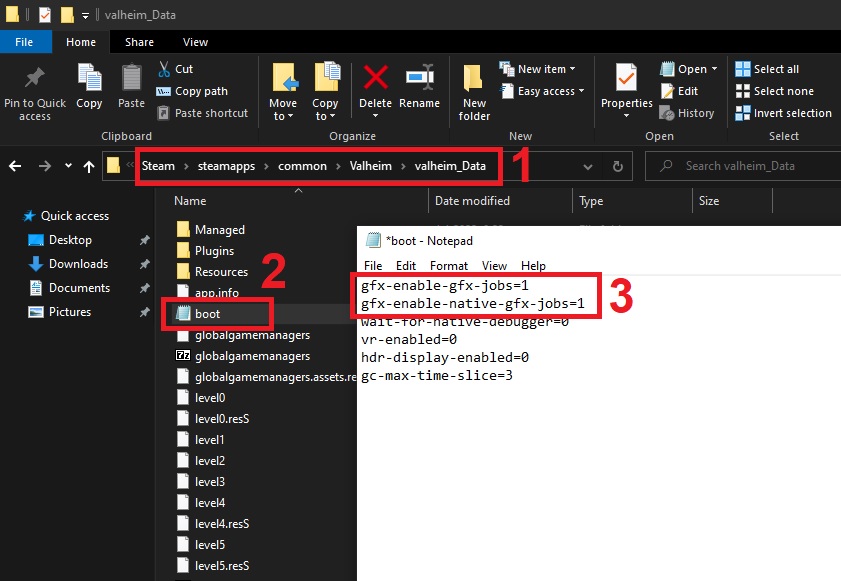 stark meadow
safe verge
really? that's a decision im not sure i understand
stark meadow
safe verge
really? that's a decision im not sure i understand
It encourages players to always end their play sessions at their home, making each session a journey from home into adventure.
It's also there to discourage players hopping into other worlds in case of a danger just so they can get the rest bonus.
 wind warren
im not entirely sure if its a bug or not, but campfire damage seems to be incredibly high at 8 dps, my buddy just died from it twice in a row since we just started a new world together
safe verge
stark meadow
It encourages players to always end their play sessions at their home, making ea...
it also just makes the game less playable if you want to or - more realistically - need to stop in the middle of an adventure/far from home.... a better fix would be to remove in on entry to a new world?
Even ending my adventures at home it's annoying to have to sit there and wait for the rebuff. Idk, does not feel well executed and the idea of "ending your play at home" exists in some theoretical world where people can afford to play the game in some idealistic way>
It also feels entirely like sabotage if you have to log suddenly and come back and youre somewhere that the lack of stamina regen will get you killed - and i was also told we need to "plan our deaths".
ripe raven
safe verge
it also just makes the game less playable if you want to or - more realistically...
Just build a portal back to your "resting area"
When I'm exploring or about to go into a boss battle, I just build little "outposts" back to my main area
This is also part of the mentality to "plan your deaths"
safe verge
ripe raven
Just build a portal back to your "resting area"
so i carry spare portal gear with me everywhere now? It's just not a good mechanic design. If they dont want people world hopping to spam rested bonus, just have it reset if last server = different.
The fact that the stated intention is to "end your journey at home" and you still need to reapply it even if you do this suggests that the mechanic is not in fact to end your journey at home but more a design to stop people from world hopping that happens to punish everyone. It just feels clunky and like it doesnt have a purpose - and if a game mechanic feels intuitively like a glitch to someone the devs should take note of that and not really try to retcon nonsense onto why it exists.
ripe raven
I do, just enough for one portal. I always thought that was pretty common if you're going into the unknown
Sometimes we just build a small shelter and a campfire and get a smaller rested bonus
safe verge
it just feels terrible and even if im very close to my house or just outside i found myself getting killed or close to it because i was unaware of this. At the very least you shouldnt have to reapply it if you end the session within your home or a base because that would actually be in keeping with "ending your session in a shelter". As opposed to "we dont want people spamming it but havent figured a way to specifically block that behavior so we put a blanket on it"
stark meadow
wind warren
im not entirely sure if its a bug or not, but campfire damage seems to be incred...
Fire damage stacks, so the more times you get trigger it, the higher the damage. First touch and it being one touch, shouldn't cause 8dmg/s.
safe verge
it also creates very incongruous gameplay with a lot of wasted time to get a buff. I don't think people should be punished for logging off, it really harms gameplay especially for shorter sessions or where you need to suddenly log off.
stark meadow
safe verge
it also creates very incongruous gameplay with a lot of wasted time to get a buf...
It's not a bug, so this discussion should be taken to other channel.
It's has been discussed over the years many time, and it's unlikely that it's going to change, for the reasons I mentioned.
If you need to rest in the wild, you can sit next to a campfire to get 8-10min of rested buff.
 plucky current
i think i found a bug in the ashlands public beta with the trolls
after killing a troll it spawned 60 more dead trolls on it
marble wolf
plucky current
i think i found a bug in the ashlands public beta with the trolls
OK, then report it in the PTB feedback channel.
balmy garnet
I have been having a bug on the server where i connect teleporters and when i go through it i have to connect them again
It only happens once but it's a reoccurring thing everytime
digital niche
anyone experienced many of the swamp specific enemies just having really buggy AI? Draugr and Abominations in particular, constantly disengage and wander off randomly even mid fight. I only play multiplayer so it might be tied to that?
It's a very constant thing, not just an occasional bug, tis why I'm curious about the rate at which other people experience it.
 drifting helm
Is there info on Steam deck and PC map desync? When i create world on one of devices it shows map properly but when im on other device its not matching
stark meadow
drifting helm
Is there info on Steam deck and PC map desync? When i create world on one of dev...
The device on which you loaded your world first, is probably the one with incorrect minimap cache files. which need to be deleted.
Probably PC, so go here %username%\AppData\LocalLow\IronGate\Valheim\worlds_local
find your world and delete the 3 files related to cache for that world
drifting helm
stark meadow
Probably PC, so go here %username%\AppData\LocalLow\IronGate\Valheim\worlds_loca...
will try tnx
drifting helm
stark meadow
Probably PC, so go here %username%\AppData\LocalLow\IronGate\Valheim\worlds_loca...
tried, didnt work. will check cache on Deck too
dont you know exact way on linux?
stark meadow
drifting helm
dont you know exact way on linux?
/home/steam/.config/unity3d/IronGate/Valheim/worlds_local
drifting helm
stark meadow
/home/steam/.config/unity3d/IronGate/Valheim/worlds_local
it worked, thanks!
 cunning delta
spruce NO LONGER grows in the mountains, is this a bug?
 hushed obsidian
Dvergers show their string of text incorrectly
marble wolf
cunning delta
spruce NO LONGER grows in the mountains, is this a bug?
When was there spruce in the game?
hard bridge
cunning delta
spruce NO LONGER grows in the mountains, is this a bug?
Fir are the only trees that grow in the Mountains, and Pine never have. It's an easy mistake to make though, I've done it myself.
 modern oracle
 marble wolf
Steam is down, that's hardly Valheim's fault.
stark meadow
@cunning delta @hushed obsidian Those two are known PTB issue. PTB bugs should be posted in a different channel: #steam-bugs-discussion message
cunning delta
hard bridge
Fir are the only trees that grow in the Mountains, and Pine never have. It's an ...
Yes, Fir* NO LONGER grows in the mountains, if that only in PTB - ok np
marble wolf
cunning delta
Yes, Fir* NO LONGER grows in the mountains, if that only in PTB - ok np
It's not in any version.
 viral wasp
Hi guys, I cannot open the game from steam. It show me something like this after I click 'start game' and then crash out. Neither 'Valheim' nor 'Valheim using Vulkan' works. Does someone know how to fix it?
 marble wolf
Update or remove your mods.
viral wasp
How do i do that? I have just redownloaded the game
viral wasp
I deleted the whole file and its fixed. Thx
tropic torrent
not sure if I should bring this up here or submit a report but I've seen an issue with jumping fish 'bouncing' off the water's surface when swells are high.
white jackal
Is it a bug that: if you are in a dungeon and get disconnected from a server it automatically puts you to the top of the skybox and drops you to your death (or high hit damage) . It has happened 3 times in my servers over the past 5 months and just now it happened
tropic torrent
sort of, but not really. In the vertical dimension, dungeons are way up in the air, above everything else.
Just like when you reconnect in-game , you arrive slightly above ground level.
marble wolf
Please report PTB bugs in the PTB channels and avoid spoilers here.
tropic torrent
you'll notice it with the mobs as well, as you move into an area, they 'pop' into being just above the earth.
white jackal
I feel like death shouldn't be nearly inevitable if the servers are messing up 🥲
tropic torrent
true. I wonder how long you'd float with a feather cape.
white jackal
Hopefully they put that in the next update, really all that would need done is to identify y dungeon position and if the player is there during initial connection spawn do a slow fall effect that can't move in any x direction (at least till a certain y level is achieved to prevent mob auto kills) (no x position change because it would allow the player to not get in places they don't belong that are high or something)
south lance
@fathom condor @crisp topaz #steam-bugs-discussion message
 tight stump
we have an issue me and my friend updated our game to th etest branch
[22:19]
we tried to log into our world we cant log in
[22:19]
says update verssion he is running an old verssion of valheim
toxic river
tight stump
we have an issue me and my friend updated our game to th etest branch
[22:19]
we...
Y'all need to be running the same version to be able to play together. What game version are each of you on?
tight stump
the last one
toxic river
Gimme a number
tight stump
i dont have his he loged off for the night
toxic river
Ah
Well, if both of you are on the same game version then you should be able to play together.
Any mods on either side?
tight stump
nope
toxic river
Are you both on the PTB? Or just him?
tight stump
bowth
toxic river
And which one of you is hosting?
tight stump
i am
toxic river
Then yeah, if both of you are on the same version, it should work.
 naive wolf
Ashland PTB - Bugs - Connected portals are not working (was working then all of sudden not working and also had a workbench with a chest completely disappear
where do i report these 2 bugs
marble wolf
naive wolf
Ashland PTB - Bugs - Connected portals are not working (was working then all of ...
In the PTB channels.
stark meadow
naive wolf
Ashland PTB - Bugs - Connected portals are not working (was working then all of ...
The same issues are happening on live version also. Will be fixed in the next PTB patch.
marble wolf
Can you report PTB bugs in the PTB channels? To avoid spoilers elsewhere.
 abstract delta
oh I am so sorry. I don't see the PTB channel. Is there a role that I need to have to access it?
marble wolf
Yeah, you can get it in by clicking on the Channels & Roles link at the top of the channels list.
abstract delta
thank you so much!
 strong topaz
I can't find the ptb bug report channel am I dumb? ;-;
toxic river
No PTB content outside the PTB channels please
You can either use #valheim-public-test for chatter or #ashlands-feedback-only for proper feedback or bug reports or such
strong topaz
ty
 marsh notch
Anyone that can offer some insight into crashes related to storms?
Got a pc that semi freezes very randomly (generally a long time in between and is client connected to server) but get no entries in the general logs (any way to add a debug/extended logs for unity stuff?) and it doesnt crash the pc per say but it seizes it up to the point of hard restart as only possibility and i dont see anything out of the ordinary in windows event or application logs either
stark meadow
marsh notch
Anyone that can offer some insight into crashes related to storms?
Got a pc that...
Black screen no sound?
marsh notch
well frozen screen (doesnt turn black) but yes sound dies just 2-5sec prior then completely freezes
amd ryzen 7 7800x3D
radeon rx 6600
32gb 6000mhz ddr5
nvme drive and so on using latest drivers for the whole thing
stark meadow
marsh notch
well frozen screen (doesnt turn black) but yes sound dies just 2-5sec prior then...
Do you have any optional AMD drivers available for instalaltion on window update section?
marsh notch
nope
stark meadow
marsh notch
well frozen screen (doesnt turn black) but yes sound dies just 2-5sec prior then...
Did you at any point adjust your clocks in BIOS or some AMD software?
marsh notch
nope, xmp is also off so ram is running at 5600 for stability
stark meadow
marsh notch
nope, xmp is also off so ram is running at 5600 for stability
Hm, I would still try resetting your BIOS setting to optimised defaults, just because Unity can be sensitive on same clocks other games might run on.
Althouhg frame freezes as not a common type of crash most people experience.
Did you check the most common crash reasons in the linked guide (pinned commends)?
marsh notch
stark meadow
Hm, I would still try resetting your BIOS setting to optimised defaults, just be...
everything is on default optimized with exception of the RAM that needs explicit sets to play nice with the x3d processor
And its by definition not crashing the client per say (which is why its not printing a crash log) but something in it is completely freezing it
 eager palm

 oblique gate
I have two portals that have disconnected on the "home side" I ran all the way out to one of them and found that the portal there still said connected. When I went through it , I was transported to a random shack a couple hundred feet away from my base in the nearby forest. Just one of those little broken down structures from the map creation, not one that I built. no portal inside I just.. spawned there.
I have tried rebuilding the broken portal but it still doesnt connect. Any clue what kind of bug Im dealing with? any help would be great as I have to run for quite a while to get back out there now. 😅
hard bridge
oblique gate
I have two portals that have disconnected on the "home side" I ran all the way ...
Unfortunately a known bug. I believe restarting the game will fix it, but until an update with the proper fix comes out it's just a weird occurrence that happens at times.
stark meadow
oblique gate
I have two portals that have disconnected on the "home side" I ran all the way ...
Playing on Live version (not Ashlands)?
oblique gate
hard bridge
Unfortunately a known bug. I believe restarting the game will fix it, but until ...
thank you I will be patient.
oblique gate
stark meadow
Playing on Live version (not Ashlands)?
appreciate the response I am playing retail.
 tight stump
i am runing it
toxic river
Should have updated automatically for him at this point?
toxic river
Platform?
toxic river
217.46 is in live branch, they would need to join the beta branch
your friend just needs to update, like
there's no way it hasn't updated automatically already, what's the last time they opened the game?
tight stump
ok how do i go back to the public
 pure oxide
not sure if this is the place to ask or not, i already put in Valheim help, but I think this may be a better place.
I hadnt played Valheim in seveal months, and when i went to play today, only the WASD and space bar work on the controls, and f2, no other controls work, no controller connected, i have never used mods at all. i cant even turn the camera. Any ideas?
i've googled and everything and can find nothing recent. I've tried to check installation files, etc, nothing works. to exit the game i have to do it from the task manager, not even ESC works
stark meadow
pure oxide
not sure if this is the place to ask or not, i already put in Valheim help, but ...
I suggest doing a short version of re-installation steps described in Section5 of this guide: https://www.reddit.com/r/valheim/comments/uq9b8x/
pure oxide
thanks, i'll give that a try
 grand abyss
Well shiet
My boat keeps self destructing for absolutely no reason, tried for over an hour with many different methods.
File was too big so i just made a youtube clip
I managed to fix it, restarted pc
 solar slate
Hey, is it me, or the Lanterns dont emit ANY light? compared to torches, or any other light source, Lanterns dont do anything.
Only if i walk really close to the light, its light appears on walls.
Yes, they are an infinite source of light, but they dont do any of it.


 solar slate
 lyric mirage
solar slate
Hey, is it me, or the Lanterns dont emit ANY light? compared to torches, or any ...
lyric mirage
solar slate
Hey, is it me, or the Lanterns dont emit ANY light? compared to torches, or any ...
Maybe check your graphics settings? Lanterns are pretty terrible, but they should be emitting more light than your screenshots.
solar slate
No matter the graphics settings, it always looks like this. i tried to change everything. Its only a problem with Lanterns, torches look fine, as shown in picture, and in the video
 copper portal
Is there an issue with portals on PTR builds? Seems like some of my portals are disconnecting for no apparent reason. I'll boat out to the 2nd portal, assuming it was broken by an enemy, but it's still standing - and will re-connect suddenly as I approach it.
marble wolf
copper portal
Is there an issue with portals on PTR builds? Seems like some of my portals are ...
Probably best to ask in the PTB channel.
gilded sluice
yes. keep PTB questions in the #valheim-public-test
lone parcel
Im finding iron scraps just laying around near crypts in the swamps, im playing the ptb. Never noticed it before, is it an old bug? its not from oozers. Watch this video
 lucid geyser
lone parcel
Im finding iron scraps just laying around near crypts in the swamps, im playing ...
lucid geyser
lone parcel
Im finding iron scraps just laying around near crypts in the swamps, im playing ...
Please keep PTB stuff in the correct channel #valheim-public-test
lone parcel
lucid geyser
Please keep PTB stuff in the correct channel <#831071697817305128>
did you watch the video or not
lucid geyser
lone parcel
did you watch the video or not
Sure. Report it to the correct channel.
lone parcel
- I'm reporting a bug here which I'm not sure if it's an old one
- It's about swamps, not Ashlands, and there are no new features related to Ashlands involved
- I first posted it in the "ASHLANDS feedback only" channel, but since it's not actually about Ashlands, I reposted it here.
- rule #13
lucid geyser
lone parcel
1. I'm reporting a bug here which I'm not sure if it's an old one
2. It's about ...
lol. PTB alters code for the entire game, not only placing content into Ashlands.
toxic river
lone parcel
1. I'm reporting a bug here which I'm not sure if it's an old one
2. It's about ...
It should still stay in the PTB feedback channel if it's a bug pertaining the PTB version. There's no spoilers, true, but it's more helpful to the team to keep any PTB reports contained to the appropiate locations.
If you can also reproduce it on the live branch, now that's worth posting here as well
 tall sun
ive noticed a recurring bug that i havent been able to reliably replicate. i play in a server with one other person (non dedicated) on a system which exceeds recommended specs. the bug is triggered during combat when i sip a mead. im starting to think it happens if i roll too soon after beginning the animation to sip the mead. the result is my character entering a state that seems like 0.2x speed while the rest of the world continues as normal. this leads to my character taking a lot of hits before the roll animation is finished, and it typically clears up just before the end of the roll (maybe 5 seconds after the bug begins it's effects). i have done nothing to try to fix this problem except for verifying integrity of files on steam, which did not fix it
stark meadow
grand abyss
My boat keeps self destructing for absolutely no reason, tried for over an hour ...
Do you remember how much time has passed since you started that play-session and your boat starting to get damaged?
stark meadow
tall sun
ive noticed a recurring bug that i havent been able to reliably replicate. i pla...
It's a known and old bug. Doesn't happen often so it has lower priority to fix.
 upbeat haven
I have a portal that keeps disconnecting on PBT, Ive actually set up 4 portals so far and they disconnect after I re-load the area, by either logging out happened once, and traveling through it.\
stark meadow
upbeat haven
I have a portal that keeps disconnecting on PBT, Ive actually set up 4 portals s...
It's a known issue. Report and track PTB issues in another channel please: #steam-bugs-discussion message
upbeat haven
stark meadow
It's a known issue. Report and track PTB issues in another channel please: https...
tysm will do
tall sun
stark meadow
It's a known and old bug. Doesn't happen often so it has lower priority to fix.
I'm glad it's known, but i disagree that it doesn't happen often. Every time i play it happens at least a handful of times. Maybe it's my gaming style because i transferred immediately sipping an estus flask before rolling away from a boss in dark souls to the equivalent in valheim?
grand abyss
stark meadow
Do you remember how much time has passed since you started that play-session and...
I posted a video but didn't send.
stark meadow
grand abyss
I posted a video but didn't send.
File might be too big? You can DM me the link if you have it.
grand abyss
sec
 safe shale
Skuggs don't drop items in my world on PTR. Cleared at least 80% of the fortresses and got 0. No mods. Wonder if anyone know if its fixable
lucid geyser
safe shale
Skuggs don't drop items in my world on PTR. Cleared at least 80% of the fortress...
PTB stuff should be posted in #valheim-public-test
 grizzled star
Okay I have a very weird and frustrating problem, and I couldn't find any help anywhere else. I accidentally crafted a bronze sword, so I saved the world, to duplicate some bronze and delete the sword by ending the game in the task manager, yeah shame on me. But when I started the game again my character was gone. There are still save files but the top one says deleted. I restored the "old" safe but that didn't help. I tried putting it into the character file wich also failed. I wanted to create a new character with the same name in order to kind of overwrite it with the old file but that also didn't work. I assume it's not possible to have to characters with the same name because the new one just poofed away when i pressed "ready" I don't know if this is the right place to look for help but I didn't find anything else. I'll send a picture of the safes menu.

 random fulcrum
lucid geyser
PTB stuff should be posted in <#831071697817305128>
random fulcrum
lucid geyser
PTB stuff should be posted in <#831071697817305128>
How do I get access to that channel? It says no access. I'm playing the PTB now.
stark meadow
random fulcrum
How do I get access to that channel? It says no access. I'm playing the PTB now.
 stark meadow
grizzled star
Okay I have a very weird and frustrating problem, and I couldn't find any help a...
stark meadow
grizzled star
Okay I have a very weird and frustrating problem, and I couldn't find any help a...
You've basically crashed the game while it was trying to save your character, which resulted in your having this corrupted character saves file (greencoat.fch.new) that the game doesn't expect to exist. Delete that file and restart Valheim, then restore one of your character backups.
 stark meadow
grizzled star
stark meadow
grizzled star
You did the part where you delete greencoat.fch.new and restart the game?
grizzled star
yes
stark meadow
grizzled star
yes
When you go to your This PC app, do you see any of your storage drives running out of free storage?
 grizzled star
 stark meadow
grizzled star
stark meadow
grizzled star
Seems fine. Probably .old is also corrupt. I would also quit valheim, restart steam, then try restoring your top most autobackup save.


 stark meadow
grizzled star
I restarted steam and valheim, then this folder popped up
stark meadow
grizzled star
I restarted steam and valheim, then this folder popped up
You'll have to delete this one as well before you do any restoration:

After deleting it, restart Steam again. No .smtp or .new saves should appear in the character menu after loading the game.
If that happens again, you might need to manually remove such files while Steam process is shut down.
grizzled star
Yes, now it worked! THANK YOU SO MUCH
 thick basalt
hey guys! came across a strange issue that i cant seem to beat. ill post my console output at the bottom here for more context
i play valheim on two computers (my home PC and a laptop i play when im out of my house). i have only ever played singleplayer, or on the same server as my partner with no one else. today i was playing with my partner and out of nowhere the server kicked me out, and when i tried to reconnect, i would get "failed to reconnect, please check that you are connected to the internet, retrying in x seconds".
things i tried that didnt work:
-restarting my game
-turning off my mods
-turning off my firewall
-reinstalling my game entirely. aka deleting all my locallow files and appdata and everything
-playing it on my other computer
looking in my console, i get an error where its unable to connect me to playfab for some reason, saying that it cannot find destination host. i can still run my singleplayer worlds just fine, but i cant do anything in multiplayer because it cant connect me to playfab.
stark meadow
thick basalt
hey guys! came across a strange issue that i cant seem to beat. ill post my cons...
Mods can cause connection issues. Please remove them before posting your logs here.
What you should test next is if you can reach password prompt for some random server in the community tab that is on the same Valheim version.
You should test two types of such server. One Steam (has key icon 🔑) and one Crossplay one (hey key icon🔑 + arrows icon 🔀 ).
ionic niche
Hello i play on a server and i had an issue with the portal. I went through and it got disconnected. I had to break it and re build it.
We play on the regular version not the ptb
thick basalt
stark meadow
Mods can cause connection issues. Please remove them before posting your logs he...
heres my log taken from locallow, i was using bepinex to just check my console in an accessible way. there are no mods or anything loaded on this game but im having connectivity issues. my game itself was not connecting to the playfab server before i can even think to join any servers. the loop of cannot find destination host loops over and over without any user input. it resolved itself a few hours later, and my guess is that there was a slight outage on the playfab server my game logs into specifically
stark meadow
BepInEx is a mod, and it by itself can cause all kinds of issues, although unlikely that it was the cause of your issues here.
Most likely what you say, some region specific problem with PlayFab services. If it happens next time, check if you can reach password prompt for steam servers.
General issues are often reported here: https://support.xbox.com/en-US/xbox-live-status
 lament shard
the draugr that spawn up the stairs in the crypts are blocked off by the chests and are unable to reach down
 balmy garnet
I want to report a bug, when I use the large crossbow after firing a shot the character stops, doesn't move, doesn't reload, simply becomes a statue I've already died a few times hahaha
 full path
fix this valhiem devs, fix steams decade + of poor UI scaling
 south lance
full path
fix this valhiem devs, fix steams decade + of poor UI scaling
south lance
full path
fix this valhiem devs, fix steams decade + of poor UI scaling
You're telling the devs of one game to fix the issues of the platform they only use to sell their game?
Wouldn't you think contacting steam support itself would be better? Or wherever they could use as feedback or suggestions
marble wolf
I THINK it's supposed to be tongue in cheek, but I don't know. The issue is partly one IG can fix though, just use a shorter string for the beta name.
 grave oak
Hi Team
Im trying to connect to a crossplay server of a friend. It is the first time i try this.
I get a problem window indicating : Playfab could not load.
Actually, i already downloaded the correct x86 install, installed it, reboot, relaunch...
No change.
Please could you help me with this if its known? Thanks by advane
 stark meadow
grave oak
Hi Team
Im trying to connect to a crossplay server of a friend. It is the first ...
stark meadow
grave oak
Hi Team
Im trying to connect to a crossplay server of a friend. It is the first ...
It is unlikely that you would have to install X86 version of the package, rather X64 one.
Which OS do you have?
grave oak
Hi MaCarBre, its a Win10 22H2 on a x64... indeed ...
Ok, i go back to MS
I make this change and come back
It works perfectly ! A big thanks and a big hug to you !!
 brisk trench
Hello, I have a big problem. I was modding the game with a lot of mods via thunderstore, some were outdated (I think) which caused the game to implode. When I launch the game my screen becomes a soild color. The audio in the start up menu is fine though. Also when I lanuch the game via steam, the problem still remains. I have uninstalled the game and verifed the files several times, and nothing seems to work. (The screenshot is what it looks like.). I have never encoutered this problem before. I'm playing on the Live version of the game, and not ashlands. I hope someone can help me lol, Thank you.
 stark meadow
brisk trench
Hello, I have a big problem. I was modding the game with a lot of mods via thund...
stark meadow
brisk trench
Hello, I have a big problem. I was modding the game with a lot of mods via thund...
Hey, do the short installation described in Section5 of this guide: https://www.reddit.com/r/valheim/comments/uq9b8x/
brisk trench
stark meadow
Hey, do the short installation described in Section5 of this guide: https://www....
Thank you so much, it worked like a charm 🙂
 cunning vector
We (my party) are having a lot of issues with portals. This is the regular version of the game, NOT public test. Our portals will disconnect and we have change the name of the portals to a random anything.. then change the name of the portal back to what we name it. Sometimes we have to actually destroy the portal and re-build the portal for it to work. Last night I was stranded in the swamps because of this.
stark meadow
cunning vector
We (my party) are having a lot of issues with portals. This is the regular vers...
It's a known issue on the live verson. A bunch of portal related issues have been fixed on PTB version (Ashlands).
cunning vector
ok.. thank you
 echo niche
Hello, I downloaded the ashlands branch and loaded in a new character on a new server and when I switched back my recent saved world with lots hours spent on it says [BAD VERSION] and wont restore any backups..
So I decide to just play on the ashlands branch on that server since it only works there and now my main character is only available to play on Ashlands and wont restore a backup on the regular branch.. any help or do I have to restart 💀
toxic river
echo niche
Hello, I downloaded the ashlands branch and loaded in a new character on a new s...
That's by design. Saves are not backwards compatible.
Any saves run on a later version of the game cannot run on an earlier version.
echo niche
I never once opened my server on ashlands though and when i switched it still sad bad version, then only after it said that I decided to play it
when the game updates will my world/character be playable?
toxic river
Yes
echo niche
Epic
toxic river
They'll continue to work just fine in the PTB as well
echo niche
Thanks for your help
 velvet helm
Hubby and I are playing on PTB rn and we went through 7 swamps before finding any crypts... Did we just get a bad seed or are any of you running into this issue too?
Also he keeps randomly getting disconnected even though neither of us are losing internet
 daring cipher
velvet helm
Also he keeps randomly getting disconnected even though neither of us are losing...
daring cipher
velvet helm
Also he keeps randomly getting disconnected even though neither of us are losing...
do you want an amazing seed??
velvet helm
Sure
daring cipher
because i have one thats nuts ill dm you a picture of the whole map then the seed
done
 balmy turret
hello everyone, my friend and I play on his server, he is the admin there, please tell me how he can give me admin rights
lucid geyser
balmy turret
hello everyone, my friend and I play on his server, he is the admin there, pleas...
Start here: #dedicated-server message
 tropic eagle
velvet helm
Hubby and I are playing on PTB rn and we went through 7 swamps before finding an...
tropic eagle
velvet helm
Hubby and I are playing on PTB rn and we went through 7 swamps before finding an...
swamp too small
and i can stream any app in discord except valheim 😭
i launch valheim with vulkan and i did the force fullscreen thing
someone help me ;-;
stark meadow
tropic eagle
swamp too small
What's the issue you have throuble with?
That you can't stream Valheim via Discord? Have you tried using regular d3d11?
tropic eagle
stark meadow
What's the issue you have throuble with?
That you can't stream Valheim via Disco...
i can stream any app in discord except valheim 😭
i launch valheim with vulkan and i did the force fullscreen thing
what is d3d11
lone parcel
This is a pain. Takes 10 minutes to load them onto a boat and then they die in seconds
Its an old bug that seems to never get fixed. I guess people just gave up reporting it
On the wiki it just says "unknown entities". As you can see in the videos, there were no fish or rocks, just unknown entities.

It's beyond frustrating when you encounter this bug. In my last playthru I had to resort to using commands to spawn animals, which totally ruined the experience cause it felt like I was cheating. That playthru didn't last long
 rose jetty
Anyone else having trouble mining copper nodes on the PTB? We have at least one node where if you hit it with an antler pickaxe in most places, nothing happens. If you poke around for a while you'll find a spot where you get damage numbers, and eventually you'll see some material breaking underneath the surface. But the exterior of the node remains intact and further hits do no damage. Some nearby nodes seem fine/normal.
stark meadow
rose jetty
Anyone else having trouble mining copper nodes on the PTB? We have at least one ...
Can you paste the seed and screenshot where the copper note is located?
rose jetty
stark meadow
Can you paste the seed and screenshot where the copper note is located?
Yep. Seed is NmhPT0XMEM. I'll go grab a screen.
Also: No mods. Current PTB version. Dedicated server (Bisect).
stark meadow
lone parcel
This is a pain. Takes 10 minutes to load them onto a boat and then they die in s...
Can't say I've seen many players complaining about this, to the point I wasn't even aware that this was happening.
I've transported many boars as well, and never had this happen.
Did some testing now and seems like they can indeed instantly die as soon as they start walking in the ship.
Best to keep them harpooned while driving the ship, while they swim in water, until a better solution is found.
lone parcel
Its been here forever
rose jetty
stark meadow
Can you paste the seed and screenshot where the copper note is located?
Here's the screen grab with the mini map showing location relative to spawn. I've hit pretty much every surface point on that node and none of it breaks, though a few points allowed hits to slip through to underlying layers did break. The red circles next to the player are sparkles from underground rock/ore that crumbled from hitting a weak point.
 stark meadow
rose jetty
Here's the screen grab with the mini map showing location relative to spawn. I'v...
stark meadow
rose jetty
Here's the screen grab with the mini map showing location relative to spawn. I'v...
Probably a multiplayer issue. Have you treid to restart a server? Do you have a boat nearby?
rose jetty
stark meadow
Probably a multiplayer issue. Have you treid to restart a server? Do you have a ...
We're currently a fresh seed two-player server, and we don't have any boats yet. I restarted the server fresh this morning when I noticed there was a patch, I was the only one logged in, and had the same behavior. The surface of that node is unbreakable. Nearby dirt and small rocks broke fine. Another nearby copper node broke fine.