#networking
1 messages · Page 72 of 1
 past inlet
 opal pagoda
past inlet
Howdy I've had the issue of my steam not using much of my internet so the downlo...
opal pagoda
past inlet
Howdy I've had the issue of my steam not using much of my internet so the downlo...
Try changing steam download region
 left oriole

Tailscale is a free, with low subscription cost options, and scalable service that allows you to make a secure private network. Upload your media and invite your friends to upload theirs, and pretty soon you've got a safe and secure "internet" of your very own!
Download here! https://tailscale.com/download
Read our article summary here: https:/...
 mortal stratus
I have a ubiquity network at home with a couple of wired APs. I'm looking to possibly add a couple of mesh APs in a couple areas to fill in a couple of shadows, and possibly extend wireless out to a detached garage. (probably 20ft from the house but both APs are on the opposite side from the garage).
my two current APs are a U6-lite and a U6+.
should I just look at getting a U6 extender and plug it in on the wall closest to the garage and see if that helps to extend the signal out that side of the house?
 rich ruin
Unifi thinks my Windows 11 PC is a Lenovo ThinkSystem SE350 Edge Server, every other device connected to my network is what it should be. Did I get hacked or something?
 silent flax
rich ruin
Unifi thinks my Windows 11 PC is a Lenovo ThinkSystem SE350 Edge Server, every o...
silent flax
rich ruin
Unifi thinks my Windows 11 PC is a Lenovo ThinkSystem SE350 Edge Server, every o...
what does it base the detection on ?
 carmine roost
Any recommendations for an affordable 10Gb/s switch? I'm gonna bite the bullet at grab Beanfield's 8gb/s syncronous Black Friday deal. $60/month is pretty reasonable.
silent flax
rich ruin
Unifi thinks my Windows 11 PC is a Lenovo ThinkSystem SE350 Edge Server, every o...
i mean it could be deciding based on MAC address, but that would only tell it it's Lenovo (based on first 3 parts of the MAC address). Don't think there is a way to directly detect a system more detailed than that
rich ruin
silent flax
what does it base the detection on ?
what do you mean by detection?
silent flax
rich ruin
what do you mean by detection?
where does it say that for you ?


 topaz patrol
Report as incorrect, move on with life
rich ruin
This is the first time it showed up as something else
topaz patrol
UBNT is just guessing based on MAC address and user feedback
silent flax
that looks like device fingerprinting, which is based on MAC address, so your system is probably Lenovo, or your random MAC address fell into the Lenovo reserved area
rich ruin
silent flax
that looks like device fingerprinting, which is based on MAC address, so your sy...
My device is definitely not Lenovo
silent flax
you can even edit that if you wish it seems
topaz patrol
silent flax
that looks like device fingerprinting, which is based on MAC address, so your sy...
Windows shouldn't be using those for MAC randomisation
silent flax
well show us first three numbers of the network card MAC address. FOr example mine starts with E8:9C:25, which is ASUS
 topaz patrol
x2-xx-xx-xx-xx-xx
x6-xx-xx-xx-xx-xx
xA-xx-xx-xx-xx-xx
xE-xx-xx-xx-xx-xx```
Are the only addresses that should be used for MAC randomizationI don't have a network card it's plugged into the MOBO
silent flax
which is a network card
topaz patrol
topaz patrol
```
x2-xx-xx-xx-xx-xx
x6-xx-xx-xx-xx-xx
xA-xx-xx-xx-xx-xx
xE-xx-xx-xx-xx-xx```
A...
Otherwise devices would conflict
silent flax
 rich ruin
Realtek Gaming 2.5GbE Family Controller
silent flax
but again, if the mac address of that device matches the mac address of your device, it is just wrong fingerprinting on Unify side
rich ruin
04-7
topaz patrol
silent flax
Hello Mr. Paranoid :p
 plain siren
you dont have to block your dns suffix or internal ip
topaz patrol
Yeah lol
silent flax
plain siren
you dont have to block your dns suffix or internal ip
i do have to, it is my own TLD with personally identifiable information 🙂
it is not home.local or stuff like that 🙂
silent flax
rich ruin
04-7
to be able to do anything, first 3 segments are needed, like in my picture. in your case 04-7x-xx
rich ruin
silent flax
but again, if the mac address of that device matches the mac address of your dev...
The mac address of the Realtek controller is the same as my "PC" in unifi
topaz patrol
Report as incorrect, move on with life :)
rich ruin
topaz patrol
Report as incorrect, move on with life :)
how do i do that?
Do I submit a ticket on their website or is there a way to report it in Unifi?
 acoustic atlas
So, if I need a usb to RJ45 console cable by tomorrow, and no one in my town sells them, how might I go about getting one. Or am I fucked.
topaz patrol
rich ruin
how do i do that?
I believe there’s a button when you click the device
Or just rename it
topaz patrol
acoustic atlas
So, if I need a usb to RJ45 console cable by tomorrow, and no one in my town sel...
What kind? There are different kinds
acoustic atlas
Working with n2048p
 topaz patrol
I know there are some UPSs for example that use a completely different pinout to a Cisco rollover cable
And do you have a serial port?
Or just USB?
acoustic atlas
Just usb but technically I could do usb to serial then serial to rj45
topaz patrol
That makes it easier
acoustic atlas
Yeah but not really when I still can’t find a serial to rj45 :p
acoustic atlas
I have also realized the “near me” feature on Google no longer works for this because every store just lists it for delivery “near me”
acoustic atlas
topaz patrol
~~If you don't have a DB9 connector just jam the cables in~~
So, let me make sure I’ve got this right. USB to female db9, then grab an Ethernet cable, crimp one end, and just stick the other end in the open holes?
topaz patrol
Yes, with the correct pinout ofc
RTS 1 -> 8 CTS

DTR 2 -> 6 DSR

TXD 3 -> 2 RXD

GND 4 -> 5 GND

GND 5 -> 5 GND

RXD 6 -> 3 TXD

DSR 7 -> 4 DTR

CTS 8 -> 7 RTS```Kek. Honestly, it’s the only idea I realistically have left 
NO WAIT my boss has female db9 to rj45
I just need a male db9
topaz patrol
lol
acoustic atlas
I thought it was a female db9 to usb, I remembered wrong
topaz patrol
That's a part you can't really diy
 tropic briar
hi guys today i was trying to portforward, and when i've been having some issues. when i check the port checker, it says port 80 is open, but when i do it for port 443, it says its not, and im pretty sure i did the exact same thing. it also doesnt work with 25565.
 peak cloak
tropic briar
hi guys today i was trying to portforward, and when i've been having some issues...
peak cloak
tropic briar
hi guys today i was trying to portforward, and when i've been having some issues...
do you have a server behind it. If you just "open" it on the router it won't do anything
tropic briar
peak cloak
do you have a server behind it. If you just "open" it on the router it won't do ...
i dont think so, but whatever i did for 80 doesnt work for any other port
tropic briar
peak cloak
do you have a server behind it. If you just "open" it on the router it won't do ...
hey also i was just going through my wifi settings and saw this, do you think that this is the issue
 peak cloak
Are you using ipv6 address to test?
tropic briar
no i think ipv4, the reserved one
acoustic atlas
topaz patrol
That's a part you can't really diy
Apparently it’s a part you can’t fuckin buy anywhere either
But I’ve got a usb to db9 and a db9 to rj45, so we gonna see
plain siren
acoustic atlas
But I’ve got a usb to db9 and a db9 to rj45, so we gonna see
Out of curiosity, does the device you are working with have an IPMI Card or BMC
or if you have another PC/server with DB9 you could just use that
acoustic atlas
plain siren
or if you have another PC/server with DB9 you could just use that
Nope. This was my only option :p
Also I can hit the network interface but someone set a password and we don’t have it. And I don’t want to reset the switch due to possible vlan configurations
 tepid crag
Hi everyone
left oriole
Love to see my pihole in action, blocking ads

 craggy fiber
I'm new to doing networking but we got a new modem and has only 1 port for ethernet. I connected it my mesh network hub then to a switch but I'm loosing a lot of the speed from the hub. I tried to connect the switch first then hub but had IP address issues as devices slowly started to not work.
What would be the ideal setup or best way to fix this? New switch or mesh routers?
 clear igloo
craggy fiber
I'm new to doing networking but we got a new modem and has only 1 port for ether...
clear igloo
craggy fiber
I'm new to doing networking but we got a new modem and has only 1 port for ether...
Modem will hand out the public IP address to the first thing to ask, so if you go Modem > Switch > devices + router then you'll have tons of issues
Modem > Router/Mesh system > Switch off the main node is the ideal setup
If you're hanging the switch off a mesh node that's not the main node then that would explain a good part of the bandwidth loss depending on the environment
craggy fiber
The switch is off the main mesh node however am loosing a lot bandwidth. Probably due for an upgrade on the mesh network as its been more then a few years. Thanks for the clarification. Any recs on mesh network hubs?
clear igloo
What model mesh?
and switch too, just making sure something isn't stuck with a 10/100 megabit port
Unless the mesh hub has serious issues wired speed shouldn't really tank unless something is limited with only 100 megabit ports or a cable is damaged
craggy fiber
Deco X60
I never thought about the cables, always just have used them as they were never the bottleneck...
Switch is a netgear 16 gigabit switch
clear igloo
Hmmm, interesting, if you bypass the switch with a computer are there any issues still?
Not really up to speed on the mesh stuff these days but off and on I'll see TP-Link mesh stuff with generally good mentions
craggy fiber
Issue exists intermittently on the wireless devices as they just buffer
If I go router to computer same speed basically
clear igloo
Have you rebooted the modem since swapping router to switch and back to router afterwards?
craggy fiber
Yes few times
clear igloo
ok, hmmm, you could try picking something up on amazon just to see and return it if you want to go that route, lol
At least it would give you a new data point with something else
craggy fiber
Not a bad idea lol might be doing that
 lost lily


 plain siren
Why is it so hard for me to Masquerade the 1:1 NAT AWS does on their EC2 Instances so I dont have to deal with Public/Private Advertising configs
 pseudo blade
"To masquerade the 1:1 NAT"?
pseudo blade
plain siren
Why is it so hard for me to Masquerade the 1:1 NAT AWS does on their EC2 Instanc...
Are you perhaps missing that AWS blocks output of routed packets by default?
Not sure what else you'd mean
 long scarab
i had my fun, now i gotta glean this shit up (third screenshot)


 spark torrent
Would it be possible for network settings on an Xbox to cause the reset of the network/router to have problems when that Xbox with whatever network settings is connected?
Long story short there’s an Xbox in my house which was connected differently then everything else. We had ran some Ethernet cables to try and get it connected to the same network as the rest of the house but everything was until the couple times we did plug it in. I’m not 100% it’s the issue but everything had been issue free for a while so its weird to randomly see issues now and that’s the only thing that’s different or new so I was just curious if custom network settings on the device could cause problems with the rest of the network. I didn’t think it made sense but wasn’t sure if maybe somehow the custom settings are spamming or DDoSing our own network some how
 fickle lily
i can use pfsense as gateway even i have no lan connected to it right? So my setup is a pfsense running through the vm then a direct attach virtual connection .
pseudo blade
fickle lily
i can use pfsense as gateway even i have no lan connected to it right? So my set...
Tell us a bit more about your goals - what's the PFsense router's purpose? Want another subnet for VMs for a homelab for example?
I rewrote my response like 3 times then realised your ask is too ambiguous to really answer your question properly
fickle lily
So like if you have pfsense you have a wan port which connects to your router right ? then you have seperate either nic to be able to connect to a switch or device directly . BUT lets say i want to use the pfsense to test captive portal without the seperate nic (i am running pfsense in laptop via vm) i would only use the ip address i used to access pfsense in browser as gateway ?
pseudo blade
You need to control the user's DNS and DHCP to implement captive portal
Probably easier to just set up a dedicated VM for that testing if you don't want to mess with your laptop's settings though
fickle lily
pseudo blade
Probably easier to just set up a dedicated VM for that testing if you don't want...
ohhh you mean seperate device? my laptop is the server lol
it is broken laptop reporpuse
pseudo blade
Probably not the hypervisor but you could if you really wanted to
 pseudo blade
Yeah no graphical VMs are going to fit on the free memory of that unless you're cool testing with dillo and icewm on Linux :P
fickle lily
 pseudo blade
I love the picture Acer used

"Get support on the ewaste netbook somewhere in this pile maybe"
fickle lily
yea and repurpose it lmao. Its monitor is broken so i just remove it and install ubuntu server
works great been planning on putting 8gb ram on it .
pseudo blade
I used an old aspire one zg5 as a Linux server for a few years
It was very low performance but who cares, it only served files and stuff for a house
Faster and more memory than a Pi at the time and free to me
fickle lily
but anyways made the pfsense work do i need the other nic to use it or i can use the ipaddress of pfsense to as gateway to my pc ? I think it would simutlate me connecting into one of the lan ports if i have dongle
fickle lily
pseudo blade
Faster and more memory than a Pi at the time and free to me
yea . this is also passive cooling so turn off pc and it is quite asf
pseudo blade
fickle lily
but anyways made the pfsense work do i need the other nic to use it or i can use...
The problem you're going to run into is that you don't have a second network at l2, so you could use a usb NIC or you could use a VLAN (If you had enough RAM to run W10 or something in a VM I'd say test with that... but you do not
 pseudo blade
For VLANs you'd need a switch or router capable of handling that and your stuff doesn't look like it is
fickle lily
decapitated laptop lol
pseudo blade
They work better with the screen on, free KVM
fickle lily
pseudo blade
For VLANs you'd need a switch or router capable of handling that and your stuff ...
ohhh the ONT has vlan as far as i know
pseudo blade
Ah, but probably not VLANs for you
fickle lily
welp it is not for me lmao
i guess would buy usb nic with a router . I plan to hand out voucher of sort for people to connect to wifi lmao . like 1 month pass they buy to me
pseudo blade
If this is a moneymaking enterprise there are consultants for this sort of thing
fickle lily
pseudo blade
If this is a moneymaking enterprise there are consultants for this sort of thing
no . not really
just to help me pay the internet bills lmao . split the bill of sort
 silk trench
Yeah i give up

It went up to 150 megabits for like 3 sexonds and now it's back to 50
I can't tell if something is wrong on my end or my specific steam cache is literally being beaten to death by the number of contemporary downloads for this game
Nvm changed download cache location and i'm getting my full 300 megabits
That poor server must have been getting absolutely tortured
fickle lily
pseudo blade
Tell us a bit more about your goals - what's the PFsense router's purpose? Want ...
if i use the pfsense to do fall back like 2 ISP i would want the main internet line to be in Ethernet port of the laptop right ?
then the 2nd one is in usb 3.0 to ethernet
then my lan which i will connect my 8 Ports will be in the usb 2.0 to ethernet adapter
 cinder plank
I got one of these https://www.aliexpress.com/item/1005006473745641.html and a pair of these https://www.aliexpress.com/item/1005005199153737.html (550m MM) they work well of I plug them both into my ruckus switch to two vlans but I don't get any actively with this switch. Any ideas, is the switch just DOA?
 plain siren
fickle lily
ohhh the ONT has vlan as far as i know
plain siren
fickle lily
ohhh the ONT has vlan as far as i know
Out of curiosity who is your carrier?
plain siren
cinder plank
I got one of these https://www.aliexpress.com/item/1005006473745641.html and a p...
how are you powering that switch
oh its got DC on the back, its not the DIN verison
 grand ingot
For wanting to boost a routers capability in communicating with nearby cellular towers, is the best method a specific type of Antenna or Satelite Dish? Or maybe other ways? Currently running Xfinity Gigabit Extra 1200 Mbps (No fiber in the area). Private router instead of an Xfinity router? What would you recommend?
pseudo blade
cinder plank
I got one of these https://www.aliexpress.com/item/1005006473745641.html and a p...
You made sure the two Ruckus switchports are untagged?
plain siren
grand ingot
For wanting to boost a routers capability in communicating with nearby cellular ...
Wait im not understanding
Are you asking about how to boost cell connectivity for your Internet?
Which is Xfinity?
Or was that a different line of questioning
You need to use a proper listed cell booster if you are going to use one
topaz patrol
plain siren
Wait im not understanding
Yeah I think they need to clarify a little
grand ingot
plain siren
Are you asking about how to boost cell connectivity for your Internet?
I want my router to communicate with the cell tower faster for less ping.
plain siren
you have xfinity gigabit though
grand ingot
Yes
grand ingot
The router does not communicate with the cell tower?
grand ingot
Does the router communicate straight to my ISP then?
plain siren
over DOCSIS (Coaxial) yes
topaz patrol
grand ingot
Does the router communicate straight to my ISP then?
What cords are plugged into your router
grand ingot
Let me go check
topaz patrol
plain siren
over DOCSIS (Coaxial) yes
You're horrible at L1 support :p
topaz patrol
You do. You have to show them what's going on
grand ingot
A round cord which I believe is the Coaxial, along with power cord, and 2 ethernet cables.
topaz patrol
grand ingot
A round cord which I believe is the Coaxial, along with power cord, and 2 ethern...
The coaxial cable is how you get your internet
plain siren
topaz patrol
You do. You have to *show* them what's going on
I did that for years on this server.
grand ingot
Oh
topaz patrol
plain siren
I did that for years on this server.
I know
plain siren
yalls turn
grand ingot
Thank you for the clarification
plain siren
grand ingot
Oh
if you having odd connectivity issues, it may because of the connection outside (usually in like a pedestal or if you are in something like a trailer park or whatever, directly to the pole) are degrading/exposed to the elements/other kinds of damage.
Coaxial is very fucking picky
In fact, if someone upstream of you happens to have their modem not plugged in correctly, it can cause noise downstream to you
grand ingot
No connectivity issues or anything, I just wanted lower ping in games haha
plain siren
its as good as its going to get
plain siren
whats the ping
grand ingot
Like on internet speed test?
plain siren
and in game
grand ingot
Valorant I get around 30-40, same with Rust
topaz patrol
That's fine
grand ingot
Google is showing 9 ms to Miami
topaz patrol
Blame your skills, not the latency :p
grand ingot
?
I want to make sure everything I have is the best it can be for when I build my new pc
topaz patrol
It'll be fine, and you can't help it anyway
grand ingot
Yes, I know that know. Thank you Rouing.
left oriole

Thanks to PCBway for sponsoring this video! https://www.pcbway.com/
Links, relevant to the video:
➡️ My BlueSky profile: https://bsky.app/profile/zaman.io
➡️ Cross compilation tutorial: https://docs.mono.si/tutorials/development-set-up
➡️ DPDK: https://www.dpdk.org/
➡️ VPP: https://fd.io/
CHAPTERS:
0:00 You asked for open source!
0:30 We spoke...
This dude making his own router
cinder plank
pseudo blade
You made sure the two Ruckus switchports are untagged?
Oh, good point. I'm not really too sure, sine I'm very new to switch management.
It is a ruckus ICX7510-C12P.
show running-config vlan 10
produces:
 untagged ethe 1/1/1 ethe 1/2/1 ethe 1/3/1
!
!```

1/1/1 is lan computer, 1/3/1 is the sfp port. Does this mean it is setup correctly?it is from philippines . GLOBE Telco lmao
why?
cinder plank

There also aren't any activity lights next to the sfp port... Shouldn't there be some lights even lights with a transiver but no fiber?
clear igloo
cinder plank
There also aren't any activity lights next to the sfp port... Shouldn't there be...
usually not until link is up
cinder plank
clear igloo
usually not until link is up
Ok, do you know if this config is correct? #networking message shouldn't it just be plug and play like ethernet?
clear igloo
cinder plank
Ok, do you know if this config is correct? https://discord.com/channels/37543662...
Not always, you might need to configure the port itself and bring it up
Not sure the exact syntax for ruckus though but I know Cisco is no shutdown
Seems to be (or at least was)
interface ethernet x
enable
cinder plank
clear igloo
Not always, you might need to configure the port itself and bring it up
Not sure...
I looped the fiber back to the ruckus to the second sfp on a second vlan and that works, that means the ports are up right?
clear igloo
cinder plank
I looped the fiber back to the ruckus to the second sfp on a second vlan and tha...
yup
Same SFP used?
cinder plank
Yep
clear igloo
Or I should say did you pull the SFP from the mini switch and use it in the ruckus and it came up
cinder plank
Yes
clear igloo
weird, hmmm
clear igloo
cinder plank
Yes
what model is the mini switch?
The SFP used is a gigabit SFP right? Not a 10g one
cinder plank
Yes.
cinder plank
clear igloo
what model is the mini switch?
Not much info or model name #networking message
The pcb says su1006gpbt
And it is based on a rtl8367s
clear igloo
Ah, did you use the same cable by chance or a different one when doing loopback?
cinder plank
Same, just unpluged the sfp an plugged it in the other switch
clear igloo
weird, because those SFPs you got are single mode (1310nm is single mode, 850 is multi mode) and the cable is multi mode
clear igloo
Ah, interesting, yah they show pictures of both but the 550m one claims mm but there are pictures that say 1310nm that show up first. Might just be an aliexpress thing
ok, I refreshed the page and it defaults to the right picture now, lol
so that's not it either =/
Wait, I see the 6 lit up on the switch, so that tells me it might be up?
cinder plank
They are these
 clear igloo
yah, you're good then, just bad page loading on my side
cinder plank
clear igloo
Wait, I see the 6 lit up on the switch, so that tells me it might be up?
?
clear igloo
on your picture above PWR there is a second light with 6 above it
That tells me 6 is up, in theory
and 6 is the SFP port
BT might be for poe
cinder plank
🤔 Ill test
clear igloo
Yah, the docs and layout aren't great but I think AT and BT, where your purple arrow points, is for something else and the two green lights PWR and 6 are for the switch powered up and the status of the SFP port respectively
cinder plank
Ok. I'm not at it atm. I'll @ you when I am and ill test what lights are on with the sfp disconnected 👍
clear igloo
cinder plank
Ok. I'm not at it atm. I'll @ you when I am and ill test what lights are on with...
cool!
fickle lily
has anyone used haplite router?
mikrotik ?
thus they support api that i can use to alter stuff in router ?
cinder plank
clear igloo
cool!
@clear igloo 😆🤦♂️ thanks for your help, the 6 light does come on when the there is a fiber link... It turns out we were on a wild goose chase. Since leaving it all off for the night it now works. Maybe something needed restarting or there was a bad connection. But ultimately it now works 🎉
 jovial onyx
anyone here have experience with truenas and usage of dockers? I'm a bit of a noob here and trying to add a jdownloader docker but failing miserably
 waxen scroll
Thank you @clear igloo , very cool.
 tribal sequoia
ruckus icx switches usually require licensing for 10gbit support on sfp ports
but since it seems like you're doing just 1gb sfp it SHOULD be fine
 fickle lily
when you are too excited cause you have router os and probly you can use pcie wifi to do wifi ap then you cant use pcie device cause you are on vm
fickle lily
hello guys who had tried setting up routerOS? how do i get pass with this setup ? like local network part
 clear igloo
Well what subnet is your LAN?
Because your WAN isn't 192.168.1.1 I would hope
unless you're hanging it off an existing LAN then you'll need a different subnet for behind the routerOS box like 192.168.10.x/24 or something
fickle lily
clear igloo
Well what subnet is your LAN?
you mean my actual isp router with this right ?
so my setup is i have ISP ONT router hooled to 8 ports whichmy laptop server is hooked then i run the Router os via VM which has direct attach network
 quartz lily
our household pays for 125 download and 25 upload, anyone know why the speed is so low, also this only started happening 4 ish days ago
 fickle lily
in wifi?
quartz lily
ethernet
opal pagoda
call your isp
quartz lily
we called them yesterday
they said there are no faults anywhere
that's why im so confused
clear igloo
fickle lily
you mean my actual isp router with this right ?
So then you'll need to use another private network for routerOS for the LAN side then for the VM
Since the ISP router already has a public IP and is giving out private addresses
 lunar spade
My house has cat 5e cables, and I have a 24 port gigabit network switch connected to my router.
I noticed that my network switch reports a gigabit connection to my pc when my pc is on, and a 100megabit connection when my pc is turned off. Why does this happen?
Its not an issue since it only occurs when my pc is off, mostly curious as to why it happens
peak cloak
lunar spade
My house has cat 5e cables, and I have a 24 port gigabit network switch connecte...
I'm not an expert on this stuff, it's probobly related to autonegotiation and it defaults to 100mpbs
1000BASE-T requires autonegotiation
pseudo blade
lunar spade
My house has cat 5e cables, and I have a 24 port gigabit network switch connecte...
Probably for power savings, allows Wake-On-Lan and similar without the effort of maintaining the unnecessary higher speed
pseudo blade
fickle lily
hello guys who had tried setting up routerOS? how do i get pass with this setup ...
You don't use Quick Set - it's designed for the most common use case for a given product
Quick Set's neat for people wanting to set up a basic router in a common configuration
I believe there's usually a dropdown somewhere on screen that will let you pick from a few use cases based on the features of the device you're using
Router vs. AP for example
It also won't show the local network config if you set it to a bridge
 dense light
Just got destroyed by CCNA
Am i the only one
 fervent brook
If someone is going to try to buy gas, but i don't want them to. And i tell the register that someone wants to try to put a penny on the pump, but just leave the transaction pending, does that count as a DOS attack?
tribal sequoia
dense light
Just got destroyed by CCNA
Am i the only one
added to the pool of so many lol
fickle lily
pseudo blade
You don't use Quick Set - it's designed for the most common use case for a given...
I see\
I think the new Win Box is noice looking but also it is kind of confusing lmao
 strange pond
I'm paying about like $60 for fiber optics. Going at about a gigabit a second so like 20 gigabyte games or download in 20 seconds with moca and a lan switch from TP Link

 peak cloak
strange pond
I'm paying about like $60 for fiber optics. Going at about a gigabit a second so...
peak cloak
strange pond
I'm paying about like $60 for fiber optics. Going at about a gigabit a second so...
no
gigabit is not a gigabyte
fickle lily
welp gonna get second ISP soon enough
 random marten
Hey!
I have a assa abloy 10psc l anyone know what it might be worth found it at work unused
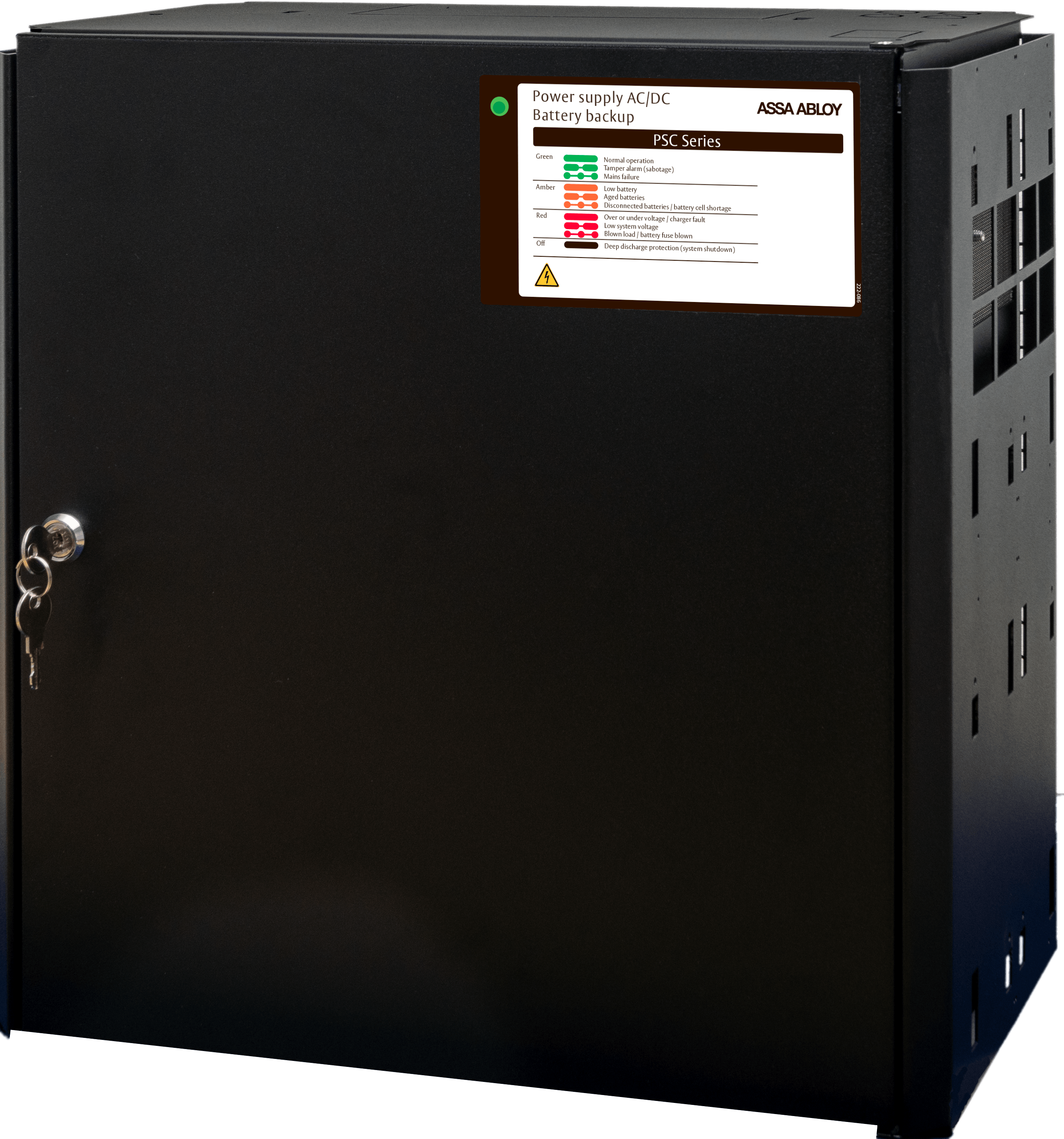
ASSA ABLOY 10PSC L är ett smart 24V/10A batteribackuplösning till ARX säkerhetssystem som är larmgodkänd enligt SSF1014. Enheten kommuniceras via ASSA ABLOY ARX som övervakar status på batteribackupen t.ex aktuell strömförbrukning, historik över dygnet, temperatur så den inte blir för varm eller kall, fördröjt nätbortfall för att undvika falskl...

 lavish relic
Would it possible to connect this like a Nas then I can access movies and photos throughout my network
 long scarab
plain siren
long scarab
plain siren
Fired
long scarab
lavish relic
Would it possible to connect this like a Nas then I can access movies and photo...
Attach to a raspberry pi and install samba
You can use anything else as well
strange pond
plain siren
Why
plain siren
thats drywall

so they cut a hole then just slapped a plate over it... not even centered
plain siren

 strange pond
I thought all frontier contractors did it like that
We just had a frontier dude come do it
plain siren
Then after that, use that same plate with this guy.
 plain siren
strange pond
I thought all frontier contractors did it like that
plain siren
strange pond
I thought all frontier contractors did it like that
They prob do, because they are lazy fucks.
strange pond
I don't really care about it so going to a different country anyway that doesn't support frontier so
plain siren
You get something like this
 strange pond
Yeah I see how that's smarter
Speaking of the internet do you want to see what it goes at
plain siren
oh god
strange pond
plain siren
oh god
What do you mean? Oh God!
plain siren
is it terrible or something
strange pond
No no. It's really good actually
Let me turn on my PC that's connected to lan and get it better. I'm on a mobile right now
plain siren
did you get gigabit
plain siren
well at least theres that
strange pond
Yeah it's still pretty good. In fact there are box actually broke one time and her internet was down for a little but that wasn't the fiber optic so it was a mechanism in the box
strange pond
strange pond
Yeah it's still pretty good. In fact there are box actually broke one time and h...
What I saying in fact I was just putting a detail
plain siren
was it this thing that broke
 strange pond
No it was the box itself like something in there broke. We got it replaced with a black version but it used to be white
plain siren
 strange pond
Yeah like that
plain siren
the FOG421
strange pond
I got too expensive so we slowed it down to 500 MB a second but it's still the best internet because I went to a relative's house and it was very slow from Verizon
This is connected through lan
I actually have a question for you
plain siren
hmm
strange pond
What's this cable for? It never got plugged into anything
 plain siren
If you have another router and it uses the same voltage and that fits, you could have the battery backup work for it too
strange pond
Oh that's cool
I have a switch so my original thought is we got a power supply that had the thing for a switch but it wasn't the right jack so we never plugged it in or it was in a different spot and it didn't reach
plain siren
Its funny I cant find the non-rebranded model of that ONT
pseudo blade
fickle lily
I think the new Win Box is noice looking but also it is kind of confusing lmao
It just kinda does a lot
topaz patrol
plain siren
Its funny I cant find the non-rebranded model of that ONT
Nokia often makes custom skus for different carriers
plain siren
topaz patrol
Nokia often makes custom skus for different carriers
It was Intertek
Nokia I can find.
intertek I cant
topaz patrol
Never mind, looked like an ALE ONT
plain siren
It kinda does
topaz patrol
Yeah I just assumed
 wet wigeon
gonna upgrade the ole network with rackmount shit
so how do yall feel about used cisco gear?
fickle lily
Not unless it is broken used gears i think is cool
though if it is put in shitty place like used it in a room without a proper vent probly not good
wet wigeon
i heard pretty bad things about cisco IOS, how its a pain to manage
fickle lily
ohhh cisco ? no idea lmao
clear igloo
wet wigeon
i heard pretty bad things about cisco IOS, how its a pain to manage
It's all CLI based
I'm biased so I won't comment but I've been working with Cisco gear for years so am very familiar with it
wet wigeon
ugh, sounds like a pain
wet wigeon
this is just gonna be a homelab
clear igloo
Well then I would learn and have fun
 rocky badge
wet wigeon
so how do yall feel about used cisco gear?
rocky badge
wet wigeon
so how do yall feel about used cisco gear?
Cisco 👍
 fickle lily
probly will start my stuff on mikrotik haplite haha
 formal star
wet wigeon
so how do yall feel about used cisco gear?
formal star
wet wigeon
so how do yall feel about used cisco gear?
Used stuff is fine, but in most cases it is used because it doesn't support the latest whatever or something isn't working correctly. I would only get Cisco if you want it to lean Cisco, or if you have no need for higher performance, but I would not buy it thinking Cisco is reliable because used is not always reliable. Also, hone network or work network?
What I would look for in a homelab would be a decent 10gig switch, a router you can play with with some vlans, and a decent 2.5gig switch. Many smaller 8 port switches can still be rack mounted. This setup will let you play with LAGG setup and vlans for fun. I have a 48 port gig switch on my home rack only because it was free.
clear igloo
formal star
What I would look for in a homelab would be a decent 10gig switch, a router you ...
Also worth considering is energy prices in the area too. Used stuff, especially data center stuff, isn't as concerned about power usage
formal star
They are concerned, but practical about it, a switch that consumes 500watts because it has sever gbps backplane is not outrageous.
 vernal sky
@everyone
 vale path
So im trying to create an AP on my raspberry pi 4 so that all my devices can make use of the eth port i have in my room. Now i dont know what im doing wrong but the access point can be seen by other devices, i just cant connect. Im helpless at this point. Heres what i did:
sudo systemctl stop dnsmasq
sudo systemctl disable dnsmasq
### I then added dns=dnsmasq in the NetworkManager.conf

nmcli connection add type wifi ifname wlan1 con-name accesspoint autoconnect yes ssid "eth2wlannetwork"
nmcli connection modify accesspoint 802-11-wireless.mode ap
nmcli connection modify accesspoint 802-11-wireless-security.key-mgmt wpa-psk
nmcli connection modify accesspoint 802-11-wireless-security.psk "whatever"
nmcli connection modify accesspoint 802-11-wireless-security.proto rsn
nmcli connection modify accesspoint 802-11-wireless.band bg
nmcli connection modify accesspoint 802-11-wireless.mode ap
nmcli connection modify accesspoint 802-11-wireless.channel 6
nmcli connection modify accesspoint ipv4.method shared
nmcli connection up accesspoint

sudo iptables -t nat -A POSTROUTING -o eth0 -j MASQUERADE
sudo iptables -A FORWARD -i eth0 -o wlan1 -m state --state RELATED,ESTABLISHED -j ACCEPT
sudo iptables -A FORWARD -i wlan1 -o eth0 -j ACCEPT
sudo iptables -A INPUT -i wlan1 -j ACCEPT
sudo iptables -A FORWARD -i wlan1 -j ACCEPT
sudo netfilter-persistent save

sudo systemctl restart NetworkManager
Also: im on raspbian os bookworm headless
topaz patrol
vale path
So im trying to create an AP on my raspberry pi 4 so that all my devices can mak...
What documentation are you following?
opal pagoda
rocky badge
Cisco 👍
are you running a fortimanager vm?
vale path
topaz patrol
What documentation are you following?
no documentation. just a bunch of forum posts and this https://raspberrytips.com/access-point-setup-raspberry-pi/, but this leaves a lot unsaid

Most Raspberry Pi models have one Ethernet port and one Wi-Fi adapter, making them the perfect device to become a Wi-Fi access point. Whether you do this because you don't have any Wi-Fi network yet
topaz patrol
vale path
no documentation. just a bunch of forum posts and this https://raspberrytips.com...

The official documentation for Raspberry Pi computers and microcontrollers
vale path
oh, thanks, this might be better hehe
topaz patrol
Lol
vale path
this worked without me having to create a bridge somehow sudo nmcli device wifi hotspot ssid <example-network-name> password <example-password>, the only problem is after i reboot the connection is gone
opal pagoda
as with most linux network settings there might be need to save config somehow
topaz patrol
vale path
this worked without me having to create a bridge somehow ```sudo nmcli device wi...
Create a .service file and enable it
Probably not the way you're meant to do it though
vale path
vale path
So im trying to create an AP on my raspberry pi 4 so that all my devices can mak...
i assumed so im just double checking, cuz creating it this way at least made sure it got reconnected after reboot
im pretty sure sudo nmcli connection modify Hotspot connection.autoconnect yes just to be sure im testing but yeah
yep. that did it
thanks for the link @topaz patrol
topaz patrol
No worries.
rocky badge
opal pagoda
are you running a fortimanager vm?
No
vale path
does anyone know why NetworkManager is still spawning a dnsmasq process and binding it to port 53 even when added dns=none to the nm conf file
 fickle lily
should i change my ISP router account or should i leave it there
 lean bronze
Hey guys, does anyone of whether the following is possible:
Have a full WG tunnel from SiteA to SiteB
Assign an additional virtual IP to SiteB
Route it in such a way in OPNSense over the WG tunnel to SiteA that that virtual IP can be assigned as the interface IP of a VM on SiteA
opal pagoda
lean bronze
Hey guys, does anyone of whether the following is possible:
Have a full WG tunne...
virtual ip?
lean bronze
Yeah, additional IPv4's are called Virtual IP's in OPNsense
opal pagoda
in traditional s2s you just create static routes over vpn interfaces on both sides
lean bronze
I've given that a shot, but couldn't figure it just out.
What I did was create on both sides a gateway on the WG tunnel interface with the IP of the other side, added the public IP to the allowed IP's in WG and disabled routes in the wireguard settings. Then, I assigned the public IPv4 on the machine on SiteA and added Outbound NAT settings on SiteB from the Virtual IP to the public IP itself.
On the machine on SiteA, I tried using both WG tunnel IP's and both local IP's of the OPNSense routers as gateway, but couldn't get it working.
 pseudo blade
lean bronze
Hey guys, does anyone of whether the following is possible:
Have a full WG tunne...
pseudo blade
lean bronze
Hey guys, does anyone of whether the following is possible:
Have a full WG tunne...
In WG you just pick how much address space is going over the tunnel in the config then it's the receiving end's job to deal with that
The rest is Boring Old Routing
So if you're terminating on OPNsense you'd ensure you had visibility to the VPN from it, then add its subnet to allowedIPs in the wg config on the originator
Oh! One extra thing you need to ensure! The VM obviously needs to have a route back over the tunnel, it'll do it for you usually if the OPNsense box in question is your network gateway because it'll have the route
lean bronze
pseudo blade
So if you're terminating on OPNsense you'd ensure you had visibility to the VPN ...
Do you mean adding the public IPv4, which is assigned to the interface of the machine on SiteA to the allowed IP's in the wg peer of SiteB on SiteA? I've got a 0.0.0.0/0 entry there
pseudo blade
0.0.0.0/0 will be a full tunnel to the other end of all traffic by the way
Is that perhaps not what you desire?
waxen scroll
wet wigeon
so how do yall feel about used cisco gear?
hate it, its not legal.
@clear igloo ©️
lean bronze
pseudo blade
Is that perhaps not what you desire?
Yeah, basically I want to mimic the machine on SiteA to be on the public site of SiteB (so all traffic sent through SiteB and the IP of the machine on SiteA is the additional IPv4 of SiteB)
opal pagoda
waxen scroll
hate it, its not legal.
why not
clear igloo
opal pagoda
why not
he just mad he can't use it in prod, lol
opal pagoda
clear igloo
he just mad he can't use it in prod, lol
used stuff in prod?
clear igloo
waxen scroll
<@291198741862416384> ©️
honor based licences go brrrrr
waxen scroll
clear igloo
honor based licences go brrrrr
not anymore. they are cracking down
I dont think new licenses transfer.
clear igloo
opal pagoda
used stuff in prod?
grey market used vs refurbished/authorized reseller used is different because grey market can't get support
waxen scroll
They are starting to make us run licensing servers on prem to make our stuff work
pseudo blade
lean bronze
Yeah, basically I want to mimic the machine on SiteA to be on the public site of...
Please be aware that the wireguard IPs can't be in the same subnet as the remote network as it's a layer 3 VPN
lean bronze
pseudo blade
Oh! One extra thing you need to ensure! The VM obviously needs to have a route b...
In both cases the OPNsense boxes are the main gateways of the network indeed. I've added a static route on SiteB to the WG IP of SiteA for the public IP I assigned to the machine on SiteA, and also added this IP to the Allowed IPs of WG. Does this suffice or am I missing something?
opal pagoda
clear igloo
grey market used vs refurbished/authorized reseller used is different because gr...
eh i am fortunate enough that i only run new gear that are not eol
lean bronze
pseudo blade
Please be aware that the wireguard IPs can't be in the same subnet as the remot...
Do you mean the WG tunnel IP's or any IP over the tunnel?
I've added the public IP as a /32 btw, not the entire /24
pseudo blade
You should have
Site A device > WG routing address space > Site B router > Site B address space
waxen scroll
@clear igloo for all the "we're better" pitches Arista does I am annoyed that even they wont sell a fully unlocked switch. Why does everything need to have licenses. ugh
clear igloo
waxen scroll
<@291198741862416384> for all the "we're better" pitches Arista does I am annoye...
license all the things!!!
They use PAK licenses I think
opal pagoda
waxen scroll
<@291198741862416384> for all the "we're better" pitches Arista does I am annoye...
on friday i got a almost million dollar quote from fortinet lmao
pseudo blade
For example you can have SiteADevice be 10.255.0.2 and SiteB router be 10.255.0.1 but not if the Site B subnet is 10.255.0.0/24 (no path back over tunnel), but you can if the remote site is 192.168.0.0/24 or 10.0.0.0/24
waxen scroll
clear igloo
license all the things!!!
They use PAK licenses I think
Apparently my manager did a quote for a real project with them and he got dizzy. I guess they are close to as expensive as cisco
clear igloo
opal pagoda
on friday i got a almost million dollar quote from fortinet lmao
was that for a license? 😛
clear igloo
waxen scroll
Apparently my manager did a quote for a real project with them and he got dizzy....
yup, that's what I've seen a lot of the time
opal pagoda
clear igloo
was that for a license? 😛
some hardware appliances (fortideceptor and fortisandbox) but other than that licenses for 1500 users
clear igloo
opal pagoda
some hardware appliances (fortideceptor and fortisandbox) but other than that li...
That I can definitely see, yah per user licenses are evil
clear igloo
waxen scroll
Apparently my manager did a quote for a real project with them and he got dizzy....
Do they still ding you for third party optics licenses?
Last I saw it's a key you need to install on each box to use third party stuff
waxen scroll
not that I know of
pseudo blade
Licenses are gross, my shit should still work if I don't want to pay maintenance
clear igloo
pseudo blade
Licenses are gross, my shit should still work if I don't want to pay maintenance
but line must go up
recurring revenue bro!!!!
😛
waxen scroll
we talked optics and a license was never part of the conversation
clear igloo
waxen scroll
we talked optics and a license was never part of the conversation
Yah, it's only first party optics at least for the box I used but there is an unsupported license command that does need a key on the CLI
Google got me one XD
opal pagoda
clear igloo
That I can definitely see, yah per user licenses are evil
only per user license was 70$ *1500 ~100k
clear igloo
opal pagoda
only per user license was 70$ *1500 ~100k
That's not bad compared to some, lol
lean bronze
pseudo blade
You should have
Site A device > WG routing address space > Site B router > Sit...
Would you mind me sending you a dm with the entire setup I currently have?
waxen scroll
we only run first party anyway because there were painful problems in the past and the stakeholders dont want to try again
clear igloo
waxen scroll
we only run first party anyway because there were painful problems in the past a...
Makes sense, yah
waxen scroll
our 100G stuff is already past the posted limits of what it can do
we have to switch to SM now for over 100
pseudo blade
lean bronze
Would you mind me sending you a dm with the entire setup I currently have?
Fine, I won't hang around long because it's like 2:30AM
But I'll sanity-check
clear igloo
waxen scroll
we have to switch to SM now for over 100
Yup, single mode is the way of the future
opal pagoda
clear igloo
That's not bad compared to some, lol
we are looking at options for replacing our current trendmicro solution which idk how much costs
pseudo blade
Need to start charging for this shit :P
waxen scroll
the prices on SM optics is BS
clear igloo
waxen scroll
the prices on SM optics is BS
short range single mode (2km) aren't terrible but still yah
opal pagoda
waxen scroll
the prices on SM optics is BS
aw yep
huge bs
we will probably spend rest of opex on transcievers this year
i will ask about -rf ones just to see price delta
waxen scroll
 clear igloo
and then you have OSFP optics for 800G and OSFP only for 1.6T and up so you'll need a carrier if you want to use 400g or lower QSFP optics in them standalone. I doubt it's going to be a huge deal for most but still
clear igloo
waxen scroll
😦 yup
 clear igloo
for 5x as many 😛
OH, unit price, lol
I thought that was total for a second
It's cheaper because ummm, yah reasons
opal pagoda
waxen scroll
that is list price, not many people are paying list price for it
most have a discout of atleast 50%\
waxen scroll
yeah I cant post my discount or @clear igloo might tattle on me
even with discount its stupid expensive
opal pagoda
waxen scroll
yeah I cant post my discount or <@291198741862416384> might tattle on me
he is cisco police 
waxen scroll
when I need 600 optics for a project...
waxen scroll
opal pagoda
that is list price, not many people are paying list price for it
most have a dis...
my account team at my VAR is nervous because we haven't really ordered anything major since 2021. lol.
all of a sudden they want lunches and stuff
I'd order tons more if they quit the bullshit on license costs
adds 40% more cost to a switch
opal pagoda
waxen scroll
I'd order tons more if they quit the bullshit on license costs
you dont love mandatory licenses that you dont need?
waxen scroll
@clear igloo it reminds me of CDJR dealers who slap addendums on all of their cars and wonder why nobody wants to buy them
waxen scroll
opal pagoda
you dont love mandatory licenses that you dont need?
you know how it is... you need that one little feature but you need this whole license for all these other features
opal pagoda
waxen scroll
you know how it is... you need that one little feature but you need this whole l...
cable tv all over again
waxen scroll
they also reworked it so that a perpetual license is more expensive in the short term than paying them yearly for a renewal license
I like calling sales out for it because they act like its a gift from god and then I tell them uhhhhh our depreciation is 5 years.... run those numbers again

I will not sugarcoat it. We are BAD at staying ontop of end of life. We have too much gear. They can screw us if we hit EOL and the license expires
opal pagoda
waxen scroll
I will not sugarcoat it. We are BAD at staying ontop of end of life. We have too...
meanwhile meraki
no license no packets
waxen scroll
I'm not 100% sure but I think ACI will stop working too
If you need features in that license like multi-site I am not sure if it just stops working properly
@clear igloo they almost had ACI right. Almost.
They need to remove the concept of EPGs and microseg
thats ruining the product for people who dont want that
its HARD to migrate to other products if you ever do take advantage of that
because you have all this stuff on the same huge subnet
fickle lily
gad damn pricing for mikrotik routers lmao
 opal pagoda
fickle lily
gad damn pricing for mikrotik routers lmao
opal pagoda
fickle lily
gad damn pricing for mikrotik routers lmao
they are good for what they are.
smb not soho
fickle lily
mweahaha what enterpise grade stuff is for sure
planning on getting haplite for voucher wifi vendo
opal pagoda
fickle lily
mweahaha what enterpise grade stuff is for sure
ye na
you know when you reach enterprise when price isnt publicy listed and just says call for quote
 opal pagoda
rocky badge
24/7 usage like this
opal pagoda
rocky badge
24/7 usage like this
what is that nms?
rocky badge
librenms lol
fickle lily
opal pagoda
ye na
you know when you reach enterprise when price isnt publicy listed and just...
ohhh yea . cause you have to talk how much you want to order and for some terms lmao
opal pagoda
rocky badge
librenms lol
i am just implementing a nms in my org, it isnt live yet but soon it will be
fickle lily
i realised one of this ONT router of otehr ISP does not have other shit other than changing wifi stuff
pseudo blade
opal pagoda
they are good for what they are.
smb not soho
I like their SoHo stuff for gigabit or less (but I know I'm not a typical SoHo user)
Sadly no decent 2.5 gigabit or better options yet I've seen, always some stupid caveat
fickle lily
probly i am just using the normal admin account lmao
opal pagoda
pseudo blade
I like their SoHo stuff for gigabit or less (but I know I'm *not a typical SoHo ...
isnt their RB5009 offering for 2.5g?
 floral sparrow
not sure if this question belongs here but ima ask it anyway
im trying to play vr wirelessly but my bandwidth is bad. could i buy a good wifi card and then use my pc as a hotspot for the headset?
pseudo blade
opal pagoda
isnt their RB5009 offering for 2.5g?
1 2.5g port :(
opal pagoda
pseudo blade
1 2.5g port :(
and other is 10g
pseudo blade
So you need a switch with SFP+ and 2.5g to actually benefit from it
And access points
Which is not very SoHo
floral sparrow
floral sparrow
not sure if this question belongs here but ima ask it anyway
im trying to play v...
cuz my mb has built in wifi but i only get 7mbits when i do it over a hotspot from it?
pseudo blade
Or an internet connection using SFP+ I guess
opal pagoda
pseudo blade
So you need a switch with SFP+ and 2.5g to actually benefit from it
just use it as a router on a stick in combination with crs326
pseudo blade
Too much kit for one small room with two computers and a laptop in it
Everything else in my house is low bandwidth and will never need/achieve fast speeds anyways
opal pagoda
floral sparrow
cuz my mb has built in wifi but i only get 7mbits when i do it over a hotspot fr...
some people use a dedicated routers for vr like https://store-eu.gl-inet.com/collections/travel-routers/products/eu-beryl-ax-gl-mt3000-pocket-sized-ax3000-wi-fi-6-travel-router-with-2-5g-wan-port

GL.iNet EU
Note: You will need to upgrade the firmware to the latest version in order to fully utilize all of the features of Beryl AX. Beryl AX (GL-MT3000) is an AX3000 pocket-sized Wi-Fi 6 wireless travel gigabit router which comes with one 2.5G WAN port and one 1G LAN port. It runs on MT7981B 1.3GHz dual-core processor. Dua
rocky badge
@clear igloo How should I handle DHCP and NAT for a broadcast truck?? I don't really need too much of a router but I just need basic shit lol
clear igloo
rocky badge
<@291198741862416384> How should I handle DHCP and NAT for a broadcast truck?? I...
minimally 😛
pseudo blade
I'll probably just get some white box 2.5 gigabit wireless router platform with openwrt or something
clear igloo
rpi or docker container?
rocky badge
I mean that can do DHCP but I still need NAT and I don't wanna do that off a rpi
pseudo blade
Does it need much speed?
clear igloo
rocky badge
I mean that can do DHCP but I still need NAT and I don't wanna do that off a rpi
home use case or something else?
rocky badge
gigabit would be the max internet it would ever have
just needs to handle encoders sending some 10/20mbps streams
rocky badge
clear igloo
home use case or something else?
work
pseudo blade
I'd use a Mikrotik hAP ac^2 or hEX refresh off 12vdc
floral sparrow
opal pagoda
some people use a dedicated routers for vr like https://store-eu.gl-inet.com/col...
would i have to buy another internet plan or would that use internet from my current router
sorry if i sound like an idiot i just have no idea about any of this
opal pagoda
floral sparrow
would i have to buy another internet plan or would that use internet from my cur...
no you dont need any new internet plans
rocky badge
ngl I am tempted to just do something like a 1u pfsense box or even a udmp lmao
pseudo blade
Probably overkill?
clear igloo
rocky badge
ngl I am tempted to just do something like a 1u pfsense box or even a udmp lmao
Do it, keep it simple
rocky badge
I will probably have unifi APs (switching is netgear m4250)
clear igloo
If you need a pfsense box let me know 😛
Work spend $$$ 😄
rocky badge
clear igloo
Do it, keep it simple
Yeah I don't want anything I have to do much maintenance
As much as I hate to say it..probably a udmp
clear igloo
rocky badge
Yeah I don't want anything I have to do much maintenance
Yah, then unifi might not be a bad idea in this case
rocky badge
bc it can be the controller for the APs
clear igloo
bingo
rocky badge
its not doing any inter VLAN routing
floral sparrow
opal pagoda
no you dont need any new internet plans
ima look into it thanks
pseudo blade
UDMP feels overkill but if power is not cared about it'll definitely work
rocky badge
no firewall inbound shit, just all outbound
And $379 is small in compairson to this build
pseudo blade
It'll look good when you show nontech people your sweet mobile rack :P
rocky badge
 floral sparrow
the funny thing is im doing it with a wifi extender on 2.4ghz and i have 60mbits max with constant drops
opal pagoda
floral sparrow
ima look into it thanks
maybe ask in #virtual-reality for application specific setup
pseudo blade
Yeah UDMP will blend in with all that just fine
floral sparrow
opal pagoda
maybe ask in <#380830912906002504> for application specific setup
thanks m8
opal pagoda
floral sparrow
the funny thing is im doing it with a wifi extender on 2.4ghz and i have 60mbits...
better ap will definitly improve your experience
pseudo blade
rocky badge
My AV friend is almost certainly jealous
He's just got an x86 server and a bunch of mixing and IO cards in a 6U roadcase rackmount thing
floral sparrow
opal pagoda
better ap will definitly improve your experience
ap?
pseudo blade
Access point
rocky badge
pseudo blade
He's just got an x86 server and a bunch of mixing and IO cards in a 6U roadcase ...
rip
pseudo blade
pseudo blade
Access point
WiFi box that only does WiFi
opal pagoda
floral sparrow
ap?
access point
what is commonly said as "router" is often a combination of 3 devices
a router
a access point
and a switch
pseudo blade
He bought a 7th gen intel platform because he found some golden motherboard with pre-broadcom PLX chips
floral sparrow
opal pagoda
access point
what is commonly said as "router" is often a combination of 3 devic...
im watching a video rn if i do that in my room my parents are gonna crucify me
pseudo blade
Alas he could have possibly went Threadripper if he had a little more money
rocky badge
yeah the PC i have in my rack is a threadripper for video
pseudo blade
I don't think that old board was cheap either
opal pagoda
floral sparrow
im watching a video rn if i do that in my room my parents are gonna crucify me
you can always have a isolated network just for vr
it will perform better too
pseudo blade
pseudo blade
He bought a 7th gen intel platform because he found some golden motherboard with...
<Obligatory Fuck Broadcom statement here>
opal pagoda
pseudo blade
<Obligatory Fuck Broadcom statement here>
yea all my homies hate broadcom
pseudo blade
None of my homies willingly buy broadcom
rocky badge
I might need more than 1 switch lol
floral sparrow
Now im confused what of the three is this?
 rocky badge
which means I need 3 now 🤪
pseudo blade
lol
opal pagoda
pseudo blade
None of my homies willingly buy broadcom
even nvidia is less greedy than broadcom
pseudo blade
48*3 ports?
rocky badge
48*2 and a 10g agg layer lol
pseudo blade
In a truck with two racks?
rocky badge
1 rack
pseudo blade
Ah, leaf+spine
opal pagoda
floral sparrow
Now im confused what of the three is this?
could be a powerline adapter
pseudo blade
In one rack
rocky badge
Yeah
pseudo blade
Incredible
rocky badge
lemme pull up the design rq
pseudo blade
floral sparrow
Now im confused what of the three is this?
Either powerline or wireless repeater
floral sparrow
pseudo blade
Either powerline or wireless repeater
should be the later
thats what im doing it with
rocky badge
pseudo blade
In one rack
 pseudo blade
floral sparrow
should be the later
pseudo blade
floral sparrow
should be the later
That type tend to really suck
Not that powerline is generally good
waxen scroll
rocky badge
that toilet better be japanese.
opal pagoda
rocky badge
does the "server room" have a dedicated ac?
rocky badge
lmao
rocky badge
opal pagoda
does the "server room" have a dedicated ac?
yes
pseudo blade
rocky badge
Ah I see, 48 ports to the toilet
rocky badge
I need at least 2 ports at each station for laptops/etc.
And some stations need ports for the control panel at it
pseudo blade
Yeah looks kinda like the setup for a stadium I saw but like half and minus all the servers and broadcast gear which lived elsewhere
rocky badge
plus one for a router panel
then the audio console needs control & dante primary/secondary
then all of the shit in the rack
floral sparrow
ok i finished the video i still dont understand any of this...
pseudo blade
AV dude gave me a very sneaky tour, I thought it was pretty neat
I love big budget systems like that
floral sparrow
ok wait so if i buy a router for it i can just plug it into the repeater?
pseudo blade
I work with small things on small budgets
rocky badge
Yeah and we are gonna have fiber patch bays outside the trailer for I/O
everything out of the trailer will be fiber
pseudo blade
Makes sense
rocky badge
SDI, Dante, control network
rocky badge
yeah
opal pagoda
floral sparrow
ok wait so if i buy a router for it i can just plug it into the repeater?
yes but you can also just throw away current repeater as glinet router can act as one
floral sparrow
opal pagoda
yes but you can also just throw away current repeater as glinet router can act a...
i have that repeater cuz otherwise i have no internet in my room
rocky badge
Just have 12 smf everywhere
if this was super high budget this truck would be 2110
all IP, 25/40/100G to cameras
floral sparrow
opal pagoda
yes but you can also just throw away current repeater as glinet router can act a...
oh would it act like the repeater?
opal pagoda
floral sparrow
i have that repeater cuz otherwise i have no internet in my room

just please use diffrent ssid than the main router

 clear igloo
rocky badge
sfp28 on cameras <:LUL:667862701560692736>
clear igloo
rocky badge
sfp28 on cameras <:LUL:667862701560692736>
psh, only sfp28 and not sfp56 or 112 😛
rocky badge
lol
pseudo blade
rocky badge
That does look sick
All the expensive proprietary bullshit is annoying
Even a bit less is a plus
 rocky badge
pseudo blade
That *does* look sick
All the expensive proprietary bullshit is annoying
rocky badge
pseudo blade
That *does* look sick
All the expensive proprietary bullshit is annoying
2110 is open standard, it all works together
pseudo blade
Yeah smpte
opal pagoda
rocky badge
one slip untill doom
 rocky badge
lol
clear igloo
opal pagoda
one slip untill doom
It's a stabilizing cable 😛
rocky badge
already own all of the fiber, just convert from using SDI to 2110
opal pagoda
clear igloo
It's a stabilizing cable 😛
ye yea universal cable/ wheel caulks
pseudo blade
I'm surprised there are just roadcases and mobile racks
pseudo blade
pseudo blade
I'm surprised there are just roadcases and mobile racks
Are they planning to just not have live streaming later :P
rocky badge
Nexus is loved for PTP lol
opal pagoda
rocky badge
or madi over fiber
how is the communication between racks done?
rocky badge
wdym
pseudo blade
pseudo blade
Are they planning to just not have live streaming later :P
Sorry guys all this techno shit isn't needed, just look down at the field and be here, roll away the racks and roadcases
opal pagoda
rocky badge
wdym
ah it is that ground snake
floral sparrow
ah i just figured out its a powerline repeater
on the website it says up to 300mbits over wifi, would that be the bandwidth of the local network then?
clear igloo
100 megabit
The plugs are going to negate that wifi claim and hamstring it to 100meg speeds
powerline marketing sucks
floral sparrow
i dont know the language to phrase this
does it act like an access point with its own local network?
i dont care about the internet speed i care about the network bandwidth+
clear igloo
Generally no but I don't deal with powerline so I could be wrong on that
floral sparrow
i keep having to switch wifi on my phone when going around my house
clear igloo
Those powerline adapters tend to just extend the existing wifi network in most cases
floral sparrow
the top one is the repeater and the bottom one the main router
 pseudo blade
floral sparrow
i dont know the language to phrase this
does it act like an access point with it...
pseudo blade
floral sparrow
i dont know the language to phrase this
does it act like an access point with it...
Sure looks like both are from the repeater
rocky badge
@clear igloo @pseudo blade So far lol
 fickle lily
wehen the ethernet port of access point is 100Mbps but the wifi speed is 300Mbps lmao
 pseudo blade
fickle lily
wehen the ethernet port of access point is 100Mbps but the wifi speed is 300Mbps...
pseudo blade
fickle lily
wehen the ethernet port of access point is 100Mbps but the wifi speed is 300Mbps...
Yeah that's because outside lab conditions you're not getting more than half that speed
I will say that in the hAP lite you've bought a bit of a lemon product, they're dirt cheap for a reason and that reason is being so cost-cut they often can't even perform software upgrades without being reflashed over the network with netboot
Good for lab testing for students or other environments with no budget and a willingness to accept problems in exchange for saving money, if I'm billing for a service in 2024 I'd at least get the hAP ac^2
topaz patrol
pseudo blade
I will say that in the hAP lite you've bought a bit of a lemon product, they're ...
If scrappy US WISPs use them you should stay away from :p
Buy real network gear you cheap cunts especially you american wisps
pseudo blade
The selling point is the price
pseudo blade
topaz patrol
https://web.archive.org/web/20241004175508/http://mikroshit.com/
They do sell real networking gear, you just have to pay more than $20
topaz patrol
More than a couple hundred bucks*
Have you seen what some of those cheap American WISPs do lmao
pseudo blade
I can guess
topaz patrol
“Look mum I built an ISP” sound it up perfectly
But you can get some half decent TP-Link gear for that price
Or Cudy/Ruijie
pseudo blade
I'd take a Mikrotik over a same-budget tp-link or Cudy
topaz patrol
And they aren’t ugly as all hell
topaz patrol
pseudo blade
I'd take a Mikrotik over a same-budget tp-link or Cudy
Eh. Most people would prefer the latter two
pseudo blade
The feature sets are not comparable and I like the flexibility
Also if you're buying Cudy you're definitely not a real ISP :P
topaz patrol
Yes but you also aren’t buying a $30 wifi router
topaz patrol
pseudo blade
Also if you're buying Cudy you're definitely not a real ISP :P
The Australian WISPs would disagree lmao
pseudo blade
They're not real
topaz patrol
Powertec salespeople are great at selling that crap
pseudo blade
I did that stuff for a bit and we at least sold Mikrotiks with enough RAM and storage to do whatever was needed at the site
topaz patrol
pseudo blade
I did that stuff for a bit and we at least sold Mikrotiks with enough RAM and st...
They use them as CPE
plain siren
topaz patrol
https://web.archive.org/web/20241004175508/http://mikroshit.com/
hahahah this is fun
MikroTik has always been weird to me
Their configuration system is jank as fuck
The APs they offer always have weird limitations and bands
pseudo blade
Their config system isn't what's janky about them and the band limitations are not an issue outside the US
RouterOS script and the API are what's actually janky
peak cloak
plain siren
Their configuration system is jank as fuck
I hate it
Find routeros annoying to use
plain siren
its honestly really shit. Ill just say it
pseudo blade
Mikrotik gets flak because it's got nearly as much surface as Cisco iOS but people aren't doing lengthy training courses on it, it's not actually bad for what it is - it's just not aimed at you
topaz patrol
pseudo blade
Mikrotik gets flak because it's got nearly as much surface as Cisco iOS but peop...
Who is it aimed at
Who is this aimed at
topaz patrol
topaz patrol
Who is *this* aimed at

Send us your MikroTik setups (marketing@mikrotik.com) - and get a 10 EUR coupon code in our merch store! Submissions in this video will receive the coupons over this weekend.
3D files below:
One of our users and friends - Rafael - designed
a handy, practical, and elegant enclosure for the
classic RBM33G RouterBOARD... and decided to
share the...
pseudo blade
topaz patrol
https://www.youtube.com/watch?v=UOQ6au41m9k
Please don't ask me to understand their marketers or why they do this
But if I tried I'd say they looked at the LTT stuff and decided to try to copy that formula
Which yeah not great overlap
pseudo blade
topaz patrol
Who is it aimed at
WISPs, rural telco, SME, low-income country everything, whatever blend of net/sys admin I've became over the last 8 years
Being able to set up routing, VLANs and VPNs on my APs and switches has been repeatedly useful when given stupid demands and no extra budget in workplaces
And I am the cheapest of all my bosses and that's why my home network is what it is
plain siren
pseudo blade
Mikrotik gets flak because it's got nearly as much surface as Cisco iOS but peop...
I didnt take lengthy training courses for Cisco iOS either
that being said, I can follow along what I am doing when configuring something running C-iOS much easier than Microtik. This combined with the fact there are always various workaround or problems with the current firmware (may not be true anymore, but ive had fun issues with IPv6, VLANs, and GRE Tunnels causing problems like crashes) makes it really hard to say "oh its just not for you". No its because its flimsy and very clunky.
pseudo blade
lol ok bud
plain siren
Even an Ericsson AXE Telecom Switch Station isnt as clunky and its all over the place in much the same manner actually.
And that think is older than me
feels the same though
fickle lily
so i got mikrotik haplite
but the problem is the port 1 which i connect my 8 ports unmanaged switch disconnects
but it connects for a few minutes then it would disconnect
fickle lily
difference with bridge and ppoe?
peak cloak
pseudo blade
Mikrotik gets flak because it's got nearly as much surface as Cisco iOS but peop...
My issue is that there's like 2-3 different ways to configure the same thing and there's right and wrong way apparently
topaz patrol
pseudo blade
Please don't ask me to understand their marketers or why they do this
But if I t...

Here are the channels/resources we think you should follow:
-
Wilmer Almazan / The Network Trip
https://www.youtube.com/c/TheNetworkTrip
https://www.youtube.com/@WilmerAlmazan -
TheBrothers WISP
https://www.youtube.com/@TheBrothersWISP/featured
https://thebrotherswisp.com/ -
Mikrotik Indonesia - Citraweb YT
https://www.youtube.com/@Mikr...
So strange
plain siren
topaz patrol
Lmao
https://youtu.be/xpepZgIvVYY
what the fuck
this guy must be high as fuck
topaz patrol
plain siren
what the fuck
Their YouTube channel is hilarious
opal pagoda
topaz patrol
Lmao
https://youtu.be/xpepZgIvVYY
ew a ai generated image
is it that hard to grab a product photo lmao
 low pond
plain siren
this guy must be high as fuck
low pond
plain siren
this guy must be high as fuck
This guy? The whole company
waxen scroll
plain siren
what the fuck
I prefer the other option, real work experience with devices I cant afford.
 hidden marlin
I don’t poke my head in much, but I thought the networking people in here would like to know about a deployment I found
It’s a bunch of PoE devices that run through a Powerline adapter that goes back to ethernet almost exactly on the other side of a wall, when it easily could have been run under the floorboards
waxen scroll
wow how incompetent, though while thats something I would have done (run small wires to the other side of the wall) now I would want everything in a central location patch panel
@clear igloo @rocky badge you should switch to arista and join the AI revolution!
clear igloo
waxen scroll
<@291198741862416384> <@236237361703288842> you should switch to arista and join...
AI what now?
🤣
waxen scroll
ok story time. this one hurts my soul
clear igloo
Are you joining AI NetDevOps Scrum teams? 😛
waxen scroll
A business unit wanted their own network and they talked to us about their needs and we did a whole design. Because of the big cost, they decided to hire a 3rd party consulting company to not only look at our design, but advise if there are industry standards or forward directions that we missed/didnt account for.
We have many meetings with them to discuss our designs. We get to the presentation from them (before the exec level) to make comments. They went and did all this AI-this, AI-that, including pricing servers from nvidia partners. I was sitting there like uhhhhhhh guys... I never once mentioned AI in any meeting with you, none of this is in scope of what we asked for. Why did you do this? "Oh, its because [sub-team from BU] said they might be interested in AI"
clear igloo
Have you heard about our lord and savior AI?
waxen scroll
Futhermore, with all the meetings they had with the BUs sub-teams, they never once understood the traffic flows and network requirements and started saying 400G this/that because its where things are moving.
This group of apps can get away with a few gb of uplink if we wanted to.
clear igloo
Why would you want to understand the customer requirements when you can just shoehorn the latest and fastests for reasons
waxen scroll
The head dude for the network analysis used to work for (major tech brand that you know) and could not stop going "well at [brand] they do this, so you should too"
So we told them to change the preso by a lot, and I did not get to see the new one, if they did it, but I heard it bombed when they went to VP+ level
This was months ago and no network project has been approved. It was that bad.
Nothing is worse than a new coworker who injects his old employer into all of the conversations. I knew a guy from motorola who worked there for like 15 years who did the same thing.
clear igloo
waxen scroll
This was months ago and no network project has been approved. It was that bad.
They just needed to run the preso through ChatGPT first, lol
rocky badge
waxen scroll
A business unit wanted their own network and they talked to us about their needs...
They heard AI and ran with it
 south blade
Hey, I'm getting fiber installed out here in the woods on Saturday, I'm imagining that they would rather just drill a hole in put a hookup immediately on the opposite side of the exterior wall...think they would go up the wall into the attic space to bring the cable down to the wall next to the window that actually has outlets?
peak cloak
south blade
Hey, I'm getting fiber installed out here in the woods on Saturday, I'm imaginin...
no
south blade
No huh,
 worthy coral
Anyone have experience with MikroTik Routers? Are they easy to use or somewhat difficult? Any shortfalls?
peak cloak
worthy coral
Anyone have experience with MikroTik Routers? Are they easy to use or somewhat d...
RouterOS is kinda clunky
worthy coral
Ohhh. I see. I happened to come into possession of one and was gonna take it for a spin/lab with it for a bit.
plain siren
peak cloak
RouterOS is kinda clunky
kinda
worthy coral
Interesting that it uses a 36 core CPU

 ornate jungle
worthy coral
Interesting that it uses a 36 core CPU
ornate jungle
worthy coral
Interesting that it uses a 36 core CPU
Ah yes, VLIW architecture - very specific use-cases, these have. https://en.wikipedia.org/wiki/TILE-Gx
TILE-Gx was a VLIW ISA multicore processor family designed by Tilera. It consisted of a mesh network that was expected to scale up to 100 cores, but only 72-core variants actually shipped.
After a few acquisitions, Tilera's designs ended up in the hands of Nvidia, which ended production of TILE-Gx processors in 2022. In June 2018, the Linux kern...
plain siren
With VLIW, you have to compile the software to take use of the specific amount of cores
So thats why it was never scaled
God damn it, my stupid ass setup SIP SMS Messaging over the SIP proxy forgetting you gonna need the Subscribe functionality in order to send the response back
all that work on the wrong layer
worthy coral
I think it’s crazy that MikroTik lets me download the latest RouterOS on this “discontinued” piece of hardware. From 6.13 to 7.16.2 released not that long ago, damn
pseudo blade
waxen scroll
Futhermore, with all the meetings they had with the BUs sub-teams, they never on...
Everyone thinks their workload is big and special
Like the enterprise databases I keep seeing with single digit users and - gasp - tens of thousands of rows!
"We need Oracle DB" I think sqlite will do just fine actually
Hell anything but Oracle DB please
Back at the MSP I was tasked with moving an old onprem VM from 2c/8GB to Azure at something like 16c/64GB because the vendor insisted that their crappy little medical ASP.net webapp and mssql database needed it despite having two authorised users, no real performance requirements or demands and maybe a few hundred thousand records at best. Just idled and bled money
pseudo blade
worthy coral
Anyone have experience with MikroTik Routers? Are they easy to use or somewhat d...
Can be easy, can be very difficult. You'll spend more time working with/around hardware than you might with other vendors but it's easier to know what you'll get out of it once you get your head around the block diagrams. I've been working with them in businesses for a number of years now and am pretty familiar with the platform
pseudo blade
worthy coral
Interesting that it uses a 36 core CPU
The pitfall of the Tilera-based units, for example is their very low CPU clock speed. The memory architecture of Tilera does not help.
So any task expecting high sequential CPU performance is going to suck despite all those CPU cores
BGP was a huge showstopper on RouterOS 6 for that reason as it ran on exactly one core
The Tilera CPUs are also weird and dead and the Linux kernel dropped support for them. Mikrotik still supports them but there's no new development around them, they switched to ARM on the newer products. So you can get upgrades now but in 3-4 years it'll finally run out of road
pseudo blade
worthy coral
I think it’s crazy that MikroTik lets me download the latest RouterOS on this “d...
I'm running a different Mikrotik (hEX) I got in 2018 for my lab for $60 US and it's still promised at least another 5 years of free support. I'm expecting that EoL announcement sooner or later but I'll have replaced it long before due to obsolescence
pseudo blade
worthy coral
Anyone have experience with MikroTik Routers? Are they easy to use or somewhat d...
Another unique pitfall of that specific model is also one of its strengths - No switching, only routing and bridging. Everything's straight to the CPU.
The newer stuff leans on L3 offloading on switch chips heavily (which they're getting better at but will never be possible for everything), this one just brute forces its way there with its unusually parallel CPU.
plain siren
pseudo blade
Back at the MSP I was tasked with moving an old onprem VM from 2c/8GB to Azure a...
I felt this in my bones
plain siren
pseudo blade
Another unique pitfall of that specific model is also one of its strengths - *No...
Just wait until we do another U-Turn on this and FPGAs with Softswitch Features actually become a viable option everywhere
the amount of U-Turns and wild adjustments into different directions network hardware has taken makes everything else seem timid
pseudo blade
plain siren
Just wait until we do another U-Turn on this and FPGAs with Softswitch Features ...
The funny part is FPGA's are kinda sorta the past of networking. Cisco used FPGAs for all sorts of IO and offload tasks but they're too expensive and slow to beat common-path ASICs and nobody seems to be rushing to change that
plain siren
pseudo blade
The funny part is FPGA's are *kinda sorta the past* of networking. Cisco used FP...
Exactly.
We keep coming back around
this time with the idea of using a management coprocessor with FPGAs
A large one
the idea here is you can install all the features you need into the appliance and it becomes... well whatever
Interesting ideas come to mind with those capabilities. With a click of a button you can reconfigure entire datacenters and all the networking hardware in an instant
Switches become Firewalls, Routers become Switches, Firewalls become Gateways
Is this actually idea? no prob not you would select the hardware to match the need
but if I wanted to take an 8 port switch and make it an 8 port firewall and move it, that works
FPGAs being great at filtering can suddenly make for a great firewall
pseudo blade
I saw a similar argument for replacing CPUs with dedicated softcores that could be mutated based on workloads and the problem always came back to performance not being good enough for the common path
It's definitely a fun idea though
plain siren
P4 Programmable Switches!
 gilded kite
anyone here using OPNsense and the IPsec VPNs?
pseudo blade
No, nobody has ever used anything, don't simply state your question as nobody will know the answer and you'll look silly or something idk
plain siren
Yeah this shit.
 pseudo blade
Yeah so this is a thing
pseudo blade
DPUs are interesting
 pseudo blade
Never seen one on a mezzanine like that before though
plain siren
Uhhh MIPS (ew)
pseudo blade
MIPS is OK even if its not exactly the new hotness
plain siren
even the MIPS foundation is going RISC-V lol
gilded kite
I setup a few site to site ipsec VPNs via OPNsense with pre-shared keys. They somewhat recently added a new setup gui page for the VPNs and moved the old to "legacy", so I'm guessing they will deprecate at some point. In the new page, I can't see a way to setup a preshared key, so I worry all my VPNs will stop working when they roll out an update deprecating that feature
pseudo blade
plain siren
Uhhh MIPS (ew)
MIPS architecture is apparently really commonly used in university courses so it's probably just the most familiar option for the designers
plain siren

Enabling the era of next generation SDN Stratum™ is an open source silicon-independent switch operating system for software defined networks. It is building an open, minimal production-ready distribution for white box switches. Stratum exposes a set of next-generation SDN interfaces including P4Runtime and OpenConfig, enabling interchangeability...
Part of the bigger ONF project but this I have toyed with in the virtual environment
Uses p4. The ONF Project is meant to make every single piece of the carrier functions programmable and virtualized if possible
pseudo blade
gilded kite
I setup a few site to site ipsec VPNs via OPNsense with pre-shared keys. They so...
Not sure what it uses behind the scenes I'm afraid, but this sounds like a great question to post somewhere the devs frequent if you want to figure out their plans and priorities regarding it
pseudo blade
plain siren
https://opennetworking.org/stratum/
My understanding of such projects is they're kinda the other way - all on CPUs, but with data planes accessible to the user
Which is neat in its own way
As there's not really another way to "virtualise" or program them
It's all cool stuff, I wish I had the time or justification to play with it
plain siren
Honestly I still dont know to use P4. This is a little over my head and has architecture dependandt workflows

 plain siren
control ingress () {
     table routing {
          key = { hdr.ipv4.dstAddr : lpm; }
          actions = { drop; route; }
          size = 2048;
      }
      apply {
          routing.apply();
      }
}
I understand this.
https://p4.org/sandbox-page/
heres a fun little sandbox
pseudo blade
A very C/C++-like DSL
Yeah that looks very interesting
And it is designed to also run on FPGAs among other things

 clear igloo
Sir, I'll have you know this is a christan minecraft server and we'll have none of your devil hashtags!
rocky badge
waxen scroll
Lmao
waxen scroll
clear igloo
Sir, I'll have you know this is a christan minecraft server and we'll have none ...
Man. I remember Christian counter-strike servers lol....
@rocky badge @clear igloo what hes not telling us is that cybersecurity isnt like that at all. It's log jockey. It's barely understanding networking and security protocols. It's creating policy from misinformation.
clear igloo
waxen scroll
<@236237361703288842> <@291198741862416384> what hes not telling us is that cybe...
#BlameTheNetwork
#NotFirewallFault
#DNSorsomething
waxen scroll
My favorite cyber story is we had a person, a CISSP or whatever it was, turn ALL the features on in a firepower because DUR SECURITY, and it took the traffic down for our entire datacenter in small random intervals to the point where it was impossible to track down
clear igloo
#FeaturesMakeMoreSecure 😛
waxen scroll
The internal interface would get clogged up
rocky badge
waxen scroll
<@236237361703288842> <@291198741862416384> what hes not telling us is that cybe...
Sounds about right
waxen scroll
She did this and quit to be director level somewhere else, before the issues really started showing up.
Your cyber security management, folks!
At the same company: cyber engineers who cant explain how a static route works.
clear igloo
waxen scroll
At the same company: cyber engineers who cant explain how a static route works.
Don't you just use opsf for that?
worthy coral
pseudo blade
I'm running a different Mikrotik (hEX) I got in 2018 for my lab for $60 US and i...
I’m interested in different kinds of networking gear and wanting to lab different setups to see what each piece of equipment does.
This MikroTik was just running for years with nothing plugged into it at one of my work locations. We don’t use that brand anywhere else so I got to take it home.
I have some Ubiquiti gear, Cisco switches (and a 1921 router lol) and now this MikroTik router. It’s neat to see the different CLIs, GUIs, and limitations/ capacities of this gear.
 thick minnow


Still have another airport express to add behind the Garage one but the cable in the ground brokie
worthy coral
thick minnow
<:heheboi:1108794488266166292>
Been a long while since I’ve seen AirPort Express/extremes in use
thick minnow
worthy coral
Been a long while since I’ve seen AirPort Express/extremes in use
Theyre cheap asf
And are perfectly fine for what i need
worthy coral
True. Last I used them was when I worked at a school district
thick minnow
The expesses are 10 euro a piece
The extremes are like 20
The extremes do wifi AC
worthy coral
Damn that is cheap
 mortal oak
waxen scroll
My favorite cyber story is we had a person, a CISSP or whatever it was, turn ALL...
mortal oak
waxen scroll
My favorite cyber story is we had a person, a CISSP or whatever it was, turn ALL...
Last I checked if it blocks all traffic it’s secure 
opal pagoda
thick minnow
Still have another airport express to add behind the Garage one but the cable in...
dont run copper data cables underground please
just use fiber
worthy coral
opal pagoda
dont run copper data cables underground please
just use fiber
Mmm copper and water party.
worthy coral
opal pagoda
and add in 🌩️
Oh I didn’t even realize
At work our infrastructure sucks. We keep hitting conduits or rats keep chewing the fiber cables, so many fiber runs keep dying we have to use PtP radios to keep our stuff connected
opal pagoda
worthy coral
At work our infrastructure sucks. We keep hitting conduits or rats keep chewing ...
only things that chews our fiber are sparkies but we have 2 rendundant paths back to dc for each access switch
worthy coral
opal pagoda
only things that chews our fiber are sparkies but we have 2 rendundant paths bac...
Nice… all our shit is one chain link with no redundancy. So one fiber breaks, everything past it in the chain loses connectivity.
opal pagoda
yikes
also most of our fiber is underground conduits or up in the ceeling cable trays
 torn moth
I am planning on getting NAS so I can backup my stuff. I was wondering how does QNAP and Synology compare? I wouldnt connect it to internet just my pc
opal pagoda
torn moth
I am planning on getting NAS so I can backup my stuff. I was wondering how does ...
they are all pretty much the same - overpriced, underpowered mini pc with hot swap bays and propriatary firmware
worthy coral
torn moth
I am planning on getting NAS so I can backup my stuff. I was wondering how does ...
Honestly you could buy yourself a nice cube shaped hot swap chassis and just build a mini ITX pc in it for probably cheaper
torn moth
worthy coral
Honestly you could buy yourself a nice cube shaped hot swap chassis and just bui...
I looked at some cases and thinking of getting fractial desing node 304. IDK WHY this didnt come to mind. Gonna do more research and dive deeper in to the rabbit hole
torn moth
What and how should I pick my parts for the NAS?
silent flax
torn moth
I am planning on getting NAS so I can backup my stuff. I was wondering how does ...
QNAP - while it is often the stupidity of the users for using the cloud features or putting their NAS directly on internet, there were few times when people had their NAS encrypted by bad actors through holes. I remember at least 2 such global incidents, might be more.
Synology - they like to use underpowered, nearly decade old hardware for $500-$1000 hardware.
silent flax
torn moth
I looked at some cases and thinking of getting fractial desing node 304. IDK WHY...
If you are willing to pay for it, Jonsbo N3/N4/N5 might be worth considering. Then you pick motherboard/CPU/RAM according to your needs and case choice.
silent flax
torn moth
I am planning on getting NAS so I can backup my stuff. I was wondering how does ...
There is also an option to use something like the Ugreen NAS devices and put TrueNAS or OpenMediaVault on top of it instead of using the propiertary NAS system. I think Terramaster also allows 3rd party software OS, and probably few others too
torn moth
Yeah I saw lot of the security issues when googleing them and that really put me off from them
torn moth
silent flax
If you are willing to pay for it, Jonsbo N3/N4/N5 might be worth considering. Th...
Did some part picking and came up with this

I have built pc or two before so fully building is no problem
silent flax
torn moth
Did some part picking and came up with this
12100F version has no IGP, you want IGP for a NAS/server. So get the 12100.
Depending on what you want from it, it might be fine, underpowered or overpowered.
What i mean is that for just file sharing, even 12100 might be too powerfull. But on other side, if you start adding various virtualizaton or docker stuff, you might want more RAM and/or CPU power. Check the PSU on tier list, you want reliable PSU for NAS
torn moth
silent flax
12100F version has no IGP, you want IGP for a NAS/server. So get the 12100.
Dep...
What is the IGP version? I just choose second cheepest intel. Yeah its main purpose is file storage mayyyyybe some game server hosting in future
silent flax
torn moth
What is the IGP version? I just choose second cheepest intel. Yeah its main purp...
F means no integrated graphics. So 12100F has no integrated graphics, 12100 has integrated graphics
torn moth
Oooh ok ok what about seprate cheap gpu in the pcie port?
silent flax
torn moth
Did some part picking and came up with this
i would recommend getting the 12100, using the x16 slot for a 8-port LSI card to add 8 more SATA ports and then use the x1 slot for 2.5 gigabit networking later down the line. Or get a board with 2.5 gigabit in the first place
torn moth
How would amd line up would compare? Guessing it would be slightly worse?
silent flax
torn moth
How would amd line up would compare? Guessing it would be slightly worse?
AM4 CPUs have less usable IGP for transcoding, AM5 is probably more expensive
you could also consider used hardware from 6th generation Intel upwards
torn moth
Alright so gonna stick with intel
topaz patrol
Also AMD suckz
torn moth
What about OS and what file system would be good for a first timer that wouldnt mind reading some forums?
torn moth
topaz patrol
Also AMD suckz
Leave me and my gameing pc out of this lol
topaz patrol
Do you just want a NAS or do you want to do other fun stuff
torn moth
topaz patrol
Do you just want a NAS or do you want to do other fun stuff
NAS for now but potentially other stuff in future when I have more room space and I have admin of the house internet
topaz patrol
Oh okay you'll probably just want to use TrueNAS Core
Or if you want to have docker containers and crap like that go for TrueNAS Scale
torn moth
Are they free?
clear igloo
Yes
I'd go TrueNAS Scale but that's what I use personally
Core is based on FreeBSD and Scale is Debian based
torn moth
Hows unraid? I have seen ltt use it few fair times
silent flax
final alternative is OpenMediaVault if you want a more open base OS compared to TrueNAS.
In short:
TrueNAS Core => BSD
TrueNAS Scale => Linux, but you can't really install anything to the base OS, so if you need some thing special (lm-sensors, pwmconfig, fancontrol in my case), tough luck
OpenMediaVault => Debian Linux
Unraid is paid based on number of hard drives
topaz patrol
torn moth
Hows unraid? I have seen ltt use it few fair times
I wouldn't touch unraid
clear igloo
There's also that one HexOS which Linus was talking about investing in
It's $99 though one time but is partnered with TrueNAS but simpler to use I believe
torn moth
topaz patrol
I wouldn't touch unraid
How so?
topaz patrol
torn moth
How so?
- Shit documentation
- Basically no user management
- Crap web ui
- Slow speeds and the cache is barely a cache
- No support for SSDs in the array
- The OS runs on a fucking USB flash drive in 2024
- License cost
torn moth
Any good MATX that would have eight sata ports? Or could I add them later on with a PCIE card?
silent flax
torn moth
Any good MATX that would have eight sata ports? Or could I add them later on wit...
you can buy an old 8-port LSI card like 9211-8i for $30-$40 or so (maybe fake, whatever) plus two SFF-8087 -> 4xSATA cables
torn moth
silent flax
you can buy an old 8-port LSI card like 9211-8i for $30-$40 or so (maybe fake, w...
What if I used all the sata ports on the mobo and then used pcie card sata ports? I found a decent 6x sata card
silent flax
sure, just saying that option is a very good option, but it's up to you in the end.
torn moth
IDK for now it will be like few drives so the pcie card would be enough
opal pagoda
silent flax
you can buy an old 8-port LSI card like 9211-8i for $30-$40 or so (maybe fake, w...
Apparently chips are all real but Chinese create their own pcb and use real (but used and desoldered) lsi chips
silent flax
opal pagoda
Apparently chips are all real but Chinese create their own pcb and use real (but...
i know mine is from a chinese server manufacturer, so while yes, they could create fakes, the one i bought is more like 'custom design'. i mean LSI actually allows others to get a license make their old cards
i mean while it's China, i doubt a company of this size would risk lawsuits for something as simple as old LSI card designs https://en.wikipedia.org/wiki/Inspur
Inspur Group is an information technology conglomerate in mainland China focusing on cloud computing, big data, key application hosts, servers, storage, artificial intelligence and ERP. On April 18, 2006, Inspur changed its English name from Langchao to Inspur. It is listed on the SSE, SZSE, and SEHK.
also as an alternative, i bought an $30-$40 IBM M1015 branded LSI card way way long time ago. Ran 24/7 since then. So long time ago that i can't even remember when i bought it. Sometime around 2015 i suspect. That was either a pull or a fake too, but if it works, it works 🤷♂️
opal pagoda
silent flax
i mean while it's China, i doubt a company of this size would risk lawsuits for ...
Yup i bought this one https://www.ebay.com/itm/196519814705
Works fine

eBay
We will do our best and help you provide the solution. ※ All faulty due to improper installation or improper use will NOT be covered by the warranty. ETA 3 to 6 Weeks.
torn moth
Made some changes to the build how is it now?
 waxen scroll
clear igloo
There's also that one HexOS which Linus was talking about investing in
waxen scroll
clear igloo
There's also that one HexOS which Linus was talking about investing in
why are we talking about servers in the network room?
clear igloo
waxen scroll
why are we talking about servers in the network room?
Why are you not asking questions in the networking room good sir!
wait....
clear igloo
nou
waxen scroll
clear igloo
nou
Yes, exactly, I'm trying.
clear igloo
waxen scroll
Yes, exactly, I'm trying.
Don't you look at me in that tone of voice good sir!
waxen scroll
Did you just assume my pronouns?
clear igloo
Did you assume my networking prowess? O_O
opal pagoda
clear igloo
Why are you not asking questions in the networking room good sir!
this room should really be called infra
also would serve purpose so people dont just post speedtests
waxen scroll
opal pagoda
this room should really be called infra
I want to move to an enterprise networking server but @clear igloo found no good ones
 lean palm
topaz patrol
- Shit documentation
- Basically no user management
- Crap web ui
- Slow speeds...
lean palm
topaz patrol
- Shit documentation
- Basically no user management
- Crap web ui
- Slow speeds...
Lmao I bought unraid last night
Rip
clear igloo
@waxen scroll it's back
https://store.ui.com/us/en/products/ecs-aggregation?a_aid=LinusTechTips
lol

Ubiquiti Store
1.8 Tbps high-density 100G/25G Layer 3 Etherlighting™ aggregation switch with MC-LAG support for high availability system design.
waxen scroll
oh dang
I dont see vxlan support
I am actually looking to buy spines that do 25G max
if these did vxlan it would be a good threat to get other vendors to ease up on prices
clear igloo
waxen scroll
oh dang
doesn't seem to even have OSPF support yet, lol
static routing support but VRRP coming 
worthy coral
Ubiquiti slow af on those creature comfort features
rocky badge
clear igloo
<@186123993412141057> it's back
https://store.ui.com/us/en/products/ecs-aggregat...
Reddit
Explore this post and more from the Ubiquiti community
waxen scroll
They shipped it separately tho
rocky badge
waxen scroll
They shipped it separately tho
The support saying that there was a 2nd PSU in the pic was funny though
 raven crystal
I have some questions. I'm planning on creating a Home Server/NAS at home and I was looking into the Mac Mini. I wanted to build a NAS that has all the hard drives and use the Mac Mini basically as the interface(GUI)/hardware accelerator for my home media without having to access the NAS.
If I build a NAS using an old PC would I install Plex on that or on the Mac Mini and link the folders to that drive?
Do I even need the Mac Mini if I install True NAS on the old PC?
I'm trying to wrap my head around this and I'm not sure what to do
opal pagoda
i dont understand what you need mac mini for?
raven crystal
opal pagoda
i dont understand what you need mac mini for?
Wouldn't I need one to run everything?
So how would I create access control for people that I wanted to be able to access just specific folders outside of Plex? Like create a folder where only one person can access so they can store stuff?
I wanted to create a NAS to store documents, photos, videos for each member of my family and then share my movies and videos with everyone.
ornate jungle
raven crystal
So how would I create access control for people that I wanted to be able to acce...
You would install something like TrueNAS or https://hexos.com/ on the NAS as the management interface, and in the case of HexOS, even allows you to easily spin-up "apps" like Plex, Immich, Home Assistant, Jellyfin, etc.

HexOS
The home server OS that is designed for simplicity and lets you regain control over your data and privacy.
raven crystal
ornate jungle
You would install something like TrueNAS or https://hexos.com/ on the NAS as the...
So I would use TrueNas Scale or HexOS or something like that and manage my RAID NAS that way? Can I use windows too?
How would I access my server outside the home?
 blissful kestrel
ornate jungle
You would install something like TrueNAS or https://hexos.com/ on the NAS as the...
blissful kestrel
ornate jungle
You would install something like TrueNAS or https://hexos.com/ on the NAS as the...
why is hexos payed too? i mean yeah user friendly and support the developers, but why is there no free test version? like with unraid, or is it too early beta
ornate jungle
blissful kestrel
why is hexos payed too? i mean yeah user friendly and support the developers, bu...
This has been covered Linus on various WANshows. HexOS is more or less just TrueNAS, but with more polish for the unexperienced home user. If you're tech savvy, or don't care about having an easy to use interface, use TrueNAS for free. https://nascompares.com/news/hexos-ama-user-questions-answered/

Finding Out More About the HexOS NAS Software, Where it lives with TrueNAS Scale and Whether it Might Deserve Your Data
A little over a month ago, HexOS (the NAS software that has been in quiet development, first publicly addressed on LTT back in Dec 2022 and covered HERE on NC) popped it's hea
raven crystal
Can I setup a Minecraft server with TrueNas Scale?
ornate jungle
raven crystal
Can I setup a Minecraft server with TrueNas Scale?
The answers you seek are just a google away... 😛 https://www.reddit.com/r/truenas/comments/1c6yzl9/install_minecraft_server_with_truenas_scale/
 blissful kestrel
ornate jungle
This has been covered Linus on various WANshows. HexOS is more or less just True...
blissful kestrel
ornate jungle
This has been covered Linus on various WANshows. HexOS is more or less just True...
oh lol, i have unraid, dont like it, might just not gonna buy a licence and scrap the idea of a nas with diffrent drives and redundancy, i dont like hex os too, theres just no free software that can raid togehter diffrent drives with redundancy
 ornate jungle
raven crystal
Can I setup a Minecraft server with TrueNas Scale?
ornate jungle
raven crystal
Can I setup a Minecraft server with TrueNas Scale?
Keep in mind that your hardware dictates what and how much you can run on the NAS. If you build something with only 4GB RAM, don't expect to run Plex, file shares, and Minecraft with 100 mods for 50 friends.
blissful kestrel
ornate jungle
Keep in mind that your hardware dictates _what_ and _how much_ you can run on th...
i have 32 gigs of ddr3 ram in my "nas" lol
raven crystal
How would I access my server outside of home?
ornate jungle
raven crystal
How would I access my server outside of home?
Port Forwarding, though this can be woefully unsafe. Otherwise a Reverse Proxy works nicely.
raven crystal
ornate jungle
Port Forwarding, though this can be woefully unsafe. Otherwise a Reverse Proxy w...
Hmmm, how do you setup a reverse proxy if you don't mind me asking
Right now I've been testing using Tailscale VPN to access my test server
But that requires everyone to turn on the VPN to access the server
ornate jungle
raven crystal
Hmmm, how do you setup a reverse proxy if you don't mind me asking
Reddit
Explore this post and more from the selfhosted community
raven crystal
Sounds complicated lol
I'll have to check it out tho thanks, does my VPN system work though?
This all seems very complicated, I wish it was simpiler lol
torn moth
Would it be smarter to buy fewer but bigger capaity HDD or more but smaller capaity HDD for a home NAS?
ornate jungle
raven crystal
I'll have to check it out tho thanks, does my VPN system work though?
Using a VPN so you're effectively routing all connections through your home network technically does work, but you're adding latency and will be limited to whatever your home internet speed is. Would work though.
ornate jungle
torn moth
Would it be smarter to buy fewer but bigger capaity HDD or more but smaller capa...
Depends on your goals and how many drives your system can support. More drives means you could choose a RAID setup that allows more disks to fail before you lost your data, but it's usually more cost effective to buy fewer larger drives, both because larger drives are usually cheaper per TB and every NAS has limited drive capacity.
torn moth
ornate jungle
Depends on your goals and how many drives your system can support. More drives m...
I dont need that much space since I only want to make a backup of my pc and my main two drives are 2 tb each and they arent full.
The motherboard I was planning to get has four sata ports so it would be better idea to go 4 tb x 4 since I can more fail safe but still have enough room for stuff?
waxen scroll
@rocky badge why no UBNT in this image 😦
 silent flax
blissful kestrel
oh lol, i have unraid, dont like it, might just not gonna buy a licence and scra...
silent flax
blissful kestrel
oh lol, i have unraid, dont like it, might just not gonna buy a licence and scra...
there is also https://www.snapraid.it/ but never actually used it.
A backup program for disk arrays. It stores parity information of your data and it recovers from up to six disk failures
blissful kestrel
silent flax
there is also https://www.snapraid.it/ but never actually used it.
should have said that five minutes earlyer 😭
 silent flax
i have no experience with snapraid tho, just that it could be similar solution. In any case, you can at least try out both
blissful kestrel
im just gonna use unraid for now
silent flax
They work well together to replicate a similar type of " JBOD parity" system as unraid uses. The difference here being that unraid does the parity calculations in real-time (and therefore seriously hurts write performance) vs SnapRAID which does the calcuations on a timed basis every X time period.

For most PMS deployments, your media will be spread across a handful of JBOD drives merged together with mergerfs. Without SnapRAID if a drive were to fail, you'd instantly lose all data on the failed drive forever. With SnapRAID you're able to rebuild that failed drive using parity data from your last snapshot.
blissful kestrel
silent flax
> They work well together to replicate a similar type of " JBOD parity" system a...
oh lol, didnt know
silent flax
if you have Unraid working, then you could use the next year to evaluate (maybe on some smaller, older hard drives) if you can migrate over to Snapraid and if it fits your usage patterns (SnapRAID is better for rarely changing content, like media libraries etc, as it does parity calculations only once in a while). If it does and you will be fine with it, then you can plan your migration while you have working unraid system 🤷♂️
 jade canopy
Question so I live in the country with no fiber internet can I have people come out and install It?
Like have the cable layed so I can get At&tT or something
topaz patrol
jade canopy
Question so I live in the country with no fiber internet can I have people come ...
You can get fibre anywhere, but it won't be cheap :)
jade canopy
topaz patrol
You can get fibre anywhere, but it won't be cheap :)
how would I get that started?
topaz patrol
Contacting the service provider of your choice. (It will almost certainly be a business service)
It will involve a build cost, usually 5+ figures, a contract term and a $300-900MRC
Depends how "in the country" you are
Often just a quote will be >$1000
jade canopy
Gotcha
topaz patrol
It's not a cheap endeavor, so it's worth exhausting all other connectivity options first
jade canopy
Yea I see that now lol
We have starlink right now so just seeing if we had any other options
topaz patrol
You don't happen to be in Australia, do you?
jade canopy
nope live in the "great state of mississippi"
jade canopy
ok
topaz patrol
jade canopy
ok
Northern or Southern MS?
jade canopy
topaz patrol
Northern or Southern MS?
Southern
topaz patrol
Can't be of help sorry 🙂
jade canopy
All good starlink Is holding us for now but always looking for something better
topaz patrol
Starlink is definitely your best option at the moment
jade canopy
Real question Is does this cmd in your bio work
 solemn otter
