#installation-archived
1 messages · Page 60 of 1
 raven forge
Share what you see.
 drifting elbow
"PCle timeout: 0x0001e08f
 raw hedge
hmm, I wonder if the new HA os has the drivers for NVME hat boot
drifting elbow
Failed to open device: 'nvme'
But it boots properly when I unplug power then plug back
It launches and works properly
And second thing is that
I can't find where to add NOMODESET
To let it run witho monitor plugged to it
raw hedge
this is a HAOS install?
raven forge
There's no need to write so many messages. As for the kernel stuff: https://github.com/home-assistant/operating-system/blob/dev/Documentation/configuration.md#bootargs
drifting elbow
raven forge
There's no need to write so many messages. As for the kernel stuff: <https://git...
Emm... I'm kinda noobie here. What exactly should I look for?
drifting elbow
raw hedge
this is a HAOS install?
Yes from GitHub - version 12. Wrote it thru Ubuntu as a disk image on my ssd plugged to Ubuntu as USB drive.
raven forge
drifting elbow
Emm... I'm kinda noobie here. What exactly should I look for?
nomodeset is a kernel argument. I simply linked you to the section that explains where those go. Not sure what you're doing with that though.
raven forge
drifting elbow
Yes from GitHub - version 12. Wrote it thru Ubuntu as a disk image on my ssd plu...
You could have flashed it directly onto the USB drive.
drifting elbow
raven forge
`nomodeset` is a kernel argument. I simply linked you to the section that explai...
Ok, I got two errors currently:
- can't boot HAOS 12 on rpi5 when there is no monitor/display attached.
- can't reboot - it stucks with error:
PCle timeout: 0x0001e08f
Failed to open device: 'nvme'
@raven forge ad1. I've thought it can't boot without monitor is that I have to set NOMODESET somewhere in boot options, but to be honest it can't be wrong way
raven forge
Hmm there's a few results for that but I don't own a pi 5: https://www.google.com/search?q="PCIe+timeout%3A+0x0001e08f"
drifting elbow
Ad2. Its awkward becouse if I turn it off or unplug power then turn back on it works properly but I run command reboot thru ssh terminal or thru haos settings it just hangs in pre boot window with specified error info
drifting elbow
raven forge
Hmm there's a few results for that but I don't own a pi 5: <https://www.google.c...
Actually I already read them and check rpi5 board also for any damages
It their scenarios it just don't work at all
In my scenario it works when I cold boot it
But doesn't when reboot
raw hedge
looks like a lot of people have issues with the pi5 and nvme booting fun
What about the age old SD card for boot and then NVME for storage?
drifting elbow
Didn't even tried. All setup has been dreamed before buying. I would be happy to somehow post bug if it is.
@raw hedge where did you found those people? Mr google didn't helped me to find them out
raw hedge
drifting elbow
<@555842690210725889> where did you found those people? Mr google didn't helped ...
pi5 nvme issues
try microsd card boot and migrate data to nvme
drifting elbow
Yeah generally I get what you're talking about and yes it's true. Few nvme hats on the market and some of them works some not. There are also with physion controllers some issues with rpi
drifting elbow
raw hedge
try microsd card boot and migrate data to nvme
For now it works - unstable but works.
I mean I can't reboot
raw hedge
Prob best for now until the pi foundation fixes these flaky issues via bootrom / newer kernel fixes these flaky issues
you are booting from SD card?
drifting elbow
And can't disconnect display but it connects to devices
drifting elbow
raw hedge
you are booting from SD card?
No, directly from nvme
And with those dtparams in config - I mean dtparam=picex1 and dtparam=pciex1_gen=3
I get above 850 MB/s on this drive
In terminal at least
But still a bit unstable
Do you know any method to disable display need of haos ?
raw hedge
it just works on my pi4
sounds like the pi5 needs some more time for drivers to mature
you just dont plug in a cable in the pi4
my n100 server is the same way
I would check for eprom updates for the 5 and hope they fixed an issue
drifting elbow
Ok thanks for guidance will do
How to update eeprom thru haos ?
Becouse rpi-config
Rpi-eeprom-update
Nor rpi-eeprom-config
Doesn't work
 low sigil
I have been sidetracked with work for the past few weeks and not maintained my HA instance and then realised slow response. Looking at Glances I noticed that I ran out of space on my system disk. Removed some old backup images. The home-assistant.log now just complains that there's no space. What's the best way to troubleshoot this? I guess I could increase the size of the data disk (running HA on a KVM VM) and then see what fills up the disk but I'm still not sure how to best troubleshoot
low sigil
raven forge
https://discord.com/channels/330944238910963714/332167321311510530/1098322242812...
Ok login and then install the tool referenced in general to get a view of the data?
 honest mountain
Helping a buddy to get HA going. Having to remote login to do the install. When installing HACS it seems to install correctly. I get the success message after I put in the Gethub install code. After a reboot I go to the HACS window and I don't get the usual window with the Intergration, Frontend, Addon, About choices. I have rebooted and still no choices.
 brittle sail
honest mountain
Helping a buddy to get HA going. Having to remote login to do the install. When ...
brittle sail
honest mountain
Helping a buddy to get HA going. Having to remote login to do the install. When ...
it's the new ui
honest mountain
brittle sail
it's the new ui
There are no choices to use. It is not like my system which is up to date.
brittle sail
can you share a screenshot to imgur please
honest mountain
brittle sail
it's the new ui
Did a complete reinstall to make sure no mistake and the same.
 grand pivot
You enabled experimental mode
honest mountain
brittle sail
can you share a screenshot to imgur please
honest mountain
grand pivot
You enabled experimental mode
I enabled the Advance Mode as I thought was correct before installing HACS
grand pivot
I said experimental mode
honest mountain
brittle sail
it shows here how to easily disable it or you can just try it out as it is
Will give that a try. Must be new as I have not done a fresh install in a long time. Doing this for a buddy.
honest mountain
Thanks for the help
Uncheck the experimental. Still not working
typed Advance to try to install terminal and nothing shows up
brittle sail
Then I’d look over docs and confirm you didn’t miss any steps like the GitHub token if that’s still necessary
honest mountain
sorry it works after a reboot
grand pivot
honest mountain
typed Advance to try to install terminal and nothing shows up
Now you seem to be taking about an addon
 celest quartz
Hi all, so when trying to update to HAOS 12 and it fails and rolls back, where are the logs for this? Thanks
raven forge
low sigil
Ok login and then install the tool referenced in general to get a view of the da...
Yeah, just follow the link and the instructions. I'd be interested in a screenshot.
 raven mirage
I flashed using the raspberry pi imager.
raven forge
Kind of concerning that nothing shows up through HDMI. I can assume you picked the RPI 4 HAOS variant?
 gloomy sleet
Anyone managed to install hacs in a docker container running on a mikrotik? I can’t figure out a way to ssh into the container 😦
raven forge
That sounds like pain. You don't usually SSH into a docker container but the shell thing here might do what you want: https://help.mikrotik.com/docs/display/ROS/Container#Container-Tipsandtricks
gloomy sleet
gloomy sleet
Anyone managed to install hacs in a docker container running on a mikrotik? I ca...
Nvm - using the extracted hacs.zip and copy it to the /config/custom_components directory
raven forge
Yeah that's pretty much what the "installer" does too: https://github.com/hacs/get/blob/3579b1289ea26db9cac4a479330d69fae4f1a92b/get#L76
gloomy sleet
raven forge
Yeah that's pretty much what the "installer" does too: <https://github.com/hacs/...
Haha yeah 😉 I’m the install script now 😅
/container shell would do the trick as well - thanks - was overlooking this when reading the docs
 wind crypt
Where do I find the way to put my custom wake word on the wyoming satellite? Where do I put the tflite file? Also after that do I change the name of the old wake word in the wake word script?
 empty bloom
wind crypt
Where do I find the way to put my custom wake word on the wyoming satellite? Whe...
wind crypt
empty bloom
<#646814454063038466>
empty bloom
wind crypt
Where do I find the way to put my custom wake word on the wyoming satellite? Whe...
wind crypt
empty bloom
<#646814454063038466>
Thanks
raven mirage
raven forge
Kind of concerning that nothing shows up through HDMI. I can assume you picked t...
Yea.
 lilac trench
Anyone running their HA in a VBox VM on Ubuntu 22?
I wanted to move to a more powerful system away from rpi4 so I imaged an HP 800 g1 (i7 16gb) with Ubuntu 22, installed VirtualBox dedicated 4 cores and 8gb to the vm, clean installed the vdi and then imported a backup. Things seemed to be great but every 3-4 hrs HA completely falls over
At work at the moment so I can't access the box, just wondering if others have gone through similar?
raven forge
Falls over in what way?
lilac trench
completely goes unresponsive and offline
I haven't been able to look at the logs yet, just wondering if there's any versions of these OS or VM software that I should stay away from or know any details of specifics I need to perform. My rpi never crashed in 3 years
brittle sail
Says proxmox and runs away
raven forge
Lots of people run their things virtualized, myself included. Is virtualization support enabled in the UEFI? As far as I know virtualbox will fall back to some slower method. Maybe that has issues? We can only guess without more information.
lilac trench
i also run virtualized instances but on Windows hosts, have always been rock solid. This is my first time running VBox on top of Linux
which is why I'm a little shocked, HA has always been solid on rpi, I'm surprised that I would have any issue running a VM on linux
raven forge
Does ubuntu itself die too?
lilac trench
no, but it defintely seemed to slow down a lot, even have trouble launching apps such as firefox, that's why I'm wondering what could be wrong. I've only ever run Ubuntu in a VM on top of Windows before - this is my first time installing it on bare metal
brittle sail
impact just have him rip the band aid off
lilac trench
I literally just made the boot media with the iso from the ubuntu web site and performed a full clean install on the HP
brittle sail
if he wants to virtualize he should be using proxmox not virtualbox inside ubuntu
raven forge
Check the system stats with htop and the little turtle at the bottom of virtualbox and see if virtualization is enabled in the UEFI.
lilac trench
maybe I am missing some key elements on the host OS, quite likely as I'm quite green with linux
raven forge
While I do recommend PVE over what they have I don't want to sound like an ad 😄
empty bloom
maybe I missed it, but why VM at all? Sounds like you can just install HAOS?
brittle sail
not an ad when there's no money involved and it's provided to community for free imo
lilac trench
petro - I'm open to it, but I also wanted to use the machine to run whisper and piper in GPU which I dont beleive I can do on HASSOS, unless I am wrong on that point
brittle sail
basically the proven method for virtualization with community support is proxmox and virtualized haos or dockerhost VM
virtualbox just causes people issues and ubuntu isnt "designed" to be a hypervisor like proxmox is
lilac trench
I'm open to moving to proxmox if it is recommended
brittle sail
it is
lilac trench
ok I'll look into it, hopefully I can muddle my way through it
brittle sail
https://www.derekseaman.com/2023/10/home-assistant-proxmox-ve-8-0-quick-start-guide-2.html the drop dead simplest way is following this guide. you can also yolo yourself
lilac trench
ok thanks
brittle sail
https://www.youtube.com/watch?v=LCjuiIswXGs i think this guy has some very easy to follow videos if you want to learn more than just clicking around w/ scripts
lilac trench
first point kills me dead in the water - Minor edits. Added that a wired connection is needed (no Wi-Fi)
raven forge
You should still check the UEFI and the turtle. Kinda curious what it is/was.
brittle sail
well wifi is a really really unwise decision
if anyone suggests you use home assistant over wifi then you should reject all of their opinions/advice
and doubly so for a true server setup with proxmox
lilac trench
for setup and testing I'm limited to wifi from a physical perspective, final location will allow wired, but again it's things like this that seem like very basic stumbling blocks
brittle sail
stumbling block? you're trying to punch through a steel wall
physical perspective how
you login to proxmox over a webui
plug it in ethernet to wherever your router is if you have no network infrastructure like a switch
lilac trench
I wouldn't rely on wifi for a perm rig, but the fact I cant even test with it is an annoying limitation - not everyone is a sysadmin lol
I can probably make it happen, but it's just another pain in the tush to have to mess with, ahh well
brittle sail
not sure where sysadmin came from
raven forge
The virtualbox mod thinks WiFi is a bad idea with it too: https://forums.virtualbox.org/viewtopic.php?t=98133
brittle sail
this is networking 101 err server basics?
future you with thank past you for taking good advice and not going down a path you have already put time into
lilac trench
I know, I guess I'm tired out from installing 15 devices, troubleshooting Z-wave shinnanigans and countless other junk the last few weeks, I want to be done with this by now - #grump
brittle sail
well
all of that can be solved
myself and many others have stable zwave meshes and home assistant and countless other junk
this is the baseline foundation everything else builds on
lilac trench
I really thought I was there last night, everything up and running, connected communicating, happy days - woke up to a locked up dumpster fire 🤣
brittle sail
in my opinion, this just helps reinforce making more informed decisions in the future
basically pain = gain
lilac trench
oh yeah no lack of pain
brittle sail
ya but when you stab yourself in the leg then blame the spork lol
lilac trench
i've been using HA happily for about 3-4 years, controlling about 40 items in the house via the rpi, last few weeks I made the 'big push' to get the rest of the house dialed in, then moved hardware so it's been a bit of a forklift situation
brittle sail
ya moving off a pi is a good call you wont regret it just gotta get to the other side
lilac trench
I guess I've been spoiled in how easy it is to move HA from one place to another - until it didn't work and now I'm a bit stuck looking at an OS I'm only vaguely comfortable with
brittle sail
fwiw it would've worked fine if you started with the link above to get going with proxmox and then restored from backup
brittle sail
lilac trench
I guess I've been spoiled in how easy it is to move HA from one place to another...
proxmox is scary until you play with it
lilac trench
I'll definitely try it, I'll just run a 30ft cat6 to my work table for now and trip everyone in the dining room
brittle sail
then it makes a lot of sense. it is literally debian with a gui and some tools to act as a hypervisor
brittle sail
lilac trench
I'll definitely try it, I'll just run a 30ft cat6 to my work table for now and t...
use an 80ft one so if they trip it doesnt yank from either side
brittle sail
teehee
lilac trench
My final goal was to be able to run some services, like piper and whisper natively on Linunx as there are now GPU builds. I've built a wyoming voice assistant and have it working well with both cloud GPT3.5 turbo and a locally hosted LLM, however local whisper/piper on the rpi4 was too slow as you would expect
brittle sail
that is very easy to do with proxmox
well i mean dockerhost VM in general
LXCs scare me
lilac trench
also if I'm going to run Frigate plugin for example, I just need more horsepower on the box in general
brittle sail
ye
youd be surprised how good frigate runs on igpu
i have a jank ass 8th gen intel i7 laptop with no screen or keyboard running haos and frigate with 9 cams (i did add a coral but it worked fine using igpu)
lilac trench
then dont get me started on trying to VNC to Ubuntu - what the heck is that all about?
brittle sail
idk i havent had to use vnc in a long time except for unraid VMs cuz it's built in
lilac trench
I like to use it at home as it's easy to bounce between machines without messing with logged in sessions
I avoid RDP if I can help it
brittle sail
sad NSA noises
lilac trench
it's all local so I'm not bothered
brittle sail
my expectation is they're pwned from the factory with microcode (our hardware)
lilac trench
if they are then we are already hosed mikey
I work in IT for a very large law firm - our infosec requirements are through the roof, yet when you see what the staff do on a daily basis you realize infosec is a theatrical production that only the infosec team thinks actually works
brittle sail
the world is broken
either you're blessed and get to watch it burn from your castle or you eat bugs
lilac trench
humans are insane, letting them on your network is akin to throwing cherry bombs in your server room
raven mirage
raven forge
Kind of concerning that nothing shows up through HDMI. I can assume you picked t...
I picked the rpi 4 version in the raspberry pi imager
raven forge
I didn't miss your message here: <#installation-archived message>
I just have no suggestions at the moment. I don't own a pi but I know they should display something.
raven mirage
Ok
lilac trench
@brittle sail the proxmox tutorial looks good, easy to follow, I will definitely try this as it may serve my needs better and bypass the need for things like VNC etc. I like the idea of having a dedicated mini VM server
brittle sail
schwing
lilac trench
if I can then later add things like whisper/piper with proper VRAM access then it will get me to my goal. Eventually I want all my voice assistant needs to go through wyoming to a local LLM
but with GPU-enabled piper it's just too slow right now
brittle sail
@celest quartz has been playing with that (local llm with localAI)
but outside scope of #installation-archived best to jump to like #voice-assistants-archived or something i think
lilac trench
my LLM is fast - 60 tokens/sec on average, but the speech-to-speech pipeline kills things right now
brittle sail
i mean this in the nicest way possible.. i dont care bro
lol
it's just not interesting to me
lilac trench
but that's just teh text generation - turning it into speech is th eheavy lifting - yeah it's all very nerdy ha
I just want Alexa out of my house
hrmmm I have an older laptop with an nvidia discrete gpu, maybe I should use that instead of the HP G1 which only has intel GPU onboard
then I'll have CUDA support
celest quartz
30 to 40 words per second is fast, what model though?
try this integration, and if you have LocalAI, here some instructions to use the dolphin 2x7b model
lilac trench
Hermes-Mixtral-7B that kind of size
celest quartz
yeah, thats a small model, thats why its fast
lilac trench
yep I only have 16GB VRAM
raven forge
lilac trench
<@237771007228641292> the proxmox tutorial looks good, easy to follow, I will de...
Let me know when you found out if virtualization was enabled in UEFI or not.
lilac trench
where would I check that? I know I have to enable UEFI in VM settings in order to even boot HA (or is that something else?)
raven forge
I'm talking about your PC (the VM host/node) itself and its UEFI. It's probably called VT-x or Virtualization somewhere in the CPU section.
lilac trench
VT-x is enabled in the security menu of my bios, without it I would get errors trying to launch the vm
what I did notice was that HA on vm wasn't able to hit DNS, so I couldn't resolve homeassistant.local I had to hit the vm IP (bridged adapter for local IP from DHCP)
raven forge
I don't think that's directly related. .local isn't "normal" DNS either.
lilac trench
whatever is killing it seems to be a drip-drip issue that takes about 3-4hrs to build enough before it kills the system
raven forge
I've heard about virtualbox causing CPU stalls and such but I haven't encountered that myself. I rarely use it nowadays though.
lilac trench
i'd be happy to get rid of it TBH. I need to put on my big boy pants and build a dedicated hyperviser
maybe then I can move my emby server onto proxmox too
 brisk sorrel
Guys, I run HA on Dell Wyse 5070. I would like to add Coral m.2 accelerator to the Wyse 5070 as help with Frigate etc.
Once I add the card in, what settings do I need to change ? Do change anything in HA and the Wyse 5070 ? Thanks
brittle sail
lilac trench
i'd be happy to get rid of it TBH. I need to put on my big boy pants and build a...
Pants 👖 up dawg
 queen heron
Hey all, I'm moving HA to a new system (docker installation). Copied my config directory, but I get the onboarding screen instead of the login page. Any idea what might be causing this?
brittle sail
You didn’t transfer hidden files maybe?
queen heron
no worries, it's a good thought. Going to double check everything was copied
it seems like all the .folders were copied
Weird, seems like a bug. I just went ahead and recreated my user, but all my stuff is there so it is clearly reading from the database
Now I have two user accounts
queen heron
Ah, I think you were right. Some files weren't being copied because of permission issues
brittle sail
queen heron
Ah, I think you were right. Some files weren't being copied because of permissio...
It be like that
 placid sage
It's been 15 minutes since I started the 2024.3 update. Is it normal for it to take so long?
brittle sail
Update speed is dependent on size of backup and database and hardware
If it’s a pi then consider a better device
placid sage
It still says it is installing. Should I restart manually?
brittle sail
No
placid sage
Terminal
I didn't even check the backup option.
I didn't want the update to take a backup. It's not important to me right now.
placid sage
when I say update the connection breaks, I connected the pi via hdmi and it doesn't make any changes.
 humble haven
I've moved my HA from a Pi to my UNRAID server under a docker container but the issue i'm having is going into settings if i go under Network it shows a blank page
 low cosmos
What are the pros and cons of running HA on a Pi (Model 3B) compared to either my current MacMini (which is a 2014 one) or my retired 2008 one? At the moment I’m finding that HA is not loading reliably and often times out when trying to connect - am I just taxing my Pi too much?
 modern basalt
In the process of setting up Proxmox for my automation stuff. Intending on running HAOS as a VM for simplicity. What would be a good, easy to administer (as someone with minimal Linux experience) secondary OS to run as a docker host for additional stuff (mosquitto, frigate, obico, zigbee2mqtt, etc)? I realise that all of these are available as HA addons - so could feasibly run through HAOS, but there's a chance I may want to run something else as well that doesn't have an addon.
raven forge
I like debian. PVE is based on it too. Not everything should be run as an addon: <#hardware-archived message>
modern basalt
Cool, debian does seem frequently-recommended. Will go with it and see if I can muddle through stuff.
raven forge
It's a stable, well supported and no BS OS. You can also use ubuntu, it's based on debian and has more support in some rare cases. Packages are often newer too depending which version you run. I really don't like its default configuration, snaps and other oddities. It feels kinda bloated too.
The neat thing about PVE is that you can easily "distrohop" and test out a few OSs. I recommend you look around here: https://distrowatch.com/search.php?category=Server
modern basalt
It's mostly just that I have no exeperience with securing Linux, and accessing it remotely, outside of what I know from Synology which wraps it all in a nice web frontend.
 merry wigeon
Looking to convert from HAOS direct disk install to a Proxmox VM HAOS.
- I can just continue to run addons inside the VM, right? I like the simplicity of not doing container stuff. Or is that kind of trolling / inefficient?
- Main objective with the switch over is to utilize my devices GPU (#cameras-archived message)
- Assuming that I get the USB dongles and network interface all reconfigured correctly .. my HA "Full backup" should just .. work right? Including addons?
raven forge
1.) Yes. Use as addon what makes sense, put other images in their own container on a different VM. We just talked about this above.
2.) I have no experience with this but it should be possible.
3.) Yes. Assuming you used proper paths like /dev/serial/by-id.
merry wigeon
Perfect, thank you. I'm probably gonna try and convert tomorrow, just trying to research it as much as I can before I brick my deployment lol.
 humble scaffoldBOT
@primal python I converted your message into a file since it's above 15 lines :+1:
 viscid sigil
What is shown on the monitor connected to the pi?
 primal python
viscid sigil
What is shown on the monitor connected to the pi?
primal python
viscid sigil
What is shown on the monitor connected to the pi?
It’s an computers desktop with a file app - google search - Terminal
viscid sigil
What is shown in the terminal window?
primal python
just my account name
 humble mirage
That doesn't sound like you flashed the Home Assistant OS image
primal python
https://www.youtube.com/watch?v=CWPlFVxNZmc&t=400s i followed these steps and got stuck at the homeassistant:8123 link
primal python
i tried it first without desktop and the link didnt work, then i followed this video with desktop https://www.youtube.com/watch?v=jRKgEXiMtns&t=970s
humble mirage
That's VNC, there's no need for VNC if you're running on a Pi
Also, that video isn't for HAOS
Follow the official docs: https://www.home-assistant.io/installation/raspberrypi#install-home-assistant-operating-system
primal python
i shouldve came directly to here. Its a mess on youtube haha
humble mirage
Yes, YouTube is often full out outdated, or just plain unhelpful, stuff
primal python
so im gonna erase the SD card and restart?
humble mirage
Yup
primal python
It worked, THank you so much!! i got so confused with all the different ways. thank you!!
humble haven
how can i enable https or network setting on docker?
humble mirage
Same way on any method
- Get some SSL certs
- Configure HA (or your proxy) to use them
humble haven
Under network in the settings i get a blank page
humble scaffoldBOT

HTTP
Offers a web framework to serve files.
Quality scale
IoT Class
Integration type
Documentation
Source
Issues
humble mirage
You also have to already have the certs
 drifting ocean
Heya, is there a way to permanently add the standard socat command to HA OS?
For my previous home automation system, I made a Python script for controlling a rather complex serial device ~10 years ago.
Now -after migrating to HA- I would like to use that script again, but need a (virtual) serial port that is automatically redirected to/from IP+Port on my LAN.
Any hints?
empty bloom
why not just use command line?
you may have to change your python script or make a script in HA that makes a bunch of commandline calls.
drifting ocean
Command line is fine, and I am pretty sure I can bring the script in HA to life.
But I still need a port to communicate through; unless I rewrite the whole communication handling from serial to IP.
(currently communication is done: Script <-> /dev/serial (virtual socat-Port) <-> LAN <--------> LAN/RS-485 adapter <-> RS485 serial bus <-> device)
 serene remnant
is there any simple way for HA to install updates in docker? (I assume all the functionality is there, like watchtower etc. that could make it as simple as HAOS, just needs someone to put it together?)
I havnt found anything online.
ATM I am running watchtower with automatic updates, assume thats not ideal because of the occasional breaking changes and such. (not had any yet)
humble mirage
Diun can get you notifications about updated images
Auto-updating is a terrible idea though
serene remnant
A solution like HAOS has would be the ideal outcome. I am assuming that its possible. All you would need is a second image that runs like watchtower and communicates with HA instance?
 crude inlet
HAOS was not so arbitrarily created, so this is like watching someone re-invent it. "Hey if I used docker and some ways to easily update, and maybe add a ui for achieving that, that'd be cool!" This is how it started...
serene remnant
the other option is virtualising HAOS in docker, or a VM, but that seems a bit odd of a solution to me.
 serene remnant
so you would suggest running HAOS in a VM on the system that I run docker on over running it in docker directly?
crude inlet
I think if you've got docker and HA and other containers of your own and are comfortable with it, that's a fine way to run it.
drifting ocean
serene remnant
so you would suggest running HAOS in a VM on the system that I run docker on ove...
That's how I do it on my QNAP NAS, which has native Docker Support. Reason is mainly that I dont want to learn about Docker and HA at the same time - it's more convenient that way.
crude inlet
https://analytics.home-assistant.io/ Here you'll see under installation types, that "container" is 2nd to running "operating system" (HAOS on any board or as a VM)
serene remnant
from memory when I saw a install base graph, plentey of people used docker diretly, thats why I assumed somebody has come up with a good solution.
crude inlet
serene remnant
from memory when I saw a install base graph, plentey of people used docker diret...
right, that's seen in my link above. "container" is mainly going to be docker installs under "installation types"
maybe some podman and kubernetes mixed in there
serene remnant
I have seen some mention of: Whats up docker?
but I havnt found much documantion on how to use it in the way I mention (buti t should be possible)
humble mirage
There's nothing about it that's HA specific though
raw hedge
Docker a lxc container to run haos… if you are crazy
 hot pumice
SONOFF SNZB-02D Attribute Updated event was fired
get no refresh datas from sensor
whats happend
humble mirage
Well... depends on how you integrated that into HA, but that's not a topic for this channel
Maybe you wanted #integrations-archived, maybe you wanted #zigbee-archived
 atomic falcon
Morning all, I hope someone here can point me in the right direction. I am running Home Assistant in a Proxmox VM (6 3gHz cores, 12GB DDR4) for about 2 years now and usually everything is fine but for the last 3 or so updates HA keeps breaking after every update and comes back half alive with only a fraction of devices and integrations working. It seems to come back to life after a few restarts of the VM. I suspect there is a config issue somewhere but I have no clue where and the logs aren't great to trouble shoot this. Anyone has an idea what I can try?
merry wigeon
merry wigeon
Perfect, thank you. I'm probably gonna try and convert tomorrow, just trying to ...
Cool I bricked the entire thing anwyays. :))))))
raven forge
Elaborate.
merry wigeon
Lost my backups lol
so guess I am starting fresh
rip every piece of config and automation
raven forge
How?
merry wigeon
ADHD go brr + I am dumb
Didn't download my new backup (I was literally sitting on the backup screen in HA on me desktop when I started doing the proxmox install), and had already deleted the other backup off my pc. Ran every file recovery tool I could find.
Can recover random files that were deleted years ago but not the .tar that was there this morning of course.
raven forge
Testdisk/photorec can help but you probably overwrote it.
merry wigeon
Nothing to lose at this point
I wonder what the odds are of doing recovery on the HA disk itself
merry wigeon
raven forge
Testdisk/photorec can help but you probably overwrote it.
Holy shit it might work. It found one of my addon tar.gz .. restarted the search for whole disk with some filters on to speed it up.
low sigil
raven forge
Yeah, just follow the link and the instructions. I'd be interested in a screensh...
Finally got some time. curl doesn't do anything in the VM console. Do I need to install that first?
raven forge
No. Did you run login first? Can you share a screenshot of what you see?
merry wigeon
I think I managed to recover most if not all of my HA from the NUC disk .. anyone know right off hand what the file format is of a backup inside HA? Is it a .tar?
raven forge
Yeah. Also look for gz files.
low sigil
raven forge
No. Did you run `login` first? Can you share a screenshot of what you see?
Can't directly upload to Discord. So here's the screenshot https://i.postimg.cc/3J3MyBXy/PXL-20240308-021911542.jpg. Yes, I login first but nothing happens. Could it be because the disk is full?
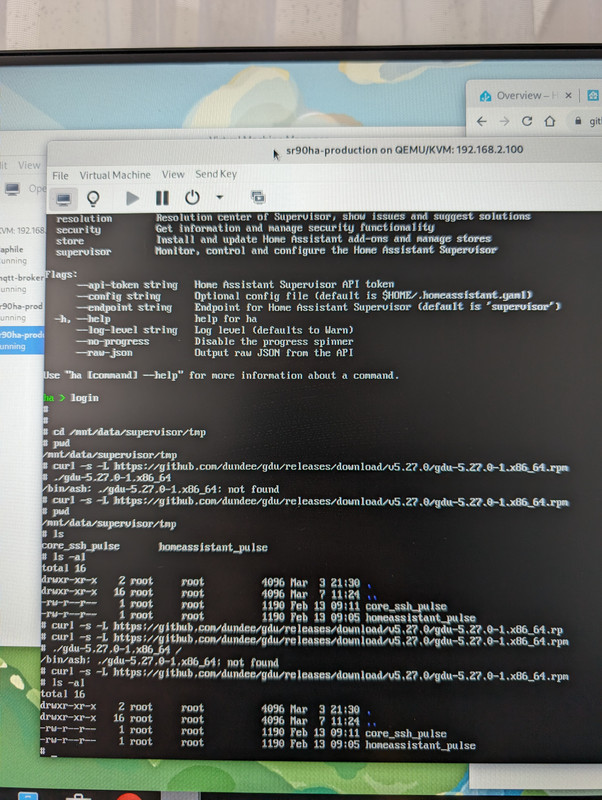
 blissful delta
I'm a noob. I bought Home assistant because it sounded like a better option than just relying on Alexa. I think I was wrong. Alexa is plug n play for the computer illiterate. Home assistant Green( although it claims it is) is not for dummies. It seems you need to have some ounce of programming skills to set up and navigate through the myriad of hurdles and stages. Although I probably could figure it out with persistence and time, frustration is winning the fight. Therefore Home Assistant ISN'T plug-n-play. The setup doesn't tell you to remove the VPN from your mobile device before setting up the app. If you make an error setting up you owner account and input it incorrectly on the app, TOO BAD, it doesn't allow you to see what your are typing BEFORE hitting next. To fix this little oversight of hitting the wrong letter with your fat sausage like fingers on the tiny keys of the mobile device (AKA phone) keyboard, you now have to purchase a HTMI cable and a USB keyboard to access the terminal. The terminal is the ONLY way to change the owner password.
I don't own a USB keyboard, mine has always been Bluetooth. Stupid I know but it's worked for me for 15 years so far. I wish developers wouldn't claim ease of use and plug-nplay until they have 10 noobs try it and verify that it is actually noob proof. Otherwise improve the options or documentation so stupid noobs like me can navigate the hurdles of their stupidity.
 tender wren
And how can the community here help you?
merry wigeon
raven forge
Yeah. Also look for gz files.
I managed to scrape together like 90% of it. You're a life saver for the photorec suggestion. I tried like 3 other data recovery tools but none were as good as that one. Ended up taking the SSD out and putting it in my PC to just scan the whole disk there.
Thankfully I was able to get my device and entity registries, my Lovelace/frontend, automations/scripts/helpers, user accounts.
I basically just had to set all add-ons up from scratch, so good opportunity to move Z2M into its own vm. Had to go around the house and rejoin everything and figure out the device names again, but it seems to be working now.
Still can't believe I left my browser just sitting on the "download backup" screen JFC. But atleast now with the proxmox setup I'll find a way to automate storing snapshots redundantly somewhere ...
Today was a long day lol.
blissful delta
tender wren
And how can the community here help you?
I bought a green Home Assistant which was supposed to be plug-n-play, with basic installation instructions, on mobile device setup with an app. I got timeout errors 3x, and when it did find the IP address it white screened the app. I decided to try installing it on a PC. Microsoft edge kept coming up with address errors when I tried the dashboard website, so I went back to my phone. Finally got into the device through the app after disabling my VPN( which the instructions did not mention to do for VPNs) and configured my home automation venture. I then remembered that the reason I wanted this system was to use my PC as my home automation computer. after 2 more attempts to connect to the URL I finally got in only to find that my log in information was not correct as I assumed I had entered it. I thought that I had to add my PC as a user(which wasn't what I wanted) and so believed it might be one user one device so I logged out of the app only to find the browser still wouldn't except my log in as I remembered it and all attempts to reset the password kept sending me to instructions that required me to manuall rest the device through the interface. Isn't there another method I can try without further expenditure on unnecessary hardware and peripherals?
humble mirage
The good news is that the docs are open - you can suggest edits or improvements
And no, once locked out you need physical access to the device console
blissful delta
I'm sorry what part about being a NOOB eludes you. I wantedc a simple setup system for home automation and I get headaches
humble mirage
Well, this isn't a commercial platform, you have to do some learning, but ... being a "noob" doesn't mean you can't help improve the docs
 solid notch
Home Assistant cannot, and should not be as simple as microwave oven or Gameboy. It's a software and an appliance for modifying your home infrastructure. It will require some knowledge and willingness to learn, or, at least, to read a docs.
Being noob is okay, we'all was there.
humble mirage
If you want "noob" simple then maybe one of the commercial platforms, which are far less capable and flexible, may suit you better
Otherwise, this platform does require you to learn and develop your own skills and knowledge
blissful delta
this is true but my reason for purchasing this product was because it claimed to be PLUG-N-PLAY and all the setup issues were address making it simple. It is not.
solid notch
Again, there is no P'n'P Smart Home platforms. Neither DIY, nor commercial.
There is no happy path.
Even with glorified shiny boxes from big tech you will see more or less the same issues, weird connection issues, but there is a caveat.
No one will help you and no one will handhold you in case of total SNAFU.
But, there is a solution for you. Find a savvy person, pay for a work/support and call it a day. Problem solved.
humble mirage
Sadly... you hit an uncommon problem. Could the reset process be better? Yes. Has anybody made that happen yet? No - this is a community project and things get done when somebody makes it a (usually personal) priority. Remote owner password resets aren't there, yet.
raven forge
low sigil
Can't directly upload to Discord. So here's the screenshot https://i.postimg.cc/...
You didn't follow the instructions: #general-archived message
You tried to download a rpm? Not only does HAOS not use that, the way the command works is that it would stream the file to your terminal and curl is smart enough not to do that by default. You just don't see it because of the silent/quiet -s flag. The command is meant to be piped through tar which extracts it. I also used this older version on purpose. The newer ones have some character issues on most terminals. If you have absolutely no space you can also try the way explained below (in my post) that requires no third party tools. Can you also run df -h?
blissful delta
My frustration is showing here but I wish claims weren't made about this product that weren't entirely true. I've wasted hundreds$$ getting this setup because I want a simple answer to my Home Automation problem. I now think sticking to Alexa is a better option until this system fulfils it current claims. The big tech companies have delivered what they claim. Plug n play. I have purchased products that work with my current 'Big Tech' setup but the only drawback to it is it requires an internet connection to operate.
humble mirage
You hit one fat-finger problem and are ready to give up already?
raven forge
merry wigeon
I managed to scrape together like 90% of it. You're a life saver for the photore...
Glad to hear that. A whole VM just for Z2M?
blissful delta
humble mirage
Sadly... you hit an uncommon problem. Could the reset process be better? Yes. Ha...
well unfortunately until they get there it is of no use to the average home owner and alternatives will be sort.
humble mirage
Home Assistant is still some way away from being a good answer for the non-technical
blissful delta
humble mirage
You hit one fat-finger problem and are ready to give up already?
yes I'm not a programmer I'm and old man trying to make his life easier in his retirement. I have some computer knowledge but limited income. I'm just looking for a feasible option for my knowledge and budget
humble mirage
The hardware may be plug and play, but the software ... probably won't ever be
The core of it, eventually, probably
But... the nature of the massively chaotic and broken IOT ecosystem means that it's always going to involve fettling, cursing, and more
blissful delta
Software is only limited by the shortfalls in users abilities. This is where the improvements need to be made... the system is a very good one but UI is letting it down.
humble mirage
You should have seen HA two years ago 😉
Hell, you should have seen it 5 years ago
It's improved a lot, and will continue to
blissful delta
I have researched this and agree there has been leaps and bounds over the years but to claim simplicity of use and plug n play capabilities hold a very stong expectation. This UI isn't there yet.
 plucky talon
I havent ever seen HA pitched as plug and play
humble mirage
The only thing that is is the Green hardware, not HA
blissful delta
I wish to use this system but feel frustrated by the fact that I have to now purchase additional hardware for this one off use
humble mirage
Marketing fluff gonna fluff
You'll need that hardware again anyway, when things go wrong and you brick it
blissful delta
don't say 'brick it' ..I hate when that happens
humble mirage
Shit happens...
plucky talon
Happens to macs, happens to linux, happens to windows, iphone, android etc
humble mirage
Almost everybody has broken HA at some point, though it's a lot harder these days
Bad upgrades can also happen
plucky talon
I havent broken HA yet
blissful delta
don't mention upgrades I've had the thing not 2 hours and it want a firmware upgrade and the app wanted a version upgrade..🤣
humble mirage
There's a new major HA version every month 😉
plucky talon
Start of every month
humble mirage
Plus point releases during the month, and OS updates, and ...
Then you get to the world of custom integrations and cards and ...
blissful delta
😱
plucky talon
be me, skip most point releases having read the changenotes and deciding "nah I dont care"
blissful delta
thanks guys
plucky talon
Unfortunately as for your password issue, I dont have much solution there
my local tesco does sell USB keyboards for like all of £5. But I understand thats a frustration. One could try making common typos of your password and seeing if any of those work, but that seems equally frustrating
and unfortunately as great as HA being offline by default is, that does make an obstacle for there not being a password recovery service like there would be for online accounts
blissful delta
Tinkerer did it's do as the instruction tell you.... and hope the improve that issue in a future upgrade... and I'm in Australia..... I'll just order a cheap one of line
I just wish I had logged onto it with my PC before resorting to the app
solid notch
By the way, dirt cheap keyboard and HDMI cable is a necessary tools for tinkering with single board computers. HA box is a computer, after all.
raven forge
You are allowed to use something a little bit more "premium" too 😉
solid notch
Well, this is the kind of equipment that is needed once a year. I even bought mine in a supermarket.
raven forge
Kind of depends on your setup. I use mine all the time but I mostly use VMs nowadays so I don't need it to mange most of my "machines".
solid notch
It's convenient, after all.
I actually understand frustration above. Something similar happened to me, but instead of HA I borked iLO in HPE server, and was forced to buy an old monitor with a VGA input just to fix it.
raven forge
I have a small drawer full of display adapters and at least two older monitors lying around. Only one of my servers has vPRO which works sometimes.
tender wren
blissful delta
Tinkerer did it's do as the instruction tell you.... and hope the improve that i...
If you don't want to reset the password, the easiest way would be to use the nuclear option - the reset procedure with a MicroSD card, which resets everything to zero.
https://green.home-assistant.io/guides/reset/
merry wigeon
raven forge
Glad to hear that. A whole VM just for Z2M?
Yeah I may still re-organize it again, I just needed it up and running. Just followed the Tteck guide for z2m lxc
raven forge
Then it's not a VM. That's fine.
merry wigeon
Oh I assumed it technically counted as a VM but maybe not
raven forge
It does not: https://pve.proxmox.com/wiki/Linux_Container
merry wigeon
Gotcha. See this is the stuff I would've read yesterday if I wasn't stuck doing about 12 hours of disaster recovery lol. Thanks for the link.
brittle sail
raven forge
I have a small drawer full of display adapters and at least two older monitors l...
No piKVM?
raven forge
No.
brittle sail
raven forge
No.
Do you not like them or just haven’t found the need?
raven forge
I don't like the pi but mostly because it's very expensive here. At least the complete ones.
brittle sail
DIY isn’t bad for price is it? Like full BOM with an older pi is reasonable right?
I haven’t needed one myself so haven’t gone down that road. Both my old servers have ancient but working bmc with ipmi and even remote console with some version of Java that is probably ready to get social security
raven forge
Still 230+ bucks for the v3 case and internals without the pi.
brittle sail
Ah yikes
 crimson steeple
Hi, I'm trying to update to version 2024.3.0 on a Rasbperry PI 3 B, but when I hit update, it just goes on as if it works, the connection is lost and it never updates, does anyone else have the same problem?
merry wigeon
I'm not sure if I just forgot how to read guides but man I am struggling to container-ize the basics like mqtt / zigbee (Proxmox: HAOS VM, docker LXC + portainer).
At what point do I just slap everything back into HAOS VM as an addon and just pull out Frigate only so I can leverage my gpu?
brittle sail
merry wigeon
I'm not sure if I just forgot how to read guides but man I am struggling to cont...
Personal choice. Theres no need to abstract and control everything if you don’t want to
merry wigeon
I was hoping to reduce my points of failure (HA down, but zigbee still running just without automations) ... but honestly I am not sure if it's worth the headache anymore lmao.
brittle sail
Points of failure are hardware links usually
merry wigeon
Is there any tangible performance difference of having HAOS container the addons vs having docker do it? Answer may depend on hardware idk
brittle sail
Nope
merry wigeon
hm
brittle sail
Not in any meaningful way for hass and smart home
merry wigeon
Honestly I might just throw it back in HA then except Frigate
brittle sail
You go dockerhost cuz you want full control and don’t like/trust/want haos
merry wigeon
If it ain't broke, and all that
brittle sail
You can revisit if and when your beard turns grey
merry wigeon
Surprised it didn't yesterday
 random karma
Is there a proper help channel?
I have a windows 11 OS down in my basement im using to host stuff. I host a minecraft server, a plex server, and escape pod for a little robot I have.
I thought Home Assistant would be a lot like plex, where I just install it on the device I want to use to host it on
But instead I need to download something for Hyper-v? Or Virtual Box?
This is a new one for me
I don't recall being able to automatically start a virtual machine are start-up
merry wigeon
The things you listed can be run directly on/by windows, home assistant can't (that I know of, but I'm not an expert). It needs to be run as a virtual machine. I followed the Hyper-V instructions when I was first experimenting with HA and it was mostly painless.
brittle sail
nothing about windows virtualiziation is painless lol
brittle sail
it's a terrible option
random karma
I want it to boot up automatically if I restart my computer
merry wigeon
I'm sure you could set up a script or windows task to do that
brittle sail
build a server and keep windows for gaming
most people start out with installing plex then adding another hdd then another
random karma
I don't want to remote connect to this PC constantly just to hyper-v it manually
brittle sail
you most likely already outgrew your setup and are just pushing a rock uphill
merry wigeon
But lets get real .. my windows VM lasted about 3 weeks before the addiction started and I bought a mini-pc for it.
windows VM is for the "trial version" lol
random karma
It was almost shocking to me that Home Assistant didn't have an app like Plex does
Im not installing it as an OS
merry wigeon
Why?
random karma
Because Im not using 1 computer for just that
merry wigeon
no I mean why is it shocking
random karma
merry wigeon
no I mean why is it shocking
No other project or self hosting does this
brittle sail
lol
random karma
Normally its a tool or program you install on the OS
brittle sail
you've got a lot to learn dude
random karma
I wanted to host a server for my old Vector Robot from anki,
merry wigeon
That's incredibly far from the truth
random karma
windows program
I wanted to do a minecraft server, install java and run a program
want a self hosting movie website?
Install the .exe
Home Assistant was the first ever self hosting thing I've touched that's like "Oh yea we need to be our own OS to work"
Can I not just install it on my windows or linux os like bruh
merry wigeon
You can just do it as a container
random karma
With something like VirtualBox, or Hyper-V
But then I lose that auto boot that comes with windows startup
I need to open the Hyper-V and launch it
And that's every time I just decide to restart the computer because it's having problems, or has a system update
merry wigeon
I'm not a linux expert but .. you said you have linux os .. can you not just set up a docker and add a home assitant container?
random karma
Sure, windows task schedular, but that program is a little out dated and hard to work with. I'm better off installing python and using librarys to do such tasks
random karma
merry wigeon
I'm not a linux expert but .. you said you have linux os .. can you not just set...
I don't host anything on linux, I have linux but I have not yet hosted anything on it yet
Bot Docker works on windows no?
merry wigeon
Good time to start then, seems like it would solve every issue
random karma
I'd rather not have 2 computers draining power haha
1 is good enough,
But you mentioned Docker
You can install Docker on windows
So can I run Docker and put Home Assistant on that?
random karma
merry wigeon
https://www.home-assistant.io/installation/#advanced-installation-methods
I don't see anything about Docker
I see one for Linux
But why not Windows? Windows can have Docker too
🤔
merry wigeon
Then that's your answer I guess
random karma
Idk, i think it's funny you can put a home assistant on an old phone
but you can't install it on windows without doing some crazy stuff
merry wigeon
ok
random karma
I found this
This seems almost exactly like what I want
but strang how it's not something they just offer on the website
merry wigeon
Probably because
"ATTENTION: Direct works on Windows is not maintained by the core developers of Home Assistant. So some components/integrations may not work at all. No need to ask me or the core authors to fix it. If something you need doesn't work - use virtualization."
random karma
Well yea
I mean Why doesn't core developers of Home Assistant make something like this themselfs
I knew this wasn't something they made or provided
random karma
Whats niche?
merry wigeon
your situation
random karma
I suppose
Anything I've self hosted was some form of program or portable
So installing an OS to host seems a little weird if your trying to be basic
I've herd of installing an OS like Linux for servers Ubuntu Server
Or like a Linuz distros that offered lots of pre-built in self hosting services/applications
But never like a full straight up custom OS for just 1 program or 1 service
Especially when you want to do multiple programs and services on 1 computer, not 5 or 3
merry wigeon
shrug
random karma
When they offered the virtual solution, it was almost like they knew why people would want to virtualize it
Yes it's an OS, that means it can be virtualized
So instead of providing a portable Home Assistant installer, they through you the OS and go "Here, just run it on a virtual Machine it achieves the same goal with just less of the QOL unless you really know what your doing"
It works
merry wigeon
It is what it is. It's made for tinkerers.
tinkerers generally expand beyond running exes on windows
random karma
Home Assistant is great
Really want to use it
this just seems like a challange I don't want to deal with
Maybe in the future when I decide to learn Linux a little more
I can 100% see myself switching to that for self hosting
merry wigeon
random karma
merry wigeon
It is what it is. It's made for tinkerers.
Im a different Tinkerer. Every Tinkerer has different preferences, goals and workflows
random karma
merry wigeon
https://www.elevenforum.com/t/automatically-run-hyper-v-virtual-machines-at-star...
This seems perfect
 pliant moat
A question for the core (or maybe HAOS) Devs:
I often see comments like this on Facebook. I wonder if it would be worthwhile to add a note to the boot screen along the lines of "home assistant loaded. Now connect to http........ from a computer or phone"
raven forge
You mean people getting confused by the Waiting for ... messages still being there?
It would have to be added near one of those places:
 primal saffron
Hey all,
I cant seem to get the HA app on my android tablet to work. (Also, I can't connect over the browser either)
When I open the HA app it asks me to select the server. It finds my server so I tap on it.
Then, a few seconds later, I see
ERR_CONNECTION_TIMED_OUT
I've check the local IP, which is 192.168.1.37, It's correct and also the same one that is used by my PC and also Android phone from myself en Iphone from my wife.
I've got no VPN running on my tablet or anything else that could disturb with the DNS
I've got the most recent HA app.
I've deleted and reinstalled the app.
I can't connect over the browser to 192.168.1.37:8123 either. This also times out.
I've got HA running on a proxmox server.
Any troubleshooting advice?
 fallen lichen
Are you certain you're on the same network and not like a WiFi guest network?
 night meteor
Hello! Im getting this error when trying to install
[supervisor.docker.interface] Can't install ghcr.io/home-assistant/raspberrypi3-64-homeassistant:2024.3.0: 404 Client Error for http+docker://localhost/v1.43/images/ghcr.io/home-assistant/raspberrypi3-64-homeassistant:2024.3.0/json: Not Found ("No such image: ghcr.io/home-assistant/raspberrypi3-64-homeassistant:2024.3.0")
How's your remaining disk space look?
night meteor
Its a clean installation, I just formatted the sd card and used the Raspberry Pi Imager
fallen lichen
Could you share the rest of the log using a code sharing site?
night meteor
I can download the raw logs during the installation sure, one sec
https://pastebin.com/FTpT4wXY
primal saffron
fallen lichen
Are you certain you're on the same network and not like a WiFi guest network?
Wow..... I can't believe I didn't check this.
So sorry and thank you for your help 🙂
fallen lichen
You bet, it's nice when it's the simple stuff
 steel crane
Help! I have been running HA pretty flawlessly for a year or two now. I run in a container on a synology DSM, which is up and running flawlessly (the synology). I updated the core to 2023.4 and that went swimmingly with a reboot and re-fresh of the interface. I then did the voice update (a pretty minor one as far as I know) and now I am getting the following error: Error returned from supervisor system not ready with state: setup. I tried rebooting the container, and also doing ha supervisor restart. The error I then get is error: 'supervisor.restart' blocked from execution, system is not running - startup. I did have the "make backup before updating" checked for both the core and voice update. What do i do next!?
I have access to the CLI through the synology console.
brittle sail
Webui loads or no?
steel crane
nope
brittle sail
Sadcat
steel crane
it's never getting that far
brittle sail
Can you link to what you mean by upgraded voice?
steel crane
sorry, yes let me find it - it was the update that added a few new voice prompt commands.
brittle sail
Sounds like it isn’t happy about a configuration.yaml change like bad syntax
But with haos it loads into recovery mode. I guess with docker they expect you to know better
steel crane
except I didn't make any changes, and it had JUST rebooted to the new core successfully.
steel crane
no, the docker version that runs on synology
brittle sail
Supervisor errors are confusing then
steel crane
I believe it was the implementation for this. Sadly I can't get into the interface to see what I did. https://www.home-assistant.io/blog/2024/02/21/voice-chapter-6/
When I run available-updates I get /addons/core_matter_server/icons and /update-available/core_openwakeword (which I belive is the one I was trying to update)
os update says version 12 already installed
info
just watched a full hass core reboot, and all components loaded with an "ok" status
oh wait!
After running the os update command I think I might be good!
Did a restart and now it's saying it's up.
ok. phew. That was a moment of panic there. I think I'll wait before updating openwakeword again.
I am also going to take a synology snapshot of the OS so I can get back to this state if needs be.
 indigo goblet
Hello, I'm a newbie on HA, but i got it running in a proxmox container. I've tried to install HACS , but do not have the menu item "addons". I'm running HA 2023.6.3, and I thought that perhaps i should upgrade, but I am having difficulties with that also. any help would be appreciated.
raven forge
Addons are not available in a container install. What trouble?
indigo goblet
So to be able to use all options of HA it must be installed how? Does it need to be installed in a proxmox VM?
raven forge
What matters is the installation method. See table here: https://www.home-assistant.io/installation/#advanced-installation-methods
 wooden smelt
indigo goblet
Hello, I'm a newbie on HA, but i got it running in a proxmox container. I've tri...
atomic falcon
wooden smelt
indigo goblet
Hello, I'm a newbie on HA, but i got it running in a proxmox container. I've tri...
atomic falcon
My HA is not starting properly after update. I get this in the supervisor logs. Anyone has an idea what it means? 24-03-10 07:49:52 ERROR (MainThread) [asyncio] Task exception was never retrieved future: <Task finished name='Task-5764' coro=<Addon.watchdog_container() done, defined at /usr/src/supervisor/supervisor/addons/addon.py:1383> exception=AddonsJobError('Rate limit exceeded, more than 10 calls in 0:30:00')> Traceback (most recent call last): File "/usr/src/supervisor/supervisor/addons/addon.py", line 1397, in watchdog_container await self._restart_after_problem(event.state) File "/usr/src/supervisor/supervisor/jobs/decorator.py", line 290, in wrapper raise on_condition( supervisor.exceptions.AddonsJobError: Rate limit exceeded, more than 10 calls in 0:30:00
 storm raven
Migrated from RPI to Proxmox and restored from a full backup. For some reason the backup did not restored the network settings (static IP) and was set back to DHCP. Is this normal behaviour from a full backup?
 fervent trellis
atomic falcon
My HA is not starting properly after update. I get this in the supervisor logs. ...
fervent trellis
atomic falcon
My HA is not starting properly after update. I get this in the supervisor logs. ...
interesting enough I'm also getting this error
brittle sail
i just restarted hass and webui never came back but responded to ping.. restarted haos (not core) and then it came back but in recovery mode.. then restarting core brought it back to normal
~~something fucky is going on with haos 12 i think ~~ nvm i forgot i was testing a custom component, that might be it instead
https://github.com/home-assistant/operating-system/issues/3222 looks like this issue is affecting me regardless
 rain shoal
indigo goblet
Hello, I'm a newbie on HA, but i got it running in a proxmox container. I've tri...
rain shoal
indigo goblet
Hello, I'm a newbie on HA, but i got it running in a proxmox container. I've tri...
I also run virtualized HA in Proxmox, but instead of LXC or docker containers, I go simple and use VM (old KISS rule). Daily backups to Synology Proxmox Backup VM make me sleep much better as recovery is very simple and quick.
 jolly halo
I just installed directly from the git repository into a python venv 😉
no docker, no nothing 😉
low cosmos
storm raven
Migrated from RPI to Proxmox and restored from a full backup. For some reason th...
How had you allocated the IP address? Was it done at the router based on the MAC address of the RPI?
modern basalt
Hopefully a quick one - moving from Pi4 to Proxmox for HA. Have HAOS VM which is fine, but trying to decide between Docker LXC, Debian LXC, or Debian VM for a docker host for all my other automation containers. Thoughts?
raven forge
I'd choose the VM. Proxmox staff recommends against docker in LXC. Not a fan of alpine. Busybox is no fun either.
storm raven
low cosmos
How had you allocated the IP address? Was it done at the router based on the MAC...
Nope it was set to static in the ha os system settings. I think it’s just weird to take a backup of FULL settings and than it’s change static back to dhcp.
jolly halo
no need for the GDPR violating cloud stuff either 😉
 hollow scaffold
Hi im trying to configure home assistant on raspberry pi 4b. The observer works, but supervisor on port 8123 is no responding. In docker logs, i get "Home assistant has crashed!", "Warchdog restart of Home assistant failed!", no explanation. Anyone can help?
 hearty dew
Howdy howdy, I dont have the addon store, so i think i installed core, is there anyw ay to upgrade?
raven forge
Not really. How and where did you install it?
hearty dew
docker container
raven forge
See table here: https://www.home-assistant.io/installation/#advanced-installation-methods
Addons are just specialized docker containers managed by supervisor. You can install most of the software your own.
hearty dew
Yeah i was looking through there, but im no linux wiz for the most part. I guess ic ould always do the OVA on my esxi host, but i was hoping for a full docker install to limit the overhead
raven forge
There's no official way to just install the supervisor as container and let it manage things. Only what you see in my link. But like I said, you can do it yourself. #installation-archived message
hearty dew
is there an unofficial way? 😛
raven forge
Not that I know of.
hearty dew
understood, i appreciate the quick help. 🙂 Thanks
Time to wipe that server ost and find HassIO OS install for esxi8
 carmine lava
Hi I need help, I am trying to install HA on a raspberry pi 3b+ and i keep getting an error
I tried to change the sd card, and use older versions of HA
but nothing works
An error occured while installing Home Assistant, check the logs below for more information.
Where can I send the logs ?
humble scaffoldBOT
Please use a code share site to share code or logs, for example:
- https://dpaste.org/ (select YAML for the language, and consider picking a longer expiry)
- http://pastie.org/ (select YAML for the language)
- https://paste.debian.net/ (you guessed it, select YAML as the language)
Please don't use Pastebin, since it can randomly add spaces to the main view. Please also don't share text as images since it makes it harder for people to help you. Remember that others may have colour blindness, impaired vision, etc.
carmine lava
raven forge
Might be corrupted somewhat. Can you try to re-flash it?
 twilit hound
afternoon, folks. just plugged in a skyconnect and would like to pass it through to my HA container. do any off these devices look right? ```lsusb
Bus 002 Device 001: ID 1d6b:0003 Linux Foundation 3.0 root hub
Bus 001 Device 011: ID 10c4:ea60 Silicon Labs CP210x UART Bridge
Bus 001 Device 002: ID 8087:0aaa Intel Corp. Bluetooth 9460/9560 Jefferson Peak (JfP)
Bus 001 Device 001: ID 1d6b:0002 Linux Foundation 2.0 root hub
i am guessing it's the silicon labs device, but 🤷
brittle sail
twilit hound
i am guessing it's the silicon labs device, but 🤷
it is
assuming you dont also have another stick also made by si labs
twilit hound
tyty. if i was better at linux, i could have seent: ```ls -l /dev/serial/by-id
total 0
lrwxrwxrwx 1 root root 13 Mar 10 21:11 usb-Nabu_Casa_SkyConnect_v1.0_7698a8ff85d8ed119fcd736162c613ac-if00-port0 -> ../../ttyUSB0
There’ll be some setting somewhere along the chain that takes precedence- but at least you were able to spot it and correct it.
modern basalt
That was disturbingly easy to migrate. Download backup, shut down Pi4, boot up HAOS VM in Proxmox using Pi4's MAC, restore, done.
modern basalt
MAC-based DHCP assigned IP.
brittle sail
Yea
modern basalt
I guess if I want to re-use that Pi I'll have problems.
brittle sail
Word
I don’t like Mac spoofing unless absolutely necessary
Like the 5 Chinese Poe to usb dongles I got with the same mac on all of them lol
modern basalt
I mean, all Proxmox hosts are MAC-spoofed except for the hypervisor itself.
brittle sail
A vm creation with a new Mac and spoofing a hardware Mac isn’t really the same thing
 elder onyx
Quick question, is a 16gb SSD adequate for running HAOS? Just ordered a used thin client as an upgrade from my rpi4 and it's equipped with a 16gb SSD.
modern basalt
elder onyx
Quick question, is a 16gb SSD adequate for running HAOS? Just ordered a used thi...
Provided you're not recording history for all devices/not using HAOS as an NVR, yes.
brittle sail
elder onyx
Quick question, is a 16gb SSD adequate for running HAOS? Just ordered a used thi...
no, the minimum is quoted as 32gb i believe
low cosmos
elder onyx
Quick question, is a 16gb SSD adequate for running HAOS? Just ordered a used thi...
Thinking about doing that myself - starting to look at what’s available. I’ll be upgrading from a rip 3B+ with only 1Gb RAM and it’s just not stable enough to be reliably available.
brittle sail
i'm seeing some SBCs at 16gb but backups as you update things will fill that up fast too
really just not a good option
elder onyx
low cosmos
Thinking about doing that myself - starting to look at what’s available. I’ll be...
Well the thin client I ordered has 4gb ram, ill have to see what my options are when it arrives but I might upgrade if possible
elder onyx
brittle sail
no, the minimum is quoted as 32gb i believe
I'll have to see what my options are when it arrives, hopefully I can swap in something better
modern basalt
I actually don't know where all the storage goes with HA. Been using it for around 8 years and apparently using around 9gb. Largest folder I can see in samba is the nest folder with almost a gig. Backups are only around 400mb. No images/recordings.
brittle sail
modern basalt
I actually don't know where all the storage goes with HA. Been using it for arou...
It uses zram now too
Haos does
modern basalt
Oh, interesting! That makes a lot more sense - and a smart way to handle it.
raven forge
brittle sail
It uses zram now too
Zswap*: https://www.home-assistant.io/blog/2023/04/18/home-assistant-os-release-10#advanced-memory-management
Why does link to marked text only work 20% of the time 😠
brittle sail
raven forge
Zswap*: <https://www.home-assistant.io/blog/2023/04/18/home-assistant-os-release...
You are right sorry #general-archived message
brittle sail
modern basalt
Oh, interesting! That makes a lot more sense - and a smart way to handle it.
modern basalt
Eh, I'm on a VM and the recommended was 32gb, so I'm not worried. Got plenty more if I want to expand too.
raven forge
Yeah. Better too little (within reason) than too much. Growing is really simple, shrinking not necessarily.
 worthy knoll
Hey y'all, having trouble installing HAOS on the Yellow; for some reason the installer isn't able to resolve github.com
Is there a way to get on the device itself to troubleshoot?
DNS resolves github from other devices on the network, and DHCP is handing out the local router as DNS server to clients (which successfully resolves github.com)
So at this point, I have no idea why the installer can't. 😦
worthy knoll
(got in via screen)
 misty leaf
worthy knoll
Hey y'all, having trouble installing HAOS on the Yellow; for some reason the ins...
misty leaf
worthy knoll
Hey y'all, having trouble installing HAOS on the Yellow; for some reason the ins...
Have you checked the /etc/resolv.conf file? I had the same issue and adding google DNS there got it working.
worthy knoll
misty leaf
Have you checked the `/etc/resolv.conf` file? I had the same issue and adding go...
DNS was definitely what I was most suspicious of, but haven't yet proved it. Using screen over the USB serial port was a nightmare, and not all the "characters" were coming through in my terminal.
placid sage
Guys why frigate with HASS does not even start? Followed all the installation steps in this video (very ver simple, i'm a noob): https://www.youtube.com/watch?v=XWNquH3tNxc
Btw working with Rpi 3B
humble mirage
#cameras-archived can help with Frigate... but only if you share the log from Frigate
(also, don't follow videos, follow the docs)
placid sage
My logs cannot even generate, it just won't open
humble mirage
Then head over to #cameras-archived and tell them how you run Frigate - add-on, Docker, etc
placid sage
oh sorry, tought I was there
 sonic juniper
I did found the problem. The new modem of odido zycel T56 does something wrong. When i place my old modem back all is running good. I have contacted Odido support for help.
 trail isle
Hello, I could not pair it with the Xiaomi robot home assistant. Can you help me?
 junior umbra
I'm having issues installing home assistant with docker compose. I'm not sure if its a home assistant thing or proxmox thing or docker thing or I'm just making thing way more complicated than it needs to be but either way, I am stuck!! . I am running Proxmox on a dell r720 server with several LXCs separated by VLAN tags (for isolated networks). This network is a dedicated VLAN for IoT for my bonus suite and I am trying to install home assistant in the LXC with docker compose. Its apparent that I am having user r/w problems cause all my error say saving and writing is not permitted. Any help would be apricated! Thank you!
humble scaffoldBOT
@junior umbra I converted your message into a file since it's above 15 lines :+1:
junior umbra
HOME ASSISTANT LOGS________________
2024-03-11 11:32:39.712 ERROR (MainThread) [homeassistant.helpers.storage] Error writing config for http: [Errno 1] Operation not permitted
2024-03-11 11:44:41.642 ERROR (SyncWorker_3) [homeassistant.util.file] Saving file failed: /config/.storage/bluetooth.passive_update_processor
Traceback (most recent call last):
File "/usr/src/homeassistant/homeassistant/util/file.py", line 61, in write_utf8_file
os.fchmod(fdesc.fileno(), 0o644)
PermissionError: [Errno 1] Operation not permitted
2024-03-11 11:44:41.655 ERROR (MainThread) [homeassistant.helpers.storage] Error writing config for bluetooth.passive_update_processor: [Errno 1] Operation not permitted
2024-03-11 11:44:42.525 ERROR (SyncWorker_5) [homeassistant.util.file] Saving file failed: /config/.storage/core.restore_state
Traceback (most recent call last):
File "/usr/src/homeassistant/homeassistant/util/file.py", line 61, in write_utf8_file
os.fchmod(fdesc.fileno(), 0o644)
PermissionError: [Errno 1] Operation not permitted
2024-03-11 11:44:42.547 ERROR (MainThread) [homeassistant.helpers.storage] Error writing config for core.restore_state: [Errno 1] Operation not permitted
raven forge
Please use code blocks: #frontend-archived message
What does ls -lah in the directory of the compose file say?
junior umbra
total 43K
drwxrwx--- 3 suite suite 5 Mar 11 11:17 .
drwxrwx--- 5 suite suite 5 Mar 11 07:41 ..
-rwxrwx--- 1 suite suite 17 Mar 11 11:19 .env
-rwxrwx--- 1 suite suite 839 Mar 11 11:19 compose.yaml
drwxrwx--- 7 suite suite 19 Mar 11 11:29 config
raven forge
Does id suite result in 3610?
junior umbra
yes
raven forge
Did you previously start it without the user option?
junior umbra
yes. I went through so may variations trying to get it to work. I tried no user but root, I tried adding root to suite group, suite to root /sudo groups. I set up a seperate LXC to run other senarios to see if it was the LXC...
raven forge
I'd try to stop, delete the cinfig directory and rhe cintainer an and then completely recreate it.
You can also try running it with just sh from the CLI to experiment more,
junior umbra
looks like the issue is that I dont have the same permission inside the container as I do outside the container
i need to somehow path my root inside to suite outside
 jovial coral
Good afternoon guys. I am super new to home assistant and just got the green install. It never detect any WiFi device such as smart plug, smart light, etc. the set up I use is Xfinity modem that bridge mode to ASUS router. It might be IP issue? If you guys can help, I would be eternally grateful 😅
 weary nymph
Hi, iv got HASS core running on WSL in windows 11. It seems my HASS cant see other devices on the network. Iv used netsh to forward port so i can access HASS from other network devices but it seems that HASS cant see any other devices on network. Any settings i should do??
merry wigeon
What are people's preferred ways to backup proxmox? Is there an easy way to automatically send my snapshots somewhere?
 knotty vale
Hello everyone,
I recently saw a nice representation on a German sub Reddit, where someone showed his home assistant setup and I immediately fell in love.
I also own hue lights, that are frustrating me, because they randomly lost their connection.
I was thinking of using a raspberry pi 5, a dongle for ZigBee and buy 4 sensor for humidity and temperature and add all of these (including the hue lights) to the HA.
Specifically I intend to buy.
- Raspberry Pi 5 / 8 GB RAM (with case and power adapter)
- 128 GB SD Card
- SONOFF ZigBee Gateway (ZBDongle-E 3.0)
- Aqara sensor for temperature and humidity
Now to my actual question, am I missing something, or am I good to go?
merry wigeon
That covers the basics, I think
humble mirage
You'll need some #zigbee-archived routers too
As long as the Hue's are in the same mesh, and not connected to their hub, they'll do
merry wigeon
And read the difference between the dongle E and P and make sure you know which one you want
humble mirage
(#zigbee-archived can tell you all about Zigbee stuff though)
knotty vale
Great, thanks you two. Will take a look at #zigbee-archived and the difference. 🙂
Oh, I first misunderstood you. The hues are currently connected to the hue hub, but I want them to run without and get rid of the hub. Since they are connected to the power they can act as routers right?
merry wigeon
Yep
worthy knoll
Hitting an uncaught error on a new HAOS install [on a Yellow, should be haos_yellow-12.0] where I can't progress past selecting the country. Can anyone help get me unstuck?
Uncaught (in promise) TypeError: Cannot read properties of null (reading 'darkMode')
 hidden basalt
Hey, I've notice my HA system is running 5 minutes late. Any ideas how to fix this? My router should be providing correct time.
empty bloom
you aren't using NTP from nist?
anyways, setting time in HA is only done in a few spots. with your home zone location and your TZ
pretty sure it's just TZ
but home zone does something... maybe I'm thinking of sun.sun
hidden basalt
It seems to be re-sync now but I wonder how it even get to that 5 min delay? Yesterday I was restarting the device few times, could that have caused it?
hidden basalt
I don't think I've override anything, I wasn't even aware how this things work until today when I started researching what could be cause of the issue.
empty bloom
you said above you have your own ntp server?
empty bloom
hidden basalt
Hey, I've notice my HA system is running 5 minutes late. Any ideas how to fix th...
here
hidden basalt
hmm, I might have misunderstood how it works, I though the router is getting the time and then providing it to the devices on the network?
empty bloom
typically that's not the case
hidden basalt
ok, so I guess my HA is getting the time data from whatever is the default setting.
empty bloom
the router supplies devices with the ntp server to use if that's what you're mistaking
Well, I guess if you go deep enough it could be supplying time to other devices and not the actual server. I was always under the impression that was not the case and devices still reached the ntp server directly
raven forge
Why guess? You can run timedatectl timesync-status on the OS directly to see what server is used. There's probably a simpler way through ha ... but I have to find it.
In my case it's time.cloudflare.com.
hidden basalt
through the command line?
raven forge
Yes.
empty bloom
raven forge
Why guess? You can run `timedatectl timesync-status` on the OS directly to see w...
you have the command memorized to use bash directly in HA terminal?
raven forge
No but I know a little bit about timedatectl and that it has status about it. Just had to check --help. Unless I misunderstood what you meant.
empty bloom
I'm using the terminal and ssh addon because I'm remote at the moment and that command piqued my interest
I recall there being a way to use actual commands outside the ha command
otherwise i'll just wait til I get home and connect directly to debian
raven forge
I ran it through developer SSH access. There might be way to enter login similar to when you're "trapped" in the ha > prompt but I'm not sure.
empty bloom
oh that works but requires a pw
well a username and password, time to guess alot
and there's a 60 second timeout
hmm, no clue
raven forge
I don't think it was login as that just shows the host name of the container to log into. I have to research this when my network isn't having so much issues.
empty bloom
well, that's bringing up a user/pw combo
raven forge
This is what it shows on the OS side
# grep root /etc/shadow
root::::::::
On the addon side
~ # grep root /etc/shadow
root:somestuffhere:19794:0:::::
What I'm saying is there wouldn't be a password to enter.
The prompt also looks like this so it's not the OS side it would log into
~ # login
a0d7b954-ssh login:
well that all works without needing login
it's just doesn't see the timedatectl command
raven forge
ha's login command (directly on the OS) actually just exists the CLI: https://github.com/home-assistant/plugin-cli/blob/d222ddd2980ded8beb2c84f0433dea7cb7c17550/rootfs/usr/bin/cli.sh#L13
empty bloom
Yeah, that's what I've using
don't know the user/pw
not sure which one it's using
nothing set in the addon
nothing set on the os
🤷♂️
unless I forgot what was set on the OS
raven forge
The OS has no password, see /etc/shadow above. There's not even a passwd utility.
# passwd
-sh: passwd: not found
My thinking is that if there's a way to go directly to the OS from within the SSH addon I should know about it by now.
I feel like I'm just causing confusion 😄
raven forge
Are you using the Terminal in the frontend?
empty bloom
maybe I don't have the required libs to run timedatectl
I'm going through terminal & SSH, yes
but I'll be driving home in about 20 minutes, so I might just wait until I have access to my other PCs on my network
only have access to HA externally
raven forge
Ah. It runs ttyd (Share your terminal over the web) and nginx (Web server allowing access to ttyd) and through ingress gives you access to the shell without password as you're logged into HA. The technicalities might be a little different but that's what I remember when I checked the SSH addon's structure when I was researching creating a addon for checking space usage.
You're still inside a container though. timedatectl has to be run directly on the OS.
empty bloom
yep, so I need to ssh in when I get home
that's the only way I can get to my os
I could swear there were ways to pass commands
raven forge
Let me know if you find out more about it.
tender wren
A SSH command to the host OS via a shell_command? 🤔
raven forge
But shell_command runs commands in the context of the homeassistant container?
grand pivot
if that command involves "ssh", then you can run a command anywhere
tender wren
But you should be able to use the container SSH to connect to the host OS and run a command there
raven forge
Right but that can also be done directly through the SSH addon and you also need a set up developer SSH access. SSH key and all.
raven forge
Apparently the supervisor only exposes whether ntp is used and whether it is synchronized. Not the address through. Maybe a good idea for a feature request?
 cedar cobalt
My raspberri pi just went dark on me despite it being powdered on and ethernet light blinking. I power cycled it a couple times and no luck seeing it on the network. I cannot find a micro-hdmi cable to connect a display so I'm not sure what I should do... order a cable and wait, reinstall HA on my linux server (NUC), or something else... any suggestions?
Maybe I could pull the SD card and back it up, then flash it?
raven forge
Depends who you ask. If you're up for it I'd recommend virtualizing HAOS on your NUC: https://www.derekseaman.com/2023/10/home-assistant-proxmox-ve-8-0-quick-start-guide-2.html
Also see here why I recommend this:
- #hardware-archived message
- #general-archived message
You should set up remote backups: https://www.home-assistant.io/common-tasks/os/#copying-your-backups-to-another-location
If you want to use the pi for anything you should really get a cable/adapter to be able to plug a monitor into it.
raven forge
empty bloom
yep, so I need to ssh in when I get home
I found a cursed way here: https://community.home-assistant.io/t/how-to-get-access-at-damn-host-system/96549/71
I didn't check if all the args are necessary but it works. Requires the Advanced SSH terminal with disabled protection mode to be able to use the docker command.
~ # timedatectl timesync-status
-bash: timedatectl: command not found
~ # hostname
a0d7b954-ssh
~ # docker run --rm --privileged --pid=host -it alpine nsenter -t 1 -m -u -n -i sh -c "timedatectl timesync-status"
       Server: 162.159.200.1 (time.cloudflare.com)
...
thought you might be interested.
empty bloom
That is a ton of commands
I’ll have to look into each one. I forgot to run the command bare metal when I got home
cedar cobalt
I ran to walmart and bought an adapter cable, looks like on boot it's saying Failed to mount HassOS data partition then "Cannot connect to the Docker daemon. Does this mean my SD card is corrupt?
raven forge
Can you share a picture of all of it?
cedar cobalt
the screen buffers blows past it pretty quick but I can make a quick recording I think
cedar cobalt
raven forge
Can you share a picture of all of it?
Hm, I can't post pictures in here?
raven forge
Do you only use a SD Card?
You can try the command it mentions and also run lsblk at the rescue shell.
raven forge
I'd check journalctl -eu mnt-overlay, dmesg -T and lsblk -o+LABEL,FSTYPE,MODEL.
Please don't use image to text tools, btw. They never get it right and it's confusing to read.
raven forge
That seems to have the same pictures?
raven forge
Try journalctl -eu mnt-overlay.mount instead. Lots of the partitions are read only. hassos-overlay and hassos-data aren't mounted at all. Not good. But at least they are there. You can enter journalctl -k and then scroll up/down with arrows and PGUP/PGDOWN instead of dmesg.
You could attempt to run a fsck but this is best done with a live iso and since this is a pi I don't know how. HAOS should run that itself on boot up so I'm not confident this would fix anything. To be honest I would check the commands to get some information and then get my backups off of it and either follow my advice from earlier or re-flash. Perhaps onto another SD Card. I don't think this is gonna be easily fixable or wise to try but let's see. On windows you can use DiskInternals Linux Reader or similar.
placid sage
home assistant version 12.1 has been released. but I am having a problem with the update.
the installation never completes.
[WARN] Home Assistant CLI not starting! Jump into emergency console...
" # login " worked
 stoic ravine
@placid sage Did you get it working? After the update my installation is not working anymore.
stoic ravine
placid sage
stoic ravine
https://pastebin.com/WKqAqNHs
did you restart it?
stoic ravine
Tried a reboot, same problem. Can try again.
placid sage
Your problem seems to be different from mine.
stoic ravine
OK. I'll investigate a bit more then. Thanks.
placid sage
it didn't open at first, it didn't react at all, I turned it off, turned it on, and this time it gave the error I wrote. I typed login and the problem disappeared.
but your problem seems much more complicated.
stoic ravine
Ah, yes it seems like something is broken :/
 lofty storm
mm updated to 12.1 as well and it seems my data partition is not coming up as well. It showed up with the " hassos-data-dis" label. I tried to change the label manually back to " hassos-data" , and reboot, but still nope.
a journalctl dump on the first boot after update: https://pastebin.com/XdpHFRVg
ok.. I made a typo when changing the label manually.. now with the correct label it boots correctly 🙂
stoic ravine
Strange stuff. I luckily made a full backup a couple of weeks back, so I had to restore. So now I know my backup plan works, at least. Guess I'll wait a couple of weeks before trying a new upgrade 😅
lofty storm
sounds like it believed it was a first boot
homeassistant systemd[1]: Starting HAOS data disk detach...
(was reading https://github.com/home-assistant/operating-system/issues/2822#issuecomment-1764435865)
(for my issue. nothing like your python issue)
 light garnet
ACPI ERROR: no handler or method for gpe 0b
 native mantle
Hi guys! I'm new to HA and really excited to learn more about it. I installed it on a raspberry pi and was able to add some integrations already. Along the way I tried to find answers to some questions about the HA security and wasn't able to find it on the internet. I hope someone here can help me understand.
native mantle
My home assistant is supposed to be local since I didn't set it to access from outside. I keep reading that if it's local, there is no real security risk to HA. So I have few questions. #1 If my HA is set to local but I access to devices connected to their cloud services, is my HA is still considered local. #2 If the HA goes through a VPN router and my HA use HTTP, is it still encrypted. #3 What are the best practices to safeguard HA from the internet when set to local. I'm guessing that even if set to local it still get information from the internet since it can always give me the weather forecast. Thank you in advance.
 fierce hinge
hi i'm in trouble installing home assistant on a mini pc someone can help ?
humble mirage
My home assistant is supposed to be
 sage trellis
I'm at my wits end with HAOS, any ideas would be appreciated. I'm trying to install HAOS on an amd64 Proxmox VE 8 host, but the HAOS VM never seems to recognize USB devices that I passthrough. No USB devices show up in lsusb, lshw, or dmesg. I can passthrough my ZWave dongle to other Linux VMs just fine on the same host system. I've tried both i440x and q35 machines. I've rebooted everything many times and reinstalled many times. I am using ZFS as my storage mechaism, so to install HAOS from the qcow2 image I first convert it using qemu-img convert onto the newly created ZFS disk after I setup the VM. It boots up, everything else seems to work fine except passthrough. Any ideas?
wooden smelt
Try installing HAOS using https://helper-scripts.com
 outer wadi
Hey, ive got a new odroid n2+ and flashed haos_odroid-n2-12.1.img.xz to it, I can see its been given and IP by my router, but I cant seem to access it via homeassistant.local or the ip adreress, its definetely the right IP as I can match the mac address up.
I can ping it but the ping isn't quite as reliable as i would expect, getting say 5 or 6 <1ms then a time out. Almost like its too busy to respond to the ping. Its ethernet connected and usually that ethernet cable is connected to my laptop that i use daily for work, so i dont think its a connection issue as such
Should add i followed this: https://www.home-assistant.io/common-tasks/os/#flashing-an-odroid-n2
ping image, not terrible but i dont know why its missing any of them: https://i.imgur.com/K2kSmXX.png
 outer wadi
As a test I just flashed ubuntu and that booted straight in, so looks like my emmc and the device itself work. One thing I noticed now is that it has both a blue light and a red light. When i flashed haos I only seem to get a red light, so i guess that implies something about it not booting correct
SOLVED!
Looks like it might be an issue with HAOS 12.1 not working on odroid, just tried 12.0 and straight in
crude inlet
@outer wadi I saw someone else who updated their odroid n2 to 12.1 and fixed a connectivity issue, so now I’m not sure
fervent trellis
I just had to spin up a fresh instance of HA because my old server died as a result of a failed hdd.
New server is up, z-wave js is installed and it sees the devices. All are UltraPro switchs, some paddles, some switches. 2 devices are operationg with no real steps, they just work. The other devices are showing up as unknown. re-interviewing them is successful but they are still unknown. Any way to force them to load the proper profile?
 hot cliff
I have home assistant in a docker container, My idea is to run a cloudflair tunnel to home assistant, I enabled 2fa and my home assistant is on my 10.0.0.0 network that is my managment network, all should be good for the tunnel yea?
 iron marten
I have python-matter-server running but what do i do from there
how do i run the client to send commands to it
any help would be great ty in advance!
iron marten
Update: I was able to run it
but i cant seem to establish a websocket connection
any help?
placid sage
why is the home assistant core update not completing?
it says it has been installing for minutes but there is no progress. also there is no change in the log section
raven forge
Which log did you check?
placid sage
hdmi one
somehow it broke. I had to do a clean install.
very strangely after every power off and on Error returned from Supervisor: System is not ready with state: setup and I have to connect hdmi and type "banner".
I mean when I have a power outage. probably if I'm not at home I'll have to connect hdmi and write a banner but I won't be able to do that.
raven forge
The full supervisor and host logs might be useful. Perhaps ha resolution info too.
A UPS can be a good investment.
placid sage
how can I get full supervisior and host logs?
raven forge
ha supervisor logs, ha host logs. It might be useful to run login to get to a proper shell and then pipe the output of the commands through less like this
ha supervisor logs | less
ha host logs | less
This allows you to paginate, scroll, search and and such.
raven forge
Looks fine.
raven forge
Why not?
placid sage
raven forge
Why not?
it gave a warning like it was faulty. I will tell you the exact error again after it opens if the installation is complete.
something is not working exactly right. it is very slow and always gives me problems with updates. it gives me problems in case of power failure. but I can't find the problem.
raven forge
What storage are you using? Which pi is it?
raven forge
That blocked message is often IO related. A general recommendation is to not use SD Cards as OS disk.
placid sage
raven forge
That blocked message is often IO related. A general recommendation is to not use...
What should I use?
will a normal usb stick work?
raven forge
Either a external SSD connected to a powered USB Hub or in the pi 5's case perhaps a M.2 SSD. You should research compatibility though. A USB stick is not really better.
Huh. That is supposed to show something.
placid sage
it shows nothing
raven forge
You can simply run ha supervisor logs. You can't scroll though.
placid sage
supervisor logs enough?
raven forge
Maybe.
raven forge
Btw you can run top and press t until you see the wa column in the %Cpu line.That should not be elevated.
Just some info messages. Nothing interesting I can see here.
placid sage
Advanced SSH & Web Terminal
Can I use it for the same thing?
bc
Error : unknown command "top" for "ha"
raven forge
For most things.
Like I said earlier, you have to enter login first to get to a shell to run non ha specific commands.
raven forge
That page doesn't exist
placid sage
idk whats going on or how can I exit
raven forge
CTRL+C.
raven forge
You gotta give me a bit more information than doesn't work. Not sure what red page you mean.That top is just to see if your system is having a high IO Wait. Maybe caused by a dying SD Card or whatever.
placid sage
placid sage
https://ibb.co/crd8rGg
this is red page
raven forge
Can't view this: #installation-archived message
raven forge
I don't know. You can try SHIFT+P to sort by CPU usage.
I'd also check the host logs too. I didn't see anything interesting in the part of the supervisor logs you showed but something is maxing out your cores.
raven forge
That page doesn't exist
Is this host 💩 or something? Can you visit it?
raven forge
Hmm. Strange. If I use a proxy site it works. Best to stick to imgur for now.
placid sage
I'll download it from the computer and upload it back to imgur. No problem.
raven forge
CPU usage seems to have gone down now.
placid sage
it's so weird
raven forge
If you want to use that site you could link directly to the image (always a good idea). That works for some reason. I have had some network issues out of my control since a few days though so it might be on my side.
placid sage
yea no problem. but this problem is killing me 😄
I can't even uninstall an extension
Another job is running for job group addon_a0d7b954_ssh
everything is weird
raven forge
Yeah that Blocked for ... message isn't good. Host logs might have more information.
placid sage
how can I change dns?
I just searched and maybe it can be bc of dns
my router uses nextdns servers for every device. it's blocks ads and maybe some other things
so it can block smtn
raven forge
Depends. You could try this: #yellow-archived message
You can also change it in the UI somewhere. I don't want to start my HAOS VM right now to check where exactly.
What makes you think it's DNS related?
raven forge
It likely doesn't hurt anything but again, I'd check the host logs. That Blocked for ... message is not good.
placid sage
How can I access the whole log?
raven forge
ha host logs
placid sage
I think it has nothing to do with dns. I disabled nextdns and did a clean install again. I had to type banner again.
 astral kayak
hello
I am trying to run HA OS on Oracle VM VirtualBox
when I start the VM I get
00:00:10.916769 ERROR [COM]: aRC=E_FAIL (0x80004005) aIID={6ac83d89-6ee7-4e33-8ae6-b257b2e81be8} aComponent={ConsoleWrap} aText={Unresolved (unknown) host platform error. (VERR_UNRESOLVED_ERROR)}, preserve=false aResultDetail=-35
any help?
sage trellis
I'm at my wits end with HAOS, any ideas
 storm tusk
hey everyone .. any1 got a good idea for me, kinda stuck
just did the hass os update from 12.0 to 12.1 .. and now the rapsi doesnt boot anymore ...does not even reply to pings anymore
crude inlet
storm tusk
hey everyone .. any1 got a good idea for me, kinda stuck
just did the hass os ...
do you have access to the console?
keyboard and monitor connected?
 hollow zephyr
I also have an upgrade issue. I can boot (but not if i restart it) only does one boot from cold. it runs but in a very broken state where no addons can be started or stopped, cant run a restore get that its blocked because supervisor has no internet which is weird because i can remote in. i tried to make a backup and it just makes a one mb file with nothing in it. But i can navigate with files and view all my yaml files. i could even download the last core backup to my pc.
im not sure how i can get things running again.
crude inlet
what are you running on and what did you update?
hollow zephyr
im running on a pi4 and updated to 2024.3.1
crude inlet
so you didn't update the OS, but HA core
you don't have to restore to run a different version, you can use ha core update --version=2024.3.0 for instance
whatever version you were running last
hollow zephyr
i cant run terminal though
crude inlet
if you connected a keyboard and monitor you could
but if it really has no internet access this won't matter
Are you sure you are remoting in to the same installation of HA? You don't have another running?
hollow zephyr
nope only one.
hollow zephyr
yeah i guess i'll try plug directly into it. just very strange. its like it loaded a bunch of stuff into memory and then lost access to the disk. managed to stop the ssh and web terminal add on but cant restart it because it "cant find" it
thanks for your help i'll go see if i can find a cable and see if i can reach the pi
 lost pecan
I’m having the same issue running on a Pi4 also
I power cycled and things came up but in the broken state. I did notice that before things went hard down the Google Mail and Nest integration I had was in a failed state.
I tried reloading the nest integration which caused it to lock up completely and go offline
crude inlet
so where is it at currently?
lost pecan
Mostly recovered but I have 5 integrations that are in a failed setup state
I’m glad most things are working now but I can’t diagnose as I have company
 waxen glade
looking for some help, have it installed on a pc x86, its installed on nvme drive, but i have a SSD drive in there as well that i wanna use for storage, trying to figure out how to mount the drive,
if i got to settings and system, under all hardware it shows the drive there, but under storage it doesnt show
placid sage
Hi. I'm trying to install HA OS on an old Raspberry Pi Model B Rev 2 (the old Pi 1 models). There is no official support, but some posts on reddit hint it's possible albeit potentially slow. I've downloaded haos_rpi2-12.1.img.xz, unzipped and flashed the image to an SD card with dd (on a Mac). No errors reported. Plugging it into the board, it powers up, ACT LED blinks twice indicating SD card access, then just the PWR LED stays on (it doesn't boot). So I went back and installed an officially supported Raspberry Pi image to the same SD Card (using RPi installer software), plugged it into the board, and voilà, RPi image works, I can ssh into it and do stuff. So the issue seems to be with the haos image. Or maybe dd? Not sure why it wouldn't work. Any ideas?
brittle sail
that's crazy
placid sage
Me?
brittle sail
ya even pi3 sucks for home assistant
do yourself a favor and find a better piece of hardware
waxen glade
i had home assistant run on my rpi 3 for awhile but then after adding node red and few other intergrations it started becoming glitchy
placid sage
Humm... Shouldn't it at least boot? I'm trying to debug before giving up. I don´t have immediate access to other hardware, except x86, which seems like a longer path to get set up?
waxen glade
upgraded to a lenova thinkcenter m910q
brittle sail
m910q is great for cheap older mini pcs
for europe the used market is fucked so it's better to just spend a little more and get n100 based mini pcs there usually (brand new like beelink ones)
i run my shit on an 8th gen old laptop i got for free with no monitor or keyboard lmao
placid sage
By the way... I'm not really interested in any automation, maybe HA isn't even the best fit for my use case, I'm exploring... I just wanted a voice input assistant other than Amazon/Google's due to privacy concerns as to when it's activated. I was interested in the HA-OpenAI integration, and was planning on using the Assist Android app, with the RPi for the backend...
waxen glade
placid sage
Humm... Shouldn't it at least boot? I'm trying to debug before giving up. I don´...
are you using a sd card or booting from a ssd?
placid sage
SD Card for the Pi
waxen glade
i found with sd cards even expensive ones, the rpi was hit and miss on
placid sage
Ok... I guess I'll try flashing again.
waxen glade
what program u using to flash with?, i use balenaEtcher and never had and issue with a flash
waxen glade
ya or you can use a ubuntu live and boot off usb , and restore the generic x86_64 image from another usb drive
and install it to a ssd
placid sage
right, also easier
waxen glade
or usb
placid sage
I'll just try with docker first
waxen glade
ya, quick and east
easy
if you have snap installed u can install it that way as well
 tulip blaze
Hi, On a Ubuntu 22.04.4 server with a fresh docker-compose install I have tried to load Home Assistant with SWAG to give me secure remote access. I used the guide from https://community.home-assistant.io/t/remote-access-with-docker/314345. I am stuck with a "502 Bad Gateway" message when I web through https://homeassistant.my-domain.duckdns.org. My local access on http://192.168.1.145:8123/lovelace/0 works fine.
Can someone please help me with a lead on where to concentrate?
 indigo juniper
Hello All members, Please give me instructions on how to install Home Assistant Supervisor on Docker (Container). Thanks
raven forge
Please pick a supported installation method from here: https://www.home-assistant.io/installation/
What you're asking to do is not supported.
hollow zephyr
crude inlet
you don't have to restore to run a different version, you can use `ha core updat...
I tried running it but it's showing ext 4 fs errors.
raven forge
You might want to show them.
 bronze beacon
hey uggg
uhhh
which one do i choose :3
oh i cant send an image
i cant find the 'other specific os' option
okay actually nevermind i just cant read im good 😭
hot pumice
we have a 2-family house with 2 Home Assistant installations for each household its own how can you do that now so that you can access certain things "together" or everyone has certain devices with them. for example, the front door light can be controlled in the HomeAssistant for both, with Tuya devices this is somehow better. I don't know how to describe it.
Is it possible to share a device in 2 different HA installations?
humble mirage
 tardy spear
hot pumice
Is it possible to share a device in 2 different HA installations?
tardy spear
hot pumice
Is it possible to share a device in 2 different HA installations?
It really depends on what devices. For instance, any SNMP devices (printers, sensors, switxhes, and similar) should work flawlessly as the protocol doesn't bind them to a specific HA instance. Other protocols might not.
rain shoal
hollow zephyr
im running on a pi4 and updated to 2024.3.1
Nothing wrong with Pi4 or 5 running HA, however ... Things get dicey VERY quick when something goes wrong with the installation and one needs to recover to a previous working setup (aka backup). NOTHING beats running Homeassistant running in a VM. Take it from a HA newbie who went through nightmare recoveries running HA on RP4. I happen to use Proxmox for my VM needs, but other free KVM solutions can be found for that. NOTHING beats Proxmox (Synology, etc) snapshots for recovery. I run backups every day, and should anything happen It takes me minutes (not hours or days) to go back in time and redo a recent update. Just saying ...
tulip blaze
Hi, On a Ubuntu 22.04.4 server with a fresh docker-compose install I have tried to load Home Assistant with SWAG to give me secure remote access. I used the guide from https://community.home-assistant.io/t/remote-access-with-docker/314345. I am stuck with a "502 Bad Gateway" message when I web through https://homeassistant.my-domain.duckdns.org/. My local access on http://192.168.1.145:8123/lovelace/0 works fine. Can someone please help me with a lead on where to concentrate?
 steady granite
I have an older plug computer (sheevaplug). It runs an armv5 cpu. I have debian armel installed. What are my options for installing HA on it?
I tried the docker method, but it doesnt seem like 32 bit arm images are published. I get Error: choosing an image from manifest list docker://ghcr.io/home-assistant/home-assistant:stable: no image found in manifest list for architecture arm, variant "v5", OS linux when trying to install
 coarse kite
Installed HAOS onto an N95 mini-pc according to the guide here:
https://www.home-assistant.io/installation/generic-x86-64
and I have "rtw_8822ce 0000:02:00:0 : failed to send h2c command" showing up over and over and over again.
Can anyone provide any insight and solution?
Should I just install Ubuntu and install Home Asssistant with Docker or should I go the Proxmox route?
rain shoal
coarse kite
Installed HAOS onto an N95 mini-pc according to the guide here:
https://www.hom...
I vote for Proxmox. 🙂
tardy spear
steady granite
I have an older plug computer (sheevaplug). It runs an armv5 cpu. I have debian ...
You might try the Core option, https://www.home-assistant.io/installation/linux#install-home-assistant-core (but I ended up with a developer environment https://developers.home-assistant.io/docs/development_environment#setup-local-repository which has fewer steps).
steady granite
if I'm gonna fork I may as well make it so it will publish an armel docker image and just go that route
 quick wagon
Hello, I need your help guys, this is the second time it happens this month. HA is down, it won't open in the browser or the app. and proxmox shows strangely high cpu and ram usage
and there is a task error in proxmox saying
TASK ERROR: command 'apt-get update' failed: exit code 100
console is but unresponsive and I can't type anything, restarting the VM fixes it. Does anyone know what's happening?
fallen lichen
There's a reasonable chance those are unrelated. Do you perhaps have the enterprise repo enabled w/o a subscription?
I'd suggest typing login in your HA console and then take a look at the logs (or share them and we can look) from
journalctl --until="<timestamp>" -r where <timestamp> is the date/time when it froze/before you rebooted (ex. 2024-03-16 20:00)
Could also take a look at /config/home-assistant.log.1 that'd be the log for Core prior to the reboot
raven forge
quick wagon
Hello, I need your help guys, this is the second time it happens this month. HA ...
Where does it say that error? Is that error related to the node or the VM? How is HA installed? Try running that command manually.
quick wagon
raven forge
Where does it say that error? Is that error related to the node or the VM? How i...
it was in the proxmox VM history
sorry for the ping
raven forge
I don't mind. I'm not always monitoring the chat. Especially on mobile,
quick wagon
fallen lichen
Could also take a look at `/config/home-assistant.log.1` that'd be the log for C...
There is nothig meaningful in the home-assistant.log.1 file.
When I use journalctl --until="2024-03-17 16:30" -r I can't copy the text, how can I do so? I can only scroll up and down
fallen lichen
You could do something like this instead to ship it to dpaste... you may need to review/sanitize before sharing, also might need to add a --since="<timestamp>" to make sure you fall under the 1M char limit.
journalctl --until="2024-03-17 16:30" -r --no-pager | curl -s -F "content=<-" https://dpaste.com/api/v2/
 light crane
Greetings,
I was trying to do the Supervised installation, however the link provided https://github.com/home-assistant/supervised-installer/releases/latest/download/homeassistant-supervised.deb don't refer to anything.
Is there a way to get this package ?
fallen lichen
You're certain that you want to go the supervised route? What do you mean by "don't refer to anything"... I'm seeing the release at that location
light crane
yes I am sure I want the Supervised model
light crane
fallen lichen
You're certain that you want to go the supervised route? What do you mean by "d...
Thanks, I got the problem in my network
quick wagon
fallen lichen
You could do something like this instead to ship it to dpaste... you may need to...
16:00 - 16:15 https://dpaste.com/DHJNWTSTA
16:15 - 16:30 https://dpaste.com/92YDEPZ9S
What are we looking for?
 grim parcel
Anyone got any ideas here pulling my hair out
Setting up HA for mate and I can ping the ip from every device but only some devices can open the url ip others show connection refused
I can ping on phone but can't connect
I can ping on laptop and connect
Wtf is happening
quick wagon
is it refusing to connect because it's considering it as an "insecure site"?
grim parcel
I've set up nginx proxy manager now and external url it's connects fine internal only works on some devices
 polar flicker
I feel absoulutely dense. I'm trying to update the reverse proxy. I've been trying to get this to work for hours. I previously had it working but that was awhile ago (like 6mo). I keep getting gateway error 502. I can connect via ip. I've updated the subdomain.conf file, the configuration.yaml. I can give what I have I'm just not sure the best way to toss my configs through here. Also sorry if not the right spot for this.
 long wyvern
I didnt have to set up anything special in HAOS for my reverse proxy to point to it. It sounds like you're running
nginx, not apache, correct?
polar flicker
Right
long wyvern
It's always DNS
start by verifying the desired hostname resolves to the reverse proxy's IP
gateway error is an indication the reverse proxy can't connect to the backend server
in this case, nginx can't connect to HA
polar flicker
I've got it working on other containers just not ha. If that's what you mean? Ha is set up within my dns cname and stuff.
Sorry for being dense networking isn't my strongest. 😅
long wyvern
HA and nginx are running in individual containers on the same physical host?
polar flicker
Yes.
I have a swag container (ngnix), and individual containers for my applications.
long wyvern
I'm having to make a lot of assumptions, but I'd start with connecting to a shell on the nginx container, then trying to access the HA instance with curl. Also make sure that you have the NGINX internal IP address added as a trusted proxy in your Home Assistant config
I'm thinking there's a spurious firewall rule blocking the connection between containers
tardy spear
grim parcel
Anyone got any ideas here pulling my hair out
Setting up HA for mate and I can ...
Since in most cases you started with HTTP, use a tool like Wireshark to see the incoming HTTP requests, and the causes are then usually clear.
That can save you a lot of hairs.
polar flicker
long wyvern
I'm having to make a lot of assumptions, but I'd start with connecting to a shel...
I think that may be the issue I'm having? Do you know how I can pull the ngnix internal IP? That's what I haven't been super clear how to find.
I did a docker logs home assistant and it gave me a failed attempt from IP (which I tried). I've tried my domain IP, and the default
 glacial moat
Hello, I'm kinda new to homeassistant, I installed the haos onmy intel nuc, but I cannot seem to access it through the url http://homeassistant.local:8123 nor 192.168.x.x:8123. Am I missing something? I just followed the installation guide here https://www.home-assistant.io/installation/generic-x86-64