#yellow-archived
1 messages · Page 15 of 1
 molten yew
 little peak
Is the plan to continue to produce these beyond the initial run?
Because Zigbee > Z-Wave 
 orchid zodiac
only if you're looking at price tbh
 old haven
Z-Wave means we need to be certified before you can sell a product with one
And the Zigbee chip will be able to get a firmware upgrade to do Thread, so it is compatible with Matter
 sweet charm
what's the matter?
old haven
little peak
Is the plan to continue to produce these beyond the initial run?
Yes. This one is meant to be around as long as the Raspberry Pi 4 is around.
 compact quartz
forum post is still unlisted
little peak
old haven
Yes. This one is meant to be around as long as the Raspberry Pi 4 is around.
This is great news. A lot of people wanted to get a Blue beyond the available supplies.
sweet charm
if the pi 5 compute uses the same form-factor is there a chance it'd be compatible?
old haven
little peak
This is great news. A lot of people wanted to get a Blue beyond the available su...
fixed
little peak
Wrong reply! 😄
sweet charm
nah, he "fixed" the supplies issue 😉
orchid zodiac
sweet charm
if the pi 5 compute uses the same form-factor is there a chance it'd be compatib...
possibly, the older compute modules were able to be swapped out, but with pi4 they had too many changes to make it backwards compatible
 shut cedar
molten yew
why only zigbee and no z-wave? licencing?
shut cedar
molten yew
why only zigbee and no z-wave? licencing?
With multiple radios it gets harder to get FCC certification etc.
compact quartz
"In surprising news today, all the chip shortages have been fixed with a single click"
 thick parrot
modular compute would be awesome
orchid zodiac
molten yew
why only zigbee and no z-wave? licencing?
it's a shame it wasn't a usb header inside instead of the zigbee module so users could pick their radio of choice
sweet charm
how long until gen 2 with a secondary m.2 e-key for a google coral board? (I'm kidding)
orchid zodiac
will the POE on these be more efficient than the official RPI POE hats?
little peak
orchid zodiac
it's a shame it wasn't a usb header inside instead of the zigbee module so users...
You wouldn't want it inside, especially if connected via USB3 - interference would be a bitch.
orchid zodiac
little peak
You wouldn't want it inside, especially if connected via USB3 - interference wou...
but why is the zigbee module inside then?
molten yew
shut cedar
With multiple radios it gets harder to get FCC certification etc.
thats fair although i agree with pizzaboy that an usb port then you sell it with a dongle would have been nice
orchid zodiac
and I haven't seen any USB3 based sticks
orchid zodiac
little peak
You wouldn't want it inside, especially if connected via USB3 - interference wou...
and could easily just not have it be a 3.0 port, just label it as such
feedback for v2.0!
little peak
orchid zodiac
but why is the zigbee module inside then?
Is it connected via USB? I don't know much about the insides. At least it's a CC2652-based module, which are modern and powerful.
orchid zodiac
it probably is SPI or something since both zwave & zigbee modules talk over serial
but still, it's a bit weird that it isn't future proofed by having the module either removable or a USB port for a user to pick what kind of module they want
old haven
USB 3.0 creates interference with 2.4Ghz signals like Zigbee/Thread
That's why we always recommend using a USB extension cable
orchid zodiac
right, so why is the zigbee module inside the case?
next to the hardware causing issues?
 odd berry
couldn't it have been usb 2.0 ports like the two type A ports?
 wanton tapir
Is SiLabs helping you get some of the MGM210's? they are a pita to source right now.
shut cedar
orchid zodiac
and could easily just not have it be a 3.0 port, just label it as such
The CM4 only has one PCIe interface. On RPi4 its used for USB 3.0. On Amber we decided we go for dedicated NVMe SSD support, hence routing the PCIe to the M.2 slot
shut cedar
orchid zodiac
it probably is SPI or something since both zwave & zigbee modules talk over seri...
It is serial port, specifically UART with hardware flow control.
shut cedar
wanton tapir
Is SiLabs helping you get some of the MGM210's? they are a pita to source right ...
We are in the IoT Accelerator and in contact with them. But the modules are the ones which set the the delivery time to where we estimated it right now.
orchid zodiac
shut cedar
The CM4 only has one PCIe interface. On RPi4 its used for USB 3.0. On Amber we d...
ah so there's no way to add an internal USB port for the choice of zigbee\zwave radio instead of doing it via uart?
thick parrot
could cram a 25pin serial in there 😛
shut cedar
The Zigbee module has no "native" USB. All the USB Zigbee sticks are based on USB to UART chips. Amber bypasses the USB step: Going from the CPU via "native" serial port directly to the Zigbee module. It avoids the whole USB stack, which makes it reliable and fast.
orchid zodiac
so that also avoids the USB3.0 interference issue?
does the zigbee module have an external antenna?
shut cedar
Yes, definitly no USB 3.0 interference issues on Amber 😅
The Zigbee module comes with a ceramic chip antenna. The sensitivity is really outstanding: In my (unscientific) test it beat all USB based solutions I have on my desk
thick parrot
i'd be interested to hear more about the decision to go rpi4 and not stick with odroid like the blue. that was a common question about blue "is this better than the pi4"
 nimble grove
The Blue has a more powerful CPU than Amber, but is less flexible, it doesn't have Zigbee/Thread/Matter, no M2 slot for a NVMe SSD or Google Coral and isn't modular/updateable
shut cedar
thick parrot
i'd be interested to hear more about the decision to go rpi4 and not stick with ...
The main decider was the availability as a module: The Raspberry Pi CM4 module makes creating a board relatively affordable. Creating a board with a SoC on-board means much more investment. We did look at Amlogic (the SoC what Hardkernel uses), but you cannot really get the chip on a module. The CM4 has less CPU power indeed, but you get it with up to 8GB of RAM.
thick parrot
thanks for the info! was just curious as a geek.
old haven
Also, we don't have an SD Card in Amber 🙂
That was a big pain point that we see in a normal Pi
But with compute module eMMC is an option
thick parrot
I'd expect a lot of questions about wifi. the great thing about it is flexibility if placement. but the bad thing about it is, its wifi
i guess a usb wifi stick if people need it?
nimble grove
WiFi is an option on the CM4, so if you really want it, get a CM4 with WiFi
old haven
the backbone of your smart home really shouldn't be on WiFi though
thick parrot
oh agreed, i just know itll come up 🙂
 supple robin
will it have a RTC?
nimble grove
Yes
thick parrot
i see it on the page
 frigid cedar
So the Amber replaces the Blue? Or are they coexisting?
thick parrot
supple robin
i just saw the cmos batt and wondered…
 pearl shadow
The 'no wireless CM4' doesn't have bluetooth either, right?
I kinda need bluetooth tho I only have one bluetooth device.
Wireless CM4 + POE kit = $211 🥲
Do I really need it? I'm running my HA on a NUC11.
orchid zodiac
Nuc11 will run circles around the pi
pearl shadow
So I don't need amber, but it's so cool 😂
orchid zodiac
it's more for people who want a HA equivalent of a SmartThings or HomeSeer hub
little peak
For anyone that doesn't have a dedicated 'hub' so far, I'd say. If you're already on a Pi 4 or an NUC, you're good. If you're still running on something older, this is a decent upgrade.
Too many people use a Pi 3 (or lower) and complain about performance issues. Especially when running on an SD card.
old haven
We're going to launch our introduction & Q&A live stream in 5 minutes. Hope to see everyone there! https://www.youtube.com/watch?v=KPR-shzT_VQ

Join crowdfunding https://www.crowdsupply.com/nabu-casa/home-assistant-amber
Introducing Home Assistant Amber 💛
Device for both beginners and home automation enthusiasts and easiest way to get started with Home Assistant. Future proof, ready for current and upcoming home automation protocols, and upgradable.
pearl shadow
live!
thick parrot
😄
supple robin
i fear people will still find underpowered barrel psu‘s… poor boards 😂
 pure quartz
How do you install ha onto amber?
 green elm
Congrats on the big announcement! One thing I just thought of (or course just after the stream ended). If you have a CM4 lite and an NVME drive, do you still install HA over the USB-C plug?
With no onboard storage, would that just install onto the NVME?
compact quartz
I assume you flash the NVME, yes
green elm
So an eMMC chip isn't needed to boot and then hand off to the NVME, it can all be done off the NVME drive?
compact quartz
boot from usb, use a flash utility to install to nvme
green elm
Neat. Thanks!
 weak nova
Very interesting
June 30th, 2022 is a ways away. Guess I'll run used Intel NUCs + EXT Zigbee Gateways until then.
Congratulations on the efforts. This is what an IoT Gateway should be and the price point is very nice. Ya'll are going to eat a large share of Hubitat and DEVELCO's business if you pull this off.
sweet charm
so if you go with a google coral in the M.2 you use a USB drive for the OS?
or is the os stored on the compute module?
compact quartz
@sweet charm you'd go with the emmc on the compute module
sweet charm
so "You can upgrade to a more powerful version of the Compute Module 4 at any time." means I would have to flash the emmc somehow?
sorry, I'm not super familiar with the compute module 😞
compact quartz
Yes
The compute module is just the "basics" of a pi4 basically. Kind of a blank slate where you add it to another board to get what you want out of it.
sweet charm
would I need an IO board for that or can the amber put it into mass storage mode? that I can then connect to another machine to flash it?
compact quartz
here it is on a board meant to be a router
@sweet charm you would flash the emmc by making use of a usb stick
which would have a utility for that
sweet charm
sorry. are you saying I'd install the new compute module, then install the new OS from the amber itself? or do I have to flash it before installing it on the amber?
sweet charm
curiousity!
compact quartz
You have a usb stick, you boot from usb, you install HA to emmc or to nvme depending on your intent
 analog lava
not to be a downer, but is anybody else kind of underwhelmed by this?
I mean it's great and all, but doesn't seem like it would be that big of an upgrade from the blue, besides the M2 slot
 fathom zinc
the PoE part is nice
analog lava
that's true I suppose
fathom zinc
i'm always for an upgradable solution as well
analog lava
whenever a cm5 drops I guess?
like I said, it's great
but I was hoping for something more... "relatable"?
I just upgraded away from an N2 (not the + like an HA blue) to an x86 server machine, so this is inconsequential to me, and I'm sure there are many of us running similar (or better) hardware, realizing long ago that an SBC wasn't ideal
fathom zinc
built in zigbee is neat
analog lava
how much is the amber? I didn't get to watch the whole stream yet
analog lava
hold up, they're not even funded yet?
fathom zinc
wonder if it'd be rough for them to add a ESP or wifi chip to the board so you could have an IoT that's almost all in one package
oh the CM can do wifi
neat
compact quartz
no one wants wifi. but if you want it, you can get the CM4 that has wifi
oh you beat me
fathom zinc
well i figure, zigbee + wifi + addon zwave, now you're an all-in-one "Hub" 😉
fathom zinc
that way your precious data network doesn't get dirtied with IoT gear 😛
fathom zinc
not sure of HAOS has a wifi AP software, but that'd be a neat little setup
shut cedar
WiFi chips are not creaated equally: meaning some (or the drivers of them) are optimized for Station mode (client) and some fo AP. Not sure how well RPis (Broadcom) is suited for AP mode
fathom zinc
not sure of the specific chip, but my broadcom based wifi routers worked quite when before i retired them
 dusty pond
Really liked the Amber and very tempted to pre-order... but I already run a pi4+zigbee so I am leaning away from it right now. The NVME is the biggest draw for me (though I really would like the onboard zigbee!). I see a definite trend towards an HA 'Appliance' so I'm really curious to see where things end up.
Congrats on the launch, product looks great, hope it's a success! 🙂
Remind us nearer the end of the funding and I'll see if my feelings have changed 😄
supple robin
shut cedar
WiFi chips are not creaated equally: meaning some (or the drivers of them) are o...
I run a pi as AP fine for more than a year now, 3B+…
While openwrt is only able to either do one of AC or b/g/n at the sime time it is quite reliable
(I only connect ~5 devices yet though..)
Therefore I have another USB realtek attached providing g/n
 lethal timber
I'm very happy with my ruckus 720. Back in a days, I did also everything by my own but then I realise for some use case, it's different to have some cheap consumer stuff or professionalise hardware. I have a lot wifi devices over 3 floors + garden and just a single AP which handle everything perfect into each corner of my area with almost 600mbit/s and more
shut cedar
@supple robin @fathom zinc Quickly researched that topic, it seems that there are limits in certain firmware versions etc. people reporting of 5 to 9 devices max in certain versions. But it seems that there are firmwares which allow more clients, people reporting 20 and up.. So I guess the idea is in the cards, technically... 🙂
https://github.com/raspberrypi/linux/issues/3010
 steady viper
Just caught up on the HA Amber. I think it would be useful to have a table or some kind of comparison chart between Blue & Amber. Im just thinking if i was new to the project i would be lost that there was two offerings, but no easy overview of why i would pick one over the other!
 latent fern
there's a section on the CrowdSupply page
Home Assistant Amber vs Home Assistant Blue
thick parrot
im not sure you can even buy a blue anymore can you?
 hard jewel
No, HA Blue was a limited run and is no longer available. So people looking to buy HA hardware from Nabu Casa can only go for HA Amber.
But as RobC said that is all explained on the CrowdSupply page.
old haven
Actually, there are still some Home Assistant Blue in stock! We just won't produce new ones.
 hexed obsidian
Next summer is obviously a way out but I predict HA will be much more newb friendly in 9 months which is likely more of the target audience.
Thoughts?
old haven
The target audience is anyone that is getting started, currently running a Raspberry Pi 3 or wants to have a more integrated solution (less dongles sticking out)
Obviously Home Assistant will improve in the next 9 months but everyone benefits from our improvements, not just new users.
 languid lava
I feel disturbed that I just got a HA blue lol
old haven
Don't be! The Blue will be supported for many many years, we even still support the Raspberry Pi 1
shut cedar
languid lava
I feel disturbed that I just got a HA blue lol
At this moment, my home is also still powered by a Blue. It's an amazing SBC. Also keep in mind that Amber will only be ready in ~9 months.
languid lava
ok that does make me feel slightly better lol
 heavy gale
Regarding the suggestion to use an AI accelerator instead of adding more storage; is HA already doing anything today that would benefit from this added firepower?
shut cedar
You can use it with Frigate: https://blakeblackshear.github.io/frigate/
heavy gale
Interesting, nice catch
 cobalt pier
Nice idea,
But dont you think that the compute module connector (apperantly theyre called 100-pin mezzanine connectors)
ll get a another formfactor on the pi5?
 wraith needle
old haven
And the Zigbee chip will be able to get a firmware upgrade to do Thread, so it i...
wraith needle
old haven
And the Zigbee chip will be able to get a firmware upgrade to do Thread, so it i...
Is there any work on a 'matter' integration in HA? It's IPv6 based so it can have all kinds of application layers. Just asking because I'm playing around with the openthread gateway as I try to make an thread supported sensor and thread is kind of the same as matter
Or how will the thread/matter support on the Amber look like?
old haven
@wraith needle so Amber contains the module that will be able to talk Matter over Thread. For Matter in Home Assistant our plan is to rely on the official Python bindings in the Matter reference implementation
we don't currently have anything to share because their implementation seems to be in flux, preventing us from building something around it
the goal is to approach Matter like we did Z-Wave JS
So we build a server on top of the Matter reference implementation and have Home Assistant connect to that
wraith needle
old haven
<@!537763613205856307> so Amber contains the module that will be able to talk Ma...
Oh that sounds good! I'm really interested:) we can always look if the blue can also have matter. The openthread gateway im using makes use of a Nordic nrf chip over USB
old haven
We will bring Matter to all of Home Assistant so it won't be limited to just the Amber, it's just that with Amber you don't need a USB dongle
wraith needle
Can the Amber do simultaneously do matter, thread and zigbee at the same time? They all use the same data layer
old haven
Maybe
SL is looking into being able to multi-band Matter + Zigbee but there is no firmware available/confirmed that they are succeeding
btw Matter is using Thread under the hood
wraith needle
I see
wraith needle
old haven
btw Matter is using Thread under the hood
The last I thought already, I haven't looked in the matter examples yet, just the tread one. But I know that all major companies will be supporting it
old haven
So Zigbee is really 2 things: a mesh network and an application layer
Thread is an improved version of the Zigbee mesh network
Matter is an application layer based on Zigbee 3.0
But the great thing is that Matter is not limited to just Thread. It will also work over your local network.
So you can have a Wi-Fi lightbulb that can be controlled over Matter
wraith needle
Yeah exactly, thats also the annoying thing of zigbee, the application later definition is limited (ZCL I mean)
wraith needle
old haven
But the great thing is that Matter is not limited to just Thread. It will also w...
But that's what the gateway does kind of right? Matter uses IPv6 and you can 'simply' do UDP and TCP communication (been playing with thread examples from ST)
old haven
Correct. HA (the gateway) is able to talk Matter via the Thread radio and it's ethernet connection.
old haven
I have no idea what that is, but that's for sure not a Home Assistant Amber 🙂
fathom zinc
NAS with Wifi
compact quartz
It's also an alert level on a covid quarantine list
 mystic shard
Hunderds of HA users are using with full satisfaction ZIGBEE2MQTT but nobody from the Nabu Casa team has or will answer the question if ZIGBEE2MQTT will run on the intergrated zigbee chip. Can someone clear the air with this ?
 nova osprey
It's a standard CC2652, it should work fine.
 bold carbon
Fantastic to see this featured in The Verge article. Congratulations to the team! https://www.theverge.com/2021/9/16/22678088/home-assistant-amber-smart-home-hub-specs-release-date-price
 dusky hollow
Hi, if you back the Amber Kit without de Pi CM4 and the shipping estimation is currently Jul-2022, is it worth to buy the CM4 today or is it better waiting for future Pi4 CM4 releases or product improvements?
 versed steeple
Congrats to team on Amber! Backed, will use for my parents likely…am also intrigued by the integrated zigbee. matter needs to settle out a bit I suspect 🙂
shut cedar
dusky hollow
Hi, if you back the Amber Kit without de Pi CM4 and the shipping estimation is c...
It's very unlikely that there will be a new CM4 module until then! If you can find the version you want today, there is no downside in buying today. Many versions are out of stock, but will likely become available Q1 next year
shut cedar
mystic shard
Hunderds of HA users are using with full satisfaction ZIGBEE2MQTT but nobody fro...
It uses SiLabs chip which talks EZSP protocol. Afaik there is preliminary support, but I haven't tested it. I'll try it in a few days!
shut cedar
nova osprey
It's a standard CC2652, it should work fine.
It's a Silicon Labs MGM210P aka EFR32 Series 2 chip
 frosty cypress
Answering not for your sake but for the community; you may have solved it and be all good, but not everyone else.
 shy relic
I thought you left and went to openhab... patiently waiting for that
compact quartz
There's no interest in the software or the hardware here. Everything you say to jonas will be ignored. I suggest everyone do the same
 rich moth
This not going anywhere ......The project has decided its direction ....You can either follow and be happy of move on ... I am saying if this continues will result in a ban
 delicate cape
I may be late to the party but there's no way I can find the answer in this swarm of comments. Did you consider adding a connector to plug an external antenna to the zigbee chip? I suspect the range with the built in antenna might not be the best, so gaining a few dB can be helpful.
compact quartz
@delicate cape it has a ceramic antenna which was tested and is said to have excellent range. I believe @shut cedar went through a number of chips before picking this one
delicate cape
good to know. I am wary of built in antennas, specially because I put my devices in a rack that acts a bit as a faraday cage
 mighty chasm
So im planning to back the amber, but is 2GB ram enough RAM on the CM4?
wow, shipping in july 2022?
compact quartz
@mighty chasm choose a kit and you can pick your own CM4 with more ram, wifi, Bluetooth, etc. There are 32 variants(!) Hard to find right now, but hopefully they'll be easier to come by soon.
mighty chasm
shipping in mid 2022.. a bit to long for me. So I will purchase when it is available. My unraid server works fine. Just wanted to support home assistant a bit more.. update: I backed the project
 chilly flower
Just a quick question. If u get An amber when you install the OS on it do you install the OS on the SSD or on the RPI?
 thorny hornet

 humble cave
chilly flower
Just a quick question. If u get An amber when you install the OS on it do you in...
humble cave
chilly flower
Just a quick question. If u get An amber when you install the OS on it do you in...
either the eMMC or the NVMe
old haven
@chilly flower we will be adding instructions on how to install HA OS on the Rpi compute module and SSD. It will be done using a USB stick. Note that this is only necessary for the kit variant.
 tacit owl
Congrats to the team with 101%
 mental stump
quick question:
I backed the project but I got no confirmation from my credit card provider, did something go wrong or will I be charged in future (when the project is confirmed/started or when orders ship)?
 silent totem
If I place an order for an Amber kit today, when can I expect to receive it?
humble cave
@mental stump it might be it will charge you once it's done yes (end of the month or whenever it was or soon since it reached its goal)
@silent totem there's a shipping date estimate under each option on the crowdsupply page
silent totem
humble cave
<@!888872955688398878> there's a shipping date estimate under each option on the...
Ohh, I might need glasses since I missed that 😂
humble cave
When did you last went to an optometrist 🧐
silent totem
humble cave
When did you last went to an optometrist 🧐
Waaaay to long ago it seems haha. Thanks for the info though 👍
compact quartz
@bold atlas it's the remaining GPIO pins
tacit owl
mystic shard
Hunderds of HA users are using with full satisfaction ZIGBEE2MQTT but nobody fro...
Z2M has experimental support for it.
mystic shard
Okay, we will wait and see. Thanks.
 rugged lodge
I assume after connecting the zwave controller to USB it will work as in the standard installation on rpi4? I'm currently using Aotec and am happy with this and don't want to switch to zigbee.
I'm interested in the project because I've been suffering from low memory (1GB) for a while now, and the database file is draining my SD card quite a bit. And unlike Blue, there is a BL option (I have a lot of miflora sensors 🙂 ).
old haven
Yes, Z-Wave will work like on the Pi. So we detect the stick and you can use it
 topaz galleon
I own a slae Zigbee stick. Does this mean I can throw away that stick? Does the onboard perform better?
old haven
I am not familiar with the slae zigbee stick. I would definitely not throw anything away that works
But yeah, with Amber you don't need a Zigbee stick to do Zigbee
 smoky wing
I'm currently running HA on a Pi4 with a SATA SSD on a m.2. USB 3 breakout. I have some issues with interference with my zigbee stick. So I have to have my Zigbee stick on a USB extension. Has this been tested on the amber hardware? 🙂
lethal timber
yes. Also the M.2 connector is directly connected to the CM4 which is future approved and stable over updates and of curse a lot faster
old haven
The interference is caused by USB 3.0. On Amber we do not have USB 3.0
 weak sable
What’s the benefit of coral AI vs nvme SSD? Is coral plug and play?
old haven
Coral allows you to offload AI work from the Compute Module to the Coral stick
That way you can do a lot more machine learning with, for example, Frigate
 fierce sable
DAMNNNNNN!! Fully funded in just 5 Days Excellent 😄
tacit owl
120%
 hushed kayak
%021
 lament moon
has anyone actually tested using the Coral M.2 accelerator with the Amber board
because the PCIe interface on the Edge TPU is not compatible with the PCIe controller IP in the BCM2711 on a fundamental hardware level https://github.com/google-coral/edgetpu/issues/280#issuecomment-818202094
and as of at least a few weeks ago it straight up doesn't work, and can't be made to work without a silicon respin
edge TPU is hardwired to do 64-bit transfers, PCIe host IP in the BCM2711 only supports 32-bit transfers
I would love to be wrong about this :/
shut cedar
That the BCM2711 (and also the revision used on CM4) only supports 32-bit transfers is also mentioned in the CM4 datasheet

Tests with Coral TPU on Amber only went as far as checking detection on PCIe bus and APEX driver loading. But it seems that this problem only appears once the driver is being used.
shut cedar
Unfortunately I can only confirm what has been found in that issue: The Coral PCIe Edge TPU doesn't work with the CM4 currently: Even with hacked up drivers etc. it currently gets stuck during interference presumably waiting for a DMA transfer to complete.
edge TPU is hardwired to do 64-bit transfers, PCIe host IP in the BCM2711 only supports 32-bit transfers
From what mbrooksx writes this is the current hypothesis. It seems that it hasn't finally verified.
But with all the research which already has been going on it seems likely that this is a hardware limitation. And it is also unlikely that there is a software work around for it 😦
We'll update the Crowd Funding page. Thanks @lament moon bringing this up!
lament moon
shut cedar
Tests with Coral TPU on Amber only went as far as checking detection on PCIe bus...
yeah, quite a few people have made this mistake now 😦 it would be nice if Google would post something somewhere explaining that it doesn't work (and seems like it can't be made to work)
Gumstix make a CM4-to-CM3 adapter board (CM4 Uprev) and there's a version of it with an Edge TPU on the adapter; what they don't mention is there's also a PCIe USB3.0 controller on there because direct PCIe doesn't work
technically Google are at fault, they shouldn't be assuming 64-bit transfer support, but that's neither here nor there really 🤷♂️
lament moon
shut cedar
We'll update the Crowd Funding page. Thanks <@!141501701847777280> bringing this...
no problem - I noticed a couple of media outlets calling out Edge TPU support which worried me a little, don't want you guys dealing with a bunch of people angry that it doesn't work
tbh I was hoping someone had found a workaround 😆 really looking forward to getting my hands on an amber board though!
latent fern
yeah, need to excise this bit:
The slot can also be used to plug in AI accelerators like Google Coral to significantly increase the amount of machine learning the Home Assistant Amber can do.
and this bit:
Expansion slot
For NVMe SSDs or Google Coral AI Accelerator (M-Key)
lament moon
It should work with the Up AI Core X boards with the Intel Movidius VPUs, if you want another AI accelerator to reference
they’re focused on vision processing, so could be useful with security cameras etc?
but realistically, almost everyone’s going to put an NVMe SSD in there
latent fern
it's somewhat less important with an eMMC as primary storage vs. an SD card
eMMC is already a significant improvement in performance and longevity compared to most SD-drive Pis
lament moon
yeah, but capacity
I'll be dropping a 4/8GB CM4L on there with a random 128GB NVMe drive I have lying around so I'm not worried about the ~12GB postgresql DB 😛
but I am a crazy person
 nocturne mesa
Hey! Has the Amber setup been tested under consistent load? I wasn't able to find anything about heat dissipation beside the heat sink, it seems like there are no options for active cooling available. Is there no problem to run the CM4 (and possibly future versions) together with other components inside such an enclosure?
shut cedar
Yes, I run the latest engineering sample under full load

I run the test for 8h, the CM4 did not even went into throttle. That is with ambient 25°C
Compared to most Raspberry Pi 4 setup (with no or just a small heat sink), Amber will perform quite well.
nocturne mesa
Okay, that actually looks comparable to my current setup with a normal RPi 4. The specified limit (of the core) is 85°C, correct?
 oblique creek
Dearest, how to get the BOM for the Amber board?
shut cedar
nocturne mesa
Okay, that actually looks comparable to my current setup with a normal RPi 4. Th...
Yes that is correct
shut cedar
oblique creek
Dearest, how to get the BOM for the Amber board?
At this point the BOM has not been published yet. Anything specific you are wondering?
oblique creek
I want to contribute and I want to learn about the Matter SDK
I purchased the module from Silicon Labs, but they didnt provided the training in the WorksWith Event
shut cedar
The radio module we planning to use is the MGM210PA32JIA2. Currently its not available though 😦
shut cedar
oblique creek
I purchased the module from Silicon Labs, but they didnt provided the training i...
Which one did you get? The SDK?
shut cedar
oblique creek
I purchased the module from Silicon Labs, but they didnt provided the training i...
Why is that? Somethign went wrong?
oblique creek
shut cedar
Why is that? Somethign went wrong?
One speaker missed, and no answer about that
You can watch on-demand the event
Was very nice event
Some workshop of Matter are very interesting
shut cedar
Cool. Yeah I wanted to catch up on some of them as well, but Crowd Funding and other things kept me busy 🙂
oblique creek
This is the order from Mouser, I can contribute with those modules
(I removed personal information)
I can help with EMC tests from this lab
https://emc-barcelona.com/
I am PCB designer, and I want to focus on the Matter SDK
Any progress related to build the PCB and make tests, I am here to help.
After the WorksWith event I runout the cash hhh.
But as soon as I can I will purchase the board in the crowdsupply site
shut cedar
Very cool! Do you do FCC as well? We hope we don't need to do to much testing since we are using a pre-certified module.
oblique creek
A friend of me is the co-founder, I can ask soon
shut cedar
The SLWRB4181C board you got has pretty much the same SoC as Amber is using from what I can tell
Its the EFR32 Series 2 chip
oblique creek
I got another two boards of that serie.
Let me share the part number with you.
BGM220-EK4314A
Bluetooth Development Tools - 802.15.1 BGM220 Explorer Kit
SLTB010A
Bluetooth Development Tools - 802.15.1 EFR32BG22 Thunderboard Kit
shut cedar
That comes with the BGM220PC22HNA module, seems to be a EFR32BG22 SoC. Similar, but I guess not exactly same
oblique creek
These two boards are gifts from Silicon Labs
oblique creek
shut cedar
That comes with the BGM220PC22HNA module, seems to be a EFR32BG22 SoC. Similar, ...
You are right
shut cedar
For Thread/Matter you need the multiprotocol ones EFR32MG21 (note the M, I guess it stands for multiprotocol)
oblique creek
Perfect
oblique creek
shut cedar
The SLWRB4181C board you got has pretty much the same SoC as Amber is using from...
• EFR32xG21B Wireless Gecko Wireless
SoC with 1024 kB Flash and 96 kB RAM
(EFR32MG21B010F1024IM32).
Seem fit perfect that board that I have.
Thank you for the support.
Any source released I will be attentive to review and contribute.
Have a nice weekend
shut cedar
Thanks, you too!
oblique creek
shut cedar
Very cool! Do you do FCC as well? We hope we don't need to do to much testing si...
Answer from them, they says yes.
FCC test are basically the same as IEC.
 mystic iron
Since its a problem with zwave and frequency mess will amber expose the gpio for a zwave shield / internal module?
old haven
There are some GPIO headers on there
it exposes a serial header
so I guess you could hook up Z-Wave there? We haven't tried
A Z-Wave stick is always possible (but not internal)
oblique creek
The RaZberry is a tiny daughter card that sits on top of the Raspberry PI GPIO connector
I can help designing new tiny daughter cards with new Z-Wave components with more stock in the market.
Could you share the pinout of the GPIO?
_Aeotec Z-Pi 7 was developed to control actuators and sensors in a Z-Wave Plus Network as a self-powered Z-Wave® GPIO Adapter. _
There are two boards that seems can fix perfectly to the current GPIO header of Amber
I can invest and try it. But at the moment we can confirm with the pinout.
Z-Wave.Me RaZberry Z-Wave plug-on module for Raspberry Pi ZMEERAZ
shut cedar
The GPIO J11 matches the first 10 pins of the Pi 4 pin header. Afaict this should make it possible to use that Z-Wave daughter card.
tacit owl
Are we going to break $200K ?
old haven
29 days left 😛
YIO remote already beat us https://www.kickstarter.com/projects/marton/remote-two
heavy gale
Amber has more backers, 1572 vs 610.
Take that, YIO!
old haven
$200k boom!
 thick parrot
congrats!
green elm
Any consideration for a $250k stretch goal? Like adding a Neopixel or something?
 fathom pecan
green elm
Any consideration for a $250k stretch goal? Like adding a Neopixel or something?
fathom pecan
green elm
Any consideration for a $250k stretch goal? Like adding a Neopixel or something?
Or adding double pci-e for ssd and coral...
Ops 🤫😏
old haven
we're hardware limited by the Compute Module only supporting single PCIe
No plans for stretch goals
 slow sundial
Alright this is dope
 storm mural
so if we back now do we get hardware asap?
latent fern
expected shipping dates are listed in the reward descriptions
shut cedar
Yeah component situation of some critical parts pushed delivery dates quite a bit out 😦
 keen parcel
wow
keen parcel
I’m thinking I’ll use nvme
I kinda leapt before I looked with amber, went for the POE kit without thinking I had no idea how to load the os to a CM4
humble cave
I'm sure there will be instructions of course
old haven
The basic instructions are in the last update on top of the crowdfunding page
Basically install on usb stick and the usb stick will install the compute module. Able to deal with both ssd and nvme
keen parcel
👍
 mental basin
Now that Amber will become a thing - what is the fate of HA Blue?
hard jewel
mental basin
Now that Amber will become a thing - what is the fate of HA Blue?
That is answered on the CrowdSupply page if you scroll to the end: https://www.crowdsupply.com/nabu-casa/home-assistant-amber
mental basin
hard jewel
That is answered on the CrowdSupply page if you scroll to the end: https://www.c...
my appologies. Missed it
 dawn forum
It's sad that there is such a high shipping cost. 40 dollars shipping 🥲
 fringe pendant
"estimated to ship Nov 30, 2022" Why so long?
old haven
It's a conservative estimate. Basically we added a month extra after each 1000 units sold. It's due to the chip shortage
And we tried to design around it but it still bit our ass as the chip stocks change fast.
 spring tundra
I wonder what the chances are that rasp pi 5 compute will click right on.. that would be amazing.
old haven
Although you shouldn't use this as part of your buying decision, and this is pure speculation, but I think the odds are high that they will be compatible.
My reasoning is: compute module 1 and 3 were compatible (there was no 2). Compute module 4 introduced new headers but not all are actually used.
compact quartz
Did 1 and 3 have just as many variants?
old haven
No, 3 only had with and without emmc
compact quartz
With 32 for the CM4, it would also seem weird to obsolete them all with a CM5, but 🤷♂️
spring tundra
old haven
Although you shouldn't use this as part of your buying decision, and this is pur...
oh, don't worry I already bought one even though it says ship time is a year away. It would just be really awesome if CM5 just swapped in for a performance upgrade.
nova osprey
That question has been asked and I believe I saw something from a person at the RPi Foundation saying that they had built expandability into the connector for that very purpose but that they never talk about future products.
latent fern
There’s a point of diminishing returns when it comes to raw processor power for HA. I suspect your storage device is probably a bigger factor
fathom pecan
old haven
we're hardware limited by the Compute Module only supporting single PCIe
Is it a bus limit?🤔
fathom pecan
Why you did not consider shipping from EU? You could save 10% of the price.
old haven
CrowdSupply is part of Mouser and Mouser does all the logistics
that's requirement for working with CrowdSupply
 frail narwhal
Hello!
I'm brand new to HA I've ordered an Amber kit but since it's not delivery until spring I'd like to start learning now.
I have ordered a compute module 4 that I will have to Amber kit now is my question if I can put it on an IO card for so long and be able to run HA on this and then transfer the compute module to Amber when it comes? Like this or a simpler one.
https://se.rs-online.com/web/p/raspberry-pi/2064868/?cm_mmc=SE-PLA-DS3A-_-google-_-PLA_SE_SE_Raspberry_Pi_%26_Arduino_%26_Development_Tools_Whoop-_-(SE:Whoop!)+Raspberry+Pi-_-2064868&matchtype=&pla-338638495366&gclid=Cj0KCQjwqp-LBhDQARIsAO0a6aLppUzgQed5tLBoU7vjaAPeqlCSHsgEFrSOlD0nyuSXMSQ0mOamvqgaAiDaEALw_wcB&gclsrc=aw.ds
shut cedar
Yes, HAOS should work with the CM4 on the official CM4 IO board.
frail narwhal
Thanks!👍
fathom pecan
old haven
CrowdSupply is part of Mouser and Mouser does all the logistics
Mouser... You choose the easy way, you didn't go to Taiwan 🙂
 drifting kestrel
Hi, I have try to find this information on your website, but not successfully 😦 I have 2 questions.
- How many ZigBee devices dos the Chip support native (without the mash from other devices)
- I have read in the comment, the I can not use Zigbee and Thread at the same time, it is true ?
wanton tapir
the SiLabs MGM210 module can support up to 64 direct children -depending on how FW is set. By nature zigbee is a mesh network and having router/repeating nodes is best practice. The module can not do both zigbee and thread at the same time, as it's the same 2.4 ghz radio that is used so it's one or the other.
tacit owl
If you are not using routers in your ZigBee network then you are doing it wrong.
shut cedar
wanton tapir
the SiLabs MGM210 module can support up to 64 direct children -depending on how ...
The module can not do both zigbee and thread
Afaik, in theory, this is possible if its on the same 2.4GHz channel: Since Thread and Zigbee are IEEE 802.15.4 protocols, the medium access (air) is controlled with the same algorithm. Think of Ethernet: Different protcols can run on a single Ethernet network. Each 802.15.4 protocol forms its own network with a unique PAN ID. The lowest layer could then multiplex packages according to the PAN ID (send Zigbee to the Zigbee stack, send Thread to the Thread stack).
That said, from current SiLabs documentation it does not seem that this use case is supported. And I somewhat doubt that Silicon Labs is going to support that use case.
the SiLabs MGM210 module can support up to 64 direct children
I think the firmware I currently compiled supports fewer children. Need to find that knob 😅
wanton tapir
Honestly it's not really worth it... just using routers can get you more, and frees up ram in the zigbee module for other things.
drifting kestrel
The amount of devices is ok, but can not use thread and zigbee devices at same time ( without extra zigbee dogle) make me really sad 😦
tacit owl
What gateways on the market support both ZigBee and thread using a single radio?
I'm expecting it to be a while before thread devices saturate the market enough to make it worth the switching. When/if that happens, I'll run thread on amber and ZigBee on good'ol TubeZB :)
tacit owl
shut cedar
> The module can not do both zigbee and thread
Afaik, in theory, this is possib...
I agree. Given the limitations Silabs has running two ZigBee coordinators on the same radio, expecting them to support both ZigBee and thread concurrently seems unlikely. But who knows, maybe there will be enough pressure from vendors to make this happen. although I expect vendors would rather sell you a new device, than upgrading current to thread
fathom pecan
@old haven hello, did you consider to develop a DIN rail support for Amber? thank you.
old haven
That's not currently planned
 wary pivot
Would a Z-Pi 7 or RaZberry hat work with the available GPIO-Pins and would it fit inside the planned case?
compact quartz
@wary pivot the 7 looks like a good possibility in terms of connection and fit. falstaff321 is trying to aquire one to test it out
 inland dust
I am a bit confused, does the flagship version have PoE or not? Also will I be able to buy it after funding campaign?
shut cedar
The flagship version has no PoE. You will be able to buy it after funding campaign, but will be slightly more expensive.
inland dust
Yeah, that I guess. Thing is that I prefer the PoE version and I would need to buy the compute model separate which is pretty expensive too currently.
Thanks tho, I'll think of how to get it.
 hollow mirage
Will interference be a problem for the ZigBee radio, either from USB3 (like on the Pi4 w USB SSD), or the M.2 SSD?
or is this something that is specifically designed for?
shut cedar
There is no USB 3, so we don't have that problem of USB 3 signals causing interference.
The M.2 is connected via on-board PCIe diff-pairs, those type of signals emit almost nothing. We go through EMI testing with Amber to make sure it does not emit beyond limits. We will also check the 2.4 GHz area specifically to make sure RF performance is good.
hollow mirage
This was mentioned as a potential issue when swapping SSD in the Steam Deck yourself
shut cedar
That said, we cannot control the SSD you put on there, so we cannot control that aspect.
hollow mirage
Well, USB is also mostly differential signalling iirc
hollow mirage
shut cedar
That said, we cannot control the SSD you put on there, so we cannot control that...
Will there be a list of known good SSDs then?
shut cedar
Yes that is true, but impedance matching and making sure to always have a GND reference plane on PCB you can't do through a cable
Afaik, the problem with USB 3 is mostly caused by connectors and cables.
shut cedar
hollow mirage
Will there be a list of known good SSDs then?
Not planned currently. That would mean quite some investment on our end, buying the devices and going through testing.
hollow mirage
Something about mandatory polling frequency I think I read somewhere?
hollow mirage
shut cedar
Not planned currently. That would mean quite some investment on our end, buying ...
a few would be fine, like 2-3 known good ones
compact quartz
I can test if people want to send me ssds
shut cedar
I have one here which we know emits a lot on 800MHz that much I can tell 😄
hollow mirage
you presumably already have a few SSDs for testing the hardware otherwise 😆
800MHz would interfere with Z-Wave and LoRa, right?
shut cedar
Yeah I have a ADATA AX8200, that one showed that pick on 800MHz. Not sure though if its harmful for the 2.4GHz RF performance, I'd had to test that specifically
shut cedar
hollow mirage
800MHz would interfere with Z-Wave and LoRa, right?
I think those are higher up, the peak was right at 800Mhz
hollow mirage
a single peak is probably not that problematic
shut cedar
Yeah probably not a problem for RF. Presumably on-board memory is clocked at 800MHz, which seems to emit quite a bit somehow
hollow mirage
some rf shielding around that could help I guess?
keen parcel
Yeah slap one of those anti-radiation stickers on it
thick parrot
woah , almost 500k on the crowdfunding
old haven
SO CLOSE
keen parcel
Can I have my amber now please
mystic iron
I would say thats a great result. We all know things cost more than predicted so more money could lead to more enhancements
latent fern
$503,839 raised with an hour left
wary pivot
Does that count as "missing the $140,000 goal"? 🤪
latent fern
in a Price is Right fashion
tacit owl
22 min are left
wary pivot
Just a little question out of curiosity. The name "Home Assistant Blue" was kind of obvious, as is is the brand color. Is there any story about the name "Amber"?
compact quartz
It was the color again
latent fern

 agile knoll
Bought two of these as gifts (for guys teetering on using Home Assistant) - I bet Home Assistant Analytics will report a big spike in users following the release of this...
humble cave
no one got me one as a gift 💔
frosty cypress
Treat yourself. You're worth it!
 clear creek
than, you need to negotiate a deal for everyone on mod team to get samples. so you can give feedback and assist the community 😉
humble cave
@clear creek I do mostly hang on #330990055533576204 so actually it's kind of a valid argument 👀
 dusk sigil
Who told you that?
The link from the description clearly state it has?
humble cave
He must have realised 😅
dusk sigil
Aaaaand the message I responded to magically disappeared, I guess they looked eventually 😅
humble cave
and I was getting a screenshot ready
 crystal wharf
dusk sigil
Aaaaand the message I responded to magically disappeared, I guess they looked ev...
crystal wharf
dusk sigil
Aaaaand the message I responded to magically disappeared, I guess they looked ev...
yeah i'm a dum dum, shouldn't be bashing a product with a fever lol
it's a bit weird there's not much emphasis on that in the promo materials tho
dusk sigil
It has a dedicated arrow in the overview image

As one of four, I’d say that is very well highlighted
latent fern
now we get to guess which arrow everyone's talking about 🙂
keen parcel
#teamzigbee
 honest bone
Without any extra antenna, do you think no issue with all stuff running on it ? Wifi, Zigbee, BLE ?
old haven
We don’t recommend using WiFi but instead use Ethernet, as it’s the backbone of your home
shut cedar
honest bone
Without any extra antenna, do you think no issue with all stuff running on it ? ...
External antennas are overrated, IMHO 🙂
thick parrot
lol. ill second that. "...ever"
compact quartz
what kind of phones you rockin?
Cheap Cellphones, Buy Quality Cellphones & Telecommunications Directly from China Suppliers:2021 NEW Super Big GSM Mobile Phone Luxury Retro Telephone Loud Sound Power Bank Standby Dual SIM Push button featured phone
Enjoy ✓Free Shipping Worldwide! ✓Limited Time Sale ✓Easy Return.
shut cedar
 fresh bough
They are absolutely not
fresh bough
They are absolutely not
If your device emits noise in the spectrum you are trying to emit RF signals, the external antenna won't help much
By experimentation, the well tuned internal chip antenna did better than the external 2.4GHz antenna on the MGM210P module 🤷♂️
fresh bough
In that specific usecase, sure, perhaps, but your comment was a general remark, and I replied to that, but I can only speak from 20 years of WiFi tuning with large scale deployments 🤷♂️
shut cedar
I just said they are overrated 🙂 So many people buy a different external antenna with higher dBi, and then are surprised that it did not help much. In the end you don't get more dBm. You can just move your antenna away from noise and make it directional. Which of course can make a huge difference!
fresh bough
Exactly
tacit owl
But why are you not using an external antenna on you mobile phone 🤔
wary pivot
Does anyone know, if Lewis (Everything Smart Home) got the Aeotec Z-Pi 7 working with Amber's GPIO pins? Just heard in the last release stream, that he wanted to try it with the newest Z-Wave JS version.
shut cedar
@wary pivot there is an issue in the core repo, and afict it hasn't been resolved yet: https://github.com/home-assistant/core/issues/58652
thick parrot
 zenith gorge
any chance for a z-wave radio in the Home Assistant "Forest" or whatever it's called
old haven
We're working on validating if the Aeotec Z-Pi 7 works
otherwise you will need to use a Z-Wave USB stick
shut cedar
Forest? 😆
 spring drum
hello, is it still possible to pre order amber kit?
wary pivot
shut cedar
Forest? 😆
Maybe an upcoming Home Assistant Timber with a premium wooden case? 🤣
fresh bough
You jest, but we shipped 3PAR storage systems in Mahogany boxes, the boxes were shipped back after installation and polished before being shipped out again with a new system
wary pivot
spring drum
hello, is it still possible to pre order amber kit?
Yes, you can preorder on Crowdsupply.
 maiden musk
Quick question please. I really interested in getting amber. I am running HA right now through Proxmox as VM on an old dell laptop. I am wondering how difficult is it gonna be to move my HA instance to amber if I get it. I am not very tech savvy but I can follow guides
thick parrot
you may want to ask over in one of the install channels, like #330990055533576204 if you dont get a reply here after a while.
compact quartz
@maiden musk if you are running HA OS then you can use the backups from Supervisor > Backups to restore to the next HA OS. It doesn't matter what it is running on.
maiden musk
compact quartz
<@!286520118283075587> if you are running HA OS then you can use the backups fro...
Thank you so much
zenith gorge
shut cedar
Forest? 😆
it was the first color that popped into my head
 glossy basin
I really like this product. congrats guys. This would be really good for my customers. How soon do you guys thing they would be ready for sale?
tacit owl
Once the chip shortage cease to exist?
latent fern
There are projected shipping dates on the crowdsupply site next to the options
fresh bough
2025 you say
latent fern
the boards will have a nice patina by then and will need to be called "Greenish"
fresh bough
🗽
glossy basin
latent fern
There are projected shipping dates on the crowdsupply site next to the options
took me a while but yeah I see them
 hybrid sluice
Is the amber board a custom board besides the RPI?
 hybrid sluice
so if it's a custom board than it should be better than my argon m.2 RP4 setup correct?
compact quartz
@hybrid sluice There are many carrier boards for CM4 and all are intended to serve and target specific uses. https://pipci.jeffgeerling.com/boards_cm/seeed-dual-gig-cm4-routerboard.html The amber is one that is targeting HA
hybrid sluice
neat!
keen parcel
There’s a 6-month lead time on the higher-spec’d CM4 modules on element14 😦
latent fern
you'll get it just in time!
keen parcel
🤞
green elm
Welp, my Blue just completely died on me. So I'm glad I got in on the Amber on launch day. But this is going to make me more impatient about the lead time. 😆
shut cedar
Welp, my Blue just completely died on me.
Ugh, what happend?
green elm
All four USB ports have died, and I need to reflash the OS onto it because of some corruption.
But no way to exit to the shell without the USB ports working so... I'm stuck.
Did some searching on ODROID's forums and they have confirmed it is an issue with the N2+, but Ameridroid won't RMA it because they only offer four weeks of warranty coverage. Which, to their credit, after having to be escalated, Ameridroid says that's passed on from ODROID, and they've tried pleading with them to extend it, but ODROID refuses.
Frustrating that it's due to a known issue on the board, but 🤷
shut cedar
Yeah I've had one dying on me too, but it was a week or two after unpacking it, so it got still replaced. When did you buy yours/what version?
fresh bough
Great build quality 🥳
green elm
Yeah, exactly. That's what frustrates me the most, ODROID themselves have confirmed it's an issue, but don't do anything to make it right out of a four-week window. As if that issue will surface in four weeks.
keen parcel
wow four weeks is ridiculous
if they tried that on here in Aus the ACCC would tear them a new one
fresh bough
Hello Norwegian five year extended warranty for all electronics
 sharp kestrel
keen parcel
if they tried that on here in Aus the ACCC would tear them a new one
sharp kestrel
keen parcel
if they tried that on here in Aus the ACCC would tear them a new one
I think you'd get a year out of them if you tried, though I imagine you'd have to buy it from a retailer here?
mystic iron
@fresh bough but a blue cost 3000nok and only available in one shop :p
keen parcel
Why tho
supple robin
lol
 rigid ocean
Apparently it was named after the dev's gf Amber and after they broke up it was awkward so they just kind of changed to something with a similar meaning to avoid any hard feelings
fresh bough
And it was all yellowwwwwwwwwe
frosty cypress
As a Swede I feel obliged to say I like where this color scheme is going.
keen parcel
rigid ocean
Apparently it was named after the dev's gf Amber and after they broke up it was ...
Ouch 💔
spring drum
it would be good to include the z wave in HA yellow ahah 😄
frosty cypress
It seems to be easy to add yourself.
green elm
Guess the next one has to be Home Assistant Red to cover all the primaries.
fresh bough
too bad for people with red\green colourblindness
 graceful zealot
fresh bough
too bad for people with red\green colourblindness
graceful zealot
fresh bough
too bad for people with red\green colourblindness
Just call it home assistant red/green to cover all bases 
fresh bough
Home assistant eeeeeeeeeeh you mean
graceful zealot
fresh bough
Home assistant eeeeeeeeeeh you mean
Hey maybe the red/green will be an overpowered server that can do everything and is even made in Norway 😛
keen parcel
graceful zealot
Hey maybe the red/green will be an overpowered server that can do everything and...
shots fired!
 verbal stump
I would like to see final case 😛 just so I can make a icon for it 😛
 junior shoal
Hey, I'm new to the home automation scene and reading up on all the options available. I'm trying to understand what the home assistant yellow really is and why its so popular. As far as I can tell its just a small computer with a zigbee module. What would be the benefit of running this device compared to just installing home assistant on my server and adding a usb radio?
fresh bough
If you already have a server you wouldn't need a yellow, I'm also guessing said server is x86_64 and has a lot more headroom
wary pivot
junior shoal
Hey, I'm new to the home automation scene and reading up on all the options avai...
If you don't already have a server running 24/7, a single board computer (e.g. Raspberry Pi, Odroid N2+ [aka. Home Assistant Blue] or the upcoming Yellow) has the benefit of a low power consumption. The benefit of Yellow itself is the integrated Zigbee module (which should be upgradeable to Thread/Matter later) and convenience. The integrated components will work "out of the box". You can use your own hardware without problems, but you also have to do your own research if the components are compatible to Home Assistant.
The advantage of own hardware (e.g. a x86_64 server) might be a more powerful system.
keen parcel
fresh bough
keen parcel
https://tenor.com/view/chris-martin-and-it-was-all-yellow-coldplay-singing-gif-9...
 distant gazelle
So I totally pre ordered HomeAssistant Yellow a couple weeks back thinking it was going to ship yesterday lol! Guess I was too excited to see the year 😆.
compact quartz
It would be nice to have had the chip shortages and shipping bottlenecks resolved yesterday 🙏
zenith gorge
why the name change from amber to yellow?
old haven
We renamed it to prevent a potential naming conflict
silent totem
zenith gorge
why the name change from amber to yellow?
Ye there is a product named Amber plus and that might be a conflict in the long run
BTW, I tried one of thoose POE hats for rpi and they work great. Really cheap aswell
 grim wedge
The issue I have with the PoE hat (I still use it though) is no raspbee 2 🙂 Still looking into alternatives, zoe2 looks like a promising replacement (CC1352P Radio + RTC + PoE "HAT"), though I might just go for a CC2652R1 external USB antenna.
dusky hollow
Which data would be exactly on the eMMC storage and which one on the NVMe? Thx
 strong temple
keen parcel
if they tried that on here in Aus the ACCC would tear them a new one
strong temple
keen parcel
if they tried that on here in Aus the ACCC would tear them a new one
Yup. Selling a product knowing it was defective before it even left the factory? Yeah, the ACCC and the various State-based Consumer Protection authorities would soon put a very fast and very hard stop to those sort of shenanigans. The term 'Not Fit for Purpose' comes to mind. Heavy fines designed to make sure manufacturers ensure their QA is up to snuff will otherwise stop it.
 loud swift
compact quartz
It would be nice to have had the chip shortages and shipping bottlenecks resolve...
loud swift
compact quartz
It would be nice to have had the chip shortages and shipping bottlenecks resolve...
I sure hope so. Over here in cable manufacturing, we regularly get news about delays of several weeks to months for raw materials, to suddenly the supplier reverting course and it coming in way too early.
 limpid sequoia
shut cedar
limpid sequoia
shut cedar
Not to rummage to much in the past, but was this done with a Pi with B0 or C0 stepping? The C0s apparently run a couple degree's cooler (and OCed to 1.8 Ghz should match the temp of the B0 on 1.5 GHz default speed for those who want/need more power out of it)
shut cedar
@limpid sequoia the CM4 only came with the C0 stepping, so this was made with the C0.
 jagged kindle
jope this is the right channel, i had a power failure cuple days ago. now when HassOS boots, it won't get a dhcp address(other computers do), i tried plugging in a isb NIC and it dosen't either. when i run the command 'network info' from the cli both interfaces show as disabled. i have tried using the update to set the method to auto, but i get 'context deadline exceeded (client.deadline exceeded while awaiting headers).'
both interfaces say they are connected, and enabled.. the method say disabled, and when i use update to set the method to auto i get that message
graceful zealot
jagged kindle
jope this is the right channel, i had a power failure cuple days ago. now when ...
This channel is about the home assistant yellow (the new all in one box), you’re looking for #330990055533576204 for support
jagged kindle
ok thanks
dusky hollow
just found out that the platform statistics doenst show all min,max, mean,... anymore as sensor attribute. is it true that i have to create a specific statistic sensor for each by now?
latent fern
It is
dusky hollow
thank you.
keen parcel
Boo-urns
 supple cape
ey, as someone who is going to move and want to start with home assistent i think the yellow box is good piece to start with. only i want to order the POE kit. but which version of the CM4 would you guys recommend to get with it?
shut cedar
I recommend anything with more than 2GB of RAM. If you get a NVMe for it right away, you can get a Light version, otherwise I'd go for the 32GB eMMC variant.
supple cape
Ah oke thnx! Now I'll have to find one that is able to deliver by June hehe
fresh bough
Good luck 
mystic iron
Anyone testers tried to get a m2 gsm modem to work in yellow? https://www.ebay.com/itm/Mini-PCI-E-Adapter-with-SIM-Card-Slot-for-3G-4G-WWAN-LTE-GPS-card-/264380193152?mkcid=16&mkevt=1&_trksid=p2349624.m46890.l49286&mkrid=710-127635-2958-0
fresh bough
You'd pick 4g connectivity over usable storage? Interesting
mystic iron
I am thinking to use one for a sensor box. Zb, zw and gsm
fresh bough

mystic iron
😉 i know im crazy, but might run my gsm on a laptop so if power goes out i can connect via that (all smart, water relay, fire detector etc will still be connected with ups)
limpid sequoia
mystic iron
Anyone testers tried to get a m2 gsm modem to work in yellow? https://www.ebay.c...
The linked card won't physically fit as it's a Mini PCI-E , not a M.2 Card.
Also it seems that all M.2 Modems are specifically B-Keyed while the Yellow has a M-Keyed slot.
 silk oracle
Hi. Need insight on Yellow. 1) Says it is "ready to go out of the box." Does this mean the Home Assistant app will auto find the "server" and I can get to setting up automations with it? I do not know linux or command lines or any of that stuff. That is a huge turn off, which i think yellow might help alleviate. 2) "The CM4 is a version without wireless" Am i understanding then that MOST devices use a mesh network of zigbee or z-wave then? I have a lot of devices, will this thing cover the majority?
supple robin
- yes, should be discoverable after initial boot automatically by the companion apps
depends on your network though, if you have a basic setup without any special tweaks you should be fine
a host setup with haos.iso/img will get you the same, you just need to flash it. no need for linux experience
- depends on the devices
silk oracle
thanks
compact quartz
@silk oracle The experience of the Yellow, compared to existing setup, will not be any different over the Blue or running your own install. "Without wireless" means WiFi. It should be connected using ethernet, or you can get your own CM4 which includes wifi
silk oracle
compact quartz
<@!747214570581655603> The experience of the Yellow, compared to existing setup,...
Thanks. while i love to tinker the issue is that I am not at all familiar with Rasberry pi and everything surrounding it. I could learn of course, but that is time invested away from my other projects. I am running smart things now and it is pretty limited. I like how robust Home assistant sounds and looks, hence going down this path. Anyway all CM4s are sold out everywhere, so i guess i have some time to think on this.
compact quartz
Anyway all CM4s are sold out everywhere, so i guess i have some time to think on this.
I'm in the same boat
latent fern
Yellow won't show up until later this year anyway
humble cave
@silk oracle assuming you have a decent computer you could try, if you wanted, HAOS as a VM on your computer for example (albeit you might consider that difficult but official documentation does exist on the website and it's really not that difficult) to see what it's like. It doesn't have to be a full blown installation and having to run your computer 24/7. Just keep it up for a few hours here and there. But would give you an idea of the kind of devices it will find already in your network. And you could get the hang of it.
silk oracle
humble cave
<@!747214570581655603> assuming you have a decent computer you could try, if you...
LOL I thought about that, but considering from the 3rd word on the instructions page, i assumed i would be wasting my time. Why? It says "Download the appropriate image" and lists 4 file types (which i assume are different VMs). Umm ok.. . Whiich is appropriate? How do I know? Then, further down it says "Create a virtual machine." Yeah umm...ok. How? Do I click the file? Is this something built into windows? HOW TF DO i do this? See, this is the thing when technical people write documentation they "think" its good but in actuality it sucks ass right out the gate.
BTW, the funny part is I AM "technical" just IN my specific field. But to assume someone to download a file of unknown type onto their PC with no explicit instructions is a bold assumption.
VirtualBox (.vdi), KVM (.qcow2), Vmware Workstation (.vmdk), Hyper-V (.vhdx) i what i am looking at.
humble cave
The 4 files at the top of the page are named after each hypervisor/application so they are all essentially the software that will run HAOS
Assuming you are a Windows guy it would be Virtualbox
silk oracle
humble cave
Assuming you are a Windows guy it would be Virtualbox
Cool. Is that the only file i need of the 4?
latent fern
that lists the software (which can be Googled) and then image that goes with it
silk oracle
ok you guys are awesome. Maybe ill give it a go afterall now that i found this discord. 🙂
humble cave
All four are the same. Each for each hypervisor. You would of course need that software first. So if you go with the image for Virtualbox you need virtualbox installed
and in case you do the stupid thing everyone does then find themselves in #330990055533576204 asking why it's not working
use ethernet! 👀
#330990055533576204 is also the place to pick this up at if you have issues 😄
silk oracle
SO if nether of my laptops have ethernet port will this work? ANd yeah ill pick this up over there.
humble cave
not really 😬
silk oracle
ok good to know you just saved me some time. I only have more modern laptops no RJ45 ports. I could get an adaptor but meh.
supple robin
i mean, the barrier to go native install is minimal at this point
if you know how to format a drive - you are practically done
native makes it easier to use wifi
its still a bad idea though to run a server wireless
fresh bough
Usb to Ethernet ports exist and work and are made for laptops without dedicated Ethernet ports
 daring cove
Hmm, has anyone on the yellow dev team plugged a Radxa Rock Pi CM3 into the yellow board? It is supposed to be plug compatible and with onboard AI accel and other options might make a compelling option for folks.
compact quartz
Looks like it's hard to find
 shut galleon
And FYI for those who are having trouble finding a CM4 — Seeed has had stock for a few weeks now (and seems to still have some in a couple varieties!): https://www.seeedstudio.com/Raspberry-Pi-Compute-Module-CM4008000-p-5221.html
daring cove
@shut galleon I've seen the post, thanks. And agree, I love the RAdxa stuff but getting things going the first time is similar to a form of self abuse. 😉
I am interested in things like if the AI accelerator might work with this PCIe implementation, what does the on-board one do (again, lack of specs, info)?,
shut galleon
My test / review video is up, in case anyone wants to see the board a bit more up-close! https://www.youtube.com/watch?v=gJFsZL5CTgM
(And if it's any endorsement, the Yellow is now perched more permanently in my rack...)
 upbeat olive
why was it changed from Amber to Yellow?
fresh bough
©®™ perhaps
frosty cypress
pretty much
latent fern
Fear of Big SBC
fresh bough
Small endian Big SBC
keen parcel
Was there going to be an update or a video about the yellow this week?
Oh it was @shut galleon posting one. Never mind!
 celest ravine
Sorry - new, is there a suggested Pi configuration? I'm just getting started and don't want to over/under kill the purchase. I'm sure there are tons of criteria but I just beginning the journey and migration from Smartthings/Smartlife/etc to local Home-Assistant.
fresh bough
Depends on your needs, a pi3/4 is finicky, a #yellow-archived is based on pi cm which is marginally better, but any used laptop or minicomputer from the last decade that doesn't run an atom cpu is an upgrade in reliability and scalability
celest ravine
I have a couple of machines but they are not centrally located. 1 Win10 and 1 MacPro 10.13, both are in the basement. Wouldn't I need something more centrally located, or will the network take care of it?
fresh bough
My ha is running in a concrete garage
My devices are all around the house and not even in the house
celest ravine
Okay, that sounds good then. I'll reuse one of my old machines. Thanks!
 random nova
@shut galleonAre you planning on making some benchmarks between the eMMC and a M.2 disk on the Yellow?
shut galleon
No, I did some benchmarking last year with the CM4 reviews and those still apply (also I keep updating my Pi PCIe site with more benchmarks for NVMe drives
Note that not all NVMe are created equal. Many cheaper ones drop on-drive DRAM to save costs and are a bit slower for it (still plenty fast compared to the eMMC)
delicate cape
@shut galleon I just saw your video! I'm crossing finders that the future RPI5 compute module maintains the format so it's compatible
shut galleon
That would definitely be ideal!
limpid sequoia
I hope that with OS+Data on an NVMe it could be as simple as CM4 out, CM5 in, boot up and continue the day
keen parcel
Are we likely to see the Pi5/CM5 in the near future?
fresh bough

graceful zealot
keen parcel
Are we likely to see the Pi5/CM5 in the near future?
Given the chip shortage do you mean see it being announced, or see it available to be purchased 😂
keen parcel
The first one, then the other 😂
 low needle
keen parcel
Are we likely to see the Pi5/CM5 in the near future?
low needle
keen parcel
Are we likely to see the Pi5/CM5 in the near future?
The ones you can pre-order from Crowd Supply (with or without your Yellow order) claim to ship in June. https://www.crowdsupply.com/crowd-supply/basics
Nevermind, those are the CM4s... Oops ;)
limpid sequoia
I think it will be a bit before the 5 comes, also the CM4 has a product life time until at least January 2028 (according to product sheet), so that will stick around for a while
compact quartz
keen parcel
Are we likely to see the Pi5/CM5 in the near future?
As likely as we are to see John Wick 5. Let 4 come out first. 😛
old haven
limpid sequoia
I hope that with OS+Data on an NVMe it could be as simple as CM4 out, CM5 in, bo...
This won't work. The CM5 is different hardware so will need a different variant of HA OS installed.
keen parcel
Getting in early and asking about CM6 compatibility
fresh bough
Why stop there
keen parcel
Indeed
 warped barn
This is probably a silly question, but here goes. Even though the target has been hit on crowd supply. If I buy a yellow now am I still eligible to get it delivered on the dates stated? For example, will Yellow kit with power supply ship on 31 May (Assuming there are no delays of course)?
 fleet cloud
If I plan to add an nvme to my Yellow to run HA from (I believe ’ve heard that that is possible), is it the cm4 lite I should go with or what do you recommend?
supple robin
you probably dont need something special
nvme offers plenty of speed the pi can't handle anyways
fleet cloud
alright. I was mostly thinking of using the nvme due to the storage
shut galleon
You can use either; I recommend a decent low cost NVMe so HA doesn't have to write its logs directly to the eMMC, though it should work better and longer than cheaper microSD cards
shut cedar
warped barn
This is probably a silly question, but here goes. Even though the target has bee...
The delivery dates on Crowd Supply are mostly accurate. Crowd Supply ordered some extra to have stock for additional orders. That said, backers will get shipped first, obviously. Also production hasn't started yet, and there are still some variables which could shift things. 🤞
warped barn
shut cedar
The delivery dates on Crowd Supply are mostly accurate. Crowd Supply ordered som...
Thanks falstaff321, by backers do you mean the first people that backed the project before the initial target was met or everyone who has backed the project to this point now?
shut cedar
Yes, people which backed before the initial target was met
Shipment will be done in order of when it got ordered.
warped barn
Cool, thanks dude. I appreciate it.
warped barn
Would I be right in saying there is no need for the onboard eMMC storage if you are going to add NVME storage?
limpid sequoia
As far as I understood it yes, which is why I go for NVMe and a CM4 lite model
warped barn
limpid sequoia
As far as I understood it yes, which is why I go for NVMe and a CM4 lite model
Thanks Fuwo, that's the plan for me too. I have purchased the Yellow kit without CM4. I'm just hoping CM4 comes back into stock sometime in the next four months.
limpid sequoia
Fortunately I'm ahead of you on that. Already have a CM4 4GBRAM lite, Aeotec 7Z-Pi and a 128GB NVMe. Only thing missing is the Yellow.
Although I got lucky on the CM4, had to order it from a webshop in Denmark, they had a couple in stock
warped barn
Lucky, are they all gone on the danish website, I live in EU?
limpid sequoia
Unfortunately they are out of stock on all lite variants
A friend of mine discovered home automation and the Yellow a couple days ago and we already searched of CMs for him, it is just impossible right now to get one
warped barn
I'm currently buying a home, so only in the last couple of weeks have I discovered HA. Bought Yellow once I heard of it. I'm checking everywhere for CM4, but I have time.😆
limpid sequoia
Does anyone know if it is possible to cancel a single order and then order 2? (as my friend suddenly wants one too I think about just cancelling mine and reorder a pack of 2 to safe on shipping for the both of us)
nova osprey
limpid sequoia
Does anyone know if it is possible to cancel a single order and then order 2? (a...
I don't know if it's possible, but even if it is, you'd probably end up at the absolute back of the line.
limpid sequoia
I've ordered only around mid December last year, so probably not much of a loss in the waiting line
 brisk crypt
Why Yellow instead of a normal Pi4?
 crisp hemlock

 digital gazelle
Since the Z-Pi 7 for the US is completely unavailable.... does the z-wave.me pi shield fit inside the enclosure and work as expected?
shut cedar
The RaZberry 7 Pro should really fit, not sure about the RaZberry 7. I'll see that I can verify that, stay tuned.
 safe fern
@brisk crypt I would always go for an Intel NUC. These things are far more powerfully especially if you are going to add things like motion eye with allot of camera's. I'm not really sure why for this hardware the pi 4 was chosen. It's nice for some low end home automation but with bigger systems the CPU load of that thing is going to max out pretty soon
keen parcel
not everyone uses their home automation box as an NVR
safe fern
True but add ons like assistant relay also raise your cpu to 50% on a pi. And these add-ons and the rest of the system will only get heavier.
compact quartz
NVRs and Media Servers should get their own resources. And assistant relay is still maintained? It lost its functionality for me years ago when it stopped being able to broadcast a simple notification without stopping music.
humble cave
compact quartz
NVRs and Media Servers should get their own resources. And assistant relay is st...
Nope. Repo is even archived
 lofty crescent
Are there any preliminary schematics released for the Yellow project? 🙂
verbal stump
anyone know if the yellow in clear case is final design? just asking because I dont want to make a icon for it if its going to change
lethal timber
nope, it will be frosted like on the website shows
the other pictures are just proto types that going into final look and feel as the render picture represented it
 tender arrow
For those still looking for a rpi cm: https://rpilocator.com/
graceful zealot
I just saw that from @shut galleon’s yt community post. Seems very neat!
loud swift
Will we be able to run the internal Zigbee module with zigbee2mqtt instead of ZHA? I'm mainly wondering about it in regards to migration issues (entity names and such).
fresh bough
You could just get one without and run a Poe coordinator with zigbee2mqtt add-on, but I guess you can probably use the module with the same add-on if you have haos
loud swift
Ok. Thanks.
Looks like z2m only supports those Ti chips. Guess that'll gonna be a fun one.
loud swift
Yeah, I have a CC2652 based one right now. I'd rather not have a dongle stick out of the Yellow, tho. Ah, I guess we'll see. It'll still take a while until manufacturing and delivery, anyway.
fresh bough
Or just run another platform than #yellow-archived
I had a cc1352, then a zzh, now I use a Poe 2652 coordinator
loud swift
Yellow is a neat little package, thus why I pre-ordered one. Especially the NVMe integration looks nice, for long term reliability.
fresh bough
Anything is better than SD, but nvme is readily available on any platform the last decade
loud swift
Sure. But if I want to use it now on my Pi4, I'd have to jerryrig something. Frosted glass square looking unobtrusive would be nice.
 night moth
Probably was already answered. I cannot find the information. Will there be a future of the crowdfunding with better shipping price (EU) ?
shut cedar
We plan to continue sell it, and likely will work with various distributors. But not settled yet.
night moth
Ok thanks. I will wait then.
shut cedar
Btw, while CrowdSupply/Mouser costs a bit to ship, the good thing with them is that they also do the taxes etc. (at least for most European countries). So you won't get an additional invoice from the shipping company.
night moth
Mhhh you mean the distributors will make a separate bill to deliver the yellow.
shut cedar
I don't know, that will depend on the distributor I guess.
Just saying, CrowdSupply ships DDP usually (delivery and duty paid)
night moth
Ok thanks for the information
 green ledge
Will yellow have any sort of "special" software that will be hard to recreate/install if you wipe the original os it comes with?
silent totem
green ledge
Will yellow have any sort of "special" software that will be hard to recreate/in...
Most likely not. It's a raspberry pi pretty much.
humble cave
even if that was the case the image would be available on github under the Operating System repository
compact quartz
@green ledge if you get your own CM4 you'd have to install it on your own to start with
weak sable
dare I purchase a CM4 with 2gb RAM or wait for the 4gb?
latent fern
Depends on what addons you plan to use. 2GB is probably plenty for most folks
weak sable
I can offload some of the heavy lifting on dockerized containers on my main computer if needed. This is mostly for lights and a few cams (cams are on main server as well)
latent fern
My VM instance with lots of automations and a few light addons hovers from 1-2GB
weak sable
ah that is too close for comfort. I'll wait to have some more breathing room!
latent fern
Best done on another machine
warped barn
latent fern
Best done on another machine
When you say, best done on another machine, is that another machine running home assistant (so you would have two different instances of HA)? Will this other machine then integrate into your overall HA setup, so you can see live camera feeds on HA interface? Hope this makes sense. Thanks
frosty cypress
Another machine running software optimized for handling cameras and object detection - which Home Assistant isn't.
fresh bough
Could be the same machine running HA, just not a yellow or a pi overall
fresh bough
Unless you add something like a coral it can be quite cpu intensive, depending on the generation it can be instructions or the storage/network subsystem
humble cave
of course depends if you mean just watching camera streams or actually doing some sort of recognition
latent fern
And you said that you already had another server, so that's likely a better option
 wintry helm
haha just my luck, I just spent money on a zigbee router, and now I see Yellow
keen parcel
It’ll be another trip around the sun before you see your Yellow if you order today
wintry helm
ah well, in that case at least I will have some use for my zigbee hub and the one zigbee device I am trying to connect it to
😅
have you considered addint RTS too ?
that's yet another hub I have connected to my hub
anyway it looks beautiful, I hope the transparent casing stays for the production version
also any chance it will be able to do graphical output ? would be nice to be able to connect a monitor to it and have it show things like system status
bandwidth, CPU load, temperature, norifications, that kind of thing would be great
maybe give it a local Lovelace dashboard
keen parcel
It doesn’t have a video port, and HAOS doesn’t run a GUI. So my money would be on ‘no’.
The whole point of it is to run headless somewhere
 strong pelican
I had to cancel my CM4, I realzied I ordered the WiFi vairant and as long as I had the PoE WiFi was useless. My problem now is I'm building in Sept and no Yellow to start the house off right 😦 #FirstWorldProblems
keen parcel
why would you not keep the wifi variant and just not use it?
with the scarcity of CM4's surely you'd take what you can get
fresh bough
You can start your house out with any device you want, then downgrade to a yellow later 😄
heavy gale
strong pelican
I had to cancel my CM4, I realzied I ordered the WiFi vairant and as long as I h...
I got the WiFi version for the BT?
strong pelican
keen parcel
why would you not keep the wifi variant and just not use it?
@keen parcel if it is going to be plugged into a PoE source which includes 100/1000Gb connectivity, why would I use WiFi?
@keen parcel also dritched the 32Gb internal storage so I could run it off a 2Tb NVMe storage so I can swap out the CM to a 5 later on down the line and not have to worry about the bootable drive.
keen parcel
i'm seeing a lot of talk about CM5's
seems a bit presumptuous that they're going to be the same form factor as the CM4
wintry helm
keen parcel
The whole point of it is to run headless somewhere
I don't think you would need a full blown GUI, I mean a Lovelace dashboard is basically just a canvass.
just display a background and some cards
though I suppose it is not that easy
fleet cloud
Can zigbee and zwave be on the save device without issue? I have both kinds of devices and would like to ditch the current hubs (hue and trådfri) when the yellow arrives
fresh bough
Sure, it's totally different frequencies
strong pelican
keen parcel
seems a bit presumptuous that they're going to be the same form factor as the CM...
The CM5 is lies, and speculation. I'm only making the assumption that it will be the same size. If its for industrial usage it is likely they will stick with the same footprint.
 waxen rune
Guys, out of curiosity, yellow is over $100 , what stops me from getting something like this and add a simple zigbee usb to it and get exactly what yellow gives me with less than $50?
https://www.aliexpress.com/item/1005003423981568.html?channel=twinner
Plus this one allows me to use 5G or mobile data too!
fresh bough
I should 3d print a taco case for his ha server
compact quartz
You still need a CM4 for that
strong pelican
I'm doing it to help back the company. It is nice having something that is all in one, supports matter once it is finalized and I can get rid of an extra hub and wrap it all up in one box.
 foggy cairn
fleet cloud
Can zigbee and zwave be on the save device without issue? I have both kinds of d...
foggy cairn
fleet cloud
Can zigbee and zwave be on the save device without issue? I have both kinds of d...
I have both running on my RPi 4 currently without issue. The zwave stick is plugged directly into a USB3 port, and the Conbee II is 1 foot away plugged into an extension connected a USB2 port controlling my Hue lightsvia ZHA (no Hue Hub).
fleet cloud
foggy cairn
I have both running on my RPi 4 currently without issue. The zwave stick is plug...
Perfect! Thanks!
 brisk heath
Muppie: neither tradfri nor hue are Z-Wave, both are ZigBee
fleet cloud
Oh. I must’ve misread the specifications. Perfect!
 serene plaza
I pre-ordered a yellow kit and 4gb cm4. I am very excited, it looks great.
 boreal solstice
Is yellow going to have any better recovery from fatal crashes than std RPI running HAOS? I already run HA on CM4 with NVME drive and am tired of rebuilding from scratch every major release...
fresh bough
Even with nvme? @boreal solstice
I haven't rebuilt in 3+ years
Albeit, I don't run haos or a pi
boreal solstice
I was trying to go through the last couple of updates and one failed and now the device refuses to connect to the network. This will be the third time I've had to rebuild my system. I'm not too jazzed about it.
I'll probably end up changing solutions if this happens again. Too much time and energy. I take backups and those are somewhat unreliable when restored as well. I was hopeful that Yellow might have some "special sauce" rather than just being preinstalled.
fresh bough
That either sounds like #330990055533576204 or pi specific issues though
Are you running stable or beta or dev? If the former you should be fine, but I've never run #330990055533576204 so no idea
boreal solstice
Hard to know. It looks like the supervisor has lost its mind (or at least its configuration). I run stable based on the pi image. I runs pretty well in the CM4 setup. I think what is happening is that one cannot delay updating. The update process works well most of the time, but when it fails, all hell breaks loose.
I think I was three or four versions behind (because of the constant breaking changes)
fresh bough
Yeah, I have probably had two upgrades fail in 3+ years, one i had to fix by adding packages when running #551864459891703809 and one i just rolled back to the previous docker image when I ran #449717345808547842
I usually update once every 2-3 months
Unless critical fixes come
boreal solstice
It is pretty hard to fix without a network connection though. One could back out or restore via the cli, but nothing works without the network.
fresh bough
It's very easy to fix #551864459891703809 or #449717345808547842
As the underlying OS is totally independent
Home assistant never breaks the host OS
boreal solstice
Since they rip out lots of the standard linux tools, it is a bit tough to debug.
fresh bough
Sounds like even more reason to move to #449717345808547842 then
boreal solstice
I don't know. I didn't really want another ecosystem to take care of. I had my fill of Kubernetes/Containers/lxd when I was working. I have other hobbies to absorb my time.
I have two Voron printers on hold and some milling to do. I seem to always have to be fixing this damn thing. I am tired of my wife asking me why her automations aren't working...
fresh bough
Eh, i run a full docker compose stack for ha, it takes 5 minutes to update wherever i update ha
boreal solstice
Its nice when it works.
boreal solstice
LOL
I was part of an OpenStack team. It was more a pile of crap. Too many monkeys typing on the keys...
boreal solstice
Yeah, but even the finest tools gain features/capabilities/complexity until finally nobody understands how it all works.
fresh bough
Hello HAL
boreal solstice
"I'm sorry Dave, I can't do that."
boreal solstice
Thats goodness.
Thanks for the chat. I think I'll wait till tomorrow to tear into this. Maybe a Whiskey is in order...
fresh bough
Or three, make it lagavullin or Laphroaig
boreal solstice
Hey! I'll break out the Lagavulin. Sounds like a good choice for this evening.
🥃
 old bone
Which port is the zigbee radio connected to? I don’t see anything from silicon labs listed in the hardware list and when I try to install ZHA it gives me 3 tty options.
fresh bough
lscpi -vvv would probably tell you
 hushed coyote
Is there a list of supported Zigbee devices for the HA Yellow? I currently have a Pi with HAOS and a Raspbee II - it works well but has its issues. Being that Yellow is entirely new hardware, is the community going to have to rewrite all the hardware support? Tuya, Yi, LUMI, Hue, etc etc etc
fresh bough
Raspee uses gpio headers right? So that is a no-go for #yellow-archived i guess and afaik it comes with a ZigBee module
And if you buy a #yellow-archived I'll guess you will be using ZHA anyway, which should support all of those
humble cave
what's stopping you from using Z2M anyway? Ah I guess there's currently only experimental support for Silicon Labs chips
hushed coyote
I'm used to using the deconz Add-On and integration. I've bought devices based on what it supports.
graceful zealot
hushed coyote
I'm used to using the deconz Add-On and integration. I've bought devices based o...
All those devices will work on z2m and zha
And if they don’t you can add support for them
keen parcel
lol deconz
hushed coyote
@keen parcel - not sure what you're laughing at specifically - but it's worth saying - I feel like the raspbee II/deconz/phoscon solution is one too many levels of abstraction. I use it because it was the manufacturers prescription. ZHA sounds like it would be more reliable and easier to maintain. Dont love having to back up both HA and Phoscon
shut cedar
old bone
Which port is the zigbee radio connected to? I don’t see anything from silicon l...
It's /dev/ttyAMA1
nova osprey
hushed coyote
<@!869126635243307029> - not sure what you're laughing at specifically - but it...
ZHA works great on the dresden elektronik hardware (Conbee/Raspbee), and I have much less weird issues since I switched from Deconz.
keen parcel
hushed coyote
<@!869126635243307029> - not sure what you're laughing at specifically - but it...
A lot of the time people come into #zigbee-archived having issues, it’s deconz related. They market their product well and it has better availability than some other zigbee coordinator options, but that doesn’t necessarily equate to it being reliable or of high quality.
The “lol” is a commentary on the often Sisyphean task of getting deconz to work.
hushed coyote
Perhaps I'm misunderstanding - but isn't "deconz" a collective brand name for the wire level protocol and firmware running on the Conbee/Raspbee devices? Hence, no matter what software layer you're running, you have to "speak deconz" over the hardware IO to the conbee/raspbee devices? If so, and the "dresden elektronik hardware" is reliable, then isnt "Phoscon" the real problem?
fresh bough
Looooots of users have issues after migrating to ZHA or z2m with it
So the hardware isn't great
nova osprey
I must be lucky, then, I haven't had a single issue since switching to ZHA.
nova osprey
hushed coyote
Perhaps I'm misunderstanding - but isn't "deconz" a collective brand name for th...
Deconz is the software. Phoscon is the web interface. The protocol is called various things by various people. :)
fresh bough
Well, only the people who have issues complain, but we used to have 3-5 people a week in #zigbee-archived
And all their issues vanished by switching coordinator
 rustic yew
Hey all - So I'm starting completely from scratch with HA, and HA Yellow seems really enticing. My head is still spinning from initial research, but if I wanted to have both z wave and zigbee products, would I want to get something like an Aeotec Z-Stick 7 to go with the Yellow? Am I reading right that the zigbee side would be covered by the stock HA Yellow?
hushed coyote
Hmm... at the moment my biggest issues are (and these are the reasons I'm looking at replacing with a Yellow)
- power outages kill the SD card. I've used numerous different SD cards, different settings (minimal writes, etc) - and I'm about 90% guaranteed that an outage will require re-imaging. Very tired of it. I've gotten pretty good at re-pairing all my devices however much I hate doing it.
- You just cannot upgrade the Raspbee firmware if you're running Phoscon via the HA add-on. This is from the Raspbee guy himself. Worse than that, even running Phoscon directly on a Pi via their own SD card image, the Raspbee firmware upgrade has always failed - the reason being it always tries to install Conbee firmware on to a Raspbee (as declared in the logs) - no answer in their forum as to why it's doing this. Their software layer is supposed to auto upgrade the Raspbee when an update it available. Never worked. The only way I've ever been able to upgrade was manually on Raspbian command line. This is why I'd love a solution where the IO layer is as thin as possible. Something more like Bluetooth HCI (the host controller does EVERYTHING)
So, given I want a "house lights just work without having to mess about with software" solution - I'm a bit over Pi+Raspbee.
Actually I should clarify that statement - I use home automation because I love messing about with this stuff. I just don't want to HAVE to mess about with it unless I'm in the mood.
fresh bough
The first issue can be alleviated by running HA on anything but a pi, they are great kids toys but beyond that... Any laptop or minicomputer from the last decade will be an upgrade, currently my environment is running on a 14 year old rack server.
Second issue can be alleviated by moving to any sane coordinator, the TI based CC coordinators are supported by both ZHA and zigbee2mqtt and can be flashed from any Linux or windows machine
I have had one unscheduled downtime of HA in 3+ years, it was my own fault because of dependency errors in #551864459891703809
Home assistant in itself is great and stable
What people run it on is another story
hushed coyote
@fresh bough I totally get what you're saying about the variance in hardware platforms. I don't need another server to maintain however. I'm keen to get as close to a CE appliance as possible. My theory is that if there is a self updating operating system image from an active community, then that's a lot less work I have to do. Running a full fledged O/S with all its features (and hence surface area) + massive power consumption in comparison-- not the direction I want to go.
Curious - what specifically is wrong with Pi hardware?
fresh bough
- The power subsystem is horrible (for pre 4)
- The storage subsystem is horrible (for pre 4, and even on 4 running on a SD card is doomed to fail)
- The io subsystem is horrible (pre 4)
As the Ethernet is attached to usb internally etc, and share the bus with said controller
hushed coyote
Ok, so ruling out "pre-4" (which I was doing anyway)... then you're fine with Pi4+eMMC or NVME?
fresh bough
I'm not fine with it, but it will work
But I have standards, working with 100% uptime systems and supercomputers
hushed coyote
Oh, ok, bad ethernet? What specifically? (what issues would I expect?)
I see - your bar is much higher than CE
fresh bough
Low throughput, intermittent package loss
hushed coyote
Ok, I guess you and I have far different expectations. I've run consumer level HD streaming solutions on pi4 with no issues - packet loss is totally recoverable at that level, and I'm not even doing video streaming on this HA device. If that level of quality was expected of CE devices, we'd still be living in a time where the average joe couldn't afford home automation 🙂
I just ordered a Yellow. Happy to suck it and see.
hushed coyote
Thanks for your input. Curious @fresh bough what's your professional domain?
hushed coyote
Good space to be in - relatively safe from COVID impact too I suspect. Great chat. Thanks everyone, I'll be back for a whinge if my Yellow gives me grief when it arrives in 4 months 😂
dusky hollow
Hi, I have some questions. I just purchased the Yellow Kit with Power-over-Ethernet and wanted to know if this setup would work. I was thinking of getting a CM4 Lite with 8GB of ram (CM4008000) and a Patriot P300 M.2 https://www.amazon.com/dp/B082BWY2C2?tag=pcpapi-20&linkCode=ogi&th=1&psc=1
Are there any incompatibilities? Any bottlenecks? Overkill?
keen parcel
 vale ember
dusky hollow
Hi, I have some questions. I just purchased the Yellow Kit with Power-over-Ether...
vale ember
dusky hollow
Hi, I have some questions. I just purchased the Yellow Kit with Power-over-Ether...
https://www.reddit.com/r/NewMaxx/wiki/basics more info than you'll ever need for picking out NVMe/SSD
thick parrot
Chief? Heh
 blazing walrus
I bought a standard yellow kit, since I preferred a pre assembled kit. But is there any chance I'll get Poe on it ?
Is it possible to change my pledge ?
warped barn
blazing walrus
I bought a standard yellow kit, since I preferred a pre assembled kit. But is th...
Pretty sure you won't get POE on the default kit, if you change your pledge you will go to the back of the queue as far as I'm aware. 🙁
blazing walrus
It's really a shame that there is no premade kit with Poe. I'm thinking about coupling a switch to an ups. So that really would be a perfect solution. Anyway I hope someone tells me how I could get Poe (maybe using a poe hat)
fresh bough
From what I can see on the circuit board you cant go from non poe to poe easily
appears the power regulator is soldered on
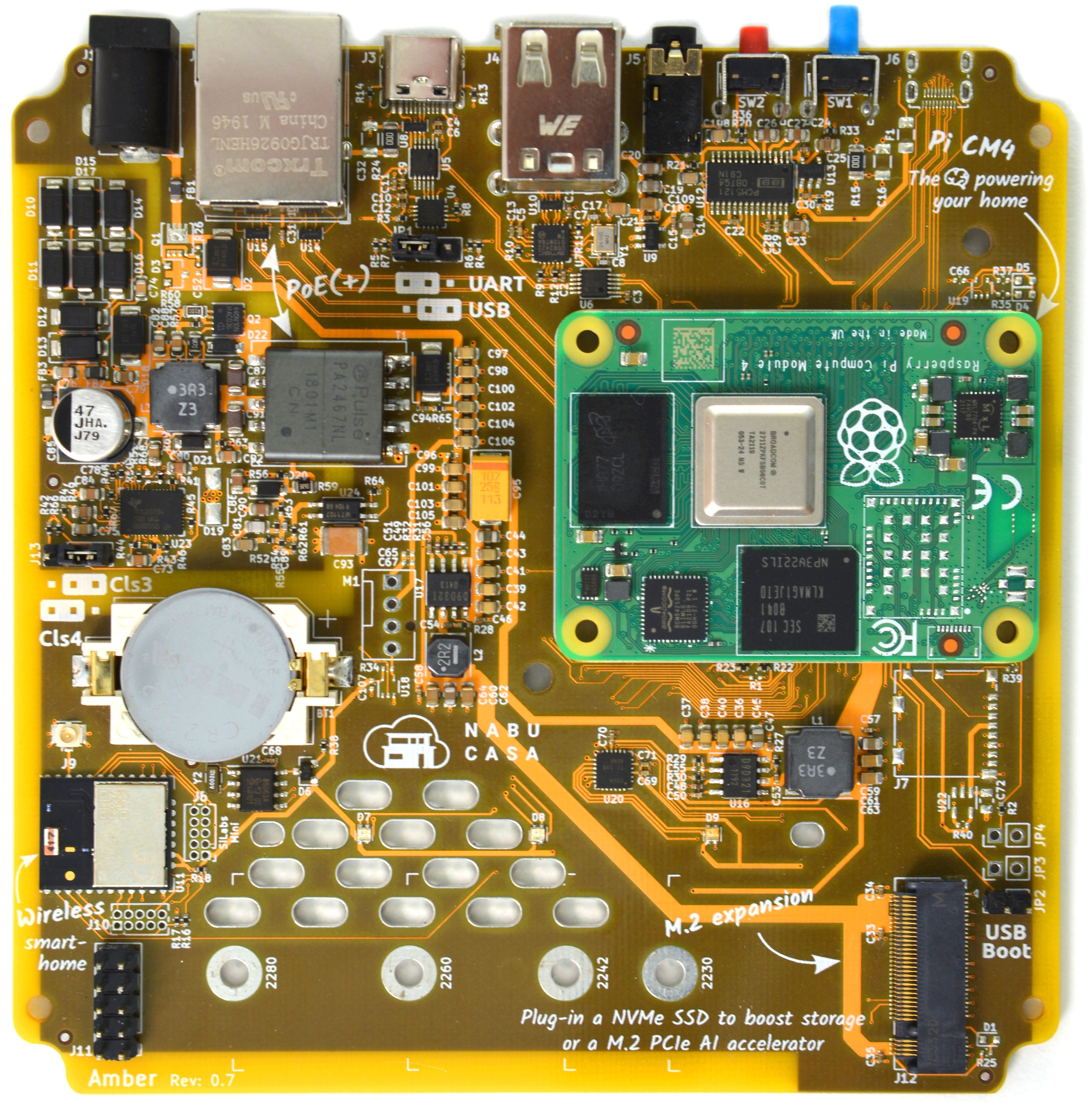
Guessing that is the PA2467NL
limpid sequoia
Considering the new Lockdown in Shenzhen, how does the timetable currently look like? Is it still on track for the first Kit Units around Mid-Year or does it all move back a bit?
 quartz quest
Hi, since the yellow is going to be open source… would a STEP file be released for the enclosure for those of us who’d like to rock a 3D printed one for further personalization?
shut cedar
Should be possible, I'll keep it in mind.
That said, the enclosure is design for injection mold, so YMMV... I did 3D print earlier iterations, but its not ideal to 3D print. Just saying.
quartz quest
Well having the design and hole pattern… it’d make it much easier to recreate a new enclosure for it
dusky hollow
Hi all, can anyone tell me if Thread products like the Nanoleaf Lightstrips and Eve Door & Windows products can be paired with the Homeassistant Yellow's Open Thread chip?
nova osprey
I mean, probably, Thread is Thread, and the MGM210PA32JIA2 that Yellow uses is OpenThread compatible. But Thread is just transport, not application support.
fresh bough
I'm still not fully convinced thread won't just be vaporware
fresh bough
Well, yes
wanton tapir
FYI SeeedStudio has CM4's in stock in the the US warehouse https://www.seeedstudio.com/Raspberry-Pi-Compute-Module-CM4008000-p-5221.html
 daring kelp
is yellow the new blue?
shut galleon
Yes
 sharp lantern
ordered a yellow last week, but couldnt wait so got a Pi4 with conbee USB stick. loving it so far! anyone know if you can transfer settings, but more important all paired devices over to the yellow? or do i have to re-pair all devices ?
humble cave
changing coordinators usually requires pairing the devices again
fresh bough
Usually, but not always, the #zigbee-archived channel will know
shut cedar
I successfully moved my "production" network in ZHA from a SiLabs based stick to the Yellow prototype I am running using bellows backup/restore. I am not aware of ways to move from Conbee to SiLabs.
keen parcel
If anything stops me from using my yellow, other than not having received my CM4 yet, it’ll be the dread of having to pair all my zigbee devices again 😱
wanton tapir
Migration of radios is here is working but still in its infancy https://github.com/zigpy/zigpy-cli/pull/2
 rigid obsidian
what prompted the name change from Amber to Yellow?
fresh bough
©®™
rigid obsidian
that's what I suspected, but that seems kind of strange
I did a lookup on the USPTO website but couldn't find anything tech-related under "amber"
but their search is kind of awful
limpid sequoia
a quick google-fu shows an amber x/pro private cloud storage
rigid obsidian
ah yeah that makes sense
compact quartz
not that one though
rigid obsidian
considering the trademark for HA Blue is literally "Home Assistant Blue", I was assuming Amber would be similar, and that seems distinct enough from any other "Amber" product to be Good Enough for trademarking. but I guess if a company gets mad enough and threatens to send lawyers after you, then that doesn't matter 😛
anyway, I don't mind the name change. was just curious
 dreamy plume
Any updates? Last on crowd supply was back in Jan IIRC
shut cedar
We are working on an update, should be out sometime this week. Sorry for the delay.
daring kelp
@shut galleon Saw your video on Yellow, ordered one as a result :p
 obtuse condor
hello everyone, I'm new here. My name is pixelion8. I had some questions because I found out about HA & HA yellow very recently. So I want to combine two different world wich has a raspberry pie 4 as their core. 1- I have a 3d printer and I want to controlled it with a raspberry pie, also make some timelaps with a usb webcam. 2- I'm also interested in smart homes and I want to have a HA yellow. Can I combine everything together ? is the HA interface capable of installing add on for my 3d printer and all ?
 hollow epoch
obtuse condor
hello everyone, I'm new here. My name is pixelion8. I had some questions because...
hollow epoch
obtuse condor
hello everyone, I'm new here. My name is pixelion8. I had some questions because...
HA Yellow is an "appliance". You can't tinker with it, it's not a shared Pi (that's their name, not Pie). You should expect to still have additional "devices" to manage your webcam/3d printer. HA may be able to be the integration point of those (eg automate telling you when the webcam shows there's a car approaching or a person at the door or the 3d printer has stopped) but those other functions are not going to run on Yellow
fresh bough
Appliances are great if you can live with the limitations and are non technical, if you want to do anything that isn't part of an appliance you should do an open system
You could always buy a yellow and run Debian on it and skip HAOS, but then you could just buy another system
shut cedar
fresh bough
Appliances are great if you can live with the limitations and are non technical,...
Not sure what you mean exactly, Home Assistant is open. The complete stack is open source... If something is missing, you can relatively easily create add-ons (see https://developers.home-assistant.io/docs/add-ons).
fresh bough
Sure, that requires you to know how to create said add-on, whereas a system running any form of Linux can run any docker container or native software without said add-ons
shut cedar
But that requires you to know how to run Docker containers 😉
I mean, if you are able to run Docker and understand all the flags, or setup Docker Compose YAML, you are likely capable of creating an add-on YAML. But yeah, there are tradeoffs in using a generic Distribution and a purpose built-in OS/appliance/platform...
fresh bough
I've seen people who run random docker containers on Ubuntu that have no idea how to set an IP address of the host, i can't imagine the same people being able to create a working add-on 
shut cedar
Sure, following a few steps usually gets you there. But it gets interesting once an update is necessary... Configurations lost/where is that volume?/wth is a bind mount? Or a second container is necessary...
In the end, a Ubuntu/Debian system running multiple services with containers, especially if they need to interact with each other, is non-trivial. I'd argue if you are able to run HA Core + Database + whatever other services you need using "vanilla" containers, you are likely capable of creating an add-on for HA...
obtuse condor
Thank you for taking the time to reply. I kind of understand a bit better.I can only hope that the price of raspberry pie will drop just like for the graphics cards. and have two different build. Combining both could have been really practical (and energy saving) but I don't have the knowledge to do so.
fresh bough
My best advice is that if you want to do a lot of stuff, a bigger system often makes sense @obtuse condor modern mini itx systems give you a lot of options and doesn't pull a lot of power
Can even have multiple drives for different use cases and add PCI-e accelerators
 eternal jacinth
Hi, with the home assistant yellow device. Is there any possibility of upgrading the non-POE version to add POE support later down the line via some additional component?
fresh bough
eternal jacinth
Hi, with the home assistant yellow device. Is there any possibility of upgrading...
Noone has said anything else at least
obtuse condor
@fresh bough yeah I guess none can have it all unless they are willing to make some small concessions ! i will take a look at it but the all thing being small is a big bonus
keen parcel
just buy the POE version and an adapter?
eternal jacinth
I'd prefer POE so I can run one cable, just don't want to wait until September, the non-POE is available in May
shut cedar
@eternal jacinth You can change the SKU, but I am not sure what that will do in terms of delivery time. I guess Crowd Supply will put you "at the end of the queue" https://www.crowdsupply.com/contact#i-need-to-change-or-cancel-my-order
eternal jacinth
I've ordered the PoE version. I was just wondering if I can cancel, and order the non-POE version and upgrade it later.
But it doesn't sound like that's possible
shut cedar
That said, we do have the components to build PoE units, so it likely will be before September 🤞
shut cedar
eternal jacinth
I've ordered the PoE version. I was just wondering if I can cancel, and order th...
It is the same PCB, so with a couple of components you can "upgrade" by soldering them on, theoretically... If that is practical depends on the equipment and skils 😉 I myself would not do it as there is a QFN package which is PITA (the PoE controller).
eternal jacinth
Ah, okay, I've done basic soldering before, but not that skilled, so I guess will wait until the PoE version gets shipped.
Thanks for the info!
shut cedar
Sounds reasonable 😅 You're welcome!
dreamy plume
\o/ thanks for the update. (Just went out via email to backers)
Fingers-crossed the PoE SKU fix works!
limpid sequoia
Does anyone need a CM4 - 2GB RAM - 16GB Flash for their Yellow Kit?
I have one more at hand as then I need for mine and my friends kits.
Shipping would be from germany
eternal jacinth
Assuming I'm going to use an NVME SSD on the yellow board, is there benefit to getting any storage on Pi Compute module (as opposed to just getting the Lite version) e.g. will it perform better if some storage on the compute module?
I imagine the NVME SSD will be much faster than the eMMC on the CM4, so I'm trying to figure out if there's any benefit at all to having storage on the CM4
limpid sequoia
Considering that the nvme has only one pcie 2.0 link it's not blazing fast as Ads say (although still faster than eMMC), there is a great video by Jeff Geerling comparing mSD vs eMMC vs NVMe (https://youtu.be/4Womn10v71s?t=207)
You still have advantages like far better cell leveling, changeable storage where you could have a cold spare...
But aside from that currently its not the question if it makes sense to have on board eMMC, but what you can actually buy.
I'm happy I got CM4s at all, the 5 bucks extra cause the have eMMC... eh, I'll install on nvme anyway, so I don't care about eMMC size, I'm glad I got some at all in these times
dusky hollow
The current forecasted restock of 8gb ram CM4 lites is November.
I ordered a PoE yellow and I imagine I'll see that before a CM4 becomes available.
wary pivot
Short question about the casing: what is the planned hight of the ventilation slots (the ones above the buttons)?
keen parcel
dusky hollow
I ordered a PoE yellow and I imagine I'll see that before a CM4 becomes availabl...
Same 🤦♂️
dusky hollow
keen parcel
Same 🤦♂️
We'll see if the forecasted restock dates hold or get bumped back. Might have to buy a marked up used CM4.
keen parcel
Or sell my yellow.
fresh bough
If current geopolitical trends continue you'll have it operational in 2025 @keen parcel
keen parcel
I’m switching to a VM on my Xeon box
mighty chasm
I just noticed that the yellow is estimated to ship end of July but the pi4 has changed to December. Should I try to get a pi 4 on my own instead?
mighty chasm
I guess it would be possible to cancel the cm4 order?
mighty chasm
No one knows?
compact quartz
mighty chasm
Thanks
compact quartz
I'd probably try finding one and then cancel if you do
keen parcel
Spent 6 hours trying to migrate from my Pi to my Xeon yesterday. Got nowhere! 🤦♂️
fresh bough
Well, should be a 5 minute job @keen parcel hit me up if you need guidance 
keen parcel
It’s an SQL issue
fresh bough
Permissions? Data corruption?
keen parcel
Not sure. It’s something to do with the recorder table. Possibly that when I ran the export there was an open recorder session?
I’m considering just dumping my whole database anyway. The only reason to keep it is my energy history, which is pretty patchy thanks to the dodgy Efergy integration.
fresh bough
Is it running as an add-on now ? If not you don't need to migrate it, but should export when ha is stopped, and it should be fine
But this is why I run influx, so I don't have to care about the flakyness of ha DB
keen parcel
Short answer is “yes, but…”
I’m about to take the dogs and baby for a walk. So I’ll check back in with you later when I’ve got time to have another crack at it.
 narrow herald
If I purchase a yellow today when should I expect to get it?
I have all insteon devices. Is the yellow a plug and play hub for the insteon devices? Newbie to anything other than insteon, lol.
fresh bough
Afaik insteon uses their own proprietary protocol
So, you should look at replacing those at some point with an open standard product
ZigBee is great
 zealous jay
I forgot, does this come with a CM4 automatically, or will I have to get that separately myself?
(I was trying to paste a screenshot of the order confirmation, but apparently that's disabled.)
Home Assistant Yellow x1: $175.00. From order confirmation email.
compact quartz
@zealous jayyou can see your details when logged in at crowdsupply
zealous jay
Pre-Order Home Assistant Yellow
Power Cord: US
So it didn't really say. It's also not clear if it'll be a CM4 with wifi and bluetooth, or not.
dreamy plume
I mean - you've kind of answered your own question there. If it doesn't say a CM4 is included - it isn't.
compact quartz
zealous jay
So it didn't really say. It's also not clear if it'll be a CM4 with wifi and bl...
I think you need to click further to get the details, but all you really need to do is compare the price

At $175, this is likely what you have
If you had bought the "kit" variants, you would have needed to order a CM4 as a separate item, or sourced your own elsewhere, and having it as a separate item should be indicated in the order details with its own delivery date
And if you had bought the Yellow Kit with Power Supply, it would be $115 with US cord and no CM4
mighty chasm
So I managed to cancel the cm4 part of my order, but would CM4 4GB Ram, 16 eMMC good enough? Or should I really aim for 32GB eMMC instead?
graceful zealot
Do you plan on putting in an m.2 ssd?
mighty chasm
yes
graceful zealot
Then you’re not gonna be storing much or any on the cm4
mighty chasm
ok, just found one locally for 130$ for the 16GB version
feels like I just should buy it even though it is quite expensive. agree?
zealous jay
I might end up going for an Optane SSD or something for mine once I get it.
fresh bough
That sounds extremely overkill for this usecase
Best regards someone who works with optane
shut cedar
The Yellow only has a single lane PCIe, there is no way it can saturate the bandwith of an Optane SSD. A cheap NVMe SSD will do alright 🙂
zealous jay
How about endurance?
Is any ordinary SSD plenty?
Actually, maybe the eMMC is plenty too.
fresh bough
Anything will be an upgrade from an SD card that the users who usually run pis run, but if you are gonna run more io intensive stuff a SSD will be better than an emmc, if not the emmc will surely suffice
 cloud lava
noob here. so From what I understand, if you control a bunch of stuff, a rasp Pi might be underpowered and I'd need to add stuff to it depending on what I control so instead the Yellow is more ready out of the box?
as a noob with many Pis laying around, am I wasting time getting started with a Pi?
fresh bough
A pi can run what most users need, if you need more storage / io / expandability there are better options
A pi will start you out for sure
cloud lava
oh the yellow runs on pi
fresh bough
And you can migrate to something else later
Yes, a yellow is just a fancy pi appliance
cloud lava
eventually I want to control a bunch of stuff but for now I'm mostly looking at large ceiling led panels (for a work space)
i guess that should be my starting point
cloud lava
I got plenty of pi3.. maybe a pi4 available
so I'd need a zigbee adapter
I see the yellow is slow to ship atm.. so I guess it will be something for later
fresh bough
Yes, the recommended adapters are pinned in #zigbee-archived
I recommend something cc2652 based, and zigbee2mqtt
cloud lava
thanks
mighty chasm
securred my cm4 now 😄 Ready for yellow!
hushed kayak
cloud lava
thanks
Also, transitioning hardware is an easy task as long as you have your config folder.
drifting kestrel
Does the Home Assistant Yellow really not have a 12V PWM FAN connection?
 vale marten
hello, I am wondering if the yellow will be certified for use in Australia, the RCM certification?
 cobalt wharf
narrow herald
If I purchase a yellow today when should I expect to get it?
I have all insteon...
cobalt wharf
narrow herald
If I purchase a yellow today when should I expect to get it?
I have all insteon...
You'd need an Insteon PLM attached to HA of course. Or if you went the ISY994 route, that interfaces nicely to HA as well.
lots of people dogging insteon lately, but I've found their RF+PLM approach to be much more robust than zwave/etc.
Unfortunate what happened to them - their tech was good, their marketing and business development/partnerships were not..
shut cedar
drifting kestrel
Does the Home Assistant Yellow really not have a 12V PWM FAN connection?
There is, but its not assembled 😅 So if you are up to soldering (and modding the case), you can use a 12V PWM fan 🙂
shut cedar
vale marten
hello, I am wondering if the yellow will be certified for use in Australia, the ...
Currently not planned. From what I understand Mouser is able to ship directly though. Also, the radio is pre-certified for Australia as welll afaik.
drifting kestrel
shut cedar
There is, but its not assembled 😅 So if you are up to soldering (and modding t...
Is there a Datasheet for the Yellow ? (My Yellow is still in delivery queue 😦 )
shut cedar
We have a preliminary one. I'll need to check what our plans are when we publish it. But PWM fan assembly option won't be mentioned on it 😅 . It was an option we considered in early versions, but we left it there in case someone finds it useful.
drifting kestrel
I mean, Yellow supports NVMe SSD, My idea is to add Docker and Grafana. Currently I already use it and without FAN, the CPU from the CM4 is ~55-65 °C. I think a slow rotating fan is silence but cool.