#yellow-archived
1 messages · Page 7 of 1
 tribal horizon
Ok, so I had to toss a non wifi cm4 in there and then it saw the zooz 800 module at /dev/ttyAMA0
looks like wifi and bt screw with the gpio pins, but since I'm using this over poe I don't really need those.
 wary pivot
tribal horizon
looks like wifi and bt screw with the gpio pins, but since I'm using this over p...
wary pivot
tribal horizon
looks like wifi and bt screw with the gpio pins, but since I'm using this over p...
With the Yellow HAOS image (not the RPi HAOS image!), the GPIO pins are working without disabling BT. Some Raspberry Pi tutorials say that, because a standard Raspbian image is configured differently. I have a Z-Pi 7 running without disabling BT or WiFi.
 calm herald
After a SSD crash my built in ZigBee adapter does not run again- When I put the serial port as you describe i get a window asking for Port Speed (115200?) and Hardware or Software data flow. What ever I put in so far resulted in connection errors.
wary pivot
Have you been using the Multiprotocol add-on?
If yes, install and configure the Multiprotocol add-on and add ZHA after that using the "serial port" socket://core-silabs-multiprotocol:9999 (if it isn't autodetected)
calm herald
wary pivot
If yes, install and configure the Multiprotocol add-on and add ZHA after that us...
I installed and started it. After chooseing the socker://core..... it says : "Unknown error occurred"
wary pivot
You configured the Multiprotocol add-on to use /dev/ttyAMA1, Baud 115200, hardware flow control on and it is running?
calm herald
yes - is there a sepatate integrationI have to install to use the ad-on?
wary pivot
Kind of - ZHA with the following settings:
Serial Device Path: Enter Manually
Radio Type: EZSP
Serial path: socket://core-silabs-multiprotocol:9999
According to the documentation Port speed and flow control don't matter, but I would set those to 115200 and hardware flow control on.
calm herald
On that way I still get a "connection failed"
protocoll of the add-on all looks green
wary pivot
In that case I'd recommend to head to the #zigbee-archived channel.
calm herald
Thanyk you - I'll try
 knotty hull
Yellow delivered yesterday, migrated over with backup and my Zwave usb stick was picked up right away. Updated HASS from the interface and after reboot it's not seeing USB ports at all. Any ideas?
wary pivot
What's the output of lsusb? And did you reboot the host or restart HA?
Running that command in a terminal should show the following (or more if something is connected to a USB port):
# lsusb
Bus 001 Device 001: ID 1d6b:0002
Bus 001 Device 002: ID 1a40:0101
First thing is the root hub and the second one is the onboard USB hub.
 green ledge
Hm. How would I go about turning my Yellow into a primitive fileserver? I need staging area for winbox backups - a linux machine that would run syncthing and borgbackup, plus a sizeable (but slow) drive. I can set up a separate rbpi machine for this, but was wondering if I can fit this on the existing box :)
knotty hull
@wary pivot I had restarted HA after an update, the restart automatically happened. However this morning I plugged power back in to the yellow to start messing with it again, and the ports are visible again
wary pivot
green ledge
Hm. How would I go about turning my Yellow into a primitive fileserver? I need s...
Would the Samba share add-on be suitable for that?
green ledge
that's another option I guess
the primary unknown is how well does HAOS handle extra storage
I guess I'm used to just running things on my own, and here I need to negotiate boundaries with HA and its supervisor :>
wary pivot
Well... as long as you have storage space left and you stick to a subdirectory of /media or /share
And as long as your CPU usage isn't too high. Had some data corruption happening on high CPU loads.
green ledge
oh, there's official syncthing integration, so that's half way there
and some unofficial borg ones
I can cook one up too, I guess
...which reminds me that I've still haven't added telegraf to Yellow :D
knotty hull
Docs say to disable the integrated ZHA if using Zigbee2MQTT - but I don't see it anywhere to disable... wondering it this is interfering with pairing
wary pivot
If ZHA is showing in your integrations go to its 3-dot-menu and select "Disable".
If it shows up for configuration select "Hide".
knotty hull
nvm- i think it just isnt there since i restored a backup that wasn't using it
tribal horizon
so far the zwave hat is working, I did switch to a non wifi cm4 after trying disabling bt in the boot config. I have 3 serial ports /dev/ttyAMA0-2
I didn't want a bt dongle sticking out, my blue has the aeotec gen 5 on it.
productDescription "800 Series Long Range GPIO Module"
 coarse obsidian
Hey folks, what exact image are people using to flash directly to nvme? Im in the cm lite boat and trying to rule out not booting due to the wrong image. tried multiple at this point and not seeing any success at boot.
wary pivot
If you don't want or cannot use the USB installer method, you can choose the Yellow HAOS images. The newest release as of now (HAOS 9.5) is this one:
https://github.com/home-assistant/operating-system/releases/download/9.5/haos_yellow-9.5.img.xz
coarse obsidian
Thank you Jorg. Yeah USB didn't work so I'll try this image. Appreciate the help.
 opaque summit
.. says estimated 17th now, but .. ¯_(ツ)_/¯
edit: 4 hours later "This order is being processed."
 dusk laurel
opaque summit
.. says estimated 17th now, but .. ¯\_(ツ)_/¯
edit: 4 hours later "*This order is...
dusk laurel
opaque summit
.. says estimated 17th now, but .. ¯\_(ツ)_/¯
edit: 4 hours later "*This order is...
Damned... Same here 😦
 honest rover
opaque summit
.. says estimated 17th now, but .. ¯\_(ツ)_/¯
edit: 4 hours later "*This order is...
honest rover
opaque summit
.. says estimated 17th now, but .. ¯\_(ツ)_/¯
edit: 4 hours later "*This order is...
I’d rather a pessimistic estimate than the previously over-optimistic ones
 shy saffron
If we pessimistically assume our 'pre-orders' fall outside the orders that will be fulfilled by the 1,941 units Stephan mentions in his update then we potentially could be waiting on their next batch. 😦
https://www.crowdsupply.com/nabu-casa/home-assistant-yellow/updates/a-new-chapter-in-the-home-assistant-yellow-journey
I wonder if the delays are due to waiting for more units or just the speed at which they are able to package and ship the stock they do have.
opaque summit
Apparently my order was on hold, they just emailed me asking for more details - which the same guy asked for in a support ticket in November.. "Thanks for the information", no apologies or further explanations when i referred to the previous support ticket.
On the bright side they seem to be reaching out to people whose orders have been put on hold for mysterious reasons.
tribal horizon
I ordered my december 21, 2021, got it yesterday. Poe version without cm4. I had a stack of those.
honest rover
shy saffron
I wonder if the delays are due to waiting for more units or just the speed at wh...
The delays are probably because it’s probably just one lonely dude sweating in the back of a warehouse. It’s already kinda hot in Texas lol
honest rover
tribal horizon
I ordered my december 21, 2021, got it yesterday. Poe version without cm4. I h...
Stack of CM4s? And you haven’t sold them and retired already?
opaque summit
I sincerely doubt Mouser is breaking a sweat at shipping 2000 extra units; but there was that one case of (cold) weather related delays.
wary pivot
Back in October Crispie did the maths:
"~850 parcels within three weeks, this are about 50 per day or seven per hour. It appears there’s about one fte assigned to the task …" 🤣
opaque summit
Given CS and Mousers individual track records - I'm willing to bet that is either CS making a mess of things - or just the service level CS is paying for. Mouser has never not done same day shippign with 2 days delivery to EU for me.
wary pivot
CrowdSupply is owned by Mouser, so they are kind of responsible - one way or another
But good for new buyers: other distributors are coming - one already announced
 odd bramble
I know I’m late to the party, but I ordered a PoE Yellow in late February. It said shipping March 03. Now it says the 17th.
Do I just need to wait another week, or should I be expecting one in the mail?
opaque summit
If February '22 your odds are (probably) better than if February '23 - however there is no discernible pattern, some get a surprise delivery, others get shipping notifications - the rest quietly get a new shipping estimate when checking their order status online a couple of days past the previous estimate. The Nabu Casa people here can't say - but you could try asking CrowdSupply but I wouldnt hold my breath.
wary pivot
I'd expect it to be shipped much later, @odd bramble . Many have ordered earlier and are still waiting.
tribal horizon
I wish mouser was still in San Diego.
 elfin fog
Well, glad I popped in here. I was contemplating ordering this as I am just starting to learn and want to get into this / tinker, but, it looks like many are still waiting.
wary pivot
Realistic shipping estimations aren't one of CrowdSupply's strengths.
odd bramble
So I ordered it just a couple of weeks ago. What can I expect from running on an ordinary pi 4?
wary pivot
@elfin fog Of you are from EU, you can place an order at raspberrypi.dk
elfin fog
No, unfortunately not. I am in Canada.
I've never even had a raspberrypi before - this is all new to me (though loving reading and exploring, so far). I liked the idea of supporting HA Yellow, but I may have to learn to put something together myself - which is fun in itself I'm sure 🙂
wary pivot
@odd bramble basically the same as the Yellow (performance wise) - except built in Zigbee radio, maybe eMMC storage, NVMe storage option.
tribal horizon
better choice than a pi is an odroid n2+
elfin fog
Hmm... I'm just learning about RaspberryPi as is 😛
odd bramble
@wary pivot , I have an Aeotec Z-wave radio, so I should see those devices, yes?
tribal horizon
problem with the pi is the storage, it will kill an sdcard in short order. well maybe a few months if it's a busy system.
wary pivot
odd bramble
<@176078742286761985> , I have an Aeotec Z-wave radio, so I should see those dev...
Yes
odd bramble
👍
elfin fog
Ok, this is good to know. I was eyeballing CM4 carrier boards which have nvme storage options
elfin fog
Which, I believe, is what the HA Yellow has with the board, correct? That was what I noticed when first going over it.
I saw waveshare (I believe that is the name), also so... tofu, I think was the name.
tribal horizon
it has nvme
elfin fog
Not sure how easy the tofu is to get hands on in Canada.
opaque summit
does usb z-wave also need the usb extension cable? if so don't forget to get one. usb zigbee will more likely than not need it.
wary pivot
CM4s are most likely the hardest to get
elfin fog
@wary pivot Also good to know. Thanks for the heads up... may start figuring out what I want and put in orders ASAP
elfin fog
Thank you for that! Little disheartening the 'In Stock' is all just No. But fun fun. It's like when I built my PC over the pandemic all over again
wary pivot
I'd go for one with enough RAM and - if the HA Yellow is something for you - choose a kit variant without CM4. The sets with CM4 haven't much RAM and are likely shipping later.
opaque summit
I ordered some 4gb ones from DigiKey today, will have to use existing 2gb ones for a while. While DigiKey doesnt have stock they allow backordering of some models.
elfin fog
Ya, need to hunt for a location that allows backorders. Looks like the two Canadian spots I'm aware of do not.
wary pivot
@elfin fog You can register for a notification email from pishop.ca, when your preferred CM4 variant(s) is/are available again
elfin fog
JUST noticed that as you wrote that message. Not sure how often it comes in, but I'll add the CM4008032 onto notification email. Thanks for that!
wary pivot
I was lucky, as a shop from Germany had CM4s in stock quite often. But meanwhile they aren't shipping internationally anymore.
elfin fog
Definitely a little envious, but, I'm in no rush. I have to learn about HA anyways. And find what little tinkers I want to work with. I just finished running cat6a wire through my house and setup my unifi stuff. This will be an enjoyable next project.
wary pivot
Smart Home is a rabbithole 🤣
elfin fog
LOL, can't be any more than my Jeep is 😉
tribal horizon
I'll raise you 2 jeeps and toss in a miata.
elfin fog
Oof. Apparently you're made of money! 😛 I am pulling the front axle on my Jeep this spring and doing a fairly extensive re-build and frame clean up. Also installing a dual battery setup (genesis) and upgrading the power cables throughout the engine bay. But right now... even with a garage, it's too damn cold out.
wary pivot
Too cold? And you call yourself Canadian? 😝😆
tribal horizon
we have a 2021 JLUR XR and a 1995 XJ sport.
weather has sucked lately, only getting up to mid 60's during the day in into the 40's at night.
elfin fog
Hahaha, it IS toooo cold! 😛 Canadian or not, I have a limit when it comes to working on vehicles. I mean, having a seized bolt give and result in a smashed thumb in the SUMMER hurts, I cannot even imagine in -10 😛
Nice! I have a 2015 JKUR, definitely enjoy it. We have a LOT of JLs getting stolen around here. Definitely not ideal for them.
tribal horizon
grew up in Iowa, -20 with -70 wind chill was common.
yeah, if a jeep gets stolen here, it ends up in TJ before you know it's stolen.
elfin fog
Ya, all of it is not ideal for working on a vehicle. Also, it is my daily driver. Need the weather to warm up so I can use the motorcycle while tinkeriing.
tribal horizon
heh, commuter is a 2009 SV650.
elfin fog
Nice! I grabbed a 2021 Honda Rebel 1100 when I got back from being deployed. Changed up from having an R6.
I'm getting older, decided to be nice to my back 😉 Up here in Canada the cold is breaking me 😛
tribal horizon
yeah, this is an S so it's got teh clipons, leaning towards selling it and finding a clean MT07 or adventure bike.
my buddy owns the bmw motorcycle dealership in san diego and keeps trying to sell me one.
elfin fog
If I was taller than 5'6" on a good day, I could handle an adventure bike. I like being able to touch the ground at the stop light!
tribal horizon
6'2" here
socal traffic is terrible, but we can split lanes, so I've been doing that for 36 years now.
heh, can't math. 87 when I got my first street bike.
elfin fog
That would be unique - we cannot lane split in Canada, anywhere, that I am aware of.
tribal horizon
saves gas and it's safer.
 worn grove
I'm US based but have a friend that lives in Germany. Does anyone know if Berrybase.de would allow me to buy a CM4 with my US credit card, but have it delivered in Germany to my friend so he can re-ship to me?
tribal horizon
I'd see if your friend could just order it. Is he military? If so he can ship APO/FPO and it's normal us postal rates from NY.
 keen parcel
added a 50mm fan to my yellow, dropped the cpu temp by 20C
I'm 5 degrees above ambient now
shy saffron
Is the included heat sink sufficient for an average Home Assistant instance?
keen parcel
depends where you are I suppose
we've had a lot of 35C days recently
when I run my esphome updates, the CPU spikes to nearly 80C
at that point throttling kicks in
the yellow is a sealed box that doesn't radiate heat very effectively
shy saffron
Any other options for a CM4 + NVME worth considering instead of the Yellow?
elfin fog
I'm curious about this as well. @shy saffron , I was eyeballing the Tofu CM4 carrier board, but I am JUST learning, so that might not actually be comparable.
elfin fog
Hmm... given that it looks like getting a CM4 is going to be very difficult, I'm leaning towards an Intel NUC now.
wary pivot
That's also a good choice. Except the dongle gore. 😆
elfin fog
LOL, I'd have the same situ with a non-HA Yellow board anyways 😉
Just trying to figure out which NUC I should grab. I intend to use it only for HA.
opaque summit
if you're windows based the vpro (amt) nuc's provide a management interface (there is some linux/mac support, but when i tried them they were more meh than the windows alternative)
elfin fog
Hmm, NUCs aren't exactly cheap, but definitely available. Also, looks like they have a LOT of stuff I don't actually need. Still, it is a good option and I am just starting to look around 🙂
I may still order a HA Yellow and have it for when things become more available. Seems like something enjoyable to play with.
dusk laurel
I didn't try for HA but you could consider https://pcengines.ch/
honest rover
elfin fog
Hmm, NUCs aren't exactly cheap, but definitely available. Also, looks like they ...
Why not just a cheap thin client?
List of various CPUs and common models that exceed the power of a pi4 at similar energy usage
Hardware costs $50-100
honest rover
keen parcel
added a 50mm fan to my yellow, dropped the cpu temp by 20C
Wish we could post pics here. Would love to see that
elfin fog
I'll have to look into that.
honest rover
I was looking at this heat sink, though I doubt it would really make a difference from the stock one https://store.oratek.com/collections/tofu/products/heatsink-for-compute-module-4
 native verge
elfin fog
Just trying to figure out which NUC I should grab. I intend to use it only for H...
native verge
elfin fog
Just trying to figure out which NUC I should grab. I intend to use it only for H...
I'm using the Beelink S12 Pro with Debian 11 and HA and it is really faster in all actions then the CM4/RPi4. It consumes 7W and is cold. I had the ASUS PN41 but it was terrible hot when running idle. The Beelink is great,
honest rover
I would hope it would be better for $250 lol
Meanwhile for $40 you can have roughly 3.5x the processing power of a Pi4 https://www.ebay.com/itm/115724123940?mkcid=16&mkevt=1&mkrid=711-127632-2357-0&ssspo=txPrExnzSgi&sssrc=2349624&ssuid=TFZ4i92yQCy&var=&widget_ver=artemis&media=COPY
 still tendon
Probably be waiting. I ordered mine in october, with initial date in Jan, the 2 push backs in Feb, now on the 3rd date in March already. All without any info really from anyone. Even the numbers of the units moving don't really mean anything without knowing your position in the queue.
 obsidian heart
Mine came in the mail today! But I'm too busy to play with my new toys :(((
worn grove
CM4 with 8GB, wifi, lite is IN STOCK in US: https://www.pishop.us/product/raspberry-pi-compute-module-4-wireless-8gb-lite-cm4108000/
wary pivot
Not anymore
worn grove
wow those 200 went fast! I got my order confirmed.
keen parcel
honest rover
I was looking at this heat sink, though I doubt it would really make a differenc...
The stock heatsink is fine, once you ventilate the case
wary pivot
Did you cut the casing open or did you find a solution with those 2 vent holes?
keen parcel
I printed a new one
The design files are on the yellow website
Once I’m happy with the design, I had planned to laser cut the original enclosure. But I’m not sure I’ll do that anymore.
worn grove
My PoE Yellow may ship in a week. Got my CM4 coming too, and I have a 'validated' Samsung NVMe drive for it. Any other mods or tweaks that I need to be aware of? Case venting doesn't look to great...and no fan?
keen parcel
The yellow case is an oven
worn grove
Ya looks like it...any easy/off the shelf mods to keep it cool?
keen parcel
Do you have a 3d printer?
worn grove
elfin fog
Hmm... given that it looks like getting a CM4 is going to be very difficult, I'm...
CM4 8GB, wifi, lite, was in stock for <5 minutes in the US. I snagged one.
keen parcel
worn grove
Although I probably have a friend that might have one
What country are you in?
worn grove
keen parcel
What country are you in?
US
keen parcel
Ah well I can’t ship one to you then
worn grove
Do you have the 3D plans? I can probaby find a friend to print it.
keen parcel
Yeah I can do that
I have two variants, passive cooling and active cooling
The latter I’m still refining
worn grove
I'd prefer active, TBH. Have active on my existing RPIi4s.
 timid mesa
yay, my yellow finally arrived! but it won't power up and the FAQ didn't help.. anyone else having this issue?
wary pivot
What version did you get and is the CM4 properly mounted?
 leaden frost
Bleh, mine has slipped to Mar 17th
leaden frost
It's literally impossible that they're making a conscious effort in these date estimations
honest rover
worn grove
Do you have the 3D plans? I can probaby find a friend to print it.
Plenty of online printing services too
odd bramble
leaden frost
Bleh, mine has slipped to Mar 17th
Did you get a message?
leaden frost
odd bramble
Did you get a message?
Hahaha good one, crowdsupply communicating, that'd be a sight
wary pivot
Nobody expects the Spanish Inquisition!
 compact quartz
@timid mesa no lights at all? You should check that the CM4 is fully seated which might involve removing the heat sink.
 hushed lion
Why does the Yellow only come with a 2GB compute module? My current installation is already using more than that
16 gb emmc also seem a bit low
given the price at least
 deep snow
hushed lion
Why does the Yellow only come with a 2GB compute module? My current installation...
deep snow
hushed lion
Why does the Yellow only come with a 2GB compute module? My current installation...
To hit a price point. 🙂
Order the kit without the module and get the one you want/need. But they are still basically not available especially not at normal price.
hushed lion
Yeah I know
I will rather get another Rock 5b for it maybe when they are available again.
Don’t know what advantage the yellow has apart from the preinstalled Zigbee module
deep snow
I’d say testing. This is what A Lot people will be running so it will get the most test coverage and you’ll be less likely to find corner cases unique to your DIY setup.
But nothing wrong with doing it yourself either.
worn grove
deep snow
To hit a price point. 🙂
Order the kit without the module and get the one you wa...
Well yesterday in the US the CM4, 8GB RAM, "lite" with WiFi was in stock for a few minutes. They had 210 units. But ya...the last time those were stocked in the US was last year.
hushed lion
worn grove
Well yesterday in the US the CM4, 8GB RAM, "lite" with WiFi was in stock for a f...
I would get one of those with a big eMMC
hushed lion
Maybe the Rock 5b is also overkill for running HA
calm herald
Hello
I had issues with system crashes for some time. Meanwhile I found that the Pi-CPU-temperature is most of the time in a range between 60 and 70 °C at an average load of 50%. Removing the case cover reduces the temperature below 50°C.
Can the heat be the problem of my crashes?
Does anybody have similar hot temperatures in the system?
 dreamy spruceBOT
@vagrant tiger I converted your message into a file since it's above 15 lines :+1:
wary pivot
calm herald
Hello
I had issues with system crashes for some time. Meanwhile I found that the...
If the CM4 get's too hot, the CPU starts to throttle down. If the PoE temperature problem is really solved, temperature shouldn't crash it. But I've observed, that the file system gets corrupted easyly on high CPU loads, which results in crashes.
When I used the motionEye add-on CPU load was over 50% and temperature at about 60°C. After removing it, CPU load is down to 8% and temperature at about 47°C
 graceful zealot
@vagrant tiger if you're wanting support with yellow try #yellow-archived there is no support in this channel
wary pivot
Erm... @graceful zealot this is #yellow-archived 🤣
 vagrant tiger
graceful zealot
<@691278324877623336> if you're wanting support with yellow try <#88775149978507...
vagrant tiger
graceful zealot
<@691278324877623336> if you're wanting support with yellow try <#88775149978507...
Oh, thanks. I thought I had!
graceful zealot
vagrant tiger
Oh, thanks. I thought I had!
You did, I am stupid
vagrant tiger
it's all good. I totally believed you.
graceful zealot
wary pivot
Erm... <@137144563109330944> this is <#887751499785072711> 🤣
I thought this was off topic, I am not awake
vagrant tiger
Me neither, coffee making....
graceful zealot
Its 11:55pm here, so more like sleep time here
vagrant tiger
graceful zealot
Its 11:55pm here, so more like sleep time here
😅
graceful zealot
I thought I had clicked on off topic, and was confused why someone asked for support, then realise there is support because it is yellow
vagrant tiger
graceful zealot
I thought I had clicked on off topic, and was confused why someone asked for sup...
I am so glad to find this server, and that it is active. I was so jazzed to get my HA Yellow, and with a CM4 preinstalled! Was so bummed when it threw errors on boot
graceful zealot
vagrant tiger
I am so glad to find this server, and that it is active. I was so jazzed to get ...
Its weird, if you haven't set anything up you could try a reinstall of HA on it, incase it was a weird one off corrupt install?
vagrant tiger
I did see the whole boot log. And it seems to be a eMMC issue - if it were a Rasp Pi with a removable SD, I would try another, but not sure the best way forward with the eMMC built in. I could do a reinstall, but would love to try less sever steps before nuke and pave options if possible...
vagrant tiger
graceful zealot
Its weird, if you haven't set anything up you could try a reinstall of HA on it,...
Do you think I should try the blue/red button approach, or try to boot off USB first?
wary pivot
Blue and red button method and the USB installer stick. If the eMMC error persists it might be a hardware issue.
vagrant tiger
wary pivot
Blue and red button method and the USB installer stick. If the eMMC error persis...
Jorg, thanks That is what I was thinking in terms of levels of intervention,: 1. Red button Factory Reset - assume this just wipes any configuration, of which I have none. 2. Red+Blue Button Reinstall HA using USB - looks like this is possible as of HA 8.5: https://yellow.home-assistant.io/faq/#can-i-reinstall-home-assistant-os-again-using-the-usb-flash-drive-with-the-home-assistant-os-installer-for-yellow. The other thing I was considering is to install an NVMe and install HA there instead; not sure how to force the CM4 to ignore the eMMC though, need to investigate that.
wary pivot
I'd prefer a RMA over tinkering around broken hardware (if it is).
vagrant tiger
wary pivot
I'd prefer a RMA over tinkering around broken hardware (if it is).
Jorg, yeah. That's probably best. Maybe I'll try the factory reset first, to convince myself it is HW
calm herald
wary pivot
If the CM4 get's too hot, the CPU starts to throttle down. If the PoE temperatur...
Thank you for the hint. WHen I used FalconEye some time ago I had load problems to. My current load of ~50% seems quite high - is there a way to identify the contribution of integration or processees?
wary pivot
calm herald
Thank you for the hint. WHen I used FalconEye some time ago I had load problems ...
Add-ons show their CPU load and memory usage on their add-on page. Supervisor loads can be found in Settings - System - Repairs - 3-dot-menu - System information and integration loading times (no CPU/memory usage) there in Integration startup time
calm herald
wary pivot
Add-ons show their CPU load and memory usage on their add-on page. Supervisor lo...
Thank you - on the Add-On side I found that the substitution of Samba-NAS by Samba-Share reduced the load by nearly 10-15% already
vagrant tiger
Well, 🤦♂️ . The Red-button factory reset seemed to solve it. As quick review, I was seeing what looked like eMMC failures: [ 8.956840] EXT4-fs (mmcblk0p8): VFS: Found ext4 filesystem with invalid superblock checksum. Run e2fsck? . But must be a configuration problem, as holding down the Red button while powering up seems to have solved it. I will report more after additional tests
wary pivot
Every error disappearing is a good error 😆
vagrant tiger
wary pivot
Every error disappearing is a good error 😆
Yeah, boot banner looks clean, df shows many more mounts, and docker ps reports dockers running. Finally, can connnect via ip:8123 now! 🚀
timid mesa
wary pivot
What version did you get and is the CM4 properly mounted?
I got the PoE version. I’ve tried two different CM4s, different Cat5e cords, different PoE ports.. I’ve removed and reseated it like 5 times already.
timid mesa
compact quartz
<@269974469097816085> no lights at all? You should check that the CM4 is fully s...
Yeah, I did that like 5 times and tried different CM4s. I’ve emailed support and no response
compact quartz
Do you have a regular power supply?
Or has all this been attempts with PoE
Also are these all previously unused CM4s?
timid mesa
Just tried with PoE. I may have a different power supply. I couldn’t easily find what I would need. I saw 12v but what amp?
One unused and one is known working with OpenWRT running
compact quartz
12v 2A I think but I can check
Stick to the unused. If the other has OpenWRT on it it would need to be cleared. What variant is the unused?
timid mesa
Thank you!
 amber agate
I have a n00b question.. if i have a Yellow do i still need to the Skyconnect?
timid mesa
It’s the 8gb ram 16 emmc, no WiFi
amber agate
i saw the option in the hardware before plugging it in.. but was not sure if that was a place holder or if it was the real deal
compact quartz
amber agate
I have a n00b question.. if i have a Yellow do i still need to the Skyconnect?
The yellow has it already
@timid mesa yeah it's 12v 2A. And when I went to go check my dog ate l half my sandwich
amber agate
thank you!... wonder why i got the skyconnect too.. i dont remember ordering it. it got here about a week before the yellow did.
compact quartz
Bad dog
@timid mesa so I would try a compatible power supply and the unused CM4 and see if there are any lights. Red power at least, to rule out PoE
timid mesa
Oh no!! Bad dog!
compact quartz
It was actually half of a half. I should not have left it where she could get it lol
honest rover
amber agate
I have a n00b question.. if i have a Yellow do i still need to the Skyconnect?
No
 dusky hollow
I have finalized the migration from Zipato to my new yellow received a few weeks ago!. Migrating 62 Fibaro Zwave devices (the painful part!) and tens of automations. New to HomeAssistant. Everything seems to be working great!. Thanks!!!
keen parcel
there is no support in this channel 😂
wary pivot
@keen parcel Enough support for you? 🤣
https://media.tenor.com/kxH68Pexu-8AAAAM/spongebob-patrick.gif
honest rover
keen parcel
there is no support in this channel 😂
Yeah, I prefer tank or DPS
 sleek cloak
Hello together... is there a way to reset config.txt to factory defaults? I was modifing the file and now I am unable to login via the serial console
opaque summit
sounds like a job for rpiboot; see option 2 here https://yellow.home-assistant.io/guides/reinstall-os/ and just replce config.txt instead of full install
sleek cloak
sleek cloak
Hello together... is there a way to reset config.txt to factory defaults? I was ...
I was not able to find a reset possibility but instead of using the serial console, I was using the "HassOS SSH port 22222 Configurator" Addon (https://community.home-assistant.io/t/add-on-hassos-ssh-port-22222-configurator/264109) which enabled root access. I was able to revert back the changes I have done.
Can it be that if you are using
dtparam=i2c_arm=on dtoverlay=miniuart-bt dtoverlay=rpi-rf-mod
... that then the onboard Zigbee Interface is disabled? I can only chose to either have Zigbee or my Homematic RF interface 😦
According to the hardware documentation, the Zigbee Chip is connected to the CM4 via the UART interface…
opaque summit
cm4/pi4 has a bunch of uarts, and zigbee is on uart4 iirc.
deep snow
Is there a STP file floating around anywhere of the Yellow?
I'm not looking for an explodable model or anything, just an outershell with the ports would be great.
wary pivot
deep snow
Is there a STP file floating around anywhere of the Yellow?
I'm not looking for ...
wary pivot
sleek cloak
Can it be that if you are using
`dtparam=i2c_arm=on
dtoverlay=miniuart-bt
dtove...
As the Z-Wave HATs are working with the Yellow without additional dtparams, I'd expect a Homematic RF HAT to work as well - as long as it uses the same GPIO pins.
sleek cloak
wary pivot
As the Z-Wave HATs are working with the Yellow without additional dtparams, I'd ...
Well I can say that it did not work for me out of the box. That why I bothered searching for a solution and found out about the config.txt options. This is described in the RaspberryMatic wiki and also the comments in the config.txt mention that some lines need to be unconnected for the RF pcb to work
Uncomment this to enable GPIO support for RPI-RF-MOD/HM-MOD-RPI-PCB
#dtparam=i2c_arm=on
#dtoverlay=rpi-rf-mod
wary pivot
sleek cloak
Well I can say that it did not work for me out of the box. That why I bothered s...
Strange - the Yellow's HAOS is configured to enable those GPIO pins. That's why those wikis are not applicable often - those are mostly written for stock Raspbian.
What Homematic RF HAT are you using?
sleek cloak
wary pivot
Strange - the Yellow's HAOS is configured to enable those GPIO pins. That's why ...
I am using a HM-MOD-RPI-PCB which was previously working on an old Raspberry Pi 1 😮
wary pivot
It's using the same GPIO pins as my Z-Wave HAT - and that's working out of the box.
Just to be sure... have you got a preinstalled Yellow set or have you installed HAOS with the recommended USB installer stick?
Background: the HAOS image for RPi doesn't have the tweaks necessary for the GPIO pins, the HAOS image for Yellow has.
sleek cloak
AFAIK I did not use anything preinstalled as I am using a M2 SSD and wanted to have the OS and everything on this SSD. I flashed with a USB stick as it was mentioned in the getting started guide
Under System->Hardware it is also displayed as Home-Assistant Yellow
wary pivot
My only idea left would be to try
dtparam=i2c_arm=on
dtoverlay=rpi-rf-mod
in your config.txt or just
dtoverlay=rpi-rf-mod
As HAOS for Yellow already has some UART modifications.
sleek cloak
I already tried
dtparam=i2c_arm=on
dtoverlay=rpi-rf-mod
but I can try to use only rpi-rf-mod
I just tried it. Sadly this also disables the internal Zigbee connection, same error: "No such file or directory: '/dev/ttyAMA1'
Also the HM_MOD_RPI_PCB is not detected if only 'dtoverlay=rpi-rf-mod' is uncommented
wary pivot
Maybe it is incompatible. 🤔
The HM USB stick might be an alternative.
https://de.elv.com/elv-homematic-ip-arr-bausatz-rf-usb-stick-fuer-alternative-steuerungsplattformen-hmip-rfusb-fuer-smart-home-hausautomation-152306
 shut cedar
sleek cloak
Well I can say that it did not work for me out of the box. That why I bothered s...
shut cedar
sleek cloak
Well I can say that it did not work for me out of the box. That why I bothered s...
So UART on J11 is enabled by default: https://github.com/home-assistant/operating-system/pull/2001/files. If it didn't work, it is something else..
sleek cloak
The RF Module works flawlessly by itself. But if it works, then the Zigbee internal radio is disabled. If Zigbee works, the Homematic module does not work....
Only one of the two work at a time 😦
shut cedar
sleek cloak
Also the HM_MOD_RPI_PCB is not detected if only 'dtoverlay=rpi-rf-mod' is uncomm...
In GPIO land, there is no such thign as "detected". USB has signaling information which tells the system that a HW is present. A thing connected through UART, is just there, and you can just "try" to talk to it and cross your fingers that it is indeed there.
sleek cloak
shut cedar
In GPIO land, there is no such thign as "detected". USB has signaling informatio...
With "detected" I mean by the RaspberryMatic Addon... the logs tell me n/a, whereas the module is displayed in the logs if the mentioned settings are provided
shut cedar
sleek cloak
Also the HM_MOD_RPI_PCB is not detected if only 'dtoverlay=rpi-rf-mod' is uncomm...
Could be that this is broken. I did not test it anyways.
Wrt HM_MOD_RPI_PCB I'd suggest to create an issue at https://github.com/home-assistant/operating-system/issues. Then we can investigate a bit more formally.
sleek cloak
Sure, I will try to create an issue today evenening
I wanted to first try everything to make sure that it is not just my stupid mistake
sleek cloak
shut cedar
Wrt HM_MOD_RPI_PCB I'd suggest to create an issue at <https://github.com/home-as...
Done: https://github.com/home-assistant/operating-system/issues/2408
It is my first ticket... I hope everything is fine with that
opaque summit
Your Crowd Supply order (1367xx) has shipped!
5x PoE on their way to me/family. 🥳
(Ordered Jan '22, latest estimate was March 17th)
honest rover
opaque summit
> Your Crowd Supply order (1367xx) has shipped!
5x PoE on their way to me/family...
5x? We got a whale here guys
 latent fern
as long as it's not a reseller
opaque summit
Nah, just a bunch of brothers, cheaper to place one big order with freight forwarder than individual orders. If I wanted to get into scalping I'd flog the CM4s..
honest rover
Brothers in ARMv8s
vagrant tiger
I was able to get one Aqara Door Sensor to pair with my HAY. Second one never shows up, ditto my Aqara P1 Motion sensors. New batteries in all, and blue led blinks happily on the sensors when I hold them down for the required seconds. Anyone run into this?
wary pivot
I have 9 Aqara Door sensors, 2 Aqara leak sensors and 5 Aqara climate sensors running, but no Aqara motion sensors. No problems yet.
Are those sensors far away from your HA Yellow? If I remember correctly, Aqara is a bit special with routing. They don't use new Zigbee routes, if the signal is too weak. It might be working better, if you pair them to the nearest router directly.
vagrant tiger
wary pivot
I have 9 Aqara Door sensors, 2 Aqara leak sensors and 5 Aqara climate sensors ru...
I am like 2.5 meters away, but I will try even closer
wary pivot
2.5 meters shouldn't be a/the problem.
In my setup, I had the least problems with my Aqara stuff.
IKEA TRÅDFRI is causing my headaches most times. 😆
vagrant tiger
I just moved it a meter closer and it worked 🤣
 crude egret
I have recently struggled to pair Aqara sensors, so I changed the firmware on the Zigbee radio to NabuCasa_Yellow_EZSP_v7.2.2.0_PA32_ncp-uart-hw_115200.gbl. I then did a full factory reset of home assistant and it still can not add the devices. I did get this error in the log.
Logger: bellows.ezsp Source: components/zha/radio_manager:py:138. Protocol version 11 is not supported, using version 10 instead.
calm herald
I had some issues with a Samsung 980 Pro SSD which finally died. Meanwhile I found that these SSDs have a general durability issue that has to be cured by a FW-update. My new SSD is same type but I have not found any way to update the FW. Putting the HASS-installed SSD in a USB adapter does not make it available not under Windows nor Linux.
wary pivot
On Windows you need to run Samsung's program "Samsung Magician Software". Partitions formatted with Linux file systems don't show up in Windows as driveletters - so that's normal.
 dusk vortex
crude egret
I have recently struggled to pair Aqara sensors, so I changed the firmware on th...
dusk vortex
crude egret
I have recently struggled to pair Aqara sensors, so I changed the firmware on th...
There are no known issues with any deployed firmware version so updating isn't necessary.
Take a look at https://skyconnect.home-assistant.io/connectivity/ and make sure your Aqara sensors have fresh batteries.
crude egret
dusk vortex
There are no known issues with any deployed firmware version so updating isn't n...
Can you just confirm the firmware which I should have installed in it. I can then try again. The Aqara sensors are all new. So battery can’t be the issue (they had above 80%)
dusk vortex
Any firmware is fine. Battery reporting on Aqara sensors is unreliable, there's no way to accurately measure it. They will report 80%-100% for their entire lifespan and then just stop working.
crude egret
Right have 8 so let me try all and see if I get the same issue.
calm herald
wary pivot
On Windows you need to run Samsung's program "Samsung Magician Software". Partit...
Would it be possible to reduce the size of he HASS partition and add a small exFat partition at the and to update the FW with the Magician-Software under Windows?
wary pivot
calm herald
Would it be possible to reduce the size of he HASS partition and add a small exF...
Haven't messed with the HASS partitions yet. But Samsung Magician should recognize the drive regardless of the partitions.
crude egret
All 8 tired and still nothing. Tied with a new battery with a 2029 expiry on it. I have also moved the device to another room via Ethernet where there is no router to anything else which could affect it
calm herald
wary pivot
Haven't messed with the HASS partitions yet. But Samsung Magician should recogni...
At least in my USB-Reader it does not 🙁
wary pivot
calm herald
At least in my USB-Reader it does not 🙁
I'd expect the USB adapter to be the problem, not the partitions. Adapters seem to cause problems often. Magician expects a direct NVMe connection afaik.
 warped igloo
I'm having a difficult time getting Zigbee to work on my Yellow. When installing ZHA (yes, I used /dev/ttyAMA1 , 115200, and HW flow control) I get an error "Failed to connect"
I have verified the CM4 is seated properly.
Any other ideas?
wary pivot
Have you been using the Multiprotocol add-on before?
warped igloo
no, my zigbee devices were running from Smarthings. I'm not migrating, I'm going to start from scratch on the yellow.
wary pivot
Okay. Have you altered any settings in the config.txt?
warped igloo
not directly. Did move my data to NVM
wary pivot
And did you have a look at disabled/hidden integrations?
Ignored and disabled
Maybe it is already set up.
warped igloo
There are a few ignored, printers, NAS, bluetooth nothing related to ZHA
None disabled
Just out of curiosity, shoudn't I see something listed in "All Hardware" on ttyAMA1
dusk vortex
Do you have any addons installed?
warped igloo
Samba Share, SSH & Web Terminal, Studio Code Server
That's all
wary pivot
And you haven't done any settings regarding the GPIO pins...
Have you tried to reboot the host (not just to restart HA)?
warped igloo
No settings re GPIO
Rebooted multiple time, both with the software option System>Settings>Hardware>power button icon>advanced Options>Reboot System
Also powered down a couple times
dusk vortex
I'd give it a complete physical power cycle to be sure and unplug the power if possible.
As far as I can tell, nothing should be preventing you from communicating with the Yellow's radio. Since you have the SSH addon installed, are you able to enter the Home Assistant Core Docker container? If so, download https://github.com/NabuCasa/silabs-firmware/raw/main/EmberZNet/beta/NabuCasa_Yellow_EZSP_v7.2.2.0_PA32_ncp-uart-hw_115200.gbl onto the Yellow, install the flasher with pip install universal-silabs-flasher, and run the command to re-flash the Zigbee firmware: https://github.com/NabuCasa/universal-silabs-flasher#yellow (with -vvv for debug output).
warped igloo
I actually made an attempt at flashing the firmware, but got errors.
pip install "silabs-flasher[gpio]"

curl -O https://github.com/NabuCasa/silabs-firmware/raw/main/EmberZNet/NabuCasa_Yellow_EZSP_v7.2.2.0_PA32_ncp-uart-hw_115200.gbl
silabs-flasher --device=/dev/ttyAMA1 flash --cm4-gpio-reset --firmware NabuCasa_Yellow_EZSP_v7.2.2.0_PA32_ncp-uart-hw_115200.gbl```Try the above package with debug logging. If you still get an error, could you upload the full command output somewhere or PM me the log?
wary pivot
And does ls /dev | grep ttyAMA give any output? If there isn't anything, the flasher can't work.
warped igloo
I just tried that, but got an error that there is "no such option"
dusk vortex
Ah, my bad. Run it like so: universal-silabs-flasher -vvv --device ...
warped igloo
only ttyAMA0
dusk vortex
So you have no /dev/ttyAMA1? Are you running HA OS?
warped igloo
correct
I believe, it's been a few weeks I choose the yellow specific install image for the usb
wary pivot
One thing from my side left... when you installed HAOS, have you used the installer USB stick, flashed the HAOS RPi image or flashed the HAOS Yellow image? The RPi image wouldn't show the radio.
warped igloo
Yellow I believe
but that makes sense.
Can I reflash with the Yellow image without reconfiguring? Or would I need to backup and restore HA?
wary pivot
If you go to Settings - System - Hardware, does it say Raspberry Pi or Home Assistant Yellow?
warped igloo
yup. So can I restore an HA backup after I reflash the HAOS?
wary pivot
Yes.
warped igloo
I assume I would have to move the data disk to NMV again?
wary pivot
But you should use the installer USB stick method or the image
https://github.com/home-assistant/operating-system/releases/download/9.5/haos_yellow-9.5.img.xz
warped igloo
Just to be sure I'm following:
- Full Backup of HA
- Factory reset Yellow
- Setup usb with the right image (Yellow)
- Flash the Yellow via USB
- Restore the backup
- Migrate data to NMV
wary pivot
The NVMe needs to be wiped, if I remember correctly, to be available for migration again.
Wiped as partitions deleted.
warped igloo
I hate to ask a (another) stupid question, but I'm not a Linux guy. How would I wipe the NVMe?
wary pivot
Easiest way would be a USB/NVMe adapter and use Windows' drive management.
wary pivot
Another way would be the serial console of the Yellow and use Linux' terminal commands.
honest rover
wary pivot
Another way would be the serial console of the Yellow and use Linux' terminal co...
Do it this way, it’s worth learning
warped igloo
In that case it could wait until after step 5 above
wary pivot
Yes, but after removal of all partitions the host needs to be rebooted.
warped igloo
got it
@wary pivot thank you very much for the patience and assistance. Can't believe I blew it from first install. I was actually pretty focused on getting the right image. Clearly didn't though.
wary pivot
You are welcome
To be able to remove partitions on the NVMe with fdisk, you need to access it on OS level (by using the serial console or the OS debug SSH). If you just use a terminal add-on, you'll propably get the error "can't open /dev/nvme0n1"
honest rover
warped igloo
<@176078742286761985> thank you very much for the patience and assistance. Can't...
Just take it as a learning opportunity. You’re deploying a Linux system, might as well understand more about it
Who knows, with a little bit of SSH here fdisk there, sprinkle in some vi and before you know it, you’ll be bragging to everyone you know that you use Arch btw
 lucid raven
Linux ❤️
 hidden garnet
I'm running HAOS on a RPi 3b and I have a Yellow on the way. My install includes a couple USB devices (I believe these are configured using the id path vs the tty path) and a GPIO HAT (I'm certain this is configured using the id path). Is migration fairly straightforward? For instance, can I just attach everything and restore my most recent backup after I install the Yellow image? Do I even need to do that on a new delivery, or is it included?
Also the question I actually came here to ask (the previous questions have been on my mind for a while, the new question drove me here): If I have an NVMe SSD ready to install, is the screw that holds it in place already included with the yellow, or do I need to make sure I have one of those as well?
shut cedar
hidden garnet
I'm running HAOS on a RPi 3b and I have a Yellow on the way. My install include...
Generally, moving via backup restore should work and everything should continue to work, except the GPIO HAT, that might not work. It depends what GPIO HAT you are using. The UART on the GPIO pins is enabeld by default, and accessible via /dev/ttyAMA0.
shut cedar
hidden garnet
Also the question I actually came here to ask (the previous questions have been ...
A screw is included.
hidden garnet
Awesome, thanks for the help. I actually also have a custom integration that doesn't appear to be included in my full backups, but I think that delves away from #yellow-archived territory.
shut cedar
Aren't those stored in the Core's config folder? I would think they are included. But yeah, not 100% sure.
hidden garnet
You're right, they are, I didn't see it in the partial backup options, and then I checked the tarball, but I misjudged the structure of the containers inside. The custom_components folder inside of the config folder is included in the data folder of homeassistant.tar.gz but I was mistakenly expecting to see a custom_components.tar.gz based on the fact that there was no config.tar.gz
 dreamy plume
I seem to remember reading the device overlay tree for HA yellow is bespoke to the HAOS yellow images. Curious what the current roadmap is to release / publish this to aid wider distro support?
wary pivot
dreamy plume
I seem to remember reading the device overlay tree for HA yellow is bespoke to t...
This might help to tinker with other distros:
https://github.com/home-assistant/operating-system/tree/dev/buildroot-external/board/raspberrypi/yellow
opaque summit
would be neat if the pi people extended the hat id eeprom to allow say 0x54 be an id eeprom for cm4 carrier boards and still support 0x50 for any hats the user would add
hidden garnet
shut cedar
Generally, moving via backup restore should work and everything should continue ...
Follow-up for clarification here... Should my restore be partial with HomeAssistant unselected? Thinking here is otherwise the HomeAssistant Yellow install might be overwritten by the HomeAssistant RPi 3 install, but I'm not certain if that's how this works. If so, anything else that should be deselected? As an aside, FWIW, I think my HAT should work, made sure it was listed as compatible with Yellow before purchase.
wary pivot
The backup just effects the HA core. The hardware dependant part is the OS, which is not backed up. You can also restore a x86 backup on a Pi without bigger problems.
So a full restore should be fine to go.
honest rover
So, we getting shipment notifications today or?
wary pivot
Or a new estimated shipping date
 vast trellis
so, i am having a hard to figuring out exactly what model CM4 is in the Yellow shipped to backers (non-PoE one). it has 16GB eMMC storage. but what about the memory / clock speed / etc? anyone know where i can grab the model?
oh i guess there is only one CPU for these. and it has no WiFi, correct? so my guess is either SC0289 or SC0320 jut couldn't see where in settings or the page it showed the memory onboard
shut cedar
It is the 2GB RAM, 16GB eMMC wihtout Wi-Fi version.
 idle agate
I got my yellow yesterday and now I am struggling to get the ssd working. Does anyone know if there are problems with 2TB SSDs?
I have a "WD Blue SN570" witch should be supported as mentioned in the yellow faq section.
And does the ssd has to be in a specific format? (i tried ext4)
wary pivot
A single partition unformatted works.
Is HAOS installed on the eMMC or do you use a CM4 lite?
When you start it with an non-formatted partition, it isn't shown in Settings - System - Storage - 3-dot-menu - Move data disk?
And if you have a terminal add-on running - what is the output of ls /dev | grep nvme ?
idle agate
wary pivot
A single partition unformatted works.
Is HAOS installed on the eMMC or do you u...
The haos is installed on the emmc.
The 3-dot menu is there, when i try to "move datadisk" it says: No suitable storage found
There is no suitable external device found. The storage capacity of the external data disk must be larger than the storage capacity of the existing disk
The disk itself seems to be ok, i tried it on a pc
wary pivot
Remove all partitions on the drive and try it again.
Or create one partition, but do not format it.
idle agate
there is only one partition, and now i tried it with fat. does not work either.
wary pivot
Do not format it
No FAT, no EXT4, no NTFS,...
At least the 1TB version of the WD Blue SN570 has been reported to work.
 sharp coral
wary pivot
Or a new estimated shipping date
sharp coral
wary pivot
Or a new estimated shipping date
Like how it was originally estimated 31/03 and then they brought it forward. It's the hope that destroys me 😆
wary pivot
sharp coral
Like how it was originally estimated 31/03 and then they brought it forward. It'...
So you want me to destroy your hope to save you? 🤣😝
idle agate
wary pivot
At least the 1TB version of the WD Blue SN570 has been reported to work.
So do you think is it enough to delete all partitions?
wary pivot
idle agate
So do you think is it enough to delete all partitions?
I'd create one partition without filesystem. But I think no partition might work too.
idle agate
wary pivot
I'd create one partition without filesystem. But I think no partition might work...
ok - thanks. I will try it. But unfortunately I do not have time now... 🥲
Thanks for help!
One question: The fact that it is a 2TB ssd should be no problem?
wary pivot
Not a fact - just an assumption. The WD Blue SN570 1TB is confirmed working, the 2TB not yet. But it also hasn't been reported not to work.
Some have used 2TB Samsung SSDs - size isn't the problem.
honest rover
RIP estimated shipping date
still tendon
Me too. I ordered in october. How about you?
 spice pine
I just ordered a few days ago on 3/12. When I ordered since the ship date was only a few days away, it didn't even occur to me that it might not ship. I'm off work all next week and I was really looking forward to learning HA next week 🙁
shy saffron
Crowd Supply seem unwilling to provide any clarity. There is no indication of whether we will be waiting months, like some have already been, or if they have stock (imminently) and the dates keep slipping due to the velocity at which they are able to dispatch orders.
If Crowd Supply are genuinely unaware of supply and demand they should not display a misleading "orders placed now" shipping date.
opaque summit
Orders placed now ship Mar 17, 2023.
What is todays date?
shy saffron
It's the uncertainty that is most frustrating. I would have no issue with Crowd Supply stating there are delays due to the volume of projects they are processing and/or staff shortages due to sickness/vacation. The lack of transparency makes me wonder if the "orders placed now" dates are deliberately inaccurate.
wary pivot
Yeah. It would be more honest to label it:
"The next units are estimated to ship to the ones at the top of the cue on .... . If you order now, you will be put at the end of it - and we cannot tell at what part of the cue you are later."
still tendon
Even if the messaging was just now shipping orders placed in January 2022, that would be something.
leaden frost
Finally, shipping notification for my Yellow PoE!
🎉🎉🎉
Ordered Oct 2022, nothing else in the order, only the Yellow PoE kit
idle agate
wary pivot
Not a fact - just an assumption. The WD Blue SN570 1TB is confirmed working, the...
No I tried every possible formatting option I can imaging and nothing is working. Try to get my hands on a other ssd and retry.
wary pivot
Have you tried to use it without formatting as we said?
idle agate
wary pivot
Have you tried to use it without formatting as we said?
Yes I did. Same result. The Samsung sad should arrive tomorrow. Hopefully it is working.
wary pivot
It might be a new incompatible one. WD ones are kind of a gamble.
still tendon
leaden frost
Ordered Oct 2022, nothing else in the order, only the Yellow PoE kit
Hopefully mine should be out this week then.
 hexed river
I don't have much faith in he listed shipping dates. I took the estimated date from RaspberryPi.dk, which states "expected to ship beginning of April", as a guide. I'll set my expectations on maybe mid summer before I start to get irked...
hidden garnet
I have an SK Hynix PC401 nvme salvaged from a laptop with a dead power supply. I secure erased it and put it in my Yellow, but the option to move datadisk says nothing exists. From a shell, I can't see any /dev/nv items, so I don't believe it is being detected. I tried removing and reseating it with no change in either behavior. Is this indicative of it being unsupported, and should I report that somewhere since it's not included in the Yellow FAQ page unsupported devices section?
wary pivot
As the SK Hynix BC711 is incompatible, chances are high the SK Hynix PC401 is too - especially as it isn't shown as nvme item at all. You can report it as not working via email yellow@home-assistant.io . It might be helpful to include additional information (like size, id number,...).
spice pine
I really thought my biggest issue would be getting the CM4, but I found one and it already got delivered. Can't do much with it without an io board though. I really thought my yellow kit would be on its way, but the 17th has passed and no updates
still tendon
spice pine
I really thought my biggest issue would be getting the CM4, but I found one and ...
When did you order?
 nocturne shard
spice pine
I really thought my biggest issue would be getting the CM4, but I found one and ...
nocturne shard
spice pine
I really thought my biggest issue would be getting the CM4, but I found one and ...
I ordered a standard kit (not POE) 28 Feb, seeing the lead-time as about a week (3rd March). Like you, I bought a CM4 in anticipation but it seems the dates published mean nothing. If I hadn't already got the CM4 (at an inflated price too), I'd be cancelling the yellow and going the used-NUC route, probably cheaper. Seeing someone else recently post here that their POE version was finally delivered from an October order, I'm not holding my breath. As others have said, a little more honesty / transparency from #Crowdsupply would be helpful. I wouldn't buy from them again under these circumstances.
shy saffron
Hi Stefan/@thorny hornet, are you able to provide another update please?
https://www.crowdsupply.com/nabu-casa/home-assistant-yellow/updates
Do Crowd Supply/Mouser still have any of the last batch of 1,941 units to dispatch?
Did you have any success with this... We are aware that some shipping estimates have been wrong. We’re in contact with Crowd Supply to ensure that shipping estimates become something you can better rely on!
spice pine
still tendon
When did you order?
I know I came to the have pretty late. I just placed my order March 12. I thought with s shipping date listed of just 5 days away it should be pretty close. The fact that the site still says that is pretty disappointing and makes me think they aren't going to ship for a while
 hazy oar
I got my 10/15/22 PoE order on 3/18/23. Would order another if I knew it would ship soon-ish.
wary pivot
I have ordered one on raspberrypi.dk to test their delivery estimations. My previous orders at that shop have all been satisfactory.
still tendon
hazy oar
I got my 10/15/22 PoE order on 3/18/23. Would order another if I knew it would s...
My order for poe is 13 days after. No news yet.
idle agate
wary pivot
It might be a new incompatible one. WD ones are kind of a gamble.
I got my Samsung EvoPlus 970. Inserted it and worked.
wary pivot
idle agate
I got my Samsung EvoPlus 970. Inserted it and worked.
You can report the details of the incompatible WD SSD to yellow@home-assistant.io, so the devs can add it to the list.
worn grove
Looks like Samsung SSD 980 250GB should work with the Yellow? Was mentioned a few months ago on the HA forums as working. I assume no change for the negative?
tribal horizon
a bit pricey for ha use.
honest rover
worn grove
Looks like Samsung SSD 980 250GB should work with the Yellow? Was mentioned a fe...
That’s sooo overkill lmao
 opal musk
Received my non-POE Yellow. When powered up, it makes a high-pitched whistling sound. Anyone else experience this?
opaque summit
probably "just" coil whine; can be very subjective and not easy to say if its normal or not. maybe you could use one of the many free spectrum analyser apps to categorise and quantify it so the nabu casa people can chime in on it being normal or not.
opal musk
Okay. I'll do this.
If it is coil whine, is there anything I can do to eliminate it? It's surprisingly unpleasant.
A different power supply perhaps?
honest rover
Coil whine from a Raspberry Pi? Wat
opaque summit
The yellow will have a dc/dc converter wont it? or it could be the wall wart - some people are also a lot more sensitive to it than others. Hard to say without more data.
opal musk
honest rover
Coil whine from a Raspberry Pi? Wat
Not sure if it's coming from the Yellow or Raspberry Pi.
opal musk
opaque summit
The yellow will have a dc/dc converter wont it? or it could be the wall wart - s...
Will revert once I have data from a spectrum analyzer
shy saffron
honest rover
That’s sooo overkill lmao
Curiously, the 500GB version is currently just 42 pence more expensive than the 250GB one from Amazon UK. I've been waiting to order one until my Yellow is on the way.
dusk laurel
It seems that Crowd Supply does not even bother anymore to come up again with fake delivery dates. What a terrible customer experience... 🫤
honest rover
opal musk
Not sure if it's coming from the Yellow or Raspberry Pi.
I looked it up, apparently it’s a thing
honest rover
dusk laurel
It seems that Crowd Supply does not even bother anymore to come up again with fa...
The worst part is they claim Mouser’s warehouse is mostly automated
Actual footage at Mouser’s warehouse
sharp coral
Sent an email about the shipping estimates
`Hello,
Thanks for reaching out! We are in the process of updating those shipping estimates. We are hopeful to have another restock here in the next few weeks as the item is currently on backorder.
We apologize for these delays!
Regards,
Tanner
Regards,
Crowd Supply Support
`
wary pivot
honest rover
Actual footage at Mouser’s warehouse
Maybe they forgot to set a trigger in their shipping automation. 🤔😆
honest rover
wary pivot
Maybe they forgot to set a trigger in their shipping automation. 🤔😆
It probably runs on Home Assistant and failed quietly
honest rover
wary pivot
https://ibb.co/g35Kkms
I appreciate the effort put into this hahaha
wary pivot
But all joking aside. As frustrating the delays and lack of communication are, the Yellow will arrive eventually. It is no Kickstarter scam. I'd expect the customer experience to be better at the Danish shop. Reports of the experiences will follow.
opaque summit
I hoped to start a trend of posting order date, partial order number and shipment date to help people get an idea; but apparently that didnt really catch on. But yeah, mine shipped last week so def no scam.
Your Crowd Supply order (1367xx) has shipped!
PoE on its way, Ordered Jan '22, shipped March '23.
 onyx whale
Does anyone know if there is an alternative to the RPi CM4 for the Yellow? I finally received my Yellow, but now the CM4s are completely out of stock and I doubt RPi will restock their inventory any time soon.
wary pivot
onyx whale
Does anyone know if there is an alternative to the RPi CM4 for the Yellow? I fin...
There is no alternative. No other CM4-like board has been successfully tested yet. On the one hand it would have to be hardware compatible and on the other hand, someone would have to adapt the OS for that board.
hazy oar
onyx whale
Does anyone know if there is an alternative to the RPi CM4 for the Yellow? I fin...
I was intending to experiment with a Soquartz and Plebian Linux but turns out it can't natively boot from NVMe so now I'm waiting on an eMMC module from China.
In theory if you've got a working distro it should just be a matter of putting together a device tree overlay for the serial and i2c parts on the Yellow. I have no idea wtf I'm talking about but that doesn't sound too complicated.
wary pivot
opaque summit
I hoped to start a trend of posting order date, partial order number and shipmen...
Placed order on Sep. 24th 2021, shipped Jan. 19th 2023.
But to be fair, it was the Crowdfunding phase and a PoE.
sharp coral
wary pivot
Placed order on Sep. 24th 2021, shipped Jan. 19th 2023.
But to be fair, it was t...
poe
Oct 26, 2021 shipped on Jan 18th 2023
onyx whale
wary pivot
There is no alternative. No other CM4-like board has been successfully tested ye...
Yeah, this is a real bummer. I might end just selling my Yellow at this point. Without any insight into CM4 delivery, there is not point to holding onto this board. I'll probably wait another month then make the move to unload. Real bummer, I really wanted to se this project get more widely adopted.
lucid raven
Poe, Sep 29 2022, shipped Jan 19 2023
honest rover
onyx whale
Yeah, this is a real bummer. I might end just selling my Yellow at this point. W...
They were (briefly) in stock last week. Just keep trying
 languid pulsar
onyx whale
Yeah, this is a real bummer. I might end just selling my Yellow at this point. W...
languid pulsar
onyx whale
Yeah, this is a real bummer. I might end just selling my Yellow at this point. W...
I have the opposite problem -- a spare CM4, but still waiting on my Yellow to ship. 😛 If anyone has a spare yellow they want to sell/trade, happy to chat.
hazy oar
Mouser claims to have some CM4, SparkFun shows that p/n as 4/32 WiFi.
https://www.mouser.com/ProductDetail/SparkFun/DEV-17392?qs=zW32dvEIR3tQa2hiSH4ogw%3D%3D
still tendon
Poe, oct 28 2022, shipped today (Mar 23 2023)
hazy oar
I put another poe order in yesterday... for science.
Also tried USB booting on the soquartz but that doesn't work either (and, tbf, Pine only mentions SD booting for their carrier boards).
wary pivot
Jeff Geerling tested some CM4 alternatives (not specifically for Yellow) - with mixed results.
https://youtu.be/aXlcNVKK-7Q
hazy oar
Since that video... Radxa is still a mess while they focus on getting all their kernel updates into mainline, but Plebian seems viable for the soquartz. Unfortunately I didn't order an eMMC module with my soquartz so attempting to boot on Yellow is a non-starter 'til I get one.
hazy oar
hazy oar
Mouser claims to have some CM4, SparkFun shows that p/n as 4/32 WiFi.
https://w...
I got a shipping notification. Site says 257 left.
opaque summit
conflicting data, says 8g emmc further down in the listing?
hazy oar
opaque summit
conflicting data, says 8g emmc further down in the listing?
🤷♂️ Also if you hit the datasheet link and search the alternate p/n SC0674, it has a chart that shows SC0674B as CM4104032 (4/32/WiFi). It's a weird-ass listing, but it's Mouser.
opaque summit
i guess we'll see.. and at least mouser is quick at shipping cm4, took all of 2.5 hours from order placed to order shipped. and they'll be here tomorrow or monday:)
latent fern
For $1 million dollars, I'd expect quick shipping
keen parcel
I’d expect it to spontaneously materialise in my hand
wary pivot
We still haven't seen the promised gold plated Home Assistant Yellow Gold Edition.
Just a copper one.
hazy oar
I want a top case with strings of LEDs to make the logo grow and glow.
keen parcel
I settle for one that didn’t idle at 60 celcius
wary pivot
keen parcel
I settle for one that didn’t idle at 60 celcius
Liquid nitrogen cooling?
keen parcel
Helium, cooler.
I custom designed a new top case with a cooling tower to hold a 50mm fan
wary pivot
Can you share a real life picture of it?
wary pivot
When you said cooling tower, I expected something like that 🤣:
https://i.pinimg.com/originals/13/16/14/131614f7f85b59317855fea82c507d0a.jpg
keen parcel
I actually thought it was comically large already
honest rover
keen parcel
I custom designed a new top case with a cooling tower to hold a 50mm fan
50mm? The case is 123x123mm, why not put a 120mm fan on it? It’d be quieter and look more ridiculous (which is good)
worn grove
@keen parcel Did you give any thought to making the Yellow case taller and putting the fan on the under side of the case lid for a cleaner look?
honest rover
worn grove
<@869126635243307029> Did you give any thought to making the Yellow case taller ...
Can’t get any cleaner than the entire lid being a fan /s
keen parcel
worn grove
<@869126635243307029> Did you give any thought to making the Yellow case taller ...
No, I didn’t want to muck about with the design that much. My intent was to perfect the fan design on a printed case, then laser cut the holes in the original with my K40. But I’ve since decided I don’t want to risk wrecking the original case. I’m happy enough having an opaque olive green one.
My K40 is… unpredictable.
wary pivot
No RGB lighting? Like an 120 mm RGB fan?
honest rover
It’s a Lian li ST120 that I’ve got to spare
keen parcel
honest rover
What would I need to connect a PWM fan to this thing? I assume a separate 12v power source, for starters?
And what do I connect the RGB header to?
 manic wren
Guys I have a quick question. I just got my yellow Poe kit and need to order one of the hard to find boards. Had I known this was an issue I would have kept my eyes open months ago for one. Scalpers are nuts on these things. What size CM4 is most common and are there really any benefits to getting something as big as the 8gb/32 model?
manic wren
hazy oar
I got a shipping notification. Site says 257 left.
Would this one work for mine? I totally ordered this yellow thinking it would be complete and didn’t realize I needed to have the CM4 on hand. I just don’t wanna get one too small for futureproof reasons.
wary pivot
If you intend to use a NVMe, the eMMC size doesn't really matter that much (even though the lite version causes some trouble sometimes). Regarding the RAM - the more you want to do with the Yellow, the more RAM you might need.
And Wifi/BT... it depends on what you want to do. The regulatory approval just covers the non Wifi/BT versions.
manic wren
wary pivot
If you intend to use a NVMe, the eMMC size doesn't really matter that much (even...
Thanks! I’m the type that usually just springs for the best board that way I have all the features if needed, but a $95 board is $280. It’s making me second guess what board to get so 🤷♂️
Anyhow, I appreciate the insight
wary pivot
I'm running a few add-ons and about 2 of 8 GB RAM are used. Going too low on RAM might be frustrating later.
rpilocator.com and waiting lists with email notifications are your best friends
manic wren
Fair enough. It’s not like I’m in a huge rush, I’m just impatient. I ordered the yellow in October and just got it like a week ago. Is what it is I guess. Thanks again
 rose cosmos
Sff PC can easily do far more ram if that's what you need.
honest rover
wary pivot
Uh... you can get a USB RGB Tuya Zigbee controller... But I doubt it's compatibl...
Hmmm something like this could possibly work, ARGB headers on PCs are very similar looking. I’d need to investigate this further. If I’m going RGB, I want full-features RGB, dammit
honest rover
rose cosmos
Sff PC can easily do far more ram if that's what you need.
Yeah but the reason we went with the Yellow is it’s an all-in-one clean package. A mini PC would have a bunch of dongles sticking out the back
worn grove
@manic wren CM4s in stock here: https://www.mouser.com/ProductDetail/SparkFun/DEV-17392?qs=zW32dvEIR3tQa2hiSH4ogw%3D%3D. Specs are 4GB RAM, 32GB eMMC, WiFi
manic wren
worn grove
<@482993065909289003> CM4s in stock here: https://www.mouser.com/ProductDetail/S...
Thank you, I need to research it a little further and see which model I need. Might just order one anyway though if it will get me up and running.
worn grove
Last week I got a 8GB RAM, 0 eMMC (lite), WiFi from another supplier. But they are on the RPi watch twitter bot and sold out of their 250 in <5 minutes
manic wren
Wow, crazy
worn grove
@manic wren On my 8GB RPi with HAOS, I'm only using 13% of my memory. And I have a couple of dozen extensions running. So IMHO I'd get the 4GB version ASAP, and get a 250GB NVMe.
manic wren
worn grove
<@482993065909289003> On my 8GB RPi with HAOS, I'm only using 13% of my memory. ...
Already ordered my friend. I just didn’t know if I need the BT or not. I’m gonna be rebuilding my HA instance new from the ground up for the yellow. All I’m currently running are some UniFi security camera feeds, and a few lighting automations via zwave. Oh, and WLED
tribal horizon
anyone order a yellow from crowd supply in the last week or so and get a shipping notification? Says "ships on March 17th" on the site, at least that's what it said yesterday.
languid pulsar
tribal horizon
anyone order a yellow from crowd supply in the last week or so and get a shippin...
Based on the messages above, the yellows shipping now were from orders as far back as October of last year. So presumably folks putting orders in now are not getting delivered in the near term. The CroudSupply estimates are wildly inaccurate.
 opaque moth
My order from late November 2022 just shipped, although they shipped it to my billing address instead of my shipping address! 👍
shy saffron
languid pulsar
Based on the messages above, the yellows shipping now were from orders as far ba...
Yes, haven't seen anyone that ordered in Jan/Feb 2023 mention receiving their Yellow yet.
shy saffron
opaque moth
My order from late November 2022 just shipped, although they shipped it to my bi...
When you say 'just shipped', was that this week? Trying to get a feel for if they are still dispatching units from the last batch they received.
nocturne shard
While I wait for the Yellow delay (ordered standard kit 28 Feb), I put HAOS on an old PC and its running fine. Now, I'm planning to add Zigbee which means buying an extra dongle. If I had a better idea of when the Yellow will ship I could make a more informed decision about spending ££ on the 'temporary' system. Does Crowdsupply think that being honest about lead-times will reduce orders? I must be like many others who placed an order in good faith believing the posted lead time - about a week in my case. Payment has been taken under false pretences. Frustrated and disappointed!
wary pivot
I don't even think it is a bad intention - they just don't care.
 obsidian gazelle
Yeah I found it super odd that they even sent out a Mission Accomplished press release and only a "few exceptions" were left behind and we're now getting TONS of stories of people finally getting their Yellows after waiting a very long time. I read that article and, assuming that their timelines were correct, ordered. I know the blame totally lies on Crowd Supply but this whole thing is just so annoying.
opaque summit
I think that might differentiate between crowd funding and pre-orderers? Not everyone is on discord, at least if they don't have any problems they need help with?
(and yes its a 💩 show)
wary pivot
The news on the CS project page are written by the Nabu Casa team - CrowdSupply doesn't publish news there. I'd expect the news and communication to shift to home-assistant.io and yellow.home-assistant.io in the medium term.
obsidian gazelle
Fair enough! Apologies. Regardless, that press release still tripped a few of us up!
wary pivot
obsidian gazelle
Fair enough! Apologies. Regardless, that press release still tripped a few of us...
No need to apologize! Some just expect CrowdSupply to communicate on the product page - or at all 🤣
To be fair - a complaint regarding the customs clearance has been solved. It needed some time, but hasn't been ignored. But proactive communication isn't their strength.
spice pine
tribal horizon
anyone order a yellow from crowd supply in the last week or so and get a shippin...
I ordered Match 12, but haven't gotten any notice of updated shipping yet. Based on comments here, I'm expecting a long wait. I had some time off scheduled and wanted to use it to tinker with HA, so I bought an IO board and ZigBee dongle to get set up. I was successful, but I couldn't get USB working with HAOS so I had to install HA as a container. It's working, but I spent 2 days getting to the point where the yellow would have had me after just plugging in my CM4 and flashing the OS
Edit: fixed typos
wary pivot
Shipping dates are a gamble at moment (at least at CrowdSupply). They even have been for us crowdfunders. Shipping has not been in the timely order of backing the project - some later backers got it earlier. So it isn't really possible to calculate your place in the cue, based on reported shippings here.
 summer arch


 wary pivot
CM4 CM4108032 (32GB eMMC, 8GB RAM, with Wifi) is available within a bundle with an IO board for 155,69 € at buyzero (Germany).
https://buyzero.de/en/products/set-aus-cm4io-board-antenna-kit-cm4108032-fur-compute-module-4?variant=43623043170571
 tranquil stirrup
Dang, I also placed an order thinking it would ship from 17 March 2023, turns out that isnt happening.
 summer echo
Hello guys! In HA dashboard, is there a way to access a Thread console to scan for devices? I'd like to connect my Eve Motion sensor but I cannot find the way to do it
dusk laurel
Finally... Just got the shipping notification. Ordered 29th of December. 😌
 jade fox
I had big issues with pairing of aqara switches and door sensors. When i changed back to the deconz dongle, it went smooth again...
Is the yellow's Zigbee really so interference sentitive?
shy saffron
dusk laurel
Finally... Just got the shipping notification. Ordered 29th of December. 😌
Dec 2022? Sounds like we may be getting close to seeing (pre-)orders for January being shipped.
dusk laurel
shy saffron
Dec 2022? Sounds like we may be getting close to seeing (pre-)orders for January...
Yes, 2022, and it's a PoE version by the way.
opaque summit
Wow, my order was from January 2022 and shipped a week earlier, but they did contact me saying "We were alerted that your order has been placed on a hold" .. i guess it was on hold for a while before they found out..
opaque moth
shy saffron
When you say 'just shipped', was that this week? Trying to get a feel for if the...
I actually just received mine. Received shipping notification around 3am the day I initially posted.
shy saffron
opaque moth
I actually just received mine. Received shipping notification around 3am the day...
👍 Did a quick search for your post. November 2022 order for PoE kit, shipped 24th March 2024.
summer echo
Why doesn't the Yellow have Bluetooth? Or am I wrong?
wary pivot
Because certifying more than one radio would have been much harder. It can have BT if you choose a CM4 with Wifi - but the regulatory approval doesn't cover that.
wary pivot
I'm using a HA Yellow PoE with a Wifi-variant CM4 and am trying to use Frigate with a Coral USB accelerator. After a few detections USB communication errors occur and Frigate shuts down. I've tried several USB cables in various lengths and an active USB hub without success. Has anyone been successful to get the Coral USB running reliably with the Yellow?
worn grove
I have a Yellow on order, but I am shocked that it's missing: 1) Fan. 2) External antennas. The Hubitat C7 didn't have any antennas, and z-wave/zigbee range was terrible. The C8 got dual antennas and the range for z-wave/zigbee was massively improved, and now a high percentage of devices directly connect to the hub vs. hoping through a mesh. Seems like two big oversights in the Yellow.
wary pivot
I can get it, that some would like to have those things - but how are they shocking? One look at the product page shows me no external antennas. And a fan is more a workaround than a feature in my opinion. 🤔
opaque summit
worn grove
<@482993065909289003> CM4s in stock here: https://www.mouser.com/ProductDetail/S...
still in stock, and even dropped $7 in price. what is happening?
compact quartz
wary pivot
I'm using a HA Yellow PoE with a Wifi-variant CM4 and am trying to use Frigate w...
I think if both the Yellow and Coral were easier to get a hold of we would see more attempts and experiences 😬. Will have to wait till supply gets better
wary pivot
opaque summit
still in stock, ~~and even dropped $7 in price~~. what is happening?
Stating Sparkfun being the manifacturer might be a bit suspicious for some. And their name "DEV-17392" isn't something anyone is looking for.
 pastel rune
Hi guys just wondering why i cant find a ready home assistant yellow out the box on the website? I saw a video on youtube and he had an option to buy the completed kit
In the crowd space website
hazy oar
pastel rune
Hi guys just wondering why i cant find a ready home assistant yellow out the bo...
Because they can't get enough CM4s. See the Shipping Update in https://www.crowdsupply.com/nabu-casa/home-assistant-yellow/updates/a-new-chapter-in-the-home-assistant-yellow-journey
 ebon sentinel
heyo. my Yellow arrived a week ago and I managed to secure a CM4 which just came today. I installed it and the heat sink and plugged it in (PoE version) and it lights up but doesn’t seem to communicate with the network according to my switch, so it doesn’t have an IP, any tips? I was gonna plug in a monitor and check what’s happening but there’s no monitor plug so I’m out of my depth haha.
ebon sentinel
ebon sentinel
heyo. my Yellow arrived a week ago and I managed to secure a CM4 which just came...
seems like I can’t get the UART shell to work. I’ll try on another machine and see
LEDs are: red and green are on, and yellow off (I haven’t seen yellow at all yet)
hazy oar
ebon sentinel
heyo. my Yellow arrived a week ago and I managed to secure a CM4 which just came...
Maybe stupid question but have you gone through the setup guide? https://yellow.home-assistant.io/
pastel rune
hazy oar
Because they can't get enough CM4s. See the Shipping Update in https://www.crowd...
I see, thank you for the reply. It’s my first time on that website so i was a bit confused. Thank you.
ebon sentinel
hazy oar
Maybe stupid question but have you gone through the setup guide? https://yellow....
omg. I didn’t see that. the setup guide I found was like .. plug it in and go to this URL. thank you
ebon sentinel
I'm stupid. thanks folks
worn grove
I ordered a PoE yellow a couple of weeks ago and just this morning I got this update: We are hopeful to have another restock here in the next few weeks as the item is currently on backorder.
hazy oar
Haven't gotten an email but my order says 3/31 now.
shy saffron
Today the Crowd Supply "estimated to ship" date has changed to Mar 31, 2023 (previously 17th) for my early Feb order. The original estimated to ship date was 3rd Mar.
The estimated date for new orders is also showing the 31st March, which makes me suspect it's another falsehood.
The lack of communication is testing my patience. Even if the availability of Yellow units is out of their control, they really should be notifying customers by email when they amend an "estimated to ship" date.
 earnest tiger
Took delivery of my HA Yellow PoE today, followed the guide to get it up and running, but it apparently won't boot - it stays with a solid red LED and never progresses. My TP-Link PoE+ switch shows that it's supplying power but it never establishes a network connection (2nd LED remains off). It's a 4GB RAM CM4 with 32GB eMMC, with WiFi and BT.
I've tried:
- Re-flashing the USB stick with the bootable image
- Trying a different USB stick
- Resetting eMMC on boot (holding blue + red buttons down for 15s)
- Factory reset (red button for 5s at boot)
- Hooking up USB Serial (no output at all)
- Using rpiboot to flash the eMMC directly (with both the installer and HAOS)
Using the last method with rpiboot while it's in USB mode, it does establish a network connection (the "active" LEDs on the RJ45 socket on the Yellow and my switch light up alongside the PoE light on the switch).
I've also tried powering it with a 12V barrel jack instead of PoE.
Is my HA Yellow DoA? Or perhaps my CM4? How do I tell which? I have a support case open with Nabu Casa at the moment, but headed here to see if anyone can offer some insight
earnest tiger
Took delivery of my HA Yellow PoE today
 dusk orchid
this is embarassing . im trying to use the yellow's usb-c port to flash a esphome board. the docs say the usb-c port has 2 modes. do any of these 2. work for communicating with esp32 boards?
dusk orchid
aye aye thanks
tribal horizon
@earnest tiger when did you order it? I think my buddy just got hosed.
hexed river
I got the following from Crowdsupply. "Thanks for reaching out! We are in the process of updating those shipping estimates. We are hopeful to have another restock here in the next few weeks as the item is currently on backorder. We apologize for these delays". So, I won't be holding my breath...
shy saffron
hexed river
I got the following from Crowdsupply. *"Thanks for reaching out! We are in the p...
Looks like they just send a copy and paste, based on the response @sharp coral shared on the 22nd. 🤐🙄🤔😢
hexed river
Yup, it appears that way. So, there's essentially no concrete information on future deliveries 😕
shy saffron
Fingers crossed the Nabu Casa team provide another update soon. Last one was 22nd February. Not sure if Stefan Angers is on this Discord server. I did try cheekily pinging Zack Barett who has previously authored updates on the Crowd Supply site. I don't know how the logistics work, how involved are Nabu Casa? Or is it all Mouser/Crown Supply?
What other options do we have for requesting more information?
wary pivot
shy saffron
Fingers crossed the Nabu Casa team provide another update soon. Last one was 22n...
Both are on this Discord. Nabu Casa is in control until the Yellows arrive at Mouser's warehouse. After that it's up to the distributor (CrowdSupply and later raspberrypi.dk) what they do with those shipments. Those are in control of the shipping sequence to the customers.
shy saffron
wary pivot
Both are on this Discord. Nabu Casa is in control until the Yellows arrive at Mo...
Thank you. Fingers crossed Nabu Casa provide another update soon.
Maybe I should drop raspberrypi.dk an email to see if they ship to the UK, some mainland EU retailers don't include us since Brexit. 😢
wary pivot
They do ship to UK, but haven't shipped preorders yet. So there is no guarantee they will get the Yellows on time and how many are served before you are in cue.
They have a good track record of other orders I placed at their shop - so I'm slightly optimistic.
 ivory pagoda
shy saffron
Fingers crossed the Nabu Casa team provide another update soon. Last one was 22n...
ivory pagoda
shy saffron
Fingers crossed the Nabu Casa team provide another update soon. Last one was 22n...
It's all Mouser now and little influence for Nabu Casa! That's also one of the reasons why we start working with other shops - like raspberrypi.dk
Else,@shy saffron, I'm the new Zack Barrett 😁
shy saffron
Hi Uwe. Thanks for the info.
How close is the relationship between Mouser and Crowd Supply, with respect of CS saying something is on back order, is it worth us trying to ask for more info from Mouser?
At what point would you suggest it's worth cancelling the order with Crowd Supply and getting in the queue with a more local reseller? Are those local resellers like to get more priority on the manufacturer units or will outstanding (pre)orders with Crowd Supply take priority?
ivory pagoda
The apparent issue is CM4's and just like everybody else, NC is suffering from not only not having CM4's, but also from having no clue when we get which amount. It's annoying and leads to the fact that we stopped making any sort of promises! Besides CM4's we also struggle with other chip shortage issues, so we are indeed slow in terms of delivery!
We're in constant discussion with Mouser on the delivery dates they announce (sometimes before even placing an order with us), but we also have little overview about what orders they actually have on their end (actually this might have changed this very morning, I'll have to have a closer look, but it looks promising).
The big difference - and I hope you will be able to confirm somewhat soonish - is that raspberrypi.dk does not overpromise! They took preorders when devices where being shipped and they will not allow preorders when current stock is gone and next devices are on their way.
Accordingly, I'm tempted to say, feel free to cancel when you could place an order with raspberrypi.dk
wary pivot
It's €158.68 for a PoE to UK at raspberrypi.dk - but keep in mind possible UK import fees on top.
They expected shipping end of March when I placed my test order. Now it's showing begin of April on their page but no further notification by email. We will see what happens. 😆
shy saffron
I was fortunate to live close enough to the official Pi store to purchase a CM4 over the counter. My Crowd Supply order for Yellow PoE was £155.19 ($186)
From raspberrypi.dk I would be looking at £140 based on today's credit card exchange rate but, as you say, likely have to pay duty/fees on top.
ivory pagoda
wary pivot
They expected shipping end of March when I placed my test order. Now it's showin...
Oh! Thanks for that first feedback! End of March and beginning is not a big difference, but ...
Please keep me posted on this, @wary pivot
wary pivot
The best NC distributor (SkyConnect) communication wise I had to do with was m.nu. They had a software problem which cancelled preorders. They proactively contacted me and assured they would put me back to my original place in the preorder cue if I would place a new order in their system. That was quite an impressive level of service. Things can happen, but their way of dealing with it was top notch.
ivory pagoda
wary pivot
The best NC distributor (SkyConnect) communication wise I had to do with was m.n...
Noted!
shy saffron
🤞 for Pimoroni or ThePiHut
wary pivot
ivory pagoda
Oh! Thanks for that first feedback! End of March and beginning is not a big diff...
No complaint - just an observation. I'm curious how those orders are going - and looking forward to getting my hands on the new PCB revision.
I'm interested from a nerdy technical and a professional logistics point of view. 😁
earnest tiger
tribal horizon
<@572408866650718208> when did you order it? I think my buddy just got hosed.
a while ago, some time last year, maybe October time? I went for a PoE kit (no CM4 - I already had one)
honest rover
wary pivot
No complaint - just an observation. I'm curious how those orders are going - and...
Ooh that’s true, you think we’ll get the new PCB revision if we haven’t had ours shipped out yet?
wary pivot
I think so. Some already got a device with a JP2 button instead of a JP2 jumper.
earnest tiger
wary pivot
I think so. Some already got a device with a JP2 button instead of a JP2 jumper.
Yep, mine arrived yesterday and has SW3 instead of JP2
wary pivot
So I suppose following units from CrowdSupply will be that new PCB revision too, if they haven't any older ones left.
It would be plausible, if raspberrypi.dk also receives the new PCBs with their first shipment - at least I hope so. 😆
sharp coral
Poe shipped today for uk, ordered 22nd Jan
ivory pagoda
sharp coral
Poe shipped today for uk, ordered 22nd Jan
Mouser/CrowdSupply or raspberrypi.dk?
sharp coral
ivory pagoda
Mouser/CrowdSupply or raspberrypi.dk?
Crowd supply, Poe yellow
 silk laurel
Shipped yesterday notification email today from Crowd Supply. POE Version ordered 15th Jan 23.
manic wren
Got my CM4 from Mouser today, the migration and setup of yellow was literally flawless. Not a single issue to report.
hazy oar
manic wren
Got my CM4 from Mouser today, the migration and setup of yellow was literally fl...
From the weird SparkFun p/n? I took the $3.49 economy shipping and it ain't even tracking yet.
manic wren
hazy oar
From the weird SparkFun p/n? I took the $3.49 economy shipping and it ain't even...
Yes, I elected for the $7.99 ground shipping. But I’m 2 days from their place in Texas being here in Colorado.
Order was placed March 23rd
hazy oar
I got that janky UPS -> USPS shipping but neither tracking shows it picked up.
Only ordered to find out if it was real 🤷♂️
opaque summit
hazy oar
Only ordered to find out if it was real 🤷♂️
Due to adverse weather conditions, the shipment could not be processed.
Same, but DHL is struggling.. ☔
manic wren
hazy oar
Only ordered to find out if it was real 🤷♂️
It’s real lol
I’d send a photo, but apparently I can’t in this server?
manic wren
honest rover
Woo i got my shipping confirmation. ETA tomorrow
ebon sentinel
I wanna hook some Flic 2 buttons up to my Yellow. first thought was they should be just Bluetooth, but maybe I need the Flic integration? Sounds like that needs flicd running so do I have to SSH in and modify the config, install flicd and configure something to run it?
earnest tiger
ebon sentinel
I wanna hook some Flic 2 buttons up to my Yellow. first thought was they should ...
Aqara Zigbee buttons might be a better option - inexpensive and reliable
 white crescent
Hi Folks, finally I got my yellow POE. It looks awesome, very nice piece of hardware. Great work! Unfortunately when installing the CM module and the SSD I found that the blue button is quiet shaky and when I checked it from a bit closer i found that it has a defect. The button has zero tactile feedback (not clicking), and looking at it a bit closer it seems the plastic component is separated from this metal piece which should hold it. Do you guys know where to report this? Thank you and cheers.
opaque summit
white crescent
Hi Folks, finally I got my yellow POE. It looks awesome, very nice piece of hard...
yellow@home-assistant.io
is what they've said in the past
 dusk rover
Hey guys, i moved my HA from Pi4 to the Yellow, everything moved smoothly but text to speech stop working on Google Nest Hub,
when i run call service it run on the hub and shows playing audio but i hear no sound,
i was on the old setup used ConBee II all the devices moved automatically to the yellow ZigBee
i use a lot of IKEA ZigBee remote control all the devices behave strangely and went to the battery empty very fast or unavailable or not responding.
any advice
Thanks
wary pivot
ebon sentinel
I wanna hook some Flic 2 buttons up to my Yellow. first thought was they should ...
You can run the flic add-on as described on the integration page.
https://www.home-assistant.io/integrations/flic/
 amber grotto
I am still struggling with the yellow and adding the ssd. When I put in the nvme ssd in the yellow and then start the engine again, the red and green led are solid on. and nothing happens....
wary pivot
amber grotto
I am still struggling with the yellow and adding the ssd. When I put in the nvme...
Which SSD are you using?
amber grotto
Hi Jorg, I am using the WD RED SN700 (500gb)
wary pivot
Many WD SSDs are incompatible, so chances are high this one might be too. But nobody reported a Red one working or not working here yet.
amber grotto
hereby 🙂 not working... I already did sent one back to change. Now I cannot sent this one back again 😦 . Strange thing is that after putting in the ssd, the whole system is not starting.
wary pivot
Have you already installed HAOS via the USB stick method as described in the guide yellow.home-assistant.io ? The incompatible SSDs usually don't stop HAOS from booting - they just aren't usable.
amber grotto
Yes I did. I tried it with the ssd already inserted and without the SSD. Without the ssd inserted, yellow is working properly. That is good. But I ordered the yellow because of the capability to insert a ssd ;(.
wary pivot
So you have tried to insert the SSD more than once - that should mostly rule out a not correctly seated SSD. 🤔
amber grotto
I think so yes 🙂 I try once in every two month if it's maybe working now (after a few updates of yellow)
wary pivot
Please report this issue with the SSD details to yellow@home-assistant.io . So the devs can add the SSD to the non-compatible list and/or look for hardware issues with your Yellow.
amber grotto
I ordered a m2 nvme to usb adapter. maybe I can format the ssd. Or flash hass on it.
Ok. I will. Thank you for your help.
wary pivot
I don't think it's a formatting or partitioning problem. SSDs with those issues usually don't stop HAOS from running and are just not shown for data migration.
amber grotto
I am going to try everything 🙂 if it works I let you know
hazy oar
I use this one in 512GB, dirt cheap and Good Enough™
https://www.tomshardware.com/reviews/silicon-power-p34a60-m2-nvme-ssd
shy saffron
honest rover
Woo i got my shipping confirmation. ETA tomorrow
When did you place your order please? PoE? PSU? I recall you saying you originally had the 3rd March estimated shipping date like me but couldn't spot when you ordered.
honest rover
shy saffron
When did you place your order please? PoE? PSU? I recall you saying you original...
PoE, Feb 5
honest rover
https://i.imgur.com/mFNXakq.jpg confirming that I also got a button on SW3

Curious as to why there are threaded holes for the cm4 AND 4 screws supplied, but the instructions don’t suggest screwing the pi down. I didn’t do it, but I’m tempted
wary pivot
There should be two springloaded plastic pins in tthe bag with/for the heatsink. The 4 screws should be brass thumbscrews to screw the baseplate and the upper case together. Unless it is another change with the new PCB revision, which hasn't been documented on the homepage. 😆
The holes are for the heatsink pins.
honest rover
wary pivot
There should be two springloaded plastic pins in tthe bag with/for the heatsink....
I already installed everything.. but I did notice that the four corner holes on the cm4 mounting area are threaded and there’s 4 silver screws in the box…
I didn’t use them tho, but i don’t see any downside to screwing down the cm4 🤷🏻♂️

Obviously I’d go from the inside, just showing what I noticed without taking it apart again
wary pivot
They had some problems with the version including a CM4. The module got misplaced during shipping. Maybe that's the solution for that issue.
honest rover
weirdly they're not shown in this image: https://yellow.home-assistant.io/images/step-6-poe-align-cm4.jpeg
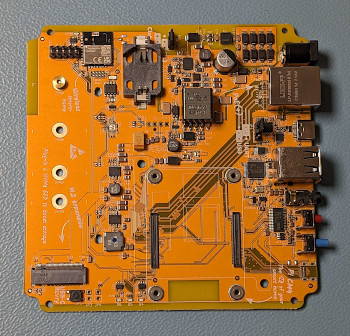
but the screw standoffs are shown here: https://yellow.home-assistant.io/images/install-cm4-01.webp
 wary pivot
The first picture is an older PCB revision with a jumper instead of a switch.
Interesting to see the changes 😄
honest rover
Maybe I’ll go wild and screw down my cm4. Watch out, there’s a madman on the loose!
wary pivot
As long as you don't throw your Yellow around, it should be safe not to screw it down. The older revisions are only secured by the heatsink and are working fine.
honest rover
But.. but.. supplied screws and empty holes 😰
wary pivot
honest rover
 stoic umbra
Hi, PoE kit just landed in the UK (no duty/VAT) and my WD Black SN770 is confirmed as not working! Wondering what NVMe are working well - before I go and order a replacement?
wary pivot
Samsung is (almost) a safe call (except the 980 Pro series). 970 EVO Plus or 980 (without Pro) are fine.
stoic umbra
wary pivot
Samsung is (almost) a safe call (except the 980 Pro series). 970 EVO Plus or 980...
Many thanks
wary pivot
Cheaper would be a Silicon Power P34A60 - the 512 GB variant is confirmed as working. And in a Yellow it doesn't need impressive specs.
honest rover
About to test my PNY SSD. Will report back
 potent lichen
I just bought a Samsung 980 500GB for 39 from Amazon and it worked very well.
 turbid halo
A few days ago I got shipment notice for the Yellow PoE I ordered in January and today I just got billed for the CM4s I ordered from digikey back in September (no shipment notice yet, but status no longer shows as backorder). Supply chain finally getting the kinks out?
 zealous jay
When I set up my Yellow, every time I went to add the smart switch that I have watching the wattage on the input side of my UPS, the whole Home Assistant OS would crash and restart... and then do it again once the "add a Zigbee device" page came up.
It seems like the power adapter that came with the Yellow is completely intolerant of even the slightest dropout in power. Every other device on that UPS is fine during the switchover time.
honest rover
Hmm I think I might need to update the EEPROM. Any tutorials?
 slow forum
I also have a WD Black SN770 that doesn't work with a Yellow on POE
honest rover
Having a weird issue. Followed the setup instructions, all the right LEDs flashed at the right times.. (flashing yellow, solid red etc) unplugged installer USB, restarted and nothing.. I can’t see anything over serial. I tried creating a new installer drive but nothing is happening when I plug it in
Just solid red and green lights. I’m using a cm4 lite
honest rover
The pi does show up when I try to use usbboot, I think I set the boot order correctly and yet still no luck. Maybe I’ll try on my windows device tomorrow, been using Mac OS
I seem to have updated the eeprom, but I realized I had uart boot set to 0. Tried again with 1, but now it won’t write. Ugh. Just gonna try with windows tomorrow
honest rover
It could also just be my PNY ssd not being compatible
stoic umbra
honest rover
It could also just be my PNY ssd not being compatible
On boot up - I just get red and green solid lights - I assumed that it was the WD Black SSD (Samsung replacement on order) but I was curious about boot order @wary pivot which USB slot should be used - does it matter? I created bootloader on Mac OS . Also using CM4 lite.
wary pivot
Any USB-A slot should do. The USB-C is just for diagnostics and recovery. But some CM4 lite have outdated firmware. The installer should update it, but some CM4 lites need to be updated by the user before installing.
white crescent
I run into the same issue as @honest rover and @stoic umbra . All went smooth until the reboot. Now just red and green lights constantly on. I tried removing the SSD, no change. Also re-installing from the USB drive work any more... What am I doing wrong?
white crescent
white crescent
I run into the same issue as <@559839553960149003> and <@478899423489949776> . A...
Only difference I have a CM4 module with eMMC
wary pivot
If you use Yellow's serial console, does it show an error message on bootup?
https://yellow.home-assistant.io/guides/use-serial-console-windows/
https://yellow.home-assistant.io/guides/use-serial-console-linux-macos/
I have a suspicion, the installer hasn't written the HAOS to the eMMC (or NVMe).
Or second step: try to run the USB installer with connected serial console to look for error messages.
shy saffron
🥳 Crowd Supply shipping notification (PoE ordered Feb 9th)
If I was feeling brave enough to drill a hole in the Yellow case... to install one of these https://static.raspberrypi.org/files/product-briefs/2010016+Product+Brief+RPi+CM4+Antenna.pdf where would be the best location please?
Or should I stick to mounting one of these internally?
https://shop.pimoroni.com/products/2-4ghz-mini-flexible-wifi-antenna-with-ufl-connector-100mm
wary pivot
@ivory pagoda Yellow PoE ordered at raspberrypi.dk on Feb 25th 2023 with estimated shipping end of March (now showing begin of April). Got a shipping notification today - so their estimations seem to be accurate (at least in my case).
ivory pagoda
Thx @wary pivot
wary pivot
shy saffron
Or should I stick to mounting one of these internally?
https://shop.pimoroni.com...
I used that one. It's less invasive and good enough for me.
And you need to add dtparam=ant2to the /mnt/boot/config.txt via the serial console or debug SSH for the external antenna. @shy saffron
honest rover
white crescent
Only difference I have a CM4 module with eMMC
That’s even stranger. Later today I’ll attempt to update the boot order and eeprom. Anyone know if I have to keep the new usb recovery button pressed the whole time, or just at boot?
And why isn’t there documentation for CM4 Lites? Very frustrating having to find a bunch of obscure blog and forum posts to figure out what I have to do
wary pivot
Puh... I think, we have to ping @shut cedar
For summoning the support gods we need some sacrifice... any volunteers? 😈 🤣
honest rover
Looking back through this channel @quiet lintel has the same PNY CS1030 SSD as me, they fixed their issue by updating the bootloader
The problem is I can’t find a simple method to do that lol. My google-fu is weak on this topic
wary pivot
It is a bit strange so many issues with the red and green steady LEDs occur at the same time. 🤔
shut cedar
honest rover
And why isn’t there documentation for CM4 Lites? Very frustrating having to find...
What do you mean? Lite is handled in the documentation, see: https://yellow.home-assistant.io/power-supply-nvme/#go-to-the-storage-configuration-page
The installer updates the firmware automatically.
honest rover
shut cedar
What do you mean? Lite is handled in the documentation, see: <https://yellow.hom...
I’m referring to edge cases like needing to update eeprom
If the installer updates the firmware, what am I doing wrong currently? I’m at a loss
shut cedar
Ok, I think there is an edge case of the edge case: When you have a very old CM4, thoses do not have the auto update feature. Then the installer won't automatically update the EEPROM.
honest rover
And I’m unable to reinstall. Gonna stick the ssd in my pc and delete partition and see if I can run the installer again
shut cedar
I mean it could be that this NVMe isn't working with the CM4 we have some which aren't, unfortunately 😢 .
But this community report suggests it does for that person at least? https://community.home-assistant.io/t/homme-assistant-yellow-installation-issue/474049/25
honest rover
shut cedar
Ok, I think there is an edge case of the edge case: When you have a very old CM4...
Though rare, it seems worthwhile to have documentation for this
honest rover
shut cedar
I mean it could be that this NVMe isn't working with the CM4 we have some which ...
My PNY CS1030 is reported as working
Here
shut cedar
Hm I see. Maybe a newer bootloader than the Installer ships 🤔
The ones shipped with the installer is already a couple of months old again 😰
It isn't booting from USB anymore?
honest rover
So I wiped the original usb and created a new installer, but all I get is solid red and green
wary pivot
A few people are having their systems not booting and showing a steady green and red LED. Even with an eMMC CM4.
Haven't found anything to pinpoint the issue yet, but am I right the Yellow would show those LEDs, if no OS is installed?
shut cedar
honest rover
So I wiped the original usb and created a new installer, but all I get is solid ...
I guess it depends what your CM4's state is exactly, but afaik, the default boot order is 0xf25641, which means it boots from NVMe before USB.
So it seems it gets stuck booting from NVMe right now
You can try by removing the NVMe. Does it boot from USB then (yellow starts flashing?)
Maybe it is actually booting, but crashes later on? But then I would not expect that a EEPROM update would fix it 🤔
Do you see something on the serial console?
https://yellow.home-assistant.io/guides/use-serial-console-windows/
https://yellow.home-assistant.io/guides/use-serial-console-linux-macos/
honest rover
shut cedar
I guess it depends what your CM4's state is exactly, but afaik, the default boot...
I’ll give it a try. It’ll have to wait a little bit but I’ll @ you later today if I can’t get things working. Yesterday when I tried using a serial connection, it was blank
Thanks for giving me some things to try though
Maybe you can answer my question about the new usb recovery button - do I have to keep it held down? Or just while I turn on the device? Documentation only covers the old jumper version
shut cedar
You need to keep it hold down for 1-2s, should be enough.
honest rover
shut cedar
I guess it depends what your CM4's state is exactly, but afaik, the default boot...
So it does boot off of USB
Seeing the flashing yellow LED now
shut cedar
Even with the NVMe plugged in?
The EEPROM currently in provided with the Installer is 2022-09-02, the changelog has some NVMe related changes but not really much, so I am not sure if an updated EEPROM will help, but we can try:
https://github.com/raspberrypi/rpi-eeprom/blob/master/firmware/release-notes.md
honest rover
shut cedar
Even with the NVMe plugged in?
No
shut cedar
Hm, ok, that means it kinda/sorta tries to boot from NVMe, but then fails. I am sceptical that a EEPROM update helps here tbh
honest rover
Hmm
Weird
I’ll try again with the NVME inserted
As soon as the NVME is inserted it goes back to just solid red and green. Will wipe the ssd and try again in a bit
shut cedar
Yeah, so the NVMe has something on it which the CM4 tries to boot from.
honest rover
shut cedar
Yeah, so the NVMe has *something* on it which the CM4 tries to boot from.
So I plugged the SSD into my PC and it seems to have flashed correctly. I see a drive named hassos-boot
honest rover
Trying to reinstall now. Removed my z-wave module just in case. Iirc it was attached last time
shut cedar
Yeah unlikely that it matters but better be sure
honest rover
Installer seems to be behaving as expected…
Pray to the tech gods with me

Alright. It’s solid red. Moment of truth
Solid red and green 😦
Ethernet yellow led is flickering, but it did that last time too
shut cedar
Can you check serial console if you see something?
honest rover
I’ll try
Don’t even see anything when I ls /dev/cu.*
Yesterday I could at least see usbserial-xxx
shut cedar
You've connected the USB-C port I assume? Jumper JP2 is on UART?
honest rover
Yes and yes
Maybe I need to try my windows pc, been doing this on Mac OS
Just to try all the things lmao
Process of elimination
Ah there it is. Had to power off for it to show up when I ls the ports
Powering on and GNU Screen is blank
The command I used is: screen /dev/cu.usbserial-1410 115200
Nothing but a solid cursor. Sudo makes no difference
Could it be my power supply? Currently using a 30w PoE+ injector for setup at my desk (before I put it on my PoE switch in my network closet)
wary pivot
If you hit Enter a few times, does a login prompt appear?
honest rover
wary pivot
If you hit Enter a few times, does a login prompt appear?
Nope 😦
Also get this fun error with rpiboot when I run rpiboot -d . Waiting for BCM2835/6/7/2711... Loading embedded: bootcode4.bin Sending bootcode.bin Successful read 4 bytes Waiting for BCM2835/6/7/2711... Loading embedded: bootcode4.bin Second stage boot server Cannot open file config.txt Cannot open file pieeprom.sig Loading embedded: start4.elf File read: start4.elf Cannot open file fixup4.dat Second stage boot server done
honest rover
solved that part. was using the wrong command. should have been sudo ./rpiboot -d recovery because that’s the directory where all the files are
eeprom is now updated. I made sure boot-UART was 1
hazy oar
My Mouser CM4 order came. W00t. And either they fixed the glitch or word got out and 200+ of them sold overnight.
My 3/22 crowdsupply order has gone from 3/17 -> 3/31 -> 4/14.
honest rover
Just wiped my ssd again, did the install process. Got through all the flashing lights to the solid red. Disconnected usb and restarted.. back to just solid green and solid red 😦
worn grove
I have a CM4, but cancelled my Yellow order. Went with a Beelink mini-PC off Amazon.
honest rover
I regret getting a Lite CM4 now
Maybe it’s my SSD - even though it gets configured by the installer, maybe the Yellow doesn’t like it for a boot drive? Anyone here with a CM4 Lite care to share which SSD they’re using?
hazy oar
I had no issue installing to a CM4 Lite.
honest rover
hazy oar
I had no issue installing to a CM4 Lite.
Which ssd did you use?
hazy oar
Silicon Power P34A60 512GB
honest rover
Thanks
hazy oar
Cheapest thing on Amazon with a Tom's Hardware review.
honest rover
Ugh I almost got that one instead of the PNY originally, but went with PNY because I was more familiar with the brand lol
Ordered it, since I know you have a working cm4 lite install, thanks @hazy oar
hazy oar
I don't have much to say about that SP drive... but turns out I bought one about a year back and it's still going.
shut cedar
@honest rover did you check serial console?
honest rover
I’ll just put my PNY SSD on my regular Pi 4, been wanting to upgrade from MicroSD anyway
honest rover
shut cedar
<@559839553960149003> did you check serial console?
crap.. i forgot to do that during the install
ill try that again later
hazy oar
I know nothing about how these things boot and what the HA installer is doing. But if you're going again, I'd make sure the partition table is wiped out first.
On Windows that'd be diskpart, list disk, select disk <#>, clean
honest rover
hazy oar
I know nothing about how these things boot and what the HA installer is doing. B...
I’ve been doing that each time. Attach it to my PC and delete all partitions with the partition manager
Because I don’t have a usb adapter, I put it in a spare slot in my gaming pc lol
hazy oar
That's not exactly the same if you're doing it in Disk Management. clean would put the disk back to an un-initialized state with no partition table at all.
honest rover
hazy oar
That's not exactly the same if you're doing it in Disk Management. `clean` would...
Alright I’ll do that next time. Have to put this down for a bit
hazy oar
And this is my favorite USB NVMe adapter, it also works with SATA M.2 drives: https://www.amazon.com/gp/product/B08RVC6F9Y/
 uncut wedge
Shipping notification for mine came in today from Crowd Supply. POE Version ordered 17th Feb 23.
shy saffron
shy saffron
🥳 Crowd Supply shipping notification (PoE ordered Feb 9th)
Mine's arrived in the UK already but FedEx aren't planning to deliver till Monday. 😢
shy saffron
wary pivot
And you need to add `dtparam=ant2`to the /mnt/boot/config.txt via the serial con...
I have a CM4 with MMC. I found a tutorial that mentions taking the SD card out to edit the config.txt file on a PC. Is there a way to access it through HA? I saw a video that mentions installing Visual Studio Code as a text editor.
wary pivot
You don't have access through HA. You need to use the USB-C serial console or the debug SSH (not the SSH add-on) and use the editor vi.
turbid halo
Having a problem moving data to new disk
Completely new install, first thing I do is attempt to move data
getting this error
Source: components/hassio/websocket_api.py:125
Integration: Home Assistant Supervisor (documentation, issues)
First occurred: 7:25:07 PM (1 occurrences)
Last logged: 7:25:07 PM

Failed to to call /os/datadisk/move - Can't move data partition to Samsung-SSD-980-500GB-S64ENS0T315388Y:```I tried a number of different formatting/partitioning options on the nvme. Same error every time.
I don't know if it's related, but I also see this in the host log at the same timestamp
Mar 31 01:25:07 homeassistant dbus-broker[159]: Peer :1.43 is being disconnected as it sent a message with an invalid body.
turbid halo
Known good CM4 and nvme combination. They were working together for another project. Repurposed them for the new Yellow
@shy saffron I believe you can also access emmc using rpiboot. You should be able to mount the emmc partitions via the usb-c
honest rover
turbid halo
Known good CM4 and nvme combination. They were working together for another proj...
Just because the SSD works on a different board, does not mean it works with the Yellow unfortunately
turbid halo
I'm not having the same issue others seem to be having. The nvme is recognized. Something else seems to be broken.
honest rover
Oops didn’t catch the make of the ssd earlier
uncut wedge
shy saffron
Mine's arrived in the UK already but FedEx aren't planning to deliver till Monda...
yea same for me fedex says it in stansted but the schedules delivery is only monday
shut cedar
@turbid halo what Supervisor version are you using? Are you on the beta channel?
 midnight temple
shut cedar
<@956951661937578014> what Supervisor version are you using? Are you on the beta...
midnight temple
shut cedar
<@956951661937578014> what Supervisor version are you using? Are you on the beta...
@turbid halo I have the same issue with the stable version. I have just opened a bug for it. https://github.com/home-assistant/supervisor/issues/4220
Home Assistant 2023.3.6
Supervisor 2023.03.3
Operating System 9.5
Frontend 20230309.1 - latest
The USB Stick ist just downloading the latest version. Is it posible (how?) to install an older Home Assistant Version to the HA yellow?
shut cedar
@midnight temple can you check the Host logs?
(it is a choice in the top right list under logs)
I expect some information from haos-agent why this failed.
midnight temple
shut cedar
I expect some information from `haos-agent` why this failed.
I see no top right list in logs. I would upload a screenshot here, but do not know how.
Screenshot is here https://anders.hamburg/tmp/Screenshot_20230331_092953.png
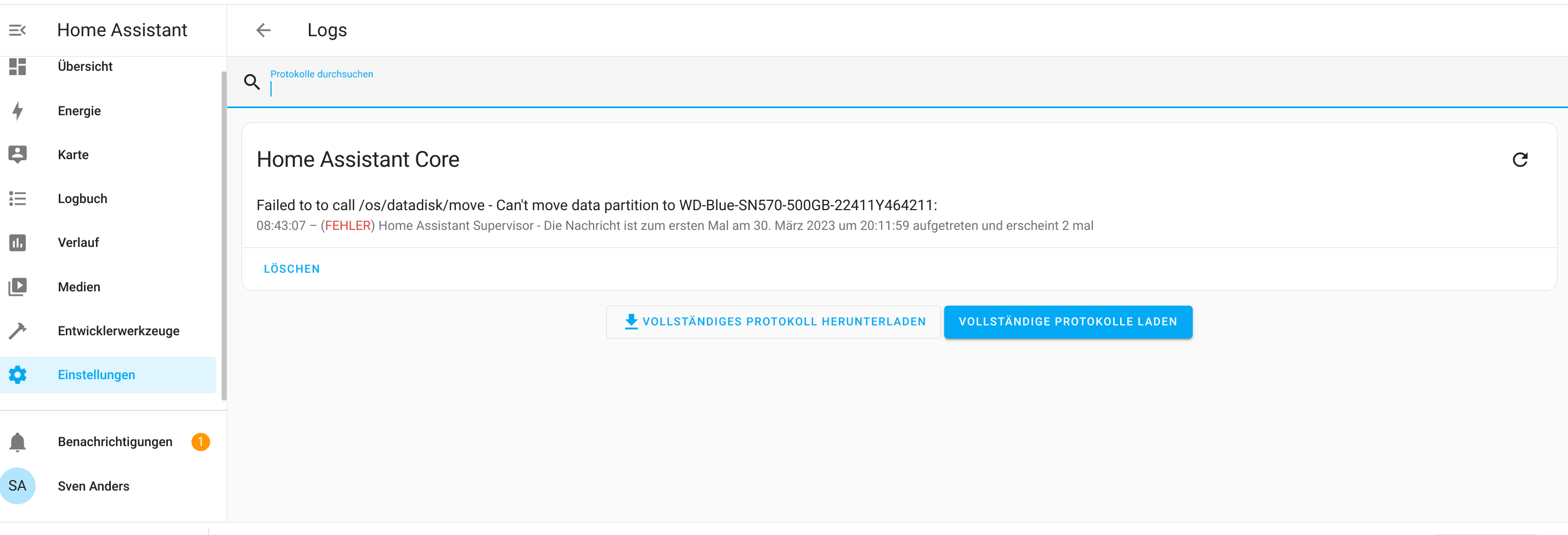 shut cedar
 midnight temple
As you can seen in my screenshot, there is no such menu.
shut cedar
Hm, maybe it is behind the advanced flag (Click on the user and set the "Advanced Mode")
midnight temple
Yes you are right.
But I see reason in the log. https://anders.hamburg/tmp/host_2023-03-31T07-45-59.335Z.log
shut cedar
Hm, no log entries about haos-agent 🤔
dusky hollow
Hi all,
since I installed my HA Yellow I recognized problems in my Home WLAN.
I am running a FritzBox 7590 with several Mesh Repeater (3000,6000,1750).
WLAN devices lost their connection.
After looking into the Fritz!Box LogFiles, I saw that the repeater next to the Yellow had problems with the 5GHz connection.
The Log says:
" 5G for a minute (channel 100, frequency 5500 Ghz) not usable because of a privileged RADAR"
sometimes it 1-10 minutes.
this makes me nervous.
To validate the problem, i changes the location of the Yellow to another room.
Same problem with the Repater in the room.
Does anybody having similar issues?
shut cedar
It seems you are using a channel which is used by radar signals?
https://en.avm.de/service/knowledge-base/dok/FRITZ-Box-7490/1349_5-GHz-Wi-Fi-network-is-occasionally-disabled-radar-signal/
dusky hollow
not me, the Yello is doing so
shut cedar
The log is from the FritzBox right?
dusky hollow
yes
dusky hollow
no
shut cedar
I mean if the Fritzbox is logging this, then the FritzBox picks up those signals... Are you sure it is related to Yellow? E.g. if you turn it off for ~24h, you don't get any of these log entries?
dusky hollow
yes totally sure.
shut cedar
Are you using a CM4 with WiFi/Bt?
dusky hollow
yes
shut cedar
So the EMI measurements of Yellow Standard have been very far from any limits. So I don't think it is Yellow. (Sidennote: PoE was closer to the limits, but still within limits. But that doesn't apply to you anyways).
So I'd guess this is the CM4/it's WiFi module which does something which then is picked up by the Fritzbox
wary pivot
My Yellow is beside my FritzBox. Have some frequency changes due to radar detection on channel 128 in my logs, but no unusability messages - and no 5 GHz device outages. But my FritzRepeater is working as a Wifi bridge only and is doing his own wifi network with 6% signal strength. So those log entries might not be caused by my Yellow.
dusky hollow
ok good point, i will switch bluetooth of and see if it’s help
dusky hollow
wary pivot
My Yellow is beside my FritzBox. Have some frequency changes due to radar detect...
i am on channel 100
shut cedar
Are you using WiFi to connect? Or is it idle?
dusky hollow
shut cedar
Are you using WiFi to connect? Or is it idle?
idle, not used
ok thanks guys,
will make some tests
it’s definitely coming from my yellow.
if i am moving it to other rooms, the repeater next to it has the 5Ghz/ RADAR issue
now i changed the channel my this help’s
wary pivot
You don't want to use the Wifi, but the Bluetooth on your Yellow, right?
dusky hollow
wary pivot
You don't want to use the Wifi, but the Bluetooth on your Yellow, right?
yes, that’s my configuration
wary pivot
One attempt might be to disable the Wifi on the CM4. If you connect to your Yellow via the serial console, you can edit the file /mnt/boot/config.txt with the linux file editor vi.
If you add dtoverlay=disable-wifito that file, it might (no guarantee) help.
But let us know, if it helps with your 5GHz issue, please.
dusky hollow
wary pivot
But let us know, if it helps with your 5GHz issue, please.
i will
ivory pagoda
We noticed raspberrypi.dk is out of stock of full Home Assistant Yellow with CM4. Not sure whether I should celebrate or be sad 😉. But they do still have Kit versions - and they offer CM4's as well! Quite a lot of those, actually and quite a chance to organize yourself a nice present...
As a side note: See how raspberrypi.dk deals with "out of stock". No promises, not even guesstimates...
wary pivot
CM4s at raspberrypi.dk are B2B only at moment. Not orderable by endusers.
opaque summit
Nabu Casa starting a reseller feature with drop-shipping from raspberrypi.dk? ^^
turbid halo
@shut cedar I'm on Supervisor 2023.03.3. This is a fresh install using these instructions https://yellow.home-assistant.io/poe-nvme/
shut cedar
Yeah there is a bug in current Supervisor 2023.03.3.
turbid halo
Thought that might be the case. Saw the recent change involving udisks2 and thought that might be root cause?
ivory pagoda
wary pivot
CM4s at raspberrypi.dk are B2B only at moment. Not orderable by endusers.
Args 🤦♂️
Thanks for the correction!
wary pivot
ivory pagoda
Args 🤦♂️
Thanks for the correction!
Sorry 😆
honest rover
wary pivot
CM4s at raspberrypi.dk are B2B only at moment. Not orderable by endusers.
I have an s-corp, can I buy one? Lol
wary pivot
honest rover
I have an s-corp, can I buy one? Lol
Oh, you are going to be the best friend of many Yellow users. 🤣
honest rover
Lol, I mean it’s just for tax reasons, but I’m technically a business 😆
Honestly though, I’ll totally do it, if it helps fellow nerds get their CM4s
worn grove
I have a CM4, 8GB, WiFi, "lite" that I want to sell. Decided not to go the Yellow route and went mini-PC instead. Still in box, never used.
 manic sinew
worn grove
I have a CM4, 8GB, WiFi, "lite" that I want to sell. Decided not to go the Yello...
manic sinew
worn grove
I have a CM4, 8GB, WiFi, "lite" that I want to sell. Decided not to go the Yello...
Where are you based?
worn grove
manic sinew
Where are you based?
SoCal USA
compact quartz
wary pivot
A few people are having their systems not booting and showing a steady green and...
After some back and forth with someone else, I think this might be related to old eeprom versions on CM4s that can't be updated automatically by the installer.
Sharing in case you see anyone else in here that describes the same
shy saffron
wary pivot
One attempt might be to disable the Wifi on the CM4. If you connect to your Yell...
Am I correct in thinking that config tweak disables the CM4 WiFi but not the CM4 Bluetooth? That's what I am looking to do with my Yellow PoE.
wary pivot
If I get the Raspberry Pi documentation right, yes.
dusky hollow
Hey everyone, for the CM4...I know the documentation says minimum 2gb ram but realistically is any more than that needed?
Still waiting until I can scoop one up but wanna be prepared
wary pivot
My system is using 2.2 of 8 GB RAM at moment. Running a couple of add-ons.
hazy oar
Both my current HAs are supervised VMs w/ 2GB RAM, hover around 1GB used. VS Studio Code, Mosquitto, MQTT Viewer, ESPHome, TasmoBackup add-ons.
worn grove
I have HAOS running, 4GB VM, 2.88GB used.
Personally, I would not get a 2GB CM4. Too limiting.
opaque summit
The ones I have running Unifi controller add-on needs 4GB but other than that its pretty basic and 2GB for me. >=4GB would probably be more futureproof, but with availability being what it is i'm happy i was able to get some 4GB ones before the yellows arrived
 river forge
I just received my Home Assistant Yellow POE (yay!) but I'm only getting a red light (boo!). At first I don't think the CM4 was seated fully, but I'm confident it is now but when I connect the POE cable, the red light stays on solid and no other lights come on. Any ideas on how to debug? Thanks.
wary pivot
Have you installed Home Assistant according to the guide yet?
river forge
I tried to, but the yellow light never comes on, just the red one.
wary pivot
So you created an installer USB stick, plugged it in, powered it up and it's just showing a red LED?
honest rover
Is your PoE source putting out sufficient power?
honest rover
Time to add my PNY ssd to the unsupported list. The siliconpower ssd worked immediately
Fuck the 256gb PNY CS1030, it might work as a data disk for some, but it won’t work as a boot drive
honest rover
Was looking at pi accessories for something else and it struck me - why did they go with such a flimsy heat sink with lousy contact vs something like this which would screw through the entire board. There never would have been CM4 seating issues with one like this https://m.aliexpress.us/item/3256804406588321.html
Or this
wary pivot
The Yellow was designed for toolless assembly. They also threw the packages through a corrridor for testing (there was a video about that). But even that wasn't enough to prepare for parcel service handling. 🤣
Also technical stuff might be a reason for that design choice.
honest rover
wary pivot
The Yellow was designed for toolless assembly. They also threw the packages thro...
The SSD requires a screwdriver, checkmate Nabu Casa /s
wary pivot
Nah, you can tape it down with duct tape 🤣
hazy oar
I get irrationally angry every time I buy something new that uses a screw for the M.2 when screw-free options have existed for years now.
 torn wraith
Hi all, I got a but of a trouble. I have an instance running on Ubuntu - yes, that platform is no longer supported - an I would like to migrate to Yellow. So, restoring a backup from the old instance would only make the yellow hang. Any thoughts?
wary pivot
It takes quite some time for bigger backups to restore. I thought mine would hang too.
The Yellow/Raspberry Pi is usually slower than an Ubuntu VM or Docker host - so it takes longer.
torn wraith
wary pivot
It takes quite some time for bigger backups to restore. I thought mine would han...
... and it did, restore it? Even if the backup is, rather old hence the add-on hasn't been updated since the ubuntu was "banned"?
wary pivot
What add-on are you talking about?
torn wraith
wary pivot
The Yellow/Raspberry Pi is usually slower than an Ubuntu VM or Docker host - so ...
What are we talking about here? 1 day? 2 days?
wary pivot
No, mine took about 30 minutes.
torn wraith
oh, no ... I have been passed that rubicon; the yellow was blinking for 6 hours strait.
wary pivot
If the old backup doesn't work (there might have been some breaking changes through the next versions) and you aren't able to create new ones, you can download the /config folder of your current installation and upload it to the yellow (after new onboarding). E.g. via the Samba add-on.
torn wraith
wary pivot
If the old backup doesn't work (there might have been some breaking changes thro...
Thanks @wary pivot at the end it's Saturday afternoon, plenty of time to fiddle with the thing, isn't it.
torn wraith
wary pivot
Just in case:
https://yellow.home-assistant.io/faq/#can-i-factory-reset-the-syst...
Thank you! I have those bookmarked already 🙂 I have the prepared USB drive next to the Yellow. I'have done the full factory restore from USB drive 3 times by now.
wary pivot
So you know the drill 😝
torn wraith
wary pivot
So you know the drill 😝
... intimately.
sharp coral
Did you resolve the issue?
 vivid grove
I have a bunch of lights that are not working but worked fine before today they dont turn on via home assistant dashboard they are all connected via z wave on my yellow
bit wierd really have one that shows that its turned on in the dash but wont turn off the others just wont turn on
i turned one on by switching the mains on and off that now shows as on in the dash but wont turn off either
I tried re adding the light thats in the same room and its just searching not seeing anything and the light is in pairing mode
vivid grove
So I fixed it by rebooting the yellow but I had to physically unplug it as after 30 minutes of wating for it to reboot from the Dash I figured something must be wrong a full reboot never takes that long usually
wary pivot
Are you using a NVMe?
vivid grove
yeah
wary pivot
I haven't had any problems with my Z-Wave yet. But I have observed my NVMe to drop from the systems a few times (I assume on high CPU loads). In that case a reboot seems to take forever - but just the OS is loading (and is able to be logged in via serial console) but the NVMe is missing - and so the Observer and HA Core are never started. I had to powercycle to revive it.
vivid grove
yeah i just checked and the nvme isnt showing
wary pivot
But that's my working theory - wasn't able to reproduce the NVMe crash (and it's cause) reliably.
Maybe an add-on went rogue and used too much CPU capacity and caused this.
Are you using the Multiprotocol add-on?
vivid grove
no im not no
zealous jay
Speaking of the M.2, it's non-obvious that the threads on the top of the M.2 standoff aren't for a screw.
honest rover
zealous jay
Speaking of the M.2, it's non-obvious that the threads on the top of the M.2 sta...
They are for a screw… that comes in from the bottom lol
zealous jay
honest rover
They are for a screw… that comes in from the bottom lol
Most M2 holders I've seen use either a soldered-in standoff and a screw from the top, or a screw from the bottom and a screw from the top. This is the only one I've ever seen that uses only a screw from the bottom.
honest rover
zealous jay
Most M2 holders I've seen use either a soldered-in standoff and a screw from the...
Fair, but the documentation covers this clearly
honest rover
https://i.imgur.com/whM47zp.jpg sizing up my spare 120mm fan, told you guys I’d do this for the fun of it, just gotta get a case printed with the appropriate modifications
 keen parcel
Where are you located?
 halcyon lagoon
Hello, just got my yellow. Out of curiosity, can I just grab the NVMe drive on which my current HA is installed (the OS and data -- I modified the rpi boot order to ignore internal flash) and put it in the yellow and boot that? Again, assuming I tweak the Yellow's firmware boot order to ignore eMMC. The only thing that gives me pause is if there is a specific variant of HAOS for yellow (but I don't think that is the case).
Am aware I might need to fix a few things after the fact, like device paths.
opaque summit
halcyon lagoon
Hello, just got my yellow. Out of curiosity, can I just grab the NVMe drive on w...
dont think so, the current install wont have the device tree files for the yellow so radio, buttons etc wont work if it will boot at all. back up current, install ha yellow image and restore is the easiest option.
halcyon lagoon
Ah yeah, the dev tree will be all bad / missing, quite right.
Yeah backup it is.
I could have it boot on the nvme drive like the rpi to spare the eMMC or have slightly better performance, but 🤷
opaque summit
you can install the yellow image to the nvme, but not with the official installer, it will default to emmc if present.
halcyon lagoon
Indeed.
That is standard CM4 firmware behavior.
But thanks for including an easy jumper 🙂
 topaz dock
opaque summit
you can install the yellow image to the nvme, but not with the official installe...
topaz dock
opaque summit
you can install the yellow image to the nvme, but not with the official installe...
Do you have any pointers on how to install direct to the nvme? I got my yellow today but having trouble getting it to startup... From what I can tell, the firmware loaded from the USB, it connected to the network and downloaded the OS. The red LED is on continuously, the green and yellow flash intermittently. My CM4 has 8GB of emmc but I'd rather bypass that entirely...
topaz dock
Sorry for the double message.... I used the rpiboot recovery tool to set the boot priority and used the rpi imager to write the HAOS PRI4/400 image direct to the NVME drive using a usb-nvme adapter. Seems to have started up okay.... Does that sound like the right way to do it?
 unreal ocean
Hi Everyone. I managed to add my IKEA Fyrtur blinds to HA via ZHA last night, and they were working! At 3:30am this morning, they became "unavailable" and I am no longer able to control them the dashboard or the integration. They still appear in the ZHA config. The blind remote and the buttons on the blinds themselves work fine. Does anyone have any ideas on what might be the problem?
shy saffron
My PoE Yellow arrived this morning. Followed the guide here https://yellow.home-assistant.io/poe-nvme/ and everything seems to have gone well. 👍 Only issue is moving the data disk. First time I selected the Samsung 980 (non Pro) it immediately showed a failed error dialog. Tried again and it showed a please wait dialog. After a while I refreshed the browser and went back to the storage page, the used space was still showing as 8.2% (CM4 with 32GB eMMC) so I clicked through the dialog again... it shows "'/dev/mmcblk0p8' as datadisk" and when I attempted to select the Samsung SSD again it showed an error stating "another job is running". Is there a HA menu I may check to see if the data disk migration is running please? It feels like it's been longer than 10 minutes. Seeing intermittent flashes of the yellow and green lights.
 ashen valve
Anyone in UK with a yellow? I bought the skyconnect but tempted to switch to a yellow as I had planned to use docker on my old mac mini but it appears passthrough usb is a limitation on macos
wary pivot
topaz dock
Sorry for the double message.... I used the rpiboot recovery tool to set the boo...
Sounds like the wrong HAOS image. Don't use the RPi one, but the one specifically for Yellow. Otherwise the Zigbee radio might not work for example.
shy saffron
ashen valve
Anyone in UK with a yellow? I bought the skyconnect but tempted to switch to a y...
I'm in the UK.
shy saffron
ashen valve
where did you order from?
Crowd Supply. Arrived via FedEx today, who didn't ask for any fees/duty.
Fingers crossed the Yellow will be available from UK resellers soon. Currently I believe the only announced European reseller is https://raspberrypi.dk/ There's a post a bit further up this channel with details on their price to ship to the UK but that probably would be subject to import duty.
ashen valve
i got no duties on my skyconnect but unsure if thats just because it was only £50
shy saffron
wary pivot
And you need to add `dtparam=ant2`to the /mnt/boot/config.txt via the serial con...
I'm following this guide to make those config changes you kindly shared. https://yellow.home-assistant.io/guides/use-serial-console-windows/ The port is not appearing in Device Manager, instead I have a CP2102N USB to UART Bridge Controller under 'Other Devices' with a little yellow warning triangle icon. The Yellow is running off PoE, should it not be?
wary pivot
That shouldn't matter. It seems Windows is missing a driver. Have you tried to right click on that device and look for new drivers?
shy saffron
wary pivot
That shouldn't matter. It seems Windows is missing a driver. Have you tried to r...
Yes, it didn't manage to find it through Windows Update. Thank you though, points me in the right direction... https://www.mouser.co.uk/new/silicon-labs/silabs-cp2102n-usbxpress-usb-uart-bridge-controllers
wary pivot
Sometimes Windows needs a reboot.
shy saffron
Driver downloaded and installed... the port has appeared. Thank you.
topaz dock
wary pivot
Sounds like the wrong HAOS image. Don't use the RPi one, but the one specificall...
Thanks, I'll give it a whirl... So the fact that the yellow image has to download a bunch of stuff from the web wont matter...?
wary pivot
topaz dock
Thanks, I'll give it a whirl... So the fact that the yellow image has to downloa...
Don't confuse the Yellow installer image (which prepares everything and downloads HAOS) with the HAOS image for Yellow. Different things resulting in similar results.
The option the Raspberry Pi imager has for Yellow is the installer. The stuff from the HAOS GitHub is the OS image.
shy saffron
Sorry, probably not Yellow related but I'm not sure where to ask for help with...
Source: components/hassio/websocket_api.py:125
Integration: Home Assistant Supervisor (documentation, issues)
First occurred: 12:28:03 (4 occurrences)
Last logged: 13:52:17

Failed to to call /os/datadisk/move - Can't move data partition to Samsung-SSD-980-500GB-S64DNL1TA23708A:
Failed to to call /os/datadisk/move - Another job is running```The disk move has already been triggered.
shut cedar
The first attempt likely failed due to a bug. Should be resolved with the next Supervisor release (see https://github.com/home-assistant/supervisor/issues/4220)
honest rover
keen parcel
Where are you located?
Austin
shy saffron
Looks like mine has moved... so perhaps I just need to restart the Yellow.
devices:
- Samsung-SSD-980-500GB-S64DNL1TA23708A
disks:
- dev_path: "/dev/nvme0n1\0"
  id: Samsung-SSD-980-500GB-S64DNL1TA23708A
  model: Samsung SSD 980 500GB
  name: Samsung SSD 980 500GB (S64DNL1TA23708A)
  serial: S64DNL1TA23708A
  size: 500107862016
vendor: ""```Perhaps not. Still showing as /dev/mmcblk0p8 in the HA UI.
Am I misunderstanding what is returned by ha os datadisk list? Is that available disks?
Is it worth me trying ha os data move /dev/nvme0n1 or do I need to wait for the Supervisor release? Wasn't sure if the issue only affects making the change via the Home Assistant UI?
wary pivot
Is lsblk in the serial console showing nvme0n1p1 as /mnt/data?
ha os datadisk list is showing the following (after a successful data movement to a Samsung 980 1TB):
disks: []```NAME MAJ:MIN RM SIZE RO TYPE MOUNTPOINTS
mmcblk0 179:0 0 29.1G 0 disk
|-mmcblk0p1 179:1 0 32M 0 part /mnt/boot```@wary pivot I converted your message into a file since it's above 15 lines :+1:
shy saffron
Apologies for being such a novice.
A couple of people mention a workaround on the GitHub post.
gdbus call --system --dest io.hass.os --object-path /io/hass/os/DataDisk --method io.hass.os.DataDisk.ChangeDevice "/dev/nvme0n1"
Is that something I may try via the CLI?
ashen valve
run it
shy saffron
I did... it returned (true,)
ashen valve
and you restarted?
shy saffron
yes. No change as far as I can see.
shy saffron
Oops. I was trying to execute that command in PuTTY... which is the CLI, right? I am installing SSH & Web Terminal currently. Will give the gdbus thing a try once that's done.
worn grove
I cancelled my Yellow PoE order. Got a mini-PC that's way faster than my RPi 4...Yellow is a nice idea, but just not for me anymore.
wary pivot
Yes, you told us 4 days ago.
The good thing about Home Assistant is the freedom of choice - even the hardware it is running on.
hexed river
Stocks updated on Crowdsupply. PoE Jun 30, PSU Apr 30. Raspberrypi.dk showing PoE and PSU versions 'in stock', CMU versions out of stock but select CMUs also in stock.
Ordered PSU version from Raspberrypi.dk this morning, (10am), DHL tracking number received 10hrs later. Get am while you can 👍
opaque summit
I just realised I didnt check if the PoE kit shipped with a 12v supply or not; it does not (my bad)
Is a 18w USB PD outlet with a 12v trigger cable insufficient to boot a Yellow with nvme?
edit: huh, one of the usb supplies only wanted to give out 5v from the 18w port, not 12v. The other one worked, same make & model. Guess thats a RMA of the usb supply.
wary pivot
Pro's and Con's about the shipping:
CrowdSupply uses Express services like FedEx. When the shipment leaves their warehouse, it is delivered in a very short time.
Long waiting time for shipping - quick delivery service.
Raspberrypi.dk uses a service called Coolrunner, which collects the shipments and sends them to a parcel service like DHL. It takes a bit more time in transit, but raspberrypi.dk ships quite fast. In their defense: if I got a friend right, sending parcels in Denmark is a pain in the butt.
Quick shipping - slower delivery service.
wary pivot
opaque summit
I just realised I didnt check if the PoE kit shipped with a 12v supply or not; i...
It needs a 12V 2A power supply - thats 24W. With a 18W power supply it might brown out.
opaque summit
Yeah, saw that, but still found it surprising that there was no signs of life. Oh well, will re-visit when I have a PoE switch handy.
wary pivot
But... my Yellow with NVMe and Z-Wave HAT has been drawing 7.62 W (not mm full metal jacket) max from the grid (according to a Shelly Plug power metering).
But I have no metering ability on the 12V side.
opaque summit
Its not gonna draw more on the 12v side:D
(or if it does someone gonna get rich:D)
wary pivot
Yeah. 🤣 But I'm not sure how reliable the Shelly metering is. 😆
wary pivot
opaque summit
Its not gonna draw more on the 12v side:D
(or if it does someone gonna get rich:...
Wanna invest in some Yellows? Free energy!  😆
😆
opaque summit
wary pivot
Wanna invest in some Yellows? Free energy! <:smart:723251852761628792> 😆
Got my retirement plan all ready https://ibb.co/C7TQqF1
wary pivot
Now you need some CM4s for an earlier retirement.
opaque summit
Oh, only selling the free power - yellows and the cm4s were under last years family xmas tree, albeit in 2d form..
wary pivot
And we are still waiting for our promised gold plated Yellow. They really think, we are satisfied by the copper one. 
 white anchor
river forge
I just received my Home Assistant Yellow POE (yay!) but I'm only getting a red l...
white anchor
river forge
I just received my Home Assistant Yellow POE (yay!) but I'm only getting a red l...
Did you ever get to the bottom of this? I’m having the exact same issue. Just a red light. I can load the emmc using rpiboot, but it gives me nothing as serial debug.
honest rover
white anchor
Did you ever get to the bottom of this? I’m having the exact same issue. Just a ...
Did you try using a different usb stick? From my years of flashing all kinds of stuff to all kinds of devices, I’ve found USB 2.0 drives to be the least prone to issues
white anchor
I didn’t have a spare so I tried flashing the yellow installer image directly to the EMMC. I just don’t get any activity light. Just the red power
opaque summit
I had less issues when putting haos_yellow-9.5.img directly on the storage rather than putting the installer image onto the storage. Could just be me though.
(https://github.com/home-assistant/operating-system/releases/latest look under Assets towards the bottom of the page)
 robust pier
so just got my hands on a CM4! but.. add-ons spin and do nothing on install. nothing in the supervisor logs. Any ideas?
PoE edition.
robust pier
Welp -- a few hard restarts later and I got some add-ons installed. Not sure what the root cause for anyone finding this via search in the future
shut cedar
@robust pier sometimes add-on installation is just surprisingly slow (as in really really slow. Presumably when GH servers are slow or slow peering with them).
opaque summit
Any plans to add adhesive silicone/rubber feet to attach to the thumb screws as an alternative? Imho far to easy to scratch a surface and not enough friction with just the brass screws as feet. (Preferably a height that could also be used inside the case to provide just enough pressure to keep the board from rattling around in the case).
hexed river
wary pivot
Pro's and Con's about the shipping:
CrowdSupply uses Express services like FedEx...
Noted but I'll take an in stock order with slower shipping over what Crowdsupply are currently stating. Raspberrypi.dk could take a month to deliver and it would still arrive sooner. Crowdsupply cancel orders promptly, so there's that to consider in their favour also 😌
wary pivot
opaque summit
Any plans to add adhesive silicone/rubber feet to attach to the thumb screws as ...
I had added some to mine - until I replaced them by velcro.
opaque summit
Yeah, I did as well, but I dont think everyone has them handy, so adding them to the kits would be something to consider imho.
ashen valve
its running HA, faster is not necessarily better. I'd rather low power and acceptable performance. If i wanted fast I'd run it on my pc
nocturne shard
To those waiting for Crowdsupply (direct) Yellow orders: I ordered mine (kit with power supply) Feb 28th and received it yesterday (3 April). I was frustrated by the lack of communication about lead-times constantly shifting having bought mine on the basis of a March 3rd 'predicted shipping date'. However, when they ship, it's a very quick process to delivery, as others have said. I'm in UK; I got a 'shipment' notification on Friday and it was with me by FedEx on Monday morning, no extra charged incurred. Let's hope Crowdsupply do a better job of keeping customers informed!
nocturne shard
Unable to move datadisk to NVME M2. I've read the preceding posts about this issue and need a bit of guidance, please as to how to fix it, or wait until a HA update fixes it. From the HA UI (Storage / move datadisk) process I got a recognised NVME module (Sandisk 970 Evo Plus 1Tb - I know, overkill) and it looked like the process was working with the spinning blue circle and being asked to 'be patient'. After about 25 minutes the caption had disappeared so I thought it had worked, but after doing a HA restart, it hadn't. Trying again gets the 'Failed to move Datadisk / Another job is running'. My 16Gb CM4 module has about 50% free memory so not an urgent problem - I'd just like to get it sorted.
I note there's a line of code in posts above and on Github which can be written to the system but I don't know what utility I need to do this, and if it's a reliable fix. Can someone let me know in a step-by-step approach please? If the consensus is that this will be fixed in an upcoming update, maybe it's best to wait?
wary pivot
You would need to access the serial console or activate the debug SSH. My advise would be to wait for the next Supervisor update and try again. It should be released soon.