#yellow-archived
1 messages · Page 2 of 1
 shut cedar
 vivid grove
ill try anything at this point lol
 rustic sand
You could check the CM4 is seated correctly as that seems to be a common problem, though your system seems to be working more than others that have had that problem. Perhaps just one pin is not connected.
vivid grove
yeah as far as I can tell its ok but nothings changed
 wary pivot
Are there any firewall restrictions or a DNS filter which might prevent the Yellow to reach github?
vivid grove
i wouldnt of thought so as Ive been running a vm for at least year and thats been fine
Im gonna have to leave it for today but thank you everyone for trying to help
rustic sand
@wary pivot what does it connect to at github? I presume that endpoint is there and not moved or something or have access restrictions?
wary pivot
If the DNS request to resolve github isn't answered or your firewall blocks internet traffic for the Yellow, it would have nobody to talk to for downloading the image.
rustic sand
I get that but presumably it is accessing a specific url at github that either might not be there anymore, or could be set to private instead of public.
 hushed kayak
And 🌈
 compact quartz
A failure to get the image would show in the logs (blue pulsing dot) but since they are not even getting that far...
 blazing aurora
At this point I have zero faith in Crowd Supply, nothing they say has been correct, still no shipping confirmation. I placed the order on 9/15/21. I tried contacting to see if the SSD had shipped, no reply.
 toxic ledge
I'm familiar with copying the config folder out, will try this, thanks.
rustic sand
@vivid grove is your ISP Virgin Media as I know people have had issues with github access when using VMs DNS servers eg https://community.virginmedia.com/t5/Networking-and-WiFi/Can-no-longer-use-Github-over-SSH/td-p/5021292
 fresh bough
That's a strange issue
vivid grove
No isp is BT
fresh bough
That said 1.1.1.1 over DoT is the shizzle
vivid grove
So i followed the trouble shooting to reflash with HA and now i only have a solid red led and a green led that flashes slowly 4 times followed by 5 or 6 quick flashes
No yellow led at all
shut cedar
@vivid grove according to Raspberry Pi documentation that would be either "Fatal Firmware Error" or "Power Failure type A". The latter is very unlikely tbh
https://www.raspberrypi.com/documentation/computers/configuration.html#led-warning-flash-codes
shut cedar
vivid grove
So i followed the trouble shooting to reflash with HA and now i only have a soli...
I am guessing by that you mean this instructions? https://yellow.home-assistant.io/guides/reinstall-os/ Did you follow the upper or lower part?
shut cedar
Using rpiboot?
vivid grove
The uppee caussd the lights to do what tgey are doing now
shut cedar
So the lower is essentially the de-bricking method, which should work in any case.
vivid grove
I tried thar way too but ive no way of checking if it worked but if what you say is correct then it obviously didnt
When i run imager would i get asked by windows to re insert the drive? Imager looks like its doing its job in the background and runs verify and says its done but then i end back here
shut cedar
So once the installer is flashed on the internal eMMC (step 1-7), you'll have to make sure to set back the Jumper, then power it on again
vivid grove
Yeah i did that
shut cedar
Now the installer should boot, which will get indiciated by Yellow blinking LED. Does that happen?
vivid grove
No
shut cedar
Ok, that is bad. That means the Yellow Installer doesn't start.
vivid grove
Yellow led doesnt come on at all
shut cedar
You are using Windows correct?
shut cedar
I've tested these steps on Linux, but let me do steps 1-7 on my side to see if things work as expected.
vivid grove
Thank you, im stuck at work atm but honestly this has given me very restless nights sleep i dont like not being able to figure things out
shut cedar
@vivid grove I've gone through the steps on Windows and they seem to work, however, some were probably not really clear. The updated description should be a bit more clear:
https://yellow.home-assistant.io/guides/reinstall-os/
Can you try again? Also make sure that the LEDs are in the described state as written. Let me know if the LEDs are not lighting up as described in one of the steps.
 pearl frigate
Oh nice, my shipping date was just again postponed by another week, now Oct 14th ….
shut cedar
By Crowd Supply/Mouser or the mailing company?
 limpid sequoia
Crowdsupply
We noticed about 15 hours ago
All that didn't ship where just bumped up to 14th
vivid grove
@shut cedar followed the steps again no change
everything seems to go fine solid red light then red and green solid but once i put the jumpers back to normal solid red and flashing green
shut cedar
The flash/verify step works without error?
Can you check the green blinking pattern again (maybe record it)
Did you make sure the CM4 is properly seated?
vivid grove
flash verify works without error yes
i just checked the seating of the cm4 but now ive lost one of the springs for the heatsink as it fired off yay!
any ideas where i can get another heatsink/spring?
right now it doesnt work anyway so I feel like i through my money away
so glad I waited over a year
shut cedar
Unfortunately, those push-pins are not really available off the shelf. You can use M2.5 screws as replacement.
Btw, it is save to operate without heat sink. The CPU will just throttle a bit earlier, which is not usually a problem.
(like the RPis)
When you selected the eMMC, did it display "RPi-MSD"?
Honestly, I am out of ideas. The CM4 did boot initially, as the yellow LED blinked at one point. I tested with Windows 11, followed the steps exactly as described, and for me that recovers the CM4, the yellow LED starts blinking as the Installer starts. So either the installer did not flash correctly (double check and make sure to follow each step exactly), or the CM4 indeed stopped working (which seems very unlikely to me).
vivid grove
ive tried multiple times and same results ive tried different usb ports diferent cables ive tried reseating the cm4 and well that didnt go well
my options seem limited here so I guess I need to go down the waranty route
spring found 🙂
running again got a solid red and green light
i can see files when rpi boot does its thing
shut cedar
Ok, yeah that means the eMMC is accessible from the Windows PC.
Ok, make sure to select the Yellow installer
 vivid grove
everything as I say looks like its worked until I restore power after putting the the jp's back
I do honestly I have followed to the letter and it just wont work
plug in and same result
shut cedar
Ok, also the "RPi-MSD" appears in the target selection?
vivid grove
it says rpi-msf 0001 i think
shut cedar
Ok, yeah that is right then.
vivid grove
msd rather
shut cedar
Do you have something plugged into the USB (Type-A) or PCIe slot?
vivid grove
nope
shut cedar
Can you try to count the green blinking pattern again? Is it still the same as you reported earlier?
shut cedar
You can also DM me, I think there you can send longer videos
 quartz quest
My Yellow has it’s ship date moved from October 1 to 4 to 7 to 14 🙄
shut cedar
For the records, in @vivid grove's case it seemed really the CM4 firwmware was borked (green LED blinked 4 times slow, 5 times fast). After we recovered the EEPROM via rpiboot -d recovery, things booted fine again 🎉
limpid sequoia
Crowdsupply just Shipped one of my orders that where delayed to the 14th
shut cedar
Interesting. Maybe it was just an automated/batch process which moved shipping dates or something.
From our dash board I see that 847 units have been delivered so far.
limpid sequoia
The order had the processing status for the last 2 weeks and shipped today.
The order that shipped yesterday was only in processing for 2 or 3 days.
It feels more like my first order felt of the table and they only just now found it and threw it into the next outbound shipping container
rustic sand
I plugged an Aeotec Z-Stick 7 USB stick (ZWave) into the Yellow, but can't seem to access it from ZWave JS Add-on. Any clues as to what I need to do?
wary pivot
Is it shown in Settings-System-Hardware-All Hardware (Hamburger menu)? Should be a ttyACM device.
If not, try to reboot the host with the stick plugged in.
rustic sand
I don't think so, but I'm not entirely sure what I'm looking for. I can see ttyACM0, ttyACM1, and ttyACM2 but none of them really look like they are the zwave stick. Have rebooted the host twice.
wary pivot
I am using the Z-Stich Gen5+ in my old setup. It is shown as ttyACM0 but no "human readable" identification. It is "/dev/serial/by-id/usb-0658_0200-if00".
 hollow widgetBOT
@rustic sand posted a code wall, it is moved here --> https://hastebin.com/izirigexev
wary pivot
The Aeotec Documentation says, it should be /dev/ttyUSB0 for the Z-Stick 7.
rustic sand
That isn't an option in the zwave js addin
wary pivot
Have you tried to switch to yaml mode and insert it by hand?
rustic sand
Yes it says the device doesn't exist
I have a device called "usb1"
But can't seem to add that in yaml as it doesn't have "tty" in it
hollow widgetBOT
@rustic sand posted a code wall, it is moved here --> https://hastebin.com/oyujoyitak
wary pivot
It hast to be someting like /dev/ttyUSB0 or /dev/serial/by-id/usb-Silicon_Labs_CP2102N_USB_to_UART_Bridge_Controller .
Can you run "ls /dev/serial/by-id/" in a terminal?
rustic sand
When I had the stick on my Synology NAS it was /dev/ttyUSB0 as you say
I don't have terminal access currently
I don't have /dev/serial
wary pivot
In that case, one of the Yellow pros has to take over. The Z-Stick should be shown in the /dev/serial/by-id/ directory.
rustic sand
I've installed the Terminal access add-in to HA, is that the right place to be looking for this?
wary pivot
Yeah.
rustic sand
On the Synology I needed to add two extra files to /lib/modules which were ch341.ko and cp210x.ko
Then run "insmod" to load them
There just is no /dev/serial/by-id/ folder at all. /dev/serial isn't there
wary pivot
The Z-Stick 7 should even be autodiscovered. 🤔
rustic sand
Yeah it wasn't. Is there a jumper on the Yellow that could be wrong?
fresh bough
Can you see the usb device if you plug it into anything else?
Like a windows computer
It should probably create a serial port there too
rustic sand
Yeah I've had it in Windows previously to update the firmware, and it's been running fine in my Synology NAS using ZWaveJS2MQTT
fresh bough
I don't run HAOS, but does dmesg work there? And does it show anything when you plug / unplug
rustic sand
It outputs logs, but nothing appears when unplugging/plugging in the device
rustic sand
Tried plugging in a USB bluetooth adapter but that doesn't seem to be recognised either. Starting to think USB just isn't working. Model ZEXMTE BT-505 (on the supported list). Tried rebooting host.
 pine pilot
I'll probably won't be the first... nor last...
Can anyone pin the installation page for the Yellow to this channel?
Either I'm poor at typing in the word 'yellow' in the searchbox over at homeassistant.io, or there is no dedicated page for installing hassio on the yellow? 😁
pine pilot
shut cedar
Ok, make sure to select the Yellow installer
Excellent pointer, thank you!
 latent fern
There's a whole site: https://yellow.home-assistant.io/
pine pilot
@latent fern awesome, but when I type in "yellow" in the search box on home-assistant.io or homeassistant.io it doesn't point to it.
Is this on purpose? Is this a secret society? 🤓
pine pilot
On the homepage is a link indeed, that leads to crowdsupply.com?
What trickery am I watching?
wary pivot
pine pilot
<@558346704953540628> awesome, but when I type in "yellow" in the search box on ...
One of us! One of us!
pine pilot
wary pivot
One of us! One of us!
#1 rule of Yellow Club, don't talk about Yellow.
rustic sand
Just noticed a typo in the FAQ https://yellow.home-assistant.io/support/ "I can't access the system via ..." then it has a URL with homeassitant.local (missing "s"). Well I guess the question could be right, but then the answer needs to be check your spelling 🙂
shut cedar
rustic sand
Yeah it wasn't. Is there a jumper on the Yellow that could be wrong?
Jumper JP1 set to USB would explain that
rustic sand
Jumper is across UART not USB. Is that correct?
shut cedar
That is correct yes.
toxic ledge
I was able to copy by config folder from my docker deployment, I have a few items to cleanup. Thanks to this forum for that assist.
Now, I'd like to figure out how I can get my energy history to show up. I moved everything over as advised. However it appears the home-assistant_v2.db reset as it is much smaller than the source. Did I do something wrong when copying? is it not possible to get my energy history into my Yellow?
 smoky pivot
check the statistics table?
shut cedar
@toxic ledge you can use the Backup integration to create a backup in your container installation. This backups are compatible with HAOS backups, so you can restore it on the HAOS installation. This should migrate all configuration and data. (see https://www.home-assistant.io/integrations/backup).
vivid grove
ive restored a back up but cant get all addons to start
mosquitto says its not running but i think it might be others just wont start just tried to install studio code server click start get a quick spinning circle then nothing
had this issue in the past with a VM upping memory helped there but I dont have that option here
any ideas what I can do
compact quartz
@vivid grove did you reboot host after the restore?
vivid grove
yeah done it multiple times
some have started ok but others not so much mqtt broker says its not running but logs look like it is
I was gonna just do a clean rebuild but after spending most of the last 2 days fixing issues I decided against wasting the whole weekend rebuilding
shut cedar
It probably stops/crashes then. Are the logs saying anything?
How much memory did you had on your VM?
compact quartz
@vivid grove just to be certain, you rebooted host and not a HA restart. Restarting HA only restarts Home Assistant and not add-ons or the OS
compact quartz
No
vivid grove
ok so what then
compact quartz
All addons run independent of each other and of HA
So when you restart home assistant, nothing happens to those other than losing their connection to home assistant
vivid grove
ok so fingers crossed that fixes it i kind of need mqtt broker
that worked thank you f
 buoyant flare
What's the Yellow USA warranty? The enclosure says "for the period lawfully stipulated starting from the date of original purchase", but I can't see any other duration listed. No problem, just curious.
 dusky hollow
So who else got the email about Sorry we can't give you what you already paid for (NVMe) I mean really AITA? I have not said a word about any of the delays, going on a year now and you can't or won't find a new supplier to provide what you promised and instead tell me well you can spend more money or just not get that? If I didn't want it, I wouldn't have ordered it. COME ON MAN!
 loud swift
Seems like that one was a Crowd Supply specific thing that was linked into the Yellow project. (The "From the Crowd Supply Basics project" subtitle).
That said, 130 bux for a 256GB Sandisk, is like pharmacy price.
dusky hollow
💯
limpid sequoia
The nvme prices where ridiculous.
The most basic one does the trick with the single 2nd gen pice line from the pi which gives us 500 mb/s - protocol overhead.
I myself got a “removed from laptop before use” micron 2300 256gb for 25 bucks
fresh bough
Yeah, I'm also looking for used nvme currently, should be a lot in the market
limpid sequoia
Especially on smaller sizes like 128 or 256
limpid sequoia
Sounds quite big for basic operation. what are you planning to run on HAY?
fresh bough
OS drive mirror for my production system
Gonna put it on a pcie card and shuck it in the back since I need the 8 2.5" bays , and I need to add room for 16 more eventually
compact quartz
@dusky hollow https://www.amazon.com/Inland-Premium-512GB-Internal-Solid/dp/B07PB5C36M This should be fine with Yellow
And it's going to likely be the same for separate CM4s ordered through crowd supply. Nobody can get them.
dusky hollow
compact quartz
<@456226577798135808> <https://www.amazon.com/Inland-Premium-512GB-Internal-Soli...
THX!
loud swift
limpid sequoia
The nvme prices where ridiculous.
The most basic one does the trick with the sin...
Eh, back in August I got a brand-new Samsung 970 EVO 500GB for like 71€ and it still sells for 77€. The Sandisk one is a ripoff.
 summer arch
You can get a samsung 980 pro 1tb at amazon with nbd shipping for the price of the crowsupply one. Do not complain, they actually did you a favor...
limpid sequoia
The free market prices are fine, I meant the price on crowdsupply (the suggested add ons right in the shopping cart), the want to sell a 256 for 130 or 512 for 200
i can get the same WD PC SN530 for 24 and 90 on the internet. The markup is insane
fresh bough
Jeez, that is almost as bad as cables at the electronics store
90% or so one time i needed a svideo one
 keen parcel
Why are people putting such large SSD’s in these things?
fresh bough
To keep camera data for years, or run a Plex server is my best guess
Albeit both horrible ideas
limpid sequoia
As technology progresses the smallest disk size of a ssd series gets bigger and bigger.
There is barely anything below 256 gig produced anymore, so its just easier to come by a 256 gig disk then an 128 or an ancient 64 gig drive
You can easily and cheap come by a a oem 256 drive that was thrown out of a brand new system unused for a 1 tb upgrade or so
shut cedar
I use a 1TB just because that is the one I removed from my laptop (to replace with a 2TB) 😅
fresh bough
I'm guessing @keen parcel was thinking more of the 1TB discussed than 256 @limpid sequoia
shut cedar
It is kinda the power of using commodity tech: Compared to a eMMC, NVMe are cheap, powerful, standardized form factor and are easy to get 😎
fresh bough
Nvme is still not the norm in enterprise even though we started touting it 5 years ago
It's finally starting to gather Momentum though
shut cedar
Good, so maybe they get even more affordable 😅
fresh bough
Yes, that would be the outcome eventually
limpid sequoia
If it is fast enough XD
We run DB solely in RAM and using NVME as cold storage when we need to reboot
fresh bough
Like, you can get 10TB sas drives for $90 these days
Any Intel Optane DC (persistent memory) @limpid sequoia ?
limpid sequoia
while nvme slowly come around in speed to RAM, latency is still far off, also as far as I know from my colleague we are talking two digit TB size
 clever shore
Hello,
Complete noob here. My home assistant Yellow just arrived. I ordered it to be working out of the box. When I plugged it into the power and router, there are no indicator lights that light up and I am unable to access the home assistant local site.
Is the device defective or am I doing something wrong? Looked through the few set up videos online and it says it should boot up with lights flashing but nothing happens.
Thank you
 graceful zealot
Your cm4 (the pi) may have come loose in shipping. You might have to ensure its pushed down connected to the board. Others in here have had the same issues
Someone else can provide ELI5 instructions if you need that
 hidden garnet
Is it possible to add Bluetooth to a pre-assembled Yellow without replacing the CM4 module? I.E. are there specific supported USB adapters or anything?
clever shore
@graceful zealot i've removed the cover and pushed the cm4 down and seems to have a good fit, still no use.
shut cedar
hidden garnet
Is it possible to add Bluetooth to a pre-assembled Yellow without replacing the ...
It is possiible via USB. The known working list from the Bluetooth integration should be helpful: https://www.home-assistant.io/integrations/bluetooth/#installing-a-usb-bluetooth-adapter
shut cedar
clever shore
<@137144563109330944> i've removed the cover and pushed the cm4 down and seems t...
Still no LED?
Check if the CM4 is indeed seated properly by looking from the side. Make sure the two PCBs are parallel
clever shore
shut cedar
Check if the CM4 is indeed seated properly by looking from the side. Make sure t...
looked at them and that seems to be the case.
My bad, theres lights now, just needed abit more strength. Thanks @shut cedar !
 ornate widget
Just received my Yellow-Kit (Yah!). I also have a Aeotec Z-Pi7 and a NVMe disk that I want to use. I'd hoped to find some instructions with the yellow on how to install these extras and how to make them work. Is anyone able to point me in the right direction?
shut cedar
@ornate widget https://yellow.home-assistant.io/
There are no Z-Pi 7 specific instructions, but mounting according to the picture in our update should be all that is needed: https://www.crowdsupply.com/nabu-casa/home-assistant-yellow/updates/z-wave-and-rename. The serial port in Z-Wave JS will be ttyAMA0
ornate widget
shut cedar
There are no Z-Pi 7 specific instructions, but mounting according to the picture...
Thanks! And the NVMe disk? Anything I need to do to make it work? Or will the process at first launch take me through necessary steps?
shut cedar
If you have a CM4 Lite (without eMMC), then HAOS will get installed onto the NVMe. If you have a CM4 with eMMC, that will be used for HAOS, and you'll have to use the data disk feature: https://www.home-assistant.io/common-tasks/os/#using-ui-to-move-the-data-partition
ornate widget
shut cedar
<@332288838162448384> https://yellow.home-assistant.io/
That's exactly what I was looking for! Thanks @shut cedar
 zinc rock
Can I use PINE64 SOQuartz for HA Yellow?
The reason I'm asking is I assumed I could and it looks like its not working
shut cedar
We haven't tried or verified, and there is no HAOS for that part... So not really...
shut cedar
zinc rock
Can I use PINE64 SOQuartz for HA Yellow?
The reason I'm asking is I assumed I c...
Oh so you have it plugged in and powered it on? What happened?
zinc rock
It looks a lot like the case on 10/05 where you made some changes to the image.
Also its the lite version
When I plug the power on its just constant red and green
shut cedar
Our Yellow installer/HAOS is for sure incompatible with that module. The module has a different SoC manufacturer, we don't have software for that particular SoC.
shut cedar
zinc rock
When I plug the power on its just constant red and green
That sounds like things are electrically working, as in the SoC gets powered and probably tries to boot. However, the boot files are Raspberry Pi specific. This cannot work.
zinc rock
Is it possible to get it working at all, or should I just put it in the bin and get a rpi cm4?
shut cedar
It may be possible, I would need to investigate. But this is multple days/or even weeks work to get it properly integrated with HAOS
zinc rock
Cool, let me know if I can be of any help
shut cedar
I didn't say I'll do it. Currently, I don't plan on working support for those.
fresh bough
You could always run #449717345808547842 on it
zinc rock
No ofc not, if it gets started, ill like to help
fresh bough
If it installs Debian fine
zinc rock
Ill give it a try
rustic sand
I've tried to add a USB Bluetooth but I'm struggling to get any USB things working
compact quartz
What did you use?
rustic sand
ZEXMTE BT-505
Ah success! It was the CM4 module not being positioned right still! HA was all working fine, just the USB that wasn't. I've had another go at getting it seated tight with some plastic pry tools, and now I can see the Bluetooth module has appeared in the "All Hardware" list. Seems it's critical to get that module positioned just right, as everything else seemed to be working fine!
loud swift
So I have my yellow set up and running. Does the yellow LED keep double pulsing?
That's the heart beat. Can this be toggled off?
Redneck engineering via electrical tape I guess.
rustic sand
@wary pivot the Z-Wave USB adaptor is working now. Root cause was CM4 module not positioned right (despite HA working fine)
wary pivot
loud swift
That's the heart beat. Can this be toggled off?
On a regular RPi4 the LEDs can be disabled by adding the following to /boot/config.txt:
# Turn off Power LED
dtparam=pwr_led_trigger=none
dtparam=pwr_led_activelow=off
# Turn off Activity LED
dtparam=act_led_trigger=none
dtparam=act_led_activelow=off
# Turn off Ethernet ACT LED
dtparam=eth_led0=4
# Turn off Ethernet LNK LED
dtparam=eth_led1=4
Maybe it works on the Yellow too. 🤷♂️
loud swift
I guess it should, because the patch for it modifies some .dts file where those things are defined.
Thanks for the hint.
Heart beat is "usr_led"
wary pivot
Please let us know, if and how you get it working. I can imagine, more people would like a stealthy Yellow.
shut cedar
You can via config.txt, but config on Yellow is slighly different. Let me look it up.
@loud swift @wary pivot use the following in config.txt to turn off the three LEDs:
dtparam=act_led_trigger=none
dtparam=usr_led_trigger=none
dtparam=pwr_led_trigger=none
The Ethernet LEDs probably work with the one above, but I did not test that.
wary pivot
We cannot echo values to /sys/class/leds/... using a command_line switch, right?
loud swift
Setting usr_led trigger to none worked. Thanks!
wary pivot
I'm thinking about command_line switches to toggle those LEDs instead of completely deactivating them.
But I have no Yellow to test it yet.
loud swift
What's this "eMMC lifetime used" metric? Cause it says 10% already.
wary pivot
Same on the HA Blue. I suppose it's some result of the mmc-utils (kind of HDD SMART data). Nothing to worry about (the 10% value).
shut cedar
Yeah eMMC lifetime used is an estimate as reported by the eMMC. I think its reported step wise, 0-10%, 10%-20% etc. and we show the upper value of each step.
shut cedar
wary pivot
I'm thinking about command_line switches to toggle those LEDs instead of complet...
This from within HA Core container seems to work here:
echo default-on > /sys/class/leds/usr/trigger
echo none > /sys/class/leds/usr/trigger
I didn't expect that. Thank you for checking! The other ones are /sys/class/leds/PWR and /sys/class/leds/ACT , right?
shut cedar
It is all lower case in Yellow device tree, so usr, act and pwr.
No worries I have one two close 😄
 dusk tiger
Did any of you (the lucky ones) that received the Yellow in Europe from CrowdSupply have to pay additional costs for customs and/or taxes?
limpid sequoia
Mine will be delivered today, so they at least didn't go to the customs office. Not sure if Fedex would collect on the door?
fresh bough
They don't do that here at least
limpid sequoia
Fortunately I'm in homeoffice, its a calm day workwise and today a "Talking Head/Could have been Mail" hourlong webmeeting.
So I have all the time in the world to drop cm4/nvme/z-pi7 in the hay, boot it all up and move all my zwave/zigebee and esphome devices over while that is going on and wasting energy
 limpid sequoia
100 would be a dream, its 80% but I can soert it over the year as I like
fresh bough
Yeah, that is fine, I will never go back to anything that is less than 80% probably
The upside of a global pandemic
limpid sequoia
Not that I could go into the office right now, with all the HO they use the chance for some renovations
fresh bough
I go in one a month or so just to say hi and drag the kids out of the house
Best way to get 45 year olds to start crawling on the floor
 lucid viper
dusk tiger
Did any of you (the lucky ones) that received the Yellow in Europe from CrowdSup...
lucid viper
dusk tiger
Did any of you (the lucky ones) that received the Yellow in Europe from CrowdSup...
Hi, at least in Germany follows an extra invoice from FedEx after delivery, if they have taken over the taxes. I hope that will not be the case, were already collected by CS when ordering. More I can tell you in the next few days should come an invoice from FedEx.
Since my Yellow was also just delivered to my neighbor, I am now concerned with the question, how do I change from a Sonoff Zigbee stick to the module in the Yellow, would not like to relearn everything. Has anyone here already had their first experience?
limpid sequoia
I hope that with the tax part I payed on CS thats off the table
 grim topaz
Todat I've received the Yellow kit. It was already assembled. Booting isn't working. Only the red led blinks permanently. What maybe wrong?
shut cedar
@grim topaz most likely the CM4 unseated slightly. Please remove power, open the box and make sure the green CM4 is properly in place (press on the heat sink).
grim topaz
I've pressed on the heat sink but it still doesn't boot.
shut cedar
@grim topaz is the red LED still blinking? Is it a consistent pattern? If so, what is the pattern?
limpid sequoia
Seating the CM4 does take a bit of pressure, imagine the uncomfortable feeling of the force of putting RAM in a motherboard
 mellow geyser
Looking forward to getting my yellow kit. 🤘
fresh bough
limpid sequoia
Seating the CM4 does take a bit of pressure, imagine the uncomfortable feeling o...
Had a collegue who had installed so many dimms over the years his fingerprints were too worn out to use in the DC fingerprint reader, always needed an escort
For reference, the biggest system I currently work with scales to 768 DIMM slots, the older ones were only 512 slots
grim topaz
@shut cedar The red light is not blinking only red constant light.
@limpid sequoia It looks the CM4 is properly in place. It is not to simple to disassamble the heat sink because of the tapered plastic pins.
shut cedar
@grim topaz so at no point the green or yellow LED lights up?
grim topaz
Yes no green or yellow lights
shut cedar
What type of CM4 are you using?
grim topaz
The one I ordered. I didnt assemble it by myself. I think it is a CM4 without wireless and 2 GB RAM and 16 GB eMMC storage
shut cedar
Ah ok, you wrote:
Todat I've received the Yellow kit.
So I was assuming it was the Kit version.
grim topaz
Yes
shut cedar

You probably already checked, but make sure it really is seated properly by looking into the side. The two PCB need to be parallel.
If that is the case, and you still only see the red light, send an email to yellow@home-assistant.io along with the serial number.
grim topaz
How to add a picture in discord?
shut cedar
Hm, not sure, maybe it needs some privileges. I contact you via DM, there it should work for you
limpid sequoia
How do I find out which device is which ttyAMA?
I have AMA0, 1 and AMA2 and I'm looking which my Z-Pi7 is
AMA0 should be the onboard ZigBee
fresh bough
It doesn't show device info in dmesg ?
grim topaz
Problem solved. JP2 was bridged. After un-bridging JP2 it starts to boot.
limpid sequoia
For now I only checked Settings Hardware all hardware, and there where more then expected
I only expected The serial for the zigbee and the z-pi
shut cedar
@limpid sequoia In the end, this is determined by the device tree. Essentially, a fixed order of AMA# <-> HW serial port is defined via device tree alias. In Yellow, that is:
ttyAMA0: UART0 (free, available on J11/"mini"-Raspberry Pi GPIO)
ttyAMA1: UART4 (on-board Zigbee radio)
ttyAMA2: UART5 (USB-to-UART converter, used as debug serial console)
ah, if onboard zigbee is set to AMA1 , then the z-pi might be the AMA0
and as I set the AMA0, the controller appeared, thx
 frail narwhal
Hi I have a question: Recived my Yellow today made a backup of my Rpi3 installed on Yellow thats work fine but only ESP home integrations works must I pair all my Zigbee devices with the Yellow or is there a easier way?
wary pivot
Just a little Z-Pi "warning": there are no regional firmware versions anymore, but just one firmware file for all. After firmware update to 7.18 or higher the controller's frequency might have changed to another region (eg EU to US). According to Aeotec support the frequency can be set by software, in our case by using ZWaveJS UI add-on.
limpid sequoia
Interesting, when I updated the controller a couple weeks ago to the then most recent FW there where still US and EU files.
Is an FW update possible through HA/Zwave JS or do I need to plug it into my other pi again?
shut cedar
frail narwhal
Hi I have a question: Recived my Yellow today made a backup of my Rpi3 installe...
Are you using ZHA? There is a Zigbee backup/restore functionaliy now, see: https://www.home-assistant.io/integrations/zha#zigbee-backup-and-restore-in-zha
frail narwhal
shut cedar
Are you using ZHA? There is a Zigbee backup/restore functionaliy now, see: <http...
Thanks! I will test that funktion.
grim topaz
How long does it take to boot the yellow from usb the first time?
pine pilot
for me it took about 5 minutes to install the software only
After that, the booting initially can take up to 20 minutes. For me it was far less.
fresh bough
depends on internet connection just like HAOS always does I guess
frail narwhal
shut cedar
Are you using ZHA? There is a Zigbee backup/restore functionaliy now, see: <http...
Hi again I took a backup of ZHA on my Pi but I dont understand how to restore it on Yellow if it under migrate radio I not understand the different settings
pine pilot
I'm using zigbee2mqtt for a long time. Apparently I'm not out of the woods yet. backup/restore from TI towards silicon labs will be a challenge. I'm reading up still on z2m.io
I have an interesting one. I installed the HAOS, and immediately restored a backup of today. My mosquitto won't start stating: 2022-10-11 16:10:53: Warning: Mosquitto should not be run as root/administrator.
I removed mosquitto, reinstalled mosquitto. Now I'm unable to modify my configuration (it won't save). it doesn't work. Anybody came across this already?
grim topaz
I've waited more than 30 minutes. Still no web interface. Ping is answered. Anything else I can do to troubleshoot? I've read there is a console via the USB-C port. Is that an option to troubleshoot?
shut cedar
pine pilot
I have an interesting one. I installed the HAOS, and immediately restored a back...
I think we had a similar case last week and the solution was to reboot the entire device (Settings -> Hardware -> [top right menu] Reboot system)
shut cedar
grim topaz
I've waited more than 30 minutes. Still no web interface. Ping is answered. Anyt...
Yes, probably the best way to troubleshoot
Use screen or PuTTY with a baudrate of 115200 to get shell access. Probably best is to reboot when the shell is open to observe the boot log. Also ha os info, ha supervisor info, ha network info and ha supervisor logs can be helpful for debugging
pine pilot
shut cedar
I think we had a similar case last week and the solution was to reboot the entir...
I have ESPHome working now. It had a similar issue. It seems to be related to the network stack.
By default the system will start under DHCP and I want a static IP for my system as I have some wifi devices that need to MQTT into the yellow. So I set a static IP, however that breaks the installed addons. I have to check if that break persists across reboots.
However the not being able to write mosquitto configuration is persisting. I can't write new login data into the configuration 😦
  - username: blabla
password: sekritshizzle```I have to check if that break persists across reboots.
Quite possible that changed IP is not picked up by the addon somehow, and restarting the whole system helps here. But let me know your findings.
However the not being able to write mosquitto configuration is persisting. I can't write new login data into the configuration 😦
What happens?
pine pilot
If I go into configuration into the 'logins' section, I try to add a username and password. I don't get a subsection save button. Only a save button on the end. It doesn't save the changes.
However if I select edit in Yaml. I just edit it in Yaml and press save.
After this I can start mosquitto.
So it might be a bit user error from me? I'll check
It looks like I've overlooked a "save" button.
The elegance of the save buttons makes it easily overlooked.
shut cedar
Ok, thanks for the update!
grim topaz
shut cedar
Yes, probably the best way to troubleshoot
What cable do you need for the console? Is that a normal USB-C / USB-A or USB-C / USC-C cable?
shut cedar
USB Type-A (host side) to USB-C
grim topaz
shut cedar
USB Type-A (host side) to USB-C
Yes, I can see the console now. It shows an homeassistant prompt. but is also showed some errors
hollow widgetBOT
@grim topaz posted a code wall, it is moved here --> https://hastebin.com/ubahuxihen
pine pilot
@shut cedar on which port is the internal Zigbee device? Apparently it's not on on /dev/ttyACM0
grim topaz
I have a homeassistant prompt in the console after booting the yellow.
I can login with root and then I get an shell (#) prompt. Is says "Use 'ha' to access the Home Assistant CLI.' But ha doesn't work. It seems HA is not installed yet.
wary pivot
pine pilot
<@591249208317706240> on which port is the internal Zigbee device? Apparently it...
It's /dev/ttyAMA1
pine pilot
ty!
frail narwhal
@shut cedar Hi again I took a backup of ZHA on my Pi but I dont understand how to restore it on Yellow if it under migrate radio I not understand the different settings.
pine pilot
wary pivot
It's /dev/ttyAMA1
cross my fingers... and.. Computer says No. It can't connect to the adapter. It's still expecting a zStackAdapter
Previously I used a TI dev board and now it's moving on to Silicon labs?
wary pivot
pine pilot
cross my fingers... and.. Computer says No. It can't connect to the adapter. It'...
Do you try to use Zigbee2MQTT?
pine pilot
yes
wary pivot
Z2M needs more adapter parameters.
port: /dev/ttyAMA1
baudrate: 115200
rtscts: false
adapter: ezsp
Same player, shoots again.
Frontend starts, looks good. All that is missing is all my devices.
#nextchallenge 😉
Lets see if I can revert a backup from zstacks to silicon labs. If not, rejoin all devices.
wary pivot
frail narwhal
<@591249208317706240> Hi again I took a backup of ZHA on my Pi but I dont unders...
Did you restore a HA backup with your old ZHA configuration? In my understanding you could plug in your old Zigbee dongle in a USB port, start HA Yellow and use the Migrate radio to move the devices from the old stick to the internal Zigbee radio. Afterwards you can remove the old dongle.
 wanton tapir
you can also upload the backup created on the other instance.
 shut cedar
frail narwhal
<@591249208317706240> Hi again I took a backup of ZHA on my Pi but I dont unders...
shut cedar
frail narwhal
<@591249208317706240> Hi again I took a backup of ZHA on my Pi but I dont unders...
The ZHA migration is quite new, so I haven't really tested it myself 😅 However, from what I understand, the backup should already have the last settings from your old installation. So I think on Yellow you just can use "Restore an automatic backup".
(this assumes you used the Home Assistant Backup function, and restore at onboarding or afterwards on Yellow)
wanton tapir
this should be true, the zigbee network backups are stored in the zigbee.db and will be part of the backup/restore
frail narwhal
wary pivot
Did you restore a HA backup with your old ZHA configuration? In my understanding...
Ok I test that now didnt understand that the old radio should be connected to Yellow
pine pilot
@orchid prawn does z2m also have a "restore" for the backup? In the documentation I can only find the zigbee2mqtt/bridge/request/backup.
shut cedar
@frail narwhal uh, I don't think he old radio should be plugged into the Yellow
The backup is in a file already. With the Home Assistant Backup you transferred the network settings to Yellow.
wanton tapir
pine pilot
<@502409926740541440> does z2m also have a "restore" for the backup? In the docu...
z2m's backup is a file in the z2m config folder. I believe it's created when z2m starts. I do not know if it works migrating across radio types
frail narwhal
wary pivot
Did you restore a HA backup with your old ZHA configuration? In my understanding...
Tested your metod and it worked directly! (After that Yellow detects the old radio it was possible to import from old radio or file) Thanks!
shut cedar
Cool, today I learned 😅
frail narwhal
shut cedar
Cool, today I learned 😅
Sorry it was not that easy😢 i thougt I fix it but it was still running on my old radio then i removed it nothing works.
wary pivot
Well... Lewis (YouTube: Everything Smart Home) did a video about setting up the HA Yellow. He wasn't able to migrate Zigbee too and had to re-pair all devices. Maybe the different radio chips prevent a GUI migration. 🤔
Does your ZHA integration point to the correct radio (Integrations - ZHA - Configure)? It should be /dev/ttyAMA1 now and not the old device path.
pine pilot
Perhaps the best question I should ask/investigate right now with a Yellow is:
Is zigbee2mqtt going to support zigbee and matter simultaneously as HomeAssistant is about to do with the current chip. If not, it would make more sense to restart my zigbee network with the new chip entirely with ZHA?
shut cedar
wary pivot
Well... Lewis (YouTube: Everything Smart Home) did a video about setting up the ...
I assume you talk about this video? https://www.youtube.com/watch?v=zqQ-a6n6lX0. Afaik, that was before a lot of the ZHA migration features came into HA Core.
frail narwhal
wary pivot
Does your ZHA integration point to the correct radio (Integrations - ZHA - Confi...
I was not sure wich radio I should use if I try to install to /dev/ttyAMA1 it says change the radio IEE- adress permanent is this safe to try?
wary pivot
frail narwhal
I was not sure wich radio I should use if I try to install to /dev/ttyAMA1 it sa...
A question for the Zigbee/ZHA pros
buoyant flare
frail narwhal
I was not sure wich radio I should use if I try to install to /dev/ttyAMA1 it sa...
For what it's worth, that's what I did and everything just appeared.
frail narwhal
buoyant flare
For what it's worth, that's what I did and everything just appeared.
Ok I test 😀
pine pilot
Wow, big dent in the wife acceptance factor. I restored my home assistant backup to the yellow. And it hijacked the cloud connectivity. With zigbee not working yet she can’t control the house. 😱
wary pivot
Have you already installed the climate control integration for anesthetic gas room injection? 😎
compact quartz
that's not really a hijack. That's doing what it is supposed to do
pine pilot
works as designed, I understand.
compact quartz
Your wife will be less accepting of you 😅
pine pilot
@compact quartz so looking at current developments. zigbee2mqtt with the yellow or zha ? I'm right now at the point of being able to make the choice. Because from what it appears to be: I can't migrate TI 26x2R to the silicon labs without restarting my entire network.
compact quartz
I have not done a zha migration using the backup
pine pilot
I currently don't have zha. I'm expecting because of the 2 different chips I'll have to restart the network anyway.
I'm more looking at the software features now between z2m and zha.
Because of the whole addition of Matter
compact quartz
I tried waiting for the feature to arrive but I ended up creating a new zha integration and adding everything
z2m is going to give you more customization options I think
pine pilot
Hence my doubts in which way to go. I'm familiar with z2m and it has always worked like a charm. Also supporting OTA updates. But if it doesn't support matter, what will I be missing out of .. #FOMO (Fear of Mattering out)
frail narwhal
buoyant flare
For what it's worth, that's what I did and everything just appeared.
How long did it take? Have you to reboot the Yellow?
 astral knoll
Does the yellow have a power button or should there be some lights on when I plug it in? I think mine is dead.
pine pilot
pdt, did you put in the cm4 ?
astral knoll
it was preinstalled
pine pilot
astral knoll
it was preinstalled
sorry, had to ask as it comes in flavours. I had mine without pre-installed.
Normally the red led on the side would burn and the green/yellow flicker
wary pivot
astral knoll
Does the yellow have a power button or should there be some lights on when I plu...
Unpower it and check if the CM4 is really in its connectors. May have come loose during shipping.
It should look like this:
#yellow-archived message
buoyant flare
frail narwhal
How long did it take? Have you to reboot the Yellow?
I think the migrate was almost immediate. I don't recall if I had to reboot.
astral knoll
Thanks for the advice. That was the problem. CM4 wasn't seated properly.
wary pivot
Maybe it would be better to add the CM4s (with HA preinstalled) unassembled in future batches? 🤔
frail narwhal
buoyant flare
I think the migrate was almost immediate. I don't recall if I had to reboot.
Ok mine not working I keep trying
wary pivot
@frail narwhal Maybe the people in the channel #zigbee-archived can help you with your problem - there might be some Zigbee expert.
frail narwhal
wary pivot
<@723843720801288282> Maybe the people in the channel <#551843655682490399> can ...
Ok test there thanks !
pine pilot
Good old funkyness.. backup restored. I landed in a good set of z2m errors 🙂
 craggy willow
Quick question: Is the image being flashed using USB a special one?
I‘m asking because I did flashed my cm4 before with another image and of course provisioning with USB seems to not override the content (started the OS flashed before). What would be the quickest way to “reset“ or properly flash the cm4?
pine pilot
I see all my devices after a backup restore. Now I need to repair them somehow to talk to my new coordinator.
wary pivot
craggy willow
Quick question: Is the image being flashed using USB a special one?
I‘m asking ...
Yes, it is. It installs the HA OS image designed for the Yellow.
https://github.com/NabuCasa/yellow-buildroot
https://github.com/home-assistant/operating-system/releases
Try to start the Yellow with the USB inserted and hold the blue and red button.
craggy willow
wary pivot
Try to start the Yellow with the USB inserted and hold the blue and red button.
Ok, will give it a try. Thanks for pointing this out. Did I missed some guide/documentation somewhere?
wary pivot
https://yellow.home-assistant.io/
https://yellow.home-assistant.io/support/ (=> Can I reinstall Home Assistant OS again using the USB flash drive with the Home Assistant OS Installer for Yellow?)
craggy willow
wary pivot
https://yellow.home-assistant.io/
https://yellow.home-assistant.io/support/ (=> ...
Just found it! Thanks a lot!
wary pivot
You're welcome!
pine pilot
I've mastered it problems.
I'm happy for today. I'm not out of the woods yet, but most of my issues are solved.
- backed up from dockerized/nuc and migrated to yellow
- installed zigbee2mqtt and mqtt.
- restored a database backup of zigbee2mqtt. Now I have basic devices visible again. (migrating from TI26X2R to silicon labs zigbee)
🥳
dusky hollow
oh man the shipping delays are getting annoying. I would love to have a date when I can expect my yellow but it just gets pushed back every time
pine pilot
dusky hollow
oh man the shipping delays are getting annoying. I would love to have a date whe...
It sucks, I had it as well. Only minor (7 days delay). I hope you get yours soon™
wary pivot
dusky hollow
oh man the shipping delays are getting annoying. I would love to have a date whe...
The PoE buyers have to wait even longer.
dusky hollow
Well the problem is that I don't know if I'm in the boat for one of the yellows of the first batch shipped to CS. Afaik it could be months before I get mine.
compact quartz
@dusky hollow so knowing wouldn't change anything 😛
you'd still get it when you get it
 daring elbow
Received my yellow yesterday. Plugged it in today. No lights, no network activity, nothing. Checked the psu, good 12v supply. Gutted!
wary pivot
Unpower it and check if the CM4 is really in its connectors. May have come loose during shipping.
It should look like this:
#yellow-archived message
limpid sequoia
Argh, finally mostly done.
Took me ages to get it all in, but I wanted a fresh clean new setup.
And I can finally retire the Hue v1 Hub.
Also, has anyone else the problem that you have to get your IKEA Tradfri things really close to register them?
Had to lay 5m Network and an extension cord to move my Yellow closer to the floalt panel so it would properly register, but operations itself run fine from the normal stand point
daring elbow
wary pivot
Unpower it and check if the CM4 is really in its connectors. May have come loose...
All looks good and stright. I dont even get a red light though. nothing..
 nova osprey
Yes, that is normal for Trådfri.
wary pivot
daring elbow
All looks good and stright. I dont even get a red light though. nothing..
The misplaced CM4 is a known issue. Most not working Yellows were caused by the connectors non being correctly - well - connected.
I would give the CM4 a proper push towards the connectors and try again.
compact quartz
@daring elbow I DM'd you
pine pilot
limpid sequoia
Argh, finally mostly done.
Took me ages to get it all in, but I wanted a fresh c...
Haven't had the problem on my side. I do have some routers setup in the network. Also I just migrated the entire network over from the nuc to the yellow
pine pilot
daring elbow
All looks good and stright. I dont even get a red light though. nothing..
perhaps not only check if it's straight, but if they put it in the right way. That they've not turned it 180 degrees. If the CM4 is disconnected, the motherboard has an image of where the chips should be. That should be a good indicator of how it should be placed.
pine pilot
Is there a way to disable the ZHA integration on the Yellow? Or hide it?
I have z2m running properly now, but the ZHA keeps showing up in my Integrations dashboard as an action item to configure it.
wary pivot
Isn't the ignore button besides the configure button? Or a 3 dot menu on the right corner with an ignore option?
 sharp coral
Will an nvme with a heatsink fit on the yellow?
pine pilot
wary pivot
Isn't the ignore button besides the configure button? Or a 3 dot menu on the rig...
This is where I normally expect it as well and where I've seen it in the dockerised/supervised version. But it's not there. Hence I'm asking here if this is a specific choice for the Yellow.
wary pivot
Have you tried to reboot the host?
pine pilot
multiple times this night
the 3 dots only have a link to documentation. Ignore is not an option.
wary pivot
Hmm. You could shut down Z2M temporarily, configure ZHA, deactivate ZHA and fire up Z2M again. Not elegant, but yeah... 🤔
wary pivot
sharp coral
Will an nvme with a heatsink fit on the yellow?
Depends on the heatsink. Judging the pictures, it should fit, if it has a reasonable size.
https://www.crowdsupply.com/img/0bea/pcb-rev1-0-with-z-wave_jpg_md-xl.jpg
https://www.crowdsupply.com/img/14cb/pcb-rev1-0-z-wave-z-pi-7-inside_jpg_md-xl.jpg
 twilit dust
clever shore
Hello,
Complete noob here. My home assistant Yellow just arrived. I ordered it ...
twilit dust
clever shore
Hello,
Complete noob here. My home assistant Yellow just arrived. I ordered it ...
I had this same issue and pressing on the heatsink to re-connect the pi did the trick
limpid sequoia
Just to check in on the topic of temps
The case is around 34°C and the pi when having nothing to do is around 51°C, des that sound about right?
fresh bough
Is there a heatsink installed? Doesn't sound horrible for a pi
daring elbow
Got to say thank you to cogneato, fixed my issue. cm4 board was not fully seated! hero!!!
pine pilot
wary pivot
Hmm. You could shut down Z2M temporarily, configure ZHA, deactivate ZHA and fire...
EEW! that's fugly. But if that workaround works, lets try.
pine pilot
wary pivot
Hmm. You could shut down Z2M temporarily, configure ZHA, deactivate ZHA and fire...
And added to that. Because I already managed to migrate z2m from the old HA to the new HA including a controller hardware switch... ZHA actually immediately started to recognize devices (it immediately popped up 2 before I had a chance to stop it.)
Now it took me 2 restarts of Z2M to get it working again. It's gone though
lucid viper
pine pilot
And added to that. Because I already managed to migrate z2m from the old HA to t...
How did you get it to run? i can't even get z2m to run without restore
pine pilot
waves to @lucid viper
pine pilot
lucid viper
How did you get it to run? i can't even get z2m to run without restore
with help from people in here they told me how to configure the correct zigbee device. Apparently it's not just pointing to the device tuple, but also some baudrate configuration.
port: /dev/ttyAMA1
baudrate: 115200
rtscts: false
adapter: ezsp
And my 3rd Yellow order (from March) just shipped
lucid viper
@pine pilot thanks mate, that's it, now it works!!! You do not come by chance from a SONOFF Zigbee 3.0 USB Dongle Plus and got your Backup working with out re-pairing?
 glacial adder
hi. My yellow arrived today. It comes up as March 11, fails to validate TLS for update server, and goes into some loop. Lots of hints that there is a serial console. Tried the USB-C, moved the USB-C recovery jumper, tried a TTL/USB on the J11, but didn't figure out which orientation that header is.
wary pivot
glacial adder
hi. My yellow arrived today. It comes up as March 11, fails to validate TLS for ...
You don't need to connect to a header for the serial console. Keep the JP1 jumper at the UART position and connect the Yellow with a USB-C to A cable to your PC. Use a program like Putty to connect to the serial console. More details on how to find the COM port and so on:
https://learn.adafruit.com/adafruit-clue/advanced-serial-console-on-windows
 tawdry heron
Hi everyone, I also got my yellow kit today. Raspi lite 4GB + m.2, I'm installing right now. Red and yellow leds are on constantly, and the green only blinks sometimes. It has been going like this for roughly 30 minutes, is it a normal time or should I start worrying, please?
tawdry heron
All right, disconnected and reconnected everything and the process and only took a few minutes to get to the stable red led. All clear, I'm sorry bothering for nothing.
glacial adder
wary pivot
You don't need to connect to a header for the serial console. Keep the JP1 jumpe...
Not a windows user, Linux kernel hacker. The serial console did not work. No USB serial device shows up. The Jumper was in the UART position.
shut cedar
No USB serial device shows up
So you connected USB-C to your host and had the JP1 at the UART position, but no CP2102N USB device showed up on host side?
glacial adder
shut cedar
> No USB serial device shows up
So you connected USB-C to your host and had the ...
correct.
Trying again. Might work this time.
shut cedar
The CP2102N is USB bus powered, so it should even show up with no power attached
glacial adder
"A start job is running for Wait Unt…Time Synchronized" on console.
shut cedar
Ok, so HAOS tries to synchronize time using NTP.
It uses the DHCP provided NTP server if one is provided, otherwise time.cloudflare.com.
Two reasons this could fail:
- DNS not working (hence system can't get IP of time.cloudflare.com)
- NTP server not reachable (e.g. due to routers/ISPs firewall)
glacial adder
I don't think I provide an NTP server in my DHCPv4. No dig or host, so I can't really test the DNS lookup. /etc/resolv.conf looks sane. no ntpdate.
hwclock doesn't have --help ... I guess some busybox version.
shut cedar
Try resolvectl query time.cloudflare.com
glacial adder
looks good to me. Four answers, two v4, two v6.
ping 162.159.200.123
162.159.200.123 is alive!
ping 2606:4700:f1::123
2606:4700:f1::123 is alive!
shut cedar
HAOS is essentially busybox + systemd + NetworkManger + docker wrapped in a read-only squashfs based file system. It is fairly stateless. That makes updating/downgrading relatively easy.
journalctl -u systemd-timesyncd
glacial adder
cool. But, # date 101312252022
Thu Oct 13 12:25:00 UTC 2022
glacial adder
I see, I am providing DHCPv4 NTP from my openwrt box, but it isn't answering for NTP.
shut cedar
Hm, I see 🤔 😅
glacial adder
restarted kea. reboot yellow.
shut cedar
What is kea?
glacial adder
KEA is ISC's "new" (since 10 years) name for their DHCPv4/v6 server.
fresh bough
I've never heard that name before
glacial adder
Mine does DHCPv6-PD on the media lan, which is why I have it.
kea is some libraries with a python main loop, and all policy in JSON, rather than screwed up custom parse that DHCP2,3,4 had.
shut cedar
Oh I see. But its not default on OpenWrt is it?
fresh bough
Ah, kea is the combined v4/V6 explains why I've never seen it, as heck, I've seen one customer use ipv6 the last 15 years
shut cedar
I use whatever OpenWrt delivers out of the box to do DHCPv6-PD and whatnot, it seems to work for me. Did you had any specific reasons to go for KEA?
fresh bough
That would be odhcpd by default it seems @shut cedar
glacial adder
Openwrt did not do DHCPv6-PD downstream. Does it now? (It can be a PD client, but I'm unaware of it being a PD server)
shut cedar
Yeah that sounds familiar, I had problems at one point with my ISP on DHCP renews (upstream), and had to debug a bit into it 😅
glacial adder
I have a handful of openwrt client machines of various kinds, so I have an ISP setup for v6.
why my openwrt border router does not answer NTP is curious. Maybe firewall setting. I just changed the NTP setting to point at another machine.
fresh bough
Or you just aren't listening on the right interface with the NTP server
shut cedar
Hm, I thought it does [support DHCPv6-PD], but now that I look at it maybe it doesn't. I remember I used prefixes downstream, but maybe I only manually assigned them. Today, I have all the networks which use a separate IPv6 network on the OpenWrt router itself.
fresh bough
The number of times I've forgot one tick box...
glacial adder
I created an account now, got to the integrations menu, I had clicked on more circle, and it didn't come back. I reloaded, and logged in, and all is well. thank you.
are you aware of the new IETF WG, called SNAC?
fresh bough
I've been waiting for 22 years for ipv6 to get going, still waiting
shut cedar
@fresh bough ugh that sucks. No options to go to a different provider?
shut cedar
glacial adder
are you aware of the new IETF WG, called SNAC?
I am not.
fresh bough
Well, i have ipv6, I've had it for 7 years natively and 15 through tunnels, but tbh, noone uses it yet outside of consumer ISPs, the users just use it without knowing it
I have a single customer (of hundreds) that run it on their internal networks
In any actual routing that is, lots of people use it with link local without knowing for sure
shut cedar
glacial adder
are you aware of the new IETF WG, called SNAC?
Read up on it here, interesting https://datatracker.ietf.org/wg/snac/about/.
It very much sounds like what OTBR is doing today (including the mDNS part).
@fresh bough ah I know what you mean now 😅 . Yeah its a drag. I think the main issue is that lots of tech people think they understand it, but don't quite, and then avoid it because it "causes issues". Granted, it is not perfect, but the problem is it doesn't get as much testing and attention from the people which create the tech...
fresh bough
We use it internally in some of our products
Which works great for internal communication between nodes
shut cedar
Reminds me, I need to continue my little feud with Chrome devs https://bugs.chromium.org/p/chromium/issues/detail?id=1361264.
Isn't it common in IPv6 environments to deploy global and ULA addresses?
wary pivot
Running Android devices in an IPv6 network is a pain if you want custom DNS and so on.
 spring tundra
oh man, am I happy to see that this is a section in this discord..
could someone tell me if I should expect this yellow status led to ever stop doing its blink blink ... blink blink.. status?
I kind of figured a status light should just be solid if it was happy.. It's not like I can go to the manual for the device to see what this means or how to turn it off.
shut cedar
Heartbeat is normal.
See full status LEDs description here: https://yellow.home-assistant.io/guides/yellow-leds/
spring tundra
Well, thank you for that link.
I don't suppose there is a command to make it stop heartbeating
shut cedar
There is no easy way from the frontend, yet.
spring tundra
@shut cedar Alright, thank you for the info. Appreciate it
wary pivot
This would be my attempt to stop the heartbeat:
switch:
  - platform: command_line
    switches:
      yellow_heartbeat:
        command_on: 'echo default-on > /sys/class/leds/usr/trigger'
        command_off: 'echo none > /sys/class/leds/usr/trigger'
thanks
glacial adder
is there an official way to shut the device down... in order to move the outlets... ?
now that my serial console works... "poweroff", sure...
what is the link called "hassio" for? (just curious)
it's use of 172.30.32.1 actually shows up in the mDNS replies.
wary pivot
In Settings - System - Hardware the 3 dot menue in the top right. There you can select to shut the host down.
shut cedar
I think 10s pressing blue button does that
It's been a while, and haven't used that feature 😅
glacial adder
wary pivot
In Settings - System - Hardware the 3 dot menue in the top right. There you can ...
yes, but is there a button on the unit that can be pushed? blue button?
fresh bough
That controls frencks ejector seat, don't touch it!
shut cedar
glacial adder
yes, but is there a button on the unit that can be pushed? blue button?
Did it work with holding the blue button?
glacial adder
shut cedar
Did it work with holding the blue button?
Dunno. I typed "poweroff", and then replugged stuff.
compact quartz
compact quartz
compact quartz
<https://yellow.home-assistant.io/support/#my-home-assistant-yellow-appears-brok...
 lunar lichen
A question that just came to my mind...
Will the upcoming simultaneous use of this internal module for Zigbee and Thread (Matter) be limited to ZHA only, or will it also be possible to use Z2MQTT?
PS: Today is the 14th. It is still possible to place a bet on what will happen to the orders that have estimated shipment for today? 🤣
daring elbow
So moved my entire system to Yellow of the last few days. Only issue i have found is that Yellow will not work with the Ikea zigbee shortcut button. They are found, but no events are ever fired and doing a reconfigure gives 2 green ticks and the rest yellow fails. The Ikea remote control works though.
fresh bough
there were similar issues with conbee I know, where some features did not work in zha
might be related
so probably someone needs to fix something in zha
daring elbow
They were working fine with my conbee 2 using zha before the hardware change..
fresh bough
interesting, stuff working with conbee is always a surprise 😄
have you tried removing and repairing it?
wary pivot
Are you using the developer tools to listen for ZHA events or Node Red?
The shortcut button had/has a problem with the bindings to the coordinator. There was a possible workaround on Reddit.
shut cedar
daring elbow
So moved my entire system to Yellow of the last few days. Only issue i have foun...
Did you move from Zigbee2MQTT to ZHA?
Ah sorry, I see, Conbee 2 to Yellow. Hm, yeah not sure 🤔
 languid gazelle
So I got the yellow yesterday, and this was a long year 😄 let's hope it was worth the wait. Maybe a stupid question, but I'm trying to setup Z2M, and I'm getting stuck at what port to use, as it's an onboard chip I don't know what path to use. What am I doing wrong and what should my configuration look like?
socat:
  enabled: false
  master: pty,raw,echo=0,link=/tmp/ttyZ2M,mode=777
  slave: tcp-listen:8485,keepalive,nodelay,reuseaddr,keepidle=1,keepintvl=1,keepcnt=5
  options: "-d -d"
  log: false
mqtt:
  server: mqtt://localIP:1883
  base_topic: zigbee2mqtt
  user: ********
  password: ********
serial:
port: /dev/ttyAMA2```These options are needed for the onboard Zigbee radio:
serial:
  port: /dev/ttyAMA1
  baudrate: 115200
  rtscts: false
  adapter: ezsp
@sonic tartan posted a code wall, it is moved here --> https://hastebin.com/riwijehila
languid gazelle
wary pivot
These options are needed for the onboard Zigbee radio:
```
serial:
port: /dev/...
languid gazelle
That did the trick and it might be the start of something beautiful. So I read that placing a Z2M backup back wouldn't work. I tried it just now and nothing is showing up. Do people have the same experience?
wary pivot
languid gazelle
That did the trick and it might be the start of something beautiful. So I read t...
There is a thread (https://discord.com/channels/330944238910963714/1029774281133010984) about that. Maybe it is helpful.
languid gazelle
Much appreciated, will dive into it 🙂
 amber garnet
hi guys i think my yellow LED is not working at all. ot never goes on no matter what i do. So when i try to install the OS via USB i see the red and the green flashing sometimes
wary pivot
amber garnet
yes several times
i dont see the yello ligth flashing at all
also did a reset
when i install from the bootstick i see RED and very few time green. Also tried 3 different USB sticks
wary pivot
Have you checked the output of the serial console?
amber garnet
how do i do that?
wary pivot
Connect the Yellow with a USB-C to A cable to your PC. Use a program like Putty to connect to the serial console. More details on how to find the COM port and so on:
https://learn.adafruit.com/adafruit-clue/advanced-serial-console-on-windows
The support gods may be interested in the shown messages.
amber garnet
does it work with MAC i dont have a PC
wary pivot
 wheat pagoda
wary pivot
Have you tried this?
https://yellow.home-assistant.io/support/#my-home-assistant...
wheat pagoda
wary pivot
Have you tried this?
https://yellow.home-assistant.io/support/#my-home-assistant...
Just came here to see if anyone else wasn't able to turn their yellow's on... this fixed it for me! Thanks, was freaking out that it was DOA!
amber garnet
wheat pagoda
Just came here to see if anyone else wasn't able to turn their yellow's on... th...
mine turn on but cant instal the OS
wary pivot
@amber garnet I'm sure one of the Yellow team can help you soon.
amber garnet
i am already in touch with via email. Lets see, hope its not broken and i have to wait another 6 month
wheat pagoda
Seems to be working now, going through the onboarding.
compact quartz
@amber garnet That's me in the email. Just came in here to see if you were here
Have you created an installation usb?
amber garnet
compact quartz
Have you created an installation usb?
yes i did
i tried 3 different usb sticks. from USB2 and USB3
compact quartz
there's no usb3 on the yellow but that shouldn't be an issue
amber garnet
yeah i tried in case
compact quartz
I started a DM with you here
 normal smelt
Hello everyone,
Do I need the yellow base to do the installation via USB stick on NVMe or does it also work with other base I/O boards (e.g. the CM4-IO-BASE-B from Waveshare)?
wary pivot
Will not work without tinkering with GPIOs. If two certain GPIO pins are open/low it detects the two buttons on the Yellow as pressed and all will be wiped on boot.
Not impossible, but semi-practicable.
normal smelt
Ok, you know which pins needs to be closed?
wary pivot
At least GPIO27 has to be in high state.
The other button would be GPIO26.
But both need to be in high state. Connecting those wouldn't work.
 slim wren
hi, i received yellow kit today, and upon discovery it discovered two ZHA devices, one yellow, one ethernet gateway, i deleted yellow by accident, is there a way to add it again?
wary pivot
If it is disabled/ignored, you can find the option to show these in Settings - Integrations and the 3 dot menu at the upper right.
slim wren
no, i deleted it 😦
wary pivot
Otherwise you can add it using the + button on the lower right. ZHA and the device /dev/ttyAMA1.
Or you try a reboot. Maybe it will be shown again as auto-discovered.
slim wren
already tried, so probably needs reinstall 🙂
also how can i make yellow use the m.2 ssd?
 full crest
Hello, just got my yellow. I restored a backup from my docker install. The yellow is pinging but the UI has disappeared. Do I just wait it out?
slim wren
slim wren
also how can i make yellow use the m.2 ssd?
ok found it I guess move datadisk in the ... in top right corner of the settings - storage
 humble cave
full crest
Hello, just got my yellow. I restored a backup from my docker install. The yello...
humble cave
full crest
Hello, just got my yellow. I restored a backup from my docker install. The yello...
Did you maybe restore ssl certificates and are still trying to load an http page?
full crest
im going in by ip, if it was ssl id get a security error?
its a 1.3 g backup so im not sure if that affects it
full crest
i cant login to the serial console either, it keeps spitting me out
well, says login incorrect
ah figured the login part out
full crest
22-10-14 16:19:53 ERROR (MainThread) [supervisor.homeassistant.module] Can't restore origin data: [('/data/tmp/tmpazhd_4v1/data/home-assistant_v2.db', '/data/homeassistant/home-assistant_v2.db', "[Errno 28] No space left on device: '/data/tmp/tmpazhd_4v1/data/home-assistant_v2.db' -> '/data/homeassistant/home-assistant_v2.db'"),
do i need an nvme?
graceful zealot
How large is the storage you're installing it on
full crest
whatewver the yellow comes with
graceful zealot
full crest
whatewver the yellow comes with
Pretty sure it's whatever cm4 you choose
full crest
Whatever it comes with by default then
I have alot of unused add-ons on my docker install. I'll clear those out and see what happens
wary pivot
How big is your backup? 🤔
graceful zealot
full crest
Whatever it comes with by default then
Under your order, what does it say for the cm4?
wary pivot
I think he means the 2GB RAM/16 GB eMMC CM4 with the Yellow Std.
graceful zealot
Ahh okay
full crest
wary pivot
I think he means the 2GB RAM/16 GB eMMC CM4 with the Yellow Std.
Yup, that the one
full crest
wary pivot
How big is your backup? 🤔
1.31gb
 silent crown
So it's 5:50 PM west coast time and my Yellow wasn't in this week's batch... I'm getting a little frustrated with the slipped dates with no communication. Has there been an update shared here in the last week that I've missed?
full crest
i cleaned up a bunch of unused addons. the backup got bigger
full crest
still have space errors. is the tmp directory only allowed to be a certain size?
hollow widgetBOT
@full crest posted a code wall, it is moved here --> https://hastebin.com/aqosefobem
full crest
i ran a purge with 0 day retention, lets see if that works
backup was 660MB it still puked
22-10-14 20:03:19 ERROR (MainThread) [supervisor.homeassistant.module] Can't restore origin data: [('/data/tmp/tmp6lhfadkz/data/home-assistant_v2.db', '/data/homeassistant/home-assistant_v2.db', "[Errno 28] No space left on device: '/data/tmp/tmp6lhfadkz/data/home-assistant_v2.db' -> '/data/homeassistant/home-assistant_v2.db'")
found a spare 1 tb nvme lets try that
full crest
well that worked. what a PIA
quartz quest
Should I be concerned that my yellow still hasn’t shipped? Because it’s getting very unfunny now…
I’ve always been supportive and understanding with delays since it’s a crowded project after all… and there are unexpected issues and challenges but delays after the product has started to ship is not funny and there’s really nothing to understand about…
Like the the need for a 7 day delay for the first and second batch is like 🤷🏻♂️⁉️ but I waited patiently… and now that date has come and gone… and this is all supposed done this way to leverage the capabilities of a multi national company with global shipping experience… it’s not like we are talking hundreds of thousands of units here
graceful zealot
quartz quest
Should I be concerned that my yellow still hasn’t shipped? Because it’s getting ...
Did you order a PoE yellow or a normal one. If normal then it shouldn't be too far, from what is evident here crowdsupply is useless
quartz quest
graceful zealot
Did you order a PoE yellow or a normal one. If normal then it shouldn't be too f...
Normal… if I had ordered PoE I wouldn’t be so disappointed…
compact quartz
@quartz quest you shouldn't be concerned. There's more than two batches. I'd just be glad shipping has started and not think about it
 sonic tartan
I try to install my new yellow on CM4 lite on NVMe SSD following the provided guide.
The HAOS 9.2 installed by the yellow installer on my SSD is unbootable (the console output does not report any message, the red led and the green led stay on ) .
I tried also to install directly HAOS with the Raspberry PI imager on the SSD . Same behaviour.
To check my SSD I tried to install Raspberry PI OS Lite with the Raspberry PI imager on the SSD . It Boots !
I suspect the recent HAOS image provided by yellow installer and Raspberry PI imager not to be bootable. Is it possible or is it another issue ?
compact quartz
I flashed a CM4 about 5 hours ago with the RPi imager from a Mac connected to the yellow. It's bootable.
What's the ssd model?
sonic tartan
Crucial P2 CT250P2SSD8 SSD
hollow widgetBOT
@sonic tartan posted a code wall, it is moved here --> https://hastebin.com/ecurobobub
sonic tartan
For information the partitions I have on my SSD after flashing HAOS (linux command parted) :
Numéro Début Fin Taille Système de fichiers Nom Fanions
1 1049kB 34,6MB 33,6MB fat16 hassos-boot msftres
2 34,6MB 59,8MB 25,2MB hassos-kernel0
3 59,8MB 328MB 268MB hassos-system0
4 328MB 353MB 25,2MB hassos-kernel1
5 353MB 622MB 268MB hassos-system1
6 622MB 630MB 8389kB hassos-bootstate
7 630MB 731MB 101MB ext4 hassos-overlay
8 731MB 2073MB 1342MB ext4 hassos-data
shut cedar
What HAOS image did you flash directly to the eMMC? Note that the Home Assistant OS image displayed on RPi Imager is not for Yellow
Use the "Home Assistant OS Installer for Yellow"
Sorry I meant "directly to the NVMe"
You can boot the Installer from NVMe, it will run in memory, and overwrite itself with the correct HAOS image for Yellow
sonic tartan
I have first flashed with the yellow installer (using an USB stick flashed with RPI Imager ) with no success and in a second try I flashed directly the HA image to the eMMC (using an USB dock).
I will try your last suggestion to flash the installer on the NVMe .
shut cedar
Hm 🤔. So if the RPi OS is able to load it means the RPi firmware can read from the NVMe somehow. We ship the very same firmwares. If something is loaded, you should at the very least see something on the serial console. Did you use the serial console via USB-C?
You can also try to install the HAOS image for Yellow directly: https://github.com/home-assistant/operating-system/releases/download/9.2/haos_yellow-9.2.img.xz
We don't have it on the RPi Imager to avoid confusion
amber garnet
shut cedar
You can also try to install the HAOS image for Yellow directly: https://github.c...
how can that be done from a mac on the cm4?
shut cedar
From what I understand @sonic tartan uses a USB to NVMe adapter
amber garnet
aha ok
shut cedar
amber garnet
how can that be done from a mac on the cm4?
What are you trying todo?
amber garnet
i also have trouble getting my yellow to boot from the stick
maybe my cm4 is not all cleard. i did already the reset several times but the yellow led never lights up for me
sonic tartan
For the moment I flashed the installer on the NVMe with RPI Imager . It boots . I have a serial console on USB-C and I saw :
[ 436.737166] haos-flash[262]: Installing Home Assitant OS 9.2 to nvme0n1.
[ 588.263484] haos-flash[262]: Successfully installed Home Assistant OS, shutting down the system
When I plug the power back no message in the console and no boot at all
shut cedar
amber garnet
maybe my cm4 is not all cleard. i did already the reset several times but the ye...
Hm, yeah you'll have to clear it or change the boot order to get it to boot from the USB Type-A flash drive
amber garnet
how can i change the boot order ?
shut cedar
Probably easier to flash it using usbboot method
amber garnet
i could also install a m.2
shut cedar
Change boot order needs usbboot as well, it's PITA
M.2 is booting after the internal eMMC, so that won't help
shut cedar
sonic tartan
For the moment I flashed the installer on the NVMe with RPI Imager . It boots . ...
Uh interesting. Can you try flash the linked image directly? Then we can rule out Installer issues
amber garnet
shut cedar
M.2 is booting after the internal eMMC, so that won't help
ok got it
shut cedar
If the eMMC had something previously on it, probably the best way is to flash it via Option 2 from https://yellow.home-assistant.io/guides/reinstall-os/.
amber garnet
i am trying to flash the cm4 and i get stuck here always
RPIBOOT: build-date Oct 15 2022 version 20220815~145439 4d7adfd3
Waiting for BCM2835/6/7/2711...
shut cedar
Hm, so it seems usboot waits for the CM4. Is JP1 set to USB, and JP2 set? Also make sure to remove power and add power again after changing the JP2 setting.
sonic tartan
I have just flashed the provided linked image directly . Result : no boot , no message ... Incomprehensible ...
quartz quest
compact quartz
<@362602622395613185> you shouldn't be concerned. There's more than two batches....
Yea well somehow the thought of that seems to be even worse… we are only talking units in the thousands and the inability to process that quickly is mind blowing…
amber garnet
the jp2 should be bridget to usb-c?
shut cedar
Yes, JP2 needs to be bridged so that USB recovery via USB-C works.
By bridge I mean the two pins need to be electrically connected
shut cedar
sonic tartan
I have just flashed the provided linked image directly . Result : no boot , no m...
Hm, ok, that is very interesting case now, something seems indeed broken then 😰 I really like to look into that and get to the bottom of it.
You said previously that RPi OS booted. Do you remember which version you installed?
quartz quest
I’m still hoping to get the step file for the board or the case so I can 3D print a mounting solution… where might I find that? I can’t seem to find it on GitHub
shut cedar
@sonic tartan sorry for the hassle you have to go through. It seems to be a NVMe specific case, because I have tested the things on different variants and it works.
That said, with your tests so far its pretty much proven that it is a RPi firmware issue (start4.elf and friends on the first partition). We can try copy a different firmware to see if that makes it fly.
sonic tartan
I think It was Raspberry PI OS LIte 32 bits (menu Raspberry PI OS others in the Imager ).
amber garnet
shut cedar
Yes, JP2 needs to be bridged so that USB recovery via USB-C works.
yes it was ok now i diconnected all other isb from the computer
can i flash on to my cm4 direct homeassistant?
or only by usb stick?
shut cedar
@sonic tartan so HAOS is using 48cd70fe84432c5d050637b61e4b7b9c831c98bf, whereas the installer uses 61966732d03de9b71baf561f920e018b54c241ac 🤔 . The Installer worked right? So I think we can use that one.
Can you download start4.elf and fixup4.dat from https://github.com/raspberrypi/firmware/tree/61966732d03de9b71baf561f920e018b54c241ac/boot, and place those into the first partition where you flashed the HAOS Yellow image onto?
shut cedar
amber garnet
can i flash on to my cm4 direct homeassistant?
You can install the "Home Assistant OS Installer for Yellow" direclty. it will then install the full HAOS on first boot.
amber garnet
shut cedar
You can install the "Home Assistant OS Installer for Yellow" direclty. it will t...
with the pi imager and i can choose yellow image and location the cm4 emmc?
shut cedar
Yes, it should say something along the lines "RPi-MSD" (see step 8 in option 2 at https://yellow.home-assistant.io/guides/reinstall-os/)
shut cedar
quartz quest
I’m still hoping to get the step file for the board or the case so I can 3D prin...
I am about to upload them.
sonic tartan
shut cedar
Can you download `start4.elf` and `fixup4.dat` from <https://github.com/raspberr...
I do that. I changed the 2 files. The result loojks worse . Only a red light and no green light no boot !
Now I must stop my tries for a moment. I will be back in few hours ...
shut cedar
quartz quest
I’m still hoping to get the step file for the board or the case so I can 3D prin...
sonic tartan
shut cedar
Can you download `start4.elf` and `fixup4.dat` from <https://github.com/raspberr...
Sorry for my last message. I have played with the jumper (because of another discord conversation) and forgot to put the jumper back as needed for the test. However even with the jumper in the good position it does not work. No boot on the NVMe after the change of the 2 files: start4.elf, and fixup3.dat
quartz quest
shut cedar
https://www.printables.com/model/295651-home-assitant-yellow-enclosure
Thanks
 frosty forge
What is the advantage to get yellow instead of any other device or vm to host HA
 supple robin
I would see one advantage in that it is a single purpose device, not depending on any hypervisor.
- you can directly plug in to the i/o instead of passing devices to it from wherever
shut cedar
Yeah I think mstone summarises it pretty much. You also get a Zigbee/Thread radio included. You can also safe energy compared to a full x86, unless you have a x86 machine running anyways..
frosty forge
What about a rpi4. How is yellow any better than a pi4
 fleet cloud
frosty forge
What about a rpi4. How is yellow any better than a pi4
fleet cloud
frosty forge
What about a rpi4. How is yellow any better than a pi4
Like falstaff321 said, it has the radio included, and a m.2 slot
 upbeat olive
i too am considering upgrading from a pi4 to Yellow. i'm maxing out many of the pi4 resources and things are slightly laggy
except... i'd need a CM4 board which i can't find under $100 anywhere
fleet cloud
check berrybase.de
fresh bough
If you are looking for more performance a cm4 compared to a pi4 won't be an upgrade
It is apple vs apple
pearl frigate
My CS order finally shipped, unbelievable…
Reading through all the comments here it appears m.2 ssd install/boot seems problematic
Are those single occurances/exceptions or is this a general problem for all?
 modern cipher
@upbeat olive you might try overclocking your pi4 to see if it makes a difference. Make sure you've got a cooling solution of some sort though
dusky hollow
pearl frigate
My CS order finally shipped, unbelievable…
when did you preorder?

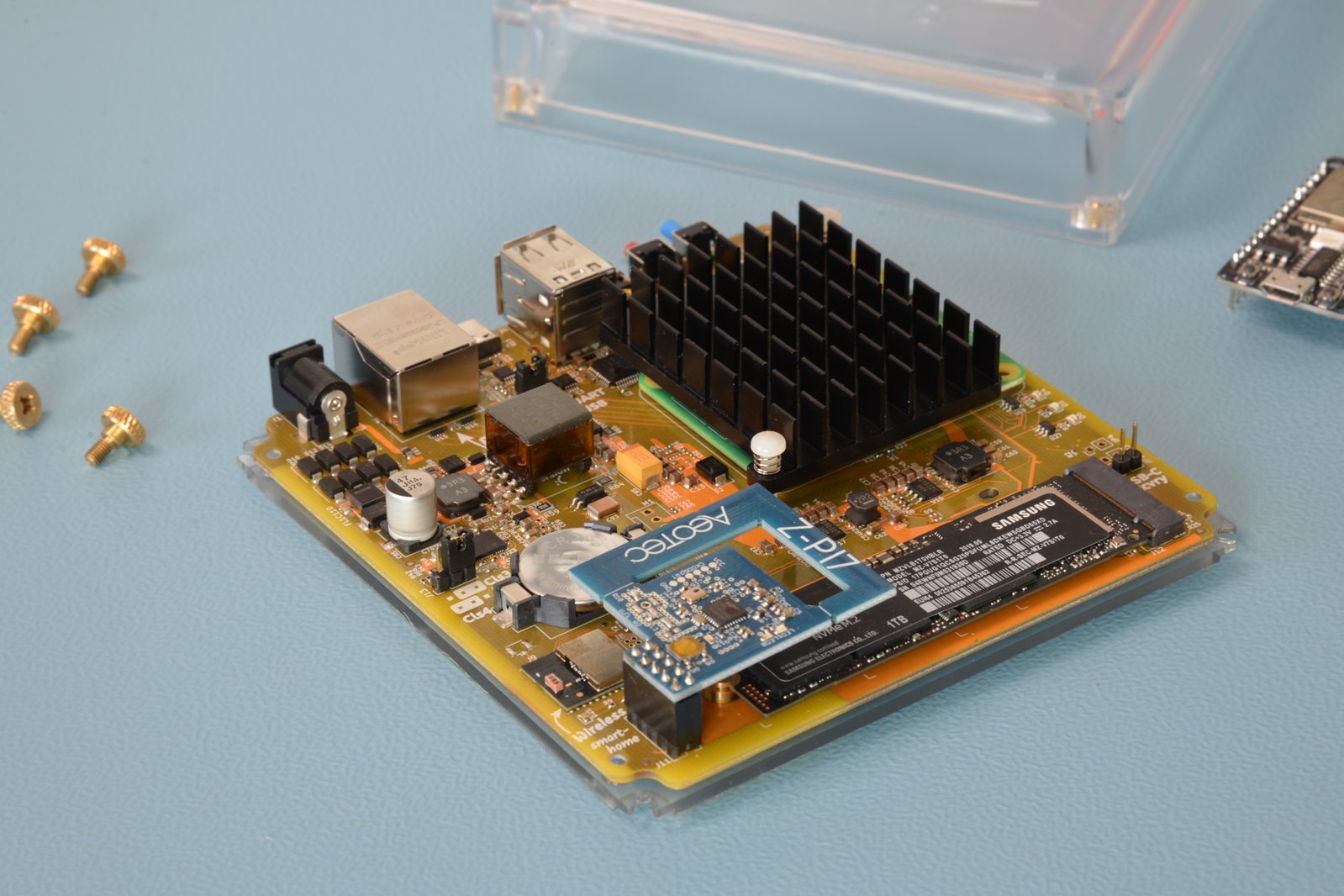
 keen parcel
Ugh
 tender arrow
Not really... AFAIK there are little ASML US employees working on the DUV machines that China gets.
Also, the employees 'indirectly' working is not even that strict. My colleague is from the US and is allowed to just continue testing and calibrating the machines in our Veldhoven Factory.
I don't have any numbers (and if I had I couldn't share them anyway), but it's not like the machines they already have stop working all of a sudden 😂
pearl frigate
dusky hollow
when did you preorder?
I ordered it in April earlier this year
But how about the m.2/nvme ssd boot - is this working for anyone here?
compact quartz
@pearl frigate as with Rpis, the choice of drive appears to come into play. It works on mine
lucid viper
pearl frigate
But how about the m.2/nvme ssd boot - is this working for anyone here?
Yes nvme boot works for me, I flashed the yellow image (not the installer) directly to my nvme
sonic tartan
lucid viper
Yes nvme boot works for me, I flashed the yellow image (not the installer) direc...
Please which image do you flash ? Do you have a CM4 Lite ?
spring tundra
lucid viper
Yes nvme boot works for me, I flashed the yellow image (not the installer) direc...
how did you do that? the only way I found to make that work was for it to install like normal and then go into the settings and select change data drive.
fresh bough
I believe I saw that if you have a cm4 without emmc it will default to the nvme, if you have a cm4 with emmc it will default there and you have to move data drive @spring tundra @shut cedar can probably confirm
shut cedar
That's correct 💯
spring tundra
fresh bough
I believe I saw that if you have a cm4 without emmc it will default to the nvme,...
ah, okay that explains that. Thanks
 sonic hull
any way to get shipping updates? my yellow kit was supposed to ship on the 14th...
blazing aurora
Mine was suppose to ship on Oct. 7th, got word that they could not supply the ssd, nothing since. About ready to cancel and stay with rpi4 and Argon 1 with ssd.
sonic hull
ah i ordered the bare kit
 vapid tulip
sonic hull
any way to get shipping updates? my yellow kit was supposed to ship on the 14th....
vapid tulip
sonic hull
any way to get shipping updates? my yellow kit was supposed to ship on the 14th....
Same here, an update would be great.
My yellow kit has changed from expected to ship October 7th, now to Oct 14th and given its October 17th today, I feel that is not likely to be met.
I don't mind that it can't ship yet but I would like to be updated if shipping is imminent or to be further delayed if at all possible.
 junior gulch
Yeah, you think that they could at least keep the excuses current. So now that some people got one, did a bunch of us get a generic ship date and the amount shipped is much less than the number of people promised the same ship date?
lunar lichen
vapid tulip
Same here, an update would be great.
My yellow kit has changed from expected to ...
Me too. Shipping date moved from Aug 19th to Sep 30th. Then to Oct 4th and now to Oct 14th.
All in all that is an "improvable" story in regards of communications 🤣 .
What "scares" me a little is the plain math behind the numbers.
If the information is right that they have received ~2050 units so far and that we are nearly 7000 backers .... There is a gap which is most likely bigger than the amount of ordered PoE kits (which are delayed until Q1 23).
fresh bough

sonic hull
you would hope that the estimated shipping dates in crowdsupply were based on some sort of reality
but the silent slipping of dates worries me
fleet cloud
lunar lichen
Me too. Shipping date moved from Aug 19th to Sep 30th. Then to Oct 4th and now t...
I’ve given up hoping and set up another instance instead. If it shows up, fine. If not, NC has shown that they should stay with software
The convenient distancing from CS or blame game when deliveries failed/were delayed are disturbing
 regal spindle
I've been trying to setup my Yellow Kit with a CM4Lite and a NVMe drive, but nothing has worked so far, I have ordered a USB enclosure, but are their any other things I could try to get it going?
compact quartz
@regal spindle What NVMe drive are you using?
sonic tartan
regal spindle
I've been trying to setup my Yellow Kit with a CM4Lite and a NVMe drive, but not...
You have the same approach as mine with a few days delay. When I got my USB enclosure, I was able to verify that my NVME card was working. I was able to flash the Yellow Installer on the NVME and curiously it boots. On the other hand, it is still impossible to boot both HAOS installed by the installer and a HAOS image flashed directly.
I suspect more and more a weird incompatibility of some NVMe (it seems that some are booting) . Mine is a Crucial P2 CT250P2SSD8.
lucid viper
spring tundra
how did you do that? the only way I found to make that work was for it to instal...
@sonic tartan @pearl frigate Hi, please excuse the late feedback, i have a cm4 with emmc, but didn't want to use the emmc, i flashed the image from here https://github.com/home-assistant/operating-system/releases (haos_yellow-9.2.img.xz) over the nvme usb adapter with a usb adapter and the pri-imager
sonic tartan
lucid viper
<@743919795925155852> <@513035675327660036> Hi, please excuse the late feedback...
Thanks ! I have already tried to boot this image without success. What SSD are you using?
lucid viper
sonic tartan
Thanks ! I have already tried to boot this image without success. What SSD are y...
WD Black SN750 SE
 calm herald
Hello - I just migrated to a new #yellow-archived and the ZHA devices installed for my Sonof Stick were fine after I plugged that stick into the usb port of my yellow. To run some devices that are not available in ZHA yet I want to use the built in Zigbee interface for ZigBee2MQTT. Can someone help me with the right port adress of that inteface - I am not able to identify it in the Hardware list and searching for ZigBee just shows me the Sonoff Stick.
lucid viper
calm herald
Hello - I just migrated to a new <#887751499785072711> and the ZHA devices insta...
serial:
  port: /dev/ttyAMA1
  baudrate: 115200
  rtscts: false
  adapter: ezsp
 thorn nexus
calm herald
Hello - I just migrated to a new <#887751499785072711> and the ZHA devices insta...
calm herald
thorn nexus
calm herald
Hello - I just migrated to a new <#887751499785072711> and the ZHA devices insta...
calm herald
Thank you - I had not found that
regal spindle
compact quartz
<@412925428005863425> What NVMe drive are you using?
A WD Black SN770
 ornate orbit
Can I install e.g. Ubuntu on my yellow if I flash it directly onto the NVME card? I wanted to try out Container mode, but haven't found much on SSD boot
wary pivot
You could - at least the version for the RPi. But you'd have to figure out which drivers to install and how to interact with the boards components yourself.
ornate orbit
Ah, so Pi OS would work but other distros would need extra drivers, or does Pi OS need those too?
Wait, thought wrong. You are right, Yellow has some custom hardware lol
fresh bough
might work out of the box, depending on how custom it actually is
ornate orbit
If at least Internet works that would be a huge plus. At least I can work with SSH then
shut cedar
At least Raspberry Pi OS does work on the Yellow (it chooses the standard CM4 device tree). I'd assume that Ubuntu behaves similar
A lot of things are pretty standard. USB I think needs an overlay if the regular CM4 device tree is used. Also an overlay to enable extra UARTs.
ornate orbit
Will the NVME just boot like that or do I have to specify the boot order? I only got my hands on a eMMC version. I didn't install anything on eMMC yet
fresh bough
With an interactive installer I guess you can install it to any device you want and it will be handled by the bootloader
Albeit, my experience with pi boot is generally atrocious 😄
shut cedar
Yeah, it does try to boot from eMMC first, but will skip if you install directly onto the NVMe.
ornate orbit
fresh bough
With an interactive installer I guess you can install it to any device you want ...
But then I would need a display right?
shut cedar
If you have an older NVMe, the firmware might not be able to boot from NVMe. In that case you have to update that.
fresh bough
Yes, or a kickstart file to specify it the installer details
shut cedar
The Home Assistant OS Installer for Yellow brings the latest firmware with it.
ornate orbit
fresh bough
Yes, or a kickstart file to specify it the installer details
But how exactly would I connect a Display to it. And does the Yellow support it out of the box? Otherwise I will look into the file version. Have done that with WiFi but not with installers yet
fresh bough
It has a console at least
ornate orbit
shut cedar
The Home Assistant OS Installer for Yellow brings the latest firmware with it.
I have a freshly backed NVME. But I will keep the update option in mind, thx
ornate orbit
fresh bough
It has a console at least
Ah, you are right. I could probably just connect the LAN port and then SSH into the Yellow. That should work with installers right? At least thats my experience with Ubuntu installers, only difference beeing that those were GUI
And Pi OS installer is console I think
fresh bough
It has a serial console over usb afaik
ornate orbit
fresh bough
It has a serial console over usb afaik
Ah, cool. Thanks for the help, I will try that out
ornate orbit
fresh bough
It has a serial console over usb afaik
Yeah, thats what the USB/UART jumper should be for. I don't know how to use it yet, but at least I now know what to research 🙂
spring tundra
lucid viper
<@743919795925155852> <@513035675327660036> Hi, please excuse the late feedback...
hmm, I had not considered doing it that way.
sonic hull
aha, they just slipped my date another week
junior gulch
me too, now october 21, one week exactly, definitely BS, not founded on actual data of any kind.
sonic hull
hmm
according to the "latest" project update: https://www.crowdsupply.com/nabu-casa/home-assistant-yellow/updates/yellow-and-yellow-kit-are-shipping-and-yellow-kit-with-poe-passed-tests
"Today we have good news: The first batch of the Home Assistant Yellow and Yellow Kit variants arrived at the Mouser warehouse! The units have started shipping as of today, and the remaining orders from this batch will ship through the rest of this week!"
that was oct 4
given that there hasn't been a project update since then, makes me think that the first batch has been in and out, and that's that
if you're not part of the first batch, then ?? who knows.
pearl frigate
I got mine on Monday, and can confirm it’s real
sonic hull
pearl frigate
I got mine on Monday, and can confirm it’s real
yeah i know there's a few out there, it's just been dark as far as comms go around crowdsupply/nabu casa/etc. like if they put up a blog post saying "hey folks, first tranche is out the door, second lot is going to hit mouser on <x> date and will go out after that..." then it'd go a long way to reassuring me that it's, you know, happening. silently slipping dates isn't cool.
junior gulch
Agreed, perhaps they could give order number cutoffs for the first batch, and when the second batch will be shipped, delayed, arrive, get stuck in customs, take 2 weeks to ship to the distribution center, etc.
limpid sequoia
If I remember correctly NC said they don't get much information from the CS backend, only a couple numbers like how much of each type ordered, but no details on the orders, so Ordernumber-cutoff would probably difficult
If it helps to orient in the timeline, my Kit Orders from December '21 as well as February and March '22 where shipped and have arrived
Although I have the sneaking suspicion that there is no real order to CS/Mousers shipping
shut cedar
limpid sequoia
Although I have the sneaking suspicion that there is no real order to CS/Mousers...
They definitely follow roughly the order Yellow's got backed. However, it seems all three big carriers are used (FedEx, UPS, DHL), depending on country. It seems things are a bit pooled by country/carrier...
shut cedar
sonic hull
given that there hasn't been a project update since then, makes me think that th...
From what I can see, the shipping progress of the first batch is at:
Kit: 206/1000 (20.6%)
Standard: 646/1046 (61.8%)
I am not 100% sure how accurate/current this information is though (that is from the Crowd Supply dashboard we have access to).
shut cedar
@sonic hull @junior gulch did you order other parts (from the Crowd Supply Basic section) in your order? Maybe this additional items affected the shipping priority.
sonic hull
shut cedar
<@267619613548740608> <@782769966448377856> did you order other parts (from the ...
negative, I ordered the kit with the power supply. Literally my first ever crowdsupply order.
honestly leaving a bad taste in my mouth about HA/nabu casa/crowdsupply.
graceful zealot
sonic hull
honestly leaving a bad taste in my mouth about HA/nabu casa/crowdsupply.
I wouldn't bring HA into this, its got nothing to do with yellow except that yellow is designed for it
Crowdsupply seem to be the ones fucking it up
fresh bough
I'm gonna say it might be you doing it @graceful zealot ! Global conspiracy!
graceful zealot
fresh bough
I'm gonna say it might be you doing it <@137144563109330944> ! Global conspiracy...
Yes all the yellows are coming here to australia. I use them as wallpaper
Which is better than you using Pis as vapes
sonic hull
graceful zealot
I wouldn't bring HA into this, its got nothing to do with yellow except that yel...
Pretty sure it's a nabu casa/ha project...
graceful zealot
sonic hull
Pretty sure it's a nabu casa/ha project...
Nabu Casa yes, not HA. HA is owned by NC, but is otherwise a separate open source software
Given you don't need a yellow to run HA, it shouldn't come into the equation
And if NC aren't getting any reliable or good info from crowd supply then they really can't do much
sonic hull
It's on the HA blog with this wording...."We designed Home Assistant Yellow from scratch for both beginners and home automation enthusiasts to be the easiest way to run Home Assistant."
Like, how else can you interpret that
graceful zealot
Yes. It is the easiest way to run HA. Just like buying a prebuilt PC is also the easiest way to get a PC. You don't have to follow what its given
graceful zealot
sonic hull
Like, how else can you interpret that
You buy it and it can work with HA. Which is exactly what it does
sonic hull
As for running HA, sure. I have it on a pi4 with a USB ZigBee doodle.
sonic hull
graceful zealot
You buy it and it can work with HA. Which is exactly what it does
Look as far as I can see it's a HA project (because, you know, it's on their blog, and says "we designed home assistant yellow") so I feel like it's reasonable to come to the HA discord, in the channel for the hardware in question, to ask for updates...which I now have.
graceful zealot
sonic hull
Look as far as I can see it's a HA project (because, you know, it's on their blo...
Yeah that's fair. But including blaming the software for hardware not being delivered isn't far
sonic hull
Yeah ok.
tender arrow
Estimated 21st of October now...
fresh bough
2022? 😄
pearl frigate
~850 parcels within three weeks, this are about 50 per day or seven per hour. It appears there’s about one fte assigned to the task …
wary pivot
Each one packed with love! 🤣
fresh bough
Handwritten letter? 
regal spindle
finally was able to see what's going on, and it isn't recognizing the drive and since I have a CM4Lite, that means there is no drive to install to, so in the serial log I get the message "No storage media found, exiting." I have a WD Black SN770, anyone else experiencing issues with that drive icm with a Yellow?
shut cedar
regal spindle
finally was able to see what's going on, and it isn't recognizing the drive and ...
Hm, that would mean that detection of the NVMe seemed to have failed. Can you login using root on the Installer shell and then execute dmesg | grep nvme?
compact quartz
@strange sphinx had a WD Black SN850x which wouldn't work, and then a Samsung worked fine
Samsung 980
regal spindle
shut cedar
Hm, that would mean that detection of the NVMe seemed to have failed. Can you lo...
That is empty...
shut cedar
sonic tartan
Sorry for my last message. I have played with the jumper (because of another dis...
Can you try again with the files from that link? Make sure to properly download them (using a Webbrowser and the Download button on GitHub, curl/wget sometimes gets you a html page). Also make sure to download fixup4.dat (not 3). If the Installer boots, replacing the two files on a HAOS installation really should get it to boot as well.
pearl frigate
Do we have any positive lists of working ssd? Sound like WD is 👎and Samsung is 👍 so far
limpid sequoia
My Micron drive worked without problems as well
If WD drives are indeed a problem that would spell trouble for all who have bought a drive from Crowdsupply, as they are selling the Western Digital PC SN530
 signal oasis
I am using Samsung 970 EVO Plus 500GB M.2 SSD, which does work ok.
sonic tartan
shut cedar
Can you try again with the files from that link? Make sure to properly download ...
I downloaded both start4.elf and fixup4.dat files from https://github.com/raspberrypi/firmware/tree/61966732d03de9b71baf561f920e018b54c241ac/boot (fixup3 was a typo in my post...) .
I replaced the two existing files of the same name in the hassos-boot partition with these new files.
The result was no boot without any message on the console.
However I guarantee that the yellow installer on the SSD boots well.
I will soon have another SSD (Samsung 980). I'll let you know about the behavior.
vapid tulip
I see my yellow kit order has silently updated (again) with an expected shipping date of Oct 21, 2022
 drifting kestrel
Estimated to ship: Jan 27, 2023 …
After long long time off waiting, I have used Sonoff dongle + waveshare cm4 with SSD and it feels… that the yellow is not needed anymore 😂 but I still hope that the yellow give me the advantage to use zigbee and matter at the same time 😉
shut cedar
sonic tartan
I downloaded both start4.elf and fixup4.dat files from https://github.com/raspbe...
I expect the Samsung will work. But I wonder what is going on exactly. Since the firmware seems not to be the culprit, it might be that U-Boot crashes very early (before UART is initialized) and hence doesn't show anything on serial port. I'll try to reproduce this on my end, I'll get one of this Crucial P2 CT250P2SSD8.
shut cedar
vapid tulip
I see my yellow kit order has silently updated (again) with an expected shipping...
We work with Crowd Supply to get the dates more accurate. If you share your order number/date and SKU via DM I should be able to estimate what delivery date I'd expect from our end.
 sage walrus
I'm having a hell of a time migrating from my Synology dockerized HA over to my new Yellow. This is my first experience with HA OS and I kinda miss my old manual Docker management. What I'm stuck on now is the ability to mount my Synology media drive as an HA media folder over SMB.
mkdir -p /media/foo && mount -t cifs -o sec=ntlm,user=_,password=_ //192.168.0.100/Music /media/foogives me a reliablemount: mounting //192.168.0.100/Music on /media/foo failed: Permission deniederror every time, even though that command works from my laptop- my hunch is that because I'm SSHed into the OS (and not the supervisor) these permission errors aren't due to SMB, they're because you're not allowed to
mountinside a docker container - can anyone confirm? - then I tried to gain root access to the supervisor and I'm stuck here too. I plugged my FAT-formatted USB stick named
CONFIGcontainingcp ~/.ssh/id_rsa.pub /Volumes/CONFIG/authorized_keys, ranha os import(but that command succeeds whether the USB stick is plugged in or not), andssh root@homeassistant.local -p 22222 -i ~/.ssh/id_rsa.pubrefuses my connection. I don't know how to debug this. - The Hardware tab shows nothing but the Yellow device, neither this USB stick nor my old Conbee II while trying to migrate radios. Should it? I'd hate to suspect I got a box with bad USB ports, but...
Halp?
vapid tulip
shut cedar
We work with Crowd Supply to get the dates more accurate. If you share your orde...
Thanks, have done. TBH my order was only in June, I didn't really expect to be in the first batch... Just the estimated dates keep filling me with hope, then letting me down!
shut cedar
Yeah that sucks, I think the amount/cutoff is currently at the wrong number of Yellows. I assume you ordered a Kit? If so, you can expect your order most likely in January.
shut cedar
sage walrus
I'm having a hell of a time migrating from my Synology dockerized HA over to my ...
As for enabling SSH: Your steps look correct, the ha os import command should successfully import the authorized key file.
What you can do is using the serial console via USB-C cable (see https://yellow.home-assistant.io/guides/use-serial-console-linux/, this should largely apply for MacOS, you have to install screen from brew).
sage walrus
shut cedar
What you can do is using the serial console via USB-C cable (see https://yellow....
I have no idea what Make sure JP1 is set to UART. means, but I'm willing to try!
shut cedar
It should be by default, just assume it is 😅
ha os import essentially triggers hassos-config.service, you can check what it reported by calling journalctl -u hassos-config.service.
That said, we don't have a good way to do mounts on HAOS yet. We intend to add a mount manager at one point (see https://github.com/home-assistant/supervisor/issues/2564).
There are work arounds out there (via udev rules, but I don't think that works for smbfs, or addons, see e.g. https://community.home-assistant.io/t/solved-mount-usb-drive-in-hassio-to-be-used-on-the-media-folder-with-udev-customization/258406), YMMV...
wary pivot
I'm mounting a SMB-share to the media directory by a shell_command and calling that service by an automation on HA start. Works fine for me.
shell_command:
  mount_smb: mkdir -p /media/smb-share;mount -t cifs -o vers=3.0,noserverino,user=USERNAME,password="PASSWORD",domain=WORKGROUP //IP-ADDRESS/SHARE-PATH /media/smb-share
Yes, in my setup the credentials are in the secrets file.
sonic tartan
shut cedar
I expect the Samsung will work. But I wonder what is going on exactly. Since the...
I now have the SAMSUNG 980 SSD. It boots and I installed HAOS without any problems on my CM4 lite. I am very happy.
I spent a lot of time with the Crucial P2 and made you waste time too. However, this lost time is not lost for future users who now know that there is currently a risk of incompatibility to use Crucial P2 as boot disk. Maybe if you try on your side with this SSD you will find a solution (if this is the case even if I gave up using the crucial for HAOS I am still interested to know). Thank you for your availability and your advices.
sage walrus
wary pivot
I'm mounting a SMB-share to the media directory by a shell_command and calling t...
Yeah, this was the first thing I tried but the error output wasn't useful. I've been trying to tune the command until it succeeds on the SSH terminal before putting it in a shell_command. Do you/anyone know if shell_command is a privileged execution context over what I get in SSH?
wary pivot
I can run these commands in the Terminal and via SSH directly.
sage walrus
wary pivot
I can run these commands in the Terminal and via SSH directly.
And you're on Home Assistant OS / Yellow? If so, then dang I probably don't need root access and I don't know ytf I'm getting a permission denied error
wary pivot
I am on HA OS using a HA Blue. It also worked on a Hyper-V VM.
wary pivot
I would suggest to try two things:
- remove the option "sec=ntlm" (that can cause the error "permission denied")
- if you try to mount a FritzBox media share, add the options "vers=3.0" and "noserverino" (if the FritzOS version is 7.0 or higher - if it is 6.x or lower use "vers=1.0")
tender arrow
Any idea how the Yellow gets delivered in Europe? Got a mystery package tracking from bpost (Belgium) with not a lot of information.
Looking in PostNL tracking I can see the following.
EDIT: it was not the Yellow, just another Kickstarter 😮💨

Should the Crowd Supply order page update with a new status or tracking code?
limpid sequoia
I'm in Germany and mine came with Fedex
 storm prawn
My Yellow order has updated. New ETA for shipping of POE model is Jan 27 2023, was July 31 2022. Hopefully there are no more delays. Starting to get a little annoyed and frustrated with the delay in ETA updates from Nabu Casa and Crowdsupply. What is the latest update on the redesign of the POE version due to the EMI emissions? Has the full approval gone passed?
graceful zealot
storm prawn
My Yellow order has updated. New ETA for shipping of POE model is Jan 27 2023, w...
They did post an update though https://www.crowdsupply.com/nabu-casa/home-assistant-yellow/updates/yellow-and-yellow-kit-are-shipping-and-yellow-kit-with-poe-passed-tests
It passed
storm prawn
graceful zealot
They did post an update though https://www.crowdsupply.com/nabu-casa/home-assist...
The update specifically says "We already got a confirmation that the radiated emissions are indeed within limits with this new version! The full approval will still take a few days, but the new Yellow PCBs have already been ordered, so we can start the production run soon."
compact quartz
@storm prawn there aren't really any ETA updates from Nabu Casa at this point. All of that comes from crowd supply/mouser
storm prawn
Note the line that says "the full approval will still take a few days". So has the full approval gone through?
compact quartz
That will be posted when so
fleet cloud
Understabably we’re somewhat sceptical about the posting of news on the topic of the yellow
shut cedar
Unfortunately, approvals are really annoyingly lengthy process. But this week we did get draft reports of all tests, and everything passed 🎉 . These draft reports need to get internally approved by the testing house. This is mostly formality from what I understand. Last time this took another couple of days.
sage walrus
wary pivot
I would suggest to try two things:
- remove the option "sec=ntlm" (that can caus...
Yeah I've tried every variation of sec= and vers= until my eyes crossed 😭
sage walrus
wary pivot
I'm mounting a SMB-share to the media directory by a shell_command and calling t...
For my sanity can you give your mount version (mount -V at the top) and your HAOS version? Just installed File Browser addon and confirmed that a different docker container can mount this share with the same creds and info - I'm to the point of writing a script to try every permutation of -o for lack of a better option 😛
wary pivot
sage walrus
For my sanity can you give your mount version (`mount -V` at the top) and your H...
HAOS 9.2 using the SSH & Web Terminal add-on 12.0.2 in protected mode
sharp coral
 lyric drum
Does anyone know how to get Zigbee to work with Pi OS? Everything else seems to work fine for me with HA in a docker install. I've changed the device tree to that of the yellow, not sure which overlays i need.
 wintry stream
shut cedar
We work with Crowd Supply to get the dates more accurate. If you share your orde...
wintry stream
shut cedar
We work with Crowd Supply to get the dates more accurate. If you share your orde...
DM’ed you regarding this.
 thorn yacht
My yellow is close. Sadly it was fedexed. We don't have a good covering for FedEx. They only work on weekdays.
And the options to have it delivered to a pickup point are limited in the Netherlands.
So I rerouted the package to work.
DHL would have been a better option for the Netherlands
But it is close, so this is not a complaint, but just a heads up, if somebody cares lol 😋
pearl frigate
would something like this here work on the yellow? (https://www.amazon.com/ORICO-Adapter-Desktop-Support-RAID-PM2TS6/dp/B09N34NKT1)
shut cedar
In theory, I think yes. But I don't know if we have the drivers enabled in the OS for that particular chip. Also, the BCM2711 chip's PCIe part (on the Compute Module 4) has problems talking to some PCIe devices it seems. So... Maybe 😅
This indicates someone tested with a RPi device...
 fleet cloud
I run HAOS a compute module 4, currently on an IO board. When/If the yellow arrives, is it just to move the compute module to the yellow and reconfigure the zigbee stick?
 cinder sleet
Hey all, so I'm using a spare CM4 for my Yellow, which came today. I went the rpiboot method [was already being used for something else], set up the jumpers, flashed the 'Yellow OS Installer' to the mounted drive, un mounted, reversed everything. On boot, I get static red [D4] and green [D5] LEDs, but yellow [D6], never lights up. I can see the network LEDs look like they're up to something, but I can't tell what. Is USB-C only debug? Can I use it to do video out to watch boot? [thanks ahead of time for any input!]
wary pivot
The Yellow hat no video output soldered on. You can connect to the serial console via the USB-C port.
cinder sleet
found out that if I replace the boot4.dat and the fixup4.dat using the files from #yellow-archived message, the Yellow does start to show the initial heartbeat yellow led at boot using rpiboot method. Unfortunately after 3x rounds all LEDs power off [system off, assumption].
Raspberry Pi Imager flash of current HA Installer for yellow still just gives static christmas LEDs after green blinks once
 errant cloak
Hey all. I have ordered my Yellow in early August and my shipping dates keep getting pushed back. I assume many of you have a similar experience. Do you know if I can expect to be in that batch of initial shippings for HA Yellow? Or will I need to wait again? (I ordered the Yellow with PSU and without a CM4
wary pivot
If you have ordered August of this year, I would expect you to be in a later batch. The crowdfunders and early pre-orderers should be served first (if CrowdSupply gets it right).
errant cloak
I kind of expected that at this point. Do you know what is the best way to get in touch with the team for a refund?
wary pivot
But keep in mind that my assumption was exactly that - an assumption. If you want to know it for sure, you should contact Nabu Casa.
errant cloak
wary pivot
But keep in mind that my assumption was exactly that - an assumption. If you wan...
Thank you, I will keep that in mind. Judging by what I've read in multiple threads that assumption seems to be plausible. I will still try and reach out to Nabu Casa 🙂
wary pivot
Choose wisely 😎
errant cloak
I definitely will 😁 I wouldn't even be that pissed if the delivery date would have been more realistic to begin with. My initial est. date was like Aug 12th with the last update being shared in late July, so it seemed realistic. But right now I don't even have a hub for all my gear, so that is an annoying situation to be in 😅
wary pivot
Well... mine is estimated to ship Jan 27th 2023. 😆
errant cloak
At least that sounds somewhat realistic 😁 👍
blazing aurora
I ordered my Yellow w/ power supply and cm4 on Sept. 16, 2021. I have gone passed many ship dates. I had originally ordered it with a ssd, but Crowd Supply cancelled the ssd. The last ship date was for today, but it is almost 2100 now and no shipping info. I guess I will wait until next week and cancel the order. I am trying to file a complaint on CS with the better business bureau, but luck so far. I won't use CS again.
errant cloak
blazing aurora
I ordered my Yellow w/ power supply and cm4 on Sept. 16, 2021. I have gone passe...
Daaamn waiting that long is rough... Hope you'll easily get your shipping info soon or at least your money back!
blazing aurora
Shipping dates don't mean much. I contacted master card, they said to let them know when cancelled and they will refund the money.
compact quartz
@errant cloak there's no reason to reach out to Nabu Casa for shipping details. There aren't any details about batches or specific order IDs
keen parcel
Are there actually any documented cases of Crowd Supply not sending out units to backers?
There have been delays, sure. And their communication seems to suck.
It would be pretty unfortunate to have waited this long and then cancel your order at the 11th hour when your unit is about to ship
tender arrow
compact quartz
<@317995264751304706> there's no reason to reach out to Nabu Casa for shipping d...
Then why did @shut cedar say: "We work with Crowd Supply to get the dates more accurate. If you share your order number/date and SKU via DM I should be able to estimate what delivery date I'd expect from our end."
compact quartz
Right, but at this point keeping up with the shifting ship dates would be an obstacle I'd expect.
compact quartz
keen parcel
Are there actually any documented cases of Crowd Supply not sending out units to...
Not that I know of. Only later than expected.
keen parcel
Peeps need to stop complaining and be patient.
full crest
I got my yellow working, had to put in bigger storage to migrate off of my container install. I'm having an issue where occasionally automations lag several seconds. It's particularly noticeable with motion automations. I don't see cpu or ram spikes during this time. Any thoughts of what to look at or try?
graceful zealot
What are your automations doing
full crest
graceful zealot
What are your automations doing
Most just turn on lights when motion is detected, I'm running ZigBee based lights and sensors. Using the onboard ZigBee concentrator and zigbee2mqtt. I also see lag in the UI sometimes that mirror the kind of time lag I see with the automations. When I ran a container everything was instant.
slim wren
https://i.imgur.com/zlL2Ktu.png Hmm weird, I can have two ZHA setup when I setup using autodiscovery, but only one when I try to do manual setup
 errant cloak
keen parcel
Peeps need to stop complaining and be patient.
errant cloak
keen parcel
Peeps need to stop complaining and be patient.
Its not so much about the being impatient. It's just incredibly annoying when you order a product based on a date the company must have known is impossible to meet. I wouldn't have as much of an issue with that if the date was more realistic to begin with, now I have planned my whole setup around it and am still waiting for the most important component
slim wren
I do understand, i created oci free machine and bought zigstar zigbee gw while waiting, now i found out that setup in oci is actually better (for mne) and trying to figure out a way to use both in kinda cluster and have yellow as an backup. Thought honestly I'm pleasantly surprise that the device arrived and is working, i did not expected that crowdfunding anything to actually arrive and work.
https://i.imgur.com/zC3kmpn.png still the zigbee thing is so weird, but i found out that if I add both coordinators only the one I added first is actually working in ZHA
 limpid sequoia
I'm currently trying to install another Yellow, and I'm getting two error codes, at the start 3-1 for SPI EEPROM error - Pi 4 and then 4-5 for Fatal firmware error
limpid sequoia
This one didn't help either, could it be that the CM4 is simply defective?
vivid grove
I had the fatal firmware issue and it was fixed with rpiboot recovery but I was guided through the process once it was ascertained what the exact error was
im not suggesting you do a recovery Im just saying all may not be lost
 abstract wharf
wary pivot
If you have ordered August of this year, I would expect you to be in a later bat...
abstract wharf
wary pivot
If you have ordered August of this year, I would expect you to be in a later bat...
Well. That's the thing. I cancelled my PoE version because of all the issues and the regular one had a shipping date in August. If the story is now that that was wrong and that I'm at the end of the queue, that would really annoy the crap out of me.
junior gulch
Well, my ship date was yesterday and no update and no shipping and nothing.... as usual, what a bunch of baloney. If they were in the warehouse, they would all have been shipped already, it does not take weeks to ship from the warehouse, it takes a couple of hours. they keep slipping my ship date, but that would mean there would have to be shipments on the water. It would be nice to have a little truth for once.
limpid sequoia
vivid grove
im not suggesting you do a recovery Im just saying all may not be lost
Unfortunately I don't have an IO Board or anything, just the yellow
vivid grove
dont need an io board
just a pc and a usb c cable
you can download rpiboot to pc but as I say I was walked through it as I didnt have a clue but now all is working as it should
limpid sequoia
Thanks for the info. I'll try to read up on it, maybe I can get it to work. I assume I'll have to set the USB C recovery jumper on the board and then connect through USB C?
full crest
Here's the hw usage I'm seeing. Those spikes are interesting but don't seem to correspond to slowness
Guess I can't put screen shots here
Cpu spikes up to 20 percent every 30 seconds or so 5 percent valley
compact quartz
Hey @limpid sequoia the 4-5 steps are here https://yellow.home-assistant.io/guides/flash-cm4-firmware/
limpid sequoia
Thank you so much, worked perfectly, is currently installing
limpid sequoia
And all fine and working, thanks again. I doubt the dealer would have had stock to replace if I had gone for a no boot replacement request.
errant cloak
modern cipher
What's tying you to this device?
I don’t have a ZigBee hub right now because I just moved and started out fresh. I intended to use HA as a hub for all my devices (mostly Tradfri and Hue) without having to buy the manufacturer bridges and tie them together using HomeKit. I‘m not really keen on buying one or two hubs just to bridge the gap for a product that has its shipping date pushed back four times so far
modern cipher
@errant cloak I feel your frustration but that doesn't explain why you are tied to this particular device. Just get something comparable
errant cloak
modern cipher
<@317995264751304706> I feel your frustration but that doesn't explain why you a...
I'll likely get something comparable now that I know fairly certain that my device is not going to ship anytime soon. I primarily ordered the Yellow because it seemed like a nice package, I wanted to support the company backing a software I perceived as very helpful and because the market for RPis is really shit right now. But now I will have to look for something comparable
limpid sequoia
compact quartz
Hey <@267013111364452355> the 4-5 steps are here <https://yellow.home-assistant....
How would you get to this section anyway?
When I had problems with the bootloader and had the blink code I checked "Support -> My Yellow appears to be broken", and "Documentation -> Home Assistant LEDs" and none of those two (which I hoped could lead to a solution) linked to this side
 rugged lodge
I am currently reading the order cancellation email. I have to say, it's a blow to me. I have also already bought an SSD which is currently useless to me, but more importantly I need to acutely replace my current rpi4 which I have to delete the db file regularly so it doesn't crash and really needs replacing. Do you have any other suggestions for a similar solution?
fleet cloud
What order cancellation e-mail?
 vale ember
fleet cloud
What order cancellation e-mail?
vale ember
fleet cloud
What order cancellation e-mail?
 fleet cloud
Oh, okay. Shame but have a look at berrybase.de. They’ve had a few in stock for a while. I’ve bought a few for other projects. Maybe they’ll still ship the board, just not the cm4
 wispy galleon
waiting over a year and then get a cancellation
graceful zealot
wispy galleon
waiting over a year and then get a cancellation
You can't fault CS for that, the pi market is impossible right now, and something 12 months ago people thought would've been resolved by now
wispy galleon
And I still can order a Home Assistant Yellow without POE which includes a CM4. This is just a joke for me
rugged lodge
However, according to the email it looks like they are sending the board with the box (I still sent an inquiry just to be sure, I have to deal with changing the card anyway). Yes I'm still annoyed because I was able to get cm4 myself in the spring/summer period. Now it's disassembled (at least as far as the top model with emc). Although I'm thinking I was going to run it on SSD anyway, so I might as well get some lite version on Amazon.
 bronze compass
On the up side, at least the cancellation gives the option to cancel the yellow as well.
fresh bough
My internal predictions is chip market as a whole will be back to normal at earliest summer 2023
@graceful zealot
So probably realistic winter 2023
vale ember
fresh bough
My internal predictions is chip market as a whole will be back to normal at earl...
internal prediction huh? sounds kinky
fresh bough
Let's say, I know stuff from people who know stuff from markets that know stuff and make extrapolations based on said data for my own predictions D:
latent fern
stop pretending that you're not a time traveler
wary pivot
Well, he still hasn't got the Discord role "Time Lord".
fresh bough

 rugged creek
Hi all - I tried doing a bit of googling before posting this but I just got the Yellow device, which will be (is?) my first HA installation. I installed all the hardware including an SSD, made the boot drive, powered on while connected to ethernet, even got to the "HA is setting up" screen, but when I returned to it all I see is a loading icon on the :8123/onboarding site and it says "Something went wrong loading onboarding, try refreshing". I've tried unplugging it and then removed the USB stick, then plugged power back in but it keeps coming back to this screen. Everything on google that I've found so far seems to be about custom installs, but this is just the base HA.
supple robin
Have you clicked the blue dot?
Why is there no hint to click the blue dot on trouble? Thats a classicj wth
rugged creek
It's actually stuck on the spinning loading screen. I'll just try factory resetting again and doing it one more time.
 dawn girder
fleet cloud
Oh, okay. Shame but have a look at berrybase.de. They’ve had a few in stock for ...
dawn girder
fleet cloud
Oh, okay. Shame but have a look at berrybase.de. They’ve had a few in stock for ...
Another option is to keep an eye on https://rpilocator.com/?cat=CM4 I'm not surprised these orders had to be canceled. No one seems to be able to stock any reasonable amount of CM4's.
fresh bough
At this point I'm just guessing they'll stop producing them and make the cm5 with different hardware as a design way around the chip shortage
regal spindle
Got a Samsung 980 and now it just works, pff annoying that not all NVMe's are compatible
 red lagoon
Have the RPi foundation said what components they’re having trouble sourcing? It must be something critical like the bcm2711 or something
fresh bough
SoC itself would be my best guess yes
shut cedar
regal spindle
Got a Samsung 980 and now it just works, pff annoying that not all NVMe's are co...
Which one did you try before?
FWIW, I reported the WD_BLACK issue with the Raspberry Pi folks, and they checked with a PCIe analyzer. It seems some low level incompatibility:
https://github.com/raspberrypi/linux/issues/5217
regal spindle
shut cedar
Which one did you try before?
WD Black 770
rugged creek
Ugh.. I literally just installed the WD Black SN750
 dusk orchid
hi ! i just installed my yellow.
during assembly my clumsy fingers dropped the usbc boot jumper.
so i never knew if it was just hanging on one pin our actually shorting them
when i attached the jumper. the yellow refused to install the os (which might be duh)
does it have to be always disconnected?
for now I have it on top the yellow i might attach it to one pin just for safe keeping.
is that what we're supposed to do?
dusk orchid
fresh bough
Let's say, I know stuff from people who know stuff from markets that know stuff ...
lol, story of my life
shut cedar
@dusk orchid yes, it has to be disconnected in regular operation. We put it on one pin only just for safe keeping.
shut cedar
rugged creek
Ugh.. I literally just installed the WD Black SN750
The non-SE version? I assume it didn't work?
fresh bough

shut cedar
Generally, all M.2 NVMe should be working as per PCIe specification devices are required to be backwards compatible. But it seems that some models are still incompatible. We keep a list at https://yellow.home-assistant.io/support/#which-ssds-are-supported. Please speak up if yours is not on the list and also not working.
 dusk sigil
shut cedar
Generally, all M.2 NVMe should be working as per PCIe specification devices are ...
rugged creek
dusk sigil
shut cedar
Generally, all M.2 NVMe should be working as per PCIe specification devices are ...
rugged creek
@shut cedar I'm not sure yet, I can't tell if the problem is the SSD or something else I'm doing. I can reach out to let you know after I get it to boot correctly for the first time (I'm currently stuck on the "something went wrong loading onboarding, try refreshing").
sharp coral
@shut cedar any updates on the yellow poe?
shut cedar
@sharp coral all tests passed, and the test reports are in the internal review at the testing house. We should be fine on that front 🎉
PCB assembly started today.
keen parcel
shut cedar
PCB assembly started today.
🥳
 quartz quest
shut cedar
Generally, all M.2 NVMe should be working as per PCIe specification devices are ...
quartz quest
shut cedar
Generally, all M.2 NVMe should be working as per PCIe specification devices are ...
Well damn… I just received mine today and I bought a Crucial P2 CT500P2SSD8 specifically for it as the Samsung 970 EVO Plus is like way overkill and now I see the 250GB version doesn’t work
quartz quest
ok well... Crucial P2 CT500P2SSD8 appears to work just fine
quartz quest
installed on a CM4 Lite w/Wi-Fi 4GB... survived multiple reboots now... so I guess confirmed that it works on the 500GB model somehow
quartz quest
Yes
I got a bit worried after reading that the 250GB model doesn't work... but it seems the 500GB model is fine
I was almost about to wipe my spare Samsung 970EVO Plus... but I decided to try it anyway... I'm glad I did... cos it seems like a massive waste
keen parcel
👍
I haven’t bought an SSD for mine yet, but that 500gb crucial seems like a pretty good deal if it works. It’s only $65aud
keen parcel
I’m in no rush. My yellow is the POE version 🫠
fresh bough
See you in 2025 @keen parcel 
keen parcel
I’m just migrating back to a regular Pi 4 in the meantime. It’s costing me too much to run my servers.
Pi 4 in an Argon One M.2 case with SSD boot
keen parcel
We’ve seen a 20% increase in Aus this year already, and expecting another 50% increase in the next year
Our country is a mess
Currently 26c per kWh with a $1.20 daily connection charge
quartz quest
keen parcel
I haven’t bought an SSD for mine yet, but that 500gb crucial seems like a pretty...
 graceful zealot
keen parcel
We’ve seen a 20% increase in Aus this year already, and expecting another 50% in...
graceful zealot
keen parcel
We’ve seen a 20% increase in Aus this year already, and expecting another 50% in...
Last 12 months I've seen a 6% drop in cost :P, not all AUS is bad
 robust turtle
keen parcel
Currently 26c per kWh with a $1.20 daily connection charge
robust turtle
keen parcel
Currently 26c per kWh with a $1.20 daily connection charge
I would 🙏 and immediately 🖊️ sign on those prices 😢
I'm now at 95 eurocents per kWh (and that is not even expensive at this point)
quartz quest
Crucial P2 500GB works
graceful zealot
robust turtle
I would 🙏 and immediately 🖊️ sign on those prices 😢
I'm now at 95 eurocents p...
Ow that sucks
keen parcel
graceful zealot
Last 12 months I've seen a 6% drop in cost :P, not all AUS is bad
What state?
graceful zealot
keen parcel
What state?
ACT
keen parcel
You’d have a healthy amount of wind nearby
graceful zealot
Yeah it helps 😛
fresh bough
I've paid aud8000 so far this year in power if that makes you feel better @keen parcel
I've gotten a little over half of it back from state though
Compared to aud550 for all of 2019 we can say prices have increased quite a bit
Same power usage
keen parcel
Wow if I was paying that much I’d splash out for a battery
fresh bough
And I'm below average power consumption according to my power Company
Even with my server rack
graceful zealot
keen parcel
Wow if I was paying that much I’d splash out for a battery
He's also running a data centre though
fresh bough
Hey, I'm 5% below average power consumption for a house my size
and we are four people in it
 dreamy spruceBOT
@pliant whale I converted your message into a file since it's above 15 lines :+1:
 pliant whale
And here is the config:
dreamy spruceBOT
@pliant whale I converted your message into a file since it's above 15 lines :+1:
compact quartz
@pliant whale tried one input/stream ?
pliant whale
I will
pliant whale
@compact quartz seems to work for now.
The edge tpu shouldn't be solicitated for more than detection it's weird