#hardware-archived
1 messages · Page 66 of 1
 plain sparrow
 lapis perch
That is correct.
 iron hare
What about a usb dongle for HA?
lapis perch
@plain sparrow I'm not sure about that specific model, but I had to manually enable the switch input sensor in Home Assistant for my Shelly mini gen3. Once you have it wired up and added to HA, look at the device page for the Shelly and manually enable the switch input under Sensors.
 slim lagoon
iron hare
What about a usb dongle for HA?
slim lagoon
iron hare
What about a usb dongle for HA?
Check the pins in #zigbee-archived, but my choice is almost always going to be a lan coordinator over a USB dongle.
iron hare
slim lagoon
Check the pins in <#551843655682490399>, but my choice is almost always going to...
Gotcha! Ill check that section out! I want to get away from smartthings
slim lagoon
iron hare
Gotcha! Ill check that section out! I want to get away from smartthings
As you should 🙂
 opaque patio
anyone have recommendations for recessed led pot lights that are RGB and work with HA?
@slim lagoon do you need a different hub for the Wiz line?
slim lagoon
opaque patio
<@534201530895564800> do you need a different hub for the Wiz line?
Nope. They're WiFi, use very little traffic and are pretty cheap.
Where are you in the world?
opaque patio
Canada.. but mine are 4" currently. These will not fit 😢
slim lagoon
Aw man... yeah, they only do 5"/6". Hmmmm... IIRC, Zemismart makes some 4" can lights as well in both Zigbee and Wifi models.
But the majority you're going to find at usually 5"/6".
opaque patio
yeah.. lots on alibaba that are 4" but also... questionable. We didn't get a choice in the lights when they built it. not sure why they went 4"
slim lagoon
If you can find some on Ali and they are WiFi, you might be able to flash them to either ESPHome or Tasmota.
@nova pawn ^^^ You did something like that with yours, right?
 nova pawn
oh
slim lagoon
🤣
opaque patio
I have all mine on dimmable smart switches right now, so if i do this... it has to be RGB lol. but also not necessary by any means.
nova pawn
Amico
slim lagoon
Meh... screw working... sheesh! lol
nova pawn
i know right
nova pawn
opaque patio
I have all mine on dimmable smart switches right now, so if i do this... it has ...

smart recessed lighting 6 inch
plain sparrow
lapis perch
<@681820334152089626> I'm not sure about that specific model, but I had to manua...
I am new to HA and still have very little idea. I will definitely ask again. But thanks for the tip. I'll keep that in mind
opaque patio
nova pawn
https://www.amazon.com/dp/B0C658GXRY?psc=1&ref=ppx_yo2ov_dt_b_product_details
just searched those... i also have 14 lights.
cuz... fuck me
opaque patio
@nova pawn did you already have recessed lights? did you keep your old junction box?
nova pawn
I wouldnt expect it to be much different
opaque patio
you don't know our troubles
doesn't even exist

not bad
anyways @nova pawn thanks for the info. its saved for my next mid life crisis
nova pawn
no problem
 keen flame
Is there any way to predict whether some random zigbee tuya bulb (eg: https://www.aliexpress.com/item/1005006262022932.html) will integrate with HomeAssistant? I have some tuya wifi smart sockets that integrated via LocalTuya but they keep getting disconnected. I thought Zigbee might be better, but maybe it won't integrate at all? I dunno.
slim lagoon
keen flame
Is there any way to predict whether some random zigbee tuya bulb (eg: https://ww...
Anything Tuya is bound to be hit or miss. Might work, might not.
 cold moon
shitty shit shits shittily
keen flame
😕 I gotcha. I kinda figured that was the case.
I was gonna get some Athom bulbs since they're ESPHome ready and seem to have a good rep. Those bulbs I linked are three for $1 so I'll probably toss those in the cart just to see.
slim lagoon
Athom 👍 Tuya... no. Don't bother.
keen flame
Yeah? I'll get some Athom plugs then, too, to replace my tuya ones. Even with LocalTuya, they keep getting disconnected.
 lyric mortar
No ones bought one of these and can share their experience, have they? I know I shouldn’t even think about it (my experience with Tuya quality being what it is), and yet … if it did somehow work well, it would be quite cool! (On AliExpress, it’s called “Jianshu Tuya Panel Control Wifi Zigbee Devices Tuya Zigbee Gateway Build In 6" Nspanel Tuya Smart Home Control Panel”)

 glacial oracle
Realistically this would only work with tuya devices, which would make it somewhat useless for the usage with homeassistant
These tend to rarely ship with modifiable or at least non pruned systems
 limber elm
lyric mortar
No ones bought one of these and can share their experience, have they? I know I ...
limber elm
lyric mortar
No ones bought one of these and can share their experience, have they? I know I ...
Do you happen to have the AliExpress link for that? I have honestly not had the massive issues with tuya that everyone else does at least with the basic hardware.
Another news, I am looking to upgrade some of my temperature humidity sensors and I'm considering this model, but I'm wondering if anyone has any insight about how well it works with ZHA
Aqara WSDCGQ11LM
lyric mortar
glacial oracle
Realistically this would only work with tuya devices, which would make it somewh...
You think? Lots of other 'Tuya-branded' Zigbee devices that I've bought have worked with HA without a Tuya hub. What makes you think this would be different? (Seriously curious - I don't doubt that you're right, but I'm new to this and just don't know.)
limber elm
Okay, I wasn't sure if I should focus on it being zigbee hardware or just hardware in general thanks
lyric mortar
limber elm
Do you happen to have the AliExpress link for that? I have honestly not had the ...
I believe that AliExpress links get filtered out here (or at least that's what I thought), but searching for that title should get you to it (hopefully - AliExpress can be complicated).
glacial oracle
lyric mortar
You think? Lots of other 'Tuya-branded' Zigbee devices that I've bought have wor...
Because integrating a device into homeassistant will not create an inverse relationship
lyric mortar
limber elm
Another news, I am looking to upgrade some of my temperature humidity sensors an...
I use a lot of these (or at least ones extremely similar), and I can report good experience with them with ZHA, yes.
lyric mortar
glacial oracle
Because integrating a device into homeassistant will not create an inverse relat...
Meaning that one could perhaps get information from it (if it has sensors or whatnot), but the display and controls might not work with HA? Sorry for being slow.
glacial oracle
That's pretty much what I would guess
Some of those panels are effectively just running android, but mostly those are closed off enough that you cant simply install the ha app or even a web browser
limber elm
lyric mortar
I use a lot of these (or at least ones extremely similar), and I can report good...
Thanks for the input, I started with tuya ones, but they're coded to do infrequent updates and it's causing some complications that I was planning on doing an upgrade later once the system is established
lyric mortar
limber elm
Thanks for the input, I started with tuya ones, but they're coded to do infreque...
I am no great expert, but I am less than a year ahead of you in the same cycle; started with all super-cheap Tuya ones, then those started failing, and started to replace them with Aqara ones. Good luck! And don't pay Amazon prices if you don't need them immediately; AliExpress are (in my experience) just as good and much cheaper.
limber elm
Oh no, AliExpress is how I've been doing everything. My intent was to start with inexpensive parts and then as I go upgrade to better stuff, it's been mostly Smart switches and temperature sensors because we've got a lot of tropical plant grow tents, and aside from what is starting to appear to be user error, the only real problem I've had with the tuya temp sensors is just their slow refresh rate which is a known issue
 gloomy elbow
Just be careful with the "buy cheap then upgrade" approach. It can work great, but sometimes you're better off saving up for the better thing straight off the bat.
The reason that the rich were so rich, Vimes reasoned, was because they managed to spend less money. Take boots, for example. ... A really good pair of leather boots cost fifty dollars. But an affordable pair of boots, which were sort of OK for a season or two and then leaked like hell when the cardboard gave out, cost about ten dollars. ... But the thing was that good boots lasted for years and years. A man who could afford fifty dollars had a pair of boots that'd still be keeping his feet dry in ten years' time, while a poor man who could only afford cheap boots would have spent a hundred dollars on boots in the same time and would still have wet feet
cold moon
buy once cry once dot jpg
especially when your SO or wife or whoever gets turned off and says no to join buying decisions of future products "cuz our smart home sucks"
 potent patio
Hey guys. I wanted to revisit the topic. I haven't heard a response. I am looking for soil moisture measurement with zigbee. Does anyone have anything like that set up?
cold moon
https://community.home-assistant.io/t/plant-monitoring-with-mi-flora-sensors-and-esphome-bluetooth-proxy/570300 this is popular but they will die over time

Home Assistant Community
Recently I began monitoring the plants in the house using Mi Flora sensors. My wife is very fond of plants and she wanted to have a better insight on the moisture state of the potsoil. ESPHome Bluetooth Proxy A friend of mine suggested to use the Mi Flora sensors and link them to an ESPHome Bluetooth Proxy. Those are extremely small and afford...
i think there's some tuya zigbee junk that i'd not buy
 forest topaz
sorry guys, what smart plug would you suggest that are fully integrated with HA ? so I can read the power value ?
potent patio
cold moon
https://community.home-assistant.io/t/plant-monitoring-with-mi-flora-sensors-and...
I don't have bluetooth capability at the moment
cold moon
potent patio
I don't have bluetooth capability at the moment
buy a $5 esp32
forest topaz
bluethot irrelevant, I will give a look at them
cold moon
https://esphome.io/projects/?type=bluetooth this will work with a cheap microcontroller you can buy off amazon etc and let home assistant talk to it
 potent patio
but for home assistant does it have to have bluetooth adapter?
cold moon
potent patio
but for home assistant does it have to have bluetooth adapter?
no
you can use bluetooth proxy ONLY
it connects to home assistant over wifi/ethernet and then relays the bluetooth info (faster than usb connected bluetooth dongle)
because the devs worked their magic and optimized it (mostly bdraco)
potent patio
cold moon
you can use bluetooth proxy ONLY
OK. I may be missing something but bluetooth proxy over wifi?....but they are not same wireless protocol is it?
cold moon
you can buy devices that support it out of the box too like shelly or some esphome devices
cold moon
potent patio
OK. I may be missing something but bluetooth proxy over wifi?....but they are no...
the esp32 has bluetooth, the esp32 has wifi, it talks wifi to home assistant and bluetooth to bluetooth device
ideally using ethernet cuz it uses the same radio to talk wifi and bluetooth
but wifi frankly works fine for like.. a sensor that just reports some updated entities every so often
m5stack-store
Atom Lite is a compact development board of 24*24mm, with an ESP32-PICO chip that is integrated with Wi-Fi and has 4MB SPI flash memory. It provides more GPIOs for user customization which is very suitable for embedded smart home devices and in making smart toys. It can be used as an IoT controller and node.


this one comes preflashed ready to work for $7.50
potent patio
if that's something that is to plug into Home Assistant. I can't do that at the moment. because it has some wierd PCI passthrough issue. Which is why i went with Zigstar ethernet
That's where I am
cold moon
potent patio
if that's something that is to plug into Home Assistant. I can't do that at the ...
bruh
potent patio
....Yes?
 potent patio
D'oh!
 foggy oxide
I need help... I do not know how to pair my matter device to home assistant os. I run it in a vm, which uses macvlan. I have a network connection, as I can ping Home Assistant. I routed my conbee3 stick with newly flashed OTBR firmware into the vm... configured the addons inside of haos.. tried for almost 2 days now, and am unable to fix this.
potent patio
OK. I believe I got the gist
 winged knoll
foggy oxide
I need help... I do not know how to pair my matter device to home assistant os. ...
winged knoll
foggy oxide
I need help... I do not know how to pair my matter device to home assistant os. ...
You wanted the #matter-archived channel
foggy oxide
thought i should post it here because I needed "support". sorry for that okay..
winged knoll
Always check the channel topics 😉
 tidal finch
recommendations for a meat temp probe? have a traeger that doesn't have the wifi functionality and want to be able to monitor remotely/set an alarm
 patent river
I was toying with the idea of one of these: https://combustion.inc/
They are Bluetooth though (and no bridge to WiFi / Ethernet), so you'd need a USB dongle / Bluetooth proxy
Someone has written an integration too: https://github.com/legrego/homeassistant-combustion

Combustion Inc
Get it just-right, every time, with the world’s only Predictive Thermometer from Combustion Inc.

GitHub
Integrate Combustion thermometers with Home Assistant - legrego/homeassistant-combustion
The guy who's one of the creators makes pretty good videos on youtube too: https://www.youtube.com/@ChrisYoungCooks

YouTube
Hi! My name is Chris Young. I mostly make videos to do with cooking, very often about science of cooking and sometimes about how cooking tools are really made.
I do videos covering cooking product reviews, how-tos (cooking techniques), how-comes (food science), videos of occasional culinary exploits. I've started companies like Combustion Inc....
 kind wind
Hey all. 👋. I just completed new build of home. At the time I needed to decide on locks for the exterior doors matter was the thing I hoped for but didn’t see. So, are there any new products available for smart locks with matter? (Should I instead post in matter channel?)
 native pilot
kind wind
Hey all. 👋. I just completed new build of home. At the time I needed to decid...
native pilot
kind wind
Hey all. 👋. I just completed new build of home. At the time I needed to decid...
Yes, #matter-archived but also these are the matter locks I'm aware of:
Aqara Smart Lock U100 (with Aqara hub)
Aqara Smart Lock U50 (with Aqara hub)
Aqara Smart Lock U200 (Thread)
SwitchBot Lock (with SwitchBot Hub)
SwitchBot Lock Pro (with SwitchBot Hub)
Yale Assure Lock SL (with Matter module)
Nuki 4th gen (Europe only)
 steep hinge
school is about to start for my kids next month and they will be walking to school. Anyone know some gps tracking devices i can put in their backpacks? That is easy to add to Home assistant and preferably on aliexpress, amazon or ebay. I shop on their the most.
 grizzled zephyr
Hi, will there be Zigbee / Thread GPIO module that can be used in Home Assistant Yellow? Since Multiprotocol firmware remains experimental, I want to have Zigbee + Thread connectivity in Yellow that works with no USB dongle.
 sudden mango
Are there any good solutions for USB (A and C options) that are simply a wall jack with male jack to just plug a device directly without a cable, for example like plugging in an atom lite esp32 without a cable and have it hang off the outlet?
 foggy pollen
Hello everyone I’m glad to participate of gang.
My question is my T9 and T5 Honeywell were working great till update 2024.2. Will there be an update to remedy this of has HA move on with Honeywells newest products.
Thanks in advance
Darryl D
 outer knotBOT
Don't ask to ask, just ask your question. Then people can answer when they're around.
When you do ask a question, try to provide as much background detail as possible. Ask yourself these questions first so that others don't have to:
- What version of the Home Assistant are you running? (remember, last isn't a version)
- What exactly are you trying to do that won't work?
- Is the problem uniform or erratic?
- What's the exact error message?
- When did it arise?
- What exactly don't you "get"?
- Can you share sample code, ideally with line errors where the error occurs?
winged knoll
Hello everyone I’m glad to participate
 vestal lake
anyone knows where do I get a case for 14 inch screen to mount on the wall?
vestal lake
What is an x acto knife
How much costs a 3d printer
And how will I cut the wood? XD
 trim jay
Hi, are there any good sounding remote speakers to use with home assistant? Currently I use different Alexa devices echo devices, but i kind of wanna get rid of them.
winged knoll
trim jay
Hi, are there any good sounding remote speakers to use with home assistant? Curr...
Sonos, or the Ikea branded version Symfonisk
Also Denon
trim jay
Does not shelly got 4x modules allready?
maybe i get your goal wrong, but shelly for existing switches and multiple switches exist, like this one for 4x https://www.shelly.com/en-us/products/shop/shelly-plus-i4-ul
No, that one would switch the connected lights power, so dumb lights
Would not buy anything sonos related anyways, they are shady af
getting food is more important right now ;)
potent patio
@cold moon DUDE! I finally see what you mean. I had to stop and come back again at another time. That makes moreeeeee sense. I have to hook up bluetooth proxy to my computer just to activate it and pair it with home assistant and it will take over. Is that what you been saying??
 jade agate
continuing from before on my chat with Rosemary above, I believe it just dawned on me..... while I was thinking in direct replacement of my current hygrostat (nothing more than a stretching band making contact on a set humidity) and trying to replace that with smart device, Rosemary probably meant to have any Humidity sensor, and have that trigger and activate /toggle some remote switch....
so, long story short: what max 24 v powered smart switch (esphome, or shelly) would be best/most reliable for something essential as the home ventilation. I can hide it inside the Units housing so looks arent important 😉
would this do it:https://www.shelly.com/en-nl/products/product-overview/shelly-1-mini-gen-3 ? nevermind, that needs 240v..
 reef hornet
Anyone know if rtl_tcp can use serial numbers to specify a device when there are multiple rtl devices? rtl_433 supports that nicely but I can't find anything about rtl_tcp supporting it. I want to use rtlamr
gloomy elbow
jade agate
continuing from before on my chat with Rosemary above, I believe it just dawned ...
That is exactly what I meant 😉
 humble idol
Planning to buy a RPi5 for HAOS. Should I go for the 4GB or the 8GB one?
 golden thorn
Depends what you want to do. Why a pi?
winged knoll
Buy a small form factor PC, even second hand will do as long as it has UEFI - it'll massively out perform the Pi and be more stable
cold moon
humble idol
Planning to buy a RPi5 for HAOS. Should I go for the 4GB or the 8GB one?
not a pi
 nocturne tree
Are Wiz LED strips as good as their standard bulbs?
slim lagoon
nocturne tree
Are Wiz LED strips as good as their standard bulbs?
Yup.
The only Wiz "things" that suck (imo) is the motion sensor and the remote.
nocturne tree
👍 Nice. Grabbing a strip for the basement staircase
https://www.amazon.com/WiZ-Connected-LightStrip-Extension-Compatible/dp/B0B762W5FJ What is the "extension" they're referring to?

PLC 24W 13 FT LIGHT STRIP WIFI COLOR 1PK
I need about 9-10ft of warm light to illuminate a staircase, 2.4ghz wifi, AC power
HA-compatiblie, of course
nocturne tree
https://www.amazon.com/WiZ-RGB-LED-Light-Strip/dp/B0CWVW9Z6N These seem to be a much better value. And they're cuttable, but it only comes with one AC adapter....right? How would you power any strip after the first?

Transform Your Space with WiZ RGB LED Light Strip. Meet a versatile and dynamic solution for illuminating any space with style and sophistication. The WiZ RGB LED Light Strip offers a host of features and functionalities that set it apart from traditional lighting solutions. Using the intuitive W...
slim lagoon
nocturne tree
https://www.amazon.com/WiZ-RGB-LED-Light-Strip/dp/B0CWVW9Z6N These seem to be ...
Yeah, only one power adapter. You would wire them together. You could also look at getting a SM5050 Light strip as well.
nocturne tree
So no point in buying 50ft for use in multiple locations
slim lagoon
Nope.
But, you could do something like some simple ESP32 chips with some SM5050 light strips and do it that way as well.
Sorry. I was mobile and typing was a challenge. lmao
slim lagoon
Yeah, in that case, just go with multiple Wiz strips then. Costs more up front, but less hassle.
cold moon
reeee
slim lagoon
Shush!!! lmao
nocturne tree
nocturne tree
https://www.amazon.com/WiZ-Connected-LightStrip-Extension-Compatible/dp/B0B762W5...
What is the “extension” on the one i pasted above?
slim lagoon
nocturne tree
What is the “extension” on the one i pasted above?
It’s just the base strip, but comes with an extension. That’s pretty much it.
Also, if you’re close to a Walmart or Home Depot, they both sell Wiz in-store.
nocturne tree
Ordered. Muchas gracias again amigo
 kindred pelican
I have the SONOFF Zigbee 3.0 USB Dongle. Is there one that's recommended over that one? Or is that plenty "good"?
 opal prism
hi all! i'm playing around with the local voice assistant (piper,whisper,openwakeword) and want to add some cheap speakers, connected via raspberrypi 4 audio jack for audio feedback. but all i get is brutal static (tested with aplay). audio is enabled in the "/boot/config.txt" file, as far as i can tell.
its running on:
Home Assistant OS 12.4
Home Assistant Core: 2024.7.0
any ideas?
winged knoll
kindred pelican
I have the SONOFF Zigbee 3.0 USB Dongle. Is there one that's recommended over th...
See the recent chat in #zigbee-archived - the P is not good
slim lagoon
nocturne tree
Ordered. Muchas gracias again amigo
Anytime!
kindred pelican
winged knoll
See the recent chat in <#551843655682490399> - the _P_ is _not_ good
The "P"?
kindred pelican
winged knoll
See the recent chat in <#551843655682490399> - the _P_ is _not_ good
Oh I think I see (trying to undertand the context of the convo)
The one I have is "SONOFF Zigbee 3.0 USB Dongle Plus-E Gateway, Universal Zigbee USB Gateway with Antenna for Home Assistant, Open HAB, Zigbee2MQTT etc, Wireless Zigbee 3.0 USB Adapter" on amazon. So I think that's the E version?
 gloomy spoke
Yes. That's the -E
winged knoll
Even says so in the name you quoted
kindred pelican
Didn't realize
I'm over in #zigbee-archived , but I think they're saying the P version is better?
cold moon
some people have opinions that differ from others that's all this is
kindred pelican
ah okay.
 toxic granite
Hmm very good to to know. Sounds like it might be a good option then.
I have the HA SkyConnect, so that should be fine as the co-ordinator shouldnt it?
vestal lake
@night pier thanks
slim lagoon
toxic granite
Hmm very good to to know. Sounds like it might be a good option then.
I have th...
Yup!
 brazen turret
anyone know where I can get CP210x USB-to-UART drivers? The silicon labs download page linked to by esphome has no links on it
(specifically for esphome flashing)
 brazen turret
strange the site is working now and the downloads are there
must have thought I was a bot or something
thanks
 indigo jacinth
which one is a better option for home assistant? Nest learning, or T6 Pro Smart Thermostat Multi-Stage 2 Heat/2 Cool?
 fervent ocean
I'm thinking of making a proper upgrade to my server. I currently have an i5-4590T CPU @ 2.00GHz mini pc. I want to upgrade to be able to use Proxmox together with HAOS, Frigate, CompreFace or similar, piper-whisper combo, Jellyfin and ideally some version of Llama. I'd probably like to set up some NAS too as I would like to have different partitions for the media recorded and media for Jellyfin.
I've seen a YouTuber a follow recommending GEEKOM A8 where he was using Llama 8B and whisper, but when I asked around these questions they didn't give me any answer. Would this one be enough? Any better alternatives or recommendations?
winged knoll
If you want an actual NAS look at Terramaster - their units can run Debian (so they'll also run Proxmox)
fervent ocean
Would a NAS have enough cpu and gpu for what I'm looking for?
golden thorn
Depends on the NAS.
glacial oracle
I don't want to advertise it (yet?) but icewhale has a nas available which can be gpu equipped for a rather reasonable price
It's difficult to recommend anything for AI workloads as those require massive accelerators to be reasonably useful which usually comes with a rather large cost increment in electricity
fervent ocean
golden thorn
Depends on the NAS.
I'd need a bit more guidance, either with a specific model or at least on what should be the minimum specs
glacial oracle
glacial oracle
I don't want to advertise it (yet?) but icewhale has a nas available which can b...
Alternatively if I recall ugreen should also allow you to install any os, not sure if they have TB ports with pcie capabilities
fervent ocean
glacial oracle
It's difficult to recommend anything for AI workloads as those require massive a...
yeah, I know about LLM models, but I'd assume that with a medium model like the 8B I would be able to run it without a super server, but I might be wrong which in that case I'd be ok not having it
glacial oracle
It probably will run if you have a reasonably strong gpu
I don't think you will have much fun with CPU only models, but that's something I do not know
fervent ocean
so any minipc or nas that I should be looking at?
glacial oracle
The ones from brands mentioned above could be worthwhile, but you are reasonably looking for something similar in spec
fervent ocean
they're way cheaper than the one I shared from the youtuber TBH
then a Celeron is good enough? I would've expected more in the line of i5 but I'm very outdated in terms of hardware
glacial oracle
You want something >2000, preferably at least what an n100 offers
fervent ocean
ok thanks!
nocturne tree
I'd like to have basic motion activated lights for bathrooms. No need for full fledged presence sensor. Does any know if Wiz Spacesense works with HA... And if it's any good in general? Thanks
winged knoll
Not heard of an #integrations-archived for that
slim lagoon
nocturne tree
I'd like to have basic motion activated lights for bathrooms. No need for full f...
Spacesense is not implemented in the integration.
nocturne tree
👍 Thank you
slim lagoon
@nocturne tree Do you have Zigbee setup? If so, grab yourself a ThirdReality motion sensor off of Amazon. They're cheap and reliable.
nocturne tree
Nice
I have a zigbee controller from when I thought I might avoid wifi. Everything I have is wifi now though. Any recommendations on cheap and reliable Wi-Fi motion sensors? Or shall I add the controller and start working on my zigbee network?
slim lagoon
Not really. The ones that you'll find on Ali or something like that will be problematic at best. You could go with something like an Apollo MSR-2 (https://apolloautomation.com/products/msr-2) which is $35. But, these are mmWave presence sensors. I have a bunch of these and they have replaced about 90% of my PIR motion sensors (or supplemented them).

Apollo Automation
Description We are excited to introduce the Apollo MSR-2 sensor, a updated version of our popular MSR-1, developed with your feedback. The MSR-2 builds on the foundation of the MSR-1, incorporating several incremental upgrades to enhance performance and usability. What’s New? • Compact Design: The MSR-2 comes in a smal
But, in your case, yeah, I'd get your Zigbee network into shape and go that route for a motion sensor. Either the ThirdReality one or an Aqara P1.
nocturne tree
I’ve actually got one coming
For another room though
I have an msr2 on the way and also have a screek 1u up in our bedroom. One of each to compare the two
To keep it basic, i want simple motion sensors in lower traffic areas or places where people don’t loiter. For bedrooms and hallways I’d want a sensor capable of reading ambient light (sun sensors) so lights aren’t coming on when there’s already plenty of light from other sources
That’s the idea anyway
glacial oracle
Hue has ZigBee combo units it's that can do that
It's not really wifi tho, wiz may have a wifi variant maybe
winged knoll
There's also the Develco "mini"/Frient MOSZB-140 that does motion and lux, but it's not small
I've gone with Aqara lux sensors and separate motion sensors most places
 jagged crypt
The Hue zigbee motion/light/temp sensors are nice, work well, and the batteries last over a year.
This thread is guilting me to install the MSR1's I ordered to test out the mmwave aspect in a couple rooms. I even ordered the cables/power for them also.
slim lagoon
jagged crypt
This thread is guilting me to install the MSR1's I ordered to test out the mmwav...
LOVE my Apollo gear. I have 3 more MSR-2s and one more MTR-1 coming and that should get me down to just a couple of Hue motion sensors left and then everything else mmWave.
jagged crypt
I've just got to set aside time to tune the motion bits of the MSR1 (need to re-check the apollo docs)
slim lagoon
Yeah, that was a bit of a pain, but once you get into it, it's not bad at all.
My biggest challenge was getting the gates and zones correct. Once I had that down, the rest of the tuning was a breeze.
jagged crypt
yeah, that's what i need to set
slim lagoon
Oh, and if you have ceiling fans... that's fun. :/
jagged crypt
i do in one room, but it's a cathedral ceiling, so hoping that will be easy to tune out
i have cats which is what i'm hoping to tune around optionally
right now, trying to figure out the two I had powered on aren't showing up in ESPhome, or even dhcping on power cycle
slim lagoon
Oh, yeah... my dogs set a couple of mine off, but I moved them to be a bit higher and they work great now.
jagged crypt
reflashing one of them via webserial local, wonder if one my parallel updates borked
looks like reflashing worked fine and is visible now
I built this dashboard to help with tuning:
 slim lagoon
That looks awesome!
jagged crypt
trying to figure this out, the room is EMPTY, no cats, no people, ceiling fan about 15 feet above and 5 feet in front of sensor. No one on the other side of a wall directly across either (~20 feet):

so I'm assuming the gate6/7 are detecting the fan
slim lagoon
Most likely. I had this problem as well and had to turn the gate energy thresholds up a lot to ignore the fans.
jagged crypt
no clue what the gates at the low end are (the motion detection)
 robust prism
hi all, i’m new to HA and just set it up on my RPi5.
I integrated Tuya Smart Life which has a socket and a Light connected to it. The socket works just find but the Light keeps switching off on the HA platform on its own even though its on.
I’ve googled and tries automatiom scripts even logged into SSH to find a json file… but i’ve failed.
What can I do?
cold moon
jagged crypt
I built this dashboard to help with tuning:
can you share this in https://discord.com/channels/1126966963206361199/1148686292494856193 please?
jagged crypt
I think I did couple months ago when i first built it, or actually I may have taken it (maybe modified) from someone else who had posted it, but happy to post again
done, and see your response already. 🙂
cold moon
Thx dude
 raven condor
anyone here have experience with using the SwitchBot Hub 2 to control their AC at home? Curious if it also supports temprature setting via voice/HA or is it just on/off?
 forest pike
Any recommendations on a 24-port Poe switch? Just need it for my home security setup. Will be powering 10 to 12 security cameras. The cameras are all hikvision, they will be connected to my frigate setup.
slim lagoon
forest pike
Any recommendations on a 24-port Poe switch? Just need it for my home security s...
Eh, most of the ones on Amazon are all decent-ish. A PoE switch for cameras doesn't need to break the bank as most cameras are all 10/100 anyhow.
I have this 16 port for my Reolinks: https://a.co/d/07IalPN5

STEAMEMO POE switch is an unmanaged 19-Port Power over Ethernet Switch with a total of 240 watts of PoE power. With 16100Mbps port PoE, 2 Gigabit Uplink port, 1SFP, 16PoE ports transport at 100Mbps and can provide up to 30W per port through the IEEE 802.3af/at standard. 2* Gigabit Uplink port...
 humble marten
Finally did. Discovered that it’s just a Tuya device and works well. Slight bug with the fan only working at 1% or off since the speed isn’t adjustable.
forest pike
slim lagoon
Eh, most of the ones on Amazon are all decent-ish. A PoE switch for cameras does...
Right on I'll take a look. I just saw some reviews saying the tplink ones had issues powering multiple raspberry pis which surprised me
slim lagoon
forest pike
Right on I'll take a look. I just saw some reviews saying the tplink ones had is...
Yeah, I generally just go with whatever is on sale on Amazon for mine. The one I posted, I've had for maybe a year or two? Been solid.
forest pike
slim lagoon
Yeah, I generally just go with whatever is on sale on Amazon for mine. The one I...
right on thanks. i actually just started looking on kijiji locally. looks like people sell older cisco hardware for similar prices as well. might just go that route. need to figure out licensing stuff though
cold moon
forest pike
right on thanks. i actually just started looking on kijiji locally. looks like p...
unifi silver
buy unifi, silver, profit
to be clear they profit not you
forest pike
cold moon
to be clear they profit not you
story of my life
 pulsar plinth
Newbie here, I just bought a HA green, is there any recommendation on the sensors?
cold moon
pulsar plinth
Newbie here, I just bought a HA green, is there any recommendation on the sensor...
Ha green has no relation to sensors it’s just a low powered sbc to run home assistant os
What’s your end goal? Motion detection for lights? Smart light switches? Temp?
pulsar plinth
Motion detection for lights
cold moon
What lights?
pulsar plinth
room light? or are you referring to the brand?
cold moon
pulsar plinth
room light? or are you referring to the brand?
no i was trying to figure out if you might already have some zigbee/zwave devices and be using them paired to some other hub like a hue hub
for sensors you usually buy sensors that work with a mesh (like zigbee or zwave)
so you dont buy 20 sensors without first having a mesh i.e. light bulbs or light switches or smart plugs to act as repeaters for the mesh
pulsar plinth
Thanks. do you have any recommendation on the combo then?
which smart switch/sensor/bulbs, etc.
native pilot
Here are some to avoid 🙂 :
Tuya: avoid across the board.
Sonoff: avoid across the board
GE/Enbrighten: Avoid Z-wave switches, outlets etc. Note: I've not had issues but many have.
Aqara: Avoid FP1 or FP2 mmWave sensor (ghosting + cost). Note: I've not had issues with the FP2 but many have.
Zigbee devices in general are nice because they tend to run cheaper. But they also use the 2.4ghz wireless spectrum (like older wifi) so it can be prone to drops in more populated areas.
Zwave is more expensive in general, but operates in another wireless spectrum so for some it's more stable.
I use both, but to Smart Home Sellout's point, pick one protocol and build up the mesh network with that protocol for now.
Also avoid wifi devices for the most part
pulsar plinth
I have some existing devices, how do I know if they are zigbee or zwave? Such as google nest.
native pilot
Google nest is wifi. You said you had a HA green? If you don't have a zigbee or zwave dongle everything is connecting to it local over wifi or over the internet
pulsar plinth
What wifi devices? How can a light switch be wired to cable?
native pilot
a light switch is hard wired for power, but uses zigbee/zwave or wifi to communicate and be controlled by HA.
you just generally want to avoid wifi, because everything will connect to your 2.4ghz network-- which tends to be VERY congested (due to your network, your neighbors etc etc). When the 2.4ghz band is congested the devices tend to not be as reliable.
cold moon
native pilot
Zigbee devices in general are nice because they tend to run cheaper. But they al...
not just older wifi, like all IoT devices
native pilot
Yes.
pulsar plinth
Gocha. But I have already google nest thermostat.
cold moon
pulsar plinth
Gocha. But I have already google nest thermostat.
ok so use that with https://www.home-assistant.io/integrations/nest/ but dont buy wifi light switches
as you learn more you'll learn almost all nest products are shit and there are better hardware and certainly better home assistant integrations
not many people here would suggest further buying into that ecosystem
pulsar plinth

cold moon
bigger mesh is zigbee, smaller is zwave and less mesh-ey

 patent river
Is "Grey cat feeder" a feeder for the grey cat, or a cat feeder that is grey?
Enquiring minds must know
cold moon
a feeder for a cat which is named gray*
it's the aqara cat feeder but i need a better system cuz i feed her by hand and feed her wet food sometimes

and i dont track that
i figured out of all the cats the really old one needs food even if i'm away doing work or something
patent river
Ours get a mixed wet/dry diet, I do find the feeder is good to regulate the amount of food they're getting.
Don't want lazy indoor cats getting overweight
cold moon
i got her from my mom when i got her she was like 18lbs and i got her down to 8 (healthy for her smaller size)
it was crazy
she's turning 19 in like a month
still running around meowing purring just some fucky teeth
patent river
I have a 6.5kg / ~14lb beefcake (not fat, he's just a big boy), and a 5kg / ~11lb average-size girl.
Allegedly siblings, but you'd not guess from looking at them
cold moon
yeah sometimes they are just on big / small frames
jagged crypt
maine coon blood, we have a 15lb 9month old
gloomy spoke

 vestal linden
Hello, anyone as done a Wyoming Satellite ?
Quick question, most tuto are using the same setup, can you tell me if the sound is good enough to cast music or should I buy other hardware to improve the sound quality
opaque patio
Is there a door/window contact that is powered? i mean not battery but like outlet powered
vestal linden
never see one except for garage door
cold moon
anything can be done with esphome
this guy makes lots of crazy stuff for the guys wanting to hardwire everything: https://www.youtube.com/watch?v=J5aeXkudJ08

We have designed KC868-A16S (ESP32 16 channel relay board) for home automation DIYer. it can easy integrate to home assistant by ESPHome. the hardware have 16CH relay (MAX AC250V 10A) output + 16CH digital input + 4CH analog input, support RS485 + Ethernet + WiFi + Bluetooth + 4G SIM7600 or 2G SIM800L GSM module + DS3231 RTC module + manual cont...
opaque patio
vestal linden
never see one except for garage door
i have a spare garage door one... might just use that. It is for my side garage door... but in winter batteries wil just die too fast.
gloomy elbow
opaque patio
Is there a door/window contact that is powered? i mean not battery but like outl...
If you look at traditional home security systems they're usually wired. Some of those will be using #zigbee-archived or #zwave-archived, but at the end of the day it's just a reed sensor with a magnet, so don't pay too much for it.
opaque patio
gloomy elbow
If you look at traditional home security systems they're usually wired. Some of ...
That's what I figured. But I'm not great with electrical and figuring ll that out. Soldering and Esp shit.
So how it goes from being a magnet to getting power 🤷🏽♂️
gloomy elbow
opaque patio
That's what I figured. But I'm not great with electrical and figuring ll that ou...
The magnet side has no power. But my point was more "don't overpay"
opaque patio
gloomy elbow
The magnet side has no power. But my point was more "don't overpay"
Gotcha.
 obtuse wedge
Room light switches? - I think I want momentary switches that actually turn on the specific ceiling light or wall plug, but at the same time has some communication channel to detect and change state remotely. What is everybody going for from manufacturers who have reliable devices at reasonable prices?
I'll settle for the above, but what I dream about is a room sensor board built into each room's wall mount. It would include:
- temp humidity sensor
- presence sensor
- ir device to control devices in a given room, like remote controlled mini-splits
- light/lux sensor
- wifi or zigbee plugin module, maybe zwave?
- cost < $30
gloomy elbow
obtuse wedge
Room light switches? - I think I want momentary switches that actually turn on t...
What country are you in?
obtuse wedge
gloomy elbow
What country are you in?
USA
gloomy elbow
Have you looked at Lutron? They're highly regarded for light switches/fan controls.
obtuse wedge
Like Lutron Caseta? Is that the most popular right now? And they can switch on ceiling fans, right?
- "Clear Connect" wireless protocol? Seems fairly proprietary, no?
- Works well with HA? Cloud, free and all that?
Thank you.
gloomy elbow
Lutron Caseta are the most widely used ones from Lutron. They support ceiling fans via wires. If you check the docs page for it, you can see it uses local polling https://www.home-assistant.io/integrations/lutron/
cold moon
obtuse wedge
Like Lutron Caseta? Is that the most popular right now? And they can switch o...
yea requires a proprietary bridge but old guys seem to like them. most people go for zigbee/zwave instead
 urban lance
FWIW @earnest spoke I found out today the Dreos technically do not need the cloud. They are a pain in the ass when it comes to taking it away but they work great once everything is settled.
I have the Dreo fans in a WAN isolated VLAN and I use firewall rules to control the WAN access. They do need WAN for the initial pairing and setup with the app. Additionally I found I had to enable WAN/re-pair the fan when I unplugged it and moved it to another room. However once the pairing is done and the app working, the WAN can be disabled via firewall and the Fan continues to talk to the app over local WiFi.
 thorn musk
I have 2 switches that control one light and would like them to be smart to integrate into HA, with a motion sensor to turn them off after a period of time without motion/occupancy. What Lutron switches would be best for this task?
 worthy scaffold
Is there any go to hardware for far field microphone arrays to hook up with the local assistants?
 silver lily
Any recommendation for a non-wireless router with PoE? I need one in my electrical box to be connected right after the modem, so that all my home devices sits under one ip.
silver lily
worthy scaffold
Is there any go to hardware for far field microphone arrays to hook up with the ...
I don't know about goto hardwares, but I use a Jabra conference speaker and it had been working fine. Regarding to false-positive wake words, I think I'm bottlenecked by undertrained wake word detection model, instead of the noise from the microphone.
worthy scaffold
silver lily
I don't know about goto hardwares, but I use a Jabra conference speaker and it h...
would it be worth it to go for the wireless module or to get a wired usb one and a raspberry pi?
worthy scaffold
silver lily
Any recommendation for a non-wireless router with PoE? I need one in my electric...
your best bet is going to be an unmanaged network switch with poe rather than finding a router that has poe ports.
and in terms of what the best one for you for that, it would depend on how many ports you want, how much watts going through each, and bandwidth
silver lily
worthy scaffold
would it be worth it to go for the wireless module or to get a wired usb one and...
I don't really trust bluetooth for 247 connections (it might be a me problem, but I've never had great success with cheap BL products especially speakers and microphones). If it's over wifi or something then maybe?? But I doublt it would be cheaper than my approach: Jabra 410 + Rpi zero 2w: https://www.printables.com/model/917113-home-assistant-wyoming-satellite-with-jabra410-and

Printables.com
A wyoming satellite using a Jabra 410 conference speakerphone and RPI zero 2w | Download free 3D printable STL models
silver lily
worthy scaffold
and in terms of what the best one for you for that, it would depend on how many ...
I should probably say my problem first. I want to use PoE so that I can use switches in wall to split ethernet ports: I got only one wire from electrical box to a room, but need more than one ethernet port there and I want it to look good. Currently my wireless router sits in the living room. So _ I think_ (but I'm no expert so I could be totally wrong about this), I want a non-wireless router in my electrical box, then configure the router as an access point.
grizzled zephyr
silver lily
I don't really trust bluetooth for 247 connections (it might be a me problem, bu...
Hi, your 3D print design works well for me. I made 3 of this. However, I think adding a hole to hang it on a nail would be a good option for wall mounting. What do you think?
silver lily
grizzled zephyr
Hi, your 3D print design works well for me. I made 3 of this. However, I think a...
The STEP file is there for you to punch any holes you want!
worthy scaffold
the main thing with networking is that you need to go from modem->router->network switch/access point. for your setup, assuming the modem is in the electrical box, for you, the best situation will be to get/build a router and buy a poe switch to place in that electrical box
silver lily
grizzled zephyr
Hi, your 3D print design works well for me. I made 3 of this. However, I think a...
I do wonder if you have run into any disconnects due to the wifi chip? You downclocking or using a beefy supply?
grizzled zephyr
Well, I'm not good at designing 3D models, but at least I can drill a hole. 😅
I downclock my Rpi as you told and never had issue until today.
silver lily
grizzled zephyr
I downclock my Rpi as you told and never had issue until today.
Until today meaning there is problem today or no? 😅
grizzled zephyr
No problem at all.
worthy scaffold
is the disconnecting issue possibly a thermal issue?
silver lily
worthy scaffold
the main thing with networking is that you need to go from modem->router->networ...
Yes, my modem sits in the electrical box. I am open to building a router! Any recommendation?
silver lily
worthy scaffold
is the disconnecting issue possibly a thermal issue?
I think it's related to thermal. But it happens even if the pi is in open air with a heatsink on the CPU..
Maybe if I put a heatsink on the wifi chip that might work??
grizzled zephyr
worthy scaffold
is the disconnecting issue possibly a thermal issue?
Maybe, I changed my satellites to rpi_case_with_holes.stl which have more airflow. And as I said, I drilled a hole to hang on a wall 😅
worthy scaffold
silver lily
Yes, my modem sits in the electrical box. I am open to building a router! Any re...
depends on your budget, if you got an old pc or mini pc sitting around you can use that, just throw in a 2 port network card. but if you want a new piece of hardawre I would reccomend getting this and then installing opnsense. its pretty overkill tbh but it uses 2 2.5gb ports which is really nice.
https://www.amazon.com/gp/product/B0C339KVH9/ref=ppx_yo_dt_b_search_asin_title?ie=UTF8&psc=1

Beelink EQ12 N100 mini pc
silver lily
worthy scaffold
depends on your budget, if you got an old pc or mini pc sitting around you can u...
Oh yeah that looks nice. I have old PCs but none will fit in that electrial box unfortunately.
worthy scaffold
silver lily
Maybe if I put a heatsink on the wifi chip that might work??
i would definitely try that. or even when its running put your finger on it to see if its hot
networking chips can get really hot when under constant use
silver lily
worthy scaffold
i would definitely try that. or even when its running put your finger on it to s...
It's definitely hot. There are reports of this problem over the internet that I've read about. My current understanding is that the poor pi zero's wifi chip doesn't have great antenna and is drawing a lot of power to compensate.
worthy scaffold
definitely. throwing a heatsink on that should solve that issue then
i got all the parts ordered and arriving tomorrow so we will see
silver lily
Yeah, currently the downclocking solution seems to be working pretty well for me without a huge drawback. I spent like a week to chase this down --- I'm waiting for more data now to see if this in fact completely solves the problem.
worthy scaffold
my bet is that underclocking the zero slowed the bandwidth being sent over a bit bringing the temps down enough.
although the heatsinks could degrade the wifi quality a fair bit if the antenna is in the chip
something to watch out for
silver lily
worthy scaffold
my bet is that underclocking the zero slowed the bandwidth being sent over a bit...
Yup exactly. I actually experimented with the clocking --- 900 I got disconnect after 4 days, and 800 currently five days and still counting. The 600 one have a record of a week, but it has been running for ~2 weeks with zero issues (wife accidentally unplugged it at some point).
worthy scaffold
but if the heatsinks do affect the quality bad enough theres always the option of the external antenna mod.
https://www.briandorey.com/post/raspberry-pi-zero-2-w-external-antenna-mod
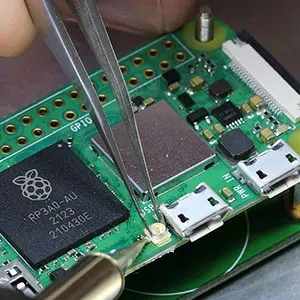
Brian Dorey Blog
Modifying a Raspberry Pi Zero 2 W to add an external antenna with a U.FL RF connector
 earnest spoke
urban lance
FWIW <@349298198973513730> I found out today the Dreos technically do not need t...
earnest spoke
urban lance
FWIW <@349298198973513730> I found out today the Dreos technically do not need t...
I ended up buying a second hand, 2 month old Xiaomi fan. It's theoretically locally controllable but the HACS plugin needs to be updated to support my specific model.
Having to repair every time I replug the fan is a no-go considering how often I keep moving the fan between rooms 😅
 weak dust
Eve devices are so damn frustrating! Every single one I try to add just doesn't work.....
 jaunty ivy
I asked this like a year ago and there was nothing, hoping there are new things this year.... Does anybody know of an air purifier with local control (IP or MQTT or thread or whatver, as long as it does not need an internet connection)?
It seems that the only option is Dyson or IKEA
I guess Homekit would also be an option? with the bridge thing
 gray latch
IKEA?
jaunty ivy
yes
they have a zigbee one
You can get like 4 of them for the price of one Dyson lol
Coway makes the best purifier, but they are cloud only, as are most. It's infuriating. There aren't even any homekit capable ones that are available for purchase.
I don't understand why an air purifier needs an internet connection 😭
patent river
So they can get you hooked on it, then start charging you a monthly fee at a later date
Or my favourite, which is the getting pissy about the amount of load people are putting on their cloud APIs, but refusing to provide a local API
Since half of these damn things have an ESP32/8266 in them anyway, would probably cost them less time to create the local API than they spend whining about it
jaunty ivy
patent river
So they can get you hooked on it, then start charging you a monthly fee at a lat...
Yeah but none of them do that. They're all free and have been for the decade that they have been out.
My 5 hours of research so far say Dyson and Ikea are the only local control air purifiers available. Which is fucking insane.
gloomy elbow
HomeKit devices are also locally controllable.
jaunty ivy
There are no homekit compatible air purifiers sold in Canada. Or in the us even, as far as I can tell.
slim lagoon
Not really. I gave up on locally controlled air purifiers and went with a Tuya one. 😭
TBF, it’s not been bad with the localTuya integration.
jaunty ivy
is there a way to commission an esphome mod or something?
I would pay up to ~$150 for that, and supply the purifier for testing
purely out of hatred for the air purifier industry
slim lagoon
Not that I’ve seen. You could ask in the ESPhome discord. They might have some ideas?
Back during COVID, people were building them out of box fans. Those could be ESP controlled and sensors added to it.
jaunty ivy
yep, unfortunately cant fit it in my apartment
slim lagoon
Yeah, same problem here.
jaunty ivy
problem is, when any of my windows or doors are open, the stack effect pushes an insane amount of air up the elevator shafts, down the hall, around my door, then out my windows, flooding the room with a continuous stream of dusty air. so i want to be able to remotely shut off the purifier any time a window or door is open
slim lagoon
I saw one that used 20”x20” HEPA filters and it was just too big for my rooms.
jaunty ivy
its so maddening
like, how much money is being spent on these atrocious cloud services? it has to be tens of thousands of dollars per year per company. why not just local?????
slim lagoon
lol because Tuya is cheap. Levoit, LG and others… meh.
cold moon
jaunty ivy
problem is, when any of my windows or doors are open, the stack effect pushes an...
if the purifier remembers settings before power loss maybe a smart plug could work
jaunty ivy
slim lagoon
lol because Tuya is cheap. Levoit, LG and others… meh.
is there a tuya compatible one with filters available in north america?
slim lagoon
jaunty ivy
is there a tuya compatible one with filters available in north america?
I have a few of these: https://a.co/d/0f1IbiuX

MORENTO Air Purifiers can remove the impurities in the air quietly and efficiently. This model has intelligent Wi-Fi, mobile app monitoring, and voice control, a perfect addition to a smart-home. The multi-layer HEPA filter traps dust, pet dander, pollen and more, while the activated carbon filte...
It isn’t too big, responds quickly and the sensors seem pretty accurate. Downside is obvs Tuya. But, I really had to swallow my pride and have clean air over “fighting Tuya”.
slim lagoon
Decent-ish, yeah. A bit of a pain to setup, but once done, it’s not bad.
jaunty ivy
I'd just buy a dyson but they throw air sideways, so no "donut effect"
they have the new upward-firing one, but it costs as much as a cheap used car here
slim lagoon
I have 11 Tuya WiFi devices (air purifiers and ceiling fans). They aren’t horrible, but I’d REALLY like true local control.
glacial oracle

slim lagoon
I have a Dyson too, it good, but the filters are expensive and not the best, imho.
jaunty ivy
yep that too
slim lagoon
glacial oracle
<:PES_Suspicious:644097331121225728>
Shush. They aren’t Tuya Zigbee at least. lmao
glacial oracle
thats not better, thats worse
slim lagoon
hahaha whatevs. Do as I say, not as I do! lmao
jaunty ivy
I bet I could remove the top hoop half of a dyson purifier
but thats sorta a waste of $800
slim lagoon
I thought about that myself, but at the same time, yeah, mess that up and there goes a lot of a paycheck.
jaunty ivy
its just brutal
I've been trying to buy an air purifier for quite literally 3 years now
and nobody will sell me an air purifier that:
- directs airflow upward
- has local control of any kind
(apart from the dyson that costs nearly $1500 of course)
cold moon
slim lagoon
I have 11 Tuya WiFi devices (air purifiers and ceiling fans). They aren’t horrib...
 slim lagoon
cold moon
https://tenor.com/caylg1GYFYw.gif
slim lagoon
cold moon
https://tenor.com/caylg1GYFYw.gif
Yup… true story.
slim lagoon
jaunty ivy
and nobody will sell me an air purifier that:
1) directs airflow upward
2) has l...
Aside from the local control, that one I linked does blow upwards at least and I think they sell HEPA filters for it.
jaunty ivy
ill probably just get a starkvind and 3d print some ducts for it to direct air upward
slim lagoon
 slim lagoon
cold moon
https://tenor.com/caylg1GYFYw.gif
slim lagoon
cold moon
https://tenor.com/caylg1GYFYw.gif
tbf, I couldn’t retrofit my old fans AND I wanted DC fans that use less power AND I needed them in HA AND I didn’t want to spend more than $100 on each fan. 
glacial oracle
wth is this actually reading 328pm
worthy scaffold
silver lily
I don't really trust bluetooth for 247 connections (it might be a me problem, bu...
ive gotten the parts have and been trying this out. but ive run into an issue where the 410 keeps turning itself to its lowest volume then some. dont think ive shorted anything out with the wires as im pretty sure the ones exposed are just for emf. any ideas?
 jaunty ivy
https://github.com/larryqiann/AP1512HH-ESP32/
holy fucking shit
GitHub
Coway AP1512HH Main Board replacement with ESP32. Contribute to larryqiann/AP1512HH-ESP32 development by creating an account on GitHub.
gloomy spoke
Pretty cool
Operation of the fan outside of its original operating specifications i.e. at a higher than designed RPM may cause the blower wheel to explode or fragment.
patent river
Well if that isn't the "don't get mad, get even" approach, I don't know what is
jaunty ivy
GitHub
Provides a local node & mqtt server for controlling BlueAir air purifier devices - alackmann/blueair-local
this is also a thing
jaunty ivy
jaunty ivy
https://github.com/larryqiann/AP1512HH-ESP32/
holy fucking shit
fuck it, im gonna finish this project
they already did the hard part, I just need to write a config for it
silver lily
worthy scaffold
ive gotten the parts have and been trying this out. but ive run into an issue wh...
Lowest volume as in a single dot? I think these reset their volume to some kind of default every power cycle. My three units resets to different level but they were all 50%-ish. Did you got this new or used? It might be the case that there's some setting you can set using the official Jabra software that sets this default.
silver lily
worthy scaffold
ive gotten the parts have and been trying this out. but ive run into an issue wh...
Also did you upgraded the firmware prior to the assembly (I have a note on that printables page)?
silver lily
worthy scaffold
ive gotten the parts have and been trying this out. but ive run into an issue wh...
other than the lowest volume symptom, does the speaker and microphone work at all?
jaunty ivy
jaunty ivy
https://github.com/larryqiann/AP1512HH-ESP32/
holy fucking shit
talking to the guy who made this, dude is still working on it and has a bunch of good ideas
 digital shale
hi, im trying to setup a esp 32-s3-box-3b, i cann install the firmware, but after the installation, there is no option to connect to a wifi network, when i click on next in the installation process, i see "install Voice Assistant" and "Logs & Console" again. what do i have to do? the s3 box shows the "no Wifi" message
 buoyant sphinx
digital shale
hi, im trying to setup a esp 32-s3-box-3b, i cann install the firmware, but afte...
buoyant sphinx
digital shale
hi, im trying to setup a esp 32-s3-box-3b, i cann install the firmware, but afte...
I had same issue but was able to configure it via Bluetooth and then adopt and add WiFi in HA esphome
Probably a better way but not sure
digital shale
buoyant sphinx
I had same issue but was able to configure it via Bluetooth and then adopt and a...
how do you managed to do that via bluetooth? are there instructions somewhere?
buoyant sphinx
My Bluetooth proxies just picked it up automatically as a discovered device
I would guess you could also just plug it in to your HA box and flash it from there with esphome
digital shale
i use proxmox, it's a little difficult to plug it in :D
buoyant sphinx
Same, but pretty easy to share usb device with host under hardware
 sly hemlock
Does anybody have a source for single 433mhz buttons that have random codes already not need to clone a code to use and are sonoff rf bridge compatible?
digital shale
buoyant sphinx
Same, but pretty easy to share usb device with host under hardware
i tried to plug it in, in homeassistant -> Settings -> System -> Hardware, i see a /dev/ttyACM0 device with the correct name, but nothing recognises the device as an s3 box, i restartet the esp home add on a few times, and also the whole system
buoyant sphinx
Hmm not sure — you did add it in proxmox? (If you’re not passing all usb through already?)
digital shale
i see the device name in my HA setting/hardware but nothing happens
buoyant sphinx
Some people in the esphome discord might have more ideas, someone filed a bug report on it yesterday I think
worthy scaffold
silver lily
other than the lowest volume symptom, does the speaker and microphone work at al...
looks like just connecting it to the jabra software fixed the issue some how. not sure haha. but yep everything works now
 pine narwhal
I already have some zigbee devices,
and up until now I also had/have
Phillips hue motion sensors SML002 outdoor.
Our house is now being replastered,
which would give me the opportunity to switch to wired devices,
someone here has had good experiences?
Conditions:
- Zigbee router device
- Suitable for outdoor use
- Lux and temperature
- Not too big
or an adequate alternative,
e.g. wired sensors that I connect centrally to an ESP,
here it would have to be considered that cable lengths per sensor would be up to 40 meters
 lime wedge
is SP630E supported to HA? can use all the features ?
winged knoll
What brand, or can you provide a link?
If that's a generic 2.4 GHz RF LED controller then the odds are pretty poor
lime wedge
From btf lightning
lime wedge
winged knoll
If that's a generic 2.4 GHz RF LED controller then the odds are pretty poor
 winged knoll
RF ... yeah... you'll need more than a little luck there
lime wedge
winged knoll
RF ... yeah... you'll need more than a little luck there
not supported?
outer knotBOT
@lime wedge When using Discord's Reply feature it defaults to pinging the person you reply to, which can get frustrating for the target. Use Shift + click on the Reply option, or click @ ON to @ OFF to stop this - on the right side of the compose bar.
You have to change this every time (thank the Discord devs for that).
winged knoll
You could ask in the #integrations-archived channel - as the topic here tells you to do - but I'd Google first and have low expectations
RF device support is generally poor, because they're all custom clusterfucks
lime wedge
better to use wled, yeah?
winged knoll
For digital strips, yes
For analogue strips the Gledopto #zigbee-archived controllers work really well
humble marten
I've been able to connect mine by adding the device to the Smart Life app since its a Tuya device. Then I added it to Home Assistant with the Tuya add-on. Works great.
 spare vigil
Is there a difference performancewise or use-wise between a Pi 4 4GB, Pi 4 8GB or Pi 5 4GB? Like will it matter for a smart home?
native pilot
it depends on what you're going to do with it. I've got a pi4 with 4gb of memory and I'm definitely running against the upper limit of what it can do. When time permits I'm planning to update to a n100 mini PC.
If you are set on using a pi, I'd make sure to use an SSD for storage (not the microSD card) and I'd aim for 8gb of RAM.
spare vigil
native pilot
it depends on what you're going to do with it. I've got a pi4 with 4gb of memory...
What kind of SSD are we talking about, and how do I connect one to the Pi?
native pilot
https://thepihut.com/blogs/raspberry-pi-tutorials/how-to-set-up-an-ssd-with-the-raspberry-pi
The only exception to this guide is to use a powered USB hub to connect the drive to the pi, they're known to have flaky power delivery on the USB ports.

The Pi Hut
So you've got yourself a Raspberry Pi 4, a shiny new SSD and one of our SSD adapter cables - now you need to get it all set up! The Raspberry Pi OS is a Linux-based operating system, so plugging in USB 'things' isn't always as plug n' play as Windows. New drives need to have partition tables and partitions created, and
(also use HAOS, not PiOS)
There's also this guide on the forums: https://community.home-assistant.io/t/installing-home-assistant-on-a-rpi-4b-with-ssd-boot/230948

Home Assistant Community
[UPDATE 2020-10-14 by @Jpsy ]: Added instructions to update HA OS through CLI. [UPDATE 2020-10-18 by @Jpsy ]: More details added on installing and using Raspberry OS to update the EEPROM firmware. [UPDATE 2020-10-20 by @Jpsy ]: Infos added on using Raspberry OS “headless” through SSH (no monitor or keyboard attached). Thanks to @LondonBenj...
spare vigil
What's the difference between SSD and using a microSD?
native pilot
microSD's fail very very quickly
they aren't really made for continuous reads/writes
spare vigil
Gotchya
 pastel tangle
Good morning,
I have a little question. I would like to automate this switch, with a Sonoff relay for example, but I don't have enough space in my box (green on the schema) to add the relay (the switch and the cables present take up too much space).
Is there a way to depart the relay in the ceiling at the lamp perhaps?
Thanks in advance

I wish I didn't have to break everything to put bigger boxes.
Or maybe the only solution would be to buy new switches which directly contain the zigbee relay to save space
native pilot
I think the relay needs to be before the switch to work.
So new box or zigbee switch may be your only options.
winged knoll
Well, a bit of rewire will do it
The module needs to take input from the switch, that's it
Doesn't matter if that's next to the switch, or the bulb
Hell, many guides out there are written putting the module by the bulb as that's often got more space
native pilot
I guess that makes sense. The module uses the neutral bundle to power itself and can cut power between the switch and the light on either side.
pastel tangle
I've seen a lot of diagrams, but I can't find an equivalent for my situation. Knowing that I cannot add other cables than what passes in the wall
winged knoll
You'll get a sparky (electrician) to handle the wiring then - you need some rewiring to put the module by the light
Remember the basic wiring doesn't change when the module is by the switch or the bulb, it's just the length of the wires
sly hemlock
pastel tangle
Good morning,
I have a little question. I would like to automate this switch, wi...
sonoff has some where you replace the switch itself and it can do all that
sly hemlock
pastel tangle
Good morning,
I have a little question. I would like to automate this switch, wi...
or the shelly switches
pastel tangle
yes i think the easy way is to change the switch
glacial oracle
You may want to have a look into available mini versions aswell
They tend to be significantly smaller and might make fitting stuff a lot easier
sly hemlock
the shellys are very flat and the relay goes right behind them, the sonoff ones seem to be touch pannels and are 433mhz or zigbee
 wary willow
I apologize if this is the wrong place to ask, but is there any guidance on specific NUC recommendation to use for HA?
I've done a bunch of reading and people recommend so many different options I could pretty much just be told what to buy, but there are so many options. I think my plan would be to run Proxmox + HOAS and then virtualize other things on that box (Plex, etc).
I've seen suggestions range from $100-$700... since my plan was to originally run on a Rpi4, I wonder if I could get something on the cheaper end?
cold moon
wary willow
I apologize if this is the wrong place to ask, but is there any guidance on spec...
beelink n100 all day long
https://www.derekseaman.com/2023/10/home-assistant-proxmox-ve-8-0-quick-start-guide-2.html following this guide if needed
https://www.amazon.com/Beelink-Pro-Desktop-Computer-1000Mbps/dp/B0C89TQ1YF $169 with a $10 off coupon right now taking it to $160 which is about as low as it goes

Beelink Mini PC, Mini S12 Pro Intel 12th N100(Up to 3.4GHz), 16GB DDR4 500GB M.2 PCIE SSD, Mini Desktop Computers Support 4K Dual HDMI Display/WiFi6/BT5.2/USB3.2/1000Mbps LAN/WOL Home/Office
 wintry grail
jaunty ivy
My 5 hours of research so far say Dyson and Ikea are the only local control air ...
wintry grail
jaunty ivy
My 5 hours of research so far say Dyson and Ikea are the only local control air ...
Frustratingly, it appears that Dyson is slowly moving away from allowing local MQTT connectivity. There are reports from users of https://github.com/libdyson-wg/ha-dyson that firmware updates appear to be disabling local MQTT connectivity on some robot vacuums. It feels like the next or current generation of fans/heaters/filters could also go this way with a firmware update or new product release.
jaunty ivy
wintry grail
Frustratingly, it *appears* that Dyson is slowly moving away from allowing local...
Yikes.
I got a 1512hh and am working on replacement firmware for it
Well, replacement firmware that runs on the board I linked earlier
No enshittification for me
wintry grail
I'm the maintainer of the ha-dyson project I linked above, and it's put me in between a rock and a hard place since the integration is strictly local-control except for a few optional features.
but now i might have to figure out how to nicely integrate AWS IoT into the flow, which isn't technically challenging as much as it just sucks for users.
I know I'm late to this conversation, but the Dyson TP02 has good local control, and it's old enough that firmware updates probably won't remove that.
slim lagoon
wintry grail
I'm the maintainer of the ha-dyson project I linked above, and it's put me in be...
I'm using it... Fantastic work.
wary willow
cold moon
beelink n100 all day long
Your links are all I needed to persuade me, thank you! That looks like a pretty beefy box for the money and I'm pretty sure that will run everything I could possibly want for quite a while (I'm not a heavy user)
Looks like it'd be great for HA, Plex (local users only, mostly), and any other random contains/VEs. Anything else I'm missing? I will probably pull the trigger today.
cold moon
wary willow
Your links are all I needed to persuade me, thank you! That looks like a pretty ...
i have one running proxmox but havent moved haos over yet
either way pretty good setup but still limits with a mini pc compared to a real server
wary willow
cold moon
either way pretty good setup but still limits with a mini pc compared to a real ...
Yeah, understandable. I'm currently running Plex on my Synology DS220+ so this computer will be a real upgrade for me from that perspective. I'm more than okay not having a true server at this point in my automation/streaming career.
 prime radish
Hello everyone, i need help with an rf issue. I have louvolite blinds that are controlled with louvolite branded rf remotes. I currently have a number of Tuya rf bridges that i am using with home assistant to automate the opening and closing of the blinds. The blinds work great and are very responsive with their branded remotes. However when using the Tuya bridges 50% of the time all blinds in the room will open or close but other 50% of the time 1 or 2 won't respond. It usually isn't the same blind that is non-responsive. Both the remote and the bridge are within 10ft of the blinds unobstructed. i have tried the bond and broadlink in place of the tuya bridge and the result is the same. No device responds to the blinds as well as their own remote.
I have tried to resolve this issue through the automation by having the signal to open or close the blinds go out multiple times with a minute delay between and sometimes but rarely that does trigger the non-responding blind to work.
 dense sparrow
Does anyone have more information on this remote control for rollershutters? I would like to reproduce the code on some 433 Mhz device connected to Home Assistant. Here is what I know so far:
Jolly motor, type likely the "Jolly Sat IS"
433.92 Mhz
ASK modulation (not OOK)
66 bit Rolling Code (not sure yet which parts stay the same)
is from around 1997
Thanks for any information
 wary willow
cold moon
i have one running proxmox but havent moved haos over yet
wary willow
cold moon
i have one running proxmox but havent moved haos over yet
So this is a pretty dumb question since I've never used a mini PC before, but is it easiest to run these with a monitor and just GUI everything? I'm comfortable running stuff headless, but I imagine in the case of the S12 pro you just install Proxmox and use the GUI for everything?
cold moon
yep gui in proxmox is all you need
 tacit burrow
proxmox on minipc + haos in a vm is a great solution for many people.
Sure, the hardcore hackers might say run it native, or run docker and manage it yourself, but... mostly there's no need for that.
Plus running in proxmox makes it easy to manage, backup, run other things on the same box, etc
one-line install with tteck scripts are super cool too
DItto plex into proxmox, works super well
 silver orchid
I'm debating between the Aiboo Airzone Pro (Wi-Fi) or Aiboo Airzone Z-Wave, does anyone have experience with either of these to share?
 shell laurel
does anyone have a portable air conditioner integrated with home assistant? I see a honeywell one on amazon, I assume that it would be supported?
I checked the docs and it only mentions thermostats and sensors: https://www.home-assistant.io/integrations/honeywell/#supported-hardware

Home Assistant
Instructions on how to integrate Honeywell thermostats within Home Assistant.
jaunty ivy
I have finally, finally successfully connected my horrific whirlpool """smart""" oven to my network
it has taken over 6 months of attempts
Why do I want it connected to the network? because if you don't connect it to the network, the time randomly jumps by several hours!! yay!!
If you are looking for an oven, avoid anything by whirlpool, and especially avoid the WOS72EC0HS.
$2500 "smart" oven which features wifi hardware that randomly becomes inaccessible to the device, requiring several power cycles via flipping breakers before it will be recognized again.
display randomly goes blank. randomly. it will work for a month and then the display will be black for days. there is no fix.
If anybody else has this god forsaken appliance, here is how I got it to connect to my network. WOS72EC0HS, whirlpool, wall oven, whirlpool oven, whirlpool app, whirlpool won't connect, nework issue
Make an open network on the 2.4ghz band with no special characters and no authentication. I used a 6 letter SSID ("noauth"). Attempt to connect to it with the oven. If it fails or the display crashes, power cycle the oven until the display works again. Once the display is usable, check the SAID page to see if the SAID and MAC address are visible. If the SAID and MAC lines are blank, power cycle the oven until they return. Do not attempt to connect to the network if the SAID and AMC are not visible, this will result in the oven soft-bricking itself for anywhere between 10 minutes and two hours. Once you can get this open network connected, factory reset the oven. Then, once the display works again (may require more power cycles), try to connect to your actual wifi network. See the note above about the SAID menu, it applies here also. At this point you MUST have a phone connected to the same network (same SSID, you cannot be on a separate SSID on the same subnet, SSID must match and be the same freq), with the whirlpool app open. Once you have connected to the network once, move to the SAID screen, scan the QR code, and complete the link steps via the phone app. This took ~15 tries as the oven would crash partway through the linking process.
If you are reading this and have just purchased this oven, return it. If you can't return it, pray to whatever god you believe in before attempting any of this.
patent river
My 30 year old, entirely analogue oven with mechanical (clockwork) start/stop timers is looking pretty good right now
jaunty ivy
whoever decided that a touchscreen is an appropriate interface for an oven needs to be hung and quartered.
patent river
Honestly, it's more egregious on a stove
Touch control panels on induction cooktops are AWFUL
jaunty ivy
I have a kitchenaid induction cooktop with a touch control panel and honestly, I don't hate it. It's not optimal, but it's easy to clean and the control layout is sane.
patent river
The problem I've found is you get a bit of grease splatter on them and the controls stop working
jaunty ivy
This one thankfully does not have that problem!!
The insane thing about it, though, is that lifting the pan from the element makes it beep. loudly. until you put the pan down.
I do a lot of stir frying. Guess what that sounds like
mmmm wok hei BEEPBEEPBEEPBEEPBEEPBEEPBEEPBEEP
patent river
I am genuinely curious to see how this goes once it finally releases: https://www.impulselabs.com/

With best-in-class features that blend power, precision, and a pain-free installation, the Impulse Cooktop brings next-generation performance to your kitchen.
jaunty ivy
I'd buy it
that thing is going to destroy pans, though.
like, anything tri-ply will instantly warp
I would never use any of my good pans on it. too powerful.
patent river
It's a lot more than I want to spend on a cooktop, but I like the idea, and while I think the giant screens in the middle are stupid, having "knobs" that are magnetic and not actually attached is a nice touch (especially if they're dishwasher safe)
Also being able to retrofit it without upgrading the power cables from the switchboard to the kitchen
 ornate surge
Does anybody know what coral tpu actually does? I don't get it
Is it actually useful for home assistant?
 swift forge
Is there a zigbee outdoor sensor that measures temperature and brightness? No weather station I can't access the roof
 olive sonnet
You reckon Raspberry Pi 4 8Gb + 256Gb SSD will suffice as a HA server? It´ll be running only the HA and no other services. Dream was for it to be capable to control heating system (water-air heatpump, air heatpump), Car interfaces (KIA/BYD), Car charging schedules, door/window sensors, temperature monitors, door locking/usage controls (Yale Doorman), Televisions and robot vacuum cleaners.
Other option would be DELL Optiplex 9020 USFF with i3-4160 CPU and 8GB RAM.
winged knoll
The Dell will be a better experience
sly hemlock
I had a rpi3 running for a wile before I switched to a nuc due to stability
(Lots of random restarts)
olive sonnet
Ok. Dell it is then. Thanks!
tacit burrow
Mini pc much more flexible
 ashen sentinel
I'm running an optiplex as well, no problem for years. Most you can also upgrade to 16gb ram if you ever were to run out.
 midnight grotto
is there anyway to use skyconnect for zigbee2mqtt and matter at the same time?
midnight grotto
ahh ok :/ better option is ZHA + Matter then?
or maybe seperate dongles for matter and zigbee?
winged knoll
Separate dongles
The multi-protocol setup is known broken, no matter what stacks you use
midnight grotto
ok thanks saves me alot of headache xD
got an old sonoff dongle, maybe I can migrate my skyconnect z2m to that and flash skyconnect for matter only then
ashen sentinel
winged knoll
Separate dongles
Is there a risk of signal pollution if you put a Zigbee and Matter antenna next to each other?
slim lagoon
ashen sentinel
Is there a risk of signal pollution if you put a Zigbee and Matter antenna next ...
Yes.
winged knoll
See the pins in #zigbee-archived
 strong idol
@winged knoll you mentioned thin clients as a substitute for rPi, would you have the time to help me find the right one? As I found a local seller that sells used pc's, and they have cheap thin clients
winged knoll
Dude... this ain't IRC, you don't need to keep tagging
Also, more than just me can answer 😉
strong idol
new here, can I send link to those i found?
winged knoll
I don't know, can you 😛
strong idol
well there isn't anything in the rules that disallows that
slim lagoon
Any intel based mini-pc should be fine as long as it has some minimum specs. The beelink N100 is currently the most recommeneded, but in reality, and mini pc with a decent processor and 8GB of RAM is more than enough to run HA. If you want to do other things with it, then you'll want to go with 16GB of RAM and use proxmox for virtualization.
strong idol
8gb of ram you say, and intel, wlel im out of luck
as the site i found pretty muhc only sells amd powered thin clients
*that are cheaper than a rpi
winged knoll
Pi + SSD + powered USB hub?
strong idol
Do I need more storage than a sd card can provide?
winged knoll
You need more reliability 😉
strong idol
doesn't the skyconnect use more than 150mA

 winged knoll
And you want a powered USB hub, to avoid power problems
Otherwise you will get weird random stability problems
strong idol
damn, so many factors to take into concideration lmao
thought that this would be easier
winged knoll
Pi's are great toys
strong idol
i mean, money is not an issue, but i just don't want to spend that much
winged knoll
You need to put the cost of the HA server in the context of what you'll spend on the smart home
strong idol
well yeah, but so far i have spent like 500-700PLN for eeverything
a skyconnect is 180PLN, and a rpi4 4gb is 270pln new, 200-230 used
5pln is about 1gbp
What about this:
"Lenovo ThinkCentre M600 Tiny Thin Client N3010 2x1.04GHz 4GB 32GB SSD Embedded"

amso.pl
ThinkCentre M600 Tiny to ultrakompaktowy mini komputer marki Lenovo. Wspiera różne rozwiązania montażowe, w tym mocowania VESA. Komputer w wersji Thin Client, bezgłośny, wspierający systemy Embedded, IoT oraz LeTOS (linux).
winged knoll
Ooof. You found something slower than a Pi4
strong idol
ah
strong idol
Does it have to be intel?
strong idol
ashen sentinel
Man that username is annoying
forgot about that
strong idol
ashen sentinel
My recommendation is a second hand optiplex
well I have a optiplwz 790 with an i5 2400, but it has a dead psu
glacial oracle
That's probably better but only if it's in a working condition
strong idol
But that seams to be overkill, as it presume it chomps down 50/70w at idle
winged knoll
strong idol
Does it have to be intel?
My own HA runs on AMD Ryzen
strong idol
Well my optipelx is currently booting
I have only repasted it
Maybe it wasn’t even a dead psu
Maybe it was just overheating lol
If that’s the case I’m happy asf
Gonna stress test it for an hour

 tulip charm
Is there any reason why I shouldn't buy this kind of ZigBee dongle? Looks to be the same hardware and considerably cheaper than sonoff
https://a.aliexpress.com/_Ewr95r5
Is the radiator needed or something?
 gloomy spoke
Interesting form factor
tulip charm
Actually the one with the antenna is only 7 bucks cheaper, so not that considerable
winged knoll
Antennas are good
 bleak rapids
Hi there. I am trying to connect one of these ESP8266-based dongles (https://cloudfree.shop/product/ductless-hvac-wi-fi-module/) to a Mr Cool DIY 12kBTU mini-split. The device boots up but seems to get no answer from the AC:
13:36:00 [D] [AirConditioner:177] Enqueuing a GET_STATUS(0x41) request...
13:36:00 [D] [ApplianceBase:173] Enqueuing the request...
13:36:00 [D] [ApplianceBase:075] Getting and sending a request from the queue...
13:36:00 [D] [ApplianceBase:162] TX: AA 21 AC 8D 00 00 00 00 00 03 41 81 00 FF 03 FF 00 02 00 00 00 00 00 00 00 00 00 00 00 00 03 2A 6A 47
13:36:01 [D] [AirConditioner:131] Enqueuing a GET_POWERUSAGE(0x41) request...
13:36:01 [D] [ApplianceBase:173] Enqueuing the request...
13:36:01 [D] [ApplianceBase:139] Response timeout...
I can't quite figure out what to do with this or where to look for help. Any suggestions are very welcome!

Compatible with Carrier and other ductless systems Runs ESPHome, Integrates with Home Assistant 17x cheaper than the Carrier brand dongle
winged knoll
#diy-archived can probably better help
bleak rapids
Thanks.
 stiff sorrel
Hello Discord! I ordered two Aqara U200 Smart Locks right now.
They work with matter.
Can i use them directly with Home Assistant Yellow - out of the box - or must i buy an external border router to use them?
winged knoll
#matter-archived can help with Matter stuff - if they're matter over WiFi then yes
 modern palm
Hi there. Got a SONOFF SNZB-02 which randomly gets unavailable (even 3 days after installing a fresh battery which had 3,3V) and want to replace it. Additional metrics like a wind sensor etc. would also be nice. Don't want to power it again with CR2450 batteries or similar, in the best case it is solar powered with a battery, else with AA batteries or if not possible else, USB. Got any recommendations for me? 🙂
 empty fable
Hi there, I got a Gibidi F4 plus, which I want to make smort. According to the manual it should be pretty straight forward (https://www.gibidi.be/manuals/gibidi/STURINGEN/F4 PLUS_6-2017-REV. 04-NL (AS05850)+IMA_5-2017-REV. 02.pdf). Are there any smart circuit recommendations out there? I’m using Home Assistant Yellow
native pilot
because I keep talking myself out of it for no good reason, I have questions about the Apollo MSR 2 again. Am I able to set a distance limit/single detection zone for this? Or is that only possible on the MTR-1?
it's near/medium/far zones for the MSR2 and x/y grid for the MTR.
slim lagoon
I really want better energy tuning on the MTR-1 (or 2 if they revamp it).
cold moon
i think a user is gonna have to do that and offer it to us
there's just not enough dev time to sink into yaml like that i think
slim lagoon
cold moon
there's just not enough dev time to sink into yaml like that i think
I kinda figured as much.
vestal lake

Amico 52inch Smart Ceiling Fans with Lights
Hey guys! Looking to buy a smart fan that integrate with HA in a reasonable price
Someone have that and can give me a quick review or any other suggestions that works well for them?
How similar @slim lagoon ? Is it the same company?
 slim lagoon
Yeah, through the various Tuya integrations.
vestal lake
Worth the money?
slim lagoon
Honestly, it's not bad. I wish it kicked out a bit more air flow at 100%, but it does work well. The light gets BRIGHT on it.
vestal lake
Is it supported through tuya or works only with scenes? Because I bought that tuya IR blaster and works only with scenes which was annoying
slim lagoon
And at $99 (with the $20 coupon), it's def worth the cost.
vestal lake
What country you from?
 vestal lake
Oh looks good
slim lagoon
Yup, reversible, SUPER quiet and has a variable speed mode as well.
And the light does 3 (or 4?) different white modes.
vestal lake
You guys have hot weather as well right?
Since I'm in a hot country and wasn't sure how good it will be here
slim lagoon
UGH... do NOT get me started on hot weather. lol
It's 93F right now with a real feel of 101F and 55% humidity. So, basically almost an oven.
vestal lake
slim lagoon
You made that temple or it's built in?
slim lagoon
That's built in.
vestal lake
slim lagoon
It's 93F right now with a real feel of 101F and 55% humidity. So, basically almo...
Damn
Insane
Well if it works well in the US it suppose to work well here
slim lagoon
So, just for reference, I have 7 ceiling fans here. All through Tuya (as much as I hate and despise Tuya).
Oh, sorry. 6 ceiling fans. I have one more I have to put up at some point.
If you're looking for smaller ones that work well with HA, I have 2 of these and they put out a TON of air: https://a.co/d/0dVIJ6Ub

Experience the ultimate convenience brought by our latest intelligent ceiling fan equipped with Alexa and Google Assistant shortcut keys! Just use voice commands to control the fan and enjoy the comfort of a smart home. Whether you're at home or out, with the support of WiFi connection, the fan c...
vestal lake
You got the 52 or 60 Inch?
slim lagoon
52"
vestal lake
What would you recommend for a bedroom?
slim lagoon
I have this one in my bedroom, but... it BEEPS and you can't turn off the BEEP: https://a.co/d/08eajpGF

Stay Cool and Connected VONLUCE next-generation smart ceiling fan combines sleek design with advanced technology to meet all your home cooling and lighting needs. With compatibility for smartphone app control, Alexa and Google voice control, as well as a convenient remote control, you can effortl...

But, in terms of airflow and light, it works well.
How big is the bedroom?
slim lagoon
When you change anything on the fan, it makes this loud BEEP.
It's fine if you aren't doing a lot with it, but mine, I have it vary during the day according to temp, so it beeps a lot.
vestal lake
10SM bedroom
slim lagoon
Honestly, I'd get another one of the Amicos for the bedroom.
slim lagoon
Ah, ok... so, you're used to it then.
lol
Fortunately, I don't let the fan change at night if I'm in bed.
vestal lake
I did check the HA fan integrations and couldn't find amico in the list
So I thought it won't work
slim lagoon
Absolutely! Happy to help! 
Oh yeah! One last thing @vestal lake There are some fans on Amazon that use the "Fan Lamp Pro" platform. Avoid them at all costs. They cannot be integrated with HA.
(Ask me how I know lol)
vestal lake
Ignore the sexy dude behind
vestal lake
Yeah, it was so cheap so I went for that and understood later why it's worth asking first
Tbh I have so many ideas to make it smart
And work with HA
A little out of the box ideas
slim lagoon
Yup... same... I got this one because it was the only one that had an oscillate function and was SUPER mad I couldn't get it into HA. https://a.co/d/03vARdCA

LUDOMIDE Ceiling Fans with Lights, 360° Rotating Ceiling Fan with Lights and Remote, 6 Wind Speeds Smart Flush Mount Ceiling Fan for Bedroom, Dining Room and Kitchen 20" (White)
So, now it's outside in my carport.
vestal lake
Oscillate? You mean that it can go reverse?
slim lagoon
Nope. It spins the fan around in the center of the light. It's a neat feature to kinda spin the air around.
vestal lake
Damn those are the expansive ones
slim lagoon
Rather than just blowing straight down.
vestal lake
I bought mine for around 45$
slim lagoon
Yeah... I know
slim lagoon
Wait... you got it to connect to HA?! HOW?!
slim lagoon
Alright... you have my attention...
vestal lake
Give me a sec
slim lagoon
I literally just want to turn it on and off. That's it.
vestal lake
Well that's can be done but not in the regular way
You take an old phone
Download the app
Connect it to blootooth
Put it with a charger in a hidden spot and change the setting to screen always on
Get 2 finger robots

And put one on each side
slim lagoon
O...M...G... lmao. That's clever and insane all at the same time.
vestal lake
Now it will take your control from your main phone so for the mods you will have to use the remote
Or if you manage to put enough finger bots to even use some of the more important mods
I had another idea with a computer but that might take 2 much electricity Wich won't be worth it
slim lagoon
Huh, I don't have any older phones (nor any Android phones)... BUT... I wonder if an older phone with ADB setup on it might work as well.
vestal lake
Isn't adb works on windows and controls computers?
I heated about that when I want to automate my pc
slim lagoon
Nope. ADB = Android Debugging (not device lol) Bridge. But, I think the phone would have to be rooted to control an app like that and that's if they built proper intents into it.
vestal lake
That's got 2 complicated for me XD
slim lagoon
lol I might try to see if I can cobble something together eventually... but that's a future me problem 🙂
vestal lake
If it works let me knowwww
I started with HA and smart homes in general around 2 months ago so still new to basically anything
slim lagoon
Nope. HA is open source and I have REALLY strong opinions about making money off of a project that is meant to help people.
vestal lake
Well
Cars meant to help people get from point A to point B
I wish someone gave me a free car
slim lagoon
lol true, ish. But cars aren’t open source.
The whole idea behind HA has always been one of being open and accessible to anyone.
vestal lake
Well yeah but with 9 years at it I guess you have enough knowledge to make helpful YouTube videos which can make you money while helping for free as well other people
slim lagoon
Hence why I volunteer my time to helping out here.
vestal lake
Win win
slim lagoon
lol I thought about doing HA content years ago… not my cup of tea. Great at typing and such, talking on camera is a bit harder for me.
vestal lake
I studied about cars for 2 years and went off being a mechanic
slim lagoon
But we do have some people here that do podcasts, YT vids and stuff like that.
vestal lake
So with 9 years
You could be amazing 🤩
Oh podcast about smart home
Damn
That could be interesting!
You know where I get link for that?
slim lagoon
vestal lake
You could be amazing 🤩
I appreciate it!
slim lagoon
vestal lake
You know where I get link for that?
Oh, ummm let me see what I can find in a few. Had to mobile for a while.
 wild atlas

Join hosts Phil Hawthorne and Rohan Karamandi as they explore the newest Home Assistant releases and the latest Home Automation news. Featuring guests who use or contribute to Home Assistant, the podcast aims to inspire new ways to make your home smarter.
Let's see if that works, there's always the home assistant podcast
https://pca.st/podcast/488f19e0-aaf1-0137-fae7-0acc26574db2 and a shout out to the self hosted podcast, it's not smart home specific, but that's a very common topic

Discover new software and hardware to get the best out of your network, control smart devices, and secure your data on cloud services. Self-Hosted is a chat show between Chris and Alex two long-time "self-hosters" who share their lessons and take you along for the journey as they learn new ones.
A Jupiter Broadcasting podcast showcasing free an...
outer knotBOT
Looking for advice about a device to buy? Remember to provide guidance on:
- Which country you're in
- What your budget is
- What protocols you prefer (eg Zigbee, WiFi, Z-Wave)
- Any features you want (such as power monitoring, dimming, etc)
 delicate sequoia
thanks, sorry
looking for a good ceiling vent with speed control via HA. living in germany, no spend limit. prefer zigbee
native pilot
depending on the amperage being pulled, could you use a regular fan control switch?
delicate sequoia
hm, think so. but best to have it directly inside or not?
native pilot
delicate sequoia
hm, think so. but best to have it directly inside or not?
sorry not following this question
are you asking about inside the house or inside the vent?
this is for US only but it's what I was talking about: https://inovelli.com/collections/smart-home/products/blue-series-fan-switch-zigbee-3-0
 delicate sequoia
thanks, will look into it
steep hinge
My home assitant is running high CPU and Memory usuage that makes it loose connection constantly. I'm using HA inside of proxmox. My server is an Zimaboard. How do i find out what is using all my memory and cpu?
 glacial oracle
You should have a look at your add-ons and automations after which you may need to look at the individual integrations
 nova flax
noob question thinking about starting HA using a pi 3 or 4 but to get it to work with Phillips hue and Ikea wireless what dongle should I get any recommendations?
slim lagoon
nova flax
noob question thinking about starting HA using a pi 3 or 4 but to get it to work...
You'll want to ask in #zigbee-archived (and read the pins). But, basically, Sonoff Dongle E is good, lan coordinartors are best.
 sullen beacon
Can someone help me? I'm looking for a sensor for my balcony door that I can install concealed. It can be a maximum of 10mm thick because I don't have much more space in my door. Otherwise a door handle would also work, but then it would have to recognize open / tilt / closed - does anyone know?
outer knotBOT
Looking for advice about a device to buy? Remember to provide guidance on:
- Which country you're in
- What your budget is
- What protocols you prefer (eg Zigbee, WiFi, Z-Wave)
- Any features you want (such as power monitoring, dimming, etc)
sullen beacon
sullen beacon
Can someone help me? I'm looking for a sensor for my balcony door that I can ins...
I´m from Germany / budget is open / II already have a Philips Hue Bridge and a Bosch Smart Home if it's compatible with it that would be ideal, but if not, that's not a problem / Fetures recognize open / tilt / closed or for the Window/door Sensor 10mm thick
winged knoll
A single sensor that does all that probably doesn't exist, at least at a sane price
 lost canopy
Aight I've struggled with this garbage off and on for a month, so could use some second opinions. Been trying to integrate a cheap fingerbot off of Amazon, but no matter what I do I can't get it to function properly in HA (best I can do is get it added, but it's permanently unavailable). Is the Bluetooth version just too garbage? Should I just go for the Adaprox zigbee version instead?
The fingerbot is important because of the specific form factor, something like a switchbot wouldn't fit in the nook I'm trying to put it in or I'd have DEFINITELY gone with that.
slim lagoon
sullen beacon
I´m from Germany / budget is open / II already have a Philips Hue Bridge and a B...
I think these can ship to Germany. Not 100% sure though: https://sensative.com/sensors/strips-zwave/ Dunno if they do tilt though.
Strips Family by Sensative - the weatherproof no-maintenance sensor family
winged knoll
They don't, but they are awesome otherwise
https://www.zigbee2mqtt.io/devices/DJT11LM.html does tilt, mostly
sullen beacon
slim lagoon
I _think_ these can ship to Germany. Not 100% sure though: https://sensative.com...
Do I need an extra bridge for this?
slim lagoon
sullen beacon
Do I need an extra bridge for this?
Not a bridge, but a zwave adapter, yes.
sullen beacon
slim lagoon
Not a bridge, but a zwave adapter, yes.
Okey
sullen beacon
winged knoll
<https://www.zigbee2mqtt.io/devices/DJT11LM.html> does tilt, mostly
Ok and for this what I need ? a Bridge ?
winged knoll
Not a bridge, but a Zigbee coordinator (and mesh)
You could even dump the Hue hub 😛
sullen beacon
winged knoll
You could even dump the Hue hub 😛
Okay, very good, but this one will probably be visible, right?
outer knotBOT
@sullen beacon When using Discord's Reply feature it defaults to pinging the person you reply to, which can get frustrating for the target. Use Shift + click on the Reply option, or click @ ON to @ OFF to stop this - on the right side of the compose bar.
You have to change this every time (thank the Discord devs for that).
winged knoll
What one?
winged knoll
The tilt sensor would be visible, yes, because of the shape and size
sullen beacon
slim lagoon
> You ~~could~~ should even dump the Hue hub 😛 (FTFY)
Why This ?
sullen beacon
winged knoll
The tilt sensor would be visible, yes, because of the shape and size
Okey Thanks the sensor looks very good
winged knoll
They don't always detect the tilt totally reliably - I've seen mine sometimes miss gentle movements
slim lagoon
sullen beacon
Why This ?
Because Hue requires a user account and isn't exactly privacy focused. 🙂
sullen beacon
slim lagoon
Because Hue requires a user account and isn't exactly privacy focused. 🙂
OK, which bridge would you recommend as a replacement?
slim lagoon
sullen beacon
OK, which bridge would you recommend as a replacement?
A Zigbee coordinator and HA itself.
sullen beacon
winged knoll
They don't always detect the tilt totally reliably - I've seen mine sometimes mi...
Okey But the Price is realy good for a test
slim lagoon
Case in point: I have ~100+ Zigbee devices from Hue, Ikea, Aqara, etc. All of them are 100% local and I don't have to use a user account or run the risk of them discontinuing a product because they feel like it (Hue Hub 1 versus the Hub 2 fiasco).
sullen beacon
slim lagoon
Case in point: I have ~100+ Zigbee devices from Hue, Ikea, Aqara, etc. All of th...
Ok, well, I had to set up a second Hue Bridge because my first one couldn't handle all the devices (approx. 65+).
Which bride would I recommend so do you have a link?
slim lagoon
sullen beacon
Ok, well, I had to set up a second Hue Bridge because my first one couldn't hand...
https://tubeszb.com/product/efr32-mgm24-poe-coordinator/ For that many routing devices, you're gonna need something powerful and this is the top of the line (for now)
lost canopy
Guess nobody really uses the fingerbots, aight
slim lagoon
I know some people do. But I don't think they are too common in the HA community. Obvs I could be wrong.
lost canopy
Thats a shame
Cause for the life of me I don't know what I'm doing wrong
Followed half a dozen tutorials and tried out various integration methods and the dumb thing just refuses to work
And I ain't buying some third party Tuya bridge
Genuinely just may go get the zigbee version
sullen beacon
slim lagoon
https://tubeszb.com/product/efr32-mgm24-poe-coordinator/ For that many routing d...
ZigBee Coordinator CC2652P7 I found this which I get delivered in Germany. Are they different?
winged knoll
The EFR MGM24 are the current best, but the P7 is also pretty good
slim lagoon
sullen beacon
ZigBee Coordinator CC2652P7 I found this which I get delivered in Germany. Are t...
Th P7 is good, but it might struggle with more than 50 routing devices. The MGM24 can handle well over 100+ routing devices.
winged knoll
I've seen people with 300+ device meshes on the MGM24
sullen beacon
Ok but i don‘t find the MGM24 in a german Shop
winged knoll
SMLight sell them, as does Tube
You can easily get them, just maybe not in a local physical store
sullen beacon
winged knoll
You can easily get them, just maybe not in a local physical store

Smartlight.me - адресні світлодіодні стрічки, ws2812b, Zigbee, WiFi, розумний будинок
winged knoll
Yup
sullen beacon
Ok Thanks
tidal finch
have some bluetooth moisture sensors in my connected. first phoned home to my HA machine well enough, but added more and they don't. think I need a bluetooth proxy. m5stack atom lite probably my cheapest/easiest to implement option?
 vagrant vigil
Would this be compatible with HA?
https://a.co/d/0bEsdCbe

Foxgard Gateway,Fingerprint Door Lock WiFi Gateway,Tuya Bluetooth Gateway for Remote Control,Voice Control via Alexa & Google Assistant,Work with Tuya Smart APP and Smart Life APP
 sweet blade
Hey guys,
Are these Zigbee gateways supported for HA?
winged knoll
Buy a known to work coordinator
sweet blade
winged knoll
Buy a known to work coordinator
Can you advice me one?
vagrant vigil
Would this be compatible with HA?
https://a.co/d/0bEsdCbe
Foxgard Gateway,Fingerprint Door Lock WiFi Gateway,Tuya Bluetooth Gateway for Remote Control,Voice Control via Alexa & Google Assistant,Work with Tuya Smart APP and Smart Life APP
slim lagoon
vagrant vigil
Would this be compatible with HA?
https://a.co/d/0bEsdCbe
Highly doubtful.
 nova rock
Hello, Discord and developers,
I'm new to Home Assistant OS. I've tried my best to read documents and discussions about using the SPI protocol between the Raspberry Pi and the SX1278 module, but I still can't configure anything with the hardware. Sorry for my ignorance.
My goal is to build a peer-to-peer network between a Raspberry Pi and an Arduino using two SX1278 modules, then create a dashboard to monitor its data. My problem right now is how to communicate via SPI between a Raspberry Pi 3B and the SX1278. I thought Pyscript would help me, but it comes with a bunch of errors. Maybe when I installed rpi_gpio, the GPIO configuration got fixed (I mean it can't be changed), so it doesn't work properly.
I'm so confused right now. Can you guys give me some advice to develop this? Thanks a lot.
I feel like I'm going to die with this problem!
slim lagoon
nova rock
Hello, Discord and developers,
I'm new to Home Assistant OS. I've tried my best...
#diy-archived might be able to help there. But, iirc, the SX1278 is a LoRA transceiver, right? This might help a bit: https://community.home-assistant.io/t/integrating-lorawan-sensors-into-home-assistant/628322 I would avoid using GPIO on the rPi (mostly because you'll probably outgrown the rPi and move onto better HA hardware).

Home Assistant Community
Integrating LoRaWAN sensors into Home Assistant I’m intrigued by Smart Home technologies. I’ve been using Home Assistant to both automate my home and as a testbed for new sensor integrations. There’s no off-the-shelf integration yet for LoRa so I patched together some components to test out LoraWAN over distances farther than my Wifi can reach...
nova rock
slim lagoon
<#444529271806099486> might be able to help there. But, iirc, the SX1278 is a Lo...
Yes, that's right. The SX1278 is a LoRa transceiver.
I don't know whether I got the idea from this post or not. As I understand it, in this post the Pi still has Home Assistant OS installed, but it doesn't act like a gateway, right? My goal is to make my Pi act as a gateway and communicate with the SX1278 through SPI. Can it work, sir
slim lagoon
nova rock
Yes, that's right. The SX1278 is a LoRa transceiver.
I don't know whether I got ...
I'm not sure, tbh. On paper, yes, it could work. But that article used a gateway, not the rPi running HA. Again, I think that it's a bad idea to use the rPi as a gateway, especially if it is your HAOS device. GPIO support in HAOS has been deprecated and is not supported.
But again, #diy-archived would probably know better 🙂
nova rock
slim lagoon
I'm not sure, tbh. On paper, yes, it _could_ work. But that article used a gatew...
Thanks, sir. I think I need to change my strategy. Before this project, I used Raspbian OS to build a gateway on the Pi and developed my own Java app to control the entire IoT system. I'm really impressed with the Home Assistant OS frontend, so I'm trying to figure out how to integrate it. Do you have any ideas, sir?
slim lagoon
nova rock
Thanks, sir. I think I need to change my strategy. Before this project, I used R...
Actually, yeah... since you already have a custom Java app, add a REST endpoint there and then use the REST integration in HA to create sensors to get the data.
That way, HAOS stays separated from the LoRA implementation and you can just consume the data you need over REST.
MUCH cleaner.
cold moon
Isn’t this a good option?
 nova rock
So most people install Home Assistant OS on a Pi and integrate it with hardware, right? This is my system model. It's a bit of an ugly picture. I hope you guys can give me some advice.
glacial oracle
advice with what
nova rock
glacial oracle
advice with what
I need to develop this system integrated with Home Assistant OS. What should I do with it, sir?
slim lagoon
Like I said, add a rest endpoint into your Java app OR use the MQTT integration if you are posting data to MQTT already.
glacial oracle
realistically how would we know what you should do with it
mqtt is a universal protocol, you can tap straight into without ha at all
or you have ha tap into that place, also works depending on what you want to achieve here
nova rock
Thanks a lot, guys. I'll try all the ideas you've given me. One last question: have you found any integration for controlling the SPI protocol?
vestal lake
wild atlas
https://pca.st/podcast/cc555510-1e38-0135-52f8-452518e2d253
paid podcast? ;-;
wild atlas
Those links came out of pocket casts, the app I use to listen
You can find the RSS feeds elsewhere
They're both free
cold moon
nova rock
So most people install Home Assistant OS on a Pi and integrate it with hardware,...
No we don’t suggest a pi these days a mini pc takes its place instead
 astral steppe
cold moon
No we don’t suggest a pi these days a mini pc takes its place instead
astral steppe
cold moon
No we don’t suggest a pi these days a mini pc takes its place instead
Speaking of which, where I am a seller is heavily pushing HP T530s with 4GB with HA preinstalled for quite cheap. I'm guessing that's a little too weak right?
cold moon
I’m not gonna look that up but for most markets around the world it’s not worth buying old used mini pc vs brand new gen
Like eu reseller market for 6-8th gen intel mini pcs is bullshit so those people should just look at new mini pc only
astral steppe
Why are you recommending Intel exclusively? I own (and use) a Beelink SEi12, but that kinda feels like overkill? I could replace it, where it currently is. Just not sure if a smaller Mini might be a better solution.
cold moon
Because the price difference and performance between the n100 and other similar mini pcs doesn’t make sense to go below or above n100 for most people
winged knoll
AMD is just fine
cold moon
I hate intel as a company I’m only recommending the n100 based because we have lots of data on how good the igpu is and the price vs perf
winged knoll
My own HA install runs on AMD
astral steppe
Oh wow, I somehow thought mine isn't too far from an N100, guess I was very wrong!
The iGPU is being used bei HA? Do you know for what?
cold moon
astral steppe
The iGPU is being used bei HA? Do you know for what?
Not home assistant itself but addons or containers like Plex or frigate are common
astral steppe
Right, gotcha. I'm thinking about cameras anyway, so probably for the best.
Last question: Any specific manufacturer/integrator for the N100 you usually recommend or will any do?
cold moon
astral steppe
Right, gotcha. I'm thinking about cameras anyway, so probably for the best.
Last...
i dont think it matters but i own and suggest the beelink ones cuz they go on sale regularly and are easy to be had off amazon
i even helped a guy IRL setup one as a desktop mini pc w/ dual 4k monitors to replace an older laptop
he loves it
astral steppe
Right, I'm also very pleased with my existing Beelink, they feel very well made
cold moon
https://www.amazon.com/Beelink-Pro-Desktop-Computer-1000Mbps/dp/B0C89TQ1YF this is the one i like and suggest w/ 500GB m.2 SSD and 16GB ram

Beelink Mini PC, Mini S12 Pro Intel 12th N100(Up to 3.4GHz), 16GB DDR4 500GB M.2 PCIE SSD, Mini Desktop Computers Support 4K Dual HDMI Display/WiFi6/BT5.2/USB3.2/1000Mbps LAN/WOL Home/Office
astral steppe
cold moon
he loves it
Yea I believe it, I was surprised by what a beast that little thing is. Became the second fastest PC I own 😄
cold moon
i think the wifi/bt chip is soldered on and not able to be removed and use the m.2 e key slot but im not 100%
astral steppe
cold moon
i think the wifi/bt chip is soldered on and not able to be removed and use the m...
I'm planning to use mostly Zigbee with a dongle. How does it being soldered factor into it?
cold moon
eh
i mean some laptops or mini pcs you can remove the wifi/bluetooth chip and reuse the m.2 e key slot for other things (like a m.2 e key coral)
or a 2.5GbE NIC
things like that
astral steppe
Oh right, well can't have everything. Thanks for all the help, much appreciated! Now on to the fun part of blowing some cash!
cold moon
glhf
cold moon
astral steppe
I'm planning to use mostly Zigbee with a dongle. How does it being soldered fact...
i prefer ethernet based zigbee coordinators fwiw
https://tubeszb.com/product/cc2652p7-zigbee-to-poe-coordinator-2023/ i use and suggest this exact model but if you consider yourself a beta tester maybe you'd prefer this model instead https://tubeszb.com/product/efr32-mgm24-poe-coordinator/
astral steppe
Haha can't say I do. I'm probably going to get the other one with both USB and Ethernet/PoE. Just to be able to keep it simple for now (sorry tube!)
I'm an embedded dev by day, at night I just want stuff to work 😄
cold moon
All good
cold moon
astral steppe
Haha can't say I do. I'm probably going to get the other one with both USB and E...
Other one?
astral steppe
SMLight I think?
 rich token
Anyone has feedback about Kioxia EXCERIA 500G m2? Specifically critical feedback or if they see throughput/consistency problems?
 near pilot
Hey guys quick question. I’m doing all inovelli switches in my home, one thing I really wanted to do was automate the bathroom fan based on humidity, my electrician showed up today and told me the fan he plans to put in is DC power, inovelli has a fan switch but only for AC. Is there a solution for this?
vagrant vigil
slim lagoon
Highly doubtful.
Any way to make my HA into one of those?
slim lagoon
vagrant vigil
Any way to make my HA into one of those?
Do you have a smart door lock already? There's plenty out there that support Zigbee, Z-Wave, BT, etc. What are you trying to accomplish?
vagrant vigil
slim lagoon
Do you have a smart door lock already? There's plenty out there that support Zig...
Ya, I already got one; it was on sale for $50. But I found out it didn’t have WiFi later on, and needs one of those to work online. So if I can turn my Pi into one other would help.
 keen warren
Hey! We have a ducted AC system along these lines: https://www.4saisons.fr/climatiseur-gainable-toshiba-rav-rm561btp-e-rav-gm561atp-e.html from the same brand

4saisons.fr
Gainable 5,0 kw avec:1 unité intérieure: RAV-RM561BTP-E1 unité extérieure: RAV-GM561ATP-E1 Télécommande RBC-ASCU11-EGamme: Clim Réversible Type DI Compact
Toshiba
It is not smart or anything, what could be a good way to integrate into Home Assistant?
We have a big zigbee ecosystem
cold moon
maybe easiest to just use IR
or maybe it has a spot for a usb
https://smartlight.me/smart-home-devices/wifi-devices/wifi-dongle-air-conditioners-midea-idea-electrolux-for-home-assistant like for this

Smartlight.me - адресні світлодіодні стрічки, ws2812b, Zigbee, WiFi, розумний будинок
keen warren
It doesn't have an IR as it is ducted, and we jsut use a single thermostat style controller to control it
cold moon
ooh
derp okay i didnt click your link
then a smart zigbee thermostat would work like a honeywell
just make sure it supports the wires you use
 neon cairn
hey all - is there a list of recommended hardware somewhere that I can look at? brand new to HA (only have OS setup), based in Canada, budget 1-2k, open to all protocols. I've been creeping the discord + reddit and so far I know reolink doorbell and ecobee thermostat is recommended widely but wondering if there's a more central resource
winged knoll
Not really, sadly
There's dozens of attempts, all abandoned
Best thing to do is to ask about specific things
(also, what's "good" changes all the time as new things come out and bugs get discovered in things)
neon cairn
aww that's unfortunate, thanks for your answer though
winged knoll
There's also the problem that this is a global server, and what's great in (say) Australia isn't necessarily even an option in Canada
neon cairn
Totally makes sense. I guess it would be the easiest if I came with a list of options and asked folks here if they're any good after doing my research
slim lagoon
Gather some ideas first. Kind of ask yourself what you want to automate and control. Like "It would be really cool if my curtains opened automatically" or "How can I get my lights to turn on and off automatically" and stuff like that. From there, ask questions here (or on the forums or reddit, etc).
cold moon
neon cairn
hey all - is there a list of recommended hardware somewhere that I can look at? ...
Ecobee only buy the 4 or newer cuz ecobee integration is dead now for any new user without an api key
So you have to use them connected via HomeKit protocol and the 3 lite has issues staying connected but the 4 models don’t
neon cairn
Thanks for the heads up! I will get the newest one, most likely the premium version
 hot dew
Hello. I currently have HA running on a laptop I had laying around via VMWare Workstation Player. It's not super stable as VMWare will crash every once in a while. The VM itself doesn't crash but the whole Workstation app crashes. I figured maybe it was time to move to Proxmox as so many people recommend it. I started that process but my laptop doesn't have an ethernet port and the instructions I was following said that was required. Would it be a bad idea to run it on my main PC? I built a desktop PC 2 months ago and I'm the only one who uses it. Would it be a bad idea to run Proxmox/HA on my main desktop PC?
slim lagoon
hot dew
Hello. I currently have HA running on a laptop I had laying around via VMWare Wo...
Just buy a cheap gigabit USB->Ethernet adapter. The problem running it on your main PC is that if you ever want to shut it down or restart it, HA is going to go with it.
https://a.co/d/03iW3BgB $10 on Amazon

Amazon Basics USB 3.0 to 10/100/1000 Gigabit Ethernet Internet Adapter
hot dew
slim lagoon
Just buy a cheap gigabit USB->Ethernet adapter. The problem running it on your m...
I guess I'll need a USB hub, as well. This laptop only has 1 USB port and right now it's occupied by my Z-wave stick
slim lagoon
hot dew
I guess I'll need a USB hub, as well. This laptop only has 1 USB port and right ...
Yup. Also cheap.
hot dew
Would proxmox always need ethernet or could it be wifi after its set up?
FWIW, I was using this guide: https://www.derekseaman.com/2023/10/home-assistant-proxmox-ve-8-0-quick-start-guide-2.html
cold moon
slim lagoon
Just buy a cheap gigabit USB->Ethernet adapter. The problem running it on your m...
I bought 5 of these from alie and they all had the same mac
Not that exact one but lol
slim lagoon
lmao can't say I'm surprised really.
hot dew
I'm tempted to just buy a NAS and use it for HA, photo storage, and a plex server.
slim lagoon
hot dew
Would proxmox always need ethernet or could it be wifi after its set up?
WiFi for any server is a bad idea and a recipe for disaster. Ask me how I know
slim lagoon
hot dew
I'm tempted to just buy a NAS and use it for HA, photo storage, and a plex serve...
While that's fine usually, you want to make sure you get a HAS that has enough horsepower to do all those services.
 bitter shale
hot dew
I'm tempted to just buy a NAS and use it for HA, photo storage, and a plex serve...
bitter shale
hot dew
I'm tempted to just buy a NAS and use it for HA, photo storage, and a plex serve...
I'd suggest running HAOS as a VM on the NAS. I'm "de-NASing" all of my services and moving them to physical mini PC Proxmox servers. Synology will stay and just be dedicated to file shares.
hot dew
bitter shale
I'd suggest running HAOS as a VM on the NAS. I'm "de-NASing" all of my services ...
Why are you de-NASing? Any issues with it?
hot dew
slim lagoon
WiFi for any server is a bad idea and a recipe for disaster. _Ask me how I know_
It's not my preference but I don't need so many computers on my desk. I already have my desktop PC and my work laptop and work phone on my desk. Too many wires and things. I'd love to put it in my basement where my modem and ethernet hub is but it's already unreliable so I'd rather walk across my office than all the way downstairs to a storage room (1st world problems I know).
slim lagoon
hot dew
It's not my preference but I don't need so many computers on my desk. I already ...
Eh, matter of preference really. I keep all my "server" stuff in another room with my networking equipment. But... just saying from a HA helper perspective, a lot of times, people throw HA and other "stuff" on their NAS and they end up regretting it.
bitter shale
hot dew
Why are you de-NASing? Any issues with it?
Yes. Wireguard on Synology is a mess, CPU is very old/slow compared to a mini PC, and container management on Synology is not exactly standards based with their proprietary UI and such. I find it MUCH easier to do everything except file sharing on Proxmox.
hot dew
Maybe I'll just get a mini PC. That seems easier anyway. Do you two have any opinion on running a Plex server from your main desktop computer? I figured I could throw in a large SSD and fill it with movies. It may actually be easier to maintain if it's already part of my main PC.
bitter shale
Plex on mini PC works great...that's what I do
cold moon
hot dew
Maybe I'll just get a mini PC. That seems easier anyway. Do you two have any opi...
dont run plex on your windows pc dude
have a dedicated server even if that's just a mini pc
bitter shale
A cheap Intel N100 mini PC ($150 USD or so) can run Plex, HAOS, and a few containers
slim lagoon
Yeah... 100% agree. I have a custom built media NAS that runs my emby server and other "services" needed for media. That's ALL that is on it. HA and other home services run on an old Dell Optiplex and some rPis scattered about.
cold moon
im thinking about decommissioning my dual xeon server and i need to figure out a decent drive bay setup that isnt rackmount
slim lagoon
And if you want to stream 4K and make your CPU/GPU really hurt, I wouldn't put HA on there or other containers really.
I went tower for my Unraid setup.
cold moon
i need 15 bays
and hot swap ideally but not is technically okay
https://www.amazon.com/Thermaltake-Dismantle-Stackable-Certified-CA-1F5-00F1WN-00/dp/B01EGBZA1C i've actually considered this abomination

Redefine your cooling expectations with the Thermaltake Core W200 XL-ATX Super Tower Chassis. Double down with Dual-System Capabilities allowing users to install (2) completely separate systems in a Back-to-Back configuration. Designed for a Premium level of expandability; for both Air and Liquid...
it's like a rack on wheels but technically a case
and if you dont have 2 systems you can instead convert to more drive bays
slim lagoon
Oh, I've looked long and hard at the W200 for a while... oh man... SOOOO WANT.
cold moon
i've also considered slimming down but i'd have to buy a shitload of new drives
i have 12x 8tb and 1x 12gb
so that's really not an option
hot dew
Thanks guys. You gave me something to think about. Maybe I'll just go ahead with a mini PC for HA to rip that bandaid off. I'll worry about a media server later.
slim lagoon
Sometime... eventually, I'm going full SSD on my NAS. I only have 10 drives to replace lol. But, my cache array is all SSD at least. Cold storage are all IronWolf 4TB drives. Hate the 5200rpm platter speeds, but those things are like little tanks.
cold moon
hot dew
Thanks guys. You gave me something to think about. Maybe I'll just go ahead with...
i mean technically the igpu of an n100 can do multiple 4k transcodes. im just not sure when you will run into like pcie lane limitations or other bottlenecks that could / would effect something like home assistant
native pilot
cold moon
https://www.amazon.com/Thermaltake-Dismantle-Stackable-Certified-CA-1F5-00F1WN-0...
what a freaking tank
cold moon
it be like that
 terse pebble
 wild atlas
slim lagoon
Sometime... eventually, I'm going full SSD on my NAS. I only have 10 drives to r...
wild atlas
slim lagoon
Sometime... eventually, I'm going full SSD on my NAS. I only have 10 drives to r...
How much raw storage do you have on hdds?
I'd love to go all ssd, but 40TB of ssds is NOT cheap
silver lily
This is probably a long shot. I got one of this stupid fan: https://acinfinity.com/hvac-home-ventilation/home-comfort/room-to-room-fans/room-to-room-fan-two-way-airflow-temperature-controller-8-inch/. It has no remote control lol which makes it basically unusable since I hang the fan up high. I am thinking of taking this thing apart and replace the circuitry with something ESP-based?? Does that sound way too crazy? It seems like the only option though since there's basically no room-to-room smart fans!

AC Infinity
Your source to create smart growing systems with components including advance grow tents, inline fans, clip-on fans, LED grow lights, and UIS™ controllers.
limber elm
I feel really crazy asking this, since everything I read just seems to 'assume' that the meter is already installed. I got a 2-channel smart meter to play with tracking power draw on a breaker that I can't put a power monitor on (the main one would be my dryer circuit, being a 240V breaker). I got the Tuya PJ-1103A (I know, I know, it's Tuya) to poke at, but it has no wiring for the L and N lines, just the A and B sensors. Are they really expecting me to wire this directly to the bus bars in my breaker box? That seems ... less than ideal.
I mean, I have the technical knowledge to do it, I just don't like the idea of an unprotected circuit like that, even if it's only 5mA
limber elm
silver lily
This is probably a long shot. I got one of this stupid fan: https://acinfinity.c...
I'm still coming up to speed, but my roomate and I poked at ESP chips years ago. Honestly, where that link says the fan is already PWM controlled, I would think that it would be a prime candidate for swapping the guts to run off an ESP. Chipset voltages might be something to keep in mind (3.3 VDC vs 5 VDC)
silver lily
limber elm
I'm still coming up to speed, but my roomate and I poked at ESP chips years ago....
I have not opened up the fan's controller housing yet to see what's inside, but yeah there must be some kind of MCU inside since it supports a TON of programs (a shame that I won't be able to use them, however). I'm worried about the screen been built together with the PCB... In that case I will need to get a screen that fits to the size of the housing ugh. I'm also not sure how the PWM is controlling the mains fan though.

 silver lily
I just installed this fan yesterday! Let me enjoy my fresh air for a least a week before I take it off
It's also hardwired dang, not sure what to do if I just take it off and let the powerline hang in the wall?? seems pretty not to code!
limber elm
ooof
neon cairn
Hi all - trying to decide on light switches. Seems like most people vouch for lutron being the most reliable. What does it mean for a light switch to be unreliable, like when you press the switch it doesn't turn on/off a light?
I am in between these 3 options, using dimmers for easier comparison:
- Lutron PD-6WCL-WH - $75 CAD
- Zooz Zen72 - $55 CAD
- Kasa HS220 - $20 CAD
As much as I trust the Lutron to be a great purchase, it being nearly 4x the price of Kasa makes me wonder if the money would be better spent elsewhere. Not sure if anyone's had experience with Kasa but amazon reviews seems to praise it fairly highly.
For some more context on my situation, I plan to install these in a small starter home (~1200sqft house) so I don't for see there being issues with too many wifi devices connected. I also noticed that there's a "matter" version available for nearly the same price, not sure if that'd be better than wifi.
native pilot
Unreliable means connection drops between the switch and HA. The switch should always function on its own. I can only vouch for the zooz. do not get WiFi switches
Zigbee or Zwave (pick one) are likely the best protocols for your use case.
limber elm
neon cairn
Hi all - trying to decide on light switches. Seems like most people vouch for lu...
So, speaking to unreliable, I got a Cync switch for my living room because I needed something to control a six bulb chandelier lamp and didn't want to pay for six smart bulbs just to treat them all as one scene. My wiring is old, so no neutral, which limited my options. Cync is a Wi-fi system that continually goes out, and while the physical buttons still work, remote control is hit and miss. And the AP for my wifi is high end and 6 feet away from the plug
neon cairn
Man that's really disappointing to hear, it sounds like it's kind of a gamble then if I go with wifi switches - the price is very attractive though 😓
at least reliability relates to its smart home capabilities rather than the switch itself just doesnt operate a light properly
native pilot
True, but at that point you’re paying 20 bucks for a switch that is acting like a 3 dollar dumb switch
Which is also not great
It’s worth buying the thing that works 100% of the time over the thing that will frustrate 50% of the time. Buy stuff as you can afford it.
limber elm
just wish places were better at explaining how to install the things you want. I just wanted to look at putting in a smart switch only to realize that the one I wanted to do would need me to make new cables to hook it up. it's crazy how much stuff has set up of 'have someone else do it for you'
native pilot
I’ve really only run into issues with diy esp projects. Overall it’s been good.
Aero, what’s up, you’re making me nervous
 hallow furnace
🤣
hallow furnace
neon cairn
Hi all - trying to decide on light switches. Seems like most people vouch for lu...
same observation, the reviews and price looks good on Kasa switches but really want to stick with ZigBee. Maybe Inovelli Blue? but they are harder to buy
 native pilot
Inovelli (zigbee or zwave), zooz, Lutron are all good choices.
limber elm
reposting since it's been like 5 hours:
I feel really crazy asking this, since everything I read just seems to 'assume' that the meter is already installed. I got a 2-channel smart meter to play with tracking power draw on a breaker that I can't put a power monitor on (the main one would be my dryer circuit, being a 240V breaker). I got the Tuya PJ-1103A (I know, I know, it's Tuya) to poke at, but it has no wiring for the L and N lines, just the A and B sensors. Are they really expecting me to wire this directly to the bus bars in my breaker box? That seems ... less than ideal.
native pilot
I do not believe that’s correct. I believe these have clamps to the outside of a wire no?

AliExpress Reviews: Tuya Zigbee Single Clamp Energy Meter model PJ-MGW1203. Simple module, capable of monitoring energy usage on a single phase up to 80A.
Not the same model but close I think.
Yeah definitely not the breaker bus bars though.
limber elm
that's the same thing, just the single channel version
Mine has an S1 and S2 for both A and B channels, and then the L and N
2. Wire the N-Neutral wire to the N-Terminal
3. Connect the CT Clamp to the S1 and S2 Terminals
4. Install the CT Clamp on the L-Wire ONLY coming from the measured device
5 Do not clamp together both the L and N wires, the reading will be zero```

But see, when they say L-Live wire and N-Neutral wire, the only thing I can think that I can do is put wires on the end of a circuit breakerhttps://www.fractal-design.com/products/cases/meshify/meshify-2-xl-dark-tempered-glass/
I ran 16 drives in one of these, have downsized to 12. This is 3.5" disks. Has space for a couple 2.5" on the flip side of the motherboard tray.

The Meshify 2 XL is a massive high-performance case with a bold, stealth-inspired aesthetic. Its striking exterior features bolt-free, flush tempered glass, a fully removable top granting excellent interior access, and a fully redesigned front complete with USB 3.1 Gen 2 Type-C. The enormous dual-layout interior supports full-sized E-ATX and SSI...
limber elm
Once I figure out the missing pieces for my PowerVault ... can go from 8 drives to ... 20 I think
slim lagoon
wild atlas
I'd love to go all ssd, but 40TB of ssds is NOT cheap
40TB on my HDDs. Yeah, I know it's not cheap at all and probably just a dumb idea for a NAS in general, so I'll probably just end up upgrading to 7200rpm HDDs and increasing my cache pool to something bigger instead.
 twilit kindle
Do you know some keypad with Battery to use on HA? Like the new Aqara U200 keypad
outer knotBOT
Looking for advice about a device to buy? Remember to provide guidance on:
- Which country you're in
- What your budget is
- What protocols you prefer (eg Zigbee, WiFi, Z-Wave)
- Any features you want (such as power monitoring, dimming, etc)
cold moon
twilit kindle
Do you know some keypad with Battery to use on HA? Like the new Aqara U200 keypa...
Ring alarm keypad v2 can be joined to zwave mesh and works great
twilit kindle
Oh, thanks. It’s good to know when I’ll do my alarm