#hardware-archived
1 messages · Page 50 of 1
 mild pelican
I might give it more RAM, while restoring I'm at 90% RAM usage, CPU usage maxes out at 75%
though it's between 30-75% atm
 golden thorn
Check RAM inside the VM with free -h. PVE also shows the cache so the stats are mostly useless.
It doesn't really matter how much cores you give it (up to a point). 2 should be enough but feel free to give it all. 2-4G of memory should be enough.
 tacit pilot
Has anyone here built out a b-parasite that can suggest a conformal coating that can be purchased online like amazon?
https://github.com/rbaron/b-parasite/wiki/Conformal-Coating
 indigo crystal
Hi, any recommendations for 433mhz temp/humidity sensor in EU that's close in quality to accurite 06002M?
 bleak zealot
Hi, I would like to listen and repeat the 868Mhz signal my blind's remote use to communicate with the blinds : https://community.home-assistant.io/t/griesser-868mhz-blinds-can-i-control-them-from-ha/653160/3 . Do you think there is a way to do it with that device ? https://fr.aliexpress.com/item/4000571051141.html ? If yes, how ?

Home Assistant Community
Hi again, do you think this would work ? https://fr.aliexpress.com/item/4000571051141.html?algo_exp_id=efea4c46-4777-46cf-840b-03601239f56f-7&pdp_npi=4%40dis!CHF!25.21!25.21!!!29.12!!%402101cff817046507651134660e0242!12000021359710417!sea!CH!2181464472!&curPageLogUid=QANYRY3muc2H&utparam-url=scene%3Asearch|query_from%3A
 cyan field
That seems grest. So what I want is apparently a rc switch (triggering the light via programming in HA) that optionally comes with a “wireless switch” that turns off the light on demand.
 rose gyro
Oh so you want to replace the in-wall switch?
 still sapphire
I’ve never found a Tuya one I liked but I quite like ikea, so my search has ended there.
rose gyro
The IKEA ones are alright, I've switched to Hue now - expensive but seem to be slightly better.
And they were the first to do a reasonable GU10 😁
still sapphire
Yeah, I have a few really old Hues, like 20 years old, the first ones were still CFLs old, and they’re great. But I really cannot make myself pay the price for more.
Oh, huh. Not nearly as old as my memory made out.
I started in 2013.
Only one decade, not two.
(January, though. So getting on for 11 years old.)
Although one of them did stop working, come to think of it, last year.
Hm, if I look at the current lineup, the WW-to-CW Hue variants are a lot more affordable than the colored ones.
 devout parrot
Gledopto is decent if you can find them. There's also Athom if you want to go with fully local over WiFi (wled, esphome, or Tasmota, your choice).
 grand marsh
Are you me? I was literally sitting in my living room last night complaining that I couldn't adjust the color temperature
 stark flare
I'm planing to move my HA from RPI to a NUC.
Can I get some recommendation here, which is good to buy?
 glacial oracle
the n100 beelinks are a great choice
or getting a used sff, but those may come with higher power draw
 tough frost
still sapphire
I’ve never found a Tuya one I liked but I quite like ikea, so my search has ende...
tough frost
still sapphire
I’ve never found a Tuya one I liked but I quite like ikea, so my search has ende...
Did you find the colours washed out
still sapphire
Well, I’m not sure about washed out, but they look shitty.
Mind you, the w-W models aren’t too bad, hard to fuck up a set of warm plus a set of cold white LEDs too much. But the RGB ones just don’t know how to do white.
(I’m not really a color aficionado, so… don’t really know about that)
 rich venture
stark flare
I'm planing to move my HA from RPI to a NUC.
Can I get some recommendation here,...
rich venture
stark flare
I'm planing to move my HA from RPI to a NUC.
Can I get some recommendation here,...
tiny mini micro 1l systems instead of a nuc
or n100 system as suggested if you want new
still sapphire
Like the HP elitedesks, the small ones instead of the bigger ones.
But you might be able to find NUCs that use laptop class CPUs and thus use less power.
rich venture
these kind
 still sapphire
My two are on the right and the middle.
Although they both don’t support Win11, which, frickin seriously Microsoft? Your whole point is that you’re not Apple.
rich venture
i am considering this one and upgrading it to a better cpu and some more ram
 still sapphire
I’m not entirely au fait with the AMD A6 stuff, but will you really be cheaper off DIYing that than just buying one with a better CPU and sufficient memory in the first place?
rich venture
still sapphire
I’m not entirely au fait with the AMD A6 stuff, but will you really be cheaper o...
its just a am4 socket inside, can be upgraded to 2200g,2400g, 3200g and 3400g
still sapphire
I suspect that once you tot up the 40 bucks, the CPU, the RAM, and the SSD, your budget is high enough for better things.
And will the cooling that’s inside it support those better CPUs?
rich venture
still sapphire
I suspect that once you tot up the 40 bucks, the CPU, the RAM, and the SSD, your...
25$ for cpu, i have ram on hand, ssds are like 7-10$
still sapphire
Alright, sounds like a plan then
(Although@my downstairs machine actually is one of those a6 or maybe a8 machines, albeit an HP, and it’s fine as is for general office use — I have no doubt it’d run HA handily.)
rich venture
still sapphire
(Although@my downstairs machine actually is one of those a6 or maybe a8 machines...
i currently have this running ha and many other services
https://www.zotac.com/us/product/mini_pcs/ci320-nano

ZOTAC
Enjoy quiet computing in a palm-sized form factor with the ZOTAC ZBOX CI320 nano series mini-PC. The ZOTAC ZBOX CI320 nano series mini-PC features a special passive-cooled chassis that eliminates cooling fans to create zero noise for a peaceful silent computing experience. A powerful Intel Celeron quad-core processor provides the ZOTAC ZBOX CI32...
stark flare
One more question. If I buy one with Windows 11, should I run HA on Windows or better switch to Linux?
rich venture
stark flare
One more question. If I buy one with Windows 11, should I run HA on Windows or ...
do you want to run ha only or something else with it?
stark flare
HA only
rich venture
you should use haos then
still sapphire
Bay Trail 7.5W TDP — neat little machine.
But for “and many other services” possibly a little underpowered.
Although you’d probably run out of memory first.
rich venture
still sapphire
But for “and many other services” possibly a little underpowered.
nah its fine
 still sapphire
Yeah, that’s not too bad.
stark flare
how about this one:
GEEKOM NUC MiniAir11, Mini PC Windows 11 Pro mit Intel Celeron N5095
rich venture
stark flare
how about this one:
GEEKOM NUC MiniAir11, Mini PC Windows 11 Pro mit Intel Celer...
how much $?
tough frost
still sapphire
Mind you, the w-W models aren’t too bad, hard to fuck up a set of warm plus a se...
Do they use RGB to create whites? We are talking about IKEA right?
I actually work in commercial smart lighting and there's no fucking way we would do whites through RGB.
I had to once for scope creep on an RGB light switch to indicate the state of the bus and Jesus, it's bad
rich venture
tough frost
I actually work in commercial smart lighting and there's no fucking way we would...
cri goes brrr
stark flare
@rich venture 190,-€
tough frost
still sapphire
Mind you, the w-W models aren’t too bad, hard to fuck up a set of warm plus a se...
So you think IKEA whites are fine?
I'm also going to jump in on the home lab discussion. I am looking at upgrading too. Power consumption and size is a big deal to me. I was looking at an Intel nuc or a think centre myself. I can get them for about 100aud used. What do we generally recommend?
Im also looking at what to actually run on it.
I want the ability to run containers and VMs outside HA too. See that people recommend proxmox but to run containers you need to spin up a dedicated VM for your containers?
rich venture
tough frost
Im also looking at what to actually run on it.
I want the ability to run conta...
i personaly run casaos on top of debian
every service except tailscale and cloudflared is running in container
i dont run vms bc only 4gb of ram
tough frost
rich venture
cri goes brrr
Actually I hadn't checked cri of any of the bulbs but I just found this source. Seems weird that IKEA has a better cri than hue
https://www.reddit.com/r/Hue/s/Fh78IsSfBm
Reddit
Explore this post and more from the Hue community
tough frost
rich venture
i personaly run casaos on top of debian
every service except tailscale and cloud...
Where are you running cloudflared?
rich venture
tough frost
Where are you running cloudflared?
just as a service directly on os, not in container
tough frost
rich venture
i personaly run casaos on top of debian
every service except tailscale and cloud...
Tldr on casaos?
rich venture
tough frost
Tldr on casaos?
casaos is just a container manager with nice web ui
tough frost
What experience level is it? Hard to setup and maintain?
rich venture
it is very beginer friendly
only issues i had was with debian going into sleep and that requires couple of commands
https://casaos.io/
they have a demo site where you can try it out
CasaOS is a simple, easy-to-use, elegant open-source personal cloud system
tough frost
So you're running HA in a container? I was going to use proxmox with haos in a VM but that's not a requirement. Just heard that ha container is meh now compared to os?
rich venture
tough frost
So you're running HA in a container? I was going to use proxmox with haos in a V...
only real diffrence is addon support
still sapphire
Once you have them set up in separate containers, do the add-ons still show up in the HA interface? Or do you lose that entirely?
rich venture
i dont think they show up
 gloomy spoke
a container install doesn't support addons, as it doesn't have the supervisor
but it doesn't matter if you just install your own software
grand marsh
tough frost
So you're running HA in a container? I was going to use proxmox with haos in a V...
I have it running in a container and was able to use hacs which opens up a lot
rich venture
grand marsh
I have it running in a container and was able to use hacs which opens up a lot
yea hacs is avalibile for all versions
grand marsh
rich venture
yea hacs is avalibile for all versions
Oh is that not considered an add-on?
rich venture
grand marsh
Oh is that not considered an add-on?
no its not a addon
still sapphire
gloomy spoke
a container install doesn't support addons, as it doesn't have the supervisor
So if you do that and in your own container solution thingy you have ha and esphome and zigbee2mqtt running — can you still get their interfaces to show up inside the HA web interface? Or do you have to have them in, like, separate browser windows?
gloomy spoke
You can add them via panel_iframe, or just use a separate tab. I do the latter.
glacial oracle
is there a zigbee smart plug with power monitoring for the eu/germany region that would be considered a trustworthy buy for some high current application?
else i would just go with the (yuck) tuya A1Z ones
tough frost
devout parrot
Gledopto is decent if you can find them. There's also Athom if you want to go wi...
Looks like no Gledopto is not available in aus
 sharp marsh
Hi everyone, does anyone know if there is a 3D printable 19” rack mount for the Blue?
 karmic cargo
Is there a smart thermostat that I can tell it "turn on the [heat|AC] now" as opposed to waiting for it to hit the set point and kick on? Or is this a standard function of smart thermostats?
 fringe crater
So when would it ever shut off in that case?
Why not just change the setpoint to what you want it to be?
rose gyro
karmic cargo
Is there a smart thermostat that I can tell it "turn on the [heat|AC] now" as op...
Is it a boost function you want? A lot of them have that which just bumps up (heat)/down (AC) the setpoint for a bit.
karmic cargo
I'm looking to make a single zone forced hot-air furnace a little more flexible. If it's comfortable downstairs where the thermostat is, it might be chilly upstairs, so I'd like to force the heat on until a temp sensor upstairs says "close enough". Vice-versa for cooling in the summer.
 jagged crypt
if presence sensor show upstairs use higher temp as setpoint, else use lower temp
karmic cargo
That's definitely an option, I was just wondering if "my way" was even possible. Sounds like it's not. Thanks.
rose gyro
Just up the setpoint by N degrees to force it on, that's the simplest way.
Some thermostats have a boost option that is exposed to HA
 olive elm
Does anyone have a recomendation for a wifi enabled electricity clamp
To monitor energy use
rose gyro
Shelly EM
olive elm
That was easy!
rose gyro
Had one for 3 years and it was rock-solid the entire time. Used it over MQTT but I assume it also works with the Shelly integration
olive elm
I'd need to figure a way to power it, damnit
rose gyro
Yeah, takes mains power
olive elm
Not bad actually, £85
olive elm
Oh! I just googled it
rose gyro
https://shellystore.co.uk/product/shelly-em-50a/ 57 with the current clamp
Purchase Shelly EM + 50A Clamp from the only Shelly authorised reseller in the UK. Shop Wi-Fi smart home automation now!
olive elm
Damn! Thanks
rose gyro
I've just ordered the EM Pro from them as I want to stuff it in my fusebox
It mounts to a DIN rail so can go inside the fusebox
devout parrot
olive elm
I'd need to figure a way to power it, damnit
What are you wanting to use it on?
olive elm
Clamp my incoming from the DNO and then to my garage#
So 2 clamps
Then monitor energy use live
Rather than 24 hour delay with my current energy suppliere
rose gyro
If you're putting it inside the fusebox I'd go with an EM Pro, but yeah otherwise normal EM can do 2x clamp
olive elm
Yup! thank you!
How many clamps does it come with
On the Pro i mean
It shows 2 in image, but not in text
rose gyro
https://www.shelly.com/en-gb/products/product-overview/shelly-pro-em-2x50-a says it includes 2 of the 50A clamps
Ah it does say it on the UK one too
 devout parrot
olive elm
Clamp my incoming from the DNO and then to my garage#
devout parrot
olive elm
Clamp my incoming from the DNO and then to my garage#
You'd typically just tap into the the breaker to power it. Might want to consult an electrician for the install.
If you're monitoring your whole house consumption you may want the higher amp clamp.
olive elm
Yep, I've got my friend who's an electrician to come check
 tight pike
Hi,
I hope I'm on the right channel. I installed my HA Generic on a NUC which has an nvme disk and a sata disk. I would like to back up my HA (which is on the nvme) on the second disk. I have correctly identified my second disk in the Hardware tab. It is named /dev/sda2 (formatted in exfat). I modified the fstab, except that if I try to mount it I get this message
 tight pike
glacial oracle
Besides that you shouldn't mount a drive by such path
tight pike
glacial oracle
Besides that you shouldn't mount a drive by such path
I know, I tried with UUID and I got the same message
glacial oracle
Unless you picked the wrong id or the device cannot be talked to those should work
Could also be some fs issue
tight pike
I don't understand. If I do an ls /dev/sda2 I see my disk clearly but I cannot mount it 😫
 static swift
I have recently setup 3 Unifi U6-LR APs with UniFi Network Application running on my NAS. It has been great apart from one issue - a Panasonic Viera Smart TV will fail to get an internet connection after being in standby for a while.
It claims no to not get an IP address. In the unifi interface I can see the device is connected to the WiFi AP but I have either reconnect the device (from the TV menu) or press the Reconnect button at the bottom of the device settings panel in the unifi interface (On the right hand side of the topology view.
Can anyone suggest any fix to this issue?
glacial oracle
You could try configuring a static ip on the device or have it reserve one of the dhcp pool specifically for this device
static swift
glacial oracle
You could try configuring a static ip on the device or have it reserve one of th...
What would/could be causing the DHCP to fail its job? ... I have a suspicion that if I paid loads of money to get all unifi gear with a unifi DHCP it would "magically" work 🙄
glacial oracle
It may just be TV specific that the lease expires and it doesn't renew it properly
But I know too little about all that
static swift
glacial oracle
It may just be TV specific that the lease expires and it doesn't renew it proper...
It worked with the ISPs router/AP prior to installing Unifi APs
golden thorn
tight pike
Hi,
I hope I'm on the right channel. I installed my HA Generic on a NUC which ha...
Can't test right now but it might be related to being in a docker container.
glacial oracle
So do the aps handle the lease or is that still something the router does
Maybe it's some missing or conflicting setting
But then usually it causes more issues
static swift
glacial oracle
So do the aps handle the lease or is that still something the router does
The DHCP server runs on the router, how can I see how the lease is handled?
glacial oracle
It should do that on its own no different with the aps installed
static swift
glacial oracle
It should do that on its own no different with the aps installed
Isn't DHCP handled via broadcast? Could it be due to the APs not forwarding broadcast information back to the router or something similar?
glacial oracle
I know basically nothing about how unifi gear works in that regard
static swift
Ok, I will lookup about dhcp leases. thx
 patent river
static swift
Isn't DHCP handled via broadcast? Could it be due to the APs not forwarding broa...
patent river
static swift
Isn't DHCP handled via broadcast? Could it be due to the APs not forwarding broa...
That's a solid "it depends", depending on how the client is implemented. Standard requests (generally for a cold-booted device) are L2 broadcast (dst mac ff:ff:ff:ff:ff:ff), because the client doesn't have an IP to communicate with. If you have an IP you can do a unicast renew, generally that happens when the remaining lease time is ≤50% (12 hours for a 1 day lease, etc).
You could be seeing something like the TV goes into a deep standby state where it won't renew its lease, but then tries to do it when it wakes, the router sees the lease has expired so sends a NAK, then the TV doesn't restart with a fresh broadcast DHCPDISCOVER.
If your DHCP server is a Linux machine of some sort, would try tcpdump to see what is happening (sudo tcpdump -nv 'portrange 67-68' or similar).
If it is something like what I described there, you might be able to fix it by setting the lease time either extremely long (1 week), or extremely short (1 hour) for that subnet.
jagged crypt
static swift
Isn't DHCP handled via broadcast? Could it be due to the APs not forwarding broa...
Did you set up vlans, which are basically broadcast domains....
static swift
jagged crypt
Did you set up vlans, which are basically broadcast domains....
nope just a single wifi with all the APs
jagged crypt
some strange interaction with lease time and the standby possibly?
you can run tcpdump from anywhere and see if the dhcp request is being sent out from the TV, since everythign "should" be on the same broadcast domain, depending on what you've turned on
is your nas box connected via wireless for some reason and your have client protection on the wireless turned on? (I doubt it's this because many things would stop working)
static swift
jagged crypt
is your nas box connected via wireless for some reason and your have client prot...
NAS is wired, but why does that matter since the DHCP is on the router, not the NAS. "Client Device Isolation" (Client protection?) is turned off.
jagged crypt
where is DHCP server? I thought it was on the NAS
static swift
on the isp router
jagged crypt
I have recently setup 3 Unifi U6-LR APs with UniFi Network Application running on my NAS
static swift
UniFi Network Application is on the NAS
jagged crypt
are you running two dhcp servers?
static swift
not afaik
jagged crypt
I have a UDM Pro, the networking tool that runs on there to control my AP's has a DHCP server
static swift
does UniFi Network Application run a dhcp server?
jagged crypt
let me see where it on mine, I disabled it as I run an external dhcp server also
static swift
 jagged crypt
ok, that's different then mine, and looks disabled
i've had issues with arp's not passing through unifi stuff every once in awhile, haven't narrowed down the cause, but power cycle your AP's and see if the tv comes back
the behavior is the networking gear (Switches in my case) don't pass the arp request, so I don't get layer2 information across the wire, so a request may be properly broadcast but the layer2 reply doesn't make it
static swift
I don't think I had any dhcp problems with the switch with wired devices prior to installing unifi APs via that same switch.
jagged crypt
do you have unifi switch also?
static swift
nope
 latent topaz
whats the easiest way to setup adaptive lighting in my office. I have 1 light, and have spent the last few days buying different lights and trying to integrate with homekit but im getting more confused about it all the more i try. I have a pi setup with HA. what should i be looking for in bulbs? do i need zigbee and a hub? can i do it with a more basic setup?
i purchased these bulbs, https://www.amazon.com/dp/B091FQRBTL?ref=ppx_yo2ov_dt_b_product_details&th=1, but they didnt work with homekit. i got these ones that do, https://www.amazon.com/dp/B0BHRZFJDN?ref=ppx_yo2ov_dt_b_product_details&th=1, but they require a hub which i dont have. i was just gonna get the homepod mini and call it a day, but saw a lot of people unhappy with apples implementation of the adaptive lighting so now im back to HA
 sacred dagger
What are a couple of cheap smart devices that I can place in a room to get both a temperature and humidity reading?
golden thorn
Zigbee hygrometers tend to be pretty cheap.
sacred dagger
How much is cheap? Also, that would require me to invest in a gateway since I don't have one yet.
I do have the old IKEA tradfri gateway but I am looking into buy the new one.
golden thorn
Depends on location/region but perhaps 8 currency or so?
sacred dagger
The Netherlands.
golden thorn
Here's a random example from aliexpress: https://www.aliexpress.com/item/1005006128690857.html
sacred dagger
Interesting. And would this require me to sign up to Tuya to use or....
golden thorn
No, all you need is a zigbee coordinator. Perhaps also buy yourself a router (a power plug for example) or two to make a mesh.
sacred dagger
Do you have any recommendations for that as well? Sorry, pretty new to Zigbee.
golden thorn
#zigbee-archived has some recommendations. Anything CC26* should be universally well supported by both major softwares (ZHA and Z2M). Here's some examples : https://www.zigbee2mqtt.io/guide/adapters/#recommended
Other options I can think of would be WIFi (more power usage), bluetooth (not that familiar as I don't like/use bluetooth), Z-Wave (usually more expensive).
You can also go the #diy-archived route and buy yourself a ESP8266/ESP32 and some sensors and run ESPHome or tasmota on it. Lots of choices. Zigbee is just what I'd recommend as I'm happy with it. I only use the other ways for specific things.
sacred dagger
My house isn't that large so I assume a single router would be enough.
golden thorn
I try to stay within single digits meters of range between routers and their devices but I don't think I've run into a real range issue yet. Even through two doors (one being a metal fire door). I should do some tests. Anyway, you can always add more if necessary.
Oh, I might also add. If you buy a ethernet based one you might be able to place it in a better location and/or power it via PoE.
sacred dagger
Gonna be buying these.

 radiant furnace
hi all, I'm new to HA and moving from a few small sensor gadgets to automating all our lights. I have some questions.
To minimise family disruption I'd really like to keep our lights hardwired to physical light switches. So even if our automation is broken, we can still toggle room lights using wall switches.
Do smart switch panels implement this, or am I asking for something rare / complex / unusual? I was looking at eg this switch and don't know how to answer my question
https://www.aliexpress.com/item/1005006416581935.html?spm=a2g0o.productlist.main.3.78cd7a0cBd9Ney&algo_pvid=934c3aee-4b7a-4754-9186-65ce0fb165e0&aem_p4p_detail=20240109002539851059137281850007855745&algo_exp_id=934c3aee-4b7a-4754-9186-65ce0fb165e0-1&pdp_npi=4%40dis!AUD!42.96!18.91!!!203.97!!%402103266e17047887394662192ed87b!12000037088735608!sea!AU!230599419!&curPageLogUid=8osfdHpGcUfQ&utparam-url=scene%3Asearch|query_from%3A&search_p4p_id=20240109002539851059137281850007855745_1
glacial oracle
They may exist. For the retrofit relays that feature is usually called something like "detachable switch/relay mode"
radiant furnace
so is there another approach to use iot without giing up on physical switching capability?
glacial oracle
There are in wall relay switches which can wire to existing switches offering both
Shelly makes some that work over wifi, Sonoff has em for both ZigBee and Wifi and then there are a ton of tuya ones
Only downside is that they aren't particularly easy to install even in full depth eu sockets
Rectangular boxes make this a lot easier
 wild meteor
Hi, does anyone know if there's a technical reason why some newer Ikea zigbee products only work with their newer gateway (Dirigera) but not the older one (Tradfri)?
I don't own any Zigbee hardware yet and I was planning to get a generic Zigbee USB dongle, so I'm a bit confused about whether there are some technical differences I should be aware of
radiant furnace
glacial oracle
Shelly makes some that work over wifi, Sonoff has em for both ZigBee and Wifi an...
thanks for the info!
if you can link to an example "in wall relay switches" on aliexpress, that'd be super helpful
glacial oracle
You should be able to find something if you look for "Sonoff MiniR4" or "zigbee smart switch relay"
There may be versions around which do not require neutral wiring, however those tend to not have router capabilities
radiant furnace
gotcha, so they act as a second switch in the wall, only accessible via iot. I could change my light switches from a rocker type to something which doesn't have a visible "on/off" distinction (eg push button)...
 visual cipher
I never saw anyone using lots of Shelly Pros. I'm currently in the process of building a new home and currently installing electrical stuff so thought you guys might find this interesting
 radiant furnace
very cramped! But looks fun
 thick girder
Hey all I just joined the discord. Is this the place to ask about hardware purchases?
I already have a Home Assistant server and I'm looking to get started in some security device
 ripe delta
Hi all,
I'm looking for some tips / advice on what i should buy for a room we are renovating. I want to place some dimmer spots in the cieling and since everything is open now i thought of making it smart now. I already got a sonoff reciever on my server and some innr smart lights and a few plugs that work fine.
Now i'm thinking of buying normal dimmable spots and use a surface-mounted socket that is smart to control the lights in that room. What are your thoughts on this and if this is possible, what are some good smart surface-mounted sockets i can take a look at?
I live in holland and the sonoff reciever can recieve zigbee signals to find its devices.
glacial oracle
I am not quite sure what you mean with surface mounted socket in this case
 wild atlas
My go to would be a smart switch so the controls are as normal as possible on the surface
Just make sure the switch supports dimming and it's good to go, can get them in zigbee and zwave varieties
visual cipher
glacial oracle
I suppose you will use them lan connected?
Yep, all will be wired in LAN. All of the lights/blinds/shutters/fans as well as all of the switches are connected to them. Exception being 2 switches which I will use a shelly i4 for because I made an oversight while planning the wiring.
visual cipher
radiant furnace
very cramped! But looks fun
A little 😂 Especially because of how many things you have to connect to each shelly, more so the pm2 ones. 3 lives, 2 outputs, 2 inputs, neutral and a rj45 per pm2
ripe delta
glacial oracle
I am not quite sure what you mean with surface mounted socket in this case
dont know how to explain this properly but will try my best. Normally you get wall sockets for light switches or electrical devices that go into the wall. So you drill a hole in the wall and put those sockets in.
But in the room im renovating that is not possible. So the sockets need to be surface mounted.
visual cipher
Oh also a snubber so that's 2 more connections on each one. I'll post pics when it's all done, should be looling at least a bit prettier
ripe delta
wild atlas
Just make sure the switch supports dimming and it's good to go, can get them in ...
any advice on what good brands are to look for?
wild atlas
Zooz and inovelli are the recent ones I've gotten, I also have some ge enbrighten switches but I'm more hesitant to suggest those
Inovelli can be pricy but it's solid hardware, zooz is a lot more down to earth on pricing
And still is solid
visual cipher
@ripe delta it sounds like you can't put the switch in the wall and wire it? Sounds like you want a fully wireless switch that you can essentially stick to the wall?
 glacial oracle
The issue with those surface mounted boxes is that you may have a hard time finding a face plate that fits your random zigbee switch
They aren't deep enough to mount those relay inlets
wild atlas
Ah yeah you can't fit a normal electrical box switch in there
ripe delta
thats why i came here 😛 What would be a good solution? Or anyone with experience who knows what to buy so it'll fit?
wild atlas
What country?
ripe delta
wild atlas
Ah yeah you can't fit a normal electrical box switch in there
what a bummer
netherlands
ripe delta
so, an on wall mount socket for this isnt going to work.
But do you guys have other solutions? I can install something behind a wall and run wires through it? And something with a radio transmitter to turn on / off dim lights with a remote or something?
visual cipher
You could go with something like this I think https://nordtronic.com/shop/switch-dimmer-zigbee-893p.html
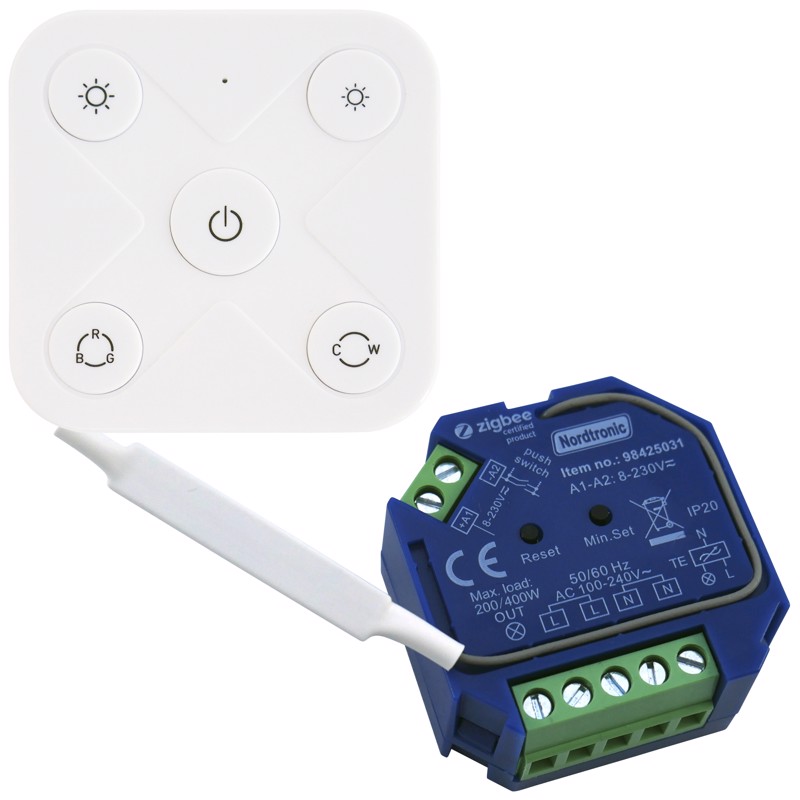
Install the zigbee dimmer in the wall behind the light and then control it with a wireless switch that doesn't have to be installed inside of the wall
glacial oracle
I mean, an alternative would probably be buying smart bulbs
That way it's just an ordinary light fixture
visual cipher
I think a bigger problem for him is how to control it since he can't put a switch inside of the wall. Using a zigbee dimmer or a smart bulb should be the same
wild atlas
A smart bulb and a wireless zigbee remote would work
You can find some that look like standard wall switches
And they just mount to the drywall
ripe delta
wait wait wait haha... Im gonna check out the website.
Its the attic we are renovating and isolating. And there are some options to put some stuff and wiring behind a wall (if we're sure we would never ever be needing to be there anymore). Or i can place it inside a box we create in the corner. There is some radiator stuff behind there where i sometimes need to be so we make that box easy to access.
ripe delta
glacial oracle
I mean, an alternative would probably be buying smart bulbs
thats the last alternative i guess 😛 Or just keep everything dumb.
glacial oracle
But where is the fun with that 
ripe delta
true.... my wife would be happy tho xD
but let me check if i get all the info correctly untill now:
- a wall mount box isnt gonna work since the zigbee dimmer box wouldnt fit. Or its very hard to find a wall box that it would fit in.
- The zigbee dimmer box that is provided would possibly be a solution. I can wire it and put all the lights on it without even the need for a physicial switch (guess its optional to wire it to a physicial light switch?). I could put this above the cieling or inside a box i'm gonna create. So it wouldnt necesarely need to be inside a electrical wall box?
 shell lark
Hi all. Looking for some smart outdoor motion sensor. Is there any aside from the philips hue one?
glacial oracle
ripe delta
but let me check if i get all the info correctly untill now:
- a wall mount box ...
You may want to put it in a place where it is serviceable
So maybe not behind a wall
visual cipher
You might have enough space for the dimmer in the base of the spotlight, depending on the model
ripe delta
i think behind the spotlight might be an option to explore. It would lay on the dryboard cieling in that case.
You guys know of any other solution maybe? Like i can make a little box for this module to wire it to and put it inside the box im already gonna make for service on the radiator system? But maybe there is already a out of the box solution for this?
visual cipher
Inside of there is what I meant, but thay depends on the light
 ripe delta
oh no, that aint gonna work since my spots are going directly into the drywall cieling
visual cipher
Ah
ripe delta
like this
 visual cipher
Still might fit behind that, depending on how they are mounted and if you can get to it when disassembling it
As long as you don't have to cut drywall to get to the dimmer I think it's fine
ripe delta
yea i might prefer not to cut in the drywall if i need to get to it 😛
glacial oracle
There should be flat caps which you can put on the wall to block holes not in use or which are filled with magic
ripe delta
Its gonna be spots like this that will clamp itself to the cieling.
 ripe delta
glacial oracle
There should be flat caps which you can put on the wall to block holes not in us...
ripe delta
glacial oracle
There should be flat caps which you can put on the wall to block holes not in us...
i know what you mean. But that'll depend on the fact of that dimmer box would even fit in the wall. And all there is now are wall sockets that are mounted on the wall instead of inside the wall.
glacial oracle
You want to avoid mounting anything onto the wall at all cost
Drilling into it is something you do once
ripe delta
i know, but i dont know if that would be possible / wise with the construction there is now
glacial oracle
Don't those lights have a switch already
ripe delta
i know everything is possible if you have the right experience, knowledge and equipment xD 😛
glacial oracle
All of which can be gained by trying stuff out ^^
ripe delta
yea i know 😛
But if im correct that zigbee dimmer box doesnt need to have a physicial button attached right? And when it comes with that wireless controller switch it would be enough to fit my needs
visual cipher
glacial oracle
All of which can be gained by trying stuff out ^^
That's what I'm doing. I bought 30+ shelly relays without testing a single one, that basically nobody is using from what I could tell. yolo 😂
glacial oracle
They usually don't need a physical switch attached
ripe delta
nice
ripe delta
visual cipher
That's what I'm doing. I bought 30+ shelly relays without testing a single one, ...
lol. I saw that picture of someone earlier with his electrical box (dont know the correct term) full of shellby stuff to wire everything through its home
insane xD
visual cipher
ripe delta
lol. I saw that picture of someone earlier with his electrical box (dont know th...
That was me
ripe delta
bornasm, it was you xD
ow lol... i was just looking up
lol
but man... wtf xD That's some real dedication!
glacial oracle
If you do it, may as well just do it right
ripe delta
true
glacial oracle
Let us know if something fails on that. With that many around this could give some great data on how good they last in use
visual cipher
It's really overkill, but I wanted it wired and I wanted maximum flexibility. I would of probably been fine buying smart switches or wireless shellys
 chilly heart
It's a shame that I live in a rental place, so much stuff I'm not able to do how I want to
visual cipher
glacial oracle
Let us know if something fails on that. With that many around this could give so...
I will. I'm honestly mostly worried about them overheating being that packed together. I might space them out at least a little
glacial oracle
Add RGB fans
visual cipher
Electrical box with rgb fans 😂
ripe delta
no no no...water cooling 😛
glacial oracle
Sounds like the average yt project to me ^^
visual cipher
You know what the worst part is. It's all for a 90m2 apartment
glacial oracle
That's one switch per m²
ripe delta
visual cipher
You could go with something like this I think https://nordtronic.com/shop/switch...
someone happens to know if this combination is available in the netherlands?
visual cipher
glacial oracle
That's one switch per m²
There's about 90 electrical outlets, about 22 ethernet drops (all cat 6 and I have a 10 Gbit switch), 30 relays
ripe delta
oh i gtg... im done at this customer with his pc maintenance. Thnx all for the information! Ill read it later when / if someone knows if this combo is available in the netherlands.
rose gyro
Has anyone got any experience with Shelly TRVs?
thick girder
Hey all! I am moving house soon and bringing my Home Assistant server and zigbee smart devices.
We are looking to make a security camera system. Home alarm is already installed by a local company.
I really know nothing about security camera systems. Would anyone be able to help me with what I should be doing?
We would be looking for a doorbell camera, and three outdoor security cameras on the house.
Do these have to be powered by cable or can they be wireless(wifi+Battery?)?
What brands should I be looking for, and what should i be using for storing the content? I have a server and nas.
Our goal would be to be able to view a livestream on our HA phone app and also on future tablet kiosk
rose gyro
Battery ones don't usually offer live streams (unless motion is detected). I'd personally go hard-wired for evgerything. PoE is the simplest way to get set up, it just needs a PoE network switch and then 1 wire running to each camera which provides power + data.
#cameras-archived is probably a good place to ask for more specific camera recommendations
thick girder
rose gyro
Battery ones don't usually offer live streams (unless motion is detected). I'd p...
Ok thank you. That makes sense. I will get a PoE switch then
I suppose then I would need to get the handyman to drill a hole for the poe
thank you for the recommendation to cameras, i will ask them there 🙂
 iron echo
Can anyone give me a good Router/AP suggestion? I am currently on Nest Wifi with 3 nodes covering about 1200 SQ Ft (brick house, 2 bedrooms and a basement). My main node is downstairs with my Yellow. In a perfect world I would put my yellow upstairs but I just don't have a good spot for it and my internet comes into the basement. (1950s house)
Is it feasible/reliable to have an AP that has an ethernet port that would allow me to put my yellow and more central to my house/zigbee
 inner halo
Hello everyone
I have an nspanelpro and want to use with z2m, anyone have an idea how to do that king of thing ?
 teal badger
Hi, i have a ring door bell and they piss me off ... Witch want you like or recommend with
HA ?
 strange ferry
hello group,
Someone can recomend me some HomeServer cheap and powerfull to run, promox with HomeAssistant and more docker's containers?
wild atlas
Dell mini pcs
Lol

eBay
FOR SALE Dell OptiPlex 3070 Desktop Micro Intel Core i5-9500T 2.10GHz 8GB RAM 256GB SSD Functional Condition: 100% Working TESTED Good working and cosmetic condition, light signs of previous usage. Comes with power Cord, Windows 10 Pro installed and read
You will need to get more RAM, maybe a bigger disk depending on the deal you find online
But these are pretty sweet as servers
jagged crypt
strange ferry
hello group,
Someone can recomend me some HomeServer cheap and powerfull to run,...
also "lenovo tiny" i5-6500 or so. similar price and power consumption. Pick your religious affiliation with company of manufacture for longevity. (Should be able to get 16gig ram/256 ssd for around $150 or less)
https://www.ebay.com/itm/126270112930 (couple gens newer)
https://www.ebay.com/itm/116002322204 (if you want a larger m2 ssd, get one without an ssd and add one)
Then either run things natively, or run in hypervisor (proxmox, etc)
(similar deals in UK/EU and Oceania area without difficulty.
wild meteor
Hey, what are some decent low cost options for Zigbee adapters/gateways that connect to HA over wifi or ethernet?
I forget the name, but I saw compact PoE Zigbee stick that was >$100. Are there any other options besides going DIY with something like RPi?
wild meteor
never mind, I'm not sure what I was looking at. SLZB-06 is what I had in mind but it costs way less than that
 brittle girder
does anyone know what's been going on with ratgdo lately? looks like they've stopped selling the board by itself
 terse pebble
They sell it. It's just on backorder
brittle girder
hasnt it been on backorder for like 4 months? why remove it now?
 trail wyvern
is the Dell Wyse 5070 Thin Client Celeron J4105 4GB DDR4 16GB , good enough for HA. currently running HA on raspberry pi 2 i find it not fast enough
 delicate frigate
Is it cool to ask about smart devices here? Looking for some help on companion switches for the decora line.
patent river
trail wyvern
is the Dell Wyse 5070 Thin Client Celeron J4105 4GB DDR4 16GB , good enough for ...
CPU yes, RAM yes, SSD not really. One of those plus an M.2 SSD (note that needs to be SATA, not NVMe), yes.
If you find one of the ones that ran Windows rather than Dell's Linux OS, they have 8GB RAM and a 64GB SSD. That model would be fine as is.
trail wyvern
oh i ended up getting this one
why isnt 16gb enough for HA
how big do these programs get lol
patent river
It's more the kind of storage. They're eMMC (basically an SD card soldered to the motherboard), not designed for large amounts of writes
trail wyvern
oh can i add a ssd , i have a 256gb ssd that I dont use
sata though
I should open it up and look i guess
patent river
Don't be fooled looking at the socket. They have a B key M.2 socket so it will fit an NVMe drive, but that won't work. It should be a B+M key so only SATA drives fit, but isn't.
patent river
Probably excessive
Unless you're planning to install Proxmox or something similar and virtualise Home Assistant, 120 or 128 is probably fine.
trail wyvern
k
 eternal apex
ok, I'm pulling my hair out but is there a pre-made sensor that can tell me that someone walked through the door into a room?
What I tried:
- Motion sensor inside of the room: triggers for people already there
- Motion sensor facing the door: triggers with dogs 😄
- Motion sensor stuck to door frame + some tape to limit angle: good... but cannot distinguish walking IN vs OUT
- Two motion sensors separated by some distance in an entryway: works.... sometimes... but since I rely on zigbee sometimes message from sensors don't arrive in correct order (as the difference is at best <1s anyway)
gloomy spoke
In theory, the Aqara P1 or P2 mmWave sensors can detect which "zone" it detects people in, including entering/leaving
eternal apex
gloomy spoke
In theory, the Aqara P1 or P2 mmWave sensors can detect which "zone" it detects ...
Hmm... so the LD2450 should probably be able to tell me when someone walks IN since I can set a zone in a way. I didn't know these radar sensors can also tell motion direction.
I'm so desperate I started thinking about using two LiDARs (e.g. VL53L1X)
radiant furnace
can you adjust the sensor so it doesn't detect dogs by changing the minimum height it scans?
eternal apex
radiant furnace
can you adjust the sensor so it doesn't detect dogs by changing the minimum heig...
I didn't try playing with the radar sensor, but for motion sensors on the side I did exactly that: mounted them on a hip-level and masked bottom of the sensor dome with tape
 gusty sequoia
eternal apex
ok, I'm pulling my hair out but is there a pre-made sensor that can tell me that...
gusty sequoia
eternal apex
ok, I'm pulling my hair out but is there a pre-made sensor that can tell me that...
I guess you mean an open door? Just in case you don't, though, there are door open/close sensors for the closed door scenario
eternal apex
gusty sequoia
I guess you mean an open door? Just in case you don't, though, there are door op...
sadly this was the idea number 0.... but the door is open half of the time rotfl 😄
tough frost
Hi. I'm having issues with a sonoff zigbee dongle and I posted in #zigbee-archived but it got ignored. Is this a better place to ask since it's possibly the dongle?
gloomy spoke
No
 white raft
Anyone have experience integrating the Wizmote?
 quaint blade
are these any code thinking of integrating to my parking barrier so it can lift up and down the barrier

this the pcb used for it

i tried making using esp 8266 with a relay and a mini webserver running on it,it was complicated and wifi didn't work that well as the parking box acted as a faraday
white raft
quaint blade
i tried making using esp 8266 with a relay and a mini webserver running on it,it...
zigbee isn't going to magically fix that
quaint blade
white raft
zigbee isn't going to magically fix that
I understand that but on that product page seems like the black coil is the antenna i can probably make a tiny hole on the side of it and extend it out? the esp had the antenna soldered to it
i'm open to suggestions or looking solutions
white raft
quaint blade
i'm open to suggestions or looking solutions
You have a gate opener that has a dry contact?
Might try a waterproof box with a short length of wire.
quaint blade
white raft
You have a gate opener that has a dry contact?
yeah its a parking barrier actually has pinouts like in the schematic above
boom gate
 olive sluice
Hi, as a follow-up to this :
#the-water-cooler message
(TLDR : Powered my Philipps hue light strip with POE using an adapter).
Received and installed the setup, but I got a (big) issue : If I go under around 20% of brightness (including turning off !), the led strip power back on after 5s in full white brightness and stay like that (likely the default color).
My best guess is that the PoE port (on witch I have zero control) is configured to power down and up if it doesn't get enough amps drained or something ? How can I mitigate this ?
 valid frigate
when that 3rd screen (touch) just sits on your desktop showing homeassistant open in a browser and you get annoyed that if you use the touch it keeps popping out of other software. used a old pic pc (mmc based) and installed blissOS on it now have 17inch tablet on desk 😛

 blazing oyster
https://www.lilygo.cc/products/t-display-s3-amoled
These look sick. I'm betting it wouldn't be too hard to set up a small controller that hooks into homeass

LILYGO®
T-Display-S3 AMOLED is a display screen module with a 1.91" diagonal screen, based on our previous S3 module, we have upgraded the screen, resolution and antenna from LCD to AMOLED and the antenna to 3D antenna.Using SPI interface, it is compatible with any microcontroller with SPI capability. The module is equipped wi
blazing oyster
eternal apex
ok, I'm pulling my hair out but is there a pre-made sensor that can tell me that...
https://www.amazon.com/Aqara-Positioning-Multi-Person-Detection-Assistant/dp/B0BXWZMQJ3 is this what you're looking for?

Aqara Human Precense Sensor
 unborn forum
moved to #cameras-archived
jagged crypt
eternal apex
ok, I'm pulling my hair out but is there a pre-made sensor that can tell me that...
two break-beam sensors on either side of door frame? Nothing is going to be pre-made though from my quick google searches.
 rose rain
OK, looking for some advice. I'm trying to finalize a decision on smart switches. Zooz seems to get recommended a decent amount, and is a reasonable price, but my concern is I've connected all of my current smart bulbs via zigbee, so if I understand it correctly, I'd be better going with zigbee switches so they can act as routers and strengthen the overall network.
Inovelli Blue is also at the top of my list, but I need 10+ switches so that cost adds up quick. I'll probably just do it if that's the best choice, but curious if anyone has any Zigbee recommendations similar to the Zooz
 twilit viper
OK, should be a simeple question. I have a SONOFF zigbee USB dongle. I've heard there is a -P and -E. How can I determine which I have?
fringe crater
Mine says ZBDongle-P on the back
 cold moon
twilit viper
OK, should be a simeple question. I have a SONOFF zigbee USB dongle. I've hear...
cold moon
twilit viper
OK, should be a simeple question. I have a SONOFF zigbee USB dongle. I've hear...
post the full serial id - the e dongle will say "plus v2" in the string
 glacial oracle
this suspiciously does say plus v2 doesnt it
you may still need the full serial to figure out if its the TI or CC one
twilit viper
ah, I see in devices. ID_SERIAL: ITEAD_SONOFF_Zigbee_3.0_USB_Dongle_Plus_V2_20221129181140
eternal apex
blazing oyster
https://www.amazon.com/Aqara-Positioning-Multi-Person-Detection-Assistant/dp/B0B...
pretty much I will try that.... just not paying $80 for a sensor that from HiLink costs $5 😄
eternal apex
jagged crypt
two break-beam sensors on either side of door frame? Nothing is going to be pr...
this is exactly what I wanted but I couldn't find ANYTHING premade.... which is a bit strange, given how common these are in e.g. garages, Then I found the lidar sensors that can do the same thing but don't require a retrorefelctor on the other side (and can measure distance precisely, but I don't need that)
jagged crypt
this is probably an esp32 gpio thing, probably not a "hard" task, but if no one has done it.
and google turns this up - https://www.circuito.io/app?components=513,360217,669681
Learn how to wire the IR Break Beam Sensor to ESP32 - DevKitC in a few simple steps. The primary components for this circuit are: ESP32 - DevKitC and IR Break Beam Sensor. Drag and drop these components onto the canvas, and instantly get a list of secondary parts, wiring instructions and a test code for your circuit. Try it for free.
other stuff if you google "break beam sensor esp32"
patent river
Worth pointing out that off-the-shelf PIR sensors often come with covers that cut out a portion of their coverage area.
And if not, you could 3D print your own: https://notenoughtech.com/3dprint/pir-hc-sr501-cat-eyes/
You can make their field of view tall and narrow, which would allow it to cover a doorway without too much either side.

I can’t believe it took me so long to do this. My $20 staircase LEDs project has been out for a long time. The lights are looking pretty and serve me well without a fail. There was one small upgrade I really wanted to do. I finally got around to do it properly and print […]
eternal apex
patent river
Worth pointing out that off-the-shelf PIR sensors often come with covers that cu...
I tried that - it failed completely unfortunately (#hardware-archived message)
patent river
Ah damn
 subtle latch
Does anyone know a good single gang WiFi dual dimmer switch?
 boreal oar
Can anyone recommend a usb radio for 433mhz?
eternal apex
boreal oar
Can anyone recommend a usb radio for 433mhz?
You cannot go wrong with the genuine RTL-SDR v3
jagged crypt
eternal apex
I tried that - it failed completely unfortunately (https://ptb.discord.com/chann...
I still have to finish configuring my Apollo MSR01, which is LD2410 based, but that has motion and zones, so should technically be able to determine between zone motion
 bitter zenith
jagged crypt
I still have to finish configuring my Apollo MSR01, which is LD2410 based, but t...
bitter zenith
jagged crypt
I still have to finish configuring my Apollo MSR01, which is LD2410 based, but t...
Thanks, @jagged crypt! We just released a video about the ld2410b in the Apollo MSR-1 and it's gates and zones. The gates are predefined by the mmWave module and the three zones we added are user configurable.


In this video, Andre explains the basics of the radar module (HLK-LD2410B) in the Apollo Automation MSR-1 presence sensor, including examples and demonstrations.
Apollo Automation Store: https://bit.ly/49Xuzyw
Follow us on our socials, come chat on Reddit or Discord!
Reddit: https://www.reddit.com/r/ApolloAutomation/
Discord: https://discord...
cold moon
bitter zenith
Thanks, <@532004461263192064>! We just released a video about the ld2410b in the...
nice simple, easy to follow video
bitter zenith
cold moon
nice simple, easy to follow video
Thanks! We will be releasing another video that talks about the engineering mode by the end of next week.
boreal oar
eternal apex
You cannot go wrong with the genuine RTL-SDR v3
Thanks! Can you tell me what specs I'm looking for when sourcing something for 433mhz? When I look up the RTL-SDR it says it's commonly used for TV signals?
eternal apex
boreal oar
Thanks! Can you tell me what specs I'm looking for when sourcing something for 4...
In generally most things on 433Mhz where you're looking for a generic 433 radio and not something specific, uses the RTL chipset (used for TV originally). What you're looking for usually is good analog side, i.e. with good noise performance.
boreal oar
ok
Do you know if the V4 is well supported for HA/433mhz applications? Just trying to connect some weather sensors
devout parrot
It should work. The RTL-SDR dongles are among the devices that are actively tested and supported by the rtl_433 devs.
 buoyant cloak
Hey all! Looking for some advice on a dongle to buy for Z-Wave / Zigbee / Matter etc. I have heard that Matter and Zigbee are not very reliable and are often needed to be re "added." I also have heard about the mesh issues with Zigbee. With that being said, do you all suggest a USB dongle for Z-Wave and or have any arguments against my above mentions?
 winged knoll
No such issues with Zigbee
#zwave-archived can guide you on the Z-Wave side, if you tell them your country
#zigbee-archived can guide you on Zigbee
And ... #thread-archived for Thread, but you probably don't want a stick for that 😉
( #matter-archived is an interesting time right now, and the pins there help explain why)
buoyant cloak
@winged knoll thank you! I'll take a look
winged knoll
I have about 100 Zigbee devices and only have problems when the batteries die
Some devices are great at warning the battery is getting low, some aren't, and some vary widely
boreal oar
devout parrot
It should work. The RTL-SDR dongles are among the devices that are actively test...
Thanks
 chrome ferry
Hey I'm looking for an in-line wattage meter for my oven. I'm in an apartment so I can't go messing with the breaker panel
I don't need to turn it off, I just want the power usage functionality
eternal apex
boreal oar
Do you know if the V4 is well supported for HA/433mhz applications? Just trying ...
I don't remember the details, but v4 isn't 100% and upgrade from v3 and had some limitations and v4 requires a customized driver. From what my friend told me who's more into SDR, unless you want a big antenna outside and want to dig into the hobby..... v3 is easier to use and you will not see a difference 😄 [and v3 is cheaper too]...... I ended up with v3
eternal apex
buoyant cloak
Hey all! Looking for some advice on a dongle to buy for Z-Wave / Zigbee / Matte...
half of the success is picking a clear-ish channel and staying away from other 2.4Ghz noise [esp USB 3] 😉
eternal apex
bitter zenith
Thanks, <@532004461263192064>! We just released a video about the ld2410b in the...
I have a few LD2410 at home and a few LD2450 on order. The ...50 seems to be a more refined design and more powerful one. Everything Presence Lite uses it too, but aparently the firmware is slightly underbaked still.
 marble anvil
I was thinking of getting a Small Form Factor (SFF) PC for HA. I want something with fairly low power consumption, but not too weak - as in I would like it to be able to process voice commands (locally maybe, but possibly online too) such as "Turn off hallway light" like I currently do with Alexa. Perhaps 4 core i5 8GB or so, but I don't know which is why I'm asking here. The box itself will be dedicated to HA and won't be used for anything else like pfSense, ProxMox, virtualisation, etc. Oh, and budget, maybe around €150+ in VAT. I've seen a few OpliPlex, Esprimo, Lenovo ThinkCentre, etc but not sure what to go for. I have a SONOFF Dongle Plus for Zigbee/Matter/Threads already. Looking for what people are currently using with actual power usage details. My needs are fairly basic - 10 x SONOFF Zifbee plugs, 5 x TP-Link WiFi plugs with power monitoring, 3 x TP-Link WiFi lightbulbs (dimmable white, and RGB). Will be adding more Zigbee devices, but at most like 40 devices total.
bitter zenith
eternal apex
I have a few LD2410 at home and a few LD2450 on order. The ...50 seems to be a m...
Yes, it can track up to 3 people as well but it's not fully supported and it's still detection does not work well.
glacial oracle
marble anvil
I was thinking of getting a Small Form Factor (SFF) PC for HA. I want something ...
n100 equipped beelinks would be what id recommend as those have fairly new and efficient hardware. older dells also work just fine for this but it feels wrong to pay a hundred bucks for stuff that is a decade old
in general id make sure that it comes with plents of ram and an ssd preinstalled but besides that there is very little to go wrong if you get a decent cpu in them
 short stag
A question to Broadlink RM Mini3 users. My Philips TV (50pus6523/12) does not have a separete hdm1, hdmi2, hdmi3 butons on the remote - you have to go to sources and then using left/right choose hdmi port number and press OK. A long time ago a friend of mine who had Logitech Harmony universal remote system downloaded my TV to his harmony remote and there were those buttons there - I taught HA those codes from his remote and it had worked great. I stopped using RM Mini3 for a while but would like to get back to it, but I did not save those codes. Does, by any chance, anybody have such codes or maybe a harmony remote?
eternal apex
bitter zenith
Yes, it can track up to 3 people as well but it's not fully supported and it's s...
Yeah, I heard that the main issue is semi-stationary object detection doesn't work as well, which is a bit comical considering this is the main use of 24Ghz radars.
 karmic olive
Does BME280 require a calibration or some additional config parameters?
All modules that I have are off by 4-5C.
Bosh mentions that they calibrate them during production and store values on the chip. Does ESPHome use those values for calibration?
eternal apex
karmic olive
Does BME280 require a calibration or some additional config parameters?
All modu...
There's a few issues with BME280 and temperature sensors overall. First of all, you cannot pool it too often. Second you must place it far away from any heat-generating components (even a resistor for an LED nearby is enough to skew readings!). Third, you need airflow. Fourth convection is often an issue 🙈
These things are especially prominent on BME280 over e.g. BS18B20, as the former is designed to have a low thermal mass and high mesurment velocity. It's a blessing and a curse at the same time 😉
 bold pagoda
Got a question about the Danfoss Ally TRVs (Or if you're UK based - the Hive TRVs). Just got them set up with my Home Assistant install via Zigbee2MQTT about a week ago and have questions around the calibration/adaptation_run_settings
Question is kinda 2 fold:
- Do I need to do an adaptation run (I think I do as they're not performing brilliantly)
- I've set the
adaptation_run_controltoinitiate_adaptationbut nothing happens. Should I manually be changing the TRV temp or just leaving it alone post initiation? Have left 4 x TRVs for > 2hrs and they don't move at all.
Thanks!
marble anvil
glacial oracle
n100 equipped beelinks would be what id recommend as those have fairly new and e...
The Beelink EQ12 16G/500G/N100 is about €260 in Ireland on Amazon after shop voucher. Good bit over the €150 ish price I was aiming for but the cost savings on power usage over 2 or 3 years would make the difference over an old SFF PC.
Plus, looking at the EQ12 with dual 2.5 gig NICs I could just use ProxMox and run everything I need on it, even though originally I was thinking separate dedicated hardware for at least pfSense and HomeAssistant, and have something like EQ12 for everything else.
karmic olive
eternal apex
There's a few issues with BME280 and temperature sensors overall. First of all, ...
I have a huge cutout in the PCB surrounding the BME280 and there is really nothing generating heat around it...
Could oversampling and measuring temperature every 30sec be the issue?
I was expecting that it would be a 1-2 deg off but it shows 30C when it's 24C in the room so it's almost like "guessing sensor" 😂
eternal apex
karmic olive
I have a huge cutout in the PCB surrounding the BME280 and there is really nothi...
30s interval may be a bit excessive. Do you have some airflow over the sensor, even passive (i.e. convection)? We had to change our design a bit because of that 😄
something like this is a recommended design for sensors that are meant to be more accurate
 karmic olive
eternal apex
30s interval may be a bit excessive. Do you have some airflow over the sensor, e...
karmic olive
eternal apex
30s interval may be a bit excessive. Do you have some airflow over the sensor, e...
Ok, I'll try every second. Maybe I was too excited to see value change so I used 30sec. I'll try 60sec. And oversampling should not affect the reading?
eternal apex
karmic olive
Ok, I'll try every second. Maybe I was too excited to see value change so I used...
in general oversampling should give you more positive effects rather than negative 🙂
karmic olive
This is what I have. There is a cutout around the sensor and IC below it is an optical sensor
 eternal apex
how are you mounting the board physicially?
karmic olive
Right now it's floating in the air since I don't have an enclosure for it... 🙂 I just got the boards yesterday
eternal apex
IIRC Bosch recommends the "hole" should be on the top edge of the measuring device, but this isn't as much of a problem from my tests. What's important is I would try for tests mounting it with the USB facing down in your desing. That way you're not getting the heat from U2 (esp32?), i.e. how you have it on the picture
karmic olive
Oh yeah that's how it's going to be mounted. It would "sit" on a wall just like it's shown on the image; USB connector on the bottom
eternal apex
karmic olive
Oh yeah that's how it's going to be mounted. It would "sit" on a wall just like ...
when you put it in a case you may face issues with lack of airflow thou. If I was doing rev2 I would put the BME somewhere on the edge of the board where you can put holes/ribs
we eventually designed a PCB in a way that the BME was on a "sticking out" part of a PCB and fit a groove in the case, in a way that it was far apart from anything but also literally visible through the case 😄 There was also one design that had a fan inside that was turning on before measuremnet but it was way too expensive to manufacture.
karmic olive
Good suggestion. Also the BME280 is sourced from LSCS for this batch... hopefully that wasn't the problem but I have new batch from DigiKey coming tomorrow so I can test and compare them.
Right now room temperature is 24C and BME is showing 32C which is way off. 🙂
eternal apex
there's something REALLY off if it's showing 32°C 😄 It may be a damaged sensor or something similar.... even the counterfeit ones I saw weren't this bad 😄
if you have any fan, try to put it somewhere around the board, not even directly blowing on it but around so the air moves - this will let you 100% eliminate stagnant air. If you have access to a thermal camera you can see some issues too.
karmic olive
It could be. I'll get some geniuine ICs tomorrow and give it a try. Pointed a fan at it and it's not really helping...
I'll also add deep-sleep to ESP so it's not drawing extra power when the board is idle
 cobalt fern
Hi guys
I need to step down from 220v to 5v 3a and I need to be able to turn the device on and off throgh HA. Which would be the most simplistic approach?
It'll be hanging in the ceiling so the simplest the better
I thought sonoff > switch > 5v 3a power supply but that's pretty bulky
or smart switch > 5v 3a power supply too... still too bulky
any help appreciated
golden thorn
What is it powering?
chrome ferry
chrome ferry
Hey I'm looking for an in-line wattage meter for my oven. I'm in an apartment so...
Still looking for something like this, I haven't found anything decent online yet.
This thing is too expensive and requires a battery: https://www.amazon.com/dp/B075K6PHJ9

The Sense monitor tracks your home's power use and device activity in real time.
 chrome lion
Hello, do I need any adapters for running AdGuard on my Raspberry Pi 5 with HS OS?
winged knoll
Adapters?
chrome lion
I mean if it will work just with WiFi
winged knoll
AdGuard is just a DNS resolver, no additional hardware is needed
chrome lion
Alright thanks
winged knoll
It's just software
wild meteor
Does every Shelly come with custom factory calibration for power metering?
I want to switch to ESPhome but I don't want to lose any factory calibration data
glacial oracle
The clamp on ones do
But I suppose it wouldn't be that difficult to do that on your own
cold moon
New toy https://streamable.com/qyysvl

 plush sand
I am having issues getting my Raspberry Pi booting from my USB-connected SSD. It gives one short, one long as error code. I have used the bootloader to get the RPi to boot from USB, but it is not working. Is there anyone who could help me? Full steps and some videos/images in thread.
terse pebble
cold moon
New toy https://streamable.com/qyysvl
Works very well with Alarmo and the Sync Blueprint
https://github.com/ImSorryButWho/HomeAssistantNotes/blob/main/keypad_blueprint.yaml
cold moon
terse pebble
Works very well with Alarmo and the Sync Blueprint
<https://github.com/ImSorryBu...
that's what i'm using

 cold moon
which is the sync blueprint?
terse pebble
I use it also as a chime for some events
cold moon
i only have this setup so far plus alarmo
 terse pebble
The GitHub I linked. The one in the forum should work too (not sure if it has been updated too)
Yeah. That's the same.
cold moon
wow it has a lot of zwave parameters
terse pebble
Yes. You can set a lot of options (for example volume, lights, language,...) and 5 chimes, if I remember correctly
cold moon
i'll have to play with it
rose rain
I'm doing some WLED light strips where the first LED is a bit of a distance from my controller. I was gonna get this data booster, but it's out of stock. Anyone know of any good alternatives? https://www.drzzs.com/shop/3-wire-data-booster/
cold moon
terse pebble
I use it also as a chime for some events
what do you use the chimes for?
cold moon
rose rain
I'm doing some WLED light strips where the first LED is a bit of a distance from...
not really but if there are similar ones i'd look on tindie
terse pebble
Reminding to close the windows after a certain time in winter, for example.
rose rain
Nice, hadn't heard of tindie before, thanks!
cold moon
it's pretty nice for the maker community on both sides of the coin
a lot of guys on there have their PCB and BOM all open sourced and just give people the option of buying preassembled boards instead
 shy sparrow
Hi all,
I'm not a born linuxphile (though I'm trying) but I have a little issue with my HAOS which is installed bare metal on a nuc.
Until recently it was fine, but i had to swap out a cable due to damage, and all I had was a micro-dp. That's fine, as the nuc has a micro-dp as well as micro-hdmi.
However, now on boot I get an error after loading. "unexpected dp dual mode adapter". Is this something I need to worry about? Something I can fix for aesthetics, or just something to ignore? Everything seems to be working ok.
Thanks in advance
winged knoll
More a topic for #installation-archived but you can likely ignore it
 remote lark
Looking to buy a heat pump water heater in the US. Any good local control options available? Otherwise I might get an A O Smith one but not preferred due to it being cloud based. Budget is a couple grand.
rich venture
remote lark
Looking to buy a heat pump water heater in the US. Any good local control option...
you need to specify if you want 240v one or 120v one
remote lark
rich venture
you need to specify if you want 240v one or 120v one
Either is fine
 twilit depot
I live in the US.
Basically want to buy something to turn on and off lights and cameras but privacy focused in the sense of off network 🤔
Athome seems to be out of stock for a bunch of stuff for the US 😦
I looked at the zooz power strips that were enticing
But OOS 😦
Alternative seems to be buying 4 zooz plugs but might take too much space
devout parrot
For fully local WiFi plugs, you can't go wrong with the good old Sonoff S31 flashed with esphome. You can get them for $7-8 with the stock firmware and flash them yourself, or you can buy them preflashed from https://cloudfree.shop .
eternal apex
just a fair warning about Sonoff plugs [and in general, any plug-typy-thingies like that]: they're NOT meant to switch big loads and especially inductive loads... so don't use them for like a washing machine 😉
golden thorn
A washing machine's motor isn't immediately engaged when you "plug it in" and you're unlikely to switch it off while it's running. Not sure if this is the best example.
rich venture
eternal apex
just a fair warning about Sonoff plugs [and in general, any plug-typy-thingies l...
washing machine motor is not what is taking most of the power, atmost it is 500w.
heating element on the other hand...
 cursive sphinx
Hi
Does somebody know a way to extract the power cunsumed (Kwh) data from a chinese smart plug that uses tuya?
Because when i configured local tuya it didn't had a data point which carried this information
glacial oracle
Modern washing machines and dryers should stay very well within the limits of any smart plug from my experience. Dishwashers on the other hand are still pure madness
cold moon
Dryers?!
glacial oracle
Yes
This list excludes appliances made for markets where efficiency is not a priority
cold moon
murica?
tough frost
Hi!
I haven't decided on a smart lighting system but I'm currently playing with IKEA and hue. Issue is that for the bedrooms here in Aus, I can only get 1100lm min for hue which don't fit in the lighting fixtures in the bedroom. As with the IKEA 1105lm tuneable white bulbs. My partner says the 806lm warm white IKEA bulbs are too yellow...
But I am confused. I had the IKEA tuneable white set to 2700k, the hue bulb is 2700k, and the IKEA 2700k... Except she singled out the IKEA warm white bulb as too yellow? IKEA claim a 90 CRI?
glacial oracle
Not quite sure what the question with this is, but why not just look at those bulbs yourself and form your own opinion on that matter. There may very well be differences and tolerances between similar bulbs which may or may not be different on different brightness settings. If they are configurable you may as well tune them down a bit more to account for such changes. While this affects the brightness the difference you are looking for might as well not be noticable.
 tight bane
Hi. Which terminal will be better for HA os + frigate? Dell Wyse 5070 (J5005 based) or HP T640 (R1505G based) ?
glacial oracle
The Ryzen may gain some on the significant clock speed advantage
But you might want to go with more powerful CPUs in general
Unless you have a different accelerator for frigate, both options likely won't be great fun
Like something with an N100 or actual Core/Ryzen cpus
still sapphire
cold moon
murica?
Yes. My electric dryer is now about a 700W appliance, although that is of course a compressor motor. That said, I do have my washer and dryer smart plugs locked to always on.
(So the relays only kick in when power is lost, which isn’t all that often)
(The plugs are specified at 16 amps and at 230V that’s a bit over 3.5 kW. If they are regularly breaking a 10 amp plus load I’d worry, but anything sane is fine.)
(That said: I also have my kitchen water heater on a smart plug, which I actually use, and that is a 2000W/nearly 10 amp load. If anything’s gonna break here, it’s that one.)
(Washing machines, like dishwashers, contain about a 2000W heating element, and the washer additionally has a couple motors that’re a couple hundred watts total — maybe a little more during the spin cycle)
still sapphire
So: my wall panel is a 10” android tablet (a $100 BMax cheapie, in case it matters), and I have it mounted on a magnetic mount. That works great. But I want to know: is there anyone who has had success in adding a wireless charging coil to something like that so I could take it off and reinstall it with very little chance of it accidentally just missing the coils and not charging properly?
 twilit depot
devout parrot
For fully local WiFi plugs, you can't go wrong with the good old Sonoff S31 flas...
twilit depot
devout parrot
For fully local WiFi plugs, you can't go wrong with the good old Sonoff S31 flas...
These plugs all need a hub I assume?
I can’t just run them directly off something like a HomePod or my phone can I?
And this is just for some lamps
Also when you say fully local WiFi : if the internet goes out, will they still work remotely?
still sapphire
still sapphire
So: my wall panel is a 10” android tablet (a $100 BMax cheapie, in case it matte...
Hm. A Qi receiver coil plus a couple of MagSafe ring mounts should do the trick.
Let’s see what arrives from AliExpress.
ESPHome connects over WiFi straight from the plug to your home assistant, no more no less. (Well, via your WiFi router, obviously.)
If you can’t get to your home assistant over the internet to tell it to do something, you can’t do something. But if you’re inside the house and you can get to your HA but not the internet then yes.
gusty sequoia
twilit depot
These plugs all need a hub I assume?
ESPHome doesn't require a hub. Integrates well with home assistant, obviously, but doesn't require it, especially if you enable the web interface
twilit depot
Ooo thanks
Wait this makes me further curious about what both of you said
More for clarification
“But if you’re inside the house and you can get to your HA but not the internet then yes.”
If I don’t get home assistant hub, can I still turn the plugs on and off with no internet from inside the house?
I’m assuming yes
Specifically because of the web interface thing mian mentioned
cold moon
twilit depot
“But if you’re inside the house and you can get to your HA but not the internet ...
You’re kind of stuck on ‘hub’ here
twilit depot
Oh so I do need one
cold moon
Esphome devices use WiFi so they’re able to be accessed over the network
cold moon
twilit depot
Oh so I do need one
No I’m saying you’re focusing on the wrong thing
twilit depot
Ohhhh
cold moon
‘Hubs’ and bridges are a way for a company to make a proprietary product and you access your devices via the hub
Most of us prefer local only no cloud no hub
cold moon
If you want to access your local only stuff outside your house, you can still set that up
twilit depot
Ok good good
My only experience has been kasa plugs from ages ago where they became useless when we lost internet
cold moon
Cool
twilit depot
I wish they made a power strip
I’d have ordered 2 power strips instead of 4 plugs
Thanks for the clarification btw
cold moon
twilit depot
I’d have ordered 2 power strips instead of 4 plugs
There is a zwave power strip id suggest but you’ll need a zwave controller. Zwave is a low powered mesh technology
twilit depot
If it’s the zooz one it’s out of stock I believe last I saw
cold moon
Zooz yea
twilit depot
How often are these things restocked 🤔
cold moon
They’re not selling the full lineup on Amazon
I’d order from them directly at thesmartesthouse
The 800 series if it’s out
twilit depot
Yea they’re out of stock from that website
twilit depot
Ooo ok
What is this 800 series you mentioned
Is this newer?
This is the only one I saw

The Smartest House
Safe & Smart Power Up NEW 800LR VERSION COMING 3/2024 PRODUCT HIGHLIGHTS 5 Z-Wave Plus power outlets for wireless control of small appliances and electronics (total under 15 A resistive load) 2 USB ports for phone / tablet chargers report on / off status to the hub (NO Z-Wave control) NEW IN VERSION 3: enhanc
Oh jt says right there
Coming march
I’ll set a reminder for march
cold moon
ah nice
i still like the sonoff s31 tho
https://dpaste.org/CTifv here's the yaml i use for my smart plugs
twilit depot
Oh?
cold moon
switch:
  - platform: gpio
    name: "${friendly_devicename}"
    icon: "mdi:power-socket-us"
    pin: GPIO12
    id: relay
    restore_mode: ALWAYS_OFF
you can change that last line to ALWAYS_ON if you want it to have power when it reboots (i.e. for a fridge)
twilit depot
Ah
cold moon
i hvae it turned off for my 3d printers but on for my fridges
cold moon
you can flash your new s31 with that code without really changing anything other than the name
twilit depot
What’s the default
cold moon
they come "preflashed" but it wont have all this
cold moon
twilit depot
They can handle heavy loads like that?
i wouldnt actually run them at a sustained load that they're rated for (15a)
twilit depot
The yaml code
Based on default state
I’m assuming default is always on?
Basically trying to understand the purpose of it
Or is the restore states the purpose
cold moon
idk what it ships with
twilit depot
Ohhh
cold moon
i guess you need to watch a youtube video about esphome or something
twilit depot
Noted
cold moon
there's not just one purpose
it's changing the behavior and what is exposed to home assistant from the device
twilit depot
Right
twilit depot
cold moon
i guess you need to watch a youtube video about esphome or something
I shall do this shortly thanks
cold moon
it's basically a docker container or addon that you install, and then can also use that program to flash firmware and manage microcontrollers
and as esphome has updates, it will allow you to update the firmware of the device straight from home assistant
now this isnt going to make it like.. turn on faster.. but it's nice to have fully local fw that you can apply bugfixes to
twilit depot
Interesting
cold moon
here's what one of my plugs looks like
 twilit depot
Makes sense, will def try to understand this more as it seems crucial/convenient based on the things you mentioned
cold moon
part of the yaml code turns on a locally hosted webpage for the device so i can hit it directly if i want to
twilit depot
Oh Icic
twilit depot
Right
15w bulb doesn’t sound that bright 🤔
Then again I guess I’m trying to lighten a room an that might not be the approach to take
patent river
1400 lumen. That's about as bright as bulbs that aren't comically enormous get
cold moon
no that's a super bright bulb
twilit depot
Oh Icic
I have a 100w led dumb bulb that I use to light a room but that’s because it’s from one corner and the room doesn’t come with a built in ceiling light
It’s a tall lamp
patent river
Sure that isn't "100W equivalent"? They do love to rate light bulbs in terms of how much light relative to an incandescent bulb.
patent river
Probably gonna have to cut that out at some point, I imagine (like VCRs and floppy disks) there are people out there who've never even seen an incandescent bulb
Right, so at the 80-100lm/w you hope to achieve, that's gonna be ~1150 - 1450lm
twilit depot
Right
Damn confusing old standard
Ok maybe I will look at these bulbs
But then I won’t need the smart plug
😕
No point pairing both together I imagine
 modern oak
Looking at WiZ, the HA page says local enabled by default, anyone had experience as to whether it is truly local from the start? If I connect these bulbs directly to an IoT network with no internet access will they be locally accessible? https://www.home-assistant.io/integrations/wiz/

 steep glacier
I have some Aquara temp and humidity sensors I have connected to HomeAssistant with my Zigbee adapter using this guy https://a.co/d/2aVmVAt
They don't nessacarily disconnect, but they do stop reporting any data after a short while.
Is it because of the adapter? Or do I need the Aquara hub to keep them alive?
 obsidian moat
Thanks to those who suggested them several weeks ago; I got the AirGradient devices yesterday, ESPHome has been a delight (getting esphome dashboard setup on Core has been a fun adventure!) and everything seems to be working great! I'm really thrilled about the overall experience and esphome is just straight up awesome so far
cold moon
steep glacier
Is it because of the adapter? Or do I need the Aquara hub to keep them alive?
you need a better zigbee coordinator
you also need to use a usb extender https://youtu.be/tHqZhNcFEvA 30 second clip showing why

USB 3.0 can cause your Zigbee devices to fully stop functioning. In this video we show this by moving a Zigbee device and Zigbee adapter next to USB 3.0 port and cable.
The demo is done with a Home Assistant SkyConnect and IKEA Tradfri remote but this affects all Zigbee sticks and devices.
To avoid interference, use a shielded USB 2.0 extensio...
 tame escarp
Do cameras increase the load of HA by a lot? I've just recently started out with HA on a RPi 4B 2GB model, and I plan to integrate the camera of a google nest hub max. Will I need to upgrade already?
devout parrot
twilit depot
But then I won’t need the smart plug
Right with plug in lamps you'd either go smart plug+dumb bulb or smart bulb+dumb plug. I have a few of each situation, it's just dependent on what you need the light to do.
twilit depot
Right
Apart from any smart home thing I haven’t done room design research in how to properly light a room
Ceiling light isn’t possible since it’s an apt complex
steep glacier
cold moon
you need a better zigbee coordinator
Goottcchhaa. And as a smooth brain newb, what's a "Zigbee coordinator"?
cold moon
steep glacier
Goottcchhaa. And as a smooth brain newb, what's a "Zigbee coordinator"?
your nortek stick is a zigbee coordinator
https://tubeszb.com/product/cc2652p7-zigbee-to-poe-coordinator-2023/ this is the one i use and suggest
zigbee coordinator is what zigbee2mqtt or zha uses to control the zigbee mesh (like your aqara sensors)
rose rain
So I'm looking for motion/occupancy sensors. All my research led me to the Aqara P1 but it seems to be out of stock everywhere. Anyone have other suggestions they've liked?
 knotty vale
on my third failed micro sd card
guess it is time to migrate to my NAS server
love these automated google drive backups
 tawny viper
cold moon
https://tubeszb.com/product/cc2652p7-zigbee-to-poe-coordinator-2023/ this is the...
tawny viper
cold moon
https://tubeszb.com/product/cc2652p7-zigbee-to-poe-coordinator-2023/ this is the...
Oh it's official for sale now? Sweet
 nimble token
Looking to start Home Assistant for a 3D Printer Farm, and some other basic on/off stuff. I am seeing the Kasa line recommended a bunch.
At this time for futureproofing as much as I can I should only be looking at options with Matter, right?
Also, assuming the printing software can do it, Can Home Assistant running on Windows receive commands to turn on or off switches?
I know theres some Stream Deck Integration already, not sure how that works atm
still sapphire
knotty vale
on my third failed micro sd card
I’ve had that happen often enough in pi projects before that I chose to run my ha on a usb adapter and old SSD from the start. Works great.
 torpid cedar
Hello everyone, is there anybody using the SONOFF SNZB-02P (temperature and humidity sensor), feeling that the temperature recorded is not right (by 1-2 °) ?
 steel lion
hey folks, now that ive moved primarily off the cloud, im left with one major hurdle to overcome: removal of google hubs/screens/pucks whatever you want to call the bundle of google devices that spy on you 🙂 )
Anyway, does anyone have a good solution (great would be ... well, great,,, perfect would be, well, also, perfect...) to replace the grand functionality of Google's interactive devices in favor of HA? voice control is a must, would also like a visually "pretty" ui if theres more than basic functionality (thinking i can only present 1 of 2 ways to the wife... pretty or simple. i prefer simple, but...)
steel lion
torpid cedar
Hello everyone, is there anybody using the SONOFF SNZB-02P (temperature and hum...
flashed to tasmo or running stock firmware?
torpid cedar
Stock
steel lion
torpid cedar
Stock
using zigbee2mqtt?
well, im assuming yes... try here:
https://community.home-assistant.io/t/calibrating-sonoff-snzb-02/236453/15
Home Assistant Community
I’ve created a quirk for it, because my values also were all too high.
torpid cedar
Using ZHA , is there really a benefit using z2mqtt instead of ZHA ? (Seems like a painful Switch to do)
steel lion
follow the link above, scroll to the bottom. someone created a quirck for it to adjust it (from what very brief information i got from the blurb)
looks like the guys over at hubutat say the SONOFF SNZB-02P has built in temp offset. possibly found under "location" for some reason
torpid cedar
thanks, I'm checking that
 dense heath
hi, I am not sure if this is the best place but it seems the best match. I'm running into what seems to be hardware (maybe some configuration, but not sure) issue and I am not really familiar with the internals of the Zigbee protocol to judge what is going on. At home essentially I have a bunch of philips hue v1 dimmerswitches. Connected to my Hue bridge they always worked without issues, however now I switched to Home Assistant one of them doesn´t trigger the automations I connect. Digging a bit deeper in the developer tools I notice an interesting difference.
If I listen to the zha_event via the interface and press let say the on button on a switch which works and on the switch which doesn't work I notice something interesting. The one which works fires 3 events, a generic "on" command followed by on_short_release and on_press event. For the one which doesn't work, only the generic "on" command shows up in the logs. I assume that the automation actually link to those missing events
Does anyone have some pointers of what is wrong here or is the switch a goner?
dense heath
ok I am getting crazy here, it suddenly starts to work after 2 evenings of fiddling... still interested if someone can point me to what was going on here
 peak sleet
Hey, hopefully someone can help! I'm looking for a hardware recommendation. I want to control a bunch of lights in a room with ideally some kind of zigbee scene panel that can replace a standard UK light switch, something like this https://www.aliexpress.com/item/1005004776225132.html. I'd like something that's powered that can effectively be a zigbee hub, something like a 4 gang one of these I guess https://www.aliexpress.com/item/1005006352066007.html
My only requirement is that it's zigbee and is mains powered, I'm not sure on using an existing switch like the second link, because I don't know if I can decouple (correct word?) the relays on the back from the buttons - I won't be using them, there's only 240v power going into the back of it, no lights to control off the relays
 tame tangle
Hello. Can someone tell me a good wind speed hardware ? I just need it to do basic stuff like measurement of speed. thank you
 frank narwhal
Hi guys, I'm looking for 6" recessed lighting that's operated by zigbee and these are my requirements:
a) Adjustable white color temperature
b) White only**
c) Zigbee, as mentioned
d) 120VAC (USA)
e) $5-$15 per piece, as I haven't been able to find any that aren't insanely priced. (I'm buying 150 of them)
Any recommendations?
jagged crypt
gledopto i think has zigbee 6" recessed
glacial oracle
that sounds quite like a tight budget for something quality
jagged crypt
assuming USA (or Canada) based on $ sign
glacial oracle
might want to point out that replacable bulbs are kinda important ish
jagged crypt
looks like the gledopto's are 4" ones. I ended up grabbing discounted wiz (wifi) lights for my recessed 5/6" house. Not sure I would reccomend 150 wifi bulbs though.....
glacial oracle
but would those fit the budget including the fixtures
jagged crypt
I paid $10 for 6" wiz full color lights - with 120v input
the non-bluetooth capable (and none matter capable) - https://www.amazon.com/WiZ-Connected-Color-Retrofit-Downlight/dp/B0B2B1STK4

PLC 12.5W (85W)6" DWNLGHT WIFI COLOR 1PK
had the orange cables dropping in 120v already from led downlight fixtures installed already, they looked like this -
"retrofit" can lights? Not sure of the exact naming.
the holes in my ceiling didn't have screw in option, so power was already droped in on the clips
 jagged crypt
there's only two connections in a screw in light bulb
glacial oracle
the ground goes to the fixtures directly
or at least thats where it should go
suppose this would come in externally then, no idea tho
glacial oracle
maybe its alright due to the plastic casing
jagged crypt
I'm not sure what you are concerned with, the lack of ground?
glacial oracle
yes
jagged crypt
are you in the uk?
glacial oracle
germany
jagged crypt
incandescent lights that I'm familar with here in the USA never had a ground. They are plugged into an outlet that is grounded, or a switch that is. If you short out the light (and don't blow the light) then the switch or outlet returns to ground
or plastic/glass
probably shortest answer is different standards in different countries 🙂
(feel free to debate value/safety of each country's standards)
glacial oracle
yea very likely
here it is common for the grounding to pass onto the fixtures those lamps screw in, similar to how it works with pc cases, toasters and all the other devices
im not quite sure what they do with it on devices that have exclusively plastic shells
jagged crypt
much of europe (IT/FR/DE) that I've been, stand alone lights are plugged into sockets with only 2-wires (not-grounded)
glacial oracle
sadly i dont have one around to snip of the cable and have a look ^^
jagged crypt
i'm basing it on the 2 prongs on the plug
glacial oracle
probably the weird type n variant
jagged crypt
i guess the type-f has ground on it
otherwise, yea, unground type-n
which is some "generic" type-c
 frank narwhal
thank you guys for all this info.. i'll possibly look into canned lights where i can screw in a smart bulb
is there by any chance some sort of cover I could buy for the cans that so I could hide the bulb from view?
jagged crypt
if you don't need to adjust the color temp dynamically, just wiring up switches for whole batches may make more sense
frank narwhal
yes, but i'm not sure how I'd adjust color temperature with a switch, and what recessed lights support that
An option is also for me to change out the driver box with something else that can make a dumb one smart. The dumb ones come with a switch in the junction box to switch between 5 color temperatures, so I'm assuming a different driver could achieve that and be zigbee controlled
jagged crypt
i've seen some downlights that are "Adjustable" but it's a physical switch on the device 🙂
still sapphire
Re ground wires: that’s class I versus Class II.
Class II insulated always has two layers of insulation (often, one of those is a plastic case) between your fingers and electricity and then it doesn’t need a ground. Class I can have a grounded metal case, like audio equipment or a washing machine.
(And okay, yes, incandescent light bulbs only have glass, but they’re not a device, the fixture is, the bulb is just in it. And yes, you can sometimes have class II fixtures where you can touch the bulb, so those don’t follow the rule of thumb._
 wooden rune
Hi, I made a led strips like this tuto : https://blog.ktz.me/smart-led-strips-with-no-subscription-required/
but y have a issue the first 9 leds are not in the same color than the other.
Do you have any idea what can be the issue?

and the led 10 to 12 flash in other color every second or less
glacial oracle
that could be an issue with the signal aswell as with the power
wooden rune
if the signal wire is damaged is it possible that this creates resistance and change the color?
glacial oracle
Anything that causes the signal to be misinterpreted can cause it to do a lot of stuff
Which can be the case for the signal itself being "noisy" aswell as the led chips having too little power for proper operation so they just read whatever
If this is a diy thing #diy-archived may have the people to figure this out
wooden rune
I tried to lower the brightness and it change nothing. last question, is it possible that the 9 first led are broken and the other (ho are after) are ok?
thank a lot !
 tepid heart
wooden rune
thank a lot !
tepid heart
wooden rune
thank a lot !
Check your logic level converter wiring. This usually happens when driving the 5V input with 3.3V. It is unlikely that the fist few LEDs are broken as the signal has to pass through the control chips for each LED.
wooden rune
tepid heart
Check your logic level converter wiring. This usually happens when driving the 5...
okay thanks but it has work great a few weeks earlier, so I think the logic level converter wiring is okay
tepid heart
Check it. Make sure when you put 3.3V on the data input tot the converter you are getting 5V out the other end.
wooden rune
okay I will check! thanks
Oh my!😭
I just turned of my strips led and everi led turn of outside the 9 first😂
 gentle mulch
Im trying to find a switch that seems impossible to find
Smart switch made by a reputable company, can be a three way switch, doesn't require neutral, not cloud connected
 tepid heart
wooden rune
I just turned of my strips led and everi led turn of outside the 9 first😂
tepid heart
wooden rune
I just turned of my strips led and everi led turn of outside the 9 first😂
Not sure why you find this surprising. If they are not receiving colour commands correctly they are unlikely to receive the off command either.
wooden rune
Yes ! that's why I'm surprised
tepid heart

 kindred pivot
Which Thermostat devices allow you to set the valve position?
tepid heart
Proportional ones.
still sapphire
The fact that it’s 9 is suggestive of an off by one error combined with an off by 10 error.
(Is it a string of individual LEDs or a string of sections of three LEDs with a control chip? In that case it’s actually off by three, which is very different)
 thin ginkgo
Hmm, could use some help to get on the right track.
In EU (so three phase electric) - i have a situation where we have multiple "consumers" (multiple families) for a single incoming "mains". I want to set up some smart monitoring on the consumption of the electricity - primarily between the various households, but also some of the higher consumers (basically circuit monitoring) - are there any good resources where to learn about the various things on the market (or e.g. how they compare to DIY things - plenty capable to work with high-voltage)
Have looked in to the Emporia Vue2 - but it seems mostly tailored to the US market - but i am a bit lost if that even matters
 tender aurora
i'm looking for a simple wifi-button that integrates nicely with h-a
it has to be battery-powered
glacial oracle
thin ginkgo
Hmm, could use some help to get on the right track.
In EU (so three phase elect...
solutions vary mostly between how easy they are to install and how accurate they measure
i would go for smart meters with digital readouts (p1) for global measurements as those tend to be most accurate
for high current devices or supply lines monitoring those with a clamp on solution likely is good enough, and for individual low current devices smart plugs will do just fine for the most part
thin ginkgo
any suggestions in regards to smart meters? Difficulty of install in terms of circuits should not be much of an issue as i need to rip out and redo the whole panel anyways.
More worrysome in some regards is the "software" side of integration (which drew me to look at the vue originally) - in that i wouldn't necesarily have to set up additional server side things to collect the data, but that impression might be wrong as well
In my case "just" consumption isn't really enough anyways, since we are tied to nordpool, so setting up a relational DB to the readings hourly is a must anyways
still sapphire
thin ginkgo
Hmm, could use some help to get on the right track.
In EU (so three phase elect...
Where in EU? I personally really like the homewizard energy gear I have (and I have a lot) but they’re kind of Netherlands-focused more than EU-as-a-whole-focused. And do you need MID-compliant meters so you can legally divide costs up according to usage?
Is there any solar or storage involved?
(Do you have a budget?)
(How much do the individual families need to be able to see and do on their own? Or are we thinking one big setup feeding into HA and you’re going to make custom dashboards for each family?)
glacial oracle
thin ginkgo
any suggestions in regards to smart meters? Difficulty of install in terms of ci...
i would recommend getting something with a p1 port for reading out its values. there are various devices such as https://www.homewizard.com/p1-meter/ which can read from those and send make the data available to the network and ha. some others have local apis and are directly network attached but i suppose this comes down to what it costs and about how usable their implementations are
i suppose this will be heavily about just having the data available and not it being a for writing bills. in the later case your local energy company will gladly provide you with valid options and someone to install them for fairly low cost
thin ginkgo
still sapphire
Where in EU? I personally really like the homewizard energy gear I have (and I h...
Latvia, and no "legal" requirements
thin ginkgo
still sapphire
Is there any solar or storage involved?
not yet, but its planned down the line - EVSE charging is involved now though
thin ginkgo
still sapphire
(How much do the individual families need to be able to see and do on their own?...
One big dashboard. Families are (mostly) 50+, so even dashboards are not necessarily needed for them - dashboards are more relevant to the other things though - e.g. one monitor on the EVSE (where billing is relevant), some monitors on heavy machinery etc. (where billing is not necessarily relevant, and more of a "This helps building the mental map of the actual cost of manufacturing"
thin ginkgo
glacial oracle
i suppose this will be heavily about just having the data available and not it b...
Sadly that is not the case - local utility companies are ready to do precicely fuck all
Closest comparison i would say is a "commune" or even trailer park. Basically 1 main house, then 4 separate "trailer-type" houses, 1 communal workshop
Bill splitting from utility side automatically comes with a monthly cost of ~30+ eur/connection which adds up when most of the families are running close to minimum wage
bills are currently split through a mode of "dumb monitor" which isn't exactly helpful when the actual metering varies hourly
thin ginkgo
glacial oracle
i would recommend getting something with a p1 port for reading out its values. t...
Will look in to that, thanks!
And big thanks for taking the time to answer!
glacial oracle
Just make sure that this meter is certified/ legally compliant for those purposes
still sapphire
Yeah, I’m not sure how well the Homewizard software copes with multiple P1 meters. You could definitely use the three phase meters — they’re rebadged and refirmwared WiFi meters — but of course a whole set of those at 130 euros each does add up.
But they are MID certified.
glacial oracle
I don't think hw would have an issue with that, especially as the ha integration goes ip based over their local apis
But there are plenty companies doing those readers and meters
Certification probably matters more
You may also be able to visit a local hardware store and see what they have in stock. They usually carry some variety of meters
still sapphire
I don’t think a full on certified meter with a P1 port would be cheaper than 100 euros each, though? But I am having trouble googling.
still sapphire
Found these, but those are all modbus, not P1. And at those prices the 130 euro one that Homewizard sells (assuming the amps fit) is probably a better fit. https://www.kwhmeter.nl/3-fase-kwh-meters
glacial oracle
Yea that should also work with ha on the modbus integration
 twilit relic
I’m looking for a device or way of wiring that will automatically turn on a small led light when the power is out
Like a reverse dead man’s switch
you know how in movies the red lights come on when the power is cut
still sapphire
Better to buy an Emergency Lighting fixture for that.
That’s like, literally a whole aisle at a store somewhere.
still sapphire
Well, the industrial way is to just buy an emergency light and mount it next to the regular light. But I take that’s not an option?
twilit relic
that would not get wife approval factor haha
I was thinking of mounting small led lights in each room
still sapphire
I mean, you’re gonna need something with a battery and a light in it. You might be able to find a device that combines that with a regular smart light, but… that’s a tall order.
twilit relic
yeah. Battery smart light
still sapphire
https://www.noodverlichtingled.nl/plafonniere-met-noodunit-or-cct-switch-3000k4000k6.html?source=googlebase&gad_source=1&gclid=CjwKCAiAzJOtBhALEiwAtwj8tgZLSgoCmpGdWkcafSNMcQ6mocaIqMBjmMvtZ7cPQrhMKAMyrFCzNRoCdw0QAvD_BwE — this is a regular ass fixture that includes an emergency light function.

NoodverlichtingLED.nl, specialist in noodverlichting
Deze plafonnière met noodfunctie is goed toepasbaar in hallen, gangen en gebouwen. Deze veelzijdige plafonnière beschikt over een grijze afscherming vervaardigd
Making it smart is where it becomes harder.
You could of course use a smart switch/relay, instead of a smart bulb? Then it’s only a little dumb.
glacial oracle
if you want to go all out, a power generator switch could be added to the wiring switching the lighting over to a ups
including batteries in light fixtures directly could be a little maintenance challenge
twilit relic
I have 4 small UPS around the house
I could put some simple tp link outlets on those I guess
that's probably the most consumer friendly way: cheap UPS + plug existing smart lamps into them in the main rooms
not as cool as red emergency lights flicking on all over the house tho
of course, i could put colored bulbs in those lamps...
twilit relic

Many possible use cases. Back-up your; - Konnected devices - router - modem - Raspberry Pi - Hubitat hub - SmartThings hub - and more PACKAGE INCLUDES: Konnected branded Mini-UPS device with 7800mAh battery DC male to DC male power cable Requires a 12V DC power adapter (not included). Use the one...
twilit depot
What sff pcs yall use? I see consensus in this chat to get a sff pc instead of HA Green/Yellow.
I saw a few mentions of M910q lenovo and some dells
So many sff pcs nowadays
Wondering if anyone uses the minisforum sffs
glacial oracle
minisforum works very well for me, but i switched to a beelink
mostly because of it being cheaper to run for ha
twilit depot
Power savings?
glacial oracle
yea, it was a downgrade from an 5900xt to an N100
twilit depot
Ok damn that’s a huge difference
glacial oracle
i ended up using stuff a lot less than i thought, and with the igpu on the intel one even plex/jellyfin works very nicely on ~15w
its a bit more limited by having less usb ports available
twilit depot
Right but you can always add a usb hub I imagine
glacial oracle
yea
winged knoll
Depends on what you mean
HAOS can run in a VM
HA directly on macOS is harder, you can only use a pure Core install
Other things may vary
twilit depot
I could probably use a Mac mini for other purposes too, but curious if it could become a HA hub for esphome devices
Right
winged knoll
The CPU arch is the issue
winged knoll
Well, some ARM
glacial oracle
older mac minis however would be able to work
winged knoll
Nobody's decided to tackle getting HAOS natively working there, and Docker on macOS is nerfed
twilit depot
Right right
winged knoll
Actually, Docker on not Linux is nerfed
twilit depot
glacial oracle
older mac minis however would be able to work
Hmm at that point id just get a windows machine tbh
glacial oracle
docker in a vm with magic to hide it
twilit depot
I’ll continue digging into some more sffs then. Thanks for the insight yall.
I’m just being picky at this point lol
glacial oracle
you likely can find something that works for you, there is pretty much endless availablility
and some models that got discontinued go quite cheap
twilit depot
I don’t want it just for HA , probably want to attach it to a tv for browser acccess to watch stuff
Right
Too many options 😅
glacial oracle
if its just for watching stuff, maybe an apple tv or some of those solutions may be more cost effective
tho with the apple tv, thats kinda sff prices ^^
wooden rune
still sapphire
(Is it a string of individual LEDs or a string of sections of three LEDs with a ...
by three
 tight arrow
Hi everyone 👋
I'm brand new to Home Assistant
I want to set it up as my Aqara m2 hub doesn't see/work with my other ZigBee 3.0 devices
Should I purchase a RPi, some other low power pc, or NAS?
My main hybrid PC/server uses 90-170w minimum, and electric is insane in the UK still.
I'm looking for something that I can run SAB on as well, if possible?
glacial oracle
an sff would likely be a good start
nas solutions could also work but may come in more expensive
wild atlas
The sff PCs also have pretty low power draw, on the 30w side rather than the 200w side
 simple ivy
after updating latest esphome firmware, my LD2410 presence sensors are no longer working
winged knoll
See #diy-archived or the ESPHome Discord
 outer knotBOT
ESPHome is a system to control your ESP8266/ESP32, with a native integration for Home Assistant.
You can find their documentation here, and get help with ESPHome itself here in the #diy-archived channel (#integrations-archived for the Home Assistant side integration with it). They also have their own Discord server too.
 barren cedar
anyone also have problems with eve motion? i have one in my corridor abd my automation resets the motionlgiht every 1 minute to stay on when there is movement. but my motion sensor doesnt pick up motion if i stay in the room and move. i have to leave the room to dected moviment again.
winged knoll
You probably want the relevant channel - #thread-archived #zigbee-archived etc
tight arrow
Any suggestions on a SFF spec?
I have a space Node 202 case that hasn't been used in a decade
wild meteor
Are there any EU energy monitoring smart plugs that stand above the rest in terms of measurement accuracy, i.e. better than HLW8012 used in most(?) commonly recommended products?
glacial oracle
They probably are accurate enough for what it's worth. A higher sampling rate would help but that seems to be the limitation
More accurate meters are available for general consumption measurement but those aren't plugs
 steep yoke
I went out and got a 2011 mac mini with the i5 and 8gb, how are yall running this and getting decent performance out of it?
still sapphire
2011? Jesus. That’s old, man.
I just retired my 2012 i7 16GB because it was way too slow for macOS.
devout parrot
steep yoke
I went out and got a 2011 mac mini with the i5 and 8gb, how are yall running thi...
Can you put like Debian or Proxmox on that?
steep yoke
still sapphire
2011? Jesus. That’s *old*, man.
wasnt my first choice, but after a long day of trying not to get scammed thats what I ended up getting.
steep yoke
devout parrot
Can you put like Debian or Proxmox on that?
unsure, but my HA is on a VM for virtualbox and the performance is rather slow through macos
I had a surface pro 1 running it up until now no problem, but the battery exploded and after removing the battery the power circuitry finally kicked the bucket (it no longer powers on)
 subtle creek
is there a recommended thing for listen to 433mhz stuff? I see rflink has a link to some netherlands site for purchase but is there anything else?
i have an outdoor oregon scientific thermometer that uses one AA battery every 4 years or so, would like to listen for those updates
devout parrot
subtle creek
is there a recommended thing for listen to 433mhz stuff? I see rflink has a link...
Rtl_433. You can use a USB sdr dongle or build a network connected receiver with an esp32 and one of a few RF boards.
wild meteor
steep yoke
unsure, but my HA is on a VM for virtualbox and the performance is rather slow t...
I think virtualbox is just really slow in general. If you install some lightweight Linux distribution on it and run the VM under KVM, it should be dramatically different
as old as a 2011 macbook is, it's still orders of magnitude faster than RPis
steep yoke
wild meteor
I think virtualbox is just really slow in general. If you install some lightweig...
whats kvm, sorry?
wild meteor
sorry, KVM is the virtualization subsystem commonly used on Linux
there are a variety of CLI and graphical interfaces available to manage Kernel Virtual Machines (KVM)
steep yoke
any recommendations on a distro that will work
and will that vdi image just work in there or am I screwed and have to redo it
because if it becomes too annoying id rather just resell it and find something else
glacial oracle
if you go with a kvm setup, you may like proxmox
wild meteor
I love Proxmox but I think that's too much for (what I'm assuming is) a beginner 😄
glacial oracle
but the performance of any virtualization on a mac mini from 2011 is likely anything but great
probably much better than a raspberry pi tho
well for ha there is a copy pasta setup command
but yes it can be a bit much for someone starting
wild meteor
steep yoke
any recommendations on a distro that will work
Debian should work fine for this
steep yoke
wild meteor
I love Proxmox but I think that's too much for (what I'm assuming is) a beginner...
close, I have some rpi cli experience but thats about it
just dont want to have to redo the whole install, luckily was keeping cloud backups of the virtual machine and so I have it
dont want to lose it all
glacial oracle
most stuff can be configured over the ui by now
debian with docker may be an easier start tho
wild meteor
for the HA config, there are a variety of ways to port it over. You can either convert the disk file format to work under KVM, or backup and restore HA. The former would probably make it easier.
glacial oracle
however you loose the haos specific features, like not having to manage addons on your own
steep yoke
yeah... sounds like I should just find a stronger machine out there
any recommendations?
glacial oracle
any recent sff will do
steep yoke
trying to keep power usage kinda low
glacial oracle
people tend to buy used old dells or lenovos for this for around 100$, but you could get something more modern from beelink, minisforum or whoever else
later usually come with mobile cpus which are very efficient
tight arrow
RPi5 or a mini n100 pc?
wild meteor
I'd give this a shot with your macbook if I were you, I think you should get very good performance with KVM
glacial oracle
n100 all the way
its probably 10-20x faster for basically any task than the pi
also it comes with proper hw accelerators for video encoding
 glacial oracle
probably not that bad of a deal, as nucs tend to be kinda the macmini of sffs
while this also only has two cores, they at least come with ht
steep yoke
hmmm
Its a bit of a pickle because I just spent 150 on that mini, but I dont want to spend another 150 on a POS
wild meteor
as an aside, I don't understand all the love for RPi. The only department it excels at is power consumption but it comes at a staggering performance hit and isn't that much better than a SFFPC or a laptop 😄
glacial oracle
the love is left from it being a decent buy around the 2b+ model
glacial oracle
then they decided to bump the clockspeeds as mostly the only change of gen 3 which made a cooler being required, and gen 4 they messed up pretty much everything
wild meteor
Yeah I still have an older 1 and 2b+, they were pretty decent for what was < 30€ iirc
glacial oracle
v5 doesnt seem to get them back on track at all from what ive heard
steep yoke
glacial oracle
then they decided to bump the clockspeeds as mostly the only change of gen 3 whi...
pi3 was huge having built in wifi as well
glacial oracle
pi3 started having overheating issues
"i think" - up to the + model the bandwidth between lan and usb was still shared
but i could be off with that, i dont remember
wild meteor
steep yoke
well like, if a computer is struggling
tbh I think your hardware is more than good enough if you utilized it properly, but running it on macOS takes a significant toll because it has to run the rest of macOS, and running it on Virtualbox takes another toll because it's significantly less performant than KVM.
steep yoke
Is there a guide for what you’re telling me specifically?
wild meteor
I can try to find one geared towards HA, but the general premise is: Backup your current HomeAssistant disk, Install Debian, Install virt-manager, convert VDI to qcow2, import the VM into virt-manager and start it back up
glacial oracle
you probably want to look into how to install virt-manager correctly so it can do uefi boot
not sure if that could be an issue on mac minis
but after that there is an ha guide on how to install it for virt-manager https://www.home-assistant.io/installation/linux/#install-home-assistant-operating-system
converting the disk should be something along the likes of qemu-img convert -f vmdk -O qcow2 [source_file].vmdk [destination_file].qcow2 if the internet is to be believed
but i wouldnt trust me on this
wild meteor
glacial oracle
converting the disk should be something along the likes of `qemu-img convert -f ...
I think this is right, but replace "vmdk" with "vdi"
wild meteor
glacial oracle
you probably want to look into how to install virt-manager correctly so it can d...
does HA OS require uefi? 🤔
glacial oracle
yes
tight arrow
Any of these any good?
For:
HA,
SAB/Sonarr/Radarr
Retro Games?
glacial oracle
site wont load anything for me
might get a better deal by not looking for intel nucs
steep yoke
Thanks for the input guys, I’ll be working on this later today if anyone’s around to help me stumble
tight arrow
glacial oracle
site wont load anything for me
don't know any others
glacial oracle
seems like a decent system if you did not spend too much on it ^^
tight arrow
 twilit depot
Total about $230
glacial oracle
all good then
glacial oracle
tight arrow
that seems kinda suspicious
glacial oracle
no product image for something as generic as a nuc
glacial oracle
what you want to look for is something with a decent igpu
i forgot what intel called that thing
quicksync or something
plex/jellyfin should be able to use that to significantly accelerate reencoding
wild meteor
steep yoke
Thanks for the input guys, I’ll be working on this later today if anyone’s aroun...
no worries, last thing I should probably point out is that you should backup the HomeAssistant drive (vdi) after you stop the VM. Copying a drive while the VM is running could lead to your backup being corrupted.
tight arrow
 glacial oracle
those seem to be significantly older hardware
tight arrow
100% lazyiness - its a massive second hand company
glacial oracle
at least some of them
steep yoke
wild meteor
no worries, last thing I should probably point out is that you should backup the...
Yeah, thanks for the heads up. Totally covered there with versioned backups thankfully
tight arrow

CeX Ltd. () (Complete Entertainment eXchange and formerly Computer Exchange until 2001) is a British second hand retail store specialising in technology, computing, video games, DVDs, Blu-rays, Ultra HD Blu-rays and technology repair. It also sells new items. It was established in 1992 in London, and has since grown to have more than 380 shops i...
tight arrow
glacial oracle
might get a better deal by not looking for intel nucs
HP Elitedesk, Dell Optiplex or Lenovo ThinkCentre, or something else?
steep yoke
alright im going for it, installing debian on this mac mini fml
I just realized theres probably not a way to get onedrive working on linux
dont want to lose backups
devout parrot
there are all kinds of utilities that can connect to various cloud storage services
For example I've been using Duplicati, which supports onedrive and has a convenient webgui.
steep yoke
I think it would have to be native or close to it, need to be able to open onedrive links to sharepoint servers
still sapphire
Controversial opinion: pi4 is pretty good, actually, if you can buy one at around retail.
(Also, “the only thing it does really well is power consumption” goes really fast past the fact that that is actually a really big deal. Plus, there is value in using a well known platform that’s the same for everyone.)
winged knoll
The Pi4 is faster than some Celerons
wild meteor
no I agree that power consumption is important, but it's not the only device that does it well. Laptops and SFFPCs can probably do ~10W as well.
winged knoll
They can, my old i5 laptop did
glacial oracle
winged knoll
The Pi4 is faster than some Celerons
it barely beats some core2duos in benchmarks™️
its really not enough for a lot of tasks these days
and with prices in the 100€ range, its the wrong choice as compute platform
winged knoll
Yup, and you can get low power in a PC, without having to suffer the Pi
Though, the Pi5 may turn out to be ok
glacial oracle
didnt they already have some trouble with hw encoders
https://forums.raspberrypi.com/viewtopic.php?p=2139082#p2139126
winged knoll
Sheesh
tough frost
So is the IKEA traffic motion sensor just unusable? I have it at my front door and it seems to trigger every 5-30 minutes
frank narwhal
I purchased these recessed lights to try out. They can change the color temperature (they are not smart lights) but I have to use a switch in the junction box to adjust them. Is there a way I can swap out this controller/junction box to something that I can control the white temp with using zigbee?

