#hardware-archived
1 messages · Page 48 of 1
 sleek gate
 fringe crater
The Xiaomi are only like $4, can't imagine buying anything else. Insanely powerful with all those custom firmware upgrades. They even added support for external sensors and GPIO.
 zealous dune
just like they cloned ikea devices
 rich venture
fringe crater
The Xiaomi are only like $4, can't imagine buying anything else. Insanely powerf...
rich venture
fringe crater
The Xiaomi are only like $4, can't imagine buying anything else. Insanely powerf...
honestly i didnt know that you can flash xiaomi units to work with zigbee
if i knew i would have bought it
zealous dune
thats been a thing for a couple of years now, zigbee firmware is a more recent development
there are other BT sensors that can be converted to Zigbee

GitHub
Custom firmware for Zigbee 3.0 IoT devices on the TLSR825x chip - GitHub - pvvx/ZigbeeTLc: Custom firmware for Zigbee 3.0 IoT devices on the TLSR825x chip
rich venture
zealous dune
there are other BT sensors that can be converted to Zigbee
which ones?
ah so if it uses TLSR825x it can be flashed to work with zigbee
zealous dune
more or less, you still need drivers for the peripherals (screen, sensor,...)
sleek gate
Just ordered multiple of them:
https://aliexpress.com/item/1005005278522966.html
So I can also try to flash the ZigBee firmware to one of them to compare the results and the battery life.
 golden thorn
Please don't share localized aliexpress links. They change the language.
 cold moon
i thought alie was just trolling me
zealous dune
gesundheit
sleek gate
Does this modified link work for you?
 carmine yacht
How do I check what firmware my SkyConnect dongle is running? I want it to be Thread only. I have no zigbee devices.
cold moon
carmine yacht
How do I check what firmware my SkyConnect dongle is running? I want it to be Th...
jump to #zigbee-archived
puddly was just active there
or #thread-archived i suppose
 lavish island
What are the current cheapest buttons that are compatible with HA?
 karmic cargo
I read that as SkyNet dongle and thought "haven't people learned?!??!!?"
 honest rover
Hey! What do you folks use, or would use, to dimm lights that is similar to a TV remote? I want to look for something that has buttons and avoid touchscreens, that i can carry around the room but universally connects to a switch like a shelly (brand/model not defined yet) or just a hub and controls the shelly
 glacial oracle
That seems a bit like a unicorn. Shelly has a single button in offer but that doesn't really make it a remote in that regard. Id check out zigbee gear like the hue dimmer/switch ones and have it controll stuff over automations
cold moon
lavish island
What are the current cheapest buttons that are compatible with HA?
what protocol and what country
honest rover
glacial oracle
That seems a bit like a unicorn. Shelly has a single button in offer but that do...
I was not aware it was a difficult thing, but now it makes more sense because by searches returned very poor results! So, what is the usual tool for dimming, the smartphone?
glacial oracle
No switches work fine if you are willing to spend the money. It just doesn't universally work with <any> plug (or lamp)
You can combine a lot of stuff through ha to get to the result you want, but unless you buy same brand devices and their respective hub it won't be a <very easy> time
honest rover
the only "decent" remote i've found to my liking was Philips hue. I guess i have to stick to that...
cold moon
It’s all easy
 unique falcon
I have a thermal emitter sold under the Mellerware brand that throws no results at all on the HA forum, but I suspect it may be the kind of device that is sold under several brands. Any idea on how to approach this to see if it is supported under another name?
 minor quiver
A quick question to those who have the Sonoff NSPanel Pro (not the regular!): just how much control is there over the ZigBee hardware? I'm specifically interested in putting it in Router mode instead of using it as Coordinator. The Android bits of it I can wrangle myself, that shouldn't be too much trouble, but since I do not have one on hand I have no idea how the Zigbee controller is handled, if it's a userspace app, or a kernelspace driver with burned-in coordinator-only mode, etc.
Since I plan on getting about 8 of these, it would be great to know if I can do the coordinator-to-router hack easily, or if it's a futile attempt and I should look at other smart control panels.
Alternatively, does anyone have any experience with the Tuya TPA10-M2E? It's an even better looking control panel, the only downside is the lack of relays.
 undone badger
@broken flower I managed to reprogram the whole house!
undone badger
@broken flower I have not yet fully figured out dimming, though. I mean, for normal light switches I save the status in a feedback group. I thought I'd be able to do the same with dimmers, saving the dimming actuator's brightness level status in a seperate feedback group
(I do save the dimmer on/off status in a switch FB group, but can't seem to do the same with a switch dimm FB group)
Perhaps this is not the way one'd normally go about this?
 broken flower
You can't "save" anything in a group. It's just an address - an identifier.
Such things work mostly device specific.
undone badger
Mm, my wording is clumsy
Something weird's going on with my dimmed lights though. If I set them to full brightness, shut them off (without dimming) and shut them on again it works as expected. If I, however, lower the brightness to 40% or so and switch them off, they won't switch on again without me using the dimmer to increase the brightness (a lot)
broken flower
Yeah strange. You will need to find out by watching the group monitor and studying the applications manual.
cold moon
this is all knx related yea?
undone badger
@cold moon yes
lavish island
cold moon
what protocol and what country
Don't have preference of protocol, I'll take ZigBee if there are no better alternatives, I don't however have a hub for it yet, and not sure if I need hub for MQTT
Country is Canada
 devout parrot
Zigbee is probably going to be the way to go for cheap buttons. You won't need a hub, Home Assistant acts as the hub, but you will need a USB or POE Zigbee coordinator.
 fallen cedar
I just got a Sonoff NSPanelPro and have it setup for android use (developer mode, local control without ewelink app). I’ve got the home assistant companion on it and created a HA account specifically for this device that has local network access only. I can login with this account on my PC but if I try on the panel, it says invalid username/password and the HA logs show a failed attempt. Anyone ran into this and know a fix?
lavish island
devout parrot
Zigbee is probably going to be the way to go for cheap buttons. You won't need a...
Yeah the protocol conversion is the part that I don't yet have, but it shouldn't be a problem to get
 gleaming mantle
honest rover
Hey! What do you folks use, or would use, to dimm lights that is similar to a TV...
gleaming mantle
honest rover
Hey! What do you folks use, or would use, to dimm lights that is similar to a TV...
I would use one of those https://www.sunricher.com/zigbee-series/zigbee-remotes.html
Zigbee remotes are Zigbee transmitters which control Zigbee lighting receivers such as Zigbee dimmers and switches by pairing to Zigbee network and binding Zigbee receivers. The transmitters can be compatible with universal Zigbee gateway/coordinator. There are battery operated and AC powered Zigbee remotes avialble. The battery operated ones ar...
 shell tide
I am running supervised HA in a VM and am looking to connect my Insteon PLM to a serial gateway device (NPort 5110A https://www.moxa.com/en/products/industrial-edge-connectivity/serial-device-servers/general-device-servers/nport-5100a-series/nport-5110a) and need to create the port on the and map a local serial connection kind of like the Tubes Zigbee to network on Zigbee2MQTT's serial port. How do I map a serial port on HA?
 fast meadow
Hello..if anybody can help: I have a miniPC Chuwi Herobox - I try install a SSD Crucial 500gb PCIe 3.0 NVMe M.2 but the pc doesnt reconize him; doesnt show in the bios too. Is any solution? If I update the bios? Bios is from 2020.. I cant see nothing in the web to update the bios of this..
 winged knoll
The slot you put it in, that is a suitable M.2 slot for SSDs, not just one for WiFi?
golden thorn
256GB SATA-based SSD (M.2 2280)
https://www.chuwi.com/product/items/chuwi-herobox/specs.html
Maybe they use a "unkeyed" M.2 slot?
 cyan pulsar
I'm looking for an input module for dry contact security sensors, preferably 8-16 channel. Something to replace my HAI panel with or should I just go with a security panel HA will communicate with?
fast meadow
golden thorn
> 256GB **SATA**-based SSD (M.2 2280)
<https://www.chuwi.com/product/items/chuwi...
what is a "unkeyed" M.2 slot?
 golden thorn
fast meadow
what is a "unkeyed" M.2 slot?
golden thorn
fast meadow
what is a "unkeyed" M.2 slot?
What they said. Afaik these should prevent you from putting a NVMe drive into a slot that only supports a SATA one.
fast meadow
glacial oracle
yes; the default SSD - the conection is from the left; the new SSD that I try to put the conection is the same from right..
 glacial oracle
yes that wont work
fast meadow
and if I try update Bios??
glacial oracle
that wont change anything
its an entirely different protocol
certain board will allow you to run sata type drives in nvme type slots, but more commonly its an either or
glacial oracle
there should be a third type if i remember right with the pin to the left
could also be i am confusing how the wifi cards look like
winged knoll
Types A through M apparently
fast meadow
so this is compatible?

Os SSDs de alto desempenho atingem velocidades de gravação de até 500 MB/s e velocidades de leitura de até 550 MB/s* e estão disponíveis como SSDs de 2,5" ou m.2.
winged knoll
Looks like it should be - it it fits
 hearty marsh
My thermostat is starting to go bonkers with the remote sensor (venstar) and I'm about to throw it in the trash. Before I make any bold decisions...is there anything out there now with a local api and remote sensor that doesn't suck? Ecobee + Ecobee remote sensor + HomeKit hub sounds like a possible solution. However, I'm not confident the Ecobee and HomeKit hub will like it when I block them from the internet via my router. Anyone have experience with this solution?
Also, I'm not sure if the ecobee remote sensor (when chosen to be the temp sensor controlling the thermostat) will show up on the display
I'd like to be able to easily toggle between the thermostat and remote sensor for temp control within HA if that helps
no need to average or anything like that...just one or the other
the switch doesnt need to instant either...just ideally within a minute
so it can keep up with the climate card updating every minute =]
hearty marsh
Well I've been doing some more reading...if I were to do something like the ecobee, I could use the homekit integration and avoid a homekit hub altogether it seems. Is that right?
This might be an easy switch afterall. Seem like the remote sensors are pretty quick too via homekit.
Sorry for the spam here...just want to make sure I'm not just switching to a new set of problems and hoping to leverage experience from folks in here. I'll be quiet for a bit now 😄
 raw marten
Hi all. I'm unsure if this is the right channel, so please advise if there's somewhere more appropriate.
I'm looking for someone in the UK to 3D print an item for me so that I can wall-mount a tablet. I have the model on Thingiverse, I'm just looking for someone UK based to print it using white filament. I'm also looking for a smooth finish on the print, something a bit presentable. There are solutions on Amazon and the like, but they're upwards of £20-£25 and I would much rather pay an individual who may be looking for a small project.
Naturally, I am happy to pay for materials, labour, and shipping.
This is the project I would like printed. Thank you!
https://www.thingiverse.com/thing:4709721/files

Wall Mount for the Samsung Galaxy Tab A7-2020, I use it for home-automation (Smartthings)
It can be mounted with double sided Tape to the wall
 olive mason
Can anyone recommend an indoor air quality sensor? Preferably zwave, but wifi is chill too, as long as it supports local polling
hearty marsh
probably not what you're looking for but why not just get something that can clean the air and run in the corner?
https://www.amazon.com/Coway-AP-1512HH-Mighty-Purifier-True/dp/B00BTKAPUU

The mighty air purifier is equipped with cutting edge features to keep your indoor air clean. Equipped with a HEPA efficiency RATING of 99.97percent , it uses a four-stage filtration system to effectively eliminate odors and pollutants. This mighty machine includes an air quality indicator throug...
i have a few of these running around the house and they're great
they do have a little sensor but its definitely not smart
 wild atlas
olive mason
Can anyone recommend an indoor air quality sensor? Preferably zwave, but wifi is...
wild atlas
olive mason
Can anyone recommend an indoor air quality sensor? Preferably zwave, but wifi is...
Have you looked into the air gradient units? They have diy and premade variants and you can flash them with esphome
A bit hackier, but I've added esps to IKEA pm2.5 sensors, they work though aren't the most accurate
olive mason
wild atlas
Have you looked into the air gradient units? They have diy and premade variants ...
I have not. Thanks for the tip!
I wonder why the indoor monitor is almost $50 more expensive than the outdoor one?
wild atlas
Iirc it has a lot more unique sensors onboard, the outdoor just has two pm2.5 and the indoor has CO2, temp, humidity, pm2.5
olive mason
ic, ic. I'd love to have an air quality sensor, but every time I look at them, I get a bit of sticker shock
Plus I don't think there's anything actionable I can do with the information, it's just interesting info to have 😅
wild atlas
i have a laser cutter so they're useful to make sure my ventilation is working, also its interesting to see how air quality plays into how you feel
i can certainly notice some of the metrics when they spike
though other than trying to run the HVAC on circulation mode, theres not much else i can do to fix thigns
olive mason
Do consumer-grade air purifiers pull the stuff out of the air that you'd care about?
I have one because my area gets a lot of wildfires. Not sure if it would take care of stuff like exhaust from a gas stove, though
wild atlas
yeah, i have one of those coway air purifiers that was linked above
you can also do the classic furnace filter on a box fan
both of those will do particulate
as far as co2 or other compounds, you can't really scrub those from the air, you just need to pull fresh air in and cycle it
HVAC systems are supposed to do a certain amount of cycling new air in when they run
(i live in a hot climate, so the ac runs for most of the year, so it does a good job at keeping the co2 levels low, which those can affect sleep quality)
olive mason
wild atlas
you can also do the classic furnace filter on a box fan
Ah yes, I've been meaning to do this.
I've been putting it off because I want to open my box fan up and clean the motor before adding a filter
Best I can do for cycling is opening the upstairs window while I cook, sadly.
Our stove also doesn't have a range hood 😬
 trim radish
Anyone have recommendations for a powered USB3.0 hub to protect the 5V bus in my new HAOS system?
golden thorn
Protect against what?
trim radish
Was looking at Anker, they have a 7 port (6 × 500mA 1 × 2.1A) 3.0 hub
trim radish
golden thorn
Protect against what?
Overloading the 5V reg
I use a spinning disk as my data store
Killed my Odroid that way (I think)
golden thorn
A lot of SBCs seem to struggle with USB power. Not sure why. Since you want to buy a "real" PC this shouldn't be an issue though.
trim radish
Ahh, so it is an SBC issue?
 last creek
Hi All, what do you guys think of Shelly's Lineup of smart devices. I'm particularly curious about whether y'all think they are going to be around in 30-50 years when units start dying etc
golden thorn
I don't know if it's all or just the pis. Just search powered usb hub here
I don't expect a smart device to last 50 years 😄
last creek
golden thorn
I don't expect a smart device to last 50 years 😄
sure, i just picked a big number lol
my main question is what the chance of them dropping off the face of the earth is
and leaving all their customers unable to replace dead devices
glacial oracle
likely but you just go out and buy something different then
or you observe and buy spares
either works
 jagged crypt
last creek
Hi All, what do you guys think of Shelly's Lineup of smart devices. I'm particul...
jagged crypt
last creek
Hi All, what do you guys think of Shelly's Lineup of smart devices. I'm particul...
What electronics do you have from 30 years ago that you still use? (That you purchased ~30 years ago) Off hand I can think of stereo equipment potentially (1993 is the time frame), what else?
glacial oracle
breakers, in-wall switches and sockets kinda fit into that time scale
jagged crypt
I would say they aren't "electronics" when compared to "smart devices" though, but grey enough for this discussion
glacial oracle
Thats somewhat the places where devices going bad would be pretty annoying and unexpected
Like that led bulbs never last the thousands of hours they are rated for is mostly something we are used to in comparison
jagged crypt
thermostats may fit into the 30 year statement
glacial oracle
Yea there isn't a whole lot that can break around them
jagged crypt
led bulbs get dimmer, rather than blowing 🙂
glacial oracle
The valves they control do fail significantly faster usually
At least for in floor heating
glacial oracle
jagged crypt
led bulbs get dimmer, rather than blowing 🙂
Better expect the unexpected with Tuya gear 😆
jagged crypt
i have hue gear, and just RMA'd and outdoor light, and have had a high power light go bad (it still turns on/off, but zigbee control is gone). The outdoor light i think blew something since it was holding green when off, but otherwise seemed fine. The other bulb was located inside an enclosure, so probably overheated. I've replaced a handful of 800 lumen (65 watt equiv) hue bulbs after 4 years of heavy use because i thought i was going blind in my living room.
I learned along time ago, that my time has a certain value, so try to equate that in non-tinkering projects (like household lighting)
glacial oracle
Kinda sad that they don't really last that long. Like for that kinda money you could get a ton of electricity and the good ol space heater
last creek
jagged crypt
What electronics do you have from 30 years ago that you still use? (That you ...
this house (while not built then) uses Clipsal's C-BUS lighting automation currently, which whilst robust hasn't been maintained since 2006, used in buildings all throughout australia
C-BUS has been around since the early 90s
jagged crypt
so about 30 years, with little to no expectation to maintain it i assume?
olive mason
Fans will probably last you 30 years if you can get them open to clean them out
jagged crypt
i think perhaps we are defining "electronics" differently, but that's fine
olive mason
fine, an NES. lol
last creek
jagged crypt
so about 30 years, with little to no expectation to maintain it i assume?
yeah, the cbus equipment is reasonably solid but its very much EOL and i've got an opportunity to replace it all
 patent river
jagged crypt
so about 30 years, with little to no expectation to maintain it i assume?
patent river
jagged crypt
so about 30 years, with little to no expectation to maintain it i assume?
Also it was a pretty "complete" system for its day; various DIN rail relay and dimmer modules, button/LCD panels for walls, light/motion/temperature sensors.
Even - and I'd never seen these before I just looked it up now - gateways to bridge CBus to DALI2 and DMX.
The programming interface (and I think I've talked to @last creek about this on here before) is absolutely atrocious, but has definitely stood the test of time, on some metrics.
last creek
patent river
Also it was a pretty "complete" system for its day; various DIN rail relay and d...
yeah we have, there's a part of me that can see tasmota/esphome on a board with power over ethernet being just as robust
either way i've got loads of time so i'll keep doing my research ig
karmic cargo
last creek
Hi All, what do you guys think of Shelly's Lineup of smart devices. I'm particul...
Pretty hard to predict if any tech company to be around in another 30-50 years... Besides, by then, we'll all be on WiFi37 and this quaint WiFi4 that Shelly devices work on now will belong in a museum...
last creek
Yeah, that's the main reason I'm hopeful for POE esp32 boards
 fresh topaz
Very new to home automation: have a question about basic setup for some of the sensors I plan to get : the main way I suppose is to have a (sonoff/skyconnect/conbee etc) be plugged into a RPi4 with HA running on it; but if I take the Aqara M2 (which does connect directly to Zigbee) and want to connect it with HomeKit to HA; would that HA instance be running on the M2 itself? Or do I still need a RPi4 to have HA
jagged crypt
last creek
Yeah, that's the main reason I'm hopeful for POE esp32 boards
They exist already, for example - https://shop.m5stack.com/products/esp32-ethernet-unit-with-poe

m5stack-store
PoESP32 Unit is an Ethernet ESP32 lan Unit supports ESP32 PoE. This module adopts ESP32 as built-in MAC, and IP101G as physical layer transceiver. Default firmware with ESP-AT, supports TCP,MQTT, HTTP protocols. It can connect to server with simple AT commands through serial port, achieving data transmission and remote control functions.
 fallow mulch
Anyone running HAOS on a beelink mini s12 (Intel N95)? How much more load can it handle alongside HA? Could it handle Frigate on a different proxmox container, for example?
rich venture
fallow mulch
Anyone running HAOS on a beelink mini s12 (Intel N95)? How much more load can it...
Will you have a ai accelerator like coral ai module?
fallow mulch
rich venture
Will you have a ai accelerator like coral ai module?
I plan to get the USB version of coral, since the M2 version would require me to remove the NVMe and install a SATA HDD
cold moon
No m.2 WiFi/bt e key you can swap for a coral?
fallow mulch
I don't see one on these beelink ones.
 humble pier
do any 1 have experiance with the Sonoff NSPanel Pro and HA
is it any good to get and use togther with HA
rich venture
fallow mulch
I don't see one on these beelink ones.
Yea you have it
"Network: Wifi 5 + BT 4.2 (M.2 2230 Intel AC 3165)"
 zealous dune
humble pier
is it any good to get and use togther with HA
zealous dune
humble pier
is it any good to get and use togther with HA
yes
jagged crypt
looking at the price of the NSpanel Pro, wonder about something like a random "good" 8" android tablet, samsung a7 lite is $100
zealous dune
i bought 10" ones for 80$ with android 12
jagged crypt
yeah, reinforcing my point, i was just looking for something "Small" like the nspanel pro
was originally going to look at phones with wireless charger to sit on (mimicing the nspanel pro)
zealous dune
but nspanel pro sits neatly in a wall using standard electrical boxes
jagged crypt
i thought it had a dock
zealous dune
if you want to
jagged crypt
ahh, ok, yeah, that's a bit different in cost comparisions then
zealous dune
no point in comparing costs on different device classes
jagged crypt
i was thinking nspanel in a dock by the couch, compared to an 8" tablet, that's roughly the same "class". If you are 3d-printing cases and mounting to a wall, and dealing with adding power, etc, that's "substantially" different in work/cost
fallow mulch
rich venture
Yea you have it
"Network: Wifi 5 + BT 4.2 (M.2 2230 Intel AC 3165)"
Ah so that's going to be a separate chip? I thought it was a part of the Motherboard
Ok, so if I replace the wifi with the M2 coral, can the mini s12 support running home assistant along with Frigate for 4-6 HD cameras?
 scarlet prism
A newbie here just got the home assistant green. My wife is concerned that it's not part of an ecosystem. Apple, Amazon, and Google lacking automatic updates and security patches. Is there any truth to her worry?
cold moon
no that makes zero sense at all
scarlet prism
cold moon
no that makes zero sense at all
Care to explain? We're new to this whole open-source smart hub concept.
 tawny viper
What wife cares about security patches
winged knoll
One who works in cyber 😛
The answer is that there's some automatic patching/updating, but much of it relies on you to apply them since you don't want a system that auto-bricks itself unattended
Also, you don't have to expose HA to the internet if you don't want to
 runic tinsel
Hi -- a little off topic maybe. I am trying to install some RBG-CCT LED strips. My Zigbee controller is the 6-pin version of a Tuya like this one https://ae01.alicdn.com/kf/H34bcaf5a82ac4436b9da4cf20190721br.jpg. How am I supposed to connect the strip to this? I cannot find any male connector which I could put there and to which I could connect/solder the leads from the strip. The strip is about 2 m away from the power supply and where I want to put to the controller.
scarlet prism
winged knoll
The answer is that there's _some_ automatic patching/updating, but much of it re...
Is this like the Firefox of smart hubs?
winged knoll
Well, sort of
zealous dune
runic tinsel
Hi -- a little off topic maybe. I am trying to install some RBG-CCT LED strips. ...
What do you mean you cannot find any male connector? Didn't you get connectors soldered to the strip you bought?
runic tinsel
But I want the controller to be out of the way and just take some wires to it
And the the strips look like this with a gap in the middle

I am trying to order the right things from btf lighting and I can’t figure out how the connection would go
winged knoll
Those are pretty weird, never seen that before
runic tinsel
As far as I can tell, every single rgbcct led from@btf has this gap and every single rgbcct controller on their website has the small even-spaced female connector I posted above
zealous dune
You'll need to do some soldering in that case
Those are COB strips that are fairly new
You can search for "6 pin cob connector"
runic tinsel
zealous dune
You can search for "6 pin cob connector"
But these are the ones with gaps — I need something to put into the controller with no gaps so that it would hold fast and then I can solder the wires from there. I presume that’s the more standard thing and yet i can’t find it
I guess can cut off the controller’s connector and solder wires directly
zealous dune
6 pin cob controller gives you results for connectors with gaps such as https://www.aliexpress.com/item/1005006042671819.html
last creek
jagged crypt
They exist already, for example - https://shop.m5stack.com/products/esp32-ethern...
are they daisy chain though?
jagged crypt
i think you are mixing up POE
 rich ruin
Hey guys I need some help. I took out the SSD of my beeline and flashed the whole thing with HA. I looked up http://homeassistant.local:8123 and it worked. I didn't set up my name the first time because I wanted to move it into the living room plugged it in with Eternet cable and I can't get back with the link.
Plugged in my TV this is the message I'm getting.

I should say I didn't mess with the Bios it just took me to the screen to set up my account right away. But now that it was working I'm super confused why it's not.
The first time I plugged it back in the living room it was bitching about not having an account. I should have set up an account when it worked the first time.
To see it better this is what its saying closer.
 rich ruin
Hmm it worked the first time
Maybe I'll try to plug it into my office again and see if it just hates my living room. The only difference I can think of is that the LAN that's in my office is direct from the router. The LAN in the living room is an 8 unmanaged switch. I'm about to install pFsense firewall with VLANS and a huge managed unifi switch and a few smaller managed switches from unifi. Think this could make a difference?
I guess it does make a difference I know that Beelinks have wifi is there a way I can use the home assistant application with it I can set everything up in my office over lan.
Everyone online was acting like putting it on a Nuc was gonna be hard took me 5 minutes besides the network not working in the living room.
fallow mulch
Isn't it recommended to have ha set up through proxmox?
rich ruin
Idk about recommended.
I've heard people do it a ton of different ways I wanted bare bones on my Beelink Nuc
fallow mulch
I thought that would allow you to set up more containers on the same device
fallow mulch
fallow mulch
I thought that would allow you to set up more containers on the same device
Stuff like influx db and grafana
rich ruin
Yeah I guess if you want to do it for other things I have a powerful device for all my other servers
Just wanted to run HA on bare metal it was already on a virtual machine a few years ago and it gave me trouble I kept having to restart the thing and lose all my data every time. I'm much better at computers now. I'm actually trying to get into tech. So getting the certs and all. So It probably would have been fine but I just wanted to put it on a device. Originally I was gonna get a pie but the beelink was 120 and way more powerful and easier to set up.
 tepid heart
Did it work when you put it back in the office? Do not use wifi if you can help it.
rich ruin
Yup, it did!
I don't know why it won't work with the dumb switch. Everything else does.
fallow mulch
rich ruin
I don't know why it won't work with the dumb switch. Everything else does.
If you connect any other device to that switch perhaps a laptop, can it get an IP?
rich ruin
Yeah I have tons of stuff setup even my main server.
rich ruin
fallow mulch
If you connect any other device to that switch perhaps a laptop, can it get an I...
I have Plex set up on a server through this switch.
fallow mulch
Have you tried setting the IP address manually?
fallow mulch
rich venture
Yea you have it
"Network: Wifi 5 + BT 4.2 (M.2 2230 Intel AC 3165)"
Unfortunately this doesn't seem right for Beelink mini s12. The wifi on this one is the Intel 7265D2W and seems to be soldered.
 rich ruin
How would I try to use wifi? I could set it right next to the router
It is the mini 12. It would be cool to get my computer back over Ethernet.
I have another question I put home assistant on the 256 SSD Card that it came with it has a spot for another SSD. I was thinking I'll never come close to even that but if I do can come assistant make use of two hard drives or would I need to back it up and do it on another drive.
How much storage do you guys use?
rich venture
fallow mulch
Unfortunately this doesn't seem right for Beelink mini s12. The wifi on this one...
Can you take a picture of the whole motherboard
rich ruin
It's running right now. I don't feel like taking it apart again. But it legit has an empty slot that says it's for an extra MB 12 GB of RAM way faster than a Pi.
 rich ruin
I have these Waterproof plugs that do energy monitoring I like them a lot. I love them but they don't have an integration. I found a YouTube video about someone basically hacking them and getting them to work through ESP. What exactly is this does it make the wifi plug basically like Bluetooth? He opens it up and uses a little device doesn't really show what hardware is needed says everyone in the discord calls them the little red guys. Do I need to buy something to make it work with home assistant on a beelink?
He said might need to buy Bluetooth extenders.
And does anyone know what the little red guys are and what else would I need. He doesn't soder it in the video. But he said you can and I actually just bought a soldering kit and wanted to mess around with something like this.
humble pier
jagged crypt
i was thinking nspanel in a dock by the couch, compared to an 8" tablet, that's ...
Thats why i was thinking of the nspro, it fit in the wall and its compact.
I will probly buy 2, 1 in the hall where i enter and 1 in my living room.
rich ruin
I guess I would kinda need to build a Bluetooth network like I have a Zigbee network.

Complete How To Guide to turn the Wyze Outdoor Plug into an ESPHome Bluetooth Proxy for Home Assistant
Oh looking at Amazon. The little Red Guy is a device that you use once and it flashes new firmware. So I only need one? I was thinking I would need to buy one for each device. The Wyze smart energy monitoring and lite controls is a wifi device though. Does anyone understand more about this?
I watched the video twice he definitely assumes you know some stuff that I don't. What stays in my plugs that makes it Bluetooth?
rich venture
fallow mulch
Do you have boot device connected via sata?
If yes you could put it in a slot labeled m.2 nvme 2280
You will just have to get a right version
 tardy girder
Hi all, new to HA searching for my first smart plugs now which are easy to integrate. Saw the Shelly Plus S which I liked but wondered if there are some cheaper but good quality plugs? I don’t need the power measuring functionality. Just want to turn some devices on and off + be able to set timers.
fallow mulch
rich venture
If yes you could put it in a slot labeled m.2 nvme 2280
I removed the ram and NVMe to take the picture of the board, the M2 slot is where the SSD is placed currently. The sata port is connected to an empty 2.5" HDD Bay
rich venture
fallow mulch
I removed the ram and NVMe to take the picture of the board, the M2 slot is wher...
so you have 2 options to add a ai accelerator,

Intenso High Performance 120 GB 2.5" Solid State Drive (3813430)
glacial oracle
There should be USB versions of the coral available
rich venture
glacial oracle
There should be USB versions of the coral available
there is but good luck finding them in stock
glacial oracle
Right that's why they are 70 bucks 💀
fallow mulch
rich venture
so you have 2 options to add a ai accelerator,
1. remove nvme drive and get a 2....
Option 1 but instead of getting another SSD, there might be a sata to M2 adapter too, right?
rich venture
fallow mulch
Option 1 but instead of getting another SSD, there might be a sata to M2 adapter...
no, most likely your current ssd is nvme
fallow mulch
rich venture
no, most likely your current ssd is nvme
Yes, that's right, it is NVMe.
(sorry for the notification, will take care to turn it off going forward)
rich venture
eh, its fine
 eager thistle
Hi all I have a problem with my HAOS installation on a NUC where USB devices disappear randomly and only a full reboot helps. I've raised this here https://github.com/home-assistant/operating-system/issues/2869 but also posting here in case anyone can help. TIA!
GitHub
Describe the issue you are experiencing I randomly lose connection to my Sonoff Zigbee 3.0 USB Dongle Plus and only a hardware reboot fixes the issue (until it happens again). The dongle has been u...
 drifting jetty
Anyone know anything about this Zigbee smart lock from YRHand? https://yrhandlock.com/products/t1-zigbee-biometric-fingerprint-keyless-lock

YRHAND
Tuya Zigbee Smart Deadbolt Locks for Front Door Alexa WiFi tuya app Biometric Fingerprint keyless Entry Keypad door lock About this item 🔒【5 Ways to Unlock the Smart Deadbolt Lock】The smart Lock front lock unlock/lock through Tuya App,fingerprint,smart card,mechanical keys or enter passcode on the keypad.No longer worr
Well I checked Aliexpress and saw one review that says it doesn't work with either ZHA or Z2M.
But I guess getting the Zemismart Matter hub is an option.
 delicate yew
Any recommendation for IR transmission? I got Broadlink RM4C, and its quite annoying.... so look for other similar to this for my split wall AC
 stark lintel
@eager thistle Disable USB power saving in the BIOS
fallow mulch
Very curious about the actual security of these keyless locks - what happens if the battery dies, how do you unlock them?
The lockpicking lawyer on youtube has been busting some of these no-name smart locks without any key or lockpicking whatsoever.
He says some of these are really worse than having a manual keyed lock.
 distant lance
I’m looking for Wi-Fi switch with on and off states (no single button) which to use to control home / away status. There are multiple releys with one single button, but i’m looking for switch where you can physically see which state is enabled (on or off). Any ideas where to find?
glacial oracle
fallow mulch
Very curious about the actual security of these keyless locks - what happens if...
You got your answer on how to open them alternatively to the remote 😄
 normal sparrow
Hi all.. I'm on the search for a ZigBee or Tasmota dimmer which works with an existing switch just like the sonoff mini does - does such a thing exist?
glacial oracle
Dimmer as in for non smart bulbs?
glacial oracle
Well not really. You just need smart switches where you can detach the switching from the switch
But I suppose you could use dimmer switch modules that exist for zigbee
rich venture
normal sparrow
Hi all.. I'm on the search for a ZigBee or Tasmota dimmer which works with an ex...
shelly dimmer 2 maybe but it isnt tasmota or zigbee but it works with ha
cold moon
does anyone else see 'shelly' and hear it in randy's voice from south park?
rich venture
cold moon
does anyone else see 'shelly' and hear it in randy's voice from south park?
maybee
cold moon
 glacial oracle
Makes me wonder what else they sell...
 plain quail
I have a large home w/ 4 HVAC systems w/ 4 Nest Thermostats, 2 Sonos zones playing Youtube Music, 5 Reolink cameras, eero mesh wifi and 6 Kasa smart plugs controlling stereo amps and a tankless water heater. Plus various iPads, Amazon and Google smart displays.
I want a simple dashboard to allow guests to easily control their HVAC and hot water. What is the best solution? Thank you for any help and advice.
rich venture
 brazen fulcrum
Using esphome
brazen fulcrum
Using esphome
Working with ac line voltage isnt reccomended for beginners in electronics
cold moon
well there are preflashed smart plugs with energy monitoring running esphome
without needing to electrocute yourself
brazen fulcrum
rich venture
Working with ac line voltage isnt reccomended for beginners in electronics
My dad is a professor, he teaches students at university
brazen fulcrum
lol
I’ve worked with mains voltage
I have relays and stuff connected to esphome
rich venture
brazen fulcrum
My dad is a professor, he teaches students at university
Get a sonoff s31 smart plug and flash it with esphome
brazen fulcrum
Can you add me?
I’ll hit you up when I get it
I never flashed anything like that before
rich venture
I haven't flashed it either cuz i am not in us
cold moon

or buy these
and OTA flash to esphome
or just use them on tasmota
lots of ways to skin the cat
brazen fulcrum
Hmmm
Voltage spiked over 100 volts the limit, my pc’s audio was acting up, I powered it off and checked the voltage
 half raptor
cold moon
my dad is alex jones
half raptor
cold moon
my dad is alex jones
Tell him congrats on getting back on Twitter! Also we probably live pretty close 🤣
half raptor
cold moon
I was just memeing

 onyx solstice
Hello quick question. I am wondering if this tuya based camera works in home assistant fully https://shop.action.com/nl-nl/p/8712879156925/lsc-smart-connect-videodeurbel. There were some forum posts from a year back that were talking about tuya in home assistant not sending button notifications. Has this already been resolved without reflashing the doorbell?

Action Webshop
Beantwoord je deurbel op afstand, bekijk live beelden en speel opgenomen video's af. Eenvoudige installatie, maximale veiligheid. Koop online
half raptor
Ok, so I have hopefully a fun one. I have a ton of snow villages, small ceramic houses where you make little towns as Christmas decorations. Most have been in the family as long as I’ve been alive, and they all use something like the Amazon link to be lit. I’d love to make them use LEDs. All the ones we have now are in smart plugs, but the cables are thick bois and it takes away from the image if you see these big cables when you know an LED takes like no power and a tiny cable. Does anyone know of a good solution for this? Or would I have to get my hands dirty and make one from scratch? https://www.amazon.com/Department-56-Accessories-Villages-Single/dp/B0052GCB54/

Department 56 Accessories for Department 56 Village Collections Single Cord Set with Light
devout parrot
brazen fulcrum
I never flashed anything like that before
The S31 is super easy to disassemble, and then all you need is some test hooks and a USB serial dongle and you can flash it via web or the terminal like any other esp device. Some people solder wires to the pads but it's easier to just use test hooks ime.
cold moon
half raptor
Ok, so I have hopefully a fun one. I have a ton of snow villages, small ceramic ...
How far apart are these things
half raptor
cold moon
How far apart are these things
 cold moon
How overkill is too overkill?
half raptor
Go too overkill ideas and I’ll scale you back?
cold moon
Would you be cool with individually controllable using a multi output rgb controller?

You’re already running a wire to each
half raptor
Rgb isn’t needed, as long as it’s the right warmth, white is preferred
cold moon
Might as well be a 3 wire and controllable
 half raptor
For me the enjoyment is the traditional nature of it, and it’s always been warm white
Dimmable would be neat tho
 half raptor
Totally
rich venture
half raptor
get this and diy it all
 half raptor
rich venture
get this and diy it all
half raptor
rich venture
get this and diy it all
If they had 1 LED for like 6-10 inches, that’s actually what I’m looking for
The problem is that they’re too frequent with LED
rich venture
half raptor
If they had 1 LED for like 6-10 inches, that’s actually what I’m looking for
8 inches between led-s


ALITOVE WS2811 12V LED Pixels 12mm 8 inch Spacing 50 LEDs Addressable RGB LED Bullet String Lights Diffused Digital Dream Color Programmable Module Lights Waterproof IP68 with 3pin ALT-Connector
half raptor
Ohhh I’ll have to give it a shot
devout parrot
Easy to cut that up and wire it however you need to though if it doesn't work out out of the box.
half raptor
Oh of course
That’s half the fun
I’m not super sure on cutting up the line tho, I haven’t done soldering since college
And I was never great
But I’ll give it a shot
devout parrot
It doesn't have to look great, just keep the wires fused together so you can shrink wrap em.
cold moon
/me points back to his turnkey solution
half raptor
cold moon
/me points back to his turnkey solution
Oh I enjoy a good turn key, but that was the board right? The thing I’m more concerned about is the actual lights themselves
I imagine I’ll be spoiled for choice in controls, the lights themselves are the bits that matter more
cold moon
Yes but it limits the jank wiring needed
cold moon
half raptor
I imagine I’ll be spoiled for choice in controls, the lights themselves are the ...
Wrong
half raptor
cold moon
Wrong
I’ll be excited as hell to be wrong and just have folks give me links to the right lights
cold moon
What you’ve described above and my suggestion is to use a multi output approach
half raptor
https://department56.com/products/village-usb-led-6-light-set?recommendify_click=similar if you’re curious to the official answer, check the price…… it’s insanity

Department 56
Bright and warm LED lighting for your Village buildings, powered with a USB cord. Light 6 buildings. USB adapter included. This lighted accessory is hand-assembled . Introduced January 2020 The diameter is 1" round. If the diameter of your house is smaller than 1" or irregular in shape, this light set will probably not
cold moon
Not many led controllers are setup for that, and if they are, it’s like two outputs max
half raptor
cold moon
Not many led controllers are setup for that, and if they are, it’s like two outp...
2 outputs max is fine, honestly, they’re all the same brightness and warmth, so a single output where you have like 6 lights on the string for 6 buildings is actually ideal
cold moon
But overkill 😦
cold moon
half raptor
2 outputs max is fine, honestly, they’re all the same brightness and warmth, so ...
Then just buy an athom esp32 controller and some ws2811 pixels and like a 3amp 5v psu and yolo
Bonus points it can react to music with a built in mic if you buy that version
I’d buy 18/3 wire or some other 3 wire (thinner is fine) to go from house to house
 blissful ether
Hi looking for some new guy help I have a RATGDO with ESP firmware loaded and installed it on my Genie Door opener I can get status of the door opening and closing via my limit switches but not trigger the door to open is there something else that I need to do ?
Thanks in advance #RATDDO
 fathom hollow
Reliable ZigBee PIR sensor? I’ve had two of four SonOff PIR sensors fail in their first month. One just started tripping, even when hidden in a drawer overnight, and the other burns through a battery in two or three weeks. Any reliable PIR sensors out there you can recommend? $ is secondary to reliability.
cold moon
fathom hollow
Reliable ZigBee PIR sensor? I’ve had two of four SonOff PIR sensors fail in thei...
aqara p1 zigbee 3.0 sensors are pretty good. i have one and like it. prior to them coming out, the hue motion sensors were my go-to but they are $40 and provide similar functionality for about twice the cost
https://www.amazon.com/dp/B09QKVMMTB they were in stock earlier today -.- you can still buy from aliexpress tho

Aqara Motion Sensor P1
raw marten
Hi all, I have a Samsung Galaxy Tab A7 that I intend to use as a wallmounted kiosk dashboard. I'm thinking about ways I can detect when the tablet is mounted to the wall and connected to a charger vs when it's just being charged normally on a table or something. I want to be able to detect this so that I can automatically launch a kiosk app when the tablet is attached to the wall only. Rather than it activating only when it's charging.
The tablet doesn't have an NFC reader, so that's out the window. I considered using the Hall Effect sensor/magnetic sensor but I can't seem to locate it on the device.
Any ideas?
cold moon
raw marten
Hi all, I have a Samsung Galaxy Tab A7 that I intend to use as a wallmounted kio...
fully kiosk already tells you if it's on charger or not
oh on the wall?
raw marten
Yeah, I know. But I only want it to activate when it's charging and on the wall.
cold moon
yeah i see
raw marten
(usecase is that I may occasionally take it off the wall to watch some telly in bed)
cold moon
bluetooth / ble tracker
A companion software to bring your home automation to the room-level for presence detection and more.
or
raw marten
Thank you! One other way I just thought of is detecting a combo of accelerometer orientation + charging
cold moon
you can put an esp32 behind the tablet in the wall and it'll be able to tell when the tablet is right next to it
cold moon
raw marten
Thank you! One other way I just thought of is detecting a combo of accelerometer...
yeah for sure
fathom hollow
Same here, though I am using ZigBee integration and SonOff PIR sensors. Did an experiment last night and completely removed the battery from the problem sensor, yet HA still picked up four or five false triggers overnight. So now, where to look for the bug? ZigBee integration or HA itself? I can’t figure it out yet.
raw marten
sadly I can't embed anything in the wall as I'm renting
cold moon
still
raw marten
thanks for the ideas tho! gives me stuff to think of
raw marten
raw marten
Thank you! One other way I just thought of is detecting a combo of accelerometer...
ah sadly orientation isn't exposed as a sensor in HA. I'll figure something out!
 mild pelican
Hello. As of today, what would be the cleanest (and a cost effective) solution to get a microphone/speaker setup for local voice commands using trigger words? The Pi W 2 and ReSpeaker lack speakers afaik. The ESP32-S3-BOX-3 isn't available in Germany. I want as little cables and caseless devices as possible for max 6 rooms
Maybe the ATOM Echo Smart Speaker Development Kit? It's kinda ugly, but afaik it has a mic and speaker, is cheap if available and only needs USB c
 stuck wren
do have any Smoke Alarm can add home assistant need want know kind of smart Smoke alarm can add home Assisant want know which anyone anyone know?
golden thorn
You might want to proof read that and remove one of the posts. Cross posting is rude.
 outer knotBOT
Please do not cross post. Read the channel description, post it and wait for folks to respond. Crossposting wastes people's time as they're unaware of the help you're getting elsewhere.
If you don't get any responses after an hour or more, and your message is no longer on screen, it is fine to re-post or post a link to it.
half raptor
So I've been trying for a few hours now to flash my ratdgo with ESPHome for the first time. I'm on a Fedora Silverblue laptop and for the life of me I cannot get the web stuff working, so I attempted to pivot and am using esphome-flasher, and a docker container using the esphome dashboard. But when I attempt to flash the device I get Unexpected error: type object 'ESPLoader' has no attribute 'detect_chip'
This is my first attempt at properly flashing anything with ESPHome FWIW.
half raptor
looking through logs I don't think its a flashing issue, I think its a depenency issue on me using this version of the esphome-flasher
annddd I just broke down and flashed it in my windows VM using vivaldi since I was gonna go play some xbox games anyway.
stuck wren
golden thorn
You might want to proof read that and remove one of the posts. Cross posting is ...
oh got it sorry.
fathom hollow
Newly added PIR sensor has previous history? I just unwrapped a brand new SonOff PIR sensor from its box, removed the battery separator, and added as a device 30 minutes ago. But the new device is showing previous history. What am I missing? I never used that PIR sensor nor that name before.
 fringe crater
the history follows the entity id.
 prime wraith
Kinda a fancy device imho

i still wonder if i will get some more usable OS running there
glacial oracle
That indeed looks very fancy, what kinda thing is this
prime wraith
glacial oracle
That indeed looks very fancy, what kinda thing is this
its a shelly wall display
it is nice as it shoul be trivial to retrofit it instead of light switch
It have relay that you can use to control actual light
glacial oracle
they just run android? that seems pretty nice to work with
prime wraith
well they did modify android a lot
they installed theit own app "Stargate" that is a launcher
and it was not trivial to get to android settings and enable adb
But with some disassembly and tinkering, doable
I plan on getting a11 BSP running and then LineageOS on it
Sadly android is only real option as mainline linux support for mt6580 is next to non-existing, and writing all the driver myself would be 1 big giant time pit
as for specs you get:
mt6580 SoC with mali 400 gpu
720x720 screen
1gb ram
8gb ennc, or is it nand?
1 speaker and 1 microphone
temp and humidity sensor that is facing outside and is far enough from SoC to the point where data from it is probably not affected by soc heat
WiFi but only 2.4ghz
BT and BLE
ambient light sensor
5a relay
Current sensor
While there is no USB visible from outside they were indeed nice enough to still solder type c connector on motherboar, so after disassembly you can use it
zealous dune
similar to nspanel and tuya panels
prime wraith
zealous dune
similar to nspanel and tuya panels
not really similar to nspanel. nspanel iirc have esp32 on board
zealous dune
nspanel pro*
prime wraith
zealous dune
nspanel pro*
Yes, that one seems even a bit better to some extand. But i have what i have
i would except nspanel pro is running android too
zealous dune
i'm confused. would what?
prime wraith
zealous dune
i'm confused. would what?
i guess nspanel pro is running android just like shelly wall display
raw marten
raw marten
Hi all, I have a Samsung Galaxy Tab A7 that I intend to use as a wallmounted kio...
Update to this! Found a solution! It's not the cleanest but using a few apps I was able to find the exact location of the hall effect sensor. Once I did that, I had to find a way to disable the OS' behaviour of disabling automatic sleep/screen lock when there's a strong magnet on it, which I could do using an ADB command. THEN I used Tasker to detect when there's a magnet against the sensor AND the device is plugged in to AC. Using that I can automatically launch the kiosk app to open my dashboard when the tablet is inserted into the wall mount.
cold moon
raw marten
Update to this! Found a solution! It's not the cleanest but using a few apps I w...
somehow i'm missing a step here. what hall effect sensor are you using?
raw marten
Phones and tablets have a hall effect sensor built in
They use them for compass and for detecting when there's a case on with a cover for turning off the screen when the cover is closed
raw marten
No, Hall Effect sensor - it's a magnetic compass
cold moon
thought phones have been using proximity sensors for years for turning screen off when it's close to an ear or whatever
they are now using hall effect instead?
raw marten
Yes, for that.
cold moon
oh
raw marten
For cases
cold moon
didnt realize they were controllable or able to be accessed in any way
raw marten
 cold moon
i understand
raw marten
There's a magnet in the cover, when the cover is closed, the magnet interacts with a small chip inside the device that turns off the screen. The same chip is also used for the compass for GPS navigation
Apps like Tasker can leverage that sensor as a trigger for automations
(there are also apps that emulate theremins which you can play with a metal spoon)
cold moon
i dont buy / use android phones due to ad company and logic so i dont really keep up with what tasker can do
neat project tho
raw marten
😂 I don't buy apple for the same reason
 prime wraith
raw marten
No, Hall Effect sensor - it's a magnetic compass
prime wraith
raw marten
No, Hall Effect sensor - it's a magnetic compass
noooooooooooooooooooooooooo
it is NOT
raw marten
okay its a magnetic sensor then 😂
raw marten
Of course I should expect pedantry in a server full of geeks :P
prime wraith
most modern tablets have hall but not compass
cold moon
tbh when trying to teach someone, using proper terminology is kind of important
prime wraith
most phones have compass but not hall sensor
prime wraith
raw marten
Of course I should expect pedantry in a server full of geeks :P
meh not really, in this case its just a dangerous confusion
cold moon
prime wraith
most phones have compass but not hall sensor
that makes more sense
prime wraith
raw marten
Dangerous! :O It's a tablet not a power station.
i mean someone might just get a wrong device
cold moon
i'd be very surprised if the stripped down fire tablets have a hall sensor
prime wraith
cold moon
i'd be very surprised if the stripped down fire tablets have a hall sensor
at least one i have do not have it
cold moon
i have one i ran fire toolbox on and have on an IoT network
it tries to use its own hardcoded dns to get out too
bad boy
prime wraith
if that is older one you can install LineageOS likely, and have pure android without amazon stuff
cold moon
i already used fire toolbox to install google play store
and remove amazon junk
idk what else i could want or need
2021 HD 10.1 i believe
prime wraith
cold moon
2021 HD 10.1 i believe
sadly noyhing for it, 11th gen is too new
cold moon
all good
it was $75 black friday (their normal sale price) but imo worth it
i believe you can get slightly better used android tablets instead for similar cost
prime wraith
Yeach cheaper then my dashboard
cold moon
 prime wraith
looks nice
cold moon
i 3d printed a nice case to mount it on the wall i just havent glued it together and ran the ethernet drop down the wall for it yet
 cold moon
https://www.home-assistant.io/dashboards/views/ why aren't you using views?
prime wraith
cold moon
https://www.home-assistant.io/dashboards/views/ why aren't you using views?
hm not sure, what is the deifference with multiple dashboard and side menu?
fresh topaz
Does anyone know any double button pushers? I need to smart-ify a wallswitch in my house (but preferably without touching the wiring, since it's a rental). I see something like a switchbot is available, but that'll push only one side of the on-off button, is there any way to do this without setting up 2 different switchbots?
prime wraith
fresh topaz
Does anyone know any double button pushers? I need to smart-ify a wallswitch in ...
if you have enough place there you can leave switch you have and add relay
 barren cedar
anyone know about an flexible mount for the aqara fp2 so i can tilt it horizontaly?
they just dont think about mounting it in a corner to get more coverage...
- found one, if someone is interessted. https://www.printables.com/de/model/480069-aqara-fp2-corners-bracket

Printables.com
Corner Bracket for mounting Aqara FP2 Presence Sensor into a corner. | Kostenlose 3D-druckbare STL-Modelle herunterladen
cold moon
Thx for sharing
 opal ledge
I have a Ring Keypad 2 that I have integrated with Home Assistant. There is a sensor for battery level and it has been 100% since I connected it two weeks ago. Fantastic battery or broken sensor? Anyone have any insight? Using Z-wave JS.
cold moon
opal ledge
I have a Ring Keypad 2 that I have integrated with Home Assistant. There is a se...
jump to #zwave-archived
 crystal parcel
Anyone has experience with this sort of panel? Do you think is possible to reset it to run android with Fully Kiosk and HA?
It looks so good as a central panel
glacial oracle
That seems quite expensive for just utilizing the screen
cold moon
ya but it says tuya on it so you know it's good
glacial oracle
You may very well get a nice android tablet for that kind of money
crystal parcel
The biggest selling point t to me is that is designed to be wall mounted so it has all the connections on the back.
With a standard android tablet you have to create a 3d printed case to allocate and hide the charging cable, which is not so sleek
glacial oracle
That is true but realistically you can solve quite a lot of issues on a 400/(800?)$ budget while not having to worry about utilizing android
 drifting grove
total noob here. just started doing HomeAssistant+ESPhome. somebody got the complete list of bluetooth compatible device? i mean the sensors and things that doesnt require being opened up and re-flashed.
zealous dune
does not exist
 quasi vault
anyone know of a zigbee temperature sensor with display that has a sensor wire for outside aswell?
 true raptor
Heya, i have a verrry broad question.
Radiator thermostats. Whats the option i should go to?
My setup has a proxmox server running everything, and in short time i get both a zigbee stick to get rid of the external hue bridge (while allowing a lot more zigbee devices) as well as virtualizing the homematic ccu.
So i currently have a few options i could use.
Homematic (both bidcos and IP)
Zigbee basically everything
Wifi/lan based devices (where i want to avoid wifi as much as possible)
The most obvious solution would be to going more into the homemeatic thermostates cause i already have one hmip ertv-b (the one considered bad - and i kinda get it) one as well as 3 bidcos ones (which are very old) especially since it currently is my favourite system (at least hmip, not really bidcos), but im open for options - potentially even cheaper ones?
Edit, additional info, im german, and i dont really specify a hard budget, i just wanna compare options rn, the ertv-b one could be get for around 40 Euros here, but ones id actually wanna get like the evo option would be more like 80, so below that would be cool, but it really is more of a weighting of options i could dive into.
Tldr:
So 1. would be suggestions for smartifying radiators.
And 2. which is another thing, maybe a general suggestion for basic io if it differs, like controlling relays and such, where i currently would default to the hmip io boards and selfmade rest.
winged knoll
- Country? Budget?
There's also IMO not much point in making the radiators smart unless the room is often empty when the house is being heated
true raptor
There are multiple things i wanna do, f.e. heating on demand my whole area or spaces i plan on using for specific things, day night cycle, detecting when im gone (done via reading my routers arp table, so thats sorted out) and stuff like that.
winged knoll
I've got some (Zigbee) Aqara E1 units, that can be set to use an external temperature sensor, and have been very happy with them
true raptor
As well as having a set time where it opens to make it less likely to get stuck - which is a feature i guess every smart thermostat has, like in the summer open fully for like 1 min every week or whatever
winged knoll
Not the cheapest, but the external sensor and that they've not let me down at all means I score them highly
true raptor
The price is about the same as the hmip basic ones, so thats fine xD
They surely look a lot better - might try one to compare the features i could use inside hA
ugh - 1 year battery life? I hope its a lower value they give you - the hmip one is running since like 2 years - if not 3, and is still
but i guess that makes sense giving zigbee being a lot less efficient
Now im worrying about another problem. I thaught of getting a few cheap zigbee sensors for temperature and such - but does it mean they all last at max 1-1,5 years?
Cause this is a horror i def dont wanna have to work with...
 half wasp
Hi, i just bought a Ikea Tradfri motion sensor to add to my ZHA it connects fine, but it triggers all the lights when motion is detected. i didn't create any automation for it... when i create one, it just ignores it and turns on all the lights anyways... Any idea's?
quasi vault
true raptor
Now im worrying about another problem. I thaught of getting a few cheap zigbee s...
yeah, I just had to replace batteries in a bunch of stuff, been on zigbee for 2-3 years
just the nature of batteries, not much you can do about it
true raptor
ugh...
So my only actually good but expensive option if i want multi year batteries is hmip?
quasi vault
well, they are multi year, 1 + x 😛
true raptor
Cause the only time i remeber where i actually had to replace them was like after more than 3 years - maybe like 5.
quasi vault
yeah some 433 devices I have last somewhat longer, but they run on AAs and are larger
true raptor
Yea all of my hmip stuff runs on 2 AA
ugh except the presence detector - thats less.
nvm dual aa
The best thing, they say 2 years.
They last longer. Much longer.
winged knoll
true raptor
Now im worrying about another problem. I thaught of getting a few cheap zigbee s...
Depends on the sensor, and battery, most of my CR based Xiaomi ones get years on a single cell
true raptor
Thats a great for the time - and b - god CR - are that 2032 at least?
winged knoll
Depends on the sensor
winged knoll
The door/window ones are C1632, usually 2 to 3 years on those
true raptor
1632? And 2032 dont fit? 🤔
true raptor
Had thickness and diameter in mind - but might be wrong - was the later thickness?
winged knoll
Yes, 16mm vs 20mm diameter
winged knoll
The temperaturer sensors take 2032 and in bathrooms I see ~18 months of life, longer in other rooms
true raptor
Is it a subbrand from xiaomi? Cause i cannot really find some directly with their name
winged knoll
Aqara and Mijia are Xiaomi ranges
winged knoll
AliExpress
true raptor
kk
ye ik just werent sure if you were talking a subbrand - cause in that space i dont know that much xD
But yea - id just hate living with Cr cells, 2032 is not that bad - so i might keep looking at the temp sensors - but anything else - yea
winged knoll
Pffft, with a usable lifespan of at least 18 months, and often in the 2 to 3 year mark, can't say I worry about that
true raptor
untill you do xD
winged knoll
Nah, I've got 60+ battery devices around the house, I've replaced a fair few batteries already
true raptor
The thing is, AA is very common, thats not an issue at all, CR2032 are fine ish - cause they are kinda common, but more expensive when you need them asap (in addition to being not able to recharge them - but then less common cr batteries - yea i wouldnt like that
winged knoll
Rechargeable for sensors that aren't designed for them gives you false readings
Also, here there's zero issue with buying any of the common cells, and it's not hard to buy in advance 😛
true raptor
If you cannot set the threasholds - yea
Im used to hmip, which gives me a low battery warning, if it gets that far - cause it lasts a long time, with settable warning - if its fixed - then yea
winged knoll
HA... HA allows you to get notifications at whatever level you want
true raptor
in terms of pure function, the 1.3-1.4V of a rechargable one shouldnt impact it
true raptor
winged knoll
Rechargeable for sensors that aren't designed for them gives you false readings
So - its not an issue to use rechargable ones in any sensor
winged knoll
Yes, but no, but maybe
but you do what you want... I have no interest in stopping you 😛
true raptor
im asking what the issue would be xD
winged knoll
You just said it's not an issue
So clearly you've researched battery chemistry, electronics, and how battery levels are calculated
true raptor
I wouldnt use the calculated values anyways
because it would even differ for non-rechargeable batteries xD
winged knoll
Your sensor may be designed with a voltage range of 1.3x to 1.5 volts, so giving it a max of 1.4 means it'll start off by telling you that the battery is at (say) 50%
Plus the discharge curve is different, and the sensor may stop working while your battery still has charge
true raptor
So am i getting it right - most sensors deliver HA a supply voltage level?
winged knoll
No
true raptor
xD
winged knoll
Most report a battery level
true raptor
eh annoying
winged knoll
They calculate that based off of the expected chemistry
true raptor
so id have to rely on - wait until it doesnt work anymore lmao
winged knoll
if you're gonna use rechargeable, yes
true raptor
winged knoll
They calculate that based off of the expected chemistry
Nice - considering there are a lot different types xD
winged knoll
true raptor
Nice - considering there are a lot different types xD
Please don't leave the pings on 😉
true raptor
Are you making me move my hand from the keyboard to the mouse again? xD
well nvm
would have to anyways
lol
Have to retrain muscle mem
winged knoll
true raptor
Are you making me move my hand from the keyboard to the mouse again? xD
You can shift click too
true raptor
winged knoll
You can shift click too
that works
if i train myself xd
Anyways - im not that much further other than i could try some generic zigbee radiator thermostats, and might get back to hmip anyways.
But for General io - what would be the most reccomended option thats not using wifi? The best thing i can think of, is HMIP 8 channel input or output boards and using that.
 latent aurora
Can someone tell me why I'm getting "shelly over temperatur" detections with my Dimmer 2? https://paste.frd.mn/ifahebogoh.cpp
 wary tulip
anyone tried the frient movement / light / temp sensor?
or the moes swtiches in UK
winged knoll
Yes, no
Moes is Tuya, but usually good Tuya
The Frient sensor is chunky (mini is a joke) but works well
 digital solstice
currently i use a pi3 for haos, put its power is far to little for utilizing voice assist, so my question is: is an intel nuc 6th gen i3 enough of an upgrade or should i consider 7th or 8th gen?
glacial oracle
I would strongly recommend against either and get some minipc with an N100
Any of the nucs will offer significantly more performance than any pi but their value isn't great
They (the n100 ones) are about 150-180ish bucks new and offer great efficiency and very decent gpu performance for stuff like plex encodings
And you can throw in an m2 coral accelerator from what I heard for the AI stuff without loosing any of those features
digital solstice
glacial oracle
And you can throw in an m2 coral accelerator from what I heard for the AI stuff ...
thanks for the quick response, i will look into them
cold moon
glacial oracle
And you can throw in an m2 coral accelerator from what I heard for the AI stuff ...
i thought this too but it just depends. an n100 linked like yesterday had soldered on wifi/bt module so you couldnt swap that for an m.2 e key coral. so possible usb coral only but not a deal breaker
glacial oracle
Oh that is something I wasn't aware of yet
 rapid quail
Weather stations... Is it me, or are these all battery powered in one way or another?
I'd love to put one on my flat roof, I got lan en power on my roof. Anyone got any suggestions for a weather station without batteries?
fringe crater
You can probably somehow rig the POE into just providing the power directly to the battery recepticle, if you don't want to reduce your available options by 99%.
You can get fake empty batteries with wires that you can hook up to a power supply.
true raptor
While i am for minipc other than a pi, i will say if you already have a pi laying around - try that first.
However, a pi3 is really slow, so yea wont be a great experience.
So go with a mini pc, and just sain a N5095 also is great and quite a lot cheaper often.
 little plume
Does anyone know if custom firmware exists for tplink kasa devices? I saw on tp link you could download some of the devices firmware.
 torpid cedar
Hello everyone !
This question has probably been asked a million Times, but I couldnt find a proper answer so here i am 🙂 .
I would like to be able to control some lights behind a dumb switch, first option is to get some smart bulbs but I would like to be able to control it with the dumb switch as well. So second option is to have a smart switch but Im kind of Lost between all références and could use some pieces of advise ^^ . What is the best and cost effective solution for that ? (I Saw the Switch from Philips hue but damn 70€ for a switch is very expensive). I Saw that most of people simple put a smart switch like https://www.amazon.fr/LoraTap-Interrupteur-Commutateur-Intelligent-Compatible/dp/B082M75QNQ/ref=asc_df_B082M75QNQ/?tag=googshopfr-21&linkCode=df0&hvadid=411473870526&hvpos=&hvnetw=g&hvrand=7534852044429737871&hvpone=&hvptwo=&hvqmt=&hvdev=m&hvdvcmdl=&hvlocint=&hvlocphy=9056207&hvtargid=pla-863490928977&psc=1&mcid=1550d41d7c0f3062b3b2ab3961646fe3&tag=&ref=&adgrpid=92637693594&hvpone=&hvptwo=&hvadid=411473870526&hvpos=&hvnetw=g&hvrand=7534852044429737871&hvqmt=&hvdev=m&hvdvcmdl=&hvlocint=&hvlocphy=9056207&hvtargid=pla-863490928977 behind their dumb switch, what do you think about it ? Any references to recommand ?
Thanks 🙂

LoraTap Lot de 2 Interrupteur WiFi Alexa Sans Fil, Va et Vient Parallèle, Récepteur 2300W 10A, Commutateur Connecté Intelligent, Commande à Distance Par Téléphone, Relais Compatible avec Google Home
 hollow lance
Can anyone recommend a CT Clamp device that doesn't require calibration, and ideally talks directly to HA through ESPhome or Tasmota?
The Shelly EM is an obvious choice, but prohibitively expensive to use at scale
This is for a single-phase environment, for monitoring of devices that either won't accomodate smart plugs or where relay control isn't required - i.e. hardwired air conditioning units, oven, hot water system etc...
tepid heart
IoTaWatt?
hollow lance
they're more of a centralised solution, aren't they?
tepid heart
Yes
hollow lance
I'm thinking more along the lines of having a clamp attached at the device end
Also modern Australian switchboards don't naturally lend themselves to having a lot of CT clamps in them - they're very tight on space
tepid heart
Tell me about it. But the IoTaWatt CTs are quite small, I'll get 6 or so in my switchboard. These are compatible with ESPHome: https://innovatorsguru.com/pzem-004t-v3/
Though you will need to factor in the cost of an ESP board as well. And they will probably need calibration.
hollow lance
calibration is the worst
esp boards are cheap as chips, I have a half-dozen spare esp32's laying around here
maybe I'll put it this way - if I'm building my own sensor platform with esphome, is there a better way to do calibration than to put a known-good measure on the line and eyeball it?
tepid heart
IoTaWatt 50A CT size: https://i.imgur.com/ltMGIb6.jpg
patent river
These ones look pretty nice, but you'll have the "space in switchboard" problem; they're designed to attach to the bottom of the breaker
https://bituo-technik.com/product/spm01-1pn-63a/
Option for Zigbee (and HA is even mentioned), but you could connect a whole lot of the RS-485 ones together and connect that to HA by whatever means
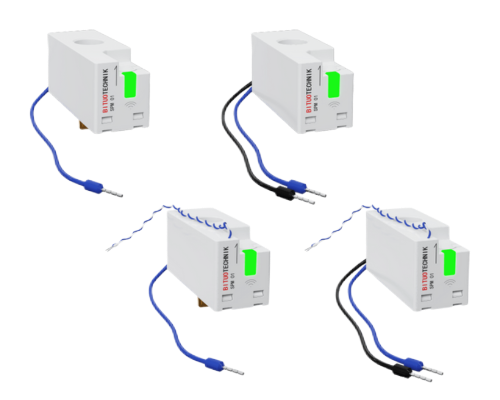
A wireless-communication energy sensor is used in a 110~240V 1P+N power system for real-time power and energy monitoring, requiring no space on DIN rail.
hollow lance
I've got a clamp on my mains line that I calibrated that way, and it never seems to be right. It's close, but I wouldn't trust it enough to use it for anything like cost calculations.
tepid heart
patent river
These ones look pretty nice, but you'll have the "space in switchboard" problem;...
I have two of those on order (zigbee version) Blackadder seems to like them. I did not realise they made a wifi version.
patent river
It's definitely something I will be asking for space for, if I get our switchboard replaced. Our house is only 1990, but the wiring is very much minimum viable product
I mean at the outlets it's fine. But the switchboard could stand to be 1.5× the size for the number of breakers it contains
hollow lance
so dumb question, what are those plugs for on them? power supply?
 wanton hawk
So I'm trying to figure out a new Home Assistant installation. My initial thought was a Raspberry Pi, but prices are insane! I'm seeing anywhere from 100-150 for a RPi 4 or 5. At that price point is it better to just buy a mini pc? Any recommendations are greatly appreciated! Please @ or reply.
patent river
hollow lance
so dumb question, what are those plugs for on them? power supply?
Far as I know. They have a little metal tab that goes into the breaker (you can see that in some of the pictures), then the tiny wire to neutral
hollow lance
oh interesting
tepid heart
hollow lance
so dumb question, what are those plugs for on them? power supply?
They are for voltage sensing (to calculate power) and to power the device.
hollow lance
isn't that what the through-hole is for?
these look like an 'electrician only install' kind of deal
tepid heart
Through hole is for current only. So you still need voltage for Power = Voltage x Current
Third curley wire is the antenna
hollow lance
gotcha
curley wire looks like the RS485 interface though
according to the datasheet
patent river
Would make sense, it usually is a single twisted pair
 slender galleon
wanton hawk
So I'm trying to figure out a new Home Assistant installation. My initial though...
slender galleon
wanton hawk
So I'm trying to figure out a new Home Assistant installation. My initial though...
Yes, I recommend a used Dell, Lenovo or HP micro form factor PC. I use those for a lot of my home automation software and they work great. I personally wouldn't bother with a Raspberry Pi at all, they are kind of a toy.
wanton hawk
slender galleon
Yes, I recommend a used Dell, Lenovo or HP micro form factor PC. I use those for...
Cool! Thanks! Are there any linux compatibility issues I should look out for?
slender galleon
on desktop PC not likely, on a laptop there is a good possibility. I run some old ThinkPads too and one of them would continuously crash until I put a desktop UI version of Ubuntu on it
golden thorn
The nice thing with a "real" PC is that you can virtualize.
slender galleon
yup
wanton hawk
slender galleon
Yes, I recommend a used Dell, Lenovo or HP micro form factor PC. I use those for...
I'm assuming eBay is probably the best place to find one?
slender galleon
yes, just don't get too old of a processor like maybe no older than 8th gen for an i5
the newer the processor the more you'll pay obviously but there are a lot of good deals on that stuff
those manufacturers have perfected making business grade computers that last for freaking ever
golden thorn
Depends on location. I'd use eBay, aliexpress and amazon and search for USFF/SFF/Mini PC.
If you found something interesting share it and its price here for confirmation.
4th and 6th gen has, at least in my region, the best price to performance ratio. At least for (U)SFFs.
wanton hawk
On eBay, I would a Dell 3040, i5 6th gen, 8gb ram, 120gb ssd. Only $55. Only thing is it doesn't have the power adapter. Is this price about typical?
slender galleon
that is a good price but IMO spend more if you can
also don't get one without the power adapter lol, unless you have one of course
generic power adapters can be had for cheap but I don't recommend going cheap on power adapters and a brand new OEM power adapter would probably cost more than the whole computer
golden thorn
wanton hawk
On eBay, I would a Dell 3040, i5 6th gen, 8gb ram, 120gb ssd. Only $55. Only thi...
Adapter or cord? There's different variants of the 3040.
slender galleon
ah yeah, I'm thinking external power adapters, if it's internal power supply then whatever, 3 prong power cords are cheap and plentiful
wanton hawk
Looks like it needs a 19.5v adapter.
slender galleon
yeah don't buy it without power and don't buy it wtihout OEM power
or you might as well just get a raspberry pi
look out for that too because some resellers will try to bundle in a 3rd party (very cheaply made) power adapter on the micro form factor PCs
wanton hawk
Looks like more complete PCs are more in the 75-100 range.
slender galleon
yup
golden thorn
Ignoring the specs and only comparing prices to the pi remember that you need to account for a SSD, a powered USB hub, a SATA/NVMe adapter and a power supply.
golden thorn
Real link: https://www.amazon.com/dp/B07S24VMLZ
Shortened links make me suspicious. I can't be the only one.
wanton hawk
If I need to do a return, I feel more confident in Amazon returns too.
slender galleon
ok I have a long link here, apologies if there is no bot to convert it heh

eBay
Find many great new & used options and get the best deals for LENOVO THINKCENTRE M720Q TINY 8GB 256GB SSD I5-8400T 1.7GHz WIN 10 PRO WIFI at the best online prices at eBay! Free shipping for many products!
golden thorn
slender galleon
I have 2 of those, 1 dell optiplex mini and 1 HP elite desk mini all purchased on eBay and run flawless
wanton hawk
Thanks for all of your advice!
wanton hawk
Do people typically run a docker image for HA or just a regular VM?
golden thorn
Both.
golden thorn
Here's some data: https://analytics.home-assistant.io/
I feel like certain groups are more likely to enable it so do with that what you will.

Home Assistant Analytics
Summary of the collected Home Assistant usage statistics.
wanton hawk
That's really cool!
 winter igloo
blissful ether
Hi looking for some new guy help I have a RATGDO with ESP firmware loaded and in...
winter igloo
blissful ether
Hi looking for some new guy help I have a RATGDO with ESP firmware loaded and in...
Did you figure it out? You might want to specify which ratgdo you got and if your door opener is a security 2.0, 1.0, etc.
 lean anchor
If I wanted to put temperature sensors in rooms of my house to help me better coordinate my air conditioning zones, what’s a good route to go?
I have good wifi coverage, no existing zigbee or zwave but I’m happy to invest in the interest of expandability (eg door/window sensors in the future, something to track the state of my electric garage rollerdoor, etc).
Cost isn’t a huge factor, I would prefer to prioritise reliability.
My house is single story double brick with a footprint of about 350sqm
Based in Australia if that changes things 👍
patent river
How well does your WiFi get through the walls from one end of the house to the other? That might help decide if you should use Zigbee.
Battery-powered Zigbee devices don't act as repeaters, so you'd also need to get some lights, smart outlets, or something else mains powered to be a repeater if 2.4GHz doesn't go as far as needed.
Z-Wave is 900MHz so gets through a lot more walls without any trouble.
lean anchor
I have never measured it properly, but practically there aren’t any reception issues for things like YouTube streaming etc… I have just the one access point and it’s quite central in a comms
AP is broadcasting 2.4ghz and 5ghz
 terse pebble
Better material penetration for ZWave is expected. Basically: lower frequencies are better for wall penetration. And how WiFi works through walls is highly dependent on wall material and used frequency (2.4, 5 or 6 GHz)
true raptor
Thats where zigbee is better than wifi, its 2.4ghz but devices normally relay the signal - at least they could.
But yea zwave should be better cause lower freq
lean anchor
It sounds like zigbee is the goer then... i have good 2.4ghz reception and they seem to be the more popular variant in the market
true raptor
Needs a stick tho.
got the sonoff one with the aluminum body and the angle antenna, seems to be one of the most popular one.
ZBDongle-E, should be able to find it that way
glacial oracle
Just make sure to not buy the TI version of that dongle
true raptor
Im lucky, both are not the TI xD
But whats the issue with that?
glacial oracle
From what I've heard they may not work as well as the other one. Could be related to zha or z2m specifically, that I do however not know
I suppose with the right firmware they both perform acceptably
true raptor
So imma see it as they are less reliable - thats easier xd
winged knoll
The P (aka CC2652) has had some quality problems - NVRAM that corrupts and causes the stick to crash
Plus it locks up under "load" for some people, semi-randomly
 zealous trout
I'm looking for suggestions to buy smart locks. My requirement- I should be able to control the lock (unlock/lock feature) through my app. For the lock we currently have, there is no api for the unlock/lock feature, but we have found a different solution to unlock the doors remotely which is not that reliable. Can anyone suggest me good locks for this?
outer knotBOT
Looking for advice about a device to buy? Remember to provide guidance on:
- Which country you're in
- What your budget is
- What protocols you prefer (eg Zigbee, WiFi, Z-Wave)
- Any features you want (such as power monitoring, dimming, etc)
zealous trout
Looking to buy a smart lock
Courtry- India
Budget- any
Protocol- any
Feature- want the api/access to control the lock remotely. Need to integrate the api to telegram and our own app.
winged knoll
Well, for that feature that's called Home Assistant 😉
What style of door lock do you have? There's many across the world, and an image may help people help you.
 upbeat prairie
Looking to buy a couple smart plugs (240v AC) to diversify my zigbee mesh network.
Country - Australia
Budget - any
Protocol - Zigbee (as router)
Feature - energy monitoring would be a nice to have
lean anchor
I can't offer you any good advice, but i can warn you away from the Kogan branded ones.. I bought a multi pack a couple of years ago for simple devices like christmas tree lights, rice cooker, etc... 3 of the 4 have failed since then
cold moon
Au market sucks for both zigbee and zwave
upbeat prairie
cold moon
Au market sucks for both zigbee and zwave
Yeah that's what I've found, and that if you get some cheap ones internationally they aren't certified....
Hue has some by the looks, no monitoring, just on/off....
upbeat prairie
lean anchor
I can't offer you any good advice, but i can warn you away from the Kogan brande...
I've only got TP-Link KASA WiFi plugs currently, and they've been bulletproof for years.
Haven't delved into zigbee until now so any words of caution or endorsement are appreciated for these products, thanks
cold moon
upbeat prairie
Yeah that's what I've found, and that if you get some cheap ones internationally...
hue plugs work great they just are overpriced for what they are
i had one that seemed to stop allowing a load through the relay when it got hot
i wouldnt expect a chinese one to intentionally do that
lol
idk about au market for plugs tho.. for us thirdreality zigbee ones are good and have energy monitoring
https://digiblur.com/wiki/devices/plugs/sonoff_s31/ i personally use these flashed over to esphome open source FW
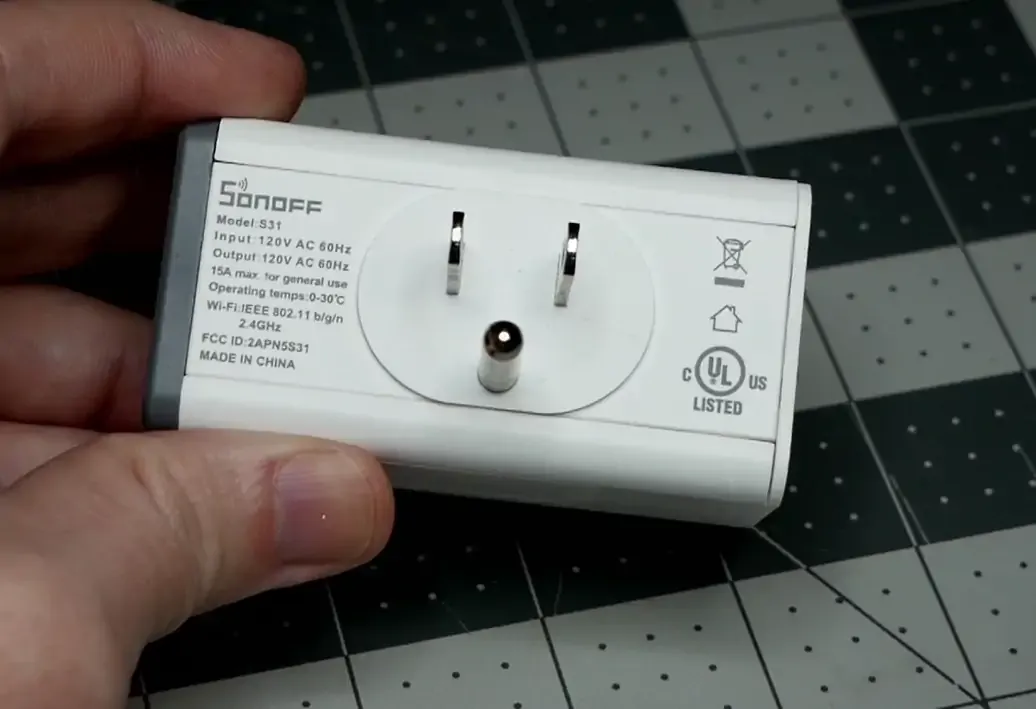
iTead SONOFF S31 Smart Power Monitoring Plug Template and Setup for TASMOTA and ESPHome
upbeat prairie
cold moon
hue plugs work great they just are overpriced for what they are
Yeah I know, that's why I'm hoping for an alternative haha
For the premium hue costs, I'd really need energy monitoring to see things like when the washing machine finishes, etc
cold moon
https://github.com/leofabri/hassio_appliance-status-monitor i use this along with a sonoff s31 for washer
upbeat prairie
Looks like ikea TRÅDFRI plugs might be an option
$20 a piece
cold moon
ya ikea is like budget hue and sometimes has weird firmware issues but generally seems okay
with smart plugs i still wouldnt push their rated limits
upbeat prairie
For $20 I'll slap a few in and not connect anything to them
 earnest spoke
Can I "Smartify" this using some kind of relay or some such to add home assistant functionality? I have been specifically forbidden from dismantling / disabling the original knobs, but rewiring on the inside is fine.
 forest pike
I saw there are open source self-hosted alternatives to Alexa or similar bots. I saw that they can interact with home assistant. Ignoring the software side, how would the hardware look? Do speakers with microphones exist for this application? I think ideally something running off mains would be great, especially if it can be flush mount or hidden in the ceiling.
winged knoll
#voice-assistants-archived can answer that
The pins and topic there should have a lot of useful info
torpid cedar
Hello, Looking to buy a couple smart switches to control my lights.
Country - France
Budget - any
Protocol - Zigbee better than wifi I guess
Feature - support 3 way switch, small, can be activated via HA or via a dumb switch/push button
I'm kind of lost between all references. I saw the one from philips hue and I think they are overpriced. Some ref to recommand ?
Thanks 🙂
earnest spoke
I don't know if there are any smart switches that are available here that specifically support 3 way configs, but 3 way switch configs can apparently be implemented with Shelly Relays (which are not zigbee).
FWIW I am using Aqara H1 switches, but not in 3 way
torpid cedar
earnest spoke
I don't know if there are any smart switches that are available here that specif...
Checking 🙂
I came across those ones that seems nice and cheap : https://www.amazon.fr/LoraTap-Interrupteur-Commutateur-Intelligent-Compatible/dp/B082M75QNQ/ref=asc_df_B082M75QNQ/?tag=googshopfr-21&linkCode=df0&hvadid=411473870526&hvpos=&hvnetw=g&hvrand=7534852044429737871&hvpone=&hvptwo=&hvqmt=&hvdev=m&hvdvcmdl=&hvlocint=&hvlocphy=9056207&hvtargid=pla-863490928977&psc=1&mcid=1550d41d7c0f3062b3b2ab3961646fe3&tag=&ref=&adgrpid=92637693594&hvpone=&hvptwo=&hvadid=411473870526&hvpos=&hvnetw=g&hvrand=7534852044429737871&hvqmt=&hvdev=m&hvdvcmdl=&hvlocint=&hvlocphy=9056207&hvtargid=pla-863490928977
But no zigbee in here, only wifi

LoraTap Lot de 2 Interrupteur WiFi Alexa Sans Fil, Va et Vient Parallèle, Récepteur 2300W 10A, Commutateur Connecté Intelligent, Commande à Distance Par Téléphone, Relais Compatible avec Google Home
my electrical knowledge is quite low, but from what I'm seeing on this diagram : https://m.media-amazon.com/images/I/61Y+JDBpXjL._AC_SL1002_.jpg
2-way and 3-way switch are kind of the same no ? 🤔
 earnest spoke
torpid cedar
my electrical knowledge is quite low, but from what I'm seeing on this diagram :...
earnest spoke
torpid cedar
my electrical knowledge is quite low, but from what I'm seeing on this diagram :...
I honestly don't know myself. In my flat I have 2 switches that control 2 bulbs together as well as 3 switches that control 3 bulbs together and those are the only 5 switches that I haven't converted yet because I genuinely don't know how to.
My plan was to use some Shelly 1 Relays
glacial oracle
It's been a while since I touched such things. The difference should just be in how many travelers the switch has. Anything more than three? is just adding more four way switches inbetween without it actually getting more complex to wire
The difference between three and four way are mostly regional
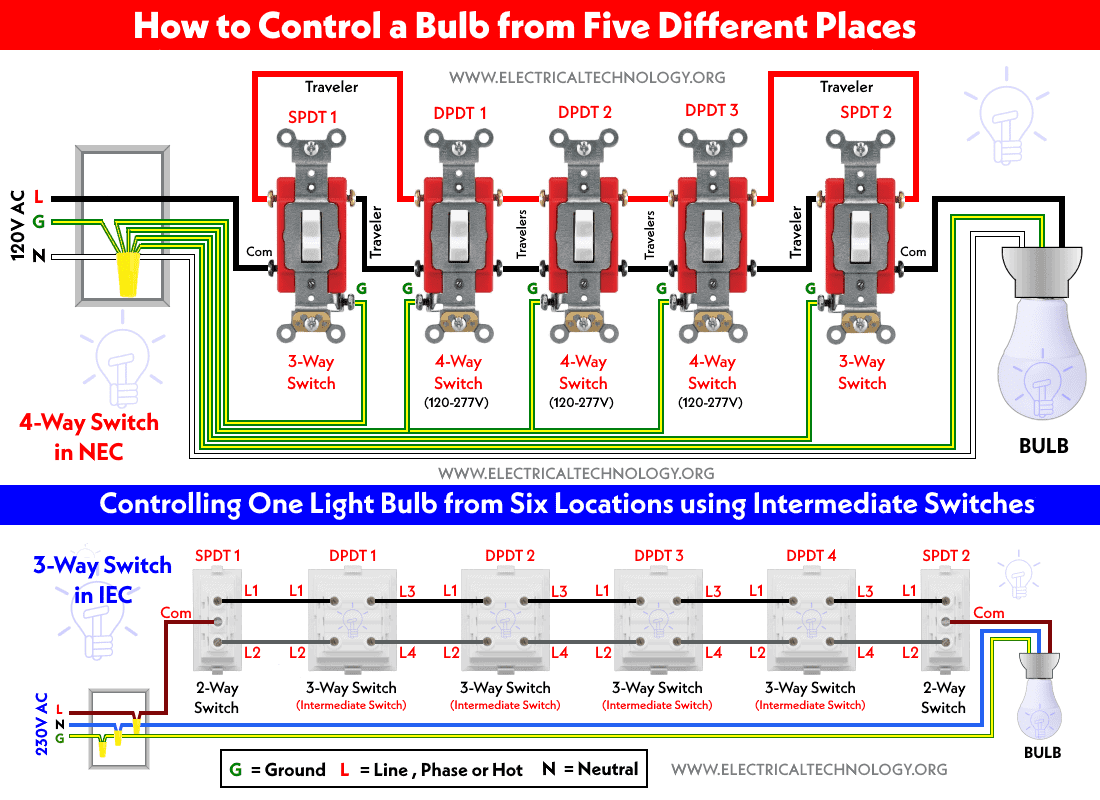
If that diagram isn't wrong, you may be able to tap into the com from both sides and utilize any ZigBee switch. But that may depend more on how your wiring has been installed / if you can run an additional one back
drifting grove
Has anyone here replaced zwave devices with wifi devices in the US? I'd like to move away from zwave switches and motion/smoke detectors if I can.
I was looking at tp-links, but the reviews are horrible and local control is suspect
glacial oracle
Is there a reason for why it needs to be wifi? Usually ZigBee offers a greater variety of devices and (to some extend) better compatibility with ha
drifting grove
I have no Xp with zigbee, and the intent here is to decopule the zwave dongle from the host....
I'd like to not add a hub, but that might be a decent option.
Zigbee is not a hard no
cold moon
zigbee works great and you can use a PoE coordinator that connects over IP
glacial oracle
So it's not about moving away from it but about not having a direct attached controller
cold moon
https://tubeszb.com/product/cc2652p7-zigbee-to-poe-coordinator-2023/ i use one of these
drifting grove
Yes, trying to move VMs on proxmox, and can't with the hardware pass-through
glacial oracle
USB passthrough usually works rather acceptable, but yea such poe/ethernet hubs/dongles likely are your friend
drifting grove
cold moon
https://tubeszb.com/product/cc2652p7-zigbee-to-poe-coordinator-2023/ i use one o...
Wow.. didn't know that existed!!!
glacial oracle
Id assume those also exist for zwave
winged knoll
You can stick a Z-Wave stick in a Pi for Z-Wave JS, and run that remote from HA
drifting grove
That's currently the direction I am headed (just bought a second dongle to play with) but I'd like to skip zwave entirely if possible.. one less thing to troubleshoot.
I don't see a lot of zwave --> wifi discussion
winged knoll
Most people go the other way once they see the light
glacial oracle
wifi gear is pretty hit or miss unless it's a brand like shelly
cold moon
zwave is fine you need to diagnose your issues with it
drifting grove
glacial oracle
wifi gear is pretty hit or miss unless it's a brand like shelly
Yeah, I think this is what I am seeing.... bad review of wifi stuff as replacements
 pliant forum
glacial oracle
wifi gear is pretty hit or miss unless it's a brand like shelly
pliant forum
glacial oracle
wifi gear is pretty hit or miss unless it's a brand like shelly
Only WiFi gear I’ve found decent so far is either locally hosted stuff like WLED or HomeKit products. Everything else basically was a nightmare lol
My two thermostats are controlled via HomeKit Controller (Honeywell T9 & T6 Pro) and work well.
 cosmic grove
Tis the season! I just got a notification for an iRobot roomba deal on Amazon. Which makes me wonder: what robo vacs are compatible with HA? What brands are good, and which ones should I avoid?
glacial oracle
There probably are sites with in depth tests of those robots you should look at to make an educated decision. The best integration ain't worth a whole lot if it doesn't clean the floors properly ^^
I tried including our Xiaomi Dreame one into HA which kinda works over their cloud stuff but getting the map to work wasn't as trivial as I hoped it to be
half raptor
Ratgdo is awesomesauce. That is all.
half raptor
Ok, so I have some sonoff things I just got in the mail that I wanna flash to esphome, but I need the usb serial adapter, is there a preferred one on Amazon or should I go elsewhere?
zealous dune
a "golden CH340" or any other adapter with a big voltage regulator
wild atlas
cosmic grove
Tis the season! I just got a notification for an iRobot roomba deal on Amazon. W...
Roombas work fine on home assistant though it takes as little bit of effort to add them in (there's a python tool out there to help), if you want to avoid cloud connectivity in a robot vacuum, look up valetudo and what it's compatible with. After Amazon bought Roomba I became far more skeptical of them and their napping and camera features (also there have been a few instances of workers sharing Roomba camera pictures too)
cosmic grove
wild atlas
Roombas work fine on home assistant though it takes as little bit of effort to a...
That python tool…. Is it pretty easy to implement? I snagged the roomba on an Amazon deal, so I’m locked in there for now.
There was a video of someone from a year ago and they seemed to add it pretty easily.
wild atlas
It didn't take me too long to figure it out and get the Roomba into home assistant
It's just a step or few more than the usual auto detect and add to integration
cosmic grove
Ah cool. That’s where I’m at with some other hardware, so hopefully it’ll be easy peasy. Now I have to figure out how to get it over the baby gates lol.
I think I’ll have to get new ones
 sudden galleon
are there any smart motors (prefer zigbee) for external roller blinds with a belt?
these in-wall external blinds are kinda heavy to manually pull up
 sinful wolf
Does anyone have any suggestions for a way to measure the open angle of an interior door? Hopefully non bulky/intrusive as possible
I was thinking of either something to do with the hinge, or inside the jamb
glacial oracle
If you want to diy it you could buy one of those three axis accelerometer sensors and just tape it somewhere to the window in a suiting location
After some calibration they can be used pretty well to describe roll and pitch angles
 bitter shale
Any good POE ESP32 boards with case? Primary use is BT presence.
jagged crypt

Bluetooth Low Energy IoT Gateway - Compact BLE to MQTT is a reliable, cost-effective device. Perfect for smart homes, medical devices & smart retail
devout parrot
half raptor
Ok, so I have some sonoff things I just got in the mail that I wanna flash to es...
I use this one based on a recommendation by Smart Home Sellout who you've probably seen around here. It's pretty good. https://a.co/d/01N5WCm
Depending on what device(s) you're flashing, these test hooks will save you the trouble of soldering or making a jig if you're flashing S31 plugs or something else where the pads are close to the edge of the board. https://a.co/d/bEwTjbx
zealous dune
No voltage regulator on that one so you might have failed flashes depending on the device
patent river
Gotta say, GL.iNet make some pretty cool stuff.
I've had one of their travel routers for years, has been to a lot of hotels / airbnbs with me all around the world
 obtuse vector
So I have this wonderful problem where someone in this house keeps on forgetting to fully close the basement freezer door. The margin for error is tiny enough that a open/close sensor is just not quite sensitive enough. It'll help with the really egregious oops but not if say a box slightly prevents it from fully closing. I tried the aqara zigbee temp sensor and the cr2032 just doesn't cut it in the temps.
So I ordered these tuya AA powered sensors figuring I'd get those low temp AA batteries. I've used those for years in weather sensors outside (I live in MN so I gets cold enough). But I'm seeing not so great info on those from very slow report times to just plain unstable.
Anyone have a recommendation for a zwave or zigbee temp sensor up for the task? Maybe one of the ones with the wired probe? And if so I assume the wire is low profile enough to not greatly effect the seal?
rich venture
obtuse vector
So I have this wonderful problem where someone in this house keeps on forgetting...
does it have a light bulb that turns on when its open , you could sense that
obtuse vector
rich venture
does it have a light bulb that turns on when its open , you could sense that
It does but when the door is open a slight crack the light switch is closed enough to turn off the light
bitter shale
@jagged crypt Is that able to be flashed with custom ESPhome firmware? I'm new to ESP home, and thought I read they have a ESPresence package that does all the BT tracking for Apple devices with the randomized MAC address?
jagged crypt
I don't have one, but it was brought up to me awhile back when I mentioned I wanted a unit that didn't require a 3d printer to make family-acceptable
patent river
@obtuse vector As we were talking about in #the-water-cooler a day ago, the big metal box is often as much of an issue as the temperature.
Definitely best to keep the electronics outside, and just the temperature probe inside the freezer.
(that said, Energiser say no loss of capacity for their Li-FeS2 batteries at -20°C which is freezer temperature, for low current draw: https://data.energizer.com/pdfs/l92.pdf)
patent river
bitter shale
<@532004461263192064> Is that able to be flashed with custom ESPhome firmware? I...

Blakadder’s Smarthome Shenanigans
Everything you need to have for a reliable Bluetooth proxy in Home Assistant.
obtuse vector
patent river
<@611207802383237130> As we were talking about in <#397426163649216512> a day ag...
I thought a sensor with a probe made the most sense but some of the ones I saw looked like they had a pretty thick cable for the prove.
Or they were tuya and I've seen alot of people complain that the tuya ones even though they're zigbee dont fully work without a tuya hub
patent river
If you just got a bare DS18B20 sensor and some heatshrink tube to wrap it in (probably the glue-lined stuff to make it waterproof), you should be fine using skinny "magnet wire" (enameled copper) or similar.
Hopefully shouldn't interfere with the door sealing
The other option of couse is to just drill a hole in the side of the thing and goop it up with silicone when you're done
obtuse vector
patent river
The other option of couse is to just drill a hole in the side of the thing and g...
Heh. I'm always skittish about that level of hardware hacking :).
 compact gale
Quick question: has anyone heard of AQiA devices, or got them working in Home Assistant? I've been seeing them in the Micro Center email ads, and while they seem rather unremarkable generally they are priced pretty cheap ($5 for a RGB bulb, $9 for a plug, etc)
I think they're a Micro Center house brand, as I genuinely couldn't find any other trace of the company anywhere else
glacial oracle
Personally I would suspect that those are some tuya wifi gear based on the images of their app. It looks very identical with just the logo and colors changed a bit.
For the use with HA they may be a hit or miss kind of buy
patent river
Good guess.
https://www.microcenter.com/product/665654/aqia-15a-wifi-smart-plug
Third picture, says "Contains IC: 23243-WB2S". First google hit: developer.tuya.com
compact gale
Very good to know
fathom hollow
Unable to import Aqara Presence Sensor FP2 into HA. I first setup the mmRF sensor with the Aqara app and it seemed like it was working OK. I then put the device into binding mode again by holding down the button until led flashes. Then tried to sdd Apple, Homekit Device to two bridges that apparently are default in HA, but no luck. Anyone able to get one of these working?

 tropic patrol
First attempt by a customer to incorporate H32 my ultra low power ESP32 platform to HA 🙂 He's using a previous revision without fuel gauge so his battery reading needs adjusting.. The current revision of H32, rev4, consumes only 9uA when powered down


 cursive sphinx
Hi
I would like to buy a Sonoff R5 (A wall mounted smart scene controller) and I'm not sure what protocol is it actually using. Can someone tell me if I need a dedicated hub for "Sonoff" or i can intagre it under an ESP32 Buetooth "hub"?
 zealous dune
it's using a proprietary protocol, it doesnt work with HA BT
cursive sphinx
oh tanks
and can you recomend me a not too expensive hub ore a solution to use it?
zealous dune
with HA? none
 twilit relic
i'm running my Pi4b on the official POE hat, with a max draw of 30w on the power provider. I recently added the Orico USB 3.0 exernal NVME drive, and I suspect the power draw on it might be too much - I've seen some instability since migrating from the SD card to the EXT HDD. Would the power be an issue here over the POE hat + external HDD? I also have a ZZH! usb 2.0 coordinator plugged into the bus.
glacial oracle
I don't know about how the Poe hat does the power delivery to the pi, but i suspect that it just uses the pi to distribute which likely won't be capable of handling a lot more power either
You could switch over to a powered USB hub or drive enclosure and see if that resolves your issues
twilit relic
hmm. so debugging with the official AC adapter won't be helpful then
glacial oracle
It wouldn't be recommended using a drive on the USB ports even with the official ac adapter
twilit relic
darn. i had a 1-wire solution for power/ethernet which works with the battery backup really well
glacial oracle
You could try and tap into a 5v output of the Poe board and route that directly to the drive and isolate that over USB to the pi
twilit relic
i could. the usb drive is exclusively bus powered - no alternative power input for it
i'll test w/ an external powered usb hub. thanks.
also tracking other causes. i added ESPresense + MQTT, which dumped 1000 BT entities into the integration, and then the same week i also enabled IPV6, so it could be any, or something completely different, one of those issues
 glacial mulch
So, after months of trial and error workaround attempts I'm just about done with Google hardware.
I've been trying to integrate a home hub and home mini speakers (we already owned them before moving to HA). The delay in sending to and from the Google servers is killing me. The Doorbell stream from my Reolink cameras is a full minute or more behind real-time at times. Just today I spent a good hour getting all cameras working through rtsp2webrtc which has some benefits but still has huge delays streaming to Google hardware.
TTS notifications are occasionally quite quick but most often 10+ seconds later than required.
Are there any good alternatives I might not be aware of for local streaming video and/or audio? I'm already considering a wall tablet for dashboards and a doorbell stream, but would like something smaller and less intrusive for TTS announcements etc and maybe image/video display too.
 fresh lynx
Is anyone interested in trying to reverse engineer the myQ hubs to try to gain some kind of local control? Maybe that's too much of a quixotic quest.
I posted what I learned so far on the forums a few weeks ago. I was a little surprised to get no response at all. https://community.home-assistant.io/t/trying-to-access-my-myq-hubs-mqtts-connection/653665
I figured I'd try posting over here too.

Home Assistant Community
Let me start by saying nothing in this post is actionable or directly helpful to anyone. I’ve been poking around and learned some stuff, and this is me sharing it. I have one of those myq hub’s, mine is modal MYQ-G0401 according to the box, “MYQ-G0401 MC” according to the about.html page that it provides on port 80. And I’m sure I don’t have t...
 simple fox
I got my gledopto lights today, and they work really nicely, thanks for the recommendation! ❤️
wanton hawk
slender galleon
also don't get one without the power adapter lol, unless you have one of course
I ended up buying a Mini PC, HP EliteDesk, i5-8500T 8gb ram (I will probably upgrade that later). Now, I am going to be running VirtualBox on it, should I run Windows or Ubuntu as a base OS though?
rich venture
wanton hawk
I ended up buying a Mini PC, HP EliteDesk, i5-8500T 8gb ram (I will probably upg...
You should run proxmox and then virtualise haos
wanton hawk
rich venture
You should run proxmox and then virtualise haos
I was kind of leaning towards windows, because I might have other windows only programs that I want to run. But this solution would let me have a haos vm and a windows vm, maybe even linux too. How's the performance and the overhead?
rich venture
wanton hawk
I was kind of leaning towards windows, because I might have other windows only p...
If you want to run windows vm you really need to upgrade the ram
glacial oracle
windows will be pretty unenjoyable inside a vm on pretty much anything but high end environments
wanton hawk
rich venture
If you want to run windows vm you really need to upgrade the ram
Yeah, I'll be upgrading pretty much right away. Probably to 16 or more.
rich venture
glacial oracle
windows will be pretty unenjoyable inside a vm on pretty much anything but high ...
Also depending what you need to do
wanton hawk
I would be splitting 4 cores to windows, and 2 for haos.
glacial oracle
windows just has too many animations and secondary stuff going on which isnt that easy to run
zealous dune
I wouldn't try to milk such an old CPU
glacial oracle
make sure to pin the vms to the cpu cores instead of just limiting it to two
else it will move the loads around as it see fits and that can end up decreasing your performance rather heaviy
rich venture
glacial oracle
windows will be pretty unenjoyable inside a vm on pretty much anything but high ...
I use a administration vm daily and that has 16gb of ram and 2 xeon gold cores
I only use it for putty and active directory tho
(Win server 2016)
wanton hawk
glacial oracle
make sure to pin the vms to the cpu cores instead of just limiting it to two
How do you do that in Proxmox?
glacial oracle
i forgot the details, its either on the advanced options around the cpu where you list them or you need to manually do it on the config file
(also make sure to select the host mode for the cpu as otherwise applications may not see and utilize available instruction features)
wanton hawk
I'm assuming proxmox is extremely low overhead, so that solution makes a lot of sense. Thanks for the advice! I had no idea such an OS existed.
rich venture
wanton hawk
I'm assuming proxmox is extremely low overhead, so that solution makes a lot of ...
Its not really os class, ita hypervisor
 hybrid wraith
Do you guys have any sort of purchase guide? I've seen the advice to go on aliexpress, but aliexpress certainly won't help you figure out what's decent and what's not
maybe just a brand guide?
I want everything smart, but the prices in normal stores are crazy, unless I get Tuya which I don't want
Like 20-30 euro for a single door sensor? How can it cost that much
 obsidian moat
Is there a high-quality off the shelf CO2/air quality sensor that's local access for home assistant? I prefer zwave/zigbee but anything local is okay
glacial oracle
hybrid wraith
Like 20-30 euro for a single door sensor? How can it cost that much
Quality devices, or more like the ones that even half way properly adhere to communication standards do tend to cost that much for various reasons.
Generally any gear that doesn't require a connection to some online service like tuya to manage isn't half bad to use if there is a ha or hacs integration for it / it uses ZigBee or similar.
It very much depends on what and how you want to smartify and what you expect from both it's quality and longevity to figure out what to buy.
delicate yew
Any recommendation for IR transmission? I got Broadlink RM4C, and its quite annoying.... so look to purchase a different model for my split wall AC?
 south silo
Good Morning! Before opening yet another GH issue I wanted to quickly verify if this is an issue for ha-core or rather for another repository... I have a Tuya Air Quality sensor which is correctly recognized by ZHA but its missing the sensors of the device. However the clusters are present and can be successfully read in HA, the values seem reasonable for me. Any idea?
outer knotBOT
@humble pier I converted your message into a file since it's above 15 lines :+1:
 fervent flare
01
02
03
04
05
06
07
08
09
10
11
12
13
14
15
How Odd Of A Bot...
oh there are limits bugs then
humble pier
golden thorn
I'd check here as there's lots of filters:
- <https://skinflint.co.uk/?o=9>
- <h...
thnx
humble pier
sadly that did not help to much info for me, any recomandations
golden thorn
That's exactly why giving suggestions is hard. Too many variables.
 mint cloud
What’s the best hardware for HA right now? I was thinking about getting an RPi5
glacial oracle
The best way of doing ha is by not getting anywhere close to pi hardware
Arguably both currently recommended options would be you'd pick a (virtualized) installation of haos or you go for the core container via docker
mint cloud
On what hardware?
glacial oracle
Any old pc will do. Some go for 8th gen office grade dells or similar small systems. Personally I would pick up something more modern like with an N100 (or mobile Ryzen) because they are significantly more efficient
glacial oracle
Yea pretty much
mint cloud

Beelink Mini S12 Pro Mini PC, Intel N100 (Up to 3.4GHz) 4C/4T, 16GB DDR4 500GB PCle SSD Mini Computer Windows 11 Pro Mini Desktop PC 4K@60Hz, Dual Display, WiFi5, BT4.2, USB3.2, LAN 1000Mbps, Low Power beelink mini pc n100 mini pc computer mini s12 pro desktop mini pc windows 11 pro beelink n100 ...
Seems ideal
south silo
Co2 HA Sensor
mint cloud
I have a little synology NAS setup currently, was thinking of using that, but a pc would be better
A lot of these mini pcs have BT 4 and WiFi 5 for some reason
It shouldn’t really matter I guess
Though Bluetooth is potentially important for a HA setup
 lilac escarp
Has anyone successfully integrated a helium hotspot into their Home Assistant?
 fallow cape
I've not bought a Shelly before, but it looks like for controlling a standard 120v AC device, I'll likely want a Shelly 1, right? It'll be for a kitchen range hood and I'm intending on leaving the fan and light switches in the on position and control it via the Shelly exclusively
glacial oracle
You may want to check the current when the exhaust fan turns on but if thats within spec it should work
fringe crater
glacial oracle
You may want to check the current when the exhaust fan turns on but if thats wit...
I was kind of thinking the same. Though I'm not sure if that's something that you're going to be able to easily find data for.
Those kind of inductive loads are hard on relays.
fallow cape
Hmm, the spec sheet for the range hood says it shouldn't draw more than 3a
glacial oracle
Does it specify whether that is continuously or peak
devout parrot
There's also the possibility of the back emf when the fan is switched off causing issues. Shelly recommends installing an RC snubber when you use their devices with inductive loads.
 thorn bramble
I'm looking for a solution to switch between two devices on a 240v 30a circuit. I want a primary device that always gets power if it's on and a secondary device that turns on only if the primary isn't drawing power. The goal is to wire a heater for my garage to the same outlet my dryer is wired to and give my dryer priority over the heater. I don't have the inbound circuit capacity from the power company to wire both up at the same time. Anyone seen anything like this?
I can DIY something but would prefer a properly engineered and vetted solution
It doesn't even need to be HA-connected now that I think about it, it could be standalone.
glacial oracle
This kinda sounds like a reverse energy transfer switch.
thorn bramble
Kinda, yea
glacial oracle
In theory you could create an automation which does the switching if you are able to find something to break the circuit at the devices recommended wattage
thorn bramble
I got the idea from a Technology Connections video.
thorn bramble
glacial oracle
In theory you could create an automation which does the switching if you are abl...
You can get relays of any size. I posted my idea for a DIYing it in #diy-archived

With the longer ranges of EV batteries today charging from, a 110-volt socket is just too slow! But having an electrician come out and add a dedicated 240-volt socket takes extra time and money. The Splitvolt Splitter Switch is the perfect EV charging accessory that allows you to intelligently an...
glacial oracle
I kinda was thinking about trying a 240v switched socket but those tend to end at 16A
thorn bramble
That one I posted indicates 24A and 30A in different locations
glacial oracle
Also I 'kinda' doubt they like switching close to 16A
Seems very interesting for this then
glacial oracle
Household applications with EV plugs?
thorn bramble
The wall side is the same as a household dryer
glacial oracle
Oh so this is unrelated to the dryer switching thing
thorn bramble
Huh?
No, Google just found more useful results if I searched for ev dryer switch instead of a nema 10-30 switch
glacial oracle
I see
thorn bramble
The wall side for an ev charger is the same plug I need for a large space heater
or dryer
glacial oracle
I can't follow but if you got a picture yourself that's good enough ^^
thorn bramble
https://m.media-amazon.com/images/I/8193K8sFP1L._SL1500_.jpg The EV charger there and the dryer there use the same plug to plug into that switching box mounted on the wall. The space heater I want also has the same plug, so I can just plug it in instead of an EV.
 glacial oracle
Oooh I see
I somehow had the other side of the plug in mind
Seems pretty solid, if it works to charge a car it may as well work to run a dryer
thorn bramble
I'll post an update on how it works when I get it, I'll probably install it next weekend.
 strange shoal
How can I get HASS companion working on Galaxy s5? It doesnt seem to work right now. I can enter the address of my server, but it doesnt laod from there (i'm looking to make a dashboard // security camera out of it)
rich venture
strange shoal
How can I get HASS companion working on Galaxy s5? It doesnt seem to work right ...
my first guess is that its runing a android version that is too old for ha app to support
if you are open to it you could install a custom android distribution that will give you a supported android version
 tidal island
Im in the USA and I was curious since I have to have my power box upgraded if anybody has any suggestions on smart power boxes that interface with HA
fallow cape
Leviton has some gear for that and they're a home assitant partner, not sure about their smart panel + breakers though
Leviton Load Centers (i.e., Breaker Box, Circuit Breaker, Breaker Panel, Smart Electrical Panel) control your home's electrical system. Smart Circuit Breakers are now available.
Home Assistant Community
Hi everyone, What’s about a Leviton smart panel integration ? https://www.leviton.com/en/products/residential/load-centers/the-leviton-smart-load-center This Leviton Load center is definitely one of the most used in North America and with their smart breakers it makes our homes even more operable. I will be happy to exchange regarding this ...
before going down this route I would suggest carefully evaluating your intended use case - eg if you have lights or outlets in multiple rooms on a single circuit then this probably won't be a good solution if you're trying to control items per circuit
tidal island
Six, I think I am more curious about being able to manage the breakers remotely
for the most part, the house is already smart. I think it would be more for understanding the breaker's load or resetting in case of a fault.
 hallow olive
Hi Paranth, im in socal and have you heard of Span electrical? https://gist.github.com/hyun007/c689fbed10424b558f140c54851659e3

Gist
span.io api documentation. GitHub Gist: instantly share code, notes, and snippets.
 spiral jewel
Recently I had a reboot error and Hass stopped at the position shown in the picture . I had to restart hass while editing the lovelace code. This often happens to me every time I edit lovelace lately. Can anyone tell me what error I'm getting?

I am using Intel NUC6
 mental abyss
any recommended humidity sensors for high humidity environment such as washroom?
golden thorn
spiral jewel
Recently I had a reboot error and Hass stopped at the position shown in the pict...
Do what it says and share the logs. Also see here: https://developers.home-assistant.io/docs/operating-system/debugging/#checking-the-logs
outer knotBOT
@vague heron I converted your message into a file since it's above 15 lines :+1:
 vague heron
the bot converted my text into a text file. very interesting 🤔 .
Nevertheless, please take note.
Best regards
golden thorn
You didn't tell your budget
vague heron
golden thorn
You didn't tell your budget
please forgive me!
considering the other offers (i am also looking for a used one), i would say about 50,-€
golden thorn
Okay so in the USFF department I can't find anything I'm comfortable recommending for that price.
There's a few SFF ones if size doesn't matter. In the thin client section there's this:
- https://www.ebay.de/itm/204508988235
The ratio between price/resources/performance/power consumption is kinda ass though.
vague heron
golden thorn
Okay so in the USFF department I can't find anything I'm comfortable recommendin...
thank you very much for your answer!
how much would i have to invest to buy a mini-pc that is cheap in terms of electricity costs on the one hand and on the other hand has exactly the requirements that i only need for HA (i.e. not too oversized). I can then still see if I can buy it second-hand somewhere at a reasonable price. Then my search will at least be aimed at a specific device.
golden thorn
What I linked is the lowest I would recommend. Mini PCs I'd probably buy on aliexpress or amazon. These start at 120-160€ or so. Pretty much all of them are "overpowered" for plain HA.
vague heron
golden thorn
Okay so in the USFF department I can't find anything I'm comfortable recommendin...
sff wouldn't be a problem either, size doesn't matter. i just assume that smaller devices consume less power. but if sff consumes just as little then it would be fine
i found this one, with more ram and more memory capacity. for 40€. does this add to your minimum recommendation?
https://www.kleinanzeigen.de/s-anzeige/hp-thin-client-t630-x9t19ea-amd-gx-420gi-8gb-ram-64gb-ssd/2634905581-278-19496

Kleinanzeigen
HP Thin Client T630 - X9T19EA AMD GX-420GI
- 8GB Ram
- 64GB Ssd
*☘️Inklusive Netzteil☘️
Voll...,HP Thin Client T630 - X9T19EA AMD GX-420GI * 8GB Ram * 64GB Ssd in Hamburg - Hamburg Osdorf
golden thorn
I have a fujitsu D556/2 (1151) SFF that can idle at 9-10W. N100 Mini PCs can go as low as 6W. The ceiling is higher with the SFF though.
vague heron
golden thorn
I have a fujitsu D556/2 (1151) SFF that can idle at 9-10W. N100 Mini PCs can go ...
i also have an eprimo standing around here. but i would have to reanimate it first.
 golden thorn
vague heron
i found this one, with more ram and more memory capacity. for 40€. does this add...
golden thorn
vague heron
i found this one, with more ram and more memory capacity. for 40€. does this add...
As long as you have 2 cores, 2G of memory and 32G of storage it should be fine. More is better, of course.
The linked thin client apparently uses 10-12W which is quite a lot for such a weak machine.
See here for a performance comparison against a pi 4 and a N100: https://www.cpubenchmark.net/compare/3077vs4297vs5157/AMD-Embedded-G-Series-GX-420GI-Radeon-R7E-vs-BCM2711-vs-Intel-N100
vague heron
ok i understand.
how energy efficient is the eprimo if i remove the cd drive and install an ssd?

 vague heron
golden thorn
I have a fujitsu D556/2 (1151) SFF that can idle at 9-10W. N100 Mini PCs can go ...
vague heron
golden thorn
I have a fujitsu D556/2 (1151) SFF that can idle at 9-10W. N100 Mini PCs can go ...
oh well, you've already written that
golden thorn
Sharing pictures via mobile is scary but see here. This is the D556/2 one. i3 6100 but the CPU model doesn't really matter for idle. It's used as a empty proxmox VE node at the moment. It has a SATA SSD connected. I don't think I disconnected the DVD drive. Last time I tested it there was no measurable difference so I don't bother. Some tweaks in the BIOS and powertop --auto-tune (excluding HID devices) and you get this. Note that a HDD can use between 3-7W on its own.

I also have a few fujitsu E720s that I can't get lower than 17W. Just for comparison.
vague heron
ok, thanks a lot. then i'll give the eprimo some love and attention right away. but i have to install HA on an hdd first. later i'll install an ssd and then just make a backup there.
golden thorn
I'm at a PC again now and checked the power usage white paper. For your model it's about 16W: https://sp.ts.fujitsu.com/dmsp/Publications/public/wp-energy6-ESPRIMO-D556-E85.pdf
vague heron
golden thorn
I'm at a PC again now and checked the power usage white paper. For your model it...
ok, thank you very much for your effort!
that would be the equivalent of around €60-65 per year, which would still be okay. But I will also try to optimize the power consumption, maybe I will achieve a little less.
golden thorn
Not really: https://www.stromverbrauchinfo.de/stromkostenrechner.php
Let's compare the 16W of the esprimo to the 12W of the thin client from earlier. At 0,35€/kWh it would be 12,23€ more or 48,92€ vs 36,69€ total per year. But that's just idle.
Here's what it says for mine: https://sp.ts.fujitsu.com/dmsp/Publications/public/wp-energy-ESPRIMO-D556-2-E90.pdf
I'd recommend you measure it yourself and do a cost analysis. Energy meters/plugs can be had for 10€.
glacial oracle
Depending on the bios you may be able to power down unused hardware / unplug wifi stuff.
At such low consumption points you can optimize probably more by picking not a lot of drives, prefer nvme and slow down the fans
The 2w Delta should be fairly possible to adjust for
vague heron
golden thorn
Not really: <https://www.stromverbrauchinfo.de/stromkostenrechner.php>
Let's com...
ok, i will probably use the eprimo as a transitional solution and buy this hp-t630. It's definitely more economical, even if the performance is compromised. Despite all that, it eases my conscience to know that the costs for this device are not that high ("having" comes from "keeping" 🙂 ). I set everything up, make a backup and then transfer it to the hp later. I assume that everything will work like this?
glacial oracle
Likely yes
It may be slightly easier if you use virtualization as you can carry over everything else as well but that shouldn't be required
vague heron
glacial oracle
It may be slightly easier if you use virtualization as you can carry over everyt...
OK, I don't think I'll go for the vm approach, I've just had the proxmox ordeal and moved on from it (but the problem was definitely in front of the screen). The "passing" of the hard drives and the whole back and forth thing is quite difficult for me, who has not yet made friends with Linux
Forgive my bad English, my deepl is exhausted and I have to bother with google translate.
glacial oracle
doesn't the incognito window trick still work ^^
Not that it matters it's alright
golden thorn
vague heron
ok, i will probably use the eprimo as a transitional solution and buy this hp-t6...
You will break even after 3+ years 🙂
I'm a big fan of virtualization too. Not sure what you mean with back and forth. You also don't need to pass through anything.
vague heron
(i didn't know the incognito trick at all. but it works 🙂 )
so, i'm currently installing the new operating system on the eprimo according to the instructions on home-assistant.
When I have now installed the HASSOS on the hard disk via Ubuntu-Live, the various partitions are also displayed as installed. Now I restart the computer, quickly remove the usb-stick with ubuntu-live and after the restart the computer shows me the following message:
"Reboot an Select proper Boot device or Insert Boot Media in selected Boot device and press key".
The only strange thing is that I selected the hard disk on which HA is now located as the first boot option in the BIOS.
But now the Home Assistant page also says that I should first activate UEFI boot in BIOS and deactivate secure boot. But unfortunately I can't find the UEFI boot option, nor anything from Lagacy, which would suggest that you can indeed select it. Secure boot is disabled and UEFI, I think by inference, is enabled by default.
What am I doing wrong?


 golden thorn
Are you sure UEFI boot is enabled? See Advanced > CSM Configuration
golden thorn
I just tested this with a external SATA case. I used rufus to flash and used these settings. Works perfectly fine. This is actually the first time I used HAOS on bare metal. I always used it in VMs before.


In case you care

 versed badge
Hello, is it possible to upgrade to an intel nuc (currently using raspberry pi 4) and keep everything working. Or do I have to install everything again? I doubt that I just can put in my m2 ssd and it works, right?
fringe crater
Hardware upgrades/migrations for home assistant are handled through backups. Make a backup on the pi, and restore the backup on a fresh installation on the nuc.
vague heron
golden thorn
I just tested this with a external SATA case. I used rufus to flash and used the...
sorry for the late reply, we were just at church (my child was joseph 😅 ). MANY THANKS for your effort and that on the evening of the evenings.
I'll have a quick look at my settings
rich venture
What are my options for electronic door actuator for euro cylinder?
versed badge
fringe crater
Hardware upgrades/migrations for home assistant are handled through backups. Mak...
Thank you. I will try that 😇 any suggestions of a nuc?
vague heron
golden thorn
I just tested this with a external SATA case. I used rufus to flash and used the...
so i checked the settings in bios and they are exactly the same as in your bios. if i set UEFI Only in CSM Configuration, the message i posted earlier does not come up and it wants to start a check, the hard disk does not appear in the boot menu either. i have to leave it with your settings, so to speak.
In the meantime, I have reinstalled HA on another hard disk to rule out a defective disk. But exactly the same here.
The funny thing is, I don't see the addition [UEFI] on my hard disk either, as in your photo.


 golden thorn
How did you flash HAOS?
vague heron
golden thorn
How did you flash HAOS?
exactly according to this method:
https://www.home-assistant.io/installation/generic-x86-64/#method-1-installing-haos-via-ubuntu-booting-from-a-usb-flash-drive
 golden thorn
See here for how you can check if it was flashed correctly. Last time this didn't work for the person there: <#installation-archived message>
vague heron
golden thorn
See here for how you can check if it was flashed correctly. Last time this didn'...
ok, i plug in the ubuntu-live stick again, flash the disk again with the HAOS file and check with the command
golden thorn
I'd recommend checking first.
vague heron
golden thorn
I'd recommend checking first.
Ok. Moment pls
golden thorn
I'm not at my PC right now. Might test the restore image thing myself later.
vague heron
golden thorn
I'm not at my PC right now. Might test the restore image thing myself later.


 golden thorn
Try this but that looks okay: #installation-archived message
Maybe maximize the window 😉
You might have to do the efibootmgr stuff in the article. Worked fine for me without.
vague heron
Ok, I will now flash again and then enter the command you linked again. Did I understand that correctly?
golden thorn
The command just would have shown more info but it looks like it flashed correctly (hassos-data is there for example) so it's not needed. I'd try the efibootmgr stuff from the article,
vague heron
 golden thorn
You have to boot the stick in UEFI mode too. Hmm. F12 should give you a menu to select that.
Maybe it's easier if you disable CSM. In theory you should then only be able to boot in UEFI mode AFAIK.
vague heron
ok, so set the two points completely to uefi?

i don't want to do anything wrong, that's why i'm asking like this. please forgive me
I am unfortunately not a pro
golden thorn
I'd try simply disabling the whole CSM with the first one. Newer intel systems don't even have support for legacy boot any more. UEFI only should also only let you boot UEFI only but I'm not 100% sure. My knowledge is lacking with this.
vague heron
ok, i'll get the thing out and test it (i didn't think installing HA would be so difficult)
golden thorn
It wasn't for me. But I can only test with what I have laying around. I run pretty much everything in VMs in proxmox VE nowadays. Very little pain.
glacial oracle
Secure boot has been disabled/reset after uefi boot has been enabled?
golden thorn
Good question. They disabled it earlier (so not on my radar any more) but it might have been re-enabled: #hardware-archived message
vague heron
glacial oracle
Secure boot has been disabled/reset after uefi boot has been enabled?
on my photos you can see that secure boot is switched off (at least I hope so)
i controll it
it still has the status in my photo. so it's switched off.
glacial oracle
I kinda remember uefi boot being a bit picky about filesystems over usb but as your ubuntu stick seems to work that shouldn't be an issue
 balmy turtle
So.. My HA just deteced these devices, but they are not mine.

Did one of my neighbours do a screwy or are they just sending out BT info all the time?:
vague heron
golden thorn
Good question. They disabled it earlier (so not on my radar any more) but it mig...
After this input, it booted properly:


 golden thorn
🎉
 wispy lynx
Hi, What is the best thermo humidity sensor for home assistant? I have used Xiaomi, but cannot get API key there. I have also Airthings system, where API key setup is easy. I need those sensors 15 so some cost effective recommendationsa are welcome.
vague heron
golden thorn
🎉
unfortunately not. i can't get a connection to HA. Although I am using the same LAN cable as the RaspberryPi on which HA was previously installed and working
it is recognized in my router, but I cannot reach it


 untold jacinth
wispy lynx
Hi, What is the best thermo humidity sensor for home assistant? I have used Xiao...
untold jacinth
wispy lynx
Hi, What is the best thermo humidity sensor for home assistant? I have used Xiao...
I've had good luck with Shelly HT sensors powered with USB. Without the USB power they suck batteries.
untold jacinth
wispy lynx
<@440504281917816832> Can you extract temperature and humidity data from shelly ...
https://usa.shelly.cloud/knowledge-base/shelly-ht/ -- yes there is an integration


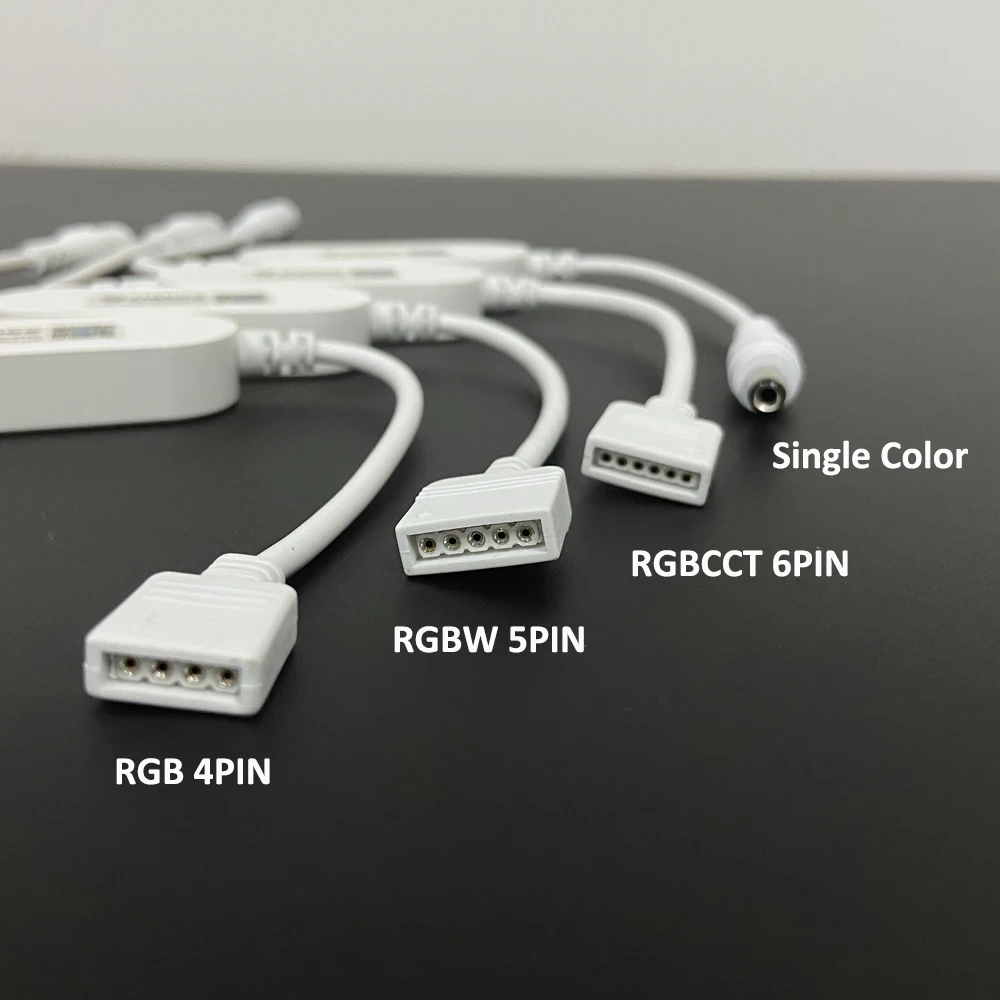


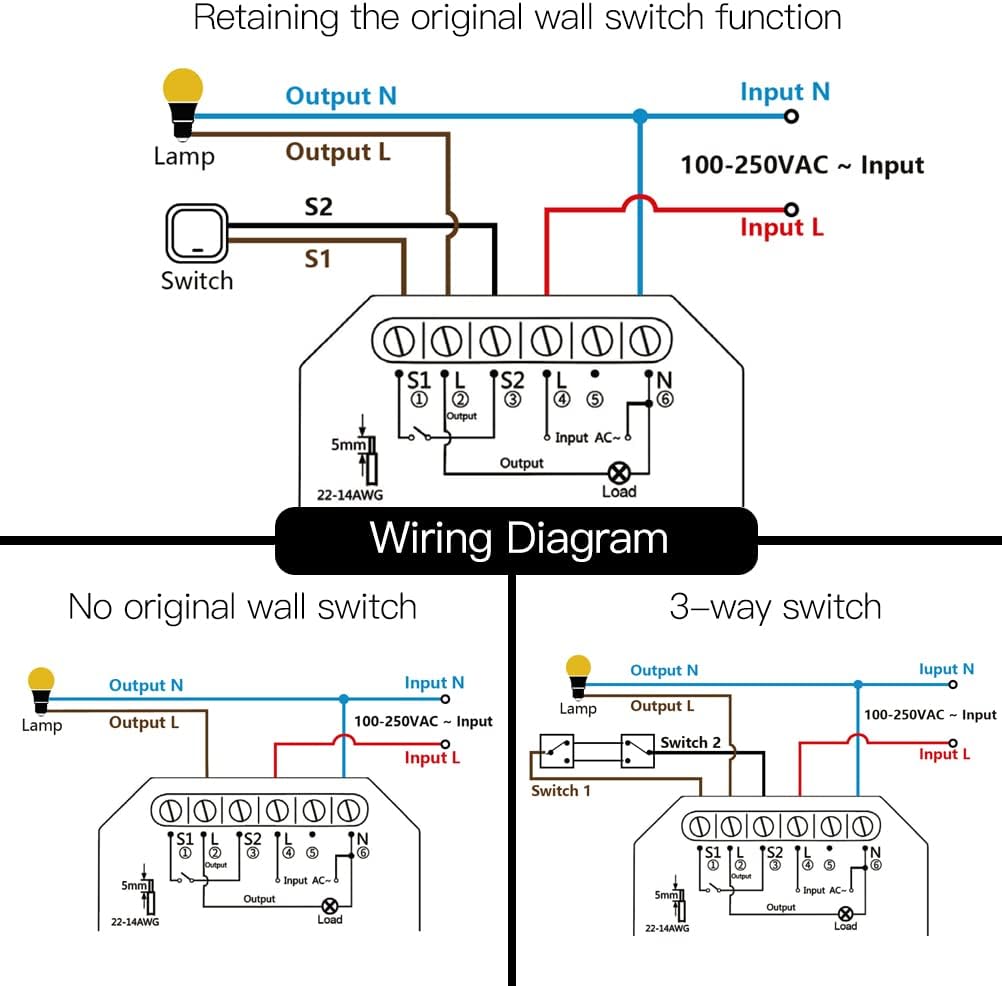
 wispy lynx
@untold jacinth Can you export data there to CSV Easy? Is integration fully supported?
thank you!
@untold jacinth Do you need some hub besides those sensors for the shelly system? I have Rasperry Pi 4b where I run Home assistant
golden thorn
vague heron
it is recognized in my router, but I cannot reach it
Try the ip instead. Also check supervisor logs in the CLI
vague heron
golden thorn
Try the ip instead. Also check `supervisor logs` in the CLI
Now he is no longer available. I just don't understand it.
i think i'll take a break at this point and get back to you tomorrow. i'll create optimal conditions by not always having to swap back and forth between the keyboard and the screen and the network cable.
I connect the Esprimo to another monitor and leave it on the network cable to which it is ultimately connected.
Then I check again.
In any case, I wish you a Merry Christmas Eve or, depending on the region, a Merry Christmas morning!
Thank you once again for all your efforts! Forgive me for making the whole subject so difficult.
golden thorn
Same. You're not making it hard to help you so don't worry. Feel free to ping me.
untold jacinth
wispy lynx
<@440504281917816832> Do you need some hub besides those sensors for the shelly ...
All you need is WiFi and the app to set them up. Also they will run ESPHome but I haven’t tried it. The integration is quite good.
untold jacinth
untold jacinth
All you need is WiFi and the app to set them up. Also they will run ESPHome but ...
I haven’t tried exporting CSV.
wispy lynx
@untold jacinth But is there CSV export support?
untold jacinth
wispy lynx
<@440504281917816832> But is there CSV export support?
I don't know.
hollow lance
tepid heart
Tell me about it. But the IoTaWatt CTs are quite small, I'll get 6 or so in my s...
just curious about these - do they need to be powered from the same circuit the CT is measuring? Or can they be powered from another circuit
the wiring diagrams I've seen show them powered off the same circuit, but I imagine those terminals are quite small and wouldn't handle heavier cables on 15A and 63A circuits.
tepid heart
They are powered from the same circuit to get voltage for power measurement (power = volts x current). However as they are powered in parallel with the load (not in series) the wires only need to be thick enough to power the monitoring device. The current measurement comes from a current transformer plugged into the board. So nothing is in series with the load.
You should probably get an electrician to do this for you.
hollow lance
This is another one of those things that would make my electricians head explode